#support
1 messages · Page 158 of 1
 rigid quartz
 small marsh
 ornate vector

 misty stream
anyone know what the plugin was called to show the ping?
under the fps?

 solid mesa
World Hopper
 stiff jacinth
Are you using teleport animation replacer plugin?
rigid quartz
stiff jacinth
Are you using teleport animation replacer plugin?
yes!
 jagged valve
I am writing a plugin, I am able to update the value for a given key in a group, but the actual ui for the plugin doesnt update at the same time, for example the value is true, I change it to false use the ConfigManager setConfiguration method, UI doesnt update, am I missing something? I mean I have even thought about posting an event using the event bus, am I thinking about it too hard?
solid mesa
The UI doesnt update unless you leave the panel and come back
jagged valve
solid mesa
The UI doesnt update unless you leave the panel and come back
Ah, I see
jagged valve
solid mesa
The UI doesnt update unless you leave the panel and come back
looking at the logs it looks like three events happen when you go out of a plugin configuration and back in, you figure if I post one of these events it will update?
stiff jacinth
rigid quartz
yes!
Guess i have a bug to fix 🙂
jagged valve
solid mesa
The UI doesnt update unless you leave the panel and come back
It certainly does work when I post a ProfileChanged event, but it starts slinging some IO Exceptions from the ExternalPluginManager
 round jacinth
jagged valve
It certainly does work when I post a ProfileChanged event, but it starts slingi...
round jacinth
jagged valve
It certainly does work when I post a ProfileChanged event, but it starts slingi...
You can’t change profile without going to that ui and then going back to the plugin config screen?
You go from ⚙️ to  and back
 bright narwhal
how can I buy a coffee for the runelite devs doing PR reviews?
 zealous cedar
i saw your comment earlier about the labels, i was using your pr to test the bot and so i needed to bump it by just adding/removing labels
unfortunately the bot is completely broken now for i think unrelated reasons
bright narwhal
once this plugin gets reviewed I'm not planning on doing any other new plugins (unless of course if it's to transmog all clan members' player models into ducks, but there is no rush for that one because it doesn't help with clan admin😇 )
 clever inlet
I recently got a new computer, which I installed runelite on and logged into using google. I tried to sync up the profile information but somehow my profile got overwritten with the default settings on the new machine. Going back to the old machine and the profile was reset there as well. The .runelite folder still has all of the data, plugin information, etc. Is there a way to set things back up without manually doing all plugins and settings again?
 mossy swan
!transfer
 haughty pumiceBOT
clever inlet
mossy swan
!transfer
haughty pumiceBOT
clever inlet
mossy swan
!transfer
My issue is that when I tried to cloud sync, it overwrote the original profile somehow and removed everything.
clever inlet
Dang alright thanks.
 late frigate
does anyone know why when you make a npc on your boat left click option to walk here so you don't keep clicking on them , it makes examine the first option? . edit: weird got 6 hour logged and noticed it's now fixed randomly? lol
 sly sigil
I was affected by part of the the ubuntu outages, and one of the things that it affected was my GPU driver somehow. it reverted from the driver i was on to Xorg. and now I can finally turn it back on. the only issue is now 117 HD's plugin refuses to turn on. any time i click it, it flashes right back off. GPU plugin does the same. is there any way I can fix this at all?
solid mesa
Try flatpak update and restart the computer
sly sigil
there is nvidia stuff there and i did just to a fresh install. let me do that and see if that works
the miracle cure. that worked. saved me so much headache lol. thank you 🙌
stiff jacinth
rigid quartz
yes!
I forgot to say earlier to just don't use the pendent teleport and the lever should be fine (I think all the other tps should work). I've fixed it and just waiting for it to be on the hub.
rigid quartz
stiff jacinth
I forgot to say earlier to just don't use the pendent teleport and the lever sho...
Has the be the favourite one 😂
 zinc zealot
Hey there. Been searching for ages but can't find a way to change the font color of the infobox. Is there a way?
These red numbers here are near impossible for me to read: (I'd be very thankful if I can change them to yellow or orange )

 topaz jasper
is there a way to determine which plugin is using too much memory? I’ve been crashing pretty consistently every time I teleport to Civitas or doing TOA.
round jacinth
debug plugin can do a dump of that stuff
 gentle scarab
zinc zealot
Hey there. Been searching for ages but can't find a way to change the font color...
gentle scarab
zinc zealot
Hey there. Been searching for ages but can't find a way to change the font color...
they cant be customized but gpu plugin has a colorblindness setting if that helps
 fresh cosmos
i exported my profile, from my windows drive but when i import my profile on my linux drive it doesnt add all my plugins
halp
zinc zealot
gentle scarab
they cant be customized but gpu plugin has a colorblindness setting if that help...
that's actually very sad. Colorblind mode makes things very weird to me. I have a minor/very specific colorblindness 🙁
round jacinth
fresh cosmos
i exported my profile, from my windows drive but when i import my profile on my ...
you picked the wrong file maybe
fresh cosmos
-.-
zinc zealot
@gentle scarab you reckon this is something that can be implemented? Not sure how complex it would be, but changing a color doesn't seem too bad? or not a chance?
 glacial geyser
zinc zealot
that's actually very sad. Colorblind mode makes things very weird to me. I have ...
glacial geyser
zinc zealot
that's actually very sad. Colorblind mode makes things very weird to me. I have ...
most colourblindness modes are just not colour blind or colour blindness cranked to the max unfortunately
someone could probably use the current colour blindness modes and make them less intense, not sure if its that simple (probably not)
gentle scarab
should be simple enough, #suggestions
theres an intensity setting fwiw, im not colorblind so cant comment how well it works
zinc zealot
I think I'd personally prefer just a color swap of the info box.. or any red text to make that orange
thankfully, I can make most text orange already by changing some settings
topaz jasper
round jacinth
debug plugin can do a dump of that stuff
it crashes when i stop memory profiling
haughty pumiceBOT
To find the logs, you can do one of the following:
- If your client failed to open, click the
Open logs folderbutton. - Open the screenshot directory by right-clicking 📷
Camerabutton, navigate 1 directory up, then open logs folder. - Navigate to
%userprofile%\.runelite\logson Windows or$HOME/.runelite/logson Linux and macOS.
Upload the log files named client and launcher by dragging them to Discord. If there are files prefixed with jvm_crash dated from today, upload them too.
 verbal sequoia
my runelite crashes after profile loading. how can i get some help on this?
haughty pumiceBOT
@verbal sequoia Many plugins from the pluginhub break the client in subtle or not-so-subtle ways, including causing issues like client freezes. We do not support pluginhub plugins because we do not make or quality control them, and do not recommend their use.
Run the RuneLite (safe mode) shortcut, or with a Jagex account, first run the RuneLite (configure) shortcut and tick the Safe mode box, then launch RuneLite via the Jagex launcher.
This temporarily disables the GPU plugin and all hub plugins which will allow you to confirm the issue is caused by one of those plugins and isn't a core RuneLite issue.
If the issue is caused by a hub plugin, you should isolate which plugin it is and then uninstall the plugin.
verbal sequoia
Even when launching in safe mode it crashes right away
zealous cedar
can you get the crash log from it crashing in safe mode?
verbal sequoia
yes do you want me send it here?
solid mesa
Yes
 upper trail
im crashing (black screen but game still runs) consistently after about 60 minutes of playing for the last few days. im running windows 11 and i just looked and saw compatibility mode (windows 8) was turned on. Should this be on or off?
round jacinth
you dont need to run it in any compability mode
 viscid lantern
did you click the X button at the bottom of the bank interface?
 sullen vapor
damn it, I never use those buttons so I forgot they exist
verbal sequoia
im not getting a crash log just a CLIENT and LAUNCHER log
solid mesa
You only get a crash log if its a jvm crash. Otherwise its just the client log
verbal sequoia
ok send client log? is there any sensitive info in there that i shouldnt be sharing?
solid mesa
Your windows username if you consider that sensitive
 gilded kayak
this isn't runelite so that's probably why it's not working
 coral crystal
Heyo! i just noticed a issue with not being able to resize my infoboxes by dragging the edges.
verbal sequoia
what isnt runelite?
coral crystal
never tried before, have i flipped some switch or is it bugged?
 hollow olive
maybe try resetting it's position (alt right click) and try again
coral crystal
Alt Rclick did not fix sadly
gilded kayak
verbal sequoia
what isnt runelite?
you're using a cheat client, not runelite, so that's probably the reason why your client doesn't work
coral crystal
hollow olive
maybe try resetting it's position (alt right click) and try again
If i create a new blank runelite profile it works
but not if i copy my existing one
hollow olive
then maybe you have something (some hub plugin) conflicting with it.
coral crystal
i will go down the list 1 by 1 i guess haha
coral crystal
hollow olive
then maybe you have something (some hub plugin) conflicting with it.
Found the culprit ****

Thanks for the assistance
 acoustic cypress
any plugin that keep track of charges for this

Amulet of chemistry keeps track of how many use it has left
but there seems to be nothing for Alchemist's amulet
solid mesa
Item Charges Improved but note that it will lag your client everywhere
acoustic cypress
solid mesa
Item Charges Improved but note that it will lag your client everywhere
god fucking dammit
solid mesa
Just reading chat tells you

 slate eagle
why do you need to know the charges on it so badly
put in 300 amulets and be good for life
acoustic cypress
just something i like QOL
acoustic cypress
slate eagle
put in 300 amulets and be good for life
also true
but i need to go mine a fuck ton of jade's
then
mmmmm
wel time to go mining again
 coral hearth
Hey everyone is anyone's runelite and pc freezing to like 2fps when using the gpu plugin? It seems to happen when I turn vsync on. I never had this issue been looking online seems some people having this issue since sailing update?
gilded kayak
95% of gpu plugin issues are just because there's an issue on the gpu driver the person is on
it just uses your gpu to do stuff
but the latest gpu drivers are not optimized for this browser game, so shit breaks often
coral hearth
@gilded kayak do i just wait for the next driver update and maybe it fixes itself?
gilded kayak
you could downgrade instead
and see if the problem goes away
unless you absolutely need the latest driver for <some game that came out last week>
coral hearth
But its only on runelite i dont want to downgrade drivers if other games need them
gilded kayak
if you dont want to downgrade then you would probably need to wait yes
we haven't touched the code for the gpu plugin in many months
coral hearth
So it wasnt changed for the sailing update or anything? What's the difference between the gpu legacy update and the regular one?
Sorry not update. I meant plugin
gilded kayak
it was changed for sailing yes but sailing has been out for a while
coral hearth
Ah ok
gilded kayak
that was like 6m ago
coral hearth
Oh i just recently came back. Noticed this issue when i came back. I figured it could have been a gpu driver update possibly
Hopefully the next gpu update fixes it. Ty for the info
mossy swan
it ain’t gonna help, nvidia is vibe coding their drivers
gilded kayak
xd
coral hearth
Damn so it will always probably have issues moving forward unless maybe i downgrade the gpu drivers? @mossy swan
 unique juniper
Is anyone having issues with the configurable slayer plugin?
I downloaded it and it doesn’t show up in my plugins. I remove and reinstall and still doesn’t show up in my plugin list
 rare sky

 swift meteor
construction qol
mossy swan
coral hearth
Damn so it will always probably have issues moving forward unless maybe i downgr...
yep i would expect that
 gloomy garden
is there a fix for killing sire too quickly in leagues, and him respawning with no attack option? I have the 'ignore dead NPCs' setting off in NPC indicators, and 'Hide dead NPCs' off in Entity Hider, but he still sometimes respawns with no attack option. For debugging purposes, the monster hp percentage plugin shows him respawning with 0hp, so somehow RL seems to think it's still dead when it respawns
solid mesa
It just happens when things have a 0 tick respawn time, like creatures in the abyss
gloomy garden
so the trick is logging out every kill?
solid mesa
I don't know of anything else you can do if you have those two settings off
 oblique plume
menu entry swapper hide dead
gloomy garden
that fixed it, ty
 frigid crest
77 high key a scam
only 1k more xp than medium
double the resources
oh sorry wrong discord
 craggy wyvern
Did this work for you? I am currently having this same issue when doing Nightmare with my buddy who has the KBD crossbow.
 eager aurora
May have. No idea if it was actually fixed or I got lucky.
 serene flax
Hey I’m having troubles with high alchemy. I’m doing seers rooftops, and when I click high alchemy it doesn’t show anything in my inventory??
Found it. Somehow my settings got changed in no bad high alchemy. Just got remove it. It’s useless
 stoic cove
FC spawn predictor not showing spawn locations for anyone else as of today?
round jacinth
stoic cove
FC spawn predictor not showing spawn locations for anyone else as of today?
#runelite I answered you.
unique juniper
anyone having problem with configurable slayer task overlay???
rigid quartz
Is there a way to order plugins by installation date?
round jacinth
No
 timid prairie
Was there an update to the bottom-left ui anchor point? Or maybe some plugin got updated and messed up with it? It used to go inside the chat area if chat was hidden.
 timid prairie
its the same in safe mode, so its a runelite problem?
zealous cedar
yes, i think it might be a bug
 twin vault
did plugins get messed up because the update today ? Duke vents highlight not working anymore and my boosts is floating when I hide my chat before that it would go down with the chat
gilded kayak
your second note is probably what was discussed right above
 faint parcel

Logged in today and now am having issues with camera randomly, seems certain places including inside tob i cant have a flat camera angle and its now got an auto-pan feature which ive never had prior. Some sort of interaction with terrain?
zealous cedar
yes maybe, there are a bunch of camera changes today
faint parcel
😩 ok thanks i guess just ride it out till it fixes
 junior bear
timid prairie
Was there an update to the bottom-left ui anchor point? Or maybe some plugin got...
junior bear
timid prairie
Was there an update to the bottom-left ui anchor point? Or maybe some plugin got...
yea its not great time to duplicate my profile and break that one till its fixed ig 🙁
 steady thistle
timid prairie
Was there an update to the bottom-left ui anchor point? Or maybe some plugin got...
steady thistle
timid prairie
Was there an update to the bottom-left ui anchor point? Or maybe some plugin got...
Is this related to the snapcorners refactor?
 delicate olive
some very strange things going on with the camera indeed.
delicate olive
the mine outside cam torum

there is also this, where the camera jumps down a little (seems like the character does too) that didnt happen before todays update
zealous cedar
mm
delicate olive
seems to do it only duing some animations, does it with barbarian mining too
zealous cedar
yeah i know why that happens, im not sure about the camera terrain thing though
theres a bunch of new code surrounding that ill have to see
timid prairie
are those camera movements a runelite thing, or a runescape thing? would be nice to be able to disable all forced camera movements/locks
zealous cedar
the terrain ones are runescape things though we have an option to disable ot in the camera plugin
timid prairie
this one?
 zealous cedar
i think expand pitch limit does/did
zealous cedar
nothing has been fixed in between now and when you last asked about it 2 hours ago
timid prairie
? im not talking about the anchor
zealous cedar
ok well nothing has been fixed in between now and when jin asked about it 10 minutes ago
delicate olive
if its worth anything, i have expand pitch limit enabled in those videos and the camera was locked looking down near the cliff
timid prairie
im just comment that the pitch limit option does not prevent the camera lock, as you suggested it possibly did.
zealous cedar
i think it might have used to reduce it
 quasi thunder
cpuld anyone tell me why my infoboxes move to the right when chatbox is minimised, never had this before, I would like them to stay like the left picture

 zealous cedar
I think its a bug
quasi thunder
zealous cedar
I think its a bug
Okay, it's only happening on one of my accounts
 thorn helm
delicate olive
some very strange things going on with the camera indeed.
thorn helm
delicate olive
some very strange things going on with the camera indeed.
I'm having this same issue in tob as soon as walk in aswel. There's some other funky stuff going on like infoboxes not moving correctly when chatbox is minimized and the tob qol plugin isn't doing what it's supposed to
jagged valve
Is there any specific discord for plugin development? I have reached the conclusion that updating the plugin configuration UI without having to post a ProfileChanged event is either difficult or intentionally impossible. I know I just need to call ConfigPanel.rebuild() on the instance of the ConfigPanel. I would prefer to do this because if I post an event, it tries to load external plugins and throws an exception. (because posting an event obviously goes to all listeners) I want to do this without any funny business in the codebase.
round jacinth
this is the discord for runelite and runelite plugin/plugin hub development
instead of trying to force updates to the runelite config screen side panel, why not make it it's own nav panel like many plugins do for their additonal settings? ie radius markers or watchdog
#runelite is also a more appropiate chat for this
jagged valve
round jacinth
instead of trying to force updates to the runelite config screen side panel, why...
I will move in this direction, it is also pleasing to know I didnt miss the solution because I improperly read the implementation. I will also take my questions to the runelite chat in the future
 lilac epoch
I'm also having a camera issue at tob, it makes it really high up and then super low when I enter a room but works fine in the room itself
zealous cedar
turn off
 lilac epoch
zealous cedar
turn off
lilac epoch
zealous cedar
turn off
this fixes it! ty!
thorn helm
lilac epoch
this fixes it! ty!
there's still some funky stuff going on with the autopanning
 somber slate
bloat chains are also no longer hidden when using tob-qol's (https://github.com/damencs/tob-qol/tree/master) option to hide ceiling chains when enabling GPU/117. There haven't seem to be any updates to tob-qol since january
round jacinth
the game or client updates can break/change hub plugins
zealous cedar
delicate olive
there is also this, where the camera jumps down a little (seems like the charact...
are there any other teleports this happens on?
 empty minnow
zealous cedar
are there any other teleports this happens on?
empty minnow
zealous cedar
are there any other teleports this happens on?
This was definitely happening before the game update. I noticed it with evil eye teleport and the transmute spell cast animation
delicate olive
it was occuring for me on the snapshot but I didnt think to report it 🙈
empty minnow
I have been running off of master tho
delicate olive
zealous cedar
are there any other teleports this happens on?
it happens with the leagues home teleport animation if you need something easy to access for testing purposes
zealous cedar
is there anything on the main game that does it
delicate olive
not that i can find so far
but i suppose it will probably occur in the main game once the leagues 6 teleport scroll is buyable from the shop
zealous cedar
thorn helm
there's still some funky stuff going on with the autopanning
can you describe what other issues you are having when expand pitch limit is off?
 hushed frigate
with expand pitch limit turned on wintertodt turns into an isometric game right now in the main game
thorn helm
zealous cedar
can you describe what other issues you are having when expand pitch limit is off...
it's still trying to adjust the camera height near certain object like the walls in maiden room
zealous cedar
that is normal isnt it?
lilac epoch
I have notice the autopanning that I never noticed before even with pitch turned off but nothing major. ToB QoL is a bit broken not hiding stuff in sote maze and bloat but that's mild
serene flax
Anyone know how to change the top tabs back to icons?
 thorn helm
zealous cedar
that is normal isnt it?
thorn helm
zealous cedar
that is normal isnt it?
I swear it didn't used to do that, but maybe that's because the pitch limit was enabled?
zealous cedar
lilac epoch
I have notice the autopanning that I never noticed before even with pitch turned...
do you have any specific examples of this?
gilded kayak
serene flax
Anyone know how to change the top tabs back to icons?
you installed a  plugin that does this
zealous cedar
and also are you sure that it isn't panning just because expand pitch limit is off
gilded kayak
gilded kayak
you installed a <:pluginhub:1264314292291895319> plugin that does this
probably bank tab names
lilac epoch
zealous cedar
do you have any specific examples of this?
Maybe it's because I'm not used to autopanning, as I've always had enable pitch limit turned on. Just not something I'm used to with autopanning
serene flax
gilded kayak
probably `bank tab names`
Thanks bro I’ll try that
thorn helm
turning gpu plugin on/off also seems to fix the tob qol stuff until you actually enter the room. Then the chains/pillars, etc pop back up
 opaque compass
hey is there any bug with boosted information
?

normall;y appears above chat box when you expand it
 viral mist
 young granite
my anchor point on the ui has moved (circled in red), its not where it should be anymore

i didnt know you could even move them, anyone know how to get it back
(click and drag dont work)
opaque compass
seem slike a bug
round jacinth
it is #support message
opaque compass
my ocd kicke din real fast lol
faint parcel
zealous cedar
can you describe what other issues you are having when expand pitch limit is off...
This doesnt work for me and ive had quite a few funky instances happening in maiden with camera issues
Random pathing, Red X clicks in middle of open room, and camera zooming in and out depending on where im at in the room
And general camera flickering
 warped prairie
where do you import and export tiles and object markers again?
solid mesa
You cant import object markers (unless you use the plugin that came out today)
warped prairie
solid mesa
You cant import object markers (unless you use the plugin that came out today)
oh that's convenient timing
and I meant objects and tiles so ty
I only ask cause I was wondering if there was a way to tag all of these teleports since they show up in different places. not the end of the world but just a nice qol thing if I could

to highlight all objects by a keyword
 wispy jay
I have been having consistent dcs the last couple of weeks, here is the log from the two most recent ones. Is there anything I can do to prevent the crashes?
 round jacinth
crashing and disconnecting are not the same thing are you losing connection or is the client crashing?
also the entire log is better to share
haughty pumiceBOT
To find the logs, you can do one of the following:
- If your client failed to open, click the
Open logs folderbutton. - Open the screenshot directory by right-clicking 📷
Camerabutton, navigate 1 directory up, then open logs folder. - Navigate to
%userprofile%\.runelite\logson Windows or$HOME/.runelite/logson Linux and macOS.
Upload the log files named client and launcher by dragging them to Discord. If there are files prefixed with jvm_crash dated from today, upload them too.
wispy jay
round jacinth
crashing and disconnecting are not the same thing are you losing connection or i...
this is the entire log, and its disconnecting from the game, sorry for the confusion
 vagrant whale
My friend is having issues with his camera plugin.
He's always had expand pitch limit on and he's never had any issues ever until today.
When expand pitch limit is on, his camera is essentially locked fully vertical (this is happening in ToB).
When expand pitch limit is off, his camera autopans when it never used to do that.
the link will show a video example of what's happening, along with his camera config on the top left so you can see which setting he's editing and when he's changing it etc.
Does anyone have any knowledge on this issue?
 thorn helm
vagrant whale
https://streamable.com/xfp97w
My friend is having issues with his camera plugin...
thorn helm
vagrant whale
https://streamable.com/xfp97w
My friend is having issues with his camera plugin...
it's a bug
solid mesa
Its a known issue today
round jacinth
wispy jay
this is the entire log, and its disconnecting from the game, sorry for the confu...
i think this is just you having a bad connection with jagex every once in a while
haughty pumiceBOT
open command prompt, type this in:
ping -t oldschoolXXX.runescape.com
where the XXX is your world minus 300, for example world350 = 50
vagrant whale
solid mesa
Its a known issue today
ohh
round jacinth
you can leave this running and see a similar packet loss
wispy jay
round jacinth
i think this is just you having a bad connection with jagex every once in a whil...
thanks for taking a look, is there anything you can reccomend to prevent this from happening? This has never happened on RS3. Only runelite.
round jacinth
runelite doesnt cause disconnects, its your internet/isp talking to jagex or jagex back to you
leave that command prompt running along while you play and point it to the world you're on, when you disconnect next time you should see it reflect in command prompt too
it would look like this: "Request timed out."

 worn jetty
Hello
round jacinth
worn jetty
Hello
hi
worn jetty
can u help me
round jacinth
i can try
worn jetty
round jacinth
i can try
can u tell me how i add in ur server and do work
round jacinth
This is a discord server for runelite, a client for oldschool runescape
idk what you're asking for help with
worn jetty
than
 wraith oriole
Hello Runelite team,
Anyone might know why my potion timer UI is still hovering in the middle of my screen when chatbox is minimized?
and yes it already hooked on one of the boxes when I hold Alt
 solid mesa
Its a known issue today
wraith oriole
thank you sir!
 tawdry pike
I cannot for the life of me figure out how to get my blue boxes back down to bottom left and bottom right. its treating it like chat is always open or something.
 solid mesa
Known issue today
 austere crescent
vagrant whale
https://streamable.com/xfp97w
My friend is having issues with his camera plugin...
austere crescent
vagrant whale
https://streamable.com/xfp97w
My friend is having issues with his camera plugin...
im having the same problem hopefully fixed soon
 old maple
hi team, i'm having a couple dramas with pluggins, i downloaded the quest helper and shortest path however they dont show up in configeration. They are however there in my plugin hub
thorn helm
old maple
hi team, i'm having a couple dramas with pluggins, i downloaded the quest helper...
for shortest path you can just open the world map, richt click a location and set path.
old maple
no what i'm saying is the pluggins are not showing up in my configeration on the side bar. i cant toggle them on or off or change their settings.
 quick willow
Hello, I am using Resizable-Classic layout with the "stretched mode" plugin scaled up to the max % fit for my screen. This is great for the inventory/mini map/chat interfaces however it makes my bank only show 6 rows of items. Is there any plugin, or way to independently scale down the bank? Or change it somehow? tbh i really just need 1 more row.....
---Actually maybe nevermind. I picked a day to change my interface when theres an issue with chatbox interference. Perhapse that is what my problem is
 toxic seal
Is there a way to copy all plugin settings to work on a second character? Profiles seems to not do this if you are playing a different characters.
old maple
so ive just created a new profile and set it as default to this account. i am redownloading the plugins
 upper gazelle
Is there something the matter with the gem bag? It seems i have not collected a single gem in 2 hours
old maple
nope ive re installed quest helper on the default profile and its still not in my configeration
round jacinth
toxic seal
Is there a way to copy all plugin settings to work on a second character? Profil...
duplicate the profile
toxic seal
round jacinth
duplicate the profile
Heeey that ended up making me realize the issue. I assumed creating a new profile would create one with current settings. It does not, so trying to load that new profile i made did nothing. I'm dumb, ty
round jacinth
lol
 livid peak
does know anyone know i can import my old runelite plugins to my new pc?
not sure if export home does anything
 haughty pumiceBOT
livid peak
haughty pumiceBOT
livid peak
tried that none of the profiles works
 tepid solstice
Quick question, I have all my info boxes right above my chat box.
Before today, when I would close my chat box they would go to the bottom of my screen (where the chatbox would be).
Now they always stay in the same spot. Any idea?
 neat socket
Anyone know what ive done to break my buff timers no longer moving down with the chatbox when i closed it like it did before it basically moves horizontally now instead of how it did b4 tried restarting runelite and checking plugins dragging to diff locations etc

 tepid solstice
Lmao
neat socket
yep
tepid solstice
^ Same thing as Annie
neat socket
u too
tepid solstice
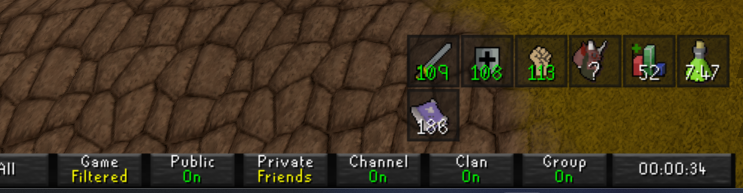
It used to come to here for reference for me
https://i.imgur.com/9ZYf1zK.png nwo it's here
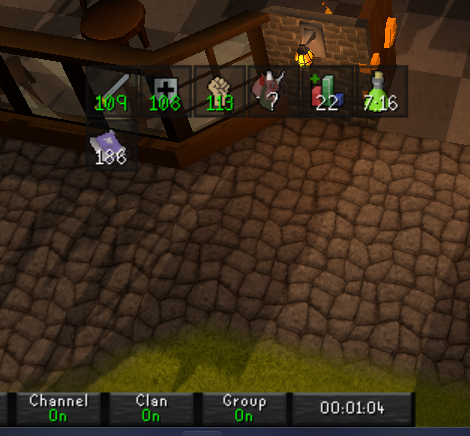
Edit: I'm dumb and someone above asked same and it's a known issue today. I will see myself out kindly.
 vestal prairie
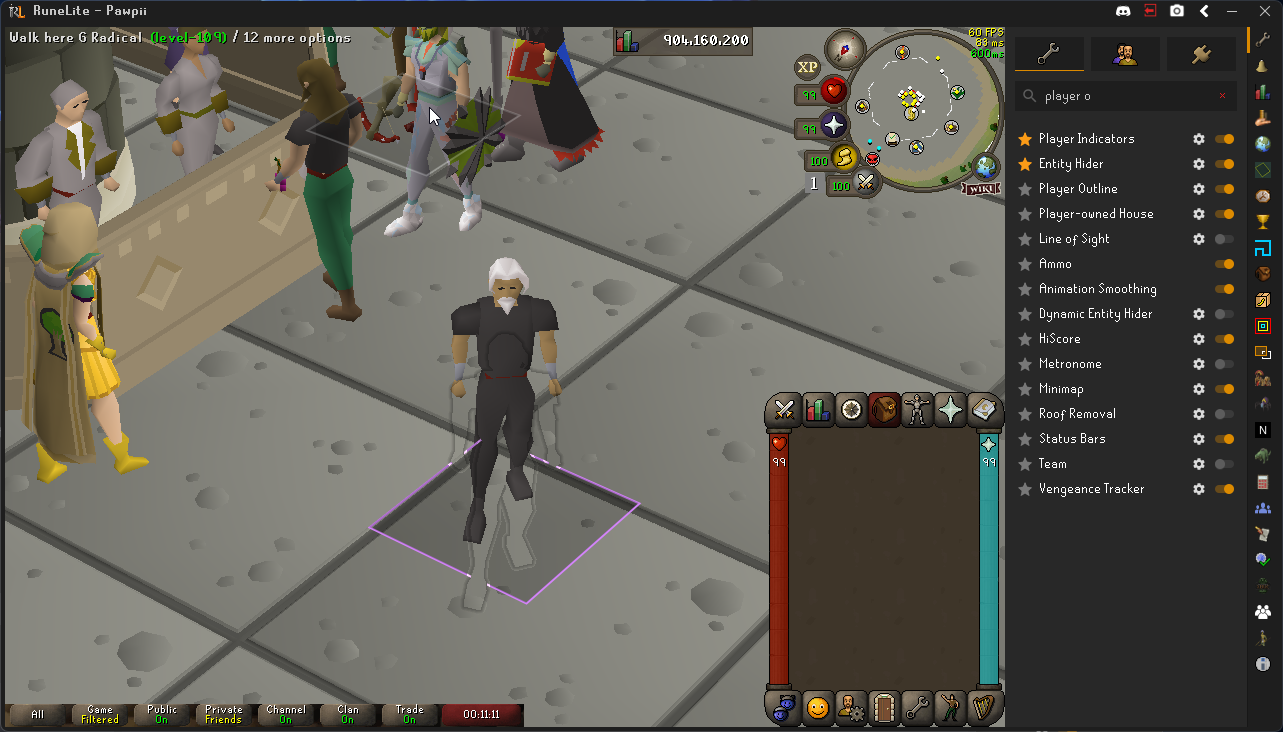
https://i.imgur.com/FImBlE8.png any idea why i see an outline of my character? like the silhouette? goes away when i turn off gpu plug in only
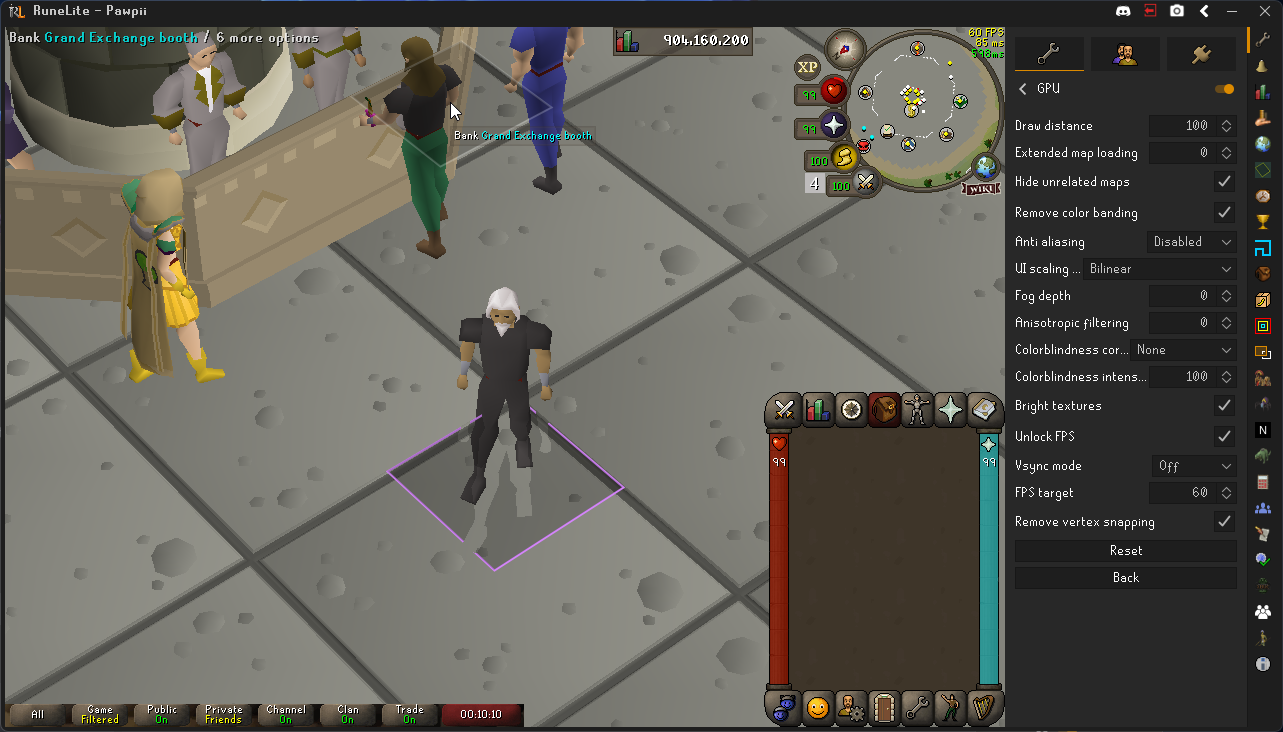
https://i.imgur.com/PpHWCFw.png and this is what it looks like with player outline plug in turned on
 solid mesa
Improved Tile Indicators
 errant beacon
@vestal prairie known issue
vestal prairie
errant beacon
<@431011395409018881> known issue
bet appreciate it. just got home and logged in first time all day. kinda bugged me out lol
vagrant whale
austere crescent
im having the same problem hopefully fixed soon
🤞
warped prairie
what's the name of the plugin that pulls up a little instance map when I right click the globe?
 toxic girder
Anyone happen to know why my character is clipping into the ground a bunch while doing any gathering actions?
 haughty grotto
toxic girder
Anyone happen to know why my character is clipping into the ground a bunch while...
haughty grotto
toxic girder
Anyone happen to know why my character is clipping into the ground a bunch while...
oh i just came to report the same thing
 toxic girder
despite all the same plugins, it doesn't seem to affect my account that doesn't have Barbarian Gathering
and i've seen a few other friends mention this who all also happen to have BG
haughty grotto
I tried the official client and also hdos, neither of those have this problem
toxic girder
interesting
I tried gpu instead of 117, neither, as well as legacy gpu and it still occurs regardless
 agile tundra
getting player outline and overheads among other outline plugins glitching through the floor etc. idk if this is part of todays issues

only happens in tob not outside
 junior crag
Is it normal for RL overlays to get tinted like that?

 wintry yoke

weird clone like thing on my friends char and also the shadows appearing on gpu/hd when turned off and only happens at g.e
 lofty grove
wintry yoke
lofty grove
wintry yoke
its improved tile indicators
wintry yoke
ur amazing and thank you very much
frigid crest
is it possible to move the UI elements whenever you hold down alt?
whenever i minimize my chat my stuff shifts to the right instead of down like how i want it to
wintry yoke
another issue lol, whenever he equips a new item his character dissapears for a sec n loads back in or something i had him clear cache but idk
frigid crest
frigid crest
whenever i minimize my chat my stuff shifts to the right instead of down like ho...
nvm just had to restart client
 empty sluice
hello has anyone had an issue where runes are randomly set to "drop" and nothing else? I was all normal and then started GOTR and then all my runes decided to change to 1 click drop
 leaden trail
I think some gotr plugin does that
empty sluice
the only thing i have done recently is gotten "unmovable " plugin and construction QOL for construction
leaden trail
Plugins update in the background sometimes so I would still try turning off any gotr or rc hub plugins you have
 subtle temple
is the Better NPC hightlight plugin bugged ? I used to see my true tiles for for example the duke Gas flare but not anymore, and i checked the settings its still added and all but still nothing


 sick pasture
What is this weird "shadow" I get with gpu plugin at the G.E. ?

 ebon igloo
hello guys is anyone know what's happens here?.
why my name under my character and the npc hover looks like this..
happens only in wintertodt.

 crisp sierra
Default RL overlay question: I've been tinkering with the overlays and while their mostly in place, their location keeps resetting when restarting the client. I'm missing something basic, surely?
 lofty grove
sick pasture
What is this weird "shadow" I get with gpu plugin at the G.E. ?
lofty grove
sick pasture
What is this weird "shadow" I get with gpu plugin at the G.E. ?
improved tile indicators
sick pasture
lofty grove
improved tile indicators
I see I see hmm
 rocky tiger
ebon igloo
hello guys is anyone know what's happens here?.
why my name under my character a...
rocky tiger
ebon igloo
hello guys is anyone know what's happens here?.
why my name under my character a...
That will be fixed in next RuneLite update.
 ebon igloo
rocky tiger
That will be fixed in next RuneLite update.
ebon igloo
rocky tiger
That will be fixed in next RuneLite update.
Thanks ❤️
 vague pond
So a while ago my Runlite was suddenly dropping to 1 fps (together with my whole PC) and it would be fixed when putting my pc to sleep or turning my monitor off and on again. I realised it had something to do with the gpu plugin, I disabled it and it stopped happening. Something was updated on RL and I managed to use GPU again without issues. After today's game update suddenly the issue was occurring again, so turned off GPU again. My question: is there anything I can do on my end to solve this issue, or do I have to wait for another RL update? Sorry, quite clueless..
leaden trail
You probably want to roll back your GPU drivers to an older version
vague pond
I can definitely try that, however, my drivers haven't updated since the moment it was working fine. Thank you though, I'll give it a shot
 stray flame
is idle notifier broken right now ?
solid mesa
Shouldn't be
stray flame
so weird... i'm not getting idle notifications, focused or not.
yup, just watched it again. no noti.
 thorn grail
hey guys, ive recently gotten back into osrs and went to start up runelite but it popped up with a message about a fatal error, ive done some research and cant really find a fix, im on a mac with the latest system update and reinstalled runelite. on the console it says: SSLHandshakeException: Remote host terminated the handshake
does anyone know how to fix this?
 sacred fulcrum
subtle temple
is the Better NPC hightlight plugin bugged ? I used to see my true tiles for fo...
sacred fulcrum
subtle temple
is the Better NPC hightlight plugin bugged ? I used to see my true tiles for fo...
I have this same issue
also
 stray flame
yup, just watched it again. no noti.
stray flame
stray flame
yup, just watched it again. no noti.
talking with others at karambawans and it's broken for them too
seems like it's broken only for fishing?
solid mesa
You have idle interaction notifications on?
stray flame
yup

someone else here said the same thing, he asked his cc and said he figured out it's only broken for fishing (maybe)
solid mesa
Can confirm
Seems like a jagex thing? Because at tempoross you rotate towards the fishing spot when it moves
round jacinth
solid mesa
Seems like a jagex thing? Because at tempoross you rotate towards the fishing sp...
Happens at minnows too, it's a bit silly
 jovial nebula
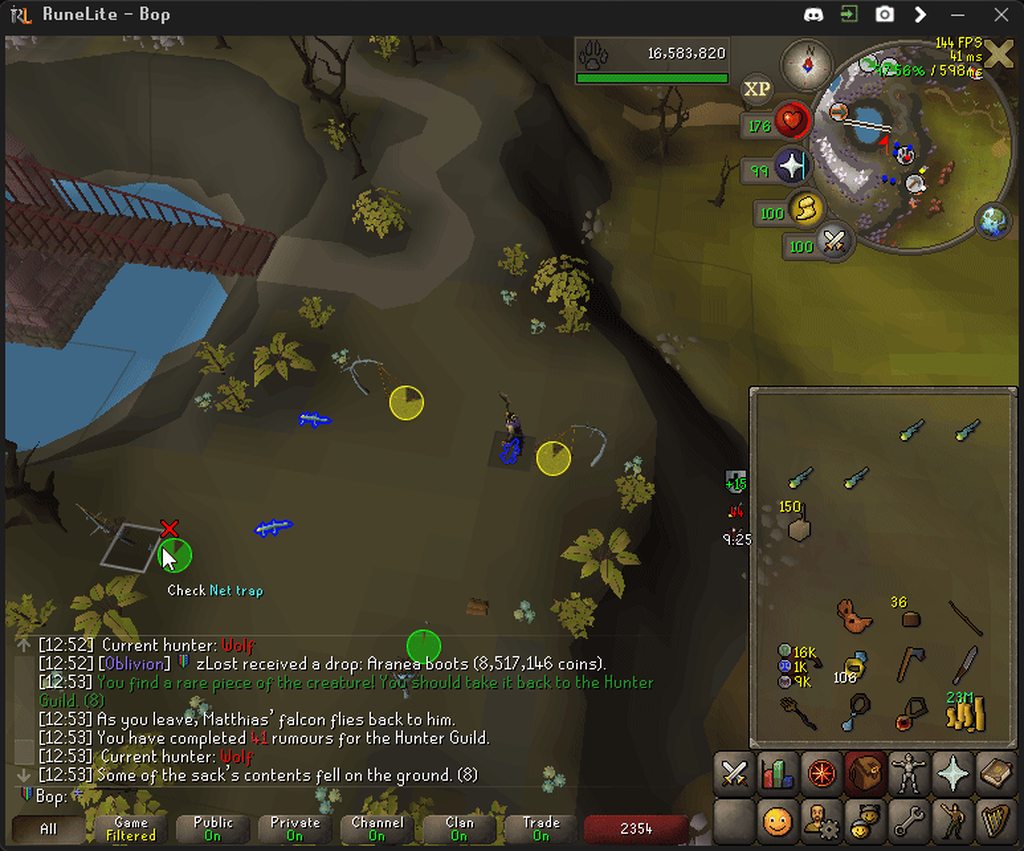
Something seems to have changed with some hunter traps as well, running between net traps you are now moonwalking
https://i.imgur.com/LWfx0n4.gif
 zealous cedar
lol
jovial nebula
(just to confirm that this is likely jagex caused and not runelite)
timid prairie
the michael ads are going too far
 clear ore
stray flame
yup, just watched it again. no noti.
clear ore
stray flame
yup, just watched it again. no noti.
i think it is broken
i literally just tweeked out about it
since update its not been working
only pinging on non skilling/combat pings. dosent let me know when my bwans finished but lets me know when im standing still lol
solid mesa
Yes its a jagex issue
 lost coyote
Good morning! When checking my Slayer task on my Imbued Slayer helm this morning, this popped up and i can't figure out where it's from or how to get rid of it. Thoughts?

(i already tried turning off and on the slayer plugin and i don't have any clues in my inventory)
empty minnow
probably some clue hub plugin you have installed
or a slayer task plugin
perhaps configurable slayer task overlay?
lost coyote
oh yep, there was one for turael tasks i added years ago, that did it, thanks!
 dreamy inlet
Buenos dias,
After the update I cannot connect through to Runelite. Permanently stuck at 275/330 and then runelite becomes unresponsive, have to exit it via task manager.
I'm able to boot up runelite on an alt account that has less plugins and it works without issues.
However, when I then sync to my main account's plugins runelite then freezes.
Don't know how to fix this, essentially locked out of runelite on the main account. Only guess I have is one of the external plugins has gone bad.
 haughty pumiceBOT
To enable safemode
Windows
Run the RuneLite (configure) shortcut from the windows start menu
Tick the Safe mode box, save, launch RuneLite the way you normally do.
Mac
In Terminal, run
/Applications/RuneLite.app/Contents/MacOS/RuneLite --configure
Tick the Safe mode box, save, launch RuneLite the way you normally do.
solid mesa
Turn on safe mode to launch the client. You'll have to disable whatever plugin is causing the client to not boot
dreamy inlet
Thanks! I've been able to launch runelite in safe mode.
Do you know how I can then disable the plugin? Cannot sync to my profile w/ all the plugins in it due to the issue
solid mesa
Turn off the plugins, disable safe mode, restart the client
dreamy inlet
As in I believe the issue is with an external plugin, not one of the defaults that's there with safe mode
round jacinth
you use safe mode to load the client without hub plugins and then you can disable/uninstall hub plugins while in safe mode to prevent them from being there and blocking you when you load without safe mode
dreamy inlet
oh got it sorry. Can see if I go plugin hub they're there
Thanks for the help cooper & zom
hopefully I find the one
glacial geyser
lost coyote
Good morning! When checking my Slayer task on my Imbued Slayer helm this morning...
looks like turael skipping
 kindred veldt
is there a way to hide npc's but keep them highlighted and attackable? whenever i add the volitile earth to the entity hider in Better NPC Highlight, it hides the volitile eart but also makes it so i cannot attack it
oblique plume
dont hide it?
kindred veldt
thanks i didnt think of that
 glossy belfry
Blindfold can do this, will hide all entities though but remain clickable
kindred veldt
this would hide doom's projectiles too right?
glossy belfry
yes
 simple plank
Hello!
Trying to install runelite. When im launching it from jagex/runelite.exe it is stuck at 0.0 download. I added runelite.exe at firewall, didnt help

 lean mantle
Hi guys! I have a new bug with Runelite with the "Interact Highlight" plugin, only affect NPCs

Happens on vanilla, gpu and hd117 so its not a rendu thing, its so weird
 cold ingot
Its also happened at demonic gorilla
 lean mantle
Happens on every NPCs from what I've tested
 severe zephyr
Does anyone know if the "Mark Tile" option for Ground Markers has a hotkey that can be bound? Bonus points if an alternate hotkey can be used for secondary / tertiary colors
solid mesa
lean mantle
Hi guys! I have a new bug with Runelite with the "Interact Highlight" plugin, on...
It happens on bridges, it should be fixed in the next runelite update
lean mantle
solid mesa
It happens on bridges, it should be fixed in the next runelite update
Do we know when it should release? playing without highlight around what im interacting with makes my brain hurt confused af x)
solid mesa
Whenever Adam wants to
glacial geyser
cold ingot
Its also happened at demonic gorilla
it just puts everything at the lowest floor so you also appear to be under docks and stuff
while walking on water
gilded kayak
you're all going to learn how much of the game is actually bridges~
wintry yoke
sick pasture
What is this weird "shadow" I get with gpu plugin at the G.E. ?
improved tile indicators i think
friends character blinks basically for a second when he equips a new item his charcter goes away and comes back like its loading the item? any ideas plz
haughty pumiceBOT
safemode: To enable safemode
Windows
Run the RuneLite (configure) shortcut from the windows start menu
Tick the Safe mode box, save, launch RuneLite the way you normally do.
Mac
In Terminal, run
/Applications/RuneLite.app/Contents/MacOS/RuneLite --configure
Tick the Safe mode box, save, launch RuneLite the way you normally do.
wintry yoke
not sure ill have him check tho
leaden trail
Have him come in here and talk to us directly please
Going through a middleman makes things harder than they need to be for us
 silver bane
can anyone tell me what's wrong with my game? the characters are duplicated

same with my character, it seems
this doesnt happen everywhere, mostly in varlamore areas
round jacinth
yeah its a known bug
silver bane
is this a plugin or default runelite?
round jacinth
some areas are behaving because theyre bridges or they're not bridges
im confused actually
are you asking because your name is under your feet
round jacinth
the thing on the left is the bug im talking about
silver bane
the name underneath me, that's probably the same bug
round jacinth
i think so
silver bane
this also makes me wonder, i think baba was slightly visually bugged too
round jacinth
its the highlights you havee on them
round jacinth
oh thats jagex broke interactions
silver bane
just a weird bug then lol
round jacinth
when fishing spots move your caracter looks at it move
silver bane
i just observed it yesterday, this was before today's update
solid mesa
Yes it happened yesterday too
silver bane
so that player outline is a plugin bug rn?
because the screenshot i sent was while i was doing a quest, and the quest helper is highlighting it
round jacinth
silver bane
so that player outline is a plugin bug rn?
yes
the baba interact is jagex
overlays are from runelite
silver bane
alright thx 🙂
round jacinth
can you get a recording of what you mean dead click
 pure egret
Yeah, I am recording rn. Wil lsend here if it happens again
 rancid granite
is there a way to make the runelite menu on the left side of the window instead of right?
rocky tiger
No.
pure egret
https://streamable.com/ox49jg 2min18 @round jacinth

Happens quite often, atleast every minute
pure egret
No
The last second sorry
When I click on verzik, and then back
Where I get bounced
round jacinth
you clicked boss and attacked and did not click off
pure egret
nah they are death clicks
round jacinth
maybe your mouse is going bad, you did not send a yellow click
pure egret
It's a 1month old mouse haha
oblique plume
you were just a tick late
pure egret
I think this is a bad example.
There are times where the clicks are super inaaccurate.
As it 'drags'
oblique plume
you click where the mouse was last frame
pure egret
Like, I click a certain tile, and then it's off by 2-3 tiles.
oblique plume
thats how the game works
pure egret
I never had this in 7+ years of rs
oblique plume
finally got too good
round jacinth
It’s sorta hard to show a negative tbh
round jacinth
Can you trim these clips to the last 5 seconds lol
pure egret
Yeah idk how
But basically at 11min04 when I click to the double meleers wave 21
122
 round jacinth
It’s not new
It’s jagex polling your mouse every 20ms and when you click you’re actually clicking the last spot 20ms ago
But idk if this is that
oblique plume
this isnt that
pure egret
I don't think so
oblique plume
the x will be in the "wrong" location if its that
round jacinth
oblique plume
the x will be in the "wrong" location if its that
Thought so
oblique plume
im not sure what that click was
perhaps its because you are playing osu instead of actually in the nylo room
if you have the camera in the position and its always reproducable i bet we would be interested in looking at it more
especially in safe mode
oblique plume
i bet its the same as zulrah pillars
pure egret
It's all over the game btw,, not just tob
oblique plume
but since you removed them you cant actually tell youre clicking them
lofty grove
pure egret
It's all over the game btw,, not just tob
I get that too sometimes
oblique plume
well id need an example where youre not clicking on an object and then pathing weird
round jacinth
show us safe mode basically
oblique plume
because the game clearly thinks you clicked the other square
this is not a "dead" click
jovial nebula
round jacinth
It’s jagex polling your mouse every 20ms and when you click you’re actually clic...
I think "walk-here" will always be where your mouse is at the time of clicking, the clienttick bit is that it doesn't change what option is being hovered until next frame
pure egret
What is safe mode?
jovial nebula
Or well usually walk here, but just whatever you were hovering in the last clienttick which usually would be that
round jacinth
Bop, j have you blocked due to the harassment you sent my way 2 weeks back and when your good friends who use your cheat client doxxed me. Don’t reply to me.
haughty pumiceBOT
To enable safemode
Windows
Run the RuneLite (configure) shortcut from the windows start menu
Tick the Safe mode box, save, launch RuneLite the way you normally do.
Mac
In Terminal, run
/Applications/RuneLite.app/Contents/MacOS/RuneLite --configure
Tick the Safe mode box, save, launch RuneLite the way you normally do.
pure egret
I use JagexLauncher
oblique plume
i use discord
jovial nebula
round jacinth
Bop, j have you blocked due to the harassment you sent my way 2 weeks back and w...
Yeah that sounds like something I'd do for sure, thought i'd provide some context since your assumptions were incorrect
You don't have to click the "View blocked message" when there's a blocked message on your screen fwiw, think that's the point
pure egret
Okay, I have two more examples, in 2secs
But its not in safe mode
one sec.
Regular click + the right click. Both inaccurate
oblique plume
i wonder if this is somehow the bridges bug we currently have
round jacinth
Just shy of 48 hours
pure egret
Yeah could be
I did chambers yesterday and noticed it every minute or so
What is the bridges bug?
oblique plume
heights for models are being calculated wrong for displaying overlays
faint parcel
Is there any progress/resolutions for camera issues as mentioned yesterday?
oblique plume
what camera issues
round jacinth
I think they’re fixed
faint parcel
I still seem to have them
round jacinth
solid mesa
Have you restarted the client?
oblique plume
the client isnt magic you have to actually update it to get updates
 wary mist
round jacinth
oh thats jagex broke interactions
wary mist
round jacinth
oh thats jagex broke interactions
is this also why interact highlight stays on the same npc even after disengaging?
round jacinth
Yeah
solid mesa
Yes
pure egret
Okay, so the thing that I have is a current bug that's being tackled?
faint parcel
oblique plume
the client isnt magic you have to actually update it to get updates
obviously...
round jacinth
People do need to be told to restart their client everyday
faint parcel
Fair enough i dont keep my pc on over night 😄
silver bane
also just noticed that salamanders walk sideways or backwards towards the trap
just visual, but prob just jagex jank
pure egret
Is that bridge thing also displaying names (of people in a party) incorrectly? Z-Index on the floor instead on-top of the player?
round jacinth
silver bane
also just noticed that salamanders walk sideways or backwards towards the trap
That’s the jagex interacting thing
pure egret
Then I will just wait for the new RuneLite release, and calm down with the gamer clicks
Thank you 🙂
 glacial coral
😭😂
jovial nebula
pure egret
I think I have this for around a week now.
if it has been happening for a week like you said it wont be because of that
pure egret
I've really started to notice it like 24hrs earlier from now
faint parcel
https://streamable.com/9w331s
https://streamable.com/8gd0r4 here's 2 clips of me turning expand pitch limit on and off and it interacting with environment bizarrely I also have clips from yday of other issues like pathing and interesting red x which i assume are from camera bugs but could be wrong

 zealous cedar
there are no known pathing bugs, though ive seen a few people report it
but afaict none of it is real
faint parcel
 faint parcel
yea even tho i clicked infront of maiden too before re-barraging
im also using a sang so no way i was going to staff bash
Yday i had many input issues with prayer flicking or swapping gear too

and this red x which mustve been something to do with me clicking her attack animation even tho it was clear from it
zealous cedar
is there a simple example of the problem you are having right now?
faint parcel
faint parcel
https://streamable.com/9w331s
https://streamable.com/8gd0r4 here's 2 clips of me...
These camera problems, I havent tried anything besides interacting with rotating camera and since that was being obnoxious i havent tried content besides this
jovial nebula
Your mouse is seemingly "stuck" in another spot, in the last clip your client thought you were hovering over the infernal tecpatls instead of on the ground
zealous cedar
idk i dont see any camera problems here, you would have to be more specific
faint parcel
jovial nebula
Your mouse is seemingly "stuck" in another spot, in the last clip your client th...
Looks like that but i dont equip them?
faint parcel
zealous cedar
idk i dont see any camera problems here, you would have to be more specific
I cannot rotate my camera flat through the balcony/walls and it has auto-panning when up against walls which since 2 days ago ive never had
jovial nebula
Yeah idk, but if it had clicked "through" the inventory that would match up with what you saw
I'd guess it's some plugin
that's very weird
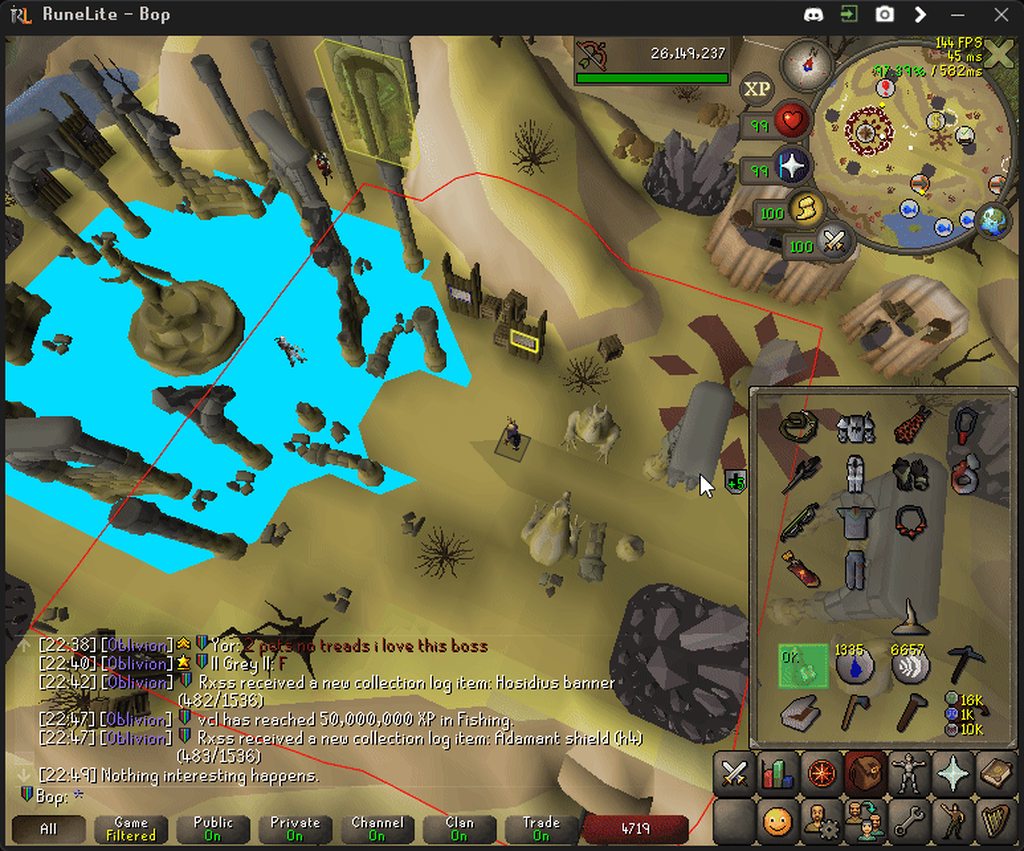
Yeah that is whats happening, the click went through the inventory
https://i.imgur.com/wCjSnn3.gif
Example of it happening
 faint parcel
i guess this is probs from having bad server connection or smth?
jovial nebula
Idk if that would also explain the weird yellow clicks though, but seems like some plugins are messing with your clienttick updates
faint parcel
or my net etc
jovial nebula
Nah should be clientside
faint parcel
Only thing i can think is usually my ms is stable enough to sit around 13 consistently and in the clip its dipping between 13 and 60 tho
As for not being able to rotate my camera through walls etc?
jovial nebula
that's a different issue
zealous cedar
this is normal and happens on 237
 faint parcel
zealous cedar
this is normal and happens on 237
faint parcel
zealous cedar
this is normal and happens on 237

mine cant go further down then this
zealous cedar
where are you standing
faint parcel
2 tiles next to s1 spawn
zealous cedar
i dont play the game
faint parcel
but i think its anywhere along that area
zealous cedar
can you like screenshot where you are standing
faint parcel
I will get on in a moment just going back in
Firstly i noticed by the chest

I cant go any flatter then that and if i move a tile west (by marked green tile) it starts auto-panning down slowly
And i cant manually rotate down
zealous cedar
do you want me to go check that or do you want me to continue to look at the maiden thing
faint parcel
I just tried on maiden south wall and every tile against the wall wont let me
zealous cedar
yes that is the correct behavior and happens on 237 too
faint parcel
Ive never had issues like this previous to yday though
zealous cedar
i thought you were complaining about how it let you see inside of the wall, now you are instead saying it isnt letting you pan down under the wall and you want to be able to?
faint parcel
Ok maybe i typed or got misunderstood, the issue is terrain seems to be blocking my camera rotation whereas before i could rotate through walls as your screenshot shows
zealous cedar
terrain blocking the camera is normal, its part of the game and has been for like more than 20 years
so you are going to have to be more specific
faint parcel
2 days ago i could move my camera in any direction with nothing restricting the movement and never had my camera automatically start panning/rotating depending on where my character is in game
Now i cant rotate my camera in certain places and its auto-moving
jovial nebula
vagrant whale
https://streamable.com/xfp97w
My friend is having issues with his camera plugin...
It's the same thing as this, I think
zealous cedar
this is from yesterday though
zealous cedar
i think you are maybe just misremembering how the game works
faint parcel
Bruh
zealous cedar
idk i really dont see anything wrong
faint parcel
No worries thanks for your time anyway appreciate it
 silent fossil
Is there a known cause for NPC indicators to be offset from the model?
Example here where the grand exchange clerks outlines are below their model.
 zealous cedar
yes
silent fossil
It's just a known issue or is there a plugin that's causing it?
zealous cedar
its a known issue
silent fossil
Okay, thanks
 visual musk
yeah my items when I equip new ones since deleting the cache my character disappears then reappears a tick later as if it’s loading the item?
but once i’ve already equipped the item it doesn’t do it again.
lean mantle
silent fossil
It's just a known issue or is there a plugin that's causing it?
It’s even already fixed, we are just waiting for a runelite update
 lilac charm
is there a way to get the plugins on the right side to not expand the whole runescape screen? basically I want the osrs screen to shrink to stay the same aspect
lean mantle
one of the best place ive seen with the bridge issue with highlights 🥲
 solid mesa
lilac charm
is there a way to get the plugins on the right side to not expand the whole rune...
solid mesa
lilac charm
is there a way to get the plugins on the right side to not expand the whole rune...
 lilac charm
solid mesa
lilac charm
solid mesa
thank you!
 bronze lagoon
ummmm 😅
 viscid lantern
known bug, will be fixed in the next runelite update
 obsidian steeple
Does RuneLite or Temple save collection log data in a local file?
 zinc radish
These guys respond quick!
visual musk
visual musk
yeah my items when I equip new ones since deleting the cache my character disapp...
any resolution??
thorn grail
hey guys does anyone know how to fix runlite error that says: unexpected error during start up. im on mac with the latest software update and recently deleted and reinstalled RL, i also have tried both with safe mode enabled and turned off and it still wont open, any solutions?
lilac charm
when i try to highlight items in my inventory with inventory tags plugin, its not letting me keep the color around the item. it just hihglights it in white
 tall shell
why is player outline and interact highlight bug is not on the character is below the ground?
 mossy swan
bridges
tall shell
mossy swan
bridges
?
 dry birch
Hello
 uncut meteor
Hello, I deleted my runelite cache folder and my jagex cache folder and it seemed to have affected my plugins. I have a profile that I am signed into and syncs with the cloud. For example my entity hider plugin to hide dead NPCs is turned on but not hiding the dead NPC animations. In addition, I use loot filter and currently it works fine with most items but any raid items is not tagged as before.
zealous cedar
do you know which folders you deleted specifically?
uncut meteor
The ones that are specific to runelite, “jagexcache” and “cache” in the runelite folder on my comp
zealous cedar
deleting those wouldnt cause your runelite settings to be lost at all
uncut meteor
I do not believe the settings are lost, simply the plugins have started to malfunction
I have all of my plugins and appropriate profile
zealous cedar
it cant really cause plugins to malfunction either
uncut meteor
One example of an issue I faced: I have automatic low detail plugin for raiding, it ofc worked perfectly and turned certain detail settings off in chambers but after the end of the raid it did not turn them back on as it usually did before
In addition I have loot filters, it worked for all items I dropped like Sara brews etc but none of the raid items showed up with a ground identifier. This used to show up with a ground identifier before
 plush vapor
Hello! Ive had some issues lately and was pointed here to get help. Any time i try to examine or value anything, nothing happens. Im relatively new to osrs, but im pretty sure im not doing anything wrong.
 cinder onyx
plush vapor
Hello! Ive had some issues lately and was pointed here to get help. Any time i t...
cinder onyx
plush vapor
Hello! Ive had some issues lately and was pointed here to get help. Any time i t...
Checked the "Examine" plugin?
plush vapor
Yes I have, it is on, if that's what you're asking
 worthy agate
I don't know if this is a runelite thing or a plugin, but sometimes when I TP to my house, I have this issue where the building mode walls all spawn, despite me not being in building mode and them not being interactible. This doesn't happen on mobile, so I'm fairly confident it's something runelite or plugin related, but I don't know what specifically.

 sacred dawn
i am having issues with some npc's highlights being underneath the actual npc. if they are near a wall it seems to be ok?
 solid mesa
Restart runelite
sacred dawn
seems to have fixed it. that was weird and messing with my ocd xD
 lapis olive
I seem to constantly getting this portal sound even with all sounds muted, any idea what it could be?
I also created a new runelite addon profile and it didn't go away
worthy agate
#support message Someone mentioned to me that this could be a problem with the GPU plugin, but I can't find anything on it?
 limpid pelican
Hello! I wanna get started again after more than a decade - I'm on CachyOS, but it looks like with a Jagex account I just made I can't log into the .AppImage. How do I go about this?
haughty pumiceBOT
Using Jagex accounts on Linux is not officially supported by Jagex, but there are some third party community guides to make it work https://help.jagex.com/hc/en-gb/articles/13413514881937-Downloading-the-Jagex-Launcher-on-Linux
viscid lantern
Bolt is a nice linux alternative imo
haughty pumiceBOT
@lapis olive To enable safemode
Windows
Run the RuneLite (configure) shortcut from the windows start menu
Tick the Safe mode box, save, launch RuneLite the way you normally do.
Mac
In Terminal, run
/Applications/RuneLite.app/Contents/MacOS/RuneLite --configure
Tick the Safe mode box, save, launch RuneLite the way you normally do.
viscid lantern
does it happen in safemode?
limpid pelican
viscid lantern
Bolt is a nice linux alternative imo
Gotcha, I see it's hosted on Codeberg as well which I respect. Thanks 😄
 broken compass
Does anyone know if there is a plugin that will record a drop? not screen shot, it will record 1 or 2 seconds before and after the drop? If not a plugin anyone know a good software for that? something automatic.
 keen pumice
Hello runescapers! How can I import my runelite settings to another computer?
clear ore
gagek no fix the bwan idle notif still?
round jacinth
clear ore
gagek no fix the bwan idle notif still?
jagex broke interactions
haughty pumiceBOT
clear ore
round jacinth
jagex broke interactions
maybe theyll increase my two acc yearly membership while working on a idle fix
: D
 torn onyx
hey i don't know exactly what's happening but for a solid 20-30 minute i was getting a CannedException error, i cleared the dns cache and it works now somehow?
i don't know the exact issue because i've had this happen to me a few times over the past week.. anyone can help? i can send some logs although i'm pretty sure runelite just has issues connecting although my internet is fine.
for what it's worth i also have an issue when hopping worlds where the game would freeze but the sidebar and the plugins won't then it'll just force a logout and i'd have to log back in
 errant geyser
I'm on a 4k display and with windows display scaling, my game looks jagged/stretched, is there a to disable scaling for just RuneLite ? I'm using the jagex launcher
 final horizon
round jacinth
jagex broke interactions
final horizon
round jacinth
jagex broke interactions
Didn't they just rework how interactions work? From what I've read interactions are now cached to work with sailing action resuming but theres a custom getInteracting implementation that isn't returning null under the right condition. They now track interaction mode, type and index where mode changes when an interaction changes, but type and index remain. getInteracting is unfortunately just returning the last known index regardless of if the updated interaction type is none
 dusky nacelle
is there way to restore accidently reseted skill xp/hr, xp gained etc
errant geyser
errant geyser
I'm on a 4k display and with windows display scaling, my game looks jagged/stret...
i was able to fix it through right clicking RuneLite.exe and changing highdpi settings under compatability
round jacinth
dusky nacelle
is there way to restore accidently reseted skill xp/hr, xp gained etc
No
round jacinth
final horizon
Didn't they just rework how interactions work? From what I've read interactions ...
I suppose runelite issue but jagex changed it so jagex broke it.
 bronze condor
Unsure if this is a Runelite issue but I noticed it over the past week or so but;
Randomly my right monitor's Runelite will just completely freeze up (Runs at like 1FPS and sometimes just completely freezes), however any action on the left monitor runs perfectly fine. If I grab the Runelite and move it to the left monitor it starts running perfectly again.
I assume this is more of a tech issue than a Runelite issue but I havn't noticed it with any other games so figured its worth posting here. I've also attached a video where you can see the second my mouse moves over the left monitor, Runelite starts running smooth again instantly
Although the client did start running smooth again once I moved it back over to the right, I think this is just because it decided to fix itself since this issue lasted a good 30 seconds or so, which is about the time it usually last before it fixes itself
oblique plume
does the sidebar work when the game is frozen like that?
bronze condor
I'm not sure but I can test it next time it happens
 solar owl
Are you using an nvidia gpu?
bronze condor
Yeah
solar owl
Rollback your driver to November release
They've been vibecoding their drivers for a while and it isnt stable
bronze condor
It was doing this on the previous driver and I updated it and its still occuring so might give that a shot
I'll see if it happens again and test the sidebar and then go from there
oblique plume
a gpu driver issue is my second idea
solar owl
I noticed a similar issue a month ago, and it seems for me 581.8 was the last stable driver
bronze condor
I sat on the previous driver for a good few weeks atleast so I'm curious why it started acting up all of the sudden

 haughty pumiceBOT
leaden trail
haughty pumiceBOT
leaden trail
Check the "prefer ipv4" box there probably
oblique plume
the jagex launcher isnt runelite
leaden trail
oblique plume
the jagex launcher isnt runelite
Oh yeah also that lol
I should probably not try and provide support mid flight oops
 civic root
I don't see an option for IPV4
 oblique plume
update your launcher then
haughty pumiceBOT
Download and install the updated RuneLite launcher from the website link in #welcome. You don't need to uninstall your current version. You will not lose any settings or plugins.
civic root
oblique plume
update your launcher then
I think it is updated but will try fresh install and then do some digging ty all
 leaden trail
If you don't have that option then your RuneLite launcher is not up to date
 vale gyro
not sure if this is the right place to ask but anyone know how what might be making my area sound distance so small? im trying to use the manticore sound at colo yet it is only making noises if im about 1 tile away
zealous cedar
there was a bunch of sound changes in the update yesterday, its possible it is broken, how far away did it used to work?
round jacinth
it was pretty short before, like 6 or so tiles distance of hearing if i recall correctly
 rough hinge
I could hear it shooting the projectiles no matter the distance if i remember correctly
vale gyro
I dont know to be honest, I heard the noise in a video and realized i had never been hearing it so i got real close to a manticore and thats when i could hear it finally
its the sound when its charging up the 3 projectiles not the sound when shooting
oblique plume
increase your sound volume
vale gyro
i have them maxed
vale gyro
and i do hear it when im close its just when im behind pillar im not and thats only like 3-6 tiles away
oblique plume
ive had people say they dont hear stuff unless its past the 2nd tick
round jacinth
vale gyro
and i do hear it when im close its just when im behind pillar im not and thats o...
that alligns with what i know it to be
shockwave and javelin also dont make noises unless youre within like 6 tiles of them too
vale gyro
https://youtu.be/tCO6T9gu3Ss?t=1006
in this video hes able to hear it behind the pillar

This is a video walkthrough of the Fortis Colosseum using a chill BowFa + Ancients setup. It's meant as a simple example to help you get your first quiver.
The biggest advantage of Ancients in the Colosseum is reducing the pressure from Fremmies on spawns, allowing you to focus on prayers. I believe this setup is the best way to learn and deal ...
round jacinth
that is within 6 tiles or so that i was talking about
vale gyro
I misunderstood, for me im not hearing it in that same position
round jacinth
i can go verify rq
going in
3 tile distance is still the cap of sound, if you at the diag that i am at, you cant hear the javelin throw

i think thats what it was before
i know for sure you couldn't hear them across the map
vale gyro
but thats the same distance in the video no? id figure you should be able to hear it there
round jacinth
at 11:45 hes dealing with a javelin and you cant hear his auto attacks and he is > 6 tiles away, i guess the real range is 4 tiles from the edge in a cardinal direction
that jives with how i remember
vale gyro
interesting, seems counterintuitive but thats fine if thats how it should be. thanks for helping :)
vale gyro
the pressure is on haha
round jacinth
maybe i should do it in leagues
 surreal flame
Hi all, sorry if its a typical question but with Spell reordering are we not able to move the transmute spells? it seems the cast overrides the long click for movement
round jacinth
round jacinth
let me check manti, i sorta flubbed wave 3 when typing lol
it is the same as before
afaik
vale gyro
cant hear it around pillar?
round jacinth
yeah
that clip is 18 months old, they could've changed stuff since then. i did my quiver run on my iron some 6 months ago or so at this point and i think it was how you're saying it is
vale gyro
seems kinda silly for them to not have the sound distance extend to the tile behind the pillar but oh well, i know thats nothing you guys handle
round jacinth
oh his clip at 16:50 actually it would work because he's in the mdidle of the tile
which i can recreate
vale gyro
the manticore?
vale gyro
oh maybe its a line of sight thing?
round jacinth
Not sure but you see me step out behind pillar 3 times in this clip.
The times when I don't hear it at all is when I am never directly in the middle of the manticore, if i am off axis I don't hear it, the distance > 4 (diagnals are farther than straight lines)
On my first step back I hear the mage/melee attack charge.
On the second I don't hear anything.
On the third I hear it all.

this sorta all jives with how i remember it, but it explains why he hears it in his clip as he is standing in a spot that matches the mechanic of the second/third step where he's in the middle of the manti
vale gyro
thats confusing, i would have figured it went off their southwest tile
round jacinth
idk maybe they set the area sound source as the middle of them
im not saying today is same as that 18 month old video but it seems to be similar/same to what i recall it to be
vale gyro
that makes sense, and that explains the video, thank you for that
oblique plume
mythbuster zom on the case
round jacinth
might as well try to get another quiver wihle im here
oh man i shouldve brought my nox
to get that CA
plush vapor
plush vapor
Hello! Ive had some issues lately and was pointed here to get help. Any time i t...
anyone have any ideas here?
viscid lantern
no text appears in your chat at all?
timid prairie
A small bug i ran into recently: If you launch runelite without any sound devices enabled and then enable a device after, the game will not produce sound unless restarted. Not a big deal, but i figured id post it here for reference.
oblique plume
sound devices are weird, the client is quite finicky with them
 mental cradle
I've been searching everywhere online. I had no issue for weeks. There was an update via Jager launcher yesterday when I got to work. I updated and started my afk karambwans just fishing. My idle notifier now no longer gives tray notifications. I'm windows 11, it's on desktop 2 while I work on desktop 1 so I can just switch desktop view and reset the fish when notifier goes to tray and says I'm inactive. Basically, there was an update to Jager launcher, I changed nothing else and now the idle notifier no longer sends to tray. I've tried changing setting like in focus and delays and timeout settings. Nothing fixed it. Is this known or just a me issue? Any help?
oblique plume
jagex broke it
mental cradle
... sadge
 mint light
Did something change? I swear I used to be able to separate boxes by control+alt+right click to separate the 1 I right click on out but now the whole stack just gets moved to the default position
 haughty pumiceBOT
You can configure horizontal/vertical orientation, infobox groups or split infoboxes into new groups with the menu options opened with Shift + right-click. https://runelite.net/img/blog/1.6.28-Release/infobox.gif

 lapis atlas
my runelite is verry laggy if i have the side open on anything that is live updating like xp tracker or loot tracker
anyone know why?
haughty pumiceBOT
Graphical artifacts? Try disabling hardware acceleration: https://github.com/runelite/runelite/wiki/Disable-Hardware-Acceleration
oblique plume
try that
lapis atlas
will try it
gilded kayak
it's probably the interact highlight issue
 wraith garnet
yep sorry will remove messages
gilded kayak
there's an issue with the interact information not being cleared so the plugin is getting upset
lapis atlas
its fixed thanks a lot
fresh cosmos
hi why does my runelite client massively drop in frames randomly? its only the runelite client that does it, i can scroll on the browser on my other monitor just fine
too many plugins?
round jacinth
any single number of hub plugins can be badly optimized
haughty pumiceBOT
To enable safemode
Windows
Run the RuneLite (configure) shortcut from the windows start menu
Tick the Safe mode box, save, launch RuneLite the way you normally do.
Mac
In Terminal, run
/Applications/RuneLite.app/Contents/MacOS/RuneLite --configure
Tick the Safe mode box, save, launch RuneLite the way you normally do.
round jacinth
if it doesn't happen in safe mode then its hub plugins
fresh cosmos
okay thanks brothers
how would i go about determining which plugin is unoptimized, if thats the case? is there an easy way to do it?
and i have a jagex account. what do i do about it now?
haughty pumiceBOT
flowchart: Please refer to this flowchart for further troubleshooting.
round jacinth
a first step is to just disable/uninstall plugins you arent using or dont remember even installing then go through flow chart
a good first step*
 plucky cargo
hey how do you get your runelite logs? my runelite keeps causing OpenGL crashes
round jacinth
!logs
haughty pumiceBOT
To find the logs, you can do one of the following:
- If your client failed to open, click the
Open logs folderbutton. - Open the screenshot directory by right-clicking 📷
Camerabutton, navigate 1 directory up, then open logs folder. - Navigate to
%userprofile%\.runelite\logson Windows or$HOME/.runelite/logson Linux and macOS.
Upload the log files named client and launcher by dragging them to Discord. If there are files prefixed with jvm_crash dated from today, upload them too.
gilded kayak
if you already know it's an opengl crash it's probably unlikely these logs will have anything new
gilded kayak
gilded kayak
if you already know it's an opengl crash it's probably unlikely these logs will ...
.
plucky cargo
well ive also done every 'fix'
not sure what else to do 😂
been ongoing issue for 2 months.
gilded kayak
was one of the fixes turning off the gpu plugin
plucky cargo
yeah i played in safe mode for a while but it happens so infrequently
round jacinth
then its probably not opengl
round jacinth
if its opengl crashes in safe mode
 gilded kayak
are you saying you played in safe mode for 7-10 days or did you give up because it was taking too long
gilded kayak
so you should just turn the gpu plugin off since safemode also does that for you
since opengl is only used in the gpu plugin(s)
plucky cargo
Can I ask why it would conflict with the gpu? Its not low end, and i wasnt having these issues for 6 months after building the pc
gilded kayak
you can ask but i can't really give you the correct answer 1
but if windows says yeah this is opengl, then it's the gpu plugin
which uses your gpu, which matches up with the other NVIDIA GO BOOM, event viewer logs
gilded kayak
i mean opengl is not exact the latest tech
gilded kayak
i would probably not sell my gpu because it's not working on a browser game
unless you have this problem with other games
plucky cargo
Its the only game I play
gilded kayak
mmm
oblique plume
lmao
gilded kayak
i would make sure you try october 2025 drivers before you do that
plucky cargo
Ive done that , November aswell
gilded kayak
unfortunate
plucky cargo
🙂
 forest linden
The varlamore thieving plugin has been kinda weird for me last day or two. I have idle notifier on and set to flash, it'll just notify me for no reason seemingly when theres no urchin distracting a citizen, won't give a notification when a citizen is distracted, will flash when I'm halfway through the afk timer for pickpocketing a citizen, and highlights multiple wealthy citizens as the current one to pickpocket.
 round jacinth
yea its a known issue
round jacinth
something changed with interactions
 dense veldt
is this a known issue? w11 launching runelite through launcher

some days are times i have no issues but sometimes like today i just cant boot the game, only the official launcher or runelite with jagex launcher
and it feel like it changes hourly
i played whole day today but now it wont launch
have tried reinstalling restarting etc
haughty pumiceBOT
newplayer: If you are new to OSRS, make sure to follow this excellent guide on OSRS wiki: https://oldschool.runescape.wiki/w/New_player_guide. You can also join the official OSRS Discord here: https://discord.gg/osrs
dense veldt
which channel would u recommend
gilded kayak
idk ive never been in there xd
dense veldt
well now it works, i didnt change anything and it will break again but for now im good..
spamming seems to be the play
 tardy harness
Hey, runelite crashes every time I try to login on a specific account. I've tried switching profiles and restarted my pc with no luck. I can log into other accounts without issue. My CPU usage spikes to 50-60% before it crashes on the "Loading - please wait"-screen
I was out salvaging when I was last able to log in
Any ideas on what could be wrong?
Logging in on the Official Client works
lean mantle
tardy harness
Any ideas on what could be wrong?
maybe a bad profiles that load on said account?
in there
 tardy harness
Potentially. How would I go about fixing it?
I tried switching it after logging in with the jagex launcher but before clicking play
haughty pumiceBOT
safemode: To enable safemode
Windows
Run the RuneLite (configure) shortcut from the windows start menu
Tick the Safe mode box, save, launch RuneLite the way you normally do.
Mac
In Terminal, run
/Applications/RuneLite.app/Contents/MacOS/RuneLite --configure
Tick the Safe mode box, save, launch RuneLite the way you normally do.
haughty pumiceBOT
To find the logs, you can do one of the following:
- If your client failed to open, click the
Open logs folderbutton. - Open the screenshot directory by right-clicking 📷
Camerabutton, navigate 1 directory up, then open logs folder. - Navigate to
%userprofile%\.runelite\logson Windows or$HOME/.runelite/logson Linux and macOS.
Upload the log files named client and launcher by dragging them to Discord. If there are files prefixed with jvm_crash dated from today, upload them too.
tardy harness
How do I enter safemode with the jagex launcher?
gilded kayak
As its indicated in the command
gilded kayak
It can be less steps for non jagex accounts but we just changed the command to the one that works for both
tardy harness
safe mode works
gilded kayak
Its almost certainly a plugin on that profile shitting itself
As safe mode is all the default plugins minus gpu
tardy harness
Well, I'm not sure about what steps to take next. Ideally I'd just want to be able to play on my main profile
I guess we could narrow it down and figure out what plugin is acting up
gilded kayak
Youll probably have to do that, assuming the logs dont clearly say ERROR name-of-hub-plugin
Right after you login
tardy harness
[Client] ERROR c.itemdropsound.ItemDropSoundPlugin - Invalid item id configuration
Seems to be the culprit
How would I go about removing the plugin from the RL profile without loading the profile?
gilded kayak
You can remove plugins in safe mode
From the pluginhub install tab
It wont appear as if it properly uninstalled but it did
tardy harness
Hmm that still didn't fix the issue
Here are the logs if someone more knowledgable wants to take a look
tardy harness
Okay, it seems to be sailing related. Teleporting to Varrock with safemode and then logging in normally works. This is with the exact profile that crashed a moment prior when trying to login in on my boat
 spark vine
Have a plugin request that I'll gladly pay money for help on. Long story short, if you look at me using the "fixed mode hide chat" plugin, where the chat gets hidden does not match the color of my resource pack. There is a fix that somebody made, but I don't know anything about plugins/java. The fix is on the official plugin page here: https://github.com/deathbeam/example-plugin/issues/68 but the maker of the plugin has not addressed this after many many attempts reaching out for well over a year and by many people

GitHub
I saw that this issue was raised last year and you said it was a minor issue that you didn't plan to address. For a lot of us, we decide not to use this fantastic plugin due to how badly the co...
Was hoping that somebody could help make a version of the plugin with that fix installed? Will gladly pay you for your efforts
Essentially compile the plugin with the hotfix, if anyone can help please respond here :D I've been tearing my hear out going through all the resource pack files
round jacinth
they keep pring to deathbeam but i dont think he is the owner anymore of it
some one else owns it or maintains it and only fixes it to keep it working
because every few weeks or so jagex changes soemthing with interfaces and breaks it
spark vine
round jacinth
they keep pring to deathbeam but i dont think he is the owner anymore of it
Yeah that's what I think too, I just want to compile the fix with the plugin so I can use it locally and give it to anybody who uses dark modes
round jacinth
you can show support on the item and thats abotu it
since its a hub plugin its all you. can do
spark vine
Isn't all the source files available? like everything you'd need to combine the plugin and the fix?
final horizon
@limpid sky Cant post in dev sorry, but I think getInteracting is fixed in latest dev build (not released) but he's forgotten isInteracting
 limpid sky
ah dev build yeah, that'd make sense
round jacinth
spark vine
Isn't all the source files available? like everything you'd need to combine the ...
its up to the maintainer of the plugin to do that
not just anybody
they can decide if they want to do it or not
final horizon
I think current isInteracting still just checks the cached entity rather than the face type + entity type so it'll still partially brick
ty sir
 ruby swallow
I'm having a persistent issue that I'm not sure how to solve.
Every time I restart runelite, some settings aren't saved and return to their previous value.
Configuration > Runelite > Overlay > Overlay Color never gets saved for some reason.
Any tips on how to solve this would be awesome. I'm on Linux if that matters
solid mesa
Using resource packs?
solid mesa
Your resource pack is overriding the value
ruby swallow
yea let me check (thanks)
omg i feel kinda dumb right now haha, I even made the rs3 resource pack >.<, i should know this lmao thanks @solid mesa
 uneven gulch
How do i start using runelite
haughty pumiceBOT
Download from the link in #welcome or from the link from the Old School RuneScape home page
solid mesa
final horizon
<@248934306041430023> Cant post in dev sorry, but I think getInteracting is fixe...
Are you the AFK-Overlay dev?
 rich shard
Hello, I messed up. I hadn't been logged into a profile in runelite for a while. I logged into one I'd previously used and until client restart of the client it was fine, now it however overrode all my settings to about a year ago. Is there any way I can salvage my plugin settings or gg?
I tried swapping to the second profile I have available, but it seems to just be the default. If I log out of my profile, will it revert? I haven't done it yet cause afraid I might mess it up more.

also I appear to have 2 profiles folders
 torn onyx
hey i keep getting connectexception errors whenver i open up runelite.. it's on and off sometimes just relaunching would work but on other times i'd have to restart my pc. coupled with world hopper and pluginhub sometimes not working, it's like it's having issues connecting to something within runelite and it's coinflip for the initial login..
any ideas? i can provide logs if necessary
round jacinth
torn onyx
hey i keep getting connectexception errors whenver i open up runelite.. it's on ...
Your connection is having issues yeah. You can share your logs if you want
 quaint trail
Does anyone know what plugin this is? I'd like to turn the overlay off. I searched for Gauntlet and found two plugins, but turning them off did nothing.
 haughty pumiceBOT
Many plugins from the pluginhub break the client in subtle or not-so-subtle ways, including causing issues like client freezes. We do not support pluginhub plugins because we do not make or quality control them, and do not recommend their use.
Run the RuneLite (safe mode) shortcut, or with a Jagex account, first run the RuneLite (configure) shortcut and tick the Safe mode box, then launch RuneLite via the Jagex launcher.
This temporarily disables the GPU plugin and all hub plugins which will allow you to confirm the issue is caused by one of those plugins and isn't a core RuneLite issue.
If the issue is caused by a hub plugin, you should isolate which plugin it is and then uninstall the plugin.
empty minnow
Turning off hub plugins doesn't always remove their overlays, you might need to restart
rich shard
rich shard
Hello, I messed up. I hadn't been logged into a profile in runelite for a while....
Anybody any advice on this please? Or a place where I could read up more on it.
quaint trail
empty minnow
Turning off hub plugins doesn't always remove their overlays, you might need to ...
Sadly this didn't help either 🙁 I really don't understand what plugin would do this, why would I have a 0/178 counter of Gauntlet, even inside the Gauntlet itself
empty minnow
My guess would be prison sentence but I've never actually looked at that plugin
quaint trail
Holy moly you were right, thank you! I didn't even know I had that plugin
haughty pumiceBOT
empty minnow
You can see if anything in there helps
I don't think logging out will reset anything
rich shard
thanks so much chief
 lime cairn
hi mods theres another bot going around and trying to do a scam

once i asked if they are a Ai they blocked me
but they requested to friend me
only Runelite as a shares server and their account was created in march 25th 2026
round jacinth
you can report them to the runelite bot @haughty pumice
lime cairn
thx
 mental pewter
client freezing at muspah, using GPU plugin
 zealous cedar
this is an assertion error
mental pewter
what is that?
zealous cedar
it means youre probably using a botting client or something and despite that still are wanting to report issues in #support
mental pewter
ty ty
zealous cedar
why are you so stupid
mental pewter
huh lol
zealous cedar
or, why do you think its a good idea to report client problems in #support with non-runelite clients
mental pewter
I mean.. I am using Runelite.. but thanks
 zealous cedar
ok!
oblique plume
denial to the very end, its always the same
lapis olive
random player seems to be highlighted, even with player indicators turned off

 violet seal
mental pewter
I mean.. I am using Runelite.. but thanks
violet seal
mental pewter
I mean.. I am using Runelite.. but thanks
we love a botter lmaooooo
 lapis dove
is there an issue with the gpu plugin atm?
round jacinth
lapis dove
is there an issue with the gpu plugin atm?
depends, what is your issue?
lapis dove
round jacinth
depends, what is your issue?
i can run the client with the plugin turned off, but i get this error message and a black client when its turned on
 haughty pumiceBOT
To find the logs, you can do one of the following:
- If your client failed to open, click the
Open logs folderbutton. - Open the screenshot directory by right-clicking 📷
Camerabutton, navigate 1 directory up, then open logs folder. - Navigate to
%userprofile%\.runelite\logson Windows or$HOME/.runelite/logson Linux and macOS.
Upload the log files named client and launcher by dragging them to Discord. If there are files prefixed with jvm_crash dated from today, upload them too.
rich shard
can I somehow import all the plugins in my .runelite/plugins folder to my profile?
 urban pike
In the bank tag layouts, what is the difference between a "placeholder" showing the name of the item and one where it shows nothing when I hover over it? I have not acquired either of the items, but imported the tag from elsewhere
round jacinth
Bank tag layouts do that
Regular bank tags don’t show items you don’t have or place holders like that
urban pike
round jacinth
Regular bank tags don’t show items you don’t have or place holders like that
So my understanding is that’s just how it will be till I have acquired said items?
Like a 3 dose antidote shows up as antidote (3) but the 2 dose is just completely blank with no text
round jacinth
urban pike
So my understanding is that’s just how it will be till I have acquired said item...
Yeah. You can remove those items from the layout
urban pike
round jacinth
Yeah. You can remove those items from the layout
Though wouldn’t that make the actual item not show up in the tag once I acquire it?
It seems I am either very stupid or have done something incorrectly
urban pike
round jacinth
It would show up if you have the real item yeah
Alright I believe I understand it better now
 uneven birch



 gilded kayak
probably need to flatpak update your gpu drivers
solid mesa
Open a terminal and type flatpak update and then restart