#support
1 messages · Page 156 of 1
 frigid flame
 rocky tiger
 strange nova
/Applications/RuneLite.app/Contents/MacOS/RuneLite --debug work to open RL?
In terminal.
strange nova
yes
rocky tiger
Ok then the script I gave you does work. Jagex launcher also failing to execute it.
It's possible Jagex launcher is broken on catalina.
@strange nova do you have another computer you can run RuneLite on?
strange nova
what would I need to do
 lucid perch
Im having trouble with my loot tracker plugin not working, and as well as wikisync. please help
rocky tiger
If you have another computer
 haughty pumiceBOT
rocky tiger
haughty pumiceBOT
rocky tiger
Add --insecure-write-credentials to client arguments on second computer.
Then launch RL with Jagex launcher on that computer.
Copy the credentials.properties from RuneLite folder of that computer to the mac using a usb drive.
It's in your macs home folder as a hidden file. Command-shift-. to view them or type open ~/.runelite in terminal.
Reinstall RL from the macos old dmg and open it.
It should read the credential file automatically and you will be signed in.
You should have to replace the file every once in a while. Just be careful with it. Anyone can login to your account with it.
If Jagex launcher is broken on catalina this is only workaround I know.
strange nova
yeah ngl i might just give up
rocky tiger
You could ask in Offcial RuneScape discord. Tell them Jagex launcher does not launch RuneLite on catalina. Does the offcial OSRS client work at least?
That's a 7 year old operating system. At some point stuff starts to be unsupported sadly.
Oh also it only has 4gb of ram. Not sure it's even worth trying to use.
 hollow pilot
It seems like at a certain point XP drops stopped happening, anyone else have that issue?
 solid mesa
Did you click the XP button next to your minimap?
 stuck mist
is there a reason my tasks tracker is bugged?
 haughty pumiceBOT
Get support for the Tasks Tracker Plugin Hub plugin here: https://runelite.net/plugin-hub/show/tasks-tracker.
You can also find the support link by searching for the plugin in the Plugin Hub panel and clicking the ? button on the plugin, or by right-clicking the plugin in the plugin panel and clicking the Support menu option.
 odd edge
Hi, is there anyway to remove this 'Tag-equipment' option when trying to just deposit what your wearing?

 oblique plume
Bank tags plugin
odd edge
Oh is there something that enables it? I want to keep the plugin, but just want to left click once XD
 misty plover
Looking to get a specific message to ping me via "Chat Notification" plugin, but the message has a comma in it, which is normally used to separate different phrases you want to be pinged for
"Umbra, don't fail me!" - What would be the correct way to put it into Chat Notification?
 zealous cedar
you could use the highlight regex, i matches per-line
 haughty minnow
 haughty pumiceBOT
Visit Zoinkwiz's Quest Helper plugin discord (https://discord.com/invite/XCfwNnz6RB) for support, issues & feedback
strange nova
Does anyone know what this means and why my runelite isn’t working with Jagex launcher
 zealous cedar
your runelite launcher version is too old and doesnt support --configure
unless you have a really old macos version you should update your launcher
strange nova
The old version is the only one that works
zealous cedar
what macos version do you have?
strange nova
10.12
zealous cedar
can you try this version? https://github.com/runelite/launcher/releases/download/2.7.2/RuneLite-x64.dmg
or even https://github.com/runelite/launcher/releases/download/2.7.6/RuneLite-x64.dmg I think will work
 frigid dawn
Why would my audio work on osrs but when I use runelite it doesn’t work
 gilded kayak
ur probably on windows 10/11 N if i'm just randomly guessing
frigid dawn
Do i need to install an older version of windows?
zealous cedar
what version of windows do you have?
frigid dawn
25H2
frigid dawn
 gilded kayak
so pro, then i don't really know since the "no audio" on runelite thing tends to be windows 11 (N) specific
frigid dawn
I’ve tried uninstalling and reinstalling audio drivers. Adjusting audio hertz. Reinstalling runelite. Idk what I’m left with. Happened after I built a new computer
stuck mist
stuck mist
is there a reason my tasks tracker is bugged?
Still need help with this. Tasks are not appearing on the drop down menu
haughty pumiceBOT
Get support for the Task Tracker Plugin Hub plugin here: https://runelite.net/plugin-hub/show/task-tracker.
You can also find the support link by searching for the plugin in the Plugin Hub panel and clicking the ? button on the plugin, or by right-clicking the plugin in the plugin panel and clicking the Support menu option.
 empty minnow
stuck mist
Still need help with this. Tasks are not appearing on the drop down menu
empty minnow
stuck mist
Still need help with this. Tasks are not appearing on the drop down menu
^
solid mesa
Make sure to update the plugin from the sidebar or restart runelite
empty minnow
Pretty sure the author had submitted a fix

 crimson stump
Have you considered just hittin x and relaunching the client?
 grizzled parrot
tried it 3x
crimson stump
if on windows did you check if any Runelite process is still running in the task manager?
oblique plume
hub plugins just hang sometimes
crimson stump
Yeah I had this twice, just hitting x and relaunch fixes it always
grizzled parrot
doesnt work
stuck mist
solid mesa
Make sure to update the plugin from the sidebar or restart runelite
Does restarting work if, let’s say I shutdown turn back on the next day load up and it’s still bugged?
Do I have to restart everytime
 obtuse flame
any1 elses tzhaar/colo hp tracker plugin bugging?
 fossil summit
probably that’s a buchus plugin, they get left unmaintained a lot, you can open an issue https://github.com/bopsec/buchus-plugins

GitHub
Repository for all of MoreBuchus RuneLite plugin-hub plugins - bopsec/buchus-plugins
solid mesa
It got transfered and recent updates have messed it up
obtuse flame
solid mesa
It got transfered and recent updates have messed it up
oof, any usual time frames things like that come back together?
solid mesa
Whenever the author wants to fix the bugs
obtuse flame
solid mesa
Whenever the author wants to fix the bugs
got it ty
 dull bear
how can i load my league profile on launch, i unlinked my regular profile from my non-league account but it still gets loaded on client launch
empty minnow
Link the profile while you're logged into leagues
It'll say "my account (leagues)" under the lonk
dull bear
it is
oblique plume
is your default world a league world
dull bear
it gets loaded when i log into a leagues world too, but my default world is set on my regular profile to a non-leagues world
solid mesa
It should link fine if you're logged into a league world
 dull bear
oblique plume
is your default world a league world
dull bear
oblique plume
is your default world a league world
no, thats the issue basically
 leaden trail
grizzled parrot
been stuck on this for over an hour
leaden trail
grizzled parrot
been stuck on this for over an hour
Post your logs
haughty pumiceBOT
To find the logs, you can do one of the following:
- If your client failed to open, click the
Open logs folderbutton. - Open the screenshot directory by right-clicking 📷
Camerabutton, navigate 1 directory up, then open logs folder. - Navigate to
%userprofile%\.runelite\logson Windows or$HOME/.runelite/logson Linux and macOS.
Upload the log files named client and launcher by dragging them to Discord. If there are files prefixed with jvm_crash dated from today, upload them too.
dull bear
ok i dragged my leagues profile above my non-leagues one and now it loads on launch so nvm lol
rocky tiger
solid mesa
It should link fine if you're logged into a league world
I do have it linked like that but world hopping from normal to leagues didn't change profile. Does it only check on normal logins?
I don't mind manually swapping though.
 bronze lagoon
Is anyone else's runelite crashing on leagues in Civillas?
 pine ibex
bronze lagoon
Is anyone else's runelite crashing on leagues in Civillas?
pine ibex
bronze lagoon
Is anyone else's runelite crashing on leagues in Civillas?
Yes, it's happening a lot
I'm getting crashes this league that I've never experienced as well
 round jacinth
It’s probably hub plugins. Make a new profile and see if it still crashes or safe mode
!safe
haughty pumiceBOT
safemode: To enable safemode
Windows
Run the RuneLite (configure) shortcut from the windows start menu
Tick the Safe mode box, save, launch RuneLite the way you normally do.
Mac
In Terminal, run
/Applications/RuneLite.app/Contents/MacOS/RuneLite --configure
Tick the Safe mode box, save, launch RuneLite the way you normally do.
 elfin light
I have an issue with hitsplats coming up twice/ not going away in proper time
zealous cedar
theres several hitsplat bugs atm, i dont think they come up twice though, but they do move around
maybe you are seeing that
elfin light
it will show immediately, disappear quickly and reappear
zealous cedar
can you get a screen recording of it?
elfin light
I think it happens periodically for some reason I'm having a hard time remembering how often but will do my best to get a recording of it
could it be lag related?
zealous cedar
no. its probably the hitsplat moving around and you are misinterpreting it as them disappearing and reappearing
elfin light
I know one day a while ago it was showing hitsplats I didn't even hit
like just straight up wrong numbers
 haughty pumiceBOT
Get support for the Tasks Tracker Plugin Hub plugin here: https://runelite.net/plugin-hub/show/tasks-tracker.
You can also find the support link by searching for the plugin in the Plugin Hub panel and clicking the ? button on the plugin, or by right-clicking the plugin in the plugin panel and clicking the Support menu option.
stuck mist
is there a possible plugin interfeering
round jacinth
Not likely
 twin scroll
Am I understanding correctly that RL now remembers your last-used minimap zoom level by default? Was using a hub plugin for this which is in need of an update, but noticed that the functionality seems to still work.
 warped prairie
wasnt there a runelite plugin or config to show a bunch of stats on hover? things like GE, HE, combat stats, etc.
 solid mesa
twin scroll
Am I understanding correctly that RL now remembers your last-used minimap zoom l...
solid mesa
twin scroll
Am I understanding correctly that RL now remembers your last-used minimap zoom l...
Yes
solid mesa
warped prairie
wasnt there a runelite plugin or config to show a bunch of stats on hover? thing...
Item stats, but not in shops
 opaque citrus
When I click shift, it acts as if im holding shift. Why is that?
Its ONLY on runescape
@solid mesa
 nova birch
Is anyone else having an issue with custom menu swaps plugin? Seemingly none of my swaps are working and i've tried turning it off and on and restarting my client.
 safe tangle
anyone know if the metronome plugin stutters
is that my pc or the server?
it seems to stutter like every 20-30 beats
elfin light
Attack styles switch for all weapons and is no longer remember style for each weapon individually. Jagex end or Runelite?
solid mesa
Weapon categories share an attack style
elfin light
No? Each weapon is supposed to individually have it saved ever since I can remember
 mossy swan
it’s definitely categories
elfin light
I could have dh on crush and sulphur blades on slash for example? You telling me I can't have d scim on stab and sulphu on slash?
mossy swan
if they are same category yeah
 mighty flame
i have a profile that i duplicated for leagues, whenever i switch to it or back from it, i cant type anywhere until i restart the client, does anyone know why or know how I can figure out which plugin could be causing this?
fossil summit
you could look at client logs, many plugins don’t react well to switching profiles
mighty flame
!logs
haughty pumiceBOT
To find the logs, you can do one of the following:
- If your client failed to open, click the
Open logs folderbutton. - Open the screenshot directory by right-clicking 📷
Camerabutton, navigate 1 directory up, then open logs folder. - Navigate to
%userprofile%\.runelite\logson Windows or$HOME/.runelite/logson Linux and macOS.
Upload the log files named client and launcher by dragging them to Discord. If there are files prefixed with jvm_crash dated from today, upload them too.
 meager field
anyone know if you can remove DMM items from the grand exchange search plugin?
 round jacinth
are you on a a leagues world?
meager field
no
 tidal nacelle
Entity Hider, "Hide Others" is also hiding attackers. Is this a bug? Wiki says attackers should still be visible
mossy swan
tidal nacelle
Entity Hider, "Hide Others" is also hiding attackers. Is this a bug? Wiki says a...
there’s another checkbox for attackers
tidal nacelle
Looks like its a known issue, open pull request in github: https://github.com/runelite/runelite/pull/19764/commits/a4d0d43e2bf98ef52b44d14d03df2b85ac657d69

GitHub
From the wiki for Entity Hider:
Hide Others
(Default On) Hides other players who are not on your friends/ignore list, in your friends/clan chat, or in combat with you.
I believe this implies th...
hopefully fixed soon
 barren tusk
Whenever I try to ctrl+shift+click (to walk under a boss), I now always run. If I shift+click, I run under the boss, if I ctrl+click, I walk, so they both individually work, but ctrl+shift+click works as though I only shift+click.
For context, it used to work well. I recently remapped my keyboard so that ` = shift and tab = ctrl, and at least since then it hasnt worked (not sure if this is the reason, just a potential thing since I dont ctrl+shift+click a lot). I remapped the keys back and it doesn't work. Things I've tried:
- resetting to original keyboard layout
- using a different cheap keyboard without remapping software
- Trying on a vanilla runelite profile (no plugins interfering)
- ctrl+shift works using regular hotkeys (eg in browser)
Anybody have any ideas as to what could be happening, or how could I diagnose it?
tidal nacelle
I've only ever used ctrl to toggle between run/walk, have you checked the native rs settings on the "ctrl+click to invert run mode"
barren tusk
Yes, ctrl+click works to invert run mode, but ctrl+shift+click does not invert it. (it used to work, until recently). There could also be some other plugin interfering
tidal nacelle
Did a quick search and its "menu entry swapper" plugin that has shift-click walk
empty minnow
Do you maybe have control or shift bound to something in another plugin?
haughty pumiceBOT
If one of your keys isn't working in game, you've most likely bound it to a feature of a plugin. The Debug Helper hub plugin can show what keys are bound to what plugins.
barren tusk
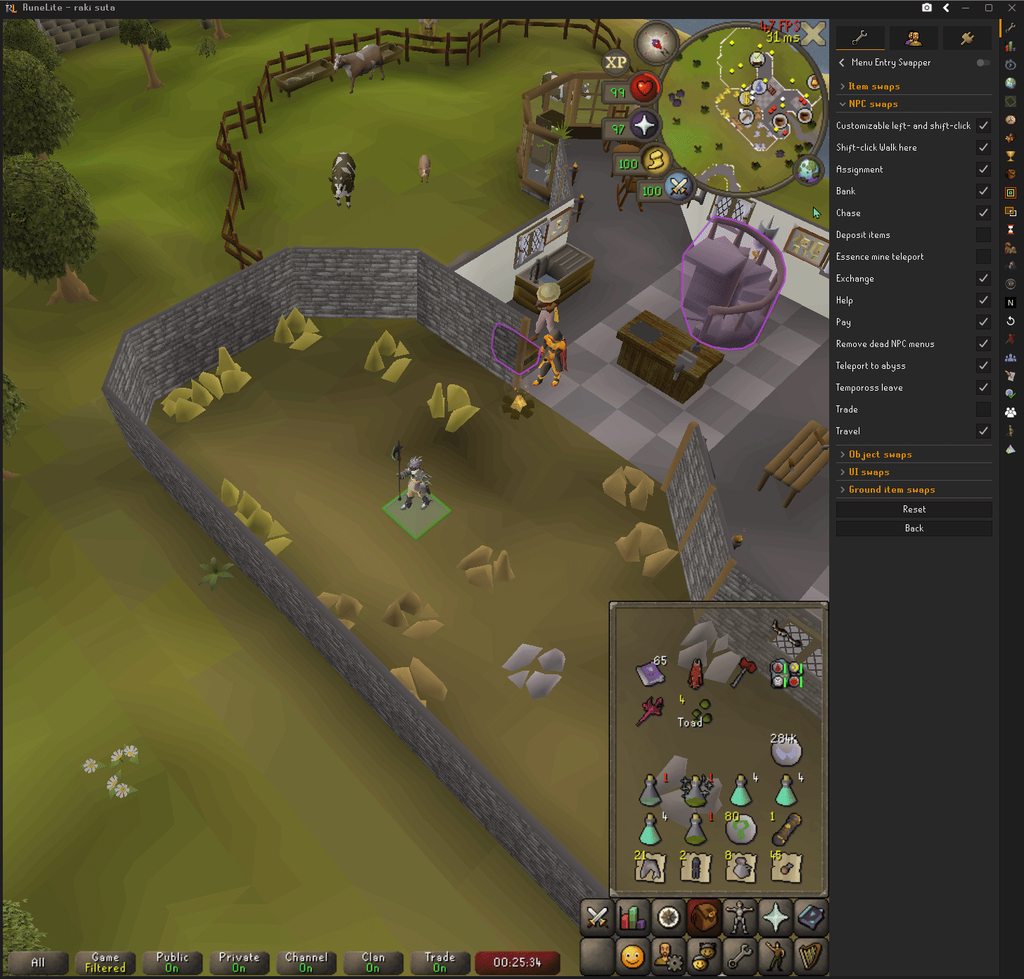
Alright, so I accidentally tested it turning off the wrong option, but this gif shows it:
In both instances, I am ctrl+shift+clicking.
First click with menu entry swapper off; I walk to the NPC (since shift is doing nothing here)
Second click with menu entry swapper off (specifically, NPC swaps/shift-click Walk here); I run underneath the NPC
 barren tusk
empty minnow
Do you maybe have control or shift bound to something in another plugin?
barren tusk
empty minnow
Do you maybe have control or shift bound to something in another plugin?
I think these are all fairly standard, but turning off custom menu swaps also doesnt work

 eternal plank
has there been any issues with pms/chats not being sent/seen? I'm not entirely sure of the best way to explain this, but my chat and pms seem to be bugged. If i run the vanilla client i can send/receive pms, see clan chat messages, etc. Only some are visible to me when running RL, and if i send a pm it shows on my end that it sent but the other account gets nothing, it is very strange, i wasn't sure if anyone has seen this before or if its something that's been happening to others recently. I disabled every single plug in and restarted the client and still had the same issue.
zealous cedar
try safe mode, if it works there it means its a plugin causing the issue
 sharp cypress
i need help with audio im on Arch Linux using AppImage of runelite
eternal plank
i'm pming myself on my other account while both clients are logged out of runelite and its working. How do i go about finding out which plug in is causing the problem?
barren tusk
zealous cedar
try safe mode, if it works there it means its a plugin causing the issue
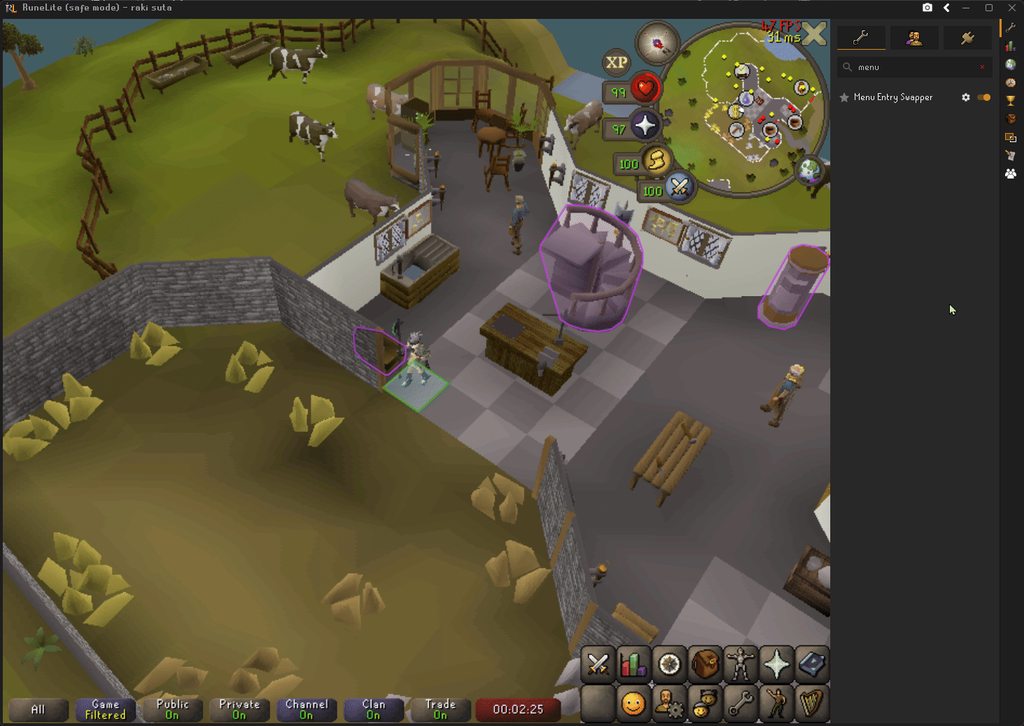
On safe mode, ctrl+shift+click still works like shift+click, unless I turn off menu entry swapper https://imgur.com/AXaIPuo
 barren tusk
eternal plank
has there been any issues with pms/chats not being sent/seen? I'm not entirely s...
barren tusk
eternal plank
has there been any issues with pms/chats not being sent/seen? I'm not entirely s...
Could you it be that the receiving account is on your ignore list? You can send pms to people that have you ignored, they simply dont receive anything
zealous cedar
what is ctrl shift click supposed to do normally?
eternal plank
barren tusk
Could you it be that the receiving account is on your ignore list? You can send ...
no, everything works completely fine on vanilla client.
haughty pumiceBOT
@eternal plank Please refer to this flowchart for further troubleshooting.
barren tusk
zealous cedar
what is ctrl shift click supposed to do normally?
ctrl+click makes your character **walk **instead of run (vanilla client option)
ctrl+shift (with menu entry swapper options) makes your character run **underneath **the object/npc
ctrl+shift+click makes your character walk underneath the object/npc
 weak fog
Ok, this is random but i've been dealing with it for over a month. When using runelite, randomly my client will get massive frame drops (1 frame every 5 seconds) If I move my runelite client over to my second monitor, then back to my primary it's fine for a bit. I've had task manager open, it's not showing any performance issues. I'm not using 117, not sure if this is a graphics card issue, or if there is a plugin that's broken.
 steel prawn
Hi, I’ve been having an issue since last week. Every time I try to log in to RuneLite through the Jagex Launcher, I get an error.
The only workaround I’ve found is uninstalling RuneLite and reinstalling it via the Jagex Launcher, but it’s really frustrating to do this every time.
 eternal plank
@mossy swan it's only happening to me on one account, i've tried like 6 different accounts and all pms/chats work between them except for the one, and im not muted or on ignore, anything like that, i'm so confused. all accounts are launched via the same rl launcher with all same plug ins
empty minnow
Have you tried safe mode yet on that account?
eternal plank
im not sure how to enable safe mode, but i completely logged out of runelite to where it only has the basic plug ins now and it still does not work, only way i am able to send/see messages is on vanilla
haughty pumiceBOT
@eternal plank To enable safemode
Windows
Run the RuneLite (configure) shortcut from the windows start menu
Tick the Safe mode box, save, launch RuneLite the way you normally do.
Mac
In Terminal, run
/Applications/RuneLite.app/Contents/MacOS/RuneLite --configure
Tick the Safe mode box, save, launch RuneLite the way you normally do.
eternal plank
i also am having trouble getting back to my original rl profile, so im trying to work on that atm, cant seem to log back into all of my old settings unfortunately
ok, i managed to get back into all of my original settings/plug ins, i launched in safe mode and my pms/chat is working as should now (in safe mode)
empty minnow
Then you have a plugin installed that is causing your issue
A hub plugin to be specific
eternal plank
but why is it only affecting this one account in specific?
empty minnow
Not sure, hub plugins can break in unexpected ways
eternal plank
hmm, so other than uninstalling every plug in and relaunching after each one is there a better way to do this?
empty minnow
Usually best to turn half of them off, then restart and repeat until you narrow it down
Don't necessarily have to uninstall them
eternal plank
but even if i sign out of runelite and play on a blank, fresh runelite profile it is still not working
with zero plug ins
empty minnow
Are you restarting after switching to the blank profile?
eternal plank
yes
empty minnow
Did you try safe mode on your profile or the blank profile?
Wondering if you have a default plugin turned on on your profile that might be off by default on the blank one
eternal plank
my profile
empty minnow
empty minnow
Wondering if you have a default plugin turned on on your profile that might be o...
Actually nvm that doesn't make any sense
The only difference between a blank profile and safe mode should theoretically just be that the GPU plugin is also off in safe mode, and I doubt that's the issue
eternal plank
idk, the only way it's worked so far is on vanilla and safe mode. Even after disabling all plug ins, and on new fresh empty profile
eternal plank
finally got it working, ty shaggy
 royal dust
hi, my friend is a new player using the quest helper plugin fauxs early leagues guide and her task list is auto-completing tasks she hasn't finished and when she clicks the boxes to untick them they stay ticked. it's currently stuck on the "open the leagues menu" task and won't progress further. i understand leagues is a temp game mode and you probably have bigger priorities but as my friends new to the game it's been very useful for her navigation wise, is there any chance it can be fixed?
thanks in advance 🙂
haughty pumiceBOT
Visit Zoinkwiz's Quest Helper plugin discord (https://discord.com/invite/XCfwNnz6RB) for support, issues & feedback
zealous cedar
there is a quest helper discord
royal dust
oh perfect thank you so much!!
empty minnow
eternal plank
finally got it working, ty shaggy
Nice, what was the issue?
steel prawn
steel prawn
Hi, I’ve been having an issue since last week. Every time I try to log in to Run...
@empty minnow can you take a look please on my problem? 🙂
eternal plank
empty minnow
Nice, what was the issue?
i ended up uninstalling quite a few plugins that i havent been using lately, so im not entirely sure which one it was specifically. I assume it was a tob/toa plug in, makes sense now why it was only happening to this acc and not all
empty minnow
steel prawn
<@129454566747013120> can you take a look please on my problem? 🙂
I don't know that we can help much with that. If you launch RuneLite directly does it work?
 tawdry marsh
Heya, ever since like day 2 of leagues I've sometimes been having issues where my game freezes completely. This usually happens when I'm tping / after I tp, but not every time I tp.
I haven't been using any new plugins lately, but I was wondering if others have been experiencing a similar issue?
My game just fully freezes and I have to end it through task manager and relaunch
steel prawn
empty minnow
I don't know that we can help much with that. If you launch RuneLite directly do...
It is
Jagex support told me to check that with you 😢
empty minnow
Oof, well hopefully an actual support person can help then. I am not one
steel prawn
empty minnow
Oof, well hopefully an actual support person can help then. I am not one
Ohhh thanks bro mb
 shell hull
Only on leagues worlds my run, hp, map, etc interface disappears

Anyone else experiencing this? I tried on laptop and pc and both are doing it
 silk thicket
I'm experiencing horrible lag in league on my laptop. It's a strong laptop, previously never had any issues with osrs. I've noticed that it's mainly when interacting with the game or speccing with gargle staff. Any idea which plugin could be causing this? I would try turning off GPU plugin but then it's even worse.
Usualy fps hangs around 144 but often dips to 30ish when lag spike occurs.
Mainly occurs when I spec with gargle staff or when thorns effect occurs.
Speccing at sire basically freezes the game for a few seconds
 delicate bobcat
silk thicket
I'm experiencing horrible lag in league on my laptop. It's a strong laptop, prev...
delicate bobcat
silk thicket
I'm experiencing horrible lag in league on my laptop. It's a strong laptop, prev...
sounds like you just have one or more misbehaving hub plugins
try disabling all of them to see if the issue persists
you may need to restart RuneLite after disabling them for them to be properly cleaned up
 deep gazelle
I've been having some issues with my keyboard giving dead input, but it seems to only happen in osrs (when I press space when typing, sometimes the spacebar and the key after will just be a dead input) - anyone know what might be causing that?
I thought it was my hardware at first and then I noticed it's never happening when I type in discord...
idk if it's rs or runelite though
haughty pumiceBOT
If one of your keys isn't working in game, you've most likely bound it to a feature of a plugin. The Debug Helper hub plugin can show what keys are bound to what plugins.
deep gazelle
Oh maybe it's this then
Tasks Tracker Complete Custom Task: Shift+Space
Thanks for the help~
 pure glen
I have remapped F-keys to qwer and noticed it doesn't work when in a dialogue, but the normal F-keys do. Just a pet peeve but could there be some workaround for this?
 worthy lotus
I Choose the relic Barbarian Gathering and now I can't catch a fish bare handed to complete the quest "Barbarian Training" , which is needed to weild the Hasta and Dragon Hunter Lance.
gilded kayak
This is the RuneLite discord we just make a client to play the game, if you're having an issue with the game itself you probably need to post in the official discord, or right-click the report button and report it as a bug
haughty pumiceBOT
If you are new to OSRS, make sure to follow this excellent guide on OSRS wiki: https://oldschool.runescape.wiki/w/New_player_guide. You can also join the official OSRS Discord here: https://discord.gg/osrs
 haughty pumiceBOT
To find the logs, you can do one of the following:
- If your client failed to open, click the
Open logs folderbutton. - Open the screenshot directory by right-clicking 📷
Camerabutton, navigate 1 directory up, then open logs folder. - Navigate to
%userprofile%\.runelite\logson Windows or$HOME/.runelite/logson Linux and macOS.
Upload the log files named client and launcher by dragging them to Discord. If there are files prefixed with jvm_crash dated from today, upload them too.
 waxen condor
If you open the window, it will open runelite
 dusk pike
I'm looking into making a plugin that saves your bank search history. Is populating the search query allowed? From what i can tell, you can't paste text into OSRS so i wouldn't be surprised if it wasn't.
waxen condor
dusk pike
I'm looking into making a plugin that saves your bank search history. Is populat...
sir
 compact spear
If you want help you'll need to post your logs, you were given 3 ways to do it so pick one and then someone here can help you
waxen condor
what is laags
compact spear
Files on your computer
eternal plank
@empty minnow long story short, it ended up not being fixed as i thought it was. I did however finally figure out what is going on though, the world i was in wasn't showing a number for the ping, 596 and 597 (salvaging worlds) are bouncing between 32 and 1000+. I waiting about an hour or so before posting this to make sure that this was the issue and i believe it is. Just strange that the worlds arent laggy for me what so ever, all seems normal outside of the messaging thing, very strange. I've never seen a ping even remotely close to that high. Also, even when the ping goes back to around 30 or so the messaging still never works. All other worlds work fine though
 solid mesa
Salvgaing worlds use a different way to measure ping which may not totally represent how it feels in game
 hexed moth
anyone have any idea why theres a fang in my food supplies used tab?

 empty marlin
Did you ever figure out the cause of this
 dawn gale
empty marlin
Did you ever figure out the cause of this
dawn gale
empty marlin
Did you ever figure out the cause of this
i think. i switched from GPU to 117 and rarely experience it now
empty marlin
dawn gale
i think. i switched from GPU to 117 and rarely experience it now
Hmm, I still experiencing it turning GPU off. I hadn't had this issue until leagues
dawn gale
empty marlin
Hmm, I still experiencing it turning GPU off. I hadn't had this issue until leag...
yeah same here. was fine up until like last week
gilded kayak
hexed moth
anyone have any idea why theres a fang in my food supplies used tab?
the plugin you're referencing probably does tracking the same way we do in the loot tracker plugin, by taking a snapshot of the inventory
so if a fang entered your inventory at the same time it was checking, that would explain it
bronze lagoon
Is there any work being done for RL freezing in civila during leagues?
 carmine badger
anyone ever have an issue where it says too many log in attempts even tho its ur first time logging in
I aint creating a jagex acc. does this last forever or what
empty minnow
It'll go away eventually
round jacinth
bronze lagoon
Is there any work being done for RL freezing in civila during leagues?
you maybe have too many hub plugins.
bronze lagoon
It's only in Civilla where fps drops to single digits and crashes, no where else does it occur
But I'll check
 final lintel
Is it possible to remap the left shift button (which is used to mark tiles, menu entry swapper etc) to left ctrl button?
 trim flicker
idk if this is a known issue, but the game just feels horrible in bossing areas. I've uninstalled and reinstalled runelite, i've uninstalled recent updates. I just feel like im click through mud, even in servers where I've got 10 ping
haughty pumiceBOT
Many plugins from the pluginhub break the client in subtle or not-so-subtle ways, including causing issues like client freezes. We do not support pluginhub plugins because we do not make or quality control them, and do not recommend their use.
Run the RuneLite (safe mode) shortcut, or with a Jagex account, first run the RuneLite (configure) shortcut and tick the Safe mode box, then launch RuneLite via the Jagex launcher.
This temporarily disables the GPU plugin and all hub plugins which will allow you to confirm the issue is caused by one of those plugins and isn't a core RuneLite issue.
If the issue is caused by a hub plugin, you should isolate which plugin it is and then uninstall the plugin.
 final quarry
Hi, I am having trouble saving runelite settings using profiles.
Every time i close my client, some stuff i enabled from that clients session gets reset.
My current example is changing the color of the overlay infoboxes. I changed them to the color i want, then when i close the client and come back in, the client resets it to the default color.
I am only using one account and one profile.
mossy swan
final quarry
Hi, I am having trouble saving runelite settings using profiles.
Every time i c...
are you using that plugin that changes your ui? i think it should tell you that it will reset the setting
final quarry
mossy swan
are you using that plugin that changes your ui? i think it should tell you that ...
uhh which plugin?
final quarry
yes i am using that but ive never had a problem with it
this is the first im having this problem, and ive never changed it in years
mossy swan
ok well it will override the info box color unless you configure it not to
final quarry
my example with the text boxes was just one thing my client seems to reset, i also find that my bank tags get reset too
mossy swan
then i dunno
final quarry
and another example is that it changes where the client opens on my screen
i like my client top left, and it does not keep that location on my screen. it used to spawn where i last left it.
round jacinth
Your window might be 1 pixel outside of the screen some how and that makes runelite load it center screen as a safety measure so people don’t open their clients on a 3rd monitor that isn’t plugged in anymore
final quarry
usually i have it just snap tp corner and leave it, but maybe.
sometimes ive noticed when i close it with the side panel open, it will expand, to fill that area. but im pretty sure at least some of my settings are getting reset. maybe it's because of how i close the client sometimes idk
leaden trail
Can you post your logs?
haughty pumiceBOT
To find the logs, you can do one of the following:
- If your client failed to open, click the
Open logs folderbutton. - Open the screenshot directory by right-clicking 📷
Camerabutton, navigate 1 directory up, then open logs folder. - Navigate to
%userprofile%\.runelite\logson Windows or$HOME/.runelite/logson Linux and macOS.
Upload the log files named client and launcher by dragging them to Discord. If there are files prefixed with jvm_crash dated from today, upload them too.
warped prairie
could I use wildcards for stuff like ignored or highlited ground items so Scroll box * for example
oblique plume
Yes
 tepid solstice
My RL Constantly just freezes, I can guarantee it's not my PC as nothing else freezes. I have tries disabling some plugins and such. Any ideas or log files to find why?
bronze lagoon
Same issue i've been having
and only in civilla if I switch clients no issue, if I go back to RL and go into civilla my frames drop to single digits and then freezes
 vernal cloud
you guys try launching in safemode?
haughty pumiceBOT
To enable safemode
Windows
Run the RuneLite (configure) shortcut from the windows start menu
Tick the Safe mode box, save, launch RuneLite the way you normally do.
Mac
In Terminal, run
/Applications/RuneLite.app/Contents/MacOS/RuneLite --configure
Tick the Safe mode box, save, launch RuneLite the way you normally do.
bronze lagoon
in safemode I only get an fps drop in civilla not an actual crash
 pine halo
does any1 know why i cant left click my (flask of fervour) tier 8 relic, not even menu entry swapper can switch the activate button? please help 🙂

 haughty pumiceBOT
Many plugins from the pluginhub break the client in subtle or not-so-subtle ways, including causing issues like client freezes. We do not support pluginhub plugins because we do not make or quality control them, and do not recommend their use.
Run the RuneLite (safe mode) shortcut, or with a Jagex account, first run the RuneLite (configure) shortcut and tick the Safe mode box, then launch RuneLite via the Jagex launcher.
This temporarily disables the GPU plugin and all hub plugins which will allow you to confirm the issue is caused by one of those plugins and isn't a core RuneLite issue.
If the issue is caused by a hub plugin, you should isolate which plugin it is and then uninstall the plugin.
 chilly moth
I'm having this issue where it's defaulting to clan chat when any of my chat tabs are selected. This issue doesn't happen with the official client. I've ran in safe mode and it persists there, and I've also tried turning off all the official plugins and it still happens. I'm running via bolt launcher on bazzite linux. Client version info is in the screenshot

 mortal pond
chilly moth
I'm having this issue where it's defaulting to clan chat when any of my chat tab...
mortal pond
chilly moth
I'm having this issue where it's defaulting to clan chat when any of my chat tab...
type /@p in chat
chilly moth
mortal pond
type `/@p` in chat
My hero, thank you!
round jacinth
you can also right clcik all
 dreamy jackal
 severe ore
Using the Barbarian Gathering relic in Leagues VI while on Runelite doesn't bring up any options to gather while I don't have any tools on my inventory, but if I add one to my inventory it allows me to gather normally. This behavior is not present in the official desktop client or the mobile client and I haven't been able to pinpoint what causes it, is there any way to fix this?
To add, I am able to fish without any equipment, so in that case it does work correctly
 median wren
is raid reloader broken in leagues? seems to auto logout?
 final axle
severe ore
Using the Barbarian Gathering relic in Leagues VI while on Runelite doesn't brin...
final axle
severe ore
Using the Barbarian Gathering relic in Leagues VI while on Runelite doesn't brin...
you probably have the Tool Required hub plugin on
severe ore
final axle
you probably have the `Tool Required` hub plugin on
That was it, thank you!
 pallid cipher
was crashing every 15 minutes uninstalled reinstalled and now it crashes every 30 minutes any fix?
 modern seal
My RL is still crashing randomly with no logs being generated as to why it's crashing. I can't kill Amoxiatl more than like 3 times before it crashes too.
Mine has had this issue since before leagues. #support message
How can i force some logs?
haughty pumiceBOT
@pallid cipher Many plugins from the pluginhub break the client in subtle or not-so-subtle ways, including causing issues like client freezes. We do not support pluginhub plugins because we do not make or quality control them, and do not recommend their use.
Run the RuneLite (safe mode) shortcut, or with a Jagex account, first run the RuneLite (configure) shortcut and tick the Safe mode box, then launch RuneLite via the Jagex launcher.
This temporarily disables the GPU plugin and all hub plugins which will allow you to confirm the issue is caused by one of those plugins and isn't a core RuneLite issue.
If the issue is caused by a hub plugin, you should isolate which plugin it is and then uninstall the plugin.
round jacinth
@modern seal also for you
 flint crow
can anyone help me for some reason my screen flashing green and i get red text aboe my head saying "attack" when i throw fishing explosive, i dont have idle notifier on or flash on in runelite settings
haughty pumiceBOT
Many plugins from the pluginhub break the client in subtle or not-so-subtle ways, including causing issues like client freezes. We do not support pluginhub plugins because we do not make or quality control them, and do not recommend their use.
Run the RuneLite (safe mode) shortcut, or with a Jagex account, first run the RuneLite (configure) shortcut and tick the Safe mode box, then launch RuneLite via the Jagex launcher.
This temporarily disables the GPU plugin and all hub plugins which will allow you to confirm the issue is caused by one of those plugins and isn't a core RuneLite issue.
If the issue is caused by a hub plugin, you should isolate which plugin it is and then uninstall the plugin.
 fleet snow
A few weeks ago I was in tears of guthix on an activity-specific profile. When I switched to my main profile, which has the tears of guthix plugin, the client crashed and shut down (and the snake wouldnt let me back in ;_;)
 zenith flame
hi, not sure if this is the appropriate place to ask but im looking to get support for the "Better Teleport Menu" plugin, and couldn't find any contact details on the github page
specifically, it is working with my evil eye by hiding options i don't have unlocked. but it is not working with my fairy mushroom. thanks!
empty minnow
zenith flame
hi, not sure if this is the appropriate place to ask but im looking to get suppo...
GitHub is the correct place to leave feedback
zenith flame
empty minnow
GitHub is the correct place to leave feedback
oh yeah! i forgot i can just give feedback on the repo itself. im not the most familiar with github
thank you :)
i suspect it's just a conflict with one of my other plugins, but thought id reach out and see if its a known issue first
 viscid lantern
ideally attach a screenshot of the interface, it might just be missing the correct title for the window
zenith flame
great, thanks for the advice
 lucid isle
anyone happen to know why im getting blue squares?
 round jacinth
some hub plugin
lucid isle
aight ill have a look through my hub ones
 open arch
Hi , can some1 help me my death plateau quest is bugged i talk to delnuth but it said i dont have the map but when i go to tenzing we doesnt want to talk to me?
 leaden trail
You can probably ask someone in #runescape , this channel is for client support
 subtle temple
what causes rare drop effect to be disabled? idk which plugin it is but i dont see any effect or even when i get new collection log to see a screen message for example new pet.
didnt have this issue before
empty minnow
Like the popup that appears at the top of your screen? That's vanilla osrs
subtle temple
like this and when u get a high value item it glows purple or orange or something
 subtle temple
oh ok i didnt get neither noise or screen info that i got a skill pet for example
i even got it twice lmao and didnt notice
ok found out about the collection log, thought it was a plugin but wasnt
 round jacinth
not every clog makes a noise
the pop up is required for the screenshot automaic thing to work tho
 winter snow
 subtle temple
thanks
 plain iris
Anybody have any advice / recommendations to recover my RuneLite profile settings? Have always logged in and had an account, not sure if ever cloud synced... new computer and no chance at getting into the old. Looking to just get settings / plugins same as before or is this likely not possible for this situation?
oblique plume
if you wernt syncing then you cant get them
but you can check if you were by seeing if you have a synced profile in the list
plain iris
Yeah just default profile after downloading / signing in. Kind of figured that was the case.
frigid dawn
can someone help me out with my audio. It wont work on any audio device ive tried reinstalling runelite and audio drivers. Just randomly happened one day
 native stream
can someone help me if the leagues hot n cold clue helper isnt working?
leaden trail
There's a fix that should be out with the next client release I believe
gilded kayak
ya it dont work rn cuz reldo doesn't exist
native stream
thanks, i'll do clues later then
 reef sequoia
I’m having persistent issues getting RuneLite to load on my MacBook Pro M1 Pro. I’m currently running macOS Tahoe 26.3.1.
What I’ve done so far:
Installed the Jagex Launcher and RuneLite
Launching RuneLite through the Jagex Launcher
RuneLite never fully loads:
Sometimes freezes on “Loading textures”
Sometimes freezes on “Loading fonts”
Other times it doesn’t get past “Checking for updates”
Deleted the cache folder in ~/.runelite multiple times
Completely uninstalled and reinstalled both RuneLite and the Jagex Launcher more times than I can count
Despite all this, RuneLite still won’t load.
Important note:
I can run RuneScape perfectly fine using the official Jagex client, so the issue seems specific to RuneLite.
At this point I’m at a loss for what else to try.
Has anyone run into this before or have ideas on what might be causing it?
Any help would be greatly appreciated.
haughty pumiceBOT
To find the logs, you can do one of the following:
- If your client failed to open, click the
Open logs folderbutton. - Open the screenshot directory by right-clicking 📷
Camerabutton, navigate 1 directory up, then open logs folder. - Navigate to
%userprofile%\.runelite\logson Windows or$HOME/.runelite/logson Linux and macOS.
Upload the log files named client and launcher by dragging them to Discord. If there are files prefixed with jvm_crash dated from today, upload them too.
reef sequoia
haughty pumice
To find the logs, you can **do one of the following**:
- If your client failed t...
oblique plume
these look fine
could something be trying to block RLs connection
since it looks like the game client is the one having issues after RL loads
reef sequoia
oblique plume
since it looks like the game client is the one having issues after RL loads
Is there a difference from how Runescape loads through RuneLite vs official launcher?
oblique plume
RL is the java client and official is the c++ client
reef sequoia
oblique plume
RL is the java client and official is the c++ client
Ok, thank you. I'll mess around with firewall and network settings
 plush wadi
Ever since leagues dropped I've been crashing within about 2-3 hours of play when I run around Varlamore between loading chunks (I lowered it slightly to help) or now when teleporting to a new area. Not sure what I can do to fix it
leaden trail
Well first off you have file permissions issues
So you should run RuneLite as admin once and then when you get to the login screen close it and set it to not run as admin
You're also running out of heap space so you'll want to disable some hub plugins
plush wadi
I'll try those and report back if I have any more issues, thanks 🫡
 delicate olive
is there a way to hide regions not unlocked in this menu?
 solid mesa
#runelite message Custom menu swaps
delicate olive
solid mesa
https://discord.com/channels/301497432909414422/301497432909414422/1495761017593...
ty ❤️
mortal pond
https://support.runescape.com/hc/en-gb/articles/34580691289489-Add-a-RuneScape-character-to-your-Jagex-Account
If your iron is already on a separate Jagex account then it's not possible to import it to your main Jagex account
weak fog
when I hold down the shift key, my menu swaps only work for one click. example, if i'm shift clicking to walk underneath an enemy and hide the attack option, after my first click the menu options are reset and attack will show up. Similarly, I can't hold down shift to drop multiple items from my inventory at once, I have had to click shift each time for each item. RL only recently started doing this any idea what could be causing it?
 frank vigil
mortal pond
<https://support.runescape.com/hc/en-gb/articles/34580691289489-Add-a-RuneScape-...
frank vigil
mortal pond
<https://support.runescape.com/hc/en-gb/articles/34580691289489-Add-a-RuneScape-...
savage
though i approve, massively reduces people stealing accounts (unless they can get your jagex one ofc, seems less likely tho than maintaining 10 logins of sep accs)
also i thought i had bugfixed my crashes (timetracking plugin issues) but nope, newest crash happened even fasterl olol where can i post my log? 😄 here?
if this works im gonna sell my house and invest in ai

awww crashed again haha
might be fixed? sent gpt the whole log instead ofa copy paste and it spotted that i needed to allocate more memory to java... 500mb to 2gb now, seems to be running smoother and not crashing yet? will reply again if i crash again
gilded kayak
runelite default is not 500mb
so it definitely made that part up
but it looks like you never posted anything about your issue/your log, you just started posting after waiting 2 minutes for a question answer, chatgpt responses
oblique plume

frank vigil
gilded kayak
so it definitely made that part up
that's fine, we know they hallucinate 10-20% of the time right? either way setting the java allocation to 2gb does seem to have helped
would expect runelites memory to be dynamically allocated no? 😄
frank vigil
gilded kayak
but it looks like you never posted anything about your issue/your log, you just ...
its good to try solve an issue yourself before formally asking for help, tbf i shoulda went to gpt first before coming crying in here ;D
my bad
gilded kayak
we allocate enough for the default plugins + some hub plugins
if one starts leaking then that's a problem we want fixed
frank vigil
ah im a plugin junkey sooo ;D
oblique plume
if youre posting in here and not wanting help you are activly hurting us from helping other people
if you want to just ramble about random stuff youre doing, dont use the support channel
frank vigil
oblique plume
if youre posting in here and not wanting help you are activly hurting us from he...
idk how reading above comes across as "not wanting help" but okay thanks for t hhe hostility love oyu ❤️
 wheat girder
mortal pond
<https://support.runescape.com/hc/en-gb/articles/34580691289489-Add-a-RuneScape-...
wheat girder
mortal pond
<https://support.runescape.com/hc/en-gb/articles/34580691289489-Add-a-RuneScape-...
Ok ty
leaden trail
frank vigil
its good to try solve an issue yourself before formally asking for help, tbf i s...
We would probably prefer the opposite actually. ChatGPT has definitely recommended people do things that end up breaking their setup more rather than helping and it turns an easy fix into something that can be a pain for us to resolve
Oh they left 🤷
frank vigil
Hello I am back, turned out to be VarlamoreHouseThievingPlugin causing
crashes (maybe some other stuff going on too) but this was where I was crashing most consistently (running through varlamore), and turning this plugin off fixed it, not crashed for a long time running round varlamore now
btw i dont blindly follow GPT I have a computer engineering adjacent degree and apologize for coming in with sloppy messaging haha, i get a little excited when in fix mode and can become impulsive with speech (adhd life)
does the client overwrite the client.txt log every launch or something? was going to link the exact error code but i only have a record of iti n gpt hahaha

but yeh hope this helps you figure out if that plugin has a bug? 🙂
oblique plume
if you had posted that in the beginning i would have been able to tell you what the problem was
oblique plume
fwiw that doesnt mean thats the plugin causing the memory pressure
frank vigil
think it happened w league launch btw
oblique plume
just which one that finally overtopped it
frank vigil
o i c
oblique plume
so it could not be the actual offending plugin
frank vigil
ahha should i remove the argument adding memory allocation to see if the crashes return?
oblique plume
but quite a few people have said they get memory pressure in civitas
so a plugin that only does stuff there is a good one to actually be the problem
frank vigil
i definitely was crashing much less outside of it and turning 117hd off seemed to slow but not stop them too
steel prawn
steel prawn
Hi, I’ve been having an issue since last week. Every time I try to log in to Run...
Hi, bumping this message again still need some help please
The vanilla client working well thourgh the launcher tho
gilded kayak
what happens when you have that issue, and try to launch runelite normally
normally being by clicking runelite.exe
frank vigil
steel prawn
Hi, bumping this message again still need some help please
The vanilla client wo...
crashed again, will send actual log ;D
oops wrong reply, but also i had this error a while ago and it randomly resolved on its own
 carmine ibex
i installed a wintertoad idle overlay for when u stop actions. I decided I didn't like, went to uninstall, and the overlay stays on my screen. Reinstalled to turn it off and on, same thing. Even when turned off. Any suggestions to fix?
 zealous cedar
uninstall it and then restart the client
carmine ibex
zealous cedar
uninstall it and then restart the client
but logging out is an xp waste. especially during leagues. lol jk. that worked. ive never had a plugin stay active like that after uninstall
thank you 🙂
zealous cedar
the really bad plugins dont turn off when you uninstall them, its dumb
weak fog
weak fog
when I hold down the shift key, my menu swaps only work for one click. example, ...
dumb animal here, just checking back in- windows sticky keys was on lmao
winter snow
It effectively holds the key down until you press another key, it's made for people who have issues with holding one key and pressing another
 pliant frost
anyone know how to get shortest path to work with task tracker?
pliant frost
pliant frost
anyone know how to get shortest path to work with task tracker?
got it
 pseudo quartz
Since installing "Compact orbs" wiki icon sometimes dissapears, even after uninstalling, I have to re-install it and turn it on-off to make the wiki icon appear again, any permanent fix? Maybe it's something else, but I think that's causing it.
leaden trail
I think it's a known issue
 bright thistle
just wondering if anyone was having audio issues
i think leagues somehow bugged my game audio
i have ingame music able to play but i have no area sounds or combat audio
ive deadass tried everything restarting client restarting pc switched runelite profiles switched to the main game
 open plank
just wondering if anyone can help with an issue i have upgrading my osrs account linked to game center to an jagex account?
gilded kayak
I'm not sure if anyone here can help with that, our interactions with the account upgrade system is usually just us saying "the link is in #faq "
mortal pond
wheat girder
Ok ty
Oops, sorry I got distracted last night while typing up a continuation of that message
Support is able to merge Jagex accounts sometimes, so if you have two Jagex accounts you can try opening a ticket here https://support.runescape.com/hc/en-gb/requests/new?ticket_form_id=360000062689
Choose I need help accessing or managing my Jagex account -> I need help updating or making a change to my account -> I need help adding a character to my Jagex account
wheat girder
Ok ty
nova birch
Does anyone know why custom menu swaps and hides aren't working with the "Custom Menu Swaps" plugin? I've asked around and no one seems to know what's causing it. https://i.imgur.com/tv2WoI2.png
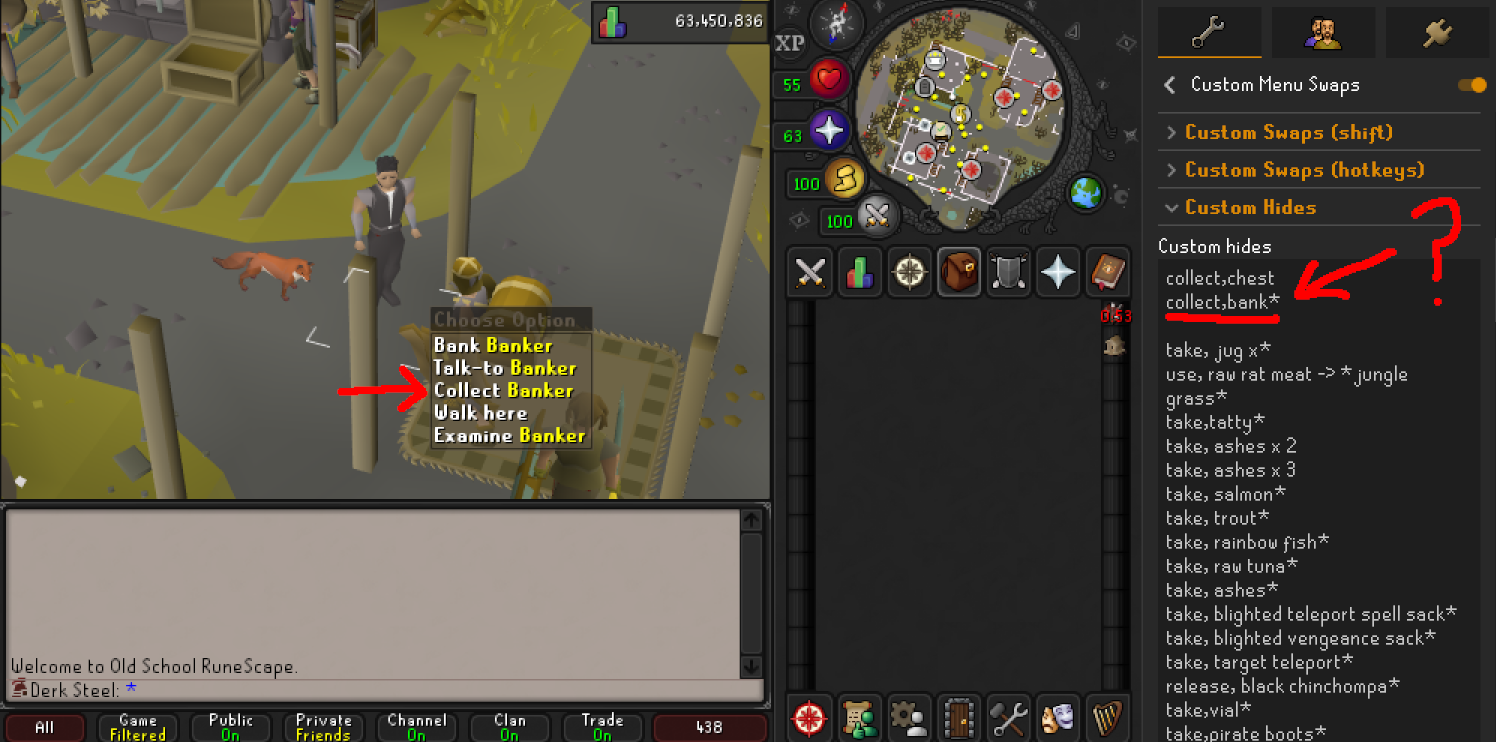
Normally the "collect" option should be fully hidden with that text command, but it's still there. The plugin was working up until a couple weeks ago I think.
haughty pumiceBOT
Support for hub plugins should be directed to the author of the plugin.
You can find the support link by searching for the plugin in the Plugin Hub panel and clicking the ? button on the plugin, or by right-clicking the plugin in the plugin panel and clicking the Support menu option.
 frail helm
hey, i'm new. i play on a 1920x1080 screen, resizable classic layout, fullscreen. i put 100% scaling in the stretched plugin in order to have a bigger UI, which is great, except for 1 thing:
what's the best way to resolve the issue in the picture, where the minimap and menus overlap?
 round jacinth
lower the scaling
frail helm
round jacinth
lower the scaling
no, cuz then the font scaling is wrong and looks like ass
frail helm
round jacinth
then you get what you've got lol
there must be a way no? i guess buying a 1440p monitor would fix that, but aside from that. i tried every UI scaling option, and it either looks blurry or the letters are inconsistent and so on. much of the game is writing and im sitting an arm's away from the screen, anyone would notice that
 fickle warren
does anyone know why i dont have my world map or any of my status orbs on my leagues account?
 gilded kayak
compact orbs?
viscid lantern
fickle warren
does anyone know why i dont have my world map or any of my status orbs on my lea...
did you turn them off in ingame settings?
 viscid lantern
would also explain why its league specific, its a different profile
might have turned it off last league
frail helm
what's the plugin that tells me the name, GE, HA of an item on the ground?
gilded kayak
ground items
frail helm
gilded kayak
ground items
ha! makes sense. thanks
right now it shows far away items, and items not within my fov. let's see if i can fix that
do plugins' settings change between characters (same account)?
 bronze condor
What plugin is enabled that shows the Echo Ranged Hit Stack?

Mine doesnt show it but a friend of mine does
 gilded kayak
does the friend maybe not use runelite
they add things that we would have to manually port over to runelite, sometimes
bronze condor
High likelyhood tbh
gilded kayak
that just work on the official client
 cursive berry
I think the time tracking for separate profiles is bugged. I just farmed these a few minutes ago and they're definitely not ready

 tiny flame
is there a fix for runelite UI glitching like this when turning off the GPU plugin?
 solid mesa
cursive berry
I think the time tracking for separate profiles is bugged. I just farmed these a...
solid mesa
cursive berry
I think the time tracking for separate profiles is bugged. I just farmed these a...
Yes, if you're on a leagues world it assume all farming tick rates are 5x
cursive berry
Aah
haughty pumiceBOT
@tiny flame Graphical artifacts? Try disabling hardware acceleration: https://github.com/runelite/runelite/wiki/Disable-Hardware-Acceleration
cursive berry
That makes sense, thanks
 outer pewter
Hey guys, I recently started getting this error after launching runelite but not sure how to resolve it. Is anyone else getting this?
Things I've tried:
- Restarting internet
- Restarting PC a couple times
- Running in Safe Mode (client)

 tame ocean
Anyone had issues with the entire game interface (map panel, chatbox, inventory panel, etc) disappearing when using any screenmode other than fixed in content that disables the minimap?
I've had this come up with Puro-Puro, barrows pre-miniquest, and quest cutscenes. I'm using 2.6.8 on a Macbook, macOS 14.6.1
zealous cedar
that is interesting, first ive heard of that
tame ocean
Here's a brief clip of it happening entering Puro Puro
round jacinth
tame ocean
Here's a brief clip of it happening entering Puro Puro
Do you use widget hider from the hub? some one else had this too
 unreal walrus
I think this is client based, apologies if I'm wrong, but does anyone know how to stop this spam every 10kc?
 empty minnow
is your game chat set to filtered?
unreal walrus
yes
 hollow egret
hello hows it going was here like a week or so ago about my rl making me have to reset my graphic card with keyboard shortcut ( which usually fixes it) but it would happen shortly after again. Someone commented that a specific plug in they saw on my logs was producing alot of errors, I removed that plug in and althought it did get rid of like 80% of the crashes i was experiencing, I am crashing still. usually inside raids like cox when transitioning to a different room or when things start moving around ill either drop frames or my rl and pc will just get really slow as well as freeze.
I attache my two logs hope soemone can help ty
 manic oyster
hey guys how are you. Im looking for help with runelite if anyone has the time to help
im not sure how but when i mouse over items in my inventory its showing me the banked amount as a tooltip. I had my settings set to hide all mouse over tooltips im not sure how this happened
 agile quartz
For the last few days I've been having an issue where RuneLite will drop down to low double digit FPS if not right down to a full freeze for a few seconds. It seems to also trigger my taskbar locking up fully. It was fine pre-leagues and doesn't seem to occur with any other games/apps.
Currently I'm running the client in safemode to see if it continues to happen, but I'm hoping that maybe I can get some further troubleshooting advice for what to do next if safemode doesn't have the same issues. Thank you in advance.
Should also note that the freeze logs an OpenGL conflict between my onboard GPU and my 4080 Super.
 gilded cobalt
Hi there.
I'm trying to add to a pin for We Do Raids about prepping at Chambers of Xerics (that thousands of folks will see).
Was wondering if there are anyone well versed with custom menu entry swaps (or another solution) to remove this from ever happening:
Basically, if you're wanting to plant in the prep room at Chambers and there is another player in the way, you end up having to orientate your camera to avoid them or always right click.
Is there a way to switch the order of requests so that the seed into herb patch is always the priority?
Thanks.

Seems this works

 timid rock
np
 quasi goblet
any followup on this? my game logs are like tens of megabytes
snippet from one (1) projectile being fired :))) kill me
leaden trail
Can you confirm if it happens in safe mode?
quasi goblet
it does not. shit
 dark knot
ever since league launch, when I'm playing in a league world, I randomly crash... checked the logs and saw maxhit and watchdog with throwing errors, deleted both of them and still happening... any ideas?
round jacinth
dark knot
ever since league launch, when I'm playing in a league world, I randomly crash.....
Sadly a loud log of errors doesn’t always mean it’s why you were crashing
Do you have a jvm crash log?
dark knot
I may, not sure where to find it tho?
Something like this @round jacinth ?
Faulting application name: RuneLite.exe, version: 0.0.0.0, time stamp: 0x7468c91d
Faulting module name: jvm.dll, version: 11.0.29.0, time stamp: 0x454e52d9
Exception code: 0xc000041d
Fault offset: 0x000000000014f17a
Faulting process id: 0x9F84
Faulting application start time: 0x1DCD245C793A0D7
Faulting application path: C:\Users\mathe\AppData\Local\RuneLite\RuneLite.exe
Faulting module path: C:\Users\mathe\AppData\Local\RuneLite\jre\bin\server\jvm.dll
Report Id: 75c5b38e-c63f-49a2-9c32-282d2565f4d4
Faulting package full name:
Faulting package-relative application ID:
haughty pumiceBOT
To find the logs, you can do one of the following:
- If your client failed to open, click the
Open logs folderbutton. - Open the screenshot directory by right-clicking 📷
Camerabutton, navigate 1 directory up, then open logs folder. - Navigate to
%userprofile%\.runelite\logson Windows or$HOME/.runelite/logson Linux and macOS.
Upload the log files named client and launcher by dragging them to Discord. If there are files prefixed with jvm_crash dated from today, upload them too.
leaden trail
Do you have a client log with today's date in the file name?
 thick gale
hi all, I've been having an issue since leagues started.
- When a new chunk is loading, the game stutters.
- Occasionally when loading a new area/cutscene (cuts to black) runelite locks up and I need to force it to close.
I just experienced the crash but this time it actually popped up the 'runelite has encountered an error' screen.
not sure if this helps at all:
2026-04-22 11:04:53 EDT [Map Loader] ERROR injected-client - Client error: map loading
java.lang.OutOfMemoryError: Java heap space
    at ep.<init>(ep.java:44997)
    at rl4.tl(rl4.java:18161)
    at rl4.run(rl4.java:63956)
    at java.base/java.util.concurrent.Executors$RunnableAdapter.call(Unknown Source)
    at java.base/java.util.concurrent.FutureTask.run(Unknown Source)
    at java.base/java.util.concurrent.ThreadPoolExecutor.runWorker(Unknown Source)
    at java.base/java.util.concurrent.ThreadPoolExecutor$Worker.run(Unknown Source)
at java.base/java.lang.Thread.run(Unknown Source)
You can uninstall some hub plugins or increase the amount of memory available to the client

GitHub
Open source Old School RuneScape client. Contribute to runelite/runelite development by creating an account on GitHub.
thick gale
is there way for me to see which plugins are 'biggest' or taking up the most memory?
zealous cedar
the debug helper plugin has a memory profiler, but the profiler itself takes a ton of memory so you do need to increase the max limit anyway to run it lol
thick gale
okay lol thanks will give it a shot
 ember leaf
Hi Gmge, was wondering is there an issue from having a crash whenever having like a short time of afk on various places.... mostly on herb runs and the far worst place i would be when this happens is at Sea, when doing sailing....
Plugins are in a minimum- just the essentials. Really tried clearing the unnessary ones. Debug helper is the last resort would it be?
gilded kayak
if you're getting that exact same oom error, debug helper wouldn't be the last resort it would be the quick-answer resort
ember leaf
gilded kayak
if you're getting that exact same oom error, debug helper wouldn't be the last r...
hi, ty for this- am wondering though, just noticed this... should i be toggling any of this, too?

oom error- happen to check what oom error means too... is there any way i can patch this on my own?
gilded kayak
thick gale
not sure if this helps at all:
```
2026-04-22 11:04:53 EDT [Map Loader] ERROR i...
.
ember leaf
leaden trail
You can uninstall some hub plugins or increase the amount of memory available to...
seems to be the best ty if this is the one @gilded kayak
 warm tendon
All text/info boxes have become transparent, used to have a dark background. I haven't changed any settings. Anybody knows what's up?

 solid mesa
You sure you didn't change Runelite -> Overlay color?
 warm tendon
solid mesa
You sure you didn't change Runelite -> Overlay color?
warm tendon
solid mesa
You sure you didn't change Runelite -> Overlay color?
Weird, i haven't changed anything but the opacity was set to 0, thanks!
gilded kayak
you probably installed a resource pack that changes it
 brave garden
I maybe turned on something(only new thing im using is Better Teleport Menu, but turning it off didn't help, I use Key remapping, but tried turning that off as well) and now can only write xcv characters in runelite if I hold down alt. Does anyone know what could cause this? (tried restarting it)
Switching to empty profile fixes it, so def some plugin does it. Is there a way to find out which plugin has a key binded?
leaden trail
Debug helper on the plugin hub can show keybinds
brave garden
I'll check it out ty
Zulrah Helper Phase Selection 1: X
Zulrah Helper Phase Selection 2: C
Zulrah Helper Phase Selection 3: V
bruh
cause I was doing zulrah xd
dark knot
So turns out I don't have any logs with today's date in it... I have yesterdays, though, and it happened yesterday as well. Linking them.
 lime steeple
Hi, I was wondering if someone could help. I love using the "effective levels" plugin, but it seems that it doesn't work lately? Am I doing something wrong? See picture as example. Using piety prayer doesn't show any "effective level" in my skill tab
 haughty pumiceBOT
Get support for the Effective Levels Plugin Hub plugin here: https://runelite.net/plugin-hub/show/effective-level.
You can also find the support link by searching for the plugin in the Plugin Hub panel and clicking the ? button on the plugin, or by right-clicking the plugin in the plugin panel and clicking the Support menu option.
 obtuse narwhal
hello new to runescape and im using the runelite launcher i have completed tutorial and first 2 quests im just wondering is quests the first thing i should be going for? or should i go for good gear or whatever any help would be appreciated
haughty pumiceBOT
If you are new to OSRS, make sure to follow this excellent guide on OSRS wiki: https://oldschool.runescape.wiki/w/New_player_guide. You can also join the official OSRS Discord here: https://discord.gg/osrs
 rare flame
I'm having a weird issue happen when I'm typing in-game, typically if I've just held shift there is a delay before I can actually type properly, any idea what this could be?
Example would be "WHAT IS GOING ON" Ingame wouldn't allow space, so only "WHATISGOINGON"
haughty pumiceBOT
If one of your keys isn't working in game, you've most likely bound it to a feature of a plugin. The Debug Helper hub plugin can show what keys are bound to what plugins.
rare flame
But its fucking up all of my text, mainly when I've just used shift, it's fine on any other software, just not on RL and this has been the past like 48h
rare flame
haughty pumice
If one of your keys isn't working in game, you've most likely bound it to a feat...
How do I do this?
I've got the plugin but not sure how I use it lol
 gilded kayak

 gilded kayak
i would agree with your guess

 wind owl
info boxes use to go verticle and i cant alt drag them back to vertical what happened?
haughty pumiceBOT
You can configure horizontal/vertical orientation, infobox groups or split infoboxes into new groups with the menu options opened with Shift + right-click. https://runelite.net/img/blog/1.6.28-Release/infobox.gif

 twin mesa
when swapping runelite profiles my gpu plugin has started to do this, it persist through swapping between other profiles, and sometimes even client restarts. is there an easy fix i can't think of?
 leaden trail
Do you have GPU legacy installed?
twin mesa
i do not
 subtle plaza
has anyones tooltips become transparent like when hovering over things. I swear mine weren't transparent but when i go to fix the opacity it even changes these https://i.imgur.com/f1T0ccU.png which iv always had transparent

 whole ingot
i am in a clan on the left account, and guesting in the same clan on the right account. the left account is on main game, the right account is on leagues.
any reason why i am not seeing certain clan chat messages?
on the left account the last message is from k33gan, but you can see four more come in on the right account. why are they missing from my main?
i do not have any in game chat filters, chat filter plugins, or anyone on my ignore list.

 dusky portal
i may be slow but it blocked me from making a jagex acc
round jacinth
whole ingot
i am in a clan on the left account, and guesting in the same clan on the right a...
No, I noticed this too in some worlds too.
 crisp dune
whole ingot
i am in a clan on the left account, and guesting in the same clan on the right a...
crisp dune
whole ingot
i am in a clan on the left account, and guesting in the same clan on the right a...
are some of these players on the new brazilian worlds?
round jacinth
livey is in a german world
the account that can't see the chat is us east world
round jacinth
the c in jagex stands for chatting with clan members
hollow egret
hollow egret
hello hows it going was here like a week or so ago about my rl making me have to...
hey guys still waiting for assistance, would appreciate it ty
zealous cedar
what does it mean to "reset graphic card with keyboard shortcut"?
round jacinth
To refresh or restart your graphics driver on Windows 10/11, press Windows Key + Ctrl + Shift + B simultaneously. This shortcut works for NVIDIA, AMD, and Intel GPUs, causing the screen to flicker and a beep to sound, which resolves temporary display, freezing, or flickering issues.
- google ai
zealous cedar
if the client is freezing but only in cox its probably not a gpu problem and instead a plugin freezing
 crude island
Is the resizable chat plugin bugged? Anyone knows
My Runelite still crashes and I've turned off reset everything, but kept this on
tiny flame
how do you put a custom image for cursor on runelite? i tried as I saw on the internet to put a 32x32 image into the .runelite folder but i did and changed it to custom cursor but it doesnt work
round jacinth
is your file named cursor.png.png?
tiny flame
round jacinth
is your file named cursor.png.png?
no
hollow egret
zealous cedar
if the client is freezing but only in cox its probably not a gpu problem and ins...
yee i started reading the log myself further and saw some cox scouter external errors due to overlays so i just diabled a bunch of voerlays in the plug in havent crashed yet
overlays*
subtle plaza
subtle plaza
has anyones tooltips become transparent like when hovering over things. I swear ...
anyone?
round jacinth
resource pack
subtle plaza
round jacinth
resource pack
nope.
round jacinth
ok
then change it in the runelite settings back
because you changed it there or a resource pack did
subtle plaza
ik how to fix it but before today i had it only transparent on the stat boosts etc
others in my clan said all of a sudden they noticed everything being transparent
round jacinth
these are the plugins that refer to overlayBackgroundColor
resource packs for sure overrides it
round jacinth
it overrides it when its on and then the setting is what it set it to
if i have a plugin that sets your overlay color to orange and you turn it off, it doesn't roll back the change from orange
it will stay orange and you change it back
subtle plaza
round jacinth
it will stay orange and you change it back
why
round jacinth
because that is how resource packs works
it tells you it everytime you login

(unless you turned that off)
subtle plaza
this is the first time iv had this happen
round jacinth
resource packs can update async to anything else
when jagex adds a new widget to the game, resource packs update to support them and existing packs update outside of those reasons too
turn off the ability of it to override it and move on
subtle plaza
when i turn it off do i have to change anythng
round jacinth
change the overlay color back to what you want
and if it changes again and resource packs is off/that setting is off, then something else is changng it
 slow niche
Does anyone know which plugin this is? Tick above the players head

 gentle scarab
visual metronome
slow niche
Thought so, but i have that one turned off

Not sure which plugin I have active that still shows it
Guess I can try to manually turn them all off to check which one it is
CoX Additions it is
It as the instance timer in that plugin
 kindred summit
hello how can i see recently installed plugins?
safe tangle
idk where to put this, but entity hider will hide your frog prince if you have other players randoms hidden
kindred summit
is it possible to get malware from plugins? and whats the steps to find it?
haughty pumiceBOT
mossy swan
there are hackers asking you to download their “definitely legit plugin” from their “definitely legit” website tho
kindred summit
its just i had a random message in my hiscores search bar
and my browser searchbar
viscid lantern
do you have a macro keyboard?
kindred summit
no i do not
 trim jewel
 haughty pumiceBOT
Many plugins from the pluginhub break the client in subtle or not-so-subtle ways, including causing issues like client freezes. We do not support pluginhub plugins because we do not make or quality control them, and do not recommend their use.
Run the RuneLite (safe mode) shortcut, or with a Jagex account, first run the RuneLite (configure) shortcut and tick the Safe mode box, then launch RuneLite via the Jagex launcher.
This temporarily disables the GPU plugin and all hub plugins which will allow you to confirm the issue is caused by one of those plugins and isn't a core RuneLite issue.
If the issue is caused by a hub plugin, you should isolate which plugin it is and then uninstall the plugin.
gilded cobalt
Is it possible - and within TOS - to have runelite switch focus to client on mouseover?
 latent linden
Stuck since this update.
- Deleted the cache and jagexcache files
- Uninstalled and Reinstalled
- Disabled Discord Overlay
- Tried opening through Jagex Launcher
- Restarted PC
Nothing seems to work. Any other ideas?
 haughty pumiceBOT
To find the logs, you can do one of the following:
- If your client failed to open, click the
Open logs folderbutton. - Open the screenshot directory by right-clicking 📷
Camerabutton, navigate 1 directory up, then open logs folder. - Navigate to
%userprofile%\.runelite\logson Windows or$HOME/.runelite/logson Linux and macOS.
Upload the log files named client and launcher by dragging them to Discord. If there are files prefixed with jvm_crash dated from today, upload them too.
latent linden
So I made copies of my collectionlog, plugins, profiles, and profiles2 folders, completely wiped the .runelite folder and started from scratch and it worked fine. I dragged those folders back in to get all my plugins, settings, and profiles back and it fails again.
turned out to be something with the profiles2 folder. Did a lot of tweaking and may have lost some settings but its working now. Thanks for trying to help.
oblique plume
the logs are from after that so i cant say why you had issues then
cuz i dont expect these glamourer issues to cause the outdated message
latent linden
I think it had something to do with when the game updated, the world I was on didn't kick me off. So I think the client never got the ping to update itself or something.
latent linden
Yeah that's what I thought but thats the only odd event that happened prior to the issue. Either way, the client is working again.
oblique plume
thats good at least
whole ingot
whole ingot
i am in a clan on the left account, and guesting in the same clan on the right a...
any update on this? heard some others are having similar issues. maybe not a runelite issue and a game issue idk
oblique plume
jagex issue afaik
zealous cedar
i dont think guests normally see clan broadcasts like that anyway do they
 vivid idol
thats correct, those arent broadcasts in this case tho
fossil summit
maybe it’s combat level mute
 rocky ember
Hi, I just wanted to do a quick check-in on the PR for Log Hunter Suggestions.
I submitted it about a month and a half ago, and I know the queue can get pretty backed up, so I don't mind waiting at all. I just wanted to make sure it's still safely on the radar and that there isn't anything I need to update on my end before a security review can happen. Thanks again for all the work you guys do.
whole ingot
fossil summit
maybe it’s combat level mute
no plugins. that was an early thought of mine bc low level leagues accounts - but sounds like it is a jagex issue
empty minnow
rocky ember
Hi, I just wanted to do a quick check-in on the PR for Log Hunter Suggestions.
...
The queue is insane rn and there are a ton of plugins ahead of yours. Just need to wait
rocky ember
empty minnow
The queue is insane rn and there are a ton of plugins ahead of yours. Just need ...
Ok thanks for the reply! Just checking in to make sure I didn’t miss anything.
fossil summit
rocky ember
Hi, I just wanted to do a quick check-in on the PR for Log Hunter Suggestions.
...
your pr is flagged for maintainer review, prob because you’re mutating widgets lol so it will take longer and I don’t think they would approve your widget stuff being in ongametick it would be better to use the widget loaded event and client invoke later
leaden trail
fossil summit
your pr is flagged for maintainer review, prob because you’re mutating widgets l...
I think all the active reviewers are able to merge those now iirc
oblique plume
yea the maintainer review isnt really a barrier
 buoyant shuttle
I think something is wrong with the latest NVIDIA driver, on entering new areas I am getting pretty frequent FPS drops which then cause a total freeze. Using GPU (experimental), wasnt sure if legacy or exp. was more updated. Also have disabled plugins that I didn't use pre-leagues, can't imagine whats causing it to run out of memory
    at java.desktop/java.awt.image.DataBufferInt.<init>(Unknown Source)
    at java.desktop/java.awt.image.Raster.createPackedRaster(Unknown Source)
    at java.desktop/java.awt.image.DirectColorModel.createCompatibleWritableRaster(Unknown Source)
    at java.desktop/java.awt.image.BufferedImage.<init>(Unknown Source)
    at net.runelite.client.plugins.gpu.GpuPlugin.screenshot(GpuPlugin.java:1560)
    at net.runelite.client.plugins.gpu.GpuPlugin$$Lambda$3285/0x0000000100f9ac40.get(Unknown Source)
    at net.runelite.client.ui.DrawManager.processDrawComplete(DrawManager.java:84)
    at net.runelite.client.plugins.gpu.GpuPlugin.draw(GpuPlugin.java:1472)
    at sw.afw(sw.java:42043)
    at sw.fh(sw.java)
    at sw.run(sw.java:48296)
at java.base/java.lang.Thread.run(Unknown Source)```the latest drivers are probably written by AI so your assumption is probably correct
if this happens with the regular gpu plugin, then you probably have to just downgrade your drivers
oblique plume
is there a reason you dont use the regualr gpu plugin
buoyant shuttle
Oh we don't need to install GPU from the plugin hub anymore? I probably had it installed from a long time ago and just never removed it
I'll try that first haha
oblique plume
its never been a hub plugin
 gilded kayak
you would have had to be using no gpu plugin for years since most of the time neither of these plugins are available
buoyant shuttle
I was on 117 for a while, then removed it and I think RL just had one of these installed from a long time back, not sure
Removed them now though, will see if the freeze happens again
 neon cypress
Hi, can someone help me pls? "Downloading the plugin manifest failed" that is the issue, already deleted cache, uninstall and reinstall nothing helped
haughty pumiceBOT
To find the logs, you can do one of the following:
- If your client failed to open, click the
Open logs folderbutton. - Open the screenshot directory by right-clicking 📷
Camerabutton, navigate 1 directory up, then open logs folder. - Navigate to
%userprofile%\.runelite\logson Windows or$HOME/.runelite/logson Linux and macOS.
Upload the log files named client and launcher by dragging them to Discord. If there are files prefixed with jvm_crash dated from today, upload them too.
leaden trail
Can you post yesterday's logs as well?
This looks like it's generally connection related but I want to see the context of why it's so angry at the start
neon cypress
Are u russian?
leaden trail
No?
leaden trail
You have the same exact sorts of connection issues in yesterday's log
neon cypress
But yester all plugins from hub was working
Now they just cant load
What can i do with that?
 quasi cobalt
Im having an issue where i cannot pickpocket anything there is not even an option can anyone help
haughty pumiceBOT
Many plugins from the pluginhub break the client in subtle or not-so-subtle ways, including causing issues like client freezes. We do not support pluginhub plugins because we do not make or quality control them, and do not recommend their use.
Run the RuneLite (safe mode) shortcut, or with a Jagex account, first run the RuneLite (configure) shortcut and tick the Safe mode box, then launch RuneLite via the Jagex launcher.
This temporarily disables the GPU plugin and all hub plugins which will allow you to confirm the issue is caused by one of those plugins and isn't a core RuneLite issue.
If the issue is caused by a hub plugin, you should isolate which plugin it is and then uninstall the plugin.
oblique plume
is the thing pickpocketable
quasi cobalt
yes H.A.M Member
oblique plume
can you show the runelite window with the problem in it
quasi cobalt
 oblique plume
that says guard and not member
compact spear
"The guards in the main level of the hideout are not pickpocketable, but regular H.A.M. Members and the guards found in the lower level storeroom can be pickpocketed."
leaden trail
You can't pickpocket those guards
quasi cobalt
oh wow! sorry for wasting everyones time
hollow egret
Crashed again today this time it was cause of the built in world hopper aboput 3 times before i disabled it
 golden burrow
is ::displayfps supposed to go from 200,00k to 400,00k and back down to 200,000k quickly and over and over again?
I am wondering if this is a memory leak that's getting constantly garbage collected.

Note: I am playing on a league mode server with people near me.
 languid kindle
Is it possible within the Runelite client to periodically export partial data sets from the timetracker config group to a separate file? Additional context, I had started manually tracking Kronos seeds triggers by manually looking at the growth stages for crops as growth cycles happened, and estimated it was 15-20% but just wasn't sure and it's hard to get datasets for things like hardwood patches, etc. JMods have been asked multiple times and they've never confirmed what it is. Big assumption that leagues and main game work the same but with 1 minute farming tick cycles if someone can stay logged in and planting things frequently in the farming guild, it actually wouldn't be that hard to get enough of a dataset to get a better estimate on how it works. The only problem is that I don't see an obvious way of periodically getting the data from the client without running a background script outside of Runelite that's just periodically checking the relevant file (settings.properties?) and seeing when the unix timestamps don't line up.
zealous cedar
you would probably have to write code to do such a thing
fossil summit
golden burrow
is `::displayfps` supposed to go from 200,00k to 400,00k and back down to 200,00...
Normal, I don’t think the colors mean anything, maybe that was a lot of memory in 2004 lol
 vapid plaza
it keeps saying error or warn for overlay rendering and its showing on the game ui. i turned off all the normal overlays and it keeps showing up
gilded kayak
all of these errors are just "eh that sucks" but nothing fatal, is there a reason you're looking at your logs?
vapid plaza
my client keeps crashing
leaden trail
Do you have any jvm_crash logs in your logs folder?
gilded kayak
is that what you mean when you say the client is crashing
that it'
that it's disconnecting only
gilded kayak
there's nothing in your logs suggesting that the client is aware it's disconnecting, such as an error from jagex
could just be your connection to jagex's servers
vapid plaza
so just suck it up then
gilded kayak
possibly but in your case there's just no useful info available on what's causing it
vapid plaza
it says often that theres an overlay rendering error
thats the only thing i see
but like you said, thats a jagex side thing
 upper prawn
i need help. I see some people have rich presence on. example: In Training: Smithing, then duration. On myself, it just says RuneLite client, and not the rich presence of what im doing. Any suggestions? And I have tried turning discord plugin off and on, also restarting Discord.
haughty pumiceBOT
If your Discord activity status is not showing properly follow these steps:
- Make sure your Discord plugin is enabled.
- Make sure RuneLite is not manually added as game to Discord game list.
- Enable
Share your detected activities with othersin Discord settings. - Make sure both RuneLite and Discord are NOT running as admin.
upper prawn
Done all those steps, and still not working
solid mesa
Are you 100% sure you did #4? Because thats usually it
upper prawn
Have no intention of running either as admin. I guess I can start without, but I have never started them as admin so
Yeah still not working 🤔
Tried reinstalling Discord aswell, that didnt help
gilded kayak
(it's fixed now)
golden burrow
fossil summit
Normal, I don’t think the colors mean anything, maybe that was a lot of memory i...
Ok. I was trying to figure out why I'm lagging.
Lag goes away when I click away from runelite and back on runelite again.
Could be a leagues thing
upper prawn
gilded kayak
(it's fixed now)
yuh
hollow egret
hollow egret
Crashed again today this time it was cause of the built in world hopper aboput 3...
any thoughts on this?
leaden trail
When you say crash do you mean your client is closing itself or do you mean a DC
 toxic girder
Is there any way to see which specific plugin might be occupying a hotkey on Runelite?
Shift+Spacebar isn't sending a regular spacebar into chat on one of my clients, but works just fine as normal on another
toxic girder
oh ur spot on, tyvm 😄
 junior ocean
so glad I checked here because I was about to lose my mind lmao
hollow egret
leaden trail
When you say crash do you mean your client is closing itself or do you mean a DC
the rl client freezes and slows down evben makes my mouse and windows slow, only happens with rl can play other more demanding games for hrs and no crashes
 winter flame
whole ingot
i am in a clan on the left account, and guesting in the same clan on the right a...
winter flame
whole ingot
i am in a clan on the left account, and guesting in the same clan on the right a...
Having the same issue constantly. Only affecting my main account and not the alt i used to test.
 robust dew
I'm trying to import a setting.properties file into .runelite folder but nothing seems to be changing in game ? I've also imported profile on runelite client and swapping to that profile but nothing seems to be changing ?
round jacinth
If nothing changes at all then you’re changing to the same thing
robust dew
its a different settings.properties file from a friend to share his client set up ? or is this just the wrong way to go about it ?
leaden trail
We specifically ask people not to do that for a few different reasons
robust dew
So what should I do ?
leaden trail
I mean the real answer is to not try and import it but if you post your logs I can take a look and see if there's some underlying problem that's causing your issue
haughty pumiceBOT
To find the logs, you can do one of the following:
- If your client failed to open, click the
Open logs folderbutton. - Open the screenshot directory by right-clicking 📷
Camerabutton, navigate 1 directory up, then open logs folder. - Navigate to
%userprofile%\.runelite\logson Windows or$HOME/.runelite/logson Linux and macOS.
Upload the log files named client and launcher by dragging them to Discord. If there are files prefixed with jvm_crash dated from today, upload them too.
 hidden goblet
Hello Runelite. I'm running into a more recent issue (In Leagues predominately). Randomly, but very consistently, my interfaces will not open. I.E. Tool Leprechaun, Shops, Relic interface.
I have to log out, or hop worlds to get it back. Has this been reported yet?
leaden trail
Does it happen in safe mode?
haughty pumiceBOT
To enable safemode
Windows
Run the RuneLite (configure) shortcut from the windows start menu
Tick the Safe mode box, save, launch RuneLite the way you normally do.
Mac
In Terminal, run
/Applications/RuneLite.app/Contents/MacOS/RuneLite --configure
Tick the Safe mode box, save, launch RuneLite the way you normally do.
hidden goblet
@leaden trail I believe safe mode does not experience the interface stalling/issue
So it's likely to be a plugin I am using, then.
leaden trail
I'd say it's pretty much certain that's the case yes
hidden goblet
Got it. Well, today I learned about safe-mode access on RL. So I call it a win.
 calm comet
hey why is my runelite folder ,where screenshots are contained, hidden?
 round jacinth
macos i think makes . leading folders hidden by default
zealous cedar
whole ingot
any update on this? heard some others are having similar issues. maybe not a run...
seems this is a jagex issue with some of the new league worlds, they are looking into it atm
 fervent basalt
whenever I use any plugin that uses my GPU it will make runelite crash after like an hour (when I have a youtube video or a twitch stream open on the side). But when I play without gpu plugins i will have 30 fps in some places.. I'm using an AMD Radeon RX 9070
leaden trail
Try rolling back your GPU drivers
 grizzled quartz
why does gpu plugin get disabled when switching profiles?
round jacinth
it doesn't (for me)
grizzled quartz
it seems to mainly happen when I switch from a profile with a large number of plugins to a profile with very few plugins
round jacinth
seems like some hub plugin is causing the break
if you have defaultA with ground items off
defaultB with ground items on
you will have no issues
grizzled quartz
funny you mention ground items because that one also turns off
I guess I'll just do the good old process of elimination then
leaden trail
Can you post your logs?
haughty pumiceBOT
To find the logs, you can do one of the following:
- If your client failed to open, click the
Open logs folderbutton. - Open the screenshot directory by right-clicking 📷
Camerabutton, navigate 1 directory up, then open logs folder. - Navigate to
%userprofile%\.runelite\logson Windows or$HOME/.runelite/logson Linux and macOS.
Upload the log files named client and launcher by dragging them to Discord. If there are files prefixed with jvm_crash dated from today, upload them too.
 leaden trail
Chat filter
 deep pendant
tyty
leaden trail
"collapse game messages"
 leaden pecan
I wonder if anyone can help me figure this out.
I was typing essentially my leagues shopping list in the Notes tab until I accidentally pushed some kind of keyboard shortcut to flip the text like this.
Does anyone have any idea what I need to press to undo this?

Ok apparently turning the notes plugin off and on resets it. I still have no Idea what I did to cause this.
Consider my issue resolved then.
gilded kayak
Maybe ctrl r or fn ctrl r did it
 hollow nebula
Anyone else getting crazy fps lag sometimes? After about 6 minutes of being logged (the time varies) in my fps dropped to like 5, and then were fine again after about a minute. Removed the plugin that was spamming the debug log since I thought that was the issue but that didn't work. Happens with both 117 and the normal GPU plugin
 spiral coral
Is there a way to increase the delay between messages on the autochat?
gilded kayak
If there is its probably on the wiki
 celest yew
Whenever i swap profiles i get massive lag and it takes forever
this was me on day1 of leagues trying to swap over
 plugins shitting themselves
celest yew
plugins shitting themselves
celest yew
hmmmm could have outdated drivers. is the fix to just uninstall plugins? haha it used to be wicked easy to swap over and would get mininmal lag. this last time however it lasted for like 5mins so i had to close out and reopen and havent tried since lol
empty minnow
Tasks tracker causes a lot of lag on startup so if you have that on your leagues profile that might be why
gilded kayak
Ye thats a good assumption
neon cypress
Hi, yesterday i cant get access to plugin hub and now i cant even play via launcher with runelite and without it, can play on steam version but thats a pain actually
Can someone help if its possible?
gilded kayak
can you open command prompt and type in
wmic cpu get name
``` and tell me what happensdoes it give you the cpu name, does it load forever, does it error, etc
neon cypress
Intel(R) Core(TM) i7-3770 CPU @ 3.40GHz
gilded kayak
well that sucks it was supposed to load forever
neon cypress
Runelite just stuck on downloading client-1.12.24.jar
gilded kayak
o that's different than what i thought your issue was
gilded kayak
the Cyrillic portion of your logs points to an internet issue
or at least google translates it to a java internet error
neon cypress
The problem is that my internet is good and i live in Russia and if u know u know
Do the good VPN or Proxy help me?
gilded kayak
a VPN could bypass this yes
thats the generic answer to most internet issues people have
but the jagex launcher could dislike your vpn usage
neon cypress
What can i do?
gilded kayak
do you have a VPN or are you already using one
neon cypress
Yesterday i can at least play with some plugins except plugin hub`s plugins and now im in that point
I dont use VPN and i dont have
Only on browser
But its rare when i use it
gilded kayak
are you able to use your phone as a hotspot, via USB
that would be the second thing i would normally tell people to do
if yes, you can launch the client on the hotspot, and then switch back to your normal internet
and it should™ be fine
 shrewd pendant
Hello there, I'm trying to move my Runelite plugin folder, and want to make sure runelite can find it later. Is it as easy as just moving the folder to the destination folder, or is there a setting in runelite that is needed?
neon cypress
gilded kayak
are you able to use your phone as a hotspot, via USB
And on phone i dont need to use VPN and all of that things?
haughty pumiceBOT
gilded kayak
shrewd pendant
Hello there, I'm trying to move my Runelite plugin folder, and want to make sure...
if you're wanting to do it for e.g. space concerns, you can only symlink your screenshots out (which is like the entire size issue)
it always will look at the expected location for settings, you can't change that
shrewd pendant
gilded kayak
it always will look at the expected location for settings, you can't change that
Much obliged
final axle
gilded kayak
if you're wanting to do it for e.g. space concerns, you can only symlink your sc...
can confirm this is what I do
gilded kayak
neon cypress
And on phone i dont need to use VPN and all of that things?
you can probably find a simple guide how to use mobile data as a hotspot
neon cypress
Ok, thank you maybe if my problem will happend again i will try this, im noted it, im just used warp and it worked but my plugins gone
But i dont think that the problem at all
 cursive pawn
Hey so, question, did anyone else crash on nightmare with the new crassobow in league? King's barrage? Seems like it's crashing my and others rl
gilded kayak
cursive pawn
Hey so, question, did anyone else crash on nightmare with the new crassobow in l...
!logs can you post your logs
haughty pumiceBOT
To find the logs, you can do one of the following:
- If your client failed to open, click the
Open logs folderbutton. - Open the screenshot directory by right-clicking 📷
Camerabutton, navigate 1 directory up, then open logs folder. - Navigate to
%userprofile%\.runelite\logson Windows or$HOME/.runelite/logson Linux and macOS.
Upload the log files named client and launcher by dragging them to Discord. If there are files prefixed with jvm_crash dated from today, upload them too.
gilded kayak
I've noted it as an issue thanks, no ETA atm so I guess just don't use it there if you can
hollow egret
hollow egret
the rl client freezes and slows down evben makes my mouse and windows slow, only...
no ones really helping me? i keep getting asked one sentence questions and no reply?
heres my log if anyone that can help reads this
im aware that hub plug ins can be the issue, but just recently i had a worldhopper error, i disabled the 3rd part plugins that kept producing errors, so now im wondering the whole rl client is just falling apart
gilded kayak
if your entire computer is lagging it's probably just a gpu driver leak
hollow egret
it happens only on runelite
gilded kayak
it's 2026 apps don't do that unless they are leaking
my firefox does that sometimes but that's due to its own memory leak
hollow egret
can play a game like fortnite ro cod and it wont crash at all
gilded kayak
nothing else on your computer uses the type of video stuff runelite uses
this is a 2000s browser game
gilded kayak
i would try to either downgrade or upgrade your gpu drivers
hollow egret
hopefully someone on here can read my log and launcher and properly asses the error
gilded kayak
and see if the problem goes away
gilded kayak
humans don't write GPU drivers anymore so newer tends to be worse
but your logs have no indication that anything is happening
hollow egret
today ive had one crash ruined my raid run but i didnt see error in log, yesterday 4.21 i had worldhopper error
i also seen this error in logs
that says itemrequirements parsed or something along the lines
viscid lantern
thats not an error
try downgrading your gpu driver and see if the problem resolves itself
hollow egret
the worldhopper one or the item one
viscid lantern
there is no worldhopper one in this log
hollow egret
the worldhopper one happened 3 times yesterday and it synced up in logs with the time i crashed
its form 4.21
from
wait one sec
oh ya
i thought it was yesterday
but its 4.21
viscid lantern
but worldhopper wont crash your client
viscid lantern
it didnt
hollow egret
the error synced up perfectly with the time i crashed tho?
viscid lantern
or worldhopper gave an error because of the underlying issue
hollow egret
hmmm
viscid lantern
try downgrading your gpu driver
viscid lantern
the newer the driver the worse it is, so try downgrading to one from 2025
hollow egret
ok
 bitter swift
can someone help me i get fatal error starting runelite it was working before power outage in my place happened but now im getting fatal errors
haughty pumiceBOT
Download and install the updated RuneLite launcher from the website link in #welcome. You don't need to uninstall your current version. You will not lose any settings or plugins.
oblique plume
config corrupted, a reinstall fixes it
bitter swift
i tried reinstalling runelite but i keep getting fatal error
after i reinstalled it
oblique plume
oh this is a profile being corrupted
usually its just the config
rename the profiles2 directory to something else
itl remake it and itl be fine
then we can see if reimporting the old profiles works, so you can get your settings back
bitter swift
where can i find profiles2
oblique plume
next to logs
whats sorta concerning is that youre syncing your profiles
so they could be broken in the cloud which i didnt think could happen
bitter swift
oblique plume
rename the profiles2 directory to something else
it fixed it thank you so much
hollow egret
viscid lantern
the newer the driver the worse it is, so try downgrading to one from 2025
im new to all this tech stuff so sorry if i ask obvious questions, but if i manually uninstall my drivers it wont mess my pc up?
cant seem to do the rollback method
viscid lantern
you can just run an older installer and it will replace it for you
hollow egret
ok gotcha
viscid lantern
https://www.nvidia.com/en-us/drivers/ can set this to your gpu and then on the results page click show more
and then get a game ready driver from late 2025 and see if that works better, if not try an even older one etc
obtuse narwhal
why when i talk to gertrude it says members?
 gilded kayak
that's a members quest
obtuse narwhal
ahhh i searched it up and it was saying otherwise but thank you
 gilded kayak
yeah dont use ai for that, we have like the best wiki of any game
obtuse narwhal
yeh i just searched it up and it was the first thing i says
would you recommend becoming a member i only started playing few days ago but are the quests and other stuff you get with it worth however much it costs?
viscid lantern
if you like the game then yes 
hollow egret
viscid lantern
<https://www.nvidia.com/en-us/drivers/> can set this to your gpu and then on the...
just did went back a couple months but good to know i can try further. so forsure this is related to my gpus perfomance or drivers?
viscid lantern
just drivers, we have noticed a pattern with nvidia drivers becoming worse with each version lately
obtuse narwhal
viscid lantern
if you like the game then yes <a:NODDERS:788415598290927666>
ahahah its alrightttt just like doing the quests really havent got to fighting boss's yet dont even know how to make gear sets so maybe not now thank you tho
hollow egret
thats all bad, might ram be affecting it all?
viscid lantern
no
hollow egret
ok ok
just trying to eliminate any other possible causes
but downloading old driver now wish me luck
 warm pine
having issues setting up watchdog alerts for yama special attacks - anyone know why this dialogue doesn't trigger the watchdog alert?

 solid mesa
Because watchdog is disabled at Yama
warm pine
rip, thanks
 tender hound
Getting some pretty bad stutters, with GPU on and off
here is dump
 glacial geyser
warm pine
having issues setting up watchdog alerts for yama special attacks - anyone know ...
glacial geyser
warm pine
having issues setting up watchdog alerts for yama special attacks - anyone know ...
disabled there because its considered an advantage
 stoic marsh
ever since leagues 1-3 times a day ill be running around and runelite just freezes. I have to use task manager to close it. anyone else having this problem?
haughty pumiceBOT
@stoic marsh Many plugins from the pluginhub break the client in subtle or not-so-subtle ways, including causing issues like client freezes. We do not support pluginhub plugins because we do not make or quality control them, and do not recommend their use.
Run the RuneLite (safe mode) shortcut, or with a Jagex account, first run the RuneLite (configure) shortcut and tick the Safe mode box, then launch RuneLite via the Jagex launcher.
This temporarily disables the GPU plugin and all hub plugins which will allow you to confirm the issue is caused by one of those plugins and isn't a core RuneLite issue.
If the issue is caused by a hub plugin, you should isolate which plugin it is and then uninstall the plugin.
 haughty oriole
hi guys, might be a stupid question but my hot/cold clue scroll solver doesn't work on leagues and I see a commit made fixing it 5 days ago. Everyday on startup it seems like runelite is updating but is it possible I don't have those changes somehow and need to force update somehow?
viscid lantern
its part of next runelites update
haughty oriole
oh, it is known when it releases?
viscid lantern
nope
haughty oriole
thanks
 paper heron
Been super inactive lately and do not have access to my PC due to moving across state, just curious does this mean my plugin made it onto runelite?
This my first time attempting to upload a plugin.
 mossy swan
no
paper heron
Oh. What do I need to do now then? It doesn't say anything besides the change that person made
winter snow
There is a long queue for plugin submissions
paper heron
Right I understand. I'm just confused because it says plugin added at the bottom, so I'm just wondering if that's an error or if something needs to be fixed on my end or whatever

I'm also just not very familiar with github
viscid lantern
thats just a label to indicate its a new plugin(added) and not an update
not that its added to the hub
paper heron
Ohhh ok thanks for clarifying
delicate bobcat
paper heron
Ohhh ok thanks for clarifying
it gets added to the plugin hub when the pull request gets merged
but yes, you will just have to wait until a reviewer has time to look through your submission
paper heron
Ohhh neat. Im sure github will email me or something if that happens huh
delicate bobcat
possibly. Depends on your notification settings
 rare needle
my dragon claw spec not sounding, any ideas why>
toxic girder
One of my runelite plugins is causing an an audio stuttering/fps drop issue the first time each login session that I open the CAs interface, I think? Doesn't occur in safe mode so I assume it's a plugin hub plugin, what would be the best way to figure out which one it might be?
oblique plume
binary search, disable half repeat
or use an educated guess and check the ones that would likly interact with cas
delicate bobcat
toxic girder
One of my runelite plugins is causing an an audio stuttering/fps drop issue the ...
if it's a long enough stutter that you can click a button in the sidebar as it's occuring, you can try the Debug Helper hub plugin's "Dump threads" button
otherwise what Alex said would work definitely
toxic girder
will look into both of those, tyvm. I did the dump threads button on debug helper but i'm not super sure how to make sense of the info on there, is it something I could reasonably post here if anyone has the opportunity to see if it's something obvious on there?
delicate bobcat
toxic girder
will look into both of those, tyvm. I did the dump threads button on debug helpe...
you can post it here, but it really is only useful if you manage to click it during the lockup
it's mostly useful for full on freezes
toxic girder
I think I did, it goes on hang for a second or two
(camera not moving so it's hard to distinguish but the game itself does freeze, would be more obvious if i was rotating the camera as it occured etc.)
delicate bobcat
seems to be stuck on UnmutedJinglesPlugin
guess it might be looking up CAs in a slow way or something
or playing the same sound a bunch of times in a row
toxic girder
tyvm! toggling the "other jingles" option on the plugin (which I guess has to do with CAs primarily) seems to resolve the issue
delicate bobcat
might be worth reporting to the plugin author, if it hasn't been already
 fallow rune
Hey guys, im having a bit of an issue with opening Runelite
I haven't logged in a little while maybe a week or so and now the client doesn't go past downloading the bootstrap
 quasi goblet
have u changed anything with ur internet connection
fallow rune
No but it has been bugging out for the past weeks as well
it randomly cuts out here and there. Sometimes it won't load pages. I have to reload browser pages to make them load
it might by the lead cause but I'm not sure how to fix it... I already did a reboot on it just now and still nothing.
quasi goblet
connection timed out means ur internet is really slow or it's being blocked somehow
fallow rune
quasi goblet
connection timed out means ur internet is really slow or it's being blocked some...
I'm using fiber optic and the broadband is probably faulty?? Weird thing is I have no issue loading videos on youtube or even downloading large files quickly. It almost feels like a firewall for specific connections... I have issues loading my bank app on my phone along with other things. But then my computer is wired to the modem and also having issues...
quasi goblet
Having a very strange error where errors are being thrown upon logging in/hopping because of null checks: seems like eventbus is being run before client gets a chance to update, so getLocalPlayer et al return null
From some troubleshooting, it happens ONLY when running with -Duser.home= a specific dir?? If I don't set it or point it to a fresh dir then everything is fine. Changing safe mode, dev mode, etc didn't have any effect.
Idk enough about jvm stuff to even approach fixing this, any suggestions?
oblique plume
local player is set a lot later than it used to so many things are catching nulls now
quasi goblet
ugh
is it possible/are there plans to change that?
or do i just need to dig thru all the plugins and put in prs
oblique plume
youd have to ask jagex to send the packet sooner afaik
quasi goblet
gross
do u know when it changed?
also any clue why it would be happening with one homedir and not another
haughty pumiceBOT
Nightfirecat
As of a recent client update, client.getLocalPlayer() is now much more likely to be null, particularly close to logging in, so we should update the client code (plugins, etc.) to ensure we're properly null-checking it where needed. Some examples are given below:
2026-03-25 16:35:58 CET [Client] WARN  n.runelite.client.eventbus.EventBus - Uncaught exception in event subscriber
java.lang.NullPointerException: null
    at net.runelite.client.plugins.npcunaggroarea.NpcAggroAreaPlugin.onLogin(...





 fallow rune
 lol litteraly tech certified -> unplug modem, wait 30s, replug modem.

 nimble lodge
is there any workaround with Improved Item Charge plugin making gear swapping slightly inconsistent due to dip in fps when doing that? i updated my java which helped a good bit but i feel a bit of fps stutter sometimes
 onyx dew
Hi, my plugin #11218 has been open 2 weeks, would appreciate a review when there's time, thank you!
leaden trail
onyx dew
Hi, my plugin #11218 has been open 2 weeks, would appreciate a review when there...
There are almost 200 new plugins in the queue, you just need to be patient
onyx dew
Copied, thank you!
haughty pumiceBOT
Get support for the Item Charges Improved Plugin Hub plugin here: https://runelite.net/plugin-hub/show/tictac7x-charges.
You can also find the support link by searching for the plugin in the Plugin Hub panel and clicking the ? button on the plugin, or by right-clicking the plugin in the plugin panel and clicking the Support menu option.
quasi goblet
haughty pumice
ok i bet one day im gonna regret this so bad but for now, fuck it
    public EventBus()
    {
        this((e) -> {
            if (e instanceof NullPointerException)
                return;
            log.warn(DEDUPLICATE, "Uncaught exception in event subscriber", e);
        });
    }
cringe
quasi goblet
u
 restive badger
Hi, i need some help with an issue i have encountered. As you can see the ToA doors are flashing for some reason and i have gone through all of my plugins and disabled them but nothing has "fixed" them. I have opened a ticket on githuib but cannot upload the screen recording there as it is over 10MB
gilded kayak
can you see if it happens in safe mode, as you kinda just didn't do that with the github ticket even tho it's mentioned twice
!safe
haughty pumiceBOT
safemode: To enable safemode
Windows
Run the RuneLite (configure) shortcut from the windows start menu
Tick the Safe mode box, save, launch RuneLite the way you normally do.
Mac
In Terminal, run
/Applications/RuneLite.app/Contents/MacOS/RuneLite --configure
Tick the Safe mode box, save, launch RuneLite the way you normally do.
crisp dune
restive badger
Hi, i need some help with an issue i have encountered. As you can see the ToA do...
Hey did you try running in safe mode before you opened the github issue for this?
restive badger
it is still doing it in safe mode
delicate bobcat
restive badger
Hi, i need some help with an issue i have encountered. As you can see the ToA do...
this seems like primarily a 117 HD bug, althoug hit happens a bit in vanilla too. In the clip the order is vanilla, GPU, 117 HD
restive badger
here it is in safe mode
restive badger
delicate bobcat
this seems like primarily a 117 HD bug, althoug hit happens a bit in vanilla too...
Ah good to know thank you
is GPU or 117 recomended?
restive badger
ok ty
 wintry yoke
wondering why my infoboxes color opacity keeps resetting to what it saved but i havent had it like that since i started playing. its resetting but its the only thing resetting like its weird. everytime i relaunch client it goes back to brown rather than black with a bit of shade so its easier to see. i have the auto sync with my runelite profile and everything still does it
leaden trail
Resource packs probably
wintry yoke
yea i thought so too but i have had the same resource pack forever and it just recently started doing it
its just not saving the setting
leaden trail
There's a setting in resource packs that causes this, I just don't know what it's called off the top of my head
viscid lantern
 viscid lantern
correct