#support
1 messages · Page 131 of 1
 oblique plume
 winter snow
Pretty sure announcement channels are rate-limited too
 fossil summit
oh didn't know that, never hosted an announcement channel, only followed em
 tardy falcon
Is it not acceptable to ask plugin questions here? I don't see anywhere on the linked page for discussions.
oblique plume
we dont make that plugin
tardy falcon
Oh. I guess I've never encoutered this before then. I thought anything that could be found in the search bar could be discussed here, my bad. Are there any other discord groups to discuss general plugin usage?
 spiral flax
hi, for some reason when i try to stream my runelite to discord it just show "loading world map" instead of the game?
 solemn skiff
Hi, anyone know why the client keeps making a sound when I loot araxxor?
 steel lake
anybody else has this issue? does nothing after loggin

only happened after today's update
 haughty pumiceBOT
Many plugins from the pluginhub break the client in subtle or not-so-subtle ways, including causing issues like client freezes. We do not support pluginhub plugins because we do not make or quality control them, and do not recommend their use.
Run the RuneLite (safe mode) shortcut, or with a Jagex account, first run the RuneLite (configure) shortcut and tick the Safe mode box, then launch RuneLite via the Jagex launcher.
This temporarily disables the GPU plugin and all hub plugins which will allow you to confirm the issue is caused by one of those plugins and isn't a core RuneLite issue.
If the issue is caused by a hub plugin, you should isolate which plugin it is and then uninstall the plugin.
steel lake
haughty pumice
Many plugins from the pluginhub break the client in subtle or not-so-subtle ways...
how exactly do you identify which plugin is causing the issue? do you have to tick them 1 by 1?
oblique plume
binary search should be the fastest
steel lake
any links on how to do it
 mossy swan
!flow explains it
haughty pumiceBOT
flowchart: Please refer to this flowchart for further troubleshooting.
 primal hollow
Does anybody know why I imported a tile pack and it shows up on the minimap but not on the actual world?
 oblique plume
doesnt work with sailing i guess
primal hollow
I've seen people using it but idk maybe recent update broke it
 tepid abyss
Guys sorry for the dumb question, but how do I import a tile pack?
haughty pumiceBOT
Support for hub plugins should be directed to the author of the plugin.
You can find the support link by searching for the plugin in the Plugin Hub panel and clicking the ? button on the plugin, or by right-clicking the plugin in the plugin panel and clicking the Support menu option.
 sly fox
tepid abyss
Guys sorry for the dumb question, but how do I import a tile pack?
sly fox
tepid abyss
Guys sorry for the dumb question, but how do I import a tile pack?
First copy the tile pack data and then right click world map globe and select "Import"

Is there a plugin that allows marking objects by name and/or ID?
tepid abyss
sly fox
First copy the tile pack data and then right click world map globe and select "I...
Thanks so much!!
 bold jewel
Hello, lost all my plugins by trying to log in on new pc. Tried to follow the steps I found online, by importing new profile. But in runelite>profile2 map all my old profiles seem to have been overridden to default settings. Any chance i can still fix this?
oblique plume
what exactly did you do
the new pc can only have the old settings if you have the old settings synced
bold jewel
i logged into runelite on my new pc, pressed the second profile called 'default', nothing happend so i pressed the cloud icon. Suddenly every profile was overridden
oblique plume
so you unsynced it?
bold jewel
pressed it twice in hope it would sync (so unsyn and then sync again
bold jewel
yes its open now
haughty pumiceBOT
To find the logs, you can do one of the following:
- If your client failed to open, click the
Open logs folderbutton. - Open the screenshot directory by right-clicking 📷
Camerabutton, navigate 1 directory up, then open logs folder. - Navigate to
%userprofile%\.runelite\logson Windows or$HOME/.runelite/logson Linux and macOS.
Upload the log files named client and launcher by dragging them to Discord. If there are files prefixed with jvm_crash dated from today, upload them too.
 torn storm
I logged on today (after the upate) and my loot tracker tab shows 'You have not received any loot yet.' despite previously having a bunch of loot. The online tracker is still keeping up it looks like. Is this a known issue or just me?
haughty pumiceBOT
oblique plume
is it this
torn storm
oblique plume
is it this
hmm doesn't seem to be
oblique plume
this looks like you were doing stuff on the old pc before ever starting the new pc
wait no i had them backwards nvm
your old pc says it wasnt ever signed in
thats whats throwing me off
bold jewel
that's weird, has always been signed in
but even on old pc (signed in) all i can find is default profile
oblique plume
thats just its name yea
bold jewel
yes but with default settings
oblique plume
you never tried importing default-0
which is the synced one
but its also to active one so i dont see how it messed up at all
the logging isnt granular enough to tell exactly what you did
its quite confusing because right after saying you dont have a session, a minute later you switch to the synced profile and it loads it from remote
that just cant happen imo
bold jewel
Anything i can still try to fix it?
oblique plume
if you didnt load the client on the old pc yea
but since its synced and you say the settings are wrongthen afaik no
cuz you could copy them out before loading and then import them back over if they messed up
 reacted in
oblique plume
reacted in
oblique plume
very
 zinc bone
Rip. Also, how long does it usually take for a review of a plugin?
torn storm
no one else is having loot tracker issues? seems related to the wednesday release 🤔
oblique plume
73 days
zinc bone
Oh that's not too bad. Thanks
zinc bone
torn storm
no one else is having loot tracker issues? seems related to the wednesday releas...
no
bold jewel
okay thank you alex, i'll set it back manually
oblique plume
did you disable loading old loot
torn storm
where's that?
oblique plume
the settings
torn storm
oh i figured it out - all my monsters were under 'Ignored loot sources' so when I killed a new one it didn't give me the eyeball to view them...
oblique plume
ahh
torn storm
kind of a bug
i want to leave them all ignored but view them via the eye and don't get the eye on load
torn storm
no I should see this on load instead of You have not received any loot yet.
 oblique plume
no i mean you intend not to see your own loot until you go through another action
which just sounds insane
so why
torn storm
never question the user 😉
 prisma oriole
i hate users
torn storm
average support experience - anyway i think it's a valid use case
zinc bone
Open notepad and manually type in the loot for each kill. Then you can hide the loot by hiding the notepad with the minimize button, looks like an em dash, top right of the notepad window
prisma oriole
 oblique plume
sick loot
 twin totem
do notes stay there forever or only for the game session
oblique plume
forever
 heady garnet
Is crystal extractor in trials somehow bugged? Its just randomly not working
zinc bone
It resets when you reset trial afaik. How is it not working?
heady garnet
I finished trial, clicked on Start-previous-trial and extractor seems to not be working? Ignore the sound, dont know how to mute medal clip
zinc bone
heady garnet
I finished trial, clicked on Start-previous-trial and extractor seems to not be ...
https://secure.runescape.com/m=news/sailing-week-one-feedback--fixes?oldschool=1
Players are reporting the Crystal Extractor isn't working in certain locations (i.e. Gwenith Glide mooring points). The team is aware of this issue and will be resolved with next week's update. TO BE COLDFIXED
We've seen further reports of the Crystal Extractor not resetting correctly at the start of Barracuda Trials. The team are aware of this issue and looking into it. INVESTIGATING
Old School RuneScape
This week addresses a bunch of Sailing bugs and feedback!

 heady garnet
Ok im not tripping, thanks
 patent bluff
!profile
haughty pumiceBOT
 jade halo
hey, who has acces to the droprate project?
can we get an updated droprate on the Aquanite tendon
 solid mesa
That would be related to the wiki so you should ask there, but I just updated it last night
jade halo
solid mesa
That would be related to the wiki so you should ask there, but I just updated it...
thank you, will ask there.
 hidden ridge
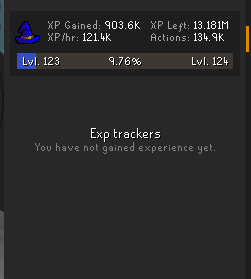
this xp tracker bug thing has got to be linked to a specific account you login to. I tried a different launcher, and a different account on the same launcher of the accoutn i have this issue with, same rl profile etc and they all get the overall xp gained panel
 round jacinth
idk what causes it but ive seen the issue before
its at the bottom of the screen for other folks tho
hidden ridge
its gotta be specific to the rs account, nothing with launcher/profile
ah is it
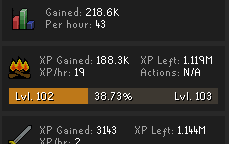
this is a diff rs acc, but same launcher same profile
could maybe be a broken plugin
haughty pumiceBOT
To enable safemode
Windows
Run the RuneLite (configure) shortcut from the windows start menu
Tick the Safe mode box, save, launch RuneLite the way you normally do.
Mac
In Terminal, run
/Applications/RuneLite.app/Contents/MacOS/RuneLite --configure
Tick the Safe mode box, save, launch RuneLite the way you normally do.
round jacinth
you could check if safe mode behaves
 ancient creek
Since the release of sailing im lagging a tick constantly on osrs. Is it jagex? Runelite or probably my pc?
 rigid ravine
hey i keep getting dc'd while its not on my end, someone told me it might be a plugin that could be causing that, any chance someone helps me troubleshoot it?
haughty pumiceBOT
open command prompt, type this in:
ping -t oldschoolXXX.runescape.com
where the XXX is your world minus 300, for example world350 = 50
round jacinth
i can't think of a plugin that interacts with your connection with jagex to cause dcs
rigid ravine
seems there are some packet losses to jagex...
but its not a problem on my end, at least i think so?
cause i have uninterrupted ping to my work server
like 0 packet losses to anything but runescape
league, google, my work, all running with no packet loss
 stone parcel
The problem would be between your pc and Jagex's servers.
The other sites are likely in different servers and buildings.
rigid ravine
is there something i can do to troubleshoot on my end?
stone parcel
You could test using a different connection, like tethering/hotspot from your phone to pc, and see if the issue is the same in the ping.
rigid ravine
i dont think i can contact my isp over it cause its only one server i get packet losses with

 oblique plume
check
 hard fern
yeah ive updated and checked everthing on my end and my game keeps crashing every 10-20 minutes and it says malformed login packet...
round jacinth
 stiff quail
i don't wanna see the word when my mouse hovers it.
stiff quail
i don't wanna see the word when my mouse hovers it.
You can search the top bar instead of asking AI
 hard fern
any suggestions wopuld be awesome
rigid ravine
hard fern
yeah ive updated and checked everthing on my end and my game keeps crashing ever...
YES THAT SAME THING HAPPENS TO ME
hard fern
rigid ravine
YES THAT SAME THING HAPPENS TO ME
it started about 2 weeks ago
rigid ravine
i just ran ipconfig/flushdns and i think it solved it?
no clue why but i didnt get a dc in like 10-15 minutes when it used to be every 5-10
hard fern
but is it still happening
rigid ravine
unlucky, hope a fix is found soon
hard fern
is it still happening to you?
 feral lagoon
does anyone know how i can center the login screen? makes me crashing out

the only way i found was to increase stretched mode ratio but then it changes in game too
 nimble steeple
Anyone know why this is happening (green highlight on ALL cargo holds)? It first started when I updated the Sailing plugin while logged in, and now I can't get rid of it. Totally removed + reinstalled the sailing plugin, restarted Runelite, logged in and out, etc
 solid mesa
Bug in the current version of port tasks that is fixed in the version under review. You can disable highlight cargo holds
 acoustic forge
anyone else unable to see ge prices in bank and upon examine
 midnight zinc
Im having major connection issues. I used to have 12 ping and 99,8% good ticks on UK/GER worlds, now i have 60 ping on all of them and the game feels much slower than that. I did a speedtest and that resulted in 13 ping and good down/upload
My clicks are registering about 1 second after i click, no way that's 60 ping
also randomly dc'ing and getting this message


Is this a runelite problem since everything else on my pc seems to have no connection issues?
 gilded kayak
speedtests are useless they dont host osrs on them
haughty pumiceBOT
open command prompt, type this in:
ping -t oldschoolXXX.runescape.com
where the XXX is your world minus 300, for example world350 = 50
midnight zinc
between 40 and 60 is the response i'm getting
 plucky forge
anyone know where i can find the file with the ground markers in it? need to remove a bunch of specific ones and it's probably easiest to do in the txt or w/e file
midnight zinc
nothing to my home network changed and my clanmates don't have this problem with high ping
prisma oriole
what makes you think its runelite
midnight zinc
everything else is working fine and no one in my cc is having the same issues
plucky forge
try official client
prisma oriole
I dont know what "everything else is working fine" means
tracert oldschool17.runescape.com
try something like this
midnight zinc
everything on my pc that requires internet connection doesn't randomly dc
or have malformed packets
prisma oriole
malformed login packet is just a generic message
I don't think you'd know if your browser had malformed packets either
midnight zinc
fine but you know what i mean
prisma oriole
have you tried the official client?
midnight zinc
playing osrs on runelite for 7 years and never had this problem
prisma oriole
you could just be a victim of sailing
midnight zinc
sailing causing known lag and delay on the servers?
prisma oriole
actually you know what would be interesting to try
is if you tried on a mobile network
because it could be your ISP is doing weird routing
but I would try:
- running tracert I posted above
- using official client
- using a mobile network
 lavish geyser
midnight zinc
Im having major connection issues. I used to have 12 ping and 99,8% good ticks o...
lavish geyser
midnight zinc
Im having major connection issues. I used to have 12 ping and 99,8% good ticks o...
The introduction of grid world servers increased my ping from 130 to 180
So don't feel too bad
midnight zinc
prisma oriole
but I would try:
- running tracert I posted above
- using official client
- usi...
getting 109 ping avg from my mobile hotspot but i do not live near a tower
midnight zinc
prisma oriole
because it could be your ISP is doing weird routing
how do i figure out if this is happening?
prisma oriole
but are you losing packets or just high ping
midnight zinc
i used tracert
to oldschool server
first 12 steps are 6ms ping last 2 are 50 and 56 ping
 leaden trail
If it's only happening with OSRS then it's probably just unlucky routing
nimble steeple
solid mesa
Bug in the current version of port tasks that is fixed in the version under revi...
Thank you @solid mesa !!!
plucky forge
plucky forge
anyone know where i can find the file with the ground markers in it? need to rem...
anything on this?
gilded kayak
we wont instruct you how to do that, if you do it wrong you'll lose all your settings
leaden trail
...and we won't help you fix it either
plucky forge
I can make backups of files i edit - np if it's more complex than that, but i know how to reinstall rl worse case scenario
hard fern
midnight zinc
fine ill fuck it up myself
i might have found a fix
plucky forge
leaden trail
...and we won't help you fix it either
It was not complicated lol
hard fern
its still doing it i have no idea wtf is up its fine and then just huge lag spikes then it disconnects me
every 15 min or so
stone parcel
Yeah that sounds like connection issues. You can try leaving this ping going and wait until you have a disconnect, and then see if the cmd window also shows something at the same time as the disconnect.
haughty pumiceBOT
open command prompt, type this in:
ping -t oldschoolXXX.runescape.com
where the XXX is your world minus 300, for example world350 = 50
midnight zinc
hard fern
its still doing it i have no idea wtf is up its fine and then just huge lag spik...
having the same problem yes
 craggy star
Is there a quick way to remove all tile markers on the gwenith glide course? I treid to use a custom tile pack yesterday but they weren't working. I think the maintainer pushed a change today to allow marking on the ocean. I want to play with some new tiles but it is a slog trying to remove all existing ones.
 vale dome
can't you delete/disable the custom tile pack?
craggy star
The tilepack wasn't working yesterday. It didn't support tile marking on water
SO I imported them like normal. I am exporting my runelite profile, and modifying it to remove all the tilemarkers. I'll reimport and see
Nevermind, tilemarkers aren't stored there
I think I may have gotten it
I got it. I took the tilemarkers I imported last night, and got every unique region ID from it.
Then went into my C:\Users\me\.runelite\profile\Main-#######.properties file and removed all groundMarker.region_#### lines that matched up with the unique regions. Much easier than traveling to each chunk and removing tile markers.
 wet zenith
Hey there, I have sort of a weird issue that I’m hoping might make sense to someone. Basically I play runelite a lot on the steam deck, and I’ve noticed that certain plugins / settings only seem to apply to my runelite profile (with cloud sync enabled) if the program is closed properly, like clicking on the little X and confirming the closure. In gaming mode on the steam deck, the window is cropped out, so the only way to close the application is through steam which I imagine is the equivalent of just alt+f4, so it won’t save settings and I’m forced to switch to desktop mode to make most permanent changes. If anyone has any insight as to how I could get around this that would be great, thanks
 zealous cedar
the settings are saved in the background every 5 minutes, closing with the x just causes it to save immediately
wet zenith
Okay that’s perfect lol so I’ve been creating the issue by immediately closing out to try and save the stuff
Thanks
 keen epoch
Thanks, but can you expand on what that means?
oblique plume
Grep clientThread
 vestal heart
so the sailing quest is not on quest helper
haughty pumiceBOT
Visit Zoinkwiz's Quest Helper plugin discord (https://discord.com/invite/XCfwNnz6RB) for support, issues & feedback
 dark heart
hi i am having issues with the gpu plugin if there is someone able to help.
haughty pumiceBOT
Dont ask to ask. https://iki.fi/sol/dontask.html
prisma oriole
yo that link needs updating it never loads for me !!
prisma oriole
damn I need to upload my government id I guess
round jacinth
It does redirect for me to a spot that doesn’t load.
stone parcel
Same.
prisma oriole
how could you do this
 hollow olive
same
prisma oriole
now I will never know how to ask a question
 narrow surge
One of the 500 other nohello sites should do instead haha
 wispy sand
hey quick question. you know how sailing plugin has "prioritize cargo hold" option where even if jobless jim is standing in front of it, you click through him and get the cargo hold click? is there an easy was for me to also apply that same thing to the salvaging hooks without swapping his left click option to walk here? just making the hook click prioritize over clicking the npc? hope that makes sense.
 empty minnow
You can probably use custom menu swaps to do that
I know you can prioritize one NPC over another specific NPC, not sure if it would do the same for objects but probably?
wispy sand
yeah i just dont how to format what would need to be put in
i have "attack,demoniclarva" which i think prios larva click over clicking doom, but dont know how to use that for my situation
 vast bone
Use,salvaging hook,talk-to,jobless Jim
 vast bone
Why comma at the end
wispy sand
does each command need to be separated with one?
 lusty oriole
Hi yall! Does anyone know why my highscores is not working? It historically used to work but now just shows the red !. Also, for example when someone does !lvl sailing, I just see that, not it actually show their lvl
gilded kayak
can you load it in-browser
lusty oriole
gilded kayak
can you load it in-browser
Like the offical OSRS highscores? Yep
wispy sand
vast bone
Separate with enter key
no dice. idk
gilded kayak
a jmod recently did a large overhaul to the hiscores so they stopped running like shit, but i'm not sure if that would be related
fwiw i can load you fine
or ur friend ig
lusty oriole
Thats what I thought! I used to be able to view just fine
and it sporadically works but recently seems to not more often than it does
vast bone
wispy sand
no dice. idk
Should work if you remove the comma at the end and use the same text as in game
Otherwise idk why it wouldn't work
lusty oriole
so I was curious. Reddit also seems to not have much pots abt it so might be a localized issue. I am going to try on laptop to see if I still have issues there.
wispy sand
vast bone
Should work if you remove the comma at the end and use the same text as in game
finally got it: deploy,rune salvaging hook,command,jobless Jim
which makes complete sense in hindsight lol, thanks!
 glacial flint
HEY GUYS @ALL I GOT RESOLVES AMD ISSUE NEWEST UPDATE
JUST USE DDU AND REINSTALL FROM AMD WEBISTE THEY REPLACED BROKEN OPEN GL
IT WORKS JUST FINE NOW
@gilded kayak
gilded kayak
yippee
glacial flint
can i do the hud bigger?
oblique plume
Stretched mode
 low inlet
anyone else getting crashes frequently with GPU plugin enabled? Especially happens when doing Gwenith Glide
my GPU is a 7800 xt
low inlet
I did
gilded kayak
was it very recently
low inlet
yes
gilded kayak
ok
low inlet
like yesterday or day before
gilded kayak
so the bad news is your issue is your cpu is melting
gilded kayak
i asked because the microcode you are on, is the one where they stopped melting it
you can see on that wiki page, your cpu is listed in the "gets 2 extra years of warranty" section
low inlet
would I have to replace the motherboard as well?
gilded kayak
i don't think so? but if you would it's not something i've seen discussed here
low inlet
hmm ok
thank you very much for the help
is there anything I could do to make the CPU more stable in the meantime?
I tried running core cycler earlier to see maybe if I could disable specific cores, but no errors were reported after running for 6 hours
low inlet
well I was able to do a full gwenith glide marlin run with only core 0 enabled, so I guess I'll just enable cores after each successful run
before, it would always crash a minute or two into the trial
not a guarantee that it means the "good" cores will still run ok later on, but eh for now I'll take it
thanks again for the help, it's very nice peace of mind that I know now what the issue is, and CPUs are on a mega-sale
low inlet
gilded kayak
i asked because the microcode you are on, is the one where they stopped melting ...
this means I can get a new 14th gen Intel CPU and expect no problems, right?
mossy swan
low inlet
this means I can get a new 14th gen Intel CPU and expect no problems, right?
if they send you one that doesn’t happen to be broken already, yes
leaden trail
You should probably get a replacement and then sell it and buy an AMD CPU
low inlet
eh I'm not down to get a new motherboard tbh, if it wasn't for that I'd strongly consider it
lusty oriole
gilded kayak
can you load it in-browser
I figured it out
For some reason, if I have VPN on, runelite highscores doesnt work
if I have VPN off, it works again
gilded kayak
that would make sense
lusty oriole
ty for helping me trouble shoot xD
 marble swallow
lusty oriole
For some reason, if I have VPN on, runelite highscores doesnt work
marble swallow
lusty oriole
For some reason, if I have VPN on, runelite highscores doesnt work
your issue is with the vpn being blocked by jagex :p
lusty oriole
marble swallow
your issue is with the vpn being blocked by jagex :p
NordVPN 🙁 ripperoni
lusty oriole
marble swallow
your issue is with the vpn being blocked by jagex :p
But heres the SUPER wierd part to me - Accessing highscores via jagex website while on VPN works
just the runelite highscores breaks lmao
marble swallow
yep kinda expected with how cloudflare challenge-mode works
if you try to sign in on the vpn, you might notice an 'access blocked' page when you hit the secure.runescape.com url
lusty oriole
marble swallow
if you try to sign in on the vpn, you might notice an 'access blocked' page when...
yep
Im just going to set RL to split tunnel and i think its solved the issue
marble swallow
the vpn providers AS number for that set of ip's are blocked or forced challenge-mode
lusty oriole
Ive had to do that before but didnt realize it was the issue until today
 novel kelp
https://github.com/Adamcake/Bolt/issues/168
https://github.com/Adamcake/Bolt/issues/179
Does anyone know if this ever got sorted? 1x is tiny and 2x is huge for the integer scaling

GitHub
OS/kernel: EndeavourOS / Linux 6.16.3-arch1-1 DE: KDE Plasma 6.4.4 WM: kwin When I set the RuneLite launch command in the settings to be: %command% -J -Dsun.java2d.uiScale=2, my RuneLite client wil...
GitHub
Hello, I play on a 4k monitor with everything scaled to 200% so I can see. I use strectched mdoe plugin to make runescape look good on the monitor. Bolt itself looks good naturally scaled up. The p...
3440x1440p monitor
Kubuntu (KDE plasma + wayland)
I tried the adamcake bolt launcher on mint w/ x11 as well and everything looked fine
zealous cedar
I think its a wm thing, since ive seen some people on linux have it working before
 chrome widget
Hello. I have a problem with my quest helper not showing up in my plug ins. I deleted the jar file and then deleted the cache file and jar again after it initially didn’t work, and still didn’t seem to fix it. It shows it as installed under the search option but it’s not on my list or side bar. Anything else I could try?
Possibly unrelated but my 117 hd plug is having the same issues.
dark heart
hi i'm having an issue with the gpu plugin on runelite. client log says that i have an unsupported gpu?
heady garnet
dark heart
hi i'm having an issue with the gpu plugin on runelite. client log says that i h...
Kind of self explanatory
Do you have a dedicated GPU?
 foggy galleon
 native ether
I want to hide that.

 dense narwhal
The clue stash on runelite is no longer working or is it just me?
fossil summit
native ether
I want to hide that.
theres a fix for that cooper pushed yesterday, I'm sure it will be merged eventually
 upper coral
Currently on my partner's PC. GPU hardware acceleration seems to massively slow the game, running at about 13FPS. System resources don't seem to be stressed.
 upper coral
Nevermind. Turns out my partner doesn't have the Nvidia modules loaded correctly meaning that openGL gets rendered with the CPU.
 stable robin
Im trying to get the plugin hub working with running runelite through intelij , ive followed the instructions on the wiki but when i get to the point of using -Drunelite.pluginhub.version=<current RL version> it errors out and runelite wont start , am i missing something?
 gilded kayak
'_>'
stable robin
i presume im doing something wrong here
gilded kayak
you put the current rl version there...
stable robin
ahhh that explains alot XD
gilded kayak
-Drunelite.pluginhub.version=1.12.6
stable robin
life saver thankyou
 cedar fossil
Anyone know how to check what is occasionally crashing runelite?
haughty pumiceBOT
To find the logs, you can do one of the following:
- If your client failed to open, click the
Open logs folderbutton. - Open the screenshot directory by right-clicking 📷
Camerabutton, navigate 1 directory up, then open logs folder. - Navigate to
%userprofile%\.runelite\logson Windows or$HOME/.runelite/logson Linux and macOS.
Upload the log files named client and launcher by dragging them to Discord. If there are files prefixed with jvm_crash dated from today, upload them too.
cedar fossil
There was a crash file from yesterday, but none from today (yet).
 dusky nacelle
is there way to hide certain drops from ground compelety? so i dont pick em up by accident
nvm figured it out
 odd edge
Hi - My quest helper isn't showing the shortest path.
haughty pumiceBOT
Visit Zoinkwiz's Quest Helper plugin discord (https://discord.com/invite/XCfwNnz6RB) for support, issues & feedback
hard fern
my game disconnects every 15 minutes or so and it either says failed login or malformed login any help would be awesome i have tried a lot to fix this
im currently not on RL and it seems to still happen
mossy swan
hard fern
my game disconnects every 15 minutes or so and it either says failed login or ma...
restart your router and pc
if it doesn’t help, use an ethernet cable instead of wifi
if still no help, try different region osrs world
if still broke complain to isp
hard fern
mossy swan
if still broke complain to isp
what is isp?
mossy swan
mossy swan
internet service provider
.
hard fern
its not the internet because i can go on my tablet and it doesnt happen
mossy swan
guess your pc is broken then if you’re sure
hard fern
i havent changed anything all my other games run fine its a new pc its only osrs
hard fern
mossy swan
guess your pc is broken then if you’re sure
its sailing lol sailiong broke the game
well fuck man this sucks the game is like unplayable for me.... fml
ill take any suggestions
fossil summit
exchange the new pc
 cursive drift
Is there a way to sign out of Runelite on other devices remotely? My Runelite is still signed on to a friend's client
round jacinth
Tell them to sign out
hard fern
fossil summit
exchange the new pc
bro its not the pc lol
can anyone help me with the game crashing or is there really not any help its just try to reset everything and thats it?
round jacinth
You’re saying game crash here but I think your internet connection is just poor?
Malformed packet isn’t a crash
gilded kayak
what are they
are you going to list us multiple internet errors
cuz we're not going to argue with you
hard fern
failed login. malformed login packet
hard fern
ive tried running it with no RL it still does the same thing like every 5-15 minutes it disconnects me. ive changed nothing and this started about 2 weeks ago
ok but the internet is good and i dont use a vpn
its the same internet ive always had same pc same evverything and then 2 weeks ago this started out of no where
also another response i get is. no response from server please try using a different world
stone parcel
You can open this and leave it going, then wait until you experience the issue in-game, and then see in the cmd window shows anything from the same time.
haughty pumiceBOT
open command prompt, type this in:
ping -t oldschoolXXX.runescape.com
where the XXX is your world minus 300, for example world350 = 50
hard fern
ok so i copy and paste this but enter the workd into the xxx
stone parcel
Yep yep! 😄
hard fern
so if its world 602 its 302?
stone parcel
Yeah, think so.
empty minnow
Because the RS3 worlds are technically 0-300 or something I think
round jacinth
It says minus 300 because a world 301 is server 1 for osrs
hard fern
ok then copy that into here
hard fern
round jacinth
It says minus 300 because a world 301 is server 1 for osrs
ty
so now i just leave the command prompt window open and wait for it to happen again
?
empty minnow
Yes leave command prompt open and play orsrs, if you see an issue in osrs check and see if command prompt also shows an issue
hard fern
empty minnow
Yes leave command prompt open and play orsrs, if you see an issue in osrs check ...
ok
it just did it and says request timed out
gilded kayak
so you have now indicated that you get the same disconncetion, connecting to the osrs servers, outside of runelite
round jacinth
yes, and if the command timed out as you said it did then your connection to that world also timed out (meaning you could disconnect)
So it’s not runelite. It’s your connection.
hard fern
ok so its either something wrong with my internet or maybe a cable or something?
round jacinth
unmoon mentioned earlier it could be an ISP issue too. Lots of moving parts.
hard fern
ok so how do i find out? or like how can i narrow this down? anything i should try?
gilded kayak
one time they did something that disconnected like all of south america
not your isp obviously but theirs
hard fern
im going to switcth to wifi
see if that does anything
maybe something is up with my ethernet
 calm belfry
does anyone know how to use the watchdog plugin? I'm trying to get object markers to work but I don't know how to use it
after pressing the "Set Marker", how does it work?
 haughty pumiceBOT
Support for hub plugins should be directed to the author of the plugin.
You can find the support link by searching for the plugin in the Plugin Hub panel and clicking the ? button on the plugin, or by right-clicking the plugin in the plugin panel and clicking the Support menu option.
round jacinth
They have their own discord to get help in.
calm belfry
thank you
hard fern
does anyone have the tmobile internet?
 leaden niche
Noticed an issue with the 'sails at helm only' setting within Menu Entry Swaps on Sailing plugin.
When this is ticked, hovering over the sails (while not operating helm) flicks between harvest/deactivate and quick-deposit/open depending on whether I'm clicking through the sail or not. Unticking this option resolves it, but thought I'd report it in case it needs a resolution.
haughty pumiceBOT
Get support for the Sailing Plugin Hub plugin here: https://runelite.net/plugin-hub/show/sailing.
You can also find the support link by searching for the plugin in the Plugin Hub panel and clicking the ? button on the plugin, or by right-clicking the plugin in the plugin panel and clicking the Support menu option.
 kindred quest
Hello, wanted to know if there was a way to censor my email on the runelite info side bar? sometimes this will popup when a plugin automatically closes whenever I'm sharing my screen. I'd prefer this wouldn't show up.
 round jacinth
No unless you sign out. You can switch Google accounts to a different one
gilded kayak
disable the info panel plugin if you need this
 dapper wyvern
I'm wondering how people do large tile markers exports. Such as markers across multiple chunks, like the Gwen Marlin route tiles.
I've always understood the "right click world map orb - export" was only the current chuink/instance area.
 solemn tinsel
Anyone else been having issues with time tracking reminder? It will often reset my farm tick to whatever tick I logged in on, completely messing up my time tracking.
I can fix this by doing ::resetfarmtick near a regular tree when it grows, but it will eventually reset to the wrong tick again when I log back in sometime afterward.
round jacinth
Do you have other issues too like settings not being remembered?
Or maybe you have a misunderstanding of what a farm tick is
 gaunt zenith
#support hey noticed this today the warning or pry bottle is on the chart in the same area
 haughty pumiceBOT
Support for hub plugins should be directed to the author of the plugin.
You can find the support link by searching for the plugin in the Plugin Hub panel and clicking the ? button on the plugin, or by right-clicking the plugin in the plugin panel and clicking the Support menu option.
solemn tinsel
round jacinth
Do you have other issues too like settings not being remembered?
no other issue other than my tick being reset when I log in. All farming times begin/end at a certain minute. Mine begins/ends at the 0:12 minute, but it is not remember when I log in sometimes. It thinks my farming time begins/ends at whatever 0:XX I logged in on.
this is a new issue that started after the sailing update. no other issues, and I've never had this issue persist before.
 stuck magnet
hey guys I want to know how I can play OSRS using RuneLite on Fedora Workstation? Apparently I need to login using the Jagex launcher which unfortunately does not support Linux.
haughty pumiceBOT
Using Jagex accounts on Linux is not officially supported by Jagex, but there are some third party community guides to make it work https://help.jagex.com/hc/en-gb/articles/13413514881937-Downloading-the-Jagex-Launcher-on-Linux
gilded kayak
"does not support" just means the company doesn't support it, someone will always figure it out if they care enough
 pseudo bramble
Hello! I'm not sure where to post this but I've been experiencing a visual glitch on both the 117HD & GPU (legacy) plugin with the KBD pet where his heads get cut off. Oddly enough it doesn't happen on the standard GPU plugin, but that one has so many other issues right now that it's unplayable anyways...
 gilded kayak
what other unplayable issues are you having with the core gpu plugin
i would be very surprised if legacy AND 117 have the same issue, because 117 needs to be on the code gpu changes, otherwise boats dont load
and boats definitely load
empty minnow
Is the legacy renderer turned on on 117?
pseudo bramble
My feet along with other items are sinking into the ground on the GPU plug-in and there are a bunch of flickering happening under NPCs like in the Inferno

Same image on Legacy plug-in instead of 117HD
gilded kayak
isn't the feet thing a game problem
empty minnow
Yeah same on official client
zealous cedar
the inferno thing is news to me, are you sure that is real?
 cerulean cairn
gilded kayak
"does not support" just means the company doesn't support it, someone will alway...
cerulean cairn
gilded kayak
"does not support" just means the company doesn't support it, someone will alway...
there are some third-party launchers that you can use, I use one myself (I'm on kubuntu)
as always though, using third-party stuff comes with a risk, not sure if I'm allowed to give names here, but they do exist
gilded kayak
cerulean cairn
there are some third-party launchers that you can use, I use one myself (I'm on ...
i said that after posting the link to those 3rd party launcher
pseudo bramble
zealous cedar
the inferno thing is news to me, are you sure that is real?
It was last time I've been in there on the GPU plug-in prior to Sailing launch at least, but worked fine on the Legacy one.
gilded kayak
we just use the jagex official™ article, to link to them
cerulean cairn
gilded kayak
i said that after posting the link to those 3rd party launcher
ah yeah it helps if I scroll down :P
zealous cedar
pseudo bramble
It was last time I've been in there on the GPU plug-in prior to Sailing launch a...
i somewhat doubt this is still a thing fwiw
round jacinth
pseudo bramble
Hello! I'm not sure where to post this but I've been experiencing a visual glitc...
The clipping of the head has happened forever. Depends on the angle you rotate the camera, it’s not new. Not sure about the other stuff.
zealous cedar
its unplayable!
round jacinth
I’m trying to find the text from my friend who got the pet in 2021 asking me when Adam can fix runelite to make the pet bring out able in public
So I know it’s a thing from way long ago lol
“It’s missing a head!?”
pseudo bramble
round jacinth
The clipping of the head has happened forever. Depends on the angle you rotate t...
True about angles! I just thought it was odd that it doesn't happen at all on the GPU plug-in but it does in Legacy & 117HD
gilded kayak
the gpu plugin does use a new renderer
zealous cedar
you should try using normal gpu again
gilded kayak
maybe it's accidentally fixed by that?
pseudo bramble
 stuck magnet
haughty pumice
Using Jagex accounts on Linux is not officially supported by Jagex, but there ar...
stuck magnet
haughty pumice
Using Jagex accounts on Linux is not officially supported by Jagex, but there ar...
thank you !
pseudo bramble
So the feet into the ground is only happening on GPU one
pseudo bramble
Ah gotcha! "Unplayable" was certainly a harsh word, my bad. Just annoying to look at is what I meant... I'm assuming it'll get fixed soon enough. Thanks guys
 civic yarrow
Any update on 117hd crashing? Crashed 2 times today to desktop. Using gpu for now
haughty pumiceBOT
Visit 117's HD plugin discord (https://discord.com/invite/U4p6ChjgSE) for support, issues & feedback
gilded kayak
but from our side i don't think anyone else has reported it
civic yarrow
ok ty
gilded kayak
usually when there's a widespread issue, reports still end up here
civic yarrow
I googled 117hd crash osrs and it came up
Not like I have a facebook acc like a 50 year old lol
 lucid gate
For detecting another player's movement to a different tile (on land or sea), would I subscribe to the PlayerChanged event and do playerChanged.getPlayer().getLocalLocation()? Or is there a better way?
zealous cedar
there is no event for player movement
 fickle tundra
Is there any tricks to make sure runelite saves client setting changes easier when you have multiple clients open?
Sometimes I'll change settings in one client and when i reopen they don't save so I'm wondering If i have to close the client i did the changes on first or last or something to make them save
zealous cedar
it could be the other client is saving the setting and overwriting it
normally the client saves the settings every 5 minutes or on close
fickle tundra
alright thanks I'll close the client with no changes first and leave the client open with changes for 5mins just to make sure it saves from now on
lucid gate
Ooo I think I found how to get all loaded world views, although it does exclude the -1 id which is fine:
client.getTopLevelWorldView().worldViews();
And then you can loop thru each world view and get the Id
 merry plover
I keep getting this error for macbook when trying to open runelite for the first time how do I fix this ?
 gilded kayak
!macos-old try this one instead
haughty pumiceBOT
macos-old-launcher: If you are on macOS version 10.11 or older (El Capitan, Yosemite), download this Runelite launcher instead: https://github.com/runelite/launcher/releases/download/2.4.2/RuneLite-x64.dmg
 dawn igloo
i cannot get these white boxes to go away.. they seem to be notification areas for discord ive looked and changed some settings and cant find it.. im new to runelite..
 dawn igloo
i cannot get these white boxes to go away.. they seem to be notification areas f...
dawn igloo
dawn igloo
i cannot get these white boxes to go away.. they seem to be notification areas f...
I have checked screen markers...
dawn igloo
interesting, appreciate you.
merry plover
thank you for the help with the MacBook runelite crashing its working now !
dawn igloo
gilded kayak
it's discord not runelite
I was able to find it so fast now with that information. your the best!
 silver walrus
Hey all,
I'm getting really low fps in runelite. Tried 117, gpu, low detail, and all of the above off. Runelite is the only app I get low fps in. Gpu drivers up to date.
Running at 2k, 1080p etc. All have similar results.
I am using the 64bit client.
Gpu is 3070. Can provide further pc specs if needed.
I sometimes move my PC to a different room and occasionally I'll have no issues after moving to the other desk (2k monitor also). Have tested on an old 1080p monitor and same issue.
Any known issues or settings I can change?
 azure pivot
Bit of a strange issue, Whenever I launch Runelite it appears fine, but the moments I click in window it goes black. I can still click to login and change settings and such, but can only actually see anything in the window if I click out of it.
mossy swan
azure pivot
Bit of a strange issue, Whenever I launch Runelite it appears fine, but the mome...
blindfold plugin?
azure pivot
Nope, never touched it
tabbed in vs tabbed out


I can play it in the regular non runelite way
gilded kayak
azure pivot
tabbed in vs tabbed out
this might be the discord overlay it sounds sorta like what 1 guy said
 left beacon
is there a way to remove tray notifications on wintertodt?
 thick linden
dusky nacelle
thick linden
dusky nacelle
When is hide ground objects plugin coming back
leaden trail
When the author fixes it, presumably
 twin flame
Hey guys, im using my linux machine at work
I tried downloading runelite through snap d from terminal
when I tried logging on it said wrong information even though im fairly certain its the correct information
worried about it being a keylogger
mossy swan
twin flame
when I tried logging on it said wrong information even though im fairly certain ...
you probably have a jagex account and need to use jagex launcher or alternative to launch runelite
haughty pumiceBOT
For support with using Jagex accounts on Linux, visit Torm's Discord https://discord.gg/aX7GT2Mkdu
twin flame
mossy swan
you probably have a jagex account and need to use jagex launcher or alternative ...
nah nha havent upgraded my acc to jagex , as long as going through sudo apt install snapd
and install runelite through there
then opening the client through command runelite
 wet vessel
runelite having issues connecting to server?

 gritty dust
not on c++ client?
 covert quiver
usual RL - UK ISP
 lilac forge
covert quiver
lilac forge
covert quiver
I'm having the same issues
 frigid mesa
Anyone know what plugin might be causing this, cant figure out whats highlighting all of the cargo holds
 covert quiver
 haughty pumiceBOT
open command prompt, type this in:
ping -t oldschoolXXX.runescape.com
where the XXX is your world minus 300, for example world350 = 50
leaden trail
Do that for the world you're trying to connect to
 ebon token
Hello. About 2 hours ago I had added about 3 plug ins, then kept playing and when I tried looking through plugins again it was saying it couldn't connect to the pluginhub. A couple hours later, I dc'd and now when I try to open RL from the Jagex launcher I get this message. Nothing was changed. Tried using troubleshooting and the only thing that it says about this mesage is you cannot split-tunnel with mullvad vpn, but I am not running a vpn.

 young sparrow
covert quiver
having major connection issues with RL.
young sparrow
covert quiver
having major connection issues with RL.
experiencing the same - also UK based
lilac forge
Getting a lot of 'Request timed out.'
young sparrow
seems to be killing my network speed for everything else if it's open too
lilac forge
Any resolution to getting timeout requests?
 mild venture
kier starmer said no
twin flame
so wait confirmed that installing runelite from linux terminal using snap is a legitimate way to get runelite?
wet vessel
lilac forge
Any resolution to getting timeout requests?
its an OSRS issue, happening on official client too
narrow surge
probably not even just runescape looking at https://downdetector.co.uk/
young sparrow
yeah looks like a few UK isps are having a nightmare lol
wet vessel
young sparrow
yeah looks like a few UK isps are having a nightmare lol
yeah ive noticed that, alot of my clan are us and are fine! lucky fuckers
 ivory crag
anyone help stop the woodcutting noise on runelite driving me nuts and i aint even woodcutting lol
leaden trail
The music plugin I think has "mute others' area sounds" which might do it
ivory crag
Nah no luck'
haughty pumiceBOT
To enable safemode
Windows
Run the RuneLite (configure) shortcut from the windows start menu
Tick the Safe mode box, save, launch RuneLite the way you normally do.
Mac
In Terminal, run
/Applications/RuneLite.app/Contents/MacOS/RuneLite --configure
Tick the Safe mode box, save, launch RuneLite the way you normally do.
leaden trail
Does it happen in safe mode?
ivory crag
yeah it does
oblique plume
metronome
ivory crag
life saver
 flat flume
hey
i m trying to upload my ground marker, for some reason not showing up on my runelite
 exotic karma
anyone having an issue when you try to shift drop an item it now says "unmark task" ? it was working last night when i was salvaging.
 glossy belfry
disable port-tasks
exotic karma
Gentleman and a scholar, thank you sir
glossy belfry
Hopefully a fix soon 🫡
 humble fractal
Thank the lord
 frail totem
does anyone know whats causing this mask task on items when i hold shift?

 novel wraith
TURN OFF PORT TASKS
novel wraith
frail totem
does anyone know whats causing this mask task on items when i hold shift?
Literally 4 messages above yours
 frail totem
legends thank you
novel wraith
What can cause this with runelite? Mobile login works fine, internet on PC completely fine

Restarting runelite /j launcher does nothing
frail totem
i had that with my vpn this morn if your using one, had to switch location
novel wraith
Nope no vpn
novel wraith
nope US
 rough sequoia
Newbie plugin dev here. I lack permission post in #development so I'll ask my question here, sorry if that breaks the rules.
Is it not possible to manually install a plugin? I've put one together and would like to test it outside of the development environment but moving my build to .runelite/plugins does nothing, it won't appear in-game. I do notice my builds lack a runelite_plugin.json file but I'm assuming that's plugin hub metadata. Any guidance would be helpful, I can't seem to find anything about this on the wiki or documentation.
 sacred iris
Hello, i have a weird bug with ground items, i have these items set as hidden items, and even if i remove them, if i restart runelite, they will reappear in that section.
Vial, Ashes, Coins, Bones, Bucket, Jug, Seaweed
other settings are fine but for some reason this was keep getting reverted
zinc bone
rough sequoia
Newbie plugin dev here. I lack permission post in <#419891709883973642> so I'll...
Use the test as explained in the README
 clear stratus
rough sequoia
Newbie plugin dev here. I lack permission post in <#419891709883973642> so I'll...
clear stratus
rough sequoia
Newbie plugin dev here. I lack permission post in <#419891709883973642> so I'll...
use #runelite for these types of questions
rough sequoia
zinc bone
Use the test as explained in the README
The test runs and launches the client with my plugin fine. I'm trying to load the plugin outside of my development environment. Perhaps I misunderstand what you mean, sorry.
clear stratus
you can't do that
rough sequoia
wat
 mild island
why cant i drop items with shift click
 clear stratus
if your next question is "but how do i test the plugin with a jagex account"
mild island
all of the suden mark task apeard
rough sequoia
Assumption here but are you saying I have to put it on the plugin hub to run it outside of dev?
zinc bone
Osrs has settings to shift-click to drop by default, if you changed it just swap shift-click 'reset'
clear stratus
zinc bone
Osrs has settings to shift-click to drop by default, if you changed it just swap...
that's not the case here. the port tasks plugin broke shift click drop today
mild island
zinc bone
Osrs has settings to shift-click to drop by default, if you changed it just swap...
tried that doesnt work
clear stratus
restart your client it was reverted
mild island
clear stratus
restart your client it was reverted
bro thanks
clear stratus
rough sequoia
Assumption here but are you saying I have to put it on the plugin hub to run it ...
why are you asking this question
that will help inform the answer
rough sequoia
Because you said I can't load my plugin outside of the development environment.
round jacinth
You have to load it in dev environment
Because it’s a plugin being side loaded or developed.
clear stratus
why do you need to run it outside of the dev environment is my question
round jacinth
But rikten hotdog x is correct this channel is for core client help not how to run dev plugin or develop a plugin
zinc bone
Everything that needs to be tested can be tested in the dev environment. Trying to run it outside and asking how to do so is sus
rough sequoia
We can continue the discussion in the other place. I didn't have access to development like the rules said sorry.
round jacinth
Not really people share their projects with friends for testing but they don’t know their friends must also load a sa dev.
clear stratus
guys he probably has a legitimate reason maybe stop dogpiling
round jacinth
You don’t need access to #development for this question
#development exists so you can ask Adam questions
Or real questions
clear stratus
we're in this channel we can just use it
rough sequoia
round jacinth
You don’t need access to <#419891709883973642> for this question
Okay sorry I misunderstood the rules post. It made it sem like if you have plugin dev questions you ask in #development and if you have client questions you ask in #support
clear stratus
@n are you asking because you can't log into the dev env with your jagex account, or because you want to give it to someone you test it
rough sequoia
I just wanted to write a simple plugin, build it, drop it into my client plugins folder, and run runelite via bolt the way I have been.
clear stratus
yeah, you can't do that
round jacinth
That doesn’t work you must run as dev for that. And wrong folder
clear stratus
if you could do that everyone would make cheat plugins and run them
round jacinth
Yeah it’s support but it’s support for core client help not hub help or development build help. It’s maybe a bit confusing now that hub is basically 80% of the client now it seems lol
You should release it to hub if you want it available through bolt.
rough sequoia
Yeah I don't have problems with that or anything I just didn't want to go through the effort for something so simple
round jacinth
It is not hard to get stuff to hub it just takes a few days for a developer to review and allow it there
Just submit it to hub and then wait and until then run it locally if you must have it. What is it anyways?
clear stratus
the other option is shadowjar
haughty pumiceBOT
Run gradle shadowJar to generate a runnable jar in build/libs/*-all.jar. You can run the jar with java -jar -ea jarName.jar. If you run into problems, update build.gradle to the latest plugin template version.
rough sequoia
round jacinth
Just submit it to hub and then wait and until then run it locally if you must ha...
Basically just wanted a plugin to middle click inventory items instead of shift lmb to drop them
Let's me play one handed in my sofa chair easier.
round jacinth
You can remap that in AHK already, if runelite window open, remap middle click to shift left click
A reason for a plugin is the brain behind the logic of middle click working to rotate camera or not if you are ok without that detection
You also can just use “left click dropper” plugin
Where you type in a list of items and those items are now left click drop
rough sequoia
clear stratus
if you could do that everyone would make cheat plugins and run them
Also sorry if that's not how you players do it here. I'm a complete newgen, I come from the Minecraft scene where this is not the convention. Bascially just have the tools, build and run what you want.
clear stratus
well yes minecraft is a single player game with no official rules
so that makes sense
round jacinth
People don’t care if people cheat in Minecraft as you’ll never get banned on accident for breaking the rules of Minecraft, runescape has risks where a shared jar from a bad player could do bad stuff or get you banned
rough sequoia
Yeah that makes sense. People should really know what they are running though.
Thanks for the help and sorry if I come off like a total spaghettihead
round jacinth
They don’t. They blindly accept “help” and get phished at TOA still to this day.
rough sequoia
round jacinth
They don’t. They blindly accept “help” and get phished at TOA still to this day.
😭
round jacinth
“There’s plugins not on hub, this one is a good one” bam they’re hacked.
No plugins exist outside of the hub.
Anyways left click dropper exists already which maybe you want or you can remap a side button on the mouse to shift so you don’t need middle click to do this either 🙂
rough sequoia
Pretty much answers my question though. I'll look into this left click dropper plugin, probably work just the same.
round jacinth
It’s one I made ages ago, it’s just a remnant of the past where MES didn’t allow per item selection of what a left click did.
rough sequoia
I remap all 12 of the buttons on my mouse side so it's not an option unfortunately.
But yeah this lmb dropper thing sounds like it would work
I'm guessing it's on the hub because I didn't see anything builtin, hence my being here asking questions about diy.
Thanks again for the help
rough sequoia
round jacinth
It’s one I made ages ago, it’s just a remnant of the past where MES didn’t allow...
Yeah this works perfectly for me. Thank you for making this. :)
 fast shuttle
Author has messed with the highlight box for the sailing plugin. Anyway of making them small or just deactive it for now?
haughty pumiceBOT
Get support for the Sailing Plugin Hub plugin here: https://runelite.net/plugin-hub/show/sailing.
You can also find the support link by searching for the plugin in the Plugin Hub panel and clicking the ? button on the plugin, or by right-clicking the plugin in the plugin panel and clicking the Support menu option.
 tawdry frost
Can anyone tell me how to turn this off in my game by any chance:
 oblique plume
Set private to something other than on
tawdry frost
AAAh thanks!
fast shuttle
Getting mark task when I try to shift drop? On sailing salvage
narrow surge
restart client
fast shuttle
Thanks.
 little flax
Is it possible to mute zuk healers fireball attack sound?
gilded kayak
maybe
https://oldschool.runescape.wiki/w/List_of_sound_IDs it's probably on here but idk what the name is
and then annoyance mute on the hub
fast shuttle
also a visul sound plugin that you can grab sound ids from and add it to the annoycemute plugin
little flax
oo thx
round jacinth
it’s worth noting the ids here or something because I’ve got a catalog of these so people who ask I’ve got answers as I maintain annoyance mute
mild island
,
 copper haven
Hi there , the text in my RuneLite notes section has swapped alignment to the right, I don’t remember consciously doing this and can’t seem to find anything that tells me how to get it back to how it was (left as with most things). Thank you for any help it’s much appreciated
hidden ridge
is there a way to remove the sails/mast on my ship? when salvaging i want to hide the sail itself
 plucky hearth
is 117 hd working properly at sea yet or do yous still have to hd it up
plucky hearth
tawdry frost
Can anyone tell me how to turn this off in my game by any chance:
set private to friends
 delicate bobcat
plucky hearth
is 117 hd working properly at sea yet or do yous still have to hd it up
delicate bobcat
plucky hearth
is 117 hd working properly at sea yet or do yous still have to hd it up
it works properly, I would say
but it depends on what you mean exactly
plucky hearth
delicate bobcat
it works properly, I would say
nice yeah last time i had it on it kept jumping like a kangaroo especially at trials
delicate bobcat
there is lag every time you cross a loading line atm
there's something in the works for that, but no ETA yet unfortunately
plucky hearth
yeye thats cool ill keep it off for now then
delicate bobcat
it's starting to look stable though, so perhaps with a big asterisk, in the coming days
plucky hearth
yeah man cant wait to see it properly at sea
anymore sailing plugins as of yet? last i see there were 2
leaden trail
I think Llemon is aiming to have the sailing one be pretty comprehensive
plucky hearth
whos llemon
gilded kayak
 narrow surge
leaden trail
I think Llemon is aiming to have the sailing one be pretty comprehensive
narrow surge
leaden trail
I think Llemon is aiming to have the sailing one be pretty comprehensive
every time I think of something that would be useful I look and it's either already done or an issue exists to do it 😂
round jacinth
that's the purpose
there shouldn't be a need for multiple plugins, one should do everything
 haughty veldt
Turning on the GPU plugin freezes most of the screen, can only interact with the top left rectangle. When I take a screenshot with Runelite, you can't even see the border.
 gilded kayak
that's probably being caused by your gpu driver version
haughty veldt
gilded kayak
that's probably being caused by your gpu driver version
I'll have a look into that, thanks, hadn't crossed my mind at all for some reason
 oblique crag
help
solemn tinsel
Is there a fix for time tracking reminder issue persisting since launch of Sailing? Anyone else even experiencing it? I have not been able to get correct times on my farm patches.
oblique crag
im having this issue on amd
 gilded kayak
the latest drivers have some issue that prevents us from finding the gpu
if you check the logs it will say ur using GENERIC gpu
oblique crag
it worked great a few dyas ago, so i was just curious, i can't play without it
gilded kayak
oblique crag
it worked great a few dyas ago, so i was just curious, i can't play without it
the bug requires the latest windows update also
did you update windows
oblique crag
yes, i completely resetted my pc
gilded kayak
ah well unlucky
you'll either need to play without gpu/117 or downgrade either windows or your driver version
well
oblique crag
10-4. ill wait thanks
 heady shadow
oblique crag
im having this issue on amd
heady shadow
oblique crag
im having this issue on amd
Ah okay i was going mad trying to fix this on my own but seems it's an ongoing thing. Good to know at least.
hard fern
does anyone else have t-mobile home internet?
delicate bobcat
oblique crag
10-4. ill wait thanks
join 117 HD's discord and you can follow some instructions posted by the bot
haughty pumiceBOT
Visit 117's HD plugin discord (https://discord.com/invite/U4p6ChjgSE) for support, issues & feedback
 split willow
if i factory reset my pc and deleted everything off of it will i lose my runelite plugins n stuff?
i use the jagex launcher and ive always been signed into the client itself
empty minnow
If you have turned on cloud sync on your profiles then it will be saved, otherwise you'll lose all your plugins
haughty pumiceBOT
 little loom
is there a way to hide cox purples?, I have cox sensor but its still showing collection log pop ups
little loom
it wont post into discords if i turn that off
gilded kayak
if ur using a shit plugin yes
but if ur using dink no
dink explicitly checks the in-game setting for what clog option you have, chat or popup and acts accordingly
little loom
Set it up i'll give it a go ty
 umbral crescent
When I change the 'scale' in the configuration settings nothing happens. I'm wondering if it's due to MacOS display scaling overriding it? My client will always be scaled along with my desktop elements if i change it in the OS.
round jacinth
Some OS only support integer scaling numbers like 1.0 and 2.0
 modest lodge
I'm constantly getting stuck here during startup. Ever since the sailing update, this is the second time I've gone through a batch of this issue. First time around I had to do a clean uninstall and reinstall of RL as well as deleting all profile details so external plugins wouldn't be associated with my account on a fresh install. I can get in on Safe Mode and If I use an argument to load in with a clean profile, but then switching to my main plugin profile pretty much replicates the issue and locks the screen. Logs just show that any particular plugin is loading and nothing follows afterwards, I've gone through safe-mode to remove 4 separate plugins and it seems a new one takes it place every time. Has anyone else experienced this?

 steel stirrup


 round jacinth
modest lodge
I'm constantly getting stuck here during startup. Ever since the sailing update,...
round jacinth
modest lodge
I'm constantly getting stuck here during startup. Ever since the sailing update,...
you're identifying the wrong hub plugin as the issue probably
just because it's the last in the log before getting stuck doesn't mean it's the one that causes issues
 worn valve
Does anyone know why when I shift click it says Mark Task? I cannot get rid of it and dont know what plugin its attached to.
modest lodge
Is there somewhere else I can see a more detailed report of what plugin may be causing the issue or do I need to go through 1 by 1 to see which one is causing the issue?
zealous cedar
If the log shows a plugin is loading and then the client freezes after, try removing that plugin?
 distant tangle
not sure if this is the right place to post this.
Just wanted to make it aware that "Teleport Maps" plugin spirit tree map has been outdated for 3 weeks now.
Alot of people keep asking/ making posts about why the new Spirit tree isn't on the "Map" to be told "Teleport Maps" is outdated now and to uninstall or turn it off to access the new Spirit tree list.
https://runelite.net/plugin-hub/show/spirit-tree-map
 gilded kayak
we tend to only step in for hub issues if it's critically broken
zealous cedar
make a pull request and add it to the plugin
gilded kayak
i think it uses a picture of a map so whoever adds it would need to make a new map
drastically cutting down the # of people who would fix it
distant tangle
gilded kayak
i think it uses a picture of a map so whoever adds it would need to make a new m...
 distant tangle
zealous cedar
make a pull request and add it to the plugin
distant tangle
zealous cedar
make a pull request and add it to the plugin
Thanks 👍
gilded kayak
distant tangle
ye it's just a picture it's loading and then adding the trees to it https://github.com/MJHylkema/spirit-tree-map/blob/master/src/main/resources/SpiritTreeMap/SpiritTreeMap.png

so it needs a whole new image with the new island
 plain jacinth
Can any1 help me? my game is crashing every few minutes for a few days. I have tried turning off 117 and even GPU plugin but the issue is still exists.
gilded kayak
!logs
haughty pumiceBOT
To find the logs, you can do one of the following:
- If your client failed to open, click the
Open logs folderbutton. - Open the screenshot directory by right-clicking 📷
Camerabutton, navigate 1 directory up, then open logs folder. - Navigate to
%userprofile%\.runelite\logson Windows or$HOME/.runelite/logson Linux and macOS.
Upload the log files named client and launcher by dragging them to Discord. If there are files prefixed with jvm_crash dated from today, upload them too.
plain jacinth
I tried to read the logs but didn't really find anything worthwhile
should I send my logs?
gilded kayak
yes
plain jacinth
anything I shud remove from the logs that might contain personal info?
gilded kayak
is your windows username all of your personal info
i have learned from this discord people like doing that for some reason
plain jacinth
sry I thought u were being aggresive about it, english is not my first language
gilded kayak
no i literally meant people for some reason actually do that
and it causes them to not want to post their logs
gilded kayak
are there any jvm_crashfiles from today in that folder
plain jacinth
there are some crash logs too but they font get created every crash
gilded kayak
thats fine can you post one of them
gilded kayak
hmmmm
i'm not 100% sure if what i'm about to say is your issue, but i wouldn't doubt it, if it is
there's a major flaw with the 13th and 14th gen cpu's which basically cause them to melt themselves
there's a wikipedia page about it, but the laptop CPU's are not mentioned https://en.wikipedia.org/wiki/Raptor_Lake#List_of_13th-generation_Raptor_Lake_processors
which i think you are using a laptop?
i think that cpu is a laptop cpu
plain jacinth
yes
but I have been playing for months and this it the first time an issue like this is happening
gilded kayak
yeah that's what happens
plain jacinth
so is this because of overheating?
gilded kayak
it's because of a manufacturer flaw
mossy swan
it’s not overheating and it’s not melting
but basically the cpu just slowly kills itself
plain jacinth
I see
gilded kayak
it's mentioned in this link that they "fixed" the dying in bios version 0x125, but unfortunately you're on 0x120 so that would also check out
plain jacinth
I am guessing I would have to get the cpu replaced or am I just fucked?
gilded kayak
we discussed it with laptops a week ago and basically you should try to rma it and push about a replacement
plain jacinth
my laptop is like an year old if this is when it starst happening
plain jacinth
I see, ty for the advice
gilded kayak
if they give you a replacement of the same laptop/same cpu, just make sure to immediately update the bios
plain jacinth
I shud be asking for the replacement from where I bought my laptop right?
or do i directly contact intel?
gilded kayak
that i'm not personally sure about
plain jacinth
alright thanks a lot guys
 heavy abyss
where do ground markers get saved at? is there a file where they are located? I would like to delete the last bunch of tiles that i imported but unsure if possible
delicate bobcat
heavy abyss
where do ground markers get saved at? is there a file where they are located? I ...
if you right-click the world map button, there's a clear option, which clears all markers in the visible scene
heavy abyss
delicate bobcat
if you right-click the world map button, there's a clear option, which clears al...
oh thats only in the render distance? i thought it was ALL markers
 charred wind
Just in the region
And regions aren’t too big. You get a confirmation to clear them if I’m not mistaken so you can see the number you’re removing
 warm yarrow
Is there a different plugin that interferce with the sailing plugin for diving? I dont get the answers of the questions while having this active:

 nimble lodge
when is ground object hider going to be fixed?
leaden trail
gilded kayak
it's mentioned in this link that they "fixed" the dying in bios version 0x125, b...
It's not actually REALLY fixed til 0x12f
leaden trail
nimble lodge
when is ground object hider going to be fixed?
When the author makes some changes that were requested of them
 timid dawn
i have random screen freezes, for like 2 secs
is it cuz of the new renderer?
anyone else have this problem? or know a fix?
 rocky tiger
timid dawn
i have random screen freezes, for like 2 secs
rocky tiger
timid dawn
i have random screen freezes, for like 2 secs
Do you have the last seen online plugin installed? Seen report it causes stutters.
If it’s not that is this with gpu or 117 hd?
timid dawn
rocky tiger
Do you have the last seen online plugin installed? Seen report it causes stutter...
i do
removed it, gonna see if that helps
timid dawn
rocky tiger
If it’s not that is this with gpu or 117 hd?
how can i find out if its this/
rocky tiger
Well if it was last seen online then removing it and restarting client to be safe should resolve it.
 median knoll
accidentaly reset my loot tracker lads anyway to get it back?...
gilded kayak
have you closed the client
median knoll
nah i tried to reset todays kcs but reset the entire fucking thin g guessing thheres no way to get it back?
gilded kayak
if you haven't closed the client then you can maybe get it back
#support message do this
that guy said it appeared not to work, until he also imported a copy of his actual plugins as well, so do that too
median knoll
i see a few profiles in there but not profile2
 silk thicket
Not a huge thing but something weird that I've noticed. There seems to be 2 states for my account. The first time I login , everything is fine. But if I get DCed and have to log back on (or sometimes if I log out and log back in without closing RL) it feels like some kind of other state for my account gets loaded it always shows mahogany logs plugin UI as if I'm doing them. And it always thinks I'm doing the same house...
oblique plume
Hub plugins arnt guaranteed to work well
silk thicket
And sometimes (seems to trigger at the same time) my loot tracker shows different things. It seems to have 2 states for tracking loot and switches between them... So some loot is tracked there, other loots is tracked separately after I log back in.
haughty pumiceBOT
oblique plume
Is it that?
silk thicket
Mmm not sure, I don't have any duplicate profiles. I'm always signed into the same (only one) RL account. And it comes back, it's just split between two states. I always use the same profile too. (other's are either backups or league specific ones but all are named different).
Not a major issue, I'm just curious why that happens
oblique plume
Thats the only way to get two states afaik
split willow
empty minnow
If you have turned on cloud sync on your profiles then it will be saved, otherwi...
so ive made a fresh runelite profile with no added plugins and it now runs perfect no issues what so ever so i must have a dodgy plugin enabled on my main profile handicapping me
 shell orbit
Hello! My question is kind of general, but it is also related to a specific plugin (Another Bronzeman Mode). I'm not sure if this is the right place for my question. I made a backup of my data from this plugin, because a workaround is needed for some of the new Sailing content and it forces me to temporarily disable the plugin. After doing so and putting the original backup data back into Runelite manually, my progress still seems lost.
The question is: is there a way to overwrite plugin-specific data if you have a backup of the file? and if so, how can this be done? (I am on Mac) Thanks!
round jacinth
If the hub plugin writes data to its own folder/file then it should just work but if it relies on the normal sync data then you try to import that old back up but you’ll lose other settings like tiles or what ever. Loot wouldn’t be lost
haughty pumiceBOT
Support for hub plugins should be directed to the author of the plugin.
You can find the support link by searching for the plugin in the Plugin Hub panel and clicking the ? button on the plugin, or by right-clicking the plugin in the plugin panel and clicking the Support menu option.
 shadow pivot
ive lost all my pluggins and custom settings, my profile is gone, idk what to do
i tried, updating a previous day and nothing
haughty pumiceBOT
shadow pivot
i tried that to
round jacinth
Screenshot your profiles2 folder
shadow pivot
i just found it, i restored profile 2 folder to 3 days ago and it showed up
round jacinth
Ok.
haughty veldt
Updated my Nvidia drivers, GPU plugin still shrinks my window and can't see part of game, no clue how to fix
 round jacinth
Are you constantly turning it on and off or something?
haughty veldt
Turning it back off freezes the part I could see when it was on, only way to fix is restart client
 haughty veldt
round jacinth
Are you constantly turning it on and off or something?
haughty veldt
round jacinth
Are you constantly turning it on and off or something?
No, haven't ever used it for this reason, never knew what the issue was so always been off, want to use for sailing tho which is why I'm looking for a solution
leaden trail
You probably want to roll back to an older GPU driver
shell orbit
round jacinth
If the hub plugin writes data to its own folder/file then it should just work bu...
Sorry, I'm not sure I understand. How do I know whether it relies on normal sync data or whether it writes data to its own folder? in this case the lost progress is "unlocked" items, not actual loot. So technically no progress is lost, just visual indicators to track said progress
haughty veldt
leaden trail
You probably want to roll back to an older GPU driver
I was already on an older one before today, same thing, not sure the drivers are the problem
leaden trail
This is almost certainly a driver issue
The freezing when you turn off GPU definitely is
leaden trail
shell orbit
Sorry, I'm not sure I understand. How do I know whether it relies on normal sync...
I think it writes to its own file iirc, and that wouldn't get synced
haughty veldt
leaden trail
This is almost certainly a driver issue
Any specific one you'd recommend I roll back to or just trial and error, was on 546.30 until today and on 581.80 now?
leaden trail
You'd have to poke around in here, I don't know of one
round jacinth
shell orbit
Sorry, I'm not sure I understand. How do I know whether it relies on normal sync...
You backed it up so you tell me
leaden trail
Someone else had basically the same driver problem earlier today or yesterday
shell orbit
leaden trail
I think it writes to its own file iirc, and that wouldn't get synced
Gotcha, at the very least missing this data isn't more than just an inconvenience. Good to know for the future that this isn't a possibility, thanks!
haughty veldt
leaden trail
Someone else had basically the same driver problem earlier today or yesterday
Might've been me sinced I posted yesterday haha, someone recommended I update my drivers, I'll try a couple older ones and hopefully works out
haughty veldt
gilded kayak
i just said it _was_ probably your driver version
Same difference, I thought the older drivers might be it so went with an update, will try different versions now 🙁
oblique plume
What if you disable anti aliasing
haughty veldt
oblique plume
What if you disable anti aliasing
Tried it before and now, same thing
dense narwhal
Does the clue stash items work for anyone? I dont see the side menu for which stashes i built anymore and the items in the bank dont show a colored dot for clue step items... I think its since sailing but not sure about that.
gilded kayak
if you completely don't see the plugin on the sidebar, maybe it failed to load
 spiral dew
anyone able to help with a bug on RL
gilded kayak
i've not heard anything about the plugin since the sailing update day specifically where it broke for real
but then it was fixed
haughty pumiceBOT
Dont ask to ask. https://iki.fi/sol/dontask.html
 marble goblet
Anybody know why this runelite instance keeps opening up with a blank white screen? I started using a new monitor if that could be a cause. Changed compatibility settings still no luck
 haughty pumiceBOT
To find the logs, you can do one of the following:
- If your client failed to open, click the
Open logs folderbutton. - Open the screenshot directory by right-clicking 📷
Camerabutton, navigate 1 directory up, then open logs folder. - Navigate to
%userprofile%\.runelite\logson Windows or$HOME/.runelite/logson Linux and macOS.
Upload the log files named client and launcher by dragging them to Discord. If there are files prefixed with jvm_crash dated from today, upload them too.
leaden trail
This is usually a 117 issue I think, are you using that?
round jacinth
Elaborate
oblique plume
Only rune heavy works
 junior pine
it says there was a fatal error startintg rl
junior pine
 leaden trail
That would be your connection then
junior pine
even when i can use the official client?
zealous cedar
does https://runelite.net load?
junior pine
no
zealous cedar
what does it show?
zealous cedar
i guess try and launch runelite with your vpn then
junior pine
the jagex launcher do not let me
gilded kayak
unfortunately you are having a connection issue to our website, unrelated to the game itself
 frosty drum
How do i make runelite jump to the front when im afk shipwreck salvaging and i need to click while watching tv on the same monitor?
gilded kayak
is there a chat message
frosty drum
i dont tthink so
gilded kayak
the answer to the main part of your question is just "set the request focus setting in the RuneLite plugin to force"
but i don't know if you're getting a notification, to trigger that
that's why i asked if there's a chat message
oh i think maybe we added the animations to idle notifier, for the next client update
frosty drum
yeah i dont think theres a chat message character just stops and sits there
unless there is a level up
gilded kayak
i see a commit here
 dull bear
yeah its not in release yet so you just gotta wait
gilded kayak
yes
but it's not magic, we manually add the animation that the game plays, to a list
we haven't update the client with those IDs, yet
frosty drum
makes sense then
gilded kayak
gilded kayak
the answer to the main part of your question is just "set the `request focus` se...
thats why I included this part
because your question was how do i get the client to jump forward when x happens
it's just that we aren't ready for x, yet
frosty drum
take ur time
 fast jungle
Hey guys, my friend 's client crashes from time to time. He's on a new laptop and fresh install. What we already tried: Disabling antivirus (McAfee, didnt touch windows defender/firewall), enabling ipv4 in the config.
haughty pumiceBOT
To enable safemode
Windows
Run the RuneLite (configure) shortcut from the windows start menu
Tick the Safe mode box, save, launch RuneLite the way you normally do.
Mac
In Terminal, run
/Applications/RuneLite.app/Contents/MacOS/RuneLite --configure
Tick the Safe mode box, save, launch RuneLite the way you normally do.
fast jungle
Thank you, I'll ask them to join
 brittle cloud
okay i launched it in safe mode
empty minnow
If you know what's causing the crashes then you can try doing it safe mode and see if it happens. If it doesn't happen then it's a hub plugin causing your issue
If they're just sporadic then might be hard to tell
brittle cloud
yeah it just happens randomly
empty minnow
The only error I see in your log is something with quest helper but I'm not sure that would cause a crash. Someone with more experience than me might have a better idea
Actually are there any jvm crashes in your log folder?
That's really what we need to look at
brittle cloud
i dont know what that means shall i just send my a copy of my log folder
haughty pumiceBOT
To find the logs, you can do one of the following:
- If your client failed to open, click the
Open logs folderbutton. - Open the screenshot directory by right-clicking 📷
Camerabutton, navigate 1 directory up, then open logs folder. - Navigate to
%userprofile%\.runelite\logson Windows or$HOME/.runelite/logson Linux and macOS.
Upload the log files named client and launcher by dragging them to Discord. If there are files prefixed with jvm_crash dated from today, upload them too.
empty minnow
It's the ones named jvm_crash
brittle cloud
2025-11-30 00:03:49 GMT [RuneLite] INFO net.runelite.client.RuneLite - Java VM arguments: -XX:+DisableAttachMechanism -Drunelite.launcher.blacklistedDlls=RTSSHooks.dll,RTSSHooks64.dll,NahimicOSD.dll,NahimicMSIOSD.dll,Nahimic2OSD.dll,Nahimic2DevProps.dll,k_fps32.dll,k_fps64.dll,SS2DevProps.dll,SS2OSD.dll,GTIII-OSD64-GL.dll,GTIII-OSD64-VK.dll,GTIII-OSD64.dll,DiscordHook.dll,DiscordHook64.dll -Xmx768m -Xss2m -XX:CompileThreshold=1500 -Dsun.java2d.d3d=true -Dsun.java2d.opengl=false -Drunelite.launcher.version=2.7.6 -XX:ErrorFile=C:\Users\pearc.runelite\logs\jvm_crash_pid_%p.log -Djava.net.preferIPv4Stack=true
this has jvm crash in it
empty minnow
We need to see the whole file, you can just drag it here
 viscid lantern
it will be a file called jvm_crash something inside of the logs folder
brittle cloud
thers nothing called jvm crash in the folder
gilded kayak
unfortunate
cuz there's nothing that sticks out in the client.log that was poste
d
brittle cloud
so ill just keep in safe mode and if it doesnt crash again its probably a plugin?
gilded kayak
safe mode probably wasnt the best suggestion for your specifically since you have 2 extra plugins
empty minnow
oops 😬
viscid lantern
to be fair thats incredibly rare so on average you made the right call shaggy 
brittle cloud
yeah i just got a new laptop havent brought any across yet
 visual pewter
I keep getting this log in error now clue why its happening, can log in on mobile np tho

relogged launcher its working now 🤷♂️
round jacinth
 toxic tendon
I can't disconnect one Runelite account to add my other account.
toxic tendon
I can't disconnect one Runelite account to add my other account.
what?
 vapid plaza
hey so i keep losing connection and have been hit with a malformed login packet error
i can share the error message
2025-11-29 20:03:25 EST [Client] ERROR injected-client - Client error: 84,94,94,3,3180,2369,14,-64,1,
java.lang.RuntimeException: No valid ClientWorldEntity with ID 3776
at client.ci(client.java:22209)
at client.qc(client.java:13749)
at client.qs(client.java:12648)
at client.bf(client.java:11642)
at bm.bo(bm.java:463)
at bm.ya(bm.java)
at bm.run(bm.java:65390)
at java.base/java.lang.Thread.run(Unknown Source)
zealous cedar
that happens sometimes, its a jagex bug
afaik the answer is "be around less boats"
vapid plaza
so its sailing's fault
zealous cedar
yes
vapid plaza
nice good job jagex youre breaking runelite
zealous cedar
i think that they are fixing it
 minor nebula
I dont really undestand the Marks of Grace CD mechanic but do i need to change the plugin wait time at all?
 fringe rivet
Not sure if this is the place to ask, but how does the search function work with the loot tracker on runelite.net?
For example: If I type "Doom" I get no results, but if I type "Mok" then 'Doom of Mokhaiotl' will be displayed, among others
empty minnow
I think it's by item name, not monster name
So it's probably picking up the mokhaitol waystone
fringe rivet
ah that is it, ty!
 hardy compass
for some reason my Hespori kills are under two different loot cards. idk if there's a way to merge them, but when you hide one they both get hidden
 gilded kayak
it's a side-effect from the yama update when Jagex started transmitting loot data to us, so we dont have to figure it out ourselves
the hiding probably works that way because it's just hiding based on name
round jacinth
Shouldn't it combine them because the name isn't different?
 plush badge
when I use "join monitors" instead of "external monitor only", the sidebar becomes impossibly small. is there a solution to this?
OS: Arch Linux
Display system: Wayland / Xwayland / Mutter

 dreamy sapphire
Hey guys, I am having crashing problems every single time I try to run runelite, My game freezes / crashes every single time, I literally wiped my pc, fresh install, updated drivers, still the same thing
charred wind
plush badge
when I use "join monitors" instead of "external monitor only", the sidebar becom...
You’ll have to change the scale in the client args
Dunno how, a Google or a search in here might help
plush badge
aha, found it. in Bolt, go to "configure runelite", change scale to 2
and of course immediately restart my client because i forgot to turn extended display back on before launching lol
 floral plank
Anyone know what that black box means next to the level 3 ?

 crisp dune
they're playing on mobile
 raw rapids
anyone how to only highlight my cargo hold not everyone elses
 rocky tiger
raw rapids
anyone how to only highlight my cargo hold not everyone elses
rocky tiger
raw rapids
anyone how to only highlight my cargo hold not everyone elses
It's a bug in port tasks plugin. You will need to wait for author to update, turn the highlight off or use entity hider to hide other boats.
raw rapids
rocky tiger
It's a bug in port tasks plugin. You will need to wait for author to update, tur...
thanks so much
 stoic void
i accidently clicked something now everytime i go into my bank i my left click default option is now deposit or withdraw 100000 how can i get rid of this
 willow wind
stoic void
i accidently clicked something now everytime i go into my bank i my left click d...
willow wind
stoic void
i accidently clicked something now everytime i go into my bank i my left click d...

press 1
stoic void
Aw right hahahah man thanks so much i feel really stupid hahd its been years cheers
 still patio
hi im trying to log in to rune lite with my osrs account but i made the account through steam
how do i put it to rune lite
dreamy sapphire
I need help with the runelite client, No matter what I do the game will freeze / crash within 30 seconds of logging in, no plugins enabled, freshly wiped pc, drivers updated etc
oblique plume
does it happen in safemode
haughty pumiceBOT
To enable safemode
Windows
Run the RuneLite (configure) shortcut from the windows start menu
Tick the Safe mode box, save, launch RuneLite the way you normally do.
Mac
In Terminal, run
/Applications/RuneLite.app/Contents/MacOS/RuneLite --configure
Tick the Safe mode box, save, launch RuneLite the way you normally do.
dreamy sapphire
yep
oblique plume
then its probably gpu drivers having issues
haughty pumiceBOT
To find the logs, you can do one of the following:
- If your client failed to open, click the
Open logs folderbutton. - Open the screenshot directory by right-clicking 📷
Camerabutton, navigate 1 directory up, then open logs folder. - Navigate to
%userprofile%\.runelite\logson Windows or$HOME/.runelite/logson Linux and macOS.
Upload the log files named client and launcher by dragging them to Discord. If there are files prefixed with jvm_crash dated from today, upload them too.
oblique plume
lets look at the logs
oblique plume
logs dont say anything, other than 117hd freaking out
you are on a 13900k and people are convinced that the instability with those causes these jvm crashes
so i guess that could be it
oblique plume
if safemode has issues then its gonna be something not runelite related imo
dreamy sapphire
havent crashed for a few mins on safemode now
silver walrus
I'm getting really low fps in Runelite (below 30). Tried 117, GPU, Low Detail, and all of the above off. Runelite is the only app I get low fps in. Gpu drivers up to date.
Tried at 2k, 1080p etc. All have similar results.
I am using the 64bit client.
CPU: i7-9700k
GPU: 3070
RAM: 16GB DDR4
@haughty pumice - Any ideas?
 rose brook
how do i clear the previous markers without clearing every tile ive ever marked via minimap clear option?
 mossy swan
the minimap option only clears loaded area tiles
 autumn remnant
my left click on spellbook swap used to default to the last spellbook i swapped to
now it's always "cast"
any1 know what changed?
haughty pumiceBOT
@autumn remnant The Menu Entry Swapper, through various config options, allows you to hold shift+right click on items/NPCs/objects and configure new default left and shift click options on them.


 forest fox
When opening the buttons on the side panel the client sometimes looks like this, you have to press the button multiple times to get it back to "normal" -- This is on the Linux (Fedora KDE Plasma) Runelite client

 humble hatch
Where's the list of all ground marker sets you have imported?
I want to clear one of my old ones and import a new one
There's nothing in the 'ground markers' plugin page. 'Reset' doesn't do it.
leaden trail
Go to where they are in game and clear them basically the same way you import
humble hatch
They're not organized into 'sets' or something? Like one for Yama, one for GOTR, one for Pyramid, one for Volcanic mine, etc?
Do you really need to clear ALL of them and start over?
Actually 'clear' doesn't even work, damn
Then Is the only way to go over to every single tile, individually, and un-set them?
I'm so confused
leaden trail
humble hatch
Do you really need to clear ALL of them and start over?
It only clears the ones that are currently loaded in the world