#support
1 messages · Page 109 of 1
 summer cipher
 solid mesa
That would be the Custom Menu Swaps hub plugin
solid mesa
summer cipher
any idea why my drop trackers reset everytime i relaunch RL 😄
It should remember them after you kill the NPC again. Is it doing that? The sidebar can only load so many NPCs without lagging. Do you have it set to Group loot by source or Show each kill separatly? Separate kills does not save between sessions
 thick wind
any1 elses slayer plugin not working?
 gilded kayak
have you had the client open since the game update?
or are you talking about boss tasks specifically
i think boss tasks were implemented wrong
for this update
thick wind
gilded kayak
have you had the client open since the game update?
my client was off since the update
not only boss tasks for me
its like my slayer plugin is completely off
gilded kayak
completely off as in things are wrong, or completely off as in its not working at all
thick wind
gilded kayak
completely off as in things are wrong, or completely off as in its not working a...
as in not workin at alll
😭
gilded kayak
i dunno about that then, obviously there were a bunch of changes since this was the slayer update, update
but nobody else has reported it not working, except for boss tasks
thick wind
gilded kayak
but nobody else has reported it not working, except for boss tasks
wait actually it might be just boss tasks, cuz both my tasks rn are bosses haha mb
 buoyant kernel
i think the bug that happend with costume menu swap is happening in quest helper too
i noticed if im doing a quest and using the quest helper tab to find the needed items, if i try to right click withdraw 10 it does 5, 5 does 1 etc (always selects one above from the options) same for shift clicking/keybinds
anyone else have this problem? i just reloaded client to make sure still happening
 deft rover
Hello, my runelite no longer has quest helper. I've tried uninstalling quest helper from the plugin hub and restarting client. Anyone know a fix? The settings option and nothing come up when I search for it in plugins
solid mesa
If helper doesn't appear on sidebar or in menu of plugins after installing there are some common things you can try
Head to %userprofile%\.runelite\plugins and delete the quest-helper jar, then restart your client.,
If 1st option did not work, try to delete the cache folder from .runelite and then repeat above step again.
deft rover
@solid mesa needed to clear cache as well. Thanks for the help gamer
 upper gazelle
Why cannot some bank tags be removed?
 oblique plume
like what
upper gazelle
I have bank tabs with tags in them and they cannot be removed
 near saddle
is there a way to see plugin installation from most recently installed?
 leaden trail
No
 autumn bay
Is shift-click to configure not possible on rune pouch?
I changed left click to deposit-1 and want shift click for configure
 leaden trail
What's the default shift click on it?
 mild rose
does blindfold plugin cause client to occasionally crash for anybody else
oblique plume
probably
 timid rock
@gilded kayak was on stderr with --debug flag, and i had noticed some sounds were missing, such as humidify sound.
not sure if --debug is required but i was running with debug enabled and stdout disabled
gilded kayak
it was pointed out to me it's definitely jagex's fault
 cyan crane
what is the plugin for this tag-all function called?
 solid mesa
NPC Indicators
solid mesa
Fishing Spots are NPCs
 raw orbit
fun news, my account is still compromised!
i logged in today for the first time and saw that the last login was 43 minutes ago
luckily ive changed my pin and they clearly are just using the old information they had on my account, they weren't able to take anything this time, but still. I dont even know what to do anymore
im seriously at a loss of what to do here. I've enabled double 2fa, changed email, changed password, closed all sessions, unlinked all accounts
gilded kayak
you probably need to completely reinstall windows, like the bot posted
since all of that info is available, on your computer
raw orbit
so I happily will, but I didn't install anything, i simply handed my account information over to this person
how would that cause me to need to uninstall windows?
 round jacinth
if you reformat your computer to be as if it's brand new install, then all things that they have to be a virus or w/e would be removed with it
raw orbit
right, that I understand, but I didn't install anything
round jacinth
idk what you did or didn't do
 stone parcel
They said they gave their info to someone.
round jacinth
they gave their authentcation jagex file away to some 1 to give them access
raw orbit
all good. I was just a victim of social engineering. I gave my account information to another user and they used it to create an authentication file and have used it to log into my account multiple times, even through ending sessions
I didn't install anything, no plugins, nothing at all. simply handed the information over to the hacker
round jacinth
i dont know if changing session thing actually kills that file
stone parcel
Maybe the Jagex discord (or their actual customer support) would be more able to help.
 haughty pumiceBOT
If you are new to OSRS, make sure to follow this excellent guide on OSRS wiki: https://oldschool.runescape.wiki/w/New_player_guide. You can also join the official OSRS Discord here: https://discord.gg/osrs
round jacinth
this is why it says not to share it and to only delete it when you're done
raw orbit
I appreciate it Kalil, I've gone through the process there as well, I waited 7 days for an automated response from Jagex, but I am still pursuing that as well
stone parcel
Ah.
raw orbit
I was just hoping there would be some more information available now if I reached out here since I think it's a vulnerability that happened through runelite
round jacinth
a few months ago when a cheat client developer rug pulled their uses and had all of their auth files, people claimed the same thing but it's not really a runelite thing
raw orbit
round jacinth
this is why it says not to share it and to only delete it when you're done
this would mean, consequently, that if anyone ever gets their account compromised, if they generate this authentication token, their account is permanently compromised literally forever
when I brought this up previously people mentioned to me that ending the session would eliminate this
stone parcel
I think it might expire after 30 days.
round jacinth
jagex should handle a way to remove that authentication and they do
runelite is just a client to play the game
oblique plume
Mines worked for like 9 months so far
stone parcel
Oh.
 mossy swan
it would make sense that revoking sessions would work
so i think that’s a major jagex bug they should fix
raw orbit
I'm a software engineer myself, I understand how these authentication tokens work and how all of this works, I also know runeline is just a client
this vulnerability exists because of this client though
oblique plume
Not really
raw orbit
and im asking just for support to see if anyone has any way to help with it
oblique plume
It exists because of how jagex accounts work afaik
raw orbit
yes it's not fully the fault of runelite, also neither here or there, im just trying to get support and I know that developers here work with it and might know some tricks of how to invalidate them
sorry
oblique plume
They might have had to make it work the way it does because of the existence and proliferation if runelite though
round jacinth
if i gave my keys away to my house to alex i don't get mad he still has them or mad at the locksmith that made the key, i should change the lock on my door (if im able to) and jagex is who offers the change of the lock.
raw orbit
that's what i am trying to do man 🫠
round jacinth
i think they wiped the auth tokens the number of months ago because of a wide issue of people who trusted a rug pulled cleint
alex, if you wipe your session does that 9 month old file stop working?
its time to login ⚓
raw orbit
ultimately i should just generate one of these tokens myself and try to expire it
oblique plume
Idk im not at my computer
I dont think its a token
Its like an account identifier I think
So its basically always the same right
round jacinth
yeah that sounds right
raw orbit
yeah you're right, token is probably a misnomer here
round jacinth
its the info that jagex launcher passes to runelite, it would be the same info every time for a specific acc
idk how it works tho its magic
ill try this with my jagex acc tho
solid mesa
Ending all sessions prevented my token from being usable
 mossy swan
is that on the website or in jagex launcher?
raw orbit
thats on the website


 delicate olive
are there any plugins for changing the transparency level of the sidebars background? i know there is one for chat but i cant see anything on the hub for the sidebar
round jacinth
no afaik
you can change the transparency for the whole client though in runelite cog
oblique plume
Why would you want that transparent
round jacinth
you can also hide it entirely
delicate olive
uhhh wait maybe sidebar is the wrong word to use i mean this thing

jagex calls it side panel
 delicate olive
yeah i do use resource packs, but i think that it might be similar to transparent chat, where its not an actual sprite but a drawn box with a transparency
oblique plume
There's no way they call the inventory the sidepanel 
raw orbit
Im trying to think if there is any other thing that could be causing the hacker to have access to my account, then. I am relieved to see that ending all sessions gets rid of the file created from working, but now it's just a mystery to me as to how they have access
Idk. I think at this point it's just a Jagex issue. I've already messaged them so I am just waiting on a response back, hopefully I can return here with some findings because it's genuinely just interesting to me now
 topaz talon
Would anyone happen to know why my No Bad Alchs is acting up?

 solid mesa
Could be item prices failed to load. Restart the client
topaz talon
That I already did, I can try again though
gilded kayak
that plugin also breaks if you have the ancient teleports rename plugin installed
do u have that
(it's the teleport plugins fault, not bad alchs)
topaz talon
Doesn't seem like I do, restart didn't help either sadly

It worked fine when I was alching via Explorer's Ring 4 earlier, just now after my task it stopped working 😛 not the worst, though. Maybe it'll fix itself when I play next time
gilded kayak
it might say in your logs that it failed to load the ge data
topaz talon
Where would one find those?
haughty pumiceBOT
@topaz talon To find the logs, you can do one of the following:
- If your client failed to open, click the
Open logs folderbutton. - Open the screenshot directory by right-clicking 📷
Camerabutton, navigate 1 directory up, then open logs folder. - Navigate to
%userprofile%\.runelite\logson Windows or$HOME/.runelite/logson Linux and macOS.
Upload the log files named client and launcher by dragging them to Discord. If there are files prefixed with jvm_crash dated from today, upload them too.
gilded kayak
nothing special, not sure
those 2 things are the only reasons we know why that plugin wouldn't be working
topaz talon
Like I said, not a big deal right now. It'll probably just work again sometime later or tomorrow
Was just wondering why it could be
solid mesa
The author updated it yesterday and it is not happy in the logs when it tries to stop.
 bold falcon
i need help my acc locked
topaz talon
solid mesa
The author updated it yesterday and it is not happy in the logs when it tries to...
Sorry, what does that mean? Something I can't fix, I'm guessing?
solid mesa
Correct, the author updated the plugin yesterday and it appears they broke it
gilded kayak
bold falcon
i need help my acc locked
we cannot help with that, we just make a client for playing the game
you'll need to contact Jagex
topaz talon
I appreciate the help / looking at it in any case by the way, guys! 🙏
 iron wren
So I have used runelite for a long time and never experienced this issue. about 2 weeks ago, my client began freezing completely out of completely nowhere and in random intervals. It was happening constantly for a few days then went away for a bit and just came back today. What is strange is I have 2 clients open and only 1 will freeze, and its almost always my main, but it's been my iron as well, pls help
 subtle plaza
I noticed that bank tags is now a default plugin it can do the same as bank tags layout it looks. Can i import bank tag layouts into the default bank tags plugin?
round jacinth
bank tags is always been a default plugin but also does more recently support layouts
you can import the hub into core
subtle plaza
i only know this cus one i imported it came up saying its using the default plugin not the hub one
subtle plaza
round jacinth
you can import the hub into core
is it easy to do
subtle plaza
but how do i do that lol
round jacinth
do you know how to export/import bank tags..?
iron wren
round jacinth
yes you turn off the hub plugin after you export
hello friend can you give me a hand if you have a chance sometime
subtle plaza
i mean into the none hub one
round jacinth
yes
subtle plaza
thank you
haughty pumiceBOT
@iron wren Many plugins from the pluginhub break the client in subtle or not-so-subtle ways, including causing issues like client freezes. We do not support pluginhub plugins because we do not make or quality control them, and do not recommend their use.
Run the RuneLite (safe mode) shortcut, or with a Jagex account, first run the RuneLite (configure) shortcut and tick the Safe mode box, then launch RuneLite via the Jagex launcher.
This temporarily disables the GPU plugin and all hub plugins which will allow you to confirm the issue is caused by one of those plugins and isn't a core RuneLite issue.
If the issue is caused by a hub plugin, you should isolate which plugin it is and then uninstall the plugin.
iron wren
haughty pumice
<@328222627749429248> Many plugins from the pluginhub break the client in subtle...
I noticed that but I haven't downloaded any plugins in a while so I can't see how it's the issue, but I suppose one could've been updated so I'll give it a try ty
round jacinth
hub plugins update.
iron wren
Just removed it we'll see what happens
 violet forge
anyone know why the overlay thing is soo low?
 solid mesa
Did you move the xp tracker?
violet forge
tyty
 twilit crystal
when we can expect to play runelite normale way without crashing stuff
i was finally logged in and i world hopped and get log out and cant login anymore..
round jacinth
twilit crystal
when we can expect to play runelite normale way without crashing stuff
its working for majority of folks or this would be a bit more chaotic
twilit crystal
when will is be fixed for the people who do have this problems like me?
solid mesa
If it’s just malformed login packet or something that’s a Jagex/network issue. If the client closes that’s a RuneLite/plugin problem
solid mesa
Well you should clarify what your problem is
leaden trail
The thing you described isn't a crash
twilit crystal
what is it like?
round jacinth
what is even happening? can't connect to the game?
twilit crystal
runelite trough jagex launcher so slow with loading and someting is freeze/crashed , i have issues and a friend of mine the same ,
and even it load , its 50/50 for if it login
leaden trail
That sounds like you have a bad connection
 clear stratus
do you happen to live on the roof of the burj khalifa
round jacinth
sounds like a connection problem then indeed
 fresh cosmos
what is this? and where is it from?
 solid mesa
3D Weather
round jacinth
certainly a hub plugin you enabled
 charred wind
Touch Tablet enables a new plugin week ??
 tight depot
I cant make new bank tag tabs/layouts and i cant delete old ones, anyone know a fix?
 silver horizon
I've recently had memory issues with Runelite clients taking up over 10GB memory each. I reinstalled the client and i'm now having several annoying issues.. wondering if anybody can shed some light! (Warning, macbook gamer..!)
-
The border I used to have was all black, and did not have these macbook buttons on them.. any way to get this back? The border is too thick. I have already got the Runelite custom window chrome enabled! (Example of what it used to look like is the 2nd image)
-
Not sure if this is a client problem, but when I open the app from my macbook Dock it now just opens another app to the right of it instead of in that app. Tried everything here, not sure why this is suddenly happening?
If anybody is able to help with either of these issues i'd be so so grateful!


 leaden trail
Disable compute shaders in the GPU plugin settings
The other two I'm not sure of, not personally a Mac person
stone parcel
You have to restart the client after enabling Custom window chrome.
silver horizon
stone parcel
You have to restart the client after enabling Custom window chrome.
Have done this already and sadly did not work 🙁
stone parcel
For the double icon thing I think you want launch mode REFLECT in RL configure.
haughty pumiceBOT
silver horizon
leaden trail
Disable compute shaders in the GPU plugin settings
Have done this and restarted the program but no change, what is this to update please?
leaden trail
That should stop the GPU driver memory leak
silver horizon
leaden trail
That should stop the GPU driver memory leak
Thanks! That will be a big help
silver horizon
stone parcel
For the double icon thing I think you want launch mode REFLECT in RL configure.
This definitely worked!! I cannot thank you enough.. but I have 2 clients open at the same time usually, how can I do this for a second client? (Thank you again you have no idea how stressed this made me!)
stone parcel
Hmmm, I'm not sure. :\
silver horizon
Nevermind i just copied the application and saved that in my dock so now I have 2.. that solved it!
stone parcel
Oh sweet haha!
silver horizon
Really REALLY appreciate both of your help.. thank you so much.. if anybody else has any views on how to sort the client window frame.. that would be amazing!
stone parcel
If custom chrome was working before, and isn't now, maybe some kind of OS update happened that changed the behavior.
silver horizon
stone parcel
If custom chrome was working before, and isn't now, maybe some kind of OS update...
Yeah maybe, the border with the macbook buttons is so ugly and thick.. i hate it! 😂
 haughty bison
Guys i have some weird isseus with my runelite/Runescape maybe some1 here knows whats up. I have been having some connection isseus with runescape. Whenever i hop or the first time i connect to any world i get Failed to login Please try again. But most of the times the second time i try to login to the same server it works. Is there anyway to see what my connection is doing? This problem i also have with other game servers but idk where else to ask the qeustion. I also have this isseu with leageu of legends for example that the second connection looks like it works but the first one always gives an error
round jacinth
as you figured, it is your connection
 vivid sedge
Why runelite accounts are going in a recovery mood. After the recovery mood I can't get a password reset mail on the register email... Most of the people in our country are facing that issue and they are very sad and disappointed with Runelite. Why runelite do this. Please solve this issue as soon as possible 🙏🙏
gilded kayak
stop botting
 earnest ridge
Not sure if this is the best place to put a bug report, but the included skybox plugin considers the inside of the hallowed sepulchre to be a "overworld" instead of a "cave". Clearly the hallowed sepulchre is underground, you continually go down stairs into deeper and deeper parts of an enormous tomb-dungeon.
It would be nice if there was an instance override toggle we could use to set an instance/area to a specific colour instead of just the two options.
FWIW it would also be nice to be able to set the skybox to be a different colour below the plane of the ground, such that holes in the overworld don't have sky leaking through like tolna's abyss, but of course thats something extra beyond the bug report.
round jacinth
that part has been asked for but there is no difference between the sky in the ground and sky in the sky
in regular osrs without skybox they're both black
haughty pumiceBOT
The Jagex launcher (https://www.jagex.com/en-GB/launcher) will let you login and fully supports RuneLite. Login problems are a Jagex issue and there is nothing we can do about it.
round jacinth
skybox just refers to the otherwise what would be black
earnest ridge
yes, i assume you could use a shader that takes the angle of the camera to the pixel of the skybox to determine if its below a plane or not but again thats beyond my main request
also how fast can the plugin be changed, because the sepulchre literally just changed black like the cave skybox lol
 lethal stone
anyone know how to fix nylo room in tob? for some reason i can only attack the ranger nylos, i tried resetting nyloer plugin/roles etc nothing seemed to fix it
 short thorn
anyone know how to fix an issue with your hiscores not showing up?
solid mesa
Is it a new account?
 sharp wadi
Is there any way to have 'Special Attack Counter' keep track of how much you hit with Ayak Specials, also with party plugin?
 keen tundra
is there any way to merge an old /loots/player_id/event/coffin (hallowed sepulchre).log with a new (seemingly updated the naming on sepulchre coffins) with /loots/player_id/npc/hallowed sepulchre coffin.log?
i copy pasted (prepended) the contents of coffin (hallowed sepulchre).log to hallowed sepulchre coffin.log and renamed the name and type variable appropriately, but the loot tracker doesn't update and add my old loot on the same character
it seems like my loot tracker is not being updated from the local coffin (hallowed sepulchre).log file after i prepended and properly renamed older loot contents
oblique plume
config surgery is not supported
 reef apex
I'm trying to install a plugin and it seems to install fine, but the icon isn't showing on the bar on the right which means I can't use it.. does anybody know why this might be? I tried restarting runelite and reinstalling the plugin but nothing seems to be working
oblique plume
perhaps it doesnt have one
reef apex
I'm getting started with Zulrah for the first time, so I'm trying to use the Zulrah helper plugin, it seems like it should from guides I've seen
keen tundra
^some plugins require you to go configure them to turn on the side panel bar/plugin icon
reef apex
Aha, that's the trick. There's a config of hiding when outside that area.. 😅 Thank you!
keen tundra
👍🏻
 celest egret
Anyone else having issues with the Better NPC Highlights plugin? I added the Doom IDs from the wiki and they worked for about an hour before breaking the entire plugin. I've tried turning it off and on, tried uninstalling and reinstalling idk what to do to fix it
haughty pumiceBOT
Support for hub plugins should be directed to the author of the plugin.
You can find the support link by searching for the plugin in the Plugin Hub panel and clicking the ? button on the plugin, or by right-clicking the plugin in the plugin panel and clicking the Support menu option.
 covert saffron
My client has been crashing on my gaming laptop. Any way to trouble shoot this? I tried making a new runelite profile with no plugins and its still crashing.
haughty pumiceBOT
To find the logs, you can do one of the following:
- If your client failed to open, click the
Open logs folderbutton. - Open the screenshot directory by right-clicking 📷
Camerabutton, navigate 1 directory up, then open logs folder. - Navigate to
%userprofile%\.runelite\logson Windows or$HOME/.runelite/logson Linux and macOS.
Upload the log files named client and launcher by dragging them to Discord. If there are files prefixed with jvm_crash dated from today, upload them too.
covert saffron
covert saffron
covert saffron
My client has been crashing on my gaming laptop. Any way to trouble shoot this? ...
If anyone can help me out. I'll give you 80m gp lol 🙏
 delicate bobcat
covert saffron
delicate bobcat
covert saffron
crashes like these are usually a system stability issue, so I would try disabling any CPU overclocks and also XMP or EXPO and see if the issue persists
leaden trail
Host: Intel(R) Core(TM) i9-14900HX
Microcode 0x12e (so not the latest)
You're probably not gonna like the probable root cause of this one
covert saffron
im guessing its my cpu?
leaden trail
Are you familiar with the pretty widespread issues with 13 and 14th generation Intel CPUs?
covert saffron
im not at all
leaden trail
So first thing to do is install any BIOS update for your laptop like right now
This kinda covers the basics but basically Intel seriously bungled some things and they have two whole generations of CPUs that love to give themselves permanent hardware damage
 sullen prawn
Can someone help me? im trying to import a bank tag layout to my bank. Everything worked properly and i have multiple bank tags, but when i try to import new one, it gives me error "failed to import tag tab from clipboard, invalid format"
here's the bank tag export:
{"setup":{"inv":[{"id":22997},{"id":24478},{"id":12791},{"id":5343},{"id":5105,"q":274},{"id":13126},{"id":13122},{"id":952},{"id":5100,"q":94},{"id":4251},{"id":554,"q":3000},{"id":5300,"q":10},{"id":22599,"q":133},{"id":22601,"q":90},null,null,null,null,null,null,null,null,null,null,null,null,null,null],"eq":[{"id":11851},{"id":11853},null,{"id":7409},{"id":11855},null,null,{"id":11857},null,{"id":11859},{"id":11861},null,{"id":2552,"f":true},null],"rp":[{"id":557,"q":15924},{"id":563,"q":7934},{"id":556,"q":8991}],"name":"herb run","hc":"#FFFF0000","hd":true,"fb":true},"layout":[-1,11850,-1,-1,22997,24478,12791,5343,11852,-1,-1,-1,5105,13126,13122,952,7409,11854,-1,-1,5100,4251,554,5300,-1,11856,-1,-1,22599,22601,-1,-1,11858,11860,2552,-1,-1,-1,-1,-1,557,563,556,-1,-1,-1,-1,-1,-1,-1,-1,-1,-1,-1,-1,-1]}
oblique plume
I thought 12e was late enough to be a good one
Yea what you linked says 12b is good
 dense prism
Neem Some help/advice. running toa for a couple of days now. I Just Some how seem to disconnect multiple times at the memory game when fighting akha
And I mean at the exact same time and Place 3 times, memory game disc
haughty pumiceBOT
To find the logs, you can do one of the following:
- If your client failed to open, click the
Open logs folderbutton. - Open the screenshot directory by right-clicking 📷
Camerabutton, navigate 1 directory up, then open logs folder. - Navigate to
%userprofile%\.runelite\logson Windows or$HOME/.runelite/logson Linux and macOS.
Upload the log files named client and launcher by dragging them to Discord. If there are files prefixed with jvm_crash dated from today, upload them too.
dense prism
Any 1 knows of there might be a conflicting plug-in?
 jaunty knoll
anyone know why my inventory setups plugin is giving me this error when I try to export a setup and import it as a bank tag?
 round jacinth
It’s got the wrong format as it’s complaining about
leaden trail
oblique plume
I thought 12e was late enough to be a good one
0x12f is really the only good one. That page I linked might be a bit of an older one. They thought they fixed the issue a couple different times
oblique plume
I see
short thorn
solid mesa
Is it a new account?
no it isnt new but it shows stats for ironman but not my stats as of now after i deironed
solid mesa
Do you have low stats? You have to be in the top 2m to be ranked. So you might’ve been in the top 2m for irons but not for mains
 grand rivet

anyone know by any chance how to go back to exact values?
not sure if i did anything, but certainly can't find which setting or plugin is overriding everything to percentage display
checked ingame settings, monster hp percentage and opponent information
 mild steeple
Anybody know how I get a custom cursor? I have the plugin, and have saved cursor.png to .runelite folder, but it wont transfer to in game plugin option
solid mesa
Its possible your png isn't really a png and just has the png file type
 fierce solstice
item stats have been having a lot of issues latley and I always have to reset for it to work please fix
Thanks in advance
solid mesa
If it is intermittent when you open the client you probably just have a bad network connection. But can check client.log
haughty pumiceBOT
To find the logs, you can do one of the following:
- If your client failed to open, click the
Open logs folderbutton. - Open the screenshot directory by right-clicking 📷
Camerabutton, navigate 1 directory up, then open logs folder. - Navigate to
%userprofile%\.runelite\logson Windows or$HOME/.runelite/logson Linux and macOS.
Upload the log files named client and launcher by dragging them to Discord. If there are files prefixed with jvm_crash dated from today, upload them too.
 misty plover
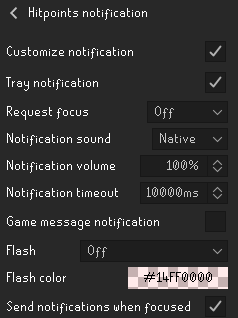
I think the "send notifications when focused" option conflicts with the timeout option because mine repeatedly sends inputs despite less than 10s passing.
Could this be looked at?
oblique plume
That's not what that option does
 candid smelt
anyone run into this problem, its my first time seeing this

was thinking of just deleting runelite and redownloading it
leaden trail
Can you post your logs?
haughty pumiceBOT
@candid smelt To find the logs, you can do one of the following:
- If your client failed to open, click the
Open logs folderbutton. - Open the screenshot directory by right-clicking 📷
Camerabutton, navigate 1 directory up, then open logs folder. - Navigate to
%userprofile%\.runelite\logson Windows or$HOME/.runelite/logson Linux and macOS.
Upload the log files named client and launcher by dragging them to Discord. If there are files prefixed with jvm_crash dated from today, upload them too.
candid smelt
fixed it
leaden trail
Please don't come into support with problems caused by your cheats
 rare sky
Can anyone help me with Runelite problem? My computer won't go to sleep because Runelite is open. When I close it and idle for 30 minutes, my desktop will go into sleep mode. If Runelite is open and I'm in log in screen still, it won't go to sleep.

 hollow olive
have you considered.. closing it
rare sky
hollow olive
have you considered.. closing it
But then I have to open the launcher and load runelite. Before, I could log into desktop and just click log in and I'm in osrs.
leaden trail
Sleeping your system with RuneLite open can cause RuneLite to have some weird issues
As does just leaving RuneLite open all the time. We recommend closing the client whenever you aren't actively using it, or at least once a day to make sure you're actually getting client updates
 dense lake
hey guys im getting random compete crashes this is my log if any1 can help ❤️ bankai
leaden trail
Maybe try disabling twitch live loadout
 pearl osprey
Other than that, do you have more log files around ~16:13, e.g. a jvm one? Think I saw some other files in stream, but hard to say what's there. Not seeing much in this log
dense lake
thank u guys ❤️
haughty pumiceBOT
Many plugins from the pluginhub break the client in subtle or not-so-subtle ways, including causing issues like client freezes. We do not support pluginhub plugins because we do not make or quality control them, and do not recommend their use.
Run the RuneLite (safe mode) shortcut, or with a Jagex account, first run the RuneLite (configure) shortcut and tick the Safe mode box, then launch RuneLite via the Jagex launcher.
This temporarily disables the GPU plugin and all hub plugins which will allow you to confirm the issue is caused by one of those plugins and isn't a core RuneLite issue.
If the issue is caused by a hub plugin, you should isolate which plugin it is and then uninstall the plugin.
round jacinth
Hub plugins be hubbin
misty plover
oblique plume
That's not what that option does
Any recommendations on how to make the timeout option work cuz it's pinging me far earlier than 10 seconds in between pings 😕
leaden trail
That's not what that does
 manic cliff
How do I access my screenshots?
 manic cliff
Wow thank you kindly!!
 mental portal
I’m stuck on The Fremennik Isles quest. I already spoke to King Gjuki Sorvott IV and got the Jester’s costume, but the ferry NPC (Mord Gunnars) won’t give me the option to sail to Neitiznot. My quest log says I should travel there and look for the Spymaster, but all Mord says is the normal dialogue.
I’ve tried:
• Destroying and reclaiming the Jester outfit
• World-hopping
• Talking to the king again
…but I’m still stuck in the same dialogue loop. Has anyone else run into this, or know a fix?
 final axle
This channel is for support for the runelite client, not the game itself. Try #runescape
mental portal
ahh thanks
haughty pumiceBOT
 odd citrus
Is there a away I can connect my old school runescape account from steam to runlite
odd citrus
leaden trail
You'd have to convert to a Jagex account I believe
how i do that
 leaden trail
!new
haughty pumiceBOT
newplayer: If you are new to OSRS, make sure to follow this excellent guide on OSRS wiki: https://oldschool.runescape.wiki/w/New_player_guide. You can also join the official OSRS Discord here: https://discord.gg/osrs
 tender solar
I get a permission error when attempting to run runelite - Unable to create RuneLite directory C:\Users\12158.runelite\repository2. Check your filesystem permissions are correct.
Any ideas? I found an article saying it was linked to a windows issue, but I have full admin rights...
 forest olive
1st time player, super confused, my username and password arent accepted. They are definitely correct.
 crude sparrow
does any one no the name of this plugin my cuz was added it when he was messing around on my accont and i dont what its called so i cant turn it off it allwas gives my a random amout of time in this case ten hours pass when i do some thing like mine or smelt
 crude sparrow
forest olive
1st time player, super confused, my username and password arent accepted. They a...
crude sparrow
forest olive
1st time player, super confused, my username and password arent accepted. They a...
its doesent work for me ethier just use the jagex lancher
forest olive
i got it now, use the jagex launcher, it has a drop down to use runelite
leaden trail
crude sparrow
does any one no the name of this plugin my cuz was added it when he was messing ...
Animation skipper I think
 frozen plank
hey guys just a quick question. I had to close something using task manager earlier and noticed runelite and the jagex launcher running 32 bit. I run a 64 bit OS should i switch or will it make much difference?
solid mesa
Jagex launcher doesn't matter. But you should get 64 bit runelite
frozen plank
so uninstall launcgher and runelite and get 64 bit? or just runelite
charred wind
If Runelite doesn’t say 32 bit you’re ok
solid mesa
It doesn't matter if the Jagex launcher is 32-bit. (I don't even think they have a 64-bit version)
solid mesa
Nope
crude sparrow
leaden trail
Animation skipper I think
thanks that was it
frozen plank
great thanks for your help guys
 drifting bobcat
if i had a runelite profile that i was logged into but never syned, is there a way to get those plugins from the old setup?
solid mesa
Don't ask in multiple channels
 crisp rain
hey guys! i cant seem to make the drop sound plugin to work, any idea for what might cause this\how to fix? no matter what i do it refuses to play any sounds
 rustic acorn
my combat dummy default after attached is set to detach instead of attack so I have to right click every time, menu entry swapper doesnt have an option to change it, reset doesnt do anything, neither does turning it off/on, turning off plugins, any help is appreciated if anyone knows a fix
 charred wind
rustic acorn
my combat dummy default after attached is set to detach instead of attack so I h...
charred wind
rustic acorn
my combat dummy default after attached is set to detach instead of attack so I h...
!safe
haughty pumiceBOT
safemode: To enable safemode
Windows
Run the RuneLite (configure) shortcut from the windows start menu
Tick the Safe mode box, save, launch RuneLite the way you normally do.
Mac
In Terminal, run
/Applications/RuneLite.app/Contents/MacOS/RuneLite --configure
Tick the Safe mode box, save, launch RuneLite the way you normally do.
charred wind
Probably a hub plugin. Safe mode will disable all of them
charred wind
crisp rain
hey guys! i cant seem to make the drop sound plugin to work, any idea for what m...
Most the sound plugins require the sound to be some specific .wav format
rustic acorn
I just tried the jagex client same issue as well, should i still try that?
charred wind
Jagex client same issue? Like the official?
rustic acorn
yes
charred wind
Sounds like a Jagex bug then idk lol
rustic acorn
💀
charred wind
It’s more common than you might think
rustic acorn
any tips where to ask for help
charred wind
Right click the report button in game and submit a bug report
rustic acorn
kk ty
 wraith hinge
Any way to get RL working with a Jagex account sans launcher? I just switched my life fully to Linux and because of an idiosyncrasy in how Bolt Launcher works, if I use the wiki button or open a page, or any link in game, it opens in a separate browser profile to my own. Apparently Firefox is to blame for this one. Solved.
oblique plume
linux things
mossy swan
no
 torn mountain
i am on resizable - modern layout and wanted to make inventory and chat larger so i turned on stretched mode and made it larger but the text seems to be a bit blurry
how do i fix that?
mossy swan
torn mountain
i am on resizable - modern layout and wanted to make inventory and chat larger s...
can’t really fix it, that’s what stretched mode does. you can play around with different scaling algorithms in gpu and see if there’s something that works better
torn mountain
oh alright ty
 viscid kelp
can i buy runelite?
oblique plume
use the ge
 pearl nova
My Slayer plugin has stopped showing the task infobox, and count on items. I just tried to start Runelite in safemode and it's the same there too.
It's been like this for about a week or so.

 delicate bobcat
pearl nova
My Slayer plugin has stopped showing the task infobox, and count on items. I jus...
delicate bobcat
pearl nova
My Slayer plugin has stopped showing the task infobox, and count on items. I jus...
I think it's broken currently for boss tasks specifically
that's what I've seen mentioned in here at least

 oblique plume
use a fishing tool
 tender iron
ty
 chilly agate
After years of having the Slayer count displayed on the slayer helms, they've suddenly disappeared a few days? week? ago. IDK if I have turned something off or what, has anyone else experienced this?
 oblique plume
boss tasks dont work atm
 scarlet flame
Heya 2 questions.
- For the plugin take-over policy, it states to make a pull request to the pluginhub after not hearing from the original author after a week. Do I need to make changes to the plugin before doing the pull request. As it takes two weeks for it to proceed. Or can I just file a takeover with a identical fork of the current repository. As I would like to update the plugin next week and would like to set the two weeks in motion beforehand.
- What requirements do I need for the #development channel, do I have to have done prior pull requests etc. Any specific permissions the OAUTH needs? It keeps telling me the token is invalid. As you can see below (deleted the token in question so that it's safe to share)
 mossy swan
do the command without any arguments
scarlet flame
ty
 dusty umbra
i have an issue if someone can help me, i played osrs on runelite before but recently i tried loging in and nothing. Now when i log in to the actuall game i can play. Resetted my password and everything and nothing
leaden trail
scarlet flame
Heya 2 questions.
1. For the plugin take-over policy, it states to make a pull r...
you should probably not be sharing an image with an access token for your github account like this
mossy swan
leaden trail
you should probably not be sharing an image with an access token for your github...
you should probably read the message fully 
clear stratus
scarlet flame
Heya 2 questions.
1. For the plugin take-over policy, it states to make a pull r...
what plugin
 pliant scroll
!pb is bugged then i do !pb and monster its saying 1.11 then i have a 2.46 pb
haughty pumiceBOT
!pb command not found!
 halcyon lintel
Am I right in thinking runelite disabled plugins like dink from omitting webhook info for locations world x y and plane etc?
clear stratus
new/existing plugins can't add that functionality. there may be some older ones that are "grandfathered" per se but i'm not aware of any. I'm not sure if Dink did/does that
 wheat lichen
Yo guys, I stopped getting the popup notifications randomly on my desktop. I get the windows beeping sound but no notification. How can I fix that
Happened randomly
scarlet flame
clear stratus
what plugin

GitHub
Plays a sound when your phoenix necklace breaks. Contribute to Nope1252/phoenix-necklace-jingle development by creating an account on GitHub.
 lethal ledge
has there been an update to the gpu plugin recently? I used to have trouble with fps, but not anymore.
clear stratus
scarlet flame
Heya 2 questions.
1. For the plugin take-over policy, it states to make a pull r...
Do I need to make changes to the plugin before doing the pull request. As it takes two weeks for it to proceed. Or can I just file a takeover with a identical fork of the current repository
per policy:
If the author is unavailable, after 7 days send a pull request to the pluginhub changing the plugin to your repository, but don't change the commit hash.
Your issue on their repo appears to be from last week, so you should be able to do this step now
haughty pumiceBOT
Search for Nope1252 returned no results.
 sand cradle
Please tell me how to lower the Idle Notifier volume.
It's supposed to get lowered, but it's still too loud.
Someone mentioned it uses the Windows Notification Sound, but lowered that down to 10% and nothing changes.
 glad skiff
is there any way to re color/resize the ui? i hav ilimited vision, am color blind, and the red on black is near impossible to read for me without getting close to the monitor? ty in advance 😄
round jacinth
you can recolor text with a a text recolor plugin
and you can change the ui elements with resource packs
solid mesa
GPU plugin also has some colorblind correction options
sand cradle
Can I change Spacebar to another button as a confirmation key for crafting?
round jacinth
space bar already acts as the last option you pressed
sand cradle
Yeah, and I'd like to change it to like a third mouse button.
round jacinth
1,2,3,4,5 -> pick 3 means space bar is 3 next time you use that prompt
hollow olive
i think u can key remap space in key remapping plugin, i dunno if it does what it do though
glad skiff
i'm mainly talking about the runelite ui, not just in game stuff
round jacinth
yeah use a mouse software to a make a button be space bar
hollow olive
hollow olive
i think u can key remap space in key remapping plugin, i dunno if it does what i...
round jacinth
you can remap space according to keyremapper
hollow olive
does it need to be bigger
haughty pumiceBOT
solid mesa
Change the scale
glad skiff
ty i'll try it andlet u kno how it worked 😄
sand cradle
round jacinth
you can remap space according to keyremapper
Doesn't seem to be able to remap into mouse keys, sadly.
round jacinth
no there isn't
your mouse software or ahk can remap those buttons to a key trivially atleast
viscid kelp
does runelite work on rs3 yet?
clear stratus
thought you bought the IP, you should know
round jacinth
no angel investor :/
leaden trail
viscid kelp
does runelite work on rs3 yet?
We aren't even on RuneLite 2 yet, you're gonna be waiting a loooooooooooong time
 round jacinth
if adam went off of hub versioning
viscid kelp
i would buy runelite
round jacinth
he'd be on version 901
leaden trail
You got Weird Gloop for a dollar, surely you can afford more than that
 merry torrent
some of my plugins dont seem to work properly and i reinstalled both the plugins and entire client itself, still not fixed anything. is there something else i could do to like, clean install the launcher i guess?
clear stratus
gloop on my
leaden trail
merry torrent
some of my plugins dont seem to work properly and i reinstalled both the plugins...
What plugins?
It's possible you just have hub plugins installed that don't work
leaden trail
Picture in picture is pretty broken
merry torrent
it works on my laptop, but on my desktop it isnt which is confusing me lol
leaden trail
NPC aggression timer, how is it not working? Generally that's just a user error thing
merry torrent
im getting this + no grid lines of aggro area
 leaden trail
merry torrent
it works on my laptop, but on my desktop it isnt which is confusing me lol
leaden trail
merry torrent
it works on my laptop, but on my desktop it isnt which is confusing me lol
It's pretty poorly written so this seems to check out
merry torrent
timer is also not working for npc aggression
 empty minnow
merry torrent
im getting this + no grid lines of aggro area
empty minnow
merry torrent
im getting this + no grid lines of aggro area
hover over that icon and it'll tell you waht to do
leaden trail
merry torrent
im getting this + no grid lines of aggro area

GitHub
Open source Old School RuneScape client. Contribute to runelite/runelite development by creating an account on GitHub.
merry torrent
thats the weird thing, ive ran out of the the area and even started a different slayer task but nothing has changed ..
ill read further in this and see but im literally doing a different assignment in different areas
leaden trail
Do exactly as those instructions say to do
halcyon lintel
clear stratus
new/existing plugins can't add that functionality. there may be some older ones ...
Dink was able to do a lot of things, run energy hp location bank values etc via meta data.
crisp rain
charred wind
Most the sound plugins require the sound to be some specific .wav format
double checked and the defult file are in wav (the one that goes moneyy)
leaden trail
It's wav but also a specific sample rate I think
crisp rain
leaden trail
It's wav but also a specific sample rate I think
are u refering to me?
or just random convo that also talk about it lol
crisp rain
oh lol
i was talking about my drop sound plugin refusing to make sounds when drops happen
i didnt change any sound files
wheat lichen
wheat lichen
Yo guys, I stopped getting the popup notifications randomly on my desktop. I get...
Bump?
round jacinth
enable game message notifications in runelite config
to see what plugin is spamming you
wheat lichen
round jacinth
enable game message notifications in runelite config
I'm not getting spammed, I'm just using flipper copilot and none of the notifications are coming on the tray / computer. i only get the sound
round jacinth
oh you said you stopped getting them
i think windows is eating the notifications then
wheat lichen
round jacinth
i think windows is eating the notifications then
Do you know how to fix this if this is the issue?
 soft vine
I don't know if this has been mentioned: !task doesn't work for Vardorvis
gilded kayak
ya the fix we applied for the slayer game update, is wrong for boss tasks
the infobox doesn't work either
 modern verge
halcyon lintel
Dink was able to do a lot of things, run energy hp location bank values etc via ...
modern verge
halcyon lintel
Dink was able to do a lot of things, run energy hp location bank values etc via ...
dink has never included run energy or full bank value in notif metadata
 nimble lodge
how do i make my ground marker look less fuzzy, the only plugin i found out that affects is stretched mode because if i turn it off, it become more sharper and clean but makes my whole game ui small as hell. Anyone got a fix?
 delicate bobcat
nimble lodge
how do i make my ground marker look less fuzzy, the only plugin i found out that...
delicate bobcat
nimble lodge
how do i make my ground marker look less fuzzy, the only plugin i found out that...
due to the way tile markers are rendered in RuneLite currently, there is no way around this if you use stretched mode to upscale your UI
since tile markers are drawn as part of the UI
nimble lodge
so basically i shouldnt be bother to try to fix since there is no solution atm
delicate bobcat
nimble lodge
so basically i shouldnt be bother to try to fix since there is no solution atm
the best you can do is try different UI scaling options in the GPU plugin
beyond that it would require changes to how the tile markers are drawn
 gusty mortar
For some reason my runelite since this morning whenever trying to login just gets stuck on "loading - please wait". Same when launching with Jagex Launcher.
Anyone got a fix?
 thorn shuttle
I'm currently having an issue with quest helper -- whenever I view the "quest-helper" tab in the bank -- my withdraw options are wrong.
It's only with the Quest-helper tab, normal bang tag tabs and the "inventory-setup" plugin tabs work fine.
I can't find the conflict or anything in the logs relating to it... So I just wanted to see if anyone else may have an idea. Thanks!
 haughty pumiceBOT
Visit Zoinkwiz's Quest Helper plugin discord (https://discord.com/invite/XCfwNnz6RB) for support, issues & feedback
thorn shuttle
Thanks
halcyon lintel
modern verge
dink has never included run energy or full bank value in notif metadata
Maybe it was another plug in then, I'm not sure. But I know it was able to omit player coordinates
jaunty knoll
anyone know why my inventory setups plugin is giving me this error when I try to export a setup and import it as a bank tag?
 gilded kayak
is that a thing?
jaunty knoll

 gilded kayak
oh this is the hub plugin, i have no idea
you're trying to import an inventory setup into bank tag layouts, not bank tags
chatErrorMessage("import failed:", " Invalid format. layout-ed tag data starts with \"" + BANK_TAG_STRING_PREFIX + "\"; did you copy the wrong thing?"); --- bank-tag-layouts
 errant notch
My client is lagging after a couple of hours of playtime... Like when i clean herbs/switch gear it constantly lags so i have to restart the client. Is this a known issue?
haughty pumiceBOT
@errant notch Many plugins from the pluginhub break the client in subtle or not-so-subtle ways, including causing issues like client freezes. We do not support pluginhub plugins because we do not make or quality control them, and do not recommend their use.
Run the RuneLite (safe mode) shortcut, or with a Jagex account, first run the RuneLite (configure) shortcut and tick the Safe mode box, then launch RuneLite via the Jagex launcher.
This temporarily disables the GPU plugin and all hub plugins which will allow you to confirm the issue is caused by one of those plugins and isn't a core RuneLite issue.
If the issue is caused by a hub plugin, you should isolate which plugin it is and then uninstall the plugin.
round jacinth
It’s probably hub plugins
errant notch
yes i think you are right. What do you mean by hub plugins?
The lag stopped after removing collapsible modern chat plugin... Thanks!
gilded kayak
he means the ones you installed from the  tab
tab
 bright dew
Is it just me or does "custom item tags" plugin no longer work? I was using it and in the middle of doing clues yesterday it turned off and now I cannot get it to turn back on. I use it for clues so sucks big time if the plugin randomly died
Tried uninstalling, closing runelite and deleteing the .jar file in the runelite folder and reinstalling but that didnt work.
Any other suggestions to possibly get it working? I dont think its been touched in years by the owner
solid mesa
I see you already filed an issue, that's probably the best bet. You can check your client.log to see if there's an error message
haughty pumiceBOT
To find the logs, you can do one of the following:
- If your client failed to open, click the
Open logs folderbutton. - Open the screenshot directory by right-clicking 📷
Camerabutton, navigate 1 directory up, then open logs folder. - Navigate to
%userprofile%\.runelite\logson Windows or$HOME/.runelite/logson Linux and macOS.
Upload the log files named client and launcher by dragging them to Discord. If there are files prefixed with jvm_crash dated from today, upload them too.
bright dew
2025-09-01 00:01:31 NDT [AWT-EventQueue-0] WARN n.r.c.plugins.config.PluginListPanel - Error when starting plugin CustomItemTagsPlugin
net.runelite.client.plugins.PluginInstantiationException: java.lang.NumberFormatException: For input string: "19794ge"
solid mesa
Well looks like there's your answer
bright dew
So what does that mean lol
 tawny zenith
hi. im making a change to a plugin and have it spawning runelite locally. i tried populating my runelite credentials through the jagex launcher to be used with my test instance of runelite with the plugin. could anyone help me populate my creds? i was following this link https://github.com/runelite/runelite/wiki/Using-Jagex-Accounts
solid mesa
Looks like you're supposed to use this format. And "19794ge" is not that format
 tawny zenith
hi. im making a change to a plugin and have it spawning runelite locally. i trie...
tawny zenith
tawny zenith
hi. im making a change to a plugin and have it spawning runelite locally. i trie...
im on mac btw
solid mesa
tawny zenith
hi. im making a change to a plugin and have it spawning runelite locally. i trie...
What's the problem? Follow those steps and it should work
tawny zenith
solid mesa
What's the problem? Follow those steps and it should work
the issue is the access token and refresh token arent being populated
so i think my dev runelite isnt picking it up
solid mesa
Did you do step 5?
tawny zenith
all it populates is the sessionid and display name
yes i followed all the steps exactly
solid mesa
tawny zenith
the issue is the access token and refresh token arent being populated
They aren't supposed to be
tawny zenith
ran jagex launcher, ran runelite, ran dev instance of runelite
bright dew
solid mesa
Looks like you're supposed to use this format. And "19794ge" is not that format
Thanks I must've updated one of my clue steps incorrectly. Clues are back on the table
tawny zenith
am i to close the runelite instance that the launcher spawns?
i would stream my dev, but it seems there is no vc in this server
2025-08-31 22:39:43 EDT [main] INFO n.r.client.account.SessionManager - No session file exists```opening the launcher one is just to populate the credentials. After that you close and launch through the IDE
tawny zenith
empty minnow
opening the launcher one is just to populate the credentials. After that you clo...
i did this. just run jagex launcher, then close and run ide
empty minnow
Not sure then. I can confirm my creds file doesn't have the access or refresh token and it's working fine
empty minnow
Does the file have wrong permissions somehow maybe?
or do you have it open in a text editor or something at the same time?
tawny zenith
no i made sure to close vim
tawny zenith
oh yes
 loud saffron
wondering wehy my runelight wont work
"says there was a fatal error starting runelite"
haughty pumiceBOT
To find the logs, you can do one of the following:
- If your client failed to open, click the
Open logs folderbutton. - Open the screenshot directory by right-clicking 📷
Camerabutton, navigate 1 directory up, then open logs folder. - Navigate to
%userprofile%\.runelite\logson Windows or$HOME/.runelite/logson Linux and macOS.
Upload the log files named client and launcher by dragging them to Discord. If there are files prefixed with jvm_crash dated from today, upload them too.
loud saffron
where is the camera button
solid mesa
Well if runelite wont open you cant click the camera button. So use the first or third option
loud saffron
solid mesa
Are you using a split-tunnel vpn?
loud saffron
no vpn
solid mesa
Well you're unable to load https://static.runelite.net/bootstrap.json for some reason
solid mesa
It could be firewall or antivirus but if you didn't change anything it's likely your network is just being flakey.
 vapid ridge
How is XP Updater supposed to work? Sometimes it updates upon logout, and sometimes it doesn't, even when I logged out 3 hours after the last update.
solid mesa
I believe it sends an update when you logout and gained at least 10k xp during the session. But due to the jagex hiscores being quite bad recently it may fail to update whatever sites
 drifting star
everytime i type something in quest search or remove letters the game starts to stutter
 neon stump
Is it possible to transfer certain things from a runelite profile? Such as all the manual object marks I did for TOB Exumed? Or other things as well? XD
I do not want to duplicate it.
empty minnow
If that particular plugin supports exporting/importing sure but otherwise no without duplicating it
neon stump
not even going into the files myself?
empty minnow
Especially not that because that is how you break things
 regal compass
my !log commands are not updating. I am logged in, and taking for example Sarachnis. I haven't touched the boss for months, my kc is 3k+ but !kc sarachnis comes up with 2.7k
 green tusk
After a recent update my loot tracker doesnt work anymore with keys in the wildy
 empty minnow
green tusk
After a recent update my loot tracker doesnt work anymore with keys in the wildy
empty minnow
green tusk
After a recent update my loot tracker doesnt work anymore with keys in the wildy
It's a known issue
 ancient sage
im using lightshot as me main screenshot tool, however if i'm focesed on runelite when i click my prt scr button it wont open lgihtshot, any fixes for this?
regal compass
Will someone reach out to me on my issue?
ancient sage
regal compass
Will someone reach out to me on my issue?
read adventure book in ur house and it should update
green tusk
empty minnow
It's a known issue
Oke thank you, so no word from their side?
 dense oxide
Heya, I looks like my runelite settings reset. I reinstalled Windows and logging back into my Runelite account and selecting my profile didn't give me my settings back. Any help woujld be appreciated.
🙏
haughty pumiceBOT
@drifting star Graphical artifacts? Try disabling hardware acceleration: https://github.com/runelite/runelite/wiki/Disable-Hardware-Acceleration
oblique plume
Try that
oblique plume
dense oxide
Heya, I looks like my runelite settings reset. I reinstalled Windows and logging...
Maybe the synced profile wasn't actually the profile you were using before
oblique plume
ancient sage
im using lightshot as me main screenshot tool, however if i'm focesed on runelit...
If you have RL running as admin I think that can cause that
Or if that key is set as a keybind in RL
ancient sage
oblique plume
If you have RL running as admin I think that can cause that
Running as admin indeed! Any way to override this or just stop running as admin?
 grizzled pewter
The command !task no longer shows my slayer tasks or how many monsters are left etc.
oblique plume
Boss tasks dont work
ancient sage
oblique plume
Or you can run the other program as admin
Its running on startup
But thanks
empty minnow
green tusk
Oke thank you, so no word from their side?
Jagex changed the interface, RL just needs to be updated to handle that but no one has updated it yet.
 safe sand
Anyone running into this issue? It's driving me mad!

 toxic terrace
hey, is there an easy way to reset the location of all info boxes? I did some fiddling around and they're all sort of split up now in a weird way
leaden trail
safe sand
Anyone running into this issue? It's driving me mad!
This is a connection issue
safe sand
@leaden trail Anyway to troubleshoot the problem? I've never had it before, randomly started a few weeks ago and now won't stop. Nothing has changed for my setup either
mossy swan
try restarting your router and pc to start with
safe sand
@mossy swan I've done that
So confused to why it happens, sometimes it goes hours without doing it, then i get it 2-3 times in a 10 minute period
mossy swan
then your internet might just be having intermittent issues
haughty pumiceBOT
open command prompt, type this in:
ping -t oldschoolXXX.runescape.com
where the XXX is your world minus 300, for example world350 = 50
mossy swan
could help you see it
 bitter beacon
just wanted to verify if the runelite in bazzites bazaar app installer is legit
oblique plume
Idk what that is
mossy swan
i don’t think we put anything there
you might want to use the appimage from runelite website instead
 fluid otter
guys are regular trees supposed to be yellow or orange with 117hd plugin?
or is it intentional because of autumn?
round jacinth
It’s their autumn theme yeah.
haughty pumiceBOT
Visit 117's HD plugin discord (https://discord.com/invite/U4p6ChjgSE) for support, issues & feedback
bitter beacon
mossy swan
you might want to use the appimage from runelite website instead
thats what im using, i just saw it while looking through the software center and was curious
 fresh basalt
I am currently having lag problems. How can I enter "Safe mode"?
Should I enter safe mode?
haughty pumiceBOT
To enable safemode
Windows
Run the RuneLite (configure) shortcut from the windows start menu
Tick the Safe mode box, save, launch RuneLite the way you normally do.
Mac
In Terminal, run
/Applications/RuneLite.app/Contents/MacOS/RuneLite --configure
Tick the Safe mode box, save, launch RuneLite the way you normally do.
fresh basalt
Thank you
If I still have lag spike problems in safe mode then it is a problem with my internet correct?
round jacinth
Yeah.
 low rapids
my game suddenly got this weird hue and i have no idea what caused it. think its related to some plugin or some weather effect? i havent tinkered with anything related to that which is why im confused
 hollow olive
117hd's seasonal effect
 night current
low rapids
my game suddenly got this weird hue and i have no idea what caused it. think its...
night current
low rapids
my game suddenly got this weird hue and i have no idea what caused it. think its...
I had this same problem too just now, thank you @hollow olive
 snow flicker
I keep trying to get onto runelite but it keeps giving me this error for the past 4 days no matter what i do
 leaden trail
Do you have a firewall or VPN?
leaden trail
Are you using any sort of third party antivirus?
snow flicker
no not actively
malewarebytes is the only antivirus i have but it doesnt scan or run actively
loud saffron
im having the same problem with my runelite also
keeps saying the same thing as yours
stone parcel
Malwarebytes (or any 3rd party av) could cause the issue, but I don't suppose you two happen to live in the same area with the same ISP?
loud saffron
my client was just working 2 days ago then it just randomly stopped and got that pop up
i use windows security
snow flicker
Malewarebytes could cause the issue yes
if it was actively monitoring my computer
or changing rules in my firewall
but it doesnt even run in the background
loud saffron
i made it so the app will go threw the firewall still didnt work
hmmm wierd i got it to work my computer was set up with wifi and eithernet cable
i disabled wifi so only ran threw eithernet and now it works
i wonder why that is
snow flicker
loud saffron
i disabled wifi so only ran threw eithernet and now it works
who do you have for internet?
loud saffron
spectrum
snow flicker
fuccckk
loud saffron
??
snow flicker
you dont live in georgia do you?
loud saffron
nah
snow flicker
ok
so i have spectrum as well
but not same area so its not an area thing, but im sure 20% of the player base has spectrum
loud saffron
so it loads up threw eithernet but not my wifi thats weird
loud saffron
yeah
snow flicker
ya its pretty shit.. im assuming a firmware update push is fucking it up
and most people play on ethernet
im on wifi too
loud saffron
yeah i had a nighhawk router and modem but it was pushing out less internet for some reason
snow flicker
ah cause its a whole hassle to get it to work with spectrum properly >.>
they are assholes
loud saffron
yeah diffidently lol
snow flicker
if they cant control your router they will make your service even more unreliable
even when they allow the mac address and shit
Let me grab an ethernet cable if it works than we can conclude spectrum router and modems mostly likely received a firmware update recently that is casuing issues connecting to runelite services i guess?
loud saffron
alright lmk
round jacinth
snow flicker
if they cant control your router they will make your service even more unreliabl...
I’ve not had this experience with any vendor for isp ever.
They typically offer a benefit for using their equipment (cheaper price or unlimited data cap)
Your mileage may vary.
snow flicker
I've worked for isps
i work in networking as well
alot of the big 3 are like that
stone parcel
Sounds like this issue is often firewall or VPN though. So just double check that stuff, maybe uninstall is needed to truely stop some av's. Just some ideas.
round jacinth
your isp is just fumbling the bag
Last week it was another country’s isp
Today it’s you
leaden trail
This likely isn't relevant to your specific issue but what do you see when you open https://static.runelite.net/bootstrap.json in a browser?
snow flicker
its a pretty json with version number 1.11.15
leaden trail
Try using your phone as a hotspot to launch the client, and then once it's open you can probably switch back to your regular connection
snow flicker
ya thats a good idea
 worldly parrot
Does GPU(experimental) crash for anyone else? I get that it's experimental but it performed so much better on my GPU while it worked
snow flicker
leaden trail
Try using your phone as a hotspot to launch the client, and then once it's open ...
yea i can connect
 opaque prawn
Cant launch Runelite or Jagex Launcher. Have tried restarting my computer, uninstalled and reinstalling both jagex and runelite. Nothing running in task manager either.
 leaden trail
worldly parrot
Does GPU(experimental) crash for anyone else? I get that it's experimental but i...
leaden trail
worldly parrot
Does GPU(experimental) crash for anyone else? I get that it's experimental but i...
Probably, there's a reason it has a warning about stability when you install it
snow flicker
opaque prawn
Cant launch Runelite or Jagex Launcher. Have tried restarting my computer, unins...
spectrum?
leaden trail
opaque prawn
Cant launch Runelite or Jagex Launcher. Have tried restarting my computer, unins...
Try using 8.8.8.8 for DNS
opaque prawn
snow flicker
spectrum?
I honestly dont know. Im not on my home wifi. Im traveling for work
opaque prawn
leaden trail
Try using 8.8.8.8 for DNS
ok ill try
opaque prawn
leaden trail
Try using 8.8.8.8 for DNS
damn that worked lol
worldly parrot
leaden trail
Probably, there's a reason it has a warning about stability when you install it
unfortunate, both default GPU and 117 run like complete ass on a 9070XT
 versed mural
same issue ive had all week now, usually after 4-5 hours of playing it will just suddenly crash
leaden trail
versed mural
same issue ive had all week now, usually after 4-5 hours of playing it will jus...
Turn off compute shaders in the GPU plugin
leaden trail
worldly parrot
unfortunate, both default GPU and 117 run like complete ass on a 9070XT
Make sure you have rebar enabled in BIOS, otherwise you can try rolling back your drivers
versed mural
leaden trail
Turn off compute shaders in the GPU plugin
thank you, turned it off and restarting client. hopefully it stops now
worldly parrot
leaden trail
Make sure you have rebar enabled in BIOS, otherwise you can try rolling back you...
rebar's on, and unfortunately no version of drivers ever really worked well. Just have to wait for experimental to be fixed I guess, whatever improvements they're cooking, it worked before it was crashing.
 wanton karma
do you know if anything is in the works behind the scenes to fix this? (pvp loot tracker), so much loot is getting lost into the ether 🙁
 twilit ridge
anyone having issues with client crashing ?
haughty pumiceBOT
To find the logs, you can do one of the following:
- If your client failed to open, click the
Open logs folderbutton. - Open the screenshot directory by right-clicking 📷
Camerabutton, navigate 1 directory up, then open logs folder. - Navigate to
%userprofile%\.runelite\logson Windows or$HOME/.runelite/logson Linux and macOS.
Upload the log files named client and launcher by dragging them to Discord. If there are files prefixed with jvm_crash dated from today, upload them too.
leaden trail
wanton karma
do you know if anything is in the works behind the scenes to fix this? (pvp loot...
I'd look at it but I don't think I have loot keys unlocked and don't really want to do a bunch of pking to try and get the info I'd need/test it
wanton karma
leaden trail
I'd look at it but I don't think I have loot keys unlocked and don't really want...
Ah ok, it's also not registering the actual kill as well, which will show the player name with just bones when loot keys are on. However with that it registers it now and then. I did post a bug report on github
drifting star
oblique plume
Try that
i tried different profile, some plugin is doin it
 hardy wedge
my bank plugin isnt working, none of my ge prices are showing in my bank, its just valuing my cash stack and nothing else
also my entire mini map ui is being covered by a big brown square

also my fashionscape plugin isnt working either, seems like the entire runelite client is bugged for me
haughty pumiceBOT
@hardy wedge Many plugins from the pluginhub break the client in subtle or not-so-subtle ways, including causing issues like client freezes. We do not support pluginhub plugins because we do not make or quality control them, and do not recommend their use.
Run the RuneLite (safe mode) shortcut, or with a Jagex account, first run the RuneLite (configure) shortcut and tick the Safe mode box, then launch RuneLite via the Jagex launcher.
This temporarily disables the GPU plugin and all hub plugins which will allow you to confirm the issue is caused by one of those plugins and isn't a core RuneLite issue.
If the issue is caused by a hub plugin, you should isolate which plugin it is and then uninstall the plugin.
drifting star
items charges improved makes the quest search stutter
haughty pumiceBOT
Many plugins from the pluginhub break the client in subtle or not-so-subtle ways, including causing issues like client freezes. We do not support pluginhub plugins because we do not make or quality control them, and do not recommend their use.
Run the RuneLite (safe mode) shortcut, or with a Jagex account, first run the RuneLite (configure) shortcut and tick the Safe mode box, then launch RuneLite via the Jagex launcher.
This temporarily disables the GPU plugin and all hub plugins which will allow you to confirm the issue is caused by one of those plugins and isn't a core RuneLite issue.
If the issue is caused by a hub plugin, you should isolate which plugin it is and then uninstall the plugin.
drifting star
time to add then to official plugin system or something
round jacinth
No
clear stratus
"improved" item charges breaks stuff, just remove it
round jacinth
With jagex adding the bank options to charge stuff on withdraw it makes item charges plus extended improved worthless and even sillier than it was before
drifting star
clear stratus
"improved" item charges breaks stuff, just remove it
only this recent change seems like
round jacinth
That’s sorta what it does every time lol
drifting star
is there any similar plugin to it
solid mesa
Item Charges
drifting star
shit has no weapons
 marsh mauve
Runelite is making windows notifications sounds. How do I toggle this off in runelite?
I do not want to disable windows system sounds...just making that clear.
solid mesa
Turn off Notifications in Windows
 marsh mauve
Like I said I don't want to do it at the system level.
How can i disable it in the runelite app?
solid mesa
Runelite sends a notification to windows. Windows plays a sound. If you don't want the sound turn it off in Windows
marsh mauve
solid mesa
Turn off Notifications in Windows
where do you find this in control panel?
solid mesa
System > Notifications
leaden trail
marsh mauve
How can i disable it in the runelite app?
"RuneLite" -> "Notification settings" and uncheck "enable tray notifications" in the client itself
round jacinth
drifting star
shit has no weapons
Refer to above
Bank options can auto top off weapons so the charges they have is irrelevant
marsh mauve
solid mesa
Turn off Notifications in Windows
FYI runelite is not in the list and the setting is disabled...yet I am still getting the sounds.
 leaden trail
Do you have custom notification sounds enabled?
marsh mauve
leaden trail
"RuneLite" -> "Notification settings" and uncheck "enable tray notifications" i...
Just diabled this I'll let you know if it worked when my cannon runs out of ammo lol
Didn't work I am still getting notifications
hollow olive
i just accidentally reset my loot tracker for hydra >.> i toggled the bones and decided i didn't want to toggle it,
so i right click and reset it, and because i was mid-hydra i clicked yes instead of no to the permanently reset loot
i see that it didn't save yet (?) the last modified date was 4:06 and i hit reset at 4:10, i made a copy of my profiles2 folder
is this restorable?
mossy swan
i guess you could try importing the settings you copied and see
hollow olive
ok i just copy pasted the rsprofile and it loaded fine and i just lost 1kc

 torn mountain
ah ty!
 drowsy zealot
This icon is still showing even if I pin/unpin runelite to my taskbar. It happens every restart. And I think something's wrong with my runelite the grand exchange plugin is not working. Does anyone know how to fix this permanently?
 round jacinth
The icon it uses down there should the the same as the shortcut it’s launched from
Or something similar to it
I had this when OneDrive messed with my desktop
It’s a windows thing not a runelite thing afaik
Your grand exchange pricing can fail to fetch in load. Restart client
drowsy zealot
hmmm.
would relogging in jagex launcher fix this?
i tried repairing same stuff happens lol
drowsy zealot
reinstalling runelite worked!
 vapid stag
Does anyone know if there are item trading forums for OSRS in this discord?
round jacinth
Not this one no.
vapid stag
Do you know of any by chance?
round jacinth
I answered in the other spot you asked the same question.
Don’t need to multi ask in multiple channels
vapid stag
Okay sorry about that, im fairly new to discord. I see you mentioned Ely go. Is that a different channel on discord? Or something completely off of discord?
Ely gg
leaden trail
 midnight lance
I can't get tray notifications to work on a new MacBook. Example, notification for Bird House run.
Tried System Settings (including looking for Script Editor), uninstalling/reinstalling Rune Lite, etc...


 hollow olive
midnight lance
I can't get tray notifications to work on a new MacBook. Example, notification f...
hollow olive
midnight lance
I can't get tray notifications to work on a new MacBook. Example, notification f...
u double check do not disturb mode is off?
 shy galleon
leaden trail
midnight lance
hollow olive
u double check do not disturb mode is off?
shy galleon
leaden trail
midnight lance
hollow olive
u double check do not disturb mode is off?
Correct, do not disturb and focus are both off
hollow olive
midnight lance
I can't get tray notifications to work on a new MacBook. Example, notification f...
is that the setting for time tracking or general runelite? double check you turned on the time tracking notifs in the time tracking plugin and that it's not customized to something different
but otherwise out of suggestions
midnight lance
Rune Lite general.
My time tracking looks like:
 mossy swan
i think on mac you need to install some terminal notifier thing
does rl wiki have anything about it?
gilded kayak
apparently we have a hub plugin for this?
but
.I do s
oops enter key
but I do see a github issue suggesting brew install terminal-notifier
midnight lance
gilded kayak
apparently we have a hub plugin for this?
You are a hero
hollow olive
i don't generally use alerts through notification center, only flashing screen, but when i turn it on during dev / to test other people's issues it works fine
solid mesa
I don't use that plugin and I get notifications on my mac via AppleScript. I haven't installed terminal-notifier but I do use the mac for development so no idea if there is something I have installed that affects it
midnight lance
Thanks everyone. Went the external plugin route and it worked perfectly
Going to try the homebrew terminal-notifier route as well
 haughty jackal
Hey guys!
I've been trying to get back on "regular" graphics on runelite, but whenever i turn off 117 hd or GPU settings, my client freezes
the second i turn them back on, it works
when i leave if off, then i get logged out
round jacinth
leave it off before you login
 cloud berry
Detached camera plugin - Is there a reason why the minimap does not update on player movement while in this mode?
round jacinth
because that's the way the orb of occulus works too i think
which afaik the detached camera is just orb of occulus
 lofty cobalt
Everytime i change infobox colors and then close rl, it resets it back. (Under rl plugin). Everything else saves except that.
Runelite plugin -> Overlay settings -> overlay color.
gilded kayak
it's a setting in resource packs overriding it
lofty cobalt
Tyty
 cobalt knot
hi all, is the slayer plugin broken? !task doesnt work and none of the overlays are working either
mossy swan
cobalt knot
hi all, is the slayer plugin broken? !task doesnt work and none of the overlays ...
boss tasks are broken, fixed in next update
 stuck frigate
Wondering if I'm able to commission a plugin from anyone by chance? Bit out of my depth in terms of development haha
 vast bone
There's no official place to do that but you can post what you want and see if someone wants to do it.
I think people have also posted on GitHub discussions.
Idk how successful it is though.
stuck frigate
All good, thank you! Any devs that might be interested in doing a commission please feel free to dm
 winter snow
I feel like doing a plugin as a commission is a bit weird, since whoever fills said commission is also on the hook for any updates that need making in response to breaking client changes for the life of the thing (and inevitably any payment would only be for the initial development)
leaden trail
stuck frigate
All good, thank you! Any devs that might be interested in doing a commission ple...
You're a lot more likely to get a response if you tell people 1) what you're after and 2) what you're paying for it
 loud mortar
winter snow
I feel like doing a plugin as a commission is a bit weird, since whoever fills s...
loud mortar
winter snow
I feel like doing a plugin as a commission is a bit weird, since whoever fills s...
could also yield ownership of the plugin to the customer once the initial work is done, and if the customer needs to make any changes they can commission another developer to do it ig
 boreal turtle
anyone know how to make this boost information appear in a 2 column list? rather than 4 columns
 haughty pumiceBOT
You can configure horizontal/vertical orientation, infobox groups or split infoboxes into new groups with the menu options opened with Shift + right-click. https://runelite.net/img/blog/1.6.28-Release/infobox.gif
 boreal turtle
perfect thanks mr Runelite App
 pallid lodge
Fellas, I'm getting "malformed login packet", died 2x to moons because of it, can I get some help?
It freezes like crazy and logs me out after a while
solid mesa
That typically just means you’re having network connection issues
pallid lodge
I mean, if I am, it seems to be contained strictly in runescape
I can see the moons slapping me while I'm unable to do anything like walk or attack back so it doesn't seem like a regular connection issue
if someone looked at my PC it'd look like I just gave up and let the boss beat me to death
rather than a normal DC
oblique plume
other people keeping moving too?
pallid lodge
I'm not 100% but I think so
It's not a frequent thing, happened once today and once yesterday
killed me both times :P
1st time it synced with 2 of my friends that were playing apparently
same issue
we all live in the same city but relatively far
oblique plume
so youre saying there were 3 people that DCed and you dont think it was a DC?
 compact fulcrum

 pallid lodge
I'll have to ask them
Very bizarre behavior, I've been playing just fine for over a year
 jade raven
Whenever I full screen osrs and try to open up the quest helper it opens up to the right and goes off screen. Any fixes?
 empty minnow
I think there's a setting called "keep game size" in the "RuneLite" plugin, you want that off
Not 100% sure of it's location
jade raven
empty minnow
I think there's a setting called "keep game size" in the "RuneLite" plugin, you ...
thank you!
 bleak delta
Howdy, I'm having an issue that just started today. I can't full screen the game. It just stays in this box.
 hollow olive
 bleak delta
hollow olive
bleak delta
hollow olive
Thx homie
stuck frigate
winter snow
I feel like doing a plugin as a commission is a bit weird, since whoever fills s...
Eh its just needed for a youtube series that I'm working on so updates arent necessary realistically. I dont have much frame of reference for how much something like this would cost so im open to hear out whoever is interested, its essentially a modified version of the chanceman account
pallid lodge
bleak delta
Howdy, I'm having an issue that just started today. I can't full screen the game...
at the end of the road there is runescape...
 sour cove
Im having an issue where i cant select items on the grand exchange, its been a persistent issue for about a month, does anyone have any ideas what this may be? If i go the offical jagex client i can use the g.e normally
haughty pumiceBOT
Many plugins from the pluginhub break the client in subtle or not-so-subtle ways, including causing issues like client freezes. We do not support pluginhub plugins because we do not make or quality control them, and do not recommend their use.
Run the RuneLite (safe mode) shortcut, or with a Jagex account, first run the RuneLite (configure) shortcut and tick the Safe mode box, then launch RuneLite via the Jagex launcher.
This temporarily disables the GPU plugin and all hub plugins which will allow you to confirm the issue is caused by one of those plugins and isn't a core RuneLite issue.
If the issue is caused by a hub plugin, you should isolate which plugin it is and then uninstall the plugin.
sour cove
haughty pumice
Many plugins from the pluginhub break the client in subtle or not-so-subtle ways...
It was death dotter
pallid lodge
Any advice to isolate the plugin besides "turn things off until the error goes away"?
solid mesa
Turn off half and restart the client. Keep going half by half until you find it
pallid lodge
is there any way to sort the plugins by recency of downloading or turning it on?
oblique plume
i dont think plugins can make you DC though
 fast copper
I've heard several people talking about a paid for plug in called flipping copilot. I was only skeptical of this plug in because I was under the understanding that jagex does not allow monetized plugins and all plugins are supposed to be 100% free. Was I wrong in this understanding and this plug in is ok to use? Thanks in advance.
 zealous cedar
I think the plugin is free, it just integrates with a paid service
fast copper
i see so its ok then?
clear stratus
if it's on the plugin hub, it's ok to use
 dire panther
can some one help me im getting stuck an this screen with acount A when i try to login i can log in no problem with acount B i can login to problem with acount A on mobile
 haughty pumiceBOT
Many plugins from the pluginhub break the client in subtle or not-so-subtle ways, including causing issues like client freezes. We do not support pluginhub plugins because we do not make or quality control them, and do not recommend their use.
Run the RuneLite (safe mode) shortcut, or with a Jagex account, first run the RuneLite (configure) shortcut and tick the Safe mode box, then launch RuneLite via the Jagex launcher.
This temporarily disables the GPU plugin and all hub plugins which will allow you to confirm the issue is caused by one of those plugins and isn't a core RuneLite issue.
If the issue is caused by a hub plugin, you should isolate which plugin it is and then uninstall the plugin.
hollow olive
u probably have a hub plugin linked to the profile A that you're trying to log into that is causing the hang
 narrow badger
What key opens the side panel on mac?
hollow olive
depends what u have set in the runelite plugin settings
 tidal field
does anyone know how to make the boss healthbar bigger? id love to extend the bar in the top left so i can see more of the enemy name. cant resize it with alt clicking and looked all over the plugins and google. thank you!
 solid mesa
It's in the in-game settings. Condensed boss health bar or something
 celest light
so quick question, ive been coding and testing launch in runelite repo (as a dev client to make sure code isnt broken) and im at the point where i need to log in and test my plugin before i can do a PR. problem is i have a jagex linked account. is there a way to side load a plugin to test it on a jagex runelite? or am i SOL with having to get it to a MVP and then do bug fix PRs?
haughty pumiceBOT
celest light
thank you, ill read this over. much appreciated! 😁
tidal field
solid mesa
It's in the in-game settings. Condensed boss health bar or something
Wow, thanks so much. I checked that a while ago and thought i had it off but when i turned it off/on just now i noticed the check mark didnt update until i left the settings and came back so that must have tricked me before and made me think it didnt do anything.
narrow badger
hollow olive
depends what u have set in the runelite plugin settings
Any idea what it might be by default?
solid mesa
Ctrl + F11 is default, might need Fn + Ctrl + F11
narrow badger
solid mesa
Ctrl + F11 is default, might need Fn + Ctrl + F11
This did it ty. For some reason my RL was defaulting to a blank profile with no plugins and the side bar closed.
hollow olive
narrow badger
This did it ty. For some reason my RL was defaulting to a blank profile with no ...
if you hover mouse over top right of game area you can close or open the sidebar
 soft plover
does this plugin https://github.com/runelite/runelite/wiki/Random-Events no longer work anymore?

GitHub
Open source Old School RuneScape client. Contribute to runelite/runelite development by creating an account on GitHub.
i have remove others menu options selected, but can still attempt and fail to pick this plant
leaden trail
The strange plant is like the one exception
We have no way to tell if it's yours or someone else's afaik
soft plover
oh, funny coincidence then, thanks for the answer
 brave valley
#support PVP loot tracker doesn’t even show keys anymore. Works just fine on mobile. Is this an update issue or is there a repair option on runelite like there is on the mobile client?
solid mesa
Known issue since they switched to the DMM loot key interface
brave valley
When did this happen? I think it’s about a week and half since mine stopped working
solid mesa
20 August
brave valley
Yep that’s about right
gilded kayak
oh I guess thats 2 updates ago
brave valley
Any idea when it’s getting resolved? Massive PITA right now
brave valley
Jeez
gilded kayak
i don't think there's much crossover between people who pvp and people who dev
solid mesa
Runelite loot tracker is totally separate
brave valley
Right
leaden trail
gilded kayak
i don't think there's much crossover between people who pvp and people who dev
Me usually but I am super focused on not OSRS things right now
brave valley
@dura 😂 heres to hoping you find time at some point. You appear to be our only hope
 gaunt axle
anyone know how I can get my runelite back to normal? I have no plug ins/widgets
 gilded kayak
ctrl+f11 or fn+ctrl+f11 on mac
gaunt axle
yeah custom chrome widget
gaunt axle
in runelite settings
gilded kayak
i forgor for a moment
 wooden rock
just built a new pc 5060ti runelite keeps crashing with multi clients open and gpu plugin. set the gpu plugin to identical configuration as old pc with way worse gpu 1060. wondering if you guys have any sugestions.
i have tried updating drivers
i have managed 3d settings and made sure its not using integrated graphics
haughty pumiceBOT
To find the logs, you can do one of the following:
- If your client failed to open, click the
Open logs folderbutton. - Open the screenshot directory by right-clicking 📷
Camerabutton, navigate 1 directory up, then open logs folder. - Navigate to
%userprofile%\.runelite\logson Windows or$HOME/.runelite/logson Linux and macOS.
Upload the log files named client and launcher by dragging them to Discord. If there are files prefixed with jvm_crash dated from today, upload them too.
wooden rock
wooden rock
that tell you anything ? i cant see shit
 solar parcel
Anyone know of a plugin that I would improve the UI Scaling of gpu? I want that sharpness of nearest neighbor on classic fixed mode but the game is too small for me. I have also tried doing fullscreen stretched mode but thats too big. so I want to do about a 1.5x scaling to around 1147x765 ideally. I can do that now but the only UI Scaling that looks decent is Bicubic (Catmull-Rom)
vast bone
no
solar parcel
damn ;-;
 alpine reef
Has anyone ever experienced a bug when you click anywhere in your inventory and everything disappears until you click anywhere in the game again?
 crisp dune
Nope
 winter hull
alpine reef
Has anyone ever experienced a bug when you click anywhere in your inventory and ...
winter hull
alpine reef
Has anyone ever experienced a bug when you click anywhere in your inventory and ...
this just started happening to me like 10-20 minutes ago
solid mesa
No bad alchs?
gilded kayak
the 2 most recently updated hub plugins are no bad alchs and varlamore-house-thieving
so yeah its probably no bad alchs
winter hull
no bad alchs was it
alpine reef
winter hull
this just started happening to me like 10-20 minutes ago
literally unplayable, turned my game into windows where i have to double click to do anything
winter hull
thank you both!
alpine reef
well thank you both indeed
 tawny tangle
is someone else eperiencing a bug with the Grand Exchange plugin where it just doesnt work, for example when i search a item in the plugin, it finds no results
 ornate kite
roof
tawny tangle
tawny tangle
is someone else eperiencing a bug with the Grand Exchange plugin where it just d...
it started to work I guess
 full storm
i have found a bug with either runelite or a plugin related to inventory (i am not sure)
let's say i have a full inventory of items and want to equip an axe
i click "wield", the inventory disappears (as in flickers) for a split second and reappears
full storm
full storm
i have found a bug with either runelite or a plugin related to inventory (i am n...
it even happens without the GPU plugin
 lyric locust
i have the same issue @full storm i have been deleting plugins and it solved but haven't dialed down which one it is yet
full storm
ping me when you find out what is causing it, i guess i will be playing with hdos for now
full storm
full storm
ping me when you find out what is causing it, i guess i will be playing with hdo...
cause im purely questing rn
lyric locust
@full storm it is the plugin no bad alchs from @creativetechguy
full storm
thanks man
 viscid isle
Hi, im having an issue i logged in and didnt change anythingw hen i left click my inventory the items disappear and are unusable, howver if i right click it remains normal?
viscid isle
oh thank you bro! soz i was panic reading! 🙂
 true shell
seem to be having a problem with a plugin but can't figure out what's causing it
so i go to click to use the needle and then everything in my inventory vanishes
if you look top left you can see iv clicked use needle
found out any item i press use causes this not just needle
 empty minnow
Probably same issue as the last 5 people above you, no bad alchs plugin
mossy swan
author is aware at least
haughty pumiceBOT
Search for CreativeTechGuy returned no results.
true shell
empty minnow
Probably same issue as the last 5 people above you, no bad alchs plugin
ty
 woven wadi
I keep getting the message "RuneScape has been updated! Please restart the game to retry" whenever I try and login to RuneScape through the RuneLite client. I have tried uninstalling the Jagex Launcher, the RuneLite client, making sure there is no directory called "RuneLite" in C:\Program Files\ and C:\Program Files (x86), nor in %appdata% roaming or local. Yet, when I re-install RuneLite, I still have all my plugins and settings, and still keep getting this message when trying to log in.
haughty pumiceBOT
Delete your %userprofile%/.runelite/cache folder or run this command in command prompt run as Administrator:
rmdir /s "%userprofile%\.runelite\cache"
To find the logs, you can do one of the following:
- If your client failed to open, click the
Open logs folderbutton. - Open the screenshot directory by right-clicking 📷
Camerabutton, navigate 1 directory up, then open logs folder. - Navigate to
%userprofile%\.runelite\logson Windows or$HOME/.runelite/logson Linux and macOS.
Upload the log files named client and launcher by dragging them to Discord. If there are files prefixed with jvm_crash dated from today, upload them too.
 cloud gyro
true shell
seem to be having a problem with a plugin but can't figure out what's causing it...
cloud gyro
true shell
seem to be having a problem with a plugin but can't figure out what's causing it...
Me too
im having the same issue
it is when you click on a item which has first click is use
cloud gyro
empty minnow
Probably same issue as the last 5 people above you, no bad alchs plugin
love you thank you
woven wadi
haughty pumice
Delete your `%userprofile%/.runelite/cache` folder or run this command in comman...
This resolved my issue. Thank you.
 eternal lion
woven wadi
I keep getting the message "RuneScape has been updated! Please restart the game ...
eternal lion
woven wadi
I keep getting the message "RuneScape has been updated! Please restart the game ...
I'm still having this issue, Also tried clearing cache folder and still doing it.
woven wadi
eternal lion
I'm still having this issue, Also tried clearing cache folder and still doing it...
I started by backing up my RuneLite profile (in Configuration -> Profiles within the RuneLite client itself). Then I uninstalled the Jagex Launcher, uninstalled RuneLite, ensured all Jagex Launcher and RuneLite directories were deleted in both my program files directories, and in %appdata% roaming and local, and then I ran the aforementioned command but on the .runelite directory, not on the cache within, and then reinstalled everything, reimported my profile, etc. Might have been a bit overkill, but had been wrestling with the problem longer than I wanted to.. so I didn't mind overkill.
round jacinth
None of those mattered as only the cache mattered for your issue
And that isn’t moved or touched unless you manually do it
round jacinth
eternal lion
I'm still having this issue, Also tried clearing cache folder and still doing it...
Is this actually the same error message
eternal lion
round jacinth
Is this actually the same error message
Have ran the clear cache command 4 times and still getting this
 round jacinth
And you had the client closed when you ran that?
Make sure the folder is gone if you could navigate and find it
eternal lion
Client and jagex launcher closed yes
round jacinth
Or I guess don’t find it because it’s deleted
haughty pumiceBOT
To find the logs, you can do one of the following:
- If your client failed to open, click the
Open logs folderbutton. - Open the screenshot directory by right-clicking 📷
Camerabutton, navigate 1 directory up, then open logs folder. - Navigate to
%userprofile%\.runelite\logson Windows or$HOME/.runelite/logson Linux and macOS.
Upload the log files named client and launcher by dragging them to Discord. If there are files prefixed with jvm_crash dated from today, upload them too.
eternal lion
oblique plume
look fine to me
you do have a lot of [Client] ERROR injected-client - Client error: Login authentication error. Response code: 429 Too Many Requests Response body: error code: 1015 in the beginning half though
 cursive shadow
eternal lion
Have ran the clear cache command 4 times and still getting this
cursive shadow
eternal lion
Have ran the clear cache command 4 times and still getting this
This might sound stupid, but try logging into a different world. I had the same issue as you, cache clear did nothing. I just tried logging into a different world and it logs in fine. Specifically world 535 for me did not (and still does not) work.
oblique plume
interesting
eternal lion
cursive shadow
This might sound stupid, but try logging into a different world. I had the same ...
There is no fucking way bro
I'm so mad that worked lmfao
cursive shadow
I don't know what's going on but yeah I was surprised too 🤷
zealous cedar
Oh that is intersting
 topaz quartz
ok ? i been coloring stuff in bank to color code my bank now want show me the pick option whats up here pic
 haughty pumiceBOT
Support for hub plugins should be directed to the author of the plugin.
You can find the support link by searching for the plugin in the Plugin Hub panel and clicking the ? button on the plugin, or by right-clicking the plugin in the plugin panel and clicking the Support menu option.
 prime brook
Anyone else getting this? Unable to work out what plugin it might be causing it 🙁
oblique plume
all those items are bad alchs
oblique plume
too bad you dont have the "no bad plugins" plugin installed
oblique plume
lmao
gilded kayak
i think that's the bug he tried to fix but ended up breaking it even harder
 median drum
hello
my game crashes when trying to use 117 hd or gpu
only happened after i upgraded graphics card from 1060 to 4060
haughty pumiceBOT
To find the logs, you can do one of the following:
- If your client failed to open, click the
Open logs folderbutton. - Open the screenshot directory by right-clicking 📷
Camerabutton, navigate 1 directory up, then open logs folder. - Navigate to
%userprofile%\.runelite\logson Windows or$HOME/.runelite/logson Linux and macOS.
Upload the log files named client and launcher by dragging them to Discord. If there are files prefixed with jvm_crash dated from today, upload them too.
oblique plume
typically driver issues
median drum
okay and am i doing that after opening up runelite?
winter snow
Yes
winter snow
But do take a note of what Alex said and make sure your new graphics card has driver updates installed 🙂
median drum
i have installed all drivers
on nvidia app, unless theres something else i need to go into
median drum
oblique plume
typically driver issues
alex my superfly, i request your presence. how do i do that outside of nvidia app
oblique plume
i didnt tell you to do anything
median drum
the drivers
how do i access them
also when i look in display adapters i have my 4060 and some basic 630
clear stratus
alex our level 5 support technician
winter snow
Every problem is a layer 8 problem
 analog summit
Ive had lag spikes/stuttering in the last couple of days using RL can anyone help me
Used to get 250+ fps using 117hd now it's roughly 100 and goes all the way down to 40 sometimes
charred wind
Linux or Windows?
charred wind
Also is it exclusively the 117HD that has problems
Updated drivers are not good for RL. People have more success with older drivers
leaden trail
Did you update your GPU drivers recently?
analog summit
Yep
charred wind
That’s why
charred wind
Rollback your drivers