#support
1 messages · Page 103 of 1
 leaden trail
Although I've never seen anyone actually manage to launch the client at all with that issue
 carmine gulch
Nope same problem
leaden trail
In your .runelite folder there's a file called config.json. can you try renaming that to config-old.json and try launching again?
 hot shadow
How do i test my custom plugin if i have to use jagex launcher to use runelite?
 haughty pumiceBOT
 oblique plume
carmine gulch
Nope same problem
oblique plume
carmine gulch
Nope same problem
you on work pc or something?
carmine gulch
leaden trail
In your .runelite folder there's a file called config.json. can you try renaming...
Which folder?
 leaden trail
Hm I thought it was in there, may be remembering incorrectly
carmine gulch
I rebooted my laptop, re-installed everything but nothing
carmine gulch
I could play before the latest update
oblique plume
but abex just redeployed the fallback jav_config so you should be able to get the correct one from us now
maybe youve always had issues and got our fallback every time
 stray grove
it will take a bit to deploy
carmine gulch
oblique plume
weird way to spell client
oblique plume
yea you got the same thing
carmine gulch
few months ago I had my first problem on Runelite where I couldn't search for highscores anymore despite my plugin Hiscore was activated
Now I just can't play due to the update
I don't get it anymore so strange
everything worked fine before
oblique plume
jagex doesnt like your network certs
thats why i asked if someone else manages your computer
cuz works do stuff with those commonly
carmine gulch
yup we have been taken over by another company and they installed Kandji
thats probably the problem?
carmine gulch
How can I fix this lol
carmine gulch
So no more Runescape for me ?
oblique plume
use your own computer
carmine gulch
This is my own computer thats the thing lmao
they just installed this shit because I use him for work as well
oblique plume
oof
you could probably complain about it and see what happens then
typically you get given a machine thats entiery managed by them so this doesnt happen
carmine gulch
ffs what a joke lol
anyway thx for your help and time
I uninstalled Kandji & it worked again thanks a lot @oblique plume
maybe if you have one more min to check why the leaderbord doesn't work anymore since months?
leaden trail
The highscores have had issues for a while
Jagex is aware and working on improving them
carmine gulch
leaden trail
The highscores have had issues for a while
I know but it has been months since 😄
oblique plume
its gonna be the same thing i would think
and it works again cuz abex updated the fallback config
so id have to see the client log to see if its not actualy using that
carmine gulch
carmine gulch
oblique plume
so id have to see the client log to see if its not actualy using that
this?
oblique plume
yea this is using the fallbakc still
oblique plume
we host the same file youre trying to get from jagex since sometimes jagex is broken and doesnt serve it
youre using it because jagex is denying you
carmine gulch
oblique plume
youre using it because jagex is denying you
Ok ty
 low rapids
is there a way to make birdhouse timer start automatically or do you manually start a stopwatch/timer in the time tracking plugin?
oblique plume
put seeds in
 mystic raven
Hello guys, sorry if this is recurrently asked, couldn't find anything in #faq
Just downloaded RuneLite.jar for all platforms, when launching the Jagex Launcher, I cannot get it to find my RuneLite.jar executable.
Any tips ?
 zealous cedar
you cant use the jagex launcher to run runelite.jar, instead install the windows version
 tight trench
anyone know that plugin that shows how much food or prayer you will get when hovering over the consumable? https://imgur.com/ClulfBP
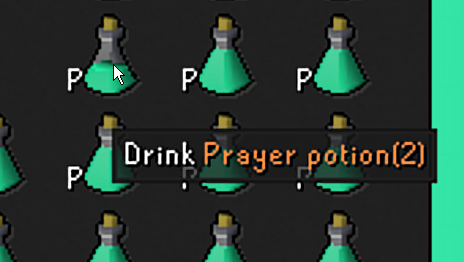
I tried item stats but it didnt change anything
 gilded kayak
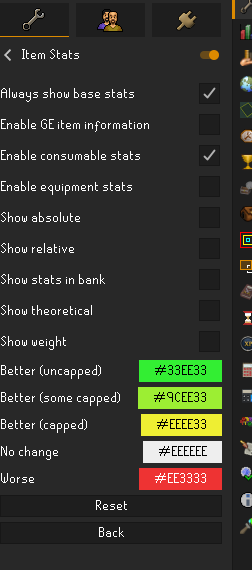
it's item stats but maybe the info failed to load when u started the client
tight trench
ah maybe ill try resetting after this task
this is current settings https://imgur.com/swLEMcH
 haughty pumiceBOT
To find the logs, you can do one of the following:
- If your client failed to open, click the
Open logs folderbutton. - Open the screenshot directory by right-clicking 📷
Camerabutton, navigate 1 directory up, then open logs folder. - Navigate to
%userprofile%\.runelite\logson Windows or$HOME/.runelite/logson Linux and macOS.
Upload the log files named client and launcher by dragging them to Discord. If there are files prefixed with jvm_crash dated from today, upload them too.
 brittle igloo
Heyo, had a small question. I noticed that my runelite icon is gone on bottom of my windows bar; it looks like in the screenshot. Think it happened after an update so was hoping someone knew a quick fix
 oblique plume
I just manually set the icon
leaden trail
Usually a reboot or just pinning and unpinning it works for me
 shrewd berry
can anyone help me regarding my xp drops? i have everything on, it was working the other day but now its not not sure what happened


cant get them to work at all, restarted my client as well
haughty pumiceBOT
Support for hub plugins should be directed to the author of the plugin.
You can find the support link by searching for the plugin in the Plugin Hub panel and clicking the ? button on the plugin, or by right-clicking the plugin in the plugin panel and clicking the Support menu option.
 zinc sonnet
hey, i installed and logged into RL on a new laptop, but when back to my desktop the loot tracker etc is empty.
gilded kayak
first question is did you log into the game
zinc sonnet
ye ye
gilded kayak
!lootmissing then its this
haughty pumiceBOT
gilded kayak
there's probably a dupe on the website, delete the dupe like the page says
 brazen horizon
anyone know why i cant get the image for rings or ammo using
BufferedImage itemImage = itemManager.getImage(item.getId(), item.getQuantity(), false);
brazen horizon
my bad
zinc sonnet
gilded kayak
!lootmissing then its this
Legend! beer on me my firend!
 silver tree
Anyone have any ideas what could be happeneing here? Im fairly confident it has to do with Better NPC Highlighter but can't figure it out past that.
I have GPU enabled, and have restarted my clients and PC

 stone parcel
Does it happen if you turn off the weapon animation replacer and restart client?
I notice you are shooting fish.
silver tree
Hmm, that is an interesting idea, that plugin is non negotiable though, why play if I can't shoot fish, let me try
silver tree
stone parcel
I notice you are shooting fish.
That seems to have fixed it.
Interestingly this wasn't an issue the first 2 weeks of the update and I havent had any issues on other npcs.
Good call though ty
 hollow olive
dang now i wanna shoot fish
stone parcel
There is a chance that more information might be desired when others see this too. I think they were kinda curious about this.
 main badge
Can anyone help me understand why my character is not showing up in hiscores. I am well past 500 total levels
gilded kayak
you dont show up until u have a skill high enough, to show up
i think hunter is the lowest requirement?
main badge
hmm interesting as my buddy shows up and my stats are higher than him
gilded kayak
yeah but what stat isn't
what stat does he have thats higher than you
this can be boss kc also
main badge
Ah I understanding - his runecrafting is ranked but I can't figure out if any of mine are close to being ranked
gilded kayak
i'll answer if the hiscores ever load
stone parcel
You can use the hiscores and search for rank 2,000,000 in each skill. https://secure.runescape.com/m=hiscore_oldschool/a=13/overall
main badge
hmm ok so, in theory, once I get a skill that ranks in top 2M then all of my stats will show in runelite hiscores?
we're in group ironman and he can
stone parcel
Yep yep. 😄
gilded kayak
kalil is wrong xd
they only return your stats if the stat is in the 2mil
u can see from the 2,000,000th RC guy
jagex only returns his magic, cooking, smithing, and RC
main badge
how can I see all of his stats then and he can't see mine while in game?
gilded kayak
actually
maybe the answer is actually yes
the website might show a different response, than the api we're pinging
 solid mesa
(Sometimes Jagex returns all your stats if you’re ranked in one skill and have played since the hiscores service rebooted last)
gilded kayak
oh yes
stone parcel
Well now I'm wrong either way.
gilded kayak
cooper is correct i remember that being said
the hiscores are spaghetti but a jmod is trying to make it not awful
eventually™
 mossy swan
🍝 extraordinaire
main badge
hmm ok good stuff, thanks! I'll grind to 2M somewhere
 reef coral
Hello, I was wondering if anyone could maybe help figure out what is happening. Whenever I am attacking Doom of Mokha. He glitches out constantly and turns invisible as well. It seems to be just me that it is happening to and idk why. I was told to ask in here because the mods are very good at figuring things like this out. Any and all input is much appreciated.
 stone parcel
Do you have Weapon Animation Replacer plugin on? And if you turn that off and restart the client, do you still have the issue?
reef coral
I do not have that plugin installed. I have tried reloading the client a few times and it still happens
gilded kayak
do u use GPU
i cant tell
there's a bug that GPU bypasses but i don't remember what the bug is
(if the answer is no to using GPU, does your issue go away if you do use it)
reef coral
I do not use GPU let me try turning it on and see if it happens. 1 minute
 hollow narwhal
I have the same issue it cant be fixed for non gpu users afaik
Adam was looking into it
hollow narwhal
If u have gpu then its weapon animation
No idea the cause for it not having gpu on tho
reef coral
omg turning on gpu fixed it!
gilded kayak
the cause is just a jagex bug (i believe)
the GPU plugin bypasses this bug
cuz coding is funny
hollow narwhal
Not sure how far adam has got on with it but he said he'll look into it
reef coral
I just did two floors with gpu on and it didnt glitch at all.
hollow narwhal
I just have to put up with the flickering as bad pc
Lil annoying but is what it is
reef coral
You guys are so freaking smart! tysm for all of your help
hollow narwhal
But ye if u have a good pc u prob shuld always have gpu on anyway
Not the case for me sadly
Hope adam finds the cause anyway
reef coral
I normally don't have it on ever. I will keep it on from now on if that is what you guys recommend.
Hopefully it will be fixed soon so you dont have to deal with the glitching. It was extremly annoying for me. esp during car phase. I just had a floating health bar flying across the screen... lol
hollow narwhal
Just depends if your cpu or gpu is better, idk a ton about pcs but i know basically everyone plays with gpu on
Yeah its a tad annoying but just something i have to put up with
 thorn ingot
Hello, i’m struggling to get runelite running on my steam deck. I downloaded the linux x64 version, but when i run the .appimage nothing happens
stone parcel
Did you make the appimage executable? If you drag the appimage into terminal and launch it through there, does it give any errors?
If you have a Jagex Account however, there would be different instructions.
thorn ingot
I do have it set to an executable. Running it in Konsole gave error that a file cannot be found
/usr/lib/libstdc++.so.6: version ‘GLIBCXX_3.4.32’
There was a steam deck update available so i’m installing it
stone parcel
That might help, also there is this older version before the GLIBC change thing if that doesn't work. https://github.com/runelite/launcher/releases/tag/2.7.2
stone parcel
Oh nice! 😄
thorn ingot
Thank you for the help!
stone parcel
Np. 😄
 stoic grove
I'm getting this message come up all of a sudden, which refreshes every 30 seconds or so which has never come up before, i haven't downloaded any new plugins in a long time and wondered if anyone knows what it could be and how to resolve please?


 zealous cedar
this is a web page put into the chatbox
stoic grove
is there a specific plugin thats trying to scrape from the web or something?
zealous cedar
its from a pluginhub plugin you installed
 clear stratus
webview engine in the chatbox when?
stoic grove
zealous cedar
its from a pluginhub plugin you installed
it all of a sudden started coming up about 20 mins ago, havent downloaded anything new so im not sure whats happened
stoic grove
yeah ill disable
zealous cedar
uninstall them and then restart
stoic grove
yessir
clear stratus
if you can figure out which one it is and reproduce this, i'm sure the author would like to know
stoic grove
seems to have worked, was barb assult pbs
which is strange, because a couple of friends have the same plugin and wasnt getting this in their chat
stoic grove
gilded kayak
`barbarian-assault-pbs` and `region-chat` both use heroku
thanks bro appreciate it
gilded kayak
i guess i could have just told you it was that one, because region-chat's heroku actually resolves
https://babackend.herokuapp.com/ problem
clear stratus
they should maybe not dump an entire http response into the chatbox
gilded kayak
are u sure
stoic grove
its the only one i removed, and its stopped
gilded kayak
ye it's definitely that one since the link doesn't work
but region-chat's link still does
 deep cipher
anyone able to tag "Dex Honsa" he makes the "NPC Level Overlay" just have a suggestion for the plugin but cant seem to find any contact info for him
haughty pumiceBOT
Get support for the NPC Level Overlay Plugin Hub plugin here: https://runelite.net/plugin-hub/show/npcleveloverlay.
You can also find the support link by searching for the plugin in the Plugin Hub panel and clicking the ? button on the plugin, or by right-clicking the plugin in the plugin panel and clicking the Support menu option.
 thick panther
@deep cipher you can probably make the suggestion on their github
 manic spear
does anyone know how bank tag tab layouts work in regards to "alt" items sharing a layout space?
clear stratus
must have been the wind
 jovial sentinel
So im clicking examine on things and nothing is showing up???
 west pewter
is it a runelite bug that this object doesn't seem to play its animation?
 gilded kayak
idk maybe
there's like 2 bugs in that fight
- if ur using weapon animation replacer, some stuff breaks
- if ur not using GPU some stuff also breaks
zealous cedar
did we get confirmation weapon animation replacer causes that bug?
gilded kayak
some guy earlier had some visual bug, not sure if it was this
i will attempt to use discord search
west pewter
I use gpu, dont use w.a.r, but this bug happened to me and i saw someone on a stream also have it.
Edit: was able to get the object spawn again and it was playing the animation, so idk
gilded kayak
silver tree
https://streamable.com/72blni
Anyone have any ideas what could be happeneing he...
looks like the weapon animation replacer issue is just more invisible boss
deep cipher
thick panther
<@193269774799601664> you can probably make the suggestion on their github
looks like someone beat me to the comment anyways, appreciate it!
 vast bone
zealous cedar
did we get confirmation weapon animation replacer causes that bug?
vast bone
zealous cedar
did we get confirmation weapon animation replacer causes that bug?
if it was me I did submit a fix that adds setanimationframe where it wasn't before.
 serene plank

 haughty pumiceBOT
@serene plank Low Detail plugin causes some ground/roof textures to be missing or black. To solve this issue, disable Low Detail plugin.
 tight bison
is this a bug? brimstone chest loot in the loot tracker is being displayed twice (i just opened those keys)

 crisp dune
could be a bug as a result of changed behavior on jagex's side, we'll look into it
 final axle
it's been like that for a little while btw
went back and looked through my sharex and this was on june 20th
 gilded kayak
ye it's still handled on line 168 - adam only removed implings and gauntlet chest
 tender estuary
Quick question. My Runelite was running fine last night. Got on this morning and the game keeps freezing every few seconds for an extended period of time. I did clear my game cache and it isn't as frequent. But it's still locking up.
haughty pumiceBOT
Many plugins from the pluginhub break the client in subtle or not-so-subtle ways, including causing issues like client freezes. We do not support pluginhub plugins because we do not make or quality control them, and do not recommend their use.
Run the RuneLite (safe mode) shortcut, or with a Jagex account, first run the RuneLite (configure) shortcut and tick the Safe mode box, then launch RuneLite via the Jagex launcher.
This temporarily disables the GPU plugin and all hub plugins which will allow you to confirm the issue is caused by one of those plugins and isn't a core RuneLite issue.
If the issue is caused by a hub plugin, you should isolate which plugin it is and then uninstall the plugin.
 digital moat
not seeing new worlds is that a runelite issue?
oblique plume
in game or sidebar
 oblique plume
which ones do you think you cant see
 oblique plume
where does it say this
digital moat
osrs official homepage
oblique plume
ok but where
oblique plume
so youre making it up?
mossy swan
i think alex wants a link to it
digital moat
Old School RuneScape
Check this post for planned downtime, routine maintenance and any live game issues.


 untold ember
must be your world filters, i can see new worlds works fine for me
mossy swan
might need to restart the client if they're up now
 brisk inlet
Anyone can help me, out of no where shift click witdhraw-all from bank stopped working. Depoist-all still works, i reseted bank plugin and menu entry swapper plugin but nothing works
 soft imp
Did you ever get a answer on this. I was wondering the same thing?
zealous cedar
it wiill work, but probably not great
soft imp
@zealous cedar Thank you. I might just go with the Intel version then. I was trying to save some GP lol.
 round jacinth
it's that the touchscreen doesn't work well for the game
i think the chip itself would be fine
soft imp
Im not to worried about the touch screen. Just looking for a extremely light mobile laptop for traveling
round jacinth
when you use touch as input on the game when not on mobile, it actually clicks the last spot the mouse was at and then moves the mouse
soft imp
tired of carrying my gaming one
round jacinth
okay just so you're aware
mossy swan
just get a macbook xd
round jacinth
yeah macbooks fucking slap
soft imp
Lol everything else I do daily at work is on windows OS. Trust me I thought about it.
 proud aurora
Hi guys, not played RS since osbuddy which is now down, trying to open up RuneLite but getting the attached error attached, I disabled the firewall but still getting this issue, any ideas?
 proud aurora
Yeah it looks like it, althouh I've updated the firewall to allow runelite through it and still getting the error
stone parcel
Might want to try fully disabling it. Especially if you are using anything other than just Windows defender.
 stark shard
My runelite started lagging alot during big wintertodt solo. I was at like 50k points and client went to slideshow mode.

Any idea what could have caused that? I had wintertodt solo plugin, but i don't see how that could cause the problem? Possible memory leak or bug in it after too long solos?
stone parcel
!3rdparty
haughty pumiceBOT
3rdpartyissues: Many plugins from the pluginhub break the client in subtle or not-so-subtle ways, including causing issues like client freezes. We do not support pluginhub plugins because we do not make or quality control them, and do not recommend their use.
Run the RuneLite (safe mode) shortcut, or with a Jagex account, first run the RuneLite (configure) shortcut and tick the Safe mode box, then launch RuneLite via the Jagex launcher.
This temporarily disables the GPU plugin and all hub plugins which will allow you to confirm the issue is caused by one of those plugins and isn't a core RuneLite issue.
If the issue is caused by a hub plugin, you should isolate which plugin it is and then uninstall the plugin.
stone parcel
Could also try fresh config profile with only gpu enabled too.
stark shard
First time that bug happened. Previously my client froze when game ended, but then it started working again.
I will try that.
proud aurora
I've removed runelite from the firewall, uninstalled antivirus and tried running on safe mode, I think it could be an internet issue at this point
 charred wind
proud aurora
I've removed runelite from the firewall, uninstalled antivirus and tried running...
charred wind
proud aurora
I've removed runelite from the firewall, uninstalled antivirus and tried running...
Is your system clock correct
leaden trail
That's a different error usually
 celest yew
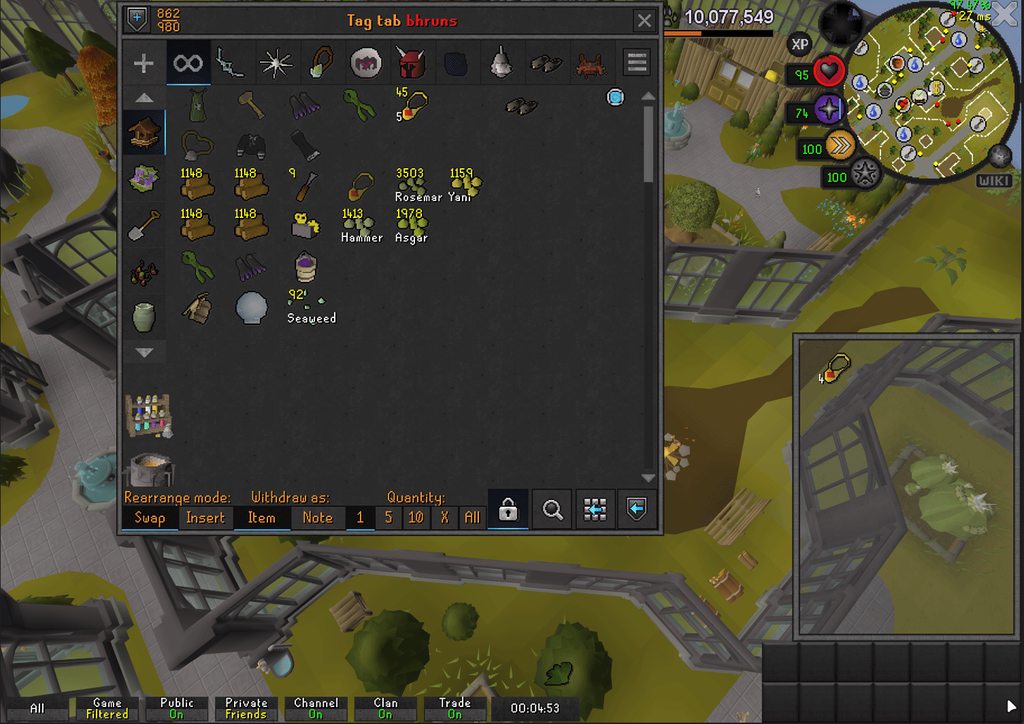
https://i.imgur.com/cmf2bLK.gif
is there a way to not have it make a third digsite pendant spot? its "*" in the tags too. this is the base banktags as well
 haughty pumiceBOT
@proud aurora To find the logs, you can do one of the following:
- If your client failed to open, click the
Open logs folderbutton. - Open the screenshot directory by right-clicking 📷
Camerabutton, navigate 1 directory up, then open logs folder. - Navigate to
%userprofile%\.runelite\logson Windows or$HOME/.runelite/logson Linux and macOS.
Upload the log files named client and launcher by dragging them to Discord. If there are files prefixed with jvm_crash dated from today, upload them too.
oblique plume
Logs could say more
proud aurora
 heavy pebble
all external plugins gone from my profile today, why does this happen? I know how to fix it #lostsettings command but why does that happen?
 loud fiber
@gilded kayak


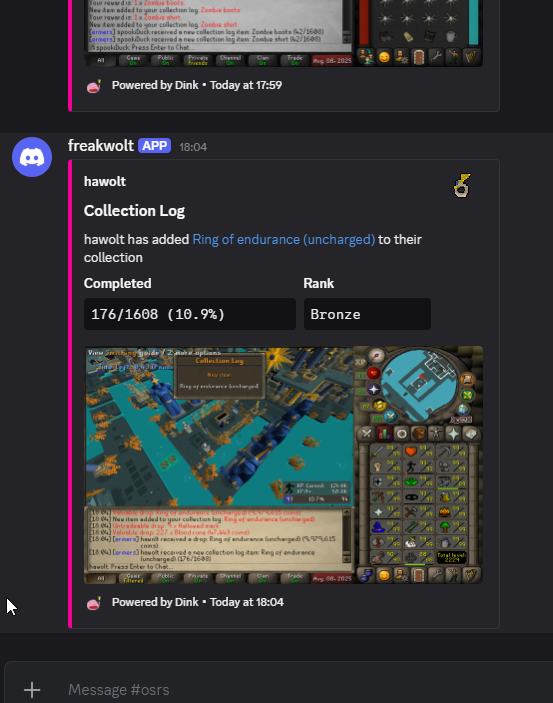
shoudnt I get an image for loot in this case ? only got collection log one https://link.hawolt.com/olk9Op

 fast grail
does anyone know how to change your login password for runelite? on the website it says I need to make a jagex account
solid mesa
Ctrl F11 I believe
 grave jackal
doesn't work on mac
solid mesa
Also the > icon on the top bar
solid mesa
fast grail
does anyone know how to change your login password for runelite? on the website ...
You need to use the jagex launcher to launch runelite if you have a jagex account
proud aurora
charred wind
Is your system clock correct
Just double checked this and it's correct, synced it again just incase
 rocky tiger
celest yew
https://i.imgur.com/cmf2bLK.gif
is there a way to not have it make a third digsi...
rocky tiger
celest yew
https://i.imgur.com/cmf2bLK.gif
is there a way to not have it make a third digsi...
That happens to me sometimes with teleport jewelry. Remove all versions of item and recreate by dragging to tag tab while holding shift key.
fast grail
solid mesa
You need to use the jagex launcher to launch runelite if you have a jagex accoun...
I dont have a jagex account, its saying I need to so I can change my password but I dont want to
is it something I must do?
solid mesa
Change your password with Jagex. That is not a runelite thing
gilded kayak
loud fiber
shoudnt I get an image for loot in this case ? only got collection log one https...
was it just the screenshot or the whole notif
loud fiber
solid mesa
Change your password with Jagex. That is not a runelite thing
only thing I got was that collection log thing, but nothing for loot
gilded kayak
check the logs ig maybe ur loot url is missing a character
loud fiber
what would be a loot url? I dont have anything overwritten
just one primary webhook url
gilded kayak
yes but maybe ur about to see some retry spam failing also
loud fiber
do i have to close the client for logs to update?
gilded kayak
also maybe your ge data isn't loaded
no
cuz a ring is only worth like 100k without ge price
we don't read the chat message for value, we use the clients data
gilded kayak
then we're looking at no notif firing because no ge data
or notif correctly fired and got lost in the wires of the internet
loud fiber
im gonna assume first here second one seems less likely
how does the client load ge data
can i force load everything
gilded kayak
request to api.runelite.net on startup
loud fiber
nono i mean if I can trigger a load or see if its loaded while the client is running not technically
stone parcel
proud aurora
Just double checked this and it's correct, synced it again just incase
Can you send the Client.log from that log folder too?
gilded kayak
idk maybe the bank would also be missing it's high value?
loud fiber

client seems to have the value
*now atleast idk if before
ok well I just accept it, any reason why dink is not parsing the value from chat?
gilded kayak
probably because the chat message is jagex's, usually very wrong values
proud aurora
haughty pumice
<@183570913038434304> To find the logs, you can **do one of the following**:
- I...
Logs attached, there does seem to be some 'tag mismatch' showing up, although I'm not too sure what this means
stone parcel
Are you on a work network?
proud aurora
Yeah I also do work from this machine
stone parcel
From searching the discord history for that error seems like it might be related to some kind of work blocking.
Maybe could try a vpn or mobile hotspot/tethering.
proud aurora
it could have something to do with an antivirus associated with the one drive/microsoft account maybe, although I can't find it on my machine
I'll try a VPN
grave jackal
yeah I don't have this < icon on mac
 hollow olive
its there
 stone parcel
In that screenshot top right in-game.
If you have custom chrome off that is where it appears.
grave jackal
what's custom chrome?
oh found it
thanks!
it just never appeared till i hovered over it lol
stone parcel
Custom chrome decorates the titlebar with RL's chosen colors (and stuff) instead of the OS's, if still curious about that. 😄

 dapper perch
Hi i have a question regarding cpu usage of rnelite, in linux and windows wqhenever i open my bank my cpu fan goes 100%, as soon as i close bank it goes down again i attaced 2 pictures to show the diffrence. i have a cpu amd 5900X. this also hapens at vanilla settings like a no addon profile. this do not happen on my other pc with intel 2400 running fedora or windows, is this a know bug?

 zealous cedar
no
dapper perch
zealous cedar
no
have this been seen befour?
zealous cedar
no
dapper perch
any ideas how i can fix it? can i do anything to help? or am i on my own?
zealous cedar
use safe mode
clear stratus
share logs maybe?
haughty pumiceBOT
To find the logs, you can do one of the following:
- If your client failed to open, click the
Open logs folderbutton. - Open the screenshot directory by right-clicking 📷
Camerabutton, navigate 1 directory up, then open logs folder. - Navigate to
%userprofile%\.runelite\logson Windows or$HOME/.runelite/logson Linux and macOS.
Upload the log files named client and launcher by dragging them to Discord. If there are files prefixed with jvm_crash dated from today, upload them too.
dapper perch
i have multible client in logs shoul i share all of them or just the client with no dates? also how do i run safemode in linux? if not possible i can boot in to windows and start safemode
 haughty pumiceBOT
To enable safemode
Windows
Run the RuneLite (configure) shortcut from the windows start menu
Tick the Safe mode box, save, launch RuneLite the way you normally do.
Mac
In Terminal, run
/Applications/RuneLite.app/Contents/MacOS/RuneLite --configure
Tick the Safe mode box, save, launch RuneLite the way you normally do.
zealous cedar
I guess there are no linux instructions there. but pass --safe-mode to the launcher
proud aurora
stone parcel
Maybe could try a vpn or mobile hotspot/tethering.
This worked btw 😆 cheers 👍
stone parcel
proud aurora
This worked btw 😆 cheers 👍
Oh sweet glad to hear it! 😄
dapper perch
zealous cedar
I guess there are no linux instructions there. but pass --safe-mode to the launc...
hmm dont start i will do the safemode in windows sence i use a 3d party launcher in linux the no start might be related to that
stone parcel
If using Bolt there is a Configure RuneLite option in the Bolt settings (⚙️) where you can enable Safe Mode.
dapper perch
yes i did and it wont start at all xd
 stone parcel
No, click the Configure RuneLite at the top.
dapper perch
oh my bad i tought it just was a name for settings below xd
stone parcel
Then check the Safe Mode check box in there, and that should do it. No worries. 😄
dapper perch
it still ramps up not 100% tho

 loud fiber
@gilded kayak https://link.hawolt.com/oVaQlp

it 100% has ge data now
didnt send again 😭
solid mesa
Clan broadcast does not mean the client has item prices loaded
loud fiber
i examined it earlier, it loaded ge price
loud fiber
loud fiber
here.
that should mean it knows the value or not?
chat message incase relevant

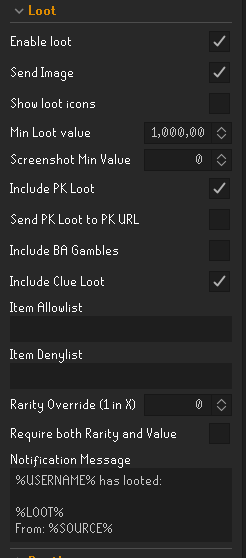
no error in logs, current config for loot https://link.hawolt.com/oY4bgp
 dapper perch
kalil and adam should i send logs and what log files did u want there was multible client and dont know if u want theone with numbers or not
gilded kayak
loud fiber
didnt send again 😭
open an issue 🤷
loud fiber
yeah doing that rn
dapper perch
assumed that but dident know if the numbers were normal or not
zealous cedar
i can't do any better than running in safe mode
noone other than you is looking at their cpu usage in the bank
dapper perch
well i do look t it becouse my computer goes airplane mode
i can run it in debug if that helps
zealous cedar
no, that doesnt help. i can't make it use any less cpu than what it does in safe mode
dapper perch
i udnerstand that, more if it could see a gpu leak or somthing, as mentioned it is not that i look at my cpu while banking its just mycpu fan ges 100% not the cpu it self the fan ramps up to sould like a airplane,i have high end hardware and i assumed the issue was gpu ralated but found it was cpu related. i do undersntand that you dothis a s a hobby or comunity thing and cant invest your life in to a random dude on the internet. my assumyion was tho taht thi was a issue with all computers with a lot of cores. dont seem to be the issue and i assume tho the issue will be solve with c++ client.
gilded kayak
loud fiber
yeah doing that rn
btw we completely consume the loot tracker, do u see your rings over there
 gilded kayak
🆗
loud fiber
ill add that info to the issue aswell
gilded kayak
i think i already know the reason
gilded kayak
cuz the server sends mr the sepulechre loot
when Adam migrated NPCs to the server loot tracker, it included a few clearly not NPCs
loud fiber
ohhhh so it doesnt require chat tracking anymore
loud fiber
ah wait the server directly sends the client a message like hello you just got this?
even for npcs ?
(obviously this happens for the loot otherwise i woudnt see this)
gilded kayak
we only intended to migrate for NPCs, but some things are actually NPCs, like the gauntlet chest
and i assume the speulchre chest too
 serene sparrow
using the Identifier plugin, if something doesnt show an ID number then gg? or is there some other way to find an ID?
solid mesa
Developer Mode
serene sparrow
solid mesa
Developer Mode
dont see that on plug in list. how do i access it
solid mesa
What are you looking for?
serene sparrow
ids for these boulders from mokha, using identifier plug in or right clicking doesnt show or give me any options
 solid mesa
They aren't NPCs so you can't use an NPC highlight plugin for them
serene sparrow
are the vardorvis axes considered npcs? bc i have those highlighted
solid mesa
Yes those are NPCs
serene sparrow
interesting
jovial sentinel
yo im trying to teleprot to game room Burthorpe but it says i need to be a member? i thought it was a FTP option???/ Is ther another way to tele there other than necklace?
mossy swan
jovial sentinel
yo im trying to teleprot to game room Burthorpe but it says i need to be a membe...
its p2p
leaden trail
Burthorpe isn't F2P in OSRS
 quartz wagon
THIS WOULD BE SO HUGE. I came to suggest the same thing. @wet thorn
 errant peak
Getting a "failed to login" when trying to login on my mac. Any suggestions??
 sinful ore
anybody know the plugin that puts a percentage in the top right of your screen? above my ping, Will move around like 96-99% in green and i cant for the life of me find out what it is?
 analog root
doubt it's a possibility but i'd figure I'd ask here
If I logged into different runelite accounts and my loot logger tracked different kills
I.E
2k gargoyles on email 1
1k Gargoyles on email 2
is there any way to link the emails / combine the lootlogger for the two? (all under the same RS account)
stone parcel
sinful ore
anybody know the plugin that puts a percentage in the top right of your screen? ...
Maybe "Tick Tracker"?
 glad mirage
can anyone recommend a good walkthrough guide (ideally an article not a video) that i can send my noob friend to help him get his client not looking like 2007scape?
i think im forgetting a bunch of tweaks ive had set for ages
stone parcel
I think the main thing would be fixed classic mode in here. (Image shows resizable though)
haughty pumiceBOT
 glad mirage
got that one lol
stone parcel
Oh, NOT looking like 2007. Sorry, I misread. Maybe you want stuff like GPU or 117 HD plugin maybe resource packs too.
glad mirage
definitely gpu, we're going through those settings on a call now
117 hd is sick i havent been using this before
stone parcel
Oh cool! 😄 Yeah some people really enjoy that.
low rapids
is it possible to disable the health bar above your character?
stone parcel
Looks like Hide Local Players 2D in the entity hider plugin can.
solid mesa
But that also hides your protection prayer and skull
low rapids
ah, i see. was hoping to reduce clutter and have the hp bar on status bar only. thanks
sinful ore
stone parcel
Maybe "Tick Tracker"?
yeah you nailed it ty
stone parcel
Np. 😄
 raven raptor
hey how can i downloada 62 bit runelite jagex launcher
i formed my pc my client is running as smooth guessing its the 32 bit how can i check which one is downloaded thanks
glad mirage
did your downloaded setup file have a 32 at the end of the filename?
im sure theres an easier way but not sure what it is at the moment. Its mostly java anyway, ultimately
solid mesa
The game wouldn't be running at all without java
final axle
runelite comes packaged with its own
raven raptor
makes sense then
how can i check if my jagex launcher has the 64 bit runelite is that possible?
solid mesa
Open task manager. If it says RuneLite (32-bit) it's 32 bit, if it doesn't, it's 64 bit
raven raptor
yes jaagex launcher 32 bit
thanks very much
i do download the runelite 64 however when i download jagex i get no option to pick which bit i want and it downloads jagaex launcer 32 bit
am i missing something to downnload? i formated my pc today
glad mirage
install the correct runelite first, it should use the right one regardless of which the jagex launcher is
doesnt look like there even is a 64 bit jagex launcher, mines 32 bit too, but my 64 bit runelite runs fine
 brazen zealot
hi, ive just done a pc reset and now all my runelite settings are gone, even after logging in. i thought logging in would restore all the settings?
glad mirage
whats with all these people resetting their computers today
im guessing you dont have a backup of your old home directory/user folder?
brazen zealot
nah i dont
but i just copied my runelite folder from my laptop which has most of my settings, so im kinda sorted now. just surprised it works this way. didnt know settings were stored locally
glad mirage
yup.
brazen zealot
i couldve sworn tho, when i first got runelite on my laptop, i just logged in and everything was there
glad mirage
just because its stored locally doesnt mean it isnt backed up, idk
if you look at the profile.properties file you get when you export a profile, its all just line separated key value pairs, like "tileindicators.hoveredTileFillColor=838860800"
looks like it has all your bank tags and everything stored there too, so its not just the basic plugin settings from the panel either
too bad its not sorted
have you logged into the runelite website and looked at your user data? a lot of the same stuff is stored there
brazen zealot
hmm yea i can see a lot of stuff in there but i dont know if u can actually download a profile from there?
glad mirage
number 5 on this this FAQ answer makes me think theres probably some way https://github.com/runelite/runelite/wiki/FAQ#my-plugins-are-gone-or-my-config-profile-is-missing

GitHub
Open source Old School RuneScape client. Contribute to runelite/runelite development by creating an account on GitHub.
i am sort of in awe of the documentation and code quality in the client, and the number of "we thought of your issue/saw it first" kinds of things
 stone sail
Hi all, wondering if anyone can help. I currently have a very strange bug/issue. Every time I get to Akkha in TOA and Akkha does the first spear stomp special attack, my screen completely changes colour, just within the runelite client, the colour then stays like this until I re-boot runelite (Hopping/logging doesn't resolve the issue). THis bug only happens at Akkha in TOA, not experienced it anywhere else. I have checked and I'm on the latest version of runelite, not quite sure what else to do.

 glad mirage
have you tried disabling and re-enabling GPU (or whichever GPU/HD plugin youre running)?
glad mirage
id try running in safe mode first, to ensure that solves your issue
also upgrade your graphics drivers, just in case
https://github.com/runelite/runelite/wiki/FAQ#how-do-i-run-runelite-in-safe-mode and if none of that works try running in debug mode to look at the logs: https://github.com/runelite/runelite/wiki/RuneLite-Launcher-Configuration#runelite-launcher-configuration
force the issue again and immediately exit the client so the issue is easier to find
GitHub
Open source Old School RuneScape client. Contribute to runelite/runelite development by creating an account on GitHub.
GitHub
Open source Old School RuneScape client. Contribute to runelite/runelite development by creating an account on GitHub.
its very odd to me that its only in that one circumstance, but it makes it easier to force and thus hopefully easier to debug
try turning off hardware acceleration too, both in and out of safe mode. the setting should be on the same window that pops up when you open the launcher config
oh, cant believe i forgot to ask, youre on windows?
stone sail
Yes
stone sail
glad mirage
its very odd to me that its only in that one circumstance, but it makes it easie...
Yea it's proper stumped me as to why it only happens in that specific scenario, will let you know how I get along.
glad mirage
im rather interested in picking through the logs, but id settle for a workaround in the meantime. Im sure you probably dont enjoy this fiddly debugging stuff as much as i
stone sail
glad mirage
<@432887290235453440> any luck?
Sorry had to nip out, will do when back 👍
glad mirage
Whats with the client connecting to and being recognized by discord even when the discord plugin is off? i thought it might be because i created a new default profile to export into my dev environment, but i deleted that and restarted the client and its still happening. Went back to check my logs and its connecting to discord well before i added a new profile too.
this is the most recent release version, not a build, launched through jagex launcher
leaden trail
You probably have discord recognizing it
leaden trail
glad mirage
im rather interested in picking through the logs, but id settle for a workaround...
Logs aren't going to really be useful in this case in all likelihood
glad mirage
yeah actually looking at the logs here i dont think so either, but its one of those covering your bases sorts of steps in debugging thats pretty easy to check and everyone feels dumb if the answer was there the whole time.
2025-08-08 18:07:19 EDT [RuneLite] INFO  n.r.client.discord.DiscordService - Initializing Discord RPC service.
2025-08-08 18:07:21 EDT [pool-3-thread-1] INFO  n.r.client.discord.DiscordService - Discord RPC service is ready with user contexterror.
so is that a built-in DiscordService separate from the discord plugin, then?
i dont mean that to sound accusatory, hope it didnt come off like that, genuinely curious
ah yeah i see it. Whats that doin there? package net.runelite.client.discord;
would be cool if we could disable it on the runelite side
 lapis elm
Dog what are you doing
lapis elm
You are going down a rabbit hole that doesn't matter
glad mirage
i mean, i disagree. But also, im just trying to understand the application. Im not sitting here demanding you remove it, or do anything at all. I mentioned in passing that i think it'd be cool to be able to disable it, every other sentence in that entire (short) paragraph was inquisitive. Why so defensive?
 silk cove
anyone had this before? screen goes dark when performing any animation, fishing, woodcutting, cooking etc.

 leaden trail
silk cove
anyone had this before? screen goes dark when performing any animation, fishing,...
leaden trail
silk cove
anyone had this before? screen goes dark when performing any animation, fishing,...
Turn off "animation skipper"
silk cove
where is that option
leaden trail
glad mirage
i mean, i disagree. But also, im just trying to understand the application. Im n...
Discord, on their end, is detecting RuneLite
leaden trail
silk cove
where is that option
It's a plugin
silk cove
i dont have that plugin installed
leaden trail
Does this happen if you turn off 117?
silk cove
yes
haughty pumiceBOT
To enable safemode
Windows
Run the RuneLite (configure) shortcut from the windows start menu
Tick the Safe mode box, save, launch RuneLite the way you normally do.
Mac
In Terminal, run
/Applications/RuneLite.app/Contents/MacOS/RuneLite --configure
Tick the Safe mode box, save, launch RuneLite the way you normally do.
glad mirage
leaden trail
Discord, on their end, is detecting RuneLite
there is literally an RPC server class built for it, mutual back and forth. Its not like discord is scraping logfiles or process names detect it. And again, its not a big deal. But just saying its being detected isnt a satisfying answer, some effort must have gone in on the runelite side too. Im just wondering what thats about, specifically the reason its in two parts. Not in a criticizing way--i may not like it but i imagine its super convenient to the vast majority of users--but to understand.
lapis elm
the message is there because the library is loaded
glad mirage
...
lapis elm
you asked man
glad mirage
anything with an RPC server that provides the hooks, yes
silk cove
uninstalled and re installed still doing the same thing
leaden trail
silk cove
uninstalled and re installed still doing the same thing
Run in safe mode and tell me if it still happens then
glad mirage
why is it split into one component thats directly in the client, and one thats a plugin? I imagine theres some architectural reason for that, that it wasnt just a whim that this well moderated and reviewed project didnt see some justification for it. And id imagine that any similar plugin that talks to other software locally would probably need to keep the same things in mind, right? So for fricks sake, whats up with that? If you dont know thats fine, but you dont need to keep repeating the same thing and acting like its a dumb question.
lapis elm
so other plugins can update the status
leaden trail
Can you move this to somewhere that isn't support?
silk cove
safe mode fixes it
glad mirage
yes absolutely
silk cove
but now no 117hd lol
leaden trail
silk cove
safe mode fixes it
What if you make a fresh profile with only 117?
round jacinth
Safemode disables hub and GPU plugins to see if base line runelite behaves
To help troubleshoot
leaden trail
Yeah it's a step to narrow things down, I'm just ruling out the core client first
Actually before you try 117 can you try a fresh profile with just GPU enabled?
silk cove
how do you make a new profile
glad mirage
leaden trail
Can you move this to somewhere that isn't support?
just to be clear, i originally asked here because i thought something was wrong that was reenabling the plugin. It wasnt intended to evolve so.
round jacinth
You can create new
silk cove
ok
works with just gpu on
do i just keep trying on original profile by disabling one at a time?
haughty pumiceBOT
Please refer to this flowchart for further troubleshooting.
round jacinth
Basically yeah.
You turn things off until it behaves and remark which one was the issue. You might have to fully restart between shutdown of plugins because hub plugins don’t always respect being turned off.
silk cove
oh god this is gonna take a while XD
oh i fixed it im an idiot
distraction reducer plugin
thanks anyway all
round jacinth
Probably should stop installing random hub plugins. Just because there is an is an install option doesn’t mean you’re missing anything
silk cove
yep
glad mirage
haughty pumice
Please refer to [this flowchart](<https://raw.githubusercontent.com/runelite/wik...
is there a list of all these great tidbits yall sling out anywhere?
oblique plume
The classic "I'll ask in a different channel because I didnt like the first answer I was given" tactic
leaden trail
they're mostly just troubleshooting steps, they're not really super helpful if you aren't actively having an issue
in which case we might be able to answer directly anyway
round jacinth
If you search for stuff runelite bot has ever said
You’ll see the commands it interacted with
 fathom acorn
has anyone had or dealt with an issue regarding mokha constantly disappearing/reappearing (flashing) while changing stances? especially while in car phase?
leaden trail
Do you have GPU on or off?
fathom acorn
off
leaden trail
Try turning it on
There are a couple different animation related issues right now unfortunately
fathom acorn
looks like that worked. died on next wave but that was skill issue. any support for that?
leaden trail
Uh
Get good I guess?
I haven't really played in any meaningful way in a few years now so I am the WRONG person to ask
round jacinth
jagex will have to fix why base client no gpu flickers I think
glad mirage
oblique plume
The classic "I'll ask in a different channel because I didnt like the first answ...
i was literally not given an answer, just told that the commands themselves are admin locked
and that flowchart exactly shows why i want to read them
leaden trail
You asked if there was a list
The answer was "yes but you don't have the perms to see it"
glad mirage
more like yes but you couldnt use them so why.
ill just have to read them piecemeal. this flowchart is good info.
oblique plume
You can use them
You just dont have access to the one that shows the list of all of them
loud fiber
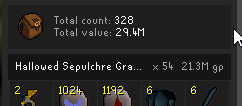
in the loot tracker, is there any way to see the full name?
I can hover everything to get full details except the name
when I view details the name seems to appaer at the top bevor the buttons take over
round jacinth
Notify on taken does that
also the second splotch you colored over is the same name as the rsn you’re showing in the box lol
 stiff python
heyo, i had cloud sync turned on before i upgraded my pc, obv C drive was reinstalled so the .runelite folder was wiped.
Why am i not seeing my cloud profiles ? skill issue?
(i logged back into runelite, i just see two "default" profiles
 vapid helm
hi is there some dialogue skip available? especially the stuff u dont need to click on to progress quest
stiff python
vapid helm
hi is there some dialogue skip available? especially the stuff u dont need to cl...
no, place your phone down on the spacebar
vapid helm
stiff python
no, place your phone down on the spacebar
but it stops if a slection is needed for a quest?
vapid helm
but if i hold space will it stop or select the quest option?
round jacinth
When you get a multi select it won’t pick anything
vapid helm
perfect!
stiff python
so am i cooked on my RL profile?
leaden trail
Are you signed into RuneLite?
stiff python
yeah, it doesnt show any profiles tho, maybe it was on a different email
vapid helm
idk if im wrong but when i started using the quest helper it told me how to get reuired items for the quest, now it just gives a hint how to get it or buy it at the GE
stiff python
yeah it was different email smh my head
 pure saddle
Hello! I am having an issue with runelite account syncing. Previously, my google account that i am using for runelite was made with an old hotmail email. About a year ago, i swapped the google account to use a new gmail address. On PC A (windows) and laptop B, i am still logged in on runelite and runelite.net using the same google account, but the old email (the webpage displays the old email in the top right). A and B can sync fine with each other and i can see my loot and stuff on the webpage, so everything is fine there. However, now im testing linux on PC A, lets call it C.
When i log in on C, using the same google account, i get logged in and the webpage displays my new gmail address in the top right, even if i use the old email address to log in. None of the data, e.g. from loot tracker, shows up. When i log in to the client, none of my plugin settings are applied.
My guess is that runelite doesnt recognize that its the same google account since the emails are different. Searching in this discord for past support, i can see that there is an easy way to migrate the settings over to the "new" account, but i would also like to keep my data. It seems like this is something only runelite admins can take care of. May i have some help with this?
zealous cedar
Since you have a pc with the profile on it, you can just export/import the profile into your new account
pure saddle
does that also bring with it plugin data?
zealous cedar
normally yes. some plugins will store data in external locations sometimes, we don't write the plugins
most sensible ones will work
pure saddle
ill test it and come back
 balmy gust
Is there a runelite setting for playing a chime noise when the runelite window is moved to a different monitor for the first time? Want to disable it but cannot find anything related and it only happens with runelite within the past month or so.
balmy gust
Thank you, will continue narrowing it down just wanted to make sure I wasn't missing anything with runelite
 sweet cosmos
Hi,
I am trying to increase the font size of Runelite UI. The only challenge I have is that my quest description using Quest Helper runelite plugin - the text is too small.
Nothing ingame (chat, toolboxes or similar) - that is perfect for me. I am using bolt launcher and my platform is Arch Linux. This is one solution that kinda worked for me:
GDK_SCALE=2 GDK_DPI_SCALE=0.5 bolt
The problem is that UI is way too big for my liking. It seems that GDK_SCALE env variable works, but it is discrete integer value and jump from value 1 to value 2 is too big.
-- OPTIONS that I've tried --
- GDK_SCALE=2 GDK_DPI_SCALE=0.5 bolt
Scale too big - see the screenshot. It seems that GDK_DPI_SCALE does not get propagated to runelite client, but GDK_SCALE=2 is integer value and doesnt scale linearly with values like 1.6 or 0.8.
- JAVA_TOOL_OPTIONS="-Dflatlaf.uiScale=1.5
-Dflatlaf.uiScale.enabled=true
-Dflatlaf.uiScale.allowScaleDown=true
-Dswing.plaf.metal.controlFont=Dialog-40
-Dswing.plaf.metal.userFont=Dialog-40
-Dswing.plaf.metal.systemFont=Dialog-40
-Dswing.plaf.metal.smallFont=Dialog-40 " bolt
Changes everything (margins, paddings, icons), but doesnt change the text
- JAVA_TOOL_OPTIONS="-Dflatlaf.theme=/tmp/runelite-theme.json -Dflatlaf.debug=true" bolt
The theme does not get applied
Any ideas? I would like to increase the text size of Runelite UI by 20-30% at least, rest of everything can be slightly increased I dont mind. Thank you

Reference: Normal UI without scaling:
 zealous cedar
fractional ui scaling support just doesnt work on linux, I dont think we really know why. i always assumed it was a wm thing
though I guess its possible its a j2d thing
stone parcel
Might be able to enable fractional scaling in system settings on some distros. Some people say it works then, but not for me personally.
pure saddle
zealous cedar
Since you have a pc with the profile on it, you can just export/import the profi...
This worked for the most part. There are a few plugins i know about that store data locally that ill manually migrate. The main one i care about that doesnt work is the loot tracker.
You said "into your new account". I would like to clarify that its not a new account. Its the same google account that now just has a new email. I can still log in using the old email, but i end up being logged in with the new email.
After importing the profile, i can now see a runescape profile on the webpage. But all the ones i see on my laptop are gone, as if its not syncing via the google account, but rather just the email. Is that the case?
I found the following, from a while ago, where you helped a user with what seems to be the exact issue i have.
Here, convo with the user: #support message
Here, referring to renaming the users account:
#development message
Could you please do the same for me?
zealous cedar
usally I only do that if they have lost their pc
theres no point otherwise, the accounts arent actually associated to google accounts, only to the email
pure saddle
is there then a way to log in to runelite using the email itself, and not the google account?
i still have access to the email, its just not the main email of my google account anymore, but runelite seems to only allow a google account login
 jolly willow
Not sure if it's possible, but is there any plans to fix the flickering when using overlay apps like Nvidia ShadowPlay and having hardware acceleration enabled?
sweet cosmos
zealous cedar
fractional ui scaling support just doesnt work on linux, I dont think we really ...
Thank you for the response. What about increasing font size of Runescape UI? Are there workarounds around that? I'm willing to do almost anything except modifying source code and re-compiling client
zealous cedar
theres no other way to increase it
maybe find someone it works for on linux and try and figure out why their system is different
stone parcel
It wouldn't affect the quest helper text and stuff, but the Stretched Mode plugin can make the right-click menus and stuff bigger. If we are talking in-game UI.
leaden trail
jolly willow
Not sure if it's possible, but is there any plans to fix the flickering when usi...
Nvidia stuff has never really played nicely with RuneLite tbh
sweet cosmos
stone parcel
It wouldn't affect the quest helper text and stuff, but the Stretched Mode plugi...
Thanks for response, I explored it, but I am only interested in text in the UI of Runelite - all the ingame stuff are perfect
haughty pumiceBOT
charred wind
scale in that, use 1.5 or something like that
you might have to adjust stretched mode
sweet cosmos
Thank you Dominick, but for some reason decimal values are not applied for me - it only applies if I put value >= 2.0
As given in the screenshots I've submitted
And at 2.0 its too big...
sweet cosmos
Yeah I think that playing on Windows would be much simpler but its not my primary OS unfortunatelly
round jacinth
ask what you’re wanting instead
You can’t
That’s cheating to know what they are without seeing them first
The hub plugin for TOA does everything that legal to do already
I assume you’re asking to see the matching items without seeing them first by seeing their ids right?
I just said you’re not allowed to because it’s cheating
You have to reveal them first to see what they are
Then you match
Anyone else wanna explain why it’s not allowed lol
seeing ids is fine but you can’t mark them to see that the hook is in one spot without revealing it first
You’d think llemonduck didn’t know you could see them without flipping them over at all? She wasn’t allowed to have that feature in her hub plugin.
It’s cheating to skip that part of the puzzle. That’s why object indicating by id doesn’t work there
stone sail
glad mirage
id try running in safe mode first, to ensure that solves your issue
Safe mode doesn't resolve the issue.
stone sail
glad mirage
also upgrade your graphics drivers, just in case
Done, issue still persists.
stone sail
glad mirage
https://github.com/runelite/runelite/wiki/FAQ#how-do-i-run-runelite-in-safe-mode...
Gonna try run in debug mode now 👍
round jacinth
It’s a 45 second puzzle that the hub plugin has smoothed out the wrinkles on our brain
Debug mode doesn’t do anything different for running
Just prints more to the log file
But show safe mode video if you could
glad mirage
stone sail
Gonna try run in debug mode now 👍
debug mode is just gonna give more detailed logs, not as likely to help as i had hoped
stone sail
Ok, I'll get a video
glad mirage
if you can do a video, then try with hardware accelleration off too
stone sail
Thanks
 obsidian radish
does anyone know how to make the right click colour for npcs specific colours? ive seen people have the right click on the doom grubs red blue and green so its easier to see when they are stacked. im in better npc highlight however i can only choose one colour for highlight menu names?
obsidian radish
round jacinth
Shift right click to pick color
it doesnt change the right click colour for me only the tile colour
round jacinth
 leaden trail
stone sail
Safe mode doesn't resolve the issue.
leaden trail
stone sail
Safe mode doesn't resolve the issue.
Can you get a video of it happening in safe mode, with the title bar of the client showing?
vapid helm
im not sure the questhelper is really well, new player settings with optimal for novice and quest rquires 20 agility to access?
haughty pumiceBOT
Visit Zoinkwiz's Quest Helper plugin discord (https://discord.com/invite/XCfwNnz6RB) for support, issues & feedback
pure saddle
obsidian radish
fixed it, it was in npc indicators not better npc highlight
better npc highlight also has color options under the "Presets" section
obsidian radish
pure saddle
better npc highlight also has color options under the "Presets" section
oh thanks ill check this out
jovial sentinel
So when using quest helper there will be a variety of of item requirements such as say a pink skirt or anything else, does the quest helper provide steps to acquire those required items or no??

 tulip igloo
when precisely does runelite config get synced to the server?
if i have any open instances on my desktop i always try to close them to sync the config over before launching it on my laptop, but sometimes it syncs over just fine even if i forget to close it on the desktop.
haughty pumiceBOT
Visit Zoinkwiz's Quest Helper plugin discord (https://discord.com/invite/XCfwNnz6RB) for support, issues & feedback
mossy swan
tulip igloo
when precisely does runelite config get synced to the server?
if i have any ope...
it gets batched every few minutes, i forget the exact amount of time though
tulip igloo
mossy swan
it gets batched every few minutes, i forget the exact amount of time though
of course - that means that if i then forget to relaunch it on my desktop it's possible that old config gets re-synced up to the server
thank you unmoon!
glad mirage
mossy swan
it gets batched every few minutes, i forget the exact amount of time though
if im reading this right, its 5 minutes
round jacinth
Yeah that’s how I’m reading it
But you have the plugin off in your picture
Oh you turned it off but not that checkbox
 tired tangle
Hey, I'm getting an issue where some damage sounds are different.
For example recoil damage dealt is the monster's attack sound
Has anyone experienced this and know a fix?
I've tried turning off all plugins and creating a new profile, but the sound issue still exists
 empty minnow
You might have to restart after turning off plugins, some don't shutdown properly
tired tangle
empty minnow
You might have to restart after turning off plugins, some don't shutdown properl...
Thanks for fast reply, I'll jump on shortly and give this a go
raven raptor
hey i updated my pc to windows 11 and im still getting the jagex launcher 32 bit how can i get it to be 64 bit and run my runelite on 64 bit also
stone parcel
I think Jagex Launcher only has a 32bit version, your RuneLite should be 64bit though by default.
You can check task manager to see if RuneLite says (32bit) next to it.
raven raptor
for some reason it doesnt say on my runelite
 raven raptor
thanks sir
stone parcel
Np. 😄
 neon stump
Okay, I have a plugin that I've used for years called "Personal Currency Tracker" from @fringe vapor - I've attempted to contact him but it seems he's been inactive for years.
I don't know really anything about maintaining/updating plugins on RuneLite, but I am familiar with some light programming and I am willing to learn.
Would it be possible to edit, update, and/or recreate this plugin myself?
Here's the why;
This plugin is one of my favorites, but the problem is that the Collection Log unlocks don't update points anymore && The biggest problem is when I get a successful XP drop it makes the game lag for a split second. But that's a big problem when doing higher level content like Butterflying Akkha, Inferno, Delves, etc.
TL;DR Am I able to take an existing plugin and update/replicate it so I can attempt to solve this?
neon stump
mossy swan
<https://github.com/runelite/runelite/wiki/Plugin-takeover-policy>
Thank you, I already submitted an issue. I just messaged him on Discord and will wait a few days to see if he responds. In the meantime I'll try to study what it takes to make a RuneLite plugin. Any advice on where to start?
haughty pumiceBOT
How to develop plugin-hub plugins: https://github.com/runelite/plugin-hub/blob/master/README.md
glad mirage
im sure its something to do with my plugins, will come back if i cant figure it out, but i wanted to know if anyone has seen this sort of issue before? most recent release version of runelite, and now my UI doesnt shift back to the edge like it should when i close the panel


weird, right?
haughty pumiceBOT
RL overlays and many Jagex widgets can be moved around the screen by holding the Drag Hotkey, (default: Alt) configurable in "RuneLite" settings, and left click dragging it around the screen.
Some overlays can be resized by dragging their bounds, right clicking will also reset their size and position.
They can also contain additional options, such as opening the config of the plugin that makes them, which can be discovered by shift right clicking.
hollow olive
alt right click to reset position @glad mirage
glad mirage
no fucking way
ive never seen that before in my life, must have inadvertently turned it on or something last night when i was introducing my friend to rs and going through my settings
ty vm
leaden trail
It's not something you enabled, it's just a feature of the client
You must have just alt dragged it
glad mirage
nah there's literally a setting "enable interface resizing and repositioning on the interfaces tab of the settings, i remember turning it on now that it comes up. I probably turned it off last time i was playing a lot for whatever reason, if its on by default. I knew you can reposition runelite panels, thought that was a plugin thing
glad its not 117hd or something
dunno if i could go back to the plain gpu plugin haha
hollow olive
idk what you're saying
ability to move the inventory and other interfaces is part of runelite, regardless of the in game setting
idk what the in game setting one allows you to move
glad mirage
idk what that setting is referring to then, but i see youre right. Dunno how i didnt know it included the inventory bit too
 wind spade
Hello, I am trying to launch runelite in development mode. However I have a jagex account and have to launch via the jagex launcher. Does anyone know how I can force arguments to run as development mode?
haughty pumiceBOT
wind spade
haughty pumice
<https://github.com/runelite/runelite/wiki/Using-Jagex-Accounts>
Thanks mate
 vale dome
np
 waxen gyro
removed message
solid mesa
I think you just want setConfiguration, unsetConfiguration, and getConfiguration. You can ask development questions in #runelite
 tardy falcon
This health bar frame has suddenly moved down on my screen. I am unable to move it higher to be where it was before, almost as if something is blocking it. Is there a way I can go about fixing this?
 solid mesa
Did you move the xp tracker?
tardy falcon
I have yes, are they linked?
solid mesa
Yes, quite a few jagex UI elements are relative to the xp tracker. It's recommended to not move the xp tracker since it usually breaks things
tardy falcon
I reset the tracker to the default position, but it seems that I can't make it go any higher WITH the tracker on. Interesting.
Originally I had the tracker turned off via the orb, with the health bar at the top. Then yesterday, I enabled the tracker / xp drops again, but this time hid the tracker itself so that only the xp drops were showing (I wanted to use them with XP globes). Now it seems that with the XP drops visible, it's not possible to make it go higher up...
The XP drops themselves had this "invisible wall" issue for me as well, but the plugin "customizable XP drops" was able to bypass that and let me place them wherever I like. Does such a plugin exist for these health bars?
solid mesa
Opponent Information, but I doubt it works with the crab since it's timer based
tardy falcon
Hm.
Uh oh. In trying to move the frame to test things out, the health bar is now completly hidden. It stays hidden even if I reset the xp bar to the original position.
Is there a way for me to reset it back to set a frame back to the original position if I can't see it anymore?
I suppose this was what you meant by the fact that it could break things. I thought that was just a "things can be buggy" type warning, not a "your whole frame is forever gone". hah
Is there perhaps a file I can edit with the positions for each UI element or anything like that?
Relogging seems to have made it visable again, phew.
Since it doesn't seem to exist, would a plugin to offset this HP bar from the xp tracker be possible (assuming I learned how to make one).
 warm rock
i recently moved data from one drive to another, can anyone help me reconfigure and get my plugins back?
haughty pumiceBOT
round jacinth
you can't move drives really
the .runelite folder wants to be at the same spot it was at before
warm rock
i still have the .runelite folder
how do i get my original settings and everything resynced?
 mild rose
anybody know where i can find profile.png in runelite directory
stone parcel
Might just need to click install to reinstall.
sinful ore
Anyone getting logged out a lot when hopping? Trying to figure out if its me or rs
solid mesa
Yes, I think it's just jagex strugglin
mild rose
stone parcel
This one? https://github.com/runelite/runelite/blob/master/runelite-client/src/m...
i think that might be it. is there a way to edit profile icon? i tried downloading it fromthat link
solid mesa
No
 odd grove
Hey guys, noticed that since having my other account sat at crabs my menu entry swapper is not remembering my choices for my spirit tree/fairy ring, they're both using the default profile so it should apply to both?
When I set it to "Tree" it reverts it back to a fairy ring option after restart of both clients
solid mesa
You're using the same profile for both clients?
odd grove
Yeah the default one, I want both accounts to use the same config for all plugins so using default is fine for me
solid mesa
You're probably going to create issues when you have both clients open, make a config change, then close both clients
odd grove
That's what I was thinking, one client has an outdated version of the config which then gets applied when it closes, overwriting the first client's changed copy
And I assume there's not a way to have the client(s) fetch new config every so often in case of any changes
hollow olive
also fairy ring/tree swaps are specific to the codes, if you didn't notice already
solid mesa
Although you can change all of them in the plugin settings
 odd grove
I want it to default to Tree over any fairy ring option for left click
hollow olive
i think the default is tree (cuz on mobile it is, i believe)
maybe check and turn that off
 hollow olive
it says last destination
 stuck flume
Hy
odd grove
Oh that is overwriting my shift-right-click choice?
hollow olive
fairy ring/tree swaps are code specific
odd grove
Ah changing that dropdown to Off has put it back to Tree
stuck flume
I need some information. Can anyone help?
hollow olive
i have mine on configure, all my codes default to configure, unless i swap it to tree, then that specific code becomes tree, but the rest stay as configure
solid mesa
stuck flume
I need some information. Can anyone help?
Just say what you need
odd grove
I'll keep mine on Off as I will be using the tree at lot more than any ring, thanks for the help ❤️
stuck flume
solid mesa
Just say what you need
I need the link to the server where the orders are received.
solid mesa
The what?
odd grove
How do you reset the position of the xp tracker? my boss bar is messed up and I can't find the box to alt-right click and reset
solid mesa
Can try switching to fixed classic
 blazing geyser
Anyone having issues with bank tags not showing the bottom row?
I'm scrolled all the way down, but still have items below as u can see by half the quantity showing

 eager sun

anyone has an idea why my runelite freezes sometimes? (perma freeze, needs to be closed and reopened)
been using runelite for years, this started happening in the past few weeks
i havent downloaded new plugins in a rly long time
 jolly nexus
can you resize spell icons to be massive in the spellbook outside of wilderness?
i was under the impression you could do it but i dont see how
this is the biggest im getting it

 gilded kayak
he's already using that
you can't resize them any larger than that, it's against plugin rules
odd grove
 gilded kayak
those are the same size as his image
jolly nexus
thats definitely a bit bigger than the high alch button i have lol
i also cant seem to reposition it anywhere else
odd grove
I've got some scaling from the RuneLite plugin, could be that?
You'll need to move the spells around using re-ordering
It keeps the ordering for hidden spells
jolly nexus
once ive hidden everything
and re-ordered
or when i hide things and then try to re-order
the whole page is red
solid mesa
The biggest it gets is 1/3rd the width which is what you have
odd grove
Enable spell re-ordering so it's red, then drag the high alch somewhere else and then disable re-ordering it should move
jolly nexus
thats really surprising honestly
i mean there's a plugin for a logout button thats literally the entire size of the window
which functions in the wilderness even
gilded kayak
there is an explicit rule against resizing the spellbook, and the prayerbook
there is not an* explicit rule against resizing the logout button
jolly nexus
i was commenting on the fact that its surprising thats the case
given that one actually affects player interactions and the other doesnt really
that its more qol based than an objectively massive logout button more or less for the sole purpose of enabling players to instantly log out in the wilderness
its just an observation
stone sail
glad mirage
if you can do a video, then try with hardware accelleration off too
I tried to get a video with OBS but my PC isn't good enough to use it 😂 . As per direct message, seems like I didn't have the latest update on my graphics driver, issue has subsided for now, thanks for all the help yesterday. Apologies about the intermittent responses, in the middle of decorating.
 cinder spear
friend of mines account wont show up on hi score check or on wiki and ideas just comes up red circle
leaden trail
Is it a lower level account?
cinder spear
yeah new account
leaden trail
cinder spear
yeah new account
That's why, it probably isn't high enough level in anything to show up
 south abyss
Has anyone any idea why ESC key isn't working for me? Only works if I press shift but works as normal on rest of PC? Tried key remapping and f keys but to no avail
mossy swan
south abyss
Has anyone any idea why ESC key isn't working for me? Only works if I press shif...
get "debug helper" from the hub and see what plugin its bound in
south abyss
mossy swan
get "debug helper" from the hub and see what plugin its bound in
Just party ping?
mossy swan
that would do it yeah
south abyss
mossy swan
that would do it yeah
crumbs, thanks mate
 fading quartz
the clue solver is wrong with this clue, real answer is 5 now following the update
 mossy swan
fixed next release
 subtle temple
what plugin to change the ground color? to help see falling shadows easier?
 old niche
the final dawn quest guide has a typo in the Starting off fase, Quest guide
 haughty pumiceBOT
Visit Zoinkwiz's Quest Helper plugin discord (https://discord.com/invite/XCfwNnz6RB) for support, issues & feedback
 limpid iron
im looking for the sound that plays when you change Notification sound to Custom instead of Native in most plugins. I never added a custom sound, so I guess there is a default custom sound placeholder, which I cannot find the file of. Could someone help me locate the file?
haughty pumiceBOT
Place the files for the feature you want in %userprofile%\.runelite on Windows or ~/.runelite/ on Linux/OSX
The names and type for the files are:
- Custom cursor:
cursor.png - Custom default notification sound:
notification.wav - Custom specific notification sound:
<name>.wavin.runelite/notifications, then select<name>in the notification sound dropdown - Custom login screen:
login.pngImage size 765 x 503 recommended, larger images will be (simply) scaled down automatically.
limpid iron
limpid iron
im looking for the sound that plays when you change Notification sound to Custom...
recorded the sound and converted it to .wave sound, dont need help anymore i guess 🙂
 cinder bison
hey guys. does anyone has this lag spikes like going into zones with alote of movement? i get fps drops to 10-25 dps. if i reboot its back to 166FPS only happends with runelite and ideas
round jacinth
“Ideas”?
Some areas are harder to draw is really all it is I think
cinder bison
i uninstalled some plugins doesnt matter though. its happends random. sometimes it happends after few hours sometimes after 15Mins only short solution is shut down runelite en reboot runelite and i can go on . its just massive fps drops very weirD. only have like 5 other plugins downloaded the rest is standard so not sure where i should look orsomething
leaden trail
Does it happen on a fresh profile with only GPU enabled?
cinder bison
i use my own profile for about 7days now. and by gpu mean the plugin? that is not active.
 wind reef
Is it just me or is it really difficult to find "good first issue"?
zealous cedar
yes. there is not much left to fix/add
wind reef
Sorry by the way I meant to post it in development channel
Never mind I cannot post there
🤪
By any chance do you know any good first issues list for Java Spring?
On GitHub overall
zealous cedar
no. the client doesnt use spring
wind reef
Overall, not RuneScape
So far I spent 15 minutes asking Claude to find something for me
Will keep looking
 thick path
Anyone able to help me figure out how to splittunnel VPN (Hide.me) with runelite (Jagex launcher). I have setup hide.me(VPN) to only split tunnel a certain app. (not runelite). I have downloaded runelite and opened runelite (configure) and ticket the IPV4 box and saved. But whenever I press Play nothing happens (with vpn on). When VPN is off and I press play then runelite launches.
 shy loom
Is there a plugin that filters out types of skill exp rewards?
thick panther
shy loom
Is there a plugin that filters out types of skill exp rewards?
Like from quests?
 nimble bough
I have a question about quest helper.
A few weeks ago for some reason my quest helper started to only show highest tier items in the needed equipment of the bank interface. Despite me having a rune axe it says dragon axe. How do I fix this to where itll show equipment I have if a higher tier isnt aVAILABLE?
 haughty pumiceBOT
Visit Zoinkwiz's Quest Helper plugin discord (https://discord.com/invite/XCfwNnz6RB) for support, issues & feedback
nimble bough
thanks
shy loom
thick panther
Like from quests?
Quests yes
thick panther
shy loom
Quests yes
I think Quest Helper can filter Skill rewards now
shy loom
thick panther
I think Quest Helper can filter Skill rewards now
Not able to filter exp rewards
thick panther
oh yea it hides them mb
shy loom
Found it!
shy loom
thick panther
oh yea it hides them mb
Ty
 gaunt lance
https://i.imgur.com/OhIZMXk.png my RL client keeps getting stuck on the 'Loading - please wait.' message. I can log in fine from the launcher on the official client and the legacy java client.
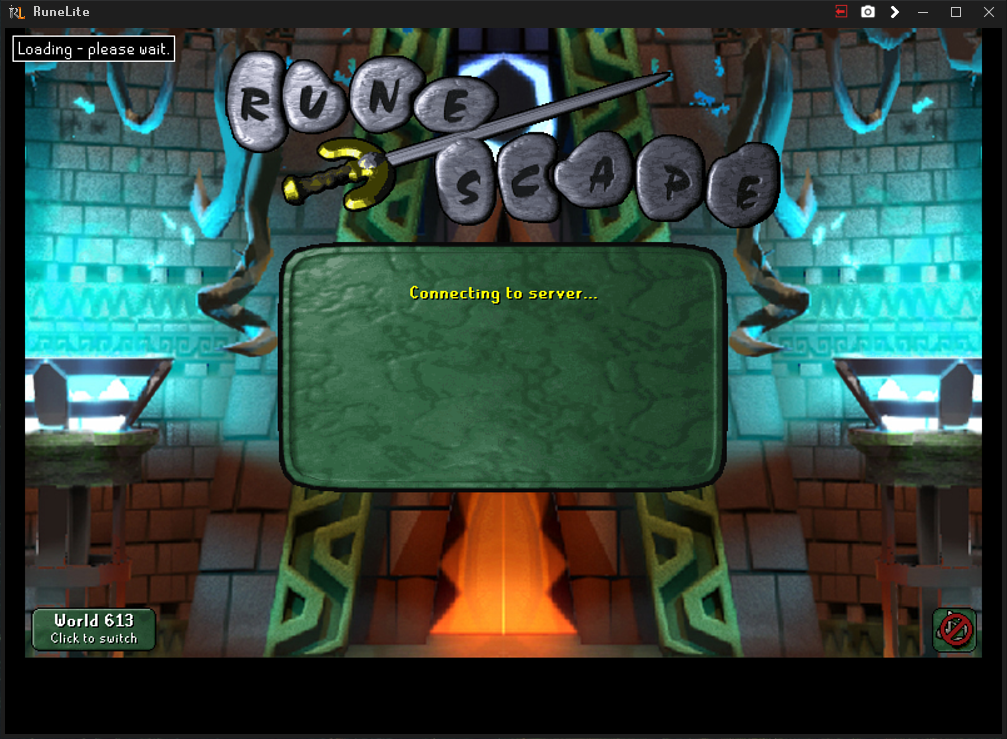 zealous cedar
its probably just a plugin freezing. use safe mode
haughty pumiceBOT
To enable safemode
Windows
Run the RuneLite (configure) shortcut from the windows start menu
Tick the Safe mode box, save, launch RuneLite the way you normally do.
Mac
In Terminal, run
/Applications/RuneLite.app/Contents/MacOS/RuneLite --configure
Tick the Safe mode box, save, launch RuneLite the way you normally do.
gaunt lance
I was able to log in using safe mode but how can I QA which plugin is freezing the regular mode?
mossy swan
!flow
haughty pumiceBOT
flowchart: Please refer to this flowchart for further troubleshooting.
gaunt lance
figured it out, it was the protect item notify from ph that I turned on recently. looks like someone opened an issue about it to their github on april 30 but they haven't fixed
thick path
Is runelite not starting up when pressing play from jagex launcher (with VPN split tunnel on and jagex launcher / runelite excluded) a common problem, anyone know how to make it work? (yes I have runelite installed with ipv4 box checked in runelite (configure)
leaden trail
Can you post your logs?
haughty pumiceBOT
To find the logs, you can do one of the following:
- If your client failed to open, click the
Open logs folderbutton. - Open the screenshot directory by right-clicking 📷
Camerabutton, navigate 1 directory up, then open logs folder. - Navigate to
%userprofile%\.runelite\logson Windows or$HOME/.runelite/logson Linux and macOS.
Upload the log files named client and launcher by dragging them to Discord. If there are files prefixed with jvm_crash dated from today, upload them too.
glad mirage
stone sail
I tried to get a video with OBS but my PC isn't good enough to use it 😂 . As pe...
No worries, glad it was that simple. Still such a weird issue with it only starting in that one very specific scenario
 tiny tusk
How do I fix this?
All screenshots are “corrupt”when trying to view them 😩
 crisp dune
tiny tusk
How do I fix this?
All screenshots are “corrupt”when trying to view them 😩
crisp dune
tiny tusk
How do I fix this?
All screenshots are “corrupt”when trying to view them 😩
The previews render fine so I'm pretty sure the images themselves are fine too. You should check that whatever program you're trying to open then with isn't broken
 heavy sparrow
Not sure how to explain this but, how do you set individual despoit/withdraw on bank items? For example, default left click = 200 law rune and then default left-click = 40 woad seeds withdraw
clear stratus
you can't
tiny tusk
crisp dune
The previews render fine so I'm pretty sure the images themselves are fine too. ...
It doesn’t matter what I try to open with. It won’t and gives me this message
heavy sparrow
clear stratus
you can't
I see streamers do it all the time when gearing, they take out different number of individual items in one click when doing things like ToB
solid mesa
You can change the default to be 1, 5, 10, X, All but 1, or All but you can't have a different X per item
gilded kayak
you gave an example that can't be done, so you got the answer no
heavy sparrow
solid mesa
You can change the default to be 1, 5, 10, X, All but 1, or All but you can't ha...
So how are they doing it?
solid mesa
They aren't
gilded kayak
they aren't doing the example you gave
clear stratus
5 and x=40 both on left click would be possible
two different Xs on left click are not possible
round jacinth
They click 5x 8 times 
tiny tusk
Cooper you can’t do it brother.
crisp dune
tiny tusk
It doesn’t matter what I try to open with. It won’t and gives me this message
Based on what I see online for that error message, you have some corrupted system files and need to repair Windows
clear stratus
x and xN are possible on left click if you batch N clicks in one game tick though
like, say X was 50, you could click item A once and item B twice and get 50A and 100B
you get it
idk when that really is done tho
and there are limits to how many clicks you can do etc
solid mesa
For superglass make people set X to 18 then set seaweed to withdraw 1 and sand to withdraw X. Then you click sand 1 time and seaweed 3 times
stone parcel
I use MES to change the withdraw for different items, but can only use the options already in the right click menu, so no custom X per item.
heavy sparrow
solid mesa
For superglass make people set X to 18 then set seaweed to withdraw 1 and sand t...
yea thanks this is useful and kind of what i based it on
its just baffling how they do so much like equip full gear + drink prepots + full inventory of things and then they are ready to raid all in like 10 seconds
without closing bank
gilded kayak
well Jagex has a say in that, without their in-bank settings you couldn't equip or drink the pots
heavy sparrow
gilded kayak
well Jagex has a say in that, without their in-bank settings you couldn't equip ...
im not sure i understand what you meant
blazing geyser
never saw a reply yesterday, but does anyone know how to fix bank tags bottom rows being cut off/not shown at all?
 gilded kayak
we don't really know why that happens, Adam can't replicate it even with potion storage
(i think)
i feel like my memory is correct
tiny tusk
crisp dune
Based on what I see online for that error message, you have some corrupted syste...
So I Ran command prompt as admin and did the scannow code and nothing was found… 😅
crisp dune
I can't really help you with fixing your windows installation, sorry
 rain shuttle
https://www.youtube.com/watch?v=-UAJQcSLzFM anyone have any clue how to fix things disappearing. it started this last week. i do not play with gpu on. it is specifically runelite related since it does not happen on official client
 solid mesa
It is a jagex java rendering bug which GPU plugin fixes
rain shuttle
is there no other fix if i cannot play with gpu on. it completed explodes my computer
gilded kayak
i think gpu bypasses the bug not fix it but just semantics
mossy swan
playing on official client i guess
solid mesa
I don't think so. Either use GPU, use official client, or wait for Jagex
mossy swan
you can try experimental gpu from the hub
rain shuttle
ah its something that is wide spread then?
mossy swan
it may give you less-explodey performance
stone parcel
Maybe fps limiting too.
solid mesa
rain shuttle
ah its something that is wide spread then?
Somewhat, applies at Doom as well
rain shuttle
its reallllly bad at verzik, but also like my poh fairy ring disappears at upper camera angle and tons of other stuff
guess just wait it out or gpu for now :c thanks ❤️
solid mesa
Did you try it in the last week? It got a lot better recently
solid mesa
I mean have you tried GPU (Experimental) in the last week?
rain shuttle
ohh no i have not, i will see if that doesnt cause my computer to struggle
trying now ty
ohh it does seem to fix it :OOO my hero i just hope this gpu experiement plugin doesnt do whatever gpu did
gilded kayak
it's the same plugin but with sailing changes, which tend to give more fps because of magic
rain shuttle
well temp fixed for now. was going insane. stuff just disappearing lol
tiny tusk
crisp dune
I can't really help you with fixing your windows installation, sorry
this has nothing to do with windows installation...
gilded kayak
you're definitely getting a windows error
solid mesa
Drag a screenshot into this chat
tiny tusk
a ss of what cooper
gilded kayak
one of your allegedly broken screenshots
gilded kayak
yeaaaaaah
solid mesa
Opens fine on my Windows 11 PC
 tiny tusk
im unsure of why it will not open :/ sorry guys
gilded kayak
me neither but i bet its a windows issue
tiny tusk
gilded kayak
me neither but i bet its a windows issue
yes im aware of that now. ijdk how to fix it but oh well.
gilded kayak
did u restart your computer during this
tiny tusk
During what exactly.. since this issue started?
gilded kayak
yes
i meant it in the snse of since you noticed the issue, but if it's longstanding, then still yes
tiny tusk
yes. i have. i guess i will have to dive deep into this to fix it. atleast although i am able to copy paste screenshots still. thanks (noob here)
blazing geyser
are lootbeams not working for anyone else?

 gilded kayak
the blindfold plugin can break them





 frigid canyon
Hi I'm brand new to RuneLite, but played RuneScape years ago religiously. I was able to log into my old account, but the only thing that remained the same is my username and password. I have to make a whole new character again and don't have any of my stuff or skill points that I worked hard to level up years prior. Is there anyway to fully get access to everything pertaining to my old account like my armor and loot?
mossy swan
frigid canyon
Hi I'm brand new to RuneLite, but played RuneScape years ago religiously. I was ...
that would be on runescape 3 now if you never played osrs
frigid canyon
RuneScape 3? How do I access that? Do I just google it?
mossy swan
yeah, it’s a different game from osrs and doesn’t have runelite etc
osrs is the “old school” version of runescape with same mechanics as 2007
frigid canyon
Oh okay. I appreciate the information and will try to log in to RuneScape 3
clear stratus
don't do it!
frigid canyon
clear stratus
don't do it!
Why?
clear stratus
i'm joking. most of us in this discord are biased towards osrs. carry on
frigid canyon
clear stratus
i'm joking. most of us in this discord are biased towards osrs. carry on
Oh my goodness lol you scared me for a second
clear stratus
sorry
frigid canyon
clear stratus
sorry
No worries 😄
gilded kayak
technically it's not a bias it's just that we're 90% of the player base
(of people who are currently online)
 terse valve
Hello,
I've tried to use runelite on another computer and my plugins seems to have been overwritten in the cloud(?) as I can't get the profile back to normal.
My home computer that I'm back on still has all the plugins installed, but I can't seem to find any ways to import any of the saved profiles to load with these plugins (and reinstalling them doesn't seem to import the saved settings I got in them?).
Is there any ways I can make this work or am I just screwed?
gilded kayak
when you say "still has all the plugins installed" are you talking about inside the client, or in a folder
terse valve
In my folder in .runelite
gilded kayak
that unfortunately means nothing, that folder is just a cache
terse valve
rip
guess im just fucked from cloud overwritting on the other pc when I turned on the cloud
gilded kayak
if you haven't yet opened the client, on the old computer, the relevant profile file could still be there
but yes clicking the button sync's the plugins for that profile
try clicking the import profilebutton in the  tab | clicking the button top right (not the x) which will make a bunch of numbers appear
and try importing the largest file in there, NOT named rsprofile