#support
1 messages · Page 96 of 1
 slate saddle
 devout cobalt
@vast bone Hi I was wondering if I could request the scorching bow spec as an animation on the animation replacer plugin
 vast bone
devout cobalt
<@425096765650239488> Hi I was wondering if I could request the scorching bow sp...
vast bone
devout cobalt
<@425096765650239488> Hi I was wondering if I could request the scorching bow sp...
Didn't I add this a few days ago?
Yesterday I think
devout cobalt
vast bone
Didn't I add this a few days ago?
@gusty robin omg theres no way! im looking through the animation swaps available, i dont see it. what is it labelled as? thanks!
to like use the spec as a normal attack animation, so hyped
vast bone
It's in projectile swaps
devout cobalt
oh yes perfect! i remember finding the porjectile swap interface and thinking i had finally found the location a couple weeks ago. Thanks!
vast bone
Yeah I'm slow adding a lot of stuff
devout cobalt
no rush at all, there are many many items in the game. i thought it would be planned eventually and thought to reach out and ask
@vast bone one last question. is there a way to use the animation id with the model of whatever you're using. so if im using a twisted bow, just to use the animation and not the model?
vast bone
devout cobalt
<@425096765650239488> one last question. is there a way to use the animation id ...
No
The animation has it baked in
 molten junco
how can i transfer plugins and preferably along with its unique settings saved, from one pc to another? i just got a new pc and wanted to play osrs again there but i had quite a lot of plugins so its a pain if i were to manually redownload all of it again along with its settings
if it helps, i the old device i played on was my laptop so the plugins should still be saved there
 haughty pumiceBOT
devout cobalt
haughty pumiceBOT
devout cobalt
yeah the model is part of the animation, so theres no way to separate the two. no problem, thanks again
devout cobalt
molten junco
how can i transfer plugins and preferably along with its unique settings saved, ...
if you copy over the .runelite folder it should carry everything over
molten junco
devout cobalt
if you copy over the .runelite folder it should carry everything over
is that in the appdata folder?
vast bone
Probably says how to find it in the link
molten junco
oh i see, thanks a lot!
devout cobalt
molten junco
is that in the appdata folder?
c:/user/(user)/.runelite
 spark prism
iver been sent here to ask adam about crashes :3
 mossy swan
by who
what crashes
why adam
spark prism
sent by a clannie. who maybe has a love for adam, just randommly crashing, have restarted pc. RL is running as admin, no bad plugins shown, 5 crashes in the last 2 hours.
haughty pumiceBOT
To find the logs, you can do one of the following:
- If your client failed to open, click the
Open logs folderbutton. - Open the screenshot directory by right-clicking 📷
Camerabutton, navigate 1 directory up, then open logs folder. - Navigate to
%userprofile%\.runelite\logson Windows or$HOME/.runelite/logson Linux and macOS.
Upload the log files named client and launcher by dragging them to Discord. If there are files prefixed with jvm_crash dated from today, upload them too.
spark prism
drag logs into this channel ?
mossy swan
yes
spark prism
mossy swan
any jvm crashes?
spark prism
mossy swan
oh you have 14900k
mossy swan
do you have a lot of jvm crash files?
spark prism
8 in logs
havent had a issue with rl or vanilla cilent
untill last update i guess?
this is first time ive crashed mulple times
mossy swan
when did you update your bios last?
spark prism
id say 2 months ago
mossy swan
and you only started crashing like today?
mossy swan
can you post all the jvm crashes
mossy swan
any from yesterday?
mossy swan
hmmm i wonder if its just nvidia driver crashes then
you could try playing with normal gpu instead of 117hd for a bit
and also uninstall any hub plugins you dont use, you have a lot of crap in logs
spark prism
im removing polugins as we speak
mossy swan
like loot filters, aerial fishing pearl luck, cam torum
i dont suspect your cpu is broken since you have the latest microcode that should prevent them from breaking, and you installed that a while ago
i cant remember what versions of nvidia driver are "better"
spark prism
okay thank you, ill look into bios updatitng ❤️
mossy swan
!hd
haughty pumiceBOT
Visit 117's HD plugin discord (https://discord.com/invite/U4p6ChjgSE) for support, issues & feedback
mossy swan
if you dont have issues on gpu but do on 117hd
spark prism
thank you. yeah so far havent crashing on gpu. will give it a good hour
then try again
 hybrid orchid
Not sure if it's already noted, but i'm not sure why I get nulled fishing xp, even just picking up items

{"CXPConfig":{"xpDropColor":"-1","fadeOut":"true","xpTrackerBackground":"SHADOW","xpTrackerFontSize":"16","xpTrackerFontStyle":"DEFAULT","attachToTarget":"false","neverGroupPredictedHit":"false","yDirection":"UP","useXpTracker":"false","xpTrackerClientTicksToLinger":"0","xpTrackerFadeOut":"true","showIcons":"true","xpMultiplier":"1.0","xpDropOverlayPriority1":"0.75","xDirection":"LEFT","iconOverride":"true","showXpTrackerProgressBar":"false","xpDropColorMelee":"-262144","showIconsXpTracker":"true","xpTrackerIconSizeOverride":"0","groupedDelay":"20","yPixelsPerSecond":"44","xpTrackerBorderColor":"-10857915","xpDropCenterOn":"ICON_AND_TEXT","grouped":"true","xpTrackerSkill":"MOST_RECENT","predictedHitIcon":"HITSPLAT","xpDropColorRange":"-15207401","xpDropForceCentered":"false","fontStyle":"BOLD","xPixelsPerSecond":"0","framesPerDrop":"100","predictedHitColor":"-1","predictedHitColorOverride":"false","xpTrackerHideVanilla":"true","xpDropBackground":"SHADOW","xpTrackerColor":"-1","showPredictedHit":"true","xpDropColorMage":"-16121601","attachToOffsetX":"0","fontSize":"16","iconSizeOverride":"0","attachToOffsetY":"0","attachToPlayer":"false","xpTrackerOverlayPriority1":"1.0","xpDropsHideVanilla":"true","showFakeIcon":"true"}}
Here is what is setup
mossy swan
idk what this plugin is
haughty pumiceBOT
Support for hub plugins should be directed to the author of the plugin.
You can find the support link by searching for the plugin in the Plugin Hub panel and clicking the ? button on the plugin, or by right-clicking the plugin in the plugin panel and clicking the Support menu option.
hybrid orchid
I don't have a plugin enabled for it, it's just the xp drops, one day I logged in and randomly got them
mossy swan
did you just get the json from your config file or something then
 leaden trail
If you're using customizable XP drops then you're using a hub plugin for it
haughty pumiceBOT
Get support for the Customizable XP drops Plugin Hub plugin here: https://runelite.net/plugin-hub/show/customizable-xp-drops.
You can also find the support link by searching for the plugin in the Plugin Hub panel and clicking the ? button on the plugin, or by right-clicking the plugin in the plugin panel and clicking the Support menu option.
hybrid orchid
No, I right clicked the orb and exported my settings
 mossy swan
yeah thats a hub plugin
 cobalt edge
Hello. The screenshot plugin doesnt take screenshot of levels, it does with collection logs etc, anyone got the same problem?
It is set to screenshot levels so idk
 oblique plume
if youre in combat the widget can be instantly canceled so theres nothing to screenshot
cobalt edge
Yeah, i just got 73 crafting and it didnt print 😦
 rocky hatch
Hi. need help with stretched mode. I recently got a new pc/monitor and stretched mode isnt changing my ui.
display settings

stretched mode plugin

gpu plugin settings

 stone parcel
You could try scale in here:
haughty pumiceBOT
stone parcel
Have you tried messing with the stretched mode settings too?
rocky hatch
yeah changing the scaling doesnt changing anything in the ui .
and the other toggleable buttons dont do anything
rocky hatch
 oblique plume
you are integer scaling without a window sized appropriately to allow integer scaling
 green rampart
I double-checked and there actually was a client log 3 minutes before I posted in this channel.
I think maybe it was an issue with either the GOTR helper extension or the tile pack:
2025-07-11 12:47:46 EDT [Client] WARN n.r.c.ui.overlay.OverlayRenderer - Error during overlay rendering java.lang.NullPointerException: null \n at \n com.datbear.GuardiansOfTheRiftHelperOverlay.highlightCellTiles(GuardiansOfTheRiftHelperOverlay.java:231) \n at com.datbear.GuardiansOfTheRiftHelperOverlay.render(GuardiansOfTheRiftHelperOverlay.java:56)
was working on my old display
that one was 60hz though
i toggled off integer scaling and still doesnt do anything
oblique plume
then the window is still too small
rocky hatch
anything i can do to keep this window size and still be able to scale?
oblique plume
that doesnt make sense
rocky hatch
just want my ui to be more compactg
inventory should fill almost to the map
ifykwim
lol i just messed with the game size and it works all of a sudden
rocky hatch
oblique plume
then the window is still too small
Thanks, i usually play with integer scaling off also. the plugin was just stuck for some reason
 tight abyss
is there a way i can import my old loot tracker from site to my new loot tracker because @ site i got two of mine accounts
haughty pumiceBOT
haughty pumiceBOT
Get support for the More Bank Fillers Plugin Hub plugin here: https://runelite.net/plugin-hub/show/more-bank-fillers.
You can also find the support link by searching for the plugin in the Plugin Hub panel and clicking the ? button on the plugin, or by right-clicking the plugin in the plugin panel and clicking the Support menu option.
 ornate kite
how can i put my sidebar in my game instead of the boarder
 stone parcel
Maybe you want "Enable custom window chrome" off, it's in the RuneLite settings. That puts the < in the game window.
stone parcel
Np. 😄
 normal heart
Does anybody know why when I put something in bank tab 9 it is outlined green? I can’t seem to figure out how to turn it off!
 solid mesa
Are you sure it’s only tab 9? And not some plugin that’s highlighting profitable alchs?
normal heart
Yeah doesn’t matter what I put in tab 9. It highlights it grey.
haughty pumiceBOT
Many plugins from the pluginhub break the client in subtle or not-so-subtle ways, including causing issues like client freezes. We do not support pluginhub plugins because we do not make or quality control them, and do not recommend their use.
Run the RuneLite (safe mode) shortcut, or with a Jagex account, first run the RuneLite (configure) shortcut and tick the Safe mode box, then launch RuneLite via the Jagex launcher.
This temporarily disables the GPU plugin and all hub plugins which will allow you to confirm the issue is caused by one of those plugins and isn't a core RuneLite issue.
If the issue is caused by a hub plugin, you should isolate which plugin it is and then uninstall the plugin.
 primal star
hii, I built a new computer and tried to install rl to an error message reading "RuneLite is incompatible with Windows username which end with an exclamation mark (!)"
what did i do wrong
stone parcel
Your windows username might have an invalid character in it, like !.
primal star
it's only letters but I'll rename
stone parcel
I've heard you can't just change it, but need to make a new user. Gl though. :\
 velvet night
Does anyone know if my character from over 20 years ago is still there...when i try to login with it, it says i need a MEMBERSHIp when i try free version it forces me to login with email which back then it was only user and pass login
primal star
but its the same name it's always been :( wtfrick
velvet night
Wondering if my character i had back in the day logged out on members side
stone parcel
I'm pretty sure you can login with username and password still. A character from that long ago would be on RuneScape 3 (RuneScape) though.
If it logged out in members it would be sent to a f2p area, so I think something went wrong when you tried switching to a f2p world.
velvet night
yeh the very original it was called 2D version (lol) then the ''3D''
but it asks for email login
haughty pumiceBOT
If you are new to OSRS, make sure to follow this excellent guide on OSRS wiki: https://oldschool.runescape.wiki/w/New_player_guide. You can also join the official OSRS Discord here: https://discord.gg/osrs
velvet night
only on the RL version it asks for USER option
stone parcel
That is the OSRS/Jagex discord, they might be able to help.
velvet night
ty
few of me and my classic WoW friends want to come back to Runescape again for that nostalgia
and my character was pretty high and rich even had a cannon
probably nothing in todays game
 compact spear
You'll have to start over from scratch for oldschool anyway
primal star
changed my username and it worked, good shout.
velvet night
i remember all my pure characters too
primal star
strange tho, it had no special characters in it
 left niche
is someone able to help me figure out why my client "skips" a tick or 2 sometimes. my mouse and clicks will just lag a little bit and I'm not able to reproduce accurately unfortunately
velvet night
Yeah my accounts still exist...as the name is taken but their stats can't be found in game highscore 😂
characters*
 celest yew
does wikisync work with brave browser? the wiki dps calc isnt letting me load my gear but it does on firefox
 solid mesa
You need to allow websocket connections from localhost in brave
 round jacinth
velvet night
Yeah my accounts still exist...as the name is taken but their stats can't be fou...
round jacinth
velvet night
Yeah my accounts still exist...as the name is taken but their stats can't be fou...
You’re confusing Osrs with what is now rs3. Your accounts have no stats on Osrs if they’re very old from original RuneScape (now known as rs3)
For more about that stuff
velvet night
i am because i don't know what you mean lol it's been over 20 years sorry
I can see in the Runescape 3D (old school) it's named now when i looked up my characters their names exist but not stats
sorry if im not in the right place asking i just have no idea where to ask
stone parcel
Think about if you made a character on WoW Burning Crusade back in the day, then logged out and never touched it. Then if you try to login now to WoW classic, your old BC character won't be there. Old school and modern are mostly separate.
round jacinth
you’d play on runescape.com, that’s where your old account is.
Osrs is https://oldschool.runescape.com which is not the same game.
I think rs3 only does members hiscores anyways so you won’t find it anyways, and you never played osrs.
 marsh anchor
why cant login to runelite website or client? "
400. That’s an error.
The server cannot process the request because it is malformed. It should not be retried. That’s all we know."
stone parcel
I found this #support message
That says browser or browser extension, not sure how that would be affecting the client for you though....
ornate kite
damn thatll be so lit if u can combo fake ironman icon plugin with rsn hider plugin
 keen compass
Can anyone help me with notification sounds? It's not my computer settings and RL shows the banner notification on my computer but no sound anymore
NVM figured it out!
 tropic root
 oblique plume
Prob need to reinstall rl
haughty pumiceBOT
Download and install the updated RuneLite launcher from the website link in #welcome. You don't need to uninstall your current version. You will not lose any settings or plugins.
 sturdy pier
I logged in today and all my settings and plugins were reset to 2 years ago.. I didnt logout of runelite or anything my computer just crashed. Any idea how to recover those settings??
mossy swan
!lost
haughty pumiceBOT
mossy swan
most likely your settings file got corrupted because of the pc crash
sturdy pier
mossy swan
most likely your settings file got corrupted because of the pc crash
I was able to recover the profile tysm
mossy swan
sweet
 keen jewel
So I just logged in (everything was fine earlier) and my Runelite has been destroyed apparently. Every plugin ive changed settings for or installed over the last at least 5+ years are gone, all my inventory setups are gone, marked tiles gone, litereally everything
mossy swan
keen jewel
So I just logged in (everything was fine earlier) and my Runelite has been destr...
check like three messages above yours
keen jewel
Already done all that
Only had one profile, it was still on said profile. Made a new one, switched to it and then switched back
ITs got inventory setups I had back during like 2020 Lockdown. Lost all the ones I made for my GIM, and all the (like 50+_) ones for my main
mossy swan
where did you find that profile?
keen jewel
 stone parcel
Make sure you are reading that link really, really good. Step 4 can often be helpful.
mossy swan
yeah
keen jewel
Okay i went through my File Explorer - Seems to be 5 profiles there for some reason, I checked each one and compared how many entries they each had and assumed the one with the most (by THOUSANDS) was the one I was using, imported it and it seems like everything is back, though I wont know for sure until I test some content
stone parcel
Yay! 😄 That sounds promising.
keen jewel
I was about to as the kids say "crash out"
 halcyon fern
Hi would anyone be able to help with an issue with GPU/117 plugins ? Whenever i try to activate either of them , the plugin instantly turns off. I tried the basic solutions - reinstalled, update drivers , set correct setting in nvidia panel etc. but no luck. Info in logs like this:
2025-07-13 05:09:57 CEST [Client] ERROR n.r.client.plugins.gpu.GpuPlugin - Error starting GPU plugin
java.lang.UnsatisfiedLinkError: C:\Users\xxx\AppData\Local\Temp\2446284718523490761rlawt.dll: Can't find dependent libraries
at java.base/java.lang.ClassLoader$NativeLibrary.load0(Native Method)
at java.base/java.lang.ClassLoader$NativeLibrary.load(Unknown Source)
at java.base/java.lang.ClassLoader$NativeLibrary.loadLibrary(Unknown Source)
at java.base/java.lang.ClassLoader.loadLibrary0(Unknown Source)
at java.base/java.lang.ClassLoader.loadLibrary(Unknown Source)
at java.base/java.lang.Runtime.load0(Unknown Source)
at java.base/java.lang.System.load(Unknown Source)
at net.runelite.rlawt.AWTContext.loadNatives(AWTContext.java:92)
at net.runelite.client.plugins.gpu.GpuPlugin.lambda$startUp$1(GpuPlugin.java:297)
at net.runelite.client.callback.ClientThread.invokeList(ClientThread.java:119)
at net.runelite.client.callback.ClientThread.invoke(ClientThread.java:101)
at net.runelite.client.callback.Hooks.tick(Hooks.java:229)
at client.yt(client.java:26750)
at client.bw(client.java)
at bo.bl(bo.java:467)
at bo.bf(bo.java)
at bo.run(bo.java:27493)
at java.base/java.lang.Thread.run(Unknown Source)
mossy swan
!hd
haughty pumiceBOT
Visit 117's HD plugin discord (https://discord.com/invite/U4p6ChjgSE) for support, issues & feedback
 zealous cedar
thats kind of weird. that is from the gpu plugin too not hd
halcyon fern
ye this shows up in logs when i try to activate GPU plugin
halcyon fern
normal windows 11 , nothing special that i can think of. gpu is gtx 1060 laptop
mossy swan
hmm, maybe some antivirus then?
halcyon fern
🤔 didnt think it could be connected since other plugins are working. but let me try disabling avg
mossy swan
its the only thing i can think of, it might be removing/renaming/blocking the temp file
halcyon fern
no luck. even with antivirus fully turned off it still blocks me from activating the gpu plugin
zealous cedar
could be a corrupted runelite install maybe, try reinstalling?
mossy swan
your hard disk is not full is it?
halcyon fern
i did , reinstalled in like 10 different places on my pc thinking maybe it was problem with specific folder/disk
mossy swan
and if you look at the last entry in the log when you try to activate it, and then go to %userappdata%/temp (write in win+r window), see if the file is there?
zealous cedar
the file is there, its saying that one if its dependencies is missing
but it only depends on jawt, opengl, gdi32, and kernel32
mossy swan
oh 
zealous cedar
which basically all can't be missing
maybe there is a 2nd java in the path with a different jawt version or something? idk
halcyon fern
in the Temp folder i didnt move anything , but could the problem be that my runelite is located in C:/OSRS/runelite folder instead of the default /Appdata/Local/ ? i have to move it cause runelite doesnt start at all from the /Appdata/local/ path hwere it is installed by deault
zealous cedar
i dont think so, but why doesnt it start from appdata?
halcyon fern
no clue - the launcher doesnt start at all when its in appdate , and logs dont show anything new
mossy swan
that would probably give a bit of a clue if you can install it there again
halcyon fern
did a fresh reinstall of runelite to appdate where it points by default , but since the launcher doesnt start at all there isnt even a log file i can show
the .runelite folder wont show up since the runelite wasnt launched yet
stone parcel
I wonder if disabling avg wasn't enough to actually stop it....
haughty pumiceBOT
run this command in cmd, then show us the displayed output through a screenshot.
"%localappdata%\runelite\runelite.exe" -c -v --console -- --debug
@halcyon fern this was for you ^
 mossy swan
halcyon fern
mossy swan
halcyon fern
can you check the properties for the app data / local folders
see if you have write permission etc for them
something is very wrong there
halcyon fern
ye full permissions on the runelite folder as well as entire appdata
it is read-only but i dont think that is a problem for being unable to start the launcher ?
 mossy swan
yeah all i can say is something is really fucked with your appdata
you could try making a new windows user and see if it works on that user
halcyon fern
mossy swan
you could try making a new windows user and see if it works on that user
not what i was hoping to see 😩 a new user can launch runelite no problem from appdata and both GPU and 117 are working it seems
mossy swan
halcyon fern
not what i was hoping to see 😩 a new user can launch runelite no problem from ...
well i hope it doesnt flip your life around to move your files n stuff quickly
you might not even really need to move files if you make that user admin, then you can just access them as before 
halcyon fern
i might not have to 🤔 i just launched from my normal user
while on appdata of the other user
mossy swan

halcyon fern
but gpu doesnt work LOL
mossy swan
yeah so you have same problem as before
halcyon fern
even tho launcher starts
mossy swan
when you installed it to different place
 fiery cloud
having issues importing an already made plugin into my developer mode. I have my custom plugin loaded up, but I want to import another TOA plugin. could anyone help me out?
haughty pumiceBOT
We don't provide builds of pluginhub plugins for snapshot versions. Usually you can pass -Drunelite.pluginhub.version=<current RL version> as a VM option to load the plugins built against the release into your build, which will work if there are no ABI changes. If there are ABI changes, build the plugins yourself and place them into the sideloaded-plugins directory when running in developer mode.
round jacinth
fiery cloud
having issues importing an already made plugin into my developer mode. I have my...
wym “another toa plugin”? Did some one tell you about one at toa? Pretty sure llemonducks is all you need
fiery cloud
@round jacinth i am making a TOA plugin is why i said another
it's for insanity keeping track of the last raised tile
round jacinth
You can’t do that, that won’t be allowed.
fiery cloud
@round jacinth i already read the rules on it
round jacinth
Everything that can be allowed is being done by Llemon’s plugin
fiery cloud
as long as it isn't telling me the next tile to go on its fine by runescapes rules
round jacinth
That’s directly telling you where to stand for a boss fight. That’s literally listed on what you can’t do.
But it is lol
fiery cloud
its not its just storing the last raised tile
round jacinth
so it’s off by 1. Ok
 clear stratus
as in, the raised tiles in the final boss?
fiery cloud
yeah but its legal by the rules trust i researched a lot
round jacinth
Yes
fiery cloud
yeah
clear stratus
that's going to be completely and utterly illegal
round jacinth
He needs help remembering that left side last attack is left side is safe
Right side means middle and middle means right
clear stratus
not because of the rule you guys are talking about though
fiery cloud
it's more of the fact i have shit internet and can't react fast enough
round jacinth
clear stratus
not because of the rule you guys are talking about though
I mean if it was allowed to help there, Llemonduck would’ve had it
You can go back row and always react or you can just remember.
clear stratus
ok well maybe the where not to stand / where to stand does apply on some level
but really it's this imo
 clear stratus
yeah-- we're not going to accept that plugin
round jacinth
They’ll just run it locally.
round jacinth
it won’t be accepted or Llemon would’ve had it.
fiery cloud
ok
round jacinth
some one was about to add mirror bouncing for het.
Llemon decided to add it.
just learn the raid
fiery cloud
Great question—let’s be precise because RuneScape’s plugin legality is a nuanced topic.
Short Answer (as of 2024–2025):
A plugin that only displays what you have already seen yourself—for example, which tiles the Wardens in Tombs of Amascut just raised—does not inherently break the Jagex rules, provided:
✅ It does not predict future behavior (e.g., telling you where the tiles will rise before they do).
✅ It does not read game memory, packets, or do any automation.
✅ It only uses information your client has legitimately received (through the RuneLite API events and hooks).
✅ It does not overlay anything that amounts to a cheat (like exact timers or pattern prediction that isn’t visible in-game).
This kind of plugin falls into what Jagex calls “permissible client features,” especially if it is simply summarizing or highlighting information already on your screen.
 final axle
chatgpt 
fiery cloud
yuh
final axle
grok, clown emoji this guy
fiery cloud
is this the rs coding community? i literallky picked this up for fun today and you guys are being some cock suckin assholes fr
round jacinth
You’re asking a ChatGPT for rules when we were here
final axle
We don't help people break rules for fun
fiery cloud
it's literally not breaking the rules do 5 minutes of research and you can see that buddy
clear stratus
You're free to write whatever code you want but we are telling you that your plugin concept is breaking the rules. If you submit it to the plugin hub for review we will not accept it. If you implement it and play with it, you are breaking the rules and you will be risking a ban.
Do with that information what you will.
stone parcel
Yes it is breaking rules.
clear stratus
The fact that multiple people with colored names are echoing the same thing should tell you something.
fiery cloud
show me where it breaks the rules
clear stratus
That's all I have to say.
fiery cloud
show me
stone parcel
fiery cloud
because everything i've read says it doesn't
 fiery cloud
are you kidding? that's irrelevent
its not an indication
an indication would imply its going to tell me whats next
its not telling me whats next you moron
final axle
Alright, if you're just gonna devolve into insults you can come back tomorrow if you still want to argue
stone parcel
It takes out the requirement to remember 3 events.
final axle
I wonder what this is 
 mossy swan
he's not coming back
clear stratus

halcyon fern
Might as well put this here in case someone else will be searching for this issue in the future and i spent entire day struggling : In case of problem with GPU or 117 plugins when they are automatically stopped whenever you try to activate them, one of the things worth checking is if you have any non-ASCII symbols in the name of your Users folder ( In my case it was the same as my real name created by default based on microsoft account and contained a single non ASCII symbol ). It caused the path for both GPU and 117 plugins to be incorrect even thought all the other plugins were working fine. It can also cause the runelite launcher to not work either if the runelite is installed in the /Users/Appdata folder.
final axle
Been awhile since I heard that bug brought up
I thought it had been fixed with how long it'd been
 fossil summit
halcyon fern
Might as well put this here in case someone else will be searching for this issu...
fossil summit
halcyon fern
Might as well put this here in case someone else will be searching for this issu...
someone here could have told you that if you didn’t censor your windows username in every screenshot
halcyon fern
i usually try to cover that since my microsoft account ( and with that Users folder ) contain my real name and surname, with other plugins working ok , it didnt even cross my mind
mossy swan
hmm i thought that was fixed so didn’t think about it
 wild creek
Friends bank tag layouts all seem to have reset to have no layout, Like this https://i.imgur.com/b0oks8K.png
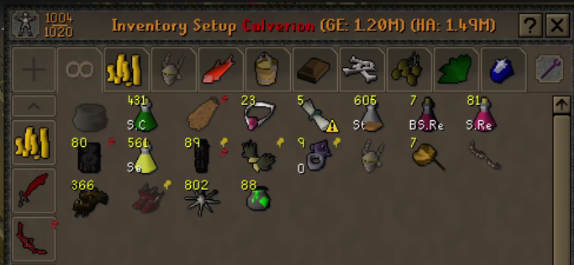
Anyone know what might have caused that?
 warm cape
Might be related to the fuzzy changes that just got released. Does using Auto Layout fix the problem?
warm cape
It looks like it might be related to having Hub Bank Tag Layouts on
 sand oasis
Hello idk or its the right channel to write,but "Inventory setups" got and update and now all my setups are just normaly in the setup and not preset like i was done like left side gear what u wearing and right side inventory can i fix somehow all my inventory setups or i need to do all manualy 1by1 by wearing items taking all stuff to invenory and presing preset button?
warm cape
@sand oasis Try turning off Bank Tag Layouts
sand oasis
warm cape
<@619941626843889674> Try turning off Bank Tag Layouts
Heck Yeeeeee!!! it works!! thank you man!! holy moly i was soo sad this sunday morning when i saw alll my setups faked up loool
warm cape
NP, that plugin is not needed anymore. If you use bank tags there is an option to enable layouts there. And you can export Bank Tag Layouts to Bank Tags
 gentle scarab
still needed for zigzag and to not have miles of empty space
warm cape
Inventory Setups has zigzag
gentle scarab
ah yeah true, bank tags is missing it
sand oasis
Man Thank you very much just fixed bank tags aswell and delete bank tag layouts
warm cape
This issue is hopefully temporary and soon the plugins will be back to working together nicely. But uninstalling it and using the core layouts is best moving forward
 wanton laurel
question ,is there a place where i can find sound files of in game sounds ,for example any sounds from this wiki page https://oldschool.runescape.wiki/w/List_of_sound_IDs

Old School RuneScape Wiki
This page lists the IDs for in-game sounds. A full list of their respective files can be found here.
 grim carbon
why is inventory setups plugin in such a sorry state
which dillydill is responsible for it
@warm cape
clear stratus
read like 10 messages up
grim carbon
i don't know why it's showing items double + in the most random order possible

 mossy pulsar
can i log in my steam account to runelite?
i have acharacter on steam i dont want to lose but I want to play using runelite
clear stratus
wanton laurel
question ,is there a place where i can find sound files of in game sounds ,for e...
there's no comprehensive dump of sound effects. the wiki has some but not many
grim carbon
clear stratus
read like 10 messages up
ty this worked
although i wonder why this plugin is the only dogshit one that breaks every time the winds blow past 50 km/h
and u have to find some backwards solution for it
 dark tusk
grim carbon
although i wonder why this plugin is the only dogshit one that breaks every time...
dark tusk
grim carbon
although i wonder why this plugin is the only dogshit one that breaks every time...
https://github.com/dillydill123/inventory-setups/pulls
I don't see your PR in here buddy
GitHub
Plugin for RuneLite, an open source game client for the MMO Old School RuneScape - Pull requests · dillydill123/inventory-setups
Feel free
wanton laurel
clear stratus
there's no comprehensive dump of sound effects. the wiki has some but not many
ah that's unfortunate ,thanks for the help :)
oblique plume
mossy pulsar
can i log in my steam account to runelite?
Gotta make a jagex account and link it #faq
 prime pollen
can you still detach infbox, i'm pressing shift + right click on and the option for inbox doesn't show up
clear stratus
you can, the thing you're right clicking may not be an infobox

 lost flume
Yep there seems to be a conflict between Bank Tag layouts and inventory setups now
solid mesa
Disable bank tag layouts
lost flume
I have done so, alr all fixed
Just throwing it in here that there is a conflict if ppl are confused
 drifting star
everytime i type something on quest search list i get stutter every letter i type, every chat log with npcs i get stutter whats the problem zz?
never had this
vast bone
lost flume
Yep there seems to be a conflict between Bank Tag layouts and inventory setups n...
how do you make this happen?
haughty pumiceBOT
Graphical artifacts? Try disabling hardware acceleration: https://github.com/runelite/runelite/wiki/Disable-Hardware-Acceleration
vast bone
@drifting star
try that
actually nvm I think I misread what you wrote
thought you were talking about the sidebar.
haughty pumiceBOT
Please refer to this flowchart for further troubleshooting.
vast bone
try safe mode
clear stratus
vast bone
how do you make this happen?
@warm cape was looking into it but i don't think there was a concrete repro
warm cape
Having Inventory Setups and Bank Tag Layouts on and opening a setup is enough to repro it
clear stratus
oh
vast bone
warm cape
Having Inventory Setups and Bank Tag Layouts on and opening a setup is enough to...
not for me
warm cape
Hmm, what Jar is it pulling?
clear stratus
?
 leaden trail
That's going to be the only answer you get
clear stratus
yeah i would think so
warm cape
Yeah I dunno, that looks like the same jar I pull and opening it up and looking at the code, it doesn't look like it matches what's specified in the plugin hub. I commented the findings here https://github.com/dillydill123/inventory-setups/issues/350#issuecomment-3066919808
lost flume

my jar
had the same issue till i disabled it
bank-tag-layouts_UpxjEahB0kcpBB8qVz2S2n2t13EopVi6TEL1VPnAyX0.jar
clear stratus
@warm cape this comment is confusing me
Technical details below.
Loading external plugin "bank-tag-layouts" jar "UpxjEahB0kcpBB8qVz2S2n2t13EopVi6TEL1VPnAyX0"
Looking at the timestamp for this Jar: 1730948897 which is November 7, 2024. Last update was done on November 20.
The november 20th update you're linking to is for inventory setups, not bank tag layouts
I'm not following the claim here that the hub is vending an older version of bank tag layouts
warm cape
That PR updated both plugins at the same time
clear stratus
ah
ok, and in said PR the change to bank tag layouts was a one-liner that updated that string
i'm following
zealous cedar
is there something broken?
clear stratus
i think there may be, yes. it looks like the code update to bank tag layouts from https://github.com/runelite/plugin-hub/pull/7017 did not make it onto the hub
this was the only change
 zealous cedar
this change is from November 2024
clear stratus
and if i download bank tag layouts from the hub and open it in bytecodeviewer, it's still comparing the old string

 clear stratus
seems fine
that or geheur pushes a version bump
i've never seen a hub PR update two plugins, maybe whatever CI triggers builds from that doesn't handle >1 diff? 🤷♂️
zealous cedar
not sure. the ci definitely failed
but i cant see the logs since it was so long ago
why did it take so long to notice
warm cape
I'm also wondering the same thing... In theory this bug should have been visible a long time ago
clear stratus
the problem people have been having only appears to have started since the recent update to inventory setups
but idk
 toxic crane
does anyone happen to know if some sort of "on logout do x" exists for runelite plugins? I could see it possibly being bad if it somehow blocked logout, but for the case of syncing some data to an external service I'd imagine it could be really useful to limit constant pings
warm cape
As I mentioned before, if I checkout the previous commit that was in the PHub for Inventory Setups the bug still appears. So the push to v1.21.0 did something
clear stratus
toxic crane
does anyone happen to know if some sort of "on logout do x" exists for runelite ...
#runelite please
toxic crane
Okey
zealous cedar
i reran a build of btl manually

 vast bone
I have a log from 6/13/2025 that shows "bank-tag-layouts" jar "UpxjEahB0kcpBB8qVz2S2n2t13EopVi6TEL1VPnAyX0"
clear stratus
well the tinfoil hat conspiracy would be that btl was updated on the hub and the recent inv setups push somehow reverted it
but i have no way to even begin to verify that
vast bone
at some point there should have been an issue with the hash not matching, right?
if it worked yesterday, it was not the hash from the manifest.
(unless the manifest used to show the new hash but the filename still had the old hash?)
zealous cedar
the build i just did is the only btl build from 2025
the last one looks to be from nov 2024
vast bone
do you know if a different jar was delivered 2 hours ago vs 26 hours ago?
unfortunately runelite doesn't log when it downloads a jar so I can't tell.
zealous cedar
I dont think so
it logs the jar hashes on startup
or well, it logs the jar name
.. which includes a hash
vast bone
it logs the hash from the manifest I think.
zealous cedar
log.info("Loading external plugin \"{}\" jar \"{}\"", jarData.getInternalName(), jarData.getJarHash());
warm cape
I computed the b64 sha256 hash yesterday and it matched what the log showed
vast bone
yesterday when it was broken or yesterday when it was working?
warm cape
When it was broken
vast bone
yeah so no one knows what was being returned when it was working
warm cape
Yes, tin foil hat on that one
 gritty void
i wonder what i have since i last opened RL a few hours ago
zealous cedar
the log tells you..
drifting star
vast bone
try safe mode
found the reason this virus
 vast bone
the code for this one is hideous and it runs that code when it's not necessary
(mostly when it's not necessary XD)
drifting star
vast bone
(mostly when it's not necessary XD)
i came back like after a year
i didnt have this problem back then
 thick oak
Hey, I've been having this same problem with a new PC build
doesn't happen on my ~9 yr old previous build or ~3 yr old laptop
tried a clean install of windows 10, clean install of windows 11, toggling all the "game mode" and "overlay" and "optimizations for windowed games" and "gpu scheduling" and similar sorts of random options that come default and might be related
even tried replacing the CPU, and then when that didn't work, a different model of motherboard/RAM (all within return windows so no worries lol)
also tried running Runelite in compatibility mode for windows 8, and safe mode
it doesn't happen 100% of the time which honestly makes it more frustrating, it only happens maybe 1/100 times I minimize it, which makes reproducing the issue very difficult
and also makes it hard to know if a given thing fixed it or if I just got lucky
also, if someone else is using an AMD 9600x CPU and not having this problem, could you let me know which motherboard/RAM you're using?
that way I can try just getting the exact same model and then if it still happens I can at least feel assured that it's not a hardware incompatibility problem
 rocky temple
Anyone know what is causing my RL to crash? it seems to only be happening when im in ToA?
haughty pumiceBOT
To find the logs, you can do one of the following:
- If your client failed to open, click the
Open logs folderbutton. - Open the screenshot directory by right-clicking 📷
Camerabutton, navigate 1 directory up, then open logs folder. - Navigate to
%userprofile%\.runelite\logson Windows or$HOME/.runelite/logson Linux and macOS.
Upload the log files named client and launcher by dragging them to Discord. If there are files prefixed with jvm_crash dated from today, upload them too.
solid mesa
thick oak
Hey, I've been having this same problem with a new PC build
doesn't happen on my...
If the game freezes but the sidebar doesn't it is usually network issues
haughty pumiceBOT
open command prompt, type this in:
ping -t oldschoolXXX.runescape.com
where the XXX is your world minus 300, for example world350 = 50
 true flare
Everyone suddenly looks like they're in a f2p world (standing animation), any fix? lol
mossy swan
true flare
Everyone suddenly looks like they're in a f2p world (standing animation), any fi...
go to a less populated area
thick oak
solid mesa
If the game freezes but the sidebar doesn't it is usually network issues
sometimes the sidebar also freezes, sometimes not
true flare
shit pc real? 😦
thick oak
sometimes the game portion of the screen goes black instead of just freezing
mossy swan
no its just how the game works
 viscid kelp
is there a channel for suggestings about runelite?
vast bone
there's a group of people who are really good at collecting and organizing data like that for osrs, let me see if I can get you a link to them
leaden trail
I hear you can leave article feedback on the RuneLite page on the Old School Run Escape Wikipedia
haughty pumiceBOT
The RuneLite Wiki: https://github.com/runelite/runelite/wiki
vast bone
wait not that
leaden trail
vast bone
https://oldschool.runescape.wiki/ these guys
viscid kelp
my suggesting is ✨ AI MODE ✨ for runelite
 charred wind
Elaborate
leaden trail
CookGPT?
charred wind
I think the Runelite develepers would be interested
viscid kelp
charred wind
Elaborate
a button on runelite that when u press it, it turn on AI mode
leaden trail
leaden trail
I forget if I have btl but I can check my PC when I get home in a bit
I unfortunately do not have BTL installed
viscid kelp
and then everything in runelite from then on uses AI
charred wind
Do you know how hard it is to put a button on Runelite? We’re talking YEARS of swing development
viscid kelp
@zealous cedar is my suggesting good?
vast bone
I hear AI uses a lot of water. How many water jug filling bots will be required to cool the runelite AI servers?
leaden trail
Can we train the AI to pick cabbages?
viscid kelp
no the AI is only in runelite
viscid kelp
and then u just use brainwaves to say, hmm i wish runelite had <some feature>
and then AI mode just automatically adds that feature
when u press the AI mode button
leaden trail
Lykos should add that to runescript
vast bone
I think it would be even more impressive if the AI could tell you whether the feature exists instead, since that requires looking through the entire plugin list which is a lot of work.
there are over 1000 plugins
charred wind
Do we know anyone that can work on the button?
viscid kelp
i can probaly do the button part
charred wind
Great, how many sprints are you thinking for that
viscid kelp
its at least 89 story points i think
 silent jetty
Is it possible to get a history of your keybinds that you've used in the past?
oblique plume
No
leaden trail
viscid kelp
i can probaly do the button part
too slow, old man
 silent jetty
So in the case of my runelite settings resetting, could I somehow retrieve those back
haughty pumiceBOT
thick oak
thick oak
it doesn't happen 100% of the time which honestly makes it more frustrating, it ...
managed to get it to happen three times in relatively quick succession, error happened at 14:05, 14:34 and 14:42
seems like it's this "heap space" error consistently
2025-07-13 14:42:12 EDT [Client] ERROR injected-client - Client error
java.lang.OutOfMemoryError: Java heap space
at java.desktop/java.awt.image.DataBufferInt.<init>(Unknown Source)
at java.desktop/java.awt.image.Raster.createPackedRaster(Unknown Source)
at java.desktop/java.awt.image.DirectColorModel.createCompatibleWritableRaster(Unknown Source)
at java.desktop/java.awt.image.BufferedImage.<init>(Unknown Source)
at net.runelite.client.plugins.gpu.GpuPlugin.screenshot(GpuPlugin.java:1487)
at net.runelite.client.plugins.gpu.GpuPlugin$$Lambda$3247/0x0000000100eaec40.get(Unknown Source)
at net.runelite.client.ui.DrawManager.processDrawComplete(DrawManager.java:84)
at net.runelite.client.plugins.gpu.GpuPlugin.draw(GpuPlugin.java:1400)
at bo.am(bo.java:2905)
at bo.ek(bo.java)
at bo.run(bo.java:2387)
at java.base/java.lang.Thread.run(Unknown Source)
leaden trail
You should probably uninstall some hub plugins
zealous cedar
you can increase the heap space
thick oak
the same list of plugins works on two other (older/lower-spec) PCs just fine, is the thing
thick oak
zealous cedar
you can increase the heap space
will try that thanks
silent jetty
@leaden trail fixed, ty.
leaden trail
No just a cook appearance
 fresh sentinel
I am having trouble getting the client to be brought into the foreground and focused on notifications while on linux.
❯ xprop -id 54526014 _NET_WM_STATE
_NET_WM_STATE(ATOM) = _NET_WM_STATE_MAXIMIZED_VERT, _NET_WM_STATE_MAXIMIZED_HORZ, _NET_WM_STATE_HIDDEN
❯ xprop -id 54526014 _NET_WM_STATE
_NET_WM_STATE(ATOM) = _NET_WM_STATE_MAXIMIZED_VERT, _NET_WM_STATE_MAXIMIZED_HORZ
No _NET_WM_STATE_DEMANDS_ATTENTION or similar flag. Could anyone point me in the right direction? I feel lost
stone parcel
Yeah force focus doesn't work on all Linuxs. Kinda hit or miss.
There are a few PRs attempting to fix this, but a Linux person would need to find a solution that works on most/all WMs. https://github.com/runelite/runelite/pull/16676
https://github.com/runelite/runelite/pull/15207
clear stratus
Yeah force focus doesn't work on all (Linux)
 upbeat epoch
Can anyone tell me what runelite plugin is doing this?
 mossy swan
doing.... what?
upbeat epoch
why yes, that seems to be the case
 tepid siren
hello, i switched to linux recently and it looks like im having a memory leak. I was using ~25gb ram before i restarted the client. I did some reasearching and the only thing i found was to rollback AMD gpu drivers, but im using a nvidia card so im not sure if theres anything similar?
leaden trail
Rollback your GPU drivers still, probably
tepid siren
rollback to which one?
leaden trail
Just try something older
 stable plume
can anyone assist me? I am unable to view my ping to current world at top right anymore and my ping graph is bugged. has been for several months now, any ideas?
 haughty pumiceBOT
Get support for the Ping Graph Plugin Hub plugin here: https://runelite.net/plugin-hub/show/ping-grapher.
You can also find the support link by searching for the plugin in the Plugin Hub panel and clicking the ? button on the plugin, or by right-clicking the plugin in the plugin panel and clicking the Support menu option.
stable plume
I have already tried that, this was kinda a last resort
like I said, its been going on for months
and its not limited to ping graph
clear stratus
we don't make that plugin -- so we can't really assist w/ it.
stable plume
Okay, I understand. What im saying is that any ping related plugin is not working properly. its not related to one simgle plugin. I didnt know if anyone else had a similar issue and knew what was wrong. Ill continue to deal, thanks
solid mesa
If it happens with World Hopper ping then probably your network is blocking pings
stable plume
do you know what I can do about that?
solid mesa
Contact your ISP?
haughty pumiceBOT
open command prompt, type this in:
ping -t oldschoolXXX.runescape.com
where the XXX is your world minus 300, for example world350 = 50
solid mesa
Does that work
stable plume
it does not
solid mesa
What if you
ping -t 8.8.8.8
stable plume
times out too
solid mesa
Your network blocks pings
stable plume
ok, ill contact them. thank you
oblique plume
Or your hardware
Wasn't there someone who's stuff would drop it unless it was like quadrupled in size
What's the flag for size
Try putting a larger value
Try this
 little dune
Any way to get runelite working on a samsung tablet? Ive been trying to look for guides and only one i found isnt working for me 😦 lol
stone parcel
Probably not easily, but there are ways to run Linux applications on there. Probably better off just using the normal mobile app though.
little dune
I just wanna quest easily lol questing on mobile is terrible
oblique plume
Shouldn't mobile be a lot better on a touchscreen than RL
stable plume
oblique plume
Try this
i am gettign timed out
little dune
Just thinking of quest helper is all 😛
stable plume
spectrum says since i can access google.com, that indicates their service is working 🙃
stable plume
im not sure what to do then to fix this
oblique plume
Look at what the guy in the convo i sent did
stable plume
checking it out
so idk what they did
but i ended chat with spectrum guy a while back
i was looking into that port forwarding stuff and my router/modem shut off and auto rebooted and now its working
spectrum bastards
viscid kelp
can i turn off quest helper without starting rune lite?
theres an update to questhelper thats like 4MB and im on a boat in the ocean
gritty void
i hear the devs love it when you manually edit your config files
oblique plume
Can you be extradited?
leaden trail
For suggesting config surgery? Yes
oblique plume
Safemode exists so it wouldn't even need config surgery
leaden trail
Yeah but that's what Ninji brought up so it's extradition time
oblique plume
Can ninji be extradited
 snow gale
Is it possible to have hotkeys to switch between different plugin sidebars? like, if i want one hotkey to open thye world hopper, and another hotkey to open my Loot Tracker?
oblique plume
No
snow gale
Ty. I play fullscreen on a multi-monitor setup, so every time I go to mouse over the sidebar, I often end up with my mouse on the second monitor, since I'm bad at cursor accuracy :P Any advice, oris it just git gud?
 hollow olive
lower your sensitivity lol
 hollow valley

 gilded kayak
!safe should work, when it does
haughty pumiceBOT
safemode: To enable safemode
Windows
Run the RuneLite (configure) shortcut from the windows start menu
Tick the Safe mode box, save, launch RuneLite the way you normally do.
Mac
In Terminal, run
/Applications/RuneLite.app/Contents/MacOS/RuneLite --configure
Tick the Safe mode box, save, launch RuneLite the way you normally do.
gilded kayak
!logs
haughty pumiceBOT
To find the logs, you can do one of the following:
- If your client failed to open, click the
Open logs folderbutton. - Open the screenshot directory by right-clicking 📷
Camerabutton, navigate 1 directory up, then open logs folder. - Navigate to
%userprofile%\.runelite\logson Windows or$HOME/.runelite/logson Linux and macOS.
Upload the log files named client and launcher by dragging them to Discord. If there are files prefixed with jvm_crash dated from today, upload them too.
gilded kayak
the logs might say what  plugin is at fault, if they don't you'll just have to go through and figure out which one
 gentle frost
Since im playing ultrawide; 5160x1440p. How do i visualy scale the plugins in the taskbar on the right side of the screen. The problem i observed is that. The current ui of runelite itself doesnt scale with the frame window

As you can see with your binoculars. There is a section bar on the right of the screen
haughty pumiceBOT
leaden trail
Use the scale parameter
gentle frost
leaden trail
Use the scale parameter
where do i find runelite configure executable?
leaden trail
Search in the start menu
gentle frost
it doesnt scale sadly
leaden trail
Oh that might be in game UI stuff come to think of it
 mortal quarry
how come when runelite is maximized, I can click the far right edge of my monitor and it'll click the window behind it? i.e. it's not actually maximized?
gilded kayak
are you positive you're not clicking onto a second monitor
or maybe custom chrome is disabled
cuz the very very top right corner of my monitor, is clearly the exit button, since the game closed
mortal quarry
im clicking right side, not top right corner
custom chrome is enabled
clicking about the halfway point of the right side of my monitor, runelite is on my right monitor (I have 2 total)
had to click a little below the halfway point actually, didnt work where i first put my cursor
anyway not a big deal but just wondering
ah, I think it has to do with this setting

when I set that to 100%, it doesn't happen
gilded kayak
fun
mortal quarry
I should've just bought a 1080p monitor
too late to go back now tho
also not sure why title bar/task bar are cut off in that clip, guess I have obs set up in some weird way
 charred wind
!flow might be helpful
haughty pumiceBOT
flowchart: Please refer to this flowchart for further troubleshooting.
charred wind
But you might also search through this channel as this has been an issue in here recently
 sharp harness
Cheers man
 frank stratus
any way to type when using global F keys using letter keys for remaps?
like i currently have Q,W,E,A,S,D,Z,X,C and cant use any of those in game chat
round jacinth
frank stratus
any way to type when using global F keys using letter keys for remaps?
Probably not, the developer didn’t write it right if you can’t.
haughty pumiceBOT
Support for hub plugins should be directed to the author of the plugin.
You can find the support link by searching for the plugin in the Plugin Hub panel and clicking the ? button on the plugin, or by right-clicking the plugin in the plugin panel and clicking the Support menu option.
round jacinth
generic key remapping works fine from core, id suggest using that.
frank stratus
round jacinth
generic key remapping works fine from core, id suggest using that.
didnt work for me, imma try key remapping plus
yeah remapping plus works fine
round jacinth
Idk what you’re doing that key remapper doesn’t work but the one that’s a clone of it with “extra feature” does lol but gz
 desert star
my loot tracker plugin has made a new profile for the same account after installing runelite on a different pc. Is there a way to merge them and use the old profile again?
round jacinth
No
desert star
i cant even switch to the old profile?
round jacinth
I don’t recall what words to search for in the discord but there is a way to pick one or the other I just don’t want to give bad instructions
haughty pumiceBOT
 pseudo forum
Dumb question.
But how to I change the layout to this?
 haughty pumiceBOT
 pseudo forum
ty
 scarlet urchin
which plugin makes you auto run when energy reaches 20
round jacinth
it’s recent
 ripe coral
i saw someone had a runelite timer for tormented demons bind attack
where do i find this
round jacinth
i do not think there is one, its not allowed
oblique plume
if it freezes you its allowed and would be in the timers plugin
but idk what the "bind attack" is
round jacinth
oh i thought they meant they're freezing/binding the tormented
ripe coral
interesting thank you
is there a plugin i can use that can count approx the 36 ticks for me
round jacinth
there are various metronomes
oblique plume
maybe one of the metronomes can go that high
fossil summit
it’s 60 ticks / 36 seconds oops
round jacinth
in visual metronome you could count to 6 with 6 different colors so if you got frozen on blue's tick 4 you'd be unfrozen on blue's tick 4 again
ripe coral
cool, do i have to manually start them or i can make them align with the start of me attacking the td?
round jacinth
it'd just always be going.
ripe coral
yeah i’m just looking for a more reliable way to see the freeze rather then guesstimate the time
oblique plume
git gud
ripe coral
😂😂😂
 twin vault
Is there a way to export all of my bank tag layouts all at once rather than doing them one at a time?
round jacinth
no
stone parcel
To backup your profiles you can backup the profiles2 folder inside of the .runelite folder. But if you want screenshots and stuff too might want to backup the whole .runelite directory.
twin vault
twin vault
Is there a way to export all of my bank tag layouts all at once rather than doin...
I meant whereever bank tag layouts are stored.
stone parcel
Pretty sure it stores info in the profile....
 true ferry
I created a simple timer/notification plugin for personal use and would like to use it with the official runelite client. is it possible to do this without it being added to the plugin hub?
oblique plume
no
true ferry
why eyebrow raise is this a bad thing i did?
stone parcel
Sounds sketchy.
oblique plume
the only reason to want to do this is if youre doing something sketchy
true ferry
its just a plugin that beeps when my poh burners are going to run out
sends a windows toast notification
is that sketchy?
round jacinth
isn't that already a plugin
stone parcel
Thats what I thought too but can't find anything...
true ferry
there is a visual timer but nothing that produces sound or a notification
i swear it used to send a notification but maybe got removed?
idk
i haven't played in years
clear stratus
i would think that that's a feature that would be accepted in core if it's not already there
twin vault
stone parcel
Pretty sure it stores info in the profile....
No idea where specifically or what I could look for? 🤔
stone parcel
Well you dont want to open the profile and mess around in there, you just backup the profiles2 folder.
twin vault
Alright, so it's all or nothing then :/
round jacinth
just copy the entire profiles2 folder some where then
true ferry
clear stratus
i would _think_ that that's a feature that would be accepted in core if it's not...

GitHub
Closes #11229
See #11652 for additional reference
Config panel with default settings:
Tray notification example for expiring burners:
Should this get merged I'll open a separate PR for up...
it used to be there
round jacinth
clear stratus
i would _think_ that that's a feature that would be accepted in core if it's not...
Player-owned house plugin has timer but no notifications on it
clear stratus
true ferry
it used to be there
not sure what you mean, this is a PR to add it
round jacinth
classic
true ferry
i could be wrong, i remember being able to do this but i have bad memory
round jacinth
i thought there was a hub plugin that assisted in poh hosting
true ferry
not that i could find
twin vault
round jacinth
they're trying to find a shortcut to converting btl to bl
I mean like. you guys realize I'm here right? You can ask me directly and not have to assume?
round jacinth
i mean you were just asking how do you do bank tags from bank tag layouts withotu doing one at a time
then you asked where are settings stored
so i made the educated assumption that you wanted a shortcut that wasn't there
it isnt that deep
clear stratus
he's not trying to ignore you or anything, zom is just thinking aloud
twin vault
No, it's not that deep. It wasn't targeted at you directly, but the others' messages as well. It was just weird I was being talked about like I wasn't here.
I did send it prematurely by accident, was trying to make it sound not like I'm trying to be an jerk.
round jacinth
you're good its just text chat with no tone
i did not mean to make you feel invisible
 dusty gazelle
why all plugins hub that i setup got removed
 haughty pumiceBOT
 broken spade
why is my pc with an RX 6800 lagging so bad on runelite I can play WoW just fine
leaden trail
!flow
haughty pumiceBOT
flowchart: Please refer to this flowchart for further troubleshooting.
leaden trail
General troubleshooting steps can be found there^
 eternal solar
broken spade
why is my pc with an RX 6800 lagging so bad on runelite I can play WoW just fine
eternal solar
broken spade
why is my pc with an RX 6800 lagging so bad on runelite I can play WoW just fine
I own a RX 6700XT and also had problems, the only thing that helped me was to downgrade the driver version.
broken spade
eternal solar
I own a RX 6700XT and also had problems, the only thing that helped me was to do...
seems insane I mean it is runescape lol
leaden trail
Driver rollback is a very common thing for us to suggest
RuneLite uses the GPU in some kinda weird ways compared to other games
broken spade
which driver?
leaden trail
GPU
oblique plume
22.5.1
broken spade
enabling Resizable BAR in BIOS completely fixed it
oblique plume
oh yea i forgot about that one
there was a guy the other day with issues i wonder if that was his problem too
try what this guy did ^^^
broken spade
maybe cause I went from 15 fps at 30 draw distance to 98 fps with 90 draw distance
scarlet urchin
which plugin marks items on the ground as quest items?
 oblique plume
guess
oblique plume
what plugin helps with quests
scarlet urchin
sorry for asking a question about runelite on the runelite discord in the support channel my dude 😂
oblique plume
im trying to get you to gain at least one brain wrinkle
oblique plume
man decides to flip me off instead of disabling quest helper 
clear stratus
wich plogon
round jacinth
quest helper
 steel cedar
Hey guys, weird situation here.... When I try logging into my group ironman I get stuck with a "loading please wait" and then black screen. Client seems like it almost freezes (If i drag it around, everything seems stuck in place)
What's weird is, I can log into my main totally fine on runelite, this issue is just isolated to my irons account? I can log into my iron on the HDOS client too.
I deleted cache, disabled 117 HD and GPU (and tinkered with having only one on, or none on). Uninstalled and re-installed launcher. Booting it in safe mode does work but i'm not sure how to fix it permanently. Any suggestions would be helpful
clear stratus
Booting it in safe mode does work
this is the smoking gun
haughty pumiceBOT
Many plugins from the pluginhub break the client in subtle or not-so-subtle ways, including causing issues like client freezes. We do not support pluginhub plugins because we do not make or quality control them, and do not recommend their use.
Run the RuneLite (safe mode) shortcut, or with a Jagex account, first run the RuneLite (configure) shortcut and tick the Safe mode box, then launch RuneLite via the Jagex launcher.
This temporarily disables the GPU plugin and all hub plugins which will allow you to confirm the issue is caused by one of those plugins and isn't a core RuneLite issue.
If the issue is caused by a hub plugin, you should isolate which plugin it is and then uninstall the plugin.
steel cedar
Is it a matter of going through plugins and seeing which is on my iron and not on my main and disabling it?
clear stratus
in all likelihood it's gonna be a hub plugin that's the culprit. you'll have to do some toggling to figure out which one
correct
haughty pumiceBOT
Please refer to this flowchart for further troubleshooting.
clear stratus
may help
you typically do a binary approach - turn half off, if still broken turn off another half, etc.
oblique plume
i think name replacer plugins do this
when its just one account having the problem
clear stratus
how have we not deleted all of those lol
steel cedar
Both accounts are under the same Runelite account, I don't think I have any unique plugins per account but i'll go through and manually verify, thx for quick responses
Thanks guys, I copied my profile and turned off all plugin hub plugins and was able to log in. Going to work backwards and do 5 at a time to isolate which plugin it was to create a github issue for awareness
It was resource packs
clear stratus
the authors of resource packs would definitely be interested in that if you can reproduce
 kindred bramble
Has anyone had an issue with random delayed clicks or lag when rotating their camera? Its driving me crazy and I cant figure out if it is plugin related or what. I reinstalled RL and the Jagex launcher while also removing most plugins I dont need. At this point I could wipe all plugins and start fresh but that would be me final option
lots of planking in pvm because of it
clear stratus
does it happen in safemode?
haughty pumiceBOT
To enable safemode
Windows
Run the RuneLite (configure) shortcut from the windows start menu
Tick the Safe mode box, save, launch RuneLite the way you normally do.
Mac
In Terminal, run
/Applications/RuneLite.app/Contents/MacOS/RuneLite --configure
Tick the Safe mode box, save, launch RuneLite the way you normally do.
kindred bramble
I havent tried safe mode yet, I saw it mentioned in a reddit post though so I'll try it
clear stratus
in all likelihood it's a bad hub plugin
kindred bramble
thats what ive been thinking but cant figure out which one lmao
clear stratus
#support message another user just went through the isolation process if you read from hereish
basically do it binarywise
kindred bramble
I appreciate it
kindred bramble
Uninstalled a few other plugins I could live without after making the 2nd profile for testing, restarted the client and did a full TOA run. Didnt encounter the problem during the whole run when it usually happens a good amount of times during each. Couldnt pinpoint which plugin it was exactly either but my client seems to be working smoothly now
 sand parrot
i have 2 different runelite profiles, one for alting cox and one for doing cox - however, every time i load my alt profile it doesnt save a couple of the settings. how do i get the profile to update and save current settings?
 merry steppe
Hi all, when I try to play on my laptop the GPU plugin won’t enable. It does the auto on/off that is described on GitHub. System has a 1650. I went and manually selected the 1650 and ensured the integrated graphics aren’t being used in both the nvidia control app and through windows. Anyway to fix this? I needs me some extra draw distance. Thanks in advance.
round jacinth
sand parrot
i have 2 different runelite profiles, one for alting cox and one for doing cox -...
are you expecting when you make a change in main profile and load alt profile that alt profile has those changes?
sand parrot
no
im expecting the settings i have set on the alt profile to remain that way
but every time i load it i have to turn on gpu & tile indicators
they get flipped off for some reason
round jacinth
they ought to be, can you show that not happening?
oblique plume
do any settings save on any profile?
round jacinth
yeah thats the other thing is do any settings save lol
sand parrot
the main difference between alt and main is secondaries and stuff in chest i have left clicks set to specific things
those all save
but gpu & tile indicators does not save
round jacinth
but you dont change that everytime you load
haughty pumiceBOT
@merry steppe To find the logs, you can do one of the following:
- If your client failed to open, click the
Open logs folderbutton. - Open the screenshot directory by right-clicking 📷
Camerabutton, navigate 1 directory up, then open logs folder. - Navigate to
%userprofile%\.runelite\logson Windows or$HOME/.runelite/logson Linux and macOS.
Upload the log files named client and launcher by dragging them to Discord. If there are files prefixed with jvm_crash dated from today, upload them too.
sand parrot
correct
just the 2 plugins

i have this enable cloud sync enabled
does that have anything to do with it?
round jacinth
if you load just 1 client 1 profile, added a new npc to highlight, logged out and then closed client and reloaded into that same profile, would that npc be highlighted..?
sand parrot
sec
round jacinth
idk npcs near you but tag-all on one of them and reload (logout, then click x)
round jacinth
then its not what alex or i was thinking of
unless alex was thinking it wasn't related to write perms
oblique plume
i was
you can save your settings so you must have enabled a setting to not let you save those settings
sand parrot
where would i find that
oblique plume
dunno, youre the one that installed the hub pluings you got
round jacinth
plugin preset comes to mind
sand parrot
dont have it
haughty pumiceBOT
To enable safemode
Windows
Run the RuneLite (configure) shortcut from the windows start menu
Tick the Safe mode box, save, launch RuneLite the way you normally do.
Mac
In Terminal, run
/Applications/RuneLite.app/Contents/MacOS/RuneLite --configure
Tick the Safe mode box, save, launch RuneLite the way you normally do.
sand parrot
these are all of non default plugins i have, i dont see anything in any of their settings about not saving plugins or anything along those lines
 sand parrot

in a perfect world, whats supposed to happen, i log out, close runelite, the current settings are "saved" ?
leaden trail
To start you can uninstall bot detector because it's absolutely nonsense
Correct
It should save on profiles changing though
merry steppe
haughty pumice
<@399355252861698058> To find the logs, you can **do one of the following**:
- I...
Thank you. Looking into the logs I see that it’s using an incorrect driver, so I’m looking into this now. Thanks for the help.
2025-07-14 23:21:18 IDT [Client] INFO n.r.client.plugins.gpu.GpuPlugin - Using device: GDI Generic
2025-07-14 23:21:18 IDT [Client] INFO n.r.client.plugins.gpu.GpuPlugin - Using driver: 1.1.0
2025-07-14 23:21:18 IDT [Client] ERROR n.r.client.plugins.gpu.GpuPlugin - Error starting GPU plugin
java.lang.RuntimeException: OpenGL 3.1 is required but not available
at net.runelite.client.plugins.gpu.GpuPlugin.lambda$startUp$1(GpuPlugin.java:331)
at net.runelite.client.callback.ClientThread.invokeList(ClientThread.java:119)
at net.runelite.client.callback.ClientThread.invoke(ClientThread.java:101)
at net.runelite.client.callback.Hooks.tick(Hooks.java:229)
at client.yt(client.java:26750)
at client.bw(client.java)
at bo.bl(bo.java:467)
at bo.bf(bo.java)
at bo.run(bo.java:27493)
at java.base/java.lang.Thread.run(Unknown Source)
leaden trail
Can you post your logs?
haughty pumiceBOT
To find the logs, you can do one of the following:
- If your client failed to open, click the
Open logs folderbutton. - Open the screenshot directory by right-clicking 📷
Camerabutton, navigate 1 directory up, then open logs folder. - Navigate to
%userprofile%\.runelite\logson Windows or$HOME/.runelite/logson Linux and macOS.
Upload the log files named client and launcher by dragging them to Discord. If there are files prefixed with jvm_crash dated from today, upload them too.
sand parrot
round jacinth
i presume Corner Indicators turns back on when you switched back?
oh i guess your alt doesnt have it
your main does
round jacinth
only corner indicators has a conflict with tile indicators
 jolly grail
runelite says my account has been involved in serious rule breaking but when i play on official client it works
round jacinth
instead of that you can just wait for dura
haughty pumiceBOT
@jolly grail If you are new to OSRS, make sure to follow this excellent guide on OSRS wiki: https://oldschool.runescape.wiki/w/New_player_guide. You can also join the official OSRS Discord here: https://discord.gg/osrs
round jacinth
we arent jagex
oblique plume
if that conflicts then that would be the issue
round jacinth
he said he had it off anyways, but yeah corner tile indicators has conflicts = tile indicator in it
sand parrot
holy christ that worked good grief, thank you!!!!!!!!
leaden trail
You also have file permissions errors
Run RuneLite as admin ONCE, just getting to the login screen is fine, and then close it and run it normally and it should fix that
oblique plume
thats just from switching too quick afaik
unless you see a different one than the last thing in the log
leaden trail
oblique plume
thats just from switching too quick afaik
Their client log goes back several days
oblique plume
oh i didnt even look at the dates lol
leaden trail
So there are definitely file permissions problems
sand parrot
just launch the app w/o jag launcher?
leaden trail
Yeah
sand parrot
done, u want the logs again?
sand parrot
jolly grail
haughty pumice
<@391312033250934786> If you are new to OSRS, make sure to follow this excellent...
im confused to what i need to look at
oblique plume
we arnt jagex, go talk to them
round jacinth
you said you got banned so i gave a link to go to their discord to chat there about it
round jacinth
runelite says my account has been involved in serious rule breaking but when i play on official client it works
jolly grail
this is runelite
 oblique plume
thats jagex saying youre banned
jolly grail
 oblique plume
thats a different account
round jacinth
i think it is
jolly grail
same email im using
clear stratus
lmao
oblique plume
theyre different
jolly grail
i havent played in ages sorry
oblique plume
you can talk to jagex and they will explain it to you since they manage the accounts
round jacinth
1 is jagex account -> their client, the other is a username/password -> runelite that doesn't work
jolly grail
ahhhhh
round jacinth
but yeah talk to them
you can check what you got banned for if you login with that same email on their site
but it wasn't runelite related
leaden trail
sand parrot
You need to have all instances of the client closed when you do it
It looks like one was still open
round jacinth
you made a jagex account with the same email for the account you have still as a login for an email as the legacy email/login and jagex doesnt know how to handle your logs ins
i did that on accident
i made my jagex acc an email same as my main and i couldn't login to my main's email on site anymore as it was redirected as a jagex acc
they're two different accounts though which you're confusing
jolly grail
ahhh okay thankyou for the help
 dense star
my plugins are all magically gone... through all of my profiles on all of my accounts.
ive relaunched and restarted my pc
gilded kayak
!lost
haughty pumiceBOT
dense star
ive gone through the steps and still have no additional plugins, i do see that the party plugin is there which is strange, and my notes plugin is remembering different notes ive made on different profiles

i loaded up my 3 accounts, the first account had all of the plugins, the other two didn't. after restarting my pc, none have plugins now.
oblique plume
I dont think you can lose synced profiles
dense star
yeah its just not showing any of the plugins
oblique plume
Well I see a lot of plugins so that's just not true
dense star
well, i mean my sidebar usually has like 30+ icons
oblique plume
Sounds like you're in safemode
dense star
when i load runelite it's showing 130 plugins, it's usually loading around 200
oblique plume
Are you in safemode
dense star
no
oblique plume
Dunno
haughty pumiceBOT
To find the logs, you can do one of the following:
- If your client failed to open, click the
Open logs folderbutton. - Open the screenshot directory by right-clicking 📷
Camerabutton, navigate 1 directory up, then open logs folder. - Navigate to
%userprofile%\.runelite\logson Windows or$HOME/.runelite/logson Linux and macOS.
Upload the log files named client and launcher by dragging them to Discord. If there are files prefixed with jvm_crash dated from today, upload them too.
gilded kayak
how are you confirming you're not in safe mode
oblique plume
He posted a picture then deleted it
gilded kayak
mm i see
dense star
yeah tbf i did post in general but deleted it
and then restarted my pc so i dont have the screenshot lol
derp
could it just be some sort of sidebar glitch? when i search specific plugins they seem to still be there. the only one i noticed that wasn't working was my resource pack wasn't working
the plugins seem to be downloaded but not working and not in the sidebar even when i uninstall/reinstall
 gilded kayak
haughty pumice
To find the logs, you can **do one of the following**:
- If your client failed t...
gilded kayak
haughty pumice
To find the logs, you can **do one of the following**:
- If your client failed t...
.
 deft lark
Anyone ran into a problem where Discord screenshare only shows black screen of game itself? Tried turning of hardware acceleration, DLL, experimental features, updating GPU drivers, sharing full screen, sometimes screwing around it works, but it seems to be random and not work the next time
dense star
mb im trying to get my accounts out of wildy
haughty pumiceBOT
Delete your %userprofile%/.runelite/cache folder or run this command in command prompt run as Administrator:
rmdir /s "%userprofile%\.runelite\cache"
legend, that worked
tyvm ❤️
classic cache problems. i should have tried that. thanks for the quick troubleshooting 😄
 split girder
Quick Question: is there any way to stop this overlay color from resetting whenever i open a new runelite window?
 oblique plume
Resource packs
split girder
ty
 hollow laurel
Am I able to make this text bigger?
 charred wind
Only way is to make the UI itself bigger by using the stretched mode plugin
 solemn hemlock
So i have multiple plugins and most of them seem to be working fine but my sidebar and stuff like quest helper etc... nolonger showing/working for me i have uninstalled/reset computer/relogged.
gilded kayak
!logs
haughty pumiceBOT
To find the logs, you can do one of the following:
- If your client failed to open, click the
Open logs folderbutton. - Open the screenshot directory by right-clicking 📷
Camerabutton, navigate 1 directory up, then open logs folder. - Navigate to
%userprofile%\.runelite\logson Windows or$HOME/.runelite/logson Linux and macOS.
Upload the log files named client and launcher by dragging them to Discord. If there are files prefixed with jvm_crash dated from today, upload them too.
stone parcel
solemn hemlock
Nothing is working inside of it.
I think you might have only read the "If your client failed to open" part of that.
They are asking for you to upload your logs so they can look to see if there are any obvious issues.
haughty pumiceBOT
Delete your %userprofile%/.runelite/cache folder or run this command in command prompt run as Administrator:
rmdir /s "%userprofile%\.runelite\cache"
do this but delete the okhttp folder inside cache instead
or delete the cache
who cares really
solemn hemlock
You rock!
 vestal knoll
is it alllowed to make a plugin where u make sounds based on animations of jad
gentle scarab
jad already makes sounds
 tight wave
Good morning - might be butchering this question; I have two HP bars appear on my client, one at the top when killing bosses and a secondary one which appears (smaller and more contained - had to move it out the way). I've recently gone back to fixed mode and now it clutters the UI too much. I've been trying to figure out how to turn off one or the other and I'm coming up blank with how to achieve only having one HP bar across the board for Bosses and regular monsters alike. Any help would be massively appreciated as I'm sure I'm just being stupid/blind!
vestal knoll
gentle scarab
jad already makes sounds
not really an ID for jkad his ranged attack
or atleast i cant find it what is the sound id for jad ranged
but even if it makes sound and everything, just wondering if it is allowed to play a sound based on an animation of a boss
i guess its not allolowed cause of this rule right
 oblique plume
its too late to have a sound for jad ranged anyways
 slender river
Does runelite still save plugins and plugin settings when you login
oblique plume
to the game?
clear stratus
vestal knoll
i guess its not allolowed cause of this rule right
correct-- this would not be allowed
vestal knoll
cool ty
slender river
nvm figured it out, it's in profiles --- enable cloud sync
 velvet dune
is anyone good with runelite plugins? the "cox censor" plugin broke and someone posted a fix to the code on github. I downloaded the code, made & saved the changes, repacked it with winrar and put the plugin back into the folder with all the other plugins (They are all Winrar archives). However it's not working. What am I missing
velvet dune
I see, thanks
mossy swan
(you cant do that fwiw)
clear stratus
yeah that sequence of actions was not remotely correct but i didn't want to get into it really
velvet dune
so im assuming its much more in depth and out of my skill level
clear stratus
correct
nor can the release client side-load plugins in the way you attempted to do, even if you did do it correctly
you're just gonna have to wait for the author to update it
clear stratus
@livid mountain FYI ☝️
velvet dune
lol just realized it was you who made those changes, haha!!
leaden trail
Jars also aren't really WinRAR archives
clear stratus
leaden trail
Jars also aren't really WinRAR archives
they can be if you're brave enough
leaden trail
Every file type is every other file type if you're really brave
mossy swan
well they are winrar archives the same way python wheels are
clear stratus
went ahead and opened https://github.com/Karambtwo/cox-special-loot-hider/issues/13 (request for collab)
 odd nacelle
can anyone support with to many log in attempts? ive re booted internet, used wifi, used ethernet and changed pass aswell as logged in on my mobile. my freind has also logged in and it worked for him but i cant log in appart from on my phone
oblique plume
time to upgrade to jagex account 
leaden trail
You can either try to wait it out or upgrade to a Jagex account and use the Jagex launcher.
Some people have had luck ending all sessions through the OSRS website as well
odd nacelle
is that the only fix? as i dont really want to do that done it on another account and i had so many issues with it
odd nacelle
leaden trail
You can either try to wait it out or upgrade to a Jagex account and use the Jage...
yeah ive just done that too. and still no luck
 ornate merlin
So i'm running runelite on Linux.
When i get tray notifications it does nothing when i click on it, doesnt focus tthe client or what ever.
 fringe token
vestal knoll
i guess its not allolowed cause of this rule right
fringe token
vestal knoll
i guess its not allolowed cause of this rule right
I wonder if we can change the audio cues. It specifically specifies adding additional.
clear stratus
the sound swapper plugin will let you do that today
fringe token
Oh, didn't even know that existed, neat. I don't really have a use case for it, but good to know if I need it at some point.
 drifting ember
does anyone know why i cant use plugins? some of them arent even popping up anymore. i restarted client, turned on and off, redownloaded. nothing works
 thick panther
drifting ember
does anyone know why i cant use plugins? some of them arent even popping up anym...
thick panther
drifting ember
does anyone know why i cant use plugins? some of them arent even popping up anym...
Are you running runelite in safe mode?
drifting ember
thick panther
Are you running runelite in safe mode?
ive never done anything different then what ive always done. do i need to be in safe mode, or turn it off?
thick panther
Should probably turn it off if it’s on
haughty pumiceBOT
To enable safemode
Windows
Run the RuneLite (configure) shortcut from the windows start menu
Tick the Safe mode box, save, launch RuneLite the way you normally do.
Mac
In Terminal, run
/Applications/RuneLite.app/Contents/MacOS/RuneLite --configure
Tick the Safe mode box, save, launch RuneLite the way you normally do.
thick panther
Check if it’s on by doing that @drifting ember
drifting ember
thick panther
Check if it’s on by doing that <@563844689107746837>
is it different if i use runelite thru jagex launcher?
mossy swan
no
drifting ember
and im sorry should safe mode be on or off?
stone parcel
Off.
drifting ember
its off but it still isnt working
haughty pumiceBOT
 leaden trail
haughty pumice
<https://github.com/runelite/runelite/wiki/FAQ#my-plugins-are-gone-or-my-config-...
leaden trail
haughty pumice
<https://github.com/runelite/runelite/wiki/FAQ#my-plugins-are-gone-or-my-config-...
Follow this
drifting ember
okay well i just figured out u can have certain plugins for certain accounts thats cool
however im still having problems with finding plugins in plugin hub and then installing them
for example i usually have 4 chunk specific plugins. only 2 of them are found in plugin and they wont even install.
clear stratus
what are the names of these plugins?
drifting ember
clear stratus
what are the names of these plugins?
chunk tasks, region locker, then theres like region locker gpu. Then on my other account i cant even activate hd 117
i cant activate date overlay also
 verbal latch
did anyone notice from us east they are having issues with uk servers or just me?>
gilded kayak
drifting ember
chunk tasks, region locker, then theres like region locker gpu. Then on my other...
!logs
haughty pumiceBOT
To find the logs, you can do one of the following:
- If your client failed to open, click the
Open logs folderbutton. - Open the screenshot directory by right-clicking 📷
Camerabutton, navigate 1 directory up, then open logs folder. - Navigate to
%userprofile%\.runelite\logson Windows or$HOME/.runelite/logson Linux and macOS.
Upload the log files named client and launcher by dragging them to Discord. If there are files prefixed with jvm_crash dated from today, upload them too.
 brave quartz



