#support
1 messages · Page 94 of 1
 buoyant kernel
 lapis elm
trying ~/Games or ~/.wine ?
 lapis elm
do you have dot folders hidden?
 pulsar portal
no
also my screenshot and discord buttons moved to the bottom right from the top bar, is taht just a runelite change?
 stone parcel
No, that is RuneLite Custom Window Chrome being off.
pulsar portal
how do i change that pls
stone parcel
In the RuneLite plugin.
pulsar portal
this one?
 stone parcel
Oh, weird.
pulsar portal
any way to access my logs without getting to the .runelite folder or am i just screwed for helping the watchdog dev then
stone parcel
Your logs are probably in somethinglike ~/.var/app/yourjagexlauncherreplacement
 gilded kayak
you probably use the find command in some terminal
stone parcel
Hidden folders hidden?
gilded kayak
super hidden
pulsar portal
although none of these logs seem particularly useful lol
 gilded kayak
then that's probably not the correct runelite folder
and you need to find another one, that the jagex launcher alternative is actually using
it's probably in the path, or a similar one, to what Kalil mentioned
pulsar portal
that's the only one find .runelite returns
 leaden trail
That log was last modified over a week ago so yeah that's almost certainly the wrong thing
pulsar portal
leaden trail
That log was last modified over a week ago so yeah that's almost certainly the w...
read the year
leaden trail
Technically still correct
gilded kayak
pulsar portal
that's the only one `find .runelite` returns
well then u better ask it very nicely
cuz i know the jagex launcher alternatives, don't use the .runelite folder we intend to use
try looking for something less specific, like client.log
and look for a path jagex launcher sounding
pulsar portal
 gilded kayak
find --help and see if steams version of find is not deep searching enough
look for a deep search flag
 stone parcel
How did you install the Jagex Launcher? Which method did you use?
 clear stratus
you're asking it to look in client.log, not to find client.log
find . -name client.log
pulsar portal
clear stratus
`find . -name client.log`
ty that worked
clear stratus
"find: client.log: no such file or directory" isn't saying "i found nothing" it's saying "error, the place you asked me to search dont exist"
 oblique plume
pulsar portal
hate linux lol
oblique plume
pulsar portal
hate linux lol
This checks out
pulsar portal
i miss pretty guis
pulsar portal
When expanding the sidebar on windows the client retains its size, plus the extra pixels for the sidebar. On steamdeck it gets sligthly bigger when you open it, then far smaller when you collapse it, and sometimes just jumps to a different place on the screen entirely. Any way to avoid that?
gilded kayak
pulsar portal
this one?
in the RuneLite plugin settings, probably right above this image, is a setting that's currently set to game size or window size
switch it to the other one and it's probably what u want
(i'm ball parking the setting names so don't be surprised if it's not exactly that)
pulsar portal
nah, both of them cause issues in slighty different ways
gilded kayak
one of them would cause issues when actually messing with the setting
but would stop if you resized the window afterwards?
pulsar portal
with Keep game size


with Keep window size


(screenshots are 1. my manually selected size, 2. the auto size when opening panel, 3. the auto size after closing panel)
 sonic birch
did you try setting the size in the runelite config? (the numbers)
pulsar portal
no, i want to be able to resize the client
it also just doesn't seem to work
for widths under min client plus sidebar width
i don't think this is 200 pixels wide
 pulsar portal
with `Keep window size`
pulsar portal
pulsar portal
with `Keep window size`
but i can't set it to the first width of these screenshots
sonic birch
pulsar portal
no, i want to be able to resize the client
give it a try as a troubleshooting step, steamdeck might just be weird
Idk exactly what your other messages mean, but the game width obvious can't be less than the minimum game width
 wooden ferry
there is a way to mix 2 profile into 1? apparently i played for 2 months on new profile and my old profile is still on the runelite website without any progress... (idk how i did it) i try to download the json files but have no clue where in what folder they should be..
leaden trail
If you're talking about for loot tracker, no, there's no way to merge them
 sturdy girder
if i drop a fang the text colour on the ground is red which is good, but when i drop a whip its purple and not yellow?

 crisp dune
What is your highlight color? Is it highlighted?
sturdy girder
wdym?
crisp dune
If you change your "Highlighted items" color, does the whip text change color? Or, is the whip highlighted under the "Highlighted items" list at the top of the config?
 stoic wedge
Hey looking for some help. trying to log into Runelite but it keeps asking for 2fa when I dont have it on my account and can log into rs on jagex just fine. i since added 2fa and it still not letting me in with it
sturdy girder
yeah it changes if i change colour in highlighted items
crisp dune
so you've highlighted whips
sturdy girder
where do i remove that?
crisp dune
Alt+left-click it, or click the [+] button next to it when holding alt
gilded kayak
stoic wedge
Hey looking for some help. trying to log into Runelite but it keeps asking for 2...
we don't ask for 2fa, that request is bounced back from Jagex
you should try logging into runescape.com and see if you have 2fa
sturdy girder
crisp dune
Alt+left-click it, or click the `[+]` button next to it when holding alt
i did and when i drop it now its colourless without a beam
gilded kayak
everything involving typing in your username/password is handled by Jagex, inside the client
sonic birch
wooden ferry
and to move to the old one
!loot
 haughty pumiceBOT
stoic wedge
haughty pumiceBOT
stoic wedge
ive logged in normally, only Runelite is asking for it even after adding 2fa its not accepting it
crisp dune
sturdy girder
i did and when i drop it now its colourless without a beam
Can you show a screenshot of this?
sonic birch
gotta use the jagex launcher to launch RL probs
stoic wedge
sonic birch
gotta use the jagex launcher to launch RL probs
ive logged into jagex then opened runelite still same issue
gilded kayak
stoic wedge
ive logged in normally, only Runelite is asking for it even after adding 2fa its...
what does the error you're getting, say
sturdy girder
 gilded kayak
did you hide it by accident
sonic birch
stoic wedge
ive logged into jagex then opened runelite still same issue
impossible as you get a 1 click login then
give us a screenshot
clear stratus
@crisp dune didn't your message say alt-right click at first
he probably did that which would have hidden it lol
sonic birch
very likely you are either incorrectly launching RL via the jagex launcher, or you got RL set to run as admin or other weird stuff
 crisp dune
it did, I forgot that only toggles hidden. Try alt+left-clicking it (twice, if it ends up being purple after the first time)
stone parcel
 sonic birch
stoic wedge
sonic birch
stoic wedge
this means you are not launching it via the jagex launcher (see kalil's screenshot) or you got it configured incorrectly (e.g. launch as admin)
- try what kalil showed in the picture
sturdy girder
ah now it works
wooden ferry
sonic birch
!loot
wym by !loot
sturdy girder
thanks!
sonic birch
- if that does not work, do the folloiwng and then run runelite (just the desktop shortcut) as admin once
!launcher
haughty pumiceBOT
Download and install the updated RuneLite launcher from the website link in #welcome. You don't need to uninstall your current version. You will not lose any settings or plugins.
stoic wedge
sonic birch
this means you are not launching it via the jagex launcher (see kalil's screensh...
was not aware of the dropdown, this could be a blonde moment
sturdy girder
is it faster if i reset my highlighted items?
sonic birch
wooden ferry
wym by !loot
follow the steps the bot linked
sturdy girder
i have a bunch of items there since way way back
wooden ferry
!loot
haughty pumiceBOT
crisp dune
sturdy girder
is it faster if i reset my highlighted items?
You You can if you like, sure
it's easier to remove stuff from the text box in the config panel if you want to prune older stuff
than needing to see it on the ground first
stoic wedge
sonic birch
follow the steps the bot linked
good news im in, but its using the wrong character. how can i change it?
sonic birch
stoic wedge
was not aware of the dropdown, this could be a blonde moment
probably; that was what I meant with gotta use the jagex launcher to launch RL probs
sturdy girder
is this normal i did what u said and it fixed it and i see these 2 items in " hidden "
 sonic birch
stoic wedge
good news im in, but its using the wrong character. how can i change it?
sonic birch
stoic wedge
good news im in, but its using the wrong character. how can i change it?
you'd have to select that in the jagex launcher somewhere
my jagex account only has 1 account so idk where the button is
stone parcel
 clear stratus
sturdy girder
is this normal i did what u said and it fixed it and i see these 2 items in " hi...
clear stratus
sturdy girder
is this normal i did what u said and it fixed it and i see these 2 items in " hi...
values in the config panel do not update if they change outside you actually changing them in the controls there
stoic wedge
sonic birch
you'd have to select that in the jagex launcher somewhere
tyvm!
clear stratus
leave and reopen the config panel
 pearl dawn
sonic birch
pearl dawn
sonic birch
also big thanks to kalil for the pictures
clear stratus
has anyone ever tried to PR config panel hotreload?
 clear stratus
because you highlighted it probably
clear stratus
sturdy girder
do i have to repeat this process for every item....
leave the config panel for ground items, then reopen it, then ctrl+a the contents of the hide and highlight list and just clear them
sturdy girder
just delete both sections ?
clear stratus
if you want to clear them, yes
 old sluice
what plugin is causing this
 sturdy girder
thankyou sorry for confusion
stone parcel
I'd have to guess "Cape Counter"
 tame forge
is there a way to remove tags from items in the bank without manually going through each item? on the rl website theres a tags tab but theres no way to edit or delete them
 vast bone
make a tag tab with that name and then delete it?
otherwise I don't think there is a way to do that.
tame forge
worked thank you
 sleek jacinth
anyone able to help me with the customizable xp pluggin? it was working perfectly and now predicted hits and xp arnt being shown at all. i had it over target, tried switching to me still nothing. reset the client nothing. not sure whats going on
haughty pumiceBOT
Get support for the Customizable XP drops Plugin Hub plugin here: https://runelite.net/plugin-hub/show/customizable-xp-drops.
You can also find the support link by searching for the plugin in the Plugin Hub panel and clicking the ? button on the plugin, or by right-clicking the plugin in the plugin panel and clicking the Support menu option.
 jagged sigil
How can I make it so highlighted items are the first thing I pick up when spamming a loot pile instead of the higher ge value items?
 summer flax
What does "[Client] ERROR injected-client - Client error: Login authentication error. Response code: 400 Error servicing REST query: auth.runescape.com Response body:" mean?
gilded kayak
DISCONNECTED
summer flax
I've been getting a "Failed to log in. Please try again." error when fighting Leviathan as of late, and that's what I found in the client log
gilded kayak
that's the http code they sent with disconnecting afaik
summer flax
Hmm, I can't say I know what's causing it to disconnect- the internet connection is otherwise fine, and it specifically happens when fighting Leviathan. No issues at Barrows, Sarachnis, Moxi, and skilling. How bizarre...
Anyway, thanks for the explanation
 lament crypt
Hi
I'd like to post in the #development channel but I'm unable
lament crypt
thanks
 icy zodiac
i open up the runelite app try to login and it tells me i need a 6 digit authenticator pass which then i dl google authenticator app login there but no code pops up
stone parcel
Maybe the Jagex OSRS discord could be more helpful with that.
haughty pumiceBOT
If you are new to OSRS, make sure to follow this excellent guide on OSRS wiki: https://oldschool.runescape.wiki/w/New_player_guide. You can also join the official OSRS Discord here: https://discord.gg/osrs
icy zodiac
i can log in to the regular client fine its just with runelite this is happening
stone parcel
Do you happen to have a Jagex Account? And use the Jagex Launcher?
 charred nova
ok bit of a lengthy post to describe my issue coming up but hopefully someone can help me because im at a loss lmaooo 💀
Hi, after building a new PC, I’m experiencing very poor performance in RuneLite.
I get 144 FPS when the window is small, but as low as 40 FPS when maximized or fullscreen. Task Manager shows 100% GPU usage when RuneLite is fullscreen.
This only happens with RuneLite HDOS runs at a stable 144 FPS, so it seems specific to RuneLite.
What I’ve Tried:
Reinstalled RuneLite

Tested Safe Mode and GPU enabled

Poor performance with both GPU plugin and 117 HD plugin

Disabled "Model Caching" in 117 plugin

Tried experimental GPU plugin

Toggled Vsync on and off in both 117 and GPU plugins

FPS targets set to 144, "Unlock FPS" checked

Restarted PC

GPU drivers are fully up to date

Game is installed on the C drive (SSD)

Using the 64-bit client
System Specs:
CPU: AMD Ryzen 7 9800X3D
GPU: NVIDIA RTX 5070 Ti
OS: Windows 11
Additional Info:
No issues in other games or clients (HDOS works fine)

High GPU usage only occurs with RuneLite in fullscreen

Lowered draw distance and map loading settings  no effect

Power management is set to high performance

Also checked logs to confirm It was using the correct GPU
Looking for any further advice or known fixes for this issue.
Is there anything else I can try, or is this a known compatibility problem with certain hardware or driver setups?
Thanks in advance for any help.
sturdy girder
how do i get my bank UI to look like in this persons video?

 red fox
suggestion: Minimap plugin:
Make 'hide minimap' able to toggle with a keybind.
😊
 mossy swan
red fox
suggestion: Minimap plugin:
Make 'hide minimap' able to toggle with a keybind.
...
mossy swan
red fox
suggestion: Minimap plugin:
Make 'hide minimap' able to toggle with a keybind.
...
i think theres a hub plugin for plugin presets that supports hotkeys, that can probably do it
leaden trail
Yeah plugin presets should be able to do that
 round jacinth
Then just do the next? Also
haughty pumiceBOT
Visit Zoinkwiz's Quest Helper plugin discord (https://discord.com/invite/XCfwNnz6RB) for support, issues & feedback
red fox
leaden trail
Yeah plugin presets should be able to do that
I see, I can't seem to get it to work :(

Is this right?
leaden trail
If you search "plugin presets" in here someone made a video on how to use it
I've never used it myself so I can't really help with it
red fox
leaden trail
If you search "plugin presets" in here someone made a video on how to use it
just searched here, just has everyone complaining, cant see a fix.
leaden trail
You'll have to just play with it or wait for someone else to link it then. I'm not seeing it with a super quick search but don't have time to dig for it right now
red fox
honestly i just recommend ya'l put a shortcut to toggle
minimap hiding.
Takes a lot of screen space with stretched mode and in some grinds you don't need it.
For instance, Blast Furnace right now, I need it off, It's pointless having it there. while i have my run seperated.
 deep epoch
 true crescent
time tracking is very bugged, keeps saying my fruit trees and such are ready before they are
oblique plume
you can type ::resetfarmtick then stand next to a wood tree youre growing and watch it grow a stage to recalibrate it
leaden trail
 charred wind
https://discord.com/channels/301497432909414422/301497432909414422/1347767570182...
charred wind
https://discord.com/channels/301497432909414422/301497432909414422/1347767570182...
Tagging for search
Plugin Presets video
charred wind
I tried adding tags to it haha
red fox
ah got it.
you gotta make a on and off one

I just made the one.
It would turn it on but not off.
If you're tryna make a toggle preset, you're gonna need two each time.
🗒️
 marble thicket
does anyone know why sometimes the profiles are having sync to account button, but other times its not appearing in another account's client
https://i.gyazo.com/b683bf78ece2f130a8a454f1190f5e83.png https://i.gyazo.com/cf30e5af6e9decf22c2f1d6fa039233b.png

 oblique plume
youre logged in
marble thicket
yes in both
nvm understood tyty
does the linking stay for you? for me sometimes even though i enable the coupling to certain account, the profiles sometimes get randomly swapped @oblique plume
oblique plume
can only link one
marble thicket
1 profile to 1 account right? I made 3 profile 1 for each of my 3 accs, and linked each to each
but sometimes 1-2 of those get swapped wrongly
@oblique plume any idea abt that?
 rocky patrol
runelite wizards - need some help with something. I feel that i am pretty familiar with the client, but something has been happening lately. every time i launch runelite, my tile indicators plugin is turned off and my tile packs plugin has had everything turned off. everything else seems fine on startup. any ideas?
stone parcel
charred nova
Hi, after building a new PC, I’m experiencing very poor performance in RuneLite....
Sorry to ping like 12 hrs later but I didn't see you get a reply.
Sounds like you have tried a lot already, but I'd try a handful of older gpu drivers and hope that helps.
charred nova
stone parcel
Sorry to ping like 12 hrs later but I didn't see you get a reply.
Sounds like y...
I'll give that a go and see
 wheat carbon
I have a general question:
I saw this plugin, it was specifically made for their clan.
https://github.com/EwwItsMike/LuckyClanBingo/tree/master
All it needs is some configurable google drive links and it should be good to go and work for any clan.
What is your guy's opinion on this, use their code, credit them and put it up on the plugin hub?

GitHub
Contribute to EwwItsMike/LuckyClanBingo development by creating an account on GitHub.
lapis elm
GitHub
External plugins for RuneLite. Contribute to runelite/plugin-hub development by creating an account on GitHub.
wheat carbon
lapis elm
https://github.com/runelite/plugin-hub#contribute-to-existing-plugins
Thanks. Is contributing to an open source project to Runelite not already an indication that you work together to make better plugins.
Since you're making use of the open source client to make your plugin work in the first place.
I just found it weird that none of the google sheets documents were configurable.
I opened an issue and hopefully the developer is open to add this for himself. Otherwise I don't mind making a pull request.
 foggy grotto
Hi all, I'm having an issue with chat commands from other players are working on one account but not the other even when they're open at the same time. Any ideas why this isn't working?

 haughty pumiceBOT
To find the logs, you can do one of the following:
- If your client failed to open, click the
Open logs folderbutton. - Open the screenshot directory by right-clicking 📷
Camerabutton, navigate 1 directory up, then open logs folder. - Navigate to
%userprofile%\.runelite\logson Windows or$HOME/.runelite/logson Linux and macOS.
Upload the log files named client and launcher by dragging them to Discord. If there are files prefixed with jvm_crash dated from today, upload them too.
foggy grotto
Thanks Alex, I've got this log: *2025-07-02 15:21:30 BST [pool-3-thread-1] ERROR n.r.c.util.RunnableExceptionLogger - Uncaught exception in runnable net.runelite.client.chat.ChatCommandManager$$Lambda$3167/0x00000001001b8c40@12c0b478
com.google.gson.JsonIOException: java.io.IOException: failed to delete C:\Users\XXXXX.runelite\cache\okhttp\eb547517c765954633cc01005778011c.1 *
Should I navigate to that folder and clear my cache?
oblique plume
yea that can def help
foggy grotto
will give it a go cheers
oblique plume
just the okhttp directory in the cache probably
foggy grotto
Looks like deleting the file mentioned has sorted it
Cheers pal, never knew there were such detailed logging with RL
 plush hare
Hi
Having issues with runelite randomly crashing. Full crash as if it gets deleted from task manager.
Intel i9-14900HX
4070 Super
16gb ram
Good airflow to fans, temps are normal. Did a memory test, no issues found. Very tilting, this just happened in P3 wardens
haughty pumiceBOT
To find the logs, you can do one of the following:
- If your client failed to open, click the
Open logs folderbutton. - Open the screenshot directory by right-clicking 📷
Camerabutton, navigate 1 directory up, then open logs folder. - Navigate to
%userprofile%\.runelite\logson Windows or$HOME/.runelite/logson Linux and macOS.
Upload the log files named client and launcher by dragging them to Discord. If there are files prefixed with jvm_crash dated from today, upload them too.
plush hare
Had no issues with it on any game since I got it 9months ago @leaden trail
 solid mesa
Well for the past 9 months your CPU has been cooking itself due to Intel's design flaws
red fox
how to reset Bank-highlighter settings?
leaden trail
Is there a big reset button on the bottom?
haughty pumiceBOT
Get support for the Bank Highlighter Plugin Hub plugin here: https://runelite.net/plugin-hub/show/bank-highlighter.
You can also find the support link by searching for the plugin in the Plugin Hub panel and clicking the ? button on the plugin, or by right-clicking the plugin in the plugin panel and clicking the Support menu option.
plush hare
solid mesa
Well for the past 9 months your CPU has been cooking itself due to Intel's desig...
So what can you tell me about the logs I posted?
solid mesa
That you have a JVM crash with a 14th gen Intel processor which means you most likely crashed due to an issue with your CPU
plush hare
Nice support channel
stone parcel
You should look into the Intel 14th gen issues.
You microcode also might not be the most recent, I'm trying to find the version history, but not much luck.
You have 0x120, and I think 0x129 is the thing that tries to prevent** your cpu from damaging itself.
charred wind
The 13th/14th gen processor microcode issue really make applications behave like a looney tunes character running off the edge. They don’t fall instantly, but they do eventually fall.
leaden trail
Try 0x12f
From what I've seen people generally come here reporting issues with RuneLite and nothing else but a lot have circled back to say that it's progressed and a lot of things have started crashing
Intel has a warranty program for them
plush hare
How do I change microcode?
mossy swan
you update the motherboard bios
but unfortunately, if you are experiencing crashing, it's unlikely to help
 limpid sand
hello all, i'm new, i started playing OSRS on steam, then was told by a friend to download RuneLite. I put in the launch code to get Runelite to launch when starting OSRS in steam, however am running into issues with now getting logged into the player/account i started in OSRS. Are these both the same? I tried logging in with my steam account into RL, i set up my RL account, but its still asking me for User/Pass. Not sure if this was well explained by a new player. Thanks.
mossy swan
limpid sand
hello all, i'm new, i started playing OSRS on steam, then was told by a friend t...
limpid sand
Thanks, so i can't really use the steam launcher w/ launch code to use it, i have to launch through jagex?
leaden trail
mossy swan
but unfortunately, if you are experiencing crashing, it's unlikely to help
It won't fix the crashes but it'll stop the issue from progressing
 queen ferry
loot tracker hasnt been tracking my loot in the /loots folder ever since i started using the jagex launcher
is there a way to fix this? or is the file location for the /loots different now
im trying to look back on some older loot and can't find it anywhere
round jacinth
Not all loot ever gotten is forever rendered on the side panel
If you check the site is the loot there?
queen ferry
what site?
solid mesa
 snow leaf
is there a known plugin that can cause runelite to visually freeze but input still goes through?
has happened a few times and i can tell cause im with an alt right next to my main account
and i can click on screen and see my main account moving frm my alt, but the main runelite is frozen visually. then it comes back after a few seconds
charred wind
Check logs?
leaden trail
I doubt anything would be logged
 lost lotus
How do I make my UI bigger?
Like the chat box, the inventory buttons on the bottom right and all that?
I want my screen and everything to stay the same I just want bigger buttons on the bottom and the chat and stuff
 solid mesa
Stretched Mode
lost lotus
How do I get to that option?
solid mesa
It’s a plugin already installed. Just turn it on
lost lotus
Oh I see
It makes it fuzzy now though
Its not like clean and crisp
Meh I guess its alright. Better than it was
oblique plume
gpu has different scaling algos you can try to crisp it up
clear stratus
no
lost lotus
how do you spin your camera quickly?
charred wind
Hold middle mouse and move it, make sure it’s enabled in in game settings

 fossil summit
stretched mode plugin
 hallow minnow
omfg ty
 covert hull
hallow minnow
covert hull
hallow minnow
how did u get ur game to that graphic level?
hallow minnow
117 plugin
gilded kayak
(you have to install that one in the  tab)
tab)
leaden trail
We recommend sticking with the ones that are pre installed
covert hull
oki
 coarse wagon
is something goin on with w330? im not able to connect to server
fossil summit
yea its full pal
solid mesa
2k player cap
 coarse wagon
thats wierd, it usually says world is full when i try to log but says error connecting to server so i thought something was up
ty tho
 frank moss
So like 3-4 days ago I made a separate runelite profile for one of my acc's spent ages adding all the plugins and customizing etc. set it as default for the account. It was working fine throughout those days.
After todays updates like 75% of my plugin settings have changed, all my swapped left click/shift click options have reset, all my ground item hides/highlights have reset. anyone else had this issue?
haughty pumiceBOT
 dreamy marten
so if i have a panelComponent and make a little text box ui element thingy with panelComponent.getChildren().add(LineComponent.builder(), is there a way to make it so you cant click throught it? so that "walk here" doesnt appear when you right click on it
 tulip linden
any way i can make the sidebar bigger without it looking extremely blurry? i went into the runelite config app but setting the scale to anything but 1 makes it really grainy
 dreamy marten
tulip linden
any way i can make the sidebar bigger without it looking extremely blurry? i wen...
dreamy marten
tulip linden
any way i can make the sidebar bigger without it looking extremely blurry? i wen...
in the gpu plugin change your ui scaling
should be here
 tulip linden
that seems to only change the ingame font, like the chat box
clear stratus
they are referring to the side panel itself, not anything in-game
dreamy marten
oh
frank moss
haughty pumice
<https://github.com/runelite/runelite/wiki/FAQ#my-plugins-are-gone-or-my-config-...
None of my plugins are gone, and im on the correct profile. It's that half of my settings are wiped. I also just noticed most frustratingly that literally all of my inventory setups are gone 😭
this is so miserable lol
lost lotus
how to remove the white text from the items that are on the ground?
gilded kayak
ground items plugin
you can press&hold alt and click the - if there's a specific item you want to get rid of
maybe you're fighting cows
lost lotus
oo nice ty
tulip linden
so for anyone else that has my issue, i found a fix right here. might not work for everyone but it makes me happy at least

 gilded kayak
it's in #faq
but I think you have to do some stuff to get it to recognize the post-Jagex launcher RuneLite, in steam. if you want your hours to show up
maybe u wont care tho
 rigid talon
theres just some launch options you throw into steam to get it to work
C:\Users\YourName\AppData\Local\RuneLite\Runelite.exe %command% if anybody's curious
it booted it right up, i just couldnt use my steam acc
i think those instructions in FAQ will work
 chrome kayak
Since the update today i've had this issue everytime i hop worlds or log in. It just slowly rises until its off the screen.
 rigid talon
for my purposes
gilded kayak
chrome kayak
Since the update today i've had this issue everytime i hop worlds or log in. It ...
that's the soulreaper axe hitsplat, so I would guess it's being caused by a soulreaper axe plugin?
do you have a soulreaper axe plugin installed
chrome kayak
i've never owned or used a soulreaper axe and wouldnt have an additional plugin for it. If its available in the normal plugins somewhere then maybe its plugin related, i went down the list turning them off and on individually and couldnt find the plugin that affected the hitsplat
gilded kayak
!safe if it happens everytime you hop worlds, or login, confirming it does or doesn't happen in safe mode should be easy
haughty pumiceBOT
safemode: To enable safemode
Windows
Run the RuneLite (configure) shortcut from the windows start menu
Tick the Safe mode box, save, launch RuneLite the way you normally do.
Mac
In Terminal, run
/Applications/RuneLite.app/Contents/MacOS/RuneLite --configure
Tick the Safe mode box, save, launch RuneLite the way you normally do.
chrome kayak
the first time i logged in, it read -163
 chrome kayak
gilded kayak
!safe if it happens everytime you hop worlds, or login, confirming it does or do...
chrome kayak
gilded kayak
!safe if it happens everytime you hop worlds, or login, confirming it does or do...
I run runelite through jagex launcher, there isnt a configure shortcut in windows start for me.
gilded kayak
then run the runelite installer real quick, link to the website is in #welcome
your RuneLite launcher version is probably older than (configure)
as it doesn't need to be updated
rigid talon
My issue has gone beyond the scope of FAQ
gilded kayak
if your issue is now with your account only we unfortunately wont be able to help
 mortal pond
rigid talon
mortal pond
rigid talon
That usually means your character is already on a Jagex account. Talk to Count Check in the lumbridge graveyard, and ask him for some tips. His third tip will tell you if your character is on a Jagex account or not.
rigid talon
mortal pond
That usually means your character is already on a Jagex account. Talk to Count ...
I've confirmed that it is a jagex account but I do not remember doing this, and have no idea how to find out what email im supposed to use to sign in
mortal pond
Check the advice here https://support.runescape.com/hc/en-gb/articles/34154722503825
If you're still stuck try opening a ticket here https://support.runescape.com/hc/en-gb/requests/new?ticket_form_id=360000062689
rigid talon
mortal pond
Check the advice here <https://support.runescape.com/hc/en-gb/articles/341547225...
i thought that if your account is a jagex account, that you cannot log in with steam anymore and must use the jagex launcher
however count check tells me that i am indeed using a jagex account, even though i signed in with steam
rigid talon
mortal pond
Check the advice here <https://support.runescape.com/hc/en-gb/articles/341547225...
that first link is just a jagex's polite way of saying g.f.y.s
mortal pond
I've seen the first link help people in the past 🤷
It's possible your account was upgraded by a hijacker, in which case you'll want to open a ticket using the second link. Choose "I think my account's been hijacked".
rigid talon
mortal pond
I've seen the first link help people in the past 🤷
It's possible your account ...
I thought it wasnt possible to "sign in with steam" on an account thats been upgraded to a jagex account
mortal pond
It is possible
rigid talon
ah okay
gilded kayak
that would be hilarious, but stupid, if Jagex did it that way
rigid talon
i will re-check all my email adresses to see if i had inadvertently upgraded toa jagex account, and if i cant find it, then ill file a ticket with jagex
chrome kayak
gilded kayak
then run the runelite installer real quick, link to the website is in <#43265553...
the installer is asking me to let it modify old runelite folders and last time that happened i lost all of my settings for runelite. I'm not gonna risk that again. If there is a way to start runelite into safemode from the jagex launcher or restart it into safemode through a client setting, then i'll do that. but otherwise ill just wait it out, quite annoying issue though.
gilded kayak
can you screenshot that? I just ran the installer and it did not say anything like that
chrome kayak
i clicked no to it the first time and now its not asking me
so i cannot screenshot atm
gilded kayak
I mean you don't need to run safemode, but you will not be confirming it's a hub plugin, you will just be taking my word for it that it's a hub plugin causing your issue
because it's absolutely a hub plugin causing this issue
since i'm very certain someone else would have reported the ascending to another world, hitsplat
if it was being caused by a default plugin
chrome kayak
i agree, but i've individually went and turned off each plugin and nothing affected it, but i didnt turn them off and restart the client which im sure would help. I'll just start removing hub plugins until i find it.
gilded kayak
if it's broken then i would not expect telling it to stop, fixing it
you probably want to disable half, and restart the client
you can search the word hub in the plugin list so you're only disabling the hub plugins
clear stratus
gilded kayak
if it's broken then i would not expect telling it to stop, fixing it
this is the important thing really-- a lot of hub plugins don't cleanup or stop things properly when you turn them off or remove them
just want to emphasize that
chrome kayak
i found it in my first cleanse. I havent done PVM in months and at some point i added a plugin that shows positive health gains as a hitsplat. It took the restart for it to go away. Its a plugin called Vitality
Forgot i ever added it tbh
gilded kayak
ah yes this plugin adds the soul repear axe hitsplat, to other weapons
well i'm keeping my 1 point for soulreaper axe
chrome kayak
ya you called it, i just never used one before or knew thats what it was from
gilded kayak
seems someone opened an issue 3 hours ago
chrome kayak
gilded kayak
seems someone opened an issue 3 hours ago
i appreciate the assistance
 quiet wind
for anyone wonder, updating drivers did not in fact help and the awfully annoying flickering continues
rigid talon
@mortal pond many TYs
mortal pond
did you find it?
rigid talon
mortal pond
did you find it?
I discovered that an older email address was linked to an account
but its still impossible to use runelite with steam with jagex account
god i fucking hate jagex's crazy overkill security
or do they just take an hour to update pwd bc im literally copy pasting my pwd and its saying its the wrong one
mortal pond
rigid talon
but its still impossible to use runelite with steam with jagex account
Oh sorry, I may have misunderstood your question earlier. It's not possible to log directly into RuneLite with a Jagex account, you need to use the Jagex launcher
gilded kayak
gilded kayak
but I think you have to do some stuff to get it to recognize the post-Jagex laun...
this is what I vaguely mentioned here, I saw a steam guide somewhere of what you need to do, to get the Jagex launcher + RuneLite working to track your hours
but i don't know where it is, or if it works
because of Jagex's wrench in the login flow, it doesn't just work like it did before
 inland cairn
can anyone help me out ive been trying my best to make runelite work and it does this when i try to set it up
 round jacinth
Run runelite as admin once (you may want to reinstall runelite from #welcome ) then don’t run it as runelite again
gilded kayak
pretty sure that one is just antivirus
inland cairn
so....
round jacinth
You can do both
Stop using non windows defender as an antivirus
And also do that
inland cairn
ok ye how do i turn off fucking norton
gilded kayak
include the fucking and you'll probably get a good answer
since that's usually how people using norton feel
(also it will remove the ai overview apparently)
 brave compass
Hey folks, I was synced up with my google account on runelite. I had to wipe the computer and I signed in today but absolutely none of my plugins synced over. I'm hoping if they're for whatever reason gone, that they can be recovered. Any support on this is greatly appreciated.
gilded kayak
we can't automatically sync everyones plugins since some people have 20+ profiles, you have to click the ☁️ so it turns orange 
if you did do that, there's a possibility you're looking at
default
default```
in the  tab, the second default is all your plugin settingsWhoa you're good. Second default is I think my current. I didn't switch anything yet
 gilded kayak
they definitely are since the cloud is
double-click the name or the > and it should swap & load
brave compass
Got it. I clicked the right arrow and it worked. Nice!
Thanks so much! Greatly appreciated 🐐
 willow idol
argh anyone know why all my plugins have changed? like it doesn't remember favour it world ect and when i load client it says 130 plugins last night i had over 200?
gilded kayak
!lost
haughty pumiceBOT
haughty pumiceBOT
stone parcel
Ooops.
 wind owl
what pluggin shows how many ring of shadows are banked when u hover over it in the inventory
rigid talon
mortal pond
Oh sorry, I may have misunderstood your question earlier. It's not possible to ...
no worries, i'll just be ultra-classic and thug it out with no rune lite B)
old sluice
whats the plugin to get report option for right click menu
crisp dune
 old sluice
damn i should check normal settings more
in runelite how does resizable scaling work? at 0% vs 100% only thing I notice is bigger UI
leaden trail
wind owl
what pluggin shows how many ring of shadows are banked when u hover over it in t...
Bank Memory maybe?
old sluice
I want to keep modern layout but same size as classic fixed
 zinc olive
I used the Menu Entry Swapper plugin to swap my Max Cape from "Swap left-click" to the Hunter Guild teleport for grinding contracts. I'd now like to swap back left-click wear/remove the cape from the Worn Equipment tab. I cannot seem to do this as the menu is too large and gets cut off, it also doesnt scroll to see more options. Is this a known issue / is there a solution to easily get my max cape back to wear/remove on the Worn Equipment tab.
 mossy swan
zinc olive
I used the Menu Entry Swapper plugin to swap my Max Cape from "Swap left-click" ...
mossy swan
zinc olive
I used the Menu Entry Swapper plugin to swap my Max Cape from "Swap left-click" ...
go to resizable so you can fit the full menu so reset shows up
old sluice
zinc olive
I used the Menu Entry Swapper plugin to swap my Max Cape from "Swap left-click" ...
lmao, change to resizable modern and make ui small with 0% stretched mode setting
 wanton laurel
zinc olive
I used the Menu Entry Swapper plugin to swap my Max Cape from "Swap left-click" ...
wanton laurel
zinc olive
I used the Menu Entry Swapper plugin to swap my Max Cape from "Swap left-click" ...
Try using mouse scroll wheel to scroll down
leaden trail
The scrolling doesn't work on fixed afaik
zinc olive
deg2's solution worked for me, but imo bit silly that this is the solution. And yeah scrolling doesnt work
old sluice
I zoom in: 120 FPS
I zoom out: 45-59 fps ?????
leaden trail
Are you somewhere like Priff or fossil island?
old sluice
leaden trail
Are you somewhere like Priff or fossil island?
yeah, prif, fossil, tob, toa, cox literally everywhere that has more decorations than trees and grass
and not just those areas, in raids too
and boss fights
everything visual is just stutter and fps drops how am i supposed to play this
leaden trail
Priff and fossil island are kinda known to do that, since they're some of the most complex areas in the game.
The stuff in raids is probably more down to hub plugins
What if you make a fresh profile with only GPU enabled
 subtle temple
how do i turn off the "DONG" sound everytime there is some notification, even when i get boss kills and it shows it took screenshot and saved it in boss folder i get the annoying "DONG" sound

 iron wraith
Hello I was just wondering if anyone else is having issues on macos with notifications? I only receive a sound notification when im idle. Nothing else, not even "Game message notifications" works.
 static tiger
How do I disable the normal hrall timer
 round jacinth
the plugin that adds it
 thorny flax
Hello. Im trying to connect my new account to runelite via jagex launcher. Is there help to find here?
stone parcel
Well first you add the account/character to your Jagex Account, then you use the Jagex Launcher to select a client (RuneLite) and a character, and launch the game.
 thorny flax

When i launch this. it ask for login details
When i type login details this is what i get
stone parcel
Oh, make sure you don't have RuneLite.exe set to run as admin.
stone parcel
Yay! 😄 Np!
thorny flax
let the adventure begin 😄
 civic nest
hey not sure where to ask this but i have a few pbs that display the wrong time when i type !pb how do i fix this
 sweet monolith
Hi, has runelite only ever allowed you to login to their website using a google account? I've got a new laptop and it doesnt remember my runelite login to download my previous plugin profiles... i dont remember doing it with a google account but maybe im wrong
solid mesa
Yep, always been google
 gray hound
I am trying to add runelite as an exception for my split tunnel VPN (I need it for access to other things), what do I need to add? I have added in "C:\Users\X\AppData\Local\RuneLite\RuneLite.exe"
It gives me a fatal error
stone parcel
You might also need to check the IPv4 checkbox in RuneLite configure.
haughty pumiceBOT
gray hound
@stone parcel I don't see the IPV4 option 😦
 gilded kayak
then update your launcher like it says at the top of the page
gray hound
gilded kayak
then update your launcher like it says at the top of the page
yeah i'm a dumbass, I assumed JL kept it autoupdated. it works now!!
thanks man
gilded kayak
the runelite launcher predates the jagex launcher
they have no real connection besides the jagex launcher, double-clicking runelite.exe for you
 native inlet
hey i havent played in awhile my runelite seems to be stuck on this old runescape account, i want to change accounts but cant find out anyway how. can someone help?
 stone parcel
Are you using the Jagex Launcher? If so, there is a dropdown in there to change character.
native inlet
i dont believe i am i havent made any acccouts in the last 3 or 4 years
leaden trail
Can you post your logs?
native inlet
or registered for jagex account
haughty pumiceBOT
To find the logs, you can do one of the following:
- If your client failed to open, click the
Open logs folderbutton. - Open the screenshot directory by right-clicking 📷
Camerabutton, navigate 1 directory up, then open logs folder. - Navigate to
%userprofile%\.runelite\logson Windows or$HOME/.runelite/logson Linux and macOS.
Upload the log files named client and launcher by dragging them to Discord. If there are files prefixed with jvm_crash dated from today, upload them too.
native inlet
leaden trail
So this is doing exactly what you told it to do
native inlet
can i reverse it i have not played since 2022
haughty pumiceBOT
You've downloaded a fake client, and your account has been compromised. Remove the fake as soon as possible to minimise further damage.
The following actions should be performed from a secure computer or secure mobile device:
- Change your RuneScape password
- Remove and re-add Authenticator to RuneScape
- Change your RuneScape bank PIN
- Change your email's password
- Add 2FA to your email if you haven't got it enabled
- Check for any linked accounts by accessing the account settings page (https://www.runescape.com/account_settings)
Some fake clients also install malware, only a fresh install of your operating system can guarantee the total removal of any unwanted software.
You might also want to change any email password if you reused the same as your RuneScape account password.
Once your computer is secure, you should download RuneLite from the link available at the #welcome channel.
 ornate kite
Hi guys i want back to game im using linux
Is it running native or
Running via wine?
 regal dune
All my bank placement holders for items I withdraw keep disappearing the moment I withdraw the item. Is there a fix for this?
sonic birch
ornate kite
Is it running native or
Runelite native but you need a jagex launcher alternative if you make a new acc
sonic birch
regal dune
All my bank placement holders for items I withdraw keep disappearing the moment ...
Yes, enable the bank place holders in the bank settings lol
charred wind
ornate kite
Hi guys i want back to game im using linux
got an answer in #runelite
 finite kite
Hey guys i have a problem with my game - it happens in base game as well is anyone free to help? - Basically i cant change menu to anything but the magic tab - if i click on any other tab it switches right back to magic and i cant access any other tab for more than a milisecond lol
mossy swan
is one of your F-keys held down?
charred wind
sounds like one of your F1-F12 keys is held down
finite kite
oh good shout! let me go test them
yup - F2 is fried - diagnostic test confirmed my membrane on keyboard is coming to the end of it's life - disabled the f2 key and now it's working thanks guys!!
 tawny harness
Hello everyone, I have just reinstalled Runelite after having to change a hdd because of a old hdd failure, however, now Runelite does not startup the client. As soon as I start the client I hear the music but there is no screen. In task manager there is an backgroundprocess from Runelite but nothing more. After checking the log I get the following message:
2025-07-03 21:32:37 CEST [Preloader] ERROR net.runelite.client.RuneLite - Uncaught exception:
java.lang.ExceptionInInitializerError: null
    at net.runelite.client.ClassPreloader.preload(ClassPreloader.java:40)
    at net.runelite.client.RuneLite.lambda$main$1(RuneLite.java:229)
    at java.base/java.lang.Thread.run(Unknown Source)
Caused by: java.lang.RuntimeException: Font file not found.
    at net.runelite.client.ui.FontManager.<clinit>(FontManager.java:89)
    ... 3 common frames omitted
Caused by: java.io.IOException: Problem reading font data.
    at java.desktop/java.awt.Font.createFont0(Unknown Source)
    at java.desktop/java.awt.Font.createFont(Unknown Source)
    at net.runelite.client.ui.FontManager.<clinit>(FontManager.java:57)
    ... 3 common frames omitted```
It looks like there is something with a Font file, but I have never seen something like this with Runelite.
Any ideas?your temp dir is probably corrupt
 hoary patrol
Is there a good way to check which plugin has something bound to a specific key? I can't type Q in the chat box and I assume some plugin is eating my inputs
tawny harness
gilded kayak
your temp dir is probably corrupt
Found out that the old hdd had the temp dir changed it to the new, gonna restart the pc and try again.
hoary patrol
gilded kayak
`debug helper` on the <:pluginhub:1264314292291895319>
Ah amazing - thank you!
 finite kite
yup - F2 is fried - diagnostic test confirmed my membrane on keyboard is coming ...
finite kite
finite kite
yup - F2 is fried - diagnostic test confirmed my membrane on keyboard is coming ...
turns out even after disabling it it's still doing it - any suggestions?
 fallow nebula
old sluice
I zoom in: 120 FPS
I zoom out: 45-59 fps ?????
fallow nebula
old sluice
I zoom in: 120 FPS
I zoom out: 45-59 fps ?????
@leaden trail I have same issue with GPU plugin. If I enable 117 HD I have stable 165 FPS and I also tried to get the GPU(Experimental) and it also gives stable FPS - Idk what happend since the regular GPU plugin started to tank FPS in the last 7-10 days.
I would love to use the Experimental version , but it gives some weird texture flickering as seen on the pictures.
 gilded kayak
ya it's experimental
we haven't changed the GPU plugin in many months, whatever happened 7-10 days ago was probably your GPU drivers updating
since the GPU plugin, uses your GPU
fallow nebula
I havent updated my GPU driver for 1.5 month
gilded kayak
well thats not good
cuz my next guess would blame windows
which seems way more painful to figure out
fallow nebula
gilded kayak
cuz my next guess would blame windows
Also my thoughts, afaik there was a windows update prior to this, but not quite sure - as I dont really remember it l0l
just weird that 117 HD gives stable FPS though
gilded kayak
is compute shaders disabled in GPU?
i don't see why that would cause unstable FPS, but that's the real difference
since you can't disable it, in 117
tawny harness
gilded kayak
your temp dir is probably corrupt
Thank you very much, this was indeed the issue.
fallow nebula
gilded kayak
is `compute shaders` disabled in GPU?
atm it is disabled, i will try to enable it
fallow nebula
I guess my GPU supports it, i have AMD Radeon RX 7900 XTX l0l
Also never been an issue before
I have always had it enabled though
fallow nebula
gilded kayak
is `compute shaders` disabled in GPU?
seems it fixed it - enablign compute shaders
yea it did fix it
@gilded kayak is compute shaders enabled on the experimental version?
gilded kayak
maybe
i feel like they use the same settings?
but i know experimental tends to favor amd
as stable gpu tends to favor nvidia
 native acorn
First time running Runelite on my mac, when i zoom in and out I sometimes get vertical lines on my entire screen. Doesn't always happen but sometimes happens. Anyone else experience this?
fallow nebula
there is no "compute shaders" option on the experimental version l0l
 frank basin
so the "mage range" sounds from gauntlet helper the famour ones from purp, are they installed locally if i have the plugin? if so where can i find them
gilded kayak
right-click the plugin in your list of plugins -> support -> report an issue but instead of reporting an issue -> click Code
and somewhere should be the audio files
i don't know if it's downloaded locally, probably but i can't tell you where it is
but i can tell you that it will be on github
src/resources would be the most normal spot for it to be
frank basin
ok let me check
gilded kayak
if you can't find it there, on that page will say master OR main* with a dropdown menu, see if that dropdown menu has something called "sound-files" or audio or something
or a resources folder next to the src folder
frank basin
ty ty
 atomic sundial
Hello, might be a noobie question
Havent launched runelite for a while but now it seems to take ~95% of my GPU and slows everything else down, any ideas? 😅
old sluice
fallow nebula
<@288504448030867466> I have same issue with GPU plugin. If I enable 117 HD I ha...
Wow, you are right, experimental gave me much smoother fps, but yeah textures are glitchy which I dont mind BUT
I cant see certain boss spells to dodge like hueycoatl lightnings
 atomic totem
Hey - computer crashed and every plugin just won’t even load.. back to base runelite.. is there any way to have my profile with everything back (yes I was logged in)
haughty pumiceBOT
atomic totem
Ty
atomic totem
the above did not work unfortunately
gilded kayak
can you screenshot your profiles2 folder
it's common that people think they tried all of them, but they accidentally didn't try the one important one
atomic totem
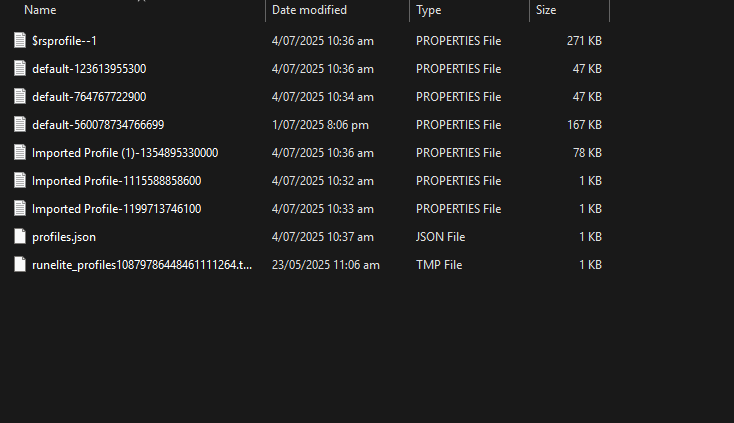 gilded kayak
try 56007... again
oh actually
no wait that's probably fine
date format got me good
atomic totem
and then reload RL?
gilded kayak
it should have loaded a new profile in that  tab
tab
double-click it
the very last one in the list
 solid furnace
I am trying to setup my ide to start making a plugin
is this where I have to put the -ea ?
 crisp dune
VM options is the right one
solid furnace
i keep getting the error message
tried --stacktrace and i get this
> Task :com.example.ExamplePluginTest.main() FAILED Exception in thread "main" java.lang.RuntimeException: Assertions are not enabled, add '-ea' to your .
round jacinth
read the error or follow the guide it says what to do about that
solid furnace
changed it from here, and it worked

 heavy sierra
hi! I've tried googling around and searching on here and the known issues, but not finding anything... is there an issue with GPU / 117HD plugins in Neypotzli causing random pieces of environment to disappear? I could be misremembering, but don't remember it happening before (been a while since I've been in the area though). Tried messing around with settings and doesn't seem to fix?
edit: also lmk if this is not the right place to ask...
think this file format will work as attachment now?
 lethal glade
hey my runelite keeps losing all the plugins etc. it keeps my loot trackers though. anyway to fix this?
haughty pumiceBOT
gilded kayak
and just stop turning your computer off with RuneLite open, probably
native acorn
Does anyone know how to turn off Hardware Accel on MacOS w/ Jagex Launcher?
haughty pumiceBOT
Graphical artifacts? Try disabling hardware acceleration: https://github.com/runelite/runelite/wiki/Disable-Hardware-Acceleration
native acorn
I can't find RuneLite (configure) anywhere and the wiki only states Windows for that
haughty pumiceBOT
stone parcel
That page has mac stuff in there.
gilded kayak
oh that's hilarious that page assumes mac doesn't exist
native acorn
if my new job didn't send me a macbook i would be the same
😄
java.lang.IllegalArgumentException: Hardware acceleration mode on MacOS must be one of OPENGL or METAL
well then
gilded kayak
that would explain why it's not on that page!
native acorn
i guess so!
I'm just having issues with resizable mode being a bit too much for some reason, thought that could help. Guess I'll tinker with some other stuff
 plush carbon
Hey, just got runelite on my new computer and installed the JDK11, lombok intelliJ and moved my file over, Runelite Builds and there are no errors, the runelite window appears but the viewport never loads it is a white square top right and the rest of the viewport is black
solid mesa
https://github.com/runelite/runelite/wiki/Building-with-IntelliJ-IDEA
If the client fails to boot, if the applet does not appear, or if the client starts with a white screen
plush carbon
Thanks
plush carbon
solid mesa
<https://github.com/runelite/runelite/wiki/Building-with-IntelliJ-IDEA>
If the c...
Thanks mate all fixed
 ionic hollow
can anyone help me with the imadrum money plugin?
it plays sounds when you get a decent drop like "MMMOOOOOOOONNNNEEYYYY"
it was working up untill a couple days ago and i dont know how to trouble shoot it, my ingame sounds and all audio checks out fine
haughty pumiceBOT
Support for hub plugins should be directed to the author of the plugin.
You can find the support link by searching for the plugin in the Plugin Hub panel and clicking the ? button on the plugin, or by right-clicking the plugin in the plugin panel and clicking the Support menu option.
ionic hollow
copy will do
old sluice
GPU Experimental is giving me very good FPS on a very low end pc, I went from 20-45 back and forth depending on location, camera movement and even NPCs to pretty much stable 50-55, only minor lags now, muuuuuch smoother overall. Only issue is some boss spells aren't visible, I hope you continue on this 🙏 Old gpu and 117hd give me awful performance @crisp dune
 agile socket
my friend keeps getting this on the jagex launcher

any idea why he cant launch rl on there ?
gilded kayak
can he launch runelite without the Jagex launcher
agile socket
gilded kayak
can he launch runelite without the Jagex launcher
yes after reinstalling like 5 times its working now
not sure what was wrong X d
gilded kayak
the answer to my question before that was probably no
and a re-install would have fixed it
but a restart of the Jagex launcher might have been needed
 broken otter
my runelite client is locked on one screen, i cant move it to my 2nd monitor
gilded kayak
you probably have contain in screen set to always in the RuneLite plugin
 mighty flame
civic nest
solid mesa
Or a ring of wealth boss log
mighty flame
civic nest
solid mesa
Or a ring of wealth boss log
Tried both of these, the in game pages show the right time but the pb command is still wrong
 ivory socket
Dear Jagex,
I’m writing this as a long-time OSRS player who has genuinely enjoyed Soul Wars over the years. But after the recent loot nerf, the minigame feels almost dead. The rewards were the main motivation for many of us to play it. Now, with the drastic loot reduction, it's no longer worth the time for real players.
I completely understand the goal was to stop bots. But this update has mostly punished actual players while the bots always find new ways to come back.
A lot of players in the community, including myself, are now seriously thinking about quitting Soul Wars – and for some, even quitting OSRS altogether. It’s frustrating to see a unique and nostalgic piece of content being rendered useless due to an extreme anti-bot measure.
Please consider:
- Bringing back balanced rewards,
- Or offering alternative loot options that still keep bots away but reward real effort,
- Or at least making a public plan to fix Soul Wars in the near future.
We love OSRS, but changes like this are pushing the community away.
Sincerely,
[A Concerned Player]
 compact spear
Wrong server, this is Runelite
 heavy marlin
the tile markers section of the runelite website doesn't work for me
i am logged in with the correct email
cloud sync is enabled
the other tabs like loot tracker and time tracking work

 cursive canyon
Not entirely runelite related but perhaps anyone know is it possible to download jagex launcher as msi/folder?
I know you can download osrs launcher but since i have made a jagex account i cant use it
 finite radish
Anyone experiencing this?

played yesterday
now I get this
trying to run runelite
 timid garden
hello gamers is there a way to make my loot tracker pop out ?
solid mesa
No
timid garden
gotcha ty
snow leaf
I want to find the cause of my runelite freezing occasionally for like 6 seconds but input still goes through and clicking moves character (can tell cause alt is watching it).
Which of these things should I use from the debug plugin when/before/after it happens that would be useful?
 solid mesa
Dump threads when frozen
 spice anchor
hi, been using runelite for years, first time getting this when launching. is there any plugin known to cause this that i should stop using?
 clear stratus
did you reinstall windows recently
spice anchor
no, and ive played on runelite since i lasted updated windows
 gentle gate
hey guys im trying to use npc aggression timer, i want to see the box where to run to reagro and even a timer for when aggression is up

its not working for me :/

 paper dew
Hope this is the right place to ask this. My runelite crashes very regularly lately, not sure what's going on. I have some crash logs in my runelite folder that might help?
haughty pumiceBOT
To find the logs, you can do one of the following:
- If your client failed to open, click the
Open logs folderbutton. - Open the screenshot directory by right-clicking 📷
Camerabutton, navigate 1 directory up, then open logs folder. - Navigate to
%userprofile%\.runelite\logson Windows or$HOME/.runelite/logson Linux and macOS.
Upload the log files named client and launcher by dragging them to Discord. If there are files prefixed with jvm_crash dated from today, upload them too.
paper dew
these are the 2 latest logs
round jacinth
if you crashed or played today you’ll have a client log that’s without a date, that’s from yesterday
paper dew
that crash log is from ~10 min ago
solid mesa
but the client log is from yesterday
solid mesa
I'm not the best at reading jvm crashes (maybe someone else will chime in) but I think this was caused by 117HD
- strict 'value' 'Ljava/lang/Object;' @20 a 'rs117/hd/model/ModelCache$Buffer'{0x00000000eec93cb8} (eec93cb8)
paper dew
These settings might be related then?
 solid mesa
I'm not sure, you may have better luck asking in the 117HD discord if they know
haughty pumiceBOT
Visit 117's HD plugin discord (https://discord.com/invite/U4p6ChjgSE) for support, issues & feedback
paper dew
I'll try asking there, thank you
 haughty minnow
whats command for yama contract kc ?
solid mesa
I don't think there is one for contracts
 faint marsh
hey can someone help my runelite just keeps randomly crashing its annoying af
mossy swan
faint marsh
hey can someone help my runelite just keeps randomly crashing its annoying af
!logs
haughty pumiceBOT
To find the logs, you can do one of the following:
- If your client failed to open, click the
Open logs folderbutton. - Open the screenshot directory by right-clicking 📷
Camerabutton, navigate 1 directory up, then open logs folder. - Navigate to
%userprofile%\.runelite\logson Windows or$HOME/.runelite/logson Linux and macOS.
Upload the log files named client and launcher by dragging them to Discord. If there are files prefixed with jvm_crash dated from today, upload them too.
faint marsh
 faint marsh
i just had the PC sent out for wokr and they didnt find anything wrong with the CPU
mossy swan
its kind of hard to find anything wrong with the cpu, especially if it only shows up in very specific program (runelite) and only randomly, after some time
most likely it would go away if you get a replacement cpu from intel. they have extended the warranty on them
i think one thing you could try to figure out if its the cpu or not, is set affinity for runelite in windows task manager to certain cores
faint marsh
well its not a Desktop is the issue and it was ran under lot of stress tests test and it didnt have, any issues then
mossy swan
like the first 10, if it crashes you know its maybe one of those...
faint marsh
how do you do that?
ahh i see i can try that so would you recommend i try and play on each one?
mossy swan
best is if you find the "broken core" by process of elimination basically
if its just one
so turn off half, if it still crashes, turn off another half etc
and then once you find one core that doesnt work, turn on all the others to make sure they are ok
faint marsh
i turned em all of and im gonna start with CPU 1 and go from there
you think thatll work?
mossy swan
well, itll tell you if the cpu is the problem at least
faint marsh
okay if i only play on certain ones is that going to be an issue or would it be more of a solution?
it seems to be fine on CPU 1 and i could just leave it on this and not have the crashing issue right?
mossy swan
faint marsh
okay if i only play on certain ones is that going to be an issue or would it be ...
well, your performance will be worse, and your pc is still broken... but you can tell that to the customer support who would fix your laptop
depending on things, it may get worse and in a few weeks, months or years your laptop might not work at all
 polar scaffold
Good evening. I've been having issues with runelite crashing without seemingly any rhyme or reason. I'm getting the following error code in the minidump file:
"A fatal error has been detected by the Java Runtime Environment:
EXCEPTION_ACCESS_VIOLATION (0xc0000005)"
I've tried a number of fixes and diagnostics such as reinstalling windows, checking for memory and disk faults.
I'm assuming it's entirely related to my runelite or the plugins.
This is also hard to pinpoint beacuse it can happen twice in a day or not at all for a few days.
Is anyone able to provide assistance?
Much appreciated in advance.
mossy swan
polar scaffold
Good evening. I've been having issues with runelite crashing without seemingly a...
post the log file itself and not a part of it
polar scaffold
mossy swan
post the log file itself and not a part of it
 sullen quiver
Hi, Somehow my pc crashed and my profile is no longer correctly showing on runelite (plugins, configuration of plugins, tile markers, etc), I've attempted to re-add my profile from the folder but none matches, is there anything else I can try?
stone parcel
You could try sending a screenshot of the profiles2 folder contents with the file size and date modified visible here and maybe someone can figure it out.
 wooden rock
is the client down or is my game broken
Stuck on Fetching applet viewer config
then crash
wooden rock
ty
 sonic igloo
can anyone please tell me why in gods name i am never getting RL notifs even when not blocked in windows settings and I think I have them enabled in settings??
gilded kayak
ur probably in dnd and they are being blocked
there's a game message notifications setting in the RuneLite plugin that will write to chat when a notif was going to fire, so you can confirm for sure the client is attempting to send them
sonic igloo
no but i did just add rl to priority motifications in windows settings
gilded kayak
and below that is a send notifications when focused incase u need that
sonic igloo
ok i just checked when focused
haughty minnow
how to prevent drops and achievements from autmaticly being posted in clan chat
solid mesa
Leave the clan or ask your clan administrator to change the notification settings
mossy swan
polar scaffold
hey sorry i went to sleep
you have a 13th gen intel processor that may be broken. see the guy right above yours to see how to figure out if its the cpu or not
 delicate olive
anyone able to decipher this? i think it must be the animated icons plugin
anything else that uses gifs that could leak memory?
 wraith cloud
Hello, If I logon to my runelite account, is it possible to download all screenshots taken from runelite somewhere? I've got a new computer and when I go to screenshots from runelite nothing is there.
mossy swan
no, they are not saved anywhere but your computer
!transfer if you have your old computer
haughty pumiceBOT
 mighty steppe
runelite fully freezes when I am playing another game for example CS or PUBG. as soon as I launch game. what might be problem?
wraith cloud
@mossy swan , Are they saved on the harddrive of my old computer then?
oblique plume
That is what he said
mossy swan
wraith cloud
<@213762071165141002> , Are they saved on the harddrive of my old computer then?
yes
wraith cloud
Ah alright, Thank you so much for the help
haughty pumiceBOT
 knotty estuary
Hey, I can't seem to enable 117HD or GPU plugin on my ARM Macbook running Linux. I'm getting the following error in logs when enabling GPU: ```
[Client] ERROR n.r.client.plugins.gpu.GpuPlugin - Error starting GPU plugin
java.lang.RuntimeException: rlawt does not exist at linux-aarch64/librlawt.so
at net.runelite.rlawt.AWTContext.loadNatives(AWTContext.java:86)
at net.runelite.client.plugins.gpu.GpuPlugin.lambda$startUp$1(GpuPlugin.java:297)
at net.runelite.client.callback.ClientThread.invokeList(ClientThread.java:119)
at net.runelite.client.callback.ClientThread.invoke(ClientThread.java:101)
at net.runelite.client.callback.Hooks.tick(Hooks.java:229)
at client.ab(client.java:25258)
at client.bw(client.java)
at bo.bv(bo.java:467)
at bo.rn(bo.java)
at bo.run(bo.java:61097)
at java.base/java.lang.Thread.run(Thread.java:1583)
Is this just a missing library in the flatpak I am using, or is this a fixable issue from my side? timid thistle
haughty pumice
<https://github.com/runelite/runelite/wiki/FAQ#my-plugins-are-gone-or-my-config-...
timid thistle
haughty pumice
<https://github.com/runelite/runelite/wiki/FAQ#my-plugins-are-gone-or-my-config-...
not working its just goner
knotty estuary
Have you followed those steps? @timid thistle
timid thistle
knotty estuary
Have you followed those steps? <@123435993029279744>
yes
oblique plume
Show your profiles2 folder
 oblique plume
Is it the 2174 imported profile?
timid thistle
oblique plume
Is it the 2174 imported profile?
omygod
ur the hero
i think its back
tysm
 hearty cloak
My monitor is 240hz. If I’m unable to always have it locked at 240 (sometimes dips to 120-180) Is it better to lock the fps to something like 100fps so it doesn’t jump all over the place? Also vsync on off or adaptive ?
 quaint harbor
anyone know what plugin causes this? thought it might be line markers, immersive ground markers, or radius markers because i've been messing with those, but disabling all and restarting doesn't remove them

oh nvm it's "spawn markers" the one i just downloaded and forgot I did
knotty estuary
knotty estuary
Hey, I can't seem to enable 117HD or GPU plugin on my ARM Macbook running Linux....
Found the fix! Guide:
- Compile a copy of https://github.com/runelite/rlawt
- Download liblwjgl.so and liblwjgl-opengl.so from https://www.lwjgl.org/browse/release/3.3.2/linux/arm64
- Set bolt's launch command to
%command% -J-Drunelite.rlawtpath={path/to/librlawt.so} -J-Djava.library.path={path/to/folder/with/lwigl/files}
[LWJGL] [ThreadLocalUtil] Unsupported JNI version detected, this may result in a crash. Please inform LWJGL developers.
2025-07-05 16:04:07 BST [Client] INFO  n.r.client.plugins.gpu.GpuPlugin - Using device: Apple M2 Pro (G14S B1)
2025-07-05 16:04:07 BST [Client] INFO n.r.client.plugins.gpu.GpuPlugin - Using driver: 4.6 (Compatibility Profile) Mesa 25.1.0-asahi20250425```GPU plugin seems to cause some NPCs to go fullbright with "remove colour banding" enabled


 zealous cedar
hmm id assume its something wrong with your setup since that doesnt happen to everyone else
is that on the apple arm hardware?
knotty estuary
zealous cedar
is that on the apple arm hardware?
Yep
zealous cedar
afaik noones actually run gpu before on that so im not sure what to expect
knotty estuary
Apple ARM on Linux, to be precise
zealous cedar
did you only upgrade the lwjgl natives and not the java lib too?
 pallid forge
my runelite looks like this how do i access the settings? just upgraded from Windows 10
 zealous cedar
this is not runelite
knotty estuary
zealous cedar
did you only upgrade the lwjgl natives and not the java lib too?
I grabbed a matching build of the native libraries, I originally tried 3.3.6 but it errored so I took a look at RL sources and found it wanted 3.3.2
zealous cedar
oh i see, so it is the same version, ok
knotty estuary
I haven't recompiled RL, using the build that Bolt Launcher grabbed
zealous cedar
could be an apple bug i guess?
knotty estuary
Yeah, it's possible it's the Asahi Linux OpenGL driver, although is a conformant opengl 4.6 driver: https://www.khronos.org/conformance/adopters/conformant-products/opengl#submission_347
pallid forge
zealous cedar
this is not runelite
Thank you I see what mesed up
knotty estuary
(in fact, the only comformant OpenGL driver for M series, since Apple doesn't have one lol)
zealous cedar
its possible maybe RL relies on some non-conformant behaviour maybe, but it works on literally every other system so idk what to suggest
knotty estuary
Yeah, very fair
if there is anything I can do to debug this, and reduce it down, let me know. I can't exactly go to the Asahi Linux team and say "these NPCs in OSRS with these builds of these libraries leads to issues"
zealous cedar
you could ask the asahi devs maybe
oh
i mean its got to be something with the color interpolation stuff right
in the shader
knotty estuary
I'll take a dive into what that checkbox does, but I don't have Java/GPU experience
It toggles smoothBanding, which looks like it is only used here in frag.glsl ```glsl
if (fTextureId > 0) {
int textureIdx = fTextureId - 1;
vec4 textureColor = texture(textures, vec3(fUv, float(textureIdx)));
vec4 textureColorBrightness = pow(textureColor, vec4(brightness, brightness, brightness, 1.0f));

// textured triangles hsl is a 7 bit lightness 2-126
float light = fHsl / 127.f;
vec3 mul = (1.f - textureLightMode) * vec3(light) + textureLightMode * fColor.rgb;
c = textureColorBrightness * vec4(mul, 1.f);
} else {
// pick interpolated hsl or rgb depending on smooth banding setting
vec3 rgb = hslToRgb(int(fHsl)) * smoothBanding + fColor.rgb * (1.f - smoothBanding);
c = vec4(rgb, fColor.a);
}
yeah. i guess try assigning c = fColor; and see
mossy swan
faint marsh
it seems to be fine on CPU 1 and i could just leave it on this and not have the ...
apologies for the late ping btw, if the cpu affinity stuff helps with crashing let me know, i'd like to write some clear instructions on it since its difficult to tell if cpu is broken or not
knotty estuary
zealous cedar
yeah. i guess try assigning `c = fColor;` and see
Where? Replacing the last c = vec4(rgb, fColor.a)?
zealous cedar
yeah
knotty estuary
Okay, time to figure out how to build this
oh my fuck time to try getting IntelliJ IDEA working on arm linux lol
knotty estuary
that seemed to work, where's it dumped the jar?
zealous cedar
runelite-client/target/
ivory socket
Will the soul war update that came out this week regarding the loot remain the same or will it be improved?
solid mesa
knotty estuary
zealous cedar
runelite-client/target/
I'm getting the following error when using the non-shaded jar no main manifest attribute, in /tmp/Runelite/runelite-client/target/client-1.11.11-SNAPSHOT.jar and when using the -shaded jar```
Exception in thread "main" joptsimple.UnrecognizedOptionException: J is not a recognized option
you cant feed it to bolt i dont think
zealous cedar
just dump the env out of the bolt process and then feed it manually to the rl jar
knotty estuary
I've grabbed the startup command out of launcher.log, but it seems like launcher integration has broken and I cannot login with email/pass as I am on a Jagex account, what do?
zealous cedar
zealous cedar
just dump the env out of the bolt process and then feed it manually to the rl ja...
do this
knotty estuary
I don't get what you mean "dump the env"? do some gdb shenanigans?
knotty estuary
ah, I see some JX_* env vars
@zealous cedar ah ha! now the effect is the same with and without the "remove color banding" toggle.

 zealous cedar
id maybe try reaching out to the asahi devs
id guess it has to be incorrectly compiling hslToRgb() or something
fossil summit
rgb = hslToRgb(int(fHsl));
try that and if it still does that then above is true
zealous cedar
I dont think thats correct
knotty estuary
zealous cedar
id guess it has to be incorrectly compiling hslToRgb() or something
okay, how does this sound:
Hey, I've been having graphical issues with the RuneLite client for the game OSRS which seems to use the Mesa OpenGL library. When enabling the "remove color banding" option (which toggles the following shader variable: https://github.com/runelite/runelite/blob/419a927fc1ae1fbed46cc50b9cfcfb0cfa756b98/runelite-client/src/main/resources/net/runelite/client/plugins/gpu/frag.glsl#L32) the following NPCs seem to become fully white, and other things also have lighting issues.
Changing https://github.com/runelite/runelite/blob/419a927fc1ae1fbed46cc50b9cfcfb0cfa756b98/runelite-client/src/main/resources/net/runelite/client/plugins/gpu/frag.glsl#L75 to
c = fColor;also leads to the same graphical issue, with or without the "Remove color banding" option enabled.The developer of RuneLite has recommended I reach out to you, as this option has never broken on any Intel/Nvidia/AMD GPU they have seen. They guess
hslToRgbis being miscompiled.
zealous cedar
youd probably have to provide them with an account or something if they were interested in looking at it
and I guess, instructions on how to run runelite
knotty estuary
yeah, I'll walk them through setting it up if they want to debug.
zealous cedar
especially since we do not ship the arm natives lol
knotty estuary
yeah
could you look into shipping them? it seems like it's set up to support any arch and just needs the builds in the right places
zealous cedar
i dont have a way to build or test them really
if you can get it cross compiling on actions i could do it
knotty estuary
huh, I forget not everyone has a Raspberry Pi
zealous cedar
it really needs to be buildable on actions
knotty estuary
yeah
mossy swan
does rpi even have a gpu good enough to run rl
knotty estuary
I'll look into that after I find the right place to report this GPU bug to the asahi team
ooooh, they want me to report to the Mesa bugtracker which includes instructions on using apitrace, a tool to record and play back OpenGL calls... so they won't need to get this complicated setup working
knotty estuary
zealous cedar
oh that is nice
it is! this is so cool to me lol
zealous cedar
neat
 charred oak
hello guys, i have a question. runelites been randomly having ping spikes for about a tick every couple seconds. bought a new wifi adapter worked for a couple days then it started to do this ping spiking crap again. uninstalled and reinstalled runelite, same problem
all of my other services are fine, not lagging on literally anything else
haughty pumiceBOT
open command prompt, type this in:
ping -t oldschoolXXX.runescape.com
where the XXX is your world minus 300, for example world350 = 50
charred oak
 mossy swan
yeah so your internet overall is having some issues
well, your connection to jagex rather
solid mesa
So the issue is your wifi adapter, router, ISP, etc. and not runelite
mossy swan
you can point it at google.com or something instead and see if that has spikes too
solid mesa
But if you're using wifi it's probably just that. WiFi is a shared medium and has to split access time between all devices on the network
charred oak
i understand how that works
 charred wasp

I am getting this error not sure why it was working 2 days ago, does anyone else have this?
charred oak
thanks
 waxen hawk
Hello, I was wondering if anyone has a problem where runelite gets stuck on starting plugins?
I've tried launching as admin
gilded kayak
if one of your plugins was failing to start, then that could happen yes
you could confirm it's one of the plugins by running safe mode real quick
!safe
haughty pumiceBOT
safemode: To enable safemode
Windows
Run the RuneLite (configure) shortcut from the windows start menu
Tick the Safe mode box, save, launch RuneLite the way you normally do.
Mac
In Terminal, run
/Applications/RuneLite.app/Contents/MacOS/RuneLite --configure
Tick the Safe mode box, save, launch RuneLite the way you normally do.
waxen hawk
Got it let me try
It launches in safe mode
should I look at the logs in the runelite folder?
gilded kayak
safe mode launches without plugins so I expected it to work
maybe, it could be failing to load, not start, which might not show up in the logs
i don't remember if plugins load in the same order? if you maybe started the client at like 1am this morning then you could compare the list, if they do load in the same order
or maybe yesterday's log
waxen hawk
I think they do start up in the same order
gilded kayak
lit
then it's probably the one, right after the last one ur getting stuck on
the next one in the list from yesterday, that isn't on the list today
waxen hawk
I see
Ok wait
so comparing logs both of them load better tele menu last
does that mean its not a plugin issue?
gilded kayak
safe mode turns off all plugins, and GPU
if you want to go to the tab, click new profile double-click that new profile to swap to it
close runelite, disable safe mode and open, enable gpu, close and restart again
then that i guess would confirm it to be GPU
if it fails again
but it seems very unlikely
waxen hawk
ok ill give it a shot
gilded kayak
if the client starts fine with GPU but no hub plugins, then it's still going to be a hub plugin
but I still don't know which one
waxen hawk
got it
 grim coral
Hello, seems Ive run into an issue with my runelite, none of my items are displaying their names, ive tried ever inventory tag and bankes info plugin there is
 round jacinth
Mouse tool tip?
fossil summit
I’ve been having an issue lately where my game brightness becomes dark & doesn’t match my brightness setting and touching the slider ever so slightly fixes it
grim coral
THANK YOU SO MUCH!
 torn drum
I used to be able to shift click to deposit all of an item into the bank. come back to the game after a break, i have menu entry set to customisable left click, i can customise single items. but i know for sure i used to be able to do it to all items and didnt have to manualy edit each item that i might want to deposit all. can anyone help with whatever im missing please its driving me crazy
grim coral
Hey so another issue everytime I do anything a little icon of a red circle stop signal and a hooked fish pops up with my experiance
what is that?
gilded kayak
it's a fake xp drop, probably being caused by a hub plugin
i would guess customizable xp drops
ornate kite
Heyy
I want to support (github issue) and create plugins for Runelite. Is Java used for this?
mossy swan
yes
ornate kite
mossy swan
yes
Thank you so much
 peak yoke
Hello,
Does anyone know what's happening with my runelite? the weird window prevents my mouse from working properly and it isn't there one the jagex launcher. Thanks
 mossy swan
ornate kite
Thank you so much
mossy swan
ornate kite
Thank you so much
github has this neat feature
 mossy swan
peak yoke
Hello,
Does anyone know what's happening with my runelite? the weird window prev...
mossy swan
peak yoke
Hello,
Does anyone know what's happening with my runelite? the weird window prev...
i'd guess its some hub plugin.
ornate kite
mossy swan
github has this neat feature
You're totally right
mossy swan
!flow @peak yoke
haughty pumiceBOT
flowchart: Please refer to this flowchart for further troubleshooting.
peak yoke
mossy swan
!flow <@1363101661257662524>
Ty
 warm fossil
issue with menu entry swapper not working with "withdraw all" setting. Have tested many different things to try and fix it. It works with all the other settings (ie withdraw all but 1, withdraw x, withdraw 10, etc) I have restarted client, turned the plugin off and on, still nothing fixes it
 next burrow
Is there any data on what the actual osrs highscore ratelimit is?
round jacinth
depends on the day, you can easily hit it if you just look up everybody you run into at the ge in w302 quickly
Idk if any numbers exist
And there is no difference between actual and runelite as they’re both actual
 topaz nimbus
fossil summit
I’ve been having an issue lately where my game brightness becomes dark & doesn’t...
topaz nimbus
fossil summit
I’ve been having an issue lately where my game brightness becomes dark & doesn’t...
Anyone else having this?
sonic birch
!flow probs
haughty pumiceBOT
flowchart: Please refer to this flowchart for further troubleshooting.
sonic birch
warm fossil
issue with menu entry swapper not working with "withdraw all" setting. Have test...
generally works for me
 gloomy garden
I'm not sure if this is the place to post this, but since the update to thrall durations for people with master combat achievements last week, the timer in the 'Timers & Buffs' plugin hasn't been updated, so it shows that the thrall is going to time out 30 seconds before it actually does.
solid mesa
It will be fixed in the next client update
 unreal nest
I'm having a glitch on runelite profiles across two accounts.
My brother and I have one account each and want our Runelite profiles to stay seperate. Cloud Sync is active on both profiles, and each profile is supposed to default to the right account.
But, what actually happens is whichever Profile was used last takes priority and I need to manually switch profiles. The profile sidebar usually shows the account is linked to the correct profile and I need to switch to the wrong profile and back to make it change.
Also, some bank tabs with the same names got mashed together, my Inferno tag now has my brother's gear layout, with the items I had but he didn't stuck in. I can fix that manually but it might be relevant for figuring out what's happening. Both tabs had the same name and icon, "Inferno" and the Infernal Cape.

 tulip halo
My client crashed twice today, both times while teleporting. Could someone make sense of this crash log for me?
Event viewer has nothing on this btw
Nor has Runelite ever crashed for me before
I deleted the cache and then tried to replicate the crash by teleporting back and forth, but nothing yet
 dusk birch
Ok, it's a long shot and I'm hoping I'm not misreading something. I've download AND installed the Jagex Launcher, I've created my account in the last week or so, and have even upgraded it to a Jagex Account. Now all over the internet it mentions that Runelite is still available to be used with a jagex account, as long as you launch it from the App. I installed the Runelite option successfully, and was all going great up until the moment I tried to log in, which then prompted me with a message saying "if you have upgraded to a Jagex Account, you need to use the Jagex Launcher instead". So long story short, can i still use Runelite with my jagex account or not? and if so, why am I unable to use it?
any help is appreciated.
 final axle
You need to use runelite via the jagex launcher
haughty pumiceBOT
The Jagex launcher (https://www.jagex.com/en-GB/launcher) will let you login and fully supports RuneLite. Login problems are a Jagex issue and there is nothing we can do about it.
dusk birch
I have used Runelite via the launcher, but it's the logging part that isn't working
should i be redirecting this issue with jagex themselves?
mossy swan
make sure runelite is not set to launch as admin
dusk birch
mossy swan
make sure runelite is not set to launch as admin
done that
final axle
You log into the jagex launcher and then launch runelite from there. The login screen shouldn't have any place to enter a user/pass, just a button that says "Play Now"
mossy swan

final axle
 dusk birch
yea that's the problem then, it prompts me with a username and password
final axle
Then you probably aren't launching RL from the jagex launcher
mossy swan
well either runelite is running as admin, or you arent launching via jagex launcher
man i like saying the same thing as midrif but different 
 dusk birch

thats how ive been doing it?
I'd like to think that I have properly disabled the admin privilages, but happy for you to correct me and guiding me. I have a windows 11 laptop
mossy swan
you can screenshot the runelite shortcut properties
i dont have windows so i cant give you the exact steps
dusk birch
 mossy swan
click properties
 mossy swan
find the checkbox that says something about admin
dusk birch
already unclicked, which backs my comment that this isnt running as admin?
 haughty pumiceBOT
To find the logs, you can do one of the following:
- If your client failed to open, click the
Open logs folderbutton. - Open the screenshot directory by right-clicking 📷
Camerabutton, navigate 1 directory up, then open logs folder. - Navigate to
%userprofile%\.runelite\logson Windows or$HOME/.runelite/logson Linux and macOS.
Upload the log files named client and launcher by dragging them to Discord. If there are files prefixed with jvm_crash dated from today, upload them too.
 mossy swan
do you have some antivirus installed?
dusk birch
i do malwarebytes to be precise
try disabling it you reckon?
though i thought that if it was that, it would stop me from launching the problem rather than accessing my account itself
mossy swan
it might just be blocking the way jagex launcher wants to send login info to runelite
cant think of anything else
 mossy swan
happy gaming
dusk birch
you too
 eager forum
Following up on this in case anyone else runs into a similar issue of low FPS on a higher-end machine. The solution we arrived at before to install an older GPU driver worked, but only temporarily. Every reboot my FPS would tank again and would be fixed with a fresh GPU driver install as long as I didn't reboot. I tried several different driver versions and the same thing happened across all of them.
Today I found that if I change the Vulkan/OpenGL present method in the NVIDIA Control Panel to "Prefer native" for RuneLite, my FPS problems were resolved and consistent across reboots.
 dense monolith
Hi there, i tried going to the HD plugin discord, but the link did not work. I tried looking for similar issues to other player but am unsure, need some help.
When i turn on the HD plugin it causes my game to freeze, and if i don't turn it off again before closing and relaunching runelite, It is just a white screen?
It was running fine for the ages, but since the last update it has done this. I also tried using the GPU plugin but it does the same thing.
I have fixed it in the past, but cannot for the life of me remember how. I might have uninstalled runelite completely and reinstalled it. But it caused me to loose all my plugins and info (like gearsets, loot history etc) to get deleted.
haughty pumiceBOT
Visit 117's HD plugin discord (https://discord.com/invite/U4p6ChjgSE) for support, issues & feedback
mossy swan
that link works for me
dense monolith
@mossy swan Thankyouu! i was using the one on the website.
mossy swan
dense monolith
<@213762071165141002> Thankyouu! i was using the one on the website.
which website?
dense monolith
mossy swan
which website?
mossy swan
that also works for me
dense monolith
Maybe i used the wrong button - i used the blue discord button below the titleart that shows 2k players online.
mossy swan
oh i see, idk why that links anywhere
it looks to just be an image
you could report it on their discord i guess so its less confusing in the future
dense monolith
Its all good, im sure i was just being silly haha.
 tranquil furnace
is there a way to make the sidebar open in front of the game instead of to the side of the window?
mossy swan
no
tranquil furnace
damn, cheers
 prime current
Anyone had issues before with loot tracker just losing lots of data?
haughty pumiceBOT
leaden trail
It only loads so much into the client though
prime current
leaden trail
It only loads so much into the client though
wym
all my group isnt reset
leaden trail
The loot tracker only pulls so many entries into the client. If stuff is missing, try going and getting another KC and it should pop back up
prime current
leaden trail
The loot tracker only pulls so many entries into the client. If stuff is missing...
so even total count and total loot value at top will change based on whasts loaded in?
leaden trail
I believe so but I'm not 100% certain
 severe turtle
thrall timer is wrong
i have master ca's but it still shows 1:30 instead of 2 mins
leaden trail
It's fixed with the next RuneLite release I believe
 teal agate
Anyone know how I can share a custom RL plugin with my friends as a .jar ?
If I do mvn package I get the whole RL snapshot as a shaded jar, but I am only interested in one custom plugin.
zealous cedar
distribute the shaded jar
 green rampart
Just tried runelite on fedora for the first time. Leveled a skill and the client crashed after what I assume to be an issue with taking a screenshot. Is this a common issue? Is there a particular directory I should look for logs?
zealous cedar
~/.runelite/logs
depending on how you installed runelite, the logs may be somewhere else
green rampart
I’m just using the appimage to run it. Not sure if that’s the best way to run runelite on fedora/RHEL based distros. I’ll check the home dir dotfiles next time I’m on my pc. Thanks, Adam
prime current
Can someone explain using Jagex launcher and runelite on a MacBook with M chip?
I see there are now downloads for runelite for M chips however jagex launcher does not currently support these? How does this work?
zealous cedar
I think it works, just use the jagex launcher to launch runelite
prime current
That’s what I do, you can only log on through jagex launcher if account has been migrated over.
I’ve just seen people say it’s not the correct version of runelite as jagex launcher doesn’t support M chips so I’m not too sure
zealous cedar
thats just something people make up, its fine
green rampart
Ok, the JVM argument for ErrorFile is /home/myUser/.runelite/logs/jvm_crash_pid_%p.log but there is no log file with that name despite the client having crashed. Is there an alternate place I should look for the crash log?
zealous cedar
systemd might log it somewhere not sure
oblique plume
It could potentially not have been a jvm crash
prime current
I mean the jagex launcher doesn’t support them yet and actually everyone needs to install “Rosetta” to make the launcher on M chip readable as an intel chip
mighty steppe
mighty steppe
runelite fully freezes when I am playing another game for example CS or PUBG. as...
help
solid mesa
@finite swan #bank-tags is not for support. Make sure you have Bank Tags enabled. Bank Tag Layouts does not work with potion storage
 finite swan
Okay, sorry. So if I disable the bank tag layouts it should work?
solid mesa
In theory it should yea
finite swan
Still doesnt show:/ idk I've seen all vids on youtube, where they export/import and its all good. but that doesnt work for me sadly
 left granite