#support
1 messages · Page 72 of 1
 mossy swan
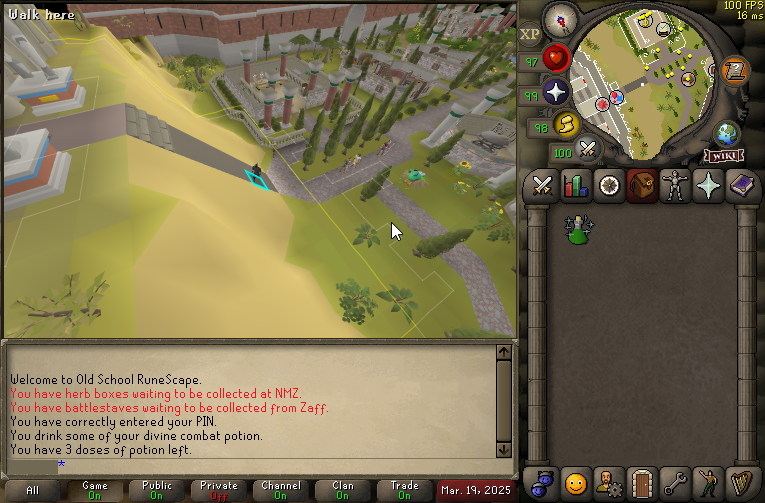
for aggro lines check the npc aggro lines config
 round jacinth
yes that is how agression timer works
mossy swan
i think there is a setting that turns off the timer
 outer wasp
its not for lines
round jacinth
you need to calibrate it
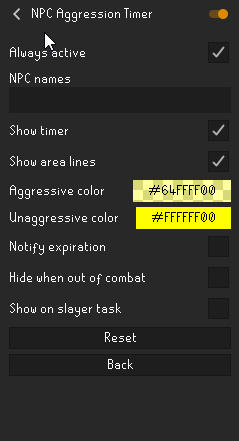 round jacinth
!logs i guess as show timer is enabled there
 haughty pumiceBOT
To find the logs, you can do one of the following:
- If your client failed to open, click the
Open logs folderbutton. - Open the screenshot directory by right-clicking 📷
Camerabutton, navigate 1 directory up, then open logs folder. - Navigate to
%userprofile%\.runelite\logson Windows or$HOME/.runelite/logson Linux and macOS.
Upload the log files named client and launcher by dragging them to Discord. If there are files prefixed with jvm_crash dated from today, upload them too.
mossy swan
check infobox settings under "runelite" too i guess
round jacinth
o good shout
round jacinth
do as unmoon suggests first
go to the runelite plugin's cog
go to infobox
look at the infobox size or other settings there
outer wasp
wheres that?
round jacinth
i can repeat what i just said or you can refollow it
 hollow olive
 round jacinth
 outer wasp
yep thats better.
on it
i can see infobox size
ive never changed any of this stuff
outer wasp
35
outer wasp
nothings visable no
round jacinth
provide logs i guess
hollow olive
do u have fixed mode hide chat
hollow olive
ok im out of ideas
round jacinth
its both !logs and safemode to check i guess
provide the client.log for the day please
 warped mango
Has anyone had any extreme lag problems with nvidia gpu game ready drivers using versions 572.*? Ended up having to revert to 566.36 and everything worked wonderfully again, no lag spikes, etc.
round jacinth
i dont see an error for the npc aggro timer
!safe check if its still not availalbe in safe mode i guess?
haughty pumiceBOT
safemode: To enable safemode
Windows
Run the RuneLite (configure) shortcut from the windows start menu
Tick the Safe mode box, save, launch RuneLite the way you normally do.
Mac
In Terminal, run
/Applications/RuneLite.app/Contents/MacOS/RuneLite --configure
Tick the Safe mode box, save, launch RuneLite the way you normally do.
round jacinth
warped mango
Has anyone had any extreme lag problems with nvidia gpu game ready drivers using...
gpu drivers are that way im afraid
you find a driver that plays the games you like to play and never update it lol
warped mango
Yeah definitly going to avoid all the suggestions to 'keep all your drivers up-to-date, blah blah' that people have given me in the past lol
round jacinth
gpu drivers do not care if they break lego island 1999 if it improves doom 2016, as they listed the driver fixes performance for doom 2016 as the fix
yes
outer wasp
all the tmers r like non existannt haha pots/veng etc
not just aggresion timer
logged in
now what sir
round jacinth
are the yellow lines visible but not the timer..?
round jacinth
safemode loads the client without any hub plugins or gpu on
round jacinth
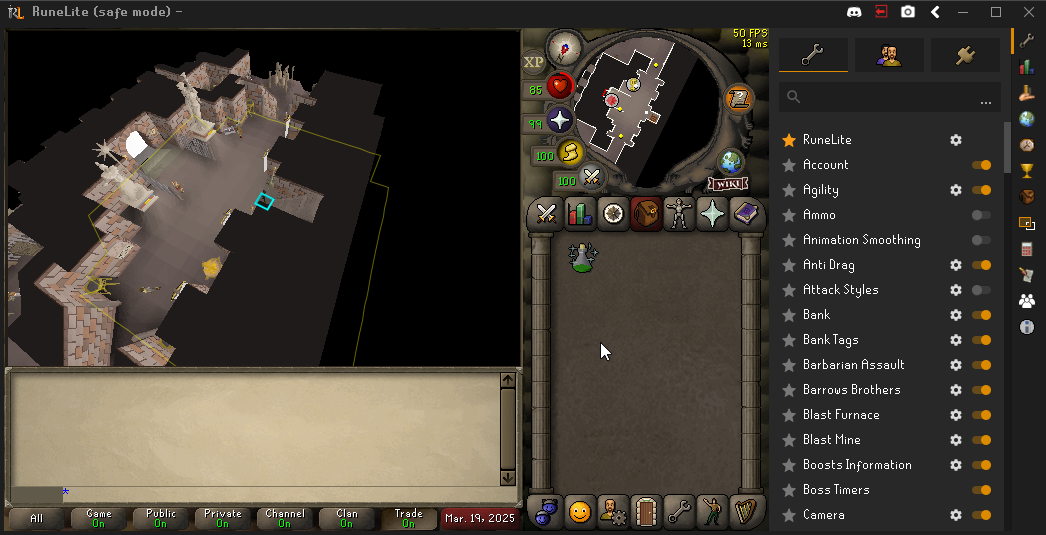
can you show a screenshot of that? idk how this is happening anymore
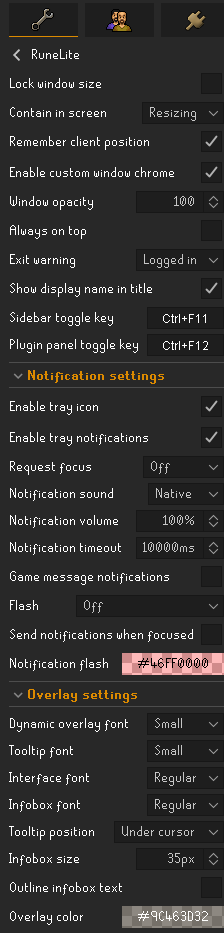
can you screenshot the overlay settings in the runelite config spot you were in eearlier where you saw the size was set to 35
 round jacinth
i think in general your infoboxes are gone
round jacinth
i mean you're not, i just dont know what is happening
make a brand new plain profile
and see if that also has issues
im only a lil lad, some1 else smarter probably can figure it out trivially
 clear sandal
I'm probably slightly out of the loop here but did menu entry swapper change? I can't seem to shift-click drop items, or have the option for it?
round jacinth
it's an ingame setting too i think
 ornate kite
clear sandal
I'm probably slightly out of the loop here but did menu entry swapper change? I ...
ornate kite
clear sandal
I'm probably slightly out of the loop here but did menu entry swapper change? I ...
Workin for me
clear sandal
 round jacinth
outer wasp
works.
round jacinth
outer wasp
works.
for both sets of timers?
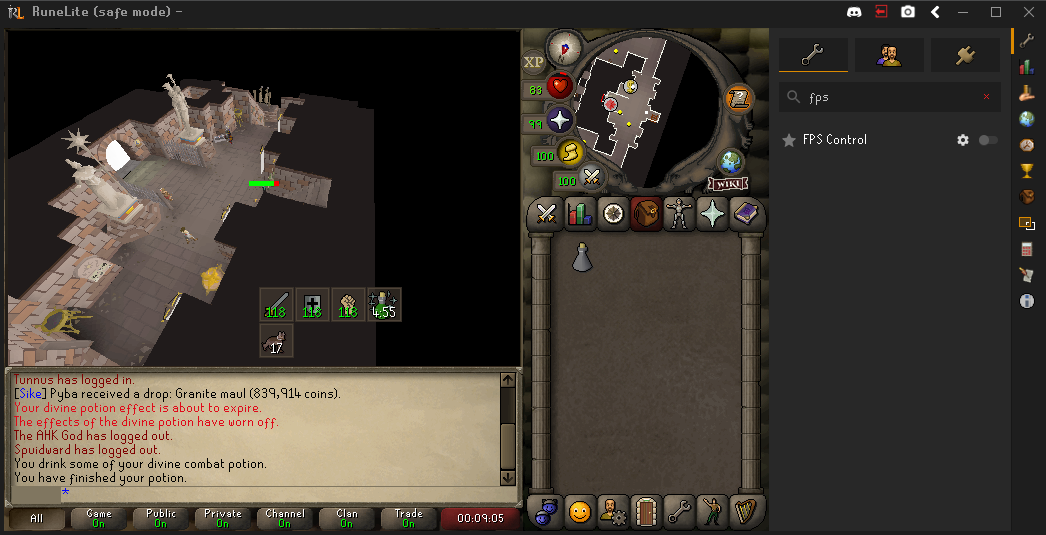 clear sandal
Ah.. They put it in the in-game settings rather than in Runelite now, I see.
round jacinth
not quite
you need that shift drop setting on for some of the mes to interact with it i think
i think you can still shift swap use and equip with mes just cant drop?
idk
round jacinth
outer wasp
https://imgur.com/dCXdb3z
this means some setting you have in the profile you were using is causing the problem but im not sure what it is
clear sandal
From what I looked, the Mes doesn't seem to have shift-click to drop as an option anymore
 outer wasp
weird as hell
round jacinth
no
clear sandal
So, in-game seeems to resolve.
round jacinth
outer wasp
weird as hell
can you compare the overlay settings in runelite again to the screenshot you sent earlier
round jacinth
i need an adult to help now
outer wasp
even m slay task displays now
on new profile
but old one even tho setting all same
it doesnt
round jacinth
so those things are tracked on the rsn
and world type
your loot is also still there
the plugin configs for gpu or men uswapper or tiles etc etc
are all tied to the profile not the world type + rsn
when i say rsn i mean the account, but generically lets say rsn 😄
outer wasp
no idea
i dont really want to sieve through all my settings
and change it voer
will take hours
round jacinth
me neither, and if you copy it all over 1:1 the same problem should happen again
:p
outer wasp
ugh cba to play now LOL
round jacinth
just reply back in a hour or so and maybe some 1 else has time to take a glance, its nearly east coat lunch time 😄
sorry i didnt get it tho
round jacinth
you could set the 35 -> 50 -> 35 and see if resizing it fixes it
mossy swan
could switch from fixed to resizable to see if they just got dragged off screen somehow
(and make the window bigger while at it)
 oblique plume
im pretty sure theyre just under the chat
hollow olive
he's missing infoboxes it seems
round jacinth
humor us
outer wasp
errr
so
i did what u said
it did nothing
couldnt see anything, went back to fixed, pressed alt and conviently my mouse was position where it said "time until npc becomes unaggressive"
so i chanced and pressed it and dragged it up and suddenly
timers appeared l0l
round jacinth
yes but you had to of moved it
outer wasp
ive never played rs on anything but fixed
 lime delta
I have a development question. Is it possible to test multiple plugins at the same time locally? Specifically with ExternalPluginManager.loadBuiltin
round jacinth
yes, a few hub plugins have that in their repos
annoyance mute's repo has both the public hub plugin and a dev mode only plugin that you only get when you run it locally from the project
i think custom menu swaps and toa plugin also do that
lime delta
Thank you!
 wide light
Is it possible to make desktop shortcuts that start with a select profile for RL launched with jagex launcher? I keep accidentally having the wrong profile on and posting col log stuff from my main in my GIMs discord 🙏
mossy swan
!profiles
haughty pumiceBOT
mossy swan
you can link specific profiles to certain characters
wide light
Oh right that's much easier, thanks
 potent dock
I'm not getting notification sounds/alerts on my new macbook M4
but sounds work on my windows PC
macos: 15.3.2 (24D2082)
hollow olive
do u have do not disturb on
potent dock

 hollow olive
yeah i have notif sounds but i turned off banners and stuff. double check your notification settings in the system
potent dock
what MAC version are you on
 hollow olive
timeout is 10000ms
i think thats default
i don't have banners so it doesn't matter i think
potent dock
it solved it
the default sound for MAC sucks though
its like a low beep noise. I need to replace it
thank you Josh that was it. Default notification settings in MAC
hollow olive
yea i switched mine to breeze
 molten hazel
Hey all,
I've just installed RuneLite (through the Jagex launcher, download is secure) & attempted to login. I'm being told that the credentials are incorrect (they are not - reset the pw twice to be sure) and that if I upgraded to a Jagex account (which I did when I created the account), I have to use the Jagex launcher instead.
Just to confirm; Because I have a jagex account, I cannot use the RuneLite launcher, or am I mistaking?
If so, how do I work around this?
Thanks!
 gilded kayak
where it says Official Client near the Play button on the Jagex launcher, that Official Client thing is a dropdown menu
select RuneLite instead and click Play
molten hazel
Appreciate the quick response folks!
Unfortunately, even by doing that, it still prompts me with the following;
 gilded kayak
then either RuneLite or the Jagex launcher is running as admin
and it's breaking the login flow
you should not meet the username/password input, when launching RuneLite via the Jagex launcher
molten hazel
Wow.. I'm an idiot - the default account I was attempting to login to via the launcher was Account 1, I actually wanted account 3, which has a similar name.
I've logged in successfully.
Thanks for the helps guys.
Sorry! 😅
 tough pollen
I appear to have lost all but 1 of my profiles on runelite... any ideas on how to get them back?
round jacinth
!lost
haughty pumiceBOT
tough pollen
i have .runelite\profiles\<email>\settings.properties and in .runelite\profiles2\ I have a few different .properties files and a profiles.json file (I think these .properties might be what I need but not sure how I'd go about making them appear in runelite even if im correct)
tough pollen
I love you, this worked perfectly.
 atomic ice
yo guys
i just dced from my acc , osrs on phone works
but runelite wont load on pc


any help please
gilded kayak
use your phone as a hotspot I guess
both those images are clearly showing that your internet, is having trouble loading stuff from Jagex
atomic ice
i was logged in for last 7 hours on pc
and was about to go into nex and it just timed me out
gilded kayak
thankfully issues don't really care about that
atomic ice
but ill give it try
gilded kayak
if the issue started 5 minutes ago, then anything before that doesn't really matter
internet doesn't run perfectly 24/7 365, there are issues all the time, but* most of the time you never run into the issues
if you live somewhere with a lot of people, someone might come in this discord as well and report the same problem
and you can ask them "do you live in <whatever state/country> and use <ISP>" and they'll probably say yeah
gilded kayak
could have been a very minor issue someone noticed immediately
gilded kayak
it happens across the world often enough, as far as people in the discord report
(e.g. it was Virgin Media last tuesday)
 last marlin
hey guys, can one of you help out with this issue my friend is having? at nex his walls are missing when he walks up to the boss arena and returns when he walks away. he tried to turn off every single plugin but it still happens. any ideas?
 gilded kayak
i think they lied about turning every plugin off
last marlin
well before this screenshot lol
gilded kayak
because I have a strange feeling it's this one
 gilded kayak
well it's almost certainly that plugin, so have them restart after turning it off
haughty pumiceBOT
Many plugins from the pluginhub break the client in subtle or not-so-subtle ways, including causing issues like client freezes. We do not support pluginhub plugins because we do not make or quality control them, and do not recommend their use.
Run the RuneLite (safe mode) shortcut, or with a Jagex account, first run the RuneLite (configure) shortcut and tick the Safe mode box, then launch RuneLite via the Jagex launcher.
This temporarily disables the GPU plugin and all hub plugins which will allow you to confirm the issue is caused by one of those plugins and isn't a core RuneLite issue.
If the issue is caused by a hub plugin, you should isolate which plugin it is and then uninstall the plugin.
last marlin
i told him to turn it off
round jacinth
subtle or not-so-subtle ways
gilded kayak
well tell him to restart also
gilded kayak
i'm crossing my fingers and my toes
i'm kidding i know for a fact it's that plugin xd
but i'm not happy to see there's no ⚙️
which makes me think the author did not offer the ability to opt out of this new feature for nex
 tacit canopy
hi can anyone tell me why quest helper asks me to log in to show quests? it was working yesterday
haughty pumiceBOT
Visit Zoinkwiz's Quest Helper plugin discord (https://discord.com/invite/XCfwNnz6RB) for support, issues & feedback
 stone spruce
bro has anyone figured how to log into sailing alpha?
 leaden trail
You can't yet I don't think
stone spruce
oh :c sadness unending
gilded kayak
the alpha is tomorrow
gilded kayak
hell no its bed time for them
 shut slate
hi
 charred wind
Hey Steve how can I help you
haughty pumiceBOT
 patent bluff
Can anyone direct me on how to get my RL settings from my desktop to laptop with ease? Please. 🙂
haughty pumiceBOT
patent bluff
@gilded kayakThank you!!
 eternal ridge
Hello, trying to run runelite with basic example plugin and running into a problem. I can launch but cannot get the client to use my Jagex account. I am on linux using the bolt launcher. I normally can log in just fine with it.
I tried the following:
- https://github.com/runelite/runelite/wiki/Using-Jagex-Accounts ran from bolt with args set to --insecure-write-credentials and verified that it was passed correctly via looking at running processes. Did not see ~/.runelite/credentials.properties file written
- Build shadowJar gradle target from example plugin project and have bolt launch that custom jar. Bolt seems not capable of passing -ea JVM args to custom jar, so this did not work
- Build runelite core project and comment out the lines in ExternalPluginMgr.loadBuiltin that require -ea, change gradle to point to custom runelite client build, build shadowJar target for plugin, point bolt to that jar. (Could not really determine why this didnt work)
Perhaps there is just something that I am missing on the wiki that would make this a lot easier than the last two silly things I tried?
Any help would really be appreciated

GitHub
Open source Old School RuneScape client. Contribute to runelite/runelite development by creating an account on GitHub.
gilded kayak
the credentials file is not written to .runelite when using bolt, it's somewhere else, find it and move it
eternal ridge
it was under ~/.var/app/com.adamcake.Bolt/data/bolt-launcher/.runelite/credentials.properties thanks friend. Should have just looked around sooner
haughty pumiceBOT
Delete your %userprofile%/.runelite/cache folder or run this command in command prompt run as Administrator:
rmdir /s "%userprofile%\.runelite\cache"
 stray vector
Hello, haven't been able to find any reason why, but my client crashes randomly multiple times each day. Any way I can find out why?
haughty pumiceBOT
To find the logs, you can do one of the following:
- If your client failed to open, click the
Open logs folderbutton. - Open the screenshot directory by right-clicking 📷
Camerabutton, navigate 1 directory up, then open logs folder. - Navigate to
%userprofile%\.runelite\logson Windows or$HOME/.runelite/logson Linux and macOS.
Upload the log files named client and launcher by dragging them to Discord. If there are files prefixed with jvm_crash dated from today, upload them too.
 cedar scarab
Hello, For some reason my profile that has HD and all my plugins just disappeared. It had all my preferred settings and for some reason it's jsut gone now and I can't seem to find it. How do I go about fixing this issue?
haughty pumiceBOT
stray vector
Should i PM the jvm crash here?
cedar scarab
The profile doesnt even show anymore 😢
 solid mesa
stray vector
Should i PM the jvm crash here?
solid mesa
stray vector
Should i PM the jvm crash here?
You can just upload it to this channel
 stone parcel
cedar scarab
The profile doesnt even show anymore 😢
stone parcel
cedar scarab
The profile doesnt even show anymore 😢
Try step 4 in that link really good.
solid mesa
Did you check the .runelite/profiles2/ folder?
cedar scarab
trying to find it, I'm not that great with solving these kind of issues lol
stray vector
For what it's worth ^ I'm crashing daily and I can't figure out way. Sometimes multiple times per day
cedar scarab
it's not even crashing issues, this has happened before where all my plugins and settings just reset
its so hard to fix IMO lol
stray vector
Any ideas from those logs above?
 abstract talon
hey so having an issue with profiles not respecting a plugins settings.
with plugin "purchase progress" its copying the data from one profile to the other
gilded kayak
i think you're interpreting that issue incorrectly
i think u mean to say, the plugin is not respecting profiles
abstract talon
i figured a plugin from the hub wouldnt have a way around it
gilded kayak
we have that warning at the top that says these plugins are poop
they could easily break in this kind of way
abstract talon
i mean 99% of plugin seem to fine but fair enuff. guess ill see if i can find a way to bug the author
haughty pumiceBOT
Get support for the Purchase Progress Plugin Hub plugin here: https://runelite.net/plugin-hub/show/purchase-progress.
You can also find the support link by searching for the plugin in the Plugin Hub panel and clicking the ? button on the plugin, or by right-clicking the plugin in the plugin panel and clicking the Support menu option.
leaden trail
@abstract talon ^
abstract talon
ty
 still badger
might sound a bit silly but I've just installed better npc highlight and can't find it on my plugin list even via searching
leaden trail
It's kinda broken
 minor carbon
Is anyone else having issues world switching on Runelite currently? I cant open up the world switcher menu from both ingame & the login page
oblique plume
you have connection issues to jagex
the runelite sidebar world selecter should still work though
 cosmic tiger
anyone know how to turn one of the stat boost information displays off? i dont need two

i would like the left one gone
oblique plume
boost plugin
cosmic tiger
oblique plume
boost plugin
ah it was the display panel inside that plugin, thx
stray vector
Sorry for multi post. No answer on my crash logs from last night?
round jacinth
Repost them and re ask probably or link to the message
Nobody is scrolling to the past for logs
leaden trail
stray vector
Sorry for multi post. No answer on my crash logs from last night?
We don't really have a known fix for that
It's a JVM crash we've seen a lot of from 13th and 14th gen Intel cpus
You can try updating your BIOS and disabling SpeedStep in BIOS but I haven't seen that help with this particular crash
 spice sinew
trying to connect to sailing alpha worlds and i keep getting this, yes i have restarted multiple times, and yes i can connect to the regular worlds
 round jacinth
What’s the indicator for speed step vs the bad chips btw
leaden trail
round jacinth
What’s the indicator for speed step vs the bad chips btw
I haven't seen the SpeedStep thing fix JVM crashes for anyone on 13/14th gen iirc
round jacinth
I mean are you thinking jvm crashes for sub 13 are speedstep and above is the bad microcode?
Thought maybe there was an indicator in the file more than just the cpu model you were using
spice sinew
spice sinew
trying to connect to sailing alpha worlds and i keep getting this, yes i have re...
self fixed, selecting beta world from world hopper side panel does not work with selecting the right version, you must change worlds from the built in menu
leaden trail
round jacinth
Thought maybe there was an indicator in the file more than just the cpu model yo...
I haven't seen a 10628 sort of crash (the ones resolved by disabling SpeedStep/CPB) at all in quite a while.
This one is a little different from most of the 13/14th gen crashes I've seen but 🤷
Also this is basically just from patterns I've noticed, not super super well versed in the inner workings of the jvm
 thin axle
spice sinew
self fixed, selecting beta world from world hopper side panel does not work with...
thin axle
spice sinew
self fixed, selecting beta world from world hopper side panel does not work with...
Thank you. I was having the same problem getting into the sailing alpha.
 thin cloud
Good day. everytime i drop drop/re-drop clue it makes me small lag spikes?? any ideas how to fix? another problem is everytime i teleport to crafting guild, i will get 5-6 sec lag spike from nowhere? anyone know why or how to fix this?
 nova bone

hello I am getting this error
any solution to fix it?
I just switched to a 5k2k ultrawide monitor
so not sure if it messed with any of the settings
nova bone
Ok thanks guys
round jacinth
https://static.runelite.net/bootstrap.json does this link work?
nova bone
Glad it’s not an issue on my end
round jacinth
523 seems to be when cloudflare is having issues?
 boreal shoal
i came here to check if it was only me lol
nova bone
I’m restarting my pc
 thorn musk
same
nova bone
I’ll let u know
boreal shoal
 thorn musk
so i guess i just have to wait then
boreal shoal
dang I didn't know runelite relied on cloudflare
round jacinth
the entire internet does
thorn musk
normal runelite works, just opening through launcher doesnt work
round jacinth
normal runelite and jagex launcher launching are the same besides the path to logging in
round jacinth
well one is a traditional login screen and the other the login credentials are passed through from jagex launcher
otherwise the same
boreal shoal
mine just launched
boreal shoal
ggs
nova bone
restarting my PC fixed the issue for me lol
 lofty perch
hey guys ive been trying to add a custom notifaction sound but for some reason when i select custom, it doesnt use my .wav file thats in the directory? anyone fix this before?
leaden trail
Make sure it's actually a wav, not something called "whatever.mp3.wav". If it is actually a wav, you can load it into Tenacity and then re export with default settings and it should work
 brave loom
Is the Sailing Alpha not supported in Runelite either?
mossy swan
it is
 viscid lantern
it's supported

 zealous cedar
turn the gpu plugin off
brave loom
Ah
There it is. Thanks lol
Can that be turned back on once I have the code, or does it need to stay off for sailing?
zealous cedar
it needs to stay off
brave loom
And it turned out to be the 117 HD plugin that was doing it
Alright, makes sense
Thanks!
solid mesa
You can use GPU (Experimental)
lofty perch
leaden trail
Make sure it's actually a wav, not something called "whatever.mp3.wav". If it is...
i used tenacity to re-export into a wav and still nothing. Wondering if the initial sound file may be incompatible. I also reset settings to default through tenacity when exporting.
lofty perch

 haughty pumiceBOT
Place the files for the feature you want in %userprofile%\.runelite on Windows or ~/.runelite/ on Linux/OSX
The names and type for the files are:
- Custom cursor:
cursor.png - Custom default notification sound:
notification.wav - Custom specific notification sound:
<name>.wavin.runelite/notifications, then select<name>in the notification sound dropdown - Custom login screen:
login.pngImage size 765 x 503 recommended, larger images will be (simply) scaled down automatically.
mossy swan
#support message try this sound maybe
lofty perch
yeah that sound didn't work either, downloaded it directly from here and placed in directory. Not sure what the issue is
ive used tenacity and audacity to export sound files (mp3 to wav) from multiple sources like voicemod etc. Nothing works haha
 bright yacht
Is there a way to get to the pan on beta without a boat?
oblique plume
lofty perch
yeah that sound didn't work either, downloaded it directly from here and placed ...
can you show the setting to use a custom sound in RL
lofty perch
oblique plume
can you show the setting to use a custom sound in RL
even when I add a custom specific notification sound (<name>.wav) in the notification's folder in the runelite directory, it wont show in the setting drop down menu.
 oblique plume
those dont show here
they show in the dropdown only for specific notifications
are we sure youre even getting a notifiation idk
lofty perch
oblique plume
they show in the dropdown only for specific notifications
oh ok, well even when adding a notification wav file, it wont play
oblique plume
turn on game message notification
oblique plume
lofty perch
oh ok, well even when adding a notification wav file, it wont play
you can select it?
lofty perch
oblique plume
are we sure youre even getting a notifiation idk
yeah I get idle notifications for practically all activities. If its native, its the windows 10 default sound.
lofty perch
oblique plume
what if its at 100%
at 100% or 40% its still either the defualt windows sound, or the stock custom sound, not my imported wav file.
oblique plume
if its failing to load the sound itl say so in the logs
haughty pumiceBOT
To find the logs, you can do one of the following:
- If your client failed to open, click the
Open logs folderbutton. - Open the screenshot directory by right-clicking 📷
Camerabutton, navigate 1 directory up, then open logs folder. - Navigate to
%userprofile%\.runelite\logson Windows or$HOME/.runelite/logson Linux and macOS.
Upload the log files named client and launcher by dragging them to Discord. If there are files prefixed with jvm_crash dated from today, upload them too.
lofty perch
oblique plume
if its failing to load the sound itl say so in the logs
ill check
lofty perch
oblique plume
if its failing to load the sound itl say so in the logs
i didnt see anything relating to notification sound crashing.
oblique plume
yea idk man
lofty perch
i appreciate your help regardless.
 jaunty fjord
oblique plume
you have connection issues to jagex
jaunty fjord
oblique plume
you have connection issues to jagex
Any idea what the solution to this is? I think I'm having the same issues
I'm trying to access the alpha worlds, so using the world hopper plugin doesn't work either
mossy swan
lofty perch
i didnt see anything relating to notification sound crashing.
can you make sure you are actually getting rl notifications and not some plugin hub stuff? maybe turn on "game message on notification" (not exact wording) in runelite settings
jaunty fjord
solid mesa
Just use the jagex ui to switch worlds
That's exactly what I'm unable to use. The button just says loading for a few seconds then reverts to 'Click to switch'
 oblique plume
Using the default world plugin to boot up in the world could work maybe
jaunty fjord
It doesn't unfortunately. It just shows a random world
Tried forcing it to make default world 407
lofty perch
mossy swan
can you make sure you are actually getting rl notifications and not some plugin ...
yeah all runelite notifs
 mossy swan
either you are putting it in the wrong folder or something very strange is going on
at least with the sound i linked
lofty perch
oblique plume
what if you just have RL muted on your system lol
yeah everything functions normally, im just tired of the default notification sound lol
oblique plume
can you select custom specific sounds?
lofty perch
oblique plume
can you select custom specific sounds?
like in the notifications drop down box?
oblique plume
for a specific notification
you can select specific different sounds for those in their settings
thats what the notifications directory is used for
lofty perch
oblique plume
thats what the notifications directory is used for
not sure what you mean exactly. In the notification folder in the runelite directory its empty. When i tried to add a specific sound example: (<name>.wav) to that folder nothing would show up in the drop down menu under runelite notifaction settings via the ingame menu.
mossy swan
yeah alex is trying to confuse you
oblique plume
you have to edit the settings of a specific notification
im not...
the verbage isnt that good, if you have a better idea of how to say it
mossy swan
https://github.com/runelite/runelite/wiki/Idle-Notifier#notification-customization he is talking about this though
lofty perch
oblique plume
you have to edit the settings of a specific notification
can you give me an example, and ill mimic it step by step on my end?
lofty perch
mossy swan
<https://github.com/runelite/runelite/wiki/Idle-Notifier#notification-customizat...
"Additional custom notification sounds can be placed in the associated .runelite/notifications/ directory. These sounds must be in .wav format and will appear in the dropdown as the name of the sound file." I followed this perfectly and nothing was added to the drop down.
 opaque anchor
hey im having a very weird issue today.... moving runelite to my second monitor plays a weird 4 beep system sound. happens the first time i move it to a different monitor. its just runelite aswell.
i tried reinstalling and its running the default plugins it comes with. any idea?
mossy swan
lofty perch
"Additional custom notification sounds can be placed in the associated .runelite...
notification folder or notifications folder?
 analog mica
Anyone else getting the 'Restart Client' issue when connecting to the sailing worlds?
mossy swan
also you may be thinking of different dropdown than that refers to
solid mesa
analog mica
Anyone else getting the 'Restart Client' issue when connecting to the sailing wo...
Don't user world hopper, use the Jagex UI
lofty perch
mossy swan
notification folder or notifications folder?
I only have a "notifications" folder, ill send another ss of my directory.
 analog mica
solid mesa
Don't user world hopper, use the Jagex UI
analog mica
solid mesa
Don't user world hopper, use the Jagex UI
That did the trick, cheers cooper
lofty perch
mossy swan
also you may be thinking of different dropdown than that refers to
are there other drop down menus for notifcations? Ive only been using the one associated with the Runelite settings tab.
 mossy swan
lofty perch
are there other drop down menus for notifcations? Ive only been using the one as...
mossy swan
lofty perch
are there other drop down menus for notifcations? Ive only been using the one as...
yeah alex and the page i linked are talking about customizing a specific notification
After enabling one of the notifications, a cogwheel will appear next to the checkbox where you can check Customize notification, allowing you to customize how the specific notification will show up.
lofty perch
mossy swan
yeah alex and the page i linked are talking about customizing a specific notific...
ill search
mossy swan
so you'd want to go to for example "idle notifier" for that
lofty perch
you guys are the best, I got it to work. Seems like I needed to go into the idle notifier and customize each individually like you said. Thanks Alex and Unmoon for your patience and help.
oblique plume
thats stinky
mossy swan

oblique plume
it points to your file name being wrong though
mossy swan
that doesnt seem right
well the file name is fine, but it might be in an unsupported format
oblique plume
that logs though
lofty perch
interesting
oblique plume
if there "is no file" then theres nothing to log
lofty perch
oblique plume
if there "is no file" then theres nothing to log
wdym
oblique plume
it is valid behavior to not even have a notification.wav file
if so then theres a default built in to use
if it does find one then itl use that
lofty perch
oblique plume
if it does find one then itl use that
yeah im not sure why the wav notification file wasn't working in the directory, if the same file works when specified. Your right tho, it just uses the default sound.
 crimson tiger
any reason when i try to log in after putting passowrd and auth it crashes each time sailing alpha world
hollow olive
create a new profile with gpu off or run in safe mode if u want to do alpha i think
your plugins might be messing with it
hollow olive
its not gpu, but its likely some other hub plugin
gpu just needs to be off (as well) because it doesn't work with the alpha
haughty pumiceBOT
To find the logs, you can do one of the following:
- If your client failed to open, click the
Open logs folderbutton. - Open the screenshot directory by right-clicking 📷
Camerabutton, navigate 1 directory up, then open logs folder. - Navigate to
%userprofile%\.runelite\logson Windows or$HOME/.runelite/logson Linux and macOS.
Upload the log files named client and launcher by dragging them to Discord. If there are files prefixed with jvm_crash dated from today, upload them too.
solid mesa
Crash or getting disconnected? Because a lot of people get randomly disconnected on sailing worlds?
crimson tiger
its crashing the client when it goes to log in or when i try to
oblique plume
ive heard it will crash if it tries to serve the 2fa prompt
you gotta login to the main game first i believe
crimson tiger
oblique plume
ive heard it will crash if it tries to serve the 2fa prompt
then world hop in game?
oblique plume
Maybe
 dreamy dirge
My friend is getting this error when trying to launch RuneLite through Bolt Launcher on Windows
 haughty pumiceBOT
For support with using Jagex accounts on Linux, visit 7ormRS's Discord https://discord.gg/aX7GT2Mkdu
stone parcel
That's also the discord for the Bolt peoples.
 elfin token
hey i recently got a new laptop, Should i have all my plugins again when i sign into runelite?
haughty pumiceBOT
elfin token
tyty
stone parcel
If you previously setup cloud sync then yes, if not, that may be useful.
stone parcel
Np, good luck. 😄
 safe cloud
So trying the Experimental GPU plugin for the sailing beta and while it let's me type in the captcha on login and everything ingame it looks like this
 gilded kayak
turn fog to 0
safe cloud
incredible!
 junior pulsar
I get ridiculous fps drop every 5-10s with the Experimental GPU plugin on, any idea what it could be?

Regular GPU plugin has the same settings. Sailing is close to unplayable atm
 austere birch
Any easy way to find what items I don't have tagged in my bank? 💸
 celest burrow
is anyone else having runelite crash when logging into a sailing alpha world? I was able to login fine earlier but after a disconnect it now crashes every time (like task manager to close crash)
viscid lantern
its crashing on the authenticator, login to a normal world first, authenticate and then try joining a sailing world
celest burrow
viscid lantern
its crashing on the authenticator, login to a normal world first, authenticate a...
ill give that a try now
still crashes on the 2nd login
viscid lantern
!logs can post your client.log maybe theres smth in there
haughty pumiceBOT
To find the logs, you can do one of the following:
- If your client failed to open, click the
Open logs folderbutton. - Open the screenshot directory by right-clicking 📷
Camerabutton, navigate 1 directory up, then open logs folder. - Navigate to
%userprofile%\.runelite\logson Windows or$HOME/.runelite/logson Linux and macOS.
Upload the log files named client and launcher by dragging them to Discord. If there are files prefixed with jvm_crash dated from today, upload them too.
celest burrow
viscid lantern
!logs can post your client.log maybe theres smth in there
post to this channel?
viscid lantern
yup
celest burrow
viscid lantern
you have a lot of hub plugins installed so it could be one of those messing with things, try safemode and see if that allows you to get into the sailing worlds:
haughty pumiceBOT
To enable safemode
Windows
Run the RuneLite (configure) shortcut from the windows start menu
Tick the Safe mode box, save, launch RuneLite the way you normally do.
Mac
In Terminal, run
/Applications/RuneLite.app/Contents/MacOS/RuneLite --configure
Tick the Safe mode box, save, launch RuneLite the way you normally do.
viscid lantern
could just make a second profile, get the experimental gpu plugin on there and blast some sailing 
ideally clean your plugin list but thats gonna cost a bit of time and you probably want to jump into the alpha
celest burrow
yeah, i might even just do that and turn them off one by one till it stops breaking
viscid lantern
I would do a binary approach, disable 50% of plugins in 1 go, if its still broken its in the remaining 50%, if its fixed its in that 50% etc
celest burrow
viscid lantern
ideally clean your plugin list but thats gonna cost a bit of time and you probab...
green logged that on the 🤢 official client
viscid lantern
narrows it down rather quickly
celest burrow
is there a way to filter out just hub plugins from the list?
viscid lantern
click the tiny arrow

 ionic raven
hey so not to bandwagon but im having the exact same issue, cant get into the alpha worlds on rl but normal ones work fine. I tried safe mode and it still crashed though.
viscid lantern
jagex account or legacy?
try logging into a normal world first
it might want an authenticator and that crashes on the alpha
ionic raven
it worked earlier when i did but i can try again rq
yeah no i can get into normal worlds just fine lol
if i delete plug ins to see if thats causing the issue would their settings be remembered if i re install them later?
viscid lantern
yes but if it crashes on safemode it might be something else
ionic raven
ah, damn
viscid lantern
you can post logs of it crashing in safemode, that might be useful
ionic raven
kk one sec
celest burrow
viscid lantern
ideally clean your plugin list but thats gonna cost a bit of time and you probab...
so i know it was 1 of about 20 ish plugins that caused it, however after switching them all back on i cant make it break anymore - also thanks for making me aware that i have like 140 plugin hub plugins 😂 and much thanks for the help
viscid lantern
 if it caused you to clean up some of those plugins its a win
celest burrow
viscid lantern
<a:ahehe:1059246197832958103> if it caused you to clean up some of those plugins...
it was 'tasks tracker' that broke it, also thats funny that you thought i deleted anything 😄

 heavy bolt
What exactly are the last 3 sets of numbers on a automatic screenshot? i get the first 3 sets are "year" "month" "day" but what is "22-05-46" referring to?
 solid mesa
I would assume hours minutes seconds in 24 hour time
gilded kayak
that is indeed what it is
viscid lantern
22-05-36 is 10:05:36pm
 jaunty stone
not sure if this is the place to ask, i dont have access to development chat.
but im trying to test a runelite plugin, but i cant get it to pop up in my plugins list
I also dont see any options for a developer mode
leaden trail
This channel is for release client support, #runelite would be the better place to ask. But follow the hub development guide
haughty pumiceBOT
How to develop plugin-hub plugins: https://github.com/runelite/plugin-hub/blob/master/README.md
boreal shoal
lofty perch
yeah im not sure why the wav notification file wasn't working in the directory, ...
I'm a little late to the discussion and maybe you solved it, but it could be the encoding of the .wav file. I've run into similar issues in the past with other programs
 austere owl
I can't see GE prices when hovering over or examining items anymore with the item prices plug-in . Any help would be appreciated.
austere owl
austere owl
I can't see GE prices when hovering over or examining items anymore with the ite...
Wait I think it just fixed itself after I teleported. Weird
 spring junco
Hey, just curious, im not sure if ive done something wrong on my end etc to make this happen but i have a small problem of sorts
So ive got a bingo to do and ive goto track certain kills / drops from each kill, to do seperate tracking ive duplicated my mains profile in the profiles tab next to the wrench, and duplicated the profile.
Ive then gone to Loot tracker and reset that profiles loot, upon going to the main profile ive noticed it was wiped, ive tried killing an npc and relogging to refresh it but to no avail.
I was wondering if theres anything else i could try to fix it. Anyone have suggestions?
thin cloud
everytime i drop drop/re-drop clue it makes me small lag spikes?? any ideas how to fix? another problem is everytime i teleport to crafting guild, i will get 5-6 sec lag spike from nowhere? anyone know why or how to fix this?
haughty pumiceBOT
Many plugins from the pluginhub break the client in subtle or not-so-subtle ways, including causing issues like client freezes. We do not support pluginhub plugins because we do not make or quality control them, and do not recommend their use.
Run the RuneLite (safe mode) shortcut, or with a Jagex account, first run the RuneLite (configure) shortcut and tick the Safe mode box, then launch RuneLite via the Jagex launcher.
This temporarily disables the GPU plugin and all hub plugins which will allow you to confirm the issue is caused by one of those plugins and isn't a core RuneLite issue.
If the issue is caused by a hub plugin, you should isolate which plugin it is and then uninstall the plugin.
leaden trail
spring junco
Hey, just curious, im not sure if ive done something wrong on my end etc to make...
I think it's just gone
 acoustic cloud
Tonight (Aus) ive been on 150+ ping, but only while using Runelite i usually sit on 25-35, Other games are still withing the 25-35ping range. Any advice? ive reset router, ive reset computer, ive reinstalled runelite.
This has only just begun tonight, and never experienced it previously
oblique plume
maybe the aus servers are in california again
acoustic cloud
im literally getting 30 ping difference between aus and us east worlds
only a few others in my clan are experiencing it.
leaden trail
Might just be an ISP issue
acoustic cloud
if that was the case it would be across mulitple programs not just the one
leaden trail
The Internet isn't all in one place
acoustic cloud
leaden trail
The Internet isn't all in one place
tahnk you for that insight
leaden trail
What I'm saying is that you wouldn't necessarily see disruptions with other programs.
Servers are located different places geographically, so problems between you and server A might not show up between you and server B.
If you talk to the friends also having issues I wouldn't be shocked if most/all of you used the same ISP.
acoustic cloud
the 2 others i know have differnet isp to myself and each other
 keen rune
I want to contribute to a plugin on the plugin hub, just wanting to know, does runelite build with gradle or maven?
haughty pumiceBOT
How to develop plugin-hub plugins: https://github.com/runelite/plugin-hub/blob/master/README.md
round jacinth
Hub is gradle and core is maven
keen rune
round jacinth
Hub is gradle and core is maven
Omg thank you, yes I thought maybe I was looking at the wrong stuff, I thought so, but thanks for confirming that
 dire folio
i've got some weird bug with some plugin that goes "aaah, eeeh, oooh" randomly on runelite. this sounds like im meme'ing but i'm not and it's very annoying. anybody know how to fix?
round jacinth
!flow
haughty pumiceBOT
flowchart: Please refer to this flowchart for further troubleshooting.
dire folio
ty
oblique plume
we love jerma
round jacinth
it maybe is Fallen tree sound
 violet fog
So I am trying to get back into RuneScape. I used to play on my laptop. At some point, i linked my account to Steam. It is the only way I can play I now. Can anyone help me out to be able to play on runelite
oblique plume
did you make the account with steam or just link an already made one
violet fog
I have had the account since 08. it offered for me to link it and now it only lets me log in through steam.
oblique plume
you prob had to convert to a jagex account when you did so
you have to use the jagex launcher to launch runelite
violet fog
ahh okay i will try that
So i did that but my character did not port over. Says no name but it works fine on steam
oblique plume
you dont have a dropdown to select a named character?
violet fog
it says no name. Logged in at i was on started island.
oblique plume
maybe you made the account with steam and have to make that a jagex account
theres a link in #faq
 autumn remnant

wtf happened here, is this a runelite thing?
dced for like 15 secs
this happened to my client
and now it's back to normal
zealous cedar
disconnections are usually network related if your internet drops out
autumn remnant
it also reset my ingame settings for a sec
my chatbox is normally transparent and inventory is opaque
idk just really weird
charred wind
autumn remnant
you using some name hider plugin?
 queen fox
Hi how i can see what drops or lvl ups other people gets in cc chat? Everyone says i only need runelite to see what everyone gets but i cant see. So is there blugin or do i need change some settings?
leaden trail
That's an in game setting, not a RuneLite feature
You may not be a high enough rank in the clan to see broadcasts
queen fox
oh thx 🙂
keen rune
Guys im trying to run a local instance of the runelite launcher, https://github.com/runelite/runelite help me out here, fairly new to this the root module, is that justthe project folder?

GitHub
Open source Old School RuneScape client. Contribute to runelite/runelite development by creating an account on GitHub.
charred wind
keen rune
Guys im trying to run a local instance of the runelite launcher, https://github....
GitHub
Open source Old School RuneScape client. Contribute to runelite/runelite development by creating an account on GitHub.
keen rune
Yeah ive read through that, getting a bunch of errors when running the the maven build
 random palm
Good morning. Does anyone know if the Agility plugin is not working? I have it enabled, but no stats are showing up.
round jacinth
It probably is working, do a lap?
random palm
I have done about 100 already lol
 brave thunder
Hey there folks. I've bene having recent performance issues on my PC in Runelite. It seems to happen regardless of using the GPU plugin, or 117 hd. I see that nvidia driver updates might have messed this up, but upon rolling them back I'm still having issues.
I'm wondering if anyone has a clue for what I could do here for diagnosing the issue and figuring out the problem.
stone parcel
Personally with nvidia I've been having issues with the last few driver versions, might be worth trying a handful of older ones.
brave thunder
Hmm I can definitely appreciate that, just wondering which to try since I did roll back to the December drivers
(Didn't work)
solid mesa
Have you tried creating a new profile to rule out other plugins?
In GPU Unlock FPS on, Vsync mode off, FPS Control plugin off?
brave thunder
I enabled resizeable bar and I think that fixed it?
Looked through the chat message history here for solutions. Not sure if that was the actual fix or something I did in the meantime. I had reverted back to the latest GPU drivers after reverting to the older ones without success
For anyone looking in the message history for similar solutions, I have a 5800x, MSI B450 Tomahawk, 3070, and 32 GB of RAM
 frigid prairie
I am having a weird bank issue. Whenever I right click withdraw something from an inventory setup it chooses the next option in the list. For example, if I choose "withdraw all" it will withdraw all but 1. If I choose "withdraw 5" it will withdraw 10. When I hover over an item that I have set the left click to be withdraw 10, the hover menu shows withdraw 5 but clicking will withdraw 10. A friend suggested I resize my window, and I tried many sizes to no avail. I had my doubts anyway because of the hovering showing the wrong menu item.
any ideas?
zealous cedar
I think that should be fixed now if you restart your client
 woeful aurora
did have to completely reset my pc, is there a way to get my old runelite settings back? i used to be logged in gladly :D
haughty pumiceBOT
woeful aurora
thank you
 fast vapor
My client crashed and when I logged back in all of my notes on the notes tab were gone. Is there any way to restore them?
haughty pumiceBOT
fast vapor
Thank you so much!
 thorn cloak
Just downloaded update for jagex launcher and tried restarting the game. No idea what this means or what to do.

 sullen karma
Hello, Having a issue where I'm getting a blank chat and none of my chat commands work. Any fix for this?
 gloomy frost
The longer i use runelite the more lag/stutters I recieve. The only way to fix is to sign off my windows account, anyone else have issues like this before?
haughty pumiceBOT
Many plugins from the pluginhub break the client in subtle or not-so-subtle ways, including causing issues like client freezes. We do not support pluginhub plugins because we do not make or quality control them, and do not recommend their use.
Run the RuneLite (safe mode) shortcut, or with a Jagex account, first run the RuneLite (configure) shortcut and tick the Safe mode box, then launch RuneLite via the Jagex launcher.
This temporarily disables the GPU plugin and all hub plugins which will allow you to confirm the issue is caused by one of those plugins and isn't a core RuneLite issue.
If the issue is caused by a hub plugin, you should isolate which plugin it is and then uninstall the plugin.
 dark umbra
Getting this error after pressing log in and getting the black "Loading - Please Wait" bar. Not entirely sure why 😮
 gilded kayak
you're using an old version of the hub
dark umbra
🤦♂️
 gusty reef
does anyone know which plugin gives this context menu option?

i cant find anything related to it
ah nevermind, i found it, its called better npc highlight
dark umbra
gilded kayak
you're using an old version of the hub
This is correct, right? runelite.pluginhub.version=1.11.4
gilded kayak
idk i don't play the game
i lost track of what version we're on
if the error stops happening then yes
round jacinth
dark umbra
This is correct, right? `runelite.pluginhub.version=1.11.4`
Just set it to latest
what did you clone
 rare sapphire
When developing a plugin, how do I test it from a Jagex Account? When I launch Runelite from within IntelliJ it takes me to the non-jagex account login and I can't figure out how to login from there
haughty pumiceBOT
dark umbra
round jacinth
Just set it to latest
I just looked on pluginhub github and saw a comment that it was pushed to that version. and idk i just followed the github tutorial for setting it up in intellij. I don't even do any coding It's just that the fps when I run from intellij is x2 better than when i run fron the runelite desktop shortcut. idk why
1.11.4 doesn't fix it tho, assumed that was the latest
gilded kayak
u probably didn't rebuild after u set it
and it's not using that version
i griefed pajlada good by running into that exact error myself, and made him help me debug it for 15 minutes
before we realized i was on the wrong hub version
so i know using the correct version, does fix it
dark umbra
ye think this happened to me before
LOL I forgot to change version number in run args fffs
brave thunder
brave thunder
For anyone looking in the message history for similar solutions, I have a 5800x,...
Hmm I take back what I said earlier
I'm still getting frame drops, though I'm noticing it seems to happen most often on CG, especially during Hunlief fight. I half suspect some combination of CG Recolor and the GPU plugin, but I've had issues on 117 HD :/ Lemme try again.
stone parcel
You could try the new profile thing Cooper mentioned.
brave thunder
Hmm nope still having performance issues, especially when Hunlief gets busy
solid mesa
I know CG Recolor used to be pretty performance intensive because it invalidated the GPU. Its different now but I don't know how it is. But yea I'd try making a new profile so you don't have any hub plugins loaded.
 vague wyvern
I've had 3 level up messages in the last 2 weeks or so completely freeze my client. As soon as the XP would hit my screen would freeze. Anyone experience this? I'm 3 levels from max and don't want it to freeze on my max 😭
solid mesa
It's most likely a hub plugin. Do you happen to have your client log from a day where you gained a level? Might be something there
haughty pumiceBOT
To find the logs, you can do one of the following:
- If your client failed to open, click the
Open logs folderbutton. - Open the screenshot directory by right-clicking 📷
Camerabutton, navigate 1 directory up, then open logs folder. - Navigate to
%userprofile%\.runelite\logson Windows or$HOME/.runelite/logson Linux and macOS.
Upload the log files named client and launcher by dragging them to Discord. If there are files prefixed with jvm_crash dated from today, upload them too.
vague wyvern
solid mesa
It's most likely a hub plugin. Do you happen to have your client log from a day ...
Crash is right around the midpoint
solid mesa
To start I would probably uninstall Maple XP Bar which is spamming your log
vague wyvern
It's spamming because I'm spamming prayer with boneshards I think
solid mesa
Probably not the cause but can also uninstall Collection Log since it has an exception and the site shut down. But otherwise nothing looks unusual
vague wyvern
Alright cool, I've removed Collection Log ( 😦 )
I'll try some testing with it removed and then removing maple as well, tyvm!
solid mesa
You can probably test on permenant deadman or quest speedrunnning worlds. But I think QSR disables level up notifications for skills under level 30
vague wyvern
Oh that's a good shout, would've never thought of that
edit: went into ddm world and got several thieving levels, no freezes. Installed collection log again, more levels, no freezes. I'll just remove maple for my next big level and see what happens
 solid mesa
If the game says timed out at the top left in the black box thats from jagex which means you're definitely having network issues
 boreal pagoda
I have switched to an internet at. A buddies which works, and still the same issue. Computer component?
solid mesa
Are you getting this message?
 boreal pagoda
Some days. Yes. Right now no.
solid mesa
That's definetly an internet issues. Either your router, your ISP, your network card drivers, etc.
boreal pagoda
Here it did. Animation still go, but it freezes then hits etc all resume as it was happening still
solid mesa
That's definetly an internet issue
haughty pumiceBOT
open command prompt, type this in: ping -t oldschoolXXX.runescape.com where the XXX is your world minus 300, for example world350 = 50
boreal pagoda
Thinking router issue?
solid mesa
Either your router, your ISP, your network card drivers, etc.
boreal pagoda
Been bathing this for a while. Or what would a guy try first you think.
It is hard wired. With 300mpbs
Battling*
round jacinth
your internet speed to speedtest is not the same the internet connection to the game
solid mesa
haughty pumice
open command prompt, type this in: `ping -t oldschoolXXX.runescape.com` where th...
You could do this in one terminal and ping 8.8.8.8 in another terminal. That'll tell you if it's your connection to jagex, or your entire internet connection having issues at one point
boreal pagoda
And what would cause that to be slower zom? Want to try and diagnose a little
I’ll try that
brave thunder
@solid mesa good idea, I'll try doing that
boreal pagoda
So 2 different cmd screens and type in what you said. To see what pops up
solid mesa
yep
If you see a spike in ping or dropped packets at the same time on both windows you know the issue is not just your connection to jagex
 boreal pagoda
its been doing this for a year sadly. lol
solid mesa
If it is just your connection to jagex you might be able to use a VPN which would route your connection differently
boreal pagoda
ive tried that too, and it still happens 😦
all network drivers are up to date also
 solid mesa
Right now it looks like you shouldn't be having any issues. Pretty consistent 80ms ping
boreal pagoda
ill see what it does when it spikes again
and if it spikes in the cmd prompt area too, whats the enxt step?
 steady chasm
hello my minimap icons dont appear how do i turn them on help please
hollow olive
steady chasm
hello my minimap icons dont appear how do i turn them on help please
maybe its part of the in game world map options(?) i'm not too sure
 bleak dirge
anyone here use fixed mode hide chat plugin ? when i go to the ge and buy things the chat box doesnt come up i have to click to open chat box to search items any fix?
haughty pumiceBOT
Get support for the Fixed Mode Hide Chat Plugin Hub plugin here: https://runelite.net/plugin-hub/show/fixed-mode-hide-chat.
You can also find the support link by searching for the plugin in the Plugin Hub panel and clicking the ? button on the plugin, or by right-clicking the plugin in the plugin panel and clicking the Support menu option.
gilded kayak
when jagex broke the plugin however long ago that was, it was only being fixed slowly as people ran into the specific chatboxes
bleak dirge
Itll fix eventually right? its happened in past
gilded kayak
it got updated 6 hours ago, so if those chat boxes were working fine for you, for example, yesterday, make sure to mention that in your report
if it was working fine and it recently broke (like today) then you'll need to inform them its broken
also the list of most-recently-fixed does not include the GE
so maybe they are not aware it's broken
bleak dirge
so i just file a report and just wait
gilded kayak
yes
bleak dirge
Hopefully gets looked into thatnk you @gilded kayak
haughty pumiceBOT
Get support for the AttackTimer Plugin Hub plugin here: https://runelite.net/plugin-hub/show/attacktimer.
You can also find the support link by searching for the plugin in the Plugin Hub panel and clicking the ? button on the plugin, or by right-clicking the plugin in the plugin panel and clicking the Support menu option.
 proud otter
I no longer get displayed how many kills/actions i need to level up? I have the setting switched on

here are xp tracker settings
 mossy swan
it was removed because it was inaccurate and wouldve made the saving between sessions really difficult
 wet scroll
Is there any reason why one character keeps moving to whatever tile my pointer is hovering on? that happens every time I try to hold right click to move the camera itself, which results in both moving the camera and my player relocating somewhere else lol... (yes, camera plugin on and right click moves camera checked)
mossy swan
do you have one-button mouse mode enabled in osrs settings or something? idk sounds weird
or maybe your mouse is double clicking instead of doing just the "press" thing
 hybrid orchid
Having an issue not being able to see my own weapon, I had weapons/gear/animation changes on, turning off and on would fix it until I changed item again, but uninstalling it did not fix it
leaden trail
Have you tried restarting your client since uninstalling it?
hybrid orchid
😆 🤝
 naive thistle
heyo, I have an issue where I can not get pinging to work with the party plugin, I tried turning off key remapping, but no matter what key I map to the ping button it doesn't seem to work, I can still see other people's pings but not my own. Any ideas? I've never been able to get pings to work b4, its been broken forever
round jacinth
Are you pinging after you click the button rather than while holding it
naive thistle
fixed
mossy swan
you hold down the key and then click to ping
naive thistle
LOL
naive thistle
mossy swan
you hold down the key and then click to ping
dont ask me why i never tried this, i thought it pinged when u pressed the button
mossy swan
i know, it doesnt really make sense compared to other games 
 halcyon swan
hi, my runelite freezes pretty often whenever i alt tab out the game, world hop or even open the fullscreen world map
it doesnt happen every time but every so often
and then i have to end task and relaunch runelite
any fixes on this?
 stray ember
hey gamers, how do i separate the freeze timer from the buffs timer, theyre different plugins afaik (boost information vs timers & buffs) and which plugin is giving me the arrow information please?
 haughty pumiceBOT
You can configure horizontal/vertical orientation, infobox groups or split infoboxes into new groups with the menu options opened with Shift + right-click. https://runelite.net/img/blog/1.6.28-Release/infobox.gif
 oblique plume
ammo plugin
steady chasm
hello my minimap icons dont appear how do i turn them on help please
 sonic birch
steady chasm
hello my minimap icons dont appear how do i turn them on help please
sonic birch
steady chasm
hello my minimap icons dont appear how do i turn them on help please
!flow
haughty pumiceBOT
flowchart: Please refer to this flowchart for further troubleshooting.
sonic birch
Check if it happens in safe mode. If it does, it's some osrs setting
sonic birch
halcyon swan
hi, my runelite freezes pretty often whenever i alt tab out the game, world hop ...
!flow I'd give this a try first if you can reproduce it semi-consistently
haughty pumiceBOT
flowchart: Please refer to this flowchart for further troubleshooting.
stray ember
is there any known plugin that interferes with wiki being removed? id like the get rid of the wiki button if possible
 viscid lantern
the Wiki plugin
oblique plume
the wiki plugin?
sonic birch
The setting came after the plugin
viscid lantern
because we had the plugin before jagex added it ingame
 honest eagle
Hi, any ideas why Blindfold plugin is not working properly with Creator's Kit? Models spawned with Creator's kid disappear when Blindfold is on. Show RuneLite Objects is turned on. I've asked Creator's Kit developer about this, he said that it's RuneLites issue. :/
oblique plume
you mean blindfolds issue
haughty pumiceBOT
Support for hub plugins should be directed to the author of the plugin.
You can find the support link by searching for the plugin in the Plugin Hub panel and clicking the ? button on the plugin, or by right-clicking the plugin in the plugin panel and clicking the Support menu option.
halcyon swan
sonic birch
!flow I'd give this a try first if you can reproduce it semi-consistently
downgraded to amd 22.5.1 drivers and its not freezing so far, i'll try that flowchart if it starts freezing and crashing again
🙏
 pearl fractal
gm I recently ran out of space on my C Drive so I dragged my .runelite folder to my D Drive, what do I need to do so runelite sees this change? Currently my plugin settings have not transferred over after I logged into runelite
leaden trail
I think it has to be on C
If you check the faq it covers how to at least move your screenshots folder off of C though, and that's often the biggest thing in .runelite anyway
pearl fractal
yeah .runelite is 23.4gb and screenshots is 23.0gb lol
so basically remove screenshots from the current parent .rl folder then move .rl back to C then run this mklink /j?
solid mesa
You won't really need to make a symlink if you just move the 23GB of old screenshots from C to D
pearl fractal
I was thinking that but wouldn't mind future-proofing
solid mesa
But yea thats correct
pearl fractal
perf ty
solid mesa
You can also adjust your settings in the Screenshot plugin if you don't need all the screenshots it takes
pearl fractal
Yeah I like my current settings, just been playing for half a decade now lol
solid mesa
Just a reminder since some people had boss screenshots on then AFKed scurrius during leagues and ended up with like 125GB screenshot folders
viscid lantern
oh shit I should check my leagues screenshot folder
ty for giving me back 10gb cooper
 pearl fractal
For this part of the command, do I replace %userprofile% with C:\Users\Edward or just Edward or leave it as-is?
"%userprofile%\.runelite\screenshots"
solid mesa
You can, but %userprofile% is a windows variable so it should work either way
ornate kite
Does anyone here play Valorant?? I've recently been banned back to back for "third party software" when literally the only thing I have had open is Runelite and discord... Support obviously won't tell me what is causing it.
Is it possible a runelite plugin could trigger Vanguard to suspend me? This is driving me insane.
mossy swan
i dont think so... i reckon there's more than one person playing valo and osrs
ornate kite
Yeah, my friends also play osrs and valorant never had any issues, and I've been doing it for years. Now suddenly I'm getting suspended, it is unlikely it is runelite but i fr had nothing else open
gilded kayak
we've had people report that vanguard running in the background causes runelite to get reduced to like 5fps, so people are definitely playing valorant and using RuneLite
not related to any ban you're mentioning, just an anecdote for people playing both games
leaden trail
We don't have a known fix for this
Something about 13/14th gen Intel CPUs likes to crash the JVM
mossy swan
arent those the cpus that are slowly killing themselves
leaden trail
Yup
I've seen loads of 13/14th gen crashes at EventBus.post in here and have yet to encounter someone who's found a resolution short of buying a new CPU
 subtle lantern
jesus
alright thanks for info
ivie had the cpu for years and it just started crashing after fresh windows install.
stone parcel
Might be able to do some sort of extended warranty thing with Intel.
 spiral cosmos
@hollow wren You can ask your question in this channel.
leaden trail
You are on the latest microcode at least but yeah intel really screwed up with those CPUs. Unfortunately RuneLite seems to be a bit more sensitive to their issues than other software
 nova flicker
layout
subtle lantern
ffs i just installed pt7950 on my shit but i did take a pic of the batch id or whatever so i guess ill go ahead and rma
id buy a 9800x3d but idk the benches dont show them being that much better like 10-15%
leaden trail
If it helps I don't even remember the last AMD JVM crash I saw in here
mossy swan
x3d cpus are apparently REALLY good for runelite
viscid lantern
oh yes they are
mossy swan
well, very few things they arent good for 
 sharp nest
hey, I have hard clue nest on my ground items highlight list, but several times already it doesn't notify in the tray went afk. Why could that be? I made sure it highlights, and that the notify highlighted items is turned on
sonic birch
Make sure you have the notifications while focussed enabled in the rl config
Besides that, it should just work if entered correctly
sharp nest
sonic birch
Make sure you have the notifications while focussed enabled in the rl config
how can I make sure focus is enabled?
sonic birch
In the runelite config there's an option
 valid grove
Hello! Getting consistent crashes almost hourly, if anyone could take a look!
leaden trail
You can try disabling SpeedStep in BIOS although if that doesn't work we don't really know of a solution
If you have other JVM crash logs though, do you mind sending a couple?
valid grove
It's weird because it only started happening yesterday, before that the game was flawless for the last year
leaden trail
Oh these are kind of all over the place too
valid grove
Yeah its been random, theres zero consistency to the crashes
leaden trail
I think you may have a cpu that's cooked itself, seeing as you've got a 14th gen
I've never seen crashes like some of these before tbh
 simple hatch
For some reason my profile is gone all of a sudden. I logged out of runelite and back in, is it supposed to just sync my existing profile automatically?
valid grove
Thats fun considering its a laptop 🥹
haughty pumiceBOT
 peak forum
Hi, my runelite setting have been completely lost and my inventory setus now show from what i had 2 years ago, not recent. I was logged in and had CloudSync enabled but cant seem to get my settings back. My loot tracker is completly correct so I dont know where the issue is. Any help would be great
haughty pumiceBOT
peak forum
Tried my best to figure it out but i still dont seem to be able to get it back
stone parcel
Make sure to try step 4 really well.
If you still can't find it, you can try sending a screenshot of the profiles2 folder with file size and date modified visible and maybe someone can figure it out.
peak forum
Setup 4 as in "reimport your profile" correct?
stone parcel
Yeah.
 paper escarp
does anyone if/how to add the ground items plugin to the sidebar? google was not helpful
zealous cedar
the ground items plugin doesnt have a sidebar panel
paper escarp
o okay thanks
peak forum
I found a profile from January which is a whole lot better than using one from 2 years ago
but still cant seem to find the most recent one
stone parcel
Might wanna send a screenshot of the profiles2 folder with file size and date modified visible, hopefully someone here could find the desired profile.
subtle lantern
leaden trail
You can try disabling SpeedStep in BIOS although if that doesn't work we don't r...
you were replying to someone else but i think turning off speed step may have fixed my crashes which you thought were related to 13th gen intel. fingers crossed its been a couple hours
leaden trail
You'll be the first person on 13th gen Intel who that actually fixes a JVM crash for that I'm aware of if so tbh
subtle lantern
Ill report back
 cloud berry
is there a way to expand the notes panel to make it more wider?
sonic birch
no
 austere meadow
how would you setup radius markers for dagganoth primes aggro range?
 patent jewel
whos the dude who does sound ids here xD i forget
solid mesa
zom
patent jewel
im tryna find the windy sound in the toa lobby to put it in annoyance mute pls and ty @round jacinth
patent jewel
solid mesa
zom
ty
solid mesa
But thanks to a jagex leak we have an updated list https://oldschool.runescape.wiki/w/List_of_sound_IDs
solid mesa
Zom waking up to a ping for nothing
patent jewel
ya sry ping zom afufu
 real hawk
wondering if theres a way i can download the trout custom curser to use on my personal pc ? anyone know how to do that ?
i need the .cur file
round jacinth
I don’t think the ambient sounds are included in that leak and toa’s lobby wind is sadly a -1 id primary group with a bunch of crap with it. So muting -1 muted ambient there but also just about too many randomly things use -1 too
haughty pumiceBOT
Place the files for the feature you want in %userprofile%\.runelite on Windows or ~/.runelite/ on Linux/OSX
The names and type for the files are:
- Custom cursor:
cursor.png - Custom default notification sound:
notification.wav - Custom specific notification sound:
<name>.wavin.runelite/notifications, then select<name>in the notification sound dropdown - Custom login screen:
login.pngImage size 765 x 503 recommended, larger images will be (simply) scaled down automatically.
real hawk
i've tried to recreate it but its not the same
solid mesa
You just need a picture of a trout
real hawk
ive recreated it but its much larger and doesnt look as good
is there any way i can access that file thats being used by the plugin?
solid mesa
Which plugin? Is there a Trout Cursor plugin?
real hawk
'custom cursor'
and there u have options to select amongst cursors, trout being one of them
solid mesa
Do you mean Linux Custom Cursor? These are the files I see

 real hawk
its in settings
solid mesa
In Linux Custom Cursor?



 solid mesa
Oh I see it's a core plugin
solid mesa
 round jacinth
When using a custom cursor in runelite it just uses cursor.png
round jacinth
haughty pumice
Place the files for the feature you want in `%userprofile%\.runelite` on Windows...
This
real hawk
round jacinth
When using a custom cursor in runelite it just uses cursor.png
oh interesting...
i wish windows worked like that
u have to convert to .cur and that messes up the image sizing i guess
rip
waitttt
it worked!!!
real hawk
solid mesa
thank you so much @solid mesa @round jacinth
round jacinth
Np but you’re confusing a system wide cursor with runelite specific cursor. Sorta like a video uses its own mouse cursor when you’re in game, that’s what this does for runelite
Rather than a system default that you use when you’re in chrome or playing mine sweeper etc
real hawk
i found a useful tool for anyone who is interested in making custom cursors, it is pretty good. i would reccomend using it.
https://www.cursor.cc/
cursor.cc is a tool to create or download cursor images, that can be used on websites or desktops.
cloud berry
Any way of automatically screenshotting an accepted trade window?
 final axle
I think the runewatch plugin does that maybe?
cloud berry
ah yes it does. I think that should be an option in the official runelite screenshot plugin
subtle lantern
leaden trail
You'll be the first person on 13th gen Intel who that actually fixes a JVM crash...
yea it kept crashing after disabling speed stepping. I reenabled it and now it is crashing even more. This makes no sense as I've played with the same processor for over 2 years now. And ive had the new microcode bios for 13+14 series intel chips for like ~9months. Just now since I've completely cleanly installed windows has there been any issue. 😢 thanks for trying to help though
subtle lantern
Runelite was crashing every 10-15 minutes, but now i've had the jagex client up for an hour and no crash
maybe I should reinstall?
 cunning tusk
Hi, I'm looking to transition from the normal GPU plugin to the experimental one as i am having a whole 40+fps increase when using the experimental one, but there are graphical issues that occur whenever my character model moves on the screen.
It is noticeable while looking at the shadows underneath the nylocas in the theatre of blood, and even more noticeable on the soteseg maze. It becomes like a disco floor.
Im playing on a macbook pro 2019. Am i just screwed fps wise and have to just deal with the regular gpu plugin's fps or is there a way to fix this?
viscid lantern
Yeah performance will be better on experimental but as you can tell more work needs to be done still, so its either zfighting issues or lower fps in your case
subtle lantern
@viscid lantern how do i reinstall runelite while keeping my settings?
viscid lantern
by removing it and installing it, settings wont be affected
subtle lantern
ok thanks
viscid lantern
your settings etc are in the .runelite folder in C:\users\USERNAME and the uninstaller/installer will never touch that folder
subtle lantern
ok
 cosmic spoke
My runelite has stopped showing the gp prices of drops? is there a fix beyond deleting and reinstalling runelite?
round jacinth
reinstalling runelite doesn’t make you lose settings
But it gets the prices of drop on loading the client I think? Sometimes your Internet fails to work for that part
You can reinstall if you want
cosmic spoke
yeah one day the examine has just stopped showing the prices
and I cant find a fix in any setting
round jacinth
One day makes it seem like you indeed turned it off instead of it just not working just today
cosmic spoke
I mean idk when it happened lol
I definately could have
But I cant find where to turn it on
round jacinth
Examine plugin might do it
round jacinth

 nimble barn
yoo, looking to find the files of the new boss icons on the hiscores page
is there away to find these files?
please ping me if someone is able to help
viscid lantern
nimble barn
is there away to find these files?
please ping me if someone is able to help
#general / #runelite would be better but you can find them in the cache: https://github.com/abextm/osrs-cache/releases download a cache dump, extract and look around in dump/sprites. We have some ids mapped which can be found in here: https://github.com/runelite/runelite/blob/master/runelite-api/src/main/java/net/runelite/api/SpriteID.java
 cunning valley
I got an issue launching runelite after a hiatus, logs seem to have some npe. any idea? tried reinstalling.
ERROR net.runelite.client.RuneLite - Failure during startup
java.lang.NullPointerException: null
haughty pumiceBOT
To find the logs, you can do one of the following:
- If your client failed to open, click the
Open logs folderbutton. - Open the screenshot directory by right-clicking 📷
Camerabutton, navigate 1 directory up, then open logs folder. - Navigate to
%userprofile%\.runelite\logson Windows or$HOME/.runelite/logson Linux and macOS.
Upload the log files named client and launcher by dragging them to Discord. If there are files prefixed with jvm_crash dated from today, upload them too.
leaden trail
Post your logs and we can look
cunning valley
leaden trail
Launcher log as well
cunning valley
 terse shadow
after doing a windows update, i can not turn on the gpu plugin or the 117 plug in. when i click to tun it on it instantly turns off without trying to turn on. i have never had a problem like this before now. i went into nvidia 3d settings and changed the open gl rendering to use my gpu and it did not fix it.
leaden trail
terse shadow
after doing a windows update, i can not turn on the gpu plugin or the 117 plug i...
Post your logs
haughty pumiceBOT
To find the logs, you can do one of the following:
- If your client failed to open, click the
Open logs folderbutton. - Open the screenshot directory by right-clicking 📷
Camerabutton, navigate 1 directory up, then open logs folder. - Navigate to
%userprofile%\.runelite\logson Windows or$HOME/.runelite/logson Linux and macOS.
Upload the log files named client and launcher by dragging them to Discord. If there are files prefixed with jvm_crash dated from today, upload them too.
terse shadow
leaden trail
Post your logs
ok i will thank you
if there is anything else i can do to help just let me know
leaden trail
you have a scary number of plugins installed so it's taking me a minute to look through this
terse shadow
i will not touch anything right now but i will delete all the one i do not use when we figure this out
leaden trail
maybe try reinstalling your GPU driver?
leaden trail
I'm taking shots in the dark here tbh
terse shadow
i am thankful for any help. everything was working no issue all yesterday and this moring and then poof
cunning valley
any idea on my issue?
charred wind
cunning valley
read 5 credentials from disk
You're either a dev or botting
or is that the message related to profiles?
a quick check on my logs doesn't show the same line. Why would you have credentials on disk?
sorry if this is a witch hunt :) will happily eat crow if I'm wrong
round jacinth
well they still run insecure write which is sus especially they’re not a developer or recall that
Probably last time they played they were up to no good and it bricked their stuff

cunning valley
I definitely haven’t botted so have no idea why that is. I last played 3 years ago …
round jacinth
did you try to write a plugin 3 years ago
charred wind
did jagex accounts even exist 3 years ago
cunning valley
I have done before. In a software engineer so messed around back in uni
cunning valley
I got logs from 2023. So 2 years then 😂
 granite yew
hey guys can someone help me with a kind of bug or something
stone parcel
Maybe, we need more to go on.
granite yew
my inventory box is all the way to the left

before it was always sticked to the right side of the screen
 soft delta
hold alt amd move it
stone parcel
Alt+right click it and it should go back.
soft delta
anyone having issue with shift click walk here? mines not working tried re installing
haughty pumiceBOT
RL overlays and many Jagex widgets can be moved around the screen by holding the Drag Hotkey, (default: Alt) configurable in "RuneLite" settings, and left click dragging it around the screen.
Some overlays can be resized by dragging their bounds, right clicking will also reset their size and position.
They can also contain additional options, such as opening the config of the plugin that makes them, which can be discovered by shift right clicking.
granite yew
it worked so far, but when i make the tab smaller it shifts to another place
charred wind
if you alt right click it should be permanently stuck in place
idk if mac has right click or how that works unfortunately
hollow olive
charred wind
idk if mac has right click or how that works unfortunately
lol.. yeah it does
granite yew
i can move it and place it but when you make the tab smaller or bigger its shifting from places
before i never had this problem
hollow olive
it won't shift if its put into an anchor, or alt right clicked to be default posoiton
soft delta
having issues with my shift click walk here not working, tried resetting plugins etc
only thing not working on it
charred wind
make sure shift click drop is enabled in jagex settings
make sure menu entry swapper settings are correct
soft delta
done this
haughty pumiceBOT
To enable safemode
Windows
Run the RuneLite (configure) shortcut from the windows start menu
Tick the Safe mode box, save, launch RuneLite the way you normally do.
Mac
In Terminal, run
/Applications/RuneLite.app/Contents/MacOS/RuneLite --configure
Tick the Safe mode box, save, launch RuneLite the way you normally do.
charred wind
could be a hub plugin. Also post your Menu entry swapper settings if you're still experiencing the issue in safe mode
 meager sundial
Hello, is there a way to completely refresh all my inventory tags? I hve so many old tga that id like to just start fresh
And remove then all
I tried looking in the .runelite folder but cant find anything related
 narrow crane
is menu entry swapper bugged? it reset my settings and i cant change it around anymore
 warped mirage
Hey, my game is really blurry after reinstalling windows and going from windows 10 to 11, it's now very very pixelly with the same settings. I've tried changing ui scaling settings in 117HD but nothing changes, any thoughts?
warped mirage
warped mirage
Hey, my game is really blurry after reinstalling windows and going from windows ...
fixed by going into configure mode and switching scale value to 2.0 and now its crisp again