#support
1 messages · Page 67 of 1
 cunning patio
 sonic birch
you might also just be doing some bad scaling or smth in obs as the left picture looks bigger in size but blurrier
cunning patio
sonic birch
you might also just be doing some bad scaling or smth in obs as the left picture...
just my screenshotting skills but yes thats correct
should obs canvas match these settings?
 sonic birch
Idk, I'd first focus on making the game look good, e.g. via the link I gave. if that looks perfectly fine, then you can focus on obs.
I just use window capture, that crop that using one of the modifier keys (shift?) in obs, then stretch it in obs using another key (alt? ctrl?)
but my client is a bit bigger, so maybe obs has an easier time as it has to do less stretching itsefl? idk
cunning patio
sonic birch
but my client is a bit bigger, so maybe obs has an easier time as it has to do l...
game looks good now. so ye I do a window capture and them make it fit the screen on obs. its bad right from the start no matter the stretching/cropping. and indeed you use shift alt etc to make it right

here the screen looks a bit faded, like the text
this is how it looks when screenshotting the window. the obs window indeed is bigger. eventhough I made the resolution exact the same in both obs and rl settings
 sonic birch
I'd try recording a bit unstretched and seeing how it looks
if it looks clearly worse in the recording than ingame, I'd look at recording settings in obs i guess
but I dont really use it a lot so you'd have to just google for good settings etc
cunning patio
sonic birch
but I dont really use it a lot so you'd have to just google for good settings et...
ye thats what my afternoon looks like.
ty for the help, ill go with some more trail and error
 manic beacon
All of my plugins have dissapeared. I have made srue that I am signed into my profile in runelite and they are not coming back. Any ideas?
sonic birch
manic beacon
All of my plugins have dissapeared. I have made srue that I am signed into my pr...
!lost
 haughty pumiceBOT
 glossy falcon
my settings on on the website but not on the client when im logged in
sonic birch
there are no settings on the website; that's all rsprofile
sonic birch
haughty pumice
**lostsettings**: <https://github.com/runelite/runelite/wiki/FAQ#my-plugins-are-...
follow this
glossy falcon
i had to reset my pc
sonic birch
then follow the link if you did not back up your runelite folder
if the link does not work, then gg, you deleted your settings permanently
glossy falcon
doesnt make snese if they are on the runlite webite all my plugins
sonic birch
NONE of your settings are on the website
glossy falcon
all of them are
sonic birch
no. let me explain
sonic birch
we got:
- rsprofile, this is synced to your osrs account. this is on the website. contains loot etc
- rl profile specific settings. these are never on the website. they can be cloudsynced if you enabled cloudsync for that specific profile, but are never displayed on the website. you need to follow the link I posted to get them back
^that's the explanation
you are seeing your rsprofile data on the website.
cunning patio
sonic birch
if it looks clearly worse in the recording than ingame, I'd look at recording se...
Its fixed, set canvas to RL size and output to 1920x1080 no additional tweaks or filters needed, crystal clear now (fix OBS RL BLUR) if anoyone searches this in the future
sonic birch
cunning patio
Its fixed, set canvas to RL size and output to 1920x1080 no additional tweaks or...
oh yeah, if the output size is not correct, it'll obviously be blurry
I kinda assumed stuff like that'd be set up correctly, but that's also why we can't really help with random obs stuff
 oblique plume
sonic birch
NONE of your settings are on the website
oblique plume
sonic birch
NONE of your settings are on the website
Config v1 is still displayed in some locations but it's unreachable
 stark harness
Hey @oblique plume , anyway we can have this feature back, understanding the inaccuracies w/ kills and actions left?
Unless there are new, more significant inaccuracies, many of us have grown accustomed to kills/actions left for combat and understand its use and limitations. Have seen several reddit posts, clan messages, and I submitted a recent bug report about this re: agility/attack typo bug.
Many people miss this feature and would appreciate its return, if possible
 oblique plume
You can submit an issue asking for it back I guess #suggestions
 rocky wasp
hello
kinda dumb question
what is the setting to change color for that
and the outline color too if I can
 dim kettle
Would assigning a macro (keyboard fuction + left click) to a single mouse button for pinging in the party plugin be considered against the rules?
 slender forge
Anyone able to help me out? All plugins missing, tried signing in and out of rl but no luck
haughty pumiceBOT
slender forge
haughty pumice
<https://github.com/runelite/runelite/wiki/FAQ#my-plugins-are-gone-or-my-config-...
Easy fix!!!
sonic birch
dim kettle
Would assigning a macro (keyboard fuction + left click) to a single mouse button...
technically you are doing 2 action with 1 click, so idk if it's a good idea
 astral moon
Toggling the 117 HD graphics plugin
haughty pumiceBOT
sonic birch
astral moon
Toggling the 117 HD graphics plugin
Ah, 117hd bug makes a lot of sense. We don't offer support for non-core plugins for a reason
 haughty crater
How can i export my runelite settings form one pc to a other one?
Can i store them in my runelite account?
haughty pumiceBOT
 solid mesa
Yes if you turn on cloud sync for the profile it is saved to your Runelite account
haughty crater
thanks
rocky wasp
how do I change outline colors and makr it see thru

 fresh cosmos
whats the quest helper discord?
haughty pumiceBOT
Visit Zoinkwiz's Quest Helper plugin discord (https://discord.com/invite/XCfwNnz6RB) for support, issues & feedback
fresh cosmos
tyty
 buoyant torrent
Hi all - i made some changes in runelite with 117HD and for some reason i cant hear any other players animations?
sonic birch
!flow check if it works in safe mode. if not, disable the music plugin, and check your ingame settings
haughty pumiceBOT
flowchart: Please refer to this flowchart for further troubleshooting.
 nova inlet
can anyone help with my FPS being locked at 40 even though my GPU plugin is set to 100 with unlocked fps
nova inlet
its not locked in there either
sonic birch
!flow
haughty pumiceBOT
flowchart: Please refer to this flowchart for further troubleshooting.
buoyant torrent
issue is I cant hear any animations made by others, includes pest control etc.
I should be able to hear others high alching
 round jacinth
I think it happens when you have too many people near by then stop swaying and stuff, the Alchers are maybe not the top people you see
buoyant torrent
happens in pest control though when there aren't that many around
thats where the bug started happening
sonic birch
I do hear teleport sounds at least
is the music plugin turned off?
how do your ingame settings look?
buoyant torrent
heres at pest control with in safe mode with all the music settings the same and its silent almost
buoyant torrent
do you think deleting RL and then installing again could help?
sonic birch
no
 fallow parcel
What plugin would I need to configure to hide this? That is a little too much for me there.
 round jacinth
It’s a hub plugin adding that. Disable it.
 viral night
quite frequently runelite seems to not save changes i made to plugins on both my profiles e.g radius markers for a boss disappear or my notes dont save. I usually leave my clients open and im not switching between profiles much
any ideas why?
 leaden trail
Close your client more frequently for one, but post your logs
haughty pumiceBOT
To find the logs, you can do one of the following:
- If your client failed to open, click the
Open logs folderbutton. - Open the screenshot directory by right-clicking 📷
Camerabutton, navigate 1 directory up, then open logs folder. - Navigate to
%userprofile%\.runelite\logson Windows or$HOME/.runelite/logson Linux and macOS.
Upload the log files named client and launcher by dragging them to Discord. If there are files prefixed with jvm_crash dated from today, upload them too.
stark harness
viral night
quite frequently runelite seems to not save changes i made to plugins on both my...
close them frequently,
also like to create a separate shortcut for the 2nd profile. Add the profile name C:\Users\x\AppData\Local\RuneLite\RuneLite.exe --profile=profilename
When I close them. I close one first, wait a min then the other, and wait a bit before turning off comp. Good to open them both back up to confirm everything saved before turning off comp, at least till you get a rhythm down.
Used to happen to me frequently until I followed the above
 viral night
ok thanks
stark harness
This goes into the 'Target' line in the shortcut properties: C:\Users\x\AppData\Local\RuneLite\RuneLite.exe --profile=profilename
and obvi replace the end with the name of the profile you want
 shell peak
Downloaded and installed runelite, doesn't load at all. Neither directly from the executable or through the jagex launcher, any idea how I can troubleshoot this?
sonic birch
!logs
haughty pumiceBOT
To find the logs, you can do one of the following:
- If your client failed to open, click the
Open logs folderbutton. - Open the screenshot directory by right-clicking 📷
Camerabutton, navigate 1 directory up, then open logs folder. - Navigate to
%userprofile%\.runelite\logson Windows or$HOME/.runelite/logson Linux and macOS.
Upload the log files named client and launcher by dragging them to Discord. If there are files prefixed with jvm_crash dated from today, upload them too.
shell peak
Don't have a logs folder
haughty pumiceBOT
run this command in cmd, then show us the displayed output through a screenshot.
"%localappdata%\runelite\runelite.exe" -c -v --console -- --debug

Me trying to run it while in China, will it be a problem? Never had any problems on my desktop
solid mesa
My guess is it doesn't like your username being non-ascii characters
shell peak
Fml
solid mesa
But I don't know for sure
 zealous cedar
yes, definitely
sonic birch
you'll have to create a new user account for that
(renaming does not change the account name in explorer)
 shy ore
Anyone else having lots of issues with the profiles in RL? I just started having some issues with the profiles randomly switching to ones not linked to character and now today I noticed some of my profiles are missing too.
haughty pumiceBOT
 stone parcel
That might help you find the missing ones at least.
 tropic harness
I did a quick search and didnt find anything but Is there a way to hide NPC but keep them interactable? everything i've tried hasn't worked but would love a solution to this :)
solid mesa
I don't think so
tropic harness
kinda figured as much. maybe some functionality that could be added to a plugin or something 😢
solid mesa
In what scenario would you want to click on an NPC but not be able to see it?
stark harness
make orbs more bigger - aka make the orbs more visible vs NPC less visible but still interactable
object mark or NPC indicator, whatever type they are
 crisp dune
?
stark harness
just trying to offer a solve
crisp dune
what orbs are you talking about?
solid mesa
Soteseg balls
stark harness
omg i thought they meant Song of the Elves and was so confused 🤡
sonic birch
tropic harness
wanna better be able to see orbs crossing from corner to corner
Just look at your diagonal partner and you'll be fine
tropic harness
yeah, ive got it down mostly at this point just would be some qol for if i glance away at the wrong time
 old jacinth
Passed two days my Runelite will randomly start running at much lower frames and have input issues. My camera won’t move or my clicks won’t go through for unknown amounts of time (like 1-6 seconds), often resulting in me dying to whatever boss I’m doing. Any quick things I should look into?
I reported having a stuttering issue while back and if iirc I was told to make a new profile so all 3rd party plugins weren’t active, and that issue was still occurring but I didn’t continue to get help for it
haughty pumiceBOT
safemode: To enable safemode
Windows
Run the RuneLite (configure) shortcut from the windows start menu
Tick the Safe mode box, save, launch RuneLite the way you normally do.
Mac
In Terminal, run
/Applications/RuneLite.app/Contents/MacOS/RuneLite --configure
Tick the Safe mode box, save, launch RuneLite the way you normally do.
 raven lake
is the client currently bugged ? when i open it from jagex launcher(restarted it already) my RL client doesn't show any of my plugins
 gilded kayak
!lost
haughty pumiceBOT
 mellow fractal
runelite is being shown as malware by my system, had to add it to allow list, been using it for years without any problems before today
gilded kayak
your system as in windows defender, or your system as in your antivirus
mellow fractal
malwarebyes
gilded kayak
a quick search of malwarebytes in the discord, suggests they do this sometimes 🤷
one time Adam literally uploaded the exe to virustotal, and virustotal's malwarebytes scan, came back as clean
(along with every other scan)
raven lake
gilded kayak
!lost
thanks. dunno why suddenly i have a default profile but meh
 spice pasture
Hi, i recently tried making the switch to resizeable modern but my mini map just disappears? Its there on the resizeable classic version and i cant work out why it keeps disappearing? Ive not got it hidden either? I press Alt and it shows the box not the mini map


 gilded kayak
!safe
haughty pumiceBOT
safemode: To enable safemode
Windows
Run the RuneLite (configure) shortcut from the windows start menu
Tick the Safe mode box, save, launch RuneLite the way you normally do.
Mac
In Terminal, run
/Applications/RuneLite.app/Contents/MacOS/RuneLite --configure
Tick the Safe mode box, save, launch RuneLite the way you normally do.
spice pasture
what will that do?
gilded kayak
run the client without any plugins from the 
to confirm its one of them causing your issue
spice pasture
i tried the official game client and the map shows in resizeable modern so i think it is a runelite issue..
gilded kayak
it's a plugin hub plugin, issue
spice pasture
and how can i find out which one it is?
gilded kayak
first confirm your issue doesn't happen in safe mode, and then remove hub plugins until it stops happening, outside of safe mode
spice pasture
thank you, will attempt now
gilded kayak
I'm fairly certain someone else would have reported the map not working, in one of the only 3 game sizes, before now and last Tuesday - so thats why I'm just assuming it's a hub plugin
 gilded kayak
it definitely* does not say both above
runelite (safe mode) only works if you DONT use the Jagex launcher, so we just suggest everyone uses runelite (configure)
spice pasture
haha, your right i click the cnfigure one and ive ticked safe mode
can confirm minimap shows up in safe mode
gilded kayak
!flow suggests turning half your hub plugins off, until it works, I tend to prefer removing the hub plugins you actually don't use
haughty pumiceBOT
flowchart: Please refer to this flowchart for further troubleshooting.
spice pasture
thank you for your help much appreciated. Turns out 'collapsible modern chat' was the issue
as soon as i unticked it, up came the mini map
 strange drift
I have an issue where the fps randomly goes from my ordinary 165, to 24. It stays like that until I click outside the client window, then everything is back to normal. This happens a couple of times a week, or sometimes a day. Is this a known issue?
I've recently looked over and removed excess plugins, especially from the hub.
 rustic pilot
on jagex launcher for runelite when loading the client it is stuck on loading config
 mossy swan
strange drift
I have an issue where the fps randomly goes from my ordinary 165, to 24. It stay...
mossy swan
strange drift
I have an issue where the fps randomly goes from my ordinary 165, to 24. It stay...
sounds like potentially bad drivers or something
!flow might help figure it out though
haughty pumiceBOT
flowchart: Please refer to this flowchart for further troubleshooting.
 quartz current
quickchat not working?
mossy swan
what the heck is quick chat
quartz current
allows u to speak to others ussers ussing quickchat
i had it working but now its not 😦
mossy swan
is that some runescape 3 thing?
quartz current
yea but u can use it on oldschool aswell
mossy swan
i dont think so
quartz current
i have ussed it before brother
mossy swan
wiki has nothing about it though
quartz current
bro they shadow removed it
no way
thats why i was wondering cuz i had it
insane
thanks anyways
 dark tusk
😟
 neon turret
Hi I'm having issues with runelite stuttering/dc. When I click it will either stall or disconnect then quickly catch up with the tiles I've clicked on. My network seems fine other applications and browsers are loading instantly with 380dl 40up. I've reinstalled rl, updated my windows and gpu drivers and tested in safe mode but the issue still persists any ideas?
oblique plume
catchups are network issues, it only have intermittent connection
neon turret
it's odd because I'm over ethernet and any other internet based app launches and works instantly as expected
oblique plume
they dont connect to jagex though
neon turret
 haughty pumiceBOT
open command prompt, type this in: ping -t oldschoolXXX.runescape.com where the XXX is your world minus 300, for example world350 = 50
oblique plume
you can watch the network issues there
neon turret
ah cool I'll have a look, am I best just hopping around worlds then?
oblique plume
perhaps
neon turret
looks like it might have resolved itself, appreciate the help
 keen shoal
Having issues with the command '!pb mimic'. Have looked at CA's, boss logs, Achievement Diary in poh, etc.
round jacinth
Is the pb time shown in the poh or ring of wealth thing for mimic? If not you maybe just need to get another kc?
keen shoal
It is not. I have had many kc's since the issue started several months ago
round jacinth
if the time isn’t there to see them loading it doesn’t have runelite update it, maybe the house the mimic in it had a pb board to read.
Most bosses work though
keen shoal
I'll check Watson's house
round jacinth
I couldn’t reminder his name 😅
keen shoal
Nothing in Watson's house or achiecement diary. Only place I can find it is under my CA's in-game
Also looked in Treasure Chest in my poh
oblique plume
if it isnt working even after you do a kill, can you do a kill while running RuneLite in debug mode
you can activate debug mode with the launcher configuration window
haughty pumiceBOT
oblique plume
also doing a !pb mimic after the kill so debug logs capture that as well
then you can post your client log for us to look at
haughty pumiceBOT
To find the logs, you can do one of the following:
- If your client failed to open, click the
Open logs folderbutton. - Open the screenshot directory by right-clicking 📷
Camerabutton, navigate 1 directory up, then open logs folder. - Navigate to
%userprofile%\.runelite\logson Windows or$HOME/.runelite/logson Linux and macOS.
Upload the log files named client and launcher by dragging them to Discord. If there are files prefixed with jvm_crash dated from today, upload them too.
keen shoal
Ok thanks. I guess I can try this next time I get one
 tawdry rampart
Anyone know why some of the roofs arent showing?
I dont have the roof plugin switched on and my in game settings doesnt have hide roofs ticked either
 oblique plume
low detail
tawdry rampart
oblique plume
low detail
Thankyou boss - I tried switching that on and off which did nothing but after closing the client and reopening its worked
 vocal dock
Anyone know why I would lose my loot tracker info of just today?
oblique plume
could have lost write access
haughty pumiceBOT
To find the logs, you can do one of the following:
- If your client failed to open, click the
Open logs folderbutton. - Open the screenshot directory by right-clicking 📷
Camerabutton, navigate 1 directory up, then open logs folder. - Navigate to
%userprofile%\.runelite\logson Windows or$HOME/.runelite/logson Linux and macOS.
Upload the log files named client and launcher by dragging them to Discord. If there are files prefixed with jvm_crash dated from today, upload them too.
 brisk fractal
t 9:49 AM
My runelite client is not showing a plugins bar, and I'm missing some bank tabs? :C
oblique plume
the little chevron that appears if you hover your mouse around top right hides and unhides the sidebar
as for tabs, do you mean jagex tabs or tag tabs
vocal dock
Just upload them here? @oblique plume
brisk fractal
oh that fixed it! Thank you!
oblique plume
ye
vocal dock
oblique plume
2025-02-24 10:21:54 GMT [pool-3-thread-1] WARN n.r.client.config.ConfigManager - Lost active profile $rsprofile!
you lost sync connection so it seems like the previous day was probably affected and didnt actually get pushed up
2025-02-24 09:41:53 GMT [pool-3-thread-1] WARN n.r.client.ClientSessionManager - Resetting session java.net.UnknownHostException: api.runelite.net
at least the period of time between these two would have been lost
likely was having issues longer than that
vocal dock
Yeah that sounds right, not stored anywhere else we can backup or just gonegone?
I had two clients open so maybe contributed but not sure
oblique plume
it saves a copy locally but when the client starts it requests a copy from cloud and overwrites local with that
in order to keep in sync across devices
vocal dock
Shame, ty anyway
Looks like loot logger is up to date though, no way to port that into loot tracker if that makes sense?
vocal dock
Ty!
 unborn latch
with both the *account and Info Plug in turned on. my info pannel does not display "import local settings "
oblique plume
thats config v1
unborn latch
how can i get my runelite plugins from me pc to my laptop to be the same?
haughty pumiceBOT
 frosty dune
I know this isn't base runelite but i figured i'd ask anyways incase someone had an answer. why does the ctrl hotkey "wear" not override the "deposit". This seems to only be an issue for the max cape, the rune pouch version works perfectly fine.

 round jacinth
It can only swap if the option is there, if you right click the max cape do you see wear? If it is then not sure.
The wear option can be added from in game settings in the bank I think?
haughty pumiceBOT
Get support for the Custom Menu Swaps Plugin Hub plugin here: https://runelite.net/plugin-hub/show/hotkeyable-menu-swaps.
You can also find the support link by searching for the plugin in the Plugin Hub panel and clicking the ? button on the plugin, or by right-clicking the plugin in the plugin panel and clicking the Support menu option.
round jacinth
Has more information how to use the plugin.
frosty dune
round jacinth
It can only swap if the option is there, if you right click the max cape do you ...
not sure what you mean by wear options can be added from ingame settings, but i see all of this
 frosty dune
o i thought the core plugin doesnt let you ctrl click
unborn latch
Import locall settings not apearing on my info tab?
oblique plume
have you considered reading the messages placedinto the chat for you
unborn latch
I did, is there not an option for import anymore? do i have to save link and transfer?
round jacinth
You can import and export the settings using the  pane
pane
 fathom wolf
my friend has an issue with runelite, his client lags when opening the bank, depositing/withdrawing items, switching gear and loading into a new zone
haughty pumiceBOT
Many plugins from the pluginhub break the client in subtle or not-so-subtle ways, including causing issues like client freezes. We do not support pluginhub plugins because we do not make or quality control them, and do not recommend their use.
Run the RuneLite (safe mode) shortcut, or with a Jagex account, first run the RuneLite (configure) shortcut and tick the Safe mode box, then launch RuneLite via the Jagex launcher.
This temporarily disables the GPU plugin and all hub plugins which will allow you to confirm the issue is caused by one of those plugins and isn't a core RuneLite issue.
If the issue is caused by a hub plugin, you should isolate which plugin it is and then uninstall the plugin.
fathom wolf
he doesn't have similar issues in actually demanding games
how would we pinpoint which plugin causes the issue though?
we'll try trial and error
leaden trail
Have him come in here, providing support through a middleman needlessly overcomplicates the process
 fervent hemlock
I really need help because I am losing my mind. My main is not on the jagex launcher. I recently started working on an alt and that one is with the jagex launcher. However, any time I boot the alts client up, some of my plugins just disappear from my main but get moved to the alt who is using a different plugin profile. The other day I lost better NPC highlights and inventory tags when I booted it up. I had to close both clients and reload just the non launcher main to get them back. Does anyone have any idea how to fix this? Any help is GREATLY appreciated.
leaden trail
Post your logs I guess
haughty pumiceBOT
To find the logs, you can do one of the following:
- If your client failed to open, click the
Open logs folderbutton. - Open the screenshot directory by right-clicking 📷
Camerabutton, navigate 1 directory up, then open logs folder. - Navigate to
%userprofile%\.runelite\logson Windows or$HOME/.runelite/logson Linux and macOS.
Upload the log files named client and launcher by dragging them to Discord. If there are files prefixed with jvm_crash dated from today, upload them too.
fathom wolf
fathom wolf
my friend has an issue with runelite, his client lags when opening the bank, dep...
turns out "Collapsible Modern Chat" was the culprit
leaden trail
haughty pumice
To find the logs, you can **do one of the following**:
- If your client failed t...
@fervent hemlock post your logs following these instructions
You keep posting about your issue but we can't help you if you don't respond to what we're asking
 pastel oriole
i have a question about my loot tracker because it is not tracking right is there a way to fix it cuz i know i bought 50 ninja implings and it only says i opened 41
leaden trail
Are you spam opening them?
pastel oriole
i did but there is more than that in the loot tracker
gilded kayak
we choose to track the loot correctly, over the total, when it comes to items you can spam open in the inventory
if you click one of the buttons top right, you'll see the indiviual tracks, some will have 2 rolls worth of loot
pastel oriole
my individual tracker says i have nothing in it
pastel oriole
oh ok yah i did
gilded kayak
yeah, this is just the best approach we have to tracking them, Jagex doesn't transmit their official™️ loot tracker that I assume can handle impling jars easily
if we could properly track the KC and the loot, when spam opening, we would
 gusty reef
is there any way i can decrease the width of the sidebar?
oblique plume
No
 west totem
Hey folks,
I had to reformat my pc not long ago - didn't make the smart choice to export my profile first however.
Now that i'm setting things back up - i've noticed a couple features that I used to have no longer exist (don't think they were custom plugins either and have searched for them in the plugin hub).
these are:
- using ctrl + A when searching in the bank to select all the text in the search box isn't working
- When killing monsters, and training combat stats - there used to be a "kills left" tracker instead of actions left for the xp globes - There seems to be an old 2018 github issue where this feature was added, but it's not working for me.
did issue 1 even exist or have I made myself believe it was a real feature? and following on, is issue 2 fixable or a setting I've missed? i've disabled alll xp related trackers that are not in the vanilla client, client version 1.11.1
gilded kayak
2 is removed as of last week so we could easily implement cross-session saving of the tracked xp
as we have to force you to restart the client, on game updates now, and that was the most common reason why people didn't restart their clients (behind laziness)
i'm not aware of 1, maybe it was a hub plugin you were using?
i'm not aware of what plugin did it, even if it was core
or is
west totem
it is very possible it never existed, and i've dreamt it up and now believe its real! i'll keep an eye out on the plugin hub for anything i've missed so far
 slow crystal
anyone else find that no custom font works on customizable xp drops?
every font i put in dont change anything
 lapis elm
ask the author
 balmy acorn
how can i get this to let me log in ive downloaded the jagex launcher like 3 times now
mossy swan
use jagex launcher to launch runelite? there's a dropdown where you can select your client
balmy acorn
thank you i will look for it
 distant siren
help!
mossy swan

balmy acorn
theres no button like that anywhere on my screen i throughly looked
distant siren
my laptop had a wierd crash, when i open runelite from the jagex laucher, my plugins and user profiles seem to have disappeared... even though i can clearly see the files on the computer. the plugins are not there when i open from the app itself aswell... ive tried restarting and all that jive.
mossy swan
balmy acorn
theres no button like that anywhere on my screen i throughly looked
can you screenshot?
distant siren
i just dont understand how itd be opening from a different source
mossy swan
distant siren
my laptop had a wierd crash, when i open runelite from the jagex laucher, my plu...
!lost
haughty pumiceBOT
distant siren
ive never set a user profile, as i only play on a couple accounts, the default has always been fine.
but its like its not there, even though all the files still are
stone parcel
Step 4 then probably.
 stone parcel
Jagex Launcher is what they wanted a screenshot of I'm pretty sure.
mossy swan
yes, you need to launch runelite using jagex launcher
 mossy swan
where it says "official client" select runelite instead
balmy acorn
Ok thank you 😊
 onyx tide
Has anyone EVER been able to get their runelite clients to transfer over computer to computer im “logged” into my runelite account but nothing carries over settings wise
solid mesa
Make sure cloud sync is enabled for the profile. The cloud icon should be orange
 modest jackal
anyone else getting dead zones on their clients? this has been an issue for me for about a week+ now
zealous cedar
is it only in the top left corner?
modest jackal
generally, I only notice when I go to the bank and I cant click certain areas of the bank aka top left
zealous cedar
its probably the discord game overlay
modest jackal
hmm ok thank you ill disable it
 tacit delta
!safemode
haughty pumiceBOT
To enable safemode
Windows
Run the RuneLite (configure) shortcut from the windows start menu
Tick the Safe mode box, save, launch RuneLite the way you normally do.
Mac
In Terminal, run
/Applications/RuneLite.app/Contents/MacOS/RuneLite --configure
Tick the Safe mode box, save, launch RuneLite the way you normally do.
 harsh mica
Is there any known issue with plugin hub plugins loading incorrectly and causing lag
Or something like that
 hot oasis
haughty pumiceBOT
hot oasis
haughty pumiceBOT
flowchart: Please refer to this flowchart for further troubleshooting.
harsh mica
I meant more like causing lag if they load incorrectly ik they can cause lag normally
already been through flowchart cant rly get a solid solve for lag
 void anchor
Hi, my computer crashed and it seems like my runelite rolled itself back. All my bank tabs are from forever ago. Any ideas?
haughty pumiceBOT
 restive juniper
Hi, i am getting a "connectException" when trying to launch runelite from jagex launcher
does anyone know how i can fix this
solid mesa
Are you split tunneling with a VPN?
void anchor
@solid mesa thank you, you saved my life ❤️
restive juniper
nope, i also checked my firewall settings but everything seems okay there too
solid mesa
Can you post a screenshot of exactly what it says?
 solid mesa
Can you open Windows Powershell and copy paste in
Invoke-Webrequest https://static.runelite.net/bootstrap.json
ok
<StatusCode : 200
StatusDescription : OK
Content : {
"artifacts": [
{
"diffs": [
{
"from": "client-1.11.0.jar",
"fromHash": "946faf793c37e8b154e2aa254fb8e3daf02e85b158e2e7...
RawContent : HTTP/1.1 200 OK
Transfer-Encoding: chunked
Connection: keep-alive
x-origin-cache: HIT
vary: Accept-Encoding
access-control-allow-origin: *
x-proxy-cache: HIT
x-github-request-id: 28F0:5367C:440...
Forms : {}
Headers : {[Transfer-Encoding, chunked], [Connection, keep-alive], [x-origin-cache, HIT], [vary,
Accept-Encoding]...}
Images : {}
InputFields : {}
Links : {}
ParsedHtml : System.__ComObject
RawContentLength : 17532
this is what i get back
solid mesa
The bootstrap is loading fine which is what the error is complaining about
restive juniper
it still gives me the same exception when i try to launch
haughty pumiceBOT
To find the logs, you can do one of the following:
- If your client failed to open, click the
Open logs folderbutton. - Open the screenshot directory by right-clicking 📷
Camerabutton, navigate 1 directory up, then open logs folder. - Navigate to
%userprofile%\.runelite\logson Windows or$HOME/.runelite/logson Linux and macOS.
Upload the log files named client and launcher by dragging them to Discord. If there are files prefixed with jvm_crash dated from today, upload them too.
solid mesa
Maybe something else in the log
restive juniper
 primal wyvern
There used to be a feature in bank tags where for example if I had a digsite pendant in a bank tag, I could tick an option that would tag all variants of it. Has that been removed or am I just not finding the right plugin?
solid mesa
primal wyvern
There used to be a feature in bank tags where for example if I had a digsite pen...
Hold shift when adding it to the bank tag
haughty pumiceBOT
@restive juniper Delete your %userprofile%/.runelite/cache folder or run this command in command prompt run as Administrator:
rmdir /s "%userprofile%\.runelite\cache"
You can try that^
I think this was generally an okhttp cache issue if I remember right
solid mesa
restive juniper
I don't know, it does seem like you have some sort of network problem since it says No such host is known (api.runelite.net). But it is confusing since the bootstrap loaded in powershell. Maybe someone smarter will know. You could also try running off like a phone hotspot
restive juniper
ok let me try those
switching to wifi rather than ethernet solved it
do you know why this might be
solid mesa
I'm not really sure. It seems like you had network issues, but it works fine in powershell. It's a bit odd
 raven night
A few days it seemed like my RuneLite had rolled back or something. A few recent plugins were missing, invent tags were older ones and some other settings just weren't the same. Was there some kind of change made recently? Would've been about 3 days ago
haughty pumiceBOT
raven night
Ok but what could have caused that on its own?
I didn't use another account, I did nothing different from the usual
solid mesa
Nobody seems to know. It mostly seems to happen if you computer crashes, lost power, blue screen, etc.
fervent hemlock
leaden trail
<@383091573145075733> post your logs following these instructions
You keep pos...
Sorry! Here you go, these are my logs. Not sure what i should be looking for in them though.
gilded kayak
the launcher.log file is not supposed to have multiple days in it
you should run the installer again, link to the website is in #welcome and then right-click run RuneLite as admin, once
Jagex launcher is not relevant to that
you'll also need to upload the client.log from "the other day" when your issue happened
fervent hemlock
gilded kayak
you'll also need to upload the `client.log` from "the other day" when your issue...
Ok so far launching as admin seems to have stopped the issue. It was good for a bit last week then got messed up again so maybe it will glitch again but it is good for now. THANK YOU SO MUCH!
 junior bear
Hey, i have a problem with 1 of my profiles, if i swap to my iron profile it freezes for a few seconds, this also happends on login while being on that profile, these are the logs with a warning, where should i look to fix it?
2025-02-25 10:38:06 CET [AWT-EventQueue-0] ERROR net.runelite.client.RuneLite - Uncaught exception:
java.lang.NullPointerException: null
at net.runelite.client.ui.ClientUI.removeNavigation(ClientUI.java:260)
at net.runelite.client.ui.ClientToolbar.lambda$removeNavigation$1(ClientToolbar.java:52)
at java.desktop/java.awt.event.InvocationEvent.dispatch(Unknown Source)
at java.desktop/java.awt.EventQueue.dispatchEventImpl(Unknown Source)
at java.desktop/java.awt.EventQueue$4.run(Unknown Source)
at java.desktop/java.awt.EventQueue$4.run(Unknown Source)
at java.base/java.security.AccessController.doPrivileged(Native Method)
at java.base/java.security.ProtectionDomain$JavaSecurityAccessImpl.doIntersectionPrivilege(Unknown Source)
at java.desktop/java.awt.EventQueue.dispatchEvent(Unknown Source)
at java.desktop/java.awt.EventDispatchThread.pumpOneEventForFilters(Unknown Source)
at java.desktop/java.awt.EventDispatchThread.pumpEventsForFilter(Unknown Source)
at java.desktop/java.awt.EventDispatchThread.pumpEventsForHierarchy(Unknown Source)
at java.desktop/java.awt.EventDispatchThread.pumpEvents(Unknown Source)
at java.desktop/java.awt.EventDispatchThread.pumpEvents(Unknown Source)
at java.desktop/java.awt.EventDispatchThread.run(Unknown Source)
junior bear
junior bear
Hey, i have a problem with 1 of my profiles, if i swap to my iron profile it fre...
apparently had something to do with task checker think used to for leagues, but that broke my client think its fixed now
 winged edge
Hi, since like 3 Days RL (opened via JAGEX lAUNCHER) looks like this in my bar. Anyone know how to fix this?
 mossy swan
have you tried reinstalling runelite?
mossy swan
happy gaming :)
 latent yew
hello. i've had a problem for the last days. I can't open more than one runelite client at once. When i try to do so, the second client stops loading at "starting external plugins", and just stays there. If i close the first client, the second one will start loading immediately and run fine. Also when i toggle off "GPU" the second client will start immediately. This also applies for the "117 HD" plugin. Everything is running good when both these plugins are turned off, but if i try to turn one of them on while having more than one client open at a time, all clients will freeze and crash eventually after some time. And they will freeze 100 %, there is absolutely nothing i can do untill i force stop them in task manager. I have tried to delete Runelite and reinstall everything from scratch without luck. Booting the client in debug mode does nothing at all, but when i close the innitial client the next ones will boot immediately again, but then with both "GPU" and "117 HD" plugin toggled off. I can still play the game without the gpu-plugin, but everything looks weird now. i can still run one client at the time with whatever plugin without any problems at all, or several clients without these plugins. Is there anything i can do to fix this problem? And for info, i have used up to four clients at the same time for several years without any problems in the past, so this is something that occured lately, and i can't think of anythig i did recently on my computer that would change anything.

 glad vortex
Do you use profiles? @latent yew
latent yew
yes
oblique plume
sounds like a gpu driver issue to me
glad vortex
Yeah it feels like one too, I had a GPU driver issue a while ago and RuneLite was wonky until it got resolved
latent yew
Hmm, i did update my GPU drivers perhaps a week ago or something
how did you solve it @glad vortex
glad vortex
I'm pretty sure I solved by rolling back, there's alot of NVIDIA GPU driver issues lately (or so I've heard)
latent yew
i tried to reinstall my drives, and now the issue is solved.
thanks guys, not sure what the issue really was, but its working now.
glad vortex
Cheers, glad to know it's solved!
 red dune
not sure what happened but a few days ago my runelite just started freezing, or itll just close the window on its own. i had issues with hd plugin, it would just switch off but keep running. i reinstalled runelite and thats gone away, but now it just freezes sometimes, but most of the time its just closing the window on its own
haughty pumiceBOT
To find the logs, you can do one of the following:
- If your client failed to open, click the
Open logs folderbutton. - Open the screenshot directory by right-clicking 📷
Camerabutton, navigate 1 directory up, then open logs folder. - Navigate to
%userprofile%\.runelite\logson Windows or$HOME/.runelite/logson Linux and macOS.
Upload the log files named client and launcher by dragging them to Discord. If there are files prefixed with jvm_crash dated from today, upload them too.
 sour zenith
How can I tell if I have 64 bit or 32 bit Runelite?
gilded kayak
task manager
if it's 32bit it will say 32bit
if it's 64 bit, it wont say anything special
sour zenith
Thanks, it's 32bit...
 zealous zephyr
Does anyone know how to fix this I’m on a laptop running windows 11 home. When I try to install runelite I get this message
 solid mesa
Are you on a 32bit version of windows?
zealous zephyr
No 64 bit
 charred wind
could be ARM
zealous zephyr
What is ARM ?
solid mesa
Yea, if you have ARM hover the down arrow on the website and "Download for Windows (ARM64)"
 spare tulip
I see this in prif, anyone know how to disable it?
 gilded kayak
radius markers?
spare tulip
oh yeah, what do those even do
sonic birch
Someone imported some incorrect radius markers 🙂
gilded kayak
yeah what he said
 sonic birch
red dune
not sure what happened but a few days ago my runelite just started freezing, or ...
sonic birch
red dune
not sure what happened but a few days ago my runelite just started freezing, or ...
Reinstalling does nothing for your issues. All rl settings will persist
!flow for freezing. Crashing might also be due to just too many hub plugins, just like your freezing issue is bec of some hub plugin, but you can take a look which one
haughty pumiceBOT
flowchart: Please refer to this flowchart for further troubleshooting.
 amber kindle
ive had this issue for ages, theres items highlighted keep going on the list for ground items, even after plugin reset

this is the highlighted items box
haughty pumiceBOT
Many plugins from the pluginhub break the client in subtle or not-so-subtle ways, including causing issues like client freezes. We do not support pluginhub plugins because we do not make or quality control them, and do not recommend their use.
Run the RuneLite (safe mode) shortcut, or with a Jagex account, first run the RuneLite (configure) shortcut and tick the Safe mode box, then launch RuneLite via the Jagex launcher.
This temporarily disables the GPU plugin and all hub plugins which will allow you to confirm the issue is caused by one of those plugins and isn't a core RuneLite issue.
If the issue is caused by a hub plugin, you should isolate which plugin it is and then uninstall the plugin.
 echo leaf
Is there any way to debug performance of plugins I have installed? Like profiling for any hot paths?
I'd like to see which plugins I have impact the performance the most, generally speaking
oblique plume
Unfortunately no
 winter turtle
is it possible to get a game chat message that tells me that my trees are ready to be harvested?
oblique plume
the hub plugin that makes the infoboxes that people like, could have that as an option idk
solid mesa
Turn on the bell in the time tracking panel and Game Chat Notifications in Runelite
oblique plume
that would only be per tree but yea would do it too
i only thought about all the trees being ready then notify
tacit delta
!safemode
haughty pumiceBOT
To enable safemode
Windows
Run the RuneLite (configure) shortcut from the windows start menu
Tick the Safe mode box, save, launch RuneLite the way you normally do.
Mac
In Terminal, run
/Applications/RuneLite.app/Contents/MacOS/RuneLite --configure
Tick the Safe mode box, save, launch RuneLite the way you normally do.
winter turtle
thanks y'all
 naive fog
Hey
On my runelite client, when I click on the side bar arrow it resizes my window. How do i stop it doing that? I'm trying to remember but I can't lol
zealous cedar
change "resize type"
 lapis flame
is there a reason my runelite has stopped saving any changes I make when I close out?
round jacinth
You maybe lost write access some how, reinstall runelite from the link in #welcome. regardless if you use jagex launcher or not run Runelite itself as admin once and only that once and close out and reload it normally without admin mode
!logs might tell us if that’s the case but it’s worth a try anyways likely
haughty pumiceBOT
To find the logs, you can do one of the following:
- If your client failed to open, click the
Open logs folderbutton. - Open the screenshot directory by right-clicking 📷
Camerabutton, navigate 1 directory up, then open logs folder. - Navigate to
%userprofile%\.runelite\logson Windows or$HOME/.runelite/logson Linux and macOS.
Upload the log files named client and launcher by dragging them to Discord. If there are files prefixed with jvm_crash dated from today, upload them too.
 supple lake
hello, i had a question about the xp updater extension. does it upload to any database if non of the checkboxes are marked? in otherwords, is there a default location that xp is sent to?
also, is there a local copy that stats are pulled from?
solid mesa
No and no
 candid ledge
Hello. At some point i stopped hearing "Nice" when clue scrolls are dropped by npc's. any ideas why?
 supple lake
solid mesa
No and no
supple lake
solid mesa
No and no
somehow im pulling my stats with the high score extention. also i can pullk them up at wiseoldman.net, but not the other 3. originally i had the updater enabled but nothing checked
solid mesa
The HiScores extensions pulls from the Jagex hiscores which updates when you logout
supple lake
what if the runemetrics setting for the character is set to private?
solid mesa
Runemetrics is RS3
supple lake
for a differnt character that i created before i set it to private prior to an leveling and this is what i get when trying to look the accounts stats up:

red exclamation and blanks
solid mesa
There is no such thing as private. If you are ranked in the top 2 million in OSRS you will be on the hiscores. If you are not in the top 2 million it will be blank
It pulls data from here https://secure.runescape.com/m=hiscore_oldschool/overall
haughty pumiceBOT
Get support for the Custom Drop Sounds Plugin Hub plugin here: https://runelite.net/plugin-hub/show/custom-drop-sounds.
You can also find the support link by searching for the plugin in the Plugin Hub panel and clicking the ? button on the plugin, or by right-clicking the plugin in the plugin panel and clicking the Support menu option.
leaden trail
@candid ledge ^
 subtle owl
Hello, I hope this is the right place to ask. I can't log-in through Runelite and it seems to be because the Jagex Launcher won't work for me. I've tried correcting everything I've seen on their faq's. Is there a definitive list of everything I need to do to get this launcher to work anywhere please?
red dune
my runelite 117hd plugin just switches off on its own randomly..it didnt happen for a year but this past week im having this issue and other issuesd with runelite. any idea why this is happening with the 117 hd plugin?
solid mesa
subtle owl
Hello, I hope this is the right place to ask. I can't log-in through Runelite an...
What about the Jagex launcher doesn't work?
haughty pumiceBOT
@red dune Visit 117's HD plugin discord (https://discord.com/invite/U4p6ChjgSE) for support, issues & feedback
subtle owl
solid mesa
What about the Jagex launcher doesn't work?
after I log in and enter a verification code it says that the launcher has failed, try again later
haughty pumiceBOT
If you are new to OSRS, make sure to follow this excellent guide on OSRS wiki: https://oldschool.runescape.wiki/w/New_player_guide. You can also join the official OSRS Discord here: https://discord.gg/osrs
solid mesa
Probably best to ask in the Jagex discord
red dune
subtle owl
after I log in and enter a verification code it says that the launcher has faile...
which error code exactly
i get unable to load skin sometimes is it that
subtle owl
red dune
which error code exactly
 gilded kayak
i like how you asked what error code, like any of the Jagex launcher errors aren't useless
u holdin onto hope my guy
red dune
The Launcher failing to boot a game
If you are experiencing trouble with a game, try uninstalling and reinstalling it:
If you installed the game through the Launcher, click the three dots next to the Play button and then select ‘Uninstall’
Alternatively, games can be manually uninstalled
    Windows: Open 'Windows Control Panel' > Uninstall a Program
    Mac: Find the app in 'Finder' > Drag the app to the Bin
If this doesn't work, or you're repeatedly seeing an error message such as 'The launcher has experienced an error and needs to close' try uninstalling and reinstalling the Launcher itself. Restarting your device or your network can also resolve problems.
stone parcel
Probably want to see what their discord says, but that error seems to suggest its network related.
subtle owl
solid mesa
Probably best to ask in the Jagex discord
is there a jagex discord?
solid mesa
The invite is in the message that starts with "If you are new to OSRS"
 velvet jackal
Jagex also never responds
 paper garden
Having an issue where the plugins side menu arrow isn't showing up on mac (apple silicon)
 crisp dune
you should be able to enable RuneLite > Enable custom window chrome to change the view back to what you're thinking of
 winged mason
anyone know why my slayer monsters aren't highlighting after turning the plugin off and back on?
was working before but when i toggled it they're not highlighted anymore
crisp dune
As far as I can tell it should still work. Is some other plugin adding some kind of highlight to them?
winged mason
no just the highlight from the slayer plugin
then when i turned it off, no highlight
well, when i turned it back on after turning it off
doesn't seem to start working again until i restart client. the plugin itself doesn't fully break as you can see the ring in my invent toggling task count
crisp dune
I have an idea what might be causing it, we'll look into it
winged mason
ok cool thanks
@crisp dune found the culprit. i had "highlight minimap" ticked in "Slayer Additions" plugin which appears to cause this behaviour
crisp dune
That makes sense. It's unfortunately a known issue with a common system both plugins use (which we should improve so they don't clash so badly like this)
 valid shell
hi, none of my external plugins are working, overnight i was signed out and when i signed back in nothing has loaded, they're not working or showing up in my sidebar, any help appreciated thanks.
gilded kayak
check the tab and make sure there isn't multiple profiles
if there are multiple with same name, those are still different
if there are multiple, double-click to switch
valid shell
profiles are just coming up as "default" instead of my previous, i have copies of my old settings/plugins i just dont know how to import that into a new profile
gilded kayak
default is the name
if there's two different profiles named default, one of them is your settings
but the import profile button is on the tab
valid shell
is there any way to copy my previous plugins/settings from a runelite account onto a new profile?
gilded kayak
if your settings were saved to your RuneLite account, they would just appear in the client
!lost try importing from the local copy on the computer
haughty pumiceBOT
 sullen crown
fathom wolf
turns out "Collapsible Modern Chat" was the culprit
sullen crown
fathom wolf
turns out "Collapsible Modern Chat" was the culprit
I think I experienced this too
 gritty ferry
Lukeysrd's friend checking in 🙂 I think there may be something else going on possibly, he moved his .runelite folder out of his userprofile and even reinstalled runelite, after doing this - if he went on the plugin hub to install a new plugin, for example 117HD / Raid reloader etc etc, they weren't working/showing up in the sidebar
mossy swan
!logs
haughty pumiceBOT
To find the logs, you can do one of the following:
- If your client failed to open, click the
Open logs folderbutton. - Open the screenshot directory by right-clicking 📷
Camerabutton, navigate 1 directory up, then open logs folder. - Navigate to
%userprofile%\.runelite\logson Windows or$HOME/.runelite/logson Linux and macOS.
Upload the log files named client and launcher by dragging them to Discord. If there are files prefixed with jvm_crash dated from today, upload them too.
valid shell
mossy swan
it does look like its loading a bunch of plugins
but it's also failing to sync your settings, you may need to log out of runelite and log back in
gritty ferry
Mmmm have tried that, tried it without even being signed in plugins just wouldn't work
But weidly some would, for example the banked xp of all worked?
mossy swan
you also have two profiles that are tied to your osrs account
so its picking one, maybe you are expecting the other to be used
valid shell
these are from after i signed out of runelite
 junior cedar
anyone know whats causing akkhas orbs to look like this? its annoying
 mossy swan
valid shell
these are from after i signed out of runelite
mossy swan
valid shell
these are from after i signed out of runelite
i did say log back in also but  there's a few plugins that throw errors in there but nothing too interesting immediately
valid shell
alright i've uninstalled runelite and jagex launcher and deleted the .runelite folder aswell, reset my pc, reinstalled the launcher and runelite and still nothing, here's the new logs
mossy swan
this profile seems to not have any hub plugins on it
valid shell
that's strange because it's my runelite account i've used for years
mossy swan
if you login to the game, does it then do something?
since you have profiles linked to character, it might not load it until you login to the game
valid shell
it doesnt load any more onto the sidebar, just trying to import and trial and error the profiles from my copy of the original folder
mossy swan
try logging in to the game...
valid shell
found it!
i think i've found all the plugins etc and seems to be running fine, thankyou for all your help
 proud gyro
Soooo I’m pretty dumb lol.
I made a copy of the jagex.32 cache folder from the c drive to the d drive on my computer (was moving stuff to another drive). Then deleted the original c drive copy of it. And also cleared out the trash can thing. So can’t get it back.
When I booted up the jagex launcher and launched Runelite. I didn’t have any of the previous settings/plugins bank tags etc.
I was wonder if there was a way to fix this.
I still have a copy of the original jagex cache folder but not sure how to or if forcing Runelite to run off that cache folder would fix the situation.
Did all this dumb stuff about an hour before today’s game update. So the update wasn’t the reason.
dark tusk
If anyone reports Volcanic Mine issues again, it's a Jagex issue,
Boulder 1 went from not being visible from far away to not being visible at all 🤣
Tried safe mode and C++ client
 leaden trail
proud gyro
Soooo I’m pretty dumb lol.
I made a copy of the jagex.32 cache folder from the...
leaden trail
proud gyro
Soooo I’m pretty dumb lol.
I made a copy of the jagex.32 cache folder from the...
Jagex cache doesn't do anything with plugin settings
haughty pumiceBOT
charred wind
dark tusk
If anyone reports Volcanic Mine issues again, it's a Jagex issue,
Boulder 1 went...
If you turn the vm recolor plugin on/off does it reappear? It’s not affecting anything but it will reload the area which might make it reappear
dark tusk
charred wind
If you turn the vm recolor plugin on/off does it reappear? It’s not affecting an...
It doesn't lol
charred wind
Damb Jagex W
solid mesa
It's listed as a known issue in the newspost
We are aware of an issue with Volcanic Mine where the big boulder doesn't always spawn.
 slate briar
Hi, the runelite startup splash started doing this, has anyone else started seeing this / is this a cause for concern? It persists after reinstalling runelite and also in safe mode. I made sure my graphics drivers were up to date as well. Everything else in game seems to be running normally.
oblique plume
amd image sharpening
slate briar
yep that was it, thank you!
 craggy reef
Is there something broken with better npc highlighter? I have Olm’s click box highlighted with the plugin and last night I noticed that when I entered the room, the click box wasn’t being highlighted. However after the first phase, the click box was highlighted. Any idea what’s causing this?
solid mesa
Most likely Olm has multiple IDs for the phases if you're highlighting by ID
haughty pumiceBOT
Get support for the Better NPC Highlight Plugin Hub plugin here: https://runelite.net/plugin-hub/show/better-npc-highlight.
You can also find the support link by searching for the plugin in the Plugin Hub panel and clicking the ? button on the plugin, or by right-clicking the plugin in the plugin panel and clicking the Support menu option.
craggy reef
I’m highlighting by name
I’m using olm as the name to highlight
Idk how to show asterisk on discord lol
 fading quartz
any recognized problems with RTX 30 series and runelite?
stone parcel
I really doubt there is any hardware specific thing like that, but bad drivers are very possible. Trying older or newer drivers might help whatever issue you are having.
fading quartz
well I googled and theres a reddit thread from 4 years back
my gpu crashed 10 minutes ago completely, when i logged in
 spare kindle
Did todays update mess with stretched mode? logged in and its super zoomed in
 tough oasis
I'm experiencing more or less constant lag within the Colosseum. Is this a known issue and is there a known fix? Nowhere else.
I'm on low detail, have turned down fps, good ping (happens on all worlds), tried turning off GPU plugin. I'm on Mac and have the Tick Fixer turned on and set to 200ms. Was also the case before today's update
 mossy swan
tough oasis
mossy swan
tough oasis
most likely your wifi or internet is having trouble, so try restarting your router and connecting to it via an ethernet cable instead
zealous cedar
are you sure its not client lag? network lag tends to not only affect 1 specific area
tough oasis
I'm not experiencing this anywhere else. Not ToB, Inferno, etc. Only Colosseum. Both inside and in the lobby. I've tried 25 different worlds EU, US, UK and it's all the same. Nowhere else in the game
zealous cedar
get a recording of it
winged mason
craggy reef
Is there something broken with better npc highlighter? I have Olm’s click box hi...
better npc highlight seems to break a lot recently. adding new things/changing things/toggling the plugin seems to cause it to break until restart
but if you put something in there and restart, it should work as long as you don't change anything again or toggle the plugin
tough oasis
zealous cedar
get a recording of it
I only have one recording from yesterday which is only one time where it happened. After this reboot, everything is working perfectly. This was also the case for the first hour or so after the update earlier
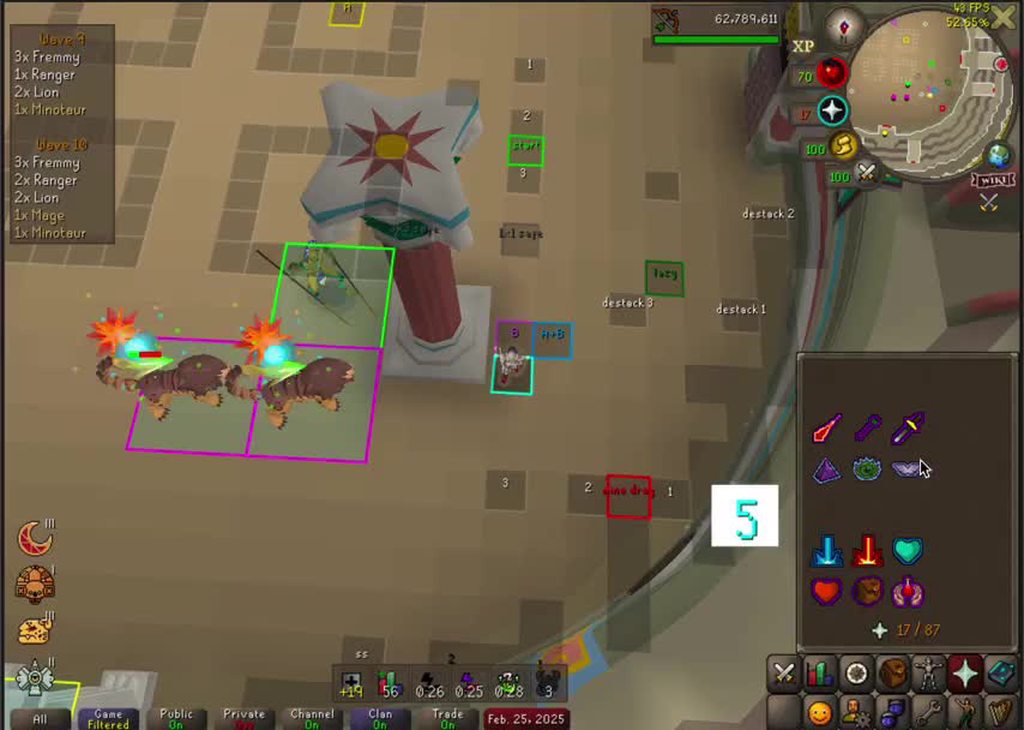
If you look at the visual metronome, it goes from 3 to 5 after I attack the manticore
This has been my experience all day today and yesterday
tough oasis
13.6.7
tough oasis
This has happened using three different network connections and only at Colo. It can't be anything else?
zealous cedar
i doubt it
if you wanted to make sure it isnt a plugin you could try making a new profile/or try safe mode
but plugin lag doesnt usually look like this
tough oasis
Saw someone on reddit claiming this was happening when using the Fortis Colosseum plugin, however, this hasn't been the case for me. I'll try to see if I can figure out something on my end. Thanks for helping out ❤️
 crisp temple
can we enlarge a single infobox?
i want one of them large without increasing the size of all of them in runelite settings
round jacinth
i dont think so no, they all share the same size
 sweet zephyr
anyone having an issue with boost information? the refresh wont show up for me. have turned it off and reset client, seems to be working OK on other profiles.

 oblique plume
have you let them degrade down one yet
sweet zephyr
oblique plume
have you let them degrade down one yet
as in let it fall off completly? have not can try now
oblique plume
no just go down one
sweet zephyr
oblique plume
no just go down one
oh, its a divine, so it wont
oblique plume
then a 60 second timer to tell you when it falls off would be useless anyways?
sweet zephyr
oblique plume
then a 60 second timer to tell you when it falls off would be useless anyways?
yes, dont need it for this certain instance, but it is not working in general
 native gate
can some1 guide me how to find pictures from runelite on my computer? ive changed computer
oblique plume
ok well when you need help with it, be doing the thing you need help with
rightlclick the screenshot button, that will take you to the screenshot directory
sweet zephyr
oblique plume
then a 60 second timer to tell you when it falls off would be useless anyways?
this worked btw - thanks!
 rocky grail
fading quartz
any recognized problems with RTX 30 series and runelite?
rocky grail
fading quartz
any recognized problems with RTX 30 series and runelite?
ive been having issues with rtx 2080. runelite crashes when i use gpu/117 plugin. can force a crash by teleporting to new areas or scrolling runelite plugin list (been happening for a week or so now)
 glass stag
spare kindle
Did todays update mess with stretched mode? logged in and its super zoomed in
glass stag
spare kindle
Did todays update mess with stretched mode? logged in and its super zoomed in
idk what stretched mode is but when I resized my window my inventory suddenly moved to the middle of the screen

 unborn saddle
Hi! I've installed Runelite on a new PC and my resource packs plujgin doesn't work anymore - I've tried reinstalling It but It didn't help

Anyone know how I could fix It?
charred wind
rocky grail
ive been having issues with rtx 2080. runelite crashes when i use gpu/117 plugin...
I think the fix for this was rollback drivers, but I’m unsure
oblique plume
glass stag
idk what stretched mode is but when I resized my window my inventory suddenly mo...
its because you unachored it, alt rightclick to reset it back
rocky grail
charred wind
I think the fix for this was rollback drivers, but I’m unsure
rollback did not work unfortunately. i have been trying everything including full pc reset. i would think it could be my gpu, but i have seen others with similar issues that started around the same time.
oblique plume
scrolling the plugin list could be hw accel
haughty pumiceBOT
Graphical artifacts? Try disabling hardware acceleration: https://github.com/runelite/runelite/wiki/Disable-Hardware-Acceleration
glass stag
oblique plume
its because you unachored it, alt rightclick to reset it back
thank you ❤️ I can't remember unanchoring it but seems to have fixed it yeah!
rocky grail
tried no hw accel still crashes 😦
haughty pumiceBOT
To find the logs, you can do one of the following:
- If your client failed to open, click the
Open logs folderbutton. - Open the screenshot directory by right-clicking 📷
Camerabutton, navigate 1 directory up, then open logs folder. - Navigate to
%userprofile%\.runelite\logson Windows or$HOME/.runelite/logson Linux and macOS.
Upload the log files named client and launcher by dragging them to Discord. If there are files prefixed with jvm_crash dated from today, upload them too.
sonic birch
(he says while not having time to look at them)
unborn saddle
Hi, can someone help me? My resource packs plugin is not loading, I've tried reinstalling It but It didn't help
 haughty pumiceBOT
Support for hub plugins should be directed to the author of the plugin.
You can find the support link by searching for the plugin in the Plugin Hub panel and clicking the ? button on the plugin, or by right-clicking the plugin in the plugin panel and clicking the Support menu option.
 wanton cipher
You ever find a fix for this? I have it too
 opal stream
wanton cipher
You ever find a fix for this? I have it too
opal stream
wanton cipher
You ever find a fix for this? I have it too
nope :/
solid mesa
They changed the default in today's update
wanton cipher
its never worked for me, view task and open task do nothing

 austere torrent
soo my idle notifier stopped a working at mlm and i dont know why? one min it was working then i do a falling star and go back to its broken?
solid mesa
What pickaxe are you using?
austere torrent
dragon with new skin
leaden trail
That's your problem then I believe
solid mesa
That would be why, if you turn on Identifcator and get the Animation ID we can add it to idle notifier
leaden trail
Install "Identificator" from the plugin hub
In the settings check the box to show animation ID
austere torrent
i swapped to the og variant of the skin its a+
leaden trail
Which specific ornament kit or whatever is it that gave issues?
I can probably just get it myself
austere torrent
trailblaser tool kit but its the second variant
very cool ty
still looking into trying to get an id
solid mesa
You want Show overhead info and Show NPC animation id. Then you can post a screenshot of yourself while mining in MLM and mining the rockfalls on the ground
 leaden trail
kit is less than a mil I can just grab it
 solid mesa
Yep, and if you can get one mining where the rocks fall from the ceiling on the ground
austere torrent
 leaden trail
on it 🫡
austere torrent
thank you, i had no idea this could be an issue. I appreciate the help and learning experience!
haughty pumiceBOT

eemuman
Add animation IDs for Trailblazer Ornament Tool Kits with the Reloaded style. Also add them to their respective plugins to make them track properly. For example fishing plugin does not track when using one of these harpoon styles.
Fixes: https://github.com/runelite/runelite/issues/18645 (Mostly)
However I am unable to create a infernal pickaxe (83 smithing) so those are missing.
leaden trail
unaddressed changes ;_;
solid mesa
Idk if it's a PR where contributors can make changes or not
leaden trail
idm making a fresh PR if not
 twilit wind
anyone know how to fix this?
 haughty pumiceBOT
solid mesa
haughty pumiceBOT
solid mesa
Scroll to JVM arguments and change -Xmx
twilit wind
is there a way to do it from the jagex launcher even though the game client is rune lite
haughty pumiceBOT
To remove the Java memory limit on your PC follow https://github.com/runelite/runelite/wiki/Remove-java-memory-limit
gilded kayak
u want this
twilit wind
i did that and it wokred the other day but now its popping back up but java is not popping up in my enviornment settings
crisp dune
solid mesa
Idk if it's a PR where contributors can make changes or not
Generally we can, but I'd prefer somebody making a fresh PR for that given they aren't updating theirs
Oh, I see dura submitted one, excellent
sonic birch
twilit wind
i did that and it wokred the other day but now its popping back up but java is n...
it's still in there somewhere probs
tough oasis
tough oasis
I'm experiencing more or less constant lag within the Colosseum. Is this a known...
In regards to the lag I wrote about yesterday.
I experienced heavy lag this morning.
I deleted Runelite and downloaded it again, which seems to have resolved my issue (although they were the same versions - both 21st Jan 2025).
 timid iris
Hi! Is it possible to not have the HUD strecht in streched mode? Like still 1:1 to original game
mossy swan
no
timid iris
I suspected that, couldn't find anything about it. Thanks for the fast reply!
 autumn remnant
is anyone else's colossal pouch swapping to "empty" even when not near an altar?
seems to be swapping when the pouch becomes full
is this just new behaviour for the pouch?
solid mesa
Yes, Jagex made that change a few weeks ago. It changes between fill and empty dynamically
autumn remnant
solid mesa
Yes, Jagex made that change a few weeks ago. It changes between fill and empty d...
is there any plugin that can change this or do i just have to deal with it
solid mesa
Not as far as I know, it's just the way it is
 light prism
I seem to be having a problem with the hiscores lookup on runelite.. more than 50% of the time it just simply doesn't load the player I lookup and just has a red !.. the other half it takes 5-10 seconds to load the player. I've got Stable internet with fast download speed
stone parcel
Are you sure the players you are attempting to lookup are on the hiscores?
light prism
Yeah, happens when I right click players and press "lookup"
round jacinth
The hiscore panel depends on jagex’s hiscores to work. If they’re not on the hiscores or takes too long to retrieve it does the red !
https://secure.runescape.com/m=hiscore_oldschool/overall you can check them directly here and see if you get no results or delay too.
Runelite checks here anyways, also if you check too many people too often there is rate limits I think.
light prism
My other friends seem to be able to look the same players up almost instantly. I wasn't sure if there was potentially something in my runelite "clogging" it up
round jacinth
No runelite doesn’t do anything that checking that link isn’t doing
It’s getting the same info
leaden trail
There's a chance you're getting rate limited. If you wait like 10 minutes and then try in safe mode, does it happen then?
haughty pumiceBOT
To enable safemode
Windows
Run the RuneLite (configure) shortcut from the windows start menu
Tick the Safe mode box, save, launch RuneLite the way you normally do.
Mac
In Terminal, run
/Applications/RuneLite.app/Contents/MacOS/RuneLite --configure
Tick the Safe mode box, save, launch RuneLite the way you normally do.
leaden trail
I think there are some hub plugins that do HS lookups so try that^
light prism
leaden trail
There's a chance you're getting rate limited. If you wait like 10 minutes and th...
I'll try this in 10 min
light prism
leaden trail
I think there are some hub plugins that do HS lookups so try that^
What u mean by this one?
stone parcel
From my understanding you are only allowed a certain number of hiscore lookups in amount of time. If a plugin is using most of your lookups you might have delays or something when trying.
stone parcel
Yeah safe mode disables hub plugins so you can determine if they are causing issues.
light prism
safe mode - same thing happens
charred wind
are you able to view it on the website
light prism
Yeah I can view players on the website
leaden trail
light prism
safe mode - same thing happens
I'm saying log out, wait a few minutes, and then try
Post your logs as well
haughty pumiceBOT
To find the logs, you can do one of the following:
- If your client failed to open, click the
Open logs folderbutton. - Open the screenshot directory by right-clicking 📷
Camerabutton, navigate 1 directory up, then open logs folder. - Navigate to
%userprofile%\.runelite\logson Windows or$HOME/.runelite/logson Linux and macOS.
Upload the log files named client and launcher by dragging them to Discord. If there are files prefixed with jvm_crash dated from today, upload them too.
light prism
leaden trail
I'm saying log out, wait a few minutes, and then try
Okay, logged out gonna wait a few mins and I'll update you
 spice gulch
light prism
Okay, logged out gonna wait a few mins and I'll update you
spice gulch
light prism
Okay, logged out gonna wait a few mins and I'll update you
Seems to be working fine?
leaden trail
Well, to start, you have file permissions issues. Redownload RuneLite from the link in #welcome and reinstall it. As long as you don't delete anything you won't lose any settings.
Then run it as admin ONCE.
Even if that's not the source of the HS issue, and I don't think it is, file permissions problems end up leading to a bunch of other issues
light prism
Do I have to uninstall it first somehow?
leaden trail
No
 paper frost
can someone please help me , so me and my firend are both in hub party plugin , but for some reason i cannot see his location on the map , he can see mine tho , also my discord picture is on the party but his isnt so im thinking theres something that has to do with that?
mossy swan
his discord plugin is off
might be that his party plugin is also off? or some setting in it
paper frost
tried all that , his discord plugin is on aswell
haughty pumiceBOT
If your Discord activity status is not showing properly follow these steps:
- Make sure your Discord plugin is enabled.
- Make sure RuneLite is not manually added as game to Discord game list.
- Enable
Share your detected activities with othersin Discord settings. - Make sure both RuneLite and Discord are NOT running as admin.
mossy swan
but i dont think location has anything to do with discord though
paper frost
his picture isnt even p[opping up tho
 native oyster
the NPC Aggression Timer always shuts off. doesnt stay on on relogs, isnt on when i first log in, i have the settings toggled correctly for it to stay on. always have to restart it and teleport away.
solid mesa
When you close the client do you logout first or just click the X?
 mellow crane
Hey, is there a fix for bank tabs not importing correctly?
 solid mesa
Did you copy from #bank-tags ? You might have copied the leading `
mellow crane
I exported the setup from 'Inventory Setups'
solid mesa
Can you paste here what you're trying to import?
mellow crane
{"setup":{"inv":[{"id":29037},{"id":6570},{"id":2436},{"id":2440},{"id":29039},{"id":4151},{"id":2434},{"id":2434},{"id":30634},{"id":1215},{"id":2434},{"id":2434},{"id":3144},{"id":3144},{"id":2434},{"id":2434},{"id":3144},{"id":3144},{"id":3144},{"id":3144},null,null,null,null,null,{"id":12791},{"id":30638},{"id":8013,"q":40}],"eq":[{"id":24271},{"id":22109},{"id":6585},{"id":9185},{"id":12500},{"id":12954},null,{"id":10388},null,{"id":7462},{"id":22234},null,{"id":26770},{"id":11875,"q":3104}],"rp":[{"id":561,"q":15935},{"id":565,"q":13300},{"id":556,"q":13868}],"name":"Royal Titans","hc":"#FFFF0000"},"layout":[30638,24271,8013,561,29037,6570,2436,2440,22109,6585,11875,565,29039,4151,2434,2434,9185,12500,12954,556,30634,1215,2434,2434,-1,10388,-1,-1,3144,3144,2434,2434,7462,22234,26770,-1,3144,3144,3144,3144,-1,-1,-1,-1,-1,-1,-1,-1,-1,-1,-1,-1,-1,-1,-1,12791]}
mellow crane
I've figured it out, I didn't realise you could right click on export to make it the correct format
Thank you
 spice dune
My client crashed yesterday and just now. I checked the log and found
2025-02-27 13:45:22 EST [Client] ERROR injected-client - Client error
java.lang.NullPointerException: null
does anyone know how to resolve this issue?
gilded kayak
that's the least useful line of the crash log so no i doubt anybody can help
just upload the full client.log
spice dune
2025-02-27 13:45:22 EST [Map Loader] ERROR injected-client - Client error: map loading
java.lang.OutOfMemoryError: Java heap space
2025-02-27 12:59:19 EST [pool-3-thread-1] WARN net.runelite.client.game.ItemManager - error loading prices!
spice dune
gilded kayak
that's the least useful line of the crash log so no i doubt anybody can help
word will do
gilded kayak
the client ran out of memory for plugins, we only allocate a reasonable amount instead of letting it use whatever it wants
!config you can increase the limit here
haughty pumiceBOT
spice dune
I have the config open, what do i do in the menu?
gilded kayak
ctrl+f memory on that page
spice dune
thanks man you're a legend
gilded kayak
it probably wont happen again, but if it does and that same heap error is the cause, we have a debug helper plugin on the , and in there is a setting called heap dump on oom
if it happens again and such a file is generated, we'll look at it and see what plugin is leaking
but it's possible you just hit the limit by just general use, not a leak
e.g. sometimes quest helper drawing the lines can tip you just over the limit for a split second, with all your plugins running
 vocal bramble
How can I pass on information about a theft from my account and they stole everything from me I hope you can help me, thank you
I want to know if I can use the same account or do I have to start from 0? I have proof of the person who stole from me.
gilded kayak
We aren't Jagex so we can't do anything with that info
vocal bramble
Thank you very much and sorry for the inconvenience.
 tawny cliff
I have an issue. My client freezes for 20 seconds after i get a red click on a monster or player. Any idea what can cause this ? It doesn't happen every time
haughty pumiceBOT
@tawny cliff Many plugins from the pluginhub break the client in subtle or not-so-subtle ways, including causing issues like client freezes. We do not support pluginhub plugins because we do not make or quality control them, and do not recommend their use.
Run the RuneLite (safe mode) shortcut, or with a Jagex account, first run the RuneLite (configure) shortcut and tick the Safe mode box, then launch RuneLite via the Jagex launcher.
This temporarily disables the GPU plugin and all hub plugins which will allow you to confirm the issue is caused by one of those plugins and isn't a core RuneLite issue.
If the issue is caused by a hub plugin, you should isolate which plugin it is and then uninstall the plugin.
 modest stratus
My client will not let me open clan combat achievements or view them whilst I have the chat coloured. I have narrowed it down and found it's when this option has a colour in it 🙂

 bronze condor
Is this a Runelite feature? If so how do I disable it? It pops up every 30 seconds and is extremely annoying. I'd rather not disable the Discord plugin completely since it lets people know when I'm playing and I dont see anywhere in the plugin that shows this

 solid mesa
Discord overlay in discord settings
bronze condor
solid mesa
Discord overlay in discord settings
Thanks!
sonic birch
modest stratus
My client will not let me open clan combat achievements or view them whilst I ha...
!flow
haughty pumiceBOT
flowchart: Please refer to this flowchart for further troubleshooting.
timid iris
I realize this might be more of a Windows 10 question rather, but I just realized that my UI looks so blurry because I have 150% scaling in Windows... is it possible to have RuneLite ignore that setting and render in 100% mode?
haughty pumiceBOT
oblique plume
put 1.0 in the scale location there
timid iris
Wow that was easy, thank you so much!! Now it looks really good like those pictures I've seen online
 thick dune
Has anyone who uses the Custom Cursor plugin noticed that all of the sudden that their custom seems very transparent?
 red fox
how do i delete the object marker completely and remove all the markers in game?
round jacinth
You remove them as you find them
oblique plume
turn off the plugin 
paper garden
npc aggression timer plugin not working for anyone else?
solid mesa
What is your runelite version? What isn't working?
paper garden
a bit confused as I just downloaded and the website says 1.11.2
gilded kayak
it says in the  tab
tab
paper garden
but runelite -> about runelite says 2.7.3
ah launcher vs rl version gotcha
im on 1.11.2
mac btw
gilded kayak
can you be more specific about what's not working, I logged in earlier today for something else and I clearly saw the yellow lines
paper garden
aggro timer is just permanent "tp or enter a dungeon" error message for the past week or so
gilded kayak
have you tp'd far away or entered a dungeon
paper garden
lol
gilded kayak
the bridge between lumbridge and al kharid is a good trigger I believe
paper garden
both yes
gilded kayak
paper garden
lol
i have to ask, people come in with an error, I literally repeat the error to them word for word, and then they say "oh thanks that worked"
paper garden
yeah I believe it
yeah hm
is there a way to uninstall and reinstall this specific plugin
gilded kayak
the reset button would do what you're thinking, but that probably wouldn't fix the problem
i put man,goblin in my npc box and ran over the lumbridge, bridge, and the infobox went away
it didn't draw the lines since these aren't aggressive enemies
paper garden
alright thanks I’ll give it a go tomorrow
 obsidian radish
does anyone have any idea why my bank tags plugin is not giving me the option for zigzag bank tags? it used to be there
 mossy swan
i think the built-in one doesnt have that feature, just the hub has it
gilded kayak
zom was supposed to make a plugin to add that feature, so u dont need btl for it, just a seperate plugin that does that
but that hasn't happened YET
gilded kayak
yes
leaden trail
Yippee
obsidian radish
i see ok
i recently got rid of btly because only the official bank tags plugin works with potions in potion storage
shy ore
!launcher
haughty pumiceBOT
Download and install the updated RuneLite launcher from the website link in #welcome. You don't need to uninstall your current version. You will not lose any settings or plugins.
round jacinth
gilded kayak
zom was supposed to make a plugin to add that feature, so u dont need btl for it...
I asked muta how hard it would be to yoink and he said it maybe would be hard, cause idk what I’d need to yoink.
should just be in core’s offering but then Adam would have to touch it again so let’s wait
I can maybe take a better look when my house isn’t sick too tho.
 celest cobalt
Hi all, i have an issue with menu entry swapper: the shift left click>walk here doesnt work as i would like to. When there are items dropped under monsters, my character just walks on that tile instead of picking up the drop. Anyone has an idea on how to fix this?
gilded kayak
uh... don't hold down shift...?
 balmy narwhal
Recently cameback to the game, I constantly get this crash when loading a new area. going next toa room, teleporting, things like that

I can't find a crash log (I may not be looking correctly)
Is it this?
2025-02-28 19:05:48 AWST [Map Loader] ERROR injected-client - Client error: map loading
java.lang.OutOfMemoryError: Java heap space
at jz.<init>(jz.java:45908)
at rl3.qm(rl3.java:2333)
at rl3.run(rl3.java:35993)
at java.base/java.util.concurrent.Executors$RunnableAdapter.call(Unknown Source)
at java.base/java.util.concurrent.FutureTask.run(Unknown Source)
at java.base/java.util.concurrent.ThreadPoolExecutor.runWorker(Unknown Source)
at java.base/java.util.concurrent.ThreadPoolExecutor$Worker.run(Unknown Source)
at java.base/java.lang.Thread.run(Unknown Source)
2025-02-28 19:05:48 AWST [Client] ERROR injected-client - Client error
java.lang.NullPointerException: null
at client.su(client.java:44916)
at client.fz(client.java:36235)
at client.jy(client.java:7296)
at client.mk(client.java:3387)
at client.by(client.java:1258)
at bk.ap(bk.java:360)
at bk.lr(bk.java)
at bk.run(bk.java:24469)
at java.base/java.lang.Thread.run(Unknown Source)
haughty pumiceBOT
To find the logs, you can do one of the following:
- If your client failed to open, click the
Open logs folderbutton. - Open the screenshot directory by right-clicking 📷
Camerabutton, navigate 1 directory up, then open logs folder. - Navigate to
%userprofile%\.runelite\logson Windows or$HOME/.runelite/logson Linux and macOS.
Upload the log files named client and launcher by dragging them to Discord. If there are files prefixed with jvm_crash dated from today, upload them too.
gilded kayak
the whole file is preferred
gilded kayak
ye
balmy narwhal
Thanks brother
gilded kayak
the crash is b/c the plugins ran out of memory, we only allocate enough for normal client usage, we don't let the client use whatever it wants
!config you can increase the limit here, or remove some hub plugins
haughty pumiceBOT
balmy narwhal
gilded kayak
the crash is b/c the plugins ran out of memory, we only allocate enough for norm...
Do I do this on the rulite client itself? Or within the jagex launcher version of it?
round jacinth
read that link provided to you
balmy narwhal
Yeh I am stuck, I don't have a RuneLite (configure) in my start menu entry (I am on windows)
oh nvm let me try something
round jacinth
The very first thing the link mentions is what to do if you don’t see the configure option.
Read the link lol
 void dove
Not sure why but strength and hp arent showing how many actions, its not important just feels weird it not being there
 round jacinth
That was removed in a recent update.
 round jacinth
Maybe shouldn’t be either, they were removed because they are inaccurate when going different content
void dove
ohh so hopefully it will be back eventually? or removed for good?
round jacinth
Idk maybe removed to align with the side panel? Not sure
unlike cooking lobsters where you know the xp per so you can count the cooks to get a level, monsters heal, have a variety of hp levels and xp modifiers so it’s just inaccurate is my understanding of it
celest cobalt
gilded kayak
uh... don't hold down shift...?
a monster is standing on the same tile, so i would red x the monster in that case.
round jacinth
Shift click makes you walk to that tile, even if stuff is on it.
celest cobalt
oh i thought it used to work different before, havent played in a while
im pretty sure there was a way to pickup drops under monsters other than right clicking, do you have an idea?
glad vortex
In case anyone knows right off the bat, do you know which plugin does a notification whenever clay bracelets break?
round jacinth
celest cobalt
im pretty sure there was a way to pickup drops under monsters other than right c...
Custom menu swaps can prioritize take,* over attacking but idk if that’s what you want either.
glad vortex
celest cobalt
im pretty sure there was a way to pickup drops under monsters other than right c...
I have Custom Menu Swaps set up with this: take,*,*,* in the custom swaps sections, try that one and see if it's what you wanted
the only reason I have it set up to three ,* is because instructions implied doing so lol
celest cobalt
*= a certain item?
glad vortex
can be a action in the menu, mob, etc
round jacinth
- means match on anything
celest cobalt
i wanna use it for slayer tasks that are cannonable, so many drops and mobs all over
ah okay
round jacinth
glad vortex
In case anyone knows right off the bat, do you know which plugin does a notifica...
One of the chat notification plugins in core can notify on a list of game messages sent so you can use that
I think you can type in the game messages
celest cobalt
glad vortex
I have Custom Menu Swaps set up with this: `take,*,*,*` in the custom swaps sect...
can you repeat this a little more detailed? i just installed the plugin
glad vortex
for example take,*,attack,brutal black dragon* (the copypasta in their instructions) means you can take anything under a brutal black dragon instead of clicking attack, hope the example helps

That's how I got mine set up
round jacinth
The read me linked from the ? Has information on how to set it up
celest cobalt
okay, so left clicking would prioritize drops over mobs then if im right
so i right click mobs to attack them?
via the menu?
glad vortex
Hold on I'm in desert and trying to beat the thirst timer lol
celest cobalt
xD
celest cobalt
okay ill rephrase question: if i custom menu swap on shift click, i can pickup drops under marked mobs by shift left clicking?
celest cobalt
round jacinth
Self discovery
its kinda hard while standing at ge x)
glad vortex
Yeah, I do recommend reading the readme too especially because the custom stuff will take some testing to know it works
But in your case, no, if you've set it up to a keybinding then all you have to press it then you can pick stuff up. if you're not holding it, then youlll get the attack option instead
round jacinth
You can still probably figure it out by reading the guide on how to use the plugin.
celest cobalt
not like their guide has answers to my question but sure
glad vortex
It can be kind of vague, but it was the source that helped me figure out how to set up mine lol
round jacinth
It’s generic because swapping is generic
If you want the left click to always take then you change it to take,* and it’ll make take the top option.
celest cobalt
glad vortex
Yeah, I do recommend reading the readme too especially because the custom stuff ...
this seems exactly what im looking for! I'll try it out
or maybe not
this is only for menu right
x)
glad vortex
Yeah, but this plugin is SUPER flexible
celest cobalt
i remember picking up stuff without a menu
glad vortex
You can make magic happen
You mean you need to right click? I don't have to right click if I'm holding my keybind
(in case you're trying to test it out in random scenarios, I don't think the take option actually shows up until there is something to take under a mob... at least that's what I understand with this plugin)
celest cobalt
what i mean is, picking up the drop without a menu popping up
so basically just prioritizing take>attack mob
by holding shift for example
glad vortex
That is what I gave you, maybe try doing a recording if that's not happening? (upon thinking, not sure if recording would actually help lol but afaik that is what the plugin is doing for me)
glad vortex
Please do :)
winged mason
@celest cobalt just making sure this box is unticked should fix your issue? lets you shift-click walk through monsters but doesn't ignore ground items
 celest cobalt
glad vortex
Please do :)
celest cobalt
glad vortex
Please do :)
working exactly how i wanted ! thank you so much!
glad vortex
Glad to know that, glhf!
 civic nest
ive just logged in and pretty much all of my plug ins are gone, tile markers, bank tabs and a load of other stuff?
round jacinth
!lost
haughty pumiceBOT
 rotund patio
Hi
 brazen heath
Hello, any1 here knows about a video that can help me download runelite to a usb so that i can play directly from there
leaden trail
brazen heath
Hello, any1 here knows about a video that can help me download runelite to a usb...
Follow these steps
https://github.com/runelite/runelite/wiki/FAQ#i-want-to-run-runelite-from-a-usb-drive

GitHub
Open source Old School RuneScape client. Contribute to runelite/runelite development by creating an account on GitHub.
leaden trail
Open notepad, type in what it says there, save as .bat
 loud rapids
Hi, new here - Is anyone else Better NPC highlighter plugin not working? Im putting in the ID's for different things and they are not highlighting as per the plugin....
Example of npc 3275 not being highlghted

 haughty pumiceBOT
Get support for the Better NPC Highlight Plugin Hub plugin here: https://runelite.net/plugin-hub/show/better-npc-highlight.
You can also find the support link by searching for the plugin in the Plugin Hub panel and clicking the ? button on the plugin, or by right-clicking the plugin in the plugin panel and clicking the Support menu option.
 fallow kestrel
Is there a Fishing Trawler plugin that notifies you when the tentacle hits the ship?
 viscid lantern
Is there a chat message for it? If so you can use chat notifier
fallow kestrel
viscid lantern
Is there a chat message for it? If so you can use chat notifier
There is, thank you!
 coral lintel
I had 2 clan members have their RL reset back to default. Do you know what caused this, and is there a fix. Or they just have to redo all their options?
haughty pumiceBOT
coral lintel
So if they didn't name their features, is default the same?
gilded kayak
default is just a name but default with your settings and default, actually default, can be different
coral lintel
I'm thinking default means setting it back to default.
gilded kayak
the word default on the profile is purely cosmetic
it just happens to corrolate with default settings, when they are actually default
we don't ammend the profile name after your first setting change
coral lintel
Ok 🙂
gilded kayak
if they look at that wiki page, they should very easily be able to import their settings again, I think those will be named imported settings (#) tho
coral lintel
Thank you 🙂
 crystal ravine
does anyone for the love of jebus know how to use world global chat?
 hollow olive
like public chat?
crystal ravine
theres a plugin called world global chat that people use to chat who are muted
and idk how to use it
but i see people talking with it

none of this makes sense lmao
crisp dune
We don't make that plugin, we couldn't tell you
haughty pumiceBOT
Support for hub plugins should be directed to the author of the plugin.
You can find the support link by searching for the plugin in the Plugin Hub panel and clicking the ? button on the plugin, or by right-clicking the plugin in the plugin panel and clicking the Support menu option.
spice dune
hey i crashed now 3 days in a row. I got a heap dump but I don't have nitro so I can't upload it here. can someone help me?
should i just zip it?
gilded kayak
that or upload it to google drive and dm the link to @haughty pumice
you'll have to send the bot the zip also, as it wont appreciate posting zips in here
also maybe send the bot your client.log too just incase u didn't bump your heap limit correctly
spice dune
okay i'll just throw it in google drive
crisp dune
Does the client crash in safe mode?
spice dune
I haven't tried safe mode, I just sent my heap dump to @haughty pumice
gilded kayak
it looks like you installed the debug plugin, after you crashed
is this heap dump from you pressing the heap dump button? because that's useless
(for this)
gilded kayak
i explained yesterday that you need to enable heap dump on oom and wait yes
spice dune
okay will do
gilded kayak
also you seem to keep the client open across multiple days, so i can't tell if you setup the increased memory correctly
can you post yesterday's log
 normal karma
is there a pinned message for issues linking your runelite settings across multiple devices?
haughty pumiceBOT
gilded kayak
it does look like you bumped your limit correctly
so you probably did crash from a leak, which the setting will generate a crash log for
 dark sleet
Can someone tell me how to login to RuneLite on Mac? Just downloaded and im pretty new to the os.
gilded kayak
it's not different than how you log in on windows
can you be more specific about your problem
dark sleet
I literally cant find the login button lmao
gilded kayak
well i don't think it's possible to be in the client and not have a login button
so you'll still need to be more specific
oblique plume
The green door button?
balmy narwhal
Hi guys, I'm the guy that was having crash problems because the plug ins were running out of memory yesterday. I have doubled the limit, but is there an effective way to see which plug ins are problematic? Like is there a way to sort the plug ins by size or anything to that effect?
oblique plume
No but if you let it heap oom again with the debug plugins dump heap on oom option enabled then you might be able to find some info
That takes manual looking through of a heap dump though
balmy narwhal
I did delete a few plug ins I don't use anymore, but by the sounds of it, I should see how I go with the newly increased memory and then only if I keep experiencing trouble go down that route, sound like a good plan?
round jacinth
removing hub plugins is always a sound idea tbh, increasing memory is good too
 silver panther
any known reason why my world map no longer shows a marker where i am?
round jacinth
You disabled it in the world map
 languid owl
I keep getting this error when trying to load runelite. I tried uninstalling both jagex and runelite and still receive this message when trying to launch the client. I tried reading through the trouble shoot section to see if i could solve it but am lost and still having issues.
 gilded kayak
the logs the error mentions are in the open logs folder button
upload launcher.log and client.log(if this one exists)
languid owl
gilded kayak
your rsprofile is not writeable, which is where your non-profile specific settings are saved
try doing this, it's what the client attempts to do, when you run as admin, but it's unable to
round jacinth
can't they just reinstall runelite, run runelite once as admin and it does those things too?
i thought it did those things now rather
languid owl
ran the commands and still nothing. In the command prompt it is telling me this
C:\Users\danie.runelite\profiles2$rsprofile--1.properties: The file or directory is corrupted and unreadable.
Successfully processed 290 files; Failed processing 1 files
gilded kayak
it's already trying to do that in the logs
round jacinth
gilded kayak
it's already trying to do that in the logs
oic
languid owl
 gilded kayak
I guess your next best bet would be to go into that folder, and left-click+drag it out
that should allow the client to start
languid owl
This is what im receiving
gilded kayak
but your loot tracker data wont be there, after it starts you can try to use the import profile button on that file
but if it is corrupted it probably wont work
languid owl
ah im not worried about keeping that just want it to run at this point
oblique plume
Sounds like you got some ransomware type protection garbage
languid owl
removing the folder worked
it would be that simple
I greatly appreciate the assistance!
 livid plinth
wondering if someone can help me out i got a new computer and im struggling on figuring out how to import my olf settings and plugings
haughty pumiceBOT
 undone basin
Is there a reason why my login name is not remembered after I close the client? Even with remember username check?
haughty pumiceBOT
[ https://github.com/l2- ] [ @dry grove 148829794723823617 ] ._.xander#0
 empty fulcrum
Anyone now what this is about? Keeps saying this and wont let me log in
 leaden trail
Do you use some sort of antivirus?
empty fulcrum
I don't think so, just the firewall on my pc
empty fulcrum
I've just looked to let it through the firewall and couldnt find it to let it through
leaden trail
Can you post your logs?
haughty pumiceBOT
To find the logs, you can do one of the following:
- If your client failed to open, click the
Open logs folderbutton. - Open the screenshot directory by right-clicking 📷
Camerabutton, navigate 1 directory up, then open logs folder. - Navigate to
%userprofile%\.runelite\logson Windows or$HOME/.runelite/logson Linux and macOS.
Upload the log files named client and launcher by dragging them to Discord. If there are files prefixed with jvm_crash dated from today, upload them too.
leaden trail
May take me a bit to peek at them since I have some things I need to do but I'll look when I have a minute

 leaden trail
empty fulcrum
leaden trail
empty fulcrum
Just the ones named "client" and "launcher"
empty fulcrum
its working now and i didnt even do anything haha
 frozen pagoda
Does anyone know how i can log into runelite with my steam account ?
leaden trail
I think you'd have to convert to a Jagex account to do so
You can see your hours played in the quest tab in game though, or by talking to Hans in Lumbridge
frozen pagoda
can i have a jagex account with my current progress ?