#support
1 messages · Page 53 of 1
 ebon egret
i wanted to get back into runescape (i literally forgot everything about the game) and was thinking of picking it up on the steamdeck on steam
but i remember runelite being like quintessential to gameplay
 stone parcel
If you don't have a Jagex Account you just add RuneLite as a non-steam game from the desktop mode of the Steamdeck iirc.
ebon egret
hmm
 gilded kayak
tormstorm's guide and bolt both work on steamdeck afaik, for jagex account users*
 zealous cedar
runelite is in the discover software center thing, you can just install it
ebon egret
Mines still in the mail, just thinking about how i would when i get it
Cant troubleshoot it just yet
zealous cedar
seems like you are already committed then
zealous cedar
its definitely possible yeah
ebon egret
zealous cedar
seems like you are already committed then
yep
zealous cedar
there is a linux support discord
 haughty pumiceBOT
For support with using Jagex accounts on Linux, visit 7ormRS's Discord https://discord.gg/aX7GT2Mkdu
ebon egret
if it wasnt id just have to play it without runelite
zealous cedar
that is really for jagex accounts though mostly + linux
ebon egret
which... i mean people did it in the 90s right?
zealous cedar
if you dont have a jagex account it is a lot easier
you basically can't play without runelite on linux
or I guess you could use proton maybe on the windows client
zealous cedar
but there isnt an official linux client anymore
ebon egret
hold on lemme check my email for my login
im 99% sure i have a jagex account
because otherwise how else would i have played on my phone that one time
gilded kayak
you can log into the official mobile app with accounts that aren't jagex accounts
does it say in your https://www.runescape.com account settings if u have a jagex account?
zealous cedar
theres like 4 or 5 different types of runescape accounts over the years, it is confusing
gilded kayak
i know it used to have a banner for me that was like UPGRADE TO A JAGEX ACCOUNT
ebon egret
gilded kayak
does it say in your <https://www.runescape.com> account settings if u have a jag...
i... lemme log in?
gilded kayak
which i assume is not there, if u have one lol
gilded kayak
ebon egret
i... lemme log in?
it was more a question as i'm not sure if there's anything clearly stating if u have a jagex account, on there
 torn mountain
my runelite quite often freezes (looking like a graphical glitch) and then i have to end the task from task manager, im on amd processor and gpu and on latest amd adrenalin drivers, any suggestions for a fix?
zealous cedar
what do you mean it looks like a graphical glitch?
 stone parcel
Okay, so you will probably want to use Bolt on the SteamDeck.
torn mountain
zealous cedar
what do you mean it looks like a graphical glitch?
i'll try getting a screenshot once it happens but sometimes it just goes all pixelated or the game just freezes and zooms in on a random part of the game but i can still interact with the runelite plugin bar on the side tho
ebon egret
stone parcel
Okay, so you will probably want to use Bolt on the SteamDeck.
I really would like to not have to mod a bunch of stuff onto my deck if possible
like... reinstall OS or whatever
i dont use linux for that reason, too dumb for it
gilded kayak
gilded kayak
it was more a question as i'm not sure if there's anything clearly stating if u ...
on the /account_settings page I have this banner suggesting I upgrade

 leaden trail
Once an account is a Jagex account it can't be reverted
stone parcel
ebon egret
I really would like to not have to mod a bunch of stuff onto my deck if possible
You can download it from the Discover store, which is like an app store, so pretty basic install.
ebon egret
oh
i mean my account didnt really have much on it anyway, i could start fresh
i had some sort of glove that let me use a big furnace to make money
and it sucked. and it was slow. and i made no money.
but maybe that was significant progress, dunno
gilded kayak
fresh accounts are only Jagex accounts now
 gilded kayak
if you're currently at a computer the fastest way would probably just be to try to log into runelite
ebon egret
hypothetically what if i cant remember my password
ebon egret
gilded kayak
if you're currently at a computer the fastest way would probably just be to try ...
booting rl now
gilded kayak
then that's a problem
ebon egret
i can still log in without an active bond right
gilded kayak
yes
ebon egret
gilded kayak
then that's a problem
and you cant reset it without a jagex account
gilded kayak
bottom left, click a silver starred world
ebon egret
maybe its not working because im on the jagex website and not runescape
gilded kayak
the verification if u have a jagex account, by trying to log into runelite, would be dampered a bit by not knowing your password, since the error will say "incorrect username/password"
if both you have a jagex account, OR you actually put the wrong password
 gilded kayak
ok so if you logged in fine, you luckily do not have a jagex account
try switching to a silver world
to make sure
idk what the order of errors is
 gilded kayak
probably in your bank
ebon egret
ah
 gilded kayak
but since you can login, that means the process for the steamdeck will be very easy
there's a setting in the bank plugin to turn off that warning
 gilded kayak
zealous cedar
runelite is in the discover software center thing, you can just install it
gilded kayak
zealous cedar
runelite is in the discover software center thing, you can just install it
you'll just be able to do this
ebon egret
remembering how to play the game
i remember the official discord being really really really obnoxious
anywhere else to go?
ebon egret
gilded kayak
you'll just be able to do this
very cool
why did i put all my stuff in the bank though
stone parcel
#runescape channel might work. 😄
ebon egret
i have a ton of empty space
ebon egret
stone parcel
<#448811926315728896> channel might work. 😄
👨🦯 oops my mistake
stone parcel
No worries, but if you are looking for a place to talk RS, that might be it. 😄
 brazen dirge
is this the expected behaviour in core banktags for blood furies?

i'd like to have them separate in the tag but they seem to duplicate on the same tag layout
 tawdry belfry
hello, i noticed probably starting a few weeks ago, whenever id wake my computer up from sleep, my runelite window would resize itself (normally i play with it taking up the bottom right corner of one monitor, upon wake it would take up the right half of that monitor). I feel like this is probably an issue with my computer (though no clue why it randomly started happening) however wanted to see if anyone has experienced something similar to this and if so how they fixed it. i also notice that the monitors flicker black a couple of times when things wake up which makes me think there is some weirdness going on with the displayport handshake
brazen dirge
nvm i got it to work now, just had to remove and add again and create duplicate of the first one
 silent sun
i've been getting an out of memory crash going down to floor 5 of sep a lot over the last few days, and from doing some searching in here its probably a hub plugin causing it. is there an easy way for me to narrow down which is the culprit?
 sonic birch
silent sun
i've been getting an out of memory crash going down to floor 5 of sep a lot over...
sonic birch
silent sun
i've been getting an out of memory crash going down to floor 5 of sep a lot over...
!logs
haughty pumiceBOT
To find the logs, you can do one of the following:
- If your client failed to open, click the
Open logs folderbutton. - Open the screenshot directory by right-clicking 📷
Camerabutton, navigate 1 directory up, then open logs folder. - Navigate to
%userprofile%\.runelite\logson Windows or$HOME/.runelite/logson Linux and macOS.
Upload the log files named client and launcher by dragging them to Discord. If there are files prefixed with jvm_crash dated from today, upload them too.
sonic birch
So we can confirm
silent sun
i did disable a bunch of plugins on the league profile since the last crash, but don't think it was any of them lol
zealous cedar
tawdry belfry
hello, i noticed probably starting a few weeks ago, whenever id wake my computer...
there was a quest helper bug where it was resizing the client randomly, i think its been fixed now
tawdry belfry
ill uninstall it and see if it still happens but ive restarted the client since then so it shouldve picked up the update
silent sun
silent sun
got another
as i don't remember getting crashes at sep before, with my default profile, i'll try disabling the plugins that are loaded when changing over to my leagues profile
but i also haven't done sep in a while main game
also its consistently on the transition into floor 5, which could well be coincidence, but might be worth noting
zealous cedar
check if you are using 64bit runelite or not
zealous cedar
if you enable debug mode the logs will show it
silent sun
32
zealous cedar
installing the 64bit version will likely fix this
silent sun
from task manager
o7 will do
task manager now lists runelite without the 32bit, so looks like the jagex launcher found it after the install, will report back in two and 4/5ths laps of sep
thanks
sonic birch
Just a bad hub plugin probs (I did not check logs on mobile)
 last oxide
u mean a 3rd party plugin?
leaden trail
Yes
leaden trail
last oxide
Do you have any other client logs with today's date on them?
last oxide
AttackerTimerMetronomePlugin i see
Also there is a index out of bounds exeption on the StepsPerCluePlugin
leaden trail
Can you share the oldest client log with today's date? I think it should be client_2024-12-14.0.log I want to say
last oxide
last oxide
thats the lates
leaden trail
I don't think it's that one
last oxide
i have 4 files from today, the 2 i sent already, the others are client.log and launcher.log
silent sun
zealous cedar
installing the 64bit version will likely fix this
looks to be fully working now, thank you for the help
 open cypress
Hi guys, just bought a new laptop (no discrete gpu, just igpu) and having some issues with the gpu plugin.
Used to play with the gpu plugin no prob on my old laptop (uhd 620 from an 8th gen Intel cpu) but my new laptop crashes and freezes Windows. New cpu is a ryzen 7 8845hs with radeon 780m graphics
Could search for logs later , thanks everybody
 long crescent
hey so i made the silly decision to touch one clam while doing some lobstrosities and now the game thinks i always want to know where the next active chest/clam is for underwater agility/thieving. do you know if there's any way to disable this or make the game think back to before i touched that clam.
 stone parcel
Maybe turning off/on the Agility plugin.
long crescent
unfortunately that doesn't fix it
 viscid lantern
its a game thing, not a plugin thing
long crescent
viscid lantern
its a game thing, not a plugin thing
thought that might be the case
 crimson rampart
my sidebar keeps buggin out
open cypress
open cypress
Hi guys, just bought a new laptop (no discrete gpu, just igpu) and having some i...
sonic birch
!hd for hd help
haughty pumiceBOT
Visit 117's HD plugin discord (https://discord.com/invite/U4p6ChjgSE) for support, issues & feedback
last oxide
last oxide
seems to be a network issue after all, need to check my router, thanks for helping out tho 🙂
 gray field
hey guys. steam deck user here while my pc is getting diagnosed. running the deck in desktop mode with an external monitor connected and when i try to turn on the gpu plugin it just turns itself back off. any idea how to fix this?
zealous cedar
check the log file. usually that means it cant find your gpu/your gpu isnt supported
 torn girder

 leaden trail
It probably doesn't work for the NPC_SAY message type (assuming that's the message type for Nex, idk)
leaden trail
I gotchu cat, gimme 5
 gaunt lion
Following up, some general learnings from me on this. Reduced framerate in runescape can actually happen (even though it wasn't happening in other games) because of CPU temp issues it seems. Other games (ie league of legends) were operating just fine, but I popped open HWMonitor and it turns out my CPU was maxing out on temp (idling at 70C, maxing at 95C!).
This prompted me to check what was going on with my cooling loop (I built a custom water cooling loop for this PC years ago) and found a strange bit of gunk in the CPU waterblock. Anyways I ended up completely taking the PC apart, taking apart water blocks, and doing a bunch of cleaning, Just rebuilt the loop, finished leak test, and got the machine running again, now idling at 17C, maxing at 32C, and of course runelite is now running at high fps no problem.
Anyways, sharing it all to say if anyone shows up saying that their FPS has randomly plummeted and doesn't seem to recover, maybe get them to check their hardware temps.
Was surprised that other games would run just fine, but this one wasn't (and windows wasn't crashing despite the super high temps??)
Pretty crazy actually.
 waxen tusk
Hey there guys. I am trying to start developing runelite plugins, all was going well, have my own runelite build and an example plugin located within the plugins folder, however when I build / run runelite, my test plugin does not show up in the plugin list? Sorry I can't post this in #development I don't have permission.
When I utilise the example plugin and don't intergrate it into the runelite build, it shows in my runelite plugins list though?


nowhere to be seen 😦
haughty pumiceBOT
How to develop plugin-hub plugins: https://github.com/runelite/plugin-hub/blob/master/README.md
stone parcel
You probably want to follow that guide, and probably don't need to build RuneLite.
For pluginhub stuff anyway, and not core RuneLite.
waxen tusk
is there a reason simply dragging the plugin into the plugins folder doesnt work?
zealous cedar
it should work
waxen tusk
Ill download te template again and see if it works, weird
ok well it worked, maybe im cooked and doing something completely wrong, ill take a look
 atomic hamlet
what is the plugin for the best spam filter
sonic birch
Chat filter, part of core rl
 grizzled quartz
waxen tusk
is there a reason simply dragging the plugin into the plugins folder doesnt work...
grizzled quartz
waxen tusk
is there a reason simply dragging the plugin into the plugins folder doesnt work...
I'm having this issue as well
I'm trying to build dynamic inventory tags, and I get a file called example-1.1.3.jar but when I drag it into plugins and launch the game, I don't see either "dynamic inventory tags" nor "example"
 mossy swan
yeah it doesnt work like that
grizzled quartz
do I need to drag the plugin classes into the plugins folder of the runelite client project in intellij?
haughty pumiceBOT
How to develop plugin-hub plugins: https://github.com/runelite/plugin-hub/blob/master/README.md
grizzled quartz
grizzled quartz
I'm trying to build dynamic inventory tags, and I get a file called `example-1.1...
in hindsight this would be very silly if it did lol
 vapid nacelle
If anyone needs this, i found out what's wrong. Konar Milestone reminder blocks out all slayer master on slayer task milestone
But at this moment i took the screenshot, i already have a task with konar for the milestone
nieve shouldn't be blocked. or any other slayer master. can't access the shop
sonic birch
!hubs
haughty pumiceBOT
hubsupport: Support for hub plugins should be directed to the author of the plugin. You can find the support link by searching for the plugin in the Plugin Hub panel and clicking the ? button on the plugin, or by right-clicking the plugin in the plugin panel and clicking the Support menu option.
sonic birch
can create an issue
torn mountain
my runelite sometimes just freezes and bugs out kind off but i can still click on the plugins on the right, but the game gets stuck on a random frame like this

im on amd processor and gpu, latest version of amd adrenalin, any way to fix this?
it also happens quite often
torn mountain
ty!
sonic birch
!flow if that doesn't work, follow the flowchart
haughty pumiceBOT
flowchart: Please refer to this flowchart for further troubleshooting.
 dim kettle
anyone know if there is a way or plugin that can change the name of the teleport locations on the pharaoh scepter teleport interface? Always gotta wiki the translations lol
 glass bone
Just posting this here incase of people stuggling with low fps with good hardware using AMD gpu. Hopefully this will show up in searches
AMD does not appear to recognise runelite as a game and thus stays in a rather low clock speed, severely handicapping runelites ability to have decent fps
How to fix it:
Open AMD adrenaline software
Go to the gaming tab
Press the three Dots in the top right and click Add a game
Add runelite to it
After a bit it should pick up runelite, go to the gaming tab of adrenaline and verify it recognises runelite as the active game
This took me from 50 fps at fossil island to 200+ stable
sonic birch
dim kettle
anyone know if there is a way or plugin that can change the name of the teleport...
llemonduck's easy teleports
 chrome vortex
im using the item stats plugin, its very helpful when hovering food as it shows exactly how much you heal. however when im hovering brews it makes the game unplayable, is there a fix to this where i can only see how much i potentially heal?

 oblique plume
what do you mean unplayable
sonic birch
he just doesn't like all the text lol
 pine torrent
Hey, tried searching first and couldn't find an answer. My Implings plugin stops working frequently. Reloading the client 1-3x has always fixed it but that trick isn't working this time. Any ideas what the issue might be? Both the highlighter + names on the world map features don't work
sonic birch
!flow
haughty pumiceBOT
flowchart: Please refer to this flowchart for further troubleshooting.
mossy swan
make sure you havent highlighted them using npc indicators or something like that
oblique plume
if theyre highlighted with npc indicators there would be some sort of highlight on them though
pine torrent
I added them to NPC indicators for when the plugin breaks and it usually works over the NPC indicators with the custom highlights. I'll try that though and see, also checking out the flow chart. Thank you all, appreciate you 🙂
oblique plume
only one plugin can highlight at a time
pine torrent
The impling one always took priority over NPC indicators but I just tried it and yep, it works now. You guys are brilliant, thanks. Is there a way to exempt something from NPC indicators? I have it set to * so it highlights everything
 gray forge
Good morning, multiple times this week I've loaded up the game and have been experiencing serious FPS issues that have never happened to me before. I have not updated any settings, changed anything on RuneLite, nor my computer. I am able to sit at a constant 165 when nothing is out of the ordinary, while currently my FPS bounces between 20-70, seriously stutters, and will not go higher. I have a pretty strong computer so I don't believe its PC related. Any help would be appreciated
pine torrent
I re-enabled NPC indicators and it's still working, so maybe just toggling that in the future is all I need to do. Thanks so much for your help!
sonic birch
gray forge
Good morning, multiple times this week I've loaded up the game and have been exp...
!flow check the fps in green tree
haughty pumiceBOT
flowchart: Please refer to this flowchart for further troubleshooting.
sonic birch
if it's still mediocre then, check if it only happens with the sidebar open or also with it closed
gray forge
Thanks I'll give it a look
sonic birch
if it's crappy in green tree with the sidebar closed, try rolling back drivers and/or making sure vanguard (riot games anticheat) isn't active
gray forge
seems to only be happening in darkmeyer - which might sound obvious but i've never experienced it prior
I just ran around with both profiles in a relatively low graphical area and while the blank profile with only GPU on ran smoother, it was not drastically stuttering like I previously mentioned
sonic birch
could just be a crappy hub plugin that's only problematic under certain conditions
gray forge
It's possible. Thank you for the help
 rustic geyser
Is there a way I can manually adjust my icons? I used resource pack + interface style but it's off centered slightly lol
 sonic birch
no
 ornate kite
Anyone ran into this one before?

Tried disabling all plugins with "friend" in the title
stone parcel
My friends list also has a few of these, I want to assume its a Jagex thing.
mossy swan
they are probably people who have not logged in for years so their names were freed
 round jacinth
I thought expired names/yoinked names become [] bracket names
stone parcel
I have those too 😂
 visual perch
I'm having an issue since last night where drinking a potion or eating food will sometimes freeze the game for 10-15 seconds. Won't be able to click on anything and game doesn't move. This seems to only happen in leagues, I haven't been able to recreate in main game (though testing there was more limited). At first it was only happening when I drank from 3->2 doses or 2->1, but now seems random and when eating random pieces of food. Has happened in combat, while doing barrel activity in warrior's guild, and just when running. Currently hasn't happened when doing anything besides eating/drinking
gilded kayak
!safe does it happen in safe mode?
haughty pumiceBOT
safemode: To enable safemode
Windows
Run the RuneLite (configure) shortcut from the windows start menu
Tick the Safe mode box, save, launch RuneLite.
Mac
In Terminal, run
/Applications/RuneLite.app/Contents/MacOS/RuneLite --configure
Tick the Safe mode box, save, launch RuneLite.
visual perch
no, seems to be fine in safe mode
stone parcel
Then it is probably being caused by a pluginhub plugin.
visual perch
okay, thought that might be the case. I have a guess as to which it could be so I'll disable and see if it works, thanks
yeah seems like it was "Supplies Tracker" plugin if anybody else encounters this
sonic birch
That is a notorious one indeed
ornate kite
stone parcel
My friends list also has a few of these, I want to assume its a Jagex thing.
I checked with Mod B and I'm told it's not a Jagex thing
stone parcel
Oh interesting.
mossy swan
pretty sure thats wrong lol
haughty pumiceBOT
flowchart: Please refer to this flowchart for further troubleshooting.
ornate kite
mossy swan
pretty sure thats wrong lol
Well it's not reproducable on mobile or the official jagex client. If you're thinking of "freed up names" they look like this
 stone parcel
I still see the #Friend36 thing on mobile.
sonic birch
Alternatively, what does it show on EHC?
ornate kite
stone parcel
I still see the #Friend36 thing on mobile.
Interesting, doesn't show for me. I'll get back to her and see if they can look into it
leaden trail
The C in Jagex stands for consistent correct
ornate kite
Just logged back onto official and I do now have a #Friend3 so seems inconsistent, thanks all I'll report back
 crystal thorn
hi all, this is a bit of a weird question. in some of the plugins that have overlays, if I alt-right click it, it just, like, totally disappears? (e.g., time tracking reminders for farming patches) and i can't get the overlay back, including when i uninstall and reinstall the plugin. anyone experienced this before?
mossy swan
alt+right click just resets its location so its probably somewhere you are not looking
 glacial orchid
hello friends, I'm trying to use RuneLite but I'm in a bit of a pickle because I usually play through Steam and it seems my whole account is a mess, I can log into the site through steam, but not the Jagex launcher nor RuneLite, but I don't remember my password/email for whatever account is linked to my steam, when I try to recover said information, it says there's no Jagex account linked to my email
crystal thorn
mossy swan
alt+right click just resets its location so its probably somewhere you are not l...
yk what. it absolutely was. cringe. tyvm
mossy swan
glacial orchid
hello friends, I'm trying to use RuneLite but I'm in a bit of a pickle because I...
!newplayer official discord might have more idea than us
haughty pumiceBOT
If you are new to OSRS, make sure to follow this excellent guide on OSRS wiki: https://oldschool.runescape.wiki/w/New_player_guide. You can also join official OSRS Discord here: https://discord.gg/osrs
glacial orchid
aight will try, thanks
 green willow
so i keep getting these two errors when my client crashes, its always when im loading into a new area (toa rooms) ERROR injected-client - Client error: map loading
java.lang.OutOfMemoryError: Java heap space
ERROR injected-client - Client error
java.lang.NullPointerException: null
any help would be appriciated, i have deleted alot of plugins but still no luck
leaden trail
Disable some hub plugins
Or
Follow this to increase the heap size
https://github.com/runelite/runelite/wiki/RuneLite-Launcher-Configuration#jvm-arguments

GitHub
Open source Old School RuneScape client. Contribute to runelite/runelite development by creating an account on GitHub.


 obtuse dawn
Is there a way to shift-click to prioritize walking instead of attacking?
 red brook
is there a reason why i still have camera shake despite having checked off the remove camera shake option in the Camera plugin?
gilded kayak
maybe
where is the camera shake
maybe its new special camera shake that the "dont shake the camera" setting doesn't fix
 opal cypress
how i fix this side bar
opal cypress
opal cypress
how i fix this side bar
@gilded kayak
gilded kayak
idunno i've never seen that
opal cypress
gilded kayak
idunno i've never seen that
shit......
gilded kayak
someone else might have, just not me
opal cypress
gilded kayak
someone else might have, just not me
Who could I ask this to?
gilded kayak
!safe does it happen in safe mode? maybe it's a problem with that resource pack
haughty pumiceBOT
safemode: To enable safemode
Windows
Run the RuneLite (configure) shortcut from the windows start menu
Tick the Safe mode box, save, launch RuneLite.
Mac
In Terminal, run
/Applications/RuneLite.app/Contents/MacOS/RuneLite --configure
Tick the Safe mode box, save, launch RuneLite.
opal cypress
gilded kayak
!safe does it happen in safe mode? maybe it's a problem with that resource pack
how i do that?
gilded kayak
 opal cypress
gilded kayak
opal cypress
gilded kayak
yea that not helping 😄
gilded kayak
are you on windows
opal cypress
gilded kayak
are you on windows
yes
gilded kayak
do you know where the start menu is
opal cypress
gilded kayak
do you know where the start menu is
yes
gilded kayak
if you type runelite into the search what comes up
opal cypress
 gilded kayak
do you use the Jagex launcher to start RuneLite? if no that runelite (safe mode) shortcut can be used to do the same thing
opal cypress
i use launcher
gilded kayak
does it come up if you type runelite (conf
opal cypress
yes
gilded kayak
ok
gilded kayak
haughty pumice
**safemode**: To enable safemode
## Windows ##
Run the `RuneLite (configure)` sh...
click that and do what it says
opal cypress
 gilded kayak
 opal cypress
gilded kayak
opal cypress
gilded kayak
launcher or just runelite
gilded kayak
it should say launch RuneLite like you normally would. but it doesn't for some reason
opal cypress
you mentioned something about the texture package, can texture packages cause such a problem?
gilded kayak
does the problem happen in safe mode?
opal cypress
no
gilded kayak
then probably, safe mode disables all plugins from the  tab, and GPU
opal cypress
there is my plugins what i use

 gilded kayak
i don't recognize anything I would think causes it, except resource packs, you'd have to turn off safe mode, load the client normally and play around with them
 gilded kayak
some issues don't just go away when you remove the plugin, so you might have to restart the client real quick to confirm
opal cypress
opal cypress
i switched normal mode and opened new game
mossy swan
it might be 117hd
opal cypress
mossy swan
it might be 117hd
i removed this plugins now side bar work

@gilded kayak @mossy swan my guess is camera smoot plugin
opal cypress
opal cypress
<@323951080188936192> <@213762071165141002> my guess is camera smoot plugin
thanks guys now runelite work ❤️
 subtle temple
From the #faq "I created an account using Google/Apple/Steam/FaceBook, how can I play with it on RuneLite?" How can you import your osrs account if your origin email is no longer possible to login with? If you keep reciving "Jagex Account Not Found", but thats the same email you been always using to login. So now you wont be able to even import your account info to a Jagex Account? Found some similiar issues, but no solution. Any help to be found here ?
https://www.reddit.com/r/2007scape/comments/1d6b4am/10_year_old_account_gone/
https://www.reddit.com/r/2007scape/comments/1ad0cdw/my_jagex_account_is_gone/
 oblique plume
perhaps someone else linked it to a jagex account
 tawny crane
hello how do i transfer my plugins and bank tabs and stuff like that to a new computer. thanks
haughty pumiceBOT
tawny crane
thank you
subtle temple
mossy swan
i still login fine with my old email
Ye thats how it worked out fine for me too for a while but now suddenly not anymore.
mossy swan
either you or someone else migrated that account to jagex account then
subtle temple
oblique plume
perhaps someone else linked it to a jagex account
how would that be possible if i have 2 step authentication connected to my google authenticator.
u know what
i fucking figured it out
omfg
mossy swan
ask jamflex
subtle temple
no joke
been stuck for 2 weeks
i had access to osrs launcher
but the email i registered it on
was a different
omfg
haha

its working
but this is super weird
why dont i get access to my old email
 round jacinth
if you're a jagex account does that old email even connect to the account anymore?
mossy swan
no it doesnt
its because you migrated your account to jagex account and have to use jagex account to login to it
subtle temple
no wonder i got the email saying "JAGEX ACCOUNT NOT FOUND"
but when i do login with my old email and password i get the authenticator pop triggered
mossy swan
idk ask jagex about that i guess
subtle temple
i have better hope researching and figuring it out on my own xd
leaden trail
I think that just happens sometimes in this situation
subtle temple
well glad i figured it out lmao thanks to for making this rusty brain work 😅
 stone drift
Hello Runelite team, i hope you are having a great day. Im reaching out since im having problems with the client. i keep receiving the following error:
I have already re installed the client, errased the logs and redownloading the installer but not working still
 mossy swan
!logs
haughty pumiceBOT
To find the logs, you can do one of the following:
- If your client failed to open, click the
Open logs folderbutton. - Open the screenshot directory by right-clicking 📷
Camerabutton, navigate 1 directory up, then open logs folder. - Navigate to
%userprofile%\.runelite\logson Windows or$HOME/.runelite/logson Linux and macOS.
Upload the log files named client and launcher by dragging them to Discord. If there are files prefixed with jvm_crash dated from today, upload them too.
 minor crane
how do i run runelite in safe mode? had a pop up after another crash and it said to try that
haughty pumiceBOT
To enable safemode
Windows
Run the RuneLite (configure) shortcut from the windows start menu
Tick the Safe mode box, save, launch RuneLite the way you normally do.
Mac
In Terminal, run
/Applications/RuneLite.app/Contents/MacOS/RuneLite --configure
Tick the Safe mode box, save, launch RuneLite the way you normally do.
minor crane
a must be slow, but i have no idea what that means
 solid mesa
From the start menu search for Runelite (configure)
 cold badger
I recently realized that my loot tracker had been reset to not show any of my loot past a certain point, trying to figure out what happened I went to the runelite site and saw that it had just made a new profile for me and begun anew, but all of my old loot is in the old profile, is there any way to combine the profiles so I don't lose my tracked loot?
 sonic birch
!loot
haughty pumiceBOT
sonic birch
cant combine them
cold badger
sonic birch
!loot
Following the steps (basically just deleting the new profile to hopefully go back to the one with the majority of my loot) has somehow lead to everything except a select handful of loots being removed, I did back up the json but you can see how much info was lost between the time I exported it and now
 sonic birch
then you likely deleted the wrong one
cold badger
I can promise you with absolute certainty that I did not have 180 ToA KC on the new sheet

It just wiped everything except for that upon deleting the old one
Is there a way to utilize the exported json to recover the list or is it permanently gone?
oblique plume
no
 gilded kayak
u have to equip a piece of gear to fix the issue we accidentally caused
 torn trout
ah okay
 indigo sable
Hello.
Is there any way to make the launcher use Google Chrome instead of Microsoft Edge?
As I'm using a restricted network, however it seems that only Microsoft Edge is blocking access to the official runescape & runelite homepages aswell as downloading.
Kind regards
round jacinth
set your default browser
indigo sable
@round jacinth I have set my default browser to Google Chrome, still no luck.
 lethal sage
alo
I have an inquiry
is there an open ticky system or something? how can I get help 😦
round jacinth
just ask
lethal sage
Sometimes when I open RuneLite, the potions rearrange themselves in different positions; they move on their own, and I don't know if it's due to some plugin I have installed...
That, and I have to manually move them

I tried reseraching on google but couldn't find something related
so not sure how to get rid of it
round jacinth
runelite doesn't change potion locations (or more anything in the bank)
i mean you can have layouts applied
but if this is a normal bank tab then i think you might be accidently switching them
lethal sage
I thought the same but nop
F.E. I have a layout with pots and even if I don't move them, they end up rearranging randomly
so not sure if it is because of the layouts?
kinda weird to address cause the only proof i have is my voice lol
round jacinth
is this a normal bank tab or is this a bank tag layout making this organized this way
lethal sage
round jacinth
is this a normal bank tab or is this a bank tag layout making this organized thi...
F.E.
 round jacinth
if it's a layout your layout is maybe wrong and if it's reverting you maybe have other runelite settings reverting too..?
lethal sage
and the pots i have in the tab are the ones moving randomly
round jacinth
okay so it's a layout
lethal sage
yep and I am sure that is making my pots move randomly
I don't move the items in the layout but apparently they move after i log out/log in
they are moving my normal bank tab
the layout > the regu bank tab
viscid lantern
its better in the osrs wiki discord probably
 abstract dagger
Hi! I'm sorry to bother you guys about this, but do you have those cool Runelite boss icons? I couldn't help but notice them and would love to have the individual icons! If possible, could you please send them over? I would highly appreciate that! Thank you
abstract dagger
im a complete noob, how do I access this cache?
abstract dagger
will do that! thanks friend
 torn radish
Is there a way to revert the boss icons on the 'Hiscore' tab to the old ones
viscid lantern
No
torn radish
dang :/
 swift vigil
hey guys, my client started crashign yesterday and now closes randomly after a few minutes, nothing should have really changed. ive tried in safe mode and removing all plugins
haughty pumiceBOT
To find the logs, you can do one of the following:
- If your client failed to open, click the
Open logs folderbutton. - Open the screenshot directory by right-clicking 📷
Camerabutton, navigate 1 directory up, then open logs folder. - Navigate to
%userprofile%\.runelite\logson Windows or$HOME/.runelite/logson Linux and macOS.
Upload the log files named client and launcher by dragging them to Discord. If there are files prefixed with jvm_crash dated from today, upload them too.
swift vigil
not sure my next steps
stone parcel
I may be wrong, but you might want to try turning off SpeedStep in your BIOS as mentioned here: https://github.com/runelite/runelite/issues/10628#issuecomment-1967388241
 tiny gyro
Is this possible without using the stretched mode plugin?
 oblique plume
You want to stretch it without stretching it?
round jacinth
oblique plume
You want to stretch it without stretching it?
consider:

 low storm
i just got a new pc and logged into my runelite account. None of the saved plugins are transfering over. please help
gilded kayak
!transfer
haughty pumiceBOT
gilded kayak
step 1 / 2
low storm
i don't have access to old pc sadly
haughty pumiceBOT
gilded kayak
step 1 / 2
we should make that step2 image show
default
default
new profile (1)
``` default #2 being the currently selectedsince that tends to be what people end up posting a screenshot of
low storm
none of these are my old profile 😦
 gilded kayak
are you sure it's not the default that clearly has cloudsync on?
low storm
yes :(((
gilded kayak
how did cloudsync get enabled on that profile?
did you click the ☁️ today and turn it 
low storm
yes
gilded kayak
oh well that's probably not good
low storm
o god
gilded kayak
well
i should say
you needed to have done that exact action, on the old computer
we can't automatically cloud sync everyones profiles or it would obliterate our server
it has to be an opt-in feature
 gilded kayak
maybe what zom said might work
round jacinth
then sort by size and see if there is 1 that is way bigger than the othes
you maybe thought you imported 20 different profiles to check but it could've been the same 3 7 times
low storm
ok so i have access to an old laptop that had my settings on it. I found a file 4 times larger than any other named default-0. I assume this is the file i need?
gilded kayak
very likely yes
transfer that file to yourself, and import it with the import profile button
round jacinth
if you want all the screenshots and all that other stuff you've done you maybe should just copy over entire .runelite folder
it could be a lot of screenshots tho
profiles2 is the important stuff 🙂
round jacinth
please enable the cloud icon on this new profile
and name it sometihng other than default
so you know which it belongs to for future 🙂
low storm
i literally
spent 3 hours
trying to recover data etc
my heroes
can i send you all some money
haughty pumiceBOT
If you are looking to support RuneLite, you can do so through our Patreon: https://www.patreon.com/runelite
round jacinth
feel free to do so there
round jacinth
np
gilded kayak
gilded kayak
we should make that step2 image show
```
default
default
new profile (1)
``` de...
i painted something together for this but the is 1 pixel to the left of where it should be
sad
 rapid ore
i'm brand new to OSRS. never played but was told by a friend that runelite and the plugins were awesome. I installed a couple and I don't see them working even after restarting the client am I doing something wrong?
plugins: tree despawn timer, NPC Aggression Timer
playing on free account
round jacinth
NPC aggression has to be calibrated for it to work. Check the Infobox if it’s there. If you set it to always active in the config it’ll always draw lines when calibrated.
haughty pumiceBOT
Support for hub plugins should be directed to the author of the plugin.
You can find the support link by searching for the plugin in the Plugin Hub panel and clicking the ? button on the plugin, or by right-clicking the plugin in the plugin panel and clicking the Support menu option.
gilded kayak
fwiw i'd probably guess tree despawn timer doesn't work on normal trees that just give plain logs
round jacinth
That makes sense
gilded kayak
i don't know that for a fact, but i'd be semi-willing to bet
rapid ore
oh, ok cool that's good to know that it might be a thing. I'll try to figure out the npc aggression calibration thing as well. thanks y'all
@gilded kayak that was 100% the issue with the tree timer. I got out of the starter area after tutorial island and immediately started to see the timers on other trees
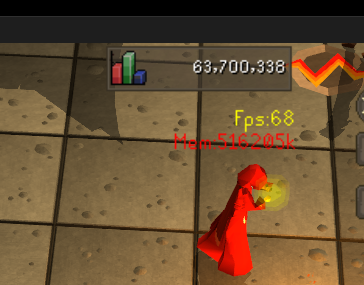 gilded kayak
::displayfps in the chatbox
 sand thicket
my 🐐
 twin vault
Quick question about GPU plugin. I recently changed from fixed mode using xBR UI scaling. I'm not on a resizable mode, but no matter the UI scaling setting, things look really off.
What settings do I have to fiddle with to get letters and numbers to look as sharp as they once were?
leaden trail
I think use catmull-rom instead of xbr
 glacial sand
I think a recent change may have messed with the functionality for fish barrel counts when it is being left-click emptied. If I empty into a deposit box, it will still have the text overlay that it is full until you double click, or check it again.
haughty pumiceBOT
Get support for the Fish Barrel Plugin Hub plugin here: https://runelite.net/plugin-hub/show/fish-barrel.
You can also find the support link by searching for the plugin in the Plugin Hub panel and clicking the ? button on the plugin, or by right-clicking the plugin in the plugin panel and clicking the Support menu option.
glacial sand
I don't have that plugin, I only use Item Charges Improved
gilded kayak
ok well then its that plugin
haughty pumiceBOT
Get support for the Item Charges Improved Plugin Hub plugin here: https://runelite.net/plugin-hub/show/tictac7x-charges.
You can also find the support link by searching for the plugin in the Plugin Hub panel and clicking the ? button on the plugin, or by right-clicking the plugin in the plugin panel and clicking the Support menu option.
 vivid dock
scout overlay stays at olm room. and it's just double named rooms on the overlay. like tekton tekton tekton crabs crabs crabs. anyone know a solution?
vivid dock
something like this
 twin vault
leaden trail
I think use catmull-rom instead of xbr
twin vault
leaden trail
I think use catmull-rom instead of xbr
That goes and makes everything uniform, but real pixilated 🤔
torn mountain
which amd adrenalin version should i be using? i've tried the latest, 24.10.1 and 24.5.1 and they still make runelite freeze and crash quite often
torn mountain

this is what ends up happening randomly, the game freezes but i can still interact with the plugins on the side
 hidden pawn
Is there a way to pull animation IDs from the dev client still? I wanted to add an animation ID for feathering bolts as it was peeving me that Idle Notifier didn't keep track of it for fletching. Didn't find anything in the documentation so was curious if I just missed something
 charred wind
vivid dock
something like this
charred wind
vivid dock
something like this
Looks like you’re using some hub plugin for scouting
leaden trail
hidden pawn
Is there a way to pull animation IDs from the dev client still? I wanted to add ...
You can just use Identificator from the plugin hub to find them
hidden pawn
leaden trail
You can just use Identificator from the plugin hub to find them
thank you very much!
 gaunt elbow
Is there a way to add potions from storage into existing bank tags?
round jacinth
you can add them when you layout
gaunt elbow
But not to existing layouts?
round jacinth
that i am not sure, if your layout had potions before it will use those same potions
if not you maybe have to remake the layout?
my layouts all worked when i got potion storage because the potions didnt change
gaunt elbow
ok thanks, may just have to remake. Im trying to replace my super attack/str with supercombats in some layouts
 hot sparrow
Hey, I have two monitors and ingame text becomes very blurry when I open another game and I have to restart Runelite every time this happens to get it to go back to normal. Does someone know what's going on or what the fix would be?
I saw people suggest nearest neighbor online, but that didn't do anything
 potent vault
I think theres a weird bug where making headless arrows doesnt produce xp drops nvm
round jacinth
did you click the xp orb to hide xp drops
potent vault
Yeah.. nvm. I dont remember clicking it
 ripe reef
Hi, for some reason after reloading my PC today my plugins all seem to be gone. Is there a way to recover the settings I previously had?
haughty pumiceBOT
 atomic sphinx
question: for some reason the improved item charges plugin has a tracker for the binding necklace that I cannot turn off
its rather bugged on this plugin so I prefer to use the main item charges plugin's version for the item
any idea on how to get rid of this specific thing?
there is no option i can find anywhere for this item
turning off the plugin entirely works, but tht is an annoying solution
round jacinth
standard issue hub quality
make an issue against their repo for the plugin
otherwise that is the behavior it will have
 light trellis
where do you locate the info box that displays how long you are frozen for in pvp
 crisp dune
It's part of the Timers & Buffs plugin
light trellis
weird its not displaying, ill have to test why. Thank you ^^
crisp dune
where isn't it displaying?
light trellis
like an infobox while being attacked, maybe its seperated and under a menu
crisp dune
It should be the "Freeze timers" setting under the miscellaneous group for the plugin config
light trellis
yeah i have ti on, i just havent been seeing it on my screen when frozen,must be under something
crisp dune
Could be. If you've resized your client, it could be showing up outside your current viewport
try sizing the client up before getting frozen
 marble sleet
I’m trying to download on my windows 11 home Samsung laptop, just downloaded Java. But when I do it tells me that this program doesn’t support the version of windows I’m running but it’s my most up to to date one ? Does anyone know how to help? 🙂
zealous cedar
you probably need to click this
 crisp dune
You don't need to download Java to use RuneLite, just download the launcher and run that
marble sleet
Thank you I’ll try 🙂
 versed mural
is there anyway to get the original ones we had before. i really dislike these ones
mossy swan
no
versed mural
(sorry if its wrong channel for this)
 languid umbra
how can i check what acc i used to login to runelite? did that years ago and want to install it on a new laptop
gilded kayak
 button
 fathom wolf
idle notifier doesnt work for me for some reason? doing shooting stars. notifications are on, client is not in focus
when I turn on idle movement notifications it works
windows isn't on dnd mode or anything
 ionic dome
Hi, my old laptop's motherboard died and I'm unable to turn it on and access any of the files from it. Is there any way get recover my runelite profiles on my new laptop?
fathom wolf
disconnect the ssd/hdd, connect it to another system
if the storage is alive you'll be able to save your data
or if you've logged into runelite with your google account and backed up your profiles to the cloud, you should be fine
sonic birch
!transfer
haughty pumiceBOT
sonic birch
!lost if no access at all
haughty pumiceBOT
 void gate
Have an issue where the value tacking on the "Looting Bag" plugin does not properly update when picking up or adding items to the bag and only displays its value properly when checking it manually
haughty pumiceBOT
Get support for the Looting Bag Plugin Hub plugin here: https://runelite.net/plugin-hub/show/looting-bag-value.
You can also find the support link by searching for the plugin in the Plugin Hub panel and clicking the ? button on the plugin, or by right-clicking the plugin in the plugin panel and clicking the Support menu option.
 topaz ridge
Hey guys, my brother is having an issue downloading RL, everytime he does it the file just gets stuck on "Resuming" and wont begin to download? Any ideas on why this is happening?
looks like this
 gilded kayak
did he try a not awful browser
topaz ridge
sorry that is brave
but same thing on chrome

i've tried digging and can't figure it out lol
gilded kayak
something is definitely blocking/interacting with the download since it should never be displaying the UUID of the file
it should always say RuneLiteSetup...
i'd have to guess antivirus but i'm not actually sure
topaz ridge
gilded kayak
something is definitely blocking/interacting with the download since it should n...
thats what i think
on what u said
gilded kayak
it's probably a downloads stuck on resuming google search
zealous cedar
topaz ridge
nope still nothing
i just had him turn his firewalls off to see too
still didn't work
topaz ridge
zealous cedar
try https://sigterm.info/runelite/2.7.2/RuneLiteSetup.exe
any other ideas?
zealous cedar
no
topaz ridge
o
gilded kayak
that idea was just a fallback to "some people have issues downloading from github"
but those people can always download from his website
crisp dune
If they have firefox installed, they could try using that
topaz ridge
I don't think it's browser related, it seems like it's being blocked by something or he's missing software to be able to read it
cause the file download shows up totally wrong
like the pc doesn't know how to read it
crisp dune
We have had people in the past not be able to download on Chrome (or Chromium-based browsers) and have Firefox work fine. That said, you're right usually they don't have that odd filename appearing
topaz ridge
he's trying different broswers none work
i tried zipping the file and sending to him as well from my pc still showing this

Alright ima do some digging ty anyways
ill figure it out
 calm lotus
Hello, I was playing on runelite not 2 hours ago and things were fine, then I had to restart my pc. All of the sudden everything seems really grainy on my main monitor, but when I move runelite over to my second monitor everything seems fine.
I've tried disabling 117 HD, messing around with settings there, and on the runelite plugin to no avail
Other games look fine on my main monitor it's just runelite that all of the sudden has changed
gilded kayak
seems like the easiest guess would be a gpu driver/windows update
calm lotus
I'm all up to date
gilded kayak
well were u up to date 2 hours ago
i know that's not really a question a normal person could answer but
calm lotus
I get it lol, so I wasn't but then I restarted my pc and saw that runelite looked like shit so I updated my gpu drivers
And it didn't fix anything
calm lotus
Yeah, i've restarted several times. Messed around with scaling and stretched mode. It seems to be a resolution issue but I can't figure out how to fix it since i've messed with just about everthing I can in pluglins
I guess I can try to rollback my windows and see if that fixes it
stone parcel
Maybe trying older GPU drivers would help. Also the 1 monitor thing makes we wonder if its a setting in your GPU (AMD, Nvidia) program.
calm lotus
I rolled it back and it did nothing
I've looked around in the nvidia setting and everything looks normal
calm lotus
I've booted up world of warcraft and enshrouded and those both look immaculate. Not sure what is going on
leaden trail
Runelite uses the GPU in kind of a weird way
calm lotus
I've messed around with the resolution a bit but it doesnt seem to do anything. I just wonder what made it change all of the sudden and how to undo it. I wasn't messing with any settings when it happened
calm lotus
I rolled back a windows update and it seems to have worked
calm lotus
calm lotus
I rolled back a windows update and it seems to have worked
It still looks off. Not sure what is going on but I guess I have to learn to live with it
 verbal flower
if there a guru here that knows how the ground items plugin works
 trim wadi
any plugin that can tell me my spellbook before starting a cox? theres one for the other two raids
 verbal flower
can anyone tell my why in the ground item plugin you can highlight or hide items but you cant set them to defualt
gilded kayak
if it's hidden press the hide button again
if its highlighted press the highlight button again
hide is -
higlight is +
i think
verbal flower
i tried that but it doesnt turn them to my default color @gilded kayak
 gilded kayak
did you forget that you changed the color of that specific item?
default color works fine for me personally
verbal flower
is there a setting or something that would change that
gilded kayak
cyan (default) for the willow log, and yellow for the maple log I changed for that item specifically a while back


if the item has Reset has one of the options, then the color was changed manually
verbal flower
oh i guess i can do that from now on
yea that works
would you happen to know a plugin that can permanently remove the examine option from all things for me?
gilded kayak
 verbal flower
i love you sir
@gilded kayak where do we give credit to helpful people in this server
haughty pumiceBOT
If you are looking to support RuneLite, you can do so through our Patreon: https://www.patreon.com/runelite
gilded kayak
just saying we were very helpful
idk i'm sure alex and I will make someone mad one day and there will be a 2007scape thread about us
so comment in that future thread about* how nice i was i guess
xd
leaden trail
Or tell people I'm a potato
 wet gull
Why does close by itself? and freeze ????
haughty pumiceBOT
To find the logs, you can do one of the following:
- If your client failed to open, click the
Open logs folderbutton. - Open the screenshot directory by right-clicking 📷
Camerabutton, navigate 1 directory up, then open logs folder. - Navigate to
%userprofile%\.runelite\logson Windows or$HOME/.runelite/logson Linux and macOS.
Upload the log files named client and launcher by dragging them to Discord. If there are files prefixed with jvm_crash dated from today, upload them too.
oblique plume
gilded kayak
idk i'm sure alex and I will make someone mad one day and there will be a 2007sc...
I'm surprised there aren't any already
wet gull
?
gilded kayak
well the client can't figure out what time it is so that's probably not good
i've never seen logs that have ??? instead of the date and time
wet gull
oh
But how to solve it?
It's almost an individual problem but I don't mind you thank you
 lofty sable
Clan member has been asking about runelite for awhile. Said he can't download it so thats why he's mobile only. Said he has a laptop soon after found out that its a chromebook which uses ChomeOS operating system. Is he able to download runelite with that OS or no?
lofty sable
Not sure
gilded kayak
https://github.com/runelite/runelite/wiki/FAQ#linux-appimage for non jagex account
https://github.com/TormStorm/jagex-launcher-linux?tab=readme-ov-file#chromebook for jagex account
uses the built-in linux terminal no matter what type of account he has
but jagex accounts are not supported on Linux so u have to use 3rd party if you have one
lofty sable
Okay so depending on whether his account is linked to a jagex acc or not, he needs to pick the respective link and following the directions?
gilded kayak
yeah, but our wiki page doesn't actually have the instructions on how to enable the linux terminal
the second link does
lofty sable
I'll pass the info along
lofty sable
@ivory zenith Hey
 ivory zenith
Sup
lofty sable
Okay looks like you need to go to the second link on your chromebook If i understand @gilded kayak correctly
GitHub
Community projects to install the Jagex Launcher and use Jagex Accounts in Linux - TormStorm/jagex-launcher-linux
gilded kayak
2nd link has the important instruction on how to enable the linux terminal
if you have a jagex account, keep following that
gilded kayak
gilded kayak
<https://github.com/runelite/runelite/wiki/FAQ#linux-appimage> for non jagex acc...
if you have a legacy account, this first link is what u want, after you enable the linux terminal
ivory zenith
Am I. Phone for discord
lofty sable
Yeah I understand you are using phone for discord. On your chromebook you need to open the second link and follow instructions under the "Chromebook" section
It'd be easiest if you download discord on your chromebook and then just click the link posted here
This section fyi
 swift vigil
im still having crashign issues after trying everything that wass suggested, really unsure where to go, ive used runelite daily since 2016 and never had a problem. ive removed all plug ins and uploading my logs didnt get me anything that wroked
zealous cedar
did you try safe mode?
zealous cedar
can you get the crash log from safe mode?
swift vigil
i believe the one i uploaded last was, but i can get it to crash again
lofty sable
No idea what I just did by accident. Think I click and dragged or double clicked or something and all of a sudden my minimixe/maximize tab at the top disappeared. Can't drag the client or access pluggins or anytihng. What did I do?!
 zealous cedar
ive not seen that before
lofty sable
well I have no idea how I did that but I was able to get it back to normal. Had to force close client
swift vigil
this was yesterdays i beleve
im struggling to find runelite safe mode, yesterday u was able to
im sorry im not really a pc guy, just an osrs guy
zealous cedar
oh I dont know what causes this
swift vigil
its the weirdest thing, i havbent done anything different on my pc in years
gilded kayak
lofty sable
No idea what I just did by accident. Think I click and dragged or double clicked...
i thought i had seen this before but the issue i was thinking of looks more like this

which just comes sometimes from resizing the client extremely quickly
and resizing it again fixes it
lofty sable
Might have been. It was an accident whatever I did. I misclicked and must have cliked on the bar by accident.
I couldn't resize it at all. Had no access to it once it happened. Had to close it from the taskbar tab
gilded kayak
yeah what you posted seems more broken than this thing i can replicate
lofty sable
swift vigil
this was yesterdays i beleve
Exception access violation. That's weird. How you like the 13400f? I have a 13600k
swift vigil
zealous cedar
oh I dont know what causes this
would you have any idea what would need to be done to fix it? reinstalling left me at the same spot, would i have to factory reset my pc?
zealous cedar
i dont think that would help
lofty sable
Total shot in the dark but have you kept up to date with updates?
like windows and what not
swift vigil
it works on my wives pc
i have, it says i have 1 available but then doesnt show any, refreshes and says i have none
lofty sable
I'm totally ignorant on how to read code. The one line under the fatal errors mentions google though. Kind of odd
swift vigil
im also completely unaware of the sorcery behind ther screen, but yeah i saw that
lofty sable
What is adoptium? Says you can submit a bug report and provides a link after
swift vigil
i have no idea
zealous cedar
it could be a hardware issue maybe. adoptium is the java distribution we use
swift vigil
would you have an idea what component would casue this?
zealous cedar
ram. you could run memtest maybe and see if it shows anything
swift vigil
adam, you are the creator correct? id love to donate because the last 8 years have been awesome, and the fact youre willing to support this is huge to me.
ill try a memtest
lofty sable
@swift vigil


Think Adam is on to something
You haven't tried to overclock recently or anything have you?
swift vigil
The update that would show I needed and then wouldn’t, I deleted and I’m rebooting and installing now (mobile now) hoping that is the issue, if not my tech savvy wife is going to put her ram in my pc in the morning and see if it works, and I’ll just buy a new thing.
lofty sable
Before you try to load runelite, how much ram do you have free?
Can check in task manager
swift vigil
I will yeah when it loads and such
lofty sable
Can also update your drivers. I mean it wouldn't hurt to do so if you haven't in awhile, regardless if it helps with the issue or not. Like your GPU.
Also reading that system security/firewall can cause exception access violation issues. You didn't change anything recently with your antivirus protection did you?
swift vigil
I’ve had this pc for almost 2.5years and I haven’t changed anything, that being said I haven’t updated a driver in last 8 months since my last issue with another program
lofty sable

GitHub
A fatal error has been detected by the Java Runtime Environment: # # EXCEPTION_ACCESS_VIOLATION (0xc0000005) at pc=0x03d9c70d, pid=15208, tid=9740 # # JRE version: OpenJDK Runtime Environment (11.0...
Found this thread. May be useful
same access violation you're getting
swift vigil
Ok interesting thank you so much for this. Really huge for me
I’m doing a me test now that everything is reinstalled (windows updates)
lofty sable
I hope you find a solution. Idk anything about this stuff but trying to help. I feel your stress. Sucks to have no idea what the issue is and not be able to play our beloved game
swift vigil
It’s crazy to me because it’s so out of the blue I was like, everyone must be suffering and then no one else was lol
lofty sable
Install and new pluggins recently?
For what it's worth, this is what AI Overview has to say lol
 swift vigil
lol ok
lofty sable
 swift vigil
I removed all of my plugins, the only ones I added were the better teleport one
That’s actually super useful lol
Ai is sometimes legit, I’ve been conned before though from ai-thinking it was 100%
lofty sable
AI is in a weird place. If you don't know better, sometimes it sounds like it really knows what it's talking about... Then you ask it something specific that you know a great deal on, and you can see where it goes wrong and makes bad assumptions.
I'd probably pass on the system restore idea, but the rest won't hurt and probably are good to do anyways regardless of this issue
Well, ping me if you get it figured out. I'm invested in your outcome.
stone parcel
Did you turn off SpeedStep?
swift vigil
What is speedstep?
sand thicket
Would anyone know why in Zulrah Helper plugin, "Jad phase" occurs during what the plugin shows as Phase #9 Green, but on YouTube videos other peoples Jad phase consistently gets correctly indicated with a "green/blue" half and half orb
And yes I know his magic phase he can swap attacks but this was straight up one after the other during green phase, never seen any rotation show Jad phase being correctly labelled with blue/green orbs
swift vigil
lofty sable
Well, ping me if you get it figured out. I'm invested in your outcome.
I definitely will, I’m using my work laptop on my second monitor while my men test is going
swift vigil
I believe I did
stone parcel
Might want to double check that it is off.
swift vigil
I will, my mem test is almost done, I appreciate your help
 lapis elm
sand thicket
And yes I know his magic phase he can swap attacks but this was straight up one ...
lapis elm
sand thicket
And yes I know his magic phase he can swap attacks but this was straight up one ...
Use the prayer icons
swift vigil
My memtest finished and restarted my pc, do you know where I get the information?
lofty sable
did you use memtest86?
swift vigil
I used the windows one
lofty sable
this one?
 lofty sable
on your bottom left search Event Viewer>Windows Logs>System


Accompanying article can be found at https://www.makeuseof.com/tag/windows-stop-code-memory-management-bsod/
Windows 10 throws up a dazzling array of error messages and stop codes when things go wrong. When a blue screen of death (BSOD) error hits, you can use the Windows stop code to pinpoint and fix the issue.
At times, stop codes issue for ...
swift vigil
So far everything seems in line
lofty sable
Even if there was a problem with the memory, I've heard the windows ram test isn't always reliable versus memtest86 for example
just out of curiosity what % is your memory running at in task manager while idle (before you try to open runelite)
swift vigil
cpue 4 memory is 43 which seems extremely high
highest is only 418 mb
so my ram is fried?
with runelite it goes up to 47%
 zealous halo
G'day, currently having an issue with my runelite client closing with no crash code or warning, just wondering if anyone else is experience this or if i'm an isolated issue, cheers.
swift vigil
i might be the only other
haughty pumiceBOT
To find the logs, you can do one of the following:
- If your client failed to open, click the
Open logs folderbutton. - Open the screenshot directory by right-clicking 📷
Camerabutton, navigate 1 directory up, then open logs folder. - Navigate to
%userprofile%\.runelite\logson Windows or$HOME/.runelite/logson Linux and macOS.
Upload the log files named client and launcher by dragging them to Discord. If there are files prefixed with jvm_crash dated from today, upload them too.
sonic birch
i won't have time to look at them till tonight though, so ping me in about 10 hours if nobody has looked at them at that point
lofty sable
swift vigil
cpue 4 memory is 43 which seems extremely high
I dont think so. 43% memory isn't bad. I'm comfortably sitting at 50% with discord, multiple chrome tabs, and 3 RL clients
swift vigil
i played for 25 mins after all of my things i tried. it still crahed
lofty sable
Is that what's been happening? Able to load client and play for some period of time, then randomly crash?
swift vigil
yeah
lofty sable
IS that just playing on one RL client or do you play multiple at a time?
swift vigil
one
lofty sable
swift vigil
one

Really hard to find good info on this issue. Read through multiple threads to no clear avail


^ that one is from Yves X D
did you try disabling the speedstep yet?
 narrow ridge
I just logged on and all my plugins are gone? I launch the game via Jagex launcer and select RuneLite as a client, always done this with no issue but now I have no plugins
haughty pumiceBOT
 sharp glen
Malformed Login Packet?
been happening here and there the last month, havnt played my hcim.. how to get rid fo it
mossy swan
sharp glen
Malformed Login Packet?
been happening here and there the last month, havnt play...
stick to one channel please, and that would be issues with your connection to jagex. first things to try would be restarting your router and pc
 knotty quail
Hey Fellas and ladies how the hell do I change the blue text here? I have checked in game settings and runelite settings and I can’t seem to find it. Tried server messages game messages auto chat and 1 other I can’t think of. Tried the “force recolour” plug in too and couldn’t find it in there unless it’s a settings I don’t know the name of? Thanks
 mossy swan
probably force recolor can do it but idk how to configure it
that comes colored from jagex so runelite by default can’t do it
knotty quail
mossy swan
probably force recolor can do it but idk how to configure it
Yea I tried couldn’t figure it out either
I could change the white part of the text but not the blue part
haughty pumiceBOT
Get support for the Force Recolor Plugin Hub plugin here: https://runelite.net/plugin-hub/show/force-recolor.
You can also find the support link by searching for the plugin in the Plugin Hub panel and clicking the ? button on the plugin, or by right-clicking the plugin in the plugin panel and clicking the Support menu option.
mossy swan
seems pretty simple
knotty quail
mossy swan
seems pretty simple
what am i doing wrong i cant tell
 knotty quail
mossy swan
so just type in anima
knotty quail
mossy swan
so just type in anima
tried capital and lower case
 mossy swan
knotty quail
tried capital and lower case
mossy swan
knotty quail
tried capital and lower case
dunno then, you’ll have to ask the person who made that
knotty quail
mossy swan
dunno then, you’ll have to ask the person who made that
Any idea how I would go around that? Thx a ton for the suggestions tho appreciate it
 dreamy kestrel
Hello, does anyone know to to remove that border around my chat? (Macbook pro)

 steep bobcat
For some reason, my runelite is always selecting the wrong profile for my leagues account
and then it tries to switch to the correct and on login and hangs
on downloading external plugins
on OS x
My profiles are also not synced between OS X and windows, is this expected behaviour ?
round jacinth
steep bobcat
and then it tries to switch to the correct and on login and hangs
You probably have a shortcut on the desktop that loads specially profile=nonleagues or what ever
And it’s hanging because of a bad hub plugin. Remove task tracker, that’s my guess for which.
round jacinth
steep bobcat
My profiles are also not synced between OS X and windows, is this expected behav...
Profiles only sync if you click the cloud icon
oblique plume
knotty quail
tried capital and lower case
what if you do Anima-infused
knotty quail
oblique plume
what if you do `Anima-infused`
Was gonna message u but didn’t wanna be a nuisance will try now!
steep bobcat
round jacinth
You probably have a shortcut on the desktop that loads specially profile=nonleag...
I run it from jagex launcher
steep bobcat
round jacinth
Profiles only sync if you click the cloud icon
that's on
steep bobcat
round jacinth
And it’s hanging because of a bad hub plugin. Remove task tracker, that’s my gue...
nice i'll do that thanks
knotty quail
oblique plume
what if you do `Anima-infused`
hmm still dosent seem to work i must be doing something wrong but cant figure it out
 steep bobcat
it indeed had ${version} as a version
oblique plume
turn on debug mode then get the message to show again and post your client log
haughty pumiceBOT
round jacinth
steep bobcat
I run it from jagex launcher
Jagex launcher you launch acc1 linked to profile1 and it won’t switch to profile2 until the world hop corrects the profile I think
There maybe isnt a way for a jagex acc to launch as a league profile
It’s doing its job right afaik tho
knotty quail
oblique plume
turn on debug mode then get the message to show again and post your client log
Sent u a dm
haughty pumiceBOT
@knotty quail To find the logs, you can do one of the following:
- If your client failed to open, click the
Open logs folderbutton. - Open the screenshot directory by right-clicking 📷
Camerabutton, navigate 1 directory up, then open logs folder. - Navigate to
%userprofile%\.runelite\logson Windows or$HOME/.runelite/logson Linux and macOS.
Upload the log files named client and launcher by dragging them to Discord. If there are files prefixed with jvm_crash dated from today, upload them too.
knotty quail
haughty pumice
<@363280882607587330> To find the logs, you can **do one of the following**:
- I...
wouldnt let me upload here worked in dm interestnly its white now also
 leaden trail
You should definitely be able to upload a client log here
knotty quail
leaden trail
You should definitely be able to upload a client log here
Kept saying upload failed tried 1 at a time but it worked in dm not sure why
leaden trail
It's a single file
round jacinth
what file are you trying to place here
knotty quail
round jacinth
because it should be small enough to fit
knotty quail
ok now it worked?
round jacinth
that's launcher.log, can we also get client.log
knotty quail
in the runelite info with the commant he used earlier it asks for launcher and client log
knotty quail
haughty pumice
<@363280882607587330> To find the logs, you can **do one of the following**:
- I...
here
oblique plume
if its white its working
but something could be breaking recoloring it i guess
colored messages are pretty weird sometimes
knotty quail
Is it ok to play in debug mode? I have a fair few vision issues so the blue is really hard for me to see. Can manage if not tho. Glad it’s not just me being silly thx for the help ❤️
oblique plume
debug is fine, i run it 24/7
log files get huge though
debug isnt gonna be whats causing it to work though
knotty quail
Weird I didn’t change anything besides launching in de bug mode
oblique plume
you also changed what color it should be
perhaps you have it set to white or default
that would explain why its white
the settings for force recolor default to the chat color plugins selections
knotty quail
it kept the same settings as before unless i have missed something

but from playing in normal mode and switching to de bug i didnt change any settings
oblique plume
knotty quail
hmm still dosent seem to work i must be doing something wrong but cant figure i...
this one says chat color config, thats why its not pink
reset wont do it
on and off could potentially
since the events should get replayed
knotty quail
ok switched to this config and waiting for new event
fathom wolf
fathom wolf
idle notifier doesnt work for me for some reason? doing shooting stars. notifica...
found the culprit
using dragon pickaxe trailblazer reloaded makes it so that the client doesn't recognize you're mining
 oblique plume
sounds about right
case MINING_CRASHEDSTAR_DRAGON_OR_TRAILBLAZER:
thats in there though
maybe its a different one than that
thats trailblazer 1 and youre using trailblazer 2?
knotty quail
oblique plume
gotta get a new message
it worked! can i switch back to normal mode so i dont have huge log files or not really?
 round jacinth
knotty quail
it worked! can i switch back to normal mode so i dont have huge log files or not...
round jacinth
knotty quail
it worked! can i switch back to normal mode so i dont have huge log files or not...
Yes
knotty quail
ty for all the help!
oblique plume
thats the same message as before
knotty quail
sorry!
 oblique plume
there we go
 round jacinth
jagex won't stop adding more pickaxe cosmetic overrides
oblique plume
so the trailblazer 2 kits need to be added to the plugin to look for
you can make and issue and itl get looked into #suggestions
 thorny flare
hy
round jacinth
hi can you not be named that lol
 left inlet
Issue 1: I have 3 accounts that I actively play. Each has a different runelite profile. I've clicked the sync button many times so that it opens with the profile I want but it always seems to turn off/not work.
Issue 2: Often when I restart my clients (once a week) any changes I've made do not save. Example: I deleted some bank tag layouts/rearranged them/created a new one on my main account profile. I restart the client for the weekly update and nothing has saved and it's actually what it was last time I opened the client. I just had to re-delete 3 tabs that I deleted a few days back
I am logged into runelite and have cloud sync on
round jacinth
if settings are reverting you maybe you've got some permission issues
left inlet
It's not consistent though.. which is why it's strange. It's my computer as well
round jacinth
well i guess it doesn't hurt to try:
you can reinstall runelite from #welcome (you won't lose settings)
then run runelite as admin and then reload client(s) normally
but idk how it'd not work all the time or some of the time
left inlet
I'm opening them through the jagex launcher but I can't recall if I had this issue before that
dont think the launcher makes a difference?
round jacinth
no
left inlet
i dont think the sync per profile button has worked for since it came out
left inlet
this button does not work for me
 oblique plume
so its not saving
you prob have perms issues then i think
since that info is written to a file
left inlet
hmm, cloud sync does what then?
oblique plume
and people commonly lose access to write to that file
left inlet
would that not hold my data
left inlet
even thats turned off once but yeah i know thats why im saying why wouldnt it pull my cloud profile
oblique plume
i dont think they would
left inlet
if i switch pcs it knows and downloads my profile
 solid owl
Every kill on sire I have to log out because the attack option goes away, does anyone know which plugin is responsible?
solid owl
oblique plume
menu entry swapper
ty ty
left inlet
uh im sure you know much more than i do but why does the 2 links say this

it doesnt say anything about saving my data
left inlet
thats what i said/meant
🤣
and that feature doesn't work for me unfort, maybe i do need to reinstall
oblique plume
launch rl as admin once
thatl try to fix perms issues
if you have the latest launcher
oblique plume
what about just finding out now
left inlet
oblique plume
what about just finding out now
good point, it seems to be linking/syncing my data properly now
 thorn pond
is there a !kc for the echo bosses?
gilded kayak
only their exact names, no aliases
also in the small chance u haven't done any kc after december 10th, you'll need to do 1 more kc to get it to show up
thorn pond
alr, cheers!
 rotund fable
can someone tell me how play osrs on linux?
 shell locust
why the launcher won't take me to my osrs client but instead to a new character?
 clear fiber
rotund fable
can someone tell me how play osrs on linux?
clear fiber
rotund fable
can someone tell me how play osrs on linux?

GitHub
Play RuneScape with the Jagex Launcher - in Flatpak form! - USA-RedDragon/jagex-launcher-linux-flatpak
rotund fable
clear fiber
https://github.com/USA-RedDragon/jagex-launcher-linux-flatpak
do you have ytb video of this github? i dont know how to use github i know im monkey 😄
clear fiber
Just scroll down and it's a README file, it's a text document with instructions
rotund fable
alr thx
clear fiber
it's just three lines in the terminal if you have flatpak
I think I used this one

GitHub
Contribute to nmlynch94/com.jagexlauncher.JagexLauncher development by creating an account on GitHub.
first one "repo (automated updates)"
very strange jagex doesn't support jagex launchere on linux, whilst forcing people to use it if you have a jagex account but oh well
viscid lantern
I would just install Bolt(https://github.com/Adamcake/Bolt)
rotund fable
why?
viscid lantern
Thats assuming you have a jagex acocunt, if you dont you can just install runelite through snap
works quite a bit nicer imo
rotund fable
i will have new acc idc 😄
 viscid lantern
if you dont have an account yet you will either have to run the jagex launcher through wine, or get bolt to login
You can also join 7orm's discord, which has a nice collection of resources+guides for linux: https://discord.gg/aX7GT2Mkdu
viscid lantern
if its not a jagex account yes



 clear fiber
there is also a RuneLite.jar which runs on any platform since it's java
but yeah no jagex account then
sonic birch
Can also easily use rl but ok
 cold canyon
Maybe a dumb question asked before, but is there currently a way to menu swap potions in the potion storage to set withdraw amount to desired 1, 5, 10, X type?
sonic birch
no afaik
 nimble bison
runelite has recently began to get some serious frame losses for about 10 min untill it crashes after having the client up for about 5 hours. Anyone know what may cause this?
nimble bison
how can I figure out which?
oblique plume
install the debug plugin and enable heap dump on oom
nimble bison
how does that work
gilded kayak
it will generate a file after it happens again, that we can look at to figure out which plugin is ooming you