#support
1 messages · Page 39 of 1
 fallen zodiac
 zealous cedar
have you tried safe mode?
fallen zodiac
I have and everything works
zealous cedar
... then the issue is caused by one of your plugins
fallen zodiac
Is there any easy to way identify which one that might be? I have 12 plug ins installed and they are all the most popular ones like Quest Helper.
zealous cedar
not easily, just uninstall them until it is fixed
fallen zodiac
Ok thank you
 median nimbus
How do I find out the IDs of the blue moon's tornadoes? trying to true tile mark them
 viral ermine
median nimbus
How do I find out the IDs of the blue moon's tornadoes? trying to true tile mark...
viral ermine
median nimbus
How do I find out the IDs of the blue moon's tornadoes? trying to true tile mark...
NPC ID plugin
 civic folio
i get this error when i try to open the game after adding java to my vpn provider's (mullvad) split tunneling list (a list of apps where vpn is ignored)


not sure if this is even a runelite thing
 mossy swan
split tunneling doesnt work with rl
mossy swan
i think java
civic folio
damn i guess im playing in the steam client then
 viscid lantern
Here is the explanation as to why and a possible workaround: https://github.com/runelite/runelite/issues/15098#issuecomment-1796518159
 finite cove
hello, i am trying to get the item drop sound plugin to work. the support page says to go to /.runlite/item-drop-sounds but i have no idea how to get there. can someone assist me?

 haughty pumiceBOT
To find the logs, you can do one of the following:
- If your client failed to open, click the
Open logs folderbutton. - Open the screenshot directory by right-clicking 📷
Camerabutton, navigate 1 directory up, then open logs folder. - Navigate to
%userprofile%\.runelite\logson Windows or$HOME/.runelite/logson Linux and macOS.
Upload the log files named client and launcher by dragging them to Discord. If there are files prefixed with jvm_crash dated from today, upload them too.
finite cove
ty
good bot
any idea why i dont get a sound when i get the item drop?
i put the grimy guam leaf(id:199) item id into the plug in along with bronze bolts(id:877) to test it out so i can make sure it is working before i put other item ids in and when killing men i dont get the sound.
 haughty pumiceBOT
Get support for the Item Drop Sound Notification Plugin Hub plugin here: https://runelite.net/plugin-hub/show/item-drop-sound.
You can also find the support link by searching for the plugin in the Plugin Hub panel and clicking the ? button on the plugin, or by right-clicking the plugin in the plugin panel and clicking the Support menu option.
 nocturne crown
hello, is there a way to figure out why my fps is so low? i am getting around 30 fps or so when zoomed out fully in safe mode. not using the gpu plugin and i have a ryzen 7 7840hs
zealous cedar
safe mode doesnt use gpu, so your fps will go lower the bigger the client is on screen
nocturne crown
when i try the gpu plugin outside of safe mode, it doesnt seem to help much either
zealous cedar
that seems odd
nocturne crown
i gain some fps, but not a huge amount. that said i dont have a dedicated gpu, but i wouldve thought my cpu could run the game well unless im mistaken?
zealous cedar
define "some"
nocturne crown
~10 fps so 30 -> 40
zealous cedar
go to the gpu plugin settings and turn off "compute shaders", does that help?
and restart the plugin
nocturne crown
oh i had it off, but i reset the plugin settings (and hence that setting turned on) and restarted the plugin and now my fps has jumped up
zealous cedar
.. ok
nocturne crown
thank you
finite cove
is there a way to have two sets of settings for when im on different computers?
zealous cedar
have two profiles
 dusty sentinel
every updatre my pb's keep vanishing. i have no clue what is going on.. my !kc's work but all my solo stuff is gone. how do i fix this..
haughty pumiceBOT
 vast bone
but that might have other impacts that you don't want
if you kill the boss again it'll pick it up from the chat message.
 cinder stump

 leaden trail
That looks like your GPU is angry
 crystal merlin
how would i begin to figure out why runelite is crashing? i did a clean uninstall reinstall, it slows down/gets choppy then crashes
zealous cedar
its probably from a pluginhub plugin, so a reinstall wont help with that
you can use safemode to disable pluginhub plugins
crystal merlin
is there anyway i can figure out which plugin in a smart way? i have a ton
ive played for years idk why its happening now
zealous cedar
plugins update all the time in the background
there isnt a good way to find which one it is
 frosty drum
is there a way to make ground item text smaller when scaling?
the items are SO BIG
its clogging up my screen
 twin vault
Is there a way to have my game client remain the same size, but have the window take up the entire screen?
vast bone
in fixed mode yes, by turning off stretched mode
otherwise no
set your desktop background to black and remove all icons and put your client in the middle.
twin vault
Damn :/
vast bone
why do you want this?
twin vault
So it can be darker
I have dynamic wallpaper on my desktop, and I was hoping I could keep that.
mossy swan
make a black image and put it fullscreen
 shut needle
I am not receiving a JX access token or a refresh token when following this guide. The credentials file is generated with values for all fields except for the two I just shared. Any tips? https://github.com/runelite/runelite/wiki/Using-Jagex-Accounts

GitHub
Open source Old School RuneScape client. Contribute to runelite/runelite development by creating an account on GitHub.
 soft pumice
hey guys anyone knows why i cant drop/destroy a book of the dead ?^^ i tried turning off menu entry swaper but i just dont get the option to destroy it >.<
mossy swan
soft pumice
hey guys anyone knows why i cant drop/destroy a book of the dead ?^^ i tried tur...
!flow
haughty pumiceBOT
flowchart: Please refer to this flowchart for further troubleshooting.
 frail terrace
does anyone know of a setting or plugin that allows you to hide your player's overhead health bar?

several plugins create new resizable health bars, but I cant find anything to remove the original one
 humble cedar
Why do profiles get removed the moment i sync them? External plugins are kept, but all the settigs get reset

 red cobalt
why does runelite randomly crash when playing osrs, feels like at random times, could be after 20 min, can be after 4 hours etc, any help will help please runelite
 mossy swan
red cobalt
why does runelite randomly crash when playing osrs, feels like at random times, ...
mossy swan
red cobalt
why does runelite randomly crash when playing osrs, feels like at random times, ...
turn off compute shaders in gpu plugin
apple gpu drivers bad
 brazen dirge
Is there a way to convert ur banktag layouts(from hub) into the core one? I know theres the auto layout modes but it wont make the layouts same to as i had it with the plugin hub version
 round jacinth
Yes you just export the hub and import it in as core
brazen dirge
wdym import as core
do i export layout, disable the pluginhub plugin and than import again or
round jacinth
Yeah that would do it
brazen dirge
oh awesome
thats easy
ty
Yea there were way too many options on the banktags with both plugins enabled lol
too confusing
round jacinth
Yea you can uninstall the hub one after converting
brazen dirge
u mean hub ye
ya
just afraid some layouts might break but ill try re import all of them
round jacinth
Yeah typo lol
They shouldn’t break
If they do Adam is still tweaking it
As it being in core it’ll have better support hopefully because everybody can maintain it rather than just the one author of the hub plugin
brazen dirge
Yea
I've been working with some ppl from wiki to create gear setups that also comes with a bank tag generation based on item ids, so was kind of contemplating which layout we should use
Prob wanna use the core layout since i assume the pluginhub one wont be maintained anymore eventually
round jacinth
It probably would be but ideally you recommend people to use core plugins because they’re properly written and maintained
Ideally you have and use 0 hub plugins to just be core
brazen dirge
I agree, it'd be ideal to use core now
i assume just 90% of ppl still use pluginhub one since the core layout is relatively new i believe?
round jacinth
Yeah it’s a newer thing but since it supports potion storage more people are using it
brazen dirge
that makes sense ye
i just converted some but seem to be unable to scroll down all the way in the banktag
theres more items at the bottom of my tag but im unable to scroll that far somehow
this is with the pluginhub one turned off
round jacinth
You should be able to unless those items just aren’t down there
Might be easier to show rather than explain if you can record it
round jacinth
That is odd, I presume that’s also when you leave and exit the bank it still does that?
round jacinth
Can you show this is using core and not hub layout
Give GitHub a quick glance to see if it’s a problem already reported and if not you can post it
brazen dirge
If i search for 'banktag' on issues on github the most recent post is from 2021? idk if thats where im supposed to look, im not really familiar with github
round jacinth
core layouts is maybe new enough it could be posted, just wanted you to look first as it’s a good habit to have
brazen dirge
do i create a New issue?
menu entry swapper doesnt seem to work with core layouts either, but i see thats already reported
 fiery wing
Is it possible to get proper resolution support for the galaxy tab s10 ultra. It has a 14.6 inch display and the game looks absolutely horrible on it.
OSRS plays perfectly though but rs3 is a nightmare..
Oops this is runelite, wrong discord hahaha
 teal orbit
Hi, with the bank tag plugin, I was able to import layouts from Bank Tag Layouts hub plugin, but when I try to add a new potion that is in potion storage (that has no placeholders in my bank) to a new Runelite bank tag, they don't show up no matter what. They seem to only show up if I make a layout using Bank Tag Layouts, delete the tag and tab, and then generate a Runelite bank tag with them and import the layout version. Any way around this?
round jacinth
you are maybe using hub layouts instead of core layouts and that's why it is not working, disable the hub one
teal orbit
I've deleted the hub one already, and already converted all the layouts to core, and enabled layouts on it.
Importing an old hub layout works perfectly
But if I try to alter the core layout by adding a new potion, even with none of them in my bank, it doesn't show the potions in the layout.
For example, if I had 20 super restores in a layout and wanted to change them to 20 sanfews, I can untag the super restores and remove from layout just fine. But when I try to add the sanfews, they don't show up in the layout at all.
And there's none in the bank, only in potion storage.
No placeholders, either
 glacial helm
Hello you all. While compiling the client, i'm relying on this error: Could not resolve dependencies for project net.runelite:client🫙1.10.33.1
round jacinth
this is a channel for support for release not how to build
glacial helm
Any suggestion on how can i fix this?
round jacinth
check the wiki for the build guide
glacial helm
oh sorry
leaden trail
Why are you trying to build 1.10.33.1 anyway? 👀
glacial helm
i don't have idea
glacial helm
the current repo
leaden trail
We aren't going to help you build something that isn't RuneLite regardless of channel
 west vessel
teal orbit
Hi, with the bank tag plugin, I was able to import layouts from Bank Tag Layouts...
west vessel
teal orbit
Hi, with the bank tag plugin, I was able to import layouts from Bank Tag Layouts...
Been having this same issue (uninstalled the hub layouts plugin too) ping me if you ever find a fix 👍 otherwise will probably just take the L and keep 4 dose pots in the main bank until jagex fixes storage or the runelite devs pop off
round jacinth
lmfao
leaden trail
I am DEAD
 brittle vine
does runelite update automaticly? or do i need to remove it and download a new one
 solid mesa
It updates every time you launch it if there is an update available
leaden trail
We strongly recommend closing your client at least once a day to make sure you're using the latest version
 ionic sand
Hi, general question because I dont see it in the api while doing some dev work. Is there a way to have a message sent via plugin? I see you can subscribe to incoming and outgoing but maybe Im just not seeing where or if you can send.
zealous cedar
what do you mean by a message?
 echo pier
Hello guys, when I try to open runelite it shows that there was a fatal error and cannot load. I've unnistalled and reinstalled it back and it still shows the same error. Can someone help me pls?
haughty pumiceBOT
To find the logs, you can do one of the following:
- If your client failed to open, click the
Open logs folderbutton. - Open the screenshot directory by right-clicking 📷
Camerabutton, navigate 1 directory up, then open logs folder. - Navigate to
%userprofile%\.runelite\logson Windows or$HOME/.runelite/logson Linux and macOS.
Upload the log files named client and launcher by dragging them to Discord. If there are files prefixed with jvm_crash dated from today, upload them too.
 oblique plume
it says you have no disk space
ionic sand
zealous cedar
what do you mean by a message?
i.e. in this instance I want to reply to a friend via an external input from the plugin
zealous cedar
there is no api to automatically send messages no
echo pier
I have space now, but the problem keeps happening... 🥲
oblique plume
what if you rename the .runelite folder to something like .runelite-old
and let RL recreate it
echo pier
let me try!
oblique plume
since theres prob some broken files in there from the out of disk space stuff
oblique plume
you will want to reimport your old settings then
unless you want to start from scratch
haughty pumiceBOT
echo pier
no no no
oblique plume
so essentially this
naviagate to that .runelite-old folder and get you old profile from there
echo pier
ok ill look into it
oblique plume
then itl import and you should be good to go
echo pier
perfect thank you man! truly!
oblique plume
some hub plugins store data outside the config so they will likely be lost
echo pier
yeah, as long as I dont have to restart everything, its a help 🙏
 kind reef
ionic sand
zealous cedar
there is no api to automatically send messages no
kind reef
ionic sand
zealous cedar
there is no api to automatically send messages no
Gotcha, thanks. Just wanted to make sure I wasn't missing that!
leaden trail
Doing so wouldn't be allowed, for what it's worth
ionic sand
leaden trail
Doing so wouldn't be allowed, for what it's worth
Yeah I had a feeling that was the reasoning behind it
 uneven dune
im sure its been said before; Hueycoatl drops not showing in loot tracker... any bandaid to fix?
round jacinth
it's a known problem yes
and no bandaid fix i dont think
just broken until its fixed
uneven dune
ripski dipski, no worries. thanks! been 500kc so its not a huge deal
 cinder crystal
Hello, I was playing the game via runelite when my power went out. when I launched runelite again I realized all my plugins were gone. I looked into the my-plugins-are-gone-or-my-config-profile-is-missing information page and after looking through all the default profiles and profiles in the various .runelite directory, none of them seem to be my old config with all my plugins/settings. Am I out of luck here?
haughty pumiceBOT
leaden trail
Make sure to follow that carefully, a lot of people miss a step and can't find their settings even though they're there
cinder crystal
I made sure to check all the different profiles in /profiles2, profiles/email, and in just .runelite/. Nothing I found was my old settings/config. I take it this means I'll have to start from scratch
 crystal drum
I have idle notifier delay set to 10000ms but it notifies me almost instantly after action stops. sometimes even during combat. what am i doing wrong?
 oblique plume
are you sure its an idle notification
turn on game message notifications in "runelite" settings
crystal drum
100% sure its from this plugin as when I turn this plugin off it stops
oblique plume
well still do it
crystal drum
 oblique plume
do you want to be notified if youve stopped moving?
crystal drum
with a 10k ms delay sure
oblique plume
well, then thats what its doing
crystal drum
oh wait, i think i get it
leaden trail
cinder crystal
I made sure to check all the different profiles in /profiles2, profiles/email, a...
Share a pic of the contents of your profiles2 folder and include file sizes and dates
cinder crystal
 crystal drum
ok, so I unticked idle movement notification and its fine now. I was killing the mob in about 10 seconds which is why I thought it was a combat notification. turns out the notification was 10seconds after I was in 1 tile. lol
leaden trail
That would be 10k ms, yes
oblique plume
that looks like youve synced over the 0 id profile with an empty one
crystal drum
yeah, I thought "you have stopped moving" meant moving in combat lol
thanks for dumbing it down Alex lol
 safe fog
i was using tedious collection log i was getting the sound de collection log now i am not anymore any help on the issue thanks!
 primal plover
Anyone know why im having this when trying to install? Tried seeing #faq so i appologize if i missed it

Also I ran the launcher as administrator
zealous cedar
do you have runelite already running maybe?
primal plover
No I've checked task manager
zealous cedar
idk, try rebooting
primal plover
Ya that was my first guess going to try now
oblique plume
its was antivirus doing it for the last guy
primal plover
oblique plume
its was antivirus doing it for the last guy
me?
Looks like restarting my pc solved the issue, thanks guys
 dreamy oriole
Is there a plugin to show these options as an drag-able info box? https://i.imgur.com/yWG1ejw.png
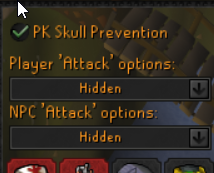
mainly the player attack option and npc attk options as hidden, and if it's changed it will show as required
 charred wind
Are you saying you want a plugin that displays the current configuration of those three options without being in that menu?
dreamy oriole
correct
and you can toggle which one you want off/off
ignore the pk skull prevention, just the bottom 2
charred wind
You cannot change the settings with a plugin
dreamy oriole
no like it just displays the information
charred wind
I believe you can view their contents though
round jacinth
Is opening that tab not an option lol
Attack style shows cause people got restricted builds
dreamy oriole
round jacinth
Is opening that tab not an option lol
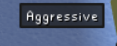
yeah it is, it's just for when i'm switching constantly between the options, if npc option is off, you sometimes yellow click and can be annoying to reswitch if you don't know
https://i.imgur.com/2t5EexL.png something like this that just says npc attack option: hidden
 charred wind
Yea it could probably be done. Could post it to #suggestions
 teal vessel
might be a stupid question - is there a way to use stretched mode/interface scaling to make the scaling pixel perfect?
I used to run a 1440p monitor and play osrs in 1280x720 with no scaling, everything was obviously very crisp since no scaling going on
now I'm running a 5120x2160 monitor, and I want to play osrs in the same "physical size" as I did on my 1440p monitor, this means I'd need to make runelite 1536x864 with 20% interface scaling
however, the font scaling isn't great, I can visibly tell that it has artefacts and isn't as crisp. Is there any way to make it pixel perfect?
fyi I've got UI scaling mode set to Catmull-Rom in 117 HD, and I'm also using 125% windows scaling on my new monitor
comparison images attached


 pallid kettle
Hi
I just tried installing Runelite but i get this error
Any suggestions?
 zealous cedar
do you have a vpn on?
 warm pollen
pallid kettle
Hi
I just tried installing Runelite but i get this error
Any suggestions?
warm pollen
pallid kettle
Hi
I just tried installing Runelite but i get this error
Any suggestions?
Have you installed Runelite before on that device?
pallid kettle
i have and no VPN on
warm pollen
I had a weird error like this a couple years back, and it basically had to do with me still having Runelite files from an old installation. Maybe check where it was last installed, and make sure all files are wiped. Some programs don't play nice when there's old stuff lying around that it doesn't understand anymore
pallid kettle
ok i'll try to uninstall again and delete everything i can find from runelite and try again
still the same error
zealous cedar
can you upload the launcher log file here?
haughty pumiceBOT
To find the logs, you can do one of the following:
- If your client failed to open, click the
Open logs folderbutton. - Open the screenshot directory by right-clicking 📷
Camerabutton, navigate 1 directory up, then open logs folder. - Navigate to
%userprofile%\.runelite\logson Windows or$HOME/.runelite/logson Linux and macOS.
Upload the log files named client and launcher by dragging them to Discord. If there are files prefixed with jvm_crash dated from today, upload them too.
 balmy karma
My runelite is crashing constantly 😦 no error it's just closing out
Would anyone be able to take a look at my log?
If not no worries but I can't seem to fix it
zealous cedar
@vast bone ^^ ?
leaden trail
Do you have another client log with today's date?
zealous cedar
2024-10-21 is todays date
leaden trail
Yeah it looks like it started a second log
balmy karma
looks like that's the only one and then the one before it is on the 11th
vast bone
zealous cedar
<@425096765650239488> ^^ ?
is this about the conversion thing?
that doesn't look like a crash
zealous cedar
this persons log has a btl exception in it
2024-10-21 16:02:44 PDT [Client] WARN  n.r.c.ui.overlay.OverlayRenderer - Error during overlay rendering
java.lang.ArrayStoreException: arraycopy: element type mismatch: can not cast one of the elements of java.lang.Object[] to the type of the destination array, java.lang.String
    at java.base/java.util.ArrayList$SubList.toArray(Unknown Source)
    at java.base/java.lang.String.split(Unknown Source)
    at java.base/java.lang.String.split(Unknown Source)
    at com.banktaglayouts.Layout.fromString(Layout.java:28)
    at com.banktaglayouts.BankTagLayoutsPlugin.getBankOrderNonPreview(BankTagLayoutsPlugin.java:1672)
    at com.banktaglayouts.BankTagLayoutsPlugin.getBankOrder(BankTagLayoutsPlugin.java:1651)
    at com.banktaglayouts.FakeItemOverlay.render(FakeItemOverlay.java:45)
    at net.runelite.client.ui.overlay.OverlayRenderer.safeRender(OverlayRenderer.java:734)
    at net.runelite.client.ui.overlay.OverlayRenderer.renderOverlays(OverlayRenderer.java:328)
    at net.runelite.client.ui.overlay.OverlayRenderer.renderAfterLayer(OverlayRenderer.java:250)
    at net.runelite.client.callback.Hooks.drawLayer(Hooks.java:547)
this?
zealous cedar
pallid kettle
this?
firewall maybe? not sure
pallid kettle
just added runelite as an exception in firewall but still same error
vast bone
how is that error even possible?
zealous cedar
the btl one?
vast bone
if the function receives 2 non-null strings how can it throw an exception?
yeah
String#split
zealous cedar
idk id have to look at the code to see
vast bone
the argument is not null and the string it's called on can't be null. And if it was an empty string surely it would throw a different error no?
weird.
balmy karma
Would it be worth it to just try disabling all external plugins for now?
zealous cedar
this log might be fake actually, telemetry shows this error never happens
balmy karma
my log lol?
zealous cedar
or wait i guess just an overlay error wouldnt go to telemetry
so i cant tell
oh well
zealous cedar
balmy karma
If not no worries but I can't seem to fix it
i guess uninstall bank tag layouts and see if that stops the exceptions spamming or not
if it doesnt then try to find what is causing the spam and kill it
balmy karma
zealous cedar
i guess uninstall bank tag layouts and see if that stops the exceptions spamming...
Sounds good thank you!
 gilded kayak
@lost mirage yes, I believe the inventory setups dev is working on integration for the default bank tags plugin
 lost mirage
I actually don't use Bank Tags. I use Bank Tag Layouts + Inventory Setups
gilded kayak
yes I know
only bank tags has the potion storage, and inventory setups is not yet working with bank tags
the inventory setups dev is working on that
balmy karma
Am I okay to
lost mirage
Thanks for holding my hand through the answer lol
balmy karma
Could the integration be causing crashes felan?
gilded kayak
what I said is specific to Chris' questions in another channel, we just moved here and continued
balmy karma
oh okie sorry
 warm cape
lost mirage
I actually don't use `Bank Tags`. I use `Bank Tag Layouts` + `Inventory Setups`
warm cape
lost mirage
I actually don't use `Bank Tags`. I use `Bank Tag Layouts` + `Inventory Setups`
I'm working on integrating Bank Tags (core) with inventory setups. This will then support potion storage. It's still in progress.
lost mirage
Nice! Ty 🙏
 grizzled birch
is the bug where monsters stop appearing on client solved?
charred wind
what
zealous cedar
you might have to be more specific
 glacial otter
Hi i have a problem, can someone help me pls?
I'm using an email on to log on runelite that used to be a gmail, but now it migrated to outlook and now i can't log in anymore, is there a way to log back in?
 wicked lance
glacial otter
I'm using an email on to log on runelite that used to be a gmail, but now it mig...
wicked lance
glacial otter
I'm using an email on to log on runelite that used to be a gmail, but now it mig...
just use the gmail
glacial otter
its no longer a gmail account
wicked lance
your login username doesn't change you would still use what you used before to sign in
 dusky sky
im back, having issues again with my profiles being overwritten with a blank profile after closing runelite and re-launching via jagex launcher. it looks(?) like its an issue with trying to sync the profiles? can only reproduce the issue when logged in with "Sign in to Runelite"
glacial otter
wicked lance
your login username doesn't change you would still use what you used before to s...
runelite forces you to log with a gmail account
dusky sky
glacial otter
its no longer a gmail account
was it a personal domain via something like google workspace? then moved over to microsoft?
sounds like a pain to fix
wicked lance
nothing changed just use your gmail to log in your log in details never changed
the only thing that would change now is your email that you receive emails to from jagex which you can change once you sign in
glacial otter
it is a mail from university (idk why i used it lol) but it migrated from google workspace to microsoft outlook and can't do anything
dusky sky
the client uses oauth, if the underlying account gets deleted i can imagine that login flow not working
wicked lance
are you signing into legacy or jagex launcher?
glacial otter
i'm trying to log in to runelite.net
dusky sky
i assume he is talking about the "log into runelite" button in the top right of the client
or there
glacial otter
i'm not talking about log in to runescape, just runelite acc
wicked lance
o yea I thought you were talking about runescape my bad
dusky sky
i wish i had some good advice for you wolfrogz, kinda a unique situation you have there. might be able to get in touch with rl devs to get you in
99.9% of people using that login with google accounts are gmails where you aren't gonna run into that situation
glacial otter
yeah didn't think this could happen lol
or is there a way to export the full loot tracker from runelite?
wicked lance
see if you can snipe the same gmail like create an account with the same gmail as before
glacial otter
i'm logged in in that acc on runelite but cant log in on runelite.net
dusky sky
filip its not like that lol
wicked lance
unless it has your school domain in it
glacial otter
wicked lance
unless it has your school domain in it
it does
wicked lance
can you not sign into the outlook on gmail? or i guess Lego was saying something with oauth
 stone parcel
Might be worth trying to ask this again at a different time. There is nothing you can do about it, but maybe during more active hours someone else around here can.
glacial otter
yeah, i was hoping some dev sees this lol
stone parcel
They will eventually haha.
glacial otter
ty for responding tho 🙂
dusky sky
if you want just the loot, the files themselves are gonna be in .runelite/loots
in a folder with a pile of numbers, idk how to work backwards to link the numbers to an account
could maybe transplant that folder once you login to a new account. or wait for rl web dev to peek at the account issue itself
stone parcel
I don't have that folder, I think it is from the pluginhub plugin "Loot Logger".
stone parcel
Cool plugin, didn't know this existed though haha.
dusky sky
does mostly the same thing as normal loot tracker, ive had issues with main one tracking loot in the past so ive used that one as a backup of sorts
is nice to be able to just search my loot tho, like on the fly i can just go "yea ive killed 3536 abby demons and got 3 whips"
glacial otter
yeah i think runelite folder does have a file but with like the last 50 enemies killed or something
if you kill something that "isn't tracking" anymore on your runelite and then restart it, it retrieves the loot track from the cloud
round jacinth
The data shouldn’t be deleted but it’s not meant to perma draw all items ever gotten forever in the side panel
It’s not performant I think, so the website does it.
 deft fulcrum
I have Resource Packs Hub installed. When I change from Profile A to Profile B, if profile B has a resource pack set, it doesn't set until I either change resource packs or restart RuneLite.
Is this an issue I need to report to Resource Packs Hub or is it a problem with the profiles feature of RuneLite?
leaden trail
That would be a resource packs issue
 dull bear
you can just turn resource packs off and on
deft fulcrum
dull bear
you can just turn resource packs off and on
I'm interested in submitting a bug report. I have workarounds
haughty pumiceBOT
Get support for the Resource packs Plugin Hub plugin here: https://runelite.net/plugin-hub/show/resource-packs.
You can also find the support link by searching for the plugin in the Plugin Hub panel and clicking the ? button on the plugin, or by right-clicking the plugin in the plugin panel and clicking the Support menu option.
charred wind
You can submit an issue on the github repo
deft fulcrum
I'm familiar with submitting bug reports
dreamy oriole
What happened to the options for animation smoothing, can we have the toggle off/on back?
teal orbit
west vessel
Been having this same issue (uninstalled the hub layouts plugin too) ping me if ...
I've found a way to add them to a layout manually, it's quite annoying though.
Remove however many doses from storage as you want in the layout
Disable auto-deposit to potion storage
Deposit potions into layout after tagging them
Withdraw all potions into inventory
Enable auto-deposit to potion storage
Release the placeholder for the potion in the layout
Deposit the potions back into potion storage.
Could definitely do with some polishing to make them autopopulate the layout once you've tagged them, but this is good enough for now I guess
round jacinth
i dont know if it's actually that complicated or if you did it wrong. I thought all you had to do was make sure no place holders were in the main bank
maybe some one should do a proper /potionlayouts command with steps lol
teal orbit
I've got no potions in any placeholder in main bank, if you make a new layout, potions don't show up unless you do the above step.
I can record and show it
round jacinth
i dont have storage to check
teal orbit
oblique plume
interesting
 smoky oar
hi all, im having an issue with presumably the object markers plugin. i usually use menu entry swapper's shift click walk-here feature, but recently object markers seems to be overriding this and shift left-clicking to mark some objects instead. there is no option to toggle this in the plugin's settings so i assume it is a bug. it also seems a bit unpredictable as with the scoreboard object in the video, some areas of the scoreboard's clickbox are shift-click walk here, and others mark the object instead
round jacinth
i think this is related to trying to click out to the void, the walk-here is replaced with examines or what ever
smoky oar
ah yea, i remember there being some instances when shift click was swapping the menu option to examine in hunllef room too, so that sounds correct
from what i can tell there isnt an option to disable this behaviour in menu entry swapper or anything so still a bug i think? no idea if its new or not, but i haven't noticed it until the last week or so
 jade solar
Hello. I havent played in a few months. I try to open runelite via the jagex launcher. I see the first two loading screens and then no runelite pops up, nothing happens. If I try to open runelite without the jagex launcher the same thing happens. If I launch the vanilla client it does launch and I can play.
I added the jagexlauncher and runelite to my firewall as allowed app, but that did not work
haughty pumiceBOT
@jade solar Windows
Run the RuneLite (safe mode) shortcut, or with a Jagex account, first run the RuneLite (configure) shortcut and tick the Safe mode box, then launch RuneLite via the Jagex launcher.
Mac
In Terminal, run:
/Applications/RuneLite.app/Contents/MacOS/RuneLite --configureTick the Safe mode box. Launch RuneLite.
If it's not working, download and install the updated RuneLite launcher from the website link in #welcome. You don't need to uninstall your current version. You will not lose any settings or plugins. Then try running safemode again.
round jacinth
try it in safe mode
jade solar
It loaded in safe mode, I can play. Do I have to play in safe mode all the time now
smoky oar
round jacinth
it's new from jagex
ah ok. something that will be fixed at some point do u reckon?
round jacinth
idk if anybody knows
smoky oar
round jacinth
idk if anybody knows
kk no worries. thanks !
 cloud yarrow
for the timers, is there a way to turn on a audible notification when my bird houses or trees are ready? i seem to not be able to get it to work
stone parcel
jade solar
It loaded in safe mode, I can play. Do I have to play in safe mode all the time ...
Safe mode disables 3rd party plugins (hub) and the gpu plugin. So its probably a pluginhub plugin causing your issue if safe mode works.
So you can try disabling or uninstalling some hub stuff while in safe mode, then see if it works basically.
 reef moon
So I've been moving from Bank Tag Layouts to the base RuneLite Bank Tags, and it seems that the layouts for Bank Tags breaks the Menu Entry Swapper's set left click/shift click options. Anyone else running into this?
Screenshots of before, and after enabling layout.

 zealous cedar
yeah its a bug
reef moon
Ah, gotcha. Tried searching for it, couldn't find anything. Thanks for the quick answer, Adam.
cloud yarrow
oblique plume
You can turn on a notification for them
i have em activated but no sound plays, i even used headphones to see but nothin, ill just have to keep the tab open ig
oblique plume
you prob need the notifications while focused option on in "runelite" settings
 gilded gorge

im trynna login it to my accoount that i forget the pasowrd too and its giving me this?

this is the account
round jacinth
the top picture i think is from the jagex launcher..?
the other is runelite.net's profile information
they're different things entirely
the thing below is the rsn and stuff about it like ge history, farming, loot. It's not your runescape acc
gilded gorge
hurmm its still the same username as my account tho
the one up top is from the jagex website
round jacinth
idk what you're asking for.
gilded gorge
Wasent there a way to login via google
mossy swan
if you're a relatively new player or migrated to jagex account at some point, you need to use your jagex account to login
gilded gorge
on RL?
oblique plume
so we cant help you with anything to do with account credentials
gilded gorge
Coudent you log in into rl with google
mossy swan
yes but thats not your runescape account
oblique plume
that has nothing to do with a rs account though
gilded gorge
oblique plume
that has nothing to do with a rs account though
thats how i manged to save it a while back
 hollow olive
mobile account perhaps? unrelated to runelite still.
oblique plume
we have a plugin that can write the last login name used into the login screen
is that what youre saying
gilded gorge
how do i connect via google again
mossy swan
the only way to login to runescape via google is on android afaik
 lethal urchin
Can anyone help me with an install issue? It keeps saying "Setup was unable to create the directory. Error 5: Access is denied."
solid mesa
Do you have an antivirus? Some cause that
 mortal pond
gilded gorge
mortal pond
gilded gorge
That means one of the following:
- You entered the wrong login name
- If your account was created before 2010 the login name is your original character name
- If your account was created after 2010 the login name is an email
- The character has been imported to a Jagex account
- The character has no login name set up with Jagex because it was created by logging in with Steam, Google, or Gamecenter
If you still need help I recommend you go to the #account-help channel on the official discord.
haughty pumiceBOT
If you are new to OSRS, make sure to follow this excellent guide on OSRS wiki: https://oldschool.runescape.wiki/w/New_player_guide. You can also join official OSRS Discord here: https://discord.gg/osrs
dusky sky
is there a way to clear cloud backed-up profiles from outside the client?
oblique plume
hmm, i dont think so
dusky sky
gross. im having some issues with cloud sync trampling my actual profiles
 hollow plume
1217907117495812168
Impostering me & scammer. Using this server as a mutual to pm people. Any chance u could ban it, thanks! @zealous cedar @crisp dune
round jacinth
hollow plume
1217907117495812168
Impostering me & scammer. Using this server as a mutual to ...
for future reference you can just dm the @haughty pumice bot for this type of stuff
hollow plume
sure, thanks!
 sturdy spindle
I tried reinstalling it but it is still showing this message
haughty pumiceBOT
To find the logs, you can do one of the following:
- If your client failed to open, click the
Open logs folderbutton. - Open the screenshot directory by right-clicking 📷
Camerabutton, navigate 1 directory up, then open logs folder. - Navigate to
%userprofile%\.runelite\logson Windows or$HOME/.runelite/logson Linux and macOS.
Upload the log files named client and launcher by dragging them to Discord. If there are files prefixed with jvm_crash dated from today, upload them too.
sturdy spindle
Weird, it might be the antivirus, I'll try that first and then if that doesn't work I'll reboot. Thanks!
It was antivirus, thank you so much!
 wanton estuary
Hi, I'm looking for a fix for a problem my friend has. When playing for a while his 117 Plugin turns off and he gets an error saying something along the lines of "ran out of memory because you're running a 32-bit version of the client" he's using the Jagex launcher any idea on how to install a 64 bit version?
stone parcel
I'm pretty sure if they grab the 64bit installer from #welcome and install it that will change it to 64bit.
wanton estuary
Gonna try that thanks.
lost mirage
Any plugins cause known to cause frame drops/lag in akkha room? I get it there and I've been toggling plugins trying to figure out what it is
 lime jacinth
lost mirage
Any plugins cause known to cause frame drops/lag in akkha room? I get it there a...
lime jacinth
lost mirage
Any plugins cause known to cause frame drops/lag in akkha room? I get it there a...
Is it when theres a lot of entities on screen?
I'm having a weird new issue with Runelite. I never had FPS issues really but now it seems that my FPS decreases over the coarse of a play session. For instance, I teleported to the Farming Guild earlier, and I was at 25 FPS. I reloaded Runelite and now I have 90 in the same world/same place
I first noticed the issue today when I was in TOB and I was getting massive frame drops at Nylos room/Verzik web phase
lime jacinth
yeah my fps absolutely tanks at nylos room for seemingly no reason
dont remember this being an issue
 true skiff
lost mirage
Any plugins cause known to cause frame drops/lag in akkha room? I get it there a...
true skiff
lost mirage
Any plugins cause known to cause frame drops/lag in akkha room? I get it there a...
+1 to this only very recently an issue ~3 days
 thorn gazelle
are profiles synced?
I'm on a different computer and logged into runelite but I don't have my up-to-date profiles on here
 thorn gulch
When you use the --insecure-write-credentials to generate a token. Is there any way to invalidate the token?
I asked about this in the osrs discord and they suggested I ask here
lime jacinth
Holy shit I think I figured it out
lime jacinth
lost mirage
Any plugins cause known to cause frame drops/lag in akkha room? I get it there a...
Did you try turning off entity masker?
 wet shell
hi , recently ive bought a new pc and ever since then my ping on rs always shows as timed out
im unable to know what my ping is , I play normally and not dced but i cant really tell whether im timed out or in game

this is what i mean
can anyone support me on this matter
 west pewter
wet shell
im unable to know what my ping is , I play normally and not dced but i cant real...
west pewter
wet shell
im unable to know what my ping is , I play normally and not dced but i cant real...
World Hopper plugin has a config option 'Display current ping'
wet shell
west pewter
World Hopper plugin has a config option 'Display current ping'
doesnt resolve it
even in the world hopper it shows just a - sign

^same as that
ive tried reinstallation doesnt resolve it either
west pewter
You could check the log file it might record the error (might also have to turn debugging on).
wet shell
west pewter
You could check the log file it might record the error (might also have to turn ...
how can i do that
west pewter
wet shell
how can i do that
There's a RuneLite (configure) shortcut for enabling debug, and the logs are found in .runelite in the home directory.
haughty pumiceBOT
To find the logs, you can do one of the following:
- If your client failed to open, click the
Open logs folderbutton. - Open the screenshot directory by right-clicking 📷
Camerabutton, navigate 1 directory up, then open logs folder. - Navigate to
%userprofile%\.runelite\logson Windows or$HOME/.runelite/logson Linux and macOS.
Upload the log files named client and launcher by dragging them to Discord. If there are files prefixed with jvm_crash dated from today, upload them too.
leaden trail
I don't think it's something that would get logged
It kinda just happens sometimes as far as I know.
Some routers/networks/firewalls just don't like the worldhopper pings afaik
 odd kelp
do all system updates require a runelite update or only major/certain ones?
 silk thicket
I somehow disabled the xp orbs/drops/bar. Just in the middle of a boss kill, everything disappeared. Is there a shortcut of some kind for that?
Tried toggling xp related plugins, nothing happened. Holding Alt shows the boxes where the xp tracker should be
leaden trail
Click the XP orb next to the minimap
mortal pond
Is there a way to hide that button? (the xp drop toggle)
leaden trail
Not as far as I know
wet shell
leaden trail
I don't think it's something that would get logged
so is there any solution?
thorn gulch
When you use the --insecure-write-credentials to generate a token. Is there any way to invalidate the token? the token still seems to be valid after multiple password changes and ending all sessions.
I asked about this in the osrs discord and they suggested I ask here
leaden trail
thorn gulch
When you use the --insecure-write-credentials to generate a token. Is there any ...
This channel is for release client support, you can ask in #runelite
thorn gulch
ty
 viscid burrow
Hi, I am running Old School Runescape on Linux (Linux Mint 22 Xfce). I have Runescape running through Steam's Proton compatibility layer and wish to install the Runelite plugin, however, due to my account being upgraded to a Jagex one. I have to use the Jagex launcher as it won't let me just sign in through the Runelite plugin directly, however, the Jagex launcher is not compatible with Linux. I contacted Jagex directly via Discord and they said they couldn't help me fix the issue (they then referred me to here).
I was also referred to this:
https://help.jagex.com/hc/en-gb/articles/13413514881937-Downloading-the-Jagex-Launcher-on-Linux
However, the YouTube video that's provided on that page isn't even up anymore... Plus there aren't much specified information on how the installation process works on the github links either.
viscid lantern
viscid burrow
Hi, I am running Old School Runescape on Linux (Linux Mint 22 Xfce). I have Rune...
on the github in the first link on that page you can find Bolt Launcher, use that
viscid burrow
viscid lantern
on the github in the first link on that page you can find Bolt Launcher, use tha...
https://github.com/Adamcake/Bolt
This one?
GitHub
An alternative launcher for your favourite MMO. Contribute to Adamcake/Bolt development by creating an account on GitHub.
viscid lantern
yep!
viscid burrow
viscid lantern
yep!
Awesome, thanks. I'll let you know if it works or not.
Linux Mint tends to just be very inconsistent with stuff like this.
viscid lantern
I run mint and bolt works fine
viscid burrow
viscid lantern
I run mint and bolt works fine
Xfce or MATE?
viscid burrow
viscid lantern
cinnamon
Unfortunately my laptop is from the year 2010, so I could only go with Xfce for how lightweight it is.
viscid lantern
they also have a discord if you need help with getting bolt up and running
viscid burrow
viscid lantern
they also have a discord if you need help with getting bolt up and running
Thanks so much.
 sharp gyro
hey is there guide to moving my runelite to new pc
can i just put .runelite on usb drive
haughty pumiceBOT
sharp gyro
better than usb i will put it on my onedrive thx
round jacinth
If you plan on using both pcs enable cloud sync
 mossy yoke
might not be the right place to post, but i can't seem to change my infoboxes from appearing above everything else, really annoying when i'm in my bank
this is an example
 oblique plume
place them in an anchor
those blue squares that show up when you drag something around
mossy yoke
that fixed, thanks very much
viscid burrow
@viscid lantern
It works great, thank you.
viscid lantern
 yay
yay
sharp gyro
unrelated to runelite sorry does syncing ur firefox profile send over all ur bookmarks etc on a new pc
round jacinth
it should probably, google that stuff.
 ruby haven
I maybe found a plugin that can be exploited for botting, would love to get in contact with someone in charge who can look into it.
mossy swan
dm @haughty pumice
 sterile grove
I'm having problems with my runelite audio for several weeks now but I can't find the solution. I have a razer headset which works perfectly for everything except runelite. On max everything I hear a little bit of audio from Runelite (even made a profile for Runelite trough razer synapse) but when I play like this now and then I get a random notification and my ears get fked
someone has any idea?
stone parcel
I'd check your system's volume mixer and also the in-game sound options, just to make sure those aren't the issue.
sterile grove
That is for sure not the problem :p I checked those like 150 times
stone parcel
Does RL play sounds correctly if on a different device? (Not headset)
sterile grove
let me check
uh I fixed it but I didn't? like now my prayers are loud asf
but nothing else
stone parcel
Odd...
sterile grove
uhm apparently I have a prayer volume control plugin or something that buffs sounds for 100% lmao
solved I guess, sorry to bother
stone parcel
Sweet glad to hear! 😁
oblique plume
lol
 uncut meteor
oblique plume
uncut meteor
oblique plume
some hub plugin probably
 ripe mantle
Hi team, I'm at work receiving a fatal error. Is it possible that my ISP/Work Firewall is blocking RuneLite?
zealous cedar
yes
ripe mantle
It allows me to launch the official OSRS client... hmm
I'm not even able to download the bootstrap.. I'm going to try a different connection
zealous cedar
they might have blocked eg only runelite.net
 grave osprey
anyone know what plugin these hp bars are in? I wanna turn it off
 leaden trail
Opponent information
 sweet gyro
I just wanted to check, has the teleport submenu swapper been removed? Looking to start 99 runecrafting grind and want my diary cape to have 1 click option for teleport without submenu, but can't currently configure it with menu entry swapper
hollow olive
don't have my diary cape on me but i think it's working as expected

 spiral trellis
keep crashing when i teleport or leave poh or telport tabs stuff like that any help?
been a problem for 2 weeks now
zealous cedar
try safe mode
spiral trellis
like booting in safe mode?
haughty pumiceBOT
Windows
Run the RuneLite (safe mode) shortcut, or with a Jagex account, first run the RuneLite (configure) shortcut and tick the Safe mode box, then launch RuneLite via the Jagex launcher.
Mac
In Terminal, run:
/Applications/RuneLite.app/Contents/MacOS/RuneLite --configureTick the Safe mode box. Launch RuneLite.
If it's not working, download and install the updated RuneLite launcher from the website link in #welcome. You don't need to uninstall your current version. You will not lose any settings or plugins. Then try running safemode again.
spiral trellis
if it helps i changed to a jagex account and its been fucked since
round jacinth
That doesn’t matter, try safe mode.
gilded kayak
round jacinth
That doesn’t matter, try safe mode.
well it probably means adam is even more correct
 tepid nexus
the attack timer metronome does not show correct amount of game ticks between attacks on the harmonised nightmare staff
haughty pumiceBOT
Support for hub plugins should be directed to the author of the plugin.
You can find the support link by searching for the plugin in the Plugin Hub panel and clicking the ? button on the plugin, or by right-clicking the plugin in the plugin panel and clicking the Support menu option.
 slate saddle
I've been getting "Malformed login packet" errors a lot recently. Restarting client will make it so I can log in again but then it'll happen a couple hours later
leaden trail
That's a Jagex/connection issue
 carmine cedar
why cant i see my xp drops or even my hits in LMS but i can on NPC and in the wilderness ?
gilded kayak
you probably don't have fake xp drops enabled
haughty pumiceBOT
We are using vanilla XP drops. To configure them: https://github.com/runelite/runelite/wiki/XP-Drop
gilded kayak
there's an image there of the fake drops setting
carmine cedar
it still dont show is it because im using customizable xp drops ? but ive never had this problem /
gilded kayak
that hub plugin builds off of the default games xp drops
if you enable that setting, and it still doesn't work, then it's the plugin yes
mortal pond
Maybe you clicked the show/hide xp drops toggle button by mistake?
 mortal pond
oh
carmine cedar
okay thank you
 subtle flame
Hi, i'm having issues with Stretched Mode, it's a bit blurry and not sure how to fix. Have tried changing UI scaling in GPU, checked GPU drivers forcing Anti aliasing as well as overriding windows scaling, any ideas what's causing this?
 remote cave
idk if this is the right channel but a friend of mine was interested in recoloring specific player menu entries. i was gonna post something on the suggestions github discussion but i know theres currently a plugin that lets you recolor menu entries by a hotkey. this plugin excludes player entries. is the swapping or altering of player entries just totally blocked from like a jagex compliance angle? i know they dont want u changing priority or reordering player or spell entries
zealous cedar
I dont think there is any issue recoloring them
gilded kayak
🤞 please tell me it said cocked meat before
remote cave
zealous cedar
I dont think there is any issue recoloring them
i know there is particularly with the plugin on the hub rn but that may be a fault of just the plugin. i can go ahead and post the suggestion
 frank vigil
I had to ask the cook how to make them durrr
 delicate solar
ok i need help i am here to ask about the c engineer plug in if this is the wrong channel help direct me! but i want to change the collection log noise to a custom one as many people do but everytime i change it i come back to find that it has resorted to the default noise. Help me and thanks in advance
 regal quest
Is there a reason 'Key remapping' seems to auto enable the 'Press enter to chat...' even if I'm not remapping Camera or F keys? I only use it to re map the ctrl button and I sorta hate the Press enter to chat thing, guess it kinda makes sense if i remapped it to a typeable character but i remap it to tab
gilded kayak
your assumption is correct, the chatbox would eat your key presses if we didn't do that
haughty pumiceBOT
Get support for the C Engineer: Completed Plugin Hub plugin here: https://runelite.net/plugin-hub/show/c-engineer-completed.
You can also find the support link by searching for the plugin in the Plugin Hub panel and clicking the ? button on the plugin, or by right-clicking the plugin in the plugin panel and clicking the Support menu option.
leaden trail
haughty pumice
Get support for the **C Engineer: Completed** Plugin Hub plugin here: <https://r...
@delicate solar
 young flare
RL has been randomly logging me out with a Failed to Log In Please Try Again message displayed on the login screen. Checking the error log I found the following: 2024-10-23 19:00:27 EDT [Client] ERROR injected-client - Client error: Login authentication error. Response code: 400 Error servicing REST query: auth.runescape.com Response body: Any idea what this is or how I can fix it?
zealous cedar
Looks like an error on jagex's side
 bitter shore
has anyone ever encountered a bug with barbarian assault where they couldnt use the yellow egg on someone?
nvm it was the no use plugin
delicate solar
leaden trail
<@106541971731943424>
thanks!!!!
thorn gazelle
while starting runelite via jagex launcher with my VPN enabled, I got the following runelite error:
RuneLite encountered a fatal error while downloading the bootstrap.

Exception: IOException
Message: HTTP/1.1 header parser received no bytes
Has anyone had success launching runelite through the jagex launcher while connected through a VPN? I've been trying to follow some suggestions on github issues online saying to set the flag -Djava.net.preferIPv4Stack=true and setting jagex launcher/runelite to bypass the vpn on split tunneling options, but still having some difficulty. Oddly enough I have this working on my home PC through similar fiddling, but on my laptop I can't make it work for the life of me and I feel like I've tried everything
stone parcel
For most people it doesn't work. Personally I was able to get it working using only a specific version of my VPN software (update breaks it) and the -Djava thing. But for the most part VPNs dont seem to play nice.
thorn gazelle
Getting into the jagex launcher is new progress for me. The new things I tried from some reddit comment was adding a bunch of jagex-relevant IP addresses to the list of (bypass) exceptions
Oh that's a good point about the VPN software version, I did notice that this version is slightly newer that the one my home PC is using
Maybe since the issue is happening when starting runelite now, it could be that some runelite related server needs to have an exception listed?
The guy in the reddit comments said he was able to make it work by whitelisting runescape.com, secure.runescape.com, jagex.com, account.jagex.com, but then at some point in the future it stopped working again
 golden cosmos
Anyone noticed how sometimes you wont get a notification that your prayer is running low?
 fading raptor
Hello, I'm looking to get some assistance with the inventory setups plugin. I was wondering if this would be the right place to ask. I can't get the items to filter when I open the bank.
warm cape
Did you select the option to filter the bank on the setup? The left most option that looks like a filter. It should be lit up.
 fading raptor
Yes that helped a lot but usually it would automatically open to the filtered setup when I opened the bank and now I haven't been able to
 vast brook
Within the Time Tracking, is there a way to have it notify you when a patch is fully grown within the chat?
dull bear
theres a plugin hub plugin that will show an infobox when something is done
idk about chat
vast brook
@dull bear Thank you for that!
solid mesa
vast brook
Within the Time Tracking, is there a way to have it notify you when a patch is f...
In time tracking turn on the bell next to the patch you want to be notified about. In the runelite settings turn on "Game message notifications" and it will put a red message in the chat when the patch is done
thorn gazelle
stone parcel
For most people it doesn't work. Personally I was able to get it working using o...
I got it to work FINALLY
im not sure if all of the fiddling I did had an effect, but this was a final thing I did that solved it:

jagex launcher on bypass + a bunch of different jagex related IPs, but not runelite/game servers
 glacial turret
Is there a network requirements page of what Runelite needs? My Runelite gets randomly stuck at downloading bootstrap constantly, it will sometimes get past it, and once it does I have 0 issues.
I am launching through the Jagex launcher unfortunately, but even trying to just launch it itself, it gets stuck as well. I have also tried launching in safe mode, skipping tls, etc. All option through the runelite configuration.

 round jacinth
https://static.runelite.net/bootstrap.json does this load?
 full dust
My rune lite suddenly wont open, through the exe or jagex launcher, was working fine yesterday. Uninstalled and reinstalled. Still wont work. The loader wont even come up. thoughts?
warm cape
Adam, will the layouts "trim" themselves automatically? If I have a layout with a bunch of -1 at the end, will it get rid of these when saving the layout to the config? From my understanding a layout with [-1, -1, 5, -1 -1] is equivalent to [-1, -1, 5]
warm cape
I guess they sort of never let trailing -1s. But for my situation, I was trying to calculate the size of the layout based on where to place items. I found it was easier just to make a reasonable guess then trim it after my algorithm for creating the layout finishes.
I resized the layout before adding any items because without that it looked like a copy would occur every single time an item was added, which would mean potentially 30+ unnecessary copies
(Just realized i posted this in support, oops).
 hybrid finch
hey everyone i have been searching online for this for a while and i couldn't find an answer. so for ctrl click. it will wait for an input to execute regardless if i am still holding the key down. i want to have it so that ctrl clicks only work if i am activly holding both ctrl and mouse at the same time. is this a setting i can turn off or am i just shit out of luck? and thank you for your time
 leaden magnet
Does anyone know why half my runelite plugins won’t load? I’m logged into my runelite account . Also my tile markers are gone and radius
warm cape
fading raptor
Yes that helped a lot but usually it would automatically open to the filtered se...
do you have the setup open in the side panel?
hollow olive
hybrid finch
hey everyone i have been searching online for this for a while and i couldn't fi...
double check you don't have sticky keys on (its a windows thing)
hybrid finch
hollow olive
double check you don't have sticky keys on (its a windows thing)
nope but i aprecate your answer!
odd kelp
can npc aggression timer work with rock crabs? Not having luck myself.
 final axle
you have to add the rock form
odd kelp
ahhhh
idk, i went far away and came back and still nothing

maybe the aggression area for these is just huge idk
odd kelp
left click dropper has same field type afaik, and it worked with lines instead of commas, but okay
mossy swan
hover over it to see what the description says
final axle
that's a hub plugin, iirc all core rl plugins are with commas
mossy swan
except chat filter has regex line-separated
final axle
true
 mossy swan
damn it who made this crap
odd kelp
I was maybe too far away as well, so I teled away then back well see
mossy swan
mossy swan
damn it who made this crap
woox 

odd kelp
we good now, I had to tele far away and come back, kinda wonder if it would work with either comma or lines haha, but whatever ill play with that later
thank you
these rock crabs are pretty useless anyways for this feature it seems
well not really ig, but too much clicking to be afk
 rich sequoia
Anybody know what can cause runelite to lag, mostly during farm runs? 👀
odd kelp
are you on a vpn?
rich sequoia
No
odd kelp
reason I ask, is the vpn I use was fine for past 3 months then I had to switch servers, I tried split tunneling the runelite.exe but it still uses the vpn
mossy swan
rich sequoia
Anybody know what can cause runelite to lag, mostly during farm runs? 👀
what kind of lag are you getting? do you have a video?
rich sequoia
mossy swan
what kind of lag are you getting? do you have a video?
For example while farming a herb, every herb it picks it gets like a little lag spike
Same with trees when you get the xp drop
mossy swan
if you have a video that would be helpful
you can use obs to record one, and put it on streamable or something
 rotund garnet
Is it possible to do something like this (Alan[Hull, 00ffff]) with npc indicators in the "NPCs to Highlight" field?
 gloomy birch
Hey, I've got a crash log that might show why I've crashed a few times today. I'm suspecting a plugin hub plugin since I've installed a few today and haven't crashed like this before that. Would it be okay to post it?
 pseudo storm
hey guys I am not sure why but my chat logs do not show gp value for items dropped by bosses

such as this
Is that from a plugin or a setting I may have disabled?
 ruby citrus
Runelite seems to crash when switching to the new beta worlds (they just opened about 5 minutes ago)
Can provide stacktraces but I'm assuming this is fairly easy to repro
 astral moat
im also having problems switching to beta worlds
leaden trail
 barren sigil
My Runelite is stuck at Starting plugin 139/164
barren sigil
My Runelite is stuck at Starting plugin 139/164
It's probably a bad hub plugin. Post your logs
haughty pumiceBOT
@barren sigil To find the logs, you can do one of the following:
- If your client failed to open, click the
Open logs folderbutton. - Open the screenshot directory by right-clicking 📷
Camerabutton, navigate 1 directory up, then open logs folder. - Navigate to
%userprofile%\.runelite\logson Windows or$HOME/.runelite/logson Linux and macOS.
Upload the log files named client and launcher by dragging them to Discord. If there are files prefixed with jvm_crash dated from today, upload them too.
barren sigil
barren sigil
leaden trail
It's probably a bad hub plugin. Post your logs
I feel like an IT guy now
 drifting lily
does runelite need to be updated for the beta worlds to be accessed? Keeps crashing for me
 viral night
how long roughly til runelite updates for access to beta worlds?
leaden trail
Try using safe mode and joining then.

 tender hound
leaden trail
Try using safe mode and joining then.
tender hound
leaden trail
Try using safe mode and joining then.
How do I start in safe mode from the launcher?
mortal pond
search for "Runelite (configure)", run that, check safe mode, save
didn't fix it for me btw, crashing in safe mode too 🤷
oblique plume
you gotta launch the client with the default world plugin set to the beta world i think
tender hound
That doesnt work for me
 worthy talon
same, defaulting to 580 for me
 feral current
i think there's an issue with some core plugins causing it to crash
i get these logs
 copper vale
any chance we can add a option for screenshots at colosseum?
round jacinth
copper vale
any chance we can add a option for screenshots at colosseum?
Elaborate on that
Where isn’t it?
gloomy birch
feral current
i think there's an issue with some core plugins causing it to crash
i get these...
It might be, these were my logs from a few crashes seemingly out of nowhere
copper vale
round jacinth
Elaborate on that
like a screenshot for colosseum loot, im guessing it works for boss kill option but it would take so many screenshots if i forgot to turn it off, would be nice in a separate tab
 sharp nacelle
tried launching the beta world with a new profile without any plugins and still crashes
 ornate kite
Plugins probably don’t have anything to do with these crashes then
round jacinth
copper vale
like a screenshot for colosseum loot, im guessing it works for boss kill option ...
It’s a boss kc though.
sweet gyro
hollow olive
don't have my diary cape on me but i think it's working as expected
that's strange as I don't have the options
 round jacinth
Either sub menus aren’t on the item or you need to turn it on in the settings of menu entry swapper I forget
sharp nacelle
tried safemode and the beta world still crashes. I don't think there's anything we can do atm
sweet gyro
round jacinth
Either sub menus aren’t on the item or you need to turn it on in the settings of...
That's perfect thank you, must have missed that setting when scrolling through but now working 🙌
vast brook
solid mesa
In time tracking turn on the bell next to the patch you want to be notified abou...
I tried that but it played a sound when the patch was done and no message in the chat. Any idea why maybe?
solid mesa
With game message notifications you should get a chat message for every single notification. Make sure notify when focused is also on
 grand sand
Hi I've been experiencing freezes on my runelite when turning on/off or adjusting plug-ins. Any advice?
round jacinth
use less hub plugins that cause those issues probably
haughty pumiceBOT
@grand sand Many plugins from the pluginhub break the client in subtle or not-so-subtle ways, including causing issues like client freezes. We do not support pluginhub plugins because we do not make or quality control them, and do not recommend their use.
Run the RuneLite (safe mode) shortcut, or with a Jagex account, first run the RuneLite (configure) shortcut and tick the Safe mode box, then launch RuneLite via the Jagex launcher.
This temporarily disables the GPU plugin and all hub plugins which will allow you to confirm the issue is caused by one of those plugins and isn't a core RuneLite issue.
If the issue is caused by a hub plugin, you should isolate which plugin it is and then uninstall the plugin.
grand sand
How would I launch safe mode from the Jagex launcher?
round jacinth
read the message, it tells you
or with a Jagex account, first run the RuneLite (configure) shortcut and tick the Safe mode box, then launch RuneLite via the Jagex launcher.
grand sand
Not sure where I can find that though, don't see it
haughty pumiceBOT
@grand sand Download and install the updated RuneLite launcher from the website link in #welcome. You don't need to uninstall your current version. You will not lose any settings or plugins.
round jacinth
update your launcher probably then look again
grand sand
Thanks, did a clean install, noticed it was also on the wrong drive. Will give this a run
 blazing pebble
Hi guys, im looking for the API section.. but dont see it.. am i missing something? lol
mossy swan
"Contribute" button on the website perhaps?
 rich basalt
any idea what causes runelite to stutter when spotify song changes? good pc drivers all updated tried with wh acc en/disabled on spotify
oblique plume
i know theres weird bluetooth interactions
does your audio setup happen to be bluetooth
rich basalt
no
haughty pumiceBOT
Graphical artifacts? Try disabling hardware acceleration: https://github.com/runelite/runelite/wiki/Disable-Hardware-Acceleration
oblique plume
maybe try that
 cinder onyx
So I got a new hard drive yesterday, and had to set up my RL all over again.
I finally got it right, and tried to duplicate my profile, because I have basically the same settings for another account with only a few minor tweaks.
However, although it would show that it created a duplicate profile, it would not let me select it. And any time I would load a different RS account from the Jagex Launcher, it would load into a completely fresh RL as if I had never changed any settings.
I just restarted my computer... and even my main profile/account is loading as if I had never changed a single setting...
I had even saved my settings from the "Dillion" profile when it was still correct. After restarting the PC and having it reset, I tried importing from my files, and it... everything is reset
 oblique plume
that could be indicative of permissions issues perventing writing
launch RL as admin once, and it will try to fix those
then once its up
close it and launch normal and try again everything
rich basalt
is disabled
oblique plume
you can check if it happens still if you launch RL in safemode
but im kinda out of ideas
rich basalt
holy its worse in safemode
haughty pumiceBOT
To find the logs, you can do one of the following:
- If your client failed to open, click the
Open logs folderbutton. - Open the screenshot directory by right-clicking 📷
Camerabutton, navigate 1 directory up, then open logs folder. - Navigate to
%userprofile%\.runelite\logson Windows or$HOME/.runelite/logson Linux and macOS.
Upload the log files named client and launcher by dragging them to Discord. If there are files prefixed with jvm_crash dated from today, upload them too.
mossy swan
weak cpu?
oblique plume
is changing a song really that hard though?
rich basalt
i9 13900k
its not changing a song thats hard
its when the song changes it lags runelite
ill be running and it will stutter
mossy swan
iwas thinking if spotify is doing decryption of the song or something it might use 100% of some weaker cpu core but probably not a 13900k lol
cloud yarrow
hey all, so i come here in hopes to maybe figuring out whyim getting major fps drops, yesterday i was playing and it was a steady 59-60 fps but now it just keeps dropping from 30-14 fps
i removed quite a bit of plug ins to see if itd help, im using 117hd and sat my fps goal to 60 which my pc can handle , im just confused
 haughty oriole
hi guys, any way to figure out what plugin is causing crashes on new beta worlds? in logs I see callstack for ChatIconManager.LoadRankIcons and I've tried disabling all default chat plugins but it didn't work
 zealous cedar
its not a plugin, the core client is just broken
haughty oriole
rip
rich basalt
new rl install didnt fix it pce i guess
haughty oriole
ok thanks
oblique plume
rich basalt
yea i dont see anything in here, sorry
rich basalt
all good we try everything one at a time til it works
cloud yarrow
is anyone else experiencing fps drops in different areas?
 stable silo
hey, the run energy beta worlds keeps crashing runelite
cant even get to login screen
mossy swan
known issue
cinder onyx
oblique plume
close it and launch normal and try again everything
Ok, so
-I launched RL on its own as administrator
-closed it
-launched RL from the Jagex Launcher
-went and set all of my settings again
How can I be certain that my settings are saved before I try restarting my PC?
leaden trail
Close the client and reopen it I guess?
rich basalt
fixed my issue Alex ty for trying
oblique plume
rich basalt
fixed my issue Alex ty for trying
What was it?
oblique plume
cinder onyx
Ok, so
-I launched RL on its own as administrator
-closed it
-launched RL from t...
Restart RL see if they're there
rich basalt
oblique plume
What was it?
settings > about > advanced system settings > custom performance > enabled a few things instead of everything. seems like it fixed it
oblique plume
Interesting
rich basalt
if it works it works
ornate kite
the idle notifier has a choice for sounds between "default" "custom" and "off" - is there a way to choose the "custom" sound?
haughty pumiceBOT
@ornate kite Place the files for the feature you want in %userprofile%\.runelite on Windows or ~/.runelite/ on Linux/OSX
The names and type for the files are:
- Custom cursor:
cursor.png - Custom notification sound:
notification.wav - Custom login screen:
login.png. An image size of 765 x 503 is recommended, but bigger images will be (simply) scaled down automatically.
ornate kite
excellent thank you!
cinder onyx
It worked, Alex. Thank you
ornate kite
is there a way to turn off the GE system notification? i can't find any setting in there lol
round jacinth
 ornate kite
omg i was searching for "tray"
doh
gotta get all my notificatiosn under control if i'm gonna wfh lmao
 jovial matrix
can someone tell me why my runelite keeps closing by itself
haughty pumiceBOT
@jovial matrix To find the logs, you can do one of the following:
- If your client failed to open, click the
Open logs folderbutton. - Open the screenshot directory by right-clicking 📷
Camerabutton, navigate 1 directory up, then open logs folder. - Navigate to
%userprofile%\.runelite\logson Windows or$HOME/.runelite/logson Linux and macOS.
Upload the log files named client and launcher by dragging them to Discord. If there are files prefixed with jvm_crash dated from today, upload them too.
jovial matrix
jovial matrix
its not on
 vague juniper
runelite currently insta crash on loading of beta worlds
round jacinth
can you double check that? i think the default is on
round jacinth
vague juniper
runelite currently insta crash on loading of beta worlds
known problem, being looked into
if you want to try the beta use jagex' official client
round jacinth
i think our bag of tricks is empty already then lol
jovial matrix
yh idk it doesnt happen on the default client
stone parcel
Might be worth testing with DOCP/XMP turned off on ram, of any other form of over clocking.
round jacinth
they're different clients my guy
jovial matrix
i know theyre different
i was just wondering why runelite crashes and default doesnt
stone parcel
Or if you use PBO, might be worth trying with that off too.
leaden trail
jovial matrix
its off
Can you just double check? People have reported it reenabling itself before
jovial matrix
this usually just happens randomly after update days
every now and then
last time this happened was also after an update day months ago
 abstract minnow
Hey, i just got a new pc, imported my RL account, my main accounts loot tracker works fine, but my irons didnt tranfser properly. On runelite.net, i can see the alt acc name listed twice, with now 2 different loot trackers, please help D:
round jacinth
the loot tracker on the site is per-profile, so you should be able to select one of the two and it will show it
it can happen if you sign into the game before signing into runelite when playing on a new pc. for reasons.
i think you just delete the one you don't want
abstract minnow
I tried signing in and out of the site/game a bunch of times
eventually punch a dwarf who got credited with his own tracker on RL
thats tracker from the top ''spaceing'', bottom one only has a dwarf
 abstract minnow
so uuh, any thoughts
 civic trail
my client is crashing when i try to log into beta worlds. can someone help me troubleshoot lol
viscid lantern
try it again, should work now
civic trail
oh shoot it worked ! thanks
 bronze frost
Hi, how can i put xp tracker bar below the customizable xp drop??

I have the xp tracker bar "ON" and all stuff help me 😦
haughty pumiceBOT
Get support for the Customizable XP drops Plugin Hub plugin here: https://runelite.net/plugin-hub/show/customizable-xp-drops.
You can also find the support link by searching for the plugin in the Plugin Hub panel and clicking the ? button on the plugin, or by right-clicking the plugin in the plugin panel and clicking the Support menu option.
abstract minnow
tyty, will try
abstract minnow
haughty pumice
<@201435129015435265> <https://github.com/runelite/runelite/wiki/FAQ#my-loot-tra...
went thru the steps, still keeps duping a new profile
stable silo
is there a fix yet for rl crashing when trying to load up the run energy beta world?
leaden trail
Read up a handful of messages
 rocky valley
Hello, one of my friends has issues with loading up her 2nd account on runelite from Jagex launcher even tho she's able to be on her main, she's done what's suggested when she's trying to load up the 2nd client and redownloaded Jagex client, repaired the crashed client and it's still not able to load up the 2nd accounts runelite client while she's able to use the normal osrs client. Any idea's/ help would be appreciated?
leaden trail
Have her come in here
Asking through someone else makes troubleshooting infinitely more difficult for us
rocky valley
cool
 cedar nest
hello I am the friend from above! haha
bit stumped on what else I can try, getting this error

have reinstalled the client, my main is still fully logged into the game it was only my alt that got booted
oblique plume
What happens if you launch it not with jagex launcher
oblique plume
abstract minnow
went thru the steps, still keeps duping a new profile
Then you prob didn't close rl before doing that
 low vapor
anyone else having issues with the client randomly closing?
ive uninstalled and reinstalled rl before and that has worked for me but its still doing it
stone parcel
!logs
haughty pumiceBOT
To find the logs, you can do one of the following:
- If your client failed to open, click the
Open logs folderbutton. - Open the screenshot directory by right-clicking 📷
Camerabutton, navigate 1 directory up, then open logs folder. - Navigate to
%userprofile%\.runelite\logson Windows or$HOME/.runelite/logson Linux and macOS.
Upload the log files named client and launcher by dragging them to Discord. If there are files prefixed with jvm_crash dated from today, upload them too.
cedar nest
cedar nest
bit stumped on what else I can try, getting this error
Scrap that it now seems to be working!
 hybrid birch
my runelite keeps freezing when i die or when i used an item on an npc. i cant do anything in game but i can interact with the client. the game runs fine on safe mode but so idk which plugin it could be
round jacinth
!flow you just gotta investigate there isn’t really a short cut
haughty pumiceBOT
flowchart: Please refer to this flowchart for further troubleshooting.
round jacinth
If you have rsn name hider that’s a safe pick for being slow
hybrid birch
thank you zom! testing it rn
thank you it was rsn name hider
turned it on yesterday without realizing
zealous cedar
this is why it has the warning "This plugin can freeze your client and make it unusable. We recommend not using it.". that is about as strong a worded warning as you will see
leaden trail
Top support traffic plugin tbh
 azure hinge
Yo anyone else having issues with the client crashing when trying to connect to Beta world?
solid mesa
Restart runelite
azure hinge
solid mesa
Restart runelite
Have done it multiple times at this point. When i press "Login" after selecting Beta world it just crashes
 fossil summit
zealous cedar
this is why it has the warning "This plugin can freeze your client and make it u...
fossil summit
zealous cedar
this is why it has the warning "This plugin can freeze your client and make it u...
lol
leaden trail
azure hinge
Have done it multiple times at this point. When i press "Login" after selecting...
Do it again, it's been fixed
zealous cedar
might be raid data tracker striking again
leaden trail
I thought that was supposedly not doing that anymore
zealous cedar
im not sure
fossil summit
why even allow the plugin at all if it does that
azure hinge
leaden trail
Do it again, it's been fixed
Magic, i must say. Thank you sir!
 paper musk
Is there a known bug where the GPU plugin doesn't enable until you open the RuneLite sidebar? I can see from the logs that the external plugins are all loaded on client launch however the GPU isn't initialised until after the side bar is opened.
 thick meadow
no matter what i do when i launch runelite it focrs me to log into my jagex account how tf i log into my normal account
stone parcel
!logs
haughty pumiceBOT
To find the logs, you can do one of the following:
- If your client failed to open, click the
Open logs folderbutton. - Open the screenshot directory by right-clicking 📷
Camerabutton, navigate 1 directory up, then open logs folder. - Navigate to
%userprofile%\.runelite\logson Windows or$HOME/.runelite/logson Linux and macOS.
Upload the log files named client and launcher by dragging them to Discord. If there are files prefixed with jvm_crash dated from today, upload them too.
thick meadow
bro idk wtf any of that means
stone parcel
Read it, then drag and drop the files it mentions.
thick meadow
ever since i made a new acc using this dumb jagex launcher its done this
i want this to go away so i can just log into a normal accouint
i deleted runelite and jagex laucher several times
zealous cedar
the cheats youve installed have configured runelite to always launch with this account
fossil summit
never seen someone unsend their logs so fast
 north bridge
zealous cedar
the cheats youve installed have configured runelite to always launch with this a...
north bridge
zealous cedar
the cheats youve installed have configured runelite to always launch with this a...
I see what you mean now😂😂😂
paper musk
paper musk
Is there a known bug where the GPU plugin doesn't enable until you open the Rune...
Video showing what I meant. Can open an issue if better place for it
 muted mango
Is it a bug or a feature that the Default World plugin doesn't work with beta worlds?
oblique plume
How'd you get it to start with it closed tbh
Cuz people come in here asking how to do that a decent amount
paper musk
oblique plume
How'd you get it to start with it closed tbh
I never have it open when I close the client and it 98% of the time opens closed. I only have it open to adjust a setting or swap a profile so basically never have it open.
gilded kayak
muted mango
Is it a bug or a feature that the Default World plugin doesn't work with beta wo...
i would guess both since u have to reload everything when u swap to a beta world
muted mango
I saw there is a check in place to make it not work for beta worlds, so I'll go with feature
gilded kayak
ah well there u go
it sounds like a bug in theory but also on paper i would expect it not to work, because of what i mentioned
leaden trail
Don't use split tunneling
 golden valley
it doesnt work either way
it was working fine up until two weeks ago with wintertodt update
 brazen vault
I tried to log into runelite on linux from the flatpak of the bolt launcher, it displays the message "failed to login please try again" repeatedly, what should I do? Also I'm using ProtonVPN
 sage tide
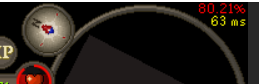



 crisp dune
that's added by some hub plugin
so you should check which hub plugin is adding it, and what that would mean
brazen vault
hello?
final axle
if you're using any sort of split tunneling, it won't work
brazen vault
i'm not using split tunneling
 tepid orchid
Would there be a reason why my back up codes will not work???
gilded kayak
!newplayer you should ask in the official discord, RuneLite has no backup codes so I assume you're talking about something only Jagex can help with
haughty pumiceBOT
If you are new to OSRS, make sure to follow this excellent guide on OSRS wiki: https://oldschool.runescape.wiki/w/New_player_guide. You can also join official OSRS Discord here: https://discord.gg/osrs
full dust
runelite wont open for me still, nothing even comes up. Worked fine till yesterday haven't changed a thing. runs fine on the normal client through Jagex launcher, but when I try runelite through launcher it just sends an error
gilded kayak
what about if you open runelite.exe
full dust
Same thing, just nothing
haughty pumiceBOT
Download and install the updated RuneLite launcher from the website link in #welcome. You don't need to uninstall your current version. You will not lose any settings or plugins.
full dust
Same nothing happened
haughty pumiceBOT
run this command in cmd, then show us the displayed output through a screenshot.
"%localappdata%\runelite\runelite.exe" -c -v --console -- --debug
 haughty pumiceBOT
To remove the Java memory limit on your PC follow https://github.com/runelite/runelite/wiki/Remove-java-memory-limit
full dust
Gg worked like a charm. Many thanks
 fathom basalt
will runelite work with the beta worlds?
crisp dune
Yes, though you will need to restart your client if you haven't done so before today
fathom basalt
it doesnt work for me still
i restarted client and resaved to beta world
it starts loading and set me back to the login screen
crisp dune
You also need to convert your save to beta worlds, per the instructions in the news post
 lean palm
tabs on my inventory window are all on the bottom now. how do i get them back to top and bottom of window
charred wind
Resizeable classic in-game settings
barren sigil
barren sigil
So can anyone help me? lol...
Yesterday it loaded up after a long time but this isnt normal
I'll reinstall I guess
that didnt work
gilded kayak
!safe
haughty pumiceBOT
safemode: Windows
Run the RuneLite (safe mode) shortcut, or with a Jagex account, first run the RuneLite (configure) shortcut and tick the Safe mode box, then launch RuneLite via the Jagex launcher.
Mac
In Terminal, run:
/Applications/RuneLite.app/Contents/MacOS/RuneLite --configureTick the Safe mode box. Launch RuneLite.
If it's not working, download and install the updated RuneLite launcher from the website link in #welcome. You don't need to uninstall your current version. You will not lose any settings or plugins. Then try running safemode again.
gilded kayak
start removing hub plugins in safe mode, until your client will start normally
barren sigil
gilded kayak
start removing hub plugins in safe mode, until your client will start normally
It started now for some reason but I think theres something with my pc. I'll figure it out
 lean pulsar
i get a fatal error starting runelite today... i did nothing different from yesterday
it says ssl handshake exception
i tried everything i took down my firewall
 dense scarab
i was reading some of the code and seen that the new agi courses are in there but not the kc or pb commands, i was wondering when that would come. not a dire feature but just figured id ask
 wanton flame
Hey guys, im sure this has been asnswered a million times but im struggling to figure it out. Im trying to get my old runelite profiles back after resetting my pc. Im signed into the website and i can see "Runescape Profile" down the side with a whole bunch of profiles on it, but im unsure on how to actually get the file from there onto my runelite. sorry if its an annoying repeated question, just cant wrap my head around it.
mossy swan
login to runelite so the door is red instead of green, and then check profiles and enable the correct one
!profiles
haughty pumiceBOT
mossy swan
you may need to restart the client afterwards to get all settings to apply correctly
wanton flame
so how can i get it off the website? it isnt in my profiles folder or anything. i only have a profiles2 folder in my runelite directory
this is the profile i want to get off the runelite website if possible
 leaden trail
It wouldn't be in the profiles folder
If you've logged into RuneLite and restarted like Unmoon said, you may need to switch to the profile in the sidebar
viscid lantern
This is assuming you had cloud sync enabled for your profile, if you didnt and you no longer have access to the old .runelite folder your settings are gone
leaden trail
Also true
wanton flame
viscid lantern
This is assuming you had cloud sync enabled for your profile, if you didnt and y...
ah this is likely
i doubt i would have had it on
ok no stress, thanks for that
ill remember to create a backup next time xd
viscid lantern
there is a tiny cloud icon for each profile, definitely turn that on if you want that in the future
 dense fog
is there someone who can help me? since a few days my runelite closes out of nowhere, My screen turns black first then flickers a few times then it turns back to normale but my runelite is closed this is very annoying i can't play the game properly anymore. i already deleted bij java en re downloaded it and the same with runelite. please help me
i found this error in the Logs :
 leaden trail
Upload your full logs
Oh that's a JVM crash
You can try going into BIOS and disabling "Core Performance Boost"
dense fog
thanks i will try that
 west wave
Hello, stuck on this when launching from jagex launcher and when launching rl it self. opened the bootsrap link from chrome and it works. what do ?
 dense fog
leaden trail
Upload your full logs
dense fog
leaden trail
Upload your full logs
Im in the bios where can i disable this?
I can’t see any core performance boost
round jacinth
It might not be named the same if acer renamed it
dense fog
yeah i couldn't find it
i really wanna know what cause this problem because the game is unplayable for me now sinds a few days sadly..
 long lava
anyone know why i cant log out my account and use a dif email to log into a dif acc it just says play now on my runelite
my other acc is not a jagex launch acc
dense fog
i've tried everything in my power to fix this. reinstall runelite reinstall java turned off and deleted some plugins i installed the last week i turned off the GPU plugin and i even did a system recovery to 21st of october and runelite still keeps crashing
haughty pumiceBOT
@long lava To find the logs, you can do one of the following:
- If your client failed to open, click the
Open logs folderbutton. - Open the screenshot directory by right-clicking 📷
Camerabutton, navigate 1 directory up, then open logs folder. - Navigate to
%userprofile%\.runelite\logson Windows or$HOME/.runelite/logson Linux and macOS.
Upload the log files named client and launcher by dragging them to Discord. If there are files prefixed with jvm_crash dated from today, upload them too.
oblique plume
dense fog
i've tried everything in my power to fix this. reinstall runelite reinstall java...
your log says its the gpu plugin, and the behavior of screen going black is indicative of a driver crash, so im not sure you have the gpu plugin actually off
dense fog
i had the gpu plugin turned off and still it crashed
i can try it again
the thing is also i love the gpu plugin playing without it sucks haha
if i play in hd it turns off the gpu automatically right? i played in hd and it crashed
oblique plume
hd is a gpu plugin
dense fog
so i have to turn off the gpu plugin and check if its crashing?
the thing is even if im logged off and on the runescape login screen and i go to the toilet or something when i come back it have shutted off my runelite even when im not playing @oblique plume
oblique plume
you can be having more than just gpu driver issues
dense fog
i really don't know what to do anymore lol
leaden trail
Try playing with both GPU and 117 off
 narrow badger
Any idea why Guardians of the RIft plugin show negative start time when the game starts?
round jacinth
Because it’s classic hub quality
haughty pumiceBOT
Support for hub plugins should be directed to the author of the plugin.
You can find the support link by searching for the plugin in the Plugin Hub panel and clicking the ? button on the plugin, or by right-clicking the plugin in the plugin panel and clicking the Support menu option.
 hoary hollow
hello need help with shield of arrav i looking for black arm gang member, i play as an ironman
leaden trail
 sonic orchid
hello, i think i accidentally deleted my profile, is there a way to recover this in the folders or does it completely wipe it from your computer?
haughty pumiceBOT
oblique plume
itl be there, just import it back like that says
 jagged shell
Since I started playing again I've been having random crashes (back to login screen without a disconnect). I've tried disabling all custom plugins and the GPU plugin, and it's still happening. Can't find any rhyme or reason, sometimes it's after hours of gameplay, it happened just now less than a few seconds after logging in.
Most recent stacktrace from logs, nothing above it for over an hour:
2024-10-26 02:17:43 AEDT [Client] ERROR injected-client - Client error: 93,102,32,317,3246,3441,0,2,0,0,0,0,0,0,2,-119,0,0,1,-110,-72,-18,17,-26,82,97,105,110,98,111,119,0,1,115,0,0,21,117,119,117,-96,116,105,110,121,-96,99,97,116,0,90,1,78,87,79,82,
java.lang.ArrayIndexOutOfBoundsException: Index 512 out of bounds for length 23
    at nm.bg(nm.java:49)
    at client.jn(client.java:23689)
    at client.ht(client.java:3234)
    at client.bc(client.java:1237)
    at bz.ax(bz.java:394)
    at bz.hs(bz.java)
    at bz.run(bz.java:29267)
    at java.base/java.lang.Thread.run(Unknown Source)
have you tried safe mode?
jagged shell
I was able to login in safe mode and didn't have any issues, but since it's intermittent and I don't have a way to trigger it, I'll have to play for at least a few hours if not a day to be sure. Can do that now if it will be useful info.
zealous cedar
that is useful info, yea
jagged shell
Alright. I'll go find an activity where I won't suffer too much from no plugins.
Oh, safe mode still has plugins, nvm 😅
zealous cedar
this might be either a hardware issue with your RAM or something on the network corrupting packets maybe
jagged shell
ah, interesting. pretty sure my RAM is fine but there's a few network-related things I can check.
I am on Sequoia which I see might be relevant https://github.com/runelite/runelite/discussions/18390

GitHub
Since ~ 10/3/2024, just about every time I finish an Araxxor trip and use my home teleport tab, the game crashes entirely and is unresponsive. I have to kill runelite and restart for it to work.
zealous cedar
Ooo
that is highly suspect then
this crash is something in packet processing which plugins can't break really
so it has to be something corrupting the packets coming in, or else the jvm or your hardware corrupting them maybe
jagged shell
Like the reporter above I have Little Snitch so I'll completely disable that as a first easy check
zealous cedar
typically corrupted packets coming in checksum fail though
that could do it maybe if it is rewriting packets and ignoring the checksums maybe
jagged shell
It shouldn't be touching anything, only blocking or allowing, but yeah, given it has to hook into the MacOS filtering system, I wonder