#support
1 messages · Page 36 of 1
 round jacinth
 fossil bough
A stupid question that was probably poorly worded, I'll just check and see
 outer mesa
If I have an old Runelite folder with the loots/coll log/etc .txt from a previous install/profile, what's the best way to add that to my CURRENT loot tracking? Replacing the files would overwrite my current tracking I assume? Replacing/adding the actual .txt perhaps?
 vast bone
There is no merge tool
outer mesa
Manual is fine, just wondering if that's best method
round jacinth
we don't support you bricking your settings and then coming back here for help
jaylen can you not
outer mesa
LOL! It is just .txt though with dates so I'm sure if I added in sequentually it would probably be fine. Appreciate you looking out though Zom
fossil bough
mb.
round jacinth
its a hub plugin so idc if it breaks/doesnt work
round jacinth
but im not a fan of telling people to mess around with their .runelite stuff because people make mistakes and come here like we can fox it
outer mesa
Yep I got you man! Appreciate the info
vast bone
I've seen that like twice in the last year
round jacinth
people messing up their configs and coming here for help?
vast bone
And at least one of those times it was funny XD.
fossil bough
My bad, I have never had issues with doing it but obviously that's not to say no one has
 leaden trail
It's really easy to break things and in a not insignificant number of cases irreparably so. If someone breaks their config by trying to do surgery on it, we're probably not gonna try and fix it
fossil bough
Very fair/reasonable
 sonic birch
outer mesa
then I come back here and complain right? that's the workflow?
sonic birch
outer mesa
then I come back here and complain right? that's the workflow?
No, you complain to the hub author
outer mesa
gotcha, runelite staff monitor all plugins hub included..thanks again 😆
 dapper bear
- Hello all. Usually i dont mean to bother but i really need help on this one. My RuneLite sometime around this year started randomly freezing. Let´s just say my character and everyone on my screen freezes for like about 10-15 seconds. When that happens in PVM scenarios i usually end up dying cuz the windows is simply froze
leaden trail
that's likely either a connection issue or a bad hub plugin
dapper bear
My question is did someone had a similar issue in the past? Been looking for answers on the web some say it might be my own internet while others say it is some plug in. I even deleted RuneLite 3 or 4 times, deleted a bunch of plug ins and still no bueno
dapper bear
leaden trail
that's likely either a connection issue or a bad hub plugin
you have any idea how can i possibly fix this? cuz when this happens during a pvm trip i die everytime lmao.
leaden trail
can you still interact with the client sidebar when it freezes?
leaden trail
dapper bear
My question is did someone had a similar issue in the past? Been looking for ans...
lots of people have similar issues and it's basically always either a bad hub plugin or a connection problem
dapper bear
leaden trail
can you still interact with the client sidebar when it freezes?
good question i actually do not know for sure.
problem is finding which plug in might be causing this. many people said GPU and also farming timers. nope did not fix it
@leaden trail this is what usually happens

 mossy swan
do you have a video of it?
dapper bear
the game literally freezes for 10 15 seconds not just me everyone around me. when it gets back up it will do all the delayed clicks
leaden trail
that's probably your connection then
mossy swan
mossy swan
do you have a video of it?
if not, you can use obs to record, and especially useful may be setting it up so you can press a button to save last minute or something
dapper bear
mossy swan
if not, you can use obs to record, and especially useful may be setting it up so...
i will try cuz this happens usually once or twice per hour
but yeah i think this might be my internet tbh
ty everyone i will keep testing some stuff during the week. if not imma just ask for a new router @mossy swan @leaden trail
Have a great week.
 terse star
Runelite screenshot plugin for leveling up in skills doesn't work for me, does not take a screenshot when getting a level. Anyone else have this problem?
 oblique plume
ifthe widget gets insta canceled by being in combat then theres nothing to take a picture of
terse star
oh, didn't know that, maybe that was the case for me. Need to try it out
 crystal ocean
I searched around but didn't find anything conclusive. Is split tunneling simply broken when using runelite?
leaden trail
basically yes
dapper bear
@leaden trail i can still interact with the side bar btw
when the game freezes
people complain it has something to do with jagex launch
not runelite.
dammit
 frank light
I need help with getting my runelite login profile back. Please help. My email that I originally used for Runelite Years ago, was my university Gmail email. The university deleted all of our email addresses, so I can't access this anymore. So when I'm trying to login to runelite, it asks to sign into the email, but it does not exist...any way the runelite support team can help recover this so I can get my Plugins, loot tracker, and everything back?
 zealous cedar
Do you still have the computer you were playing on with that email?
zealous cedar
the easiest thing to do is import that profile into runelite then
frank light
but when I import the profile, it won't carry my loot tracker right?
zealous cedar
if you have the entire folder, you can just replace your entire .runelite folder with the backup
and then everything will carry over
frank light
okay. I did this last night actually
but i think that replacing the entire folder with the backup, forced my RL to be signed into the University email address
and I would like to NOT be signed into this email address since it is gone forever
any way to change the email address to my new one?
if not then looks like I will just have to continue to play on runelite, signed into my email that doesn't exist.. (in the future, if I get signed out and don't have a back up, i'm screwed)
@zealous cedar is there a folder inside the runelite folder, that you can change the login username email and password?
dapper bear
@leaden trail
Reddit
Explore this post and more from the 2007scape community
this is exactly what happens to me!
zealous cedar
copy the .runelite folder over, disable "cloud sync" on the profile, sign out of the client. then you will end up with a local profile that is what you want. then you could sign into a different account at that point and re-cloud sync it
frank light
wow thanks @zealous cedar . I will do this when I get home. Let you know the results in a couple hours
oblique plume
zealous cedar
the easiest thing to do is import that profile into runelite then
isnt that just exactly what this is though
dapper bear
maybe i should clear my loot tracker
to see if it works
some people say clearing the loot tracker fixes this random freeze. hopefully it does
 wispy shore
hello i have bot statistic in the bot detector is there any chance runelite can change that if i have an anser of jagex and said that i am not a bot ?
wispy shore
i don't think because my friend don t want to play with me
i did bot like 2 year ago and now i created another account and i think it memorize the ip adress and he say i am botting
but i never botted in the accunt
like he say 70 bot
70 %
 unreal mirage
I'm following this page on Using Jagex Accounts, and it worked
i'd like to ask a follow up. is there is a command-line argument to target a specific credentials properties file? for example, if i created a separate credentials properties file for each of my accs, can i create a shortcut and add a command-line argument targetting a specific credential?
leaden trail
oblique plume
bot detector is meaningless
I dunno why it's kept around 🤷
sonic birch
Bot detector input and output is completely useless
the plugin is a cpu cycle waster
 compact trench
Is there a plugin that I'm not aware of that allows people to customize projectile animations? I know there's Hunleff Projectiles that lets you essentially change the projectile to match the ones used in raids, but is there a catchall plugin that does this?
sonic birch
no
compact trench
Thanks, if I made one that would allow people to swap projectile ID's, would that be against any ToS? I assume not if there's the Vardorvis and Hunleff plugins
round jacinth
I think a generic one is rejected
ID based plugins: Plugins that use player provided IDs for the entirety of their functionality can cause moderation issues and outcomes that break Jagex's plugin rules. Due to this fact we will not be accepting any new ID based plugins. Plugins that use a specific set of IDs but do not allow user input will still be accepted. (e.g. plugins like Vardorvis Projectiles which only allows you to change a specific projectile to a set list of projectiles.)
It’s why there is specific plugins to do the swaps
wispy shore
nobody want to split boss and trade with me because they scared to be banned because of bot detector someone can help me
 haughty pumiceBOT
Support for hub plugins should be directed to the author of the plugin.
You can find the support link by searching for the plugin in the Plugin Hub panel and clicking the ? button on the plugin, or by right-clicking the plugin in the plugin panel and clicking the Support menu option.
 grizzled mica
My client has been crashing hopping worlds recently is there a way I can look into whats causing it
Everything just locks up
grizzled mica
sonic birch
poof, client gone?
locks up, no "please wait..." in the top right corner
happens when clicking on a world to hop to on the in-game hopper
Client stays open
sonic birch
!flow can check if it happens in safe mode I guess
haughty pumiceBOT
flowchart: Please refer to this flowchart for further troubleshooting.
wispy shore
Please help
sonic birch
 cerulean sedge
the jagex launcher keeps loading after i login and do the verification code?
round jacinth
doesn't the jagex launcher not need you do 2fa on login as you did 2fa to get to the launcher?
seems like you should go ask jagex in their discord this one
leaden trail
!new
haughty pumiceBOT
newplayer: If you are new to OSRS, make sure to follow this excellent guide on OSRS wiki: https://oldschool.runescape.wiki/w/New_player_guide. You can also join official OSRS Discord here: https://discord.gg/osrs
leaden trail
Jagex launcher questions should be asked there^
 left reef
windows 11 pro
leaden trail
Ah I can't try to reproduce then, I only have the client on my Win10 machine
 real rivet
Is there any plans to make potion storage work with bank tags
zealous cedar
it works with bank tag layouts (the core verison, not the pluginhub plugin) atm!
real rivet
thank you for the prompt reply
 brazen dirge
Layouts are a core feature now?
sonic birch
Yes
sonic birch
Gotta go into the config and disable hiding it, or just uninstall the hub plugin
 short tree
So I have been noticing random framedrops throug out the last couple of days where my game freezes for a random second or so, usually only like once aday, but this is quite annoying when trying to pk. Is this currently a known issue? or what could this be (Thanks in advance c:)
sonic birch
short tree
So I have been noticing random framedrops throug out the last couple of days whe...
!flow
haughty pumiceBOT
flowchart: Please refer to this flowchart for further troubleshooting.
 south rover
can someone help me out with downloading my last used profile again, my pc crashed, after i opened up runelite again my profiles were gone.
haughty pumiceBOT
south rover
it only has the default profile there
 glad fox
there is a brutal black dragon spawn (respawn tile) that shows 333 seconds. I think its the og plugin
 solemn spire
sonic birch
Gotta go into the config and disable hiding it, or just uninstall the hub plugin
solemn spire
sonic birch
Gotta go into the config and disable hiding it, or just uninstall the hub plugin
I'm sorry but I'm new with all this. How does one get into the config to being able to disable it?
leaden trail
glad fox
there is a brutal black dragon spawn (respawn tile) that shows 333 seconds. I th...
Does it happen in safe mode
leaden trail
solemn spire
I'm sorry but I'm new with all this. How does one get into the config to being a...
Go to the list of plugins, click the gear next to it
glad fox
leaden trail
Does it happen in safe mode
not sure, can't test atm, oh not me I guess
solemn spire
leaden trail
Go to the list of plugins, click the gear next to it
Am I in the right place now?
 vast bone
"runelite layouts options"
solemn spire
Yes, thats on now. So am I done now or are there something else I need to do as well?
vast bone
right click the tag tab, disable layout, then enable.
solemn spire
Done, but it seems to not work with the potion storage as it still looks like the potion isn't in my bank. Do I need to restart Runelite?
 solemn spire
Ah, but I can export it first and try I guess
vast bone
runelite's layouts accepts btl export strings
solemn spire
Ah, I needed to delete the tab and when I imported it again it seemed to work. Thanks so much for the help!
real rivet
is there a way to get the layout to stay the same when importing the exported bank tag layouts plugin, when i import it after deleting "bank tag layouts" all the items are there but in random order
real rivet
beautiful, so i got that to work, only thing i noticed was you cant have for instance a divine super combat 4 and a divine super combat 1 in same tab
zealous cedar
yes
 buoyant light
south rover
it only has the default profile there
buoyant light
south rover
it only has the default profile there
same thing happened to me, have you figured anythign out?
sonic birch
!lost
haughty pumiceBOT
buoyant light
yeah I went through that but thanks
sonic birch
it will fix it
buoyant light
my .runelite folder on my PC still has all my config files, I'm still logged into runelite and there is no profile other than default
round jacinth
show us
sonic birch
usually people are stupid and think default profile = no plugins
round jacinth
no offense people often think they have the same problem as some one else but they're wrong
safer for each case to be different unless its like "all of uk's isp is down" then you can treat them as a class
sonic birch
import the config profile in profiles2 with the largest size that's not your rsprofile, then switch to that profile and it's usually fixed
 gloomy vigil
Anyone having any issues with talking to NPC's crashing the game? and if so how do i fix
haughty pumiceBOT
@gloomy vigil Windows
Run the RuneLite (safe mode) shortcut, or with a Jagex account, first run the RuneLite (configure) shortcut and tick the Safe mode box, then launch RuneLite via the Jagex launcher.
Mac
In Terminal, run:
/Applications/RuneLite.app/Contents/MacOS/RuneLite --configureTick the Safe mode box. Launch RuneLite.
If it's not working, download and install the updated RuneLite launcher from the website link in #welcome. You don't need to uninstall your current version. You will not lose any settings or plugins. Then try running safemode again.
round jacinth
check safe mode
buoyant light
sonic birch
import the config profile in profiles2 with the largest size that's not your rsp...
this brought me more or less to where my settings should have been, tyvm
almost forgot what osrs hd looked like after several days of basic settings 💀
gloomy vigil
haughty pumice
<@175903066950860800> **Windows**
Run the ``RuneLite (safe mode)`` shortcut, or ...
This worked, but have lost all my plugins
round jacinth
its to see if base runelite is the problem
means you got a bad hub plugin find it
!flow might help
haughty pumiceBOT
flowchart: Please refer to this flowchart for further troubleshooting.
round jacinth
if you find it lmk
gloomy vigil
round jacinth
if you find it lmk
RSN Hider is crashing it
leaden trail
Classic
round jacinth
that tracks
 bitter birch
not sure if this is rl related but ping is fine on one account and awful on the other. tick tracker shows 76% good ticks on main and 99% on alt on the same world. tried clearing game and runelite cache, and this swapped it to fine on main and bad on alt, but just now it swapped again. i have no idea what this is or if its related to rl and have no clue how to fix it
 hoary spade
I found this strange line on top of the window. anybody know what this issue is?

the white line is always visible, but i find it most noticable on the login screen
 languid prairie
I get "Too many login attempts" on first login attempt consistently using runelite (no jagex account), any fix to this?
 charred wind
Clear login sessions on the website
If you search in here it might be described more in depth somewhere
languid prairie
more in depth fixing it or why it happens
 void knot
Anyone else having issues using spacebar for make last smithing? Space bar advances conversations, works fine for fletching, only issues being with smithing.
languid prairie
would this be related to my login issue? only happens on the nonjagex account
 charred wind
That’s a Jagex question
 sonic birch
void knot
Anyone else having issues using spacebar for make last smithing? Space bar advan...
sonic birch
void knot
Anyone else having issues using spacebar for make last smithing? Space bar advan...
!flow
haughty pumiceBOT
flowchart: Please refer to this flowchart for further troubleshooting.
void knot
sonic birch
!flow
Thanks, it was "Action Progress" plugin that was causing this
sonic birch
void knot
Thanks, it was "Action Progress" plugin that was causing this
@prisma thicket could you take a look at this? IIRC we got a couple reports that action progress disables spacebar during e.g. smithing items.
 brave ferry
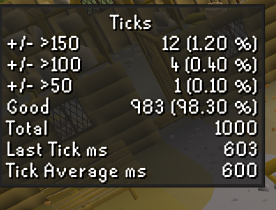
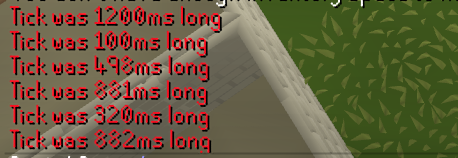
i was having lag issues, consistently but infrequently getting 900-1200ms ticks that sometimes end up getting me killed
however, after running runelite in admin mode i'm not getting them anymore?
round jacinth
You shouldn’t ever run runelite as admin…
 round jacinth
Your fix is a coincidence and that plugin isn’t as truthful as you’d want it to be probably
brave ferry
i will test it again
brave ferry
round jacinth
Your fix is a coincidence and that plugin isn’t as truthful as you’d want it to ...
if it weren't truthful, i wouldn't be able to feel the lag when i was flicking a manticore
round jacinth
If you search for admin mode in this discord it’s advised actively to not use it because it causes problems
You’ve got 600ms to react and you’ve got ~99% good health
You’ll be fine
 sonic birch
that plugin is shit fyi
e.g. it's completely incorrect when teleporting
round jacinth
I do not think admin mode has any impact on this
round jacinth
sonic birch
that plugin is shit fyi
e.g. it's completely incorrect when teleporting
And they’re in a poh
brave ferry
sonic birch
that plugin is shit fyi
e.g. it's completely incorrect when teleporting
yeah i know it always reports lag when you enter/load new zones
i'm standing still
round jacinth
lol
These metric plugins for stuff are not always helpful, and maybe help gaslight you into thinking there is more problems
round jacinth
Could just be bad internet too
 solid mesa
sonic birch
<@208019880048459787> could you take a look at this? IIRC we got a couple report...
solid mesa
sonic birch
<@208019880048459787> could you take a look at this? IIRC we got a couple report...
Just wanted to throw in my two cents that Action Progress does not disable spacebar smithing for me. However, the action progress UI does not work when using spacebar for smithing.
sonic birch
I've got no clue what triggers it, but we got a couple reports of this issue now 🤷♂️
 lime cairn
There is a discord accoutn created yesterday that is going around and fishign ppls data
i got added and got hit with quesitons
i popped the question of why they fishign for my data to lure me and they got all deffensive abotu it and blocked me
dont know who else is getting targeted but beware of such things
sonic birch
Feel free to dm the info to @haughty pumice
lime cairn
tyvm
sonic birch
Someone from the moderator team will then take a look at it (not me probs since I'll be gone in a bit)
lime cairn
coll cool dont mean to make a big deal abotu it just putting it out there so others can also possibly mentionit too if they are being hit with it
if im the only one then call me on a witch hunt kinda crazy
sonic birch
Just type all info btw; just a hello will get ignored
 noble meteor
hey all
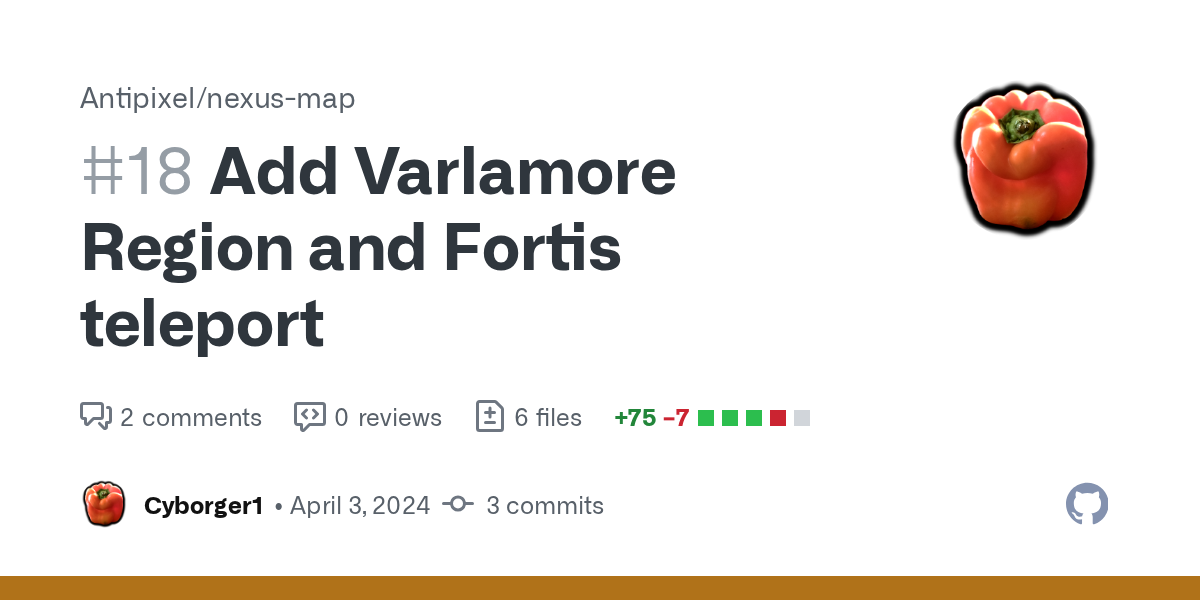
anyone use the nexus map plugin? I noticed there's no civitas illas fortis teleport, and I came across this
GitHub
Took the background image for the region from here:
https://oldschool.runescape.wiki/w/File:Banner_(Varlamore).png#/media/File:Banner_(Varlamore).png
I hand-created the std/hover region icon based ...
anyone able to explain how to get this to work
sorry if I'm posting in the wrong channel
 hard vine
solid mesa
noble meteor
anyone able to explain how to get this to work
hard vine
solid mesa
noble meteor
anyone able to explain how to get this to work
It's up to antipixel to merge the pull request. They haven't made any changes since August 7th, 2023. If they are inactive someone can request to takeover the plugin https://github.com/runelite/runelite/wiki/Plugin-takeover-policy

GitHub
Open source Old School RuneScape client. Contribute to runelite/runelite development by creating an account on GitHub.
 steady ingot
has anyone gotten this visual glitch before? not sure what it's from
 steady ingot
ty it was the nvidia one
 trail hare
Hey all. Is there a way to have RuneLite run with Auto HDR now that it's launched with the Jagex launcher? I can see someone got this to work previously but not sure if this is still the case
 modern verge
trail hare
Hey all. Is there a way to have RuneLite run with Auto HDR now that it's launche...
modern verge
trail hare
Hey all. Is there a way to have RuneLite run with Auto HDR now that it's launche...
I use RTX HDR now and can confirm that works. However if you need, Auto HDR still works
trail hare
I see. Still running an old GTX 1080 ti haha, but got an RTX 4080 Super arriving within the next day or so. So the newer RTX cards have some other feature I can achieve this with?
modern verge
Yes. I highly recommend RTX HDR over Auto HDR.
trail hare
Setting in nvidia control panel I'm assuming?
And is it something I set per game explicitly? Or is it like an automatic thing like Windows Auto HDR?
modern verge
As of now it can be a bit more tricky. As RTX HDR is a filter applied on top of your game you can set it per game basis or globally. If set to global you might need to disable it for those few apps that interfere with it and/or have their own HDR implementation
modern verge
modern verge
As of now it can be a bit more tricky. As RTX HDR is a filter applied on top of ...
You will need the new NVIDIA APP that is in beta
trail hare
Ok sweet. I'll just enable it per game then as most newer games support native hdr these days
Ok noted. Thanks for that dude
How would you compare it to the look of windows auto hdr?
modern verge
Np. Again it's beta software so it's not a sort of on/off switch experience yet. We getting there but there's some bugs here and there
Also, as of right now. The RTX HDR filter when you apply it have incorrect default color options so you gotta follow this guide to get accurate colors. https://www.reddit.com/r/nvidia/comments/1b03yfg/rtx_hdr_paper_white_gamma_reference_settings/?sort=new
Reddit
Explore this post and more from the nvidia community
trail hare
Ez
modern verge
and you need to change your NVIDIA control panel settings to this

that should be about it
 pastel pebble
Hey guys, this morning i logged on and all my plugins are gone, including my profiles. what should i do?
mossy swan
pastel pebble
Hey guys, this morning i logged on and all my plugins are gone, including my pro...
!lost
haughty pumiceBOT
pastel pebble
cheers mate
 prisma thicket
void knot
Anyone else having issues using spacebar for make last smithing? Space bar advan...
prisma thicket
void knot
Anyone else having issues using spacebar for make last smithing? Space bar advan...
I'll have a look later. Is it always happening? Does it matter what item you are smithing?
 verbal latch
whats the tricks to carrying over runelite settings to new pc?
i logged into runelite and dont have same setup
haughty pumiceBOT
 prime silo
prisma thicket
I'll have a look later. Is it always happening? Does it matter what item you are...
prime silo
prisma thicket
I'll have a look later. Is it always happening? Does it matter what item you are...
Not the original person to post but I'm having the same issue, I find I can use the spacebar for everything except smithing I found a few old reddits with a similar issue talking about different plugins causing issues due to hotkeys but I dont have any of those on.
 unique bramble
Hi, I can't seem to figure out the Idle-Woodcutting notification, I have selected settings like "Send notifications when focused" and tried multiple youtube videos to try and get it working but I can not seem to figure out why it doesn't notify me
oblique plume
do you have animation notifications on
unique bramble
oblique plume
do you have animation notifications on
I have animation notifications turned off as that setting seemed to just notify randomly, even when my character was still woodcutting
oblique plume
then the delay is prob too low
unique bramble
oblique plume
then the delay is prob too low
Oh perfect, what delay would you recommend (Also thank you so much for the quick help)
oblique plume
most things dont need more than two ticks
some stuff like mlm and amethyst would need 3
glassblowing too
unique bramble
Where do I find the delay settings?
unique bramble
Perfect, thank you so much, found it. What would you say the best setting would be so it works everywhere (Or do I have to change it based on what I am doing)
Changed it to 1800 for now
unique bramble
perfect, I'll change to 2000, thank you so much 🙂
void knot
prisma thicket
I'll have a look later. Is it always happening? Does it matter what item you are...
Yes, it always happens, anything I smith, not happening for crafting or fletching
 patent jewel
How does it go for taking over a plugin again? The developer for bank tag generation has been putting the plugin on hold for 2 years now and is barely responsive
zealous cedar
GitHub
Open source Old School RuneScape client. Contribute to runelite/runelite development by creating an account on GitHub.
patent jewel
zealous cedar
https://github.com/runelite/runelite/wiki/Plugin-takeover-policy
@quick dome
 pulsar pawn
Im getting dcd still like 6 days in a row every hour or so with malformed login packet. I've tried changing worlds, same thing. Im not lagging in other things I play like league while I afk in rs I can see rs dc and nothing happens in league. My brothers on the same wifi provider as me on the other side of town and hes getting only dcd from rs too. Are we cooked?
patent jewel
pulsar pawn
Im getting dcd still like 6 days in a row every hour or so with malformed login ...
Last 3 days or so I've been getting high ping spikes as well, I thought it was my internet acting up. Perhaps a coincidence, who knows.
patent jewel
yeah it's happening to me during raids and pking as well so i feel u
scary when my +1 is ~20m+
leaden trail
That's your connection to Jagex
You don't see issues elsewhere because the servers aren't in the same place
pulsar pawn
I know I just wish i had a solution
sucks
just got back into rs and my bond is rotting
leaden trail
Sometimes trying worlds on a different region helps
 dim kettle
if possible, can someone assist me make these highlighted items stack so they have separate infoboxes in the clue juggling plugin? Thank you! 🙂

basically so it looks like this
 vast bone
what does ground item text have to do with clue juggling plugin infoboxes?
dim kettle
Well, yesterday, they stacked like the second picture and each clue had its own infobox timer
vast bone
they are not related
dim kettle
then suddenly today they combined and there is only 1 infobox timer
vast bone
there are settings in each plugin that modify these things
unless those are identical hard clues?
then maybe.
vast bone
np.
verbal latch
any idea when i highlight a modifer in colo it doesnty outline it?
like i cant see what im choosing
sonic birch
!flow
haughty pumiceBOT
flowchart: Please refer to this flowchart for further troubleshooting.
verbal latch
woah thats alot
round jacinth
if you have resource packs on, your resource pack might be changing the colors of that choose screen i think? idk
fwiw i think you'll get used to it regardless
verbal latch
ohh yes thats def it
round jacinth
the flow is sorta to help you just figure out what is going on, it can be a overwelming hah
 round jacinth
i don't know tbh but im sure normal UI makes it clear of what is doing what
and that's an easy guess
 next forum
I'm getting this message and can't log in to the game. My internet works fine most of the time, I can load pages and so on. What can be the problem?
 haughty pumiceBOT
To find the logs, you can do one of the following:
- If your client failed to open, click the
Open logs folderbutton. - Open the screenshot directory by right-clicking 📷
Camerabutton, navigate 1 directory up, then open logs folder. - Navigate to
%userprofile%\.runelite\logson Windows or$HOME/.runelite/logson Linux and macOS.
Upload the log files named client and launcher by dragging them to Discord. If there are files prefixed with jvm_crash dated from today, upload them too.
 lime pike
Just out of curiosity, does runelite need to fetch the bootstrap on every launch, or just the first time running it? I currently have a usb setup where I can remote into my home PC from work with parsec. The issue is it's fairly laggy. I was hoping to just run RuneLite directly instead of doing it via remote software. Work network currently blocks the bootstrap download though. If I were to run it on my home PC first, will it then be good to go? Or does it need to run it every time.
oblique plume
every launch
lime pike
😵
wispy shore
hello i have bot statistic in the bot detector is there any chance runelite can change that if i have an anser of jagex and said that i am not a bot ? is it possible ?
leaden trail
Again, as we've told you before, we have nothing to do with bot detector, and it's also useless.
wispy shore
but i cant play with my friend they don t want to play with me because of this 😭
lime pike
💀
wispy shore
is there nothing yu can do ?
lime pike
leaden trail
Again, as we've told you before, we have nothing to do with bot detector, and it...
Read
round jacinth
maybe educate your friends on how the plugin does actually nothing
my cannon ball alt/1 def pure has this

my 320 days played main acc has

it's meaningless
charred wind
Leaked gf name
round jacinth
i can't beleive you made me install the plugin to demonstrate the plugin is al ie
lime pike
Bro 😭
vast bone
tell them you installed noob detector and it says they are 99.98% noob
round jacinth
LOL
 viscid lantern
1% is botting 4 days a year! (whatever that plugin says is just made up basically)
lime pike
LMAOO
wispy shore
so why they did bot detector if its meaningless
round jacinth
as you play the game more and are seen in more places and do more things, your % will go to 0
because the guy who made it, did it because they could
why is there plugin that does what obs does but way worse? because they could
ignore the plugin, it doesn't feed information to jagex that they don't already know
leaden trail
Because machine learning is a buzzword
round jacinth
your friend with it installed maybe grabbeed it because kempq said so and he's not a bastion of knowledge lol
wispy shore
maybe i became crazy but i did bot 1.5 years ago and now i started a new account and it says 70 % bot so i started to think that the bot detector know my ip and say im bot because of 1 year ago
round jacinth
no it doesn't do anything like that
wispy shore
my friend don t want to play with me they scared to split boss and be ban
leaden trail
- Bot detector is useless
- we do not have any influence over what it says and therefore can't do anything for you
round jacinth
wispy shore
my friend don t want to play with me they scared to split boss and be ban
find friends that aren't so gullible
you've been helped as much as we can, take it up with the bot detector folks not us
wispy shore
wait ? are yu modo ?
round jacinth
?
wispy shore
this is my last question why did yu created the pluging so ?
wispy shore
wispy shore
wait ? are yu modo ?
moderator
round jacinth
I am not a moderator no
wispy shore
so how yu know
round jacinth
people can make plugins on the hub for any reason they want
i know because everybody knows lol
leaden trail
It's a hub plugin
charred wind
wispy shore
this is my last question why did yu created the pluging so ?
The plugin is not a Jagex creation, it is not how they detect bots. Runelite plugins are made by monkeys like me and @round jacinth that Jagex does not do anything with
wispy shore
do yu know how i can contact runelite moderator
vast bone
I have never heard of someone being banned for boss splits.
leaden trail
It's not a "RuneLite moderator" thing
haughty pumiceBOT
Get support for the Bot Detector Plugin Hub plugin here: https://runelite.net/plugin-hub/show/bot-detector.
You can also find the support link by searching for the plugin in the Plugin Hub panel and clicking the ? button on the plugin, or by right-clicking the plugin in the plugin panel and clicking the Support menu option.
oblique plume
enough, you got your answer, go away
leaden trail
Go yell at the author there or something I guess
lime pike
This dude knows there's an "o" in the word "you", right?
noble meteor
solid mesa
It's up to antipixel to merge the pull request. They haven't made any changes si...
Someone seemed to respond with their own makeshift solution but I don't understand it because I'm dumb
 autumn jetty
Hi Guys, Im having issues with launching runelite via the JagexLauncher. It launches but runs in the background with no access. if someone can please advise? 🙂
sonic birch
What does that mean? Hit us up with a video
sonic birch
noble meteor
Someone seemed to respond with their own makeshift solution but I don't understa...
The author needs to review and merge it. Then probably fix something because we changed some of our MenuEntry stuff
The person that commented on the PR just copied the text body of the original author
viscid lantern
they lost access to their github account I think so the author cant approve it
sonic birch
wasn't the issue just that he wasn't p2p so he couldn't test it?
viscid lantern
this is the last they posted
 sonic birch
think he just sold his osrs account or something
maybe it's just a great plugin for you to take over, Gamma!
viscid lantern
nosanks
noble meteor
i love this plugin but I have to keep my left-click on fortis or I'll brain fart when I load the map
sonic birch
you could try to get e.g. cyborger to take over the plugin, assuming the author is gone
considering that he created that PR
 quiet glen
how do i get it to show that im playing runelite on discord?
haughty pumiceBOT
If your Discord activity status is not showing properly follow these steps:
- Make sure your Discord plugin is enabled.
- Make sure RuneLite is not manually added as game to Discord game list.
- Enable
Share your detected activities with othersin Discord settings. - Make sure both RuneLite and Discord are NOT running as admin.
quiet glen
thanks
 kind vessel
Hey- I'm trying to do some afk skilling while playing another game- the second i focus on the other game(can be any game) Runelite tanks fps from its 50/60 it hits all the way down to 2. any ideas why? and how i might fix it?
 agile sapphire
question does anyone know what adds these white numbers to pouches?
 sonic birch
Some rc pouch hub plugin
sonic birch
kind vessel
Hey- I'm trying to do some afk skilling while playing another game- the second i...
Disable gsync, also make sure fps control is not set to limit fps to 1
kind vessel
sonic birch
Disable gsync, also make sure fps control is not set to limit fps to 1
fps control is fine, as far as i can tell i don't have gsync enabled at all
sonic birch
Double check it
Can technically be a resource allocation problem, but usually it's gsync
kind vessel
as far as im aware i have no option for g-sync whatsoever
sonic birch
do you have an nvidia gpu?
kind vessel
yeah, but no options for g sync in control panel
sonic birch
then you got gsync
google how to disable gsync nvidia 2024
if you got the nvidia app, you gotta do it in that probs
kind vessel
yeah i tried that aftert you first mentioned it, but the options for it just aren't popping up. appreciate the help tho
only refference to gsync i can find

 split mulch
where can i find the plugin for "view dps"

 stone parcel
For me I need the "Wiki" plugin turned on for that button to appear in the worn equipment menu.
split mulch
stone parcel
For me I need the "Wiki" plugin turned on for that button to appear in the worn ...
ty!
 glossy parcel
Caused by: java.lang.NullPointerException: Cannot invoke "java.io.RandomAccessFile.seek(long)" because "this.ac" is null
getting this when running intellij build of runelite, game is running fine but nothing is printing to the console, can anyone resolve this?
oh wait, i figured out the issue, its when i swap to the beta worlds
still wouldn't complain about getting a fix though
 harsh axle
Good evening. I haven't seen this answered in the #faq .
For developing plugins, how am I meant to test/debug if my jagex account requires me to log in through their launcher?
screenshot attached of two clients. one connected to the intelliJ debugger has the plugin. the one launched through the jagex launcher does not.
 glossy parcel
https://github.com/runelite/runelite/wiki/Using-Jagex-Accounts this should help

GitHub
Open source Old School RuneScape client. Contribute to runelite/runelite development by creating an account on GitHub.
 sonic birch
glossy parcel
`Caused by: java.lang.NullPointerException: Cannot invoke "java.io.RandomAccessF...
sonic birch
glossy parcel
`Caused by: java.lang.NullPointerException: Cannot invoke "java.io.RandomAccessF...
Client still works afterwards, and printing to console also still works as I've often done that in beta worlds
The errors will happen as it's already a small miracle you can swap to beta worlds
However, this does not implement being able to print to console
The worst I've experienced was having to close and re-open the var inspector bec I opened it too soon
sonic birch
sonic birch
However, this does not implement being able to print to console
Wrt intellij's console, you are probs looking in the wrong "subcategory/tab" of console after an error is printed
glossy parcel
aha, i just realised that the console was just focusing on the error, and still printing evreything, just elsewhere
glossy parcel
sonic birch
Wrt intellij's console, you are probs looking in the wrong "subcategory/tab" of ...
which sounds exactly like this
sonic birch
Yh thats exactly what I meant 👍
harsh axle
is this because of the tls disable from the configure?

apologies for the questions; i'm used to working with unreal and visual studio,
trail hare
Hey all. Is it normal to be getting between 40-60 fps when draw distance is set to 90 with an RTX 4080 Super and an i9 9900kf? I expected a little more
harsh axle
figured it out btw! following the instructions got me where I needed to go.
glossy parcel
i also found an alternate solution to my non problem. disable every plugin
 tranquil crown
is there a way to restore my ~month old loot tracker loot? my hydra loot all disappeared
 zinc sapphire
Hey all, i have a question. I just moved into a new appartment and bought new internet with it. 200 mb/s download and 30 upload. Now my internet works just fine but when i start up runelite with the GPU plugin turned on, i lag very hard en get disconnected. I haven't had this issue before. Also i get disconnected, the message it said was 'malformed login packed'. Does this issue have something to do with my new internet or is it because of my graphics card? And does anyone know how i can fix it? I already set the openGL rendering GPU to my NVIDIA geforce rtx 2050 card
sonic birch
Sounds like your internet
!flow You can check safemode with world hopper turned off, and green tree
haughty pumiceBOT
flowchart: Please refer to this flowchart for further troubleshooting.
sonic birch
If it doesn't happen then, 100% internet
zinc sapphire
alright thanks, i will try that!
tranquil crown
tranquil crown
is there a way to restore my ~month old loot tracker loot? my hydra loot all di...
anyone know pls @ me heading to bed
haughty pumiceBOT
 rancid jetty
two SEVERELY annoying issues:
-
since today, notifications sounds stopped working for no reason: no longer makes a windows sound for any notification, such as no-longer fishing, woodcutting etc.
-
Since a few months ago, annoyance mute stopped working. Even with other player's sounds turned on, I can still hear everyone woodcutting at a tree.
mossy swan
- probably windows do not disturb or something dumb like that
try using custom instead of native sound
for 2...
haughty pumiceBOT
Get support for the Annoyance Mute Plugin Hub plugin here: https://runelite.net/plugin-hub/show/annoyance-mute.
You can also find the support link by searching for the plugin in the Plugin Hub panel and clicking the ? button on the plugin, or by right-clicking the plugin in the plugin panel and clicking the Support menu option.
rancid jetty
custom sound? i can change it to custom... but then what?
mossy swan
do you then get a notification sound?
 slow musk
Hey.
I can't launch the Runelite launcher anymore "There was a fatal error starting RuneLite".
I tried launching the game (while in administrator mode) both from Jagex launcher and RuneLite launcher.
What happened : I'm a new player and was using Quest Helper.
I "lost" the option to "Start a quest with Quest Helper" or use the plugin.
I tried removing and reinstalling the mod, quit and start RuneLite again, plugin still doesn't work.
So I found some advice stating that if previous step didn't work, I should delete the cache folder from RuneLite.
I did that, and it doesn't launch anymore (I tried to get the folder back from the can, to delete and reinstall Runelite completly too).
mossy swan
slow musk
Hey.
I can't launch the Runelite launcher anymore "There was a fatal error start...
!logs
haughty pumiceBOT
To find the logs, you can do one of the following:
- If your client failed to open, click the
Open logs folderbutton. - Open the screenshot directory by right-clicking 📷
Camerabutton, navigate 1 directory up, then open logs folder. - Navigate to
%userprofile%\.runelite\logson Windows or$HOME/.runelite/logson Linux and macOS.
Upload the log files named client and launcher by dragging them to Discord. If there are files prefixed with jvm_crash dated from today, upload them too.
slow musk
Thanks, wasn't sure if I had the right to drops documents or not
mossy swan
is this a work computer or something like that?
slow musk
Nope it's mine, but it's brand new.
mossy swan
https://static.runelite.net/bootstrap.json does this load?
slow musk
Hum I have a whole lot of code appearing on an internet page
slow musk
Yes but it's down atm.
And I'm pretty sure I activate/deactivate it while playing before.
I don't know if it matters but I have a problem with internet.
So I don't use the box to connect but my phone via USB.
(But I play on PC, not my phone).
mossy swan
that's probably causing some issue
leaden trail
Does that link Unmoon sent show the same thing if you look on your phone?
mossy swan
you can try skipping tls verification thing in "runelite (configure)"
slow musk
I did launch the game succesfully with my phone connexion before, I didn't catch it at the time but maybe it's the same time when Quest Helper didn't worked.
leaden trail
Try it now though
slow musk
Yeah same thing
{
"artifacts": [
{
"diffs": [
{
"from": "client-1.10.38.1.jar",
"fromHash": "74153b49466c6e29e3f56e59c3264ae021eb04b69f96849038ff98de616cb718",
"hash": "a59cfcfa98cf2cefbb2872fd0d1a675f0942e306d3c0b46459ae7ee69708628a",
"name": "client-1.10.39.jar",
And a lot more of that
mossy swan
yeah probably you had them on your computer before, but since you deleted the cache runelite needs to download stuff again
and for whatever reason your mobile connection is breaking for that
slow musk
I only 'Disable TLS verification" in RuneLite configure, but still not working
mossy swan
maybe try using vpn then
slow musk
I tried using my VPN from USA and GB but I get the same error message.
(I have NordVPN for Chrome, I don't know if it affects things outside of Chrome).
I'll try to go with the 4G box that I receive (but the signal reception is terrible).
I'll comeback right after
If my phone block something maybe the bow will not
leaden trail
Game is offline in a couple minutes so might be worth it just to wait til after anyways
 gaunt bloom
already online
slow musk
Ok so everything is working again while connected throught my phone.
Deleting the cache folder works to fix Quest Helper.
And I did succeed reinstalling the game by running the launcher while on the 4G box.
Thanks for your time !
mossy swan
slow musk
Ok so everything is working again while connected throught my phone.
Deleting th...
do also turn off the "disable tls verification" if it works without
slow musk
Will do, what is it doing ?
 worn bridge
camera's zoom speed doesnt work anymore , speed remains the same even after configuration
any clue y that is? is it cause of the new update?
 stray grove
it should be good if you restart your client now
 mystic wing
I cant seem to be able to zoom out, using the GPU plugin?
mossy swan
mystic wing
I cant seem to be able to zoom out, using the GPU plugin?
restart your client
mystic wing
Thank you
 round mural
how do i add star miners to my discord
oblique plume
idk, ask them
 candid pilot
Does runelite through the Jagex launcher not let you scroll out as far as just regular runelite would?
mossy swan
candid pilot
Does runelite through the Jagex launcher not let you scroll out as far as just r...
restart runelite and it'll work
candid pilot
mossy swan
restart runelite and it'll work
My man!! Thank you so much. Do you know why it does that?
round jacinth
just because you aren't forced to restart the client doesn't mean you shouldn't restart every update
the camera plugin stuff is sensitive to the script changes jagex does
candid pilot
Loud & clear, thank you.
 stoic cliff
Is there a bug with opponent information with the update today? No matter if I have "Hitpoints" or "Both" selected, I always see percentage now. Tried a client restart, same thing.
zealous cedar
If the client is unable to load the hp values for the npcs it will do that
stoic cliff
I see, thank you
This is for green dragons in myth guild, if it matters. I did try another dragon and it worked, I guess I just never noticed before. And I do now see that note in the wiki, my apologies for missing that.
leaden trail
Weird, we have the HP for those on the wiki so I dunno why those specifically aren't working
fossil bough
Is there any setting that I can tick to have certain plugins load only for certain OSRS accounts?
I guess maybe just having separate Runelite accounts?
haughty pumiceBOT
fossil bough
My hero, thank you
 tight solstice
maybe this isnt the right channel, but does anyone know hwo to use runelite with obs? im having weird issues with recording it.
solid mesa
I think it’s best to use display capture
 dim bone
Having an issue with a force log.
Basically what happened was I was hopping and went into 303- game just froze there for a minute and I was put into login screen. Couldnt log back in because i was "logged in" yet.
leaden trail
Sounds like a typical disconnect
 deep bone
hrm. i had this issue before but it reoccured randomly. whats the cause of this if anyone knows?
 charred wind
Try disabling hardware acceleration
tight solstice
mossy swan
window capture
tyvm
dim bone
leaden trail
Sounds like a typical disconnect
could be, but hasn't happened in a very long time. Is it possible interference or likely just happenstance and I am unlucky lol
leaden trail
I wouldn't suspect anything weird, no
When you DC because your connection drops, being told you're still logged in for a min or two is pretty common
dim bone
Yeah but it happened during a world hop, does that matter?
deep bone
charred wind
Try disabling hardware acceleration
wow ty that worked. not sure how it got re-enabled
leaden trail
Wait two or three minutes and log back in and you're fine
dim bone
I mean I'm just double checking, it resulted in an unforunate 150m pvp death
 trail tulip
hi, i keep getting this message when trying to load the game
 haughty pumiceBOT
To find the logs, you can do one of the following:
- If your client failed to open, click the
Open logs folderbutton. - Open the screenshot directory by right-clicking 📷
Camerabutton, navigate 1 directory up, then open logs folder. - Navigate to
%userprofile%\.runelite\logson Windows or$HOME/.runelite/logson Linux and macOS.
Upload the log files named client and launcher by dragging them to Discord. If there are files prefixed with jvm_crash dated from today, upload them too.
 opaque thunder
When i click to switch world, I just get a Loading.... then the button reverts back to the same as the start
I can change via the world hopper on the RHS panel, but the in game one isn't working
oblique plume
thats a connections issue to jagex afaik
 faint marsh
My loot tracker seems to expire things I haven't killed for a while, I'd like to know my loot from giant mole, if possible
 nova acorn
faint marsh
My loot tracker seems to expire things I haven't killed for a while, I'd like to...
nova acorn
faint marsh
My loot tracker seems to expire things I haven't killed for a while, I'd like to...
I think there is some kind of upper limit, I have stuff get purged quite often
solid mesa
The website has the entire history
round jacinth
Storing it indefinitely in the side panel is not a scalable way to do it so it doesn’t hold them all, killing stuff makes it stay longer but not forever.
nova acorn
nova acorn
I think there is some kind of upper limit, I have stuff get purged quite often
90 days inactivity it seems
round jacinth
That sounds right yeah.
nova acorn
And the website does not keep it if purged or I'd have 20,000 eclectics still in my log
round jacinth
If you manually purge it client side you’ll push it to the web
solid mesa
Are you on the right profile?
round jacinth
Profile doesn’t care about loot it’s on the accounts
solid mesa
The website calls it "Runescape Profile"
round jacinth
Oh was thinking the profile in client.
nova acorn
solid mesa
The website calls it "Runescape Profile"
Yes, website "runescape profile" will purge with inactivity
Is a lil weird though cause I remember taking a 6 month break and only some stuff got removed after I came back
I'd assume there is also some condition(s) that apply with the 90 day inactivity
sonic birch
Iirc it's 365 days nowadays, and the website probs displays all loot
But I'd have to check the code to confirm
nova acorn
That search bar for loot tracker on the website is kind of funky atm for me
nova acorn
nova acorn
That search bar for loot tracker on the website is kind of funky atm for me
Oh it's searching loot items and not the source nvm
faint marsh
okay thank goodness, so I can check online
damn I thought I killed it more than 44 times jeeze
 brave heron
hi, the default plugin just called "Chat" has disappeared for me, all the functions i had turned on (filter, message collapsing etc) have also turned off, any ideas?
leaden trail
That's under "Chat Filter"
brave heron
leaden trail
That's under "Chat Filter"
think im braindead, thanks
 atomic hamlet
what is the plugin that says "moneyyyy" when you get a drop
 crisp dune
idk, have you searched "money" on https://runelite.net/plugin-hub ?

RuneLite
The Plugin Hub is a repository of plugins that are created and maintained by members of the community who are not officially affiliated with RuneLite. These plugins are verified by RuneLite Developers to ensure they comply with Jagex's 3rd party client rules and are not malicious in some other way.
deep bone
charred wind
Try disabling hardware acceleration
nvm it didnt work after all
 atomic hamlet
I have
leaden trail
atomic hamlet
what is the plugin that says "moneyyyy" when you get a drop
Try searching b0aty maybe?
atomic hamlet
no boaty plugin
solid mesa
deep bone
nvm it didnt work after all
Did you restart runelite after disabling hardware acceleration?
 zinc minnow
hello any reports of runelite crashing; specifically upon logging in, the screen turns black and loading appears on the top left corner as expected but it crashes after awhile?
sonic birch
Let me guess: got a display name hider plugin?
zinc minnow
no i shouldnt i think it has somethin to do with multiple accounts possibly 1 of my accounts was able to load in no issue
was curious if someone reported if not i can upload the log
sonic birch
!flow then but it really sounds like an rsn hider issue
haughty pumiceBOT
flowchart: Please refer to this flowchart for further troubleshooting.
zinc minnow
its not i never use that plugin
want me to upload logs
the only hider i have is cox special loot hider
leaden trail
Go ahead and upload your logs
haughty pumiceBOT
@zinc minnow To find the logs, you can do one of the following:
- If your client failed to open, click the
Open logs folderbutton. - Open the screenshot directory by right-clicking 📷
Camerabutton, navigate 1 directory up, then open logs folder. - Navigate to
%userprofile%\.runelite\logson Windows or$HOME/.runelite/logson Linux and macOS.
Upload the log files named client and launcher by dragging them to Discord. If there are files prefixed with jvm_crash dated from today, upload them too.
zinc minnow
possibly a new graphic update responsible?
on my end
anyways sorry to bug and thanks for the help and everything you guys do!
leaden trail
Mother of file permissions problems
Go to the link in #welcome , reinstall RuneLite (you won't lose anything as long as you don't delete anything) and run it as admin ONCE
Once you hit the login screen, close it and set it to not run as admin and see if it works okay
zinc minnow
okay i will test and let you know thanks for the info
it was pretty rare btw but it has happened 3 times in the last few days and only to 1 account which i thought was weird anyways ill test what you said
deep bone
 analog vigil
Sorry if this has been asked a million times
Can I no longer load runelite separately from launcher to log into accounts not associated with my launcher profile?
sonic birch
Yes, you can
leaden trail
analog vigil
Can I no longer load runelite separately from launcher to log into accounts ***n...
If you're having issues go ahead and post your logs
analog vigil
It's automatically loading the previous account from launcher
And sorry I'm unfamiliar with what needs to be posted -
haughty pumiceBOT
@analog vigil To find the logs, you can do one of the following:
- If your client failed to open, click the
Open logs folderbutton. - Open the screenshot directory by right-clicking 📷
Camerabutton, navigate 1 directory up, then open logs folder. - Navigate to
%userprofile%\.runelite\logson Windows or$HOME/.runelite/logson Linux and macOS.
Upload the log files named client and launcher by dragging them to Discord. If there are files prefixed with jvm_crash dated from today, upload them too.
analog vigil
Thanking you
 quick dome
patent jewel
<@972888614742687814>
quick dome
patent jewel
<@972888614742687814>
Thanks.
I need someone that can help me rebuild the wiki category tag sync plugin
I code but never a runelite plugin. I'm sure it just needs a simple fix to become compatible with the game again
zinc minnow
not sure if fixed but no problems loading in twice ill keep you updated what a weird problem thanks again @leaden trail
leaden trail
Yeah that may not be the cause of the issue that brought you here but it definitely was an issue that needed to be addressed
 swift steeple
so I'm having a weird issue
for some reason when I try to open runelite connected to my main wifi it gives me a connectionexcepted error
but doesn't seem to happen if I'm on any other network
round jacinth
Your connection when using your WiFi is bad it seems
swift steeple
I figured it out
 languid ermine
anyone having issues with the client being really choppy? i tried using official client and didnt have this issue. turned off a lot of my plugins and still having the same issues. having hella delays when clicking around and half the stuff im clicking doesnt register
sonic birch
!flow
haughty pumiceBOT
flowchart: Please refer to this flowchart for further troubleshooting.
 hoary scroll
Anyone else getting a connection error when trying to launch through Jagex Launcher?
RuneLite is unable to connect to a required server while downloading the bootstrap. Please check your internet connection.
Exception: ConnectException
Message: Connection timed out: connect
jeez I sound like a bad bot sry
sonic birch
Lmao
Can try my crappy general connection trouleshooting I guess:
Restart router, reboot pc, disable firewall, disable AV, try your phone's network or a vpn to start RL etc. You can disconnect from your phone's network/VPN after starting RL if your connection problems are not being able to connect to RL's servers. If you got problems connecting to Jagex's servers, you cannot simply disconnect from the VPS/mobile network after starting RL. But it might also just be your ISP fucking you over
hoary scroll
Weird
I just uninstalled and reinstalled
and still the same thing

guess I'll just start deleting some of the jar files in my plugins folder and see if i just had a bad add-on
sonic birch
What
That's not what I wrote I think
Connection problems aren't going to be solved by incorrectly trying to uninstall plugins
hoary scroll
okay lol yeah I guess my firewall was being weird for no reason
had runelite on here for like 5 years and i've never had an issue like that. oh well just allowed it throug hand now I'm =back
 hollow laurel
anyone know how to put picture in picture mode plugin on to the other monitor?
sonic birch
!hubs
haughty pumiceBOT
hubsupport: Support for hub plugins should be directed to the author of the plugin. You can find the support link by searching for the plugin in the Plugin Hub panel and clicking the ? button on the plugin, or by right-clicking the plugin in the plugin panel and clicking the Support menu option.
hollow laurel
thanks!
 dire crypt
Good morning fellow gamers. I’ve recently got a Chromebook and not able to download runelite due to it not having the proper Linux software needed to download. Anyone know how to download and install it properly?
sonic birch
I think most/some chromebooks can learn a linux distro or something like WSL but for chromebooks
Idk a lot about them; you should just google how to run linux on your chromebook
dire crypt
I did and it took me to a video on YouTube. Following every step/code and when it installed, RL wouldn’t load properly. It was the size of a quarter lol
sonic birch
Idk, we offer RL support, not chromebook support
dire crypt
Ahh ok thanks
 sour crag
bit of a noob question, but how long does it typically take from a pull request being merged to a plugin being updated in the main client?
crisp dune
for hub plugins? deployment only takes a few minutes
it can take longer for the plugin to actually be updated since users need to either manually trigger a plugin update or restart their client
sour crag
ah okay, so if i'm not seeing a feature in a pull request merged yesterday, i should update the plugin on my end?
(is that just uninstalling and reinstalling?)
crisp dune
Yes. If you look for it in the plugin hub panel, it ought to have a button labeled "Update", or something along those lines
if it does not, it hasn't been updated
sour crag
so i'm not seeing an "update" button, i guess that means it hasn't been updated?
sour crag
mastering mixology
crisp dune
it was last updated 5 days ago, so not that recently
sour crag
i see, is that on the plugin author to update?
crisp dune
yes
sour crag
got it, thanks for the info
 dense tendon
does anyone know if its possible to make the minimap hud display over the inventory when sized like this instead of the other way around?
 mossy swan
dense tendon
does anyone know if its possible to make the minimap hud display over the invent...
mossy swan
dense tendon
does anyone know if its possible to make the minimap hud display over the invent...
try dragging it out of the corner so its not in the blue box thingy
if its still under inventory, then no
since you are on a mac, you could just maximize (full screen) the window, or make the bottom bar (app switcher thing) hide automatically
dense tendon
yeah that doesnt work, they also still overlap even in full screen, i normally just play like this instead
 mossy swan
oh i guess you could lower the scale so they dont overlap then
dont know what you have that set to in stretched mode
 vague bison
I know that core bank tag layouts works with potion storage now but it only seems to apply to normal potions and not unfinished. Is that intentional?
Only reason I ask is because I'd like to use the "always deposit potions to potion storage" but it includes unf

 sonic birch
Is this a core or a hub layout?
vague bison
core
sonic birch
Hmm, idk if anyone but Adam can answer this since a lot of us don't have storage yet and/or haven't looked into how it works.
If you can recreate in safe mode, maybe create a github issue with a video with the title bar visible and your logs attached
!flow
haughty pumiceBOT
flowchart: Please refer to this flowchart for further troubleshooting.
 rotund shuttle
my game crashed a couple of times this morning and dont know what caused this issue
 round jacinth
It tells you what to do to try to resolve the issue
Launch in safe mode then see what hub plugin is the bad one
!safe
haughty pumiceBOT
safemode: Windows
Run the RuneLite (safe mode) shortcut, or with a Jagex account, first run the RuneLite (configure) shortcut and tick the Safe mode box, then launch RuneLite via the Jagex launcher.
Mac
In Terminal, run:
/Applications/RuneLite.app/Contents/MacOS/RuneLite --configureTick the Safe mode box. Launch RuneLite.
If it's not working, download and install the updated RuneLite launcher from the website link in #welcome. You don't need to uninstall your current version. You will not lose any settings or plugins. Then try running safemode again.
rotund shuttle
i logged in the safe mode, how do i know what plugins caused my issue? tyia
round jacinth
Well there is a 1000 plugins on the hub we can’t know all of them.
You installed them.
!flow
haughty pumiceBOT
flowchart: Please refer to this flowchart for further troubleshooting.
rotund shuttle
i think its ok now! ty for you help!
 cosmic thorn
My RuneLite has terrible performance and around 90-100% GPU usage with the GPU plugin, I have an RTX 3070, and have never had this problem before, this started after the Wintertodt update, any ideas why this is happening?
 quartz sorrel
just wondering is there a way to fix native sound option on runelite it doesnt make any noise for me. had it on custom making the same windows noise for 2 yrs. that noise is starting to bother me xd
round jacinth
cosmic thorn
My RuneLite has terrible performance and around 90-100% GPU usage with the GPU p...
I imagine you’ve never had to draw so many players before, try a different mass world?
cosmic thorn
Ah no, this is everywhere in any world in any place, it's just been a problem ever since the Wintertodt update.
round jacinth
Well runelite didn’t update the day of the wintertodt update so maybe your GPU drivers or something else happened?
oblique plume
you could change the custom sound to whatever you want
native is probably just being eaten by your OS so if you want to actually use that youd need to find what is eating it
stuff like night mode, focus mode, fullscren mode yada yada will do that
cosmic thorn
round jacinth
Well runelite didn’t update the day of the wintertodt update so maybe your GPU d...
Maybe, I've never lagged before, drivers are up to date, it's pretty strange, restarting the client doesn't help either.
 hollow olive
try downgrading your drivers
 warm ermine
round jacinth
warm ermine
round jacinth
not much we can do, it's a jagex issue
you can upgrade to a jagex account and it will fix it though
if you're on windows that's perfectly fine solution

 slate saddle
How do you get custom notification changes to actually take effect? This issue has always happened to me even since we only had the control from the Runelite settings section itself.
For example I am fishing right now and have set me notifications as follows in the image. And yet I am still getting sound notifications. I have turned the plugin on and off. In the past, restarting the client has worked but I don't want to reboot every time I change this setting.

 zealous cedar
are you confusing the tray notification for a sound notification?
slate saddle
Everytime I go idle I hear a notification sound from Windows and I don't want that I just want the screen to flash
oblique plume
tray notifs will make a sound
slate saddle
And I have "Notification sound" disabled
I see. Maybe some additional UX could be helpful here
oblique plume
RL doesnt control your tray
slate saddle
Since tray notification gives no indication that it makes sound and "notification sound: off" indicates no sounds are going to be made
oblique plume
i dont know what RL could possibly do
zealous cedar
tray notifications dont necessarily make sounds
mossy swan
it depends on the OS if tray makes a sound too..
oblique plume
ye
slate saddle
Well let me give some suggestions then:
- tool tip - add a tool tip to this section indicating that tray notifications make sounds
- tool tip - add tool tip to the notification sound section saying that tray notifications can override this setting
- distinct UX - adding boxes around the different components can indicate which ones go with each
This are things runelite could poossibly do Alex
zealous cedar
- tray notifications dont necessarily make sounds
- this is just factually wrong
- i dont know what this means
slate saddle
Dude Idk how you guys are all so hard to work with. The fact that it says "Notification sound: off" and yet is producing notifications is confusing UX
zealous cedar
I could see adding to the tooltip like "tray notifications may also include a notification sound"
oblique plume
imo its more confusing that you have tray notifications configured to produce sound and want RL to make a tray notification but dont want the tray notification sound
though i think most people dont even know thats configurable
zealous cedar
theres no need to start personally attacking us
slate saddle
You guys are acting like I am an idiot when I am suggesting that this UX can be improved
oblique plume
its time for RLOS
mossy swan
rl is already for osrs what are you talking about
zealous cedar
i dont think anyone here is acting like you are an idiot
mossy swan
we've been trying to tell you that we don't know what tray notifications will do, we really only want them to do the tray notification thing but someone smart at microsoft decided they should make a sound too
and thatsa not something we control
slate saddle
Alex is mocking my suggesting saying that I am suggesting we need to build an operating system so that tray notifications don't have sound
oblique plume
youre basically complaining to doordash that their app doesnt let you order a hotdog from mcdonalds
like doordash doesnt make the food my man
you gotta go talk to mcdonalds
oblique plume
the RLOS thing is a long running inside joke
quartz sorrel
i cant for the life of me find what is blocking my native sounds
oblique plume
i dont think you can
quartz sorrel
any suggestion as what i can do alex?
oblique plume
if you find a way to im sure we'd welcome a PR
afaik theres like 8 different states windows can be in that block the sound
quartz sorrel
im from uk

 tidal nacelle
Anyone come across issue with NPC Agression Timer plugin? NPC names not working
mossy swan
"new california law requires operating systems to block notification sounds on thursdays"
oblique plume
thats def a california thing to do
oblique plume
tidal nacelle
Anyone come across issue with NPC Agression Timer plugin? NPC names not working
crabs?
quartz sorrel
is there a file name on .runelite
slate saddle
oblique plume
if you find a way to im sure we'd welcome a PR
Let me see if I can "find a way" to change this string
mossy swan
quartz sorrel
that should be there
no
tidal nacelle
oblique plume
crabs?
Not working with anything
mossy swan
tidal nacelle
Not working with anything
works for me, whats your config / screenshot the issue?
slate saddle
I don't care that tray notifications are causing sound, I care that I can't determine this from runelite and that runelite is presenting me with information (notification sound: off) suggesting I've configured everything correctly
tidal nacelle
mossy swan
works for me, whats your config / screenshot the issue?
I'm trying it with Flesh Crawlers
 mossy swan
slate saddle
I don't care that tray notifications are causing sound, I care that I can't dete...
mossy swan
slate saddle
I don't care that tray notifications are causing sound, I care that I can't dete...
you really should present the issue to microsoft, not us
oblique plume
flesh crawlers arnt aggressive iirc
slate saddle
mossy swan
you really should present the issue to microsoft, not us
Holy cow you guys suck
oblique plume
or wait no other way around
slate saddle
😂
oblique plume
they are always agressive but the check if youre over double level turns them off
oblique plume
slate saddle
Holy cow you guys suck
i dont understand how you could think we suck if youre telling RL to tell windows to make a notification but think that RL can configure that notification
slate saddle
oblique plume
i dont understand how you could think we suck if youre telling RL to tell window...
Dude literally where are you getting the idea that I am suggesting that??
How many times do I have to say it
oblique plume
the settings you configured?
tidal nacelle
oblique plume
they are always agressive but the check if youre over double level turns them of...
I'm over double but still aggressive, or do you mean it coded in RL to behave that way?
oblique plume
yea the plugin assumes things stop being agressive if youre over double level because thats how everything else works
round jacinth
tidal nacelle
I'm over double but still aggressive, or do you mean it coded in RL to behave th...
Try with always active and see what the lines are? Screenshot what you see
oblique plume
i did read it, youre ording a hotdog from mcdonalds
they dont sell hotdogs
theres no reason to complain about it to the ordering app
tidal nacelle
Ah got it, I was wondering why it stopped working. Thanks for that, guess I'll need to stick with manually toggling "always active"
round jacinth
fwiw I think I’ve had no success with typed in names and just use the always active
oblique plume
the ordering app cant make mcdonalds sell hotdogs
round jacinth
lol
slate saddle
oblique plume
i did read it, youre ording a hotdog from mcdonalds
Bro holy shit do you not see a problem with doordash listing hotdogs as available to purchase from mcdonalds??
Literally displaying menu items which don't exist
We control the app
take those items off the menu
so users don't think they can purchase them
oblique plume
you can get a hotdog from the cart in the parking lot though
slate saddle
because they cant
oblique plume
you just dont want to be out in the parking lot
idk this metaphor is sorta breaking down
i didnt really try to flesh it out fully
oblique plume
lol nice
quartz sorrel
i think that was the problem
oblique plume
idk what that even is
quartz sorrel
it raises sounds and adjusts things
like a mixer
without having an external one
so my native is making windows sounds now
is that normal
quartz sorrel
ok what i have a question last one i swear xd
like 2 yrs ago i had runelite notification for bird house and it made a custom sound but i didnt put it in there
oblique plume
must be some hub plugin
oblique plume
thats its purpose
quartz sorrel
alrright tyvm bro
oblique plume
like tray notifications
it just asks the OS to do the thing
and the OS does what it wants to do
 neat notch
quartz sorrel
ok i deleted my voice meter
neat notch
quartz sorrel
ok i deleted my voice meter
from personal experience that thing did nothing but trouble for me
messed up audio and input
tidal nacelle
Anyone know if plugin available for pvp? So you know how much longer you are bind/snared/teleblocked?
oblique plume
timers
tidal nacelle
oblique plume
timers
Manual timer?
tidal nacelle
Oh in "Timers & Buffs"
oblique plume
did its name change?




.png#/media/File:Banner_(Varlamore).png) round jacinth
oblique plume
did its name change?
round jacinth
oblique plume
did its name change?
A little bit ago yes
oblique plume
ohh yea 2 months ago
round jacinth
Classic yves
mossy swan
changed without release note 
oblique plume
YvesW :reallymad:
tidal nacelle
Where does the timer appear, I guess I never noticed
oblique plume
with all the other infoboxes
tidal nacelle
so top left, is that configurable?
oblique plume
alt drag
haughty pumiceBOT
You can configure horizontal/vertical orientation, infobox groups or split infoboxes into new groups with the menu options opened with Shift + right-click. https://runelite.net/img/blog/1.6.28-Release/infobox.gif

 tidal nacelle
Great thanks!
 shut ridge
slate saddle
https://discord.com/channels/301497432909414422/442492468307427330/1293938709355...
shut ridge
slate saddle
https://discord.com/channels/301497432909414422/442492468307427330/1293938709355...
My local files may be a bit out of date, but if IdleNotifier hasn't changed in a while it simply calls the Notifier class to make tray notifications (like most other plugins, I presume)
That Notifier just calls them generically via windows (see attached - can share the other OS ones if you like). It just passes it a title, message, and a type. The type could be hard-coded to a type that doesn't typically play a sound (I think that MessageType.NONE doesn't play one by default) but there's not much point in doing that for a single use case
There is nothing in the code (that I can see in my old repo) to suggest it has control over whether or not it plays a sound from what I can see - and rightfully so because that is controlled by the operating system, it's not a "RuneLite setting" per say.
It could probably be changed to support that but from what I can see, that's not a feature. You'd need to change your Windows settings to properly configure that, or use something else to disable the notification sounds like a third party app.
Hope this gives you a bit more clarity 🙂
 oblique plume
its not the answer they want to hear though
slate saddle
shut ridge
My local files may be a bit out of date, but if IdleNotifier hasn't changed in a...
Thanks for the deep dive! I wasn't looking to modify how RuneLite delivers notifications though. I was looking for RuneLite to have clearer UX such that someone can more easily identify what the source of their notification sounds are - even when they "notification sound" setting is set to "off". I've made a pull requrest to enhance the messaging.
hollow olive
isn't it expected that tray notifications will produce sound? that's again, an OS setting
mossy swan
funnily enough, no
slate saddle
No I did not expect tray notifications to produce sound
mossy swan
my linux operating system does not make a sound on tray notification!
oblique plume
on windows im pretty sure it should be expected since by default they do
shut ridge
I'm not 100% certain what you mean, but the title should indicate where the notification is coming from, no?
Like I say, "title" is just passed to the notifier so (hopefully) each plugin would say something unique for a specific action. Like "You have stopped fishing" or something along those lines
If you want them to stop forever on Windows, just replace the standard System Beep sound with a silent WAV file in your sound settings
slate saddle
We have to think from the user perspective and not all users are familiar with different OS settings and what is standard/default. I am not super familiar with windows. All I saw was runelite saying "notification sound: off" and yet my runelite notifications were making sound
That's a simple UX narrative we are not communicating
Which is the fact that we cannot control tray notifications
oblique plume
do you just never get tray notificatiosn from anything else though?
hollow olive
i have tray / banners off or hidden with DND but sounds on, and if it gets too annoying (like those GE drop lures) then i turn on in game message notifs to isolate where it's coming from.
slate saddle
I get tray notifications pretty rarely. What is your point? I would expect those to make sounds because I've not gone to those apps to specifically turn them off
How can we expect our RuneLite users to know how tray notifications work
We should not have this expectation of them
oblique plume
why would you expect those to make sounds though, but not ones from RL
is like the entire crux of what im saying
slate saddle
BECAUSE RUNELITE SAYS: NOTIFICATION SOUNDS: OFF
How can I make that clearer
I would not expect runelite notifications to make sounds when it says "notification sound: off"
hollow olive
have you figured out why your client is making sounds then if they're disabled at the os level?
oblique plume
so youre saying if you turned your speakers off but have sounds on in game that you should be hearing sound in game?
because you told the game to make sound
slate saddle
I am saying one thing Alex - it is confusing for RuneLite to say "notification sound: off" but for my runelite notifications to be making sound
slate saddle
You cannot argue that this makes sense
shut ridge
Looks like the code for notification sounds does theoretically cover the NONE enum state for notification sounds, by its omission it would do nothing when passed through this switch block
As far as RuneLite is concerned it probably is saying "pls play no sound" and Windows is simply going "Oh look a notification - ding"

I guess on other OS' like Linux/Ubuntu it probably won't play a sound, but Windows is just a bit crap for things like that
Either way, better descriptions for things are no bad thing
oblique plume
its more the fact that with a tray notification comes a sound
shut ridge
Yeah, in Windows unfortunately that is an "it is what it is" thing
oblique plume
the sound option is for an additional notification style
shut ridge
Microsoft are notorious for assuming things so it doesn't surprise me!
zealous cedar
zealous cedar
I could see adding to the tooltip like "tray notifications may also include a no...
I think this is fine. I do not appreciate the personal attacks over this though.
slate saddle
Me neither I have had a very unpleasent experience trying to bring this issue to light
I've updated my PR to include an update to the notifcation sound tooltip to remove the wording around "display" since this setting does not influence the tray notification, which is the only thing displayed
zealous cedar
I am talking about you specifically. Comments like this are just not acceptable
 slate saddle
Sorry about that. I was getting dog piled by people unable to conceive that there was room for improvement in our UX
 pale ore
Hey, this isn't an issue per say and I would really appreciate it if someone would help me with this maybe I am being a little nit picky but I haven't played osrs for a couple of years
Why are my player names seperate and also why does the above head hp bar look like... THAT.
 round jacinth
Interface styles is doing that
 paper wraith
i hit some kid of button and now everything looks all dark any help ?
hollow olive
define dark please send a screenshot
paper wraith
 crisp dune
did you turn on 117hd or change some of its settings?
paper wraith
no my cat jumped on my keyboard and that happened
wasnt sure if it hit some kind binding or something haha
crisp dune
not that I'm aware of
haughty pumiceBOT
Visit 117's HD plugin discord (https://discord.com/invite/U4p6ChjgSE) for support, issues & feedback
deep bone
deep bone
can anyone help? been like this for ages. disabled hardware acceleration. still like this

 timid rock
deep bone
can anyone help? been like this for ages. disabled hardware acceleration. still ...
timid rock
deep bone
can anyone help? been like this for ages. disabled hardware acceleration. still ...
do u have some sort of overlay enabled? nvidia/msi afterburner(riva)
deep bone
timid rock
do u have some sort of overlay enabled? nvidia/msi afterburner(riva)
nope. L:
leaden trail
Does it happen in safe mode?
oblique plume
install the debug hub plugin, press dump natives in its sidebar, paste that here
deep bone
uh ill dm you it if thats okay
oblique plume
send it to @haughty pumice
 snow lotus
Hello, a while ago my main account was banned and I created one with my mother's email, but I always used it and Rsname to log in. For a few days now I've been trying to log in and it won't let me, and I don't remember what email I put in the account (I have proof that the account is mine). How can I find out what email my account is so I can regain access?
@haughty pumice
oblique plume
we dont have anything to do with account credentials
haughty pumiceBOT
If you are new to OSRS, make sure to follow this excellent guide on OSRS wiki: https://oldschool.runescape.wiki/w/New_player_guide. You can also join official OSRS Discord here: https://discord.gg/osrs
oblique plume
you can talk to jagex in their server there
or make a support ticket/post on twitter
snow lotus
What is the jagex server?
oblique plume
the discord link
snow lotus
Or how do you make a support ticket on Twitter?
 autumn frigate
Twitter isn't where you go for support, you're likely to be scammed there.
Heres your link to official jagex support for recovering old accounts, if this doesn't work I absolutely suggest checking reddit for tips, there's a thread about recovering ancient accounts usually every month or two. https://support.runescape.com/hc/en-gb/articles/206666629-Account-recovery-denied
 dire perch
is there anyone out there who can help me fix this issue? i have restarted everything and still cannot get it to move or show the proper information

supposed to be his health bar
oblique plume
Did you move the xp tracker
dire perch
what do you mean xp tracker?
oblique plume
The bar thing that shows progress to next level
dire perch
omg ur a legend
@oblique plume Thank you so much i guess i moved it by accident as soon as i moved again it fixed
 chilly frost
I just started using Runelite today, can anyone tell me what plugin makes this dropdown menu go away?
 oblique plume
Item stats
 cloud torrent
try item stats
chilly frost
thank you both! yall are amazing
 drifting flame
aye guys so runelight has been crashing everytime i log on through the jagex launcher i was able to play fine for a good amount of time and for the past couple of weeks its been crashing a couple minutes into playing everytime and when i open up the original client for osrs through the launcher it works fine. im not sure whats going on and i need help
haughty pumiceBOT
To find the logs, you can do one of the following:
- If your client failed to open, click the
Open logs folderbutton. - Open the screenshot directory by right-clicking 📷
Camerabutton, navigate 1 directory up, then open logs folder. - Navigate to
%userprofile%\.runelite\logson Windows or$HOME/.runelite/logson Linux and macOS.
Upload the log files named client and launcher by dragging them to Discord. If there are files prefixed with jvm_crash dated from today, upload them too.
drifting flame
ill tell you this im not tech savy at all but i looked at my logs and noticed very similar crash
not sure if this helps
crisp dune
Try looking at some of the discussion here: https://github.com/runelite/runelite/issues/10628

GitHub
A fatal error has been detected by the Java Runtime Environment: # # EXCEPTION_ACCESS_VIOLATION (0xc0000005) at pc=0x03d9c70d, pid=15208, tid=9740 # # JRE version: OpenJDK Runtime Environment (11.0...
it's possible disabling cpb or speedstep in your bios will fix the crashes
 astral moon
Hello everyone. Big fan, I have a question? I don't know if this is a runelite thing or a setting that I mistakenly set- I have this weird little lock? icon on my weapon slot? It doesn't appear to be impacting anything but hopefully someone can tell me?
 vast bone
that looks like a weight not a lock
but I have no idea where it's from
search "hub" in the plugin list and disable stuff until it goes away.
astral moon
Apparently it's the weight icon-
missing from where it normally is I guess? edit: restarting runelite fixed the issue thx everyone!
 molten zephyr
if I create a runelite plugin that allows messages for muted people for people that are using runelite
Is that against tos?
 lapis elm
We don't have an interest in hosting chat for muted players
leaden trail
Just use Discord/IRC
 fresh swift
no, it would not get approved
 feral current
molten zephyr
if I create a runelite plugin that allows messages for muted people for people t...
feral current
molten zephyr
if I create a runelite plugin that allows messages for muted people for people t...
Isnt there already a few plugins for that? Global chat or something
Hmm cant seem to find it but i do remember some muted accounts asking people to get the plugin so they could communicate in raids... (and yeah it was in plugin hub and not external)
Ah
Region chat
 spark lake
Hey. Whenever I enable spellbook reordering, the background of my spellbook turns to a red shade colour. This wasn't happening before today, does anyone know how to stop that?
oblique plume
its to let you know its in layout mode
spark lake
Okay. That wasn't happening on my client before today so was just wondering if there was anyway to stop it doing that
oblique plume
no
 tall jolt
Hello I've been having multiple issues when trying to launch the Runelite client. i constantly get the timeout error when launching the client. I've tried multiple different fixes including fresh installs, whitelisting Runelite, Running in safe mode and Running as admin. i've deleted all of my plugins as well to see if that was what was causing the issue. This had no effect. I've restarted my router/modem multiple times and i have also changed the port from which i was using for my connection. Do we know of any other possible fixes?
stone parcel
Can you screenshot the error you are getting?
tall jolt
 stone parcel
Someone had a similar issue yesterday and was given these troubleshooting steps: #support message
Their issue was a bit different though.
 azure thistle
Hi everyone,
Looking for some help, I've been trying to figure out why my FPS is dropping, logging into the game in most places I am sitting at 165fps and can play like that for a while, but after moving around to a few cities/places my fps starts to get really low in the more intensive areas.
Particularly places like Ferox enclave or the grand tree I'll get as low as 20-30fps, restarting the game will reset it back to 165. This started or at least seemed to get worse recently, cant see anyone having the same issue either.
I'm using the GPU plugin on RuneLite, its the 64bit version, I've reinstalled the client too. I've also tried to configure Runelite to disable hardware accel but that did nothing.
CPU: Ryzen 9 5900X
GPU: RTX 3070ti
32gb DDR4 3200mhz ram
Should not be a hardware issue, drivers are all up to date as well.
Any help would be greatly appreciated!!
stone parcel
I'd try older GPU drivers personally. Up to date isn't always the best option.
azure thistle
ill try that!
stone parcel
Good luck! 😄
zealous cedar
Try creating a fresh profile and then only enable the gpu plugin
stone parcel
Oh that's smarter.
tall jolt
the work around worked with a mobile hotspot and swapped back to my main connection. seems to be working now. hopefully i dont have to do that everytime lol. thank you guys
azure thistle
zealous cedar
Try creating a fresh profile and then only enable the gpu plugin
omg this fixed it, must be one of the plugins causing issues!
Thanks for the fast help guys i really appreciate it
 cerulean barn
is anyone else having issues with the login situation at the moment
its not even sending me my login verification code anymore when my account is still on the high scores like wtf
stone parcel
Mmmm, maybe the Jagex discord would be more able to help with such login issues.
haughty pumiceBOT
If you are new to OSRS, make sure to follow this excellent guide on OSRS wiki: https://oldschool.runescape.wiki/w/New_player_guide. You can also join official OSRS Discord here: https://discord.gg/osrs
 knotty steppe
Good Morning support, I can see that the plugin clear-unsent-messages got updated but not uploaded.
Do you guys know when it will be updated?
 astral bay
Once https://github.com/runelite/plugin-hub/pull/6744 gets approved and merged
GitHub
Fixes compatibility with latest RuneLite version
I was injecting a ScheduledExecutorService and expecting it to run on the client thread which was probably a bad idea
leaden trail
When a hub reviewer has the time to look at it. Hub plugin updates can take anywhere from a few days to several weeks to get merged, depending on how big the queue is and when people have time
vast bone
oh I can't approve that lol
astral bay
You can subscribe to the pull request if you want to get email updates
 bronze idol
How do I get rid of these annoying ass microphone icons
 next forum
tall jolt
the work around worked with a mobile hotspot and swapped back to my main connect...
next forum
tall jolt
the work around worked with a mobile hotspot and swapped back to my main connect...
I have the same problem
