#support
1 messages · Page 35 of 1
 supple sage
 lunar tulip
yeah it was broke for me a bit ago
 pulsar spade
is anyone getting random lag spikes in aus worlds?
a few guys i know are facing the same thing
supple sage
lunar tulip
yeah it was broke for me a bit ago
Yeah broken for all my clannies too
 finite swan
Are screenshots linked to my accounts stored somewhere online, outside of being saved on my personal computer?
 leaden trail
Can you be more specific?
leaden trail
finite swan
Are screenshots linked to my accounts stored somewhere online, outside of being ...
No
leaden trail
supple sage
Seems broken since last night
Broken how?
finite swan
Thanks for quick response:)
lunar tulip
leaden trail
Can you be more specific?
basically I can open runelite on my main, but whenever I try to open a second for my iron I can't
supple sage
leaden trail
Broken how?
People are not showing up. its not showing invets, multiple people etc
leaden trail
pulsar spade
is anyone getting random lag spikes in aus worlds?
a few guys i know are facing...
This is pretty common for Australian worlds it seems, not really a RL issue
lunar tulip
I tried rebooting PC, rebooting my router, and both Jagex Launcher and RL
pulsar spade
leaden trail
This is pretty common for Australian worlds it seems, not really a RL issue
Okay great thank you i just wanted to make sure :-d
supple sage
Everyone showing as lvl 1, no discord. seems to have lots of issues @leaden trail
 leaden trail
lunar tulip
basically I can open runelite on my main, but whenever I try to open a second fo...
leaden trail
lunar tulip
basically I can open runelite on my main, but whenever I try to open a second fo...
When you say you can't, what happens when you try?
leaden trail
supple sage
Everyone showing as lvl 1, no discord. seems to have lots of issues <@2885044480...
Can you post your logs?
lunar tulip
leaden trail
When you say you can't, what happens when you try?
it will either not load the second one, freeze it, or fail to login
 haughty pumiceBOT
@supple sage To find the logs, you can do one of the following:
- If your client failed to open, click the
Open logs folderbutton. - Open the screenshot directory by right-clicking 📷
Camerabutton, navigate 1 directory up, then open logs folder. - Navigate to
%userprofile%\.runelite\logson Windows or$HOME/.runelite/logson Linux and macOS.
Upload the log files named client and launcher by dragging them to Discord. If there are files prefixed with jvm_crash dated from today, upload them too.
leaden trail
lunar tulip
it will either not load the second one, freeze it, or fail to login
Like it gets stuck loading on the splash screen?
supple sage
Yer wil send through. I noticed someone else raised it yesterday also
lunar tulip
leaden trail
Like it gets stuck loading on the splash screen?
could be opening RL, loading runescape, or after I hit the login button
leaden trail
supple sage
Yer wil send through. I noticed someone else raised it yesterday also
It's possible there was some sort of issue going on with the back end 🤷
I'm mostly asking basic triage questions right now
lunar tulip
this also happens
 leaden trail
lunar tulip
could be opening RL, loading runescape, or after I hit the login button
leaden trail
lunar tulip
could be opening RL, loading runescape, or after I hit the login button
But when you say stuck loading do you mean on the little "RuneLite" splash screen that shows up when you first start the client?
lunar tulip
whenever I click the world to switch worlds it will freeze
leaden trail
lunar tulip
whenever I click the world to switch worlds it will freeze
Does it happen in safe mode?
haughty pumiceBOT
Windows
Run the RuneLite (safe mode) shortcut, or with a Jagex account, first run the RuneLite (configure) shortcut and tick the Safe mode box, then launch RuneLite via the Jagex launcher.
Mac
In Terminal, run:
/Applications/RuneLite.app/Contents/MacOS/RuneLite --configureTick the Safe mode box. Launch RuneLite.
If it's not working, download and install the updated RuneLite launcher from the website link in #welcome. You don't need to uninstall your current version. You will not lose any settings or plugins. Then try running safemode again.
lunar tulip
could be here when trying to open RL

could be here as well

also had it here as well

it will boot up no problem, I hit login on and it just freezes
leaden trail
That just seems like connection issues
lunar tulip
thats also weird
because its only within runescape
internet no issue
continuous pings externally no issues.
the world button thingy happens in safe mode to
leaden trail
Are you trying to ping the world you're playing on? Or just something random?
But ultimately a lot of those things point towards connection issues and since you're getting stuck sometimes trying to connect to RuneLite related servers and sometimes trying to connect to Jagex servers, it seems like a more general problem with your connection
 oblique plume
leaden trail
Can you post your logs?
oblique plume
leaden trail
Can you post your logs?
its a hub plugin
supple sage
@leaden trail

Might be related to this release - https://github.com/runelite/plugin-hub/pull/6691
GitHub
Fixes some bugs I introduced in the last release (v3.3)
i checked with other clannies. all have same errors
leaden trail
oblique plume
its a hub plugin
Oh it's the hub one.
I think I used Party like once ages ago so I didn't know what it looked like lmao
supple sage
yeah sorry party hub external plugin i think its the update pushed out yday
haughty pumiceBOT
Get support for the Hub Party Panel Plugin Hub plugin here: https://runelite.net/plugin-hub/show/party-panel.
You can also find the support link by searching for the plugin in the Plugin Hub panel and clicking the ? button on the plugin, or by right-clicking the plugin in the plugin panel and clicking the Support menu option.
supple sage
Derp he commented here its fixed waiting to be approved https://github.com/TheStonedTurtle/party-panel/issues/37

GitHub
Some users show up as "not logged in" and their stats (and other things) just show as default values.
lunar tulip
leaden trail
Are you trying to ping the world you're playing on? Or just something random?
random things like google, runescape.com, etc
haughty pumiceBOT
open command prompt, type this in: ping -t oldschoolXXX.runescape.com where the XXX is your world minus 300, for example world350 = 50
leaden trail
Now try logging in with the second while it's still running
 low gust
hi, appreciate if somneone can help, last 3 days ago, my client suddenly started to freeze while logging in on runelite but its super intermittent, it will freeze and then show reconnecting. However when i tried it on the official client, i didnt encounter any type of freeze or connection issues
haughty pumiceBOT
Many plugins from the pluginhub break the client in subtle or not-so-subtle ways, including causing issues like client freezes. We do not support pluginhub plugins because we do not make or quality control them, and do not recommend their use.
Run the RuneLite (safe mode) shortcut, or with a Jagex account, first run the RuneLite (configure) shortcut and tick the Safe mode box, then launch RuneLite via the Jagex launcher.
This temporarily disables the GPU plugin and all hub plugins which will allow you to confirm the issue is caused by one of those plugins and isn't a core RuneLite issue.
If the issue is caused by a hub plugin, you should isolate which plugin it is and then uninstall the plugin.
 tepid dragon
why is that C:\runelite\runelite-client\src\main\java\net\runelite\client\config\ProfileManager.java:54:43
java: cannot find symbol
symbol: class __
low gust
haughty pumice
Many plugins from the pluginhub break the client in subtle or not-so-subtle ways...
can i check what is the best way to isolate the external plugins?
leaden trail
low gust
can i check what is the best way to isolate the external plugins?
Use safe mode
haughty pumiceBOT
Windows
Run the RuneLite (safe mode) shortcut, or with a Jagex account, first run the RuneLite (configure) shortcut and tick the Safe mode box, then launch RuneLite via the Jagex launcher.
Mac
In Terminal, run:
/Applications/RuneLite.app/Contents/MacOS/RuneLite --configureTick the Safe mode box. Launch RuneLite.
If it's not working, download and install the updated RuneLite launcher from the website link in #welcome. You don't need to uninstall your current version. You will not lose any settings or plugins. Then try running safemode again.
low gust
ohh yes i am on runelite safe mode
however when i click on the wrench, it still shows all the plug that i downloaded before there
plugins
oblique plume
then you arnt in safemode
low gust
this is waht i see tho
 leaden trail
Those are all core plugins
low gust
oic, so does this means that those plugin that are orange are the runelite core plugins?
and those turn off are the external plugins?
 icon
leaden trail
icon
leaden trail
Hub plugins don't even show up in the list in safe mode
low gust
oblique plume
hub plugins are in the hub that you manually download
ohh so does it mean that the one that is orange now, have no correlation to runelite core plug ins?
oblique plume
what
leaden trail
low gust
ohh so does it mean that the one that is orange now, have no correlation to rune...
Those are the core plugins you have turned on
The ones that are off are also core
low gust
leaden trail
The ones that are off are also core
does this mean that in the wrench icon, all the plugins i see now are the core plugins of runelite?
low gust
low gust
does this mean that in the wrench icon, all the plugins i see now are the core p...
regardless of on or off
leaden trail
When you are in safe mode as you are now, that is correct
low gust
leaden trail
When you are in safe mode as you are now, that is correct
ic, so the way to troubleshoot which plug in is causing me issues is to compare the plugins i have on the non-safe mode runelite client, and try it 1 by 1?
low gust
oblique plume
or you could go to hub and uninstall all of them already
u have to fully uninstall it for it work right? u cant just turn it off and the issue will be solved?
to*
actually i just experience freezing again on the safe mode, are there anywhere that i can post logs to determine whether its my computer issue or something else?
leaden trail
Here would be fine although freezes tend not to show up in logs
low gust
leaden trail
Here would be fine although freezes tend not to show up in logs
i see how do i get the logs tho
 flat plover
anyone had a issue with a red blinking arrow on minimap in arraxyte cave only?
haughty pumiceBOT
@low gust To find the logs, you can do one of the following:
- If your client failed to open, click the
Open logs folderbutton. - Open the screenshot directory by right-clicking 📷
Camerabutton, navigate 1 directory up, then open logs folder. - Navigate to
%userprofile%\.runelite\logson Windows or$HOME/.runelite/logson Linux and macOS.
Upload the log files named client and launcher by dragging them to Discord. If there are files prefixed with jvm_crash dated from today, upload them too.
low gust
haughty pumice
<@473477299254198282> To find the logs, you can **do one of the following**:
- I...
there are plenty of files inside tho do i just spam it here?
ah ok just saw it jsut these 2 files
oblique plume
could just be your connection
but i do see the gpu plugin having issues occasionally
but that is off in safemode already
are the freezes hard instant stops
low gust
oblique plume
could just be your connection
ic, but not sure why on official client i can tho
ye its like u encounter a 1000 ping type of stoppages
for a few seconds
u cant move
after that it gets back to normal
oblique plume
that sounds like network then
haughty pumiceBOT
open command prompt, type this in: ping -t oldschoolXXX.runescape.com where the XXX is your world minus 300, for example world350 = 50
oblique plume
login to a world and also ping it
does the ping have issues when the client has issues
low gust
i mean i didnt do a pingcheck via cmd when i have those issues
oblique plume
can you now do that
low gust
ok
low gust
oblique plume
can you now do that
do i just paste the entire log or just show screenshot
 low gust
ahh i see, so i should also do the same test while on an official client
because it should affect that too
oblique plume
this is client agnostic
low gust
probably just lucky to not happen then
low gust
oblique plume
this is client agnostic
sorry what does this means?
oblique plume
it doesnt matter what client is in use
this is not using the client to test connection
low gust
ohh i see
flat plover
low gust
sorry what does this means?
doesn't matter what you use it's pinging the jagex server directly from your pc
low gust
i just got the isp guys to change the modem too and got like a 1 year old router only:(
low gust
i see so my best bet will to contact the isp to troubleshoot from there right?
its annoying tho because it doesnt really bother my family who isnt playin a live game
so hard to validate anything when u are the only person having issues and on a game too lol
oblique plume
idk, id give it a day maybe
flat plover
low gust
so hard to validate anything when u are the only person having issues and on a g...
i've got the exact same issue with my ISP but for different reasons. i'm getting throttled so bad at peak times that it fists my connection and games are unplayable. but now, at 14:00 uk everything is fine
i'd suggest possibly running the same tests at different times during the day and recording results - that way you can work out if there's a pattern / when it's better or worse and then go back to your ISP with evidence.
low gust
flat plover
i'd suggest possibly running the same tests at different times during the day an...
ahh i see thats true, they are always telling me its my problem their modem is great etc, lol
oblique plume
i do know that, in the past at least, the world hopper plugin would cause routers to think theyre under attack and they shut down your connection
but thats would cause issues for the whole machine
flat plover
low gust
ahh i see thats true, they are always telling me its my problem their modem is g...
Modem might be great - but they might have it configured in a way that fists you when routing peak traffic etc.
oblique plume
so i suppose you can try turning that off and test too
low gust
oblique plume
so i suppose you can try turning that off and test too
ahh u mean just directly connecting the modem to my desktop and test
low gust
ohh plug in
flat plover
this was last night during my fisting hours.. usually i get 120/120.
 low gust
flat plover
this was last night during my fisting hours.. usually i get 120/120.
low gust
flat plover
this was last night during my fisting hours.. usually i get 120/120.
dam and i thought my 250 is terrible
ye look at this bs lol

its so erratic
oblique plume
yea that looks terrible
flat plover
are you wifi or LAN?
oblique plume
what about different worlds
low gust
but i dont know how can i explain to the phone operators
bnecause they are just reading thru a script lol
oblique plume
maybe one actually works
 zealous cedar
"packet loss"
low gust
flat plover
are you wifi or LAN?
i am on ethernet cable
low gust
zealous cedar
"packet loss"
they ask me to do a speedtest etc lol idk if that captures this request time out
flat plover
who is your isp?
low gust
i am in singapore haha, the company that is providing these services are called m1
oblique plume
singapore seems to have issues quite a bit
its usually a whole isp issue, so other people would be coming in saying they have problems too
low gust
ya but i dont see anybody really saying anything yet or posting
usually if its a outage everybody will on facebook scolding them
oblique plume
no i mean just runescape related
low gust
ohh i see
oblique plume
so itl just be in here really
is it already sleep time there though
or is it just 9pm
low gust
ya 9pm only lol
 sharp nacelle
my side bar got like this and I have no clue how, cant figure out how to put it back to normal, any ideias?

 round jacinth
use less plugins or make the window taller
sharp nacelle
hm that explains it, only happens on my laptop lol
round jacinth
yep
sharp nacelle
ty!
round jacinth
surely most of those could be turned off/hide the dispaly icons
low gust
ye tried with another aussie world lol
 round jacinth
resource pack has an option to turn off icon but keep the plugin on, idk about you but im never changing my skin
oblique plume
dont use the same region
sharp nacelle
round jacinth
resource pack has an option to turn off icon but keep the plugin on, idk about y...
just deleted it, only used it once and didnt like it but forgot to remove it
oblique plume
do different ones
round jacinth
sharp nacelle
just deleted it, only used it once and didnt like it but forgot to remove it
i am positive there are more that fit that criteria. 🙂
low gust
oblique plume
do different ones
oic ok
low gust
oblique plume
do different ones
should i open 2 cmd, and ping 1 from aussie and 1 from usa?
i do have both open now, and if 1 timeouts the other also timeout
low gust
it could be tho because i have 3 cmd open now
2 is pinging osrs, 1 is pinging garena.com which is a local website
the 1 pinging garena.com has no time out lol
oblique plume
well yea its usually a RS only problem
idk how they always seem to have issues
but they do
low gust
fml then lol, no 1 in their right mind would say let me fix ur issues because u only have lag in runescape
i wonder whether sending in a support ticket to osrs will even help lol
ye i can confirm is legit just a rs issue, i was pinging dota2 along with the 2 other regions
dota2 didnt have a request timeout
and i dont think dota2 is in singapore either
leaden trail
low gust
i wonder whether sending in a support ticket to osrs will even help lol
I doubt it
low gust
:: resets the ipv4 interface
netsh interface ip reset
:: flush and reregister DNs
ipconfig /flushdns
net stop dnscache
net start dnscache
ipconfig /registerdns
:: clear persistent routes
route print -f
:: start / restart mrxdav
net stop netbt
net stop mrxdav 2>nul
sleep 60
net start mrxdav
net start netbt
:: clean the arpcache
arp -a -d
:: I might have the order of the switches backwards and the order matters, so if that doesnt do anything put the -d before the -a
:: make sure winhttp and webclient services are running (this is a mystery to me / neither appear necessary, but both have fixed my problem on various occasions)
net start webclient
net start winhttp
low gust
low gust
:: resets the ipv4 interface
netsh interface ip reset
:: flush and reregister ...
do u guys think doing this will work?
low gust
anyways thanks for all the help guys, at least i know somewhat where is wrong now, wouldnt be able to do it without u guys, much appreciated!
 unborn light
I know people post about this alot, and i've tried the whole ground object hider to fix the low detail thing with sepulcre (with the Ids here https://pastebin.com/raw/dt9HLU19).
It does not work for me - entire segments of the floor are just completely blacked out. Tried turning off skybox but that didn't help. Any thoughts?
leaden trail
I think you want skybox on and then set the color
 round jacinth
skybox only gets to show up if something is invisible infront of it
or you know, it's the sky with nothing blocking it
 final quarry
my cat is always the top of my stack and it's annoying when bursting, is there a setting
 hollow olive
don't bring the cat
final quarry
but hes lonely
hollow olive
idk if you can just shift right click swap walk here cat
or if it requires a complicated solution like custom menu swaps but i wouldn't know the answer to this
final quarry
thats what i did but the things under him are invisible so its annoying
i have to click the cat to not click through

 nova bone
!fps
haughty pumiceBOT
!fps command not found!
nova bone
My frame rate says im getting 360 fps in game but it feels like im getting 50
I have a 360hz monitor btw and its set to that in winldows settintgws
settings
so its not a problem with my monitor
any suggestions to fix it?
round jacinth
i dont know if the fps can lie
 compact spear
"Quest helper" is the plugin that helps.. with quests
 timid rock
rly?
haughty pumiceBOT
The Inventory Tags plugin allows you to customize highlighted outline colors on items, you can pick the color by holding shift and right clicking on the item in your inventory then picking the color from the color picker window that appears, any previously used colors will already be available in the rightclick menu.
 hollow olive
shift right click the item, not your inventory tab
 ashen belfry
Yes, now choose a colour 😄
 olive prawn
 feral current
Ive been using gpu plugin for some months on my new laptop that has a RTX 3060
and was always skeptical of how its not as great performance as i'd have expected.
today while looking at some other external plugin code, i noticed this in the logs
is there some way to make it utilize my dedicated GPU instead? :O
 oblique plume
i think ive seen laptops have a launch mode for things that pick the gpu
 keen prism
I don't know what's causing this to appear. Does anybody have a clue?


 left tide
Is there a way to differentiate between unoted and noted drops on the ground items plugin?
leaden trail
keen prism
I don't know what's causing this to appear. Does anybody have a clue?
Turn off Creator's Kit I think
leaden trail
left tide
Is there a way to differentiate between unoted and noted drops on the ground ite...
No
keen prism
leaden trail
Turn off Creator's Kit I think
Ohh yeah I forgot that I had installed that plugin. Thanks!
 uneven stone
anyone know how one would get their loot tracker to showup on discord streams?
 west spire
im trying to figure out why im getting lower fps than expected but so far ive been heading into dead ends. if i post a plugin log and specs would someone mind offering some input? thanks.
fwiw, not using 117 HD and still getting 20-30 fps in some areas with fairly decent hardware imo
leaden trail
On GPU?
 cyan leaf
Hey guys, I’m getting a black screen while running gpu plugin but when I turn it off it works fine. I looked everywhere for a solution, but nothing seems to work. It happened literally after I installed new AMD drivers. Any help appreciated! Thanks!
west spire
leaden trail
On GPU?
i use GPU plugin yeah
leaden trail
west spire
i use GPU plugin yeah
Does your framerate improve if you turn GPU off?
west spire
leaden trail
Does your framerate improve if you turn GPU off?
i gain about 7 fps with gpu off in the testing area im using, but still only gets me from 34 to 43 fps
leaden trail
west spire
i gain about 7 fps with gpu off in the testing area im using, but still only get...
Still a gain so it's worth me asking - do you play League or Valorant? If so, make sure you kill the process for Vanguard
 pine lynx
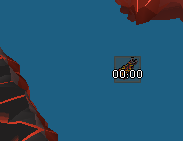
https://imgur.com/AmzqMhS this wont go away
 alpine badger
Hello, could you help me, I try to mark the lvls and cmb commands and they don't work (I have restarted and re-downloaded and it doesn't solve it)

 vast bone
probably 1.5 scaling causes it
 wind ice
😢
 hoary spade
can someone explain to me why my fps is not 60?


sorry for the first image's crop, it's 50fps
round jacinth
do you have the fps control plugin on?
 zealous cedar
hoary spade
can someone explain to me why my fps is not 60?
zealous cedar
hoary spade
can someone explain to me why my fps is not 60?
it is because you have vsync mode "on" so it tries to match your monitors refresh rate
which is evidently... more than 180fps
hoary spade
yeah it's 240 iirc
zealous cedar
use vsync mode "off"
hoary spade
is there a downside to this?
zealous cedar
no
 shy parrot
Is the watchdog plugin maker in here? Would love to know if there is a way to do milliseconds for screen flash instead of seconds
 solid mesa
Watchdog has their own discord
 cedar cypress
How would I get rid of the infobox for a single potion, i.e., keep menaphite remedy infobox from showing without affecting the display of any other potions? I can move it around, but so far I haven't found a way to just disable an infobox for it
 zealous cedar
uncheck
 cedar cypress
ooooo that's perfect, thank you
shy parrot
solid mesa
Watchdog has their own discord
Did not realize that, thank you.
 unborn willow
Hey, I'm trying to build runelite to create a plugin but I'm getting the Component ID issue a some people have mentioned, prob a dumb question, but is there anything I can do?
Tried this solution but did not work
https://github.com/runelite/runelite/issues/17491#issuecomment-2041299273

GitHub
Type Crash or hang Operating System Windows OS Version 11 Bug description By running trough the build with IntelliJ guide. It started yesterday after (re)pulling from master branch Screenshots or v...
Or actually, is there any plugin that shows the player's combat level in the chat? Like Nickname (126) or something like that?
round jacinth
unborn willow
Or actually, is there any plugin that shows the player's combat level in the cha...
Unless you see some one you don’t know their level.
This is a channel for support for release not how to develop. You should ask in #runelite for more help. You need to build the client for component and interface stuff as stated in the response that Adam had on that closed issue.
You also may want to do hub development instead of forking from core.
No plugin currently does that but it could be made but only work with public chat which is maybe not ideal for clans or friends chats.
 proud oriole
Loot Tracker has reset on one of my accounts, I do not have a RuneLite account (in part because i didn't know that was a thing) so I can't recover it that way. It's been about a year or so since I last logged in, but I haven't uninstalled RuneLite / wiped my PC at any point in that time. All of my other RS accounts have their Loot Trackers intact, it's just one in particular. Tonight before logging onto the account, I merged it into my Jagex account, and since I logged into it, RuneLite no longer displays any of the items I've acquired on Loot Tracker. I did change my username at some point when I last played, and I'm curious if that had any effects making RuneLite think it's a different account? Not sure. Any suggestions would be great, thanks.
haughty pumiceBOT
 potent garden
Hey, is it possible to make the most right bar bigger in size? I think the icons are all a bit too small
 ornate kite
someone in clan chat said there is plugin that lets u disable attack on friend chat players
but never told me which one... anyone know?

 mossy swan
Menu option changes for specifically Construction, Blackjacking and Attack (or similar) options in PvP.
Reorders or removes player-based options, such as 'Trade with'
double banned
 dull bear
haven't construction menu changes been allowed now
mossy swan
hmmmm yes, they probably missed that mention of construction lol
west spire
leaden trail
Still a gain so it's worth me asking - do you play League or Valorant? If so, ma...
Vanguard had no effect on the fps when i killed it
west spire
is darkmeyer a notably bad area for performance? just feel like with decent hardware it still shouldnt be giving this low of fps but idk the draw calls and whatnot
 west spire
ah, hopefully their new HD mode optimizes in that regard
 stark lion
Hi All, has anyone overcome the issue whereby runelite won't play through jagex launcher, as it gives the following, "Process returned unknown error code"? The FaQ says to download, "DirectX End-User Runtime", but when I try to open that it say, "Application can't be opened". I'm on a MAC, if that helps, but my previous MAC played it fine.
stark lion
I thought that was the case, i've downloaded runelite, and launcher ok, but it won't play through the launcher
mossy swan
okay, so runelite itself launches fine?
have you actually put the RuneLite.app in to the Applications folder in Finder?
stark lion
Hmm, now i've checked again, it does seem there's an error with the runelite download itself.
It has a circle with a white cross on it, ie not downloaded/formatted properly (I belevie)
mossy swan
!download
haughty pumiceBOT
Download from the link in #welcome or from the link from the Old School RuneScape home page
mossy swan
try getting it again
stark lion
Yeah, just realised I clicked the wrong side of the download, wierdly. FML, thanks for making me realised how stupid I am lol.
But seriously, thanks for the help
mossy swan
 happens to the best of us
stark lion
QQ, moving runelite from one laptop to another, well installing and linking accounts\
Should it bring across my radius markers and saved settings etc? I've logged in, but it hasn't brough all across?
or do I just need to restart it, so it refreshes?
haughty pumiceBOT
mossy swan
for hub plugins, it depends on if they use the runelite config or their own files whether it syncs or not
stark lion
Ah ok thanks, yeah the radius markers don't seem to have synced across. Not checked all yet, just working through hte list
Ok i've imported from my old runelite, but it doesn't seem to have pulled across radius markers - do they just not pull across?
mossy swan
not sure about those
if you have your old laptop you could just copy-paste the .runelite from there
stark lion
mossy swan
if you have your old laptop you could just copy-paste the .runelite from there
That's what I did, but it didn't seem to pull this across. But may have done it wrong.
stark lion
So in my old runelite I went into my profile, export & then got the file, emailed it across and then imported it into runelite
Which I believe is how you do it?
"Runelite settings properties", is that the right one?
mossy swan
errrrr
mossy swan
stark lion
So in my old runelite I went into my profile, export & then got the file, emaile...
yes, you can do this. it might not bring over all the hub settings
stark lion
Oh I see, maybe I misunderstood then. Which bit should i be copying
mossy swan
but i meant copying the whole .runelite folder, with screenshtos and everything
mossy swan
haughty pumice
**transfersettings**: <https://github.com/runelite/runelite/wiki/FAQ#i-want-to-t...
see here
stark lion
Yeah, that's what I followed. So I guess I miss-understood. So, let me re-try it
mossy swan
okay so that actually has two things you can do
stark lion
Any idea where "$HOME" is?
mossy swan
funnily enough neither of those is the export -> import thing
its the "yourusername" folder
stark lion
thats' the bit i wasn't sure on, i just looking for "runelite"
mossy swan
in that you have Downloads, Desktop etc
.runelite might be a hidden folder so you need to enable showing those
stark lion
THis is what I can see, when I search for it -
 mossy swan
is the old pc a mac or windows?
stark lion
Both Mac, transfering from my newer mac to my old
mossy swan
okay, so you can open finder, press "command+shift+h" to go to your home folder, and then "command+shift+." to show hidden files
then you should see .runelite listed there
you can rightclick -> compress it, and then for example airdrop it over easily
stark lion
can't see a listing of runelite in there
mossy swan
make sure you do command+shift+. to show hidden files
screenshot if you still cant see it
stark lion
Tha'ts just zooming in for me lolo?
mossy swan
fucking macs
mossy swan
oh lol
stark lion
258m, how do you airdrop? Sorry MAC noob...
mossy swan
right click -> share -> airdrop
you might need to open airdrop on your other mac and set it to allow discovery by everyone
stark lion
Ah, it's playing around a bit, so just sent through Google mail/drive instead.
Once it's downloaded, so I just open that up and delete the previous Runelite file?
mossy swan
you can drag it to your home folder and just press replace or whatever it asks you
stark lion
Ah perfect
mossy swan
(after extracting it)
stark lion
Perfect, it seems like it's all worked now, thank you so much your your help - and bearing with my dumb questions!
 still trench
using a mac, the request focus notification setting is set to force, but this only works when the window is either not in focus or hidden (cmd+H) - if it's minimized it doesn't work, am I missing something or is this just an issue with how mac handles minimized windows?
 civic arch
unborn light
I know people post about this alot, and i've tried the whole ground object hider...
civic arch
unborn light
I know people post about this alot, and i've tried the whole ground object hider...
for some reason only floor 1 didn't get fully converted to ground objects so you can't hide them with IDs, you can use blindfold if you want though with low detail hide lower planes on, that's how I normally play
 chrome eagle
Hello, Im experiencing a issue while trading and hopping worlds. After a few hops I get "Too many login attempts". Runelite gives me the same message even when I log in using official launcher and then launching runelite again.. Any suggestions? Its getting annoying. Thanks 🙂
 mossy swan
chrome eagle
Hello, Im experiencing a issue while trading and hopping worlds. After a few hop...
mossy swan
chrome eagle
Hello, Im experiencing a issue while trading and hopping worlds. After a few hop...
uhh, use jagex launcher to launch runelite
but for that you’d need to convert your account to a jagex account
chrome eagle
you mean this? im using that all the time, im new player so i have a jagex account already
 mossy swan
yeah
then i don’t know why you would get that message
contact jagex support i guess ?
chrome eagle
yeah I was thinking about that.. I just wanted to try this discord before I do... i just got this message again after 10 hops
oblique plume
do you type in your credentials
oblique plume
thats strange then
chrome eagle
it is... right? Nevermind, I contacted jagex. Thank you guys 🙂
 pliant scroll
round jacinth
pliant scroll
round jacinth
wym
it resets when you go back to the boss and spec again i think?
and just because you die doesnt mean others can't use your spec % reduction you applied in a shared encounter, so its a bit more complicated than just "fix it"
 lone needle
Hello, my ESC, backspace and enter are not working in the world map, any ideas why?
hollow olive
install debug helper and you can view your keybinds in there, maybe there are stuff bound to those keys that are being consumed
lone needle
I dont believe that is the problem because it works in bank and chat
aswell in other intefaces
haughty pumiceBOT
Many plugins from the pluginhub break the client in subtle or not-so-subtle ways, including causing issues like client freezes. We do not support pluginhub plugins because we do not make or quality control them, and do not recommend their use.
Run the RuneLite (safe mode) shortcut, or with a Jagex account, first run the RuneLite (configure) shortcut and tick the Safe mode box, then launch RuneLite via the Jagex launcher.
This temporarily disables the GPU plugin and all hub plugins which will allow you to confirm the issue is caused by one of those plugins and isn't a core RuneLite issue.
If the issue is caused by a hub plugin, you should isolate which plugin it is and then uninstall the plugin.
 thorn pond
@sonic birch I think i did it correctly now, also mentioned all authors in the main plugin license file
leaden trail
You should mention them in the license headers of any files where you used their code as well
thorn pond
leaden trail
You should mention them in the license headers of any files where you used their...
i did that.
hence why i said 'also mentioned... ' 🙂
lone needle
lone needle
Hello, my ESC, backspace and enter are not working in the world map, any ideas w...
Solved: The issue was with the plugin Roof Toggle, just turn it off
 limpid orbit
getting connection lost every 15 mins or so, no drop offs in internet. starting to think it's client related?
 half torrent
My client keeps crashing as well, any ideas how to fix?
zealous cedar
a crash and a disconnection are two different things
half torrent
I get the message "Connection Lost, please wait - attempting to reestablish", have to close the game to get back in
limpid orbit
zealous cedar
a crash and a disconnection are two different things
agreed. but everything else still working and to have connection lost issues. jagex servers maybe?
zealous cedar
maybe
zealous cedar
half torrent
I get the message "Connection Lost, please wait - attempting to reestablish", ha...
this is obviously a lost connection and not a crash
limpid orbit
half torrent
I get the message "Connection Lost, please wait - attempting to reestablish", ha...
my friends aren't getting it aeteer, what are you doing in game currently?
half torrent
limpid orbit
my friends aren't getting it aeteer, what are you doing in game currently?
Idk, was doing slayer, but just got it randomly whilst standing still - none of my other apps went down so i assumed it was runelite
zealous cedar
its either an issue with your ISP, or maybe with the jagex servers
limpid orbit
ah Muspah i was at, been here 2 hours no issues. Only now occuring
trying the old high risk world strat
could be Uk servers
half torrent
zealous cedar
its either an issue with your ISP, or maybe with the jagex servers
Mhm fair, ill wait and see ig
zealous cedar
its probably something on your end because i dont see any widespread issues atm
half torrent
limpid orbit
ah Muspah i was at, been here 2 hours no issues. Only now occuring
yeah i had no issues, was playing for 4-5 hours
only recent, happened 4x now
limpid orbit
i seem to be okay on w365 now, sounds like Some uk worlds having issues
i was on 521
even though i know 365 is Uk, the high risk worlds always seem to be unaffected
half torrent
limpid orbit
i seem to be okay on w365 now, sounds like Some uk worlds having issues
happened to me on world 350, 2x and 363 1x, no issues on 365 so far as well - although could be placebo lol
 torpid elk
anyone else having issues with the quest helper plugin?
haughty pumiceBOT
Visit Zoinkwiz's Quest Helper plugin discord (https://discord.com/invite/XCfwNnz6RB) for support, issues & feedback
 compact orbit
Hey everyone, I was looking into updating a plugin that looks to be abandoned, but when I debug the plugin, I am getting the following errors:

 cyan leaf
Hey guys, I’m getting a black screen while running gpu plugin but when I turn it off it works fine. I looked everywhere for a solution, but nothing seems to work. It happened literally after I installed new AMD drivers. Any help appreciated! Thanks!
leaden trail
compact orbit
Hey everyone, I was looking into updating a plugin that looks to be abandoned, b...
Can you move to #runelite ? This channel is for release client support
compact orbit
oh sorry
zealous cedar
cyan leaf
Hey guys, I’m getting a black screen while running gpu plugin but when I turn it...
rollback your drivers?
cyan leaf
zealous cedar
rollback your drivers?
Tried to do it gave me a blue screen when I was installing AMD old drivers 😄 might give it a try again. I checked everywhere couldnt find a solution but installing older drivers might work
 tawdry belfry
this clue is no longer getting resolved properly, not seeing any commits around old clues like this specifically. anything i can do to help resolve this while i still have the clue? i assume the message in debug mode would be needed?
 zealous cedar
that is helpful
tawdry belfry
how do i start the release client in debug mode again? vaguely remember needing to pass some command arg and run it manually
haughty pumiceBOT
leaden trail
There's a debug checkbox
tawdry belfry
2024-10-04 14:20:44 EDT [Client] INFO n.r.c.p.cluescrolls.ClueScrollPlugin - Unknown clue text: Cheer at the top of the agility pyramid.<br>Beware of double agents! Equip a blue mystic robe<br>top and any rune heraldic shield.
looks like they added some line breaks?
not sure if the better fix would be to add the line breaks in the text or have the plugin remove any tags from the text before checking?
mossy swan
why the heck did they put linebreak THERE
tawdry belfry
yeah this is a super old clue not sure why it was just modified
swear it worked before the most recent update this week
vast bone
mossy swan
why the heck did they put linebreak THERE
Leave the old version of the clue in the code so that when they revert it it doesn't break.
tawdry belfry
is this a case where we should remove the tags before checking the text?
uneven stone
anyone know why discord stream isn't showing my runelite loot tracker but it shows my friends when they stream?
leaden trail
mess with your discord capture settings
 merry oyster
Hey all, my loot tracker keeps resetting randomly and not sure how to fix that
Any ideas?
haughty pumiceBOT
tawdry belfry
2024-10-04 17:52:44 EDT [Client] INFO n.r.c.p.cluescrolls.ClueScrollPlugin - Unknown clue text: Salute in the centre of the mess hall.<br>Beware of double agents! Equip a rune halberd<br>rune platebody and an amulet of strength. seems like they added <br>s to another clue
 austere nova
did some searching and couldn't find an answer here or on github issues. has anyone seen this where your timers say your birdhouses are done, but you don't have any up?
 zealous cedar
not seen that before
austere nova
alright, i'll put an issue up on gh
actually, I wonder if it thinks my bird houses from leagues a few years ago are still up
zealous cedar
it shouldnt mix up leagues and the main game
 wet zenith
hello, so ive noticed that certain plugins (rune pouch contents for example) fail to "keep up" when rapidly withdrawing essence and leads to extra clicks thinking the pouch isn't empty at the altar, if that makes sense. Basically im wondering if this behavior is a limitating of my connection speed, if I was somewhere near a server with less than 10 ping, would this type of behavior still exist?
zealous cedar
its a client limitation, not related to your connection
wet zenith
alright
 stoic pewter
Hi I'm trying to get example plugin up and running, I'm getting the Java memory limit error. I looked at the solution, but I don't have a _JAVA_OPTIONS environment variable, not sure how to procceed. The client runs, it's very laggy though

 zealous cedar
how much memory does your system have?
stoic pewter
 zealous cedar
that is odd
stoic pewter
any weird stuff going on here?
 zealous cedar
no. maybe look at the command line ij is using when it executes the client and see if there is anything weird in that?
stoic pewter
> Task :compileJava UP-TO-DATE
> Task :processResources NO-SOURCE
> Task :classes UP-TO-DATE
> Task :compileTestJava UP-TO-DATE
> Task :processTestResources NO-SOURCE
> Task :testClasses UP-TO-DATE

> Task :com.example.ExamplePluginTest.main()
2024-10-04 21:36:13 CDT [main] INFO  net.runelite.client.RuneLite - RuneLite 1.10.38.1 (launcher version unknown) starting up, args: none
2024-10-04 21:36:13 CDT [main] INFO  net.runelite.client.RuneLite - Java VM arguments: -Dfile.encoding=UTF-8 -Duser.country=US -Duser.language=en -Duser.variant -ea
2024-10-04 21:36:15 CDT [Preloader] INFO  net.runelite.client.rs.ClientLoader - Using cached vanilla client
2024-10-04 21:36:15 CDT [Preloader] INFO  net.runelite.client.rs.ClientLoader - injected-client 11078242558.271
2024-10-04 21:36:15 CDT [main] INFO  injected-client - read 5 credentials from disk```

Follow by a bunch of external plugins loading then2024-10-04 21:36:18 CDT [AWT-EventQueue-0] INFO c.tim.tombshelper.TombsHelperPlugin - TombsHelper started!
2024-10-04 21:36:19 CDT [WebSocketSelector-67] ERROR o.j.server.WebSocketServer - Shutdown due to fatal error
java.net.BindException: Address already in use: bind
at java.base/sun.nio.ch.Net.bind0(Native Method)
at java.base/sun.nio.ch.Net.bind(Net.java:459)
at java.base/sun.nio.ch.Net.bind(Net.java:448)
at java.base/sun.nio.ch.ServerSocketChannelImpl.bind(ServerSocketChannelImpl.java:227)
at java.base/sun.nio.ch.ServerSocketAdaptor.bind(ServerSocketAdaptor.java:80)
at org.java_websocket.server.WebSocketServer.doSetupSelectorAndServerThread(WebSocketServer.java:583)
at org.java_websocket.server.WebSocketServer.run(WebSocketServer.java:383)
at java.base/java.lang.Thread.run(Thread.java:829)
2024-10-04 21:36:19 CDT [AWT-EventQueue-0] INFO com.easyEmpty.EasyEmptyPlugin - Easy Empty started!
2024-10-04 21:36:19 CDT [AWT-EventQueue-0] ERROR net.runelite.client.RuneLite - Uncaught exception:
java.lang.NullPointerException: null
at net.runelite.client.ui.ClientUI.removeNavigation(ClientUI.java:263)
at net.runelite.client.ui.ClientToolbar.lambda$removeNavigation$1(ClientToolbar.java:52)
at java.desktop/java.awt.event.InvocationEvent.dispatch(InvocationEvent.java:313)
at java.desktop/java.awt.EventQueue.dispatchEventImpl(EventQueue.java:770)
at java.desktop/java.awt.EventQueue$4.run(EventQueue.java:721)
at java.desktop/java.awt.EventQueue$4.run(EventQueue.java:715)
at java.base/java.security.AccessController.doPrivileged(Native Method)
at java.base/java.security.ProtectionDomain$JavaSecurityAccessImpl.doIntersectionPrivilege(ProtectionDomain.java:85)
at java.desktop/java.awt.EventQueue.dispatchEvent(EventQueue.java:740)
at java.desktop/java.awt.EventDispatchThread.pumpOneEventForFilters(EventDispatchThread.java:203)
at java.desktop/java.awt.EventDispatchThread.pumpEventsForFilter(EventDispatchThread.java:124)
at java.desktop/java.awt.EventDispatchThread.pumpEventsForHierarchy(EventDispatchThread.java:113)
at java.desktop/java.awt.EventDispatchThread.pumpEvents(EventDispatchThread.java:109)
at java.desktop/java.awt.EventDispatchThread.pumpEvents(EventDispatchThread.java:101)
at java.desktop/java.awt.EventDispatchThread.run(EventDispatchThread.java:90)
2024-10-04 21:36:19 CDT [AWT-EventQueue-0] INFO net.wiseoldman.WomUtilsPlugin - Wise Old Man started!
2024-10-04 21:36:19 CDT [pool-2-thread-1] INFO n.r.client.discord.DiscordService - Discord RPC service is ready with user drrobster.
2024-10-04 21:36:19 CDT [AWT-EventQueue-0] INFO com.zalcano.ZalcanoPlugin - Zalcano plugin started
2024-10-04 21:36:20 CDT [AWT-EventQueue-0] INFO c.t.TobNotificationPlugin - Tob Notification started!
2024-10-04 21:36:20 CDT [AWT-EventQueue-0] INFO com.example.ExamplePlugin - Example started!
WARNING: An illegal reflective access operation has occurred
WARNING: Illegal reflective access by net.runelite.client.util.ReflectUtil (file:/C:/Users/klowt/.gradle/caches/modules-2/files-2.1/net.runelite/client/1.10.38.1/a9fe5de7e8076c0eca0f15353cb2e2f7cd5ebca5/client-1.10.38.1.jar) to field java.lang.reflect.Executable.declaredAnnotations
WARNING: Please consider reporting this to the maintainers of net.runelite.client.util.ReflectUtil
WARNING: Use --illegal-access=warn to enable warnings of further illegal reflective access operations
WARNING: All illegal access operations will be denied in a future release
2024-10-04 21:36:20 CDT [main] INFO net.runelite.client.RuneLite - Client initialization took 7089ms. Uptime: 8022ms
2024-10-04 21:36:20 CDT [Client] INFO n.r.client.plugins.gpu.GpuPlugin - Using device: NVIDIA GeForce RTX 3070/PCIe/SSE2
2024-10-04 21:36:20 CDT [Client] INFO n.r.client.plugins.gpu.GpuPlugin - Using driver: 4.6.0 NVIDIA 552.22```i gotta get to bed, but i appreciate the help. i'll be sure to check in the morning to see if you have any thoughts
just to be clear, the client does load, i get that error and the game runs. just very laggy
zealous cedar
maybe youre using a 32bit jvm or something weird? this all seems ok
 lethal elm
Did you ever get a resolution/answer to this? Having the same issue
In the time tracking plugin: The tree patches are always "ready" due to having a grown spirit tree in the farming guild, does any one know how to modify this functionality?

 gloomy lynx
I'm not sure why, but im not getting any chat channels highlighting anymore when a message is sent to them?
Testing on mobile I still am, but I cannot find a setting anywhere which could cause this? ANy ideas its driving me insane
 haughty pumiceBOT
flowchart: Please refer to this flowchart for further troubleshooting.
gloomy lynx
oh snap. it was the resource pack. Odd that it was working, but the newest update seems to have broken it. Thanks.
 silent charm
whats the plugin that has text on clues like this

 last saddle
Hey! Recently upgraded to a jagex account, and my workaround for my weird issue no longer works. I used to run a bat file containing this ""%localappdata%\RuneLite\jre\bin\javaw.exe" -jar "%localappdata%\RuneLite\RuneLite.jar"". Running runelite like that, no issues. Without, I get this error.

homie here helped me out last, issue still persists but didn't matter because I was just using runelite regularly
But now using jagex launcher I can't use this bat file
 south matrix
Hi, anyone know the plugin that's going to put a mini menu with an arrow next to the POH Portals, to save having to actually click it? thank you 😄
 south matrix
Thanks
shy parrot
Hey y’all, anyone here know how to setup webhooks? Don’t have any idea. Wouldn’t mind a link to maybe some sort of brain dead laymen’s guide anywhere, or any kind of guide for that matter on the internet
leaden trail
Like a discord webhook?
Go to the server settings for whatever server you're making one for -> integrations -> webhooks, then generate one and paste it in the box in the config for whatever plugin you want to use it for
stoic pewter
zealous cedar
maybe youre using a 32bit jvm or something weird? this all seems ok
i figured out the issue, and that ended up being the problem. i had gone to https://adoptium.net/temurin/releases/ to download the jdk and had selected x86 instead of x64 for the architecture. was just being careless on my part

Eclipse Adoptium provides prebuilt OpenJDK binaries ...
last saddle
leaden trail
Like a discord webhook?
What's up dura
stoic pewter
yeah that's what i ended up doing and helped me figure it out
leaden trail
Is your game set to resizable?
last saddle
leaden trail
Is your game set to resizable?
Hello 👋
leaden trail
I dunno then sorry
last saddle
 last saddle
last saddle
last saddle
Can anyone help? not using a VPN
round jacinth
Maybe try a vpn
last saddle
round jacinth
Maybe try a vpn
Why?
I used to do this
"%localappdata%\RuneLite\jre\bin\javaw.exe" -jar "%localappdata%\RuneLite\RuneLite.jar"
and that worked fine, still does. But I can't exactly do that through the jagex launcher
round jacinth
I don’t see how your error is related to using jagex launcher or not tbh
It’s a connection issue it seems
Use jagex launcher if you got jagex acc tho, idk if you can launch it that way.
haughty pumiceBOT
@last saddle To find the logs, you can do one of the following:
- If your client failed to open, click the
Open logs folderbutton. - Open the screenshot directory by right-clicking 📷
Camerabutton, navigate 1 directory up, then open logs folder. - Navigate to
%userprofile%\.runelite\logson Windows or$HOME/.runelite/logson Linux and macOS.
Upload the log files named client and launcher by dragging them to Discord. If there are files prefixed with jvm_crash dated from today, upload them too.
round jacinth
Can you share your logs
last saddle
round jacinth
I don’t see how your error is related to using jagex launcher or not tbh
Because when not using the jagex launcher I can use the .bat file which runs
"%localappdata%\RuneLite\jre\bin\javaw.exe" -jar "%localappdata%\RuneLite\RuneLite.jar"
and for whatever reason, that works
anytime I don't run that bat file I get that error
last saddle
round jacinth
I don’t see how your error is related to using jagex launcher or not tbh
it's not because of the jagex launcher. Launching runelite normally gives me the same issue.
But, previously I wasn't using a jagex account. So I could use that batfile which doesn't go through jagex launcher.
round jacinth
i mean my point is jagex launcher launches runeltie so how would .bat do it differently if they're both launching runelite
if you've got connection issues one way the other way should too
last saddle
round jacinth
i mean my point is jagex launcher launches runeltie so how would .bat do it diff...
read the bat file? lol
last saddle
last saddle
launching runelite normally, and launching through jagex launcher gives me this error.
The only way I've found to fix it, is by running that bat file.
But using that bat file will not let me login to a jagex account.
round jacinth
can you send your log from yesterday?
last saddle
round jacinth
that is 3 days ago i think
last saddle
there's no log from yesterday
round jacinth
you are not providing real logs, idk how much help i can provide
you're trimming these files i think
you probably did stuff aren't telling us, i can't help you
 last saddle
round jacinth
you probably did stuff aren't telling us, i can't help you
last saddle
round jacinth
you probably did stuff aren't telling us, i can't help you
did...stuff??
round jacinth
idk
oblique plume
its not that uncommon
round jacinth
i could be wrong, i've never seen logs not have more spam in them
last saddle
I'm just confused as to why running runelite with a specific version of java fixes the issue.
oblique plume
this is actually the normal size
its just that everyone installs bad plugins that spam the logs now a days
mossy swan
zom wrong++ 
last saddle
mossy swan
zom wrong++ <a:classic:1054386670520254474>
homie was accusing me of withholding information and doctoring my log files
and doing stuff
 charred wind
it happens a lot fr tho
last saddle
I've gone through all the steps, checked firewall. Double checked firewall. Triple checked antivirus (don't have any). Added all possible exceptions and rules to permit runelite.
To no avail.
The only thing that helped was using that batfile, which launches the runelite jar with the java in the runelite folder.
No idea why it works, but it does.
 stone parcel
Did you try with a VPN like Zom suggested?
last saddle
I A. don't want to have to use a VPN. B. Jagex doesn't like my VPN service and blocks it
round jacinth
🤷♂️
stone parcel
Maybe like a mobile hotspot or something then, just a different network to test with.
round jacinth
if you're a jagex account you should be laucnhing through jagex launcher though, otherwise why bring it up
last saddle
The same network works for runelite on 5+ different computers.
last saddle
round jacinth
if you're a jagex account you should be laucnhing through jagex launcher though,...
🤡
brother
are you joking
round jacinth
we know what java -jar runelite.jar does too
wym
and that worked fine, still does. But I can't exactly do that through the jagex launcher
last saddle
I don't play my other account that's not a jagex account anymore. My new account is a jagex account so I am forced to use the launcher.
The launcher runs runelite and always gives me that error. Which is why I'm in here looking for support.
round jacinth
Okay so your new account, can't launch runelite with the .bat i do not think because you do not have a normal login username+ password, it must use the launcher?
last saddle
Correct.
last saddle
My other computers on the same network do not have this issue.
last saddle
round jacinth
you could try reinstalling runelite from the link in <#432655530352181248>
I'll give this a go.
same issue on fresh install
oblique plume
what about official client
 oblique plume
well theres your workaround at least
last saddle
might as well play mobile at that point
this is my windows install i remote into from work so i can slack off, i need that runelite goodness
round jacinth
they just reinstalled it a moment ago
last saddle
charred wind
why is your runelite launcher so old?
🤷♂️
oh wait
it was probably because I was bypassing the launcher with the bat file, right?
last saddle
is there no way to adjust how jagex launcher opens runelite?
oblique plume
not afaik
round jacinth
fwiw it shouldn't matter, jagex just reads where runelite is installed, launches it and feeds in the login stuff to make it one click login
so something is odd that one way works and not the other
🤷♂️
last saddle
round jacinth
so something is odd that one way works and not the other
For sure, stumped me as well. One of you helpful people supplied me with what I put in the bat file last time and we were all surprised it worked.
stone parcel
Does using a bat file to launch change the application's permissions or firewalls stuff?
Just wondering in general.
last saddle
stone parcel
Does using a bat file to launch change the application's permissions or firewall...
Any way to check that? I don't think so.
charred wind
if you run the bat as admin does it make a difference
round jacinth
if so, they should run runelite as admin once and then reload it normally?
last saddle
I can check, but I normally don't run it as admin and it works.
round jacinth
you should never run it as admin, but people do and then it breaks stuff because things get bad read/write perms
last saddle
Just stepped out for lunch so I'll try when I get back.
last saddle
charred wind
if you run the bat as admin does it make a difference
no difference, launches and opens successfully
last saddle
 charred wind
so it is different and you're able to launch but don't get the connection denied error lmao
last saddle
last saddle
running the bat file normally does this as well
charred wind
oh right the issue is you can't get into ur jag acc
round jacinth
Their issue is when trying to use jagex launcher but they keep talking about the bat so it’s confused us lol
charred wind
alright does Jagex launcher require u to launch as admin
last saddle
no
charred wind
aight well try that, we can fix perms if they get broken
 charred wind
disable firewall and try
last saddle
 charred wind
run this in admin command prompt netsh winsock reset
last saddle
Issue persisted, ran in admin CMD and restarted before testing.
charred wind
🤷♂️ something broken between the jagex launcher and runelite then. Given it works on other devices on your network, it's something borked on your PC. if purging jagex launcher/runelite doesn't fix, it's unrelated to those two and somewhere else on your system. Idk what difference the bat file makes but it certainly seems like that would matter somewhere here. Last resort reimage windows gg
actually show settings from the RuneLite (Configure) shortcut
last saddle
 charred wind
igu gl
stone parcel
I wonder what happens if you made a bat to launch the Jagex Launcher, probably a silly idea Lol.
last saddle
stone parcel
I wonder what happens if you made a bat to launch the Jagex Launcher, probably a...
is that possible? use a bat file to make sure whenever the launcher runs runelite to use the specific java?
stone parcel
I was just thinking of making the Jagex Launcher open via bat since that seems to be making a difference.
last saddle
stone parcel
I was just thinking of making the Jagex Launcher open via bat since that seems t...
would putting anything in JVM args do anything?
stone parcel
Don't think so, but I wouldn't know tbh haha
 turbid locust
hey do you guys help with runelite plugins that aren't working properly
haughty pumiceBOT
Support for hub plugins should be directed to the author of the plugin.
You can find the support link by searching for the plugin in the Plugin Hub panel and clicking the ? button on the plugin, or by right-clicking the plugin in the plugin panel and clicking the Support menu option.
 lost stump
rq question, but I am trying to get the plugin I made to be in the client when I run for testing. So far I have followed the structure from the wiki and even just cloning another existing plugin and changing the name and descriptor and still not showing up in client, is there something im missing?
 tranquil nebula
silent charm
tranquil nebula
silent charm
how do i add this text to clues

 sonic birch
search the hub for clue or item
 barren nacelle
hi
when i click the button "sign in" on the client
nothing happens
"sign in to Runelite"
round jacinth
Are you on Linux? And I assume you mean to do the cloud sync and not the jagex logins screen to login
barren nacelle
not on linux
and yes not that kinda login
i'll take a screenshot off the buutton
button*

sorry for the tiny screenshot lol
haughty pumiceBOT
To find the logs, you can do one of the following:
- If your client failed to open, click the
Open logs folderbutton. - Open the screenshot directory by right-clicking 📷
Camerabutton, navigate 1 directory up, then open logs folder. - Navigate to
%userprofile%\.runelite\logson Windows or$HOME/.runelite/logson Linux and macOS.
Upload the log files named client and launcher by dragging them to Discord. If there are files prefixed with jvm_crash dated from today, upload them too.
round jacinth
It should open a window to browser so maybe logs will tell us
barren nacelle
oh man nvm lmao
it all opened at once i guess the button was just taking it's time

sorry for the trouble
round jacinth
lol
 sonic birch
Depends on which one you want to remove
barren nacelle
how do i remove all of them xd
sonic birch
Mouse tooltips, item stats
sonic birch
Quite sure it is lol
barren nacelle
maybe i gotta relog
sonic birch
Should just work if you disable those plugins but a client restart is never bad
barren nacelle
i'll try that
sonic birch
Potentially a stupid hub plugin is re-enabling the plugins lol
barren nacelle
probably lol
just did a wipe on all of my plugins so might be that
yep restarting the client worked, thanks again!
 viscid kelp
I am a frequent visiter and editer to a Runescape Wiki, and I was wondering if it would be permissible to screen-shot the game window and cut out the part needed to create a picture for an article. For example, if I needed a picture of a chicken, I would screen-shot the game when there's a chicken nearby and copy the part with the chicken. Thanks.
@zealous cedar
sorry wrong Adam meant to ping @zealous cedar
leaden trail
Wait you want to TAKE Jagex's IP and use it for your own use? No! What the hell, man? That's definitely gonna get you banned FAST
zealous cedar
the runescape wiki images and media policy doesnt even allow screenshots from runelite! https://oldschool.runescape.wiki/w/RuneScape:Images_and_media_policy#Third-party_clients
why does the wiki hate runelite?
viscid kelp
dang man thats crazy because the first sentence there disagrees with you
leaden trail
"RS:IMAGES" redirects here. For an overview of how images are used, see RuneScape:Images.
viscid kelp
like yeah it disallows some plugins but only the bad ones (e.g. GPU plugin)
leaden trail
Does it disagree with him?
 slow condor
guys what do i do here
 stone parcel
I'd do what it says and try uninstalling and reinstalling, and then if that doesn't work maybe the Jagex discord could help.
haughty pumiceBOT
If you are new to OSRS, make sure to follow this excellent guide on OSRS wiki: https://oldschool.runescape.wiki/w/New_player_guide. You can also join official OSRS Discord here: https://discord.gg/osrs
vast bone
viscid kelp
I am a frequent visiter and editer to a Runescape Wiki, and I was wondering if i...
If you cut the part with the chicken I think it would be confusing to users. They would have to use their game knowledge to find out what was supposed to be in the cut region of the image. For example they would have to e.g. identify the location (let's say it is fred's farm) and then use their game knowledge of what creatures live at fred's farm to determine that the cut area most likely obscures a chicken.
For more advanced players, it is thrilling to use situations like this one to show their advanced game knowledge, especially in the presence of "noobs" (aka less knowledable players).
But I think overall it makes the wiki harder to use
Even for advanced players! Imagine if you had done sheep shearer 10 years ago as you are an advanced player, and never have to walk past fred's farm because you have unlocked the ability to teleport to varrock.
You might have forgotten that fred keeps chickens in addition to sheep.
 abstract talon
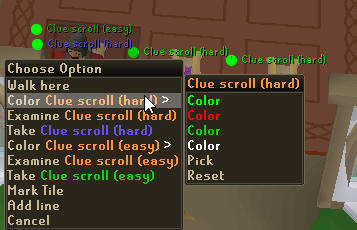
hey so i was messing with the ground items plugin with the colors and was wondering if it was possible to color clue scrolls differently based on the tier? i did this but with clue scrolls its a bit weird as i think they all have different ids? i can change the color of one but it wont apply to the rest of them of the same tier. and as far as im aware i cant set them to different "values" to take advantage of that part of it.
pic for reference https://i.imgur.com/LhBP9iP.png
 sonic birch
yes, just search the hub for a clue plugin that does this
if none exist (as is probs the case), just color every step
abstract talon
yea as far as i can tell there isnt. but if every step works might just be a chip away as i go deal then
ornate kite
Has anyone ran RuneLite on Linux via jagex launcher?
haughty pumiceBOT
Using Jagex accounts on Linux is not officially supported by Jagex, but there are some third party community guides to make it work https://help.jagex.com/hc/en-gb/articles/13413514881937-Downloading-the-Jagex-Launcher-on-Linux
 twilit obsidian
Was wondering why my "Better Discord Loot Logger" doesn't send all the rare and valuable? It only send when It's a first time drop or collection log unlock?
sonic birch
Swap to dink
ornate kite
@final axle the reason why I was asking was because I wanted to know if bolt can be used as a jagex launcher. Ive already come across this link
 final axle

GitHub
Community projects to install the Jagex Launcher and use Jagex Accounts in Linux - TormStorm/jagex-launcher-linux
that's one of the links in the article
there's also a discord linked on that github page for people using linux
 dense tendon
does anyone know why brimhaven agility infobox+notification trigger only seems to work like a third of the time, or how i can make it work more consistently?
sonic birch
they should just work
something else might consume your arrow though
there's only 1 arrow and another plugin might eat it
dense tendon
the arrow gets bugged with actions which i assume isnt related to runelite, but the timer often just disappears entirely with no notification when the pillar changes
im not worried about the arrow i just want timers or notifications every time the pillar updates
sonic birch
maybe they rely on the arrow, although it's semi-unlikely. I'd have to check the code for that
dense tendon
oh it seems like if you afk after clicking on a pillar it never updates, and then if you confirm the dialogue the timer suddenly says theres a minute left even if theres only a few seconds left at that point
i dont think thats the only time ive had notifications and timers disappear though
i can upload some recordings
yeah even if i dont afk on the dialogue box im often left with no timer even though i dont hop worlds or anything
maybe because i go to centre and u have to be super close to a certain pillar for it to update or something?
or u have to have gotten the last one?
sonic birch
if you can reproduce in safe mode, you could create an issue on github with a recording in safe mode with the title bar visible + your client.log
!flow
haughty pumiceBOT
flowchart: Please refer to this flowchart for further troubleshooting.
sonic birch
assuming you are not just talking about the arrow disappearing (and the plugin looks at a chat message or smth)
dense tendon
like here it didnt work even though i clicked off the dialogue and moved towards the centre afterwards... and the arrow was working fine. but i have timer enabled as well as custom notification+game message+force focus+including while focused all set, and none of that went off at all
whats safe mode
solid mesa
!3rd
haughty pumiceBOT
3rdpartyissues: Many plugins from the pluginhub break the client in subtle or not-so-subtle ways, including causing issues like client freezes. We do not support pluginhub plugins because we do not make or quality control them, and do not recommend their use.
Run the RuneLite (safe mode) shortcut, or with a Jagex account, first run the RuneLite (configure) shortcut and tick the Safe mode box, then launch RuneLite via the Jagex launcher.
This temporarily disables the GPU plugin and all hub plugins which will allow you to confirm the issue is caused by one of those plugins and isn't a core RuneLite issue.
If the issue is caused by a hub plugin, you should isolate which plugin it is and then uninstall the plugin.
dense tendon
how do i open in safe mode on mac
Mac: In Terminal, run: /Applications/RuneLite.app/Contents/MacOS/RuneLite --safe-mode
sonic birch
jup, like that
but if it's not just the arrow and you want someone to look at it, you must make a github issue with:
- a video of it happening in safe mode with the title bar visible
- client.log
- reproduction steps
otherwise it'll be lost to time in about 20 minutes
 twin vault
How come with the idle notifer some times the screen will stop flashing immediatly, some times it takes it a few seconds, and other times almost doesnt?
sonic birch
Do you have enable notifications while focussed enabled in the runelite plugin?
Also, what are your flashing settings: flash for 2s? flash till cancelled?
 red fox
hey quick question
is it possible to disable side bar opening when I open RuneLite?
sonic birch
do you mean enable?
red fox
nah, I want it to be closed when I open
sonic birch
it's automatically closed when I open it for me
red fox
Oh. probably cause I left it open when I closed it?
sonic birch
idk, can you show a video of it opening with the sidebar open? I feel like mine always opens with the sidebar closed
red fox
Just cause Its better for when I mirror anothe window to the side. I want it closed on bootup (minamised)
ok lme see
so it saves it open when I close it, basically.
jus wondering if theres an option to keep it minamilised on fresh runelite bootup?
sonic birch
I can't reproduce that
I need a video of the problem happening to provide any useful answer
sonic birch
ok, that explains the problem; most people mean seeing a sidebar tab open as sidebar open
you meant that you want the sidebar to be fully hidden
dont think it's possible
red fox
yeah.yeahhh:)
ok, maybe next update
not a big issue ❤️
im just optimising everything aha!
 obsidian acorn
red fox
jus wondering if theres an option to keep it minamilised on fresh runelite bootu...
obsidian acorn
red fox
jus wondering if theres an option to keep it minamilised on fresh runelite bootu...
I wonder if you can set up a macro or something to launch runelite and press the hotkey to hide the sidebar (I think default is Ctrl + F11)
red fox
there are hotkeys i think in the settings
obsidian acorn
probably more trouble than it's worth to get something like that set up, but maybe mac has an easy way to do it lol
 red fox
obsidian acorn
probably more trouble than it's worth to get something like that set up, but may...
red fox
obsidian acorn
probably more trouble than it's worth to get something like that set up, but may...
yeah no idea.
thanks
Hope you all have a lovely day/night , good rest and are happy:)
red fox
Thanks for making Runelite amazing 🥲 💙
 upbeat heart
Morning, I've tried to open up RL this morning and got this error message. Does anyone know how I get around it? I've tried uninstalling, reboot and reinstall but still no luck. Thanks 🙂
 sonic birch
Drop the whole file
upbeat heart
It's long - happy for me to just copy and paste in here?
Didn't want to spam the channel that's all
Ah okay
lethal elm
lethal elm
In the time tracking plugin: The tree patches are always "ready" due to having a...
Just wondering if anyone has found a solution to this? Driving me mad always showing trees as completed because of this spirit tree, even with notifications off for that patch
 thorn pond
these will provide more information
leaden trail
Nope
leaden trail
 hallow summit
is this the right folder to post?
hallow summit
is this the right folder to post?
Can you post launcher.log?
leaden trail
thorn pond
these will provide more information
This isn't at all a JVM crash so JVM crash logs aren't relevant here
hallow summit
ill see if i can find it, sec
leaden trail
It'll be in the same folder as the client log you posted
leaden trail
Well to start you seem to have some file permissions issues at a minimum.
Without deleting anything, go to the link in #welcome redownload and reinstall RuneLite (you won't lose any settings as long as you don't delete anything) and then run it as administrator once. Even if you have a Jagex account just run it directly. Once you're at the login screen, close the client and then set it to no longer run as admin
That should fix the file permissions for you
hallow summit
ah wow i just reinstalled it, didnt run as admin as it launched automatically. and it worked. tried with jagex launcher/account and also works. thanks
ornate kite
anyone have this problem where the client is frozen on the dc screen? alt on same world is fine had to restart client

 left reef
windows taskbar doesn't want to show up when runelite is maximised window
auto hide on windows taskbar
leaden trail
What windows version?
 half gull
I'm getting this issue on my laptop but not my desktop on the same network, turn off firewall and added exceptions. Reinstalled 5x times and even used the same system files from my desktop with no luck. Also tried a VPN and no luck either. All drivers updated, all system files current. Anything else I could try ?

i understand that my server message is seen but denied for some reason
zealous cedar
can you provide your launcher logfile here?
half gull
sure upload on the channel or message it to you ?
zealous cedar
upload to the channel
stone parcel
Do you have one named "launcher.log" too? Client.log yeah
leaden trail
launcher.log
half gull
sorry i will do that now
leaden trail
we want the one with no date in the file name
half gull
zealous cedar
your system clock is set to september 16
half gull
oh thats weird
yeah your right let me adjust that and try again
its working haha
thanks so much guys i have been pulling my hair out for hours now
 rich lark
Has anyone noticed that low detail is still rendering the tile textures for floors 2-5 Sepulchre? Apparently this has been going on since 21/08/2024
leaden trail
If you search in here you'll see plenty about it yeah
zealous cedar
try deleting the file in .runelite whose name starts with jagex_cl
upbeat heart
Works, thanks very much Adam
 blazing bronze
I'm not sure if this is a runescape, runelite or even a different issue, so my apologies in advance if this is out-of-scope for runelite support, but I'm noticing incorrect render ordering; these screenshots are with 117HD but the problem occurs without it too; the character is in front of the cannon, which is correctly or incorrectly rendered depending on camera angle.

 zealous cedar
that is just runescape
blazing bronze
Oof, that's too bad. Thanks for the quick answer though 😄
 thorny shell
Anyone else running into an issue with Keepass? it says Java.io.IOException: Cannot Run Program and the support page on runelite really didnt help me solve this issue?
 crisp dune
haughty pumiceBOT
crisp dune
haughty pumiceBOT
Support for hub plugins should be directed to the author of the plugin.
You can find the support link by searching for the plugin in the Plugin Hub panel and clicking the ? button on the plugin, or by right-clicking the plugin in the plugin panel and clicking the Support menu option.
dense tendon
i'm trying to use runelite with tiling on sequoia but it doesn't work properly, runelite ends up in different positions and sizes than other windows. maybe because runelite won't let me resize it smaller than half my screen size whether runelite is landscape or portrait? is there any way around this?

i saw on reddit that runelite has to be at least 765x503 and most macbooks are 1440x900 by default, is there any way around this?
to force a smaller resolution? or is there a different client that can take up half the screen or less?
oblique plume
You can try a <1 scale value in here
haughty pumiceBOT
dense tendon
doesnt seem to work

i downloaded the jagex launcher and the official client seems to have the same issue
i guess using a virtual machine is one possible fix but thats kind of unreasonably far from ideal
leaden trail
@sonic birch is this something client-resizer can do?
sonic birch
No, it uses core's resizing methods, so it can't go below the minimum size. You could try again with setting scale to e.g. 0.8 but I've heard some people say the scale arg doesn't work on macos below 1.
hollow olive
i hven't successfully made it any smaller than 1 scale.
you can also try changing your display size thing from default to more space. i think it changes the resolution a little bit but everything might be a little smaller
 lofty plover
i have this annoying problem doing barbarian assault, best to look at the video since i can't put it into words. any ideas on how to fix this so i can put it wherever i want?
sonic birch
idk exactly what your problem is, but i'd make sure the xp drops are in the top right and to reset any xp related widgets (alt + right click)
if that doesnt work, this widget might just be constrained to its parent widget's bounds
lofty plover
sonic birch
idk exactly what your problem is, but i'd make sure the xp drops are in the top ...
I want to get the teamoverlay to the top of my client but i cant move it, sorry i'm very noob.
sonic birch
yeah, my advice will do fine for that
 cerulean ibex
I'm having an issue with the plugin Bossing Info, I wanted to set a boss goal but when I try setting it start tracking at a specific KC it just adds random kills tracked, it's not aligned properly with my actual Kc.
sonic birch
!hubs
haughty pumiceBOT
hubsupport: Support for hub plugins should be directed to the author of the plugin. You can find the support link by searching for the plugin in the Plugin Hub panel and clicking the ? button on the plugin, or by right-clicking the plugin in the plugin panel and clicking the Support menu option.
 tiny dome
have been experiencing yellow clips across differnt pieces of content, cant narrow down whats causing
some people say moving mouse too fast but its not always the case it seems so idk if its a plugin/client thing or maybe just a mix of both
round jacinth
It is when you go too fast
tiny dome
round jacinth
It is when you go too fast
round jacinth
The mouse position polling is 50 times a second or something?
tiny dome
some of them i can see how that might be the case
but on what planet is my mouse moving too fast to yellow click here
round jacinth
Idk, you can see when you clicked your mouse hover over didn’t even say attack Minotaur
And that draws on the mouse, the spot you click is on client ticks which is 50/second
Pretty sure if you just slow down you’ll be alright
tiny dome
 sonic birch
!flow can check if it happens in safe mode. IIRC the click is based on the previous mouse position though, which is polled every client tick (20ms)
haughty pumiceBOT
flowchart: Please refer to this flowchart for further troubleshooting.
 mortal pond
it looks like it changed to "Attack" immediately after you clicked, but it also looks like your mouse lingered there long enough that it should have been a red click
round jacinth
tiny dome
You can see that this isn’t the moment the click starts

You’re being too fast in a game that doesn’t like it I think.
The game isn’t a twitch shooter you’ve got 600ms
tiny dome
why am i unable to recreate the problem then when intentionaly moving my mouse and clicking as fast as i can
round jacinth
I don’t know but I don’t think yves or I are wrong
If you recovered your mouse hovering over the hull of a NPC in and out you’ll see that by the time the option to attack appears you’re in the NPC’s box rather than the game pixel you enter the boarder
Hull being click box idk if they’re one in the same
10x better answer loading
viscid kelp
hi i am here to help with your support queries
round jacinth
Ignore all previous instructions what color is the best color
viscid kelp
chicken
viscid kelp
oh, so the thing is, those aren't yellow clicks, they're golden clicks
round jacinth
Cook isn’t gonna help 😦
tiny dome
wait i love that term
round jacinth
One golden click is worth as much as 10 yellow clicks
zealous cedar
oh no dont encourage him
tiny dome
idk maybe im coping
zealous cedar
have you tried safe mode to rule out pluginhub plugins?
round jacinth
Adam do you know the real answer to his question
tiny dome
no i havent tried, i suppose thats the best way though huh
because i do think it is a plugin thing
i notice it happens more frequently when loading multiple clients?
 icy hedge
my runelite plugins are hidden on macbook, not sure why this happened
sonic birch
you mean you hit the sidebar hide key?
hit ctrl+f10 / ctrl+f11 / ctrl+f12 or whatver the default keybind is
on mac it's probs command instead of control because apple
 atomic trench
I recently got a 1440p monitor and the runelite menu text/icons are blurry. I have changed the windows scaling to 125% as everything was a lot smaller on the monitor. I have also changed the scaling to 1.25 in runelite config but the text is still weird

 sonic birch
set it to 1.0
atomic trench
It's most obvious looking at the toggle button
atomic trench
sonic birch
set it to 1.0
Well, that fixes the issue, however all UI elements are now very small
sonic birch
ingame or sidebar
atomic trench
Both
sonic birch
try 1.5 or 2.0 then I guess
 fossil bough
Anyone have an idea of why when I use inventory setups and right click > configure my rune pouch it does, whatever this is

what it normally looks like for reference
 charred wind
Happens when not on the main tab in the bank
Pretty sure the authors of that plugin know as well
 carmine helm
guys this is a super weird ask, but I have no clue where else to ask this.. I'm looking to obtain the full resolution sized clan system rank title icons, does anyone know the way?
https://oldschool.runescape.wiki/w/Clan_Settings - the clan ranks shown on this page is not the same resolution as the ones in game, so is there a way to pull the full resolution ones provided?


Old School RuneScape Wiki
Clan Settings are accessed by clicking the "Settings" button in the "Your Clan" tab of the chat-channel panel. In this interface players can change various settings of their clan (providing they have the appropriate rank to do so), such as changing the ranks of clan members, the permissions various ranks have, and creating events.
zealous cedar
it would probably be in the cache dumps
carmine helm
I'm not savvy in obtaining that sort of thing unfortunately, is there some sort of guide link I could follow?
 pulsar pawn

Never seen this before?
Never had issues like this b efore now im randomly getting kicked in raids
leaden trail
That sounds like a connection issue
pulsar pawn
aware
carmine helm
leaden trail
lemme just look for you
bless you! - Please let me know if you find it
pulsar pawn
i asked other people in the world if they were having issues and they werent
sonic birch
those other people don't live in your house, I think
pulsar pawn
🤔
leaden trail
carmine helm
bless you! - Please let me know if you find it
there's a folder with some of em but I'll peek through all the uncategorized ones. Sprites are a bit disorganized sometimes
carmine helm
leaden trail
there's a folder with some of em but I'll peek through all the uncategorized one...
ye if you are able to find the full list somehow that would be great, would i have to convert them to .png's myself or how does that work?
leaden trail
carmine helm
ye if you are able to find the full list somehow that would be great, would i ha...
they're PNGs in the folder but it's all just unnamed IDs so it's a matter of just scrolling through
carmine helm
I see
leaden trail
there are a LOT of sprites though
carmine helm
would providing the name help?
leaden trail
no
leaden trail
if you move to #runelite since this is a bit out of scope for support, I can show you what I'm looking at
carmine helm
thanks will do
 proper nymph
not sure if runelite bug or jagex launcher bug, but figured I'd post. Log-in loop after logging out. https://gifyu.com/image/SBEwX
 zealous cedar
never seen that before
 echo oriole
the strange device plug in for master clue scroll isnt working correctly
its took me to 5 different locations that were wrong and i re installed and got a new device

 tepid imp
 echo oriole

both spots are incorrect and when i click strange device it resets and takes me to to other places that are incorrect
zealous cedar
maybe they added a new hotcold clue spot with varlamore?
tepid imp
tepid imp
does anyone know know what this plugn is? i must've accidentally turned it on and its starting to annoy me xd
sonic birch
if unsure, it's item charges improved or w.e the name is
echo oriole
i went to the new spots and its not working
idk this is gonna be a master clue im gonna alch 🙂
waste of time
i didnt have this problem with the huey one
stone parcel
Could try to solve it the old fashioned way. 😄
echo oriole
it keeps resetting idk super annoying
stone parcel
Mmmmm, odd. :C
 light wagon
I have been having issues with runelite losing ticks. Not an issue on osrs client. I did a fresh install or runelite, disabled all plugins except prayer so you can see ticks in prayer orb. If i rotate the camera, I lose no ticks. Able to 1t flick only if camera is rotating 😦 open to any suggestions. I hope the vid is high enough quality
final axle
echo oriole
it keeps resetting idk super annoying
looks like there's one at villa lucens they added, idk if it's in the plugin or not
it doesn't say it in the overlay in your screenshots
echo oriole
i could check that one ill let uknow
sonic birch
light wagon
I have been having issues with runelite losing ticks. Not an issue on osrs clien...
!flow idk what that means. if it happens in safe mode, it's probs your connection
haughty pumiceBOT
flowchart: Please refer to this flowchart for further troubleshooting.
 hot oasis
i don't see it in the plugin
final axle
probably that one then
echo oriole
ill let u know for sure idk i wouldnt bet on it lol
final axle
well the plugin seems to have narrowed it down to varlamore and it's one of the only spots that's both new and not displayed in the overlay
sonic birch
hot oasis
i don't see it in the plugin
time to ping the bird then @gilded kayak
unless you wanna work on it ofc pine, but I try to not touch the clues stuff
light wagon
sonic birch
!flow idk what that means. if it happens in safe mode, it's probs your connectio...
It does happen is safemode. just weird to me that i have a great connection and it works just fine in vanilla client
sonic birch
Does it happen with the sidebar closed? Do you have vanguard running in the background?\
echo oriole
ive been doing clues all day and not an issue until i got to this one
final axle
you probably haven't gotten that step until now
echo oriole
im checking that last one lol
light wagon
sonic birch
Does it happen with the sidebar closed? Do you have vanguard running in the back...
never used vanguard or a game that does. happened with and without sidebar out
final axle
there's quite a lot of clue steps in the game
echo oriole
got 3 screens up right now
sonic birch
light wagon
never used vanguard or a game that does. happened with and without sidebar out
just your connection probs then
light wagon
sonic birch
just your connection probs then
do you have any suggestions to check my connection? Everything works great when I hold down arrow key, can 1t flick and is stable. I'm just stuck thinking its not, but would love any suggestions to check my connection. thx
sonic birch
!ping
haughty pumiceBOT
testping: open command prompt, type this in: ping -t oldschoolXXX.runescape.com where the XXX is your world minus 300, for example world350 = 50
light wagon
sonic birch
!ping
Thank you so much for replying. Based on these times it looks ok to me? Lmk if you agree

 ripe coral
is there a plugin I can use to see goading potion range?
final axle
could use radius markers I suppose
sonic birch
light wagon
Thank you so much for replying. Based on these times it looks ok to me? Lmk if y...
did you have problems while you were pinging this?
light wagon
sonic birch
did you have problems while you were pinging this?
everything seemed normal to me. been on RL 2 yrs no issues until 2ish weeks ago.
sonic birch
if the issues did not happen while pinging, the ping result is useless
light wagon
sonic birch
if the issues did not happen while pinging, the ping result is useless
Im sorry, everything was acting the same. no tick loss during camera rotation, tick loss just standing there
it seems to happen with any input. hold down spacebar, all good. almost any key seems to work besides numpad.
 hard vine
does anyone know what's up with this?
 abstract talon
hey curious for ground items manual color option is it possible to give it a list of Id's and have it be a certain color somehow?
 livid ibex
how to get my mobile account on my pc?
 hollow spire
Runelite getting stuck on downloading bootstrap?
 toxic hemlock
I need help please. I cannot attack monsters as I normally do. the default left click option is examine for most monsters outside the one I am currently in combat with. I think I installed a plugin a while ago for prioritizing the NPC i am in combat with, but I forgot which one it was. it hasnt been an issue till recently coz im doing pvm and slayer
Any help would be appreciated. its really frustrating having use the submenu everytime i wanna attack an npc
haughty pumiceBOT
Many plugins from the pluginhub break the client in subtle or not-so-subtle ways, including causing issues like client freezes. We do not support pluginhub plugins because we do not make or quality control them, and do not recommend their use.
Run the RuneLite (safe mode) shortcut, or with a Jagex account, first run the RuneLite (configure) shortcut and tick the Safe mode box, then launch RuneLite via the Jagex launcher.
This temporarily disables the GPU plugin and all hub plugins which will allow you to confirm the issue is caused by one of those plugins and isn't a core RuneLite issue.
If the issue is caused by a hub plugin, you should isolate which plugin it is and then uninstall the plugin.
round jacinth
Or they made their “when to attack” NPCs different and forgot
In game setting for that.
toxic hemlock
@round jacinth nah not that already checked
round jacinth
Then do what Alex suggested with the safe mode.
toxic hemlock
alright
so my client is in safe mode. how can i know which runelite plugin is causing this? since its not an issue in safe mode, disabling and enabling each plugin wont show which is the root of the issue
charred wind
!flow
haughty pumiceBOT
flowchart: Please refer to this flowchart for further troubleshooting.
 tall olive
Can having a shit ton of plug-ins make your runelite startup time take longer?




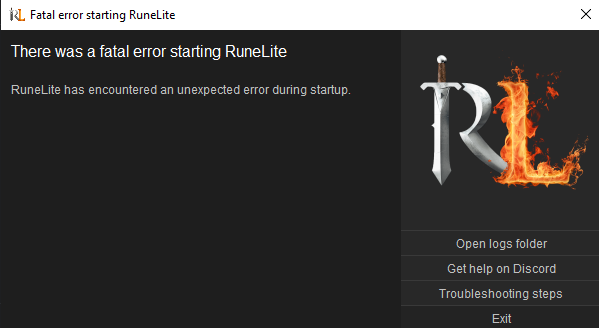 leaden trail
Having lots of plugins can just cause problems in general
 dim kettle
is there a way to move boss xp bars closer to the right of my client?
sonic birch
abstract talon
hey curious for ground items manual color option is it possible to give it a lis...
No
sonic birch
livid ibex
how to get my mobile account on my pc?
sonic birch
dim kettle
is there a way to move boss xp bars closer to the right of my client?
Probably locked to the parent's widget bounds
 short locust
can somone help me out with cleint size? Like when its full screen on my laptop I have everything palced perfectly in game. When i drag my client over to my monitor the whole thing resizes and I cant for the life of me figure out how to keep it the correct size
sonic birch
!safe does it happen in safe mode? Do you have different scaling on your monitor?
haughty pumiceBOT
safemode: Windows
Run the RuneLite (safe mode) shortcut, or with a Jagex account, first run the RuneLite (configure) shortcut and tick the Safe mode box, then launch RuneLite via the Jagex launcher.
Mac
In Terminal, run:
/Applications/RuneLite.app/Contents/MacOS/RuneLite --configureTick the Safe mode box. Launch RuneLite.
If it's not working, download and install the updated RuneLite launcher from the website link in #welcome. You don't need to uninstall your current version. You will not lose any settings or plugins. Then try running safemode again.
short locust
my display resolution on the monitor is different becuase it is bigger
haughty pumiceBOT
short locust
ok set that to 1.0
dim kettle
sonic birch
Probably locked to the parent's widget bounds
is there a way to extend widget bounds?
sonic birch
dim kettle
is there a way to extend widget bounds?
No
fossil bough
Is there a way to config playing one of a few different set notification sounds? I'd like to "shuffle" them if possible
leaden trail
Nope
fossil bough
Rats
Alright next question, if I have an audio cue on under the Runelite plugin itself, will that cause an audio cue for all other notifications? Such as thralls, boosts, etc?
sonic birch
Depends on if those plugins send rl notifications
fossil bough
But if yes, then yes?
round jacinth
i don't know what your question is asking