#support
1 messages · Page 13 of 1
 gilded kayak
 glossy flume
my fps color is red and jumps +1 -1 from default, how to make it yellow and a stable number?
 viscid lantern
the red is because you have have an fps limit set
glossy flume
its now up to 50 in yellow
whats the plugin for the chatbox to make the same exact chat message to be (1) (2)... (10) etc etc
glossy flume
I did but it doesnt work, for example turning the dailies message on and off doesnt collpase it @hollow olive
 hollow olive
thats not a game message
i am not sure that is collapsible right now
its from daily task indicator
glossy flume
how to save chat messages from previous login sessions?
 leaden trail
there's a chat logger hub plugin
it's not the best in my experience but it kinda works usually
 round jacinth
silk, if you spend afew moments looking over the plugin list/searching the top bar you can get a long ways with answering these questions
 wintry cave
I tried uninstalling and installing the wilderness player alarm plugin. In the screenshot above I have the interface open, yet the screen isn't flashing
 glossy flume
Ty!
 ivory folio
is it working now?mine is not working also
wintry cave
I'll be back in the wild in a sec
ivory folio
same, i already tried uninstalling and install but didnt work
wintry cave
nop3
leaden trail
We don't provide support for hub plugins here
ivory folio
sad, i died at the rev caves because of it..haha
 haughty pumiceBOT
Get support for the Wilderness Player Alarm Plugin Hub plugin here: https://runelite.net/plugin-hub/show/wilderness-player-alarm.
You can also find the support link by searching for the plugin in the Plugin Hub panel and clicking the ? button on the plugin, or by right-clicking the plugin in the plugin panel and clicking the Support menu option.
wintry cave
what is a hub Plugin?
wintry cave
Who is responsible for fixing it then?
gilded kayak
the author of that plugin
wintry cave
got it ty
wintry cave
ivory folio
sad, i died at the rev caves because of it..haha
same lol
 indigo vessel
What plug-in is this?

Low detail was causing me some stalls yesterday. Went through safe mode and whatnot and removed some plug-ins. Also figured out it wasn't gpu
gilded kayak
that error is just you being unable to connect to the prices api
indigo vessel
It was fine for a bit but I logged in, stalled and then checked and saw this
gilded kayak
well warning not error
indigo vessel
hmm still having stalls due to this which is annoying as I can't do the content I want to do
gilded kayak
well your logs suggest your* internet is having a problem, and you're stalling
so it sounds like internet to me
indigo vessel
I am getting a wifi extender in a few days so I'll see then I suppose
 ivory ice
Is there a way to get steam to open runescape through the jagex launcher instead of through runelite? It wont let me log into runelite because i have an upgraded account i think.
gilded kayak
I don't think so, your assumption is correct yes
ivory ice
I just started, is it possible for me to make a new account and not have it be upgraded?
gilded kayak
unfortunately not, all new accounts are automatically upgraded
playtime is tracked in-game and if you login to the steam version you'll get (most/all?) of the achievements u earned while playing on RL
but that's all I can do to sell you, if you really want to use steam I'm not sure
ivory ice
So achievements is doable just not playtime got it :/
round jacinth
your play time is tracked in game anywyas
ivory ice
ik but i wanted it on steam, i like seeing the numbers lol
 warm steeple
Hi I accidently zoomed in and I have no idea how to zoom out. Can anyone help?

 zealous cedar
turn stretched mode off
 cunning zenith
Hey, my girlfriend is kinda colour blind and can't read the red text when an item is missing during a quest for example.
Is there a way to change the red text colour?
The red on grey seems to be the biggest issue for her.
zealous cedar
have you tried the gpu plugin colorblind mode?
 severe tundra
Here’s an odd question not totally relating to Runelite. I used to use “Medal” to capture clips of my client. All of a sudden my clips have the outline of the client but the content is just random large white rectangles. Could this be an issue with GPU plugin? Medal seems to clip other games with no issue
zealous cedar
I guess you could test it by turning gpu off
severe tundra
Will give it a go tomorrow. Can’t remember changing anything in gpu. Seems like more of a medal issue but figured I would ask and see if anyone had heard of that before
Tried the old uninstall/reinstall
No dice tho
cunning zenith
zealous cedar
have you tried the gpu plugin colorblind mode?
That works for the runelite interface too?
zealous cedar
ah, no
cunning zenith
I get this is a unique problem 😅 we play on a TV from the sofa, seems the red on grey becomes hard to read at this distance
 stark river
help pls for some reason no recent plugins downloaded i cannot hear any game souinds from nex
i can hear general game sounds but not nex hersefl
 vast bone
something about the dialogue type changing
so nex nostalgia plugin doesn't recognize it.
stark river
is this a new bug?
round jacinth
yes
the new quest added a new chat type and it no longer is what it used to be at nex
stark river
kk ty ❤️
 radiant canyon
whenever i used to screeshare runelite on discord it would show my side table with my drop table/ all my plugins but now it only shows the inside window
anyone know what i did to have this happen and fix?
gilded kayak
probably the experimental capture setting in discord
 forest hearth
Hi was the wilderness player alarm plugin disabled as it doesn't seem to be working for me.
gilded kayak
it was not disabled but apparently it is broken
forest hearth
ok
 dense meadow
zealous cedar
ah, no
dense meadow
zealous cedar
ah, no
Hi Adam, I was wondering if a transmog for the old look of Torva is a possibility? The new look just isn't doing it for me.
haughty pumiceBOT
@prime jolt Use /ghauth command to get github roles and be allowed to post in #development
 drowsy walrus
 broken otter
umm i have chat timestamps enabled but dont see any times?
vast bone
yes.
 jagged vortex
is it gonna work again and if yes when if no why?
 cold juniper
How can I tell if I am runing 32 bit or 64 bit RL in windows 11?
vast bone
jagged vortex
is it gonna work again and if yes when if no why?
sometime. probably a week I think
 bleak silo
Can't seem to find the safe mode version of Runelite on this pc, also looked in some folders that Runelite is installed in and can't find it, how do I get it back/what is a work around pleaseeeee 
vast bone
if you can find Runelite (configuration) you can tick safe mode
but you probably don't have that either
I would just reinstall from the link in #welcome
bleak silo
Yeah, no results, will reinstall, ty c:
 mossy swan
 lusty nacelle
any chance anyone know how to fix?
lusty nacelle
any chance anyone know how to fix?
runelite needs to update those. can you post a screenshot and your log file?
!logs
haughty pumiceBOT
To find the logs, you can do one of the following:
- If your client failed to open, click the
Open logs folderbutton. - Open the screenshot directory by right-clicking 📷
Camerabutton, navigate 1 directory up, then open logs folder. - Navigate to
%userprofile%\.runelite\logson Windows or$HOME/.runelite/logson Linux and macOS.
Upload the log files named client and launcher by dragging them to Discord. If there are files prefixed with jvm_crash dated from today, upload them too.
lusty nacelle
oh
the other clue scrolls work
just the master steps maybe because the dudes died on the quest?
vast bone
yeah some need to be updated.
mossy swan
yeah like you were told earlier, jagex changed some of the clues
lusty nacelle
ah i see rty
lusty nacelle
im sorry i dont know how to do these stuff lol im too old for computer stuff
mossy swan
!logs
haughty pumiceBOT
To find the logs, you can do one of the following:
- If your client failed to open, click the
Open logs folderbutton. - Open the screenshot directory by right-clicking 📷
Camerabutton, navigate 1 directory up, then open logs folder. - Navigate to
%userprofile%\.runelite\logson Windows or$HOME/.runelite/logson Linux and macOS.
Upload the log files named client and launcher by dragging them to Discord. If there are files prefixed with jvm_crash dated from today, upload them too.
mossy swan
just do the 2nd line and then last line
 wraith saddle
is the wilderness player alarm plugin broken? or was it purposely changed?
vast bone
try restarting client.
mossy swan
you may need to change the notification settings in it though since that was also changed
wraith saddle
the notification works, but there's no option for screen flashing anymore?
nvm im dumb, thank you
ivory folio
before when i step out of ferox enclave, if there are other players, the flashing notification will flash non stop. Does it not work anymore like this?
haughty pumiceBOT
Get support for the Wilderness Player Alarm Plugin Hub plugin here: https://runelite.net/plugin-hub/show/wilderness-player-alarm.
You can also find the support link by searching for the plugin in the Plugin Hub panel and clicking the ? button on the plugin, or by right-clicking the plugin in the plugin panel and clicking the Support menu option.
mossy swan
it has been updated, but idk how it works exactly
 modest terrace
!jar
haughty pumiceBOT
Run the Maven builder to output a shaded JAR in /runelite-client/target/
modest terrace
!building
haughty pumiceBOT
!building command not found!
modest terrace
!build
haughty pumiceBOT
!build command not found!
 plucky meadow
hey lads- my jagex launcher is not loading runelite unless i turn my gpu plugin off - any idea why?
or how to fix it?

just does this
haughty pumiceBOT
To find the logs, you can do one of the following:
- If your client failed to open, click the
Open logs folderbutton. - Open the screenshot directory by right-clicking 📷
Camerabutton, navigate 1 directory up, then open logs folder. - Navigate to
%userprofile%\.runelite\logson Windows or$HOME/.runelite/logson Linux and macOS.
Upload the log files named client and launcher by dragging them to Discord. If there are files prefixed with jvm_crash dated from today, upload them too.
plucky meadow
this safe? wont drop my password out or nothing?
 charred wind
your logs don't contain identifying information, no
modest terrace
Anyone know how to fix the build? I ran 3 different Mavens on a fresh Runelite github project.
But i get error when launching the shaded jar. any help? I am trying to get a ready .jar out for use


 oblique plume
probably wrong java version
leaden trail
modest terrace
Anyone know how to fix the build? I ran 3 different Mavens on a fresh Runelite g...
Post in #runelite , this channel is for release client support
modest terrace
just installed fresh
plucky meadow
@leaden trail can u see those logs?
haughty pumiceBOT
@stiff shale To find the logs, you can do one of the following:
- If your client failed to open, click the
Open logs folderbutton. - Open the screenshot directory by right-clicking 📷
Camerabutton, navigate 1 directory up, then open logs folder. - Navigate to
%userprofile%\.runelite\logson Windows or$HOME/.runelite/logson Linux and macOS.
Upload the log files named client and launcher by dragging them to Discord. If there are files prefixed with jvm_crash dated from today, upload them too.
leaden trail
I don't see anything sticking out but you running in debug also makes looking through them on mobile a massive pain
Try disabling compute shaders in the GPU plugin maybe?
glossy flume
whats the plugin for shift click walk here under a monster
viscid lantern
menu entry swapper
plucky meadow
@leaden trail tried that if i load the game without the plugin enabled it loads and then if i turn it on and close the plugin tab by clicking the wrench the window goes black again but if i leave it open the plugin stays on
 nimble yarrow
anyone having problems with guthix quest guide
mossy swan
guide?
haughty pumiceBOT
Visit Zoinkwiz's Quest Helper plugin discord (https://discord.com/invite/XCfwNnz6RB) for support, issues & feedback
round jacinth
if talking about quest helper, there is no bug with it, it's just that it's a work in progress as indicated here

 dense locust
mossy swan
so please help us
dense locust
mossy swan
so please help us
where do you want us to post master screenshots?
here?
round jacinth
here is fine i think, some one may repost it to github if needed
dense locust
rip Ghommal
 round jacinth
hmmm is there currently any examples of two npcs that can be talked to for a cryptic clue?
besides this
dense locust
im not sure but just to be clear, the reason for this bug is because ghommal is gone and replaced with this interesting character... wtf are up with its knees btw?!?
 oblique plume
its because the text of the clue changed
plucky meadow
right - so after some further testing, runelite wont load on my main monitor with the gpu plugin enabled but if i drag it to my shitty secondary monitor it works - any suggestions?
oblique plume
is it plugged in to the gpu
plucky meadow
both are
oblique plume
hmm
plucky meadow
really odd
 grand cipher
I'm trying to log in but the launcher keeps telling me that the user/password is incorrect
round jacinth
did you upgrade your account to a jagex account? if so use jagex launcher to launch runelite
grand cipher
 grand cipher
round jacinth
did you upgrade your account to a jagex account? if so use jagex launcher to lau...
grand cipher
round jacinth
did you upgrade your account to a jagex account? if so use jagex launcher to lau...
how do i do that
round jacinth
the other part of that message is providing the link
if you have upgraded to a Jagex Account, you need to login using the Jagex Launcher instead.
 round jacinth
that's how you'll have to launch runelite
round jacinth
np
 silk thicket
wilderness player alarm broken? Not flashing
 rough igloo
For some reason my clue scroll plugin stopped working after I finished a Falo the Bard Master clue. I've tried with different clues but help text isn't popping up anymore. Anybody any ideas? I've tried resetting and restarting
oblique plume
whats the clue
rough igloo
It's a triple clue. It doesn't seem to appear in the top left corner. I tried a different Beginner Clue and it does show up
 oblique plume
thats because the clue got changed
rough igloo
Guthix Lake / Ghommal / Robin
rough igloo
oblique plume
thats because the clue got changed
What do you mean? I finished a Falo the Bard clue before this one and when I received this one and checked it nothing new pops up. It should work, no reason not to
oblique plume
the plugin matches the clue text to the clue hint
the text doesnt match because it was changed
rough igloo
So you're saying the Falo clue that showed me what item I had to show him essentially broke the next step? I'm not completely understanding what you mean, English isn't my first language, sorry
oblique plume
no
read the clue that you posted in chat here
its different than before
which means it changed
which means we need to change
but we havent done a release yet to push out that change
so you cant realize that change
so it doesnt work
rough igloo
Oooh I see! My apologies, I understand now
I misunderstood what you meant. Thanks for the explanation
 prime heron
Anyone finding that predicted hits in the customizable xp drops addin are wrong starting today? At Whisperer
mossy swan
it was updated so uhh maybe the dev put in wrong numbers
haughty pumiceBOT
Get support for the Customizable XP drops Plugin Hub plugin here: https://runelite.net/plugin-hub/show/customizable-xp-drops.
You can also find the support link by searching for the plugin in the Plugin Hub panel and clicking the ? button on the plugin, or by right-clicking the plugin in the plugin panel and clicking the Support menu option.
prime heron
mossy swan
it was updated so uhh maybe the dev put in wrong numbers
thanks mate
gilded kayak
round jacinth
hmmm is there currently any examples of two npcs that can be talked to for a cry...
NOPE
nieve's clue is post mm2
 modest glacier
silk thicket
wilderness player alarm broken? Not flashing
modest glacier
silk thicket
wilderness player alarm broken? Not flashing
Second this, anyone know?
mossy swan
it was also updated
haughty pumiceBOT
Get support for the Wilderness Player Alarm Plugin Hub plugin here: https://runelite.net/plugin-hub/show/wilderness-player-alarm.
You can also find the support link by searching for the plugin in the Plugin Hub panel and clicking the ? button on the plugin, or by right-clicking the plugin in the plugin panel and clicking the Support menu option.
modest glacier
I've restarted and tried reinstalling it with no luck
mossy swan
yeah well the developer changed it
go ask them how to make it work again since they didnt leave you any info
gilded kayak
there's an issue on that link called plugin not working with 18 comments
modest glacier
Cheers for the help 🙂
silk thicket
alrighty, the settings were changed quite a lot and were not migrated...
 bronze adder
how do i do that
 gilded kayak
download the latest launcher version from the website #welcome - and run runelite.exe as admin once
after you run it once close and open it normally
the new launcher version can probably resolve this issue for
for you*
gilded kayak
!logs then
haughty pumiceBOT
To find the logs, you can do one of the following:
- If your client failed to open, click the
Open logs folderbutton. - Open the screenshot directory by right-clicking 📷
Camerabutton, navigate 1 directory up, then open logs folder. - Navigate to
%userprofile%\.runelite\logson Windows or$HOME/.runelite/logson Linux and macOS.
Upload the log files named client and launcher by dragging them to Discord. If there are files prefixed with jvm_crash dated from today, upload them too.
 glass jolt
does anyone know how i make inventory bottom right like this i do find inventory takes up a lot of screen space thanks
 oblique plume
i dont understand
its always in the bottom right
unless you moved it
or are you wanting resizeable mode instead of fixed mode
haughty pumiceBOT
 glass jolt
if you see how his layout
yes thats it
perfect
resizable i see
not sure how i resize it though
gilded kayak
oh its corrupted
thats interesting
rename the profiles2 folder to something else profiles-old maybe
that should let the client start
 solid magnet
Hi, my idle notifications arent working and haven't changed anything from them working for the past few years. What can I do to get help on this?
 solid magnet
 oblique plume
mining and woodcutting arnt interactions
solid magnet
atm amethyst with d pick, doesnt work with anglers / redwoods etc
oblique plume
you need animation for those
oblique plume
anything that deals with an npc is an interaction
fishing spots are npcs, its how they move
everything else is animation
solid magnet
interesting, tyvm
 vivid compass
hey, kc, pb, etc commands arent working
round jacinth
check your adventure log
vivid compass
did that
round jacinth
then some of them ought to work?
bronze adder
I can't solve the problem.
 vivid compass
only coll log works
round jacinth
coll log is not core, idc about that 1
vivid compass
cant see mine or others !kc etc
round jacinth
chat commands off then?
vivid compass
all on
gilded kayak
bronze adder
I can't solve the problem.
does it let you drag the entire folder out
instead of rename
bronze adder
No
vivid compass
 gilded kayak
bronze adder
No
gilded kayak
bronze adder
No
you probably have to use the error code to search for help like it says
cuz i don't recognize that kind of corruption error
bronze adder
ok thank you ❤️
 topaz oasis
  symbol:   variable MLM_LAYER
location: class net.runelite.api.widgets.ComponentID``` anyone knows how to solve this ?build client, it should appear
for other building issues ask for help in #runelite , this is chat for support on release
 old hinge
I don't know if this is the place to post this but the nex nostalgia plugin is not working anymore since the update
gilded kayak
solvable yes soon idk probably when the next rl version needs to come out
it needs 1 change from us and then the plugin author has to do whatever
old hinge
check
 glossy flume
shift walk under isnt working! what to do?

 vast bone
Did you tick it on under NPC swaps?
gilded kayak
 frank vortex
where can I find this folder?
frank vortex
where can I find this folder?
it should be a picture of the windows start menu honestly
they'll show up there
glossy flume
vast bone
Did you tick it on under NPC swaps?
ty
frank vortex
gilded kayak
it should be a picture of the windows start menu honestly
thanks, that works
glossy flume
where is the 1t counter for the prayer orb and prayer bar over the head
 hot oasis
glossy flume
where is the 1t counter for the prayer orb and prayer bar over the head
hot oasis
glossy flume
where is the 1t counter for the prayer orb and prayer bar over the head
Visual metronome?
leaden trail
Yeah that's where it is, "Prayer flick location"
glossy flume
ty
hot oasis
Ah wasn't aware that had an overhead bar option as well
glossy flume
is there an option to make these hitsplats smaller?
 leaden trail
no
glossy flume
suggestion plz
 opal scarab
All of my profiles are gone except default after a pc restart and I am signed in to the correct email, should I restart again to see if they come back or what do I do?
haughty pumiceBOT
leaden trail
Read through it carefully and follow the steps
opal scarab
ok
rough igloo
oblique plume
but we havent done a release yet to push out that change
For what it's worth, I found another clue that does not work with the clue plugin. You probably already figured it out, but this one too has a Ghommal step, so I'm 100% sure it's because of WGS and Ghommal dying that this step gets broken somehow. I just wanted to report it still, but I'm sure you were aware

 slow elbow
My pov vs clannie pov of my character. Happened after i went into lms and put on entity hider. Already restarted client and turned off entity hider but didnt work. Is this a rl issue? (I don’t see my armour equipped and have a diff character then other people see)

 lapis elm
rough igloo
For what it's worth, I found another clue that does not work with the clue plugi...
lapis elm
rough igloo
For what it's worth, I found another clue that does not work with the clue plugi...
ty, this is covered in a pr
vast bone
slow elbow
My pov vs clannie pov of my character. Happened after i went into lms and put on...
what's wrong with this? is it maybe a transmog plugin bugging out?
haughty pumiceBOT
Windows
Run the RuneLite (safe mode) shortcut, or with a Jagex account, first run the RuneLite (configure) shortcut and tick the Safe mode box, then launch RuneLite via the Jagex launcher.
Mac
In Terminal, run:
/Applications/RuneLite.app/Contents/MacOS/RuneLite --configureTick the Safe mode box. Launch RuneLite.
If it's not working, download and install the updated RuneLite launcher from the website link in #welcome. You don't need to uninstall your current version. You will not lose any settings or plugins. Then try running safemode again.
slow elbow
vast bone
what's wrong with this? is it maybe a transmog plugin bugging out?
I dont see my blorva equipped on my client but others see me normally
rough igloo
lapis elm
ty, this is covered in a pr
Thank you!
vast bone
slow elbow
I dont see my blorva equipped on my client but others see me normally
does changing gear fix it?
gilded kayak
rough igloo
Thank you!
just for my own interest on the future of that step, i assume u have done the quest?
vast bone
otherwise check for transmog plugins.
slow elbow
vast bone
otherwise check for transmog plugins.
Cape, and defender was showing rest was not
slow elbow
vast bone
otherwise check for transmog plugins.
I’ll try that tomorrow i’m bed now ty for answers
rough igloo
gilded kayak
just for my own interest on the future of that step, i assume u have done the qu...
I have not yet done While Guthix Sleeps. I still have Ghommal as doorman. My previous clue also had a Ghommal step
gilded kayak
ok thats what I thought
that makes it a pain to actually fix in the future but it's good to confirm
the PR ron mentioned is just a bandage for pre quest people
so the hint shows up again
rough igloo
gilded kayak
that makes it a pain to actually fix in the future but it's good to confirm
Would this extend to the other replaced characters as well? I don't know if they appear in clues at all, like Sloane, Turael, Cyrisus, Hazelmere etc
gilded kayak
only turael, they stole hazelmere's clue and put it on another guy
rough igloo
gilded kayak
only turael, they stole hazelmere's clue and put it on another guy
I see. Interesting. I was planning on rushing through WGS this weekend but I figured I'd finish my Masters and noticed this. First one made me look funny, second time I know it's Ghommal. Seems like a hassle to fix permanently
gilded kayak
it probably wont be hard it's just that the clue plugin isn't ready for this
e.g. the nieve clue was only added post mm2
it's not a steve->nieve clue
rough igloo
Ah yeah, right. I doubt they'll be killing off more characters soon anyway. At least, let's hope they won't
haughty pumiceBOT
@rough igloo To find the logs, you can do one of the following:
- If your client failed to open, click the
Open logs folderbutton. - Open the screenshot directory by right-clicking 📷
Camerabutton, navigate 1 directory up, then open logs folder. - Navigate to
%userprofile%\.runelite\logson Windows or$HOME/.runelite/logson Linux and macOS.
Upload the log files named client and launcher by dragging them to Discord. If there are files prefixed with jvm_crash dated from today, upload them too.
 crisp dune
Could you upload your client log? That ought to include the exact message we can use to update it.
gilded kayak
i already stole it from the cache
rough igloo
Ah, I was about to upload them haha, too slow in my case
I do see some lines in the client.log pertaining to 'unknown clue text', you were right
 rancid herald
I've seen /dev-jagex-account and I imagine that Bolt isn't really supported here but does anyone happen to know how to get Bolt to recognize RuneLite compiled for plugin development? I'm trying to test if I was able to fix an existing plugin that's not working with the current update in order to both use it and post a PR for the developer, but the "custom RuneLite JAR" option in Bolt is loading plugins from my normal installation instead of what I've got with it.
I don't know how to convert the plugin from source to .java/.jar. If that's an option so I could just copy/paste it in my normal folder, I can also go with that.
mossy swan
you should ask the bolt developerts. also this channel is for runelite release support only
rancid herald
It looks like a very simple fix, but I want to test it before posting the PR.
Bolt being the Jagex launcher replacement, not RuneLite replacement.
mossy swan
i know
rancid herald
or if someone could just tell me how to turn the source into .java or .jar that would also work >.>
viscid lantern
the /dev-jagex-account would still work if you use bolt
rancid herald
How do I run it with those arguments on Linux? I only just started using this OS again last week.
viscid lantern
click configure runelite
 rancid herald
holy shit I'm a fucking idiot
I thought that was just some title header
.>
Trying it out
viscid lantern
but for bolt specific questions definitely ask in their discord 
rough igloo
Also another question. I seem to have a rogue world favourites that will not leave my favourites list, even when I favourite/unfavourite it.
W344 seems to stay at the top, even when I click 'remove favourites'. If I restart it will have added itself again. Any ideas?
Sorting after removing favorites also doesn't make it go with the others
 viscid lantern
do you have it set as a favourite ingame?
rough igloo
viscid lantern
do you have it set as a favourite ingame?
Is that even possible? How can I check?
viscid lantern
at the bottom there is room for 2 fav worlds

you can unfav them by rightclicking -> clear
rough igloo
Oh...Wow...Oddly enough it was favourited. Thank you. I had no idea I had even done this since I never play on it. Thank you!
This fixed it 🙂
viscid lantern
maybe did it on mobile, or ages ago and forgot
rancid herald
viscid lantern
but for bolt specific questions definitely ask in their discord <a:NODDERS:78841...
Yeah, the thing with the client credentials and relaunching from the IDE isn't working for whatever reason (credentials file is made but the client that I built is not using it), so I'm gonna have to go over there, but I figured I'd ask before I go to another server: is there a way to compile the plugin to .java/.jar or no?
haughty pumiceBOT
Add the following line to your plugins block in build.gradle:
id "com.github.johnrengelman.shadow" version "6.1.0"
Add this block elsewhere in the file, changing the Main-Class to your plugin's test:
shadowJar {
 from sourceSets.test.output
 configurations = [project.configurations.testRuntimeClasspath]
 manifest {
 attributes "Main-Class": "com.example.ExamplePluginTest"
 }
}```
Then run `./gradlew shadowJar` and a runnable jar will appear in `build/libs/*-all.jar`. You can run the jar with `java -jar -ea jarName.jar`sorry for asking but did you guys update the nex plugin?
gilded kayak
if you're asking because it's broken that was a jagex change
if you're asking so it can be fixed that's whenever we update runelite
rancid herald
haughty pumice
Add the following line to your `plugins` block in `build.gradle`:
```Gradle
id "...
General error during conversion: Unsupported class file major version 66
What version of Java do I need to get for the Gradle stuff? >.>
I can't tell what version the Gradle thing is.
rancid herald
 rancid herald
Well, that wasn't specified anywhere. Just went to the place that I was directed to by the other channels.
gilded kayak
well now you know
rancid herald
With the RuneLite client, maybe? Dunno. I just went where I was told to. Not appreciating the sass from the other guy, though.
zealous cedar
usually it is not necessary to qualify "Runelite client" vs "runelite" since there is some general understanding of "runelite"
gilded kayak
you intentionally cropped around the part that says Having issues with the client?, when you're having issues with java/gradle so i'm not sure what we could write up there
leaden trail
Or I guess said ask the Bolt people, rather
jagged vortex
gilded kayak
if you're asking so it can be fixed that's whenever we update runelite
when is the next runelite update planned?
rancid herald
gilded kayak
you intentionally cropped around the part that says `Having issues with the clie...
No point in you continuing the argument. It was kind of over already. I was just trying to get help to help someone's plugin.
gilded kayak
jagged vortex
when is the next runelite update planned?
whenever adam has the time to do it
rancid herald
Anyway, I'll respect Adam. Goodbye.
leaden trail
It's kind of a "when there's enough new stuff to justify one" sort of thing
jagged vortex
zealous cedar
usually it is not necessary to qualify "Runelite client" vs "runelite" since the...
adam when are you gonna update runelite?
gilded kayak
releases tend to only happen when he has time to fix things that might break, otherwise we're fixing the nex* plugin and possibly break 10 other things
leaden trail
That's not going to make it happen any faster
gilded kayak
jagged vortex
adam when are you gonna update runelite?
I don't see why pinging him would change my answer of "when he has time"
I guess he could say the exact same thing I said maybe
jagged vortex
gilded kayak
I don't see why pinging him would change my answer of "when he has time"
it doesnt change your answer i just want to know when as you said when he has time so i ask him? do you think thats rude?
gilded kayak
did I say it was rude
jagged vortex
gilded kayak
did I say it was rude
-.-
 forest vigil
Hey guys, so I previously set up my environment while developing to load via launcher so (i.e. pre-loaded profile) - however I want to open a new runelite with classic login (username/pass) but even when I try to start it directly from the desktop app it still opens the profile as if I loaded from the launcher.
Any ideas how I can open RL with the classic login?
gilded kayak
re-read the guide you followed
it says at the bottom
"when you're done deving do this...." something along those lines
forest vigil
ah shit ok I gotta re-find that lol it's been a while thank you
is there a command for the guide you know of?
zealous cedar
Check the runelite wiki
forest vigil
ty sir!
forest vigil
thank you!!
 torn wolf
https://i.imgur.com/SF2O7kR.png
My ground markers for ashes are stuck to default purple. When i do tag the ashes they stay default purple instead of the lilac i have highlight items set to. I have reset colors and the whole plugins settings and they still are stuck
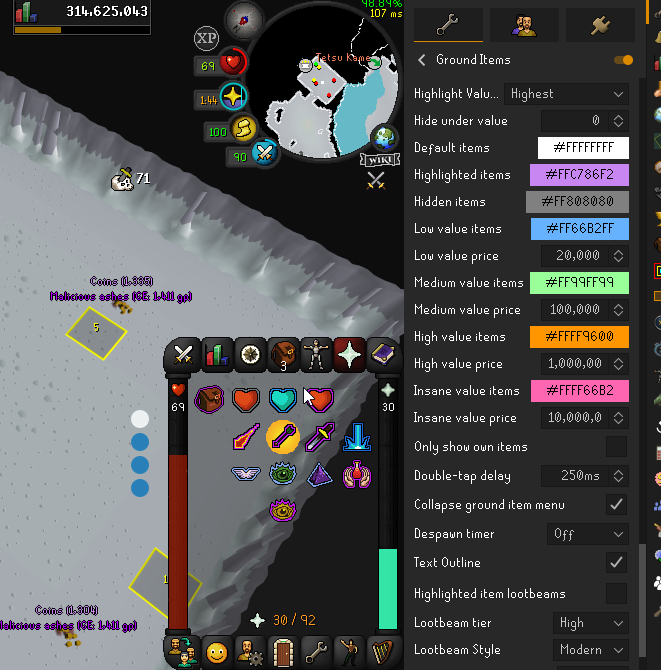 gilded kayak
I think this happens if you have a special highlight
like *ashes or 15>ashes
can u see some form of ashes in the highlight box
torn wolf
no ashses in the list
gilded kayak
 torn wolf
it used to have infernal ashses highlighted awhile ago but it stopped for those
Clue scroll (easy),Dark totem middle,Dark totem base,Crystal shard,Ancient shard,Dark totem top,Clue scroll (beginner),Clue scroll (medium),Ensouled horror head,Long bone,Unidentified small fossil,Unidentified rare fossil,Unidentified medium fossil,Unidentified large fossil,Impling jar,Unidentified fragment (combat),Grubby key,Scroll box (elite),Larran's key,Medium pouch,Large pouch,Ecumenical key,Prayer potion(1),Giant key,Mossy key,Seaweed spore,Right skull half,Flippers,Caviar,Giant seaweed,Orange spice (2),Orange spice (4),Orange spice (1),Orange spice (3),Scroll box (easy),Scroll box (beginner),Scroll box (medium),Scroll box (hard),Frozen cache,Ancient essence,Ensouled kalphite head,Ensouled bloodveld head,Ensouled abyssal head,Zombie pirate key,Blighted ancient ice sack,Dagannoth bones,Clue scroll (hard),Scaly blue dragonhide,Ensouled dragon head,Wine of zamorak,Clue scroll (elite)
gilded kayak
I just wanted to check manually since the input box isn't exactly reading friendly
incase u just didn't see it
!safe try safe mode
haughty pumiceBOT
safemode: Windows
Run the RuneLite (safe mode) shortcut, or with a Jagex account, first run the RuneLite (configure) shortcut and tick the Safe mode box, then launch RuneLite via the Jagex launcher.
Mac
In Terminal, run:
/Applications/RuneLite.app/Contents/MacOS/RuneLite --configureTick the Safe mode box. Launch RuneLite.
If it's not working, download and install the updated RuneLite launcher from the website link in #welcome. You don't need to uninstall your current version. You will not lose any settings or plugins. Then try running safemode again.
viscid lantern
Cant you shift+right click ground item color? i remember smth related to that
torn wolf
it was that
torn wolf
i feel like i had this issue for awhile but maybe time is just a lie
gilded kayak
I opened an issue with it on april 21st so sometime before then
 cedar lily
would any1 know why my clue helper isnt helping with my master clues, it will help with all the others just not master
 zenith latch
one of my friends had an issue with the discord deaths plugin (tried to link it but it got my message filtered lol), where it screenshotted and uploaded content that was open in front of runelite instead of runelite itself. i had a brief look at the code and it's just using built in runelite code (specifically DrawManager::requestNextFrameListener and by extension GpuPlugin::screenshot) which is why i'm bringing it up here instead of opening an issue on the plugin page.
as far as i can tell from that code, it's calling an opengl function that should respect whether an application is minimised or not so it's weird that this bug occurred. they're on linux w/ x11. is fixing this likely to be in scope for runelite or is it more likely to be a bug with opengl and/or their linux setup, and is there any more information that'd help?
 sonic birch
Swap to Dink and it's probably fine
If it happens with Dink, it might be worth looking into, but might also just be some linux quirk with his specific setup. It's the first time I've heard of this happening.
gilded kayak
it is a linux issue
i'm not sure if we've ever confirmed it to be fixed in dink
i dont think so
u just kinda need to be aware of it and turn screenshots off if ur working or something
zenith latch
sonic birch
Swap to Dink and it's probably fine
drawManager.requestNextFrameListener(img -> {```
uses the same code for getting screenshots, so same issue would occurlike i said this isnt a plugin issue as far as i can tell
zenith latch
gilded kayak
u just kinda need to be aware of it and turn screenshots off if ur working or so...
if that's the case, is it possible to consider a warning that shows up similar to the "this plugin uploads data to a non-runelite server" one
it seems like a pretty big issue to rely on people just being aware of
hm it looks like warnings cant be conditional to platforms so it'd either be overkill or need a lot of work
zealous cedar
I think its a window manager bug
gilded kayak
yeah it is
it's 100% x11 bug
my x11 people are asleep but i have a vague memory of its discussion before any of them played osrs
zenith latch
zenith latch
hm it looks like warnings cant be conditional to platforms so it'd either be ove...
would a PR that adds platform-specific warnings be too niche to have a good chance of being merged? i can't think of any other plugins that'd benefit from it
zealous cedar
I dont think we want to add a warning about your window manager being maybe-broken
gilded kayak
it's a tricky spot because I only knew what you were talking about because a bunch of people I know are x11
I can't think of a single situation in the past like year where it happened to them
zealous cedar
what wm are you using?
zenith latch
they're using KWin
i think?
(all they told me is that they use KDE and the fact they didnt specifcy a WM makes me think they havent changed it)
zealous cedar
the only other bug report i see about this was also on kde, but idk if there is a resolution
i do not think it is a runelite bug though
gilded kayak
If you want to open an issue for discussion on Dink you can probably get more info b/c 2/4 of our authors + other nerds are on linux
everyones asleep rn so i can't get u any useful info about it
gilded kayak
zealous cedar
i do not think it is a runelite bug though
i don't think so either, it's just that it becomes much clearer using rl because it's actively taking screenshots
most of their other apps just dont do that
gilded kayak
gilded kayak
i don't think so either, it's just that it becomes much clearer using rl because...
I guess technically the wording should be, it _can_ be actively taking screenshots
 gleaming pulsar
 haughty pumiceBOT
Use /ghauth command to get github roles and be allowed to post in #development
gleaming pulsar
anyone know what plugin it is for the collapsed menu?
gilded kayak
gleaming pulsar
anyone know what plugin it is for the collapsed menu?
interface styles
gleaming pulsar
beautiful i love you ty
haughty pumiceBOT
Use /ghauth command to get github roles and be allowed to post in #development
 round grove
can anyone tell me why the ''customizable xp drops'' plug in is not working properly atm? was fine yesterday. predictable hit setting is completely wrong.


1st image is rclight 2nd is scythe
round grove
ooh that might explain it
haughty pumiceBOT
Get support for the Customizable XP drops Plugin Hub plugin here: https://runelite.net/plugin-hub/show/customizable-xp-drops.
You can also find the support link by searching for the plugin in the Plugin Hub panel and clicking the ? button on the plugin, or by right-clicking the plugin in the plugin panel and clicking the Support menu option.
round grove
i have the latest version
gilded kayak
you'll have to report your problem there, I don't personally use the plugin nor do I think many(if any) of the helpers here do
round grove
gilded kayak
you'll have to report your problem there, I don't personally use the plugin nor ...
ok so its just bugged on duke lol. tested 3 other bosses and duke is the only one with the problem
zealous cedar
you could report a bug on the plugin, it doesnt look like there is one open for that atm
 ornate kite
When I uncheck 'Right click menu blocks camera', my right click mouse button moves the camera even though 'Right click moves camera' is unchecked. Bug?
 zealous cedar
hmmmm interesting
 wind owl
is there a way to fix some of the pluggins that not working after update?
gilded kayak
probably not i don't think any of them are broken in a way where it's just "click this setting"
wilderness alarm is broken due to the author making a change that broke it, nex nestolgia is broken cuz jagex changed a thing
wind owl
the watson clu eone wasnt working but now it is
 cosmic depot
How do I setup my npc option attack,change to pickpocket in RuneLite?
wind owl
but the tureal skip one isnt working now
could be more but they only two ive notice so far
gilded kayak
jagex changed that step so the clue plugin doesn't recognize it right now
wind owl
its just the watson over lay pluggin in the step
shows which clues watson has
wasnt working for like 1-2 days but jsut checked and it is now
vast bone
it's working now because I fixed it.
gilded kayak
ah yes that was because we changed a thing with clues and geheur had forgotten the change was coming
and then he fixed it
vast bone
I even suggested this change 😅
gilded kayak
(:
gilded kayak
cosmic depot
How do I setup my npc option attack,change to pickpocket in RuneLite?
!shiftclick
haughty pumiceBOT
The Menu Entry Swapper, through various config options, allows you to hold shift+right click on items/NPCs/objects and configure new default left and shift click options on them.
 gilded kayak
do that but instead of on an item, do it on the NPC
cosmic depot
I tried earlier on this option,I can't till I press on RuneLite plug-in option and read your message,thank you.
 vestal harbor
anyone else having truble with "wilderness alarm" my screen doesntplug in when someone is near me anymore, and the plug in is on, and i double checked the settings
 solid mesa
It uses native runelite notifications now instead of flashing yellow, so check runelite notification settings
 polar iris
dunno if this is a client issue but does anybody know why the fishing tile is not the correct color and is darker for some reason? noticed this a bit ago and this full white looks quite gray

my true tile color and fishing tile color and the same in the settings but for some reason the fishing one is darker
 ornate kite
in tempoross, does anybody know how to make the flying fish display the circle timer thingy telling you how long the spot will last for?
vast bone
tempoross plugin?
 finite dawn
Hey there, I have the "Automatically hide the Task Bar" setting enabled on Windows 11 which completely hides the task bar until I move my mouse to the bottom of the screen. This works for things like Firefox/Discord when maximized, but does not work for Runelite when maximized. I bring my mouse to the bottom of the screen, and the task bar simply doesn't show up as if I were playing a game in full screen. Is there a setting that I may have missed in the RL settings to allow this to work?
(If I press the windows key, the task bar shows up, but I'd like to just bring my mouse to the bottom of the screen to have it show up)
 mental sage
!discord
haughty pumiceBOT
If your Discord activity status is not showing properly follow these steps:
- Make sure your Discord plugin is enabled.
- Make sure RuneLite is not manually added as game to Discord game list.
- Enable
Share your detected activities with othersin Discord settings. - Make sure both RuneLite and Discord are NOT running as admin.
mental sage
literally have done all of this and its still fucked up like lmfao?
mossy swan
mental sage
literally have done all of this and its still fucked up like lmfao?
you seem to be offline on discord
mental sage
im on DND
its always worked if i was on do not disturb, this is ridiculous
IVE FOLLOWED ALL 5 STEPS LIKE HOW IS IT STILL NOT WORKING???????
mossy swan
i only see you as offline
 mental sage
 mossy swan
i guess you should try restarting discord
mental sage
ive done that over 25 times
mossy swan
well, i dont know why discord is showing you as offline. that would cause the game not to show up
mental sage
because you're not my friend, that's not the issue????
mossy swan
since we have shared servers it should still show
 mystic sphinx
has anyone experienced immense frame loss in TOA when akkha spawns shadows?
Trying to figure out which plugin might be the cause to no avail currently. im Seeing 90 fps tank to 20-30 fps with stutters at times while butterflying while the shadow is out.
Put up with it for a while but kinda wanna solve this issue now
mossy swan
mystic sphinx
has anyone experienced immense frame loss in TOA when akkha spawns shadows?
Try...
!flow
haughty pumiceBOT
flowchart: Please refer to this flowchart for further troubleshooting.
mossy swan
probably its some hub plugin
mystic sphinx
i assume its a plugin
mossy swan
like maybe you are using radius markers or something
mystic sphinx
i ruled out tile indicators and ground markers
i do have radius markers, but it is od that it isn't a consistent frame loss
mental sage
@mossy swan i got it figured out, apparently my discord was re-installed from a back up file from like 3 years ago. idk how the hell that even happened, but yeh i uninstalled, cleaned up some files and we're good
mossy swan
wow thats crazy
mental sage
yeah and im like really drunk right now so it was a bit tough to figure out LOOOL
 autumn needle
my timers arent showing up on my screen can anyone help me out with that
 civic furnace
hiya, suddenly my runelite has started showing "starting external plugins" and won't load no matter how long I leave it there - works in safe mode - any idea how I can troubleshoot this as I don't wanna lose all my settings etc 😦 cheers
mossy swan
civic furnace
hiya, suddenly my runelite has started showing "starting external plugins" and w...
!logs probably need to uninstall some plugin in safe mode, see if logs have any info
haughty pumiceBOT
To find the logs, you can do one of the following:
- If your client failed to open, click the
Open logs folderbutton. - Open the screenshot directory by right-clicking 📷
Camerabutton, navigate 1 directory up, then open logs folder. - Navigate to
%userprofile%\.runelite\logson Windows or$HOME/.runelite/logson Linux and macOS.
Upload the log files named client and launcher by dragging them to Discord. If there are files prefixed with jvm_crash dated from today, upload them too.
civic furnace
I tried to uninstall in safe mode some of the ones it could be but they just sat on "removing" for about 10 mins
never actually removed
mossy swan
i think once you click it it removes it but just doesnt update in safe mode
civic furnace
ah ok
vast bone
has uninstalling a plugin ever prevented this? I feel like every time they uninstall a plugin it's a different one causing it, maybe it's some kind of file system/antivirus issue.
last guy ended up deleting the plugins directory or restarting pc or something like that.
civic furnace
this happened to me once before, almost everytime I rebooted my pc it happened
mossy swan
hmm yeah i guess could just delete the plugins directory in case one of them is corrupt or something
civic furnace
then suddenly went away
vast bone
mossy swan
hmm yeah i guess could just delete the plugins directory in case one of them is ...
idr if that even worked.
civic furnace
will that just allow runelite to regenerate all the plugins fresh?
civic furnace
ok cool I'll give that a shot
mossy swan
its just a storage folder for plugins runelite downloads (if not there already) automatically based on what is "installed" in your profile
civic furnace
didn't work - downloaded plenty and then back to starting external
hmm
I turned off vanguard
and then deleted plugins folder
and it loaded
vast bone
gz
civic furnace
ty, hoping this isn't a constant issue with vanguard... pain in the ass software
leaden trail
Vanguard basically is a constant issue fwiw
 crimson whale
can anyone tell me why my minimap is not working inn runelite? i can see npc's in it but i can't see players
leaden trail
Like players don't appear as dots?
haughty pumiceBOT
Windows
Run the RuneLite (safe mode) shortcut, or with a Jagex account, first run the RuneLite (configure) shortcut and tick the Safe mode box, then launch RuneLite via the Jagex launcher.
Mac
In Terminal, run:
/Applications/RuneLite.app/Contents/MacOS/RuneLite --configureTick the Safe mode box. Launch RuneLite.
If it's not working, download and install the updated RuneLite launcher from the website link in #welcome. You don't need to uninstall your current version. You will not lose any settings or plugins. Then try running safemode again.
leaden trail
Does it happen in safe mode?
 solar valve
 ornate kite
oblique plume
youll have to disable the locked window size first
ornate kite
oblique plume
youll have to disable the locked window size first
How do you do that...? runelite was working fine last night for me and for some reason today, I launched it and its stuck like this...

no more maximize button?
 tight ether
So i changed pc's but when i login to runelite, it won't take over all my plugins? anyone know what to do?
mossy swan
!transfer
haughty pumiceBOT
zealous cedar
ornate kite
turn off "lock window size"
ornate kite
zealous cedar
turn off "lock window size"
I couldnt find that setting. Couldnt remember where I'd seen it. I found it, Thanks!
 ivory forge
Hi, I would like to know if it is possible to hide your signed in email inside the info tab
gilded kayak
I don't believe it is, are you clicking the info tab often enough for it to be a problem?
 timber pasture
Did you get a fix for this?
gilded kayak
gilded kayak
I don't believe it is, are you clicking the info tab often enough for it to be a...
oh you're streaming, you can turn the info plugin off for what I assume is your actual problem "I don't want to easily show my email to lots of people"
 copper crystal
I know this is a stretch, but has anyone had an issue where during a quest, you're unable to use an item on something else (a key on a door)? There's some plugin causing this, I have to switch to mobile and can interact with it normally. I have no idea what plugin is causing it to happen.
ivory forge
gilded kayak
oh you're streaming, you can turn the info plugin off for what I assume is your ...
Sflr, yeah I noticed that whenever I leave toa, it sometimes shifts to the info plugin by default.
gilded kayak
ivory forge
Sflr, yeah I noticed that whenever I leave toa, it sometimes shifts to the info ...
ah yeah, maybe also the ToA plugin has a setting to not do that? I'm not sure but for your situtation disabling the plugin works fine
ivory forge
gilded kayak
ah yeah, maybe also the ToA plugin has a setting to not do that? I'm not sure bu...
yeah I just disabled it. Thanks for letting me know though
finite dawn
finite dawn
Hey there, I have the "Automatically hide the Task Bar" setting enabled on Windo...
Anyone have any ideas? Been at it for awhile and still can't fix it
zealous cedar
finite dawn
Hey there, I have the "Automatically hide the Task Bar" setting enabled on Windo...
this is the intended behavour, there isnt a way to modify it
actually its possible turning "custom chrome" off might fix it?
the current behavour is a quirk of our custom chrome mode i think
finite dawn
Ahh I see, alright sounds good tyvm. I'll try turning off custom chrome and seeing if it works. Was hoping that I could still have my task bar pop up when I brought my cursor to the bottom but I understand
glossy flume
On RL on my laptop of a new acc, how to transfer PC RL acc (which has a deleted GMAIL) or transfer laptop RL acc to my PC
And let the gmail acc of RL be the login
glossy flume
i have the .properties file of the rl accs on my pc to my laptop, now what?
 round canopy
any idea whats causing this, only appears for some items
 glossy flume
ok what i did was transfer them over to my laptop from my pc and went to "import profile" ive imported the profiles, did i do this correctly?
the plugins from the other profiles arent showing on my current laptop rl profile
haughty pumiceBOT
leaden trail
That won't help with the actual account thing but will get your settings at least
glossy flume
i got it
also how do i transfer GE history and loot tracker on my old rl acc @leaden trail
leaden trail
I don't think that can be transferred
glossy flume
ge history from RL (website) cant be transferred? @leaden trail
glossy flume
ok thx
umm is there a way where i can get a duplicate runelite window where i can login with the current acc and keep the old RL window with my old profile that has the deleted gmail
solid mesa
round canopy
any idea whats causing this, only appears for some items
Quest Helper "Highlight Missing Items"
glossy flume
alright what i did was it kept the profile that had the loot tracker after i transfered from pc to laptop back to pc!!!!!!!!!!!!!!!!!
 tepid sun
anytime I open 2 clients both crash entirely without wanring or crrash window after no matter what im doing in game which is usually pking or wildy pvm both clients instantly crash @haughty pumice
haughty pumiceBOT
@tepid sun To find the logs, you can do one of the following:
- If your client failed to open, click the
Open logs folderbutton. - Open the screenshot directory by right-clicking 📷
Camerabutton, navigate 1 directory up, then open logs folder. - Navigate to
%userprofile%\.runelite\logson Windows or$HOME/.runelite/logson Linux and macOS.
Upload the log files named client and launcher by dragging them to Discord. If there are files prefixed with jvm_crash dated from today, upload them too.
 bleak ginkgo
I have reinstalled runelite and started to get this, I cannot remove it for the life of me
 zealous cedar
I guess unset "Highlight missing items"
viscid lantern
its part of questhelper iirc
 tough kiln
For some reason my Dink plugin sends webhooks delayed, tried disabling all other plugins and also renamed my .runelite folder and reinstalled runelite + dink and its still delayed. Would i need to talk to the Dink devs about this?
 rain arrow
tough kiln
For some reason my Dink plugin sends webhooks delayed, tried disabling all other...
rain arrow
tough kiln
For some reason my Dink plugin sends webhooks delayed, tried disabling all other...
How much of a delay do you get? I use that plugin and it has no delay, I sometimes feel like it's too quick
gilded kayak
ye dink gets more complaints about too fast than too slow
tough kiln
The webhook itself is delayed, ill send screenshots 1 sec
viscid lantern
if its slow it could be due to your available bandwidth at the moment/discord servers
tough kiln
 viscid lantern
oh I see, thats a 7min delay
tough kiln
yea picture was at 4:02, im guessing I need to get a new ip from my isp probably?
gilded kayak
definitely smells like internet
the plugin will re-try to send the notif but i don't know about for 7 minutes straight
tough kiln
Gonna try getting a new ip address, ill report back
viscid lantern
maybe your log has something about connection issues in general
rain arrow
Also what are these settings set to in your settings for Dink?
 tough kiln
its the default, ive reinstalled runelite after renaming my runelite folder just to double check
viscid lantern
well your logs are as clean as it can get
tough kiln
tough kiln
its the default, ive reinstalled runelite after renaming my runelite folder just...
that will do it im guessing lol
gilded kayak
dink will print out errors if it needs to retry, so it's definitely something outside of that
and your logs are empty as gamma said
tough kiln
Alright, imma figure out if I gotta call verizon for a new ip or if i can do it with my router ill be back lol
leaden trail
it's probably discord being discord tbh
 bright vapor
Hey anyone know how to turn on notification sound on droped items from npc? I had notification sound before when the item is worth over 1k but now it doesn't do any sound. Please anyone know what i need to do? The ground item plugin made a sound notification when the price value is over 1k but it doesn't make sound anymore
solid mesa
Ground Item Sounds plugin?
bright vapor
Yes or i don't know what happened
tough kiln
tough kiln
Alright, imma figure out if I gotta call verizon for a new ip or if i can do it ...
dont think my ip address changed but maybe it did but its working now
gonna restore my old runelite folder and sign into my account if i need to
glossy flume
plank sack contents arent showing with either of these plugins activated, what to do?
 crisp dune
The core plugin (Item Charges) doesn't track plank sack contents. idk if the hub plugin does, you'd need to check the plugin's project and/or check with the plugin author to see whether it does.
 quasi slate
Hi!
I want to start creating a plugin, but I'm wondering how to connect. Are there test accounts or do we have to take our personal account and if we take our account, how to log in with a Jagex Account?
I have this error, but if i use the launcher, i am outstide intelleji so how can i do?

 hushed night
teach me to code plugin
haughty pumiceBOT
round jacinth
hushed night
teach me to code plugin
this is not where to learn how to program in java, check our link in #welcome for links and you can get to github which has a lot of resources
tough kiln
tough kiln
gonna restore my old runelite folder and sign into my account if i need to
2024-07-13 22:38:51 EDT [pool-3-thread-1] WARN  d.message.DiscordMessageHandler - There was an error sending the webhook message
okhttp3.internal.http2.StreamResetException: stream was reset: PROTOCOL_ERROR
    at okhttp3.internal.http2.Http2Stream.checkOutNotClosed(Http2Stream.java:650)
    at okhttp3.internal.http2.Http2Stream$FramingSink.emitFrame(Http2Stream.java:575)
    at okhttp3.internal.http2.Http2Stream$FramingSink.write(Http2Stream.java:555)
    at okio.ForwardingSink.write(ForwardingSink.java:35)
    at okhttp3.internal.connection.Exchange$RequestBodySink.write(Exchange.java:231)
    at okio.RealBufferedSink.emitCompleteSegments(RealBufferedSink.java:179)
    at okio.RealBufferedSink.write(RealBufferedSink.java:92)
    at okhttp3.RequestBody$2.writeTo(RequestBody.java:151)
    at okhttp3.MultipartBody.writeOrCountBytes(MultipartBody.java:173)
    at okhttp3.MultipartBody.writeTo(MultipartBody.java:114)
    at okhttp3.internal.http.CallServerInterceptor.intercept(CallServerInterceptor.java:69)
    at okhttp3.internal.http.RealInterceptorChain.proceed(RealInterceptorChain.java:142)
    at okhttp3.internal.http.RealInterceptorChain.proceed(RealInterceptorChain.java:117)
    at net.runelite.client.RuneLite.lambda$buildHttpClient$5(RuneLite.java:473)
    at okhttp3.internal.http.RealInterceptorChain.proceed(RealInterceptorChain.java:142)
    at okhttp3.internal.connection.ConnectInterceptor.intercept(ConnectInterceptor.java:43)
    at okhttp3.internal.http.RealInterceptorChain.proceed(RealInterceptorChain.java:142)
    at okhttp3.internal.http.RealInterceptorChain.proceed(RealInterceptorChain.java:117)
    at okhttp3.internal.cache.CacheInterceptor.intercept(CacheInterceptor.java:94)
    at okhttp3.internal.http.RealInterceptorChain.proceed(RealInterceptorChain.java:142)
    at okhttp3.internal.http.RealInterceptorChain.proceed(RealInterceptorChain.java:117)
    at okhttp3.internal.http.BridgeInterceptor.intercept(BridgeInterceptor.java:93)
    at okhttp3.internal.http.RealInterceptorChain.proceed(RealInterceptorChain.java:142)
    at okhttp3.internal.http.RetryAndFollowUpInterceptor.intercept(RetryAndFollowUpInterceptor.java:88)
    at okhttp3.internal.http.RealInterceptorChain.proceed(RealInterceptorChain.java:142)
    at okhttp3.internal.http.RealInterceptorChain.proceed(RealInterceptorChain.java:117)
    at dinkplugin.message.DiscordMessageHandler.lambda$new$1(DiscordMessageHandler.java:102)
    at okhttp3.internal.http.RealInterceptorChain.proceed(RealInterceptorChain.java:142)
    at okhttp3.internal.http.RealInterceptorChain.proceed(RealInterceptorChain.java:117)
    at dinkplugin.message.DiscordMessageHandler.lambda$new$0(DiscordMessageHandler.java:98)
    at okhttp3.internal.http.RealInterceptorChain.proceed(RealInterceptorChain.java:142)
    at okhttp3.internal.http.RealInterceptorChain.proceed(RealInterceptorChain.java:117)
    at net.runelite.client.RuneLite.lambda$buildHttpClient$4(RuneLite.java:466)
    at okhttp3.internal.http.RealInterceptorChain.proceed(RealInterceptorChain.java:142)
    at okhttp3.internal.http.RealInterceptorChain.proceed(RealInterceptorChain.java:117)
    at okhttp3.RealCall.getResponseWithInterceptorChain(RealCall.java:229)
    at okhttp3.RealCall.execute(RealCall.java:81)
    at dinkplugin.message.DiscordMessageHandler.lambda$sendMessage$8(DiscordMessageHandler.java:188)
    at net.runelite.client.util.RunnableExceptionLogger.run(RunnableExceptionLogger.java:41)
    at java.base/java.util.concurrent.Executors$RunnableAdapter.call(Unknown Source)
    at java.base/java.util.concurrent.FutureTask.run(Unknown Source)
    at java.base/java.util.concurrent.ScheduledThreadPoolExecutor$ScheduledFutureTask.run(Unknown Source)
    at java.base/java.util.concurrent.ThreadPoolExecutor.runWorker(Unknown Source)
    at java.base/java.util.concurrent.ThreadPoolExecutor$Worker.run(Unknown Source)
    at java.base/java.lang.Thread.run(Unknown Source)
maybe shouldve posted the clipped log but when it lags this is in logs
gonna do the disable half plugins stuff now
 fervent dagger
Ello just got a new pc and have logged in with my account but my account profiles don’t show up on the launcher itself, just on the runelite site itself. Is there a way to export the profile from the site into the launcher? Thanks in advance if this is a dumb question lol
haughty pumiceBOT
fervent dagger
My bad for not clarifying, I do not have access to my old computer
round jacinth
so you logged into runelite profile but you dont see any of the profiles synced?
fervent dagger
No. I can only see them when I go the rl site in my browser. I’m logged in on the launcher and there’s just the initial “new profile”. The only export option I see is the “export home”
round jacinth
i dont think you ever enabled cloud sync then
the orange cloud icon is what goes to sync between devices/go to a new computer
 fervent dagger
Ahh, so if I never did, there’s no way to get the profile from site to the launcher?
round jacinth
no those things do not contain anything
 cerulean dragon
Is there a way to turn off these valuable drop chat notifications?
 round jacinth
set the threshold higher in game
tough kiln
tough kiln
gonna do the disable half plugins stuff now
disabled legit every plugin including default ones
still happening
think its just an issue with dink
after the death, this changes to this for like 5-20 min+
 round jacinth
does it happen in safe mode?
tough kiln
doesnt happen in a new profile with dink disabled + gpu enabled so i believe it prob wont in safe mode, still worth checking?
round jacinth
probably not maybe
looks like you know what you can't use anymore though so it's sorta resolved
tough kiln
yea went back to main profile with dink disabled, it doesnt happen on deaths so
lmao yep, thanks
round jacinth
🤷♂️
 midnight radish
wassup
tough kiln
ok never mind im a moron idk why it was working when i had no/new .runelite folder but with a vpn on, its working fine so i am getting rate limited sorry for all the messages
round jacinth
maybe use vpn on browser extention instead of across pc, it just adds a delay in games/causes issues it seems
tough kiln
round jacinth
maybe use vpn on browser extention instead of across pc, it just adds a delay in...
no i meant i turned the vpn on for everything and its working fine now
round jacinth
idk
tough kiln
but when i have it off on my home ip for some reason it wont send messages which is lagging runelite
no idea how webhooks work exactly but normal discord seems to be working fine
midnight radish
why do you play with vpn?
round jacinth
webhooks is no different than sending a discord message like this
tough kiln
but its weird i have 4 deaths now where its sending like it should
round jacinth
its just a speciifc message sent with a phrase to make it look like its from the bot/hook
tough kiln
midnight radish
why do you play with vpn?
im not playing with vpn, im only playing with it rn to test why my dink webhooks were delayed/not working
midnight radish
tough kiln
im not playing with vpn, im only playing with it rn to test why my dink webhooks...
oh oke gl
tough kiln
round jacinth
its just a speciifc message sent with a phrase to make it look like its from the...
yea this makes no sense to me but i cant really unplug my wifi for the whole night to try getting a new ip, hopefully unifi support can help me with that
tough kiln
on the old edgerouter i had i could reassign the mac address of the router and get a new ip instantly, doesnt seem to be working on my dream machine pro
round jacinth
lol
lapis elm
sounds like you might be doing things you shouldn't be doing if you are spoof mac addresses
round jacinth
idk why you got all this network equipment after market and still not sure how it all works too xd
tough kiln
i kinda know how it works just not enough to the point i can use ssh to change shit
made a ticket with unifi support hopefully they can respond or point me in the right direction
jagged vortex
is the next plugin fixed?
gilded kayak
it is not
jagged vortex
sad
when rl gonna be updated?
and if it updated does it come to stand in announcements channel?
round jacinth
it'll update eventually (not sure) and for this update? no probably not
it is unlikely any announcement will be made
jagged vortex
so no nex voice for a while
round jacinth
i guess so, is what it is - do other content for a little bit 🙂
jagged vortex
i love nex thats the point
and i dont understand why she has a voice in rs3 -rs2 and on osrs they put her without one
 hollow spruce
It seems me logginb back into Runelite didnt save my previous settings? Or am i doing something wrong?
 worn wadi
Has anyone had issues with their left click not being able to be changed? It's locked to "walk here" for EVERY action and I cannot seem to change it.
worn wadi
hub? what am I looking for specifically?
vast bone
dunno
but I've never heard of a non-hub plugin doing something like this
unless it's some weird setting in camera plugin
disable them all or anything that sounds like it might do that.
hollow spruce
worn wadi
Has anyone had issues with their left click not being able to be changed? It's l...
do you have the regular in game setting of "click npcs off" thing
worn wadi
ok so one of the plugins is causing it
disabled them all and now i at least have default click characterisitics
thanks guys
ok so im a dumb dumb
it was prop hunt hahaha
had that enabled
hollow spruce
xd
so anyone got an idea on how to fix my issue with not being able to retrieve my old runelite plugin settings
haughty pumiceBOT
hollow spruce
ty. i think thats enough. i dont think i have all of it, but thats a me issue
haughty pumiceBOT
hollow spruce
hmm it doesnt help that i have 2 different emails i seem to have used for my runelite profiles. i think i can see the one i was recently using. But i logged in using the wrong one first so it doesnt seem to be grabbing the right profile now?
cause yeah now i seem to have most/all of my old loot tracker stuff
but am using ancient plugins and the sort that arent recent
 dusty sequoia
Hey guys, somehow my number 4 key isn’t working on runelite in game
Is there a way to sort it out
mossy swan
install debug plugin from the hub and check the keybinds here
 dusty sequoia
Thank you I’ll check it later when I log on
 elder inlet
the order of items in the bank tabs has changed since last update, is this intended? is there a way to revert it?
elder inlet
i mean the items used to go in order of the main bank tabs when in the runelite made tabs but now they dont
mossy swan
is it bound to something?
hollow spruce
ugh frick it, i guess ill just slowly work on fixing all my plugins and tiles and menu entry swap, the linked guide didnt seem to work
 warm yarrow
is it true that Wilderness Player Alarm doesnt flash yellow anymore?
i just get the standard runelite notifaciton now
dusty sequoia
Is there anyway I can use number 4 in the client
mossy swan
can you screenshot the keybinds in debug plugin
 red fox
any idea how to get the fps counter and ping in the corner again?
 mossy swan
i think they are offset because you are in modern resizable
and thats where the logout X goes
hollow spruce
warm yarrow
i just get the standard runelite notifaciton now
if so you can at worst use the chat notification plugin to make it so it flashes on a keyphrase
red fox
Is there a way to move the camera from the centre of my character and shift it to the left or right?
viscid lantern
no
red fox
 viscid lantern
for those kind of afk grinds where you just want the client to be somewhere in a corner, I tend to switch to fixed mode
red fox
my setup is ideal and its scaled. its a bummer that there is no way to shift it.
Can it possibly come in a future update?
viscid lantern
I dont know if its even possible from a technical point of view
jagged vortex
@zealous cedar when is the next runelite update?
red fox
Thanks for letting my know Gamma
jagged vortex
it needs update nex voice dont work
viscid lantern
you will just have to wait
jagged vortex
there are more than 1k people waiting for enex voice
mossy swan
skill issue
jagged vortex
no skill issue
viscid lantern
you can just read the chat messages
viscid lantern
skill issue
jagged vortex
focus 6 things
 violet maple
I can't access the game through Runelite (ran through the Jagex Launcher) because it says I'm permanently banned for macroing, but I can log in just fine if I use the steam client. where should I seek support for this? I'm actually logged in through the steam client right now so... yeah, this doesn't make sense
 mossy swan
im guessing you logged in to a different account
see #faq you probably need to link your steam account
violet maple
think I've already done that. I only have one account
viscid lantern
it sounds like you have 2 accounts
jagged vortex
where is adam?
mossy swan
hopefully enjoying a beautiful day outside
violet maple
viscid lantern
it sounds like you have 2 accounts
I don't, but I opened a ticket. Hopefully I can get this sorted out. I don't like how the UI looks in the Steam version of OSRS lmao
mossy swan
violet maple
I don't, but I opened a ticket. Hopefully I can get this sorted out. I don't lik...
does the website show the same display name as you have when you are playing through steam?
 mossy swan
well that means you are logged in to a different account
probably your email has an account already, and you logged in to steam without first linking the account, so it made a new account on steam
and now you need to make a new jagex account, link that to your steam account, and then you can launch runelite using jagex launcher
violet maple
I'm not sure how I did it but I think I managed to link my jagex account to my steam account. It works now
Lmao what the fuck, but thank you for the help guys
that permanent ban is very sus though, but I guess it doesn't matter. I'm in the game now. thanks ya'll
mossy swan
maybe you had an account before and it got hacked and the hackers botted on it
unfortunately thats very common
violet maple
that sucks, but at least I get to play with my current character. thanks 🙏
 mellow laurel
I am running multiple clients all started with individual java commands, anyone know if it is possible to change icon through command line arguments? I am running on mac. Currently it looks like this, indistinguishable
 mossy swan
just run runelite with open -n RuneLite.app instead of running java
mellow laurel
i don't think that will work as i perform some extra steps in a bash file before starting runelite jar through java command
mossy swan
what kind of steps?
mellow laurel
depending on which account i select, i move around the credentials.properties file
one account is unfortunately a jagex account while the others aren't
mellow laurel
it might still be possible with open, i could just replace the java command with the open command
mossy swan
and for the rest just use open -n
oh yea you could definitely use open in the bash script
mellow laurel
but still, wouldn't they all still have the same icon?
i was thinking about adding a number to the icon
mossy swan
oh like that, erm, idk
maybe if you use apple's automation thing to make shortcuts?
or if you copy-paste the runelite app and give it a different icon, idk if you can do that on mac
mellow laurel
it might be possible to swap out the icon before running open
that is a nice one
but i am also running my own runelite build
mossy swan
alright this channel is for release support
we dont really support running your custom builds since people who need help with it are almost always just cheating
mellow laurel
i know. i was just wondering about the icon stuff. i'll refrain from asking further questions
 gusty reef
are there any plugins that allow me to look north-west
ornate kite
hello, is it possible to play via runelite on linux?

cant log in
its my first time playing oldschool runescape
viscid lantern
when did you make the account?
ornate kite
today
haughty pumiceBOT
Using Jagex accounts on Linux is not officially supported by Jagex, but there are some third party community guides to make it work https://help.jagex.com/hc/en-gb/articles/13413514881937-Downloading-the-Jagex-Launcher-on-Linux
viscid lantern
you will need the jagex launcher/Bolt to play,
ornate kite
okay, i will take a look at it, thanx
 solid current
is it a known thing when you open your pouch config in a inv setup window the bank tab goes all crazy?
haughty pumiceBOT
Get support for the Inventory Setups Plugin Hub plugin here: https://runelite.net/plugin-hub/show/inventory-setups.
You can also find the support link by searching for the plugin in the Plugin Hub panel and clicking the ? button on the plugin, or by right-clicking the plugin in the plugin panel and clicking the Support menu option.
 limpid talon
uhhh help.
i saved a profile last night, set it to sync etc and now the name is completely gone and so are all the plugins for it.
the other profiles seem unaffected

 sweet crescent

why do i get this login screen every time?
i have the login plugin turned off
if i toggle it on and off again it goes to the actual screen
but it always resets to this

it does the same if i have the plugin turned on, but the custom background set to off too
viscid lantern
resource packs
limpid talon
limpid talon
uhhh help.
i saved a profile last night, set it to sync etc and now the name is ...
seem to have fixed it by going to the profiles tab, import, profile2 and importing the files that still had the profile name
glossy flume
this clue isnt showing for the clue scroll plugin!
 crisp dune
It'll be fixed in our next update
 dire flume
anyone else visual metronome/attack timer metronome buggy
 proper pagoda
Is it true that 117hd plugin is crashing clients?
leaden trail
you can ask in their discord
haughty pumiceBOT
Visit 117's HD plugin discord (https://discord.com/invite/U4p6ChjgSE) for support, issues & feedback
 fierce anchor
chat commands plugin isn't working for me, !kc, !pb etc etc - other people's also not showing
!log is working but I think thats handled by a different plugin iirc?
leaden trail
try restarting your client
fierce anchor
leaden trail
try restarting your client
tried that
leaden trail
post your chat commands settings then
sweet crescent
viscid lantern
resource packs
i have 2 shortcuts, 1 for each account. Previously each profile would have it's own login saved, but for some reason now they're are getting muddled
so if i log in on one profile it will change the saved login for the other
viscid lantern
resource packs has an option to override the login screen, disable that
fierce anchor
leaden trail
post your chat commands settings then
 sweet crescent
oops, i didn't mean to reply to that message, mb
gilded kayak
fierce anchor
a followup question would be, did you change computers
sweet crescent
viscid lantern
resource packs has an option to override the login screen, disable that
thank you though
fierce anchor
gilded kayak
a followup question would be, did you change computers
no, same pc, and not logged in on another pc
wait i lie
leaden trail
check the boss log on a ring of wealth
fierce anchor
logged in briefly on another pc
will try in a sec
surely this wouldnt impact being abnle to see other peoples tho
leaden trail
try safe mode
haughty pumiceBOT
Windows
Run the RuneLite (safe mode) shortcut, or with a Jagex account, first run the RuneLite (configure) shortcut and tick the Safe mode box, then launch RuneLite via the Jagex launcher.
Mac
In Terminal, run:
/Applications/RuneLite.app/Contents/MacOS/RuneLite --configureTick the Safe mode box. Launch RuneLite.
If it's not working, download and install the updated RuneLite launcher from the website link in #welcome. You don't need to uninstall your current version. You will not lose any settings or plugins. Then try running safemode again.
fierce anchor
also applicable for windows?
fierce anchor
leaden trail
what's the first word of the message?
works in safe mode
leaden trail
so you have a hub plugin interfering with it
fierce anchor
ok perfect, ty
weird, didnt disable any plugins from plugin hub, and it is now working fine
gilded kayak
sometimes safe mode gives the broken plugin the bashing it needs to stop breaking
vast bone
glossy flume
this clue isnt showing for the clue scroll plugin!
would anything go bad if you just showed the known steps instead of showing none at all?
would be nice
 rancid rapids
So I changed audio sources & headphone cables earlier to try and fix an audio issue I was having (crackling noise) and now Runelite audio seems to be broken. It works fine with my monitor when I set the source to it, but not my front port of my PC. Back port of PC still works fine but then I get the crackling issue (still diagnosing that - waiting on a replacement cable).
Any idea why Runelite would specifically dislike the front audio port on my PC? Everything else seems to be working fine
elder inlet
#support message anyone know if this change with bank tabs ordering will be reverted/fixed?
zealous cedar
yes i will fix it when i get some time
 quaint python

Anyone know why it does this?
I have restarted the app
but haven't tried PC yet
crisp dune
Alt+right-click them to reset them to their default position
quaint python
Oh my, never even knew that was a thing. Thank you
crisp dune
There's a chat message when you move stuff out of its default position that tells you fyi
but yeah, that's how you can reset any of your overlays or moveable vanilla widgets
elder inlet
zealous cedar
yes i will fix it when i get some time
thanks for responding, i appreciate what you do a lot, take care king! 💚
bright vapor
Is there ways we can have giant mole plugin? Giant mole slayer task is the worst task i have ever done. Takes 100 years and dog skit xp dog shit gp and very boring.
gilded kayak
what would a giant mole plugin do
bright vapor
Find the giant mole
gilded kayak
that's already an in-game feature
hot oasis
The falador diary does that
gilded kayak
indeed
glossy flume
window size not saving after restarting pc!
gilded kayak
you could probably use force recolor on the hub
glossy flume
also how do i save my window size with the plugin side bar active whether its opened or closed?
round jacinth
Chose in “Runelite” config to keep window size
It’s also how you tell it to keep window size and location between loads


 sweet crescent
i have 2 shortcuts, each opening a different profile. Recently the saved login is getting switched between them
so changes in one is affecting the other
any ideas what is causing this?
 vagrant otter
any1 know why im getting stuttering lagg for like 0.1 sec?
 grand light
the "nex nostalgia" plugin is not working for what sounds like until the next runelite update. Do we just have to wait until we get a game update? 🙂
leaden trail
Could be before or after the next game update
viscid lantern
pretty much
 fossil summit
yes
grand light
so theres a chance we see one before a wednesday update?
leaden trail
pretty unlikely
 torpid wedge
i tried out the first person plugin for about 5 minutes, and now my right click moves the camera. the box in the camera plugin doesnt... do anything, as it moves the camera while unchecked
grand light
cool cool thank you
torpid wedge
havent changed that setting in over 3-4 years, and i cant fix it
viscid lantern
tried restarting the client after removing first person?
viscid lantern
can you screenshot your camera plugin settings?
torpid wedge
 gilded kayak
toggle on right-click menu blocks camera
torpid wedge
thats an odd one
gilded kayak
it's a newly found bug
torpid wedge
thank you
viscid lantern
and first person causes it?
torpid wedge
yeah, it also bugged the vertical limit of the camera
it prevented me from going full top down
had to reenable camera plugin to make it work after uninstalling first person
and that happened
gilded kayak
viscid lantern
and first person causes it?
no just that that setting toggle overrides right-click moves camera
viscid lantern
oh interesting
torpid wedge
yeah im unsure of the interaction but something happened, havent touched camera plugin in over a year at least
 quiet remnant
Having issues with runelite not saving my plugins to the profiles i have - seems to always randomly remove plugins I have (or turn them off), etc. anyone know what the deal might be
 compact trench
The Treasure Trails helper for the Master Clue involving ||Ghommal|| is breaking after the completion of WGS
 quasi oriole
hi guys i just built a new pc and now my profile seems to be wiped on runelite. been logged in while playing for the past few years. any way to get my settings downloaded from the runelite website or something?
grand light
do you still have your files from your old pc?
quasi oriole
nah
grand light
i think the only info runelite saves when you are logged in is stuff like exp and loot trackers. The only way I'm aware of saving and transfering/uploading settings is to save/load runelite profiles
I'm just a white name tho
quasi oriole
hmm i could have sworn the profiles were saved online, thats the whole point of even signing in
gilded kayak
they are as long as the ☁️ is orange
quasi oriole
i dont have the cloud just some set profile as default button
 quasi oriole
yes
 tepid iris
Hey does anyone else have this bug with the Loot Tracker, where every time you get a drop, the whole client lags and you cant click for a second or two?
And if so, does anyone know how to fix it?
zealous cedar
does it happen if you close the loot tracker side panel?
tepid iris
nope, it only happens when i have the loot tracker open, but I like to have it open during kills so it bugs me a good bit
zealous cedar
try turning hw accel off
haughty pumiceBOT
tepid iris
Just tried it, unfortunately that didnt work
zealous cedar
try safe mode
quasi oriole
any advice for me Adam? https://discordapp.com/channels/301497432909414422/442492468307427330/1262184894612897866
zealous cedar
do you still have your old pc?
tepid iris
It didnt work. Should I be resetting the client after each save?
zealous cedar
yes
gilded kayak
Adam's first suggestion of hardware accel is probably what actually caused it, incase you did safe mode as well for your first restart
tepid iris
ahhh what does safe mode do? Should i turn that one off?
gilded kayak
forces the client to run without GPU or any plugins you installed from the plugin hub
tepid iris
ohhhhh