
#support
1 messages · Page 11 of 1
 rough ridge
 vast bone
the camulet is a unique item that works differently from others
no solution other than to use a plugin like "custom menu swaps"
Although now that I think about it, why are we (or are we able to? I haven't tested it) swap the fake entries of the max cape?
cause those aren't on the item either.
 vast bone
the ones added in the update a few months ago
yeah, those!
why can they be swapped, but entries from the camulet can't?
 crisp dune
We create the max cape ones, the camulet is different though idr exactly how it works
vast bone
it sounds to me like the itemcomposition only has "teleport"
(for the camulet)
and that it can't be swapped for that reason.
crisp dune
that sounds right
vast bone
there appears to be a special case for the items using teleport submenus
MenuEntrySwapperPlugin#1068
could add one for the camulet maybe?
although you might have to detect quest/diary completion for that, since I think it's a reward to be able to choose? Idr.
 upbeat wasp
does anyone know a fix for to many login attempts? its been days.
 sonic birch
You could try a vpn or ending all your sessions via jagex's website.
The only permanent fix we know is migrating to a jagex account and using the jagex launcher
upbeat wasp
see im trying to avoid that lol. I dont think you can even change a password anymore without upgrading. Thanks ill try to end all sessions
 ornate kite
what is the plugin for whenever i swap my items equip un equipe its change the location in invenotry its wont go there where it was?
vast bone
that doesn't exist
 storm vine
hello friends - my runelite has pretty massive lag spikes quite frequently. like 2 second freezes every few mins, sometimes more often
I've tried lowering the HD settings/render distance and other solutions and I don't know what is causing it.
I kind of want to factory reset and delete everything and start from scratch to stop this from happening (unless there are other solutions). Could anyone guide me through doing this?
 zealous cedar
you can create a new profile
storm vine
okay thanks
if it turns out that it's the extended map loading that is screwing me over, even on a new profile, are there any specific things I can do to mitigate that issue if I like playing with more of the map loaded?
zealous cedar
its probably a pluginhub plugin, not extended map loading
storm vine
do you think if a plugin is downloaded but off it can still cause the lag spikes?
Could I turn a bunch of plugins off to trial and error it that way on my main profile?
zealous cedar
if you restarted the client after turning it off
 silver harness
Anyone able to help me
Whenever i try to resize runelite it bugs out like this

It only does it with runelite any other window i have open is when i try resize it
Also trying to click the black bar at top to move windows keeps loking it in diferant places for some reason
 sonic birch
It might be a very niche bug when resizing a lot and very quickly
A brief resize should fix it
What are you trying to do?
silver harness
Sometimes i move it over to second monitor
and its like stopping me fro moving over and wehn trying to resize it it bugs out like the first pic
sonic birch
Do you mean that it is trying to snap?
You can enable lock window size in the runelite config to disable that, or disable snapping operating system wide
sonic birch
If you lock the client size in the runelite config, it won't snap
silver harness
I get that but its like when i go from 1440p monitor to 1080 i have to manual drag and resize it so it fits
 thick shadow
Not sure if this is a common issue, but if I leave runelite running overnight from the dev client, I seem to have a high chance of it at some point freezing the next day. Its that or there is some changes to pull down and I was missing those as I tend to do a git pull after this. This some kinda expected shenanigan' or thoughts on how to mitigate?
 latent kindle
Does GSYNC work with runelite? I can’t seem to get it to activate under any amount of messing around.
sonic birch
silver harness
I get that but its like when i go from 1440p monitor to 1080 i have to manual dr...
You might want to set up automatic resizing with the client resizer plugin. That feature is basically made for this scenario.
If you can't figure it out reading the readme, @ me in general
sonic birch
latent kindle
Does GSYNC work with runelite? I can’t seem to get it to activate under any amou...
It generally only causes issues. We recommend disabling it
latent kindle
Ohh :( so what would the recommendations be for 117HD settings in regards to frame rate? Is it best to just disable gsync for the runelite app in the nvidia control panel?
Or does gsync as a whole need to be disabled
 haughty pumiceBOT
Visit 117's HD plugin discord (https://discord.com/invite/U4p6ChjgSE) for support, issues & feedback
latent kindle
Thanks so much for the quick responses!
 late umbra
Hi, is there a way I can have the same inventory setups from one computer show up on another?
sonic birch
late umbra
Hi, is there a way I can have the same inventory setups from one computer show u...
!transfer
haughty pumiceBOT
late umbra
ty
 gusty reef
is there a plugin that lets me get rid of this logout cross?

 sturdy edge
@placid vapor yo bro check ur DM
 final axle
 wary bear
hi, im having to run runelite in safe mode, should i do something else?
if not, it gets stuck at starting external plugins
 gilded kayak
you should remove the hub plugin causing it to get stuck
wary bear
how do i know what one that is?
gilded kayak
trial and error probably
gilded kayak
your plugins are saved through proper reinstalls
wary bear
oh good
gilded kayak
I meant it to say your issue probably won't be resolved through a reinstall
wary bear
oh ok ill do that
 lost blaze
sonic birch
lost blaze
sonic birch
try restarting your pc
sonic birch
try deleting C:\Users\braid\.runelite\jagexcache\oldschool\LIVE
something is using a file in there and blocking file access, which should not be the case
 gleaming trail
Does anyone here know how to edit a plugin that was downloaded on runelite? I want to edit the tileman plugin so the tiles are highlighted when you light a fire on a tile, instead of if you walk on it
Not sure which chat this question actually goes in to be honest
haughty pumiceBOT
How to develop plugin-hub plugins: https://github.com/runelite/plugin-hub/blob/master/README.md
sonic birch
gleaming trail
Not sure which chat this question actually goes in to be honest
#runelite - this channel is for release client support
gleaming trail
sonic birch
<#301497432909414422> - this channel is for release client support
Thank you!
 thorny hedge
I want to reformat my pc but I want to save my settings on runelite so I won't need to redo them again, where can I find the save file for all the plugin settings / enabled plugins?
sonic birch
!transfer .runelite
haughty pumiceBOT
thorny hedge
Thank you!
 radiant tangle
How do I report someone in this discord?
sonic birch
dm @haughty pumice
radiant tangle
ty
 rigid rune
what is this yellow borderline on my runelite can please someone help me fix this
 sonic birch
you set it to yellow in windows's settings
 oblique plume
is it your windows theme
sonic birch
sonic birch
hit us with the picture
 leaden trail
That looks like some sort of screen recorder software showing the window or something
rigid rune
thats what i said but i dont have any screen recoring

yves look at my settingh\
\
im willing to pay someone to help me fix this lol
also when i use control to walk it doesnt allow me to use my f keys
so while im red xing baba in toa i cant use f keys while holding ctrl to walk
rigid rune
it use to work tho
oblique plume
oh
rigid rune
i was able to control and use f keys at same time
oblique plume
do you know when that happened
i know there was a key change recently ish
but i think it was only for bound keys
not like generic all keys
sonic birch
rigid rune
Another program then I guess. Some videorecorder like metal or shadowplay maybe, idk.
rigid rune
ok
yves can u tell me why f keys dont work whgile holdin ctrl
it use to work all the time
 pearl void
Hello!
Is there anyway to change the font scaling of the Sidebar itself?
In-Game UI is fine, but the sidebar text is very small.
 blazing crown
So are there any plugins to avoid/make sure not to use that’d have some form of negative/single me out? 🤠
sonic birch
pearl void
Hello!
Is there anyway to change the font scaling of the Sidebar itself?
In-Ga...
!config You can set scale to e.g. 2.0 or 1.5 but it'll also scale your game
haughty pumiceBOT
sonic birch
blazing crown
So are there any plugins to avoid/make sure not to use that’d have some form of ...
We generally recommend using as little hub plugins as possible
pearl void
Perfect, I'll try this then.
Appreciate it!
blazing crown
sonic birch
We generally recommend using as little hub plugins as possible
Fair enough. Thank you
rigid rune
i fixed the yellow borderline it was medal
now my issue is when i hold ctrl to walk it wont allow me to use any of my f keys
which is crucial for red xing baba in toa
 fresh cosmos
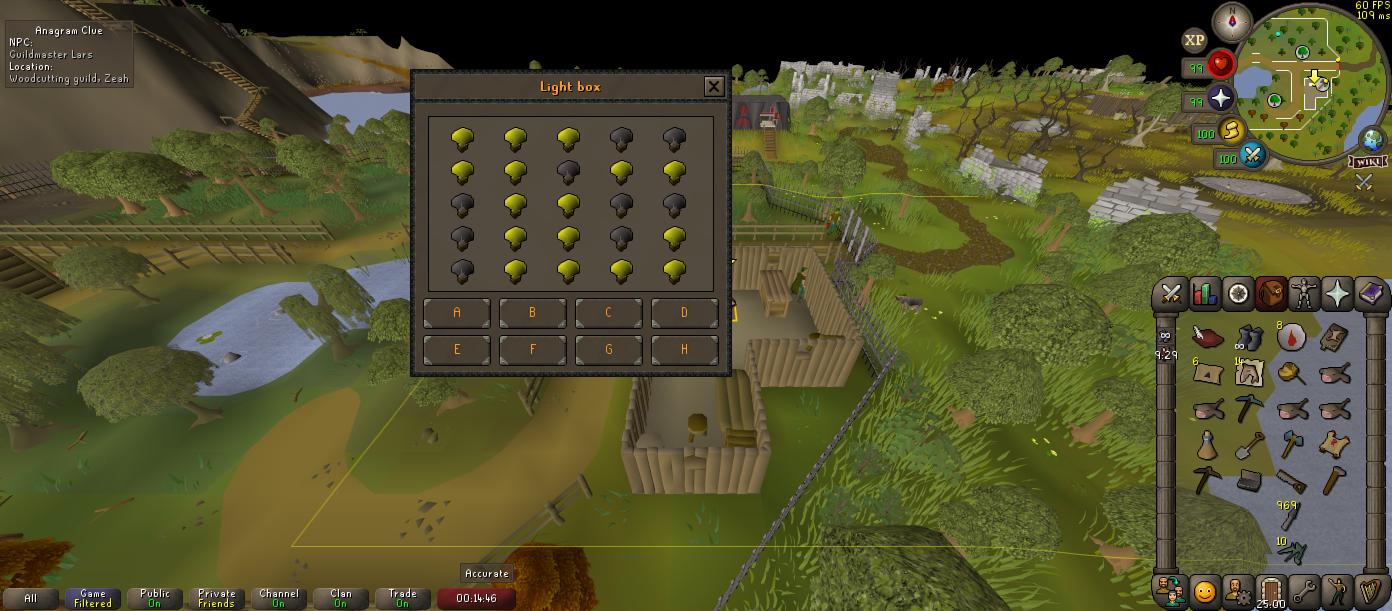
whats the plugin to solve lightboxes? https://i.imgur.com/qfiNknv.jpeg
 rigid rune
i need to be able to use F1, F2,F3,F4 N While holding ctrl
sonic birch
fresh cosmos
whats the plugin to solve lightboxes? https://i.imgur.com/qfiNknv.jpeg
Clue scroll
Just click all the buttons slowly, a->h, 1 button per tick max
To calibrate it
rigid rune
i guess no one here does toa and knows how to red x lol
oblique plume
savage
rigid rune
its the truth
oblique plume
i dont think people ctrl walk though
rigid rune
anyone who red x should understand my pain. i should be able to use f keys while holding ctrl to walk
everyone who red x's baba uses ctrl to walk
its in every guide lol
 round jacinth
rigid rune
i guess no one here does toa and knows how to red x lol
round jacinth
rigid rune
i guess no one here does toa and knows how to red x lol
Not true
I walk and then I click the orb to run
🙂
rigid rune
cap
round jacinth
No cap here
rigid rune
i just want my f keys working while i hold ctrl
oblique plume
it works for me
fresh cosmos
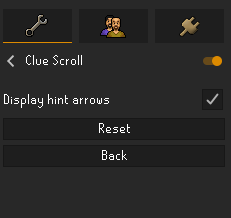
and what plugin solves hot/cold clues?

 round jacinth
Search just clue
oblique plume
its on by deffault
 gilded kayak
its clue scroll
fresh cosmos
 oblique plume
did you read the clue???
round jacinth
You need to then see where it’s hot and where it’s cold
Then use it
And you’ll then have to go around the map touching strange device
fresh cosmos
lol
fresh cosmos
cba
gilded kayak
(he's not using it correctly we already know)
 mossy swan
skill issue
fresh cosmos
ok must get better
got better thanks boys
have a hustlers university subscription now too
 real dune
hello, any chance some of you know why do i have this issue? i start the jagex launcher, select runelite, start it and after it comes up i click to login, then i get stuck here on that screen, i sometimes even hear some game sounds (teleports and stuff), but thats it...
 zealous cedar
Its probably a plugin crashing, use safe mode
real dune
alright, any advice for a nub like me on how to do that?
haughty pumiceBOT
Windows
Run the RuneLite (safe mode) shortcut, or with a Jagex account, first run the RuneLite (configure) shortcut and tick the Safe mode box, then launch RuneLite via the Jagex launcher.
Mac
In Terminal, run:
/Applications/RuneLite.app/Contents/MacOS/RuneLite --configureTick the Safe mode box. Launch RuneLite.
If it's not working, download and install the updated RuneLite launcher from the website link in #welcome. You don't need to uninstall your current version. You will not lose any settings or plugins. Then try running safemode again.
 umbral wagon
Hello. is there anyway to turn off the DWH info box? (Including how much defence has been reduced) Cheers
real dune
good, so the safe mode works, is there any way to figure out which plugin is the issue, other than trying to delete them and installing back one by one?
zealous cedar
real dune
good, so the safe mode works, is there any way to figure out which plugin is the...
The logs might show it, otherwise no (not everything logs)
zealous cedar
umbral wagon
Hello. is there anyway to turn off the DWH info box? (Including how much defence...
turn off the info box option
real dune
found the logs, but figuring out something from that is nearly impossible for me
real dune
got it working, thank you for your help, much appreciated 🙂
 solid current
i don't hear verzik att sound (the door hinge kinda sound), could it be one of these?

 tiny notch
i was playing osrs on RL and i switched worlds 3 times and got logged out and now it says "too many login attempts" i havent been able to log on for a day now. anyone know how long this will take? (im able to log in on the jagex launcher but not nearly as good as RL
mossy swan
use jagex launcher to launch runelite...?
tiny notch
i guess i had the wrong version of the jagex launcher but now its asking for my email to log it, i never had once casue my account is from the old times
gilded kayak
ah that would explain why what u reported didn't actually make sense
but it did make sense like last year
try clearing your active sessions on your account via the jagex website
tiny notch
TYSM that worked! i had no clue you could end session!
gilded kayak
it might come back again if you world hop too many times immediately, this fix is new knowledge so the specifics aren't known
tiny notch
ohhh okay, yeah i just stared playing again and i used to world hop during training and got hit with that log in thing. thank you for the information! 🙂
sonic birch
solid current
i don't hear verzik att sound (the door hinge kinda sound), could it be one of t...
Verzik chains are area/environment sounds
At least, they are the bottom slider in the ingame music settings
So make sure to enable the bottom slider ingame and probs disable mute area sounds
 crimson nimbus
attack option is set to left click where available... why cant i click on the manical monkeys right now, always have been
sonic birch
Check again that it's correct (npc, not player)
If that's correct, check safe mode
!flow
haughty pumiceBOT
flowchart: Please refer to this flowchart for further troubleshooting.
solid current
sonic birch
At least, they are the bottom slider in the ingame music settings
this must've been it then, ty! i always have that off
 coral lintel
Just curious, but when you expel someone, or when they leave the clan, only staff can see the message in the chat. Is there anyway for that to be true when Kicking someone?
sonic birch
Expelling is def not only the staff lol
Also, idk what you mean with kicking in the clan context
Furthermore, none of this is handled by RL
coral lintel
In our clan, on RL, when we expel someone only the staff can see it. On RL whenever we kick someone from the clan chat, everyone can see it
Not a biggie, I was just asking
 dull sinew
is there a way i can send someone every single tile marker i have
vast bone
No
 normal moth
Guys If I format the computer, how can I save the runelite files? And all my pb ?
zealous cedar
backup the .runelite folder somewhere first
normal moth
Is there a file that needs to be saved on an external disk and after I format it I will return it to where it was??
zealous cedar
yes
normal moth
But how i can to find this fails what the names ? Its runlite ?
zealous cedar
it is the .runelite folder
haughty pumiceBOT
normal moth
Now im understand thank you sir
leaden trail
DM @haughty pumice
 burnt tiger
thanks
 quartz wagon
This may be a super silly question, to ask in support, however I've searched my client and searched this discord and reddit for a solution and could not find one.
Is there a way to extend the duration that Opponent Information is displayed on my client?
It goes away very quickly, and I would like to be able to customize duration that it remains up, before disappearing.
Thank you, Runelite discord. Y'all are incredibly hard working, diligent players, and you are appreciated.
 native mortar
From what I've been reading, Item Stats is the plugin that shows how much something heals or restores. I assume that's in some way linked to the Status Bars plugin as well.
My current "issue" is that Moonlight Moths and Moonlight Moth mixes don't seem to actually show how much prayer is being restored? Is there a way to change that or would I just have to wait for one (or both) plugins to be updated? I believe hunter foods were already given stats in this, but the moths were left out. (Probably because Prayer Pots get used more than moths do.)
 solid mesa
The code for item stats has been changed to add that but it hasn’t been approved yet
native mortar
Thanks for the info, it's not a huge deal I just hate inconsistencies. I'm gonna end up using moths a lot because they're super easy to grab for slayer and feel less wasteful.
solid mesa
This is the pull request adding it if you're interested in following it https://github.com/runelite/runelite/pull/17607

GitHub
This PR adds new consumables, from the Varlamore update, to the item stats plugin.
#17586
Consumables added:
Cooked Bream
Cooked Moss Lizard
Eclipse wine
Moon-lite
Moonlight Moth / Mix
Moonlight P...
 pastel rune
I'm beginning to create a RuneLite plugin and I have development questions, but I don't have discord permission to post in #development. Not sure how to get perms to post there?
 tranquil fiber
pastel rune
I'm beginning to create a RuneLite plugin and I have development questions, but ...
tranquil fiber
pastel rune
I'm beginning to create a RuneLite plugin and I have development questions, but ...
You can ask questions in #runelite as well
 thick vessel
whenever i try to launch runelite it closes out roughly 10 seconds after launch the normal client works fine, what can i do to fix that?
I've already tried reinstalling
zealous cedar
try safe mode?
thick vessel
thank you
ornate kite
how to make sure am getting windows notifs when getting good drop?? Thought i had this fkn shit configured already but fucking figures not...
 mental patio
anybody else have a problem with the TOA main chest light flashing when using 117 Hd?
it doesn't do it if i turn HD off
haughty pumiceBOT
Visit 117's HD plugin discord (https://discord.com/invite/U4p6ChjgSE) for support, issues & feedback
 marsh pebble
Hello! 🙂
My friend is a java developer and made a change to a plugin for me. Is there any safe way to test this in runelite?
haughty pumiceBOT
Add the following line to your plugins block in build.gradle:
id "com.github.johnrengelman.shadow" version "6.1.0"
Add this block elsewhere in the file, changing the Main-Class to your plugin's test:
shadowJar {
 from sourceSets.test.output
 configurations = [project.configurations.testRuntimeClasspath]
 manifest {
 attributes "Main-Class": "com.example.ExamplePluginTest"
 }
}```
Then run `./gradlew shadowJar` and a runnable jar will appear in `build/libs/*-all.jar`. You can run the jar with `java -jar -ea jarName.jar`but as for "safe" - it's a jar so it has the same risks any other jar has
sonic birch
So to clarify, he can definitely put malicious or rulebreaking code in there.
 grim dawn
gilded kayak
grim dawn
gilded kayak
what else does it say
 gilded kayak
I would assume that issue is caused by a firewall, antivirus, malware, misbehaving internet service provider, or a proxy

 summer yew
lost power earlier and dont have any clues on the ground. restarted client/uninstalled timer too
 vast bone
shift right click remove the infoboxes?
summer yew
didnt know that was a function tyvm
 grim oak
is there a plugin that replaces prayer sounds? ie make 15% prayers sound like piety/rigour/aug?
for flicking
vast bone
idk if there is one
but I think weapon animation replacer might actually be able to do that 😂
there is a plugin "sound swapper" I would look at first
idr it if does sound id -> id though
 slender elk
Does that button invalidate the credentials.properties file generated by runelite?
 sonic birch
Why do you have that file?
slender elk
- Occasional plugin development
- I quit my GIM and teammates wanted to use the account as an alt
 strange salmon
does anyone know how i can change that i have the minimap al the way on the right? same for inventory

 timid rock
strange salmon
does anyone know how i can change that i have the minimap al the way on the righ...
timid rock
strange salmon
does anyone know how i can change that i have the minimap al the way on the righ...
alt right click
strange salmon
thankyou!
 frail elk
how do i snyc my plugins from one computer to another? so i dont have to redo all of them
haughty pumiceBOT
 peak bloom
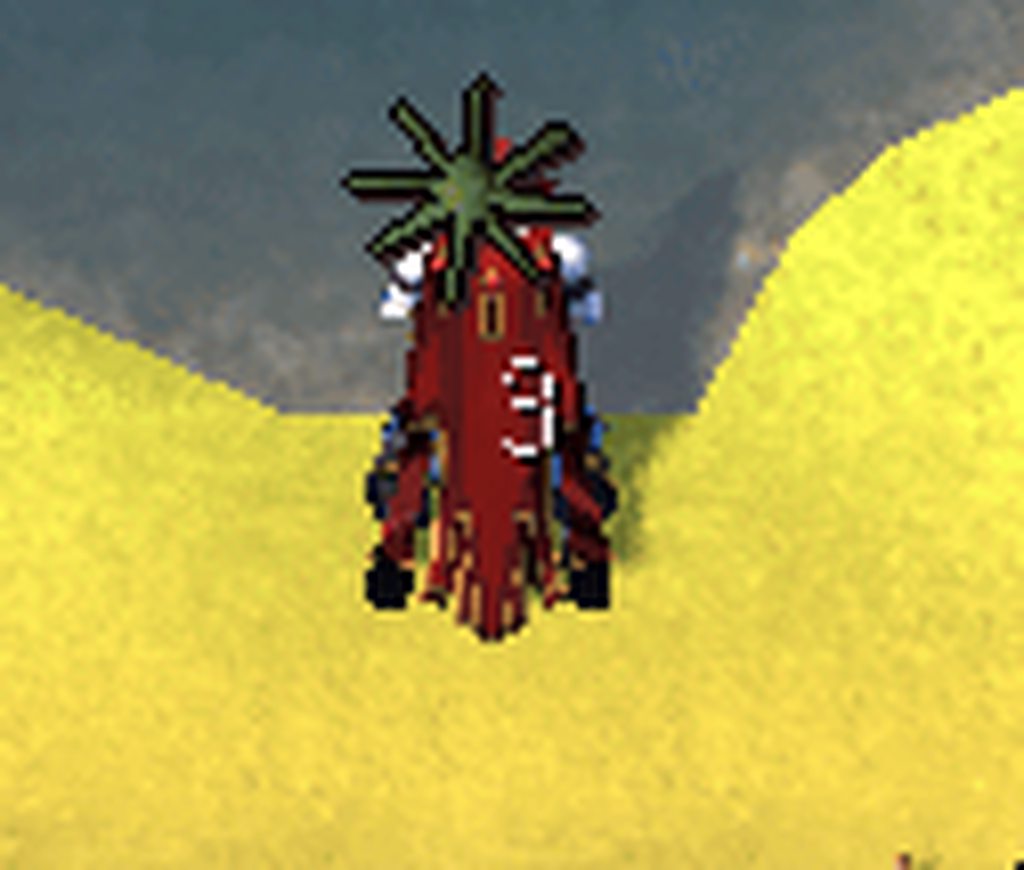
any idea why this has started happening with attack timer metronome? haven't changed anything afaik
 peak bloom
frail elk
how do i snyc my plugins from one computer to another? so i dont have to redo al...
peak bloom
frail elk
how do i snyc my plugins from one computer to another? so i dont have to redo al...
might help
haughty pumiceBOT
Get support for the AttackTimer Plugin Hub plugin here: https://runelite.net/plugin-hub/show/attacktimer.
You can also find the support link by searching for the plugin in the Plugin Hub panel and clicking the ? button on the plugin, or by right-clicking the plugin in the plugin panel and clicking the Support menu option.
round jacinth
peak bloom
https://discord.com/channels/301497432909414422/442492468307427330/1246053407752...
They were linked by the bot for help rather than something that was talked about in May lol
 last bay
Hey i was wondering if there is any info about rearranging the sidebar icons or if it's in the works or not? Can't seem to find much on the forums/github about it
solid mesa
It isn’t possible
leaden trail
It's not currently something you can do, not really any plans to implement it as far as I know
 vital bloom
hey all, i swapped pcs and some of my pbs aren't showing up, i tried col log and achievement book in poh but still some stuff like 6 jads and awakened dt2 bosses aren't showing up any ideas? i can check the scoreboards and see my times but !pb doesnt work
gilded kayak
!logs
haughty pumiceBOT
To find the logs, you can do one of the following:
- If your client failed to open, click the
Open logs folderbutton. - Open the screenshot directory by right-clicking 📷
Camerabutton, navigate 1 directory up, then open logs folder. - Navigate to
%userprofile%\.runelite\logson Windows or$HOME/.runelite/logson Linux and macOS.
Upload the log files named client and launcher by dragging them to Discord. If there are files prefixed with jvm_crash dated from today, upload them too.
 steady moth
peak bloom
https://imgur.com/rcZoS5G
any idea why this has started happening with attack t...
steady moth
peak bloom
https://imgur.com/rcZoS5G
any idea why this has started happening with attack t...
Ah I may have introduced that bug, the plugin thinks your attacking when fishing 🤦♂️ Let me raise a fix
 echo wing
Hi, I'm currently messing around with a modified GPU plugin that I've been working on (its been awhile since I've touched the project for context) -- for some reason, after updating the changes for vertex positions being floats instead of ints, priority sorting is just entirely busted.
I've done a diff check to make sure things aren't too different, and the only real differences are some naming schemes and the fact that I'm passing a normal buffer through.
From what I can tell, south facing models look correct but if they are ever rotated, then the sorting stops working.
zealous cedar
oh?
the unmodified gpu plugin is obviously working. so I do not see any other explanation than you have modified the plugin and broken it. but I am curious what kind of modifications you are working on
echo wing
I've been helping with RLHD, but right now I'm just trying to have a stripped down project to work on and prototype in.
I am helping them implement PCSS shadow mapping, for instance.
echo wing
I believe I am.
This snippet is exactly the same as the stock GPU plugin -- I largely haven't touched this other than adding a normal buffer at some point a long time ago and updating things more recently to the newer GPU plugin api stuff.
 int orientation = flags & 0x7ff;

    vec4 thisrvA = rotate_vertex(vec4(thisA.pos, 0), orientation);
    vec4 thisrvB = rotate_vertex(vec4(thisB.pos, 0), orientation);
    vec4 thisrvC = rotate_vertex(vec4(thisC.pos, 0), orientation);

    int thisPriority = (thisA.ahsl >> 16) & 0xff;// all vertices on the face have the same priority
    int thisDistance = face_distance(thisA.pos, thisB.pos, thisC.pos, cameraYaw, cameraPitch);

    o1.pos = thisrvA.xyz;
    o1.ahsl = thisA.ahsl;

    o2.pos = thisrvB.xyz;
    o2.ahsl = thisB.ahsl;

    o3.pos = thisrvC.xyz;
    o3.ahsl = thisC.ahsl;

    prio = thisPriority;
    dis = thisDistance;
wait
Ive just realized I might be stupid, please hold
yep, I'm stupid
I was feeding the unrotated pos into face_distance
Dont know how I missed that until now.
😮💨
zealous cedar
pro tip "ive not made any modifications yet my version isnt working" is always actually "ive made modifications and broken it"
100% of the time
ornate kite
I might have missed something but I'm tryna log in with runelite.
My account was created through steam, I've followed what its written in #faq and created my jagex account and imported my character. Now I try to log in in runelite and it says that if my account is jagex then i have to use their launcher? wtf??
zealous cedar
yes
ornate kite
?
zealous cedar
you can launch runelite via the jagex launcher
ornate kite
im confused, i have to download 2 launchers to play 1 game?
zealous cedar
yes
ornate kite
zealous cedar
yes
then can i launch it through steam as well?
zealous cedar
i dont know
ornate kite
thanks adamn i wil ltry with their launcher as well
ohh i see it lets u pick a client
 frosty parcel
@zealous cedar just tell me that are you banning this gane in. Pakistan?
 remote shoal
hi, i just had a "ran out of memory" error in RL? and that I need to download the 64 bit version?
i've never had that happen before - suggestions?
gilded kayak
go to the website and download the 64 bit version
the link to the website is in #welcome
remote shoal
is there a way to upgrade?
gilded kayak
it just handles version swapping
remote shoal
or am i just going to have to redo all of my settings?
remote shoal
okay thank you
gilded kayak
gilded kayak
it just handles version swapping
I should note it handles version swapping if you correctly just run the installer again, if you start randomly deleting files on your computer, then you might lose your settings
zealous cedar
i don't have pakistan banned
remote shoal
it did not work
i am still very pixelated
happened as soon as i left colosseum in varlamore
gilded kayak
you didn't report pixelation you reported an OOM
remote shoal
the oom led to pixelation issue
gilded kayak
was the prompt you got from 117HD?
remote shoal
and, only experiecing pixleation in max screen size
gilded kayak
to tell you to download the 64 bit version
gilded kayak
does your issue happen with the GPU plugin, instead of 117
remote shoal
okay, thanks v much for the fast help!
 mystic idol
has this bug been reported? Been happening to me pretty frequently recently, I open up the xp tracker and see that its displaying the total xp i've gained in every skill displayed as my xp per hour

been happening for a few weeks at least
gilded kayak
ye
it seems to only happen if your login is laggy, e.g. logging into a high pop area like wintertodt or w302 GE
others who originally reported it realized when they logged into completely empty areas it didn't happen
 subtle plaza
I keep having to highlight an npc again...why is that? like it undoes what i did
subtle plaza
vast bone
It doesn't save across restarts unless you use tag all
thanks.
silver harness
Guys im back again
Anyone know my my runelite seems to be flickeriung between classic and resizeable clasic
hmm i cant seem to add a Yt video
to show you
grim oak
vast bone
but I think weapon animation replacer might actually be able to do that 😂
thanks, was able to grab sounds off wiki and use that plugin
vast bone
You can use a plugin like sounds swapper's debug tools to get IDs btw
silver harness
Anyone able to give me permission to add a yt video of my runelite buggin out
 viscid lantern
yes you can post the video
 zealous cedar
that is normal for resizing. as long as it goes back to normal once you stop resizing it is fine
silver harness
zealous cedar
that is normal for resizing. as long as it goes back to normal once you stop res...
yeah but
That flickering you see
Happens randomlly when playing the game
And everynow and then the whole runlite window the top bar will go white like its spamming something
zealous cedar
idk about that
 native venture
how do i know if my rl is 64bit
zealous cedar
if it doesnt say (32-bit) in task manager
 somber turtle
i've accidently overwritten by profiles and lost all my plugins. I tried the steps in lost, but due to everything being overwritten its all been reset when I was trying to copy over the plugins to a new comp. Is there any other backup?
round jacinth
I think you see why we don’t provide help on config surgery
Your best luck is finding the biggest file that is fairly recent and it’ll have what you mostly lost maybe
somber turtle
well. Thank you. Was able to find a file, funny enough from a HDOS backup folder.
 vague whale
Hi, Ive been having an issue for months now, using the GPU or 117 HD plug in causes the game to freeze ( can still move camera ), and after 15 seconds or so, it comes up in the top corner with connection lost, and then logs out. I have tried all sorts to fix it but no joy yet. I've just given in and have been playing in vanilla graphics.
If there is some way to fix this i would loveeeee to play in HD again!
 rough gust
Ive watched some people display their 'timers' e.g. overload / divine potion / thrall timers as a compact box within runelite, ive been messing around with my settings and i cant get the 'timers' to be in the compact box anyone have any ideas?
vast bone
there's multiple settings
some are in "runelite" plugin
others on shift-right-click the infoboxes
rough gust
Yeah, ive messed around with them and just cant get the timers into the compact box
vague whale
vague whale
Hi, Ive been having an issue for months now, using the GPU or 117 HD plug in cau...
any idea on this?
vast bone
rough gust
Yeah, ive messed around with them and just cant get the timers into the compact ...
post picture then
vast bone
vague whale
any idea on this?
dunno but you can try the 117hd server
haughty pumiceBOT
Visit 117's HD plugin discord (https://discord.com/invite/U4p6ChjgSE) for support, issues & feedback


 rough gust
 vast bone
if you want them smaller, I told you where that setting is
rough gust
im trying to get my boost information looking like this above
vague whale
haughty pumice
Visit 117's HD plugin discord (<https://discord.com/invite/U4p6ChjgSE>) for supp...
my issue is with GPU aswell so assume it not one plug in causeing the issue
vast bone
rough gust
im trying to get my boost information looking like this above
then turn off "compact display"
and turn on "display infoboxes"
rough gust
I want them compact, not infoboxes


But i also want, venge / divine timer / thralls as compact, not infoboxes
whereas compat doesnt do venge / divine / thralls etc
vast bone
I don't see how reducing the size in "runelite" plugin and then shift right-clicking the infobox and flipping will not do what you want
and maybe alt-drag the edges of the infobox group around too.
 bronze raptor
Hey guys i have a question got 3 days ago scammed in toa by 2 guys the told me to come discord and said to me to download the new plugins for toa and he told me to give a super combat potion to lock in my bank pin and i did it when i was finished with bank pin they kicket my out i couldnt relogg in in osrs. My question is now if i would start playing again do they see what im typing on my keyboard or can they see also my screen? Or what do u prefer to do now?
rough gust
vast bone
I don't see how reducing the size in "runelite" plugin and then shift right-clic...
Perfect, thank you thats exactly what i wanted
My apologies for miss understanding
vast bone
np
 rough hinge
rough gust
I want them compact, not infoboxes
rough hinge
rough gust
I want them compact, not infoboxes
you cna have ur boosts compact but not the other infoboxes.
vast bone
bronze raptor
Hey guys i have a question got 3 days ago scammed in toa by 2 guys the told me t...
There might not be a keylogger that would survive you deleting whatever "plugin" you downloaded from their site. However, there's no way to be sure other than wiping your whole pc.
rough gust
rough hinge
you cna have ur boosts compact but not the other infoboxes.
its all good i got what i wanted appreciate the help
haughty pumiceBOT
@bronze raptor You've downloaded a fake client, and your account has been compromised. Remove the fake as soon as possible to minimise further damage.
The following actions should be performed from a secure computer or secure mobile device:
- Change your RuneScape password
- Remove and re-add Authenticator to RuneScape
- Change your RuneScape bank PIN
- Change your email's password
- Add 2FA to your email if you haven't got it enabled
- Check for any linked accounts by accessing the account settings page (https://www.runescape.com/account_settings)
Some fake clients also install malware, only a fresh install of your operating system can guarantee the total removal of any unwanted software.
You might also want to change any email password if you reused the same as your RuneScape account password.
Once your computer is secure, you should download RuneLite from the link available at the #welcome channel.
bronze raptor
Thank you
 hexed grotto
2024-07-06 09:18:15 BST [RuneLite] ERROR net.runelite.client.RuneLite - Failure during startup
java.lang.RuntimeException: java.lang.IllegalArgumentException: Malformed \uxxxx encoding.
can anyone help with this
it gets to loading configuration then says fatal error
vast bone
corrupt config files, probably
try renaming .runelite/profiles2 to something else and then following
haughty pumiceBOT
 echo latch
I have a major problem with ToA Baba's puzzle room. For some reason the pilars don't draw red skulls when they need to be fixed. Sometimes they do draw the skulls but atleast half of the time it doesn't.
hexed grotto
vast bone
corrupt config files, probably
thank you very much mate
 gusty marsh
Anyone got ideas where i can find this folder

I would of thought its under C:\Users\USERNAME\jagexcache\jagexlauncher but that doesnt exist
sonic birch
Why would you need to access that folder?
gusty marsh
For jagex launcher
viscid lantern
That looks like a jagexlauncher folder, we dont make the jagex launcher
gusty marsh
stop crying what it is for
mossy swan
why would we help you then 
 modest comet
my runelite started randomly closing yesterday. any current issues?
gusty reef
is there a plugin that makes these messages transparent?

 dawn marsh
Does anyone in here know how to get a popup saying birdhouse ready on your ingame screen ?
round jacinth
Time tracking reminders does that
 robust vessel
Hi! Ive forgot my loggin email on One of my rs accs but its probably Linked through runelite since i can see the name when i log into runelite site. Is there any way i can find the loggin name/email on runelite page ?
 mortal ingot
hi, i recently switched over to linux from windows, i was logged into runelite on windows and had a profile, i've now logged into runelite on linux and my profile has gone
round jacinth
robust vessel
Hi! Ive forgot my loggin email on One of my rs accs but its probably Linked thro...
Your RuneScape account’s email is not necessarily the same as the one you use for runelite to enable cloud sync, they’re not related at all.
If your on the same computer since January 2023, you can see the cloud email you used, it’ll be in .runelite/profiles
robust vessel
Hmm on the runelite website i can see my profiles , but nothing comes up when i click it.. runelite.net/profiles or ?
round jacinth
Those are the accounts that you used to see loot tracked and stuff you can’t pull settings from it
robust vessel
I see, so from the website itself i cant find any information about my loggin right ?
viscid lantern
correct
round jacinth
I’m confused are you missing your osrs acc login information?
Check all your emails you own and try to find a “welcome to RuneScape” email
robust vessel
Correct . Mossing the loggin info , cant remember my email for it , jagex cant help
Thats why i was hoping runelite had it saved
 mortal whale
Im having issues right now as well.. made my account a few days ago, decidied to try the RuneLite launcher.. not working for me. Says "If you have upgraded to a Jagex Account, you need to log in usein the Jagex Launcher
 solar owl
Did you launch runelite through the jagex launcher
solar owl
You need to use the jagex launcher. There is an option to run runelite when you launch the jagex launcher
oblique plume
new accounts are jagex accounts
 thorn sundial
Hi, i have a question. Whenver I start RL and Discord at the same time. Discord starts showing my RL activity, but not in the RL Name. It just shows a fake name I think I entered many many years ago. It shows that I am playing 'Phurqan' (the fake name) in stead of RL or RuneScape. Anyone knows how to remove or change that?
it looks like this:
Hi, i have a question. Whenver I start RL and Discord at the same time. Discord starts showing my RL activity, but not in the RL Name. It just shows a fake name I think I entered many many years ago. It shows that I am playing 'Phurqan' (the fake name) in stead of RL or RuneScape. Anyone knows how to remove or change that?
it looks like this:

 fossil summit
thorn sundial
Hi, i have a question. Whenver I start RL and Discord at the same time. Discord ...
fossil summit
thorn sundial
Hi, i have a question. Whenver I start RL and Discord at the same time. Discord ...
did you rename runelite?
discord cog -> activity status -> registered games
thorn sundial
fossil summit
did you rename runelite?
I think I renamed it. It names Runelite as Phurqan
It is fixed, thanks alot!!!
 lavish scroll
im having issues getting Shadowplay to work with rune lite anyone know how i can Get the replay feature to work. without it Glitching out.
 silver ginkgo
same issue, follow the flowchart, same issue. not internet issue cos when in discord and freeze happens i can still hear everything perfectly fine. was the issue ever fixed for this or solution found?
oblique plume
its your network
lavish scroll
oblique plume
obs replay is better afaik
yeah, i liked the idiea of using shadowplay because there's less setup. also obs keeps going dark when i move runelite.
silver ginkgo
oblique plume
its your network
how is it my network if it only happens in runelite? literally nothing else
oblique plume
other things you use arnt trying to connect to the runescape servers
silver ginkgo
oblique plume
other things you use arnt trying to connect to the runescape servers
ive used osrs vanilla client to test this theory with no freezes at all
oblique plume
then i suppose something could be blocking just RuneLites connection
but i dont think so
silver ginkgo
any suggestions?
oblique plume
you can do this itl show you your connection issues
silver ginkgo
so example world 517 would be 217 for XXX
oblique plume
yes
 lyric plinth
Hello there my runelite account is showing two profiles for my main account after logging into it on a second pc this has made a mess of my loot tracker is there anyway to merge them?
haughty pumiceBOT
oblique plume
no, only that
lyric plinth
ah okie dokie thanks
lyric plinth
all that's done is keep duplicating the account, i have main loot tracker file downloaded but i don't see were to import it
oblique plume
you cant
lyric plinth
then why can i export it?
oblique plume
for use in some tool you want to make yourself
lyric plinth
ah ok
silver ginkgo
oblique plume
for use in some tool you want to make yourself
when these freezes happen, how can i tell if its network or something else in cmd?
stays between 6-17ms had it running this whole time
oblique plume
It'll drop the packet
If it's not then it must be something interfering with RL only
silver ginkgo
oblique plume
If it's not then it must be something interfering with RL only
ok just got a freeze, 2466 ms ttl remained the same, im in a disc call and mate was talking to me with no interruption when this happen
its my network or connection to server?
oblique plume
2.5second ping is normal???
 strong ridge
Anyone know how to get native notifications working on Linux with pipewire/kde?
leaden trail
2.5s ping and you didn't just get DCed 😳😳
viscid lantern
strong ridge
Anyone know how to get native notifications working on Linux with pipewire/kde?
runelite uses notify-send to send notifications on linux, so that would probably be a good place to start
strong ridge
viscid lantern
runelite uses `notify-send` to send notifications on linux, so that would probab...
Notify-send is installed as a dependency of KDE and I tested it as working in terminal
Could it be due to the flatpak package for the jagex launcher?
viscid lantern
it could be yeah, could try bolt and see if that works better for you
strong ridge
Lemme give it a try
viscid lantern
https://github.com/Adamcake/Bolt thats their repo
strong ridge
Probably gunna try from the AUR
viscid lantern
removing the wine dependency will be a nice upgrade 
strong ridge
Yea I also have other bugs with it that I wonder might be due to running through wine. Stretched mode causes weird issues when opening and closing the side menu, c engineer sounds are cut off
viscid lantern
could be yeah, bolt has been working nicely for me so thats definitely worth trying
silver ginkgo
oblique plume
2.5second ping is normal???
yeah but when it happened, i ate 4 leviathan balls in 1 tick
what about that is normal lol?
gilded kayak
that's what he's asking you
silver ginkgo
im here for help not sarcasm
gilded kayak
i think ur misunderstanding what he said but sure
silver ginkgo
i probably am would u mind to explain?
mossy swan
i think alex just misunderstood since you said ttl normal or w/e
but thst ping does mean there is something wrong between your pc and jagex server
silver ginkgo
oh as in the ping skyrocketed in that 1 response, but that ttl was the same as the rest
the rest ms was between 6-15
mossy swan
ttl is not relevant (it won’t change)
silver ginkgo
mossy swan
ttl is not relevant (it won’t change)
thats prob where we misunderstood eachother
mossy swan
silver ginkgo
oh as in the ping skyrocketed in that 1 response, but that ttl was the same as t...
since you are not lagging all the time, just sometimes, that makes sense
silver ginkgo
mossy swan
but thst ping does mean there is something wrong between your pc and jagex serve...
what can i do to improve this
mossy swan
restart your router and pc
if it doesn’t help try using a vpn
if still no help, call your isp and complain
silver ginkgo
bet will do
i will say i deleted every plugin and i experience less freezes, but i still get em
strong ridge
viscid lantern
could be yeah, bolt has been working nicely for me so thats definitely worth try...
Hmm runelite through bolt is playing sound through the wrong device and I cant seem to change it, any ideas?
I should probably add I am on Wayland and Pipewire
viscid lantern
sorry no idea 
strong ridge
viscid lantern
sorry no idea <:Sadge:815743609495879770>
Okay that seemed to be an issue with the AUR package because the flatpak doesnt have that issue. Let's see if notis work
strong ridge
viscid lantern
sorry no idea <:Sadge:815743609495879770>
Hmm no dice, so they just seem to be busted on KDE with Wayland/Pipewire (with Runelite only, others such as discord work)
strong ridge
It seems to be an issue with system sounds not Runelite. I cant get any system sounds to play at all
 sacred blade
Hi
Having some problems logging into Runelite. getting this message

Uninstalled and reinstalled. Was able to log in on my phone
Any help would be appreciated@
!
gilded kayak
login to your account on the jagex website and clear your active sessions
sacred blade
Already done
gilded kayak
then you have to do what it says on the error
zealous cedar
sometimes you can just wait and it goes away ive heard
gilded kayak
yeah or that
sacred blade
log in with the launcher?
zealous cedar
you cant login with the launcher without converting to a jagex account
sacred blade
yeah, I don't have one. Still my og account from the old days lol
 cosmic isle
some1 help rq, i think im blind.. the white text for default items aint showing above items anymore
viscid lantern
double tap alt
sacred blade
so really nothing for me to do now besides wait huh?
 gilded kayak
well u can migrate like it says, but if you wont do that then yes you'll have to wait it out and hope that works
 shadow pagoda
Could I suggest having an option to change the saturation in maybe the gpu plugin or a seperate one, would like to have the vanilla graphics with a little more vibrancy
zealous cedar
have you tried adjusting the brightness?
shadow pagoda
Yeah that’s only for 117 right? Brightness seems ok anyway would just like to be able to adjust the vibrancy
sacred blade
ugh, I just want to play on runelite lol
round jacinth
You can upgrade an og login name to a jagex acc and still use runelite
It will become mandatory eventually to use their launcher anyways (no timeline on that, but it’s an eventuality)
sacred blade
so runelite will be phased out eventually
dang
does the launcher have the same plugins?
round jacinth
That’s not what I said
It literally launches runelite
It’s like steam to launch rocket league or epic games to launch rocket league
gilded kayak
round jacinth
It’s like steam to launch rocket league or epic games to launch rocket league
are you allowed to use rocket league as the reference twice
round jacinth
Yes
It was alluding that runelite’s exe launches runelite or jagex’s launcher launches runelite lol
 dull sage
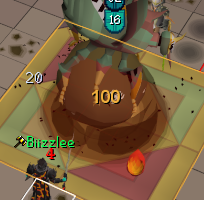
Any idea why certain monsters HP % isn't changing?
It's happening in ToB, and ToA but fine if I mark a random mob..
This is through the Monster HP Percentage plugin
https://i.imgur.com/RIHmU5j.png
 haughty pumiceBOT
Get support for the Monster Hp Percentage Plugin Hub plugin here: https://runelite.net/plugin-hub/show/monster-hp-percentage.
You can also find the support link by searching for the plugin in the Plugin Hub panel and clicking the ? button on the plugin, or by right-clicking the plugin in the plugin panel and clicking the Support menu option.
ornate kite
Sometimes when I change tab, runelite will take a screenshot. Why?
viscid lantern
you probably set a keybind for screenshots
or you installed a hub plugin that takes screenshots
ornate kite
viscid lantern
you probably set a keybind for screenshots
nope
ornate kite
viscid lantern
or you installed a hub plugin that takes screenshots
nope
for reference this is the vid:
(its uploading)
 viscid lantern
that screenshot was because you got a firemaking level
you have screenshots on level ups enabled
the notification is because the client wasnt in focus when it happened, but its been taking screenshots for all of your levels

gz on lvl 5 firemaking though!
 cobalt adder
if we exported our profile and saved it, how do we get it to save plugins? i dont want to ever re do these for a third time
zealous cedar
exporting includes the plugins so i dont know what you mean
cobalt adder
mine did not seem to?
maybe i coulda imported wrong?
if its salvagable would be amazing
haughty pumiceBOT
leaden trail
Follow that maybe?
cobalt adder
i didnt have it sync'd i think is my issue
cobalt adder
haughty pumice
<https://github.com/runelite/runelite/wiki/FAQ#i-want-to-transfer-my-settings-to...
is cloud sync the only way? i had exported my profile and saved it when my reinstall, but the plugins did not transfer. I did not have sync enabled during the export
round jacinth
the plugins in that folder would be re-downloaded if you had the right config
 granite zealot
Is there a way to fix Runelite UI scaling in Linux? Running 1440p with 125% scaling makes Runelite menus ultra tiny. I know I can use scretched mode to fix in-game stuff but that doesn't seem to affect Runelite.
 zealous cedar
have you tried messing with the --scale param?
granite zealot
Nah, didn't know that was a thing. What are the options for that?
zealous cedar
eg --scale=2
granite zealot
That did it, thanks brother. New to linux
cobalt adder
round jacinth
the plugins in that folder would be re-downloaded if you had the right config
thank you
 unique flume
 zealous cedar
you have to be logged into the client
 bright dew
Why is my runelite switching focus to the sidebar randomly? Nearly just pk'd my hcim mid hydra lol
Started doing it on wednesday
gilded kayak
the last RuneLite update was June 26th
bright dew
Well just a coincidence then but still started on wednesday lol
gilded kayak
that's fine but I was just pointing out we changed nothing on wednesday*, so my guess is something else is causing it
bright dew
Is there any way to check recently downloaded plugins or anything, i dont recall any specifically and i havent changed any keybinds
Idk how its even possible to swap focus from runelite game client to runelite side bar even if i wanted to
without clicking obv
zealous cedar
have you tried safe mode?
bright dew
I'll suffer through trying that I guess but sometimes it goes hours without doing it and other times like just now it does it twice in like 45 seconds
 rough notch
sacred blade
rough notch
sacred blade
yo i found out how to fix it
!!!
round jacinth
there is no fix, it's wait and see or upgrade acc to jagex acc
 round jacinth
probably just restart your client if you haven't recently?
 modest walrus
when my client is off focus it has begun capping my fps and looking at task manager when this happens shows me that it suddenly begins massively hogging cpu aswell
i do not have fps limited on unfocused turned on in the fps control plugin, is there something else i could be looking for?
 bright vapor
Does runelite work on Linux ubuntu?
leaden trail
I'm sure there's one
gilded kayak
well its linux so yeah of course
 narrow portal
Is there a way to recover plug-ins on a different pc without having a runelite account, reddit is a bit unclear from what i gathered so far
vast bone
if you didn't cloud sync it and you don't have access to the old PC then no
if you do have access
haughty pumiceBOT
narrow portal
thanks both, ill try what you've provided
ornate kite
viscid lantern
the notification is because the client wasnt in focus when it happened, but its ...
ooh i didnt know
shadow pagoda
Anyone play on steamdeck? I’ve got the launcher and runelite installed on mine but worried about getting banned
 urban lodge
There are loads of steamdeck/Linux users
Unless you do some weird stuff that teleports the mouse all around the screen, you're gonna be fine
shadow pagoda
Great thank you
 safe kelp
Hi guys, I have a i9 9900k and have a cpu usage of around 18% with temps of around 50 degrees, is it normal ?
round jacinth
yeah sounds good to me
safe kelp
I was just worried with the cpu usage
Ik its a single core based client but the temps were also worrying me a bit
 halcyon iris
How can i fix the text? It reads difficult like this, some words/letters are in bold others aren't

 gilded kayak
changing the ui scaling mode in gpu probably fixes that
halcyon iris
where can i find that?
gilded kayak
 halcyon iris
oh oke thank you
 visual compass
when i deposit and take out items theres this short delay where the items become transparent before the action is performed, how do i turn this off? 😄 cant seem to find the plugin associated with it

 small urchin
Hi, I just recently started playing OSRS through steam, but then I saw about RuneLite. Now I wanted to use my steam account with it, but it keeps telling me that the user/password is incorrect even if I keep trying with the credentials of my steam account. Is there any solution or correct way to launch my OSRS steam acount with RuneLite? I already linked it with a Jagex account btw
zealous cedar
you have to launch runelite with the jagex launcher
small urchin
zealous cedar
you have to launch runelite with the jagex launcher
thank you it worked, but what if I want to keep track of the steam achievements? is it possible?
mossy swan
no, runelite does not work with steam achievements
for some achievements you get them automatically when you login on steam client though
(if you achieved them on some other client)
small urchin
oh so it syncs when I log in with steam after getting some of them
thanks for the help
mossy swan
the achievements arent hard anyway
ornate kite
where are the settings for tempoross???
 dreamy orchid
Hey anyone else client look like this? First time using the runelite client running on MacBook Pro.

 river juniper
yo fellas and fellettes, i got an error with the collection log plugin trying to make a json file but access is denied.
How to fix 😦 clogging would be fun
 gilded kayak
if the error from that hub plugin is telling the truth, you can maybe do command #2
haughty pumiceBOT
If you got permission problems, open Command Prompt (cmd) as administrator and try executing the following commands while testing if the problem is solved between every step. Make sure RuneLite is closed when executing commands!
mkdir "%userprofile%\.runelite"icacls "%userprofile%\.runelite" /grant:r *S-1-1-0:F /inheritance:r /tattrib -r -a -s "%userprofile%\.runelite\*.*" /d /s
river juniper
gilded kayak
if the error from that hub plugin is telling the truth, you can maybe do command...
❤️ you're the best
didn't work, but you're still the best ❤️
ornate kite
wait so once i upgrade to jagex launcher i can no longer play in runelite???
river juniper
no, you gotta do something goofy to get it to launch runelite
gilded kayak
yeah it's called click the dropdown menu in the jagex launcher and select runelite
 devout lintel
I have a windows computer with a number of plugins, settings for the plugins, custom tilesets, and switched rightclick/left clicks, how do I transfer a 1:1 to my mac without reinstalling it all again
zealous cedar
copy the .runelite folder
 rapid widget
hi
devout lintel
zealous cedar
copy the .runelite folder
genuinely that easy?
and put it in the same mac directory?
zealous cedar
it has to go in your home directory
devout lintel
WHERE IS GTHrt directory for mac i cant find it
where is that directory for mac i cant find it sorry new keyboard*****
zealous cedar
usually /Users/your name
 dim kettle
I messed up my infoboxes a long time ago and now I always need to drag new infoboxes to my main stack, is there a way to hard reset all of them so they are all default grouped?
zealous cedar
you could just remove all of your main infoboxes from your custom group
haughty pumiceBOT
You can configure horizontal/vertical orientation, infobox groups or split infoboxes into new groups with the menu options opened with Shift + right-click. https://runelite.net/img/blog/1.6.28-Release/infobox.gif
 zealous cedar
i guess this doesnt show it but you have to click delete on the group
dim kettle
ahh ok and that would delete the whole group instead of doing it 1 by 1
 kindred pulsar
Having issues launching runelite in the jagex launcher, every other version works, tried redownloading the client, repairing, restarting my computer.
Was playing fine last night
mossy swan
what happens?
 zealous cedar
what happens if you run runelite outside of the jagex launcher?
kindred pulsar
hmm, I can check
hmm, standalone launcher worked fine.
can jaggy accounts use standalone?
zealous cedar
no
kindred pulsar
damb
mossy swan
!logs could you post your logs please?
haughty pumiceBOT
To find the logs, you can do one of the following:
- If your client failed to open, click the
Open logs folderbutton. - Open the screenshot directory by right-clicking 📷
Camerabutton, navigate 1 directory up, then open logs folder. - Navigate to
%userprofile%\.runelite\logson Windows or$HOME/.runelite/logson Linux and macOS.
Upload the log files named client and launcher by dragging them to Discord. If there are files prefixed with jvm_crash dated from today, upload them too.
kindred pulsar
Oh I believe downloading the runelite client fixed it.
Went to go get the an updated ver of the log to send but went to launch and it worked
thanks for the help
narrow portal
so i sent my email a compressed file of my old .runelite settings off the old pc for my new pc and can download that file but how do i go about putting that file where its needed, when i download it into my new runelite settings? do i find the .runelite in my new pc if there is one and just delete that?
haughty pumiceBOT
ornate kite
Hey, for the last 2 months or so I'm randomly getting 0.5-2second freezes in-game only now its became an issue doing pvm. I've tried removing certain plugins to see the issue but Idk. Would clearing RL cache maybe solve? Don't want to lose my loot tracker
zealous cedar
probably not. using safe mode would solve if it is caused by a plugin
narrow portal
anyone help me with my issue?
zealous cedar
you need to put .runelite into your home directory
narrow portal
home directory? isnt that a mac thing?
zealous cedar
no
narrow portal
will the files still work if i decompressed them all into 1 file took like 5 hours last night and sent them to my self?
zealous cedar
as long as you copy the files from the old pc to the new pc it will work
mossy swan
are you sure you managed to actually email the file? if it took 5 hours to compress, it's gonna be pretty big...
narrow portal
it was several years worth of plug-ins and photos/screenies from a pc from 2012
how do i make a .runelite in home directory im new to windows 11
scratch that i found it but there is already one there. I signed into a runelite i downloaded yesterday, do i delete the new one and paste the old files one im assuming?
zealous cedar
yes
ornate kite
Tried being in low detail, changed the gpu settings on plugin everything is crisp as could be but still getting the random freezes 😮
narrow portal
thanks so much adam for the responses and unmoon i figured it out 🙂
zealous cedar
dreamy orchid
Hey anyone else client look like this? First time using the runelite client runn...
I do not know what would cause this
 fleet thorn
sorry for the the potentially stupid question. I play on an ultrawide monitor- is there anyway to expand plugins like quest helper that would fill in that space? cant seem to find where I would adjust those settings. thanks!
 zealous cedar
you could scale the ui up by adjusting the scale setting in the runelite launcher settings
fleet thorn
where can i find the runelite launcher settings? i must be blind
haughty pumiceBOT
 sullen steppe
how do i fix my client having a malformed login packet and logging me off? keeps happening everytime i do GOTR for >1h usually
 safe fog
hey guys im new to using radius markers i was wondering how to look up or find i;d's im looking for i want to get the puzzle room for baba and highlight them
round jacinth
safe fog
hey guys im new to using radius markers i was wondering how to look up or find ...
Monster id plugin on hub can help you
Or NPC id
 nova arrow
hello, I think when I was on my laptop and tried to import my PC's profile settings, I accidently made a new profile and deleted my old one.... Am i doomed?
 eager yew
Hi all - I've read up on others with the same problem and followed previous advice/steps given. My client is getting stuck at external plugins loading, and since I use the jagex launcher - It only launches the runelite.exe, and I am unable to pick the safe mode. Despite uninstalling all addons, and reinstalling the application fresh the issue is persisting. I've attached my logs - Any support would be appreciated - Thanks
zealous cedar
you can use safe mode with the jagex launcher
haughty pumiceBOT
Windows
Run the RuneLite (safe mode) shortcut, or with a Jagex account, first run the RuneLite (configure) shortcut and tick the Safe mode box, then launch RuneLite via the Jagex launcher.
Mac
In Terminal, run:
/Applications/RuneLite.app/Contents/MacOS/RuneLite --configureTick the Safe mode box. Launch RuneLite.
If it's not working, download and install the updated RuneLite launcher from the website link in #welcome. You don't need to uninstall your current version. You will not lose any settings or plugins. Then try running safemode again.
nova arrow
any thoughts on this;
hello, I think when I was on my laptop and tried to import my PC's profile settings, I accidently made a new profile and deleted my old one.... Am i doomed?
I want to cry thinking about reinstalling everything.
zealous cedar
regardless, you can launch runelite outside of the jagex launcher in safe mode and uninstall plugins though.
zealous cedar
nova arrow
any thoughts on this;
hello, I think when I was on my laptop and tried to impor...
importing creates a new profile, and doesnt overwrite existing profiles, so it is probably still there
nova arrow
im in that middle section now where you can create a new profile and import a profile, and the only one thats in there has no settings at all
zealous cedar
did you click the delete profile button on either of your pcs?
nova arrow
on my laptop I did by accident
zealous cedar
the profile file might still be on disk on one of your pcs then
haughty pumiceBOT
nova arrow
all my plugins are still in my plugins are still in my runelite folder
zealous cedar
try this
nova arrow
okay let me give that a wack
 worn linden
Is there any list of what is not allowed to be in a plugin?
zealous cedar
there is the jagex 3rd party client rules
nova arrow
Im having a little trouble following those steps
eager yew
zealous cedar
regardless, you can launch runelite outside of the jagex launcher in safe mode a...
Thank you Adam, I have uninstalled them all, and have to reinstall them, is there a recommended amount of addons, or size for the addons folder to avoid this from happening by chance?
gilded kayak
recommended would be 0
nova arrow
Adam, is there a way to confirm I am signed into the correct runelite GMAIL account, I dont remember signing into a certain gmail its been so long sense i signed in and out of runelite
gilded kayak
but realistic would be only the ones you need but not enough to break it again, though it's not number causing it, it was just one of the plugins
zealous cedar
i definitely recommend 0 extra plugins
nova arrow
It looks when when I export my " home " from the runelite webpage, that JSON file has ALL of my stuff
zealous cedar
if you can't avoid it then try to stick with the ones with a lot of installs since they tend to work more than the others
nova arrow
Actually I am sorry, wrong file. It looks like the " settings " notepad in Runelite is the one that has all of my information
 cold lodge
Hi, just got a new computer. Any idea why i cant put runelite to the top of my screen, it leaves a small gap and it annoys me. windows 11.
nova arrow
is there a way to import signed out settings?
cold lodge
Also looks a little blurry compared to my other laptop.
 stone parcel
I think you want to be checking step 4 in that lost settings link Adam sent. Hopefully one of your PCs will have your profile files.
oblique plume
Deleting it from the client doesn't remove it from disk so just reimport it
 ornate cloak
@sonic birch re-installed windows to try to fix the runelite suddenly going poof to desktop and it ended up being an issue with steelseries GG when adding runelite to the auto clipping section of the software, no clue why it only started after i installed motherload mine improved but at least one of the possible causes was identified incase someone else has it happen 🥳 ( could be steel series updated the night i installed that plugin so i thought it was that )
sonic birch
Hmmm, maybe we should blacklist the dll that that software uses at some point
ornate cloak
seemed to stop when disabling 117 HD and leaving it to auto detect for clipping but i just turned off auto detect so i could actually play, no clue if 117 and the update to steel series dont play well together 🤷♂️
gilded kayak
its steelseries
they dont play well
they're the bully in the kindergarden class
sonar broke other apps for my friend
ornate cloak
sonar hasent broken anything for me luckily , i love using sonar and the clipping software
 winter niche
Is there any way while using the Stretched mode plugin change the size of this UI?

 whole magnet
Hi!
Where should I ask for support for third-party plugins?
I installed the Pet the Capybara plugin, but there are no pet options or interactions as far as I can see.
haughty pumiceBOT
Get support for the PetTheCapybara Plugin Hub plugin here: https://runelite.net/plugin-hub/show/pet-the-capybara.
You can also find the support link by searching for the plugin in the Plugin Hub panel and clicking the ? button on the plugin, or by right-clicking the plugin in the plugin panel and clicking the Support menu option.
gilded kayak
as a note tho just incase your issue is obvious, you are only allowed so many menu options*, meaning if this plugin adds one but you also have e.g. equipment manager and other plugins that add an entry, that might be why
 acoustic whale
my client is yellow clicking on side panel only on bank interface
wondering what plugin is messing this up
safe fog
round jacinth
Monster id plugin on hub can help you
Thanks a bunch
 mental sage
why does it show everyone elses activity for Runelite? but when i click on my profile it says "playing runelite for 5 minutes" when ive been on for over 5 fucking hours? kinda ridiculous this is a cosntant issue when I change zero options. get your shit right
it even says "in menu" for people that are logged out, guess what it says for me? fuck all nothing. literally beyond annoying
and yes, ive disabled it, re-enabled runelite, flagged the game for incorrect labelling, etc. why cant you guys ever get shit right?
mossy swan
mental sage
why does it show everyone elses activity for Runelite? but when i click on my pr...
!discord
haughty pumiceBOT
If your Discord activity status is not showing properly follow these steps:
- Make sure your Discord plugin is enabled.
- Make sure RuneLite is not manually added as game to Discord game list.
- Enable
Share your detected activities with othersin Discord settings. - Make sure both RuneLite and Discord are NOT running as admin.
dreamy orchid
zealous cedar
I do not know what would cause this
Fixed it by turning on gpu plugin
 primal peak
Where would be the best place to ask if a potential plug in I'd make would be legal/accepted into rubelite?
 stoic olive
Does anyone know what allows me to send messages in the #development chat?
 summer pilot
Sometimes when im lagging NPCs will be invisible when they respawn, I think this is because of entity hider, but even when I turn it off the NPC still has no right click options
gilded kayak
its menu entry swapper IIRC
summer pilot
Oh yeah that makes sense, ill try toggling it next time it happens, ty
gilded kayak
i've only had it happen one single time but my vague memory says disabling that was the only fix
oblique plume
it thinks its dead
if you can aoe it it might come back but otherwise youd need to disable to feature
ornate kite
how TF to make windows give me notifs about rare drops?? It used to but now its fucked up....
oblique plume
windows can eat notifs
though you could just have notifications while focused off in "runelite" settings
tick game message notifications on, if it prints in chat then windows is eating it
 gusty hollow
Anyone know if there's an easy way to copy indivuidual plugin settings between profiles
Have a bunch of settings from radius markers/npc highlight ect for colosseum that i want to copy over bwtween the main and the hc
 cobalt holly
anyone else having stuttering issues with 117 hd lately?
ornate kite
oblique plume
windows can eat notifs
idfk wtf that means but where do i find those settings?
haughty pumiceBOT
@cobalt holly Visit 117's HD plugin discord (https://discord.com/invite/U4p6ChjgSE) for support, issues & feedback
oblique plume
ornate kite
idfk wtf that means but where do i find those settings?
"runelite"
ornate kite
oblique plume
"runelite"
sooooooooo like windows system preferences or??
summer pilot
gilded kayak
i've only had it happen one single time but my vague memory says disabling that ...
Yeah that worked ty
ornate kite
oblique plume
"runelite"
and what does changing the request focus setting do? It was set to off before..
leaden trail
It tries to focus the window when you get a notification
 split relic
Is there any way to make the "Item Stats" plugin only show the stats on a key press? like hold shift?
round jacinth
no, but you can change when they display/what they display
like only show stats when at a bank
 zealous wigeon
Hey everyone. I'm currently looking for a side project and was considering making a plugin (because I couldn't find a pre-existing one) that automatically sorts your inventory. Does anyone know of one that already exists and if not is it possible to make one? I only ask because I'm not sure what limitations plugins have.
 placid lion
For the last week or so I keep getting random freezes and tick rate drops. It will run totally fine for 30-40 minutes at a time and then start dropping and freezing for anywhere from 7-10 minutes. It isn't my internet and everything on my computer is running fine. I have tried reinstalling runelite from scratch but its still happening. I have tried taking off a bunch of plugins but nothing seems to be helping it. Anyone got any ideas?
leaden trail
zealous wigeon
Hey everyone. I'm currently looking for a side project and was considering makin...
This would not be allowed
leaden trail
placid lion
For the last week or so I keep getting random freezes and tick rate drops. It wi...
When you say it's not your Internet, are you just seeing that you can connect to YouTube/Discord/<insert random website or service that isn't the specific world you're playing on here> and concluding that it's not a connection issue, or are you actually pinging the world you're playing on?
zealous wigeon
leaden trail
This would not be allowed
Darn. I kinda figured it would exist if it was possible so I figured I'd check first. Thanks for saving me the time.
ornate kite
leaden trail
It tries to focus the window when you get a notification
wtf do u mean by focus the window lol? never heard that shit before but this all sounds like quite the pain in the dick...
placid lion
leaden trail
When you say it's not your Internet, are you just seeing that you can connect to...
I'm saying its not my internet because the only thing having any problems at any time is Runelite. and even on Runelite my ping isn't changing.
Like it freezes but I can still play by watching a friend streaming in discord and clicking on my own client. I just cant see anything changing on my side.
 fiery wing
hello, just getting back into osrs after about 15 years lol. anyway to make the side bar on runelite larger? mine just seems small. a little hard to see everything. thanks.

 light tapir
zealous wigeon
Darn. I kinda figured it would exist if it was possible so I figured I'd check f...
light tapir
zealous wigeon
Darn. I kinda figured it would exist if it was possible so I figured I'd check f...
For future reference, nothing that does actions for you (like sorting the inventory) is allowed
mossy swan
fiery wing
hello, just getting back into osrs after about 15 years lol. anyway to make the ...
launch runelite (configure) and set the scale to 1.5 for example
fiery wing
i have that menu up in ther screenshot. i dont see anything that says scale? maybe im blind
fiery wing
ah i see
fiery wing
mossy swan
its a shortcut
that resolved it. thank you very much
zealous wigeon
light tapir
For future reference, nothing that does actions for you (like sorting the invent...
Last idea, would looking at an items weight and telling heavier ones to go to the bottom work or just making items stack from bottom to top instead of top to bottom?
leaden trail
Having a plugin move items in the inventory in any way would not be allowed
light tapir
pretty sure items going to the top of your inventory is a game behaviour and not something you can modify
so moving it to the bottom, not allowed
leaden trail
!statement
leaden trail
Same reason inventory setups doesn't equip things for you
Basically with very very limited exceptions, plugins can't cause any actions to be sent to the game servers
zealous wigeon
That makes sense I guess I wasn't picturing the plugin sending actions but more like simulating a full or empty slots in your inventory to manipulate where they end up but it sounds like a no go.
 light bough
Hey! I hope this is the right place but - I'm stuck on step 5, running the test on the plugin template project. Does anyone know where I should look, maybe previous threads or a doc?
https://github.com/runelite/plugin-hub/blob/master/README.md
leaden trail
What's it doing?
ornate kite
wtf does it mean to focus a window?? this shit gets a lil more complex and a pain in the sack by the fuckin day if were bein honest here.......
light bough
> Task :ExamplePluginTest.main() FAILED
3 actionable tasks: 1 executed, 2 up-to-date


Publishing a build scan to scans.gradle.com requires accepting the Gradle Terms of Service defined at https://gradle.com/terms-of-service. Do you accept these terms? [yes, no] Exception in thread "main" java.lang.RuntimeException: Assertions are not enabled, add '-ea' to your VM options. Enabling assertions during development catches undefined behavior and incorrect API usage.
    at net.runelite.client.externalplugins.ExternalPluginManager.loadBuiltin(ExternalPluginManager.java:469)
    at com.example.ExamplePluginTest.main(ExamplePluginTest.java:10)

FAILURE: Build failed with an exception.

* What went wrong:
Execution failed for task ':ExamplePluginTest.main()'.
Assertions are not enabled, add '-ea' to your VM options. Enabling assertions during development catches undefined behavior and incorrect API usage.
 oblique plume
is that program args or vm args
light bough
ahhh thank you so much 🙏
it worked
Is this the appropriate place for this kinda support btw?
light bough
thanks for being kind hope yall have an amazing day
fiery wing
anyway to shortcup opening the map?
 sacred sphinx
hello, ive got a new computer where can i transfer my old plugins to this new laptop?
haughty pumiceBOT
fiery wing
sacred sphinx
hello, ive got a new computer where can i transfer my old plugins to this new la...
if you create a runelite account on your old pc and use it in the app, when you login on the new pc it should also bring all your old saved plugins and settings from what a youtube vid told me a few days ago
sacred sphinx
and if you created an rl acc on the new pc?:o
fiery wing
sacred sphinx
and if you created an rl acc on the new pc?:o
maybe try signing onto it with your old pc and it will overwrite your changes im not sure i just rejoined
leaden trail
Just follow the bot link above
sacred sphinx
thanks think i got it
cold lodge
Hi, is this normal for the words to be blurry like this ?
 ornate kite
oblique plume
its sort of self explanatory really
ornate kite
oblique plume
its sort of self explanatory really
ight so i guess the magic question here is which one do i want it on to make sure i do NOT miss notifs?? idfk wtf the big differences are as it relates to windows notifs...
oblique plume
dealers choice
 turbid crown
Hello, i somehow lost my plugins profile after updating jagex launcher, what do I do?
haughty pumiceBOT
turbid crown
thank you
sonic birch
placid lion
I'm saying its not my internet because the only thing having any problems at any...
!flow could try this, but might also be your connection. Bit hard for me to tell without a video in safe mode with the title bar visible
haughty pumiceBOT
flowchart: Please refer to this flowchart for further troubleshooting.
 hallow idol
might be a weird question , but is there a plugin/way to hide the mage book after using high alch on item
hallow idol
yeah I know but i'm trying to optimise a method so I was wondering if it's possible
sonic birch
Probably not allowed
 cerulean pasture
any idea why i keep getting 'failed to login, please try again' with runelite launched thru jagex launcher, but can login through the OG client?
 sick kindle
Does anyone know how i get back my loot tab? i accidently delete my loot tracker and wanted to know if there a way to get it back?
round jacinth
if you delete it, it is gone
round jacinth
no, you deleted it
sick kindle
not my complete one 😦
round jacinth
:<
sick kindle
legit want to cry 😦
fiery wing
inventory grid and item prices default plugin not working? any idea if it can be fixed?
gilded kayak
inventory grid definitely works, item prices might appear to be broken b/c your client failed to load the prices
fiery wing
cant get it to work, any idea if theres anothe rplugin needed for it to work?
fiery wing
gilded kayak
inventory grid definitely works, item prices might appear to be broken b/c your ...
nvm inventory grid works i thought it owuld always show a grid even when not dragging
ornate kite
oblique plume
dealers choice
ughh well i didnt get jack fuckin shit of notifs from this bitchass milf of a piece of software...... anyone got any OTHER ideas that may unfuck this piece of shit up??? Startin to piss me tf off fast atm...
sonic birch
Yes, try to be nice instead of blaming software that works properly if you want help.
There's a very high chance that you misconfigured it or that your operating system is being problematic, not the client.
ornate kite
sonic birch
Yes, try to be nice instead of blaming software that works properly if you want ...
yes that IS possible indeed, but idfk wtf im doing and there are k's of settings in this milf that it takes fucking years to get tf used to......
 thorn flax
anyone know how to fix "failed to log - in" error while launching through jadgex launcher? runelite was working fine about 30mins ago. i tried to hop worlds and i got logged out. once i tried to log in it said failed to log in. and it keeps saying that now.
im able to log in with osrs client. however not with runelite
gilded kayak
you are the second person to say that so i would guess it's either Jagex's fault or you both happen to live in the same area and your ISP is griefing
since when it's actaully a RL issue 400 people start spamming here
ornate kite
ornate kite
yes that IS possible indeed, but idfk wtf im doing and there are k's of settings...
ughh so what ELSE IS there to configure even??? what can i check within operating system? boutta smash this piece of horse dick computer ffs 😠
gilded kayak
when Alex said dealers choice, which option did you pick
ornate kite
it is currently on taskbar
but i do NOT remember getting the drop notif about half hour ago that i shoulda gotten...
gilded kayak
pick force then it will force the client to the front screen
it becomes very clear that a notif is happening when the client is suddenly thrusted into your face
ornate kite
ty man, i still dunno wtf force does tho...
i merely wanted it at lower right corner lol...
 hollow olive
ornate kite
hollow olive
ornate kite
turned it to force now but
i am getting ge notifs just fine despite not giving a fuck to those ones...
gilded kayak
was this before turning force on?
because if you are getting GE notifs fine then your issue is you don't have the notifs you want setup correctly
ornate kite
i just turned force on recently ya
ornate kite
gilded kayak
was this before turning force on?
was there something else i NEEDED to do tho? ty man, i can tip ya if can get it workin 😛
 light trellis
How do we attach custom notification sounds to things like hitpoints, energy levels ect. After selecting custom in the drop down menu, whats next
sonic birch
!custom
haughty pumiceBOT
Place the files for the feature you want in %userprofile%\.runelite on Windows or ~/.runelite/ on Linux/OSX
The names and type for the files are:
- Custom cursor:
cursor.png - Custom notification sound:
notification.wav - Custom login screen:
login.png. An image size of 765 x 503 is recommended, but bigger images will be (simply) scaled down automatically.
light trellis
so for setting a specific notification sound for a specific stat, like prayer. what is the extension
sonic birch
As the message says, notification.wav
light trellis
but if theyre all the same file name, how does the client distinguish which custom sound is for what
sonic birch
It doesn't. You can only set 1 custom sound rn.
light trellis
ah, now it makes sense. so just have to wait for further improvements. Thank you ^^
ornate kite
ornate kite
was there something else i NEEDED to do tho? ty man, i can tip ya if can get it ...
what else did i need to do besides changing setting to force?
gilded kayak
did you try the actual first thing alex suggested
ornate kite
hard to scroll up that far but i think he said to set it to force. i did do that indeed, but dont remember getting a zombie key notif...
gilded kayak
oblique plume
tick game message notifications on, if it prints in chat then windows is eating ...

 dusty gazelle
whats plugin for making the phosani ground like this
 sonic birch
Ground object hider probs
zealous cedar
oh no
vast bone
I think I looked into it once
but the skybox code was more complicated than client.setskyboxcolor(color)
so I didn't do it XD.
wait
it is that simple
wtf
zealous cedar
 vast bone
client.setSkyboxColor(overrideColor.getRGB()) that is literally the code
I even guessed the method name correctly XD
sonic birch
dusty gazelle
it asks me for ids
use the hotkey or go bother the author
haughty pumiceBOT
Get support for the Ground Object Hider Plugin Hub plugin here: https://runelite.net/plugin-hub/show/object-hider.
You can also find the support link by searching for the plugin in the Plugin Hub panel and clicking the ? button on the plugin, or by right-clicking the plugin in the plugin panel and clicking the Support menu option.
 zealous cedar
what?





 zealous cedar
the mouse tooltips?
 normal light
dono whta is it actualy
zealous cedar
turn off mouse tooltips plugin
normal light
love youuu!!!!
 knotty pilot
Any idea what plugin is prompting this client side chat "Sit Krak" occasionally when I tele?

 knotty pilot
gilded kayak
it's a default notification on watchdog I think
knotty pilot
gilded kayak
it's a default notification on watchdog I think
yeah, thats definitely it
 signal badge
Hi! Can anyone help me? Trying to load up runelite (through the Jagex launcher) on my wife's Mac laptop. Once it loads up, it's a completely black screen. No login or anything, just black. I do see plugins on the right side but nothing else
I've used runelite on this laptop before, but tbf it was easily like almost 2 years ago, so not sure if updates and such messed something up
gilded kayak
what's the chance you're minimizing the jagex launcher before the client is loaded
someone said that a few hours ago
i have no idea if it's actually the cause
signal badge
I've been keeping it open, unfortunately that might not be it :/
gilded kayak
!logs
haughty pumiceBOT
To find the logs, you can do one of the following:
- If your client failed to open, click the
Open logs folderbutton. - Open the screenshot directory by right-clicking 📷
Camerabutton, navigate 1 directory up, then open logs folder. - Navigate to
%userprofile%\.runelite\logson Windows or$HOME/.runelite/logson Linux and macOS.
Upload the log files named client and launcher by dragging them to Discord. If there are files prefixed with jvm_crash dated from today, upload them too.