#support
1 messages · Page 7 of 1
 gilded kayak
 pure dagger
ohh the the world list does
gilded kayak
this happens all the time, i'm not totally sure the actual cause tho since ours works and the jagex one doesn't
it's probably a firewall or something
pure dagger
ahh ok
 autumn hound
my runelite works now
pure dagger
just says loading on the ingame and main screen when i try
gilded kayak
pure dagger
just says loading on the ingame and main screen when i try
yeah that happens 🤷
as I mentioned I don't have the answer since it's not something easily replicatable, and it's a you<->jagex issue, since the RuneLite one works fine
 olive coral
I restarted my client and now my GPU plugin is making my character animations smoother like 117HD. I also have Animation Smoothing on and haven't changed any settings on either plugin. Anyone know what was changed in the GPU plugin or how to revert this?
gilded kayak
the animations are smoother now
that's kind of the point of animation smoothing, Adam was able to make it even smoother
olive coral
Do you know if it was a change in the GPU plugin or Animation smoothing? I feel like its the GPU plugin from troubleshooting. Definitely want to revert this.
gilded kayak
it's not a setting it's just smoother now
it was a change to the internal code so I don't think you'll be able to revert it
olive coral
Damn, thats really disappointing. If only it was toggleable.
gilded kayak
I understand people not liking change but the people coming in saying I want animation smoothing but only x amount of smooth like it was before feels weird
if we could have offered this level of smooth the whole time we would have
 surreal portal
Hi, im currently using runelite on arch and have anyone encountered this issue?

I've tried disabling hardware acceleration aswell but it remained the same whenever i opened a sidebar
It seems to only happen whenever the game is maximized and if theres space for the sidebar to pop out when the game isnt maximized and has taken up the entire screen, it behaves as expected
 haughty pumiceBOT
Add the following line to your plugins block in build.gradle:
id "com.github.johnrengelman.shadow" version "6.1.0"
Add this block elsewhere in the file, changing the Main-Class to your plugin's test:
shadowJar {
from sourceSets.test.output
configurations = [project.configurations.testRuntimeClasspath]
manifest {
attributes "Main-Class": "com.example.ExamplePluginTest"
}
}```
Then run `./gradlew shadowJar` and a runnable jar will appear in `build/libs/*-all.jar`. You can run the jar with `java -jar -ea jarName.jar` lusty fossil
https://i.imgur.com/QPuyvq3.png would someone be able to point me in the right direction on how to get java 11 working on intelliJ?
I half guessed and downloaded the one ending in a number 11 as i failed to actually do the correct step of making intelliJ download java when I initially downloaded intelliJ
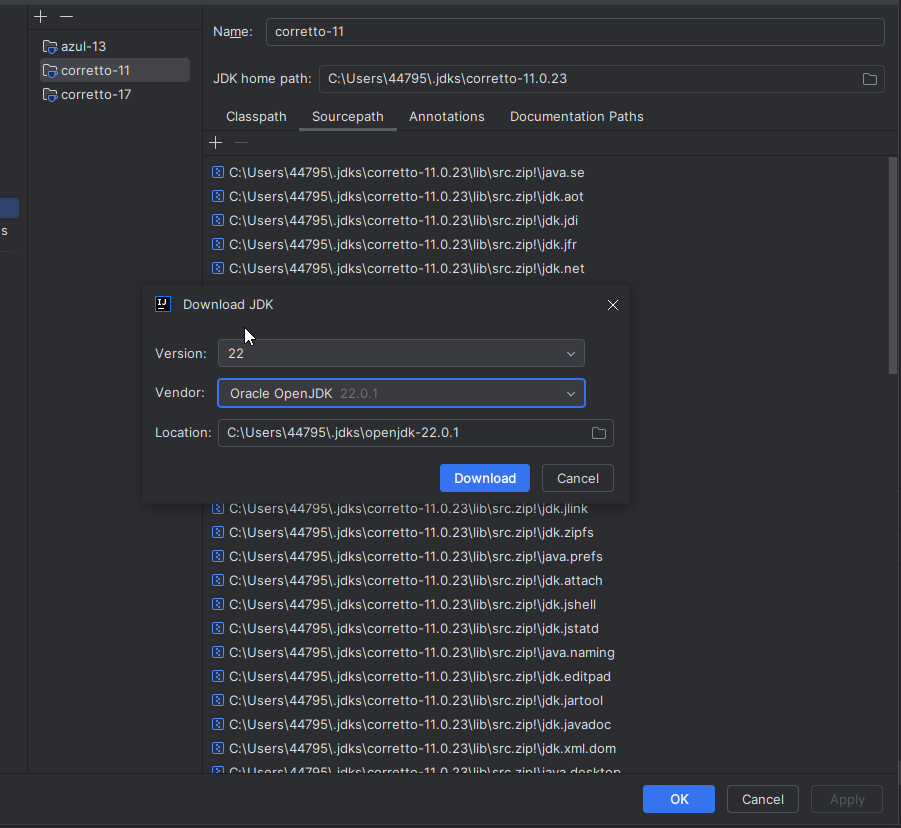
https://i.imgur.com/U6z2nZQ.png im getting this error

 round jacinth
this is a chat channel for release build of the client
 leaden trail
I mean if you weren't evidently trying to implement something that you know from yesterday isn't allowed, people might be more inclined to help you
round jacinth
follow the build guides on the runelite wiki
oh
hes trying to cheat
typical tbh
lusty fossil
round jacinth
follow the build guides on the runelite wiki
thats what im using
 vast bone
wait what was red eye doing yesterday?
round jacinth
i do not think you are as it tells oyu
lusty fossil
round jacinth
hes trying to cheat
im learning how to code, geheur has been helping a lot
vast bone
😰 I've been associated
leaden trail
vast bone
wait what was red eye doing yesterday?
I'll dm
lusty fossil
round jacinth
i do not think you are as it tells oyu
yeah the runelite wiki guide ive had open says to use java 11 and to have intelliJ download it for you
but i failed to do this step correct
lusty fossil
i managed to get quite far without asking for too much help, i impressed geheur at least once, im trying to make an honest effort here
lusty fossil
round jacinth
i dont know if im inclined to help you lol
what was that suppose to mean? 😦
leaden trail
What you're trying to do isn't allowed and you were made aware of this yesterday, so we aren't going to help you with it
lusty fossil
vast bone
wait what was red eye doing yesterday?
yesterday?
round jacinth
besides asking for us to break the rules jagex has for us
vast bone
no one here has any idea what's going on
round jacinth
like more menu entries of stuff that arent capes?
vast bone
(except for me of course)
lusty fossil
leaden trail
What you're trying to do isn't allowed and you were made aware of this yesterday...
and me
round jacinth
xd
lusty fossil
they think im trying to do something with sub menus, no im not that good lol
 viscid lantern
lusty fossil
viscid lantern
this channel is intended for release client support, not development help. Try <...
viscid lantern
lusty fossil
viscid lantern
this channel is intended for release client support, not development help. Try <...
sure np
 neon path
anyone know how the ping grapher plugin gets its values? why is it different than the world hopper ping
haughty pumiceBOT
Get support for the Ping Graph Plugin Hub plugin here: https://runelite.net/plugin-hub/show/ping-grapher.
You can also find the support link by searching for the plugin in the Plugin Hub panel and clicking the ? button on the plugin, or by right-clicking the plugin in the plugin panel and clicking the Support menu option.
leaden trail
It's a hub plugin so I wouldn't really give it tooooo much weight
 warm sequoia
Hey guys! Im having an issue with the GPU plugin in RL. Just happened now and im kind of confused. Turning ON the GPU plugin makes the text on my screen blurry and harder to read, here is a screenshot and the GPU settings
 round jacinth
try different UI scaling options
warm sequoia
GPU plugin OFF makes the text sharper
 warm sequoia
round jacinth
try different UI scaling options
warm sequoia
round jacinth
try different UI scaling options
Ive tried them all and see no difference
I dont know if the changes dont apply instantly or if i have to restart runelite or the pc every time i change
Its a GPU issue on my end apparently. went to the nvidia control panel, hit the reset button in the Manage 3D Settings tab, restarted Runelite and now its working OK. Srry for the issue
 paper hinge
So on my 2 accounts, I had 2 RL Profiles for them. Customized bank tags etc. so they wouldnt interfere. Today I logged in and one of them is just gone, it was there yesterday
Is there any way to recover it? I didnt delete anything on PC
Nvm found it, the profile was in my Runelite file. Not sure why it didn't load up this time but good now 👍
 fluid comet
How can I get access to the development channel?
 stone parcel
A lot of stuff is better suited for #runelite , like if it is plugin hub related. But there are hints around the dev channel if you really need it.
fluid comet
@stone parcel I am trying to develop a plugin and had a couple of questions, where should I post them?
 oblique marten
hello, is there a plug in that changes the order in wich you pick up ground items?
say if i dont want to pick up dragonhide, can i give it less priority over other items?
 sonic birch
Ground items can deprioritize
 teal holly
Does anyone know if there's integration with Obsidian? I know the notes function of RuneLite is in game but I would like to use my headers and tables :p
sonic birch
No probably
teal holly
expected lol
 dense knot
my loot tracker has lost some of the stuff it was tracking l all my hydra kills but kept toa an chambers its not hidden is there a way i can retrieve the lost data
haughty pumiceBOT
 cinder spruce
I don't really need "support" just wanted to report something. I seem to be having a weird interaction in the seed vault. When I go to 'remove all placeholders' I get spammed with what's in the screenshot, and potato cactus seeds get added as a favorite. client logs show nothing since I started runelite. Tested in safe mode and still happens:
 leaden trail
Can you drop your client.log in here, then do the following:
Delete client.log
Launch RuneLite in safe mode with debug enabled
Make this occur
Upload the new client.log here
cinder spruce
loading the jagex client to test there too
forgot to make sure it wasn't a jagex thing first, one moment
It's a jagex bug, happens on native client too
leaden trail
Ah ok
cinder spruce
Forget jagex has their own client still sometimes lol
 twilit flume
lads does anyone know which plugin is making it go like this for me

i cant figure out of how to get rid of the white in it
and not sure which plugin it is either
 oblique plume
looks like a respawn timer
twilit flume
ok so which plugin is it
oblique plume
npc indicators
 rare geode
Hello, where can I ask plugin development related questions?
 carmine wolf
same problem as yesterday :/
oblique plume
are you expecting a different answer than yesterday?
carmine wolf
I didnt get a response at my last question
I can "fix" the problem that occurs by opening runelite in safemode and then reopen the normal runelite application
gilded kayak
there's probably an issue with your gpu driver not the gpu plugin
carmine wolf
okay thanks for your response i'll have this checked 🙂
 mossy sable
Is there a way to run 64 bit runelite when developing plugins? I'm testing compatibility with 117HD and keep getting memory errors
oblique plume
install a 64bit jdk
 bronze ridge
Is there a way to get Runelite to launch through the Jagex Launcher, since my account is linked to it. I need a way to be able to login and test the plugin im making
using VSCode, if that helps at all
haughty pumiceBOT
bronze ridge
bless
mossy sable
oblique plume
install a 64bit jdk
I should have thought of that 😅 New to java, so still figuring it out
 balmy patrol
haughty pumice
<https://github.com/runelite/runelite/wiki/Using-Jagex-Accounts>
balmy patrol
haughty pumice
<https://github.com/runelite/runelite/wiki/Using-Jagex-Accounts>
would this fix the GPU using my internal GPU instead of my NVdia one?
or is there another way to force Runelite to run in "high-proformance"
gilded kayak
well since their question has nothing to do with that
i'm gonna go with no
couldn't you just have included this extra description in the channel you asked your question in
instead of saying "ur not the person to help then"
balmy patrol
well the problem is my Intel UHD is having a Memory problems too
(take your own advice)
gilded kayak
alright we'll try again in 5 minutes I guess
 gilded kayak
he's gonna run out of channels really quickly if I don't stop him now
balmy patrol
@gilded kayak what was with that? because you dont know how to answer my question.....fucking children luckily the runescape discord unlike you guys actually know how to ask the right questions to fix the problems so i can just fucking leave this chat.
and Felan wtf was with that Over-reach in power because you seem like a little child.. IDC you bann me im out anyway.
oblique plume
i told you
gilded kayak
here's what happened
channel #1
"hey I have a problem"
"I need more info than that"
"you can't help me"

channel #2
"hey does this random thing fix my problem and I included 1 extra piece of info about it"
"no and why didn't you just include this extra piece of info in channel #1"
"second piece of problem extra info"
"take your own advice"
here's what should have happened
"hey I have a problem"
"I need more info than that"
"more info"
 compact spear
You're expected to read his mind cos he can't explain himself properly, duh
gilded kayak
i'm still not even sure what he was trying to do
oblique plume
the task manager thing to set a process to high priority
 lapis elm
use laptop gpu for the game, it sounds like
oblique plume
i justr wanted to hear him explain that insane position originally
gilded kayak
mhhmmhmmhmh
leaden trail
oblique plume
the task manager thing to set a process to high priority
I never would have guessed this
leaden trail
Mind you, I'm potato, but still
gilded kayak
does it
oblique plume
idk how really
oblique plume
placebo is real
 unkempt flame
is force focus broken on mac? I'm trying to minimize the window and have it maximize when a notification is sent. I have it set to 'force' in the runelite plugin
 zealous cedar
I dont think we can force focus on mac, we just do a request for focus
unkempt flame
zealous cedar
I dont think we can force focus on mac, we just do a request for focus
what's the expected behavior of a request focus? I assume it won't maximize a minimized window
zealous cedar
I am not too sure, it uses com.apple.eawt.Application.requestForeground() in the macos jdk version
stone parcel
Hi, on a similar note we were discussing Force Focus in Torms discord today after finding it didn't work on Linux, and I added "frame.toFront();" into the ClientUI (line 932?) thing, and that seems to make it work, but idk what I'm actually doing.
zealous cedar
idk there are like 5 different ways to request focus
i dont think any of them really work
stone parcel
Currently force focus on linux seems to focus the window, but not pull it to the front. So after a notification goes off I can type into RL, but it isn't the front window. If I make sense 😅
gilded kayak
momo mentioned before on arch he listened for those notifs and had it toggle always on top
not really a good actual solution but a great workaround
stone parcel
And like idk the implications of just adding frame.toFront(); where I did, but it seems to work from what I can tell, but I know little about this.
unkempt flame
zealous cedar
I am not too sure, it uses com.apple.eawt.Application.requestForeground() in the...
if this function were erroring, would the errors be caught and stored somewhere?
zealous cedar
i dont think it can error
i could dig into it and see how it works maybe, idk offhand
unkempt flame

looks like it can throw 2 different type of errors
this is from these docs though, not sure if it's the same package lol https://docs.oracle.com/en%2Fjava%2Fjavase%2F11%2Fdocs%2Fapi%2F%2F/java.desktop/java/awt/Desktop.html#requestForeground(boolean)
zealous cedar
if it was throwing it would go to the logs, but i doubt it is throwing
as you see it is really a request for foreground, i dont think it "forces" foreground. and whatever a "request" is idk
we do some tricks on windows to forcibly take foreground, but most os's do not like apps doing that since it is pretty terrible ux and runescape players are just weird
 glacial coral
anybody know how to fix this

Ion know if thats the timer plugin or boost information
but its hella small and ion know how to get rid of it
zealous cedar
is the infobox size set really small in the runelite settings?
unkempt flame
nothing related to foreground in the logs, but did find an uncaught exception "The USER_ATTENTION_WINDOW feature is not supported on the current platform!" being thrown a lot, not sure if it's related though
 zealous cedar
this is because you have request focus type "taskbar" and I guess that is not supported on macos
unkempt flame
zealous cedar
this is because you have request focus type "taskbar" and I guess that is not su...
ahh yeah I was wondering about that option haha. thanks for your help!
stone parcel
stone parcel
And like idk the implications of just adding frame.toFront(); where I did, but i...
Oh it looks like a similar PR to this was made, (https://github.com/runelite/runelite/pull/15207), but in my testing when I put the "toFront" thing before the "requestFocus" it doesn't work, but putting "toFront" second works. So its backwards from my limited understanding.
zealous cedar
there is a 3rd pr doing a 3rd thing https://github.com/runelite/runelite/pull/16676/files
so yeah who knows idk
stone parcel
Oh wow yikes haha.
zealous cedar
its possible it is dependent upon the DE or something
stone parcel
Yeah that would probably be a pain lol
unkempt flame
have you guys thought about hiding certain options depending on the OS being used? for example, the mac os notifications: 'force' completely breaks it essentially, but 'request' does a much better job by making the icon bounce in the menu bar. Also the tray notifications not working on mac at all.
not sure what percent of the userbase uses OS's other then windows though, or if you guys get a lot of support request for weird OS quirks like this.
zealous cedar
how does 'force' break it?
unkempt flame
zealous cedar
how does 'force' break it?
break as in nothing happens related to focus haha, vs 'request' at least does the little bounce thing on the menu bar. I've just assumed focus didn't work at all on mac, but it was because I was using force. request gets me atleast most of the way there.
zealous cedar
id want to understand what it is doing more before probably changing it
we do not really have any developers that particularly work with macos any, if you are interested in digging into it youre welcome to do so
zealous cedar
zealous cedar
id want to understand what it is doing more before probably changing it
its also possible it is actually working for some or many people and isn't working for you due to some system config or something. i dont know
unkempt flame
zealous cedar
id want to understand what it is doing more before probably changing it
understandable. haven't written any java in years lol, maybe I'll see if I can get the dev environment setup this weekend and do some digging. any idea what percentage of the user base uses mac btw?
zealous cedar
about 4%
 hexed minnow
failed to login? wont dissapear
 proud folio
Before I migrate to a jagex accounts for my osrs accounts can I achieve these things after doing so?
-
Different desktop shortcuts for each account that launches a profile
-
Does runelite (with jagex launcher) use the same local files for each profile?
Also, are there any common issues people run into?
oblique plume
no
yes
linux isnt officially supported
machines you dont have admin access to cant install jagex launcher
proud folio
oblique plume
no
yes
linux isnt officially supported
machines you dont have admin access to c...
Thank you!
zealous cedar
You can use the profile linking feature to make runelite startup with a different profile for each character
 wooden dust
when useing NPC Accessibility Tagger is it posable to add to the config as trying to find the right ids for the npc`s with out dev mode
leaden trail
Use "Identificator" from the hub
wooden dust
tyty
 green spade
Hey, when taking an automated screenshot with the "screenshot" plugin, how does one toggle the message in the chatbox showing the path to the file?
zealous cedar
it is the "notify when taken" option
and then also you have to have game message notifications on
 polar haven
Hello, I wonder if I could get some help with serious lag I have been experiencing for the last few days? I must confess there are likely to be a few confounding factors, as I have made some significant changes to my setup (at which point the issues began), namely:
- Enabling GPU plugin plus some other graphical ones, like skybox, zoom limit...
- Updating my OS to Windows 11
For reference, the lag seems qualitatively worse with GPU enabled, but I can still reproduce it with GPU off (particularly with heavy sidebar plugins such as a very stacked loot tracker, and of course the infamous time tracker.
I am fairly certain my specs are not the issue, as my CPU utilisation is stable around 20-40% max, even when the issues are severe, and my GPU utilisation is usually sitting below 10% (which indicates to me I have correctly set up utilising GPU on the Nvidia end, else I would expect it to be 0)
Memory usage also low even with all the extra programs I ususally have open when playing (most notably Chrome playing a video or streaming something) -- even in this situation my CPU, memory and GPU utilisation are similar.
This leads me to believe the issue is client-side, and if there is a way to unlock more performance to smooth things out, that would be really greatly appreciated.
I can also list off some fixes I have attempted in a separate message, if that will be useful (I assume it will be!)
Apologies for the long message, I assume that the more detail the better, especially with diagnosing an issue that has as many possible causes to untangle as this one!
Thanks
haughty pumiceBOT
Graphical artifacts? Try disabling hardware acceleration: https://github.com/runelite/runelite/wiki/Disable-Hardware-Acceleration
 flat oyster
If I formatted and logged in to my profile in Runlite, will the old plugins be downloaded automatically?
oblique plume
if you were syncing the profile yea
flat oyster
how long do you have to wait? nothing happens
oblique plume
its just there
 gusty reef
anyone know if these squares are movable?

id like the top left to be up in the corner
the infobox anchors
gusty reef
alright
oblique plume
this is the 15th
polar haven
polar haven
Hello, I wonder if I could get some help with serious lag I have been experienci...
Update: I have (tentatively) found a fix: Vsync Mode from Adaptive to Off seems to much better, I'll return here if issues return
haughty pumiceBOT
Get support for the Better NPC Highlight Plugin Hub plugin here: https://runelite.net/plugin-hub/show/better-npc-highlight.
You can also find the support link by searching for the plugin in the Plugin Hub panel and clicking the ? button on the plugin, or by right-clicking the plugin in the plugin panel and clicking the Support menu option.
 pearl ridge
Could this be a runelite thing? Been happening for days every few world hops. On 2 different laptops and pc.
 gilded kayak
Its a jagex<->isp thing
If there was a bug on our end causing login issues we'd get like 50 reports within the first 5 minutes
Like when cloudflare was causing the website not to load yesterday
pearl ridge
How could i go about fixing an isp thing?
leaden trail
Wait
pearl ridge
Well shit
gilded kayak
You could call and yell at them but its probably something that will go away like Dura said
 final axle
In my experience, by the time you get the isp to listen that there's a problem on their end, it's usually already fixed
 rose yoke
i got this error. was using it yesterday with no problems, any idea why?
 leaden trail
Redownload RuneLite from the link in #faq , run it as admin once and it should fix it
rose yoke
okay. thank you
alright i deleted everything and redownloaded and ran as admin and still have the same thing
gilded kayak
2024-06-21 20:12:50 EDT [main] INFO n.r.launcher.FilesystemPermissions - RuneLite is updating the ACLs of the files in C:\Users\zackr.runelite to be: NT AUTHORITY\SYSTEM, BUILTIN\Administrators, and S-1-5-21-601774520-2271417177-121140091-1001 (your user SID). To avoid this, don't run RuneLite with elevated permissions.
cool i hadn't seen this log yet
try doing it the old fashioned way I guess
1sec
haughty pumiceBOT
If you got permission problems, open Command Prompt (cmd) as administrator and try executing the following commands while testing if the problem is solved between every step. Make sure RuneLite is closed when executing commands!
mkdir "%userprofile%\.runelite"icacls "%userprofile%\.runelite" /grant:r *S-1-1-0:F /inheritance:r /tattrib -r -a -s "%userprofile%\.runelite\*.*" /d /s
gilded kayak
skip the first command
rose yoke
that worked. thank you
 muted jay
I get this exception in my logs when trying to open the 'Camera' plugin settings. My camera movement speed is also incredibly slow when the plugin is on. Not sure how (minimum <= value <= maximum) is false happened, but it is probably my fault.
I'm looking at default-0.properties under profiles2 but it's unclear which if any of these settings would be responsible.
I've had this problem for weeks and updated the client multiple times.
leaden trail
Post the full log, not just a snippet
muted jay
leaden trail
Disable that world heatmap plugin to start, because it's definitely very unhappy
zealous cedar
i dont think this can happen unless you corrupt your config. are you able to make it happen via the config ui?
muted jay
I can't open camera config. The only thing that happens when I click 'Configuration' or the gear icon is logging.
I can open other configs. I'm not able to set 'Status Bars' Bar Width lower than the min.
Not sure if that answers the question
zealous cedar
what is the value of zoom.cameraSpeed in your config?
muted jay
zoom.cameraSpeed=-20.0
That's not supposed to be negative is it?
zealous cedar
it cant be negative
i dont think this can happen unless you corrupt your config. are you able to make it happen via the config ui?
muted jay
I cannot go below 0 in the UI. Manually changed it to a positive number in the config file and that has fixed the issue, thank you.
My camera speed was also set to 0, which would be why the camera was so slow.
zealous cedar
your camera speed was -20 I think which I am not sure what that would do
it might just make it go in the wrong direction
stop editing your config by hand I guess
muted jay
Oh crap I just remembered why this happened.
I've never opened that file, but when I was implementing negative double spinners I used Camera for debugging. That would be the problem.
Sorry, and thanks again for the help.
zealous cedar
..
oblique plume
lol
 lime barn
hello folks, i'm attempting to use the Key Remapping plugin to remap my F-keys to something else like A or D, but when I set the keybind to any letter, it isn't working. In fact, I can't get any keybind to work at all (even remapping them to different numbers)
Interestingly enough, it still just uses the original set of keybinds by default (1, 2, 3, 4.... 0) despite what I set them to
Am I setting them wrong or something
lime barn
It did not
gilded kayak
just to be sure you checked the remap f keys box right
lime barn
how weird........I just restarted the client again and this time it worked...
gilded kayak
🤷
 glossy belfry

Some further info, seems like i'm not the only one that ran into this issue. Mine also crashed on camera movement 🙂
 drowsy walrus
hi can someone help with lag issues? it started after the mac os update recently. no changes in any of the plug ins. pretty awful lag. not an old computer by any means.
 crystal wasp
Hey! I've been wondering if anyone knows why the black line that separates my username and the chat box is suddenly gone on my main?

Whereas, you can see it fine on my alt:

 short cobalt
Logged in today, and all of my profiles are gone, and plugins unistalled. I looked and I still have them all in the .runelite folder and they are still there, i just cant get the import to do anything
 limpid mesa
Hiya, for some reason I'm constantly getting stuck on starting external plugins - any way I can see what's causing this?
 charred wind
drowsy walrus
hi can someone help with lag issues? it started after the mac os update recently...
charred wind
drowsy walrus
hi can someone help with lag issues? it started after the mac os update recently...
!logs
haughty pumiceBOT
To find the logs, you can do one of the following:
- If your client failed to open, click the
Open logs folderbutton. - Open the screenshot directory by right-clicking 📷
Camerabutton, navigate 1 directory up, then open logs folder. - Navigate to
%userprofile%\.runelite\logson Windows or$HOME/.runelite/logson Linux and macOS.
Upload the log files named client and launcher by dragging them to Discord. If there are files prefixed with jvm_crash dated from today, upload them too.
charred wind
crystal wasp
Hey! I've been wondering if anyone knows why the black line that separates my us...
This looks like a settings issue in stretched mode, maybe integer scaling? Like the letters in your name in the first are not as clear as the second
charred wind
short cobalt
Logged in today, and all of my profiles are gone, and plugins unistalled. I look...
!lost
haughty pumiceBOT
charred wind
limpid mesa
Hiya, for some reason I'm constantly getting stuck on starting external plugins ...
Upload your logs as the message under yours says
crystal wasp
charred wind
This looks like a settings issue in stretched mode, maybe integer scaling? Like ...
Even on the same scaling with stretched mode, its the same deal. I'm just confused how one is different from the other given that I don't play w/ profiles or anything different between the two.
charred wind
post a screenshot of the settings on both clients
 charred wind
that's not the stretched mode plugin
crystal wasp
yaya i was getting to that
crystal wasp
charred wind
that's not the stretched mode plugin
 charred wind
did you try ticking either of the keep aspect ratio or integer scaling options?
charred wind
Interesting. My other guess would be it's the resource pack but given it's the same on both clients it's anyone's guess. we'll have to wait for someone with mroe insight on this
crystal wasp
charred wind
Interesting. My other guess would be it's the resource pack but given it's the s...
thanks for the help anyways! i've also tried messing around with the resource pack as well, twas one of the first that i did; hopefully something surfaces about it soon
oblique plume
afaik it is resource packs
haughty pumiceBOT
@limpid mesa To find the logs, you can do one of the following:
- If your client failed to open, click the
Open logs folderbutton. - Open the screenshot directory by right-clicking 📷
Camerabutton, navigate 1 directory up, then open logs folder. - Navigate to
%userprofile%\.runelite\logson Windows or$HOME/.runelite/logson Linux and macOS.
Upload the log files named client and launcher by dragging them to Discord. If there are files prefixed with jvm_crash dated from today, upload them too.
 twin phoenix
Hi, I have an update to the solution for my persistent issue. It seems that going into my internet adapter settings and disabling IPv4 connectivity fixed the issue. I will keep you all posted
 finite dune
is there a way to change the number of rows/columns before infoboxes wrap? currently it seems to be set at 4 but i'd like to be able to expand that to have a longer vertical line of infoboxes without having to create different static-positioned groups for various types of boosts
haughty pumiceBOT
You can configure horizontal/vertical orientation, infobox groups or split infoboxes into new groups with the menu options opened with Shift + right-click. https://runelite.net/img/blog/1.6.28-Release/infobox.gif
 charred wind
You can hold Alt and drag on an edge as well. Can't remember if it's left to right or right to left, or the ups/downs but it's some way like that
finite dune
i don't think being able to split/group them helps. i'd like them all to be in the same group but not wrap at 4 rows
charred wind
charred wind
You can hold Alt and drag on an edge as well. Can't remember if it's left to rig...
.
finite dune
i mean, i can move them with alt but i'm not sure what you mean about dragging on an edge? doesn't seem to do anything as i'm fiddling with it rn
oh ho ho i have overlooked that
that looks like it'll sort me out, thank you, do you know if that's documented anywhere?
 jolly sequoia
is this a bug? I cant make Stamina pot (1) deposit 1. It's automatically set to "drink" as default
charred wind
jolly sequoia
is this a bug? I cant make Stamina pot (1) deposit 1. It's automatically set to...
Probably a hub plugin. Runecrafting utilities or something like that?
jolly sequoia
clever man, yeah that seemed to be the trick, ty
 noble sandal
Got to format computer and gettign trouble to remenber log in and pass info done it ages ago, any way to ask to send email to change pass of the registered one ?
noble sandal
nha done ages ago the runelite acc forgot to check with email was logged in now all bank tabs gone and not 100% sure witch email was in, facing a restart of 0 for tabs will be nightmare 😦
sonic birch
glossy belfry
https://i.imgur.com/WiNkY00.png
I'm kinda busy rn, but if you did crash please post your client.log so we can check if it's a heap OOM again. Additionally, if you crashed please install the debug helper from the pluginhub and enabled heap dump on OOM in the sidepanel.
 left pecan
anyone had issues with their fps recently? usually sit steadily between 100-144 but past couple days has been fluctuating a lot more and often sits between 50-60
round jacinth
Did you update your drivers?
Or maybe you’re just in a harder place to draw or more populated
fwiw anything past 50 is just camera movements, so you’re still at max effectively
zealous cedar
that is no longer true with anim smoothing on
or well it was never really true but with the vertex snapping it was effectively not that useful
 limber seal
curious, hydra lightning id never show up?
round jacinth
zealous cedar
that is no longer true with anim smoothing on
Oh right the new float stuff
Thanks for correcting
 placid ibex
my power went out as soon i booted up runelite now i dont see my plugins even tho they are installed
haughty pumiceBOT
left pecan
round jacinth
Did you update your drivers?
yea updated drivers. last thing i remember doing before i started having issues was install dark and darker
surely that wouldn't cause issues but will try uninstalling 🤝
placid ibex
i still dont see them after trying that i tried removing and installing again

 left pecan
placid ibex
i still dont see them after trying that i tried removing and installing again
left pecan
placid ibex
i still dont see them after trying that i tried removing and installing again
what if you relaunch runelite and/or logout and login from runelite
round jacinth
Idk if they need to sign out and sign in
placid ibex
left pecan
what if you relaunch runelite and/or logout and login from runelite
tried all that still nothing
left pecan
placid ibex
tried all that still nothing
do the plugins show up in the .runelite folder?
gilded kayak
placid ibex
i still dont see them after trying that i tried removing and installing again
!logs
haughty pumiceBOT
To find the logs, you can do one of the following:
- If your client failed to open, click the
Open logs folderbutton. - Open the screenshot directory by right-clicking 📷
Camerabutton, navigate 1 directory up, then open logs folder. - Navigate to
%userprofile%\.runelite\logson Windows or$HOME/.runelite/logson Linux and macOS.
Upload the log files named client and launcher by dragging them to Discord. If there are files prefixed with jvm_crash dated from today, upload them too.
left pecan
round jacinth
Try rolling back the drivers
uninstalled the game and reinstalled the same driver but didn't notice any improvement
placid ibex
left pecan
just installed an older driver will let you know after reboot 🤝
gilded kayak
placid ibex
try deleting the cache folder inside the .runelite folder
left pecan
no improvements with the old driver sadly 😦
gilded kayak
gilded kayak
try deleting the `cache` folder inside the `.runelite` folder
you were in .runelite/logs to get those logs so go back to .runelite and then the cache folder in there
placid ibex
gilded kayak
you were in `.runelite/logs` to get those logs so go back to `.runelite` and the...
that fix it, thanks!
left pecan
would logs reveal anything relating to fps issues? @gilded kayak
left pecan
0
gilded kayak
unlucky
its been reported that when the vanguard process is running runelite fps gets trucked
left pecan
yea i spent last night reading through other peoples posts/solutions
round jacinth
Most solutions are roll back to when it used to work because usually runelite isn’t the problem
left pecan
yea i got no clue
are there certain plugins that got updated recently that might affect performance? I hadn't opened runelite in a month or so prior to 5 days ago
zealous cedar
pluginhub plugins are updated continuously, but the last RL update was on June 16
 broken otter
hello. after installing 117hd plugin, i can't seem to get the same fps i was getting before installing it. i was getting 100+ fps before it. i even uninstalled it but my frames are hard stuck at 50 (with fps controll+ low details enabled). i reinstalled 117hd and tweaked some settings and now im getting 100+fps on hd but when i toggle it off it still goes back to 50
zealous cedar
you have to turn the GPU plugin back on
broken otter
ooo
thank you, i forgot that was there
does the 117 hd plugin use gpu automatiically?
zealous cedar
it isnt compatible with the gpu plugin
broken otter
so its running on my cpu?
zealous cedar
no
gilded kayak
no it's its own independent usage, it uses your gpu
if you toggle it on it will disable our GPU plugin
broken otter
thank you guys!
 hushed sluice
Hey @zealous cedar saw a new entry for remove vertex snapping in GPU. Can you elaborate on what that setting does? Looked through the channels logs but didn't find much
zealous cedar
it allows vertex positions from animations to be more precise than 1/128th of a tile
 kind comet
Anyone know if there are FPS issues occuring with RuneLite today? Thought it was the 117hd plugin, but it's not. I've been playing fun and able to be at the GE no issues, but today when I was zoomed out, FPS dropped down to 17+.
 glossy crown
Lower than usual for you? Same area?
 hallow girder
Hello, can someone please help me out. I just purchased a new laptop and I am unable to log into osrs through runelite client but I am able to login using mobile etc. I dont understand what is going on. I am typing my credentials correctly.
 round jacinth
You have a jagex acc maybe and should be using jagex launcher to launch instead
hallow girder
I've never used to use the jagex client on my previous laptop
round jacinth
Did you upgrade your account?
If not you have the wrong password
In either case this isn’t a runelite problem
hallow girder
I use my original username to log into osrs i dont think i have an email associated to the account
round jacinth
That doesn’t really matter
hallow girder
Okay my apologies, thank you for the help
glossy belfry
sonic birch
I'm kinda busy rn, but if you did crash please post your client.log so we can ch...
Nah, I talked to some people that also had it crash and they suspect it happens when you move camera as you're brush marking. I can't seem to reproduce it though. I'll install debug helper and set my heap size back to default in case it happens again, ty
kind comet
glossy crown
Lower than usual for you? Same area?
Majorly lower than usual, same area it's the GE
glossy crown
I suppose you can't launch on older runelite build and compare? 🤔
kind comet
i switched from 117hd to runelite and it's the same thing
which is why i suspect it's runelite and not 117hd
gilded kayak
that was a very confusing statement but i'll try to expand from there anyway
click the new profile button  , swap to that profile with double-click and see if your issue still occurs
download 117 I guess if u need to not use GPU
 hoary quartz
posting to see if anyone can help out. My game keeps freezing at random points. I looked at the Client logs and the final entry before freezing is this.
2024-06-22 20:22:22 EDT [Client] ERROR client-patch - Client error
java.lang.OutOfMemoryError: Java heap space
at java.desktop/java.awt.image.DataBufferInt.<init>(Unknown Source)
at java.desktop/java.awt.image.Raster.createPackedRaster(Unknown Source)
at java.desktop/java.awt.image.DirectColorModel.createCompatibleWritableRaster(Unknown Source)
at java.desktop/java.awt.image.BufferedImage.<init>(Unknown Source)
at rs117.hd.HdPlugin.screenshot(HdPlugin.java:2263)
at rs117.hd.HdPlugin$$Lambda$3016/0x0000000100e09040.get(Unknown Source)
at net.runelite.client.ui.DrawManager.processDrawComplete(DrawManager.java:84)
at rs117.hd.HdPlugin.draw(HdPlugin.java:2166)
at be.ac(be.java:47140)
at be.rp(be.java)
at be.run(be.java:37842)
at java.base/java.lang.Thread.run(Unknown Source)
Posting logs as well if it helps
zealous cedar
the client is running out of memory. you could try increasing the max memory limit in the launcher configuration
haughty pumiceBOT
hoary quartz
ok thanks! I'll try that and see if it fixes it. Ty for the quick response.
gilded kayak
(it will fix it)
 cinder ember
Talked in this chat like a month ago with the same problem. So every so often it seems I close my runelite client and when i reopen it my profile loses a certain amount of progress that I've accumulated . Loot tracker data, new plug ins, changed plugins etc. Anybody know why?
Last time someone mentioned some problem in my cache but had no idea how to fix it or what the problem could be
gilded kayak
!logs
haughty pumiceBOT
To find the logs, you can do one of the following:
- If your client failed to open, click the
Open logs folderbutton. - Open the screenshot directory by right-clicking 📷
Camerabutton, navigate 1 directory up, then open logs folder. - Navigate to
%userprofile%\.runelite\logson Windows or$HOME/.runelite/logson Linux and macOS.
Upload the log files named client and launcher by dragging them to Discord. If there are files prefixed with jvm_crash dated from today, upload them too.
gilded kayak
preferably a log from a day where your settings didn't save
cinder ember
i believe it was wednseday that i saw it
hopefully not wrong
this new one
"unable to submit loot"
gilded kayak
that would mean you're having connection issues to our website
since the website was up at that time
otherwise 50 people would be in here spamming
cinder ember
so my question is, how would i fix that
gilded kayak
heh
cinder ember
because my internet is fine lmao
gilded kayak
i don't have a good answer
well here's the thing
this is the sort of thing most people would never notice
if it wasn't due to the fact that settings are being lost, you'd never know of the issue
so you'd assume everything is cool always
cinder ember
yeah its weird, i started by noticing loot was missing off my tracker, scythe, 500+ artio kc, different stuff etc. then i noticed that plugins i added or changed werent there. happens every few weeks and its frustrating
gilded kayak
unfortunately the errors aren't made up
they say help we can't connect to runelite's website
cinder ember
all i can picture is sometimes i put my computer in sleep mode while im still signed. that would be my only possible idea
gilded kayak
do you close runelite before you do that
cinder ember
otherwise i usually leave my client open and when wednesday comes around i press sign in and it reloads my client per update
no i usually dont
and when i do it usually has this problem
cinder ember
yeah i typically do
cinder ember
i just dont see how it would affect it but who am i to know that
yeah i suppose i will
gilded kayak
we get people in here with various issues, and they also never close their client
cinder ember
the struggle
leaden trail
Closing your client at least once a day will make loads of weird issues go away
cinder ember
its just seems silly that theres that many issues
but either way ill give it a shot
closing it day by day
leaden trail
You'll even have an up to date client that way
round jacinth
closing it every day is a healthy habbit because just because runelite can some times keep working between updates, things like minimaps and camera zoom can be funky
just close it when you're done for the day
 opaque kiln
any ideas somtimes it will work but i have to try like 20 times
 gilded kayak
!logs
haughty pumiceBOT
To find the logs, you can do one of the following:
- If your client failed to open, click the
Open logs folderbutton. - Open the screenshot directory by right-clicking 📷
Camerabutton, navigate 1 directory up, then open logs folder. - Navigate to
%userprofile%\.runelite\logson Windows or$HOME/.runelite/logson Linux and macOS.
Upload the log files named client and launcher by dragging them to Discord. If there are files prefixed with jvm_crash dated from today, upload them too.
zealous cedar
maybe another process is locking the jagexcache files? like an antivirus?
opaque kiln
ahhhh you know let me give it a go and see it could be
hmm seemed to worked when i disabled it this time wonder why now its starting to block it
glossy belfry
@sonic birch Crashed again, got a heap dump if you want to take a look, any preference on where i upload it?
I do realize this is actually a plugin hub plugin so maybe this isn't the right channel for it 🤷♂️
sonic birch
glossy belfry
<@164496095794167809> Crashed again, got a heap dump if you want to take a look,...
You can upload it to drive, then dm something to @haughty pumice and then dm the link to runelite
glossy belfry
👍 Thanks for taking the time to help
sonic birch
Don't post it here because it can contain sensitive unfo
glossy belfry
gotcha
sonic birch
Probably also include the client.log then so I can see what happened
glossy belfry
I'll include all relevant logs + steps that caused it to occur
I'm having trouble reproducing it in a controlled environment though
sonic birch
If it's a heap oom, the heap dump will very likely show the cause, but if you removed xmx2g, it might just be too many hub plugins
glossy belfry
I did remove that for testing purposes yeah because idk if i was gonna run into it again. Gonna turn that back on but figured it was worth it to get a heap dump. Rip the tob run tho 😔
 trim wadi
where do i get my heap dump logs again, i am crashing when entering toa rooms again and want to break my headset
haughty pumiceBOT
@trim wadi To find the logs, you can do one of the following:
- If your client failed to open, click the
Open logs folderbutton. - Open the screenshot directory by right-clicking 📷
Camerabutton, navigate 1 directory up, then open logs folder. - Navigate to
%userprofile%\.runelite\logson Windows or$HOME/.runelite/logson Linux and macOS.
Upload the log files named client and launcher by dragging them to Discord. If there are files prefixed with jvm_crash dated from today, upload them too.
trim wadi
is it safe to dump them here
gilded kayak
is your windows username classified info
gilded kayak
then yeah
gilded kayak
u ran out of memory
either remove some hub plugins or increase your heap size
!config
haughty pumiceBOT
trim wadi
what in tarnation
gilded kayak
just incase you're wondering we don't let the client use all your computers memory by default, incase ur about to say "I have 64gb"
trim wadi
i wouldnt dare
is there a plugin that is nuking the available memory by chance or is just trial and error
gilded kayak
could be
gilded kayak
you'd need to install the hub plugin debug helper and toggle on <word> on oom
i forget what the setting is called
gilded kayak
heap dump on oom
trim wadi
i already had that enabled
gilded kayak
in that same folder should be a heap dump then
trim wadi
this shit happened to me like 6 months ago or so and it was a nasty nasty toa plugin
u want it here?
gilded kayak
nah there's no chance discord will let u upload it
trim wadi
LOL u not wrong
gilded kayak
u'll need to google drive it or something
trim wadi
sec
trim wadi
he helped last time
jk it was u and him, tag teaming, toapuzzlehelper used 296mb of memory on tilepack load or something
lapis elm
yes, your dump literally has it in it
trim wadi
ffs
gilded kayak
ye your logs have it installed also
trim wadi
yeah when it happened back in october
i restarted client and it was no longer there
now its back with a vengeance

thanks for nothing Tiiiiiiiiim
gilded kayak
lapis elm
also how do you have that installed, it should be disabled
that was tombs-of-amascut-puzzle-helper
now toa-puzzle-helper has the same? problem i guess
trim wadi
did he just rename it? cause I surely didnt install that again, like renamed it and it reenabled?
gilded kayak
no
trim wadi
scumbag developers
gilded kayak
soon to be only 1 🤞
gilded kayak
it's llemonduck's toa plugin and i doubt it's gonna crash you
gilded kayak
ah nah
trim wadi
ty for ur help sir
lapis elm
yeah don't care about the 6 months ago dump
trim wadi
did i give u the 6 months ago dump?
lapis elm
yes
trim wadi
well thats confusing considering i never turned it off
i do see its a dump from october 2023
this has been enabled since Yves told me to in 2023
 sonic birch
we'd want the heapdump from today indeed
trim wadi
Hm. There’s no heapdump from today or from last crash earlier this week
drowsy walrus
@charred wind
drowsy walrus
it gets really bad at vorkath.. like unplayable now at vorkath
 rocky vigil
Not sure if anyone else has ever had this issue but I just downloaded the "ZMI" plugin to remove scenery & now I can't use any F Keys/ESC/shift/Spacebar even after uninstalling the plugin, trying a fully blank profile with 0 plugins & restarting my PC/Client.
Other friends have downloaded this plugin and haven't had any issues though
Fixed it by going through every plugin individually and it was something called "brush markers" never used it in my life
 tacit dew
rocky vigil
Fixed it by going through every plugin individually and it was something called ...
tacit dew
rocky vigil
Fixed it by going through every plugin individually and it was something called ...
lol thanks i was having the same problem
rocky vigil
🤣 no worries
viscid lantern
 gonna look into that right away
 pulsar umbra
hoping someone can help me with an issue,
first time playing on PC in a couple days and in runelite I cannot use arrow keys to turn camera, also noticed that i can type in the in game chat but pressing backspace doesn't work. wasn't happening last time I used runelite.
checked oldschool client and issue doesnt happen. Appreciate any help
viscid lantern
Disable brush markers for now, will be fixed soon
 orchid anvil
Anyone else having issues with their keyboards in the client? (my keyboard works normally on other applications, its just RL that its acting funky) - I can type in the chatbox, but my enter, backspace, esc and all the F keys arent doing anything
viscid lantern
disable brush markers for now
orchid anvil
Oh I just need to read up lmfao nvm ty
 ashen belfry
What would be the reason for loot tracker data disappearing? For some reason it doesn't show my kills and loot for Moss Giants, even though I killed heaps of them in the past for the Mossy keys. I have turned loot tracker on and off, logged out and back in, restarted client. Anyone have any ideas?
charred wind
go kill one and restart your client maybe
ashen belfry
I did that, and it just shows the 1 kill I got
Well now 4, since I killed multiple different giants
charred wind
loot tracker does something (can't remember if it's clearing it) with old loot tracker data, like around a year or more
ashen belfry
hmm yeah last one i killed would have been around a year ago
charred wind
loot logger plugin never clears tho if you would wanna use that
ashen belfry
can u transfer data from tracker to logger?
ashen belfry
ok, ty 😄
 ornate kite
how to fix this

yes i upgraded but i didint knew it would be like this
i cant use runelite
 mossy swan
use jagex launcher to launch runelite
ornate kite
how to fix this
mossy swan
there is a drop-down to select which client it will launch
ornate kite
thx alot
trim wadi
Can anyone tell me why my heap dump isnt dumping heap when my client crashes, its been enabled but my clients crashed a few times last few weeks and no dumps of heap
gilded kayak
well since the log you posted yesterday was for the 20th, 21st and 22nd despite the fact that the client makes a new log every single day
i would say you're having a permission issue which is preventing runelite from making new files
and the heap dump would also be a new file
trim wadi
 gilded kayak
that is an image
trim wadi
its making new logs just not new heap log
trim wadi
6-20
last line is 6-23
i never close my client, would it make a new file if i didnt reopen it
trim wadi
hmm
gilded kayak
actually it's very clear that the client can't make a new file, because the first log of that file is a random log from weapon charges, which obviously can't log unless your client is open
haughty pumiceBOT
If you got permission problems, open Command Prompt (cmd) as administrator and try executing the following commands while testing if the problem is solved between every step. Make sure RuneLite is closed when executing commands!
mkdir "%userprofile%\.runelite"icacls "%userprofile%\.runelite" /grant:r *S-1-1-0:F /inheritance:r /tattrib -r -a -s "%userprofile%\.runelite\*.*" /d /s
gilded kayak
try doing command 2
not 1 or 3
see if the client can make a new client.log after that
trim wadi
made new launcher.log not client.log

can i delete client.log and see if it remakes it?
gilded kayak
just rename it incase it ends up being needed
trim wadi
it remade the client.log
 woeful bridge
would anyone be able to tell me what plug in condenses follow and trade into a submenu idk what i turned on last night XD
trim wadi
looking in the client.log it just appended the client in the log not remade
gilded kayak
woeful bridge
would anyone be able to tell me what plug in condenses follow and trade into a s...
it's a setting in interface styles
woeful bridge
thank you !
 trim wadi
gilded kayak
i can't confirm it's gonna give you a heap but
trim wadi
gilded kayak
i can't confirm it's gonna give you a heap but
should i delete this old oom_heap?
gilded kayak
I guess
gilded kayak
kind of, i feel like it's just you barely going over our limit due to your hub plugins
and u could just bump it a little bit and you wouldn't have the issue
i don't think there's another plugin oom-ing
gilded kayak
!config
haughty pumiceBOT
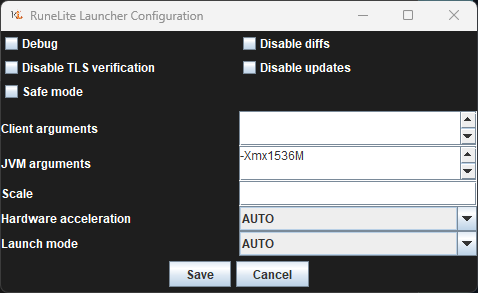 gilded kayak
looks correct
trim wadi
ty
gilded kayak
it will be at the end of the very long line when you start the client
it'll say it right there I believe
 trim wadi
guess we will see what happens, just odd that i only crash when going in between rooms at toa
gilded kayak
it's beep reported for that exact scenario many times, i think the memory usage gets bumped a bit at that moment
screenshots are the most common cause
more memory is used at the exact moment of a client screenshot
trim wadi

 spiral ruin
Hey tried to do some basic ts'ing from what i've read here and on reddit threads but I can't stop a pretty rough stuttering every 20 or so seconds that lasts about 1 second. Happens a lot when doing gear switches or hit by certain boss attacks like artio's magic attack. Sometimes happens on loading new map chunks too seemingly. Tried making a new profile with base plugins and config, re-installed launcher and tweaked a few settings on my pc side but nada. Any clues?
gilded kayak
!3rd
haughty pumiceBOT
3rdpartyissues: Many plugins from the pluginhub break the client in subtle or not-so-subtle ways, including causing issues like client freezes. We do not support pluginhub plugins because we do not make or quality control them, and do not recommend their use.
Run the RuneLite (safe mode) shortcut, or with a Jagex account, first run the RuneLite (configure) shortcut and tick the Safe mode box, then launch RuneLite via the Jagex launcher.
This temporarily disables the GPU plugin and all hub plugins which will allow you to confirm the issue is caused by one of those plugins and isn't a core RuneLite issue.
If the issue is caused by a hub plugin, you should isolate which plugin it is and then uninstall the plugin.
spiral ruin
ah nice hadn't tried the safe mode yet but I have disabled all hub plugins before, i'll do this for a bit and let u know, thanks
not 100% sure whats going on but i'm assuming something funky with the plugins. Safe mode does work mostly fine and does still have the hitches but they're so minor its not worth complaining about. Once I start turning plugins on one by one it escalates and they all seem to contribute to the hitching. Probably a driver issue right?
 supple wedge
i have an issue where my client freezes for a second and goes back to normal, its really annoying , It only happens when i use 117 HD plugin, what could be the problem ?
haughty pumiceBOT
Visit 117's HD plugin discord (https://discord.com/invite/U4p6ChjgSE) for support, issues & feedback
 lost onyx
anyone ever have an issue on login on runelite? it says too many attempts
 spice pivot
is there a reason why my runelite make all my dialogue writing this thin ?

compared to this with vanilla
 gilded kayak
probably the <word i forgot> you have selected in the GPU plugin
i will fill in the blank one second
gilded kayak
lost onyx
anyone ever have an issue on login on runelite? it says too many attempts
try clearing your active session's on jagex's website
gilded kayak
gilded kayak
probably the <word i forgot> you have selected in the GPU plugin
the UI scaling you have selected
change it to something else
gilded kayak
gilded kayak
try clearing your active session's on jagex's website
oh and restart RuneLite after you do it
spice pivot
gilded kayak
probably the <word i forgot> you have selected in the GPU plugin
thanks you are a savior
sonic birch
spiral ruin
not 100% sure whats going on but i'm assuming something funky with the plugins. ...
If it happens in safe mode, check if it happens with the sidebar closed or only with the sidebar open. Just to be sure, make sure vanguard (LoL/valorantanti-cheat) is not running
spiral ruin
sidebar was closed and I don't have vanguard installed but I forgot the most obvious ts'ing. Didn't turn it off and on lol. Just me being silly
restarted my pc and its all fine and dandy now
gilded kayak
of course
trim wadi
unsure if correct area but I did dm this to felanbird but realized thats annoying of me, before I look into it deeper is something like this even possible, our clan wants to advertise our events like bingo or skilling events to our members, could we connect to discord api and based on what i type in a disc channel it displays it to our members this is something the clan feature should have like RS3 but doesnt
sonic birch
There's an ingame feature and you can use e.g. the clan events plugin to show info in a sidepanel
 upper gazelle
How do i get osrs in fullscreen with the Jagex client / launcher?
haughty pumiceBOT
 upper gazelle
Thanks , that is what i have right now , is it not meant to cover the taskbar?
gilded kayak
my RuneLite covers my taskbar when maximized
leaden trail
You'll have to set your taskbar to minimize if you want that
 idle kelp
recently used the gagex launcher for one of my accounts. I want to play on multiple accounts but i now only have the option to login to a singular account when i open multiple clients @haughty pumice
leaden trail
Add the other characters to that Jagex account
idle kelp
i dont want to have them all synced to this launcher
leaden trail
Log out of the launcher and switch accounts once you've logged in with the first one then
idle kelp
i still only have the 1 option to log in to the single account
 sand star
idle kelp
i still only have the 1 option to log in to the single account
sand star
idle kelp
i still only have the 1 option to log in to the single account
can you share a screenshot?
 oblique plume
dont launch that account then?
haughty pumiceBOT
@idle kelp To find the logs, you can do one of the following:
- If your client failed to open, click the
Open logs folderbutton. - Open the screenshot directory by right-clicking 📷
Camerabutton, navigate 1 directory up, then open logs folder. - Navigate to
%userprofile%\.runelite\logson Windows or$HOME/.runelite/logson Linux and macOS.
Upload the log files named client and launcher by dragging them to Discord. If there are files prefixed with jvm_crash dated from today, upload them too.
leaden trail
Log out of the Jagex launcher, not the game
idle kelp
leaden trail
Log out of the Jagex launcher, not the game
I have.
sand star
we'll need the logs to help you
 gilded kayak
why did you have a credential.properties file
idle kelp
stupid gagex launcher
gilded kayak
?
that doesn't come from running the jagex launcher normally
it's something you have to intentionally do to generate
idle kelp
beats me, all i know is i launched runelite from jagex launcher yesterday. logged out for night, re launched runelite today, and just had the one account. no option to use any other stuff
haughty pumiceBOT
@idle kelp You've downloaded a fake client, and your account has been compromised. Remove the fake as soon as possible to minimise further damage.
The following actions should be performed from a secure computer or secure mobile device:
- Change your RuneScape password
- Remove and re-add Authenticator to RuneScape
- Change your RuneScape bank PIN
- Change your email's password
- Add 2FA to your email if you haven't got it enabled
- Check for any linked accounts by accessing the account settings page (https://www.runescape.com/account_settings)
Some fake clients also install malware, only a fresh install of your operating system can guarantee the total removal of any unwanted software.
You might also want to change any email password if you reused the same as your RuneScape account password.
Once your computer is secure, you should download RuneLite from the link available at the #welcome channel.
sand star
if you didn't put the file there then you've been hacked





 gilded kayak
you didn't know why that file was on your computer
meaning something put it there without your knowledge
aka a client that is not RuneLite
gilded kayak
gilded kayak
you didn't know why that file was on your computer
otherwise you would have known why your issue was happening
leaden trail
You said it was the Jagex launcher when asked why you had it
gilded kayak
indeed
idle kelp
thanks for help
gilded kayak
we didn't help you
 outer garden
so for a jagex account, do i need to use the launcher all the time?
 tired drift
Having an issue with swapping "Tree" for left click, as soon as I do this it works and it swaps. However, after logging out and logging back in later it's back to default again.

Also even though the "Tree" option is not on the 1st row of the list, it's not in the sub menu on the right side either?
 zealous cedar
turn the "Fairy ring" swap to off under object swaps
tired drift
zealous cedar
turn the "Fairy ring" swap to off under object swaps
Thank you so much 🙏
 lime sluice
Anyone seen this error when trying to launch runelite from jagex launcher?
2024-06-23 19:06:10 PDT [RuneLite] ERROR n.r.client.config.ConfigManager - error loading remote profiles
java.io.FileNotFoundException: C:\Users\xxx.runelite\profiles2\profiles.lck (Access is denied)
Edit looks like that .lck file was corrupted and deleting it fixed the issue
drowsy walrus
drowsy walrus
<@270355893638529034>
could someone help with this? lag is really bad in particular at vorkath but bad all around since a couple weeks ago
sonic birch
drowsy walrus
could someone help with this? lag is really bad in particular at vorkath but bad...
!flow Idk what your exact problem is, but this will probs help you
haughty pumiceBOT
flowchart: Please refer to this flowchart for further troubleshooting.
 drowsy walrus
sonic birch
!flow Idk what your exact problem is, but this will probs help you
drowsy walrus
sonic birch
!flow Idk what your exact problem is, but this will probs help you
okay i will go thru this. did you see the logs i posted and they are okay?
gilded kayak
they weren't because u happened to live in a timezone where it just passed midnight
and the client starts a new log file at midnight
so your logs has 2 lines in it
sonic birch
I also had no idea what the problem was, so I didn't really care about logs besides that
drowsy walrus
i just turned it on to do a vorkath kill and maybe that worked?
it lagged so im hoping something was caught.. or flow chart it is
sonic birch
That whole log is flipping utilities spam
 mighty raft
hey im not having any issues with runelite but more so with my pc and im hoping there are some people in here who might know a little about it? im experiencing some stutters while playing games, like half a second freezes and the other day my discord was looking all weird

does anyone know what might couse this?
also idk if this helps but when i try to get a replay of the stutter it doesnt show up in the replay
mighty raft
discord is on other monitor and the stutter was on the main monitor
i mean could be both cables but would be weird right?
is there any way to check if something is broken? i updated gpu 2 days ago and it still happends
stone parcel
Sometimes rolling back (un-updating) GPU drivers is the solution. Newer isn't always better with that.
mighty raft
ill try looking into that but before i updated i had it happen as well
it just started to happen randomly
stone parcel
Yeah thats pretty weird looking lol. Good luck!
mighty raft
ugh😅
would there be any way to check if gpu is broken or not? i tried looking in device manager but that shows everything is working fine
stone parcel
Might be hard to find out for sure, there are so many possibilities.
drowsy walrus
sonic birch
That whole log is flipping utilities spam
ok i see
i am on the flow chart and does anyone know how to safe mode an app on a mac?
gilded kayak
!safe
haughty pumiceBOT
safemode: Windows
Run the RuneLite (safe mode) shortcut, or with a Jagex account, first run the RuneLite (configure) shortcut and tick the Safe mode box, then launch RuneLite via the Jagex launcher.
Mac
In Terminal, run:
/Applications/RuneLite.app/Contents/MacOS/RuneLite --configureTick the Safe mode box. Launch RuneLite.
If it's not working, download and install the updated RuneLite launcher from the website link in #welcome. You don't need to uninstall your current version. You will not lose any settings or plugins. Then try running safemode again.
gilded kayak
 haughty pumiceBOT
Windows
Run the RuneLite (safe mode) shortcut, or with a Jagex account, first run the RuneLite (configure) shortcut and tick the Safe mode box, then launch RuneLite via the Jagex launcher.
Mac
In Terminal, run:
/Applications/RuneLite.app/Contents/MacOS/RuneLite --configureTick the Safe mode box. Launch RuneLite.
If it's not working, download and install the updated RuneLite launcher from the website link in #welcome. You don't need to uninstall your current version. You will not lose any settings or plugins. Then try running safemode again.
drowsy walrus
gilded kayak
thank u ;__;
 mild wave
How do I make these UI elements smaller? They're very intrusive at the moment

 crisp dune
You can't resize the vanilla elements (xp tracker, tempoross game info), you may be able to alt+drag the edges of the others (fishing, cooking, max hit) to be a smaller size
drowsy walrus
sorry for the potato quality. safe mode still has lag as well
and this is like barely lag. vorkath produces much more.
this level of lag tho is not typical for all the time i’ve been on runelite now
sonic birch
Can you get a recording using OBS? It's hard for me to notice potential client stutters/freezing like this. Or are you talking about network lag?
Additionally, does it happen in safe mode with the sidebar closed? Is vanguard (league/valorant anticheat) active?
mossy swan
check if gsync is on also
drowsy walrus
i just took a recording on obs and it's a big file size. what is the best way to send here? discord is not letting me upload
and wifi speeds on everything else are fine
no lag or anythin
the side bar remained closed if that's what you mean
and i dont play other games so if vanguard is linked to those games it is likely not active as i dont have them
and im on macbook pro
its an intel graphics
i did a google search and gsync is nvidia ecclusive?
exclusive*?
also when i recorded this time around it completely lagged like never before at vorkath had to tp back to poh
like to survive at the beginning. the lag got infinitely worse
Google Docs
mossy swan
oh, macbook, maybe it’s overheating and slowing itself down?
drowsy walrus
i have mac fan control visible on the temperature stats and it's not any diff from before this issue started
and it remaining at an okay temp generally
but yes as a sidenote next will be a pc for me again ;__; mac life has been way less functionality than what i was accustomed to with pcccc
when i put in the terminal prompt to enable safemode i just went into it and hardware acceleration is on auto. is that something i should turn off?
 hollow swift
Having trouble important bank tag tab, I exported my "Loot" bank tag tab code and sent it in a chat but for some reason when importing the code, it creates a tab called "loot" but does not import the item placeholders so it's just an empty tab. Does anyone know how know how how to make it work?
hollow swift
Yeah I have bank tags and bank tag layouts installed, when i exported i clicked 'Export tag tab with layout'
vast bone
maybe you turned the placeholders off in the btl settings
hollow swift
Nope i haven't touched it's settings so it's all checked
vast bone
dunno. it should work.
hollow swift
Actually in the chat it's saying this

I'm just using the code that was exported
If i send the code in the bank tags chat, would you possibly be able to see if theres an issue with it?
vast bone
dm it to me
hollow swift
Shout out to @vast bone for solving my issue for me!
vast bone
yw
 stable cargo
can i have some help i am trying to login in to runelite for the first time and have no clue what i am doing
viscid lantern
what are you having issues with?
if its a login issue, if you have a jagex account make sure to launch runelite from the jagex launcher
Or is it another issue @stable cargo ?
stable cargo
it is i am loging in throught steam but don't know how to do that in runelite or if it is posabile
viscid lantern
#faq message that should help
stable cargo
ok thank you
viscid lantern
after that you can install the jagex launcher, select runelite on there as your client and you are all set
 steel oak
Hi! Im new to runelite, how do i change the font size of the runelite program (the text of the client itself) and not the game ?
 snow pawn
Hi has anyone else had an issue where their runelite settings have reverted back to a previous state? the one i have now must be quite a few months old lmao
has only just happened, last night was fine, this morning i go to play on my main and iron, one client loads fine but the other gives a fatal error message, so must be that?
mossy swan
snow pawn
Hi has anyone else had an issue where their runelite settings have reverted back...
!lost
haughty pumiceBOT
mossy swan
fatal error should not be related
snow pawn
Ty
snow pawn
mossy swan
fatal error should not be related
Thanks for sending that link, i've got it back now 🙂
 blissful pilot
Hello, im unable to find ''runelite (configure)'' how would i go about finding it?
tried searching literally everywhere on my pc but no results
 zealous cedar
what launcher version do you have?
blissful pilot
 blissful pilot
O, so justupdate ig?
leaden trail
Go to the link in #faq and redownload
As long as you don't delete anything, you won't lose anything
blissful pilot
Deffo havnt deleted anything related to it thats for sure, but thanks ^^
leaden trail
That's more so people don't delete their .runelite before downloading and get mad they lost their screenshots
 leaden niche
Hi, does anyone have an issue with spacebar to smith last item? Have checked Reddit and only suggestion is to reload client - but I've done that and it still isn't working
 wraith frigate
anybody know how to fix this shit? been making me dc a lot lately. I've tried the whole default browser bs. none of that helped
 oblique plume
prob just poor connection
wraith frigate
ya my isp has been having a lil bit of issues lately. just wanted to see if anything been going on w/ rs/rl. ty
 fallen tiger
wraith frigate
anybody know how to fix this shit? been making me dc a lot lately. I've tried th...
fallen tiger
wraith frigate
anybody know how to fix this shit? been making me dc a lot lately. I've tried th...
happened to me too, just now
wraith frigate
fallen tiger
happened to me too, just now
3 times for me in past 15 min. unplayable rn
fallen tiger
Firs time ever for me
wraith frigate
its been affecting me for months. just getting worse n worse it seems, makes zero sense
been playing this game for years. makes no sense how when i have the best internet setup ive had when playing this game that now its happening
 main ermine
I managed to successfully create a shadowJar for my plugin and run it, but since I want to use my custom plugin for an extended period of time I was wondering if there was any other method where I don't have to write my credentials to a file for a Jagex Account (like just putting a jar into the plugins folder)
oblique plume
nope
leaden niche
leaden niche
Hi, does anyone have an issue with spacebar to smith last item? Have checked Red...
bump
oblique plume
you sure you just dont have it set as a hotkey for anything else
haughty pumiceBOT
If one of your keys isn't working in game, you've most likely bound it to a feature of a plugin. The Debug Helper hub plugin can show what keys are bound to what plugins.
 molten flint
Hey Runelite users. DOes anybody know how to increase the font size of runelite hud itself? And maybe change the color of the background of runelite itself? The text on runelite is kinda small and when using quest helper plugin, the red font cololr (missing item) doesnt mesh well with the dark gray background
gilded kayak
!config u can increase the size of the client part with the scale option
haughty pumiceBOT
leaden niche
oblique plume
you sure you just dont have it set as a hotkey for anything else
I'm able to use spacebar to cook all fish as an example, but not smith last item. Can't find any keybinds that would be causing it
molten flint
gilded kayak
!config u can increase the size of the client part with the `scale` option
Finally I can see!!
round jacinth
leaden niche
I'm able to use spacebar to cook all fish as an example, but not smith last item...
i dont think there is a smith last item
molten flint
That scale option is huge. Everything got scaled up aswell, but I think I can resize those with other plugins
round jacinth
i don't think that screen has any listeners to do 1,2,3,4,5 to smith items
oblique plume
i thought it had a smith last function now
leaden niche
round jacinth
i dont think there is a smith last item
Working for others and I've definitely had it work in the past, it's why the item is highlighted
round jacinth
it might, it's been a while
round jacinth
leaden niche
Working for others and I've definitely had it work in the past, it's why the ite...
check in safe mode then
leaden niche
Safe mode?
haughty pumiceBOT
Windows
Run the RuneLite (safe mode) shortcut, or with a Jagex account, first run the RuneLite (configure) shortcut and tick the Safe mode box, then launch RuneLite via the Jagex launcher.
Mac
In Terminal, run:
/Applications/RuneLite.app/Contents/MacOS/RuneLite --configureTick the Safe mode box. Launch RuneLite.
If it's not working, download and install the updated RuneLite launcher from the website link in #welcome. You don't need to uninstall your current version. You will not lose any settings or plugins. Then try running safemode again.
 fossil summit
you may have a plugin that binds the spacebar
leaden niche
fossil summit
you may have a plugin that binds the spacebar
Nothing obvious, and spacebar is working when cooking
leaden niche
It works on my main with exactly the same plugins active
leaden trail
Does it work in safe mode?
leaden niche
Where can I find the configure shortcut for safe mode?
oblique plume
start menu
gilded kayak
so it's being caused by a hub plugin
leaden niche
Sigh
Been through all of them 😂
Will have to do it again
Fixed - looks like it was something to do with 117HD plugin. Despite having already deactivated/reactivated it earlier, doing it again seemed to resolve it
 pulsar portal
with the xp tracker plugin, is there a way to make the Mage skill consistently show actions? It seems to randomly switch between kills and actions while i'm alching during melee combat
oblique plume
not afaik
maybe youre alching on an attack so its thinking youre attacking with mage
crisp dune
The client doesn't really know how to tell that you're not using magic in combat, so not really no
 timid rock
ngl i feel like for mage tracking kills is a bit weird, it will never be fully accurate
upper gazelle
is jagex using OpenGL, Direct3d or Vulkan for its rendering?
mossy swan
why are you asking that in the runelite support channel
mossy swan
maybe in the official discord
upper gazelle
how can i find them?
leaden trail
!new
haughty pumiceBOT
newplayer: If you are new to OSRS, make sure to follow this excellent guide on OSRS wiki: https://oldschool.runescape.wiki/w/New_player_guide. You can also join official OSRS Discord here: https://discord.gg/osrs
leaden trail
There
 viscid kelp
haughty pumice
**newplayer**: If you are new to OSRS, make sure to follow this excellent guide ...
viscid kelp
haughty pumice
**newplayer**: If you are new to OSRS, make sure to follow this excellent guide ...
i tried clicking the first link and it says my IP is banned
gilded kayak
sad
viscid lantern
viscid kelp
i tried clicking the first link and it says my IP is banned
try joining their discord and ask to be unbanned: https://discord.gg/96a5V2EGh2
viscid kelp
invalid invite?
viscid lantern
oh rip, you could use the fandom wiki then 
 cloud cape
anyone had issues with TOB QOL plugin not blocking whitescreen at Sote?
 wild vessel
cloud cape
anyone had issues with TOB QOL plugin not blocking whitescreen at Sote?
wild vessel
cloud cape
anyone had issues with TOB QOL plugin not blocking whitescreen at Sote?
the plugin "tob lightup" interferes with it
 wise tendon
Can’t seem to get quest helper to pop up. I’ve re-installed the plugin, Deleted the jar file, cleared cache, rebooted client, just about every thing I’ve seen on Google.
round jacinth
what do you mean by "pop up"
wise tendon
In the plugins list or on the sidebar lol
I can uninstall and install via plugin hub that’s it.
haughty pumiceBOT
To find the logs, you can do one of the following:
- If your client failed to open, click the
Open logs folderbutton. - Open the screenshot directory by right-clicking 📷
Camerabutton, navigate 1 directory up, then open logs folder. - Navigate to
%userprofile%\.runelite\logson Windows or$HOME/.runelite/logson Linux and macOS.
Upload the log files named client and launcher by dragging them to Discord. If there are files prefixed with jvm_crash dated from today, upload them too.
round jacinth
do not follow random google guides on how to fix problems for runelite in future, you can just brick everything
 white raptor
how do i do a fresh install of runelite? i've logged out of my account, unistalled and reinstalled runelite but still has all my old settings?
zealous cedar
click the new profile button
 torpid heart
Chambers of Xeric plugin doesn't show scout overlay in my own FC. in others it thoes. Is this a known problem and how can i solve it?
white raptor
just needed to double click it and delete the original, thank you 😄
wise tendon
haughty pumice
To find the logs, you can **do one of the following**:
- If your client failed t...
In this channel?
zealous cedar
torpid heart
Chambers of Xeric plugin doesn't show scout overlay in my own FC. in others it t...
enable this
 torpid heart
wont work
 sonic birch
drowsy walrus
https://drive.google.com/file/d/1WxzlajhB-qWMrM3ylJp5RnwUuUiTLFnz/view?usp=shari...
sonic birch
drowsy walrus
https://drive.google.com/file/d/1WxzlajhB-qWMrM3ylJp5RnwUuUiTLFnz/view?usp=shari...
Ah yes, it looks like it becomes a slideshow at the end?
Idk what the cause would be, besides just general bad performance if it also happens with the sidepanel closed
round jacinth
wise tendon
In this channel?
yes
sonic birch
steel oak
Hi! Im new to runelite, how do i change the font size of the runelite program (t...
You can only scale the game and the sidebar.
(not only the sidebar)
leaden trail
torpid heart
wont work
You aren't trying to do CMs are you?
torpid heart
leaden trail
You aren't trying to do CMs are you?
LMFAO legend thanks
 elder sigil
i submitted my pull request 3 weeks ago and the plugin hasn't still been checked, is this normal?
zealous cedar
maybe. it depends on what the plugin is doing
elder sigil
it's just like 1 class with 50 lines of codes
adds a sound effect when u open a chest at the gauntlet
that's it
sonic birch
you still got the example files in there and you have the example readme lol
elder sigil
i'm supposed to remove them?
sonic birch
Anyway, generally plugin updates take priority over new plugins, and the queue is quite backed up
zealous cedar
the plugin seems more or less fine but the reviewer will probably ask you dont use the "example" config group
we dont review new plugins too often yea
elder sigil
makes sense, didn't really think much about removing the example files lol
sonic birch
Your config of the non-example files is also useless
elder sigil
how do i fix that?
zealous cedar
close() the clips when you are done
elder sigil
forgor
 south tree
Is there a way to get the interface scaling setting on Runelite?


It's not in the same spot
south tree
zealous cedar
its part of the stretched mode plugin
Do you happen to know the exact names of both plugins?
south tree
vast bone
they are builtin
Where can I find them?
vast bone
in the plugin list with all the other plugins?
south tree
(I'm so sorry I just downloaded this today)
vast bone
wrench icon on the sidebar
wise tendon
round jacinth
yes
south tree
vast bone
wrench icon on the sidebar
Ah, perfect! Thank you so much
vast bone
np
round jacinth
wise tendon
not sure why but it is failing to download quest-helper
elder sigil
zealous cedar
close() the clips when you are done
should be fixed now
wise tendon
round jacinth
not sure why but it is failing to download quest-helper
Unlucky
round jacinth
Basically your internet connection is failing sometimes
wise tendon
Makes sense, I’m on a boat lol glad it’s not something wrong with my RL files or w/e
haughty pumiceBOT
Visit Zoinkwiz's Quest Helper plugin discord (https://discord.com/invite/XCfwNnz6RB) for support, issues & feedback
leaden trail
Try their discord, I think we always send people that way when this comes up
south tree
Also, where do you find the setting that shows all of the entity's names?
south tree
round jacinth
on a per tag basis it's npc indicators
I mean like this


This is from the official client but I'm trying to make it the same on runelite
south tree
oblique plume
Gotta tag everything
like manually type them in to the "npcs to highlight" textbox?!
 frank vortex
shift right click "tag-all" should work too
zealous cedar
you could add * to the textbox
south tree
Got it! Thanks again
 primal charm
Hello! I've had an issue with runelite today, none of my stuff seems to have synced and or all my settings have deleted. Like all my bank tags, marked npc's, etc. Anyone have any idea?
haughty pumiceBOT
 clear crag
Hey folks, not so much a support request but noticed in doing a clue today that the location listed in the overlay wasn't correct.
Not entirely sure if this is related to quest progress that may change this step's location, etc. but wanted to flag just in case this was an actual error.
 leaden trail
That's not the training camp
sonic birch
That's what the user means probably
The overlay told him to go to king lathas camp, but the clue told him to go to the ogre pen
clear crag
Correct on Yves part, I ended up walking over to Lathas's only to notice the actual step was ogre pen, which DID reflect on the map interestingly.
sonic birch
I'll just @gilded kayak to take a look at this because he's the clue guy
clear crag
No worries! Appreciate you pointing this in the right direction 🙂
sonic birch
You don't have the clue anymore, I assume?
clear crag
Unfortunately no :/
sonic birch
Np, Felan will probs check it out and maybe find the cause. He might contact you for further info.
clear crag
No worries at all, he can feel free to. Thanks all!
leaden trail
sonic birch
The overlay told him to go to king lathas camp, but the clue told him to go to t...
This is the Tyras camp
vast bone
LORE NERD ALERT
sonic birch
Oh wow, that is badly named in the clue then
vast bone
what would it be instead? "Lathas' Ardougne training camp"?
sonic birch
It's either the combat training camp, or King Lathas's training grounds according to the wiki
leaden trail
King Lathas' Camp = Combat Training Camp
vast bone
I like mine because it says "ardougne" in it
sonic birch
I have never called it anything but ogre pen or training camp
vast bone
and people know where ardougne is
sonic birch
Who the fuck knows king lathas; even the clue itself calls it the Training Camp
vast bone
or include "north of ardougne"
leaden trail
sonic birch
Who the fuck knows king lathas; even the clue itself calls it the Training Camp
Those of us who read quest dialogue :^)
There are dozens of us. DOZENS
vast bone
Those of us with yanille houses who pay property taxes to the king.
"Training camp north of Ardougne"
I think that's the best option.
gilded kayak
hmmm
leaden trail
It's not broken Yves was just wrong 😛
gilded kayak
the guy who generates the cache wiki pages is away so they could have changed every clue last week
but very good
leaden trail
gilded kayak
the guy who generates the cache wiki pages is away so they could have changed ev...
Wolaznik? Is that why Spine randomly asked me about it and then never elaborated?
gilded kayak
leaden trail
Wolaznik? Is that why Spine randomly asked me about it and then never elaborated...
yes
theres no page for last week's cache
leaden trail
Wait, he did it recently
gilded kayak
oh ya he did
leaden trail
I just looked at it earlier
sonic birch
Tldr is that the overlay is technically correct, but the name is bad; it's called the combat training camp on the world map
leaden trail
I just used it to check some enum/struct stuff
 south jackal
how do i move the text box again like make it bigger what is the command?
sonic birch
alt?
haughty pumiceBOT
You can configure horizontal/vertical orientation, infobox groups or split infoboxes into new groups with the menu options opened with Shift + right-click. https://runelite.net/img/blog/1.6.28-Release/infobox.gif
sonic birch
I assume you mean like the dragging there?
 young pasture
Hey I'm running the Runecrafting Utilities plugin, but having an issue with filling pouches with essence at banks. I have it enabled to do so.
I do not have menu entry swapper set to do this (allowing MES to do it also doesn't work for me, but that's a different thing)
These are all the bank related plugins I have, any combination of enabling/disabling hasn't changed anything
I've removed and reinstalled this plugin
I've tried while signed into runelite and while not, to no change
I'm kinda out of ideas as to what I should do to get this working at this point, short of a complete reinstall of runelite/jagex launcher
 sonic birch
You might need to enable the extra options in the bank settings
Otherwise you need to contact the hub author
clear crag
leaden trail
This is the Tyras camp
omg
I'd like to say I wasn't sober during my initial submission but alas
mossy sable
Is there a way to get ItemIds for items that all have the same name? I found this page - https://static.runelite.net/api/runelite-api/net/runelite/api/ItemID.html, but there are many items called "Decorative armour". Is there any easy way to distinguish which is which?
vast bone
no. you can look at the icon
or if you want all ids for a certain name? you can try moid
mossy sable
I'm needing to recognize when a certain item is equipped. For example, I want to trigger something when the gold decorative platebody is equipped (called "Decorative armour"). Trying to figure out it's item id without having to play castle wars to buy it.
vast bone
the wiki lists ids somewhere on the page (in the source maybe)?
and that's a wiki-run database
might also be useful
mossy sable
Oh, dang. That's exactly what I was needing. Thanks!
 mint estuary
Hey, this might be a stupid question. But is there way to get phished by copypasting and importing tilemarkers to worldmap? Thanks in advance!
sonic birch
No, if you just copy tilemarkers and import them into runelite via the world map icon import button, you are completely fine.
Obviously don't do weird crap like copy pasting code into cmd that you don't understand, or going to suspicious websites to get your markers, but that's just common it security and not related to runelite.
mint estuary
Thank you @sonic birch Greatly appreciated! 🙂
paper hinge
Hey! Wondering if theres any known issues with profiles right now. I have 2 profiles for 2 accounts. So "account A" always has "profile A" when logging in, and same with Account B+profile B. However, when I log onto one of the accounts - they occasionally switch to the opposite profile when I 100% didn't do that before logging out. Is there any fix to this?
Its more of a minor inconvenience ofc, so im not too flustered
sonic birch
You should just be able to link them when logged in and it should work
I don't use multiple profiles though, so I've not run into your issue, and I've not heard anything about it before
paper hinge
ohh.. i always assumed that was how it was by default lol. Enabled that setting now so should be good, ty
sonic birch
Nah, the chain icon links it to the account you're currently logged in to