#archive-user-support
1 messages · Page 61 of 1
 pearl pine
 weak geyser
If it's an issue that can't be solved by basic troubleshooting steps or a known workaround, then yeah they should. That's why customer support exists
If you have a problem that, just mute this channel. Really not that hard
 dawn mulch
yea i do, anyways i asked my dad and since we bought 2 the problem was in both. Idk what he did but he fixed it. I have yet to check if it works in discord but for the most part it should work now.
weak geyser
Nice 👌
weak geyser
Does your PC have an audio/mic combo jack?
Is Windows detecting the Arctis 1 as a headset and not headphones so it knows to use the A1 mic?
dawn mulch
says headphone realtak r audio
and yea my computer only has 1 audio/ mic combojack\
do i need more than one?
weak geyser
Go into the sound control panel and under the "communications" tab make sure the realtek audio is set as the default communication device
Also, again a dumb question, but does the A1 have a hardware mute button on the headset? If so make sure that isn't pressed
dawn mulch
no the thing is pushed towards the mic on button
also under the communications tab its saying reduce sound
not that
where do i go specifically
weak geyser
Never mind, brain fart. It's Recording not Communications
dawn mulch
default device says headset microphone
however no green bar is next to it
wheras with the intel smart sound tech the green bar is there
weak geyser
Select it then click properties, under the levels tab make sure it's not muted in Windows
weak geyser
Yeah don't trust that. Windows is dumb. Go to the Levels tab and see if there's a little red icon next to the speaker icon
weak geyser
Click it
dawn mulch
yea brb
weak geyser
Just use the audio test in Discord settings
weak geyser
Yayaya
If that ever happens again and the mic just randomly stop working always check the Levels tab first
Windows like to randomly mute mics, usually after updates but also after restarts or shutdowns if the device is reconnected or something
Sometimes it just does it to mess with you. Happens all the time with my Blue Yeti that stays plugged into my system 24/7
dawn mulch
ok yea thks so much
yea windows is stupid
for example when i tried downloading minecraft java i tried every fix
then it turned iut a small pre installed file blocked the whole thign
ig it shows that teh tiniest things can stop something
 weary hill
I need some help guys
I need to open a ticket because my SteelSeries order haven’t arrived
But every time I try to open a ticket with my order it says Invalid Order Number
And it is the right order number so wtf is going on
Idk what to do
 stray hill
guys
whenever i listen to soemthing on youytube or spotify or whatever in a discord call, the call gets all grainy
anyone know why?
weak geyser
weary hill
I need some help guys
When did you place the order? If you haven't received a tracking number yet you just need to be patient. It usually takes about 1-2 weeks for a tracking number to be generated if you're ordering from the website
weary hill
I did receive tracking number multiple days ago @weak geyser
But GLS haven’t gotten the package and I can’t open a ticket either
weak geyser
What does the tracking number tell you?
weary hill
Preadvice
The parcel data was entered into the GLS IT system; the parcel was not yet handed over to GLS.
This
And it was suppose to be delivered yesterday/today
But nothing have happened
weak geyser
Then they haven't been by the warehouse to pick it up yet
weary hill
And ticket system won’t let me open one
weak geyser
Have you contacted GLS support to see what's happening there?
weary hill
So what do I do to contact some
Nah they would clearly tell me to contact the sender
Which I can’t
For some reason
weak geyser
Not necessarily.
weary hill
They always do that
Tried that before
But why won’t it let me open a damn ticket keeps saying wrong order number
Even tho it’s clearly the right one
weak geyser
Again, try contacting GLS support. It's not like it could waste anymore of your time right. Besides, they could tell you whether or not the package was picked up in the first place
weary hill
Well I wanna contact SteelSeries support
How is that possible when ticket system is garbage and doesn’t work
weary hill
That’s really bad support so I guess I just got scammed then
weak geyser
If you're sure you're copy/pasting the exact order number you were provided from the invoice, then try making a support ticket for your order number displaying an error
 wise zenith
I tried to open a support ticket myself the other day because my GG is having a serious case of gigantism and I can't fix it but it kept saying to correct "the highlighted field" but none of them were highlighted.
weak geyser
weary hill
That’s really bad support so I guess I just got scammed then
If worst comes to worst contact your bank for a refund
weary hill
But is that how SteelSeries threat their customers
weak geyser
wise zenith
I tried to open a support ticket myself the other day because my GG is having a ...
Someone else had that issue the other day. Maybe try a different browser or device
weary hill
Because then it’s really a bad company
weak geyser
weary hill
But is that how SteelSeries threat their customers
I've gotten excellent support whenever I had something go wrong so no, that's not how they treat their customers
weary hill
Well the support is non existent
weak geyser
But some people just have bad experiences. Problems like these aren't exclusive to SteelSeries
weary hill
This are exclusive to SteelSeries it’s their support site that doesn’t work for shit
weak geyser
But issues should be called out and corrected when they're present, in the case of their ticket system clearly having bugs
wise zenith
I should be able to use Firefox... It isn't like it's some obscure browser...
Up until now I have never had any problems with their support! They generally try their utmost to help me!
weak geyser
Again though, nothing I can do, and staff doesn't check this channel so complaining here is just wasting time
wise zenith
But with that dumb little window thing they have now, it really sucks.
weak geyser
wise zenith
I should be able to use Firefox... It isn't like it's some obscure browser...
U...
I'd try chrome just to see if it makes a difference. Whenever they do a giveaway I can't enter when using Edge because the Gleam integration doesn't work for me, but I've never had a problem submitting a ticket before
weary hill
Yeah seems like whatever I do it will be a waste of time I’ll contact my bank and this will be the last time I buy anything from this horrible company
wise zenith
Having to download and install a whole new browser to use support is really bad business, but I guess I need to try something so I'll do that, thanks.
weak geyser
wise zenith
Having to download and install a whole new browser to use support is really bad ...
Obviously it's pretty crappy, haha. But if it's a viable workaround until they solve the issue itself then it's better than just not being able to submit a ticket at all I guess
wise zenith
@weary hill It really is a good company. I understand you're upset but from the sounds of it, it is only just a little late. In your case I would wait another day or two. I know it says it was never picked up, but that could be a mistake. You could also try opening different ticket if possible, without using the order number. If you can actually get in touch with support, I am sure they will do everything they can to solve your problem.
weary hill
I can’t open any tickets
I tried for hours now
I don’t feel like it’s a good company
Since the support is non existent
That is my honest opinion
I’m really really disappointed
weak geyser
I've been using SteelSeries products for 4 years now and have never had any major issues, and the two times I've had to use their support system the agents have been fantastic and did everything in their power to solve my problems, so from my perspective it's a great company
weary hill
Well congrats
Be happy you never had problems.
Or you probably wouldn’t be able to reach out to them
From my perspective it’s a garbage company
weak geyser
I'm not trying to rub it in or anything, I'm just saying ragging on an entire company because of one bad experience and jumping to conclusions is pretty dumb
wise zenith
As far as I can tell, their support system seems to have been changed since last I used it. I can agree that it does not seem to be for the better.
weary hill
Ticket system that doesn’t work
weak geyser
And I'm also not saying it's perfect, they can definitely improve a lot of things, but the products I've used are fantastic and the two times I've needed their support team the overall experience with them was good
weak geyser
Be mad, but whining in Discord doesn't help anyone
weary hill
It’s a SteelSeries discord and I don’t whine was expecting to get some help
Since I couldn’t get it anywhere else
But guess that’s SteelSeries for you
weak geyser
You won't find official support in Discord, that's plainly stated. I offered what advice I could but there's nothing I or anyone else in this chat can do beyond that so continuing to whine about their nonexistent support and saying how bad the company is over and over is just wasting everyone's time
weak geyser
If I didn't like the company I wouldn't spend my free time helping people out with their products or answering questions when I can
I'm literally not trying to
Like I said, be mad, but continuing to be mad here in this chat solves nothing
wise zenith
Chrome worked and I was able to submit my ticket, thanks @weak geyser . I don't like that a new browser was required, but at least it did work.
weak geyser
Great! kinda 😕
They definitely need to get the chat window fixed ASAP because there have been several people now over the past week or so that have had a problem with it
wise zenith
Hopefully they will soon.
 shrewd kiln
does anybody know how to actually submit a support ticket? I've been trying to find the starting point but all the links just send you to articles about what they'll ask when submitting a ticket rather than sending you to the start of actually submitting a ticket
^never mind. for some reason the actual contact/support window just wasn't showing up and only just came up after some arbitrary amount of time. not sure if it's a bug on the website or how it's genuinely just supposed to function, but I managed to get my ticket in now.
 kind valve
So I received an artics 5 headphones yesterday and the microphone just isn't working when it's connected with USB. With the jack plug the mic does work but my pc has a jack input for mic and headphones separately thus I have either sounds or a mic. Either way it still should just work with the USB connection. Reinstallesd all drivers and devices but nothing works and mic still does nothing...
 void beacon
I buy arctis 5. For example, when closing a tab with playing sound in arctis 5, or while navigating a menu, a sizzle sound is heard , but there is no problem with the jack, is there a programmatic problem? did you guys have any problem like this?
(note: I changed the broken earphone before, it had the same problem)
stray hill
i have a similar problem but instead it is when i am in a discord call with friends and i am listen to something, its becomes staticy and there is sorta sizzly sound
idk what to do to fix it
 fiery nova
Are you using a usb hub?
 worn crow
Is there any way to get the PrismKeycaps in German layout I want them so badly
 severe jacinth
worn crow
Is there any way to get the PrismKeycaps in German layout I want them so badly
fiery nova
worn crow
Is there any way to get the PrismKeycaps in German layout I want them so badly
severe jacinth
worn crow
Is there any way to get the PrismKeycaps in German layout I want them so badly
fiery nova
worn crow
Is there any way to get the PrismKeycaps in German layout I want them so badly
Not as of yet
worn crow
Do you think it will come any soon?
fiery nova
I have no idea
worn crow
kk
 floral root
Does anyone have any ideas what could be wrong?
fiery nova
Partially dead led?
floral root
I dunno
fiery nova
Contact #official-support, might need to RMA. If it's a software issue try to factory reset it.
floral root
Seems like a dead LED. Will get in touch with support.#
 sacred fern
Hi just wondering if this is the right place regarding help towards issues with a headset I bought
fiery nova
Unofficially, yeah
sacred fern
Just bought the Arctis 3 and I've been messing with Spatial sound
when I turn it on and I'm in a discord call I end up not being able to hear the people I'm in a call with same with if I turn it off
the only way for me to get the spatial sound to work is if I pull out the cable and plug it back in
 sturdy sierra
Is there an update for the Artic 9X to fix the XBOX series X audio issues yet? I disabled the 5 GHz side of my routter and am still having awful issues.
 edgy cargo
weary hill
Ticket system that doesn’t work
edgy cargo
weary hill
Ticket system that doesn’t work
In the exact same boat. I cant make or submit new tickets. Seriously almost done with this brand as a whole.
 finite frost
HI looking for some direction. I have an MSI GS75 Stealth laptop with the onboard steelseries keyboard. I have been having persistent issues with the trackpad cutting out and seeing the I2C HID Device non responsive in the device manager. I can occasionally jump start it with a uninstall device then scan for changes but its happening every day and sometimes i cant get it to respond. Im a trackpad user and hope there is a solution to this problem.
fiery nova
finite frost
HI looking for some direction. I have an MSI GS75 Stealth laptop with the onboar...
That's an MSI issue, I'd recommend you contact their support
 glad cedar
I left my desk with my headset on and I came back and my headset wouldn’t connect and the transmitter light wasn’t on
Any solutions
 molten hornet
can anyone help me with my apex 5 aled screen showing animations (gifs), so i do all the steps and i am on the page that says 'upload from file'. i press it and it open my files (normal). however it only show my screenshots or any other photo i have and it doesn't come up with any videos or gifs that i have saved. i have tried many gifs from the website but still doesn't work. any suggestions on what i should do?
fiery nova
glad cedar
Any solutions

Support
The Arctis 7 headset is already paired to the transmitter when it arrives. If for any reason it needs to be re-paired or you have a new transmitter, you can pair it using the instructions below:
...
glad cedar
fiery nova
Perhaps, https://support.steelseries.com/hc/en-us/articles/360043630032-How-do-I...
Tried that I can’t get the led on the transmitter on at all
fiery nova
glad cedar
Tried that I can’t get the led on the transmitter on at all
Could be broken. Contact #official-support for a replacement.
 slender ferry
weary hill
Ticket system that doesn’t work
slender ferry
weary hill
Ticket system that doesn’t work
hey sorry you had a prob with that, the ticket system does work though! you can put in a bunch of 0s for the order number and then just mention the order number in the body of the ticket
 wispy geode
Can someone help me with this, i have an arctis 5 but gg engine cant connect to it i have no idea whats wrong. I tried reconnect the headset, restarting the engine but nothing
 outer crypt
did you try rebooting your pc?
 prime jungle
someone please help dude im so done with steelseries rn
my apex 7 tkl keeps flickering and not responding every 2 minutes and ive tried everything to try fixing it
its a software issue since it works fine on other computers
ive tried reinstalling drivers, removing steelseries engine 3 and reinstalling it, reseting windows, and removing through device managwe
i would 100% NOT reccomend this keyboard since i had to pay 160$ for it and it gives me these issues.
Is there any fix for it right now?
If you read this please respond
outer crypt
have you tried contacting #official-support ?
 nova grove
Hello, i got steelseries arctis 3 headset. After one year usage i experienced this. While i am in discord voice chat; if i watch video or play game, my friends hear my game or video's sound. I tried every settings from discord but failed to fix it.
I am about to buy arctis 9 now. Will i experience problem like that in arctis 9.
prime jungle
outer crypt
have you tried contacting <#303962546539462656> ?
They just said to RMA it but im sure its a software issue
i dont specificaly know what though
this all started a while ago, and i couldn't find a fix
it happened after a windows update but i forgot which one specifically
fiery nova
Do you mean the ribbon cable? Try to reseat them
Yeah, boot up the engine and see if there's a banner for a firmware update
I can't tell if there are any clips back there but you should be able to gently pull it out and reinsert it
I don't think there's any problem with that
 white gorge
does anyone here know how to help me? I am using the arctis pro wireless via my pc and now it doesnt work. after installing the steelseries software update it says it is connected to ps4 even though i dont have a ps4. it says it is connected in the windows sound settings, yet I cant hear any audio. I tried to contact steelseries support but the ticket system or whatever doesnt seem to work and ends up in an endless loop. I am very confused
 karmic patrol
Having weird problems with my Arctis Pros, the "Chat" audio output works fine, but as soon as i switch to the "Game" (the one i prefer because they sound different for some reason) Youtube specifically, goes choppy and wont load and theres no audio, ive just uninstalled the GG Engine and drivers for the headset and reinstalled them, but the same thing is happening, any ideas?
karmic patrol
karmic patrol
Having weird problems with my Arctis Pros, the "Chat" audio output works fine, b...
When i lower the sample rate to 16000hz instead of 48000hz the video starts working but theres still no audio
 tender rapids
my mixamp used to work till I updated my headphone drivers
now when I try to try to change the volume between gaming and chat audio, it just either turns both louder or both more quiet
white gorge
i think we are all having the same problem, we have no one to speak to that knows what they are talking about. does anyone have an email for steelseries cuz their contact form doesnt work
karmic patrol
I just filled out a support ticket, hopefully i'll get a response
 tulip totem
@karmic patrol @tender rapids it's likely DTS, check this article https://support.steelseries.com/hc/en-us/articles/360061293571-Issues-on-headsets-with-DTS-support-
Support
Issues with audio playback or config switching on headsets with DTS support?
If you have any of these products:
Arctis 5, Arctis Pro Wireless, Arctis 7, Arctis 9, Arctis Pro, or GameDAC
And...
 worn vortex
karmic patrol
Having weird problems with my Arctis Pros, the "Chat" audio output works fine, b...
worn vortex
karmic patrol
Having weird problems with my Arctis Pros, the "Chat" audio output works fine, b...
I have the same issue
karmic patrol
i managed to fix it actually
cant recall how exactly, but it was something to do with going into csgo specifically after reinstalling drivers and GG, changing the audio device to the game output, and then restarting my pc, or something like that.
Sorry I cant remember what i did exactly, hope this helps you guys
tulip totem
Reinstalling GG does reinstall DTS, I've heard this fixes it until the computer restarts
karmic patrol
yeah i did have to reinstall DTS
tulip totem
I would check the article if the issue comes back
 dry ruin
If anyone cares, i figured out my issue of the Arctis 7's sounding quiet even at full volume, etc. I bought an aftermarket set of earpads to make my ears more comfortable, and that extra distance makes a huge difference in volume.
fiery nova
Nice
dry ruin
i bought another pair of arctis 7's brand new, and with the stock earpads the headphones are loud. so i swapped my earpads back to stock, and they're equally as loud
So yeah, i'm just an idiot
haha
 timber crypt
Ok so I got a steelseeries apex pro tkl and rival 600 how do I set this up so it works like lighting
I got the gg engine thing too
fiery nova
Click on the mouse/keyboard, navigate to the illumination tab and change it to your preferance
If you want them synced, activate the prismsync app and configure lighting there instead
timber crypt
I just see this
 fiery nova
Engine tab > Product > Illumination

 queen cave
I just went through and solved the same problem, how are you connecting it to your computer?
 runic knoll
hey so I have an apex 3 and I like reactive so I was wondering if it is reactive(so like when u click a switch it creates a ripple effect). If yes, how do I do it?
queen cave
Have you gone through the "trouble connecting" link?
timber crypt
Yeah I have
Just shows FAQ
And when I search up rival 600 it just says download the engine which I already did
queen cave
Have you set up an account / confirmed your email?
timber crypt
Yep
queen cave
Weird
queen cave
Yeah
timber crypt
Ok I think it’s that i didn’t verify
That’s weird because I bought it on the same account
timber crypt
Actually I reconfirmed and it didn’t work
Same thing
Nvmd I got it
Just had to plug in the usb harder 🤣
 glass yacht
My keyboard has started blinking and will not take any key input, the volume knob on it still works and I can change the LED’s with SteelSeries engine
prime jungle
same bro
idk why i think its something with an update
@glass yacht like this right?
glass yacht
Yup that’s right @prime jungle
I thought I fixed it by restarting my pc, uninstalling drivers, then installing them again but once I left it for 10 mins it’s doing it again
prime jungle
yea same bro
tried resetting windows too but that didn't work
its 100% something software side then
glass yacht
Does your vol slider still work?
glass yacht
Yup it’s the exact same problem then
prime jungle
bro this keyboard is becoming unusable
glass yacht
Do these guys not have discord support from actual employees?
prime jungle
i dont think so i've asked this question since last year lol
how long has it been happening to you
glass yacht
prime jungle
bro this keyboard is becoming unusable
You been having other problems too?
prime jungle
nah just that but it happens randomly but recently its often
glass yacht
Just 1 hour ago
prime jungle
like 2 mins then boom unresponsive
it used to do this last year when i first got the keyboard, then it stopped with an update, then it did it again
glass yacht
I’ve never had this problem
prime jungle
when did u get ur keyboard
glass yacht
Over a year ago
glass yacht
Ever contact the real support through a ticket?
prime jungle
and im sure 100% its software since i plugged it into my brothers mac and it worked flawlessly
yea they didnt give any info just telling me to RMA it
glass yacht
You didn’t want to rma?
prime jungle
no i kinda needed the keyboard for school
glass yacht
Have you tried uninstalling GG to see if it works?
prime jungle
instead of actually trying to help u with it and solve the issue they just say "yea rma it"
glass yacht
Dang
prime jungle
only help that i found to fix instead of replace was a while ago on this channel
glass yacht
Interesting
glass yacht
prime jungle
only help that i found to fix instead of replace was a while ago on this channel
temporary fix. Disable GG on startup, restart pc
prime jungle
how do you disable it on startup again
ok i figured it out imma test it
working so far
glass yacht
prime jungle
working so far
great
prime jungle
nope
this is the events that transpired just now
worked for a solid 30-40 mins
switched my monitor to display hdmi1 connected to a ps5
right after it started to flicker
now i have it plugged again to see whatll happen
did it again
whithout switchinf
i dont think switching had anything to do with it
prime jungle
the wierd thing is
it happens in random intervals
sometimes its good and lasts like a couple days
then its every 2 minutes
yup it did it again
i might just get another keyboard bro
 real bear
When I open my computer about 10 seconds later the Delete key, enter key, right shift and that whole collum s stop resporing
real bear
@prime jungle @glass yacht I found a fix to our problems I think follow this https://support.steelseries.com/hc/en-us/articles/360043313811-My-keyboard-is-experiencing-software-issues
Support
If you are experiencing any issues with your Apex 3, Apex 5, Apex 7, or Apex Pro, a factory reset will most likely resolve the issue.
Unplug the Keyboard
Press and Hold and OLED Menu Button/Mul...
real bear
oh, ok, it worked for me
 dusky tulip
I have a question... has anyone here had issues with their Matt and keyboard just stop working mid game and reset itself?
I am really hoping that my motherboard isn't having issues with the USB it would be horrible if that was the case
 eager slate
I recently rebuilt my computer and now my Arctis 7 is messed up. Game works and Chat works but they don't work at the same time. I can hear people in Discord but when I launch a game or play a video in Game then Discord goes silent. My chat shows up in Windows as (3- Arctis 7 Chat). Could that be the problem? Can anyone help me fix this?
molten hornet
can anyone help me with my apex 5 aled screen showing animations (gifs), so i do all the steps and i am on the page that says 'upload from file'. i press it and it open my files (normal). however it only show my screenshots or any other photo i have and it doesn't come up with any videos or gifs that i have saved. i have tried many gifs from the website but still doesn't work. any suggestions on what i should do?
severe jacinth
my arctis pro wireless mic quality isn't the greatest, especially in discord
 potent tree
i have the normal arctis pro and it sounds decent apparently
idk if they have different mics tho
 paper socket
Hello
I have buy Arctic prime and gamedac on https://steelseries.com
But have problem ,if I use gamedac on Arctic prime, I can’t use microphone,but if I just use headset for Arctic prime,I can use mic , can help me?

SteelSeries
SteelSeries is a top provider of gaming peripherals such as keyboards, controllers, headsets, mice, and is a leading presence in esports.
severe jacinth
potent tree
i have the normal arctis pro and it sounds decent apparently
did your mic come with like something that covers the mic
like a foam
severe jacinth
i dont think mine came with one 😔
wtf im in the middle of an overwatch match and my headset just disconnected
 severe jacinth
my mic sidetone is on in discord but when im in league it just vanishes
 split venture
What are the other switches on the board?
 fiery nova
split venture
What are the other switches on the board?
fiery nova
split venture
What are the other switches on the board?
Gateron reds
split venture
thanks gamer 😎
 gloomy dome
Hello Gamers,
got a recent Problem with my Rival 650, While i plug my mice into PC for charging, it wont change my Profiles to other configurations. Is there a solution or should i submit a Ticket to Steelseries.
 thin lance
Is the website down or is it something on my end?
 scenic kindle
 nova shard
thin lance
Is the website down or is it something on my end?
nova shard
thin lance
Is the website down or is it something on my end?
Yea site is down atm
Just wait till it gets sorted
thin lance
Cheers just cause I cant sign in to moment thus I cant change lighting and stuff on my new mousemat 😂
nova shard
Don't worry about it for now
 cinder glacier
hey need help with me new headphone arctis pro wireless
gern auch hilfe auf deutsch
 sleek cobalt
My headset to dac cable isn't plugging properly into the dac, have any suggestions on what to do?
 twilit compass
can someone help me with my arctis 1 wired? I connect it to the aux port but the computer doesnt recongnize it. What should I do?
 wintry birch
how do I do this? help please

 rare steeple
Arctis Pro 9 Wireless?
 arctic hemlock
Hey, my windows key doesnt seem to be working. Is there a way i can check that my pc recievces the keypresses?
 flint whale
Anyone from support in here? They just sent me a mouse side button instead of a full keyboard and mouse! I orederd a fricking apex pro and prime wirless mouse.

does this look like a keyboard to anyone?
fiery nova
I'm afraid not
flint whale
lmao it came in a 4x4x5 box, i confirmed that this is what was sent out from the company. through fed ex. so It happened at the warehouse.
300 dollar side buttons
fiery nova
flint whale
Anyone from support in here? They just sent me a mouse side button instead of a ...
Someone got really lucky, apex pro and prime wireless for a tenner
Contact official support and explain the issue to them, hopefully you can get it sorted out
There should be a record of weight to validate your claim
flint whale
yeah i was having trouble on the site, but it might have worked
it was a big purchase so im anxious, also i want my new keyboard and mouse.
 hallow lodge
how to fix arctis pro wireless game ?
i cant hear anything in that channel
fiery nova
hallow lodge
how to fix arctis pro wireless game ?
i cant hear anything in that channel
Navigate here, press app volume and device preferances

Make sure to set your game output to game, and discord or whatever else to the chat output
hallow lodge
thanks
cinder glacier
timber crypt
konntest du das Problem lösen ?
 languid heath
can anyone help me troubleshoot issue with direction audio?
 upbeat elk
hello, I have a rival 710, and the haptic feedback vibration is pretty annoying, is there an option in the steelseries gg client that allows me to disable it?
fiery nova
upbeat elk
hello, I have a rival 710, and the haptic feedback vibration is pretty annoying,...
You can disable the gamesense integration in the apps section
upbeat elk
where is the apps section specifically?
nvm found it thanks!
ah appreciated anyways thanks for the pic
 buoyant holly
I recently got the SteelSeries Arctis 1 Wired and when i use my mic my friends say there is this weird sound coming from it. I tried to find out what it was and found it that it sounds like i was moving or hitting my microphone. Is there any perm fixes?
 shrewd wave
Hey I got a 100% off code for a replacement artic pro wireless, do you know when they will be in stock, waited 2 weeks now and still not in stock and I'm just left with broken headphones
fiery nova
Nobody knows
However my insider source tells me that stock is unlikely to return until until around November/December
shrewd wave
Yeah just requested a refund, hopefully they will agree
tender rapids
I bought the SteelSeries Arctis 1 Wireless for my computer and it works perfectly fine but I'm not able to pair it to my android phone
shrewd wave
my bt just suddenly stopped out of no were
tender rapids
Hey guys so I just recently bought the arctis 3 console set and my pc isn't picking it up at all. I have the steelseries engine downloaded but I don't see where to go to set up devices
This is all I see

 shy grove
Hey guys so I recently got the apex pro tkl. I was wondering why there was 2 USB ports, one I’m sure has a keyboard and the other one has the logo, So do I connect both of them?
prime jungle
shy grove
Hey guys so I recently got the apex pro tkl. I was wondering why there was 2 USB...
one is for the usb on the keyboard, while the other one powers the entire thing
you should plug both in but if u dont have enough space just plug the one in with the keyboard logo
shy grove
Ok
tender rapids
I want to be able to use these headphones with my computer and my computer just isn't registering the set because nothing is picking it up
prime jungle
tender rapids
I want to be able to use these headphones with my computer and my computer just ...
did u restart
ur computer first
tender rapids
Yeah. I reset my computer a few minutes ago to finish the set up for voice meeter
prime jungle
what else did you try
tender rapids
so far just that and just normally through discord
And if I go to my device manager and click on microphone (Realtek(R)Audio) which is what it's picking up my headsets as, it's saying it's working properly but I'm getting zero audio pick up from it
Gonna try something
Nope it just registers the headset and mic as that.
Ugh I don't know what to do
Okay so the driver isn't needed for this headset
Never mind it doesn't work with discord. Fun
edgy cargo
fiery nova
However my insider source tells me that stock is unlikely to return until until ...
Seriously???? I've been waiting since April for them to come back in stock for a replacement. What the hell.
Absolutely ridiculous that I can walk down at Best buy and buy a new one today, but they're not going to stock more in their store for another 6 whole months
 regal vine
my wireless headset has to stay plugged in to stay on. its a wireless headset and its been long enough where it should be charged by now. as soon as i unplug it, it turns off, any possible solutions?
tender rapids
regal vine
my wireless headset has to stay plugged in to stay on. its a wireless headset an...
im having the same problem
tender rapids
ok im having a prob. and i think it might be my mess up. im a pc player. i upgraded from the arctis 1 to the 9x. i am not able to get it to work on my pc. is there away i can used the dongle that came with the arctis 1 on the 9x or something? cuz it says it can be used on pc but gave me nothing to be able to use it for the pc
i think if i spend $200 on a headset and it says it can be used on pc. that they would give me the stuff to be able to do that
who can i talk to about fixing this
 abstract skiff
who do i talk to about streamer sponsorship removals? i got into a game with one of them and they harassed me and i have a twitch vod and a recording. it was much worse than how i described it. but who do i talk to?
molten hornet
can anyone help me with my apex 5 aled screen showing animations (gifs), so i do all the steps and i am on the page that says 'upload from file'. i press it and it open my files (normal). however it only show my screenshots or any other photo i have and it doesn't come up with any videos or gifs that i have saved. i have tried many gifs from the website but still doesn't work. any suggestions on what i should do?
 bitter loom
Guys I have a question. I have arctis 5 2019 edition and when I change music in youtube I hearing 'czzt' sound. Is that normal or not ?
 vestal raft
So i am trying to buy the new prismcaps but its adding $10 shipping fee, when i bought my apex pro tkl i didn't have to pay them. Is that because they go away if your order is above a certain amount?
fiery nova
I believe so
 winged wren
Been having some problems with the Apex Pro TKL's 'Vapor Dreams' RGB effect. I think the effect looks really clean in some videos I watch, but when I go to switch my RGB to Vapor Dreams, it doesn't look quite right. It has a tan color within the cycle, whilst in the videos there is no tan color, mainly being blue, sky blue, purple, and pinkish red.

Been trying to get it to look like this.

(top one is an example, bottom one is mine)
It may not be visible from my photo, but trust me, it's there. I was wondering if anybody could go into their Steelseries driver and screenshot what the following looks like when Vapor Dreams is selected?
\

 modern patrol
is this wireless? https://steelseries.com/gaming-headsets/arctis-prime

SteelSeries
Featuring high fidelity audio drivers, the Arctis Prime is ideal for highly competitive gamers who prioritize winning over everything else.
fiery nova
No
 sharp bough
Has anyone had any issues with the Arctis Game/Chat Audio outputs breaking with Elgato Mics?
 true gyro
hello! i've bought an apex 3 keyboard recently and suddenly the rgb lights just doesn't work anymore, before they started whenever i turned on the pc now they don't seem to turn on at any time
I've even uninstall all the drivers but nothing happened
 craggy wedge
Hi, I have been trying to Create a Ticket for an order I made and received this week. But every time in click submit, I keep getting "Invalid Order Number". The order number is correct and I dont know who to contact for help since I am unable to create a ticket.
slender ferry
craggy wedge
Hi, I have been trying to Create a Ticket for an order I made and received this ...
this is being worked on! you can put in a bunch of 0s for the order number field and then just mention the order number in the body of the ticket.
you would need to make sure you're creating a ticket from the support page instead of the return option in your order history
craggy wedge
slender ferry
this is being worked on! you can put in a bunch of 0s for the order number field...
Ok, I will try that.
@slender ferry sorry to bother you, but how do i crate a ticket from the support page?
slender ferry
craggy wedge
<@!213109033417048076> sorry to bother you, but how do i crate a ticket from the...
https://support.steelseries.com/hc/en-us - use the chat bubble on the bottom right
craggy wedge
@slender ferry omg thank you so much for the help
 stark wing
i have the rival 3 and why sometimes the mouse leds just changing to blue and red and logo just stops glowing? now is just red and yellow i didnt change anything
 rigid glade
Is there a way to go back to the old steelseries engine instead of being forced to use the new GG thing? It automatically completely uninstalled engine and installed GG instead without asking at all (which I also absolutly hate from a security and privacy standpoint) and I refuse to use yet another bloated program just to change macros and lighting. The steelseries app was one of the reasons I had used them in the first place after getting fed up with razer doing this exact same thing.
 severe trout
Hi, everytime I install the Steelseries Engine the audio channels on the Arctis 5 get mixed up. Without the software I get my music and game audio from the game channel but after the installation, I can only hear music through the chat channel. How can I fix this?
 low elk
guys what headphone will you recommend to me? up to 220$

 tulip totem
rigid glade
Is there a way to go back to the old steelseries engine instead of being forced ...
tulip totem
rigid glade
Is there a way to go back to the old steelseries engine instead of being forced ...
you can find old versions online, but GG is the new program going forward so there won't be any updates to the standalone Engine
tulip totem
severe trout
Hi, everytime I install the Steelseries Engine the audio channels on the Arctis ...
I would check if anything in this article applies to you https://support.steelseries.com/hc/en-us/articles/360061293571-Issues-on-headsets-with-DTS-support-
Support
Issues with audio playback or config switching on headsets with DTS support?
If you have any of these products:
Arctis 5, Arctis Pro Wireless, Arctis 7, Arctis 9, Arctis Pro, or GameDAC
And...
 dense sapphire
sorry. how to you invoke that chat icon? because I dont see it anywhere...
fiery nova
Try a different browser then
dense sapphire
mozilla firefox latest... not using chrome.
fiery nova
Ok?
dense sapphire
yea. i'm done.... just gonna decline the delivery. I can't get live support, not even a live chat. Can't modify my order. can't even create a ticket... that's just piss poor.
fiery nova
Good luck with that
dense sapphire
yea... lesson learned. amazon it is.
severe trout
tulip totem
I would check if anything in this article applies to you https://support.steelse...
I do have a vpn (Windscribe) so I guess that's making it stop working. So okay I'll try the delete the vpn software.. it's kinda sad that it doesn't work with though.
But thanks for the help! 🙏
tulip totem
dense sapphire
yea. i'm done.... just gonna decline the delivery. I can't get live support, not...
I've had issues with adblockers hiding the chat, maybe turn those off if you have them?
 narrow comet
Heyo, I have the Arctis 5 headset, and on discord i can hear everything fine, but when i get into a game or watch a youtube, my left side is muffled, is there a fix ?
fiery nova
Perhaps an issue with the audio balance in the game output
narrow comet
Well I'm not entirely sure about that, I checked and played with the settings and nothing changed
discord vc is still nice a clear but when I watch videos its always muffled, idk if its a pc setting or a issue with the product
tulip totem
if it's an Arctis 5 it's possible that discord is using a different audio output than the rest of your computer? because of chatmix?
 stone hedge
I have an Arctis 5 and the wire keeps twisting and coiling and it's such a pain since it happens in 30 mins of use
fiery nova
How would you like us to rectify that
stone hedge
Idk lmao
 sinful dirge
hey, this new moments clipping software, does it work on every game?
fiery nova
Works for every game I play
If it doesn't detect it in a scan you can always add it manually
sinful dirge
how?
fiery nova
One would assume with the 'add game' button

 loud shadow
my artics 5 mic not working
 fossil flume
Hey yall. My arctis 7 headset keeps randomly disconnecting for like a second at a time and beeping, it's fully charged, i've tried restarting it, unplugging it and plugging it back in, updated the software in the engine, moved the transmitter closer, etc. Any tips?
 lone stratus
bitter loom
Guys I have a question. I have arctis 5 2019 edition and when I change music in ...
lone stratus
bitter loom
Guys I have a question. I have arctis 5 2019 edition and when I change music in ...
I have Arctis 5 too and no, that's not normal. I don't think that it's headset's fault though, but to make sure,try other headphones if you have.
 jade field
Idk if I should mention it here too but I'm having this issue
#moments-report-a-bug message
 queen nova
guys i need help i dont know if this is the right channel but i am unable to get the genshin code

 livid kiln
hi, whenever i try and download the steelseries engine it just download an html file, help would be appreciated
 merry tinsel
is anyone having mic sidetone issues on the arctus 5?
 jolly minnow
Did anyone else get a free headset code with the filter on Snapchat? If so how do u redeem it lol
 jolly tusk
hello everyone
i have a SteelSeries Rival 500 and Sensei 310
Since i purchased the Rival 500 earlier this year, Button 7 has never worked.
if i set a key to the button, the key will endlessly be pressed until i turn off button 7. Or sometimes, the key does not work at all.
Any steps to fixing button 7 on the Rival 500?
 snow shadow
why doesn't the RGB on my aerox 3 wired do what i ask
on the steelseries app i set the colors to blue and pink
but my mouse displays light blue, green, red, ....
 high dune
How do i get a clock on my oled display?
bitter loom
lone stratus
I have Arctis 5 too and no, that's not normal. I don't think that it's headset's...
Thx for replying and u are right , it wasn't headset's fault. When I disabled all enhancements in sound effect problem is solved. Thx again ^u^
 tired bone
queen nova
guys i need help i dont know if this is the right channel but i am unable to get...
tired bone
queen nova
guys i need help i dont know if this is the right channel but i am unable to get...
Same i can't access it too.
fiery nova
high dune
How do i get a clock on my oled display?
You can use a third party integration
severe jacinth
yee
 royal vigil


 outer crypt
what headphones?
 willow shadow
outer crypt
what headphones?
willow shadow
outer crypt
what headphones?
arctis pro wireless
 twin notch
What is the cables name to the Steelseries Arctis 5, is there a adapter or something to be able to connect it to a USB-C port ?
weak geyser
Are you talking about the main headset cable or the chatmix cable?
 twilit seal
Hi i need some help my headphones are not showing in the engine
i had restarted, uninstalled and reinstalled and still nothing
twin notch
The main cable I think, so like instead of the 3.5mm adapter there is a usb-c ,
If u know what I’m thinking of
twilit seal
It was working and connected before this Steelseries engine update so im just confused
is it just me?
fiery nova
Probably not, but I haven't had that
 lyric crypt
Can anyone help me with the steel series arctis 3
fiery nova
Maybe, maybe not
lyric crypt
Please
fiery nova
I don't know what your query is
 viral cairn
Anyone have the arctis pro wireless and know why mine like gets quiet slowly and then when a game sound happens it turns back on
like it cuts all pc sound
and then if i like shoot my gun in game it comes back
 frosty bison
i just bought the aerox 3 wired mouse and when it fell off my desk (3.7 foot drop so nothing can break from that) a plastic peice breaks inside and just flings everywhere. its a bracket for the right click for claw players i think
 gleaming echo
Anyone know how to fix the chat/mix dial for Bluetooth artic 7s on PC? Last hope before i throw these thing away. That video they provided didn’t work
frosty bison
bruh, you dont need to throw them away
gleaming echo
Dude I’ve tried everything frustrated at this point. Barley bought them last week
Can’t return them
gleaming echo
Lol fine
frosty bison
like, if you really dont want them anymore, give them to someone that needs them
twilit seal
anyone free to help me walk through setting up my arctis 5?
since its not detecting it on the engine
twilit seal
Ok got it fixed nvm
 versed ocean
twilit seal
since its not detecting it on the engine
versed ocean
twilit seal
since its not detecting it on the engine
My Arctis Pro isn’t being detected either
fiery nova
Reset headset, reinstall the engine
versed ocean
yea idk I've reinstalled all the drivers, ejected the device completely, reinserted cables, tried another USB port, and reinstalled the engine twice and it still doesn't work
they stopped connecting after I installed the newest updates for Windows and firmware for my monitors
3rd time's a charm... they connected
rare steeple
Nice
 dark maple
heya, not sure if this is the right place to ask, but i have a question. does anyone know how i could record a windows store game with moments? i was trying to use it in Forza Horizon 4 and i cant seem to be able to add it to the list for the app to recognize the game, since i cant find the .exe for the game
tender rapids
my arctis 9x only charges after a hard reset. it always shows green light even when low battery sound triggers. this the pair that was sent to me from steelseries after i returned my first pair because that one also broke. is there a way to fix this charging issue
 graceful forge
trying to get the genshin code but i'm stuck on this screen, how do i get the code?
 fiery nova
Refresh? Different browser?
I believe it will be save to your account if it's already been credited, at least from my experience
 severe parrot
Hey guys! so my headset started having some trouble (no sound on the right ear)
Never had this issue before, been trying to fix it but cant find (sound balance) on the sound options tab. any idea of how to fix this?
It is a Steelseries Arctis 7
 terse talon
My Apex 100 has completely stopped working. Bought it yesterday. Checked the USB slot it's in, and it has nothing to do with that. It's something internal with the keyboard. Not sure what to do. I just bought it. Is there a customer service website or something I could use to help?
Nevermind....had 2 different USB's plugged in 😮💨
 brisk rapids
Anyone know what the filter on snap chat douse that sais click to get a free head set than gives me a code?
 waxen heron
i installed the critical update for my arctics 1's and my headset doesnt work now
viral cairn
Arctis pro wireless headset keeps going quiet but then turns back on when a loud sound happens, anyone know how i can turn that off?
 past plinth
How do you save lighting profiles to the onboard memory of the Aerox 3? When I close Steelseries GG on my computer the lighting returns to default
tender rapids
anyways to clean inside of oled screen of steelseries rival 710
 analog citrus
i have apex pro and when i try to update firmware its dont make progress
tender rapids
i have a question for buy the apex pro tkl
the apex pro tkl need any switch? if yes what switches are the best?
 stuck cairn
Hey guys! My new arctis pro + gameDAC microphone is very quiet (my friends can barely hear me talk). I have a the series 7 as well and they work great but when I switch to the new set... the mic barely picks up unless I talk super loudly. I am running the GG software, which did some updates, and have tried maxing out the imput through my it and through through my PC also. Any suggestions?
 mental pawn
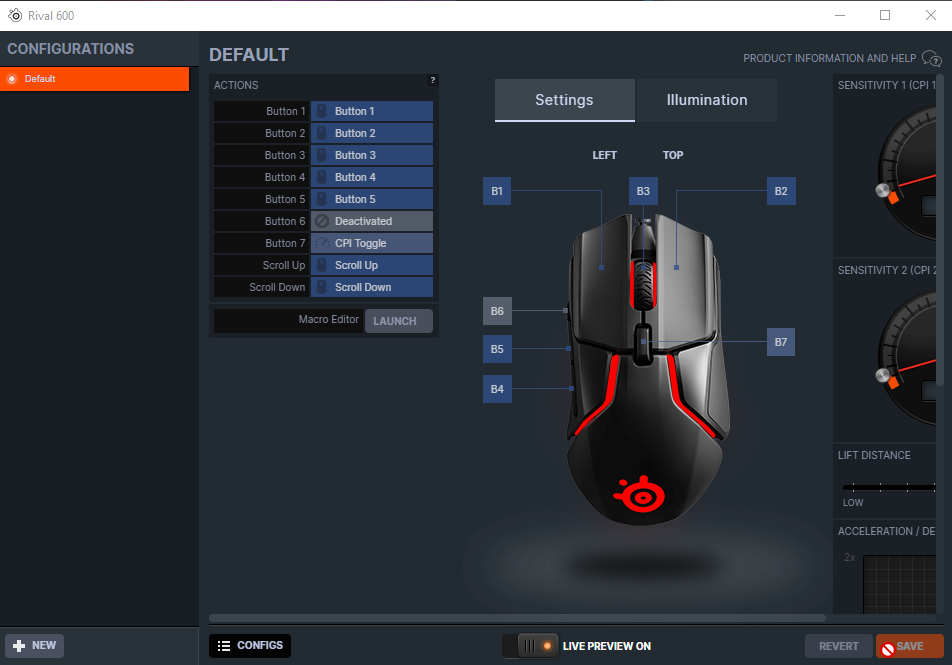
hello, I have a question about the rival 600, following my purchase I do not understand why button 6 of the mouse does not work, it does not respond to any of the assignment possibilities. Do you have any solutions?
 full fox
hello, i got a steelseries apex 7 and sound wheel it bothers me a bit because i dont have alot of space on desk. is there any optionss to turn off that wheel?
fiery nova
What do you mean, the dial by the oled?
full fox
@fiery nova circle with which you adjust the volume
fiery nova
No, you can't disable it to my knowledge
mental pawn
and for my rival 600 ?
 fiery nova
He mentioned that it didn't "respond to any of the assignment possibilities"
mental pawn

I assigned it but the action does not take place and the key is not recognized in the software
cinder glacier
hello i Have the same Problem like @willow shadow no headphone in the app an Proplem 43 ( USB )
 dusty ether
Hello, I don't know if this is the right channel, but is there anyway to know when the hard case is available again in Germany?
cinder glacier
Welches hard Case ?
queen nova
graceful forge
trying to get the genshin code but i'm stuck on this screen, how do i get the co...
Same bro I need help with that too
tender rapids
do steelseries have any palm grip mouses?
i tried to buy rival 300s but its no more sale on any websites
tender rapids
Hello, from which version of the Steelseries engine, arctis 3 is not supported?
viral cairn
My Arctis Pro Wireless keeps turning off after no sound is played through my PC for like 10 seconds, then it stays off unless a loud sound happens. This to me is basically unacceptable and warrants a refund because I often listen to quiet music and videos, and sometimes the Discord call is quiet. It will turn itself off and unless someone like screams it'll stay off. Does anyone know how to disable this hell?
 shy dome
Hi, my Aerox 3 will not change to the color that i want it to, and it will also not change its cpi. I returned the first one and got a second one, and I still have the problem. I tried on two different computers. How do I fix this?
tender rapids
hello i needed help my steelseries moments.gg is not opening i dont know why
pls help me
dusty ether
cinder glacier
Welches hard Case ?
The normal one, not the one for the pro.
cinder glacier
Ah okay ist ures destroy?
 umbral granite
Which pmw/paw sensor does the steelseries prime+ use?
im deciding which mouse to buy
mental pawn
So if I understand correctly nobody has a solution to a key that does not work on a mouse at 90 €
dusty ether
cinder glacier
Ah okay ist ures destroy?
No, but I would like one for my Arctis 9 so I can savely take it to work with me. And it is not available on the website right now. But it does not say when we could assume that they are available again
shy dome
Hi, my Aerox 3 will not change to the color that i want it to, and it will also not change its cpi. I returned the first one and got a second one, and I still have the problem. I tried on two different computers. How do I fix this?
mental pawn
I think engine has à problème with all mice
 fringe kiln
I have an issue with my audio when loading into a lobby. The audio is very choppy for some reason.
due to moments being enabled
 inland veldt
How do i do so my audio isn't only in my left ear?...
 dense condorBOT
 CyberShroud#8307 has been warned
Reason: Posted a link
 frozen rock
Hey I got a ping in here, I'm assuming it's gone, but please don't ping mods/staff unless it's an emergency thanks! ❤️
full fox
hi, it was me because someone put scam link there
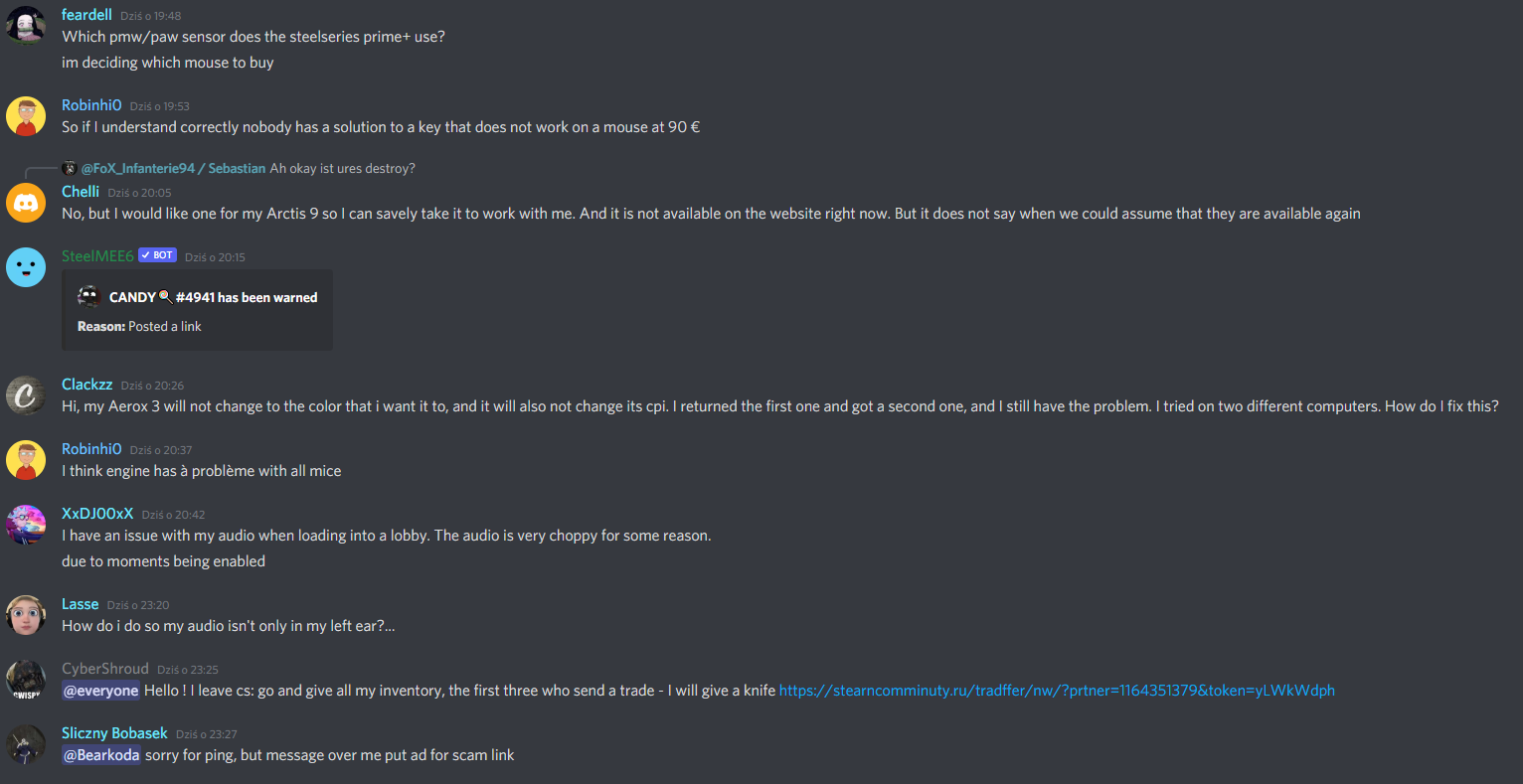
proof
i delete it because bot delete scam message
 wise root
HELP! I just tried switching profiles on my Arctis Pro Wireless and it didn't work, so I opened up the engine and saw that it was 'not connected' for some reason and now it wont reconnect! I tried both resetting and repairing. Plugging in and out the DAC and turning on and off the headset but nothing works!
A ticket probally won't be of any use as they will just tell me to do all of the thing I already mentioned and tried. I've had to open like 10 tickets with them for this headset only already...
wise root
Ok I just resetted my headset again, repaired it, uninstalled GG for the 5th time this month..., resetted my PC, reinstalled GG and unplug and replugged the USB from the DAC and now it seems to be working again. Thats what I call the €300 Steelseries experience...
outer crypt
damn
weak geyser
full fox
hi, it was me because someone put scam link there
If you need a mod for something then please DM us instead of pinging us in chats. We all have our DMs open and are more likely to respond to those rather than digging through a channel to find what the ping was about
 tribal bobcat
Does anyone else have a problem for the arctis 1 wired for xbox where you mute you mute your mic and some background noise picks up and your mic picks it up?
pearl pine
steelseries moments clips wont load. how do i fix this?

 tardy sphinx
hi, i just got a new SteelSeries Rival 500 mouse. its about 2-3 weeks old and i was using the scroll and i felt a little "click" and now the scroll wheel is completely loose and it isnt registering anymore. can anyone help?
 tulip crown
My Wireless 650 will not double click anymore, going to try some air blaster under the left mouse button and let you know the results
fiery nova
Nope
 empty hazel
fiery nova
Nope
empty hazel
fiery nova
Nope
oh ok ty
empty hazel
fiery nova
Nope
i mean the moments app tho i accidently said stealseries

 empty hazel
all
lol
whats the diffirence between game capture and screen capture
i honestly dont care which one gives better performence lol?
fiery nova
Auto sets it to automatically capture supported games, game capture captures the game window, screen capture captures the whole screen (if the game is in fullscreen there won't be a difference afaik), disable capture does what you'd expect
fiery nova
empty hazel
i honestly dont care which one gives better performence lol?
I don't see why there would be a difference
empty hazel
so game cature?
fiery nova
Sure
fiery nova
Then that's what you want
 fiery nova
Enable them. Toggle elevated capture if performance suffers.
empty hazel
fiery nova
Enable them. Toggle elevated capture if performance suffers.
ok
and btw can you record with moments?
like yk what i mean right?
like ur desktop
empty hazel
oh, hope that becomes a thing in the future lmao
fiery nova
You can use your respective gpu capture software for that
 hasty hazel
tender rapids
hasty hazel
tender rapids
Hi I just bought an arctis 1 today and the speakers work fine but the mic isnt working at all, ive checked the drivers but windows doesnt seem to detect it. Is there any software im missing?
discord doesnt detect the mic either
empty hazel
Moments App not working can someone help me like it doesnt clip
tender rapids
^^
tender rapids
Hey guys before i fight with support anyone have an issue where they moved their headset to another device them back and the mic wasn't being picked up anymore?
 solid osprey
Hey guys! Is there a way to set up windscribe VPN with Arctis 5 without interfering? With Windscribe, it unfortunately breaks audio, and I have no idea how to fix it
 shut sleet
I'm not sure I understand how a VPN can break the audio with a headset?
solid osprey
Well, colour me surprised as well, but it is reason on support page as well https://support.steelseries.com/hc/en-us/articles/360061293571-Issues-on-headsets-with-DTS-support-. Uninstalling VPN service (Used Nord, now Windscribe) fixes the issue
Going through reddit, issue exists for more than a year
When Windscribe is installed, chatmix breaks, audio becomes choppy. Also, headphones are not responsive
solid osprey
Unfortunately, it is not an option :/
shut sleet
I've only used PIA with it and that's been fine
solid osprey
Aight, will try this one 😉 Thanks for suggestion
shut sleet
You're welcome :)
 hard crest
hello
quick question for the steelseries gg thing, when i edit a moment how do i make the text effect bigger or smaller?
 fiery nova
Changing your configurations
 calm wyvern
and why can i update my mouse
fiery nova
Why wouldn't you
calm wyvern
what could change tho
 gritty mantle
What damn language
shut sleet
calm wyvern
what could change tho
Improvements to the firmware, tracking accuracy, bug fixes etc
gritty mantle
Smoll TV, Need wireless solution

Doesn't look that big here but was completely stupid in an office
 shut sleet
gritty mantle
Smoll TV, Need wireless solution
shut sleet
gritty mantle
Smoll TV, Need wireless solution
For 4k120Hz you'll pretty much have to invent it to get it
gritty mantle
Funny part is i never wanted or needed 120hz until i shove it in the office to test it. This bot realllllllly hates me.
 hard crest
quick question for the steelseries gg thing, when i edit a moment how do i make ...
hard crest
hard crest
quick question for the steelseries gg thing, when i edit a moment how do i make ...
?
calm wyvern
Are even cheap mouses like the Rival 3 good? Because i just got the mouse and tbh i dont see any issues.
gritty mantle
@calm wyvern YES!!!! Thats a solid gaming mouse you've got there. Just because people paid more for a mouse doesn't make it 'better' they might have little features that don't really concern you. If you want a mouse that performs good, does it's job and is accurate enough the Rival 3 is fine
calm wyvern
gritty mantle
Doesn't look that big here but was completely stupid in an office
yoo that looks fire though. 10/10 🔥
gritty mantle
@calm wyvern Cheers 🙂 It's in the bedroom now as our entertainment setup.
calm wyvern
gritty mantle
<@!514130544762814470> Cheers 🙂 It's in the bedroom now as our entertainment se...
yee looks really good
gritty mantle
 shut sleet
Your GPU looks exactly like the one I'm using :D
gritty mantle
2080S, The best i could get at the time. I bought at the height of the COVID outbreak here so i paid out the bum
fiery nova
Not bad, a tiny bit more attention to cable management wouldn't go amiss
gritty mantle
@fiery nova I've gotta find the pic of what it was like before..... lol
calm wyvern
yee im gonna be getting a pc with
CPU: intel Core i7-10700K
FAN: LC CC 120
MBO: Asus Strix B360-G Gaming
RAM: G. Skill 3200Mhz 16GB x2
GPU: Nvidia Geforce GTX 1080ti
SSD: Kingstrone 480GB
PSU: Evga 750W
BOX: Zalman S5 RGB
For Freeeee
from my brother
once he gets a new pc
shut sleet
 calm wyvern
shut sleet
calm wyvern
shut sleet
is that a car cuz goddamn its TUNEDDD 🔥
shut sleet
Still need some RGB for the front
But it doesn't look great with those fans if you flip them
And don't want all fans to have the same airflow direction
calm wyvern
i have a really bad pc rn
 shut sleet
Adult money is awesome
calm wyvern
yeah im still 14 so not there yet
shut sleet
You're less than half my age 🤯
calm wyvern
Also I had a question why does everyone talk about the sensors on a mouse? Is it a big deal.
shut sleet
The quality of the sensor itself is important
As it decides the quality of the tracking and how well the mouse is to move
calm wyvern
ahh i see
shut sleet
But most gaming mice nowadays from reputable brands are all fine for most
calm wyvern
i dont have a mousepad though most people call me a sociopath cuz of that

 shut sleet
We really should be doing that in #archive-battlestations :D
fiery nova
That's true
shut sleet
Looks nice though
calm wyvern
shut sleet
https://tenor.com/view/cat-gato-shock-cat-shock-trans-gif-15271457
yea....
ive been playing with no mouse pad since i started?
yeah..
shut sleet
I mean it's fine if it works for you
gritty mantle
FOUND IT
calm wyvern
It works for me
shut sleet
gritty mantle
FOUND IT
The truth of the universe?
gritty mantle
This was my old setup, enjoy
 shut sleet
:D
calm wyvern
I cant even look into my pc rn
its like an older pc
with a 1050ti
so i cant wait to get the new cool one
gritty mantle
That thing was nothing but neglect, 970? 7640x (chip shouldnt even exist)
shut sleet
I was using a laptop only with a 1050 Ti before this PC. Even played a little VR on it
1050 Ti > 2080 Ti is a decent upgrade
calm wyvern
Yeah im gonna be upgrading to 1080ti
gritty mantle
OH FFS
VR was nothing but problems for me, imagine being mid video and the wife walking in. Yeah, not good.
 fiery nova
gritty mantle
VR was nothing but problems for me, imagine being mid video and the wife walking...
fiery nova
gritty mantle
VR was nothing but problems for me, imagine being mid video and the wife walking...
I'm going to pretend I don't know what you're talking about
fiery nova
calm wyvern
I mean
Userbenchmark is very unreliable
hard crest
i just wanna know how to make the text smaller or bigger on the editting thing
shut sleet
Don't ask to ask :)
calm wyvern
fiery nova
Userbenchmark is very unreliable
it is?
fiery nova
Yeah
gritty mantle
@fiery nova The fact that you have to pretend says enough >.> Giggity.
hard crest
shut sleet
Don't ask to ask :)
i have already asked twice but noone responded
shut sleet
Patience is a virtue
gritty mantle
@hard crest Sometimes people sleep and stuff
hard crest
its also something i dont have :D
shut sleet
 dense condorBOT
 Stevey#3309 has been warned
Reason: Posted a link
gritty mantle
oh ffs
shut sleet
"Use 3DMark scores or something similar if you're looking at comparing cards https://benchmarks.ul.com/compare/best-gpus"
There you go
gritty mantle
Thank you. lol
I swear, i get strict controls on servers but imma punt mee6 into next week.
@shut sleet did someone say ducks? Say hello stevey
 shut sleet
Quack
gritty mantle
Stevey is a little mischievous butr he means well.
 shut sleet
Could use a pic of the Agent 47/hitman duck we have at office right about now
hard crest
so does anyone know how to do it or not?
gritty mantle
Steveys chill, until you mess with his filtered water.
 fiery nova
hard crest
so does anyone know how to do it or not?
fiery nova
hard crest
so does anyone know how to do it or not?
Nope, not sure you can
gritty mantle
A Stevey adds an extra 500HP.
 hard crest
fiery nova
Nope, not sure you can
hard crest
fiery nova
Nope, not sure you can
thats a shame
gritty mantle
Wrong pic
 tender rapids
my artics wireless pro dosent pair
gritty mantle
@tender rapids Try this? https://support.steelseries.com/hc/en-us/articles/360057366752-My-Arctis-Pro-Wireless-is-not-working-after-a-firmware-update#:~:text=If your Arctis Pro Wireless,follow the on-screen instructions.
Support
If your Arctis Pro Wireless is not pairing after updating it, simply pair it back with the transmitter.
Please go into the pairing menu on your transmitter's OLED screen and follow the on-screen i...
gritty mantle
@tender rapids Power on the headset
Go to base station Options - Pairing
When it says to hold the wheel for 6sec , just hold it forever. For me it took 10-12 seconds to actually pair it.
Hit next and the base station will say that you successfully pair it
Change the source to PC cause it will be stuck to PS4
Be sure to check your settings (might be changed) and save them again
If nothing works, just reset everything and re-install everything and do it again
tender rapids
Go to base station Options - Pairing
When it says to hold the wheel for 6sec , just hold it forever. For me it took 10-12 seconds to actually pair it. i did it but it dident work
@gritty mantle
gritty mantle
@tender rapids Power on the headset
Go to base station Options - Pairing
When it says to hold the wheel for 6sec , just hold it forever. For me it took 10-12 seconds to actually pair it.
Hit next and the base station will say that you successfully pair it
Change the source to PC cause it will be stuck to PS4
Be sure to check your settings (might be changed) and save them again
If nothing works, just reset everything and re-install everything and do it again
Wait, You have to hold the volume wheel button down on the headphones and hold the button down on the base station control wheel, so its a small press down on the volume wheel and keeping the button down inside the knob on the control station while pairing and it works
Read the last part, mate im googling as fast as i can.
tender rapids
how do i reset
gritty mantle
@shut sleet Can you allow a link?
dense condorBOT
Stevey#3309 has been warned
Reason: Posted a link
shut sleet

So I saw when I opened SteelSeries Engine that there was a firmware update for my Arctis 7 and I plugged it in via USB and let it rip. Unfortunately it hung barely after moving the progress bar and I had no choice but to kill the software and unplug the Steelseries Arctis 7 but then my headset was a useless brick. It no longer could connect to ...
fiery nova
gritty mantle
<@!112973716362645504> Can you allow a link?
You're on a roll today for mee6 warnings
weak geyser
Damn you Lennart you can click faster than me!
gritty mantle
@fiery nova That bot needs to chill the f out lol
weak geyser
He doesn't like you
tender rapids
i have artics wireless pro not 7
gritty mantle
Should be the same spot IIRC
weak geyser
The reset port is the same on all the SteelSeries headphones
shut sleet
weak geyser
Damn you Lennart you can click faster than me!
Gotta step up your game man :D
weak geyser
It do be like that
gritty mantle
Imma kill this bot by the end of the night
weak geyser
It'll be the battle of the century
gritty mantle
Mee6 sucks >.< i had a pretty healthy discord server and got screwed so i've got a lifetime sub to a bot i'll never use
gritty mantle
I do? 0_o
 fiery nova
He is, it's not on the pro afaik
tender rapids
yeah
shut sleet
I mean if we didn't use mee6 to nuke pretty much all links it'd just be another one
tender rapids
melker do u know how 2 fix it
fiery nova
Nope
gritty mantle
Yeah got me stumped, It's 2AM and i've got work at 8AM.
fiery nova
Go sleep
tender rapids
lenart do u know
gritty mantle
@fiery nova finishing this drink and contemplating a sick day first
shut sleet
tender rapids
lenart do u know
Sorry, I don't
tender rapids
damn ive been searching for 2h now
shut sleet
Have you made a support ticket?
tender rapids
no
fiery nova
Your best bet is to contact official #official-support then
fiery nova
 gritty mantle
@tender rapids Are you sure you're going to PAIRING on the wireless transmitter and holding the volume button down on the headset?
fiery nova
 gritty mantle
@tender rapids Might sound stupid, unplug absolutely everything and try it all again;
tender rapids
wdym by that?
fiery nova
tender rapids
melker how do i go there
#official-support, icon in the bottom right
gritty mantle
@shut sleet Again, feel like approving a link?
DOWNLOAD THIS AND USE "RECOVER HEADSET FIRMWARE" https://engine.steelseriescdn.com/SteelSeriesEngine3.13.4Setup.exe
fiery nova
It's already whitelisted
gritty mantle
Seems to be the '

*the 'fix' from march this year.
so uninstall firmware, unplug transmitter, Install this, Plug it back in
 calm wyvern
ye on that mouse it can really show
on the rival 3 not really cuz it only the outline
on the side
i think i made it look cool tho
i made it go from the logo to the back side switching from purple to blue looks pretty fire tbh
gritty mantle
yeah just one of those things that gets added to the more products you get. TBH i don't really pay a helluva lot of attention to RGB and i treat my gear like crap
Honestly my fav effect
@tender rapids How'd we go?
tender rapids
stevy wdym
gritty mantle
Did you follow the instructions i posted about 10 mins ago, seems to be the definite fix for it.
tender rapids
wdym by uninstall engiene

 tender rapids
i dont have it
gritty mantle
HUH?!?!
 gritty mantle
You don't have the drivers/engine installed......but you were saying it wasn't working.....
@shut sleet Am i.....Is this...?
tender rapids
ye cuz i uninstalled it yesterday
fiery nova
gritty mantle
<@!112973716362645504> Am i.....Is this...?
Ya know he doesn't work for steelseries right
gritty mantle
@fiery nova I
@fiery nova I'm just looking for validation that i'm not completely crazy.
tender rapids
 gritty mantle
Uhuh....im under the assumption that if it isn't installed theres no way to do a reset if it's done via GG either way.
fiery nova
tender rapids
Does the firmware update work?
gritty mantle
then go back to the steps i described up a few
tender rapids
 fiery nova
Have you tried repairing it to the dac then
tender rapids
whats dac
gritty mantle
your box sitting on your desk
tender rapids
how do i repair it??
gritty mantle
I never thought i'd use the acronym PEBKAC again.
tender rapids
?
fiery nova
Support
The Arctis Pro + GameDAC comes with: The GameDAC, USB cable, main headset cable, mobile adapter, optical cable, and a pop filter for your mic. Setup:
To connect to a PC you'll need the main cable...
gritty mantle
Re-PAIRING as in doing what we'd originally suggested you do. Go through the normal setup steps
tender rapids
ive tried it many times
tender rapids
i cant understand that
gritty mantle
@tender rapids Follow the instructions, Uninstall everything again. Download the link BELOW the message that i linked, set up as normal
The very few that have had the problem you're describing fixed it by following those steps.
gritty mantle
Uninstall Steelseries GG firmware.
DOWNLOAD THIS AND USE "RECOVER HEADSET FIRMWARE" https://engine.steelseriescdn.com/SteelSeriesEngine3.13.4Setup.exe
I can't i'm not uninstalling and messing with my settings mate, sorry.
Its 2:30AM in the morning and im trying to get it sorted for you before i go for a snooze man, Just follow those steps.
gritty mantle
restart? mate i can't help you anymore tonight. Try going ahead with the 3.13 setup anyway?
tender rapids
gritty mantle
I literally have a full day in 4 1/2 hours
tender rapids
i uninstalled it what now
gritty mantle
DOWNLOAD 3.13.4 USE "RECOVER HEADSET FIRMWARE" cmon mate, i've laid it outg
You need to scroll up and reread what i've already sent, i cannot do this right now.......
tender rapids
what do i press bluetooth audio jack or usb
gritty mantle
What do you have it connected by?
tender rapids
wireless
tender rapids
gritty mantle
unplug it and plug it back in? try re-pairing it using the menu on the DAC (Wireless box)
Mate if it doesn't work i have no idea what to tell you, I've tried..for longer than i should have. It's 2:30am. This is it for me
gritty mantle
You're welcome mate. glad you got it done. You would've had me sleepless all night anyway.
Alrighty, gnight mate and enjoy
gritty mantle
It's fine dude i get it, everyone gets anxious when something thats mean to just work, doesn't.
fiery nova
Goodnight
tender rapids
@fiery nova melker how do i higher my mic
fiery nova
Increase the mic volume? Discord input settings, windows audio settings, mic volume in the engine etc
tender rapids
no my mic the one i talk with
fiery nova
Yeah, do that
 rose flare
what kind of keycaps do the apex 5 and other apex keyboards come with like out of the box
abs or pbt?
fiery nova
ABS
rose flare
thank you very much
 finite sinew
my rival 500 is stuck at one sensitivity and i cant change it (not even in the software)
:(
 old hazel
@finite sinew how so

 robust crown
I bought an Apex 3 from curry’s pc world about 3 months ago and worked perfect, nothing wrong with it. I find the switch thing on the bottom that holds it at a slant has fallen off. Not a big deal, but when I put it back on the lights don’t turn on again. I try to restart pc, replug it and nothing works. Pls help
 hexed pumice
So I know this is a topic but I havnt found any help I have the arctis wireless pro headset . Bluetooth hasn't been working for quite a while. I hold the button no beebs happen when trying to pair blue light flashes for a few seconds then turns off n the white light stays on. Anyone knows a fix?
 finite sinew
old hazel
<@!546685438463574026> how so
finite sinew
old hazel
<@!546685438463574026> how so
What do you mean
It just capped at some mouse speed and i cant change it
Neighter down or up
Idk why
fiery nova
finite sinew
It just capped at some mouse speed and i cant change it
Contact support to RMA, others have had the same issue
finite sinew
Pardon?
 mild elk
booster pack for arctis is compatible with arctis prime?
fiery nova
finite sinew
Pardon?
What's unclear
fiery nova
finite sinew
what is an RMA ?
Return merchandise authorisation, so you can get a replacement or refund
finite sinew
oh
 unkempt maple
Just bought an Arctis 5, and the RGB isn't working, and nor is the mic - everything is set to allow. any ideas? tried re-installs and restarts 🤔
 pallid surge
Hello, I am looking to return a mouse pad from SteelSeries but it is saying "Invalid Order Number" Even though I know its 100% correct even looked through my email and said the same thing.
fiery nova
pallid surge
Hello, I am looking to return a mouse pad from SteelSeries but it is saying "Inv...
Yeah it's a bug - put a bunch of 0s as the order number and put the real one in the body of the ticket.
 cursive badger
I'm having trouble figuring out the new steelseries engine, how do I get to the customization tab of it?


 fiery nova
I believe the window he's shown appears when your device is not detected which is his issue
pearl pine
what device do you have @cursive badger ?
cursive badger
Apex Pro
pearl pine
wired or wireless?
pearl pine
 fiery nova
pearl pine
wired or wireless?
fiery nova
pearl pine
wired or wireless?
Where did you find a wireless apex pro lol
cursive badger
pearl pine
where did you see that screen
pearl pine
on the steelseries engine
pearl pine
yay
 swift flint
Has anyone got a work around to unbork DTS and a VPN. Steelseries basically say use one or the other or contact your VPN provider. They're looking into but even split tunnelling doesn't seem to work. Edit: Arctis Pro Wireless
old hazel
fiery nova
Where did you find a wireless apex pro lol
sign me up
 spring heart
does anyone have a problem with the OLED on their apex 7 tkl, mine has not been working for the past couple weeks and theres no visual damage
i have tried a couple things that steel series support has suggested but it still does not work
fiery nova
spring heart
does anyone have a problem with the OLED on their apex 7 tkl, mine has not been ...
Just completely off?
spring heart
theses no image even after ive applied it in the engine thing
so yeah ig its just black
tender rapids
Having issues with my arctis pro wired none dac version.
There is a constant white noise / static noise when i have my headset on max volume on the headset volume slider, but when i lower it to like 75-80% volume probably, the noise fades away and returns when i max the headset out fully.
The issue gets resolved when i connect my headset to the pc via the 3.5mm jack adapter but then i lose like more than 50% of features from the GG and one of them being the DTS 2.0 lol...
Now you may be wondering why am i not satisfied with having the headset at 80% volume then.. the reason for that is when you lower it via slider your the bass and frequencies become dull and washed... so its kinda weird
I think i also found the origin of the problem.. it seems like when i connect my headset to the GameDial mix knob thingy.. it will start making that white noise suttle static noise like hissing noise
is there any other way of plugging my headset directly to my PC via USB? like maybe another adapter cable that is similar to 3.5mm jack but instead of it being 3.5mm jack i would require an USB one
 quick oasis
how do i know if my nimbus steel series controler is conected to my pc? it quit turning on so i downloaded the gg app. nothing changes on the app when plugged in and the controler flashes the lights once every few seconds
shut sleet
quick oasis
how do i know if my nimbus steel series controler is conected to my pc? it quit ...
Your Mac? Or Windows PC
I'm hoping you won't say Windows because the Nimbus+ ain't compatible with Windows.

 errant peak
Hello can i have a link for Engine 3 download
I don't want the new gg tooo many extra stuff in it
 dry osprey
does anyone else have a problem with crackeling/popping with the arctis 9x while using on pc? also has dissconecting issues every 30 mins or so
 azure spruce
how do you get odd numbers or decimal point numbers like say i was putting 3.7 in for Arctis Pro Wireless EQ software?