#archive-user-support
1 messages · Page 22 of 1
 mellow tartan
has anybody else the problem that he cant make an Account on the Website ?
 austere carbon
From inspection it looks like the connection between the button and the switch has snapped : /
Not cool
 tender rapids
Would greatly appreciate some help.
I have a Steelseries Arctis 1 headset. When I'm on Discord voice chat and i'm listening to music, or watching a video on my pc its picking up the audio even though its not loud. It picks it up and I cant even hear it myself. If anyone has any ideas as to what could be the issue I would greatly appreciate it.
 uncut roost
yes he has to clear paired on his dac/base unit
uncut roost
tender rapids
Would greatly appreciate some help.
I have a Steelseries Arctis 1 headset. When ...
does that headset have noise cancelling ?
uncut roost
mellow tartan
has anybody else the problem that he cant make an Account on the Website ?
yes try using a vpn to make an account that way
mellow tartan
uncut roost
yes try using a vpn to make an account that way
thanks for the advice my friend needed to make my account because i cant open anything from SS
uncut roost
have u set it in discord settings ?
uncut roost
austere carbon
do i rma it or something?
i would if you just purchased it !!
@obsidian thorn you could try #1043928169784287342
austere carbon
uncut roost
i would if you just purchased it !!
Bout 7 months ago
April ish
Should be under warranty right?
uncut roost
@austere carbonshould be i would submit a ticket they will tell you but i would be surprised if it wasn't
tender rapids
uncut roost
does that headset have noise cancelling ?
I’m not too sure! I’ll have a look in the morning. It was a relatively cheap headset so it may not. That being said I use nvidia noise cancelling which works extremely well.
Also discords built in one which is also great
 wintry wyvern
I have the Discord game-sense on and when a key changes color, it turns off afterwards instead of returning to its original color. Is there a way I can fix this? I just bought the Apex Pro which is what I am referring to.
 snow cape
is there any way i can use my arctis 7 wireless while charging?
 sharp flare
does anyone have steelseries arctis nova pro wireless? i just got them and i have a problem :(
uncut roost
tender rapids
Also discords built in one which is also great
i do have another theory because i always used to get complained at from others in discord when i used the cabled headset on a gigabyte board using the realtek driver and software just a thought
sharp flare
i can just hear myself through the mic and the bluetooth to phone works as well
uncut roost
sharp flare
does anyone have steelseries arctis nova pro wireless? i just got them and i hav...
yes i have that headset
sharp flare
have u had anything similiar?
uncut roost
@sharp flarecall me
sharp flare
i can see on the dock that sound is coming, but i dont hear it in my headset
tender rapids
uncut roost
i do have another theory because i always used to get complained at from others ...
I’m using both of those things so I will take a look in the morning. Really appreciate the response
 rotund dune
thx
 gleaming crow
I went to go eat and muted my headphones using the button on my Artic 7 wireless. I am now unable to unmute and zero volume coming from the headphones. I shut down and reset my PC. I unplugged the transmitter plugged back in. I uninstalled and reinstalled the headphone driver. I doubled checked all my audio settings making sure the right audio was selected. My headphone mute does not unmute. I am pressing it and the red light to indicated it is muted will not go away. Any ideas?
Also unable to reconnect headphones to the SS app. I click pair device but nothing happens
uncut roost
@gleaming crowyes hard reset the headset
gleaming crow
@uncut roost will try now
uncut roost
gleaming crow
@uncut roost it worked. Thank you!
 polar cave
hi i need help with my steelseries rival 3
mouse
the illumintaion
does not work properly when i click ColorShift it does not apply it it just stays on steady
 sharp ridge
hey I just bought a Arctis nova Pro and I cannot get the mic to work for the life of me please help!
I need help!!
@lapis crow @old gust @north path I need help with my mic!
@lean comet I need help please
@woeful loom please help?!
 north path
please do not ping staff directly
north path
if you want official support then you can file a ticket on our support site https://support.steelseries.com/hc/en-us
uncut roost
@sharp ridgetake it you didn't read the site rules then ? is it the wired or wireless version ?
sharp ridge
it is wired
i cant get it to work sorry im frustrated since ii just spent $300 on a headset and the mic wont work
uncut roost
well lets see did you follow the connection guide ?
sharp ridge
i figured it out thanks
uncut roost
@sharp ridgepity you didn't do that before tagging all the mods and staff !!!
 atomic narwhal
I recently got ahold of an Arctis 7p+ and have been trying to use it on my pc. I've had an ongoing issue of being unable to receive an audio output from my computer. However, I do hear the sounds the headset itself makes, Specifically muting and unmuting the microphone. I have done lots of troubleshooting and reset my headphones and computer quite a few times. Have I run into a manufacturing error, or have I missed a crucial step in the setup process?
uncut roost
@atomic narwhalis your pc a laptop or desktop ?
atomic narwhal
Currently a laptop
uncut roost
wired or wireless ?
atomic narwhal
Wireless
uncut roost
did you plug the dongle directly into the laptop ?
atomic narwhal
yes
uncut roost
please remove it and use the extender cable provided
atomic narwhal
currently it is
uncut roost
......
atomic narwhal
bad wording. I have used both methods including using the extender cable
currently that is plugged in along with the dongle
 candid brook
how to fix this rival 3 mouse blinking purple and failed to pair
uncut roost
@atomic narwhalhttps://www.bing.com/videos/search?q=how+to+hardreset+my+arctis+7+wireless&view=detail&mid=D348E87B97BDA96CDA1FD348E87B97BDA96CDA1F&FORM=VIRE
candid brook
gosh, rival 3 got so many issue
uncut roost
@candid brooksorry no good with mice unless it's to feed them cheese so beyond unplugging and replugging i cannot help you you will need to submit a support ticket
candid brook
uncut roost
<@677824930372517940>sorry no good with mice unless it's to feed them cheese so ...
it just blinking purple led
uncut roost
@candid brookit's just a support ticket thru #official-support
atomic narwhal
@uncut roost Alright so I'm kind of back to square one, I can in fact hear myself through the microphone but have still not concluded my previous problem of receiving audio from my laptop
uncut roost
@atomic narwhalis your headset bluetooth as well ?
atomic narwhal
I believe that is what it states, but I have had problems with connecting it via Bluetooth
I have verified my drivers they are fine
uncut roost
what usb are you plugging into ?
 gritty tide
anyone with an arctis nova pro wireless have this weird issue where the headset will stop outputting audio, power off, and immediately make this buzzing noise for half a second or so then turn back on working fine?
atomic narwhal
uncut roost
what usb are you plugging into ?
It is a usb hub, would you like me to plug it into the main system?
uncut roost
yes that might be a good idea as it states that in the connection guide 🙂
@gritty tidelaptop or desktop ?
gritty tide
desktop
uncut roost
motheboard make and model ?
gritty tide
i can visibly see the dac showing it power off when the buzz starts then it turns back on
rog strix b550-f
uncut roost
remove battery wait 30 secs plug other battery in try again
gritty tide
well it turns back on right after without issue, and only happens very rarely
automatically turns back on *
would that indicate a battery voltage issue or something?
uncut roost
did you do as asked ?
uncut roost
well i want you to connect via bt to your mobile phone and see if it does the same so keep it connected to both and see
atomic narwhal
uncut roost
yes that might be a good idea as it states that in the connection guide 🙂
ok so like in my defense I was using the online version, because I currently don't have the box, But thank you for at least getting me there in the end.
uncut roost
@gritty tidei am always around so let me know
gritty tide
i'm not using sonar btw. And yeah i'll do that at some point
uncut roost
@gritty tidei had assumed you weren't but it is good and may fetch out the fault sooner than random as it enhances frequencies and spatial within the headset
gritty tide
my ears weren't able to adjust, also same for the pass through thing, that's disabled bc that makes me nauseous lol. Not sure why but just not my preference ig
uncut roost
yes i have the same headset and no mine is good no buzzing and shutting off
gritty tide
it only happens like once every 1-3 weeks randomly a single time
i've no clue what could possibly be making it happen as i never see anything the same being done that could potentially cause something that i'm aware
uncut roost
you tried vr ?
gritty tide
using the headset with my vr?
uncut roost
no do you have vr
gritty tide
yeah, index
uncut roost
good headset i have that too does that make you feel sick ?
 shell flare
Does anyone else happen to have their apex pro tkl keyboard, all its lighting went out and only the red right side arrow key remains?
Please help
My keyboard was left without lighting apex pro tkl after today's update
uncut roost
@gritty tidebit of insight for you your inner ear has fluid in it that regulates balance anything affecting that can make you sick ie tinnitus or sound vibration you may have a imbalance within your ear and may need to see a doctor to get checked as this can also be a symptom of an infection
gritty tide
Noted
wintry wyvern
I have the Discord game-sense on and when a key changes color, it turns off afterwards instead of returning to its original color. How can I make it not do that an return to the original color? I just bought the Apex Pro which is what I am referring to.
uncut roost
ok @shell flare@wintry wyvern sorry keyboards are not my area of knowledge or expertise so you may need to submit tickets to support thru #official-support
wintry wyvern
Thanks
uncut roost
also please remember this is an american company and it is thanks giving there at the moment so any tickets submitted may take longer for a response
 winged sapphire
As an update, i uninstalled GG software and reinstalled, the lighting issue is fixed but the OLED is not doing the animation at the correct speed, it really fast on the oled.
austere carbon
So turns out I bought the mouse from Curry’s
Do I contact SS or Curry’s? @uncut roost
tender rapids
Hello
I have some questions regarding prime mini wireless
- if the switch breaks is it replaceable by anything aftermarket
- has the click latency been addressed
- does it still have the sleep wake up latency issue
really good looking mouse but I've heard a lot of bad things about it
 lone gazelle
arctis nova pro wireless with BT 5.0 offering quite a bit of latency in multiplayer games, is 2.4ghz wifi regime reducing latency issues significantly?
my friends saying they hear enemy steps sooner when they use 3.5mm headphones, while i am on bluetooth nova pro
 dusty cedar
Hello guys, today i bought arctics pro with gamedac, but i am trying to set chatmix but still dont working, i use discord and playing tarkov, i set everything from original setup video, but still when i move my knob to chat its voluming down game and chat in the row, but when i am moving my knob to game, nothing happends, can somebody help me please? Using PC
 gray marten
Hi All, recently upgraded my Siberia 800 to a Nova Pro Wireless (yesterday it arrived)
the sounds quality is very poor, hallow, tin-like
it sounds like Im listening to everything through tin cans,
I spent around 3-4 hours trying to follow guides on changing the EQ, trying all the presets in the suggested games they were designed for, however the sounds quality remains terrible. Has anyone else had a similar experience, I cannot justify the price tag on this headset when it is worse then my 5 year old Siberia 800 headset
all the online reviews are also glowing
austere carbon
lone gazelle
arctis nova pro wireless with BT 5.0 offering quite a bit of latency in multipla...
A turn off DTX 2.0
It induces like 50ms of latency
B make sure you are using the wireless receive 2.4ghz and not Bluetooth
 true quartz
hi, i received my arctis nova 3 yesterday. unfortunately i have a slight problem with: when i turn off "local microphone effect" i hear crackling sound. it is often on light sounds
someone to help me?
😭
 safe badger
Hi, I have mouse rival 3 and my mouse is turning off sometimes by itself, I mean by that mouse lights up and everything but i cant move my cursor around. I need to unplug and plug the mouse again to start it working. Is this some production problem or i click some keyboard shortcuts on the mouse
tender rapids
Hello i recently got a issue where my arctis 7 wireless does not show in discord so i cant connect it, it shows “steelseries arctis 7 certified” or something like that but that doesnt work and normally it would be named different. Does someone know how to fix this?
 echo ermine
Hey, I usually play on Nintendo Switch with bluetooth with my artics 7+. But I wanna connect it on my phone so I can get both sounds at the same time like splatoon sounds and vc for example. How can I do it ?
 fleet minnow
i need some help. Has anyone had an issue with their Arctic pro & Game DAC for PC where setting your GAME DAC GAME as Default device doesn't play any audio at all. test tone isn't working, I've tried installing audio drivers again, bios on the motherboard, and chip-set drivers
 stuck badge
hi, so far I've used a razer keyboard everything was fine but when I plugged in a new keyboard (apex pro tkl) I stopped hearing the sound on the headphones (arctis 9 wireless) I don't know what to do listening works normally but I can't hear any sounds from the computer
 deep latch
anyone got problems with making macros ?
 dull cobalt
Hey, im trying to sign up for a GG account so I can use Sonar, in both the app and web browser im getting weird connection errors. I don't use anything like VPNs and clearly am connected to the interent, any advice
uncut roost
@elder wadiplug into different usb's see if that helps
@dull cobalttry a quick vp download and install opera and activate the vpn and connect to uk and try making one
@fleet minnowunplug try all the usb's on pc
@echo erminewhat phone ?
@safe badgergoing by the amount of posts about that one mouse it may well be
dull cobalt
uncut roost
<@285902407668596736>try a quick vp download and install opera and activate the ...
Any solutions that don't involve installing a VPN?
uncut roost
@dull cobaltthat isn't installing a vpn it's installing a browser it just has an inbuilt vpn which you can switch on and off and don't cost anything so once done you can uninstall opera
dull cobalt
regardless......
deep latch
deep latch
anyone got problems with making macros ?
For refance. i use virtual desktop in windows and the macro recorder cannot make a macro for CTRL+Win+Left or right.
which my old g602 could. so now im like 50/50 weather to return my Aerox 9 xD
uncut roost
@dull cobaltbesides that erm check firewall if you can spoof your mac so isp gives you a diff ip otherwise i could try making one for you but i would need certain details which is a total breach of security so get a friend you know at a different location
@true quartzwiired or wireless ?
true quartz
uncut roost
<@307221773525450753>wiired or wireless ?
wiired
true quartz
uncut roost
<@307221773525450753>jack or usb ?
usb
 ancient wind
noise canceling not working
uncut roost
@true quartzcan you unplug and test all the usb ports on your pc
@ancient windwhich headset ?
ancient wind
7p
true quartz
yes but it's the same on all ports (note that I'm on a laptop)
uncut roost
@ancient windscratch that i am opening a voice channel come chat and share hopefully fix
@true quartzwhich laptop ?
true quartz
dell g15 5511
uncut roost
@true quartzjoin me
true quartz
uncut roost
<@307221773525450753>join me
I won't be able to straight away sorry bro
uncut roost
@true quartznp
uncut roost
@ancient windcome chat voice channel
 dense silo
So for some reason, my mouse has been scrolling up randomly when I'm scrolling down. How do I fix this?
ancient wind
where ?
 tiny otter
Anyone know the difference between arctis nova pro wired for Xbox and the ps5 version? Do you lose out on anything with the ps5 version
fleet minnow
uncut roost
<@250396898295414784>unplug try all the usb's on pc
did that already.
 cinder shore
Hey, i need help with my rival 650 wireless. My left click isnt really working. I need to hold and then release and then it clicks, i have tried the control panel but nothing works. Please help me.
echo ermine
Hey, I usually play on Nintendo Switch with bluetooth with my artics 7+. But I wanna connect it on my phone so I can get both sounds at the same time like splatoon sounds and vc for example. How can I do it ?
uncut roost
@dense silodid you try unplugging and replugging in a different usb ?
@echo erminephone model ie iphone or android ?
 magic shadow
How do I fix the headset version?

 graceful crest
hi, when I change the actuation to 0.5 or lower my keyboard kinda buggs. Some keys don't work and some just randomly trigger, without me even pressing them.
Can any1 help?
echo ermine
uncut roost
<@721062200529125489>phone model ie iphone or android ?
iphone 11
winged sapphire
has anyone used foam for their apex pro tkl to make the sound better?
 wooden pike
HEy everyone i still got the problem with the sound, running a game on one monitor and on the second one youtube, if the song is getting more silent, the sound is completly fading away until its getting louder again, i changed the usb port and turned off the station of my arctis pro wireless. I hope someone can help me im getting really angry about that 😄 PLSSSSSSS Greetings 🙂
 green garnet
Hello, I am having an issue with my brand new Arctis Nova 7 and Sonar, I am using the dongle, When sonar is enabled I can get sound from the Virtual Chat Output but I get nothing from the Virtual Game output. I made sure that in app both game and chat point to the Arctic Nova 7. I am not sure what I am doing wrong. I can hear people in Discord but cant hear my game, I have checked the chat/game mix and it is set in the middle.
uncut roost
@echo ermineuse the audio cable with an adapter for the iphone
@austere carbonhow long ago if currys before 14 days take it back
austere carbon
uncut roost
<@517614215566065664>how long ago if currys before 14 days take it back
Hmm?
uncut roost
@magic shadowunplug replug in a diff usb try all of them if all the same take it back it's faulty
@austere carbonbut i would take it back to store anyway as they will help you
austere carbon
uncut roost
<@517614215566065664>but i would take it back to store anyway as they will help ...
I spoke to support and they said they would send me a replacement
uncut roost
@austere carbonsorted
austere carbon
Hopefully
uncut roost
@tough walruswhats up ?
@wooden pikeok call me i have the same headset
@tender rapidswhat is you pc make and model and if it's a laptop or desktop
@graceful cresti am only good with headsets but have you tried doing a hardreset on the keyboard ?
 frail cairn
hi my headset doesnt turn off its looks on but not connecting my pc and to my phone looks like everything on lights and etc but no noise no connection nothing can u help me about that
dense silo
uncut roost
<@619663463462993921>did you try unplugging and replugging in a different usb ?
Yes, didn't work
uncut roost
@dense silowell i hate to say this but if you have the option of returning it to where you purchased it i would if not then a steelseries support ticket you can go thru #official-support on here
 vale phoenix
So I bought an apex-pro keyboard some days ago they told me they would start sending the package the 28th but I haven't even got an Gmail for Steelseries about my package
 simple vortex
I can't get the microphone on my nova pro wired to work does any one have any tips?
 tough walrus
uncut roost
<@175421536881213440>whats up ?
tough walrus
uncut roost
<@175421536881213440>whats up ?
sometimes my headset would disconnect randomly from the console and sometimes i get this super loud crackling sound from both ears that goes away when i restart the headset
not sure why this happens
 wheat perch
I have a weird problem with my apex pro mini wireless, I set the actuation to 0.2 and my mouse scroll wheel zooms in and out and I can't type on my keyboard, anyone else had this? #archive-user-support
 rancid basin
Just wondering if I am going to get a response to my customer service ticket regarding a broken keyboard fault after only owning for a month. Or if suggesting to try the things I have already tried is the limit of what I will be offered.
uncut roost
@rancid basinno idea ask support because this is user-support
 gleaming sundial
Hello, I activated the "beta" feature and nothing is happening, do I have to do something more or is it a bug?
rancid basin
uncut roost
<@708390886781747260>no idea ask support because this is user-support
See the issue I have is they are not responding to the tickets and there is no other way to get in contact with them
 high oak
Does anyone happen to know if the "not available in your region" status for a product is just a blanket value for out of stock? I can't imagine all products except for one specific product are really fine in US Easy coast except for one headset I am trying to get
uncut roost
@rancid basinit will take longer it's thanks giving holiday in america
rancid basin
uncut roost
<@708390886781747260>it will take longer it's thanks giving holiday in america
Oh they have already come back to me regarding the issue its just they clearly did not read the ticket properly/ it was an automated bot responding. The issue is after they suggested the fixes (that did not work, which I assumed they wouldn't as I had already tried them all) not usually one to contact customer services - more of a try and fix it myself kind of person. So now I am stuck with being out of pocket with no keyboard and no one from customer services coming back to me regarding a fix or a replacement
uncut roost
@rancid basinyou reply to the ticket
rancid basin
uncut roost
<@708390886781747260>you reply to the ticket
Yeah still nothing unfortunately
dense silo
uncut roost
<@619663463462993921>well i hate to say this but if you have the option of retur...
I lost all proof of purchase, so I can't return it, and the support ticket didn't work (Apparently resetting it doesn't work)
I purchased the Rival 3 wireless through Best Buy
 shell girder
this isnt a steel series question but, I have a 240hz monitor that was given to me, but my pc is not very good and on most games i only get around 100-120 fps
would changing my hz to 120 make a difference?
dense silo
shell girder
this isnt a steel series question but, I have a 240hz monitor that was given to ...
You wouldn't get any more or any less FPS
But sure
Go ahead
shell girder
ive been reading that it makes it looks worse if you are getting less fps then your monitor hz
uncut roost
@dense siloif you purchased with a creditcard and not cash they and you have a record if you can remember day date and rough time of purchase they have a record if you purchased it online and used paypal you have a record
 tulip totem
high oak
Does anyone happen to know if the "not available in your region" status for a pr...
tulip totem
high oak
Does anyone happen to know if the "not available in your region" status for a pr...
what headset specifically are you looking at?
high oak
The Arctis1 destiny special
 slender knot
Guys i just bought arctis nova 7 wireless but microphone quality is so bad my friends said "your $5 dollar headset better than this"
i tried every equaliser setting but it didnt be good can you help
tulip totem
high oak
The Arctis1 destiny special
usually licensed products like that are limited edition so they're one-time runs.... so I suspect if they're sold out then they're out for good https://steelseries.com/gaming-products/limited-edition
SteelSeries
Check out the SteelSeries limited edition headsets, mouse pads, and gaming accessories including collaborations with SMITE, Paladins, artists, and more.
high oak
Sad, but more than fair. Thank you
 tacit ivy
my artics pro wireless headset has been connected and fine for months but now it says "driver error" under it and i cant figure out how to fix it
 gleaming sundial
Hi did someone know why Sonar dont detect any Input and Output device ?
 high oak
tacit ivy
my artics pro wireless headset has been connected and fine for months but now it...
high oak
tacit ivy
my artics pro wireless headset has been connected and fine for months but now it...
Did you uninstall and reinstall the driver? The error after months probably means some auto update (windows or otherwise) broke it
tacit ivy
nah, I'll try that tho
im so confused, i looked up all these youtube videos, tried them all out, repaired my headset, unplugged and replugged the headphone box thing like 10 times, restarted and shut off my pc 5 times
and now after the 6th restart its working again
idk wtf the other 5 pc restarts didn't have compared to the 6th one
ah nvm its working
high oak
Lol, even a goofy fix is still a fix. If it returns, I'd start with the driver though
Ms made some big security changes this month that could impact how devices are accessing windows
 hushed cobalt
Sonar is such garbage - Really regret buying your products. they used to be good
 high oak
Is it set to auto start at boot? Do you have a security software that's stopping the process? Test the warning, if the process is actually running that's one thing. If CCleaner or Symantec are stopping the service, that's not a steel issue.
hushed cobalt
nope, just a garbage product.
 old dawn
I love sonar
 dapper kestrel
@uncut roost Just wanted to follow up to my post; I figured out my audio popping/crackling issue (hopefully, haven't heard it in an hour at least now). Issue was not with my headset or the GG software, it was that somehow my Nvidia HD Audio Driver had gotten completely uninstalled, no idea how. I installed the latest Nvidia graphics drivers and it included the audio driver.
old dawn
Very good product
 dim summit
I think it is your problem instead.
 azure ore
Can I use a 100$ voucher on something that is on sale?
 lapis glen
hello? I am a person using Arctis Nova 7. I'm currently experiencing an issue where the pc mic does not mute during a Bluetooth call. I sent A/S and received the exchange today, and the same symptoms occur. I used the Arctis 9 before during the A/S period, but this product works normally. Since the replacement product also has the same symptoms, it is judged to be a firmware problem. I would like help to fix the symptom.
i send ticket to steelseries and reply under
Let's try doing a clean reinstall of both SteelSeries GG and your device drivers using the following steps.
Before proceeding as requested please ensure you have a screenshot of your custom configurations/macros as the steps listed before will be resetting your drives. This can cause you to lose any custom configurations/macros.
Prior to starting, navigate to and run: C:\Program Files\SteelSeries\GG\uninst.exe
We will need to uninstall the existing driver( if there is one) completely.
To resolve this issue, please take the following steps:
Make sure your SteelSeries software is up to date. Install the latest version if you have not already. It's very important that the latest version of SteelSeries software is installed PRIOR to taking the next steps. Please find the latest version at: https://steelseries.com/gg
Then:
Using the search functionality in Windows, search for "Device Manager" - click and open it
Note: If this does not work, search for "Control Panel" and navigate to Device Manager
Find the device in the device tree
Right-click and select "Properties"
If there are second or multiple entries related to the device, you will need to repeat this process.
Click "Driver" on the top toolbar and select "Uninstall (Advanced)" at the bottom.
Ensure the checkbox is checked and uninstall the driver.
Select Uninstall Device.
Once this is done, replug the device and the driver will reinstall

SteelSeries
SteelSeries GG helps create better connections with your gear, your people and your game.
and i follow all that things but still doesn't work.
The crazy thing is that the Arctis 9 works just fine. please help me....
I did the following test to help you decide.
- Remove the device according to the contents of the mail and reinstall GG - same symptom occurs
- Tested under the same conditions with Arctis 9 previously used - no symptoms
- After installing Arctis Nova 7, GG on another computer, check the symptoms - the same symptoms occur
- tested another PC on arctis nova 7 - same symptom occurs
 ivory marsh
lapis glen
Let's try doing a clean reinstall of both SteelSeries GG and your device drivers...
ivory marsh
lapis glen
Let's try doing a clean reinstall of both SteelSeries GG and your device drivers...
When noone else will respond here open ticket maybe dogeatdog know how to repair it
 muted raft
Team, does anyone have the same issue as I do…. Run Nova Wireless on Sonar…
Sound is epic…. When I start my WMR for my VR it loses Sonar and setup, I have to unplug the USB base for 10 seconds and replying so it restores…. Only when I turn on or off WMR VR…. It’s def not a VR issue as I use to have the Arctic 5 wireless and it never happened… only effects Sonar … if I am just on default Nova Pro without Sonar it works just fine…. It’s bloody painful
lapis glen
@ivory marshi already send ticket to steelseries... thx
 inland tide
 void oxide
Hi All, anyone heard of the Arctis pro Wireless transceiver malfunctioning? Anyway to get this fixed or purchase a replacement?
 rustic breach
Hi all, mixing the two channels (game/chat) by using sonar don’t work with my Arctis Nova Pro Wireless. Is it a known issue?
tender rapids
Hello everyone, I also have the Problem in the Sonar, the program does not show a game and chat, but everything is there in the audio setting I've already installed it and don't know what to do next can someone help?
 dull bay
so just a question if anyones got help, basically when I test my microphone on sonar with the correct tuning it sounds good but ingame or when recording it'll capture a wayyy different sound than what it should and yes its the correct mic but when recorded my voice is super bassy and really really loud compared to what an audio test will show in the app
anyone got thoughts on why this is happening?
tender rapids
dull bay
so just a question if anyones got help, basically when I test my microphone on s...
did you select the mic in the windows sound setting? and select the mix in the game itself
old dawn
azure ore
Can I use a 100$ voucher on something that is on sale?
I believe so!
 foggy sinew
I'm really struggling here, I've followed the post above about deleting drivers and re-installing, i've followed all the steps for setting up Sonar and chatmix, but when i use the "SteelSeries Sonar - Gaming (SteelSeries Sonar Virtual Audio Device) + the chat device and mic, they have no sound at all, using brand new Arctis 7 + , and if i use the none Sonar devices (in sound settings) then i have sound, but without the EQ and other software based stuff

and if i have YT, Spotify or twitch open, i can see the levels move, but i still have no sound coming through

 lapis mesa

 shut sleet
lapis mesa
shut sleet
lapis mesa
How is the headset connected to the computer?
lapis mesa
dongle type c
shut sleet
Is there one of the dials on the headset labeled sidetone?

The one labeled as 9 here
shut sleet
:D
shut sleet
yw
tender rapids
SteelSeries gg won’t detect my nova pro wireless so I can check for updates
I’ve tried connecting the headset itself and the dac via usb on two separate computers. Also tried connecting via Bluetooth which allowed sonar to work but engine still isn’t detecting it
azure ore
old dawn
I believe so!
perfect. thank you
high oak
tender rapids
I’ve tried connecting the headset itself and the dac via usb on two separate com...
does the headset work for audio outside of the gg sync for updates? Is windows fw or some other security app installed that may block detection/access?
 coarse widget
when my side tone is on i dont have any issues with the audio but when i turn it off it has slings
 willow grove
when use SONRA get drop frame in games and blue screen = restart pc why????
tender rapids
high oak
does the headset work for audio outside of the gg sync for updates? Is windows ...
Yeah audio works on Xbox and my computer, just the software won’t detect it
high oak
tender rapids
Yeah audio works on Xbox and my computer, just the software won’t detect it
gg up to date and set to start at boot? I'd uninstall the headset driver in case it's using some general driver instead of the steelseries stuff
coarse widget
coarse widget
when my side tone is on i dont have any issues with the audio but when i turn it...
@high oak
 royal root
hey , idk why but the microphone isn't working , someone can help me with that?
i mean i need to scream
so they can hear me
high oak
coarse widget
<@335931896485904385>
it sounds like your input/output is flipped. Sidetone is feeding your output back into your ears
high oak
royal root
so they can hear me
do you have a noise gate set?
royal root
 golden mantle
you can change your mic volume
golden mantle
you can change your mic volume
tried didnt work
 north solstice
It’s been a few day since I tried to create an account on the steelseries site, and I still get a server error. Does anyone have a similar problem?
golden mantle
from windows and application?
royal root
high oak
do you have a noise gate set?
idk what is that but i got arctis 7
royal root
golden mantle
from windows and application?
yea
coarse widget
high oak
it sounds like your input/output is flipped. Sidetone is feeding your output ba...
wdym flipped
high oak
I have a set of 7's too. If this is on, turn it off and re-test.
Also, check windows settings to verify volume under input is up

 royal root
did it doesn't work
 high oak
coarse widget
wdym flipped
high oak
coarse widget
wdym flipped
in Windows > sound, and sonar settings do you see the proper drop-down devices set for input/playback with an even mix? And is your toggle that rolls between game and chat set even or rolled one way vs the other?
 royal root
you can see in call maybe ? @high oak
high oak
have you used the "test sound" in the top right there
I can't take a call, I actually have no affiliated whatsoever with steelseries. I'm just chatting while at work myself
royal root
i can hear , but i cant speak
royal root
tried
golden mantle
ok
do you know why my new artics 7+ have so bad quality in mic from sonar to aplications like discord ??
royal root
man idk how to turn on the pc you asking me that
golden mantle
if i check it in sidestone its like crystal (my voice)
golden mantle
royal root
man idk how to turn on the pc you asking me that
xds
royal root
so my friend can hear me
royal root
maybe there is a staff that can help me that know the problem?
high oak
Yakir, is it just one friend where there is a potential he is having volume issues? or is this persistent with multiple people. I can give you a quick call in a sec just to test
tender rapids
high oak
gg up to date and set to start at boot? I'd uninstall the headset driver in cas...
Yeah gg is updated, and I tried uninstalling the driver and still nothing. Are you supposed to connect the headset itself or the dac in?
royal root
@shut sleet sorry for @ you but i really need help , i checked on google and steelseries site and there is nothing , i need to scream so my friends can hear me , you can help me with that ?
high oak
tender rapids
Yeah gg is updated, and I tried uninstalling the driver and still nothing. Are y...
I connect the dac
tender rapids
high oak
I connect the dac
Okay I’ll try that again but also the main issue I’m having that I am trying to see if an update will fix is my mic picks up static or something constantly and if I turn the mic sensitivity down enough to where that stops happening then my friends can’t hear me very well
high oak
@royal root I hopped in the voice channel on this server if you want to join for a minute
tender rapids
Yeah plugging in the dac didn’t do anything either
golden mantle
do you know why my new artics 7+ have so bad quality in mic from sonar to aplications ??
someone can help?
high oak
if you kill sonar and use baked in drivers, does it work fine?
high oak
I have 7's, and old pro's with no issue. The newer lineup I can't test with locally.
but I also have win11, and idk if that changes things b/c all the default drivers change
baked in drivers=windows drivers without sonar installed
tender rapids
I fixed the problem. I had the dac plugged into both my Xbox an pc and it was prioritizing the Xbox I guess. I unplugged it from the Xbox and now it’s updating
golden mantle
high oak
baked in drivers=windows drivers without sonar installed
its the same
high oak
good to hear, didn't know you could split it like that (I am only pc)
golden mantle
i deleted and i install
high oak
well, at least we know it isn't Sonar that's the issue now @golden mantle
golden mantle
i guess
tender rapids
okay so the firmware update just stopped like 30% through, and now it wont update at all even though it says theres an important firmware update available. it just sits there at 0%
high oak
idk who works here, but that's a dangerous step as if it doesn't failback mid-upgrade fails are dangerous territory for bricking a unit. I'll tap out on that one as I don't want to give bad guidance
tender rapids
Fixed it. Update complete and the mic problem is fixed now too
 patent kayak
I used Steel Sonar device and can still hear and has sound at in-game only, but Steel Sonar Gaming has no sound. Is there way to fix issue?
 grave harbor
my steelseries arctics 1 mic randomly stopped working
my pc doesnt detect them anymore
what do i do
 timber oyster
are other options supposed to be here?

if they are, why arent they here 💀
since they are here

especially here
 high oak
yes, they should be there. Sonar isn't picking up your device/driver
tulip totem
timber oyster
are other options supposed to be here?
If you have a USB headset then yes, it should be showing on the list. If you have a headset that uses 3.5mm (like the arctis 1, arctis 3, nova 1) then no, it won't show up on the list.
the sonar devices won't show up on the list since that dropdown is selecting the output device, and you can't set sonar to output to itself
royal root
hey , thats hard to remove the layer that on the ear ? cause i saw there is a reset button and you need to remove it and idk if thats hard
and if thats hard to put it back
high oak
I mean, bare handed it can be
but it's just stretching fabric over the cup, so if you are struggling with it you can just use a clip/hook to help
tulip totem
there's actually a much easier way, there's a video about it on SS's youtube channel

CONNECT
Twitter: https://www.twitter.com/steelseries
Facebook: https://www.facebook.com/SteelSeries
Instagram: https://www.instagram.com/steelseries
Discord: https://www.discord.gg/steelseries
Twitch: https://www.twitch.tv/steelseries
Blog: https://steelseries.com/blog
^this is for the older Arctis headsets, I think the Novas work about the same, but I think there's another video explaining nova
high oak
wow, I feel like a fool for not seeing that. I have been stretching it out around the outer edge this whole time
tulip totem
that's what I suspect the video is for. no one would know unless it's called out 
and yeah, there's a video for the Nova Pros here: https://youtu.be/OkHCBcUXGY8?t=65 I think the other Novas (1,3,7) work the same as the old Arctis'
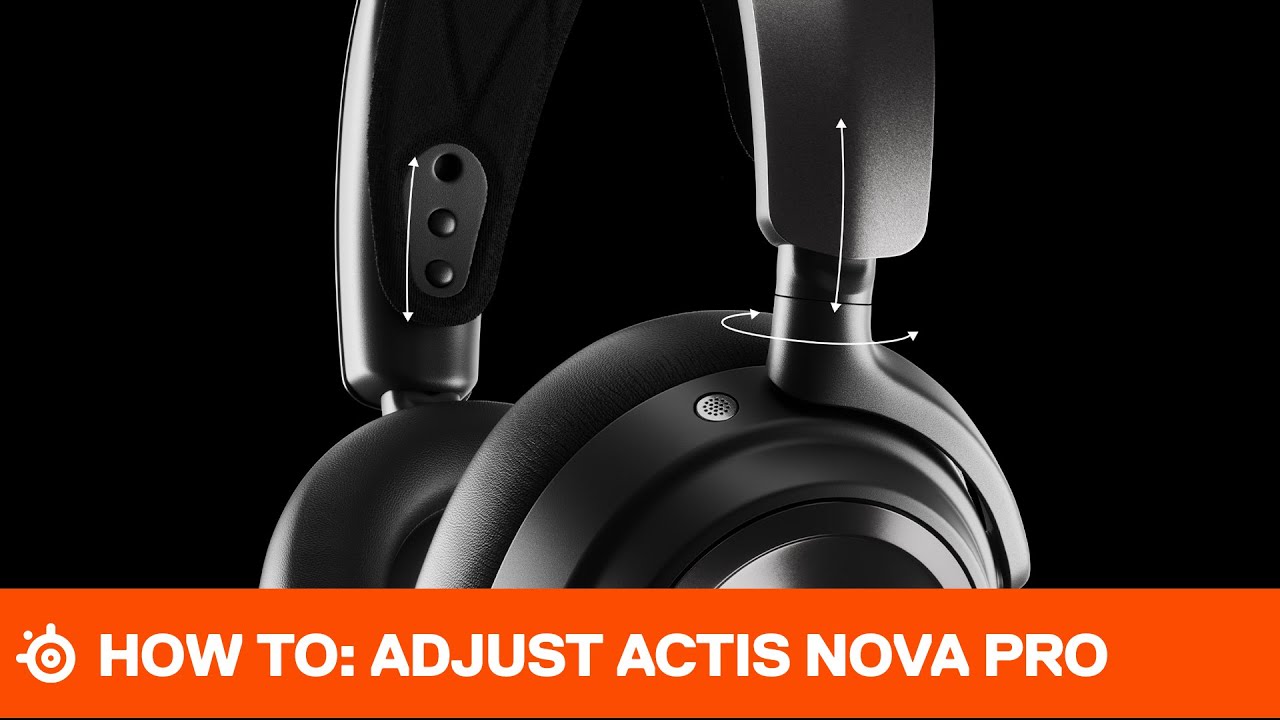
If you haven't seen it already, check out the unboxing and setup here: https://youtu.be/rDUBV2UVTZ4
CONNECT
Twitter: https://www.twitter.com/steelseries
Facebook: https://www.facebook.com/SteelSeries
Instagram: https://www.instagram.com/steelseries
Discord: https://www.discord.gg/steelseries
Twitch: https://www.twitch.tv/steelseries
Blog: ...
 near sentinel
Hey i'm here to say i have had nothing but problems with the arctic nova 7. sound often doesnt work and i have to restart my entire pc bc i get a sound connecting error. whenever i try to go multiplayer in a game sound stops working entirely too and i have to restart my entire pc again, i have not been able to solve this at all and sonar kills my entire pc sound
i do use another mic a yeti which works completely fine, its just the headphones that do not work at all
how do i solve this and is this a common issue?
 ocean elbow
Hey (sorry but i'm french) I bought the Arctis 7, but i got some problem with it
- i got an error in the event observer of windows for docking station : Erreur de définition des paramètres sur le fournisseur {8444a4fb-d8d3-4f38-84f8-89960a1ef12f}. Erreur : 0xC0000001
- On Discord, other player send me like my sound is very low, but all setting are at the max ... When i make a test, i got no problem, but other player need fix at 150% on discord...
- like i got the sound on my monitor, i want use it, but the software change all default setting as soon as i turn back on my computer. I need reset the default settings.
There is a solution please ?
 oak remnant
Hey :D I deleted a clip on Steelseries GG, how can we get it back?
north solstice
It’s been a few day since I tried to create an account on the steelseries site, and I still get a server error. Does anyone have a similar problem?
high oak
oak remnant
Hey :D I deleted a clip on Steelseries GG, how can we get it back?
if it's not in the recycle bin, I'd guess it's just lost for good
grave harbor
grave harbor
my pc doesnt detect them anymore
update: i downloaded the engine and i now have a sonar microphone and it says that its connected but it doesnt detect any audio
 wraith briar
Hi
i have audio coming through one ear on my artic wirless pro's does anyone know why this only applies for one app ?
 fathom phoenix
so im using the GG software to capture clips in warthunder, and for some reason the clip that i get is only the first 20 seconds and it doesnt show the part where i actually took a clip
high oak
wraith briar
i have audio coming through one ear on my artic wirless pro's does anyone know w...
if it's only on one app and not all, the app is probably sending mono instead of stereo and needs sound settings adjusted.
fathom phoenix
fathom phoenix
so im using the GG software to capture clips in warthunder, and for some reason ...
also just realising the audio isnt synced up either
\
at 7 seconds you can hear it firing a missile but thats not what is actually going on
it should be doing one minute but its only the first 20 seconds and it just deletes the rest
 high oak
does this happen for all games? and is the clip in question being taken in game capture, auto, or screen cap?
fathom phoenix
high oak
does this happen for all games? and is the clip in question being taken in game ...
its not auto im taking the clips by pressing alt-s
and i havent tried it on anything else yet
high oak
I'd start there, just to see if it's the interaction with the game specifically or the capture software in a more general sense
grave harbor
grave harbor
update: i downloaded the engine and i now have a sonar microphone and it says th...
ill pay whoever is able to help me fix
high oak
you can capture just desktop stuff, like play a youtube video and his "start desktop capture"
to see if it saves a whole 60 second clip
high oak
grave harbor
ill pay whoever is able to help me fix
*For Arctis 1 Wireless: On the left side of the headset (the side with the microphone), there is a reset switch under the ear pad. Please press and hold this button for a few seconds to reset the headset."
grave harbor
its wired
grave harbor
high oak
*For Arctis 1 Wireless: On the left side of the headset (the side with the micro...
does the wired version have a reset option
high oak
I believe so, all guides I see show the left earcup is the default location for it
grave harbor
let me check
high oak
though, I do not have an arctis1 to verify personally
"Hardware reset can be performed by sliding a switch under the cushion in the left ear cup (facing the microphone). Because this is a pinhole, you must use a paperclip or pin to secure it. You must hold it down for 1 second."
grave harbor
high oak
though, I do not have an arctis1 to verify personally
it doesnt have
or wait
let me check again
i was looking for something else
tulip totem
@grave harbor if you have a headset with a 3.5mm port, then it uses your on-board audio drivers to run the headset. if something changed then you need to look towards your on-board audio card for help, not Sonar, since Sonar is audio that works on top of your on-board audio.
grave harbor
yea it doesnt have
grave harbor
tulip totem
<@702253359616360469> if you have a headset with a 3.5mm port, then it uses your...
could you dm me this so that i have it as a notification
just closed my pc like 10 mins ago so ill try it tmrw
high oak
on board audio drivers can be re-downloaded from motherboard manufacturer sites fwiw, almost always a supported driver download from gigabyte/asrock/msi/etc
 tranquil crypt
So I'm trying to adjust the balance on my new headphones (hearing loss in one ear) and can't figure it out. In the past this was easy to do in Windows, but this doesn't seem to be possible with the Arctis Nova Pro Wireless headphones and Sonar. Google isn't coming up with anything. Anyone know of a way to do this?
grave harbor
high oak
on board audio drivers can be re-downloaded from motherboard manufacturer sites ...
how do i know what my on board audio driver is
high oak
grave harbor
how do i know what my on board audio driver is
if you know what your motherboard is, you just need to search for the motherboard model. If you don't know your motherboard model - https://www.makeuseof.com/tag/how-to-find-out-what-motherboard-you-have/#:~:text=First%2C open Run using Windows,BaseBoard Product%2C and BaseBoard Version.

MUO
Want to upgrade your PC or laptop but wondering "What motherboard do I have?" Here's how to find out.
grave harbor
high oak
if you know what your motherboard is, you just need to search for the motherboar...
bet
grave harbor
grave harbor
could you dm me this so that i have it as a notification
same for you please
high oak
np
grave harbor
high oak
np
appreciate you, ill lyk how it goes
dull bay
tender rapids
did you select the mic in the windows sound setting? and select the mix in the g...
Yep! It’s set to my røde mic in windows and same in game
Wait so I select the steel series mic or my rode mic in the game
 foggy wharf
Hey all, I don't know if anyone can help me with my issue or if its something anyone has run into but im unsure of what to do to resolve this fatal error. I just purchased the new Nova Pro Wireless, Steelseries GG Software has detected the device and the firmware is updated. However when i click on the actual headset to access its settings Im faced with 3 options regarding configuration. Overwrite and Revert result in a Fatal Error and Save New just hangs when you try to save.
I have reinstalled the software twice and clean booted the pc on the second attempt. My firewall Rules (BitDefender) for the 4 applications it has picked up are allowed.
Any help would be appreciated. Thanks 😄
high oak
are you willing to just disable bitdefender temporarily to see if it makes a difference so we know if it has any impact on the app?
foggy wharf
high oak
are you willing to just disable bitdefender temporarily to see if it makes a dif...
Aye i can do this now
tulip totem
foggy wharf
Hey all, I don't know if anyone can help me with my issue or if its something an...
try resetting the base station?
foggy wharf
tulip totem
try resetting the base station?
Would this simply just be unplugging the station?
tulip totem
no, there should be an option in the menu on the base station to completely reset it
foggy wharf
tulip totem
no, there should be an option in the menu on the base station to completely rese...
Sadly this didnt help, i have also disabled both firewall and antivirus on Bitdefender, to no avail
 strong barn
can anyone help with this when i join a discord vc and us arctis 7 chat it mutes everything including discord
 amber vortex
strong barn
can anyone help with this when i join a discord vc and us arctis 7 chat it mutes...
amber vortex
strong barn
can anyone help with this when i join a discord vc and us arctis 7 chat it mutes...
See the #1044045472945418303
 summer hemlock
hi can anyone help me with the nova pro wireless sidetone settings i have turned them off in both my the gg app and on the dac yet i can still hear myself in discord thanks in advance
shut sleet
summer hemlock
hi can anyone help me with the nova pro wireless sidetone settings i have turned...
Can you post a pic of your side tone settings and your audio settings from Discord?
summer hemlock
i seem to off fixed it mate no worries cheers
hushed cobalt
why the hell do I need to log in to sonar to use my headphones?????????
amber vortex
hushed cobalt
why the hell do I need to log in to sonar to use my headphones?????????
You dont, you can use your headphones without Sonar
uncut roost
golden mantle
and i dont know why
use the the dongle extender and move it away from pc then try
@patent kayakunplug replug in dif usb try them all
@near sentinelok use the extender cable that came with headset and move the dongle away from pc also try the other usb ports
 inland jetty
Hey - question regarding the apex 9 mini and apex pro mini - is it possible to make the lighting change for each config/profile I use as I can with my older apex pro tkl? Hoping someone is familiar with this issue and has a solution - thanks so much
tender rapids

which one do i select bros
audio randomly not working until i set my dock to Ps5 (on my pc)
then i switch to Arctis Pro Game and it works for a lil bit
come to find out my web browser has no audio
getting absolutely tortured by this headset rn 😔
uncut roost
@wraith briarunplug replug diff usb try them all
tender rapids
FIXED with link in pins
uncut roost
@foggy wharfi have the same headset you just overwrite it
@hushed cobaltthey should work perfectly fine just in windows
 split mica
does anyone post clips from steelseries gg to tiktok? i shorten the clip with file explorer and then post the cut clip but sometimes the file doesnt have game audio or now even my microphone audio? any fixes or better ways to post to tiktok
uncut roost
what file sizes does tiktok allow ? @split mica
split mica
287.6 mb
uncut roost
@split micahave you just tried exporting the standard clip from moments and just using that ?
uncut roost
yes but you can edit with moments 🙂
 lime notch
hello guys, these 2 items are compatible with Arctis pro wireless?
 uncut roost
@lime notchthey have a compatibility list for each telling you if it is if you need more help there is a store assistant available for chat at the site
lime notch

the EAR CUSHIONS are compatbile but idk about the headband
on amazon i see multiple people selling them for 7/7+/ arctis pro etc
simple vortex
i just got a nova pro wired but i cant get the mic to work
 dire hatch
I recently got a decent gaming computer and I am using my articx 9x headset for my pc(used also for xbox series x), but I keep hearing white noise thru my mic.. I don't know how to fix this. Also I keep hearing a buzzing sound /audio cut while playing video games. How do I fix this?
and it doesn't sound as krisp as on the xbox..
dire hatch
I think I figured out the issue, it is the bluethooth dongle.. what dongle can u reccomend me?
 tight spade
it keeps resetting my default sound device to steel series gg moments sonar how to stop it
dire hatch
tight spade
it keeps resetting my default sound device to steel series gg moments sonar how ...
deleting the app ?
dire hatch
yeh
tight spade
theres literally a turn sonar off option in the settings lol
uncut roost
@lime notchpersonally i would purchase from amazon as you then don't get extortion post and packing plus you get to return if not correct
@simple vortexyour settings might be out but check your connection setup and see pinned messages here in channel and anything relevant as in following the headset info guide that came with the headset and also the steelseries support page for your headset
simple vortex
Thank you
uncut roost
@dire hatch you'll find that if you plug the dongle direct into pc it's not good as the pc interferes with the signal use the extender cable and move the dongle away from computer
 sharp nimbus
dire hatch
I recently got a decent gaming computer and I am using my articx 9x headset for ...
sharp nimbus
dire hatch
I recently got a decent gaming computer and I am using my articx 9x headset for ...
I had huge issues with my arctis pro wireless when i bought it. Buzzing, cutting sound and mostly, distorted sound from time to time. I got the feeling that the problem was worse when there was a lot of sound at the same time. Cause? Interference from wifi/bluetooth devices. I switched from 2.4 to 5 Ghz on all devices I could at home (almost all support it) and also disabled bluetooth on all devices that weren't actively using it ATM, and the issue completely disappeared. Now, your headset is on bluetooth while i was and am on wifi, but since they work on the same frequency, its worth a shot
 charred siren
Hello. Been having an issue as of late that needs to be addressed. I recently bought a new pair of arctis 9s around a month ago. Was using it fine until I noticed a couple days ago that the audio would rattle if something loud happened. Decided to do some tests and found out it only happened in games and voice calls. The headphones can play videos and music fine at max volumes without the audio getting all rattily and distorted. Thinking this might be a mixing issue. Anybody think of a possible source/solution to this?
 pine cedar
Having an issue with my Apex Pro Wireless Mini - UK English version, where 2 key of the keys seem to illuminate differently to whatever profile is selected in Steelseries GG. Keys are \ and #
When i try to select them in the application too it never seems to register if i drag over the entire keyboard
 uncut roost
@charred sirenread what @sharp nimbus posted also if usb dongle plugged direct to pc please use extender and move the dongle away from the computer also lower pc volume slightly as this results in lowering distortion ie mic input to 70-90 rather than 100% and output to about 90% also don't set gain at 100%
 fringe tree
Hi I just got a arctis pro and gamedac, it works great with games but wont play sound on youtube or netflix, any ideas? Thanks
uncut roost
@fringe treehave you got the audio cable to right way round ?
fringe tree
Yes it has a sticker that says this side up
tender rapids
im having an issue with my left click on my rival 650 wireless ive narrowed it down to being a hardware issue by using the engine to change another mouse button to left click what should i do because ive sent this mouse back an embarrassing amount of times with other issues
im actually pretty disappointed for a mouse thats meant to be a like 120 i kinda expected far better quality quality that i have received from other steel series products
anyone have any other ideas that could make this a software issue not hardware
the mouse click doesnt work in safe mode either so idk
pls @ me with any ideas
dull bay
anyone know why this gives 2 different outputs? I'd prefer the quieter output ie. the second. but the first output is whats being recorded and I'm not sure why it's also what other people can hear
need help because the first one makes my ears bleed with the volume Plose halp :(
 prime iron
hello, for the steelseries artic nova pro wiereless: is there any way to use volume push button to mute on discordI
 plain pumice
i need help with my steelseries 7+ so yesterday i noticed that my headset wasn't working anymore it wouldn't turn on/off and the mute light was permenantly on also i got no audio from it now i noticed i need to install a critical software update in my software but it says it is not connected to my computer which it is also it says i need to connect it using micro usb but it doesn't have that so i connected it with usb-c please someone help me so i can use my headset again

(ping me if u can help me otherwise i might not see it)
also when i plug it in my computer says this:

this is what it shows up as:

(my computer drivers are up to date)
tender rapids
Hi is there any replacement cables for the arctis pro wired (usb to usb c that goes into gamedac) cant find it on the site.
dire hatch
uncut roost
<@354734557381132291> you'll find that if you plug the dongle direct into pc it'...
it wont connect with the cable 😉
dire hatch
sharp nimbus
I had huge issues with my arctis pro wireless when i bought it. Buzzing, cutting...
the think is now you are mentioning it, there is nothing much that uses signals or is connected to the wifi .
Not even the phone.. because my internet is really slow and I want my internet to be optimal .. I think I have a really cheap dongle tho..
 reef nymph
Anyone know why my nova pro wireless headset wont work with the USB cable plugged into my laptop? I have the mixer plugged into my PS% but its off. Im trying to see if there is firmware updates
In the GG app on the Engine tab, it says plug a device in and I already have it plugged in
plain pumice
reef nymph
In the GG app on the Engine tab, it says plug a device in and I already have it ...
i have the same problem
reef nymph
@plain pumice I figured it out
the mixer and the headset both have to be connected to the pc that has the app on it
high oak
dull bay
anyone know why this gives 2 different outputs? I'd prefer the quieter output ie...
you could try enabling "smart voice" which should balance the two volumes automatically. You can also go into gg > engine > click your headset > scroll down to side tone > ensure it's low or off
 visual plinth
Hello,
I have the Artic Nova Pro Wireless, when I wear them for several hours, they damage my ears. Would replacing the headphones earpads solve the problem? If so, which one would be appropriate?
 limber torrent
slt i have a problem with my steelseries artic pro headphones basically it means that i hear more from the right ear and less from the left before i unplugged my headphones then plugged them back in my the sound no longer works dcp if you have any trick (apart from uninstalling the software x) )
 surreal hinge
Hi,
I have recently bought the arctis 7+ and it is a good headset if it works but alot of the times it starts crackling as i turn on music or join a call on discord and everytime someone makes a noise then it start crackling, does anyone know a fix?
visual plinth
surreal hinge
Hi,
I have recently bought the arctis 7+ and it is a good headset if it works ...
Are you connected via bluetooth?
plain pumice
reef nymph
<@441683083134107694> I figured it out
nvm we have a diffrent headset
surreal hinge
visual plinth
Are you connected via bluetooth?
yes i am with the adapter they gave me
plain pumice
i need help with my steelseries 7+ so yesterday i noticed that my headset wasn't working anymore it wouldn't turn on/off and the mute light was permenantly on also i got no audio from it now i noticed i need to install a critical software update in my software but it says it is not connected to my computer which it is also it says i need to connect it using micro usb but it doesn't have that so i connected it with usb-c please someone help me so i can use my headset again
(ping me if u can help me otherwise i might not see it)
also when i plug it in my computer says this:
this is what it shows up as:
(my computer drivers are up to date)


 visual plinth
surreal hinge
yes i am with the adapter they gave me
visual plinth
surreal hinge
yes i am with the adapter they gave me
When I had the Artic Pro Wireless with Bluetooth connect happens same to me
If is same problem I don't know if there is any fix
 wraith iris
visual plinth
If is same problem I don't know if there is any fix
wraith iris
visual plinth
If is same problem I don't know if there is any fix
how did you fixt it or do you send it back
visual plinth
wraith iris
how did you fixt it or do you send it back
I dind't send it back because I used bluetooth only in mobile sometimes
wraith iris
And witch steel series headset do you got now?
surreal hinge
visual plinth
I dind't send it back because I used bluetooth only in mobile sometimes
it works on my phone but not on my laptop
visual plinth
plain pumice
i need help with my steelseries 7+ so yesterday i noticed that my headset wasn't...
I had same problem with microphone in my old headphones, I sent them back and asked for the warranty
visual plinth
wraith iris
And witch steel series headset do you got now?
I purchase now Artic Nova Pro Wireless, had Nova Pro Wireless from 2021
plain pumice
visual plinth
I had same problem with microphone in my old headphones, I sent them back and as...
yeah what i think the problem is that i can't update the filmware anymore because it is so outdated it can't be recognized anymore by my computer
when connected via usb-c
visual plinth
surreal hinge
it works on my phone but not on my laptop
Maybe adapter is the problem, is 5.0?
wraith iris
what do you mean with 5.0
surreal hinge
visual plinth
Maybe adapter is the problem, is 5.0?
i am sorry what does 5.0 mean?
surreal hinge
It works with my phone so i don't know why it wouldn't work on my pc
visual plinth
thats why haha
plain pumice
visual plinth
I had same problem with microphone in my old headphones, I sent them back and as...
because i didn't buy it from steelseries directly i bought it from mediamarkt a dutch tech store
visual plinth
plain pumice
because i didn't buy it from steelseries directly i bought it from mediamarkt a ...
mediamarkt haven't warranty?
should have
plain pumice
yeah they have it
i don't have the receipt anymore though because i bought it about a year ago
surreal hinge
plain pumice
i don't have the receipt anymore though because i bought it about a year ago
volgens mij heeft mediamarkt geen garantie na 1 jaar
plain pumice
surreal hinge
volgens mij heeft mediamarkt geen garantie na 1 jaar
kut man ik ga wel ff kijken wanneer ik hem heb gekocht
but the headset is not really broken it still works perfectly with the aux cable
wraith iris
visual plinth
thats why haha
can he update the bleutooth like this?
 visual plinth
wraith iris
can he update the bleutooth like this?
visual plinth
wraith iris
can he update the bleutooth like this?
he can try to update drivers yeah
 brittle wasp
Just bought an Arctis 7 wireless yesterday for use on PS5.
Microphone has ZERO noise canceling. you can hear my dog fart in the next room. Any solutions?
wraith iris
brittle wasp
Just bought an Arctis 7 wireless yesterday for use on PS5.
Microphone has ZERO...
xD
visual plinth
brittle wasp
Just bought an Arctis 7 wireless yesterday for use on PS5.
Microphone has ZERO...
xD
brittle wasp
ok but seriously. Microphone is absolutely horrible. No noise canceling at all and they are advertised as best in class noise canceling.
visual plinth
well steelseries haven't the best microphone
audio is the best, microphone is just meh
wraith iris
wraith iris
can he update the bleutooth like this?
@visual plinth
visual plinth
try to configure with sonar
visual plinth
wraith iris
<@935324750375444510>
i replied you, you can try to update drivers yep
but you can try also buy bluetooth 5.2 adapter
if not work just return it
brittle wasp
well you can't use sonar, engine, or GG without making an account for some reason.
and i've been trying to make an account since last night, but keep getting server error 500
visual plinth
brittle wasp
well you can't use sonar, engine, or GG without making an account for some reaso...
try with ur mobile without wifi
and then login in pc
brittle wasp
.....i'm going to be upset if that works
visual plinth
hahahah
 brittle wasp
I even tried to download the engine app separate from GG. headset wouldn't connect, when prompted with "not seeing your gear? is it connect via....." I clicked USB and it takes me to the create account screen on the browser.
I'm probably just going to return them. This has been a horrible experience. Sound is good though, i'll give them that
visual plinth
visual plinth
if you want i can register the acc for you
^
brittle wasp
no thanks, appreciate it though.
reef nymph
Is there anyway to use the game/chat mix feature on the ps5?
 visual wraith
Hi everyone, my nova series 7 wireless is for some reason no longer turning off. The green power indicator keeps blinking and the red mute light is on no matter if the mute button is pressed in our out.
Anyone know of a power reset switch somewhere?
 cosmic surge
Engine not recognizing my headphones (artics9) on my pc or my mac. I’ve tried usb and bt. Any help would be appreciated
winged sapphire
i know a little late but did you double press the knob down?
 dreamy thicket
does wireless headset Power Off Options trigger if i'm using the headset for microphone but not listening to anything ?
i was just recording on screen video presentation and suddenly my headset powered off... because i set it for 10 minutes without usage !
but i was using the mic ???
visual wraith
visual wraith
Hi everyone, my nova series 7 wireless is for some reason no longer turning off....
this is fixed
dire hatch
surreal hinge
volgens mij heeft mediamarkt geen garantie na 1 jaar
Nederlandse regelgeving, standaard 2 jaar garantie 😉
 burnt current
hi, i wonder if anyone can help me. i have bought x9 and trying to connect to pc via bluetooth. when i go to add the device i can find the headset, but when trying to connect i keep getting a message to say we didnt get any response, please try again.
cosmic surge
brittle wasp
I even tried to download the engine app separate from GG. headset wouldn't conne...
I'm in the same boat. I spent a pretty penny on some headphones that can't perform a basic function, lol
dreamy thicket
brittle wasp
I even tried to download the engine app separate from GG. headset wouldn't conne...
tbh.... steelseries is the best option you can go with in the current market... i suppose depend on the model probably
i have Arctis 9 wireless and i'm so damn happy with it
but software have room for improvement i guess
cosmic surge
dreamy thicket
tbh.... steelseries is the best option you can go with in the current market... ...
The software doesn’t work lol, cool headsets but counter-intuitive software
dreamy thicket
cosmic surge
The software doesn’t work lol, cool headsets but counter-intuitive software
What’s not working with you ?
It’s working for me so how can i assist you ?
 cerulean garnet
does steelseries have a uk website
 ionic jacinth
Hey, everytime my Graphic pilots get an update, SteelSeries ignore my headset and change the sound to my monitor, how can i make my headset the default device ?
reef nymph
Is there anyway to use game/chat mix volume mixer on ps5?
 wild turtle
does anyone know how to fix discord destroying mic quality on Arctis Nova Pro Wireless? It sounds fine to me when I do recordings not on discord but absolutely everyone I talk to says it sounds like im talking on a ham radio
I have uninstalled and reinstalled all drivers as well as tried to fix recording quality through sounds menu but recording frequencies are locked
visual plinth
do u have this in microphone settings?

 thorn reef
Anyone can tell me why my Rival3 still showing lights when i play CS:GO and all lights are disabled on Engine software? The game library its empty tho. I just want them all off all the time. For the moment only happens whit CS:GO and only after i start match they get lighted ...NOT when in lobby . All help is appreciated.
uncut roost
@dire hatchhave you tried connecting to your phone and testing it ?
dire hatch
uncut roost
<@354734557381132291>have you tried connecting to your phone and testing it ?
I have tried with my laptop and Bluetooth and everything is fine. Its my pc Bluetooth dongle ..
uncut roost
@dire hatchi have a bluewave i have had since early 2000's and that still works so yep maybe so maybe try another from amazon so if it is not good at least you can return it 🙂
@reef nymphthat should work without fault
@dire hatchcan i just ask is your pc a desktop or a laptop ?
dire hatch
wait, did u just tag ur self
uncut roost
yep
dire hatch
aah!
I have a pc and a laptop. The laptop has Bluetooth inside it. my pc doesn't, that's why I have a Bluetooth dongle for the pc @uncut roost
uncut roost
@dire hatchhave you tried the wireless 2.4g ?
dire hatch
it appears that my Bluetooth dongle is a 5.0, I can give it a shot to buy a 2.4.
but what are you thoughts about the microsoft wireless adapter? Because I can connect the headset with my xbox too..
uncut roost
@dire hatchare you ok to voice chat ?
dire hatch
uncut roost
<@354734557381132291>are you ok to voice chat ?
sure
 cold garnet
hey there folks, Sonar is giving me a hell of a hard time. Output was fine, but input has been lost completely. Artis Pro + GameDAC.
initially Sonar wouldn't recognize the microphone on start up. I would change the setting and the DAC would power cycle and it worked temporarily. I wasn't able to get it working so I reinstalled SSGG and it updated to 28.0, now the only microphone input device it can find is microphone (gameDAC chat) but the device the PC wants to use is the SS Sonar microphone, which isn't sending anything to the PC. When I set the default to DAC chat Sonar doesn't like it and gives the yellow bar about auto setting defaults.
uncut roost
@cold garnetok can you check you have all the wires the correct way round please
cold garnet
micro USB and optical > DAC... DAC > headset. no RGB cables
uncut roost
so there is noway you can plug the wires in the wrong way round ?
cold garnet
correct
uncut roost
ok did you just update gg via gg itself ?
cold garnet
uninstalled, reinstalled then it updated. then i uninstalled again and downloaded the 28.0 from SS and installed again
uncut roost
can you follow this please as it does leave stuff behind : #1043928169784287342
cold garnet
and thats exactly why i came here because I thought it might leave something behind and you guys are great memory joggers! hang on just a sec, will update shortly
I still only have one option for microphone
and it's at 0% in sonar
 solar otter
Is there a bug in the latest Steelseries GG where firmware updates doesn't complete?
Because I've updated the firmware for my Prime Wireless 3 or 4 times, and it still shows up as needing an update.
cold garnet
this is what i'm working with


 blazing yacht
visual plinth
do u have this in microphone settings?
blazing yacht
visual plinth
do u have this in microphone settings?
How
uncut roost
@solar otteri just updated gg and no firmware updateuninstall properly and clean install using #1043928169784287342
@cold garnetif you would like to voice i can try to help
cold garnet
haha that would be great except i can't talk back to you
foggy wharf
I dont know if it will help anyone regarding my problem with the Steelseries Engine and Nova Pro Wireless (being unable to access the configuration), as simple as it may sound but i switched the DAC to a USB 3.0 port and it seems it doesnt like 3.2 ports after uninstalling the engine, resetting the DAC, and reinstalling the engine.
cold garnet
i'll try 3.0
tender rapids
Hi the cables that attach from PC / Console to steelseries arctis nova pro gamedac broke, do I just order usb a to type c 2.0 cables to replace them?
or 3.0
solar otter
uncut roost
<@668756886232760357>i just updated gg and no firmware updateuninstall properly ...
I'll try that tomorrow. Thank you :)
 fringe fog
When I do not run any games on Moments, my clips have my mic in them by default, without going into the clips editor within GG, but when I play a game for a portion of the clip or all of it the microphone gets turned off and I have to export it using the GG clips editor, is there anyway I can fix this?
 oblique oxide
soo i only have 1 output and thats chat output not game
oblique oxide
cold garnet
worked*
I think i'v fixed it for me
by enabling then rebooting the pc after
cold garnet
Nothing here
I still only get chat
This is literally the dumbest driver issue I've ever had.
Maybe it's just Sonar... Windows wants to use the appropriate devices but Sonar doesn't even register them
oblique oxide
cold garnet
Maybe it's just Sonar... Windows wants to use the appropriate devices but Sonar ...
This
oblique oxide
cold garnet
HAHA! Even worse, when I go to capture and sound it has all of them listed.
even more fun you cant enable atmos
 stiff parcel
Hi guys, Im trying to set up Sonar as of right now.
I set my game to the game output and discord to the sonar chat output.
But to use sonar it always tells me to select one of them as my main audio, but of course when I select sonar gaming in my windows settings I don't hear the chat and the other way around. Isn't there a way to make me hear both?
oblique oxide
stiff parcel
Hi guys, Im trying to set up Sonar as of right now.
I set my game to the game ou...
you will have to change default in the sound setting
stiff parcel
oblique oxide
you will have to change default in the sound setting
Yeah, the default automatically is the gaming output, but I want to hear both, but whenever I set just my headset as default device, sonar is telling me to set up the sonar devices as default
oblique oxide
stiff parcel
Yeah, the default automatically is the gaming output, but I want to hear both, b...
ye you will need to set sonar as default. found this the hard way. in windows it should show a little text saying set default
stiff parcel
oblique oxide
ye you will need to set sonar as default. found this the hard way. in windows it...
Yeah, but Sonar for me just set up a Gaming, Chat und Microphone device, when I set gaming as default, I only hear the game, when I set chat as default I will only hear chat, but I cannot hear both
Nevermind, I just realized my headset Chatmix was set to only game xD Thanks for trying to help!
oblique oxide
stiff parcel
Nevermind, I just realized my headset Chatmix was set to only game xD Thanks for...
😄
 jade falcon
has anyone had an issue with nova pro wireless and sonar not showing the virtual audio devices for game and chat in the sonar software?
they show up in games and in windows but i cannot see them nor select them in windows
dull bay
high oak
you could try enabling "smart voice" which should balance the two volumes automa...
Thank you!!! I’ll try it out
stiff parcel
jade falcon
has anyone had an issue with nova pro wireless and sonar not showing the virtual...
In Sonar it is normal that it doesn’t show them, you have to select your normal headset and set for example in discord your virtual chat device
green garnet
i just cant seem to get Sonar to work properly for my Nova 7 headset.. When trying to get the Virtual Game and Virtual Chat setup everything seems to go fine, I see them both in windows but when I try to get sound I hear nothing from the test of the Game but hear things from the test of Chat.. Any suggestions?
stiff parcel
green garnet
i just cant seem to get Sonar to work properly for my Nova 7 headset.. When tryi...
How about your ChatMix?
green garnet
its set dead middle.
stiff parcel
What device are you currently using in windows?

 pallid hatch
So 28.0 installed itself today... And it seems to continue to add about 50 duplicate system tray icons after I walk away and come back... Anyone else having the same issue?
 short dirge
ok, whenever i try to use sonar it is a loading wheel no matter what this has gone on for like a week by now anyone know a fix?
 vapid tree
hey i got a question. I have been using the Arctis 9 now for two days. Audio is excellent, mic is good when I test it through the SteelSeries engine. But when I use it through discord, I can tell that the quality isn't that good. Can anyone help? Thanks
reef nymph
uncut roost
<@356212137342926848>that should work without fault
How do you get it to work?
 mellow sigil
Does anyone know if you can combine both audios (gaming and chat from steelseries) so you can hear both on nvidia shadowplay?
I want to clip stuff so i can hear me and my friends not just one or the other
 nocturne hazel
Friends discord audio is staticky (not my mic me hearing them are staticky but they say each other are not staticky.) I am using newly bought Arctis Pros
 nocturne hazel
 uncut gale
buh
uncut gale
buh
Is that meant to be for me or a question?
uncut gale
nocturne hazel
Is that meant to be for me or a question?
a question sort of
winged sapphire
uncut gale
buh

 mental dock
hi guys, for some reason i can't hit W + shift + DEL all at once. is this a ghosting issue
steel series apex 5 keyboard. brand new.
 drowsy nacelle
Heya~
Just a quick question, does Steelseries audio products (Artric 7+) have 1 year warranty?
My Headphones that I purchased in April won't turn on, even after charging for 4 hours. It was working fine last night.
I reset the power as well (under the foam cover of the left side) with no change. (I followed this guide: https://support.steelseries.com/hc/en-us/articles/4715903663373-Arctis-7-won-t-turn-on)
The headphones won't turn on.

Support
If your Arctis 7 fails to turn on, first check to make sure the USB port you are using is supplying enough power to charge the headset and that the charging cable is not damaged.
The best way to d...
 weary fractal
how do i create a support ticket ?
drowsy nacelle
weary fractal
how do i create a support ticket ?
blazing yacht
How to get verified mic in discord?
 prime totem
Hello everyone, I hope you can help me.
I have a SS Arctis 9x on my PC and want to use this in conjunction with my TC Helicon GOXLR Mini and Shure Mic.
Now I have several problems.
- the 9x is connected via BT and Windows 11 first adjusts the sound down to 50%.
- I can adjust the sound in the SSGG software but then the sound applies to everything so voice chat game and music, which of course does not sound good.
- if I do not make any sound settings via the SSGG software, the sound sounds really poor.
I do not know it at all and hope one of you can give me an explanation for idiots 🙂
uncut roost
@prime totemunplug each device reboot plug each device in a different usb one at a time giving windows time to reinstall the device drivers and get your device ready then retry
@jade falcontry doing this : #1043928169784287342
@blazing yachtunplug each device reboot plug each device in a different usb one at a time giving windows time to reinstall the device drivers and get your device ready then retry
blazing yacht
uncut roost
<@459752523922800642>unplug each device reboot plug each device in a different ...
Ty i will try
blazing yacht
uncut roost
<@459752523922800642>unplug each device reboot plug each device in a different ...
But my mic in headset arctic 7+
uncut roost
@jade falconhave you read the instruction guide ?
 chilly fulcrum
does anyone know if I need sonar to be able to use chatmix? my pc runs windows 8 so I won't be able to download it
uncut roost
@chilly fulcrumyes
chilly fulcrum
darn, is there any kind of work around?
uncut roost
@chilly fulcrumand 8.1 and above should run on 8 give it a try it either won't or will you cannot go wrong
chilly fulcrum
uncut roost
<@356934079201017858>and 8.1 and above should run on 8 give it a try it either w...
im sorry if this is a dumb question im very new to pc stuff... would i need to find a separate download link then or just the one on the website?
uncut roost
@chilly fulcrumjust try the one on the website if it doesn't run let me know
chilly fulcrum
sounds good, thanks :)
 cosmic obsidian
I have a problem with Prime Wireless Mice, when I connect the cable to the mouse to charge the computer says unrecognized usb device and the mouse stops working, it does charge however, anyone got any tips on how to make it work while charging?
uncut roost
@cosmic obsidiandon't plug it into the computer try a seperate usb charger
@blazing yachthave you plugged the usb dongle direct into pc or did you use the extender cable ?
 zealous stream
hi, i have an arctis 9 and i just updated my nvidia drivers, now suddenly the sonar game doesnt work, no audio, but the chat and all the others do, any fixes?
blazing yacht
uncut roost
<@459752523922800642>have you plugged the usb dongle direct into pc or did you u...
I try with usb and wireless
 cosmic obsidian
uncut roost
<@136595404761464832>don't plug it into the computer try a seperate usb charger
cosmic obsidian
uncut roost
<@136595404761464832>don't plug it into the computer try a seperate usb charger
But I would like to use the mouse in wired mode while charging, it should be possible should it not?
uncut roost
@blazing yachtyou select in sonar all headphone ( 2- arctis 7+) and microphone ( 2- arctis 7+) then in discord you select input sonar microphone and output sonar game and let sonar handle all your windows sound then try the mic
@zealous streamdo this #1043928169784287342
blazing yacht
uncut roost
<@459752523922800642>you select in sonar all headphone ( 2- arctis 7+) and micro...
and then reboot?
uncut roost
you shouldn't need to but you can@blazing yacht


 blazing yacht
blazing yacht
blazing yacht
mic
uncut roost
are you able to speak english good enough for voice chat ?@blazing yacht
 silk gyro
There's a memory leak in System Monitor
 uncut roost
@silk gyrothis is user support to report that you need to #official-support submit a ticket
blazing yacht
uncut roost
are you able to speak english good enough for voice chat ?<@459752523922800642>
Nope but i understand
pallid hatch
Anyone else getting this with the new 28.0 update?

 lethal herald
pallid hatch
Anyone else getting this with the new 28.0 update?
lethal herald
pallid hatch
Anyone else getting this with the new 28.0 update?
@pallid hatch Yes having the exact same issue
Trying to downgrade the GG software and disable the auto update but it seems impossible
pallid hatch
Thanks DonVito - I was looking for the 27.0 as well, but that is disappointing. The firmware on the mouse is also screwed up it seems too. This is ridiculous. I just have the software turned off at this point, which is unfortunate.
I opened a ticket but, yea. Software issues are why I left razer and corsair...
lethal herald
I am quite ok with the software but the latest update (28.0) is broken for me (Arctis 7+), don't understand why they would force the updates and don't offer a roll back feature.
pallid hatch
Yeah it's why I liked SS, I just used it for the basic KB/M config (no other hardware), and left it alone. Now it's keeping my pc awake and eating memory while idle. Hope they acknowledge it soon.
solar otter
pallid hatch
Anyone else getting this with the new 28.0 update?
Ye, just got the same
The latest version to download is 27.1 again, so I guess they pulled this one
lethal herald
solar otter
The latest version to download is 27.1 again, so I guess they pulled this one
Does it automatically upgrade to 28?
solar otter
Haven't tried.
lethal herald
I'll test it
solar otter
For me 28 is kind of working. It complains about mouse firmware not beeing updated, but I can live with that. I don't use moments or sonar though
lethal herald
pallid hatch
Anyone else getting this with the new 28.0 update?
This is my main problem, its keep crashing / restarting over time
lethal herald
solar otter
For me 28 is kind of working. It complains about mouse firmware not beeing upda...
Just to confirm: No auto update to 28 from 27.1.0, looks like they pulled the 28 release.
pallid hatch
would be nice for them to have notified us somehow
hopefully it overwrites the new version with the new update
*install file
lethal herald
Tried to overwrite but had issues loading the software, had to remove the 28.0 version and install 27.1.0
 dark cliff
hello guys, my steelseries headphones started making some beeping sounds, i did not found in manual or somewhere else what those beeps mean
oblique oxide
Arctis pro+gamedac can someone explain to me why cant I enable DTSX or Atmos ? I own both software and paid for both, yet the only one that has option for it is chat
I personal enjoy atmos been using it for Years on my Arctis 5, and the drop off without atmos is kinda a bit deal to me.

 lethal herald
@oblique oxide Try to disable Sonar first, Sonar is Steelseries own "optimization" and can't be used in combination with DTSX / Atmos I believe
 loud ermine
Hey @uncut roost sorry to ping directly but you seem to know. I have the Nova Pro, and im tryng to lower the volume on my notifications coming from my iphone 14 thru Bluetooth. I also got it conected thru the dac to my PC and no issues.
oblique oxide
lethal herald
<@314759531081105419> Try to disable Sonar first, Sonar is Steelseries own "opti...
Thanks. although i can only have DTS on via gameDec if i want atmos i have to enable hi-res then in window sound and enable it via their. kinda a pain but at least i can have both if I want
 pastel mountain
loud ermine
Hey <@258390859714658304> sorry to ping directly but you seem to know. I have t...
pastel mountain
loud ermine
Hey <@258390859714658304> sorry to ping directly but you seem to know. I have t...
yeah so you need to click and hold the volume wheel on the back of the headset for a second then i think you press again to go to phone volume?
im not quite sure cause they changed it a little from the normal pros
and i only have the arctis pro wireless
amber vortex
loud ermine
Hey <@258390859714658304> sorry to ping directly but you seem to know. I have t...
Bluetooth volume is controlled by the connected device. You would have to lower the volume or control the notifications from the phone
pastel mountain
amber vortex
Bluetooth volume is controlled by the connected device. You would have to lower ...
did they remove the second volume bar for bluetooth?
amber vortex
pastel mountain
did they remove the second volume bar for bluetooth?
Sorry it was meant for his headset, the nova pro wireless
pastel mountain
amber vortex
Sorry it was meant for his headset, the nova pro wireless
yeah i know, was just asking if they removed the second volume bar for the nova
amber vortex
pastel mountain
yeah i know, was just asking if they removed the second volume bar for the nova
What second volume bar?
pastel mountain
on the normal pro wireless it has a volume bar separate for the bluetooth
and its also separate from the device volume too
amber vortex
pastel mountain
on the normal pro wireless it has a volume bar separate for the bluetooth
Yea the nova pro doesn’t have that. There is only headset volume and chat mix control via the same volume wheel on the headset. Bluetooth control is only controlled on the Bluetooth device
pastel mountain
amber vortex
Yea the nova pro doesn’t have that. There is only headset volume and chat mix co...
sad
 left perch
SteelSeries Arctis 3 Echo Issue
 spark valley
Hello, i have aerox3 and from yesterday i cannot done firmware update.. update seems to be done but engine still offering critical update
 brazen rain
Got this issue with updating drivers

the update firmware button is greyed out wont let me click on it
 onyx linden

 devout pebble
anyone who has a quick fix to setup so discord goes on one channel and music eg. youtube/spotify on the other ? worked fine with my old headset but with my new artic pro + gamedac i cannot make it work :/
 mint notch
How to fix Background Noices? When i´m in a VC it sounds weard people told me.  And how to fix the Mutebutton on the Arctis Prime?
amber vortex
devout pebble
anyone who has a quick fix to setup so discord goes on one channel and music eg....
Yes please see #1044045472945418303
amber vortex
mint notch
How to fix Background Noices? When i´m in a VC it sounds weard people told me. <...
What headset?
mint notch
amber vortex
What headset?
Arctis Prime, 3,5mm
amber vortex
mint notch
Arctis Prime, 3,5mm
Using Sonar?
mint notch
amber vortex
Using Sonar?
Tryed with and without it
amber vortex
mint notch
Tryed with and without it
This is what I have for my mic, mind you completely different headset but you can tweak the eq or mess with the presets and noise reduction and gate
 mint notch
Like on Sonar the Mic is "hearing/recording" something even when i say nothing
amber vortex
mint notch
Like on Sonar the Mic is "hearing/recording" something even when i say nothing
You can fix that as a general settings messing with the noise reduction and gate, also in discord or the comms app itself you can mess with the voice activation level so that the mic doesn’t activate at lower levels
mint notch
amber vortex
You can fix that as a general settings messing with the noise reduction and gate...
i tryed it but let me try again
AI noice Canceling is not working with Arctis Prime, maybe thats why
devout pebble
amber vortex
Yes please see <#1044045472945418303>
thnx, followed it but didnt solve my issue :/
amber vortex
mint notch
AI noice Canceling is not working with Arctis Prime, maybe thats why
Oh that may be only for certain headsets, but in discord you can also adjust the sensitivity of the mic activation in discord settings under the voice settings
devout pebble
now it removed the 2nd channel in engine
 amber vortex
devout pebble
now it removed the 2nd channel in engine
amber vortex
devout pebble
now it removed the 2nd channel in engine
You can’t remove the channel per say, the second channel is what gives you the ability to chat mix between your main sound (Game) and comms sound (chat)
devout pebble
but the gameDAC game channel doesnt show
 barren saddle
how do i fix umlaut in arctis 3?
mint notch
amber vortex
Oh that may be only for certain headsets, but in discord you can also adjust the...
I Think i´ve got it, Thanks a lot
amber vortex
mint notch
I Think i´ve got it, Thanks a lot<:check:829049845192982598>
What did you figure out?
mint notch
amber vortex
What did you figure out?
Hopefully i´ve got it , i need to talk to someone and see what they say, but i changed the Mic Level to 50% in Sonar
tender rapids
Hello, I have just received a new HS. Steelseries Arctis 1 Wireless, but Engine can't find the headset. I'm not sure but I think the dongle is broken, because my old headset sometimes hears the windows sound when you connect a USB device and sometimes it doesn't.
I'm also looking in Event Viewer but I don't see anything related to a new connected USB device and I also don't see the dongle in Device Manager
Yes I'm defenitly sure it's the dongle or the USB cable which the dongle is in because sometimes Device Manager sees the headset but I have to hold the dongle into the cable..
 willow moss
I am back. Got another pair of arctis nova pros after returning and now I have a different mic problem
My mic wont work on PS5 but will work on my laptop
 green wagon
Hello, is this where i can ask for help? The GG thing is driving me crazy
How do i change this to the steelseries headphones and mic? It doesnt even show up

Its really pissing me off, i tried everything but i hope you people can help me here. So i appreciate the help :)
amber vortex
tender rapids
Hello, I have just received a new HS. Steelseries Arctis 1 Wireless, but Engine ...
Try a different USB port just to be sure
green wagon
It used to show up but now it doesnt anymore
tender rapids
@amber vortex Thank you, didn't work..
The connection with the usb cable is not good
From the dongle's side
Not the pc side
green wagon
Is there anyone i can dm to help me further with my problem?
It would be easier communication
 supple owl
anybody have suggestions on steelseries GG crashing on any attempt to edit config (mousepad, mice, or nova Pro wireless)
 feral ravine
my microphone wont work, i have gone through all your fixes on the websites and nothing works, please help
 serene grove
My game sound isn't working. Bluetooth, Voice, and Mic all work fine but no sound will come out of the game driver
pastel mountain
supple owl
anybody have suggestions on steelseries GG crashing on any attempt to edit confi...
prob reinstall it
supple owl
roger.. will do again
pastel mountain
supple owl
anybody have suggestions on steelseries GG crashing on any attempt to edit confi...
i had that issue few month's ago
its fixed now but my rgb controls for my apex pro just stopped exiting
 deep mortar
HHMy brand new nova 7 can't be detected by engine; but it's plugged in via usb and the dongle
 normal root
so yeah, i'm going to throw in my experience with yesterday's v28 update of GG... i have two computers, one newer running Win11, and my older running Win10. apex pro's on each one. and an aerox 5 and arctis 7 on the newer one too... update gets pushed out in the morning, i run it and all seems well. then i start to notice a lot of steelseries icons in the system tray. it seems to be crashing and restarting GG intermittently. i noticed it on both systems. i went ahead and uninstalled v28 and went to the website and noticed it was only offering v27.1.0. reinstalled with that and it seems fine. except it needed to update my apex pro firmware. that wiped out my profiles. which i learned the uninstaller also wiped out the profiles because they're apparently stored in a database file in C:\ProgramData\SteelSeries\GG\db and CloudSync is conveniently temporarily disabled... i managed to pull backups of the 'db' folder from my cloud backups... but maaaan what an update!
🫡
supple owl
I'm running win 10 with an AMD. I've reinstalled multiple times as user as admin, etc. and just got a nova and get " a fatal error was encountered and has been logged... please file a support ticket"
 crystal robin
Hello, I'm having trouble with my the GG Software, not finding any devices under engine.. I have tried updating my driver and reinstalling the software, but it can't seem to find any devices. I have tried to find a way in the support page, but I simply can't find a solution. Anyone has any ideas?
supple owl
reliably found crash.. on first config of headset (nova pro wireless) with sonar on, a new config. crashed. I had to add at least 2 configs to see Nova screen. THen it told me that was not avail for tuning. Also does not delete configs
uncut roost
@normal rootwell that is weird maybe they had too many complaints lol mine is working fine 🙂 on 28.0
@supple owldon't believe it try this : #1043928169784287342
@crystal robintry this first : #1043928169784287342
@deep mortarwhat computer laptop or desktop ?
@feral ravineheadset model computer laptop or desktop ?
normal root
uncut roost
<@91038884904853504>well that is weird maybe they had too many complaints lol mi...
the download was pulled from the site late yesterday, there's definitely some issues but seemingly no official word on it yet?
uncut roost
yep i checked it out and it's only giving that version now @supple owl
@normal rootmaybe they should do the same with the keyboards the headsets 9's and 7's and get the compat issue with alienware (dell) sorted too not to mention the mice
uncut roost
@supple owlwho built it ?
supple owl
Deleted the 3 folders, reinstalling as admin, nova unplugged
 vapid wigeon
so i uninstall 28 cause of restarting issues...thining reinstalling from website best starting option to fix...but then no 28 download...so installed 27...and profiels all now gone and says cloud sink temporaly disabled?
whats the soulution to get back my profiles right now?
normal root
vapid wigeon
whats the soulution to get back my profiles right now?
my only solution was to dig thru backups on my backup site
supple owl
Logged in, prism cloth & 650 wireless work, got message about update firmware. first time notification. updating.
normal root
if you have backups, go that route and look for the C:\ProgramData\SteelSeries\GG\db folder
cosmic surge
dreamy thicket
What’s not working with you ?
It’s working for me so how can i assist you ?
The mic picks up everything
supple owl
upgraded firmware fixed issue..
cosmic surge
This is my first steel series headset (Arctis9) and I’m really disappointed. Is anyone else having mic issues? Picking up noise like crazy
vapid wigeon
well thats what cloudsynk for and when i uninstalled and my brain said to me "are you going to lose profiles" and i replyed..."they are cloud sinked and steelseries are the best and relable the many years iv used there best hardware" my brains now looking at me laughting....thanks Steelseries 🙂
supple owl
getting artifacts on line in on NOVA pro wireless
 quiet osprey
My Aerox 9 Remember all but RGB lightning setting upon computer startup? am I missing a setting somewhere or what?
 sharp crescent
hello. im having trouble with my arctis pro wireless. the right earcup has stopped working. when i put a bit of pressure on it, it works. but now a few weeks later it has stopped. I'm taking it apart due to not having warranty and i need help because the cover for the speaker feels like it has been superglued on

This is what im trying to take apart
tender rapids
cosmic surge
This is my first steel series headset (Arctis9) and I’m really disappointed. Is ...
i think they're just really sensitive, SteelSeries mics are always meh for some reason I guess its not a big concern for them - surprised they didnt improve the mic's with the nova lineup. my nova pro wireless sounds worse then my old arctis pro wireless microphone wise (without adjusting sonar)
green garnet
Well I'm about to just give up and return my brand new Nova 7 headsets. No matter what I try I can not get the Sonar Virtual Game to send sound to the headset, The Sonar Virtual Chat will send sound out the headset, I have checked the ChatMix and it is dead center, I even moved it to full Game and nothing. I have tried uninstalling the software, removing all devices, rebooting and going through the entire process a second time and even a third. I've had more issues with this headset then I do with my Astro50's, I got these because I was looking for something portable that had the ChatMix so I could still do video recordings when gaming with my friends. I know I could and actually have been hooked to my iphone or other device to use the bluetooth to do the voice and just use this as a normal headset but that defeats the reason behind my purchase and makes it hard adjusting the volumes when either the game gets quite or my friends do..
 blissful tinsel
i need help really bad
uncut roost
@blissful tinselsorry i don't know any rehab centers ....... but the local er is open 🙂
blissful tinsel
i need help my mic wont get detected does someone smart know how to fix this
i need to like screen share with someone
uncut roost
@blissful tinselwhich headset ?
blissful tinsel
its an astro 10
 lunar heart
Why does stealseries gg not auto clip rocket league clips
blissful tinsel
its worked for the past 9 months and two nights ago i got a windows update and now it says not detected
and i tried a different mic so thats not it
is there a way i can delete the update
it says there is no mic at all just the default and that doesnt work
 devout goblet
Has anyone else had an issue with Sonar not loading? I started up GG and everything else loaded but all I get on Sonar is the spinning wheel, even after closing the program, reopening it, and even restarting my computer
blissful tinsel
in sonar it says no mic
devout goblet
does your mic show up in windows audio devices?
cosmic surge
tender rapids
i think they're just really sensitive, SteelSeries mics are always meh for some ...
God that’s disappointing lol. I’ve been running turtle beach 700 gen2, any other recommendations?
tender rapids
I got a SteelSeries Arctis Nova 7X ; appearantly my voice is muffled/not clear, and I tried out all settings, it's verified on Discord, I googled around in this discord to check and I wonder what else I could do.
What am I missing?
uncut roost
@blissful tinselyes you can uninstall the update you just need to view update history for the full how to just google how to uninstall windows update
@tender rapidsok call me i'll have a listen
tender rapids
uncut roost
<@456226577798135808>ok call me i'll have a listen
sure where shall I call? private or hopping in a channel?
uncut roost
@tender rapidsprivate 2cs gotta change battery
 stoic scarab
hi can someone help me i just bought the Steelseries arctis nova pro headset and my sound sounds weird like im in a recording studio or a big hall how can i change that?
 willow egret
I have a update loop on aeorx 3 wirelss, "Critical update: Click to install new firmware" wont go away.

anyone know how to fix this?
 magic mirage
Hi, i need some help here, i have my artic 5 for 2 years now, and all of a suden in my discord calls my friend can hear whatever i'm listening in my pc, if i'm listening spotify he can hear my music, my youtube etc... already watched 10001 videos and none helped me, i can hear the background music or youtube videos in online microphone tests, calls in watsapp... etc, no idea what is going on, they didn't fall ... nothing, it was a night to day problem, any help?
uncut roost
@magic miragedid you get a windows update ?
@willow egrettry this : #1043928169784287342
@stoic scarabturn sonar off and see if it still sounds the same
devout goblet
I tried opening a support ticket for my issue and all I get is an automated chat window that isn't helping me at all
uncut roost
@devout gobletwell obviously your internet is working so it should be able to connect with the server so ...... do this : #1043928169784287342
magic mirage
@uncut roost I mean the problem started yesterday and i reset my pc today then updated windows, didn't tested it after the reset before updating windows
uncut roost
@magic mirageok call me
willow egret
uncut roost
<@249146537932881920>try this : <#1043928169784287342>
okok ill try that
tender rapids
i cant hear anything on my headphones
 inner delta
please help my rival710 is not working
supple owl
So any idea what I’m doing wrong nova wireless sound like crap.
inner delta
my mouse will only interact with one application at a time
willow egret
uncut roost
<@249146537932881920>try this : <#1043928169784287342>
should i unplug all my devices headset and keyboard, or only the mouse, since thats one thats bugged
tender rapids
anyone know why i cant hear anything on my arctis 5
 austere forge
My arctis pro batteries is hela bugged, sometimes they both go to zero or like it is now, they both went low for some reason, i changed because the first/current one was low, then both got low, the one charging said it had 2 dots but when changing since it started beeping the battery that just had 2 dots now had zero again
tender rapids
can someone help me with my arctis 5 plz, i cant hear anything
willow egret
uncut roost
<@249146537932881920>try this : <#1043928169784287342>
It worked! thanks alot
 fleet fulcrum
Just bought the Aerox 9 Wireless and having some trouble with the setup process (keep having me update The Dongle and stuck on step 3) Please help (Each time i connect the USB-C to mouse it keeps adding and unadding it from device)
normal root
uncut roost
<@249146537932881920>try this : <#1043928169784287342>
this is a world class lesson in "how to blow out my profiles while cloudsync is still temporarily disabled"
only do this with full knowledge that you will be setting it all back up fresh again
fleet fulcrum
- I've done nothing but follow the instructions, Is it possible that my Mouse is faulty from something? I just bought it and came in today
 past scroll
Hi, I just bought the Artic 9X and connected it to my pc via bluetooth. Whenever I pause a youtube video, close a game or stop using the "game" audio channel, it mutes all my "chat" audio so I can't hear discord. Anyone come across this issue before?
supple owl
Is anybody else having issues with Nova Pro Wireless having audio stuttering? (compression of packets, dropping packets?
Ive tried a variety of combinations. with and without sonar, different USB ports, multiple reboots, 1x reinstall when firmare was updated., with and without noise cancelling, etc.
 rustic yacht
Since today's update (28.1.0) I got an update for my mouse (Aerox 3 Wireless). When I get to the second part of the update where you have to hit enter on your keyboard it doesn't work. So I reconnect my mouse click enter, then it says update completed. The notification for the update is still there.
-I've already restarted the app
Any thoughts?
 severe eagle
rustic yacht
Since today's update (28.1.0) I got an update for my mouse (Aerox 3 Wireless). W...
severe eagle
rustic yacht
Since today's update (28.1.0) I got an update for my mouse (Aerox 3 Wireless). W...
no resolution, but same problem over here 😦
fleet fulcrum
My aerox 9 Wireless mouse came in and i can't connect it at all it keeps Reconnecting and disconnecting can't even complete the setup for the firmware (Did this mess up my mouse)
uncut roost
nope all devices as they can sometimes cause conflict@willow egret
rustic yacht
fleet fulcrum
My aerox 9 Wireless mouse came in and i can't connect it at all it keeps Reconne...
I think the new update is affecting some of us...
uncut roost
@rustic yachttry this #1043928169784287342
@severe eagletry this #1043928169784287342
@supple owlwhere is it stuttering ?
short dirge
ok, whenever i try to use sonar it is a loading wheel no matter what this has gone on for like a week by now anyone know a fix?
fleet fulcrum
I have updated the "Dongle" like 6 times now (Is this issue the reason i can't connect my Aerox 9)

@uncut roost
severe eagle
uncut roost
<@254490030146453504>try this <#1043928169784287342>
Those instruction were too confusing to follow
uncut roost
@severe eaglewell your the first but if you would like me to walk you thru it dm me
uncut roost
@verbal heartdid you plug the dongle direct into pc ?
uncut roost
did it come with a extender cable ?@verbal heart
 verbal heart
wdym an extender cable
past scroll
past scroll
Hi, I just bought the Artic 9X and connected it to my pc via bluetooth. Whenever...
any idea on this or have I made a fatal error buying the 9x?
thought i picked the 9 up but grabbed the wrong one 😦
uncut roost
@verbal heartis it a usb-c connector on the dongle or usb-a
verbal heart
uncut roost
<@556635330183430165>is it a usb-c connector on the dongle or usb-a
wdym like the one that is charging my headset or the actual dongle
like the connector
uncut roost
@verbal heartyou know what a normal usb - a looks like .... yes ? or is it a usb -c
uncut roost
right do you have a usb-a extender cable ?
verbal heart
i have no extender cable
uncut roost
then try a different usb socket ... try them all
verbal heart
ive tried 3 different sockets so far
uncut roost
@past scrolllaptop or desktop ?
past scroll
uncut roost
<@431154539643666444>laptop or desktop ?
Desktop
uncut roost
@past scrolldid you charge the headset ?
past scroll
yeah, fully charged
rustic yacht
uncut roost
<@254490030146453504>try this <#1043928169784287342>
This did not help
Still can not hit enter on my keyboard to complete the update
Also whenever I unplug my mouse and replug it every steel series item like resets or something
Takes like 30-40 seconds for it to be usable again
Super annoying when I’m in the middle of a game and my mouse dies
EDIT
Okay, so just reconnecting my mouse and clicking "enter" instead of following the directions to hit enter my keyboard worked.
idk why but the notification for the update went away so im assuming it's good now
fleet fulcrum
@uncut roost (Followed Steps) Uninstalled and reinstalled SteelSeries GG and now attempting once again to setup the Aerox 9
supple owl
@uncut roost Stuttering during high dynamic range single input over wireless, stutters when bluetooth (phone) and 2.4G is playing
fleet fulcrum
(Stuck on this step and can't do anything) idk what the issue is brand new mouse came in today and u can't even use it '

Can't start this step at all
supple owl
@uncut roost basically, it sounds like the microprocessor that is overloading.
fleet fulcrum
@uncut roost Does steel series send Replacements? Brand new mouse and can't even use it or set it up idk what the issue is
Plugged into the mouse is the USB-C cable and it keeps connecting and disconnecting I don't understand why
Flashing Green and won't stop Disconnecting & Reconnecting
uncut roost
@fleet fulcrumcan you shut down computer unplug from wall wait 1 minute to let power dissipate then plug back to power turn on boot and login then try
rustic yacht
fleet fulcrum
(Stuck on this step and can't do anything) idk what the issue is brand new mouse...
wait for it to turn on
i have this same problem
fleet fulcrum
uncut roost
<@349934831175598082>can you shut down computer unplug from wall wait 1 minute t...
I have done all those steps
Everytime i try and update the dongle it goes to step 3 and then i can't start it
idk if its a bug or a Mouse issue
I've tried everything
rustic yacht
rustic yacht
wait for it to turn on
i have this same problem
whenever i unplug and replug my mouse it always like has to reset all my steel series products or something
idfk y but it does
supple owl
@fleet fulcrum you will prob have to reboot the box
fleet fulcrum
Does the same thing on a different device also
Tried connecting the mouse to a Laptop and does the same thing
is the mouse messed up?
rustic yacht
@fleet fulcrumdo you see your other devices like turning off and on whenever you plug your mouse in?
uncut roost
well somethings made just don't work so there is nothing for it but to return from where purchased or submit a ticket to steelseries ..... in someones wise words .... miracles i can perform unfortunately this comes under the impossible which i cannot sorry
fleet fulcrum
Thing is idk what the issue is
Mouse just came in today and its acting up - I don't want to buy another 1 and this happen again
uncut roost
me either so i have to pass you on to a higher power ......... well probably
fleet fulcrum
Keep connecting and disconnecting while plugged in with the USB-C cable
Doesn't stay connected
uncut roost
@fleet fulcrumthen there is nothing for it but to get a replacement or refund
fleet fulcrum
Will they send in a replacement
uncut roost
should do
verbal heart
My headset is still not connecting
it was connecting earlier today
but then it died
and now im charging it and have been for 2 hours
and it is no longer workin g
uncut roost
@verbal heartok time to return it and get a replacement oh one thing you may not have tried is hard resetting the headset
verbal heart
uncut roost
<@556635330183430165>ok time to return it and get a replacement oh one thing you...
but why arent there enough options to fix it
severe eagle
@uncut roost @rustic yacht my issue seems to be resolved. uninstall GG engine, unplug / reboot / reinstall GG engine / plug into different usb / redo firmware update
verbal heart
severe eagle
<@258390859714658304> <@254490030146453504> my issue seems to be resolved. unins...
what was ur issue
was it not connecting
supple owl
if things fail during firmware update (power interruption, bad flash) are generally things that need production level fixes.
verbal heart
becausse i have that issue
severe eagle
verbal heart
what was ur issue
firmware update wouldn't "stick" kept asking me to update, over and over
fleet fulcrum
severe eagle
firmware update wouldn't "stick" kept asking me to update, over and over
Same with the mouse on my end
uncut roost
@verbal heart #1043928169784287342
fleet fulcrum
@uncut roost Can't even connect the mouse to bluetooth
That's doesn't even work - Ive tried everything
I never had an issue with steelseries products ever
uncut roost
@uncut roostis there a pinhole to hardware reset it ?
verbal heart
steel series products are always so faulty
why do they do this
there should be nothing wrong with my headset
its brand new i bought it a week ago
and it was working today
why would it randomly stop working
uncut roost
@verbal heartmysteries of the universe unfortunately i can only see certain things this isn't one of them