
#archived-modding-help
1 messages · Page 408 of 1
 native ice
 wanton reef
is there a guide somewhere to show me how to mod it
wanton reef
native ice
https://docs.google.com/document/d/1NmYCR8diRropqFDm9-n1aR0_XuQSHRdfxgsY4WrVmSs/...
ah thank you
 warped flax
Hi does anyone here know how to install mods into hollow knight that's from steam unlocked?
The modinstaller doesnt work as it says it cant find the installation path
native ice
warped flax
Hi does anyone here know how to install mods into hollow knight that's from stea...
Buy the game
warped flax
ehh will do when I save up enuff money
 wild crescent
Hi, after enabling a few mods from modinstaller2, my game doesn't respond, a small window pops up saying:

 pliant lantern
Have you read the top ~3 pins yet?
 storm rivet
I just did the Pantheon of the Knight and the last boss was the regular Hollow Knight, not the Pure Vessel. I've looked it up online and found no results, did a mod change this or something? Update: Turns out the "Hall of Gods Extras" mod did it, as it seems to be replacing the Pure Vessel with THK
wanton reef
im trying to manully install 1.2.2.1 debug mod, and im a bit confused on the creat back ups part. it dosent specif to do it via steam or some other way, i may be stupid and i probably am
 limber egret
wanton reef
im trying to manully install 1.2.2.1 debug mod, and im a bit confused on the cre...
limber egret
wanton reef
im trying to manully install 1.2.2.1 debug mod, and im a bit confused on the cre...
You're probably better off on the speedrun Discord. #speedrunning pinned messages.
 sour hemlock
There anyway someone could make a skin for me?
limber egret
Better asking in #art-discussion probably. It would likely cost a lot of money.
sour hemlock
limber egret
Better asking in <#301227786658381825> probably. It would likely cost a lot of m...
ok
wanton reef
limber egret
You're probably better off on the speedrun Discord. <#283467985224466442> pinned...
K thanks
 agile crown
i downloaded the mod installer 1.4.3.2 for mac but when i open the application an error report appears saying that mod installer quit unexpectedly
limber egret
Have you down patched your game?
 dull crest
so i got the mod installer to work, i down patched my game
how do i get the mods to work or how do i open a menu in game or such
i wanna test something with the debug mod but im not being able to even use any mods
the game just starts like normal in version 1.4.3.2
 tiny bronze
is there a mod where i can fight nkg and pv at the same time?
aside from trial of the gods
 terse nacelle
pretty sure theres a coloseum mod for that
forgot the name tho
wait nvm thats trial of the gods
tiny bronze
i thought i could just extract just the nkg x pv and play that alone
but idt it works like that
dull crest
please help
tiny bronze
you install mods from the mod installer, which is outside the game
 limber egret
In your HK main menu is there anything written in the top left?
dull crest
nope
limber egret
Also, you've downloaded the source code for charm overhaul so that won't do anything
limber egret
Click the orange box
dull crest
 agile crown
i fixed my installer
limber egret
dull crest
Which installer is this? Mod installer 2 or Scarab?
limber egret
And your HK is definitely v 1.4.3.2? You've confirmed this by opening your game and checking?
 limber egret
Good stuff.
Before we try to fix this I've got one last question: Is there a reason you're on patch 1432? The only main mods that are haven't been moved over to the latest patch are randomiser mods. Are you wanting to play one of those?
(They will be updated in the future, they're just complex so take time.)
dull crest
yes i am tbh, for now im just wanting to test stuff with debug mod
 limber egret
Also to confirm; your game is closed, correct? Your game needs to be closed while using the installer.
dull crest
yep
limber egret
Good stuff. Open your game and it should be working
limber egret
Good stuff
limber egret
limber egret
Also, you've downloaded the source code for charm overhaul so that won't do anyt...
Just as a reminder
That mod should just be on the installer anyway
 limber egret
F1
 small bluff
can you help me out with the mod please
limber egret
small bluff
can you help me out with the mod please
Depends on your question!
small bluff
just trying to get it to work
limber egret
?pins Check the first pinned message
 dense shuttleBOT
Check the pinned messages for more information - https://cdn.discordapp.com/attachments/187137504393035776/823796522751623168/unknown.png
 small bluff
so is the scarab one for the current update
limber egret
Correct
small bluff
ok
 void flame
the HKMP mod works only with the 1.5?
 ocean zealot
so asking for 1.4 multiplayer, do you have to downlaod both the cleint and server mod?
limber egret
void flame
the HKMP mod works only with the 1.5?
There is a version for 1.4 and 1.5
limber egret
ocean zealot
so asking for 1.4 multiplayer, do you have to downlaod both the cleint and serve...
The host needs both, everybody else needs just client. (If other people have server then it won't work properly.)
You can also check the pinned messages for HKMP, which is a new version of the multiplayer mod with more features and I believe easier setup.
ocean zealot
cool thanks a lot!
small bluff
its saying it cant run what do i do
limber egret
small bluff
its saying it cant run what do i do
What have you done so far?
small bluff
i went to the website and downloaded it for windows
limber egret
Okay, you need to extract that folder to your desktop.
small bluff
opened it extracted the files and then tried to run
its teh microsoft defender smartscreen
nm
is the enemy changer a rando for enemies
limber egret
No, that's a different mod entirely.
small bluff
oh ok
limber egret
Enemy Rando is only available on older versions of the game.
small bluff
what does the enemy changer do
limber egret
There should be a little button next to each mod that has a dropdown with a short description
small bluff
ok
limber egret
?mods
dense shuttleBOT
Mods
Google Drive with Mods - https://drive.google.com/drive/u/0/folders/1lnjtSYMfRe1LyA_qSq2CoXKI6NRm_I-e
1.4 Installer - https://radiance.host/mods/ModInstaller.exe
1.5 installer - https://github.com/fifty-six/Scarab/releases/latest
Mod Summaries - https://docs.google.com/document/d/1cz5tcggpGofrBcM90XyTkMWjMelDHzugvQM6HpB13Ew
limber egret
This link will have some information, but it might be the same info that's on that drop-down
void flame
my HKMP mod for 1.4 failed to load... i don't know what is the problem
limber egret
Head to your saves folder and send modlog.txt
void flame
where can i find this file?
ocean zealot
What if the mods arent loading in like the mod manager is on and enbaled but when i login to hollow knight the mods aret there sorry.
limber egret
?saves
dense shuttleBOT
Saves
Windows File Paths: (Assumes Default Steam Install Path, Adjust accordingly for DRM Free or Non-Standard Steam Path)
Game Files: C:\Program Files (x86)\Steam\steamapps\common\Hollow Knight\```
** **
Mac File Paths:
```Save Files: ~/Library/Application Support/unity.Team Cherry.Hollow Knight/
Game Files: ~/Library/Application Support/Steam/steamapps/common/Hollow Knight/hollow_knight.app/```
** **
Linux File Paths:
```Save Files: ~/.config/unity3d/Team Cherry/Hollow Knight/
Game Files: ~/.local/share/Steam/steamapps/common/Hollow Knight/```
limber egret
ocean zealot
What if the mods arent loading in like the mod manager is on and enbaled but whe...
- What OS are you on
- Where did you get HK
- What patch of HK are you on
- What installer are you using
limber egret
There should be a few buttons at the bottom. Do any of them say "enable API" or "Disable API"?
ocean zealot
it is enabled but it doesnt work
limber egret
What mods have you downloaded so far?
ocean zealot
Randomizer and the necessary mods, custom knight and the multiplayer needed mods
void flame
thx
limber egret
ocean zealot
Randomizer and the necessary mods, custom knight and the multiplayer needed mods
Head to your saves folder (see a few messages above for the file path) and delete anything that ends in globalsettings.json
limber egret
void flame
thx
You're missing a dependency of some sort but I'm not sure which one. Try getting SFCore?
ocean zealot
then after that do i relaucnh the game?
limber egret
ocean zealot
then after that do i relaucnh the game?
Yep
It will remake them all, so don't panic if they come back. The problem seems to be that sometimes the first time they're made they don't work properly for some unknown reason.
ocean zealot
still doesn't work unfortunately.
limber egret
Still nothing appearing in the top left?
ocean zealot
yea
limber egret
Screenshot your mod installer for me
ocean zealot
 limber egret
screenshot your HK main menu too, plz
ocean zealot
 limber egret
How many files did you delete from your saves folder. Should've been 2 or 3, I believe?
debug, custom knight, and becnhwarp
ocean zealot
3
ocean zealot
nope, do you think it helps if i just redownlaod hollow knight?
tiny bronze
where do i find my saves folder again?
 novel bronze
?saves
dense shuttleBOT
Saves
Windows File Paths: (Assumes Default Steam Install Path, Adjust accordingly for DRM Free or Non-Standard Steam Path)
Game Files: C:\Program Files (x86)\Steam\steamapps\common\Hollow Knight\```
** **
Mac File Paths:
```Save Files: ~/Library/Application Support/unity.Team Cherry.Hollow Knight/
Game Files: ~/Library/Application Support/Steam/steamapps/common/Hollow Knight/hollow_knight.app/```
** **
Linux File Paths:
```Save Files: ~/.config/unity3d/Team Cherry/Hollow Knight/
Game Files: ~/.local/share/Steam/steamapps/common/Hollow Knight/```
novel bronze
how do i get an ip thing for multiplayer? 1.4 if that makes any difference
void flame
how do i get the port for joining a server?
novel bronze
i think the port is usually the same as default
novel bronze
its usually 26950
 frank solstice
can some one pls help me
 high linden
does anyone know how to edit enemy textures and have it actually apply in game? 1.5, preferably
 slow jackal
https://cdn.discordapp.com/attachments/462200562620825600/917623297225662485/unknown.png
https://cdn.discordapp.com/attachments/462200562620825600/917623333493805136/unknown.png
Hey I dont think my randomizer tracker is working? I got it from here. https://github.com/homothetyhk/RandomizerTracker


GitHub
An automatic map tracker for Hollow Knight area and room randomizer - GitHub - homothetyhk/RandomizerTracker: An automatic map tracker for Hollow Knight area and room randomizer
frank solstice
I tried to download the ModInstaller but something is not working
high linden
frank solstice
I tried to download the ModInstaller but something is not working
can you elaborate
limber egret
high linden
does anyone know how to edit enemy textures and have it actually apply in game? ...
Grab the atlas sheet for that enemy, then you need to put it in the Swapper folder with the appropriate file structure for that enemy. I don't remember exactly but I believe it's swapper/scenename/enemyname/atlastfile
high linden
thanks
 twilit crescent
slow jackal
https://cdn.discordapp.com/attachments/462200562620825600/917623297225662485/unk...
twilit crescent
slow jackal
https://cdn.discordapp.com/attachments/462200562620825600/917623297225662485/unk...
The randomizer tracker is intended for creating a map for area/room rando, and it seems you're doing an item rando
limber egret
Have you extracted the folder?
If so; right click it and click "explore package contents"
Then open the scarab file inside that
novel bronze
ok
 celest owl
i installed scarab recently and my controller stopped working but when i disable scarab my controller starts to work again can anyone help me with this? (i am using current patch btw)
 dreamy rock
sorrysorry, I meant which dependency does Custom Knight use? I'm using scarab
novel bronze
vasi
limber egret
dreamy rock
What does custom knight use?
Satchel
limber egret
celest owl
i installed scarab recently and my controller stopped working but when i disable...
You might have to use a program like Joytokey to map your controller to keyboard keys. I don't believe there's been a fix yet
celest owl
Thanks!
 fallow torrent
Do i need to do a new save to use mods?
 weak wharf
how do i change the mods i enabled on scarab
limber egret
Click the enabled tick box and it will disable them
limber egret
Which installer are you opening, scarab?
Or are you trying to open a different installer?
weak wharf
limber egret
Which installer are you opening, scarab?
yes
limber egret
Try right clicking on scarab and click "run as administrator"
 river peak
Hey guys!, one question. I installed the QOL mod so I can skip the Absolute Radiance intro in the pantheon, but it doesn't seem to be working. Is the mod not working or it just doesn't skip that cutscene in particular?
pliant lantern
weak wharf
still not working
- make sure that you're not running Scarab from the .zip file. You need to have extracted it.
- reset it, and then try again. You can use this to reset it: https://cdn.discordapp.com/attachments/879138066961424405/890824593848299550/HKModInstaller_Reset.bat
pliant lantern
river peak
Hey guys!, one question. I installed the QOL mod so I can skip the Absolute Radi...
QoL reduces them iirc, doesn't skip them.
There should be a hall of gods mod that does though
 plain dirge
hey, is there a place to find public custom knight skins?
 real jacinth
no
novel bronze
plain dirge
hey, is there a place to find public custom knight skins?
Yes like the
White palace group
 real blaze
Hi I was playing randomizer the last day, and when I try to open the game again today it won't start. I can only see a black screen and no keys work... I'm on mac m1. Does somebody know how to fix this?
real jacinth
not without context
real blaze
Umm... I have these mods, and I quitted the game normally last time. I guess I'll try removing my saves..
 real jacinth
click the orange box
real blaze
Oh
real blaze
real jacinth
click the orange box
Is this correct? Now I get a black screen with a cursor lol
 real jacinth
it still says out of date
probably didn't wait long enough
you also don't have modcommon
real blaze
real jacinth
you also don't have modcommon
I installed modcommon, and Modding API seems to have updated. and it's still not working...

 foggy hatch
does scarab work on 1.4.3.2
real jacinth
no
foggy hatch
damn
real jacinth
real blaze
I installed modcommon, and Modding API seems to have updated. and it's still not...
what else have you changed since playing last
real blaze
As far as I remember, nothing
real jacinth
what'd you do
the API doesn't just become out of date for no reason
so you did something
what was it
real blaze
lol idk I didn't open hk nor mod installer
limber egret
foggy hatch
does scarab work on 1.4.3.2
Why would you need it to? 🤣
real blaze
the api was out of date from the first time
real jacinth

real blaze
Now I'm wondering why I was able to play the game last time 😂
real jacinth
you also didn't have modcommon, so nothing should have been working
So.... really confused what you did
desktop
you should have that on desktop too
all installers should just be put on desktop
and run from there
real blaze
Now I have no idea why it worked last time and it doesn't now
real jacinth
where did you get your game from
real blaze
steam
real jacinth
and what patch is it currently
real blaze
1.4.3.2, same as last time
real jacinth
MacOS users
- Official
 post on using 1.5 (vanilla) or changing back to 1.4.3.2: https://steamcommunity.com/app/367520/discussions/0/3109153465655517517/
 - The Steam 1432 Beta should be working for Mac users now, but if not then here's instructions on an alternate method of Downpatching to 1432 on Mac:
https://docs.google.com/document/d/1NU4yVrTmO9PVuADRxGTIj3JSU2abB9WNwl9vG8dSkFg
If mods still aren't working click this link for additional instructions: #archived-modding-help message
do the bottom link first
then do the top one
then run your installer
real blaze
Thanks I'll try it
real jacinth
what
the 1432 modinstaller has no other dlls to work
so dunno what you're talking about
it's just the exe
scarab should be packaged with all the files it comes with
extract the whole folder to the same place
what dlls
download scarab.zip, extract contents to desktop
run the scarab.exe in the folder you extracted
that's it
real blaze
real jacinth
MacOS users
- Official <:teamcherry:284210478450868224> post on using 1.5 (vani...
I was doing the last link and when I opened modinstaller, the modding API is out of date again. Is it normal? should I update it again?
 real jacinth
yes
real blaze
I updated modding API, checked it says Installed? and opened hk but black screen again 😦
real jacinth
did you do the other step from the steamcommunity link
real blaze
Yeah but it doesn't work
real blaze
I think no?
real jacinth
verify your game files again and just try launching the game after that
no
why do you insist on moving things around
extract the entire zip to a folder on desktop
all of it
the entire thing
all contents
what?
the scarab exe and all the files it comes packaged with IS scarab
what mod

 west bane
releases > . dll
real blaze
real jacinth
verify your game files again and just try launching the game after that
It said 1 file has to be fixed, but black screen again
real jacinth
 real jacinth
real blaze
It said 1 file has to be fixed, but black screen again
real jacinth
real blaze
It said 1 file has to be fixed, but black screen again
did you wait for the file to download
real blaze
btw I just remembered, I think I changed the location of modinstaller since last time (~/Downlaods -> ~/Applications)
real jacinth
if your game is black screening after it finishes validating that means you have another issue
b/c that's vanilla game
real blaze
I tried verifying again and it said all files correct that time
real blaze
Guess today's not the day for me to play hk 🥲 Gonna try another day...
 noble granite
ok I don't usually ask for help on discords & stuff but man I'm lost, I've been trying to figure out how to do something like fireb0rn's 7 player randomizer stream for like the last few days and I just can't figure it out..
So far I've gathered that this (https://github.com/Shadudev/HollowKnight.MultiWorld) is the mods right? + Custom Knight ... I've tried and tried to figure out the readme but it feels vague to me..
Do I have to use HKMP (the older version) with this? Or does multiworld work on it's own? Also do you guys recommend making my own server or just running off of the public one and if so how do I run on the public one?
And if I'm doing my own server can it be over Hamachi? or does it require portforwarding?
For context, the playthrough will only have 4 people tops and we only want custom knight and multiworld as far I can tell. Sorry for the long question, I'm fairly new to HK modding however I have done lots of modding in other games..
Also apologies if this has been answered elsewhere already, I did try to search the channel & pins but didn't get a clear answer
GitHub
A randomizer add-on for Multi World functionalities - GitHub - Shadudev/HollowKnight.MultiWorld: A randomizer add-on for Multi World functionalities
real jacinth
multiworld is its own thing
hkmp just lets you see other players
you can use the public server just fine, just set up your own room code on it when you make the seed
otherwise, if you want to make your own server, you can, but that requires port forwarding or hamachi
 gray frost
hey i just downloaded scarab but for some reason it wont let me click on the installed or enabled buttons, i am on 1.5.x and tried reinstalling once. Anyone got any ideas as to why this is happening?
real jacinth
wdym won't let you
gray frost
well, nothing happens
real jacinth
you should also only be clicking the install buttons
and then wait for it to download the mod
enable will auto-check when it's done downloading
your game should also be closed
gray frost
does the cross appear immediately after clicking?
real jacinth
no
noble granite
Sorry but one more question, Do I need both of these or just the MultiWorldServer?
 real jacinth
only MW
you can't use both at the same time
this just comes packaged with two different types of "multiworld" rando
the itemsync does i should say
you don't need the server zip if you plan to use the public server
the multiworld dll should be in that itemsync zip
noble granite
Oh okay, so If I'm playing on the public server I don't need to get either? or am I misunderstanding?
real jacinth
you need the itemsync zip
inside the zip, will be multiple mods,
itemsync and multiworld
only use one or the other
 mossy smelt
you only need itemsync
real jacinth
the zip
you don't want the itemsync mod
they want multiworld
which is inside the itemsync.zip
mossy smelt
If they want something like fireb0rn's streams, they want itemsync
 karmic vapor
Ive been trying to get the mods to work and i cant get them to work what should i do
karmic vapor
so modding api dosent open
noble granite
mossy smelt
If they want something like fireb0rn's streams, they want itemsync
Is there a difference between Multiworld and ItemSync? what purpose does each serve..?
real jacinth
yes
mossy smelt
as far as I understand multiworld, it means that your wings could be in another player's world
real jacinth
multiworld, everyone's items are mixed together
item sync, if one person finds an item, that same item is given to everyone instantly
karmic vapor
i really dont know my issue idk how to find it
real jacinth
so in multiworld.... P1 could find P2's item at false knight
but they won't get it themselves
west bane
karmic vapor
so modding api dosent open
you mean you open your game and the mods arent there?
real jacinth
until the P1 version of the item is found somewhere
real jacinth
karmic vapor
so modding api dosent open
you shouldn't be "opening" the api
so you probably mean the installer?
which installer?
where'd you get it from?
what patch is your game?
where'd you buy the game from?
noble granite
Ah okay, then yes ItemSync is what I want. Thank you so much for the help I should be able to figure it out from here on
real jacinth
what OS are you on?
karmic vapor
yes
 karmic vapor
i unziped it and can open it
real jacinth
so.... what's the issue
karmic vapor
when i open the game the mods dont show up
karmic vapor
how do i check os
mossy smelt
windows or mac?
karmic vapor
windows
karmic vapor
real jacinth
screenshot your installer
the file for the installer?
karmic vapor
 real jacinth
click the installed tab
i want to see what you installed
which so far looks like nothing
karmic vapor
 real jacinth
okay, so now screenshot your title screen of the game
karmic vapor
 real jacinth
if you go into options, is there a mods option
karmic vapor
no
real jacinth
If mods still aren't working click this link for additional instructions: #archived-modding-help message
^ try this
karmic vapor
the thing is I have
real jacinth
so do it again
order of operations matters
if you did it before then undid it with something else....
order matters
you'll probably have to click the modding api install box again afterwards
should say "out of date"
real jacinth
no
karmic vapor
I did everything in order and it still didnt work
real jacinth
did you have to do anything with the api on the installer
karmic vapor
no
real jacinth
then sounds like you have 2 game installs
and your installer is putting mods on the wrong copy
real blaze
real jacinth
if your game is black screening after it finishes validating that means you have...
I found out that not only hk but other steam games are getting black screens also, so I restarted my computer and it's working fine now. Thanks a lot for helping!!
karmic vapor
how do i fix that
karmic vapor
i dont think so
real jacinth
you should check and make sure
karmic vapor
how do i check
real jacinth
look through your files
see if the game exists in multiple places
probably on C:/ and D:/ drives in the same file path
you can find where your game actually is by right clicking it in steam -> properties -> local files -> browse
 hybrid junco
Does anybody know of any Hornet skin mods that aren't bad?
real jacinth
so then check that same spot/path, but on the other drive
(assuming you have a C and D drive)
real jacinth
hybrid junco
Does anybody know of any Hornet skin mods that aren't bad?
customknight
novel bronze
limber egret
Have you extracted the folder?
extracted what folder?
karmic vapor
so i have 2 installs i found both what do i do
novel bronze
@real jacinth do you know why modinstaller keeps crashing (im on mac btw)
real jacinth
Clear all installer memory files/reset it #archived-modding-help message
karmic vapor
where do i start deleteing
real jacinth
then run installer again, and it should detect your single game
delete the whole Hollow Knight folder
real jacinth
novel bronze
<@138370889229139968> do you know why modinstaller keeps crashing (im on mac btw...
download scarab zip, move it to desktop, double click it
then double click the scarab app it puts on desktop
hybrid junco
real jacinth
customknight
Thanks I'll check it out
karmic vapor
it says i dosent find an istallation path
real jacinth
so tell it where your install is
novel bronze
real jacinth
then double click the scarab app it puts on desktop
it says scarab has quit unexpectedly
real jacinth
okay, right click the app/show contents
novel bronze
ok
real jacinth
then go to macOS/scarab, and double click that scarab file
novel bronze
ok what now
shows a text editor
and a pop up said detected hollow knight i stall
install*
 novel bronze
oh scarab opened
real jacinth

novel bronze
ty
karmic vapor
it says the folder is invalid
real jacinth
then you selected the wrong one
karmic vapor
i sopyed it from the managed folder
real jacinth
what
karmic vapor
where am i supposed to put the mods
real jacinth
you shouldn't put them anywhere, the installer handles that
you should point the installer to the "hollow knight" folder
the one that has "hollow_knight_data" in it
and the hollow knight exe
karmic vapor
ok i was going to deep in the files
real jacinth
so if you pointed it to the managed folder, that's not the right folder
karmic vapor
what do i do if its out of date
real jacinth
click the orange box
karmic vapor
thanks so much i finnaly got modding api to install
mods work now sorry for being a newborn
real jacinth
novel bronze
@real jacinth
do you know why when i try to enable a custom skin in game it just freezes after i apply it?
and when i try to apply it in the startup menu it just loads to default?
nvm i got it
 exotic saffron
I don't want to disturb anyone but I'm new do the mods and don't know many things, I have 2 questions:
- How do you change the skin of the knight?
- The name of the Item Randomizer
west bane
custom knight
randomizer
exotic saffron
west bane
custom knight
randomizer
Is that the name for the skins?
west bane
that is the name of the mod yes
exotic saffron
okk thanks, the name of the item randomizer?
west bane
randomizer
exotic saffron
just randomizer?
limber egret
Randomiser 3
exotic saffron
okk thanks to everyone who could've helped me
 honest chasm
i'm trying to install the mod installer, but it keeps saying i need to update to the most recent patch
i don't really know what i'm doing
can somebody help please?
real jacinth
?pins
dense shuttleBOT
Check the pinned messages for more information - https://cdn.discordapp.com/attachments/187137504393035776/823796522751623168/unknown.png
honest chasm
if i downgrade version, it wont mess with my save right?
limber egret
It won't, but you can also just use the installer for the current patch
honest chasm
what do you mean?
limber egret
Instead of using an old installer and down patching
Use the most up to date installer from the first pinned message
honest chasm
is it just the same thing?
for some reason i had the idea the other one was better
am i being stupid?
limber egret
It's the one that has 1.5 written next to it
honest chasm
lol
yeah, but it's by different people
scarab
what i've been told is to use the other one
idk if that's right
limber egret
You only need to down patch if you're wanting to use Randomiser
honest chasm
yeah, that's what i'm planning on using
limber egret
Okay, then yes you'll need to down patch.
 dim briar
how i put skin?
west bane
customknight
 lean gust
How do I install mod for cracked version?
west bane
you dont
 median phoenix
so i installed scarab but i cant figure out how to iput it into hollow knight
or how to make it an exe file
west bane
unzip the folder, run the .exe
median phoenix
there is no exe
west bane
you downloaded the wrong thing
median phoenix
I downloaded the windows file
west bane
screenshot the folder contents
median phoenix
 west bane
you double click scarab
west bane
median phoenix
how do i switch to the gun lmfao
novel bronze
Search for hollow pointe in scarab and install it but it makes permanent changes to the savefile so you dnt wann use a existing one
novel bronze
So and when you press the heal Button you should switch between nail and gun
median phoenix
ye
median phoenix
it says i need mod common
novel bronze
median phoenix
am i not supposed to be able to heal
But it runs or not
median phoenix
i mean its running currently
median phoenix
I found the fix
 last kettle
custom knight isnt showing up in the mod section for me
limber egret
Does anything show up in the top left corner of your main menu?
last kettle
yeah the only thing i currently hanve installed is satchel and custom knight but its just blank
 limber egret
You downloaded both of them from scarab, right?
last kettle
yeah
limber egret
Where did you get Hollow Knight?
last kettle
steam
limber egret
?saves Close your game, head to your saves folder and delete customknight.globalsettings.json, then try again.
dense shuttleBOT
Saves
Windows File Paths: (Assumes Default Steam Install Path, Adjust accordingly for DRM Free or Non-Standard Steam Path)
Game Files: C:\Program Files (x86)\Steam\steamapps\common\Hollow Knight\```
** **
Mac File Paths:
```Save Files: ~/Library/Application Support/unity.Team Cherry.Hollow Knight/
Game Files: ~/Library/Application Support/Steam/steamapps/common/Hollow Knight/hollow_knight.app/```
** **
Linux File Paths:
```Save Files: ~/.config/unity3d/Team Cherry/Hollow Knight/
Game Files: ~/.local/share/Steam/steamapps/common/Hollow Knight/```
 shrewd yarrow
Hello! I have a quick question
I read on a Steam community post that mods don't work properly on 1.5 and that I should downpatch, is that still the case?
dense shuttleBOT
Check the pinned messages for more information - https://cdn.discordapp.com/attachments/187137504393035776/823796522751623168/unknown.png
shrewd yarrow
Oh ok, there's a list of mods that work in 1.5, I'm guessing not all old mods that didn't get updated are still supported but most main ones should be
limber egret
Pretty much, yeah. Rando are the main mods not brought up to date yet.
shrewd yarrow
Oh dang, no 1.5 rando 😦 too bad
Thanks for the help!
Anything major that 1.5 changed that I should keep in mind when downpatching and stuff?
 fossil vapor
that sounds super annoying lmao
I hope I'm not interrupting this with my question, but is there any fix to this?
 limber egret
There's a pinned message about it
fossil vapor
oh, sorry
shrewd yarrow
limber egret
Watcher Knights got a back roll attack
Ooooh thought that was a bug since it sorta happened very very very rarely on old versions! But in hindsight it did look more natural these last times I saw it
limber egret
They used to wind up their roll, now they do a full backwards one
Anyway, yeah. There's very few actual differences.
shrewd yarrow
Oh huh
"Fixed issue where Watcher Knight's back roll was not happening"
That's interesting wording
fossil vapor
limber egret
There's a pinned message about it
thanks btw!
limber egret
shrewd yarrow
Oh huh
"Fixed issue where Watcher Knight's back roll was not happening"
That's i...
It was accidentally removed about three years ago. It is in the original version of the game.
 proper garden
which mods are the best. just did a gun playthrough
limber egret
shrewd yarrow
limber egret
It was accidentally removed about three years ago. It is in the original version...
Huh!
 novel kernel
uHh why is my custom knight ui broken, the icons for the skins arent showing and when i click on them nothing happens
limber egret
Icons: Removed a long time ago
Skin not changing: There's a pinned message about that
novel kernel
limber egret
Icons: Removed a long time ago
Skin not changing: There's a pinned message about...
i tried all the fixes its still broken
limber egret
Screenshot the inside of the folder with the image files in it, including the address bar
No
Don't ask for help with your pirated game on the official discord
novel kernel
@limber egret it started working randomly
i dont know what happend but i aint complaining
 oak mango
I'm having some trouble with modinstaller2. every time I try to open the game with it on, it immediately crashes
limber egret
What patch is your game?
 wheat orchid
If it is, then mod installer 2 won’t work on it
oak mango
ho
wheat orchid
Mod installer 2 is for patch 1.4.3.2, the most recent one is 1.5.x.x
?pins in the first pinned message there’s both a link to a mod installer for 1.5 and a link to a message telling how to revert to 1.4.3.2 you can do either to fix this, but not both
dense shuttleBOT
Check the pinned messages for more information - https://cdn.discordapp.com/attachments/187137504393035776/823796522751623168/unknown.png
oak mango
got it thanks
novel bronze
My Dream Nail Animation broke(CustomKnight) Has anybody an idea what happened
 fervent tartan
can i use HKMP with Radmin? (is there a tutorial?  )
)
 fluid anchor
i installed and did all the steps right for custom knight, but when i click the skin i want to change to, it does not change my skin.
novel bronze
fluid anchor
i installed and did all the steps right for custom knight, but when i click the ...
On what version
fluid anchor
1.4.3.2
novel bronze
Do you have smth like hollow point installed?
fluid anchor
nope
i just got bench warp and custom knight (plus the things you need to run them)
limber egret
There's a message in the pins with common problems
fluid anchor
ok
novel bronze
novel bronze
My Dream Nail Animation broke(CustomKnight) Has anybody an idea what happened
?
limber egret
What exactly is happening?
I saw somebody with this issue recently and their Dream Nail atlas file was rotated for some reason
limber egret
Rotate your file again so it's the right way up?
novel bronze
It spins which is very weird so its Not like that the Animation is sideways or so
fluid anchor
i did all of the fixes for custom knight but i still cant change skins
limber egret
novel bronze
It spins which is very weird so its Not like that the Animation is sideways or s...
If the atlas is sideways it is reading the wrong part of the sheet, it won't just turn the Knight sideways.
limber egret
fluid anchor
i did all of the fixes for custom knight but i still cant change skins
Screenshot the inside of your skin folder with the address bar showing
novel bronze
Ok but now I can because I have Do to sth but thanks
 severe elm
is there a mod that fixes dashmaster on 1.4? like the fix on 1.5 but without uppatching
limber egret
QoL
fluid anchor
nvm it works now
 cursive pagoda
ok so i was initially playing xbox store version but couldnt use mods because the of problems with changing read/write permissions with the WindowsApps folder the game installs to. I've said screw it and gotten the steam version.
Installed scarab and the game started crashing with a Unity error on launch (at the language screen), un and reinstalled, verified it works vanilla and reinstalled scarab. Still crashing at language screen. Version should be up to date with current patch for clarity
limber egret
What OS are you on?
cursive pagoda
Win 10, whatever version is current
limber egret
After you download scarab did you extract the folder?
limber egret
Move the extracted folder to your desktop, then right click scarab and click run as administrator
What mods have you downloaded so far?
Any at all?
cursive pagoda
i installed easy mode, but i didnt download it. I assumed the list of mods on scarab were downloaded with scarab
ill move to desktop though rn and see what happens
wheat orchid
They aren’t downloaded with scarab, installing them downloads them
limber egret
Get rid of easy mode and try with no mods at all.
^^^
Scarab downloads mods and puts them in the correct place.
novel kernel
Can anyone tell me why i cant use 90% of the skins i downloaded
cursive pagoda
right, now ive tried both ways but do i keep scarab open when launching game?
wheat orchid
novel kernel
Can anyone tell me why i cant use 90% of the skins i downloaded
The folder structure is wrong
limber egret
cursive pagoda
right, now ive tried both ways but do i keep scarab open when launching game?
You don't have to, no
But it doesn't matter
cursive pagoda
alright thanks
wheat orchid
Screenshot the inside of a skin folder that doesn’t work, include the path in the screenshot @novel kernel
cursive pagoda
ok scarab was ran as admin from desktop, no mods installed or enabled, the closed. Game crashed same as before
novel kernel
isnt this annoying
wheat orchid
cursive pagoda
ok scarab was ran as admin from desktop, no mods installed or enabled, the close...
I don’t get how the instructions you were given were supposed to fix it before, but what happens again when you launch the game?
cursive pagoda
game boots, then either at the language select screen or before it crashes with some unity error code to desktop
which started after scarab was installed (twice)
novel kernel
wheat orchid
I don’t get how the instructions you were given were supposed to fix it before, ...
um quick help, i downloaded this skin called ikiller whale but theres a winrar inside the folder
wheat orchid
cursive pagoda
game boots, then either at the language select screen or before it crashes with ...
Without scarab being used does it display the language screen
cursive pagoda
yes
limber egret
cursive pagoda
game boots, then either at the language select screen or before it crashes with ...
Can you screenshot your main menu while it's vanilla?
novel kernel
and the winrar thing has all the files but theres pngs outside it too
wheat orchid
novel kernel
um quick help, i downloaded this skin called ikiller whale but theres a winrar i...
Right click, extract. Just another compressed folder since the skin creator was weird
novel kernel
wheat orchid
Right click, extract. Just another compressed folder since the skin creator was ...
makes sense
wheat orchid
novel kernel
and the winrar thing has all the files but theres pngs outside it too
Killer whale is weird, those outside don’t matter tmk
cursive pagoda
limber egret
Can you screenshot your main menu while it's vanilla?
yea hang on
wheat orchid
cursive pagoda
yes
Can you try selecting a language with it unmodded then modding it again?
cursive pagoda
wheat orchid
Can you try selecting a language with it unmodded then modding it again?
ill do that after i ss it
novel kernel
wheat orchid
Right click, extract. Just another compressed folder since the skin creator was ...
is it okay if i js extract it into a folder i create and name it whatever i want
or is there a naming algorithm where it has the be the same name
limber egret
The folder name will be the name for the skin that shows up in game
You can use whatever you want though
novel kernel
ah so its inconsequential?
wheat orchid
novel kernel
is it okay if i js extract it into a folder i create and name it whatever i want
It’s fine as long as the folder structure is the same as the default skin
novel kernel
alright
cool
this is gonna be a pain
@wheat orchid thank you @limber egret you too 
cursive pagoda
ok ive got a screen of the main menu. it seems that when i made it past language screen last time it saved that info somewhere?? because on this install it skipped it and went straight to main
wheat orchid
Does it still crash?
cursive pagoda
not as of yet but I've not installed scarab yet

 cedar shadow
maybe you havent download api
wheat orchid
cedar shadow
maybe you havent download api
This is intentional right now….
cedar shadow

wheat orchid
wheat orchid
Did you actually purchase the game on steam?
And they all disappear at this part
real jacinth

wheat orchid
At this point we should ask people info on their copy first before helping
But if you did actually purchase the game on gamepass, iirc there’s a way to get that working @cursive pagoda
real jacinth
was before the beta was released
so unlikely to work still
or be the correct patch even
wheat orchid
I’d think it would still work
real jacinth
i doubt the gamepass version is even the patch it needs to be
wheat orchid
Good point
cursive pagoda
look i lied about buying the game on steam, i did not lie about buying the game on windows store and will happily post my windows games library. No I did not buy the game a second time to get around microsofts game install location being bugged (google ;the access control entry is corrupted please delete it or create a new one) to see how common the issue is
real jacinth
it's not a bug
cursive pagoda
i have tried for hours to change the read/write permissions on that folder
real jacinth
microsoft has above admin permissions on game folders
you're not going to be able to change them
wheat orchid
Tmk there might be a way around it with dual booting with Linux
real jacinth
unless you work at microsoft
or dual boot, yeah
but that's more work than just spending $10
wheat orchid
. Not sure if it works for Microsoft store, but it might be worth a try if you don’t want to spend the money
cursive pagoda
spending 16 bucks to dual purchase a game i already shelled out for (on xbox store so my kid could also play it on his xbox) is a frivolity i cannot afford. Covid and all that. However i sincerely apologise for deceit, I was just kind of at wits end with the whole thing. I appreciate the help, I'll wait until after xmas and I can buy it on steam if I decide i like the game enough
wheat orchid
Wish you luck on getting good prices or finding a solution to modding it
real jacinth
not based on what you've said
 rustic oasis
well i open scarab
and it sais it cant find the file so i selected it
and it crashes
real jacinth
so you selected the wrong thing
rustic oasis
ikd how tho
 real jacinth
that's not it
real jacinth
it's asking for the folder that CONTAINS that
real jacinth
wdym which one
rustic oasis
there more inside the folder
 rustic oasis
im very confused
wheat orchid
rustic oasis
just that one
Yes
wheat orchid
novel kernel
is it possible to swap fury of the fallen strikes with default strikes
Like make the sprites the original ones?
novel kernel
wheat orchid
Like make the sprites the original ones?
like make the red fury slashes on default skin the basic slashes
rustic oasis
the file is still not working
wheat orchid
novel kernel
like make the red fury slashes on default skin the basic slashes
If you can do that with the sprites then yes
wheat orchid
rustic oasis
the file is still not working
Wdym
rustic oasis
it just closes and nothing happens
novel kernel
wheat orchid
If you can do that with the sprites then yes
unfortunately i have 0 experience on spriting, however i have 2 skins i really wanna have fury slashes as their default
wheat orchid
Well I can’t really help ya there
wheat orchid
rustic oasis
it just closes and nothing happens
So you select the Hollow Knight folder and it does nothing?
rustic oasis
yea
wheat orchid
Is the game open when you do this
rustic oasis
no
wheat orchid
Can you screenshot the title screen of hollow knight
wheat orchid
Yeah
 wheat orchid
Looks right
novel kernel
is qol allowed for speedruns? ik its not modding but curious
wheat orchid
No, modding is not allowed for speed runs
novel kernel
not even skins?
novel kernel
rough
wheat orchid
It’s a sign the game has been tampered with
The ModdingApi itself makes the game faster in ways (at least I’ve heard)
rustic oasis
so do you know whats up
wheat orchid
I’m gonna give you a link to the hollow knight modding discord where you can ask there in the support channel so somebody more experienced with scarab can help
novel kernel
wheat orchid
The ModdingApi itself makes the game faster in ways (at least I’ve heard)
i thought faster text scroll was allowed
rustic oasis
ok
wheat orchid
novel kernel
i thought faster text scroll was allowed
It’s a mod is it not?
wheat orchid
Also where did you get this info?
novel kernel
wheat orchid
Also where did you get this info?
i saw fireborn using it in speedruns
sooo
wheat orchid
Could you link a speedrun with it?
novel kernel
lmao all i did was drop in i dont watch fire or speedruns often
so nah
dont take anything i say seriously
im more curious than anything
 plucky epoch
What do I do with the installer after I download it?
pliant lantern
 quick shore
my modinstaller wont open. im on mac.
quick shore
my modinstaller wont open. im on mac.
Which installer are you using?
(Only asking to make sure that you have the correct version for the game version you're on).
At any rate, you may need to right-click the app, select "show package contents", and then open up the folders inside until your find the app inside of it, and run that.
If it's Scarab, then you're looking for a Scarab app inside; if it's ModInstaller2 (only for 1432), then it'd be that.
pliant lantern
plucky epoch
What do I do with the installer after I download it?
Extract it, move the folder to your desktop, then run the app/exe inside
quick shore
pliant lantern
Which installer are you using?
(Only asking to make sure that you have the corre...
after running the executable file, i get:
Last login: Tue Dec 7 20:44:41 on ttys000
/Users/___/Downloads/ModInstaller-2.app/Contents/MacOS/ModInstaller ; exit;
_@MacBook-Pro-3 ~ % /Users//Downloads/ModInstaller-2.app/Contents/MacOS/ModInstaller ; exit;
% Total % Received % Xferd Average Speed Time Time Time Current
Dload Upload Total Spent Left Speed
0 0 0 0 0 0 0 0 --:--:-- --:--:-- --:--:-- 0Warning: Failed to create the file ../Resources/ModInstaller.exe: No such file
Warning: or directory
2 533k 2 16036 0 0 27179 0 0:00:20 --:--:-- 0:00:20 27179
curl: (23) Failed writing body (0 != 16036)
[Process completed]
(underscores are to hide the name)
pliant lantern
Did you actually install the MacOS one?
 royal igloo
does the 32 bit older verson beta of hollow knight run worse beacuse its not 64 bit?
pliant lantern
It shouldn't be an .exe
 pliant lantern
royal igloo
does the 32 bit older verson beta of hollow knight run worse beacuse its not 64 ...
pliant lantern
royal igloo
does the 32 bit older verson beta of hollow knight run worse beacuse its not 64 ...
In theory, 1.5 should be better.
In practice, for some reason some people find 1432 is better, and others find 1.5 is better. 
quick shore
which is confusing
quick shore
pliant lantern
It shouldn't be an .exe
hello?
pliant lantern
I just double checked, and it's not an exe.
quick shore
hm
pliant lantern
So I'm not sure why your error mentions an exe
quick shore
foud my other one hold on one sec
wow
it only ran when i ran the exec file
well, thanks
pliant lantern
I mean, the file in the pic is the one you're supposed to run
 quick shore
yeah
pliant lantern
But that shouldn't be an exe
quick shore
the app only started when i ran that
pliant lantern
Yes
pliant lantern
I did say that lol
quick shore
on my friend's PC it worked opening it normally
pliant lantern
At any rate. Have fun 
pliant lantern
quick shore
on my friend's PC it worked opening it normally
For whatever reason, about half of MacOS users need to run the root file. No idea why
royal igloo
if you are on a intel mac just duel boot pop!os or windows for a better gaming experince
 amber shore
modinstaller doesn't works with steam version? coz scarab crashes my game 
plucky epoch
Um my screen has a wierd font does anyone know how i can change it?
royal igloo
what os
amber shore
win11
amber shore
the thing is
i played the pirated game
with modinstaller
but i bought it yesterday and it doesn't works anymore
royal igloo
dont pirate indie games
west bane
we don't help peopel that pirate the game
 zenith pine
amber shore
i played the pirated game
zenith pine
amber shore
i played the pirated game
why would you even like  admit that
but yeah no help for  s
s
 quiet sundial
can someone give me a download link for Vasi? I cant download it in ModLoader and cant find a manual download.
pliant lantern
This is the pin to fixing the common Vasi issue:
#archived-modding-help message
I'm not sure which version you're playing on. Are you trying to get 1432 vasi, or 1.5 vasi?
quiet sundial
thanks
 restive birch
I tried installing mods and it didnt work but once i uninstalled it my healing was glitched and with no mods i am now able to instant heal with very little soul
I have tried uninstalling and reinstalling the game
and reinstalling the mods and uninstalling them also doesnt work
 potent gulch
For the randomizer mod, I have to downgrade to the 1.4.3.2 version with the beta tab, right?
 shy pawn
debug has been installing for like 4 minutes is this normal
i literally need debug because i dont want to have to get everything all over again
shy pawn
ok nvm
is there a way to unlock bosses in hog with debug
if no then is there any other mod that does that
 merry hawk
infinite grimm works in godhome?
do any of the harder bosses besides inferno king grimm work in godhome? if so then i might be doing something wrong
 past swallow
lost my p5ab run to this
which mod does this?
 past swallow
marmu literally has an orange trail and theres green spikes
and heres the mods
 limber egret
?mods
dense shuttleBOT
Mods
Google Drive with Mods - https://drive.google.com/drive/u/0/folders/1lnjtSYMfRe1LyA_qSq2CoXKI6NRm_I-e
1.4 Installer - https://radiance.host/mods/ModInstaller.exe
1.5 installer - https://github.com/fifty-six/Scarab/releases/latest
Mod Summaries - https://docs.google.com/document/d/1cz5tcggpGofrBcM90XyTkMWjMelDHzugvQM6HpB13Ew
limber egret
What does Godly Nighmares do?
It sounds like it's that
Also this is a #modding-discussion question. Your mods are clearly working fine
shy pawn
how do i download this skin
 limber egret
Extract it as normal, then click through the folders until you find the actual skin itself
shy pawn
i only see this in any of the folders
 limber egret
There's more folders
 dusky patrol
Dose anyone have modinstaller for mac?
potent gulch
Is there a way to share the seed of a randomizer run?
So that multiple people can run the same seed?
limber egret
dusky patrol
Dose anyone have modinstaller for mac?
?pins
dense shuttleBOT
Check the pinned messages for more information - https://cdn.discordapp.com/attachments/187137504393035776/823796522751623168/unknown.png
limber egret
potent gulch
Is there a way to share the seed of a randomizer run?
The seed number is at the top of the screen when you start the game. You can edit that to whatever you like. If you've already started you can head to your saves folder and check your randomiser logs for the seed number.
potent gulch
limber egret
The seed number is at the top of the screen when you start the game. You can edi...
Thanks :D
novel bronze
Where do i put a save file i dowloaded online?
limber egret
?saves
dense shuttleBOT
Saves
Windows File Paths: (Assumes Default Steam Install Path, Adjust accordingly for DRM Free or Non-Standard Steam Path)
Game Files: C:\Program Files (x86)\Steam\steamapps\common\Hollow Knight\```
** **
Mac File Paths:
```Save Files: ~/Library/Application Support/unity.Team Cherry.Hollow Knight/
Game Files: ~/Library/Application Support/Steam/steamapps/common/Hollow Knight/hollow_knight.app/```
** **
Linux File Paths:
```Save Files: ~/.config/unity3d/Team Cherry/Hollow Knight/
Game Files: ~/.local/share/Steam/steamapps/common/Hollow Knight/```
limber egret
novel bronze
Ok ty
novel bronze
can anyone help? i downloaded debug mod from modinstaller 1
when i launch hk nothing happens i got ModCommon and debug installed im on this version
 wheat orchid
novel bronze
can anyone help? i downloaded debug mod from modinstaller 1
when i launch hk no...
wheat orchid
novel bronze
can anyone help? i downloaded debug mod from modinstaller 1
when i launch hk no...
That version isn’t compatible with mod installer 1. Look in the first pinned message for both a link to a installer for that version (1.5) and instructions for reverting your game to 1.4.3.2. You can do either of the things I mentioned but not both
?pins
dense shuttleBOT
Check the pinned messages for more information - https://cdn.discordapp.com/attachments/187137504393035776/823796522751623168/unknown.png
 sinful hemlock
Is it normal for the redwing mod to randomly disable dashing?
novel bronze
wheat orchid
That version isn’t compatible with mod installer 1. Look in the first pinned mes...
alr got it thx
i just downloaded scarab and installed debug from there, still nothing
 limber egret
novel bronze
limber egret
novel bronze
Did you extract the folder scarab was in?
wheat orchid
Where did you purchase hollow knight from
novel bronze
gog
wheat orchid
novel bronze
gog
Did scarab ask you where you installed the game
wheat orchid
It asked if hollow knight was installed in the steam path
You can click change path or whatever on scarab and direct it to the folder containing the hollow knight exe file to fix it
novel bronze
ooohhh
i actually tried to make a steam folder for it xd
ok ima try that
YES
finally
tysmmmm
 long salmon
Did anyone have the problem, where after using Modinstaller, you can't change if windowed or fullscreen and your curser keeps getting on the 2nd screen and you tap out?
Caz, for me my mouse can just slide onto my 2nd monitor while I'm playing and then when I attack, it taps out...
I can't even change the Full screen setting anymore
potent gulch
I got a question about the Randomizer Map S mod. In Fungal Wastes, I have multiple Geo Rock locations which I randomized, but there is nothing at the spot they usually are in. Do the Wall Geo Rocks not work with the randomizer in FUngal Wastes?
amber shore
guys can anyone help me with ModInstaller? it doesn't recognize the game:/

 limber egret
Where did you get your game?
Is your game in the default location?
limber egret
potent gulch
I got a question about the Randomizer Map S mod. In Fungal Wastes, I have multip...
They fall to the ground.
amber shore
limber egret
Where did you get your game?
Is your game in the default location?
steam, yes
limber egret
Try using the other installer
If that doesn't work, send a screenshot of where your game is installed, including the address bar
potent gulch
limber egret
They fall to the ground.
I checked beneath the spots marked on the Map, but no shiny pickup was lying there. Do the Wall Geo not randomize?
amber shore
limber egret
Try using the other installer
but scarab gives me crash issues
limber egret
There's 2 installers for 1432
 robust anvil
why is scarab crashing my game?
i have it installed and no mods, but whenever i enable the API the game just doesnt start
potent gulch
limber egret
Which spots specifically
The bigger Geo Deposits are empty

I got neither the geo drops, nor an item
robust anvil
it starts, shows a unity crash and closes
limber egret
potent gulch
I got neither the geo drops, nor an item
If it's all of them then this sounds like it's a very weird bug
limber egret
robust anvil
it starts, shows a unity crash and closes
Where did you get Hollow Knight
What OS are you on
robust anvil
win10 and gog
potent gulch
Especially weird is, that for the singular Geo Deposit at the Axe Shape, there was a vanilla deposit right next to it
But not the left one
 real jacinth
robust anvil
win10 and gog
real jacinth
robust anvil
win10 and gog
screenshot your title screen
robust anvil
i dont reach it
real jacinth
with api disabled
 real jacinth
k. screenshot your gog galaxy
robust anvil
files you mean?
real jacinth
no
real jacinth
they left, tami
limber egret
Because you not clicking install on debug
What are you actually doing and what is actually happening?
There's not a lot we can help with if we don't know what you've tried
fallow torrent
how to use Custom Trial?
real jacinth
read the readme of it
fallow torrent
i've launched the game with it installed before
real jacinth

real jacinth
the mod makes the settings file. so you can edit that to make custom trials. or you can replace that file with another one you got from somewhere else to play that person's custom trial they made
 fallow torrent
i'm on windows and the file path for hollow knight is:
This PC > Local Disc (C:) > Program Files (x86) > Steam > Steamapps > Common >Hollow Knight
real jacinth
yeah, that's where your game is
not your saves
your saves are at the file path i circled
fallow torrent
i can't find %AppData%
real jacinth
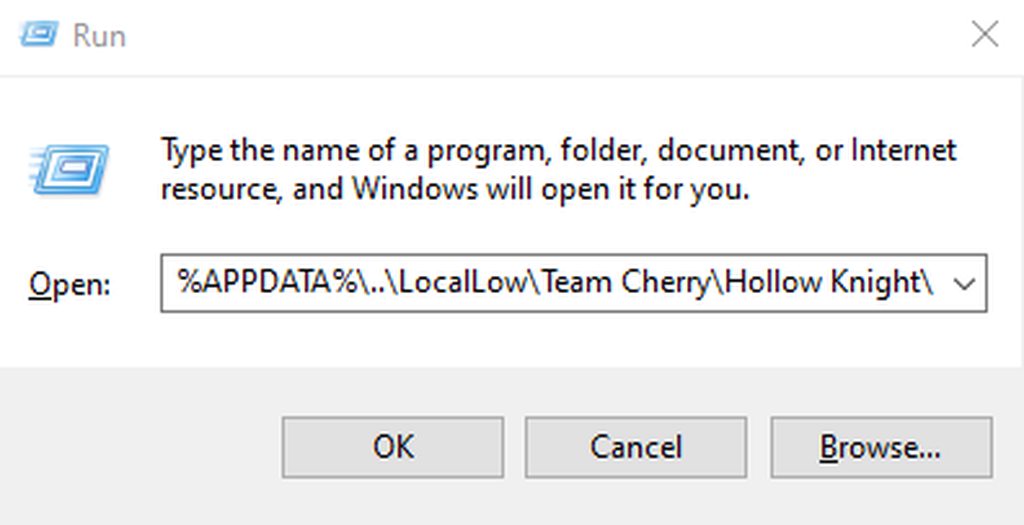
just copy the whole path into your file explorer address bar
or into the run command from win+r
Example: https://imgur.com/a/WjNmgP0


 fallow torrent
can i just open the global thing with NotePad?
real jacinth
yes
fallow torrent
thanks for the help :)
so i can change the health?
and when i'm done i can just put it in the Mod's Folder?
real jacinth
what will what do
fallow torrent
changing what the readme says
real jacinth
depends on what you change
fallow torrent
if i want i could make you fight a 300 health Gruz Mother?
real jacinth
sure
real jacinth
yeah
fallow torrent
and if i ever make a custom enemy would i just have to put the name of said enemy and it would work?
real jacinth
probably not
fallow torrent
okay
real jacinth
you'd have to do more than that