#archived-modding-help
1 messages · Page 241 of 1
 gloomy coral
 coral anvil
 north crystal
can the mod installer work on mac
 glass haven
There is a mod installer for mac, so I would assume yes
north crystal
do you know if it works in the same way?
glass haven
nope i actually came here witha problem with it
it just says that it quit unexpectedly whenever i try and use it
north crystal
i hope that gets fixed, do you know who made it?
glass haven
nope
north crystal
how long ago did you get it?
glass haven
like yesterday
north crystal
i'm very sceptical of downloading stuff cos of viruses are there any hints of one
glass haven
its not a virus man
there wouldn't be a whole community around it if it was malware
its in the pinned message btw
north crystal
logical me knows that but i still cant not think it
so did you get the mac installer from the pinned message
glass haven
yea
glass haven
yup
north crystal
and it just doent open?
north crystal
i wonder why
 glass meteor
hit command shift g
north crystal
what does that do?
 fair briar
Modinstaller 2 is just broken again
glass meteor
if this is mac there's like a 50% chance it wrote a log
your mother is broken again
north crystal
glass meteor
if this is mac there's like a 50% chance it wrote a log
what does that mean?
glass haven
i opened the package contents and it worked somehow
glass meteor
interesting
north crystal
glass haven
i opened the package contents and it worked somehow
so your mod installers working now?
is the mod installer formatted like it is the one with zote as the image
glass meteor
idk what this means
north crystal
is it the same as this one, or is it different?

 real jacinth
?pins
 dense shuttleBOT
Check the pinned messages for more information - https://cdn.discordapp.com/attachments/187137504393035776/823796522751623168/unknown.png

 chrome dirge
ok thank you
north crystal
whats different about it? does it work in a similar way?
 novel bronze
anyone have a download for ongiri knight
fair briar
check modding-discussion pins
novel bronze
mk
north crystal
glass meteor
Same idea though
so it just makes the mod downloading significantly easier? does it download the stuff itself?
fair briar
the installed? box
north crystal
thanks! i might get it later
 left tree
someone help me out on Multiplayer pls?
me and a friend are trying to join a server together we have done everything correctly and restarted
and nothing has worked
 quiet escarp
Could someone recommend me to get good skins from customknight?
I have no idea how to find a decent one
novel bronze
I believe CrankyTemplar has showcases of various skins? You could check out his channel or just search "CrankyTemplar skin showcases".
quiet escarp
novel bronze
I believe CrankyTemplar has showcases of various skins? You could check out his ...
thank you very much really!
 civic rock
I'm pretty sure I'm doing something wrong for multiplayer, just tell me what I should normally do so I can find out if I really AM doing something wrong.
 wheat orchid
left tree
me and a friend are trying to join a server together we have done everything cor...
wheat orchid
left tree
me and a friend are trying to join a server together we have done everything cor...
Are you using the multiplayer mods or HKMP
wheat orchid
civic rock
**I'm pretty sure I'm doing something wrong for multiplayer, just tell me what I...
Look in the pins
civic rock
Oh ok nevermind
 fallow relic
Dumb question about debug mod, how do you toggle the menu?
fallow relic
Thanks
real jacinth
I love the statement "we have done everything correctly." oh the irony
fallow relic
How do make my mouse locked with debug mod? It drifts as I play and resizes the window on accident
real jacinth
sounds like you need a new mouse
fallow relic
yeah lol. But the mouse position is locked when i play without mods
 vernal rain
fallow relic
vernal rain
fallow relic
I'm really new to using mods, how do I do a manual install?
vernal rain
in modinstaller 1 there's a button for that
fallow relic
And not in modinstaller 2 :/
vernal rain
?saves
dense shuttleBOT
Saves
Windows File Paths: (Assumes Default Steam Install Path, Adjust accordingly for DRM Free or Non-Standard Steam Path)
Game Files: C:\Program Files (x86)\Steam\steamapps\common\Hollow Knight\```
** **
Mac File Paths:
```Save Files: ~/Library/Application Support/unity.Team Cherry.Hollow Knight/
Game Files: ~/Library/Application Support/Steam/steamapps/common/Hollow Knight/hollow_knight.app/```
** **
Linux File Paths:
```Save Files: ~/.config/unity3d/Team Cherry/Hollow Knight/
Game Files: ~/.local/share/Steam/steamapps/common/Hollow Knight/```
vernal rain
game files > hollow_knight_Data > managed > mods > drop .dll file here
fallow relic
k
vernal rain
if mac, go to resources before hollow_knight_data
vernal rain
is enabled by default
fallow relic
hmm, it's not working then
vernal rain
ok, then i have no idea, sorry
fallow relic
Thanks anyways
left tree
wheat orchid
Are you using the multiplayer mods or HKMP
multiplayer mods
wheat orchid
left tree
multiplayer mods
Look in the pins for instructions on how to use them
left tree
I have
 open creek
okay I think that I'm just missing something really dumb
but I am installing mods for the first time
(on mac, I have hollow knight on steam)
and I downloaded the modinstaller 2
opened it, clicked some boxes
and then opened hollow knight and nothing is different
how do I get things to work?
 dim flax
can you get the file for version 1.4.3.2 so I can install mods please
wheat orchid
dim flax
can you get the file for version 1.4.3.2 so I can install mods please
Are you asking for somebody to pirate you a copy of hollow knight?
Or are you asking for mod files
dim flax
it gives me a error every time when I download the radience mod file
wheat orchid
What’s it say?
dense shuttleBOT
Check the pinned messages for more information - https://cdn.discordapp.com/attachments/187137504393035776/823796522751623168/unknown.png
dim flax
it does not work for me
wheat orchid
So the installer is located in your desktop folder?
 real jacinth
lol
wheat orchid
You do know you aren’t supposed to click the image right?
wheat orchid
Look around on discord for anything that looks like what it’s pointing to
dim flax
thanks for the help I downloaded the mods
dense shuttleBOT
Mods
Google Drive with Mods - https://drive.google.com/drive/u/0/folders/1lnjtSYMfRe1LyA_qSq2CoXKI6NRm_I-e
Installer - https://radiance.host/mods/ModInstaller.exe
Mod Summaries - https://docs.google.com/document/d/1cz5tcggpGofrBcM90XyTkMWjMelDHzugvQM6HpB13Ew
 rapid vigil
how to unbind a hotkey in debug mod
 topaz spade
you can click it and then click ` I think
rapid vigil
hey I have a surprisingly severe problem
i thought unbinding was done by putting escape as the key (seems logical right?)
but turns out debug just binds escape to the key
the problem is that the setting i bound to escape was "Kill Self" preventing me from ever entering the pause menu or getting the mouse to rebind the key
uninstalling and reinstalling the mod did nothing
also doesn't work when trying to press f1 in the main menu since that just does nothing
how to fix this? there's probably some file with binds and you'd just have to delete it
dense shuttleBOT
Check the pinned messages for more information - https://cdn.discordapp.com/attachments/187137504393035776/823796522751623168/unknown.png
real jacinth
?pins
topaz spade
?saves
dense shuttleBOT
Saves
Windows File Paths: (Assumes Default Steam Install Path, Adjust accordingly for DRM Free or Non-Standard Steam Path)
Game Files: C:\Program Files (x86)\Steam\steamapps\common\Hollow Knight\```
** **
Mac File Paths:
```Save Files: ~/Library/Application Support/unity.Team Cherry.Hollow Knight/
Game Files: ~/Library/Application Support/Steam/steamapps/common/Hollow Knight/hollow_knight.app/```
** **
Linux File Paths:
```Save Files: ~/.config/unity3d/Team Cherry/Hollow Knight/
Game Files: ~/.local/share/Steam/steamapps/common/Hollow Knight/```
 viscid isle
when i try to dissable a mod modinstaller2 modinstaller crashs
gloomy coral
Delete the one you have and download the latest one from the pins
real jacinth
Click the installed box
open creek
that's what makes it crash
viscid isle
yeah
 fluid mural
hello, can someone tell me how to play the MOD that makes all game a path of pain?
open creek
also, I have now tried to use modinstaller, and tried doing it manually (all according to instructions in this thread), and nothing happens at all when I open the game
gloomy coral
open creek
also, I have now tried to use modinstaller, and tried doing it manually (all acc...
What happened when you used the installer
gloomy coral
fluid mural
hello, can someone tell me how to play the MOD that makes all game a path of pai...
Decoration master mod
https://www.youtube.com/watch?v=-04JcalmOtg&t=226s&ab_channel=fireb0rn
watch first few mins of this video to get an idea how to download the mod. Then download the maps from the pins of #modding-discussion

Here's my guide on installing and using the DecorationMaster Mod, a mod which lets you both customize levels and play other people's customized levels! Credits to Sawyer and shoutouts to 56.
DOWNLOADS:
https://github.com/a2659802/HollowKnight.Decoration/releases
Under "Assets", download DecorationMaster.dll.
open creek
I opened it, clicked some boxes. Clicking to disable a mod crashed the installer, so I didn't do that. Opening hollow knight there was no change.
gloomy coral
If pressing disabled crashes the installer just install the mods you want and uninstall the ones you don't
Did you use modinstaller 1 or 2
gloomy coral
Look for modding api and see if it's updated or not
open creek
how do I tell? it doesn't have a description
real jacinth
Are the boxes checked
open creek
yes
real jacinth
Then it's installed
Is there any text top left of your title screen?
Is there a mods option in your in game options
open creek
no to both
real jacinth
So the boxes for modding api are checked on your installer?
open creek
yes
wait!
I tried again
(even though I didn't do anything different this time, and I have tried many times before)
and it works now!!!
or at least there are words on the top left!!
real jacinth
Well that's good. Make sure you only use the installer while your game is closed
But sounds like it's working
 twin hemlock
Does anyone have like a tutorial video walking you thru how to install the randomizer mods?
gloomy coral
open the modinstaller, click install next to randomizer
twin hemlock
It was actually modinstaller I was having trouble with, but I think I've got it working...
 alpine wigeon
Hi!
New here, just wanted to ask for a bit of help about how to start the modding process
Rather confused as to how to actually mod the game
Can somebody help please?
Thanks!
(Like actually creating a mod, not installing one)
gloomy coral
alpine wigeon
thanks!
 hard jacinth
kinda a dumb question but whats a good software for making skins i have photoshop and some other stuff idk whats preffered tho
real jacinth
Anything that can export pngs
 fast niche
So I keep Getting error text documents when I try to open the installer, do you know how I could fix it?
real jacinth
Not with just that info
 jovial heron
For some reason with the multiplayer mod, my gpu is getting maxed
real jacinth
Did you turn off vsync
real jacinth
300 fps? So vsync is off
real jacinth
Gpu will run at 100% if vsync is off and framerate isn't capped
jovial heron
hmm
real jacinth
It'll output as much fps as possible
jovial heron
Oh
Seems like turning it on and off again fixed it, dunno what that was about
Thanks
 queen mauve
hey i cant the multiplayer to work i have installed both mods and me and my friend are trying to join but we are having difficulty's joining we have the same ip and port in but when we join together and press the connect button we dont sure up for each other
gloomy coral
Check the pinned messages
queen mauve
Ok
 pliant lantern
queen mauve
hey i cant the multiplayer to work i have installed both mods and me and my frie...
pliant lantern
queen mauve
hey i cant the multiplayer to work i have installed both mods and me and my frie...
Fwiw, there's a newer multiplayer mod in active development, that's already working better all-around then the one on the Mod Installer.
Here's a link to the page for it:
https://github.com/Extremelyd1/HKMP
and there is a link on the page to a support server of you need help with it :thumbsup:
queen mauve
Ok
 lapis laurel
Help
I found that in the Killer Whale skin, there is some files can replace the vanilla game file
But I can't find the corresponding files
Can anyone help me
gloomy coral
there is some files that can replace vanilla game file
wdym by that
lapis laurel
It is in the folder downloaded from google drive
Such as:
1601600448396(1).png
Gen-Compass Icon Cln(1).png
Lamp Bug Cln(1)(1).png
mines_floating_crystals-resources.assets-385(1).png
SpriteAtlasTexture_Title_2048x2048_fmt12-sharedassets1.assets-4(1).png
Those are all files can replace the vanilla game files in hollow_knight_Data folder
But I cannot find the corresponding files
So can anyone help me?
lapis laurel
Hello?
fair briar
@lapis laurel that version is a bit... broken
i'll give you the right one
~ DwarfWoot
and i reccomend you dont replace the default folder
 limpid belfry
?
 gloomy coral
close the anti virus for 2 mins.
 fair briar
ignore it
limpid belfry
ima try again
fair briar
you cant
limpid belfry
how to remove from quarantine?
gloomy coral
redownload it with the anutvirus real time protection off
fair briar
go to your antivirus and then search for quarantaine
lapis laurel
Ram problem
 nocturne edge
can i fix that?
lapis laurel
Enemy rando need at least 8 GB of RAM
vernal rain
as harsh as it sounds, but afaik besides redfrog no one uses frogcore
 neon marten
I have changed all the charm textures using CharmIconList.Instance.spriteList. It shows up fine in the charms menu, but not in shops. Is there a way to change the textures in the shop?
gloomy coral
 hazy cliff
hey Im currently doing a randomiser playthrough and was wondering if i laoded a none modded save without disabling mods would that break shit?
hazy cliff
okay thanks 🙂
 sand lichen
?saves
dense shuttleBOT
Saves
Windows File Paths: (Assumes Default Steam Install Path, Adjust accordingly for DRM Free or Non-Standard Steam Path)
Game Files: C:\Program Files (x86)\Steam\steamapps\common\Hollow Knight\```
** **
Mac File Paths:
```Save Files: ~/Library/Application Support/unity.Team Cherry.Hollow Knight/
Game Files: ~/Library/Application Support/Steam/steamapps/common/Hollow Knight/hollow_knight.app/```
** **
Linux File Paths:
```Save Files: ~/.config/unity3d/Team Cherry/Hollow Knight/
Game Files: ~/.local/share/Steam/steamapps/common/Hollow Knight/```
 light vortex
?saves
dense shuttleBOT
Saves
Windows File Paths: (Assumes Default Steam Install Path, Adjust accordingly for DRM Free or Non-Standard Steam Path)
Game Files: C:\Program Files (x86)\Steam\steamapps\common\Hollow Knight\```
** **
Mac File Paths:
```Save Files: ~/Library/Application Support/unity.Team Cherry.Hollow Knight/
Game Files: ~/Library/Application Support/Steam/steamapps/common/Hollow Knight/hollow_knight.app/```
** **
Linux File Paths:
```Save Files: ~/.config/unity3d/Team Cherry/Hollow Knight/
Game Files: ~/.local/share/Steam/steamapps/common/Hollow Knight/```
vernal rain
why

 cerulean plaza
can someone walk me through on how to add skin mods?
wheat orchid

A guide that explains how to install the CustomKnight mod and add your very own custom sprites to the game!
ModInstaller: https://radiance.host/mods/ModInstaller.exe
CustomKnight Skins: https://drive.google.com/open?id=1VlXmvI6KT2vzsGItY2w3rHjeCFx8DN0n
CustomKnight Skins (The White Palace Group): https://drive.google.com/open?id=16BUDS5e4_5eRI...
cerulean plaza
sorry
wheat orchid
Anyways let me get the file path for Mac
cerulean plaza
okay
wheat orchid
Do everything in the video but instead put the skins in the path in this message #archived-modding-help message
cerulean plaza
thank you but im still not getting what hes doing
wait i think i might have it
@wheat orchid its not doing anything
i have custom knight instaled
fair briar
Whats your file path
Or do you mean customknight itself
Maybe i should whatch the vid 
Go to the place but remove the customknight part
wheat orchid
cerulean plaza
Right click hollow_knight and click open package contents
 fair briar
Then data
cerulean plaza
okay
 brazen pasture
Shriek.png & Cloak.png are sprites for when the knight gets those abilities correct ?
fair briar
Pretty sure
The shriek ability being used is in voidspells.png
And cloak being used is in knight?
Not sure
brazen pasture
no no i mean we have the sprite that is named Shriek.png is this file used only when the knight picks up the spell or normally when they perform the spell
 fair briar
brazen pasture
no no i mean we have the sprite that is named Shriek.png is this file used only ...
fair briar
brazen pasture
no no i mean we have the sprite that is named Shriek.png is this file used only ...
Look,at what i said
brazen pasture
fair briar
Look,at what i said
ah i see what you mean now, you answered where to find the abilities which indirectly answers my question that these files are not used at playtime , thanks
fair briar
cerulean plaza
Do you have the modinstaller?
 fair briar
Did you install modding api?
cerulean plaza
yes
fair briar
And then run the game once?
cerulean plaza
no
brazen pasture
cerulean plaza
on mac go in resources /data/managed
fair briar
cerulean plaza
no
Then do that
cerulean plaza
doing now
fair briar
brazen pasture
on mac go in resources /data/managed
Oh ok i have bo idea how mac works lol
But starting the game once is reccomended
brazen pasture
from what i can tell, the directory works the same way just a different file path
fair briar
brazen pasture
ah i see what you mean now, you answered where to find the abilities which indir...
I said pretty sure above that lol
fair briar
Look at what dandy said
fair briar
brazen pasture
on mac go in resources /data/managed
.
brazen pasture
fair briar
I said *pretty sure* above that lol
that's more sure than i am lol
fair briar
xD
But you can always check
The obtain for abyss shriek is longer then the use
So more floating action
brazen pasture
i think for now i'll just assume its something i can skip lol
 fair briar
But if there is a abyss shriek in voidspells then im 100% sure thet that its only used for obtaining
cerulean plaza
do i have to start a game
cerulean plaza
okay`
fair briar
Instead of data
brazen pasture
cerulean plaza
do i have to start a game
are you sure you're looking in resources/data/managed ?
fair briar
You go to resources
fair briar
 fair briar
Customknight
fair briar
Place your skins there
fair briar
Mods > customknight > folder with skins name > png's
fair briar
cerulean plaza
or unzip them
Yes unzip
 fair briar
Are in the folder Grimm_Knight png's?
fair briar
Ss whats in the grimm knight folder
cerulean plaza
the pngs
fair briar
Ok then play the game and in the pause menu click on the skin name and you're good to go :)
cerulean plaza
ty :)
@fair briar uh wheres the place ineed to click

@fair briar theres nothing
did i do something wrong?
fair briar
(Does anyone remember the dependancies of customknight?)
cerulean plaza
but
fair briar
Now im completely confused
 limber egret
 cerulean plaza
 limber egret
This is a screenshot from your video
The circle is where you should be
You're going into Data
limber egret
Same path after that: Managed, Mods, Custom Knight
glass haven
is it possible yo use skins with just the ones on modinstaller, or doI need to add those or what, because nothing is showing up for me
 limber egret
Yep, so long as each of those folders just has PNG files in it you're good
limber egret
glass haven
is it possible yo use skins with just the ones on modinstaller, or doI need to a...
Custom Knight from the mod installer is just the mod that allows you to use them. You'll need to download a skin.
You can find them in the pins.
glass haven
ok thanks, how do i do that
 limber egret
If you're on mac see the info Supernova has just been getting from us. On PC it's just Managed/Mods/custom knight.
 limber egret
?saves
dense shuttleBOT
Saves
Windows File Paths: (Assumes Default Steam Install Path, Adjust accordingly for DRM Free or Non-Standard Steam Path)
Game Files: C:\Program Files (x86)\Steam\steamapps\common\Hollow Knight\```
** **
Mac File Paths:
```Save Files: ~/Library/Application Support/unity.Team Cherry.Hollow Knight/
Game Files: ~/Library/Application Support/Steam/steamapps/common/Hollow Knight/hollow_knight.app/```
** **
Linux File Paths:
```Save Files: ~/.config/unity3d/Team Cherry/Hollow Knight/
Game Files: ~/.local/share/Steam/steamapps/common/Hollow Knight/```
limber egret
brazen pasture
Does this work for you, because this looks incorrect and is not the information I just gave to supernova.
Who is now using a custom skin, as you can see.
brazen pasture
limber egret
Does this work for you, because this looks incorrect and is not the information ...
yep that's what i've been using
brazen pasture
lol yep it was a doozy when i was trying to get the *.dll files to compile mod api because the path that every guide said was /managed was devoid of a single file , let alone *.dlls
then i figured lets look in the other directories, what's the harm and found this one and it had all the dlls
 crystal fern
I just tried launching modded hollow knight for the impossible any% mod but I cant get it to work. The mods I have installed are Debug mod, Decoration Master, QoL, and Vasi. The problem Im having is the mods arent showing up in the top left and when I try and start the game my save files are forever loading. Does anyone have a fix for this?
limber egret
Check the pins
glass haven
to do skins, I should be going thru contents-data-managed-mods, but after i open managed there is nothing in there
glass haven
mac
fair briar
Did you get the api?
glass haven
i don't recongize that so no
fair briar
Check the pins for modinstaller mac
glass haven
oh i have the mod installer
and its connected and stuff. I tried out bench warp to see if it works and yeah
fair briar
Then do you have the api, modcommon and customknight installed
glass haven
that seems bad
 glass haven
i hit the buttion and now its an orange checkmark if i clcik it again
glass haven
it just dissapeared
limber egret
It needs a moment to install
fair briar
Dont click it again when it is a orange checkmark lol
limber egret
If it disappeared it probably went down to be in alphabetical order
Go to where it should be in the list and it should be a blue square or checkmark like the rest
glass haven
yep its all in now
fair briar
Then run the game once
Just to be sure
Then search for the path again
put the skins at ~/Library/Application Support/Steam/steamapps/common/Hollow Knight/hollow_knight.app/hollow_knight_Data/Managed/Mods/CustomKnight for mac
glass haven
managed is still empty
fair briar
Ss your full path
glass haven
?
fair briar
Ss = screenshot
 fair briar
Then


 fair briar
Not data but managed
glass haven
ohhh
north crystal
if i want to delete a mod how do i do it
well more disable it
i saw the mods in the options but it doesnt show them all
and the installer crashes when i try and do it
uninstalling it works
limber egret
In your mods folder you can just drag the .dll files into the disabled folder
Then move them back when you want to use them
limber egret
Don't see what?
north crystal
the disabled folder
limber egret
Just create one
north crystal
ok and where can i find the rest of the mods
limber egret
What do you mean "rest of the mods"?
north crystal
i have 11 and i only see two
limber egret
Screenshot?
north crystal
custom hp bar and custom knight
brazen pasture
is there a way to get essence using debug mod ?
limber egret
brazen pasture
is there a way to get essence using debug mod ?
Top right menu should give essence.
But I may also be misremembering
north crystal
 brazen pasture
limber egret
Top right menu should give essence.
brazen pasture
limber egret
Top right menu should give essence.
yeah found it , it was under items
 north crystal
@limber egret what should i do?
limber egret
glass haven
I got this, but i can't interact with it for some reason
Are you trying to click with your mouse?
glass haven
yeah
limber egret
glass haven
yeah
What happens exactly?
glass haven
nothing
limber egret
north crystal
<@!369231467492016138> what should i do?
A user above had a different filepath for their mods. Just double check to see where their were.
Only a few minutes back
limber egret
glass haven
nothing
Your knight doesn't flash?
glass haven
i wasn't looking that closely so i'll check
limber egret
Can you screenshot your whole pause menu for me?
glass haven
ok got it
limber egret
It's likely you are either missing ModCommon, or your file structure is still wrong
the files need to be:
managed/mods/custom knight/daughter of hallownest/[png files]
It is common people have an extra folder in there
Also it's common for Daughter of Hallownest to need renaming, but I think they fixed that recently
north crystal
i found the mods pack with the rest of the stuff what now?
glass haven
 north crystal
i has charms and stuff in there along with the dll s
glass haven
and if i click 'change skin' nothing, but if i hit DoH the words flash a sec
fair briar
@glass haven which mods do,you have?
north crystal
limber egret
In your mods folder you can just drag the .dll files into the disabled folder
where do i create the folder?
fair briar
In mods
glass haven
Benchwarp (Disabled), custom knight, Debug, EnemyHP, Modcommon, Modconsole, API, pallette swap (disabled), QoL, Transtrans, and vasi
north crystal
so i make the folder in the mods floder
fair briar
Try restarting your pc
glass haven
don;t know what modconsole or common does, but they seemed important
north crystal
folder*
fair briar
north crystal
so i make the folder in the mods floder
Yes
 keen radish
i dont know if you guys already tried this, but maybe the folder placement is incorrect?
north crystal
any specific way of spelling it? like caps or anything
wheat orchid
glass haven
and if i click 'change skin' nothing, but if i hit DoH the words flash a sec
Screenshot the inside of the daughter of hallownest folder, also you should be clicking skin names
Also remove modconsole, just takes up screen space with a little console on your screen that you probably won’t use
glass haven
 glass haven
 wheat orchid
Go into the folders until you find the png files, then put them all in the daughter of hallownest folder
You probably will find a .zip file and a hatchling file, so extract the zip file to get the pngs
fair briar
You wont find a zip iirc
glass haven
i found a thing called DoH 1.2 filled with pngs
pliant lantern
Iirc they aren't zipped. I seem to remember it being setup to drop the root folder over the root HK folder
fair briar
glass haven
i found a thing called DoH 1.2 filled with pngs
Place that in the customknight folder
The DoH 1.2 folder
glass haven
custom knight folder looks like this now
 fair briar
Delete the one without 1.2
fair briar
Ye
glass haven
YES tysm!

 thick star
hey with the healthbar mod.. is it possible to give it an different colour?
i can barely see the health while having small screen
wheat orchid
thick star
hey with the healthbar mod.. is it possible to give it an different colour?
Yes, check out the folder with the sprites for it located in the mods folder
thick star
oke stupid question: where is it located? %appdata% i have modinstaller
fair briar
Go to steam
Right click hk
Proprties
Local files
And press "browse local files"
Then data
Managed
Mods
Enemy hpbar
wheat orchid
fair briar
Then data
*hollow_knight_Data
thick star
have found it
fair briar
You can also make it bigger
%appdata%..\locallow\team cherry\hollow knight
Then enemyhpbar.globalsettings.json
thick star
it was 1.0 i made it 3.0
but cant check how it looks cuz gf is playing a game in my libraby
 sweet garden
hey does anyone know why this doesn't work ? I have several mods enabled
 fair briar
not all mods have a option there
you can see if mods work at the top left of your main menu
glass haven
I have messed up big time. I have my screen at a lower resolution cuz my computer sucks, and now I froze hk with the debug menu and can’t understand what anything is saying to get me out of it. How do I unfreeze my game and escape the pause menu
I’m using discord on a separate device
fair briar
alt+f4
glass haven
Mac
 fair briar
np
 violet pier
how would i change the HK file directory?
i moved the game from an external drive to my C drive and now the modinstaller just says it cant locate game files
 azure stratus
im trying to get benchwarp but it isnt on modinstaller2, what do i do?
violet pier
ah nvm i saw the pinned comment
fair briar
azure stratus
im trying to get benchwarp but it isnt on modinstaller2, what do i do?
it is
search for it
its gonna be at B
 flint jackal
i wanted to get back to hk w modding this time but cannot find the installer.exe. Thing is I have already installed that long ago, and the enemy radomizer mod is still here in the game. Does anyone know its default location?
fair briar
just download it again
fallow relic
How do you disable mods? Clicking the check box just crashed modinstaller2
fair briar
otherwise check your downloads folder
azure stratus
nevermind, im a dumbass that was looking at the installed tab
fair briar
fallow relic
How do you disable mods? Clicking the check box just crashed modinstaller2
mac?
fallow relic
Windows
fair briar
azure stratus
nevermind, im a dumbass that was looking at the installed tab
are the tabs finally here? 
fair briar
fallow relic
Windows
use modinstaller 1
fallow relic
k
pliant lantern
fallow relic
How do you disable mods? Clicking the check box just crashed modinstaller2
Are you using the most recent upload of the installer?
fallow relic
I downloaded it from the pinned post
pliant lantern
I mean yeah, you can use 1 too. But the 2 crash should have been fixed when it last updated
fair briar
no
pliant lantern
If you downloaded before March 28th
It was updated early March, then again at the end of March
fair briar
2 has no readme's 
pliant lantern
fair briar
2 was made for mac
Not entirely true.
2 is made for all systems. 1 is just now intuitive for many people.
I'm actually starting like 2 more tbh, but it still doesn't see mods that aren't in the modlinks :grubsad:
pliant lantern
fair briar
2 has no readme's <:soulpensive:574847316414955550>
But it has mod descriptions
gloomy coral
How would you fix the mods that aren't in modlinks
fair briar
yeah but that doesn't have that much info
fallow relic
Where is the 1 download?
flint jackal
flint jackal
i wanted to get back to hk w modding this time but cannot find the installer.exe...
according to the pins i have to delete the previous modinstaller before i can re download again but i still dont know where the installer.exe is help
pliant lantern
?i
dense shuttleBOT
Reminder: The mod installer (https://radiance.host/mods/ModInstaller.exe) and other modding resources can be found from the pinned messages. 
gloomy coral
?I would download it from here
dense shuttleBOT
Reminder: The mod installer (https://radiance.host/mods/ModInstaller.exe) and other modding resources can be found from the pinned messages.
fair briar
gloomy coral
How would you fix the mods that aren't in modlinks
1 detects mods that are in the mods folder
gloomy coral
Oh like that
fair briar
ye
gloomy coral
flint jackal
according to the pins i have to delete the previous modinstaller before i can re...
Death for it using win+s
pliant lantern
fallow relic
Should I uninstall 2?
They aren't installed- just programs. You can leave it or delete it; up to you
gloomy coral
Search*
flint jackal
gloomy coral
Death for it using win+s
i tried, didnt get anything, unless it goes by other names than mod, modinstaller, hk, hkmod etc.
gloomy coral
When I search for it, it comes
fair briar
does 2 have a search function yet?
gloomy coral
So maybe it's already deleted
fair briar
oh nice
flint jackal
gloomy coral
So maybe it's already deleted
this is weird because my hollow knight game still has the enemy radomizer turned on?
gloomy coral
Modinstaller isn't required for mods
It's just the easiest and recommended way to get them
flint jackal
so it doesnt matter? as i can just go and install a new one?
 pliant lantern
Mod installer doesn't make mods work
flint jackal
ohhhh
pliant lantern
It just puts files in the right spot
flint jackal
ah iget it now
fallow relic
Does hollow knight have official mod support then?
pliant lantern
No
fair briar
yes
fallow relic
Cause if all it takes is dropping files in the right folder it sounds like it
pliant lantern
ModdingAPI is what makes mods work
fair briar
idk what official mod support is whyamiawnseringquuestions
gloomy coral
Official as in made by TC then the answer is no
fallow relic
pliant lantern
ModdingAPI is what makes mods work
Ok.
pliant lantern
Btw, if you already had the API installed, and redownload ModInstaller, then it's possible that the "revert to unmodded" button won't work
fallow relic
Yeah that is happening to me
pliant lantern
If you want to play unmodded, you'll need to use Steam's "verify Integrity" option, if that comes up
pliant lantern
fair briar
they should fix that
There's not really an easy fix. I assume distributing the vanilla assembly is frowned upon
fair briar
just search if there already is a backup
pliant lantern
I guess it could check the hash of the assembly before doing anything as well
fair briar
and if there is dont replace it
violet pier
when i try to install Vasi, it gives me an error?
gloomy coral
What error
violet pier
 violet pier
i tried that
fair briar
love a blue screen
gloomy coral
Then use modinstaller 2
fair briar
hello again
violet pier
where is that?
gloomy coral
violet pier
oh ok thanks
gloomy coral
Just ignore what I said
fair briar
you'll want to go to C:\tmp\HKmodinstaller and delete LICENSE
then restart the pc
then start the modinstaller
glass haven
there's a list of possible solutions to the controller issues that sometimes happens, is ther a link to that message, or is it pinned
fair briar
lemme look
ModdingAPI (the things that auto-installs when you launch ModInstaller, and is required for mods) messes up controllers for some people, for some reason.
Common things to try:
🔹In my case, I had to use Steam's Big Picture Mode to "Force Controller" in the settings for Hollow Knight. With this solution, I have to have my controller plugged in before I launch Hollow Knight, otherwise steam doesn't do its thing.
🔹In some cases, waiting to plug in the controller until after you get into the Main Menu makes it work.
🔹In some cases, using a program (such as Steam's Big Picture, or Joy2Key, or similar) to remap all of the controller buttons to act as Keyboard inputs fixes it.
Assuming you're on Windows, you may also want to toggle "Native Controller Input" in Hollow Knight's settings (in the Main Menu, Settings, Controller settings). If it's ON, then turn it OFF (and vice versa). That may also fix it (that was another problem I had at least).
From DwarfWoot#0643. (#archived-modding-help message)
(isn't guarranteed to work)
 viral mural
Does anyone know how to modify nail base damage ? (for example, i would like to halve my nail damage, for each upgrade)
fair briar
hmm
debug mod allows change of nail damage
but only 4 at a time
you can make your own mod, or save-edit
gloomy coral
viral mural
Does anyone know how to modify nail base damage ? (for example, i would like to ...
You can do it manually by editing a save
viral mural
Yeah i saw that
But I would like to do a "vanilla run", like I modify game files, and i never touch it again
I'm surely asking too much lol
viral mural
gloomy coral
You can do it manually by editing a save
I'll use it if I have no other choice
novel bronze
how do you download mods?
fair briar
?i
dense shuttleBOT
Reminder: The mod installer (https://radiance.host/mods/ModInstaller.exe) and other modding resources can be found from the pinned messages.
viral mural
fair briar
well changing nail damage is never gonna be vanilla
My english level doesnt let me explain clairly my thoughts lol
But as "vanilla" I say "closest to the vanilla game"
fair briar
fair briar
you can make your own mod, or save-edit
but the options are this
viral mural
Are mods hards to make ?
As a skyrim mod maker, making mods is very easy
But on Hollow Knight ?
fair briar
novel bronze
what is the nmae of the mod that gives you a GUN
gloomy coral
viral mural
Are mods hards to make ?
As a skyrim mod maker, making mods is very easy
I can make one for you but like after 1 hour or something
gloomy coral
novel bronze
what is the nmae of the mod that gives you a GUN
Hollow point
viral mural
thank you @fair briar !
viral mural
gloomy coral
I can make one for you but like after 1 hour or something
It's kind dude, but I'll try it myself 🙂
Thank you anyway
viral mural
Modding on Skyrim is like too easy, they are plenty of tools for it
So let's have fun 🙂
Exiting ?
I dont understand some english expressions sorry 😂
But I think it's something enjoyable
gloomy coral
viral mural
Does anyone know how to modify nail base damage ? (for example, i would like to ...
Currently the formula is 5 + 4 * upgrade so you want 5 +2 * upgrade?
viral mural
Yes 🙂
viral mural
Yes order lul
 fair ibex
probably debug? there's also some other mods that add uis like benchwarp/customknight
fair briar
oh its gone
gloomy coral
So the police can't trace him
fair briar
fair ibex
order of operations
(i always forget those im sry)
viral mural
Can we talk how talented are these people who not only does mod, but also create modding tools ?
viral mural
-_-
fair briar
:D
thick star
fair briar
Dont male the boss ones 3 times
1.5 is max i think to see it right.. and made it green
fair briar
nice
 compact sinew
Hello. I tried the mod installer today and it changed the font and I can't read it. How can I change it back to the default font?

Here is the modlog from when I installed modinstaller. I am using a Windows 10 system and I bought Hollow Knight on steam.
nocturne edge
is there a mod that makes hollow knight visible?
gloomy coral
compact sinew
Hello. I tried the mod installer today and it changed the font and I can't read ...
delete arts mod
gloomy coral
nocturne edge
is there a mod that makes hollow knight visible?
afaik no
compact sinew
gloomy coral
delete arts mod
Thank you!
 unborn linden
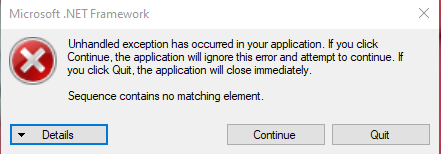
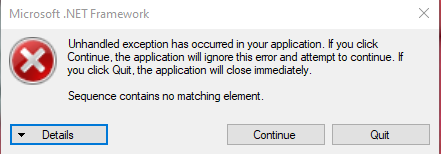
im trying to use mod installer for 2 days now, it worked today for 2 hours until it broke again (i had to use "use as admin" the first time but now its saying something about that "the sequence does not contain a matching element")
i dont want to break something so im asking if somebody knows what to do
fair briar
?pins
dense shuttleBOT
Check the pinned messages for more information - https://cdn.discordapp.com/attachments/187137504393035776/823796522751623168/unknown.png
fair briar
@unborn linden
 signal surge
hi, I read the info about the mods in the summary but what is the difference between infinite grimm and inferno king grimm ?
huh sorry I got an answer in modding-discussion, sorry for the duplicate question
 dusty glen
What does this mean, I think it means it's being installed but you can never be too sure
 signal surge
it means "the installation process is running" from my experience
fair briar
It means its installing
fair briar
signal surge
hi, I read the info about the mods in the summary but what is the difference bet...
Infinite grimm is infinite
Makes sense
signal surge
I managed to install most of what I want (and for info I already played once with randomizer and it worked fine) but royal dreamer and pale champion have an issue
gloomy coral
Screenshot main menu
signal surge
I'll give some more info (but I can do that if you want, not launched the game yet) : royal dreamer looks like it is installing fine but when I quit and relaunch modinstaller it is not installed anymore, while pale champion loads for infinite time
gloomy coral
Maybe wait a few mins for it to download before quitting the modinstaller
signal surge

 strange pawn
So y'all understand coding and shit right?
fair briar
Go to #archived-modding-development if its about making mods
strange pawn
Is there any way to somehow fix an error I made
fair briar
strange pawn
Ok will do, thanks
gloomy coral
signal surge
How long did you wait after clicking install on the mods and before closing modinstaller
signal surge
not very long, I think I quit right after seeing all blue
Is there a risk some mods are not correctly installed ?
gloomy coral
It may be that these mods are bigger than the rest and hence need more downloading time
fair briar
Just leave the modinstaller open
signal surge
ok, I thought I should close it when playing ? and I don't need to reinstall those who appear on the menu right ?
gloomy coral
You can't have hk open when using modinstaller
gloomy coral
signal surge
ok, I thought I should close it when playing ? and I don't need to reinstall tho...
I they appear on top right means your good to go (unless they say failed to load)
Left*
fair briar
gloomy coral
You can't have hk open when using modinstaller
The other way around
gloomy coral
There isn't any harm playing the game with modinstaller open (if itsnot doing anything). But there is the other way around
signal surge
understood. I don't think there is a pin with the basics of using modinstaller2 ?
gloomy coral
Why would there be?
signal surge
well I didn't find any explanation anywhere so I figured it out myself but I was not sure about things like "pay attention to not use modinstaller while game is open"
and there is that question a bit above about "what does the orange thing mean"
it could save some time answering basic questions
(ideally it would be explained quickly in modinstaller though)
dusty glen
For some reason customknight isn't working, when I click on one of the skin options the menu just disappears and when I unpause my character's sprite flashes white for a sec
this is the mods I have installed if it helps
 wheat orchid
Disable moresaves
gloomy coral
Screenshot how you put your skins
dusty glen
like in the folder or in the game?
gloomy coral
Folder

 gloomy coral
Also maybe try disabling multilayer mod idk if it's compatible or not
dusty glen
it didn't work again, also i have to disable and enable it on the pause menu to bring up the skins
wheat orchid
dusty glen
it didn't work again, also i have to disable and enable it on the pause menu to ...
Screenshot your mods folder
dusty glen
 gloomy coral
Which skin are you clicking on
wheat orchid
Hmm
dusty glen
i have
gloomy coral
Screenshot main menu
dusty glen
u mean like this?
 wheat orchid
Did you crop it at all?
dusty glen
 gloomy coral
Where did api go?
wheat orchid
Hmmm
gloomy coral
Go to the installer and reinstall modding api
dusty glen
i reinstalled it but it's still this

 ornate pewter
it keeps popping this up and idk why i bought it on steam
 dusty glen
 wheat orchid
ornate pewter
it keeps popping this up and idk why i bought it on steam
wheat orchid
ornate pewter
it keeps popping this up and idk why i bought it on steam
Are there any pirated copies of the game installed
ornate pewter
nope
wheat orchid
dusty glen
That is very strange
dusty glen
i have to disable and enable the change skin menu on the pause menu to bring up the skins
wheat orchid
ornate pewter
nope
Follow the instructions for resetting the installer in the pins
violet pier
hey quick questiomn, do you need hamatachi to play with hk multiplayer
wheat orchid
dusty glen
i have to disable and enable the change skin menu on the pause menu to bring up ...
Don’t disable/enable in game, broken stuff
wheat orchid
violet pier
hey quick questiomn, do you need hamatachi to play with hk multiplayer
No but either that, a vpn like that, or port forwarding(requires access to your router and revealing your public ip) is required
violet pier
ah ok thanks
wheat orchid
dusty glen
i have to disable and enable the change skin menu on the pause menu to bring up ...
Try going to your save files path and deleting all files with global settings in their names
?saves
dense shuttleBOT
Saves
Windows File Paths: (Assumes Default Steam Install Path, Adjust accordingly for DRM Free or Non-Standard Steam Path)
Game Files: C:\Program Files (x86)\Steam\steamapps\common\Hollow Knight\```
** **
Mac File Paths:
```Save Files: ~/Library/Application Support/unity.Team Cherry.Hollow Knight/
Game Files: ~/Library/Application Support/Steam/steamapps/common/Hollow Knight/hollow_knight.app/```
** **
Linux File Paths:
```Save Files: ~/.config/unity3d/Team Cherry/Hollow Knight/
Game Files: ~/.local/share/Steam/steamapps/common/Hollow Knight/```
ornate pewter
ok that worked thanks someone
signal surge
I tried waiting 5min after "royal dreamer" was installed but when I quit and reopen modinstaller it is still uninstalled, and I waited 5min (so far longer than other mods) for "pale champion" to install but it doesn't complete (maybe I should just be more patient ?)
also thanks for the help earlier and maybe now even if it doesn't work (I can just test all these new bosses, royal dreamer and pale champion looked like the most annoying)
dusty glen
wheat orchid
Try going to your save files path and deleting all files with global settings in...
i put them in a backup folder
it worked
Thank you!
gloomy coral
signal surge
I tried waiting 5min after "royal dreamer" was installed but when I quit and reo...
You can manually download both those mods from the link below
https://drive.google.com/uc?export=download&id=1ZWh0XrIO43NebPYHWpULYgA9Y60HHpG0
https://github.com/SalehAce1/HKFiles/blob/master/[API] Pale Champion (by Saleh).zip?raw=true
Unzip it and place the dll files in the game files-> hollow_knight_data-> managed->mods folder
 earnest slate
help, i am on mac, and when i try to open the installer it says that I have macos 10.12.6 and the app requires macos 10.13 or later. I cannot update this. pls help
signal surge
something else : when I click on an "enabled?" box (in modinstaller2 on windows 10) the programm exit immediatly, I should reset with help from the pins I guess
*reset modinstaller
I tried to reset modinstaller but it just does the same, clicking an "enabled?" box to disable "elderbug god" for exemple exits modinstaller immediatly
real jacinth
Click installed to disable
earnest slate
is there a way to manually install mods on mac? the modinstaller is giving me so many problems
 frigid spade
I installed the Hollow Knight DRPC Mod on the installer, but I don't really know how to get it to work. This was in the mod log: Error: System.DllNotFoundException: discord_game_sdk
 wheat iron
how could i install the mod installer on linux (ubuntu 20.04)
frigid spade
I don't see anything that looks like that in the mods folder
This is the whole thing
[ERROR]:[API] - Error: System.DllNotFoundException: discord_game_sdk
[ERROR]:[API] - at (wrapper managed-to-native) Discord.Discord:DiscordCreate (uint,Discord.Discord/FFICreateParams&,intptr&)
[ERROR]:[API] - at Discord.Discord..ctor (Int64 clientId, UInt64 flags) [0x00000] in <filename unknown>:0
[ERROR]:[API] - at HollowKnightDRPC.HollowKnightDRPC.Initialize () [0x00000] in <filename unknown>:0
[ERROR]:[API] - at Modding.Mod.Initialize (System.Collections.Generic.Dictionary2 preloadedObjects) [0x00000] in <filename unknown>:0 [ERROR]:[API] - at Modding.ModLoader.LoadMod (IMod mod, Boolean updateModText, Boolean changeSettings, System.Collections.Generic.Dictionary2 preloadedObjects) [0x00000] in <filename unknown>:0
[ERROR]:[API] - at Modding.ModLoader+<LoadMods>d__9.MoveNext () [0x00000] in <filename unknown>:0
wheat orchid
I’ve contacted the author of it to see if they know a fix
 honest flax
frigid spade
[ERROR]:[API] - Error: System.DllNotFoundException: discord_game_sdk
[ERROR]:[AP...
honest flax
frigid spade
[ERROR]:[API] - Error: System.DllNotFoundException: discord_game_sdk
[ERROR]:[AP...
Oh yeah. You need to install some folders in a specific folder.
wheat orchid
Nice, immediate response
honest flax
Go to https://dl-game-sdk.discordapp.net/2.5.6/discord_game_sdk.zip and download the zip.
Go inside the zip, then explore inside the lib folder. Extract both x86 and x86_64 folders into
fast niche
So if I have the Randomizer, how do I start a normal game if I wanted to?
honest flax
Extract both x86 and x86_64 into C:\Program Files (x86)\Steam\steamapps\common\Hollow Knight\hollow_knight_Data\Plugins
frigid spade
k did that
frigid spade
thank you
frigid spade
yeah it looked really cool
signal surge
so I launched a game as godseeker modeto test if the new bosses work correctly and well not really
inferno knig grimm has new attacks so it seems he works ok
wheat orchid
Most boss mods don’t work in godseeker
signal surge
oh that's why thank you someone
honest flax
Oh and I thought I would say it here. I'm about to update my Discord RPC mod because I missed some stuff to show properly in RPC from Godhome (it also supports Test of Teamwork mod, though all of them say "Test of Teamwork" in game status)
 rustic cobalt
I have Hollow Knight on game pass but I want to switch to steam. I don't want to lose my save data. Does anybody know which file to transfer to steam and where in the steam files? The files in the pic are from the game pass version.

 runic oriole
Should be same location
honest flax
The save files stay in the same location. No matter which version I suppose
runic oriole
Idk if they are mutually compatible tho
rustic cobalt
so now if I download the game off steam should the files automatically sync of do I need to move something
rustic cobalt
what files to backup i'm new to this
honest flax
You can backup the entire folder I suppose

 rustic cobalt
alright thanks
 vague herald
Heya! So for some reason im trying to run mod installer and this happens

Im not sure how to fix it :/
wheat orchid
vague herald
Heya! So for some reason im trying to run mod installer and this happens
Look in the pins for how to fix
?pins
dense shuttleBOT
Check the pinned messages for more information - https://cdn.discordapp.com/attachments/187137504393035776/823796522751623168/unknown.png
 radiant fable
im trying to uninstall crystalblobbles because i actually want to be able to do p5, but modinstaller isnt opening
is there a problem with it
update: i checked the pins and deleted the folder, and it still wont load.
 median juniper
Hey guys 🙂 I'm new here, setting up a speedrun instance for the first time, and I'm having some trouble installing modding API and DebugMod. I've installed modding api both manually and using modinstaller 2, and the game still does not recognize it. Imma throw some screenshots here, and thank you in advance to anyone willing to help me ❤️


 glossy stag
hey can anyone say how to work with the debug mod? like binding things
pliant lantern
radiant fable
update: i checked the pins and deleted the folder, and it still wont load.
If you want to play vanilla, then just use Steam's "verify Integrity" option, and it'll revert the game to vanilla.
If you are having issues return the main ModInstaller, then possibly try Mod Installer 2
pliant lantern
median juniper
Hey guys 🙂 I'm new here, setting up a speedrun instance for the first time, and...
You might want to also ask in #speedrunning the mod Installer is going to affect your main/default folder though, not the separate instance. And are you sure that the separate instance is what is actually launching?
(Also, if you're playing on current patch, then why use a separate instance?)
pliant lantern
glossy stag
hey can anyone say how to work with the debug mod? like binding things
F1 pulls up the menu, you need to be paused in-game to use it.
You bind commands by clicking the white circle next to each thing, and your next button press will be the bind.
glossy stag
Ty
median juniper
pliant lantern
You might want to also ask in <#283467985224466442> the mod Installer is going t...
actually upon launching mondinstaller it asks me to select the correct folder, so I guess it's affecting the right folder? And yes, I launched the separate instance manually. Also idk why I chose to do a separate instance, I guess just so I wouldn't crash my game completely? Might try on the main installation tho, if that seems to be the problem
 torn cipher
does anyone know how to erase keybinds in debug mod?
median juniper
pliant lantern
You might want to also ask in <#283467985224466442> the mod Installer is going t...
I tried it in my main installation and it worked 🙂 thanks
 rain abyss
Hey guys, first time here. My brother and I just downloaded the mod manager and got the multiplayer server. How does he join to my server?
rain abyss
Yeah, he got the client, i got the server
rain abyss
Should I get client as well? Also what are pins?
wheat orchid
?pins
dense shuttleBOT
Check the pinned messages for more information - https://cdn.discordapp.com/attachments/187137504393035776/823796522751623168/unknown.png
wheat orchid
Yes
Everyone needs client, host needs server
Also are you using hamachi, port forwarding, or are you on the same WiFi?
wheat orchid
Ok
So for that just go into the pause menu with the mods on, the host puts 127.0.0.1 in and clicks connect, then the other person puts the host’s network ip(forgot what it’s called, been a while) and clicks connect
You should appear on each other’s screens afterwards
rain abyss
just the ip of my conputer?
wheat orchid
I think so(?)
Been a while since I’ve looked at that stuff
Also don’t share ips with people you don’t trust
rain abyss
Ok
So we can see each other, but the person that joined first can't see the other person move.
wheat orchid
Try restarting hollow knight
rain abyss
k
pliant lantern
Fwiw, there is a newer Multiplayer Mod that actively in development:
https://github.com/Extremelyd1/HKMP
It's a bit more intuitive to use, and is getting regular updates to improve stability and add features. There's a link to a support server if you have any questions about it.
rain abyss
In this version, is there a way to do co-op? As in we can take on the same enemies together?
rain abyss
What about the other mod?
wheat orchid
Nope
wheat orchid
It’s getting regular updates while the other one has been deserted
wheat orchid
rain abyss
Is it much better?
Depends, but probably yes
pliant lantern
One of the main reasons I like HKMP: It's a single mod that handles both the Host and Server stuff, so there's no need to worry about accidentally having the wrong things installed. It also can go for really long periods of time without needing players to restart, while the older Multiplayer Mod would randomly cause players to stop staying connected to each-other after an extended amount of time.
earnest slate
pls i need help, i am on mac and the modinstaller is not compatible with my computer, since it's a bit old. I found an older version of the installerr but all it does is open up mono32, then close it. That's it. pls help
gloomy coral
earnest slate
pls i need help, i am on mac and the modinstaller is not compatible with my comp...
try this
earnest slate
gloomy coral
https://cdn.discordapp.com/attachments/462200562620825600/825938946701000724/Mod...
This is what it says
 earnest slate
I did. But when I open it, it just opens up mono32 for less than a second, then it closes
 zealous chasm
i downloaded the hollow point mod and now i can't focus
gloomy coral
check the pins
fair briar
thats what it does
zealous chasm
?saves
dense shuttleBOT
Saves
Windows File Paths: (Assumes Default Steam Install Path, Adjust accordingly for DRM Free or Non-Standard Steam Path)
Game Files: C:\Program Files (x86)\Steam\steamapps\common\Hollow Knight\```
** **
Mac File Paths:
```Save Files: ~/Library/Application Support/unity.Team Cherry.Hollow Knight/
Game Files: ~/Library/Application Support/Steam/steamapps/common/Hollow Knight/hollow_knight.app/```
** **
Linux File Paths:
```Save Files: ~/.config/unity3d/Team Cherry/Hollow Knight/
Game Files: ~/.local/share/Steam/steamapps/common/Hollow Knight/```
zealous chasm
im using it
gloomy coral
then leave it how it is
fair briar
then read the readme
zealous chasm
huh
fair briar
its intentional
honest flax
@zealous chasm these 3 points near your health bar should be full to get healed. once it's full, when you hit an enemy you sometimes earn health until you get hit, then you lose one point
fair briar
i believe you need to get 2 more 'invisible' points
fair briar
honest flax
<@!647944532343783479> these 3 points near your health bar should be full to get...
oh and if you're full then sometimes even 2
(when you get hit)
flint jackal
how does one access the bars for debug mod?
 flint jackal
pause?
flint jackal
ahh got it thanks
novel bronze
can anyone guide me on how to install mods
 ruby shore
wich mod