#networks
1 messages · Page 25 of 1
 light zealot
Fine
 prisma cobalt
also you may need to set up port-forwarding
this is important ^^ @light zealot
light zealot
okay
I copied and pasted the server.py and client.py to my different computers but that didn't seem to work
The client.py returns an error Timeouterror [Winerror 10060] A connection attempt failed because the connected party didn't properly respond after a period of time..........
light zealot
what's port forwarding btw i'm newbie at sockets
light zealot
prisma cobalt
did you change the host ip?
to socket.gethostname()
prisma cobalt
ok so if you send infomation to an IP, your router needs to know where to send the data. Since its just an IP you need to configurte the router to send any infomation sent over X port to your computer
prisma cobalt
light zealot
to `socket.gethostname()`
thats not correct
light zealot
prisma cobalt
thats not correct
then?
What should I change it to?
IPV4 addr of server?
prisma cobalt
from your client do:
Host = {insert Host public IPv4}
server:
Host = "0.0.0.0"
light zealot
ok wait a min
prisma cobalt
you can just lookup on the server "whats my ip" on google to find it
prisma cobalt
:) i do try
prisma cobalt
lol
i can send you another link to an amazing example of a chatroom between networks if you want @light zealot
it really helped me
prisma cobalt
from neuralnine, great explanation and code + further resources in description i seem to remember
https://www.youtube.com/watch?v=3UOyky9sEQY

This is one of the most requested video tutorials. Today we will build a simple TCP chat room consisting of a server and multiple clients that can connect to this server and chat with each other.
Blog Post: https://www.neuralnine.com/tcp-chat-in-python/
◾◾◾◾◾◾◾◾◾◾◾◾◾◾◾◾◾
📚 Programming Books & Merch 📚
💻 The Algorithm Bible Book: https://www.ne...
light zealot
prisma cobalt
from neuralnine, great explanation and code + further resources in description i...
I've seen this on freecodecamp.org
this is great
prisma cobalt
the upgrade/more advanced version to this:
https://www.youtube.com/watch?v=F_JDA96AdEI

After long waiting it is finally here. The sequel to the first TCP chat tutorial in Python. In today's video we will add the kicking and banning features, as well as an admin role.
◾◾◾◾◾◾◾◾◾◾◾◾◾◾◾◾◾
📚 Programming Books & Merch 📚
💻 The Algorithm Bible Book: https://www.neuralnine.com/books/
🐍 The Python Bible Book: https://www.neuralnine.com/boo...
light zealot
thanks for everything
prisma cobalt
no problem 🙂
light zealot
🙂
 velvet lichen
im new to networking, if i make a python tcp chat how can i have people connect from outside? by that i mean: not from my local network
 ember ledge
same problem
velvet lichen
aaaaaaaaaaaaaaaaaaaaaaaaaaaaaaaaaaaah i see
 slender steeple
@prisma cobalt nope, DNS requests only include the domain
prisma cobalt
nice
prisma cobalt
velvet lichen
im new to networking, if i make a python tcp chat how can i have people connect ...
coincidentally the videos are put above relate to your situation almost perfectly
 boreal grail
okk
 frozen iris
How does WSGI (and in turn ASGI) servers work? From my understanding they can spin up multiple instances of my app, as in multiple python interpreters/processes?
 potent nymph
is there a way to make a PUBLIC CHATROOM(WHICH CAN BE ACCESSED BY PEOPLE OUTSIDE MY ROUTER) without port forwarding or hosting it on aws/linode??
 lunar oak
@potent nymph Use secure shell server as reverse connection.
Some people use ngrok, it has free of charge service with some limits.
Never give you up.
 grand sedge
Do VPN's provide an IP that doens't change everytime you connect? For example I'm using X VPN and I choose UK and connect. It connects me to London. But when I do the same tomorrow it connects me to somewhere else in UK. I want it to only connect to one location/IP every time I use it. Should I use a proxy or a VPN? I dont know much about these things so excuse me if I'm asking a stupid question.
lunar oak
@grand sedge Depends on your provider. If you are using VPN provider program or something rather than using a server with static IP address and set up manually, they may change the configurations.
VPN may be more safe than proxy. Some VPN protocols can tunnel TCP and UDP packets, while proxy can only TCP.
For those who wants to expose local machine to the net:
https://ngrok.com/product
ngrok secure introspectable tunnels to localhost webhook development tool and debugging tool
 storm saffron
potent nymph
is there a way to make a **PUBLIC CHATROOM(WHICH CAN BE ACCESSED BY PEOPLE OUTSI...
storm saffron
potent nymph
is there a way to make a **PUBLIC CHATROOM(WHICH CAN BE ACCESSED BY PEOPLE OUTSI...
basically no
your statement is kind of a contradiction
there is no way to have a server that people can access if you don't port forward
although if you're willing to use an external service then ngrok could work
but that's still using an external host, just with more steps
potent nymph
lunar oak
<@727567160012046437> Use secure shell server as reverse connection.
thanks
ok
what does client.recv() do w/o any parameters
 civic wyvern
Can anybody help me? I get this error when receiving a dict with base64 image inside
civic wyvern
potent nymph
what does `client.recv()` do w/o any parameters
It reads the connection, if the client is sending data, it will return that data. Note: it is blocking
civic wyvern
civic wyvern
It probably has to do with characters that are invalid in base64 images. But anybody knows what to do about it?
Or maybe size limit
storm saffron
Print the received json string before you decode it
How are you creating the json string
civic wyvern
@storm saffron This is how I create json string:
    async def send_loop(self):
        while self.running:
            send_content = await self.send_queue.get()
            self.writer.write(str.encode(json.dumps(send_content)))
            await self.writer.drain()
This is at server end:
content = connection.recv(1024*2500)
print(content.decode())
rec_message = json.loads(content.decode())
The printed string seems to short, so probably size limit
storm saffron
Do you have a timeout set
civic wyvern
This is the printed content: The long string at the end should be base64 string
{"time": 1610204662.1158218, "action": "add", "type": "add_item", "item": {"category_name": "test", "item_name": "item", "barcode": "Testitem", "image": "iVBORw0KGgoAAAANSUhEUgAAAoAAAAHgCAYAAAA10dzkAAAgAElEQVR4nMy9WYLsOI4tCNAiqxbXO3hv/5uo60b0BzEcgKAk8xvVbcyM6+4SB5DEcAAOYvqy9P/8n/8rRESDiFiERP+bIsSTiYiImYl5/T5JiIjoDwsJEckgoqH5RLxeEaFBg5h4/ctExLzKENGbV943rXqYhJiJBjMxETGRlhvELKt9XmWNRiIhlkGk9S86V1+IiIYQveckoUkyhYSYjES2MsTEY5D9z+uhRcfqFxFB30j7wsxa56JFMM8aBR03pj1peW2PeK6RkZSFmEdTNsaYpuazXnPXVtBDOj6rC+z1vEXLyaJXeP3Kpbx1ZxUVIp5eDzPRkJc3tfXnQJKI0JxT6wieIyYvb2PL0D8jGZ8Rlzq0B4OZ2OZeqJmrqGvovBCMT/Ac0ZSZu3AYcuN9rST6YG/ZO7CxSMyN8oXyKpU+83G+mXIXTfLyk8gdMkdMJOxUkpCQyOJzliDVaQS5TFOuBAj+HKyyQ8Qcc8rMNMZwwmyubKzF+ZNoSfI+ZkGT6galfe/v0jgkqmvE+jp8LGJQhHJDee67xNqSuIz0tHojyEBrEo75h3Zi5A6tJOI6NvGL7NXNwjemw6xuJnIdR/YfZd2bVGLDj2g3tBXlZ/+LeGYujPnzR57bpyPVOEhyRv+91Q90fnb1PNpgn198o1aIiOWogoWYhM2u1LGhpGNQCF4UNsDH2f6ubdg8XepeTu3buOb2yflWrE9iIg26+IKvTfvxsLZYbSstfWh9JqFJWcfH2Mg+6aWVxHOJnRh/bMPBzJsdOOtTa2/Zkru8SZP4nBD9c1n7/x9JAYaogOkfqgCUqYHl688wHfkJpqpCU/M1r5jiNprmUmqiCocRiwWTiAQzN1KRiHZwJ6rYxBg9Ux2iWpjHxkckaeJgqDvUA8QYqr01FF3ixFykNB0Zk6FNz15odVCykxKvgAtSlXmk9tb2tCmd9PKiYKmDq5RzzYPccmooxhIVXU0VWLD0IFDcuQkw9bhTXjknedzaaObbhlPAuDIiN+9H/RvG0H+9pzf6tX6ysTSz0+BzLDDWOwGrhlOTANyFQz63TETuxBlgJKeuGkbTX3ei92DeEgtCfgVmT9JyCosuhT74KMvee9Sz/dhAO6ZLoV0beAOOia9UHgLM97R3oCacGayuOkQ4RMBPYsTufcWfl1bGDMcHurWCg73oWWc5JUUlidJyZO9mUE/zeKVbjcc73VDbY862XXTo3b6l/Hs7SF/SbmjT7H2yP+zvQw
civic wyvern
The dict is not complete, so size issue porbably. The b64 string is an image, file size says about 350kb max
storm saffron
File size of the image or of the base64
Base64 is about a 40% size increase over bytes
I think
Also why not just use http for transmitting this kind of data
civic wyvern
The exact base64 size is 356745 bytes
civic wyvern
And the other small prefix dict items should not be to much extra
civic wyvern
storm saffron
And no timeout set?
Uhm, I have not changed default timeout settings client or server side. Client side is asyncio tcp and server side is socket tcp
utf-8 byte counter says the received string is about 1450 bytes, but should i increase timeout at server/client or both?
@storm saffron
I know that I am probably asking stupid questions and that sending this data over a naked socket might not be the best option
storm saffron
yeah i think http is a better option
civic wyvern
Isn't http inefficient for small messages? These mb ones are very rare
storm saffron
Depends how frequently you're sending small messages
And whether you really care about efficiency
civic wyvern
Those big messages should be send to server only when using the app for first time. The small messages should be send more then 10 times a day. I would like fast feedback, so efficienty would be a nice
I am receiving 1465 bytes server side. I will keep looking into the timeout option.
@storm saffron Problem found, tcp is stream based, so with single connection.recv never certain that entire message is received. so I will have to buffer at server side until entire message is there. But how can I know when I received all messages?
storm saffron
you have to implement a flag system
to know when messages start and end
which is a real nightmare
it seems like you're basically implementing http manually
civic wyvern
Can't I add a unique series of bytes at the end. So I can keep on adding to a buffer, until I receive a part of bytes that contains the unique end bytes?
storm saffron
yeah but then what if you want to use those unique end bytes in a message
and you have to deal with sending retransmission requests and stuff
civic wyvern
@storm saffron but with tcp is retransmission not an issue? No data loss if I recall correctly. Is it hard to implement HTML requests?
storm saffron
ah yeah tcp is reliable but
only if the server is there to negotiate the retransmission
if at any point the server goes down and the client doesn't handle it then you might end up with misaligned data
and http requests are extremely easy to implement
bear in mind html and http are completely different
apart from that html is often sent over http
but so are images, videos, audio etc
civic wyvern
@storm saffron Thanks for the help! You know a good async http client and sync http server?
storm saffron
there are plenty, flask and requests are a popular synchronous http server and client respectively
i've really never used async for this kind of thing before but there are lots of option
s
civic wyvern
storm saffron
there are plenty, flask and requests are a popular synchronous http server and c...
I need to send and receive at both ends. is that an issue?
storm saffron
what kind of data
http requests can have data in them
but it's still set up as client/server
i.e. the server can't initiate a request to the client
civic wyvern
But I can send data from server to client? I know that client has to connect first to server
civic wyvern
Ok, thanks! really appreciated
I need both way traffic
My use case is that I need to send updates to the server, then the server will send those updates to subscribed members
slender steeple
@civic wyvern aiohttp
civic wyvern
thanks! @slender steeple @storm saffron
If I need to send data the other way, from the server to the client, how can that be done? With sockets, you can just wait continiously for server response. By I assume http has no equivalent?
And I am talking about a mobile app at client side. Not like I can setup a server and client at both ends
civic wyvern
All clients (mobile devices) 'subscribe' to a list (using credentials) at the server side (raspberry pi zero with static ip). When a client adds a change to the list, the server sends a notify to all the subscribed clients with the change.
storm saffron
ah
so the way you do that normally is by 'polling'
maybe every 30s or so the client sends a request asking the server if there have been any changes
alternatively you can use a websocket
which allows slightly more realtime communication
but is really a browser standard
civic wyvern
I would like it to be instant, or nearly instant. Beceause it's to update shop stock values
So I would need a websocket for that?
I will look into the docs
websockets indeed seem to be the solution, thanks! I will first have a good look into the docs
ember ledge
If ANYONE at all knows how to spoof with python3 Please help me
storm saffron
uh
i do
but
you don't sound like someone who's interested in ethically exploring security in an educational and legal context
if i'm honest
do you mean arp spoofing?
ember ledge
No I mean IPv4 ip header editting
ember ledge
storm saffron
uh
I have a vpn and I want to test mitigation patches however I need to create a spoofing script
ember ledge
storm saffron
of what
Like if my vpn is vulnerable to different source address ddos attacks
storm saffron
ddosing your own vpn provider is a good way to not have a vpn provider any more
ember ledge
Its my own I dont use a provider
storm saffron
ah right
ember ledge
its actually dedicated
storm saffron
well you can use something like scapy to send malformed packets
it can go right down to the hardware level to the extent your hardware supports it
wait is it called scapy
ember ledge
Nah Scapy is overrated I wanna use my own stuff
ember ledge
dm me
potent nymph
civic wyvern
It reads the connection, if the client is sending data, it will return that data...
so should i use this instead of client.recv(bytes_to_receive)
civic wyvern
With the argument, theire is a fixed max reading size. I would suggest setting a size. I do not know what the default is
 barren heron
I've been playing with sockets a lot lately, and while developing my app, it suddenly broke. I didn't change anything as far as I know, and now my app is just disconnecting in a very strange way.
Traceback (most recent call last):
  File "F:\Programming\Python\Projects\tcp-chat\client\gui.py", line 33, in run
    raw_length = self.client.recv(HEADER_LENGTH).decode('utf-8')
ConnectionAbortedError: [WinError 10053] An established connection was aborted by the software in your host machine
I don't know what could possibly be it, since it was working a moment before just fine. I restarted the server and client a million times and nothing changes.
barren heron
Nevermind, server was closing the connection due to a tiny error in list composition I made. Should make sure to keep tracebacks printing and better logging available...
slender steeple
!rule 5
 errant bayBOT
5. Do not provide or request help on projects that may break laws, breach terms of services, be considered malicious or inappropriate. Do not help with ongoing exams. Do not provide or request solutions for graded assignments, although general guidance is okay.
ember ledge
slender steeple
!rule 5
Who is this refering to?
slender steeple
you
ember ledge
How so?
im just asking how to edit ip headers. So I can figure out how to mitigate certain traffic for a vpn
 sweet bobcat
Not sure if t his is the right place to ask, but would anyone tell me if I'm being an idiot here?
#help-lollipop message
 warm kite
hello, everyone I have some questions related to IP addresses & networking & stuff, but it's not related to python, can I ask them there?
potent nymph
!ot @warm kite
errant bayBOT
Off-topic channels
There are three off-topic channels:
• #ot0-psvm’s-eternal-disapproval
• #ot1-perplexing-regexing
• #ot2-never-nester’s-nightmare
Their names change randomly every 24 hours, but you can always find them under the OFF-TOPIC/GENERAL category in the channel list.
potent nymph
If i send a message to a connected client without encoding the message what happens??
 magic furnace
the hell is a Command raised an exception: ConnectionRefusedError: [Errno 111] Connection refused
the fuck
?
storm saffron
potent nymph
If i send a message to a connected client without encoding the message what happ...
python will give you an error
if you mean trying to send a string
because python doesn't know wtf you want it to actually send
prisma cobalt
can anyone tell me what a POST request is, from my knowledge you send a piece of data to the server and it sends something back
storm saffron
POST is a possible method for an HTTP request
it allows a body of data to be sent in the request, and the server can also respond with data
prisma cobalt
@storm saffron do you have to write code to make this request, unlike a GET request the information isnt in the url so how do you do this from a webbrowser lets say
storm saffron
web browsers will make a GET request, not a POST request, when accessing a page HOWEVER
on a form action, the data can be sent as a POST request if you set it to be so
like this
whereas if it is set to GET, the form attributes are sent in the url
prisma cobalt
so google searches are handled like GET requests since what you google is in the URL
and by form you mean any sort of information the user enters like passwords and such?
storm saffron
by form i mean literally an html form element
most websites use custom js to handle sending information like that to the server
but a form element is the standard way to do it
prisma cobalt
right ok thanks
was just wondering cause i have to implement this in C# lol but their discord server doesnt have a networking channel
 opaque schooner
is lte considered as pre 4g?
 carmine cradle
idk
 placid jackal
Does anyone know how to plot points on matplotlib with timestamps. I have list of timestamps and want the to plot it in milliseconds, rather than the actual time. import dpkt, socket
from dpkt.tcp import TCP
import matplotlib.pyplot as plt
import datetime
from pprint import pprint
f=open('test.pcap', 'rb')
pcap = dpkt.pcap.Reader(f)
tslst = []
dportlst = []
stslst = []
for ts, buf in pcap:
eth = dpkt.ethernet.Ethernet(buf)
ip = eth.data
tcp = ip.data
# for packet in tcp:
# print(type(packet))
# print(type(tcp.dport))
# @manishkk you're likely hitting a non-TCP packet (e.g. an ARP or ICMP). You can try the following (untested)
if isinstance(tcp, TCP):
tslst.append((datetime.datetime.utcfromtimestamp(ts)))
# stslst.append(str(datetime.datetime.utcfromtimestamp(ts)))
dportlst.append(tcp.dport)
print ('source port =', socket.inet_ntoa(ip.src), ':', tcp.sport, '\n dest port=',socket.inet_ntoa(ip.dst), tcp.dport)
print(tslst[-1], stslst[-1])
f.close()
plt.plot(tslst, range(len(dportlst)),color='#5a7d9a', label='Python')
plt.show()
ember ledge
which libraries are best for netowrking and wifi and all that stuff
 modest inlet
is this a good place to talk and ask about the request library?
storm saffron
yes
modest inlet
I made something and I wanted to know if there was a better implementation for it
i'm doing stuff with python telegram bot (ptb)
commands have two parameters, commands(update, context) that are sent to a handler, etc
anyways this bot makes a request to an API for data. and what I'm doing with that bit is caching the response from that script for 30 seconds.
so that it doesn't make a request again if it happened in the last 30 seconds since it's unlikely to have changed
is this a good way of doing it or is there some func tool or decorator i don't know about?
 median tartan
My laptop is not detecting wifi and not connecting to any networks. I tried the netsh command, tried to change the services setting but my wifi network adapter is not showing up. Can someone guide me plz? (Windows)
ember ledge
how do I transfer data (like text) from one place to anothor with something like the socket import, Sourse code whould be greatly appreaciated
 clear bobcat
ember ledge
how do I transfer data (like text) from one place to anothor with something like...
clear bobcat
ember ledge
how do I transfer data (like text) from one place to anothor with something like...
Through local network or serial port?
ember ledge
local network
clear bobcat
ember ledge
local network
You can use socket module and UDP connection: https://wiki.python.org/moin/UdpCommunication
ember ledge
ok thanks
clear bobcat
Your welcome!
 molten juniper
modest inlet
is this a good way of doing it or is there some func tool or decorator i don't k...
molten juniper
modest inlet
is this a good way of doing it or is there some func tool or decorator i don't k...
You could probably create a decorator and in the outer wrapper fn apply a functools.lru_cache to the decorated function.
Move the expire logic to the the inner @slim flametools.wraps(fn) piece of your decorator. if the time has expired just call fn.cache_clear() before dispatching to fn(*args, **kwargs)
modest inlet
molten juniper
You could probably create a decorator and in the outer wrapper fn apply a functo...
I had seen lru_cache but how does lru_cache work with request?
does it just look at the arguments and say, oh they're the same and we have an answer that's the same already stored?
molten juniper
that's the idea behind the decorator
modest inlet
mmm... there's a lot more code that replies on this... but I guess in the actual function I can draw it from the bot_data
molten juniper
let's say you have
def get_users(context):
request.get(url)
you'd annotate it with a decorator that handles this logic for you
@expirable_cache
def get_users(context):
...
modest inlet
okay. thanks!
but then how do I access the expirable_cache value?
in the wrapped function
is there a preferred way of doing that
molten juniper
`
def expirable_cache(**cache_kwargs):
def _wrapper(fn)
expire_delta = timedelta(**cache_kwargs)
expire_time = datetime.utcnow() + expire_delta
fn = lru_cache(None)(f)
@wraps(fn)
def _wrapped(*args, **kwargs):
      nonlocal next_update
      if utcnow() > expire_time:
           # just clear the cache
           fn.cache_clear()
           expire_time = utcnow() + expire_delta
       return fn(*args, **kwargs)
 return _wrapped
`
return _wrapper
forgive for bad formatting and identation
use this decorator on your functions
modest inlet
is the new expire_time stored in the wrapper?
molten juniper
@raw condorpirable_cache(seconds=30) def func(....): ....
molten juniper
🙂
of course, this would work only in a single process, if you have several workers, thread, each one is going to have different instance of this function
in that case, you'd better keep your cache in something like redis
modest inlet
...
I think the bot has several workers
but the one that does updating is in one of the workers
storm saffron
i was working on something like exactly that actually
decorator based redis caching
but i think it's a bit overkill for your needs
i tend to deal with multiple workers by just not caring about it
storm saffron
wym doesn't do anything
you said it shows if you uncomment out the printing though
so nothing else gets printed out at all?
imo the problem is probably the blank except statement
all sorts of other undiagnosed errors could be happening inside that block
try only catching the specific error you're interested in
ConnectionRefusedError or something in the socket module
well socket.ConnectionRefusedError
for now just remove the try except to see what gets raised
ah yeah that's what i meant
none at all?
that is
odd
can you try a simpler version with no threading
actually
ah
you're using idle
 stray surge
o
storm saffron
it won't wait for every thread to end
stray surge
do i need to be in terminal
storm saffron
afaik
try it in terminal
i believe python's normal behaviour is that it waits for every thread to finish before the executable terminates
however
since idle runs it differently, it may be that it will just end immediately with the threads going on in the background but not doing anything
stray surge
maybe my network blocks outgoing port scanning?
storm saffron
well you'd get an error if that happened
try assigning your submit call to a variable
putting it in a list
then calling .result on every item in that list once you've started the threads
i think that should make the program wait for them to do stuff
stray surge
i tried scanning localhost and it did nothing xd
execute.submit(scanner, address, port)```so set this to a variable?
@storm saffron can you try running my code on your own network maybe
because i may have to mess around with my internet router
if its blocking stuff
stray surge
does the code work on your machine?
storm saffron
i havne't tried it
modest inlet
molten juniper
of course, this would work only in a single process, if you have several workers...
Thanks for your help! I'll work on this tomorrow and rerefer to the chat. Maybe share what I've made and see if it works.
ember ledge
can someone help me with a rcon client. I can connect and authorise to a server but I can't exeecute any commands on it it returns timeout error whether the timeout value is
ember ledge

im not receiving a single response
unlike any other my servers
what might be the cause
 gusty heath
im using requests to get the html source but its not the same
like if I acess from other computer
boundaries
ember ledge
gusty heath
im using requests to get the html source but its not the same
use requests_html and render javascript
slender steeple
possibly also a user agent check
errant bayBOT
 slender steeple
you have UPPERCASE attrs and camelCase locals
as opposed to the usual style of snake_case for both
"onDicconnect" misspelled on the example code on the pypi page
 velvet heart
Frick
Imma go fix it now
velvet heart
slender steeple
you have UPPERCASE attrs and camelCase locals
I used UPPERCASE for unchanging things like ip address and port
velvet heart
slender steeple
"onDicconnect" misspelled on the example code on the pypi page
Fixed
slender steeple
those arent constants
those are instance variables
constants are stuff like math.pi
where the value is always the same
and they're usually module globals
ember ledge
how do you calculate for 4095 th subnet from 180.5.0.0/28 ?
by its adjacent network?
i dont want to write through 60 blank papers to get to the 4095th subnet lol
180.5.0.0/28 means
0 = 180.5.0.0 | 180.5.0.1 - 180.5.0.14 | 180.5.0.15
1 = 180.5.0.16 | 180.5.0.17 - 180.5.0.30 | 180.5.0.31
5 = 180.5.0.80 | .81-.94 | 95
10 = 180.5.0.160 | .161 - .174 | .175
15th = 180.5.0.240 | .241 - .254 | .255
and so on to the 4095th
 waxen mantle
@ember ledge well, a /28 only goes into 256 16 times, so dividing 4095 by 16 will tell us that the 3rd octet is 255
4096/16 is an even 256, so that tells me that it's the second to last /28 there
so it'd be 180.5.255.224/28? i think?
since 180.5.255.240 would be #4096
don't quote me on that it's late
waxen mantle
to put it a little more simply, 16 * 4096 is 65535- a /16 represents 65535 addresses total, so you can infer that subnet 4095 is the 2nd to last /28 in the entire 180.5.0.0/16 supernet
 sterile atlas
I heard that
 opal jasper
how can i print to the screen while the player is giving an input
 icy quartz
Hello, say you are viewing a streaming website like Facebook, YouTube or twitch, are you connected via a proxy server? if you are, is there a way to see the proxy, or address, or whatever its called?
ember ledge
icy quartz
Hello, say you are viewing a streaming website like Facebook, YouTube or twitch,...
i believe that you are connected directly to a server, If you use something like wire shark to pull the IP you should get all the way to their public ip with a trace, some of googles architecture is public if you do a trace route. you will see how it connects.
icy quartz
Alright thanks*
 mental frost
Can someone explain to me what are the different types of hosts in AF_INET Socket? I mean what's the difference between putting your IP, your device name, a blank string and "localhost"
storm saffron
when hosting or when connecting
mental frost
Hosting
I know that "localhost" or "127.0.0.1" says that only the same computer can connect, but what do the other types say?
For example how can I do that only devices in my network can connect and how do I do that the whole world can connect?
light zealot
mental frost
For example how can I do that only devices in my network can connect and how do ...
For LAN you need to provide 0.0.0.0 or 127.0.0.1 as your server ip and in client ip you need to provide the IPV4 of the network.
For the whole world to connect you need to use something called "Port forawrding " you can go to your ISP webpage to do that but I'd recommend using an application called as ngrok. You can always look upto youtube for tutorials on how to use that app. Feel free to DM me if you need any sort of help
Cheers!
civic wyvern
@storm saffron I implemented websockets, as u recommended. It works and is awesome btw. But I have a small issue. It is probably more of an async issue, but I am asking here anyways.
Original code:
self.server = websockets.serve(self.client_handler, ip, port)
asyncio.get_event_loop().run_until_complete(self.server)
asyncio.get_event_loop().run_forever()
Works fine, but I want to implement it in a running asyncio loop, using asyncio.run()
So I did this:
    async def start(self):
        self.server = await websockets.serve(self.client_handler, self.ip, int(self.port))
        await self.server.wait_closed()
This works to, but after sending a single message, the server closes connection. Anybody knows why and how to fix it?
The async def start is called using asyncio.create_task(start())
At server side, data = await socket.recev() fails, this is the info that I get at client side: websockets.exceptions.ConnectionClosedOK: code = 1000 (OK), no reason
 narrow minnow
All http requests must receive a response? There's no way to fire a post request to a server and forget about it, so like one way communication?
 gloomy root
all http requests require a response
whether its a simple 200 OK reponse or some long body
it needs a response
storm saffron
Even if the response is just a confirmation of what happened
 random dock
hello, is this good place to ask about snap7 issues?
random dock
ok, so i will be gratefull if someone can me explain this case. On my main system(windows10) with installed python i can run .py script and .exe (made by pyinstaller) also. On second system(windows7) with no python, i can't run executable script, msg: Can't find snap7 library. If installed, try running ldconfig. I searched all stackoverflow questions, and there is no properly answer for me. I added path to environment variables, added libraries snap7.dll/snap7.lib - no effects. Used command by pyinstaller: "pyinstaller.exe --onefile --paths=.\lib .\file.py", tried also with hidden import - no result.
 hazy zinc
idk if its right place to ask, but am I right to assume that streaming feature of requests module basically allows to get any media from server in real time (and then it only needs to be decoded or fed to right tool)?
Planning to start some project that involves receiving streamed audio through network - unsure about which tool to pick for that purpose
 woeful rivet
hazy zinc
idk if its right place to ask, but am I right to assume that streaming feature o...
woeful rivet
hazy zinc
idk if its right place to ask, but am I right to assume that streaming feature o...
Based on the description in the documentation I would say in your get request use stream=True
civic wyvern
narrow minnow
All http requests must receive a response? There's no way to fire a post request...
It sends a single request to the websocket, the server responds, but disconnects. But I assume that my handler breaks out of its loop
woeful rivet
Can't you just ignore the response or just assign it to _?
I haven't used responses that much to know
 real cypress
so i created a server running on 5000 port accepting connections accept() and appeding them to list
c,a = sock.accept()
list.append(c)
this is a function keep running in threading.Thread now how can i check the disconnected or closed connection from that list.
when server get closed kernal sends FIN packet and i guess there must be some built-in function to check if socket connection is alive or not.
rn i made one another function that sends some data to clients and wait for recv just to verify clients are active waiting for more ways if anyone know any better.
 uncut notch
?lock
real cypress
how can lock will help
 sacred pasture
I am not able to install Netfilterqueue in Python3 using pip3 and also using Git repository... Nothing's working
https://pastebin.com/jevdjdT0
Here's the link for the error
I am getting error while installing it, at first it doesn't getting installed for python2 and python3 both but then I found a get.py script for it to get installed and it worked for python2 but still facing issue for python3
and I am running a script using python2 which has netfil... module and I think its broken because it's not working like I expected.
Pastebin
Pastebin.com is the number one paste tool since 2002. Pastebin is a website where you can store text online for a set period of time.
I have one more problem... Like when I run the code it's working fine without errors but doesn't providing me the Javascript output, please check it out and let me know... I think maybe there's also a problem with package. and code only works on http sites.
https://github.com/Avishdhirawat0/Ethical-Hacking-Python/blob/master/code_injector.py

GitHub
Some code for the ethical hacking using python desigend by Myself and mentored by Zaid Sabih - Avishdhirawat0/Ethical-Hacking-Python
clear bobcat
sacred pasture
I am not able to install Netfilterqueue in Python3 using pip3 and also using Git...
Which Python version do you use?
 merry ledge
So, I just learned about and used a PHP reverse shell script in a CTF to exploit an upload form.
I dont really know php, so despite being interesting, I didnt follow it as well as Id like. The part about the networking is all simple enough -- listening to the correct tunnel ip and port and responding back. It's executed by loading from the web and you just use nc.
But... the part that blows my mind is that it transports the io stream over the network such that the person has a shell.
Would it be possible to do something simple on purpose from a python web app, one where you would not be able to upload and execute from the web, but you would design the endpoint and the view function that handled all the networking of the io stream.
How would you do thaat
does this convert to python easily is the tldr
slender steeple
its basically the same thing for python
there's plenty of rev shells on the internet for py
one major difference is that you cant just upload the file and run it
which means that its usually not exploitable
(unless intentionally designed, of course)
sacred pasture
clear bobcat
Which Python version do you use?
Python 2.7 and 3.9(the latest one)
clear bobcat
sacred pasture
Python 2.7 and 3.9(the latest one)
Are you sure that do you have Python's dev files?
clear bobcat
sacred pasture
Python 2.7 and 3.9(the latest one)
Additionally it seems that it's not ready to use on Python 3.9 (some internal API was changes). I quickly tested in on Python 3.6 inside Docker container and works very well.
root@f228f3558874:/# pip install NetfilterQueue
Collecting NetfilterQueue
  Downloading NetfilterQueue-0.8.1.tar.gz (58 kB)
     |████████████████████████████████| 58 kB 570 kB/s
Building wheels for collected packages: NetfilterQueue
  Building wheel for NetfilterQueue (setup.py) ... done
  Created wheel for NetfilterQueue: filename=NetfilterQueue-0.8.1-cp36-cp36m-linux_x86_64.whl size=156921 sha256=4e3b7b5f2d8a5751417d275e874a23327833773250ed8e1053dea1e0bd6b892b
  Stored in directory: /root/.cache/pip/wheels/16/2b/bc/6dbc8d2de671b2135345dc9c4600ff3b22bda97d27c502b439
Successfully built NetfilterQueue
Installing collected packages: NetfilterQueue
Successfully installed NetfilterQueue-0.8.1
 molten stream
If I wrote a proxy server and updated my web browser to run through the proxy, would this allow me to capture the HTTP requests (and responses) that are made in the browser?
slender steeple
yes
molten stream
thanks
 lilac ginkgo
any good practical cloud networking lectures on youtube etc ?
for cloud application development
sacred pasture
clear bobcat
Additionally it seems that it's not ready to use on Python 3.9 (some internal AP...
Okay... Thanks.... So I'd have to wait until developers fix this issue right???
sacred pasture
clear bobcat
Are you sure that do you have Python's dev files?
Yes... I downloaded them seperately I remember
 twilit geode
I need discord custom bot that can generate proxy in aws i'd payyy 😂
 turbid ingot
Hello guys,
I need to get an information from a website as fast as possible.
It has a blog which it publish items and has also RSS feed.
I'm not familiare with RSS feed, but i get beter result scrapping RSS feed instead of the blog.
My question is, does the info comes first in the blog then has defined time before it goes to the RSS feed or it is published at the same time ? (both on the blog and RSS feed) ?
Thanks !
 hoary sorrel
turbid ingot
Hello guys,
I need to get an information from a website as fast as possible.
I...
hoary sorrel
turbid ingot
Hello guys,
I need to get an information from a website as fast as possible.
I...
Most likely the same process that adds the page to the blog also updates the RSS feed, so the two happen at the same time
turbid ingot
hoary sorrel
Most likely the same process that adds the page to the blog also updates the RSS...
Does it not vary depending on the website?
hoary sorrel
It could. Unless they're deliberately inserting a delay, I'd expect that they click one button that uploads to both places, though. Which is why I said "most likely".
If you want to be sure, just watch both and see which one gets new posts first, and by how much
If you're already set to watch both places, that should be an easy experiment to run
turbid ingot
basically it make 5 articles per months so :/
but when it does i need to get the info instantly
well, as fast as possible at least 😄
hoary sorrel
Unless you have some reason to expect that they're deliberately delaying announcing that they've published a post after they've published that post, they're probably not. That said, it's abusive to make requests in a tight loop against a server. Real RSS clients will generally only make a request once every half hour or so. If you're gonna try and make one request a second, that's going to be really inappropriate
turbid ingot
oh, i did not know that, i'm still new on that topic
hoary sorrel
It costs a service owner money every time you make a request to them. If you're planning on making thousands or tens of thousands of requests per day, that can very easily add up.
turbid ingot
thanks for the info
i think i have to find another solution
and thanks for your time explaining me all of this !
clear bobcat
sacred pasture
Okay... Thanks.... So I'd have to wait until developers fix this issue right???
Right. Or you can fix it on your own
sacred pasture
clear bobcat
Right. Or you can fix it on your own
How ?? Could u guide me ??
 solar hazel
 rotund moon
Guys, should the website ip also be same as ipv6 if im accessing it from a device in which i have disabled ipv4?
clear bobcat
sacred pasture
How ?? Could u guide me ??
I can try, ping me so we will see what I can do for you
 rotund swift
import asyncore
import smtpd

from typing import Tuple, List, Dict, Optional


class EmailServer(smtpd.SMTPServer):

    def __init__(self):
        super().__init__(localaddr=("0.0.0.0", 25), remoteaddr=None, enable_SMTPUTF8=True)

    def process_message(self, peer: Tuple[str, int], mailfrom: str, rcpttos: List[str], data: bytes, **kwargs):
        # print email
        print(f"[From]: {mailfrom}\n[To]: {rcpttos}\n[Data]: {data.decode('utf-8')}\n\n")
        return "250 OK"


if __name__ == "__main__":
    es = EmailServer()
    asyncore.loop()
if i run this on a server with a public ip, and a domain pointing to that ip, this should print any emails sent to that domain, right?
or do i need to mess around with MX stuff for the domain?
molten stream
anyone experienced with mitmproxy? I'm having trouble getting chrome traffic to run through the proxy. It works fine for Firefox, which allows me to configure proxy settings, but Chrome directs me to the windows proxy settings. I put the same proxy settings in windows as I did for Firefox
waxen mantle
@rotund swift you will need an MX record, yes
velvet heart
Hello! I have been developing a networking library, and here is the pypi link:
https://pypi.org/project/pyNetSocket/
 light zealot
velvet heart
Hello! I have been developing a networking library, and here is the pypi link:
h...
light zealot
velvet heart
Hello! I have been developing a networking library, and here is the pypi link:
h...
Nice!
clear bobcat
velvet heart
Hello! I have been developing a networking library, and here is the pypi link:
h...
!rule 6
errant bayBOT
6. No spamming or unapproved advertising, including requests for paid work. Open-source projects can be shared with others in #python-general and code reviews can be asked for in a help channel.
 modest pebble
clear bobcat
!rule 6
modest pebble
clear bobcat
!rule 6
FYI we are fine with people showcasing free open source projects, as long as they comply with our rules
clear bobcat
modest pebble
FYI we are fine with people showcasing free open source projects, as long as the...
Okay, sorry
modest pebble
velvet heart
Hello! I have been developing a networking library, and here is the pypi link:
h...
It looks very cool! There’s one thing that cach my eyes though on the example page, you use camelCase, is there a specific reason to that?
rotund swift
@waxen mantle turns out i also had port 25 blocked too lol
velvet heart
modest pebble
It looks very cool! There’s one thing that cach my eyes though on the example pa...
No, it's just one of my first projects and I wrote code how I normally write code
Although is there a linting guide for python?
errant bayBOT
PEP 8 is the official style guide for Python. It includes comprehensive guidelines for code formatting, variable naming, and making your code easy to read. Professional Python developers are usually required to follow the guidelines, and will often use code-linters like flake8 to verify that the code they're writing complies with the style guide.
You can find the PEP 8 document here.
velvet heart
Thank you!
ember ledge
LF Tutor.Mentor in Python, willing to compensate. Not sure wehre to ask this
 quiet lantern
How do u prevent dns leaking??
 restive blaze
Don’t publish the records?
 fierce chasm
is anybody familiar with websockets?
I'm having an issue with immediate closing of connection after handshake completion.
WebSocket javascript api spits out net::ERR_CONNECTION_CLOSED error, albeit it's supposed to send a frame.
 cobalt brook
Hi can someone help me determine why my database connection isnt working (possible network issue ?)
help-aluminum
 halcyon arrow
Got a strange question for some socket guru.. Is it possible to close a socket from the server-side do you just var.close() the socket ID from an array? I am using a array to control all active socket connections so by closing the socket name would it kill that session? Let me know if you need specifics from my code.
 dire abyss
Hello I come in peace 🖖🏼 Mentor told me if you aren't good at doing something hire someone to do it for you. Im looking to hire someone to create a "Web Scraper" for me to gather my counties data... Does anyone have experience building something like that?
ember ledge
what's a portable command prompt based ssh server for Windows?
hoary sorrel
what do you mean by "command prompt based"?
restive blaze
Windows Server has OpenSSH

Overview about the OpenSSH tools used by administrators of Linux and other non-Windows for cross-platform management of remote systems.
 drowsy slate
dire abyss
Hello I come in peace 🖖🏼 Mentor told me if you aren't good at doing something ...
drowsy slate
dire abyss
Hello I come in peace 🖖🏼 Mentor told me if you aren't good at doing something ...
!rule 6
errant bayBOT
6. No spamming or unapproved advertising, including requests for paid work. Open-source projects can be shared with others in #python-general and code reviews can be asked for in a help channel.
 full dust
not sure if this is the right place, but I have a jinja2 question that I'm starting to beat my head on.
I'm pulling a .json file from ARIN like the one in the link (just grabbed a well known entitiy for example)
https://rdap.arin.net/registry/entity/FORDMO
in the json output, there's a networks dictionary, with nested lists containing a "cidr0_cidrs" dictionary. I need to yank the prefix and length from the nested "cidr0_cidrs" dict and print it like:
v(4 or 6)prefix/length. (only need v4 for what I'm doing though)
This would be parsed by ansible, which is the easy part. I just can't get a jinja2 template working to actually pull the data I need. Are there any good examples for doing this?
storm saffron
what have you tried
 weary jasper
hello,
Im running windows 7 in my pc. We have a virtual machine that runs ubuntu. just wondering is it possible to download files from virtual machine using scp? with gitbash or putty?
 west island
How do I connect 2 devices on different wifis together
clear bobcat
west island
How do I connect 2 devices on different wifis together
You can use VPN for example
halcyon arrow
weary jasper
hello,
Im running windows 7 in my pc. We have a virtual machine that runs ubun...
Yeah you just have to make sure network is passed to the VM either a virtual switch or a VLan and you can ssh (putty)onto Ubuntu and use wget git or apt get
 plucky sable
Hey does anyone know why I'm getting this error in the client script when trying to connect two devices over different Wi-Fi networks via the socket module?
TimeoutError: [WinError 10060] A connection attempt failed because the connected party did not properly respond after a period of time, or established connection failed because connected host has failed to respond
For reference, this is my server code:
host = socket.gethostbyname(socket.gethostname)
port = 12363
s = socket.socket()
s.bind((host, port))
s.listen(5)
s.settimeout(30)
c, addr = (None, None)
    try:
        c, addr = s.accept()
        print("Accepted connection")
    except socket.timeout:
        print("FAILURE")
        s.close()
        sys.exit()
this is my client code:
target = '(public ip of target device obtained via whatismyip.com)'
port = 12367
s = socket.socket()
s.connect((target, port))
have you enabled port forwarding on your router? Most likely the connection is reaching your home network's router and then being dropped, as a security measure, because no one told the router to expect incoming connections on that port.
plucky sable
Yes, I enabled port forwarding
I forgot to mention that, my bad
I enabled it on the target device
hoary sorrel
what do you mean by "target device"? It would need to be done on the router.
ember ledge
Hi
Iam having a problem with web browsing
i need to get html code or prefferably print to pdf with selenium
if i download the html code with selenium or requests, the html file takes a lot of time to load and doesnt look organized
halcyon arrow
plucky sable
Yes, I enabled port forwarding
Try connecting on the local machine run the sever on the same as the client, if ur on windows connect from the client to IP 127.0.0.1 Linux can bind to 0.0.0.0 if that works it is a port forwarding or firewall issue
storm saffron
also your port numbers are different
halcyon arrow
Ah that will do it 😂
ember ledge
hello, how to bind external ip
halcyon arrow
What do you mean bind in what sense just set the variable in the socket instead of a local IP just do a standard IPv4 make sure it’s port forwarded to the right local machine and port
ember ledge
@halcyon arrow dm?
halcyon arrow
Yeah
plucky sable
halcyon arrow
Try connecting on the local machine run the sever on the same as the client, if ...
It works fine when doing both server and client on the same machine
halcyon arrow
yeah the port numbers are different thanks to @storm saffron for pointing that out
you need to make sure that the port on the client and server are the same
plucky sable
I do that as well
I tried disabling firewall on both machines, but to no avail
I'm stumped
halcyon arrow
okay well if it is working on localhost but not outside your network it is a port or firewall issue
plucky sable
Does the client's router need to have port forwarding enabled as well?
halcyon arrow
not usually as it is not serving any connections.
ember ledge
i want to be able to make a tcp server and execute commands to it, and then the server will act on certain commands
how would i be able to do this
 neon kelp
Anyone here available to help me out with class a subnetting?
 dusk wolf
ember ledge
i want to be able to make a tcp server and execute commands to it, and then the ...
dusk wolf
ember ledge
i want to be able to make a tcp server and execute commands to it, and then the ...
 dim plank
hello
i'm struggling to retrieve a file from a ftp url
can someone provide me a simple way to doxnload this file using python please ?
 spice hound
could someone point me to an example how to create a reply to an email based on imaplib? I want to add the original body text underneath (like you know it for standard email clients). I also want to make sure that email-clients add this email to the original thread.
I can send emails, I can also add the original body text underneath, but how can I mark it as reply. And is there anything in the email header I need to set to make sure it refers to the original way?
slender steeple
@dim plank urllib.request supports ftp
dim plank
slender steeple
<@!315886578981404672> urllib.request supports ftp
yes i just found out
data = urllib.request.urlretrieve('ftp://echanges.dila.gouv.fr/JORFSIMPLE/JORFSIMPLE_20210123-004317.tar.gz', filename)
this works fine
i now need to unzip this in a folder
 sleek furnace
you can use bytes
do you have access to other side?
maybe connection was closed
try sending something after recv
try checking return value of send
ember ledge
Hi
so i have a cookies txt file
which was generated through selenium
Can I read it with requests?
ember ledge
Can someone help me sockets. I need to receive lots of data.
halcyon arrow
ember ledge
Can someone help me sockets. I need to receive lots of data.
Sockets can handle large data streams but the best way to send large data is to have a header at the start to define the length, also using multithreading can allow for more processing. I’m not too sure on sockets I’m just following other python skills
dusk wolf
async-sockets are probably the way to go
ember ledge
hey if anyone knows how can i solve this issue please help. https://stackoverflow.com/questions/65872091/using-browser-cookie3-on-a-ubuntu-vps

Stack Overflow
I im developing a simple program that will scrape a site. The only problem is that I need to login first.
I've used this browser_cookie3 library on my PC, but now I want to set it up on a VPS. Does
 violet folio
requests supports cookies @ember ledge, I'd drop browser_cookie3 if I were you
ember ledge
why
yeah i know
but i skip the logging part
i just want to save cookies from that session to a txt
and never use browsercookie3 again
 visual veldt
idk if this is related to networking but does anyone know how to fix the http 403 error when using praw
nvm
ember ledge
halcyon arrow
Sockets can handle large data streams but the best way to send large data is to ...
thanks
ember ledge
dusk wolf
async-sockets are probably the way to go
ok I have done that already, but thanks for the help
 neat wyvern
idk if email spammer is networking
but
heres my code if youre interested
if you want this to work you need to enable less secure sign in tho
this happens tho the first couple times you use it
 ocean harbor
@neat wyvern please be aware that google takes TOS violations like this extremely seriously, and have in the past for related things completely and irrevocably removed access to all google accounts related to the one that did things like this. This includes email, youtube, google docs, and in the case of organizations has resulted in the entire organization being removed. I would back up anything you have on google at the moment, just in case you did not expect this as a result.
neat wyvern
Yeah, I was gonna say sorry but I didnt know who warned me. I already have everything on google backed up and all I sent was 50 emails to myself
@ocean harbor
ocean harbor
👍
neat wyvern
i was gonna use it to mess around with my friends and make their emails blow up, but thats probably not a good idea
i probably sent 500 emails to myself while testing since last night so i hope google leaves me alone
i dont think i broke any of these
 serene vault
neat wyvern
i was gonna use it to mess around with my friends and make their emails blow up,...
serene vault
neat wyvern
i was gonna use it to mess around with my friends and make their emails blow up,...
If your friends have gmail its likely your attempt would get blocked by Google anyway
neat wyvern
@serene vault Outlook
 white adder
Hi
serene vault
neat wyvern
<@!226576800937934850> Outlook
Ah, ok that would work then. And it would be funny. Would still likely violate whatever mail's tos that you use to send the emails
 paper dagger
what would be a good approach to checking if there are same devices in the same wifi network group? like for example checking how many devices are in Wifi A and have them communicate to each other?
 rancid cosmos
hello
UserWarning: Current server name '0.0.0.0:5001' doesn't match configured server name 'host.docker.internal:5001'
running a flask app in a docker container
storm saffron
is this information or a question
rancid cosmos
im sorry lol
uhhh im getting that error and im not sure how to fix it
i tried using a --network="bridge" command
storm saffron
ah
it seems docker wants you to bind to the hostname host.docker.internal
rather than 0.0.0.0
rancid cosmos
how sir
 outer mirage
@rancid cosmos could we see the docker command or docker compose config running the container? its kind of hard to help if we dont know what container or config you're trying to use
rancid cosmos
uhh so, i switched my buildfile to try and get it to work
rancid cosmos
but this involved having to undo the SERVER_NAME variable
and set it to this
SERVER_NAME=0.0.0.0:5001
outer mirage
could i still see the config you're running? the issue you're having seems odd to me
rancid cosmos
i mean i gave the most important var
app=Flask(__name__, instance_path=os.environ.get("INSTANCE_FOLDER"))
app.config["SECRET_KEY"] = os.environ.get("SECRET_KEY")
app.config["SQLALCHEMY_TRACK_MODIFICATIONS"] = False
app.config["SQLALCHEMY_DATABASE_URI"] = os.environ.get("SQLALCHEMY_DATABASE_URI")
app.config["SQLALCHEMY_BINDS"] = {
    'user_data': os.environ.get('SQLALCHEMY_DATABASE_URI'),
    'content': os.environ.get('SQLALCHEMY_DATABASE_URI2')
}
app.config["TIMEZONE"] = 'EST'
app.config["SQLALCHEMY_ECHO"] = True
app.config["SERVER_NAME"] = os.environ.get('SERVER_NAME')```did you want the docker file?
rancid cosmos
alright my computer is a little slow, my script has an automated email that it needs to send, with an view/url (thats why the server name is important), because it needs to append the right url.
waiting on outlook to boot to see if it sent it
outer mirage
so wait
rancid cosmos
WORKDIR /srv

COPY . .

RUN apt-get update -y \
 && apt-get upgrade -y \
 && pip install gunicorn \
 && pip install -r requirements.txt \
 && echo "0.0.0.0 some.website.com" >> /etc/hosts

EXPOSE 8080

ENTRYPOINT [ "/usr/local/bin/gunicorn", "-w 4", "-b 0.0.0.0:8080", "run:app" ]```have you considered using a prebuilt container for flask?
outer mirage
i personally like https://github.com/tiangolo/meinheld-gunicorn-flask-docker
but this is less networking and more web-development
outer mirage
do you still have issues with the networking or is it just about getting the correct URL in the mail?
rancid cosmos
outer mirage
do you still have issues with the networking or is it just about getting the cor...
well it wont send the email without an app instance, and in order to do that i have to define the server name
rancid cosmos
outer mirage
do you still have issues with the networking or is it just about getting the cor...
but yeah i guess just the correct url in the mail
outer mirage
hm, i never had issues with that at all, i just use the docker i linked above and it just works™️
rancid cosmos
it's sending the mail currently, but i just checked, and the url works with 0.0.0.0:5001
ut that's not what im trying to accomplish
alright
 earnest raven
what exactly are you trying to accomplish?
 fluid phoenix
I need help:

repl.it
Using Sock Raw https://repl.it/@Projxon/Protocol-Design#main.py My goals I have challenged myself to rewrite the internet, not using packets, nothing premade (except computers and wires). I am doing this to get a better understanding of low-level networking systems. I need some guidance on this, please give some tips if you can. I know this is a...
storm saffron
you cannot accomplish this with a phone python editor unfortunately
the only network access you will have will fundamentally rely on internet protocols, probably UDP/TCP and up but potentially IP if repl.it give you access to it
which is short for 'internet protocol'
that's a laudable ambition though, and definitely a good way of learning
maybe try implementing it with a simulator, which simulates the ability to send bytes back and forth on a wire? @fluid phoenix
slender steeple
um wdym by "potentially IP"
storm saffron
well it might give access to IP sockets, or the sandboxing might somehow restrict you to TCP/UDP
I don't know
but either way you're not going to be able to do the kind of hardware access you'd need to reimplement your own protocols onto the wire
slender steeple
raw sockets require root anyways
 worthy copper
@fluid phoenix I suggest you look into C++. I actually literally just learned how to write a server and client using sockets, which is fairly low level. It's still abstracted by some system calls that help do the stuff that you seem to want to implement yourself, like TCP and UDP, and other things you could look into. I feel like this would be a pain in the ass with Python, but I could be wrong.
fluid phoenix
I already know TCP, thanks!
storm saffron
oh yeah if you've never learned how to do socket programming then definitely do that first
 wide crow
Would anybody know why I get a roughly 2-3% increase in answered devices when using scapy.arping() over scapy.srp() ?
For completeness, these are the implementations of the functions I'm comparing the results of
srp(Ether(src=int_mac,dst="ff:ff:ff:ff:ff:ff")/ARP(hwsrc=int_mac,pdst=network),iface=interface,timeout=time_to_wait,verbose=0)
arping(network,iface=interface,timeout=time_to_wait,verbose=0)
try printing the raw representation (i.e. the bytes) of the two packets you end up with
wait can you do that with higher layers
have a look in wireshark anyway
wide crow
So I looked in wireshark and see no observable difference
storm saffron
weird
wide crow
Except for one strange thing
storm saffron
!
wide crow
When the ARP broadcast goes out to the IP of the interface I'm broadcasting with I get different behaviors
with arping, it appears as an ARP announcement of 00:00:00:00:00:00
with srp, it is the true mac address
I prefer srp because it's not poisoning my arp tables, but I'm getting less results than I do with arping
 fast pier
Anyone good with VPNs?
I know that you can also hook a VPN up @ the router level, but because I have FiOS I don't want to do that. I want to create a vpn tunnel between my phone/laptop/tv so they can remain on VPN but allow access between them. That way I can use media streaming, youtube streaming, etc.
storm saffron
yeah i've seen bizarre differences in how devices react to different arp packets
so this is the destination field in the arp packet, or ip?
wide crow
hmm Sorry, could you rephrase?
 radiant nymph
what can i code with python related to nerworking
wide crow
srp is handy in that you can hard-specify a hardware interface address which gets me around the poisoning problem. arping seems to lack that feature
which is a bummer because arping seems to be outperforming srp in terms of results
halcyon arrow
ember ledge
is this server or cliebt side error
You need to wrap the socket connection for SSL as your website uses SSL I’m guessing through cloud flare take a look at this, it might be helpful https://stackoverflow.com/questions/26851034/opening-a-ssl-socket-connection-in-python
Stack Overflow
I'm trying to establish a secure socket connection in Python, and i'm having a hard time with the SSL bit of it. I've found some code examples of how to establish a connection with SSL, but they all
ember ledge
Thank you so much

 halcyon arrow
Okay you need to look at the answer on the stack website you are still connecting to the client socket (meteorclient) in this case it looks like you not using the full HTML path to the socket ‘atshop.io/websocket’ . You have the same error because you entered new code in but have not made a consideration for the previous code written it is not linked in any way. Check the first answer on the stack page it has the correct code and how to connect the IP in your case a website to the socket. Might be better if you DM me if you have more issues save this chat from having multiple conversations
ember ledge
oh sorry
halcyon arrow
No worries that why people ask to find out 👍
ember ledge
halcyon arrow
No worries that why people ask to find out 👍
sorry for asking a basic question but waht does this mean
uh wait
violet folio
radiant nymph
what can i code with python related to nerworking
Anything you want really, Python supports sockets
radiant nymph
violet folio
Anything you want really, Python supports sockets
Fr like
Uhh
ddos protection
or
ddos pings?
cuz me and my friends bully each other ddos each other
violet folio
Anything you want, even Bluetooth and Radio
ember ledge
hello
can anyone help
how can i authenticate http requests using sessions id in python
 tender hare
i need help in webscrapping tell me if i should post this in another channel, i expect as output "19 km" but i get an error that the atribute is None and that ii cant get the text
        t = {
            'seller-name': item.find(class_='mp-Listing-seller-name').text,
            'seller-location': item.find(class_='mp-Listing-location').text,
            'seller-distance': item.find(class_='mp-Listing-distance'),

            'seller-title': item.find(class_='mp-Listing-title').text,
            'seller-description': item.find(class_='mp-Listing-description mp-text-paragraph').text,
            'seller-price': item.find(class_='mp-Listing-price mp-text-price-label').text,
            'seller-date': item.find(class_='mp-Listing-date mp-Listing-date--desktop').text
}```everything works except seller-distance
seller-name
Claire
seller-location
Barendrecht
seller-distance
None                  << its here None
seller-title
MacBook pro 15 inch 2016
seller-description
Macbook pro 15 inch 2016 in hele nette staat geen krasje te bekennen op een kleine beschadigingen op de hoek na zie foto. De macbo
seller-price
€ 1.100,00
seller-date
Vandaag```im using beautiful soup
because its None i cant get the 19 km text
full code: https://pastebin.com/QNtKj3u2
Pastebin
Pastebin.com is the number one paste tool since 2002. Pastebin is a website where you can store text online for a set period of time.
 brazen lava
Try other ways to find it, eg item.find("span", class_='mp-Listing-distance')
Or it's that beautiful soup isn't getting all the information cause the website is using js to download data dynamically and in that case u have to use selenium to get html
 raw vault
Hey guys I'm a new in python and I'm messing around
If I make a website using flask, is there way to get a unique domain name for free. By that I don't mean like commerical sites like wix, I want the server to run on my PC, it won't be a 24/7 server or anything just a server that will run when I run the file.
violet folio
raw vault
Hey guys I'm a new in python and I'm messing around
If I make a website using fl...
An organization of hobbyists who run an alternative DNS network, also provides access to domains not administered by ICANN.
 still sparrow
p
ember ledge
tender hare
brazen lava
Or it's that beautiful soup isn't getting all the information cause the website ...
ye i thought about it like it uses my address to calculate the distance to the seller so it uses js. thx for the suggestion of using selenium
 crimson apex
hi
I'm attempting to create a chat server
and ... when send two different messages, they bunch up into one
how can I fix this?
should I use a wait command?
clear bobcat
crimson apex
and ... when send two different messages, they bunch up into one
Can you give us more details?
crimson apex
or an example
crimson apex
clear bobcat
Can you give us more details?
so basically, ill do
client.send("hi".encode("ascii"))
client.send("bye".encode("ascii"))```and of course the server end
hi = client.recv(1024).decode("ascii")
bye = client.recv(1024).decode("ascii")```and i'll get
"hibye" as the message
crimson apex
clear bobcat
Can you give us more details?
hello?
clear bobcat
crimson apex
so basically, ill do
```py
client.send("hi".encode("ascii"))
client.send("bye"...
Is it TCP or UDP?
crimson apex
clear bobcat
Is it TCP or UDP?
tcp
I figured out a solution already but if you have another one go for it
clear bobcat
I see that you can send message size and then send message
In that case receiver knows message size so he can split one string into multiple messages
crimson apex
clear bobcat
In that case receiver knows message size so he can split one string into multipl...
thing is ... I can't know the message size because I use a variable
 velvet rapids
You should really just use a websocket.
Websockets basically do what you're trying to do (store the length at the beginning of the payload)... the message length is also not guaranteed to be an 8 bit integer so it might not just be 1 byte at the beginning of the message... it won't be that simple to do it that way @crimson apex
You could also use a null byte to separate messages or something
 lofty bough
or just lazily decode messages
i.e. you decide when it terminates, based on your message schema
but I guess that's less resistant to bugs
 true harbor
Hello I need some help from someone who knows python3 socket in relation to pygame. I wanted to write a small multiplayer game. I have a server that I have the socket server running on. When I connect to it with two different pcs from my network, the multiplayer works. But when I connect to it with pcs from two different networks, the data is sent but does not arrive. If anyone can help me with this, please DM me so I can send them the code and all the data they need.
ember ledge
!code
errant bayBOT
Here's how to format Python code on Discord:
```py
print('Hello world!')
```
These are backticks, not quotes. Check this out if you can't find the backtick key.
errant bayBOT
Here's how to format Python code on Discord:
```py
print('Hello world!')
```
These are backticks, not quotes. Check this out if you can't find the backtick key.
 compact flicker
Hii
How would you make it so data sent has some form of checksum or something
So that the server or client knows the data has not been interfered with
compact flicker
white adder
So that the server or client knows the data has not been interfered with
lol, I can't make it
white adder
Lol
 fierce orbit
anyone recomend easy beginner projects that are somewhat practical
brazen lava
hey guys so i have a downloadable link right here that when u click on it it automatically download the .xls file. How can i open and save this file somewhere with python?
ember ledge
Hi im trying to use the whois api and everytime i try to parse the xml it gives me OSError: [Errno 36] File name too long: '<?xml version="1.0" encoding="utf-8"?>
import xml.dom.minidom
import requests

url = "https://www.whoisxmlapi.com/whoisserver/WhoisService?apiKey=apikeydomainName=google.com"

r = requests.get(url).text

xmlparse = xml.dom.minidom.parse(r)
xml = xmlparse.toxml()

print(r)
 halcyon moat
is it possible to tunnel a website using ngrok?
slender steeple
@ember ledge parseString not parse
 flint crater
@halcyon moat what?! Have you even read https://ngrok.com/product ?
All it does it provide a local service running on port XYZ to a public end point. E.g local port 22/tcp for SSH can be publicly accessible with ngrok on their provided url and optionally a port that they assign to you. So you set up a tunnel to their network from your host.
So that you can allow public inbound connections on stuff that is behind firewall / NAT (the biggest use case)
hoary sorrel
I've never heard of, it looks really handy
flint crater
@hoary sorrel never used it my self, but indeed it's hand where you have to demo stuff to another network.
But ofc, a firewall may block the connections and should do it actively to avoid exposing a service due to hackers or user error.
halcyon moat
flint crater
<@!712088208514482197> what?! Have you even read <https://ngrok.com/product> ? ...
So I can’t use it to get around port forwarding
flint crater
@halcyon moat yes you can use this, that is literally what I wrote, so you can allow inbound connections through NAT (which is essentially the same as port forwarding - and that's the biggest use case for this).
But there might be a firewall blocking this (in your infrastructure), try it and see! 🙂
halcyon moat
Ok ngrok is what I’m looking for thanks
I am new to the networking side of web development
flint crater
It's nothing about web development, this is just networking fundamentals honestly 😛
halcyon moat
Oki
flint crater
(Note, I've not read exactly what their software does, I can only assume) So, the computer imitates a connection to a remote host, what it create is a tunnel between the PC and their infrastructure, this connection is like a tunnel (think driving a car), you can get one from one point to another with this tunnel. So, they send connection from their side through the tunnel to reach your PC and the service you are allowing it access on a specific port.
That explains it? Note that some firewalls limit connections on how long a tunnel can stay open e,g don't allow to have a tunnel (connection) open for longer than 60 minutes towards the internet.
halcyon moat
Kinda like the discord tunnel
flint crater
Don't know what that is
halcyon moat
For creating bots
halcyon moat
flint crater
Don't know what that is
Ok
ember ledge
Yo, I need a quote on a project that could perhaps use Python but needs coding regardless.
 ashen hearth
hey guys, i just got a raspberry pi and i've just setup apache running on a certain IP address
as long as another device is connected to the same internet, it's able to access the server
however, once the device that's sending a request to the server is connected on a different internet connection
it can't connect to the server anymore
so if i device b is the client side and device a is the server
if device b is on the same internet connection as device a
then it works
otherwise the page is not recognized because the device b is on a different internet connection
i wanna host this flask server on a custom domain
how do i do that?
flint crater
@ashen hearth
How nice of you to get a Raspberry Pi, great starting point!!
Some concepts, when two devices are connected to the same network (internet as you call it), it's called a LAN = Local Area Network and this network is limited to all the devices on the same LAN. I can't connect connect to your raspberry PI.
Networks are separated by what something is called a Router. My network is also a LAN; but we are separated by what's a called a WAN = wide area network, this is how all the LAN's connect. It's a huge WAN connected with routers
So how can my LAN access your LAN? For that, you need to allow access to your device.
That includes to open a port in YOUR ROUTER and in the firewall on your Raspberry IP.
On your router you want to do what is known as a port foward
So, I suggest you do some research and get understanding of these concepts:
NAT & Port fowaring
Good luck!
Also, if you are interested in networking check out networking fundamentals: https://docs.microsoft.com/en-us/learn/modules/network-fundamentals/
Also this video is the best to explain how the internet works:
https://www.youtube.com/watch?v=PBWhzz_Gn10

For more info about the movie visit the warriors site http://www.warriorsofthe.net
Subtitles/Closed Caption available in:
Russian - by Jane Lee
Chinese Simplified - by Gilbert Wong
Chinese Traditional - Shine.Yen
Polish - by Slawomir Kmiecik
Croatian- by Matej Labudić
Digital remastered from original material
ashen hearth
flint crater
<@!716970106885898241>
How nice of you to get a Raspberry Pi, great starting po...
aah so basically port forwarding allows the WAN to (in some way) redirect to** LAN**?
so that would include opening a port on the firewall of my raspberry pi when then would create a open connection to the WAN right?
so if i say port 5000 of my lan should be open, then that would mean that i would have to make localhost:5000 open
alright this makes sense
@flint crater ?
flint crater
@ashen hearth yes, you need a port forwarded from WAN to LAN in your router.
If you just want to test without hassle, check out Ngrok
It's a service that sets up a tunnel for you to do testing or demos.
Btw, not localhost:5000. On your router you would put the IP of the device and the port the service is listening on that device
flint crater
Destination IP is the IP of the raspberry
ashen hearth
192.128.38.124
flint crater
Uhm wait
ashen hearth
something like this?
flint crater
IP routing is usually related to how you get from one network to another, not NAT
flint crater
Port trigger it is
ashen hearth
flint crater
Wan port is the external port, usually same port as the port on the device
E.g 80 for HTTP and 443 for HTTPS..
Put in all fields
flint crater
Internal client is the IP of the raspberry. Protocol is usually TCP if u want hTTP/https
ashen hearth
i'm using apache to run the servers on port 5000 of my address
flint crater
Then put port 5000
On wan & lan.
All 4 fields.
Put internal client to 192.168.38.124
If that IP is ur raspberry pi
flint crater
The reason why there is 2 fields for wan & lan is so you port forward a range of port, e.g 5000 - 5005. But apache only uses 5000 so you only need to put 5000
Yes
ashen hearth
ok now i'm adding the local address of my raspberry pi
ok that's done
should i check enable mapping?
flint crater
Don't know what that does, each router have things named differently.... I would not do it
flint crater
Add yes
flint crater
Yea
ashen hearth
i mean what's the worst that could happen, no internet = no more school for the rest of the day :)
flint crater
Haha, nothing wrong will happen
ashen hearth
flint crater
Uhm wut
I g2g actuly
Actually
One thing
In the drop down for custom settings, what do you have?
flint crater
The one next 2 internal client
ashen hearth
ooh
it's some of the devicces
connected to my router
IT WORKED
I SELECTED MY ROUTER
in internal client
and it worked
ok
now what do i do to see if it worked?
do i try to access the LAN from another device which is not connected to the same router?
flint crater
Uhm, I think you have to click " enable mapping"
flint crater
Bru I need 2 go. Its like -15 here
ashen hearth
it says it's active rn
lmaooo
how do i test it
🥺
do i try to access the LAN from another device which is not connected to the same router?
@flint crater
oh well
thanks for helping lol
i appreciate it
oh no
lmao
i don't think it's working
0-o
flint crater
@ashen hearth alright, back indoors.
@ashen hearth now go to:
https://ifconfig.me/
Find you IP there, don't share it with anyone.
This is your WAN IP and if you put in browser:
Http://insert_ip_here:5000/
It should work
Get my IP Address
@ashen hearth wait, you selected the router as the internal client? That is wrong, you need to put the raspberry pi
ashen hearth
alright
1 sec
sorry
just finished dinner lol
oh no
i have no clue what this is
lol
which one is my raspberry pi
perhaps unknown? or archer_C20?
@flint crater
flint crater
Then just put custom settings
And find the IP of your raspberry pi and enter it manually
Ip should be something like: 192.168.1.xyz
flint crater
I guess you already have it? ;-)
flint crater
Wrong IP :-P
ashen hearth
i entered the local address
and i get the issue
is it fine if i dm you the internal ip or smth?
flint crater
Enter the 192.168.1.xyz ip of the raspberry pi
flint crater
Alright, that is the wrong IP anyway
But on your raspberry
Then type that in
192.168.1.111
It's only a private ip so it does not matter if I write it here
flint crater
Yeye. It works on lan. We are fixing WAN now with port forward
ashen hearth
that was the first thing i tried :3
flint crater
Oh wait
ashen hearth
yeah?
flint crater
How is your raspberry pi connected anyway???
ashen hearth
in what sense lol?
it's connected to the internet and my pc is also connected to the same network
flint crater
Because the client IP was 192.168.1.15 in the router, but the IP of your raspberry is 192.168.68.111
So it's two different networks
1 is not the same as 68
flint crater
So I think you have a bigger issue. Let me draw on my phone 📱 quick
flint crater
So there is the internet to R1. That is the main router in your house, and R2 is the second router where raspberry PI is
flint crater
So that's why I think we have different networks.
flint crater
On your pc, open command prompt and type : ipconfig
What is the IP of your LAN?
192.168.1.xyz or 192.168.68.xyz?
flint crater
Nope
Ye so the IP of your router is 192.168.1.1 right??
Like you type in http://192.168.1.1 in browser or http://192.168.68.1/ ?
flint crater
Im on my pc now.... this it what is known as double nat:
https://www.downloads.netgear.com/files/answer_media/images/30186/2.png
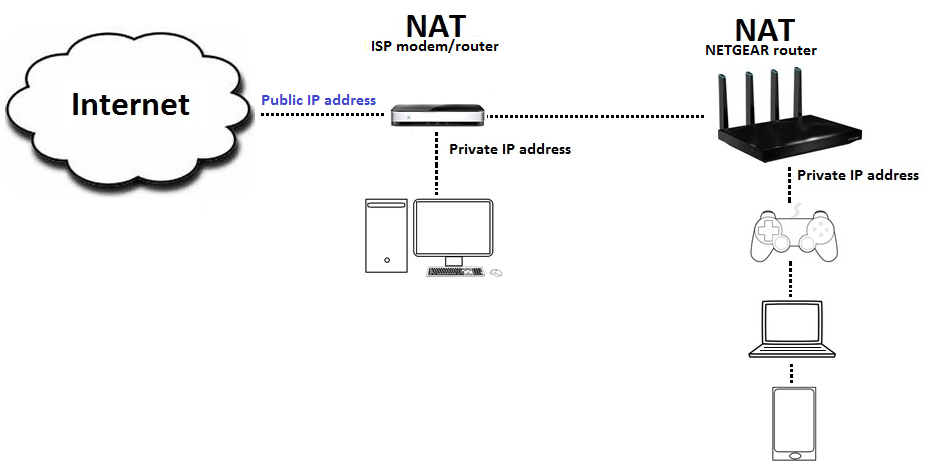

it can cause issues, but usually fixable
flint crater
what happens if you go to http://192.168.68.1 ?
ashen hearth
dm?
flint crater
sure
 raven flame
Not entirely sure this is the right channel, but are there any resources for transmitting live video and audio via websocket. I get I can just send mjpeg frames for video, but what about audio?
They don't necessarily have to use the same websocket.
I have tried webRTC which works for the most part, except when there are multiple viewers, but I would rather have my own implementation.
flint crater
@raven flame this is the right place.
@raven flame I'd say stick with webRTC. as with websocket you literally have implement all the low level stuff. ( might be wrong, but I would stick with webRTC in any case)
raven flame
Fair enough, currently I'm using UV4L to spin up a webRTC server on the same device as a flask server. UV4L has a bunch of issues and is closed source, do you know of any python webRTC libraries I can use what will allow me to use a usb webcam?
It's an RPi fwiw
raven flame
Doesn't have to be python no, what non-python approach did you have in mind?
gloomy root
I mean FFMpeg is incredibly powerful and might be a consideration for this
flint crater
gloomy root
I mean FFMpeg is incredibly powerful and might be a consideration for this
Does not support webRTC, other than that, ffmpeg is the choice for video stuff
raven flame
Yeah, the issue is ffmpeg only supports tcp/udp streaming and ffserver is deprecated
if I use ffmpeg to send from the tcp stream from the rpi and recieve on the webserver, I still need to find a way to show it in a browser with low latency
I know for a fact that this is how the website vigibot.com handles their video streaming but their webserver is closed source
I'm guessing in that case I would still need to send the final stream video generated by ffmpeg from the webserver to the browser via websocket?
gloomy root
FFMpeg has bindings to WASM
raven flame
Oh wow, I did not know that
gloomy root
the common way of streaming though is using ffmpeg to stream and encoding video to a hls stream or other live streaming protocol and then any HTML5 video player can hook onto that
raven flame
That sounds almost exactly like what I want, do you happen to know what sort of latency encoding in a browser introduces?
gloomy root
depends on what it is
hence why generally you stream it in chunks
Overall though ive used ffmpeg's bindings for wasm and its actually pretty good
generally an idea might be
ffmpeg -> server -> other clients
https://github.com/gwuhaolin/livego is a really good pre made streaming server

GitHub
live video streaming server in golang. Contribute to gwuhaolin/livego development by creating an account on GitHub.
 hollow parcel
guys, how can i get json info to send with request.post?
gloomy root

GitHub
FFmpeg for browser and node, powered by WebAssembly - ffmpegwasm/ffmpeg.wasm
raven flame
Thanks, my set up is a bit odd, I have an RPi running a flask server using socketio and the webRTC server i want to remove, then just a simple react app hosted on github pages. I assume in the case of ffmpeg -> server -> other clients, ffmpeg sends the tcp steam to the server which encodes it, but how is that served to the clients? I assume just over http?
In which case I want to avoid that to reduce latency by passing over websocket
gloomy root
If you wanna avoid latency use an actual streaming protocol
Sounds like you exactly want a proper streaming protocol like HLS and a proper server like livego that just means clients can connect to the server and share the same source
raven flame
So if I run this on my pi, i can send my ffmpeg stream out as HLS correct? Then I suppose there is some kind of HLS or RTMP player to play directly to browser?
gloomy root
raven flame
So if I run this on my pi, i can send my ffmpeg stream out as HLS correct? Then ...
HTML5 should support HLS streams out of the box for any modern browser
ffmpeg streams to server, clients then connect to the server and the player can connect to that server
you might need https://github.com/video-dev/hls.js/ to allow html5 players to directly support the live feed

but its pretty simple todo
raven flame
In my case I'm too lazy to set up a server between the pi and webapp, running ffmpeg and livego both on the same pi would work though right?
gloomy root
Yeah
livego is pretty drag n drop
just build and run then just use the REST api to make a stream endpoint
ember ledge
how do i make my own proxy?
raven flame
Uv4l actually putputs a hls stream, but I haven't been able to actually play it in a browser, i guess it must have been a uv4l issue after all
I'm guessing livego doesn't support ssl so I will have to use a reverse proxy
gloomy root
I would recommend putting it behind a reverse proxy regardless
 final latch
can someone help me understand how data consumption works with websockets?
when connected to websocket feed and you start seeing significant delays, it means you aren't consuming the data fast enough, right?
can someone elaborate on what this means, and how one might mitigate it?
hollow parcel
hey
to post different things with requests, (different pages), for example login is in 1 page. then a product is in another page, to atc it, i need before to get the product url, or i can just post the payload to the product url?