#game-development
1 messages · Page 105 of 1
 dull atlas
 torn jackal
hey guys how can i just show 2 numbers after the . with this code : TimeSurf = fond.render('Total Time : %s' %total_time, True, (255, 255, 255))
 surreal orchid
hey all. Don't suppose anyone has experience with programming a kinematics/projectile program? I'm trying to get the output window to draw the projectile while deleting the previous iteration of the projectile, rather than drawing the whole path over and over with a slight increase in the position in the x and y direction.
 proper peak
Are you using matplotlib or something like that?
surreal orchid
nothing like that no, I'm not using any sort of libraries
I'm trying to just use math and tkinter
I'm trying to find a decent example of 2d projectile motion without using pygame or matplotlib but its pretty hard to find
 grand matrix
ah yes. Indentation. My biggest weakness. My mortal enemy. Thanks alot ig
 broken citrus
grand matrix
ah yes. Indentation. My biggest weakness. My mortal enemy. Thanks alot ig
broken citrus
grand matrix
ah yes. Indentation. My biggest weakness. My mortal enemy. Thanks alot ig
happens
proper peak
surreal orchid
I'm trying to just use math and tkinter
Then it seems to me like all your should need is to change the position of the GUI element representing the projectile.
Or are you drawing manually on some kind of tkinter-provided canvas? In that case redrawing the path might be unavoidable.
broken citrus
surreal orchid
hey all. Don't suppose anyone has experience with programming a kinematics/proje...
if the bullet is stored you can just delete it after certain amoutn of time
surreal orchid
My thought is while writing pseudo code, that I'd have to work out new new position, store that value, then have tkinter draw the circle based on those values
And then work out the newer values, store those, draw another projectile and delete the previous projectile
broken citrus
im busy rn so maybe someone will help you
surreal orchid
Tbh I don't think I'll get it done by tonight, so drained dealing with my father in laws passing this week.
proper peak
If I'm reading the docs right, tkinter's canvas is a "smart" kind of canvas in that it stores each drawn thing as an object and you can modify/delete them.
surreal orchid
proper peak
If I'm reading the docs right, tkinter's canvas is a "smart" kind of canvas in t...
Oh that could potentially make this more doable then
proper peak
So all you should need is to store the handle it gives you when you draw the ball for the first time, then change its coords each frame and tkinter will redraw it.
the "Modifying Items" section in https://tkdocs.com/tutorial/canvas.html mentions that, at least
 grand apex
Anybody know of any non linear text based games or got any ideas for one? A text based roguelike would be more interesting. Also any game that could be adapted into a text based game such as blackjack etc would be cool
 odd stone
anyone know why my random.randint() function is only picking 3 out of 760 numbers this is my code: def ItemMovement1(item):
if item.rect.y == 0:
item.rect.x = random.randrange(20,780,5)
item.rect.y += 4
if item.rect.y == 800:
item.rect.y = 0
bar.lives -= 1
# 8 rectangles are each givin different x values but only 3 of them are showing so im guesing that the other items have the same x value
if item.rect.colliderect(bar.rect):
item.rect.y = 0
bar.points += 1
 cold storm
I feel this goes way beyond a flow map
 tranquil girder
odd stone
anyone know why my random.randint() function is only picking 3 out of 760 number...
tranquil girder
odd stone
anyone know why my random.randint() function is only picking 3 out of 760 number...
Where are you using randint()? I don't see it
odd stone
Oh sorry it was where randrange was and it didnt have the 5
 sinful lodge
cold storm
I feel this goes way beyond a flow map
sinful lodge
cold storm
I feel this goes way beyond a flow map
woah is that some blender shader thing
 twilit quail
you think scripting in godot is better than developing on pygame?
cold storm
geometry nodes @sinful lodge
sinful lodge
cold storm
geometry nodes <@834031712265699338>
ah nice... i dont understand blender at all
cold storm
it's like an ubber py environment for 3d content creation
 potent ice
twilit quail
you think scripting in godot is better than developing on pygame?
potent ice
twilit quail
you think scripting in godot is better than developing on pygame?
Very subjective and depends on what you are making.
 quick dove
for random events I assign a precentage to a certain event, but how do I choose which event to trigger
torn jackal
hey guys how can i just show 2 numbers after the . with this code : TimeSurf = fond.render('Total Time : %s' %total_time, True, (255, 255, 255))
Because it shows me something like that : 29.999999999
tranquil girder
torn jackal
hey guys how can i just show 2 numbers after the . with this code : TimeSurf = f...

Stack Overflow
I am getting a lot of decimals in the output of this code (Fahrenheit to Celsius converter).
My code currently looks like this:
def main():
printC(formeln(typeHere()))
def typeHere():
gl...
torn jackal
My game soon on PlayStore ! Tell me what you think about it !

Find the code on https://github.com/EdouardVincent/The-Cube

GitHub
2D video game. Contribute to EdouardVincent/The-Cube development by creating an account on GitHub.
 summer parcel
Can you develop games with python?
tranquil girder
Yes
 elfin sun
torn jackal
And the most used library is named Pygame
elfin sun
torn jackal
And the most used library is named Pygame
Is there a library to make it online multiplayer
elfin sun
torn jackal
https://youtu.be/Lr6xwQSD69c
What language did you make it in
 burnt sigil
summer parcel
Can you develop games with python?
burnt sigil
summer parcel
Can you develop games with python?
Yup, you can use Pygame, or Arcade libraries for that. I would recommend Arcade, since it is more modern and easier to work with.
torn jackal
Thats true that when u begin to use Pygame un games wont be really beautiful but i can promise u that un games become really nice really fast !
@burnt sigil but i think that Arcade is also really good
 pale wedge
Hi!
Been doing a simple Monopoly as training (I'm a beginner) and I really wanted to show it here
Is there any problem about that?
Ah crap
It's over 2k characters long
Nvm :(
 agile sage
odd stone
agile sage
odd stone
pygame is pretty good
 keen dew
odd stone
keen dew
odd stone
How do i change the layers of Sprites in pygame. i have a rectangle and some text in the same place but the rectangle is on top and i want it on the bottom. also im using pygame
 frank fieldBOT
Pasting large amounts of code
If your code is too long to fit in a codeblock in discord, you can paste your code here:
https://paste.pythondiscord.com/
After pasting your code, save it by clicking the floppy disk icon in the top right, or by typing ctrl + S. After doing that, the URL should change. Copy the URL and post it here so others can see it.
odd stone
burnt sigil
I've found this 3D engine, and I'am going to tryy it out.
https://www.ursinaengine.org/
Ursina, an open source, python powered game engine
torn jackal
Ursina is good
elfin sun
torn jackal
Ursina is good
If you made your cube game using pygame, then how can it be on Play Store
torn jackal
elfin sun
If you made your cube game using pygame, then how can it be on Play Store
Thats ez
Just have to put all my files under the apk format
Then I put them in aab
And there we go my game is on Play qtore
elfin sun
What about the controls,
torn jackal
What do u mean
elfin sun
Controls are different in a pc and Android, so how did you manage that for android
 elfin sun
Hmmm, i didn't know you could add buttons in pygame
elfin sun
Oh
torn jackal
U know that ?
elfin sun
Heard about it but never used
torn jackal
Collidepoint detects when u click on a surface
elfin sun
Hmm yeah that can be used for it
torn jackal
Ye oc
But i did a version for the computers too
With using the arrows of the keyboard
elfin sun
And did you use tiled for the level
elfin sun
It's just a level creater which can be used in pygame
elfin sun
elfin sun
It's just a level creater which can be used in pygame
You can make maps in it
torn jackal
I didnt know that ...
elfin sun
torn jackal
I created a function to create random levels
That would work better in your case
torn jackal
Yes i think so
elfin sun
torn jackal
Then I put them in aab
Is there a video on yt to do this
torn jackal
Mmmh
Actually aab is a New format
So u can find videos on apk format and then put your apk in aab
But put your programm in aab xithout put it in apk before
I dont think it s possible for the moment
elfin sun
I'll try that if it works because my game has a ton of different files
torn jackal
If u want to put your programm in apk, you have to use buildozer
elfin sun
torn jackal
If u want to put your programm in apk, you have to use buildozer
That's for kivy only right?
elfin sun
It would be very helpful if that's possible
Last time I made a game using kivy, buildozer kept raising an error at the last step
torn jackal
U were on Windows right
?
Bc you need to be on Linux or osx to use buildozer method
I know thats strange...
elfin sun
What's that
elfin sun
But it was different, limme see
torn jackal
Show me please
elfin sun
It was buildozer -v android debug
torn jackal
But what was ur error
elfin sun
I don't really remember, cuz i did it alomost 2 months ago
Maybe I can find it in my history
 shell scroll
ROTA is out now on itch!
Rotate gravity and solve puzzles to explore this colorful world!
https://twitter.com/harmony_hunnie/status/1523063755940450304


ROTA is out now!! Link below (:
ROTA is a gravity bending puzzle platforming adventure! A new game by the creator of Tiny Crate.
Rotate gravity as you walk over the edge!
Push, pull and rotate gravity-blocks to solve puzzles.
#IndieGame #PuzzlePlatfomer #IndieDev #GameDev
 Twitter
·
Twitter
·
 oblique violet
shesssh
 mortal dust
sus
 dawn quiver
oblique violet
i want to make a *minecraft python* but idk where to start
dawn quiver
oblique violet
i want to make a *minecraft python* but idk where to start
you might want to take a look at the Ursina engine
!pypi ursina
frank fieldBOT

An easy to use game engine/framework for python.
dawn quiver
this video looks interesting

A basic tutorial on how to create Minecraft in Python by using the Ursina Game Engine. This also includes a general introduction to the engine itself.
Timestamps:
0:00 - Intro
1:24 - The basics of Ursina
15:49 - Creating Minecraft style blocks
35:25 - Creating a sky, a hand and adding sounds
Project files are available here:
https://github.co...
dawn quiver
it's not exactly a tutorial
dawn quiver
not sure on that, you're gonna have to go by the docs
oblique violet
 brave elm
you will be surprised to know how simple ursina engine actually is
brave elm
you will be surprised to know how simple ursina engine actually is
lmao
thanks
 rapid barn
How can I make a game multiplayer
rapid barn
I'm trying to make a multiplayer red light green light
but I don't know how to make it multiplayer
broken citrus
rapid barn
How can I make a game multiplayer
sockets
 left beacon
Hi, I got a problem with collidepoint, I want to remove an item from a list (by index) when clicking on it, yet it removes all of them like Im turbo clicking on the same spot
how do I fix this?
left beacon
how do I make the event.type == pygame.MOUSEBUTTONDOWN be valid for only 1 frame?
left beacon
solved it by adding a time.sleep(0.1)
oblique violet
how do i install ursina without powershell
cuz my powershell is not working
can i download it with command prompt?
dawn quiver
It can be installed like any Python library, just like how you've installed the library for Discord bot
Simply have pip installed along with Python and you can install it.
oblique violet
dawn quiver
It can be installed like any Python library, just like how you've installed the ...
so i can do pip install ursina in command prompt and get it installed right?
dawn quiver
As the documentation says, yep
 oblique violet
thanks
oblique violet
dawn quiver
As the documentation says, yep
erm
alright its working sry for the ping
just about to ask why is nothing loading
oblique violet
 limpid lodge
what should I make for py
limpid lodge
what should I make for py
what game do u like to play?
you can try to remake it like me
im currently trying to remake minecraft
dawn quiver
I remember doing that
oblique violet
dawn quiver
I remember doing that
and a weird problem
from ursina import *

app = Ursina()
test_entity = Entity(model='square',color = color.blue)

app.run()
```but i only get the grey screenThat I can't help, never used the engine
oblique violet
 oblique violet
dawn quiver
That I can't help, never used the engine
oblique violet
dawn quiver
That I can't help, never used the engine
oops
np
i change it to circle and its working again
for square its call quad not square
sinful lodge
maybe becaude your camera isnt facing it
or your camera is inside of it
use EditorCamera() code to create an editor camera and move around the camera
oblique violet
sinful lodge
maybe becaude your camera isnt facing it
u mean me?
 simple belfry
hey so I'm working on collisions in pygame and I have a problem that for me is too weird to understand it.
class Tile(pygame.sprite.Sprite):
    def __init__(self, image):
        self.sprite = image
        self.rect = self.sprite.get_rect()

class Tilemap_set:
    def __init__(self, map:list):
        self.map = map
        self.tile_map = []

    def check_collision(self):
        global player

        for tile in self.tile_map:
            if player.hitbox.colliderect(tile.rect):
                player.get_hit()
here if Tile and fragment of Tile_map class. The player.get_hit method prints in terminal "wall" as you see whenever it collides with any tile. player has it's own rect defined in his class as self.hitbox. there is no errors and game runs, the tilemap is drew on to a screen, all drew tiles objects are saved to self.tilemap list, player can move etc. but when I walk into a wall, the player.get_hit method is not raising. Do you know what is wrong there?
oblique violet
alright new problem
this thing


from ursina import *
from ursina.prefabs.first_person_controller import FirstPersonController

app = Ursina()

grass_texture = load_texture('urcraft/grass_block.png')

class Voxel(Button):
    def __init__(self, position = (0,0,0)):
        super().__init__(
            parent = scene,
            position = position,
            model = grass_texture,
            origin_y = 0.5,
            texture = 'white_cube',
            color = color.white,
            highlight_color = color.lime)

    def input(self, key):
        if self.hovered:
            if key == 'right mouse down':
                voxel = Voxel(position = self.position + mouse.normal)
            if key == 'left mouse down':
                destroy(self)

for z in range(16):
    for x in range(16):
        voxel = Voxel(position=(x,0,z))

player = FirstPersonController()

app.run()
```its pitch black when i run italright i know why
lemme try
tranquil girder
oblique violet
```py
from ursina import *
from ursina.prefabs.first_person_controller import Fi...
You're trying to set the model to a texture
oblique violet
tranquil girder
You're trying to set the model to a texture
what do i do to the texture = ...
tranquil girder
= grass_texture
oblique violet
ok
tranquil girder
you did model=grass_texture, you want texture=grass_texture
tranquil girder
no, the model can't be a texture, it has to be a model
tranquil girder
or the name of one at least
oblique violet
model = cube?
tranquil girder
'cube'
tranquil girder
or actually, probably the model you made, since you're using a cusom uv mapped cube model
oblique violet
can i remove it
tranquil girder
what color?
tranquil girder
no, because the default color for Button is not white, but a slightly transparent black
oblique violet
tranquil girder
no, because the default color for Button is not white, but a slightly transparen...
ok
no wonder i got it all black
so what do i set it to
tranquil girder
It's multiplied with the texture's color, so color.white will have no visual effect
 oblique violet
tranquil girder
It's multiplied with the texture's color, so color.white will have no visual eff...
oblique violet
tranquil girder
It's multiplied with the texture's color, so color.white will have no visual eff...
help
whats this
why is it white
tranquil girder
it's a bunch of white cubes
look at the terminal, probably says texture not found
 tranquil girder
that's not it
oblique violet
oblique violet
this thing
all the directory is here
tranquil girder
something else that doesn't really matter
 tranquil girder
try loading textures the way it's described in the documentation
instead of following a tutorial which does it the wrong way
so texture='grass_block' in your case
oblique violet
tranquil girder
so texture='grass_block' in your case
huh
grass_texture = load_texture('urcraft/grass_block.png')
?
 tranquil girder
yes, because it's simple, just give it the name
tranquil girder
tranquil girder
so texture='grass_block' in your case
like this
tranquil girder
it's optional
tranquil girder
is it in the same folder or below as your script?

 tranquil girder
that's a no
oblique violet
oof
oblique violet
tranquil girder
that's a no
what do i do ;-;
tranquil girder

 tranquil girder
you're not using the custom model you made/downloaded, so the uvs are wrong
oblique violet
tranquil girder
you're not using the custom model you made/downloaded, so the uvs are wrong
huh
how do i do it
tranquil girder
model = 'name_of_your_model'
oblique violet
=.=
class Voxel(Button):
    def __init__(self, position = (0,0,0)):
        super().__init__(
            parent = scene,
            position = position,
            model = 'cube',
            origin_y = 0.5,
            texture = 'grass_block',
            color = color.white)
```this is correct right?is your model named 'cube'?
tranquil girder
and then I told you some more after, did you read that?
oblique violet
lemme read it again
oblique violet
tranquil girder
or actually, probably the model you made, since you're using a cusom uv mapped c...
huh
its not a uv mapped cube model
tranquil girder
I don't know what your model is called, so I can't answer
tranquil girder
a png is not a 3d model,. it's a flat image
oblique violet
maybe i need to draw it on my own
tranquil girder
a 3d model is something like a obj
tranquil girder

Enjoy this free chapter from our FlippedNormals Exclusive - UV Mapping for Games https://flippednormals.com/downloads/uv-mapping-for-games/
Early Bird Special - Get the full course at 25% OFF until November 6th
▶ SUBSCRIBE | http://www.youtube.com/channel/UCvd6HxqYVWvfvfaF2Ereb9Q?sub_confirmation=1
▶ MARKETPLACE | https://flippednormals.com/
...
oblique violet
thanks
oblique violet
tranquil girder
https://www.youtube.com/watch?v=Yx2JNbv8Kpg&t=19s&ab_channel=FlippedNormalsMarke...
u know any browser uv mapper?
tranquil girder
no, sorry
I use Blender
oblique violet
where can i download it
tranquil girder
oblique violet
cuz sure i will get tons of real blender if i google it
oblique violet
tranquil girder
blender.org
thanks
oblique violet
tranquil girder
blender.org
but how large is it
elfin sun
 smoky stump
Can smdy give me a link to a yt good tutorial for pygame
smoky stump
Can smdy give me a link to a yt good tutorial for pygame
There are some really cool tutorials of clear code on yt for that
smoky stump
I know him
elfin sun
Ooh
smoky stump
Yes
elfin sun
You didn't get anything on that channel?
smoky stump
I am not looking in his channel
I am only like know that channel
He explains it very crlearly
elfin sun
You can check out Tech with Tim, there's a good playlist of pygame in his channel
smoky stump
I know
elfin sun
Have you tried any of his tutorials
elfin sun
Yeah sure go n check it out
smoky stump
Thnks
elfin sun
He has covered all the basics in his videos
elfin sun
👍 😁
 sharp berry
Heyy Guys Could Anyone suggest me complete roadmap to game development
elfin sun
sharp berry
Heyy Guys Could Anyone suggest me complete roadmap to game development
There's not much opportunities in python except for some libraries like pygame, ursina but if you go with other languages like c or c++ sure you can do many things
 left jetty
A game SE is an all-rounder the could create the entire logic for any type of app (finance/construction/ etc.) not related to gaming , from the start but less so with networks,servers,db , true ?
frank fieldBOT
Hey @thin shuttle!
It looks like you tried to attach a Python file - please use a code-pasting service such as https://paste.pythondiscord.com
 scenic dome
Do you need programming or testing skills? If so I would be interested potentially.
 wind basalt
 sleek bay
oblique violet
sleek bay
oblique violet
idk how to use blender
 outer ferry
anyone want to talk about game design? what are some good resources? thank you in advanved and sorry for my english
oblique violet
outer ferry
anyone want to talk about game design? what are some good resources? thank you i...
what kind of resource u want
python or game dev
outer ferry
either is fine thank you so much
if it is gamedev related i will want to read it. i love python
oblique violet
outer ferry
if it is gamedev related i will want to read it. i love python
u learnt the basic?
outer ferry
yes I think i know the basics of python thank you
dawn quiver
Not sure if anyone is interested in joining a development team but if you like to develop games and want to make games under a dev team name dm me
 low horizon
dawn quiver
Not sure if anyone is interested in joining a development team but if you like t...
low horizon
dawn quiver
Not sure if anyone is interested in joining a development team but if you like t...
what're you guys using to make em
dawn quiver
low horizon
what're you guys using to make em
Mostly python and might move to other languages if needed
dawn quiver
low horizon
what're you guys using to make em
But really anyone with any programming experience can join
 hybrid burrow
Hi, I use python for a long time (two years) and I think, is it the correct option for games.
Im learning Panda3d
low horizon
dawn quiver
But really anyone with any programming experience can join
oh nice i havent really tried developing games with python
ive only tried with lua
roblox
hybrid burrow
hybrid burrow
Im learning Panda3d
But maybe, I should change to another language like Java or c#?
dawn quiver
Python isnt the best with games but can certainly be done
hybrid burrow
What about the job?
dawn quiver
low horizon
oh nice i havent really tried developing games with python
I've sent you a friend request
dawn quiver
hybrid burrow
What about the job?
Job, referring to joing my dev team?
hybrid burrow
You have dev team?
dawn quiver
hybrid burrow
You have dev team?
Yes
hybrid burrow
Professional or hobby?
dawn quiver
Not professional as of yet
dawn quiver
hybrid burrow
Professional or hobby?
I hope that one day I can make a career out of this dev team but for right now me being 17 years old I cant
hybrid burrow
Yeap...
potent ice
dawn quiver
Not sure if anyone is interested in joining a development team but if you like t...
It's better to keep things out in the open here. Do you have public organization/repository with a project for example?
If you are recruiting for closed source projects or some project with an unclear license you need to be very careful.
dawn quiver
anyone can join the discord server if they wanted to
i have a discord server setup for my dev team and the community
potent ice
You have any current projects and is the source open for everyone?
dawn quiver
i have no current projects with the dev team but by myself i have one available project on itch.io
potent ice
What will the license be for the new project you are starting?
dawn quiver
if by license you mean creator name it will be under Hyper Pixel
dawn quiver
im not really sure what it would be under or how to even license games
potent ice
When you are working with people in a team this is very important to establish from the start. Not having this sorted out is a huge red flag.
dawn quiver
if possible could you help me go through the necessary steps to licensing games?
potent ice
If the games are just for fun and learning the simplest solution is to use an open source license and work on the game in a public repository for example on github
For example MIT or BSD license meaning anyone can use the code
If no license is specified you can suddenly claim ownership of all the code and kick out the rest of the members and benefit from it commercially in the future.
That is actually not an uncommon scam
dawn quiver
well i dont want anyone who is not authorized to be able to use the code
potent ice
Ok. So you are basically recruiting for a private project then?
dawn quiver
I'm not sure
Honestly I just wanted a team to create games for a possibility of this becoming a job for me and the others who joined the team
potent ice
<@&831776746206265384> Can you look at this?
dawn quiver
Is it against the rules to invite people to join a dev team I created?
 fading whale
Erm yep @dawn quiver in my opinion this counts as recruitment, so you shouldn't post it in this server without explicit permission from the admins (which is not usually granted).
potent ice
It would probably fall under recruitment rules here. You are recruiting people for a private project. The licenses and ownership is very unclear as well. I think it's better to just go open source
fading whale
This is in the interest of protecting members from scams, as well as preventing a large amount of potential recruitment spam.
We have to apply the rule evenly.
dawn quiver
I wasn't really sure where to go with the licensing honestly I just wanted to create games with other people, I'm sorry for breaking the rules...
potent ice
MIT / BSD licensed open source games in public repos is much better 🙂
fading whale
If you have already established a personal relationship with other members of the server, and wish to invite them to work on something with you, that's obviously your own business. But putting out a general message about paid work counts as recruitment (even if it's a partnership).
dawn quiver
fading whale
If you have already established a personal relationship with other members of th...
Oh no you got it wrong I'm not creating a paid business as I'm only 17 and have no real way to pay others and these people have agreed to work for free and to try and prevent scams I did interviews to make sure I wouldn't get scammed
But since I did break this recruitment rule what are the consequences?
fading whale
dawn quiver
But since I did break this recruitment rule what are the consequences?
Erm, me telling you not to do it again 😄
dawn quiver
Ok got it, and you got my word on that
potent ice
To get you in a little less trouble in the future.. do read about licensing and discuss this with whatever team you have. You can get in a world of trouble not establishing this from the start. Who owns the code? You? Everyone? Can other members fork the project and go their own way?
dawn quiver
Ok I'll talk to my team abt it, there's only one member that I've made really good friends with
fading whale
dawn quiver
Ok I'll talk to my team abt it, there's only one member that I've made really go...
Btw, do you know about PyWeek?
dawn quiver
I've looked into it a little bit but don't know much abt it
grand apex
I made a text based fighter, not particularly great, but it gave me something to do for the afternoon
https://replit.com/@G1NGERN1NJA/Untitled-Fighter
Not the best game but it gave me something to do for the afternoon
 potent ice
Playing around with realtime video manipulation with shaders in arcade (cv2 video). Just messing around with the texture coordinates in a fragment shader to make "waves" : https://github.com/pythonarcade/arcade/blob/development/arcade/experimental/shadertoy_video_cv2.py
https://cdn.discordapp.com/attachments/716020595439173663/968653344015015956/shadertoy_video.gif

GitHub
Easy to use Python library for creating 2D arcade games. - arcade/shadertoy_video_cv2.py at development · pythonarcade/arcade

 drowsy trellis
import pygame,sys
from pygame.locals import *
class Frog(pygame.sprite.Sprite):
def init(self,posX,posY):
super().init()
self.sprites = []
self.sprites.append(pygame.image.load('attack_1.png'))
self.sprites.append(pygame.image.load('attack_2.png'))
self.sprites.append(pygame.image.load('attack_3.png'))
self.sprites.append(pygame.image.load('attack_4.png'))
self.sprites.append(pygame.image.load('attack_5.png'))
self.sprites.append(pygame.image.load('attack_6.png'))
self.sprites.append(pygame.image.load('attack_7.png'))
self.sprites.append(pygame.image.load('attack_8.png'))
self.sprites.append(pygame.image.load('attack_9.png'))
self.sprites.append(pygame.image.load('attack_10.png'))
self.currentSprite = 0
self.isAnimation = True
self.frog = self.sprites[self.currentSprite]
    self.rect = self.frog.get_rect()
    self.rect.topleft = [posX,posY]

def update(self,speed):
    self.currentSprite += speed
    if int(self.currentSprite) >= len(self.sprites):
        self.currentSprite = 0
    self.frog = self.sprites[int(self.currentSprite)]
pygame.init()
width = 500
hieght = 500
screen = pygame.display.set_mode((width,hieght))
screen.fill((255,255,255))
frogGroup = pygame.sprite.Group()
frog = Frog(100,100)
frogGroup.add(frog)
while True:
for event in pygame.event.get():
if event.type == QUIT:
pygame.quit()
sys.exit()
screen.fill((0,0,0))
frogGroup.draw(screen)
pygame.display.flip()

# pygame.display.update()
i'm getting this error

can anyone tell me why i'm getting this ??
 shy geyser
drowsy trellis
can anyone tell me why i'm getting this ??
shy geyser
drowsy trellis
can anyone tell me why i'm getting this ??
try removing the # and the () in pygame.display.update
sinful lodge
 drowsy shoal
Which Python Game engine would be the best for a python Beginner
drowsy shoal
Which Python Game engine would be the best for a python Beginner
none, get a good grasp of python first
burnt sigil
drowsy shoal
Which Python Game engine would be the best for a python Beginner
first, learn the data structures, functions, classes, data types etc. then write simple text-game, only then try to use game-engines. I think that Arcade is the easiest one to start with after you learned the basics.
oblique violet
from ursina import *
from ursina.prefabs.first_person_controller import FirstPersonController

app = Ursina()
dirt_texture = load_texture('dirt')
cobblestone_texture = load_texture('cobblestone')
oak_plank_texture = load_texture('oak_planks')
texture = dirt_texture
block_pick = 1

def update():
    global block_pick, texture

    if held_keys['left mouse'] or held_keys['right mouse']:
        hand.active()
    else:
        hand.passive()

    if held_keys['1']:
        block_pick = 1
        texture = dirt_texture
    if held_keys['2']:
        block_pick = 2
        texture = cobblestone_texture
    if held_keys['3']:
        block_pick = 3
        texture = oak_plank_texture

class Voxel(Button):
    def __init__(self, position = (0,0,0), texture = dirt_texture):
        super().__init__(
            parent = scene,
            position = position,
            model = 'cube',
            origin_y = 0.5,
            texture = texture,
            color = color.white)

    def input(self, key):
        if self.hovered:
            if key == 'right mouse down':
                if block_pick == 1: voxel = Voxel(position=self.position + mouse.normal, texture = dirt_texture)
                if block_pick == 2: voxel = Voxel(position=self.position + mouse.normal, texture = cobblestone_texture)
                if block_pick == 3: voxel = Voxel(position=self.position + mouse.normal, texture = oak_plank_texture)

            if key == 'left mouse down':
                destroy(self)

class Hand(Entity):
    def __init__(self):
        super().__init__(
            parent = camera.ui,
            model = 'cube',
            texture = texture,
            scale = 0.2,
            rotation = Vec3(150,-10,0),
            position = Vec2(0.4,-0.5)
        )

    def active(self):
        self.position = Vec2(0.3,-0.4)

    def passive(self):
        self.position = Vec2(0.4, -0.5)

player = FirstPersonController()
hand = Hand()
app.run()
the hand's texture is not changing
i wanna make it like minecraft
u put down what is on ur hand
 frail thunder
unity
potent ice
frail thunder
unity
This is a python game dev channel 😉
frail thunder
potent ice
This is a python game dev channel 😉
oh shit, i forgot that i am here for discord bots
potent ice
channel descriptions are useful to read 😄
frail thunder
xd
 oak flax
i've just started learning object orientation, does someone have any recommendation?
 simple trench
Anybody have any isometric map building experience? Also, if you're looking into any open source repos for games consider my GnomansLand repo. I would love to get your input. link: https://github.com/grahamwaters/GnomansLand
GitHub
An open-world reinforcement learning playground for gnomes filled with dangerous peril and bountiful treasure. - GitHub - grahamwaters/GnomansLand: An open-world reinforcement learning playground f...
I dislike that it made my link so large...
dawn quiver
 delicate root
If you want to see other tutorials 🙂 https://www.youtube.com/watch?v=bb_Keesez0s

In this tutorial, you will be able to create a procedural dynamic kapla tower.
With a small example, you will be ready to use HarfangHighLevel in your project.
HARFANG®️ High Level is a set of simple functions that allow you to code faster, and to achieve results without needing to become familiar with the deeper notions of complex programming...
oblique violet
oblique violet
```py
from ursina import *
from ursina.prefabs.first_person_controller import Fi...
help fixed
oblique violet
class Inventory(Entity):
    def __init__(self):
        super().__init__()


if __name__ == '__main__':
    app = Ursina()
    inventory = Inventory()
    app.run()
```what is thisif __name__ == '__main__':
@dawn quiver
what this does
@dawn quiver
what is __name__
dawn quiver
oblique violet
`if __name__ == '__main__':`
if the file is imported, the functions following
if __name == '__main__'
wont be run
it will only be run when you run that specific file
dawn quiver
oblique violet
what is `__name__`
the name of the current file
dawn quiver
and this is not the right channel
dawn quiver
oblique violet
this is about game dev
No it can be used anywhere on importing
oblique violet
!name
frank fieldBOT
Did you mean ...
» names
» off-topic-names
» if-name-main
dawn quiver
plz help me with pygame
i cann't load img
Hey guys i wanted a help in a help in a program
how can i check if some point is present inside a circle or not? I want to use circle outline as boundaries
I want to make a circle like container in which there will be a particle witth some velocity
and i want to detect its collision with the circle boundaries
 normal silo
dawn quiver
how can i check if some point is present inside a circle or not? I want to use c...
normal silo
dawn quiver
how can i check if some point is present inside a circle or not? I want to use c...
||p1 - p2|| <= r
oak flax
is there a way to jump to a certain point in the code right at the start? for example, i run the code, the code read a json with some variables, and then it jumps to the line 50 of the code
potent ice
oak flax
is there a way to jump to a certain point in the code right at the start? for ex...
You need to design your program with that in mind.
You can't jump to line numbers, but you can neatly split up your code into functions/classes etc
 hot willow
Hey there. My Pygame framework has had a pretty annoying issue for some time now. If a game object is destroyed (removed from mem) nearly right after it is spawned, sometimes the sprite wont delete. The object is removed completely from mem, but its sprite will remain in the sprite group. I have explicit instruction to remove sprites from all the group on destruction, and yet it stays. I will post the code in 1 second
not the code, but here is a video of what happens. The enemy shoots his bullet on (what I believe is) the same frame the game reloads the level. Reloading the level destroys all game objects. Clicking on the sprite shows that it is not a live game object too, as I have it so all game objects print info when clicked on. I can also print all objects, and there will be no bullet
This is the sprite code, it is a separate class from game objects.
class Sprite(pygame.sprite.Sprite):
    def __init__(self, parent, sprite, rotation, scale, layer: AbstractGroup) -> None:
        super().__init__()
        self.parent = parent
        self.layer = layer
        self.sprite = sprite
        self.scale = scale
        self.rotation = rotation

        #Unrelated Init stuff happens here

        #add sprite to sprite layer
        parent.pde.display_manager.group.add(self)

    def deconstruct(self):
        self.kill()
        del self
This code definitely gets ran under normal circumstances, otherwise all the sprites would linger on level reset. It's specifically when a sprite gets deleted very close to object creation. It disappears after because I also have explicit instruction to restart the display manager on game reload, which deletes the sprite properly, but it also deletes all the other ones. It's too slow to run every frame or anything like that.
rapid barn
Hey I'm trying to a multiplayer game with sockets
this is the code
import socket
import threading
HEADER=64
PORT=1000
SERVER=socket.gethostbyname(socket.gethostname())
FORMAT='utf-8'
ADDR=(SERVER,PORT)
client=socket.socket(socket.AF_INET,socket.SOCK_STREAM)
client.connect(ADDR)
but i'm running an error
this is the error message
ConnectionRefusedError: [Errno 111] Connection refused
dawn quiver
do u guys really think python can make good games?
 desert umbra
dawn quiver
do u guys really think python can make good games?
desert umbra
dawn quiver
do u guys really think python can make good games?
It can actually do quite alot
Because most of the game libraries in python are written in C/C++ so those languages take care of all of the rendering, animations, etc
And those libraries just have a python API for using their lower level stuff
So In most game libraries C/C++ do almost all the work and python is just for ease of use withthe C api
dawn quiver
normal silo
`||p1 - p2|| <= r`
Hey Thanks for replying but how can i calcuate the speed when a collision occurs?
For now i am using pythagoras theorem to give velocity to the particle when collision happens But the behaviour of collision does not seems correct.
 raven marsh
hello there, so i use pygame for dis, ok why when i not moving mouse or not press any button the screen freeze? (code later)
frank fieldBOT
Hey @raven marsh!
You either uploaded a .txt file or entered a message that was too long. Please use our paste bin instead.
sinful lodge
huh
proper peak
dawn quiver
For now i am using pythagoras theorem to give velocity to the particle when coll...
Indeed it doesn't. You need to decompose the velocity vector into two components - the radial one (along the line from the center to the collision point) and the tangential one (perpendicular to the first one). The first component's sign gets flipped, the second component is unchanged.
decomposing a vector like that, can be done by scalar-multiplying it by a unit vector in the right direction. So start by obtaining two unit (length of 1) vectors, one along the line from the center to the collision point and another perpendicular to that
dawn quiver
i don't know how to get the angle theta
proper peak
You shouldn't need any angles with this approach
only the center of the circle, the collision point, and the velocity vector of the projectile
dawn quiver
can u please give a direct formula to obtain new velocity?
dawn quiver
proper peak
Indeed it doesn't. You need to decompose the velocity vector into two components...
This explanation seems complex
proper peak
Well, something along the lines of
radial_vector = (collision_point - circle_center).normalize()
new_velocity = -2*radial_vector * velocity.dot(radial_vector)
the idea is to subtract twice the radial component of the velocity (which is the same as flipping the sign of that component while leaving the tangential one unchanged)
dawn quiver
I think i have a easier idea compared to this
just using simple circle formulas
But i respect your Answer too and thanks a lot for help dude
How about if i just find theta using this formula

and find the velocity
They aren't working perfectly that's why i asked for help
but i believe i am the one who is causing mistakes in executing them
guys
how to i add tree like object this is pic
just tree
i need chopabble tree
 hot willow
dawn quiver
just tree
hot willow
dawn quiver
just tree
Do you have like a framework that includes objects? Otherwise make a surface and use blit()
dawn quiver
idk
hot willow
Just getting a tree on screen is simple, but making it fully Choppable is complex
dawn quiver
mhm
hot willow
If you want to get started by putting it on screen, first make a rect. Do this by using:
tree_rect = pygame.rect.Rect(<x>, <y>, <width>, <height>)
This will make the Collision. Make sure to replace x and y with your position, and width and height with your size
Don't use the <> either
dawn quiver
yeah but i don't know how to install pygame
dawn quiver
visual studio
hot willow
Yes
 hot willow
Yes, there should be a python terminal
hot willow
Even though it's empty, try running minesurviv.py, this may bring the terminal up at the bottom

 dawn quiver
wait
output?
oh command window
sry

what now?
uh no more that

i pressed x-_-
 snow hill


In this tutorial, you will be able to import 3d model, such as gltf, glb, fbx... and add it in a scene for display.
With a small example, you will be ready to use HarfangHighLevel in your project.
HARFANG®️ High Level is a set of simple functions that allow you to code faster, and to achieve results without needing to become familiar with the d...
dawn quiver
looking for group who doing survival games
DM ME
dawn quiver
@neon plume are you making game?
proper peak
I just wouldn't use pygame.Vector2 for this if it's annoying like this.
something like a namedtuple would do:
class IVec2(typing.NamedTuple):
    x: int
    y: int
MAP_SIZE = IVec2(20, 15)
This wouldn't have vector operations, but if you need them, you can always convert it to a pygame vector
An alternative which has vectorized operations (but doesn't have field access like .x) would be a numpy array.
No real way around it I'm afraid. It wouldn't be 70 lines though. Actually, I think I have an old implementation somewhere...]
@dataclass
class Point:
    x: int
    y: int

    def __add__(self, other: "Point"):
        assert isinstance(other, Point)
        return Point(x=self.x + other.x, y=self.y + other.y)

    def __sub__(self, other: "Point"):
        assert isinstance(other, Point)
        return Point(x=self.x - other.x, y=self.y - other.y)

    def __mul__(self, other: int):
        assert isinstance(other, int)
        return Point(x=self.x * other, y=self.y * other)

    def __iter__(self):
        yield self.x
        yield self.y

    def __getitem__(self, item):
        return (self.x, self.y)[item]

    def toarray(self) -> np.ndarray:
        return np.array([self.x, self.y])
this one, say
rename it to IVec2 or something like that and there you go
could have saved some methods if it was a NamedTuple, actually
class IVec2(NamedTuple):
    x: int
    y: int

    def __add__(self, other: "IVec2") -> "IVec2":
        assert isinstance(other, IVec2)
        return IVec2(x=self.x + other.x, y=self.y + other.y)

    def __sub__(self, other: "IVec2") -> "IVec2":
        assert isinstance(other, IVec2)
        return IVec2(x=self.x - other.x, y=self.y - other.y)

    def __mul__(self, other: int) -> "IVec2":
        assert isinstance(other, int)
        return IVec2(x=self.x * other, y=self.y * other)

    def __rmul__(self, other: int) -> "IVec2":
        assert isinstance(other, int)
        return IVec2(x=self.x * other, y=self.y * other)

    def toarray(self) -> np.ndarray:
        return np.array([self.x, self.y])
yeah, that's shorter
What do you mean? Type hints in general, or ones with "string" types?
Yeah, I need to do this here because IVec2 isn't declared yet when the methods are declared
so I need this to not get a nameerror. Type checkers understand what I meant here.
also I forgot return types...
there, fixed.
yes, it works because it's iterable.
any iterable can be unpacked
(And it's iterable because namedtuples automatically are. Compare to the old Point where I had to do __iter__ manually)
Not really possible, they are internally very different. Also, doesn't really make sense: this vector is only for ints after all, whereas pygame's is for floats.
Making it a namedtuple gives you __iter__ and __getitem__ for free:
v = IVec2(5, 10)
# iteration:
for el in v:
    print(el) # 5\n10
# iterable unpacking:
x, y = v
# indexing:
print(v[0]) # 5
compare to my Point, which is only a dataclass, where I had to implement both of them manually:
    def __iter__(self):
        yield self.x
        yield self.y

    def __getitem__(self, item):
        return (self.x, self.y)[item]
Ehh, sorta
Layer 1) Of course they are the same - it's not like @dataclass and NamedTuple are some sort of magic; they just save time on writing boilerplate compared to just classes.
Layer 2) Actually this is a lie and NamedTuple is a little bit magic. Because it also changes the class's representation in memory to be stored roughly like a tuple, which is lighter than a normal object. The docs mention it:
Named tuple instances do not have per-instance dictionaries, so they are lightweight and require no more memory than regular tuples.
yeah, pretty much
 charred quail
whats the most effiecent way to save all game data to a file
potent ice
charred quail
whats the most effiecent way to save all game data to a file
Depend what you are saving
charred quail
potent ice
Depend what you are saving
im not using any library specifically i just said it in the game dev channel cuz ik game devs use some way to store all data to a file, im not using this for a game even
potent ice
charred quail
im not using any library specifically i just said it in the game dev channel cuz...
If you are saving some simple data you can just write a json file for example?
charred quail
but like what if u have like a whole game, with a buncha classes like the player and the enemies or smthng and the world data and all, how would u save all of those for the next launch
potent ice
charred quail
but like what if u have like a whole game, with a buncha classes like the player...
You'd just have to take that into account when designing the game.
Your game will have to support loading and saving certain states.
charred quail
yeah but how would u save all of the game data to a file at once and easily
potent ice
charred quail
yeah but how would u save all of the game data to a file at once and easily
You just store the internal game states. As little information as possible.
For example the player position and various stats + other states related to the map or area the player is located?
If it's a lot of data you might need to design some more compact file format
oblique violet
def find_free_spot(self):
  taken_spots = [(int(e.x), int(e.y)) for e in self.item_parent.children]
    for y in range(8):
      for x in range(5):
        if not (x,-y) in taken_spots:
          return (x,-y)
```what does this doLooks like it's finding free spots in a 5x8 grid?
 lunar venture
proper peak
Yeah, I need to do this here because IVec2 isn't declared yet when the methods a...
lunar venture
proper peak
Yeah, I need to do this here because IVec2 isn't declared yet when the methods a...
Or you can use from __future__ import annotations
lunar venture
proper peak
Making it a namedtuple gives you `__iter__` and `__getitem__` for free:
```py
v ...
Does NamedTuple support slicing?
dawn quiver

A fun little block game
dawn quiver
rapid barn
Hey, I’m having troubles making my sounds play
Can you explain the situation?
 proper peak
lunar venture
Does NamedTuple support slicing?
proper peak
lunar venture
Does NamedTuple support slicing?
haven't checked, but probably yes
dawn quiver
if someone know a python project like street of rage but 2022 version i reallywant to see it
rapid barn
 plush edge
yo
plush edge
yo
try making a subway surfers style game
 old hill
Hey!
I write my project with pygame
I have a rectangle and I want to push it around with the mouse courser the closer the mouse gets the faster the rectangle should get pushed away.
I have no idea how to implement this and how the math behind this should work.
I would really appreciate it if anyone could help.
 unreal river
oblique violet
except this one
unreal river
oblique violet
except this one
I think there is a part 2 of that one

A tutorial about creating a Minecraft style menu in Python with Ursina. The project somewhat follows from my previous tutorial on how to create a basic Minecraft setup in Python.
Original Minecraft in Python tutorial: https://youtu.be/DHSRaVeQxIk
About 20 more videos until I get to all of Minecraft :D
Timestamps:
0:00:00 Intro
0:01:03 Th...
 normal anvil
hey guys
i need a game developer in my team im already working on
the code needs to be in python
or better
 quaint fog
whats better arcade or pygame
dawn quiver
quaint fog
whats better arcade or pygame
Honestly.. I'm surprised someone hasn't already linked it but there is a comparison page on the arcade website
It's pretty biased, they say PyGame doesn't support scaling or rotation, but it does! 😄
And also the "default hitbox" comparison makes it look back, but pygame.Surface.get_bounding_rect exists, and you can even do pixel perfect collision using pygame.mask.Mask.overlap
But anyways I wouldn't say either is "better" or "worse" than the other, it's up to your preference :)
Arcade enforces an object oriented paradigm, which can be a pro if you were going to use it anyways, but if not pygame is pretty flexible on the paradigm side
I might also be a bit biased, since I've contributed to the PyGame repository whereas I haven't to arcade's
They both use different frameworks and are also slightly different from each other, pygame is more of a wrapper for SDL with added functionality, whereas Arcade was made more with 2d game dev on its mind
Of course pygame was as well, but you get more from arcade right off the bat
But there are a lot of support libraries which you can use along with pygame, such as pygame_gui and pymunk which are really nice. I'm not too sure about arcade, but they probably wouldn't need them considering a lot comes with the installation
quaint fog
dawn quiver
Honestly.. I'm surprised someone hasn't already linked it but there is a compari...
very detailed explanation, thank you very much
oblique violet
normal anvil
i need a game developer in my team im already working on
can i join u?
:D
 normal anvil
oblique violet
can i join u?
normal anvil
oblique violet
can i join u?
dm me
oblique violet
normal anvil
dm me
but im not very good tho
 olive geode
dawn quiver
Been working on a game (Original art & music)
olive geode
dawn quiver
Been working on a game (Original art & music)
looks reaaaally cool!
Nice!
dawn quiver
olive geode
looks reaaaally cool!
Nice!
Thanks!
plush edge
rapid barn
try making a subway surfers style game
ok thx for the idea
 latent stone
old hill
Hey!
I write my project with pygame
I have a rectangle and I want to push it aro...
latent stone
old hill
Hey!
I write my project with pygame
I have a rectangle and I want to push it aro...
If you're familiar with ideas about force and acceleration, you can calculate the force between the objects with some equation like force = k/distance where k is some constant. This will give a higher force as the distance decreases.
You can calculate the direction of the force using the coordinates of the rectangle and the mouse, perhaps using a function like math.dist.
sinful lodge
dawn quiver
Been working on a game (Original art & music)
really neat! however dont you find the animations and particles a little too fasy
fast
maybe make them slower?
dawn quiver
sinful lodge
really neat! however dont you find the animations and particles a little too fas...
Hm... the bezier curves movement might be a tad bit fast yeah
Good idea, I'll slow it down a bit 👍
dawn quiver
What's coding den
sinful lodge
oops wrong person then
dawn quiver
Yeah probably
old hill
latent stone
If you're familiar with ideas about force and acceleration, you can calculate th...
Thank you so much for your idea!
I can finally push the rectangle with the mouse around.😄 It still fells a bit weird but it works for now.
I gave the rectangle a mass and calculated the acceleration with the force and the mass.
latent stone
old hill
Thank you so much for your idea!
I can finally push the rectangle with the mous...
Np! If it feels weird you can probably tweak the equation to have the distance raised to some power, e.g. make it inverse square instead of just inverse
 minor mortar
hey everyone I'm thinking about using python arcade, and I'd like to build binaries for multiple platforms. Is there an example project which shows how to package an arcade game, preferably using a CI system?
 vagrant saddle
minor mortar
hey everyone I'm thinking about using python arcade, and I'd like to build binar...
vagrant saddle
minor mortar
hey everyone I'm thinking about using python arcade, and I'd like to build binar...
i don't know (yet) if arcade can do the same but if you want very easy mobile packaging, pygame-wasm is coming soon to all modern browsers.
 patent locust
dawn quiver
Been working on a game (Original art & music)
patent locust
dawn quiver
Been working on a game (Original art & music)
This is lit, is there ademo yet?
dawn quiver
patent locust
This is lit, is there ademo yet?
Nope, there's still a lot to do
And thanks!
hot willow
vagrant saddle
i don't know (yet) if arcade can do the same but if you want very easy mobile pa...
Wait wait backup, pygame works on browsers??
 devout nexus
@dawn quiveri would i actually play that if u add some kind of multiplayer or smth
amazing work
dawn quiver
Thanks!
But yeah due to the fact that it is being made in Python, my networking knowledge is exceedingly low, and I don't think I have enough of a budget nor time, I probably won't be able to work on a multiplayer implementation!
devout nexus
dawn quiver
Thanks!
But yeah due to the fact that it is being made in Python, my networkin...
ohh well i will still try it if u release it
vagrant saddle
hot willow
Wait wait backup, pygame works on browsers??
yes it does https://pmp-p.github.io/pygame-wasm/
devout nexus
@dawn quiver can u add me plz i want to ask you something
dawn quiver
devout nexus
<@456226577798135808> can u add me plz i want to ask you something
You can ask me here 😄
devout nexus
well its stupid af thats why i want dm xd
but ok
give me a sec ill send a ss
@dawn quiver


i want the [Username]: to appear bellow the attention
can u help me?
dawn quiver
print(Fore.YELLOW + "[ATTENTION]...")
username = input("[Username]:")
Would probably be better to ask in a help channel
devout nexus
oh true sry
potent ice
Recruitment here is against the rules
 tawny pumice
Ohhh I’m Sorry
potent ice
Anything open source is fine usually, but when money is involved that's crossing the line.
 white nova
 gentle ivy
I've asked this question some time ago in #python on Libera, and now I'm relaying it here.
Does anyone have an example PyGame program that has a game map of a specific size, and when the player moves (via i.e. WASD), the player is centered and the surroundings move around the player at the perspective of the viewport?
 slate wharf
gentle ivy
I've asked this question some time ago in #python on Libera, and now I'm relayin...
slate wharf
gentle ivy
I've asked this question some time ago in #python on Libera, and now I'm relayin...
what on earth do you mean by this
do you mean like
the player is on the center of the screen and when the player moves
unreal river
gentle ivy
I've asked this question some time ago in #python on Libera, and now I'm relayin...
like a camera?
slate wharf
slate wharf
the player is on the center of the screen and when the player moves
the world moves around the player technically
slate wharf
unreal river
like a camera?
i think that they mean that the player will be always centered in the middle of the screen so when you move the world technically moves around you
slate wharf
gentle ivy
I've asked this question some time ago in #python on Libera, and now I'm relayin...
if thats what you mean then yes i do have plenty of examples, but not in pygame
i could easily make one in pygame if you so desire
unreal river
slate wharf
i think that they mean that the player will be always centered in the middle of ...
that's what I mean
slate wharf
unreal river
that's what I mean
ah
unreal river
the camera is focused on the player
gentle ivy
That is probably what I intended, though I don't work with cameras and I'm unfamiliar with the terminology
 lapis ore
Hey can anyone suggest my some basic games for python.
unreal river
lapis ore
Hey can anyone suggest my some basic games for python.
pong, space invaders, etc.
drowsy trellis
can anyone tell me how to avoid shadowing of parameters ?
unreal river
drowsy trellis
can anyone tell me how to avoid shadowing of parameters ?
try not naming it the same as another variable name that already exists (Only do if you want it to be the same)
Note that this is not the appropriate channel for your question
dawn quiver
lapis ore
Hey can anyone suggest my some basic games for python.
tic tac toe
raven marsh
hello, i'm using ursina engine, and i got dis problem, i wanna make a cube with custom texture (texture is the grass.png) but it turns out that the output is kinda...... yeh, how to fix that? ty

 tranquil girder
That's kind of an inefficient layout, but what you should do is make a custom 3d model with custom uvs. See this: https://www.youtube.com/watch?v=Yx2JNbv8Kpg&t=19s&ab_channel=FlippedNormalsMarketplace
Enjoy this free chapter from our FlippedNormals Exclusive - UV Mapping for Games https://flippednormals.com/downloads/uv-mapping-for-games/
Early Bird Special - Get the full course at 25% OFF until November 6th
▶ SUBSCRIBE | http://www.youtube.com/channel/UCvd6HxqYVWvfvfaF2Ereb9Q?sub_confirmation=1
▶ MARKETPLACE | https://flippednormals.com/
...
 sudden ridge
raven marsh
tranquil girder
That's kind of an inefficient layout, but what you should do is make a custom 3d...
sudden ridge
raven marsh
tranquil girder
That's kind of an inefficient layout, but what you should do is make a custom 3d...
gotchu ty
 turbid fog
Why is this happening>
 potent ice
turbid fog
Why is this happening>
potent ice
turbid fog
Why is this happening>
What should be happening instead?
 dim vale
3d games in python, is there any good imports or do i just have to make raytracing through pygame
 grand imp
dim vale
3d games in python, is there any good imports or do i just have to make raytraci...
grand imp
dim vale
3d games in python, is there any good imports or do i just have to make raytraci...
don't do raytracing through pygame or SDL unless you're after learning about raytracers instead of a performant game
Ursina is a popular choice for 3d in Python
dim vale
ok ty
potent ice
Ursina is a higher level wrapper over Panda3D
 icy loom
 brisk dawn
any realistic jump physics for pygame?
hot willow
potent ice
Ursina is a higher level wrapper over Panda3D
Which would you recommend for an experienced pygame user looking to switch to 3d?
 rugged herald
I got a question, I have a final project in comp sci in vs code. I'm just wondering, if I were to code let's say pokemon. Using a database and csv file, just the og 151. Set each pokemon 4 set moves at level 100 stats and just let the user pick 2 and fight. Would it generally be somewhat easy. I feel like I'm gonna do this but I'm just wondering if anyone has tips or tricks to some of this stuff
I wish I could use pygame
I'm not allowed to install any other programs other then flask and that's not really useful unless I wanna do bootstrap and make a website
dawn quiver
potent ice
What should be happening instead?
He probably expected a full functioning production ready game running instead of that
dawn quiver
potent ice
Ursina is a higher level wrapper over Panda3D
Ok, me being the big noob around here which one should I go with?
If i use ursina can I also use panda3d with it?
potent ice
I'd just start playing around with Ursina if you want a nicer abstraction.
potent ice
I don't see why not. It's an open source library you can build on if needed.
dawn quiver
I see great!
So I will use ursina abstraction and panda3d exclusive features
Time to check it
It does lack an editor but this is not a big problem
tranquil girder
yes, you can
 tranquil girder
there's a level editor in the works, but you can also use blender as a level editor
or make your own, which is kinda fun
dawn quiver
Hmm
dawn quiver
tranquil girder
or make your own, which is kinda fun
What is the status of vulkan renderer?
@potent ice
potent ice
pokepetter would know 😄
tranquil girder
More like rdb would know. You don't need a vulkan renderer though
dawn quiver

dawn quiver
tranquil girder
More like rdb would know. You don't need a vulkan renderer though
Just asking to know my limits
normal silo
IIRC it's still WIP, but seems like there is a good amount of effort being put into it / progress because it's widely requested.
normal silo
Panda3D does both (it has a bindings generator in it (so it can do more than Python, I think someone recently requested Nim)).
Python is very nice if you don't really want to deal with project setup and just go.
(For these kinds of quick projects Ursina helps too)
(*More like non-projects)
dawn quiver
It would be nice if I got a game up and running fast!
Maybe i might even use it to visualize some stuff
normal silo
I use Ursina/Panda3D for data visualization (and I don't think i'm the only one doing that).
normal silo
*Yeah there is at least one other ML engineer that has shared that they are using Ursina for data vis.

 frozen knoll
dawn quiver
You have better documentation than ursina
frozen knoll
dawn quiver
You have better documentation than ursina
We try really hard to make the documentation easy and usable, thanks for the kind words.
potent ice
dawn quiver
You have better documentation than ursina
Help making the docs better? 🙂
 proud egret
has anyone made a game in a notebook?
 ripe hornet
Hey guys! Can I programe a nice simple game with python? If yes, what library or module do you suggest me to use?
potent ice
ripe hornet
Hey guys! Can I programe a nice simple game with python? If yes, what library or...
What kind of game?
potent ice
Maybe just start with arcade then : https://api.arcade.academy/en/latest/
ripe hornet
@potent ice do you have any idea?
potent ice
Check tutorials and examples to get some ideas
ripe hornet
Idk what python is capable of when it comes to games..
dawn quiver
Well if it's just a nice simple game, especially if 2d, you shouldnt run into any Python faulty problems
Someone has made an entire terraria clone with Python, using a wrapper for SDL (pygame)
 slender lark
hey
potent ice
ripe hornet
<@354658669767426059> do you have any idea?
Start with something very simple initially 😉
 white vector
Beginning with game development i would say terminal games first then build up to gui.
After all, that's the order on which humanity figured it out, right?
unreal river
white vector
Beginning with game development i would say terminal games first then build up t...
ye
 austere estuary
Is it against server rules to ask for help debugging this presumably simple collision problem I'm having? I thought a case of beer would help but I think it made matters worse
I could google it but the alcohol has made me feel social
white vector
unreal river
ye
Although my first terminal game in python almost looks like a gui.
 tame patio
frozen knoll
We try really hard to make the documentation easy and usable, thanks for the kin...
tame patio
frozen knoll
We try really hard to make the documentation easy and usable, thanks for the kin...
I tried pygame but I didn't like it, so I was thinking of moving to a new lib and tbh I really liked Arcade. Keep up the great work 😃
dawn quiver
You can use unity for creating grapics right for pygames? :3
grand apex
https://replit.com/@G1NGERN1NJA/Poor-Mans-Battleships#main.py
I made a small battleships thing, was a nice way to spend the afternoon
frank fieldBOT
Hey @keen phoenix!
It looks like you tried to attach a Python file - please use a code-pasting service such as https://paste.pythondiscord.com
 keen phoenix
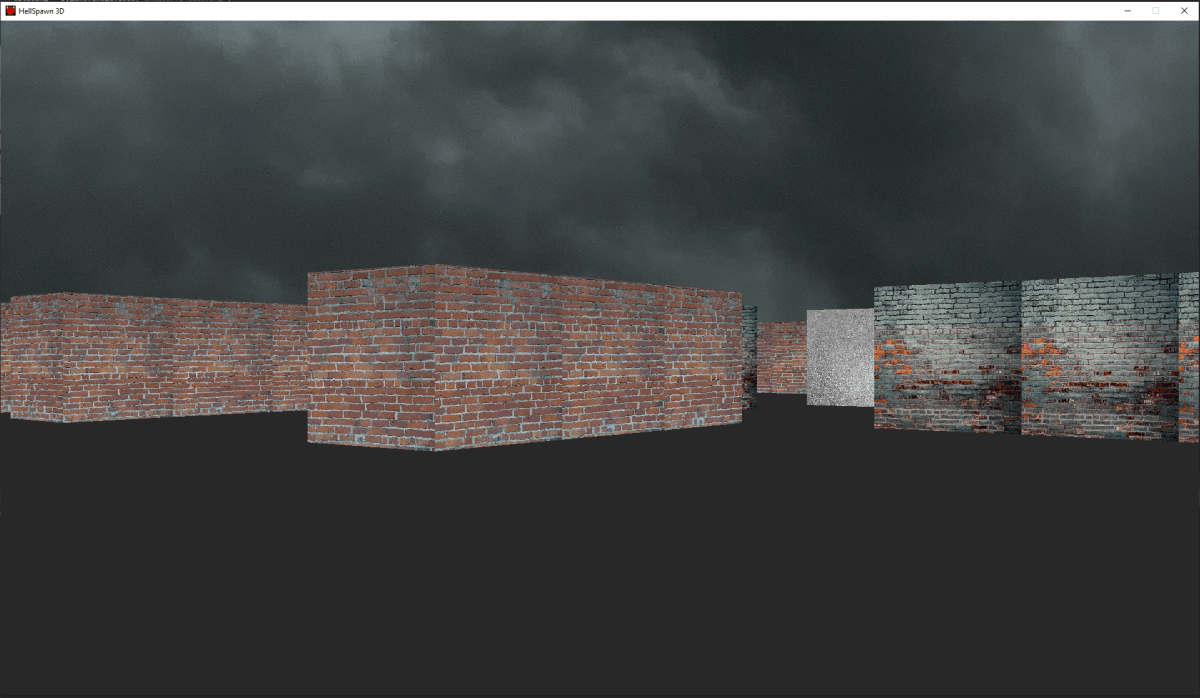
Ok, so I have crated a little raycaster and it has a very small, but also very bad problem. So I'm trying to render textures on walls, the problem is when a wall is near the camera, it renders fine (picture 1), but when a wall is far away from the camera, it renders in very low quality (picture 2). I know why this happens, the walls have a fixed x scale and when the textures render on far away objects they appear low quality. But I don't know the solution to this. Here's my code: https://paste.pythondiscord.com/awihewiziz. The problem appears in the full_raycast function. Ignore the ppm_loader module, it just loads a .ppm file into a 2D list.

 keen phoenix
I am making a Wolfenstein 3d clone so textures are neccesary
torn jackal
hey guys, I just would like to put a file which is string in integer, there is just a simple number is the file (0) but it showsme this error : python ValueError: invalid literal for int() with base 10: ''
please help
and mention me if u can help
okay forget it works now 🙂
 grim abyss
keen phoenix
Ok, so I have crated a little raycaster and it has a very small, but also very b...
grim abyss
keen phoenix
Ok, so I have crated a little raycaster and it has a very small, but also very b...
Maybe this can help you. I would guess your scaling the texture wrong... https://killerrobotics.me/2021/08/13/raycasting-game-in-python-and-pygame-part-1/comment-page-1/
I have started developing a raycasting game in Python (using PyGame) as a learning exercise and to get a better understanding of the math and techniques involved. Raycasting is a graphic technique …
keen phoenix
Ooh
It looks like I have done it correctly
But I have used a slow ray algorithm so setting the number of rays to 480 would be impossible
Now I'm trying to understand the DDA algorithm
Thank you very much!
grim abyss
Sure
 noble sundial
On a 2d game, with a set of destinations, have a set (different number) of enemies to move to a destination. Each enemy should go to the closests and two enemies should not go on the same destination.
grim abyss
anybody know a decent site where I can get high-quality sprites/textures? I wanna mess around with arcade
 regal burrow
hey i have a question? im making a tool for fallout four special chart that will optimize to what class you want to play but i dont know wether to send it in this channel or #tools-and-devops
 true trail
class Char(pygame.sprite.Sprite):
    def __init__(self):
        super().__init__()
        self.counter = 0

        char_1 = pygame.image.load('assets/character/char1.png').convert_alpha()
        char_2 = pygame.image.load('assets/character/char2.png').convert_alpha()
        char_right = pygame.image.load('assets/character/char_right.png').convert_alpha()
        char_left = pygame.image.load('assets/character/char_left.png').convert_alpha()

        self.char_side = [char_1, char_2, char_right, char_left]
        self.char_index = 0

        self.image = pygame.transform.scale(self.char_side[self.char_index], (80, 80))
        self.rect = self.image.get_rect(center = (width/2, height/2))

        self.imageh = test_font.render(f'{self.counter}', False, (0,0,0))
        self.recth = self.imageh.get_rect(topleft = (730,32))

    def movement(self):
        keys = pygame.key.get_pressed()

        if keys[pygame.K_DOWN] and self.rect.bottom < height - 10:
            self.image = pygame.transform.scale(self.char_side[0], (80, 80))
            self.rect.move_ip(0, 5)

        if keys[pygame.K_UP] and self.rect.top > 10:
            self.image = pygame.transform.scale(self.char_side[1], (80, 80))
            self.rect.move_ip(0, -5)

        if keys[pygame.K_RIGHT] and self.rect.right < width - 10:
            self.image = pygame.transform.scale(self.char_side[2], (80, 80))
            self.rect.move_ip(5, 0)

        if keys[pygame.K_LEFT] and self.rect.left > 10:
            self.image = pygame.transform.scale(self.char_side[3], (80, 80))
            self.rect.move_ip(-5, 0)

    def counting(self):
        for i in money:
            if self.rect.colliderect(i):
                self.counter += 0.1
                print(self.counter)

    def drawing(self):
        screen.blit(self.imageh, self.recth)

    def update(self):
        self.movement()
        self.counting()
        self.drawing()
i would say here.
true trail
can someone tell me the reason why self.drawing doesnt work?
i mean if i wanna print self.counter, it increase the value
grim abyss
true trail
can someone tell me the reason why self.drawing doesnt work?
screen.blit(self.imageh.....) imageh?
true trail
but in the window it doesnt screen the current value
true trail
grim abyss
``screen.blit(self.imageh.....)`` imageh?
yes
i have one self.image and one self.imageh
is it possible to do?
true trail
grim abyss
``screen.blit(self.imageh.....)`` imageh?
?
grim abyss
idk dude. I'm using arcade atm. pygame is.......old, lol
true trail
grim abyss
idk dude. I'm using ``arcade`` atm. pygame is.......old, lol
what is it?
grim abyss
!pypi arcade
frank fieldBOT
Arcade Game Development Library
keen phoenix
grim abyss
anybody know a decent site where I can get high-quality sprites/textures? I wann...
for high res
dawn quiver
true trail
but in the window it doesnt screen the current value
What
You want to draw self.counter on the window?
Make a font object as a class variable,
self.font = pygame.font.Font(None, 15)
None loads the default font, 15 is the size, you can change that to whatever you want
And then to draw it
text_surf = self.font.render(str(self.counter), True, "white")
screen.blit(text_surf, pos)
Well, screen doesn't seem to be defined
true trail
dawn quiver
Well, `screen` doesn't seem to be defined
i didnt send full code but there is!
dawn quiver
true trail
i didnt send full code but there is!
Yeah, but not in that scope
Did you get any errors?
true trail
dawn quiver
Did you get any errors?
no
dawn quiver
Are you calling update?
true trail
yes
dawn quiver
Are you sureee
true trail
dawn quiver
And then to draw it
```py
text_surf = self.font.render(str(self.counter), True, ...
but i still didnt try that
dawn quiver
I didn't completely understand the problem
Did you want the counter to appear on the screen?
true trail
dawn quiver
I didn't completely understand the problem
can i write to u in pvt?
true trail
dawn quiver
Did you want the `counter` to appear on the screen?
btw yes, self. counter in the counting function works, i mean, everytime increase correctely
dawn quiver
So you do want a counter to appear on the screen? That's the problem correct?
true trail
but the self.counter in the self.imageh, doesnt work, i mean, display "0" but then doesnt increase when i touch "i* in money
dawn quiver
dawn quiver
You want to draw `self.counter` on the window?
You can do this then
dawn quiver
true trail
but the self.counter in the self.imageh, doesnt work, i mean, display "0" but th...
Oh I see a test_font.render now, yeah you have to re-render it every frame
Do it like this
    def drawing(self):
        self.imageh = test_font.render(f'{self.counter}', False, (0,0,0))
        screen.blit(self.imageh, self.recth)
Try this and let me know
true trail
dawn quiver
Make a font object as a class variable,
```py
self.font = pygame.font.Font(None,...
but this i have to add in the class?
 true trail
ok, i will try in 20-25 mins because im not on the PC, but I'll go soon as i possible
thanks
true trail
dawn quiver
Oh I see a `test_font.render` now, yeah you have to re-render it every frame
Do...
i think i love u
really, its from my heart
dawn quiver
Did it work?
true trail
yes
true trail
dawn quiver
Did it work?
it works perfectly
 true trail
i have a question, is there a way to use that "self.counter" in another class?
true trail
dawn quiver
Great!
this is my game, and for example i would like to add a cave that costs 1.50, and ofc i have to decrease that number, can i do from another class?
true trail
@dawn quiver is it possible?
gentle ivy
I need an example in PyGame where player movement is keyboard-controlled and the player is centered (i.e. other objects move around the player). As I am very rarely on here, please highlight me if you kindly reply. Thanks!
 brittle venture
Can a 16 gb ram without graphic card for a laptop can game be developed on it ?
To get more more battery life
grim abyss
brittle venture
Can a 16 gb ram without graphic card for a laptop can game be developed on it ?
terrible sentence structure. what does this sentence mean?
are you asking if you can develop a game on a laptop with an integrated gpu that has 16GB of ram?
if so, why yes of course...
brittle venture
grim abyss
are you asking if you can develop a game on a laptop with an integrated gpu that...
Yes

 mystic parcel
i want to learn pygame but is it possible on a 4 gig ram laptop?
like a very low spec laptop
dawn quiver
mystic parcel
i want to learn pygame but is it possible on a 4 gig ram laptop?
I had a 4 GB Ram laptop previously, it is completely possible.
mystic parcel

i dont know what gen this is but its really old
like very old
now can i ask again, is it really possible?
 mortal yew
mystic parcel
mortal yew
mystic parcel
I actually wrote a project using PyCharm and PyGame with 4GB of RAM.
Specs: 1.8 GHz CPU, 4 GB RAM, 2 cores.
You're probably fine if you use an editor like IDLE.
true trail
true trail
<@456226577798135808> is it possible?
@dawn quiver ?
dawn quiver
Hello
true trail
dawn quiver
Hello
can i ask another thing to u?
dawn quiver
true trail
this is my game, and for example i would like to add a cave that costs 1.50, and...
Of course, you would need to pass in the counter value from outside to wherever it is required, take this example
class Foo:
    def __init__(self):
        self.counter = 0

    def update(self):
        pass

class Cave:
    def update(self, counter: float):
        pass

foo = Foo()
cave = Cave()
while True:
    foo.update()
    cave.update(foo.counter)
but foo and cave are class or def?
true trail
dawn quiver
Of course, you would need to pass in the counter value from outside to wherever ...
.
dawn quiver
Sorry, my bad, I made a typo
true trail
dawn quiver
Of course, you would need to pass in the counter value from outside to wherever ...
class Char(pygame.sprite.Sprite):
    def __init__(self):
        super().__init__()
        self.counter = 0
        char_1 = pygame.image.load('assets/character/char1.png').convert_alpha()
        char_2 = pygame.image.load('assets/character/char2.png').convert_alpha()
        char_right = pygame.image.load('assets/character/char_right.png').convert_alpha()
        char_left = pygame.image.load('assets/character/char_left.png').convert_alpha()

        self.char_side = [char_1, char_2, char_right, char_left]
        self.char_index = 0

        self.image = pygame.transform.scale(self.char_side[self.char_index], (80, 80))
        self.rect = self.image.get_rect(center = (width/2, height/2))

        self.imageh = test_font.render(f'{self.counter}', False, (0,0,0))
        self.recth = self.imageh.get_rect(topleft = (730,32))

    def movement(self):
          ....

    def counting(self):
        for i in money:
            if self.rect.colliderect(i):
                self.counter += 0.1
                #print(self.counter)

    def drawing(self):
        self.imageh = test_font.render(f'{format(self.counter, ".2f")}', False, (255,255,255))
        screen.blit(self.imageh, self.recth)

    def update(self):
        self.movement()
        self.counting()
        self.drawing()
but i want to pass the self.counter that has a value, becuase self.counter is always 0
true trail
dawn quiver
Of course, you would need to pass in the counter value from outside to wherever ...
then increse but in this way, which self.counter will give me?
dawn quiver
true trail
but i want to pass the self.counter that has a value, becuase self.counter is al...
It isnt
dawn quiver
true trail
It increases as shown here
true trail
ok so i have to create something like this
class Cave(pygame.sprite.Sprite):
  def __init__(self):
    super().__init__()
    self image = ...

    self.rect = ...

  then how can i use the current counter of Char()
 true trail
i dont understand how can i use the self.counter of char, for example here, wait
dawn quiver
true trail
ok so i have to create something like this
```py
class Cave(pygame.sprite.Sprite...
You pass into the update method which you have to create
true trail
 true trail
true trail
true trail
@dawn quiver in this way?
dawn quiver
Yes, you can now use the counter as you wanted.
true trail
what? how xD
dawn quiver
I showed you an example.
You just need to map the Foo and Cave I showed to what you have.
 dawn quiver
Yes
true trail
its white and it doesnt work
dawn quiver
You arent doing anything with it
What do you mean by "white"
That's just the syntax highlighting for attributes.

 dawn quiver
You need to use it to make it work
true trail
yeah, but here i'm using
true trail
i wanna print in someway the current counter in the def is_collided_with(self)
dawn quiver
You should pass it into is_collided_with after creating a parameter for it, instead of using the variable from the global scope like that..
dawn quiver
true trail
i wanna print in someway the current counter in the def is_collided_with(self)
Well you kill the sprite, so how about printing first
I dont use sprite groups
gentle ivy
dawn quiver
I had a 4 GB Ram laptop previously, it is completely possible.
It works on a Core 2 Duo with one gigabyte of RAM.
true trail
mhh
gentle ivy
My OS's overhead is about 280 MiB, leaving me about 700 MiB of usable RAM for PyGame 🙂
true trail
dawn quiver
You should pass it into `is_collided_with` after creating a parameter for it, in...
so it cant work how i'm doing i guess
dawn quiver
It probably could, but I'm not sure if that kill method ends the outer method, probably not
true trail
i think i'm making mistakes lol
dawn quiver
It's fine, everyone makes mistakes
true trail
yes, the problem is that i have no ideas
true trail
dawn quiver
It's fine, everyone makes mistakes
sry but just a thing, using sprites, if i wanna print the counter in the class Money, how can i do?
true trail
 ancient tendon
cuz i want to tell abt my app
ancient tendon
cuz i want to tell abt my app
twitter?
grim abyss
@dawn quiver https://pythonhosted.org/planar/vectors.html planar is useful though not maintained anymore. It also has line-segments
dawn quiver
grim abyss
<@456226577798135808> https://pythonhosted.org/planar/vectors.html planar is use...
Did you ping the wrong person?
grim abyss
dawn quiver
Did you ping the wrong person?
Maybe I did, lol. I thought you had asked about creating a vector class....
dawn quiver
Nope
grim abyss
sorry bud lol
dawn quiver
I use pygame.math.Vector2 so I'm covered 
dawn quiver
hey guys im just done making a snake game and i made the file into an exe file and it gave me this msg
Traceback (most recent call last):
File "game.py", line 3, in <module>
ModuleNotFoundError: No module named 'freegames'
what did i write wrong in my code?
take out py import freegames
from freegames import square, vector
this is the incorrect line
oh
ok i will try
broken citrus
yo guys
what should i use to load
a fbx file and it's textures
and just render it
im trying to do it in pyglet but its buggin
 raise GLException(msg)
pyglet.gl.lib.GLException: b'invalid value'

import pyglet
from pyglet.gl import *

window = pyglet.window.Window(width=720, height=480)
window.projection = pyglet.window.Projection3D()
batch = pyglet.graphics.Batch()


@window.event
def on_draw():
    window.clear()
    batch.draw()


@window.event
def on_mouse_drag(x, y, dx, dy, buttons, modifiers):
    glRotatef(1, dx, dy, 0)


def rotate(dt):
    glRotatef(0.5, dt, dt, dt)


if __name__ == "__main__":
    glEnable(GL_MULTISAMPLE_ARB)
    glEnable(GL_DEPTH_TEST)
    glEnable(GL_LIGHTING)
    glEnable(GL_LIGHT0)

    model = pyglet.model.load("SK_AR_01.obj", batch=batch)
    glTranslatef(0, 0, -3)
    pyglet.clock.schedule_interval(rotate, 1/60)
pyglet.app.run()```Where'd you get the model?
broken citrus
unity asset store
i solved my issue i just switched over to panda3d
now im just having a issue of screenshotting
grim abyss
broken citrus
unity asset store
Was it free?
broken citrus
50$
grim abyss
wow, lol
grim abyss
broken citrus
u get like 2000 assets
now you tell me, lol
grim abyss
damn, you have a link to this asset pkg ?
broken citrus

Use Low Poly Shooter Pack v4.3 from Infima Games to elevate your next project. Find this & more Systems and templates on the Unity Asset Store.
 sleek forum
Hi I’m making a small mr wolf game using python matplotlib for my course the assessment is due Sunday and I can’t get the code to do what I want I was wondering if I could get on a call with someone so that I can get some help ?
 hot mesa
@tame vale can u help me?
 tame vale
hot mesa
<@935841017867948082> can u help me?
tame vale
hot mesa
<@935841017867948082> can u help me?
Yup
 thin bluff
async def on_message(message):
role = discord.utils.get(message.guild.roles, "Awaiting on first message")
if(role in message.author.roles):
message.author.remove_roles(role)
await bot.process_commands(message)
potent ice
broken citrus
how do light up the whole scene?
There is an Ursina and Panda3D discord as well
broken citrus
potent ice
There is an Ursina and Panda3D discord as well
no way where
potent ice
Their project web pages (and probably docs) link to it
That's why you should read docs 🙂
broken citrus
potent ice
That's why you should read docs 🙂
I do
i dont usually look for socials in docs
i just come here and ask about it
and if there is no answer i dive into the source code
potent ice
Forums The discussion forums are the preferred way to ask technical questions. Bugs Should you encounter any bugs in Panda3D, you can report these in the issue tracker on GitHub. Discord If you want a more immediate response, you can join our Discord channel by clicking this invite link. IRC The ...
broken citrus
yea i just joined it
potent ice
Discord link Ursina https://www.ursinaengine.org/
Ursina, an open source, python powered game engine
broken citrus
i dont use ursina but should i?
potent ice
Why not. So much overlap anyway
potent ice
Then use ursina
broken citrus
potent ice
Then use ursina
ok for sure
vagrant saddle
broken citrus
panda3d gets tidious fast and doesn't look good
what do you mean by doesn't look good ?
broken citrus
vagrant saddle
what do you mean by doesn't look good ?
 vagrant saddle
looks like the default pipeline which is nice enough to run on almost all desktop / mobile device without expensive gpu
vagrant saddle
broken citrus
if you change pipeline you can get stuff like https://www.youtube.com/user/tostbrot21/videos

YouTube
Render Pipeline with Physically Based Shading for Panda3D: https://github.com/tobspr/RenderPipeline
vagrant saddle
hot willow
Wait wait backup, pygame works on browsers??
now you can test pygame on browser the easy way see https://pypi.org/project/pygbag/
 normal silo
broken citrus
normal silo
broken citrus
You have to learn how shaders, lighting (in general), and physically based rendering works.
Making something look good is a complicated topic.