#game-development
1 messages · Page 86 of 1
 lost geyser
 normal silo
lost geyser
is godot engine planning to add python to it?
normal silo
lost geyser
is godot engine planning to add python to it?
It supports every programming language but that version is not officially out yet.
lost geyser
normal silo
It supports every programming language but that version is not officially out ye...
oh it does?
normal silo
lost geyser
oh it does?
When it's out you can simply download the python support someone added from the asset library (directly in the godot editor): https://github.com/touilleMan/godot-python
GitHub
Python support for Godot 🐍🐍🐍. Contribute to touilleMan/godot-python development by creating an account on GitHub.
 glad oak
can I make 3d games in python
glad oak
glad oak
can I make 3d games in python
someone told me about blender
I know how to use blender
but I don't know how to create a game in it
 potent ice
@glad oak you could check out Ursina
glad oak
potent ice
<@!820957214264000513> you could check out Ursina
I check that but that's not what I want
potent ice
Then you should be a lot more specific
There used to be a game engine for blender
This is now a separate project : https://upbge.org/
@glad oak I assumed you were looking for something related to python since you are asking the question on a python server. If none of these fits what you are looking for you need to be more specific.
glad oak
potent ice
There used to be a game engine for blender
ya I heard that
but accually I want to make a python server for my unity game
because of python libararies like tensorflow
 errant stone
Can you recommend pygame course(video or text format, both are fine)?
 frank fieldBOT
Hey @meager fable!
It looks like you tried to attach a Python file - please use a code-pasting service such as https://paste.pythondiscord.com
 meager fable
https://paste.pythondiscord.com/marowegici.py
does anyone know why nothing is displayed when the OPENGL flag is included in display? (line4)
 meager fable
?
 main blade
Hey!
Anyone here who is willing to contribute to this open source module? https://www.reddit.com/r/Python/comments/my47xe/pyunity_a_python_implementation_of_the_unityengine/

reddit
74 votes and 23 comments so far on Reddit
meager fable
main blade
Hey!
Anyone here who is willing to contribute to this open source module? https...
Checked it out and it looks really good, I'm not a really good coder so I can't help out much but I'm definitely going to follow its progress. you should try posting this in other coding discord servers as well, might grab someone's attention
main blade
meager fable
Checked it out and it looks really good, I'm not a really good coder so I can't ...
Yea. I am posting in many servers. We also have a discord server, if u wanna join (pls tell me if this is known as self advertising I'mma delete it)
meager fable
I'm good, appreciate the offer though! not sure if its classed as advertising might wanna check with the mods
main blade
Yup. That's why I included the bracket
 dawn quiver
Update on my lottery game: Finally got the start button to work and i added a gradual decrease of speed until it finally stops

Now i have to add like
some christmass like light stuff
like a blinking feature
i will work on that tmrw tho
gn!
 frozen knoll
@sinful lodge You might look at http://programarcadegames.com for pygame. Or you might like Arcade, which is at https://arcade.academy and https://learn.arcade.academy
dawn quiver
Looking for a dedicated individual to help me complete my game
 modest crow
LMFAO
 sinful hearth
how do i implement the a* search algorithm for search finding in pygame, because its not tile based
 wind torrent
Make your game tile based I'd say 😀
 tiny peak
hello..?
 tawny crystal
hello
can we make a game with optional mods in pygame?
like a specific file extension that can open and load a mod in my game?
 faint berry
tawny crystal
can we make a game with optional mods in pygame?
faint berry
tawny crystal
can we make a game with optional mods in pygame?
Pygame doesn't have anything like that so, you should make ot from scratch.
tawny crystal
Ohh alright
 uneven eagle
imo arcade is a better library
 west stag
Does anyone know what is the main programming language used to create a DNS?
tawny crystal
uneven eagle
imo arcade is a better library
Is it beginner friendly?
uneven eagle
It's about the same as pygame
tawny crystal
🙇 oke
 lapis nebula
dawn quiver
lapis nebula
dawn quiver
@tawny crystal always has been
 red oyster
[RequireComponent(typeof(PlayerMotor))]
public class PlayerMovement : MonoBehaviour
{
    private PlayerMotor motor;
    public float speed = 5f;

    void Start()
    {
     motor = GetComponent<PlayerMotor>();
    }

     void Update()
     {
         float _xMov = Input.GetAxis("Horizontal");
         float _zMov = Input.GetAxis("Vertical");

         Vector3 _movHorizontal = transform.right * _xMov;
         Vector3 _movVertical = transform.forward * _zMov ;

         Vector3 _velocity = (_movHorizontal + _movVertical).normalized * speed;
         motor.Move(_velocity);
;     }
}```I can't understand what's the error in here

I am using Unity and C#
 gray hill
Hi guys ,I found this on the internet ,I think this is from cyberpunk, planning to create a game like this a freerunner infinite racer,anyone interested?
 ionic thicket
hey can anyone help me out with a programming issue I'm having? I posted my question here: https://stackoverflow.com/questions/67757967/getting-an-winerror-10057-in-my-python-multiplayer-game-using-pygame?noredirect=1#comment119766277_67757967

Stack Overflow
So I've been working on a space shooter time game with python and pygame, and hoped to use sockets and networking to add multiplayer capabilities in the game. The game isn't completely finished, an...
dawn quiver
hey everyone
i've a prblm
i'd like that if we let press on the "d" (this is the button to moove on the right), the personnage in my game forward continuously. My problem is that i need to spam d to forward and it's annoying.
mention me if u have the answer
 elder ginkgo
 rough vigil
HOW TO MAKE A GUI
rough vigil
HOW TO MAKE A GUI
Use tkinter or pygame
 fading whale
rough vigil
Pygame whts tht
fading whale
rough vigil
Pygame whts tht
It's a library for developing 2d games with python. But you could also use it to create a GUI.
 wheat moth
Quick Noob Question Alert:
Essentially, I want to randomly generate a set of four ability scores.
I have written a function that does this.
When I set the variable
mystats = generateStats()
every time I run this, mystats is overwritten with the newly generated stats.
is there a better way of making that rolled set persistent?
Ex: would savedStats = mystats.copy()
make a copy of the stats that were rolled and ensure it isn't overwritten? Or will it still be overwritten every time?
Or...is it better to export those stats...to a file perhaps, that can be read later to grab said stats when needed?
I considered, an alternative of a lambda that runs only when called...I think thats how they work....
 last moon
https://github.com/The1Divider/chess if someone minds taking a look at this, im hitting the max recursion depth after trying to move a pawn and I can't seem to figure out why (altho im not suprised it's a bit of a mess atm)
 craggy rain
Hey guys I wanted to ask a general question so sorry if the scope is kinda broad. I am trying to make a simple platformer with a friend and have some python knowledge under my belt and have been using pygame to create my idea. I have been using tutorials which I feel kinda guilty about since I feel like im "cheating" or something and feel like I should be able to figure it out myself even though ive never done this before. I dont want to make tutorials my crutch and be self dependent but dont know how to go about it? Also to make games is it better to simply throw myself into a new language such as C# with Unity or use python so that way I can use it for all types of projects such as web scraping and other things. I just feel unsure and thought someone whos done this before me would have advice. If you have read this far thanks for the time and sorry itsvery long! 😃
 finite briar
craggy rain
Hey guys I wanted to ask a general question so sorry if the scope is kinda broad...
finite briar
craggy rain
Hey guys I wanted to ask a general question so sorry if the scope is kinda broad...
The best way I've found is to watch a few tutorials when you're first entering a subject and then if you have a more specific question you look it up; avoiding tutorials is fine as well
craggy rain
finite briar
The best way I've found is to watch a few tutorials when you're first entering a...
Yeah that sounds good too, for me with this platformer I found a series but I never know how heavily to rely on it because sometimes I feel like im not learning but rather like just grabbing pieces of it. I think trying to do more independent stuff might be smart like you said a few tutorials and then specific questions later. Like for a platformer look up like tilemaps and movement or what basic videos would you think?
finite briar
craggy rain
Yeah that sounds good too, for me with this platformer I found a series but I ne...
Coding with Russ is a channel that i watched, it helped me understand the basics easier but as i said a lot of this stuff its just soooooo much better to learn individually; but tutorials for general knowledge and new topics yeah
 next estuary
I'm working on a snow-themed game, I want to add spider-man style swinging with some elasticity but I'm not sure what to search for math wise. If anybody has a good module / guide I'd appreciate it.
craggy rain
finite briar
Coding with Russ is a channel that i watched, it helped me understand the basics...
for learning individually you mean like on your own or like individual piece by piece of a project? but yeah new topics fs
 dawn jolt
i've tried using kivy before to make a lightweight graphical project
but after compiling it, the resulting program took a lot of space
is this specific to kivy only? should i try a different framework?
or is it because of how python runs things
dawn quiver
how do i make an entity spawn only if its chosen, and it would be chosen at random from a list
 fervent mesa
@dawn jolt If you want to make a GUI application that has a modern GUI I would recommend PyQt5 because of its style that can be changed using CSS, if you want to make a simple GUI application I would recommend Tkinter if you want a simpler version of Tkinter you can use PySimpleGUI, let's just say PySimpleGUI is a simplified Tkinter
PySimpleGUI docs : https://pysimplegui.readthedocs.io/en/latest/
None
dawn jolt
fervent mesa
<@664071485081649152> If you want to make a GUI application that has a modern GU...
can i use it for game development?
specifically where i need to compile it
fervent mesa
for that I don't really know, because I usually create a GUI in games using pygame itself.
in the pysimplegui repository they gave an example of making pong games using pysimplegui

GitHub
Launched in 2018 Actively developed and supported. Supports tkinter, Qt, WxPython, Remi (in browser). Create custom layout GUI's simply. Python 2.7 & 3 Support. 200+ Demo programs ...
sinful hearth
how do i check line of sight between two points in pygame?
dawn quiver
hey guys i try to import a file with this :
import os
os.system ('/home/pi/classes.py')
and I have this error : /home/pi/classes.py: 1: /home/pi/classes.py: Syntax error: "(" unexpected
someone knows why ?
dawn quiver
sinful hearth
how do i check line of sight between two points in pygame?
I don't understand, do u want to know the coordonnees ?
 charred bobcat
red oyster
```using UnityEngine;
[RequireComponent(typeof(PlayerMotor))]
public class Playe...
charred bobcat
red oyster
```using UnityEngine;
[RequireComponent(typeof(PlayerMotor))]
public class Playe...
this is python server not C#
joke please i swear
red oyster
charred bobcat
this is python server not C#
It's a Game Dev channel so I can take help with Game dev no matter which lang I am using
 leaden turtle
does anyone know if its possible to embed a pygame window into another gui framework eg tkinter?
 wispy lily
without using virtualbox and google colab, does anyone know how to convert kivy into an APK?
dawn quiver
leaden turtle
does anyone know if its possible to embed a pygame window into another gui frame...
Jesse is better
 severe igloo
red oyster
It's a Game Dev channel so I can take help with Game dev no matter which lang I ...
severe igloo
red oyster
It's a Game Dev channel so I can take help with Game dev no matter which lang I ...
actually no this is a python discord which means EVERYTHING (except ot) revolves around python
!ot for other off topic things
frank fieldBOT
Off-topic channels
There are three off-topic channels:
• #ot0-psvm’s-eternal-disapproval
• #ot1-perplexing-regexing
• #ot2-never-nester’s-nightmare
Their names change randomly every 24 hours, but you can always find them under the OFF-TOPIC/GENERAL category in the channel list.
Please read our off-topic etiquette before participating in conversations.
severe igloo
such as unity questions
dawn jolt
wispy lily
without using virtualbox and google colab, does anyone know how to convert kivy ...
i've never really tried to compile kivy to an apk, but i've never heard of using virtualbox and google colab
there's a tool kinda like pyinstaller for compiling kivy to apk
 zealous elm
Any beginner down to work on a pygame project with me
I am a complete noob in tutorial hell and want to get out but I feel it would be easier to do so with the help of another
Even if it's only to brain storm ideas off one another

 potent ice
 trim nacelle
I pip installed pygame and it seem to work but it's giving me this error
trim nacelle
I pip installed pygame and it seem to work but it's giving me this error
Maybe py and python use different python versions?
just run the script with python and see if it works
potent ice
maybe?```
py --version
python --version
No worries. pip can also be a source of confusion so it's also safer to run it through the same python command python -m pip install <package>
trim nacelle
yup
will do
so I'm looking at this sorting algorithm visualizer that I found on github

GitHub
Different algorithms and simulations from gravity simulations to cellular automata, implemented in python. - fraserlove/python-algorithms-and-simulations
It gives a white screen instead of what it's supposed to do
errant stone
is it better to use rectangle or sprite for gui in pygame?
red oyster
severe igloo
such as unity questions
Ok friend
wispy lily
dawn jolt
there's a tool kinda like pyinstaller for compiling kivy to apk
@dawn jolt could you please tell me what this tool is?
dawn jolt
wispy lily
<@!664071485081649152> could you please tell me what this tool is?
oh wait you're not using linux?
you've probably looked at buildozer right?
wispy lily
yes
wispy lily
buildozer only works on linux unfortunately...
wispy lily
dawn jolt
sorry to get your hopes up
oh no its fine.
dawn quiver
Guys how do i add a 'glow' to my sprites in pygame 🤔
ive seen youtubers do it for their games in unity
dawn quiver
am working on a new game 😊

its going to be a maze game
the lighter shade of tiles are indistrcutable
and the darker shade are breakable by shooting
:D
am going to make it such that the map moves with the player
so like
instead of players position increasing
i will just append more tiles to the map while deleting few
so for example if he moves to the right
world_data.remove(left column)
world_data.append(new_right_column)
O.o
wow
leaden turtle
dawn quiver
Jesse is better
But jesse crying is not nearly as entertaining
dawn quiver
 frank fieldBOT
Hey @dawn quiver!
Uh-oh! It looks like your message got zapped by our spam filter. We currently don't allow .txt attachments, so here are some tips to help you travel safely:
• If you attempted to send a message longer than 2000 characters, try shortening your message to fit within the character limit or use a pasting service (see below)
• If you tried to show someone your code, you can use codeblocks
(run !code-blocks in #bot-commands for more information) or use a pasting service like:
dawn quiver
sinful hearth
how do i check line of sight between two points in pygame?
you can make an invisible line, and see if it collides with something
sinful hearth
dawn quiver
you can make an invisible line, and see if it collides with something
i already found a better solution: pygame.sprite.Rect.clipline
dawn quiver
just blit the line based on where the user is facing
dawn quiver
sinful hearth
i already found a better solution: `pygame.sprite.Rect.clipline`
oh i see
dawn quiver
sinful hearth
i already found a better solution: `pygame.sprite.Rect.clipline`
so
can u
uh
help me
dawn quiver
dawn quiver
The rotation is a bit
.
sinful hearth
dawn quiver
https://paste.pythondiscord.com/cokarugaja.yaml
you didn't include any of the assets in the website, so i can't run your game
dawn quiver
i just wanted u to spot any obvious errors
i mean
i can give the assets and all
but do u really want to run it
sinful hearth
i can't really spot any errors from just looking at the code
sinful hearth
maybe instead of repeatably rotating the same image, try just rerotating the same image
maybe that will fix any loss in precision?
sinful hearth
so you already aren't doing that
ok
i don't think i can help you because i am short on time rn
 pulsar field
I can help
 twin herald
Is java scripting ok in this discord.
dawn quiver
guys i set up Pycharm but i don't know anything about python and i want to make a multiplayer 3d game so i heared about ursina engine but don't know how to set up it so now any help lol thx for reading !
 pale compass
dawn quiver
guys i set up Pycharm but i don't know anything about python and i want to make...
pale compass
dawn quiver
guys i set up Pycharm but i don't know anything about python and i want to make...
Learn basic Python before you attempt to create a 3D game.
 quiet crane
I just got the mission game book thru humble bundle, and I'm in the beginning where you set up the background and stuff. For some reason, even when I use the exact code as written in the book, my pygame window has a chunk of blackspace that cuts off the picture(s). Anyone worked with this book and know what I am talking about?
quiet crane
quiet crane
I just got the mission game book thru humble bundle, and I'm in the beginning wh...
Escape game*, misremembered the name
normal silo
dawn quiver
https://paste.pythondiscord.com/cokarugaja.yaml
Due to the way pygame renders things (via surfaces), the rotation function resizes the surface causing a shifting center. When it blits the image the center is rounded and since it's constantly changing it wobbles a bit. Fixing this stuff is annoying and pygame is really weird so I would recommend just using arcade instead.
dawn quiver
normal silo
Due to the way pygame renders things (via surfaces), the rotation function resiz...
i actually just ended up making it a feature lmao
by adding the same wobble as idle animation haha
but the idle wobble is up and down
normal silo
Arcade does not have this issue because it renders with opengl which does not do this whole surface thing with resizing while rotating, in general it will save you headaches by switching to it (also, speed). @dawn quiver
dawn quiver
normal silo
Arcade does not have this issue because it renders with opengl which does not do...
or i could just use opengl
lmao
 strong plume
I am trying to make a 'game' sort of a thing for a Machine Learning project of mine. I want a python module that can handle physics, collisions, IK, hinges, sprits, and forces (especially IK). What modules can I use?
 final briar
 fossil lagoon
Hi, Really difficult question.
I am looking for 3 files all over the internet but I cannot find them. Is there anyone who can help me? The files are:
CrystalReports11_rdc_license.msm
CrystalReports11_rdc_reportengine.msm
CrystalReports11_rdc_runtime.msm
dawn quiver
Hello, I'm trying to recreate flappy bird
using pygame but when the pipes move they appear very laggy
as they reload in their new position
Is there any way to fix this?
 tranquil girder
yes :P
 plush forge
ok
 harsh yoke
i need help
iss cool you can go first
i use a udemy course for the python part and brilliant for my animation
in game dev obviously
i see
hmm
yes python isnt in any games ive seen so this is rare...
i would take a udemy course
they have courses for all aspects of a game
but ususally only some parts are used for a game
because like it is only python is rare
yes
its 189 usd but well worth it in my opinion
think it was 24 during last week
but it updated
ah
We're a large, friendly community focused around the Python programming language. Our community is open to those who wish to learn the language, as well as those looking to help others.
?
maybe theres course info in the tools/refrences
hmm
frozen knoll
@dawn quiver See https://learn.arcade.academy and https://arcade.academy
dawn quiver
thanks mate
dawn quiver
yoo i finally got a moving background and all to work!
    # Player
    key = pygame.key.get_pressed()
    if key[pygame.K_UP]:
        idle = False
        world_data.insert(0, [1, 1, 0, 0, 0, 0, 1, 1, 1, 1, 1, 1])
        world_data.pop()
        print(world_data)
😌
tawny crystal
Should I use Pygame or arcade?
potent ice
tawny crystal
Should I use Pygame or arcade?
Are you fairly new to python?
.. and what are you hoping to make?
tawny crystal
potent ice
Are you fairly new to python?
Yeah I am.
tawny crystal
potent ice
.. and what are you hoping to make?
2D game
tawny crystal
Alrighty
 astral sundial
Hi i rly need help with my game. I Have made a Menu and a Game but the button that says start I need it to start the game. Same with the exit button I need that to close down the game.
 limber veldt
astral sundial
Hi i rly need help with my game. I Have made a Menu and a Game but the button th...
limber veldt
astral sundial
Hi i rly need help with my game. I Have made a Menu and a Game but the button th...
More context needed. Like what are you using to draw your game and buttons?
I'm trying to make a Defender game (classic arcade game), and struggling with the wrapping
I have a surface than I'm scrolling through with a viewport and I want it to wrap smoothly from right to left or left to right. But that transition from one end to the other is not smooth
So I think I need to copy my surface and have two of them in a row
So at the end of the first surface is the start of the same surface and the jump back to the actual start will be smooth
I really don't even need the second surface to be a complete copy of the first, only the first SCREEN_WIDTH pixels of it
Same on both ends, I suppose. A copy of SCREEN_WIDTH pixels from the right placed on the left and from the left placed on the right
Pretty new to this kind of thing, coding a viewport and using multiple surfaces
 marble flame
Any experienced MOD, with super coding skills? DM me immediately
 frozen brook
Hi, I just fixed a error in my very basic code. I was hoping anyone could explain why the error occured.
I got a "video is not initialized" error, and the fix to that was to move "pygame.quit()" from the while loop into the if statement (in the same loop).
Pastebin
Pastebin.com is the number one paste tool since 2002. Pastebin is a website where you can store text online for a set period of time.
Dont mind me, I just realized how stupid I am 😄
 sinful lodge
put pygame.quit outside the while RUN
dawn quiver
potent ice
Are you fairly new to python?
What would you have said if he said no and 2d game?
limber veldt
Infinite circular scrolling and player movement pretty well worked out, I'm learning! https://pasteall.org/d4Qr
Next, I gotta dig into pygame sprites
How to add sprites to lists and use the collisions
Pretty hacky way to do the minimap but it works. Just triple it, all three side by side, then scroll it using the offset and use two black rects to cover the parts outside of the minimap
Actually, the same kind of trick is used for the main screen to get it to wrap nicely too
Scale the actual playing field, 9720x512 pixels, to 480x88, put three of them side by side, and scroll it properly = minimap
No drawing blips or translating or converting, just scale the entire surface
I'm not pleased with the mismatched aspect ratios of main player screen and minimap, but from what I could tell, that was pretty close to the original
potent ice
dawn quiver
What would you have said if he said no and 2d game?
You'll have a lot more options. pygame, acrade, pyglet, cocos, wasabi2d .. and the list goes on
Even ursina/panda3d
The reason I recommend arcade to beginners is that it's a project created for learning and has a lot of official examples and tutorials including a book
modest crow
I am trying to do something stupid.
I am doing this to get the keys
keys = pygame.key.get_pressed()
ball.update(keys)
So how do i type hint in the definition of update method?
 past star
where can i ask questions i am a beginner
modest crow
look in the help channel if it is about a specific thing
look in to #❓|how-to-get-help
past star
and can i ask if creating games need gpu??
modest crow
if you read it you'll get an better idea what can be asked
which is almost everything
modest crow
past star
and can i ask if creating games need gpu??
it depends
past star
bc i can not buy a gpu it"'s expensive
modest crow
what games are you making?
if you are makings game with python. you won't need it most of the time
past star
ohhhhh
modest crow
it depends more on the game
past star
i am working on a big big idea bro i think i'll go viral bc of it
i am a creative person but now i just started learning python language and how to use it in spyder ide
modest crow
can you program well?
if not just get started, right now.
past star
i use to work on small basic\
modest crow
yes, solidify your basics, learn a new language. then you'll get a grip of programming
then start with your project
modest crow
past star
thx man for your support and help
It won't mean anything if you don't start though.
so just keep going
check out
!resources
frank fieldBOT
Resources
The Resources page on our website contains a list of hand-selected learning resources that we regularly recommend to both beginners and experts.
https://pythondiscord.com/pages/resources
past star
thx man but can i ask one more question about which course or where did you train or study python
ahhhhhhhhhhhhhhhhhhhhhhhhhh
thx buddddyyy
which ide you use?
modest crow
past star
thx man but can i ask one more question about which course or where did you trai...
you don't need to buy courses though, youtube is great, the internet is endless, guys here help out
modest crow
past star
which ide you use?
IDE doesn't matter
i use neovim, not an IDE just a text editor
modest crow
past star
it'smore organized
sure it is, but how long is your code going to be to need a tools which are tightly integrated, which are made for large code bases
modest crow
past star
you use pthon on nevoim?
python is an interpreter, neovim is a text editor
past star
games need a lot of large codes
modest crow
yes.
I am not saying that IDE's aren't for small code bases, but they get in the way
past star
and character designerfor games and these stuff which software i use?
modest crow
what type of game are you thinking?
3d, 2d, board game
limber veldt
Fusion360, Blender
modest crow
limber veldt
Fusion360, Blender
FUSION360???
modest crow
just ducked them
limber veldt
modest crow
FUSION360???
Yes, Fusion360
modest crow
limber veldt
Yes, Fusion360
Isn't it for engineering models?
limber veldt
Models of any kind
modest crow
dad, those games look like they are 2DD
past star
yeah i think so
modest crow
limber veldt
Models of any kind
Okay, i didn't expect that out of fusion360
modest crow
past star
and character designerfor games and these stuff which software i use?
you can use gimp
past star
my pc is under construction so i am using now window 7 it works on it?
modest crow
sure any thing which works
past star
omg thx everybody
modest crow
just don't forget to start programming.
limber veldt
Character design for games will usually mean 3d characters even if used in a 2d game
modest crow
and @past star please don't use sypder
past star
modest crow
just don't forget to start programming.
i am hopping into youtube to check a bald man teaching python
modest crow
limber veldt
Character design for games will usually mean 3d characters even if used in a 2d ...
those games looked like sprite art ones
past star
modest crow
and <@!697175766206513152> please don't use sypder
what should i use remind me
past star
this summer i'll end up gettting a job even if i am 15 ill work harder to full the bg
bag*
limber veldt
Like I'm making a 2d game now, and have made others, where I used 3d models (for proper lighting) and rendered them to sprite sheets
past star
limber veldt
Like I'm making a 2d game now, and have made others, where I used 3d models (for...
how mant games have you created
limber veldt
Hmm, maybe a couple dozen
past star
what isdozen?
limber veldt
Dozen = 12
limber veldt
So maybe 20-30 games
past star
have you uploaded a game n playstore?
modest crow
are they online somewhere i can take a look?
limber veldt
Nah, just some Python games for the past few years
Some I made in Blender
Blender used to have a game engine built in
And was pretty good engine
modest crow
limber veldt
Some I made in Blender

limber veldt
Still is but it's no longer a builtin, it's an addon
past star
modest crow
<:lemon_swag:754441881470894121>
have you created one?
modest crow
i have made maybe one or two, i am not as much of game maker
limber veldt
Most of my games are simple, like Tic Tac Toe, some more complicated like Cribbage (a board game with cards), some are shooters like Asteroids, some are pong-ish like Arkanoid. Now working on another classic arcade game, Defender
limber veldt
Some are very complex, like Rubik's cube animator/solver
Blender doesn't have a learning curve, it has a learning mountain
But it's unmatched in 3D modeling
modest crow
like this?
 limber veldt
Like there are other modelers out there, they cost an arm and a leg, and they're really not any better than Blender
past star
but guys i can't start coding if i didn't get morenowledge so i don't think a 6 hours course will help
modest crow
don't think
just go with a youtube video you like about a topic
like search for "make a game in python"
then they will mention something you don't know about
like functions, then search for "functions in python"
then keep going like this
if stuck ask here
i mean look here #❓|how-to-get-help
limber veldt
Defender progress so far, you'll need pygame installed, use the arrow keys to for movement: https://pasteall.org/fNEe
past star
umm guys if i am coding and i wanna see if it worked or check the game without upload it and reinstallet
limber veldt
Game mechanics pretty much done, now to add sprites and collisions and firing bullets and enemy types and humans to rescue and ground and...a lot
modest crow
past star
umm guys if i am coding and i wanna see if it worked or check the game without u...
What do you mean?
limber veldt
The enemy behaviors are scaring me, coding AI behaviors is tough
past star
it's like i just put a new item in the game i wanna see if the item is actually in the game that i am coding
modest crow
You can just run the game
limber veldt
You code on a computer that can run the things you make
modest crow
As i said, you need to start. Questions will form, answers will come
past star
thx a lot you're good guys
limber veldt
The AI behaviors here: https://youtu.be/gss3lxeqCok?t=424

► Defender (Red Label) 1980 Williams.
Subscribe:
http://www.youtube.com/subscription_center?add_user=MamePlayer
Visit my channel:
http://www.youtube.com/user/MamePlayer
Browse my videos:
http://www.youtube.com/user/MamePlayer/videos
Browse my playlist:
http://www.youtube.com/user/MamePlayer/playlists
My videos are made with the use of SaveS...
modest crow
You doing this in python?
limber veldt
Yes
Got the mechanics worked out for how things move
It should be fairly easy-ish to complete
Just take it one bit at a time
Mine probably won't be exactly like that, but a reasonable facsimile
past star
ayo bro
sublime
needs pythonto be installed
or what
i needto know better about these little stuuf
stuuf*
limber veldt
I haven't used Sublime but perhaps it's like those I have used. It might ask you during the installation to point it at your Python installation so knows what interpreter to use
So yeah, I'd install Python first
past star
i installed python
limber veldt
Good
past star
thx buddy
limber veldt
And you should, during that installation, be sure to enable the python to path thing
There's a tickbox for that in the Python installer
That way your whole system points at your python installation when it encounters a python program
past star
should i use the newest python version?
limber veldt
Yes, unless you have some specific reason to use an old version, always install the latest
I don't think it's totally necessary to download the latest every time there is a release, but you always want to be within a few months of the latest version
past star
window 7 require the 3.8
limber veldt
That might be an issue for you, yeah
Windows 7 is a problem, it's not even fully supported anymore, end of life
limber veldt
limber veldt
Yes, unless you have some specific reason to use an old version, always install ...
Windows 7 is that specific reason I mentioned there
Or one of them
modest crow
Just use the latest you can use.
And never use python 2
limber veldt
Added player blip to the minimap, progress!
dawn quiver
so like
every time i feel like quitting my game
i end up reading a game dev chat
and feel like doing it again
;/
ima properly stop now
limber veldt
You can do it
past star
bro do not stop what you have been strated
limber veldt
Did you check out my progress so far? I like it!
past star
you can do it
limber veldt
What doesn't kill you makes you stronger, especially when it comes to tough codes
past star
the future is wating for you
you need to full the bag
money is the best thing existed
without money you cannot do anything lol
 rustic plover
what game should make to train
limber veldt
Asteroids
past star
tic tak toe
limber veldt
That's another good one, depends on level. Tic tac toe for beginner-ish level, Asteroids for intermediate-ish level
past star
is tic tac toe easy?
limber veldt
Asteroids is good because rocks don't need AI
past star
or theres alot of typing?
rustic plover
limber veldt
Asteroids is good because rocks don't need AI
i made a game wghere you have to avoid cars
rustic plover
but it was mostly word for word from the tutorial and by the end i ctrl c ctrl v the entire code cuz it didint work
rustic plover
limber veldt
Like frogger?
eeeeeh
dawn quiver
limber veldt
You can do it
Nono, thats not the problem, im saying im bored of it lol
the game im working on isnt very fun
limber veldt
That's ok, having the interest to even copy and paste should motivate you to try learning from it and in that regard, it's ok to copy and paste, just make sure to learn from it!
rustic plover
limber veldt
That's ok, having the interest to even copy and paste should motivate you to try...
k
dawn quiver
im just
gonna revise my web automation
start ML
and continue my web dev
i find those more fun
dawn quiver
rustic plover
but it was mostly word for word from the tutorial and by the end i ctrl c ctrl v...
thats
not good
theres no point
limber veldt
Tic tac toe can be done with a UI in less than 150 lines
dawn quiver
and dont say you made it
because its not your code and theirs nothing original about it
you need to read the docs, or pick up an article, or use tutorials only for certain concepts
theres no point if you watch the tutorial for the entire game
rustic plover
dawn quiver
theres no point
well how am i supposed learn pygame if i didnt know anything about it
dawn quiver
rustic plover
well how am i supposed learn pygame if i didnt know anything about it
first understand how the fuck something works before making a car game
understand how a jump works
watch a video on it
then try doing it
or just think for 2 min
limber veldt
That's exactly how but just make note of that when you tell people that you made a game
rustic plover
dawn quiver
first understand how the fuck something works before making a car game
chill dude
dawn quiver
"Hm.. so now that i have a window open... how would something move on it?"
Then you will learn to blit an image to the screen with google
limber veldt
I usually credit those I get ideas from
dawn quiver
then you will use ur brains to move the image on command with keypress
and slowly
you will make your way to bigger projects
rustic plover
im just gonna stick to discord.py or other stuff
dawn quiver
rustic plover
im just gonna stick to discord.py or other stuff
well
thats your choice
limber veldt
Like you learn how to do something by seeing how it's done. The learning part comes when you can actually do it yourself and understand the concept and can do it without looking up how it's done
I still have to look up a lot of how it's done, because people have worked out these things and I don't yet know them, like methods of a module. I have to look up everything with pygame methods at least a couple of times
Because I don't know it yet
But I know the concepts since I've been making games for a long time
Wanna see my tic tac toe code?
It's one of those games that's a lot easier than many would think. All 'innings' are the same...one player places an X, the other player places the opposite of X. After each turn, check for win in rows, columns, diagonals, or a tie, repeat
And it's a good intro project for OOP and using a class
Making each of the grid squares into objects with attributes and methods, like how to draw themselves and what to draw
The entire class for grid squares (Spots) in my tic tac toe...```py
class Spot:
def init(self, x, y):
'''
Spot objects will be drawn to the screen at the cartesian coordinates of self.x and self.y.
Reads global constants to determine size and where to draw self relative to self.x and self.y
'''
self.x = x
self.y = y
self.value = None # used to determine whether self is an X or an O or nothing
def show(self):
    if self.value == None:
        pygame.draw.rect(screen, WHITE, [self.x*wr, self.y*hr, wr, hr])
        pygame.draw.rect(screen, BLACK, [self.x*wr, self.y*hr, wr, hr], 2)
    elif self.value:
        pygame.draw.line(screen, RED, [self.x*wr+20, self.y*hr+20], [self.x*wr + wr-20, self.y*hr + hr-20], int(width/30))
        pygame.draw.line(screen, RED, [self.x*wr+20, self.y*hr + hr-20], [self.x*wr + wr-20, self.y*hr+20], int(width/30))
    else:
        pygame.draw.circle(screen, BLUE, [self.x*wr+wr/2, self.y*hr+hr/2], hr/2-20, int(width/30))
let me chgeck you tictactoe
limber veldt
So I use the Spot object's .value attribute to determine if the square is empty (None), or an X (True) or an O (False)
And note when I check for wins. Not once in that code do I check if something is an X or an O, all I care about is if they form a row/column/or diagonal of equal values
One side-note, and the row/column or diagonal doesn't have a None in it
Equal but not None
past star
the code is notbuilding
limber veldt
Not building?
past star
they tell me this
limber veldt
What?
past star
[WinError 2] The system cannot find the file specified
[cmd: ['py', '-u', '']]
[dir: C:\Program Files\Sublime Text]
[path: C:\Windows\system32;C:\Windows;C:\Windows\System32\Wbem;C:\Windows\System32\WindowsPowerShell\v1.0]
[Finished
limber veldt
That's weird
There's nothing VSC specific about it and it loads nothing
Beyond imprting pygame and sys
But I just copied and pasted it into VSC and it is messed up, let me try the other paste site...
!paste
frank fieldBOT
Pasting large amounts of code
If your code is too long to fit in a codeblock in discord, you can paste your code here:
https://paste.pydis.com/
After pasting your code, save it by clicking the floppy disk icon in the top right, or by typing ctrl + S. After doing that, the URL should change. Copy the URL and post it here so others can see it.
past star
i ll use another ide
limber veldt
Yeah, that's weird. I'm getting some unwanted characters from both sites, pasteall and hastebin
Yeah, it's an escape character
Never saw that happen before either so not sure why there are escapes on every empty line in VSC when copied from one of the pastes sites
Ok, so that might be happening to all the codes I've been posting
On those sites
And I don't know why
Well, they're easy to remove by selecting one of the bad lines (double click it) then select all occurences and backspace them
But still don't know why they happen
Until I do know, I'll stop using them
dawn quiver
the most minimalistic jump code incase anyone interested:
count = 0
i = 0
LIST = runRight

while run:
    clock.tick(fps)
    count += 1

    # Key inputs
    key = pygame.key.get_pressed()
    if key[pygame.K_RIGHT]:
        x += 3
        LIST = runRight
        if (count % 30 == 0) and (i < len(LIST)):
            i += 1
        if i == len(LIST):
            i = 0
    if key[pygame.K_LEFT]:
        x -= 3
        LIST = runLeft
        if (count % 30 == 0) and (i < len(LIST)):
            i += 1
        if i == len(LIST):
            i = 0
    if key[pygame.K_UP] and touched_ground:
        jump = True
    if jump and (dy >= -10):
        dy -= 1
    else:
        jump = False
        touched_ground = False

    if y <= HEIGHT-150:
        dy += 0.5
    else:
        if touched_ground == False:
            dy = 0
        touched_ground = True


    y += dy


    screen.fill((25, 25, 25))
    screen.blit(LIST[i], (x, y))
hey everyone, this is my code :
from tkinter import *
fenetre = Tk()
fenetre.title("Leave ?")
fenetre.geometry("220x80")
texte1 = Label (fenetre, text = "Are you sure to leave ?")
texte1.pack()
bouton1 = Button (fenetre, text = "Yes")
bouton1.pack()
bouton2 = Button (fenetre, text = "No")
bouton2.pack()
fenetre.mainloop()
i want that when we press Yes I leave and when i press no, nothing happends
pls help me 🙂
next estuary
https://youtu.be/C-FV4NOFjnU
Snow themed game I'm working on, I was hoping to make the game snowier but it starts to lag having that many entities loaded, I was wondering if anyone knew of a blender rendering trick to prerender a bunch of entities in a 3D space for use in a game
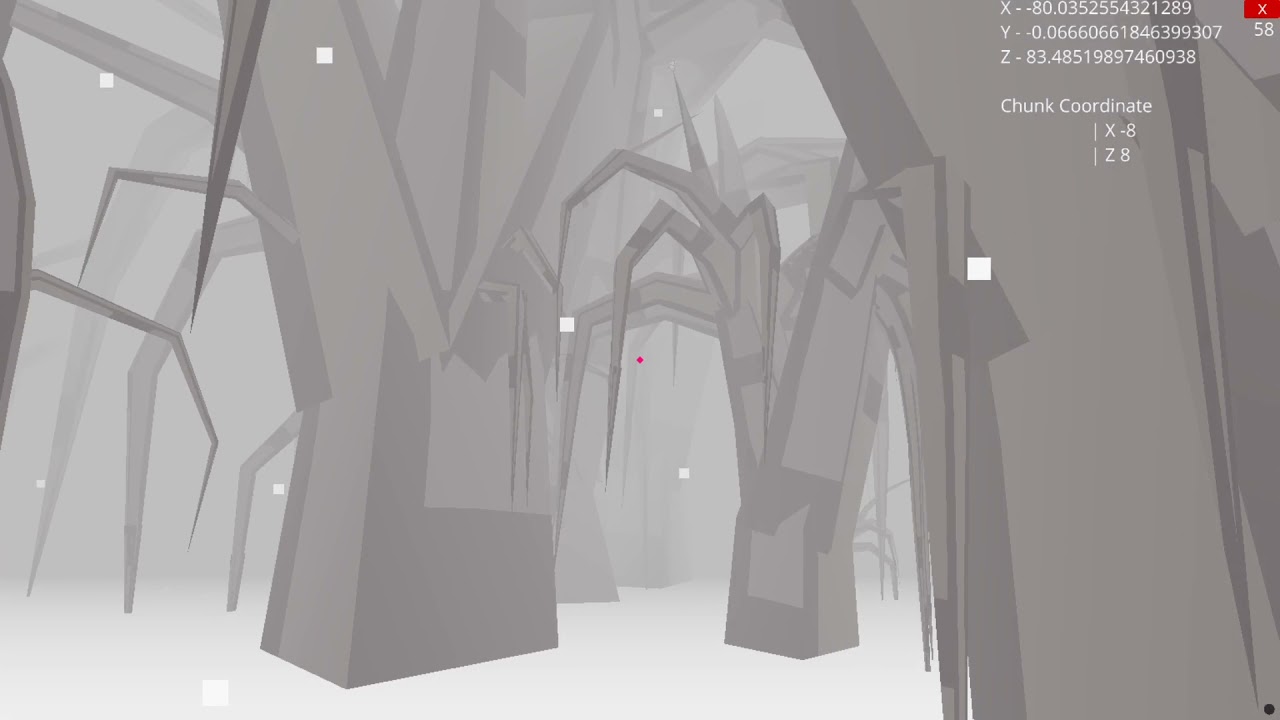
A demo of a game I am developing called snowfall, written in the ursina engine using python. https://www.ursinaengine.org/
dawn quiver
bro it's insane
dawn quiver
next estuary
What's panda3d?
it's a motor for video games on python
bro u are incredible juste wow
next estuary
Ahh, I don't want to rewrite it in a 5th engine heh I already did it in pygame in 2D and got the snow rendering in 3D OpenGL
(OpenGL demo below)
I played with a few others too but Ursina was really user friendly
dawn quiver
i just know the bases of python, is it easy to learn ?
next estuary
https://youtu.be/uUc370bLUJo
Pygame
Yeah python is one of the easiest languages to learn in my opinion.
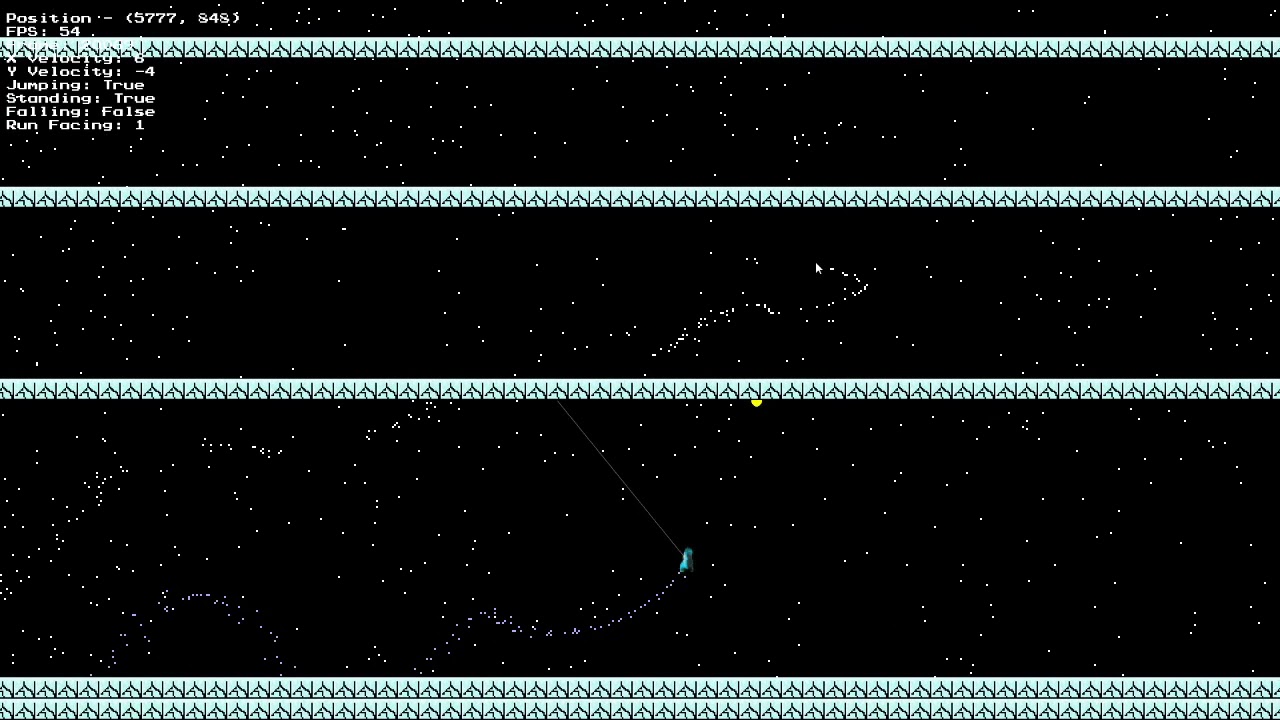 dawn quiver
i'm not bad in pygame tooo
dawn quiver
next estuary
https://youtu.be/uUc370bLUJo
Pygame
Yeah python is one of the easiest language...
is it ur creation ?
next estuary
The game is, I haven't written any engines myself. That one is written in pygame but pygame is pretty slow
dawn quiver
wow i watched the teaser of Ursina, it looks good
next estuary
It's an awesome engine
I'd recommend it for any beginner wanting to make a 3d game
It has preset control schemes for fps, racing, and other genres
A bunch of included models and textures
And it's pretty fast for being python
dawn quiver
okay
can i just ask u ur help
i have a problem with classes
look :
for the moment, i just write the script for the mooves of mario, here, my classes :
class mario :
def __init__ (self) :
    self.Mario_jump_left = mario_saut_gauche (fenetre, Mario__saut__gauche,y,x)
    self.Mario_jump_right = mario_saut_droite (fenetre, Mario__saut__droit,y,x)
    self.Mario_normal_right = mario_normal (fenetre, Mario__normal__droite,y,x)
    self.Mario_normal_right = mario_normal (fenetre, Mario__normal__gauche,y,x)
and when i start the script, the events don't work (the d key for go to right, the q key to go to left and the key z to jump)
so i decided to just forget the classes and i just done the functions without classes
and it works
but i just want to know why when i use the classes, the game does not work (tell me if i did error in the class)
I know taht classes are really important so i really want to know what's my error
next estuary
Can you post the full code on github? I can't see the issue here
dawn quiver
yes but i'm french so the functions are in french 😅
i will send u the code with the classes
 trim current
Hey everyone, im a Computer Science student and I am looking into entering game development when I graduate. I know this is a python server but which languages do you guys recommend to start learning for making games?
trim current
Ill give it a try thanks man
frozen knoll
Don't forget Arcade as an option. Lots of examples: https://arcade.academy
 sly sun
hi
next estuary
I'd never heard of arcade
That's super cool
I love the cave generation example that's cool, I'm gonna write a blender plugin that does that to make 3D mazes
trim current
I saw that pygame 2 is out, should i try that instead?
 distant kindle
frozen knoll
distant kindle
frozen knoll
For game development? Might look at https://learn.arcade.academy to step you through it.
 formal fable
hey guys i made a .exe game file check it out please
frank fieldBOT
Hey @formal fable!
It looks like you tried to attach file type(s) that we do not allow (.exe). We currently allow the following file types: .gif, .jpg, .jpeg, .mov, .mp4, .mpg, .png, .mp3, .wav, .ogg, .webm, .webp, .flac, .m4a.
Feel free to ask in #community-meta if you think this is a mistake.
formal fable
ok
dawn quiver
dawn quiver
hey everyone, this is my code :
from tkinter import *
fenetre = Tk()
fenetre.t...
i think you could use if statements
modest crow
formal fable
hey guys i made a .exe game file check it out please
You shouldn't post executables anywhere, not just here.
I would say
 idle falcon
Does anyone know how to use pyopengl?
 midnight heart
What is the best python game engine?
midnight heart
idle falcon
Does anyone know how to use pyopengl?
what is it?
idle falcon
midnight heart
what is it?
If your talking about what pyopengl is, it’s an OpenGL wrapper for python. In the case of your question, I think organelle is the easiest to get started with but pyglet is also pretty good
midnight heart
what is an open gl?
sorry i'm a beginner 😅
what is better pygame or python arcade library?
 nocturne vale
wich game engine is the best for python?
nocturne vale
ok thanks
modest crow
start with learning python, THEN do what you want
idle falcon
also, godot has a completely different langauge built in so you'll have to learn that as well
frozen knoll
@midnight heart if you are starting out, you might want to look at https://learn.arcade.academy
midnight heart
ok thank you
midnight heart
modest crow
pygame for learning, godot for real projects
but can i program in python with pygame on godot?
or with arcade librery
modest crow
midnight heart
but can i program in python with pygame on godot?
Nope
You don't need to
Learn what is needed for making a game with pygame.
Then, if restricted by it, venture for godot
midnight heart
ok thank U
modest crow
👍
limber veldt
I have shooting, I have scrolling, I have enemies (1000 of them for testing), I have particle explosions, no lags

Twinkling starfield BG
Getting there
Going to need a lot more content, too
Enemy types, enemy behaviors
Level setups and endings
Already feels like playing the original game though, just zipping around blasting those dummy badguys
They won't be dummies for long
They gonna start shooting back, too
limber veldt
All enemy types added, and their art: https://pasteall.org/media/e/9/e91d23a76422214814dfa5cfee1516f4.png
 dawn quiver
i think you could use if statements
dawn quiver
dawn quiver
i think you could use if statements
what's it
 obsidian nexus
i have a problem here. can someone help me?
 limber veldt
obsidian nexus
i have a problem here. can someone help me?
limber veldt
obsidian nexus
i have a problem here. can someone help me?
What is the problem?
obsidian nexus
limber veldt
What is the problem?
when i open it. thz game crashes after 5 secs
limber veldt
Is there an error message?
frank fieldBOT
Hey @obsidian nexus!
It looks like you tried to attach a Python file - please use a code-pasting service such as https://paste.pythondiscord.com
limber veldt
No idea, sorry
next estuary
I got perlin noise proceduraly generated terrain working
dawn quiver
Nice
idle falcon
pog!
 teal ember
obsidian nexus
when i open it. thz game crashes after 5 secs
teal ember
obsidian nexus
when i open it. thz game crashes after 5 secs
are you having a while loop inside your game besides the main loop
 next flame
hi
 wanton heron
hi
 balmy wharf
can i get help for godot here?
frozen knoll
You might try the godot discord to get godot help.
 barren torrent
if anyone's interested in a very different kind of game dev - hello, MUDs! https://www.patreon.com/posts/52198824
 gritty moat
is there any good tutorial for pygame ?
or
is there any good tutorial for making games with python ?, i don't care what is the library i just want to learn making games but i don't find any good tutorial
frozen knoll
Here's two:
For Arcade: https://learn.arcade.academy
For Pygame: http://programarcadegames.com
If you already know how to program, you can just look at example code.
Hope that helps.
gritty moat
getting this error
PS D:\Projects\Coding Projects\Python\Game> python pgame.py
Traceback (most recent call last):
  File "D:\Projects\Coding Projects\Python\Game\pgame.py", line 7, in <module>
    x=window.width//2, y=window.height//2,
TypeError: unsupported operand type(s) for //: 'property' and 'int'
for this code
import pyglet as pg

window = pg.window.Window
label = pg.text.Label('Hello, world',
                          font_name='Times New Roman',
                          font_size=36,
                          x=window.width//2, y=window.height//2,
                          anchor_x='center', anchor_y='center')

@window.event
def on_draw():
    window.clear()
    label.draw()

pg.app.run()
 stuck stone
gritty moat
getting this error
```ps
PS D:\Projects\Coding Projects\Python\Game> python pgam...
stuck stone
gritty moat
getting this error
```ps
PS D:\Projects\Coding Projects\Python\Game> python pgam...
window is just a class, not an object
cuz you didn't create one
potent ice
window = pg.window.Window <-- There is the problem
frozen knoll
()
stuck stone

 candid smelt
Hello freinds,
i was trying pygame for game devopment,
so i installed it in my mac and it installed perfectly,
but when i tried to make a pygame window with an image,
this happened,

why the heck is this distorted
pls help
limber veldt
How about in here...see the ground in this image? I'm really struggling to come up with a procedure to add random 'hills' to it

Maybe I pick a random pixel of that ground and elevate it some random height then pull those up next to it until it forms a hill
limber veldt
Oh that's really hard to work out since I don't want to make hills where there is already a hill
limber veldt
Hah, I kinda did it...

With this ```py
ground_group = pygame.sprite.Group()
x = 0
y = 1
while x < 9720:
g = GroundPixel(x, 580.0 + y)
ground_group.add(g)
x += 3
r = random.randint(0, 100)
if r == 0:
new_y = y
height = random.randint(0, 150) + 20
for j in range(height):
if j < height / 2:
new_y += 2
else:
new_y -= 2
g = GroundPixel(x, 580.0 - new_y)
ground_group.add(g)
x += 3
else:
y = -y
It's not quite the same alg as the original's ground maker but close
The original could do nested hills
 clear crane
How do I start to code a py.game
limber veldt
Well, I can share with you my version of tic tac toe, written in pygame, maaybe you can work through some of that
limber veldt
clear crane
How do I start to code a py.game
Really simple game, the setup is pretty straight forward as most pygames start the same way: https://pasteall.org/2khe
After that, you look for Tech with Tim on youtube, he has a vast collection on PyGame
clear crane
I started this video, and he made a window
Im trying to press the arrow in pycharm to open the window and it wont work
limber veldt
Is there an error message?
clear crane
No
`import pygame, time
pygame.init()
window = pygame.display.set_mode((600,300))
myfont = pygame.font.SysFont("Arial", 60)
label = myfont.render("Hello Cole" , 1, (255,255,0))
window.blit(label, (100,100))
pygame.display.update()
time.sleep(5)
pygame.quit()`
@limber veldt thats all it is
and it wont let me play it
Do I maybe have to add a configuration
dawn quiver
limber veldt
Hah, I kinda did it...
That looks really fun to play, were you aiming for a retro look? If so you did an amazing job.
sinful lodge
clear crane
`import pygame, time
pygame.init()
window = pygame.display.set_mode((600,300))
...
wait
are u saying that the pygame window aint opening?
u need to use pygame.event.get()
 scenic girder
Hello! I'm looking at this piece of code
gl.glTexImage2D( gl.GL_TEXTURE_2D, 0, gl.GL_RGBA32F,
                         self._data.shape[1], self._data.shape[0], 0,
                         gl.GL_RGBA, gl.GL_FLOAT, self._data )
self._data is a numpy 3d array(created with np.zeros). how do opengl convert it to void* on the go? does it just take [i][j][k]?
this is a python thing, if I'd done the same thing in another language it would either crash or wouldnt compile
are n-dimensional arrays in python contiguous?
 proper peak
scenic girder
are n-dimensional arrays in python contiguous?
proper peak
scenic girder
are n-dimensional arrays in python contiguous?
Yes (and I'm not sure what non-contigious implementation you have in mind - I thought contiguous was the normal way to implement n-dim arrays)
For a description of how they work, see Anatomy of an Array here:
https://www.labri.fr/perso/nrougier/from-python-to-numpy/
(and in general it's a very nice guide to numpy)
scenic girder
@proper peak normally in c/java etc. an n dim array is an array of arrays. That was ehat I thought, but numpy handles it differently.
 lime ether
scenic girder
<@266216750876459008> normally in c/java etc. an n dim array is an array of arra...
lime ether
scenic girder
<@266216750876459008> normally in c/java etc. an n dim array is an array of arra...
not in c
scenic girder
?
a 2d array in cc int** arr = malloc(5 * sizeof(int*)); for(int i = 0; i < 5; i++) { arr[i] = malloc(5 * sizeof(int)); }
a 2d array = an array of pointers = a pointer to pointers
lime ether
that's an array of arrays
if you don't do that, it would be contiguous
like int arr[3][3][2];
scenic girder
Hmmm, honestly I never used multi dimensional fixed size arrays. Thank you :)
next estuary
@limber veldt have you tried perlin noise?
It's pretty good for procedurally generating terrain
limber veldt
dawn quiver
That looks really fun to play, were you aiming for a retro look? If so you did a...
Hey thanks, it's getting there and yeah, retro...the original was made in 1981
limber veldt
next estuary
<@355791171231940620> have you tried perlin noise?
Thanks for the suggestion but no, it's just 2d line for my 'ground'
If I were to do a procedural 3d ground, I'd probably whip up a noise texture to use as a displacement map
clear crane
Hello, I have just started pygame and made a window opener. What do I do next, because I want to make a starter game.
limber veldt
Tic tac toe is a good starter project, I think
It'll get you working on breaking down the logic and program flow
Asteroids or some kind of block breaking game also good starter project but maybe not good firstt projects
And, if you can, do the tic tac toe without looking for someone else's code for it
We all know how the game works already
limber veldt
Well, maybe what you do is make one square with a border around it then make eight more the same way, arange them on the screen and viola, grid
Another important part is getting mouse clicks or keyboard presses
And where mouse clicked, even more important
Because if we know where the click happened, we can do some pretty basic maths to know where on the board was clicked
And which grid square
If just starting with Python too, I'd suggest a functional code but if you know any python at all already, it might be time to dive into object oriented programming, OOL
Tell ya this, tic tac toe or any kind of grid game or game in general really benefits from being object oriented
Think of classes as object factories, once you know how to use them, they're very powerful
Stuff like this probably not even possible without classes: https://imgur.com/gallery/2uqVNjA
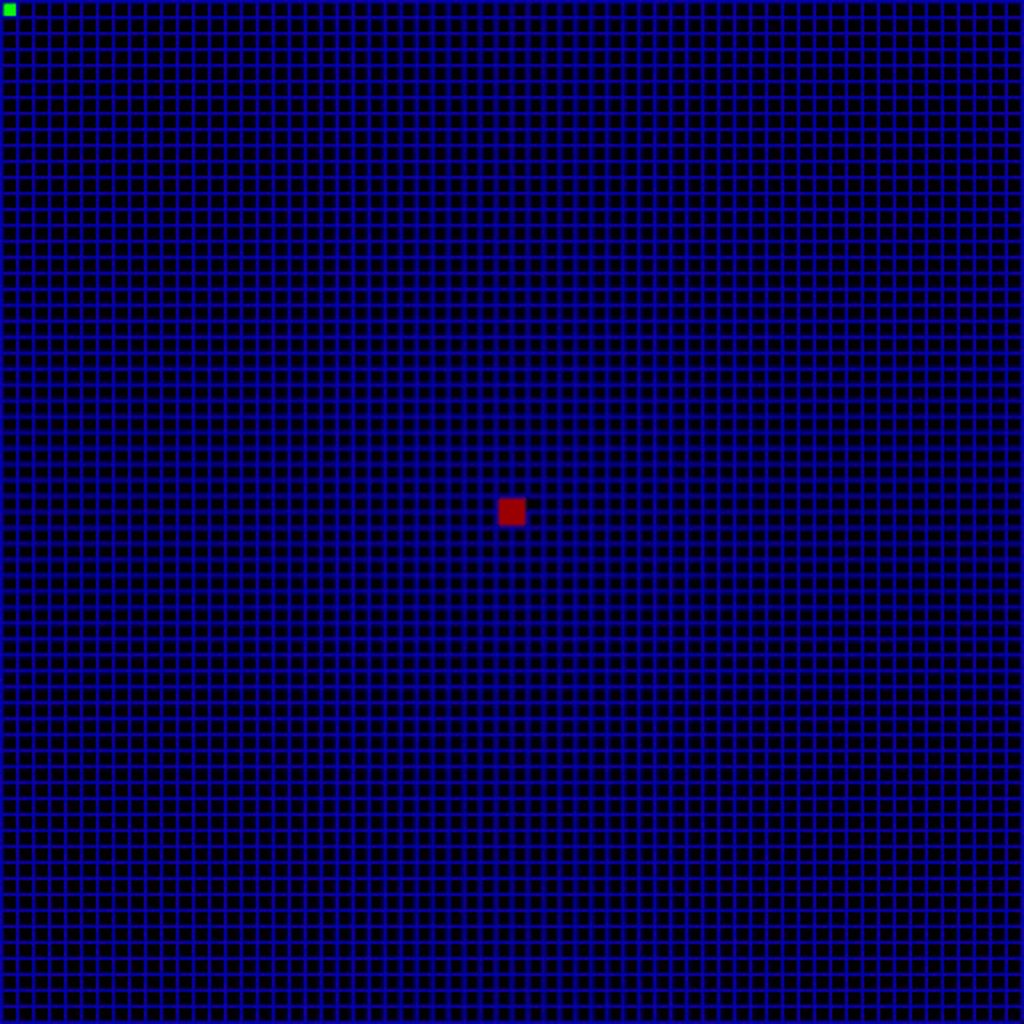
In that code, all those grid squares are separate objects. Each has a color at the start, and has attributes for which walls are True (yes, wall there) and whcih walls are False
And just a bunch of logic to generate and solve a random maze as fast as I could make it happen
The purpose of that project though was not to practice maze solving but to learn path finding algs, very applicable to games
 heady pine
next estuary
heady pine
next estuary
is it ursina or pandas3d? although ursina is based on pandas, but i dont know if they use the same debug window
heady pine
 quiet grail
IM BORED, any game suggestions?
quiet grail
IM BORED, any game suggestions?
4 dimensional game
next estuary
@heady pine Ursina, I really love working with this engine
This is what I'm making with it currently
limber veldt
Hah, look at that, completely recreated the enemy explosion

On the right, the enemy remains so we can see what it looked like before the explosion but look at those particles, same shape and size and velocities
Colors vary, but no biggie
That is badass
The original game uses a couple of different velocity patterns for the explosions, I plan to recreate them all but awesome that I got the test case working
heady pine
next estuary
looks awesome! 👍
heady pine
limber veldt
Hah, look at that, completely recreated the enemy explosion
Nice :)
limber veldt
And I worked it into a nice, clean bit of code for the particle generatorpy loc = [mutant.rect.x, mutant.rect.y] loc_y = loc[1] vel = [0, 0] rect_y_start = 0 vel_x = -8 vel_y = -8 for j in range(4): vel[0] = vel_x vel[1] = vel_y rect_x = 0 rect_y = rect_y_start loc_x = loc[0] for i in range(4): particle = Particle([vel[0], vel[1]], enemy_mutant, [loc_x, loc_y], [rect_x, rect_y, 5, 5]) vel[0] += 4 loc_x += 6 rect_x += 6 vel_y += 4 rect_y_start += 6
That makes all 16 particles
I always have to write all those particle assignments one by one before I can see the pattern and construct a couple of loops from it
Or anything like that
Next question...can I make them go in reverse to spawn an enemy
Yes, Just have to grab each of the particle positions after a certain amount of time then use those positions to recreate all of the particles with inverted velocities
So the particles have an age, when it reaches a certain value, the particle dies. When it dies, I print out the position and the velocity. Since there are 16 of them, I get a list of all of their positions and velocities
So now I just have to code a couple more loops with different values and determine how I'm going to kill them....I could just do the same and kill them after the same age
Since I'm using a constant FPS, that will work
 slate tendon
Hello, is there any way to schedule aperiodic events in pygame? I want to have a sprite that essentially just has an onclick function that only runs when I click it
It seems like the current solution to this is to simply poll in the for event in pygame.event.get(), then if you get a MOUSEBUTTONUP event, check for collisions with the sprites of interest
But this seems really ugly to me
_
Is there no construct for asynchronous/aperiodic event handling such as click events? Something essentially like
btn1 = AClickableSprite()  # A user-defined class that implements necessary "clickable" traits
pygame.events.AddAperiodicEvent(
  condition=lambda: pygame.events.on_click() and btn1.wasClicked(),
  response=btn1.clicked()
)
If this exists, that would be awesome. If it doesn't, maybe I'll write an issue
 compact portal
"scheduling" can be a complex thing, because since timing is involved, which process is going to be around to care?
I dare you to whip up a solution or hack in an existing scheduling system 🙂
limber veldt
limber veldt
Next question...can I make them go in reverse to spawn an enemy
Well yes, yes I can
 narrow kestrel
next estuary
narrow kestrel
next estuary
@next estuary I Want to get help and work with you in ursina engine I like your game's video
Please
narrow kestrel
next estuary
This is
 wanton whale
For any new game developers(or experienced), I stumbled upon this really well done video of a senior-dev refactoring a aspiring dev's console based Yahtzee game. It's worth a look. https://www.youtube.com/watch?v=l7E3y4te7sA

Learn how to practically apply design patterns and principles by watching this full code refactoring of a Python project submitted by one of the subscribers. I start with a thorough analysis of the code, discuss its strengths and weaknesses, and then refactor the code to (hopefully :) ) improve it.
The code I worked on in this episode is availa...
 dark lichen
What do you guys prefer among visual studio and pycharm?
 mental jetty
dark lichen
What do you guys prefer among visual studio and pycharm?
mental jetty
dark lichen
What do you guys prefer among visual studio and pycharm?
I prefer pycharm but I use sublime
 lunar creek
next estuary
<@573624280521375774> Ursina, I really love working with this engine
lunar creek
next estuary
<@573624280521375774> Ursina, I really love working with this engine
make a multiplayer battle royale
 sand iris
Can we use Pytmx with PIL?
next estuary
Nah I don't make shooters or anything where the goal is to kill someone
 barren shuttle
hey i need a game dev to work with me on a game
limber veldt
import pygame as pg
from pygame.math import Vector2
import math

pg.init()
screen = pg.display.set_mode((640, 480))
my_rect = pg.Surface((20, 20))
my_rect.fill((255, 0, 0))
clock = pg.time.Clock()
BG_COLOR = pg.Color('gray12')

point = Vector2(320, 240)
mouse_pos = Vector2(0, 0)
radius, angle = (mouse_pos - point).as_polar()

i = 320
j = 200
speed = 3

done = False
while not done:
    for event in pg.event.get():
        if event.type == pg.QUIT:
            done = True
    mouse_pos = pg.mouse.get_pos()
    loc = Vector2(i, j)
    radius, angle = (mouse_pos - loc).as_polar()
    x = radius * math.cos(math.radians(angle)) + 320
    y = radius * math.sin(math.radians(angle)) + 240
    vec = Vector2(x, y) - point
    v = vec.normalize()
    i += v.x * speed
    j += v.y * speed

    screen.fill(BG_COLOR)
    screen.blit(my_rect, [i, j])
    pg.draw.line(screen, (0, 100, 255), point, mouse_pos)
    pg.display.set_caption(f'radius: {radius:.2f} angle: {angle:.2f}')
    pg.display.flip()
clock.tick(60)```That's a nice little piece of code
Enemy shooting at player in 2d? You'll need something like that
Gotta be a better way to do it though
limber veldt
And there is a better way
Much nicer, no need for angle```py
import pygame
from pygame.math import Vector2
import math
pygame.init()
screen = pygame.display.set_mode((640, 480))
my_rect = pygame.Surface((20, 20))
my_rect.fill((255, 0, 0))
clock = pygame.time.Clock()
BG_COLOR = pygame.Color('gray12')
point = Vector2(320, 240)
mouse_pos = Vector2(0, 0)
x = 320
y = 200
speed = 3
done = False
while not done:
for event in pygame.event.get():
if event.type == pygame.QUIT:
done = True
mouse_pos = pygame.mouse.get_pos()
loc = pygame.math.Vector2(x, y)
if mouse_pos != loc:
new_loc = (mouse_pos - loc).normalize() * speed
else:
new_loc = (mouse_pos - pygame.math.Vector2(x - 5, y - 5))
x += new_loc.x
y += new_loc.y

screen.fill(BG_COLOR)
screen.blit(my_rect, [x, y])
pygame.draw.line(screen, (0, 100, 255), point, mouse_pos)
pygame.display.flip()
clock.tick(60)```
I now have mutants who can chase the player along a wobbly path (making them harder to shoot)
limber veldt
Two enemy behaviors kind of done. The only thing they lack is shooting at the player and, given what I have now, that shouldn't be too hard to implement with a Bullet class
The lander behavior is gonna be the hardest. They have a few modes. First is like search mode, where they fly left or right toward the nearest human on the ground and once they get there, the descend to the human, pick it up then ascend toward the top of the screen. If they get there with the human, they turn into mutants
 grim abyss
@sst can you help me with https://github.com/InZane84/WADdle-Plot-CLI/issues/1

GitHub
Plotter.plot Line:294 How to plot the points so that the level is centered in the window and the points are constrained within it, is beyond me at this moment. I don't understand enough to ...
limber veldt
And they're tough af
grim abyss
My math seriously sucks
limber veldt
Constraining to window is fairly straight forward
grim abyss
Can you explain concept?
limber veldt
Lemme look at your post a sec...
grim abyss
Ok
limber veldt
So I don't quite understand the question
How are you creating points?
Do the points move once they're created?
grim abyss
No, they are static.
So the raw points are in the range of -65k - 65k and I need to compute a translation offset for each vertex.
To plot them within a 640x480 window...
Then I need to scale the map so that it is within the window...
limber veldt
And the points each have an x and a y coordinate in that range?
grim abyss
Yes
grim abyss
Ok
limber veldt
Right?
grim abyss
Basically, yes
limber veldt
65k - -65k = 130k
grim abyss
Yeah, I'm with you
limber veldt
So just divide 130k by 640 for each point
Let me work through that a sec...kinda buried in my own code at the moment
limber veldt
Nah
grim abyss
What about min and max? To get a rect of all the points?
I don't know how to proceed lol
limber veldt
So, (640/130000) * X, and (480/130000) * Y
grim abyss
And that translates the point to screen space?
limber veldt
Yes
grim abyss
Should I use float?
limber veldt
new_x = (640/130000) * point.x and new_y = (480/130000) * point.y
That depends, you might want to cast to floats, do the math then cast back to ints
grim abyss
I see.
limber veldt
The math will be floats
If they're not moving, I don't see any reason to really, but I don't know every usecase
grim abyss
Eventually I do want to add zooming and panning.
limber veldt
If you give a screen location as a float, it'll be turned into an int anyway
What are you using to draw your plot?
grim abyss
Then I want to move away from Turtle and over to arcade because of pyglet>opengl
I'm using the Tkinter Turtle module.
limber veldt
I've been working through a lot of that lately with pygame
Like transforming and translating surfaces
grim abyss
But I need Tkinter for widgets and a hardware accelerated surface so that's two event loops? How can that work? Threads?
Interesting...
limber veldt
I'm no pro with pygame, but I'm learning, no pro with anything really as a hobbyist : )
grim abyss
Cool, but I was implying I would help you with the game first. Anyway, let me see if I can fix this since you have given me some insight..
clear crane
just wondering
limber veldt
Oh yeah, and since your range is starting in the negative, you'll have to offset that, just add 65000 to all of your point.x and point.y to bring it from a range of -65k through 65k to a range of 0 through 130k
Before doing your scaling math
Might just be able to abs() the result otherwise but I haven't worked that out
Nah
But that should be good
Just add the 65k to each one
That's a pretty massive scale, less than .005 per value in range
grim abyss
hmmm
I'm into now and I have fallen into "Indentation Hell" 😦
and infuriating situation that happens in VS Code

what is causing this? tabs? spaces? whiteline? i mean what
there is no syntax error, something has happened to indentation.
limber veldt
So plot() is a method, that entire block would be indented one more level
To be inside the class to which it belongs
And just break that if statement and conditions into the proper three lines it should be
That's the problem
Paste that line here for me, and the else: line too
I can't wait to do the enemy pods in this game. When they die, they spawn a few swarmers that come straight at the player hard and fast
That should be fairly easy to code the swarmer individual behavior but they kind of act as a group
grim abyss
I've figured it out. Code is in an inconsistent state and has mixed tabs and spaces for some odd reason
that sounds cool. you have art assets?
clear crane
might be stupid but can i thing coded in pygame be made into an app?
just wondering
clear crane
yeh
grim abyss
An Applicatiion is compiled code that runs within a runtime environment
You should hit up Google for that. I haven't even tried to develop Python apps on mobile. I do know there is Kotlin + Android Studio
on iOS you would probably use Swift?
mobile is a different space?
grim abyss
@limber veldt thanks to you I'm on the right path. I just need to figure out now how to stay centered while scaling...but I have the points staying within the window!!!
grim abyss
yup
limber veldt
In pygame, I would select a rect from the screen surface and scale it up to screen size then place it at 0,0 on the screen
grim abyss
so the screen surface has a different coordinate system from the screen size of say 640x480?
limber veldt
No, same thing
The surface is the size of the screen
But things can be outside of it, they just won't show on the screen
grim abyss
on this though 0,0 is top left so I need to Heighth / 2 and Width /2 to get center
I see how to do it now, I believe
limber veldt
So a rect of size 100 x 100 will be [width / 2 - 50, height / 2 - 50, 100, 100] to define the x and y of the upper left corner of the rect and the x size to be 100, y size to be 100
I'm not sure what kind of rectangle definition you need though
A rect centered in screen, I should say
grim abyss
width / 2 - 50 why -50?
limber veldt
I think that's generally how we define a rect though, that or just give the upper left point and the lower right point
T0 be centered in screen and 100 pixels wide, we have to take 50 from the left and 50 from the right of center
grim abyss
https://pythonhosted.org/planar/index.html this is the 2d geometry library I'm using
limber veldt
50 pixels left of center is center - 50
50 pixels right of center is center + 50
Right?
lol
grim abyss
https://pythonhosted.org/planar/bbox.html specifically this right now to try and get the rect of the world points
yup i got you
limber veldt
I have my enemy baiters flying to the player then doing a stretched diamond flight pattern around the player
Never really trying to hit the player, just fly around him
Eventually, they gonna fire bullets too
lol
This is great
grim abyss
🙂 sounds neat
 noble rapids
 cobalt lichen
learn bro
grim abyss
@limber veldt are you here?
grim abyss
could someone help me with translating some points to screen space?
dawn quiver
does anybody know why when i am editing an animation sequence and save that and restarting the engine the animation stays as the last one?
(unreal engine 4)
ping at help please
limber veldt
So it looks like, at least from my watching of the videos, that some maybe even all Defender enemies have multiple behaviors like roam, search, attack, chase
And all of them well defined
Well, maybe not so well defined in a couple of them
Their transitions are so subtle sometimes, not so subtle other times
limber veldt
grim abyss
<@355791171231940620> are you here?
Sup man?
I wish I had the original game and could enable god mode just to watch the enemy flight patterns
I've done a lot of google digging, seems nobody has already analyzed these behaviors for me : P
Even found the source code but by the time I figure out exactly what that's doing...
The source is in 6809 assembly, not totally foreign to me, I use to know it but that's been decades
Color computer days, Coco3 was the shit
Part of the problem is with the term. Put the word "Defender" in a google search and you get a lot of tower defense hits
Anyone good enough please feel free to extract the enemy pod behaviors from this: https://github.com/AaronBottegal/Defender-Source-Code/blob/master/SourceCode.txt for me in either english or pyhon, thanks : )

GitHub
Defender arcade game code reverse engineered back into source. - AaronBottegal/Defender-Source-Code
Like I still remember the mnemonics
JSR = jump sub routine< --- meant to say jump there
LDB = load B register
STA = store A register
Some of them I have a hard time recalling but...meh, it's been 30 years
 nocturne nova
is some one here familiar with pygame and can help me with a code for collision detection i have put my questions in a help channel atleast 5 times, i have tried to figure it ourt my self for weeks so if anyone can hekp i would really appreciate it
limber veldt
What kind of collision detection do you need? Simple rectangle/bounding box?
nocturne nova
sprites
limber veldt
Make your objects into pygame.sprite.Sprites and add them to a pygame.sprite.Group, done that already?
I'm just now learning some of this stuff for pygame, too
nocturne nova
i am pretty sure i have done that my error is that they are iterable
 nocturne nova
https://replit.com/@815398/dinoD#main.py well this is a link to my code if you would like to take a look
 limber veldt
So in your draw_screen() function, you're doing something like: ```py
enemy_group.update()
enemy_group.draw(screen)
Sorry, lemme fix that...
nocturne nova
this is the first time i have made a game like this so
limber veldt
That indent, I dunno why...
nocturne nova
limber veldt
So in your draw_screen() function, you're doing something like: ```py
enemy_grou...
yeah i am pretty sure i do that
limber veldt
So then in my main loop I have just one line for collisions py hits = pygame.sprite.groupcollide(bullet_group, enemy_group, True, True)
limber veldt
Your player class draw() method is probably not even necessary. You can draw the group as I did up there
None of my objects have a draw() method, group.draw(screen) just calls pygame to blit them to the destination
nocturne nova
i tried what you have and now it says that my object has no attribute to sprites

this is my player
limber veldt
Hard to read, but I try....
grim abyss
@nocturne nova that website is freaking cool! replit...
limber veldt
Ok, so your sprite needs a couple of things...
nocturne nova
yeah it is really easy to use and you have tons of languages
limber veldt
The formatting here is going to mess up the long-ish lines, but...```py
class EnemyMutant(pygame.sprite.Sprite):
def init(self, x, y):
super().init()
self.image = pygame.Surface((25, 24), pygame.SRCALPHA) # going to eventually be an enemy mutant, but a blank surface so far
self.rect = self.image.get_rect(center = (x, y)) # get the rect of that surface
But sprites need the image or surface or whatever is being drawn as self.image
And they need the rect of that image
limber veldt
And, most importantly, have to inherit from the parent class, hence the super().__init__()
Well, have to init the parent class, I should say
limber veldt
nocturne nova
i have that line in my sprites
Excellent
Oh yeah, it is there, like I said though, that's hard to read for me here
As I look very closely, yeah..
nocturne nova
i am quite confused could i take a look at your code or like a github that you recomnend that could help
limber veldt
what was your error again?

 limber veldt
Ahh, so is asteroid not another pygame.sprite.Group()?
 nocturne nova
limber veldt
The formatting here is going to mess up the long-ish lines, but...```py
class En...
nocturne nova
limber veldt
The formatting here is going to mess up the long-ish lines, but...```py
class En...
sorry i dont know how to show it like this
limber veldt
So you have```py
asteroid = Asteroids()
asteroid_group.add(asteroid)
asteroid = Asteroids() only this
limber veldt
You'd need to add that asteroid to a group of them for them to be iterable...I think
Iterate the group, of course, not the asteroid itself
nocturne nova
alright i am going to that right now
layer = DINO('player', 200, 325, 1.5, 5)
asteroid = Asteroids()
asteroid_group.add(asteroid)
player_group.add(player)
limber veldt
asteroid_group = pygame.sprite.Group()
asteroid = Asteroids()
asteroid_group.add(asteroid)
Then that hit detection line can iterate that group
nocturne nova
ohg thanks i was about to say that i get an error like that
limber veldt
And if there are problems along that route, fix the objects because that's how I'm using it and it's working
: )
Looks like a fun project you're working on
nocturne nova
what do you mean fic the objects?
thank you
asteroid = Asteroids()
asteroid_group = pygame.sprite.Group()
asteroid_group.add(asteroid)
player = DINO('player', 200, 325, 1.5, 5)
player_group = pygame.sprite.Group()
player_group.add(player)
limber veldt
What I mean is that I got them working the way I described but to fit into that kind of group, a sprite group, an object has to have certain things...it looks like all yours do from what I've seen so you should be good to go
nocturne nova
sorry to bother you again but hat is my code and it says that DINO (player) has no attribute to sprites
nocturne nova
 frank fieldBOT
Hey @nocturne nova!
Uh-oh! It looks like your message got zapped by our spam filter. We currently don't allow .txt attachments, so here are some tips to help you travel safely:
• If you attempted to send a message longer than 2000 characters, try shortening your message to fit within the character limit or use a pasting service (see below)
• If you tried to show someone your code, you can use codeblocks
(run !code-blocks in #bot-commands for more information) or use a pasting service like:
limber veldt
Can you show the code around the line that's giving the error?
nocturne nova
this the error
 limber veldt
Because it's true, there is no self.sprites = assignment in the __init__()
nocturne nova
ok so what does the self.sprites need to equal to
limber veldt
Change to player_group and asteroid_group, not player and asteroid

 limber veldt
We add them to groups so we can use them in the hit detection, so we can't use the objects themselves, but the group containing them
No
Not like that
Delete that line
nocturne nova
ok
limber veldt
This line, make it this: py hits = pygame.sprite.groupcollide(player_group, asteroid_group, True, True)
nocturne nova
oh
nocturne nova
ok so there is no error now how do i make the if....: line so i can tell it do something
limber veldt
Do the objects disappear from the screen when collided?