#microcontrollers
1 messages · Page 22 of 1
 eager wasp
 balmy osprey
but theyre not synced with me pushing the buttons
eager wasp
Or is it just random.
balmy osprey
random
balmy osprey
floating, i see
balmy osprey
Yes
eager wasp
The pin you're listening on is unknown.
So that probably means your ISR is working okay.
balmy osprey
Ive used GPIO 34
eager wasp
Did the switch help?
balmy osprey
That seemed to be correct
eager wasp
Okay...
balmy osprey
Let me try another pin for input
eager wasp
Okay....
eager wasp
What's on pin8/IO32/GPIO32?
balmy osprey
D32 is empty
eager wasp
Try D32.
balmy osprey
its not making new boxes
eager wasp
Did you try both "8" and "32"
balmy osprey
okay it srated making boxes again, there was a small typo, but random boxes
balmy osprey
on boot
random, but just a few, and then it stops
button is unresponsive
is that because the for lop has ended?
loop*
eager wasp
After 15 seconds it would.
If you set the range(1500) to 3000 it should go 30 seconds.
eager wasp
You can try touching the pins with your fingers to try to trigger it.
Or you can try touching a wire connected to +5V to the GPIO pins to see if you can trigger it.
Isn't GPIO2 connected to the LED?
eager wasp
Your switch circuit looks correct.
I think at this point it's just a matter of finding the right pin in your esp32.
balmy osprey
its behaving really weirdly
i changed the input object name string to "B"
but the screen shows A for a long time after i upload boot.py
eager wasp
a = box(10,10,10,"A")
balmy osprey
yes
eager wasp
You have that at the bottom, right?
balmy osprey
yeah, just to show that the screen is on
a = box(10,10,10,"WWWW")
but when i change it to this, it still shows A on the screen
its in some kind of loop, unable to restart the backend
eager wasp
power off...?
eager wasp
I have a suspicion it's just trying to find a pin that works.
balmy osprey
let me upload a video of this, maybe you'll see how bizarre this is for me
eager wasp
You have a button on your little esp32 board right?
balmy osprey
yeah theres a button there PRG
sorry, EN
its says
does that mean that Pin EN is the output of the button?
eager wasp
Well.. EN is the reset button...
I was looking to see if the boot button is wired up to a pin on the esp32.
balmy osprey
Theres BOOT and EN
It's so weird, if i fiddle with PIN32's wires, it makes new boxes
but that A still appears
for some reason
eager wasp
The last line of code...
eager wasp
Hmmm
eager wasp
So pin32 is the right pin.
 eager wasp
Right... the ISR is triggering all over the place.
balmy osprey
should i add a capacitor?
eager wasp
Can you post your code?
balmy osprey
##--Micropython--##
##--ESP32 with 1.3Inch OLED Via i2c--##
from machine import Pin, I2C, TouchPad

import sh1106

import time
import random


# ESP32 Pin assignment for display (DONT IGNORE)
i2c = I2C(scl=Pin(14), sda=Pin(27), freq=400000)

# Display Init Sequence ----
display = sh1106.SH1106_I2C(128, 64, i2c,Pin(16), 0x3c)
display.sleep(False)
display.fill(0)
# ------


#Box Class

class box:
    def __init__(self,x,y,sz,name):
        self.posx=x
        self.posy=y
        self.size = sz
        self.name = name
        self.update()


    def update(self):
        display.fill_rect(self.posx,self.posy,self.size,self.size,1)
        display.text(self.name,self.posx+self.size+2,self.posy)
        display.show()

    def move(self,endx,endy):


        startx = self.posx
        starty = self.posy

        for i in range(1,51):

            display.fill_rect(self.posx,self.posy,self.size,self.size,0)
            display.text(self.name,self.posx+self.size+2,self.posy,0)
            self.posx = int(startx + (endx - startx) * i/50)
            self.posy = int(starty + (endy - starty) * i/50)
            self.update()
a = box(10,10,10,"WWWW")
button = Pin(32,Pin.IN)

button_press = False
global interrupt_pin
def handle_interrupt (pin):
    global button_press
    button_press = True
    global interrupt_pin
    interrupt_pin = pin
button.irq(trigger=Pin.IRQ_RISING, handler=handle_interrupt)
instance=[]

boxcount = 0
for x in range(1000):
    time.sleep(0.01)
    if button_press:
        boxcount +=1
        print("buttonpress!")
        instance.append(box(random.randint(1,128),random.randint(1,64),10,str(boxcount)))
        button_press = False
Button still does nothing right?
balmy osprey
Hard to say because the moment i connect it, it starts making random boxes
the pin works for sure
balmy osprey
thats weird, now it suddenly doesnt work
eager wasp
So ... you might be having an issue with bouncing.
If that's the case you can probably set the delay in your main loop to .1 s
But your ISR is definitely triggering.
Pin.IRQ_HIGH_LEVEL interrupt on high level.
Also use PIN.IRQ_HIGH_LEVEL.
eager wasp
The switch is noisy. So yeah a capacitor will help... But if you want to do it in software you may have to keep a state somehow of when it's on, and when it's off.
balmy osprey
eager wasp
5 * R * C could be .1S.
I don't understand
balmy osprey
Yeah, i just picked one I'd used earlier
eager wasp
So ... what's the value of that? 3300?
balmy osprey
should I choose a different one?
😅 I just use the labels on the bag
this was a random one
eager wasp
If you put a 20 microfarad cap in ...
parallel to the resistor.
5 ( 1000 ohm ) * .00002 farad -> ~.1S rise time/fall time.
balmy osprey
the 1k resistor worked! Had to change back to _IS_Rising though
eager wasp
Yes.
eager wasp
10microfarad might work... anything in that neighborhood.
The rc/cap combination should stop the switch from bouncing.
balmy osprey
got a 10uf
lemme see
capacitors are directional? sorry, I was a mechanical engineer
eager wasp
Only electrolytics.
The minus should be labeled with the white stripe.
That goes to ground.
balmy osprey
ah okay right
eager wasp
You can do the debouncing in software but frankly hardware is easier.

Electrical Engineering Stack Exchange
I have a push button that I would like to debounce. I only care about the first rising edge of the signal which is connected to an Arduino's GPIO. After reading on the web about hardware debouncing...
balmy osprey
So, its doing this weird thing where, if i push the button down then nothing happens but if I remove the wire connecting the button to the e32 pin, it creates new boxes
eager wasp
Hmmmmm.
balmy osprey
and every time i touch the wire to the breadboard, a new box appears
and this is on the end of the D32pin
eager wasp
Is your switch wired up correctly?
balmy osprey
 eager wasp
In the picture, does the switch connect left to right or top to bottom?
balmy osprey

this is the switch flipped
exactly as it was on the previous picture but upside down
eager wasp
That doesn't help me. 🙂
eager wasp
Put the 3.3V line on... the pin directly opposite of the resistor.
Seems like you're super close.
balmy osprey
You mean the pin thats powering the screen?
eager wasp
Yeah....
balmy osprey
eager wasp
Seems like you're super close.
Thanks so much for your time, I will definitely credit you on github when this works
eager wasp
But ... I believe the software works for the most part now.
balmy osprey
and the switch works, just tested with the multimeter
eager wasp
okay... so check the voltages going into the switch.
when the switch is open (not pressed) make sure there's 3.3v across it ...
balmy osprey
4.7 v from the screen voltage (the new pin that you just reccomended) and 3.2 from the previous one
balmy osprey
the original pin was 3.2 ish
eager wasp
Then when you push the switch, the voltage should drop to 0.
You can also measure the pin on the esp32 circuit (if you have enough hands.)
 main ridge
anyone can help with a frequency meter electrical schematic?
eager wasp
Basically when that switch closes, voltage across the switch should drop to 0V and the voltage to GPIO34 should be 3.3v
When the switch is open, it should be the reverse.
So it could be a bad switch, etc.
balmy osprey
eager wasp
Basically when that switch closes, voltage across the switch should drop to 0V a...
When the switch isnt pressed in, the voltage across it is 3.3v
the moment i press it, it goes to 0
eager wasp
Yay.
Okay so measure the voltage across GPIO34 and ground.
Make sure when you push the switch, GPIO34 sees 3.3v
balmy osprey
So this isn;t happening, when i press the switch theres no change
eager wasp
np. Best of luck theaxxxin
balmy osprey
thanks!
balmy osprey
guys, if anyone is still checking this out, there seems to be a constant 0.05 - 0.1 volts being read on my GPIO pin 32 on the esp 32
For some reason this seems to be throwing off my code because even if the button is pressed, there is no response
however if the button is not pressed and i merely touch the button output wire to the breadboard right next to my pin, it registers as an interrupt
and even this happens sporadically
Let me just upload a video
Pastebin
Pastebin.com is the number one paste tool since 2002. Pastebin is a website where you can store text online for a set period of time.
This is the full code
I'm putting all this on GitHub so people from the future can benefit

GitHub
Simple OOP to get started with micropython. Contribute to theaxxxin/micropython-oled-boxes development by creating an account on GitHub.
 pure sinew
Yeah, but I still worry that too many corners have been cut with them causing them to be unsafe ( have a look at some of big clive's videos https://www.youtube.com/user/bigclivedotcom )

YouTube
The trashiest electronic channel on YouTube. We test and use affordable electronic soldering equipment and tools to build, teardown, modify (and sometimes destroy) random electronic stuff.
A British TV licence is NOT required to view my videos or almost every other video on YouTube.
Many of the builds and projects featured here operate at ful...
 celest birch
Hi, I've got two sadly neglected Raspberry Pi:s B Rev2 from a time where I had yet to type my first line of Python. I mean to rectify this and put them to use but don't know where to start. It was a while ago and I've only used them as desktops for PHP development... It was my first experience with working in the terminal. Now I want to use them with Python, but not as desktops, I've got both a MacBook Pro and WSL2 on WIndows to satisfy my dev environment needs. I want to make something "fun", or useful, without having to buy too much stuff to begin with. The current OS on one card is Wheezy... I remember trying to upgrade to Jessy at the time but it didn't work. So what's the most "Pythonic" use of my Pi:s? :)
balmy osprey
celest birch
Hi, I've got two sadly neglected Raspberry Pi:s B Rev2 from a time where I had y...
You could try making a pylora or something, if you have two devices
off grid communicator, you know
celest birch
balmy osprey
off grid communicator, you know
I must say that I don't, this is a whole new world, save from my brave step into Linux on the Pi many years ago.
balmy osprey

GitHub
Low-level Lora (SX127_) Python module for Linux (Raspberry Pi and others) - Inteform/PyLora

Hackster.io
Doomsday text communication device enabled by LoRa.
celest birch
I did get both a BT and WiFi stick at the time but never managed to use either...
balmy osprey
hey, its a fairly powerful microprocessor running a full OS with easily accesible GPIO pins 🙂 The only real limit is your imagination
lots and lots of things you can do
celest birch
I guess I've never considered possibilities and just thought of things like that as "magic" and unattainable, but I do know some code now so why not.
balmy osprey
also, just implementing other people's code can be hard enough
so take it easy, step by step
always helped me
balmy osprey
Hey guys, I'm working on a microcontroller project where I'm trying to run a physics engine on an esp32. Everything worked fine until i implemented the collision detection. Right now the code compiles but the screen remains blank and I have no idea why.
I've created a github so its easy to look at,
https://github.com/theaxxxin/micropython-physics

GitHub
Contribute to theaxxxin/micropython-physics development by creating an account on GitHub.

Could someone take a look and see why it could be broken?
Its a very simple circuit with a 1.3inch OLED display powered by SH1106 Driver, but should be possible with minimum modification for SSD1306 driver as well
for 0.96 inch displays
 shadow ginkgo
Hello people. I needed some help on how I could send variables from my python program to arduino.
its basically a value that tells the arduino to rotate a stepper a certain number of steps
i've googled some stuff about standardFirmata, pyserial etc but they didnt help much
can anyone please help me out?
 errant wigeon
Is the arduino connected to the computer running python? If that's the case, while I haven't used pyserial in quite some time that would be the library I'd recommend
shadow ginkgo
yes im using a usb cable
and it seems to be working now.
ser = serial.Serial("COM8", 9600)
ser.write(itr.encode())
sending a variable itr to serial
errant wigeon
Fantastic and congratulations on getting it working!
 zealous oyster
hello, is there anyone here that knows how to use pyserial with arduino and can help me in dms with something?
errant wigeon
zealous oyster
hello, is there anyone here that knows how to use pyserial with arduino and can ...
What are you trying to get working?
balmy osprey
Guys, does anyone know where I can find the source code for framebuf in micropython?
is there a way to modify it or will I have to edit it before flashing my esp32 again?
zealous oyster
errant wigeon
What are you trying to get working?
i made a tic tac toe game in python and i want to connect the Arduino to it and use a joystick in order to play the tic tac toe and i am still not sure how to use the pyserial and didnt understand too much from the internet
 brazen meadow
Does this make sense? https://pyserial.readthedocs.io/en/latest/shortintro.html
I can give you some examples if needed.
brazen meadow
balmy osprey
Guys, does anyone know where I can find the source code for framebuf in **microp...

GitHub
MicroPython - a lean and efficient Python implementation for microcontrollers and constrained systems - micropython/micropython
zealous oyster
alright i will check this out and get back to you. thank you!
brazen meadow
zealous oyster
alright i will check this out and get back to you. thank you!
Feel free to dm me
zealous oyster
👍
 compact delta
can I program arduino in python??
 gentle vapor
depends which one, and what you mean by "Arduino" and "program".
- All arduino boards (boards made by the Arduino company) should support Firmata and let you pilot it through USB by a python script on your computer.
- Some Arduino boards are supported by Micropython and/or Circuitpython (a python interpreter running on the board).
- Many other maker-oriented boards that are compatible with the Arduino IDE are supported too
I don't know much about frameworks that allow compiling a python-like language for an arduino board, but I think that exists ?
errant wigeon
 It's *kind of possible* as long as you use the right arduino board, but it's not the easiest thing in the world in comparison with a board advertised for circuit or micro python
zealous oyster
I have a problem with pyserial that it only gets info for about a second when i open the program and then stops getting anything from the arduino, how do i fix this?
errant wigeon
Could you post your code? It's hard to even guess what's going on without it. And just as an initial comment, double check that your baudrate is set to the same speed on both ends
zealous oyster
errant wigeon
Could you post your code? It's hard to even guess what's going on without it. An...
yeah the baudrate is the same speed
the code is pretty long tho
do you think you can help me in dms?
errant wigeon
Can you post the section that does serial communication? (I've got to step away shortly so posting sections of code here will let others be able to help after I head out as well)
zealous oyster
well its a bit complicated
gentle vapor
gentle vapor
I don't know much about frameworks that allow compiling a python-like language f...
ah there's https://sneklang.org I think
zealous oyster
but i will send anyway maybe u can help
zealous oyster
errant wigeon
Can you post the section that does serial communication? (I've got to step away ...


this is everything that uses the arduino
i am using a joystick with the arduino in order to choose the place in tic tac toe
here is the code of it
int xPosition = 0;
int yPosition = 0;
int mapX = 0;
int mapY = 0;
int SW_mode = 0;


void setup() {
  Serial.begin(9600);
  pinMode(2, INPUT_PULLUP);
}
void loop() {
  xPosition = analogRead(A0);
  yPosition = analogRead(A1);
  SW_mode = digitalRead(2);
  mapX = map(xPosition, 0, 1023, -512, 512);
  mapY = map(yPosition, 0, 1023, -512, 512);
{
  Serial.print(mapX);
  Serial.print(":");
  Serial.print(mapY);
  Serial.print(":");
  Serial.println(SW_mode);
}
  delay(1000);
}
you have a while True in your while True ?
you set Left, Click and Right only once before entering the internal while True with values that are not changing inside
errant wigeon
The while true inside the while true is entered no matter what, and when there's no assigned button click it can't exit
zealous oyster
i dont understand
zealous oyster
gentle vapor
you set Left, Click and Right only once before entering the internal `while True...
i set them twice
once in the beginning as false
and then in the loop in order for the joystick to make them true
well i copy pasted the whole serial into the two while true loops and now it works
ty for letting me know the problem was with the while true loops
errant wigeon
Did changing the while loop solve your problem?
 steep dune
KeithTheEE ---- i lost a link , oh no ---- I asked you about cubesats , the tiny solenoids , servos , pumps that can go inside -- i want to join that tech to microcontrollers
errant wigeon
I'm afk for a bit but more specifically what were you thinking of needing and doing?
steep dune
i know python and microcontrollers -- i want to nake a water chemistry analyser , so need to re-route water sample to here and there , expose to different sensors , so it - micro piping , valves , pumps ....................................................
errant wigeon
Ok, that's a lot of goals
do you have the valves, pumps and sensors? A good place to start would be to make sure you can program a micro controller to use all of them, and then later on you can work to put them together
that way you aren't trying to figure out how to build it, and figure out how to toggle a solenoid valve at the same time
it makes the learning curve much easier, breaks the problem down into smaller portions, and when you do have a problem, it's easier to isolate so you can ask for help and have a clear question/problem statement for others
 dry hawk
Some one wants a micro controller to send location to police, anyone knows super small micro controller
Smaller than 10 mm maybe
errant wigeon
I'm sorry I don't exactly know what you mean there, are you asking a question or just sharing information?
 lime bear
dry hawk
Some one wants a micro controller to send location to police, anyone knows super...
lime bear
dry hawk
Some one wants a micro controller to send location to police, anyone knows super...
i know its is arduino pro micro its really small or try arduino rp2040 new one it has really cool features and small
dry hawk
what is its size
 steel folio
errant wigeon
I'm sorry I don't exactly know what you mean there, are you asking a question or...
steel folio
errant wigeon
I'm sorry I don't exactly know what you mean there, are you asking a question or...
Yo! That's a resistor color code on your profile. I didn't learnt the codes too
 wind stone
I was wondering if anyone could help me with this:
steel folio
Where
 steel folio
I find no mistake
wind stone
hm..
I do not understand why...
How do I access one of those channels that I can ask for help in?
wind stone
thats ok
 summer turret
wind stone
summer turret
wind stone
Think you might be missing a bracket.
 dense hollow
wind stone
dense hollow
wind stone
did you get any other error?
Hello,
When we use Ohms Law to calculate the voltage after a resister the voltage we get, is that the voltage dropped after that resistor or simply the voltage at that point in the circuit?
@someone
wind stone
Oh hey!
It worked properly!
Turns out I just duplicated the same thing line of code by accident
Erased the duplication it worked nicely
 rotund pine
Hey guys, I am trying to do the following task with my RPi
- Button press first time blink LED with 1 sec interval
- Button press second time blink LED with 0.5 sec interval
- Button press third time blink LED with 2 sec interval
- Button press fourth time LED should be off and repeat
I have come up with following code , which seems to work but the button press immediately wont affect the LED blink time. The button needs to be kept pressed for some duration.
Is there any better way to achieve it. ?
import RPi.GPIO as GPIO
import time
import threading

ledPin = 15     # GPIO 22
button = 11     # GPIO 17

k=[0,1,0.5,2]
i = 0

def setup():
    GPIO.setmode(GPIO.BOARD)
    GPIO.setup(ledPin, GPIO.OUT)
    GPIO.setup(button, GPIO.IN, pull_up_down=GPIO.PUD_DOWN)
    GPIO.output(ledPin, GPIO.LOW)

def button_pressed(a):
    global k
    global i

    if a == 1:
        i = i+1

        if i==4:
            i=0
    return k[i]


def glow_led(x):
        if x==0:
            print(x)
            GPIO.output(ledPin , GPIO.LOW)
            pass
        else:
            print(x)
            GPIO.output(ledPin, GPIO.HIGH)
            time.sleep(x)
            GPIO.output(ledPin , GPIO.LOW)
            time.sleep(x)

setup()

while True:
    a = GPIO.input(button)
    b = button_pressed(a)
    glow_led(b)
 tiny mauve
rotund pine
Hey guys, I am trying to do the following task with my RPi
* Button press first...
tiny mauve
rotund pine
Hey guys, I am trying to do the following task with my RPi
* Button press first...
Using threading could help, I found it tricky to use so not able to help much. In your code you are importing threading but not using it.
rotund pine
tiny mauve
Using threading could help, I found it tricky to use so not able to help much. I...
Yeah. I was researching about it but yet to try. Also is there any alternative to time.sleep method . Its like making my code inactive for that time and my button press doesn't affect the change.
tiny mauve
rotund pine
Yeah. I was researching about it but yet to try. Also is there any alternative t...
you'll need to go the threading and use "collections.deque" to pass values between threads, I've been there, scripts are working but that's the upper limit of my python expertise 😦
rotund pine
tiny mauve
you'll need to go the threading and use "collections.deque" to pass values betwe...
Same here. Hope one day we will get there.
gentle vapor
you could use async to have a run loop and start a new task when the button is pressed, you'll need to do some debouncing though to avoid repeating tasks, and stop the previous task whenever you start a new one
or you could manage the timings manually with a bit of comparison to time.time()
brazen meadow
You could use a pin change interrupt
rotund pine
@gentle vapor @brazen meadow Thanks for the suggestions.
gentle vapor
rotund pine
<@!199811382793863168> <@!193991935218810880> Thanks for the suggestions.
here is an example of manually managing the timings, it's probably partially wrong due to not testing, but it gets the idea and you probably can fix it
import RPi.GPIO as GPIO
import time

ledPin = 15     # GPIO 22
button = 11     # GPIO 17

timings = [0, 1, 0.5, 2]
timing_index = 0

def setup():
    GPIO.setmode(GPIO.BOARD)
    GPIO.setup(ledPin, GPIO.OUT)
    GPIO.setup(button, GPIO.IN, pull_up_down=GPIO.PUD_DOWN)
    GPIO.output(ledPin, GPIO.LOW)

setup()

def do_blink(timespan, delay):
    if delay > 0:
        if timespan % (2 * delay) < delay:
            GPIO.output(ledPin, GPIO.HIGH)
        else:
            GPIO.output(ledPin , GPIO.LOW)
    else:
        GPIO.output(ledPin , GPIO.LOW)

delay = 2
timer = 0
was_pressed = False
while True:
    pressed = GPIO.input(button)

    # only do it on press, not hold
    if pressed and not was_pressed:
        # this makes the blink always start at ON when the button is pressed
        timer = time.time()
        # select the next blink delay
        delay = timings[timing_index]
        timing_index = (timing_index + 1) % len(timings)

    do_blink(time.time() - timer, delay)

    # remember the state of the button
    was_pressed = pressed
    # always sleep at some point
    # (also helps a little bit with debouncing)
    time.sleep(0.01)
This some basic code using async and await. It's written for MicroPython.
from machine import Pin

async def blink(led, period_ms):
    while True:
        led.on()
        await uasyncio.sleep_ms(50)
        led.off()
        await uasyncio.sleep_ms(period_ms)

loop = uasyncio.get_event_loop()
loop.create_task(blink(Pin(12, Pin.OUT), 400))
loop.create_task(blink(Pin(13, Pin.OUT), 300))
loop.create_task(blink(Pin(14, Pin.OUT), 500))

try:
    loop.run_forever()
finally:
    loop.close()
asyncio needs to be used instead of uasyncio and the gpio library would need to be changed
 barren hill
Has anyone gotten compiled cython code to run on an MCU? Sadly, no resources online
rotund pine
gentle vapor
here is an example of manually managing the timings, it's probably partially wro...
Thanks a Lot !!!
I tried this in my hardware and it works.
Just clarify me that timespan % (2 * delay) < delay in this condition the delay is multiplied by 2 to take care of 0.5 sec delay right. ? What if I add a new element to timings array like 0.25 then this need to be calculated accordingly right?
gentle vapor
it's on for delay time, then off for delay time, so the total duration of an "animation loop" is 2 * delay hence the %
if you want a different duration for on and off you can change timings to a list of tuples like ( None, (0.5, 2) ...) and do something like:
    if delay:
        if timespan % (delay[0] + delay[1]) < delay[0]:
            GPIO.output(ledPin, GPIO.HIGH)
        else:
            GPIO.output(ledPin, GPIO.LOW)
I understood the logic in some weird manner.. I
tried different time delays and it works all fine.. Thanks.
rotund pine
gentle vapor
if you want a different duration for on and off you can change timings to a list...
Oh nice . 👍
gentle vapor
and then generalise to a longer pattern of arbitrary length with a loop (which is not the best method but will be enough on a Pi)
rotund pine
This task was asked to me as a part of interview to a embedded programming profile and obviously I couldnt clear interview but it was stuck in my mind. Now I feel kinda releived....
errant wigeon
Is there any reason why the pi can't directly send a command to trello, or why the computer can't use cron or a cron like job to send the command to trello?
brazen meadow
errant wigeon
Is there any reason why the pi can't directly send a command to trello, or why t...
Shouldn't be any reason. As long as it is connected to the internet. Cron should would.
 hallow igloo
brazen meadow
Shouldn't be any reason. As long as it is connected to the internet. Cron should...
hallow igloo
brazen meadow
Shouldn't be any reason. As long as it is connected to the internet. Cron should...
How then?
I am very new to this IMO
brazen meadow
You'll need to look at the Trello API
hallow igloo
I have, for example, to make a card, "https://api/trello.com/cards?key=yourkey&token=yourtoken&idList=yourlist&name=This-is-my-card" key is the api key you get when you sign up for a dev account, and you also get a token, you put those in the key and token lines, idList is the id of the list you want to create a card in, and name is the name of the card you want to create
send a POST request with that command and you have created a card
brazen meadow
https://pypi.org/project/py-trello/
https://developer.atlassian.com/cloud/trello/guides/rest-api/api-introduction/
 hallow igloo
brazen meadow
https://pypi.org/project/py-trello/
https://developer.atlassian.com/cloud/trello...
hallow igloo
brazen meadow
https://pypi.org/project/py-trello/
https://developer.atlassian.com/cloud/trello...
OMG thanks so much! ill look into this
brazen meadow

For a webmaster, cron job is a powerful method to handle repetitive tasks. This article will cover a basic guidance of using cron job.
hallow igloo
thanks!
hm, well the trello python wrapper doesn't have great documentation and, i didn't remember needing a api and token secret to use postman
 bronze light
Hey guys is there a way with the python subprocess module to create a subprocess but not actually start it? For example I want to prepare a subprocess to start but not actually run it until later, but my code relies on knowing if the subprocess is running to be able to know if it should start the subprocess, but this is all inside a loop so I can't just start the process when I need it because it's inside a loop it will spin up loads of subprocesses
Or perhaps multiprocessing might be a better way, however I've not found how to correctly use multiprocessing with system calls.
hallow igloo
Is this possible?
 dense hollow
can i use arduino with intelliJ idea IDE?
 fringe cedar
does anyone know why can't mpu6050 work on raspberry when motorhat is used?
or... how to do that?
steep dune
The MPU6050 is a Micro Electro-Mechanical Systems (MEMS) which consists of a 3-axis Accelerometer and 3-axis Gyroscope
is this it???
 normal elm
Seems like it is fine.

The MPU-6050 is a serious little piece of motion processing tech! By combining a MEMS 3-axis gyroscope and a 3-axis accelerometer on the same silicon die t
 worn sinew
I need help with my micro:bit. I know how to print something to the Computer screen but how can i use and compute information sent from the micro:bit (e.g. to log it in a file)
Pls ping me if someone replies
 unique timber
@hallow igloo yes
hallow igloo
Heya everyone. Need a hand with some MicroBit code. Below is my code - when X == 1 the left motor is supposed to spin. When X == 2 the right motor should spin. When X is anything other than 1 or 2 both motors should spin.
I have defined X = 1 and have no motor activity at all. This is using a 4tronix board. There are no errors. the code just doesn't do anything with the motors.

Does anyone have any idea what I've done wrong here? As I said, the microbit throws no errors. It just does... Nothing.
Not 100% sure if this is the place to ask to actually get help - So I'll be copy-pasting this into a help channel.
hallow igloo
Please disregard this - I figured it out
hallow igloo
Anybody make a Raspberry Pi cluster?
errant wigeon
hallow igloo
Anybody make a Raspberry Pi cluster?
I haven't made one, but from what I know it's a common project. Why do you ask?
hallow igloo
errant wigeon
I haven't made one, but from what I know it's a common project. Why do you ask?
I have a nice little discord bot I run on a RPi0, but the music bot feature is less than satisfactory. I’d like to improve performance without upgrading to something too beefy. I’m not really sure if the bottleneck is the networking, CPU speed or core count though.
errant wigeon
And would you use a cluster to offload the music bot functionality in this case? What does the music bot do/use/etc?
hallow igloo
errant wigeon
And would you use a cluster to offload the music bot functionality in this case?...
Yeah that’s what I was thinking. It downloads a song from YouTube, plays it, and then deletes it. The download could be faster and the audio is OK but the playback skips often.
errant wigeon
Out of curiosity, do you have any heat sink on the rpi0?
hallow igloo
Yea
errant wigeon
Hmm ok--I was thinking the issue could have been thermal throttling. Which kind of rpi0 do you have?
hallow igloo
I use a Pi Zero but I’ve tried the music feature on a separate Pi 2B, performance wasn’t much better
errant wigeon
Try a 3b if you're able, or 4 but I think 3b should be sufficient. I run a twitter bot on a 2b and it works, but it's noticeably slow compared to a 3b
hallow igloo
Hmmm  , thanks
errant wigeon
yeah, without anything to indicate if it's a thermal throttle, ram, or processing power issue it's hard to guess where the issue is. You could throw some logging in there to save all of those values into a log file ever so often so you'd get an idea of what the issue could be though
 untold aurora
can someone recommend a laptop that could do these machine learning tasks (for OCR especially) which preferably has comparability with some kind of dock? (for connecting to monitors). let's say my budget for this is $4000.
errant wigeon
This isn't a ML channel, but a raspberry pi can run Tesseract OCR, and most python programs work on pretty much most machines, so go for whatever works
 half portal
I'm trying to interact with an esp32 on spi on the Arduino RP2040 Connect in micropython but I'm stuck.
SPI1 seems to be the ESP32 and I can bring up a machine.spi interface but I can't seem to get anything useful to happen.
I got it. Had a pin wrong ☠️
main ridge
the 555 timer is a digital IC or an analog IC?
normal elm
@main ridge Digital
 velvet pumice
normal elm
<@!711134615041081375> Digital
velvet pumice
normal elm
<@!711134615041081375> Digital
But not digital in the same sense as a logic, say 74xx, chip. I would call it hybrid.
 pure peak
im losing it
so i have this servo on my ardunio uno
and i wrote a simple program to have it pull a small lever, and it jitters and doesnt stay how i need

its driving me up the wall
its activated by a trip wire and the rpogram runs like dogshit
velvet pumice
Have you measure tripwirePin?
May be is oscillating somehow
Try setting a fixed value for the servo, and see it it is stable
 dire rivet
Hey, is there a way to program the arduino with python
?
Btw when responding pls ping me once(just once pls) bc i will probably be offline and wont see the answer anyways when i get online again
pure peak
dire rivet
Hey, is there a way to program the arduino with python
use the arduino software it uses python
velvet pumice
pure peak
defien measure
Ideally hook an oscilloscope. If you don't have one, a voltmeter. You can also try connecting the pin directly to GND.
errant wigeon
pure peak
*define
Another approach would be to divide and conquer. First test the servo code and only the servo code: so you'd change your while loop to go to 90, wait 5 seconds, and -40, wait five seconds, and repeat the loop.
If that isn't jittering. try the trip wire code. If it's high, turn on an LED (write one of the extra pins to high), if it's low, turn it off. If there's a flicker, you know it's the tripwire.
I'm inclined to think your problem is the trip wire circuit, but the test will help narrow that down
errant wigeon
dire rivet
Hey, is there a way to program the arduino with python
Not really. There are a couple (the only one I know of is the arduino duo). The issue is simply size: most arduinos just don't have enough memory to house all of the backend needed to make python work. There are other issues as well, but that's the core one. There are a few ways around it, but they're not the cleanest from what I know
@gentle vapor does a better job of explaining it here: #microcontrollers message
 dense briar
hello everyone, how can i write to arduino lcd screen from python?
errant wigeon
dense briar
hello everyone, how can i write to arduino lcd screen from python?
It depends on the LCD, but generally, yes unless there's a lot going on in the background. Here's a helpful guide for circuit python. https://learn.adafruit.com/character-lcds/python-circuitpython
It should be noted, that you need a way to interact with the pins of the lcd screen, be it a micro controller, or a raspberry pi, or something else. If you could explain your setup, we could offer more specific advice
 white dirge
I have a chatbot in python 3.6 it works with voice so that the voice of google would like to know how to change the voice to the voice of someone you know or something like that for example
 serene tangle
How do I get the video feed from a DJI Tello Drone with python? Cuz I want to make a barcode scanner, don't ask why.
errant wigeon
white dirge
I have a chatbot in python 3.6 it works with voice so that the voice of google w...
This fits more into machine learning--to do this you'll need to train something on the new voice. A brief walkthrough of what it entails can be found here: https://towardsdatascience.com/you-can-now-speak-using-someone-elses-voice-with-deep-learning-8be24368fa2b but implementing it is not easy
errant wigeon
serene tangle
How do I get the video feed from a DJI Tello Drone with python? Cuz I want to ma...
I've never looked at theme, but if you google it there are a few results, so it should be possible. This is one repository which might help https://github.com/dji-sdk/Tello-Python
 errant wigeon
unique timber
I am stuck with a small problem,Can someone solve me this qustn
errant wigeon
unique timber
I am stuck with a small problem,Can someone solve me this qustn
I can't quite tell, and it's been a long time since I've done this family of problems, but this might be of some use: https://physics.stackexchange.com/questions/10615/what-would-be-the-effective-resistance-of-the-ladder-of-resistors-having-n-steps
unique timber
Solved it😆
 empty tusk
how can i use python to program Arduino
gentle vapor
empty tusk
how can i use python to program Arduino
Depends what you mean by "Arduino" and "program".
- Most Arduino boards (boards made by https://www.arduino.cc/) should support Firmata and let you pilot it through USB by a python script on your computer.
- Some (32 bits) boards are supported by Micropython and/or Circuitpython (a python interpreter running on the board). https://micropython.org/ https://circuitpython.org/
- Many other maker-oriented boards are supported too, whether they are supported by the Arduino IDE or not. (Raspberry pico and ESP32 are popular choices)
- I don't know much about frameworks that allow compiling a python-like language for an arduino board, but there is Snek https://sneklang.org/
empty tusk
ok
 cobalt ocean
Does anyone know how I can get python to automatically detect the serial port an arduino is on? serial.tools doesnt seem to work for me
gentle vapor
cobalt ocean
Does anyone know how I can get python to automatically detect the serial port an...
using serial.tools.list_ports.comports() you might be able to find by vid/pid, product name, interface name
cobalt ocean
okay thanks
gentle vapor
import serial.tools.list_ports
for port in serial.tools.list_ports.comports():
  print(port.description)
  print("-",port.product)
  print("-",port.vid, port.pid)
  print("-",port.interface)
  print("-",port.device)
  print("-",port.serial_number)
gets me this with a couple of boards connected (one arduino, one running Circuitpython) (on mac)
n/a
- None
- None None
- None
- /dev/cu.Bluetooth-Incoming-Port
- None
FeatherS2 - CircuitPython CDC data
- FeatherS2
- 9114 32940
- CircuitPython CDC data
- /dev/cu.usbmodem7CDFA103B6741
- 7CDFA103B674
Arduino Micro
- Arduino Micro
- 9025 32823
- None
- /dev/cu.usbmodem144443121
- None
(port.device is the serial port)
cobalt ocean
thanks
main ridge
do i need R1 or can i just delete it, in other words does the microphone(J1) needs to be connected to 5V?

 burnt galleon
@main ridge depends on the microphone.
Basicly the mic is going to need some sort of internal bias. C1 is keeping the mic's bias from messing with the op amp.
The mic will likely have some sort of internal FET that needs a bias.
@main ridge So " R1 or can i just delete it" --> No you need it. "microphone(J1) needs to be connected to 5V" --> Yes.
hallow igloo
does anyone know how to run a python program on my laptop by using a command on my raspberry pi?
how to use ssh?
to do this?
burnt galleon
Are you asking how to get started?
 thorny echo
Helo, is it possible to add like a gauge on a plot ? This gauge will modified a parameter directly in "live" and if it is possible, i would like to add more than one
errant wigeon
steep dune
is it possible to make a water analyser?
What about the water are you trying to analyze?
errant wigeon
thorny echo
Helo, is it possible to add like a gauge on a plot ? This gauge will modified a ...
What do you mean by a gauge on a plot? Is it related to microcontrollers?
thorny echo
i mean like what the animation_frame do in the plotly.express module
But not with the same way of doing, in the plotly.express module, it is just an animation, i can't vary multiple parameters
errant wigeon
Ok, this probably falls more along the lines of user-interfaces
however, these might be what you're looking for: https://docs.bokeh.org/en/latest/docs/user_guide/interaction/widgets.html#slider
thorny echo
sorry i did't see that i was on this channel
thorny echo
errant wigeon
Ok, this probably falls more along the lines of user-interfaces
Thank you ! It will really help me 🙂
steep dune
water analyser for fish in tanks and hydroponics
errant wigeon
steep dune
is it possible to make a water analyser?
For hydroponics, your three values you really care about are temperature, ph, and electrical conductivity
steep dune
really? are most of sensors cheap now
errant wigeon
Fish tanks I know less about
steep dune
well some have tanks with leaks -- it happens when away - so the idea is to moniror then send message to phone
errant wigeon
well you can buy cheap sensors but the 'connect to a microcontroller' ones are a bit more expensive
leak detection is ... not exactly tougher, but it's a system you want near 100% reliability
steep dune
well a Raspi can send email and message i guess
errant wigeon
what if the router went down and the rpi didn't successfully reconnect, and then there's a leak?
errant wigeon
For a leak sensor, you want multiple ways it'll signify that there's a leak, lights, sound, and digital messages/email type thing
steep dune
well some one asked for a loud alarm , but i also like the idea of text to speech stuff
errant wigeon
I'd start with a loud alarm, then later on you can try to add text to speech
loud alarms are simpler, and you're trying to do a lot so it's a good idea to get as much working as you can in the most minimal way possible
steep dune
i know sensor tech is evolving - doing more
errant wigeon
https://www.seeedstudio.com/Grove-EC-Sensor-Kit-DJS-1C-Black-p-4576.html
They sell a bunch of ucontroller ready sensors for hydroponics, they're pretty good though I don't own any of their components

This is a cost-effective electrical conductivity sensor with wide utilization, suitable for Arduino and Raspberry Pi, supports 3.3V and 5V system.
steep dune
cool - 5 sensors for $35 , dont know what they do

Latest open tech from seeed studio
Water Quality is a complex concept, it related to too many parameters. Therefore constructing a
errant wigeon
Let me take a look--one moment
That looks like a good bundle. The ph and ec are great for hydroponics, I have no idea if you'd use an ORP sensor for a home system--aquarium, hydroponic, or aquaponic, but it seems nifty
tds should let you know when you need to change filters for you fish tank water filter
Turbidity Sensor should do the same I guess?
If your setup has a leak, is there an area all the water pools or is it to random to predict where the water will be?
 worldly light
Hi im not sure if this is in the right channel (i hope this is the best one, since RPi 0 is kinda a miccontroller)
I have intermediate python experience.
I hope everyone is having a good day. I have been experienting with HID codes on a raspberry pi zero for the past few weeks (on and off).
i have gotten a keyboard to work. I want to integrate consumer control HID codes (pause/play, volume control, etc.) into a rapsberry pi zero controlled with a few rotary encoders.
Can anybody link some resources on how to design a HID descriptor, and more importantly how to write for it in python to send the codes based off the descriptor?
thank you in advance.
im also new to the server so i don't really know what im doing
this seems to be the best resource i can find: https://www.microchip.com/forums/m859944.aspx
I have a working keyboard with normal keys, when trying to use multimedia keys can not, I picked up some tips here the audio descriptor forum and more to put this in my descriptor does not work.I try to send both via Report ID = 0x01 or 0x02 0x05, 0x0C, /* Usage Page (Consumer Devices) */ 0x09,...
 hazy acorn
Say I wanted to control a servo-motor with python, is that possible?
 pine radish
how to start with Arduino..Please guide...
do i need to learn c++ as i'm learning python for now
 keen sage
How do you use python to code an arduino?
keen sage
isnt there a way
 pulsar light
which is similar to c or c++
pulsar light
keen sage
isnt there a way
not that I know of
keen sage
dam
keen sage
ye ik ive been using arduino ide
just wondering if there was a way to use python
thx anyways
pulsar light
keen sage
just wondering if there was a way to use python
maybe for IoT usage but to just program arduino you will have to use Arduino C
 mellow hare
HEllo! Which microcontrollers and IDE do you use for your projects? I use PYB and uPycraft but I don't like it.
 sharp idol
Anyone use Adafruit itsybitsy m4 board?
 long rover
anyone know why i can't ping my raspberry pi , i use a lan cable from pi to laptop and i can't ping it
gentle vapor
sharp idol
Anyone use Adafruit itsybitsy m4 board?
the Adafruit discord has a great community and dedicated channels for any questions 😉
sharp idol
Thanks.
gentle vapor
keen sage
How do you use python to code an arduino?
Depends what you mean by "an Arduino".
- Most Arduino boards (boards made by https://www.arduino.cc/) should support Firmata and let you pilot it through USB by a python script on your computer (requires to be connected to the computer).
- Some (32 bits) Arduino boards are supported by Micropython and/or Circuitpython (a python interpreter running on the board). https://micropython.org/ https://circuitpython.org/
- Many other maker-oriented boards are supported too, whether they are supported by the Arduino IDE or not. (Raspberry pico and ESP32 are popular choices)
- There is Snek https://sneklang.org/ a framework that allows running a python-like language for some Arduino boards
 granite shadow
i am using micropython on pico. In the code i am using UART and saving data UART received data in bytes array . I am facing issue while accessing the buffer.
the errors says : IndexError: bytes index out of range.
granite shadow
granite shadow
i am using micropython on pico. In the code i am using UART and saving data UART...
and i am accessing it like rxData[1]:
velvet pumice
granite shadow
i am using micropython on pico. In the code i am using UART and saving data UART...
Can you show the relevant part of the code?
granite shadow
sure
granite shadow
velvet pumice
Can you show the relevant part of the code?
from machine import UART, Pin
import time
received = False
uart1 = UART(1, baudrate=9600, tx=Pin(8), rx=Pin(9))

uart0 = UART(0, baudrate=9600, tx=Pin(0), rx=Pin(1))

txData = b'hello world\n\r'
uart1.write(txData)
time.sleep(0.1)
rxData = bytes()
dlist = [71,72,73]
while True:
    while uart1.any() > 0:
        rxData += uart1.read(1)
        received = True
    if received == True:
        received = False
        for i in dlist:
            if i == rxData[1]:
            print('Condition is working')
        print(rxData.decode('utf-8'))
I think the problem is the length of rxData
granite shadow
granite shadow
```
from machine import UART, Pin
import time
received = False
uart1 = UART(1, b...
i am sending 7 bytes continously.
granite shadow
velvet pumice
```rxData = bytearray(10)```
yes i will try this one..
velvet pumice
Note that bytes() will return a 0-lenght array.
In [15]: x = bytes()

In [16]: len(x)
Out[16]: 0
Also, bytes() construct an inmmutable array of bytes.
Sorry. Now I see that you are doing rxData += uart1.read(1)
So if you get an error when accessing rxData[1], is because you are not getting data from the UART
granite shadow
velvet pumice
Note that `bytes()` will return a 0-lenght array.
this issue was related to lenght only as you suggested. put the print for len and started working now..
velvet pumice
prining the lenght of the array solved the problem?
granite shadow
I understood the problem and i solved it by checking the lenght.
velvet pumice
Great
granite shadow
what is the alternate for bytes object.
i am receiving data from UART. After receiving one frame i want to erase that frame but while erasing it says.
granite shadow
granite shadow
i am receiving data from UART. After receiving one frame i want to erase that fr...
TypeError: unsupported types for iadd: 'int', 'bytes'
granite shadow
granite shadow
TypeError: unsupported types for __iadd__: 'int', 'bytes'
if i assign 0 to rxData ...Code is posted here.i get error as a
TypeError: unsupported types for iadd: 'int', 'bytes'
#microcontrollers message
velvet pumice
granite shadow
if i assign 0 to rxData ...Code is posted here.i get error as a
TypeError: unsu...
I think your problem is because 0 is not a byte, but an integer. A 0 valued byte is denoted by b'\x00'
 west mountain
For arduino uno circuit. Im tryna use pycharm code only to make a arduino uno circuit do the following, When the ir sensor senses a hand itll sound the buzzer once, light up an led and turn a servo motor to 180 degrees. i would just like to know if this is possible and if so how should i start
i have
Arduino uno
servo motor
IR sensor
Buzzer
LED
Resistors
Breadboard
Jumper wires
granite shadow
velvet pumice
I think your problem is because `0` is not a byte, but an integer. A 0 valued by...
Thanks i got it working finally..
hallow igloo
yeah
balmy osprey
Hey guys I'm trying to make an event handler that recognizes a keyboard input.
from machine import I2C, Pin
import uasyncio
from cardkb import *


i2c = I2C(freq=100000, sda=Pin(21), scl=Pin(22))

keyb = CardKB( i2c )

s = ''
async def keycheck():
    while True:
        ch = keyb.read_char( wait=True ) # Wait for a key to be pressed
        if ord(ch) == RETURN:
            print( 'Return pressed! Blank string')
            s = ''
            await uasyncio.sleep_ms(5)
        elif ord(ch) == BACKSPACE:
            s = s[:-1] # Remove last character
            await uasyncio.sleep_ms(5)
        else:
            s = s + ch # Add character to string
            await uasyncio.sleep_ms(5)
        print( s )
        await uasyncio.sleep_ms(5)
async def main():
    uasyncio.create_task(keycheck())

uasyncio.run(main())```So this ran fine when synchronous
from machine import I2C, Pin
import uasyncio
from cardkb import *


i2c = I2C(freq=100000, sda=Pin(21), scl=Pin(22))

keyb = CardKB( i2c )

s = ''
async def keycheck():
while True:
    ch = keyb.read_char( wait=True ) # Wait for a key to be pressed
    if ord(ch) == RETURN:
        print( 'Return pressed! Blank string')
        s = ''
    elif ord(ch) == BACKSPACE:
        s = s[:-1] # Remove the last character
    else:
        s = s + ch # Add character to string
print( s )```is there something that I'm doing that's fundamentally wrong?
 icy quarry
west mountain
For arduino uno circuit. Im tryna use pycharm code only to make a arduino uno ci...
icy quarry
west mountain
For arduino uno circuit. Im tryna use pycharm code only to make a arduino uno ci...
Make a diagram about how you would connect all these things. It will help you establish your bom
sharp idol
Has anyone used the Raspberry Pi Pico?
 worldly scroll
sharp idol
Has anyone used the Raspberry Pi Pico?
worldly scroll
sharp idol
Has anyone used the Raspberry Pi Pico?
what about it
sharp idol
How does it compare to an arduino nano?
pine radish
how to start learning arduino as i'm learning python do i need to learn c++??
sharp idol
pine radish
how to start learning arduino as i'm learning python do i need to learn c++??
There’s Raspberry Pi Pico and Adafruit circuit python that both use micro python.
Also the Pico is better IMO and way cheaper than arduino.
 lament tinsel
Yo wassup
How do I get my port in Arduino?.
I am on linux so i dont know how to get like the com0 or stuff
i just have this ttyACM0 thing
idk how to work with it
gentle vapor
lament tinsel
idk how to work with it
what do you want to do with it ? if you want to exchange data with the board you can use pyserial from the host or any serial library in your chosen language. If you need to find the port, I gave an example above with pyserial: #microcontrollers message
 hushed gyro
pine radish
how to start learning arduino as i'm learning python do i need to learn c++??
hushed gyro
pine radish
how to start learning arduino as i'm learning python do i need to learn c++??
I used Arduino before I really learned c++
you should be good as long as you don't need objects
pine radish
hushed gyro
you should be good as long as you don't need objects
Thank you!!
 tropic siren
i have a servomotor and an ir sensor connected to an arduino uno board and im trying to code it so that the servo motor will continuously move back and forth when the ir sensor detects motion, does anyone know how to do that?

 zenith atlas
Not directly py question - anyone managed to get "good" disk i/o on their Pi (4B)? I bought a somewhat decent SD card class A1/U1 but i get max 40-45mb/s write and the pi basically is unusable when it hits that
 lapis falcon
lol @west mountain
lapis falcon
tropic siren
i have a servomotor and an ir sensor connected to an arduino uno board and im tr...
Interesting project.
One question
Why are you using a small step of 1 degree?
tropic siren
lapis falcon
Interesting project.
its an assignment hahah its alright tho i got it sorted out
tropic siren
lapis falcon
Why are you using a small step of 1 degree?
ah it spins from 0 to 180 so adding the 1 makes it go slightly slower instead of a quick 180 turn
 tulip girder
hey, so im currently learning python on codecademy and im almost halfway through, after i finish, do you guys think it would be a good idea to learn circuit python? i want to make stuff with arduinos and stuff like that basically i want to do hardware engineering. Can anyone recommend any good courses or should i just do the codecademy circuit python course
 rigid tangle
Hi everyone, hope you are all well, am a newbie with microcontrollers specifically with AVR family. I am trying to interface a MAX30100 oximeter with an AVR ATmega16/32 processor. But i have not been successful. I want to read the SpO2 from the oximeter and display on LCD(2x16). Can anyone help me with resources or hints on how to interfeace the two. I am writing in the AVR C-language. Thank you in advance for your help.
 hasty ferry
how to send data from python client to nodemcu webserver
i just want to send "move forward" string from python to nodemcu webserver
tulip girder
tulip girder
hey, so im currently learning python on codecademy and im almost halfway through...
anyone here?
errant wigeon
rigid tangle
Hi everyone, hope you are all well, am a newbie with microcontrollers specifical...
Lets break it down into steps--Can you display any text on the LCD from the atmega?
errant wigeon
hasty ferry
i just want to send "move forward" string from python to nodemcu webserver
this, https://randomnerdtutorials.com/esp8266-nodemcu-websocket-server-arduino/ and this: https://realpython.com/python-sockets/ might help, but without any project specifications it's really hard to figure out what's the best approach
hasty ferry
Thanks @errant wigeon
rigid tangle
errant wigeon
Lets break it down into steps--Can you display any text on the LCD from the atme...
no not really
errant wigeon
rigid tangle
no not really
Ok that's the first target then, We'll have a simple, "Hello world" that you run from your atmega and print on the lcd
This guide outlines some of it: https://www.electronicwings.com/avr-atmega/interfacing-lcd-16x2-in-4-bit-mode-with-atmega-16-32-
rigid tangle
errant wigeon
This guide outlines some of it: https://www.electronicwings.com/avr-atmega/inter...
thanks this worked....i got the text printed to screen as in the code.
errant wigeon
rigid tangle
thanks this worked....i got the text printed to screen as in the code.
Awesome! Next up we can figure out how to read the sensor value from the oximeter. Does it have an i2c output?
and is this its datasheet?
rigid tangle
errant wigeon
Awesome! Next up we can figure out how to read the sensor value from the oximete...
yes
rigid tangle
errant wigeon
https://datasheets.maximintegrated.com/en/ds/MAX30100.pdf
yes
errant wigeon
Fantastic, and bummer in that order. Not even a table of contents in it. But we can start trying to connect to it with an i2c bus
however I've got to head offline for a bit, but this should help you with the connections: https://tronixstuff.com/2010/10/20/tutorial-arduino-and-the-i2c-bus/
Once it's connected we'll go through the data sheet and look for a simple command we can send and see if we can get a response
This may also be of some use: https://www.arduino.cc/reference/en/libraries/max30100/
worldly light
zenith atlas
Not directly py question - anyone managed to get "good" disk i/o on their Pi (4B...
id say (though this does not directly answer ur problem) boot off a usb connected to the usb 3.0 ports on the rpi 4b though i only have a 3b, i have heard of sata ssds yielding great results connected to a 4B
 tropic ferry
what is microcontrollers
 undone carbon
hi i just joined because i thought this would be the perfect place to ask but can a microcontroller (specifically micro bit) send a magic package through an ethernet cable into my pc to use the wake-on-lan thing?
 dusk urchin
Hey I got this rasp pi Pico for testing and I'm a bit lost. It has 4 LEDs blinking from left to right and a blue button can change the direction. I've connected it to my pc but I can't find any code running on it. How do I test which direction the LEDs are going I don't know where to start my script

dont even know how to find out which pins are connected to what leds
gentle vapor
well the LEDs are marked D2 to D5, and the pico pins are marked on the underside of the board, or on this pinout card: https://projects-static.raspberrypi.org/projects/getting-started-with-the-pico/f009ad94826c2f0cd7573a295897e76955301096/en/images/Pico-R3-Pinout.png
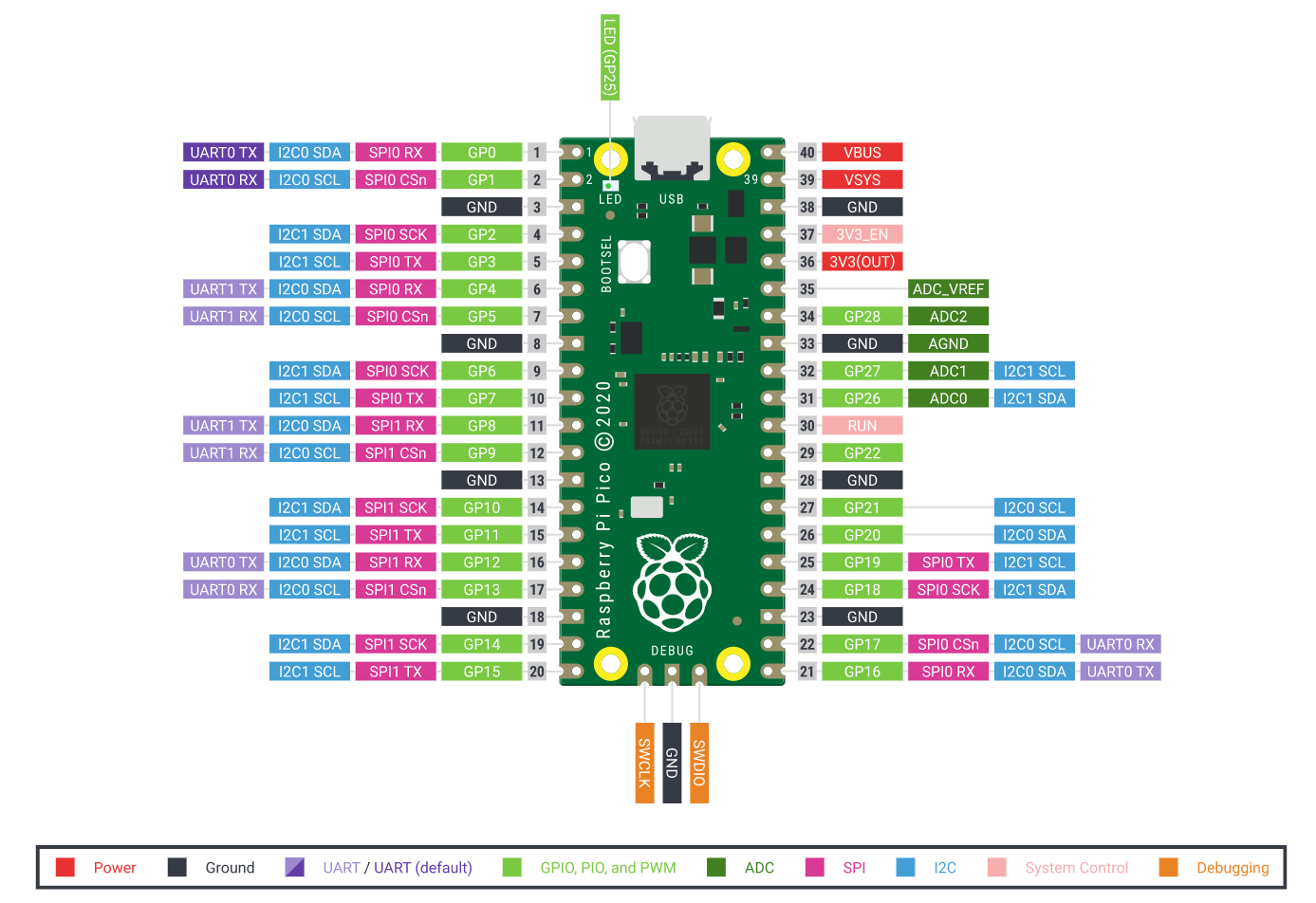
are you using Micropython ? Circuitpython ? (This is the python discord after all)
something else ?
dusk urchin
Micropython :)
so GP10-GP13 is where they're at, but they're called with PIN in micropython or? Sorry rly new to this
gentle vapor
yeah machine.Pin https://docs.micropython.org/en/latest/library/machine.Pin.html
There is plenty examples for micropython in the raspberry pico doc, it should be easy to find some base to start with, like with the "Raspberry Pi Pico Python SDK" book (pdf) https://www.raspberrypi.org/documentation/rp2040/getting-started/
dusk urchin
ok i'll check those out ty :)
gentle vapor
there is a websockets client library: https://github.com/danni/uwebsockets
I use it for an OBS-websockets client on ESP32, though it's old (but still running) code
(I mean my code, I don't know the current state of the library itself, it should work)
 warm yoke
Hello, please let me know if there is any resource for someone who wants to build their own Remote Controlled Helicopter.
( To program certain tricks in a rasberry pi for the chopper )
rigid tangle
errant wigeon
This may also be of some use: https://www.arduino.cc/reference/en/libraries/max3...
hi, i resorted in using an Arduino board as it was a deadline i had to meet...got marked down though. Now I have a new challenge in computing the room temparature and humidity interfaced with the ATmega32. I am aware of the DHT11 and DHT22. Any other sensor you/anyone would recommend?
 young tangle
I want to build a sign language translator
errant wigeon
warm yoke
Hello, please let me know if there is any resource for someone who wants to buil...
Do you have anything for it already, or are you building it completely from the ground up?
errant wigeon
rigid tangle
hi, i resorted in using an Arduino board as it was a deadline i had to meet...go...
I'm currently using a BME688 and am enjoying that https://www.adafruit.com/product/5046
But I'm sure the DHT11 and DHT22 are going to be good as well
Bummer about having to swap the the arduino, but making a decision to provide something that functions is a smart decision, though not an easy one. Congrats to that
I know the BME688 uses i2c, and that the ATmega32 can do that well, so I'd suggest starting with something that can interface with i2c
errant wigeon
young tangle
I want to build a sign language translator
Why are you trying to and what is the scope of it? Sign language is tough, because a lot of sign language is tied to body movement, not just hand signs
 boreal creek
Hey guy, i have a question, microcontrollers can be everything and can do everything ,so why we have general purpose computer ? All they do are the same ?
errant wigeon
boreal creek
Hey guy, i have a question, microcontrollers can be everything and can do everyt...
That's a good question. The answer is a bit complicated and the quick answer is computers and microcontroller have to work under different constraints, and microcontroller to microcontroller those constraints can vary wildly.
Some microcontrollers need to run a program and last 10 years on a coin cell battery. A cpu, cannot do that because it's designed for different purposes, such as completing a computation as fast as possible. Speed takes power, so it's not an option in some use cases
boreal creek
Will embedded devices kill computer in the future ?
errant wigeon
Microcontrollers are sort of "Do one job and do it well" type devices. Embedded Linux on the other hand is a computer--it can do a lot. It runs a linux kernel so most of what linux is able to do, you can do as well (depending on what peripherals are available).
errant wigeon
boreal creek
Will embedded devices kill computer in the future ?
No, but there probably will be more microcontrollers and more computers in the future. There are more and more locations where we can add behavior to a device, and some behaviors require a micro to make it happen and handle the 'when to do' and 'what to do in what order' steps. A lot of those micros will look to a computer to help see the conditions, and then they'll execute their task
boreal creek
Like work together ?
errant wigeon
yup. It's a solid design. I can make a block that runs some lights, but the decision of when to turn them on or off can be left to a computer (that sets up a webpage for me to interact with)
The micro handles the colors, timing, and changes, while the computer handles everything tied to the internet and real time clock based logic.
In a tesla, the main computer manages everything, but a micro handles the "make a door handle pop out or in" functions
boreal creek
Like one is controll physical part ,one is controll non physical part right ?
errant wigeon
I don't quite get that question, I'm sorry
boreal creek
I mean computer controll non physic things and miccro controll physic things
? Is that what u mean
errant wigeon
That is a way to set it up, yes
I'm also doing a really poor job of explaining this, so if you're confused, don't worry it's probably my fault
boreal creek
No no that's okay
So
In what case
U think computer ( smartphone/personal computer ) is better than micro
errant wigeon
I would choose a computer over a microcontroller if
-
I have more money (there are a lot of added parts to a computer than a micro, so it usually is a more expensive choice
-
I don't need to worry about power (computers can eat it up)
-
I'm under time constraints and I need to ship a version of the product as fast as possible (Linux is fairly stable, my program might not be. By using embedded linux I can present a version of the product without spending time on developing it's operating system)
There are other reasons of course, like if I need a lot of computing power and I'm not good with FPGAs (another different for of hardware, which are actually kind of hard to use at first. They've got a steep learning curve)
I think another reason I'd use a computer is if it interacts with the internet or if I have to do a lot of programs at the same time. A micro controller doesn't really have threading, and networking is complex. Computers have it down so it make sense to start with a solution that works
boreal creek
because as we see nowadays, traditional calculator is really good but you wont see many people use cal but smartphone instead, gps also, camera or dictionary devices
So that's why i have this question, because a gps is really good a real professional camera have a better picture but like computer are dominating and replacing those things nowadays
errant wigeon
I think that is more of a byproduct that people always have their phones ready, usually charged, and with them
But there are probably hundreds of microcontrollers you interact with on a daily basis, and they do their job well and you don't notice they're there
Does a button light up on an elevator? There's a microcontroller telling it when to light up and when not to. Smoke Detectors have micros, unless it's an old variety, so does your thermostat.
Phones are taking over a lot of devices because they can conveniently do many things. But there are many tasks which don't need to handle a lot at once built into the world around you, and that's a huge home for microcontrollers
errant wigeon
In python, does a library or function have more impact?
boreal creek
I dont know i'm new to computer science
errant wigeon
They're both important, and they have grown so they're tied together
boreal creek
Ah got it
errant wigeon
Yup! They're all tools, you pick the one that's best suited for the job, and sometimes that means you use some combination of both of them. A car has so many microcontrollers and computers in it. Just because each one is the best solution for the task at hand
Just like how python isn't always the right programming language to use. You pick the best you can to the constraints you have.
boreal creek
Ok got it thank you
Do you thinking in somesday, we have all we need and we have nothing to develop because like we have software to do all things ?
 tardy heath
I have a raspberry pi pico and i am trying to read the serial data from it
this is the code i have so far but it doesnt really work. Does somebody know a way to read the serial?
import serial, time

s = serial.Serial('COM5', 9600, timeout=1)
while True:
    a = s.read(10)
    if a != s.read(10):
        a = s.read(10)
        print(a.decode('utf8').strip())
    time.sleep(0.1)
No I don't think so. The world is complex, and we're always going to want to refine and improve. I personally think that's an awesome thing
errant wigeon
tardy heath
I have a raspberry pi pico and i am trying to read the serial data from it
this ...
Is this serial via usb?
and is this the code running on the pc?
tardy heath
yes and yes
i have this running on the pico
from machine import Pin
import time

led = Pin(25, Pin.OUT)

def on():
    led.value(1)

def off():
    led.value(0)

while True:
    print('test')
    time.sleep(0.5)
Ok, what computer are you using?
tardy heath
windows 10
tardy heath
ok ty
errant wigeon
tardy heath
windows 10
Can you open up a command prompt and enter in mode?
I want to see if the port is wrong
errant wigeon
Ok cool, do you have the arduino ide installed?
errant wigeon
Ok, I think Thonny should have what I want, give me another moment to google (I'm just going through a mental checklist of lowest hanging fruit by the way)
tardy heath
ok wait
i just realized
i am reading the data
i want to write the data to serial
and have the pico pick it up
i was doing it backwards
is that possible to do?
errant wigeon
oh awesome! ok that solves a lot of issues at once
errant wigeon
tardy heath
i want to write the data to serial
https://stackoverflow.com/questions/676172/full-examples-of-using-pyserial-package
Ok this outlines the pyserial package writing, I'd add a time delay at the start of about 2 seconds that way you can make sure everything is connected while you're debugging
errant wigeon
Before I get to that--I think the default baudrate isn't 9600, let me validate that though
tardy heath
oh ok
tardy heath
micro
boreal creek
errant wigeon
No I don't think so. The world is complex, and we're always going to want to ref...
Nice!, do you think problem will create a new problem ?
errant wigeon
tardy heath
micro
Quick question, are you communicating over usb?
tardy heath
yes
errant wigeon
Ok, on the pico I think you'll need to use this library http://docs.micropython.org/en/latest/library/pyb.USB_VCP.html
tardy heath
how do i install a library to the pico on micropython
errant wigeon
Is it not a builtin library?
tardy heath
idk
errant wigeon
I think it's a builtin, try just importing it like that
tardy heath
 errant wigeon
hmmm
Ok, can you give me about 40 min? I have one and I'll try to set this up and get it running, and walk you through it while I do. I haven't played with the pico yet, and I'm use to circuit python over micropython for the time being (flip of the coin, they're both great projects) so I need to flash micro back onto mine
tardy heath
alright sure
errant wigeon
I'll ping you as I go through, so it should be complete radio silence
tardy heath
btw i have to use micropython
errant wigeon
tardy heath
btw i have to use micropython
I'll throw micro onto mine, no worries
errant wigeon
boreal creek
Nice!, do you think problem will create a new problem ?
As much as any new technology creates problems. But while it's good to be mindful of the consequences of actions, I feel the benefits generally are positive. I'm going to focus on the current question for a while though, so I'll be 'afk' from this thread. Feel free to ask more questions though! I'm just going to focus on the pico problem
errant wigeon
tardy heath
Did you try from pyb import USB_VCP
 errant wigeon
which version of micropython are you running?
tardy heath
errant wigeon
which version of micropython are you running?

GitHub
Downloads
MicroPython with Pimoroni Libs (945KB) - https://github.com/pimoroni/pimoroni-pico/releases/download/v0.2.2/pimoroni-pico-v0.2.2-micropython-v1.15.uf2
MicroPython with Pimoroni Libs + Ad...
boreal creek
errant wigeon
As much as any new technology creates problems. But while it's good to be mindfu...
I have a question about like electric devices like gps, who make the navigation calculator ? Electric engineer or software engineer because as i know, electric engineer mostly focus on the way microtroller communicate with hardware rather than algorithm but i dont know what role will handle that things
errant wigeon
tardy heath
https://github.com/pimoroni/pimoroni-pico/releases/tag/v0.2.2
Which one of those two uft's are you using?
tardy heath
the second one i think
errant wigeon
Ok cool, I'll try that (I'm having my own host of tech issues because of course I can't just help you solve you're problem 😛 )
tardy heath
dont worry your already going out of your way to help
errant wigeon
Ok, so for the moment I'm unable to get it to install micropython, I've tried the stable version, and the pimoroni version and it refuses to boot back up after flashing
I'm going to try the nightly next and if that doesn't work I'll try a second pico (I have three but you know what they say about 3's and strikes..)
tardy heath
alright
i need the pimoroni version
unless there is a way to get pimoroni libraries installed on micropython
errant wigeon
If I'm right, (knowing pimoroni) it's just a bundle so every added feature is provided--that way you don't have to download much. My issue should impact you, I'm just trying to get this running so we're as in sync as possible
as long as your pico shows up as micropython/ or pimoroni you're fine
And Neradoc if you've got an answer and see this--go for it. I'm just trying to get my boards in order. Skipping my personal trouble shooting is great 😄
Ok just tried the nightly build, micropython didn't like it. No idea why. Let me grab another pico
I'm curious. If you've got blinka installed, I might be able to cheat. So if I can't get a pico working all's not lost
ohh... hmmm... I'll have to ask someone about this. It's working as micropython, but it's not showing up like circuit python does.
I just don't know enough about micropython.
gentle vapor
what ?
errant wigeon
gentle vapor
what ?
Hi, we've got a (in theory) simple question if you've got time. I've got new questions now, but those are less important. Do you have a minute?
gentle vapor
sure
errant wigeon
Sweet, we've got a pico running pimoroni's version of micropython with blinka packages included. @tardy heath wants to (from the pc) send text via serial, and read it on the pico
I figured I'd flash a pico with that build and have an answer quick, but I don't, and I know you're somewhat familiar with the pico.
This is the python on the computer code: #microcontrollers message
And here's the pico code for the time being: #microcontrollers message
errant wigeon
Sweet, the python code for serial communication should be,
myport = 'COM5'
baudrate = 9600
s = serial.Serial(myport, baudrate, timeout=1)

s.write(0xFF) # just to know what was written
probably should throw a delay at the top for making sure everything is setup
errant wigeon
gentle vapor
ok, so far I have Micropython installed and running
When it's installed, does it show up as a usb device like it does with circuit python?
(this is a question for my own understanding)
gentle vapor
like a drive ? no
errant wigeon
ahhh that was my mistake then! Thank you
gentle vapor
Micropython only does that on the pyboard as far as I know, it is a little puzzling that they don't implement it on the pico to be honnest, but I don't know
errant wigeon
Huh. Oh well, I can see their reasoning--a $4 board is cheap and optimizing everything in it is worthwhile
gentle vapor
here is the kind of test script I have on the PC side:
import serial, time
import argparse

parser = argparse.ArgumentParser()
parser.add_argument("port", type=str, help="Serial port of the board", nargs=1)
args = parser.parse_args()
port = args.port

s = serial.Serial(args.port[0])
s.timeout = 0.05

while True:
    if s.in_waiting:
        incoming = s.readline().decode("utf8").strip()
        print(f"Incoming: `{incoming}`")
    time.sleep(0.1)
(the argparse part is very useful since serial ports can change from board to board or on windows sometimes even on unplugging and replugging, and it's annoying to have to edit the file for that)
errant wigeon
I think on the pc side we're aiming to serial.write("string") though?
(And correct me if I'm wrong, do we want to default to baudrate, or make it explicit--I think explicit is better during debugging?)
tardy heath
errant wigeon
I think on the pc side we're aiming to serial.write("string") though?
yes
gentle vapor
well then you want to write to the serial and on the board it's simpler to use a stream API with sys.stdin.read() I think in Micropython, and readline and such
note that you should manually append "\r\n" to your writes to use readline on the other side
errant wigeon
gentle vapor
well then you want to write to the serial and on the board it's simpler to use a...
This is new to me, I was familiar with the s.write('0xFF') setup, and bytearrays. Nifty 😄
gentle vapor
I don't know much about serial in Micropython though, what is the best way to use it and such
errant wigeon
So on the pc, we use s.write('0xFF'), then the pico runs,
While True:
    print(sys.stdin.read())
    time.sleep(0.1)
then?
gentle vapor
I don't know, it's blocking apparently
errant wigeon
hmmm.. @tardy heath I thought I'd be able to knock this problem out pretty quickly, but I need more experience with micropython. I'm going to try working through it tomorrow, mind if I ping you then when I have a working demo?
tardy heath
yeah sure no problem
errant wigeon
Awesome, sorry I couldn't get the answer faster but I'll make sure I either can solve it, or point you towards a forum/person who can
gentle vapor
note: disabling ctrl-C is not a good idea, I don't even know how you would upload a new code with that running ! 
here is a sample code:
from machine import Pin
import time
import micropython
import select
import sys

led = Pin(25, Pin.OUT)

def on():
    led.value(1)

def off():
    led.value(0)

# don't disable ctrl-C, or how will you even upload new files ?
# micropython.kbd_intr(-1)

while True:
    while sys.stdin in select.select([sys.stdin], [], [], 0)[0]:
        ch = sys.stdin.readline()
        print("CH:",ch)
        if ch.strip() == "on":
            on()
        if ch.strip() == "off":
            off()
put it in main.py and connect to the REPL or run it from Mu, Thonny or whatever, then type on+return or off+return to change the LED
(I use readline here, which is blocking, but select makes sure we only go there when there is something available on the serial, so always send lines and that sample code can be generalised)
errant wigeon
This is really clean, thank you!
gentle vapor
I like to use json to communicate data between the host and the board, though it has some overhead it avoids sending binary data (which could send ctrl-C to the REPL) while allowing for structured data easy to convert in one function call on both sides
boreal creek
I have a question about like electric devices like gps, who make the navigation calculator ? Electric engineer or software engineer because as i know, electric engineer mostly focus on the way microtroller communicate with hardware rather than algorithm but i dont know what role will handle that things
 crisp cliff
hi @errant wigeon is me again, are u free bro, i want to ask you about this, can you review this code for me
This is my problem, I ran this code on my Window PC is work fine, but when i ran this code on Raspberry Pi the code didn't work.
Let me explain a little bit, when I update the new model -> I am going to restart the application -> I call root.destroy() and run the application
Can you help me with this. Here is the source code of the application
 hasty zealotBOT
Hey @crisp cliff!
Uh-oh! It looks like your message got zapped by our spam filter. We currently don't allow .txt attachments, so here are some tips to help you travel safely:
• If you attempted to send a message longer than 2000 characters, try shortening your message to fit within the character limit or use a pasting service (see below)
• If you tried to show someone your code, you can use codeblocks
(run !code-blocks in #bot-commands for more information) or use a pasting service like:
Hey @crisp cliff!
Uh-oh! It looks like your message got zapped by our spam filter. We currently don't allow .txt attachments, so here are some tips to help you travel safely:
• If you attempted to send a message longer than 2000 characters, try shortening your message to fit within the character limit or use a pasting service (see below)
• If you tried to show someone your code, you can use codeblocks
(run !code-blocks in #bot-commands for more information) or use a pasting service like:
crisp cliff
https://paste.pythondiscord.com/ivilijinan.py @errant wigeon
If there is any question, you can ask me. I would appreciate your help
boreal creek
hey guy , what is different between Raspberry Pi and Microcontroller, and pros/cons, when we pick Raspberry Pi and when we pick Microcontroller ?
 warm schooner
lol
errant wigeon
crisp cliff
https://paste.pythondiscord.com/ivilijinan.py <@!459119350851567626>
I'll take a look at it soon, I still need to get mks's stuff up and running. I'm online a lot less during the weekends but I'll see what I can see
@tardy heath Did Neradoc's solution work for you? Life happened yesterday so I was unable to set aside time to get figure out a build process for micropython on my computer yesterday. If that didn't work for you, I'll continue setting it up and finding a way to get it running
tardy heath
errant wigeon
<@!486698110853185547> Did Neradoc's solution work for you? Life happened yester...
I am currently on vacation without my computer so I will have to try it in a few days
errant wigeon
tardy heath
I am currently on vacation without my computer so I will have to try it in a few...
👍 That works, I need a self care day anyway and am going to take it in that case
crisp cliff
@errant wigeon Okay thanks.
 lone heron
I wired a LCD and I am trying to write to it over the firmata protocol but nothing that I tried has worked so far what should I do
 lean kestrel
to check my understanding, the standard way to address concurrency in micropython is uasyncio? are there other options?
 bleak owl
Hello
 coral peak
my budget is low as possible which ras pi (or any other thing like that) would be best for a home server thingie?
 timber pelican
I recently made this IoT project using NodeMCU and Micropython
Are you guys aware of any events or project exhibitions. Competitions happening online
hasty zealotBOT
:incoming_envelope: :ok_hand: applied mute to @hallow igloo until 2021-06-22 04:05 (9 minutes and 59 seconds) (reason: discord_emojis rule: sent 56 emojis in 10s).
 lost smelt
boreal creek
hey guy , what is different between Raspberry Pi and Microcontroller, and pros/...
lost smelt
boreal creek
hey guy , what is different between Raspberry Pi and Microcontroller, and pros/...
Have you tried to do some google research? Like https://jayconsystems.com/blog/microprocessor-vs-microcontroller-vs-microcomputer
 ember onyx
errant wigeon
crisp cliff
<@!459119350851567626> Okay thanks.
ember onyx
errant wigeon
crisp cliff
<@!459119350851567626> Okay thanks.
When you say it doesn't work on the raspberry pi: is there any error you're getting?
errant wigeon
boreal creek
hey guy , what is different between Raspberry Pi and Microcontroller, and pros/...
I have a question about like electric devices like gps, who make the navigation calculator ? Electric engineer or software engineer because as i know, electric engineer mostly focus on the way microtroller communicate with hardware rather than algorithm but i dont know what role will handle that things
I'm not that sure what you mean by this. There are teams of people who work on all levels, and you can focus on whatever you're most comfortable or interested in
A raspberry pi is a device called an embedded linux device. It's different from a micro controller in a few ways, namely that it runs an operating system--in this case a linux kernel. There's more info here: https://jaycarlson.net/embedded-linux/ and it spans the whole build process of building an embedded linux device from the ground up
errant wigeon
lone heron
I wired a LCD and I am trying to write to it over the firmata protocol but nothi...
What code have you tried, have you wired everything up correctly, and what kind of LCD are you using?
lone heron
16x2
errant wigeon
lean kestrel
to check my understanding, the standard way to address concurrency in micropytho...
To the best of my knowledge (and it is very little knowledge to draw from) yes use uasyncio to address concurrency: https://github.com/peterhinch/micropython-async/blob/master/v3/docs/TUTORIAL.md
I don't know about other solutions unless you want to write your own setup.
That said, the micropython forum will probably hold a better answer than I can offer: https://forum.micropython.org/
errant wigeon
coral peak
my budget is low as possible which ras pi (or any other thing like that) would b...
I think it depends on what you plan on doing with the home server, but you should be able to. If you google, "raspberry pi home server build" you should get a ton of results which showcase what can be done
coral peak
errant wigeon
I think it depends on what you plan on doing with the home server, but you shoul...
Hmm, I plan to mainly store data and maybe have like a small flask app hosted there
coral peak
errant wigeon
I think it depends on what you plan on doing with the home server, but you shoul...
would a ras pi zero work?
errant wigeon
coral peak
would a ras pi zero work?
https://theawesomegarage.com/blog/set-up-a-raspberry-pi-for-backing-up-your-data
I think so? But you aren't going to get fast data rates
coral peak
errant wigeon
https://theawesomegarage.com/blog/set-up-a-raspberry-pi-for-backing-up-your-data...
Oh okay, thanks a lot.
errant wigeon
coral peak
Oh okay, thanks a lot.
Best of luck with the project!
coral peak
errant wigeon
Best of luck with the project!
Thanks! 😄
 torpid shore
Is there someone that use pyformata to code with python on a arduino here ?
boreal creek
errant wigeon
> I have a question about like electric devices like gps, who make the navigatio...
got it thank you!
errant wigeon
torpid shore
Is there someone that use pyformata to code with python on a arduino here ?
I have no experience with this, but if you describe what you're using, trying to do, and what problems you're encountering someone who's dealt with it before might be able to help you
lean kestrel
errant wigeon
To the best of my knowledge (and it is very little knowledge to draw from) yes u...
thanks, will dig around their forum 😀
errant wigeon
@lean kestrel No problem! If you're able, would you mind pinging me back here when you find your answer? It'll help me a lot over the long run!
hallow igloo
hey what microcontroller you guys prefer for micropython/circuitpython
coral peak
Would it be nice for a home server?
lean kestrel
errant wigeon
<@!745336198163333130> No problem! If you're able, would you mind pinging me ba...
Looks like there is also the _thread option in micropython, which provides preemptive" threads (as as python will ever be able to do that). The platform i'm targeting doesn't support _thread, for some convoluted but reasonable cause. So, at least for me and everbody else using OpenMV, it is uasyncio for concurrency. I'll find out how capable the coro approach is.
 pliant moat
Hey guys, what is this type of integer (?) representation called and how can I convert the bits 2^7 to 2^-4 to a float?
 tulip girder
Can i make robots with circuit python?
Basically can i make stuff that moves with python?
lean kestrel
tulip girder
Can i make robots with circuit python?
A question?
tulip girder
yes
lean kestrel
well, there are people who build robots with micro/circuit python, and i can't think of a technical reason why this is a really bad idea.
tulip girder
alright thats good
lean kestrel
is there a specific goal you are looking for?
 mortal basin
Ok so anything about microPython boards the boards that run purely on python
Has anyone ever used them or does anyone have any experience on them
sorry i mean micropython.org
gentle vapor
yup certainly people do, what do you want to know ? Anything ? That's a little vague
lean kestrel
gentle vapor
yup certainly people do, what do you want to know ? Anything ? That's a little v...
almost like a meta-question
 rugged ether
What kinda tools do you need for learning how to make and control microcontrollers?
 astral tangle
can u use python with rasberry pi?
gentle vapor
astral tangle
can u use python with rasberry pi?
yes, it's kind of the preferred language even, at least by the Raspberry Pi Foundation, for learning and such, what do you want to do ?
astral tangle
gentle vapor
yes, it's kind of the preferred language even, at least by the Raspberry Pi Foun...
eh I wanna controll some 5v motors
 plain perch
hello, i'm new to the server and i want to learn python for robotics and stuff. I have no experience with robotics but i want to. also i have no idea what a micro controller is or what micropython.org is, or how motors and stuff are controlled by python. Last summer i took a python class for a week and so i know a couple things and by a couple i mean literally a couple, and they were for making games. is there something that can teach me and help me because i have no idea where to start
burnt galleon
@plain perch Start with something like an Arduino, lean how to drive a motor and servos with that. There's a crap ton of books and kits to get you started.
plain perch
ok thx
plain perch
burnt galleon
<@!729803101229416508> Start with something like an Arduino, lean how to drive a...
@burnt galleon How does that work? Do you just input like angles and speed and stuff and it’ll control motors?
Also servos are the motors that you can input commands into and control right?
burnt galleon
@plain perch lol pretty much. check these out

Arduino Project Hub
An easy way for controlling the rotation speed of a DC motor by using PWM signal from arduino and a NPN transistor By Daniel Rossi.
Open-source electronic prototyping platform enabling users to create interactive electronic objects.
How Servo Motors Work. Servo motors have been around for a long time and are utilized in many applications.
 unreal apex
hi, does someone knows if there is a way of programing PIC microcontrollers using python?
 dense flax
does anyone know if i can use python to trigger code in the arduino ide because i remember doing something like that in C++ using visual studio
plain perch
@burnt galleon thx so much!
 vestal dawn
how do i flash a uf2 to an Adafruit CircuitPython 3.1.2
ping me so i can find the response later
 ocean hornet
Is anyone familiar with micropython and the esp32?
burnt galleon
@plain perch No problem.
 runic juniper
i am new to this but

what is happening here???
you cant turn 1 pin into 2 right?
 heady oriole
I'm focusing on python right now. Is Kivy used for mobile app creation?
 onyx mango
runic juniper
you cant turn 1 pin into 2 right?
onyx mango
runic juniper
you cant turn 1 pin into 2 right?
Would need to see more of the diagram, but surely it’s just a splice?
tardy heath
errant wigeon
👍 That works, I need a self care day anyway and am going to take it in that cas...
yeah sorry i havent responded in a while
I just tried it and it doesnt seem to be working
tardy heath
heady oriole
I'm focusing on python right now. Is Kivy used for mobile app creation?
yes
errant wigeon
tardy heath
yeah sorry i havent responded in a while
Ok. I just got back from vacation and am catching up on everything, so I'll take a look at it soon (just the usual behind the ball stuff needs to be addressed first).
Do you get an error or anything when trying to run the sample code?
heady oriole
Thanks @tardy heath
errant wigeon
tardy heath
just it doesnt detect it
Hmm. Ok I'll see if I can get it running on my machine. If it's not throwing an error and not detecting, I feel like there might be a baudrate mismatch between the two programs. I'll see if I can get it running in a way to duplicate it
errant wigeon
Do you happen to have a spare LED nearby, so 'when you receive a character' you can blink it on the pico? that way you have an 'on device' indicator.
tardy heath
errant wigeon
Do you happen to have a spare LED nearby, so 'when you receive a character' you ...
would the led on the pico work?
tardy heath
my led is working
im confused
my led works
just the program doesnt work
i just had an idea
it prob wont work
but could u do input() on the pico?
and then it would work?
errant wigeon
I don't actually know the answer
So only one way to find it out! Give it a shot!
Can you tell me your debugger setup to write code on the pico?
tardy heath
errant wigeon
Can you tell me your debugger setup to write code on the pico?
what do you mean by debugger setup?
oh
i use thonny
btw
the input() doesnt seem to be working
errant wigeon
Awesome! Thank you
and bummer, but that's how it goes
ok, can you recap to me what code you have running on the pc, and the code you have running on the pico?
tardy heath
import serial, time
s = serial.Serial('COM5', 9600, timeout=1)
while True:
s.write('on'.encode('utf8'))
time.sleep(1)
s.write('off'.encode('utf8'))
thats on pc
from machine import Pin
import time
import micropython
import select
import sys
led = Pin(25, Pin.OUT)
def toggle():
led.toggle()
don't disable ctrl-C, or how will you even upload new files ?
micropython.kbd_intr(-1)
while True:
ch = input()
if not ch:
toggle()
thats the new thing ive been testing on pico
from machine import Pin
import time
import micropython
import select
import sys

led = Pin(25, Pin.OUT)

def on():
    led.value(1)

def off():
    led.value(0)

# don't disable ctrl-C, or how will you even upload new files ?
# micropython.kbd_intr(-1)

while True:
    while sys.stdin in select.select([sys.stdin], [], [], 0)[0]:
        ch = sys.stdin.readline()
        print("CH:",ch)
        if ch.strip() == "on":
            on()
        if ch.strip() == "off":
off()```thats the original script
that the other guy sent
i was also thinking
is it possible to have a script on the pc that would edit a txt file on the pico and then the pico takes the stuff in the file as input to turn on the led?
errant wigeon
Plausibly, but I think that's adding more complexity and round-about-ness than you should. I'd rather just get the serial communication working correctly
tardy heath
have you had any luck wwith settting it up?
errant wigeon
Still catching up on emails, I've been asking questions of you so I can 'just go' as soon as I can focus on it
errant wigeon
No worries, I want to work on this as well because it'll teach me more about micropython and how to use it, so this is a good experience for me
errant wigeon
tardy heath
have you had any luck wwith settting it up?
Did you enable the uart on the pico?
tardy heath
whats that
errant wigeon
I was reading the wrong thing--ignore me 🙃
tardy heath
@errant wigeon just checking in to ask if youve made any progress
boreal creek
hey guy! how to pick board for my IoT projects ? Ras Pi or Arduino ?
runic juniper
onyx mango
Would need to see more of the diagram, but surely it’s just a splice?
just setting up a dht22 and adafruit lcd, but im not sure how i would splice a jumper cable
it is splitting at 5v and gnd
 woeful marsh
boreal creek
hey guy! how to pick board for my IoT projects ? Ras Pi or Arduino ?
woeful marsh
boreal creek
hey guy! how to pick board for my IoT projects ? Ras Pi or Arduino ?
depends
boreal creek
woeful marsh
depends
So which situation is the best for Raspi ?
 versed marlin
 muted cedar
How can i connect arduino and my ultrasonic sensor
muted cedar
How can i connect arduino and my ultrasonic sensor
Connect Vcc and GND of Ultrasonic Sensor to 5v and GND(any GND pin of Arduino) of the Arduino. Then connect Echo to Pin16 (A2 of Arduino) and then Trig to Pin17(A3 of Arduino).
muted cedar
versed marlin
Connect Vcc and GND of Ultrasonic Sensor to 5v and GND(any GND pin of Arduino) o...
thanks
muted cedar
versed marlin
Connect Vcc and GND of Ultrasonic Sensor to 5v and GND(any GND pin of Arduino) o...
how about solving prblem of port identification
versed marlin
muted cedar
how about solving prblem of port identification
Not a big deal. I'm guiding you in context of Windows OS. So when you have connected the Arduino to pc/laptop using USB, then go to your Device manager. You will see an active port as Arduino over there.
muted cedar
yep i opened ready but not functioning
i tried to update it tells me the files maybe corrupt
 umbral spade
does ram on raspberry pi 4 matter for ml projects
 onyx violet
where did you guys learn most stuff like sensors and all that?
 fluid prism
onyx violet
where did you guys learn most stuff like sensors and all that?
fluid prism
onyx violet
where did you guys learn most stuff like sensors and all that?
Books
 fervent wedge
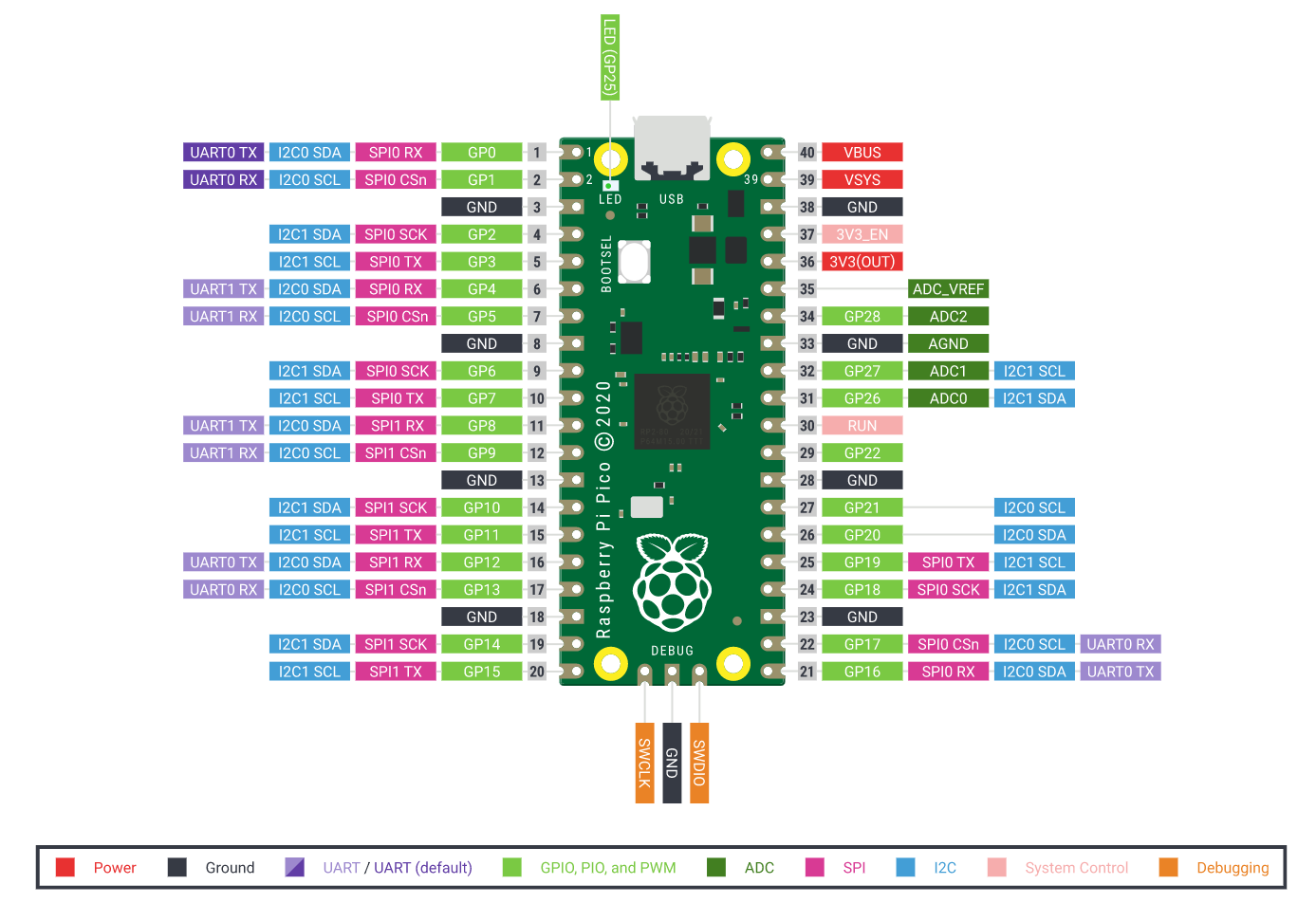
 golden oasis
Hello
 vapid stirrup
Hello, absolute noob here. I wanted to know the difference between a stepper motor and a geared motor. Or is it that stepper motors a type of geared motors?
 fiery sigil
You can add gear(box)es to any kind of motor, stepper or not. It all depends on what speed, torque, etc you need and also has other effects like backlash
worn sinew
Hey, do you know any discord servers about microcontrollers and stuff? I want to make something like a programmable calculator but I know that #microcontrollers isn't exactly the right place as my questions aren't about python (pls ping me)
gentle vapor
worn sinew
Hey, do you know any discord servers about microcontrollers and stuff? I want to...
I know there is an Arduino server, and the Adafruit discord has a nice community (there is the help-with-projects channel in particular)
vapid stirrup
Where should I learn Raspberry Pi from?
 vast pagoda
One of my friends wants to hook up a mc of some sort to his car, so when it turns on it'll play a startup song before bluetooth kicks over.
1: does micropython have support for a teensy 4.0 and audio shield?
2: do you guys think I'd be able to just hard-wire it before the amp and have it work?
 undone stratus
Hello. I'm beginner lvl Python and Raspberry Pi user. And I would like to play around with some stepper motors. Can any of you please help me with finding a controller, a stepper motor and a guide to use it. Thank you.
P.S. All I have been able to find on the internet is guides and parts for arduino
 mint tree
vapid stirrup
Where should I learn Raspberry Pi from?
mint tree
vapid stirrup
Where should I learn Raspberry Pi from?
i've learnt making raspi projects through youtube mostly
mint tree
undone stratus
Hello. I'm beginner lvl Python and Raspberry Pi user. And I would like to play a...
I think any stepper motor or controller that can be used by arduino would do for raspi too
as for guide, I suggest you try using stepper motor library and try and error yourself, because some doesn't support multi motors
vapid stirrup
mint tree
i've learnt making raspi projects through youtube mostly
oh okay
boreal creek
Hey guy i'm confused about different between SoC, microcontroller, microprossessor. Anyome tells me more detail ?
hallow igloo
boreal creek
Hey guy i'm confused about different between SoC, microcontroller, microprossess...
Soc - System on chip it is a device that contains basically everything of a computer in one chip example apples m1 chip has a Soc design these are generally more expensive than microcontrollers but have better specs
Microcontroller - again a computer in a small space it has less ram and stuff than the soc and hence is cheaper
Microprossors - basically your cpu its only the brain of a computer and things like ram are external.
boreal creek
hallow igloo
Soc - System on chip it is a device that contains basically everything of a comp...
Thank you! Nice explaination ,and in which case, we will use SoC or Microprocessor or Microcontroller
boreal creek
So why we have SoC and also Desktop, why dont we emerge them and use only one of them for all projects or all purpose because they're doing things the same ?
 regal meteor
There's a competition in my region to make a basic self driving car and It got me interested and so I was wondering how I could get started with microcontrollers and computer vision (with modules like OpenCV) on python. I was planning on using a raspberry pi with an arduino kit and a basic camera for the project.
I've got ample time for this project but I'd love to get started right away so if anyone has a good websites I could learn from or youtube videos I could watch that would be great :)
(also, I've noticed there's a lot of videos on how to do similar things on languages like C++, so would it be wise to use that over python?)
 jaunty gull
so, we're just working on https://pypi.org/project/justuse and were wondering if it would be of use to people with limited hardware if you could load whl (zip) packages directly via tmpfs mount without extracting to disk first
PyPI
A beautiful, simple and explicit way to import modules in Python with advanced features.
are there any limitations beside RAM that should be considered?
the idea would be to use fuze-zip from inside the code to mount the zip read-only and import things directly without writing and reading back and forth
hallow igloo
boreal creek
Thank you! Nice explaination ,and in which case, we will use SoC or Microprocess...
Soc- they are typically used in mobile phones since you know there they need more ram and stuff without actually going to the a special ram slot
you can understand all from a computer perspective imagine there is a pc in front of you you know that the pc deign is such that the cpu is in the middle and things like ram and storage are far away in a case of a pc you can have better specs and faster computation but with very high price in a soc however since they are all cramped together there they can be accessed faster also soc has less battery consumption
microprocessor - its literally just a cpu nothing else you know right there is usually one single cpu in a pc yup its that
microcontrollers - It is used in you household items example oven fridges toaster microwave and stuff since SOC and a whole pc cost so much it isn't smart to have a whole pc on these things which so high price and faster computation which it does not need there are microcontroller these are very similar to SOC but the difference is the cost since you know on top of the everything about a toaster you cant just add a price of a phone with embedding a soc sooo hence they use microcontrollers. They are programmable cips and a machine that is very tiny
usage of all-
soc - in phones and sutff
microprocessor/cpu - well in computer systems its the brains of a pc and actual computer
microcontroller - in things like fridges where other cips seem kind of unnecessary and which drives the cost down
I hope it helps
boreal creek
hallow igloo
Soc- they are typically used in mobile phones since you know there they need mor...
Thank you!
 upper hinge
Hi all - might not be the right place, but im looking for info on things like hdmi hardware and other video/audio output standards i can mess about with in python - any idea where to start?
hallow igloo
I'm not sure python is the best route for this. I honestly have no idea there probably are libraries out there that can do what you want.
However I will say ffmpeg is a great tool for taking and sending audio and video data.
And it interfaces well with python.
 wispy lodge
?
 fair pasture
Does anyone knows how I can measure current using micropython ?
Board: Esp32S (NodeMCU)
Current sensor: ACS712 30a
Current: AC
Like did a code using Arduino IDE the lib that I had to use was a modified EmonLib, but I'd like to use micropython. So I search for a Emonlib.py and I found one, but seems to don't work like the EmonLib for C. Like the function calc_current_rms returns only the same value for each number_samples arg.
Emonlib.py
https://github.com/alisonsalmeida/emonlib-micropython/blob/master/Emonlib/Emonlib.py

GitHub
An asynchronous version of the emonlib library for the micropython firmware - alisonsalmeida/emonlib-micropython
worn sinew
I want a screen like this. What do I have to google to bye LC display like these?

I want to use it with a Arduino
Pls ping me
 round dawn
worn sinew
I want a screen like this. What do I have to google to bye LC display like these...
round dawn
worn sinew
I want a screen like this. What do I have to google to bye LC display like these...
you can buy OLED screens for arduino
should work with most of the versions
worn sinew
worn sinew
I want a screen like this. What do I have to google to bye LC display like these...
I know that this was an LCD. What's the difference/advantages to an OLED display
@round dawn
round dawn
worn sinew
I know that *this* was an LCD. What's the difference/advantages to an OLED displ...
well LCD a lot more different than OLED can display a lot more complex figures
while LCD cannot do that
u'll know it if u've used it
gentle vapor
LCDs like that can't be read in the dark, but don't need backlight to be read in the light, and use less power. I'm actually looking for a good large one to use as a bedroom clock that would not illuminate the room. I mostly find stuff like:
- character LCDs (like that https://www.sparkfun.com/products/16398)
- the SHARP memory displays (like that one https://www.adafruit.com/product/4694)
 cosmic spoke
Hey, i want to get started with micropython on ESP32 CAM board, i dont know where to begi, i found some pages telling to make own firmware, some said to download bin files from micropython site. Im a complete noob to this. Can someone show me the right path
brazen meadow
cosmic spoke
Hey, i want to get started with micropython on ESP32 CAM board, i dont know wher...
Been looking into this myself
cosmic spoke
brazen meadow
Been looking into this myself
Did you tried it ?
brazen meadow
Haven't got it going

GitHub
Camera support for MicroPython on ESP32-CAM. Contribute to tsaarni/micropython-with-esp32-cam development by creating an account on GitHub.
cosmic spoke
ok
brazen meadow
I may end up using esp-idf and C
cosmic spoke
brazen meadow
https://github.com/tsaarni/micropython-with-esp32-cam/wiki
I tried to install esp idf extension on my vs code, but i couldnt find that extension in my vscode.
brazen meadow
I have an esp-eye which may be why it didn't work
Got a couple esp-cam on the way which I'll try
brazen meadow
cosmic spoke
I tried to install esp idf extension on my vs code, but i couldnt find that exte...
I have been using it on the command line
cosmic spoke
maybe my os is having issues, with extensions on vs code. Once tried to install platform io on vscode and i couldnt find extension.
brazen meadow
That's annoying
cosmic spoke
I want to develop a IoT application for collecting sensor values, i want to make it using python. Should i use python or use C in arduino to code thats my major issue
brazen meadow
MicroPython would work
cosmic spoke
So how does it work , is it like flashing a firmware and moving our .py code or something else
brazen meadow
https://thonny.org/ https://learn.adafruit.com/micropython-basics-load-files-and-run-code/install-ampy

Adafruit Learning System
Learn a simple workflow for developing code on a MicroPython board.
Linux
cosmic spoke
brazen meadow
Linux
debian based or something else
brazen meadow
Ubuntu
cosmic spoke
brazen meadow
Ubuntu
i switched from ubuntu to arch out of curiosity. Now im having hardtime adapting to it. im on garuda linux
brazen meadow
I have just just stuck with ubuntu as it is easier
cosmic spoke
honsetly i switched to garuda bcz of its looks, i tried copying the looks and i wasnt succesful
brazen meadow
Fair enought
cosmic spoke
brazen meadow
Fair enought
ty for sharing those links
brazen meadow
https://git.chch.tech/chchtech/telegramapi That is what I have been working on tonight

Christchurch Tech Git Server
cosmic spoke
brazen meadow
https://git.chch.tech/chchtech/telegramapi That is what I have been working on t...
cool, im still a noob at python
brazen meadow
It allows you to have a conversation with MicroPython from your phone
cosmic spoke
brazen meadow
It allows you to have a conversation with MicroPython from your phone
is that your own git server ?
brazen meadow
yes
cosmic spoke
noice
brazen meadow
I do a bit of system admin
cosmic spoke
brazen meadow
I do a bit of system admin
i do too, but very very beginner level. I managed to deploy some wordpress and few docker containers. Yesterday i did my first python code after learning the basics
brazen meadow
cosmic spoke
i do too, but very very beginner level. I managed to deploy some wordpress and f...
I have put a message in #unix
round dawn
cosmic spoke
i do too, but very very beginner level. I managed to deploy some wordpress and f...
jett momento
lmao
sry for going ot by the way
 gaunt bronze
Is python just as efficient as C when it comes to micro processors
 cosmic tinsel
how to check which micropython version i'm running?
if i do
import sys
sys.version```it will give me 3.4.0
but that's python version
i don't have os module as well
brazen meadow
gaunt bronze
Is python just as efficient as C when it comes to micro processors
No, quite a bit is written in C though. If you freeze code you'll probably get improve performance.
gentle vapor
cosmic tinsel
i don't have `os` module as well
no uos either ? what port ? or sys.implementation ?
cosmic tinsel
gentle vapor
no `uos` either ? what port ? or `sys.implementation` ?
sys.implementation worked!
thx
no uos :(
what's the difference between this version?
python and micropython
why is there two version
3.4.0 and 1.11.0
brazen meadow
cosmic tinsel
python and micropython
MicroPython only contains a small subset of the standard library. It is optimised to run microcontrollers with limited resources
brazen meadow
3.4.0 is the Python version 1.11.0 is the firmware version
cosmic tinsel
if i have to describe which version i'm running the code on
gentle vapor
yeah it's the python version it's based one, that property is probably there for compatibility with code expecting a certain version of python to some extent, but Micropython includes stuff from later versions of python, so I don't know that it's super useful
cosmic tinsel
how do i describe it?
The program is running on Python 3.4.0, implementation is MicroPython 1.11.0?
gentle vapor
what board is it ?
cosmic tinsel
idk but it's running on arm
brazen meadow
3.4.0 is the base, stuff has been added on top
The firmware version is the important part
gentle vapor
I don't know the Micropython ecosystem too well, not having os or uos is super weird to me