#microcontrollers
1 messages · Page 1 of 1 (latest)
 halcyon mesa
no
Arduino is direct upload code with the cable
with Laptop or PC
if you can manage a mobile to Arduino Cable
maybe it can work
From what I know
it cant be wireless
 rain basalt
hi guys, im starting from my main.py my program.py. i want that the program.py to start but on an exception i want to load my failsafe.py. how do i try: an external program.py?
if OTA == 0:
print('starting program')
try:
OTA = program.mainprog(OTA)
except:
with open("failsafe.py") as f:
with open("program.py", "w") as f1:
for line in f:
if "ROW" in line:
f1.write(line)
machine.reset()
 hexed moss
I'm making my first steps with micropython and my pico w with vs code. All works fine, I can run code via the run button in vs code but when I upload the main.py to the board it runs the the programm but I can't reconnect to it. Even when there is no loop going on in the code. I have to factory reset the pico via flush_nuke.uf2 so I can connect again. Any ideas what I could do wrong here?
 latent nest
i updated my Raspberry pi 3 with the latest os
i set up my antenna wireless wifi adapter with this https://www.youtube.com/watch?v=oM2kAnITNyE
except i cant tell if my raspberry is using it or the inbuilt antenna because the the raspberry still shows the wifi signal in the taskbar
also when i do ip -br link i only see eth0 and wlan0 no wlan1
 rigid nimbus

 wild wren
my pi is connected to wifi but it can't connect to websites
pi@raspberrypi:~ $ curl google.com
curl: (6) Could not resolve host: google.com
pi@raspberrypi:~ $ cat /etc/resolv.conf
# Generated by resolvconf
nameserver 1.1.1.1
nameserver 1.0.0.1
nameserver 8.8.4.4
nameserver 8.8.8.8``` opal lodge
wild wren
my pi is connected to wifi but it can't connect to websites
```sh
pi@raspberrypi...
opal lodge
wild wren
my pi is connected to wifi but it can't connect to websites
```sh
pi@raspberrypi...
if it's just a normal raspberry pi (not a pico/RP2040) and it's not about using it with things like GPIO i think your question belongs in #unix for general linux questions
 hasty zealotBOT
Hey @bronze jasper!
You either uploaded a .txt file or entered a message that was too long. Please use our paste bin instead.
 tired schooner
bump
TL;DR
need a transmitter and receiver which work on hz signals instead of bluetooth
opal lodge
tired schooner
bump
TL;DR
need a transmitter and receiver which work on hz signals instead of b...
you mean cheap 433 MHz stuff instead of zigbee or zwave as a replacement for your bluetooth remote/button?
tired schooner
opal lodge
you mean cheap 433 MHz stuff instead of zigbee or zwave as a replacement for you...
correct, exactly that
this is to avoid the useless "reconnect" issues I'm having with bluetooth
 icy quarry
tired schooner
this is to avoid the useless "reconnect" issues I'm having with bluetooth
icy quarry
tired schooner
this is to avoid the useless "reconnect" issues I'm having with bluetooth
if you want something "That works" rather than geeking out with it, zigbee/zwave are pretty simple and reliable. Plus they integrate very well with systems like home assistant
tired schooner
icy quarry
if you want something "That works" rather than geeking out with it, zigbee/zwave...
I don’t care that much about home assistant functionality etc. I’d just want the receiver connected to my RPI & my rpi runs a simple script whenever it receives a signal from the transmitter
 hallow igloo
hello, i have arduino pro micro (clone)
is it possible to send keys simultaneously with using python. (i just don't wanna wait for upload like arduino sketchs)
 fierce pawn
Hi
I'm tryna doing ground station with pyserial
To explain briefly, I need to collect the sensor data from the arduino in the program I wrote with python and send this data to another serial port with the program
I did the sending part
but couldn't do the taking datas from arduino
the sending part is:
import struct
import time

import serial

array1 = bytearray(78)
array1[0:4] = bytes.fromhex('FFFF5452')
array1[76:78] = bytes.fromhex('0d0a')

altitude = float(input("altitude: "))
gps_altitude = float(input("gps altitude: "))
latitude = float(input("latitude: "))
longitude = float(input("longitude: "))
payload_altitude = float(input("payload altitude: "))
payload_latitude = float(input("payload latitude: "))
payload_longitude = float(input("payload longitude: "))

array1[6:34] = struct.pack('<7f', altitude, gps_altitude, latitude, longitude, payload_altitude, payload_latitude, payload_longitude)

with serial.Serial('COM16', 19200, serial.EIGHTBITS, serial.PARITY_NONE, serial.STOPBITS_ONE) as ser:
    while True:
        array[75] = sum(array[4:75]) % 256
        ser.write(array1)
        array1[5] += 1
        time.sleep(3)
@opal lodge helped for this sending code
so basically this works with user input data and can succesfully send another port with byte packets
now, I'm trying to use data from arduino instead of user input
 strange prairie
can somebody help me
i am getting this error when uploading code to esp8266
BrokenPipeError: [Errno 32] Broken pipe
fierce pawn

Stack Overflow
I have a flight computer and ground station which is based on arduino. Flight computer transmits sensors data to ground station with rf communucation modules. So, I'm trying to write a program for
 balmy ravine
does a button have to be connceted to specific GPIO pins on my pico
plus I need help as my buttons aren't working
 blazing kite
how do i convert a jpg file, to a bmp file? can't use big libraries
 thick crater
Hi zulu, I have a feeling thats gonna be hard on a microcontroller.. Which hardware are you using?
You could maybe send it to a separate system and have that system convert it
I believe imagemagick supplies a tool for that
 lofty cypress
which microcontroller should I buy for a calculator(+, -, /, *, ^^, log, sin, tan and cos)?
lofty cypress
lofty cypress
which microcontroller should I buy for a calculator(+, -, /, *, ^^, log, sin, t...
like which one between these(or any better) aruduino uno 328p or arduino uno r3 328p, for the calculator
 wintry junco
Hey can we write a discord bot on a ESP32 device (which is a MagicBit)
or a web server
fierce pawn
Stack Overflow
I have a flight computer and ground station which is based on arduino. Flight computer transmits sensors data to ground station with rf communucation modules. So, I'm trying to write a program for
how can I make something like arduino's serial monitor with python
I'm trying to make something like arduino's serial monitor and I really need to help
fierce pawn
fierce pawn
https://stackoverflow.com/questions/73180357/pyserial-transfer-from-one-port-to-...
this is my code
hallow igloo
can i use vscode with a raspberry pi pico
 haughty hound
i know we talk about rasp pi's, but this include circuitry?
 errant wigeon
haughty hound
i know we talk about rasp pi's, but this include circuitry?
errant wigeon
haughty hound
i know we talk about rasp pi's, but this include circuitry?
As in do you have questions about a circuit? You're welcome to ask, some folks here have various degrees of experience in circuit design and if not, folks can point you towards resources they know of
hallow igloo
wich pico do you need for a bad usb
 strong depot
Are any of you aware of a MAVLink or MultiWii library for micro/circuit python?
rain basalt
my program.py is 15KB in size with OTA i get memory allocation failed, allocating 4096 bytes
if i cut some lines it gets through, is there a way to calucated line of code in micropython to mem usage?
anybody here successful build m5stack firmware from the source?
 gentle vapor
hallow igloo
wich pico do you need for a bad usb
gentle vapor
hallow igloo
wich pico do you need for a bad usb
any, but you don't need wifi. There's one way of doing it https://github.com/dbisu/pico-ducky
rain basalt
rain basalt
anybody here successful build m5stack firmware from the source?
after flashing i only see this via the shell. if i use the official firmware binary it works
 lofty cypress
can I connect arduino with LCD without potentiometer?
strange prairie
lofty cypress
can I connect arduino with LCD without potentiometer?
yes you can connect LCD without potentiometer. check this out https://create.arduino.cc/projecthub/hrsajjad844/lcd-display-without-potentiometer-and-resistor-0d1357

Arduino Project Hub
You can be displayed in an LCD monitor without a potentiometer & Resistor. Keep watching this... By hrsajjad844.
lofty cypress
strange prairie
yes you can connect LCD without potentiometer. check this out https://create.ar...
which hole is vdd and vss in lcd

vdd is second hole?
lofty cypress
strange prairie
yes you can connect LCD without potentiometer. check this out https://create.ar...
thanks it works
 strange prairie
lofty cypress
thanks it works
strange prairie
lofty cypress
thanks it works
Welcome
hallow igloo
Hello, I am trying to write micropython on a microbit, and have installed uflash on my system. Flashing and running a regular python script works fine, but I have a Grove Shield plugged in, and it looks like I need a library to use it. I installed the library on my computer through pip, but I don't know how to transfer it onto the microbit in order to use it in my scripts. If anyone could help me flash/use the library, I would appreciate your help.
gentle vapor
hallow igloo
Hello, I am trying to write micropython on a microbit, and have installed uflash...
hi, what library is this ? do you have a link ?
hallow igloo
gentle vapor
hi, what library is this ? do you have a link ?

GitHub
Python library for Seeedstudio Grove devices . Contribute to Seeed-Studio/grove.py development by creating an account on GitHub.
gentle vapor
ok so that's a library for linux, it's not gonna work on micropython
you probably don't need a library anyway, just to identify what pins the grove connectors are wired to and use Micropython's standard Pin features
(and the touch pads)
this one right ? https://www.seeedstudio.com/Grove-Shield-for-micro-bit-p-2947.html

micro:bit, micro bit grove, grove shield, micro bit shield
 lofty cypress
nvm it did
 elfin fern
what do i do if i have an error in an line that does not exist (micropython)
 pastel jay
lofty cypress
pastel jay
lofty cypress
I think you connected in reverse polarity and you should use resistor[10k] for not burning your backlight
errant wigeon
elfin fern
what do i do if i have an error in an line that does not exist (micropython)
It could be you're missing a closing bracket or quote above it. It could also be in some file you imported, but the most likely is there's a line with a, ", ', ], }, ), or something missing
wintry junco
Hey can you hack into a micro-controller?
**anyone
***which is me
****I want to practice penetrating testing
 solid narwhal
I mean anything you would hack on a micro controller would be low level stuff
you can always use micro controllers as a tool tho
errant wigeon
Yes you can but micro's don't usually have an operating system so it isn't really useful unless you know what you want to do with it
 dreamy egret
pastel jay
I think you connected in reverse polarity and you should use resistor[10k] for n...
dreamy egret
pastel jay
I think you connected in reverse polarity and you should use resistor[10k] for n...
just saw this post after burning the backlight of the lcd...... Oh what a day!

 still pilot
Hey quick question, I'm new to programming in general and recently got a Arduino kit from Elegoo, (Mega 2560 complete to be exact) And I wanted to know if I could program my Arduino in Python?
look c++ scares me, i've heard horror stories from friends
errant wigeon
still pilot
Hey quick question, I'm new to programming in general and recently got a Arduino...
The pinned messages have a more thorough explaination
#microcontrollers message
The answer is not usually, but there are work arounds if you absolutely can't use C
hallow igloo
Hi.i have a query. I am using a mpu6050 with esp32 and I want to get it's reading in a python code that plots the coordinates and works some computation on them. Is there any method of sharing data from esp32 to python code without programming the esp in micropython
 jagged hatch
Hi guys I need some tips on solving a operation. For 48<val<2047
Need to do the following bitwise operation but val needs to be represented in a fixed 11 bit length. Can’t use s.zfill because it’s micropython.
(val ^(val>> 4) )^(val >> 8)
gentle vapor
jagged hatch
Hi guys I need some tips on solving a operation. For 48<val<2047
Need to do the ...
like that ? f"{val:011b}"
if you need zfill/ljust/rjust in general:
MicroPython v1.19.1 on 2022-06-18; Raspberry Pi Pico with RP2040
Type "help()" for more information.
>>> val = 283
>>> f"{val:011b}"
'00100011011'
>>> num = "421"
>>> f"{num:>011s}"
'00000000421'
>>> f"{num:<11s}"
'421        '
>>>
yes, what do you want to program it with ? how do you want to transfer data (wifi ? serial USB ?)
In general you can use the serial connexion to communicate with a board using pyserial on the PC, or you can use wifi with or without an external server like MQTT, there are examples in Arduino for all kinds of uses
and then there's the ESPHome stuff
hallow igloo
gentle vapor
yes, what do you want to program it with ? how do you want to transfer data (wif...
I am programming the esp using C/C++ used in Arduino ide. And data would be transferred using inbuilt wifi or Bluetooth whichever is more power efficient
Is there a technique to get the readings of the sensor into a python script?
gentle vapor
for power efficiency and live updates I would think bluetooth is the better solution, there are bluetooth libraries in python, though I've only used Blinka's BLE libraries on a Raspberry Pi, relying on Nordic's UART service on the NRF52, so... I can't point to an exact solution for ESP, but they exist for sure
hallow igloo
Yes I think the same. But do you know of any method of sharing data between esp32 and python script. A fellow suggested to use webservers. Would that be helpful?
 karmic palm
Hello, i have a question. Where can i find a book or a course for microcontrollers? Please tag me when will you answer. Thanks
jagged hatch
gentle vapor
if you need zfill/ljust/rjust in general:
```py
MicroPython v1.19.1 on 2022-06-1...
this should work for me. Thank you . Btw What should I type in google for more detailed knowledge . Python Number formatting?
gentle vapor
this is specifically using what is called f-strings and you can also lookup the python format() function, there might also be limitations on those in MP
jagged hatch
gentle vapor
this is specifically using what is called f-strings and you can also lookup the ...
I got it working bro thank you but the code looks messy as hell
  thr ='{:0>12}'.format(bin(a.map()<<1)[2:])
  rshift = '{:0>12}'.format(bin((int(a,2)>>4)^(int(a,2)))[2:])
  rrshift ='{:0>12}'.format(bin((int(rshift,2)>>8)^(int(rshift,2)))[2:])
  crc = '{:0>4}'.format(bin((int(rrshift,2))&(int(15)))[2:])
  print(thr+crc)
  time.sleep_ms(100)
The calculation is meant to 12bit data>>4,then^,then>>8,then^,lastly mask the last 4 bits with 1111
hallow igloo
gentle vapor
this one right ? https://www.seeedstudio.com/Grove-Shield-for-micro-bit-p-2947.h...
This is much later but yes PLEASE tell me how to use it in micropython
Or:
Hello, I've asked about microbit before, but this time I think I'm headed in the right direction. I have the micropython runtime flashed to the microbit, and it's connected to my laptop by usb cable. On my laptop, I installed microrepl and I can connect to the microbit via repl now. However, I have additional microbit peripherals that need a library called grove to work. I installed grove via pip on my laptop, so is there a way I could import it into the microbit via repl? If you could tell me how to copy the files over, or compile a custom micropython runtime including the grove library in it, that would still solve my problem.
 hard nimbus
hello ppl, just got my raspberry pi pico and i dont know how to connect it??
its not original i think
its from ali express
and instead of the BOOTSEL button it has 3 buttons BOOT USR RST
i think it has to be detected as a storage device but its not detected at all
gentle vapor
you would know if you had a real one, they are not hard to spot
 gentle vapor
hard nimbus
i think it has to be detected as a storage device but its not detected at all
gentle vapor
hard nimbus
i think it has to be detected as a storage device but its not detected at all
you have to hold boot and press reset
one element to recognize the original ones: they still don't have a reset button... 🙄
there are many good RP2040-based boards though, they just have a different name
and depending on what you want to install on it, you might need a board definition for the board
hard nimbus
i think i have a rp2040 based one
yeah its not the original
but i somehow managed to boot it and program into it
thanks btw
 bright sable
ive never done anything microcontroller related. how am i supposed to figure out if i need a ardunio or rasperry py
errant wigeon
bright sable
ive never done anything microcontroller related. how am i supposed to figure out...
#microcontrollers message
The pinned message has some starting information. It really depends on what you're trying to do and what you're experience and constraints are
bright sable
errant wigeon
https://discord.com/channels/267624335836053506/545603026732318730/9642531252193...
i want to somehow monitor something with a camera and when i detect movement i want to get some sort of feedback so i know without needing to stand up. pretty much none experience
errant wigeon
bright sable
i want to somehow monitor something with a camera and when i detect movement i w...
For visual monitoring you'll probably want to look into computer vision, which the raspberry pi is better suited for
bright sable
errant wigeon
For visual monitoring you'll probably want to look into computer vision, which t...
how would i start a step earlier then. like how to select the right raspberry, or know which modules are original?
errant wigeon
The guides themselves have pretty good outlines about what parts you need
Just about any pi computer will probably work. A 4 gb raspberry pi 4 is what I'd try to get. That said, they're probably going to be hard to find.
https://www.raspberrypi.com/products/raspberry-pi-3-model-b-plus/
https://www.raspberrypi.com/products/raspberry-pi-4-model-b/
I wouldn't go below a 3 b though just for convenience and power
They also sell camera modules
https://www.raspberrypi.com/products/camera-module-v2/
Which should suffice
bright sable
oh well they are way more expensive than i thought
bright sable
errant wigeon
The guides themselves have pretty good outlines about what parts you need
Just a...
what if my idea would need 3 cameras on three different positions? would this mean, i need 3 raspberrys then?
errant wigeon
bright sable
what if my idea would need 3 cameras on three different positions? would this me...
https://www.arducam.com/multi-camera-adapter-module-raspberry-pi/
There exist some solutions (like the above link--I've never used or heard of them before and can't comment on how well it works), however it really starts pushing what a pi can do. if you're running open cv on each video feed it can get to be a lot. One camera per pi is easier to get going if you don't know what you're doing
latent nest
hi
ive got a bot that goes online when i host it on a raspberry pi
but it doesnt respond
it works when i run it in vs code tho
the bot doesnt use commands but reads messages' content
i had gotten an intents error and changed it to this to avoid it
client = discord.Client(intents=discord.Intents.default())
if anyone got experience doing this with the RPi, holla at me
i followed this: https://www.youtube.com/watch?v=JEcUyuk3uOs
 tacit burrow
latent nest
hi
ive got a bot that goes online when i host it on a raspberry pi
but it doesnt...
tacit burrow
latent nest
hi
ive got a bot that goes online when i host it on a raspberry pi
but it doesnt...
Intents.default() doesn't include the messages intent
you'll to explicitly set it to True
intents = discord.Intents.default()
intents.messages = True
client = discord.Client(intents=intents)
``` (fyi, the reson it works in vscode is likely because you're running a different version on `discord.py`, as it recently updated from `1.7` to `2.0`)yes indeed
thank you for looking at this
it was hard finding it out cause on the stackoverflow post i did what the first reply said which didnt include intents.messages = True
so after 8 hours of trying to make it work on heroku then on my rpi i went back on it and followed the second reply
then it said something weird about privilegeIntentsRequired
so in dev portal i enabled everything for the bot
now it works
tired schooner
I'm looking for something I connect my Raspberrry Pi to that works like a garage door
so I need a receiver from some Hz I send with some kind of controller with a button
what am I looking for?
use case:
If the button pressed on controller, run script on Raspberry Pi
 devout shell
can't find much concrete info on this online. how does non volatile memory stay consistent and stored in the same place without electrical supply from an outlet? is there a specific battery that supplies to NVM?
 rancid lake
Hi guys, i'm trying to create a Esp32 robot, that is controled by a self hosted websocket server, but I can't find a easy way to create the websocket server. Does anyone can give me a clue?
wild wren
how would you find a good-priced rpi
rancid lake
wild wren
how would you find a good-priced rpi
I didn't understood, is that a general question?
wild wren
yeah kind of
rancid lake
I think that are similar products like orange pie, but I can't vow about it's quality
for what do you need a rpi?
rancid lake
got it, yeah I don't know
 plush jacinth
how microcontrollers work after it leaves the factory?
 versed vigil
I’m new to micro controllers and have just bought a raspberry pi pico how do I code them?
Btw I use visual studio code as ide
 earnest fog
versed vigil
I’m new to micro controllers and have just bought a raspberry pi pico how do I ...
earnest fog
versed vigil
I’m new to micro controllers and have just bought a raspberry pi pico how do I ...
 solar junco
versed vigil
I’m new to micro controllers and have just bought a raspberry pi pico how do I ...
solar junco
versed vigil
I’m new to micro controllers and have just bought a raspberry pi pico how do I ...
I’m with you on that new new
 wooden swift
I need some help installing Ninja IDE on my raspberry pi 4. can any1 help me?
versed vigil
I’m on thonny and when I try to soft reboot it reads :
Syntax error: invalid syntax
Micropython v1.19.1 on 2022-08-31; raspberry pi Pico with Rp2040
gentle vapor
what are you trying ? what is the action you're doing ? what is your code ? is there more in the output ?
 hot raven
gentle vapor
one element to recognize the original ones: they still don't have a reset button...
hot raven
gentle vapor
one element to recognize the original ones: they still don't have a reset button...
They sell reset buttons on pimoroni haha
gentle vapor
note that the captain risetti is not compatible with the W 😉
I just shove a button in the holes
latent nest
howdy, i use my raspberry pi 3 to host a discord bot, i also plan on hosting a website with it
i was wondering if getting an external ssd for it would be beneficial
 tranquil steeple
Hey, i have a Raspberry Pi at home and i would like to do some Projects on it. I realised, that the usual prgramming language is Python but i'm programming c and c++ since 1 year of studying. So my question is, are there any reasons or advantages for Python to program on a Raspberry Pi or can I also use C++? If it doesen't matter, why is then Python recommended everywhere?
Sorry for my english, i'm german
 rare knot
python gets pushed alongside raspberry pis a lot just based on them kind of getting their start as educational devices. you can definitely compile and run C and C++ on them just fine (as most of the OS already does)
pi isn't really a microcontroller, it's a full-fledged 64-bit computer. microcontroller to me is something like arduino
tranquil steeple
rare knot
python gets pushed alongside raspberry pis a lot just based on them kind of gett...
Okay, then I'll use C++. Thank you!😁👍
rare knot
tranquil steeple
Okay, then I'll use C++. Thank you!😁👍
i think there are some python libraries out there to do low level stuff on pi like using GPIO pins directly
so if you're wanting to interface with electronics in hardware then that could be useful
if you just want to run a server or something, then use any language you like
 ashen hollow
I wish microbit had more GPIO Pins
 quartz cypress
Hey guys, I'm trying to get some text displayed on a small oled ( 0.96" w=128 h=28) using thonny, and I have the ssd1306.py file installed on the pico. I have followed numerous tutorials to no avail. If anyone could help it would be greatly appreciated. I can share code/pinout layout. Just don't want to post it rn and clog up the channel.
 wraith wren
how do i shove python into an arduino mini used in a model rocket flight computer
gentle vapor
you don't
there's a pinned message summarizing options to use python on microcontrollers
 stark owl
Hi, i have a project written for the rpi picow and the script works, but i then started refactoring a bit and putting it in different folders and i created packages. but my main does not find the packages unless i change my 'sys.path'. is there a standard way with micropython to tell how 'sys.path' should look for the entire runtime
gentle vapor
stark owl
Hi, i have a project written for the rpi picow and the script works, but i then ...
you have folders with packages inside or folders that are packages ?
Can you show your files organization and your code ?
If you just want to organize modules by moving them into directories you would have to add those to the path yeah, like with regular python.
- you can treat the folders like packages and import
folder.module - you can also use
module = __import__("/folder/module")
or to automatically add folders to the path you would have to use os.listdir() and filter out the files and the packages that are not supposed to be organizing folders (though I suppose the point is that you put everything in subfolders)
stark owl
gentle vapor
you have folders with packages inside or folders that are packages ?
Can you sho...
is this something i need to do in my script or on my micropython runtime?
project structure looks like this
-docs
-README.md
-setup.py
-.gitignore
-main.py
-src
--/weather
--/--/__init__.py
--/--/program.py
--/--/bme680.py```so something like
import sys
sys.path.append("src")
import weather.program
etc.
yeah, that works, but then i need to include it in every file? or will it work if i only do this within main.py?
stark owl
gentle vapor
so something like
```py
import sys
sys.path.append("src")
import weather.program...
os.path is not implemented in micropython 😄
 spiral sandal
stark owl
os.path is not implemented in micropython 😄
spiral sandal
stark owl
os.path is not implemented in micropython 😄
i think they meant import sys; sys.path.append
gentle vapor
stark owl
os.path is not implemented in micropython 😄
my bad sys.path !!!
you only need to do it from main, or even I think boot.py, it should stick
stark owl
ok, makes sense. basically i got a step further by including src as part of the package name
so if i would be able to add it, i could use proper package names
 marsh pasture
is someone here expert in arduino if yes PLEASE help me in DM
 thin wyvern
any idea why i cant use this func to convert a byte array in micropython?(@ me if you respond) ```py
def main(arr):
x = bytearray.fromhex(arr.hex())
return (x[8] * 256) + x[9] * 1
Micropython doesn't include many convenience functions for lack of space, you can use other methods to do it (there is int.to_bytes and from_bytes)
what is arr ? are you converting it to string to convert it back ? is it some type of array of numbers ? there should be a more direct method.
If you really need to convert a hex string you could use int(x, 16) and to_bytes (and convert to bytearray if needed)
>>> string = "0000123465DEADBEEF"
>>> val = int(string, 16)
>>> val.to_bytes(len(string)//2, 'big')
b'\x00\x00\x01\x02\x03\xde\xad\xbe\xef'
>>> bytearray(_)
bytearray(b'\x00\x00\x01\x02\x03\xde\xad\xbe\xef')
or loop on it:
>>> bytearray(int(string[x:x+2], 16) for x in range(0, len(string), 2))
bytearray(b'\x00\x00\x01\x02\x03\xde\xad\xbe\xef')
i was able to get it i just had to convert the byte array to a floting point value
 final knot
Does anyone know if i can somehow program an arduino with python?
hallow igloo
I'm new to understanding boards
which aruidno pins can be used to simulate artificial touch , on a touchscreen device?
gentle vapor
final knot
Does anyone know if i can somehow program an arduino with python?
see the pinned message
gentle vapor
hallow igloo
I'm new to understanding boards
which aruidno pins can be used to simulate artif...
you want to simulate touch on a phone or tablet ?
you would need a device capable of USB HID to simulate a table or mouse, connected by USB, which starts with the 32U4, or bigger chips like SAMD21 or RP2040 (a RPI pico would be a good choice)
hallow igloo
i meant at hardware level
like physical touch, with one conductor wire / metal strip
like a stylus,
but in this case, the wire / metal strip will be in contact, until given the output (from microcontroller) it shouldn't work
 dim holly
final knot
Does anyone know if i can somehow program an arduino with python?
dim holly
final knot
Does anyone know if i can somehow program an arduino with python?
you can read the com port data from the arduino using python
 west palm
Hey I want to send a UDP message from a SPS and convert that into a CAN message anybody can help me or give m a Idea how to realize it?
 zenith niche
What's a good component/ way to get live data from a GPS module into a python script? I'm confused by all the options of GPS modules few of which plug into USB. Should I look at getting some kind of USB / UART converter for one of them? Or can they plug into USB directly?
Sorry if this is a dumb question I've just never done this before and no idea where to ask
gentle vapor
zenith niche
What's a good component/ way to get live data from a GPS module into a python sc...
there's GPS solutions with a USB-UART chip on them, but if you want a wider choice a UBS-to-UART device like this one should be fine and let you use GPS libraries transparently https://www.adafruit.com/product/5335
zenith niche
gentle vapor
there's GPS solutions with a USB-UART chip on them, but if you want a wider choi...
Tyvm. I'm not in a country where I can get that posted cheaply and am ideally after a plug and play solution with no soldering. I'm confused at all the boards and functionalities. Mind me asking if this would suit? It seems to have USB to UART but I'm unsure, and are there other functionalities I should be looking for (eg. power, power protection, driver issues)? https://www.aliexpress.com/item/4000120687489.html

aliexpress.com
Smarter Shopping, Better Living! Aliexpress.com
hallow igloo
how i get started with microcontrollers in python
i have experience using Arduino
gentle vapor
zenith niche
Tyvm. I'm not in a country where I can get that posted cheaply and am ideally af...
yeah there are drivers you might need to install depending on your OS, and be careful when connecting the pins to match the power requirement of the GPS module (don't connect 5V to a 3V device)
gentle vapor
hallow igloo
how i get started with microcontrollers in python
i have experience using Ardui...
there's a pinned message mentioning different ways to use microcontroller boards with python, and references, are you looking for something in particular ?
I would start with a Circuitpython board but I'm biased 😉
https://circuitpython.org/
hallow igloo
gentle vapor
there's a pinned message mentioning different ways to use microcontroller boards...
yes, i would like to know which board should i buy and is there any is any special library i need to use for working on the board
 devout mantle
Pi Picos are pretty cheap
gentle vapor
there are boards with different sensors installed on them, with or without a screen, that can be used to have something to start with immediately. If you have some stuff already (breadboards, buttons, displays, sensors...) you can use them with a simpler starter board like the Rapsberry Pico (though watchout, these are pretty much only 3.3V boards)
yep it's pretty much the go-to these days
especially now that it has a wifi version (available on Micropython, in the works in Circuitpython)
I still like my ESP32-** boards with 2MB+ of RAM 😉
zenith niche
gentle vapor
yeah there are drivers you might need to install depending on your OS, and be ca...
ah ok cool. So could I hook it up to this and we'll be good? https://www.aliexpress.com/item/1005001635722164.html

aliexpress.com
Smarter Shopping, Better Living! Aliexpress.com
gentle vapor
make sure that you can get some driver software or datasheet, you don't want to discover that you don't know how to use it once you get it
devout mantle
But that's the fun part
Scanning all addresses to try to figure out how it does without docs
zenith niche
Yeah I mean... I just want a good GPS signal into a python script in the easiest way possible lol
gentle vapor
some serial GPS modules just spout GPS data once they are running, others you might need to send commands to configure it and stuff
zenith niche
Hey Raspberry Pis are sold out everywhere and are only available for like $300 in aftermarket. Any advice for making a cheap compact thing that only needs to run a normal .py and output to a display?
gentle vapor
depends, I would use a microcontroller if it can do what you need, but interfacing with an HDMI display is another story
other than that I don't know much about alternatives to the Pi
devout mantle
zenith niche
Hey Raspberry Pis are sold out everywhere and are only available for like $300 i...
Depending on your geographic location you have some options to get a pi. Restocks are happening regularly and they've done a good job with antiscalping. There's some websites that track restocks and can send you alerts.
With the antibotting measures; it means they sell out in hours, not minutes. So it's very easy to get one at MSRP with a restock notification.
 olive bear
gentle vapor
other than that I don't know much about alternatives to the Pi
olive bear
gentle vapor
other than that I don't know much about alternatives to the Pi
my startup is having to use cheap pcs as a replacement
gentle vapor
oooffff
spiral sandal
zenith niche
Hey Raspberry Pis are sold out everywhere and are only available for like $300 i...
use an old tablet ?
 hollow marten
zenith niche
Hey Raspberry Pis are sold out everywhere and are only available for like $300 i...
hollow marten
zenith niche
Hey Raspberry Pis are sold out everywhere and are only available for like $300 i...
I've used Orange Pi's (China / AliExpress) which appear to still be in stock if you can wait the delivery times. Just go to aliexpress.us and search 'orange pi' for diff models. $6 to $75. (and orangepi.org for details)
 spark harbor
Hey all, I am having some trouble mapping joystick input to a L298N motor controller. I need simple 'digital proportional control' on 2 axis of a joystick to replace my 'on-off' motor controller. I have been using (the only one I can find) a tutorial that polls the ADC pin, subtracts a number(32k) and outputs the pwm value to the correct direction pin based on a <> value with a really nice == stop value as well. I have 2 problems. first and most important, the RPPico locks up 100% when I start to go full throttle on the joystick. The shell screen in Thonny says the RP is locked and Ctr+C to recover.. but I have to unplug. It will work a little, and if I don't go full throttle, it works for a bit. Second, the method of getting the output value is not equal on both sides of the motion. I.E. the values are higher on one side than the other of center, so the motors spin faster forward than reverse, relative to wiring... I hope this explains my issues in such a way that is clear and compliant with the community. 🙂 FWIW, I am still learning, mostly hacking, grateful for any help.
Clarification... the pico locks up 100% when the L298N is powered up and spinning a motor. Otherwise it will read input without locking up without issue, it seems
If the L298N is not powered up, but connected, the Pico does not lockup reading inputs... I.E. the circuit does not seem to effect this, but powering up the L298N does seem to cause problems.
Once the pico is locked, it will not 'recover' if I power down the L289N. It stays locked until I power down the Pico itself.
zenith niche
hollow marten
I've used Orange Pi's (China / AliExpress) which appear to still be in stock if ...
Yeah? I did some cursory research on them and some people said they're quite buggy. Have you had any issues running basic .py scripts? I don't need anything particularly fast but do want frustration free
 elfin heart
hey guys, I'm a micropython trainee. I have experience with C/C++ on different microcontrollers, also RTOS on ESP32, but I've never faced the same issue before. I've written a simple python code blinking 6 leds on a nodeMCU style ESP32 dev board. Here is the code:
from machine import Pin
import time

leds = [
    Pin(19, Pin.OUT, value=0),
    Pin(18, Pin.OUT, value=0),
    Pin( 5, Pin.OUT, value=0),
    Pin(17, Pin.OUT, value=0),
    Pin(16, Pin.OUT, value=0),
    Pin( 4, Pin.OUT, value=0),
    Pin( 0, Pin.OUT, value=0)]

for i in range(3):
    for led in leds[::-1]:
        led.value(1)
        time.sleep(0.2)
    for led in leds:
        led.value(0)
        time.sleep(0.2)
So not a big deal. I've copied this main.py to the board, checked if it works on USB power too separated from my laptop. It works well. But I cannot connect the ESP32 back to my linux. The DMESG cannot see the device at all. I've tried to push the Boot and EN buttons during the connection too without any luck. Can you help me how can I connect a device which running a Python code?
What I've found, is that the Pin 0 definition in the array is not necessary. Is this killing the UART connection? What do you think?
 stark yoke
does anyone have any experience with pyfirmata for an arduino uno and pir sensors
 shell blade
How to recieve the struct in arduino? Im sending it from python using "arduino.write(struct.pack('>ff',111.32, 120.10))". Im not sure how I can do that
 dark onyx
Hey
I think one possible error could be if you are using illegal pints as output
The ones you are using seems generally okay, but check your specific board.
From what i can tell, GPIO0, 4 and 5 are involved in boot and connecting things to these pins can cause problems.
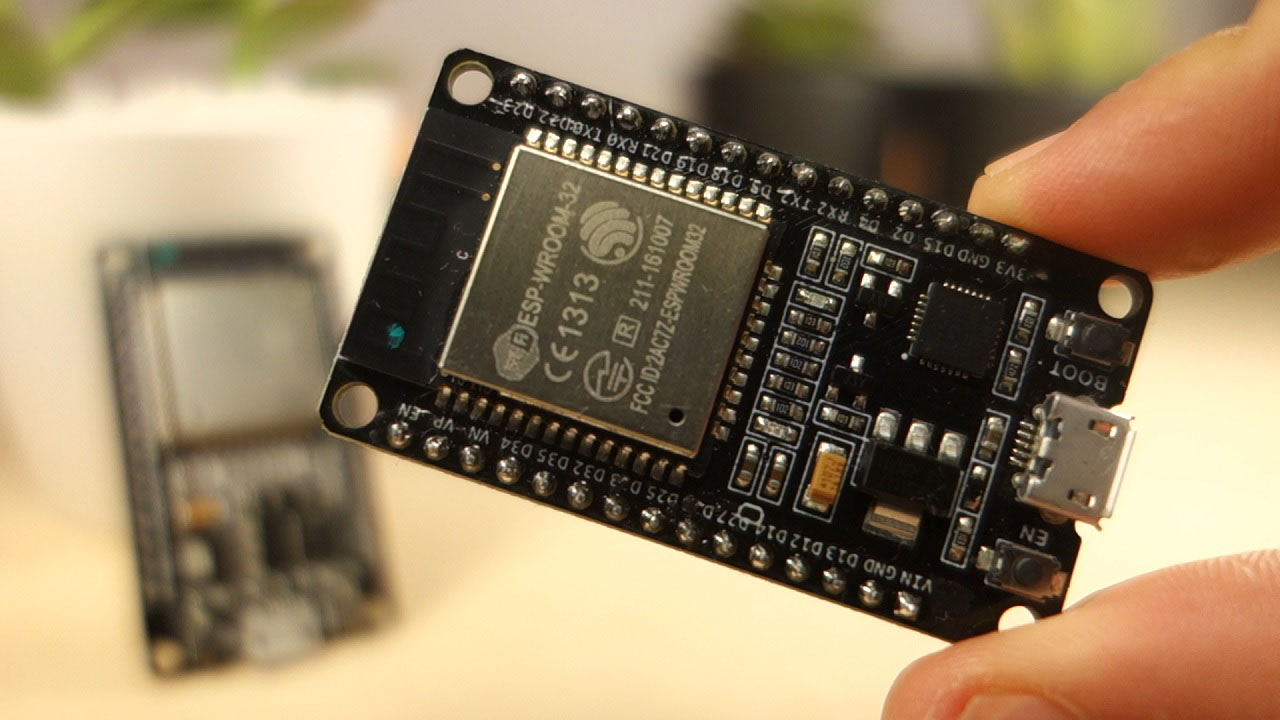
The ESP32 comes with 48 GPIOs with multiple functions. This article intends to be a simple and easy to follow reference guide for the ESP32 GPIOs.
 dusty ferry
How can i send this type of request in micropython
import requests
 from time import sleep

 url = "https://latest-stock-price.p.rapidapi.com/price"

 querystring = {"Indices":"NIFTY 500","Identifier":"SBINEQN,TRIDENTEQN,ALOKINDSBEN,TATACHEMEQN,TATAPOWEREQN,STLTECHEQN,VEDLEQN,DEEPAKNTREQN,RELIANCEEQN ,INFYEQN ,IEXEQN ,UNOMINDAEQN ,IRCTCEQN,CDSLEQN"}

 headers = {
     "X-RapidAPI-Key": "xxxxxxxxxxxxxxxxxxxxxxxxxxx",
     "X-RapidAPI-Host": "latest-stock-price.p.rapidapi.com"
 }

response = requests.request("GET", url, headers=headers, params=querystring)
Missing required argument
code
 Command Help
!eval [python_version] <code, ...>
Can also use: e
Run Python code and get the results.
This command supports multiple lines of code, including code wrapped inside a formatted code block. Code can be re-evaluated by editing the original message within 10 seconds and clicking the reaction that subsequently appears.
If multiple codeblocks are in a message, all of them will be joined and evaluated, ignoring the text outside of them.
By default your code is run on Python's 3.11 beta release, to assist with testing. If you run into issues related to this Python version, you can request the bot to use Python 3.10 by specifying the python_version arg and setting it to 3.10.
We've done our best to make this sandboxed, but do let us know if you manage to find an issue with it!
dusty ferry
!e import requests
from time import sleep
url = "https://latest-stock-price.p.rapidapi.com/price"
querystring = {"Indices":"NIFTY 500","Identifier":"SBINEQN,TRIDENTEQN,ALOKINDSBEN,TATACHEMEQN,TATAPOWEREQN,STLTECHEQN,VEDLEQN,DEEPAKNTREQN,RELIANCEEQN ,INFYEQN ,IEXEQN ,UNOMINDAEQN ,IRCTCEQN,CDSLEQN"}
headers = {
"X-RapidAPI-Key": "xxxxxxxxxxxxxxxxxxxxxxxxxxx",
"X-RapidAPI-Host": "latest-stock-price.p.rapidapi.com"
}
response = requests.request("GET", url, headers=headers, params=querystring)
print(response.json())
hasty zealotBOT
@dusty ferry :x: Your 3.11 eval job has completed with return code 1.
001 |   File "<string>", line 1
002 |     import requests
003 |           ^
004 | SyntaxError: invalid non-printable character U+00A0
!e import requests
from time import sleep
url = "https://latest-stock-price.p.rapidapi.com/price"
querystring = {"Indices":"NIFTY 500","Identifier":"SBINEQN,TRIDENTEQN,ALOKINDSBEN,TATACHEMEQN,TATAPOWEREQN,STLTECHEQN,VEDLEQN,DEEPAKNTREQN,RELIANCEEQN ,INFYEQN ,IEXEQN ,UNOMINDAEQN ,IRCTCEQN,CDSLEQN"}
headers = {
"X-RapidAPI-Key": "xxxxxxxxxxxxxxxxxxxxxxxxxxx",
"X-RapidAPI-Host": "latest-stock-price.p.rapidapi.com"
}
response = requests.request("GET", url, headers=headers, params=querystring)
print(response.json())
ah
hasty zealotBOT
@dusty ferry :x: Your 3.10 eval job has completed with return code 1.
001 |   File "<string>", line 1
002 |     import requests
003 |           ^
004 | SyntaxError: invalid non-printable character U+00A0
ok
shell blade
heyy
when I did
if (Serial.available() > 0) {
    // read the incoming byte:
    incomingByte = Serial.read();

    // say what you got:
    Serial.println(incomingByte);
 }
it sends me some very random stuff and im sending
    arduino.write(struct.pack('>ff',11.11, 12.12))

    x=arduino.readline()
    print(x)
and the code after running some time from being VERY fast goes to a print per few seconds
im using PySerial to write from python to arduino
dusty ferry
how to implement this using urequest in micropython
import requests
from time import sleep

url = "https://latest-stock-price.p.rapidapi.com/price"

 querystring = {"Indices":"NIFTY 500","Identifier":"SBINEQN"}

 headers = {
     "X-RapidAPI-Key": "xxxxxxxxxxxxxxxxxxxxxxxxxxx",
     "X-RapidAPI-Host": "latest-stock-price.p.rapidapi.com"
 }
 response = requests.request("GET", url, headers=headers, params=querystring)
in urequest i am not able to send parameters
 boreal ocean
Hey, all. I'm curious if there's a way to detect if a MicroPython project on RP2 hardware I'm working on is connected to a computer with a REPL open or not. I would like debugging info to be printed if the REPL is open but not if the device is connected to a battery or dumb charger to save on cycles and current. Is this already done for me or is there some library support for checking? I haven't had success digging through the code yet.
dusty ferry
dusty ferry
how to implement this using urequest in micropython
```py
import requests
from ...
help please ^^^^^^
 quick spoke
What ide do you all use?
I'm just wanting something barebones for an esp8266 that allows me to actually include various local files. The vscode extension was nice, but it's kind of fickle and I'm looking for something more stable and "just for micropython"
 rigid tangle
Hi, all. I want to know how do you calculate how much space/memory in a microcontroller will be used up by reading in a certain value from a sensor. Example, I have an ATmega16 microcontroller and I am interfacing an LM35 temperature sensor. Reading takes place in the intervals of 5 minutes. How do i find out how much memory will be used up in the mcu?. I hope I am making sense on this one.
spiral sandal
boreal ocean
Hey, all. I'm curious if there's a way to detect if a MicroPython project on RP2...
ask terminal cursor pos with vt100 cmd ^[6n on serial line, if no response then there's no terminal connected ( or a bad one is )
boreal ocean
Thanks!
Would that would be something along the lines of:
UART.write(“\033[6n”)
then getting the response with
UART.readinto(response)
And checking that response matches the expected response control sequence, etc?
 sand bay
does any one know about the progress of micropython on k64f micro controllers?
gentle vapor
quick spoke
I'm just wanting something barebones for an esp8266 that allows me to actually i...
Thonny is written for Micropython, give it a try
quick spoke
gentle vapor
Thonny is written for Micropython, give it a try
I will!
tired schooner
rpi question:
I have an RPI and want to use PiHole alongside other stuff ( like hosting a dpy bot). Should I just run this in a docker container in order to not “waste” my whole rpi on running PiHole?
 vapid elk
tired schooner
rpi question:
I have an RPI and want to use PiHole alongside other stuff ( like ...
vapid elk
tired schooner
rpi question:
I have an RPI and want to use PiHole alongside other stuff ( like ...
Yeah, sure
tired schooner
vapid elk
Yeah, sure
Is this the intended way of doing it? Do you have experience in running docker containers on a rpi or similar?
 viral saddle
Pico W + Micropython people: Anyone found machine.lightsleep/deepsleep unreliable?
 sonic lynx
@gentle vapor Hi sorry for taking your time. Im trying to find something like a 3 days. I'm trying to create programmable macro mouse or something like that before that I was using Arduino İde for coding rasberry pi pico now i wanna use circuit python for this purpose, i was using serial module in Arduino code. I just tried to use UART, Busio something first of all there is no board.TX and board.RX so i used GP0 and GP1 i dont know where is wrong in Arduino i didint do anything like that do you know any source i can read and learn how to this job, sorry for bad english.
gentle vapor
sonic lynx
<@199811382793863168> Hi sorry for taking your time. Im trying to find something...
Yes on the pico since the board does not define a default UART, you have to use the names of the pins that you are using. CP bases the pin names and defaults on the silkscreen. No "TX/RX" on the silkscreen, means no default UART in CP.
There's a guide dedicated to the pico https://learn.adafruit.com/getting-started-with-raspberry-pi-pico-circuitpython
The docs for busio.UART https://docs.circuitpython.org/en/latest/shared-bindings/busio/index.html#busio.UART
And basically you want to test uart.in_waiting to know when you need to read, or read with a timeout, or readline if you don't mind blocking, and write at your leisure.
Note that support for the picow 🥧 🐮 is not finished, though wifi has started being implemented.
The Adafruit discord and help-with-circuitpython channel is a good place to ask questions too
 next charm
Hey guys
can u suggest to me a good OS for debugging Arduino, ESP32, ESP8266, and Rasberry Pi Pico Wireless?
spiral sandal
next charm
can u suggest to me a good OS for debugging Arduino, ESP32, ESP8266, and Rasberr...
i fear it's a matter of taste, why not try them yourself ?
 quasi ether
next charm
Hey guys
quasi ether
next charm
Hey guys
contiki
 silk owl
How do I use a 16x4 LCD with Raspberry pi in micropython?
sand bay
First you have to wire up properly. Than find some source code which is used by a simular lcd.
 timber ferry
Raspberry pi zero 2w
Or
Raspberry pi 3b
Need advice
sand bay
What are you going to use for?

 bitter depot
thats the code but its not working
 barren ether
is there anybody ever used liteX for FPGA
I really need some guidance
I want to start FPGA, I don't have windows system, only got virtual tools like docker / multipass, I don't have physical single-chip-computer, it seems like liteX is a good tool to me
correct me if i was wrong, please
 alpine vessel
is there any reason to use little over big endian (or vice versa), other than convention or a cointoss?
This is in regards to receiving data over serial, mainly uint values.
errant wigeon
alpine vessel
is there any reason to use little over big endian (or vice versa), other than co...
To my knowledge, if your channel is particularly noisy in a non-gaussian fashion, little vs big endian can make a difference. But in most cases as long as both sides of the communication protocol are on the same page it shouldn't really make a difference
 torn yarrow
not sure where to put this question but this seems like a fitting channel. anyways, does anyone know how python represents binary numbers? if i take -1 for example, as a 4 bit value, in two's complement that would be like 1111, however, if i view the python equivalent in binary (using string binary formater that is) i basically see, -0001, so is this how it just shows a negative number while internally it uses two's complement?
gentle vapor
that's an implementation detail but an interesting question, see python has arbitrary length integers, 2's complement wouldn't enter into that.
python objects are C structs, ints seem to be implemented as an array with a size field next to it, the sign of the size field being used to code the sign of the int
torn yarrow
oh i see. thanks
 earnest hound
Anyone ever used a clearcore motor controller?
torn yarrow
anyone ever tried implementing a fixed point system? i'm basically confused about multiplying fixed point numbers. like say i have two 6 bit balues, i.e aaaa.aa, and bbbb.bb, if i multiply them, i'll a 12 bit result, i.e cccccc cccccc, my question is where does the fractional point shift to here?
 wooden plaza
if im reading your question right a fixed point system is just representing a fractional number in an address, in your case two six bit integers wouldnt you just get a 12 bit with the last 4 being your fraction?
cccccccc.cccc
torn yarrow
wooden plaza
if im reading your question right a fixed point system is just representing a fr...
thanks. it would also make sense to shift the result to the right in order to keep the original 2 fractional bit right?
wooden plaza
depends on what your after, also if you go to far in fix point like a 16 bit x 16 bit, all the microcontrollers i do are a max of 16 bit incorporate a scalling factor
whenever i do fix point all my numbers are in the form a/R
torn yarrow
wooden plaza
depends on what your after, also if you go to far in fix point like a 16 bit x 1...
i'm trying to do something like this on an FPGA.
to avoid growing buffer sizes, i.e 16x16 -> 32bit, 32x32-> 64 etc
wooden plaza
ooo yeah im with ya, i just use the baby microcontrollers and fuck around with them haha
never go that far
torn yarrow
i see
torn yarrow
wooden plaza
never go that far
by the way, do you know if it's possible to define a custom integer size in python? i know it has int16, int32, int64 etc. however I want to run simulation for like 18 bit or 24 etc
wooden plaza
nah dont think so 2 is just the base binary numeral, there is probably workarounds though
hasty zealotBOT
Hey @native nacelle!
It looks like you tried to attach a Python file - please use a code-pasting service such as https://paste.pythondiscord.com
 native nacelle
import pyautogui
import keyboard
import cv2 as cv
import time
pyautogui.FAILSAFE = False
while keyboard.is_pressed('q') == False:
target = pyautogui.locateCenterOnScreen('nur_eine_sache.png',confidence=0.91,grayscale=False)
print(target.x/2,target.y/2)
pyautogui.click(target.x/2,target.y/2)
if target == None:
  print('don\'t see')
  time.sleep(0.02)
else:
  pyautogui.click(target)
  time.sleep(0.02)
why dose it just wiggle in the to left corner of my screen ?
torn yarrow
native nacelle
import pyautogui
import keyboard
import cv2 as cv
import time
pyautogui.FAILSAFE...
there's a channel dedicated to user interfaces
 cursive anvil
Is there a microcontroller alternative for the ESP32 (WiFi microncontroller) with 4 or more cores?
And preferrably something powerful enough to also play audio. A raspberry pi or other embedded computers are not really an option, talking about microcontrollers.
 haughty glen
Hey guys, I'm trying to send the letter "A" through the serial port
import serial
with serial.Serial('COM5', 9600) as ser:
    ser.write('A')
    ser.close()
but I got this error: TypeError: unicode strings are not supported, please encode to bytes: 'A'
can someone help?
torn yarrow
haughty glen
Hey guys, I'm trying to send the letter "A" through the serial port
```py
import...
convert a to a byte
torn yarrow
torn yarrow
convert a to a byte
use 'A'.encode('utf_8')
more info here
Stack Overflow
I am trying to do some serial input and output operations, and one of those is to send an 8x8 array to an external device (Arduino). The pySerial library requires that the information that I send b...
 weak moth
Does anyone else have a le potato?
rigid tangle
Hi all, does anyone have the code or tutorial resource for reading a DHT22 sensor on an ATmega32 mcu. Most of the resources am finding online are not working.
errant wigeon
rigid tangle
Hi all, does anyone have the code or tutorial resource for reading a DHT22 senso...
https://learn.adafruit.com/dht/using-a-dhtxx-sensor
This is a helpful guide for connecting and interacting with it. If it doesn't help, are you sure your device works and is wired correctly? What code have you tried and what errors are you encountering?
 arctic grove
It's more of a hardware thing: I am making a safe w RPi, Python, rotary encoder & an LCD. I'm making an escape room and one of the parts of the escape room is to open this safe. You enter digits by turning the rotary encoder, clicking it & entering a 4-digit code.
I have problems with coming with a GOOD solution on locking / unlocking the safe. I need a better & stronger lock system than the one I have right now. Right now, I'm using a servo motor to lock the door but it's not doing the job that well (It's not gangster / figher proof, lots of violent people in escape rooms). Anyone got some good ideas? I was thinking of something like an electric door lock but it's a bit too big I'm afraid.
 fair galleon
hi, i wanted to ask about esp32, so basically i am in a rocket project with a group and i am assigned to code the microcontroller and we are gonna use esp32 which i have never used before but i have 2 years experience on arduino, i am good enough on it to code for a rocket, they said it wouldn't make a difference but i wanted to ask if there is a obvious difference between using arduino uno and esp32
i don't have much experience with all microcontrollers since i don't have interest mainly into them
 potent dove
What python lib should help me to recieve information about when bios was installed/updated?
 frank yacht
Hi folks! I wrote a command line utility to generate SVG diagrams for control register-style data formats. I've got it published on PyPi at https://pypi.org/project/regfmt/ and would appreciate folks to give it a try and provide feedback. Thanks!

PyPI
A command line utility to generate SVG diagrams for control register-style data formats.
 last void
Not sure if this goes here
Has anyone programmed a drone with python? If so can you please tell me what drone you ordered
 runic compass
I’m trying to communicate with bluetooth over uart, I have a pico on micropython and a waveshare pico-BLE, can someone tell me how it works or send me something to read?
 lunar zenith
I'm trying to install adafruit-circuitpython-circuitpython-mcp3xxx as adafruit-circuitpython-mcp230xx (Asus Tinker Board) and I'm getting this error:
No matching distribution found for typing extensions~=4.0
Does anyone know how to solve?
 vital basalt
fair galleon
hi, i wanted to ask about esp32, so basically i am in a rocket project with a gr...
vital basalt
fair galleon
hi, i wanted to ask about esp32, so basically i am in a rocket project with a gr...
absolutely not
with the right drivers and everything
it's essentially the same, no matter what microcontroller you're using
fair galleon
vital basalt
it's essentially the same, no matter what microcontroller you're using
alright thank you so much!
as i said i don't have much info about microcontrollers so i didn't know they are much the same
 errant blaze
Could someone take a look at #help-popcorn please? I'm attempting to write to a keyboard backlight HID device using pyhidapi, but I'm really new to this and don't really know where I'm going wrong 😅
 sick spruce
hello guys anyone has idea about this
cv2.error: OpenCV(4.6.0) D:\a\opencv-python\opencv-python\opencv\modules\imgproc\src\color.cpp:182: error: (-215:Assertion failed) !_src.empty() in function 'cv::cvtColor'
 frank pendant
Hey guys, I am currently in the middle of building some christmas gifts for my niece and nephew, a couple of 3d printed lights for each of them using neopixels. I currently have made a module with several different (simple for now) animations for the neopixels, most of them are built with for loops and use a lot of utime.sleep_ms for timing the animations. To make them run my test program currently just calls an animation inside a while True: loop. My goal is to use a couple of reed switches to make 3d printed "wands" to turn on and off the lights, and change the animations. I know a little bit about interrupts, not enough to say I am confident in using them, and dont know if interupts will work with for loops running inside a while True loop. I though about adding a check at the end of each loop in the animation to read button inputs, but feel this may be super inefficient (and maybe break the code I am using for the smooth rainbow transition effect). I'm am using esp8266 chips (I have about 30 esp12's laying around, and have others like pi picos available on hand) and trying to stick to micropython/python as it is where I am most comfortable (I can do it in c or arduino c , but am nowhere near as comfortable with either). Does anyone have a suggestion on the best way I should handle button input, and possibly if there is a better way I can do my animations besides utime.sleep for timing?
gentle vapor
frank pendant
Hey guys, I am currently in the middle of building some christmas gifts for my n...
MP supports asyncio, you can use that to read buttons during the sleeps and cancel an animation task to start another
but if you really have tight timing yeah use interrupts
frank pendant
Thank you. I'll do some reading into asyncio and see what I can make happen.
 karmic depot
Hi everyone, Since 2 weeks I have been working on this project...And its finally done! Its a device that detects license plate in frame and gets U all details of the vehicle! New Ideas Welcome . Sharing the GitHub repo for code and documentation -> https://github.com/YashIndane/platefetcher


GitHub
Scan the number plate and get all the details of the vehicle! 🚘 - GitHub - YashIndane/platefetcher: Scan the number plate and get all the details of the vehicle! 🚘
 tropic otter
Hi, I want to program a raspberry pi pico using micropython and instead of using thonny id like to use VS code and the Pico-W-Go plugin. When I try to connect it automaticly uses COM6 but I want to change it to COM7. When I look in the general settings I see I can set it manually but when I do that it says tat the com-port is not configured, could anyone help? I am on windows 10
gentle vapor
isn't you board on COM6 ? does it not detect the board ?
tropic otter
No I checked inside the device manager on windows and it says COM7 and in thonny COM6 is something else aswell
 cloud magnet
Hello, I come from the C++/Arduino framework to MicroPython and I have a question about the neopixel module.
https://docs.micropython.org/en/latest/esp8266/tutorial/neopixel.html
There is no brightness option?
The library I used with platformio was https://fastled.io/ which has brightness and I would like to dim my leds if possible..
thin wyvern
currently working on a project with a raspberry pi pico but i have surpassed the 256kb of memory it has and now need more is there anyway i can add to this or would i have to upgrade microcontrollers
 lavish belfry
Hi
I am trying to send G code to an ESP32 with Bluetooth
I found a code for SPP communication upon which I could build, because I was able to send G code to my board with it, but it only works sometimes?? Like sometimes it compiles and runs and my stepper motor moves, but other times it just connects and that's it, no movement?
import socket
s = socket.socket(socket.AF_BLUETOOTH, socket.SOCK_STREAM, socket.BTPROTO_RFCOMM)
s.connect(('7C:9E:BD:30:86:82', 1))
#s.send(b'G91')
s.send(b'G1 Y100')
s.recv(1024)
b'world'
print("------------------------done-------------------------------")
Here's the code I am using
Can anyone advise me as to why this is happening?
 primal fog
Hi, I'm new to python. i have a raspberry pi pico and i can't solve the problem:
I have a dis(distance) value and I can't work with it further in the program. marked in red.
please tag or DM
 gentle vapor
primal fog
Hi, I'm new to python. i have a raspberry pi pico and i can't solve the problem:...
gentle vapor
primal fog
Hi, I'm new to python. i have a raspberry pi pico and i can't solve the problem:...
it's a local variable in your function, if you want to use it outside, you can return it from the function and get it in the loop (preferably) or make it a global variable by declaring it global at the start of the function
def ultra():
    ...
    return dis

while True:
    dis = ultra()
    ...
thenks
 fiery topaz
Any ideas for beginner projects to really get a all around exposure?
lavish belfry
Hi, could anyone help me regarding Bluetooth sockets?
 bleak storm
how is erasing some section in flash memory different than just setting bits there to 0?
 mental cove
bleak storm
how is erasing some section in flash memory different than just setting bits the...
mental cove
bleak storm
how is erasing some section in flash memory different than just setting bits the...
okay so basically memory storage devices like hard drives, ssds (and flash memory iirc) work similarly to books. the first page or so, there's a table of contents, and the rest is used to store actual data. so when the computer wants to grab certain info, it looks at the table of contents to see where that data is stored, then goes there and grabs it.
when you erase data, the computer generally doesn't actually erase it, it basically just marks the pages where the data is stored as empty in the table of contents, even tho, if you looked at the pages where the data used to be, there actually is data stored there.
that way, when you delete data, the computer only has to overwrite a little bit of data in the table of contents instead of overwriting a huge amount of the actual data
mental cove
mental cove
that way, when you delete data, the computer only has to overwrite a little bit ...
think about how it might take hours for you to install a 100gb video game, but you can uninstall it pretty much instantaneously
 fading yacht
lavish belfry
Hi, could anyone help me regarding Bluetooth sockets?
fading yacht
lavish belfry
Hi, could anyone help me regarding Bluetooth sockets?
let me guess.
You're on the ESP32?
fading yacht
fiery topaz
Any ideas for beginner projects to really get a all around exposure?
Here is some stuff people usually do when getting their feet wet in arduino:
Project 1: Blinky lights. Just pin on, delay 500ms, pin off, delay 500ms, repeat.
Project 2: Read analog pins and print something with them back to the host PC. This enables you to read joypad sticks, raw sensors, etc and make you get the microcontroller talking back to the bigger computer.
Project 3: interface to i2C or SPI peripherals. This enables you to handle the many pheripheral boards available for humidity, pressure, motion, gyroscope, vibration, light sensor, capacitive touch.
Project 4: Redo blinky lights with timers and threading, doing other stuff at the same time (e.g. blink LED and print motion sensor data at the same time)
Project 5: Go wild! build a bunch of stuff. Or start trying out wireless technology. Bluetooth LE GATT (Generic Attribute) services, Wifi networking with TCP/UDP sockets...
Project 6: After feeling confident on coverage of the concepts needed, build your dream machine. Whatever you wanted but found too complicated at first.
if you're gonna play with just software, that is the standard way to go, with software "hello world" examples and ready-made modules.
But if you wanna get more hands-on and build your own boards, i recommend reading or taking a course on electronics and circuit layout.
There is a lot of cool stuff to learn on soldering, configuring Op-Amps for analog signals, wiring pins with pull-up resistors, laying out common-emitter transistor amplifiers, approximating analog voltages with PWM and low-pass circuits.... the list goes on.
Me, personally, i started out on arduino and went straight to the circuits, stuff like LED matrix multiplexer boards with 4017, PWM LED heartbeat, a botched attempt at a POV clock...
 whole holly
 storm wyvern
Hi all, i'm building a little control panel for a 3d printer based on rpi2040 microcontroller running micropython.
Trying to wrap my head about best structure setup.
There is a main infinite loop that checks if any buttons have been pressed and if screen needs to update and if so, updates the screen. this part works well so far.
now, I'd like to periodically query the printer for status and the main loop runs way too fast for that. What's the correct way to set periodic tasks that work well with main infinite loop? Timers seem like they could sort of help with this.
Any chance someone could point me in the right direction?
lavish belfry
fading yacht
let me guess.
You're on the ESP32?
Yes. but I figured it out since, thank you! 🙂
zenith niche
zenith niche
ah ok cool. So could I hook it up to this and we'll be good? https://www.aliexp...
I ended up ordering this GPS module + UART / USB thing as you recommended the other week and they've arrived and I've wired them like so (see pic). @gentle vapor @devout mantle
I'm on win10 and dunno how to get the feed of GPS signals into a .py. The closest I've got is:
import serial.tools.list_ports

ports = serial.tools.list_ports.comports()
for p in ports:
    print(p)
    print(p.device)
any advice how I can get this data? I don't know anything about serial controllers / UART and all the articles on python and GPS modules seem to use raspberri pis, not UARTs. Ideas?
 devout mantle
If I recommended something last week I don't remember I was terribly sick and I don't remember everything I did
zenith niche
devout mantle
If I recommended something last week I don't remember I was terribly sick and I ...
Ah, hope you're alright. The tldr is that I want to get GPS coordinates into a python script. It seemed the most practical route for this would be to get a GPS module https://www.aliexpress.com/item/1005001635722164.html
and a USB / UART module to interface with it https://www.aliexpress.com/item/4000120687489.html
I now have these and want to receive the stream of GPS coords this thing should be spitting out into a .py, but idk how
aliexpress.com
Smarter Shopping, Better Living! Aliexpress.com
aliexpress.com
Smarter Shopping, Better Living! Aliexpress.com
devout mantle
Yeah I'm all good thanks. I had Flu, RSV, pink eye, and a sinus infection all at once.
Don't have kids such that they are in three different schools all at once.
Then you get all the germs
 hollow violet
hello
can somebody tell me how in install the "machine" package? .. for coding a esp with pinouts
i want to "import machine" .... and try to install it with pip install machine
the error is: "note: This error originates from a subprocess, and is likely not a problem with pip."
i install already some packages from the "visual studio installer" ... but still error 😦
hollow violet
elfin heart
hey guys, I'm a micropython trainee. I have experience with C/C++ on different m...
how you install the machine package?
 remote elbow
hello guys, i currently need help
this error is making me really mad cause its an access denied error
and im using raspberry pi pico

is there a possible way i can fix this?
hallow igloo
MicroPython is an implementation of the Python 3 programming language that is optimized to run on microcontrollers. It includes a small subset of the Python standard library
 heady dawn
 untold nacelle
hey I'm using ros to do some stuff and I need to calculate the tranformation between two measurement systems of my drone and my home point, and I'm having some trouble finding the transformation function, could someone in here help me?
hollow violet
@untold nacelle i know somebody, maybe him can help with ROS
 tranquil robin
Hey, I have an question:
If my microcontroller get an Input of a sensor.
Can I send this Input as ouput to the usb? If yes, do I need 2 programs, so one for microcontroller and another to handle the input of usb, or can I mix up python functions with micropython?
I want to do a remote controller for my pc
gentle vapor
tranquil robin
Hey, I have an question:
If my microcontroller get an Input of a sensor.
Can I ...
Microcontrollers typically can talk with your PC through a serial port over USB, which does mean having some software on the PC (possibly in python or other). Note that the code on the controller can be minimal and just transmit what it gets and let the PC program do everything.
Some microcontrollers (like the Raspberry pico) can act as a HID device like a keyboard and send keyboard shortcuts to your PC for example, which will allow to trigger stuff via some automation software that might be easier to use than writing a serial client. Circuitpython has good HID support on by default.
"Ducky" scripts or "Bad USB" devices show how you can do many things by sending key presses, like open a terminal, type commands, launch applications, trigger menus etc.
There are also ways to connect a device to your PC that will allow reading sensors directly from code on the PC, using Circuitpython Blinka or Micropython. Devices like the MCP2221 and similar or the u2if firmware on the pico for example. In that case the whole code runs on the computer.
tranquil robin
Thanks
fiery topaz
Anyone know if possible to replace the switch on a “useless box “ setup with a simple sensor?
 humble kraken
yes
 cyan kite
I have an electric golf cart whose throttle uses a hall sensor to send signal for acceleration. i want to send that signal via arduino instead of the mechanical gas pedal/throttle.
Can anyone tell me which electronic device can mimic the waveform or properties of that hall sensor so that i can control it with Arduino?
 tired lintel
bitter depot
tired lintel
bitter depot
you havent selected your device
 timber pendant
remote elbow
timber pendant
remote elbow
Cool meteo...
 junior timber
So ive been trying to use a joystick for a interface display to select a file but i need to use the joystick after.
My problem is that when i run the file from the oled menu the file launches but if i use the joystick in the file it will end the process and return to the oled menu.
Its a while true statement
Gotta go to bed tho ill look at replies later thanks in advance
 tacit egret
from machine import Pin
import utime

counts = 0

buffer = 0

INPUT = machine.Pin(15, Pin.IN, Pin.PULL_DOWN)

def detect_press(irq):
    current = utime.ticks_ms()
    difference = utime.ticks_diff(current, buffer)
    if difference < 1000:
        print(f"Ignored button press: Time left for next press is {1000 - difference}ms")
    else:
        global counts, buffer
        counts += 1
        buffer = utime.ticks_ms()
        print(f"Button was pressed: {counts} time(s). Time since last {difference}ms")

INPUT.irq(trigger=Pin.IRQ_RISING, handler=detect_press)
Why does it give a syntax error and doesn't recognize the global?
On line 16
 slate wyvern
I have a 24 volt LED strip. Pretty bright (so current is fairly high). I want to control it from my computer through the USB port (make an API that I can call from Python within the computer). What hardware do I need? I am lost when it comes to hardware. 😦
tacit egret
junior timber
<@947440289512030249>
Traceback (most recent call last):
  File "<stdin>", line 16, in detect_press
SyntaxError: identifier redefined as global
as it says, you are declaring a variable as global after using it (buffer in this case)
in general put your global declarations at the top of the function
tacit egret
gentle vapor
as it says, you are declaring a variable as global after using it (`buffer` in t...
Ah thanks
junior timber
Oh my gosh i forgor
remote elbow
timber pendant
Cool meteo...
???
 crisp shadow
do anyone know how to use the TouchPad on an ESP32-S2? All guides refer to from machine import TouchPad which seems to not exist in ESP32-S2
 graceful surge
slate wyvern
I have a 24 volt LED strip. Pretty bright (so current is fairly high). I want to...
graceful surge
slate wyvern
I have a 24 volt LED strip. Pretty bright (so current is fairly high). I want to...
I use arduinos and relays
slate wyvern
Do you recommend any particular models? Its a shame to buy hardware and it isnt compatible or worse: magic smoke. Also, what can arduino do that rasberry pi or just a stadard computer's usb port not do?
tacit egret
Is this code only for pycom board or will it work on raspberry pi pico w too?
from machine import Pin
from machine import PWM
import time

# define frequency for each tone
E7 = 2637
F7 = 2794
C7 = 2093
G7 = 3136
G6 = 1568
E6 = 1319
A6 = 1760
B6 = 1976
AS6 = 1865
A7 = 3520
D7 = 2349

# set up pin PWM timer for output to buzzer or speaker
p2 = Pin("PXX")  # Pin Y2 with timer 8 Channel 2
tim = PWM(0, frequency=300)
ch = tim.channel(2, duty_cycle=0.5, pin=p2)#https://forum.pycom.io/topic/802/example-pwm-mariobros

mario = [E7, E7, 0, E7, 0, C7, E7, 0, G7, 0, 0, 0, G6, 0, 0, 0, C7, 0, 0, G6, 0, 0, E6, 0, 0, A6, 0, B6, 0, AS6, A6, 0, G6, E7, 0, G7, A7, 0, F7, G7, 0, E7, 0,C7, D7, B6, 0, 0, C7, 0, 0, G6, 0, 0, E6, 0, 0, A6, 0, B6, 0, AS6, A6, 0, G6, E7, 0, G7, A7, 0, F7, G7, 0, E7, 0,C7, D7, B6, 0, 0]

for i in mario:
    if i == 0:
        ch.duty_cycle(0)
    else:
        tim = PWM(0, frequency=i)
        ch.duty_cycle(0.5)

    time.sleep(0.15)
 river juniper
❓
 frank mulch
I'm just starting to play with my pico Pi W, and the 'getting started' doc is wrong.
it says the LED is pin 25, but that doesnt work. if you use pin 'LED' it does let you control the onboard LED, but why are the Docs so wrong?
the reason I am starting with the pico is that you can actually buy them, unlike most every other microcontroller
zenith niche
I ended up ordering this GPS module + UART / USB thing as this channel recommended the other week and idk how to read from it. I'm on Win10 but I don't understand how to interface with this device.
When I plug it in the Device Manager shows "CP2102 USB to UART Bridge Controller", but idk where to go from here. How can I use this to get a feed of GPS locations?
 gentle vapor
frank mulch
it says the LED is pin 25, but that doesnt work. if you use pin 'LED' it does...
gentle vapor
frank mulch
it says the LED is pin 25, but that doesnt work. if you use pin 'LED' it does...
it's correct for the pico, but not the pico W, what getting started doc are you reading ?
the pico W uses a few pins to communicate to the wifi module, and the LED is connected to the wifi module instead and controlled by it. In Micropython it's Pin("LED"), in Circuitpython it's board.LED.
gentle vapor
zenith niche
I ended up ordering this GPS module + UART / USB thing as this channel recommend...
you want some serial software to read from the COM port, normally at 9600bps I think, and it should receive a stream of formatted messages which can be parsed to get the position when there's a fix.
import serial
port = serial.Serial("COM5", 9600)
while True:
    if port.in_waiting:
        print(port.read().decode("ascii"))
Beautiful tyvm. I don't know where to start with looking for software to read from the COM port... any ideas on where to begin or what to search for? This functionality definitely isn't already built into win10 somehow?
gentle vapor
zenith niche
Beautiful tyvm. I don't know where to start with looking for software to read fr...
there are software to read a serial port like Putty and TeraTerm, and I assume most programming environments will have a way to access a serial port like python. As for decoding the GPS I don't know.
humble kraken
pyserial is the python library to interact with a serial port
humble kraken
zenith niche
I ended up ordering this GPS module + UART / USB thing as this channel recommend...
To start with, I think you're feeding 5V to the gps module when it's a 3.3V device... Need to read up more man. Hopefully it's resistant to that
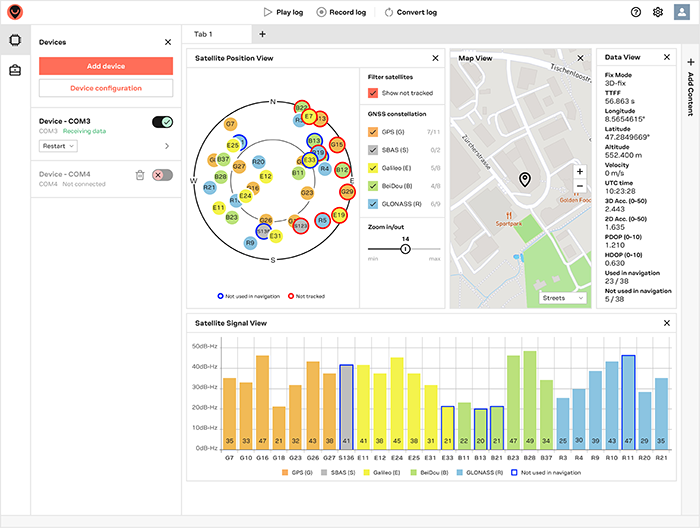
You want 22.07
That can talk to the gps through serial if it's all set up correctly
zenith niche
humble kraken
To start with, I think you're feeding 5V to the gps module when it's a 3.3V devi...
Oooh ... Shit. Any way to check whether I've fried it?
humble kraken
Usually they have a one pulse per second LED
hollow violet
hello
MICROPY_PY_URANDOM_EXTRA_FUNCS configuration option is enabled. ... how can i activate it?
frank pendant
Hey guys, looking for some advice or guidance here. I am building some custom gifts for my niece and nephew using esp8266's, neopixels for lighting effects, and a couple of reed switches. One reed switch toggles the lights on and off, and the other reed switch will cycle through a list of animations I've put together for the lights. I had tested the animations by importing them into my main.py file and calling each one individually. My issue is that the animations run in loops, so I need a way to monitor button presses, I was thinking about doing making my animation loops asyncio functions, and having another asyncio function for each button. But I'm not sure what the best approach would be to cycle through the animations. I had a thought of making a "controller" class that has a controller.animation value that stores the selected animation, and using something like exec(f'animations.{controler.animation}) inside an async function. Any suggestions on how to approach this?
 jovial bronze
so this type of things works on Arduinos?
if so, do you guys recommend using Arduinos as a beginner
gentle vapor
frank pendant
Hey guys, looking for some advice or guidance here. I am building some custom gi...
well for one thing don't use exec that's just messing things up. Using asyncio for your animations, you can make your buttons stop the current animation by cancelling the matching task (and catching asyncio.CancelledError in the right place to exit cleanly). You can then start a new task with the selected animation.
To select an animation just put them in a list and have the buttons select an animation in the list with a current_animation position for example.
async def animation1():
    ...
...
animations = [animation1, animation2, ...]
current_animation = 0
asyncio.start_task(animations[current_animation]())
there's a MP library for async buttons too that might help, don't know if it fits in a ESP8266
https://github.com/peterhinch/micropython-async/blob/master/v3/docs/DRIVERS.md#4-interfacing-pushbuttons
 steel loom
Hi, i need some help with Bluetooth and i thought this will be the best chat group that might be experienced with it.
I have a device that connects via BLE, sends data properly. 20 bytes chunks.
the device that fetches the data uses a debian OS, bluez, python-bleak. gets only 23 in mtu settings and misses some packets.
since it's using bluetooth 5+ (both devices) i figured it's possible to increase the MTU. but not sure how.
Is that a driver issue? bluez issue? Are there any other that are better? (ex: blueman?)
thanks.
hallow igloo
hey, i'm gonna get my hands on a microbit tomorrow, and i will flash micropython to it (i will flash a python script to it as well). the microbit will be plugged into my laptop, and i need a way to communicate with the laptop from the microbit (trigger some event or message the laptop can respond to, or execute a script on the laptop for example). i can either execute the python script standalone on the microbit's micropython, or i could connect to the microbit from the laptop via microrepl (a tool in pip i found that i managed to get working). is there some way i could do this?
(to clarify, i need to communicate from the microbit to my laptop when its plugged in, preferably using microrepl if you need a repl to do it)
thanks for any help
gentle vapor
hallow igloo
hey, i'm gonna get my hands on a microbit tomorrow, and i will flash micropython...
it should show up as a serial port, anything on the PC that can communicate with serial will do it (in python on the PC you have pyserial for example)
hallow igloo
So how could I use this to communicate with the laptop from the microbit
I want to send a message of sorts to the laptop from the microbit
humble kraken
you can run a daemon on the laptop that always listens to the microbit's serial connection
hallow igloo
ok so just got a ques,
(new to microcontrollers)
is something like this possbile?
i make a robotic arm (3 axis)
connect the motors to arduino
and make a glove with 5 gyro sensor
and somehow use all these in combination to control the robotic hand?
so in short, can i use
3 servo motos + old smart band + esp8266 / esp32 + arduio + some gyro sensors + flex sensors
and make a robotic arm which can be controlled by different finger and hand gestures?
hollow violet
can anybody help me with a web server on the 8266 ?
i try it with socket ... but i not found a simple example 😦
hallow igloo
humble kraken
you can run a daemon on the laptop that always listens to the microbit's serial ...
How would I do that (I'm on Linux mint btw, not windows, should have specified)? What would the Daemon listen for? How would I trigger those events from the microbit? Would I need the repl or could I use the micropython interpreter on the microbit standalone?
frank pendant
gentle vapor
there's a MP library for async buttons too that might help, don't know if it fit...
thanks for the feedback, been away from the computer due to work, I'm going to look into implementing a method like you mention, and will look into the async button library you mentioned. I have currently been using the ubutton library for micropython that uses async functions as well, but the library you posted looks a bit more friendly for this. Hopefully by the end of this week I can be 3d printing some "magic wands" to put embed magnets for the reed switches in.
gentle vapor
hallow igloo
How would I do that (I'm on Linux mint btw, not windows, should have specified)?...
here is a very simple example, it listens to a fixed port and awaits for the board to print a line. You can then parse the line and do whatever you want with it.
import serial
import time
BOARD_PORT = "/dev/ttyACM0"
channel = serial.Serial(BOARD_PORT, 115200)
while True:
    data = channel.readline()
    print(data)
I personally like to use json to encode commands and data with a predefined format, easier to parse. You can also add retries and reconnects in case of errors when reading the serial port. And if you feel adventurous, use asyncio.
You can find the board's serial port automatically using pyserial's serial.tools.list_ports.comports
import serial.tools.list_ports
def get_serial_port():
    for port in serial.tools.list_ports.comports():
        print(port.device)
        print("    ", port.description)
        print("    ", port.serial_number)
        print("    ", port.vid, port.pid)
        # Vendor ID and Product ID for the USB chip of the Micro:Bit
        if port.pid == 516 and port.vid == 3368:
            return port.device
    return None
get_serial_port()
On the other side, the board's code just has to print lines, for example you can run that to test the code above.
import time
while True:
    for i in range(10):
        print(f"some value {i}")
        time.sleep(2)
ah forget json the module is not available on the microbit. You don't need it anyway, space-separated lists, coma separated values and stuff like that are simple enough:
data = b"temperature:22.5"
# can cause an error if the format is incorrect
try:
    key, value = data.decode("utf8").split(":")
    value = float(value)
    print("Key: {0}, Value: {1:.2f}".format(key, value))
except ValueError:
    pass
prints:
Key: temperature, Value: 22.50
anyone 🤔
hallow igloo
gentle vapor
here is a very simple example, it listens to a fixed port and awaits for the boa...
OMFG THANK YOU SO MUCH
EXACTLY WHAT I WANTED TO THE LETTER
Except...
Lol
But except, the laptop prints a b in front of it, and \r\n at the end (I know why the last part happens, but I don't know how to fix it, and I have no idea what the b bit is)
Also when I try to print a string on the microbit with f Infront of it, it errors
gentle vapor
yeah it doesn't support f-strings in that build, use .format instead
bytes are converted to strings with .decode("utf8") since MP uses utf8, and white spaces removed with .strip()
https://docs.python.org/3.10/library/stdtypes.html#binary-sequence-types-bytes-bytearray-memoryview
hollow violet
hello
i want to controll a lego motor
`from machine import Pin, PWM
""" nodemcu pins from the motor shield """
pin2 = Pin(4, Pin.OUT) # D2
pin4 = Pin(2, Pin.OUT) # D4
""" named after the L9110 h-bridge pins """
AIN1 = PWM(pin2, freq=750)
AIN2 = PWM(pin4, freq=750)
""" TODO: variable speed """
speed = 950
def stop_all():
for each in (AIN1, AIN2):
each.duty(0)
def backward():
AIN1.duty(0)
AIN2.duty(speed)
............`
the motor is very loud
and only turn backward ... not forward
can anyboard help me?
 heady belfry

 pine gazelle
hello guys
im trying to do a selector in python, i mean i have a school project using a raspberry
and this raspberry has hat sense dispositive added
for ppl who know what is it, there is a joystick, so i want to use it to do a selector
for exemple when i push the joystick to the left an arrow pointing to the left will be displayed on the 8x8 screen, then to confirm the selection I must press the central button
someone could help me ? thanks
Actually i just need help for the selector , choose the direction and after press enter for confirm the selection
 tropic remnant
Hey folks, anyone have some anecdotal insight on potentially taking a side micropython project to a production state? I've been working on a micropython side project that turned out better than I expected and I'm curious what the transition from prototype to consumer product looks like especially when it comes to micropython
 split belfry
hollow violet
`from machine import Pin, PWM
""" nodemcu pins from the motor shield """
pin2 =...
split belfry
hollow violet
`from machine import Pin, PWM
""" nodemcu pins from the motor shield """
pin2 =...
try doing AIN2.duty(-speed)
 supple locust
Anyone have a good idea for a school project about microcontrollers using microbit, have an idea for a step counter with a calorie counter. It’s a secondary school project?
hollow violet
split belfry
try doing AIN2.duty(-speed)
i order already a new motor driver ... i hope it coming soon
hallow igloo
anyone here uses esp32?
I need help for buying one
im confused lol
 half zodiac
hallow igloo
anyone here uses esp32?
I need help for buying one
im confused lol
half zodiac
hallow igloo
anyone here uses esp32?
I need help for buying one
im confused lol
Yes, just buy any esp32
tropic remnant
hallow igloo
anyone here uses esp32?
I need help for buying one
im confused lol
Amazon has a bunch of different types
hallow igloo
half zodiac
Yes, just buy any esp32
😂lol
but I'm confused
what is use of psram?
hallow igloo
tropic remnant
Amazon has a bunch of different types
ik
digikey is good site to get it too
but there re bunch of models
 spark hull
Is it possible to develop this on raspberry pi (i know they are nuked in availability and price is there some other soc equivalent to raspberry pi 4b or zero 2w?) https://flipperzero.one/
Based on ultra low power STM32 MCU for daily exploration of access control systems and radio protocols. Open source and customizable
power efficientcy wouldnt be a problem bc i would use powerbank anyways
spark hull
like would it be difficult? i dont care about time nor money , i just want to learn how this works and create even more awesome stuff
errant wigeon
spark hull
Is it possible to develop this on raspberry pi (i know they are nuked in availab...
The flipper's a neat little device. Most of it's benefits are from how much is built into it, and how it has tolerance at multiple voltage levels. You could do some of it's features on a pi--a pi could be a mild logic analyzer (https://github.com/superzerg/logic-analyzer) but the pi can't do 5v logic out and shouldn't take 5v in on the pins, runs a risk of the kernel being slow and not keeping up with gpio changes (Maybe it can keep up--I've never tried pushing a pi to intercept signals), and lacks a lot of the hardware a flipper has built in. You could buy the add ons you need and use the pi with them, but that means you have to figure out how to get the pi to interface with the peripheral and use it in a flipper like environment. Those are really helpful things to learn in general, but it won't really be super easy, and you'd probably be left with only a fraction of the features at a time
errant wigeon
hallow igloo
ik
digikey is good site to get it too
but there re bunch of models
What kinds of features are you looking for?
hallow igloo
errant wigeon
What kinds of features are you looking for?
thx for help
i thought to buy the esp32-s3-n8r8
as it's in my budget raange
but problem is the shippinh charges are equal to prices of the board lol
im a beginner and thought that if im getting an esp32,i 'll get a decent one so if i need more speed and ram, i could use the same in future
but now i gotta reconsider to buy
shippinh import charges are insane here
1200 inr is the price
and shipping price is like 1600 inr 💀
errant wigeon
Do you plan on using arduino/c or micro or circuit python on it? And what do you want to do with the micro controller?
I mostly use the esp32-s2, but the s3 looks good. I don't know how stable circuit python is with it at the moment though, I seem to recall it has some quirks.
If you're interested in circuit python, here's a list of esp32 x boards that circuit python runs on: https://circuitpython.org/downloads?q=esp32, looks like there's a fair number of boards that are esp32-s3's as well so that's probably stable enough
hallow igloo
errant wigeon
Do you plan on using arduino/c or micro or circuit python on it? And what do you...
ik c, and py
so planning micropy and c for it
i also have arduino nano, which i bought and realised i could have got rasp pi pico instead
idk about projects, just a beginner wanting to fiddle around with the chips
yep my board
esp32-s3-n8r8 is displayed there
im thinking of s3 boards cause they got more sram and support for psram
and are way faster then s2 one's
and the price range does not have a huge diff
errant wigeon
Cool then I'd go with whatever you feel like/can budget for. Those all seem like fine choices and you've got enough background that you're not going to face too much of a technical challenge with one over another
hallow igloo
yep
but that fact that shipping charges are more than the chip price itself lmao
anyways thx
 steady briar
not if you buy them by the hundreds or thousands 🙂
half zodiac
hallow igloo
😂lol
but I'm confused
what is use of psram?
no idea, what's psram but a quick google search indicates that
pseudostatic (random-access) memory (PSRAM)

(1) A combinational form of a dynamic RAM that incorporates various refresh and control circuits on-chip (e.g., refresh address counter and multiplexer, interval timer, arbiter). These circuits allow the PSRAM operating characteristics to closely resemble those of an SRAM.

(2) A random-access memory whose internal structure is a dynamic memory with refresh control signals generated internally, in the standby mode, so that it can mimic the function of a static memory.

NOTE In practice, unlike so-called self-refresh DRAMs, PSRAMs have nonmultiplexed address lines and pinouts similar to those of SRAMs.
honestly, I have never used this so far
hallow igloo
ik
researched more and i chose the board i want
getting it to come to India, is like im gonna pay double the price of board
shipping + tax = nearly 2(price of board)
and i found someone selling same series boards in loval market, half the price of original board
im worried if the produc is genuine
 modern lantern
hallow igloo
ik
researched more and i chose the board i want
getting it to come to India, is ...
modern lantern
hallow igloo
ik
researched more and i chose the board i want
getting it to come to India, is ...
which board are you buying? most esp32 and rpi pico boards that one gets from local market are fine.
hallow igloo
esp32-devketC-N8R8
it's 1200 inr + 1600 (shipping) + ~400 tax
and some local store is selling same "series" board at 500
the chip itself is 300+ INR, idk if the local shop is selling fake ones
modern lantern
hallow igloo
the chip itself is 300+ INR, idk if the local shop is selling fake ones
local ones work fine. have been using them off and on.
hasty zealotBOT
:incoming_envelope: :ok_hand: applied mute to @spiral ridge until <t:1670795489:f> (10 minutes) (reason: duplicates rule: sent 4 duplicated messages in 10s).
The <@&831776746206265384> have been alerted for review.
 white spade
Hi, anyone have experience with using threading on recent micropython releases?
It seems they removed the allocate_lock function from the _thread library?
spiral sandal
white spade
Hi, anyone have experience with using threading on recent micropython releases?
...
but first why would you need threads ?
white spade
spiral sandal
but first why would you need threads ?
I'm migrating code from a different esp32 based microcontroller where we're already using threading.
We have performance requirements which resulted in us needing a second thread to handle incoming mqtt messages
tacit egret
Can somebody recommend me a good lcd which I can use with pycom lopy4 running micropython?
 echo flame
ahh how do i put a python file into rpi pico
arctic grove
I got a problem with my RPI4+ but first 3 important remarks before you come with your solution
I don't have a screen & keyboard (no GUI)
I don't have an extra router (I'm in a student dorm, our network is protected with a website & a login)
The ethernet cable is not faulty, I tried with several new ethernet cables, I also tried different SD cards AND tried it on multiple RPI4's
I normally image an sd card with the RPI imager & a selfmade login, enabling SSH
Then I add a static IP in cmdline.txt AND I also make an ssh file on the sd card (just an empty ssh file, no extensions, ...)
Then remove the sd, plug it in the RPI4 and I can't connect with putty
I did those same steps before with the RPI3 model B and it all worked perfectly, anyone got any ideas? Is ethernet ssh with a static ip disabled on rpi4? What's going on here, help 😦
arctic grove
tacit egret
Can somebody recommend me a good lcd which I can use with pycom lopy4 running mi...
depends on how big your screen needs to be / what's the purpose? You can just buy a 16x2 lcd I guess
 unborn drift
Hi all, I have recently started working on micropython for esp8266. I have erased and flashed the firmware in nodemcu. But when i go to putty and connect to it serial monitor it doesn't show any response for the input...what could I do to fix it?
Thanks in advance for every efforts put in.
 random patio
Do all expression evaluations involve a write instruction to a register? For example a comparison will write 1 or 0 to a register. Is this a considered write instruction ?
 terse sable
Hey, I don't know whether this is a stretch but I recently got ahold of an arduino-like microcontroller (ESP32-WROWER-E) with the following specs and was wondering if I could technically run an async websocket client on it:
240 MHz Dual Core Tensilica Xtensa 32-bit LX6
520 KB SRAM
128 KB ROM
8 MB SPI PSRAM
4 MB SPI Flash
24 GHz Wi-Fi - 802.11b/g/n
I've heard of micropython and come across a lib called micropython-async-websocket-client but I'm not sure if my microcontroller is capable of running an active websocket connection. I didn't want to force it to work too much and possibly damage it, hence I decided to ask here.
gentle vapor
terse sable
Hey, I don't know whether this is a stretch but I recently got ahold of an ardui...
yeah sure, micropython + ESP32 are good for that kind of uses, and that's a nice beefy module with plenty of ram and flash
terse sable
That's great, thank you!
 somber pagoda
hi hi hi
somber pagoda
what model of raspberry pi should i use if im going to use HOG for it as human detection?
hallow igloo
somber pagoda
what model of raspberry pi should i use if im going to use HOG for it as human d...
Raspberry Pi 4
 ashen anvil
Are you expecting devices at a reasonable cost any time soon? 😂
More stock available to supplier lead times which is approximately 18/09/23
 coarse spade
hi
can anyone help me with my project (it's a easy one)
I need a cpp code that runs a 0-99 counter with two 7segments on atmega32 Proteus
coarse spade
coarse spade
I need a cpp code that runs a 0-99 counter with two 7segments on atmega32 Proteu...
if u have any source or anything that can help me with that pls tell me
 sweet veldt
ashen anvil
Are you expecting devices at a reasonable cost any time soon? 😂
`More stock av...
sweet veldt
ashen anvil
Are you expecting devices at a reasonable cost any time soon? 😂
`More stock av...
the founder of rpi foundation said by 2023 we should expect pre pandemic levels
that better be true
because i need at least 10 pi’s for home automation
ive been using bulky old recycled windows computers and its not going well
 south rover
coarse spade
I need a cpp code that runs a 0-99 counter with two 7segments on atmega32 Proteu...
south rover
coarse spade
I need a cpp code that runs a 0-99 counter with two 7segments on atmega32 Proteu...
Are they TM1637's or raw modules?
Because the raw modules are a LOT fricking harder to work with and will probably need another power supply
 errant thistle
Hey guys! Anyone have experience on web client?
hallow igloo
So I have this idea where I take a ESP32-CAM and connect it with a microsd card. I want to be able to come up with code that allows me to capture an image from the cam and then run it through an ML trained algorithm that I have. Does anyone have any ideas on where I can start or is this not feasible? The key is I don’t want real time ML detection but rather I just want something that saves a picture and then gets put through an algorithm automatically.
sweet veldt
I cant believe this, I am so desperate for a raspberry pi I flew to LA and am now driving to a micro centrr
 pure inlet
 rose warren
Hey there, I am struggling to run the machine import, it say the module is missing so I tried to pip install. But I get this error below. I tried this in python 3.11 and 3.8 along with pip 22.3.1 and 21.3.1. I installed vs python workload with optional native development tools. I tried to manually install some vs tools, pip installed setup tools. Am I missing something? I couldn't find any other package that I need to install.
 rose warren
Also I cannot use Pico-Go since it has been removed from vscode marketplace and pymakr is not working at all. I need this for my school project so I would really appreciate any help
 thorn dragon
FYI I just learned that there is firmware for the RPI PICO that allows a X86 PC to access all of the functionality of the PICO via USB in python https://github.com/execuc/u2if

GitHub
USB to interfaces implementing MicroPython "machine" module functionalities on a computer. - GitHub - execuc/u2if: USB to interfaces implementing MicroPython "machine&...
 split hollow
How can I use Python with ardiuno
gentle vapor
@errant wigeon we should think of updating the pinned message to include Arduino's official endorsement of Micropython with a link to:
https://docs.arduino.cc/micropython/
and maybe u2if (which is an alternative to firmata basically) since it is also supported in python (on its own or via Blinka)
 whole locust
Hey guys, I'm new in this srvr
So, I am having a Nokia G-140W-F WiFi GPON router, and I want to install OpenWrt on it, but its not supported by OpenWrt, so can someone please tell me how to do that
I even have its serial access with 115200 bps
It has an ECONET MTK7526G SoC or direct name EN7526GT its Clock Freq is 900 MHz. It has 512 Mb of DRAM.
Its a MediaTek Soc, but afterward MediaTek was acquired by EcoNet.
It uses 12V 1.5 A Supply to Power itself
Its default Software Which is made by Nokia X Airtel is very poor, because even in its Serial Access I don't get root access, its login & password are forbidden idk where, and even when I got to know its login & password I was not able to get the root access, because the Password2 Algorithm was not working in the software.
Also I'm using MobaXTerm & Putty for Serial Interface
 strange flax
 void condor
I want to make an RFID read program with my Raspberry Pi. I would prefer it to be quite user friendly so would I be able to use a general usb RFID reader or would I need a specific one such as the PiicoDev module? Think this belongs here.
errant wigeon
gentle vapor
<@459119350851567626> we should think of updating the pinned message to include ...
That's a good idea, but I think it'll have to be its own pinned post because that message has just 3 characters of space left in it. I'll see if I can reword or just redo the pinned post tomorrow though. Thanks for bringing it up!
whole locust
!voice-verify
 peak lynx
Hi there I have not worked with a rapi before but I have a project I want to do which requires the following things:
- wifi
- battery (needs to be mobile)
- several buttons
- a screen would be more convenient to use but I am not sure how difficult it is to make a decent GUI
- The whole contraption should be as small as possible
I have determined that the raspberry pi pico w would be the best starting point.
Note: I am aware most of these are much cheaper in shops other than amazon but I have an amazon voucher I would like to use
For the battery I have found two things I thought I could use:
- Battery supply designed for the raspberry pi pico https://www.amazon.de/dp/B091PKLTDB/?coliid=IL5BI2K3R9Y3W&colid=2CMD4LIMB5ZEH&psc=1&ref_=lv_ov_lig_dp_it but unfortunately quite big
- Independent Lithium battery https://www.amazon.de/dp/B08215B4KK/?coliid=I38ZK45CIPV3LG&colid=2CMD4LIMB5ZEH&psc=1&ref_=lv_ov_lig_dp_it not sure if that would work but it would be much smaller
For the screen I was something like this: https://www.amazon.de/dp/B092VVCBQP/?coliid=IZ26UB9Q29YAI&colid=2CMD4LIMB5ZEH&psc=1&ref_=lv_ov_lig_dp_it This would also have 4 buttons and one joystick so I wouldn't have to worry about more buttons. But how easy is it to make a decent menu on one of these? If I buy option 1 for the battery, will this even have room to be stuck onto the pi?
Please ping me if responding, thank you!
spiral sandal
peak lynx
Hi there I have not worked with a rapi before but I have a project I want to do ...
for small as possible any esp32 + a screen supported by LVGL
and if your program is big : pick a model with added PSRAM
also the best combo screen+battery is definitevely any cheap tablet like the Q8 and display info from MCU via serial/bt/wifi
see https://github.com/ArminJo/Arduino-BlueDisplay to get the idea
peak lynx
spiral sandal
also the best combo screen+battery is definitevely any cheap tablet like the Q8 ...
Still more expensive than raspi + addons
spiral sandal
peak lynx
Still more expensive than raspi + addons
i don't think so a 1024x600 capacitive screen retail is already very expensive
q8 are usually under < 40$ and you get a decent battery with protection and a standard port for charging
peak lynx
Still my whole setup would cost me about 50€
Which is fine
I am also wondering if one pico could connect to 2 female ports on both sides
If so I‘ll be fine
xddx?
 toxic gust
 dapper rock
!cban 803120787711066153 racism
hasty zealotBOT
:incoming_envelope: :ok_hand: applied ban to @limpid olive permanently.
 charred rune
Yikes
 feral pendant
Is it possible to code to an Arduino using Python?
Just had a cool project idea but I’m also curious to see if arduinos work in Python
 neon sand
yes
hallow igloo
Hi everyone! i am an owner of orange pi 3 LTS, i am doing very well, however i can't figure out how to create a script to be able to command the activation of the cooling fan. the problem is really in the code and how should i use it... i have found so many guides on how to use it for raspberry but not how to use it on orange pi3lts. can anyone help me? Thank you very much
P.S. i use it as a home assistant server included in a docker.
gentle vapor
feral pendant
Just had a cool project idea but I’m also curious to see if arduinos work in Pyt...
hi, here's a pinned message giving pointers to some of the options for python and microcontrollers
 frozen nebula
Hey guys, happy new year! I was wondering, I tried out micropython with ESP32 but I used Thony to program, is there a better way? I'm asking bc in terms of micropython I am a beginner.
hallow igloo
what is the most common microcontroller board used with micropython ?
gentle vapor
🤷
the Raspberry Pi Foundation puts emphasis on MP on the pico, it's likely very popular
 verbal aspen
does anyone here have any experience with circuit python?
 sly depot
Is there anyone who can help me with building a devicetree for MFRC522(rfid scanner) to work with my RockPi 4 SE(same software as the 4B)?
gentle vapor
verbal aspen
does anyone here have any experience with circuit python?
hi, if you are looking for help or info on CP, there's channels dedicated to it on the Adafruit discord (and many people)
verbal aspen
okay, cheers
 flat plinth
Hi, trying to flash a bootloader to a nice!nano. I've installed adafruit-nrfutil but every time I give the command to flash the bootloader I get the following error:
*
"'adafruit-nrfutil' is not recognized as an internal or external command,
operable program or batch file."*
Following the instructions for flashing the bootloader over here: https://nicekeyboards.com/docs/nice-nano/troubleshooting/
Troubleshooting tips for the nice!nano
gentle vapor
that means you need to install it (which you might have since that's in the instructions on that page ?) or setup your OS path to include the python-installed modules, which I don't know right now, but is a common question about python on windows
zenith niche
I'm interested in using python (micropython?) to toy with microcontrollers and idk what to order.
Could someone please tell me what the tldr is for what I should buy? An Arduino? Raspberry Pi?
Where's a good place for someone with basic python experience to start? Some beginner kit maybe?
gentle vapor
zenith niche
I'm interested in using python (micropython?) to toy with microcontrollers and i...
the Raspberry Pi Pico is a great start for the price, though there are better designed boards with more features (like a dang reset button) in my opinion. The pico W in particular is a great proposition for a wifi board (and bluetooth soon). It supports Arduino, Micropython and Circuitpython.
Now I am biased, but an Adafruit Feather like the RP2040 or the ESP32-S2 has a lot of options, between all the featherwings and the Stemma QT connector (for solderless breakout baords), so you can easily start small and add new stuff.
There's also a growing ecosystem of breakout and carrier boards for the pico.
zenith niche
gentle vapor
the Raspberry Pi Pico is a great start for the price, though there are better de...
Fantastic, ty. What is your preference bw pico w vs adadruit feather? Or what you'd recommend?
gentle vapor
I am also a fan of the Circuit Playground Bluefruit as starter boards with a bunch of stuff on it (10 RGB LEDs, buzzer, microphone, temperature and light sensors, gyroscope and accelerometer) https://www.adafruit.com/product/4333
though it's not a traditional shape that you can put on breadboard
do you have something that you'd want to do with it ? An idea of a project ? It's a good thing to look at existing projects and get inspired, that might give you an idea of what to start with.
zenith niche
gentle vapor
I am also a fan of the Circuit Playground Bluefruit as starter boards with a bun...
Excellent, this looks really cool! Strange that it's circular. Is there something similarly versatile that can go on a breadboard?
gentle vapor
surprisingly I don't know of any, things that are more self-sufficient are less breadboard friendly I guess
there are also a lot of Arduino kits out there, I'm sure there are some for the pico, but I wouldn't know where to look
 supple moon
Anyone know how to enable mDNS on a PICO W with micropython? Looking to connect to it as somehostname.local
 ivory creek
how do I uninstall python modules in raspbian?
I tried with
sudo pip3 uninstall cv2```
but that gave
uninstall skipping as it is not installed```
gentle vapor
ivory creek
I tried with
```
sudo pip3 uninstall cv2```
but that gave
```
uninstall skippin...
did you install it as sudo ? if not uninstall it without sudo.
also check that you are using the pip that matches your python (if you call a program with python something.py try python -m pip ...)
 restive raptor
hi everyone
restive raptor
I'm stucked with a micropython project,
something fails when I connect o to aws iot via mqtt
WAIT, SOMETHING STRANGE HAPPENED
it magically worked....
thanks anyway
gentle vapor
you're welcome
hallow igloo
gentle vapor
the Raspberry Pi Pico is a great start for the price, though there are better de...
RaspberRy pi Is sold out in every store in the whole country 😦
 lean python
I want to get into hobby electronics this year. I studied computer engineering back in college, and it's been two and a half years since then. Should I do projects on a Raspberry Pi or Arduino. And should I start with the standard models (RPi Model B or Arduino Uno) or something super small (Pico or Nano)
Also, what project should I start with? Make my own Useless Machine?
hallow igloo
lean python
I want to get into hobby electronics this year. I studied computer engineering b...
The Raspberry Pi is a more powerful device, with more memory and processing power than an Arduino
arduino boards are simpler, more lightweight and designed for projects that involve interacting with sensors, actuators and other electronic devices
hallow igloo
lean python
I want to get into hobby electronics this year. I studied computer engineering b...
It can help you to learn the basics of electronics, such as wiring and programming
so sure why not
i am referring to the Useless Macine^
hallow igloo
I want to develop a program that connects to an esp32 and through a tcp messages plays the code I want it to. Maybe from a file I upload through wifi or something. Does anyone know how?
 undone tulip
hey everyone, i hope you all are healthy and happy, anyone have knowledge about robotics? anyone know any discord server or robotics community?
 full swan
I'm wondering if there exists a button that works either over Bluetooth, WIFI, or a dongle for the raspberry pi 4. It doesn't need to do anything crazy I just need to be able to press the button once to tell a piece of code to stop running.
Flic is an option I have seen however it requires you to get their hub and it is also a little pricey. I have also seen IR solutions however the PI will be in another room about 20ft away.
 quartz lava
full swan
I'm wondering if there exists a button that works either over Bluetooth, WIFI, o...
quartz lava
full swan
I'm wondering if there exists a button that works either over Bluetooth, WIFI, o...
IDK about the hub. Can get wireless remote control switches on Amazon for not much (and if you want to go diving on other sites even cheaper).
Hook the switch up to a GPIO, and follow the Interrupt tutorial https://roboticsbackend.com/raspberry-pi-gpio-interrupts-tutorial/ specifically the add_event_detect() section
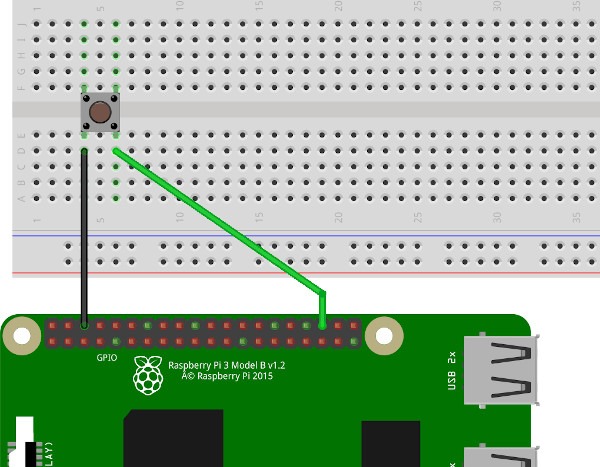
Learn why, when, and how to use interrupts with GPIOs on your Raspberry Pi programs. Complete tutorial with code examples in Python, using RPi.GPIO module.
whole locust
Yo Guys
 steep dune
i found a robot dog at value village

missing a IR remote , ni-cad charger , did have a 12V nicad batt
$15 i had to get it
anybody do robot , AI , research ?
zenith niche
gentle vapor
I am also a fan of the Circuit Playground Bluefruit as starter boards with a bun...
Ok I've finally got home and have gone through closet to find what I impulsively ordered but regrettably never used a few years ago: an arduino uno clone
Is it possible / practical to try installing micropython on this or better to save myself the hassle and just buy what you linked?
 gentle vapor
zenith niche
Ok I've finally got home and have gone through closet to find what I impulsively...
gentle vapor
zenith niche
Ok I've finally got home and have gone through closet to find what I impulsively...
the Uno doesn't run python, it requires a bigger chip
zenith niche
gentle vapor
the Uno doesn't run python, it requires a bigger chip
ok cool I think I'll just order that Circuit Playground Bluefruit low energy thing you linked
 knotty steppe
Microcontrollers are so cool
zenith niche
gentle vapor
the Uno doesn't run python, it requires a bigger chip
Alright.. Now what? lol
 gentle vapor
zenith niche
Alright.. Now what? lol
gentle vapor
zenith niche
Alright.. Now what? lol
Adafruit Learning System
Get started with just a few lines of code!
base guide reference: https://learn.adafruit.com/adafruit-circuit-playground-bluefruit
many example projects like those that can inspire you and put you on a track to learn what it takes to make them
https://learn.adafruit.com/search?categoriesLvl0=Circuit%2520Playground&categoriesLvl1=Bluefruit
and if you have questions on Circuitpython or using the board, you can join the Adafruit discord https://adafru.it/discord
zenith niche
gentle vapor
this for example:
https://learn.adafruit.com/circuitpython-made-easy-on-circuit-...
I'm going through this guide on how to get started and it recommends Mu, "as it has the serial console built right in". I don't understand what this means and I already quite like VS Code. Can I use VS Code for this with similar ease?
gentle vapor
zenith niche
I'm going through this guide on how to get started and it recommends Mu, "as it ...
when the board is connected to the computer, it shows up as a serial port, allowing to communicate data back and forth. When you access it with a serial tool (like putty) you can see the prints from your program and the errors so you know what went wrong, it's really useful for development.
there is a Circuitpython plugin for vscode, and you can also use vscode to edit the code, and use anything else to access the serial connection when you need to (including Mu why not).
but I will ask you to come to the adafruit discord for that kind of question, there's a lot of people who can help there, and you don't have to ping me 😉
zenith niche
gentle vapor
when the board is connected to the computer, it shows up as a serial port, allow...
great, thank you very much!
 cedar sapphire
howdy amigos
After researching various options for building robots using Python, I came across Arduino and PyFirmata...
Now... i dont really know how to build robots
so, can anyone recommend me some resources? thank you
also I have been coding since june 2022
Although my progress in learning to code was slow due to work, I have gained a solid understanding of object-oriented programming, which I believe ||("maybe not")|| is sufficient for creating small-scale robotic projects
spiral sandal
cedar sapphire
so, can anyone recommend me some resources? thank you
this was very usefull to me for remote control https://github.com/ArminJo/Arduino-BlueDisplay and esp32 cam based solutions, when i'll have some time i'll study if https://pypi.org/project/pymata-aio/ can work with pygbag to use a universal webview for remote control
bitter depot
Hi I am trying to make a clock with a pi pico and a lcd every time I run it thorny it works perfectly shows the correct time and everything but when I save the script and plug it in again says the time is 00:00 can someone help me please
spiral sandal
bitter depot
Hi I am trying to make a clock with a pi pico and a lcd every time I run it thor...
do you have a battery to keep the rtc live on the pico ?
if not use maybe DS1307 usually there are some in arduino kits
bitter depot
spiral sandal
do you have a battery to keep the rtc live on the pico ?
No
Is it possible to do it without
cedar sapphire
spiral sandal
this was very usefull to me for remote control https://github.com/ArminJo/Arduin...
ah ty
Are there any books or something similar too?
or should i just on this rc proj
_ i have zero knowledge of esp32 but... i will start learning abt this stuff_
gentle vapor
bitter depot
Is it possible to do it without
you need a source for the time, an external RTC (with a battery) is the usual solution, or if it was a pico W you could set the time from the network, there is no way for the board to know the time on its own.
 grizzled coral
bitter depot
gentle vapor
you need a source for the time, an external RTC (with a battery) is the usual so...
grizzled coral
bitter depot
gentle vapor
you need a source for the time, an external RTC (with a battery) is the usual so...
I have a pico w as well is it easy to do it?
humble kraken
bitter depot
I have a pico w as well is it easy to do it?
if you have wireless version, this can be easier, because you can just look up the correct time from the internet and then tell your pico to use that time for its internal RTC. If you re-sync it once a day it will be an extremely accurate clock
look up "{micro/circuit}python NTP"
cedar sapphire
cedar sapphire
or should i just on this rc proj
@spiral sandal
spiral sandal
cedar sapphire
<@334096250897170433>
depends on what you want to do, but i experienced already that remote control is better since robotics can consumme a lot of computing power, so it is not realistic to embed everything on the bot
steep dune
im studying a , I-Cybie robot dog , its using 3 MCUs to juggle all the processes , looking for a schematic
cedar sapphire
spiral sandal
depends on what you want to do, but i experienced already that remote control is...
right
 dusty ocean
for "installing micropython" https://docs.micropython.org/en/latest/esp32/quickref.html#installing-micropython, shouldnt there be a pip install micropython or something like that
spiral sandal
dusty ocean
for "installing micropython" https://docs.micropython.org/en/latest/esp32/quickr...
on what operating system are you ?
dusty ocean
linux
dusty ocean
basically there should be a way to potentially convert the py file to elf
dusty ocean
spiral sandal
then you need to build it yourself
ah ok
👍
dont know how I missed that, thanks
spiral sandal
there's only one version that does not require buidling but it's experimental , it's a Wasi port ( it uses WebAssembly to be really cross platform can also run on web eg https://pmp-p.github.io/wasi/ )
that one could be installed with pip but it would be probably very slow
not even sure it could beat an esp32
gentle vapor
dusty ocean
for "installing micropython" https://docs.micropython.org/en/latest/esp32/quickr...
no, Micropython is installed on the microcontroller, not with pip, by following the getting started link. It's an interpreter that reads python files, not elf. Your python source files live on the microcontroller, you don't compile them (you can use mpy-cross to compile them to bytecode but that's not necessary unless you run out of flash or ram). You upload python files using Thonny or mpremote
https://docs.micropython.org/en/latest/reference/mpremote.html
you usually don't need to build Micropython, though it is not uncommon to add frozen libraries to the core or enable optional features and builtin modules. Binaries for Micropython are found here and flashed with esptool (on ESP32) https://micropython.org/download/
spiral sandal
files are always compiled, mpy-cross is required if you remove the onboard compiler to gain precious ram so just build it as you may need it, using interpreter on linux saves you a lot of time especially if not dealing with gpio but file/network/rpc stuff instead, so another reason to build it. You don't have to wear your board's flash if it is an esp it just can download code/bytecode via http and run it directly. Finally learning build process will make that nobody will force you to use default config ( which personnally i dislike ) for the firmware
also i've heard circuitpython is more beginner friendly
 terse star
how to call to this def from source, python -m sounddevice, not from console?
spiral sandal
terse star
how to call to this def from source, ``` python -m sounddevice ```, not from con...
import sounddevice.__main__ maybe
terse star
i need to collect to DIC all devices on PC, and put this DICt to my function..... sounddevice.main > NO
I found lang import sounddevice as sd x = sd.query_devices() print(x)
spiral sandal
that's certainly can work but it is not the same as -m modulename which call the special __main__.py as and in your __main__ which is the name of current script module
just try python -m asyncio and you will see
terse star
asyncio REPL 3.10.9 (tags/v3.10.9:1dd9be6, Dec 6 2022, 20:01:21) [MSC v.1934 64 bit (AMD64)] on win32
Use "await" directly instead of "asyncio.run()".
anyway the question done
terse star
👍

 gray obsidian
can anyone here be a mentor
i really wanna get started and if you do youd have one more person for any personal projects your working on
just add and or message me if you see this
humble kraken
i can help with stuff. my projects are kinda advanced tho. mostly i'm designing pcbs atm
 sly vigil
I am just beginning with python and I was wondering how does one actually learn and get to memorize all the syntax in .py Its just allot
humble kraken
practice

Learning to code can open many doors in life, but it's NOT easy and NOT for everybody. Let's take a look at 8 different techniques supported by science that can help you become a programmer faster. https://fireship.io/pro
#learntocode #tech #programming
🔗 Resources
Feynman Technique https://medium.com/taking-note/learning-from-the-feynman-tec...
 hollow terrace
any arduinos that can run on python?
 devout wharf
Just idling for now, playing with the M5Stack core 2 and micro python 🙂
gentle vapor
hollow terrace
any arduinos that can run on python?
see pinned message, and
https://docs.arduino.cc/learn/programming/arduino-and-python
 pine osprey
Hey all! I am trying to make a pico macro board and im just barely starting tryna figure it out so im testing one button, but i cant seem to get it to work. on another note circuitpy didnt want to work in visual studio, i got an error when i tried to import digitalio that said "import "digitalio" could not be resolved pylance(reportMissingImports)" so i switched to thonny, i dont get this anymore but i do get this traceback error. I will post the code and my wiring below


also, curious if anyone has had any luck with twin duck payloads on a pico ducky! above question is more relevant, but im still curious
gentle vapor
pine osprey
Hey all! I am trying to make a pico macro board and im just barely starting tryn...
your pins are not soldered, there's not gonna be any current going through
when you're in the REPL (>>>) you can hit ctrl-D to restart the code, and ctrl-C to stop it
pine osprey
gentle vapor
your pins are not soldered, there's not gonna be any current going through
ah, i thought as long as the metal was making contact it could create current my b
i will solder rn and update
also the led is not working on this pico and im unsure why but ima ignore that for now
new to this but learning as we go ty!!!!!!
gentle vapor
it doesn't light up ?
led = digitalio.DigitalInOut(board.LED)
led.switch_to_output(True)
OOOOO THANK U ITS WORKING NOW
why it not turn on when plug in tho
gentle vapor
while True:
    led.value = not led.value
    time.sleep(0.4)
while other pico does
gentle vapor
it doesn't turn on on boot in Circuitpython 7.3.3
it does in CP 8 (currently in release candidate)
(it blinks on boot to tell you that you can press reset to enter safe mode)
but then it's off, left to the user to control
there's no power LED on the pico
pine osprey
gentle vapor
it doesn't turn on on boot in Circuitpython 7.3.3
hmmm i have cicuitpython 7.3.3 on other one but i turned it into a picoducky so maybe the code is somewhere in all the code i copied
OHHHHH
u r so smart thank u
gentle vapor
ah picoducky does turn it on
pine osprey
im gonna go solder, i will update u on how it goes
pine osprey
gentle vapor
ah picoducky does turn it on
yea
i mean the picoducky works fine
i was curious about using twinduck payloads on it tho
gentle vapor
well I work on Circuitpython and I do tech support for Adafruit, so I know some stuff about it 😉
I don't know what twinduck is though
pine osprey
gentle vapor
I don't know what twinduck is though
just firmware

Hak5 Forums
Introducing the latest Composite Firmware - Codename : The Twin DuckThe Ducky primarily acts as a USB Mass Storage Device, and on a click of the button will start emulating a Keyboard.Its multi-OS, multi-lingual and comes in three flavours: c_duck_v2.hex - Supports DuckyScript as HID payload, tri...
but some prebuilt payloads require it
gentle vapor
it uses like a different payload format ?
pine osprey
and normally people flash a rubberducky with it but ive seen iffy responses on how well it works with picoducky
pine osprey
gentle vapor
it uses like a different payload format ?
i mean ,,, wdym
i think its still duckyscript
gentle vapor
ah
what's the difference then ?
I see that: https://github.com/dbisu/pico-ducky/issues/126
pine osprey
gentle vapor
what's the difference then ?
tbh not entirely sure, just was lookin at payloads that required it
pine osprey
gentle vapor
I see that: <https://github.com/dbisu/pico-ducky/issues/126>
yaai saw that lol
gentle vapor
if it's only that it only executes the payload when pressing a button, then pico ducky can do that.
What it cannot quite do in CP is hide that it's a keyboard and only activate it when pressing a button. It can enable or disable the keyboard, but that requires restarting the pico, so it's not seamless.
Triggered on CAPS/NUM/SCROLL LOCK
I think we can do that in CP
pine osprey
gentle vapor
if it's only that it only executes the payload when pressing a button, then pico...
ahhhhh
tbh ill look into it more later, duckyscript stuff im usin rn is going okay
gentle vapor
(we can receive the caps lock report and do something from there)
pine osprey
OHHHHHH
OHHHHHHHHHH
I JUST GOT WHAT U MEANT
thats neat and i am going to try it but first i am dedicated to making this macro keyboard work
I MUST SOLDER tHANK U SO MUCH
gentle vapor
something like that (but better with edge detection and such)
while True:
    if keyboard.led_on(Keyboard.LED_CAPS_LOCK):
        # do the payload
also were 2pin tactile switches the right choice for what im trying to accomplish?
6x6
pine osprey
gentle vapor
something like that (but better with edge detection and such)
```py
while True:
...
WOrD
im having a lot of fun with this thank u so much
gentle vapor
pine osprey
love when ppl are smarter than me
gentle vapor
that's the adafruit_hid guide
pine osprey
gentle vapor
that's the adafruit_hid guide
hey frieND i have SOLDERED
but now something odd is happening
instead of it printing "button one pressed" when i press the button, its just spam printing that statement when i play the code
i have taken the button out entirely now
still does same thing
gentle vapor
yep because you are testing if the button is down, not if it went down
pine osprey
gentle vapor
yep because you are testing if the button is down, not if it went down
hmm... but the button isnt down
im following a tutorial tbh

Using the all new Raspberry Pi Pico to create an DIY Macro Keyboard much like a stream deck with a few tactile switches and circuit python. thanks for the view!
○○○ LINKS ○○○
Circuit Python ► https://circuitpython.org
Microcenter RPi Pico ► https://micro.center/aax
Raspberry Pi Pico ► https://pico.raspberrypi.org
○○○ SHOP ○○○
Novaspirit Sho...
this guys
gentle vapor
have you changed the code from earlier ?
gentle vapor
oh yeah it's quite basic, I would invite you to join the Adafruit discord, channel help-with-circuitpython, a lot of people knowledgeable on the subject https://adafru.it/discord
(depending on the time of day 😉 )
pine osprey
gentle vapor
oh yeah it's quite basic, I would invite you to join the Adafruit discord, chann...
i will join rn!!!
im still confused on wym, how does it read button press
why is it saying button is pressed WHEN BUTtoNSnot in the breadboard
pine osprey
gentle vapor
oh yeah it's quite basic, I would invite you to join the Adafruit discord, chann...
oop it said invite invalid :/
gentle vapor
it does ? weird
pine osprey
thank u also u dont have to help me BUT U HAVE BEEN HELPING ME A TON AND ITS GREAT im pretty new to this
pine osprey
gentle vapor
it does ? weird
OK RIGHT
makes me think it has to be my jumper wiring
oop
that auto disappeared
gentle vapor
ah can't post a real invite
pine osprey
OHHHH
 lost lion
pine osprey
lost lion
pine osprey
joined ty
 plush shale
hello, i was redirected here for my silly question, what "board" could i use to control 6-7 electric motors with python code?
 floral spruce
Any raspberry pi would do the trick (with motor controllers as well of course)
plush shale
floral spruce
Any raspberry pi would do the trick (with motor controllers as well of course)
the rpi would tell the controllers what to do? what should i be looking for when shopping for the controllers?
i had a silly idea of building a tiny 5 or 6 axis robot arm.. am i crazy?
floral spruce
I mean it's definitely doable, just definitely not trivial either. The motor controllers will be powered by an independent power supply from the one powering the pi (you'll need a decent amount of juice if you want to be running all those motors for a sustained period of time), and the pi will interact with the motor controller to set the speed and spin direction, etc
 rapid saddle
plush shale
hello, i was redirected here for my silly question, what "board" could i use to ...
rapid saddle
plush shale
hello, i was redirected here for my silly question, what "board" could i use to ...
Well you can connect the motors to the Raspberry Pi's GPIO pins and use libraries like RPi.GPIO or gpiozero to control the motors ☺️
plush shale
theres enough output on a rpi to control 5 or 6 separate controllers? or am i overlooking something?
floral spruce
rapid saddle
Well you can connect the motors to the Raspberry Pi's GPIO pins and use librarie...
Though I wouldn't recommend that, you're going to run into issue trying to draw that much power from the pi to power all those motors
Unless they're just like little servo's
rapid saddle
floral spruce
Though I wouldn't recommend that, you're going to run into issue trying to draw ...
Ahh i see
floral spruce
plush shale
theres enough output on a rpi to control 5 or 6 separate controllers? or am i ov...
Yeah there'll be enough GPIO
plush shale
hmm, i definitely need to do a bit more research then. but it seemed like a cool project that i'd like to tinker with
cant wait for rpi to get back in the stores lol
floral spruce
I'm doing a similar thing at the moment actually, though not in Python and a bit more integrated for another purpose
And more motors 👀
plush shale
im intrigued! is it a secret? can you tell more?
floral spruce
Liquid rocket engine development, working on a motor controller PCB to control the motors that'll open/close valves for the fuel and vent lines and whatnot
plush shale
floral spruce
Liquid rocket engine development, working on a motor controller PCB to control t...
wow
you have youtube videos?
floral spruce
https://www.youtube.com/channel/UCvHhhAwCIrrPcLTuq2tiLCQ our team has a channel, there's isn't a heappp of stuff up there but there's a few things

YouTube
plush shale
nice thanks!
floral spruce
But along those lines, though that's a hybrid engine, liquid engines are what we're moving towards now
plush shale
floral spruce
But along those lines, though that's a hybrid engine, liquid engines are what we...
awesome project, congrats to the whole team!
 past fossil
I got started with MicroPython using an M5Stack. I have a dumb question as I’m sure the solution is a simple one. I need an array, or a tuple of booleans. Right now I’m declaring the tuple like this: myTuple = (False, False, …, False) - I need 100 of these which can make the definition tedious. I tried some methods but they threw errors. Is there a faster way?
 livid berry
past fossil
I got started with MicroPython using an M5Stack. I have a dumb question as I’m s...
livid berry
past fossil
I got started with MicroPython using an M5Stack. I have a dumb question as I’m s...
(False,)*100
past fossil
livid berry
(False,)*100
Thanks! I saw similar formatting but they declared it oddly and your method makes more sense.
devout wharf
Hah, I have a m5stack core2 I just started with as well... currently getting ready to ditch the uiflow editor, so awful, I love blockly, and I wish this mess was open sourced.
Never done microcontroller work before this, currently trying to find a good doc on using thonny to program the dang thing
spiral sandal
devout wharf
Hah, I have a m5stack core2 I just started with as well... currently getting rea...
edublocks is open source and handle python
devout wharf
spiral sandal
edublocks is open source and handle python
I was hoping to say in the m5stack ecosystem. I'm comfortable writing python though. Edublocks could work, I'd have to look at moving over all the m5 stuff though. At this point I'm just switching to thonny and raw python, using uiflow to see how underlying libraries are used
the documentation on the m5 python libraries isn't hot
the UIFlow webui open/save/etc doesn't work in chromium for me, so I can't keep from losing all my work. The desktop IDE is behind several revs so missing quite a few blocks I need. When uiflow v2 comes out a bunch of that is supposed to be fixed. We'll see.
 opal blade
using the pi pico, can you type onto the desktop it is plugged in?
gentle vapor
as in emulate a keyboard ? yes
 white fox
does anyboady know how to calculate a printer nozzle from a 3d printer with a raspi or an arduino rp2020 connect board
hollow violet
"calculate a printer nozzle from a 3d printer with a raspi or an arduino rp2020 connect board" ???? what you want?
white fox
i wanna write a code that i can run on an raspi with that i can calculate the temperature from an printer nozzle
hollow violet
white fox
i wanna write a code that i can run on an raspi with that i can calculate the te...
you setup already your heater cartridge and your thermistor ?
and how you controll the heat cartridge ?
you get the temperatur already in python code?
white fox
i alrdy found a solution but ty
hollow violet
ok
 worldly bolt
im trying to send a request from micropython.
but im getting an error
from machine import Pin
import urequests as ureq
import ujson as json
import network
import time

switch = Pin(10, Pin.IN, pull=Pin.PULL_UP)
led = Pin("LED", Pin.OUT)

ssid = "MI6 Surveilence"
password = "Lotus!2366"

wlan = network.WLAN(network.STA_IF)

wlan.active(True)
wlan.connect(ssid, password)

max_wait = 300
while max_wait > 0:
    if wlan.status() < 0 or wlan.status() >= 3:
        break
    max_wait -= 1
    print("waiting")
    time.sleep(1)

if wlan.status() != 3:
    raise RuntimeError("Network Connection Fail")
else:
    status = wlan.ifconfig()
    print('ip = ' + status[0])

pressData = {"room": "21"}

res = ureq.post("rooms.litelot.us", data=pressData)
however im getting this error
Traceback (most recent call last):
  File "<stdin>", line 34, in <module>
  File "urequests.py", line 184, in post
  File "urequests.py", line 61, in request
ValueError: need more than 1 values to unpack
line 34 is res = ureq.post("rooms.litelot.us", data=pressData)
according to the documentation that should work
errant wigeon
Can you try posting data=json.dumps(pressData), I'm looking for the docs but I think it might need the pressData to be in a different structure
 errant wigeon
Well that'll teach me to try and debug before I really wake up. I'll go through the docs and see if I can see something, someone else might beat me to the solution in the meantime
worldly bolt
thanks
gentle vapor
you are not giving it a URL
gentle vapor
the first argument must be a URL
worldly bolt
that is a url
gentle vapor
no you're not, you are giving it a domain name
worldly bolt
do i have to specify protocol?
gentle vapor
a URL starts with a protocol
 gentle vapor
that's called progress
errant wigeon
Undo the change I suggested, that way you reduce the likelyhood of compounding hidden bugs
worldly bolt
yeah, tried without and its the same thing
OSError: -2
wish python errors were more descriptive
gentle vapor
yeah the error is not clear, but that's this line:
https://github.com/micropython/micropython-lib/blob/a08087249fda8a7994f7c54ccaad29fb9fcc448a/python-ecosys/urequests/urequests.py#L76
hasty zealotBOT
python-ecosys/urequests/urequests.py line 76
ai = usocket.getaddrinfo(host, port, 0, usocket.SOCK_STREAM)```❯ curl http://rooms.litelot.us
curl: (6) Could not resolve host: rooms.litelot.us
ah dns hasnt resolved
gentle vapor
yeah unfortunate that the error is so generic
worldly bolt
sweet, thanks guys
can start working on sending that request when the button is actually pressed
errant wigeon
@gentle vapor Thank you for stepping in!
devout wharf
If you burn micropython to an esp32, what protects the firmware? Anything? I could presumably write enough python to read all the files on the esp32 and ship them back off?
(new to microcontrollers)
gentle vapor
devout wharf
If you burn micropython to an esp32, what protects the firmware? Anything? I cou...
technically I don't think there's anything protecting the firmware, you can dump it with esptool, or connect to the REPL, read and print the content of the files. What do you want to do ? Retrieve the code ? Hide the code ? Protect passwords ?
devout wharf
gentle vapor
technically I don't think there's anything protecting the firmware, you can dump...
Retrieve the code mostly, I'll read up on using esptool to dump firmware.
gentle vapor
devout wharf
Retrieve the code mostly, I'll read up on using esptool to dump firmware.
if you have access to the serial lookup the tools:
- mpremote
- Thonny
devout wharf
I have thonny, and I know it prints the contents of what's on the device, but I feel like it doesn't show all the code.
gentle vapor
it shows the python code on the board's internal drive, what do you think is missing ?
there are builtin modules that are coded in C
and there are frozen modules that are written in python but integrated inside the firmware (in bytecode)
so maybe you are looking for that ?
their source is available on github
knowing which is which might require a little digging
for example we just talked about the urequests module, which is frozen into ESP builds of Micropython, whose source is here:
https://github.com/micropython/micropython-lib/tree/master/python-ecosys/urequests
devout wharf
So I'm using a m5stack core2. It has some custom python libs, which I am unable to find using thonny.
m5stack/m5stack_ui are two of their custom python libraries, but using thonny, there is no such python files laying about
worldly bolt
out of interest is there a good way of handling an event in micropython? say a pin goes from high to low and i want to do something on that falling edge. whats the best way to do that?
devout wharf
worldly bolt
out of interest is there a good way of handling an event in micropython? say a p...
timer
gentle vapor
you can setup an interrupt on pin change
worldly bolt
gentle vapor
you can setup an interrupt on pin change
that sounds like it
how do i go about that though?
and i assume im gonna need a loop on the main thread to keep it alive
devout wharf
I guess I'll have to see if I can dig in a little further on what/how the m5tool software flashes the device so I can get a handle on what it loads up, and try to better unstand it from there. Basically, I'd like to switch to plain ole micropython, but I'd sure like to be able to use some of the already existing python libraries they've written.
gentle vapor
that's rarely necessary though, I'm more in favor of using asyncio, maybe like that:
https://github.com/peterhinch/micropython-async/blob/master/v3/docs/DRIVERS.md#4-interfacing-pushbuttons
gentle vapor
devout wharf
m5stack/m5stack_ui are two of their custom python libraries, but using thonny, t...
ah ok I see what you're talking about, they probably have their own fork of Micropython with the modules added in, let me see if I can find it
errant wigeon
You'll probably want a main loop that handles everything it needs to check. Then, as events take place like a pin change, you can enter a new function dedicated to that state that quickly does what needs to be done and gets ready to return to the main loop
devout wharf
gentle vapor
ah ok I see what you're talking about, they probably have their own fork of Micr...
I'm pretty sure they do have their own fork, but it doesn't appear to be open source.
devout wharf
gentle vapor
ah ok I see what you're talking about, they probably have their own fork of Micr...
It looks like at this point I either need to switch to openrtos, which they do have open, or I need to be prepared to re-write a lot of python modules, which isn't the end of the world either.
This all leads back to my question of there must be some way to run their fork of micropython, and dump the source off the device, using python I write and upload with their tooling 😇
worldly bolt
errant wigeon
You'll probably want a main loop that handles everything it needs to check. Then...
im looking at the uasyncio https://github.com/peterhinch/micropython-async/blob/master/v3/docs/DRIVERS.md

GitHub
Application of uasyncio to hardware interfaces. Tutorial and code. - micropython-async/DRIVERS.md at master · peterhinch/micropython-async
gentle vapor
frozen in modules are in bytecode, I don't know if you'd get much more information than you can get by using dir() and help() on them anyway, maybe there's a way to decompile, I would ask in the micropython discord
worldly bolt
thing is, i cannot import primitives, says its missing
do i need to add the module via pip?
devout wharf
gentle vapor
frozen in modules are in bytecode, I don't know if you'd get much more informati...
Interesting, ok, I'll investigate more.
errant wigeon
worldly bolt
thing is, i cannot import primitives, says its missing
Which version of micropython are you using?
worldly bolt
downloaded it on friday so im assuming the latest one
i havent installed micropython locally if thats required
gentle vapor
worldly bolt
thing is, i cannot import primitives, says its missing
what does say what is missing ?
devout wharf
gentle vapor
frozen in modules are in bytecode, I don't know if you'd get much more informati...
thank you times a million btw, gave me lots of good terminology to research and learn more. Very appreciative.
worldly bolt
gentle vapor
what does say what is missing ?
primitives
gentle vapor
can you show the error message ?
gentle vapor
The drivers require firmware version >=1.15. The drivers are in the primitives package. To install copy the primitives directory and its contents to the target hardware.
the primitives module here https://github.com/peterhinch/micropython-async/tree/master/v3
worldly bolt
i dont know what that means though, target hardware? im guessing the picow?
gentle vapor
yeah your microcontroller
worldly bolt
ok
gentle vapor
you want to copy the primitives directory onto the drive of the board, usually into the lib directory
maybe I'm sending you on an advanced course rather than the simpler ways 😕
worldly bolt
im fine with complex
i just have no idea how to do that
same way i installed micropython on the pico?
if so do i copy the folder or the files in the folder?
gentle vapor
here is a tutorial that looks fine for using an interrupt with a button:
https://www.coderdojotc.org/micropython/advanced-labs/02-interrupt-handlers/
gentle vapor
what editor are you using ?
worldly bolt
vscode atm
gentle vapor
with a plugin I assume ?
gentle vapor
I'm not familiar with that, but surely there is a way to transfer files onto the board with that
worldly bolt
it does have an option to start an ftp server
gentle vapor
oh it as a sync feature, that might be the simpler way, and really nice for keeping a local copy
worldly bolt
oh ok
gentle vapor
I'm looking at the page https://marketplace.visualstudio.com/items?itemName=paulober.pico-w-go
worldly bolt
am i doing something wrong?

set . to the sync path
(it specified no leading or trailing /)
errant wigeon
does the primitives folder have a __init__.py file in it, and what are the contents of that directory?


 errant wigeon
Does the code run anyway?
worldly bolt
no, it still cannot import primitives
Traceback (most recent call last):
  File "<stdin>", line 7, in <module>
ImportError: can't perform relative import
can you tell if init has double or single underscores around it?
(I'm following the debugging process in this similar issue on github: https://github.com/peterhinch/micropython-async/issues/90 )
worldly bolt
errant wigeon
can you tell if init has double or single underscores around it?
(I'm following ...
double as far as i can tell
yeah its double
btw, i really appreciate you taking the time to help me debug this
errant wigeon
can you try just importing primitives?
If you can, could you print(dir(primitives))
worldly bolt
still cant import it
errant wigeon
additionally, try swapping the import order so the primitives import comes after uasyncio
worldly bolt
even if i just import primitives
moved it to the line after all the other imports and still no dice
errant wigeon
does it still fail on the primitives import?
worldly bolt
yup
errant wigeon
well at least it's consistently an issue with that, instead of being something more vague and lurking
I'm going to have to step away from this for a while. I'm not familiar enough with micropython and uasyncio, and using the vscode plug-in, to know what's going on under the hood. I'm not sure if the directory is in the correct location. Maybe try deleting the primitives directory and try adding it? In the meantime I'll read up on this and maybe someone else can step in with more experience. There's also the micropython discord which has an asyncio channel which might be the best place to go to ask
worldly bolt
thanks for taking the time at least
errant wigeon
No problem, if you're still stuck when I get back I'll try to duplicate the process with my vs code instance and if you get it working I'll be eager to hear what the solution was
errant wigeon
Debugging isn't a straightforward path, you never know. In addition there's lots of other knowledgeable folks here and on the micropython discord who might know exactly what the issue is
worldly bolt
i didnt know there was a dedicated micropython discord
errant wigeon
errant wigeon
lost lion
https://discord.gg/adafruit 👀
And the adafruit server can be found here
hallow igloo
is data sharing using reading/writing using txt file in python on windows fast enough for real-time electro-mechanical applications ?
 mental prawn
hey, i am having a simple issue where even though I set the global variables to be optimal for the programs while-loop to run, it does not.
using micropython on a pico
hasty zealotBOT
Hey @mental prawn!
You either uploaded a .txt file or entered a message that was too long. Please use our paste bin instead.
mental prawn
the code or what's important of it is there. many thanks. it is most likely some minor issue
I know the IRQ is running on its "own" sort of but it should still be able to transmit the value of the global variables changed within it to the whole program, no?
worldly bolt
hey guys, still cant get primatives imported
 quiet sparrow
I might need help with my raspberry pi 4 (it has booting isusses) and if what I am trying does not work I will need help
 hoary marlin
this isn't exactly related to microcontrollers but similar idea - i'm writing a library that has to communicate with external devices, but I'm not really sure how to test it using pytest, because I can't exactly just assert that something is true, since it depends on the external device. does anyone have any suggestions on how to write tests?
 frail geyser
hi
is there anyone here experienced with Pi Pico / MicroPython
how can i troubleshoot a program getting stuck, getting unresponsive, stopping altogether
like I2C lcd screen just stopping, other thread not running
and theres no error messages either
hasty zealotBOT
Hey @frail geyser!
It looks like you tried to attach a Python file - please use a code-pasting service such as https://paste.pythondiscord.com
frail geyser
 valid oyster
Anybody have an Idea of how to fullscreen render a camera feed created by OpenCV using the Raspberry Pi's built in GPU by using (I'm guessing) OpenGl packaged with OpenCV
 young swift
valid oyster
Anybody have an Idea of how to fullscreen render a camera feed created by OpenCV...
young swift
valid oyster
Anybody have an Idea of how to fullscreen render a camera feed created by OpenCV...
Is this for face recognition
I did a similar project but on my mac
Because the raspberry pi is too slow
valid oyster
young swift
Is this for face recognition
No, it simply needs to render at the original 30fps
 rain forge
Hey there,
I need some help, I am lost... 😦
I have to put out dali signals on UART.
this is the bit array: 1001010101010101100101010110010101
How can I put this to uart? (1 is high, 0 is low)
spiral sandal
rain forge
Hey there,
I need some help, I am lost... 😦
I have to put out dali signals on U...
at first glance dali bus is not compatible with UART signalling, maybe you want to speak to a "dali controller" and the thing should have some documentation ...
rain forge
I hoped that I can do something like bitbanging but on uart
rain forge
there is a ton of way for bit manipulation, but I didn't find the rigt combination
 steady sky
import network
import socket
import time

from machine import Pin

led = Pin(15, Pin.OUT)

ssid = 'YOUR NETWORK NAME'
password = 'YOUR NETWORK PASSWORD'

wlan = network.WLAN(network.STA_IF)
wlan.active(True)
wlan.connect(ssid, password)

html = """<!DOCTYPE html>
<html>
    <head> <title>Pico W</title> </head>
    <body> <h1>Pico W</h1>
        <p>%s</p>
    </body>
</html>
"""

max_wait = 10
while max_wait > 0:
    if wlan.status() < 0 or wlan.status() >= 3:
        break
    max_wait -= 1
    print('waiting for connection...')
    time.sleep(1)

if wlan.status() != 3:
    raise RuntimeError('network connection failed')
else:
    print('connected')
    status = wlan.ifconfig()
    print( 'ip = ' + status[0] )

addr = socket.getaddrinfo('0.0.0.0', 80)[0][-1]

s = socket.socket()
s.bind(addr)
s.listen(1)

print('listening on', addr)

# Listen for connections
while True:
    try:
        cl, addr = s.accept()
        print('client connected from', addr)
        request = cl.recv(1024)
        print(request)

        request = str(request)
        led_on = request.find('/light/on')
        led_off = request.find('/light/off')
        print( 'led on = ' + str(led_on))
        print( 'led off = ' + str(led_off))

        if led_on == 6:
            print("led on")
            led.value(1)
            stateis = "LED is ON"

        if led_off == 6:
            print("led off")
            led.value(0)
            stateis = "LED is OFF"

        response = html % stateis

        cl.send('HTTP/1.0 200 OK\r\nContent-type: text/html\r\n\r\n')
        cl.send(response)
        cl.close()

    except OSError as e:
        cl.close()
        print('connection closed')
hey, I wanted to setup a simply web server on raspberry pi pico w with this code (literally copied from raspberry pi website with replacing network credentials) and it throws an error Errno 98 adress already used pointing to the line with s.bind(adrr) command. Any idea why it's going like that?
spiral sandal
steady sky
hey, I wanted to setup a simply web server on raspberry pi pico w with this code...
probably you already have a webserver running on port 80, maybe like apache or nginx
spiral sandal
rain forge
I hoped that I can do something like bitbanging but on uart
you probably could, but not on uart, you need a digital pin instead and a power adapter since dali signal is 16volts not 3volts, i'd suggest an optocoupler, a dc-dc step-up with low ripple to ouput 16v and a simple transistor for injecting signal
or just buy one of those https://www.lunatone.com/en/product/dali-rs232-ps240ma/ seem they have support already https://github.com/sde1000/python-dali/blob/master/examples