#tools-and-devops
1 messages · Page 36 of 1
 tawny temple
sure
 sand thistle
i mean when I do git status again it's still the same message
ok so it gave me the same message, but this time I got to read the output
/PycharmProjects/OCR/.git/.COMMIT_EDITMSG
that thing either crashed or was delted
and it prompted me to continue at my own risk
so I continued
I tried to give the new commit a message
I didn't type -m
I just wrote a message and then hit esq :wq
then it prompted me
Please supply the message using either -m or -F option.
(OCR) blah-MBP:OCR blah$ -m hopefully didn't destroy anything
> ```I wrote -m hopefully didn't destroy anything
now I believe im in the python consol
since the terminal window has a >
tawny temple
no that's just there because it's expecting you to keep typing
cause you put a quote
(the apostrophe for dont)
at least that's why I think it happened
tawny temple
it probably will fail and ask you to try again
sand thistle
yeaup
tawny temple
just put the whole msg in quotes
sand thistle
yeah budday
progress
not regress
now to do it with no stress
 4 files changed, 157 insertions(+), 86 deletions(-)
 rename PyPDF.py => Convert_to_text.py (60%)
 create mode 100644 Pipfile
yeah that looks more accurate
and now I'd like to check my work and make sure it's the most up to date?
tawny temple
You could do that with git diff HEAD~ HEAD
Well really seeing that git status shows nothing should be enough
sand thistle
yeah it's empty
git status
alright I will watch the rest of corey shafers video on git
to set up the online repo
thanks mark
your a champ, a beast and a gentleman
thanks for the help and bearing with my noobacity
tawny temple
probably unknowingly though
sand thistle
yeah I tried to make a new branch
cuz my project wasn't working out, so I was going to use PyPDF instead of Pytesseract
and that meant basically writting a whole new script
so I thoguht I'd track it in git
and I messed up somehow, and lost, what I believed to be both .py files
luckily I bookmark everything, like a good script kiddie, and managed to fix it with the help of people such as yourself
sand thistle
alright
I am trying to setup my code on github
so far I've only commited locally
nvm
 ivory flax
Is it the right place to ask about systemd?
ivory flax
why docker ignores my CMD instruction and my arguments passed to docker run? ENTRYPOINT python /code/tarakania_rpg/main.py --wh-port=$WEBHOOK_PORT CMD ["--help"] Shouldn't it run python /code/tarakania_rpg/main.py --wh-port=$WEBHOOK_PORT --help by default? What's going on here?
tawny temple
The entrypoint needs to be specified as an array
ivory flax
this does not help
I tried ["python", "/code/tarakania_rpg/main.py", "--wh-port=$WEBHOOK_PORT"] which doesn't parse $WEBHOOK_PORT
Then I used ["sh", "-c", "python", "/code/tarakania_rpg/main.py", "--wh-port=$WEBHOOK_PORT"] which works identically to my 1st example
tawny temple
when you use sh -c the arguments to -c have to be together
Hmm that may not work actually
the arg in CMD will probably be applied to sh rather than the command its executing
ivory flax
sorry, yes, I combined my arguments for sh -c: ["sh", "-c", "python /code/tarakania_rpg/main.py --wh-port=$WEBHOOK_PORT"]
anyway, I changed my app's code already and use env vars now instead of flag
 fair heron
Anyone aware of a PyCharm extension that's optimized for reading logs in real-time as they're generated? Something that'll constantly auto-refresh the contents, basically (though other features could be cool too)
Just kidding, looks like it's a built-in feature 😅
 heavy knot
Would here be a good place to ask about git and python venv? or should I use help or off-topic
heavy knot
lol... get that a lot then?
 tawdry needle
no actually. but don't do it lol
use a requirements.txt file to track dependencies, and put that into your repo
then other people can pip install -r requirements.txt if needed
heavy knot
ok, I plan to be pyinstaller or other .exe type packing with the program anyway, eventually.
I don't want users running .py files, and I don't want people reading the code.
tawdry needle
better still, your python code can be an installable distribution using setup.py. you can put requirements in there, and when you pip install the project directory, it will install all of that for you
whether you use pyinstaller or not, it's better to use a conventional packaging setup
heavy knot
thanks, I'll have a look 🙂
 grave peak
Anyone know how to set up venv in vscode?
 vivid cargo
What do you want to know
 finite fulcrum
how can I "fix" Cannot find reference 'QtCore' in '__init__.py' in pycharm after switching the project interpreter and get my proper autocomplete back?
tawdry needle
@finite fulcrum i assume you installed pyside or pyqt or whatever in the env associated with the new interpreter?
finite fulcrum
Fixed it by modifying the interpreter paths after following some russian answer on the jetbrains issue tracker
 proud trout
what are the first 3 commits and how do they happen
tawdry needle
@proud trout did you git pull upstream master at some point?
tawdry needle
well that's exactly how those commits happened
a merge is a special commit
and that is the default commit message
proud trout
So what should I do
 lone linden
what do you want to do?
proud trout
Avoid those
tawdry needle
why
lone linden
if you're working on a different branch then you'll have to merge
proud trout
I create a separate branch and work on that rather than on master
What if I wanna update my master
proud trout
Is it fine to have those commits in a PR?
tawdry needle
depends on the project
personally i think so
sometimes a project wants you to 'squash' or restructure your commits
in which case you would basically make a 2nd branch, and then rebase that branch to emulate a "clean" history
the latter is a more advanced technique, and i dont recommend it if you're not an expert
 hidden maple
I guess here is a good area to ask for help on Jupyter Notebooks?
I am having an issue where I am using Python on Jupyter Lab, and have a notebook where I call an API. I have multiple cells working and stuff, creating graphs and charts.
My issue for some reason lies when turning Jupyter Lab off for the day, and then coming back to it.
I leave the code so that it's working, but the very next day my code ceases to return what it was just returning the day before.
Charts and shrunk, requests take forever and sometimes don't even complete.
This happens also randomly while I test my code.
I am just hoping someone has experience with Jupyter and has had similar issues. I can't stand this stuff anymore.
proud trout
@tawdry needle are those commits needed for seasonalbot?
tawdry needle
@hidden maple that's not typical. Maybe reinstall?
finite fulcrum
I've been working on getting my pyinstaller qt app smaller. Got it cut down by almost 15mb by removing unused dlls and upx, but the largest dlls (qt5core.dll etc.) Which take 15mb unpacked can't be compressed using UPX
I saw a mention of a library that claimed to remove unused classes from those dlls and rebuild them but it has since been deprecated and I can't find any code.
Is there any way I could do that?
ivory flax
how do I install features for pip packages with pre-commit? I need to install isort[pyproject]
tawdry needle
@ivory flax write a pre-commit hook that runs pip install maybe
 gaunt tapir
Hello, what's the difference between using Python IDE like PyCharm, and just Visual Studio Code Insiders with Python extension installed, that comes with linting and everything?
 eternal flicker
PyCharm is a lot more integrated, and developed specifically for Python; It has stuff like unit testing/code coverage integration, a built-in profiler, thread visualization, database support, realtime data visualization with scipy and numpy, django/flask specific tools....
tawdry needle
Theoretically all of those things can be provided by plug-ins in a text editor like VSC, but that will take a lot of effort and configuration, whereas Pycharm just works
gaunt tapir
ok, thanks!
 wintry light
I use SublimeText 3 :/
 cold gate
I use both Sublime Text 3 and PyCharm. I love both. I like ST3 for smaller projects and/or projects that don't involve specific frameworks like Django. I really like PyCharm (pro) when it comes to the Django support it has.
tawdry needle
Pro also has flask support right
heavy knot
I didn't know you could pip install through CMD lol
 livid schooner
is there any way to hide pycache folders in VSC? they're cluttering up the file tree
 leaden folio
does anyone know about heroku
 olive warren
What's the difference between the datadog and ddtrace package?
 delicate gorge
Package of what package collection
olive warren
pypi
delicate gorge
I mean both libraries provide pretty clear documentation on what they do
one is responsible for tracing requests across infrastructure
the other is a datadog api
 mint tendon
Can you get PyCharm on the raspberry pi 3B + or pi 4? P
tawny temple
Yes, I don't see why not
 cosmic dune
Attempting to setup a remote python connection. I supplied all the settings, the same setting I used to create an ssh session in pycharm and that works fine. Whenever I click OK or apply though, it changes the interpreter to nothing.
cosmic dune
I'll just use the terminal
 heavy berry
@hidden maple I used to have jupyter notebook not execute code and would have to restart it over and over again randomly, I never got it to not do that (I'm not using a great computer but it's a desktop) I ended up using pycharm on here and have no issues like that at all since
I really enjoy PyCharm
eternal flicker
IIRC VSCode has both Jedi and Mpyls as suggestion backend, try switching to the other?
finite fulcrum
Resending just in case
I've been working on getting my pyinstaller qt app smaller. Got it cut down by almost 15mb by removing unused dlls and upx, but the largest dlls (qt5core.dll etc.) Which take 15mb unpacked can't be compressed using UPX
I saw a mention of a library that claimed to remove unused classes from those dlls and rebuild them but it has since been deprecated and I can't find any code.
Is there any way I could do that?
tawny temple
build the dll yourself 🤔
Would likely involve a fair amount of knowledge of the qt codebase
Or may the made it simple in their build system to disable stuff 🤷
finite fulcrum
I'll try to search for how to do that with my limited c knowledge
tawny temple
It's C++ actually
finite fulcrum
Yeah but c++ knowledge is null :P
A tool of some kind would be nice but guess I'm not finding that.
With that, also resending an another question.
Is there a way to exclude some specific dlls from a pyinstaller app?
tawny temple
It looks like you can disable modules using their build system
I can imagine that would save a lot of disk space
finite fulcrum
Thanks for all the help Mark
tawny temple
building on windows sounds like a nightmare though 
Maybe doing cross platform compilation will be easier but I'm not sure if you can even do that for Windows
olive warren
Can someone help me out with sphinx & readthedocs? Sphinx won't build my doc from source, only manually added sites appear.
My branch: https://github.com/MrSpinne/Shiro.py/tree/unstable/docs
tawdry needle
Doesnt conf.py live in the same place as the makefile
Sphinx probably isnt seeing conf.py in its current location
Are you getting an error? Or what exactly is happening when you run make?
olive warren
I got it working by manually adding the modules. But autodoc won't create an entry for my class Stats in extensions...
 azure trench
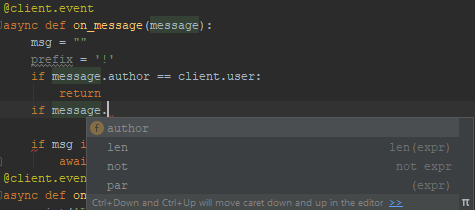
Does anyone know why I can't write a Discord Python bot with autocomplete?
https://i.imgur.com/z4gT6xg.png
 frank leaf
It did not know what message is, use type annotations to tell it that it's a message object. @azure trench
 hardy cedar
i just noticed @azure trench you have discord installed as well as discord.py. Be sure to remove discord as it's a very old false package
assuming you installed it from pypi
azure trench
I did, but it doesn't seem like that did much
And I'm not sure what you mean Vivax
Nevertheless I don't understand why it's acting up now when I've never had issues with it before
frank leaf
@hardy cedar can you type up a example, on phone. And I am unsure what it is for a discord message object.
hardy cedar
@client.event
async def on_message(message: discord.Message):
    ...
you're likely right vivax, that's probs the reason
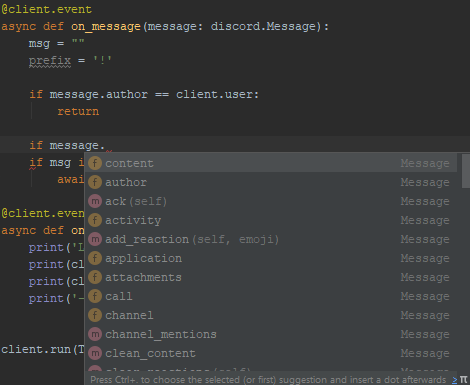 hardy cedar
yeah it has no idea what's being passed to it originally
azure trench
I see
hardy cedar
since you don't call an event function yourself manually, it can't even infer
this is also a handy way to coerce the ide to autocomplete for variables you use that it doesn't know what it is
for example while coding you can do:
def some_func():
    some_variable: str = None
and then when you're done you can remove that typehint
or use the proper one Optional[str]
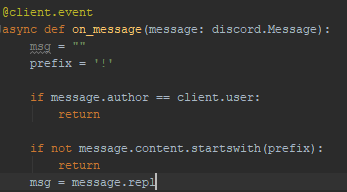 hardy cedar
it's not a string
frank leaf
Well message is not a string
hardy cedar
so naturally it won't
azure trench
Ok this module has changed a lot since I last used it
hardy cedar
it hasn't
message has always been a Message object
if you wanted the string in it, it's message.content
this has been the case even back in d.py v0.10
azure trench
right
I forgot the content part in there
but look above
"startswith"
that wasn't autocompleted either
azure trench
Wot
frank leaf
You can do message.content: str right? To get it
azure trench
frank leaf
Yes
frank leaf
Np 😀
azure trench
Yeah that helped a lot, thanks friends : ]

Does anyone know why this doesn't seem to be doing what it's supposed to do
 violet belfry
Snowflakes are integers
hardy cedar
it's a common mistake actually, as before dpy rewrite, it was actually a string
azure trench
That still didn't seem to do it
hardy cedar
np
 proven whale
Please @ me if you respond.
I'm wondering if there's a better alternation other than LiveShare for Visual Studio Code. It serves every need except for the fact that you have to invite the collaborators you work with every time they want to do something. Is there a plugin I don't know about that will allow us to connect to a server that saves all of our code in the cloud? We want to be able to leave and join very easily and quickly to add-on, modify, etc. It should also have all or most of the features LiveShare has.
tawny temple
@proven whale I am not familiar with all of LiveShare's features but AWS Cloud9 comes to mind.
proven whale
Ok. I'll look into it. Ty.
tawny temple
It's cloud based so that's a start
 lethal flax
I'm trying to arrange a good setup for a multi-project structure including CI (TeamCity) but I'm struggling with pipenv
I come from the Java world so I'm basically looking for an equivalent of snapshot dependencies in Maven
assume the version of library A is currently 0.1-dev or something - meaning that 0.1 is not yet ready and therefore not yet released
and now library B depends on A
if I make a commit to A, my CI system automatically runs the tests and packages it
but now it seems like I have to go project B to run pipenv update and update the lockfile for the new hash of A
that's completely unworkable; is there really no way around that? so that a new build can automatically proceed using the latest build of A
in Maven you do this by marking it as a SNAPSHOT version
If pipenv can't support this, can other tools (eg Poetry)? I'm not sure what the terminology in the python world is for this because it seems to be a nonstandard thing (in Java/Maven it's the default)
tawdry needle
i dont think pipenv supports that, no. it's specifically designed for locking, i think "following a dev branch" is outside its intended scope
not sure about poetry
tawny temple
@lethal flax It should work with pipenv if it is a VCS dependency
Just set the ref to be a branch name instead of a commit hash
lethal flax
@tawdry needle what setup would you suggest for following a dev branch?
@tawny temple does that work with Subversion too? Will it then actually check out that code while setting up the virtual env?
The team I work for uses svn
tawny temple
I am not familiar with svn
Just try it out
You can test it locally easily can't you
The way it works with git is actually not a pipenv feature but really a git feature
Pipenv just clones the repo using the parameters you give it
And as you may know cloning a branch will always give you the latest commit (since a branch is really just a reference to a commit after all)
The thing is it still won't automatically pull from the repo
But it will at least prevent you from having to relock
So in the context of ci it will work as expected
Just when you develop locally you'll still need to pull the changes
 random breach
pycharm indexing is getting ridiculous. just started a new project and had to wait a solid 15 minutes before it finished and made the ide usable. also slowed down the entire pc while doing this.
i dont understand why this has to happen literally every time
tawdry needle
@lethal flax if you have a git repo, i know that Pip itself can install from a git repo. maybe Pipenv has that ability as well
it might also support other VCS repos
 prisma nexus
it does but i dont know hte syntax off the top of my head
tawdry needle
for git it's git+<url>@branch#egg=<distribution-name>&subdirectory=<subdir>
obviously some of those elements are optional
maybe it supports svn+ and bzr+
 grave pewter
Yo
Ik this isnt a javascript server
but I wanna switch the debug console from python to node js
in VS code*
grave pewter
nvm
lethal flax
@tawny temple @tawdry needle thanks for the tips, I will try that
proud trout
Hey guys i just switched to linux from windows
i got my pycharm projects back from a hard disk(i had backed em up)
the line ending have now changed, git status shows that all files are modified
if i commit and push, will it affect PR?
hardy cedar
have you reviewed the diff
if the diff shows all the line endings changed, then probs not
if it doesn't, then you're fine
cold gate
No
The diff shows you that you've changed all the line-endings
Which you shouldn't do
proud trout
what should i do now
tawny temple
You should set default line endings in pycharm to LF since that seems to be what you used before
If that doesn't automatically connect the line endings of existing files, there may be a plugin to convert them.
You could also configure git to always commit LF but I'm on mobile and don't remember the exact option for it
proud trout
Okay
Just curious, what will happen if I commit, like will there be conflicts n stuff?
violet belfry
Potentially
It's also going to destroy the git blame since you're going to modify nearly every line
proud trout
Oh okay
finite fulcrum
I was wondering, how does pycharm's console of a running program work?
It's a bit on the slower side with updating and also qt doesn't want to print stuff to it so what's different?
random breach
@finite fulcrum go into the config menu up top and click edit configurations
then make sure you have emulate terminal in output console checked here
then youll get error output from qt
im not exactly sure what pycharm's doing behind the scenes but it tends to mess things up
oh you might also need to add sys.excepthook = sys.__excepthook__ after you initialize your QApplication
cant remember if necessary or not
 dense lantern
Does anyone know if it's possible to get opencv working with pydroid?
finite fulcrum
I'm somewhat sure I enabled the emulate console but i've got an excepthook, unfortunately qt likes to output app crashing stuff to the terminal as a normal warning
finite fulcrum
ah looks like I only enabled it for a file instead of project wide when Iw as trying it
but it's still slow to update even in that, for example this code https://paste.fuelrats.com/ukofehuhow.py
 clever moat
is there something wrong with this emacs lisp code?
(when (eql (x-display-pixel-width) 1920)
       (setq-default dotspacemacs-default-font '("Source Code Pro"
                                                 :size 20
                                                 :weight normal
                                                 :width normal
                                                 :powerline-scale 1.1)))
i keep getting
dotspacemacs/init: Wrong type argument: symbolp, (if (eql (x-display-pixel-width) 1920) (progn (progn (setq-default dotspacemacs-default-font (quote ("Source Code Pro" :size 20 :weight normal :width normal :powerline-scale 1.1))))))
put it in user-config and it works fine now lmao
 primal cedar
Hey so I just started my study: Software Engineering and have started with learning python using PyCharm (included with my study). I was wondering how I could make executables/gui etc with PyCharm, so I could for example send my friend an exectuable/gui of the script/program I wrote and they could just easily execute it
finite fulcrum
I've been using PyQt5 for GUI and pyinstaller for distribution
 solemn shard
what @finite fulcrum said
 inner zephyr
can someone shed light on Vim vs Sublime Text 3. [why people use vim? will it matter if st3 is my main text editor and I never want to even install vim?]
solemn shard
I don't know anything about vim except it's a text editor and what would matter if you have another favorite!!
ps: you should give visual studio code a try
inner zephyr
vim is death trap. at least i feel so.
tawny temple
It's not that bad
At least for basic usage
If you want to take full advantage of it then you need to spend time learning some things
Otherwise you just need to know a few basic shortcuts
I wouldn't suggest to use it as a primary editor if you are not willing to commit the time to learn it though
inner zephyr
don't worry. I will always hate vim. vim has caused a serious problem in our code base, I use tabs, and legacy code is spaces, and some people think that only VIM can handle such an indentation issue 😦
 brittle isle
vim is not responsible here 😄
inner zephyr
not like I can raise issues about legacy code. used to raise them, they didn't listen, so I used to get angry/upset. then they said you have 'BEHAVIOURAL ISSUES'. the only reason you are still part of the organisation is because of your work.
so now
VIM IS RESPONSIBLE.
tawny temple
Not following you. How did vim cause a problem in your code base? I didn't see the connection between vim and the mention of tabs/spaces
Are you implying you used vim because you were suggested it could handle the discrepancy between tabs and spaces in your code base?
Still wouldn't answer why vim was problematic
heavy knot
how do i enable line showing in python 3.7.4 idle?
because i got some errors and i need to navigate to them
tawny temple
You can press alt + g to go to a specific line number
inner zephyr
https://pybee.org/ - saw this like a few months back, didn't test it myself, although this is what you are looking for if you REALLY want to develop android apps in py. My advice, just don't.
heavy knot
ty @inner zephyr lol
 plush tree
Kivy is your best bet I think
 copper compass
Having a weird venv issue
I use pip to install nuitka to a venv (ensuring the venv is activated and the correct pip executable is being used), pip reports that everything is fine but nuitka is never actually installed to it
I can't seem to install anything to the venv
I've done the usual stuff like recreating the venv and making sure python versions match
I can't even upgrade pip, haha
oh my god I found it
manjaro makes pip default to --user
what

Manjaro Linux Forum
Jesus. This turned my virtual environment manager (Poetry) into a mess. How did this experiment make the stable branch? And why (apparently) my /etc/pip.confwill be overridden if I'm comfortable with using pip install --user as before?
okay so it's not supposed to break with venvs, but it does
great
solution is to edit /etc/pip.conf and set user to false
heavy berry
ok, say I hypothetically deleted my random.py (:/) and got it back by manually re making it
I was hoping it was just like pygame where you do pip install pygame
but alas nothing happened lol
tawny temple
It may be in the trash/recycle bin
If you're talking about the standard library module random, then maybe you can get it off the cpython repository on GitHub. Otherwise reinstall Python
If you're talking about a module you wrote yourself and deleted then it may be gone for good if it's not in the bin
heavy berry
ya it's the normal one I copied it from a website now I'm getting strange errors
I think from github
I think this is where I got it
tawny temple
Pretty sure that's for Python 2

GitHub
The Python programming language. Contribute to python/cpython development by creating an account on GitHub.
At the top left you can change the branch to match your current Python version
Right now it's set to master
If you can't get it to work then re-install Python like I said
heavy berry
omg that would explain my errors
hmm
still getting a weird one
File "C:\Users\mobil\Anaconda3\lib\random.py", line 242, in choice
i = self._randbelow(len(seq))
that's a weird one
it's tripping me out because it's saying error on this one
card = random.choice(cards)
cards having no error lines
 minor herald
Can you post the entire traceback, and can you tell us what's cards?
heavy berry
File "C:/Users/mobil/Dropbox/Python/hi_or_low.py", line 265, in <module>
game_loop()
File "C:/Users/mobil/Dropbox/Python/hi_or_low.py", line 256, in game_loop
picker()
File "C:/Users/mobil/Dropbox/Python/hi_or_low.py", line 141, in picker
card = random.choice(cards)
File "C:\Users\mobil\Anaconda3\lib\random.py", line 242, in choice
i = self._randbelow(len(seq))
TypeError: object of type 'function' has no len()
urned on when using png_read_image
cards is this
cards = ["As", "2s", "3s", "4s", "5s", "6s", "7s", "8s", "9s", "10s", "Js", "Qs", "Ks", "Ad", "2d", "3d",
         "4d", "5d", "6d", "7d", "8d", "9d", "10d", "Jd", "Qd", "Kd", "Ah", "2h", "3h", "4h", "5h", "6h",
         "7h", "8h", "9h", "10h", "Jh", "Qh", "Kh", "Ac", "2c", "3c", "4c", "5c", "6c", "7c", "8c", "9c",
         "10c", "Jc", "Qc", "Kc"]
using it to reference to a card deck but using pictures in pygame instead of just text
tawny temple
do you not also have a function named cards anywhere?
heavy berry
omg
 civic hound
i have not done this in years, not sure if this is still the same command
heavy berry
I do have a function called cards
minor herald
rip
heavy berry
it's old and haven't used it but forgot sheesh
but about line 141, I don't have anything with (len in my code
tawny temple
But you indirectly invoked that cause you called a function from the random module
heavy berry
ic
I think that version of random is definitely working though now thx 🙂
my cards are a little off sometimes but that's refinement I'll figure out where I went wrong eventually Im happy to have random cards spawning in to the 5 places randomly 🙂
civic hound
is there a reason you are using a list of strings for your cards instead of named tuples?
i tend to use named tuples, but strings are fine, they are both immutable, and that is the important part
heavy berry
not neccisarily I had a couple better ways of doing cards but lost my directory unfortunately
I was really disapointed when I started this and couldnt find my folder of scripts from before I lost my folder
minor herald
git is gud
run away
Wait a minute
I just have a self revelation
git gud is short for git is gud
pls dont shoot me
heavy berry
I was hoping to do a for loop to reference and load in all the card pictures
lol ok
I promise to try not to shoot you
hmm, I'm confused all of my reference points for my card spots have the same position yet some go underneath this is weird
I was hoping I simply goofed on one or two of the positions I set up for the 5 cards
python ```
#spot0 = (385, 438)
#spot1 = (355, 438)
#spot2 = (415, 438)
#spot3 = (325, 438)
#spot4 = (445, 438)
I used to use a very complicated method of taking the 1/2 of width, but that wasn't very friendly with referencing it, its hard to say put it at this pixel minus 35 for card and 5 for a spacer if you don't know where to minus from lol
heavy berry
lol I knew it had to do with something I was doing wrong and not realizing it
I guess some of my pictures of cards are 5 extra pixels tall
going to take a state of decay 2 stress relief break and be back at this later lol
you guys have a nice night!!
 topaz aspen
In git - how to dismiss changes which aren't committed ? I don't want to stash them, i just want to ignore them
brittle isle
@topaz aspen what do you mean by “ignore” ?
topaz aspen
i've made changes, then I've committed a subset of the changes. I want to dismiss all changes which aren't part of this subset so that i can merge back into the main branch
does this seem unusual?
brittle isle
This will clean-up your working directory to last commit
topaz aspen
how to construct a minimal working exmaple for you here
brittle isle
There is also the git clean command but I honestly don't know much about it
Welcome to git, one of the most essential tools you'll have to use but almost nobody really understands 😄
minor herald
I told you, git gud
topaz aspen
what I had (originally in master) :

    one one one one one one one one one one one one
    two two two two two two two two two two two two
    three three three three three three

what I have (created in dev):

    ONE ONE ONE ONE ONE ONE ONE ONE ONE ONE ONE ONE
    TWO TWO TWO TWO TWO TWO TWO TWO TWO TWO TWO TWO
    THREE THREE THREE THREE THREE THREE

what I want (merge in master) :

    ONE ONE ONE ONE ONE ONE ONE ONE ONE ONE ONE ONE
    two two two two two two two two two two two two
    three three three three three three
i think this is reasonably clear
brittle isle
Well you have to make an extra commit
topaz aspen
which im expecting to obtain by staging a subset of the file in dev, then dismissing the rest and merging that commit
hrm ok, whats the workflow here then
topaz aspen
this is a simple example of course
it might be much larger such that doing that isn't practical?
minor herald
git is to manage files, it uploads and stores states of your files, it cannot help you modify them
If it is "modifying" it's actually you uploading a different file
topaz aspen
well i don't know enough but to me merging is modifying
minor herald
merging is simply changing files basing on git changes
topaz aspen
are you telling me that this workflow isn't possible / doesn't make sense? If so why
minor herald
it is not merging physical files
topaz aspen
yes sure, ok, i want to change files based on git changes
topaz aspen
doesn't change anything to me
minor herald
conflict
heavy berry
if I'm on a crappy desktop and I'm displaying 5 cards right next to each other, with more than a couple seconds in between and yet there are some card pictures not showing up is it possible that it's just this machine?
topaz aspen
i feel like we're getting into the weeds here, my example was quite clear
heavy berry
I'm still trying to wrap my head around git and the whole merging and stuff :/
I think I'll try 2 or 3 because when I was testing out how to do this in pygame it was never not showing 1 card
topaz aspen
i just wanted to stage a subset of the changes and then merge them into a different branch
that seems pretty straight forward, if it's not a 'done' thing then it would be appreciated if someone could explain why not
@minor herald why did you delete?
minor herald
it doesnt solve the problem of trying to make manual, refined controls over the merge
That's why i deleted it
topaz aspen
@minor herald if you think what i'm doing seems off / clunky it'd be appreciated to here, it just seemed like a standard thing to do
perhaps i'm wrong though
i think that what i want to do is pretty clear , how best to go about it?
minor herald
What you described is you have 2 branches, in there, the same files has 2 different changes
And you want the file to accept half the changes from the 2nd branch
topaz aspen
I'm not sure that's correct
minor herald
And apply it to the first branch
topaz aspen
there's the original file in the master branch
then there are changes off that in dev
minor herald
For the same file, is that correct
topaz aspen
i want to apply a subset of the changes to master
topaz aspen
that part yes, the part about 2 different changes didn't make so much sense to me
minor herald
You can do this during a conflict, sorta, but you still need to make manual works
topaz aspen
yes - i want to overwrite the lines in master with the subset of committed changes from dev
@minor herald i'm not sure what the issue is - are you unsure how to do this and trying to work it out? Or are you wondering why i'm not taking a different approach (i'm not aware would be the answer to that)
minor herald
I am still wondering about both actually
First, I understand the need of having 2 branches
But the question is
Why did you make changes to everything but only want to commit a part of it
If so the best practice is to split the commit into two
Secondly, I feel like it is impossible but also possible if there is a way to raise a conflict, but yes I am unsure on how currently
But not worth it imo
topaz aspen
The reason for this scenario @minor herald is that i was trying to learn the git settings in vs-code.
I thought this example would be reasonable. It doesn't seem that hard to imagine having a subset of changes that are wanted, do you think that seems particularly unusual?
minor herald
It it not particularly unusual to push certain changes only, specially during developments
For me i do smaller commits, each with a meaningful purpose
So I know which commit is breaking my thing
In that case, I dont do giant commits and only want to merge half the changes
I commit in doses and select which one to be merged over
topaz aspen
@minor herald OK - perhaps (for you as well) a more realistic scenario would be to want a particular commit merged rather than the rest?
And, in the example i have provided, the rest would be dismissed 🤔 I guess
minor herald
Yes, and the rest wont be dismissed
it'll still be ahead of the master branches
it is not lost
topaz aspen
yeah but if they weren't wanted, then what
topaz aspen
I get that it's not lost, i'm just curious about the workflow
ah, ok - so if it wasn't wanted then that particular commit would just be trashed
minor herald
You can discard them, yes
minor herald
Also the term is cherry-pick iirc
finite fulcrum
it's Injected language fragment under general code colors
heavy knot
thx
topaz aspen
In github if I fork a repo, create a new branch, and then want to create a pull request. Can I create a pull request without merging that branch into one of the branches that was already existing in the original repo?
 rain kiln
Yes. Fork a repo. Then create a new branch in your fork. Then create a pull request. On the pull request creation screen, the "base repository" is actually a drop-down menu. If you click it, it will show you all of the forked repositories in the network of your upstream. Then the "base" is the specific branch you want to merge into in the base repository.
If you want to merge into a branch in your own repository, then just create the branch. When you create the pull request, select your own repository as the base repository. Then select the branch you want to merge into.
The page might reload when you change the selected base repository. That's rather annoying but it does mean that Github is working
topaz aspen
Then the "base" is the specific branch you want to merge into in the base repository
i don't want to merge into a brach that's there though - so presumably i need the maintainer to add a branch
rain kiln
Yeah you don't own the upstream repository. So if you want to merge changes from your repository into a new upstream branch, then you'll need to get the repository owner to create that new branch for you.
I think what you're asking is unusual. It doesn't follow most peoples' expected git workflow.
 vestal drift
In VSCode with mypy selected as the linter, the errors work well, but hovering gives an inconsistent result on types. Sometimes it shows the real type but often it will just show like dict instead of having the type parameters. The correct type is shown with reveal_type Is this just a limitation of the linter integration in the VSCode extension?
heavy berry
anyone famillair enough with PyCharm to walk me through re-enabling my file menus?
I've gone through the settings extensively and looked so long for a simple keyboard command to re enable or something
on windows
it's helped me be forced into learning new file keyboard command but I would rather just have my file view edit menus back lol
tawny temple
You mean the sidebar with the list of files for the project?
If so, shift + f12 resets layout to the default
Can also be found in View -> Tool Windows
heavy berry
no the actual menus
file edit view manage code
dont remember them all help and all that
tawny temple
do they show if you press alt?
heavy berry
nope
tawny temple
what about shift + f12
heavy berry
i somehow obliterated them
tawny temple
did that reset it
heavy berry
nope shift f12 does nothing
alt+space pulls up the minimize and all but cant get to the right for the actual menus either
tried alt+f hoping that was file but nothing
now that I think about that one hope I wasnt in my code and changed something important not trying to lol
ive done extensive searching on the web, too 😦
tawny temple
You still access the settings, right?:
Like if you open PyCharm but don't open a project
Bottom right you will see "configure"
heavy berry
ctrl alt s pulls up settings
so yes I can get in there (looked that one up when I was trying to fix my whole random.py issue )
looked around in appearence and menus and toolbar but couldnt find anything to bring it back or hide it
tawny temple
ctrl + shift + a
then type "main menu"
you should see a setting for appearance
and make sure it's "on"
heavy berry
lol got another for PyCharm if you know a good bit
I've been getting libpng errors, I found someone that said he converted his 24 bit images to 8 bit to avoid this error:
libpng warning: Interlace handling should be turned on when using png_read_image
that sounds like a bad move imo, was hoping to either update lib png through console of pycharm or through pycharm itself or worst case scenario turn on lib png or maybe find a way to not show the warning if possible
I was hoping not to downgrade my pictures there already pretty small lol
 tiny pecan
 polar juniper
Hey!! I was running vscode with workspace on a remote using the MS ssh extension
it was running fine until the latest update to the ssh extension
can somebody help out!!
[09:57:07.716] > cat: /home/mohitagrawal/.vscode-server/.3db7e09f3b61f915d03bbfa58e258d6eee843f35.log: No such file or directory
[09:57:07.720] > cat: /home/mohitagrawal/.vscode-server/.3db7e09f3b61f915d03bbfa58e258d6eee843f35.log: No such file or directory
[09:57:07.723] > Server did not start successfully. Full server log >>>
[09:57:07.724] > cat: /home/mohitagrawal/.vscode-server/.3db7e09f3b61f915d03bbfa58e258d6eee843f35.log: No such file or directory
[09:57:07.725] > <<< End of server log
> 1b714280-d489-41b7-b186-1c5396e8eb0c##32##
[09:57:07.989] "install" terminal command done
[09:57:07.989] Install terminal quit with output: 1b714280-d489-41b7-b186-1c5396e8eb0c##32##
[09:57:07.989] Received install output: 1b714280-d489-41b7-b186-1c5396e8eb0c##32##
[09:57:07.989] The VS Code Server failed to start
[09:57:07.990] TELEMETRY: {"eventName":"resolver","properties":{"outcome":"failure","reason":"ExitCode"},"measures":{"resolveAttempts":1,"exitCode":32,"retries":1}}
[09:57:07.990] ------```UPDATE: Downgraded the extension. It now connects without any problem.
delicate gorge
In that Case, file a bug at its repository and provide them with all the info you can @polar juniper
lethal flax
When doing a build on my CI system (TeamCity on a Windows 10 server), pipenv seems to not find the stored SVN credentials
When I do an svn checkout with command line on that same machine, it does work.
Is there any way to specify credentials in pipenv or let it use a file somewhere?
I don't intend to put credentials in the URL, obviously.
 hard urchin
Hey all is anyone here familiar with Vagrant and it's set up ?
It's a tool and I thought I would post it here
I'm running into a weird error ```C:\Users\Sreyeesh\Desktop\Linux_Training_Academy\Linux_VM\localusers>vagrant up
Failed to locate the powershell executable on the available PATH. Please
ensure powershell is installed and available on the local PATH, then
run the command again.
I'm not sure why that is
I even downgraded from Vagrant 2.2.5 to 2.2.4 to see if that would help
I can even Vagrant init to create a file
 pallid schooner
Any VS Code users able to get Jump to Definition and error highlighting for Python?
I'm a huge Atom fan, but it seems like Atom is a sinking ship and I'm trying to embrace the idea before Atom totally dies. I just landed a job as a Python developer and start in about 10 days, so I'm trying to figure out a good workflow for that as well.
eternal flicker
do you have the Python extension for VSCode?
tawdry needle
i still like sublime's interface the best. shame the plugin development community seems pretty much dead, i guess that's the power of open source + big corporate backing
if sublime was FOSS makes you wonder if atom or vs code would ever have gotten off the ground...
 sacred lodge
Anyone know of a working .mpq python library
that isn't just a wrapper for the storm api?
heavy knot
raise ImportError
ImportError
Project output will not be moved to output folder
Complete.
random breach
@hidden crypt re setting up the remote interpreter:
and then afterwards youll see this
from there pycharm should set up automatic deployment by default
and upload/sync all the existing local project files with those on the server
if not you can also go into the Tools -> Deployment menu to manually upload changes to the server or set up auto upload
 hidden crypt
awesome, will do this. Thanks!
 fallen wraith
@random breach yo how tf your pycharm so pretty
tawdry needle
all the pycharm material light themes have way too low contrast
i was really disappointed
the dark themes are nice though
finite fulcrum
I tried switching but I'm too used to darcula
 true vapor
I think the light theme is terrible, but its much easier to read on than the dark theme when you're using a mediocre screen in a bright room
 indigo stirrup
Is this the right channel to ask some help about a little issue I'm having in VSCode regarding the Python extension?
eternal flicker
yep @indigo stirrup
indigo stirrup
Ok, I'm encountering a strange behavior with the Microsoft Python extension for VSCode.
I was working at a Telegram Bot project using the python-telegram-bot framework and after importing a particular class (ConversationHandler just to be precise) I got a 100% usage on one of my 4 CPU cores and every extension (Project Manager, Python, etc.) get unresponsive. Disabling the Python extension solves the problem but I don't really count this as a viable solution for obvious reasons.
I tried reloading the window, everything works untill I move my mouse over the aforementioned class declaration (in the import statement or when called in a function) instead of the usual intellisense pop-up I get a Loading pop up that never load and my CPU starts to be eaten alive but the Electron process. If I don't import the class and reload the window everything look normal and I don't get any of the reported issues.
I tried to look for known issues on the matter on the Python ext repo and in the framework repo but I didn't get any useful info
indigo stirrup
What really bugs me is the fact that even leaving the imported class everything works fine and I can mouseover every other class/function without any issues, but as soon as I mouseover the ConversationHandler text I get a Loading pop-up instead of the intellisense, my CPU and its fan go crazy and also the other classes/functions start to be unresponsive to mouseover
violet belfry
This is probably beyond the scope of what anyone can realistically help with on this server, your best bet would be to cut your code down to the smallest reproducible example and open an issue on their GH: https://github.com/microsoft/vscode-python/issues

GitHub
Python extension for Visual Studio Code. Contribute to microsoft/vscode-python development by creating an account on GitHub.
hardy cedar
@indigo stirrup to at least try something, maybe flip the intellisense engine to jedi instead of the new one
in Settings, search for python.jediEnabled
restart the editor to get a clean slate and make sure you have no leftover processes in the background for vscode
and then try it with that to see if it does the same thing
eternal flicker
^^, I've seen a few cases like this where there's high CPU usage with MPLS
hardy cedar
mm, same, it's why mine is permanently jedi now lol
indigo stirrup
@hardy cedar Jedi did the work actually and it looks even a bit more responsive that the Microsoft implementation, thanks for the quick fix!
I will probably still open an issue on the official repo just to report the problem I encountered as @violet belfry suggested!
Thanks everybody
hardy cedar
no probs
prisma nexus
so... vim is installed, i use it on a regular basis, but now if i try to run sudo vim to edit system files it says command not found?
eternal flicker
is vim aliased to another program on your user account?
prisma nexus
yeah i think thats part of the issue. it's aliased to nvim, and i think nvim's binary is only added to my path in my users .zshrc, where should i add that to PATH system wide? or whats the best 'fix' for this?
rain kiln
sudo $(which vim)
If you poke around /etc/profile you'll probably find out it loads from something like /etc/profile.d/*.sh. If you want something system-wide, that's where to put it.
although that's for bash so you might want to look to see if zsh does it different
 rotund kelp
GIT question.
Say I have a master branch and a dev branch.
I work on dev and make a couple commits, merge in master (fix conflicts), make more commits:
dev history:
commit3
MERGE master into dev
commit 2
commit 1
master_commit (branch off point)
What is the command to squash all my changes in 1 commit on the dev branch itself?
I know i can
git checkout master
git merge dev --squash
git commit
And then all changes from dev are on master in 1 commit.
But is there a way to do this on the dev branch itself?
Kind of like a rebase, but the merge commit doesn't work well with that.
If I do git pull --rebase master on the dev branch the final result would be good. However, I will have to resolve all the conflicts again that i resolved in the past with the merge commit.
vivid cargo
I think rebase is used to put multiple commits into one
Just a sec

Understand the differences between MERGE and REBASE and learn you can use these commands in your projects! Check out our courses: https://academind.com/learn...
This one is good
fair heron
I'm interested in contributing to a project which uses pipenv. I've only really used virtual environments through PyCharm's built-in integration. Am I likely to cause problems by just continuing to use what I'm already familiar with (PyCharm's venv feature)? Am I better off trying to install pipenv and integrate that into my work process for this particular project?
eternal flicker
PyCharm works well with pipenv too
fair heron
Are there reasons I should switch for this project or is that probably unnecessary? Not quite asking if pipenv works with PyCharm, more the implications of using it or not.
 stable cloak
It's really a matter of preference and depends on the size of your project and what not
pipenv works really well at making sure everyone who is working on the project is on the same page and has the same versions of the same libraries and what have you
But if you're just one person working on it on one machine, it's less of an issue
We use it for our projects here but I also use it for my personal learning stuff, as I do some of my coding at work and some at home, so having pipenv makes sure I'm on the same page
@fair heron Apologies for the late reply
fair heron
@stable cloak no problem at all, thanks for responding! What you've said makes sense. The project I'd like to contribute to uses pipenv and I'm just trying to determine if I need to as well, just for making minor PRs. PyCharm picked up the requirements.txt file and asked if I wanted to install those packages (if I'm remembering correctly), and it all installed fine and appears to run without issue. Seems like I don't actually need it to make some small contributions.
stable cloak
No, you may not. But not all projects that use pipenv also generate a requirements.txt or keep it up to date
We don't for ours, for example
fair heron
Okay, gotcha. Thanks for the info.
heavy knot
hello?
can someone help me figure out how to get winSCP working? 😭
I want to transfer my files to my google cloud server
please,someone
anyone? 😢
stable cloak
Have patience. We do this in our spare time and respond when we can
heavy knot
I know! >,< I am thankful when you do help me
I just get emotional about some things,please forgive me..
tawny temple
@rotund kelp Have you tried doing an interactive rebase to squash? I'm not sure what would happen with merge commits but generally it works fine for me
rotund kelp
Sometimes rebase -i just breaks the whole thing. And I'm not sure what causes it yet.
Like opening the rebase Window, closing it with no changes and git has conflicts
heavy knot
does anyone know how long would last extracting about 4000 files in total size of 40MB?
It has been going for a while .. 🤔
heavy knot
wow
I have 4 cores
8gb ram
wow
it is going for almost 2 hours
still going
non-stop sending text similar to this:
'Yu ',    # 0x4a
'Tui ',    # 0x4b
'Qi ',    # 0x4c
'Wang ',    # 0x4d
'Liang ',    # 0x4e
'Wei ',    # 0x4f
'Jian ',    # 0x50
'Chi ',    # 0x51
'Piao ',    # 0x52
if you're printing that may be an issue
 sinful zinc
yeah if you're printing 40 MB of data to the console that's very differetn from extracting it to a file
but no idea why it'd take that long, it depends on what else you're doing, what your data actually is
/usr/share/dict/words is about 1 MB and only takes five seconds to print out to the console
 spare oar
@rotund kelp Given the scenario outlined above, could you do something like:
git checkout dev
git reset HEAD~1
git stash
git rebase master
git stash pop
 near pecan
spare oar
near pecan
spare oar
backticks
heavy knot
going for 3 hours now.. :d
prisma nexus
ok..... so new issue. custom PATH additions don't seem to be accessible to fabric and i'm not finding anything about this? any ideas?
https://stackoverflow.com/questions/17661657/python-paramiko-ssh-session-does-not-get-the-system-path is the only thing im finding which doesn't actually give a solution

Stack Overflow
I'm facing a problem that as I ssh to another machine, my paramiko ssh session does not see the same system PATH as when I manually ssh to the machine.
Here is my python code:
cmd = "echo $PATH"
t...
heavy knot
4 hours past...
it is still extracting files -_-
may as well keep my laptop online the whole night
rain kiln
4000 files... 40MB? Is it 40MB per file? Do you have a slow connection? 40MB shouldn't take hours
heavy knot
no
I said in total
no,I have a decent connection
but
I think it may be because I am printing out text as it extracts
@rain kiln
should I stop and restart tomorrow again?
rain kiln
ahh printing out text while it extracts might be the cause. I don't know if I'd stop and restart it tomorrow, that'd be a question only you can answer
sinful zinc
well why did you use -p
that also won't store the files anywhere, if you're printing it to your screen, once it's scrolled away it's gone @heavy knot
tawny temple
I think you missed the point that -p will not write the extracted data to files
-p

extract files to pipe (stdout). Nothing but the file data is sent to stdout, and the files are always extracted in binary format, just as they are stored (no conversions). ```Even if you wait it out you'll get nothing out of it unless you're saving stdout, which doesn't seem to be the case
heavy knot
Thank you,but I brushed off that idea
 cinder lily
Hi, I have to explain my scripts to a "no-tech" public, I usually do this in a README but a picture is worth a thousand words. How do you make a "picture" of your script ? I'm thinking of a tool that can display boxes and links, something like a workflow in KNIME for example.
Which tool do you use to explain your script/program workflows ?
 dire quartz
@cinder lily https://www.websequencediagrams.com/
Draw sequence diagrams in seconds using
this free online tool.
cinder lily
Thanks!
tawdry needle
@cinder lily graphviz -> png or svg is an option
cinder lily
I tried draw.io however when you save it mess up the whole diagram, it's really frustrating
Graphviz seems perfect, thanks!
fair heron
Using PyCharm, and installing packages to a venv through the File->Settings->System Interpreter menu, is there a way to provide some flags to use every time this dialog calls "pip install..." or am I better off just installing manually through the terminal?
To be more specific I have to use pip install --trusted-host pypi.org ...etc. due to certificate errors caused by my company's IT department. It'd be nice to integrate the trusted host flags right into PyCharm so I never have to think about it again.
tawdry needle
certificate errors caused by my company's IT department
oof i know this feeling
that seems like it should be a pycharm feature, but maybe its only available in the pro edition
command line might just be easier
fair heron
Alrighty, thanks!
spare oar
@fair heron you can set up pip config to always add a certain pem file. I wrote a script at work that always copies our root cert into certifi, and tell’s pip’s config to use certifi
Alternatively, you can update pip’s config to always trust certain hosts so you don’t have to worry about it every time that certifi or your root CA updates
fair heron
Hmm that sounds like it'd work, especially the latter.
Any idea how that's done? Quick Google didn't get me far.
Hmm jk, might have found it. Thanks!
spare oar

Welcome to python-forum.io
Using Windows... Python 3.6.3 When I attempt to install anything using: Quote:C:\Users\Eric>pip install ssl Collecting ssl Could not fetch URL https://pypi.python.org/simple/ssl/: There was a problem confirming the ssl certificate: [SSL: CERTIFICA...
fair heron
@spare oar just found it, your suggestion works. Looks like the link you provided is suggesting the same solution, a global pip.ini file (or .conf if Linux/Mac)
Thanks!
tawny temple
these are mine
Most of them just add support for stuff so nothing special
Markdown Navigator is nice but most features are locked behind a paywall
still I think it's better than JetBrain's md plugin
 vague star

 clever raven
rainbow brackets is great
CodeGlance too
and LinesSorter has saved me a few times.
random breach
noice. got .ignore and code glance here too
rainbow brackets kept causing exceptions and had to be disabled unfortunately
tawdry needle
has anyone gotten LSP working with Sublime Text?
 idle ice


 deep estuary
language server protocol i guess
the standardised way for editors to get information on languages
provide suggestions etc.
tawny temple
Yeah I got it working @tawdry needle
IIRC it was a struggle
And the Python language server occasionally crashes on me
Not a great experience honestly
tawdry needle
@tawny temple thats a shame. I think pyls is just slow and unstable, i had a bad experience with it in vim too
The msoft one has sublime instructions
My question is, does it work with virtual environments?
tawny temple
Don't know, I've not tried that one
 analog kettle
Are there any terminal debuggers I should know about other than pdb?
tawdry needle
pudb, pdb++
analog kettle
Thanks!
deep estuary
pudb is pretty awesome i like pudb
 sour saffron
I have a problem with gitkraken (A git client) when using it with gitlab. I have a private repo, and I want to add a friend of mine so we can both work on it. I add him to the project on gitlab as a developer, but when he clones the project using gitkraken, the client tells him he needs pro to work on private repos. I was wondering if there was a way to go around it Cuz ive seen people work on private repos before without paying for pro.
tawny temple
Their site clearly shows pro is needed for private repos
So I don't know what you saw before
If you don't want to pay then you can use the command line
fair heron
Git question - if I create a repository locally that does not exist on Github, make a bunch of commits and such, and then "link" (probably incorrect vocab.) it to a a Github repo after, I assume all of the commit history will still be available within the Github version of the repo, yeah?
fair heron
Perfect, thanks Mark!
heavy knot
Hi folks, Iam using atom on mac, and want to download a terminal in it. Which one should I download?
fair heron
Another Github question - I just submitted my first ever PR, but I found an edit I need to make (forgot Python v3.5 doesn't have f-strings). I assume I make the code changes and a new commit, do I need to do anything to the PR itself though?
tawny temple
No
The PR will automatically include any changes made to the branch
Whether it is done before or after the PR submitted
fair heron
Thanks again Mark!
tawny temple
You're welcome
 verbal nebula
Yo, anybody use ffmpeg in a more advanced scenarios over here?
cold gate
What's your more advanced scenario?
 stoic whale
Hello everyone. I am having an issue with Py4J that I posted about on Stack Overflow (https://stackoverflow.com/questions/58087489/issue-with-py4j-tutorial). Would anyone be able to help me out? I don't have previous experience with Java.
Stack Overflow
Please note I do not have any previous experience with Java. I am having issues with the following tutorial for Py4j: https://www.py4j.org/getting_started.html
I installed Py4j in an Anaconda
lethal flax
@stoic whale I replied on SO, hopefully that can help
I'm trying to use Panel and supposedly it can be used without Jypter (because I can't get Jupyter to work with my venv), but I can't find any tutorials or materials on how to use Panel without a notebook. Any ideas?
Okay it seems to be as simple as object.show()
 restive ridge
Hi All, can I automate flex we application via python
 warm pollen
?
 abstract hound
I've been using Emacs for 3 years and I still haven't figured out something
I set it up to autocomplete like this
but for some reason, sometimes a small box pop ups that seems to belong to Emacs itself
which I can't reproduce rn
that
it seems it only suggests arguments/hinting
describe-mode doesn't seem to help much
 tight summit
Is there a visual node editor for python? I've tried searching for one but can't seem to find.
I wanna brainstorm and plan out a behaviour tree for AI and wouls rather not have to draw it out
 forest bay
I recall seeing something like that a while back, but can't recall what the name of it is at the moment.
I'm certain it exists though...
tight summit
@forest bay if you can find it please let me know.
stoic whale
@lethal flax thanks!
sand thistle
would someone be available to help me make a branch in git
i don't want to screw anything up, because I've done so in the past
so far all I've done is git branch San Jamar ASN
which prompted the computer to give me a list of possible options with the git branch call
I ignored them all and typed git branch so I could get a list of branches that existed
and I got PyPDF and *master
none of which where what I named the new branch
nvm it was a naming convention issue
lol..
tawdry needle
Yeah don't put spaces in branch names
Also the shell using spaces to figure out where arguments stop and start
Even if you wanted spaces in a branch name you would have to quote or escape them
 weak bolt
does anyone know of any platforms designer tools that will allow me to create gui design proof of concepts. i am not intersted in the logic at the moment i just want a drag and drop based designer that can be used at the momemnet. i understand there is visual studio but i need something a bit faster and more user friendly
tawdry needle
if you just want to make visual mockups without code, look into Figma
 gritty drum
Any1 in here a vim guru?
I'm trying to do search and replace on this line but it's not working.
What I'm trying to replace is self.received_solution[self.next] with self.next_turn[0]
I use the vim command :%s<string_to_replace>/<new_string>
but so far it hasn't worked. I keep getting. "Cannot find this" error.
it's clearly there but not being replaced.
gritty drum
how do I do that?
I solved the problem using / c g n and . but I'm interested to see how I can do this in the future.
eternal flicker
%s/self.received_solution\[self.next_turn\]/self.next_turn[0]/g
tawdry needle
Eh
Square brackets are not special characters by default on Vim regex
The . does need to be escaped, although in this case it would do the same thing
@gritty drum what does :set magic show?
Wait I'm wrong, thinking about parentheses
 shrewd anchor
i got a question about sublime text 3
nvm, i dont believe inputting into sublime is an option
 glacial finch
@shrewd anchor I use it if you would like to ask me
tawdry needle
did sublime repl ever get to a place where it was functional? i tried it several years ago and it was a buggy mess
 rapid crest
Hey guys. Working on a project that requires a terminal shell. Looking at the cmd module and prompt_toolkit any others y'all are fans of personally?
I'm looking at those both because to my knowledge they both incorporate readline for you which is something I want with my shell. I want to have all of the functionality of a standard shell you'd expect on *Nix.
topaz aspen
I'm in a local git repo, and there are changes on the remote. I've fetched the changes, I want to merge in the changes for one file.
what do I search for this?
true vapor
I installed pycharm-professional via snap (on ubuntu) so it automatically made a terminaly shortcut of pycharm-professional, the normal way you set the shortcut doesn't appear, so does anyone know of a way I can change it to just pycharm
delicate gorge
@topaz aspen i am not 100 percent sure on this but I think applying changes to one file only is not gonna work with git, changes get applied commit not file wise
topaz aspen
@delicate gorge I just stashed, pulled, stash popped then handled the merge
I've moved on :')
I'm sure there's a better way tho
delicate gorge
That will just merge all changes though, that's not what you wanted :p
prisma nexus
@true vapor to check i unserstand: to start pycharm-p from terminal you currently have to type pycharm-professional but you want to be able to just type pycharm?
true vapor
Yeah
true vapor
Thanks though
prisma nexus
np
topaz aspen
@delicate gorge yeah, I didn't know any better though 🙃
prisma nexus
ok i think i'm just not searching hte right thing, but I can't find anything on it.
I have a project which uses Django and Django templates for most of it, but one page uses Vue to dynamically update a report. For it to work as a whole, you have to have the django and the vue servers running. I wanted to write a pyinvoke script that does this so you can just 'invoke start' but it starts the django server and stops, until you ctrl + c out of it, then it starts the vue server and stops until you ctrl + c out of it. How can I make it so that it starts these in the backgroun, or is this a bad idea in general for some reason?
verbal nebula
@cold gate Sorry for not responding. My scenario is feeding FFMPEG PNG frames over HTTP with variable pause between individual frames.
 rigid island
hey anyone familiar with GDB?
rain kiln
somewhat
fair heron
Is it normal for PyCharm to display the contents of .json files all in one line? How do I get it to appear in a human-readable format, like how Chrome displays them?
Found it - "Ctrl+Shift+Alt+L"
tawdry needle
@fair heron that's because the json file itself doesn't contain any line breaks
that command is actually modifying the json file
fair heron
@tawdry needle that makes sense, thanks! Assuming it still parses as valid JSON are there any implications to doing so?
tawdry needle
no, in theory it takes up some extra space on disk
fair heron
Due to the extra newline characters I guess. Cool, thanks for the info.
fair heron
Oh, right. Duh 😂
topaz aspen
is it possible to sync gitlab issues locally? Have a file with them that'll update? I know they can be downloaded as a csv via the account email, i'm wondering if there's anything quicker and that'll keep up to date
 zenith copper
hi, is there a way to restart my python code in Visual Studio Code with one shortkey? at the moment i have to hit Ctrl+C and then right-click in the editor and select Run Python File in Terminal.
eternal flicker
you can bind a key to Run Python File in Terminal, not using VSCode anymore so I don’t know if combos are possible
 last dune
new question - anyone using VS Code for IDE on Windows? if so how do I enable user input in the console. right now it says its a read only window
plush tree
Theres a different pane for input
topaz aspen
ive just used pickle to write a dictionary of dictionaries to a file, and read it back. This worked fine, but I've heard there are issues with pickle so I'm curious if there's any better practices than what i've done
finite fulcrum
depending on the contents, json is usually more suited. Pickle executes pickled code so you can't trust anything that you didn't make. Also, this doesn't really fit #tools-and-devops
dire quartz
Does anyone have recommendations for an autoformatter for VSCode?
dire quartz
Actually, also, an autoformatter for Pycharm.
Doesn't seem like there's any builtin support for format on save as far as I can tell.
 tired aspen
https://code.visualstudio.com/docs/python/editing#_formatting
use black
and you can configure formatOnSave

Editing Python in Visual Studio Code
Stack Overflow
I would like to automatically format TypeScript code using the build-in formatter when I save a file in Visual Studio Code.
I'm aware of the following options, but none of them is good enough:
...
haven't tried myself though, I use pycharm
true vapor
I want to take notes in Markdwn and store them on a git repo. Is there a way I can use git to convert them to PDF every time I push to master and have it store both things?
Like, I have a command line thing that converts to PDF, can I get git to run that command and store the resulting file on the repo automatically
tawdry needle
@true vapor try either a filter or a pre-commit hook
true vapor
Alright, I'll have a look. Thanks
 lime sable
i have been using pycharm lately and there is one thing that makes me worry
when i use discord.py, pycharm says that "discord is not listed in the project requirements"
the requirements.txt contains discord.py==1.2.3, is the message normal or pycharm is bugged?
finite fulcrum
Think it's a bug, recall someone having it too
rotund kelp
There is a big ticket on jetbrains to track these requirements where the import name differs from the requirement name
https://youtrack.jetbrains.com/issue/PY-27985
They have to manually add each library
lime sable
ah, ok
 hidden quail
I'm attempting to compile a Python app with Nuitka. It imports pyexcel as an external dependency. Now, when I've built this app with pyinstaller, I've had to specify "hidden imports" as some of its plugin dependencies are not correctly identified otherwise. pyexcel uses lml to lazy-load those plugins. When I tried building it with Nuitka instead of pyinstaller, I am seeing the following error (not the full stack trace):
  File "F:\GitLab\billing-translator\cas.2019-08-07.dist\pyexcel_io\__init__.py", line 27, in <module pyexcel_io>
  File "F:\GitLab\billing-translator\cas.2019-08-07.dist\pyexcel_io\plugins.py", line 137, in load_plugins
  File "F:\GitLab\billing-translator\cas.2019-08-07.dist\lml\loader.py", line 130, in scan_plugins_regex
  File "F:\GitLab\billing-translator\cas.2019-08-07.dist\lml\loader.py", line 116, in <genexpr>
  File "F:\GitLab\billing-translator\cas.2019-08-07.dist\pkgutil.py", line 130, in iter_modules
  File "C:\Python37\lib\functools.py", line 840, in wrapper
    return dispatch(args[0].__class__)(*args, **kw)
  File "F:\GitLab\billing-translator\cas.2019-08-07.dist\pkgutil.py", line 140, in iter_importer_modules
TypeError: descriptor 'iter_modules' requires a 'nuitka_module_loader' object but received a 'str'
Any suggestions where to look?
hidden quail
Seems to track back to Nuitka's handling of the sys.meta_path hook. Entered an issue with Nuitka to troubleshoot further... https://github.com/Nuitka/Nuitka/issues/548
 misty crystal
im looking at getting a linter, but im a bit confused on how to install it. Are they just like plugins? cause i looked at linters in pycharm and i found one but im not sure how it works >.>
sand thistle
I think I messed up my git commits
can someone explain to me what stashing your changes does?
hidden quail
Stashing your changes saves them temporarily so you can switch to a different branch without committing.
You can git stash apply to re-apply the changes to the current branch
This is helpful if you realize you're working in the wrong branch; just git stash your changes, switch to the correct branch, and git stash apply
sand thistle
ah
what if i want to discard the stash content
or will the changes not be there when I switch back
tired aspen
stash automatically discards your working changes, i.e. what you stashed
you need to unstash to get them back - i.e. stash apply
sand thistle
oh cool
oh so like if I work on something
do git stash
switch branches
when i return to the original branch
I would git stash apply
and it would only then the changes apply to the original branch, since I did not commit them to begin with
tawdry needle
Git is easier when you think about it as a DAG of snapshots
Snapshots have parents which are other snapshots
Branches are just pointers into the snapshot graph
As are tags, and HEAD
The latter having some special properties
In fact, remote branches are also just pointers into the snapshot graph
sand thistle
DAG
is there a google function in this discord
!google DAG
nope..
didn't work..
!search DAG
still nope
tawdry needle
Directed Acyclic Graph
sand thistle
flow chart?
tawdry needle
Basically, a network of things where things have parents
The only restriction being you can't have cycles of parent child relationships
Hence, acyclic
So yes. Kind of like a flow chart
sand thistle
but only forwards
tawdry needle
git log --all --graph --oneline --decorate
That is the magical incantation that will show you your repository in its true form
sand thistle
nice
tawdry needle
Try it in a complicated repository with a long history
sand thistle
i did that
tawdry needle
That's the main way that I look at my history in any project now
I even have an alias for it in my config
git lga
sand thistle
what do you use to manage your configs?
and when you say config you mean your git config
tawdry needle
~/.gitcofig
sand thistle
oh duh ofc you mean git config
tawdry needle
I don't do too much project specific configuration
sand thistle
everyone says different thigns when it comes to that
tawdry needle
Which (fun fact) is possible by modifying .git/config
tawdry needle
What's dumb? Using gitconfig?
sand thistle
"you're crazy, I blew up my computer once because I didn't use it"
project specifig configs
like virtual environments I mean
tawdry needle
Im talking about gitconfig
sand thistle
yeah
tawdry needle
Yes you absolutely should set up an environment for each project
Whether that means you set a bunch of environment variables by hand or what
sand thistle
i use pipenv
tawdry needle
If your projects are really simple plugging around in python you probably don't need it, but if you're working on a more sophisticated project you will sure be glad you did it
sand thistle
too noob to manage all the info
tawdry needle
This stuff doesn't typically become important in hobby projects, but once you do it at work it really becomes obvious how necessary it is
sand thistle
and locations on my HD
tawdry needle
Pipenv is.. ok
sand thistle
but?
tawdry needle
All of the experienced python developers I know have switched to poetry over pipenv
sand thistle
I barely know where it stores things
tawdry needle
They had a number of grievances against pipenv that I don't remember off the top of my head
sand thistle
but it's very seamless so im ok with that.
tawdry needle
That's what it's designed to do so