#discord-bots
1 messages · Page 886 of 1
 maiden fable
 slate swan
so, first you make a command manually with a decorator
maiden fable
100 servers*
slate swan
maiden fable
100 servers*
75
 drowsy thunder
Ok @client.commands()
slate swan
drowsy thunder
Ok @client.commands()
command
drowsy thunder
@slate swan can you dm me?
This slowmode sucks
slate swan
no, I dont do dms, hunter does
slate swan
maiden fable
100 servers*
you can request for the verification on 75 itself and maybe if you're unlucky you may not get the message intents 🤡
But yeah, 100
drowsy thunder
Ok
maiden fable
slate swan
75
Max server limit for unverified bots are 100, that's why I said that, but okay
drowsy thunder
Brb
Lemme get my token and make a repl
Stay here
slate swan
type in 1 line and the slowmode won't suvk
slate swan
drowsy thunder
Brb
Lemme get my token and make a repl
Stay here
 is that an order or what
maiden fable
drowsy thunder
Brb
Lemme get my token and make a repl
Stay here
Where to stay? 👀
Let's ping a mod to reduce the slowmo
@blissful lagoon can u please reduce the slowmo duration of the channel?
drowsy thunder
Got the token now lemme do the importing and stuff
maiden fable
Cool
 spring flax
can anyone tell me how to access my bot instance in a Modal?
I have a button that sends the modal
 keen talon
maiden fable
<@149701368008015872> can u please reduce the slowmo duration of the channel?
keen talon
maiden fable
<@149701368008015872> can u please reduce the slowmo duration of the channel?

slate swan
maiden fable
<@149701368008015872> can u please reduce the slowmo duration of the channel?
really though, 6s is a lot 😔
maiden fable
spring flax
can anyone tell me how to access my bot instance in a Modal?
I have a button tha...
I haven't used disnake modals, but dont they have an interaction arg?
slate swan
keen talon
<:lemon_ping:754601078728949860>

spring flax
maiden fable
I haven't used disnake modals, but dont they have an interaction arg?
yeah
slate swan
spring flax
can anyone tell me how to access my bot instance in a Modal?
I have a button tha...
you can pass in the bot object as a argument in the init and make it an attribute of the Modal
maiden fable
keen talon
<:lemon_ping:754601078728949860>
Can't really do anything since pinging the mod role for such a small thing would be an overkill
maiden fable
spring flax
yeah
!d disnake.Interaction.author exists then
 unkempt canyonBOT
The user or member that sent the interaction.
spring flax
they have disnake.ModalInteraction
maiden fable
Oh, hmm
spring flax
maiden fable
!d disnake.Interaction.author exists then
so this would be the bot?
maiden fable
!d disnake.ModalInteraction.user
unkempt canyonBOT
property user```
The user or member that sent the interaction. There is an alias for this named [`author`](https://docs.disnake.dev/en/latest/api.html#disnake.ModalInteraction.author "disnake.ModalInteraction.author").Ouh, that was a wild guess
keen talon
maiden fable
Can't really do anything since pinging the mod role for such a small thing would...
But u shouldn't ping individuals either 
 boreal ravine
unkempt canyon
boreal ravine
unkempt canyon
what does this mean by "sent"
 manic wing
am i the only one whos never even seen a modal
maiden fable
boreal ravine
what does this mean by "sent"
Clicked the button
drowsy thunder
I cant paste my token aaaa
I will need to manually send it
slate swan
manic wing
am i the only one whos never even seen a modal
us.
spring flax
maiden fable
Clicked the button
that's not what i want i want the bot instance
slate swan
drowsy thunder
Got the token now lemme do the importing and stuff
def require(package): return __import__(package)
discord = require("discord")
😔 Idc if it works or not, but it does look uwu
spring flax
slate swan
you can pass in the bot object as a argument in the __init__ and make it an attr...
then, for me view, i need to do it again?
maiden fable
keen talon
But u shouldn't ping individuals either <:pithink:652247559909277706>
We don't have any other choice
slate swan
unkempt canyon
!d disnake.ModalInteraction.bot actually
unkempt canyonBOT
property bot```
The bot handling the interaction.

Only applicable when used with [`Bot`](https://docs.disnake.dev/en/latest/ext/commands/api.html#disnake.ext.commands.Bot "disnake.ext.commands.Bot"). This is an alias for [`client`](https://docs.disnake.dev/en/latest/api.html#disnake.ModalInteraction.client "disnake.ModalInteraction.client").@novel apex?
boreal ravine
ok
maiden fable
slate swan
<@!683001325440860340>?
Uhhh, I better not comment anything lol
maiden fable
slate swan
```py
def require(package): return __import__(package)
discord = require("discor...
Indeed. It will work but won't provide u typehints
drowsy thunder
slate swan
```py
def require(package): return __import__(package)
discord = require("discor...
Idk but i use
import discord
from discord.ext import commands

client = commands.Client(command_prefix("your prefix"))
!e
def require(p):
    import p
require(random)
@maiden fable :x: Your eval job has completed with return code 1.
001 | Traceback (most recent call last):
002 |   File "<string>", line 3, in <module>
003 | NameError: name 'random' is not defined

slate swan
maiden fable
Indeed. It will work but won't provide u typehints
nobody cares 
time to jsify py 😔
boreal ravine
!ot
unkempt canyonBOT
Off-topic channel: #ot2-never-nester’s-nightmare
Please read our off-topic etiquette before participating in conversations.
slate swan

slate swan
slate swan
nobody cares <:creepy:898628307015303309>
time to jsify py 😔
!pip javascript
unkempt canyonBOT

Call and interop Node.js APIs with Python
slate swan
 tight obsidian
slate swan
```py
def require(package): return __import__(package)
discord = require("discor...
tight obsidian
slate swan
```py
def require(package): return __import__(package)
discord = require("discor...
!pypi justuse
🙂
unkempt canyonBOT
a pure-python alternative to import
slate swan

boreal ravine
slate swan
<:NO:809904965543133216>
yes
 vale sierra
hello guys, my code in sublime text looks like this, how can i do reconvert to the normal looks cause my bot commands don't work
 keen talon
tight obsidian
!pypi justuse
keen talon
tight obsidian
!pypi justuse

boreal ravine
vale sierra
hello guys, my code in sublime text looks like this, how can i do reconvert to t...
ctrl z
vale sierra
boreal ravine
ctrl z
don"t work
boreal ravine
well
drowsy thunder
@slate swan I am ready,what now?
I imported discord and did the setup and stuff
boreal ravine
your fucked, fix it manually
vale sierra
@boreal ravine alr thanks mate
slate swan
drowsy thunder
<@456226577798135808> I am ready,what now?
I imported discord and did the setup ...
ask @maiden fable he's too much of a pro 😔
keen talon
vale sierra
hello guys, my code in sublime text looks like this, how can i do reconvert to t...
That's a lot of conditionals ig
slate swan
or maybe they indented commands inside commands
drowsy thunder
@maiden fable ...
slate swan
tight obsidian
!pypi justuse
 why use that though, normal imports work just fine
slate swan
slate swan
<:pepecry:844690237519036416> why use that though, normal imports work just fine
It's really useful when you need to avoid circular imports
 cold sonnet
boreal ravine
your fucked, fix it manually
cold sonnet
boreal ravine
your fucked, fix it manually
you're*
slate swan
ohisee
drowsy thunder
He isnt here @slate swan comon help me
boreal ravine
cold sonnet
you're*
Typo.
maiden fable
What happened
 torn panther
look like discord.py is alive again https://gist.github.com/Rapptz/c4324f17a80c94776832430007ad40e6
 cold sonnet
boreal ravine
Typo.
cold sonnet
boreal ravine
Typo.
no
maiden fable
@tight obsidian please reduce the slowmo 🥺
boreal ravine
torn panther
look like discord.py is alive again https://gist.github.com/Rapptz/c4324f17a80c9...
we know
your late by 12 hours
cold sonnet
torn panther
look like discord.py is alive again https://gist.github.com/Rapptz/c4324f17a80c9...
what?
boreal ravine

slate swan
drowsy thunder
He isnt here <@456226577798135808> comon help me
Hunter back  I have to study, so gtg, @maiden fable help as you said you will
cold sonnet
boreal ravine
your late by 12 hours
you're*
keen talon
torn panther
look like discord.py is alive again https://gist.github.com/Rapptz/c4324f17a80c9...
You are late 👀
boreal ravine
cold sonnet
you're*
Typo.
cold sonnet
no
keen talon
cold sonnet
you're*
🤣
 tardy atlas
Why does sqlite3 on git reset the variable value after restarting the bot, but everything works in sublime, why?
maiden fable
slate swan
Hunter back <a:es_pepe_Toilet:853129693053059102> I have to study, so gtg, <@!49...
Eh, I came back for only a min anyways
cold sonnet
torn panther
look like discord.py is alive again https://gist.github.com/Rapptz/c4324f17a80c9...
jesus fucking christ
maiden fable
@cold sonnet mind helping @drowsy thunder?
drowsy thunder
Any help
slate swan
tardy atlas
Why does sqlite3 on git reset the variable value after restarting the bot, but e...
git? Are you using something like heroku
cold sonnet
y'all are passing him to each other like a ball
maiden fable
drowsy thunder
Any help
@slate swan gonna help u
slate swan
cold sonnet
y'all are passing him to each other like a ball
I laughed so hard on this 
slate swan
maiden fable
<@456226577798135808> gonna help u
I myself am helpless, btw who u?
maiden fable
cold sonnet
y'all are passing him to each other like a ball
Bro, I have to go rn urgently, but dont wanna leave him like this here
Smh anyways
tardy atlas
slate swan
git? Are you using something like heroku
Yes
drowsy thunder
@slate swan are you sure about that?
slate swan
@drowsy thunder what's your problem though?
maiden fable
@drowsy thunder do u know about events?
cold sonnet
okay @drowsy thunder tell your problem
maiden fable
keen talon
Lol
cold sonnet

slate swan
maiden fable
Cyaaa
slate swan
tardy atlas
Yes
Heroku doesn't supports Saving files so it will always get reset
slate swan
maiden fable
Cyaaa
bai bai, cyoutoo good night
vale sierra
@bot.listen('on_message')
async def on_message(message):
    if message.author == bot.user:
        return

if isinstance(message.channel, discord.DMChannel):
    guild = bot.get_guild(875771903799877683)
    channel = guild.get_channel(876553804861034496)
    await channel.send(f"> {message.author.mention} m'a mp en disant : {message.content}")
        return
``` hello, i have this error, how can i fix this please ?

 drowsy thunder
slate swan
<@876148445453353011> what's your problem though?
drowsy thunder
slate swan
<@876148445453353011> what's your problem though?
This video has the bot and I wanna make it in
https://youtu.be/APY66hYarAc

In this video I made 500+ people perform a reaction speed test in Discord, where the first place of each round would receive a prize of Discord Nitro accompanied by a special role in my server!
Thanks for watching the video!
------------LINKS BELOW------------
⇩ JOIN MY DISCORD SERVER ⇩
https://discord.gg/Sound
⇩ WATCH ANOTHER VIDEO ⇩
https...
cold sonnet
vale sierra
```python
@bot.listen('on_message')
async def on_message(message):
if messag...
why indented return
tardy atlas
slate swan
Heroku doesn't supports Saving files so it will always get reset
And what to do? can it be fixed?
maiden fable
slate swan
bai bai, cyoutoo <:awkward:664183134727700520> good night
Yea yea good evening lol
slate swan
vale sierra
```python
@bot.listen('on_message')
async def on_message(message):
if messag...
You sure that you saved the code before running it
vale sierra
cold sonnet
why indented return
don't know its work before so idk
vale sierra
slate swan
You sure that you saved the code before running it
yes
drowsy thunder
Who will help?
Whoever wants to,tell how long there coding on python
I will choose the most experienced one
slate swan
tardy atlas
And what to do? can it be fixed?
It cannot be fixed till the time you're using heroku
cold sonnet
drowsy thunder
Who will help?
Whoever wants to,tell how long there coding on python
I will choo...
hah can't be me
manic wing
drowsy thunder
This video has the bot and I wanna make it in
https://youtu.be/APY66hYarAc
thats pretty easy
slate swan
drowsy thunder
This video has the bot and I wanna make it in
https://youtu.be/APY66hYarAc
I'm not gonna watch the video mate
Just tell me what you want the bot to do
drowsy thunder
manic wing
thats pretty easy
Then put code here lol
I wanna count how long in ms
maiden fable
slate swan
I'm not gonna watch the video mate
Just tell me what you want the bot to do
See who was the first person who reacted to the command message
cold sonnet
slate swan
I'm not gonna watch the video mate
Just tell me what you want the bot to do
bot edits a message then waits for the first few people to react to the message
maiden fable
Actually, just use bot.wait_for, I just remembered
vale sierra
cold sonnet
why indented return
i should not indented it ?
slate swan
!d discord.Client.wait_for
unkempt canyonBOT
wait_for(event, *, check=None, timeout=None)```
This function is a [*coroutine*](https://docs.python.org/3/library/asyncio-task.html#coroutine).

Waits for a WebSocket event to be dispatched.

This could be used to wait for a user to reply to a message, or to react to a message, or to edit a message in a self-contained way.

The `timeout` parameter is passed onto [`asyncio.wait_for()`](https://docs.python.org/3/library/asyncio-task.html#asyncio.wait_for "(in Python v3.9)"). By default, it does not timeout. Note that this does propagate the [`asyncio.TimeoutError`](https://docs.python.org/3/library/asyncio-exceptions.html#asyncio.TimeoutError "(in Python v3.9)") for you in case of timeout and is provided for ease of use.

In case the event returns multiple arguments, a [`tuple`](https://docs.python.org/3/library/stdtypes.html#tuple "(in Python v3.9)") containing those arguments is returned instead. Please check the [documentation](https://discordpy.readthedocs.io/en/master/api.html#discord-api-events) for a list of events and their parameters.

This function returns the **first event that meets the requirements**...So a / command sends a message sees who reacted first and sends exactly how many ms after.
cold sonnet
vale sierra
i should not indented it ?
no, you shouldn't indent it
you only indent stuff in statements
 harsh stump
I want to code a bot like a casino, where can i start?
drowsy thunder
harsh stump
I want to code a bot like a casino, where can i start?
You know python?
vale sierra
cold sonnet
no, you shouldn't indent it
you only indent stuff in statements
i have the same error
 honest vessel
class casino:
vale sierra
i haven't the error but when i changed my editor (sublime text -> pycharm) this error appears@cold sonnet so maybe its this ?
drowsy thunder
help = "Nobody seems to help me"

print(help)
it has to be an IDE problem, I don't see a syntax error
harsh stump
drowsy thunder
You know python?
yeah, but almost nothing about coding in python
drowsy thunder
harsh stump
yeah, but almost nothing about coding in python
Then learn python first
 slim ibex
pls learn python before doing a bot
harsh stump
oh I meant coding bots mb
keen talon
drowsy thunder
Then learn python first
Check the pins by Sebastian 👀
manic wing
drowsy thunder
```py
help = "Nobody seems to help me"
print(help)
```
help is a builtin
drowsy thunder
harsh stump
oh I meant coding bots mb
It will be hard if you dont learn python first and not what I would recommend
slim ibex
!d help
unkempt canyonBOT
help([object])```
Invoke the built-in help system. (This function is intended for interactive use.) If no argument is given, the interactive help system starts on the interpreter console. If the argument is a string, then the string is looked up as the name of a module, function, class, method, keyword, or documentation topic, and a help page is printed on the console. If the argument is any other kind of object, a help page on the object is generated.

Note that if a slash(/) appears in the parameter list of a function when invoking [`help()`](https://docs.python.org/3/library/functions.html#help "help"), it means that the parameters prior to the slash are positional-only. For more info, see [the FAQ entry on positional-only parameters](https://docs.python.org/3/faq/programming.html#faq-positional-only-arguments).

This function is added to the built-in namespace by the [`site`](https://docs.python.org/3/library/site.html#module-site "site: Module responsible for site-specific configuration.") module.
Similar names: pdbcommand.help, django.help
 magic ore
@manic wing re: your issue, you can implement button cooldowns yourself
slim ibex
shadowing help() no good
harsh stump
drowsy thunder
It will be hard if you dont learn python first and not what I would recommend
I KNOW python
slate swan
drowsy thunder
So a / command sends a message sees who reacted first and sends exactly how many...
- Send the message and save it in a variable (
variable_you_stored) - Use
bot.wait_for("reaction_add")with a check which makes sure that the message on which reaction was added was the same message (reaction.message== variable_you_stored) - Use datetime.datetime.now() to get the current datetime
- Subtract that datetime from
variable_you_stored.created_at
harsh stump
my head hurts from coding today so I messed up
slate swan
for using anything I wrote, you need to learn python.
drowsy thunder
Ok
drowsy thunder
harsh stump
I KNOW python
I mean Python Coding Language
harsh stump
I want to code a bot like a casino, where can i start? I know python but nothing about coding bots and clients
drowsy thunder
slate swan
for using anything I wrote, you need to learn python.
Watch the video dude
I think its much complex than this
keen talon
harsh stump
I want to code a bot like a casino, where can i start? I know python but nothing...
Start with simple commands to understand how the api wrapper works 🙂
manic wing
magic ore
<@!298043305927639041> re: your issue, you can implement button cooldowns yourse...
im not saying i cant, but it would be much easier for the less experienced if there was a cooldown deco
slate swan
drowsy thunder
Watch the video dude
I think its much complex than this
No it's not , that's all you need to do
boreal ravine
import discord

bot = discord.Client(loop=None)

@bot.event
async def on_socket_raw_receive(data):
        ...

bot.run(TOKEN)
``` `TOKEN` is not defined?with a for loop for how many times you want the reaction to be got
harsh stump
boreal ravine
```py
import discord
bot = discord.Client(loop=None)
@bot.event
async def on_s...
TOKEN = 'your token'
keen talon
drowsy thunder
Watch the video dude
I think its much complex than this
If you don't have time to explain us about the vid we don't have time to give u detailed answers
harsh stump
keen talon
Start with simple commands to understand how the api wrapper works 🙂
is there like a guide or smth I can follow?
boreal ravine
harsh stump
TOKEN = 'your token'
thanks!
slate swan
😳
cold sonnet
boreal ravine
```py
import discord
bot = discord.Client(loop=None)
@bot.event
async def on_s...
what's the loop kwarg for
keen talon
harsh stump
is there like a guide or smth I can follow?
!d disnake read the docs and check the repo for some examples
unkempt canyonBOT
Not in a million years.
No documentation found for the requested symbol.
boreal ravine
cold sonnet
what's the loop kwarg for
i don't exactly know
slate swan
It's the current ayncio loop being used iirc
harsh stump
xd
slate swan
!d discord.Client
unkempt canyonBOT
class discord.Client(*, loop=None, **options)```
Represents a client connection that connects to Discord. This class is used to interact with the Discord WebSocket and API.

A number of options can be passed to the [`Client`](https://discordpy.readthedocs.io/en/master/api.html#discord.Client "discord.Client").What
boreal ravine

cold sonnet
unkempt canyon
so it's optional
boreal ravine
yes
slate swan
Yea its an asyncio.AbstractEventLoop
cold sonnet
does the lib pass something to it after?
boreal ravine
yes
cold sonnet
it has to
slate swan
if it's None, library creates a new loop
 unkempt canyonBOT
discord/client.py line 235
self.loop: asyncio.AbstractEventLoop = asyncio.get_event_loop() if loop is None else loop```I'd just loop or asyncio.AbstractEventLoop
drowsy thunder
harsh stump
I want to code a bot like a casino, where can i start? I know python but nothing...
Oh ok
First do pip install discord.py
Then in bot.py
import discord
from discord.ext import commands

client = commands.Client(command_prefix("your prefix"))

token = "your token"

@client.command()
async def hello(ctx):
         ctx.channel.reply("Hello, World!")

bot.run(token)
...
drowsy thunder
This is the basic hello world command
cold sonnet
no, that's not how you define a function
keen talon
drowsy thunder
Oh ok
First do `pip install discord.py`
Then in bot.py
```py
import discord
from...
A colon can change Everything
manic wing
drowsy thunder
Oh ok
First do `pip install discord.py`
Then in bot.py
```py
import discord
from...
this is wrong in hundreds of ways
keen talon
manic wing
this is wrong in hundreds of ways

harsh stump
ummm nice
manic wing
drowsy thunder
Oh ok
First do `pip install discord.py`
Then in bot.py
```py
import discord
from...
a) call it bot
b) its commands.Bot
c) its command_prefix= because its a kwarg
d) you need to indent the reply
e) you need to await the reply
f) you cant reply to a channel, only to a message or ctx
g) its client at the top but bot at the bottom ?
keen talon
manic wing
a) call it `bot`
b) its `commands.Bot`
c) its `command_prefix=` because its a kw...
Yeah 🤣
harsh stump
import discord as dc

client = dc.Client()

@client.event
async def on_ready():
    print('We have logged in as {0.user}'.format(client))

@client.event
async def on_message(message):
    if message.author == client.user:
        return

    if message.content.startswith('$hello'):
        await message.channel.send('Hello!')

client.run('your token here')
I found this tho idk what half of it does
cold sonnet
import discord as dc??
drowsy thunder
cold sonnet
import discord as dc??
Nah
harsh stump
yeah
keen talon
Lol
cold sonnet
it seems so unnatural yet so right
manic wing
drowsy thunder
Oh ok
First do `pip install discord.py`
Then in bot.py
```py
import discord
from...
pls fix or delete this, its spreading misinformation and most certainly will confuse people
harsh stump
I got no idea why we need any of this :/
slate swan
how would i make it so a command could be either none or true it would be like
$create dm 1
that would do something different compared to $create dm
cold sonnet
harsh stump
```py
import discord as dc
client = dc.Client()
@client.event
async def on_rea...
use commands though
keen talon
harsh stump
I got no idea why we need any of this :/
You will learn 
drowsy thunder
harsh stump
```py
import discord as dc
client = dc.Client()
@client.event
async def on_rea...
This is the thing we wont use
harsh stump
keen talon
You will learn <:pydis_strong:590541727018909706>
I hope so
harsh stump
cold sonnet
use commands though
whats that
cold sonnet
it's a thing of commands.Bot
drowsy thunder
@harsh stump dm me if any help needed
keen talon
drowsy thunder
This is the thing we wont use
You are not helping him from the moment they are here
cold sonnet
him
harsh stump
true
cold sonnet
they
harsh stump
im he/him
cold sonnet
Peter, you are confusing yourself.
keen talon
cold sonnet
him
Lol sorry
drowsy thunder
Ok 
cold sonnet
no, rather type him than them
harsh stump
aight back to making a discord bot
@client.event what does this do?
or should I just go and learn?
cold sonnet
it tells the lib that the function defined is an event
 honest shoal
harsh stump
or should I just go and learn?
honest shoal
harsh stump
or should I just go and learn?
^
slate swan
once4thewin do you have any recent experience with python?
harsh stump
yup
drowsy thunder
harsh stump
```@client.event``` what does this do?
It defines an event
slim ibex
harsh stump
```@client.event``` what does this do?
event listener
harsh stump
I just didnt get into oop
cold sonnet
 drowsy thunder
Huh
slim ibex
!d discord.Client.event
unkempt canyonBOT
@event```
A decorator that registers an event to listen to.

You can find more info about the events on the [documentation below](https://discordpy.readthedocs.io/en/master/api.html#discord-api-events).

The events must be a [coroutine](https://docs.python.org/3/library/asyncio-task.html#coroutine "(in Python v3.9)"), if not, [`TypeError`](https://docs.python.org/3/library/exceptions.html#TypeError "(in Python v3.9)") is raised.

Example

```py
@client.event
async def on_ready():
    print('Ready!')
great, so you're aware of basic things like python syntax, Data types, classes/OOP and asyncio right?
harsh stump
slate swan
great, so you're aware of basic things like python syntax, Data types, classes/O...
everything accept classes/oop
slim ibex
decorators are not an OOP concept
cold sonnet
should add decorators to the list
slim ibex
^
 dull terrace
harsh stump
```@client.event``` what does this do?
dull terrace
harsh stump
```@client.event``` what does this do?
A decorator takes in a function, adds some functionality and returns it. In this tutorial, you will learn how you can create a decorator and why you should use it.
cold sonnet
thanks
drowsy thunder
I am a bit confused of the cogs thingy
slim ibex
def should know OOP for dpy
and asyncio can be confusing so I would put some effort into that
slate swan
harsh stump
everything accept classes/oop
cool then, you may learn OOP alongside Making the bot 🤝
harsh stump
pogg
slate swan

harsh stump
slim ibex
and asyncio can be confusing so I would put some effort into that
okayy
slate swan
meh!
harsh stump
enjoying the chat :/
cold sonnet
Caeden said u a dude
manic wing
!ot 😳
unkempt canyonBOT
Off-topic channel: #ot2-never-nester’s-nightmare
Please read our off-topic etiquette before participating in conversations.
cold sonnet
lmaoo
slate swan
explicit feelings
slate swan
cold sonnet
Caeden said u a dude
........?
cold sonnet
.
slate swan
smh
manic wing
wasnt me 😳
slate swan
whatever
cold sonnet
😳
drowsy thunder
#help-pretzel
Help meeee
 quaint epoch
drowsy thunder
<#828685897641099264>
Help meeee
quaint epoch
drowsy thunder
<#828685897641099264>
Help meeee
is it related to discord bots?
drowsy thunder
quaint epoch
is it related to discord bots?
Yeah
 silent portal
How can I check if a whole Embed message has a specific word in it? Does it work with message.content?
slate swan
silent portal
How can I check if a whole Embed message has a specific word in it? Does it work...
embed message?
 glacial kernel
My bot is not assigning the roles can someone help
cold sonnet
silent portal
How can I check if a whole Embed message has a specific word in it? Does it work...
no
!d discord.Message.embeds
unkempt canyonBOT
A list of embeds the message has.
glacial kernel
async def on_reaction_add(interaction):

    message = interaction.message
    button_id = interaction.component.id
    if reaction.emoji == ":white_check_mark:":
        member = message.guild.get_member(interaction.user.id)
        role = message.guild.get_role()
        await member.add_roles(role)

        response = await interaction.respond(embed=nextcord.Embed(title="Verified"))


@bot.command()
@commands.has_permissions(administrator=True) # you need to import command from discord.ext if you want to use this -> from discord.ext import commands
async def verify(ctx):
    embed = nextcord.Embed(title="Verificação",
    description="Clica para te verificares",
    colour=Color.orange()
    )
    embed.set_author(name="Nome", icon_url="")
    embed.add_field(name="Campo 1", value="Not an inline field!", inline=False)
    embed.add_field(name="Campo 2", value="An inline field!", inline=True)
    embed.add_field(name="Campo 3", value="Look I'm inline with field 2!", inline=True)
    embed.set_footer(text="Footer")
    embed.set_thumbnail(url="")

    emoji = ":white_check_mark:"

    message = await ctx.send(embed=embed)
await message.add_reaction(emoji=emoji)```is it in a command or on_message?
cold sonnet
unkempt canyon
you're gonna take this list
silent portal
I think I have to loop through the whole embed title, description and fields, right?
glacial kernel
My bot is not assigning the roles can someone help
cold sonnet
👍🏿
silent portal
glacial kernel
My bot is not assigning the roles can someone help
Send code
cold sonnet
...
glacial kernel
glacial kernel
```@bot.command()
async def on_reaction_add(interaction):
message = interac...
.
silent portal
cold sonnet
you're gonna take this list
ok ty
keen talon
glacial kernel
```@bot.command()
async def on_reaction_add(interaction):
message = interac...
!code 🙂
unkempt canyonBOT
Here's how to format Python code on Discord:
```py
print('Hello world!')
```
These are backticks, not quotes. Check this out if you can't find the backtick key.
glacial kernel
@bot.command()
async def on_reaction_add(interaction):

    message = interaction.message
    button_id = interaction.component.id
    if reaction.emoji == ":white_check_mark:":
        member = message.guild.get_member(interaction.user.id)
        role = message.guild.get_role()
        await member.add_roles(role)

        response = await interaction.respond(embed=nextcord.Embed(title="Verified"))


@bot.command()
@commands.has_permissions(administrator=True)
async def verify(ctx):
    embed = nextcord.Embed(title="Verificação",
    description="Clica para te verificares",
    colour=Color.orange()
    )
    embed.set_author(name="Nome", icon_url="")
    embed.add_field(name="Campo 1", value="Not an inline field!", inline=False)
    embed.add_field(name="Campo 2", value="An inline field!", inline=True)
    embed.add_field(name="Campo 3", value="Look I'm inline with field 2!", inline=True)
    embed.set_footer(text="Footer")
    embed.set_thumbnail(url="")

    emoji = ":white_check_mark:"

    message = await ctx.send(embed=embed)
    await message.add_reaction(emoji=emoji)
on_reaction_add takes an interaction??
slate swan
silent portal
How can I check if a whole Embed message has a specific word in it? Does it work...
!d discord.Embed.description / related attribute where the word can be present
unkempt canyonBOT
The description of the embed. This can be set during initialisation.
 keen talon
glacial kernel
```py
@bot.command()
async def on_reaction_add(interaction):
message = inte...
keen talon
glacial kernel
```py
@bot.command()
async def on_reaction_add(interaction):
message = inte...
U cannot use a event as a command
quaint epoch
silent portal
How can I check if a whole Embed message has a specific word in it? Does it work...
if len(ctx.message.embeds) == 1:
  embed_content = ctx.message.embeds[0].description
# embed_content is the description of the embed```What's wrong with that?
slate swan
....uh
silent portal
slate swan
you might like looping thru all the fields too
okay okay ty, also how many fields can a embed have max?
cold sonnet
why tf not just member = interaction.user
slate swan
nvm me
slate swan
cold sonnet
why tf not just member = interaction.user
same question
glacial kernel
so I need to put
@bot.event
okay ty
cold sonnet
slate swan
same question
what a save
slate swan
cold sonnet
why tf not just member = interaction.user
Because it's interaction.user

 odd prawn
By any other name just as sweet.
slate swan
they get the Member object by get_member
cold sonnet
||nextcord's stupidity||
slate swan
lmao
 slate swan
and they don't have user as an argument
quaint epoch
(quietly uses on_raw_reaction_add)
cold sonnet
much better tho
glacial kernel
so I put "reaction"?
unkempt canyonBOT
discord.on_reaction_add(reaction, user)```
Called when a message has a reaction added to it. Similar to [`on_message_edit()`](https://discordpy.readthedocs.io/en/master/api.html#discord.on_message_edit "discord.on_message_edit"), if the message is not found in the internal message cache, then this event will not be called. Consider using [`on_raw_reaction_add()`](https://discordpy.readthedocs.io/en/master/api.html#discord.on_raw_reaction_add "discord.on_raw_reaction_add") instead.

Note

To get the [`Message`](https://discordpy.readthedocs.io/en/master/api.html#discord.Message "discord.Message") being reacted, access it via [`Reaction.message`](https://discordpy.readthedocs.io/en/master/api.html#discord.Reaction.message "discord.Reaction.message").

This requires [`Intents.reactions`](https://discordpy.readthedocs.io/en/master/api.html#discord.Intents.reactions "discord.Intents.reactions") to be enabled.

Note

This doesn’t require [`Intents.members`](https://discordpy.readthedocs.io/en/master/api.html#discord.Intents.members "discord.Intents.members") within a guild context, but due to Discord not providing updated user information in a direct message it’s required for direct messages to receive this event. Consider using [`on_raw_reaction_add()`](https://discordpy.readthedocs.io/en/master/api.html#discord.on_raw_reaction_add "discord.on_raw_reaction_add") if you need this and do not otherwise want to enable the members intent.take these arguments
harsh stump
AttributeError: module 'discord' has no attribute 'Client'
Whats wrong here?
quaint epoch
cold sonnet
take these arguments
!d discord.on_raw_reaction_add
unkempt canyonBOT
discord.on_raw_reaction_add(payload)```
Called when a message has a reaction added. Unlike [`on_reaction_add()`](https://discordpy.readthedocs.io/en/master/api.html#discord.on_reaction_add "discord.on_reaction_add"), this is called regardless of the state of the internal message cache.

This requires [`Intents.reactions`](https://discordpy.readthedocs.io/en/master/api.html#discord.Intents.reactions "discord.Intents.reactions") to be enabled.show code
slate swan
meanwhile hikari with 10+ reaction related events hmmm
harsh stump
import discord as d
client = d.Client()

@client.event
async def on_ready():
    print('We have logged in as {0.user}'.format(client))

client.run(TOKEN)
!d discord.Client
unkempt canyonBOT
class discord.Client(*, loop=None, **options)```
Represents a client connection that connects to Discord. This class is used to interact with the Discord WebSocket and API.

A number of options can be passed to the [`Client`](https://discordpy.readthedocs.io/en/master/api.html#discord.Client "discord.Client").huh?
cold sonnet
harsh stump
```py
import discord as d
client = d.Client()
@client.event
async def on_ready(...
happy freecodecamp noises
glacial kernel
The bot continues without giving the role
quaint epoch
harsh stump
```py
import discord as d
client = d.Client()
@client.event
async def on_ready(...
try running this in your cmd line py -m pip install discord --upgrade
quaint epoch
cold sonnet
*happy freecodecamp noises*
nah, codingwithswatick (idk i forgot how to speel)
harsh stump
I did
 hoary cargo
harsh stump
```py
import discord as d
client = d.Client()
@client.event
async def on_ready(...
hoary cargo
harsh stump
```py
import discord as d
client = d.Client()
@client.event
async def on_ready(...
 use commands.Bot
slate swan
quaint epoch
try running this in your cmd line `py -m pip install discord --upgrade`
*... pip install -U/--upgrade discord
glacial kernel
glacial kernel
The bot continues without giving the role
.
quaint epoch
slate swan
*`... pip install -U/--upgrade discord`
linux or windows?
harsh stump
windows
slate swan
Any Os
cold sonnet
 harsh stump
relax 😳
quaint epoch
events as commands 
glacial kernel
The bot continues without giving the role
cold sonnet
send updated code
quaint epoch
glacial kernel
The bot continues without giving the role
context plz?
im on 11% battery life
harsh stump
so what do I do?
hoary cargo
cold sonnet
I had some respect for freecodecamp
But bruv
Replit  and bad tutorial overall
glacial kernel
@bot.command()
async def on_reaction_add(interaction):

    message = interaction.message
    button_id = interaction.component.id
    if reaction.emoji == ":white_check_mark:":
        member = message.guild.get_member(interaction.user.id)
        role = message.guild.get_role()
        await member.add_roles(role)

        response = await interaction.respond(embed=nextcord.Embed(title="Verified"))


@bot.command()
@commands.has_permissions(administrator=True)
async def verify(ctx):
    embed = nextcord.Embed(title="Verificação",
    description="Clica para te verificares",
    colour=Color.orange()
    )
    embed.set_author(name="Nome", icon_url="")
    embed.add_field(name="Campo 1", value="Not an inline field!", inline=False)
    embed.add_field(name="Campo 2", value="An inline field!", inline=True)
    embed.add_field(name="Campo 3", value="Look I'm inline with field 2!", inline=True)
    embed.set_footer(text="Footer")
    embed.set_thumbnail(url="")

    emoji = ":white_check_mark:"

    message = await ctx.send(embed=embed)
    await message.add_reaction(emoji=emoji)
This is my code, it doesnt assign the roles
quaint epoch
glacial kernel
```py
@bot.command()
async def on_reaction_add(interaction):
message = inte...
it would also be if reaction.emoji == "✅":
cold sonnet
str(reaction.emoji)
quaint epoch
glacial kernel
This is my code, it doesnt assign the roles
dude, you didn't get any roles to add in the first place
glacial kernel
In my code I have it
quaint epoch
glacial kernel
In my code I have it
the role id?
cold sonnet
member = user when you have the right arguments, and there's not even a need to do that
so just user.add_roles(role)
harsh stump
can I get a discord bot tutorial?????
quaint epoch
and btw how is on_reaction_add passing an interaction?
quaint epoch
harsh stump
can I get a discord bot tutorial?????
check pins
glacial kernel
I changed to reaction
cold sonnet

glacial kernel
unkempt canyonBOT
nextcord.on_reaction_add(reaction, user)```
Called when a message has a reaction added to it. Similar to [`on_message_edit()`](https://nextcord.readthedocs.io/en/latest/api.html#nextcord.on_message_edit "nextcord.on_message_edit"), if the message is not found in the internal message cache, then this event will not be called. Consider using [`on_raw_reaction_add()`](https://nextcord.readthedocs.io/en/latest/api.html#nextcord.on_raw_reaction_add "nextcord.on_raw_reaction_add") instead.

Note

To get the [`Message`](https://nextcord.readthedocs.io/en/latest/api.html#nextcord.Message "nextcord.Message") being reacted, access it via [`Reaction.message`](https://nextcord.readthedocs.io/en/latest/api.html#nextcord.Reaction.message "nextcord.Reaction.message").

This requires [`Intents.reactions`](https://nextcord.readthedocs.io/en/latest/api.html#nextcord.Intents.reactions "nextcord.Intents.reactions") to be enabled.

Note

This doesn’t require [`Intents.members`](https://nextcord.readthedocs.io/en/latest/api.html#nextcord.Intents.members "nextcord.Intents.members") within a guild context, but due to Discord not providing updated user information in a direct message it’s required for direct messages to receive this event. Consider using [`on_raw_reaction_add()`](https://nextcord.readthedocs.io/en/latest/api.html#nextcord.on_raw_reaction_add "nextcord.on_raw_reaction_add") if you need this and do not otherwise want to enable the members intent.ok
glacial kernel
I will try it
keen talon
cold sonnet
there'a a lot yet to replace
harsh stump
im crying can someone please help me
cold sonnet

A tutorial on how to use discord.py to create your own Discord bot in Python, written to fix the flaws of many other popular tutorials.
keen talon
harsh stump
im crying can someone please help me
There there there, can I sing u a song
keen talon
cold sonnet
*like freecodecamp's*
harsh stump
cold sonnet
https://vcokltfre.dev/
do I use nextcode then?
keen talon
harsh stump
do I use nextcode then?
U could use disnake
harsh stump
The discord.py library has now been discontinued by its maintainer.
cold sonnet
nextcord isn't any better than any other lib
cold sonnet
harsh stump
```The discord.py library has now been discontinued by its maintainer.```
it's back
keen talon
harsh stump
```The discord.py library has now been discontinued by its maintainer.```
🤣
glacial kernel
It didnt work
keen talon

cold sonnet
cold sonnet
there'a a lot yet to replace
.
now you have user as an argument?
then you could start with replacing member in member.add_roles()
or maybe using the better_on_reaction_add
called on_raw_reaction_add
which takes a payload arg
and throws the whole thing we just did away
 cunning ice
command to mention channel ?
cold sonnet
!d discord.TextChannel.mention
unkempt canyonBOT
property mention: str```
The string that allows you to mention the channel.tq
harsh stump
(ctx: commands.Context) WHat does this mean?
cold sonnet
typehinting ctx
tells your IDE that ctx is a commands.Context instance
so it can recommend you attributes while typing
 craggy cloak
How to fix this error?
WARNING: You are using pip version 21.2.4; however, version 22.0.3 is available. You should consider upgrading via the '/usr/local/bin/python -m pip install --upgrade pip' command.
slate swan
craggy cloak
How to fix this error?
`WARNING: You are using pip version 21.2.4; however, ver...
this is not an error, its a warning ;-;
and this is the wrong channel
unkempt canyonBOT
7. Keep discussions relevant to the channel topic. Each channel's description tells you the topic.
craggy cloak
ok srry
harsh stump
cold sonnet
tells your IDE that ctx is a commands.Context instance
what
boreal ravine
cold sonnet
so it can recommend you attributes while typing
@harsh stump
harsh stump
doesnt help
boreal ravine
do you know what instances are..?
cold sonnet
you know when you write down ctx and then a .
if you don't typehint, the IDE doesn't recommend anything after the .
if you do, the IDE can recommend you stuff to write after the .
(IDE = text editor with extra stuff)
(. = .)
idk, I do have to currently
I delete them after anyways
 brazen raft
cold sonnet
(IDE = text editor with extra stuff)
brazen raft
cold sonnet
(IDE = text editor with extra stuff)
(IDE = code editor with extra stuff, an Integrated Development Environment)
cold sonnet
nerdy
 coarse anvil
other people can ban eachother, how do i make it so they cant?

 vocal plover
to set type checking to strict in vsc in setting.json you can use "python.analysis.typeCheckingMode": "strict",
coarse anvil
how.
vocal plover
thats likely the fastest way to change it
 mellow barn
craggy cloak
How to fix this error?
`WARNING: You are using pip version 21.2.4; however, ver...
mellow barn
craggy cloak
How to fix this error?
`WARNING: You are using pip version 21.2.4; however, ver...
the warning literally tells you how to fix it
cunning ice
unkempt canyon
can you tell me a example using this command
if my channel name is lets say welcome_channel (which is defined)
@cold sonnet
brazen raft
coarse anvil
other people can ban eachother, how do i make it so they cant?
They already shouldn't be able to do so, but anyway, you can decorate the command with @commands.has_permissions(ban_members=True) or something
coarse anvil
 cold sonnet
cunning ice
can you tell me a example using this command
if my channel name is lets say welc...
cold sonnet
cunning ice
can you tell me a example using this command
if my channel name is lets say welc...
@bot.command()
async def channel(ctx, channel_id):
    await ctx.send(bot.get_channel(channel_id).mention)
look no perms
cunning ice
cold sonnet
```py
@bot.command()
async def channel(ctx, channel_id):
await ctx.send(bot....
ok tysm
tardy atlas
Guys, the question is off topic, but do you know the hostings are free (it would be desirable, with git binding)
coarse anvil
brazen raft
They already shouldn't be able to do so, but anyway, you can decorate the comman...
where do i put that? under the async def?
brazen raft
coarse anvil
where do i put that? under the async def?
Below the decorator of the command, I think. Maybe it doesn't even matter. I am not sure.
 pliant gulch
You can, but also depending on the converter it will also do an API call when not in cache
coarse anvil
ty
brazen raft
cold sonnet
```py
@bot.command()
async def channel(ctx, channel_id):
await ctx.send(bot....
If it needs to be a text channel in a server, you can annotate it with discord.TextChannel
harsh stump
async def hello_world(ctx: commands.Context):
    await ctx.send("Hello, world!")
``` Does ctx mean anything or can it be like``` lmao: commands.Context```?or if i have to use in embeds
brazen raft
brazen raft
If it needs to be a text channel in a server, you can annotate it with `discord....
Note: I think the library raises an exception if it failed to convert
cold sonnet
just do the same in the description
brazen raft
harsh stump
```py
async def hello_world(ctx: commands.Context):
await ctx.send("Hello, w...
The latter
cunning ice
cold sonnet
just do the same in the description
ok
brazen raft
But it is short for "context"
maiden fable
!d inspect module iirc
unkempt canyonBOT
Source code: Lib/inspect.py
The inspect module provides several useful functions to help get information about live objects such as modules, classes, methods, functions, tracebacks, frame objects, and code objects. For example, it can help you examine the contents of a class, retrieve the source code of a method, extract and format the argument list for a function, or get all the information you need to display a detailed traceback.
There are four main kinds of services provided by this module: type checking, getting source code, inspecting classes and functions, and examining the interpreter stack.
pliant gulch
Using the inspect module they look at the callbacks signature ^
!d inspect.signature
unkempt canyonBOT
inspect.signature(callable, *, follow_wrapped=True, globals=None, locals=None, eval_str=False)```
Return a [`Signature`](https://docs.python.org/3/library/inspect.html#inspect.Signature "inspect.Signature") object for the given `callable`...Wym
pliant gulch
The call the callback with the dispatched args but also command and interaction have it called hard-coded
maiden fable
default args?
cold sonnet
how does context get passed to the function
pliant gulch
E.g ```py
@bot.event
async def on_message(message: discord.Message) -> None:
...
bot.dispatch("message", discord.Message(...))
``` calls on_message(discord.Message)
maiden fable
andy, do I have the permission?
pliant gulch
And for commands it's the same way, but just hard-coded for context
Same with interaction callbacks
 pliant gulch
And for commands it's the same way, but just hard-coded for context
pliant gulch
pliant gulch
And for commands it's the same way, but just hard-coded for context
Actually I messed up my wording, no it's not the same way kek
They directly call the callback function with the interaction/context
They also get the other args via converters
slate swan

unkempt canyonBOT
@slate swan :white_check_mark: Your eval job has completed with return code 0.
OrderedDict([('default', <Parameter "default">), ('arg1', <Parameter "arg1: str">), ('arg2', <Parameter "arg2: int">)])
 formal basin
Anyone know how to make anti spam bot?
maiden fable
I tried to learn decorators, but well, I don't wanna share my experience 😔
spring flax
how do I get my bot instance from modals? inter.bot doesn't seem to workpy channel = inter.bot.get_channel(898198212022779935) AttributeError: 'Suggestion_Modal' object has no attribute 'bot
no
maiden fable
spring flax
how do I get my bot instance from modals? `inter.bot` doesn't seem to work```py
...
mind showing the whole modal code?
spring flax
it's a modal
manic wing
def wrapper takes func
maiden fable
manic wing
`def wrapper` takes func
....?
manic wing
def decorator takes the args and kwargs
maiden fable
Oh wait, nvm I forgot idk how decos work
slate swan
maiden fable
I tried to learn decorators, but well, I don't wanna share my experience 😔
I agree or maybe you're just too bad it
slate swan
spring flax
how do I get my bot instance from modals? `inter.bot` doesn't seem to work```py
...
did you include self as the first argument in the callback
spring flax
maiden fable
mind showing the whole modal code?
    async def callback(self, inter: disnake.ModalInteraction) -> None:
        embed = disnake.Embed(title=f"A new suggestion has been submitted.", color=disnake.Color.blurple())
        embed.set_author(name=f'{str(inter.author)} has submitted a suggestion', icon_url=inter.author.avatar.url)
        for key, value in inter.text_values.items():
            embed.add_field(name=key.capitalize(), value=value, inline=False)
        embed.set_footer(text=f"Suggestion by {inter.author.name} | {inter.author.id}  {datetime.datetime.utcnow().strftime('%A at %H:%M')}")
        channel = inter.bot.get_channel(898198212022779935)
        upvote_emote = inter.bot.get_emoji(898204326483349564)
        downvote_emote = inter.bot.get_emoji(898204314449874984)
        success_embed = disnake.Embed(description='Your suggestion has been submitted!', color=disnake.Color.green())
        await inter.response.send_message(embed=success_embed, ephemeral=True)
        message = await channel.send(embed=embed)
        await message.add_reaction(upvote_emote)
        await message.add_reaction(downvote_emote)
I am just bad at it lol ik
formal basin
Anyone know how to make anti spam bot?
slate swan
maiden fable
I am just bad at it lol ik
I can relate 
maiden fable
slate swan
I can relate <:pepe_cri:744012134299729950>
BTW oki is still waiting 👀
slate swan
maiden fable
~~BTW oki is still waiting~~ 👀
||for? ||
harsh stump
await waits for a user to call this function?
maiden fable
slate swan
||for? <:awkward:664183134727700520>||
Didn't check yr DMs?
slate swan
maiden fable
Didn't check yr DMs?
nope, no dm
maiden fable
Lmaoo
formal basin
Anyone know how to make anti spam bot?
slate swan
maiden fable
Lmaoo
?
maiden fable
@formal basin
 maiden fable
slate swan
?
maiden fable
slate swan
?
idk on which ID he DMed you, just check both of yr IDs
slate swan
maiden fable
idk on which ID he DMed you, just check both of yr IDs
yeah doing
harsh stump
ImportError: cannot import name 'commands' from 'discord.ext' (unknown location)
whats wrong here?
formal basin
maiden fable
<@!821789676255969301>
Do I put that into an event
maiden fable
slate swan
yeah doing
And if he hasn't sent u already, he is getting killed by me
slate swan
maiden fable
idk on which ID he DMed you, just check both of yr IDs
still nothing, im curious now, explain it to me in dms plees
maiden fable
formal basin
Do I put that into an event
It is a Bot subclass
 maiden fable
slate swan
still nothing, im curious now, explain it to me in dms plees
maiden fable
slate swan
still nothing, im curious now, explain it to me in dms plees
Better would be if he himself tells u (:
harsh stump
idk, how do I do it?
 gaunt ice
i wanna make a stop spam cmd but i have no idea how to , like in the middle of spamming, when i give a cmd the spam shud stop
slate swan
maiden fable
Better would be if he himself tells u (:
hurts my feelings, but alright
slate swan
formal basin
Do I put that into an event
!custom-cooldown
unkempt canyonBOT
Cooldowns in discord.py
Cooldowns can be used in discord.py to rate-limit. In this example, we're using it in an on_message.
from discord.ext import commands

message_cooldown = commands.CooldownMapping.from_cooldown(1.0, 60.0, commands.BucketType.user)

@bot.event
async def on_message(message):
    bucket = message_cooldown.get_bucket(message)
    retry_after = bucket.update_rate_limit()
    if retry_after:
        await message.channel.send(f"Slow down! Try again in {retry_after} seconds.")
    else:
        await message.channel.send("Not ratelimited!")
from_cooldown takes the amount of update_rate_limit()s needed to trigger the cooldown, the time in which the cooldown is triggered, and a BucketType.
maiden fable
slate swan
hurts my feelings, but alright
Lmao ok stop hurting yr feels, I'mma tell u
manic wing
!e ```py
import inspect
def decorator(default, arg1, arg2):
print(default, arg1, arg2)
def wrapper(func):
print(func)
return func
return wrapper
#to make the not decorator callable you wouldnt return wrapper here
eg the difference between bot.listen() and bot.event
@decorator('hi', 1, 2)
def myfunc():
pass```
unkempt canyonBOT
@manic wing :white_check_mark: Your eval job has completed with return code 0.
001 | hi 1 2
002 | <function myfunc at 0x7fb8d186b370>
Utilise this
slate swan
maiden fable
Lmao ok stop hurting yr feels, I'mma tell u
tysm (dms 👀)
manic wing
is this what you mean? you pass func into the wrapper
 kindred epoch
gaunt ice
i wanna make a stop spam cmd but i have no idea how to , like in the middle of s...
kindred epoch
gaunt ice
i wanna make a stop spam cmd but i have no idea how to , like in the middle of s...
huh?
kindred epoch
gaunt ice
i want it to break when i fire up a certain cmd
just lock the channel?
gaunt ice
reptile i am working on the fun cmds but i hav exams now
maiden fable
stop messing with my brain please 😔
manic wing
well first you would remove the def wrapper because you'e not calling the decorator hence you dont need it
gaunt ice
kindred epoch
just lock the channel?
i want others to chat tho
manic wing
no, it would be like ```py
def decorator(func):
print(inspect.signature(func).parameters)
you dont need the inner function
but anyway
harsh stump
ImportError: cannot import name 'commands' from 'discord.ext' (unknown location) I keep getting this error, how do i fix it?
maiden fable
u didn't return func
manic wing
thats cus you're not returning func
unkempt canyonBOT
@slate swan :white_check_mark: Your eval job has completed with return code 0.
001 | hello
002 | world
003 | world
see
ill go print dir on func and let you know
did you just say python was unpythonic
unkempt canyonBOT
discord/client.py line 1077
def event(self, coro: Coro) -> Coro:```What is even happening here lol
harsh stump
harsh stump
```ImportError: cannot import name 'commands' from 'discord.ext' (unknown locati...
can someone please help
manic wing
when you dont call the decorator you dont need an inner func
maiden fable
harsh stump
can someone please help
reinstall dpy
manic wing
reptile make a help channel and we can talk there, we're spammign discord-bots
kindred epoch
harsh stump
```ImportError: cannot import name 'commands' from 'discord.ext' (unknown locati...
have you installed discord?
harsh stump
yes
kindred epoch
reinstall it and try then
maiden fable
manic wing
reptile make a help channel and we can talk there, we're spammign discord-bots
why did I read it as replit
kindred epoch
maiden fable
why did I read it as replit
lmao same
maiden fable
Was gonna link u to the replit discord server 😔
harsh stump
kindred epoch
reinstall it and try then
doesnt work
harsh stump
import discord
import random as r
from discord.ext import commands
uh
 charred sleet
    return Complex(((self.a * self.b) - (obj.a - obj.b)) + ((self.b*obj.b)+(self.b*obj.a)))
TypeError: Complex.__init__() missing 1 required positional argument: 'b'```why would i get this error even though I have mentioned a and b alongside self in __init__ ?
kindred epoch
harsh stump
```py
import discord
import random as r
from discord.ext import commands
```
are you using pycord?
harsh stump
whats that
maiden fable
kindred epoch
ok nvm
this reaction tho lmaoo
formal basin
slate swan
!custom-cooldown
It won’t do anything
formal basin
slate swan
!custom-cooldown
It runs but it doesn’t send anything in when I spam
formal basin
slate swan
!custom-cooldown
 maiden fable
@cerulean olive bro u from the future or what
harsh stump
harsh stump
```ImportError: cannot import name 'commands' from 'discord.ext' (unknown locati...
I really need help, what is happening
 cerulean olive
maiden fable
<@!652682271312052224> bro u from the future or what
cerulean olive
maiden fable
<@!652682271312052224> bro u from the future or what
Yes
Nah I just need a simple bot template I am lazy 2 do all the shitty little setting up
maiden fable
cerulean olive
Yes
I mean, 8.9 doesn't exist lol
 slow fog
formal basin
slow fog
formal basin
youre here too lmao
formal basin
slow fog
youre here too lmao
Oh yeah
slow fog
sus
cerulean olive
maiden fable
I mean, 8.9 doesn't exist lol
3.8.9
 sweet tiger
how do i save cooldowns in a file
so that they dont reset everytime i restart the bot
i tried searching online
and found this
cooldown_info_path = "./cooler.pkl"
class Bot(commands.Bot):

    async def start(self, *args, **kwargs):
        if os.path.exists(cooldown_info_path):
            with open(cooldown_info_path, 'rb') as f:
                d = pickle.load(f)
                for name, func in self.commands.items():
                    if name in d:
                        self.commands[name]._buckets = d[name]
        return await super().start(*args, **kwargs)

    async def logout(self):
        with open(cooldown_info_path, 'wb') as f:
            pickle.dump({name: func._buckets for name, func in self.commands.items()}, f)
        return await super().logout()
pickle.dump({name: func._buckets for name, func in self.commands.items()}, f)
AttributeError: 'set' object has no attribute 'items'
it gives out this error. not sure if you can save cooldowns lol
kindred epoch
you know you can just save them in a db
maiden fable
sweet tiger
```py
pickle.dump({name: func._buckets for name, func in self.commands.items()},...
self.commands is a list of commands.Command objects
sweet tiger
but how do i access them
formal basin
When I spam nothing happens
 sweet tiger
maiden fable
self.commands is a list of commands.Command objects
sweet tiger
maiden fable
self.commands is a list of commands.Command objects
how do i access the cooldowns to save them somewhere
maiden fable
sweet tiger
how do i access the cooldowns to save them somewhere
!d discord.ext.commands.Command.get_cooldown_retry_after this?
unkempt canyonBOT
get_cooldown_retry_after(ctx)```
Retrieves the amount of seconds before this command can be tried again.

New in version 1.4.and does this give a list or something of the cooldown bucket
maiden fable
sweet tiger
and does this give a list or something of the cooldown bucket
this returns the seconds after which the cooldown will expire
sweet tiger
like when i restart the bot, all the cooldowns just go away
maiden fable
!d discord.ext.commands.Command.is_on_cooldown
unkempt canyonBOT
is_on_cooldown(ctx)```
Checks whether the command is currently on cooldown.i need to save the cooldowns for every user from every server so that theyre there when i reload the bot
 final iron
Use a database
sweet tiger
final iron
Use a database
dude first i need to find a way to even access the built in dict/list of all the cooldowns right?
final iron
sweet tiger
dude first i need to find a way to even access the built in dict/list of all the...
Idk what you're doing
sweet tiger
final iron
Idk what you're doing
look. when you shutdown the bot and restart it, all the cooldowns go away. i have commands with 5 days of cooldown. so i need to save these cooldowns in a file so that i can reload these cooldowns and they remain the same when i restart my bot
final iron
Yeah so use a database
final iron
?
maiden fable
lmao
final iron
Tell me why a database wouldn't work
And he left
@sweet tiger
He left the server lmao
maiden fable
What the 😔
slate swan
I have cog files in a commands directory
I want to retrieve all of those classes' docstrings dynamically without having to specify each file's name. How to do it?
manic wing
slate swan
I have cog files in a `commands` directory
I want to retrieve all of those clas...
for command in bot.commands: print(command.doc)
maiden fable
slate swan
I have cog files in a `commands` directory
I want to retrieve all of those clas...
classes or commands?
manic wing
oh misread that but its the same thing
maiden fable
Hahaha
manic wing
for cog in bot.cogs: print(bot.cogs[cog].doc)
slate swan
manic wing
for cog in bot.cogs: print(bot.cogs[cog].__doc__)
can I add custom attributes to the cog ?
manic wing
slate swan
I'll just add a help_string then since \_\_doc\_\_ returns repr
good idea
slate swan
@manic wing thanks mate  mwah
mwah
slate swan
manic wing
for cog in bot.cogs: print(bot.cogs[cog].__doc__)
if I put this in on_ready function, will I not get rate limited?
maiden fable
You won't
manic wing
slate swan
if I put this in on_ready function, will I not get rate limited?
you only get ratelimited when making api calls
slate swan
ah okay then
 plain perch
One message removed from a suspended account.
manic wing
plain perch
One message removed from a suspended account.
er
spring flax
plain perch
One message removed from a suspended account.
!d disnake.Message.delete
unkempt canyonBOT
await delete(*, delay=None)```
This function is a [*coroutine*](https://docs.python.org/3/library/asyncio-task.html#coroutine).

Deletes the message.

Your own messages could be deleted without any proper permissions. However to delete other people’s messages, you need the [`manage_messages`](https://docs.disnake.dev/en/latest/api.html#disnake.Permissions.manage_messages "disnake.Permissions.manage_messages") permission.

Changed in version 1.1: Added the new `delay` keyword-only parameter.well
if you want your message to be deleted after every command you can make an after_invoke and delete it there
slate swan
formal basin
no you didnt implement the correct code
formal basin
slate swan
no you didnt implement the correct code
What did I do wrong then
slate swan
read that embed again and see what you are missing
formal basin
Ok
formal basin
slate swan
no you didnt implement the correct code
Ohhhh
manic wing
@spring flax hows the hunai rewrite going?
plain perch
One message removed from a suspended account.
manic wing
plain perch
One message removed from a suspended account.
which message do you want to delete?
plain perch
One message removed from a suspended account.
formal basin
slate swan
no you didnt implement the correct code
 formal basin
formal basin
formal basin
What happened
 plain perch
manic wing
`await ctx.message.delete()`
plain perch
manic wing
`await ctx.message.delete()`
One message removed from a suspended account.
final iron
 dry kelp
<@!669343267589980160> this better hah?
dry kelp
<@!669343267589980160> this better hah?
?
slate swan
formal basin
message_cooldown = commands.CooldownMapping.from_cooldown(1.0, 60.0, commands.BucketType.user)
plain perch
manic wing
`await ctx.message.delete()`
One message removed from a suspended account.
final iron
Cool
manic wing
plain perch
One message removed from a suspended account.
in the function you sent it clearly shows ctx as an arg
formal basin
slate swan
message_cooldown = commands.CooldownMapping.`from_cooldown`(1.0, 60.0, commands....
It’s not moderating
maiden fable
Oh @dry kelp you here 👀
slate swan
thats an example code of how you would do that
not just a copy paste and "here im ready to control spams in your server, sir"
dry kelp
maiden fable
Oh <@!404264989147529217> you here 👀
ye
slate swan
you could do any action you want
 slate swan
SELECT * FROM <table> WHERE condition
ssshhhhh ? place holder is for sqlite, not pgsql
dry kelp
ah
then what should it be....
it should get the wait.. omfg cooldown
this is a set prefix command yk
slate swan
may i know what library are you using? asyncpg?
formal basin
slate swan
thats an example code of how you would do that
So what do I do to make it do something
 slate swan
dry kelp
oh asyncpg
slate swan
dry kelp
oh asyncpg
you'll be using $index
dry kelp
???
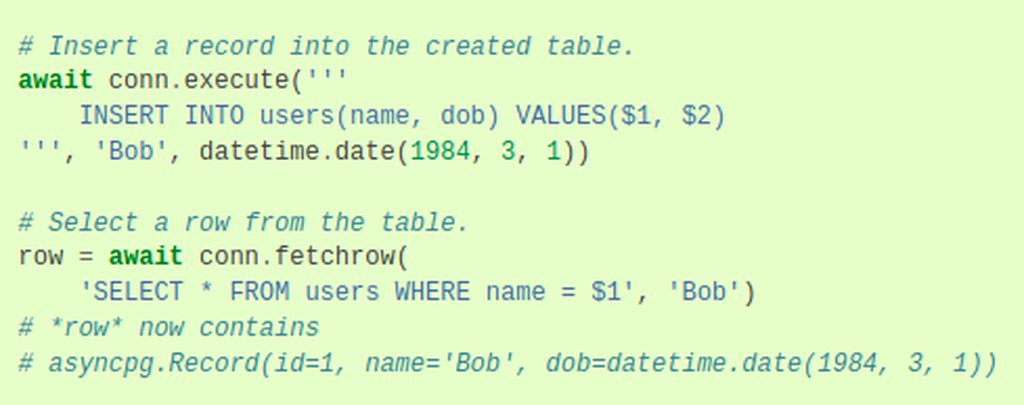 slate swan
this example in the docs
dry kelp
lemme send my code in a myst
slate swan
final iron
Table names should be all lower case iirc
its their wish, there's no limitation

 slate swan
await spooky.pg_con.fetchrow("SELECT * FROM Prefix WHERE guild_id = $1", ctx.guild.id)

 slate swan
did you learn sql ?
slate swan

 slate swan
can i ask for help hwre
slate swan
manic wing
tf
ask that in discord developers server you will get the answer there
slate swan
slate swan
can i ask for help hwre
yea thats what the channel is meant for
slate swan
slate swan
can i ask for help hwre
i havent coded at all in 5 months so i forgot how to fix this issue

you cannot have that character in python
but what character
the red dots
i cant get rid of them
erase it..
i literally cant
refresh your tab
quaint epoch
im back

 manic wing
what kind of methods/solutions are you guys hoping would be implemented into discord.py or forks?
 torn sail
in discord.py i think its coming but app commands in cogs without having to manually add them to tree
or use a group like a cog
 edgy osprey
What happened to my bot?

 torn sail
thats what happens when u use replit
edgy osprey
And what should I do now?
 tawdry perch
Replit for discord bots 😔
 wispy spade
edgy osprey
And what should I do now?
wispy spade
edgy osprey
And what should I do now?
probably best solution is to just wait
 sick birch
edgy osprey
And what should I do now?
sick birch
edgy osprey
And what should I do now?
Not use replit
wispy spade
even better is to migate to something else
sick birch
Use a full-fledged editor such as VScode, pycharm, emacs, etc
edgy osprey
wispy spade
probably best solution is to just wait
So this problem can disappear by itself?
wispy spade
wispy spade
even better is to migate to something else
repl.it uses a shared IP so whatever IP your repl has is shared with a couple other people, so if someone in that IP gets ratelimited or something, all other people on that IP will also get that ratelimit.
sick birch
edgy osprey
So this problem can disappear by itself?
No, it will happen again a lot
If you're using replit nothing you can do about it but wait 10-15 minutes every time it happens, and it will happen a lot
sick birch
wispy spade
repl.it uses a shared IP so whatever IP your repl has is shared with a couple ot...
Also wanted to add that if someone else using your IP does something malicious, it's possible for you to get banned as well
edgy osprey
wispy spade
repl.it uses a shared IP so whatever IP your repl has is shared with a couple ot...
Can a VPN help in such a situation?
wispy spade
edgy osprey
Can a VPN help in such a situation?
In this case, nope.
sick birch
You using a vpn would still send requests from replit's machines
Wouldn't change anything
The easiest and best way would be to not use replit and switch to something better
slate swan
use kill 1 in shell and ip resets
wispy spade
wispy spade
In this case, nope.
best solution again is to migrate to a proper VPS, or if you can't do that, migrate to something like Heroku. While Heroku has its own share of problems (one being that it isn't designed for Discord bots), you won't get ratelimited every 10 seconds.
maiden fable
Do I see Robin? 👀
vocal plover
plus loads of VPN IPs are banned by discord because it turns out people who abuse the platform use VPNs too
edgy osprey
sick birch
You're running the discord bots from replit's underpowered machines
That is, in the future, replit will no longer be suitable for creating bots at all, since all replit machines will be overloaded?
manic wing
any features you guys are looking to be implemented? 😩
sick birch
edgy osprey
That is, in the future, replit will no longer be suitable for creating bots at a...
Replit has never been suitable for creating bots
wispy spade
Not in the future, it's simply not suitable for it.
sick birch
And they have always been overloaded since the machines are extremely underpowered
They weren't designed to host full fledged apps that are up 24/7, they were only meant to run the one-off small code snippet that you just wanted to check if it works but were too lazy to load up an actual IDE
slate swan
manic wing
any features you guys are looking to be implemented? 😩
🏃♂️ yea, bot's reading About-Mes
but i dont think discord api would ever allow that
wispy spade
wispy spade
Not in the future, it's simply not suitable for it.
- because you're using a shared IP, 2) because you're using fairly underpowered systems, and 3) because you also have to keep alive the connection since again, it wasn't made for hosting
vocal plover
wont be implemented, too big of a privacy issue
sick birch
If you want an actual host, look into AWS, google cloud services, or microsoft azure, they're all excellent and are used in the industry a lot
wispy spade
slate swan
but i dont think discord api would ever allow that
it's only really returned in the client user, as bio
slate swan
yeahh, would be the same scenario as the message intents
vocal plover
GCP has an always free tier you can use (f1 micros iirc?)
wispy spade
wispy spade
it's only really returned in the client user, as `bio`
but I'm not sure how it would go privacy-wise anywhere else
sick birch
Yeah many do, I know for a fact AWS has a free tier but it's not always free, 700 hours/month for 12 months on t2.micro instances
For small discord bots GCP or AWS free tier will more than suffice
vocal plover
Oracle cloud gives you quite a lot always free on ARM archs, but that comes with supporting oracle which is ehhhh
sick birch
And due to their architecture if your bot starts growing and you need more resources, they make it incredibly easy to scale your app
edgy osprey
Okay, we'll have to put up with it and switch to heroku and github
vocal plover
heroku is equally as bad as replit
sick birch
Heroku isn't much better than replit either
slate swan
Hey, I am trying to check if someone has pinged a user from a list in a json file. Is this the correct way to do it?
        @commands.Cog.listener()
        async def on_message(self,message):
            with open("nopinglist.json") as f:
                    data = json.load(f)

            no_ping_list = data["no-ping-list"]

            if no_ping_list in message.content:
neither are made for always-on apps like discord bots
 vocal snow
the 300$ of azure credits from gh edu pack have been working nicely for me
sick birch
Why not use vscode/pycharm?
slate swan
slate swan
Hey, I am trying to check if someone has pinged a user from a list in a json fil...
!d discord.Message.reference
unkempt canyonBOT
The message that this message references. This is only applicable to messages of type MessageType.pins_add, crossposted messages created by a followed channel integration, or message replies.
New in version 1.5.
edgy osprey
sick birch
Why not use vscode/pycharm?
It's too complicated for me.
sick birch
(Assuming you're using replit for the IDE and not the "free hosting")
manic wing
can you not do await message.edit(suppress=True)?
i thought that suppressed the emebds
sick birch
edgy osprey
It's too complicated for me.
How so? It's just as easy or easier than using replit/heroku and will save you a lot of headache down the road
slate swan
slate swan
Hey, I am trying to check if someone has pinged a user from a list in a json fil...
!d discord.message.mentions , you can do a list comps to get all the ids of mentioned people
unkempt canyonBOT
Certainly not.
No documentation found for the requested symbol.
slate swan
!d discord.Message.mentions
unkempt canyonBOT
A list of Member that were mentioned. If the message is in a private message then the list will be of User instead. For messages that are not of type MessageType.default, this array can be used to aid in system messages. For more information, see system_content.
Warning
The order of the mentions list is not in any particular order so you should not rely on it. This is a Discord limitation, not one with the library.
manic wing
how do you remove the embeds from a message?
sick birch
manic wing
how do you remove the embeds from a message?
edit the message and set embeds=None
manic wing
sick birch
edit the message and set embeds=None
no like
slate swan
manic wing
how do you remove the embeds from a message?
await message.edit(embeds=None)
manic wing
https://github.com/ when you send this link it autoshows the embed

GitHub
GitHub is where over 73 million developers shape the future of software, together. Contribute to the open source community, manage your Git repositories, review code like a pro, track bugs and feat...
slate swan
supress will do the thing, but there embed means all the attachments
sick birch
manic wing
https://github.com/ when you send this link it autoshows the embed
like https://github.com/?
manic wing
sick birch
like <https://github.com/>?
yes
sick birch
<link>
manic wing
when i do await message.edit(suppress=True) it doesnt remove the embed
sick birch
oh you mean that
manic wing
sick birch
\<link\>
no, how do i make the bot suppress another users message
slate swan
manic wing
when i do await message.edit(suppress=True) it doesnt remove the embed
supress_embeds=True
 manic wing
slate swan
supress_embeds=True
manic wing
slate swan
supress_embeds=True
?
slate swan
manic wing
?
!d discord.Message.remove_attachments
unkempt canyonBOT
I'm sorry Dave, I'm afraid I can't do that.
No documentation found for the requested symbol.
sick birch
@tree.context_menu(name='Info', guild=test_guild)
async def info(interaction: discord.Interaction, member: discord.Member):
    embed = get_member_info_embed(member)
    await interaction.response.send_message(embed=embed, ephemeral=True)
anyone know why this won't work D:
 karmic totem
manic wing
when i do await message.edit(suppress=True) it doesnt remove the embed
karmic totem
manic wing
when i do await message.edit(suppress=True) it doesnt remove the embed
message.edit(embeds = [])
manic wing
slate swan
https://discordpy.readthedocs.io/en/master/api.html#discord.Message.remove_attac...
thats not it
slate swan
slate swan
!d discord.message.mentions , you can do a list comps to get all the ids of ment...
But I'm asking how to check if a pinged user is a list from a json file, this is what I have in the json file.
{"no-ping-list":["@true quartz","@true quartz"]}
await message.edit(embeds = [], content = "content")
final iron
Using json as a database 🗿
slate swan
final iron
Using json as a database 🗿
bro, it's just for one small thing that will rarely get updated it really doesn't matter 🗿
sick birch
slate swan
But I'm asking how to check if a pinged user is a list from a json file, this is...
Store just the IDs, then on_message, do set(message.mentions) and get the intersection between set(message.mentions) and the set from your json, if the intersection length > 0, ping was in the message and in the json, else, it wasn't
final iron
slate swan
bro, it's just for one small thing that will rarely get updated it really doesn'...
It does matter
manic wing
why tf is suppress not working
 stray solar
I tried to print Korean language on my bot discord but its printing invalid character someone have an issue ?
slate swan
depends on your system, not a python limitation
stray solar
So i can use utf-8 ?
slate swan
!e print("이봐")
unkempt canyonBOT
@slate swan :white_check_mark: Your eval job has completed with return code 0.
이봐
Cant*
slate swan
see, it works
 slate swan
sick birch
Store just the IDs, then `on_message`, do `set(message.mentions)` and get the in...
slate swan
sick birch
Store just the IDs, then `on_message`, do `set(message.mentions)` and get the in...
Is there any documentation on set(message.mentions), I don't really understand how to use it
in your console/terminal right?
stray solar
Yea
slate swan
some systems dont support languages until you download them
stray solar
So how i can make them support
sick birch
slate swan
Is there any documentation on `set(message.mentions)`, I don't really understand...
message.mentions is just a list, we're converting a list to a set
!e
myList = [1, 2, 2, 3, 3, 4, 4, 5, 5]
print(set(myList))
@sick birch :white_check_mark: Your eval job has completed with return code 0.
{1, 2, 3, 4, 5}
What even is set()
sick birch
!e
# intersection
x = {1, 2, 3}
y = {2, 3, 4}
print(x.intersection(y))
@sick birch :white_check_mark: Your eval job has completed with return code 0.
{2, 3}
!d set
unkempt canyonBOT
class set([iterable])``````py

class frozenset([iterable])```
Return a new set or frozenset object whose elements are taken from *iterable*. The elements of a set must be [hashable](https://docs.python.org/3/glossary.html#term-hashable). To represent sets of sets, the inner sets must be [`frozenset`](https://docs.python.org/3/library/stdtypes.html#frozenset "frozenset") objects. If *iterable* is not specified, a new empty set is returned.

Sets can be created by several means:

• Use a comma-separated list of elements within braces: `{'jack', 'sjoerd'}`

• Use a set comprehension: `{c for c in 'abracadabra' if c not in 'abc'}`

• Use the type constructor: `set()`, `set('foobar')`, `set(['a', 'b', 'foo'])`...
Similar names: label.set
final iron
Yeah I don't understand
sick birch
sick birch
!e
```py
# intersection
x = {1, 2, 3}
y = {2, 3, 4}
print(x.intersection(y))
``...
use this to figure out if pinged users are in the json
unkempt canyonBOT
@sick birch :white_check_mark: Your eval job has completed with return code 0.
{1, 2, 3}
removes all duplicates if there are any
final iron
Why are the curly braces?
sick birch
that's the syntax for a set
final iron
Oh
sick birch
[] for list
{} for set
slate swan
sick birch
`message.mentions` is just a list, we're converting a list to a set
So like this?
            mentions = set(message.mentions)

            with open("nopinglist.json") as f:
                data = json.load(f)

            no_ping_list = data["no-ping-list"]

            if mentions in no_ping_list:
sets also have special methods like intersection, union, difference
final iron
!e
print(type({1, 2}))
@final iron :white_check_mark: Your eval job has completed with return code 0.
<class 'set'>
Cool
sick birch
slate swan
So like this?
```py
mentions = set(message.mentions)
wi...
You can't check if a set is in a list
Well ok I guess you can but it won't give you what you expect
quaint epoch
how do i get a guilds picture?
sick birch
You need to take the intersection between the set(message.mentions) and no_ping_list
final iron
!d discord.Guild.icon
unkempt canyonBOT
property icon: Optional[discord.asset.Asset]```
Returns the guild’s icon asset, if available.
property url: str```
Returns the underlying URL of the asset.@quaint epoch
quaint epoch
final iron
<@!879807617260716143>
yeah lol i just checked the docs
slate swan
sick birch
You need to take the intersection between the `set(message.mentions)` and `no_pi...
Sorry what do you mean by intersection, can you send an example?
quaint epoch
but thanks
sick birch
slate swan
Sorry what do you mean by intersection, can you send an example?
!e
# intersection
x = {1, 2, 3}
y = {2, 3, 4}
print(x.intersection(y))
@sick birch :white_check_mark: Your eval job has completed with return code 0.
{2, 3}
intersection returns what 2 sets have in common
In this case both sets had 2 and 3 in common
slate swan
ah ok
vocal plover
there's also a shorthand for it which is just &, i.e. {1, 2, 3} & {2, 3, 4}
sick birch
Oh really? Didn't know that 👀
vocal plover
union is |
sick birch
In that case, just do set(message.mentions) & set(no_ping_list)
slate swan
sick birch
!e
```py
# intersection
x = {1, 2, 3}
y = {2, 3, 4}
print(x.intersection(y))
```
Like this?
            mentions = set(message.mentions)

            with open("nopinglist.json") as f:
                data = json.load(f)

            no_ping_list = data["no-ping-list"]

            print(mentions.intersection(no_ping_list))
Actually you'd probably want to map it to IDs but my point still stands
vocal plover
it's basically the same as bitwise stuff, {1} ^ {1, 2} == {2}
sick birch
Oh yeah, Java has the single operands for bitwise, double for boolean operators so that makes sense
vocal plover
well, same kinda concept but on different things
sick birch
slate swan
Like this?
```py
mentions = set(message.mentions)
with ...
Make sure your nopinglist.json only has the ids, without the <@!> stuff
and you'll also want to parse the string to an integer as it'll probably be a string in the json
slate swan
sick birch
Make sure your nopinglist.json only has the ids, without the <@!> stuff
Yeah I changed that
sick birch
Okay, then parse it and set() it to get the set
slate swan
{"no-ping-list":[950068134503678013,950068134503678013]}
it converts the given obj to a set like int()
stray solar
slate swan
some systems dont support languages until you download them
Maybe i install korean language to my computuer
slate swan
yea...
slate swan
sick birch
Don't have to parse it then, just set()
I already have set()?
mentions = set(message.mentions)
Nothing happened..
sick birch
slate swan
I already have `set()`?
```py
mentions = set(message.mentions)
```
message.mentions is a list of discord.Member objects, you can't take the intersection of 2 sets containing 2 different objects
set(map(lambda m: m.id, message.mentions))
Ok now how do I more do more if they have mentioned a user in the no-ping-list?
sick birch
Check for truthy/falsy value of the intersection
truthy value - user in the no ping list was pinged
falsy value - user in the no ping list was not pinged
quaint epoch
how do i get a list of all of the actions that have occurred in a guilds audit log?
like, all of the entries?
manic wing
quaint epoch
like, *all* of the entries?
ratelimits:
 mellow gulch
oi what fork is the best fork that uses the discord namespace
manic wing
mellow gulch
oi what fork is the best fork that uses the discord namespace
just use discord.py
it returned

 manic wing
mellow gulch
manic wing
mellow gulch
but that one doesnt have buttons
stray solar
Why the life hate me

 sick birch
mellow gulch
but that one doesnt have buttons
sick birch
mellow gulch
but that one doesnt have buttons
yeah it does
it has most if not all of the new features
mellow gulch
oh
formal basin
 manic wing
anyone got any features they want discord.py & forks to implement? 😩
formal basin
formal basin
How many spaces do I do on line 25
 placid escarp
Is there any way, i can make a command in another file without cogs?
slate swan
formal basin
How many spaces do I do on line 25
8 in total as its indented 2 levels
!indents
unkempt canyonBOT
Indentation
Indentation is leading whitespace (spaces and tabs) at the beginning of a line of code. In the case of Python, they are used to determine the grouping of statements.
Spaces should be preferred over tabs. To be clear, this is in reference to the character itself, not the keys on a keyboard. Your editor/IDE should be configured to insert spaces when the TAB key is pressed. The amount of spaces should be a multiple of 4, except optionally in the case of continuation lines.
Example
def foo():
    bar = 'baz'  # indented one level
    if bar == 'baz':
        print('ham')  # indented two levels
    return bar  # indented one level
The first line is not indented. The next two lines are indented to be inside of the function definition. They will only run when the function is called. The fourth line is indented to be inside the if statement, and will only run if the if statement evaluates to True. The fifth and last line is like the 2nd and 3rd and will always run when the function is called. It effectively closes the if statement above as no more lines can be inside the if statement below that line.
Indentation is used after:
1. Compound statements (eg. if, while, for, try, with, def, class, and their counterparts)
2. Continuation lines
More Info
1. Indentation style guide
2. Tabs or Spaces?
3. Official docs on indentation
placid escarp
manic wing
yes
yeah?
manic wing
you just do ```py
import discord
from discord.ext import commands
@commands.command()
async def command(ctx: commands.Context):
...
``` and then import that into your main file and do bot.add_command(command)
slate swan
each level of indentation can be 2 or 4 spaces mostly 4 to follow pep8 or some editors do it by default
slim ibex
so whos changed back over to dpy here?
placid escarp
manic wing
you just do ```py
import discord
from discord.ext import commands
@commands.com...
Thank you
manic wing
slim ibex
so whos changed back over to dpy here?
not me


 slate swan
sick birch
Check for truthy/falsy value of the intersection
slate swan
sick birch
Check for truthy/falsy value of the intersection
Like this?
            set(message.mentions)
            intersection = set(map(lambda m: m.id, message.mentions))

            with open("nopinglist.json") as f:
                data = json.load(f)

            no_ping_list = data["no-ping-list"]

            if intersection == True:
              #stuff
            else:
               pass
No, you need 2 variables:
- a set containing the IDs of the people who can't get pinged
- a set containing the IDs of the people who were pinged in a certain message
mentioned_set = set(map(lambda m: m.id, message.mentions))

with open(...) as f:
  no_ping_list = ...

no_ping_set = set(no_ping_list)

if mentioned_set & no_ping_set:
  # do something if they were pinged
else:
  # do something else, or just ignore
use and not &
unkempt canyonBOT
@sick birch :white_check_mark: Your eval job has completed with return code 0.
{2, 3, 4}
Hm that's not what we're looking for
manic wing
sets are useless
slate swan
manic wing
~~sets are useless~~
no?
So like this?
            mentioned_set = set(map(lambda m: m.id, message.mentions))

            with open("nopinglist.json") as f:
                no_ping_list = data["no-ping-list"]

            no_ping_set = set(no_ping_list)

            if mentioned_set and no_ping_set:
                await message.delete()
            else:
                pass
whats the issue though?
slate swan
slate swan
no?
He crossed it out lmao
sets are used to remove duplicates from a list so theyre good ngl
manic wing
slate swan
sets are used to remove duplicates from a list so theyre good ngl
just use list subtraction
slate swan
and frozen sets
slate swan
manic wing
just use list subtraction

sick birch
slate swan
So like this?
```py
mentioned_set = set(map(lambda m: m.id, message....
Use & not and
slate swan
oh ok
slate swan
sick birch
Use `&` not `and`
what? that works?
sick birch
and if you're just going to do else: pass just leave it out
slate swan
aka ive never used it lol
sick birch
slate swan
what? that works?
!e
print({1, 2, 3} & {2, 3, 4})
@sick birch :white_check_mark: Your eval job has completed with return code 0.
{2, 3}
pretty nice