#discord-bots
1 messages · Page 684 of 1
 small igloo
 visual island
small igloo
lol finnaly u wake up
visual island
small igloo
lol finnaly u wake up
yea I just had my breakfast
 magic ore
that's how you get the author's ID yes
 unkempt canyonBOT
:incoming_envelope: :ok_hand: applied mute to @small igloo until <t:1639621077:f> (9 minutes and 58 seconds) (reason: mentions rule: sent 6 mentions in 10s).
visual island
..
 pliant gulch
👀
 boreal ravine
unkempt canyon
:incoming_envelope: :ok_hand: applied **mute** to <@!828182019841327115> until <...
boreal ravine
unkempt canyon
:incoming_envelope: :ok_hand: applied **mute** to <@!828182019841327115> until <...
Rip
visual island
they should be unmuted already
small igloo
unkempt canyon
:incoming_envelope: :ok_hand: applied **mute** to <@!828182019841327115> until <...
i send 4 pings, not 6 bruh
also i have idea, how to make this

 bitter perch
<t:UNIX:formatter>
 small igloo
bitter perch
<t:UNIX:formatter>
small igloo
bitter perch
<t:UNIX:formatter>
uh?
boreal ravine
the numbers are unix/epoch time whatever you wanna call them
 wicked atlas
https://discord.com/developers/docs/reference#message-formatting-formats
https://www.epochconverter.com/

Convert Unix Timestamps (and many other date formats) to regular dates.
Discord Developer Portal
Integrate your service with Discord — whether it's a bot or a game or whatever your wildest imagination can come up with.
small igloo
boreal ravine
https://media.discordapp.net/attachments/842168964209442816/872770070156288050/1...
<t:1623981015>
oh nice it works
<t:1623981015>
hm ok ok, thanks
 peak loom
I keep getting this and I can't fix it.

 upbeat otter
aww, ilysm
 sick birch
peak loom
I keep getting this and I can't fix it.
sick birch
peak loom
I keep getting this and I can't fix it.
What's the code look like?
A tiny snippet of the error doesn't help us understand what the error is trying to say
peak loom
sick birch
What's the code look like?
 upbeat otter
sick birch
`ctx` is only for commands
upbeat otter
sick birch
`ctx` is only for commands
name ctx anything you can
small igloo
upbeat otter
aww, ilysm
:3
peak loom
upbeat otter
ctx isnt required
Now this happens.
 upbeat otter
peak loom
Now this happens.
upbeat otter
peak loom
Now this happens.
message.channel.send
small igloo
peak loom
Now this happens.
lol where channel
upbeat otter
peak loom
I'm on 3 hours of sleep/
me on 20 minutes
 sage otter
Relatable.
small igloo
peak loom
I'm tired leave me alone.
what, u need channel, u can't leave message and send without channel, they need channel to live, without channel they can't live
small igloo
peak loom
I'm on 3 hours of sleep/
2 months ago i'm not sleep strike 3 days
peak loom
upbeat otter
~~me on 20 minutes~~
Lol.
upbeat otter
peak loom
Lol.
not even kidding lol
sage otter
sick birch
`ctx` is only for commands
You talking about the commands extension or like actual commands? 
peak loom
small igloo
_2 months ago i'm not sleep strike 3 days_
Ive done that my test sucked.
small igloo
upbeat otter
~~not even kidding lol~~
"lol"
small igloo
peak loom
Ive done that my test sucked.
what test is it
upbeat otter
small igloo
"~~lol~~"
umm....
peak loom
small igloo
what test is it
Trigonometry, was*
upbeat otter
!ot
unkempt canyonBOT
Off-topic channels
There are three off-topic channels:
• #ot2-never-nester’s-nightmare
• #ot1-perplexing-regexing
• #ot0-psvm’s-eternal-disapproval
Their names change randomly every 24 hours, but you can always find them under the OFF-TOPIC/GENERAL category in the channel list.
Please read our off-topic etiquette before participating in conversations.
small igloo
upbeat otter
!ot
bhre ok
peak loom
small igloo
bhre ok
Do I need await?
upbeat otter
peak loom
Do I need await?
yes
small igloo
peak loom
Do I need await?
for send message? bhru that's the most importatnt part
peak loom
small igloo
for send message? **bhru that's the most importatnt part**
Sorry, I'm more of an ethical hacker of wifi.
small igloo
peak loom
Sorry, I'm more of an ethical hacker of wifi.
lol wifi stealer
peak loom
small igloo
_lol wifi stealer_
No, I only do it to my family to scare them that I know the password.
small igloo
peak loom
No, I only do it to my family to scare them that I know the password.
what? ur family not let u know the pasword? oof
peak loom
upbeat otter
oof
Its not iilegal I'm a white hat.
peak loom
small igloo
what? ur family not let u know the pasword? **oof**
If its one that I've never been to, like if they moved.
small igloo
peak loom
If its one that I've never been to, like if they moved.
what
upbeat otter
peak loom
Its not iilegal I'm a white hat.
lets keep the discussion to #discord-bots
peak loom
upbeat otter
lets keep the discussion to <#343944376055103488>
I know, but I have ADHD I get off topic easily.
upbeat otter
peak loom
I know, but I have ADHD I get off topic easily.
#networks for you
peak loom
upbeat otter
<#716325106619777044> for you
Thats networking?
small igloo
peak loom
I know, but I have ADHD I get off topic easily.
hope u can get well soon
 drifting tulip
How can i make a channel private for everyone. Obviously not for people with administration permissions.
peak loom
small igloo
hope u can get well soon
I've had it since birth, but I can control it Juice WRLDS music helped.
small igloo
peak loom
I've had it since birth, but I can control it Juice WRLDS music helped.
WRLDS
peak loom
It's not hacking.
upbeat otter
peak loom
Thats networking?
hacking requires you to learn networking first so uhh
upbeat otter
small igloo
lol <@!758162838681681930> what is it just npw
mistakes happen, i'm sorry
drifting tulip
drifting tulip
How can i make a channel private for everyone. Obviously not for people with adm...
?
peak loom
upbeat otter
hacking requires you to learn networking first so uhh
Well, I don't do it unless needed.
small igloo
upbeat otter
hacking requires you to learn networking first so uhh
no, hacking requires you to learn hacking
small igloo
drifting tulip
?
idk
small igloo
upbeat otter
mistakes happen, i'm sorry
lol ok
hackin5n3 smth
sick birch
ethical hacking can actually be a great way to learn new concepts and strengthen existing ones
upbeat otter
small igloo
no, hacking requires you to learn hacking
anyways, keep it #discord-bots
small igloo
upbeat otter
anyways, keep it <#343944376055103488>
k
upbeat otter
sick birch
ot
small igloo
peak loom
<#463035268514185226>
what
sage otter
drifting tulip
How can i make a channel private for everyone. Obviously not for people with adm...
you can do this by
Making a permission overwrite for the guilds default role
small igloo
hmm, ok i almost forgor to ask again, why the coin is empty
drifting tulip
But i want to make it available for the person that invoked the command
unkempt canyonBOT
await set_permissions(target, *, overwrite=see - below, reason=None, **permissions)```
This function is a [*coroutine*](https://docs.python.org/3/library/asyncio-task.html#coroutine).

Sets the channel specific permission overwrites for a target in the channel.

The `target` parameter should either be a [`Member`](https://discordpy.readthedocs.io/en/master/api.html#discord.Member "discord.Member") or a [`Role`](https://discordpy.readthedocs.io/en/master/api.html#discord.Role "discord.Role") that belongs to guild.

The `overwrite` parameter, if given, must either be `None` or [`PermissionOverwrite`](https://discordpy.readthedocs.io/en/master/api.html#discord.PermissionOverwrite "discord.PermissionOverwrite"). For convenience, you can pass in keyword arguments denoting [`Permissions`](https://discordpy.readthedocs.io/en/master/api.html#discord.Permissions "discord.Permissions") attributes. If this is done, then you cannot mix the keyword arguments with the `overwrite` parameter.

If the `overwrite` parameter is `None`, then the permission overwrites are deleted.

You must have the [`manage_roles`](https://discordpy.readthedocs.io/en/master/api.html#discord.Permissions.manage_roles "discord.Permissions.manage_roles") permission to use this...coin?
drifting tulip
!d discord.Message.edit
unkempt canyonBOT
await edit(content=..., embed=..., embeds=..., attachments=..., suppress=..., delete_after=None, allowed_mentions=..., view=...)```
This function is a [*coroutine*](https://docs.python.org/3/library/asyncio-task.html#coroutine).

Edits the message.

The content must be able to be transformed into a string via `str(content)`.

Changed in version 1.3: The `suppress` keyword-only parameter was added.#bot-commands
 mild birch
what does await client.process_commands do?
boreal ravine
!d discord.ext.commands.Bot.process_commands @mild birch
unkempt canyonBOT
await process_commands(message)```
This function is a [*coroutine*](https://docs.python.org/3/library/asyncio-task.html#coroutine).
This function processes the commands that have been registered to the bot and other groups. Without this coroutine, none of the commands will be triggered.
By default, this coroutine is called inside the [`on_message()`](https://discordpy.readthedocs.io/en/master/api.html#discord.on_message "discord.on_message") event. If you choose to override the [`on_message()`](https://discordpy.readthedocs.io/en/master/api.html#discord.on_message "discord.on_message") event, then you should invoke this coroutine as well.
This is built using other low level tools, and is equivalent to a call to [`get_context()`](https://discordpy.readthedocs.io/en/master/ext/commands/api.html#discord.ext.commands.Bot.get_context "discord.ext.commands.Bot.get_context") followed by a call to [`invoke()`](https://discordpy.readthedocs.io/en/master/ext/commands/api.html#discord.ext.commands.Bot.invoke "discord.ext.commands.Bot.invoke").
This also checks if the message’s author is a bot and doesn’t call [`get_context()`](https://discordpy.readthedocs.io/en/master/ext/commands/api.html#discord.ext.commands.Bot.get_context "discord.ext.commands.Bot.get_context") or [`invoke()`](https://discordpy.readthedocs.io/en/master/ext/commands/api.html#discord.ext.commands.Bot.invoke "discord.ext.commands.Bot.invoke") if so. fluid harbor
Hey
drifting tulip
upbeat otter
<#267659945086812160>
has nothing to do with anything
!d discord.Guild.get_member
upbeat otter
drifting tulip
has nothing to do with anything
discord commands out of context of the conversation belong to #bot-commands
upbeat otter
fluid harbor
Hey
haii
fluid harbor
upbeat otter
haii
from flask import Flask
from threading import Thread

app = Flask(__name__)

@app.route('/')
def main():
    return {"hello": "everything is ok"}
def run():
    app.run(host="0.0.0.0",port=8080)
def a():
    server = Thread(target=run)
    server.start()
Showing invalid identifier error?
drifting tulip
doesn't relate to #discord-bots
upbeat otter
fluid harbor
```py
from flask import Flask
from threading import Thread
app = Flask(__name__...
replit?
fluid harbor
upbeat otter
replit?
Ys
upbeat otter
drifting tulip
doesn't relate to <#343944376055103488>
yeah 
upbeat otter
fluid harbor
Ys
go to #web-development
fluid harbor
No
upbeat otter
yes
fluid harbor
It is for discord bot hosting
drifting tulip
Doesn't mean anything.
drifting tulip
mhm
fluid harbor
Idk. If you can give me a code for hosting that would be nice
drifting tulip
that's probably the error
boreal ravine
If the bot gets a user and it returns this, is it still a discord.User object or no? or is it just a string
 upbeat otter
fluid harbor
```py
from flask import Flask
from threading import Thread
app = Flask(__name__...
upbeat otter
fluid harbor
```py
from flask import Flask
from threading import Thread
app = Flask(__name__...
in main() return a string and it should work
fluid harbor
upbeat otter
in main() return a string and it should work
For example
upbeat otter
fluid harbor
For example
def main():
return "smh"```Can I be your friend
upbeat otter
fluid harbor
Can I be your friend
I don't allow friend reqs so...sure
 slate swan
fluid harbor
Can I be your friend
slate swan
fluid harbor
Can I be your friend
Thats a question ive never heard
fluid harbor
from flask import Flask
from threading import Thread

app = Flask(__name__)

@app.route('/')
def main():
    return "hello"
def run():
    app.run(host="0.0.0.0",port=8080)
def a():
    server = Thread(target=run)
    server.start()
It still shows same error
slate swan
Very random and funny question if i say so myself
fluid harbor
slate swan
Thats a question ive never heard
Uh you can also be my friend
upbeat otter
slate swan
Thats a question ive never heard
I've seen that quite a lot of times lol
 full valley
So I have a queue command for players to q up for a game
# !q command -> Puts players into queue
@bot.command(name="queue", aliases=["q"], description="Join the queue")
@commands.check(is_issuer_in_game)
@commands.has_any_role(verified_role, 908784013181878342)
async def queue(ctx):
    try:
        if ctx.channel.id in allowed_channels:
            ...
------>        qtimer_tasks[game_id].append(asyncio.create_task(qtimer(timedplayer, game_id, qsize, channel)))
               print(qtimer_tasks)```

qtimer function is a timer until the player gets disconnected from the queue:
```py
async def qtimer(timedplayer, gameid, qsizee, channel):
    try:
        await asyncio.sleep(15)
        if gameid not in games:
            playerqueue.remove(timedplayer.mention)
            lobby.remove(timedplayer.id)
            if len(playerqueue) > 0:
                embed = discord.Embed(
                    title=f"**{len(playerqueue)} of {qsizee} players are in the queue**",
                    description=str(timedplayer.mention) + " was kicked from the queue! (Timeout)",
                    color=0xE74C3C)
            else:
                embed = discord.Embed(
                    title="**There are no players remaining in the queue**",
                    description=str(timedplayer.mention) + " was kicked from the queue! (Timeout)",
                    color=0xE74C3C)
            embed.set_footer(text=f"CBell 6 Mans | Created by Heptix",
                             icon_url="https://i.imgur.com/1utxX7d.png")
            await channel.send(embed=embed)
    except Exception:
        print(traceback.format_exc())```

however, the task isnt completing as I am not getting kicked from the queue after 15 seconds?
Im not getting any errors either, only console line telling me

> ```defaultdict(<class 'list'>, {99: [<Task pending name='Task-51' coro=<Command.__call__() running at C:\Users\~\AppData\Local\Packages\PythonSoftwareFoundation.Python.3.9_qbz5n2kfra8p0\LocalCache\local-packages\Python39\site-packages\discord\ext\commands\core.py:358>>]})```umm....
slate swan
fluid harbor
Uh you can also be my friend
Alone wolf lol
upbeat otter
!paste
unkempt canyonBOT
Pasting large amounts of code
If your code is too long to fit in a codeblock in discord, you can paste your code here:
https://paste.pythondiscord.com/
After pasting your code, save it by clicking the floppy disk icon in the top right, or by typing ctrl + S. After doing that, the URL should change. Copy the URL and post it here so others can see it.
slate swan
upbeat otter
I've seen that quite a lot of times lol
Maybe because your a female
Or sm
upbeat otter
slate swan
Maybe because your a ~~female~~
stress
slate swan
upbeat otter
~~stress~~
School you ment?
full valley
upbeat otter
umm....
?
fluid harbor
slate swan
Maybe because your a ~~female~~
Uh no.
slate swan
Lol
fluid harbor
Because they helped me
upbeat otter
slate swan
School you ment?
kind of, but nvm
upbeat otter
fluid harbor
Because they helped me
huhhh
slate swan
fluid harbor
Because they helped me
Thats nice
upbeat otter
Girls dont help loool
slate swan
upbeat otter
~~kind of, but nvm~~
I think you did ment it
fluid harbor
upbeat otter
```py
def main():
return "smh"```
Still doesn't work though
slate swan
upbeat otter
Girls dont help loool
Why?
fluid harbor
from flask import Flask
from threading import Thread

app = Flask(__name__)

@app.route('/')
def main():
    return "hello"
def run():
    app.run(host="0.0.0.0",port=8080)
def a():
    server = Thread(target=run)
    server.start()
It still shows same error
upbeat otter
slate swan
Why?
thinker said that not me
slate swan
upbeat otter
thinker said that not me
Im not thinker lol
fluid harbor
Lol
upbeat otter
fluid harbor
```py
from flask import Flask
from threading import Thread
app = Flask(__name_...
are you calling the a function in your main file?
slate swan
Im a different human bean
fluid harbor
upbeat otter
are you calling the `a` function in your main file?
Yes
import a
a.a()
 upbeat otter
fluid harbor
Yes
import a
a.a()
upbeat otter
fluid harbor
Yes
import a
a.a()
that's some weird naming
slate swan
fluid harbor
Delete the character lol
upbeat otter
fluid harbor
umm....try backspacing
fluid harbor
slate swan
Delete the character lol
Which one
slate swan
upbeat otter
umm....try backspacing
Your iq is super high
upbeat otter
fluid harbor
Which one
after start() there's an invis character
upbeat otter
slate swan
Your iq is super high
its over 9000
slate swan
fluid harbor
Which one
Replit is literally showing you lol
slate swan
upbeat otter
its over 9000
Nah higher
fluid harbor
upbeat otter
after start() there's an invis character
So I have to remove ()
server.start?
upbeat otter
slate swan
Nah higher
that was an anime reference but nvm
upbeat otter
fluid harbor
So I have to remove ()
noooo
just write that line again
to make things simple
fluid harbor
upbeat otter
just write that line again
Wdym
slate swan
@fluid harbor
something.something()#
``` theirs a invalid character forest bramble
I'm sorry if this is the wrong channel (I don't know where else to post.)
I want to develop a bot for my discord server. Is there an easy way that does not involve complex coding?
My knowledge of Python is less. Can anyone help me?
I will be awaiting replies.
slate swan
forest bramble
I'm sorry if this is the wrong channel (I don't know where else to post.)
I want...
.no
boreal ravine
forest bramble
I'm sorry if this is the wrong channel (I don't know where else to post.)
I want...
what kind of bot?
fluid harbor
slate swan
<@902887214525063179>
```py
something.something()#
``` theirs a invalid charac...
I didnt understand
from flask import Flask
from threading import Thread

app = Flask(__name__)

@app.route('/')
def main():
    return "hello"
def run():
    app.run(host="0.0.0.0",port=8080)
def a():
    server = Thread(target=run)
    server.start()
So what to remove or add?
slate swan
fluid harbor
I didnt understand
Its an example where theirs an invalid character
forest bramble
boreal ravine
what kind of bot?
I want it to moderate my server.
upbeat otter
forest bramble
I'm sorry if this is the wrong channel (I don't know where else to post.)
I want...
use a preset app that's all I can say
slate swan
forest bramble
I want it to moderate my server.
You can use official bots ig
forest bramble
slate swan
You can use official bots ig
the commands r a bit confusing for me
boreal ravine
forest bramble
I want it to moderate my server.
I mean theres no way to make a moderation bot without 'complex coding' if you wanna make a good 'moderation' bot
slate swan
I think me bot can make bots idk
fluid harbor
Uh
slate swan
forest bramble
the commands r a bit confusing for me
Use the help command lol
fluid harbor
???
upbeat otter
forest bramble
the commands r a bit confusing for me
you can use help commands they provide
forest bramble
boreal ravine
I mean theres no way to make a moderation bot without 'complex coding' if you wa...
ik python till if-else conditions only
fluid harbor
from flask import Flask
from threading import Thread

app = Flask(__name__)

@app.route('/')
def main():
    return "hello"
def run():
    app.run(host="0.0.0.0",port=8080)
def a():
    server = Thread(target=run)
    server.start()
What to add or remove.........
.....
............
boreal ravine
forest bramble
ik python till if-else conditions only
!resources then
unkempt canyonBOT
Resources
The Resources page on our website contains a list of hand-selected learning resources that we regularly recommend to both beginners and experts.
forest bramble
k
boreal ravine
fluid harbor
```py
from flask import Flask
from threading import Thread
app = Flask(__name_...
try this ```py
from flask import Flask
from threading import Thread
app = Flask(name)
@app.route('/')
def main():
return "hello"
def run():
app.run(host="0.0.0.0", port=8080)
def a():
server = Thread(target=run)
server.start()
hey
fluid harbor
boreal ravine
try this ```py
from flask import Flask
from threading import Thread
app = Flask...
Both are same. What's the difference
upbeat otter
boreal ravine
try this ```py
from flask import Flask
from threading import Thread
app = Flask...
python gotta adjust
yes?
boreal ravine
fluid harbor
Both are same. What's the difference
an invisible character that you cant see that I maybe deleted
slate swan
fluid harbor
Delete this space after start()
fluid harbor
Hm
slate swan
What?
upbeat otter
nothing, imma keep quiet
slate swan
upbeat otter
nothing, imma keep quiet
Type hinting the bot is necessary
fluid harbor
slate swan
Delete this space after start()
Still doesn't work@boreal ravine
slate swan
@upbeat otter what type hint are you talking about?
boreal ravine
fluid harbor
Still doesn't work<@656073353215344650>

Stack Overflow
I am working on the letter distribution problem from HP code wars 2012. I keep getting an error message that says "invalid character in identifier". What does this mean and how can it be ...
slate swan
Because in __init__() it is required
upbeat otter
slate swan
<@758162838681681930> what type hint are you talking about?
bot: commands.Bot
fluid harbor
upbeat otter
bot: commands.Bot
Eveee whats your birthday year?
slate swan
upbeat otter
bot: commands.Bot
Theirs 2
upbeat otter
fluid harbor
Eveee whats your birthday year?
doesnt matter
fluid harbor
upbeat otter
doesnt matter
||Lol||
upbeat otter
slate swan
Theirs 2
wdym
slate swan
How is that related to the topic if the channel
fluid harbor
Sorry
slate swan
upbeat otter
wdym
Look at the setup function
upbeat otter
slate swan
Look at the setup function
and?
slate swan
upbeat otter
and?
Were you talking about that type hint?
upbeat otter
slate swan
Were you talking about that type hint?
def setup(bot):
  bot.add_cog(whatever_class(bot))
I was saying that typehinting bot wasnt necessary
slate swan
Yes you are correct lol
upbeat otter
smh
upbeat otter
slate swan
In init it is require tho
hmmm yeah
slate swan
Any question?
About it?
We would gladly help you understand
You dont load extension is to load cogs
Mhmm
upbeat otter
slate swan
You dont load extension is to load cogs
i literally cant understand your messages....
slate swan
upbeat otter
i literally cant understand your messages....
Me either
 maiden fable
# in cog file
def setup(bot):
    bot.add_cog(Cog(...))
# in main bot file
bot.load_extension("cog.name")
arguing for what
slate swan
Dont quite understand anybody here
upbeat otter
slate swan
Me either
wao....
boreal ravine
maiden fable
```py
# in cog file
def setup(bot):
bot.add_cog(Cog(...))
```
```py
# in ma...
they did that already
maiden fable
Then what's the error
upbeat otter
maiden fable
```py
# in cog file
def setup(bot):
bot.add_cog(Cog(...))
```
```py
# in ma...
we were waiting for you, Lord
boreal ravine
cog has no setup function even though it has one
maiden fable
upbeat otter
we were waiting for you, Lord
I was sleeping, so uhh
maiden fable
boreal ravine
cog has no setup function even though it has one
Okay... Show a screenshot of the setup function
boreal ravine
maiden fable
Okay... Show a screenshot of the setup function
im not the person who got the error
maiden fable
Oops wrong reply
upbeat otter
maiden fable
I was sleeping, so uhh
its 9
boreal ravine
are you sure your running the right file? maybe you have another bot with the same file and your pc is running that one
maiden fable
upbeat otter
~~its 9~~
I slept at 1:30 so uhhh
slate swan
upbeat otter
~~its 9~~
timezones
upbeat otter
slate swan
~~timezones~~
same timezones
maiden fable
@hidden hazel show a pic of the file
upbeat otter
maiden fable
I slept at 1:30 so uhhh
you sleep? :D
maiden fable
Bro no, the cog file
maiden fable
upbeat otter
~~I'm a robot?~~ <:pithink:652247559909277706>
Idk
Probably not
Yea
Uhhh, can u show the main bot file where u r loading the Cogs?
That should have worked
So commands cog gets loaded, right?
slate swan
upbeat otter
~~same timezones~~
😳 🚶
upbeat otter
slate swan
😳 🚶
why flushed xD
maiden fable
So that tells there's a problem in your listeners file, not in the main bot file
Did u try restarting the bot?
slate swan
upbeat otter
why flushed xD

maiden fable
maiden fable
Did u try restarting the bot?
@hidden hazel
boreal ravine
@hidden hazel are you running the latest file of your bot
boreal ravine
because its outside your class
maiden fable
It should be outside
boreal ravine
yep
upbeat otter
maiden fable
Imagine a new way of loading cogs built inside dpy itself
why imagine, make it
boreal ravine
maiden fable
Imagine a new way of loading cogs built inside dpy itself
!d discord.ext.commands.Bot.load_extension ..?
unkempt canyonBOT
load_extension(name, *, package=None)```
Loads an extension.

An extension is a python module that contains commands, cogs, or listeners.

An extension must have a global function, `setup` defined as the entry point on what to do when the extension is loaded. This entry point must have a single argument, the `bot`.Like in the dpy source code, it's already written
class Cog(...):
    @classmethod
    def setup(cls, bot):
        bot.add_cog(cls(...))
And the library just does Cog.setup(self)
boreal ravine
unkempt canyon
@maiden fable whats the package kwarg for?
maiden fable
boreal ravine
<@!493451846543998977> whats the package kwarg for?
Never tried it tbh
boreal ravine
hm
maiden fable
maiden fable
Like in the dpy source code, it's already written
```py
class Cog(...):
@cla...
No external setup method needed
Idts
upbeat otter
use try and except when you load the extensions
maiden fable
But it goes get loaded
maiden fable
upbeat otter
~~use try and except when you load the extensions~~
That's just gonna eat errors, also no need since we already know the error
upbeat otter
maiden fable
That's just gonna eat errors, also no need since we already know the error
mhm, of course
upbeat otter
maiden fable
Yea me too
you just woke up that's obvious
slate swan
Delete the type hint cause why not
slate swan
No need for it either
upbeat otter
maiden fable
Woke*
I'm too sleep-deprived, cant help with typos, im sorry
maiden fable
Well 🤷♂️
slate swan
maiden fable
I do that most times
🚶
maiden fable
upbeat otter
~~I'm too sleep-deprived, cant help with typos, im sorry~~
Lmao
Bruhhhhh 😐
maiden fable
🤣
upbeat otter
me too, bye
maiden fable
Lmfaooo
upbeat otter
wrong gif nvm
maiden fable
Get some sleep y'all, imma play some games help everyone here
upbeat otter
maiden fable
Get some sleep y'all, imma ~~play some games~~ help everyone here
Insomnia and I have an exam in 2 hours
go play
upbeat otter
maiden fable
Oh well I got one tomorrow, soo uhhh
best of luck
maiden fable
Thanks
slate swan
maiden fable
Get some sleep y'all, imma ~~play some games~~ help everyone here
I have anxiety 🚶
My grades are coming soon and if i fail again no pc and programming for me for 5months🚶
😆
Wdym
Your token just resets for no reason
maiden fable
upbeat otter
<@!493451846543998977> your about me full when?
When discord spares me
upbeat otter
maiden fable
When discord spares me
I just saw your full about me now but nvm
slate swan
maiden fable
When discord spares me
You still need to close the dict lol
 upbeat otter
slate swan
I cant see it🚶
upbeat otter
slate swan
I cant see it🚶
thats the inspect element but nvm
slate swan
upbeat otter
~~thats the inspect element but nvm~~
I still cant see it🚶
upbeat otter
slate swan
I still cant see it🚶
me too
slate swan
Now i will cry myself to sleep🚶
upbeat otter
slate swan
Now i will cry myself to sleep🚶
bye
boreal ravine
how do i make a guild mark as read in my bot
upbeat otter
slate swan
Or just press the copy button🚶
You were going to cry 5 minutes earlier
slate swan
slate swan
Thats like saying
```py
str("")
```
🚶
Better example
a =
print(str(a))
I did
Yes but tokens arent ints their complex so bad example
REALLY 😱
Just type random stuff lol
Random stuff and not random ints
:levitate:
OMG REALLY 😱
Im joking i know lol
Just an example if you try to convert or edit something that's none
upbeat otter
Sure
upbeat otter
slate swan
If your using replit yes
Replits envs dont work like that
maiden fable
Me who uses a python file to save the token 😐
slate swan
upbeat otter
Replits envs dont work like that
I dont use replit so idrc
maiden fable
upbeat otter
Replits envs dont work like that
U can use os.getenv on repl too tho
slate swan
maiden fable
Me who uses a python file to save the token 😐
I just do in my files:
import stuff

vars = stuff
TOKEN = "hiimacooltokenlol"
#code
bot.run(TOKEN)
Looks good in my opinion
 cerulean canyon
Bro holy shit
light mode gives me aids omg im not even kidding
my eyessssssssssssssssssss holy shit
slate swan
Make it full brightness
your problem?
hm , make sure you use the same variable name and capitalisation when you do it
what ide/editor are you using?
oh , do you use the play like button on the right top to run your code?
dont do that , use this instead

run without debugging option
may i see your .env file , with the token removed ofc
 shadow wraith
slate swan
may i see your .env file , with the token removed ofc
shadow wraith
slate swan
may i see your .env file , with the token removed ofc
im guessing it's just TOKEN=''
slate swan
it should be TOKEN =
since you use getenv('TOKEN')
yea just rename it , and use the run option i told , should work foinu
and where did you run it from?\
nah i mean , the play button
or the debugger option i told
slate swan
shadow wraith
🕴️ do people do `await bot.get_channel`
await bot.get_channel().send(.... is what i do
shadow wraith
that's reasonable
slate swan
lemme try doing it myself , brb
slate swan
ok so i have this in my bot file py Kakashi.run(getenv('TOKEN'))
this is my .env file
TOKEN ='token here'```and it works like a charm slate swan
shadow wraith
i think it has to be awaited to use `.send()`
slate swan
shadow wraith
i think it has to be awaited to use `.send()`
Yes ofc
get() is async but fetch isnt
what did you name your env file? .env ill suppose , right?
slate swan
slate swan
get() is async but fetch isnt
( opposite )
slate swan
slate swan
( opposite )
Huh?
slate swan
slate swan
Huh?
fetch is a coro and is async
get is a normal def
slate swan
slate swan
fetch is a coro and is async
get is a normal def
Read it again
get() is async but fetch isnt
READ IT AGAIN
shadow wraith
dawg bot.get_channel and get() are the same jk
shadow wraith
actually idk, i have never used get() before
slate swan
Same
pliant gulch
If you get really simple, yea get and get_channel are basically the same
slate swan
What was that😳
pliant gulch
Or they do the same thing/can do the same thing
shadow wraith
pliant gulch
Or they do the same thing/can do the same thing
💀 once a guy told me "hey why u use indexing it trash"
because i did
!e
import random
element = [1, 2, 3]
print(f"{element[random.randint(0, 2)]}")
unkempt canyonBOT
@shadow wraith :white_check_mark: Your eval job has completed with return code 0.
1
and he kept telling me to use random.choice 💀, if it does the same thing it does the same thing, andy told smth important
pliant gulch
Well, yea the eval code you sent makes no sense for you to index here
Indexing is fine, but you don't need to use it when you don't need to
Its a bit implicit imo

 jade tartan
But i havent added a cog yet so
 spring flax
slate swan
Whats indexing again <:jam_cavedude:671651890198740993>
spring flax
slate swan
Whats indexing again <:jam_cavedude:671651890198740993>
!e
x = ['one', 'two', 'three']
print(x[0])
@spring flax :white_check_mark: Your eval job has completed with return code 0.
one
Ah picking🕴️
Remember now lol
spring flax
picking?
slate swan
spring flax
picking?
I just like calling it that🕴️
 prisma spoke
    transcript_file = nextcord.File(io.BytesIO(transcript.encode()),
                                    filename=f"transcript-{ctx.channel.name}.html")
    await ctx.send(file=transcript_file)
```i want this it show like this in embed hyper link format how to do so?
its a file so if i do text it doesnt work
 lament mesa
As far as I know [text](url) are only for hyperlinks.
prisma spoke
lament mesa
As far as I know `[text](url)` are only for hyperlinks.
but i cnt do it cuz its a file
 tawdry perch
Show code?
lament mesa
prisma spoke
but i cnt do it cuz its a file
yeah, because discord doesn't support that
maybe you could use the pastbin api and upload your file there and send the link of the uploaded file
prisma spoke
lament mesa
maybe you could use the pastbin api and upload your file there and send the link...
its an html file
it is a kind of ss
ig it can be done like only if i have a website of my own which is hosted
 analog sparrow
I've been trying to make a useful discord bot for a while, but I can't get a good idea of what people would want to use, does anyone here have any ideas on a useful discord bot I could make?
lament mesa
prisma spoke
ig it can be done like only if i have a website of my own which is hosted
yeah, you could make your own website for that using django or flask
 spring verge
I had a question
over here as u can see we are tabulating text

similarly is there a way to tabulate images?
like the avatar
tawdry perch
analog sparrow
I've been trying to make a useful discord bot for a while, but I can't get a goo...
Like command ideas?
analog sparrow
tawdry perch
Like command ideas?
or a bot concept idea, every idea i've thought has been done by almost every other discord bot (i haven't had many good ideas)
tawdry perch
I don't really have concept ideas
slate swan
analog sparrow
or a bot concept idea, every idea i've thought has been done by almost every oth...
a truly fully customizable all-purpose bot
all the bots available rn aren't FULLY customizable
analog sparrow
what do you mean by fully? (to what extent? you can change any messages send, you can change any logic, or you can change the code?)
slate swan
analog sparrow
what do you mean by fully? (to what extent? you can change any messages send, yo...
the first and second
 untold token
spring verge
over here as u can see we are tabulating text
untold token
spring verge
over here as u can see we are tabulating text
You would need to use PIL for that
Pillow
spring verge
untold token
You would need to use PIL for that
yea but before that I have to make table of avatars
so I can use it to draw on img
untold token
You need pil to draw lmao
 astral cobalt
If I have a function that I want to call using 2 different aliases but when a certain alias is called it does a different task how would I do that? @client.command(name="call1", aliases=['call2']) async def call1(ctx): if(call1): do this if(call2): do this instead Something like this
untold token
Well just create an another command instead
astral cobalt
Yeah I could do that but they are esentially the same thing but changing one variable inside
I feel like the wouldent be very efficient
Basically I wanna change a value baised on what the input it
untold token
The thing is, aliases will call function which you have made an alias too
untold token
You could just take an argument instead
untold token
spring verge
but u cant use pil to make tables
Use tabulate to generate tables and use PIL to draw it
spring verge
I was using tabulate module for text
spring verge
untold token
Use tabulate to generate tables and use PIL to draw it
tabulate doesnt work for avatars?
untold token
Tabulate only generates text
spring verge
yea thats why
untold token
How will it work on an image
spring verge
bro thats why I asked the question
untold token
You need PIL to draw the image
spring verge
spring verge
similarly is there a way to tabulate images?
here
untold token
Use tabulate to generate the text
and use pil to take that text and draw on it on the avatar
spring verge
to "generate text"
untold token
Use both
you have to use PIL in order to write or read text from images and based on that you can use tabulate to do stuff and then use PIL again to work on the image
 manic wing
astral cobalt
Yeah I could do that but they are esentially the same thing but changing one var...
manic wing
astral cobalt
Yeah I could do that but they are esentially the same thing but changing one var...
dont create a new command
untold token
Oh wait, what are you exactly try to do
manic wing
!d discord.ext.commands.Context.invoked_with || this shows the alias it was invoked with, you can just do if ctx.invoked_with == …
unkempt canyonBOT
The command name that triggered this invocation. Useful for finding out which alias called the command.
untold token
spring verge
to "generate text"
What are you trying to do?
manic wing
untold token
Also if they were using dpy 2.0 they could use Flags
not necessary
i gave the most efficient way
manic wing
untold token
Flags would be better
how so?
upbeat otter
untold token
Also if they were using dpy 2.0 they could use Flags
What're those?
spring verge
untold token
What are you trying to do?
I mean I dont wanna discuss it further cuz its really not helping me .. not ur fault tho.. I was just trying to create leadberboard using tabulate text etc which all worked but now I want to tabulate avatars as well the same way I am doing for text in my leaderboard
I will try to figure it out 👍
untold token
upbeat otter
What're those?
Flags are like CLI, like you have a command line
some_command -sub_command something
untold token
spring verge
I mean I dont wanna discuss it further cuz its really not helping me .. not ur f...
That's what I said
How are you generating the data
upbeat otter
untold token
Flags are like CLI, like you have a command line
some_command -sub_command some...
Oh command line flags
manic wing
untold token
Flags are like CLI, like you have a command line
some_command -sub_command some...
how would that be ‘better’ than a one line check?
spring verge
untold token
How are you generating the data
from my postgres sql db
u mean the user ids or
the avatar
btw I am generating avatar by fetching user object from user id
and I take the user id from my db
untold token
manic wing
how would that be ‘better’ than a one line check?
I mean, they can take arguments with too, and the flag itself can have aliases
So yeah it would be better imo
But your way works too
manic wing
untold token
I mean, they can take arguments with too, and the flag itself can have aliases
they asked for aliases, not arguments
untold token
spring verge
from my postgres sql db
So you can get the user data, create a table as a text and pass it to PIL and use PIL to write the text on the image
untold token
manic wing
they asked for aliases, not arguments
I know that, it was just a suggestion
spring verge
untold token
So you can get the user data, create a table as a text and pass it to PIL and us...
it already worked
but avatars cant be created as table of text
spring verge
Imma just share the github code one sec
untold token
Alright
manic wing
untold token
I know that, it was just a suggestion
not a very needed one
spring verge
so this is the general code I am talking about .. now as u can see here u open a template and then add tabulated text on the image by drawing
 untold token
manic wing
not a very needed one
untold token
manic wing
not a very needed one
Okay lol, I can give suggestions about something that I know, don't be such an ass about it
spring verge
all of that I was able to do but what if I want to create another table of user avatars near the names of users
to make my leaderboard better
manic wing
untold token
Okay lol, I can give suggestions about something that I know, don't be such an a...
im not being an ass, someone asks how to make a kick command and you tell them how to make a mute command - not very useful is it?
upbeat otter
Dont fight please ,-,
untold token
I gave a suggestion that can be useful for them, about command flags, yes they didn't ask for it exactly, but what's the harm in knowing about it. Stop making bullshit comparison.
untold token
upbeat otter
Dont fight please ,-,
Yeah, sorry
upbeat otter
Good
untold token
spring verge
all of that I was able to do but what if I want to create another table of user ...
Oh now I get it, so like let's say you have 3 rows
And you want something like this
- Avatar: data
- Avatar: data
- Avatar: data
Like that?
spring verge
untold token
Oh now I get it, so like let's say you have 3 rows
1.
2.
3.
And you want somet...
yea basically one column of avatars with multiple rows
spring verge
brb
untold token
Okay
spring verge
untold token
So text and image like an avatar, in an embed
wait I have an example
 verbal cairn
class FullMenu(disnake.ui.View):
    message: disnake.Message

    def __init__(self, embeds: list[disnake.Embed]):
        super().__init__(timeout=90.0)
        self.embeds = embeds
        self.embed_count = 0

    async def on_timeout(self):
        await self.message.edit(view=None)

    @disnake.ui.button(label="", emoji=":rewind:", style=disnake.ButtonStyle.blurple)
    async def first_page(self, button: disnake.ui.Button, interaction: disnake.MessageInteraction):
        if self.embed_count == 0:
            pass
        else:
            self.embed_count == 0
            embed = self.embeds[self.embed_count]
            embed.set_footer(text=f"Page 1 of {len(self.embeds)}")
            await interaction.response.edit_message(embed=embed)

    @disnake.ui.button(label="", emoji=":arrow_backward:", style=disnake.ButtonStyle.blurple)
    async def back_a_page(self, button: disnake.ui.Button, interaction: disnake.MessageInteraction):
        if self.embed_count == 0:
            pass
        else:
            self.embed_count -= 1
            embed = self.embeds[self.embed_count]
            embed.set_footer(text=f"Page {self.embed_count + 1} of {len(self.embeds)}")
            await interaction.response.edit_message(embed=embed)

    @disnake.ui.button(label="", emoji=":arrow_forward:", style=disnake.ButtonStyle.blurple)
    async def next_page(self, button: disnake.ui.Button, interaction: disnake.MessageInteraction):
        if self.embed_count == (len(self.embeds) - 1):
            pass
        else:
            self.embed_count += 1
            embed = self.embeds[self.embed_count]
            embed.set_footer(text=f"Page {self.embed_count + 1} of {len(self.embeds)}")
            await interaction.response.edit_message(embed=embed)

    @disnake.ui.button(label="", emoji=":fast_forward:", style=disnake.ButtonStyle.blurple)
    async def last_page(self, button: disnake.ui.Button, interaction: disnake.MessageInteraction):
        if self.embed_count == (len(self.embeds) - 1):
            pass
        else:
            self.embed_count == (len(self.embeds) - 1)
            embed = self.embeds[self.embed_count]
            embed.set_footer(text=f"Page {len(self.embeds)} of {len(self.embeds)}")
            await interaction.response.edit_message(embed=embed)
 untold token
spring verge
untold token
spring verge
That's an image right
unkempt canyonBOT
Hey @untold token!
It looks like you tried to attach file type(s) that we do not allow (). We currently allow the following file types: .gif, .jpg, .jpeg, .mov, .mp4, .mpg, .png, .mp3, .wav, .ogg, .webm, .webp, .flac, .m4a, .csv, .json.
Feel free to ask in #community-meta if you think this is a mistake.
spring verge
untold token
That's an image right
yea
untold token
Oops
spring verge
yes everything is there in my leaderboard except the avatars
 placid skiff
verbal cairn
my first page and last page buttons dont work properly
placid skiff
verbal cairn
my first page and last page buttons dont work properly
Try to debug it and look what happen
verbal cairn
placid skiff
Try to debug it and look what happen
nothing happens lol
the first / last page buttons just go to the last page
untold token
Well when you generate the lb, maybe you can add some kind ID system that like
- ID: data
And when you are generating the image, compare the ID and paste the image with right size and send it
verbal cairn
but dont set the embed count
untold token
You can use user IDs ofc
placid skiff
verbal cairn
but dont set the embed count
self.embed_count == 0
in first page, it is an assignment, why double equals? you are setting self.embed_count equals to True
or false lol
spring verge
untold token
Well when you generate the lb, maybe you can add some kind ID system that like
...
yea but how do I make a table of those avatars
thats the main problem
verbal cairn
placid skiff
self.embed_count == 0
in first page, it is an assignment, why double equals? you...
yeah that fixed it ty
untold token
spring verge
yea but how do I make a table of those avatars
Oh wait I maybe a have a better idea, first use the lb to sort out let's say, top 10 users, create a dummy table or something and add the avatar in the lb format,then when that image is generated, write your data on the image in those boxes
slate swan
@untold token can u help me
untold token
To generate images , you need to loop
placid skiff
verbal cairn
yeah that fixed it ty
np. If i can suggest another thing, in your code you are checking for example if the page is equal to 0 or equal to the length but usually, for convenience, it is better to check if the variable is not equals to something, so you don't need the pass statement, for example:
if self.embed_count != 0:
  #do your stuff
if self.embed_count != (len(self.embeds) -1):
  #your other stuff
nothing change of course, but the code will look a little bit better
you will not even need to use the else statement doing it like this
verbal cairn
placid skiff
np. If i can suggest another thing, in your code you are checking for example if...
yeah ty, less code always better, just changed it
boreal ravine
verbal cairn
```py
class FullMenu(disnake.ui.View):
message: disnake.Message
def __i...
why have the label kwarg if your not even gonna use it lol
verbal cairn
boreal ravine
why have the label kwarg if your not even gonna use it lol
which kwarg
boreal ravine
verbal cairn
which kwarg
i said it in my message 🤔
verbal cairn
I dont see a label kwarg?
boreal ravine
wtf
boreal ravine
verbal cairn
I dont see a label kwarg?
can you see it now
 verbal cairn
boreal ravine
can you see it now
verbal cairn
boreal ravine
can you see it now
oh
I was testing stuff with it idk
didnt wanna retype the label each time
 crimson sparrow
everytime I respond back with the response type 7 in my discord components using my bot keeps returning that this interaction took too long to respond or you have already responded to it, but when I switch the token to a different bot using the exact same bot everything works fine
(I am using a third party package for the discord packages -- discord-components)
 slate swan
` if message.content.lower() == '>register':
with open("/Users/bai/Documents/Personal Things/PythonDiscord/userprofile.txt",'a') as f:
f.write(str(message.author.id) + '\n')
f.write("UserBal: 0" + '\n')
    if message.content.lower() == '>bal':
        with open("/Users/bai/Documents/Personal Things/PythonDiscord/userprofile.txt",'r') as f:
            print(f.readlines())
            if str(message.author.id) in f.read():
                print('true')              `
im trying to let python read the text file

First is the user id
and then the user bal
all the other parts work, except for the last 2 lines
full valley
Anyone here decent with asyncio.tasks 
Been making help channel after help channel but no one has responded. I feel I have given all the necessary information
boreal ravine
crimson sparrow
everytime I respond back with the response type 7 in my discord components using...
i think you need to defer it but deferring an interaction is only in dpy forks/dpy 2.0
 compact harbor
Don't use quotations in .env file..
Use,
TOKEN= UHD21BXJSK6_31BDDNMZNS```
Like that...= a whole datacentre
compact harbor
compact harbor
Don't use quotations in .env file..
Use,
```
TOKEN= UHD21BXJSK6_31BDDNMZNS```
L...
It's not any valid token value I just showed an example.
slate swan
slate swan
‽?????¿?????
they probably meant mbs
compact harbor
In env file the key must be uppercase, such as
TOKEN, not Token
tawdry perch
compact harbor
Don't use quotations in .env file..
Use,
```
TOKEN= UHD21BXJSK6_31BDDNMZNS```
L...
what would happen if I have quotes, I have always used "" for token in .env
compact harbor
tawdry perch
what would happen if I have quotes, I have always used "" for token in .env
Not recommended
tawdry perch
but in theory it should not affect my code at all
placid skiff
Have you stolen a NASA a PC? 😆
slate swan
bro owns a whole datacentre in 1 pc
 tiny ibex
WTF
placid skiff
I want it too hahaha
tiny ibex
4096 GB
astral cobalt
Anyone know why discord.ext.commands.errors.CommandInvokeError: Command raised an exception: ClientException: ffmpeg was not found. is popping up?
Im trying to get my bot to play an mp3
tawdry perch
music bot..?
tiny ibex
astral cobalt
Anyone know why ```discord.ext.commands.errors.CommandInvokeError: Command raise...
ffmpeg was not found
astral cobalt
No just an mp3 file
tiny ibex
Simply says that
placid skiff
check the file directory
tawdry perch
you don't have ffmpeg installed?
tiny ibex
Install ffmpeg
tiny ibex
tiny ibex
Install ffmpeg
@astral cobalt
astral cobalt
Ohhhh I though it was saying it couldent actually find the file
Okay sweet thank you
@tiny ibex Still says discord.ext.commands.errors.CommandInvokeError: Command raised an exception: ClientException: ffmpeg was not found. even though I imported it
maiden fable
astral cobalt
<@!886120777630486538> Still says ```discord.ext.commands.errors.CommandInvokeEr...
U gotta install it from the official website
astral cobalt
I cant just use pip?
prisma spoke
once my bot reatarts...if i used buttons in my bot...why does it show interaction failed? how can i solve that?
i need to set the button roles again so that it works
anyway to solve that?
tiny ibex
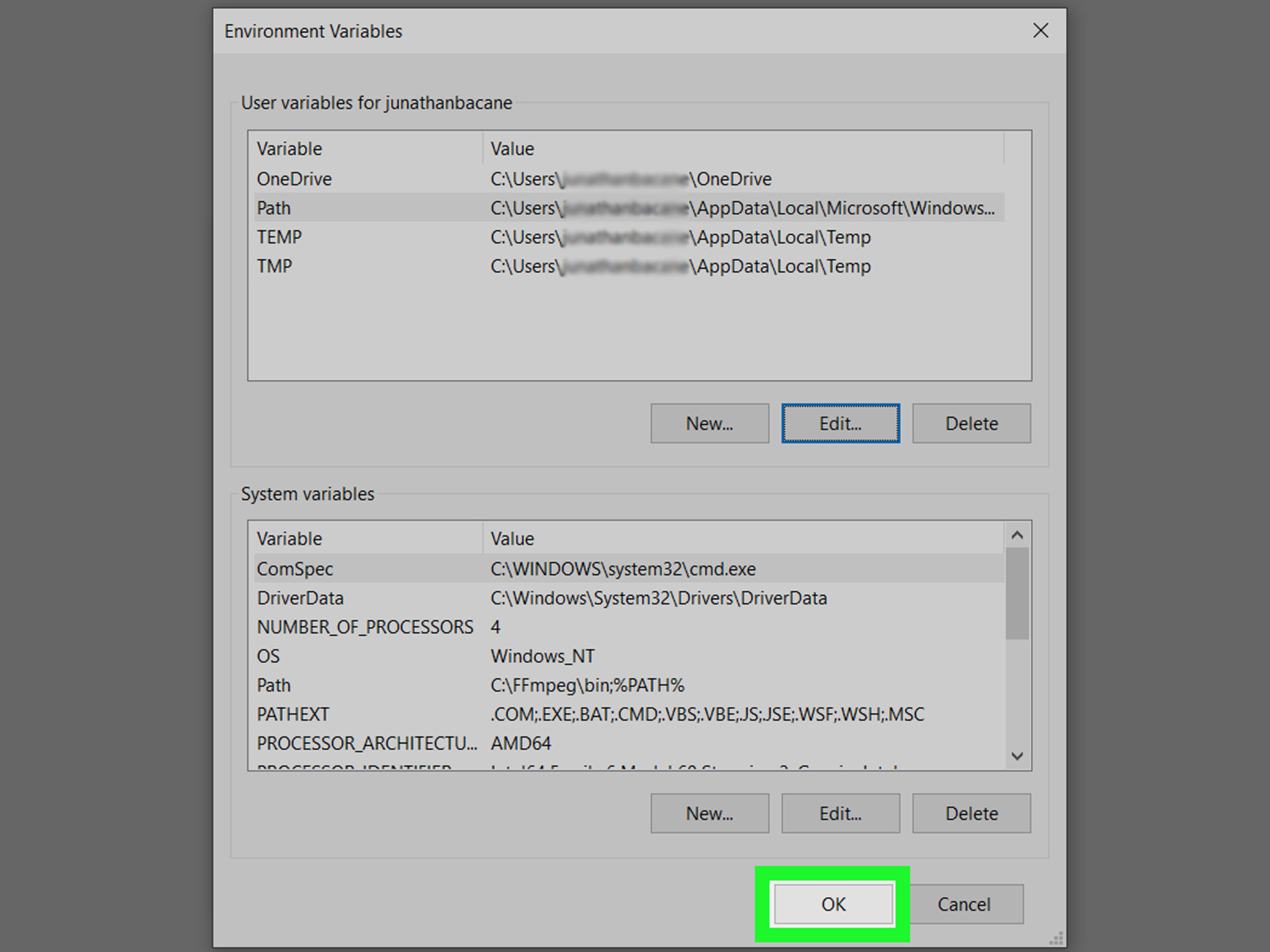
wikiHow
FFmpeg is an open-source media tool you can use to convert any video format into the one you need. The tool is command-line only, which means it doesn't have a graphical, clickable interface. If you're used to installing regular graphical...
@astral cobalt
astral cobalt
same thing for mac?
but the mac version instead of windows
do I just clone the git to the folder my bot is in?
verbal cairn
anyone know how I can update the options in a dropdown menu when a command is used, and how I can change the view to the updated options view
maiden fable
verbal cairn
anyone know how I can update the options in a dropdown menu when a command is us...
await msg.edit(view=NewView())
verbal cairn
maiden fable
await msg.edit(view=NewView())
I do that in the dropdown class?
maiden fable
verbal cairn
I do that in the dropdown class?
View class
Where u wanna edit the message with a new view
compact harbor
tiny ibex
https://www.wikihow.com/Install-FFmpeg-on-Windows
Use ffmpeg with Python binding, there is a library you can use.
!pypi ffmpeg-python
!pypi ffmpeg-python
unkempt canyonBOT

Python bindings for FFmpeg - with complex filtering support
tiny ibex
compact harbor
Use ffmpeg with Python binding, there is a library you can use.
!pypi ffmpeg-py...
Hmm but I recommend raw FFmpeg
Just my wish
¯_(ツ)_/¯
 gleaming hatch
(Discord.py) My mind is melting while trying to understand Cooldown and CooldownMapping 🤦
I wanted to detect spam messages that is sent to every channel...
And CooldownMapping isn't documented, how can i learn about these or could someone explain me?
slate swan
gleaming hatch
I wanted to detect spam messages that is sent to every channel...
!custom-cooldown
unkempt canyonBOT
Cooldowns in discord.py
Cooldowns can be used in discord.py to rate-limit. In this example, we're using it in an on_message.
from discord.ext import commands

message_cooldown = commands.CooldownMapping.from_cooldown(1.0, 60.0, commands.BucketType.user)

@bot.event
async def on_message(message):
    bucket = message_cooldown.get_bucket(message)
    retry_after = bucket.update_rate_limit()
    if retry_after:
        await message.channel.send(f"Slow down! Try again in {retry_after} seconds.")
    else:
        await message.channel.send("Not ratelimited!")
from_cooldown takes the amount of update_rate_limit()s needed to trigger the cooldown, the time in which the cooldown is triggered, and a BucketType.
slate swan
this may be helpful
gleaming hatch
So, what CooldownMapping and get_bucket does? And what is a bucket
Sorry if i am being dumb, my mind is melting right now :(.
 lament depotBOT
You have to stop.
@dapper cobalt, please enable your DMs to receive the bookmark.
 dapper cobalt
unkempt canyon
dapper cobalt
unkempt canyon
.bm
prisma spoke
class Close(nextcord.ui.View):
    def __init__(self):
        super().__init__()
        self.value = None

    @nextcord.ui.button(label = "Close", style=nextcord.ButtonStyle.red)
    async def tClose(self, button: nextcord.ui.Button, interaction: nextcord.Interaction):
        if interaction.user.guild_permissions.manage_messages:
            await interaction.channel.delete()
        elif interaction.user.guild_permissions.manage_messages is not True:
            await interaction.channel.set_permissions(interaction.user, view_channel=False)

        self.value=True

class Tickett(nextcord.ui.View):
    def __init__(self):
        super().__init__()
        self.value = None

    @nextcord.ui.button(label = "Paid Ticket", style=nextcord.ButtonStyle.gray)
    async def inv(self, button: nextcord.ui.Button, interaction: nextcord.Interaction):
        categ = nextcord.utils.get(interaction.guild.categories, id=918104010135834674)
        await interaction.response.send_message("Creating a ticket for you, this may take a while!", ephemeral=True)
        ticket_channel = await categ.create_text_channel(name=f"{button.label}{interaction.user.name}")
        embed=nextcord.Embed(description=f"<#{ticket_channel.id}> - Your ticket has been created")
        await interaction.edit_original_message(embed=embed)
        await ticket_channel.set_permissions(interaction.user, read_messages=True, send_messages=True)
        view=Close()
        await ticket_channel.send(f"{interaction.user.mention}")
        embed = nextcord.Embed(title=f"Support Needed!", description=f"A ticket opened by **{interaction.user.name}**,\n Server Display name is **{interaction.user.display_name}**\n Support will be with you soon!\, Please describe your problem in the chat!\n The **Close button** can only be used by staffs with manage messages perms!", color=0xFF0000 )
        await ticket_channel.send(embed=embed, view=view)

self.value=True```i have this ticket sys right here...i want that in the class of "Tickett" the interaction.user...who opened the channel...his perms of view_channel shud be false whenever someone clicks the close button
how to do it?
small igloo
sup

 valid barn
how can i get a list of all the command author's roles?
 leaden jasper
how can i only get channels that my bot can see, because for channel in ctx.guild.channels shows every channel in the server
leaden jasper
valid barn
how can i get a list of all the command author's roles?
!d discord.Member.roles
unkempt canyonBOT
property roles: List[Role]```
A [`list`](https://docs.python.org/3/library/stdtypes.html#list "(in Python v3.9)") of [`Role`](https://discordpy.readthedocs.io/en/master/api.html#discord.Role "discord.Role") that the member belongs to. Note that the first element of this list is always the default [‘@everyone](mailto:'%40everyone)’ role.

These roles are sorted by their position in the role hierarchy.all the details aka role object
unkempt canyonBOT
class discord.Role```
Represents a Discord role in a [`Guild`](https://discordpy.readthedocs.io/en/master/api.html#discord.Guild "discord.Guild")...how can i make it return only name tho
 unkempt canyonBOT
The name of the role.
leaden jasper
for role in ctx.author.roles:
  print(role.name)
await ctx.send(', '.join([role.name for role in ctx.author.roles]))
ty, what if i want to make it into a list var instead of sending it..?
valid barn
leaden jasper
```py
await ctx.send(', '.join([role.name for role in ctx.author.roles]))
```
do i do this outside of the loop?
valid barn
yeah i think so
valid barn
valid barn
do i do this outside of the loop?
?
upbeat otter
leaden jasper
```py
listVariable = [role.name for role in ctx.author.roles]
```
yeah you can use list comprehensions
leaden jasper
outside of wut loop?
valid barn
the for loop
upbeat otter
leaden jasper
outside of wut loop?
for
leaden jasper
the for loop is in one line
prisma spoke
prisma spoke
```py
class Close(nextcord.ui.View):
def __init__(self):
super().__i...
anyone?
boreal ravine
valid barn
the `for` loop
no, you either choose the list comprehension or use the for loop, both is the same
leaden jasper
how can i only get channels that my bot can see, because for channel in ctx.guild.channels shows every channel in the server
prisma spoke
leaden jasper
how can i only get channels that my bot can see, because for channel in ctx.guil...
no?
upbeat otter
leaden jasper
```py
listVariable = [role.name for role in ctx.author.roles]
```
listVariable = [role.name for role in ctx.author.roles]
'''
or
'''
for role in ctx.author.roles: i = role.name #do other stuff
same thing
boreal ravine
leaden jasper
how can i only get channels that my bot can see, because for channel in ctx.guil...
are you sure?
boreal ravine
are you sure it doesnt have admin or anything
leaden jasper
upbeat otter
```py
listVariable = [role.name for role in ctx.author.roles]
'''
or
'''
for rol...
i was helping the other guy
leaden jasper
boreal ravine
are you sure it doesnt have admin or anything
yep
it doesn't have admin
upbeat otter
leaden jasper
i was helping the other guy
I was just stating that both are the same ,-,
boreal ravine
leaden jasper
yep
no idea but you could loop through the the guilds channels permissions and see if the bot has the view_channel permission and if it does, append it to a list or something
valid barn
upbeat otter
```py
listVariable = [role.name for role in ctx.author.roles]
'''
or
'''
for rol...
thx
leaden jasper
boreal ravine
no idea but you could loop through the the guilds channels permissions and see i...
how can i check for permissions with a channel object
 boreal ravine
^^ you can iterate through that and check if your bot has a certain permission
visual island
isinstance(channel, CategoryChannel)
valid barn
    roles = [role.name for role in ctx.author.roles]
    print(roles)
    rolename = await client.wait_for('message', check = check, timeout = 20)
    if rolename in roles:
      await ctx.send(embed=discord.Embed(description="Ok!!"))
    else:
      await ctx.send(embed=discord.Embed(description="You don't have that role!"))
sends "you dont have that role" even though i do. i printed the list roles out and the role i wrote was there? whats the problem?
maiden fable
Try printing rolename
valid barn
boreal ravine
~~~PEP8~~
?
valid barn
maiden fable
rolename is a discord.Message object
is the content with a ()?
slate swan
no
maiden fable
No it's a property
boreal ravine
imagine danny made that a method
valid barn
k
valid barn
thx it works
now how do i get a role from its role name alone?
is there any other way than using utils?
boreal ravine
valid barn
is there any other way than using `utils`?
i dont think so
valid barn
ok how do i use it with utils
slate swan
you would have to loop thru guild.roles , but utils.get does the same already
slate swan
valid barn
ok how do i use it with `utils`
!d discord.utils.get
unkempt canyonBOT
discord.utils.get(iterable, **attrs)```
A helper that returns the first element in the iterable that meets all the traits passed in `attrs`. This is an alternative for [`find()`](https://discordpy.readthedocs.io/en/master/api.html#discord.utils.find "discord.utils.find").

When multiple attributes are specified, they are checked using logical AND, not logical OR. Meaning they have to meet every attribute passed in and not one of them.

To have a nested attribute search (i.e. search by `x.y`) then pass in `x__y` as the keyword argument.

If nothing is found that matches the attributes passed, then `None` is returned.

Examples

Basic usage...so basically utils.get(guild.roles , name='role name')
maiden fable
No
valid barn
therole = utils.get(ctx.guild.roles , name='role name') like this?
@maiden fable@slate swan??
slate swan
sure
valid barn
it says utils is undefined
visual island
discord.utils
valid barn
from discord import utils?
maiden fable
Yea
spring verge
is there a way to tell with pillow where the text is ending? like over here how to tell pillow that I want to put discriminator after the username

I know I could just join the two strings
but then I also want different fonts for them
valid barn
code:```py
therole = utils.get(ctx.guild.roles , name=rolename)
print(therole)
```py
None``` why?wrong role name
valid barn
tawdry perch
wrong role name
roles = [role.name for role in ctx.author.roles]
print(roles)
rolename = await client.wait_for('message', check = check, timeout = 20)
if rolename.content in roles:
   await ctx.send(embed=discord.Embed(description="Ok!!"))
   therole = utils.get(ctx.guild.roles , name=rolename)
   print(therole)
how it is wrong??
boreal ravine
valid barn
```py
roles = [role.name for role in ctx.author.roles]
print(roles)
rolename = a...
do rolename.content in the name kwarg.
 final iron
spring verge
is there a way to tell with pillow where the text is ending? like over here how ...
final iron
spring verge
is there a way to tell with pillow where the text is ending? like over here how ...
Claim a help channel or ask in #python-discussion
spring verge
final iron
Claim a help channel or ask in <#267624335836053506>
I thought help channel is for coding related errors etc?
valid barn
boreal ravine
do rolename.content in the `name` kwarg.
ohh i always forget
unkempt canyonBOT
Per Python Discord's Rule 5, we are unable to assist with questions related to youtube-dl, pytube, or other YouTube video downloaders, as their usage violates YouTube's Terms of Service.
For reference, this usage is covered by the following clauses in YouTube's TOS, as of 2021-03-17:
The following restrictions apply to your use of the Service. You are not allowed to:

1. access, reproduce, download, distribute, transmit, broadcast, display, sell, license, alter, modify or otherwise use any part of the Service or any Content except: (a) as specifically permitted by the Service;  (b) with prior written permission from YouTube and, if applicable, the respective rights holders; or (c) as permitted by applicable law;

3. access the Service using any automated means (such as robots, botnets or scrapers) except: (a) in the case of public search engines, in accordance with YouTube’s robots.txt file; (b) with YouTube’s prior written permission; or (c) as permitted by applicable law;

9. use the Service to view or listen to Content other than for personal, non-commercial use (for example, you may not publicly screen videos or stream music from the Service)
 zinc mural
is discord.py
boreal ravine
no, is youtube_dl
final iron
spring verge
I thought help channel is for coding related errors etc?
This would also be appropriate
 mental wadi
is js better than python for good bots ?
slate swan
ye
sage otter
mental wadi
is js better than python for good bots ?
It’s all preference
slate swan
slate swan
how do i send a img to discord webhoook
send takes an file/files kwarg , use it
!d discord.Webhook.send
unkempt canyonBOT
await send(content=..., *, username=..., avatar_url=..., tts=False, ephemeral=False, file=..., files=..., embed=..., embeds=..., allowed_mentions=..., view=..., thread=..., wait=False)```
This function is a [*coroutine*](https://docs.python.org/3/library/asyncio-task.html#coroutine).

Sends a message using the webhook.

The content must be a type that can convert to a string through `str(content)`.

To upload a single file, the `file` parameter should be used with a single [`File`](https://discordpy.readthedocs.io/en/master/api.html#discord.File "discord.File") object.

If the `embed` parameter is provided, it must be of type [`Embed`](https://discordpy.readthedocs.io/en/master/api.html#discord.Embed "discord.Embed") and it must be a rich embed type. You cannot mix the `embed` parameter with the `embeds` parameter, which must be a [`list`](https://docs.python.org/3/library/stdtypes.html#list "(in Python v3.9)") of [`Embed`](https://discordpy.readthedocs.io/en/master/api.html#discord.Embed "discord.Embed") objects to send.shopp.append({'name', rolename.content, 'price':price.content, 'desc':desc.content})
it underlines this 'price':price.content, 'desc':desc.content}) and says invalid syntax why? 😭
 vocal plover
because you put a comma after 'name' not a colon
that makes it a set, not a dict, so when you treat it as a dict later its seen as an error
slate swan
Good morning guys
tawdry perch
Good day
visual island
good night
slate swan
!d print spring dale senior school 10 times
unkempt canyonBOT
print(*objects, sep=' ', end='\n', file=sys.stdout, flush=False)```
Print *objects* to the text stream *file*, separated by *sep* and followed by *end*. *sep*, *end*, *file*, and *flush*, if present, must be given as keyword arguments.

All non-keyword arguments are converted to strings like [`str()`](https://docs.python.org/3/library/stdtypes.html#str "str") does and written to the stream, separated by *sep* and followed by *end*. Both *sep* and *end* must be strings; they can also be `None`, which means to use the default values. If no *objects* are given, [`print()`](https://docs.python.org/3/library/functions.html#print "print") will just write *end*.

The *file* argument must be an object with a `write(string)` method; if it is not present or `None`, [`sys.stdout`](https://docs.python.org/3/library/sys.html#sys.stdout "sys.stdout") will be used. Since printed arguments are converted to text strings, [`print()`](https://docs.python.org/3/library/functions.html#print "print") cannot be used with binary mode file objects. For these, use `file.write(...)` instead.
Similar names: 2to3fixer.print
visual island
hmm?
valid barn
vocal plover
because you put a comma after 'name' not a colon
oh tysm
 west shuttle
can i ask a question?
slate swan
thats what the channel is meant for
 gaunt ice
oof
west shuttle
Lol
So i have a thanks counter... all good but when im trying to get the data its just showing []
gaunt ice
ur pfp is pog
gaunt ice
west shuttle
So i have a thanks counter... all good but when im trying to get the data its ju...
um I don't understand
west shuttle
gaunt ice
ur pfp is pog
Thx lol
slate swan
west shuttle
So i have a thanks counter... all good but when im trying to get the data its ju...
it that some database , list , dict or smthing?
also , show related code
west shuttle
Wait
west shuttle
slate swan
also , show related code
    @commands.command()
    async def thanks(self, ctx, member: discord.Member):
        thanks = await self.db.execute("SELECT * from thxcounter where user_id = ?",(member.id,))
        counter = await thanks.fetchall()
        print(counter)
        em = discord.Embed(
            title=f"{member}'s thanks",
            description=f"**You have a total of `{counter}` thanks!**")
        await ctx.send(embed=em)
have you commit when updating the db?
slate swan
west shuttle
```py
@commands.command()
async def thanks(self, ctx, member: discord.Me...
it means there's no data for the member..... , how do you insert data?
west shuttle
visual island
have you commit when updating the db?
Yea
west shuttle
slate swan
it means there's no data for the member..... , how do you insert data?
await self.db.execute("INSERT INTO thxcounter (user_id, thanks) VALUES (?, ?)", (member.id, + 1))
        await self.db.commit()
and at what event does it take place? you can have a print statement there to check if its actually getting added
( also ,as per your code the +1 changes the thanks to 1 , not add 1 to it.)
west shuttle
slate swan
( also ,as per your code the `+1` changes the `thanks` to 1 , not add 1 to it.)
Ik
west shuttle
slate swan
and at what event does it take place? you can have a print statement there to ch...
What i need to print?
slate swan
https://inloop.github.io/sqlite-viewer/ open the db here and try checking if the member id is in db
sqlite file viewer
west shuttle
slate swan
https://inloop.github.io/sqlite-viewer/ open the db here and try checking if the...
 visual island
west shuttle
```py
@commands.command()
async def thanks(self, ctx, member: discord.Me...
visual island
west shuttle
```py
@commands.command()
async def thanks(self, ctx, member: discord.Me...
you need to fetch with Cursor object
slate swan
west shuttle
```py
await self.db.execute("INSERT INTO thxcounter (user_id, thanks) VALUES (?,...
you miss a , in the (member.id, + 1)
add one at the last
visual island
await self.db.cursor().fetchall() try that
west shuttle
visual island
`await self.db.cursor().fetchall()` try that
AttributeError: 'Result' object has no attribute 'fetchall'
visual island
slate swan
you miss a `,` in the `(member.id, + 1)`
they dont, only a one elem tuple needs the last extra comma
slate swan
visual island
they dont, only a one elem tuple needs the last extra comma
oh , i see
west shuttle
visual island
they dont, only a one elem tuple needs the last extra comma
^^^^^^
visual island
west shuttle
AttributeError: 'Result' object has no attribute 'fetchall'
'Result' object?
show updated code
west shuttle
visual island
show updated code
@commands.command()
    async def thanks(self, ctx, member: discord.Member):
        thanks = await self.db.execute("SELECT * from thxcounter where user_id = ?",(member.id,))
        counter = await self.db.cursor().fetchall()
        print(counter)
        em = discord.Embed(
            title=f"{member}'s thanks",
            description=f"**You have a total of `{counter}` thanks!**")
        await ctx.send(embed=em)
what is self.db? Cursor object? Or Connection?
west shuttle
visual island
what is self.db? Cursor object? Or Connection?
its aiosqlite
import discord
from discord.ext import commands, tasks
import aiosqlite

class thanks(commands.Cog):
    def __init__(self, bot):
        self.bot = bot
        self.db = None
        self.bot.loop.create_task(self.connect_database())
erm.. how should I handle this? ```py
disnake.ext.commands.errors.NoEntryPointError: Extension 'MyBot.cogs.moderation.init' has no 'setup' function
show connect_database() method
west shuttle
visual island
show connect_database() method
async def connect_database(self):
        self.db = await aiosqlite.connect("main.db")
you can see if file.startswith("__") then dont load it
tawdry perch
oo
visual island
west shuttle
```py
async def connect_database(self):
self.db = await aiosqlite.connec...
should be good, one sec I'll look through aiosqlite docs
tawdry perch
visual island
you can see if file.startswith("__") then dont load it
Currently the loop appends the extensions to list, is there a way to not do that add without breaking the loop
visual island
west shuttle
AttributeError: 'Result' object has no attribute 'fetchall'
so... Result class is either undocumented or it doesn't exists..
visual island
tawdry perch
Currently the loop appends the extensions to list, is there a way to not do tha...
continue keyword?
tawdry perch
hm
visual island
will pass the rest of the code inside the loop and go to the next elem
west shuttle
visual island
so... Result class is either undocumented or it doesn't exists..
Thats why i did thanks.fetchall()
tawdry perch
visual island
`continue` keyword?
if file.endswith('.py') and not file.startswith("__")
    ...#do stuff
else:
    continue
 snow flare
So I am using pycord to create a discord bot, and I am trying to implement a verification for the users, through a message, under which you have to react with a tick.
But when I use the on_row_reaction_add function, I get a correct payload with the channel id, guild id, user id, and everything else. But when I try to get the member that made the reaction using the user_id from the payload, it just returns None. This is how I try to get the member:
member = self.get_user(payload.user_id)
ah yea, Connection.execute() returns Cursor object so your code is fine
visual island
tawdry perch
```py
if file.endswith('.py') and not file.startswith("__")
...#do stuff
el...
sure
 loud junco
 visual island
snow flare
So I am using pycord to create a discord bot, and I am trying to implement a ve...
visual island
snow flare
So I am using pycord to create a discord bot, and I am trying to implement a ve...
enable intents.members
 west shuttle
visual island
ah yea, `Connection.execute()` returns Cursor object so your code is fine
west shuttle
visual island
ah yea, `Connection.execute()` returns Cursor object so your code is fine
So what is the problem
snow flare
visual island
enable intents.members
how do I do that?
visual island
what type is user_id? INTEGER?
loud junco
ya
west shuttle
visual island
what type is user_id? INTEGER?
Yes.
snow flare
visual island
what type is user_id? INTEGER?
yes
visual island
snow flare
how do I do that?
!intents
unkempt canyonBOT
Using intents in discord.py
Intents are a feature of Discord that tells the gateway exactly which events to send your bot. By default, discord.py has all intents enabled, except for the Members and Presences intents, which are needed for events such as on_member and to get members' statuses.
To enable one of these intents, you need to first go to the Discord developer portal, then to the bot page of your bot's application. Scroll down to the Privileged Gateway Intents section, then enable the intents that you need.
Next, in your bot you need to set the intents you want to connect with in the bot's constructor using the intents keyword argument, like this:
from discord import Intents
from discord.ext import commands

intents = Intents.default()
intents.members = True

bot = commands.Bot(command_prefix="!", intents=intents)
For more info about using intents, see the discord.py docs on intents, and for general information about them, see the Discord developer documentation on intents.
west shuttle
snow flare
yes
Bruh
snow flare
visual island
!intents
thanks
visual island
loud junco
can the bot see the emoji?
visual island
west shuttle
Yes.
can you try do SELECT * FROM thxcounter just in case
loud junco
visual island
can the bot see the emoji?
its in the server
snow flare
@visual island I've added the intents, and still doesn't work. For some reason it still returns None
loud junco
this is working tho
 west shuttle
visual island
can you try do `SELECT * FROM thxcounter` just in case
west shuttle
visual island
can you try do `SELECT * FROM thxcounter` just in case
Thats the code i have
 loud junco
wait.. u cant do that with custom emoji???
visual island
loud junco
probably youre using a message's id instead of the emoji's id. How did you copy the emoji id?
loud junco
visual island
probably youre using a message's id instead of the emoji's id. How did you copy ...
i right click the emoji
lemme try again
visual island
snow flare
<@!650447110402998302> I've added the intents, and still doesn't work. For some ...
show code where you load the intents
visual island
west shuttle
without the WHERE ...
west shuttle
visual island
without the `WHERE ...`
Oh
loud junco
906181459172282412-921026726304317470
visual island
thats the message id
visual island
yea
visual island
no
west shuttle
visual island
without the `WHERE ...`
 loud junco
visual island
no
loud junco
visual island
no
:/
tawdry perch
rip it can't load extensions with that method
visual island
loud junco
906181459172282412-921026726304317470
channelid-messageid
visual island
loud junco
921026726304317470
messageid
 west shuttle
west shuttle
west shuttle
@visual island
loud junco
:pogchop:
visual island
west shuttle
if you print member.id does it print the same id that's in the tuple?
visual island
tawdry perch
rip it can't load extensions with that method
why not
tawdry perch
I keep getting "extesion alrd loaded", even after I stop the bot and restart it, why is that?
is it cached or smth
visual island
tawdry perch
is it cached or smth
no
west shuttle
visual island
if you print member.id does it print the same id that's in the tuple?
Yes
visual island
cache should be restarted after you stop the program
loud junco
921028171145576478?
visual island
its not a custom emoji so None
tawdry perch
hm
loud junco
oo
visual island
tawdry perch
I keep getting "extesion alrd loaded", even after I stop the bot and restart it,...
show code
valid barn
is there something like json but it uses lists instead of dicts?
visual island
no, but why
tawdry perch
ext = []

for folder in os.listdir('MyBot/cogs/moderation'):
    if folder.endswith('.py') and not folder.startswith("__"):
        bot.load_extension(f"MyBot.cogs.moderation.{folder[:-3]}")
        ext.append(f"MyBot.cogs.moderation.{folder[:-3]}")
    else:
        continue

    for subfolder in os.listdir('MyBot/cogs/other'):
        if subfolder.endswith('.py') and not subfolder.startswith("__"):
            bot.load_extension(f"MyBot.cogs.other.{subfolder[:-3]}")
            ext.append(f"MyBot.cogs.other.{subfolder[:-3]}")
        else:
            continue
you can just do things with json eg.
{
    "list": [...]
}
dont do a nested loop there
tawdry perch
It works with nested loop, why is that bad?
visual island
"it works"? You said it raised extension already loaded
tawdry perch
I fixed it
I removed the bot.load_extension from loop, and loaded ext which is a list
west shuttle
visual island
if you print member.id does it print the same id that's in the tuple?
YYes
visual island
tawdry perch
It works with nested loop, why is that bad?
the inner loop will be executed x times. x is the number of times of the outer loop got execute so it will load it multiple times
tawdry perch
hm I see, so I should keep them seperate?
visual island
yes
 heavy folio
need help with commands.MinimalHelpCommand, here's my code: https://paste.pythondiscord.com/jixatocale.properties
without any args https://cdn.discordapp.com/attachments/381965515721146390/921026829710684180/unknown.png

with args (help about a specific command) https://cdn.discordapp.com/attachments/381965515721146390/921026853504958504/unknown.png
 heavy folio
!pypi jishaku
unkempt canyonBOT
A discord.py extension including useful tools for bot development and debugging.
slate swan
tawdry perch
what is "jishaku"?
Are you using disnake?
tawdry perch
ye
visual island
west shuttle
YYes
 , your code is 100% correct
slate swan
!pypi disnake-jishaku
unkempt canyonBOT
A disnake extension including useful tools for bot development and debugging.
tawdry perch
I was just curious of what that was because I have seen it few times
west shuttle
visual island
<:angelAWShikiconfused:812836055802970203>, your code is 100% correct
[] means list, right? how do i make that list to show only the counter?
slate swan
its a bot extension maintained by kraots
heavy folio
heavy folio
need help with commands.MinimalHelpCommand, here's my code: https://paste.python...
^^^
visual island
west shuttle
[] means list, right? how do i make that list to show only the counter?
SELECT counter FROM table
 slate swan
one of the things it can do
heavy folio
you can also reload/unload extensions and many other stuff
slate swan
log out to
heavy folio
for some reason logout doesnt work for me smoetimes 
slate swan
weird mine does
heavy folio
it just auto logs back in after awhile
visual island
heavy folio
need help with commands.MinimalHelpCommand, here's my code: https://paste.python...
whats the issue
tawdry perch
heavy folio
you can also reload/unload extensions and many other stuff
those are in build features, right?
tawdry perch
nice
heavy folio
visual island
whats the issue
if i do .help command_name, it responds with plain text (although i have this:```py
async def send_command_help(self, command):
embed = discord.Embed(title=self.get_command_signature(command))
embed = discord.Embed(
title="Help",
color=COLOR,
timestamp=datetime.datetime.now()
)
embed.set_author(
name=self.context.bot.user.name,
icon_url=self.context.bot.user.display_avatar.url
)
    alias = command.aliases
    if alias:
        embed.add_field(name="Aliases", value=", ".join(alias), inline=False)

    channel = self.get_destination()
    await channel.send(embed=embed)
```if i do .help without args then it'll send the embed (as it should)
slate swan
it will show all the commands
tawdry perch
so it's like disnake, but different name
slate swan
tawdry perch
so it's like disnake, but different name
which?
slate swan
no its an extension
tawdry perch
oo
west shuttle
visual island
SELECT counter FROM table
 heavy folio
tawdry perch
heavy folio
tawdry perch
so it wont change my code?
slate swan
bot.load_extension("jishaku") even if you download the disnake version
slate swan
tawdry perch
so it wont change my code?
no its an extension
tawdry perch
nice
slate swan
yep
tawdry perch
maybe I could add that
visual island
heavy folio
if i do `.help command_name`, it responds with plain text (although i have this:...
maybe you have an external lib that changes the help command? Maybe jishaku?
slate swan
tawdry perch
maybe I could add that
pretty useful
heavy folio
hmm
visual island
west shuttle
yea?
heavy folio
let's see
tawdry perch
slate swan
!pypi disnake-jishaku
!remind 23h read dis/install it
unkempt canyonBOT
Not in my house!
Sorry, you can't do that here!
west shuttle
visual island
yea?
Thats the new respond
tawdry perch
brehh
visual island
west shuttle
Thats the new respond
so, its working?
heavy folio
visual island
maybe you have an external lib that changes the help command? Maybe jishaku?
now it's like this 

also how do i hide jishaku from help
visual island
heavy folio
now it's like this <:hotanimegirl2:848640232865398846>
thats the wanted output isn't it?
west shuttle
visual island
so, its working?
No.. I want to show it as one number like: 3


 visual island
west shuttle
No.. I want to show it as one number like: 3
visual island
west shuttle
No.. I want to show it as one number like: 3
in that case, you have 3 results with that query, if you want 1 query only, then use fetchone()
also slice it to 0
lament mesa
west shuttle
cursor.fetchall() returns a list of tuples
tawdry perch
indexing that output is fun
west shuttle
visual island
in that case, you have 3 results with that query, if you want 1 query only, then...
I want all to connect to one number

i guess i have a solution
igtg
visual island
heavy folio
nope
for the Help field use command.description (I personally use command.callback.__doc__ hehe). And for the Aliases field your current code is right, just the command has no aliases
sage otter
For the doc string?
visual island
yep
unkempt canyonBOT
The long help text for the command.
sage otter
That’s what I use atleast for doc strings.
visual island
it doesn't include indentation stuff iirc
sage otter
oh?