#discord-bots
1 messages · Page 646 of 1
 boreal ravine
 kindred drum
this shouldn't matter i dont think
 tawdry perch
it's in pydis youtube channel
tawdry perch
kindred drum
this shouldn't matter i dont think
it does afaik
boreal ravine
kindred drum
this shouldn't matter i dont think
it should
 slate swan
tawdry perch
it's in pydis youtube channel
slate swan
tawdry perch
it's in pydis youtube channel
Im going too watch it be right back
 sage otter
Made by one of this servers owners: https://www.youtube.com/watch?v=hgI0p1zf31k
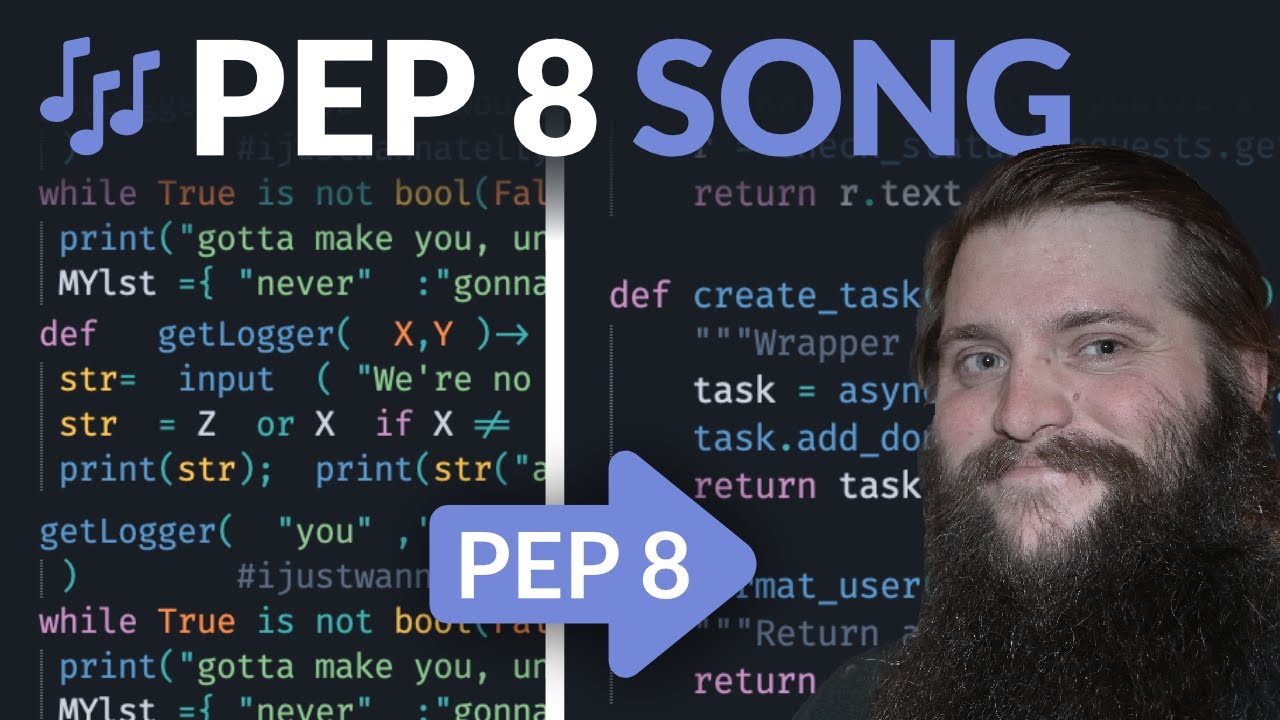
A songification of that most holiest of Python Enhancement Proposals, the PEP 8.
Based on an idea by Daniel "Mr. Hemlock" Brown.
Written and performed by Leon Sandøy, A.K.A. lemonsaurus.
Music and melody from Mad World by Roland Orzabal. This version was inspired by the version released by Gary Jules.
🌎 Website: https://pythondiscord.com/
💬 ...
slate swan
async def on_reaction_add(reaction, user):
  Channel = 915552800350535750
    if reaction.message.channel.id != Channel:
        print(Channel)
        print("invalid channel")
        print(reaction.message.channel.id)
        return
    if reaction.emoji == "🏃":
      roletoAdd = 0000 ## put the id here
      role = user.guild.get_role(roletoAdd)
await user.add_roles(role)```this also
tawdry perch
^
slate swan
sage otter
Made by one of this servers owners: https://www.youtube.com/watch?v=hgI0p1zf31k
Thank you my good sir
raw reaction add yes?
boreal ravine
slate swan
```@bot.event
async def on_reaction_add(reaction, user):
Channel = 91555280035...
member is gonna be undefined
kindred drum
IT WORKS!
boreal ravine
where are you getting the member variable from
slate swan
boreal ravine
where are you getting the `member` variable from
oof
boreal ravine
Cool
slate swan
instincts moment
kindred drum
slate swan
```@bot.event
async def on_reaction_add(reaction, user):
Channel = 91555280035...
      await user.add_roles(user, role)``` doesn't work but
```roleID = 915553473653801031
      roleObj = user.guild.get_role(roleID)
await user.add_roles(roleObj)``` doesbecause add_roles() doesn’t take any user argument
boreal ravine
kindred drum
```role = discord.utils.get(user.guild.roles,name="Verified")
await user.a...
Which one doesn't work exactly? discord.utils one will obviously work, second one wont because it only takes 1 argument
slate swan
sage otter
because add_roles() doesn’t take any user argument
i fixed this in the code block i sent
also, does reaction actually contain the reaction info? iirc, i had to use on_raw_reaction_add to get that
boreal ravine
slate swan
also, does ``reaction`` actually contain the reaction info? iirc, i had to use o...
yes
slate swan
hm
boreal ravine
a discord.Reaction object
slate swan
i remember the issue i had with that was the cache
i had to use raw reaction add instead of the normal one to get it to work correctly
kindred drum
slate swan
i had to use raw reaction add instead of the normal one to get it to work correc...
oof
slate swan
kindred drum
oof
heyyy the code works now
slate swan
on_reaction_remove 👀
kindred drum
async def on_ready():
    Channel = bot.get_channel(915552800350535750)
    Moji = await Channel.send("se")
    await discord.Message.add_reaction(Moji, emoji='🏃')

@bot.event
async def on_reaction_add(reaction, user):
    Channel = 915552800350535750
    if reaction.message.channel.id != Channel:
        print(Channel)
        print("invalid channel")
        print(reaction.message.channel.id)
        return
    if reaction.emoji == "🏃":
      roleID = 915553473653801031
      roleObj = user.guild.get_role(roleID)
await user.add_roles(roleObj)``` this works and I didn't need to use the raw reaction thingig discord just hates me lol
kindred drum
lol
sage otter
Nah on_reaction_add only fires when the message that gets reacted to is in cache.
raw works with anything.
slate swan
sage otter
Nah on_reaction_add only fires when the message that gets reacted to is in cache...
yesss that was the problem lol
i remember now
the cache is my #1 enemy lmfao
slate swan
sage otter
Made by one of this servers owners: https://www.youtube.com/watch?v=hgI0p1zf31k
So beautiful almost made me cry 😭
😭
how to resolve this error
ModuleNotFoundError: No module named 'plugin'```Code?
 final iron
Install plugin
 upbeat otter
final iron
Install `plugin`
upbeat otter
final iron
Install `plugin`
what if the file is local
slate swan
final iron
Install `plugin`
not working
upbeat otter

slate swan
 slate swan
upbeat otter
code?
slate swan
upbeat otter
code?
its private code
 sullen shoal
lol
upbeat otter
slate swan
its private code
yeah, top secret
upbeat otter
slate swan
is it some local file ,-,
 unkempt canyonBOT

No summary provided.
tawdry perch
slate swan
its private code
So there is problem in code but you can't share it here but want us to fix it?
upbeat otter
tawdry perch
So there is problem in code but you can't share it here but want us to fix it?
"top secret"
slate swan
from plugin import Plugin```Am I invisible ,-,
tawdry perch
!pypi plugin
unkempt canyonBOT
No summary provided.
upbeat otter
slate swan
```py
from plugin import Plugin```
shit, this is too private
tawdry perch
Uuuh I don't think it's that
sullen shoal
slate swan
```py
from plugin import Plugin```
how is this related to discord bot development
upbeat otter
upbeat otter
<@456226577798135808> https://packaging.python.org/guides/analyzing-pypi-package...
.
final iron
@slate swan what does the plugin module do
tawdry perch
upbeat otter
Am I invisible ,-,
Yes you are
slate swan
upbeat otter
shit, this is too private
its a import only ;-;
slate swan
tawdry perch
Yes you are
ephemeral user
upbeat otter
slate swan
its a import only ;-;
humor is no more ig
upbeat otter
upbeat otter
<@456226577798135808> https://packaging.python.org/guides/analyzing-pypi-package...
@slate swan will you stop ignoring me ,-,
upbeat otter
slate swan
'-'
,-,
final iron
There's an issue with its dependences
upbeat otter
@slate swan try doing pip install Plugin and import from Plugin then
final iron
You should really setup a virtual environment
sullen shoal
why tho
sullen shoal
upbeat otter
why not
that doesn't answer why would you do it
 lethal bloom
Do you have a goodbye message for me? please
upbeat otter
sullen shoal
that doesn't answer why would you do it
lol
upbeat otter
lethal bloom
Do you have a goodbye message for me? please
Bye?
lethal bloom
yes
upbeat otter
smh
lethal bloom
no ;-;
lethal bloom
command bot
upbeat otter
lethal bloom
command bot
oof, bye {member.name}, we won't miss you, doesnt matter if you were here or not, we do not require useless entities like you
thank me later
lethal bloom
oooh
upbeat otter
lol
lethal bloom
thanks
lethal bloom
?
 visual island
lmaoo
visual island
like very
upbeat otter
yeah
 heavy tundra
hi
lethal bloom
upbeat otter
oof, bye {member.name}, we won't miss you, doesnt matter if you were here or not...
I like that goodbye lol
upbeat otter
lethal bloom
I like that goodbye lol
lol, welcome
lethal bloom
I would like when someone leaves a server to send a goodbye
slate swan
upbeat otter
<@456226577798135808> try doing `pip install Plugin` and import from Plugin then
 lethal bloom
upbeat otter
what I wrote would be rude
lethal bloom
upbeat otter
what I wrote would be rude
i know
upbeat otter
slate swan
interesting
upbeat otter
lethal bloom
i know
then its fine
upbeat otter
lethal bloom
I would like when someone leaves a server to send a goodbye
you can use the on_member_remove event
sage otter
sullen shoal
how is this related to discord bot development
….
lethal bloom
upbeat otter
you can use the `on_member_remove` event
I'm new to python, can you show me how? :)
tawdry perch
Please learn python before discord bots, as it will help you in future
slate swan
lethal bloom
I'm new to python, can you show me how? :)
@bot.event
async def on_member_remove(member):
  # do things
last time I said that I got warned
lol
upbeat otter
lethal bloom
I'm new to python, can you show me how? :)
!d discord.on_member_remove
unkempt canyonBOT
discord.on_member_join(member)``````py

discord.on_member_remove(member)```
Called when a [`Member`](https://discordpy.readthedocs.io/en/master/api.html#discord.Member "discord.Member") leaves or joins a [`Guild`](https://discordpy.readthedocs.io/en/master/api.html#discord.Guild "discord.Guild").

This requires [`Intents.members`](https://discordpy.readthedocs.io/en/master/api.html#discord.Intents.members "discord.Intents.members") to be enabled.please, thats not the point
 velvet tinsel
slate swan
upbeat otter
please, thats not the point
what do you mean
upbeat otter
slate swan
what do you mean
its on_member_remove not on_member_leave
slate swan
oh my bad
velvet tinsel
slate swan
last time I said that I got warned
Imagine being warned
slate swan
haven't had my cup of coffee yet
upbeat otter
slate swan
haven't had my cup of coffee yet
lame excuse xD
velvet tinsel
slate swan
haven't had my cup of coffee yet
🥛 have a cuppa milk
slate swan
upbeat otter
lame excuse xD
not everything has to be an excuse
you kinda sound like my professors
upbeat otter
slate swan
not everything has to be an excuse
why not
upbeat otter
slate swan
you kinda sound like my professors
mmm...Interesting
slate swan
velvet tinsel
🥛 have a cuppa milk
thank you comrade
velvet tinsel
upbeat otter
mmm...Interesting
Maybe you are
slate swan
oh
upbeat otter
velvet tinsel
Maybe you are
jajaj, not funny
slate swan
hey ms emily 😳
upbeat otter
slate swan
hey ms emily 😳
my name's not emily
 maiden fable
😐
upbeat otter
velvet tinsel
Hey ms Eevee
oof
sage otter
what if it’s not even a ms
sage otter

velvet tinsel
😳
slate swan
sage otter
what if it’s not even a ms
😳😳
maiden fable
@velvet tinsel do u want a surprise?
 maiden fable
!ot this talk it becoming ot (:
unkempt canyonBOT
Off-topic channels
There are three off-topic channels:
• #ot2-never-nester’s-nightmare
• #ot1-perplexing-regexing
• #ot0-psvm’s-eternal-disapproval
Their names change randomly every 24 hours, but you can always find them under the OFF-TOPIC/GENERAL category in the channel list.
Please read our off-topic etiquette before participating in conversations.
maiden fable
Hehehe
upbeat otter
lol
velvet tinsel
GODDAMMIT HUNTER
maiden fable
(:
velvet tinsel
 slate swan
move to ot before daddy gets mad
maiden fable
But seriously this has become OT
slate swan
😠
maiden fable
slate swan
move to ot before daddy gets mad
It's better to go to an OT chat before a mod comes
upbeat otter
maiden fable
But seriously this has become OT
sorry
velvet tinsel
Let’s go back on topic
maiden fable
😐
velvet tinsel
maiden fable
It's better to go to an OT chat before a mod comes
Sorry
velvet tinsel
Discord bots
maiden fable
Anyways
velvet tinsel
Very cool
upbeat otter
velvet tinsel
Very cool
 maiden fable
;-; let's hope discord verifies my bot after waiting for 2 weeks
slate swan
discord hasn't responded to my quarantine appeal in 2 weeks too
sage otter
velvet tinsel
💀 why
So his bot can grow
velvet tinsel
😳
sage otter
Bots can’t grow past 100 if not verified
maiden fable
velvet tinsel
I thought they didn’t
Why do you say so 😐
velvet tinsel
Oh
maiden fable
slate swan
discord hasn't responded to my quarantine appeal in 2 weeks too
Tf does that mean?
velvet tinsel
I need a verify
 slate swan
maiden fable
;-; let's hope discord verifies my bot after waiting for 2 weeks
slate swan
maiden fable
;-; let's hope discord verifies my bot after waiting for 2 weeks
how did you apply for verification? I thought you needed to be 18 or above?
velvet tinsel
Where to go to v erify
maiden fable
slate swan
how did you apply for verification? I thought you needed to be 18 or above?
16*
slate swan
velvet tinsel
Where to go to v erify
dev portal
maiden fable
velvet tinsel
Where to go to v erify
The bot needs to be in at least 75 servers
sage otter
Hunter you're lucky I’m on mobile right now.
I would of said that shit so much faster.
slate swan
ok
velvet tinsel
I’m planning to release my bot
velvet tinsel
sage otter
Hunter you're lucky I’m on mobile right now.
How fast do you type
maiden fable
Hahaha
velvet tinsel
Top WPM?
maiden fable
O my net sucks ngl
maiden fable
🤷♂️
slate swan
velvet tinsel
Top WPM?
Mines like 100 or less pretty average but my cps is 10, 11 max
maiden fable
Simple thing: I. Don't. Care.
sage otter
velvet tinsel
How fast do you type
Fast enough…
velvet tinsel
slate swan
Mines like 100 or less pretty average but my cps is 10, 11 max
Mine 87 no touch type
💀
slate swan
velvet tinsel
Mine 87 no touch type
🤔
velvet tinsel
If I could touch type possibly 100
maiden fable
Again OT 🤦
velvet tinsel
Cps on iPad gotta be like 30
 slate swan
I could type 140-170 when I used to game lol
Yeah my typing slowed down after I stopped gaming
maiden fable
I guess I am out
unkempt canyonBOT
Hey @slate swan!
It looks like you tried to attach a Python file - please use a code-pasting service such as https://paste.pythondiscord.com
final iron
slate swan
https://paste.pythondiscord.com/ometipukof.py/
What are you trying to show here?
final iron
It says it's forbidden
I don't understand how that would help
I already told you the issue
 placid skiff
Guys for a bot that i'm developing i need to use an ORM database, someone has some suggestion about that?
tawdry perch
slate swan
last time I said that I got warned
Hmm can you link the message so I know for sure 
maiden fable
placid skiff
Guys for a bot that i'm developing i need to use an ORM database, someone has so...
Ya I know a good one

GitHub
An ORM for PostgreSQL written in python. Contribute to Rashaad1268/PostgreSQL-Python-ORM development by creating an account on GitHub.
@lament mesa its good isn't it?
placid skiff
maiden fable
Ya I know a good one
Thanks, i'll check it
lethal bloom
I have another problem
@bot.event
async def on_member_remove(member):
    channel = await bot.fetch_channel(915953386631864340)
    await channel.send(f'・ Nombre del Server **{member.guild.name}** \n・ Server ID **{member.guild.id}** \n・ Usuario **{member.mention}** \n・ ID del usuario **{member.id}** \n・ Invitacion **{invite} **.')
I want you to send me an invitation and it is not sent
slate swan
lethal bloom
I have another problem
```py
@bot.event
async def on_member_remove(member):
...
First why are you making an api call? And you could just send the message when you fetch it as you can use the .send attr
Like this
Var = await bot.get_channel(int).send("str")
there are some docs for it? xD
slate swan
is there a way to loop audio with source = (discord.FFmpegOpusAudio())?
lethal bloom
slate swan
Like this
```py
Var = await bot.get_channel(int).send("str")
```
he is only the invitation creator
placid skiff
slate swan
is there a way to loop audio with `source = (discord.FFmpegOpusAudio())`?
use tasks
Bruh
strange
 peak loom
This look right and yes I am aware the @bot.command() is cut off.
 placid skiff
peak loom
This look right and yes I am aware the @bot.command() is cut off.
placid skiff
peak loom
This look right and yes I am aware the @bot.command() is cut off.
!code
paste the code not a screen
unkempt canyonBOT
Here's how to format Python code on Discord:
```py
print('Hello world!')
```
These are backticks, not quotes. Check this out if you can't find the backtick key.
placid skiff
and the problem you have
peak loom
I’m just trying to be sure it looks right.
placid skiff
until you try you will not know
peak loom
@bot.command()
@commands.has_permissions(kick_members=True)
async def kick(ctx, member: discord.Member, *, reason=None):
  """Kicks a user from the server."""
  await member.send(f'You have been kicked for {reason}')
  await member.kick(reason=reason)
  await ctx.reply(f'User {member} has been kick')
is there any other way
slate swan
lethal bloom
he is only the invitation creator
Please elaborate
lethal bloom
slate swan
Please elaborate
i am new to python ;-;
slate swan
peak loom
```py
@bot.command()
@commands.has_permissions(kick_members=True)
async def kic...
Looks good to me
placid skiff
slate swan
is there any other way
async while loop but i don't think that it is a good replacement
lethal bloom
peak loom
```py
@bot.command()
@commands.has_permissions(kick_members=True)
async def kic...
yo
slate swan
placid skiff
async while loop but i don't think that it is a good replacement
maybe is there a parameter in it
i.e. loop=True
placid skiff
slate swan
maybe is there a parameter in it
with bots the suggested way to create loop is to use tasks
lethal bloom
peak loom
```py
@bot.command()
@commands.has_permissions(kick_members=True)
async def kic...
@bot.event
async def on_command_error(ctx, error):
    if isinstance(error, commands.MissingRequiredArgument):
        await ctx.send('Por favor pase todos los requisitos :rolling_eyes:.')
    if isinstance(error, commands.MissingPermissions):
        await ctx.send("No tienes todos los requisitos :angry:")

#The below code bans player.
@bot.command()
@commands.has_permissions(ban_members = True)
async def ban(ctx, member : discord.Member, *, reason = None):
    await member.ban(reason = reason)

#The below code unbans player.
@bot.command()
@commands.has_permissions(administrator = True)
async def unban(ctx, *, member):
    banned_users = await ctx.guild.bans()
    member_name, member_discriminator = member.split("#")

    for ban_entry in banned_users:
        user = ban_entry.user

        if (user.name, user.discriminator) == (member_name, member_discriminator):
            await ctx.guild.unban(user)
            await ctx.send(f'Desbaneado {user.mention}')
            return
let's make an example that your bot goes offline but you will have a loop that keeps running and for no reason cuz that loop can't send data to the bot, you will even lose that data
lethal bloom
lethal bloom
```py
@bot.event
async def on_command_error(ctx, error):
if isinstance(erro...
ban system
slate swan
@client.command()
async def embed(ctx, *, args: str):
    #do stuff here
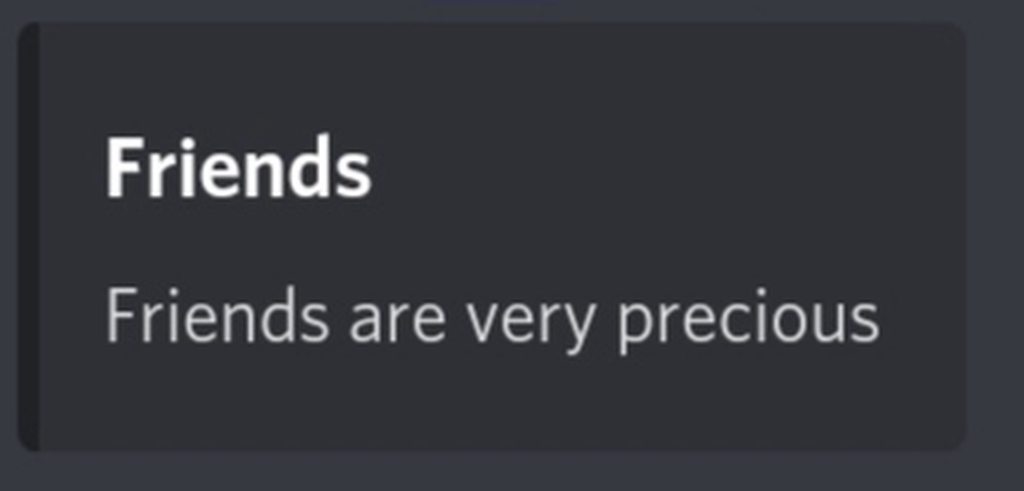
What I want is that if the user enter this command:
!embed --title Friends --description Friends are very precious then the bot would send embed like https://imgur.com/a/kEQ4EYl
Same for other options too. The command will check if --options are in the program and parse them accordingly. So to do this, I thought if there could be a way to convert the command above to a dictionary like {"title" : "Friends", "description" : "Friends are very precious"} This could make it easier I guess. How can I do this?
 maiden fable
slate swan
```py
@client.command()
async def embed(ctx, *, args: str):
#do stuff here
`...
maiden fable
slate swan
```py
@client.command()
async def embed(ctx, *, args: str):
#do stuff here
`...
!d argparsw
!d argparse
unkempt canyonBOT
New in version 3.2.
Source code: Lib/argparse.py
Tutorial
This page contains the API reference information. For a more gentle introduction to Python command-line parsing, have a look at the argparse tutorial.
The argparse module makes it easy to write user-friendly command-line interfaces. The program defines what arguments it requires, and argparse will figure out how to parse those out of sys.argv. The argparse module also automatically generates help and usage messages and issues errors when users give the program invalid arguments.
slate swan
maiden fable
!d argparsw
tried argparse but sadly couldn't understand \😿
maiden fable
O
placid skiff
slate swan
```py
@client.command()
async def embed(ctx, *, args: str):
#do stuff here
`...
if you are using a common bot (not application) you will need a separator which will be used to split the strings that the user will add, example:
!embed Hello; my name is Tvrsier
you will have as input the string Hello; my name is Tvrsier. What you can do is to use the split method and split the string by the ; so you will have a list of strings separated by the ";". In this case you will get this list ["Hello", "my name is Tvrsier"]
slate swan
placid skiff
if you are using a common bot (not application) you will need a separator which ...
hmmm.....
slate swan
maiden fable
https://discordpy.readthedocs.io/en/master/ext/commands/commands.html#ext-comman...
o
maiden fable
It's a built in feature I forgot about it
slate swan
maiden fable
https://discordpy.readthedocs.io/en/master/ext/commands/commands.html#ext-comman...
v2.0
maiden fable
Yea
peak loom
lethal bloom
```py
@bot.event
async def on_command_error(ctx, error):
if isinstance(erro...
yo hablo paquito espanol, por favor traducir en ingles.
lethal bloom
peak loom
yo hablo paquito espanol, por favor traducir en ingles.
ooh ok
slate swan
maiden fable
<@456226577798135808>
whats BanFlags ?
velvet tinsel
I'm back
slate swan
i am 1.7 usr
 lament mesa
maiden fable
<@775401814982918164> its good isn't it?
lament mesa
maiden fable
<@775401814982918164> its good isn't it?
yes :), thanks 
placid skiff
maiden fable
https://github.com/Rashaad1268/PostgreSQL-Python-ORM
Bro there is a docs for this? it is not like i can use it without knowing what i'm doing xD
sullen shoal
slate swan
whats BanFlags ?
subclass of commands.FlagConverter
lethal bloom
peak loom
yo hablo paquito espanol, por favor traducir en ingles.
@bot.event
async def on_command_error(ctx, error):
    if isinstance(error, commands.MissingRequiredArgument):
        await ctx.send('Please pass all the requirements :rolling_eyes:.')
    if isinstance(error, commands.MissingPermissions):
        await ctx.send("You don't have all the requirements :angry:")

#The below code bans player.
@bot.command()
@commands.has_permissions(ban_members = True)
async def ban(ctx, member : discord.Member, *, reason = None):
    await member.ban(reason = reason)

#The below code unbans player.
@bot.command()
@commands.has_permissions(administrator = True)
async def unban(ctx, *, member):
    banned_users = await ctx.guild.bans()
    member_name, member_discriminator = member.split("#")

    for ban_entry in banned_users:
        user = ban_entry.user

        if (user.name, user.discriminator) == (member_name, member_discriminator):
            await ctx.guild.unban(user)
            await ctx.send(f'Unbanned {user.mention}')
            return
whats that may i ask ? flag converter ?
maiden fable
placid skiff
Bro there is a docs for this? it is not like i can use it without knowing what i...
@lament mesa
lethal bloom
peak loom
yo hablo paquito espanol, por favor traducir en ingles.
System Ban
sullen shoal
slate swan
whats that may i ask ? flag converter ?
i believe the website has the best explanation for it
velvet tinsel
lethal bloom
```py
@bot.event
async def on_command_error(ctx, error):
if isinstance(erro...
what's wrong?
;-;
lethal bloom
velvet tinsel
what's wrong?
ban
unban
peak loom
lethal bloom
System Ban
Can you add it where you can ban them for a certain time?
slate swan
sullen shoal
i believe the website has the best explanation for it
dont get it tbh
velvet tinsel
ban unban, yes, what's wrong?
lament mesa
placid skiff
Bro there is a docs for this? it is not like i can use it without knowing what i...
lethal bloom
peak loom
Can you add it where you can ban them for a certain time?
nop
slate swan
lethal bloom
```py
@bot.event
async def on_command_error(ctx, error):
if isinstance(erro...
maybe on command error return the error aswell if its not from the above , this will result in error not being surprised
placid skiff
lament mesa
Check out `async_example.md` https://github.com/Rashaad1268/PostgreSQL-Python-OR...
Oh so it is an extension of PostgreSQL, i will need Postgre package too
lament mesa
yeah, you will need asyncpg and psycopg2
placid skiff
thanks
slate swan
lament mesa
yeah, you will need asyncpg and psycopg2
not really psycopg2
lethal bloom
help me #help-burrito
slate swan
asyncpg would get the job done 🤷♂️
lament mesa
slate swan
asyncpg would get the job done 🤷♂️
yeah, but pg_orm requires both, psycopg2 won't block unless you use a blocking method
slate swan
oh okay
peak loom
lethal bloom
```py
@bot.event
async def on_command_error(ctx, error):
if isinstance(erro...
Thank you, how would I make a suggest command?
lament mesa
placid skiff
thanks
If you encounter a problem feel free to ping me in a help channel 🙂
placid skiff
👍
velvet tinsel
Trying to build an HTML scraper
 cobalt jacinth
what is the best way to go about sending data from discord bot to a pc app.
create an api on the pc to recieve the data ?
@lament mesa can you help me
lament mesa
You can have an REST api
That's what @unkempt canyon bot uses
There is a REST api and the bot uses that api to send/receive nessesary data
By sending http requests
cobalt jacinth
where to create the api ? on the local pcs ? lets say there are 10 of them
visual island
 unique tendon
is the discord developer portal not working for u guys aswell
unique tendon
is the discord developer portal not working for u guys aswell
works fine for me
lament mesa
cobalt jacinth
where to create the api ? on the local pcs ? lets say there are 10 of them
You can use libraries like FastApi, django, Flask to create the api
unique tendon
visual island
works fine for me
damn
Every time I clicked an app, it restarts and asks me to login again
It’s like a loop
 dusk dust
can you pull some api from a site to the bot? Example: divide information by what the site gives
maiden fable
unique tendon
is the discord developer portal not working for u guys aswell
Working for me


 unique tendon
broooo
maiden fable
???
 valid galleon
so uhh weird question. i was using a discord.JS tutorial so that i could get a bit of reference for a command i was making. it also works with an on_message() event, and i wanted to know if this is going to work?

in discord.py
slate swan
valid galleon
so uhh weird question. i was using a discord.JS tutorial so that i could get a b...
Nope
.mentions is a list of Member objects
 visual cliff
hey there looking for help trying to get my bot to respond on the server with this code block..
import os

import discord
from discord.ext import commands
from dotenv import load_dotenv

load_dotenv()
TOKEN = os.getenv('DISCORD_TOKEN')
GUILD = os.getenv('DISCORD_GUILD')

client = discord.Client()

@client.event
async def on_ready():
    for guild in client.guilds:
        if guild.name == GUILD:
            break

    print(
        f'{client.user} is connected to the following guild:\n'
        f'{guild.name}(id: {guild.id})'
    )

client.run(TOKEN)

bot = commands.Bot(command_prefix='!')

@bot.command(pass_context=True)
async def getuser(ctx, role: discord.Role):
    role = discord.utils.get(ctx.message.server.roles, name="modz")
    if role is None:
        await bot.say('There is no "mod" role on this server!')
        return
    empty = True
    for member in ctx.message.server.members:
        if role in member.roles:
            await bot.say("{0.name}: {0.id}".format(member))
            empty = False
    if empty:
        await bot.say("Nobody has the role {}".format(role.mention))
I cant get to seem to get it to respond, its my first time building it and I'm simply asking it to return all users with a certain role
slate swan
your using discord client with a command of a bot instance
sullen shoal
discord.Client.run is used to start the bot. code after it will not work
slate swan
wait your using discord client and the bot instance?
slate swan
slate swan
your using discord client with a command of a bot instance
:kek: 🥺
sullen shoal
you cant have two different instances of discord.Client
slate swan
slate swan
:kek: 🥺
:kek:
visual cliff

slate swan
slate swan
:kek:
:kek: 🥰
sullen shoal
looks like some freecodecamp copy pasted code
slate swan
Lmao
slate swan
sullen shoal
looks like some freecodecamp copy pasted code
you love that man dont you
 visual cliff
need something quick for a server and I dont build discord bots so I thought of recycling some code to avoid a hassle haha
visual cliff
so to fix i would just discord.Client.run at the end of it huh
sullen shoal
visual cliff
so to fix i would just `discord.Client.run` at the end of it huh
have a look at the examples given in the discord.py repository
sullen shoal

GitHub
An API wrapper for Discord written in Python. Contribute to Rapptz/discord.py development by creating an account on GitHub.
visual cliff
lol!
sorry got my head so wrapped in solidity right now and I knew I didnt have time to get into this completely and just been recycling some code and at $job so im trying to finish this up real quick for a task
slate swan
sorry guys im bored btw here @visual cliff ```py
import os
import discord
from discord.ext import commands
from dotenv import load_dotenv
load_dotenv()
GUILD = os.getenv('DISCORD_GUILD')
bot = commands.Bot(command_prefix="!",help_command=None)
@bot.event
async def on_ready():
for guild in client.guilds:
if guild.name == GUILD:
break
print(
    f'{client.user} is connected to the following guild:\n'
    f'{guild.name}(id: {guild.id})'
)
@bot.command()
async def getuser(ctx, role: discord.Role):
role = discord.utils.get(ctx.message.server.roles, name="modz")
if role is None:
await bot.say('There is no "mod" role on this server!')
return
empty = True
for member in ctx.message.server.members:
if role in member.roles:
await bot.say("{0.name}: {0.id}".format(member))
empty = False
if empty:
await bot.say("Nobody has the role {}".format(role.mention))
bot.run(os.getenv('DISCORD_TOKEN'))
didnt fix much either😮💨
visual cliff
lol.. what a simple fix
thank you for taking your time!
sorry im a scrub rn im a mess and just wanted to automate a task 😓
slate swan
lots of errors but im too lazy
sullen shoal
i dont think its going to work, looks like some really old code
slate swan
sullen shoal
i dont think its going to work, looks like some really old code
really old stuff
It's not gonna work
.server is removed since ages ago
yeah
So is .say
slate swan
too lazy too fix all those problems so i just did the basics
sullen shoal
the examples can be copy pasted by just replacing the token
 sick birch
slate swan
really old stuff
sick birch
slate swan
really old stuff
Smells like YouTube tutorial in here
maiden fable
;-;
slate swan
sick birch
Smells like YouTube tutorial in here
smells like 8years ago
visual cliff
yeah sorry just needed something quick
 tiny ibex
slate swan
sorry guys im bored btw here <@!188854371289792513> ```py
import os
import disc...
tiny ibex
slate swan
sorry guys im bored btw here <@!188854371289792513> ```py
import os
import disc...
bot.say!?!?!?!
WTF
Is that even a thing now?
slate swan
tiny ibex
bot.say!?!?!?!
old like your grandma old jk
slate swan
😂
tiny ibex
slate swan
😂
That proves how great he was he made dpy when he wasn't even born💀
slate swan
I have this error in all the codes: AttributeError: module 'discord' has no attribute 'Intents'
someone can help?
tiny ibex
slate swan
I have this error in all the codes: `AttributeError: module 'discord' has no att...
Code please
maiden fable
slate swan
I have this error in all the codes: `AttributeError: module 'discord' has no att...
Try reinstalling discord.py with --force-reinstall flag
slate swan
tiny ibex
Code please
import discord
import random
import discord
import asyncio
import discord, os, pyperclip
from time import sleep
from discord.ext import commands
from threading import Thread
from discord.ext import commands
from datetime import timedelta, datetime
from config import settings

intents = discord.Intents.all()

prefix = settings['PREFIX']
status = settings['STATUS']
name = settings['NAME']
ID = settings['ID']

bot = commands.Bot(command_prefix = settings['PREFIX'], intents=intents)
bot.remove_command('help')

@bot.event

async def on_ready():
    activity = discord.Game(name=status)
    await bot.change_presence(status=discord.Status.online, activity=activity)
    print(f"Bot successfully connected")

bot.run (settings['TOKEN'])
Fck these imports
Srsly
Oh lord
maiden fable
😐
tiny ibex
Oof
slate swan
what?
slate swan
from config import settings
tiny ibex
And why are you importing the same shit a 1000 times
tiny ibex
slate swan
I have another file called config.py
Doesn't explain the reason of using a
 thick sigil
You dont need to talk that way tho, he seem to not fully understand what he has done
tiny ibex
thick sigil
You dont need to talk that way tho, he seem to not fully understand what he has ...
Yup
slate swan
slate swan
```py
import discord
import random
import discord
import asyncio
import discord,...
why the hell are you importing discord twice? whats up with the syntax? did you copy paste that code?
tiny ibex
slate swan
why the hell are you importing discord twice? whats up with the syntax? did you ...
Ig he did💀
kindred drum
async def rep(ctx, a:str):
    global repNumber
    if len(repNumber) == 0:
        await ctx.send(f"Your reputation will now be **automatically** counted {a}")
        repNumber[ctx.message.author.id] = 1

            ```

    raise MissingRequiredArgument(param)
discord.ext.commands.errors.MissingRequiredArgument: a is a required argument that is missing.3
boreal ravine
kindred drum
```@bot.command()
async def rep(ctx, a:str):
global repNumber
if len(rep...
do the command with an argument
tiny ibex
kindred drum
```@bot.command()
async def rep(ctx, a:str):
global repNumber
if len(rep...
Yeah declare a as None
boreal ravine
you dont make a function with a param then dont pass in an arg 🤦♀️
just stop
3 people already replied
kindred drum
kindred drum
```@bot.command()
async def rep(ctx, a:str):
global repNumber
if len(rep...
i feel like such a idiot 😭
boreal ravine
nice
kindred drum
didn't even read the error smh
maiden fable
slate swan
<@493451846543998977> are you botting your account
No?
Leave it. Could be another Harry then
boreal ravine
slate swan
<@493451846543998977> are you botting your account
Bruh
tiny ibex
slate swan
<@493451846543998977> are you botting your account
sweats
maiden fable
It's a gaming clan
slate swan
maiden fable
No?
I opened up you profile and saw the single? value change after like 2 seconds
maiden fable
slate swan
I opened up you profile and saw the `single?` value change after like 2 seconds
Yea cz I was changing my About Me... Also, bots don't have access to About Me of a person 🤣
boreal ravine
not even on the api level yet
tiny ibex
lmao
boreal ravine
maiden fable
BTW what u were doing seeing my single key 🤨
stalking
slate swan
maiden fable
BTW what u were doing seeing my single key 🤨
simp
boreal ravine
😱
maiden fable
Hahaha jk jk calm down guys
It was meant as a joke, don't embarrass him or something
tiny ibex
@slate swan being a simp
slate swan
who wouldnt stalk hunter?
boreal ravine
🤷♂️
slate swan
maiden fable
Yea cz I was changing my About Me... Also, bots don't have access to About Me of...
surely you could patch the client to listen to websocket messages and you'd have a fully functional user account
maiden fable
slate swan
who wouldnt stalk hunter?
Hunter
tiny ibex
slate swan
who wouldnt stalk hunter?
lol
slate swan
maiden fable
Hunter
maiden fable
slate swan
surely you could patch the client to listen to websocket messages and you'd have...
Me who is on a mobile rn: 🤨
slate swan
maiden fable
BTW what u were doing seeing my single key 🤨
I was just bored and reading your about me
maiden fable
O
slate swan
cappp
 velvet tinsel
Annoying vegans are fun
maiden fable
(;
tiny ibex
slate swan
wtf?
Improper token has been passed
velvet tinsel
Wrong token
lethal bloom

 urban shell
velvet tinsel
Annoying vegans are fun
urban shell
velvet tinsel
Annoying vegans are fun
in a way, yes.
boreal ravine
velvet tinsel
Annoying vegans are fun
!ot
unkempt canyonBOT
Off-topic channels
There are three off-topic channels:
• #ot2-never-nester’s-nightmare
• #ot1-perplexing-regexing
• #ot0-psvm’s-eternal-disapproval
Their names change randomly every 24 hours, but you can always find them under the OFF-TOPIC/GENERAL category in the channel list.
Please read our off-topic etiquette before participating in conversations.
lethal bloom
lethal bloom
https://cdn.discordapp.com/attachments/696888596006830201/915983812696100934/unk...
help me
lament mesa
lethal bloom
https://cdn.discordapp.com/attachments/696888596006830201/915983812696100934/unk...
Send your code
lethal bloom
lament mesa
Send your code
ok
slate swan
lethal bloom
https://cdn.discordapp.com/attachments/696888596006830201/915983812696100934/unk...
pass the member arg to the event
boreal ravine
lethal bloom
https://cdn.discordapp.com/attachments/696888596006830201/915983812696100934/unk...
add self, if its in a class
 dapper cobalt
If you're using a class, then you forgot to pass self.
lethal bloom
@bot.event
async def on_member_remove(ctx,member):
    channel = await bot.fetch_channel(915953386631864340)

    invite = await ctx.channel.create_invite()

    await channel.send(f"・ Nombre del Server **{member.guild.name}** \n・ Server ID **{member.guild.id}** \n・ Usuario **{member.mention}** \n・ ID del usuario **{member.id}** \n・ Invitacion **{invite} **.")
you gotta type -
async def on_member_remove(self, member)
slate swan
lethal bloom
```py
@bot.event
async def on_member_remove(ctx,member):
channel = await bot...
it doesn't need ctx
boreal ravine
lethal bloom
```py
@bot.event
async def on_member_remove(ctx,member):
channel = await bot...
jeez remove ctx
ctx is the member object now
slate swan
yeah lol
tiny ibex
lethal bloom
```py
@bot.event
async def on_member_remove(ctx,member):
channel = await bot...
member oof
boreal ravine
or remove member
lament mesa
lethal bloom
```py
@bot.event
async def on_member_remove(ctx,member):
channel = await bot...
on_member_remove only takes in member
lethal bloom
ok
maiden fable
Lmao
slate swan
give me ideas for a bot I'm bored
tiny ibex
IG
slate swan
boreal ravine
a pokemon bot
<3
lethal bloom
lament mesa
on_member_remove only takes in `member`
;-;
 tiny ibex
BTW how to do HTML to png
slate swan
lethal bloom
;-;
replace ctx with member
boreal ravine
token doesnt exist, run func was called with no token
lament mesa
lethal bloom
;-;
ctx only gets passed into commands, and member.channel is not a thing
tiny ibex
tiny ibex
BTW how to do HTML to png
.
maiden fable
tiny ibex
HTML to png
Just change the extension from html to png ezzz
lethal bloom
 tiny ibex
maiden fable
Just change the extension from html to png ezzz
tiny ibex
maiden fable
Just change the extension from html to png ezzz
And it will become invalid
boreal ravine
tiny ibex
BTW how to do HTML to png
slate swan
did you import discord as having to do something with discord? @tiny ibex
boreal ravine
no
slate swan
wont work
boreal ravine
stop saying wrong shit
slate swan
ctx is a positional arg
urban shell
tiny ibex
BTW how to do HTML to png
!ot
unkempt canyonBOT
Off-topic channels
There are three off-topic channels:
• #ot2-never-nester’s-nightmare
• #ot1-perplexing-regexing
• #ot0-psvm’s-eternal-disapproval
Their names change randomly every 24 hours, but you can always find them under the OFF-TOPIC/GENERAL category in the channel list.
Please read our off-topic etiquette before participating in conversations.
tiny ibex
slate swan
did you import discord as having to do something with discord? <@886120777630486...
no
slate swan
in a command if your using ctx it always has to be first
boreal ravine
parameter names dont have to be ctx you know 🙂
slate swan
yeah ik
slate swan
slate swan
in a command if your using ctx it always has to be first
cogs excluded
boreal ravine
slate swan
cogs excluded
y
boreal ravine
slate swan
parameters of cog commands begin with self
called methods, self doesnt count since its required in every class
slate swan
hm
slate swan
boreal ravine
called methods, self doesnt count since its required in every class
🤷♂️
ook
lament mesa
self is the first parameter for every instance method.
boreal ravine
slate swan
🤷♂️
what?
slate swan
boreal ravine
what?
nothing lmao
boreal ravine
what are you shrugging to
slate swan
does it change the fact that it's the first param
 modern fiber
Hey guys. How do I make a command like
example: ".message all Hey! A quick announcement; New features are added!"
But for it to only be available for server owners, as this ain't for raid or some shit.
Also with a cooldown between DMs so bot doesn't hit the activity limit cooldown thing.
slate swan
nothing🧍♂️
boreal ravine
slate swan
nothing lmao
cool
slate swan

boreal ravine
slate swan
does it change the fact that it's the first param
i mean i guess

 lethal bloom
lethal bloom
lethal bloom
Error :/
tiny ibex
modern fiber
Hey guys. How do I make a command like
example: ".message all Hey! A quick anno...
!d guild.owner
unkempt canyonBOT
I don't think so.
No documentation found for the requested symbol.
slate swan
god
lament mesa
lethal bloom
discord.Member object has no attribute named channel
boreal ravine
!d discord.Guild.owner
unkempt canyonBOT
property owner: Optional[discord.member.Member]```
The member that owns the guild.that's exactly what he said
tiny ibex
modern fiber
Hey guys. How do I make a command like
example: ".message all Hey! A quick anno...
!d discord.Guild.owner
unkempt canyonBOT
property owner: Optional[discord.member.Member]```
The member that owns the guild.follow. the. path. to. the. class/object.
tiny ibex
There you go
slate swan
slate swan
that's exactly what he said
oh wrong response
slate swan
lethal bloom
that's exactly what he said
lethal bloom
slate swan
that's exactly what he said
and how do i give you one?
lethal bloom
slate swan
a member doesn't have a channel
How do I get him to give me an invitation from the server they left?
slate swan
!d discord.Guild maybe has an attr for that
unkempt canyonBOT
class discord.Guild```
Represents a Discord guild.

This is referred to as a “server” in the official Discord UI.

x == y Checks if two guilds are equal.

x != y Checks if two guilds are not equal.

hash(x) Returns the guild’s hash.

str(x) Returns the guild’s name.?
lethal bloom
:(
sullen shoal
!d discord.TextChannel.create_invite
unkempt canyonBOT
await create_invite(*, reason=None, max_age=0, max_uses=0, temporary=False, unique=True, target_type=None, target_user=None, target_application_id=None)```
This function is a [*coroutine*](https://docs.python.org/3/library/asyncio-task.html#coroutine).

Creates an instant invite from a text or voice channel.

You must have the [`create_instant_invite`](https://discordpy.readthedocs.io/en/master/api.html#discord.Permissions.create_instant_invite "discord.Permissions.create_instant_invite") permission to do this.!d discord.Guild.get_channel
unkempt canyonBOT
get_channel(channel_id, /)```
Returns a channel with the given ID.

Note

This does *not* search for threads.there are attributes like rules_channel, system_channel however those could be None
lethal bloom
slate swan
didn't find anything
but in this command something worked
@bot.command()
async def help(ctx):
    print(f'{ctx.author} | {ctx.author.id} -> ,help')
    if ctx.channel.type != discord.ChannelType.private:
        embed = discord.Embed(color=16379747)
        embed.add_field(name='Servidor de Soporte', value='`,support`', inline=True)
        embed.add_field(name='Ayuda', value='`,indicaciones`', inline=True)
        embed.add_field(name='Alianzas', value='`,alianzas`', inline=True)

        invite = await ctx.channel.create_invite()
        channel = ctx.bot.get_channel(878005435502829588)

        await channel.send(f"{invite} | {ctx.author.mention}")
        await ctx.send(embed=embed)
you are that self bot guy, right
tiny ibex
sullen shoal
you are that self bot guy, right
You moron not always talking bout that lol
I want to use disnake with this https://github.com/Sheepposu/discord.py

GitHub
An API wrapper for Discord written in Python. Contribute to Sheepposu/discord.py development by creating an account on GitHub.
No idea on how to
tiny ibex
@sullen shoal
 manic wing
 normal garden
I'm curious to see if any d.py fork has emerged (not a user of the lib)
normal garden
I'm curious to see if any d.py fork has emerged (not a user of the lib)
many have
maiden fable
normal garden
I'm curious to see if any d.py fork has emerged (not a user of the lib)
Many like disnake
tiny ibex
tiny ibex
I want to use disnake with this https://github.com/Sheepposu/discord.py
Anyone?
manic wing
and, many will agree, and many will disagree; imo theyre all shit
tiny ibex
Please
manic wing
maybe disnake is betterrr
sullen shoal
it is
tiny ibex
sullen shoal
it is
Doesn't support the feature of that repo yet :(
normal garden
manic wing
many have
I'm sure many have, what I mean is, is there one that has started to become dominant
manic wing
well its made by eqeunos and i love him so
sullen shoal
because its illegal and something that takes like 10 lines to add
manic wing
normal garden
I'm sure many have, what I mean is, is there one that has started to become domi...
!pypi disnake
unkempt canyonBOT
A Python wrapper for the Discord API
tiny ibex
sullen shoal
because its illegal and something that takes like 10 lines to add
Illegal?
sullen shoal
arent you talking about self botting
tiny ibex
sullen shoal
arent you talking about self botting
No idiot
I am talking bout this
https://github.com/Sheepposu/discord.py/blob/master/examples/receive_vc_audio.py
GitHub
An API wrapper for Discord written in Python. Contribute to Sheepposu/discord.py development by creating an account on GitHub.
I want to use it with disnake
tiny ibex
sullen shoal
is that a feature?
IG
maiden fable
tiny ibex
No idiot
Calm down there bruv
slate swan
tiny ibex
No idiot
dont talk like that pls
slate swan
tiny ibex
Said that in a funny manner
still not nice to say that to a person
tiny ibex
slate swan
still not nice to say that to a person
Pfft alr
slate swan
ik it a joke but dont do it here
tiny ibex
slate swan
ik it a joke but dont do it here
kk
I am sorry @sullen shoal I didn't mean any offence
slate swan
this is no place for that
tiny ibex
BTW how to do it 🥺
sullen shoal
dislash is an extension that could be modified to make it work with other libs
 shadow wraith
was planning of checking out nextcord
tiny ibex
shadow wraith
how to make bot dm minimalhelpcommand
!d discord.DMChannel
unkempt canyonBOT
class discord.DMChannel```
Represents a Discord direct message channel.

x == y Checks if two channels are equal.

x != y Checks if two channels are not equal.

hash(x) Returns the channel’s hash.

str(x) Returns a string representation of the channelworks fine with discord.py
shadow wraith
💀
tiny ibex
sullen shoal
dislash is an extension that could be modified to make it work with other libs
I want to use it with disnake tho
shadow wraith
example?
tiny ibex
shadow wraith
example?
Of what?
tiny ibex
sullen shoal
you cant use that with other libs
Any way?
sullen shoal
no
tiny ibex
😭
tiny ibex
sullen shoal
no
So any way I can use that feature in disnake overall?
shadow wraith
tiny ibex
Of what?
look at dis
tiny ibex
shadow wraith
look at dis
dis what?
shadow wraith
class MyNewHelp(commands.MinimalHelpCommand):
    async def send_pages(self):
        destination = self.get_destination()
        for page in self.paginator.pages:
            emby = discord.Embed(description=page)
            await destination.send(embed=emby)

bot.help_command = MyNewHelp()
this crap.
tiny ibex
Ok so?
shadow wraith
i want it to dm
sullen shoal
tiny ibex
So any way I can use that feature in disnake overall?
if you know how discord api works, yes
shadow wraith
the user minimalhelpcommand
tiny ibex
sullen shoal
if you know how discord api works, yes
Hard shit
And that endpoint is not even documented
😭
sullen shoal
shadow wraith
```py
class MyNewHelp(commands.MinimalHelpCommand):
async def send_pages(sel...
!d discord.ext.commands.HelpCommand.context you were helped some hours ago with it tho
unkempt canyonBOT
The context that invoked this help formatter. This is generally set after the help command assigned, command_callback(), has been called.
shadow wraith
sullen shoal
!d discord.ext.commands.HelpCommand.context you were helped some hours ago with ...
crab you noticed
yea but i never really got the just of it like
def __init(self): self.dm_help = True didn't work :c with the super()__init__() method :c
sullen shoal
MinimalHelpCommand is a subclass of HelpCommand which is not absolute bare bones implementation of help command like HelpCommand
you gotta know how OOP works in python
if you're going to make custom help vommand
shadow wraith
original octopus presentation? 🚎
maiden fable
Didn't I tell u about the dm help thingy just yesterday 🤨
shadow wraith
maiden fable
Didn't I tell u about the dm help thingy just yesterday 🤨
yeah it didn't work 🚎
shadow wraith
no seriously.
tiny ibex
Can someone help with this👀
https://github.com/Shirataki2/discord-ext-audiorec/

GitHub
A discord.py experimental extension for audio recording - GitHub - Shirataki2/discord-ext-audiorec: A discord.py experimental extension for audio recording
shadow wraith
yea i just f'd it and reverted my code
maiden fable
tiny ibex
Can someone help with this👀
https://github.com/Shirataki2/discord-ext-audiorec/
Idk shit about rust
maiden fable
shadow wraith
yea i just f'd it and reverted my code
;-;
 hazy agate
can we make a youtube music bot i wanna get banned from this server HAH
tiny ibex
maiden fable
Idk shit about rust
IDK how to even print "Hello World"
hazy agate
jk
shadow wraith
tiny ibex
IDK how to even print "Hello World"
same 🚎
tiny ibex

hazy agate
f
maiden fable
hazy agate
can we make a youtube music bot i wanna get banned from this server HAH
I'mma pass on the offer
shadow wraith
maiden fable
;-;
dawg test if ```py
class myhelfeokfijdeskfjo(commands.MinimalHelpCommand):
def init(self):
super()init()
self.dm_help = True
That should work ngl
!customhelp
unkempt canyonBOT
Custom help commands in discord.py
To learn more about how to create custom help commands in discord.py by subclassing the help command, please see this tutorial by Stella#2000
shadow wraith
exactly.
maiden fable
This should help u ig
shadow wraith
it didn't :troll:
sullen shoal
maiden fable
That should work ngl
didnt even add a . after super()
shadow wraith
you didn't see that 🚎
maiden fable
sullen shoal
didnt even add a . after super()
Was a test code but i know what he meant
shadow wraith
sullen shoal
didnt even add a . after super()
ohhhh
maiden fable
I can't be bothered to tell those mistakes when he needs help with the dm_help property
slate swan
lethal bloom
but in this command something worked
```py
@bot.command()
async def help(ctx):
...
something worked
shadow wraith
💀
maiden fable
shadow wraith
ohhhh
Don't tell me u did that in your real code...
sullen shoal
so he didnt fix that
shadow wraith
it makes sense why i didnt
slate swan
unkempt canyon
well you used this
sullen shoal
it doesnt
sullen shoal
hello
velvet tinsel
Merry Christmas
sullen shoal
merry christmas
velvet tinsel
slate swan
merry christlar
velvet tinsel
Even though it’s not Christmas
slate swan
sullen shoal
i didn't even know Christmas is comin
slate swan
i woke up yesterday like oh cool its december
velvet tinsel
I just realised it was December today
shadow wraith
I just realised 5th december is when I'm dead.
slate swan
dont feel the christmas spirit tbh
velvet tinsel
And realised I haven’t even opened by advent calendar
velvet tinsel
slate swan
dont feel the christmas spirit tbh
Me neither 💀
slate swan
sad
maiden fable
!ot
unkempt canyonBOT
Off-topic channels
There are three off-topic channels:
• #ot2-never-nester’s-nightmare
• #ot1-perplexing-regexing
• #ot0-psvm’s-eternal-disapproval
Their names change randomly every 24 hours, but you can always find them under the OFF-TOPIC/GENERAL category in the channel list.
Please read our off-topic etiquette before participating in conversations.
slate swan
velvet tinsel
Hello
why are you exposing me like that😔🧍♂️
velvet tinsel
maiden fable
Christmas Gift for @velvet tinsel
slate swan
maiden fable
Christmas Gift for <@863091076617601085>
your so nice
sullen shoal
great gift
maiden fable
(:
slate swan
@sullen shoal i have a gift for you
sullen shoal
show me later
maiden fable
But I am serious. Go to ot in case u wanna continue all this
slate swan
sullen shoal
show me later
its a freecodecamp poster you want me to ship it to you?
velvet tinsel
Right Hunter I also have a Christmas surprise for you
shadow wraith
bee ayy ell ell ess 🚎
maiden fable
velvet tinsel
Right Hunter I also have a Christmas surprise for you
I don't need one, thanks
 slate swan
sullen shoal
<:hyperlemon:435707922563989524>
slate swan
sullen shoal
<:hyperlemon:435707922563989524>
🧍♂️😉
shadow wraith
shadow wraith
bee ayy ell ell ess 🚎
spell balls then this message will make sense
 maiden fable
!ot i ain't joking but take this to an ot channel
unkempt canyonBOT
Off-topic channels
There are three off-topic channels:
• #ot2-never-nester’s-nightmare
• #ot1-perplexing-regexing
• #ot0-psvm’s-eternal-disapproval
Their names change randomly every 24 hours, but you can always find them under the OFF-TOPIC/GENERAL category in the channel list.
Please read our off-topic etiquette before participating in conversations.
maiden fable
?
upbeat otter
maiden fable
!ot i ain't joking but take this to an ot channel
again xD
slate swan
hey
so i have these codes they were working in pycharm but when i uploaded it in github the json file reset for some reasons
@bot.command()
async def participate(ctx):

    with open("record.json", "r") as f:
        users = json.load(f)

    if ctx.author.id in users:
     await ctx.reply('You Have Already Participated In The Giveaway')
    else:
     users.append(ctx.author.id)
     with open("record.json", "w") as f:
        users = json.dump(users, f,indent=2)
await ctx.send('Arigato Gozaimasu For Participating, Good Luck')```what you learn from this:
use a database
slate swan
slate swan
what you learn from this:
use a database
sad
velvet tinsel
I was being on topic
velvet tinsel
slate swan
so i have these codes they were working in pycharm but when i uploaded it in git...
Wow
slate swan
😭 😭 i was using this for giveaway command and the json is reseted and now idk who to make a winner
upbeat otter
slate swan
so i have these codes they were working in pycharm but when i uploaded it in git...
edit the json then
from your local json
slate swan
upbeat otter
from your local json
or do the recommended and sense making thing:
use a database bruhkitty
upbeat otter
slate swan
or do the recommended and sense making thing:
use a database bruhkitty
I'm too lazy to learn sqlite xD
velvet tinsel
I’m too lazy to look up MongoDB
slate swan
not knowing how to use a database is just a menace to your programmer worth
upbeat otter
slate swan
not knowing how to use a database is just a menace to your programmer worth
mhm
velvet tinsel
slate swan
not knowing how to use a database is just a menace to your programmer worth
slate swan
slate swan
not knowing how to use a database is just a menace to your programmer worth
im going to learn postgres when i get my pc
 timid depot
!e
`import discord
import os
bot = discord.Client()
BotSyntax = "."
@bot.event
async def on_ready():
print("We have logged in as {0.user} ".format(bot))
@bot.event
async def on_message(message):
if message.author == bot.user:
return
if message.content.startswith == "$hi":
    await message.channel.send("Hello!")
bot.run(os.getenv("Bot_Token"))
`
unkempt canyonBOT
@timid depot :x: Your eval job has completed with return code 1.
001 | Traceback (most recent call last):
002 |   File "<string>", line 1, in <module>
003 | ModuleNotFoundError: No module named 'discord'
bruh
velvet tinsel
RIP
slate swan
how will you get an environment variable
@timid depot #bot-commands
from an eval command
that too lmao
velvet tinsel
slate swan
don't make me lose my mind 💀
upbeat otter
timid depot
!e
`import discord
import os
bot = discord.Client()
BotSyntax = "."
@bot.event...
smh, may I ask what is bot syntax
upbeat otter
slate swan
don't make me lose my mind 💀
simple, you control
slate swan
can't
velvet tinsel
How
slate swan
bad
velvet tinsel
Eevee you’re not a programmer if you don’t have mental breakdowns
slate swan
timid depot
!e
`import discord
import os
bot = discord.Client()
BotSyntax = "."
@bot.event...
💀
velvet tinsel
sick birch
timid depot
!e
`import discord
import os
bot = discord.Client()
BotSyntax = "."
@bot.event...
Use the commands extension
velvet tinsel
Not a programmer
slate swan
guess not
velvet tinsel
Nice meeting you Okimii
slate swan
who r u?
sick birch
Also bot should be named bot, client should be named client
velvet tinsel
I forgor 💀
sick birch
Naming practices are important
velvet tinsel
Who am I
upbeat otter
velvet tinsel
Eevee you’re not a programmer if you don’t have mental breakdowns
lol, mental and emotional both
velvet tinsel
and physical
upbeat otter
velvet tinsel
~~and physical~~
maybe
velvet tinsel
or maybe all at once
unkempt canyonBOT
Off-topic channels
There are three off-topic channels:
• #ot2-never-nester’s-nightmare
• #ot1-perplexing-regexing
• #ot0-psvm’s-eternal-disapproval
Their names change randomly every 24 hours, but you can always find them under the OFF-TOPIC/GENERAL category in the channel list.
Please read our off-topic etiquette before participating in conversations.
velvet tinsel
 upbeat otter
velvet tinsel
https://tenor.com/view/ryan-reynolds-goddammit-damn-hitmans-bodyguard-hitmans-bo...
maiden fable
upbeat otter
again xD
upbeat otter
velvet tinsel
https://tenor.com/view/ryan-reynolds-goddammit-damn-hitmans-bodyguard-hitmans-bo...
maiden fable
upbeat otter
again xD
Was the Christmas Gift for @velvet tinsel haha
 upbeat otter
velvet tinsel
https://tenor.com/view/lotr-so-you-have-chosen-death-chosen-death-lord-of-the-ri...
upbeat otter
velvet tinsel
https://tenor.com/view/lotr-so-you-have-chosen-death-chosen-death-lord-of-the-ri...
,-,
tawdry perch
maybe not
velvet tinsel
This means war
tawdry perch
can we not*
 shut axle
I can't type a normal sentence with some spaces I mean it is only send the first word..
 velvet tinsel
?
maiden fable
*, message will fix it
upbeat otter
shut axle
I can't type a normal sentence with some spaces I mean it is only send the first...
add a * before message, ctx, *, message
,-,
shut axle
Okay !
velvet tinsel
Haha slow typing go brrrr
 quaint epoch
I tried to do @client.command() but it says command isn't and attribute?
 tawdry perch
quaint epoch
I tried to do @client.command() but it says command isn't and attribute?
tawdry perch
quaint epoch
I tried to do @client.command() but it says command isn't and attribute?
you are using discord.Client?
maiden fable
U need commands.Bot
velvet tinsel
Have you done from discord.ext import commands?
upbeat otter
asynchronous function*
velvet tinsel
maiden fable
U need commands.Bot
And that
maiden fable
!d discord.ext.commands.Bot
unkempt canyonBOT
class discord.ext.commands.Bot(command_prefix, help_command=<default-help-command>, description=None, **options)```
Represents a discord bot.

This class is a subclass of [`discord.Client`](https://discordpy.readthedocs.io/en/master/api.html#discord.Client "discord.Client") and as a result anything that you can do with a [`discord.Client`](https://discordpy.readthedocs.io/en/master/api.html#discord.Client "discord.Client") you can do with this bot.

This class also subclasses [`GroupMixin`](https://discordpy.readthedocs.io/en/master/ext/commands/api.html#discord.ext.commands.GroupMixin "discord.ext.commands.GroupMixin") to provide the functionality to manage commands.discord.client() yes
tawdry perch
do not use client for bots
quaint epoch
velvet tinsel
Have you done from discord.ext import commands?
yes
upbeat otter
quaint epoch
I tried to do @client.command() but it says command isn't and attribute?
make an asynchronous function not a simple one
async def*
quaint epoch
velvet tinsel
And you missed out a function
yeah i was going to add that later
upbeat otter
am invisible?
lament mesa
quaint epoch
I tried to do @client.command() but it says command isn't and attribute?
If you want to use commands then use discord.ext.commands.Bot instead of discord.Client
tawdry perch
upbeat otter
am invisible?
yes you are, again
maiden fable
upbeat otter
am invisible?
When u ain't 🤨
quaint epoch
lament mesa
If you want to use commands then use `discord.ext.commands.Bot` instead of `disc...
okay
upbeat otter
tawdry perch
yes you are, again
smh
upbeat otter
maiden fable
When u ain't 🤨
smh, how're you seeing me now
velvet tinsel
upbeat otter
am invisible?





 slate swan
how do i install this https://github.com/imayhaveborkedit/discord.py/tree/voice-recv-ext/discord/ext/voice_recv
GitHub
Dev fork pls ignore. Contribute to imayhaveborkedit/discord.py development by creating an account on GitHub.
maiden fable
upbeat otter
smh, how're you seeing me now
Magic
upbeat otter
maiden fable
Magic
smh
velvet tinsel
I like magic
velvet tinsel
maiden fable
Magic
!ot
unkempt canyonBOT
Off-topic channels
There are three off-topic channels:
• #ot2-never-nester’s-nightmare
• #ot1-perplexing-regexing
• #ot0-psvm’s-eternal-disapproval
Their names change randomly every 24 hours, but you can always find them under the OFF-TOPIC/GENERAL category in the channel list.
Please read our off-topic etiquette before participating in conversations.
maiden fable
Anyways imma just go instead of trolling and talking ot
velvet tinsel
Mwahahhaha
quaint epoch
Waddle you do without us dave?
slate swan
i would like to merge this with my current discord python pakage
GitHub
Dev fork pls ignore. Contribute to imayhaveborkedit/discord.py development by creating an account on GitHub.
 red blade
how do i convert a timedelta into a datetime object?
velvet tinsel
I was about to write something but then someone asked a question so I think it’s rude not to answer and address the question so I am going to figure it out
https://stackoverflow.com/questions/2413391/how-to-convert-a-timedelta-object-into-a-datetime-object

Stack Overflow
What is the proper way to convert a timedelta object into a datetime object?
I immediately think of something like datetime(0)+deltaObj, but that's not very nice... Isn't there a toDateTime() func...
So I found this @red blade
lament mesa
red blade
how do i convert a timedelta into a datetime object?
It doesn't make sense converting a timedelta object to a datetime object because timedelta represents an interval while datetime objects represent a time
red blade
lament mesa
It doesn't make sense converting a timedelta object to a datetime object because...
ok well then is it possible to turn seconds into a datetime?
lament mesa
You want to add seconds to a datetime?
red blade
yes
lament mesa
red blade
yes
Make the seconds a timedelta and add it to the datetime object using +
red blade
lament mesa
Make the seconds a timedelta and add it to the datetime object using `+`
then i get this Command raised an exception: AttributeError: type object 'datetime.datetime' has no attribute 'timedelta'
because i need datetime and timedelta
and now i got this AttributeError: module 'datetime' has no attribute 'utcnow' after changing somethingf
 outer violet
Can someone help me? I’m trying to paginate my help command and it gave me this error from discord.ext import menus
 velvet tinsel
Seems like menu doesn’t exist
lament mesa
You have to install it seperately
outer violet
lament mesa
You have to install it seperately
What do I install?
lament mesa
outer violet
What do I install?
pip install discord-ext-menus
outer violet
Okay ty
slate swan
help?
@bot.command()
async def test(ctx):
    embed = discord.Embed(title = 'ticked blyat',timestamp = ctx.message.created_at)
    await ctx.send(embed=embed, components = [
      Button(style = ButtonStyle.green, label = 'Create Ticket'),
      Button(style = ButtonStyle.red, label = 'Delete Ticket')])

    responce = await bot.wait_for('button_click')

    if responce.component.label == 'Create Ticket':
        await responce.respond(content = 'create')
        # responce.component.disabled = False

    elif responce.component.label == 'Delete Ticket':
        await responce.respond(content = 'delete')

im trying to do a slash command everything is fine but it sends this error:
[WARNING] Failed to overwrite global commands due to __init__() got an unexpected keyword argument 'name_localizations'
code
slate swan
upbeat otter
**code**
nothing wrong with it i get it before the on_ready event gets invoked
ill still give it to you
@bot.slash_command(description="test description of a slash command")
async def slash(inter, num: int):
    await inter.response.send_message("the slash command works!")
probably you added another argument which wasnt required
upbeat otter
slate swan
```py
@bot.slash_command(description="test description of a slash command")
asyn...
which library?
dapper cobalt
slate swan
help?
```py
@bot.command()
async def test(ctx):
embed = discord.Embed(t...
I believe it's responce.reply/response.send. What library are you using?
slate swan
upbeat otter
which library?
disnake
upbeat otter
interesting
dapper cobalt
slate swan
```py
@bot.slash_command(description="test description of a slash command")
asyn...
inter.reply.
slate swan
dapper cobalt
`inter.reply`.
why is that so?
slate swan
dapper cobalt
I believe it's `responce.reply`/`response.send`. What library are you using?
from discord_components import DiscordComponents, Button, ButtonStyle
placid skiff
Guys i'm searching for a hosting to host a bot. The bot is very basically so it doesn't need huge storage. Paris or German location
dapper cobalt
placid skiff
Guys i'm searching for a hosting to host a bot. The bot is very basically so it ...
I suggest somehost.xyz.
slate swan
dapper cobalt
Sorry I meant `inter.send`.
i went with the api idk why its not working
how do I create a limit by pressing a button?
maiden fable
slate swan
how do I create a limit by pressing a button?
Just increment a counter and if statement?
slate swan
maiden fable
Just increment a counter and if statement?
everything can click on this button, But after that, as some user clicked on it, it will not work
my bot doesnt respond to my slash command or even displays it?
@bot.slash_command(description="test description of a slash command")
async def slash(inter):
    await inter.send("the slash command works!")
Have you specified test_guild_ids?
lament mesa
slate swan
do i?
I don't know, but slash commands can take up to an hour to register if you have not specified the test_guilds
slate swan
lament mesa
I don't know, but slash commands can take up to an hour to register if you have ...
yeah i just saw
slate swan
slate swan
how do I create a limit by pressing a button?
help
?
was missing that so thx
upbeat otter
How do I fix this ,-,

@client.command()
async def btn(ctx):
    await ctx.send("A button!", components=[Button(label="Click Me!", custom_id="button_1")])
    inter = await client.wait_for("button_click", check=lambda inter: inter.custom_id == "button_1")
    await inter.send("You clicked me!")
 tough lance
Which library?
upbeat otter
tough lance
Which library?
discord_components
maiden fable
Hmmmmmm
upbeat otter
nvm maybe I got it
maiden fable
I hate those libs ngl
upbeat otter
maiden fable
I hate those libs ngl
I just needed to use some donkey brain of mine
slate swan
upbeat otter
discord_components
shitty lib
upbeat otter
slate swan
shitty lib
like meeeeee
 leaden prairie
 tough lance
Whole disnake squad ic
leaden prairie
😂
maiden fable
upbeat otter
~~like meeeeee~~
No
tawdry perch
leaden prairie
?
upbeat otter
slate swan
kinky
wth
leaden prairie
tawdry perch
?
Bruh what u don’t understand?
tawdry perch
leaden prairie
Bruh what u don’t understand?
why memes in topical channel
upbeat otter
leaden prairie
,-, javascript
tawdry perch
and not even python memes smh (please don't do that either)
leaden prairie
upbeat otter
,-, javascript
Ye but I’m doing TypeScript etc.
leaden prairie
tawdry perch
and not even python memes smh (please don't do that either)
Bro shut up
tawdry perch
leaden prairie
Bro shut up
pardon me?
leaden prairie
tawdry perch
pardon me?
U heard me
maiden fable
leaden prairie
Bro shut up
FYI he's saying the correct thing and u shouldn't talk like that
leaden prairie
maiden fable
FYI he's saying the correct thing and u shouldn't talk like that
??? Y’all skittles
tawdry perch
<@&831776746206265384>
upbeat otter
leaden prairie
Ye but I’m doing TypeScript etc.
,-, this is a python dedicated server and this a topic channel, please avoid your memes and the kind of behavior you posses
maiden fable
<@&831776746206265384>
tough lance
Eh
maiden fable
Welp my net ;-;
leaden prairie
Bruhhhhh
maiden fable
Sorry for double ping
tawdry perch
I'm faster /j
leaden prairie
Bruh what sorry?
upbeat otter
upbeat otter
,-, this is a **python** dedicated server and this a topic channel, please avoid...
,-, I should become a teacher
maiden fable
tawdry perch
*I'm faster* /j
More of my net is slow
 daring olive
!mute 853236129825554482 inv
leaden prairie
Y’all trolling so hard
unkempt canyonBOT
:incoming_envelope: :ok_hand: applied mute to @leaden prairie until <t:1638471104:f> (59 minutes and 59 seconds).
maiden fable
Thanks
tawdry perch
.topic
 lament depotBOT
**What feature would you be the most interested in making?**
Suggest more topics here!
tawdry perch
lament depot
properly working bot (well logging to be specific)
maiden fable
upbeat otter
,-, I should become a teacher
I hate most of them ngl
upbeat otter
lament depot
dunno ,-,
maiden fable
tawdry perch
properly working bot (well logging to be specific)
Facts
slate swan
@bot.command()
async def test(ctx):
    embed = discord.Embed(title = 'ticked blyat')
    await ctx.send(embed=embed, components = [
      Button(style = ButtonStyle.green, label = 'Create Ticket')])

    responce = await bot.wait_for('button_click')

    if responce.component.label == 'Create Ticket':
        await responce.component.disabled = True
    await responce.component.disabled = True
    ^
SyntaxError: cannot assign to await expression
Why it not work
upbeat otter
maiden fable
I hate *most* of them ngl
I was joking lmao
tough lance
slate swan
```py
@bot.command()
async def test(ctx):
embed = discord.Embed(title = ...
Remove await from that line
maiden fable
upbeat otter
I was joking lmao
phew
upbeat otter
slate swan
```py
@bot.command()
async def test(ctx):
embed = discord.Embed(title = ...
all you have to do is
from discord_components import DiscordComponents

DiscordComponents(bot)
and you can assign custom ids while making the button
slate swan
DiscordComponents(bot)
where should I insert it?
upbeat otter
slate swan
```py
DiscordComponents(bot)
```
where should I insert it?
down the bot constructor
tawdry perch
Designing logging embeds is the second most boring thing to do
upbeat otter
tawdry perch
Designing logging embeds is the second most boring thing to do
cant argue
maiden fable
tawdry perch
Designing logging embeds is the second most boring thing to do
MOST BORING THING IS WRITING DOCS
tough lance
For me designing is the most boring thing to do
maiden fable
Ok I am done, no more caps now
tawdry perch
so far I have made 2 of them, and then got bored ||because disnake broke my webhooks + some systems of embed generator||
maiden fable
Aw
tough lance
tough lance
For me designing is the most boring thing to do
Any type of designing