#discord-bots
1 messages · Page 356 of 1
 ebon ocean
 brazen raft
What errors do you get
 glad cradle
the one that is called "Windows installer - 64-bit"
you still need to install the packages
and select the new python version in Vs code
ebon ocean
brazen raft
What errors do you get

 midnight oracle
ebon ocean
midnight oracle
ebon ocean
pip install discord.py
midnight oracle
ebon ocean
ok
you know where to put it?
glad cradle
ebon ocean
Says it already installed.
what python version did you install
ebon ocean
I don't even know where to find it, let alone put it.
midnight oracle
ebon ocean
Says it already installed.
install the Python module for VS
midnight oracle
ebon ocean
I don't even know where to find it, let alone put it.
Write "cmd" in the Windows search bar, and open it, that's the console
ebon ocean
glad cradle
what python version did you install
the one on home page and it showed amd64 on the file.
ebon ocean
midnight oracle
Write "cmd" in the Windows search bar, and open it, that's the console
That i surprisingly know and got open
glad cradle
ebon ocean
the one on home page and it showed amd64 on the file.
try to run
py -3.12 -m pip install discord.py
Like in the command prompt?
glad cradle
arm64 is most likely the wrong build for your pc
glad cradle
ebon ocean
Like in the command prompt?
yes
midnight oracle
ebon ocean
That i surprisingly know and got open
Then, install the Python addon for VS, that should install Pylance too and the highlight should go away
glad cradle
midnight oracle
Then, install the Python addon for VS, that should install Pylance too and the h...
that's not the issue
ebon ocean
glad cradle
yes
It finished.
glad cradle
ebon ocean
It finished.
in the bottom right corner in Vs code you can select a python version, select python 3.12
ebon ocean
glad cradle
in the bottom right corner in Vs code you can select a python version, select py...
It's not there or any python from the list.
glad cradle
did you select the add to PATH option when installing python 3.12?
ebon ocean
glad cradle
did you select the add to PATH option when installing python 3.12?
It never gave me the option
Or was i not supposed to hit install button?
 glad cradle
ebon ocean
It never gave me the option
glad cradle
ebon ocean
It never gave me the option
it's in the advanced options iirc
glad cradle
ebon ocean
oh you're hitting the wrong button
ebon ocean
guess can download it again and redo it
glad cradle
take a screenshot at the corner and let me see
ebon ocean
 glad cradle
ebon ocean
glad cradle
ebon ocean
if you press on python it opens this?
 ebon ocean
glad cradle
if you press on python it opens this?
ebon ocean
glad cradle
if you press on python it opens this?
yes
glad cradle
do this then
ctrl + shift + p
type Python select interpreter and press enter
select python 3.12
if python 3.12 is not there you need to add python to PATH following the guide that you sent
ebon ocean
It gave me error message, sigh that extremely hard guide

I'm guessing the one that says 3.12 64 bit is the one?
 woeful thistle
I am still stuck with the attribute error that I got few hours ago so might need help with that again.
    @tasks.loop(minutes= 10)
    async def timezone_update(self):
         guild = self.client.get_guild(<ID HERE>)
         argentina = guild.get_channel(<ID HERE>)
         us_central = guild.get_channel(<ID HERE>)
         us_pacific = guild.get_channel(<ID HERE>)
         asia = guild.get_channel(<ID HERE>)
         jst = guild.get_channel(<ID HERE>)
         await argentina.edit(name= f'🕓 Argentina {ART.strftime(fmt)}')
         await us_central.edit(name= f'🕓 US Central {CST.strftime(fmt)}')
         await us_pacific.edit(name= f'🕓 US Pacific {PST.strftime(fmt)}')
         await asia.edit(name= f'🕓 PH/SG/CN {UTC8.strftime(fmt)}')
         await jst.edit(name= f'🕓 Japan {JST.strftime(fmt)}
the said error:
Traceback (most recent call last):
  File "G:\pythonProject\discord_bot\.venv\Lib\site-packages\discord\ext\tasks\__init__.py", line 239, in _loop
    await self.coro(*args, **kwargs)
  File "g:\pythonProject\discord_bot\main.py", line 58, in timezone_update
    argentina = guild.get_channel(<ID HERE>)
                ^^^^^^^^^^^^^^^^^
AttributeError: 'NoneType' object has no attribute 'get_channel' ```I tried doing it with my old code without cogs and it works there but doesn't loop
one above is the new one using cogs for timezone.
ebon ocean
PS: I'm getting somewhere.

This as far as I got
Taken from website
Step 4: Add Python Path to User Environmental Variables
There will be two categories namely “User” and “System”, we have to add it in Users, click on New button in the User section. Now, add a Variable Name and Path which we copied previously and click OK. That’s it, DONE!
glad cradle
glad cradle
do this then
ctrl + shift + p
type Python select interpreter and press enter
se...
retry this then @ebon ocean
refresh vscode too
glad cradle
woeful thistle
I am still stuck with the attribute error that I got few hours ago so might need...
what intents are you using?
the guild is not cached
woeful thistle
The intents I am using is discord.Intents().all()
glad cradle
glad cradle
the guild is not cached
fetch the guild then
you can do
guild = self.client.get_guild(...) or await self.client.fetch_guild(...)
Oh, that actually work! I got an error with the other variables but also used the same code to fetch the other channels and now they work!
Now it's only the matter of whether the loop works 😭
glad cradle
woeful thistle
Now it's only the matter of whether the loop works 😭
if you're starting the task when the cog is loaded then it should work
ebon ocean
glad cradle
retry this then <@241629325223395329>
Still not there and I'm still stuck on number 4 in that geek to geek guide. Had somebody in my own server help me figure out... um i guess path and still stuck on 4 though.
@glad cradle I finally finished that guide and it did absolutely nothing
woeful thistle
glad cradle
if you're starting the task when the cog is loaded then it should work
did you mean by having an on_ready then setup_hook or the other way around?
glad cradle
ebon ocean
<@710570210159099984> I finally finished that guide and it did absolutely nothin...
don't you see python 3.12 following the steps that i said earlier?
glad cradle
woeful thistle
did you mean by having an on_ready then setup_hook or the other way around?
you can start the task in the cog's init
ebon ocean
I come to the conclusion that those false errors will always be there.
I DON'T KNOW WHAT TO DO!
ebon ocean
Never go to that discord py dpy s--t server unless you want this to happen with you.

 viscid hornet
ebon ocean
Never go to that discord py dpy s--t server unless you want this to happen with ...
viscid hornet
ebon ocean
Never go to that discord py dpy s--t server unless you want this to happen with ...
school computer ahh setup
 safe seal
ebon ocean
Never go to that discord py dpy s--t server unless you want this to happen with ...
safe seal
ebon ocean
Never go to that discord py dpy s--t server unless you want this to happen with ...
What did you do 💀
ebon ocean
safe seal
What did you do 💀
A jerk pissed me off on another place. It's okay, they are going straight to hell where they belong.
safe seal
ebon ocean
A jerk pissed me off on another place. It's okay, they are going straight to hel...
LOL. You have no messages in discord.py... but alright
ebon ocean
safe seal
LOL. You have no messages in discord.py... but alright
I deleted them all.
viscid hornet
ebon ocean
I deleted them all.
how tf you get so mad you wipe your history in a channel 😭🙏🏽
safe seal
ebon ocean
I deleted them all.
I see. I am no health professional and don't know what the conversation there was, but incontrollable fits of rage are never a good sign. You should probably consult a medical professional?
I've always had positive interactions in discord.py so I can't relate to your anger either. Good server
viscid hornet
safe seal
I've always had positive interactions in discord.py so I can't relate to your an...
gets good when you get comfortable
like an above your normal temp bath where it stings when you go in or move around but once you adjust it works fine
 pale zenith
viscid hornet
gets good when you get comfortable
pale zenith
viscid hornet
gets good when you get comfortable
Just don't be annoying 
woeful thistle
glad cradle
you can start the task in the cog's init
the code works but it does not loop even though I had the task on start in the cogs init no errors and all. Quite odd.
ebon ocean
safe seal
I see. I am no health professional and don't know what the conversation there wa...
I was trying to get help and this jerk dratsab was being so mean and rude. Be kept truely believing that if I just look at some websites that all my problems would be solved despite the last 2 hours working on the same problem. Then what he kept saying it again, that was what did it. You have positive interactions because you're not an extremely stupid idiot like me.
If you don't know 100% about everything about computers or python, then you are worthless piece of s--t over there.
 wicked cairn
That's quite wrong, there are countless of helpful people over there, the difference is, they won't spoonfeed but try to show you a path towards the solution.
It's basically just assistance in thinking. (besides, one of the rules over there states you are supposed to have a basic understanding of Python, so, that's on you, it's not a beginner lib)
ebon ocean
Yes FU-K THOSE PIECES OF S-IT who truely want to learn! It's like people who want to learn math and they try and learn it, and we say FU-K YOU! Like come on, LMAO, you should already know most of all the math even though that is really arbitrary to really know what is considered basic or not. You should know the quadratic formula. Instead of just telling you the quadratic formula, will tell you to use this ax²+bx+c=0 and solve for x to get the quadratic formula. I mean, I DID PROVIDE you the information you need to. Not my fault if you're an idiot who can't figure out how to solve for x. That's a "basic" level of math! I'm so f--king superior and better than you and look down upon you for the crime of trying to learn something! Sarcasm.
wicked cairn
ebon ocean
Yes **FU-K THOSE PIECES OF S-IT** who truely want to learn! It's like people who...
...Literally not what I said, and not what anyone over there said either, they just don't spoonfeed, they won't give you an instant and obvious solution to your issue, they'll happily tell you why your issue occurs and how you might mitigate it though :)
 flat pier
ebon ocean
Never go to that discord py dpy s--t server unless you want this to happen with ...
flat pier
ebon ocean
Never go to that discord py dpy s--t server unless you want this to happen with ...
they did this in discord.py then purged their messages and left
wicked cairn
And in your help post you were even told how you can mitigate your issue, I don't see the problem really.

Well I do, but I won't get into it.
ebon ocean
wicked cairn
...Literally not what I said, and not what anyone over there said either, they j...
You just repeated what I just said. You can be a jerk and call it "spoon feeding" but it still basically saying F U. Like that s--t is stressful enough already and not need to purposely add more stress. But yeah, let's punish people instead.
wicked cairn
ebon ocean
You just repeated what I just said. You can be a jerk and call it "spoon feeding...
I mean, you quite literally ignored the help that was given and didn't try researching anything yourself.
Once again, outlined in the same help post 🙂
 ebon ocean
wicked cairn
And in your help post you were even told how you can mitigate your issue, I don'...
ebon ocean
wicked cairn
And in your help post you were even told how you can mitigate your issue, I don'...
I spent 2 hours going through that same s--t. I want exact step by step on what to do at the time.
wicked cairn
Well, people just aren't going to give you that, regardless of your situation, because you don't learn that way (or shouldn't)
ebon ocean
Anyway f--k you, pissing me off!
wicked cairn
Seek a therapist.
ebon ocean
Anyway, f--k you all except that one person who was always fair to me. I give up on python. I'm too r word and stupid for this. I don't wanna ever see python ever again. And that person I just blocked can go straight to hell with that other jerk. I have no friends and nothing to lose, so f--k all of you mean evil people!
flat pier
bro 💀
 blissful lagoon
!timeout 241629325223395329 2d Chill out. You need a better attitude if you want to participate in our community.
 unkempt canyonBOT
:x: The user doesn't appear to be on the server.
blissful lagoon
ok
pale zenith
lol
 languid steppe
lol
flat pier
r/im14andthisisdeep
 hallow osprey
lol
 quaint epoch
lol
woeful thistle
lol
 rugged shadow
lol
 severe sonnet
okay guys
how do i make a loading message
before the bot send another message?
i need it to my bot don't time out
on response
 upbeat otter
severe sonnet
i need it to my bot don't time out
upbeat otter
severe sonnet
i need it to my bot don't time out
Use defer
 blissful grove
There are no errors in my code, there are no warnings on my terminal. But the slash commands take FOREVER to sync with the server guild. I am unable to diagnose the problem. Please help.
Ive also given a 8 hours gap. The problem still persists
 golden portal
A, C is yes, B is no
 turbid condor
blissful grove
There are no errors in my code, there are no warnings on my terminal. But the sl...
turbid condor
blissful grove
There are no errors in my code, there are no warnings on my terminal. But the sl...
is it syncing or not?
am confused
blissful grove
turbid condor
is it syncing or not?
It takes way too long and it is unpredictable when it would sync
turbid condor
syncing is instanteneous afaik
blissful grove
turbid condor
is it syncing or not?
Okay, apparently, I just need to refresh my discord website. It works then :D
turbid condor
just need to restart the discord app that's it
golden portal
yes, as long as the bot have read message history permission, you can fetch messages
turbid condor
wait why can't we search a specific word?
golden portal
turbid condor
wait why can't we search a specific word?
bots doesn't have endpoint to search, you're forced to go through the entire channel just to filter based on words
turbid condor
golden portal
bots doesn't have endpoint to search, you're forced to go through the entire cha...
ahh yes via api it's not possible
 obsidian hill
I’ve never created a discord bot In py but Ima learn now, what’s the best way to create a currency system and give a different amount of /daily currency based on role? Then when they run a / command it charges one credit and runs main.py ?
 hushed galleon
obsidian hill
I’ve never created a discord bot In py but Ima learn now, what’s the best way to...
hushed galleon
obsidian hill
I’ve never created a discord bot In py but Ima learn now, what’s the best way to...
there's two main topics to tackle at once:
- For the currency system, you'll want to use a database so that you can permanently store each member's currency. SQLite's a good start, since its file-based, supports concurrent reads/writes, and is well suited for organizing data from discord (users, guilds, members, etc.). Python has a built-in sqlite3 module so it's easy to use in most projects.
- discord.py's a popular library for writing discord bots, where your script connects to discord to receive real-time events and make API requests. Commands are defined as functions, and dpy will automatically call them for you when someone wants to use your command.
That's a general overview of it, but when you get into it you'll deal with more specific details like learning SQL, defining a command tree, dealing with async/await syntax, etc.
there are also plenty of python concepts you'll be using as you get more involved with dpy, listed here:
https://gist.github.com/scragly/095b5278a354d46e86f02d643fc3d64b#required-knowledge
 drifting arrow
:D
Why use SQLITE?! just store everything in a txt file.
Wait no. heheheh individual txt files for each user 😎
obsidian hill
drifting arrow
Wait no. heheheh individual txt files for each user 😎
Oh hell naw 😭
drifting arrow
Take it a step further.
Folder named "database"
subfolders for each individual user
txt files named after each column/data thing you need to monitor.
each file holds a single entry
obsidian hill
I can figure out the currency part, but my current code generates a tiktok style video. And I need it to generate when they purchase, how would I make the command run main.py and then dm the user the output?
hushed galleon
if it helps, here's a glimpse of what dpy code looks like: ```py
import discord
from discord.ext import commands
Ask discord to send us non-privileged events,
like when the bot joins a guild or a message is sent
intents = discord.Intents.default()
bot = commands.Bot(command_prefix="?", intents=intents)
Define a slash command named /daily:
@bot.tree.command()
async def daily(interaction: discord.Interaction):
money = 500
await interaction.response.send_message(f"You received your daily reward of {money}!")
@bot.event
async def setup_hook():
# After the bot first logs in, tell discord about our slash commands:
await bot.tree.sync()
bot.run("your.token.here")```
drifting arrow
So basic
hushed galleon
obsidian hill
I can figure out the currency part, but my current code generates a tiktok style...
discord.py doesn't really have a concept of "running main.py", as commands are written with functions
obsidian hill
So would it be easier to integrate the bot into my main.py instead?
Just make the video generating a function
hushed galleon
kind of, usually your main.py script would be the one hosting your bot
yeah, once its in a function you can call that in your command every time someone uses it
drifting arrow
It's usually encouraged to do the cogs system
obsidian hill
Only problem is it doesn’t generate everything in one file it goes all over with all kinds of utils and idk if that’s a problem
I’ll try to do it
I wish I could do the bot in js I’d already be done 😭
drifting arrow
All a command is doing is running the code you tell it to run. You don't need to limit yourself to just that function. if you know it'll take a few moments to finish you can defer the response
obsidian hill
But my ass gotta be special and learn py 💀
obsidian hill
I can do the bot in js and run a python script on cmd?
drifting arrow
literally anything you can do in python you can do in js
obsidian hill
Ik but that would mean converting my entire video generator into js
So if I were to do it in js I’d need to run a python script in a js cmd
hushed galleon
theoretically your node.js discord bot could run your python script on demand in a subprocess
this is presumably the API for it: https://nodejs.org/api/child_process.html
but i dont write node.js stuff so i wouldnt know for sure
drifting arrow
hushed galleon
this is presumably the API for it: <https://nodejs.org/api/child_process.html>
b...
Pythonbro thru and thru?
o7 you absolute legend
obsidian hill
Hm alr
hushed galleon
drifting arrow
o7 you absolute legend
my last ventures into html/css/js have ended in confusion 🥴
drifting arrow
My last ventures into html/css/js ended resulting in a website that looks like its from the 90s lol
obsidian hill
I might just hop my ass over on fiverr so I can focus on the course part of it and let someone else do the bot 💀
drifting arrow
Alright. pythons not that hard, but alright.
obsidian hill
Welll
Do I reallllllllyyyyyy wanna learn it just for a discord bot????
Or throw my not so hard earned money at it and hope it works
drifting arrow
Majority of programming is mostly about learning the syntax and the various methods to achieve a task. Like all those loops and shit.
Once you understand that, you can easily transition from language to language and adjust to the syntax.
Like once you learn that SQL is written the same in most popular languages, your only challenge becomes learning the syntax as it varies slightly.
drifting arrow
obsidian hill
Or throw my not so hard earned money at it and hope it works
Do you want to waste hard earned money over a 10 minute job?
obsidian hill
drifting arrow
Do you want to waste hard earned money over a 10 minute job?
It would take me longer to learn py tho
Someone should make the Minecraft language skript a real thing
That might just be typescript tho idk 💀
upbeat otter
obsidian hill
Someone should make the Minecraft language skript a real thing
Minecraft uses java which is comparatively harder to learn
midnight oracle
How do I turn off the visibility of a channel trough code?
I'm using the create_text_channel()
upbeat otter
You can't. It's done from the client side
midnight oracle
but it says that the "visible" argument doesn't exist
midnight oracle
upbeat otter
You can't. It's done from the client side
oh
upbeat otter
Do you want it to be a private channel?
midnight oracle
upbeat otter
Do you want it to be a private channel?
yep
unkempt canyonBOT
await create_text_channel(name, *, reason=None, category=None, news=False, position=..., topic=..., slowmode_delay=..., nsfw=..., overwrites=..., ...)```
This function is a [*coroutine*](https://docs.python.org/3/library/asyncio-task.html#coroutine).

Creates a [`TextChannel`](https://discordpy.readthedocs.io/en/latest/api.html#discord.TextChannel) for the guild.

Note that you must have [`manage_channels`](https://discordpy.readthedocs.io/en/latest/api.html#discord.Permissions.manage_channels) to create the channel.

The `overwrites` parameter can be used to create a ‘secret’ channel upon creation. This parameter expects a [`dict`](https://docs.python.org/3/library/stdtypes.html#dict) of overwrites with the target (either a [`Member`](https://discordpy.readthedocs.io/en/latest/api.html#discord.Member) or a [`Role`](https://discordpy.readthedocs.io/en/latest/api.html#discord.Role)) as the key and a [`PermissionOverwrite`](https://discordpy.readthedocs.io/en/latest/api.html#discord.PermissionOverwrite) as the value.

Note

Creating a channel of a specified position will not update the position of other channels to follow suit. A follow-up call to [`edit()`](https://discordpy.readthedocs.io/en/latest/api.html#discord.TextChannel.edit) will be required to update the position of the channel in the channel list...gotcha, thanks :D
upbeat otter
See the documentation of this method
There is an overwrites kwarg you can set. It is detailed within the docs
viscid hornet
pale zenith
Just don't be annoying <:Kappa:1145609619830476803>
its hard to cope with not being spoonfed when everywhere else they just hand you the answer upfront 😭🙏🏽
upbeat otter
viscid hornet
its hard to cope with not being spoonfed when everywhere else they just hand you...
Wth even happened here but whatever it was funny af even without context 😭
viscid hornet
upbeat otter
Wth even happened here but whatever it was funny af even without context 😭
😭🙏🏽
 spice seal
Guys I can't make a discord bot on pythonanywhere.com
It's showing this
No module named discord
And when I give
pip install discord.py
It says this
pip install discord.py syntax error
upbeat otter
But what's the complete error
 slate swan
Hey everyone! The problem is I know how to code a discord bot but I'm having trouble connecting my git to github to push code. I did it, however it says that I need to set username and email to push code. I tried doing it, but it says that the git command is not recognized. Can anyone help?
viscid hornet
spice seal
Guys I can't make a discord bot on pythonanywhere.com
It's showing this
```No mo...
make one on your pc then
viscid hornet
slate swan
Hey everyone! The problem is I know how to code a discord bot but I'm having tro...
need more information and this is probably something for #1035199133436354600 or #python-discussion
this channel is for help with discord bots (like the bots themselves) so i don’t think you’ll get much help here
slate swan
viscid hornet
this channel is for help with discord bots (like the bots themselves) so i don’t...
ohh okok I'm sorry I'll head over there rn, thanks sm!
viscid hornet
slate swan
ohh okok I'm sorry I'll head over there rn, thanks sm!
nps, just want you to get help 
 shrewd apex
slate swan
Hey everyone! The problem is I know how to code a discord bot but I'm having tro...
shrewd apex
slate swan
Hey everyone! The problem is I know how to code a discord bot but I'm having tro...
windows system?
slate swan
shrewd apex
windows system?
yes, my problem was solved just now, thank you though!!
shrewd apex
ok cool
spice seal
viscid hornet
make one on your pc then
Don't have.
 floral tulip
guys if anyone looking for domains or cloud storage or priavte ip security pls dm me!!
viscid hornet
floral tulip
guys if anyone looking for domains or cloud storage or priavte ip security pls d...
!rule 6
floral tulip
mb
spice seal
viscid hornet
best bet is replit atp
Replit has no hosting for free
viscid hornet
spice seal
Replit has no hosting for free
neither does python anywhere
viscid hornet
spice seal
Oh
PA has hosting but its basically the same constraints as replit
viscid hornet
upbeat otter
Or buy replit
the whole company?
rugged shadow
$10 will get you an okay VPS
upbeat otter
That's more than enough to get a pretty good vps 💀
spice seal
viscid hornet
PA has hosting but its basically the same constraints as replit
I'm broke
My debts: ||100,000,000$||
But I want a hosting for my bot help me
viscid hornet
spice seal
I'm broke
My debts: ||**100,000,000$**||
But I want a hosting for my bot help m...
☠️
spice seal
viscid hornet
☠️
Help me bruh I need smth like a free vps or smth
viscid hornet
viscid hornet
PA has hosting but its basically the same constraints as replit
 @spice seal
how tf did you code a discord bot on your phone
spice seal
Bruh that's the same thing
spice seal
viscid hornet
how tf did you code a discord bot on your phone
I used replit by now the keep_alive.py don't work
but
viscid hornet
?
upbeat otter
Yes
turbid condor
depends on what lib you using
upbeat otter
Pls don't refer to pycord indirectly
 quick gust
Correct
upbeat otter
😭
turbid condor
but yeah discord.bot isn't anything
turbid condor
upbeat otter
Pls don't refer to pycord indirectly
i wasn't specifically targeting it
turbid condor
calling in pycord users
calling in pycord users ...
XD
I can name a few
including pycord, nextcord, disnake
but yes in discord.py it's
from discord.ext import commands

bot = commands.Bot(command_prefix='Your_Prefix', intents = ...)
!d discord.ext.commands.Bot
unkempt canyonBOT
class discord.ext.commands.Bot(command_prefix, *, help_command=<default-help-command>, tree_cls=<class 'discord.app_commands.tree.CommandTree'>, description=None, intents, **options)```
Represents a Discord bot.

This class is a subclass of [`discord.Client`](https://discordpy.readthedocs.io/en/latest/api.html#discord.Client) and as a result anything that you can do with a [`discord.Client`](https://discordpy.readthedocs.io/en/latest/api.html#discord.Client) you can do with this bot.

This class also subclasses [`GroupMixin`](https://discordpy.readthedocs.io/en/latest/ext/commands/api.html#discord.ext.commands.GroupMixin) to provide the functionality to manage commands.

Unlike [`discord.Client`](https://discordpy.readthedocs.io/en/latest/api.html#discord.Client), this class does not require manually setting a [`CommandTree`](https://discordpy.readthedocs.io/en/latest/interactions/api.html#discord.app_commands.CommandTree) and is automatically set upon instantiating the class.

async with x Asynchronously initialises the bot and automatically cleans up.

New in version 2.0.read this again
it's a module inside discord
u need to specifically import it
viscid hornet
commands.Bot
turbid condor
yeah there is nothing as bot() in discord.py
you need to first import commands from discord.ext module
then do
bot = commands.Bot()
(with kwargs)
turbid condor
viscid hornet
(with kwargs)
yeah to lazy to type em again as I did them earlier
turbid condor
no it's an open source project
 naive briar
No, it's a community project
turbid condor
build by the discord.py server devs
well i doubt you will get anywhere near editing it for now
turbid condor
yes it's the discord API you can access it here and create your own wrapper if you want to
https://discord.com/developers/docs/intro

Discord Developer Portal
Integrate your service with Discord — whether it's a bot or a game or whatever your wildest imagination can come up with.
yes along with adequate knowledge of the programming language you use
viscid hornet
no, use the dpy docs because you want to make a bot with dpy, not remake dpy from scratch
viscid hornet
turbid condor
yes along with adequate knowledge of the programming language you use
thats api docs which is what you would use for making dpy as an example
to make a bot, they should use dpy docs
turbid condor
viscid hornet
thats api docs which is what you would use for making dpy as an example
I was answering Q3
where the discord.py team got the API
viscid hornet
turbid condor
I was answering Q3
ohh my apologies. i think you replied to the wrong message

turbid condor
well i'd just use discord.py to create my own wrapper tbh
instead of going after the raw API
viscid hornet
turbid condor
learn step by step instead jumping into the ocean
turbid condor
it's great that you are trying to learn but there are levels to everything
which you should follow in sequence instead of jumping from level 1 to 50
viscid hornet
mfs writing a book
turbid condor
XD
viscid hornet
still going?
turbid condor
💀
 turbid condor
learn python till you are at advanced level first
viscid hornet
what dpy classes?
unkempt canyonBOT
class discord.ext.commands.Bot(command_prefix, *, help_command=<default-help-command>, tree_cls=<class 'discord.app_commands.tree.CommandTree'>, description=None, intents, **options)```
Represents a Discord bot.

This class is a subclass of [`discord.Client`](https://discordpy.readthedocs.io/en/latest/api.html#discord.Client) and as a result anything that you can do with a [`discord.Client`](https://discordpy.readthedocs.io/en/latest/api.html#discord.Client) you can do with this bot.

This class also subclasses [`GroupMixin`](https://discordpy.readthedocs.io/en/latest/ext/commands/api.html#discord.ext.commands.GroupMixin) to provide the functionality to manage commands.

Unlike [`discord.Client`](https://discordpy.readthedocs.io/en/latest/api.html#discord.Client), this class does not require manually setting a [`CommandTree`](https://discordpy.readthedocs.io/en/latest/interactions/api.html#discord.app_commands.CommandTree) and is automatically set upon instantiating the class.

async with x Asynchronously initialises the bot and automatically cleans up.

New in version 2.0.wdym by modify
you cant rename or rewrite stuff
thats how the lib was made and it was made for a purpose
naive briar
viscid hornet
you cant rename or rewrite stuff
🤓 Um, aktuall-
turbid condor
viscid hornet
you cant rename or rewrite stuff
tbh you can but not at the level where by writing py print('Hello World')
you can write developer on your resume
viscid hornet
and the class names are only so long because it's basically going from py import discord so for this it'll be py discord.ext.commands.Bot(...)
but you can use imports to make it easier, ie. py from discord.ext import commands commands.Bot(...) # much smaller
viscid hornet
turbid condor
tbh you can but not at the level where by writing ```py
print('Hello World')```
...
||(which for pretty much all cases, especially this one, means you cant rewrite stuff)||
Bot is a class
naive briar
viscid hornet
average pycord supporter
The worst insult someone can get yet 😔
commands is a module
turbid condor
so we need an insult_cord now
naive briar
It's a folder
viscid hornet
i'm gonna see if i can pull up a file tree for it
viscid hornet
naive briar
Look at the channel's topic
didnt even know that was there
viscid hornet
yep
heres the file tree for commands.Bot ```
.
└── discord
└── ext
└── commands
└── bot.py
└── Bot() class
you can use commands.Bot instead of commands.bot.Bot because in the commands folder, it has an __init__.py which is basically a setup file, that says py from bot import *
!e py f = print f('hi')
unkempt canyonBOT
@viscid hornet :white_check_mark: Your 3.12 eval job has completed with return code 0.
hi
you can have classes with the same name as files, yk
this exists (idk if its a file, class or wtv) py datetime.datetime
yes, you see it a lot in libraries online
classes also have an __init__ which defines the class properties upon initialisation, eg.
!e ```py
class A:
def init(self):
self.var = 9
a = A()
print(a.var)```
unkempt canyonBOT
@viscid hornet :white_check_mark: Your 3.12 eval job has completed with return code 0.
9
this is like snippets of advanced knowledge, dont worry
2 separate things
yes, because __init__.py is used for installing libraries and modules and whatnot
wdym?
do you know about classes?
thats functions
i asked if you know classes
loads more
ok, how do you make a class
like i said, much more
i asked, do you know what a class is?
have you seen this before? py class SomeClass: def some_func(self): something = ... return something
i use them to centralise data, but you can do some cool stuff like inheritance
i feel like you need to be more specific
# this is a function
def func():
    return 5

class A:
    # this is a method
    def func(self):
        return 5

# both use def
if you have a method, call it a method
if you have a function, call it a function
clarity is key
hi link
 spice warren
viscid hornet
classes also have an `__init__` which defines the class properties upon initiali...
spice warren
viscid hornet
classes also have an `__init__` which defines the class properties upon initiali...
Your wording here leaves a lot to be desired.
The __init__ of the class doesn't have anything to do with properties, it merely defines how the Object is constructed from the class
Property != Attribute, if that's what you meant, and even then, you don't need an __init__ to have attributes nor properties
viscid hornet
spice warren
Your wording here leaves a lot to be desired.
The `__init__` of the class doesn'...
oh yeah i forgot you can do this py class A: var = 5
spice warren
That's a class level attribute
A.var will work
viscid hornet
thanks link 🙏
viscid hornet
spice warren
That's a class level attribute
`A.var` will work
also another question, can i define my own "magic methods"? (idk that they're called): ```py
class A:
def axo(self):
return 5
how do I give `__axo__` utility?You can define them sure, you can't add special functionality to them
viscid hornet
spice warren
You can define them sure, you can't add special functionality to them
fr? 
spice warren
What would you want to add to it?
viscid hornet
spice warren
What would you want to add to it?
mess about with it
spice warren
A single python file isn't exactly special
You can add one class or a billion classes in one file no issue, when it comes to importing from it is when you may face difficulty but that's rather unrelated
spice warren
You can define your own dunder methods sure, you can't make your own magic methods, not without some cursed knowledge I won't share here
def __foo__() -> str:
  return "foo"

__foo__()
will work as you expect
viscid hornet
spice warren
You can define your own dunder methods sure, you can't make your own magic metho...
"with some cursed knowledge i wont share here" 
i'll let it slide, thanks for the help 🙏
whats your question
also use "function" and "method" to define what you mean. both use def which creates ambiguity for what you generally mean
spice warren
(as someone new to Python, it's on you to try and figure out the difference until they're able to make the distinction themselves, it's a little non-trivial at first)
shrewd apex
spice warren
You can define your own dunder methods sure, you can't make your own magic metho...
to create ur own magic methods you would need to extend the python internals right mostly with some c interop
spice warren
you can do some trickery outwidth it but it wouldn't be seamless nor good
see: forbiddenfruit and the like
golden portal
can u rephrase that
glad cradle
this is the wrong channel for these questions
 thin raft
theres a traceback there
shrewd apex
are u on some vpn?
thin raft
are you on macos?
shrewd apex
try to change ur net connection to a hotspot once and try
viscid hornet
where are you from btw
viscid hornet
thats a command
viscid hornet
shrewd apex
??
me fr
nobody said that 😭
alr hold on
thats fine
use that instead
i’ll delete the other one
shrewd apex
i have told u before also lol thats just a log
its not an error
wdym solve it? that will always print
its not an issue
its a message or information
yes
how is that an error
thats for the 443 ssl error
lmao
when you have no idea what you are doing
its not a bot issue
maybe try switching to your mobile hotspot
??
sure
why not
maybe also rebuild discord while we are at it
maybe not today i am kind of tired
obsidian hill
upbeat otter
Minecraft uses java which is comparatively harder to learn
Nah, theres a plugin called skript which most people use. It allows for coding for shi like this ```on first join:
command /start:
trigger:
give player wooden pickaxe named "<##BB8054>&lStarter Pickaxe" with lore "&f" and "&fᴡᴀʀᴘ ᴛᴏ ᴛʜᴇ &e&l/ᴍɪɴᴇ&f ᴛᴏ ɢᴇᴛ" and "&fʀᴇꜱᴏᴜʀᴄᴇꜱ" and "&f" and "&f&cꜱʜɪꜰᴛ &f+ &cʀ ᴄʟɪᴄᴋ&f ᴛᴏ" and "&fᴜᴘɢʀᴀᴅᴇ" and "&f" and "&7&lCOMMON" with all flags hidden
set {EnchantLvl::%uuid of player%} to 0```
I coded my entire factory server in it
naive briar
Yes, reset to get the token
 dawn lake
I mean where i can test my commands of that like where to host bot
naive briar
naive briar
Yes, reset to get the token
(for absolutely no reason)
 brittle turret
🤣🤣🤣

 brittle turret
dawn lake
<:deep_think:1047766487768776744>
brittle turret
dawn lake
<:deep_think:1047766487768776744>
✋
dawn lake

brittle turret
U can't talk either 🤣
dawn lake
Wdym
brittle turret
dawn lake
Wdym
On live chat
dawn lake
Where you host your bot?
Say how you test your codes either it's working or naut
Idk
Idk python things in discord
Lol
U need to host
To make it online
Gonna see discord.py help wiki
Pay
There are free hosting providers too
Like repl.it
viscid hornet
dawn lake
There are free hosting providers too
usually have big drawbacks
dawn lake
viscid hornet
usually have big drawbacks
Like?
viscid hornet
dawn lake
Like repl.it
not replit 😭🙅🏽♂️
viscid hornet
dawn lake
Like?
cpu limit, ram limit, etc
there are quite a few constraints, including network constraints
dawn lake
Then what? I want when my codes are finished then I will start paying to any host
Until test my codes on free host
viscid hornet
dawn lake
Until test my codes on free host
test code on your own pc and keep your main code on your host
dawn lake
viscid hornet
test code on your own pc and keep your main code on your host
Well
Mobile user (ikik too much pain these days)

quick gust
the "static token" isnt the error
dawn lake
Areee you on PC?
quick gust
no... I'm saying that the "static token" line isnt the error, its an information log
yes token of the bot
 sick birch
No, it uses a cloud computer
 sick birch
I'm not understanding you, sorry
obsidian hill
What would be the best way to upload a file (to big for discords messages) through a bot?
I was thinking upload it to a host with api or smth but idk
sick birch
obsidian hill
What would be the best way to upload a file (to big for discords messages) throu...
What's the file type?
obsidian hill
mp4
dawn lake
first explore discord then decide to make stuffs
sick birch
obsidian hill
mp4
Not sure if GDrive has an API but if so you can just do that
Otherwise blob storage is the way to go
sick birch
@wide plaza can you tell us more about the problem?
dawn lake
sick birch
<@1231805530008457246> can you tell us more about the problem?
What quest u completed and got that badge?
obsidian hill
obsidian hill
Also whats the cost like
I have a powerful vm I could upload it to but idk how complicated it would be to have it upload then a link to an api to download it
 dawn lake
Do you know Python well?
obsidian hill
This isnt makeawish
dawn lake
import discord

# Create a client instance
client = discord.Client()

# Event: When the bot is ready
@client.event
async def on_ready():
    print('Bot is ready.')

# Event: When a message is received
@client.event
async def on_message(message):
    # Check if the message is from the bot itself
    if message.author == client.user:
        return

    # Check if the message is a command
    if message.content.startswith('!embed'):
        embed = discord.Embed(
            title="Embedded Message",
            description="This is a simple embedded message.",
            color=discord.Color.blue()
        )
        embed.set_author(name="ChatGPT")
        embed.add_field(name="Field 1", value="Value 1", inline=False)
        embed.add_field(name="Field 2", value="Value 2", inline=True)
        embed.set_footer(text="Footer text")

        await message.channel.send(embed=embed)

# Run the bot with your token
client.run('YOUR_DISCORD_BOT_TOKEN')```This is to build simple embed
upbeat otter
You cant learn to use dpy just by looking at code you don't even understand
dawn lake
You should try it with your bot
upbeat otter
What problem
upbeat otter
obsidian hill
Im trying python for the first time. If I define a function in main.py It can be...
Yes but this is off-topic. Go to #1035199133436354600
upbeat otter
You can't do that
obsidian hill
upbeat otter
Yes but this is off-topic. Go to <#1035199133436354600>
Not rly, I defined my codes function and now Im importing it into my bot
dawn lake
Maybe
obsidian hill
dawn lake
import < that func >
Do I need to define where from?
Like import function from ...
I dont think so right
upbeat otter
obsidian hill
Not rly, I defined my codes function and now Im importing it into my bot
Pls read the whole message
Ask in discord.gg/dpy
quick gust
upbeat otter
Ask in discord.gg/dpy
oh no 💀
dawn lake
upbeat otter
import discord

client = discord.Client(intents=discord.Intents.all())

@client.event
async def on_message(message):
    await message.channel.send("I will ban you")

client.run(token)```understandable reaction
quick gust
upbeat otter
```py
import discord
client = discord.Client(intents=discord.Intents.all())
@c...
client.run*
 upbeat otter
quick gust
`client.run`*
upbeat otter
quick gust
`client.run`*
don't ever use a client my bad
upbeat otter
dawn lake
I am learning python only for my Bot
💀learn js
Or cpp
you will hve a fine time trying to make a bot
dawn lake
Why not python?
upbeat otter
dawn lake
Why not python?
cuz it's the easiest
dawn lake
Can't we make bots with it?
dawn lake
upbeat otter
cuz it's the easiest
People say python is easy
Also python is my first open source language which i am learning
quick gust
client.run
quick gust
dawn lake
Can't we make bots with it?
python is good enough if u only wanna make bots
upbeat otter
dawn lake
People say python is easy
ok I don't wanna explain simple humour any further
quick gust
but ash was just being sarcastic, since CPP's syntax is comparatively harder
dawn lake
upbeat otter
ok I don't wanna explain simple humour any further
💀 wdym
dawn lake
quick gust
python is good enough if u only wanna make bots
Well yes
upbeat otter
dawn lake
💀 wdym
nothing I'm sorry for initiating a convo about this 😭
upbeat otter
quick gust
but ash was just being sarcastic, since CPP's syntax is comparatively harder
yes thank you
dawn lake
upbeat otter
nothing I'm sorry for initiating a convo about this 😭
No i want to know what you were telling
💀☠️.
upbeat otter
quick gust
but ash was just being sarcastic, since CPP's syntax is comparatively harder
.
turbid condor
quick gust
but ash was just being sarcastic, since CPP's syntax is comparatively harder
Seriously comparing python and cpp's syntax
dawn lake
Idk what is cpp syntax
quick gust
turbid condor
Seriously comparing python and cpp's syntax
should I compare Python, and Brainfuck's syntax then?
turbid condor
dawn lake
Idk what is cpp syntax
Then you are good
dawn lake
turbid condor
Then you are good
💀
quick gust
It's fine
 turbid condor
quick gust
should I compare Python, and Brainfuck's syntax then?
turbid condor
quick gust
should I compare Python, and Brainfuck's syntax then?
🤣
Forgot about that
slate swan
Does anyone know if it is possible (if yes then how) to put multiple attachements (images) inside of 1 embed?
using the embed.set_image() func
quick gust
you can't set more than one I'm pretty sure
slate swan
I feel like there was indeed a way but can't remember it
@restive perch any ideas, magic box? 
upbeat otter
slate swan
using the ``embed.set_image()`` func
you can't
slate swan
ah man
 restive perch
slate swan
<@293468815130492928> any ideas, magic box? <:pithink:652247559909277706>
restive perch
slate swan
<@293468815130492928> any ideas, magic box? <:pithink:652247559909277706>
no
upbeat otter
there is a reason it is named image and not images
slate swan
that would be enough images
upbeat otter
yeah but they're pretty small then 😭
slate swan
do you know how to implement that?
restive perch
Nah, they arent shown properly. Like it already does if you send 4 attachments in chat
They get big if you click on them
# For this to work correctly, both embeds need the same `url` in the constructor. The URLs in `set_image` can be different.
embed = discord.Embed(url="some custom url")
embed.set_image(url="image 1")
embed2 = embed.copy()
embed2.set_image(url="image 2")
await send(embeds=[embed, embed2])

# Better code was suggested by Maya [455289384187592704]
wouldn't that just send 2 separate embeds?
time to do some testings
nevermind, it could work after reading the docs
hushed galleon
restive perch
```py
# For this to work correctly, both embeds need the same `url` in the const...
TIL embeds get deduplicated by url, thats neat
when you open the bot tab in the developer portal, you can scroll down to see the privileged intents that you have to enable before your code can use them

as per the above text, you don't have to worry about verification for small bots
upbeat otter
but what did you actually achieve
you don't know python and you just copy pasted the code and you understand none of it. not being rude but it's of no use
sick birch
dawn lake
What quest u completed and got that badge?
Go to your gift inventory in settings and it will give you one
dawn lake
sick birch
Go to your gift inventory in settings and it will give you one
I am on Android
sick birch
It only works on PC sadly
dawn lake
sick birch
It only works on PC sadly
They are not giving badge for genishi impact
They are giving a bundle
 junior falcon
Hey there, im making a bot and im using the requests library but i need to send the request with a different ip then the one where the bot is hosted. How could i achieve that?
 meager rock
O.o
meager rock
junior falcon
Hey there, im making a bot and im using the requests library but i need to send ...
you could use a proxy maybe? also don't use requests library in a discord bot environment. aiohttp is the way to go.
meager rock
upbeat otter
sarthakkkkk hellooo
yo long time.
upbeat otter
meager rock
yo long time.
yusssss come #ot2-never-nester’s-nightmare
obsidian hill
would it be like ```from main import make_final_video, main
I tried but it always use my ip and it doesnt use the proxy
viscid hornet
its in a feedback loop
dont use events, use commands (as a beginner)
on_message is called when a message gets sent, but after a message is sent, the bot also sends a message, creating an endless loop
no thats not related to dpy
thats general #async-and-concurrency which is not dpy
it says the basics about how coroutines work by the looks of it. nothing to do with dpy
yes
lemme show two examples rq
quick gust
viscid hornet
it says the basics about how coroutines work by the looks of it. nothing to do w...
it is though, since dpy is an asynchronous wrapper
viscid hornet
quick gust
it is though, since dpy is an asynchronous wrapper
yes, but its general #async-and-concurrency. it doesnt fix their problem
yes
👍
# this is an event
@bot.event
async def on_message(message):
    if message.content.startswith('thumbsup'):
        await message.add_reaction('👍')

# this is a command
@bot.command()
async def thumbs_up(ctx):
await ctx.message.add_reaction('👍')```yes it does not, though @wide plaza I'd suggest you do watch some tutorials to learn concepts like basic python, Object Oriented Programming, and Async Programming
once you learn them, dpy is easy
viscid hornet
can you rephrase? im not getting your question.
also use the terms "function" and "method"
nope. you just made a feedback loop because its responding to itself
what language is "details and roots"?
no like the language you speak
quick gust
no you cannot
viscid hornet
nope
you're adding a reaction, so you need an emoji
does the python bot even run dpy?
!e py import discord embed = discord.Embed() embed.description = 'hi' print(embed.description)
unkempt canyonBOT
@viscid hornet :x: Your 3.12 eval job has completed with return code 1.
001 | Traceback (most recent call last):
002 |   File "/home/main.py", line 1, in <module>
003 |     import discord
004 | ModuleNotFoundError: No module named 'discord'
exactly a copy of my example
quick gust
no the two functions have the same name, that wont work
viscid hornet
quick gust
no the two functions have the same name, that wont work
oh wait im stupid, i forgot to change the name
quick gust
yours is correct
viscid hornet
oh wait no i did change the name
quick gust
but @wide plaza isn't
viscid hornet
yes
viscid hornet
cool
quick gust
this is almost correct, you just need to change the function name of the command
which is after async def
viscid hornet
quick gust
which is after `async def`
too much help ❌
no
they're two different things
because they are?
quick gust
you can do that but its not a good practice.
glad cradle
is it too difficult to learn python basics first and then use discord.py?
quick gust
¯_(ツ)_/¯
viscid hornet
glad cradle
is it too difficult to learn python basics first and then use discord.py?
thats how you're supposed to learn dpy - with python first. says in the dpy faq if you wanna take a look
you're not hearing me. they are:
TWO
SEPARATE
THINGS.
quick gust
@wide plaza ill just say its difficult to teach basic python, espceially in a #discord-bots channel. You should really consider learning python first
viscid hornet
learn python first, learn the terminology so communicating your problems is easier, and then learn dpy
 blazing beacon
glad cradle
is it too difficult to learn python basics first and then use discord.py?
blazing beacon
glad cradle
is it too difficult to learn python basics first and then use discord.py?
good opinion but tbh people have their reasons, and besides its a good gateway for them to learn the rest of python if they're interested. discord bots can do almost anything databases , ai and wtv else
quick gust
blazing beacon
good opinion but tbh people have their reasons, and besides its a good gateway f...
you should still know basic python
otherwise its hell trying to learn dpy
blazing beacon
quick gust
you should still know basic python
very true
blazing beacon
quick gust
otherwise its hell trying to learn dpy
ah the good old days
bot.run(token) 🦾
viscid hornet
yes. quite important
i dont send 1000 lines of code and expect you to find one line. where'd you get that from?
hushed galleon
for point 3, the differences are due to how dpy implemented their decorators, but knowing the technical details about it isn't too important
 limpid apex
Would this work for a button?
@bot.command(name="test_buttons")
async def test_buttons(ctx):
  view = discord.ui.View()
  style = discord.ButtonStyle.green
  embed = discord.Embed(title="Button Testing", description="This is a test")
  item = discord.ui.Button(style=style, label="Test")
  view.add_item(item=item)
  await ctx.send("Test", view=view)
Cuz im hella new to buttons
naive briar
Sure
limpid apex
oh fr?
naive briar
You'd need a callback to make the button remotely useful though
limpid apex
naive briar
You'd need a callback to make the button remotely useful though
I see
viscid hornet
limpid apex
Would this work for a button?
```py
@bot.command(name="test_buttons")
async def ...
yes, but it's better to have a view with buttons or have your own subclassed button. not advisable just to make then in commands
limpid apex
viscid hornet
yes, but it's better to have a view with buttons or have your own subclassed but...
mm. I see
viscid hornet
limpid apex
I see
like this, if you want an example: ```py
class MyButton(ui.Button):
def init(self):
super().init(your_qualities)
async def callback(self, interaction: ...):
    # whatever you want to happen when the button
    # gets clicked. uses interaction```
Okay! Thank you, I appreciate it
brazen raft
- Because otherwise the name of the function will reference the lastly defined function and the former definitions would lose reference. On another note, discord.py registers
async def on_messagefunctions decorated witheventas event handlers for the event of newly received messages. - Can, but this isn't meaningful in the same way. What you have will error because the name
ctxis not a thing in the.. context of the command function. - It's an arbitrary choice on two accounts
glad cradle
viscid hornet
thats how you're supposed to learn dpy - with python first. says in the dpy faq ...
ik, it was a rethoric question given the state of this channel in the last 2 days
slate swan
viscid hornet
like this, if you want an example: ```py
class MyButton(ui.Button):
def __in...
typehinting interaction as Ellipsis :kappa:
viscid hornet
limpid apex
Okay! Thank you, I appreciate it
so you could have a green button that says "Click Me!" and when you click it, it responds saying "You clicked me!": ```py
class MyButton(ui.Button):
def init(self):
super().init(
label = "Click me!",
style = ButtonStyle.green
)
async def callback(self, interaction: ...):
    await interaction.response.send_message("You clicked me!", ephemeral = True) # ephemerals make it so only you can see the message```
me fr
viscid hornet
glad cradle
ik, it was a rethoric question given the state of this channel in the last 2 day...
ohh. agreed honestly
limpid apex
viscid hornet
like this, if you want an example: ```py
class MyButton(ui.Button):
def __in...
Ok, I'm somewhat confused. I'm also new to making bots. What do I put for my qualities?
and ui.Button is also giving me an error
limpid apex
viscid hornet
so you could have a green button that says "Click Me!" and when you click it, it...
OHH
Didn't see this! Thanks lol
viscid hornet
limpid apex
and ui.Button is also giving me an error
from discord import ui```👍
viscid hornet
limpid apex
Ok, I'm somewhat confused. I'm also new to making bots. What do I put for my qua...
!d discord.ui.Button | here's everything about buttons
unkempt canyonBOT
class discord.ui.Button(*, style=<ButtonStyle.secondary: 2>, label=None, disabled=False, custom_id=None, url=None, emoji=None, row=None)```
Represents a UI button.

New in version 2.0.all those arguments are your_qualities
naive briar

limpid apex
Thanks again!
viscid hornet
hold on, lemme bike and grab my pizza
viscid hornet
limpid apex
Thanks again!
hushed galleon
brazen raft
1. Because otherwise the name of the function will reference the lastly defined ...
(technically the command could shadow the event handler's name here, since dpy maintains separate references to the event and command callback, but either way on_message would be a weird name for a command)
limpid apex
viscid hornet
<:prettythumbsup:806390638044119050>
Oh, one more thing
How would I refrence the button to use it?
would it just be MyButton.Super()?
quick gust
Just, button = MyButton()
limpid apex
ok! Thanks!
brazen raft
Depends on the terms of service
obsidian hill
AttributeError: module 'discord' has no attribute 'Intents'``` wsp with this? Python 3.10Did you name some folder discord
limpid apex
quick gust
Just, `button = MyButton()`
for the send, would this work:
@bot.command(name="buttontest")
async def buttontest(ctx):
  button = MyButton()
  embed = discord.Embed(title="test", description="testing")
  await ctx.send(embed=embed, view=button)
me?
quick gust
nope, you need to add the button to a view like u were doing before
limpid apex
I see
brazen raft
obsidian hill
me?
Yes, you
obsidian hill
nah I didnt name anything discord
Im trynna learn py and got the example from here https://discordpy.readthedocs.io/en/stable/quickstart.html
brazen raft
I was about to ask what do you work with
limpid apex
obsidian hill
nah I didnt name anything discord
have you used "pip install discord"
obsidian hill
yes
limpid apex
hm
obsidian hill
ill redo it
quick gust
obsidian hill
Im trynna learn py and got the example from here https://discordpy.readthedocs.i...
Have you ever installed pycord?
brazen raft
obsidian hill
yes
The problem is you installed that and not discord.py then
limpid apex
This line worked 1st try for me:
bot = commands.Bot(command_prefix='-', intents=discord.Intents.all())
I just had to reinstall py ima make sure discords installed
brazen raft
Better uninstall whatever discord is and install discord.py
obsidian hill
Ok I installed both and it worked
limpid apex
👍
quick gust
brazen raft
Better uninstall whatever discord is and install discord.py
Isn't discord a mirror package of discord.py?
obsidian hill
In the cmd here how could I call a function? if message.content.startswith('$hello'): await message.channel.send('Hello!')
quick gust
!pypi discord
unkempt canyonBOT

A mirror package for discord.py. Please install that instead.
Released on <t:1691703907:D>.
obsidian hill
would I need to keep the await or just main()
hushed galleon
obsidian hill
would I need to keep the await or just main()
the await is only needed if you're calling an asynchronous function, if its a regular function then you don't need it
hushed galleon
in other words, the difference is: ```py
def my_normal_func(): ...
async def my_async_func(): ...
@bot.event
async def on_message(message):
my_normal_func()
await my_async_func()```
limpid apex
quick gust
nope, you need to add the button to a view like u were doing before
final question I hope lol
would this work?
@bot.command(name="buttontest")
async def buttontest(ctx):
  button = MyButton()
  view = discord.ui.View()
  embed = discord.Embed(title="Button Testing", description="This is a test")
  view.add_item(item=button)
  await ctx.send(embed=embed, view=view)
Probably, show your MyButton class as well
limpid apex
Kk! Thank you for the help
 dusk dagger
obsidian hill
and calling it in bot.py
dusk dagger
obsidian hill
and calling it in bot.py
import it from main.py
obsidian hill
dusk dagger
obsidian hill
This is my function from main.py but when this is called I need to send a dm to ...
Are you calling the function in your command callback?
obsidian hill
whats the best way to do that?
the main() function starts the video generation then the make_final_video(number_of_comments, length, reddit_object, bg_config) function ends it
sick birch
obsidian hill
the main() function starts the video generation then the make_final_video(number...
why not send the message from the main function?
your functions should have one responsibility, as a matter of good design principle
one would not expect a function named "make_final_video` to send a discord DM
obsidian hill
main just generates everything from the config then the other function starts the generation
once the generation is finished I need to dm the user the result
limpid apex
If I were to use a ephemeral to message a user thats not the command user, is that possible?
quick gust
Nope
dusk dagger
no
limpid apex
dang. alr
viscid hornet
limpid apex
is there any way to send a 1-sided message to a user?
you could make a view with a button that tells them that information 🤷🏽♂️
thats as close to your goal as i can think of
limpid apex
viscid hornet
you could make a view with a button that tells them that information 🤷🏽♂️
True, although ion want them to click a button
I want it to be forced tbh
as a joke lol
I settled for this

XD
just DMs them, which is somewhat more annoying
limpid apex
anyone know how I would use a website (in html) to send a value to a discordpy bot
viscid hornet
limpid apex
anyone know how I would use a website (in html) to send a value to a discordpy b...
my ideas would be:
- use a db and check up when something changed
- use a webhook and send data that way
- run your backend with a bot attr for your discord bot
limpid apex
viscid hornet
my ideas would be:
- use a db and check up when something changed
- use a webhoo...
👍
viscid hornet
limpid apex
👍
the backend one only works if your backend is python
and you'd probably need a way to start something with your db
or occasionally loop and check the db
limpid apex
kk
obsidian hill
How can I create a db to make a currency ?
And how do I check it, like if currency >= 1 ...
Idk python 😂
viscid hornet
obsidian hill
And how do I check it, like if currency >= 1 ...
Idk python 😂
learn python first then
i dont think >= even works
obsidian hill
viscid hornet
learn python first then
anddd. what do you think im trynna do rn? 💀
obsidian hill
viscid hornet
i dont think `>=` even works
I dont doubt it, I got that from js
viscid hornet
!e py x = 5 if x >= 3: print("yes")
unkempt canyonBOT
@viscid hornet :white_check_mark: Your 3.12 eval job has completed with return code 0.
yes
oh it does
obsidian hill
so how would I make a variable for that assigned to each user id?
idk if a variable or a db would be best
Im assuming a ram variable wouldnt be good since those clear on restart
viscid hornet
obsidian hill
so how would I make a variable for that assigned to each user id?
what, make a db for currencies?
thats pretty easy
obsidian hill
viscid hornet
what, make a db for currencies?
Yea
I just need a way to give, store, and take a currency from people
viscid hornet
obsidian hill
Yea
oh thats easy. you just want 3 columns: user_id, wallet and bank
obsidian hill
Nah I dont need a wallet and bank just need tokens
viscid hornet
make user_id either a PRIMARY KEY or a UNIQUE integer
viscid hornet
obsidian hill
Nah I dont need a wallet and bank just need tokens
you said "store currency"
obsidian hill
yes store as in save it
viscid hornet
ohh okk
obsidian hill
Yea I just need to know how to add remove and save currency
viscid hornet
obsidian hill
Yea I just need to know how to add remove and save currency
do you know SQL?
obsidian hill
No not really
viscid hornet
obsidian hill
No not really
https://sqlbolt.com - go learn SQL then
SQLBolt provides a set of interactive lessons and exercises to help you learn SQL
the basics are fine
obsidian hill
viscid hornet
https://sqlbolt.com - go learn SQL then
Its telling me how to write data, not create a database 😂
what?
viscid hornet
obsidian hill
Its telling me how to write data, not create a database 😂
creating a database is as easy as creating a file
obsidian hill
viscid hornet
creating a database is as easy as creating a file <:shrug:747680403778699304>
so create tokens.sql
viscid hornet
its knowing how to use and work with it thats by far more important
viscid hornet
obsidian hill
so create tokens.sql
yeah
obsidian hill
I tried sql once for a website and gave up
viscid hornet
obsidian hill
I tried sql once for a website and gave up
you'll need it if you wanna make an effective database
obsidian hill
For the collums just user id and token count right?
viscid hornet
obsidian hill
For the collums just user id and token count right?
pretty much, yeah
obsidian hill
I see here CREATE TABLE movies ( id INTEGER PRIMARY KEY, title TEXT, director TEXT, year INTEGER, length_minutes INTEGER ); when should I run this code tho?
make a seperate file and run it once? Run it on bot startup?
viscid hornet
obsidian hill
I see here ```CREATE TABLE movies (
id INTEGER PRIMARY KEY,
title TEXT,
...
run it in a python file using sqlite3 or just run it on the db itself
im guessing you use sqlite?
obsidian hill
idfk
viscid hornet
❌
viscid hornet
obsidian hill
Never installed it
ok, what db do you use?
obsidian hill
I dont use a db Im trynna create one rn 😂
viscid hornet
obsidian hill
I dont use a db Im trynna create one rn 😂

get sqlite if you want something easy and small.
get postgres if you have a relatively big project or something.
fuck the rest of them
dusk dagger
obsidian hill
Alr, so how does one "get" sqlite
Create an SQL file and consider using an asyncio sqlite wrapper like this https://github.com/Rapptz/asqlite
GitHub
A simple async wrapper for sqlite3. Contribute to Rapptz/asqlite development by creating an account on GitHub.
viscid hornet
yes
viscid hornet
obsidian hill
Alr, so how does one "get" sqlite
by downloading it
viscid hornet
dusk dagger
Create an SQL file and consider using an asyncio sqlite wrapper like this https...
thats for a later stage. let them get comfortable with using sqlite3 first and then get them to move onto asqlite
dusk dagger
viscid hornet
thats for a later stage. let them get comfortable with using `sqlite3` first and...
asqlite is basically the exact same as sqlite3 but asynchronous
obsidian hill
viscid hornet
by downloading it
Like is it a thing like python to download or is it a python package?
viscid hornet
obsidian hill
Like is it a thing like python to download or is it a python package?
it's a python library, yes
!d sqlite3
unkempt canyonBOT
Source code: Lib/sqlite3/
SQLite is a C library that provides a lightweight disk-based database that doesn’t require a separate server process and allows accessing the database using a nonstandard variant of the SQL query language. Some applications can use SQLite for internal data storage. It’s also possible to prototype an application using SQLite and then port the code to a larger database such as PostgreSQL or Oracle.
The sqlite3 module was written by Gerhard Häring. It provides an SQL interface compliant with the DB-API 2.0 specification described by PEP 249, and requires SQLite 3.7.15 or newer.
This document includes four main sections:
viscid hornet
dusk dagger
asqlite is basically the exact same as sqlite3 but asynchronous
yes. like i said, it's for a later stage when they start implementing it in their bot
let them learn sqlite first and then they can move onto asqlite
one step after the other, otherwise they'll fall over
obsidian hill
So pip install sqlite3 ?
viscid hornet
obsidian hill
So pip install sqlite3 ?
yep
obsidian hill
alr
I tried pip install sqlite but aint work so ig that why 😂
ERROR: No matching distribution found for sqlite3```tf wrong with bros pc 😭 🙏
obsidian hill
Python 3.10 could be reason
 obsidian hill
you aint gonna believe what Im boutta say
ERROR: No matching distribution found for sqlite
WARNING: You are using pip version 21.2.3; however, version 24.0 is available.
You should consider upgrading via the 'C:\Program Files\Python310\python.exe -m pip install --upgrade pip' command.```wait wtf
obsidian hill
Im using python 3.10 and aint upgrading 😭
viscid hornet
apparently its in the stdlib 
viscid hornet
obsidian hill
Im using python 3.10 and aint upgrading 😭
try just importing sqlite3
import sqlite3```lmk if it comes up with missing module errors
obsidian hill
wouldnt that upgrade python?
viscid hornet
i have updated pip and it has the same error
viscid hornet
obsidian hill
wouldnt that upgrade python?
nope. it upgrades pip. like it says in the name
obsidian hill
what am I running tho?
viscid hornet
obsidian hill
what am I running tho?
wdym?
obsidian hill
I dont got any code to run
viscid hornet
viscid hornet
try just importing sqlite3
start with this and we'll go from there
obsidian hill
I got this CREATE TABLE movies ( id INTEGER PRIMARY KEY, title TEXT, director TEXT, year INTEGER, length_minutes INTEGER ); but thats not python
obsidian hill
viscid hornet
```py
import sqlite3```
just make a file with that and run it? 😅
viscid hornet
obsidian hill
I got this ```CREATE TABLE movies (
id INTEGER PRIMARY KEY,
title TEXT,
...
start with importing the library so we know if its there or not
viscid hornet
obsidian hill
just make a file with that and run it? 😅
just type it in and tell me if your editor raises any issues about missing imports
obsidian hill
nah it worked
viscid hornet
obsidian hill
nah it worked
damn 💀
obsidian hill
I ran it and outputted nothin so I assume it did
viscid hornet
obsidian hill
I ran it and outputted nothin so I assume it did
alr good start
!d sqlite3.connect
unkempt canyonBOT
sqlite3.connect(database, timeout=5.0, detect_types=0, isolation_level='DEFERRED', check_same_thread=True, factory=sqlite3.Connection, cached_statements=128, uri=False, *, ...)```
Open a connection to an SQLite database.(this makes a new db btw if one isnt found)
obsidian hill
idk what this meanshttps://file.coffee/u/WjIMZlRVW9GpCDP5HQpm4.png
 viscid hornet
obsidian hill
idk what this meanshttps://file.coffee/u/WjIMZlRVW9GpCDP5HQpm4.png
viscid hornet
obsidian hill
idk what this meanshttps://file.coffee/u/WjIMZlRVW9GpCDP5HQpm4.png
means its not accessed, ie. its not used
obsidian hill
ah alr
viscid hornet
accessing a module and importing it are two different things
viscid hornet
obsidian hill
so add this code?
yep
obsidian hill
would this be easier for you to help to do over vc?
obsidian hill
viscid hornet
yep
thats alotta errors
viscid hornet
import sqlite3
conn = sqlite3.connect('whatever.db') # this makes your connection

conn.execute("whatever SQL statement") # this executes your SQL

conn.commit() # this saves your changes```wdym?
viscid hornet
obsidian hill
would this be easier for you to help to do over vc?
❌
obsidian hill
unkempt canyon
this gave like 3 errors in the py file
viscid hornet
stick to here
viscid hornet
obsidian hill
this gave like 3 errors in the py file
also did you know you can send screenshots here?
 viscid hornet
obsidian hill
wait should I be making a sql file or a .db file??
viscid hornet
obsidian hill
wait should I be making a sql file or a .db file??
both are literally the same thing
viscid hornet
viscid hornet
(this makes a new db btw if one isnt found)
obsidian hill
3 errors
 limpid apex
obsidian hill
wait should I be making a sql file or a .db file??
limpid apex
obsidian hill
wait should I be making a sql file or a .db file??
.sqlite
obsidian hill
limpid apex
.sqlite
whats the difference between a .sqlite file and a .sql file?
limpid apex
obsidian hill
whats the difference between a .sqlite file and a .sql file?
🤷 I use sqlite
slate swan
isnt sql a language and sqlite a software?
limpid apex
unkempt canyon
cursor.execute(
    "CREATE TABLE IF NOT EXISTS data (user_id INTEGER, coins INTEGER)")
connection.commit()
This will work too
limpid apex
slate swan
isnt sql a language and sqlite a software?
sqlite is a database
obsidian hill
limpid apex
```
cursor.execute(
"CREATE TABLE IF NOT EXISTS data (user_id INTEGER, coin...
Well tried that File "C:\Users\liama\Downloads\RedditGen\bot\db.py", line 3, in <module> cursor.execute( NameError: name 'cursor' is not defined
limpid apex
Try this:
connection = sqlite3.connect("database2.sqlite")
print(connection.total_changes)
cursor = connection.cursor()

cursor.execute(
    "CREATE TABLE IF NOT EXISTS data (user_id INTEGER, coins INTEGER)")
connection.commit()
U needa define cursor
viscid hornet
limpid apex
.sqlite
.sql file. sqlite is a way to interpret sql files
viscid hornet
obsidian hill
Well tried that ``` File "C:\Users\liama\Downloads\RedditGen\bot\db.py", line 3...
just use the connection
 viscid hornet
limpid apex
viscid hornet
limpid apex
obsidian hill
limpid apex
Try this:
```
connection = sqlite3.connect("database2.sqlite")
print(connectio...
that generated a sqlite file
limpid apex
viscid hornet
<:whatpepe2:770574838443933708>
fr
limpid apex
obsidian hill
that generated a sqlite file
Yes, as it should
viscid hornet
limpid apex
fr
nice try buddy 
 limpid apex
viscid hornet
nice try buddy <:farm_enGRRRR:928482254274052096>
limpid apex
viscid hornet
nice try buddy <:farm_enGRRRR:928482254274052096>
I use replit
Thats prob why lol
obsidian hill
Alr. now how to I add things to it? I needa import userid and tokens
viscid hornet
obsidian hill
Alr. now how to I add things to it? I needa import userid and tokens
just execute your create statement
limpid apex
like how to use bot commands, like !help
obsidian hill
viscid hornet
just execute your create statement
which one 😂
viscid hornet
obsidian hill
which one 😂
the one to create the table with user ids and tokens? 
limpid apex
Yea
viscid hornet
nope
limpid apex
If the prefix is "!", then doing !help would trigger the help command
viscid hornet
!help ⬅️ always has a prefix
obsidian hill
viscid hornet
the one to create the table with user ids and tokens? <:joystroke:67051466078892...
dis one?
    id INTEGER PRIMARY KEY,
    title TEXT,
    director TEXT,
    year INTEGER,
    length_minutes INTEGER
);```??Prefix here is just something that you will need to put before the command name for it to execute
in this case !command_name
viscid hornet
obsidian hill
dis one?
```CREATE TABLE movies (
id INTEGER PRIMARY KEY,
title TEXT,
...
does that have user ids and tokens 
 limpid apex
@wide plaza If for example you have "-" as the prefix, then -help would be the command
instead of !help
yes, although / is a slash command
slate swan
without nothing, it should work, ? and ! aswell
limpid apex
yes
obsidian hill
viscid hornet
does that have user ids and tokens <:painman:793152214201925662>
    "CREATE TABLE IF NOT EXISTS data (user_id INTEGER, coins INTEGER)")
connection.commit()```? this? theres alotta code with user ids and tokens 💀Although, nothing is quite annoying to work with
limpid apex
obsidian hill
```cursor.execute(
"CREATE TABLE IF NOT EXISTS data (user_id INTEGER, coins ...
Thats a custom variable lol
slate swan
/ should work probably too but there are slash commands for that and im unsure if something could error because of that
slate swan
but you could try it
limpid apex
creating one is:
cursor.execute("CREATE TABLE IF NOT EXSISTS <name> (<var> <type>)
true
For an embed
obsidian hill
limpid apex
creating one is:
```
cursor.execute("CREATE TABLE IF NOT EXSISTS <name> (<var> <...
Yea thats already in the code
connection = sqlite3.connect("bot/database.sqlite")
print(connection.total_changes)
cursor = connection.cursor()

cursor.execute(
    "CREATE TABLE IF NOT EXISTS data (user_id INTEGER, tokens INTEGER)")
connection.commit()```No, that you customize in dev portal
viscid hornet
obsidian hill
<:shrug:1194651126360985691>
brother just read it 😭
obsidian hill
obsidian hill
Yea thats already in the code
```import sqlite3
connection = sqlite3.connect("b...
How do I now add a userid to this and give the user id tokens?
viscid hornet
obsidian hill
How do I now add a userid to this and give the user id tokens?
INSERT INTO 
slate swan
this feels like #databases topic
obsidian hill
viscid hornet
brother just read it 😭
Im deaf in my left hair follicle so I cant : /

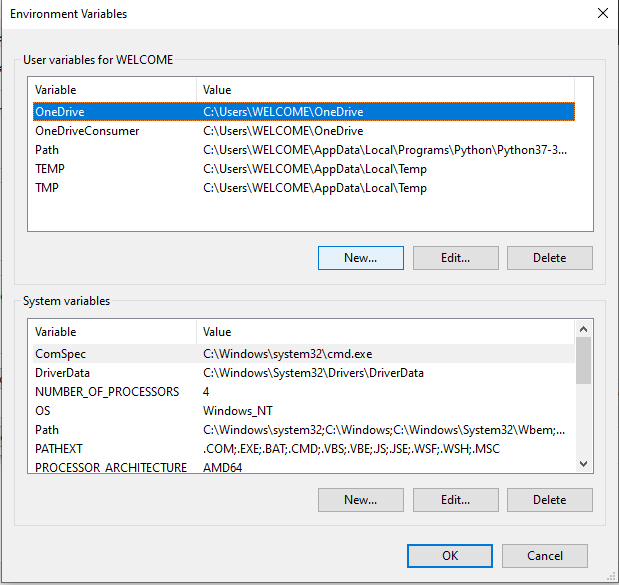 obsidian hill
slate swan
this feels like <#342318764227821568> topic
obsidian hill
slate swan
this feels like <#342318764227821568> topic
its for a discord bot thooo
limpid apex
obsidian hill
How do I now add a userid to this and give the user id tokens?
cursor.execute(f"INSERT INTO data WHERE user_id = {user id var}
yeah but we're talking about databases primarily
slate swan
most of the stuff are still related to sql and databases
viscid hornet
limpid apex
```
cursor.execute(f"INSERT INTO data WHERE user_id = {user id var}
```
sorta ❌
you should use sanitisation for your inputs. dont just use f strings
little bobby tables will explain why
 obsidian hill
limpid apex
```
cursor.execute(f"INSERT INTO data WHERE user_id = {user id var}
```
obsidian hill
limpid apex
```
cursor.execute(f"INSERT INTO data WHERE user_id = {user id var}
```
why is there an f? 💀
viscid hornet
obsidian hill
why is there an f? 💀
it's called an f string
slate swan
obsidian hill
why is there an f? 💀
F string, a way of formatting your average string
obsidian hill
ohh those thingys
obsidian hill
so like cursor.execute(f"INSERT INTO data WHERE user_id = userid") ?
viscid hornet
and please for the love of god, dont call your .Bot client 😭
viscid hornet
obsidian hill
so like ```cursor.execute(f"INSERT INTO data WHERE user_id = userid")``` ?
no
obsidian hill
damn
slate swan
viscid hornet
obsidian hill
damn
#databases i'll explain there
obsidian hill
ye
slate swan
you would most likely go for the second one
slate swan
slate swan
you would most likely go for the second one
most of people do because of "Cogs" that are supported by commands.Bot but not by discord.Client
also more functionality
dusk dagger
It also inherits Client so no reason not to use it
slate swan
yep
yeah you need to import commands from d.py's extensions
from discord.ext import commands
whoopsies
!d discord.ext.commands.Bot
unkempt canyonBOT
class discord.ext.commands.Bot(command_prefix, *, help_command=<default-help-command>, tree_cls=<class 'discord.app_commands.tree.CommandTree'>, description=None, intents, **options)```
Represents a Discord bot.

This class is a subclass of [`discord.Client`](https://discordpy.readthedocs.io/en/latest/api.html#discord.Client) and as a result anything that you can do with a [`discord.Client`](https://discordpy.readthedocs.io/en/latest/api.html#discord.Client) you can do with this bot.

This class also subclasses [`GroupMixin`](https://discordpy.readthedocs.io/en/latest/ext/commands/api.html#discord.ext.commands.GroupMixin) to provide the functionality to manage commands.

Unlike [`discord.Client`](https://discordpy.readthedocs.io/en/latest/api.html#discord.Client), this class does not require manually setting a [`CommandTree`](https://discordpy.readthedocs.io/en/latest/interactions/api.html#discord.app_commands.CommandTree) and is automatically set upon instantiating the class.

async with x Asynchronously initialises the bot and automatically cleans up.

New in version 2.0.yep
dusk dagger
the description is just an optional text you can put on the default help command
nah it’s just a general description that you can show on the default help command
read the docs: https://discordpy.readthedocs.io/en/latest/intents.html
slate swan
Yeah those are intents
sick birch
sort of
slate swan
I would just describe intents as stuff that your bot can see/do if something is enabled
you need to pass your intents as an keyword argument to the Bot class, also yeah thats how you set intents, for example
intents = discord.Intents()
intents.emojis = True
it means that the intents defined by you should be passed to your Bot class as an keyword argument intents
obsidian hill
Ok Ima come back to my economy system later, how do I add a / command?
I dont think thats how that works
also how do you do a prefix var is it like if message.content.startswith(command_prefix + 'test'): ?
what docs u reading?
viscid hornet
whys this mf reading the intents docs 😭
you're just controlling what you want your bot to be checking
ngl, .typing i havent seen
!d discord.Intents.typing
unkempt canyonBOT
Whether guild and direct message typing related events are enabled.
This is a shortcut to set or get both guild_typing and dm_typing.
This corresponds to the following events:
• on_typing() (both guilds and DMs)
This does not correspond to any attributes or classes in the library in terms of cache.
obsidian hill
import main from main?
wait no
from main import main maybe?
nope
it didnt work
from ..main import main gave this Traceback (most recent call last): File "C:\Users\liama\Downloads\folder\code\bot\bot.py", line 2, in <module> from ..main import main ImportError: attempted relative import with no known parent package
the bot is in bot/main.py and im importing from ../main.py
so I need the 2 dots since importing from outside the bot folder
My files are like this
│
├── main.py
└── bot/
    └── bot.py
SyntaxError: (unicode error) 'unicodeescape' codec can't decode bytes in position 2-3: truncated \UXXXXXXXX escape wtf
viscid hornet
obsidian hill
i need to import a function from main.py to bot.py
from proj_root.main import …
last two aren’t necessarily related
viscid hornet
yeah pretty much
obsidian hill
    from ..main import main
ImportError: attempted relative import with no known parent package```