#discord-bots
1 messages · Page 350 of 1
 supple jacinth
 viscid hornet
show me your error again
 charred sable
viscid hornet
show me your error again
charred sable
viscid hornet
show me your error again
gimme a sec
oh i forgot
it doesnt give any error man
viscid hornet
charred sable
it doesnt give any error man
so it works?
charred sable
it needs to give a message when i reaction any message
wait
lemme try
not workin
supple jacinth
supple jacinth
when you say "code not working" it does not help
...
charred sable
no errors

bro im trying to figure out
if i could fix it myself i would done it a hour ago
i cant get any errors
viscid hornet
charred sable
bro im trying to figure out
open your discord and show the message
supple jacinth
what does the code of that reaction message you want to do look like?
viscid hornet
you’re testing smth with discord so show whats on the discord side of things

 viscid hornet
charred sable
viscid hornet
charred sable
is that in a cog or outside of a cog?
charred sable
it is in the cog ig
 slate swan
Considering it's in a cog, you've added the cog to the bot in the setup function in the cog.
Same as loading the cog when starting the bot, right?
Just making sure the basics are done since you don't share the entire code
viscid hornet
charred sable
it is in the cog ig
is it
supple jacinth
charred sable
it is in the cog ig
send the full cod file. in a paste bin
viscid hornet
charred sable
its in the cog
ok lemme check further
charred sable
ok
supple jacinth
are you loading this cog lol
viscid hornet
charred sable
no errors
!code
 unkempt canyonBOT
viscid hornet
unkempt canyonBOT
viscid hornet
use that pastebin link
charred sable
ok
slate swan
Cogs are described here https://discordpy.readthedocs.io/en/latest/ext/commands/cogs.html
And getting started is somewhat here https://discordpy.readthedocs.io/en/latest/quickstart.html
viscid hornet
charred sable
oh
if something is in a cog, it’ll look like:
class ExampleCog(commands.Cog):
…
async def your_func(self):
…
your_func is inside example cog
charred sable
ty
slate swan
Where you see how events are done, just like the on_ready you made
supple jacinth
viscid hornet
if something is in a cog, it’ll look like:
class ExampleCog(commands.Cog):
...
you would also need setup function too hehe
slate swan
Not really no, it's just a listener of the event
viscid hornet
supple jacinth
you would also need setup function too hehe

slate swan
Won't be run every second or anything like that
charred sable
ty
supple jacinth
viscid hornet
<:lowtiergod:1166223375757213716>
what even is that emoji lol
slate swan
It will be run once the bot receives that event from the gateway
charred sable
bro u guys gonna find me everyday lol
viscid hornet
supple jacinth
what even is that emoji lol
low tier god
supple jacinth
viscid hornet
low tier god
what does that mean lol
unkempt canyonBOT
examples/basic_bot.py lines 19 to 22
@bot.event
async def on_ready():
    print(f'Logged in as {bot.user} (ID: {bot.user.id})')
print('------')```now gonna make it reaction role ty guys
viscid hornet
charred sable
now gonna make it reaction role ty guys
wdym by reaction role?
supple jacinth
HAHAA
charred sable
viscid hornet
wdym by reaction role?
when u click the reaction it will give a role
like
viscid hornet
charred sable
when u click the reaction it will give a role
use a button
charred sable
bot sends the message and reaction then it will give role
viscid hornet
they’re (imo) easier than reaction checks
charred sable
hm
can u teach me how do i use that box maybe
cuz idk that much its still very complicated for me xd
viscid hornet
charred sable
cuz idk that much its still very complicated for me xd
views are quite high level for a beginner ngl
charred sable
ye
viscid hornet
start with reaction chekcs
but buttons will be better in every stance
they use interactions which are a new feature on dpy v2
 sick birch
Why not just use the built in role picker
charred sable
how can i get a messages channel id + message id ?
 pale zenith
charred sable
how can i get a messages channel id + message id ?
pale zenith
charred sable
how can i get a messages channel id + message id ?
this whilst holding shift https://leo.might-be.gay/9CYXTH.png
 viscid hornet
sick birch
Why not just use the built in role picker
viscid hornet
sick birch
Why not just use the built in role picker
thats a thing?
viscid hornet
charred sable
no with python code
channel.id and message.id iirc
although i dont think they’d be any use to you since they’re just numbers
 hushed galleon
viscid hornet
thats a thing?
hushed galleon
viscid hornet
thats a thing?
i think he's referring to the community onboarding, you can add a bunch of questions/answers that grant either roles or channels
viscid hornet
might be, but i remember seeing a select menu or smth in the examples section of the docs about how you can pick roles and stuff
pale zenith
discord.ui.RoleSelect?
viscid hornet
pale zenith
`discord.ui.RoleSelect`?
yeah that
hushed galleon
doesnt let you customize which roles you can choose tho
viscid hornet
what is that anyway
pale zenith
hushed galleon
doesnt let you customize which roles you can choose tho
yeah that is fucking annoying
hushed galleon
viscid hornet
what is that anyway
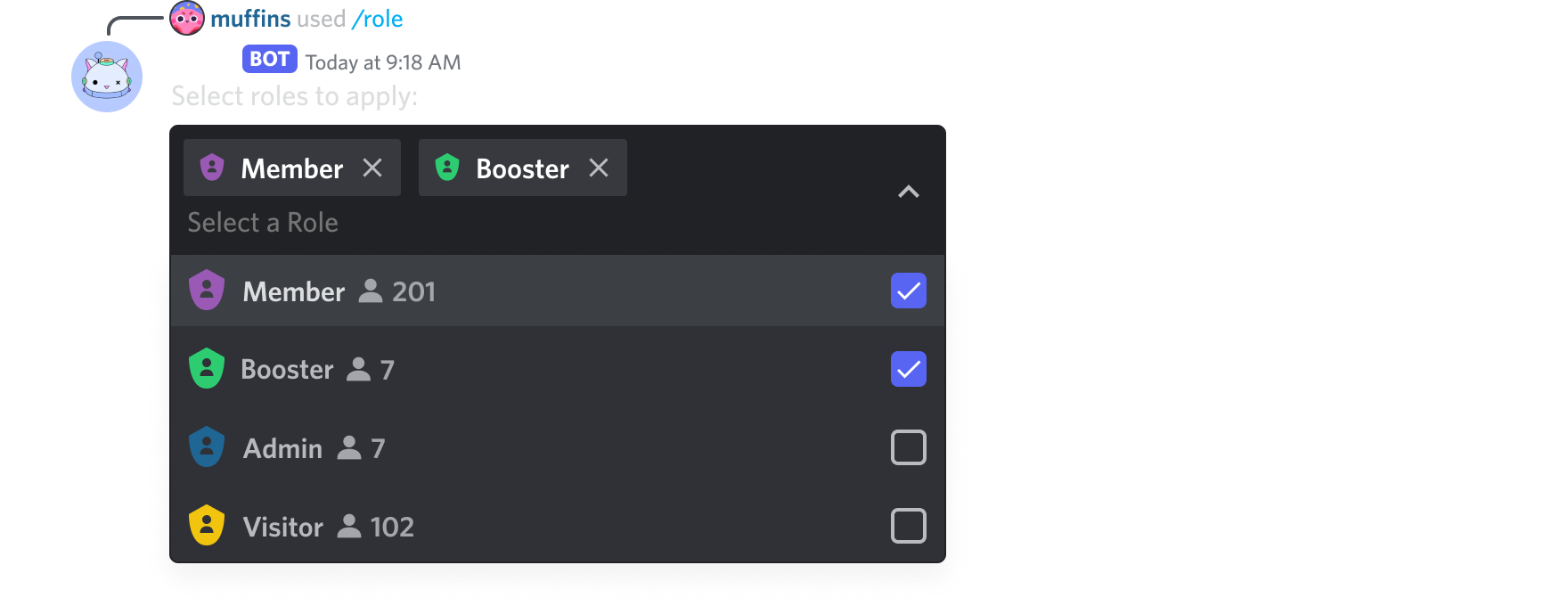 pale zenith
how is your screenshot transparent huh
hushed galleon
oh i just took it from api docs
pale zenith
oh
viscid hornet
wait can you write one that will make the roles customisable
like where you can select all at once instead of just one option

this thing.
what the hell is this
hushed galleon
seems like a normal select with max_values > 1
viscid hornet
hushed galleon
seems like a normal select with max_values > 1
oh so thats what that means
im learning 
charred sable
i dont get any error messages its client.event but still doesnt get the role on user
 hushed galleon
viscid hornet
oh so thats what that means
hushed galleon
viscid hornet
oh so thats what that means
max_values?
integer
Maximum number of items that can be chosen (defaults to 1); max 25
corresponding dpy docs:
https://discordpy.readthedocs.io/en/stable/interactions/api.html#discord.ui.Select
hushed galleon
charred sable
i dont get any error messages its client.event but still doesnt get the role on ...
on_reaction_add requires the message to be cached, and the cache is reset every time you restart your bot
charred sable
uhhh
hushed galleon
!d discord.on_raw_reaction_add would be more suitable, but a bit more complicated to work with
unkempt canyonBOT
discord.on_raw_reaction_add(payload)```
Called when a message has a reaction added. Unlike [`on_reaction_add()`](https://discordpy.readthedocs.io/en/latest/api.html#discord.on_reaction_add), this is called regardless of the state of the internal message cache.

This requires [`Intents.reactions`](https://discordpy.readthedocs.io/en/latest/api.html#discord.Intents.reactions) to be enabled.then
how do i mix these 2 man ...

bro even this looks like complicated
im givin up on that idea
ig
viscid hornet
charred sable
i dont get any error messages its client.event but still doesnt get the role on ...
try pinging the role
charred sable
viscid hornet
wdym mix them?
like
the reaction role needs to be listened every sec
and it needs to be stay after the restart
viscid hornet
charred sable
the reaction role needs to be listened every sec
wdym reaction role?
the role given upon reaction?
viscid hornet
charred sable
and it needs to be stay after the restart
what needs to stay after restart?
viscid hornet
hushed galleon
!d discord.on_raw_reaction_add would be more suitable, but a bit more complicate...
using payload, would it be payload.member for the member who added it and payload.reaction for what it is
viscid hornet
charred sable
i dont get any error messages its client.event but still doesnt get the role on ...
you might need to use str(.emoji) instead
charred sable
viscid hornet
what needs to stay after restart?
you know when i restart the bot i need to send another emoji
at the client.event commands
viscid hornet
charred sable
you know when i restart the bot i need to send another emoji
why do you need to send another emoji?
viscid hornet
charred sable
how do i mix these 2 man ...
users cant have roles; members can.
 quick gust
viscid hornet
using payload, would it be payload.member for the member who added it and payloa...
quick gust
viscid hornet
using payload, would it be payload.member for the member who added it and payloa...
I don't think payload.reaction exists?
charred sable
send message again
viscid hornet
quick gust
I don't think `payload.reaction` exists?
what attrs does payload have
viscid hornet
charred sable
send message again
on every restart?
viscid hornet
quick gust
I don't think `payload.reaction` exists?
i meant emoji mb
viscid hornet
charred sable
like i need to send message again to bot to wiew and
yeah that’s definitely unnecessary
use the same message ID
unless im missing something?
viscid hornet
charred sable
im gonna use render word as bot sees it

charred sable
it renders the message when i start the bot
viscid hornet
charred sable
it renders the message when i start the bot
do you know what render means
charred sable
but when i stop and restrart the bot it doesnt sees it
bro its like a variable stop doin that
idk what word to use do you think im from england or smtn
viscid hornet
charred sable
but when i stop and restrart the bot it doesnt sees it
because you’re using on_reaction_add and not on_raw_reaction_add
charred sable
ty
viscid hornet
the first one relies on cache which gets cleared whenever you restart your bot
viscid hornet
charred sable
ty
||finally 😭||
charred sable
lol
viscid hornet
glad we could help
quick gust
viscid hornet
i meant emoji mb
Ah i see
 modern valve
@bot.tree.command(name="sample command", description="This is a sample command")
async def sample(interaction: discord.Interaction):
  await interaction.response.send_message("Thanks for running my command!", ephemeral=True)

@bot.event()
async def on_ready():
  await bot.tree.sync()
Simply, rather than ctx.reply() it is interaction.response.send_message()
and it requires syncing if there is any changes.
changes being:
new command
removed command
command change name
command change desc
viscid hornet
modern valve
```py
@bot.tree.command(name="sample command", description="This is a sample com...
dont autosync
viscid hornet
modern valve
why not
__A__uto __S__yncing (your command tree) __S__ucks, and here's why:
Syncing your command tree automatically causes extra unnecessary requests to be made, this is because you only need to sync when commands are updated.
*see ?tag whensync for a more nuanced list on when to sync.
What syncing does is send your commands to discord for one guild or globally. If you haven't changed your command's descriptions, added/removed commands, changed names, parameters, etc. you shouldn't sync, since you'd only be updating discord with the commands they already have without doing any changes, which is pointless and a waste of an API request to a limit with an already tight rate limit.
*see ?tag whatsync for a more nuanced on what syncing is, and how to do so.
Oh and also, syncing your tree sometimes breaks discord, making commands not pop up for users until they restart their discord client, switch channels, or any other mysterious random events, which just inconveniences the end users of your bot for no reason.
Where should I sync instead?
It's better to sync using a normal (message) command (or even an on_message if you prefer Client) You can even use just a simple eval to do so.
*for example:?tag umbras sync command or the jsk sync command from the debugging tool Jishaku (see ?tag jsk)
*But I don't have the new message content intent... What now?
Bots can still receive message content when the bot is mentioned in it, or in DMs! You could set the bot prefix to commands.when_mentioned
*Oh, and if you're one of those people who restarts their bot very frequently instead of using extensions and reloading them, this could cause rate limit issues too. (see ?tag extensions)
modern valve
ah
viscid hornet
viscid hornet
**__A__uto __S__yncing (your command tree) __S__ucks, and here's why:**
Syncing ...
taken from official dpy
 abstract granite
modern valve
```py
@bot.tree.command(name="sample command", description="This is a sample com...
abstract granite
modern valve
```py
@bot.tree.command(name="sample command", description="This is a sample com...
I understood what it was @bot.slash_command(name="sample command", description="This is a sample command")
async def sample(interaction: discord.Interaction):
await interaction.response.send_message("Thanks for running my command!", ephemeral=True)
modern valve
what if i use a q!sync command
viscid hornet
modern valve
what if i use a q!sync command
yeah prefix works fine
modern valve
viscid hornet
yeah prefix works fine
alr
viscid hornet
modern valve
alr
its bc not all of your extensions could be loaded so your commands could end up being half synced
modern valve
i dont have extentions
i just have like 3k lines in one file 😭
how do i do a wait without halting the rest of the code
modern valve
viscid hornet
yeah prefix works fine
@bot.command(name="sync")
async def syncTree(ctx):
    if ctx.author.id == 1151946999835402260:
        message = await ctx.reply("... Syncing Commands")
        await bot.tree.sync()
        await message.edit(":white_check_mark: Commands Synced!")
        await asyncio.wait(timeout=3)
        await message.delete()
like this?
viscid hornet
modern valve
```py
@bot.command(name="sync")
async def syncTree(ctx):
if ctx.author.id ==...
yes. also messages can have a delete_after period
modern valve
viscid hornet
yes. also messages can have a delete_after period
how would i do that
viscid hornet
i think .edit has it
viscid hornet
modern valve
how would i do that
its just a delete after kwarg in .send
modern valve
i do not understand arg and kwarg
oh also
i added debugging and it doesnt edit the message
it kinda just stops there
viscid hornet
modern valve
i do not understand arg and kwarg
an argument is just something that goes in a function
modern valve
fair
viscid hornet
modern valve
fair
a keyword argument is an argument defined by a keyword, so days = ?, length = ?, …
modern valve
@bot.command(name="sync")
async def syncTree(ctx):
    if ctx.author.id == 1151946999835402260:
        print("sync commands")
        message = await ctx.reply("... Syncing Commands")
        await bot.tree.sync()
        print("commands synced")
        await message.edit(":white_check_mark: Commands Synced!")
        await asyncio.wait(timeout=3)
        await message.delete()
it syncs
it prints "commands synced" and stops there
what am i doing wrong
viscid hornet
modern valve
what am i doing wrong
its .sleep, not .wait
modern valve
viscid hornet
its .sleep, not .wait
no it doesnt edit the message
viscid hornet
modern valve
no it doesnt edit the message
errors? tb?
modern valve
viscid hornet
errors? tb?
no errors, probably my outstanding error blocker
i mean i can do except Exception as e:
viscid hornet
modern valve
no errors, probably my outstanding error blocker
you should have an else: \ raise error
modern valve
Message.edit() takes 1 positional argument but 2 were given
viscid hornet
that way uncaught errors dont get eaten
modern valve
viscid hornet
that way uncaught errors dont get eaten
print(e) works fine
if i see it, that is
viscid hornet
modern valve
print(e) works fine
print(e) wont include traceback
use else raise error
modern valve
viscid hornet
print(e) wont include traceback
well no, its because i know where the error is
heres the error
Message.edit() takes 1 positional argument but 2 were given
heres the code
@bot.command(name="sync")
async def syncTree(ctx):
    try:
        if ctx.author.id == 1151946999835402260:
            print("sync commands")
            message = await ctx.reply("... Syncing Commands")
            await bot.tree.sync()
            print("commands synced")
            await message.edit(":white_check_mark: Commands Synced!")
            await asyncio.wait(timeout=3)
            await message.delete()
    except Exception as e:
        print(e)
still good to have tb further down the line
modern valve
viscid hornet
still good to have tb further down the line
just help with the error
viscid hornet
modern valve
just help with the error
idk whats up w it ngl, looks like it runs fine
pale zenith
message.edit takes keyword arguments only, not positonal.
message.edit(content='...')
@modern valve ^
modern valve
thanks
viscid hornet
pale zenith
message.edit takes keyword arguments only, not positonal.
`message.edit(content=...
i was gonna say add content = … but i thought i was tweaking
thanks leo
viscid hornet
modern valve
okay what does fs do in await asyncio.wait()
use .sleep
viscid hornet
modern valve
is that the same as time.sleep()?
yes but async
modern valve
ok
viscid hornet
pale zenith
message.edit takes keyword arguments only, not positonal.
`message.edit(content=...
how do you define a function to only take kwargs?
modern valve
viscid hornet
yes but async
await asyncio.sleep(3)
this does 3 seconds right
yes it does
thanks bye
viscid hornet
modern valve
await asyncio.sleep(3)
this does 3 seconds right
yep
pale zenith
viscid hornet
how do you define a function to only take kwargs?
def foo(pos only, /, pos or keyword, *, keyword only)
viscid hornet
pale zenith
def foo(pos only, /, pos or keyword, *, keyword only)
oh that’s pretty cool. whats the advantage for this?
pale zenith
viscid hornet
oh that’s pretty cool. whats the advantage for this?
To define how parameters should be passed lol
viscid hornet
pale zenith
To define how parameters should be passed lol
is this like a typehints thing then where it doesnt do anything at runtime but is useful when writing code?
viscid hornet

pale zenith
!e ```py
def foo(arg, /): ...
foo(arg=1)
@pale zenith :x: Your 3.12 eval job has completed with return code 1.
001 | Traceback (most recent call last):
002 |   File "/home/main.py", line 3, in <module>
003 |     foo(arg=1)
004 | TypeError: foo() got some positional-only arguments passed as keyword arguments: 'arg'

 pulsar river
viscid hornet
i get it now
pulsar river
viscid hornet
i get it now
 twilit grotto
 vapid parcel
How to make a user install bot?
vapid parcel
How to make a user install bot?
a selfbot? bannable offense
 vapid parcel
twilit grotto
a selfbot? bannable offense
vapid parcel
twilit grotto
a selfbot? bannable offense
Its a new thing allowed BY DISCORD, so there is no bannable offense to it.
 naive briar
vapid parcel
Its a user install bot, not a self bot
naive briar
vapid parcel
Its a user install bot, not a self bot
What even is that
vapid parcel
naive briar
What even is that
Are you guys not updated on the new User install bots....
I just wanna see someone else make a user install app in dpy
I haven't seen anyone else do it yet, so I have no clue if its possible...
This is all I can find, which is in JS, which I do not know JS for discord bot, I only know JS for web developing. So yeah.

This is how you can use discord's new feature-- user install commands.
👉 Credit to talyzman for this code!
Invite talyzman's bot to your servers below:
🡺 https://top.gg/bot/1187458268591816754
Join my discord:
🡺 https://discord.gg/E6AJ7eNrsd
Developer portal:
🡺 https://discord.com/developers/applications
Want to become a member? Want ac...
User installable apps are a new feature provided by Discord that allows you to use an applications global commands even if the application is not in the server. This also allows you to create commands that will work in DMs between users.
Support currently exists on a feature branch, but will be available on master soon and will officially release in version 2.4.
To install: pip install -U git+https://github.com/Rapptz/discord.py@feature/user_apps
See the bikeshedding post for the latest development information and to report bugs.
The following decorators have been added or changed to support this:
- app_commands.allowed_contexts
- app_commands.allowed_installs
- app_commands.guild_install
- app_commands.user_install
- app_commands.private_channel_only
- app_commands.dm_only
- app_commands.guild_only
Slash commands and context menus are supported.
By default, commands are installed to guilds only but permitted in any context for new commands.
ex.
@app_commands.command()
@app_commands.allowed_installs(guilds=True, users=True)
@app_commands.allowed_contexts(guilds=True, dms=True, private_channels=True)
async def useable_anywhere(interaction: discord.Interaction):
    await interaction.response.send_message("I can be used anywhere, and am installed to guilds and users.")
or
@app_commands.command()
@app_commands.allowed_installs(guilds=False, users=True)
@app_commands.allowed_contexts(guilds=True, dms=True, private_channels=True)
async def useable_only_users(interaction: discord.Interaction):
    await interaction.response.send_message("I am only be installed to users, but can be used anywhere.")
NOTE: The only information available when processing a command used by a user is what's available on the interaction itself. You will NOT receive any extra information that would normally be in cache (guild members, guild roles, etc.).
This is how to do it, discord.py server showed me, so if anyone else needs it, here you go!
naive briar
Ugh
 civic reef
I want to make a discord bot but I am confused about how to use API calls of platform that I want to use. Documentation of API is there but I am not able to understand. Can anyone wants to pair up with me to start the bot development?
civic reef
From linkedin page when I make a post I want to send notification in the server via bot. How to do this?
 latent jay
Can someone explain sharding to me
latent jay
civic reef
From linkedin page when I make a post I want to send notification in the server ...
linkedin is a pain to scrape good luck lol
civic reef

latent jay
How can I link to a channel when my button is pressed?
 long pecan
Morning all!
Im seeking help.
What do I want to do:
Currently im showing a few options in an embed. Each option has an ID. I am then sending a (discord.ui.View) with a dropdown menu (discord.ui.Select) with the IDs + "Cancel". Once they select an option they are presented another (discord.ui.View) as a confirmation with just the two buttons Confirm and Cancel.
What im struggling with:
I think im messing up the webhook as the interaction works. But only once, after that I get an interaction failed with the terminal showing 404, interaction not found.
It is however putting the output as well as "interaction failed" message in discord.
What im doing atm:
I changed the inter.response.send_message to inter.channel.send as how I understand it you can only send one response to an interaction.
I think I need to use the followup webhook, but I dont know how to use this.
If somebody has some ideas already, im happy to hear it.
I'll see if I can come up with a minimum working example shortly.
Thanks!
EDIT: Small example below
https://paste.pythondiscord.com/O4SA
EDITT: Also opened a thread
#1226808932530651136
slate swan
is it possible to answer modals like this as a bot?
 long pecan
Morning all!
Im seeking help.
What do I want to do:
Currently im showing a few o...
long pecan
long pecan
Morning all!
Im seeking help.
What do I want to do:
Currently im showing a few o...
2 edits in here. code + open help thread.
 drifting arrow
slate swan
is it possible to answer modals like this as a bot?
drifting arrow
slate swan
is it possible to answer modals like this as a bot?
I dont think bots can anwer modals
For starters, they'd have to be able to trigger a modal, which is an interaction, which includes things like buttons and slash commands
So, unless a bot can even trigger an activity such as buttons or slash commands, they cant answer modals.
drifting arrow
slate swan
is it possible to answer modals like this as a bot?
Also. From your question, it sounds like you're trying to make a "self bot", which is against discords TOS and therefore this servers rules.
slate swan
drifting arrow
So, unless a bot can even trigger an activity such as buttons or slash commands,...
bots can click buttons
slate swan
drifting arrow
Also. From your question, it sounds like you're trying to make a "self bot", whi...
not what im making but ight
drifting arrow
slate swan
not what im making but ight
Then assuming you're doing it all within TOS and you can actually get the bot to click a button, you'd probably want to start by reading the response it gets when it does click a button
slate swan
yeah i think so, i havent tried anything yet i just wanted to ask if its possible before i try to do it
drifting arrow
Try anyway.
Worst case you spend an afternoon trying and learning new things
best case you figure it out in 30 minutes
 glossy flame
I'm using Pycharm to run my bot, but even after closing Pycharm (by ending the process on task manager) the bot is still responding to my messages, how?!
It's not like it's running from multiple clients or anything since when I turn it back on it responds with singular messages (as intended)
quick gust
slate swan
is it possible to answer modals like this as a bot?
I highly doubt that you can
viscid hornet
latent jay
How can I link to a channel when my button is pressed?
https://discord.com/<guild_id>/<channel_id>/<message_id> is the url format i think
viscid hornet
long pecan
Morning all!
Im seeking help.
What do I want to do:
Currently im showing a few o...
just use .followup.send()
its the same as inter.resp.send_msg() but obviously has no limited
be warned, it can only be used after a response is given
viscid hornet
slate swan
is it possible to answer modals like this as a bot?
no because bots cant interact with UI elements
long pecan
so I must inter.resp.send_msg()
and then after that inter.followup.send()?
viscid hornet
long pecan
so I must inter.resp.send_msg()
and then after that inter.followup.send()?
yep 👍🏽
viscid hornet
slate swan
yeah i think so, i havent tried anything yet i just wanted to ask if its possibl...
its not possible with buttons but if you use reactions it works pretty much fine
viscid hornet
glossy flame
I'm using Pycharm to run my bot, but even after closing Pycharm (by ending the p...

sounds pretty cool if you can turn off your computer and your bot still works
i wouldnt be complaining tbh
viscid hornet
civic reef
I want to make a discord bot but I am confused about how to use API calls of pla...
learn it yourself lmao https://discord.gg/dpy
long pecan
viscid hornet
yep 👍🏽
okay trying xD
long pecan
viscid hornet
yep 👍🏽
Other question:
I am sending a new message to the channel:
inter.channel.send() How do I get the message id of this message to delete later?
viscid hornet
long pecan
Other question:
I am sending a new message to the channel:
`inter.channel.send()...
whatever = await something.send()
await whatever.delete()
long pecan
ah I just also found that on the reddit.
And that will still also send the message to the channel?
viscid hornet
long pecan
ah I just also found that on the reddit.
And that will still also send the mess...
yes
since you’re using channel.send
long pecan
Okay thanks. I think what I have is good enough for now. ❤️
viscid hornet
long pecan
Okay thanks. I think what I have is good enough for now. ❤️
nps 
glossy flame
Can anyone refer me to some resources that can help me implement AI to my bot? like make it act like an AI model with information provided by me and trained by me.
viscid hornet
glossy flame
Can anyone refer me to some resources that can help me implement AI to my bot? l...
also training your own AI model might be pretty hard but go for it
glossy flame
ty
 analog hinge
long pecan
Okay thanks. I think what I have is good enough for now. ❤️
analog hinge
long pecan
Okay thanks. I think what I have is good enough for now. ❤️
If your bot is larger scale, meaning publicly availible id also build a little test case szenario for it.
like
send message
asyncio sleep thingy for a couple of minutes(do not time.sleep)
delete message
in code. at the same time when the message is sent editing the channels permissions so the bot is not allowed to sent or do sh by channel permissions
lastly you'll see if any error is raised or not and can build for it.
If you are asking why this sort of test would be useful:
Permissions your bot has when used through, lets say some slash command differ heavily from what it is allowed to do later on. this does for a fact include editing its own messages (not sure about deleting)
and people tend to have about every ever so weird setting under the sun.
So if you want your bot to be public at one point and harden your code for it; there you go.
long pecan
Thanks 👍🏻
 muted kraken
Can anyone help me create a bot to use with / command?
viscid hornet
muted kraken
Can anyone help me create a bot to use with / command?
Umbra’s Rantings
My site for random things and stuff. Including a custom pip index and walkthroughs, both for discord.py!
this will go through slash commands
use the second and third link
charred sable
im struggling with pasting custom emojis on embed can someone help me ?
it doesnt convert to emoji
slate swan
whats up, trying to make a command that sends images based on a search result, how can i go about doing that? any hints
 cloud dawn
slate swan
whats up, trying to make a command that sends images based on a search result, h...
cloud dawn
slate swan
whats up, trying to make a command that sends images based on a search result, h...
Google has an api
slate swan
is it free?
cloud dawn
Yeah it's called a search api
slate swan

slate swan
thats good enough
 slate swan
thanks
im not getting any errors, not sure if its just not able to search or what any clue?
 viscid hornet
slate swan
im not getting any errors, not sure if its just not able to search or what any c...
viscid hornet
slate swan
im not getting any errors, not sure if its just not able to search or what any c...
what does your code look like?
viscid hornet
charred sable
im struggling with pasting custom emojis on embed can someone help me ?
wdym by pasting them on an embed
viscid hornet
slate swan
im not getting any errors, not sure if its just not able to search or what any c...
any tbs? what prompts the bot to see theres no images
by prompt, i mean:
x = 5
if x == 5:
print(“yes”)
in this case the prompt is “x == 5”
charred sable
viscid hornet
wdym by pasting them on an embed
can u help me with that code

it checks if the reaction added if added it will cancel the server build
slate swan
viscid hornet
what does your code look like?
i deleted it out of pure rage 🙂 will try again and send code if it doesnt work
viscid hornet
charred sable
why is the title out of quotes
viscid hornet
slate swan
i deleted it out of pure rage 🙂 will try again and send code if it doesnt work
good luck this time
viscid hornet
charred sable
also thats not how you listen for reactions
charred sable
i need to get mesagge id
viscid hornet
you cant have an event instead of a command, that doesnt work
charred sable
oh
but how can i store the mesagge id
cuz i need to use that in the client.event too
 wind dome
I made a main file imported discord and it worked made a cog imported discord it works but when i tried new file cog and try to import discord it says module cant be accessed any ideas how i could fix that?
charred sable
the main idea is there is a command that will reset server and it will cancel or do it based on the reaction
viscid hornet
charred sable
cuz i need to use that in the client.event too
you wont need a client.event dont worry
charred sable
oh
slate swan
i do have another problem i need help with, i made commands for my server that send messages to resolve issues. and it was working fine but now it sends it 2x and im not sure why.
 viscid hornet
wind dome
I made a main file imported discord and it worked made a cog imported discord it...
viscid hornet
wind dome
I made a main file imported discord and it worked made a cog imported discord it...
can you elaborate more on your issue?
viscid hornet
slate swan
i do have another problem i need help with, i made commands for my server that s...
i don’t see an issue with the code 
slate swan
yeah thats why im confused lol! it was just fine last night. and now after i try to make the thing with google api it messed up.. but i dont have any of that code in anymore
does this as output 
 wind dome
viscid hornet
can you elaborate more on your issue?
wind dome
viscid hornet
can you elaborate more on your issue?
i have main.py file which i used discord.py imports like import discord and from discord import commands and it works in main.py and in my first cog file normally but now when i made a new cog file when i try to import discord it says that module cant be accessed
viscid hornet
wind dome
i have main.py file which i used discord.py imports like import discord and from...
hmm weird
do you have screenshots?
slate swan
lol.. im dumb i had it running on visual studio and in windows
viscid hornet
slate swan
lol.. im dumb i had it running on visual studio and in windows
well done? 😭
slate swan

 viscid hornet
slate swan
viscid hornet
slate swan
quick question: why are you using on_message instead of a dedicated command?
wind dome
viscid hornet
do you have screenshots?
ill rec vid one sec
viscid hornet
wind dome
ill rec vid one sec
alr good
wind dome
viscid hornet
alr good
wind dome
viscid hornet
alr good
as you can see main.py and botinfo.py both work with import discord the new cog file doesnt
wind dome
viscid hornet
🤦🏽♂️
yes i figured it out thanks XD
viscid hornet
wind dome
yes i figured it out thanks XD
my dumbass thought you didnt have the package installed 💀
wind dome
viscid hornet
my dumbass thought you didnt have the package installed 💀
eyo ngl same XD but thanks for help
wind dome
cloud dawn
Might wanna reset that api key
did it instantly after i recorded
slate swan
viscid hornet
quick question: why are you using on_message instead of a dedicated command?
did command instead
 viscid hornet
slate swan
did command instead
viscid hornet
slate swan
did command instead
better
slate swan
viscid hornet
better
still no luck though with the results.
not sure if its the API or the code
viscid hornet
slate swan
still no luck though with the results.
try printing the api result
slate swan
also you should consider using aiohttp instead of request
your code is most likely blocking
viscid hornet
oh yeah good call
slate swan
i see
will do both of those
that helped a bit, actually got a error now

fixed that, i messed it up. still just getting no image found
might try redidt api
slate swan
how can i go about making an embed image bigger?


 glad cradle
isn't that a ssl certificate related error?
 unreal pilot
glad cradle
isn't that a ssl certificate related error?
unreal pilot
glad cradle
isn't that a ssl certificate related error?
im not sure how i would fix that

 neat heath
hmm
 proven parcel
im trying to take in input with /commands but not sure how to make it heres code
@bot.tree.command(name="skick")
async def skick(interaction: discord.Interaction, ):#<- paramater for input
    await interaction.response.send_message(f"kicked user {member}")
 torn sail
proven parcel
im trying to take in input with /commands but not sure how to make it heres code...
torn sail
proven parcel
im trying to take in input with /commands but not sure how to make it heres code...
have u used normal text commands before?
it so its the same as that, you would add a parameter with a typehint of discord.Member
charred sable
can someone explain me what am i making wrong
 naive briar
What's wrong with it?
drifting arrow
Can role permissions even be 9999?
try a different position?
try like 5 and 3 and 1
charred sable
tried
i was getting eror that saying it does not have that thing
saying i cant give position
but i fixed it so u guys dont need to wry

 charred sable
ty
naive briar
Please send the error along with your questions next time. It can be hard to spot the error from the code sometimes 🫠
 civic reef
 young dagger
Is there any way to fetch users by using their username?
young dagger
Is there any way to fetch users by using their username?
which feature are you building?
civic reef
just curious to know what you are building
young dagger
civic reef
just curious to know what you are building
I want to make 'whois' command
civic reef
okay
young dagger
civic reef
okay
Do you actually know how to solve the issue?
civic reef
nope
naive briar
young dagger
Do you actually know how to solve the issue?
Iterate through the guild members and filter by their names 
young dagger
naive briar
Iterate through the guild members and filter by their names <:ducky_wizard:63935...
What if the user is not a member of the guild 🤔
naive briar
Tell the invoker
young dagger
naive briar
Tell the invoker
Elaborate please?
naive briar
Tell the command invoker (or caller, whatever) that the user isn't in the server 🤷
young dagger
naive briar
Tell the command invoker (or caller, whatever) that the user isn't in the server...
I was wondering if there's a way to get someones userID using their username, even if they're not part of the guild
drifting arrow
young dagger
I was wondering if there's a way to get someones userID using their username, ev...
Bots can only "see" those who are in the same guild as it.
naive briar
There's probably a way, just not available in discord.py
That the tools like discord.id used
drifting arrow
There's a way using the straight API to query a users profile.
You could also lookup authorized apps.
naive briar
naive briar
There's probably a way, just not available in `discord.py`
Wait, no
If there is, it probably won't accept a username
young dagger
drifting arrow
There's a way using the straight API to query a users profile.
You could also lo...
Do you know the endpoint perhaps?
drifting arrow
na
i use discordpy. i just know it's possible coz u can look people up on websites
young dagger
drifting arrow
i use discordpy. i just know it's possible coz u can look people up on websites
Well I want my bot to be able to do it 😅
young dagger
drifting arrow
stick to people your bot can see
Thanks for trying to help
drifting arrow
Idk if I'd thank me. I didnt really help at all.
Just check the official discord API.
young dagger
drifting arrow
Just check the official discord API.
Yeah, that is what I did
 wraith mirage
made a nuke bot (i know this might be something bad but i will only use it for good)
 slate swan

 fringe coyote
whats the different between 2 options?
client = discord.Client(intents=intents)```
and
```py
from discord.ext import commands
bot = commands.Bot(command_prefix='!', intents=intents)```
A hands-on guide to Discord.py
fringe coyote
thank
 robust fulcrum
Guys I have heard of a discord bot library called hikari is there any good reason we can use it over disnake?
 clever spade
wraith mirage
made a nuke bot (i know this might be something bad but i will only use it for g...
clever spade
wraith mirage
made a nuke bot (i know this might be something bad but i will only use it for g...
wild
viscid hornet
robust fulcrum
Guys I have heard of a discord bot library called hikari is there any good reaso...
||use discord.py||
viscid hornet
wraith mirage
made a nuke bot (i know this might be something bad but i will only use it for g...
in what possible context can you use a nuke bot for good
wraith mirage
viscid hornet
in what possible context can you use a nuke bot for good
nuking nsfw servers
unkempt canyonBOT
5. Do not provide or request help on projects that may violate terms of service, or that may be deemed inappropriate, malicious, or illegal.
viscid hornet
abstract granite
what?
nuke bots are against TOS
abstract granite
viscid hornet
nuke bots are against TOS
my bot don´t is a nuke bot :VVVV
is replit
wraith mirage
abstract granite
my bot don´t is a nuke bot :VVVV
a1 english
viscid hornet
abstract granite
my bot don´t is a nuke bot :VVVV
so the question isnt related to the nuke bot?
i already answered that question in dms anyway
viscid hornet
wraith mirage
a1 english
fr 😭
abstract granite

and error: ```py
Traceback (most recent call last):
File "/home/runner/huce/main.py", line 3, in <module>
from discord import app_commands
File "/home/runner/huce/.pythonlibs/lib/python3.10/site-packages/discord/app_commands/init.py", line 12, in <module>
from .commands import *
File "/home/runner/huce/.pythonlibs/lib/python3.10/site-packages/discord/app_commands/commands.py", line 51, in <module>
from ..enums import AppCommandOptionType, AppCommandType, ChannelType, Locale
ImportError: cannot import name 'AppCommandOptionType' from 'discord.enums' (/home/runner/huce
/.pythonlibs/lib/python3.10/site-packages/discord/enums.py)
why is it outside of a cog?
also the cmd is missing a description
and you should definitely be using your own PC
you’ll get farrr more out of using your own machine than using replit
just drop replit and use vscode and run code on your own machine
or atom or another IDE
replit will strangle your bot’s performance
abstract granite
viscid hornet
replit will strangle your bot’s performance
ok ok
abstract granite
viscid hornet
why is it outside of a cog?
I don't know
viscid hornet
abstract granite
I don't know
put it inside a cog then?
wind dome
viscid hornet
better
hey buddy can i dm you real quick please?
viscid hornet
wind dome
hey buddy can i dm you real quick please?
sure?
 mighty terrace
in your opinion what infos should a userinfo command contain?
glossy flame
@tasks.loop(minutes=1)
async def send_random_gif():
    f = open("epicgifs.txt", "r")
    gif_list = f.read().split("\n")
    print(gif_list)
    chosen_gif = random.choice(gif_list)
    print(chosen_gif)
    channel = bot.get_channel(1055877809278566544)
    await channel.send(chosen_gif)
I've got this to read a file of a list of gifs i want it to send occasionally, but it's reading the last empty line and choosing it from the list, how can I prevent this?
viscid hornet
mighty terrace
in your opinion what infos should a userinfo command contain?
all the info about a user
glossy flame
wait
viscid hornet
profile, roles
glossy flame
i figured it out
ill just use an if statement to check if its empty and reroll the choice
viscid hornet
mighty terrace
in your opinion what infos should a userinfo command contain?
check the docs for discord.Member (i’ll put a link below) and see what attributes that class has
then you can format the details accordingly
mighty terrace
okay thanks
viscid hornet
glossy flame
```py
@tasks.loop(minutes=1)
async def send_random_gif():
f = open("epicgifs...
you dont have to keep reading the file and getting the channel btw. make these variables somewhere in the code and get from those i’d say
viscid hornet
glossy flame
ill just use an if statement to check if its empty and reroll the choice
dont have any empty lines?
you could just do f.read()[:-1] to remove the last “\n”
glossy flame
thank you very much
mighty terrace
@viscid hornet what you think about this?

 merry cliff
It would be fun if you made the embed colour the same as the status colour
viscid hornet
mighty terrace
<@566653183774949395> what you think about this?
use “discord.utils.format_dt()” instead for the join dates
and the create dates
merry cliff
Or perhaps use a timestamp
viscid hornet
viscid hornet
and the create dates
use role pings instead as well
viscid hornet
merry cliff
Or perhaps use a timestamp
do you mean these? <t:1234567890:R>
merry cliff
Yup!
mighty terrace
viscid hornet
use “discord.utils.format_dt()” instead for the join dates
okay thanks
any other suggestion for some othr information or something?
viscid hornet
merry cliff
Yup!
thats what i meant lmao 😭
viscid hornet
mighty terrace
any other suggestion for some othr information or something?
did you check the docs for all Member attributes?
viscid hornet
mighty terrace
any other suggestion for some othr information or something?
take a look at the attributes column and let me know what you think
mighty terrace
viscid hornet
take a look at the attributes column and let me know what you think
i found something that may be interesting, first the latency and maybe guilds or voice clients
i have to take a look what information these attributes exactly get
viscid hornet
mighty terrace
i have to take a look what information these attributes exactly get
good practice. lmk what list of stuff you end up adding
mighty terrace
viscid hornet
good practice. lmk what list of stuff you end up adding <:prettythumbsup:8063906...
thanks, ill continue tomorrow im gonna send it than
mighty terrace
merry cliff
And have a distinction between display name and username
i was trying to separate the username and the display name the whole time but somehow it always just gives me the display mame
viscid hornet
mighty terrace
i was trying to separate the username and the display name the whole time but so...
theres .name and .display_name for a reason btw
mighty terrace
yeah i know but both give me the same somehow
i tried different variations using userid, getting the user by guild but both attributes always return the same back
viscid hornet
mighty terrace
yeah i know but both give me the same somehow
probably because the user doesnt have a nickname
 mighty terrace
you can show the nickname by the nick attribute but every user has 2 names the username and the display name and i tried using me as user, my username is ChickenNuggget and my displayname is martin04lel but both .name and . display_name return only martin04lel
viscid hornet
accidental markup
viscid hornet
mighty terrace
you can show the nickname by the nick attribute but every user has 2 names the u...
thats because /nick without a new nickname input will reset your nickname
mighty terrace
I think ill make value that only is shown when the .display_name != .name so if the user has a nickname it will show but if he doesn't than it will skip
pale zenith
mighty terrace
you can show the nickname by the nick attribute but every user has 2 names the u...
What discord.py version do you have?
mighty terrace
i have to check tomorrow i already turned off my pc
pale zenith
Ok. Well in any case please update discord.py with pip install -U discord.py because that's probably the reason it isn't working
mighty terrace
okay thanks
viscid hornet
pale zenith
Ok. Well in any case please update discord.py with `pip install -U discord.py` b...
you can pip install it? how come the faq section or wherever in dpy tells you to use git+link then?
 wanton current
pale zenith
Ok. Well in any case please update discord.py with `pip install -U discord.py` b...
wanton current
pale zenith
Ok. Well in any case please update discord.py with `pip install -U discord.py` b...
This is the latest stable release on pypi, installing from GitHub is usually done to get the latest non-stable / released version
viscid hornet
wanton current
This is the latest stable release on pypi, installing from GitHub is usually don...
what does the -U bit mean?
pale zenith
upgrade
viscid hornet
pale zenith
upgrade
leo quick question: how do emoji hierarchies work?
yk in recent emojis it shows emotes you’ve used, well, recently
how does it sort this information?
and why top to bottom instead of left to right for the order
wanton current
Well, you just store the time when you use that emoji and then put the one with the closest time first (sorting by the timestamp)
viscid hornet
wanton current
Well, you just store the time when you use that emoji and then put the one with ...
but say for iOS, if i accidentally press an emoji it doesnt immediately take the top spot?
slate swan
what should i use for making buttons?
rather than a emoji reaction
is discord_components outdated?/
im on py 3.11.0
 hushed galleon
slate swan
is discord_components outdated?/
hushed galleon
slate swan
is discord_components outdated?/
yes, discord-components was yanked from pypi, presumably because discord.py 2.0 added native support for components
https://discordpy.readthedocs.io/en/stable/interactions/api.html#bot-ui-kit
https://github.com/Rapptz/discord.py/tree/v2.3.2/examples/views ```py
class MyView(discord.ui.View):
@discord.ui.button(label="Hello world!")
async def my_button(self, interaction, button):
await interaction.response.send_message("Hello world!")
view = MyView()
await ctx.send(..., view=view)```
slate swan
ohh
viscid hornet
slate swan
what should i use for making buttons?
a view?
yeah what they already said
robust fulcrum
viscid hornet
||use discord.py||
|| I prefer disnake though || was just asking is hikari better than disnake
viscid hornet
robust fulcrum
|| I prefer disnake though || was just asking is hikari better than disnake
tbh idk what hikari is
and i’ve heard its better to recommend the original over rewrites because they might have missed some important safety features or whatever during the rewrite
robust fulcrum
Disnake has all features of discord.py ig
hushed galleon
its hard to assess the qualities of each fork by yourself without having used them for some time and/or pruning through their source code, but i would recommend dpy because it's still a popular library so plenty of people can help - i think disnake has better official documentation in terms of guides, at least for now
hikari's a massively different library that i believe covers more of discord's API, like interactions-over-HTTP and OAuth2
slate swan
not getting any errors, interaction fails. i checked to make sure the event is being triggered and it is but im not sure what is wrong with it
 viscid hornet
slate swan
not getting any errors, interaction fails. i checked to make sure the event is b...
viscid hornet
slate swan
not getting any errors, interaction fails. i checked to make sure the event is b...
show code 🗣
i’m seeing too many people showing an issue and not their code 
slate swan
viscid hornet
i’m seeing too many people showing an issue and not their code <:MegaFacepalm:65...
sorry im good at doing that
🤣
will do in a min if i keep having problems gonna see if i can fix it like a big boy 
viscid hornet
slate swan
will do in a min if i keep having problems gonna see if i can fix it like a big ...
he’s learning 
slate swan

drifting arrow
Don’t learn to fast @slate swan I get a lot of my knowledge from random questions people ask
Like the other day I learnt about grouping of@commands
 quaint obsidian
Hello
 blazing beacon
    @commands.Cog.listener('on_message')
    async def listen_for_shh():
        msg = None
        if db.read(pass_through=True)[msg.author.id]:
            return await msg.delete()
Traceback (most recent call last):
  File "c:\Python312\Lib\site-packages\discord\client.py", line 441, in _run_event
    await coro(*args, **kwargs)
          ^^^^^^^^^^^^^^^^^^^^^
TypeError: ModerationCommands.listen_for_shh() takes 0 positional arguments but 2 were given

i tried to debug it thats why it looks stupid
😭
slate swan
on_message listener takes message argument and since this is in a class you need self too
 low finch
Does anyone know discord bots which create leaderboards with external data? A raid2earn type thing. I want to track users twitter activity and make a leaderboard out of it.
viscid hornet
use the twitter API and gather details like likes, tweets, retweets, etc and then use sorted() on that list
viscid hornet
low finch
Does anyone know discord bots which create leaderboards with external data? A ra...
i suggest maybe a nested dict like this:
{
“user_name”: {
“likes”: …
“retweets”: …,
…
}
}
and then a sorted() key like this:
lambda d: data[d][category]
because there are multiple categories you can sort by.
(idk if that lambda will work tho)
low finch
viscid hornet
i suggest maybe a nested dict like this:
{
“user_name”: {
“likes”: …...
Okay thank u how would i display this as a leaderboard within my discord server tho
viscid hornet
low finch
Okay thank u how would i display this as a leaderboard within my discord server ...
i’d say do this:
- make a paginator (a thing that lets you go between pages with buttons)
- add a select menu for either likes, retweets, tweets, etc, accompanied by custom emojis (remember your bot basically has nitro)
- retrieve all the data and display it in a list (10 per page for 5 pages)
that way you can flick between categories and flick between pages
 open sail
how can I access the client.user.id out of the on_message()? beside passing as a parameter
I always get NoneType......
viscid hornet
open sail
how can I access the `client.user.id` out of the `on_message()`? beside passing ...
by client.user.id i’m guessing that’s referring to “client = discord.Client(…) / commands.Bot(…)”
open sail
viscid hornet
by client.user.id i’m guessing that’s referring to “client = discord.Client(…) /...
yes something like that
viscid hornet
and in that case, just put client.user.id lmao
open sail
I just got NoneType....
viscid hornet
its already a variable in your code, you dont need to pass anything
open sail
I tried to global it
viscid hornet
open sail
I just got NoneType....
show me your code and where it’s defined
open sail
and I just couldn't get it
viscid hornet
open sail
I tried to global it
never use globals. they fuck up your code
open sail
viscid hornet
never use globals. they fuck up your code
can you wait for me around 20 min
will you still be online?
I am on a car, and only with my iPad.
viscid hornet
open sail
will you still be online?
uh sure
viscid hornet
open sail
I am on a car, and only with my iPad.
open sail
viscid hornet
uh sure
wait I just thought that I can remote my code through my discord bot lol

so I defined it here, and..

I was trying to get the client.user.id here
viscid hornet
open sail
also heads up: just use Intents.all() and probably better to use commands.Bot than discord.Client()
open sail
IDK why there isn't highlighting on iPad or phones....
open sail
viscid hornet
also heads up: just use Intents.all() and probably better to use commands.Bot th...
I see
open sail
viscid hornet
also heads up: just use Intents.all() and probably better to use commands.Bot th...
will this affect my issue?
viscid hornet
viscid hornet
i dont see why it wouldnt
tell it to print “client.user.id”
viscid hornet
open sail
will this affect my issue?
no but its definitely good to do. probably make those changes after tho
low finch
viscid hornet
i’d say do this:
1. make a paginator (a thing that lets you go between pages wit...
Check dm 🙂
open sail
viscid hornet
tell it to print “client.user.id”
it says. NoneType
and there isn't the attribute 'id'
viscid hornet
open sail
it says. NoneType
thats strange
open sail
viscid hornet
thats strange
very strange
viscid hornet
switch it to commands.Bot
open sail
I was frustrated about it
viscid hornet
i’ll check docs tho brb
open sail
viscid hornet
switch it to commands.Bot
Okay I do that when I got home
I'll ping you after I change it
viscid hornet
open sail
Okay I do that when I got home
this might be your issue btw
 open sail
viscid hornet
this might be your issue btw
open sail
viscid hornet
this might be your issue btw
ummmmm not logged in?
cuz when I print it under on_message() it works
viscid hornet
open sail
cuz when I print it under on_message() it works
so it correctly returns the client user id in the on_message()?
open sail
viscid hornet
so it correctly returns the client user id in the on_message()?
yes also on_ready()
viscid hornet
open sail
yes also on_ready()
thats because the client logs in and THEN calls on_ready()
so before it logs in, and therefore before on_ready() is called, it returns None
open sail
viscid hornet
thats because the client logs in and THEN calls on_ready()
but I call the clear_msgs function on other files which is after it is logged in
viscid hornet
open sail
but I call the clear_msgs function on other files which is after it is logged in
and what happens then?
open sail
viscid hornet
and what happens then?
nonetype😭
viscid hornet
open sail
nonetype😭
wait, how are you getting this NoneType?
open sail
well it doesn't have the attribute ID, but there is client.client
viscid hornet
are you printing it?
open sail
viscid hornet
wait, how are you getting this NoneType?
IDK
open sail
viscid hornet
are you printing it?
yes
viscid hornet
open sail
IDK
show the console output
viscid hornet
open sail
yes
what are you printing and where
open sail
I'll take a screenshot when I get home
open sail
viscid hornet
what are you printing and where
printing in the beginning of clear_msgs
viscid hornet
open sail
printing in the beginning of clear_msgs
hm thats weird
but does it correctly delete the messages from the person and the bot?
open sail
only the person
couldn't delete the bot message through other files
but I can delete the bot message if I call the clear_msgs under on_message
without passing the client parameter
which is soon strange
viscid hornet
open sail
couldn't delete the bot message through other files
wdym by other files?
open sail
viscid hornet
wdym by other files?
cuz I have a lot files to organize my commands
viscid hornet
open sail
cuz I have a lot files to organize my commands
ah so cogs
(extensions are the files themselves)
try swapping Client for Bot and lmk what happens
open sail
viscid hornet
try swapping Client for Bot and lmk what happens
okay
open sail
viscid hornet
ah so cogs
I didn't use cogs though....
viscid hornet
open sail
I didn't use cogs though....
open sail
actually I only use on_message
viscid hornet
open sail
actually I only use on_message
show me the code of the other files rq
!code use pastebin link at bottom
unkempt canyonBOT
open sail
I wrote a terminal-like thing in my discord bot
open sail
@viscid hornet I'll DM you
viscid hornet
open sail
<@566653183774949395> I'll DM you
alr
 fathom tree
is there a way at present to make a user-installable app using python?
 odd sundial
anyone know how to do this selectable options?
 pale zenith
fathom tree
is there a way at present to make a user-installable app using python?
pale zenith
fathom tree
is there a way at present to make a user-installable app using python?
not sure about other libraries, but it's currently in beta for discord.py - there's an open pull request but it hasn't been merged. See: issue #9760.
Discussion of this PR is ongoing in the discord.py server found in this channel topic.
pale zenith
odd sundial
anyone know how to do this selectable options?
!d discord.app_commands.choices
unkempt canyonBOT
@discord.app_commands.choices(**parameters)```
Instructs the given parameters by their name to use the given choices for their choices.

Example...thanks
odd sundial
unkempt canyon
thanks
odd sundial
pale zenith
!d discord.app_commands.choices
can the value be a category id or does it need to be something line 1/2/3?
pale zenith
odd sundial
can the value be a category id or does it need to be something line 1/2/3?
I think it's fine if it is a category ID.
Not sure if when use Choice[int] it works, you may need to use IDs as strings. Can't remember the specifics
odd sundial
IDs are numbers though so shouldn't need strings
if so could just change it to Choice[str]
pale zenith
odd sundial
IDs are numbers though so shouldn't need strings
App command integers are bound to the JavaScript integer limit.
if I recall correctly, discord snowflakes are larger
odd sundial
pale zenith
App command integers are bound to the JavaScript integer limit.
yeah, well the values can be kept to 1/2/3 i just did this in my if statement for each value:
category_channel = discord.utils.get(interaction.guild.categories, id=id)
pale zenith
odd sundial
yeah, well the values can be kept to 1/2/3 i just did this in my if statement fo...
Yeah makes sense
quaint obsidian
Hello. I have a cog with this command:
@app_commands.checks.has_permissions(administrator=True)
@app_commands.command(name="blacklist")
@app_commands.describe(words=configManager.getBlacklistWordsArg())
async def blacklist(self, interaction: discord.Interaction, words: str):
    ....
but when I type / in chat I don't see that command.
viscid hornet
quaint obsidian
Hello. I have a cog with this command:
```
@app_commands.checks.has_permissions...
have you synced your command tree?
quaint obsidian
@bot.event
async def on_ready():
    for loc in FindAll("cogs"):
        await bot.load_extension(name=loc)
    synced = await bot.tree.sync()
    print(f"Synced {len(synced)} commands")
    print('Bot:', bot.user.name)
It says 5 commands, but I can use 2
viscid hornet
quaint obsidian
```
@bot.event
async def on_ready():
for loc in FindAll("cogs"):
awa...
dont sync on on_ready()
sync in an external command
quaint obsidian
I did before, but it never showed a message that they were synced.
@bot.command(name="sync")
async def sync(ctx):
    synced = await bot.tree.sync()
    print(f"Synced {len(synced)} command(s).")
a message where?
quaint obsidian
In my terminal. The print didn't execute.
odd sundial
quaint obsidian
In my terminal. The `print` didn't execute.
client.run(token) should be always at the end of your code then it will
quaint obsidian
@bot.event
async def on_ready():
    for loc in FindAll("cogs"):
        await bot.load_extension(name=loc)
    synced = await bot.tree.sync()
    print(f"Synced {len(synced)} commands")
    print('Bot:', bot.user.name)

@bot.command(name="sync")
async def sync(ctx):
    synced = await bot.tree.sync()
    print(f"Synced {len(synced)} command(s).")


if __name__ == "__main__":
    token = configManager.getBotToken()
    if token is None or len(token.replace(" ", "")) == 0:
        print("You need \"discord_bot_token\" in the config.json to be a valid token")
        exit()


    bot.run(token)
how many commands do you have?

 gray jacinth
    @app_commands.checks.cooldown(1, 3600, key=lambda i: (i.guild_id, i.user.id))
    async def vote_add(self, interaction: discord.Interaction, member: discord.Member):
        if await is_user_mod(member):
            await interaction.response.send_message(f"{member.display_name} is already a mod.", delete_after=RESPONSE_LIFETIME, ephemeral=True)
return```Anyone know how I can make discord.Member only show users in a specific role?
viscid hornet
gray jacinth
Anyone know how I can make discord.Member only show users in a specific role?
use an autocomplete
quaint obsidian
I think you can all the members with that role from discord.Role
gray jacinth
viscid hornet
use an autocomplete
Autocomplete cant take an array of objects
viscid hornet
quaint obsidian
But it shows that I can use only 2
try refreshing your discord client and lose the sync in on_ready()
gray jacinth
quaint obsidian
I think you can all the members with that role from discord.Role
That returns only the role
viscid hornet
gray jacinth
Autocomplete cant take an array of objects
just check if the users have the role in the autocomplete?
why would it be being given an array
gray jacinth
viscid hornet
just check if the users have the role in the autocomplete?
Since users are an object, and autocomplete can only take str or int?
or am I mistaken?
viscid hornet
gray jacinth
or am I mistaken?
you might be tbh
viscid hornet
gray jacinth
Since users are an object, and autocomplete can only take str or int?
thats for typing them in. you can try to match the input to a username and then display their mention instead of usernames
you cant really type a discord.Role can you?
quaint obsidian
viscid hornet
try refreshing your discord client and lose the sync in on_ready()
But
@bot.command()
async def sync(ctx):
    synced = await bot.tree.sync()
    print(f"Synced {len(synced)} command(s).")
is not executed. Idk why.
viscid hornet
viscid hornet
thats for typing them in. you can try to match the input to a username and then ...
you probably want discord.utils.get() for this
viscid hornet
quaint obsidian
But
```
@bot.command()
async def sync(ctx):
synced = await bot.tree.sync()
...
change it to ctx.send()
that makes more sense i’d say
did you refresh your discord?
quaint obsidian
My friend. I used a wrong config for the prefix and then I wonder why it is not working. Everythings works nows. Thx.
viscid hornet
quaint obsidian
My friend. I used a wrong config for the prefix and then I wonder why it is not ...
its alr, it happens 
slate swan
anyone have any experiance making bots for rainbow 6 siege
mighty terrace
viscid hornet
good practice. lmk what list of stuff you end up adding <:prettythumbsup:8063906...
here the updated version.. opinion?

the embed color is the color of the member by its role on the current server
viscid hornet
mighty terrace
here the updated version.. opinion?
make them role pings
not role names
BRO
lose the everyone role bc everyone has it so its not important info
besides that its pretty good
mighty terrace
yeah ur right thanks
 hollow turtle
Really don't get what im doing wrong
that's the code
the bot is in the server, and online, the command doesn't work though
i omitted the token line on purpose
hushed galleon
i think you have an extra t at the end of your url
hollow turtle
damn true nice catch
hushed galleon
are you using discord.py 2.0?
hushed galleon
if you did pip install discord.py then you likely have 2.3.2, but you can dopip show discord.py to check
hollow turtle
alright yep it says 2.3.2 you right
hushed galleon
assuming thats the case, you need to enable message content in order to receive the content in most cases
see also: https://discordpy.readthedocs.io/en/stable/api.html#discord.Intents.message_content
hollow turtle
that's exactly the error i get but i already enabled it on the dev portal
is there a command im missing or
hushed galleon
your code needs to enable it too, i.e. py intents = discord.Intents.default() intents.message_content = True
hollow turtle
Ayyyy
awesome
thank you so much
that was really helpful really quick
i appreciate your time
civic reef
can anyone help me here? https://discord.com/channels/267624335836053506/1227712618156785710
slate swan
I need help with adding error handling for app_commands
 remote reef
Basically, Im making a discord server that handles A LOT Of files, can anyone code a bot that will scan them for malware automatically?
viscid hornet
hushed galleon
your code needs to enable it too, i.e. ```py
intents = discord.Intents.default()...
why not just Intents.all()?
viscid hornet
slate swan
I need help with adding error handling for app_commands
use cog_app_command_error
takes ctx and error i believe
hushed galleon
viscid hornet
why not just Intents.all()?
doesnt look like they need presences or members right now, it'd be unnecessary bandwidth usage
viscid hornet
remote reef
Basically, Im making a discord server that handles A LOT Of files, can anyone co...
we’ll help you make one, but we wont do it for you
hushed galleon
though i guess the convenience of recommending it is fair
viscid hornet
hushed galleon
doesnt look like they need presences or members right now, it'd be unnecessary b...
oh fr? i always start my code with .all() intents enabled
is it like a negligible amount of bandwidth?
hushed galleon
i guess that depends on how many guilds the bot is in too
iirc caching members and presences usually takes up majority of a bot's ram usage
viscid hornet
hushed galleon
i guess that depends on how many guilds the bot is in too
i only have mine in like 3 max and about <30
slate swan
@viscid hornet im having this problem now
unable to load extension misc - Extension 'cogs.misc' raised an error: TypeError: Commands or listeners must not start with cog_ or bot_ (in method Misc.cog_app_command_error)
    def __init__(self, bot):
        self.bot = bot

    @commands.Cog.listener()
    async def on_ready(self):
        file = os.path.basename(__file__).capitalize()
        sprint(f"{file}: Ready", True)

    @commands.Cog.listener()
    async def cog_app_command_error(self, ctx, error):
        if isinstance(error, commands.errors.CheckFailure):
return```hmm actually those points don't matter much for a small bot, so i guess my main reason to suggest .message_content = True is because that solution is more explicit than suggesting .all(), and therefore a bit easier to understand
viscid hornet
slate swan
<@566653183774949395> im having this problem now
`unable to load extension misc...
why is that a listener?
its a function 
slate swan
oh
viscid hornet
hushed galleon
hmm actually those points don't matter much for a small bot, so i guess my main ...
more readable and therefore more understandable. got it
slate swan
viscid hornet
its a function <a:pain:1085734927150096444>
where am i suppsoed to put it?
viscid hornet
slate swan
where am i suppsoed to put it?
just there?
slate swan
where do i put it
in my main or my cog?
wait i see now
ty i fixed it
anyone know a fix to get discord_slash module to work keeps saying not found been messing with this for a bit
quick thing @viscid hornet how do i make it globally
hushed galleon
slate swan
anyone know a fix to get discord_slash module to work keeps saying not found bee...
discord_slash was discontinued and superseded by discord.py 2.0's native support for slash commands, so i wouldn't recommend continuing to use it
slate swan
hushed galleon
discord_slash was discontinued and superseded by discord.py 2.0's native support...
ah ok thx
hushed galleon
slate swan
ah ok thx
here's a third party guide, examples, and the API reference:
https://about.abstractumbra.dev/discord.py/2023/01/30/app-command-basics.html
https://about.abstractumbra.dev/discord.py/2023/01/30/app-command-examples.html
https://discordpy.readthedocs.io/en/stable/interactions/api.html#decorators
though if you're interested in discord_slash's successor, the maintainer made interactions.py which works completely differently from discord.py
viscid hornet
slate swan
quick thing <@566653183774949395> how do i make it globally
how do you make what globally?
slate swan
cog_app_command_error
viscid hornet
hmm i’ll find out
slate swan
okay thanks
viscid hornet
slate swan
okay thanks
lmk if anything goes wrong
slate swan
Ye
drifting arrow
would it be possible to do grouping of groups in commands?
So right now if you want to group commands you do
from discord.ext.commands import Cog, Bot
import discord
from discord import app_commands
from discord import Interaction
from discord.app_commands import guild_only, command

class TestClass(Cog):
    def __init__(self, bot:Bot, config:dict):
        print("[Cog] TestClass has been initiated")
        self.botBot = bot
        self.config = config

    poll = app_commands.Group(name='poll', description='polls for polls and polling')

    @poll.command(name='create', description='Create a poll')
    async def create(self, interaction: discord.Interaction, question:str, option_one:str, option_two:str):
      await interaction.response.send_message("Results go here.", ephemeral=True)

    @poll.command(name='info', description='Info on a poll')
    async def info(self, interaction: discord.Interaction, poll_id:int):
      await interaction.response.send_message("Results go here.", ephemeral=True)
``` I was thinking, would it be possible to create even further sub groups? 🤔turns out you can :D
cloud dawn
Yeah it's a great feature! Do keep in mind every command still counts towards the max commands allowed.
slate swan
guys this isnt rlly about discord in general but i thought maybe some people in here might now how i could add the chromedriver to pythonanywhere hosting
 prime steeple
is there a way to take a string, and convert all mentions to names?
EXAMPLE```
@Osyra sees @Vanity
should be
osyra42 sees vanity_bot
I GOT IT WORKING 💯
didnt callback right
 golden portal
prime steeple
is there a way to take a string, and convert all mentions to names?
EXAMPLE```
@...
golden portal
prime steeple
is there a way to take a string, and convert all mentions to names?
EXAMPLE```
@...
!d discord.ext.commands.clean_content
unkempt canyonBOT
class discord.ext.commands.clean_content(*, fix_channel_mentions=False, use_nicknames=True, escape_markdown=False, remove_markdown=False)```
Converts the argument to mention scrubbed version of said content.

This behaves similarly to [`clean_content`](https://discordpy.readthedocs.io/en/latest/api.html#discord.Message.clean_content).is this possible in a non command I need to clean a string
golden portal
prime steeple
is this possible in a non command I need to clean a string
you can't do commands.clean_content().convert(ctx, textt)?
do you not have context available
prime steeple
no, self.bot and message
golden portal
so only self.bot and message?
prime steeple
yes
golden portal
if its just the content of that message, its message.clean_content
unkempt canyonBOT
Pasting large amounts of code
If your code is too long to fit in a codeblock in Discord, you can paste your code here:
https://paste.pythondiscord.com/
After pasting your code, save it by clicking the Paste! button in the bottom left, or by pressing CTRL + S. After doing that, you will be navigated to the new paste's page. Copy the URL and post it here so others can see it.
prime steeple
under conversation can't be mentions, only names
conversation comes from here
async def check_reply(message, length=10) -> None | list[dict]:
    if length == 0 or message is None:
        return []
    previous_message = None
    if message.reference:
        if message.reference.cached_message:
            previous_message = message.reference.cached_message
        else:
            previous_message = await message.channel.fetch_message(message.reference.message_id)

        if previous_message.content.startswith("@muted comet"):
            previous_message_content = previous_message.content.split(None, 1)[1]
        else:
            previous_message_content = previous_message.content
    if previous_message:
        return [{"author": previous_message.author.name, "content": previous_message_content}] + \
            await check_reply(previous_message, length=length-1)
    else:
        return []
the best is https://discordpy.readthedocs.io/en/stable/api.html#discord.utils.escape_mentions but this wouldn't convert them to names unfortunately
prime steeple
I think I will need to itterate each mention pattern, speed is not important at all, only function
pale zenith
you have a message no?
await commands.clean_content().convert(await bot.get_context(message), text)
prime steeple
this is for an ai discord bot that is reading chart history and I need to start remembering what users treat the bot inappropriately this needs to be somewhat accurate
mesage intent, not command
pale zenith
don't see how it would be inaccurate
 silent portal
What does guild.invites() actually return? Does the elements of the list contain the "discorP.g/"? (sending it weird so message doesn't get deleted lol)
Or does it return the whole URL?
glad cradle
!d discord.Guild.invites
unkempt canyonBOT
await invites()```
This function is a [*coroutine*](https://docs.python.org/3/library/asyncio-task.html#coroutine).

Returns a list of all active instant invites from the guild.

You must have [`manage_guild`](https://discordpy.readthedocs.io/en/latest/api.html#discord.Permissions.manage_guild) to get this information.Thanks I already read the docs. But what I mean is the format of the invite
glad cradle
silent portal
What does `guild.invites()` actually return? Does the elements of the list conta...
a list of Invite objects
you can access the code and build the url
!d discord.Invite.url
unkempt canyonBOT
property url```
A property that retrieves the invite URL.so code only returns what is after the .gg/ right?
glad cradle
lemme check from source
silent portal
I mean, there are a few ways of sending an invite. you can also use .com/invite and stuff
glad cradle
no it returns the full url
glad cradle
yeah .url returns the full url, isn't that what you wants?
glad cradle
silent portal
but .code doesn't I think
.code returns the thing after the .gg/
silent portal
So basically it's an anti spam, which should delete every server invite link to OTHER servers. So if a user creates a new invite for my server, it shouldn't be deleted.
And the .url thing returns it the "normal" way like .gg/ but what if they use .com/invite/...
So I think the best way would be by comparing the code, no?
glad cradle
you may want to use regex to do that
you want to delete messages that have a certain pattern
and to see if the invite is to your server you could check if its in your guild invites list
so yeah it's better to compare the code
silent portal
I was thinking of doing it this way
    invites = await bot.guild.invites().code
    channel = message.channel
    if invites:
        for invite_code in invites:
            if invite_code in content:
                await message.delete()
I'm getting the message content when I'm running this method. It has .lower
glad cradle
silent portal
I was thinking of doing it this way
```py
invites = await bot.guild.invites(...
this snippet shouldn't compiled
guild.invites return a list of objects
silent portal
ohh yh I see
glad cradle
invites = [invite.code for invite in await message.guild.invites()]
also Bot doesn't have a guild attribute
you can access the guild object from the Message object
silent portal
glad cradle
also `Bot` doesn't have a guild attribute
I have made an variable for that
glad cradle
oh, ok
silent portal
glad cradle
`invites = [invite.code for invite in await message.guild.invites()]`
I‘ll try that rq
 snow elbow
!eval ```python
for i in range(1,11):
print(f"{5} X {i} = {5*i}"
!eval ```python
for i in range(1,11):
print(f"{5} X {i} = {5*i}"
!eval ```python
for i in range(1,11):
print(f"{5} X {i} = {5*i}")
@snow elbow :white_check_mark: Your 3.12 eval job has completed with return code 0.
001 | 5 X 1 = 5
002 | 5 X 2 = 10
003 | 5 X 3 = 15
004 | 5 X 4 = 20
005 | 5 X 5 = 25
006 | 5 X 6 = 30
007 | 5 X 7 = 35
008 | 5 X 8 = 40
009 | 5 X 9 = 45
010 | 5 X 10 = 50
#bot-commands for bot commands 🫠
slate swan
bruh
drifting arrow
I want to showcase and share something I made that uses discord activities. Where's a good place to go?
I tried /r/discordapp but computer said no
 shadow vigil
what the hack?
shadow vigil
drifting arrow
I want to showcase and share something I made that uses discord activities. Wher...
the code or the discord activity itself?
drifting arrow
The code
 cloud sail
does anyone here work with pillow and can help me with https://discord.com/channels/267624335836053506/1228015517395189872 ?
shadow vigil
drifting arrow
The code
try #1035199133436354600 , and select review tag
slate swan
!user
unkempt canyonBOT
You are not allowed to use that command here. Please use the #bot-commands channel instead.
 little wigeon
Guys how can i run a command without user input?
quick gust
dont take any argument besides the interaction or context
@bot.command(name="ee")
async def ee(ctx):
...``` ivory ledge
quick question how to make discord bots share a random message from your server as notification
quick gust
could u elaborate
ivory ledge
i have a server and i want to see few notifications mentioning me coming from my server
in form of reminder
i think if there is any discord bot is available that can share a certain type of message daily from discord server data ie images text etc
hope i m being understoood'
like a quiz u can say
 tulip ice
anyone work out how to get user_install to work with dm? i cant user slash command in dm with user install...
 visual yarrow
@storm abyss Don't post memes here, thank you.
 swift acorn
Hello, is there any way to check if a message has a poll, the new polls feature, or to check the content of the poll because message.content returns nothing for a message with a poll
I'm wondering if there's any way to moderate them
 urban hound
do you guys know about the new user_installable commands of discord?
is there a way to setup those using discord.py? i searched the docs
couldnt find any
sick birch
urban hound
is there a way to setup those using discord.py? i searched the docs
i don't believe it has support yet
however it is in the works, so just give it a bit
urban hound
sick birch
however it is in the works, so just give it a bit
i see, i thought discord.py will supports it right after release cuz discord.py is an official library
sick birch
urban hound
i see, i thought discord.py will supports it right after release cuz discord.py ...
it's not official
slate swan
Example of a potential action, replace with your actual function calls
response = await session.get("https://panel.pebblehost.com/api.php")
data = await response.json()
print(f"Data retrieved: {data}")
11.04 14:36:08 [Bot] An error occurred: 0, message='Attempt to decode JSON with unexpected mimetype: text/html; charset=utf-8', url=URL('https://panel.pebblehost.com/api.')
anyone know why this api link isnt working
wanton current
Yoiu're trying to get the json when it's returning an html page
 untold bear
messages = await ctx.channel.history(limit=10).flatten()
this specific line doesn't seem to work for me, when i ask it to print messages it doesnt give me any output
i have made sure that all my intents are enabled
 dusk shadow
Does anyone have a good example of an anti-spam bot?
spam meaning the hacked clients who spam the invite links and such...
I want my bot to add a role to them if it was a detected spam account.
I know there's automod, but having the option for bots is better :>
In Python of course :>>
 shrewd apex
dusk shadow
Does anyone have a good example of an anti-spam bot?
*spam meaning the hacked cl...
shrewd apex
dusk shadow
Does anyone have a good example of an anti-spam bot?
*spam meaning the hacked cl...
check for invite links i suppose? in on_message
https://github.com/Rapptz/RoboDanny has some good mod examples for reference

GitHub
A discord bot for servers that I like. Contribute to Rapptz/RoboDanny development by creating an account on GitHub.
dusk shadow
shrewd apex
check for invite links i suppose? in `on_message`
https://github.com/Rapptz/Robo...
not a bad idea...
ill look into that, thanks!
dusk shadow
shrewd apex
check for invite links i suppose? in `on_message`
https://github.com/Rapptz/Robo...
sorry to ping you again, which file would include the examples?
untold bear
dusk shadow
Does anyone have a good example of an anti-spam bot?
*spam meaning the hacked cl...
idk abt an example but imo one thing you could do is append any invite link sent in ur server to a dictionary like {inv_link:1} and everytime it is sent again add +1 to the value, but at the same time reduce 1 from the value every 10sec or so. if the value exceeds something like 3, then assign your given role to that member
shrewd apex
GitHub
A discord bot for servers that I like. Contribute to Rapptz/RoboDanny development by creating an account on GitHub.
dusk shadow
ahhh oki, thanks yall
dusk shadow
!d discord.Member
ok, so being smooth brain right now... but im getting this error
trying to make sence of this, and im new to coding, so lmk whats going wrong here...
TypeError: on_message() missing 1 required positional argument: 'user'
@client.event
async def on_message(ctx: discord.Interaction, user: discord.Member):
    custom_terms = ["discord.gg"]
    role = discord.utils.get(discord.Guild.roles, name="muted")

    if any(term in discord.Message.content() for term in custom_terms):
        await discord.Message.delete
        await ctx.response.send_message("Your message was deleted due to spam-terms.", ephemeral=True)
        await user.add_roles(role, reason="Suspected spammer")
on_message will only get message object regardless, you can't simply add new argument and expect the library to give it to you, it's a message event
i dont understand what you're trying to do here, is that suppose to be a command?
dusk shadow
dusk shadow
Does anyone have a good example of an anti-spam bot?
*spam meaning the hacked cl...
^
golden portal
you can get the author of the message through Message.author
dusk shadow
so, discord.Member.author?
golden portal
and discord.Message is a class, you're suppose to use the instance, which is ctx you defined there
so ctx.author
should just rename that to message since its confusing
dusk shadow
anyone else want to take a crack at it?
dusk shadow
cause, what they said gives more errors. :>
total help
golden portal
i really recommends learning fundamentals about OOP, it would help a lot and other volunteer will start to help
 alpine adder
dusk shadow
anyone else want to take a crack at it?
alpine adder
dusk shadow
anyone else want to take a crack at it?
🥄
@client.event
async def on_message(ctx: discord.Interaction):
    custom_terms = ["discord.gg"]
    role = discord.utils.get(discord.Guild.roles, name="muted")
    user = ctx.author

    if any(term in discord.Message.content() for term in custom_terms):
        await discord.Message.delete
        await ctx.response.send_message("Your message was deleted due to spam-terms.", ephemeral=True)
        await ctx.author.add_roles(role, reason="Suspected spammer")
TypeError: 'property' object is not iterable
golden portal
typehinting to Interaction wont change it to interaction either, it's a message event, it gives you Message object
hushed galleon
also most of the time you can't access any data from a class like discord.Guild and discord.Message, you need an instance of those classes to do anything useful with them
dpy calls your on_message event with an instance of Message, so from that you can get its content and do whatever else, e.g. py @client.event async def on_message(message: discord.Message): if message.content == "Hello world!": await message.channel.send("Hello to you!") await message.delete()
golden portal
untold bear
```
messages = await ctx.channel.history(limit=10).flatten()
```
this specific l...
flatten was removed, now all you have to do is a list comp, ```py
messages = [message async for message in ctx.history(limit=10)]
!d discord.ext.commands.Context.history
unkempt canyonBOT
async for ... in history(*, limit=100, before=None, after=None, around=None, oldest_first=None)```
Returns an [asynchronous iterator](https://docs.python.org/3/glossary.html#term-asynchronous-iterator) that enables receiving the destination’s message history.

You must have [`read_message_history`](https://discordpy.readthedocs.io/en/latest/api.html#discord.Permissions.read_message_history) to do this.

Examples

Usage...discord/message.py line 1701
self.poll: Optional[Poll] = Poll._from_data(poll, self, state) if poll else None```balls
dusk shadow
hushed galleon
dpy calls your on_message event with an instance of Message, so from that you ca...
yeaa, uhhh. thats not working at all.. :/
tried this, and nothing. basically just modfied from what you sent
@client.event
async def on_message(message: discord.Message):
    if message.content == "discord.gg":
      await message.delete()
      await message.channel.send("Your message was deleted due to a spam filter.", ephemeral=True)
unless im not doing something right... :'<
naive briar
dusk shadow
yeaa, uhhh. thats not working at all.. :/
tried this, and nothing. basically ju...
You're checking if the message content is exactly discord.gg and nothing else
Is that intentional?
dusk shadow
uhhh huhhh... i even ran the same code they gave me and nothing happend.
bot has access to the channels too, so its not that
naive briar
Did you enable the message_content intent?
dusk shadow
ive had the bot running for months.
on normal prefix commands and slash.
they are. :/
its not a simple solution as far as i know.
and i dont understand WHY its not simple code like in the snippit.
i think im done here...
idk why everyone gives me the run around here unlike a few of my friends that know what their doing... sorry but im outta here
tulip ice
is there way to have user installed bot with text cmds?
slate swan
yo i need help
    async def theme(interaction: discord.Interaction, color: str):
        await interaction.response.send_message(f"Your theme color has been set to {color}")


    @theme.autocomplete('color')
    async def color_autocomplete(
        interaction: discord.Interaction,
        current: str,
    ) -> List[app_commands.Choice[str]]:
        colors = ['Red', 'Blue', 'Green']
        return [
            app_commands.Choice(name=colors, value=colors)
            for colors in colors if current.lower() in colors.lower()
        ]```

im getting this error

```TypeError: unknown parameter: 'color'```You forgot the self argument
naive briar
!traceback
unkempt canyonBOT
Traceback
Please provide the full traceback for your exception in order to help us identify your issue.
While the last line of the error message tells us what kind of error you got,
the full traceback will tell us which line, and other critical information to solve your problem.
Please avoid screenshots so we can copy and paste parts of the message.
A full traceback could look like:
Traceback (most recent call last):
  File "my_file.py", line 5, in <module>
    add_three("6")
  File "my_file.py", line 2, in add_three
    a = num + 3
        ~~~~^~~
TypeError: can only concatenate str (not "int") to str
If the traceback is long, use our pastebin.
slate swan
@naive briar do you know why im getting TypeError: autocomplete callback
naive briar
Send the full traceback, please. I can't tell just by that line
slate swan
oh alr
naive briar
naive briar
Send the full traceback, please. I can't tell just by that line
But I could guess. Did you forget the self argument for it?
slate swan
unable to load extension fortnite - Extension 'cogs.test' raised an error: TypeError: autocomplete callback 'Test.color_autocomplete' requires either 2 or 3 parameters to be passed
slate swan
naive briar
But I could guess. Did you forget the `self` argument for it?
i put self in
    async def theme(self, interaction: discord.Interaction, color: str):
await interaction.response.send_message(f"Your theme color has been set to {color}")```For the autocomplete callback also
naive briar
🐈
slate swan
@naive briar for some reason i put my autocomplete to something like this
    async def offer_autocomplete(
        self,
        interaction: discord.Interaction,
        current: str,
    ) -> List[app_commands.Choice[str]]:
        shopdata = read_json('shop')
        data = []
        return [
            app_commands.Choice(name=item['displayName'], value=item['displayName'])
            for item in shopdata['shop']
            if current.lower() in item['displayName'].lower()
        ]```

and when i use it, it doesnt show the whole list it only shows if i type something close to it, is there like a limit that it shows?Isn't that how you designed it to be? You're returning only the items that have the content of current in their displayName
Or am I misunderstanding something
naive briar
If shopdata['shop'] is a list, then you can just return it
slate swan
now how would i do that
something like this?
async def offer_autocomplete(
    self,
    interaction: discord.Interaction,
    current: str,
) -> List[app_commands.Choice[str]]:
    shopdata = read_json('shop')
    return [
        app_commands.Choice(name=item['displayName'], value=item['displayName'])
        for item in shopdata['shop']
        if current.lower() in item['displayName'].lower()
    ]
🤷
return shopdata['shop']
 naive briar
What's the code now?
slate swan
    async def offer_autocomplete(
        self,
        interaction: discord.Interaction,
        current: str,
    ) -> List[app_commands.Choice[str]]:
        shopdata = read_json('shop')
return shopdata['shop']```So you can just revert to this code and remove the checks
naive briar
Yes


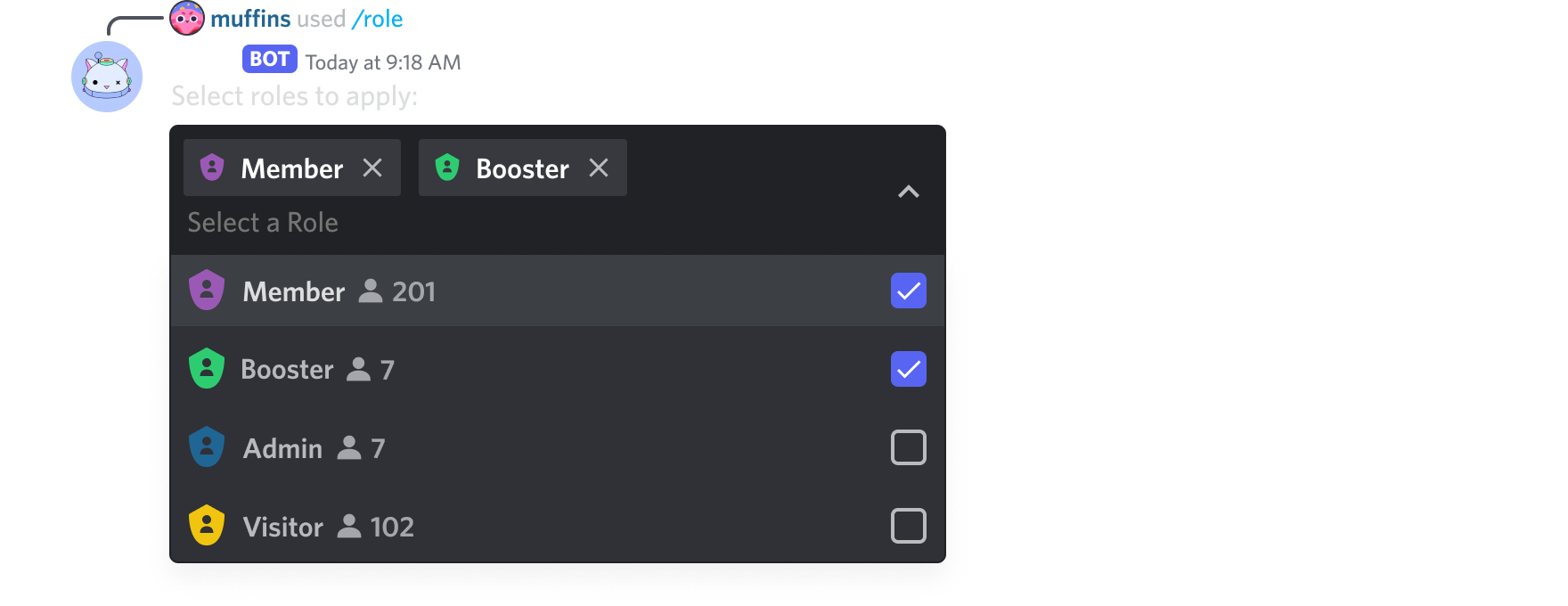 naive briar
Code?
slate swan
    async def offer_autocomplete(
        self,
        interaction: discord.Interaction,
        current: str,
    ) -> List[app_commands.Choice[str]]:
        shopdata = read_json('shop')
        return [
            app_commands.Choice(name=item['displayName'], value=item['displayName'])
            for item in shopdata['shop']
]```is there like a limit on choices?
naive briar
Oh yeah, 25
slate swan
oh prob thats why
hm anything i can put to show 25 from the shopdata
nvm i got it to show 25 at first
but thanks for the help
oh and @naive briar one more thing
is it possible to have a space between a app_command
like /test test or does it always got to be /test-test
naive briar
slate swan
is it possible to have a space between a app_command
Yes, but you'd have to create groups for that
slate swan
any examples you can link me to so i can see for my self?
naive briar
slate swan
any examples you can link me to so i can see for my self?

A hands-on guide to Discord.py
slate swan
thank you.
tulip ice
class Commands(commands.Cog):
    def __init__(self, bot: commands.Bot):
        self.bot = bot

    def get_commands(self):
        return [app_commands.Choice(name=slash_command.name, value=slash_command.name) for slash_command in self.bot.tree.walk_commands()]

    @app_commands.command(
        name="commands",
        description="Show list of commands",
    )
    @app_commands.choices(command=get_commands)
    async def commands(self, inter: discord.Interaction, commands: str):
discord.ext.commands.errors.ExtensionFailed: Extension 'cogs.contact' raised an error: TypeError: choices must be a list of Choice
why is this happening?
golden portal
tulip ice
```py
class Commands(commands.Cog):
def __init__(self, bot: commands.Bot):
...
it takes a list not a method, perhaps you may want to use autocomplete instead?
!d discord.app_commands.autocomplete
unkempt canyonBOT
@discord.app_commands.autocomplete(**parameters)```
Associates the given parameters with the given autocomplete callback.

Autocomplete is only supported on types that have [`str`](https://docs.python.org/3/library/stdtypes.html#str), [`int`](https://docs.python.org/3/library/functions.html#int), or [`float`](https://docs.python.org/3/library/functions.html#float) values.

[`Checks`](https://discordpy.readthedocs.io/en/latest/interactions/api.html#discord.app_commands.check) are supported, however they must be attached to the autocomplete callback in order to work. Checks attached to the command are ignored when invoking the autocomplete callback.

For more information, see the [`Command.autocomplete()`](https://discordpy.readthedocs.io/en/latest/interactions/api.html#discord.app_commands.Command.autocomplete) documentation.

Warning

The choices returned from this coroutine are suggestions. The user may ignore them and input their own value...see example there
tulip ice
golden portal
it takes a list not a method, perhaps you may want to use autocomplete instead?
i loooked at that but i dont see how i can use self.bot.tree.walk_commands()
i want to let the user have a list of the commands that they can select
but idk how that can work, i tried function but i need self to access bot
golden portal
tulip ice
but idk how that can work, i tried function but i need self to access bot
you have access to your bot via interaction
!d discord.Interaction.client
unkempt canyonBOT
property client```
The client that is handling this interaction.

Note that [`AutoShardedClient`](https://discordpy.readthedocs.io/en/latest/api.html#discord.AutoShardedClient), [`Bot`](https://discordpy.readthedocs.io/en/latest/ext/commands/api.html#discord.ext.commands.Bot), and [`AutoShardedBot`](https://discordpy.readthedocs.io/en/latest/ext/commands/api.html#discord.ext.commands.AutoShardedBot) are all subclasses of client.You have access to self in the autocomplete callback
tulip ice
really?
naive briar
Just define it in the cog
tulip ice
naive briar
You have access to `self` in the autocomplete callback
can you enter anything into autocomplete? i want it so the user can only select from the list and not enter a rnadom string
naive briar
That's called options
tulip ice
wdym