#discord-bots
1 messages · Page 166 of 1
 cloud dawn
 ivory shadow
it says “Please enter a redirect uri”
cloud dawn
Well you needed to go to URL generator not General
ivory shadow
yeah i’m in the url generator

 fading marlin
bot & applications.commands
 ivory shadow
fading marlin
don't use replit either
ivory shadow
fading marlin
don't use replit either
yeah i know i shouldn't but it's like wayyy too late now
ivory shadow
fading marlin
apparently you're not
hmmmm i'm using
pip install git+https://github.com/Rapptz/discord.py
it's never too late
fading marlin
you should update it, and you don't realistically need to use the repo url, stable version is on 2.0.1
python3 -m pip install -U discord.py
ah okay
alright that fixed it but now i'm hit with this error again 😭
 fading marlin
!intents
 unkempt canyonBOT
Using intents in discord.py
Intents are a feature of Discord that tells the gateway exactly which events to send your bot. Various features of discord.py rely on having particular intents enabled, further detailed in its documentation. Since discord.py v2.0.0, it has become mandatory for developers to explicitly define the values of these intents in their code.
There are standard and privileged intents. To use privileged intents like Presences, Server Members, and Message Content, you have to first enable them in the Discord Developer Portal. In there, go to the Bot page of your application, scroll down to the Privileged Gateway Intents section, and enable the privileged intents that you need. Standard intents can be used without any changes in the developer portal.
Afterwards in your code, you need to set the intents you want to connect with in the bot's constructor using the intents keyword argument, like this:
from discord import Intents
from discord.ext import commands

# Enable all standard intents and message content
# (prefix commands generally require message content)
intents = Intents.default()
intents.message_content = True

bot = commands.Bot(command_prefix="!", intents=intents)
For more info about using intents, see discord.py's related guide, and for general information about them, see the Discord developer documentation on intents.
ivory shadow
i have this in my code, or is that i need privelged intents
 fading marlin
you're not passing any intents to the abot class
ivory shadow
bot = commands.Bot(command_prefix="!", intents=intents)

bot = commands.Bot(command_prefix=".", intents=discord.Intents.all())

class abot(discord.Client):
  def _init_(self):
    super()._init_(intents=discord.Intents.default)
    self.synced = False

    async def on_ready(self):
      await tree.synced(guild=discord.Object(id=________))
      self.synced = True
      print("Bot is Online")


bot = abot()
tree = app_commands.CommandTree(bot)
Intents.default**()**. It's called sync, not synced, don't sync in on ready. Why are you instantiating multiple bots?
ivory shadow
oh my gosh I didn't even realize I had two things on the top, also i'll fix the intents thing now
so is it something more like:
bot = commands.Bot(command_prefix=".", intents=discord.Intents.all())

class abot(discord.Client):
  def _init_(self):
    super()._init_(intents=discord.Intents.default())
    self.sync = False

    async def on_ready(self):
      await tree.sync(guild=discord.Object(id=1057792247556493343))
      self.sync = True
      print("Bot is Online")
 ember nest
How can do check permissions for discord.Member
fading marlin
ivory shadow
so is it something more like:
```py
bot = commands.Bot(command_prefix=".", int...
use either bot or client, not both. And you're probably still redefining bot with an instance of abot later on
fading marlin
ember nest
How can do check permissions for `discord.Member`
could you elaborate?
 naive briar
ember nest
How can do check permissions for `discord.Member`
naive briar
ember nest
How can do check permissions for `discord.Member`
!d discord.Member.guild_permissions
unkempt canyonBOT
property guild_permissions```
Returns the member’s guild permissions.
This only takes into consideration the guild permissions and not most of the implied permissions or any of the channel permission overwrites. For 100% accurate permission calculation, please use [`abc.GuildChannel.permissions_for()`](https://discordpy.readthedocs.io/en/latest/api.html#discord.abc.GuildChannel.permissions_for "discord.abc.GuildChannel.permissions_for").
This does take into consideration guild ownership, the administrator implication, and whether the member is timed out.
Changed in version 2.0: Member timeouts are taken into consideration. slate swan
await ctx.get_channel(1057816634036850739.send(embed=embed))```How can I send a embed in a certain channel?
I've tried this way but idk
slate swan
get_channel is a method of a Guild object, not ctx
unkempt canyonBOT
get_channel(id, /)```
Returns a channel or thread with the given ID.

Changed in version 2.0: `id` parameter is now positional-only.Oh yeah :P
 glossy edge
Can webhooks be used to listen to messages?
 elfin glen
Sniping basically pulls up the last deleted message and who said it. Here is my code. ```
client.sniped_messages = {}
@client.event
async def on_message_delete(message):
if message.attachments:
client.sniped_messages[message.guild.id] = (message.content, message.author, message.channel.name, message.created_at, message.attachments[0].proxy_url)
else:
client.sniped_messages[message.guild.id] = (message.content, message.author, message.channel.name, message.created_at)
@client.command()
async def snipe(ctx):
try:
is_img = None
try:
content, author, channel, created_at, img_url = client.sniped_messages[ctx.guild.id]
is_img = True
except:
content, author, channel, created_at = client.sniped_messages[ctx.guild.id]
if author.id != client.user.id:
embed = discord.Embed(description=content, color=discord.Color.teal(), timestamp=created_at)
if is_img:
embed.set_image(url=img_url)
embed.set_author(name=f"{author.name}", icon_url=author.avatar.url)
embed.set_footer(text=f"#{channel}")
await ctx.send(embed=embed)
except KeyError:
await ctx.send("Nothing to snipe.")This works perfectly fine, except for the fact that if the most recently deleted message was like four days ago, it would still pull that message up. I want it to say "Nothing to Snipe" after about 5ish minutes or so of the message being deleted. A time frame would simply reaffirm that it snipes *recently* deleted messages. I know I have to usepy
await asyncio.sleep(300)``` I am not sure how, or where to add this in the code. I have been trying for awhile now. Could someone help out?
 vocal snow
elfin glen
Sniping basically pulls up the last deleted message and who said it. Here is my ...
vocal snow
elfin glen
Sniping basically pulls up the last deleted message and who said it. Here is my ...
You could just check if the message is older than 5 minutes
!d discord.Message.created_at
unkempt canyonBOT
property created_at```
The message’s creation time in UTC.why do i keep getting the error requirements already satisfied
naive briar
That's not an error
 shrewd fjord
Wassup guyz
shrewd fjord
slate swan
why do i keep getting the error requirements already satisfied
You sre trying to install some package or other stuff that is already exists on the system
 vague zephyr
slate swan
why do i keep getting the error requirements already satisfied
vague zephyr
slate swan
why do i keep getting the error requirements already satisfied
you already have the package installed
slate swan
Hello, anyone know how i can add text freely in an embed using interactions.py ?
 kindred epoch
Huh
vague zephyr
slate swan
Hello, anyone know how i can add text freely in an embed using interactions.py ?
wdym by add text?
slate swan
vague zephyr
wdym by add text?
?? add text lmao
if i use addfield i can't put ONE text but a title and a description i just want 1 text not 2
vague zephyr
slate swan
?? add text lmao
if i use addfield i can't put ONE text but a title and a descri...
you can't
the whole point to add a field is to put a title AND a value
slate swan
vague zephyr
you can't
oh sad, and u know how i can skip a row?
slate swan
vague zephyr
tu peux faire \n
ça fonctionne pas
vague zephyr
embed = discord.Embed(
      title="lol",
      description="amongus\n\nok\n\nA"
)
await Interaction.response.send_message(embed=embed)
```?es ce que tu peux me donner un exemple de ce que tu veux que ça fasse
slate swan
🔁⚠ cogs
Traceback (most recent call last):
  File "/home/runner/Sputnik-src-1/venv/lib/python3.8/site-packages/discord/ext/commands/bot.py", line 934, in _load_from_module_spec
    spec.loader.exec_module(lib)  # type: ignore
  File "<frozen importlib._bootstrap_external>", line 843, in exec_module
  File "<frozen importlib._bootstrap>", line 219, in _call_with_frames_removed
  File "/home/runner/Sputnik-src-1/cogs/__init__.py", line 22, in <module>
    from .commands.ignore import ignore
  File "/home/runner/Sputnik-src-1/cogs/commands/ignore.py", line 1
    @commands.group(name="ignore", help="let's you to ignore me a channel ", aliases=["igc"])
    ^
IndentationError: unexpected indent
Can anyone help me pls
vague zephyr
read the error
slate swan
vague zephyr
read the error
It's indent error
kindred epoch
So that means you need to learn python ig
vague zephyr
go to the ignore.py file
and fix the indentation
you prob put a space or something
vague zephyr
kindred epoch
So that means you need to learn python ig
it's probably garbage indentation settings
slate swan
vague zephyr
you prob put a space or something
Yah but where to put space am finding that
vague zephyr
because some IDEs put tabs some others put spaces
vague zephyr
slate swan
Yah but where to put space am finding that
it's at line 1
slate swan
Shall i paste the code here ?
slate swan
 vague zephyr
nvm
slate swan
vague zephyr
es ce que tu peux me donner un exemple de ce que tu veux que ça fasse
je t'ai envoyé un message privé
vague zephyr
there's no problem with it?
naive briar
slate swan
🔁⚠ `cogs`
```py
Traceback (most recent call last):
File "/home/runner/Sputnik...
Show full code
slate swan
vague zephyr
there's no problem with it?
Did u saying me ?
 shrewd apex
when people look at async code with json and say no problem 
slate swan
vague zephyr
shrewd apex
when people look at async code with json and say no problem <:joe_salute:8573187...
what
naive briar
JSON isn't asynchronous
vague zephyr
slate swan
See now : https://gist.github.com/SkidGod69/524ca8f84e73a2eb9a70e1a247187b8e
oohhhh i get it now
shrewd apex
also wdym there is no problem
naive briar
So it's blocking when you're loading the file
naive briar
Also it's not a db 
slate swan
vague zephyr
remove them
Then the whole code will show the error
shrewd apex
vague zephyr
you have some spaces before the @commands....
its in a cog
slate swan
shrewd apex
its in a cog
Yup
shrewd apex
slate swan
Then the whole code will show the error
can u show the specific traceback
slate swan
shrewd apex
can u show the specific traceback
Let me restart am just reloading the cog by jsk
shrewd apex
sure
slate swan
@shrewd apex
 slate swan
naive briar
I just said show full code
ember nest
slate swan
naive briar
I just said show full code
ember nest
So I have an auto delete message and mute if someone sends a link on my bot but I want it to just return (or don't delete/mute) if the message.author has (attach files permission) how can I do that?
naive briar
Since it's in the 1st line of the file for some odd reason
slate swan
naive briar
Since it's in the 1st line of the file for some odd reason
What can I do now
🥺
naive briar
ember nest
So I have an auto delete message and mute if someone sends a link on my bot but ...
!d discord.Member.guild_permissions
unkempt canyonBOT
property guild_permissions```
Returns the member’s guild permissions.

This only takes into consideration the guild permissions and not most of the implied permissions or any of the channel permission overwrites. For 100% accurate permission calculation, please use [`abc.GuildChannel.permissions_for()`](https://discordpy.readthedocs.io/en/latest/api.html#discord.abc.GuildChannel.permissions_for "discord.abc.GuildChannel.permissions_for").

This does take into consideration guild ownership, the administrator implication, and whether the member is timed out.

Changed in version 2.0: Member timeouts are taken into consideration.!d discord.Permissions.attach_files
unkempt canyonBOT
Returns True if a user can send files in their messages.
slate swan
ember nest
So I have an auto delete message and mute if someone sends a link on my bot but ...
Dude just make it like antinuke cmds
naive briar
unkempt canyon
Check if this is true
vague zephyr
shrewd apex
its in a cog
it's on line one
where are you gonna put the class
if it's on line 1
ember nest
@naive briar should be like that?
user = msg.author
if user.guild_permissions.attach_files:
    return
?
naive briar
ember nest
<@675507024930537473> should be like that?
```py
user = msg.author
if user.guild...
It's a property
slate swan
ember nest
<@675507024930537473> should be like that?
```py
user = msg.author
if user.guild...
{message.author}
naive briar
user.guild_permissions.attach_files
ember nest
Oh it's property
naive briar
Or attribute, whatever
ember nest
@naive briar should be like that?
user = msg.author
if user.guild_permissions.attach_files:
    return
?
slate swan
@naive briar help me pls
ember nest
Sorry for pinging again lol
naive briar
ember nest
<@675507024930537473> should be like that?
```py
user = msg.author
if user.guild...
Try it 🤷
ember nest
Lemme see
slate swan
🥺
shrewd apex
slate swan
🥺
can u send the whole code in the file the whole cog
ember nest
naive briar
Try it 🤷
Traceback (most recent call last):
  File "/data/user/0/ru.iiec.pydroid3/files/arm-linux-androideabi/lib/python3.9/site-packages/discord/client.py", line 409, in _run_event
    await coro(*args, **kwargs)
  File "<string>", line 80, in on_message
AttributeError: 'ClientUser' object has no attribute 'guild'```I got that error
unkempt canyonBOT
Hey @slate swan!
It looks like you tried to attach a Python file - please use a code-pasting service such as https://paste.pythondiscord.com
slate swan
shrewd apex
can u send the whole code in the file the whole cog
Here i can't am just dropping it on your dm ?
shrewd apex
!paste
unkempt canyonBOT
Pasting large amounts of code
If your code is too long to fit in a codeblock in Discord, you can paste your code here:
https://paste.pythondiscord.com/
After pasting your code, save it by clicking the floppy disk icon in the top right, or by typing ctrl + S. After doing that, the URL should change. Copy the URL and post it here so others can see it.
ember nest
ember nest
```2022-12-29 11:29:11 ERROR discord.client Ignoring exception in on_message
...
.
unkempt canyonBOT
class discord.ClientUser```
Represents your Discord user.

x == y Checks if two users are equal.

x != y Checks if two users are not equal.

hash(x) Return the user’s hash.

str(x) Returns the user’s name with discriminator.bruh where is the cog class the imports etc?
if this is your current code indentation should be the last thing you need to worry about
ember nest
@naive briar
2022-12-29 11:37:19 ERROR    discord.client Ignoring exception in on_message
Traceback (most recent call last):
  File "/data/user/0/ru.iiec.pydroid3/files/arm-linux-androideabi/lib/python3.9/site-packages/discord/client.py", line 409, in _run_event
    await coro(*args, **kwargs)
  File "<string>", line 92, in on_message
AttributeError: 'property' object has no attribute 'attach_files'
 tawdry grail
i just got rate-limited
vague zephyr
rip
ember nest
naive briar
Try it 🤷
.
vague zephyr
ember nest
<@675507024930537473> should be like that?
```py
user = msg.author
if user.guild...
 ember nest
Already tried
naive briar
Can you stop pinging me in every message
ember nest
ember nest
<@675507024930537473>
```
2022-12-29 11:37:19 ERROR discord.client Ignoring ...
Gives this error
vague zephyr
@naive briar hello
ember nest
naive briar
Can you stop pinging me in every message
Alright
naive briar
!paste
unkempt canyonBOT
Pasting large amounts of code
If your code is too long to fit in a codeblock in Discord, you can paste your code here:
https://paste.pythondiscord.com/
After pasting your code, save it by clicking the floppy disk icon in the top right, or by typing ctrl + S. After doing that, the URL should change. Copy the URL and post it here so others can see it.
ember nest
ember nest
<@675507024930537473>
```
2022-12-29 11:37:19 ERROR discord.client Ignoring ...
So what about that error?
naive briar
Show its code
ember nest
if discord.Member.guild_permissions.attach_files:
            return
You need an instance
ember nest
Like?
 ember nest
```py
if discord.Member.guild_permissions.attach_files:
return
```
ember nest
ember nest
```py
if discord.Member.guild_permissions.attach_files:
return
```
I did that
Not the user thing
Should I make it user?
naive briar
Then do it
naive briar
That is your bot's message that was sent
ember nest
@bot.event
async def on_message(message):
    user = message.author
    if user.guild_permissions.attach_files:
        return
And?
ember nest
It doesn't show any error but message not delete as well
Iike all commands under that now working
ember nest
ember nest
```py
@bot.event
async def on_message(message):
user = message.author
if...
Anything under that not working
(It's not in the same tab of return)
unkempt canyonBOT
7.6. The return statement
return_stmt ::=  "return" [expression_list]
``` [`return`](https://docs.python.org/3/reference/simple_stmts.html#return) may only occur syntactically nested in a function definition, not within a nested class definition.

If an expression list is present, it is evaluated, else `None` is substituted.

[`return`](https://docs.python.org/3/reference/simple_stmts.html#return) leaves the current function call with the expression list (or `None`) as return value...
Similar names: pdbcommand.return, pyside2.return
ember nest
But like
@bot.event
async def on_message(message):
    user = message.author
    if user.guild_permissions.attach_files:
        return
    else:
        await message.delete()
This message.delete() not working
naive briar
Because the message author has attach files permission
ember nest
It's not
naive briar
Print it
ember nest
print what exactly
naive briar
If it's false the message will be deleted
naive briar
Then do it, why do you have to ask
ember nest
As u can see I can't send the file down left
naive briar
And?
ember nest
The message not deleted
naive briar
What does it print
ember nest
Lemme try
print it out of the if statement right?
It keeps print True but the other members don't have the permission
unkempt canyonBOT
property guild_permissions```
Returns the member’s guild permissions.

This only takes into consideration the guild permissions and not most of the implied permissions or any of the channel permission overwrites. For 100% accurate permission calculation, please use [`abc.GuildChannel.permissions_for()`](https://discordpy.readthedocs.io/en/latest/api.html#discord.abc.GuildChannel.permissions_for "discord.abc.GuildChannel.permissions_for").

This does take into consideration guild ownership, the administrator implication, and whether the member is timed out.

Changed in version 2.0: Member timeouts are taken into consideration.But they don't have it and they can't send any files how
naive briar
For 100% accurate permission calculation, please use
abc.GuildChannel.permissions_for
!d discord.TextChannel.permissions_for
unkempt canyonBOT
permissions_for(obj, /)```
Handles permission resolution for the [`Member`](https://discordpy.readthedocs.io/en/latest/api.html#discord.Member "discord.Member") or [`Role`](https://discordpy.readthedocs.io/en/latest/api.html#discord.Role "discord.Role").
This function takes into consideration the following cases... patent lodge
having a hard time trying to figure out how to make the bot NOT wait for a message response as im only editing original response with embed and view
    async def callback(self, view):
        self.label = f"{self.label} ({self.buttoncount + 1})"
        self.style = discord.ButtonStyle.green
        for button in self.vview.children:
            button.disabled = True
        embed = discord.Embed(
            title=f"❓{self.question} \n\n `📢 Total votes: {self.totalcount + 1}`",
            colour=0x00B0F4,
            timestamp=self.currdatetime,
        )
        embed.set_author(name=f"Poll created by {self.interaction.user.name}")
        embed.set_footer(text="Created")
        await self.interaction.edit_original_response(embed=embed, view=self.vview)
i cannot use defer here as i understand? how can i stop the bot from awaiting a message response (so i dont get that annoying This interaction failed)
ember nest
naive briar
!d discord.TextChannel.permissions_for
These people will be able or not depending on channel permissions?
naive briar
Guild permissions are the permissions they have in general
ember nest
Oh
 ember nest
discord.Member.discord.TextChannel.permissions_for(attach_files)
Like that?
Or without member?
I think without lol
slate swan
Why Wrong already install the package

 slate swan
naive briar
Use discord.py's slash commands
slate swan
naive briar
Use discord.py's slash commands
Search in this channel?
ember nest
naive briar
!d discord.TextChannel.permissions_for
How do I set the object for that
naive briar
Search for what
 slate swan
oh ok
ember nest
ember nest
How do I set the object for that
.
I think it takes member and role
if discord.TextChannel.permissions_for(user, "attach_files"):
            return
And gives error
2022-12-29 12:10:15 ERROR    discord.client Ignoring exception in on_message
Traceback (most recent call last):
  File "/data/user/0/ru.iiec.pydroid3/files/arm-linux-androideabi/lib/python3.9/site-packages/discord/client.py", line 409, in _run_event
    await coro(*args, **kwargs)
  File "<string>", line 92, in on_message
  File "/data/user/0/ru.iiec.pydroid3/files/arm-linux-androideabi/lib/python3.9/site-packages/discord/channel.py", line 229, in permissions_for
    base = super().permissions_for(obj)
TypeError: super(type, obj): obj must be an instance or subtype of type
@naive briar
 upbeat gust
ember nest
I think it takes member and role
upbeat gust
ember nest
I think it takes member and role
You need an instance of TextChannel-
naive briar
I'm so done
ember nest
upbeat gust
You need an instance of TextChannel-
How
upbeat gust
How
upbeat gust
I highly recommend learning python, specifically oop, before dpy
upbeat gust
well ok then I'm not wasting my time teaching basic python
ember nest
Bruh whatever bye

 glad cradle
slate swan
how do i add a timeout to this view
glad cradle
slate swan
how do i add a timeout to this view
define the init method and call super().__init__(timeout="your timeout here as int")
 calm jacinth
import aiohttp

intents = discord.Intents.default()
intents.members = True
client = discord.Client(intents=intents)

HYPIXEL_API_KEY = 'api_key_here'

async def get_player_data(player_name):
    async with aiohttp.ClientSession() as session:
        async with session.get(f'https://api.hypixel.net/skyblock/profile?key={HYPIXEL_API_KEY}&profile={player_name}') as resp:
            player_data = await resp.json()
            return player_data

@client.event
async def on_message(message):
    if not message.content.startswith('/'):
        return

    command, *args = message.content.split()

    if command == '/skyblock':
        player_name = ' '.join(args)
        player_data = await get_player_data(player_name)

        if 'success' not in player_data:
            await message.channel.send('An error occurred while trying to retrieve player data.')
            return

        player_stats = player_data['profile']['members'][player_name]

        embed = discord.Embed(title=f'{player_name} Skyblock Stats', color=discord.Color.blue())
        embed.add_field(name='Coins', value=player_stats['coins'])
        embed.add_field(name='Average Skill', value=player_stats['skillAverage'])
        embed.add_field(name='Active Memberships', value=player_stats['memberships'])

        await message.channel.send(embed=embed)

client.run('token')
can someone tell me what am i doing wrong here ?
it shows error everytime
and if i remove Client.run('token')
it doesnt work
:C
slate swan
calm jacinth
```import discord
import aiohttp
intents = discord.Intents.default()
intents.me...
What output do you get ?
patent lodge
    async def callback(self, view):
        self.label = f"{self.label} ({self.buttoncount + 1})"
        self.style = discord.ButtonStyle.green
        for button in self.vview.children:
            button.disabled = True
        embed = discord.Embed(
            title=f"❓{self.question} \n\n `📢 Total votes: {self.totalcount + 1}`",
            colour=0x00B0F4,
            timestamp=self.currdatetime,
        )
        embed.set_author(name=f"Poll created by {self.interaction.user.name}")
        embed.set_footer(text="Created")
        await self.interaction.edit_original_response(embed=embed, view=self.vview)
        await self.interaction.followup.send("Thanks for voting!")
why do i still get the This interaction failed? :S
 calm jacinth
slate swan
What output do you get ?
calm jacinth
slate swan
What output do you get ?
a big error
 white citrus
async def get_admin_role(guild_id):

    async with aiosqlite.connect("maja.db") as db:

        async with db.cursor() as cursor:

            await cursor.execute("SELECT admin_role FROM setup WHERE guild_id = ?", (guild_id,))

            role = await cursor.fetchone()

            return role[0]


async def get_moderator_role(guild_id):

    async with aiosqlite.connect("maja.db") as db:

        async with db.cursor() as cursor:

            await cursor.execute("SELECT moderator_role FROM setup WHERE guild_id = ?", (guild_id,))

            role = await cursor.fetchone()

            return role[0]


def user_has_administrator_or_moderator_role():

    async def extended_check(inter: nc.Interaction):

        admin_role_id = await get_admin_role(inter.guild.id)

        moderator_role_id = await get_moderator_role(inter.guild.id)


        error_output = nc.Embed(

            title="",

            description="",

            colour=c.red

        )


        # Check if user has either the administrator or moderator role

        if inter.user.get_role(admin_role_id) or inter.user.get_role(moderator_role_id):

            return True


        # If no roles are defined, send the error message

        if (admin_role_id or moderator_role_id) is None:

            await inter.response.send_message(embed=error_output, ephemeral=True)

            return False


        # If the user does not have either role, send the error message

        cancel_error_png_a = nc.File("pictures\\cancel_and_error_maja.png", filename="cancel_and_error_maja.png")

        error_perms = nc.Embed(title="Lack of permission", description=f"", colour=c.red)

        error_perms.set_thumbnail(url="attachment://cancel_and_error_maja.png")

        await inter.response.send_message(embed=error_perms, file=cancel_error_png_a, ephemeral=True)

        return False


    return application_checks.check(extended_check)
  File "C:\Users\domin\AppData\Local\Programs\Python\Python310\lib\site-packages\nextcord\client.py", line 489, in _run_event
    await coro(*args, **kwargs)
  File "c:\Discord\Maja Projekt\MajaSystem_Test\bot.py", line 174, in on_application_command_error
    raise error
  File "C:\Users\domin\AppData\Local\Programs\Python\Python310\lib\site-packages\nextcord\application_command.py", line 870, in invoke_callback_with_hooks
    can_run = await self.can_run(interaction)
  File "C:\Users\domin\AppData\Local\Programs\Python\Python310\lib\site-packages\nextcord\application_command.py", line 839, in can_run
    check_result = await maybe_coroutine(check, interaction)  # type: ignore
  File "C:\Users\domin\AppData\Local\Programs\Python\Python310\lib\site-packages\nextcord\utils.py", line 544, in maybe_coroutine
    return await value
  File "c:\Discord\Maja Projekt\MajaSystem_Test\modules\setup_v2\command_check.py", line 96, in extended_check
    if inter.user.get_role(admin_role_id) or inter.user.get_role(moderator_role_id):
  File "C:\Users\domin\AppData\Local\Programs\Python\Python310\lib\site-packages\nextcord\member.py", line 1008, in get_role
    return self.guild.get_role(role_id) if self._roles.has(role_id) else None
  File "C:\Users\domin\AppData\Local\Programs\Python\Python310\lib\site-packages\nextcord\utils.py", line 664, in has
    i = bisect_left(self, element)
TypeError: '<' not supported between instances of 'int' and 'NoneType'
Please provide the full traceback for your exception in order to help us identify your issue.
While the last line of the error message tells us what kind of error you got,
the full traceback will tell us which line, and other critical information to solve your problem.
Please avoid screenshots so we can copy and paste parts of the message.
A full traceback could look like:
Traceback (most recent call last):
  File "my_file.py", line 5, in <module>
    add_three("6")
  File "my_file.py", line 2, in add_three
    a = num + 3
        ~~~~^~~
TypeError: can only concatenate str (not "int") to str
If the traceback is long, use our pastebin.
calm jacinth
@naive briar help mee?
 naive briar
Read the error
calm jacinth
I tried [] but same issue ;c
naive briar
!e
dictionary = {"cat": "meow", "dog": "bark"}
print(dictionary["cat"])
@naive briar :white_check_mark: Your 3.11 eval job has completed with return code 0.
meow
 sullen kelp
Hi, is anyone for hire?
unkempt canyonBOT
5. Do not provide or request help on projects that may break laws, breach terms of services, or are malicious or inappropriate.
slate swan
nvm
slate swan
sullen kelp
Hi, is anyone for hire?
we don't provide paid help/ recruitments here
white citrus
command_check.py
if admin_role_id is not None:
if moderator_role_id is not None:
if inter.user.get_role(admin_role_id):
return True
elif inter.user.get_role(moderator_role_id):
return True
else:
raise command_check__missing_permission ```
command_error.py
```py
class command_check__missing_permission:
pass```
How can I send the error message now upbeat otter
white citrus
command_check.py
```py
if admin_role_id is not None:
if mode...
upbeat otter
white citrus
command_check.py
```py
if admin_role_id is not None:
if mode...
umm...tbh if that's not a cog and you do not want to apply the role permissions to all the cog commands, you can simply use a has_role decorator
white citrus
upbeat otter
umm...tbh if that's not a cog and you do not want to apply the role permissions ...
The roles are in a db
upbeat otter
hm...cool
then
you can just send a message using inter.response.send_message like you normally would
white citrus
upbeat otter
you can just send a message using `inter.response.send_message` like you normall...
I was told not to send anything in checks
upbeat otter
is that a decorator?
white citrus
Yeah
 quick gust
why not use has_permissions or has_role
 sharp pawn
i want someone to to run a discord python code that i just generated from the ai, anyone?
white citrus
white citrus
The roles are in a db
@quick gust
shrewd apex
sharp pawn
i want someone to to run a discord python code that i just generated from the ai...
lol we really should make a seperate channel for chatgpt ppl
naive briar
Outdated
white citrus
upbeat otter
is that a decorator?
Can someone continue?
sharp pawn
shrewd apex
lol we really should make a seperate channel for chatgpt ppl
nah i just got rate limited so I wanted someone else to try the code. nothing so deep
patent lodge
        userlist = []
        result = userlist.count(interaction.user.id)
        if result > 0:
            print("User was already in the list")
            return
        else:
            userlist.append(interaction.user.id)
            print("User was added to the list")
            print(userlist)
i always get User was added to the list everytime :S why?
 potent light
How do we pass multiple discord.Attachement as an argument within a slash command?
async def report(self, interaction: discord.Interaction, user: discord.Member, proof: discord.Attachments): but the user can input many images in proof?
upbeat otter
white citrus
Can someone continue?
it's ok, you can program your on_command_error to look for that certain error class and the corresponding object
 maiden fable
patent lodge
```python
userlist = []
result = userlist.count(interaction.user...
maiden fable
patent lodge
```python
userlist = []
result = userlist.count(interaction.user...
Bro
just use
if interaction.user.id in userlist:
    . . .
And yea, since the list is inside the function, a new empty list is being generated everytime the function runs, thus always the else is trigerred
patent lodge
yea! i just noticed that one myself, happens alot! 😛
maiden fable
Indeed
patent lodge
anyway i need to scrap the idea anyway -.- erh
it does not work for what i have in mind
maiden fable
maybe someone here can help
patent lodge
maiden fable
maybe someone here can help
im creating a poll command where i create a poll embed with the question and then a button for each arg sep by comma so
./poll "what is the point of this" "i dont know", "that is a good question", "duuuh"
this would give 3 buttons that the user can press, but i wanna make sure that the user can only vote/press 1 button out of the 3
this is the button callback in the subclass i made
    async def callback(self, interaction: discord.Interaction):
        self.label = f"{self.label} ({self.buttoncount + 1})"
        self.style = discord.ButtonStyle.green
        embed = discord.Embed(
            title=f"❓{self.question} \n\n `📢 Total votes: {self.totalcount + 1}`",
            colour=0x00B0F4,
            timestamp=self.currdatetime,
        )
        embed.set_author(name=f"Poll created by {interaction.user.name}")
        embed.set_footer(text="Created")
        await interaction.response.edit_message(embed=embed, view=self.vview)
First of all, it would be better for you to use a Modal to get the button text
And second, just make a dictionary variable when yr bot starts up, make it a botvar where the key is the poll id (which will be unique and created whenever the poll create command is ran), and the value will be a list of dicts with keys as the button texts and values with a list of user IDs who have boted for that option. Then, just append to the list and get the number of vote simply by doing len(self.bot.giveaways[id][button_text])
patent lodge
giveaway what now? 😅
maiden fable
poll* sorry
Uh lemme edit my message
Yea sorry I was doing some other work and didn't realize I wrote stuff about a giveaway command lol
upbeat otter
maiden fable
Yea sorry I was doing some other work and didn't realize I wrote stuff about a g...
huwunter used up all his energy to give wrong explanation 😔
maiden fable
¯_(ツ)_/¯
potent light
potent light
How do we pass multiple `discord.Attachement` as an argument within a slash comm...
@upbeat otter can u help me x(
maiden fable
potent light
How do we pass multiple `discord.Attachement` as an argument within a slash comm...
is discord.Attachments even a thing?
shrewd apex
maiden fable
¯\_(ツ)_/¯
stress does things to u huh
potent light
maiden fable
is discord.Attachments even a thing?
no it's not
upbeat otter
potent light
How do we pass multiple `discord.Attachement` as an argument within a slash comm...
discord.Attachment works, it'll return a list iirc
shrewd apex
maiden fable
is discord.Attachments even a thing?
.Attachment is
maiden fable
I think u need to typehint it to list[discord.Attachment] or smth but I ain't much familiar with slash commands
potent light
upbeat otter
discord.Attachment works, it'll return a list iirc
it doesn't
upbeat otter
do what Hunie Bunnie says
shrewd apex
potent light
How do we pass multiple `discord.Attachement` as an argument within a slash comm...
cant unless u have multiple args or u ask the user to zip the folder of images
potent light
maiden fable
I think u need to typehint it to list[discord.Attachment] or smth but I ain't mu...
proof: list[discord.Attachment]): doesn't work
maiden fable
shrewd apex
stress does things to u huh
Nah not even thinking about that
Lol I switched between windows a thousand times while writing that message so don't expect me to write it right
then try only discord.Attachment
potent light
shrewd apex
cant unless u have multiple args or u ask the user to zip the folder of images
I've done it in JS so im sure that it'll also be possible in python
 carmine crane
hey there i'm running into this issue:
AttributeError: module 'discord.ui' has no attribute 'ButtonStyle' ```And isn't it like the type of option is decided by using the deco instead of the typehints in slash commands?
maiden fable
carmine crane
hey there i'm running into this issue:
``` @discord.ui.button(label="A",styl...
Update discord.py
potent light
carmine crane
hey there i'm running into this issue:
``` @discord.ui.button(label="A",styl...
import ButtonStyle
shrewd apex
nope list[] or any iterable typehints dont work as of now due to api limitation
its given even in the docs
upbeat otter
maiden fable
I think u need to typehint it to list[discord.Attachment] or smth but I ain't mu...
Me who wrote a full gist about slash commands and still don't know how to fix that 💀
shrewd apex
carmine crane
hey there i'm running into this issue:
``` @discord.ui.button(label="A",styl...
!d discord.ButtonStyle.blurple
maiden fable
upbeat otter
Me who wrote a full gist about slash commands and still don't know how to fix th...
I wrote many programs and it doesn't mean I know about everything related to the stuff I wrote the program about
Oh hm, its a class in the main lib
shrewd apex
replace blurple with red
upbeat otter
maiden fable
I wrote many programs and it doesn't mean I know about everything related to the...
But you're Hunnie Bunnie 😳 you would
shrewd apex
hunnie would know ofc he is just low-key
maiden fable
Uh don't start that here lol
carmine crane
shrewd apex
replace blurple with red
it comes from ButtonStyle not discord.ui
maiden fable
Anyways from tomorrow I won't hear anything except that from anyone irl so
shrewd apex
carmine crane
it comes from ButtonStyle not discord.ui
coz thats where it exists
carmine crane
i mean not the color itself
upbeat otter
maiden fable
Anyways from tomorrow I won't hear anything except that from anyone irl so
💀
shrewd apex
maiden fable
Anyways from tomorrow I won't hear anything except that from anyone irl so
makes sense
imagine being called that in front of classmates
carmine crane
maiden fable
Update discord.py
it didn't work
maiden fable
"that"
upbeat otter
shrewd apex
imagine being called that in front of classmates
He has a different name lmao
maiden fable
carmine crane
it didn't work
What.......?
shrewd apex
carmine crane
i mean not the color itself
!d discord.ButtonStyle.red just use this
potent light
shrewd apex
cant unless u have multiple args or u ask the user to zip the folder of images
is it limited by Discordpy?
shrewd apex
upbeat otter
He has a different name lmao
well my friends know my discord acc and i am friends in discord as well 
upbeat otter
shrewd apex
well my friends know my discord acc and i am friends in discord as well <:pithin...
same 😔 unfortunately
shrewd apex
potent light
is it limited by Discordpy?
no discord api and all discord libs i can link u docs if u want to
maiden fable
Discord + IRL Friends = Disaster
not that I have any irl friends but eh, I have tried combining the two and ahem
potent light
shrewd apex
no discord api and all discord libs i can link u docs if u want to
yes link me it
carmine crane
maiden fable
What.......?
this is really weird since my editor says it exists
maiden fable
Where tf are the docs for slash commands argument types smh
upbeat otter
maiden fable
Discord + IRL Friends = Disaster
*not that I have any irl friends but eh, I have...
stop with the addition signs 😭 I just came back from doing math
maiden fable
carmine crane
this is really weird since my editor says it exists
I don't even know what u r talking about anymore
maiden fable
upbeat otter
stop with the addition signs 😭 I just came back from doing math
Wait you add numbers in maths?!
shrewd apex
potent light
yes link me it
upbeat otter
carmine crane
this is really weird since my editor says it exists
Uninstall the editor and write code in cmd
potent light
shrewd apex
disnake https://docs.disnake.dev/en/stable/ext/commands/slash_commands.html#opti...
discordpy, can you?
upbeat otter
maiden fable
Wait you add numbers in maths?!
adding letters
maiden fable
upbeat otter
adding letters
Phew
shrewd apex
wait sending one by one
maiden fable
ISTG Discord Docs are confusing
carmine crane
bruh
 upbeat otter
maiden fable
ISTG Discord Docs are confusing
upbeat otter
maiden fable
ISTG Discord Docs are confusing
just stop making discord bots 💀
maiden fable
Who says I am even coding nowadays
upbeat otter
How am I supposed to know
carmine crane
maiden fable
Who says I am even coding nowadays
"if sad() == true" 💀
maiden fable
Don't start
potent light
shrewd apex
wait sending one by one
okok
shrewd apex
potent light
discordpy, can you?
maiden fable
Hey @shrewd apex are you familiar with https://discord.dev ?
Discord Developer Portal
Integrate your service with Discord — whether it's a bot or a game or whatever your wildest imagination can come up with.
potent light
shrewd apex
https://discordpy.readthedocs.io/en/stable/interactions/api.html?highlight=app%2...
you're right lol
carmine crane
wait i'm fucking dumb 💀
shrewd apex
maiden fable
Hey <@656838010532265994> are you familiar with https://discord.dev ?
somewhat yeah working with sarth on an api wrapper
potent light
carmine crane
wait i'm fucking dumb 💀
yes
maiden fable
Can u point me to the page where it shows all the types slash commands suppose as args?
carmine crane
potent light
yes
yes
quick gust
potent light
yes
💀
potent light
shrewd apex
https://discordpy.readthedocs.io/en/stable/interactions/api.html?highlight=app%2...
@maiden fable
maiden fable
quick gust
💀
istg some people are the total opposite
Lmao many would be offended by the "Yes" but I totally love those people who take it lightly (like the person here)
shrewd apex
carmine crane
wait i'm fucking dumb 💀
ButtonStyle is an enum in enums.py https://github.com/Rapptz/discord.py/blob/master/discord/enums.py from where its imported in ui but not included in all dunder
GitHub
An API wrapper for Discord written in Python. Contribute to Rapptz/discord.py development by creating an account on GitHub.
quick gust
maiden fable
istg some people are the total opposite
Lmao many would be offended by the "Yes"...
For real
potent light
maiden fable
istg some people are the total opposite
Lmao many would be offended by the "Yes"...
he is a broski
upbeat otter
💀 we know
maiden fable
carmine crane
it's `discord.ButtonStyle`and not `discord.ui.ButtonStyle`
finally
carmine crane
upbeat otter
💀 we know
if you knew then you should've had tell me
maiden fable
@shrewd apex cries in a corner
upbeat otter
I didn't even know what was happening here so I went back to adding letters on my notebook 💀
and yeah Asher did a good job already
even though idk what was happening
shrewd apex
maiden fable
Hey <@656838010532265994> are you familiar with https://discord.dev ?
Discord Developer Portal
Integrate your service with Discord — whether it's a bot or a game or whatever your wildest imagination can come up with.
shrewd apex
maiden fable
*<@656838010532265994> cries in a corner*
ikr
maiden fable
Thanks!
shrewd apex
np
upbeat otter
shrewd apex
somewhat yeah working with sarth on an api wrapper
wyvern? 😳
shrewd apex
upbeat otter
wyvern? 😳
yessir
shrewd apex
maiden fable
Coding in Kota
Nice
respect the man grinding in kota
upbeat otter
maiden fable
Coding in Kota
Nice
sarthy's cranked, gonna 299 this time
shrewd apex
upbeat otter
sarthy's cranked, gonna 299 this time
ur from india 👀 ?
upbeat otter
shrewd apex
ur from india 👀 ?
nope
shrewd apex
nah ot graveyard
upbeat otter
maiden fable
*take it to an ot*
also you
 maiden fable
This will also become one, if a mod comes by
upbeat otter
shrewd apex
ur from india 👀 ?
are you? 😳
shrewd apex
upbeat otter
are you? 😳
ofc
upbeat otter
Hunny Bunnie's also Indian uwu
maiden fable
I am no one
upbeat otter
why tf is everyone here Indian 💀
shrewd apex
upbeat otter
why tf is everyone here Indian 💀
world domination plan
slate swan
can't imagine
shrewd apex
jee and neet 
maiden fable
Here comes the Kota Man
upbeat otter
sarthy
shrewd apex
all of us are living the life
maiden fable
ofc
upbeat otter
shrewd apex
all of us are living the life
what, nobody opted for that either
slate swan
exactly
shrewd apex
upbeat otter
what, nobody opted for that either
we were born without it
shrewd apex
maiden fable
Here comes the Kota Man
bro grinding 24/7
upbeat otter
slate swan
exactly
Go study bro
shrewd apex
upbeat otter
Go study bro
1 month countdown to first exam
upbeat otter
upbeat otter
Go study bro
Then get a college and a job (possibly shitty) and adopt me 😳
maiden fable
2 weeks for me
shrewd apex
studying is supposed to be finished a year ago according to toppers
upbeat otter
shrewd apex
studying is supposed to be finished a year ago *according to toppers*
according to toppers
I see what sarthy and hunnie bunnie are doing
maiden fable
only if u knew
slate swan
i didnt start studying yet, talk about finishing
maiden fable
!ot
unkempt canyonBOT
Off-topic channel: #ot2-never-nester’s-nightmare
Please read our off-topic etiquette before participating in conversations.
upbeat otter
no
slate swan
💀 channels other than #discord-bots are out of my comfort zone
upbeat otter
Everything aside
don't tell me Hunnie Bunnie's a guy 💀
fading marlin
slate swan
💀 channels other than <#343944376055103488> are out of my comfort zone
same 💀 everything else is disabled (except type hinting)
 upbeat otter
tf
slate swan
upbeat otter
Everything aside
don't tell me Hunnie Bunnie's a guy 💀
dw he's a pwetty girl
slate swan
fading marlin
same 💀 everything else is disabled (except type hinting)
lmao, i just have them muted
upbeat otter
slate swan
dw he's a pwetty girl
that's good then I can simp for her
quick gust
Did u just assume their pronouns? In almost 2023?! ?! ?! ?! ?! ?!
 primal token
What is going on
maiden fable
primal token
What is going on
You don't wanna get into this mess
quick gust
!ot
primal token
That is so
unkempt canyonBOT
Off-topic channel: #ot2-never-nester’s-nightmare
Please read our off-topic etiquette before participating in conversations.
quick gust
Before I get OT'd
maiden fable
Good idea
shrewd apex
quick gust
Did u just assume their pronouns? In almost 2023?! ?! ?! ?! ?! ?!
ikr
gen-z
upbeat otter
quick gust
Did u just assume their pronouns? In almost 2023?! ?! ?! ?! ?! ?!
I apologize
 timid spade
if i put discord.Member in arguments
will it take @ mentions too?
upbeat otter
yeah
primal token
It can take mentions and IDs
maiden fable
and names too
slate swan
and nicknames too
white citrus
  File "C:\Users\domin\AppData\Local\Programs\Python\Python310\lib\site-packages\nextcord\client.py", line 489, in _run_event
    await coro(*args, **kwargs)
  File "c:\Discord\Maja Projekt\MajaSystem_Test\bot.py", line 226, in on_application_command_error
    raise error
  File "C:\Users\domin\AppData\Local\Programs\Python\Python310\lib\site-packages\nextcord\application_command.py", line 870, in invoke_callback_with_hooks
    can_run = await self.can_run(interaction)
  File "C:\Users\domin\AppData\Local\Programs\Python\Python310\lib\site-packages\nextcord\application_command.py", line 839, in can_run
    check_result = await maybe_coroutine(check, interaction)  # type: ignore
  File "C:\Users\domin\AppData\Local\Programs\Python\Python310\lib\site-packages\nextcord\utils.py", line 544, in maybe_coroutine
    return await value
  File "c:\Discord\Maja Projekt\MajaSystem_Test\modules\setup_v2\command_check.py", line 103, in extended_check
    raise command_check__no_admin_role_found
TypeError: exceptions must derive from BaseException```Well the error is clear bro
You never derived the exception from BaseException
Show your custom exceptions
depends on yr question
 arctic kindle
Idk why but in the first pfp.show() there is a circled image and when i paste it to the background there is a normal member avatar without mask can someone explain me why?
data = BytesIO(await member.display_avatar.read())
pfp = Image.open(data)
mask = Image.new('L', pfp.size, 0)
draw = ImageDraw.Draw(mask)
draw.ellipse((0, 0) + pfp.size, fill=255)
pfp.putalpha(mask)
pfp.show()
bgp.show()
bgp.paste(pfp, (pbx, pby))
bgp.show()
 oblique fern
hey, trying to move from . commands to / commands. any idea how i can get a context like pass_context works with dot commands?
maiden fable
pass_context isn't even used anymore
It was removed years ago
upbeat otter
what did it even do
oblique fern
ok, so i'm assuming i shall just use the new provided methods on the interaction obj
maiden fable
upbeat otter
what did it even do
if u didn't set it to True then you didn't have access to commands.Context
No idea why one would want that but it is what it is
upbeat otter
maiden fable
if u didn't set it to True then you didn't have access to commands.Context
That's emotionally scarring
maiden fable
For you, yea
But for people who have been deving since that age, they are used to it
slate swan
i mean there were easier methods like client.say etc, so as long as you don't need data related to invocation it wasnt needed 🤔
maiden fable
Yea
slate swan
unkempt canyonBOT
examples/basic_bot.py lines 9 to 21
bot = commands.Bot(command_prefix='?', description=description)

@bot.event
async def on_ready():
    print('Logged in as')
    print(bot.user.name)
    print(bot.user.id)
    print('------')

@bot.command()
async def add(left : int, right : int):
    """Adds two numbers together."""
await bot.say(left + right)```discord.py do be doing some weird stuff internally for the bot.say part
slate swan
unkempt canyonBOT
discord/ext/commands/bot.py lines 41 to 53
def _get_variable(name):
    stack = inspect.stack()
    try:
        for frames in stack:
            try:
                frame = frames[0]
                current_locals = frame.f_locals
                if name in current_locals:
                    return current_locals[name]
            finally:
                del frame
    finally:
        del stack```

 south palm
so i am making a discord chat bot but running into a lot of errors can anyone help me ?
slate swan
Post the code and errors here and we'll do our best
south palm
slate swan
Post the code and errors here and we'll do our best
ok i will but there will be more errors than one
this is the error code: Traceback (most recent call last):
File "C:\Users\tstur\AppData\Local\Packages\PythonSoftwareFoundation.Python.3.10_qbz5n2kfra8p0\LocalCache\local-packages\Python310\site-packages\discord\client.py", line 409, in _run_event
await coro(*args, **kwargs)
File "c:\scripts\Chat Bot Trainer.py", line 123, in on_message
collect_data("test", "label_1")
File "c:\scripts\Chat Bot Trainer.py", line 80, in collect_data
if one_hot_encoded_str.shape[0] != x_train.shape[0]:
AttributeError: 'str' object has no attribute 'shape'
now this is the discord chat bot and i belive it is getting a wrong array i couldnt figure out the trainer to actually store one-hot encoded 3d numpy array into the y_train.npy and it also just stops after you send only one message so for example i send in a discord one message it stores it but when i type again it does not store it
here is the link: https://paste.pythondiscord.com/hibunoluxo
south palm
slate swan
Post the code and errors here and we'll do our best
here is the code and the error
south palm
put it in chatgpt
it should tell you whats wrong
also give it the code that the error is on
 atomic quest
south palm
also give it the code that the error is on
atomic quest
south palm
also give it the code that the error is on
bro
south palm
atomic quest
bro
?
south palm
atomic quest
bro
what i mean my english aint good and brain not working
slate swan
chatgpt is not really suggested, it gives wrong solutions most of the time
south palm
i mean it worked for me it was not its fault that i f*cked up the code my self now i cant explain it to it exacly
never could exxplain to it cuz i am bad at explaining
 hushed galleon
a "guild" is the discord API's term for a server, and there's two scopes an application command can have, either a global command or guild command, and the former doesnt require any guild for you to create one
https://discord.com/developers/docs/interactions/application-commands#registering-a-command
hushed galleon
what library and version are you using?
so presumably discord.py v2.0+, in that case the library provides a discord.ui.Button and discord.ui.View classes that you can use for creating your link button
there's examples of them in the repository, but link buttons in particular are simpler to write - no subclassing involved, you just combine the two classes i named and then send them alongside your message ```py
The view contains the button/select menus that you'll be adding to your message
view = discord.ui.View()
Adding a button link
button = discord.ui.Button(url="your url here")
view.add_item(button)
Sending your view
await channel.send(..., view=view)```
oh i forgot you need a label= argument for your button too
well you still need to send some message alongside your message components
discord doesnt allow you to send just the buttons
sure
 cursive vine
You have any commands that aren't app-commands with user interactions yet ?@frozen ice
hushed galleon
discord made link buttons their own style, so you cant apply any colouring to them
 buoyant quail
you can
example - i had blue button with emoji

no
link button can be only gray
 compact ruin
File "e:\Python Files\ACER\SMP\Smp.py", line 97, in on_command_error
    raise error
Anyone know why i keep getting this error.
I had no issues before when i used to run my code i have no touched it in several months but i can no longer get it to run
buoyant quail
well.. it seems that you are throwing this error with raise error
show error handler's code
unkempt canyonBOT
await callback(interaction)```
This function is a [*coroutine*](https://docs.python.org/3/library/asyncio-task.html#coroutine).

The callback associated with this UI item.

This can be overridden by subclasses.examples/views/confirm.py lines 21 to 33
class Confirm(discord.ui.View):
def __init__(self):
super().__init__()
self.value = None
# When the confirm button is pressed, set the inner value to `True` and
# stop the View from listening to more input.
# We also send the user an ephemeral message that we're confirming their choice.
@discord.ui.button(label='Confirm', style=discord.ButtonStyle.green)
async def confirm(self, interaction: discord.Interaction, button: discord.ui.Button):
await interaction.response.send_message('Confirming', ephemeral=True)
self.value = True
self.stop()```ERROR discord.client Ignoring exception in on_command_error
Traceback (most recent call last):
File "C:\Users\Sultan\AppData\Local\Packages\PythonSoftwareFoundation.Python.3.10_qbz5n2kfra8p0\LocalCache\local-packages\Python310\site-packages\discord\client.py", line 409, in _run_event
await coro(*args, **kwargs)
File "e:\Python Files\ACER\SMP\SMP.py", line 97, in on_command_error
raise error
discord.ext.commands.errors.CommandNotFound: Command "info" is not found
There is an info command btw
This code was working fine when i last left it several months ago now i tried to run it again after months and i keep gettin this error
 worthy wagon
Anyone know how I could use channel IDs in an on_message event so I could have specific messages deleted out of X channel?
primal token
Nope
unkempt canyonBOT
:incoming_envelope: :ok_hand: applied mute to @rapid oracle until <t:1672364075:f> (10 minutes) (reason: duplicates rule: sent 4 duplicated messages in 10s).
The <@&831776746206265384> have been alerted for review.
 sick birch
Ironic
 alpine cove
sick birch
Ironic
alpine cove
sick birch
Ironic
why?
sick birch
The name
fading marlin
sick bypass 
slate swan
wait @unkempt canyon still uses role based mutes instead of timeouts? 🤔
fading marlin
doesn't pretty much every bot still use that?
slate swan
maybe
alpine cove
lmao
slate swan
 hushed galleon
link buttons cant have a callback attached to them, so discord.py disallows you from setting their url when using the decorator form
fading marlin
I've always wondered what would happen if I tried adding a callback to a link button. Could I somehow tell when someone clicks on the button? Can I disallow certain users from using the link?... Now I know 
primal token
fading marlin
I've always wondered what would happen if I tried adding a callback to a link bu...
Iirc the callback never gets called
fading marlin
hushed galleon
link buttons cant have a callback attached to them, so discord.py disallows you ...
^
I initially thought you could have callbacks
primal token
In disnake you can actually
fading marlin
ehhh disnake is disnake
hushed galleon
although since it gets turned into a Button object, you can still set the url afterwards during init: ```py
class MyView(discord.ui.View):
def init(self):
super().init()
self.my_button.url = "https://www.google.com/"
# discord.py auto-generates a custom ID but discord's API
# won't allow both url and custom_id at the same time
self.my_button.custom_id = None
@discord.ui.button(label="Click me", style=discord.ButtonStyle.link)
async def my_button(self, interaction, button): ...```
guess you might find that handy if you have a bunch of other decorators and want to place the link on a specific column
 hushed galleon
use the style= parameter and set it to ButtonStyle.red or danger
slate swan
hushed galleon
use the `style=` parameter and set it to ButtonStyle.red or danger
says ButtonStyle is not defined
nvm
 faint ferry
ERROR:discord.client:Ignoring exception in on_command_error
Traceback (most recent call last):
  File "/home/container/.local/lib/python3.9/site-packages/discord/ext/commands/core.py", line 229, in wrapped
    ret = await coro(*args, **kwargs)
  File "/home/container/cogs/Create.py", line 67, in setembed
    await ctx.send(content = str(txt),view = DropdownTicketOptionsView(self.bot))
  File "/home/container/.local/lib/python3.9/site-packages/discord/ext/commands/context.py", line 842, in send
    return await super().send(
  File "/home/container/.local/lib/python3.9/site-packages/discord/abc.py", line 1540, in send
    data = await state.http.send_message(channel.id, params=params)
  File "/home/container/.local/lib/python3.9/site-packages/discord/http.py", line 744, in request
    raise HTTPException(response, data)
discord.errors.HTTPException: 400 Bad Request (error code: 50035): Invalid Form Body
In components.0.components.0.options.1.description: Must be 100 or fewer in length.
The above exception was the direct cause of the following exception:
Traceback (most recent call last):
  File "/home/container/.local/lib/python3.9/site-packages/discord/client.py", line 409, in _run_event
    await coro(*args, **kwargs)
  File "/home/container/main.py", line 54, in on_command_error
    raise error
  File "/home/container/.local/lib/python3.9/site-packages/discord/ext/commands/bot.py", line 1350, in invoke
    await ctx.command.invoke(ctx)
  File "/home/container/.local/lib/python3.9/site-packages/discord/ext/commands/core.py", line 1023, in invoke
    await injected(*ctx.args, **ctx.kwargs)  # type: ignore
  File "/home/container/.local/lib/python3.9/site-packages/discord/ext/commands/core.py", line 238, in wrapped
    raise CommandInvokeError(exc) from exc
discord.ext.commands.errors.CommandInvokeError: Command raised an exception: HTTPException: 400 Bad Request (error code: 50035): Invalid Form Body
In components.0.components.0.options.1.description: Must be 100 or fewer in length.```getting this error within my ticket bot
I have it working in one discord but when I try set the embed for my new discord it prints out this error
like I said this error does get thrown if I try re-set it up in the one that's currently working but other then that works fine
running python 3.9+
hushed galleon
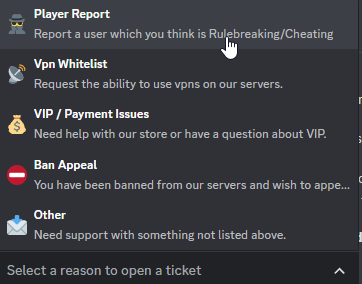
the error's saying the first second option of your first component has a description exceeding 100 characters in length
dont really know how your code's generated a description that long but its got something to do within your DropdownTicketOptionsView class
 hushed galleon
:shrug:
slate swan
whats the issue for this?
 slate swan
 white perch
What's the issue
white perch
What's the issue
I execute the command but it won't work
doesn't even give me an error
 ionic garden
white perch
slate swan
I execute the command but it won't work
ionic garden
white perch
slate swan
I execute the command but it won't work
I think it's an issue with something else and not that piece of code which is in the picture
Other commands work?
slate swan
white perch
I think it's an issue with something else and not that piece of code which is in...
haven't tried another one but I'll try somehting else
slate swan
white perch
I think it's an issue with something else and not that piece of code which is in...
nope other commands don't work Idk why sigh
white perch
slate swan
nope other commands don't work Idk why sigh
Do you have an on_message event
slate swan
white perch
Do you have an on_message event
No
white perch
Does the bot come online
slate swan
do you have message content intent enabled
slate swan
white perch
Does the bot come online
its does so idk why it doesn't respond
slate swan
slate swan
do you have message content intent enabled
yes
slate swan
ok let me check it out
faint ferry
okay previous problem seems to be fixed, onto the next!
Traceback (most recent call last):
  File "/home/container/.local/lib/python3.9/site-packages/discord/ui/view.py", line 425, in _scheduled_task
    await item.callback(interaction)
  File "/home/container/cogs/Create.py", line 23, in callback
    await Creation.build_ticket(self,interaction,interaction.guild,interaction.user,self.values[0])
  File "/home/container/cogs/Create.py", line 87, in build_ticket
    ticket = await self.bot.tickets.find_by_custom({"member_id":member.id,"tstatus":1,"category":ticket_type})
  File "/home/container/utils/mongo.py", line 36, in find_by_custom
    return await self.document.find_one(filter_dict)
  File "/usr/local/lib/python3.9/concurrent/futures/thread.py", line 58, in run
    result = self.fn(*self.args, **self.kwargs)
  File "/home/container/.local/lib/python3.9/site-packages/pymongo/collection.py", line 1459, in find_one
    for result in cursor.limit(-1):
  File "/home/container/.local/lib/python3.9/site-packages/pymongo/cursor.py", line 1248, in next
    if len(self.__data) or self._refresh():
  File "/home/container/.local/lib/python3.9/site-packages/pymongo/cursor.py", line 1139, in _refresh
    self.__session = self.__collection.database.client._ensure_session()
  File "/home/container/.local/lib/python3.9/site-packages/pymongo/mongo_client.py", line 1740, in _ensure_session
    return self.__start_session(True, causal_consistency=False)
  File "/home/container/.local/lib/python3.9/site-packages/pymongo/mongo_client.py", line 1685, in __start_session
    self._topology._check_implicit_session_support()
  File "/home/container/.local/lib/python3.9/site-packages/pymongo/topology.py", line 538, in _check_implicit_session_support
    self._check_session_support()
  File "/home/container/.local/lib/python3.9/site-packages/pymongo/topology.py", line 554, in _check_session_support
    self._select_servers_loop(
  File "/home/container/.local/lib/python3.9/site-packages/pymongo/topology.py", line 238, in _select_servers_loop
    raise ServerSelectionTimeoutError(
pymongo.errors.ServerSelectionTimeoutError: ac-dhuv6b6-shard-00-02.n7z9b5d.mongodb.net:27017: connection closed,ac-dhuv6b6-shard-00-01.n7z9b5d.mongodb.net:27017: connection closed,ac-dhuv6b6-shard-00-00.n7z9b5d.mongodb.net:27017: connection closed, Timeout: 30s, Topology Description: <TopologyDescription id: 63ae7bdc98769f970a740d7c, topology_type: ReplicaSetNoPrimary, servers: [<ServerDescription ('ac-dhuv6b6-shard-00-00.n7z9b5d.mongodb.net', 27017) server_type: Unknown, rtt: None, error=AutoReconnect('ac-dhuv6b6-shard-00-00.n7z9b5d.mongodb.net:27017: connection closed')>, <ServerDescription ('ac-dhuv6b6-shard-00-01.n7z9b5d.mongodb.net', 27017) server_type: Unknown, rtt: None, error=AutoReconnect('ac-dhuv6b6-shard-00-01.n7z9b5d.mongodb.net:27017: connection closed')>, <ServerDescription ('ac-dhuv6b6-shard-00-02.n7z9b5d.mongodb.net', 27017) server_type: Unknown, rtt: None, error=AutoReconnect('ac-dhuv6b6-shard-00-02.n7z9b5d.mongodb.net:27017: connection closed')>]>```@hushed galleon 
shrewd apex
faint ferry
okay previous problem seems to be fixed, onto the next!
```python
Traceback (m...
check if ur ip connection is allowed if thats fine then its prolly a internet problem u can reconnect and try again or use a different internet service
faint ferry
shrewd apex
check if ur ip connection is allowed if thats fine then its prolly a internet pr...
Perfect, thank you. I never whitelisted my IP on MongoDB
shrewd apex
faint ferry
Perfect, thank you. I never whitelisted my IP on MongoDB
np hopefully u are allowing all ips using 0.0.0.0/0 if u dont have a static ip assigned to u that way u wont have to enter ur ip everytime it changes
slate swan
I activate a form and send a message with it and this happens, is there anyway to stop the bot from thinking like this
 naive briar
You're sending the command
The bot haven't received it yet
At least that's what I'm seeing
slate swan
Well it stops after the form is submitted but if you cancel the form and dont submit it , it stays spinning forever
naive briar
shrewd fjord
slate swan
Well it stops after the form is submitted but if you cancel the form and dont su...
just send a message saying modal send and ephemeral it
completely avoid this problem
slate swan
discord.app_commands.errors.CommandInvokeError: Command 'purge' raised an exception: NotFound: 404 Not Found (error code: 10062): Unknown interaction
 fast lotus
on which free hosting i can put my bot?
naive briar
slate swan
  File "C:\Users\user\AppData\Local\Programs\Python\Python310\lib\site-packages\discord\ui\view.py", line 425, in _scheduled_task
    await item.callback(interaction)
  File "C:\Users\user\Desktop\Other\Winter Scripts\Bots\System\bot.py", line 97, in create_menu
    await interacta.response.send_message("**Ticket opened <#"+str(chnl.id)+">**", ephemeral=True)
  File "C:\Users\user\AppData\Local\Programs\Python\Python310\lib\site-packages\discord\interactions.py", line 718, in send_message
    await adapter.create_interaction_response(
  File "C:\Users\user\AppData\Local\Programs\Python\Python310\lib\site-packages\discord\webhook\async_.py", line 219, in request
    raise NotFound(response, data)
discord.errors.NotFound: 404 Not Found (error code: 10062): Unknown interaction
please help
            value = select.values[0]
            if value == "Support" :
                roles = [1057655121049309234,1043603526619762710,1057654847383552060]
                chnl = await interacta.guild.create_text_channel(name="ticket "+interacta.user.name)
                for role in roles :
                    trole = interacta.guild.get_role(role)
                    await chnl.set_permissions(trole, view_channel=False)
                supporters = interacta.guild.get_role(1057653777999614003)
                await chnl.set_permissions(supporters, view_channel=True, send_messages=True)
                close = Button(label="Close", emoji=":lock:", style=ButtonStyle.gray)
                await interacta.response.send_message("**Ticket opened <#"+str(chnl.id)+">**", ephemeral=True)

                async def close_callback(interactii):
                    if supporters in interactii.user.roles or interactii.user.guild_permissions.administrator == True:
                        await interactii.response.send_message("**The ticket will be closed in 5 seconds.**")
                        time.sleep(5)
                        await chnl.delete()

                close.callback = close_callback
                myview = View()
                myview.add_item(close)
msg = await chnl.send("**Welcome " + interacta.user.mention + " in your support ticket.**", view=myview)```that's the code 🙂
shrewd fjord
maybe timeouted
who knows
code is completely ok i think
unless u hide something xd
ayo
sync def create_menu(self, interacta, select):
seems like u r using normal command not class for view
so there is no way u can put self
xd
 bright wedge
Code:

engine = create_async_engine("sqlite+aiosqlite:///:memory:")
the greenlet library is required to use this function. DLL load failed while importing _greenlet: The specified module could not be found.
shrewd fjord
💀
 brisk pagoda
Hii
So im trying to us the discord UI Modals
im getting input from TextInput function, but i cant seem to be able to turn it into an int value
slate swan
Can you elaborate further? Post your code and any errors you are getting
south palm
yo delliott mind helping me ?
patent lodge
i cannot find the message back -.- so im just gonna ask again!
i made a poll system that when slash command is ran
./poll This is a cool question right? yea,no,maybe,what?
it puts the first line in an embed and then makes a button for each arg sep by comma so here i would have 4 buttons "yea" - "no" - "maybe" - "what?"
what my problem is that i dont see a way to make sure that a user can only vote/click one button! i would LOVE to disable all buttons after a user clicks a button BUT it does so for EVERYONE... so that is not an option sadly 😦
brisk pagoda
TypeError: unsupported operand type(s) for +: 'TextInput' and 'int'
Seems like you just need to convert the input in your on_submit function using int(...)
And probably use a try except statement to handle any ValueError's
brisk pagoda
theres no input in my on submit
class Clearance(ui.Modal, title="Clear Messages"):
    amount = ui.TextInput(label="Number of messages to delete", placeholder="10", required=True)

    async def on_submit(self, interaction: discord.Interaction):
        await interaction.response.send_message(f"{self.amount} messages were wiped out from existence. _poof_",
                                                ephemeral=True)
        await interaction.channel.purge(limit=self.amount + 1)
What with?
slate swan
brisk pagoda
```py
class Clearance(ui.Modal, title="Clear Messages"):
amount = ui.TextInp...
self.amount is a string, you're trying to add an integer and a string together, convert it to the int type before purging.
brisk pagoda
i cannot
it doesnt let me, says int does not accept such type
i tried turning it into string first, i tried putting it in a string as a format
which didnt work also
shrewd fjord
patent lodge
i cannot find the message back -.- so im just gonna ask again!
i made a poll sy...
store the guy in a db or list or tuple or something and check if user clicked that button or not if clicked then if he tries to click again then return him
slate swan
self.amount.value, my mistake.
shrewd fjord
slate swan
`self.amount` is a string, you're trying to add an integer and a string together...
actually no...
self.amount returns modal or some sort of other objects
u need to convert it to string
self.amount doesnt return string
south palm
slate swan
What with?
asked you yesterday for help with my chatbot
provided the link everything
shrewd fjord
shrewd fjord
self.amount doesnt return string
some sort of 💀
 scenic plaza
Hey, My Discord Bot Says it doesnt have permissions While it actually does, any help?
@commands.has_permissions(kick_members=True)
async def kick(ctx, member:discord.Member, *, reason=None):
    if commands.has_permissions(kick_members=False) or commands.has_permissions(administrator=False):
        await ctx.send('I Do Not Have Kick Permissions.')
    else:
        await ctx.send('Kicking User..')
    if reason == None:
         reason="No Reason Provided"
    if commands.has_permissions(kick_members=True):
        await ctx.guild.kick(member)
await ctx.send(f'User {member.mention} has been kicked for {reason}.') ```Yes, I just double-checked. self.amount.value worked for me. @brisk pagoda
scenic plaza
kick command btw
shrewd fjord
slate swan
Yes, I just double-checked. `self.amount.value` worked for me. <@273890943407751...
yeah that's nice
value and amount both will work
value returns string while amount returns some sort of other obj
just need to convert it
naive briar
It returns TextInput object
naive briar
Wait
shrewd fjord
if commands.has_permissions(kick_members=True):
await ctx.guild.kick(member)
await ctx.send(f'User {member.mention} has been kicked for {reason}.')
just why?
naive briar
!d discord.TextInput.value
unkempt canyonBOT
The default value of the text input.
shrewd fjord
naive briar
!d discord.TextInput.value
ayo default? then i think the default value is None xd
naive briar
You can set its default value
slate swan
scenic plaza
Hey, My Discord Bot Says it doesnt have permissions While it actually does, any ...
Are you trying to also check if the bot has kick perms? If so then use the @commands.bot_has_permissions decorator.
shrewd fjord
naive briar
You can set its default value
yea ikr
naive briar
!d discord.TextInput
shrewd fjord
;-;
naive briar
🍕
shrewd fjord
naive briar
🍕
thanks
brisk pagoda
shrewd fjord
ayo default? then i think the default value is None xd
yeha its none
shrewd fjord
🐟 take 💀
brisk pagoda
so how th do i turn it into INTEGER
slate swan
south palm
asked you yesterday for help with my chatbot
I don't recall, sorry
shrewd fjord
brisk pagoda
so how th do i turn it into INTEGER
the value will be always............ in string
you cant make the user to force input integer
use slash command instead 🤷
brisk pagoda
no bro
shrewd fjord
oh
brisk pagoda
you dont understnad, i turned it into a string
shrewd fjord
i c
int = int(self.amount)
shrewd fjord
ig u r trying to tell this?
brisk pagoda
no i want help
user enters 10
i want to + 1 to the 10 i nthe code but i cant seem to do that
shrewd fjord
shrewd fjord
i c
int = int(self.amount)
convert the answer to int
and do whatever u want
not whatever 💀
naive briar
brisk pagoda
so how th do i turn it into INTEGER
!e
value = "2020"
print(type(int(value)), int(value))
@naive briar :white_check_mark: Your 3.11 eval job has completed with return code 0.
<class 'int'> 2020
💀
brisk pagoda
amount = int(str(amount))
shrewd fjord
brisk pagoda
amount = int(str(amount))
assuming amount has "2020"
brisk pagoda
it doesnt work
shrewd fjord
like dat xd
brisk pagoda
ill show u
naive briar
You can't convert TextInput object to Integer 🤷
brisk pagoda
yes i realizd
shrewd fjord
naive briar
You can't convert TextInput object to Integer 🤷
he can convert it to string 😏
shrewd fjord
then convert it to int xd
brisk pagoda
still didnt work
slate swan

shrewd fjord
brisk pagoda
still didnt work
show your code 🔪
brisk pagoda
shrewd fjord
show your code 🔪
so then i saw error was
shrewd fjord
slate swan
<:blobpain:739614945045643447>
pain
brisk pagoda
cannot turn "" into integer base 10
so then i realized instead of using both methods at once
ill turn it into a str first, then use int when they submit it
shrewd fjord
💀
brisk pagoda
bc i mguessing it was trying to turn an empty variable
shrewd fjord
wth u r trying to do xd
brisk pagoda
im not sure how that is happening
shrewd fjord
give code lol
brisk pagoda
class Clearance(ui.Modal, title="Clear Messages"):
    amount = ui.TextInput(label="Number of messages to delete", placeholder="10", required=True)
    amount = str(amount)


    async def on_submit(self, interaction: discord.Interaction):
        await interaction.response.send_message(f"{self.amount} messages were wiped out from existence. _poof_",
                                                ephemeral=True)
        await interaction.channel.purge(limit=int(self.amount) + 1)
u r brilliant 💀
shrewd fjord
amount = ui.TextInput(label="Number of messages to delete", placeholder="10", required=True)
amount = str(amount)
bro is trying to convert it to str before submitting the modal 💀
brisk pagoda
that works
brisk pagoda
a tyype doesnt need a value to turn into a string
brisk pagoda
but it's a value when turning into an integer type because it has to check for base 10 first
shrewd fjord
xd
slate swan
try:
  amount_int = int(self.amount.value)
except ValueError:
  #  do something else
bro understand it works
slate swan

shrewd fjord
brisk pagoda
SO WHY YOU SAYING IT DOESNT WORK BRO
cool
brisk pagoda
brisk pagoda
```py
class Clearance(ui.Modal, title="Clear Messages"):
amount = ui.TextInp...
i changed it to this and it works
shrewd fjord
amount = str(amount)
brisk pagoda
shrewd fjord
bro is trying to convert it to str before submitting the modal 💀
also yes, thats my original mistake
shrewd fjord
why bruh
brisk pagoda
but i found a way around it
brisk pagoda
shrewd fjord
amount = str(amount)
bc i didnt know ok
shrewd fjord
shrewd fjord
amount = str(amount)
there is no meaning of this ^
brisk pagoda

brisk pagoda
shrewd fjord
there is no meaning of this ^
yes there is actually
shrewd fjord
brisk pagoda
bc i didnt know ok
xd it's ok lol
brisk pagoda
if i remove it code wont run
naive briar
There's no
shrewd fjord
brisk pagoda
yes there is actually
fail
brisk pagoda
wanna see?
naive briar
You're not getting the submitted value
shrewd fjord
naive briar
You're not getting the submitted value
^
naive briar
You're getting the default value
brisk pagoda
nevermind
naive briar
Do it in the callback, not init
shrewd fjord
yep u r getting the default value None probably since the placeholder doesnt set a default "value"
shrewd fjord
brisk pagoda
i admit defeat in this one
YES WE WON gg
brisk pagoda
shrewd fjord
YES WE WON gg
yes
first time working with it, didnt realize the concept
thank you for clearing it off
your efforts had a certain amount of success
 shrewd fjord
brisk pagoda
ITS MYY FIRST TIME
shrewd fjord
brisk pagoda
ITS MYY FIRST TIME
nah man learns from his mistake dw
big brain stuffs actually helps lol
shrewd fjord
hehe
brisk pagoda
i was actually trynna make a command to make the bot send embed messages
scenic plaza
slate swan
Are you trying to also check if the bot has kick perms? If so then use the `@com...
alr ty
brisk pagoda
then i told my friend to try it, and shes like "So it's the same thing as Mimu embed command, but made by moth"?
scenic plaza
shrewd fjord
you already have check func
how do i make it say if theres no perms
brisk pagoda
and im like wot, and i check it and i see it uses this new thing i didnt know existed 😭
shrewd fjord
brisk pagoda
then i told my friend to try it, and shes like "So it's the same thing as Mimu e...
moth 💀
shrewd fjord
scenic plaza
how do i make it say if theres no perms
u can use a event name........
scenic plaza
shrewd fjord
u can use a event name........
am new to discord.py dud
brisk pagoda
shrewd fjord
moth 💀
😭
shrewd fjord
what the.....
well
on_command_error
shrewd fjord
brisk pagoda
and im like wot, and i check it and i see it uses this new thing i didnt know ex...
xd
brisk pagoda
  @commands.Cog.listener()
    async def on_command_error(self, ctx, error):
        if isinstance(error, TimeoutError) or isinstance(error, commands.CommandNotFound):
            return
        elif isinstance(error, commands.MissingRole) or isinstance(error, commands.MissingAnyRole):
            return await ctx.reply("L (You lack the required permission)")
        elif isinstance(error, commands.MissingRequiredArgument):
            command = self.command_details[ctx.command.name]

            command_embed = self.client.create_embed(
                "Dreamworld Help Page",
                "The command you just ran was used incorrectly.",
                config.embed_error_color
            )
@scenic plaza ^
shrewd fjord
works xd
brisk pagoda
im still depressed, mimu's so much better 😭
i mean i can make the same thing but still HAHAHAHA
shrewd fjord
brisk pagoda
im still depressed, mimu's so much better 😭
mimu is a smol bot very smol
brisk pagoda
shrewd fjord
mimu is a smol bot very smol
yeah ;/
shrewd fjord
those commands are so cheap (well i felt this after i learnt the database thing) 💀
scenic plaza
shrewd fjord
<@883736504084607026> ^
ty lol
brisk pagoda
shrewd fjord
those commands are so cheap (well i felt this after i learnt the database thing)...
you mean easyy?
shrewd fjord
or me belike AYO HOW TH HE MADE WELCOME MESSAGE FOR DIFFERENT SERVERS????? AYOOO
scenic plaza
brisk pagoda
```py
@commands.Cog.listener()
async def on_command_error(self, ctx, error...
ty
brisk pagoda
scenic plaza
ty lol
oi you be thankin the wrong person here
shrewd fjord
xd
scenic plaza
brisk pagoda
oi you be thankin the wrong person here
wrong reply moment
brisk pagoda
LMAO
shrewd fjord
brisk pagoda
oi you be thankin the wrong person here
clapped
brisk pagoda
shrewd fjord
clapped
it be like that yo
scenic plaza

brisk pagoda
shrewd fjord
or me belike AYO HOW TH HE MADE WELCOME MESSAGE FOR DIFFERENT SERVERS????? AYOOO
like, a diff message for diff servers?
shrewd fjord
brisk pagoda
like, a diff message for diff servers?
ye lmao
brisk pagoda
you wanna see my godly embed command fr?
brisk pagoda
well sorry bro im sending it anyways
@app_commands.command(
        name="sendembed",
        description="Sends an embed in a specified channel."
    )
    @app_commands.default_permissions(manage_messages=True)
    @app_commands.describe(
        channel="Select a channel. Example #general",
        content="Content of the message outside of the embed.",
        title="Title of the embed (Located at the inner-top of the embed).",
        description="Description of the embed (Located directly under the Title).",
        image="Put an image in the embed. Located at the inner-bottom of the index. (Use discord attachment link)",
        footer="Text at the bottom of the embed in much smaller size.",
        footer_icon="An icon at the start of the footer. (Use discord attachment link)",
        title_hyperlink="Make the title an Hyperlink. (Input a url)",
        author="Adds a small name above the title. Usually to put the name of the Message Writer."
    )
    async def sendembed(self,
                        ctx: discord.Interaction,
                        channel: str,
                        title: str,
                        description: str,
                        content: str = None,
                        image: str = None,
                        footer: str = None,
                        footer_icon: str = None,
                        title_hyperlink: str = None,
                        author: str = None
                        ):
        channel = channel[2:-1]
        msg_embed = Embed(title=title, description=description, color=0xa22aaf, url=title_hyperlink)
        if footer is not None:
            msg_embed.set_footer(text=footer, icon_url=footer_icon)
        if image is not None:
            msg_embed.set_image(url=image)
        if author is not None:
            msg_embed.set_author(name=author)

        msg_channel = self.client.get_channel(int(channel))
        await msg_channel.send(content, embed=msg_embed)
        await ctx.response.send_message(f"Message has been successfully sent to <#{channel}>.")
no no
brisk pagoda
im not saying its difficult
shrewd fjord
💀
brisk pagoda
it was very easy
brisk pagoda
shrewd fjord
ik database now so this stuffs are too ez
can you elaborate on what you mean by database stuff
brisk pagoda
naive briar
You're not getting the submitted value
yes bro sorry, i admit my ignorance 😭
 solid orbit
!intents
unkempt canyonBOT
Using intents in discord.py
Intents are a feature of Discord that tells the gateway exactly which events to send your bot. Various features of discord.py rely on having particular intents enabled, further detailed in its documentation. Since discord.py v2.0.0, it has become mandatory for developers to explicitly define the values of these intents in their code.
There are standard and privileged intents. To use privileged intents like Presences, Server Members, and Message Content, you have to first enable them in the Discord Developer Portal. In there, go to the Bot page of your application, scroll down to the Privileged Gateway Intents section, and enable the privileged intents that you need. Standard intents can be used without any changes in the developer portal.
Afterwards in your code, you need to set the intents you want to connect with in the bot's constructor using the intents keyword argument, like this:
from discord import Intents
from discord.ext import commands

# Enable all standard intents and message content
# (prefix commands generally require message content)
intents = Intents.default()
intents.message_content = True

bot = commands.Bot(command_prefix="!", intents=intents)
For more info about using intents, see discord.py's related guide, and for general information about them, see the Discord developer documentation on intents.
brisk pagoda
shrewd fjord
bro just why 🤷♂️
lmfao whjat should i putt then
OH I WAS LOOKING FOR THAT
i did discord.channel but couldnt find anything
shrewd fjord
💀
shrewd fjord
shrewd fjord
when u can just do channel: discord.TextChannel
now do this >:)
shrewd fjord
!d discord.TextChannel
unkempt canyonBOT
class discord.TextChannel```
Represents a Discord guild text channel.

x == y Checks if two channels are equal.

x != y Checks if two channels are not equal.

hash(x) Returns the channel’s hash.

str(x) Returns the channel’s name.xd
also the footer icon and other stuff ur bot will cry if they doesnt provide link xd
instead of providing some random stuff lol
shrewd fjord
brisk pagoda
fair no detection
detect it then
south palm
slate swan
I don't recall, sorry
rip anyways got code for a discord chatbot specifically the part where it should save 2 files of string named x_train and y_train then the chatbot will use thoose but it doesnt here is the pastebin:https://paste.pythondiscord.com/hecofuvewe
shrewd fjord
check if the value has https or not
brisk pagoda
thank you very much
@app_commands.command(
        name="sendembed",
        description="Sends an embed in a specified channel."
    )
    @app_commands.default_permissions(manage_messages=True)
    @app_commands.describe(
        channel="Select a channel. Example #general",
        content="Content of the message outside of the embed.",
        title="Title of the embed (Located at the inner-top of the embed).",
        description="Description of the embed (Located directly under the Title).",
        image="Put an image in the embed. Located at the inner-bottom of the index. (Use discord attachment link)",
        footer="Text at the bottom of the embed in much smaller size.",
        footer_icon="An icon at the start of the footer. (Use discord attachment link)",
        title_hyperlink="Make the title an Hyperlink. (Input a url)",
        author="Adds a small name above the title. Usually to put the name of the Message Writer."
    )
    async def sendembed(self,
                        ctx: discord.Interaction,
                        channel: discord.TextChannel,
                        title: str,
                        description: str,
                        content: str = None,
                        image: str = None,
                        footer: str = None,
                        footer_icon: str = None,
                        title_hyperlink: str = None,
                        author: str = None
                        ):
        msg_embed = Embed(title=title, description=description, color=0xa22aaf, url=title_hyperlink)
        if footer is not None:
            msg_embed.set_footer(text=footer, icon_url=footer_icon)
        if image is not None:
            msg_embed.set_image(url=image)
        if author is not None:
            msg_embed.set_author(name=author)

        await channel.send(content, embed=msg_embed)
        await ctx.response.send_message(f"Message has been successfully sent to {channel.mention}.")
detectiom

@shrewd fjord whjat u think is a good way
oh
brisk pagoda
shrewd fjord
check if the value has https or not
thought of this
shrewd fjord
brisk pagoda
<@1027529657249169600> whjat u think is a good way
?
brisk pagoda
brisk pagoda
thought of this
but it's not good enough
is there a way to check the availability of a link?
shrewd fjord
brisk pagoda
but it's not good enough
then do try except
shrewd fjord
try:
#add icon_url and stuff here
except:
#it will handle all possible errors
brisk pagoda
yup
shrewd fjord
and u can do await interaction.response.send_message("Invalid input) or whatever xd
glad cradle
(don't use bare except)
shrewd fjord
glad cradle
(don't use bare except)
yep
u can first manually check what error raises if u dont use link
then do except "The raised error":
i think HTTPException is better in all case
!d discord.Embed
unkempt canyonBOT
class discord.Embed(*, colour=None, color=None, title=None, type='rich', url=None, description=None, timestamp=None)```
Represents a Discord embed.

len(x) Returns the total size of the embed. Useful for checking if it’s within the 6000 character limit.

bool(b) Returns whether the embed has any data set.

New in version 2.0.

x == y Checks if two embeds are equal.

New in version 2.0...@shrewd fjord enlighten me boss
so uh
apparently it doesnt tthrow an error
until the embed is actually being sent
so if i use try and except on that, it wont be able to differentiate between different icons for diff thingd
shrewd fjord
brisk pagoda
until the embed is actually being sent
u can't handle error until you invoke the slash command
!e
x = 2
y = 2
print(x == y)
unkempt canyonBOT
@shrewd fjord :white_check_mark: Your 3.11 eval job has completed with return code 0.
True
0.o


 upbeat gust
What do you expect..?
solid orbit
i am new to coding btw
upbeat gust
what is import bot supposed to do?
solid orbit
upbeat gust
What do you expect..?
that the bot is going to be online
slate swan
what do u have in ur bot's file
solid orbit
let me send
shrewd fjord
slate swan
what do u have in ur bot's file
he is trying to import a bot module i think package xd
idk xd
ohh he has bot.py noice
solid orbit
 upbeat gust
Would've been nice if that was explained
solid orbit
 upbeat gust
solid orbit
upbeat gust
solid orbit
didn't I tell you like yesterday to use the commands extension in the dpy server?
shrewd fjord
upbeat gust
didn't I tell you like yesterday to use the commands extension in the dpy server...
💀
solid orbit
upbeat gust
didn't I tell you like yesterday to use the commands extension in the dpy server...
no lol
upbeat gust
solid orbit
no lol
Then is this code from a tutorial
solid orbit
yes (i understand most parts) but can't do it by myself yet
solid orbit
i can't send links in this chat
Create Your Own Discord Bot in Python 3.10 Tutorial (2022 Edition)
upbeat gust
solid orbit
solid orbit
Create Your Own Discord Bot in Python 3.10 Tutorial (2022 Edition)
from: Indently

Today we will be learning how we can create a Discord Bot from scratch in Python. We will host it on a local server and it will be able to respond to users in less than 15 minutes! A perfect tutorial for getting started with Discord Bots in 2022.
Developer Portal:
https://discord.com/developers/applications
00:00 Demo
01:30 Getting started
04...
lol now i can
upbeat gust
solid orbit
lol now i can
This is really bad code
I highly recommend you stop watching that tutorial
upbeat gust
Consider reading the official examples and docs.
Examples: https://github.com/rapptz/discord.py/blob/master/examples
Relevant example: "basic bot" - https://github.com/rapptz/discord.py/blob/master/examples/basic_bot.py
 meager chasm
Society when PPL learn python and write their own code instead of copying from tutorial:
slate swan
meager chasm
Society when PPL learn python and write their own code instead of copying from t...
Insert futuristic society gif here:
meager chasm
I was gonna do that but too lazy
slate swan
solid orbit
can you send a better one?
YouTube tutorials for Discord bots tend to be bad in general and include a lot of bad habits. Official docs, StackOverflow and Discord are all much better sources of help.
solid orbit
okay ty
meager chasm
And if u need resources for python you can check !resources
solid orbit
meager chasm
And if u need resources for python you can check !resources
do i also have to do something in the main file btw?
now its just this:

because whatever code i typ its now just saying: hi, pycharm
upbeat gust
solid orbit
do i also have to do something in the main file btw?
I would highly reccomend at least being somewhat familiar with python before you start this
its ok if you know some and wanna try dpy, but you should really at least know some
solid orbit
yes i am watching videos of codecamp
 random obsidian
Hello
I Can't Enter Than 10 Line Of Message In Respond Of Slash Command
When I Enter 11th Line , Bot Says Application Did Not Respond
Slash Command Won't Support Respond Message More Than 10 Lines?
 rare echo
looks like a lot of work
rare echo
random obsidian
Hello
I Can't Enter Than 10 Line Of Message In Respond Of Slash Command
When I E...
!traceback
unkempt canyonBOT
Please provide the full traceback for your exception in order to help us identify your issue.
While the last line of the error message tells us what kind of error you got,
the full traceback will tell us which line, and other critical information to solve your problem.
Please avoid screenshots so we can copy and paste parts of the message.
A full traceback could look like:
Traceback (most recent call last):
  File "my_file.py", line 5, in <module>
    add_three("6")
  File "my_file.py", line 2, in add_three
    a = num + 3
        ~~~~^~~
TypeError: can only concatenate str (not "int") to str
If the traceback is long, use our pastebin.
random obsidian
my problem is my bot and business
not my language 😊
random obsidian
unkempt canyon
discord.app_commands.errors.CommandInvokeError: Command 'order' raised an exception: NotFound: 404 Not Found (error code: 10062): Unknown interaction
Traceback (most recent call last):
  File "D:\Python\Python311\Lib\site-packages\discord\app_commands\tree.py", line 1242, in _call
    await command._invoke_with_namespace(interaction, namespace)
  File "D:\Python\Python311\Lib\site-packages\discord\app_commands\commands.py", line 887, in _invoke_with_namespace
    return await self._do_call(interaction, transformed_values)
           ^^^^^^^^^^^^^^^^^^^^^^^^^^^^^^^^^^^^^^^^^^^^^^^^^^^^
  File "D:\Python\Python311\Lib\site-packages\discord\app_commands\commands.py", line 880, in _do_call
    raise CommandInvokeError(self, e) from e
discord.app_commands.errors.CommandInvokeError: Command 'order' raised an exception: NotFound: 404 Not Found (error code: 10062): Unknown interaction
full trace back
await ctx.response.send_message(
    ":white_check_mark:" + " " + "سفارش شما ثبت شد!" + ""
    "\n:art:" + " " + "سفارش شما" + " " + ":" + " " + order_type + ""
    "\n:paintbrush:" + " " + "سرویس سفارش شما" + " " + ":" + " " + order_service + ""
    "\n:video_camera:" + " " + "موضوع ویدیو شما" + " " + ":" + " " + order_subject + ""
    "\n:alarm_clock:" + " " + "زمان آپلود ویدیو شما" + " " + ":" + " " + order_uploadtime + ""
    "\n:notepad_spiral:" + " " + "توضیحات اضافه سفارشتون" + " " + ":" + " " + order_description + ""
    "\n:heavy_minus_sign:"
    "\n:bust_in_silhouette:" + " " + "<@" + user_id + ">" + " " + "عزیز"
    "\nاز سفارشتون بسیار متشکریم!"
    "\nتا دقایق دیگر ، یکی از طراحان تیم ، کار شما رو به عهده خواهد گرفت!" + ""
    "\nلطفا در همین چنل ، منتظر حضور طراح باشید!" + "" # <--- When I Enter This , It Give Me `Application Did Not Respond`
    )
yeah
hey
its correct for 10 lines
for 11th line , it give not respond message
rare echo
you should just
“””
message1
message2
“””
but i’ll look at it on pc in about an hour if nobody helps you
random obsidian
rare echo
you should just
“””
message1
message2
“””
but i’ll look at it on pc in about ...
aha
🌹
random obsidian
rare echo
you should just
“””
message1
message2
“””
but i’ll look at it on pc in about ...
look
@oblique sorrel@rare echo In 10 Line Of Bot Response

    await ctx.response.send_message(
    ":white_check_mark:" + " " + "سفارش شما ثبت شد!" + ""
    "\n:art:" + " " + "سفارش شما" + " " + ":" + " " + order_type + ""
    "\n:paintbrush:" + " " + "سرویس سفارش شما" + " " + ":" + " " + order_service + ""
    "\n:video_camera:" + " " + "موضوع ویدیو شما" + " " + ":" + " " + order_subject + ""
    "\n:alarm_clock:" + " " + "زمان آپلود ویدیو شما" + " " + ":" + " " + order_uploadtime + ""
    "\n:notepad_spiral:" + " " + "توضیحات اضافه سفارشتون" + " " + ":" + " " + order_description + ""
    "\n:heavy_minus_sign:"
    "\n:bust_in_silhouette:" + " " + "<@" + user_id + ">" + " " + "عزیز"
    "\nاز سفارشتون بسیار متشکریم!"
    "\nتا دقایق دیگر ، یکی از طراحان تیم ، کار شما رو به عهده خواهد گرفت!" + ""
exactly , like code
rare echo
might just be a discord limit then, you tried embed?
random obsidian
rare echo
might just be a discord limit then, you tried embed?
no
aha
sure
wait 😁
rare echo
yeah i would say try an embed, or split the message into 2, one containing
:emoji: 1: blah blah blah messages
then 2nd message with the
@(user) message
shrewd apex
random obsidian
```py
await ctx.response.send_message(
":white_check_mark:" + " " + "سفارش ش...
!f-strings
unkempt canyonBOT
Creating a Python string with your variables using the + operator can be difficult to write and read. F-strings (format-strings) make it easy to insert values into a string. If you put an f in front of the first quote, you can then put Python expressions between curly braces in the string.
>>> snake = "pythons"
>>> number = 21
>>> f"There are {number * 2} {snake} on the plane."
"There are 42 pythons on the plane."
Note that even when you include an expression that isn't a string, like number * 2, Python will convert it to a string for you.
random obsidian
rare echo
yeah i would say try an embed, or split the message into 2, one containing
:emo...
in spliting , it was better than looking like that
but
its good idea for testing embed
shrewd apex
random obsidian
```py
await ctx.response.send_message(
":white_check_mark:" + " " + "سفارش ش...
u will have to respond in 3 seconds
defer and then edit the response
random obsidian
shrewd apex
u will have to respond in 3 seconds
i will wait but its send not respond
rare echo
defer
shrewd apex
bro read the docs
random obsidian
unkempt canyon
aha
random obsidian
shrewd apex
bro read the docs
may f-string solve that?
shrewd apex
also why are u naming a interaction object as ctx naming convention where
rare echo
shrewd apex
also why are u naming a interaction object as ctx naming convention where
i see a lot of ppl do that
random obsidian
shrewd apex
also why are u naming a interaction object as ctx naming convention where
i wanted to use interaction but there was a problem in responding with that