#user-interfaces
1 messages · Page 90 of 1
 noble marsh
 ocean shoal
i'm using SQLite with tkinter (library not cmd line), how do I delete a record based off of its variable name?
its a bill tracker app, and there are 2 columns.. bill_name and cost
right now I have something like:
def delete_bill_func():
get_selected = tree.selection()
tree.delete(get_selected)
c.execute("DELETE FROM bills WHERE bill_name=get_selected")
the conn.commit() comes later in the main body of the code
 fluid tinsel
forgot to delete it.
solved it by adding two QVBoxLayouts to a QHBoxLayout
 rich rose
Hey if I wanted to write a program for work to scan an entire GitHub server and basically get data on each repo, branches, pull requests, etc. How would I do that? I have git but cannot obtain any outside software besides Python packages
 summer delta
How can I build modular CLIs with argparse? With modular I mean depending of the flags the user sets in the CLI certain other flags are required?
 polar reef
I'm doing some image processing on video streams using cv2 and tkinter
Currently have it working on thread creating an instance of the video input, performing operations on it and interacting with the GUI
I was looking into extending the application to read, perform operations and show multiple video sources concurrently
Main
  > launches GUI instance
          ^
  > launches main thread to communicate with Tkinter gui
          ^
      launches X processing threads which will perform operations
          ^
        each processing thread creates it's own input_instance
Would something like this be feasible? As I understand it tkinter doesnt work with multithreading, so I cant just create more threads doing the work, as I understand I need to create a separate thread which takes input from the processing threads and sends it to the tkinter gui using some queue?
Let me know if I'm not explaining myself clearly
 young dawn
It is possible to add a OpenCV Video window to a TKinter window, right?
 digital rose
How to make the address entry take the entire row?

Shouldn't setting the rowspan to 2 make it work? I don't understand.
digital rose
Nevermind.
polar reef
digital rose
Shouldn't setting the rowspan to 2 make it work? I don't understand.
Needs sticky="nesw"
polar reef
young dawn
It is possible to add a OpenCV Video window to a TKinter window, right?
I think tkinter can only display images, so you need to capture each frame from the video and convert it to an image and update tkinter
Someone correct me if im wrong
 agile storm
hey guys, I wonder if somebody knows a 3d library to integrate with Kivy
Is there a way to use Panda3D with it
agile storm
polar reef
I think tkinter can only display images, so you need to capture each frame from ...
you are right
 stray jackal
can you use Pygame for a vid window ?
 frank violet
hi, I'm trying to make a project with graphical interface, but for some functions I need two inputs, so I created a function inside the interface object to receive input and one for output, but when I call them it creates another interface, I already tried call the object inside the function you need and call the functions of the same and even create a function inside the same file to see if it solved, but so far nothing, I'll put print of my code below and if anyone can help me, I'd appreciate it .


 frank violet
now is giving this error: "_tkinter.TclError: invalid command name ".!text"
 tranquil kestrel
!e
 proven basinBOT
Missing required argument
code
 Command Help
!eval <code>
Can also use: e
*Run Python code and get the results.
This command supports multiple lines of code, including code wrapped inside a formatted code block. Code can be re-evaluated by editing the original message within 10 seconds and clicking the reaction that subsequently appears.
We've done our best to make this sandboxed, but do let us know if you manage to find an issue with it!*
tranquil kestrel
!e input_number = 10 # sample input given for this problem
second_input_number = 1
deck = [*range(input_number)] # a list of all the
result variable setup
result_top = []
result_bottom = []
result_deck = []
loop time
for i in range(input_number):
if i % (second_input_number + 1) == 0:
result_bottom.append(deck[i])
else:
result_top.append(deck[i])
print(result_top)
print(result_bottom)
proven basinBOT
@tranquil kestrel :white_check_mark: Your eval job has completed with return code 0.
001 | [1, 3, 5, 7, 9]
002 | [0, 2, 4, 6, 8]
 tawdry mulch
Width and height of a button are not in pixels
You can set an image to the button and that will force it to use pixels instead of text sizes as their units
Or just use a picture
 long olive
I was using tkinter and made a child class from a widget. I used a stack overflow post to help me but I’m confused on why I had to use self[“someVar”] to change the variable of the button
Here’s my program
 boreal pier
Bro. Don’t use replit for tkinter, that’s like using a cactus for a condom
long olive
boreal pier
Bro. Don’t use replit for tkinter, that’s like using a cactus for a condom
Oh no I used an actual ide. I was just using it to share my project
Probably should have used GitHub but I have a replit account
It has multiple files so yeah
@boreal pier you familiar with tkinter or any other library that does this?
Wait found an article about kwargs nvm
 plucky dock
yo, guys
imma gonna die ...hellppp
how do i make mordern looking UI designs using python for windows
 stable abyss
Hey ! I am trying to use tkinter on my mac m1 , but I just get a black screen.
I found a couple posts on the internet where people having the same issue , but sadly without a solution
digital rose
plucky dock
how do i make mordern looking UI designs using python for windows
found anything?
 trail stirrup
Has anyone here deployed website or gui for a machine learning model? I trying to do that but unsure where to start.
 limber rover
plucky dock
how do i make mordern looking UI designs using python for windows
limber rover
plucky dock
how do i make mordern looking UI designs using python for windows
tkinter non-official docs on https://tkdocs.com/tutorial/onepage.html shows nice cross platform UI elements.
Modern Tk Tutorial for Python, Tcl, Ruby, and Perl
proven basinBOT
:incoming_envelope: :ok_hand: applied mute to @willow jacinth until <t:1651150566:f> (9 minutes and 59 seconds) (reason: duplicates rule: sent 4 duplicated messages in 10s).
 hoary pine
Help
https://www.youtube.com/watch?v=TOEi6T2mtHo&ab_channel=TheCodingTrain
18:09
How to do the samething in tkinter

In this video, I implement a basic ray casting engine with line segment "surfaces" and vector "rays." The result simulates a light source casting shadows in a 2D canvas.
💻 Code: https://thecodingtrain.com/CodingChallenges/
🎥Next video: https://youtu.be/vYgIKn7iDH8
Links discussed in this video:
🔗 SIGHT & LIGHT by Nicky Case: https://ncase.me/s...
 brazen thicket
plucky dock
how do i make mordern looking UI designs using python for windows
brazen thicket
plucky dock
how do i make mordern looking UI designs using python for windows
**kivy: **
+: looks great, easy to learn.
- : bad accessibility, keyboard support...not for an app to be used all day
qt:
+: can do everything. has support for every widget and functionality you'll ever want. has a nice visual builder tool
- : quite complex, two competing python libraries, a lot of the docs have examples in C not python
hoary pine
hoary pine
https://www.youtube.com/watch?v=TOEi6T2mtHo&ab_channel=TheCodingTrain
18:09
How ...
@obtuse acorn how to rotate a line ?
 obtuse acorn
On a Tkinter canvas?
limber rover
https://tkdocs.com/tutorial/canvas.html
@hoary pine this may be a good starting point ... filter on Python (top right corner)
Canvas: Part of a Modern Tk Tutorial for Python, Tcl, Ruby, and Perl
fluid tinsel
brazen thicket
**kivy: **
**+**: looks great, easy to learn.
**-** : bad accessibility, keyboar...
Most Qt docs have another version for PySide6, actually
fluid tinsel
any declarative non-oop python ui libs?
boreal pier
PySimpleGui?
fluid tinsel
not declarative
 wild lake
hello, I am a beginner in python and I would like to try to make a user interface, except that I am missing one last thing but I can not find the code, could someone help me?
in my code I want to display this: (screen desktop)
and after entering the username I want it to write welcome next of the chosen usename
Exemple : Hello , chose username :
Welcome (username)

Hello anyone help me for a very little program ? (very very little)

 fiery plover
Hopefully there's someone here with some recent experience with using Glade to create a GTK3 UI for PyGObject. I'm just wondering if there's a way to create these MenuToolButtons without them being split into two parts like in this picture. Clicking the 'File' label does nothign but the dropdown button opens the menu. I want to get rid of the dropdown icon and have the menu appear when clicking the 'File' label. How do I achieve this? I kind of thought this would be the default way it'd work 😅
EDIT: Of course it was a dumb mistake. I used a GtkToolbar when I was actually after a GtkMenuBar 🤦♂️

 jolly flower
wild lake
Can you help me ?
jolly flower
wild lake
Can you help me ?
username = input("Hello, choose a username: ")

print(f"Welcome {username}")
 slim plover
Hello guys iam finding some sort of software like 2D Game Engine for text adventure il be glad for response thx pls HELP
like CMD
but it can be custmized
limber rover
slim plover
Hello guys iam finding some sort of software like 2D Game Engine for text advent...
Maybe ask in #game-development ?
digital rose
slim plover
Hello guys iam finding some sort of software like 2D Game Engine for text advent...
textual
Rich isnt a ui library
nvm it is
 elder crystal
#bot-commands
slim plover
digital rose
textual
thanks
 normal nebula
Hello, I need away to figure out what screens are not my primary screens. With that put a tkinter gui on all of the screens that are not primary, anyone know how? Thanks. (Please Ping)
 fossil hill
can you browse for folder using the nice win32gui.GetOpenFileNameW file explorer gui window instead of the ugly shell.SHBrowseForFolder gui
 quartz dust
Does anyone know how to disable Javascript and WebRTC in PyQtWebEngine? I want to have a privacy centered Web Browser that I made so that's why I want to know this.
 lost river
 hazy lion
how can i get rid of this white background from my transparent png

img0 = PhotoImage(file = f"img0.png")
b0 = Button(
    image = img0,
    borderwidth = 0,
    highlightthickness = 0,
    command = btn_clicked,
    relief = "flat")

b0.place(
    x = 3, y = 24,
    width = 243,
    height = 75)
 queen trout
hazy lion
how can i get rid of this white background from my transparent png
queen trout
hazy lion
how can i get rid of this white background from my transparent png
if its part of the actual image, then just delete it in an editor or something
are you sure its actually transparent is what im trying to say
hazy lion
yea im sure
im just going to add a background to the image thats the same color as whats behind it for now
hazy lion
https://gyazo.com/49310c80703e4494767592da0deb9bb8 how can i remove the clicking animation on this button so that it does not show a white border. I've tried changing the relief to sunken but then the white border displays in a deactivated state
b0 = Button(
    image = img0,
    borderwidth = 0,
    highlightthickness = 0,
    command = btn_clicked,
    relief = "flat")

 golden lance
wild lake
hello, I am a beginner in python and I would like to try to make a user interfac...
golden lance
wild lake
hello, I am a beginner in python and I would like to try to make a user interfac...
well if your a beginner to this you'll need something to make a UI with i recommend you start with TKinter, personally i learned using the tutorial on Freecodecamp
Learn Tkinter in this full course for beginners. Tkinter is the fastest and easiest way to create the Graphic User Interfaces (GUI applications) with Python. Tkinter comes with Python already, so there's nothing to install!
💻Code: https://github.com/flatplanet/Intro-To-TKinter-Youtube-Course
🎥Course created by Codemy.com. Check out their You...
queen trout
hazy lion
how can i get rid of this white background from my transparent png
I was just messing around with it and you should just be able to change the backround of the button, using either bg or background to the color of the other widget
youd have to also change the color for the activebackground as well though
queen trout
yup no problem! I'm actually starting to learn tkinter as well. Ive been putting it off for a while
tawdry mulch
golden lance
https://www.youtube.com/watch?v=YXPyB4XeYLA&t=4012s
bad tutorial
tawdry mulch
hazy lion
how can i get rid of this white background from my transparent png
One way is to set the bg of the button to be same as whatever the bg you want it to be. Otherwise use canvas images
golden lance
So what’s a good one
tawdry mulch
golden lance
So what’s a good one
Not sure how good this is, but for sure better than the one by codemy https://www.youtube.com/watch?v=LeeCrwgHYnw&list=PLXlKT56RD3kBUYQiG_jrAMOtm_SfPLvwR

Learn how easy it is to use Tkinter and Python to build simple GUI applications with author Alan D Moore.Check out Python GUI Programming with Tkinter: https://amzn.to/2YFuGPD
Example code for this video can be found here: https://github.com/alandmoore/tkinter-basics-code-examples
Reposted this with higher quality rendering.
golden lance
Thanks I’ll check it out
 solar carbon
when i move a button/widget with my mouse, there is a huge offset.

mouse isnt able to be seen, but that is where it is when moving the button. what can i do to fix it?
besides that, how can i embed a tkinter window, into a Frame?
digital rose
Hello quick question does anyone know if you can have a main process running in main window for pyqt5 while clicking button to run another window within the same interface. and switch back to main window.
 lament loom
Wut
 hot solstice
This is my code
When I select front to backward only set italic
When I select backward to front toggle italic
Whyyy?? I cant understand, its a bug?
When select all the text work toggled too
Im using pyside6


 mental herald
Hello, can anyone help me with any of the following:
- How to add a background image to a page created with tkinter
- How to display the functions of a file onto a page using tkinter ( in my case a webcam)
 fickle stream
Hi, is it possible to get all lines of text from a console that has already been output to it?
Text that is currently in view and output to it prior to a current running python script?
mental herald
fickle stream
Text that is currently in view and output to it prior to a current running pytho...
i'm so sorry, didn't realise someone replied
and i need that help rn lol
hazy lion
    pixel = PhotoImage(width=1, height=1)
    new = Button(
        holder,
        text=name,
        font=("Big John",20),
        fg="black",
        width=283,
        height=50,
        image=pixel,
        justify=LEFT
    )
```by adding width and height to the button it makes the text disappearwithout them the text shows but the button size is based off the text size
 placid nebula
Hey guys, question, have ever anyone of you made software for customer based on tkinter?
 final escarp
placid nebula
Hey guys, question, have ever anyone of you made software for customer based on ...
final escarp
placid nebula
Hey guys, question, have ever anyone of you made software for customer based on ...
I just convert my app to an installer and publish it to github
 plucky cosmos
Hi, I'm making a software to export the pixel value of an image and for that I'm currently using this line of code :
(PyQT5)
self.ui.bitmap_data = asarray(self.ui.bitmap_label.bitmap_image)
I need this data to be on 16 bits (65536 values).
I know that in that line of code, the dtype is uint8, but I tried in many ways to make it uint16 and made a long research on StackOverFlow for people who had the same problem but when I tried the code that solved their problems it still didn't work for me.
So I need your help.
the output of the line of code above is something like this :
print(self.ui.bitmap_data, self.ui.bitmap_data.shape, self.ui.bitmap_data.dtype)

[[[233 233 233]
  [229 229 229]
  [226 226 226]
  ...
  [252 252 252]
  [252 252 252]
  [252 252 252]]
 [[252 252 252]
  [252 252 252]
  [252 252 252]
  ...
  [252 252 252]
  [252 252 252]
  [252 252 252]]] (2500, 22500, 3) uint8
Here's the output when I use the astype() function to make it uint16 :
self.ui.bitmap_data = asarray(self.ui.bitmap_label.bitmap_image).astype("uint16")

print(self.ui.bitmap_data, self.ui.bitmap_data.shape, self.ui.bitmap_data.dtype)

[[[233 233 233]
  [229 229 229]
  [226 226 226]
  ...
 [[252 252 252]
  [252 252 252]
  [252 252 252]
  ...
  [252 252 252]
  [252 252 252]
  [252 252 252]]] (2500, 22500, 3) uint16
I checked in the properties of the image, details section, color depth was 24.
 digital rose
golden lance
https://www.youtube.com/watch?v=YXPyB4XeYLA&t=4012s
digital rose
golden lance
https://www.youtube.com/watch?v=YXPyB4XeYLA&t=4012s
An overstretched tutorial with little information over the span of 5hrs. He literally took his first videos and slapped them together
 quaint blade
can someone teach me how to code pygame, I know a bit of python and im new here
 plush stream
Reading documentation is the best way to learn by yourself
It's actually more fun than you think. Try it.
 proud walrus
Whoever likes Skeuomorphic design pls be my friend
 mighty frigate
Sometimes Qt can be really annoying, omg
I'm stuck because somehow QFileInfo won't tell me the correct permissions on a directory.
plush stream
proud walrus
Whoever likes Skeuomorphic design pls be my friend
Im a sucker for those and glassmorphic design
proud walrus
plush stream
Im a sucker for those and glassmorphic design
Glassmorphic 🤤
 orchid moss
Hello, I have a problem with QLayouts. I have two frames in a QGridLayout, and whenever I resize my window both resize, but I want the left frame to not resize. I tried using maximum size for one frame, but then I wouldn't be able to use a QSplitter between those widgets. Does anyone have a idea how to solve that?
 pure palm
Hi, what libraries can you use to create an overlayed app? Like something that draws it's window semi-transparent on top of a fullscreen (or borderless) game and doesn't take the focus away while still tstaying on top.
 obsidian forum
Is there any ways that I can make my gui made in tkinter to look nicer, or even to customize it even in small ways
final escarp
obsidian forum
Is there any ways that I can make my gui made in tkinter to look nicer, or even ...
https://github.com/TkinterEP/ttkthemes this one has a lot of themes you can chose
final escarp
obsidian forum
Is there any ways that I can make my gui made in tkinter to look nicer, or even ...
https://github.com/TomSchimansky/CustomTkinter this one is quite customizable 

GitHub
A modern and customizable python UI-library based on Tkinter - GitHub - TomSchimansky/CustomTkinter: A modern and customizable python UI-library based on Tkinter
final escarp

GitHub
A gorgeous theme for ttk, based on Microsoft's Sun Valley visual style ✨ - GitHub - rdbende/Sun-Valley-ttk-theme: A gorgeous theme for ttk, based on Microsoft's Sun Valley visual style ✨
final escarp
final escarp
https://github.com/rdbende/Sun-Valley-ttk-theme
this one is the best/most beautiful one yet!
This is the calculator I made with that theme

sexy isn't it :)
 spice garden
final escarp
This is the calculator I made with that theme
spice garden
final escarp
This is the calculator I made with that theme
wow
 mighty rock
final escarp
This is the calculator I made with that theme
mighty rock
final escarp
This is the calculator I made with that theme
Windows 11?
final escarp
yeah
obsidian forum
my program is working well now, and it has light and dark mode.
proven basinBOT
Hey @obsidian forum!
It looks like you tried to attach a Python file - please use a code-pasting service such as https://paste.pythondiscord.com
obsidian forum
plush stream
orchid moss
Hello, I have a problem with QLayouts. I have two frames in a QGridLayout, and w...
Use stretch maybe?
Widget with high stretch value will usually resize and the one with low stretch value will stay stationary.
final escarp
obsidian forum
https://paste.pythondiscord.com/ofurosilon
cool :)
orchid moss
plush stream
Use stretch maybe?
What values should I set the stretch to? 1, 0?
plush stream
If you want the widget to stay then set it to 0, if you want it to resize then set it to about 5
orchid moss
It still resizes, even with stretch (5,0)...
plush stream
Can you show me how you add those stretch?
orchid moss
Thank you anyway
plush stream
Np sorry couldn't help ya
pure palm
Can I do the following thing with tkinter: A window that sits on top of other windows but doesn't take focus and is not clickable unless I hold a specific key like CTRL?
Or: A window that is not visible unless I hold a key like CTRL or TAB or whatever and then make it visible and clickable until I let go of that button again?
final escarp
pure palm
Can I do the following thing with tkinter: A window that sits on top of other wi...
sit on top of other windows but doen't take focus possible, about 'not clickable' and other things Im not sure
you mean this?
pure palm
I'm trying to build a game overlay that shows on top of the game but doesn't hinder the game. And if possible react with it by holding a specific key and thereby enabling clickability
Any other GUI library that's suited better for that?
final escarp
sorry but I'm not sure about this, lets wait if there are anyone know about that
root.attributes('-topmost', True)
Here is the code for always on top if you like
pure palm
ye I've seen this ty
 upbeat kelp
Hey! I’m trying to write a program later that can detect when an exclaimation mark appears in a certain part of the screen which then clicks the mouse. I saw autopygui but image recognition wouldn’t work bc the GUI in the game is transparent and the objects behind it change often. What other solutions are available?
 uneven moon
upbeat kelp
Hey! I’m trying to write a program later that can detect when an exclaimation ma...
uneven moon
upbeat kelp
Hey! I’m trying to write a program later that can detect when an exclaimation ma...
You'd need a trained model to find the pattern of the exclamation mark, and then let it search your screen for it
 true creek
Does anyone know how to use Toplevel in tkinter when creating another window? I have two files; a database.py and user.py. I want to show the data from the database into a table, but I want to show it on the new window. I have a button on my user.py
def createShowMacrosButton():
            showMacros = Button(window,
            text = "Show",
            font = "Helvetica",
            width = 10,
            command = userInterfaceControl.on_click())
            showMacros.pack(side = BOTTOM)
            showMacros.place(x = 100, y = -100, rely = 1)
def on_click():
            db.showSentenceTable()
But I'm not sure where to go from here
window is my root window
 gilded flume
why does pycharm give me a ModuleNotFound error when trying to import tkinter
obsidian forum
Does anyone know how I could make a dropdown menu that allows people to select fonts
 blazing fiber
I have a pyqt5 and thread problem. Is this the right place?
 worldly basin
Beautiful interfaces
digital rose
final escarp
That's one good looking calculator. At least for a computer.
 proper mica
Does anyone have any recommendations for a good looking theme?
 glossy garnet
Hi all
noble marsh
so I want to run a method on my pysimplegui, using an input taken from a text box
essentially how do I turn a textbox input into a variable
            [sg.Input(key='-IN-')],
            [sg.Button('Enter'), sg.Button('Exit')],
            [sg.Text(indices.sample(10))]
         ]
   window = sg.Window("Spotify Recommender", layout, size = (500,500))
   while True:
     event, values = window.read()
     if event == "Exit" or event == sg.WIN_CLOSED:
         break
     if event == 'Enter':
         spotRec = str(values)
         recommendation(spotRec)

window.close()```is what I have currently
noble marsh
atm I get KeyError: "{'-IN-': 'Music Is Math'}"
noble marsh
oh and this is recommendation
    index = indices[track_name]
    sig_scores = list(enumerate(sig[index]))
    sig_scores = sorted(sig_scores, key = lambda x: x[1], reverse=True)
    sig_scores = sig_scores[1:11]
    spotify_indices = [i[0] for i in sig_scores]
return spotifydf['artist_name'].iloc[spotify_indices]```what I want/expect to happen is have it output a small list of the recommendations on screen on the GUI
I have confirmed it works outside of the GUI too
tawdry mulch
true creek
Does anyone know how to use Toplevel in tkinter when creating another window? I ...
Just create a window, win = Toplevel() and use it just like you use your root
tawdry mulch
final escarp
This is the calculator I made with that theme
wheres the repo for this
final escarp
tawdry mulch
wheres the repo for this

GitHub
A Python calculator with Fluent Design. Contribute to Futura-Py/FluxCalc development by creating an account on GitHub.
tawdry mulch
final escarp
https://github.com/Futura-Py/FluxCalc
thanks
noble marsh
noble marsh
what I want/expect to happen is have it output a small list of the recommendatio...
so I changed it and and am getting a separated error
    event, values = window.read()
    if event == "Exit" or event == sg.WIN_CLOSED:
        break
    if event == 'Enter':
        spotRec = str(values['-IN-'])
        recommendation(spotRec)
        window['-OUTPUT-'].update(value = spotifydf['artist_name'].iloc[spotify_indices])


window.close()

NameError                                 Traceback (most recent call last)
<ipython-input-37-4651063b6a76> in <module>
      6         spotRec = str(values['-IN-'])
      7         recommendation(spotRec)
----> 8         window['-OUTPUT-'].update(value = spotifydf['artist_name'].iloc[spotify_indices])
      9
     10

NameError: name 'spotify_indices' is not defined```I now get this
noble marsh
Oh, managed to brute force it by putting the contents of the method in the event
Instead of calling the method
blazing fiber
trying to increment a counter during a mousepress event. Everyhthings seems to block. Any suggestions?
final escarp
glossy garnet
what is the best module to build user insterfaces on python
PyQt best one imo, Tk easiest one yet
tawdry mulch
Isn't the default pysimplegui a tkinter variant?
 subtle verge
i think but its easier
digital rose
hey all. im working on a project that involves digital logic. Eventually i want to touch on chronograms and represent them in some interface. What library would be good for that? the user wont actually interact with the interface, just view the data
matplotlib would be a good option but viewing events based on time with matplotlib doesnt look great
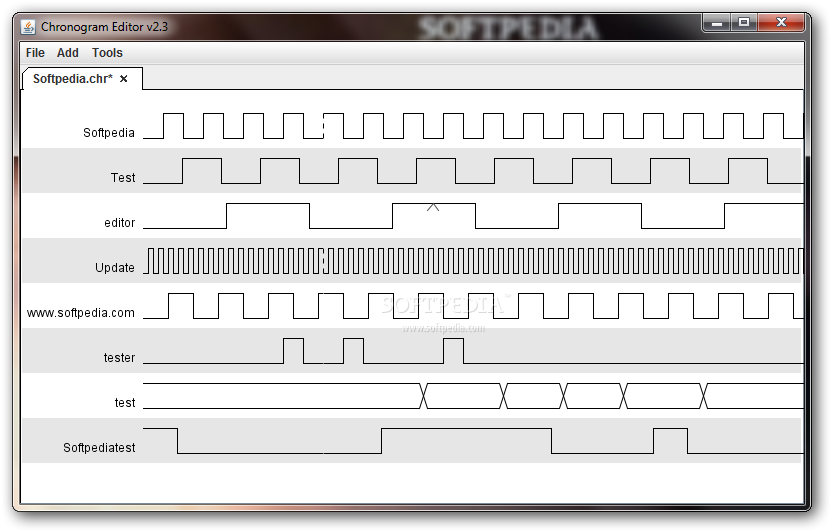
looking to achieve something similar to this
quartz dust
Can someone try and help me in #help-chili if you can, it's about web browsers and stuff like that in python.
 vague dawn
gilded flume
why does pycharm give me a ModuleNotFound error when trying to import tkinter
vague dawn
gilded flume
why does pycharm give me a ModuleNotFound error when trying to import tkinter
did you pip installed it?
gilded flume
vague dawn
did you pip installed it?
The problem was that I didn’t create a virtual environment
digital rose
Anyone know how to get Matplotlib in a Tkinter app to support retina (high resolution) displays on Macs? https://stackoverflow.com/q/71191121/1084875

Stack Overflow
I embedded a Matplotlib figure in a tkinter window running on macOS. However, my MacBook Pro has a retina (high resolution) display which makes the Matplotlib figure look blurry. I tried to scale t...
quartz dust
Can anyone tell me how to implement the built in plugin supports for PyQtWebEngine, with the Pepper Plugin API, how would you make a plugin, how would you add them to your PyQt Web Browser and how would you make an extensions GUI button for removing and disabling plugins? I found some documentation, I how this can help some of you guys to at least make it a bit easier to help me: https://doc.qt.io/qt-5/qtwebengine-features.html#pepper-plugin-api
 indigo crane
digital rose
https://windows-cdn.softpedia.com/screenshots/Chronogram-Editor_1.png
indigo crane
digital rose
https://windows-cdn.softpedia.com/screenshots/Chronogram-Editor_1.png
with some workarounds, you can do that with the canvas widget
 short eagle
hey
does anybody know how to add a specific height value on a Frame that can't be changed by widgets that are in it ? I'm using tkinter btw
digital rose
help

 flint peak
im attempting to change canvas by using different graphics library and im changing from pygame to a different one and i need help i can send the file and what im trying to change
here is the librar: https://paste.pythondiscord.com/vohihukaha
here is the actual python file: https://paste.pythondiscord.com/zohudocoha.py
 pseudo talon
how do you make a gui application like tkinter ?
do u have to write it in c or u can do it in python
flint peak
its in python u just write
win = GraphWin('name', width, height)
the problem is that im trying to evryting so its runs same way but i have to change so much and i dont know wut to do really
pseudo talon
flint peak
well u have to import the graphics file
how do i do without imports is the main question.
flint peak
well u kinda need the import is for wut im trying to do
so cant really
from wut im trying to do
pseudo talon
flint peak
well u have to import the graphics file
also what library are u talking bout
flint peak
the first link i snet above
u would create a file and copy and paste that code n it
and the import the anme of that file into the main file which is the second linkl
name*
tawdry mulch
short eagle
hey
does anybody know how to add a specific height value on a Frame that can't b...
frame.propage(0)
 little sentinel
Hey, do you know what GUI library it is? this is a Hitomi Downloader and this UI looks really nice and I want to use this lib in my apps. Any ideas?
 little sentinel
Solved it, it's PyQt
digital rose
hey guys
live 'polar' plotting slows down after 300-500 spots in pyqtgraph
can someone help me?
plucky cosmos
hi, I'm trying to remove blank spaces in my QLineEdit, any idea on how to do it ? I think I'm supposed to use ";" at the end of the inputmask but don't now what to put after it


 rocky dragon
plucky cosmos
hi, I'm trying to remove blank spaces in my QLineEdit, any idea on how to do it ...
rocky dragon
plucky cosmos
hi, I'm trying to remove blank spaces in my QLineEdit, any idea on how to do it ...
If you need a float you can use a QDoubleSpinBox instead of messing with a line edit
plucky cosmos
I ended up using this, works fine
self.lineEditYF.setValidator(QtGui.QRegExpValidator(QtCore.QRegExp("[0-9]+\.?[0-9]*|\.[0-9]+")))
 full brook
Can someone help me with tkinter?
I need to put these two images in the code but I don't know how to do it

 digital rose
anyone here?
 quasi kraken
Hey everyone do anyone know how to implement this kind node chart in python in gui
 digital rose
how do i make the call back function read the input tkinter
how do i make the call back function read the input tkinter
tawdry mulch
digital rose
how do i make the call back function read the input tkinter
what input
tawdry mulch
full brook
I need to put these two images in the code but I don't know how to do it
wym
full brook
tawdry mulch
wym
I already discovered how tnx
 thick gulch
tawdry mulch
what input
thick gulch
tawdry mulch
what input
If you're using a tkinter.Entry, you can use the .get() method to get whatever's in it as a string.
For example:
import tkinter as tk

root = tk.Tk()
button = tk.Button(action=callback) # Whenever the button's pressed, the 'callback' function will activate
entry = tk.Entry()


def callback():
  print("Entry text: " + entry.get())

button.pack()
entry.pack()
root.mainloop()
I'm not the one who asked the question
tawdry mulch
thick gulch
For example:
```python
import tkinter as tk
root = tk.Tk()
button = tk.Button(a...
Anyway, there is no action option for tkinter button, it's called command
thick gulch
tawdry mulch
Anyway, there is no `action` option for tkinter button, it's called `command`
oh yeah you're right
 snow snow
Has anybody tried to use tkinter with pygame and if so were there any issues?
boreal pier
Probably no issues if you exclude extreme forms of torture and suffering from Integrating and debugging
Tkinter has a way with breaking your idea and shattering it into microscopic pieces and then putting them into a nice little crash
snow snow
boreal pier
Tkinter has a way with breaking your idea and shattering it into microscopic pie...
lol I've started to notice that. 
boreal pier
Try Qt if you want personal or expensive public app or do PySimpleGui
 prisma otter
can we use PySide6 for mobile apps ??
stray jackal
@snow snow that is actually on my to-do list , Tkinter + Pygame
tawdry mulch
snow snow
Has anybody tried to use tkinter with pygame and if so were there any issues?
What r u planning? I've used the mixer from pygame along with tkinter
stray jackal
@snow snow pygame to simulate cell phone screen , also use it for a hi-res display for a 8 bit ADC + GPIO( digital in ) logic display , not super fast , but proof of concept
snow snow
tawdry mulch
What r u planning? I've used the mixer from pygame along with tkinter
I'm trying to embed a pygame window into tkinter
snow snow
stray jackal
<@544783569873141801> pygame to simulate cell phone screen , also use it for a ...
that sounds interesting, is this for something public?
stray jackal
@snow snow im not a very PYTHONIC coder ( im a sloppy coder , still learning )

@i ran out of LEDs , switches , so i use pyserial and Tkinter for a control panel
snow snow
stray jackal
<@544783569873141801> im not a very PYTHONIC coder ( im a sloppy coder , still ...
I'm still learning as well, so were in the same boat  .
.
stray jackal
@snow snow lots of new MCUs out there , but its a hassle to start over , need to learn multi thread in PY3
@snow snow need to try pygame on a raspi 3
 languid moth

 crimson magnet
Setting a default for nosuchelementexception for multiple variables in python
So I am scrapping multiple rows of a table and many of them are either available or not for different pages. What I want to do is to detect which field is not available and supply it on a variable and set a default variable i.e., None to it. For eg,
try:
        field1 = driver.find_element(By.XPATH, value="somexpath")
        field2 = driver.find_element(By.XPATH, value="somexpath")
        field3 = driver.find_element(By.XPATH, value="somexpath")
        field4 = driver.find_element(By.XPATH, value="somexpath")
        field5 = driver.find_element(By.XPATH, value="somexpath")

        dict_ = {"field1":field1, "field2": field2.....}

except NoSuchElementException:
       # some code to detect which element not found and supply a default value None to it
       defaultVaule = None
In the web browser that I'm making whenever I try and go to almost any site (besides youtube) no videos will play. I don't know why this is.

I'm making it in PyQt5.
 maiden hollow
can anyone give me a code for 4*4 matrix rgb?
boreal pier
Maybe because you are making something that takes a whole team to make, and it’s python
Probably Ajax if I had to guess
 cunning holly
Good, morning. Had anyone ever used Shelve().I am working on a virtual toolbox and I want to make a user configuration page.
digital rose
how can i make that
 digital rose
tk
 lofty berry
Hey, I just started learning tkinter and I can't figure out why my program never enters my loop.
Code:
def jump(event):
print("jump")
t = 0
while t<0:
print("loop")
root.bind("<space>", jump)```
Output (on pressing space):
`jump` covert sun
lofty berry
Hey, I just started learning tkinter and I can't figure out why my program never...
covert sun
lofty berry
Hey, I just started learning tkinter and I can't figure out why my program never...
well its not going to be in the loop since you already set the t to 0
and the statement says while t is less than 0
lofty berry
Yeah someone answered me in another place lol i'm dumb thanks
lofty berry
Hey, I've got another question! Inside that while loop, I'm trying to reprint an oval that I've previously put on the page. However, the oval only prints when it's first created and at the end of the while loop, instead of continuously printing during the loop. How do I make it print continuously?
Here's what I run to create the oval:
player = my_canvas.create_oval(x,y,x+diam,y+diam)
And here's the while loop:
def jump(event):
    t = 0
    while t<=.5:
        print("loop")
        shrink_val = diam*t

        x0, y0, x1, y1 = my_canvas.coords(player)
        my_canvas.coords(player, x0, y0+(diam*t), x1, y1)
        t+=.25
        sleep(.25)
        print("t = ", t)
Here's everything you should need to recreate this part of my code:
from tkinter import *
from time import sleep

root = Tk()
root.geometry("800x600")

# player diameter
diam = 50
# Set canvas dimensions, player start location
canv_w = 600
canv_h = 600
x = canv_w//2
# y = 400-diam
y = canv_h//2

# Set up canvas space & starting spot
my_canvas = Canvas(root, width=canv_w, height=canv_h, bg="white")
my_canvas.pack(pady=20)
player = my_canvas.create_oval(x,y,x+diam,y+diam)

def jump(event):
    # print(my_canvas.coords(player))
    t = 0
    while t<=.5:
        print("loop")
        shrink_val = diam*t

        x0, y0, x1, y1 = my_canvas.coords(player)
        my_canvas.coords(player, x0, y0+(diam*t), x1, y1)
        # print(my_canvas.coords(player))
        t+=.25
        sleep(.25)

root.bind("<space>", jump)
root.mainloop()
(Edited to clean up my code)
 sinful pendant
lofty berry
Hey, I just started learning tkinter and I can't figure out why my program never...
sinful pendant
lofty berry
Hey, I just started learning tkinter and I can't figure out why my program never...
Bro 0 is not less than 0
lofty berry
sinful pendant
Bro 0 is not less than 0
ik someone pointed that out to me lol
my problem now is different
 dapper plover
from tkinter import *


root = Tk()

# Create Title
root.title( "Paint App ")

# specify size
root.geometry("500x350")

# define function when
# mouse double click is enabled
def paint( event ):

    # Co-ordinates.
    x1, y1, x2, y2 = ( event.x - 3 ),( event.y - 3 ), ( event.x + 3 ),( event.y + 3 )

    # Colour
    Colour = "#000fff000"

    # specify type of display
    w.create_line( x1, y1, x2,
                y2, fill = Colour )


# create canvas widget.
w = Canvas(root, width = 400, height = 250)

# call function when double
# click is enabled.
w.bind( "<B1-Motion>", paint )

# create label.
l = Label( root, text = "Double Click and Drag to draw." )
l.pack()
w.pack()

mainloop()
guys i found this code on geeksforgeeks, can someone explain what is the event in def paint()
 fallow olive
reading where its used, i can suggest that w.bind does something with it when you double click
i don't use tkinter so, im not sure
but side note, i made this

 blazing pine
digital rose
live 'polar' plotting slows down after 300-500 spots in pyqtgraph
blazing pine
digital rose
live 'polar' plotting slows down after 300-500 spots in pyqtgraph
pyqtgraph deosn't offer polar plots by default...how are you going about genereating them?
fallow olive
updated it to show your username in the title
 balmy tendon
hello ! i'm on a project and i would like to know what the icons make you think of ?

if you have any idea of things to add on this screen please let me know
fallow olive
balmy tendon
idk why but they remind me of windows 8.1
also i made this

lightweight spotify in pyqt5
sinful pendant
dapper plover
```
from tkinter import *
root = Tk()
# Create Title
root.title( "Paint App "...
When using bind method, the first argument is the event, and 2nd argument is the function which will be called when that event happen, at that time an object is passed to to the function u provide in bind
 graceful frost
dapper plover
```
from tkinter import *
root = Tk()
# Create Title
root.title( "Paint App "...
graceful frost
dapper plover
```
from tkinter import *
root = Tk()
# Create Title
root.title( "Paint App "...
Def paint is use for define function that what will main use in your program , and in the all arguments in def condition is decided what to do and to do.
plush stream
fallow olive
also i made this
Is that qt?
oh nvm. you said it was made in qt after that message
i also made a music player in qt
 fallow olive
plush stream
i also made a music player in qt
fallow olive
plush stream
i also made a music player in qt
has it got a name
fallow olive
that's pretty cool, I'll look at it soon
What about adding spotify playback?
It's relatively easy to do
plush stream
Is it?
I don't know about that
What module do i have to use to embed a Spotify playback?
fallow olive
spotipy
@plush stream
GitHub
A light weight Python library for the Spotify Web API - GitHub - plamere/spotipy: A light weight Python library for the Spotify Web API
It's the one spotify tells you to use.
plush stream
Oh that one
fallow olive
yeah, i found it easy
plush stream
I've read that it can only play 30s of music?
fallow olive
nope?
plush stream
Or am i wrong?
fallow olive
do you not have premium
fallow olive
Then that's why
plush stream
I don't use Spotify that much
fallow olive
also i updated my player now
plush stream
I might embed it to my app at some point, so thank you!
fallow olive
No problem!
if you want it to play, you'll need oauth2
but spotipy makes it easy
add a localhost redirect in your spotify app, to port 8000
spotipy handles the rest

i made playlists work now
plush stream
Looks amazing
fallow olive
not as good as yours
plush stream
Text should be white though. It's kinda hard to read
plush stream
fallow olive
not as good as yours
Don't worry. My first music player is also very shit. You only get better from there.
 plush stream
Much better
fallow olive
Any other design tips
plush stream
Layout and icons could get some work
fallow olive
Wouldn't know where to start with that
plush stream
This was my first music player in tkinter btw. It's order of magnitude worse than yours so...
 fallow olive
oh, this isnt my first either
i deleted my first purely because of how bad it was
I want to change font, but what to
plush stream
No idea. Choosing font for gui is kind of hard. That's why i use something like figma for prototyping
fallow olive
i use the qt designer
plush stream
That works too
fallow olive
Problem is, some fonts don't work at all
plush stream
How come?
 plush stream
Is this from qt designer?
fallow olive
Yeah
plush stream
Yeah idk
fallow olive
¯_(ツ)_/¯
plush stream
Never used qt designer
fallow olive
I only use it because it's simple.
fallow olive
moved the "made by" to the help area

 vernal flame
Hi! I'm struggling with Semantic UI grid, can anyone help or maybe recommend another alive discord to ask such things?)
I have 2 tables, on the same line of the grid, I want them to fill up browser window horizontally but if the window is too narrow (like smartphone screen) i want them stacked
But my current implementation does not work correctly. Shrinking browser window makes tables overlap each other and then tables are just stretched vertically in a very weird way
digital rose
plush stream
i also made a music player in qt
that looks suuuuuuper good!
 dusky lichen
Hello! Im using tkinter and im having troubles tiwith creating a frame in a new window
vernal flame
dusky lichen
Hello! Im using tkinter and im having troubles tiwith creating a frame in a new...
Just a suggestion, try Pysimplegui
digital rose
vernal flame
I have 2 tables, on the same line of the grid, I want them to fill up browser wi...
you need flexbox
vernal flame
Is it a class of semantic ui?
digital rose
.container {
  display:flex;
  flex-wrap:wrap;
  justify-content:space-evenly;
  align-items: center;
}
its css
im not familiar with semantic ui
but i know this css would make it work
.container is a class
you can apply to a div
vernal flame
I guess ui container does it in semantic ui
 tiny oxide
Hello guys
 smoky hinge
Hi folks,
On a CLI app, if args are an option but also config is an option, what are the best practices in terms of what takes priority if both are used?
rocky dragon
Args over config I'd say
mighty rock
rocky dragon
Args over config I'd say
Yeah, @smoky hinge, command line arguments override configuration files
 south dagger
hi guys. i have a question. How to upload and download file using tkinter ?...(only localhost)
 smoky hinge
south dagger
hi guys. i have a question. How to upload and download file using tkinter ?...(o...
smoky hinge
south dagger
hi guys. i have a question. How to upload and download file using tkinter ?...(o...
you mean instead of having a variable you want to load that from a file ?
If that is the case you could do someting like
with open("data.txt", "r") as f:
    data = f.readlines()
data is your variable tat contains the file context
data.txt is your file which you can name it anything
ofc, there is much cleaner and better way on using that but you can start small I suppose 😄
 strange sand
How to run an event when key is pressed?
For example, I want to run event name "#Save" when I pressed CTRL + S
[PySimpleGUI]
south dagger
smoky hinge
you mean instead of having a variable you want to load that from a file ?
If th...
lot of thanks 💗
 spice drift
hi i have a question

i'm doing a basic text editor and i want to make an open file function
my aim is to open the text file in the screen but it does appear several errors
i try this code but it doesn't appear in my tkinter screen. It executes in notepad
thick gulch
spice drift
my aim is to open the text file in the screen but it does appear several errors
Do you want to be able to edit the text? If so use tkinter.Text rather than tkinter.Label
Here's something I made a while ago (it's not the best but it works):
def open_file(*_):
    # Open a file in reading mode
    f = tkinter.askopenfile(mode="r")

    if f is not None:
        # Read the file and replace text-box text with its contents
        content = f.read()
        text_box.delete("1.0", tk.END)
        text_box.insert("1.0", chars=content)
 low lantern
Heyyy i wanna ask if someone know how to display an array in tkinter
The elements shouldn't be an entry tho
Annd
The array is variable
It needs to be changed after every onclick event
I need to keep track of the indexing
Cuz i'll need to color certain elements based on the index
THANK YOU IN ADVANCE
 daring kindle
can anyone give a template for tkinter in OOP format.
 glossy hemlock
Is there anyone who is familiar with PyQt?
I need some help over at #help-potato.
vernal flame
How can I add icon to every "blablabla" word on my web page?
 shut ice
Yo yo
Watching a video about saturn on steroids
Its a planet 434 light years from us
Apparently it has 30 rings
And it’s about 10-40 Jupiter masses
Pretty freaky
boreal pier
Off topic channel bro
boreal pier
Ur welcome bro
proven basinBOT
:incoming_envelope: :ok_hand: applied mute to @digital rose until <t:1652845357:f> (9 minutes and 59 seconds) (reason: duplicates rule: sent 4 duplicated messages in 10s).
 distant quartz
Guys is there any way to get gui for c# without using that forms?
glossy hemlock
mighty frigate
<@838999476852883526>what was the question
I managed to figure out. Thanks for asking, though. 😄
mighty frigate
@glossy hemlockpls see my comment. There's a member for doing this specifically
 slate moss
Is there a good library for making UI that doesn't look like it was created in the middle ages? 🙂
 steady coral
HEY guys i use pyqt5 to make my apps
and iam facing some problems with database and sqlite3
mighty frigate
slate moss
Is there a good library for making UI that doesn't look like it was created in t...
I can't say for other libs, but Qt allows you to customize the style to a pretty great extend
 astral wasp
I am working on a Diary app using tkinter
https://github.com/naffydharni006/Diary
I want some ideas and suggestions for my project
 warped sandal
Hello guys, I have a question regarding GUI. I have a python program, which is basically an Etl. It gets data from database and exports in CSV then loads these files to some other database. I have basically a couple of hard coded variables like IP, username, password etc. A couple of libraries are used, like pandas etc. I am thinking of creating some GUI for this where I would be able to enter this data and run. Is there any framework you would suggest?
 blazing haven
warped sandal
Hello guys, I have a question regarding GUI. I have a python program, which is b...
blazing haven
warped sandal
Hello guys, I have a question regarding GUI. I have a python program, which is b...
Python built-in Tkinter/Kivy/Pygame/pyqt5
glossy hemlock
mighty frigate
<@838999476852883526>pls see my comment. There's a member for doing this specifi...
I did use .setMouseTracking(True) for MainWindow but it wasn't working.
It only worked as expected when I used .setMouseTracking(True) for the central widget as well.
class MainWindow(QMainWindow):
    def __init__(self):
        super().__init__()
        self.setWindowTitle('Events')
        self.setMouseTracking(True)
        self.label = QLabel('Click in this window.')
        self.label.setMouseTracking(True)
        self.setCentralWidget(self.label)
@mighty frigate Could you explain what this section of code does?
class MainWindow(QMainWindow):
    def __init__(self):
        super(MainWindow, self).__init__()
I want to know how does it differ from just super().__init__().
 indigo crypt
hey can somebody give me a hint, I' searching for a gui framework and found pyimgui and dearpygui. Both are bindings for Dear ImGui, so whats the library I should choose?
tawdry mulch
low lantern
THANK YOU IN ADVANCE
I don't understand
glossy hemlock
indigo crypt
hey can somebody give me a hint, I' searching for a gui framework and found pyim...
I haven't used pyimgui or DearImGui before but you should probably choose something that fits your needs.
I doubt there is a clear-cut answer to what you are asking.
If you can't decide, you should try using both and compare them.
That's probably the best way.
 fresh silo
Hi can anyone suggest me the best library for gui purposes. Like smooth and modern gui?
vernal flame
Hi guys!
Can anyone help me solve my problem with Semantic UI? Here is tab info
https://semantic-ui.com/modules/tab.html
My problem is if I add 3 tabs with 1 word per tab from example, it works. But if i replace words with tables, tables stack upon each other when i click tabs , and they dont remove when ooening another tab...
Any ideas how to fix it? (No extra css)
A tab is a hidden section of content activated by a menu
 cunning cosmos
any good web frameworks for displaying a lot of technical data in table format?
 thorny flower
Anyone know why this argparse code breaks out of the loop? Minimal example:
def start(self):
        self.__b_keep_running = True
        while self.__b_keep_running:
            user_input = self.__promptUser()  # Just an input() method
            self.__input_handler.parseAndRunUserInput(user_input)

# __input_handler.parseAndRunUserInput(...)
def parseAndRunUserInput(self, user_input: str):
        args = self.__parser.parse_args(user_input.split())
        args.func(args)
        # Should now return to while loop in start()
Seems like the args.func breaks the loop, though I am unsure why this is the case?
EDIT: Seems that this is only the case if I enter argparse-related input. I.e.
:> connect --port /dev/usbwhatever --baud 1234
can both run fine and fail gracefully while going back to the while loop, but
:> connect -h
Makes argparse output the help description, but then shuts down
:> asdfasdfasdf
Makes argparse output possible inputs, but then shuts down
digital rose
Hi
digital rose
Is someone here experienced with PyQt5, Im trying to make add objects of my custom widget to a vbox layout but they dont show up, but e.g. QLabels do show up in the vbox. Any way for me to debug this?
This is currently my code if it is any help: https://paste.gg/p/anonymous/f2766cca50f44c019482ac39aa10af85
thick gulch
!rule 6
 potent pumice
how do i structure Tkinter apps? But without classes or using globals
i mean functional GUIs or something like that, does it make sense?
 eager pasture
hi guys, can someone explain for me difference between PySimpleGUI and PySimpleGUIQt? I know that 1st if wrapper for TK and second is wrapper for Qt. But is they have same api or not? Or they just have different widgets look?
 rich hearth
Hi, I'm looking for some recommandations of good plotting and (separately, they don't need to be the same at all) 3D plotting libraries for a personal project because I'm not sure what's most appropriate for this:
-
A module for 2D plotting where I can change things and it recomputes the graph (like if I move/drag a control point it recomputes the curve with the new coordinates). I believe Bokeh can do this but I was wondering if there are other alternatives.
-
A module for 3D plotting of simple shapes (think a parametric curve or a scatter plot, though the more proper graphics the better) where it can change over time (to show the evolution of position over time) and where I can "move the camera" at least to some extent.
Context: I'm doing a big school project on Bézier curves and I'd like a program to display them (hence 1, 3D isn't needed but that option wouldn't hurt) and another one to simulate a roller-coaster travelling on a path defined by them and to be able to show it move on the curve over time.
 static cove
rich hearth
Hi, I'm looking for some recommandations of good plotting and (separately, they ...
static cove
rich hearth
Hi, I'm looking for some recommandations of good plotting and (separately, they ...
so my instinct is to suggest pyqtgraph because it has that kind of interactivity
static cove
potent pumice
i mean functional GUIs or something like that, does it make sense?
I haven't really seen functional GUIs work out when they get more complex tbh. Classes extend really well the GUIs because you do need to track state and it's easy to represent widgets and objects as classes
 cerulean dew
Hi
I am using kivy because im trying to make an apk of my code
I created on windows and it works, but i need linux to export my app, so i use the virtual machine inclued with windows, and when i try to install kivyMD it give me this error

Someone can help me?

Someone can help me?
ERROR: Could not build wheels for kivymd, which is required to install pyproject.toml-based projects
Laptop@Laptop-Laptop:/mnt/e/program/Python/kivyproyects/kivymaterialdesing/KivyMd$ pip install pyproject.toml-based projects
Defaulting to user installation because normal site-packages is not writeable
ERROR: Could not find a version that satisfies the requirement pyproject.toml-based (from versions: none)
ERROR: No matching distribution found for pyproject.toml-based
Laptop@Laptop:/mnt/e/program/Python/kivyproyects/kivymaterialdesing/KivyMd$
potent pumice
static cove
I haven't really seen functional GUIs work out when they get more complex tbh. C...
I am just tinkering around.
proven basinBOT
:incoming_envelope: :ok_hand: applied mute to @plain crane until <t:1653203399:f> (9 minutes and 59 seconds) (reason: duplicates rule: sent 4 duplicated messages in 10s).
:incoming_envelope: :ok_hand: applied mute to @vapid hound until <t:1653203414:f> (9 minutes and 59 seconds) (reason: duplicates rule: sent 4 duplicated messages in 10s).
digital rose
slider = customtkinter.CTkSlider(master=root_tk, from_= 0, to=200, command=sliderthingy2)
slider.grid(row= 2, column= 6)
slider2 = customtkinter.CTkSlider(master=root_tk, from_= 5, to=300, command=sliderthingy)
slider2.grid(row= 3, column= 6)
firstl = customtkinter.CTkLabel(master = root_tk, text = "Weight")
firstl.grid(row=3, column=8)
secondl = customtkinter.CTkLabel(master = root_tk, text = "Height")
secondl.grid(row=2, column=8)
firstcheckbox = customtkinter.CTkCheckBox(master = root_tk, text = "Male")
firstcheckbox.grid(row = 6 , column = 5)```
what can i do to the checkbox so the two sliders become at the beginnig instead of that space mighty rock
I think you can group the two sliders in a frame, and pack said frame before the checkbox
obtuse acorn
Don't really need any help, cool thing I made with Ursina / a 6DOF sensor
 frosty fiber
obtuse acorn
Don't really need any help, cool thing I made with Ursina / a 6DOF sensor
frosty fiber
obtuse acorn
Don't really need any help, cool thing I made with Ursina / a 6DOF sensor
I like it
 frail wren
obtuse acorn
Don't really need any help, cool thing I made with Ursina / a 6DOF sensor
frail wren
obtuse acorn
Don't really need any help, cool thing I made with Ursina / a 6DOF sensor
cool!
 lyric phoenix
Well I have an issue
with kinter
The Entry.get() function doesn't really work
Even when I set the default value to 0
it returns 0
for integers
Anybody know how to fix this?
The function won't really accept user input
as an integer
 tribal path
are you get'ting the value before or after the user has inputted anything
lyric phoenix
tribal path
are you get'ting the value before or after the user has inputted anything
nope
its just ' '
blank
unless I specify the value as 0
or any other integer
It doesn't change either
tribal path
? which is it; before or after/ when are you running the get()
 craggy hornet
I wrote some error messages for a program and each error messages assigned a variable. Variables are global but the error messages runs due to if-else statements so, I want to print them on a label but because of the if-else statements, I can't write multiple labels. (Because If I write multiple labels, then, when an if statement does not run, its value's label will be empty. ) How can I assign these variables to text argument of label?
    '''errormessage : option empty NUMBER option
                    | option empty RED option
                    | option empty BLUE option
                    | option empty GREEN option
                    | option empty BLACK option '''
    global comK
    global comM
    global comS
    global comY
    global comElse
    if p[3] == 'K':
        comK=("error : missing command before '%s'" % (p[3]))
    elif p[3] == 'M':
        comM=("error : missing command before '%s'" % (p[3]))
    elif p[3] == 'Y':
        comY=("error : missing command before '%s'" % (p[3]))
    elif p[3] == 'S':
        comS=("error : missing command before '%s'" % (p[3]))
    else:
        comElse=("error : missing command before '%s'" % (p[3]))

#ERROR PANEL
bottom_panel = PanedWindow(panel_2, orient=VERTICAL, bd=2, relief="raised", height= "250", bg= "light green")
panel_2.add(bottom_panel)
bottom_panel.pack(fill= BOTH, side= BOTTOM)
T = tk.Label(right_panel,
              text=comK, bg="light blue", fg="white", width=50, font=("Arial", 30)).pack(fill=BOTH)
open_button.pack(pady= "10")```Here is a example part of code.
craggy hornet
I handled it:)
 slow hinge
so
i have two classes
quizpage15 and quizfinal
i want the label (enunt0) in finalquiz to be updated and display your points
but (i think) its initialized when cnt variable is 0
and i dont know how to update it
proven basinBOT
Hey @slow hinge!
You either uploaded a .txt file or entered a message that was too long. Please use our paste bin instead.
slow hinge
any idea how to update it?
or do you have any idea how to load/reload (idk) the finalquiz frame when corect() and gresit() functions are executed?
lyric phoenix
def output():
    if(var1.get() == 1):
        Label(tk, text="SELECTED", font="Times 20").grid(row=1, column=0)
        apple_entry = Entry(tk, width=10).grid(row=2, column=0)

        x = int(apple_var.get())
        Label(tk, text=x, font="Times 20").grid(row=3, column=0)

var1 = IntVar()
apple_var = StringVar()

apple = Checkbutton(tk, text="Apple", variable=var1, onvalue=1, offvalue=0, command=output).grid(row=0, column=0)
why isn't this working?
ValueError: invalid literal for int() with base 10: ''
this is the error
but on line 6 above I have converted the datatype
from string to int
 eager beacon
Why would apple_var be anything other than ''?
 tropic cape
what’s a good GUI library that has cross platform support?
besides Tkinter - i don’t really like it
I’ve heard of PyQT and wxPython, but have never used them
eager beacon
PyQt
I've never used wxPython, but the Qt bindings have a much larger user base, so it's easier to find tutorials/answers
lyric phoenix
eager beacon
Why would `apple_var` be anything other than `''`?
well I need it to be an integer
I tried using IntVar() but uh it doesn't update the value
eager beacon
The problem is you never assign apple_var to anything.
lyric phoenix
eager beacon
The problem is you never assign `apple_var` to anything.
Oh, I got the solution now, I just had to update the variable with a button, thanks for the help
 visual marsh
tropic cape
I’ve heard of PyQT and wxPython, but have never used them
visual marsh
tropic cape
I’ve heard of PyQT and wxPython, but have never used them
Have not worked with PyQT, but PySide, which is also Qt bindings. As I understand they are almost interchangeable. Definetly had an easier time to navigate and find resources for it compared to wx. A whole lot of help is for C++ though, but you will get the general idea.
mighty frigate
Qt is probably the biggest and best documented UI lib out there
 sudden coral
The main C++ documentation is good but the PySide equivalent documentation tends to be behind, sometimes with examples still in C++ copied over from the original documentation. So, understanding basic syntax of C++ (which is not a tall order) is quite helpful.
Maybe things have improved over the couple of years since I've last really looked into it.
 hearty bone
In Qt Designer how do you make it so when you click a push button it will go to a new nested window? (not open a new window but like clicking a settings icon to get into a settings menu)
mighty frigate
why would you need a python doc ?
it's exactly the same as the C++ doc, but the C++ doc has types
just ignore them and ptr and you'll be fine
jolly flower
hearty bone
In Qt Designer how do you make it so when you click a push button it will go to ...
Do you mean like a tab or an actual new section of a window
You have the choice of being managed to make tabs in the Qt Designer or you just have to create another design which will contain the "nested" settings window and by clicking the button the main window will execute the file that has the settings window
Also im sure there is an actual solution for this but in that case since you did not explain that much
sudden coral
mighty frigate
why would you need a python doc ?
It is not exactly the same as the C++ docs. Python doesn't have any of the macros as far as I know. There are naming differences: some names are prefixed with underscores to avoid conflicts with Python built-ins, some namespaces are a bit different (regarding enums IIRC), snake_case is used instead of camelCase, properties can be set directly instead of using setter functions. Furthermore, there are examples in the docs and it would of course be nicer for a Python developer to read examples in Python than in C++.
rocky dragon
snake_case and proprtiers are optional features, by default the interfaces should be the same
Though I've had a case where the stubs and c++ docs disagreed on a type, still not sure on which one was right as the library couldn't do a type conversion so I went with an another approach
tropic cape
Hi, I'm wondering what colours go well with this gradient?

I feel that white components with black text is a little bland.
rocky dragon
bland's good, no worries about colors for people with a visual impairment
hearty bone
jolly flower
Do you mean like a tab or an actual new section of a window
I mean like you click on a webpage and you go into that page. But you can still hit the back arrow to go back to the main menu.
tropic cape
rocky dragon
bland's good, no worries about colors for people with a visual impairment
Aren't there specific applications out there which alter the colour profile of a display to accommodate for such individuals?
That feels far simpler than every application adjusting for such impairment.
rocky dragon
That probably only works to a certain degree, I don't have that much experience with it myself, but software like games wouldn't implement their own settings for it it a simple overlay was sufficient
tropic cape
Of course - but, for example, Windows has built-in settings to adjust the colour profile for a particular type of colour impairment.
And I'm certain there are a few 3rd party applications out there for such thing
rocky dragon
And well, it's still a degraded experience compared to having simpler gui elements
tropic cape
Don't most (modern) websites and applications thrive off of minimalistic components and blended colours?
rocky dragon
I think most sites are mostly monochromatic, with only using colors for highlights of more important actions and where they have a clear distinction with the background. But they should still have colour corrections for them
At least personally I'd definitely prefer a simpler style, from your screenshot it's apparent what does what from the symbols alone so I don't think styling it with colours would add much to it. The only thing that feels a bit out of place is that I'd maybe expect the buttons to be somewhere lower instead of the middle of the window
tropic cape
Ye they'll be in an expandable sidebar, I'm just fooling about atm.
dusky lichen
hey bros
does anyone know how to use a button in top level?
where do i use the def to create the command for the button
 hoary canopy
I’m making a test using tkinter. The screen is wiped and loaded in a for loop. How do I wait for the button to be pressed before moving onto the next question?
slate moss
Is there a way to make modern UI's for mobile apps? Like, that doesn't look like it was made in 1990?
(In python ofc)
hoary canopy
slate moss
Is there a way to make modern UI's for mobile apps? Like, that doesn't look like...
Kivy has been recommended to me before
tawdry mulch
dusky lichen
does anyone know how to use a button in top level?
The function has to be where the button has access to that function
tawdry mulch
hoary canopy
I’m making a test using tkinter. The screen is wiped and loaded in a for loop. H...
The command of the button triggers a function to be called..?
hoary canopy
tawdry mulch
The command of the button triggers a function to be called..?
But how do I wait for that function to be called.
tawdry mulch
hoary canopy
But how do I wait for that function to be called.
What do you mean wait? If you say Button(...,command=func), func wont be executed till you click the button
hoary canopy
def bar():
Some code to make button appear
Some code to wait for the button to be pressed
Def foo():
For x in range(10):
bar()
digital rose
https://github.com/TomSchimansky/CustomTkinter/wiki/CTkProgressBar this a progress bar for a custom edited tkinter to look better, whats the way i can make it add 0.01 to value for example every second?
GitHub
A modern and customizable python UI-library based on Tkinter - CTkProgressBar · TomSchimansky/CustomTkinter Wiki
hoary canopy
Put the progressbar.set(value) in a for loop with a time.sleep at the end
tawdry mulch
hoary canopy
def bar():
Some code to make button appear
Some code to wait for the butt...
There is no need to wait for the button to be pressed
tawdry mulch
hoary canopy
Put the progressbar.set(value) in a for loop with a time.sleep at the end
time.sleep will freeze your mainloop and GUI


 limber tusk
slate moss
Is there a way to make modern UI's for mobile apps? Like, that doesn't look like...
limber tusk
slate moss
Is there a way to make modern UI's for mobile apps? Like, that doesn't look like...
Did u find something for this? I've been looking for it aswell
 eager viper
Does anyone know of any good courses on design?
Like, how to make a beautiful, professional looking ui
Or website
 eternal briar
Has someone worked with pysimplegui?
subtle verge
yes a lot
 vestal girder
Hi All anyone in here for GUI?
subtle verge
yes why ?
 vital orchid
Can anyone suggest easy to use GUI python library for window application?
eager beacon
if it's a simple app you can probably get away with tkinter, otherwise PyQt6/PySide6
They both have a learning curve and will probably take about the same amount of time to get comfortable with.
limber tusk
vestal girder
Hi All anyone in here for GUI?
I heard kivy allows u to make nice ui's though I've never tried it
queen trout
the UI is pretty bad. but I made a keyword and a highlighter in tkinter

im just using some sample text from project gutenberg
tawdry mulch
plush stream
made my own declarative markup language just for fun
Looking dope!
plush stream
Thx!
 pseudo fern
Hey people- sorry if this is a basic question, but I'm trying to make a simple tool that interacts with some excel data, and as part of this, I want to present the user with some plots for data analysis. This should all be done through a GUI, and right now, I feel a bit stuck. I've heard good things about QT, but is this really the best module for showing varying amounts of chart data? I guess another option would be something web-based
But I wouldn't even know where to begin with that- would prefer to stick to python since I plan to use Pandas for organizing the data. If anyone has any input on what would typically be used for a user interface that can be scaled dynamically depending on content, that would be much appreciated
 grand sequoia
plush stream
another demo
grand sequoia
plush stream
another demo
Cool!
digital rose

 red glade
digital rose
red glade
digital rose
wow
i'm making a text based assistant! it does certain things if you type in a phrase that corresponds with one it it's list
heres the code
var_1 = ["hello", "hi"]
var_2 = ["how are you?", "what's up?", "how's it going?", "how are you doing?"]
var_3 = ["give me an inspirational quote", "give me something inspirational", "quote", "quote, please"]
var_app_runner = ["open my app runner", "open app runner"]
var_cmd = ["open cmd", "open my command prompt"]
var_bye = ['goodbye jarvis', 'see you later, jarvis', 'bye jarvis', 'bye', 'cya', 'goodbye', 'cya later', 'cya later jarvis', 'cya jarvis']
var_commands = ["these cmds", "this cmd", "commands", "cmd"]
var_youtube = ["open youtube", "open youtube, please", "youtube", "please open youtube"]
var_spotify = ["open my spotify", "spotify, please", "please open my spotify", "spotify", "music", "open my music player", "music, please", "open spotify"]
var_google = ["open google", "google", "open google please"]
var_outlook = ["open my outlook", "open my email", "open my account", "open email", "email", "outlook", "email, please", "outlook, please"]
var_notepad = ["open notepad", "open my notepad", "notepad", "notepad, please"]
var_pong = ["pong, please", "pong", "open pong", "open my pong program"]
var_tts = ["text to speech", "tts", "tts, please"]
var_steam = ["steam", "steam, please", "open steam", "please open steam"]
var_unreal = ["unreal engine", "unreal", "unreal please", "unreal engine please", "open unreal", "open unreal engine please", "open unreal please", "please open unreal", "please open unreal engine", "open unreal engine"]
var_mc = ["open mc", "open minecraft", "minecraft", "minecraft please", "please open minecraft"]
var_IDLE = ["open my python ide", "open my python editor", "open idle"]
Hey @red glade!
You either uploaded a .txt file or entered a message that was too long. Please use our paste bin instead.
digital rose
red glade
i'm making a text based assistant! it does certain things if you type in a phras...
that's sick
subtle verge
red glade
```py
var_1 = ["hello", "hi"]
var_2 = ["how are you?", "what's up?", "how's it g...
so cool
 sharp storm
How to make file in gui, i want that it will be possible to drag it from python window to windows explorer and it'll saved there
With tkinter if this is possible.
(If not advise another lib where this is possible)
Or maybe it isn't possible at all..
digital rose
Hello, is it possible to make a dashboard in Tkinter?
 wise axle
 pastel sail
how to make black stick white?

 glacial plaza
@pastel sail don't spam
sinful pendant
Paramter: insertbackground
sinful pendant
digital rose
Hello, is it possible to make a dashboard in Tkinter?
Yes
sinful pendant
sharp storm
How to make file in gui, i want that it will be possible to drag it from python ...
https://www.delftstack.com/howto/python-tkinter/tkinter-drag-and-drop/#:~:text=drop an object.-,Drag and Drop Files in Tkinter,The method should call Tkdnd.
I hope this page gives the answer

Delft Stack
In this tutorial we demonstrate how to drag and drop the objects with the help of the TkinterDnD2 library on the Tkinter GUI.
spice drift
Hi i have an issue with my first GUI and project in Programming
I'm making a text editor and i want a function that when nothing is written, the find command is disabled and when is something in it viceversa
if len(txtr.get("1.0", "end-1c")) != 0:
edit.entryconfigure(6, state="normal")```Hello, im planning to make a networking monitoring app for my project in school. What GUI is the easiest GUI library that I can use for dashboard? Is it possible to use flask?
 sacred dirge
Anyone know of a GUI design app for PySimpleGUI? I know there's nngogol/PySimpleGUIDesigner but that hasn't been updated in 3 years which leads me to believe it won't work anymore
proven basinBOT
Hey @red glade!
You either uploaded a .txt file or entered a message that was too long. Please use our paste bin instead.
 hazy mason
UI
subtle verge
sacred dirge
Anyone know of a GUI design app for PySimpleGUI? I know there's `nngogol/PySimpl...
gonna make one I think
sacred dirge
Will it be as nice at Qt Designer? lol
But in all honesty, I'd just need something to help me figure out how to place layouts, groups, and all other pieces together without just playing around with their size/position values
Makes me wish that there was something as easy as Visual Studio's C# GUI development stuff. You get a GUI window and just right-click -> add X element and it generates the code for you and displays changes you make to it before you ever run the program
 quiet sleet
What are the steps to using Flask to put a web scraping python script on a webpage?
 lyric turret
yo, i need some design concept for my new upcoming social medias, lets go to dms
 charred cliff
anyone here ever made a purchase shop code in python?
 wary birch
Hi, I'm exploring an optimization algorithm in python and I'm having a hard time understanding it, and in order to do so I would like to monitor several metrics. To that end I would like to build a small "hub" that would allow me to update plots and text boxes dinamically. I'm running everything on jupyter lab, so it would be amazing if it were compatible with jupyter. I would try pyqt5 but even with the jupyter backend it's not good because the event loop makes the kernel busy all the time and I'm unable to run other cells. What tool would you reccommend for this case?
thick gulch
 golden venture
I have some questions
golden venture
I have some questions
What's your question? I'm not a 'pro' but someone else might be able to help you. Thanks!
 daring arch
Please tell me what is the problem?


 limber tusk
i am trying to create a text input box using kivy but my kv file does not seem to work
#:kivy 1.0.9

# orientation: 'horizontal'
orientation: 'vertical'
<Button>:
    size_hint: 1, 0.95
    text: 'test button'
<MyTextInput>:
    id: text_input
    size_hint: 0.5, None
    text_hint: 'input message...'
    multiline: True
    height: self.minimum_height
did I format my file incorrectly?
kivy.require("1.0.9")


class MyTextInput(TextInput):
    def on_text_validate(self):
        App.get_running_app().root.ids.text_input.text = ''

    def insert_text(self, substring, from_undo=False):
        if substring == '\n':
            substring = ''
            self.dispatch('on_text_validate')
        return super(MyTextInput, self).insert_text(substring, from_undo)


class Test(BoxLayout):
    pass


class TestApp(App):
    def build(self):
        t = Test()
        return t


if __name__ == '__main__':
    TestApp().run()
my kv file is named chat.kv and my python file is named ChatMojiView.py
digital rose
hi
digital rose
pls weekly
tribal path
you're missing a line in the kv and would need to be 'test.kv' or would need to load it
brazen thicket
@limber tusk right now you're not telling it what you want to put inside Test.
Call your kv file test.kv (ie, the App's class name without the "App" suffix).
Change it to ```
#:kivy 1.0.9
<Test>:
# orientation: 'horizontal'
orientation: 'vertical'
Button:
size_hint: 1, 0.95
text: 'test button'
MyTextInput:
...```
brazen thicket
note the brackets around Test but not Button / MyTextInput.
<Test> is sort of equivalent to class Test: : it defines what a Test is (if you already have class Test: in your .py file, the two combine together)
Button without the brackets, makes an instance of the already-defined class Button.
So this kv code: <Test>: Button: size_hint: 1, 0.95 text: 'test button' is roughly equivalent to adding this to your python code: ```py
class Test(BoxLayout):
def __init__(self, **kwargs):
    b = Button(size_hint=(1, 0.95), text='test button')
    self.add_widget(b)```
how do I create a scrollbar for the whole window in tkinter using the .grid() function?
digital rose
lyric phoenix
how do I create a scrollbar for the whole window in tkinter using the `.grid()` ...
use scrollbar with the root window and then use grid in the normal way to display it. What exactly is the issue?
lyric phoenix
digital rose
use scrollbar with the root window and then use grid in the normal way to displa...
for example
from tkinter import *

tk = Tk()
scrollbar = Scrollbar(tk)
scrollbar.grid(row=0, column=0, side = RIGHT, fill = Y )

mylist = Listbox(tk, yscrollcommand = scrollbar.set )
for line in range(100):
   mylist.insert(END, "This is line number " + str(line))

mylist.grid(row=0, column=1, side = LEFT, fill = BOTH )
scrollbar.config( ommand = mylist.yview )

tk.mainloop()
this is the code
self.tk.call(
_tkinter.TclError: bad option "-side": must be -column, -columnspan, -in, -ipadx, -ipady, -padx, -pady, -row, -rowspan, or -sticky
and this is the error
digital rose
seems like a simple error to workout
replace your -side with sticky is probably best
if you want it to be on the right handside you want like sticky = 'E' I think
lyric phoenix
okay that seemed to work, but there's another error with fill
digital rose
have you gone to this site?https://www.tutorialspoint.com/python/tk_grid.htm
Python - Tkinter grid() Method, This geometry manager organizes widgets in a table-like structure in the parent widget.
lyric phoenix
yes
digital rose
so fill isn't an option for grid
if you wanted it to fill the entire cell you could do a sticky like 'EW'#
which would make the scrollbar fit the entire column
digital rose
no problem, i think the tutorials point for tkinter is really good.
 buoyant fulcrum
Hi! Could someone please give me advice about my GUI

it's the window that will open when the program crashes
but I am unsure what and how to style it
so far I put the exception, and checked for missing files
brazen thicket
@buoyant fulcrum
I would add a label to the text box, for visual structure (just "Details:" is fine).
Left-align the error message.
Maybe review the sizing, less whitespace (unless you can't make it grow for long error messages), and the text box should be comfortably big.
A "Copy" button would be nice. If not, make sure the text box makes it convenient to copy even if the content is very long.
Also include a reminder of the path to the log file if there's one.
OK button in centre or right. Left is typically for Cancel / Previous
 lofty pond
depends on how complicated you are putting things on your tkinter window, the place method is a great but it is static, I would recommend using grid or pack, grid for more complicated things
 high ocean
how to make a pyqt5 window which stays top of a specific pyqt5 window
digital rose
can we make look tkinter modern??
i mean i have seen the eivl's tkinter gui... and it looked very good... but i just want to know is it difficult
final escarp
digital rose
can we make look tkinter modern??
https://github.com/rdbende/Azure-ttk-theme https://github.com/rdbende/Forest-ttk-theme
rdbende's theme pretty good, you can check it out. Not so hard to apply it too

GitHub
A stunning modern theme for ttk inspired by Fluent Design 💠 - GitHub - rdbende/Azure-ttk-theme: A stunning modern theme for ttk inspired by Fluent Design 💠
GitHub
A beautiful modern theme for ttk, inspired by MS Excel's look 🌲 - GitHub - rdbende/Forest-ttk-theme: A beautiful modern theme for ttk, inspired by MS Excel's look 🌲
digital rose
thank you so much!!!
digital rose
digital rose
can we make look tkinter modern??

GitHub
Easy TKinter library. Contribute to Shihab3/ETK development by creating an account on GitHub.
thanks
nope because it is not completed wiki and also no images to show you
digital rose
digital rose
thanks
example:
ETK.EButton(root, text = "Click Me",
            styleCode  = "border-thick:4px, font-family:arial, font-size:30px",
            toolTip    = ETK.ETip(text = "This is tooltip for the button", followMouse = True),
            placeMent  = EPlace(x=10, y=10, relwidth=1.0, relx=0.9))
hmm
great i'll try it out

😄
there is more classes to try, i work to make it pretty cool and modern and the important thing is to keep it very easy.
limber tusk

does pngs not work on kivy? I am trying to make this image transparent but it shows up as a solid image
 short jewel
hello guys, i have a question regarting Matplotlib and Tkinter,
I have been trying to display the different Technical Indicators on the different canvases within the same page on tkinter.
I got it to work when I used fig, (ax1, ax2, ax3) = plt.subplot...
The problem with that, is that I need those same animatons to renter within the different canvases, not on the same plot.
so i made multiple canvases for them
 frame_chart = tk.LabelFrame(self, self.frame_styles, text="EMA Cross")
        frame_chart.place(rely=0.05, relx=0.4, relheight=0.30, relwidth=0.55)
        self.canvas_chart = tk.Canvas(frame_chart, bg="#D5D5D5")
        self.canvas_chart.pack(expand=True, fill="both")

        frame_chart2 = tk.LabelFrame(self, self.frame_styles, text="RSI")
        frame_chart2.place(rely=0.35, relx=0.4, relheight=0.30, relwidth=0.55)
        self.canvas_chart2 = tk.Canvas(frame_chart2, bg="#D5D5D5")
        self.canvas_chart2.pack(expand=True, fill="both")

        frame_chart3 = tk.LabelFrame(self, self.frame_styles, text="BBand")
        frame_chart3.place(rely=0.65, relx=0.4, relheight=0.30, relwidth=0.55)
        self.canvas_chart3 = tk.Canvas(frame_chart3, bg="#D5D5D5")
        self.canvas_chart3.pack(expand=True, fill="both")
but matplotlib is only rendering the plot to frame_chart even tho i have instucted it to plot to all three
is there a way I can render an 1 animaton with 3 subplot2grid? or is it impossible\
i also asked on stackoverflow if you want more insight
help would be much appreciated
Stack Overflow
I have been trying to display the different Technical Indicators on the different canvases within the same page on tkinter.
I got it to work when I used fig, (ax1, ax2, ax3) = plt.subplot...
The pr...
tribal path
limber tusk
that doesn't appear to be a transparent image...
 dreamy leaf
Hi everyone 🙂 I'm using urwid to make a gui interface with python to make post and get requests (like insomnia or postman) , I'm getting stuck with two things...the first is, I don't know how to dump the json data with pretty format like json_print on rich library, any suggestions?? this is a visual example https://imgur.com/a/YXPMp7d
I mean, i need to display json data like this https://imgur.com/a/tNWRrk8
But there must be some kind of incompatibility between both libraries (rich and urwid ) because when you integrate both , the data output 'breaks', e.g: https://imgur.com/a/s1sOnEY
 digital rose
dreamy leaf
Hi everyone 🙂 I'm using urwid to make a gui interface with python to make post ...
digital rose
dreamy leaf
Hi everyone 🙂 I'm using urwid to make a gui interface with python to make post ...
dump the json data
Did you trypicklelibrary ?
digital rose
limber tusk
does pngs not work on kivy? I am trying to make this image transparent but it sh...
Maybe the wrong from thy image ?
dreamy leaf
digital rose
> dump the json data
Did you try `pickle` library ?
mmm noo...I'm going to take a look , thanks!!
digital rose
Np, i did nothing.
dreamy leaf
but with this library can I do a pretty print with json data?
I mean, at least differentiate key value with colors
spice drift
hi i need some help with an issue in tkinter.
I'm working in making a text editor in tkinter. I want to create a show/hide toolbar function but nothing seems to work
any hints?
digital rose
spice drift
I'm working in making a text editor in tkinter. I want to create a show/hide too...
what is not working ? can i see your code ?
digital rose
dreamy leaf
I mean, at least differentiate key value with colors
well, this library saves code as binary data and then open it (save a class and then open it in another script).
 past sonnet
Hi
Can some one that is good with python scripting on mac please help me in the Code/Help channel.
I am busy writing a script where it brings up a menu to select from different ip's then i can select if I want to view the GUI or connect to a ssh session for that IP. I have worked out the GUI part but struggling to get the SSH part to work. Doing the project on Mac
digital rose
No important to know which os you are using, the important thing which library you are using ?
dreamy leaf
digital rose
well, this library saves code as binary data and then open it (save a class and ...
oh I see...thanks again!
 rugged dagger
Is this kind of gui in modern win11 style, able to code with python?

I'm bored with this

 vague parcel
I’ve never used tkinter but this is a quite popular theme https://github.com/rdbende/Sun-Valley-ttk-theme
GitHub
A gorgeous theme for ttk, based on Microsoft's Sun Valley visual style ✨ - GitHub - rdbende/Sun-Valley-ttk-theme: A gorgeous theme for ttk, based on Microsoft's Sun Valley visual style ✨
digital rose
dreamy leaf
oh I see...thanks again!
Np
digital rose
rugged dagger
Is this kind of gui in modern win11 style, able to code with python?
if you wanted that, then leave tkinter NOW and use PyQt instead.
 sharp reef
You could replicate if but i just suggest using a more powerful ui lib
Like said above, qt is great for styling, gtk apps using the inbuilt adwaita thenes also looks clean out of the box but most people using it don't really deviate from the default looks
 restive quail
any libraries anyone would recomend? i played around with pyqt4 before but i'm hearing its being discontinued and i reinstalled my OS so got nothing
Ik Tkinter is a thing but i'm not that masochistic
lofty pond
restive quail
any libraries anyone would recomend? i played around with pyqt4 before but i'm h...
dearpygui is one you can look at
restive quail
once the thingy called when u dont have to write the thing through code, but have a program to build the ui and then u can compile it
graphical editor? i think those are the words i was looking for 😅
seems like dear imgui doesn't have it? it looks sexy but i'm really bad at deciphering front end logic 😅
limber tusk
How do I allow emoji as input to TextInput in Kivy, it comes out in weird unicode if I do something like 😅
rugged dagger
restive quail
graphical editor? i think those are the words i was looking for 😅
Ya, we need it. I tried tkinter designer that use figma before, but it seems not works well all the time.
 keen temple
restive quail
any libraries anyone would recomend? i played around with pyqt4 before but i'm h...
keen temple
restive quail
any libraries anyone would recomend? i played around with pyqt4 before but i'm h...
pyqt5 or 6
restive quail
keen temple
pyqt5 or 6
there is qt6 now? 😄
mighty frigate
@restive quailyes it's been a few months
digital rose
restive quail
there is qt6 now? 😄
continue with Qt5 or 6, you should never use tkinter.
plush stream
rugged dagger
Is this kind of gui in modern win11 style, able to code with python?
in some extent, yes
though you will need to access windows' private api to blur a window such as in the picture
i recommend you to use a ui framework such as qt for creating modern UIs in python. you can of course do it in tkinter but it's going to be harder to customize due to its lacking ability to provide a flexible styling system.
digital rose
also keep in your mind you can't do any blur using tkinter unless you should get image includes blur.
dreamy leaf
I saw in the urwid documentation that the 'attwrap' class what I'm ussing is deprecated, instead of this... should I use 'widgetwrap' class or is not the same?
 lusty ridge
how can i make a custom combobox in tkinter. something like this
 limber tusk
How do I allow emoji as input to TextInput in Kivy, it comes out in weird unicod...
limber tusk
limber tusk
How do I allow emoji as input to TextInput in Kivy, it comes out in weird unicod...
i'm still stumped on this so if anyone knows please @ me 😄
digital rose
lusty ridge
how can i make a custom combobox in tkinter. something like this
You can use ttk
digital rose
digital rose
https://github.com/shihab3/ETK
or give a look at class 'EOptionSelector' class in folder ETK at __init__.py file.
digital rose
limber tusk
i'm still stumped on this so if anyone knows please @ me 😄
sorry, i don't know kivy
digital rose
i have a program that i used tkinter with and it wont even run outside pycharm, i used pyinstaller for it and turned it to exe and it shows a error that it can not find a file that is in temp while temp doesn't even have the folder it states that the file exists there
digital rose
lusty ridge
how can i make a custom combobox in tkinter. something like this
u can use custom tkinter, it has all of these ready
digital rose
digital rose
i have a program that i used tkinter with and it wont even run outside pycharm, ...
please, post your code and error
code is not my issue
the code perfectly runs
but it does not run outside pycharm
and when i turn it to exe it gives a file not found error
yeah ik, maybe you didn't put root.mainloop()
if i can see your code then i can see how to fix because all errors are came from the code.
digital rose
digital rose
yeah ik, maybe you didn't put `root.mainloop()`
my brother
the code
runs good
im not a monkey
i added root mainloop
the issue is not the code
it's the venv issue
i cant run outside a venv envi
rugged dagger
lusty ridge
how can i make a custom combobox in tkinter. something like this
#return the user's selection
n = tk.StringVar()
#your combobox
monthchoosen = ttk.Combobox(window, width = 27, textvariable = n)

# Adding combobox drop down list
monthchoosen['values'] = (' January',
                          ' February',
                          ' March',
                          ' April',
                          ' May',
                          ' June',
                          ' July',
                          ' August',
                          ' September',
                          ' October',
                          ' November',
                          ' December')

monthchoosen.grid(column = 1, row = 5)
monthchoosen.current()
Hope this can help u
 rugged dagger
lusty ridge
how can i make a custom combobox in tkinter. something like this
rugged dagger
lusty ridge
how can i make a custom combobox in tkinter. something like this
Btw what theme are you using?
Is it a tkinter interface? It is so nice looking & modern
golden venture
I am creating a card game called Scopa on python with tkinter and I would like that when I press a card (which is a button) a timer starts and limits the player to press another button in the next 5 seconds.
Thank you
mighty rock
golden venture
I am creating a card game called Scopa on python with tkinter and I would like t...
We are not taking orders or anything on this server. If you encounter a problem while trying to implement that, whoever's online and has time will be available to help you. When someone is, make sure your question/problem is explained elaborately and preferably includes an error traceback
 gloomy prawn
are there any GUI libs for python android development other than Kivy?
mighty frigate
I believe Qt has things for android
namely QtQuick
see here : https://doc.qt.io/qt-5/android.html
gloomy prawn
oh ok
like can it be compiled to an APK (or an AAB) easily? or is it like pyqtdeploy which is a pain to get working
nope... dont think so... PySide doesnt have Qt 5 support yet and PyQt5 only has pyqtdeploy. and i believe QtQuick (QtQuick is C++) does have Python bindings in PyQt5 but it still uses pyqtdeploy
mighty frigate
I have no idea
I never worked on an android project
all I know is you can make an android app with Qt
gloomy prawn
Kivy gives me crazy headaches
everything is on the bottom left and everything is stretched and theres basically no way to place a widget on the right side of the screen unless u do some funky stuff
digital rose
rugged dagger
Btw what theme are you using?
Is it a tkinter interface? It is so nice looking &...
actually yes it is
digital rose
rugged dagger
Btw what theme are you using?
Is it a tkinter interface? It is so nice looking &...
also here are most of the tkinter widgets on windows 11
i didn't put some of them but it just shows that it is possible, and it just involves as little as 1 import statement

this app is from one of my projects
here is a combobox on tkinter windows 11

 turbid crow
Does anyone have any advice for working with threads?
I am writing an application that displays the mandelbrot set
the mandelbrot computation is quite heavy, so each time i zoom or pan it takes about a second for the pixels to be calculated
I had a solution going with QThread, but I think I was it doing it completely wrong because the ui wouldn't work while the frame was being recalculated, which defeats the whole purpose of the thread
I must also consider that a new frame may be requested before the next one is even calculated yet, so I would need to cancel the pending task, and issue the new one
Is there a standard way of working with threads when doing something like this?
I understand that QThreadPool is intended to handle multiple small tasks simultaneously, but in my case it would only be the one thread that's needed at a time
 pulsar cipher
i need some help with Tkinter in #help-apple
rocky dragon
turbid crow
I had a solution going with `QThread`, but I think I was it doing it completely ...
How were you submitting the work to it? Cancellation is also tricky with threads
turbid crow
I have the worker subclassing Qthread, and I pass in the main window as the parent
then I set the data as the parent's attribute
and the thread finishing is connected to the window's function that draws the image
though I think I may have seen that the method I connect to can take in the data being emitted as an argument to the function?
rocky dragon
Could you show the code?
turbid crow
oh yes it does seem to work, I was doing a weird workaround
I think i've also fixed the threading a little, since it actually threads now and the gui main thread is free
class Mandelbrot(QThread):
    finished = Signal(np.ndarray)
    started = Signal()

    def __init__(self, parent, delta, scale):
        super(Mandelbrot, self).__init__(parent)
        self.delta = delta
        self.scale = scale

        self.started.connect(parent.hourglass_cursor())
        self.finished.connect(parent.arrow_cursor())
        self.finished.connect(parent.draw)
        self.finished.connect(self.quit)

    def run(self):
        self.started.emit()
        # find the mandelbrot set
        self.finished.emit(div_time) # div_time is the mandelbrot image
Is it alright to connect the sockets inside of here rather than the main window class?
class Window(QWidget):
    ...

    def display(self):
        if self.calc_thread and self.calc_thread.isRunning(): # My attempt at canceling a running thread before it is finished if a new output is requested
            self.calc_thread.quit()
        self.calc_thread = Mandelbrot(self, delta=self.delta, scale=self.scale)
        self.calc_thread.start()

    def draw(self, data):
        self.data = data
        # update the window image
Connecting in the thread should be fine, yes; the init is running in the thread that instantiated it anyway. finished and started are both signals that should already exist on QThread, so your started is unnecessary, and I'd probably rename the finished so it doesn't shadow the Qt signal. Also, quit won't do anything if the thread is not running an event loop (started with exec)
The only way to handle cancellation would be to tell the thread to quit in some way (e.g. a flag/requestInterruption) and then have the thread check for that at points where it can exit itself
turbid crow
do I still have to emit the started signal or is it done for me?
rocky dragon
it should be emitted before it starts executing run
turbid crow
okay and what about if I want to connect a method to it starting?
in the case of self.started.connect(parent.hourglass_cursor())
rocky dragon
Should work fine, the only thing you won't be able to do is emit it yourself
turbid crow
is the signal called started?
started is one of its methods
so I'm getting
self.started.connect(parent.hourglass_cursor())
# Cannot find reference 'connect' in 'function'
Should be
turbid crow
i've just tested it, it's working although the warning from pycharm
 north cobalt
Hello, anyone can give some suggestion on how to record a QtWidgets and save it to a video file?
I tried grabbing said QWidget with QWidget.grab and converted it to pixmap. it does work with momentary capture (like screenshot) but it doesnt work with video recording.
QPainter detected a recursive painting
 proper glade
does anyone know how to report a pyqt bug? i tried the mailing list but my post didnt go through
proper glade
north cobalt
Hello, anyone can give some suggestion on how to record a QtWidgets and save it ...
tools such as ffmpeg can take individual frames from standard input and stitch them as a video. so you could try feeding the images into an ffmpeg process using subprocess.Popen
aside from that, a plain old screen recording program like sharex is a good bet
i wonder if you could automate sharex via command line to recording a specific portion of the screen. that way you can set it up to record the rect of the widget.
north cobalt
strictly speaking, its the "image" part that confuses me.
I've tried to grab QWidget using its grab() function. it does work for something like screenshot
but when I tried to use that same grab() for video recording (by putting it to cv2 videowriter) somehow it spits out QPaint recursive.
I'll try to look into sharex
proper glade
north cobalt
strictly speaking, its the "image" part that confuses me.
I've tried to grab QWi...
what kind of widget is this? does it have its own custom painting method?
north cobalt
a QWidget for a yolo object detection.
Qpaint is used to draw bounding box for the objects
proper glade
in that case i think there's probably a check you need to put in the paint method to make it reentrant
one sec
north cobalt
do you need the repo?
proper glade
oh sure the repo could be helpful
i did a bit of googling and found this https://stackoverflow.com/a/19246651
Stack Overflow
I have a QWidget that I don't want to show on screen. Instead I want to get a pixmap of the widget every time it is repainted, in order to send it to another part of the application I'm working on....
apparently the check you need involves painter.device()
by comparing that to self
so i believe ```c++
if ( this == qobject_cast< QWidget * >( painter.device() ) )
{
// Do grabbing
}
becomes
```py
if painter.device() is self:
  ...
https://github.com/razhterize/yolov5qt
it's in widget_camera under x86_64 branch

GitHub
Contribute to razhterize/yolov5qt development by creating an account on GitHub.
proper glade
where do the calls to grab happen?
north cobalt
during
 while self.opened:
                rec_src = QPixmap(self.grab(QRect(0,0,self.sw, self.sh))).toImage()
                s = rec_src.bits().asstring(self.sw * self.sh * 4)
                arr = np.fromstring(s, dtype=np.uint8).reshape((self.sh, self.sw, 4))
                self.writer.write(arr)
                time.sleep(wait)
in widget_camera
north cobalt
there are no tracebacks, but this is the output when I run it
[2022-06-11 14:21:02,618] [140716743321152] Video writer run
QWidget::repaint: Recursive repaint detected
QWidget::repaint: Recursive repaint detected
QWidget::repaint: Recursive repaint detected
Turn off camera
still havent implemented method to grab QWidget you've sent earlier
proper glade
im not really seeing what could be triggering a recursive paint event tbh
though one thing that comes to mind is grab is probably not threadsafe
north cobalt
so, try to run it from main gui thread I guess?
proper glade
maybe it's not able to differentiate paint events occurring in separate threads
so when the paint event from grab occurs it thinks its happening inside the main one
proper glade
north cobalt
so, try to run it from main gui thread I guess?
yeah, maybe set up some kind of signal that emits a frame from paint every nth second or something
and only have the grab occur there, + the check with painter.device
north cobalt
alright, I'll try it
digital rose
digital rose
i cant run outside a venv envi
i am late, but why not putting screenshot about the error you got ?
 tranquil oyster
Guys, I am using Tkinter, and upon the start of the program, it shows a messagebox if its the first time use by the user. But the issue is that a root Tk window shows beside the message box as well, and if that is not closed, it starts to mess up other window's widgets. How can I not make it appear in the first place?
This is the first function that gets executed:
def create_pass():
    showwarning("First Time Run", "Looks like you are running File/Folder Hider for the first time.\n\nIn order to ensure that it is only you that has access to this script, please create a master password in the next dialog box.")
    return create_pass_dialog_box()```
The execution stops at `showwarning()` because the user has to press OK for it to proceed, but even before clicking the OK button, the root window appears alongside the warning messagebox out of nowhere.Ping or reply to me if you have answers please!
mighty rock
@tranquil oyster If it is the first time user opens the program, before creating the root Tk, show the message box
tranquil oyster
mighty rock
<@488745805650329620> If it is the first time user opens the program, before cre...
What root Tk? This is literally the first function that gets executed, before this function, it checks if there's a file which is used by it already available, if not, that means its first time, and the above function gets executed which shows the message box. There's no Tk dialog box being made here.
mighty rock
You mean the message box doesn't block with its event loop?
Well then maybe you can loop and sleep until the message box is destroyed
digital rose
tranquil oyster
Guys, I am using Tkinter, and upon the start of the program, it shows a messageb...
root.withdraw() ?
tranquil oyster
digital rose
`root.withdraw()` ?
Withdraw what root? There's no dialog box being created here, just a messagebox.
digital rose
ah ic
maybe create a one and make it disappear so you should see only one window and a messagebox, then make that window withdraw().
def create_pass():
    app = Tk(); app.withdraw()
    showwarning("First Time Run", "Looks like you are running File/Folder Hider for the first time.\n\nIn order to ensure that it is only you that has access to this script, please create a master password in the next dialog box.")
    app.destroy()
    return create_pass_dialog_box()
so you can control that random window @tranquil oyster
turbid crow
class MouseTracker(QWidget):
    def __init__(self):
        super().__init__()
        self.setGeometry(400, 200, 400, 400)
        self.InitWindow()
        self.show()
        self.setMouseTracking(True)

    def mouseMoveEvent(self, event):
        print('Mouse coords: ( %d : %d )' % (event.x(), event.y()))

    def InitWindow(self):
        self.labelImage = QLabel(self)
        self.layout = QVBoxLayout()
        self.setLayout(self.layout)
        self.layout.addWidget(self.labelImage)


if __name__ == '__main__':
    app = QApplication(sys.argv)
    ex = MouseTracker()
    sys.exit(app.exec_())
Does anyone know why the following doesn't print the mouse position? The mouseMoveEvent isn't called
but if I remove InitWindow, it works as intended
rocky dragon
your label that occupies the whole window doesn't have mouse tracking
turbid crow
that's annoying
turbid crow
rocky dragon
your label that occupies the whole window doesn't have mouse tracking
Is there a way I can track it over the label?
proper glade
does anyone know what (if any) requirements there are for posting to the pyqt mailing list? i sent in a bug report about two weeks ago but it never showed up. is there any other way to report pyqt bugs?
turbid crow
class MainWindow(QMainWindow):
    def __init__(self,):
        super(MainWindow, self).__init__()
        self.InitUI()
        self.show()

    def InitUI(self):
        self.box_layout = QHBoxLayout()
        self.setLayout(self.box_layout)
        self.layout().addWidget(QPushButton("test2"))
        self.layout().addWidget(QPushButton("test"))


App = QApplication(sys.argv)
window = MainWindow()
sys.exit(App.exec())
getting this weird result when I run this code

One of the buttons is behind the other. I would have expected them to be side by side because of the HBoxLayout. And what's up with the size?
if I change it to the following, they don't show at all
self.box_layout.addWidget(QPushButton("test2"))
self.box_layout.addWidget(QPushButton("test"))
what am I missing here
rocky dragon
turbid crow
what am I missing here
afaik, with a main window you need a central widget set with setCentralWidget and then set the layout on that
    def InitUI(self):
        self.central_widget = QWidget()
        self.box_layout = QHBoxLayout(self.central_widget)
        self.box_layout.addWidget(QPushButton("test2"))
        self.box_layout.addWidget(QPushButton("test"))
        self.setCentralWidget(self.central_widget)
something like this
turbid crow
rocky dragon
```py
def InitUI(self):
self.central_widget = QWidget()
self...
awesome 
thank you so much for your help
quartz dust
Can someone please try to help me here: https://stackoverflow.com/questions/72595178/checking-the-value-of-a-json-file-with-a-discord-bot-command?noredirect=1#comment128237895_72595178
Stack Overflow
Okay, so I want to start off by saying I know that JSON is not a database and it shouldn't be used as one, but, all I want to do is get some information from the file itself, so while it may not be...
 mental tartan
Hi. Which well-supported projects use TkInter? Is TkInter updated to look polished? How does it stand now against Pyside/PyQT?
mental tartan
mighty rock
You can use themes in `tkinter.ttk`
toda raba
mighty rock
I tip my hat to you, one Roie to another
mental tartan
😉
@mighty rock is that how you spell your name in English? I've tried Roy, Ro'i (ppl in high school then called me "Wah"), Roee, etc.
then I finally settled on Roey. But now people just say "Joey" but with an R instead of a J
she ze davka lo ma shechipasti
mighty rock
mental tartan
<@350619697231691776> is that how you spell your name in English? I've tried Roy...
I do it mainly for aesthetic and abide by "i before e except after c"
It catches on but people sometime think it's "Role"
mental tartan
lol
mighty rock
The majority of people tend to stress the first syllable
mental tartan
indeed, that's what I find as well.
mighty rock
Even German people who I thought would stress the ie part
mighty rock
At home
 stray cargo
Can you make an app like discord with just python (and django/flask) or do you also need somoething like css for styling?
mighty rock
You have to use CSS because it's a standard language
 vast tiger
So the blue key is currently hovered over. How do you all recommend I indicate which of these keys are enabled/disabled? Not enough room for checkboxes, so I was thinking of tinting it red if it's disabled and keeping the default color if it's enabled, but I'm not sure
 sudden coral
Grey out the keys if they're disabled
 ionic nacelle
can someone explain layout to me, my main objective is to have my application to be resizable. I watched a lot of videos but I still can't make it resizable,
mighty frigate
with Qt I guess
ionic nacelle
wdym by qt
mighty frigate
@ionic nacelleyou asked me about Qt earlier so I suppose your talking about layout in Qt ?
by resizable, do you mean responsive design ?
ionic nacelle
yeah
mighty frigate
like, having a specific layout for phone, one for tablet, and another for PC ?
or you just want to resize on PC
ionic nacelle
oh no, I meant like lets say user wants to use 1/4th of the screen for my application, everything is resized or a scroll bar is added
mighty frigate
yeah ok
QtWidgets ?
(there's multiple UI lib in Qt, namely QtWidgets and QtQuick)
in QtWidgets, all UI components (buttons, frame, everything) is a QWidget, which is the base class. Those widgets can be organized in layouts.
There's 3 (4 I guess) main layouts : QVBoxLayout(Vertical), QHBoxLayout(Horizontal), and QGridlayout (you guessed it... grid)
Any widgets (or most widgets I should say) can have a layout, which can contains other widgets.
so, to answer your original question : layouts are just components whose job is to organize widget a certain way
ionic nacelle
is there a way to fill the top part with brown color

I've used layout to get that brown color
 weak tree
Could someone help me out with getting images to scale correctly in PyQt5?
The image code is:
self.image = QtWidgets.QLabel(self.centralwidget) self.image.setGeometry(QtCore.QRect(780, 30, 650, 450)) self.image.setText("") self.image.setPixmap(QtGui.QPixmap()) self.image.setScaledContents(False) self.image.setWordWrap(False) self.image.setObjectName("image")
The issue is if the image is larger than the set geometry, the rest of it gets cropped out. How would I get it to scale while keeping the correct ratio, while making sure it fits the geometry?
vast tiger
sudden coral
Grey out the keys if they're disabled
So how should I indicate that the keys on the end, which cannot be modified?
I tried something with tinting it red

Thoughts?
sudden coral
That looks okay
I thought red would be too strong of a colour but if grey is already used up than I'm not sure what other colour would work.
Maybe a lighter grey? But the red looks okay now that you have an example
 abstract rose
I've been trying to make a program that clicks in a set of different mouse positions. But for some reason, when the for loop runs, the mouse position goes through a bunch of random indices instead of following the list in order. Any help??
 median bridge
Can someone explain in simpler terms what the difference between width and padx/pady is? I've looked online and I'm still confused. I tried to test it out myself and I'm still confused lol ty
turbid crow
vast tiger
I tried something with tinting it red
can you do anything like hatching, or a pattern?
vast tiger
turbid crow
can you do anything like hatching, or a pattern?
What do you mean?
Like lines on it?
I'm not sure I could, and if I could I'm not sure how it'd look
Qt uses a very limited subset of CSS
vast tiger
sudden coral
I thought red would be too strong of a colour but if grey is already used up tha...
If I made the red ones gray, do you have any ideas for how I could convey the ends?
The only reason I have the ends is because it'd look weird for the black to just hang off like that
turbid crow
how does the css look like for the red?
vast tiger
But I guess I could remove the black ones too
vast tiger
turbid crow
how does the css look like for the red?
QPushButton[key_enabled="false"][piano_key="white"]:!hover {
    background-color: rgb(255, 189, 189);
}

QPushButton[key_enabled="false"][piano_key="black"]:!hover {
    background-color: rgb(80, 0, 1);
    border-color: rgb(80, 0, 1);
}
I did mention you can use different shades of grey to distinguish them but otherwise I don't know.
vast tiger
Oh my bad, I did not see that
Maybe I could just remove the black notes
So I guess I should give some context
This program I wrote can only detect piano values between C#2 and C#7
So it's between 2 black notes
I added the gray notes since otherwise the black note would just be hanging there
But I guess I could remove those two end notes and make the limit D2 to C7
sudden coral
That would be clearer if you are willing to make that sacrifice
median bridge
text = ""

e = Text(window, width = 15, height = 2, font = ("Times New Roman", 24))
e.grid(column = 0, row = 0, columnspan=5)

def clear():
    global text
    e.delete("1.0", "end")
    text = ""

def delete():
    e.delete("end-2c")

def equal():
    global text
    global operand
    operand = "equal"
    try:
        text = str(eval(text))
        e.delete("1.0", "end")
        e.insert("1.0", text)
    except:
        clear()
        e.insert("1.0", "Error")

def show_value(val):
    global text
    text+=str(val)
    e.insert(END, val)
I currently made a calculator. How would I go about changing code here so when the user presses the equals and then press a number button, it doesn't join in with the current value?
sinful pendant
Is tkinter transparent window feature works in all other os?
 bitter marsh
 lusty ridge
digital rose
You can use ttk
lusty ridge
digital rose
You can use ttk
How?
I mean with the curved corners and stuff
I know how to make a combobox.
 sour sphinx
hello guys
I need help
I need help with pysimplesui guys,
can anyone tell me how can I change size of a text not element in pyautogui
help please
 dusk mango
@wintry carbon hi, we try to avoid that link since it's often dropped in a rude manner
 slender sundial
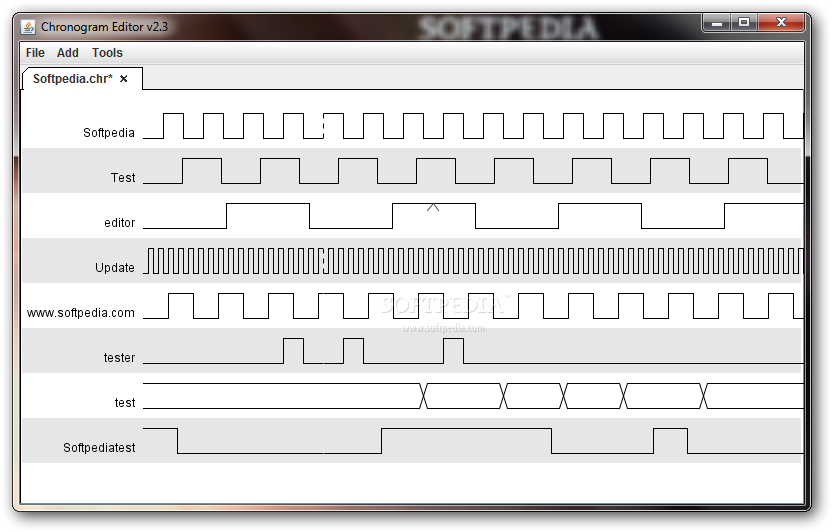
 sharp plover
@versed dew https://stackoverflow.com/questions/14817210/using-buttons-in-tkinter-to-navigate-to-different-pages-of-the-application I did come across this page which seems to have a few suggestions. I'm not familiar enough with tkinter design patterns to really know what the best approach is. I know that in kivy there's a couple of proper widgets specifically for that sort of thing, though that doesn't necessarily help you with the tkinter side of things. I'm sorry you got the response you did, earlier. I saw that and thought, "Yeah, that's a little bit shitty."
Stack Overflow
I have quite a simple question here. In Tkinter (python), I was wondering who to use a button to go to different pages of my application, e.g a register page, and a login page. I am aware that GUI ...
Research is an acquired skill, granted, but yeesh.
Rude.
 versed dew
lol don't worry, thanks a lot for the stack overflow question, i'll have a look
sharp plover
I liked the unpack option. That seemed like something leveragable in some way.
What sort of pages? Pages of widgets, or pages of information in widgets?
versed dew
yeah, honestly i am just starting out with the whole GUI thing and i quite like it too be honest. keep in mind the learning curves are still there though
versed dew
sharp plover
What sort of pages? Pages of widgets, or pages of information in widgets?
i was thinking kind of like an app, you press a button, whole different page comes up
sharp plover
Just remember that you can skin tkinter to make it look less sh-er, more modern.