#user-interfaces
1 messages · Page 21 of 1
 candid fern
 tidal socket
candid fern
I would have helped although I use Tkinter because for some reason I did not dow...
tidal socket
candid fern
I would have helped although I use Tkinter because for some reason I did not dow...
I have not used it. How do you like it?
candid fern
It's amazing from what I can tell
https://youtube.com/shorts/VKvnhYfsBkw?si=pTq1Co7LiX4Yqo_y
People use costom TKinter I've never used it because I usually don't care when I make it DUI as long as it's quick efficient and useful

improve your skills and use CUSTOMtkinter for modern GUI
#coding #desigh #customtkinter
tidal socket
candid fern
https://youtube.com/shorts/VKvnhYfsBkw?si=pTq1Co7LiX4Yqo_y
People use costom TKi...
ya makes sense. ill have to check it and it looks really nice
candid fern
Not DUI sorry I'm doing last minute Christmas prepping along with texting
 wooden vapor
Ah, that seems more straightforward
I also found this yesterday
https://github.com/ucharmdev/ucharm#readme
It also has a TUI library
 digital rose
bet 🔥
wooden vapor
One could also use PyQt: https://github.com/spyder-ide/qtpy
 cursive bay
You can use the python Flet it's like react and very nice
tidal socket
wooden vapor
I also found this yesterday
https://github.com/ucharmdev/ucharm#readme
Looks nice. I'll have to play around with. Very speedy too.
 glass rampart
Anyone used flet? Is it good?
 cloud scroll
glass rampart
Anyone used flet? Is it good?
cloud scroll
glass rampart
Anyone used flet? Is it good?
Its alright. But since its just a Python wrapper of the actual Flutter, might as well use Flutter directly. Similar syntax anyways
 craggy shore
glass rampart
Anyone used flet? Is it good?
craggy shore
glass rampart
Anyone used flet? Is it good?
Oh yes it so cool
 austere trout
candid fern
https://youtube.com/shorts/VKvnhYfsBkw?si=pTq1Co7LiX4Yqo_y
People use costom TKi...
austere trout
candid fern
https://youtube.com/shorts/VKvnhYfsBkw?si=pTq1Co7LiX4Yqo_y
People use costom TKi...
started messing with it myself

all in one snippet
heres one of my tkinter uis


 candid fern
There's a GitHub for something that you just drag and drop what you want you still have to code it but it gives you some of the code to make the bars the specific way you want them to be
austere trout
candid fern
There's a GitHub for something that you just drag and drop what you want you sti...
I like writing it
candid fern
I do too but I think it's just for the place methods I could use it for prototyping guis so I'm not saying ugh that's off by too much so if I use the program I can make the DUI just how I want it
candid fern
austere trout
I like writing it
Me too but if I'm trying to make something quickly it's better to have something that's quick
austere trout
candid fern
Me too but if I'm trying to make something quickly it's better to have somethin...
perhaps
im a featuraholic tho so quick is never an option
candid fern
Just drag and drop and basically places those parts so you can just count it to what you want you can just drag and drop parts for features and then you code the rest
austere trout
candid fern
Just drag and drop and basically places those parts so you can just count it to ...
what library is this based off of?
is it its own thing?
candid fern
It's a website online I don't think it has a GitHub
austere trout
candid fern
It's a website online I don't think it has a GitHub
send it
is it like an actual designer with implementable functionality or is it just something like canva
or figma
I've used figma a lot
 candid fern
Canva that's what it feels like
 candid fern
I don't know
 empty jackal
candid fern
I don't know
empty jackal
candid fern
I don't know
i really appreciate your feedback
empty jackal
so i added a navigation to seperate the two major components

shouldve done this on the first place xd
candid fern
empty jackal
i really appreciate your feedback
Everything is perfect from what I can see but I haven't seen the code in the background so I don't know much
 obtuse bough
austere trout
obtuse bough
austere trout
how make this?
 brave shale
hey does any one have knowledge in PyQt6 ? i am trying to add middle click open new tab but i don't know how to
 wintry tapir
Guys I am building a terminal youtube music player using textual and rich


Anything i can improve and add more details 🤔
cloud scroll
wintry tapir
Anything i can improve and add more details 🤔
Just a suggestion, maybe add lyrics to each song? 🤷♂️
wintry tapir
cloud scroll
Just a suggestion, maybe add lyrics to each song? 🤷♂️
I planned it but i think it's too heavy for low end devices
 keen tiger
what module would I use to create a window and directly control pixels within that window? I wanna build a windows and android compatible app from the ground up (I understand it would be faster to use a module with built in functions, this is a learning opportunity for me.)
Edit: looks like tkinter is what i need to use, idk why it wasn't showing up in the searches seeing as it is a default module.
 slim hamlet
keen tiger
what module would I use to create a window and directly control pixels within th...
slim hamlet
keen tiger
what module would I use to create a window and directly control pixels within th...
kivy if you want it to work for android too
 median sleet
hi! could someone help me create a gui? its supposed to be a netflix movie recommendation system. i've dowloaded the dataset from kaggle but i have 0 knowledge about guis or how they're made. i'm using codeHS but i don't know how to start. if anyone is willing to help that would be great!
 low roost
median sleet
hi! could someone help me create a gui? its supposed to be a netflix movie recom...
low roost
median sleet
hi! could someone help me create a gui? its supposed to be a netflix movie recom...
well i use html, css for my gui's but before that I used tkinter which is a library for python
 sullen cape
Hey guys,
I’m building a React Native app for students where the core feature is an interactive library seat map. The idea is to visually represent tables and seats, allow users to tap a seat to mark it as available/occupied, and update this in real time since the library is usually full.
What’s the best technical approach in React Native to build this kind of interactive seat layout?
 clear kayak
I did the weird thing and made app launcher in style of w8 metro ui for my pop os:
main use is launching python scripts like apps
it supports system native apps and flatpacks
it sits in tray until "super+p" is pressed
you can change colors and replace background with wallpaper
i believe it has most of functionality of win 8 start menu so tiles are movable and can be easily rearanged


 empty jackal
candid fern
empty jackal
candid fern
what should i do about the blackbar?

 hidden karma
candid fern
what should i do about the blackbar?
hidden karma
candid fern
what should i do about the blackbar?
Look like it's border-related with some special effects or types. Maybe shaded border or something. ((I don't know which module, library, code you are currently using for this UI))
candid fern
TK enter
candid fern
hidden karma
Look like it's border-related with some special effects or types. Maybe shaded b...
Fixed it
 glossy jewel
hello all, im wondering if theres anyone here that wants to help me brainstorm discord bot stuff. im wanting to update a discord music bot i made: it currently has a global library of downloaded songs with a paginated view of 10 songs per page, using |first| |back| |next| |last| page navigation buttons. this is a huge pain for navigation of the growing 200+ song library.
I am trying to think of methods to segregate views to be server specific without affecting the user experience negatively in a way they dont see music that is existing due to the seperate views.

 vast tinsel
WIP testing ui for a media player library

 indigo venture
What is the best ui import, im using pyqt6 now, i used customtkinter and tkinter before

 sleek hollow
indigo venture
What is the best ui import, im using pyqt6 now, i used customtkinter and tkinter...
sleek hollow
indigo venture
What is the best ui import, im using pyqt6 now, i used customtkinter and tkinter...
pyqt is great, but you should be using pyside instead. The naming is super confusing but pyside is the library from the actual Qt company and pyqt is the 3rd party one
indigo venture
sleek hollow
pyqt is great, but you should be using pyside instead. The naming is super confu...
Can u send a example in pyside
sleek hollow
indigo venture
Can u send a example in pyside
the code is 99.9% the same, you just change the imports from PyQt6 to PySide6
The only main difference I can think of is a change in syntax for custom signals
so instead of QtCore.pyqtSignal, it would be QtCore.Signal
indigo venture
sleek hollow
the code is 99.9% the same, you just change the imports from PyQt6 to PySide6
Thx i have only Imports that i can Change the Name and it works
Thank you so much
 pine saddle
cursed formatting or?

 graceful axle
What are the best or most used Python libraries for user interfaces?
vast tinsel
tkinter and qt6 i think
 mighty rock
Qt6 isn't a Python library, there are PySide6 and PyQt6
Besides these, there are also customtkinter, flet and kivy
 fast girder
with PySide6 widgets whats the widget called which will allow me to do this kinda drop down section, ive google a few things but people use a button but you can see the whole button, id like to just click the text for example and it switched it down/ toggles?

 royal gull
fast girder
with PySide6 widgets whats the widget called which will allow me to do this kind...
royal gull
fast girder
with PySide6 widgets whats the widget called which will allow me to do this kind...
afaik Qt Widgets doesn't have a specific widget for this, though you could probably build one using a widget and then another (like a button or label) as the trigger. You can probably also achieve similar with a QTreeWidget.
indigo venture
royal gull
afaik Qt Widgets doesn't have a specific widget for this, though you could proba...
U can use QComboBox()
 grand scroll
hello guys what's the best python GUI library for desktop app's (LInux machine)
mighty rock
It's highly subjective so what's your question really?
 stiff mist
How does it look. It is floating gui which stays on your screen.
It is for a game called ps99 in roblox
it main purpose is to save people time from 5 minutes a trade to a few seconds.
as now players can just hover over any pet and it would calculate its value and everything from a website(which i scraped)

 lime smelt
Hello, I’ve got a weird Qt style issue.
On KDE Plasma (Breeze Dark system theme).
Before refactoring, my PyQt6 app automatically used Breeze.
After splitting the code into multiple modules, it now defaults to Fusion, even though I havent called setStyle() anywhere...
Program Entry:
```py
import sys
from PyQt6.QtWidgets import QApplication, QMainWindow
from PyQt6 import uic
from tab_main import TabMain
from tab_settings import TabSettings
from tab_cammy import TabCammy
from tab_about import TabAbout
class MainWindow(QMainWindow):
def init(self):
super().init()
uic.loadUi("Mainwindow.ui", self)
self.tab_main = TabMain(self)
self.tab_settings = TabSettings(self)
self.tab_cammy = TabCammy(self)
self.tab_about = TabAbout(self)
if name == "main":
app = QApplication(sys.argv)
window = MainWindow()
window.show()
sys.exit(app.exec())```
Example of a tab module:
```py
import cv2
from PyQt6 import QtGui, QtCore
from PyQt6.QtWidgets import QFileDialog
class TabCammy:
def init(self, ui):
self.ui = ui
No call to QApplication.setStyle() anywhere.
After splitting into modules, Qt uses Fusion instead of Breeze.
Before splitting, same UI + same system = Breeze.
Environment:
KDE Plasma (Breeze Dark)
PyQt6
Linux (cachyos)
venv (has cv2, numpy, pyqt5, pyqt6 installed) topaz mango
stiff mist
How does it look. It is floating gui which stays on your screen.
It is for a gam...
topaz mango
stiff mist
How does it look. It is floating gui which stays on your screen.
It is for a gam...
I think the individual windows look really good and like the idea. Not sure about the design of having multiple windows popped out rather than one but I don't play the game so can't really comment on the user experience. Which UI library did you use?
stiff mist
topaz mango
I think the individual windows look really good and like the idea. Not sure abou...
there are cross button, you can just have 1 UI in your screen, if you want.
like if you need calcualtor then open calculator then use it and then close it again.
i used pyside6
stiff mist
topaz mango
I think the individual windows look really good and like the idea. Not sure abou...
if you want like source code of this app then lmk, i made it opensource
topaz mango
stiff mist
there are cross button, you can just have 1 UI in your screen, if you want.
lik...
Niceee. Yea I'd be interested in seeing it. I'm looking to get into UI programming and I've played around with pyside6 myself and found threading and stuff to be very pleasant. Didn't make anything nice looking though.
stiff mist
topaz mango
Niceee. Yea I'd be interested in seeing it. I'm looking to get into UI programmi...
https://github.com/smanav225-hub/Pet-Sim-99-Trade-Assistant
from the documentations. see scripts.md from there you can know what each script does, and which contain gui.
and you can also see the images

GitHub
This app helps you trade faster in Pet Simulator 99 by looking at your game screen. It uses smart detection to recognize your pets from a screenshot and instantly tells you their values from a dat...
stiff mist
stiff mist
https://github.com/smanav225-hub/Pet-Sim-99-Trade-Assistant
from the documenta...
and if you can, like my repo
topaz mango
stiff mist
and if you can, like my repo
Done, since this is really good. I really like how you shared the whole process along with the code and how clean and direct the write ups are.
stiff mist
topaz mango
Done, since this is **really** good. I really like how you shared the whole proc...
ty,
i did not really tell the whole process on how i built it.
after building the project, i just added documentation for overall everything
and explained how my app works
stiff mist
topaz mango
Done, since this is **really** good. I really like how you shared the whole proc...
even if you don't know about that roblox game. the workflow for image detection is really amazing.
to get literally all the details from a random image with everything shades and random was truly hard
stiff mist
topaz mango
Done, since this is **really** good. I really like how you shared the whole proc...
you should see the workflow.md file
stiff mist
@topaz mango ?
topaz mango
stiff mist
you should see the workflow.md file
That was the main one i was looking at, and why I said there was so much value provided, and stick by it even if not everything for the whole process "In the 0.5 seconds after you press a key, the app performs a series of advanced computer vision and data processing tasks.", "DWM Buffer Clearing: The app waits for exactly 0.12 seconds to allow the Windows display buffer to clear.". I've bookmarked it and will probably go over it more in the future next time I want to do anything similar.
topaz mango
stiff mist
even if you don't know about that roblox game. the workflow for image detection...
I agree completely and to do it fast in the process
stiff mist
topaz mango
That was the main one i was looking at, and why I said there was so much value p...
yeah, i needed to take this screenshot, which basically gave me nothing.
it takes a screenshot of your inventory. and cuts it into pieces to tell its value from database,(which you webscrape).
I had to solve hundreds of problems for it.
teh size of hover area of each pet is different
hover part can be on anywhere in the screen
to detect the shape i need to analyze and find location of the purple border.
the purple border has effect so it moves, so there is no fixed color
sometimes lower part of purple border is missing. so it need to analyze from 3 sides only
rainbow rarity text color changes each second
things like easyocr are not perfect so i need to use rapidfuzz(find simialr word with same text liek c4t for cat)
everything in the image has shade. so all the name, color and everything is shaded. so you cant just use a fixed color for anything
 topaz mango
stiff mist
yeah, i needed to take this screenshot, which basically gave me nothing.
it tak...
topaz mango
stiff mist
yeah, i needed to take this screenshot, which basically gave me nothing.
it tak...
I think people might take it working with the bottom being obscured for granted, but that's impressive and you've produced a higher quality piece of software with these considerations. You've also taken a pragmatic approach to the OCR text not being right (I'm not generally into OCR stuff I've used it for automation very slowly before myself, so i don't know how common that is) but all of that seems good, and the UI isn't ugly 😂
stiff mist
topaz mango
I think people might take it working with the bottom being obscured for granted,...
yeah
stiff mist
topaz mango
I think people might take it working with the bottom being obscured for granted,...
I wanted to make this project better. but I don't really have much motivation for it.
I wanted to make buying bot, which will go to each server and buy stuff for you, while you sleep and make you profit.
but I stopped, as it was taking too long, and my app is not famous enough, for me to spend 5-20 hours making something, which only 5-10 people will use
 topaz mango
stiff mist
I wanted to make this project better. but I don't really have much motivation fo...
topaz mango
stiff mist
I wanted to make this project better. but I don't really have much motivation fo...
You could try showing this one off more or something to get people interested/more feedback, for me that. I find that I'm more motivated with positive feedback from the non-developer community. You could also just do it for yourself/wait until maybe you're motivated in the future. I find that when it comes to stuff like this surrounding games they're a good learning opportunity that you don't necessarily get otherwise, and once you're into one, you can go further and learn more with a reasonable amount of effort. But you'd know more how worth it or not it is really.
stiff mist
topaz mango
You could try showing this one off more or something to get people interested/mo...
true
stiff mist
topaz mango
You could try showing this one off more or something to get people interested/mo...
i just made this app for fun as a side project because i was bored.
Mainly, I am working on a few things, (I try to take any paid service, and try to make a free alternative for it)
-
A web search api which runs locally for free and is better than perpleixty, exa ai, Chat-gpt research by like a lot. (like 20-30 percent done)
-
a autonomous coding app, where you just give a idea and the app can make a big projects with hundreds of thousands of lines of code. for also completely free. (will still take 4-5 months)
-
A webscrapper, where i can create a 100% copy of any website instantly, like i create a copy of entire website and all its webpages of google, apple, and many others. and ran them in localhost
and many more small projects
topaz mango
stiff mist
i just made this app for fun as a side project because i was bored.
Mainly, I am...
I can relate to that. I have several relatively small projects going on myself and I jump between several of them/ignore some for long durations depending on what I feel like. All three of those are definitely more important and arguably the first two since more local AI solutions are always good. You should probably just focus on whichever you feel like and get back to it if you ever feel like it assuming the game is still around.
stiff mist
topaz mango
I can relate to that. I have several relatively small projects going on myself a...
yeah, i will be focusing on point 1 and point 2. together
as to make that perfect app of point 2. i need to make the world best web search api. for all the research work.
I have like a entire todo list of liek 70-90 points to do. and after that it should be completed.
stiff mist
topaz mango
I can relate to that. I have several relatively small projects going on myself a...
on what projects are you working on
topaz mango
stiff mist
on what projects are you working on
For a project for a relatively small community some of the features are going to be presented on discord such as registration and I'm generally very serious about automated testing. So one project is to make a fake discord API for automated testing which otherwise operates like the real thing. Another is to build a wrapper around pulumi to add new features because their infrastructure as code stuff doesn't properly support immutable servers (you can't have it so that it only deletes old servers after you've verified new ones are created), I'm also going to be working on an asyncio based performance testing framework where you just give it coroutines and it runs them and measures the performance so that it can test anything and use existing asyncio based code which I have for other types of tests. And several things in between those. I'm also just researching a lot in the meantime when I don't feel like working.
stiff mist
thats cool
 opaque maple
Hi 1 or 2? Which better?
(it's not too much python 👀 But it is UI )

 mighty rock
2 except for the steppingstones. They look really out of place
opaque maple
mighty rock
2 except for the steppingstones. They look really out of place
Oh, thank you! They are actually like Duolingo's stepping steppingstones. If the user completes the highest level lesson, the gradient rotates around the hexagon.
mighty rock
Yes I thought you worked for Duolingo for a moment
opaque maple
Interestingly, I spent the most time on hexagons. 👀 👀 👀
mighty rock
!zen 1,3
 proven basinBOT
The Zen of Python (line 1):
Explicit is better than implicit.
opaque maple
What can I use in place of the hexagons? 🤔
proven basinBOT
The Zen of Python (line 0):
Beautiful is better than ugly.
mighty rock
opaque maple
What can I use in place of the hexagons? 🤔
What you have on the left
mighty rock
Yes exactly
opaque maple
Thank you very much. I'll start working on it.
mighty rock
You're welcome
opaque maple
mighty rock
Yes exactly
here 👀
 mighty rock
This looks nice. If you want, you can enlarge them and maybe include the other things from figure 2 like the progress and I assume time of completion
But I think increasing the size should take higher consideration priority because I believe the steppingstones are the main point of this screen
opaque maple
It's the same idea of Duolingo. They serve exactly the same purpose, just more regional. Ty for feedback.
 shell crystal
Progress on TinyXUI
 vital linden
shell crystal
Progress on TinyXUI
vital linden
shell crystal
Progress on TinyXUI
What os is this
shell crystal
vital linden
What os is this
Linux
Fedora KDE
TinyXUI works on Windows too though
vital linden
Okie
 spring pewter
i want to learn kivy
can someone just mention the basic py things i gotta grasp bfr starting it
shell crystal
spring pewter
can someone just mention the basic py things i gotta grasp bfr starting it
You should probably learn how classes and functions work if you don't know how they work already
as Kivy uses them everywhere
 grave surge
spring pewter
can someone just mention the basic py things i gotta grasp bfr starting it
grave surge
spring pewter
can someone just mention the basic py things i gotta grasp bfr starting it
Just go the python dev route on roadmap.sh
 south knoll
I really hope some design principles and basics to be added as resources here
spring pewter
shell crystal
You should probably learn how classes and functions work if you don't know how t...
i have some many reddit posts, apart from class being a folder for def, i didnt find much diff
can someone tell me some other diffs?
 bold palm
spring pewter
i have some many reddit posts, apart from class being a folder for def, i didnt ...
bold palm
spring pewter
i have some many reddit posts, apart from class being a folder for def, i didnt ...
That's not at all the point or purpose
a class is an encapsulation method to keep semantically related data close together and close to functionality that operates on that data, and a way to provide dynamic message dispatch
spring pewter
bold palm
a class is an encapsulation method to keep semantically related data close toget...
uhh can you please say a little bit in my english 😓
bold palm
spring pewter
uhh can you please say a little bit in my english 😓
some data naturally goes together (name, age, email address). It makes sense to encapsulate that data so that you can deal with the larger thing that data represents (a User) rather than individual, unattached pieces
and it's also convenient to keep the functions that operate on users close to the user data
so, related data and methods that operate on that data
spring pewter
bold palm
some data naturally goes together (name, age, email address). It makes sense to...
oh.. Thks alot 👍
 rocky flint
If I'm already familiar with PyQt, is there any case where Tkinter would be more beneficial to use? (I know it's a built-in Python library)
Packaging/making executables from modules that use PyQt results to 2-digit and 3-digit file sizes (no larger than that for me so far).
If the final size doesn't matter, is there anything for which you'd prefer to use Tkinter?
If size matters but it's not a good interface to use, which alternative would you recommend?
I was thinking to experiment with SQL a bit - show a table or two, maybe extract results, maybe make simple graphs too? Brainstorming at the moment, the final idea may be different but it's not going to be something very complex
royal gull
rocky flint
If I'm already familiar with PyQt, is there any case where Tkinter would be more...
There are I feel two benefits of using Tkinter: 1) it's simple and 2) it's builtin. That's the gist of it. You can get good UI with Tkinter via stuff like CustomTkinter but it's hacky at the end of the day. Also, for your example, Tk does not have a builtin table widget so you'd need to use a third party one.
The file size is explained by the fact that most tools work by bundling the Python interpreter alongside your code and its dependencies. so having Qt + the whole interpreter bundled would likely explain the size. There are a few ways of reducing it: the first is forgoing onefile mode and instead distribute the application and any required DLLs, the second would be using an executable packer such as upx, which sometimes trips AVs, but can be pretty effective at reducing the size.
rocky flint
royal gull
There are I feel two benefits of using Tkinter: 1) it's simple and 2) it's built...
I see
Then I'll not use Tkinter. Size's not too important for now.
For the rest (DearPyQui etc.), is it generally just a matter of curiosity, and the case of "I'm asked to use X library"?
*emphasis on "generally", unless it's important to be aware or the differences
royal gull
rocky flint
I see
Then I'll not use Tkinter. Size's not too important for now.
For the rest ...
For the others it's mostly a matter of preference and the ecosystem. For example, Kivy is a well known library that you can use to build mobile apps (same thing with Flet, which is a wrapper around Flutter). There are some others like streamlit or nicegui which are built for the web, and then there's also a few other libraries like toga, PyGObject (GTK), and dearpygui.
rocky flint
My first interraction was with GTK but quickly changed to PyQt. I forgot why but remember that I couldn't make it work. Haven't used others so far.
(Windows user)
mighty rock
royal gull
There are I feel two benefits of using Tkinter: 1) it's simple and 2) it's built...
Tk does not have a builtin table widget so you'd need to use a third party one.
Or usetkinter.ttk.Treeview
https://tkdocs.com/tutorial/tree.html
Treeview: Part of a Modern Tk Tutorial for Python, Tcl, Ruby, and Perl
 vernal spear
glossy jewel
hello all, im wondering if theres anyone here that wants to help me brainstorm d...
vernal spear
glossy jewel
hello all, im wondering if theres anyone here that wants to help me brainstorm d...
You could perhaps build pages by alphabet or ranges within the alphabet? A page for [A], a page for [B-D], etc. Depending on the frequency of starting letters of all the songs you could make sections that have about 10 items each. You can even make different sortings with song title and artist. Might be tricky to build, but at least it's easier to navigate since people don't have to guess what section the song they're looking for might be in.
glossy jewel
that sounds like a great idea, ill definitely have to test it out in a few formats like you say of artist / title etc.
gotta say, atfirst i was annoyed at the random ping but after reading, your idea is really helpul
i feel i should have thought of that a month ago lol
Thanks!
indigo venture
I made a dummy gui that has no real func, can U rate it


 sweet ferry
I used tkinter for GUI and i made it borderless and added X button And minimize button, but minimize doesn't work on borderless screens for some reason? It gives this error:
Exception in Tkinter callback
Traceback (most recent call last):
  File "C:\Users\User\AppData\Local\Programs\Python\Python312\Lib\tkinter\__init__.py", line 1967, in __call__
    return self.func(*args)
           ^^^^^^^^^^^^^^^^
  File "C:\Users\User\AppData\Local\Programs\Python\Python312\Lib\tkinter\__init__.py", line 2161, in wm_iconify
    return self.tk.call('wm', 'iconify', self._w)
           ^^^^^^^^^^^^^^^^^^^^^^^^^^^^^^^^^^^^^^
_tkinter.TclError: can't iconify ".": override-redirect flag is set```and i guess to do this i could unmake it borderless while it's minimized and then when person clicks on program again it becomes borderless while it opens program. But is there easier and better solution than that?
mighty rock
Try withdraw instead of iconify
For an override-redirect window it makes no sense to iconify it because it doesn't quite even have something like an icon... withdraw just removes it from the screen
 sick laurel
What's the Best GUI library? I'm an intermediate guy. So I would prefer something that is powerful yet easy to learn.
 sly anchor
what are the best choices (technologies) for building interfaces with a python backend
 leaden rampart
is tksheet a good widget for TK ? I want something that doesn;t bug ....
 native totem
HI
 burnt rampart
hello what a good start for beginner who is trying to make interface?
a youtube tutorial will be good
mighty rock
Well then here you go
https://youtu.be/epDKamC-V-8?si=V_e1zX0fas-odnEa

In this Python programming tutorial, we will learn how to get started with Tkinter, a GUI framework that is part of the Python Standard Library. We will cover everything from setting up your environment, adding elements to windows, configuring layouts, handling events, and more. By the end of this video, you'll have a solid foundation for buildi...
burnt rampart
mighty rock
Well then here you go
https://youtu.be/epDKamC-V-8?si=V_e1zX0fas-odnEa
thank you
mighty rock
You're welcome
vernal spear
Fair warning, he calls it "tee-kinter" instead of "tee kay inter" throughout the video, which is kind of grating 😅 /hj
 lean fossil
mighty rock
Well then here you go
https://youtu.be/epDKamC-V-8?si=V_e1zX0fas-odnEa
lean fossil
mighty rock
Well then here you go
https://youtu.be/epDKamC-V-8?si=V_e1zX0fas-odnEa
oh, somebody found tkinter instaed of me, finally(for joke)
mighty rock
vernal spear
Fair warning, he calls it "tee-kinter" instead of "tee kay inter" throughout the...
Yeah I guess it's a tk interface
mighty rock
lean fossil
oh, somebody found tkinter instaed of me, finally(for joke)
What?
You can't add (for joke) and expect it to be magically understood 😭
lean fossil
hbqhqbhbsw
*random
bro look my pip install store on tk
import os
import tkinter
tke = tkinter.Tk()
tke.title("PYTHON MODULLERİ")
tke.geometry(f"{400}x{200}")
button1 = tkinter.Button(tke, text=("dowland pygame!"),background="yellow", command=lambda: os.system("pip install pygame"))
button2 = tkinter.Button(tke, text=("dowland colorama!"),background="yellow", command=lambda: os.system("pip install colorama"))
button3 = tkinter.Button(tke, text=("dowland pygamezero!"),background="yellow", command=lambda: os.system("pip install pgzero"))
button5 = tkinter.Button(tke, text=("dowland pillow!"),background="yellow", command=lambda: os.system("pip install pillow"))
button4 = tkinter.Button(tke, text=("dowland rich!"),background="yellow", command=lambda: os.system("pip install rich"))
button4.pack()
button5.pack()
button2.pack()
button3.pack()
button1.pack()
try:
import pygame
button1.config(text="pygame yüklü!",background="green")
except ImportError:
print("pygame yüklencek!")
try:
import colorama
button2.config(text="colorama yüklü!",background="green")
except ImportError:
print("colorama yüklencek!")
try:
import pygame
button3.config(text="pgzero yüklü!",background="green")
except ImportError:
print("pgzero yüklencek!")
try:
import pygame
button4.config(text="rich yüklü!",background="green")
except ImportError:
print("rich yüklencek!")
try:
import pygame
button5.config(text="pillow yüklü!",background="green")
except ImportError:
print("pillow yüklencek!")
tke.mainloop()
please turn it english
if you want to read
burnt rampart
Does anyone know tkinter? I need a bit of help in my project
vernal spear
I'm sure there are folks here who can help if you just post your questions
burnt rampart
I was working on my code and had someone from this community test it and got a lot of issues with GUI - cmd - so I am writing the code but wanted to make improved GUI - real one - but I am stuck on how I don't know anything about tkinter or where to start.
vernal spear
mighty rock
Well then here you go
https://youtu.be/epDKamC-V-8?si=V_e1zX0fas-odnEa
This video was shared here today, seems to be a comprehensive guide to getting started. I haven't had time to watch it yet but you can give it a shot
mighty rock
You're referencing the past unless they thanked me for nothing
lean fossil
burnt rampart
Does anyone know tkinter? I need a bit of help in my project
ı can help
vernal spear
mighty rock
You're referencing the past unless they thanked me for nothing
Oh it's the same person, I hadn't noticed, my bad
 forest cloud
considering dipping my toes back into UI work... Tkinter or Tkinter.ttk? I've used base Tkinter before, is that just an outdated approach?
And as an aside, what's the overhead of Python Tkinter vs pure C/Tcl/Tk? Not saying I necessarily want to deal with the latter but I make crazy choices sometimes.
 royal cape
forest cloud
considering dipping my toes back into UI work... Tkinter or Tkinter.ttk? I've us...
royal cape
forest cloud
considering dipping my toes back into UI work... Tkinter or Tkinter.ttk? I've us...
afaik yeah, themed widgets offer more aesthetically native/pleasing defaults than their non-themed counterparts, though the process for re-styling them is dramatically different if you're only used to the base widgets:
https://tkdocs.com/tutorial/styles.html
there are also third-party packages that offer pre-made styles like CustomTkinter, ttkbootstrap, and sv-ttk, if you're interested in using those; the first one handrolls its own theme manager and builds on top of Tk Canvas to draw its own widgets, while the other two are ttk themes you can apply to your existing ttk apps
an example of a larger app based on ttk:
https://github.com/tomlin7/biscuit
 indigo venture
mighty rock
Yeah I guess it's a tk interface
indigo venture
mighty rock
Yeah I guess it's a tk interface
Low-key tk overrated, if you want to make sth round U need to canvas
indigo venture
royal cape
afaik yeah, themed widgets offer more aesthetically native/pleasing defaults tha...
What is this syntax highlight
royal cape
forest cloud
considering dipping my toes back into UI work... Tkinter or Tkinter.ttk? I've us...
And as an aside, what's the overhead of Python Tkinter vs pure C/Tcl/Tk?
for this, i can't say much about it since i generally just dabble in UIs, though i know most of my laggy UI issues comes from me doing dumb stuff like... rapidly rescaling images with pillow on the main thread
indigo venture
forest cloud
considering dipping my toes back into UI work... Tkinter or Tkinter.ttk? I've us...
Not much overhead, as long as U optimise it tk is good for simple or complex UI (with canvas) but it's really good. Thought I would recommend customtkinter because it does the canvas work for you and the commands are almost the same
stiff mist
hi
 full salmon
jjj']
 cobalt sky
Is kivy kinda decent nowadays? Haven't used it for a while
stiff mist
How does the GUI look like
Spent way too many hours coding with help of AI to make it.
Made it perfect with perfect ration, perfect hover effect and everythign else.
Does it look clean/good?
currently combined the GUI design of perplexity+claude
 mighty rock
Clean
stiff mist
mighty rock
Clean
TY
It is a desktop+browser based.
So you can run in on browser, or you can run it as a desktop app.
 modern mist
Should i use formatter for my code?
 polar vessel
Is there any decent possibly web based Python desktop framework yall recommend?
 onyx ether
polar vessel
Is there any decent possibly web based Python desktop framework yall recommend?
onyx ether
polar vessel
Is there any decent possibly web based Python desktop framework yall recommend?
For web in general, not about UIs, i would recommend django (havent used it a lot tho tbh) and ofc the builtin web modules (which are fine for most stuff too)
polar vessel
onyx ether
For web in general, not about UIs, i would recommend django (havent used it a lo...
Thanks
 zealous spindle
stiff mist
How does the GUI look like
Spent way too many hours coding with help of AI to m...
zealous spindle
stiff mist
How does the GUI look like
Spent way too many hours coding with help of AI to m...
Clean
stiff mist
zealous spindle
Clean
😀
sly anchor
If I want to create a desktop program (an .exe or .app file) for a typical user (someone who isn't a computer expert), what is the most popular approach to creating the GUI?
mighty rock
PySide6 maybe
 dire barn
!warn 1478477430120386663 This is not a job board, don't try to recruit.
proven basinBOT
:incoming_envelope: :ok_hand: applied warning to @ionic phoenix.
modern mist
I am building figlet font generator in pyqt6
Any suggestions?
Yes i will use pyfiglet library
 sinful nymph
polar vessel
Is there any decent possibly web based Python desktop framework yall recommend?
sinful nymph
polar vessel
Is there any decent possibly web based Python desktop framework yall recommend?
I just made one luckily python only no external dependencies
GitHub
Contribute to pythos-team/lynk development by creating an account on GitHub.
zealous spindle
sinful nymph
I just made one luckily python only no external dependencies
https://pypi.org/...
This is a really cool project, man. It would be great to have more complete documentation, but just from the README.md file, it's clear that it's very good.
sinful nymph
zealous spindle
This is a really cool project, man. It would be great to have more complete docu...
Sure will add that now
zealous spindle
sinful nymph
Sure will add that now
Cool!
Good job, bro :D
Just that example of chat surprised me.
sinful nymph
zealous spindle
Cool!
I added docs
sinful nymph
zealous spindle
Just that example of chat surprised me.
You tested
polar vessel
sinful nymph
I just made one luckily python only no external dependencies
https://pypi.org/...
nice
i plan on making something similar at some point
 manic harbor
Hello 👋
sinful nymph
polar vessel
nice
Thanks I just realized a new version with automatic protocol switching TCP AND UDP
!pypi lynkio
proven basinBOT

Lynk – Python only Realtime Server Framework: HTTP + WebSockets + Database in one engine. No dependencies.
Released on <t:1773250560:D>.
sinful nymph
!pypi lynkio
proven basinBOT
Lynk – Python only Realtime Server Framework: HTTP + WebSockets + Database in one engine. No dependencies.
Released on <t:1773271866:D>.
mighty rock
A new release overnight?
sinful nymph
mighty rock
A new release overnight?
It is a patch for the old version and then I added UDP and postgres like database
sinful nymph
mighty rock
A new release overnight?
So yes
modern mist
Developing figlet text generator

Still incomplete and uses pyqt5 and pyfiglet
Any recommendation?
 lofty crown
make it pink


 daring coral
Except the overlapping issue the UI itself is clean, modern, looks good to me
 daring coral
 eager dagger
What's about this GUI
eager dagger
What's about this GUI
above was in response to you btw
 warm fern
Hi!
Did anybody can help me to learn ui and ux
I have a basic understanding but I am unable to think any design.
 ornate wraith
warm fern
Did anybody can help me to learn ui and ux
ornate wraith
warm fern
Did anybody can help me to learn ui and ux
read the book Don't Make Me Think
warm fern
ornate wraith
read the book Don't Make Me Think
Which book brother
ornate wraith
warm fern
Which book brother

 mental zodiac
why not lol
 mighty rock
Nice. Does it support drag and drop?
stiff mist
mental zodiac
why not lol
I always wanted to make something like that and which autogenerated python code from GUI design.
Keep working🔥
mental zodiac
mighty rock
Nice. Does it support drag and drop?
yeaaa
mental zodiac
stiff mist
I always wanted to make something like that and which autogenerated python code ...
thankss man i will
stiff mist
mental zodiac
thankss man i will<a:heart64x64:755133103491514460>
If you have not done much backend.
Then I should advice you to use Pyside6 module for UI instead of PySmtg as it is considered one of the best for python frontend.
I myself have used it, to create multiple apps, I got more customizability and thousands of minor features.
stiff mist
mental zodiac
thankss man i will<a:heart64x64:755133103491514460>
And, if possible start using help of AI to increase yoru scripting speed and finish it faster.
All the Best 👍
mental zodiac
stiff mist
And, if possible start using help of AI to increase yoru scripting speed and fin...
thanks for all the advices my guy u'r really a gigachad
 latent condor
stiff mist
If you have not done much backend.
Then I should advice you to use Pyside6 modu...
latent condor
stiff mist
If you have not done much backend.
Then I should advice you to use Pyside6 modu...
I used tkinker for a long time because people said that pyside6 is hard. But when i changed to Pyside6 i saw that the change worth it, pyside have a lot of possibilities, lot of knowledge that helped me and the result its way better. (in certain topics is more practical to work than the easier ones)
 weary lichen
eager dagger
What's about this GUI
weary lichen
eager dagger
What's about this GUI
i like it simplistic and modern colors are pleasing to the eyes
 hard locust
How is my new pyqt5 app?

 valid quiver
hard locust
How is my new pyqt5 app?
valid quiver
hard locust
How is my new pyqt5 app?
cool, you using pyFiglet right ?
hard locust
valid quiver
cool, you using pyFiglet right ?
Yes
valid quiver
hard locust
Yes
nice vro
 fading axle
Drawing a house using turtle
 proven basinBOT
fading axle
Drawing a house using turtle
proven basinBOT
fading axle
Drawing a house using turtle
Click here to see this code in our pastebin.
 ocean sinew
Hello am new here
candid fern
interesting
 random flame
hello guys!
hard locust
ocean sinew
Hello am new here
Hello
hard locust
random flame
hello guys!
Hi
hard locust
I rewrite qfiglet. It now uses art library and is divided into multiple files.

 echo lynx
hard locust
I rewrite qfiglet. It now uses art library and is divided into multiple files.
echo lynx
hard locust
I rewrite qfiglet. It now uses art library and is divided into multiple files.
Wow
hard locust
echo lynx
Wow
Thanks
echo lynx
How long have you been programming?
cloud scroll
 rugged portal
This could work if its in a VR that can handle hand/glove inputs. Those white dots are distracting and kinda cover the folder/filenames from reading or searching them. Pretty cool concept tho. Very sci-fi.
hard locust
echo lynx
How long have you been programming?
5 years
hard locust
rugged portal
Looks very impressive. Is it running on android?
 young sedge
rugged portal
young sedge
rugged portal
No connections showing hierarchy of folders. As Galaxy of hierarchically connected folders it could work more may be
hard locust
Project is uploaded to codeberg: https://codeberg.org/Alex-Skywalker/qfiglet
 hard locust
I have updated the ui
 rugged portal
hard locust
Looks very impressive. Is it running on android?
rugged portal
hard locust
Looks very impressive. Is it running on android?
yep, I program a lot of things for mobile devices, I've even made Doom using Kivy.
rugged portal
young sedge
No connections showing hierarchy of folders. As Galaxy of hierarchically connect...
Thanks for the idea!
rugged portal
cloud scroll
This could work if its in a VR that can handle hand/glove inputs. Those white do...
This code was the first one, so there's a lot to fix.
hard locust
rugged portal
yep, I program a lot of things for mobile devices, I've even made Doom using Kiv...
Very nice
 hidden reef
i made a simple pokedex using CUSTOMTKINTER . i would like if someone rates it + give suggestions

 leaden reef
Hear me out. Never use tkinter. Just use customtkinter, which is just better tkinter on top of tkinter
 fresh canyon
Bad photo, but I'm working on a old school styled pixel art software. I plan to change the UI to be pixel art but this is what I have so far... any thoughts?
 mighty rock
Width & height rather than x & y
fresh canyon
aight
 rough sedge
I need a team to make minecraft hacks anyone here ?
 lament hearth
So does anyone use Gester based interface here just wanna know?
 marble granite
hidden reef
i made a simple pokedex using CUSTOMTKINTER . i would like if someone rates it +...
marble granite
hidden reef
i made a simple pokedex using CUSTOMTKINTER . i would like if someone rates it +...
Hi, Can i try this?
 vocal cargo
hidden reef
i made a simple pokedex using CUSTOMTKINTER . i would like if someone rates it +...
vocal cargo
hidden reef
i made a simple pokedex using CUSTOMTKINTER . i would like if someone rates it +...
hey it looks really nice
i been messing around with tkinter and customtkinter a lot and i made like 3-5 mini apps
so much fun
but my honest opinion is, I love how your app looks
 autumn grove
!pypi
hidden reef
marble granite
Hi, Can i try this?
hii id love iff youu doo , its still kinda messy tho😅lmk
hidden reef
vocal cargo
but my honest opinion is, I love how your app looks
yo thankss!! ikr messing with ctk is fun. i also made stuffs like auto clicker,task manager and stuffs there super usefull too . you should tryy making them as well.
marble granite
hidden reef
hii id love iff youu doo , its still kinda messy tho😅lmk
share with me, i will try my best
vocal cargo
hidden reef
yo thankss!! ikr messing with ctk is fun. i also made stuffs like auto clicker,t...
yeah i'm still exploring my way but yeah I will thanks, keep up the funky apps :>
hard locust
@hidden reef @fresh canyon Very cool
hard locust
marble granite
share with me, i will try my best
Nice guitar
marble granite
hard locust
Nice guitar
Thanks bro 🙌
@hard locust your profile pic is also cool 🤩
Hello everyone!
What's going on here?
 autumn fox
import customtkinter as ctk
class App(ctk.CTk):
def init(self):
super().init(fg_color="#009600")
self.geometry('800x600')
self.title('Blackjack')
self.resizable(False, False)
CardHolder(self)


self.mainloop()
class CardHolder(ctk.CTkFrame):
def init(self, parent):
super().init(
master=parent,
fg_color='red')
self.place(relx=0.5, rely=0.5, anchor='center')

ctk.CTkLabel(master=self, text='some card 1', fg_color='white').pack(side='left', padx=5, pady=5)
ctk.CTkLabel(master=self, text='some card 2', fg_color='white').pack(side='left', padx=5, pady=5)
ctk.CTkLabel(master=self, text='some card 3', fg_color='white').pack(side='left', padx=5, pady=5)
App()
why labels texts are somewhat outside of labels?

 crystal tusk
autumn fox
import customtkinter as ctk
class App(ctk.CTk):
def __init__(self):
super...
crystal tusk
autumn fox
import customtkinter as ctk
class App(ctk.CTk):
def __init__(self):
super...
Because tk.canvas (ctk.ctklabel) has the issue that it doesn't calculate the pixel length of a string not perfect and then it expands the labels textarea
autumn fox
crystal tusk
Because tk.canvas (ctk.ctklabel) has the issue that it doesn't calculate the pix...
what should i do or what should i keep in mind to get the desired results?
crystal tusk
autumn fox
what should i do or what should i keep in mind to get the desired results?
i would suggest making the border collor alsow i cant reproduce that error with your code, use tk instead and do manueal shading
 placid nebula
Hi, question how would you handle by function lets say 20 entryboxes to get data from and paste in each cell in excel in one row. More im curious how to make it with loop than how to paste it. Are you preplanning naming all this entryboxes with similar name and just passing number to it or how it could be handled?
 severe frost
A vibe coded crypto wallet in python is beyond concerning 😭
 hushed hinge
even this message vibe coded
ok so guys
i have question
hows flet
just how it is all in all
i think flutter is just too much
i just want a quick and easy way to make mobile apps
and flet looks promising
i have no long term intentions, none at all
i just want to make mobile apps for my personal use
mighty rock
hushed hinge
i just want to make mobile apps for my personal use
If you're on Android there are Termux, pydroid and QPython. You can write scripts and save them on your phone then run when you want to use them. Termux is a command line interface for Android so you can use it like you would on Linux to install and run Python. The other two are Python editors and they support GUI programming. Pydroid supports even tkinter, and QPython supports kivy and native Android widgets and other things (it has example scripts for all of this).
You could probably find similar apps on iOS. Don't know much about other mobile phones
autumn grove
pls tell me, should i use cuppertion controls for flet or stick with usual from Material design 3?
 bleak sentinel
hushed hinge
hows flet
bleak sentinel
hushed hinge
hows flet
I think Flet is a wrapper around flutter.
 finite heron
whats the best gui library? is it pyside6?
 acoustic quail
Hello i am building a bunch of CLI app but i would like to keep it under one uv project
whats the best way to go about this
 hybrid axle
I've been learning Python for 6 months and recently started learning about the Kivy library for mobile apps. What do you think of the library? And any advice would be greatly appreciated.
 shut marsh
hidden reef
i made a simple pokedex using CUSTOMTKINTER . i would like if someone rates it +...
shut marsh
hidden reef
i made a simple pokedex using CUSTOMTKINTER . i would like if someone rates it +...
if you're willing to, use pygame, its not simple to, but you can customize the screen way more, considering you control everything, your choice tho
crystal tusk
leaden reef
Hear me out. Never use tkinter. Just use customtkinter, which is just better tki...
Hot take PySide6
Any Suggestions (except fixing the frame)?

 nocturne mural
crystal tusk
Any Suggestions (except fixing the frame)?
nocturne mural
crystal tusk
Any Suggestions (except fixing the frame)?
i would move the next button upwards, nearer to the password boxes, right now theres alot of empty space
and you can make the inputs boxes bigger, the visible toggle should be for both as well (assuming both are shown as dots)
crystal tusk
nocturne mural
and you can make the inputs boxes bigger, the visible toggle should be for both ...
ok Thanks, one question how do i ignore hidden objects in the layout size
it looked like this before
 random flame
what libary do you use?
nocturne mural
random flame
what libary do you use?
Pyside6
random flame
ooo, i mean its great but for a diary app i think ctk is a better choice
crystal tusk
random flame
ooo, i mean its great but for a diary app i think ctk is a better choice
Na, use pyside6-designer for ui structuring and you have a very professional ui
crystal tusk
nocturne mural
Pyside6
self.widgets_to_hide_size_policies = []
self.widgets_to_hide_visible = []
self.widgets_to_hide_maxsize = []
for wd in self.widgets_to_hide:
    self.widgets_to_hide_size_policies.append(wd.sizePolicy())
    self.widgets_to_hide_visible.append(wd.isVisible())
    self.widgets_to_hide_maxsize.append(wd.maximumSize())
    wd.setMaximumSize(0, 0)
    wd.hide()
    wd.setFixedSize(0, 0)
    wd.setSizePolicy(QSizePolicy.Ignored, QSizePolicy.Ignored)
self.master.window.layout().update()``` whatwhat am i doing wrong
hidden reef
crystal tusk
it looked like this before
damn pyside really looks more modernistic
hidden reef
shut marsh
if you're willing to, use pygame, its not simple to, but you can customize the s...
yeah great idea
sleek hollow
crystal tusk
ok Thanks, one question how do i ignore hidden objects in the layout size
that should happen automatically. Can you show the difference in your layout with and without the widgets?
You also might want to look into QFormLayout for doing this layout
 north crow
wdyt about NiceGUI?
cursive bay
hidden reef
damn pyside really looks more modernistic
Try out Flet library, it's even more mind-blowing
It's probably the best python UI library
candid fern
Anyone with TK enter experience some what do you like to do when you're writing the program?
autumn grove
hidden reef
damn pyside really looks more modernistic
qt is anchient, and very unwelcoming for begginers. try flet instead(btw, works even on mobile)
hidden reef
autumn grove
qt is anchient, and very unwelcoming for begginers. try flet instead(btw, works ...
yeahhh butt its prety annoying to switch libraries after uve got comfy with onee
autumn grove
hidden reef
yeahhh butt its prety annoying to switch libraries after uve got comfy with onee
Just try flet. You are gonna love it. Especially if you want to create web apps/mobile apps
candid fern
In TK intern is it possible to draw lines outside of the canvas so it could be placed as a way of denoting functions or even help buttons are supposed to function
 somber hemlock
how has your experience been with streamlit? personally it was a pita
damn last message was a frikin 3 days ago??
 cedar garnet
anyone knows how this idea progressed in 15 years?
https://www.gnu.org/software/pythonwebkit/
Python Webkit DOM Bindings, making Python a peer of javascript
not necessarily for webkit, but blink or gecko or any other html engine
dire barn
cedar garnet
anyone knows how this idea progressed in 15 years?
https://www.gnu.org/software/...
Are you aware of PyScript?
cedar garnet
yes but that is something else
with pyscript you write python that gets converted into javascript
in browser
what I need is a webview control to use in a desktop app without javascript or a server
dire barn
cedar garnet
with pyscript you write python that gets converted into javascript
Not exactly AFAIU (it gets interpreted by CPython compiled into WASM), but okay, I see what you mean.
cedar garnet
I'm not intimately familiar with pyscript, I'll check it out right now maybe it solves other problems, but it's not what I'm talking about
I want to manipulate the dom directly with python in a desktop app
just like I can do now witk ttk or gtk4 widgets
without javascript or a http server being involved in any way
forest cloud
iirc pywebview had DOM bindings. It may be what you seek
 sullen stump
Hi everyone!
I have been working with pygame and tkinter for a while now.
Using Pygame, I have managed to make a music player and general use window.
Using tkinter, I have managed to make transparent windows (think like a JARVIS-style UI).
I have a show coming up in July and I need sound effects. When I have them, should I use Pygame or Tkinter for to organise buttons (not physical buttons) for the sound effects?
sleek hollow
sullen stump
Hi everyone!
I have been working with pygame and tkinter for a while now.
Usin...
Shouldn't matter too much. I'd say just use what you're more comfortable with.
sullen stump
sleek hollow
Shouldn't matter too much. I'd say just use what you're more comfortable with.
Are there many differences between the two e.g. ease of use or ability to play sound better?
cedar garnet
forest cloud
iirc pywebview had DOM bindings. It may be what you seek
Thanks Trifonius. It has DOM bindings but it still uses javascript and a webserver. In this case I prefer using webkit2 from gtk4 directly.
I'm not afraid to use a web server and javascript when it makes sense.
I'm just looking for a way to make interfaces for desktop applications with html elements instead of using ttk or gtk widgets.
spring pewter
was learnign how to seperate kivy files and i ended with this minisculine of an icon


actual file of the icon

please someone tell how to fix this
 strong zenith
haven't worked with any of this, but I'd start by making sure the original icon doesn't have a massive amount of space around it (as that image file implies it does)
you want this

 frosty vale
Is user interface design is a subset of user interaction design
 static cove
frosty vale
Is user interface design is a subset of user interaction design
static cove
frosty vale
Is user interface design is a subset of user interaction design
It's certainly part of the consideration
 tropic wave
crystal tusk
```py
self.widgets_to_hide_size_policies = []
self.widgets_to_hide_visible = []
...
tropic wave
crystal tusk
```py
self.widgets_to_hide_size_policies = []
self.widgets_to_hide_visible = []
...
well well well
if it isnt you
You tried to put a keylogger it failed, because oyu were using ai
<@&831776746206265384>
I can bring up more proof if you guys want
He tried to put a keylogger on multiple people
sleek hollow
Don't dox people here even if they wronged you. If you have an issue with another user, send a message to @atomic obsidian. I've removed your post
tropic wave
sleek hollow
Don't dox people here even if they wronged you. If you have an issue with anothe...
No that was proof
He is trying to get other people hacked
I didnt try to dox him?
 charred flint
I want to add another navigation bar. I suck at UI design so i do ask for ai to generate some ideas and i search on the internet too and i pick off each element and try to put in my single file if i like it.
I find that you can combine breadcrumbs bar with navigation bar but i dont like that, is there any other way to add a navigation without cluttering the top part

 cedar garnet
Start from a navbar you feel it's close to what you want and add / delete (and change the font / sizes / spaces / colors) until you are happy.
Remember that not everyone is the same, what's clutter to you may be efficiency to other.
And after a time what seemed like too much may become just right because familiarity.
So maybe add a way to customize the navbar.
The second example looks fine to me. Is there something you don't like?
In the first example the breadcrumbs bar seems redundant.
charred flint
cedar garnet
Start from a navbar you feel it's close to what you want and add / delete (and c...
I improved my design since that to this

I dont hate breadcrumbs bar but not sure if it is good to have or not
Breadcrumbs feel unecessary because of the file system on the left that should convey such information
cedar garnet
charred flint
I dont hate breadcrumbs bar but not sure if it is good to have or not
It depends on the workflow and other informations on screen, you can't really give a general answer.
I would track its usage if it's important to you and/or I'd make it optional and I'd consider feedback from other users.
charred flint
cedar garnet
It depends on the workflow and other informations on screen, you can't really gi...
make sense, personally i never use breadcrumbs like ever in other apps so thats why i dont feel its great thing but its per other people recommendation but the recommendation was in explorer type of file system and not this tree
cedar garnet
I find it useful because I instantly see where I am and I can easily go up in the tree.
charred flint
I see, thanks for help
charred flint
Anyone can provide me with useful information how things goes in ui. Sorry in advanced for not great questions but i dont know how to ask. Im making my first software and im not sure how its done, if i want to be able to have different styling how it would be done. Like i image the icons, some other advanced elements in ui must be images and it would make sense that other things like boxes, text or lines is just parameters ang generated programmatically. Any help is appreciated
candid fern
Anyone know how to add a live graph using mapplotlib to then add it to TKinter

 stuck bane

 raw nebula
# Login
from getpass import getpass
username = input("Enter your username: ").strip()
if username == 'vladgsandu':
    password = getpass("Enter your password: ").strip()
    if password == "password456":
        print(f"Welcome back, {username}.")
    else:
        print("Wrong password.")

else:
    print("Username doesn't exist.")
@left badger do I put this in a for or while loop?
 celest furnace
stuck bane
celest furnace
stuck bane
What was it
stuck bane
celest furnace
What was it
what was what?
celest furnace
the gender
 frozen wagon
celest furnace
the gender
frozen wagon
celest furnace
the gender
Chinese

 modest knoll
crystal tusk
Any feedback on the UI
modest knoll
crystal tusk
Any feedback on the UI
the ui is not good if you are trying to make it production , for your personal use it just need a little bit of improvments
start by doing these ( if for personal use ) :
- make the password text near the input and make it smaller
- make the sapce smaller btw the login button and input
- change color if you really need purple ( or whatever color that is for me it is purple ) for bg then go for a lighter tone of purple and add soft shadows
- the corner radius of input is not matching the card or container corner radius make it same or similar
stuck bane
celest furnace
the gender
male, I just forgot to click
digital rose
import PIL
import pyqt
import cv2
import tkinter
import pygame
 bleak plinth
import WxPython
 rotund flax
@digital rose actually it's important PyQt5
 chilly pilot
import gtk
digital rose
@rotund flax
Right 
digital rose
Wut @digital rose ?
 slow isle
if i use wxpython do i need to know any certain things because right now i only know print input exit() and i think thats literally it lmao
digital rose
yes just learn as much as you can
slow isle
that doesnt help like at all tho
obviously im learning as much as i can anyway
but what do i need specifically?
slow isle
well im googling stuff but im asking here because ill get a clearer answer than google
 winter flower
your answer that you only know print input exit is a bit the opposite
Try to work on a small project that consists of using that library, and then you'll get what functions you will need in the future
that is the answer always, apply what you are learning. Before you grasp a certain degree, google is your best friend
oh he's no longer in the server 💔
 glossy sedge
@tardy pine If all you knwo how to do is print and exit an application then i would suggest that you learn more before going the gui application route
unless ofcourse you can program in another language in whcih case you may be able to pickup python quickly
@winter flower hmm would be nice if the nickcompletion showed whether a user was offline or not
 honest torrent
Suggestions?
digital rose
What does that text?
honest torrent
that text is a place holder, I replaced it with the Text widget, and have it disabled, so People can copy the text, but not write to it
digital rose
Does anyone know how I can create a program similar to paint with python?
ignore my pfp btw it was just for a prank
digital rose
Oh ok
 floral kettle
For basic stuff like that pyqt would be fine. Pygame would take extra time to create gui elems out of
honest torrent
you could use PIL also, hook it up to tkinter
 tough kayak
if i want to get into python guis, what should i start with?
 fallen oxide
Assuming you've already mastered the basics, you could look at various UI toolkits
python comes with tkinter, but PyQt and PySide provide something more modern
there's also GTK bindings I think
tough kayak
what is your personal recommandation?
fallen oxide
Either PyQt or PySide
They're both bindings for Qt but they have their own advantages
Gotta head, sorry, need to walk home. o/
tough kayak
thanks for your help ^^
 visual crypt
I'd recommend PyQt, i feel like it's the best....but that's just a guess cause i've never used any of the others. lol.
chilly pilot
I love PyGTK. (I've also never used anything else except TKinter). It's hard to get into, but easy once you get the hang of it and pretty customizable with fabulous cross-platform support.
fallen oxide
@chilly pilot I largely don't recommend GTK for a variety of reasons
the GTK project is very opinionated, the developers only see it as relevant in the context of the GNOME desktop
they often break things like theming as well
 peak crater
I’m working with Pyglet, and I have a texture file for the game. The texture file was limited to 256x256, and I needed more room, so I expanded it to 384x384 to add more textures. This broke all of the textures for the program. Is there a work around? (Reposted, I put it in the wrong channel before)
 quasi crystal
What pyglet version are you using? There was a recent change to allow bigger textures in 1.3.0. https://bitbucket.org/pyglet/pyglet/src/14afb5a0054d28c60be0613eb74150be9ff9fad2/RELEASE_NOTES?at=pyglet-1.3-maintenance&fileviewer=file-view-default
peak crater
@quasi crystal I'm using version 1.2.4, I'll update and see if that fixes it, thanks 😃
Same error, unfortunately
^ <@&267630620367257601> (Sorry if I'm not supposed to tag the entire group)
If you'd like to see my texture code and the image, let me know 🙂
rotund flax
Show code would be best guess
@peak crater Upload it here https://hastebin.josephbanks.me/
honest torrent
I mean, I guess you can
peak crater
@rotund flax https://hastebin.josephbanks.me/ahitovidah.py and the blocks.png is https://imgur.com/a/KqK9m
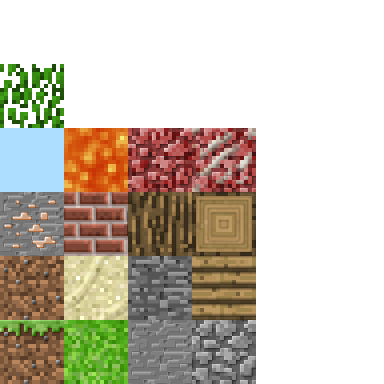 rotund flax
and what isn't working properely
peak crater
It's a sandbox game, like a less advanced Minecraft, and the blocks don't get the proper textures. This is what it now looks like: http://prntscr.com/gzzn71

The stone/grass/sand mixture should just be grass, the leaves should be water, and netherrack-looking thing should be logs, and the black above the netherrack-thing should be leaves
The proper blocks are there, just the textures aren't working
I just sent the part that I assume is causing the trouble, but I can send the full thing if you want (~1.3k lines)
I'm also running Pyglet-1.3.0rc1 now
fallen oxide
It looks like you're using a spritesheet with bad offsets
peak crater
How would I fix the offsets? (I’m pretty new to python, just messing around with a fork of another project)
fallen oxide
That depends entirely on your implementation
peak crater
This is the original project, I haven't changed any rendering, just generation and added some blocks: https://github.com/fogleman/Minecraft/blob/master/main.py
 quasi crystal
@peak crater Your problem is that the original code takes for granted that the original image contains a grid of 4 X 4 sub-textures. This is found on line 53, where the kwargs n=4 indicates how many sub-textures on can find on the original image.
As it's taking a square by default, you could potentially adapt slighty the code. Your new image is a 6 X 6 grid. So calling on lines 67, 68, 69 tex_coord(*top, n=6), etc should solve your offset problem.
peak crater
@quasi crystal I updated those lines, but I'm still having the same issue: http://prntscr.com/h0d202
def tex_coord(x, y, n=6):
    """ Return the bounding vertices of the texture square.

    """
    m = 1.0 / n
    dx = x * m
    dy = y * m
    return dx, dy, dx + m, dy, dx + m, dy + m, dx, dy + m


def tex_coords(top, bottom, side):
    """ Return a list of the texture squares for the top, bottom and side.

    """
    top = tex_coord(*top, n=6)
    bottom = tex_coord(*bottom, n=6)
    side = tex_coord(*side, n=6)
    result = []
    result.extend(top)
    result.extend(bottom)
    result.extend(side * 4)
return result``` quasi crystal
Probably a typo when you copied the code, but there should be a star in front of top and bottom just like for side:
top = tex_coord(*top, n=6)
This assumes that your image is a perfect square of size 384x384 where each texture is a square of size 64x64.
peak crater
There are asterisks there, weird they didn’t copy
The image does show as 384x384 and Paint3D shows the textures as 64x64 😕
@quasi crystal
quasi crystal
Ok, found your problem. Your texture size is not a power of 2. It's not a problem in itself, of course. But Pyglet copies your 384x384 image in a 512x512 Texture. And obviously in such a texture, there are not 6 but 8 squares per sides. So just amend the code by changing n=8. You could as well increase the size of your image to 512x512 if you want.
peak crater
Makes sense, thanks, @quasi crystal! 😃
 polar olive
Anyone familiar with PyQt5? Python crashes when creating a QImage with specific dimensions, specifically when I'm setting QImage's color table. Noticed it when I was rapidly creating qimages with increasing rows and columns (started with 512x512 and crashes at 721x721 for example, not the only one though). When the size was static or I only increased the number of pixel rows in qimage, I saw no crashes.
fallen oxide
You're not running out of memory, right?
polar olive
Nope
Created a 721x721 ndarray, turned it into qimage, turned it into qpixmap and showed it in label and it showed
But when I copy-pasted it to create a 720x720 before, it crashed before getting to qpixmap part, didn't happen when I did it with 719x720 -> 721x721
polar olive
Have not tried pyside
 mint cave
tkinter
i have the Frame and few buttons inside this frame (the childrens). Every button is extended ttk.Button with added "name" parameter. How can i get the button by using value of "name" parameter?
for example the Frame have name "mytab", the button have name "mybutton22"... i have the frame keeper "tab" variable
something like
btn.text="new text"```anyone live?)
fallen oxide
Well that probably returns a list
Looks like it should
I don't know Tk but have you tried printing it?
I have to head off now but that's my best guess
mint cave
i can print it, but like objects with nummeric names.... i understand that i can iterate all and try to find target buttons but this look like bad way
i have in this frame 33*6 buttons and need only 66 every 6 and 7 buttons start from button[1] with step 6 (if ordering is saving from creating process)
digital rose

✨ Level Up!! ✨
100kg just got to Level 1 - Beginner
mint cave
i found tkinter solve for my case... but worst then expected, and not crossplatform... linux have difference behavior
 slate mauve
would anyone be able to link me to the basics of creating a GUI?
rotund flax
@slate mauve there are various libraries out there, for basic games with graphics you can look into pygame but for more utility based applications you can look into tkinter (that's what IDLE is coded in if you've ever used that), those are only two examples though there are a huge number of them. Personally I recommend Tkinter or Qt
slate mauve
Okay thanks
mint cave
@slate mauve tkinter have bad documentation , but it close to cross platform (win and linux code work close same way with little difference)
wxPython have good docs but code will not work on linux same as windows, the linux add new element on top the windows addon new element on back... z index....
tkinter(gui lib) and wxPython(gui lib) can be convert to exe --onefile --noconsole use pyinstaller without pain( linux too) for example ```bash
pyinstaller --onefile --noconsole myscript.py
PyQt can't be convert to onefile executable use simply pyinstaller command , and PyQt need to install the Qt and vsc (visual studio c++) compiller to every PC when planed to run PyQt result programm with gui buttons etcfew days ago i complete little programm for myself and try realise it on win linux use tkinter/wxPython...and compare in result. But no way to do it comfort at this moment... do gui programms on python3
the size of exe programms as result can look like
tkinter - 10mb (full functional same as wxPython)
wxPython - 18mb (full functional same as tkinter)
PyQt - 30mb (no functional code , just empty build, and after start the programm will crashed)
wxPython have same syntax for mouse scrolling for win linux, but tkinter need use different events ... windows/osx = <MouseWheel> , linux <Button-4> <Button-5>... etc
fallen oxide
If you're saying that about Qt then you just don't know how Qt works
Generally speaking, you don't want to bundle up everything into a single exe unless you're taking steps to not break the license of every component you used
But even then, you can simple include copies of the DLLs/SOs for the parts of Qt you used
However
You only really need to do this for Windows
On Mac and Linux you can usually rely on an existing system-installed Qt
As for WX, stop recommending it
WX is abandoned and has been for some time
It is not safe, it is not maintained, and you will trip over it
As for Tkinter, well, it comes with Python
It looks like shit unless you do some serious magic
On Linux, you can't guarantee that the Python available to the user includes it though
Another option is GTK, but I generally don't recommend that either since it can be a pain
It's worth noting also that Qt is good at adapting to the current system theme
So it looks like everything else
mint cave
and what if i need comfort portable exe programm?
the answer is ... Qt can NOT, but wx and tkinter can
fallen oxide
Qt can do it
Pretty much everything can
In contrast, Tk cannot
There is no way to include a part of the standard library
And it's fairly common to see people using copies of python without Tk
And if you're still seriously considering WX after what I said above, you should maybe not be doing this in the first place
slate mauve
Thank you @mint cave
 odd hamlet
is there a way i can get the method stored in the command option of a tkinter Button widget?
@fallen oxide
odd hamlet
oh
fallen oxide
I'm sure someone will, though
mint cave
@odd hamlet try this...
b = Button(text="click me", command=callback)
b.pack()

print b.cget("command")
thank u very much
mint cave
test it... it can be fake)
not sure, but may be have few ways to do it... some thing like b=Button(...); print(b["command"]) ... or may be it just my distorted memory
slate mauve
What's the closest thing to QT that's free?
fallen oxide
That would be Qt
slate mauve
-.-
fallen oxide
What? It's free
slate mauve
fallen oxide
Yeah, for a commercial license
slate mauve
Wha?
fallen oxide
You're not selling your app, are you?
slate mauve
Nope
fallen oxide
Because then you can just use the free community open source license
slate mauve
Where? Haha Could you link me by any chance?
fallen oxide
fallen oxide
You probably want Creator
It has this UI form builder thing
You don't need it but it's useful
slate mauve
What do I do here?
fallen oxide
You don't actually want to use Qt Creator directly
It bundles a separate tool you can use for form design
i think it's called Qt Designer
What're you using, PyQt?
Nikola's Blog
Tutorial for beginners describing step by step how to use QtDesigner in combination with PyQt/Pyside to develop GUI apps in python.
this may help you
slate mauve
Wha?
fallen oxide
Well, you're writing Qt GUIs so you have to be using some kind of python Qt library
there's PySide and PyQt, I think the latter is preferred
slate mauve
What's the difference?
slate mauve
slate mauve
No python
fallen oxide
OK, then maybe think about doing what I said
Get PyQt installed
it's not a trivial task on some machines unfortunately
ah, no, they provide wheels apparently
you should be fine to just pip install PyQt5
slate mauve
So I didn't need QtCreator?
fallen oxide
I already told you that you didn't need it, but it provides Qt Designer, which is nice for designing your forms
fallen oxide
you just.. open the designer
it's literally called Qt Designer
after that, check the link I just gave you
also, you might find this helpful, http://www.thehackeruniversity.com/2014/01/23/pyqt5-beginner-tutorial/
PyQt5 beginner tutorial. The main focus is on Windows, but it can be easily adapted for other platforms.
slate mauve
fallen oxide
there's a pingback above the comments at the end for the second part if you find it useful
a quick google shows that they changed the installer
good job guys
apparently you have to choose it from the list of installables
although
you can check where it is you installed the Qt SDK
it should be in [your QtSDK path]\QtCreator\bin\designer.exe
slate mauve
I cannot find the designer in that path @fallen oxide
fallen oxide
Alright, then you might have to grab it from the installer
Sorry, it's different from the Qt 4 setup I'm used to
You could skip it if you want and just use pyqt without it
You can still make forms, you just have to write the code yourself
slate mauve
So I cannot use a drag and drop?
fallen oxide
Sure, if you install Designer
slate mauve
How am I supposed to?? Haha
fallen oxide
Google says it's included in the installer but you have to select it for installation yourself
It'll be in the list somewhere
fallen oxide
Apparently it comes with some versions of pyqt???
Give me like 30 minutes to finish what I'm doing and get my meditation done and I'll try it myself

 serene spoke
Anyone actually code their own UI in PyQt5? Looking for a bit of help reimplementing the closeEvent
 balmy path
Can't find any debuggers! Help
honest torrent
I doubt many people here read russian anyways 😛
digital rose
opens google translate
fallen oxide
just use a normal python IDE, like PyCharm
honest torrent
^^^
fallen oxide
you can use Qt Designer separately if you hate making classes for your forms
fallen oxide
well, you're ready to go, then
balmy path
But i can't get QT creator to work
balmy path
I want use gui builder
balmy path
lel
fallen oxide
Find wherever you installed Creator
balmy path
i'm dumb
fallen oxide
there should be a designer.exe alongside it
balmy path
I thought that Creator is gui builder xD
fallen oxide
Creator is an all-in-one IDE for projects written in C++ that happen to be using Qt
balmy path
Does pyQT5 comes with Designer?
fallen oxide
Some distributions seem to, but I don't have it installed
let me install it real quick
polar olive
did u install pyqt5-tools?
polar olive
not sure
fallen oxide
That's where pip installs from
polar olive
pip had it
Yep, pypi has it and the description says it includes tools such as qt designer
fallen oxide
Great, there we go then
serene spoke
Who here is familiar with actually coding their UI with PyQt5?
 untold bobcat
?
polar olive
Nope, only tried a bit of PyQt5
 vast kernel
Hi all!
I'm looking for PySide2 documentation, has anyone seen it somewhere on the internet??
fallen oxide
@vast kernel there is no proper documentation yet as it's not a complete project
that's all there is atm
but that won't help you
perhaps stick with PyQt5
vast kernel
err, I'm scripting plugins for autodesk's Maya 2017, and it's using pyside2
fallen oxide
I think the PySide 1 docs should be relatively accurate, but honestly I have no idea
you might have to read the source
 kindred cairn
Are there any good docs/tutorials for getting started in PyQt5, been trying to style and create GUI's quickly through code just not doing it for me. I have CSS experience and from what i understand Styling it similiar to that. What is the limit on it though
fallen oxide
@kindred cairn Try this http://zetcode.com/gui/pyqt5/
 echo lagoon
Hey everyone Im trying to install pyqt5 but I need to install sip and im having some real trouble with it,
can someone help me?
fallen oxide
@echo lagoon What problems are these that you're having?
It's best to just list/ask instead of asking if someone can help
echo lagoon
so I tried pip3 install pyqt5
then this comes up Using cached PyQt5-5.8-5.8.0-cp34.cp35.cp36.cp37-abi3-macosx_10_6_intel.whl Collecting sip>=4.19.1 (from pyqt5) Could not find a version that satisfies the requirement sip>=4.19.1 (from pyqt5) (from versions: ) No matching distribution found for sip>=4.19.1 (from pyqt5)
so I try to install sip
pip3 install sip
but Could not find a version that satisfies the requirement sip (from versions: ) No matching distribution found for sip
and so Im not entirely sure where to go from here
fallen oxide
What do you get if you do python3 --version?
echo lagoon
3.4.3
fallen oxide
Too old
echo lagoon
how do I upgrade?
echo lagoon
okay installed it
digital rose

✨ Level Up!! ✨
Young Lad just got to Level 1 - Beginner
fallen oxide
No problem
It should install fine now
You may also want pyqt5-tools if it'll install on a mac
echo lagoon
how do I install the tools?
fallen oxide
With pip
echo lagoon
pip install pyqt5-tools?
fallen oxide
Might not be on Mac
Well, it's an optional anyway
Yeah, Windows only
Should've checked earlier, sorry
fallen oxide
You should be fine without it
You'll just have to design your GUIs in code instead of qml :P
 empty summit
Fairly new I have a code that grabs data from an api that works however I want to create a gui using tkinter my question is how do I get that code to run in the tkinter window
import requests url_api = "http://api.openweathermap.org/data/2.5/weather?q=san pedro,belize&APPID=634e6760ee68c2fa1937c53c6bf99ab2" json_data = requests.get(url_api).json() desc = json_data['weather'][0]['description'] temp = json_data['main']['temp'] pres = json_data['main']['pressure'] hum = json_data['main']['humidity'] wind = json_data['wind']['speed'] print("Weather for San Pedro") print(desc) print "Tempreture:",temp print"Pressure:",pres,"hpa" print"Humidity:",hum, "%" print"Wind speed:",wind, "m/s"
 placid sable
@empty summit
Paste your code at https://hastebin.com/ and save. The code you've posted lacks any indentation.
digital rose
 rain quarry
@empty summit step 1 learn tkinter
You'll see that simply print won't do anything in the window
 wicked laurel
hey there, is someone willing to help me a bit with gtk? 😃
digital rose
@wicked laurel
wicked laurel
can someone tell me how to get the active element of a combobox with gtk3?
 rugged sinew
I don't really use gtk but isn't it just combobox.get_active()
 vernal cypress
any1 able to help me fix the problem with not able to use my calculator because of the new added "calss gui"
digital rose

✨ Level Up!! ✨
David just got to Level 1 - Beginner
 idle apex
if you know what's causing it to not work you are already most of the way there
 vivid otter
Okay so, once again.
Quick question: What would be the best librairy for desktop GUIs ? Looking to make a simple text editor with basic code highlighting
And please don't tell me Tkinter 😭
rugged sinew
it's not really a case of there being one library that's wildly superior to the others. they each have merits.
some swear by qt, others love gtk, nobody really likes tkinter but it appears to be quite useful if you need a highly modified look whereas qt is more of a standard native app look
you should probably look around a bit
do some window shopping
vivid otter
this is litterally why i'm asking for advice here
I don't know a lot of GUI librairies, and don't know their pros and cons, which is what i'd like to know of guys here
fallen oxide
Qt
I dunno why people use anything else tbh
well aside from being lazy and using tkinter
but tkinter looks like shit
 boreal iron
This is the best GUI lads:
- Option
- Option
- Option
fallen oxide
@boreal iron Go back to #ot0-psvm’s-eternal-disapproval where you belong, heathen
 tawny monolith
hello
i have a a button called admin_button with a command= admin
i want this admin button 2 create a new standart window
how can this be done?
<@&267630620367257601>
rotund flax
Please don't tag suppor for everything, they'll get to your question anyway, if you need urgent help or your question isn't answered after a while then you can
You need to make a new window inside the admin function
tawny monolith
ok ellix i wont do that again
so basically just any normal plain one will work? i see some people doing some random code 2 open it
rotund flax
You just need to make a new Tk window
tawny monolith
need some help
i made another window
in tkinter
i want 2 put a button it in
*in it
i tried the normal way and it creates it in the main menu window
any help?
admin_load=Button(text="Load Results",command="").place(x=180,y=150)```admin_load=Button(<your_tk_window_var_name>,text="Load results",commands="").place(x=180,y=150)
read the docs: https://docs.python.org/3/library/tk.html
tawny monolith
half of the gui goes deafult colour
can yuo tell me
why half of my gui changes colour when i click a button?
odd hamlet
depends on what the button does
tawny monolith
it does this
odd hamlet
no i mean to which method it is bound
digital rose

✨ Level Up!! ✨
[DOM]gollumga just got to Level 2 - Memer Rank 1
odd hamlet
well prbly main_window() recreats parts of your gui
tawny monolith
any eroores?
odd hamlet
for example this line
button_login=Button(text="Login",command=exit,bg="light grey").place(x=160,y=120)
makes no sense you get the return value of .place which is one
tawny monolith
?
odd hamlet
button_login will be None
as well as
button_signup
and button_admin
and button_exit
you dont need the var declaration in the following lines
label1=Label(text="Login Menu",fg="black",bg="light grey").place(x=180,y=10)
label2=Label(text="Username:",fg="black",bg="light grey").place(x=90,y=45)
label3=Label(text="Password:",fg="black",bg="light grey").place(x=90,y=90)
box_username=Entry(textvariable=username_entry).place(x=160,y=45)
box_password=Entry(textvariable=password_entry).place(x=160,y=90)
button_login=Button(text="Login",command=exit,bg="light grey").place(x=160,y=120)
button_signup=Button(text="Sign Up",command=exit,bg="light grey").place(x=235,y=120)
button_admin=Button(text="Admin Login",command=admin,bg="light grey").place(x=180,y=150)
button_exit=Button(text="Exit",command=exit,bg="light grey").place(x=10,y=170)
``` they will just contain None
if you dont need a reference to the button replace for example
```Python
button_exit=Button(text="Exit",command=exit,bg="light grey").place(x=10,y=170)
#with
Button(text="Exit",command=exit,bg="light grey").place(x=10,y=170)
if you need one replace stuff like
button_exit=Button(text="Exit",command=exit,bg="light grey").place(x=10,y=170)
#with
button_exit = Button(text="Exit",command=exit,bg="light grey")
button_exitButton.place(x=10,y=170)
then its time for debugging
tawny monolith
self.root.destroy(root)```it gives me an error self s not defined
what does this variable thingy even do?
ive watched SO MANy tutorials and i cant find any good clear ones
tawny monolith
need help
 admin_gui.configure(background="grey")
        button_read=Button(text="Read Data",command=read,bg="light grey")
button_read.place(x=130,y=100)```plain window, should have window
it got placed in the otehr window
any help?
<@&267630620367257601>
im basic at tkinter btw
fallen oxide
@tawny monolith You're gonna find that most of us don't know much about tkinter
Mostly because it's not very good
If you want to create GUIs in a way that people can help you with, it might be time to look at PyQt
tawny monolith
ik that
fallen oxide
Otherwise, feel free to slog on with Tk, but you may need to turn to Stack Overflow
tawny monolith
ok
fallen oxide
Anyway
From your code it looks like the button should be placed in the main window
You didn't specify your admin window for it
fallen oxide
Perhaps look at the API docs then
See if there's any way to give the button a different parent
tawny monolith
i dont know even soemof the basics of tkinter i need 2 go back
theres not good explanatio tutuprials you got any?
TypeError: object of type 'Toplevel' has no len()```print("working")
admin_gui = tk.Toplevel(root)
admin_gui2=admin_gui.title("Admin Menu")```whats wrong with this?
what no length?
btw @fallen oxide
i figured the button thing out
 night arrow
 fallen oxide
Qt does have a way to render graphics if that's what you mean
I can't say I can think of any serious games that use it, but you could
Don't forget how loose of an idea "games" are
You can make games with nothing but a terminal - don't forget Rogue
odd hamlet
@night arrow i think parts of albion online are implemented using qt at least it has a lot qt dlls
rugged sinew
I can't believe it's called PyQt btw. it should obviously have been called QtPy
placid sable
Qt3.14
 finite sparrow
Oh my god lemon you're right
 peak sonnet
def disemvowel(string):
return filter(lambda :[x for x in string if x in 'aeuioy'],string)
wts wrong with it??
fallen oxide
Your lambda doesn't take an argument
Although once again you guys insist on making this harder than it has to be
placid sable
lemon's gonna hate that
fallen oxide
(also, Y isn't a vowel is it?)
peak sonnet
lol thts so deep
rugged sinew
I like the name of the function though. disemvowel is hilarious.
 exotic cargo
Can you actually make good gui's, all I've seen so far are basic ones (in terms of design) and that turtle thing which is kinda useless.
fallen oxide
Of course
idle apex
pyqt5 has been working wonders for me, other than the fact that i have no ability to understand the C++ documentation
fallen oxide
Yeah, that's the tricky part with these wrappers really
They pretty much just exist to clobber types for you
honest torrent
What's a GUI that you guys would suggest, that works on atleast windows and linux. And looks really nice.
digital rose
well I've heard of kivy and tkinter so look into those
honest torrent
I've used tkinter, I really don't like how it looks
honest torrent
Also, does it matter if my program is asynchrous, but the gui is synchrous
 cinder bison
i havent used it but everyone seems to favour PyQt
honest torrent
This seems lgood: https://pypi.python.org/pypi/Quamash/0.5.1
fallen oxide
You can do the same with Qt?
honest torrent
Qt is just more than I need
cinder bison
tkinter only works if its in the main thread
fallen oxide
Except now with this library you don't have to worry about keeping your threads synchronised
cinder bison
i tried tkinter and threading before and it needs to be the main thread
honest torrent
Really? It only works the in main thread?
Well that's a pain
Ug, Qt isn't in the standard library
cinder bison
yeah i tried to make a shitty discord gui using the api
fallen oxide
It's big but it's not really harder than Tk
fallen oxide
The latest PyQt5
And yeah, of course it has grid layouts
I mean you probably don't want to just outright use one but it has them
honest torrent
Does the grid update when your expand the gui size?
fallen oxide
Eh? Of course, assuming you designed your window to use the extra space
I'm off to bed now, o/
rotund flax
Night
cinder bison
nighty
honest torrent
I have the following: py if self.is_running: resp = QtGui.QMessageBox.question("Quit?", "Are you sure you want to quit?\nThe bot is still running", QtGui.QMessageBox.Yes | QtGui.QMessageBox.No) Which from the tutorial I'm watching, should work, however, I get Traceback (most recent call last): File "/home/nathan/PycharmProjects/TradeBotGUI/main.py", line 19, in _leave QtGui.QMessageBox.Yes | QtGui.QMessageBox.No) TypeError: arguments did not match any overloaded call: question(QWidget, object, object, buttons: QMessageBox.StandardButtons = QMessageBox.Ok, defaultButton: QMessageBox.StandardButton = QMessageBox.NoButton): argument 1 has unexpected type 'str' question(QWidget, object, object, int, button1: int = 0, button2: int = 0): argument 1 has unexpected type 'str' question(QWidget, object, object, object, button1Text: object = '', button2Text: object = '', defaultButtonNumber: int = 0, escapeButtonNumber: int = -1): argument 1 has unexpected type 'str' Why does it think I'm passing in the wrong arguments?
oh
I think I forgot to mass in self
yay
Looks good
idle apex
glad ya got it
honest torrent
Ok, does this look nice? I plan on adding a huge text bot to the right after. https://hastebin.com/ziqiwasoqa.py
honest torrent
Can I add text to a plain text box, while it's disabled?
digital rose
yes.
odd hamlet
is there a way to put tkinter labels in the middle of a frame using the grid geometry manager?
odd hamlet
??????
odd hamlet
someone pls
 real dew
What has a higher chance of getting someone's attention is tagging support
digital rose

✨ Level Up!! ✨
cococore just got to Level 1 - Beginner
 obsidian lance
@odd hamlet try read this bro http://infohost.nmt.edu/tcc/help/pubs/tkinter/web/grid.html
sticky parameter
rotund flax
hello
 queen dagger
i need help
rotund flax
Ask your question
queen dagger

My first test with Qt Animation Framework
i'd like create animation like it but using label
possible?
rotund flax
I'm not sure how extensive tk is when it comes to animation
but you may be able to edit the x positions of labels
rotund flax
You could probably fadde things
queen dagger
how to do it ?
rotund flax
I'm not 100% sure on that one
obsidian lance
@digital rose at least because tk allow create one file exe... pyinstaller --onefile --noconsole script.py
and pyqt result will work only if qt installed on your pc. no qt == no pyqt. not portable, big size result file... but look better then tk, and more comfort in time of development
fallen oxide
@obsidian lance You can do that with Qt as well
You just have to include the DLLs or SOs depending on your platform
obsidian lance
i can't because i know only "pyinstaller --onefile --noconsole script.py" syntax... your way need additional shamanic dance. May be its normal but it additional resistance
fallen oxide
It is normal, yeah
I'm pretty sure your method will only work with a single script file even
Most python projects have way more than one file
 pulsar sable
hey, i am stuck while using tkinter. im am trying to make a random name generator in my window but i doesnt seem to work, could anyone please explain what is going wrong
#D&D Helper Program

from time import *
from tkinter import *
import random
import os

#########################################################

name = ("Emma","Olivia","Ava","Sophia","Isabella","Mia","Charlotte","Abigail","Emily","Harper","Noah","Liam","William","Mason","James","Benjamin","Jacob","Michael","Elijah","Ethan")

NameChoice = ("Random Name Will Appear Here.")
#########################################################

def BattleMusic():
    os.system("BattleMusic.zpl")

def DecisionMusic():
    os.system("Decisions.mp3")

def RandomName():
    NameChoice = (random.choice(name))

#########################################################

root = Tk()
root.title("D&D Helper Program.")

BattleMusicButton = Button(root, text="Battle Music!", fg="black", bg="#228b22", font="Comic 16 bold", command=BattleMusic)
BattleMusicButton.pack(fill=X)

DecisionMusic = Button(root, text="Decision Music!", fg="black", bg="#228b22", font="Comic 16 bold", command=DecisionMusic)
DecisionMusic.pack(fill=X)

RandomNameButton = Button(root, text="Random Name!", fg="black", bg="#228b22", font="Comic 16 bold", command=RandomName)
RandomNameButton.pack(fill=X)

NameOutput = Label(root, textvariable=NameChoice, fg="black", bg="#228b22", font="Comic 16 bold")
NameOutput.pack(fill=X)

root.mainloop()