#user-interfaces
1 messages · Page 16 of 1
 sleek hollow
then I write a few custom methods all with snake_case naming. Then when I go to call a method, I can tell that camel case methods are originally part of the inherited class and snake case methods are my own
 covert vessel
Ok, get it. So here is the correct example of naming convention which you use:
file_menu = self.menuBar().addMenu("&File")
Or self._file_menu = <Qt.widget>
sleek hollow
covert vessel
Ok, get it. So here is the correct example of naming convention which you use: ...
yes exactly. Something like this
class SearchWdg(QtWidgets.QWidget):


    def do_search(self):
        ...

    def populate_items(self):
        ...
when my IDE autocompletes, now I know that do_search and populate_items are custom methods, but anything in camelCase are methods that were already part of the class
makes it easier to search for documentation so I don't confuse custom functions with original
covert vessel
Yeah, agree. I have the same thought about it. Thank you so much for you help 🙂
 proven basinBOT
:incoming_envelope: :ok_hand: applied timeout to @bleak wyvern until <t:1716746004:f> (10 minutes) (reason: duplicates spam - sent 4 duplicate messages).
The <@&831776746206265384> have been alerted for review.
proven basinBOT
:incoming_envelope: :ok_hand: applied timeout to @pearl beacon until <t:1716794175:f> (10 minutes) (reason: duplicates spam - sent 4 duplicate messages).
The <@&831776746206265384> have been alerted for review.
 cerulean cloak
Hello, when I define the iconbitmap in my project and when I compile my project with auto-py-to-exe and I addfile the icon and I run the .exe newly compiled does not work
It work if i remove de iconbitmap but not icon
Error
bitmap "icon.ico" not defined
 solar haven
Flet framework(Flutter) is the answer to that
 severe spire
if you really want more customization, you could go with GTK but that would use C++
You can even put up a nice custom titlebar there too
 hushed veldt
hello everyone, i want to look at a way to create data viz for like a line chart that takes up 3d space (x,y, z, axis). i was thinking of vega-lite/altair but i look at docs and i dont see if they can create 3d charts like that. any tips?
 slate tree
Using tkinter I'm having a problem where I'm trying to put an image in front of a button but it is not working, I've gone through a bunch of chat gpt solutions but none of them really worked. Ive made a dumbed down version just so show the problem.
from pathlib import Path
from tkinter import Tk, Canvas, Button, PhotoImage


OUTPUT_PATH = Path(__file__).parent
ASSETS_PATH = OUTPUT_PATH / Path(r"C:\Users\user\Desktop\build\assets\frame0")


def relative_to_assets(path: str) -> Path:
    return ASSETS_PATH / Path(path)


window = Tk()

window.geometry("1920x1080")
window.configure(bg = "#FFFFFF")


canvas = Canvas(
    window,
    bg = "#FFFFFF",
    height = 1080,
    width = 1920,
    bd = 0,
    highlightthickness = 0,
    relief = "ridge"
)

canvas.place(x = 0, y = 0)
button_image_1 = PhotoImage(
    file=relative_to_assets("button_1.png"))
button_1 = Button(
    image=button_image_1,
    borderwidth=0,
    highlightthickness=0,
    command=lambda: print("button_1 clicked"),
    relief="flat"
)
button_1.place(
    x=256.0,
    y=136.0,
    width=1408.0,
    height=808.0
)

image_image_1 = PhotoImage(
    file=relative_to_assets("image_1.png"))
image_1 = canvas.create_image(
    949.0,
    297.0,
    image=image_image_1
)
window.resizable(False, False)
window.mainloop()
I want to have image_1 cover button_1. I've tried using lift and lower and canvas.tag_raise but none of them seemed to work.
 royal cape
slate tree
Using tkinter I'm having a problem where I'm trying to put an image in front of ...
royal cape
slate tree
Using tkinter I'm having a problem where I'm trying to put an image in front of ...
i think you have two issues to deal with here:
button_1is missing a parent so it defaults to your window root, meaning it can only obscure the entire canvas or, if lowered, the entire canvas widget will obscure it and not just the image inside it- due to a limitation in windowing systems (docs), even if you parented
button_1to the canvas and usedcanvas.create_window(..., window=button_1), widgets always get rendered above other items regardless of stacking order
in your case, it would probably be a better idea to use a Label widget to show your image instead, e.g.py button_1.place(...) image_1 = Label(window, image=image_image_1) image_1.place(...)
though if you're using a transparent image, i don't think the label's rectangular background can be made transparent... if that's not desirable, i guess you might have to put a regular image inside a canvas and .tag_bind() it so you can capture mouse events, then create your other image on top of that...
proven basinBOT
:incoming_envelope: :ok_hand: applied timeout to @raven urchin until <t:1716989469:f> (10 minutes) (reason: duplicates spam - sent 4 duplicate messages).
The <@&831776746206265384> have been alerted for review.
 somber hemlock
severe spire
if you really want more customization, you could go with GTK but that would use ...
somber hemlock
severe spire
if you really want more customization, you could go with GTK but that would use ...
you can use gtk in python
!pypi gvsbuild
proven basinBOT

GTK stack for Windows
Released on <t:1715289022:D>.
somber hemlock
that's for windows but gtk has python support
 wicked sinew
Tkinter script (not sure if it fits in this channel)
https://paste.pythondiscord.com/M6TQ
 lucid lintel
if i've written some code that links to a pyqt .ui file, how do i convert that code to work for a .py file (converted from a .ui file)
proven basinBOT
:incoming_envelope: :ok_hand: applied timeout to @rich patrol until <t:1717027389:f> (10 minutes) (reason: duplicates spam - sent 4 duplicate messages).
The <@&831776746206265384> have been alerted for review.
 sour warren
Hi.... I am sort a very much beginner to python. I want to generate an Windows Application using python. Where I could make use live chart with x-axis, y-axis and y-secondary axis. Few buttons to stop and run the chart. I have somewhat started with pyQT ...is it a right library for this?
sleek hollow
sour warren
Hi.... I am sort a very much beginner to python. I want to generate an Windows A...
Yup, there's QtCharts that you can use
sour warren
sleek hollow
Yup, there's QtCharts that you can use
Thanks a lot.Very helpful!! 🙂
proven basinBOT
:incoming_envelope: :ok_hand: applied timeout to @inland wren until <t:1717080512:f> (10 minutes) (reason: emoji spam - sent 24 emojis).
The <@&831776746206265384> have been alerted for review.
proven basinBOT
:incoming_envelope: :ok_hand: applied timeout to @digital rose until <t:1717083586:f> (10 minutes) (reason: duplicates spam - sent 4 duplicate messages).
The <@&831776746206265384> have been alerted for review.
 exotic anchor
would this be a nice "user friendly" template for the running logic of a pygame display? or am i missing some key functions
 glacial quarry
How to run GTK4-python-flatpak application locally for development (contribution purposes) WITHOUT gnome builder
severe spire
somber hemlock
you can use gtk in python
Really don't know about GTK and python but if it's there, it's amazing.
wicked sinew
wicked sinew
Tkinter script (not sure if it fits in this channel)
https://paste.pythondiscord...
i really hate it when
 stable osprey
Ah, I see. Is there a king of good GUI I can install or a library that handles that type of stuff?
I appreciate the insight
 quiet crystal
I just now found this notice on pytermgui's github: (see image)
But the link (https://github.com/shade40) contains multiple TUI frameworks (Celadon, celx, and Slate are tui frameworks from what I can understand)
What is the current recommended TUI library to use? I found people recommending pytermgui, but that's in posts that were made 2 years ago

Okay so it seems like the competition is between using https://github.com/shade40/Celadon directly and using https://github.com/shade40/celx to wrap it.
Is there another option I should consider? maybe even sticking with pytermgui?
 uneven crystal
Can I run two different windows using multiprocessing or rather two loops? The other one would be tkinter generated gui and other 3d plotter or viewer. Anyone have knowledge on this area?
royal cape
quiet crystal
Okay so it seems like the competition is between using https://github.com/shade4...
i dont write TUIs much, but you could check out textual, written by the same maintainers of the rich library
https://textual.textualize.io/
 spiral apex
uneven crystal
Can I run two different windows using multiprocessing or rather two loops? The o...
spiral apex
uneven crystal
Can I run two different windows using multiprocessing or rather two loops? The o...
You can run two windows with one event loop
uneven crystal
spiral apex
You can run two windows with one event loop
import tkinter as tk

import f3d

engine = f3d.Engine(f3d.Window.NATIVE)
frame = tk.Tk()


if __name__ == "__main__":
    engine.window.render()
    engine.interactor.start()

frame.mainloop()```As far as I have looked through discussions, this type of style is not talked about
quiet crystal
royal cape
i dont write TUIs much, but you could check out textual, written by the same mai...
I'll look at it, thanks!
Since I'm only prototyping, I realized that this is a satisfactory choice menu / inventory GUI for now:

(resources = inventory)
spiral apex
uneven crystal
As far as I have looked through discussions, this type of style is not talked ab...
Ah two different gui frameworks is harder to integrate
uneven crystal
spiral apex
Ah two different gui frameworks is harder to integrate
Yes. Both are loops, that wait for user inputs. Only one could be active for input though
spiral apex
You can probably use multiprocessing with spawn to integrate these two different UI toolkits
uneven crystal
So I was right to assume that multiprocessing is good choice for this, thank you.
uneven crystal
import multiprocessing as mp
import tkinter as tk

import f3d


def f3d_process():
    engine = f3d.Engine(f3d.Window.NATIVE)
    engine.window.render()
    engine.interactor.start()


def tk_process():
    frame = tk.Tk()
    frame.mainloop()


if __name__ == "__main__":
    p1 = mp.Process(target=f3d_process)
    p2 = mp.Process(target=tk_process)

    p1.start()
    p2.start()
Here is the solution. Only problem is that f3d interactor does not support event release and viewer refreshing.
spiral apex
uneven crystal
```py
import multiprocessing as mp
import tkinter as tk
import f3d
def f3d_pr...
You only need one mp.Process
spiral apex
uneven crystal
```py
import multiprocessing as mp
import tkinter as tk
import f3d
def f3d_pr...
And remember to use mp.get_context("spawn").Process
uneven crystal
spiral apex
You only need one mp.Process
Which one should be targeted and which one spawned?
spiral apex
uneven crystal
Which one should be targeted and which one spawned?
Targeted?
uneven crystal
target=???
spiral apex
The one targeted will be the one spawned
uneven crystal
I'm confused now. These are separate gui frameworks, so I would expect I need to two mp.Process. So what is the code you are referring to with mp.Process?
spiral apex
The main process can run one of the guis
uneven crystal
So how should be this written? ```py
if name == "main":
p1 = mp.Process(target=f3d_process)
p2 = mp.Process(target=tk_process)
p1.start()
p2.start()``` There is no good example when googling
 potent patio
Not sure if this is the right group, but which is the most preferred front end framework for python? Kivy? Or is it worth learning flutter? I don't really want to learn dart for flutter so looking for better framework to build app using python.
sleek hollow
potent patio
Not sure if this is the right group, but which is the most preferred front end f...
PySide6 is probably your best bet right now
 untold marsh
I the last few months I’ve discovered quite a few python libraries for building user interfaces/apps. So exciting that Python is getting this type of attention. I’ve mostly used flask but now I have these on my list. Flet, NiceGUI, reflex, streamlit. Am I missing any?
potent patio
sleek hollow
PySide6 is probably your best bet right now
Thanks, any specific reason to choose pyside6? I hear a lot about kivy but I think it is a bit hard to work with it.
potent patio
untold marsh
I the last few months I’ve discovered quite a few python libraries for building ...
Which one would you recommend for a full fledged mobile app? I want to run the app in both android and iOS
 abstract haven
I'm a fan of Kivy even though it doesn't look native. The Beeware stuff and Flet look interesting but haven't personally tried yet
potent patio
abstract haven
I'm a fan of Kivy even though it doesn't look native. The Beeware stuff and Flet...
Thanks.
Guys anyone vote for Kivy and KivyMD upon Flutter?
 sudden elk
it's not important but i'd just like to ask. is there a way to make accessible and cross-platform GUI in python?
mainly focused in things supporting elements like text input, buttons, webview and possibly screen interaction like drag&drop. (thought of building sort of scratch but for making sites but that's just a thought might think of other similar things instead too, like shortcuts for desktop or idk - game engine)
spiral apex
sudden elk
it's not important but i'd just like to ask. is there a way to make accessible a...
I think the web is probably the only way to make something accessible
sudden elk
nothing for python, so it could be offline, yep?
spiral apex
sudden elk
nothing for python, so it could be offline, yep?
You can make a web app that works offline
untold marsh
potent patio
Which one would you recommend for a full fledged mobile app? I want to run the a...
I know you can do IOS and Android with Flet . I just learned of reflex and streamlit so I'm not sure. Haven't tried for NiceGUI yet
 shell crystal
Currently working on a program to download files from repositories, is this UI decent?

It's meant to be basic so people can easily use it without having to pull out a manual
 quiet kelp
is this considered a clean piece of code or not
 sleek hollow
potent patio
Thanks, any specific reason to choose pyside6? I hear a lot about kivy but I thi...
sleek hollow
potent patio
Thanks, any specific reason to choose pyside6? I hear a lot about kivy but I thi...
Robust with full customization, and an insane amount of support/documentation since it's based on Qt library
 spare olive
Any of you have used the rich module?
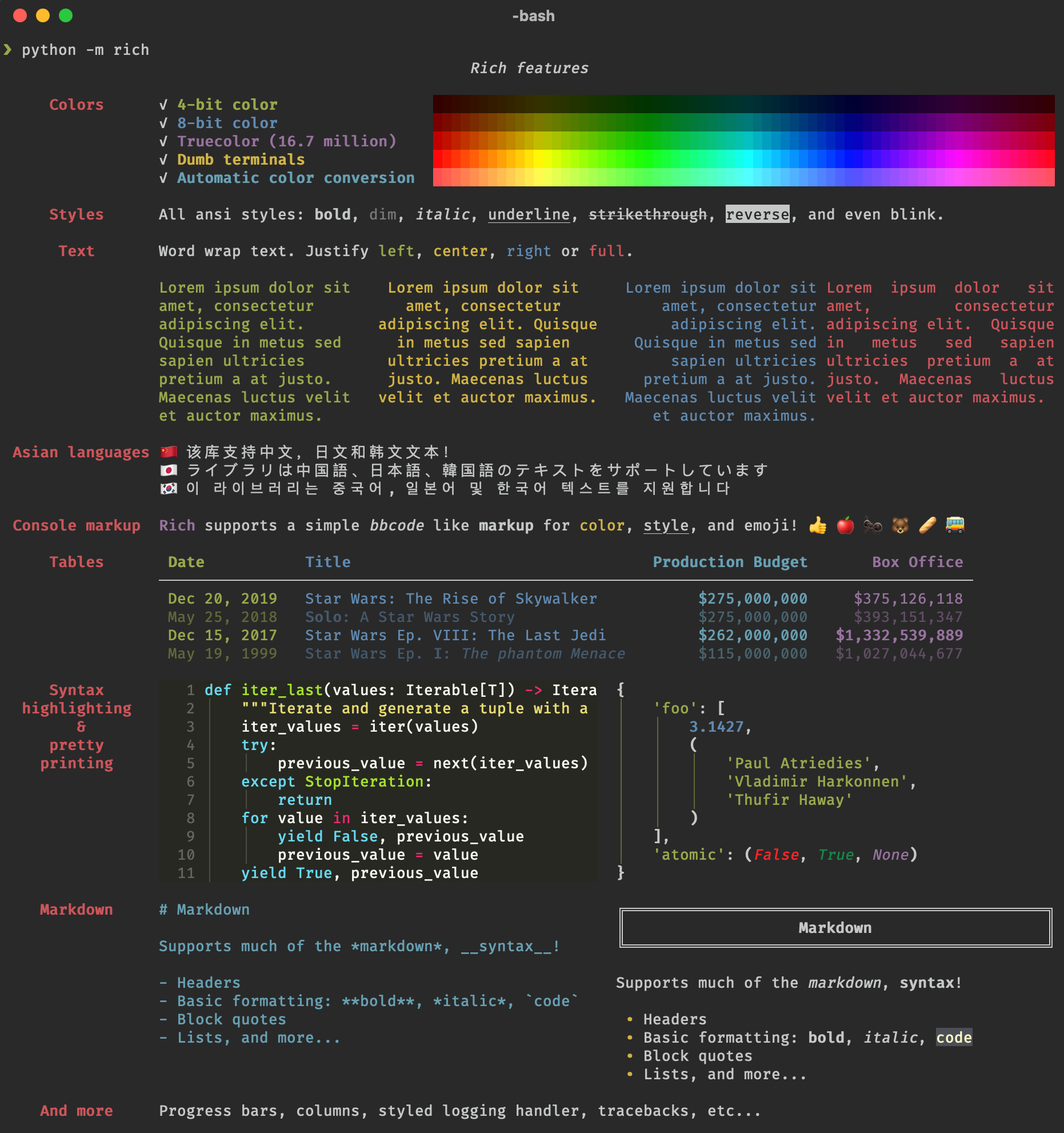
GitHub
Rich is a Python library for rich text and beautiful formatting in the terminal. - Textualize/rich
 unique marten
quiet kelp
is this considered a clean piece of code or not
unique marten
quiet kelp
is this considered a clean piece of code or not
pip install autopep8 it will automatically format your code with PEP8 style guide so you don't have to ask again and again
quiet kelp
unique marten
`pip install autopep8` it will automatically format your code with PEP8 style gu...
got it, thank you
 tame yarrow
When creating a user interface is it even recommended to use python or should i use a different language? If other, what are they?
 royal gull
tame yarrow
When creating a user interface is it even recommended to use python or should i ...
royal gull
tame yarrow
When creating a user interface is it even recommended to use python or should i ...
Python isn't like the language preferred for UIs but they are definitely doable (a bunch of GNOME/GTK apps are in Python, like Pitivi). For alternatives, there's C# if you're doing it for Windows and there's also just making a web app and having the backend be JS or another lang.
tame yarrow
royal gull
Python isn't like *the* language preferred for UIs but they are definitely doabl...
So then where would python be used?
royal gull
tame yarrow
So then where would python be used?
Python can be used in a good number of things. You could do the UI in Python, the backend behind it, or both if you'd like (in Pitivi's case, it's mostly Python apart from the multimedia stuff which is gstreamer).
proven basinBOT
:incoming_envelope: :ok_hand: applied timeout to @grave spoke until <t:1717459113:f> (10 minutes) (reason: duplicates spam - sent 5 duplicate messages).
The <@&831776746206265384> have been alerted for review.
 halcyon cosmos
Hey so does anyone have knowledge about customtkinter
halcyon cosmos
Well I’d start by implementing either the game in a console version first and then work on the gui or just like build the gui elements first and then implement the lgpoc but I don’t know what gui library is best suited for it
 low jacinth
Hi everyone. I am building a transcription app in Streamlit with Speech SDK by microsoft. Now while the Transcription is running and there is a status as "Running" by streamlit, I want to show a button where user can stop the transcription. I tried with a flag and system state, but doesnt work.
Can anyone help?
My code:
  with coll2:
    stop_button = st.form_submit_button(label="Stop")
    if stop_button:
       stop_message = stop_transcription()
       st.text(stop_message)

for transcription:
transcription_generator = transcribe_audio(io.BytesIO(audio_bytes), file_name)
for result in transcription_generator:
   if "Guest-1" in result:
      st.chat_message("user").markdown(result)
      st.session_state.messages.append({"role": "user", "content": result})
   else:
      st.chat_message("assistant").markdown(result)
      st.session_state.messages.append({"role": "assistant", "content": result})
:incoming_envelope: :ok_hand: applied timeout to @digital rose until <t:1717533073:f> (10 minutes) (reason: duplicates spam - sent 4 duplicate messages).
The <@&831776746206265384> have been alerted for review.
proven basinBOT
:incoming_envelope: :ok_hand: applied timeout to @empty bear until <t:1717554159:f> (10 minutes) (reason: duplicates spam - sent 4 duplicate messages).
The <@&831776746206265384> have been alerted for review.
 digital rose
been spending a lot of time with tkinter recently
for anyone who's done ui design in py for years
should i just ditch tkinter and move onto pyqt?
pyqt seems to have a lot more features
and from documentation appears to be intended for object orientated audience
proven basinBOT
:incoming_envelope: :ok_hand: applied timeout to @digital rose until <t:1717618311:f> (10 minutes) (reason: duplicates spam - sent 4 duplicate messages).
The <@&831776746206265384> have been alerted for review.
 echo epoch
need some help:

accessRightMenu = CTkOptionMenu(registrationFrame, variable=self.selected_access_right, values=access_rights_options, font=("Arial Rounded MT Bold", self.fonts(14)), text_color='white', fg_color='#263D49',corner_radius=10)
accessRightMenu.place(anchor="center", relx=0.3, rely=0.6, relheight=0.05, relwidth=0.1)
 ionic nacelle
digital rose
been spending a lot of time with tkinter recently
for anyone who's done ui desig...
ionic nacelle
digital rose
been spending a lot of time with tkinter recently
for anyone who's done ui desig...
https://www.pythonguis.com/faq/pyqt-vs-tkinter/
This would be relevant to you. I started with tkinter myself and moved to pyqt in python. It did have terrible python documentation back then. It also depends on what you need your ui to do, is it just a proof of concept that needs a quick ui- tkinter might be the way. Want a full fledged desktop app- Pyqt might be the way.\
Python GUIs
What Are the Major Differences Between these Popular Python GUI Libraries. Graphical User Interfaces (GUIs) allow users to interact with software through intuitive and user-friendly graphical elements such as buttons, icons, text boxes, and windows.
digital rose
ionic nacelle
https://www.pythonguis.com/faq/pyqt-vs-tkinter/
This would be relevant to you. ...
i didn't even know it had a video player, web browser, neat
gonna move over to pyqt then
one of the biggest issues for tkinter is how the treeviews work
followed tutorials 1:1 and all the tutors even have problems with it lol
- its not using a native theme, tkinter by itself is really ugly
well... goodbye tkinter 🤣
ionic nacelle
it does have a steeper learning curve imo, but still way better imo. I was able to transfer my knowledge to other platforms as well.
digital rose
ionic nacelle
it does have a steeper learning curve imo, but still way better imo. I was able ...
i think tkinter is better for small scale scripts
but pyqt is better overall choice for integrating with larger apps
royal cape
digital rose
i didn't even know it had a video player, web browser, neat
gonna move over to p...
followed tutorials 1:1 and all the tutors even have problems with it
were you using tkdocs and the official reference? from my occasional usage of treeview, operations on it seemed simple enough
its not using a native theme, tkinter by itself is really ugly
were the rest of your widgets from the themed set? you can make native-style GUIs with tkinter at the cost of customization
i agree that it doesn't natively support more advanced features tho, even drag and drop support requires calling wm-specific APIs yourself (if i understand correctly)
digital rose
royal cape
> followed tutorials 1:1 and all the tutors even have problems with it
were you ...
you can easily get treeview to work
i just mean it's weird, i specifically remember having to do some tricks
just to get the treeview to look normal
without having excess bar space on the left most side of the widget
another weird thing i noticed about tkinter
is that when you press buttons, they leave a weird... almost imprint on the button? like as if its relief is pressed until a new button is clicked
proven basinBOT
:incoming_envelope: :ok_hand: applied timeout to @lime thunder until <t:1717746032:f> (10 minutes) (reason: duplicates spam - sent 4 duplicate messages).
The <@&831776746206265384> have been alerted for review.
:incoming_envelope: :ok_hand: applied timeout to @digital rose until <t:1717746057:f> (10 minutes) (reason: duplicates spam - sent 4 duplicate messages).
The <@&831776746206265384> have been alerted for review.
:incoming_envelope: :ok_hand: applied timeout to @stoic wedge until <t:1717746300:f> (10 minutes) (reason: duplicates spam - sent 4 duplicate messages).
The <@&831776746206265384> have been alerted for review.
proven basinBOT
:incoming_envelope: :ok_hand: applied timeout to @digital rose until <t:1717748397:f> (10 minutes) (reason: duplicates spam - sent 4 duplicate messages).
The <@&831776746206265384> have been alerted for review.
 blazing pine
Question for Qt wizards here. Is there a benefit to being specific with types in the signal slot mechanisms?
For example, is there a functional difference between
QtCore.Signal(object) / @QtCore.Slot(object)
and
QtCore.Signal(numpy.ndarray) / @QtCore.Slot(numpy.ndarray)
Using ndarray as an example, but can substitute anything else such as str, int, float, whatever.
 mighty frigate
In QtQuick, when using InputPanel, how can I chnage the default popup orientation
mighty frigate
blazing pine
Question for Qt wizards here. Is there a benefit to being specific with types in...
prob the same as being specific in your function arguments typing
blazing pine
mighty frigate
prob the same as being specific in your function arguments typing
I know there is some internal mechanisms that occur with the signal/slot decorations, so it’s not just for readability or linting. With qasync for example, slots wont work unless decorated.
 granite escarp
Hi everyone, I have a small question related to pyside6. I've been trying to migrate from qt5 to pyside6 but when using pyside designer it won't let me modify the property values of anything unless it's a checkbox or a select so I can't change things like margins and sizes and it wasn't a problem with qt designer, is there any way to fix this?
 amber agate
Hi all! I have a small data entry app that I build with tkinter and the data are backed to an sqlite. I was wondering if I used pyinstaller would the database also be included in the executable? In other words could someone else add to the db on another machine if they run the executable?
proven basinBOT
:incoming_envelope: :ok_hand: applied timeout to @digital rose until <t:1717805495:f> (10 minutes) (reason: duplicates spam - sent 4 duplicate messages).
The <@&831776746206265384> have been alerted for review.
 earnest dagger
amber agate
Hi all! I have a small data entry app that I build with tkinter and the data are...
earnest dagger
amber agate
Hi all! I have a small data entry app that I build with tkinter and the data are...
u could include it but your db will not be synced across all other instances of your app
proven basinBOT
:incoming_envelope: :ok_hand: applied timeout to @tepid coral until <t:1717834864:f> (10 minutes) (reason: duplicates spam - sent 4 duplicate messages).
The <@&831776746206265384> have been alerted for review.
 tight ice
Not sure if this is exactly the right channel - does anyone know of any libraries where I can create a pannable and zoomable world
like pannable screen
if that kind of makes sense
to render organisms being sinulated
https://github.com/projectmesa/mesa for example this looks like a great framework to create my simulation but all the examples show the simulation screen as a cellular automata type grid instead of just a free world space
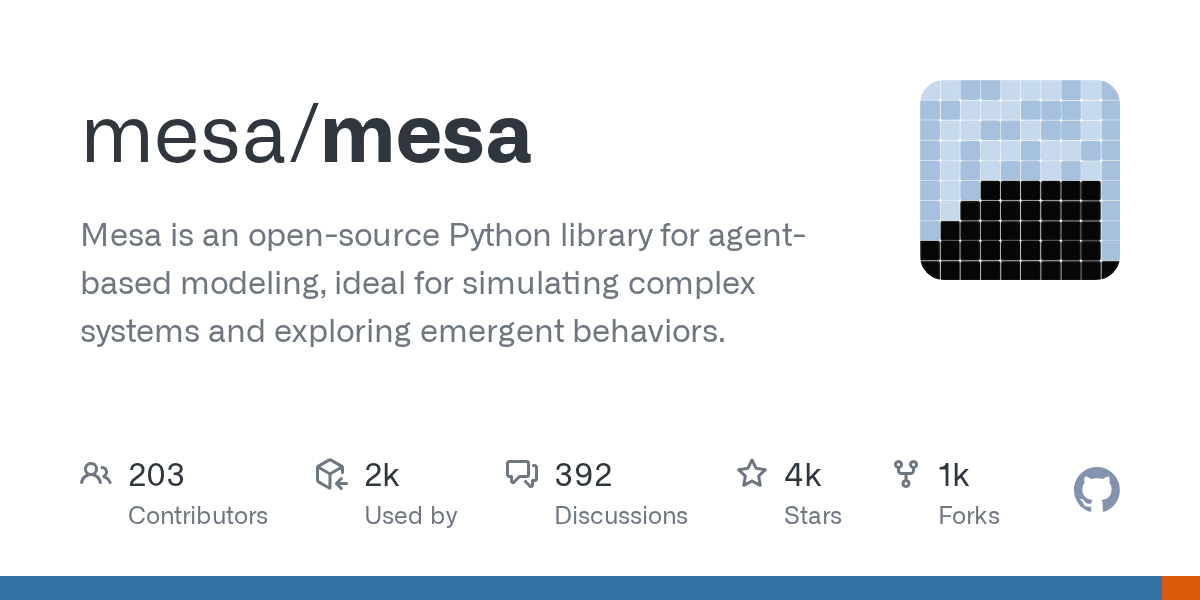
GitHub
Mesa is an open-source Python library for agent-based modeling, ideal for simulating complex systems and exploring emergent behaviors. - projectmesa/mesa
eg here the dots arranged in a grid format

not panable, not detailed
sleek hollow
tight ice
Not sure if this is exactly the right channel - does anyone know of any librarie...
you could do this in pyside with a QGraphicsScene but it's quite a steep learning curve
tight ice
sleek hollow
you could do this in pyside with a QGraphicsScene but it's quite a steep learnin...
mm how easy is it to create graphs in pyside?
I have worked with pyqt a decent amount so maybe its easier because of this
sleek hollow
tight ice
mm how easy is it to create graphs in pyside?
There's a QChart class for it
You can also look into #pyqtgraph
proven basinBOT
:incoming_envelope: :ok_hand: applied timeout to @maiden ravine until <t:1717913161:f> (10 minutes) (reason: burst spam - sent 8 messages).
The <@&831776746206265384> have been alerted for review.
amber agate
earnest dagger
u could include it but your db will not be synced across all other instances of ...
right right! Its just an app for my wife and I, I was thinking about using rsync to keep the db up to date on each machine
proven basinBOT
:incoming_envelope: :ok_hand: applied timeout to @tender scaffold until <t:1717940259:f> (10 minutes) (reason: duplicates spam - sent 4 duplicate messages).
The <@&831776746206265384> have been alerted for review.
 jade siren
what's the difference between window.grid_columnconfigure() and window.columnconfigure() in tkinter
royal cape
https://github.com/python/cpython/blob/v3.12.3/Lib/tkinter/__init__.py#L1851-L1859
no difference, the latter method is an alias for the former
proven basinBOT
Lib/tkinter/__init__.py lines 1851 to 1859
def grid_columnconfigure(self, index, cnf={}, **kw):
    """Configure column INDEX of a grid.

    Valid resources are minsize (minimum size of the column),
    weight (how much does additional space propagate to this column)
    and pad (how much space to let additionally)."""
    return self._grid_configure('columnconfigure', index, cnf, kw)

columnconfigure = grid_columnconfigure```:incoming_envelope: :ok_hand: applied timeout to @quiet mantle until <t:1717972715:f> (10 minutes) (reason: duplicates spam - sent 4 duplicate messages).
The <@&831776746206265384> have been alerted for review.
 hexed lantern
How bad is it if when using tkinter, instead of modifying a frame / button, you just delete it and put a new one on top?
sleek hollow
hexed lantern
How bad is it if when using tkinter, instead of modifying a frame / button, you ...
it entirely depends on your situation
hexed lantern
fair enough, atm it works, so i'm not gonna knock it lol
 hoary canopy
hexed lantern
How bad is it if when using tkinter, instead of modifying a frame / button, you ...
hoary canopy
hexed lantern
How bad is it if when using tkinter, instead of modifying a frame / button, you ...
I currently destroy and rebuild my widgets, but it’s wrapped in its own function.
hexed lantern
That is something i should have figured out a long time ago lmao
going well so far at least
I think this is pretty good for a first attempt

haven't finished it yet, havent even added scaling yet, thats gonna be a pain
blazing pine
tight ice
Not sure if this is exactly the right channel - does anyone know of any librarie...
pyqtgraph. It's a plotting library but the view-area will definitely handle pan/zooms over a region as large as you define. It does interaction very well, and lots of ability to specify min/max ranges (preventing from zooming in or zooming out too far) and can specify limits on bounds so you don't scroll indefinitely.
hoary canopy
hexed lantern
haven't finished it yet, havent even added scaling yet, thats gonna be a pain
For things like your two character label, try a for loop. That way you can get all 7 labels with one chuck of code instead of 7 chucks of the same code.
hexed lantern
I did do that! same with all the multi parts
hoary canopy
My next step is to try to get all my widget information in a json file and just load from there lol.
hexed lantern
Thats a sensible way of doing it, im just using a .txt file filled with lists separated by a line break.
 onyx kindle
hexed lantern
Thats a sensible way of doing it, im just using a .txt file filled with lists se...
onyx kindle
hexed lantern
Thats a sensible way of doing it, im just using a .txt file filled with lists se...
Yo
 wind crypt
 elder hinge
Has anyone used Qpdfview and Pdfdocument and can answer a question?
 opal crypt
 dusty flame
~~Does anyone have experience in PySimpleGUI?
while True:
    event = window.Read()
    if event == WIN_CLOSED: break
I've added this as instructed, to handle window closing while checking for button events, but I get a traceback error whenever I close the script's UI
Traceback (most recent call last):
  File "c:\Users\Sam\Desktop\folder structure\interface.py", line 38, in <module>
    if event == WIN_CLOSED: break
                ^^^^^^^^^^
NameError: name 'WIN_CLOSED' is not defined
I've tried changing the script to use ui.WIN_CLOSED (ui being my variable for PySimpleGUI) but I just get popups of the attached image~~
Fixed: ui.WIN_CLOSED worked, I just forgot to add the values = window.Read()
 proven basinBOT
:incoming_envelope: :ok_hand: applied timeout to @lime crow until <t:1718391112:f> (10 minutes) (reason: duplicates spam - sent 4 duplicate messages).
The <@&831776746206265384> have been alerted for review.
potent patio
Hi all, what's the best way to create Google login page in Kivy? I want the user to click on login with Google button which should redirect to Google login page within the app across iOS and android. Currently i can get the login page open in a external web browser. Is this the best solution to it? Any references and suggestions would be much appreciated.
hoary canopy
Most apps I use open a separate browser. I would also refer to googles API as they more than likely have a way to handle this as well.
potent patio
hoary canopy
Most apps I use open a separate browser. I would also refer to googles API as th...
There isn't anything much there I think. Thanks captain
echo epoch
Why is this happening on CTK
 proven basinBOT
:incoming_envelope: :ok_hand: applied timeout to @digital rose until <t:1718487094:f> (10 minutes) (reason: duplicates spam - sent 4 duplicate messages).
The <@&831776746206265384> have been alerted for review.
 rose vapor
@royal cape im online, I wanna try to solve this error I am having.
royal cape
rose vapor
<@153551102443257856> im online, I wanna try to solve this error I am having.
can you paste the error message and your current code?
!paste
proven basinBOT
Pasting large amounts of code
If your code is too long to fit in a codeblock in Discord, you can paste your code here:
https://paste.pythondiscord.com/
After pasting your code, save it by clicking the Paste! button in the bottom left, or by pressing CTRL + S. After doing that, you will be navigated to the new paste's page. Copy the URL and post it here so others can see it.
hexed lantern
https://github.com/TheKekening/Fallout-VTTRPG-Player-Card/tree/main
Have been working on this the past few days, i know it is incredibly poorly coded but it looks neat i think, tell me what you think
GitHub
Contribute to TheKekening/Fallout-VTTRPG-Player-Card development by creating an account on GitHub.
(latest version on the Switching-Armour-Selection branch)
rose vapor
royal cape
can you paste the error message and your current code?
Would you be able to join a voice channel and I can share my screen, because I can show you what my app does and then what it tells me. It works as it sits now but thats because I removed alot of code from it. Plus im not very good with this discord commands xD
Here is the code, it runs as is but I cant get farther than this lol
I also use PyCharm and PyCharm does not like to explain errors clear enough
royal cape
rose vapor
Would you be able to join a voice channel and I can share my screen, because I c...
i dont normally VC, but this looks like the same grid/pack mixup as before
oh, but the command isn't properly calling your function either
hexed lantern
I'm not sure if the py lambda is necessary, because you arent parsing arguments to the function
royal cape
lambda: myClick simply references your function without calling it
rose vapor
in the video I watched it called it and worked fine, it posted numbers on screen and worked as it should
everytime I try to copy code it fails, but everyone else seems to get it working without issue
royal cape
if you want tkinter to call your function directly, command=myClick would be fine, but if you add parameters to your function then lambda would be needed
def callback():
    print("Doing something")

def callback_with_parameters(num):
    print("Doing something with", num)

Button(..., command=callback)
Button(..., command=lambda: callback_with_parameters(123))```technically lambda: callback() would work too, it's just redundant to use a lambda in that case
rose vapor
royal cape
```py
def callback():
print("Doing something")
def callback_with_parameters...
I tried both and both failed
you saw my previous code
I entered "number" and put (1) and it failed
I even tried "resource" and (1) and it failed
royal cape
they ended up being errors for different issues
royal cape
e.g. putting command= inside grid() and using .pack() for the label
command=lambda: myClick(1) was indeed correct
rose vapor
I tried it in both .grid and in the actual button
it failed both times because apparently slaves cant work with commands
and im like
ok
As of right now, my app runs and I can click the button, but it does nothing, even if I tell it to print("Hello") it will jusr refuse
royal cape
right, lambda: myClick references your function but doesn't call it
command=myClick or command=lambda: myClick() should be written
rose vapor
royal cape
`command=myClick` or `command=lambda: myClick()` should be written
Those dont work, I tried both of those as I said and it refuses
royal cape
did you save your file?
 royal cape
right, myLabel.pack() isn't allowed because your button is gridded on the same root window, and a window can't have children using two different geometry managers
rose vapor
.grid shouldnt cause an issue, the guy said its easier than typing both .grid and .pack
royal cape
the error message is enough for me to infer that is the issue
it's the mixing of .grid and .pack in a single window that Tk doesn't allow
rose vapor
I am writing this code myself, and I watched some videos about Tkinter buttons and displays, and it worked but it wotn work for me
So the videos arent for my code, its in general
I am writing this code myself
So obviosuly its not a 1:1, but my Tkinter isnt different to the one he is using. Tkinter isnt different for everyone
rose vapor
royal cape
it's the mixing of .grid and .pack in a single window that Tk doesn't allow
So how would I write it to make it work?
the .grid() is to display it on different rows and columns
.pack() just displays it
royal cape
here's a minimal reproducible example of your error message: ```py
from tkinter import Tk
from tkinter.ttk import Button
app = Tk()
Button(app, text="Managed with grid").grid()
Button(app, text="Managed with pack").pack()
app.mainloop() py
Traceback (most recent call last):
File "main.py", line 7, in <module>
Button(app, text="Managed with pack").pack()
File "Python311\Lib\tkinter_init_.py", line 2471, in pack_configure
self.tk.call(
_tkinter.TclError: cannot use geometry manager pack inside . which already has slaves managed by grid``` Tk raises an error here because the child widgets of app, that being the two buttons, cannot use different geometry managers at the same time
rose vapor
That makes sense
royal cape
either both buttons should use grid(): py Button(app, text="Managed with grid").grid() Button(app, text="Managed with grid").grid() or both buttons use pack(): py Button(app, text="Managed with pack").pack() Button(app, text="Managed with pack").pack()
rose vapor
so just use one
royal cape
yes
rose vapor
but I use one and it breaks
royal cape
does it show a different error message?
rose vapor
Ok now it does something
Holy hell
idk what I did
Hmmm
Maybe I just used .grid() again and not .pack()
Maybe it was reading the .pack() with the .grid() and not separately
royal cape
well earlier you had three widgets, an entry that had grid(), a button that had grid(), and a label that had pack()
rose vapor
omg, ima have to do this like 10 times lmaooo
rose vapor
royal cape
well earlier you had three widgets, an entry that had grid(), a button that had ...
Yeah I think it was my Label.pack()
I had everything else .grid()
This code works and prints the string I give it
 royal cape
rose vapor
omg, ima have to do this like 10 times lmaooo
royal cape
rose vapor
omg, ima have to do this like 10 times lmaooo
it's normal to write duplicate code, the fact you notice it is an opportunity to make your code easier to change/extend
remember my last example? #1251718473432698922 message
instead of writing four button definitions, i used a tuple of items and a for-loop to create the four buttons
rose vapor
Well I am going to have to do this code for like 10 more buttons but now I run into another issue, idk how to separate each code for each button. Each button has a different output
Im brand new to Python so maybe im tackling more than I can handle but this is fairly easy because its just buttons and strings
royal cape
if you think they're too different to de-duplicate then fair enough, keep writing it out until you see a way to shorten your program
rose vapor
royal cape
if you think they're too different to de-duplicate then fair enough, keep writin...
a list wouldnt work then eh?
ima shortcut it lmaoo
royal cape
maybe
rose vapor
Its just the different items yield different numbers, one item gives 5, another gives 20, some give 10-15
royal cape
perhaps you want to loop through a table of values, e.g. ```py
ITEMS = [
("Blade", 2, 3),
("Sign", 4, 6),
("Spring", 8, 12),
]
for name, safe_value, unsafe_value in ITEMS:
button = Button(
...,
text=name,
command=lambda: add_value(safe_value, unsafe_value)
)
button.grid()```
oops, forgot about late-binding again, functools.partial() or lambda x=x, y=y: ... would be the correct way to define the command
rose vapor
true, tuples work
you know, that works
100%
Im gonna work on adding callables and see how that works, but I know ill be back here with questions lol
rose vapor
@royal cape I just figured out I can use f strings to combine my commands with this code, I knew about f strings from my last app but I didnt realize it would work here lol. I am so happy, I am learning.
rose vapor
Ok, im running into an issue, how can I turn tuples into separate outputs for separate buttons?
(ex: Blade = 20, Sign = 10, Spring = 5)
I cant seem to find a way to make them use separate outputs without making 10 functions of myClick()
royal cape
rose vapor
Ok, im running into an issue, how can I turn tuples into separate outputs for se...
did you use functools.partial() to pass the values to your function?
rose vapor
royal cape
did you use functools.partial() to pass the values to your function?
idek what that is
royal cape
royal cape
remember my last example? https://discord.com/channels/267624335836053506/125171...
it's the same solution i used in this example
!e ```py
import functools
def greet(name, age):
print(f"Hello {name}! You are {age} years old.")
greet_emily = functools.partial(greet, "Emily")
greet_emily(25)```
proven basinBOT
royal cape
!e ```py
import functools
def greet(name, age):
print(f"Hello {name}! You a...
:white_check_mark: Your 3.12 eval job has completed with return code 0.
Hello Emily! You are 25 years old.
this kinda confuses me
royal cape
functools.partial is a way to create a function from another function with some or all of its parameters already provided
so you'd give each button a function that remembers the value for its corresponding item
same idea as lambda: myClick(xyz) if that's what you initially tried
rose vapor
How would I use it in my setup?
royal cape
it would be written quite similarly to how my example used it: py ITEMS = ("Dirt", "Wood", "Stone", "Sand") ... def append_tree_row(value): id = tree.insert("", "end", text=value) tree.see(id) ... for column, item in enumerate(ITEMS): command = functools.partial(append_tree_row, item) button = Button(controls, text=f"Add {item}", command=command) ...
royal cape
right, understanding what it does will help you know how to use it
 full mountain
what is the best ui library for python programs
rose vapor
full mountain
what is the best ui library for python programs
I like FreeSimpleGUI as its easy to use and understand, but aparently its the worst lol. I am using Tkinter but its confusing right now
full mountain
rose vapor
I like FreeSimpleGUI as its easy to use and understand, but aparently its the wo...
ic but what do professional companies use?
rose vapor
idk
full mountain
to make a really good looking ui
rose vapor
im new to python so idek
royal cape
full mountain
ic but what do professional companies use?
i think you'd usually see PyQt/PySide for more advanced desktop applications
full mountain
lemme check it out
full mountain
royal cape
i think you'd usually see PyQt/PySide for more advanced desktop applications
it looks really interesting , thnxss
royal cape
but distributing applications in python is a bit complicated since python doesn't compile to machine code
full mountain
royal cape
but distributing applications in python is a bit complicated since python doesn'...
then how they do it?
we have to make a packet manager?
to install everything?
royal cape
tekgar has a nice post about this in https://canary.discord.com/channels/267624335836053506/1162864668105244782
rose vapor
Whats the point of throwing up an error about floats and integers if the app doesnt actually fix them? We are back to last night with this BS error loop
full mountain
royal cape
tekgar has a nice post about this in https://canary.discord.com/channels/2676243...
very interesting stuff
so much to learn
thnxs
royal cape
rose vapor
Whats the point of throwing up an error about floats and integers if the app doe...
what's the error message?
rose vapor
royal cape
what's the error message?

Ive tried like 100 different things and it just keeps fucking up
It works when you use numbers but if you try to make it a variable it just loops an error and set and float
royal cape
rose vapor
{} is the syntax for defining set literals, you probably don't want to write that
rose vapor
or is it brackets?
half of the things I wanna know arent available online anyway
Ive looked up tutorials on tuples, and there isnt a video longer than 3 minutes which just tells you that there is a function called "tuple" then they move on to other stuff
"There is a function called tuple which is similar to a list but its immutable. Any way moving onto writing an entire app from scratch"
Like thanks -_-
Sorry to vent, I get angered easily with stuff that doesnt work when I tell it to
royal cape
yea, jumping too far can easily land you in a hodgepodge of problems, but at the same time the internet is full of mid/subpar tutorials and resources
personally my start in learning python was through official documentation, some corey schafer videos, and a folder full of scripts practising individual things at a time
rose vapor
Actually I realized im setting this list/tuple to the wrong buttons anyway
doesnt do me good if I dont tell the user what theyre giving before they get an item in return
rose vapor
royal cape
personally my start in learning python was through official documentation, some ...
I have made 1 app so far in my coding time, I made a simple To-Do app that stores your input and reads it back when you open the program again
Im not trying to jump too far ahead, but i paid for an online course and im just practicing on my own currently but it sucks because there arent any videos on what I work on
royal cape
A Byte of Python might be useful to you, ive heard it's more suited for people that already have some general knowledge of how programs are written
here's their section about tuples: https://python.swaroopch.com/data_structures.html#tuple
there's also the official tutorial, for example their page on sets:
https://docs.python.org/3/tutorial/datastructures.html#sets
rose vapor
Honestly I might just be jumping too far, but idk where else to start learning.
digital rose
Anyone Idea how to make something like this?
 royal cape
rose vapor
Honestly I might just be jumping too far, but idk where else to start learning.
royal cape
rose vapor
Honestly I might just be jumping too far, but idk where else to start learning.
you might find it easier to start off with print() and input(), make something that solves your problem, figure out what data structures are useful in solving your problem (lists, dictionaries, etc.), and then rewrite your command-line interface with a tkinter GUI
digital rose
Where can I learn to code ui's with customtkinter?
rose vapor
royal cape
you might find it easier to start off with `print()` and `input()`, make somethi...
I also realized tuple isnt mutable whicbh gave me the errors I saw, so I changed it from tuple to list and the errors didnt come back, but now I have to set new functions.
My only issue with learning is that either I never remember anything, or the courses I watch or pay for lack alot of the basics or lack enough explanation.
royal cape
rose vapor
My only issue with learning is that either I never remember anything, or the cou...
for the former, you should practise the concepts as soon as you learn about them and try to develop a general understanding of how to use them, for example if you were learning dictionaries, you might ask yourself: What do dictionaries do? What data might I store in a dictionary? What ways can I define a dictionary? How do I access and set values?
for understanding error messages you can apply a similar process of answering questions about it, e.g. What code caused this error? What variables are involved? Is this error a simple typo, or a misunderstanding in how I'm meant to use something? Where can I find official documentation on the thing I'm using?
rose vapor
royal cape
for the former, you should practise the concepts as soon as you learn about them...
Well once I learn something, its usually easy to use afterwards.
There is one exception tho, I watched a video where the guy explains a function:
def myClick(number)
current = e.get()
e.delete(0, END)
e.insert(0, str(current) + str(number))
But when I go to use e.delete, Tkinter and Python tell me that the .delete() function doesnt exist
so I get stuck like that and so now I have to go google how to use a function that should already be working
so it makes coding harder when functions and codes dont work out of the box as they should
royal cape
getting an AttributeError might mean you're trying to access an attribute/method on the wrong object
rose vapor
royal cape
getting an AttributeError might mean you're trying to access an attribute/method...
The tutorial I am using

The function does not exist
 royal cape
right, Label is a class, not an entry widget
rose vapor
so how can I make the Label delete so I can add a new one?
Im trying to display 2 buttons
Button1 and Button2
I want Button1 to display when clicked, then when you press Button2 it deletes Button1 text and displays its own text
royal cape
.delete() is specific to entry widgets and only affects the text inside that entry, for deleting the widget entirely you would use .destroy()
though FYI you can also change a label's text without destroying it, e.g. ```py
app = Tk()
label = Label(app, text="Hello world!")
label.grid()
command = lambda: label.configure(text="Button clicked!")
button = Button(app, text="Click me", command=command)
button.grid()```

see also https://tkdocs.com/tutorial/concepts.html at Configuration Options section:
# create a button, passing two options:
>>> button = ttk.Button(root, text="Hello", command="buttonpressed")
>>> button.grid()
# check the current value of the text option:
>>> button['text']
'Hello'
# change the value of the text option:
>>> button['text'] = 'goodbye'
# another way to do the same thing:
>>> button.configure(text='goodbye')
# check the current value of the text option:
>>> button['text']
'goodbye'```
digital rose
How can I load an image into ui using customtkinter?
rose vapor
royal cape
though FYI you can also change a label's text without destroying it, e.g. ```py
...
yeah as if I would know that lmao
Nothing online tells you that exists, I have to come here to find out
rose vapor
royal cape
see also <https://tkdocs.com/tutorial/concepts.html> at *Configuration Options* ...
What is Tkiners "window" command? I am gonna try some Case functions'
 blazing granite
digital rose
How can I load an image into ui using customtkinter?
blazing granite
digital rose
How can I load an image into ui using customtkinter?
in label kword: img= ImageTK.PhotoImage(Image(path))
Im doing this from memory so double check but this is the basic way I did it when I had to
another thing is that I'm pretty sure you're not forced to use Labels but it was the easiest implementation for me
digital rose
blazing granite
Im doing this from memory so double check but this is the basic way I did it whe...
Alr, heading to sleep as it is 1 am for me, will try it in the morning. Thank you
blazing granite
same lol
 potent oracle
Does anyone know how to compile into a standalone file via nuitka, which would work without .py files?
I tried -onefile, -statalone.
royal cape
rose vapor
What is Tkiners "window" command? I am gonna try some Case functions'
im not sure what window command is either, "window" is the term Tk uses to describe widgets
 echo condor
potent oracle
Does anyone know how to compile into a standalone file via nuitka, which would w...
echo condor
potent oracle
Does anyone know how to compile into a standalone file via nuitka, which would w...
nuitka --standalone --onefile
rose vapor
Does anyone know how to use lists with buttons/functions?
im looking for a variable list that changes depending on which button you press. So Button1 would be 20, Button2 would be 5, etc
But instead of having 50 lists, I want one that uses variables or functions
I can do it with Entry boxes and Input boxes but not with functions or buttons
 night jewel
I am struggling to find good tech choice on developing frontend , while backend will be implemented using python flask.
(front end will have more datatables and graphs)
Can you suggest ? 🧐
sleek hollow
rose vapor
im looking for a variable list that changes depending on which button you press....
Can you give a bit more info about what you're trying to do?
night jewel
sleek hollow
Can you give a bit more info about what you're trying to do?
in short, i have some data in db related to stock , I want to fetch that data with API and display on UI. Also show some graphs with analysis
sleek hollow
night jewel
in short, i have some data in db related to stock , I want to fetch that data wi...
Ahh I was replying to TheGameBoi, but PySide6 might be a good option for your frontend
 final path
Do you all think Reflex is way better than Streamlit?
rose vapor
sleek hollow
Can you give a bit more info about what you're trying to do?
So I have 3 buttons, each with a different amount set to them.
Button1 has 20 coins and 1 dollar, Button2 has 10 coins and 2 dollars, Button3 has 5 coins and 3 dollars. I have a list made so that it will accept whatever is assigned to it, what I want is to have the list change variables depending on which button is pressed. So if you press Button1 you will select 20 coins and 1 dollar. But then you press Button2 and the list deletes the previous info and adds 10 coins and 2 dollars. That way I can call upon that list and use what the list contains in it.
hoary canopy
Just curious, what are some ways you guys preform data validation for entry and combo box widgets?
sleek hollow
rose vapor
So I have 3 buttons, each with a different amount set to them.
Button1 has 20 c...
I wouldn't bother dynamically updating that list when buttons are pressed. I'd simply query which buttons are selected when the time is right to access that data
 noble shore
hi, i wanted to add keyauth to my code but im unable to do it, cause i have never tried it before if you can help me dm or ping me
 civic tendon
Is PySide2 simply "better" than using Tk or is it just more convenient?
 coarse fiber
alguien sabe usar figma
digital rose
Which has more benefits to using? PySide6 or PyQt5
sleek hollow
civic tendon
Is PySide2 simply "better" than using Tk or is it just more convenient?
It's far better in the sense that you have more control
digital rose
Is there any plan to improve tkinter?
For example, html has auto scrollbars. That would be nice.
Also, I think it would be nice if you could set every property of a widget in the configure method.
I think some key bindings could be built-in also, such as mouse wheel for scrollable widgets. Instead of having to manually configure that.
Sometimes I think there is a little confusion between configuring the widget in pack and configuring it in the instancing of the widget.
I think the ttk theme and style is pretty good, though it might be missing some options such as transparency or configuring the highlight color of a button. I was able to create a nice dark theme but some things I cannot customize.
I do have 1 really great thing to say, though! The pydroid IDLE is GREAT. The ironic thing is that tkinter looks and runs better on android than it does on the desktop/laptop! Hahahaha
I did not expect that, but the controls work great on mobile touch screen.
 tribal path
Tk being a wrapper for tcl (which you likely haven't heard of) is a fairly old that predates python even. It's effectively feature locked outside of ttk.
As you are using pydroid3 there are other libraries there which would be more flexible and the app comes with examples to showcase them
proven basinBOT
:incoming_envelope: :ok_hand: applied timeout to @proud ember until <t:1718957293:f> (10 minutes) (reason: duplicates spam - sent 4 duplicate messages).
The <@&831776746206265384> have been alerted for review.
proven basinBOT
:incoming_envelope: :ok_hand: applied timeout to @kindred falcon until <t:1718961638:f> (10 minutes) (reason: duplicates spam - sent 4 duplicate messages).
The <@&831776746206265384> have been alerted for review.
proven basinBOT
:incoming_envelope: :ok_hand: applied timeout to @digital rose until <t:1718966292:f> (10 minutes) (reason: duplicates spam - sent 4 duplicate messages).
The <@&831776746206265384> have been alerted for review.
tight ice
I'm not sure if this is the right use of them -
I want to perform many cpu calculations on an array. Can I create multiple QTimers (lets say 20 timers) to process different parts of the array?
Ie
for i in range(5000):
  arr[i] = ...
getting split into
start = 2000  # eg
for i in range(250):
  arr[i + start] = ...
My issue is I don't know if this is a) how qtimers are supposed to be used (should I use threading instead?) and b) how would i pass which thread number the QTimer is - As in, I don't know how to pass arguments to QTimer
tight ice
tight ice
eg here the dots arranged in a grid format
Basically rendering bunch of entities (circles) in a QGraphicsScene - Not sure if there is a better way
I'm just doing
 for ent in self.entities:
    x = random.randint(0, 1) * (-1 if random.randint(0, 1) == 0 else 1)
    y = random.randint(0, 1) * (-1 if random.randint(0, 1) == 0 else 1)
    ent.setPos(ent.x() + x, ent.y() + y)
For perf testing rn - is there a more efficient way to update positions?
proven basinBOT
:incoming_envelope: :ok_hand: applied timeout to @digital rose until <t:1718986624:f> (10 minutes) (reason: duplicates spam - sent 4 duplicate messages).
The <@&831776746206265384> have been alerted for review.
digital rose
tight ice
Basically rendering bunch of entities (circles) in a QGraphicsScene - Not sure i...
Async and generators
tight ice
digital rose
Async and generators
I don't think I want to make my code asnychronous because im also using pyqtgraph + I can't imagine its required
tight ice
tight ice
I'm not sure if this is the right use of them -
I want to perform many cpu calc...
@sleek hollow apologies for the ping but do you have any ideas here?
proven basinBOT
:incoming_envelope: :ok_hand: applied timeout to @jade peak until <t:1719007206:f> (10 minutes) (reason: duplicates spam - sent 4 duplicate messages).
The <@&831776746206265384> have been alerted for review.
digital rose
KDE 1.0 IDE interface
 proven basinBOT
:incoming_envelope: :ok_hand: applied timeout to @steep jungle until <t:1719009181:f> (10 minutes) (reason: duplicates spam - sent 4 duplicate messages).
The <@&831776746206265384> have been alerted for review.
digital rose
proven basin
:incoming_envelope: :ok_hand: applied **timeout** to <@315404510220517376> until...
well glad I got warned not to do that
already sent 1 in another channel
proven basinBOT
:incoming_envelope: :ok_hand: applied timeout to @tawdry tangle until <t:1719049311:f> (10 minutes) (reason: duplicates spam - sent 4 duplicate messages).
The <@&831776746206265384> have been alerted for review.
 tall verge
 proven basinBOT
:incoming_envelope: :ok_hand: applied timeout to @solemn anvil until <t:1719088269:f> (10 minutes) (reason: duplicates spam - sent 4 duplicate messages).
The <@&831776746206265384> have been alerted for review.
proven basinBOT
:incoming_envelope: :ok_hand: applied timeout to @long crystal until <t:1719101741:f> (10 minutes) (reason: duplicates spam - sent 4 duplicate messages).
The <@&831776746206265384> have been alerted for review.
proven basinBOT
:incoming_envelope: :ok_hand: applied timeout to @tiny schooner until <t:1719120457:f> (10 minutes) (reason: duplicates spam - sent 4 duplicate messages).
The <@&831776746206265384> have been alerted for review.
 past coyote
Do you think I can consider this a portfolio-level project? I'm a beginner/intermediate in Python, but this is my first useful project that might please someone other than myself lol.
It's a url downloader (YouTube, tiktok, Instagram, etc...)
Hey what do you say? (Translator)
spiral apex
past coyote
Do you think I can consider this a portfolio-level project? I'm a beginner/inter...
!ytdl
proven basinBOT
Our youtube-dl, or equivalents, policy
Per Python Discord's Rule 5, we are unable to assist with questions related to youtube-dl, pytube, or other YouTube video downloaders, as their usage violates YouTube's Terms of Service.
For reference, this usage is covered by the following clauses in YouTube's TOS, as of 2021-03-17:
The following restrictions apply to your use of the Service. You are not allowed to:

1. access, reproduce, download, distribute, transmit, broadcast, display, sell, license, alter, modify or otherwise use any part of the Service or any Content except: (a) as specifically permitted by the Service;  (b) with prior written permission from YouTube and, if applicable, the respective rights holders; or (c) as permitted by applicable law;

3. access the Service using any automated means (such as robots, botnets or scrapers) except: (a) in the case of public search engines, in accordance with YouTube’s robots.txt file; (b) with YouTube’s prior written permission; or (c) as permitted by applicable law;

9. use the Service to view or listen to Content other than for personal, non-commercial use (for example, you may not publicly screen videos or stream music from the Service)
Dude, I'm studying lol
Why is ytdl malicious? It's a video downloader, it's available everywhere
spiral apex
past coyote
Why is ytdl malicious? It's a video downloader, it's available everywhere
This is off-topic for this channel
proven basinBOT
:incoming_envelope: :ok_hand: applied timeout to @wind wigeon until <t:1719139530:f> (10 minutes) (reason: duplicates spam - sent 4 duplicate messages).
The <@&831776746206265384> have been alerted for review.

 proven pewter
guys, this command will take the first character from the cursor's line right? (Tkinter) ```py
cursor_pos = self.textwidget.index(tk.INSERT)
line_before_cursor = self.textwidget.get(f'{cursor_pos} linestart', cursor_pos)
Don't use Tkinter, use PyQt5
PyQt5 accept CSS styles
proven basinBOT
:incoming_envelope: :ok_hand: applied timeout to @digital rose until <t:1719183411:f> (10 minutes) (reason: duplicates spam - sent 4 duplicate messages).
The <@&831776746206265384> have been alerted for review.
 nocturne urchin
Hey, i wish to create gui specifically accordion menu. Using data from db, so need it to be able to be modified at runtime. shoot ur recommendations
echo condor
nocturne urchin
Hey, i wish to create gui specifically accordion menu. Using data from db, so ne...
Depends if you want something quick and easy tkinter if you want something better with better performance and feeling pyqt or pyside
nocturne urchin
echo condor
Depends if you want something quick and easy tkinter if you want something bette...
i wont say its quick and easy, cause it will be the interface for adding into db, editing and etc
 vale karma
how would I read information from an application?
 rare verge
Does anyone have a good example of how i can make a entry bar for path with a button where you can browse in your files to select the path where you want it
For tkinter
 flint forge
hey yall in on mac and im trying to use tkinter but keep getting this error, does anyone know how to fix it?
import _tkinter as tk
ModuleNotFoundError: No module named '_tkinter'
royal cape
rare verge
Does anyone have a good example of how i can make a entry bar for path with a bu...
i happen to have a file entry class in one of my apps that you can look at:
https://github.com/thegamecracks/dum-dum-irc/blob/main/src/dumdum/client/file_entry.py
the important bit is filedialog.askopenfilename(), that invokes the native Tk command for opening the file selection dialog
see also:
https://tkdocs.com/tutorial/windows.html#dialogs
https://docs.python.org/3/library/dialog.html#module-tkinter.filedialog
https://tcl.tk/man/tcl8.6/TkCmd/getOpenFile.htm
it's not particularly obvious, but the last two links show what keyword arguments you can pass like parent, title, filetypes, etc.
royal cape
flint forge
hey yall in on mac and im trying to use tkinter but keep getting this error, doe...
i don't use mac, but you might want to see the guide on tkdocs:
https://tkdocs.com/tutorial/install.html#install-mac-python
generally if it can't import _tkinter, that means python was compiled without Tcl/Tk, so you probably want to use the official python.org installer which apparently has it by default
 worthy sphinx
I want to build a console application with python. It should be a one page menue like midnight commander. I need to select values from a table and change them and have them auto updating from a server. maybe a graph that will show a history as a "popup". What would you chose? Is the rich library still the one I should take in 2024?
worthy sphinx
Seems like textual will work better
nocturne urchin
echo condor
I meant quick to develop
u think its quick to develop? i dont
echo condor
nocturne urchin
u think its quick to develop? i dont
Up to you, anyway this doesn't invalidate what I said about the choice of the front
 past fractal
Hoping this is the right place for my question. (Terminal related)
I want to write a python library that allows me to print FULLY CUSTOM ICONS or IMAGES to console or file. 8x8 scale ideally.
I know this is something that is not easy to do.. but if has any form of possibility I want to be pointed in the right direction.
What would be involved in accomplishing this?
(Edit: just to clarify it does need to show as an image / icon and terminal and needs to be able to auto scale down pre existing images. To my knowledge with Pillow and Climage combined this is currently not possible within Python.)

 royal cape
past fractal
Hoping this is the right place for my question. (Terminal related)
I want to wr...
royal cape
past fractal
Hoping this is the right place for my question. (Terminal related)
I want to wr...
!pip rich-pixels seems like a decent library for this, but you'll probably need hand drawn pixel art if you want the best quality out of it
proven basinBOT
A Rich-compatible library for writing pixel images and ASCII art to the terminal.
Released on <t:1711791472:D>.
royal cape
example usage: ```py
import sys
from rich_pixels import Pixels
from rich.console import Console
from PIL import Image
width = int(sys.argv[1])
sampling = Image.Resampling[sys.argv[2].upper()]
console = Console()
with Image.open(sys.argv[3]) as image:
image = image.resize((width, width), sampling)
pixels = Pixels.from_image(image)
console.print(pixels)```
 past fractal
OOOOOOO omg okay I will definitely check that out ty!! Does it show in CMD or normal terminal windows as well? Run.exe for python
royal cape
past fractal
OOOOOOO omg okay I will definitely check that out ty!! Does it show in CMD or no...
hm, regular command prompt doesn't seem to render those colored pixels correctly unless you use colorama to fix it, e.g. py import colorama colorama.just_fix_windows_console() ...
past fractal
royal cape
hm, regular command prompt doesn't seem to render those colored pixels correctly...
Ahh okay all good I'll definitely try to work it out 😱😱 appreciate it a lot!!!
hoary canopy
Does tkinter have a gui builder like qt5?
echo condor
hoary canopy
Does tkinter have a gui builder like qt5?
There is an unofficial 20$ gui builder for customtkinter that's all I know
hoary canopy
Do you happen to have a link to it?
Nvm. I dont wan to replicate what someone else is doing. Im going to make my own from the ground up.
echo condor
hoary canopy
Nvm. I dont wan to replicate what someone else is doing. Im going to make my own...
You're gonna make your own tkinter gui builder?
hoary canopy
echo condor
You're gonna make your own tkinter gui builder?
Yeah, I started playing with some layout methods last nights but wanted to make sure someone else hasn’t already done it. But since they are charging 20 bucks, I’m gonna just stick to my plan.
So far I’ve tried using grid and place to make a sectioned screen like unity or godot but I think it will be easier to go the route of like Adobe with floating windows since I’m so a custom to using place.
echo condor
hoary canopy
Yeah, I started playing with some layout methods last nights but wanted to make ...
Yeah plus it has a lot of bugs and not practical as it converts always using place and x, y so the app you end up with is not scalable nor practical. You'll for sure find a lot of interested people
hoary canopy
Yeah, part of me trying the place and grid method was to get use to scaling apps so I can include it. I’ll probably tinker with it more to figure it out. Gonna start with the basics of buttons, entries and labels for my first release and eventually work my way to to tk, ttk, tkcalendar and autocomplete.
If you’re interested in following , my code will be open source https://github.com/msrogers2015/TKBuilder. After I get the basic 3 widgets, I think I’ll link my coffee to help with expenses but it won’t be a requirement ever.
echo condor
Cool, I'll definitely give it a look even though I switched all my apps outside tkinter because of performance being very limited
I know for a fact that's a great project that would help hundreds of people
proven basinBOT
:incoming_envelope: :ok_hand: applied timeout to @cyan atlas until <t:1719437331:f> (10 minutes) (reason: duplicates spam - sent 4 duplicate messages).
The <@&831776746206265384> have been alerted for review.
hoary canopy
echo condor
Yeah plus it has a lot of bugs and not practical as it converts always using pla...
Well was trying to figure out drag and drop and stumbled across Formation Studio. It looks amazing and already have years of development and multiple developers. I guess there goes my project lol.
 vestal frigate
Can I see some of yalls UI's
sleek hollow
vestal frigate
Can I see some of yalls UI's
 vestal frigate
sleek hollow
vestal frigate
sleek hollow
Basic but cool
 lean copper
past coyote
Do you think I can consider this a portfolio-level project? I'm a beginner/inter...
lean copper
past coyote
Do you think I can consider this a portfolio-level project? I'm a beginner/inter...
Hi, your little software is epic, btw did you only use Python for the interfaces ?
if yes what library did you use and is it multi-OS ?
 vestal frigate
past coyote
Do you think I can consider this a portfolio-level project? I'm a beginner/inter...
vestal frigate
past coyote
Do you think I can consider this a portfolio-level project? I'm a beginner/inter...
wow how did u do that
vestal frigate
 chrome river
cool
anyone got any tips to start in the #user-interfaces industry
also what do i use to code
chrome river
Personally I use eclipse ide but I wouldn't recommend for a beginner because of the way you set up python with it, just Google it or smth
hoary canopy
vestal frigate
also what do i use to code
I use visual studio and clickteam as a makeshift gui layout tool for tkinter. There are some other ones like foundation studio i recently found out about, another one for ctk but its 20 bucks and im thinking about starting my own since neither one has responsive layout as a feature.
vestal frigate
ayo can someone give me some ideas to make ive already made a yt downloader, unit converter and calc
tight ice
i'm incredibly confused
I have this function,
def create_entities(self) -> None:
        self.entities: list[list[float | QtWidgets.QGraphicsEllipseItem]] = []

        colour = QtGui.QColor(255, 255, 255)
        brush = QtGui.QBrush()
        brush.setStyle(QtCore.Qt.BrushStyle.SolidPattern)
        pen = QtGui.QPen(colour)
        pen.setColor(colour)
        brush.setColor(colour)

        # for _ in range(self.entity_count):
        #     x = random.randint(0, int(self.w // 2)) * (-1 if random.randint(0, 1) == 0 else 1)
        #     y = random.randint(0, int(self.h // 2)) * (-1 if random.randint(0, 1) == 0 else 1)
        #     ecl = self.simulation.addEllipse(int(x), int(y), 3, 3, pen, brush=brush)
        #     assert ecl is not None
        #     self.entities.append([x, y, ecl])
        print(self.h, self.w, -self.w / 2 + (self.w * 0.025), -self.h / 2 + self.h * 0.03, 30, 30, pen, brush)
        self.simulation.addEllipse(-self.w / 2 + (self.w * 0.025), -self.h / 2 + self.h * 0.03, 30, 30, pen, brush=brush)
When the code shown above includes the comments, the ellipse is rendered in the centre:

When the code is uncommented, this is the rendered big elipse

I have ran this about 50 times just commenting and uncommenting so there is 0 chance its anything other than the code above effecting
self.simulation.addEllipse(-self.w / 2 + (self.w * 0.025), -self.h / 2 + self.h * 0.03, 30, 30, pen, brush=brush)
My theories are
- pen or brush is getting changed causing ellipse location to change
- somehow adding other elipses affects position of other ellipses
tight ice
tight ice
When the code is uncommented, this is the rendered big elipse
It can't be the pen/brush because redefining it before the ellipse still results in this
simulation is a QGraphicsScene
So bamboozled its unreal
tight ice
tight ice
When the code is uncommented, this is the rendered big elipse
And the location of the ball is literally changing position ever so slightly when I rerun it
Do other shapes interact, maybe push other shapes around ?
Like does addEllipse act from (0, 0) being the centre, top left, what model does it use 
vestal frigate
past coyote
Do you think I can consider this a portfolio-level project? I'm a beginner/inter...
can u show me how u made that
vestal frigate
how can I make this better: https://paste.pythondiscord.com/S5IQ
vestal frigate
where is the best place to learn user interfaces and how do i do uis
vestal frigate
past coyote
Do you think I can consider this a portfolio-level project? I'm a beginner/inter...
like this one
sleek hollow
vestal frigate
like this one
that can be quite easily achieved in pyqt

Python GUIs
Learn how to Create Python GUIs with Python & PyQt.
vestal frigate
can u tell me or show me
sleek hollow
this website has a ton of great tutorials
vestal frigate
sleek hollow
this website has a ton of great tutorials
its telling me how to do it but how do I actually learn it
thats probably a dumb question but i just want to know
echo condor
You learn by doing it
vestal frigate
it doesnt make sense
it just shows me this

i cant really learn if i copy it out
tight ice
tight ice
```py
def create_entities(self) -> None:
self.entities: list[list[float ...
Update in case anyone wants it:
Setting the screne rect,
self.simulation.setSceneRect(-self.w // 2, -self.h // 2, self.w, self.h)
Fixes that issue
past coyote
lean copper
Hi, your little software is epic, btw did you only use Python for the interfaces...
I used PyQt5, but I'm improving to PyQt6, I'm redoing the entire software because I had problems compiling the code
past coyote
vestal frigate
can u show me how u made that
I used PyQt5 lib to UI
vestal frigate
past coyote
I used PyQt5 lib to UI
wow really
past coyote
y
vestal frigate
past coyote
y
cuz i tried PyQt5 aswell to do a similar thing and this is best i got

and chagpt did most of it can i cant code python for s***

 vestal frigate
past coyote
I used PyQt5 lib to UI
vestal frigate
past coyote
I used PyQt5 lib to UI
did u use visual studio 2022 forr the ui
past coyote
put this in your main python to load the specific theme from a folder
 vestal frigate
ye but how did u make the main layout
past coyote
vestal frigate
did u use visual studio 2022 forr the ui
i code on vs
vestal frigate
past coyote
i code on vs
vsc or vs
past coyote
vsc
vestal frigate
oh
past coyote
the code is fine, grid lol, but I simply did it in grid layouts and vbox, except for the icon that I placed through the move itself
vestal frigate
past coyote
i code on vs
this is my code what am i doing wrong: https://paste.pythondiscord.com/TYYA
past coyote
I can make the code available if you want, but it is incomplete, as I said, I am improving it so that the compilation can be done without any errors
vestal frigate
past coyote
I can make the code available if you want, but it is incomplete, as I said, I am...
i dont want to skid ur work
vestal frigate
can i get the css files and is there any modules i need to import
past coyote
is query module
vestal frigate
ok so its pip install query
past coyote
 vestal frigate
k
past coyote
vestal frigate
how do i compile all these seperate scripts
pyinstaller automatically compiles them all automatically, even though they are externa
vestal frigate
past coyote
pyinstaller automatically compiles them all automatically, even though they are ...
do i need to install pyinstaller or do i already have it
i just checked its installed
past coyote
you need it, but for now you don't need to compile it, just run the main.py code and it will work without having to compile it
past coyote
one moment
vestal frigate
dw found ya
past coyote

GitHub
temp folder to Soundyz. Contribute to yzee4/tempSoundyz development by creating an account on GitHub.
is temporary repo
After you clone it on your PC, please navigate to the directory where the files are located and do a pip install -r requirements.txt
to run, go to 'src' and do python main.py
@vestal frigate running?
vestal frigate
ye
i messed around with it for abit
but i just wanna know where did u learn to do that
who/what taught u
past coyote
First I read the pyqt6 documentation to see if that was what I wanted, then I watched some videos on YouTube, and the parts that I couldn't solve I asked chatgpt for help (although it only made the project worse in the future)
In this PyQt6 tutorial, I will be showing you how to create a simple hello GUI desktop application in Python.
Buy Me a Coffee? Your support is much appreciated!
PayPal Me: https://www.paypal.me/jiejenn/5
Venmo: @Jie-Jenn
What is...
vestal frigate
ye but like where did u learn to code #user-interfaces
past coyote
better tutorial playlist to learn
past coyote
alone
vestal frigate
past coyote
alone
?
past coyote
I didn't watch videos for programming, I just looked through everything and developed some projects lol
sorry my bad english
vestal frigate
past coyote
I didn't watch videos for programming, I just looked through everything and deve...
fair
past coyote
i use translator
past coyote
Go to my github and see the Sainwha project, it was one of the first, it is an attack on internet networks made in Python, but it only runs on Linux
past coyote
vestal frigate
what country are you from
Brazil
vestal frigate
past coyote
Brazil
oh cool ive always wanted to go there
past coyote
do not want
vestal frigate
why
past coyote
because it's bad, don't fall for these illusions from the outside world, Brazil isn't happy at all
vestal frigate
oh
past coyote
The biggest dream of a Brazilian who thinks about something good for their future is to leave here lol, that's why I study programming precisely to work abroad
vestal frigate
past coyote
The biggest dream of a Brazilian who thinks about something good for their futur...
oh
well when u start working abroad come to the UK it is still rough but some communities are great
past coyote
I understand, for us any country that isn't from South America is great, I'd rather work as a waiter in London than as a businessman in Brazil lol
past coyote
The technological community in Brazil is not encouraged by the government, in fact it seems to be quite the opposite
vestal frigate
do i need it?
vestal frigate
past coyote
The technological community in Brazil is not encouraged by the government, in fa...
mhm
past coyote
like this? I know they have a license for sale, but for normal use I don't think so
vestal frigate
past coyote
like this? I know they have a license for sale, but for normal use I don't think...
alr
vestal frigate
@past coyote im following the tut and it says theres an error can u take a look ```python
import sys
from PyQt6.QtWidgets import QApplication, QWidget, QLineEdit, QPushButton, QTextEdit, QVBoxLayout
from PyQt6.QtGui import QIcon
class MyApp(QWidget):
def init(self):
super().init()
self.setWindowTitle('Learner UI')
self.setWindowIcon(QIcon('pfp.ico'))
self.resize(500, 350) #width, height
layout = QVBoxLayout()
self.setLayout(layout)

#widgets
self.inputField = QLineEdit()
button = QPushButton()
self.output = QTextEdit()

layout.addWidget(self.inputField)
layout.addWidget(button)
layout.addWidget(self.output)
app = QApplication([])
app = QApplication(sys.argv)
window = MyApp()
window.show()
app.exec()```
@past coyote ?
past coyote
import sys
from PyQt6.QtWidgets import QApplication, QWidget, QLineEdit, QPushButton, QTextEdit, QVBoxLayout
from PyQt6.QtGui import QIcon
class MyApp(QWidget):
def init(self):
super().init()
self.setWindowTitle('Learner UI')
self.setWindowIcon(QIcon('pfp.ico'))
self.resize(500, 350) #width, height
    layout = QVBoxLayout()
    self.setLayout(layout)

    #widgets
    self.inputField = QLineEdit()
    button = QPushButton()
    self.output = QTextEdit()

    layout.addWidget(self.inputField)
    layout.addWidget(button)
    layout.addWidget(self.output)
app = QApplication([])
app = QApplication(sys.argv)
window = MyApp()
window.show()
app.exec()
@vestal frigate
vestal frigate
ty
vestal frigate
past coyote
import sys
from PyQt6.QtWidgets import QApplication, QWidget, QLineEdit, QPushBu...
i kind of carried on the the same error is still there can u look again ```python
import sys
from PyQt6.QtWidgets import QApplication, QWidget, QLineEdit, QPushButton, QTextEdit, QVBoxLayout
from PyQt6.QtGui import QIcon
class MyApp(QWidget):
def init(self):
super().init()
self.setWindowTitle('Learner UI')
self.setWindowIcon(QIcon('pfp.ico'))
self.resize(500, 350) #width, height
layout = QVBoxLayout()
self.setLayout(layout)

#widgets
self.inputField = QLineEdit()
button = QPushButton('&Say Hello', clicked=self.sayHello)
# button.clicked.connect(self.sayHello)
self.output = QTextEdit()

layout.addWidget(self.inputField)
layout.addWidget(button)
layout.addWidget(self.output)


def sayHello(self):
    inputText = self.inputField.text()
    self.output.setText('Hello {0}'.format(inputText))
app = QApplication([])
app = QApplication(sys.argv)
app.setStyleSheet('''
QWidget {
font-size: 25px;
}
QPushButton {
    font-size: 20px;
}
''')
window = MyApp()
window.show()
app.exec()```
vestal frigate
past coyote
try?
I'm on mobile so I cant test it but ill test it in the morning. What did u change?
past coyote
vestal frigate
I'm on mobile so I cant test it but ill test it in the morning. What did u chang...
I put self inside the function, you were defined wrong, everything that is a UI element has to be inside the def init(self)
sleek hollow
vestal frigate
its telling me how to do it but how do I actually learn it
You need to learn the concepts first which is what is being taught. How to create a window, how to work with layouts, how to create widgets, how to connect functions to widget interactions. Learn those concepts, then play around with them to make something new
vestal frigate
sleek hollow
You need to learn the concepts first which is what is being taught. How to creat...
ok ty
sleek hollow
gotta walk before you can run
vestal frigate
im working on data scrapers rn
sleek hollow
and definitely avoid using chatgpt
you definitely won't learn anything if you just copy what chatgpt does
vestal frigate
yeah i gathered lol
sleek hollow
I've always liked this github blog post
it talks about 7 GUIs you should try and make, starting from easy to getting into harder concepts
vestal frigate
ok let me have a look
sleek hollow
It's not specific to any GUI framework, it's just conceptual ideas
vestal frigate
it looks good ill do it later
 hushed tangle
does anyone write in gtk
lean copper
past coyote
I used PyQt5, but I'm improving to PyQt6, I'm redoing the entire software becaus...
I see, that amazing
Thanks you btw
 digital echo
Why my text lower part get's cut off?
For some reason, tall characters get cutted in my ctkinter application, like the letter g. The red square is a ctklabel, with a text of 'Penguins', as you can see it easily can fit so i dont understand why it's cutted. i can change height or grid ipady, it doesnt fix the problem.
Code:
title_font2 = ('Helvetica', 18, 'bold')
set_title = CTkLabel(w_frame, text='Penguins', font=title_font2, width=220, height=60, anchor='w', text_color='white', fg_color='red')
set_title.grid(row=0, column=0, padx=10, pady=10, sticky='wens', columnspan=2)

This is python ctkinter / tkinter package code issue
 worthy kiln
aynone interested in earning a tip holla at me, i have a small app and I need 2 more features, but do not have the time to do it 😦
 lean nymph
Anyone experienced in pyqt?
sleek hollow
lean nymph
Anyone experienced in pyqt?
You should ask whatever question you might have instead of waiting for an expert to come by
lean nymph
sleek hollow
You should ask whatever question you might have instead of waiting for an expert...
Thing is I don't have a specific question in mind, I've been watching some vids and tutorials on it but don't really understand how things work between qt and python. Was hoping someone else explaining it might be helpful, chatgpt isn't helping much for me
 pulsar scarab
hushed tangle
does anyone write in gtk
pulsar scarab
hushed tangle
does anyone write in gtk
hey, what's your issue
past coyote
digital echo
Why my text lower part get's cut off?
For some reason, tall characters get cutt...
Don't use Tkinter use PyQt6
sleek hollow
lean nymph
Thing is I don't have a specific question in mind, I've been watching some vids ...
Pyqt/pyside are simply wrappers that allow you to access the class of Qt
All the class/method syntax is the same
lean nymph
i'm not really familiar with qt itself
 hushed tangle
pulsar scarab
hey, what's your issue
hushed tangle
pulsar scarab
hey, what's your issue
oh i don't have any.. was just wondering if anyone on this server actually uses gtk.. looks like most use qt
pulsar scarab
hushed tangle
oh i don't have any.. was just wondering if anyone on this server actually uses ...
i don't really know, i'm not that active on here, but hey
you're welcome :D
i do some heavy Gtk development
pulsar scarab
hushed tangle
oh i don't have any.. was just wondering if anyone on this server actually uses ...
either on the high level perspective or the lower level ones
check out my projects, most of them are based on GObject / Gtk (mainly 3)
sleek hollow
@signal zealot

using frames and pack
by keeping a separate frame, the width of the textbox will no longer affect the top label and listbox
hoary canopy
rose vapor
Remove “functions” from the button. It seems like you are referencing the same file. If so, you don’t have to import it.
past coyote
a temporary folder for each session, do you think this is recommended?
spiral apex
 azure trout
Can anyone help with the syntax errors I've been experiencing
azure trout
Can anyone help with the syntax errors I've been experiencing
Looks like you're missing a lot of commas in your fish data
https://paste.pythondiscord.com/5NDVYCFCNFNWEK2NVBCFN55IKA#1L805-L805 and you've over indented your class statement
 forest yoke
is their anyone that can help me with a python rust code raid macro
 limber totem
my first gui in custom tkinter, for a autoclicker that im making, what do you think guys ?

also, I was watching some video about old gui designs and have a question if something like this is still possible ?

or if this was doable only on older windows versions
azure trout
spiral apex
https://paste.pythondiscord.com/5NDVYCFCNFNWEK2NVBCFN55IKA#1L805-L805 and you've...
How do I fix
 remote flower
can anyone help me integrating py code of chatbot with pre buit website ??
 lean hinge
Hi all, just curious if any flet experts know how I might be able to turn the Container holding the chat messages in the screenshot into a scrollable box that takes up all of the available height on the screen (besides the input at the bottom)? Setting the Row and/or Container to expand=True doesn't produce the desired result.
Here's the code for this view: https://paste.pythondiscord.com/HAHA

 wooden jackal
#1258237794879275080 can anyone look at it please it is my last step to make main page and it will be done
 sullen sparrow
wooden jackal
<#1258237794879275080> can anyone look at it please it is my last step to make m...
sullen sparrow
wooden jackal
<#1258237794879275080> can anyone look at it please it is my last step to make m...
dm me
proven basinBOT
:incoming_envelope: :ok_hand: applied timeout to @boreal olive until <t:1720195072:f> (10 minutes) (reason: duplicates spam - sent 4 duplicate messages).
The <@&831776746206265384> have been alerted for review.
 old shoal
hello. whats the word around making a great polished gui nowadays? i tried pyqt, ttkbootstrap, and i still tbh want my app to look more polished. appreciate any inputs
sleek hollow
old shoal
hello. whats the word around making a great polished gui nowadays? i tried pyqt,...
What do you mean by polished? Do you have an example?
proven basinBOT
:incoming_envelope: :ok_hand: applied timeout to @vagrant panther until <t:1720273229:f> (10 minutes) (reason: duplicates spam - sent 4 duplicate messages).
The <@&831776746206265384> have been alerted for review.
:incoming_envelope: :ok_hand: applied timeout to @digital rose until <t:1720273406:f> (10 minutes) (reason: duplicates spam - sent 4 duplicate messages).
The <@&831776746206265384> have been alerted for review.
:incoming_envelope: :ok_hand: applied timeout to @golden gazelle until <t:1720273609:f> (10 minutes) (reason: duplicates spam - sent 4 duplicate messages).
The <@&831776746206265384> have been alerted for review.
 final estuary
idk if this is really a ui question, but I am encountering while creating a UI.
TLDR; I am processing epub based on their TOC and have created an elaborate rules-based system for determining which should be processed by default and where to put the split points
my problem is that its a level of complexity every change is messing something else up, but I don't always find out immediately..
so I guess I need to make tests for all these books so every change I make is evaluated against the ideal output
anyways, this is getting deeper into development than any project I have attempted before, and I thought maybe some folk with experience would have some ideas or something
should be more of a #unit-testing type of question?
proven basinBOT
:incoming_envelope: :ok_hand: applied timeout to @dreamy magnet until <t:1720359681:f> (10 minutes) (reason: duplicates spam - sent 4 duplicate messages).
The <@&831776746206265384> have been alerted for review.
 proper escarp
my first Tkinter project - coffee vending machine 🙂
 proven basinBOT
:incoming_envelope: :ok_hand: applied timeout to @minor dew until <t:1720426776:f> (10 minutes) (reason: duplicates spam - sent 4 duplicate messages).
The <@&831776746206265384> have been alerted for review.
 plain gale
proper escarp
my first Tkinter project - coffee vending machine 🙂
plain gale
proper escarp
my first Tkinter project - coffee vending machine 🙂
That looks really nice! I should try Tkinter too, I didn't know you could make it pretty
lean hinge
Is publishing a flet web app for client-side rendering just completely broken until httptools starts being pure python again (probably never)?
proper escarp
plain gale
That looks really nice! I should try Tkinter too, I didn't know you could make i...
Thank you ☺️ customizing things to look cute adds more fun to the experience for sure
proven basinBOT
:incoming_envelope: :ok_hand: applied timeout to @woeful zealot until <t:1720456074:f> (10 minutes) (reason: duplicates spam - sent 4 duplicate messages).
The <@&831776746206265384> have been alerted for review.
proven basinBOT
:incoming_envelope: :ok_hand: applied timeout to @crystal finch until <t:1720463248:f> (10 minutes) (reason: duplicates spam - sent 4 duplicate messages).
The <@&831776746206265384> have been alerted for review.
 waxen lodge
why hello there
 high schooner
Hey everyone, im trying to make a pretty simple flowchart useing pytq5.
However, I can't figure out how to add widgets to my main window without useing a layout
I would like to avoid useing a layout due to the dynamic nature of a flowchart
from PyQt5.QtCore import *
from PyQt5.QtWidgets import *
from PyQt5.QtGui import *
from PyQt5 import *
from PyQt5 import QtWidgets

class MyWindow(QMainWindow):
    def __init__(self):
        super().__init__()

        # Create the central widget and set its layout
        self.window = QWidget()
        self.layout = QStackedLayout()
        self.window.setLayout(self.layout)
        self.layout.setCurrentIndex(3)

        self.setGeometry(100, 100, 500, 500)

        self.add_label = imageLabel('add.png', self.add_rect)

        self.layout.addWidget(rectWidget())
        self.layout.addWidget(self.add_label)

        self.setCentralWidget(self.window)

        self.show()
        self.layout.addWidget(rectWidget())

class imageLabel(QtWidgets.QWidget):
    def __init__(self, image, func=False):
        super().__init__()
        self.label = QLabel(self)
        pixmap = QPixmap(image)
        self.label.setPixmap(pixmap)

        self.move(100,100)

        self.func = func

    def mousePressEvent(self, event):
        if self.func != None:
            self.func()


class rectWidget(QtWidgets.QWidget):
    def __init__(self):
        super().__init__()

        self.is_drawing = True  # Flag to track drawing state
        self.rect_pos = [400,400] # Starting position of the rectangle
        self.rect1 = None

    def paintEvent(self, event: QPaintEvent) -> None:
        super().paintEvent(event)

        # Draw rectangle if drawing is active
        if self.is_drawing:
            QP = QPainter(self)
            QP.begin(self)
            QP.setPen(Qt.red)
            self.rect1 = QRect(self.rect_pos[0]-50, self.rect_pos[1]-50, 100, 100)
            QP.drawRect(self.rect1)
            QP.end()
if event.button() == Qt.LeftButton and self.rect1 == None:
self.is_drawing = True
self.rect_pos = [event.pos().x(), event.pos().y()]
self.repaint()
def mouseMoveEvent(self, event):
mouse_pos = [event.pos().x(), event.pos().y()]
if(mouse_pos[0] > self.rect1.x() and mouse_pos[0] < self.rect1.x()+self.rect1.width() and mouse_pos[1] > self.rect1.y() and mouse_pos[1] < self.rect1.y() + self.rect1.height()):
self.repaint()
self.rect_pos = [mouse_pos[0], mouse_pos[1]]
if __name__ == '__main__':
app = QApplication(sys.argv)
window = MyWindow()
window.show()
sys.exit(app.exec_())```` fast finch
proper escarp
my first Tkinter project - coffee vending machine 🙂
fast finch
proper escarp
my first Tkinter project - coffee vending machine 🙂
can u provide source code
sleek hollow
high schooner
Hey everyone, im trying to make a pretty simple flowchart useing pytq5.
If you want a flowchart and you don't want to use layouts, you should probably be using a QGraphicsScene to display your flowchart shapes
proven basinBOT
:incoming_envelope: :ok_hand: applied timeout to @real hearth until <t:1720695998:f> (10 minutes) (reason: duplicates spam - sent 4 duplicate messages).
The <@&831776746206265384> have been alerted for review.
 sinful kettle
I'm trying to build a scrollable gui for my software. I'm using Tkinter and CustomTkinter together. What I tried doing was creating a ScrollableFrame that covered the entire page with the grid and sticky system, and then parent my widgets to that ScrollableFrame. Turns out that ScrollableFrames completely break the grid system, you just can't grid inside of them. Is there another way to do it that I'm missing? I'm really new to all of this.
proven basinBOT
:incoming_envelope: :ok_hand: applied timeout to @digital rose until <t:1720716809:f> (10 minutes) (reason: duplicates spam - sent 4 duplicate messages).
The <@&831776746206265384> have been alerted for review.
high schooner
sleek hollow
If you want a flowchart and you don't want to use layouts, you should probably b...
Hey, thank you for your suggestion, I added it and it seems to be working better then beofre. Only issuse is now, the rect widget and image_label classes events are not being called for whatever reason. Sorry, I'm still new to Pytq5 and learning.
royal cape
sinful kettle
I'm trying to build a scrollable gui for my software. I'm using Tkinter and Cust...
can you provide a minimal reproducible example of the issue? i dont use customtkinter much, but with a quick test, grid seemed to work fine: ```py
app = CTk()
frame = CTkScrollableFrame(app)
frame.pack(expand=True, fill="both")
for y in range(5):
for x in range(5):
frame.grid_columnconfigure(x, weight=1)
button = CTkButton(frame, text=f"{y * 5 + x}")
button.grid(row=y, column=x, sticky="ew", padx=5, pady=5)
app.mainloop()```
 sinful kettle
royal cape
can you provide a minimal reproducible example of the issue? i dont use customtk...
sinful kettle
royal cape
can you provide a minimal reproducible example of the issue? i dont use customtk...
I must be doing something wrong then! Lemme boot up the pc and I'll send you right away.
this is my code. no matter the changes i make, "inputbox" sticks to the top. it was working perfectly with regular frames
app = customtkinter.CTk()
app.geometry("800x480")
app.columnconfigure(0, weight=10)
app.rowconfigure(0, weight=10)
outer_frame = customtkinter.CTkScrollableFrame(app, fg_color="blue")
outer_frame.grid(row=0,column=0, sticky="nsew")
outer_frame.columnconfigure(0,weight=1)
outer_frame.rowconfigure(0,weight=10)
outer_frame.rowconfigure(1, weight=2)
inputbox = customtkinter.CTkTextbox(master=outer_frame, width=1300, height=40, activate_scrollbars=False)
inputbox.grid(row=0,column=0,sticky="s")
 royal cape
sinful kettle
this is my code. no matter the changes i make, "inputbox" sticks to the top. it ...
royal cape
sinful kettle
this is my code. no matter the changes i make, "inputbox" sticks to the top. it ...
hm, horizontal alignment with grid_columnconfigure works, but not grid_rowconfigure, and the reverse becomes true if orientation="horizontal" is passed to the scrollable frame... i guess in a way it's intentional so content isn't forced to fit in a specific height, but it's not obvious if they provide a way to force a specific height for the scroll region so it knows how far down your text box should be placed
sinful kettle
oh, that's..peculiar
are you aware of a workaround to this? maybe i shouldn't use tkinter in the first place. idk it's the one the first tutorial that popped up was using xd
royal cape
i guess you could use some internal attributes to do it, as in: ```py
frame._parent_canvas.itemconfigure(frame._create_window_id, height=3000)
frame.grid_columnconfigure(0, weight=1) # allow stretching horizontally
frame.grid_rowconfigure(0, weight=19) # leave a 1/20th gap from bottom
frame.grid_rowconfigure(1, weight=1)
text = CTkTextbox(frame, height=60, activate_scrollbars=False)
text.grid(row=0, column=0, sticky="sew")```
 sinful kettle
idek what any of this means but I'll surely look into this
sinful kettle
royal cape
i guess you could use some internal attributes to do it, as in: ```py
frame._par...
do you think i should stick to tkinter? it's still early and i can switch to smth else
royal cape
depends on what you want your GUI to look like, tkinter's themed widgets (tkinter.ttk) can give you a native feeling GUI but manually styling it is harder
for reference, here was one of my GUIs in windows 11, basically all default styling:

 sinful kettle
i was thinking to switching to PyQt(?) idk i heard it was really complete but also really complicated so I've been skeptical
royal cape
there's also ttkbootstrap which works similarly to customtkinter, if you prefer their styles
https://ttkbootstrap.readthedocs.io/en/latest/#
 sinful kettle
royal cape
sinful kettle
royal cape
oh yeah the hidden gem software style
sinful kettle
royal cape
there's also ttkbootstrap which works similarly to customtkinter, if you prefer ...
ideally my goto style for this app would be really close to customtkinter's style. I've just been having some issues with some missing features
if pyqt were to be more customizable I'd likely go for that and push my way in
royal cape
^ fashoomp's explanations seem reasonable, i find tkinter easy for basic/common stuff, but it doesn't offer that many tools for more complex UIs and widgets
#user-interfaces message
if you just want bare bones UI, go with tkinter. If you want a bit more control and some advanced features like being able to drag and drop a file into the application, go with PySide6
sinful kettle
royal cape
^ fashoomp's explanations seem reasonable, i find tkinter easy for basic/common ...
is pyside6 a pyqt fork?
royal cape
i believe pyside is the official python Qt wrapper and pyqt is third party, but they should be similar since they wrap the same APIs
similar enough that there's a project that wraps their wrappers into one single wrapper
https://github.com/mottosso/Qt.py

GitHub
Minimal Python 2 & 3 shim around all Qt bindings - PySide, PySide2, PyQt4 and PyQt5. - mottosso/Qt.py
wait, maybe i meant to link this one? https://github.com/spyder-ide/qtpy
GitHub
Provides an uniform layer to support PyQt5, PySide2, PyQt6, PySide6 with a single codebase - spyder-ide/qtpy
🥴 i havent paid much attention to qt stuff
royal cape
i dont have many resources for learning PyQt / PySide, only ones i know are these:
https://www.pythonguis.com/
https://www.riverbankcomputing.com/static/Docs/PyQt6/index.html
https://doc.qt.io/qtforpython-6/
Python GUIs
Learn how to Create Python GUIs with Python & PyQt.
high schooner
Hi everyone, does anyone know if mouse events work on custom-widgets. For example if I make my own class and make a function claeed mosuePressEvent(self,event) will that trigger on that event? It used to when I had my widgets inside a layout, but ever since putting them inside a graphics scene they have not been working. Any tips on how to fix this? Thanks
 brittle birch
I was making a login page, but when I want to make a new button, this happens when I copy it, what is the reason?

Why is this button black
 cyan shard
is it possible its part of the theme you're using?
brittle birch
cyan shard
is it possible its part of the theme you're using?
I don't understand you
Please tell me more clearly
cyan shard
I'm purely making a guess bc i dont see the code that led to the login screen, so i'm guessing that the button that is black is default
Can you post your code?
brittle birch
cyan shard
I'm purely making a guess bc i dont see the code that led to the login screen, s...
yeah
cyan shard
i guess a better question is, how did you get the button to be pink/purple?
brittle birch
cyan shard
i guess a better question is, how did you get the button to be pink/purple?
Like this
 plain gale
brittle birch
Like this
plain gale
brittle birch
Like this
I don't know Qt, but it seems somewhat similar to HTML/CSS from this screenshot
You copied the button but you didn't copy the button's style
Your stylesheet only points to the button#b1
Presumably you also need to apply the style to the second button
brittle birch
plain gale
I don't know Qt, but it seems somewhat similar to HTML/CSS from this screenshot
...
I don't understand you bro
please tell me more clearly
I understand that the button gets its color from the background and the css does not work on it
plain gale
In your stylesheet:
QPushButton#1 is what you are applying the style to (making it purple instead of black)
QPushButton#1 only refers to the first button you made.
One way to solve it is make the id of the second button #2 and then in the stylesheet apply the same style on it
brittle birch
Bro
I create a normal new button and give it properties and nothing changes


As you can see, it's still the same
@plain gale
plain gale
Hmm I'm not sure what the problem is then
The button's id is definitely b4 and not b2 or b3?
brittle birch
plain gale
The button's id is definitely b4 and not b2 or b3?
Yes
I wonder if I should redo the whole project
Maybe there's some weird mistake, huh?
 ebon mango
Is there a way to have some parts of your text in a label styled differently (color mainly) in customtkinter ?
brittle birch
How can I remove the place I have drawn in red, and at the same time how can I use the place I have drawn in blue, that is, how can I make it functional?

 lofty pond
brittle birch
How can I remove the place I have drawn in red, and at the same time how can I u...
lofty pond
brittle birch
How can I remove the place I have drawn in red, and at the same time how can I u...
It is a flag set to the window, personally have not used Qt in a bit, I'm sure a quick search online on title bars in PyQt would point you in the right direction.
brittle birch
lofty pond
It is a flag set to the window, personally have not used Qt in a bit, I'm sure ...
ı don't found it..
proven basinBOT
:incoming_envelope: :ok_hand: applied timeout to @digital rose until <t:1720895067:f> (10 minutes) (reason: duplicates spam - sent 5 duplicate messages).
The <@&831776746206265384> have been alerted for review.
 hot ermine
Guys i need to do when my button 1 is clicked it launch C:\Program Files\ExLoader\ExLoader.exe
can someone help me?
proven basinBOT
:incoming_envelope: :ok_hand: applied timeout to @rigid ravine until <t:1720900977:f> (10 minutes) (reason: duplicates spam - sent 4 duplicate messages).
The <@&831776746206265384> have been alerted for review.
 half helm
Does anyone know how to make a custom dialog box or at least an Entry dialog box using GTK4 (via PyGObject bindings), and have it return the text input after clicking Submit?
brittle birch
How can I remove the place I have drawn in red, and at the same time how can I use the place I have drawn in blue, that is, how can I make it functional?

I really need help with this, I can't figure out how to do it.
sleek hollow
brittle birch
How can I remove the place I have drawn in red, and at the same time how can I u...
it's a window flag you can set. Qt.FramelessWindowHint
brittle birch
sleek hollow
it's a window flag you can set. Qt.FramelessWindowHint
As you can see, that method doesn't work

 sleek hollow
brittle birch
As you can see, that method doesn't work
sleek hollow
brittle birch
As you can see, that method doesn't work
Type it out, even if it doesn't autocomplete
Oh you have it below
1 sec
you need to bitwise it
brittle birch
sleek hollow
you need to bitwise it
Do you have a chance to give me the code? I didn't quite get it. I might misunderstand what you said, I'm a Turk.
sleek hollow
brittle birch
Do you have a chance to give me the code? I didn't quite get it. I might misunde...
self.setWindowFlags(self.windowFlags() ^ Qt.FramelessWindowHint)
Merhaba 👋 😉
brittle birch
sleek hollow
```py
self.setWindowFlags(self.windowFlags() ^ Qt.FramelessWindowHint)
```
Like this?
 brittle birch
sleek hollow
Merhaba 👋 😉
brittle birch
sleek hollow
Merhaba 👋 😉
Merhaba 😅
sleek hollow
brittle birch
Like this?
depends on how you imported Qt
It might need to be QtCore.Qt
brittle birch
sleek hollow
It might need to be QtCore.Qt
I fixed what you said but it still looks like this
 sleek hollow
brittle birch
I fixed what you said but it still looks like this
sleek hollow
brittle birch
I fixed what you said but it still looks like this
try disabling the line where you set translucent background. Maybe they don't play nice together?
also you're setting the line twice
sleek hollow
brittle birch
Like this?
 brittle birch
ı did it

but wait
There's a problem
Traceback (most recent call last):
File "c:\Users\burak\OneDrive\Desktop\AtlantiumApp\Code\Main.py", line 15, in <module>
registerionForm = RegisterAppUI(rpc)
^^^^^^^^^^^^^^^^^^
File "c:\Users\burak\OneDrive\Desktop\AtlantiumApp\Code\RegisterPage.py", line 13, in init
self.goLoginButton.clicked.connect(self.show_login)
^^^^^^^^^^^^^^^
AttributeError: 'RegisterAppUI' object has no attribute 'show_login'
...
sleek hollow
Can't really be sure without the code
sleek hollow
At this point I'd need to be able to test the code, otherwise I'm not sure
brittle birch
Why is the splashscreen like this when I start the program? If it doesn't come like this, I feel free to check if it works or not.
 sleek hollow
Again it's really hard to know without the code
brittle birch
sleek hollow
Again it's really hard to know without the code
from PyQt5 import QtWidgets, uic, QtCore
from PyQt5.QtWidgets import QDialog, QMessageBox, QMainWindow
from discord_presence import DiscordRichPresence

class SplashScreenUI(QMainWindow):
    def __init__(self, rpc, parent_widget):
        super(SplashScreenUI, self).__init__()
        uic.loadUi("SplashScreenPage.ui", self)  # Ensure your UI file name is correct
        self.rpc = rpc
        self.parent_widget = parent_widget

        self.setWindowFlag(QtCore.Qt.FramelessWindowHint)

        # After splash screen logic, switch to login form
        QtCore.QTimer.singleShot(3000, self.show_login_form)  # Show login form after 3 seconds

    def show_login_form(self):
        self.parent_widget.setCurrentIndex(1)
        self.rpc.update_presence("Giriş Sayfasında", "Giriş yapmayı bekliyor")
This code
sleek hollow
Instead of making your own custom splash screen from QMainWindow, you can just use QSplashScreen
I also don't use Qt Designer at all so I'm not sure if that's causing issues too
brittle birch
sleek hollow
Instead of making your own custom splash screen from QMainWindow, you can just u...
I don't understand you
Can you tell me more clearly?
sleek hollow
class SplashScreenUI(QMainWindow):
you are inheriting QMainWindow
you can make a class that inherits from QSplashScreen
but I'm also saying I don't use Qt Designer and .ui files
so I don't know specifically how you would need to connect it
brittle birch
...
proven basinBOT
:incoming_envelope: :ok_hand: applied timeout to @digital rose until <t:1720986044:f> (10 minutes) (reason: duplicates spam - sent 4 duplicate messages).
The <@&831776746206265384> have been alerted for review.
 rich ruin
i get a RuntimeError when running my code, saying that main thread is not in main loop? wtf does this mean
this is my code
https://paste.pythondiscord.com/MGKQ
and here is the error:
https://paste.pythondiscord.com/SC7A
how can i fix this
spiral apex
rich ruin
i get a RuntimeError when running my code, saying that main thread is not in mai...
Keyboard starts a new thread
rich ruin
makes sense
spiral apex
You need to call tk's mainloop from your main thread
rich ruin
how do i do that
rich ruin
spiral apex
You need to call tk's mainloop from your main thread
cause i have no idea what that means
proper escarp
I made a digital journal using Tkinter. 🙂
 plain gale
proper escarp
I made a digital journal using Tkinter. 🙂
plain gale
proper escarp
I made a digital journal using Tkinter. 🙂
Nice! I love this, make me feel kind of nostalgic for the old Windows wallpaper
And the pixel art is very cute
 golden rover
just wondering... im thinking about learning tkinter but I saw the tkinter designer in github. Is that a valid way of converting figma designs to python tkinter code or should i opt to learning the tkinter itself?

GitHub
An easy and fast way to create a Python GUI 🐍. Contribute to ParthJadhav/Tkinter-Designer development by creating an account on GitHub.
rich ruin
so when trying to create a button widget, i get this error: https://paste.pythondiscord.com/YY4A
i cannot seem to recreate this in a minimal example so here's my full code: https://paste.pythondiscord.com/RRIQ
i have no idea what this means or how to fix it, can someone please help?
tkinter and pynput import conflicts :agony:
brittle birch
When I click on this checkbox, I want the square in the checkbox to be red and the tick mark in the checkbox to be white.
 proven basinBOT
:incoming_envelope: :ok_hand: applied timeout to @spiral hollow until <t:1721068330:f> (10 minutes) (reason: duplicates spam - sent 4 duplicate messages).
The <@&831776746206265384> have been alerted for review.
 warm lotus
golden rover
just wondering... im thinking about learning tkinter but I saw the tkinter desig...
warm lotus
golden rover
just wondering... im thinking about learning tkinter but I saw the tkinter desig...
I mean, I'm always in the camp of learning things because you never know when it'd be useful
 gilded bramble
would anyone be able to help me understand why TKinter won't read a variable from the keyboard module? I basically want a variable in the window to go from OFF to ON when I hit a certain hotkey but when I run the mainloop() it doesn't read any inputs from keyboard
when I tried it with a button in the window it changed so I figure I just don't get how TKinter reads inputs from other modules or smn
sleek hollow
gilded bramble
when I tried it with a button in the window it changed so I figure I just don't ...
Why do you need the keyboard module with tkinter? You can already detect keyboard inputs with it
 sweet glacier
https://paste.pythondiscord.com/LUBQ can someone assit me please
sleek hollow
sweet glacier
https://paste.pythondiscord.com/LUBQ can someone assit me please
what is it you need help with?
 wheat thistle
sleek hollow
Why do you need the keyboard module with tkinter? You can already detect keyboar...
wheat thistle
sleek hollow
Why do you need the keyboard module with tkinter? You can already detect keyboar...
isn't tkinter kind of old though?
shouldn't you switch to PyQT?
proven basinBOT
:incoming_envelope: :ok_hand: applied timeout to @dusty vector until <t:1721318996:f> (10 minutes) (reason: duplicates spam - sent 4 duplicate messages).
The <@&831776746206265384> have been alerted for review.
sleek hollow
wheat thistle
isn't tkinter kind of old though?
it entirely depends on what they're trying to do. tkinter is "good enough" for a lot of basic things
digital rose
I want to deploy an app to windows, os x, and android. Is kivy my only option?
 forest cloud
The fun thing about learning a new framework without much in the way of docs is coming up with your own way of doing things. Do y'all also use factory functions or is this overkill?
def _standardizeAlignment(widget : tk.Widget):
    widget.grid = partial(widget.grid, sticky=tk.W)

def create_entry(parent : tk.Misc, state=tk.NORMAL) -> tk.Entry:
    widget = tk.Entry(parent, state=state)
    _standardizeAlignment(widget)
    return widget

def create_label(parent : tk.Misc, text='') -> tk.Label:
    widget = tk.Label(parent, text=text)
    _standardizeAlignment(widget)
    return widget

def create_frame(parent : tk.Misc) -> tk.Frame:
    widget = tk.Frame(parent)
    widget.config(highlightbackground='red', highlightthickness=0.5) # debug line
    widget.grid_configure(ipadx=5, ipady=5)
    _standardizeAlignment(widget)
    return widget
 steep hatch
Guys i just need background of the Labels of weather app transparent is that possible?

I need the color that are in background should match with it
I just begginer
I used customtkinter module
steep hatch
This black edges how do i solve it?
 proven basinBOT
:incoming_envelope: :ok_hand: applied timeout to @digital rose until <t:1721423294:f> (10 minutes) (reason: duplicates spam - sent 4 duplicate messages).
The <@&831776746206265384> have been alerted for review.
royal cape
forest cloud
The fun thing about learning a new framework without much in the way of docs is ...
that's an interesting approach, i don't write tkinter GUIs frequently but if it's complex enough, i'd inherit Frame or other tkinter classes to create new widgets that are composed of other widgets:
https://github.com/thegamecracks/joblin/blob/main/examples/tkinter_app.py
https://github.com/thegamecracks/dum-dum-irc/blob/main/src/dumdum/client/chat_frame.py
https://github.com/thegamecracks/parallel-downloader/blob/main/pdl.py
 quiet breach
hi, is anyone familiar with the toggle extension for vscode? i was trying to add something to my keybindings.json to be able to toggle indent guides on\off via a keyboard shortcut, but can't figure out what i am doing wrong? or any other tips on achieving this besides the toggle extension?
{
    "key": "ctrl+shift+i",
    "command": "toggle",
    "when": "editorTextFocus",
    "args": {
        "id": "renderIndentGuides",
        "value": [
            {
                "editor.renderIndentGuides": true
            },
            {
                "editor.renderIndentGuides": false
            }
        ]
    }
}
:incoming_envelope: :ok_hand: applied timeout to @olive flare until <t:1721574090:f> (10 minutes) (reason: duplicates spam - sent 4 duplicate messages).
The <@&831776746206265384> have been alerted for review.
forest cloud
Hang on.
I think selecting and replacing text in a Tkinter Entry updates an attached Stringvar twice
Once to delete the selected text
Another time to place the new text in place
Which I guess makes some sense, but it means it triggers write-tracers twice, which is gonna cost me performance
Not that I care much for performance in this app, mind you. I just thought it rather counterintuitive at first
proven basinBOT
:incoming_envelope: :ok_hand: applied timeout to @haughty flare until <t:1721828998:f> (10 minutes) (reason: duplicates spam - sent 4 duplicate messages).
The <@&831776746206265384> have been alerted for review.
 last elbow
Hello everyone
forest cloud
hello there
proven basinBOT
:incoming_envelope: :ok_hand: applied timeout to @quick pier until <t:1721857795:f> (10 minutes) (reason: duplicates spam - sent 4 duplicate messages).
The <@&831776746206265384> have been alerted for review.
forest cloud
in Tkinter, is there a way to fully collapse a row/column, reducing height/width to zero? effectively hiding it without detaching it from the grid?
 misty canopy
I don't think so, but maybe consider grid_remove instead?
forest cloud
misty canopy
I don't think so, but maybe consider `grid_remove` instead?
Yeah, that was the backup. tyvm
 grand zenith
Does anyone know how to make the vertical light gray border line separating the columns run all the way down to the bottom of the table? So far I just disabled the gridlines and added a border-right css property, is there a better way to do this?

 bleak mountain
Hey, a few questions regarding gui design:
1- im trying to make an app using Python (would prefer to use python for everything but im open to use a seperate development method for the design and ui part while sticking to python for the backend), should i be using TKinter or PyQt, and are they able to make sophisticated and clean clean looking designs?
2- I am currently using PyQt and was wondering if i can convert a .py file back to .ui to edit it more in the designer after i've added actual functionality to some parts on the script?
Thanks i appreciate any insight regarding these questions!
forest cloud
Not an expert by any stretch, but I spent about a week flip-flopping between the two frameworks before settling on Tkinter, so here some observations:
- Tkinter is slightly easier to get going
- Tkinter is not a large external dependency, so your app, once built, will be smaller (more relevant for apps that are themselves smmall)
- PySide/PyQt has a larger widget pool to draw from
- PyQt looks more modern out of the box
- .ui files, accorinding to this https://stackoverflow.com/questions/27125110/how-to-reconstruct-a-ui-file-from-pyuic-py-file, are not easily or clearly reconstructable from the generated python code
- I've actually been recommended on here not to use .ui files at all - coding out the entire UI gives you more control and a better understanding of how your GUI is structured.
6a) I suppose a hybrid approach, where you copy-paste parts of the autogenerated code into your own files is possible, from what I've seen the generated code is relatively clean. But editing the generated files directly is risky. - All that said, there are libraries to make Tkinter more modern-looking/customize the look. I've just not looked into those. For my use case an old-school look is fine.
- Two weeks after choosing Tkinter, am I regretting my choice though? Not tremendously so. The widgets are a lil limiting sometimes, but the framework is well-built and I'm happy to work with it.

Stack Overflow
A while back I made a project using PyQt. I created some .ui files and generated the corresponding .py files using pyuic4. I want to start work on it again, but I have lost the .ui files (I format...
Ultimately it's up to you. but I wouldn't consider the existence of .ui files a significant advantage for pySide, as in my (very limited) experience they can be hard to integrate with your own code. at least if you're starting out
I will now sit back and wait for more experienced people to correct me
bleak mountain
forest cloud
Not an expert by any stretch, but I spent about a week flip-flopping between the...
appreciate the advice, ill start using the designer just as means to know the code for certain widgets and just try to write everything from scratch, would give me more control as you said
full mountain
hello guys, what are some good frameworks to make ur application frontend in?
 unborn basalt
any feedback on my gui design? critisism wanted/welcome
 cyan shard
unborn basalt
any feedback on my gui design? critisism wanted/welcome
cyan shard
unborn basalt
any feedback on my gui design? critisism wanted/welcome
what am i looking at on the bottom left?
unborn basalt
cyan shard
what am i looking at on the bottom left?
Dropdown
sleek hollow
unborn basalt
any feedback on my gui design? critisism wanted/welcome
Why does it need such a bit textbox for a time calculator?
unborn basalt
sleek hollow
Why does it need such a bit textbox for a time calculator?
it outputs a large string of instructions that change depending on the inputs
sleek hollow
Ahh well that makes sense then
unborn basalt
yea. this is what it does (old image)
 sleek hollow
maybe use a spinbox instead of entry for the temp. I think you can set it up so mousewheel can raise/lower the value. That might be a bit more user friendly
unborn basalt
isnt this a spinbox?
 sleek hollow
yes
unborn basalt
i thought that was numbers only
sleek hollow
isn't "temperature" a number?
 sleek hollow
unborn basalt
sleek hollow
unborn basalt
I don't know much about photography development but perhaps set the default value to a commonly used temperature for development (room temperature?)
sleek hollow
also since timing is important, you could even include a stopwatch sort of widget
unborn basalt
do I just use inset() for that?
sleek hollow
unborn basalt
do I just use inset() for that?
depends how you set the spinbox variable
unborn basalt
i just replaced the entry keyword with spinbox and added to_ and from_
sleek hollow
you should use a tk.IntVar to hold the value
I was playing around with it and wrote this code you can mess with
import tkinter as tk


def on_mouse_wheel(e):
    new_value = 1 if e.delta > 0 else -1
    temp_spin_var.set(temp_spin_var.get() + new_value)


root = tk.Tk()

temp_spin_var = tk.IntVar()
temp_spin_var.set(24)
temp_spin = tk.Spinbox(textvariable=temp_spin_var, font=('consolas', 16))
temp_spin.bind('<MouseWheel>', on_mouse_wheel)
temp_spin.pack()

root.mainloop()
this gives the mousewheel behaviour
the var names are terrible edited var names to be less bad
 slim cairn
I am writing a class to create a custom titlebar window for the tkinter window.
I cannot find the reason that why there are two tkinter windows being created one customized and other is default tkinter window.
If i close the custom window the other window do not closes and produces the error:
Exception in Tkinter callback
Traceback (most recent call last):
  File "...\Python\Python311\Lib\tkinter\__init__.py", line 1948, in __call__
    return self.func(*args)
           ^^^^^^^^^^^^^^^^
  File "...\Python\Python311\Lib\tkinter\__init__.py", line 2369, in destroy
    Misc.destroy(self)
  File "...\Python\Python311\Lib\tkinter\__init__.py", line 687, in destroy
    self.tk.deletecommand(name)
_tkinter.TclError: can't delete Tcl command
source code: https://paste.pythondiscord.com/RZKA
 proven basinBOT
:incoming_envelope: :ok_hand: applied timeout to @fading breach until <t:1722094955:f> (10 minutes) (reason: emoji spam - sent 24 emojis).
The <@&831776746206265384> have been alerted for review.


 trim saddle
 dapper valve
'ello
dapper valve
'ello
Hi, why you have both C and X. They do the same thing. btw nice work

 dapper valve
trim saddle
Hi, why you have both C and X. They do the same thing. btw nice work
dapper valve
trim saddle
Hi, why you have both C and X. They do the same thing. btw nice work
C removes everything, with the other one can remove just a single value in any postion :)
trim saddle
dapper valve
C removes everything, with the other one can remove just a single value in any p...
So make C to AC (all clear)
trim saddle
Yes 🙂
dapper valve
i didnt know cuz my cal has both C and AC, and they both basically clears everything
digital rose
dapper valve
What GUI library did you use?
dapper valve
Custon Tkinter
plain gale
Looks nice
dapper valve
ty
forest cloud
easiest way to reduce the width of a tkinter entry? This is getting a lil excessive in the horizontal direction.

Oh , nvm, I obviously find it 30 seconds after asking the question 💀
 solar turret
 bleak geode
forest cloud
easiest way to reduce the width of a tkinter entry? This is getting a lil excess...
bleak geode
forest cloud
easiest way to reduce the width of a tkinter entry? This is getting a lil excess...
Are u building a game
forest cloud
bleak geode
Are u building a game
Wouldn't call it that tbh. It's a fantasy warship designer, you give it numbers, it spits out numbers, it's closer to a spreadsheet than a full-fledged game tbh
Like, up till now the warship designer community (all 5 of them) have been using closed source spaghetti from the mid 200X's, written in .net
And we want something better
plain gale
forest cloud
And we want something better
Oooh, you're building something useful for other people
Nice!
 sinful pendant
slim cairn
I am writing a class to create a custom titlebar window for the tkinter window.
...
sinful pendant
slim cairn
I am writing a class to create a custom titlebar window for the tkinter window.
...
Anyone ??
grand zenith
Does anyone know how to fix this error when adding widgets to a status bar in Qt?
RuntimeError: wrapped C/C++ object of type QLabel has been deleted
self.status_bar_processes_label = QLabel("Processes: 0")
self.status_bar_cpu_usage_label = QLabel("CPU Usage: 0%")
self.status_bar_physical_memory_label = QLabel("Physical Memory: 0%")
self.statusBar().addPermanentWidget(self.status_bar_processes_label)
self.statusBar().addPermanentWidget(VLine())
self.statusBar().addPermanentWidget(self.status_bar_cpu_usage_label)
self.statusBar().addPermanentWidget(VLine())
self.statusBar().addPermanentWidget(self.status_bar_physical_memory_label)
``` whenever I want to use the `QLabels` later on in the code I get the runtime error from before hardy island
dapper valve
i didnt know cuz my cal has both C and AC, and they both basically clears everyt...
hardy island
dapper valve
i didnt know cuz my cal has both C and AC, and they both basically clears everyt...
AC - All Clear; clears the entire computation.
C - Clear; clears the board/view.
e.g.
before, you have written
2 × 8 +
```and now, you're writing the 2nd part
```fix
( 0 × 5 + 2 )
Pressing C, would reset your last input. not the entire equation. (you're still stuck with the 1st part 2 × 8 +)
Pressing AC, would reset everything. and output 0.
dapper valve
o alr
 austere lily
Love making betterDiscord plugins
 cunning kettle
I found something that's really cool for cli development called charm (https://charm.sh/) but it looks like its specifically for go. does python have a port or something like it?
 grand zenith
that is the zestiest shell I've ever seen
cunning kettle
thank you jon3331222
tight ice
Is there anything out of the box for pyqt5 to zoom and pan a QGraphicsView? Every solution online looks like they build their own zooming/panning, and I'm wondering if I can just use a lib for it
plain gale
if they build their own zooming and panning and if they provide source code
can't you just use that?
proven basinBOT
:incoming_envelope: :ok_hand: applied timeout to @green cove until <t:1722539389:f> (10 minutes) (reason: duplicates spam - sent 4 duplicate messages).
The <@&831776746206265384> have been alerted for review.
tight ice
plain gale
if they build their own zooming and panning and if they provide source code
can'...
None of it seems to work
(In the subclassed QGraphicsView)
self.translate(dx, dy) is not doing anything -
 def mouseMoveEvent(self, event):
        if self._is_panning:
            delta = event.pos() - self._start_pan_point
            self._start_pan_point = event.pos()  # update for next move

            self.translate(delta.x(), delta.y())

            event.accept()
        else:
            super().mouseMoveEvent(event)
if I print delta.x() and delta.y(), they are both non-zero integers, so it should do something
Nothing is panning, it's just not doing anything -
A thing to note: if I zoom in (scale inwards), such that the scrollbar is visible, it works
Anyone have any ideas?
trim saddle
Can you center a Window title or not in pyside6?
sleek hollow
trim saddle
Can you center a Window title or not in pyside6?
Not really, the title bar is handled by your OS. You could cheat it by measuring the width of the window and padding it with spaces I suppose
if you knew the font width
trim saddle
sleek hollow
Not really, the title bar is handled by your OS. You could cheat it by measuring...
Oh
trim saddle
sleek hollow
Not really, the title bar is handled by your OS. You could cheat it by measuring...
I will leave at side
 void bramble
Have you ever had any problems converting pyside6 python code into an executable one file program?
trim saddle
void bramble
Have you ever had any problems converting pyside6 python code into an executable...
Just started using it
I want to put a icon (settings icon) in the place I circled can I do that?

in pyside6
sleek hollow
trim saddle
I want to put a icon (settings icon) in the place I circled can I do that?
What kind of layout are you using? Is that a tool bar?
trim saddle
sleek hollow
What kind of layout are you using? Is that a tool bar?
Yes
trim saddle
sleek hollow
What kind of layout are you using? Is that a tool bar?
toolbar = QToolBar()
toolbar.setOrientation(Qt.Vertical)
toolbar.setIconSize(QSize(24, 24))
toolbar.setStyleSheet("background-color: #333333; color: white;")

toolbar.addAction(QAction(QIcon("/Practice/calendar_icon.png"), "Calendar", self))
toolbar.addAction(QAction(QIcon("/Practice/calculator_icon.png"), "Calculator", self))

self.addToolBar(Qt.LeftToolBarArea, toolbar)
you can add a spacing widget which will stretch the empty space, and then add your icon after
trim saddle
sleek hollow
you can add a spacing widget which will stretch the empty space, and then add yo...
this?
 sleek hollow
you can create a custom one from a QWidget
spacer = QWidget()
spacer.setSizePolicy(QSizePolicy.Expanding, QSizePolicy.Expanding)
toolbar.addWidget(spacer)
add this before your settings icon
trim saddle
sleek hollow
add this before your settings icon
Okay let me try
trim saddle
sleek hollow
```py
spacer = QWidget()
spacer.setSizePolicy(QSizePolicy.Expanding, QSizePolicy...
I have to import QSizePolicy?
trim saddle
sleek hollow
`QtWidgets.QSizePolicy`
why it is complaining?
 sleek hollow
I assumed you did * import based on your other class name uses
how did you import it?
 sleek hollow
then you need to include QSizePolicy in your QtWidgets import line
I'd really recommend just importing all of QtWidgets
it's a pain to update it to include only the classes you use
(that's usually how chatgpt writes it for some reason)
trim saddle
sleek hollow
then you need to include QSizePolicy in your QtWidgets import line
yes that's what I thought
trim saddle
sleek hollow
(that's usually how chatgpt writes it for some reason)
I saw videos also they also import like this
trim saddle
sleek hollow
(that's usually how chatgpt writes it for some reason)
So I should import like this import PySide6.QtWidgets?
trim saddle
sleek hollow
just `from PySide6 import QtWidgets, QtCore, QtGui`
Okay
sleek hollow
and then I'll still do from PySide6.QtCore import Qt
trim saddle
Okay
trim saddle
sleek hollow
```py
spacer = QWidget()
spacer.setSizePolicy(QSizePolicy.Expanding, QSizePolicy...
Let me check this then I will get back to you
trim saddle
sleek hollow
```py
spacer = QWidget()
spacer.setSizePolicy(QSizePolicy.Expanding, QSizePolicy...
Can I make it little bit up?
 sleek hollow
trim saddle
Can I make it little bit up?
sleek hollow
trim saddle
Can I make it little bit up?
yes, you could add another spacer widget after adding the settings
you could set a fixed height on this one instead though if you always want it a specific distance
like "50 pixels from the bottom"
trim saddle
sleek hollow
you could set a fixed height on this one instead though if you always want it a ...
How can I do that?
sleek hollow
spacer = QWidget()
spacer.setFixedHeight(50)
toolbar.addWidget(spacer)
TYSM

thanks

Can I add gradient in QPushButton? I want to add gradient in this button
 sleek hollow
trim saddle
sleek hollow
trim saddle
this isn't quite right. You should add the spacer after the settings button. You would end up with two spacers
sleek hollow
trim saddle
Can I add gradient in `QPushButton`? I want to add gradient in this button
it's possible but it starts to get a lot trickier
trim saddle
sleek hollow
```py
spacer = QWidget()
spacer.setSizePolicy(QSizePolicy.Expanding, QSizePolicy...
So I should go with this
sleek hollow
trim saddle
So I should go with this
you use both
the stretching spacer goes before the settings button, and the fixed height spacer goes after the settings button
it's ok to reuse the same spacer variable name for both here because they're just throwaway names
trim saddle
Okay.
sleek hollow
spacer = QtWidgets.QWidget()
spacer.setSizePolicy(QtWidgets.SizePolicy.Expanding, QtWidgets.SizePolicy.Expanding)
toolbar.addWidget(spacer)

#---Add settings button here---
...

spacer = QtWidgets.QWidget()
spacer.setFixedHeight(50)
toolbar.addWidget(spacer)
Thanks
trim saddle
sleek hollow
```py
spacer = QtWidgets.QWidget()
spacer.setSizePolicy(QtWidgets.SizePolicy.Exp...
 trim saddle
sleek hollow
it's possible but it starts to get a lot trickier
trim saddle
sleek hollow
it's possible but it starts to get a lot trickier
so what should I do?
sleek hollow
trim saddle
so what should I do?
Look into style sheets or QPalette styling
trim saddle
sleek hollow
Look into style sheets or QPalette styling
Oh I know some css
trim saddle
sleek hollow
```py
spacer = QtWidgets.QWidget()
spacer.setSizePolicy(QtWidgets.SizePolicy.Exp...
I have this problem again but now with QListWidget
trim saddle
sleek hollow
```py
spacer = QtWidgets.QWidget()
spacer.setSizePolicy(QtWidgets.SizePolicy.Exp...
same solution?
sleek hollow
trim saddle
I have this problem again but now with `QListWidget`
You want a gap in your list widget?
trim saddle
Let me show you what I want to do
trim saddle
sleek hollow
You want a gap in your list widget?
I want to put 3 Icons and Text (Socials) in the circled space.

        sidebar = QtWidgets.QListWidget()
        sidebar.addItems(["Note Name", "Note 1", "Note 2", "Note 3", "Note 4", "Note 5"])
        sidebar.setStyleSheet("background-color: #222222; color: white;")
        main_layout.addWidget(sidebar, 1)
code
sleek hollow
You wouldn't put it directly inside the qlistwidget. You can create a layout underneath it and add the widgets to that
trim saddle
sleek hollow
You wouldn't put it directly inside the qlistwidget. You can create a layout und...
Okay
trim saddle
sleek hollow
You wouldn't put it directly inside the qlistwidget. You can create a layout und...
I can use QtWidgets.QFrame right?
trim saddle
sleek hollow
You wouldn't put it directly inside the qlistwidget. You can create a layout und...
With which layout I will add it?
I put it with main layout and it is here
 sleek hollow
trim saddle
I can use `QtWidgets.QFrame` right?
sleek hollow
trim saddle
I can use `QtWidgets.QFrame` right?
you don't need a frame, just a QHBoxLayout.
sleek hollow
trim saddle
I put it with main layout and it is here
then you need to make your main layout vertical, or make a new qwidget that holds your list widget and other layout below
from PySide6 import QtWidgets


class MainWindow(QtWidgets.QDialog):

    def __init__(self):
        super().__init__()

        layout = QtWidgets.QHBoxLayout(self)

        note_layout = QtWidgets.QVBoxLayout()
        socials_layout = QtWidgets.QHBoxLayout()

        self.note_list_wdg = QtWidgets.QListWidget()
        self.note_list_wdg.addItems(['Note 1', 'Note 2'])

        socials_layout.addWidget(QtWidgets.QPushButton("1"))
        socials_layout.addWidget(QtWidgets.QPushButton("2"))
        socials_layout.addWidget(QtWidgets.QPushButton("3"))

        layout.addLayout(note_layout)
        note_layout.addWidget(self.note_list_wdg)
        note_layout.addLayout(socials_layout)


app = QtWidgets.QApplication([])
win = MainWindow()
win.show()
app.exec()
have a look at this example

it's a qlistwidget with 3 buttons below
trim saddle
trim saddle
```py
sidebar = QtWidgets.QListWidget()
sidebar.addItems(["Note ...
I just need to add a layout here?
trim saddle
sleek hollow
```py
from PySide6 import QtWidgets
class MainWindow(QtWidgets.QDialog):
...
That's what you are saying?
sleek hollow
here I've made a layout that holds the qlistwidget AND the layout that holds the 3 buttons below it
social_layout holds the 3 buttons
note_layout holds the list widget and the social layout
ui/widget placement is all about nesting layouts like this
trim saddle
sleek hollow
ui/widget placement is all about nesting layouts like this
Okay.
trim saddle
sleek hollow
```py
from PySide6 import QtWidgets
class MainWindow(QtWidgets.QDialog):
...
Finally
 sleek hollow
🎉
trim saddle
sleek hollow
🎉
Now I also need to add icons
sleek hollow
create a label and set a pixmap to it
trim saddle
sleek hollow
create a label and set a pixmap to it
And it should be in center
sleek hollow
trim saddle
And it should be in center
centered where?
sleek hollow
I don't know how you've added it
trim saddle
sleek hollow
I don't know how you've added it
 sleek hollow
you shouldn't be adding an action to your label
you should be using setPixmap
socials_lable.setPixmap(QtGui.QPixmap('path/to/image.png'))
actions are for toolbars/menus
trim saddle
Oh sorry