#support
1 messages · Page 118 of 1
 red sentinel
 grand prism
Make sure your bot meets the guidelines, submit it on the website and wait for it to be reviewed
Your bot was already rejected once 3 days ago for being offline. I don't know how we can help you with that
red sentinel
grand prism
Your bot was already rejected once 3 days ago for being offline. I don't know ho...
i put it again
it should be online forever
grand prism
Then resubmit it and wait
red sentinel
resumbited
red sentinel
grand prism
Make sure your bot meets the guidelines, submit it on the website and wait for i...
it meets
does privacy policy count and other stuff?
red sentinel
red sentinel
does privacy policy count and other stuff?
@grand prism sorry to ping but i need help with this one please don't timeout or ban or kick me
grand prism
I'm a regular user. Your bot must meet top.gg's guidelines, and they don't mention anything about privacy policy. This is required if you want Discord to verify your bot
red sentinel
grand prism
I'm a regular user. Your bot must meet top.gg's guidelines, and they don't menti...
okay
thought your mod or admin role
red sentinel
grand prism
Your bot was already rejected once 3 days ago for being offline. I don't know ho...
how did you know if your normal user
 sour oxide
meslektaşım naber
 verbal monolith
sour oxide
meslektaşım naber
verbal monolith
sour oxide
meslektaşım naber
which lang is this?
grand prism
verbal monolith
which lang is this?
It looks Turkish
 vale stream
@red sentinel look at his roles. He is an expierenced and bot developer.
red sentinel
who
vale stream
NyNu
vale stream
If they are a moderator they will have the moderator role
red sentinel
i realised at 4:00
 tranquil kettle
How do i update the server number? #commands message
grand prism
tranquil kettle
How do i update the server number? https://discord.com/channels/2644450535969914...
Send it via API
tranquil kettle
but how?
grand prism
tranquil kettle
grand prism
<https://docs.top.gg/docs/API/bot#post-stats>
Worked tysm
 high berry
Okay but its not work
 lone ether
high berry
Okay but its not work
lone ether
high berry
Okay but its not work
-troubleshoot
 wild stoneBOT
@high berry
 Troubleshooting steps
 Make sure you're logged in the correct Discord account on Discord web: https://discord.com/login. Then log in again at Top.gg.
Try these steps in order:
- Turn off ad blockers/VPNs and try again.
- Log out and log back in.
- Use a different browser (not Opera/Brave, they cause issues sometimes).
- Use incognito mode on any browser.
- Use a different device.
- Wait a few hours. If the issue persists, come back for more help!
lone ether
read the embed
high berry
Troubleshooting steps
Make sure you're logged in the correct Discord account on Discord web: https://discord.com/login. Then log in again at Top.gg.
Try these steps in order:
- Turn off ad blockers/VPNs and try again.
- Log out and log back in.
- Use a different browser (not Opera/Brave, they cause issues sometimes).
- Use incognito mode on any browser.
- Use a different device.
- Wait a few hours. If the issue persists, come back for more help!
 subtle fjord
Please try again and use 'o!yardım'
subtle fjord
subtle fjord
Please try again and use 'o!yardım'
@sweet grove
 sweet grove
subtle fjord
Please try again and use 'o!yardım'
sweet grove
subtle fjord
Please try again and use 'o!yardım'
remove English from supported languages
and resubmit the bot, and I can
subtle fjord
I fixed now and trying again
 proven bolt
@sweet grove hi william, i see you've been having issues with 'reactionbot' from your screenshot sent to me you have used the wrong commands.
when you added my bot to your test server, the welcome message gave you all the proper commands.
 icy summit
Does it need to be plain text in the description when it will be reviewed? Or can it be HTML
sweet grove
proven bolt
<@884516044151083079> hi william, i see you've been having issues with 'reaction...
did not see a welcome message
make sure commands are seen in the help command
proven bolt
sweet grove
make sure commands are seen in the help command
Ok will add.
Currently it’s set to !commandlist but will add the help command as well
sweet grove
thanks!
proven bolt
sweet grove
thanks!
It’s been added and working
lone ether
@inland torrent

if you wish to talk about anything else you can ask in here or create a mod ticket
 inland torrent
its not a bot its a server
lone ether
then why did you create a ticket for that?
inland torrent
i just created a ticket but it was closed
lone ether
i am showing you the screenshot so you can see why i closed it
inland torrent
yes it says there is an error and i am not the ownere of my server when i try to submit
lone ether
what's the server id
inland torrent
751346573317898240
inland torrent
Eye of Unity ($EYES)
lone ether
another user has submitted the server

if you send me the server link, i can verify ownership and transfer the server to you
this user is the server owner

therefore i can't transfer it to you
if they want you to be able to manage the top.gg page, they can create a team and add you to it
-team
wild stoneBOT
To create a team:
Go to https://top.gg/teams/new
Fill out the name, description, and icon (optional)
 Submit to be redirected to your team's edit page
From there, you can add members, edit details, or delete the team!
Read more about teams in our support article!
inland torrent
I am the only owner of my server it should link to me
lone ether
do you own eyeofunity account?
inland torrent
yes
lone ether
you can transfer it to your current account by clicking "edit" then transfer
or just click here https://top.gg/discord/servers/751346573317898240/transfer
you should be able to access the page from your current account afterwards
inland torrent
im still getting this error Application error: a client-side exception has occurred (see the browser console for more information.)
lone ether
from logs i see that you didn't put your own discord id in the transfer box
icy summit
Does it need to be plain text in the description when it will be reviewed? Or can it be HTML
lone ether
-htmldesc
wild stoneBOT
You can achieve this using Markdown or HTML in your bot's description. You can ask in #development for help or use this HTML and Markdown cheatsheet for more resources.
 quiet frigate
930806473842385006 - this is my discord username id
the discord user and top.gg user are the same?
lone ether
quiet frigate
930806473842385006 - this is my discord username id
can you try hard refreshing the site please
which account are you trying to use the site with?
quiet frigate
Meteyeverse is an Admin and Mod for Eye of Unity Discord
quiet frigate
so i would be adding Meteyeverse to Eye of Unity teams
but it says there is an error
im logged in as Eye of Unity
 lone ether
you can refresh the page, it should've gone through if you clicked once already
you can see the invite in the other account by going to your profile on top right
quiet frigate
ok it is there
i see you have a few errors but things still go through
maybe you can check and help move mine alone i been waiting about a year no lie
vale stream
If our bot is primarily using / commands, on prefix do we have to include that as a prefix or is that a given?
icy summit
lone ether
-htmldesc
I know, but maybe it should be plain text for review?
lone ether
it doesn't need to be plain text for review, as long as your bot page complies with the guidelines
vale stream
vale stream
If our bot is primarily using / commands, on prefix do we have to include that a...
For apps
lone ether
vale stream
If our bot is primarily using / commands, on prefix do we have to include that a...
put / in the prefix box
vale stream
lone ether
put / in the prefix box
Alrighty. Is there anyway to change the application or do they look at prefixes on the page?
lone ether
if you put / we will try slash commands
vale stream
lone ether
if you put / we will try slash commands
Awesome thank you 🙂
lone ether
np
 ancient field
Ah I need some help a guy is using my brothers public src to make a bot and register here
 tardy lance
https://top.gg/bot/1394421518062059581
any updates in my bots approval?
 sage monolith
-upto
wild stoneBOT
When will my bot be reviewed?
Our current average review time is <1 week.
Some bots may take longer to review than others depending on their features. Because of this, we can't guarantee your bot will be reviewed as quickly as someone else's, and there's no exact timeframe for approval. There's also no way to check your position in the queue — but remember, you're not first or last!
You're free to edit your bot's page anytime, both before and after review. This won't affect your place in the queue.
You can read more about our review process here: How the Reviewing Process Works.
 In the meantime, please make sure your bot follows all of our Bot Guidelines for a quick and smooth approval!
 pure slate
Yo, is there a way to display this little server count icon for my bot's page? right now it shows as 0
 pure slate
ohh got it, ty
icy summit
What will happen when the server count didn’t update yet, and people kicked the bot?
icy summit
lone ether
nothing, it will stay at that server count
It auto updates? Or do we update it ourselves?
lone ether
the topgg bot should update it (for servers) but that's not set up yet
 limpid shadow
grand prism
<https://docs.top.gg/docs/API/bot#post-stats>
limpid shadow
grand prism
<https://docs.top.gg/docs/API/bot#post-stats>
URL has changed to https://docs.top.gg/docs/API/v0/bot#post-stats btw
API resource for a bots or apps on a platform like Discord
grand prism
Noted 
icy summit
lone ether
the topgg bot should update it (for servers) but that's not set up yet
But you would need to make a code that pushes the stads, correct?
lone ether
for servers? no, the topgg bot handles it
icy summit
Oh huh Im so confused
Imma read the docs
Wait what bot? Bc it doesn’t say anything about that
vale stream
icy summit
Oh huh Im so confused
icy summit
vale stream
If you have a bot on there you have to do it through the api. If your server is ...
It’s a bot
vale stream
icy summit
It’s a bot
You will need to update the numbers using the api then
icy summit
But like via the api you need a code; correct? (Sorry I never really used api before, except form the vote one)
icy summit
vale stream
You will need to update the numbers using the api then
But like, how many times a hour?
Bc what if people kick the bot and the server count is incorrect?
vale stream
icy summit
But like, how many times a hour?
Bc what if people kick the bot and the server c...
You can update it whenever.
icy summit
vale stream
You can update it whenever.
But when it’s incorrect your bot can be removed?
grand prism
icy summit
But like, how many times a hour?
Bc what if people kick the bot and the server c...
Bots usually update stats every 30 minutes or every hour, but it's really up to you
If the difference is minimal, nothing will happen I guess
icy summit
grand prism
Bots usually update stats every 30 minutes or every hour, but it's really up to ...
Okay! Thanks a lot :)
limpid shadow
lone ether
for servers? no, the topgg bot handles it
bot doesn't update member count yet, refresh data does however
 prime ether
I can't select my support server here? https://abstellkammer.sattler.dev/Loon/STRbrQwhL0
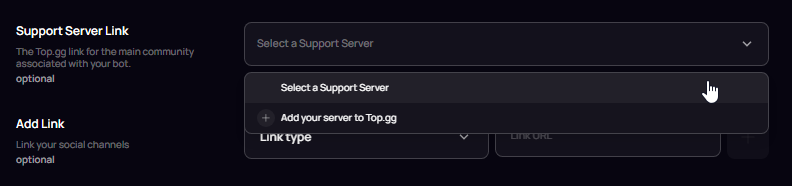
The server is listed already https://top.gg/discord/servers/723809877897883648
lone ether
the bot and the server must be in the same team
or owned by you
it can't be one in a team and one owned by you
prime ether
lone ether
the bot and the server must be in the same team
Ohh you can put servers into teams too?
That could be the issue
lone ether
np
icy summit
I messed up😭 the bot is in 18 servers but it said 16
And I can’t change it
 lone ether
please ask for help in #development not here
 uncut fiber
Hello
I'm new . Could anyone tell me what this server is about.
grand prism
It's a support server for the https://top.gg website

Top.gg
Spice up your Discord experience with our diverse range of Discord Bots and Apps.
 spare patio
@limpid shadow for using https://top.gg/api/v1/projects/@me/commands do we have to create a new top.gg token or the old one will still work?
 gloomy shell
The New commands feature requires a new v1 token
limpid shadow
spare patio
<@121919449996460033> for using https://top.gg/api/v1/projects/@me/commands do w...
new one is neccessary
 covert sapphire
is this reward still available ?
100 vote for first time = 15$
1000 vote = 1$
@gloomy shell
wild stoneBOT
Auction Credits
Credits have been removed.
For more information, refer to #announcements message
 vagrant wigeon
if you change it in the dev portal, it will change on top.gg
you may need to hit the refresh data button though
 cedar isle
vagrant wigeon
you may need to hit the refresh data button though
cedar isle
vagrant wigeon
you may need to hit the refresh data button though
Where is this button on the dashboard?
grand prism
It's on your bot's main page
The "main page" is the page with the description, invite button and reviews
cedar isle
grand prism
The "main page" is the page with the description, invite button and reviews
Ahh, okay thank you. That fixed the issue! 🙂
Would you also happen to know why my analytics page might say there was 10 invites but the bot is in 0 new servers? Is that metric if they just click on the invite button?
grand prism
Top.gg can only count the number of clicks on the "Invite" button. Someone might click the button but ultimately decide not to add your bot to the server
cedar isle
Is that metric unique invite button clicks?
grand prism
I'm not sure about it
cedar isle
I don't remember if I accidentally clicked invite 10 times... 😅 lol
subtle fjord
My first application was rejected but it was approved within 1 hour and now I have been waiting for 2 days, what is the reason?
icy summit
Is this allowed? (Can’t really find it)
You do a command and attach a image, when you break a safety rule, it sends in a channel of my support server (private)
To check if it’s safe (with user id)
And if it is something bad I can ban them from the bot
And if not, I just delete it
I think we can’t..
(When you first use the bot u must accept a TOS,)
But if this is not allowed I will not do this
lone ether
subtle fjord
My first application was rejected but it was approved within 1 hour and now I ha...
-upto
wild stoneBOT
@subtle fjord
When will my bot be reviewed?
Our current average review time is <1 week.
Some bots may take longer to review than others depending on their features. Because of this, we can't guarantee your bot will be reviewed as quickly as someone else's, and there's no exact timeframe for approval. There's also no way to check your position in the queue — but remember, you're not first or last!
You're free to edit your bot's page anytime, both before and after review. This won't affect your place in the queue.
You can read more about our review process here: How the Reviewing Process Works.
In the meantime, please make sure your bot follows all of our Bot Guidelines for a quick and smooth approval!
lone ether
icy summit
Is this allowed? (Can’t really find it)
You do a command and attach a image, wh...
that's not to do with top.gg
keep your channels private to just yourself/developers of the bot
icy summit
lone ether
that's not to do with top.gg
keep your channels private to just yourself/develo...
So it is allowed
grand prism
And yes, you can blacklist users from using your bot without any problem
icy summit
grand prism
And yes, you can blacklist users from using your bot without any problem
But can I temporarily save the pictures? And only use when they use my bot for problems, like really bad things?
grand prism
This is more of a Discord TOS question. If it's clearly explained in your bot's privacy policy and your users don't have a problem with it, then you shouldn't have any either
icy summit
grand prism
This is more of a Discord TOS question. If it's clearly explained in your bot's ...
Yea! Thanks
They accept it :) soo
icy summit
Are we allowed to add a command that is coming soon? Like “coming soon” when you run a command?
lone ether
-guidelines
wild stoneBOT


 lone ether
you can do anything as long as it complies wit the guidelines 
 void arrow
So! Im trying upload a picture to thr top gg auction bids for my bot while I wait for approval the picture is not well liked my I have help
lone ether
you can't place bids for your bot if it's not approved yet
could you show a screenshot of the error?
 brave owl
website shows me this after login.. any ideas? am i banned or something?

----> problem solved, after few tries it worked
 icy storm
 agile estuary
@zinc oracle Sorry for the ping mate, but not sure if people can be posting random facetime invites here 😭
lone ether
agile estuary
How would I remove a server from top.gg? I don't have the option to.
add /delete to the url from the main page
limpid shadow
brave owl
----> problem solved, after few tries it worked
that's odd, do you know what the error said by any chance?
brave owl
limpid shadow
that's odd, do you know what the error said by any chance?
I have no idea, i saw only what i sent :/
 undone bough
I do believe something is broken. I keep on getting redirected back to the discord login screen multiple times asking for me to log into my account and if I do somehow get past that page. Top.gg says that I've requested too many tokens. Not really sure what to do about this. This is for the auctions page
 limpid shadow
😤
 strong wren
im guessing feedback.top.gg is retired, but its still on the header :3

 stiff niche
auctions.top.gg wont let me login.
I placed a bid, can someone please help.
Clicking authorise on oauth just keeps looping.
Sends me right back to authorise every time
bro if i've been banned for literally placing a single bid.. that's dumb.
 lone anvil
@undone bough @stiff niche The issue should be resolved, could you try again?
stiff niche
It is indeed, thanks
undone bough
lone anvil
<@443181357246447617> <@278249072228564992> The issue should be resolved, could ...
Indeed fixed thank you

 ionic wolf
Hello, i was wondering why one of my bot's do not show up on top.gg when searching for it? (https://top.gg/search?q=tartarus)
The bot is verified and listed here: https://top.gg/bot/1299075276281614366
 red sentinel
icy summit
red sentinel
icy summit
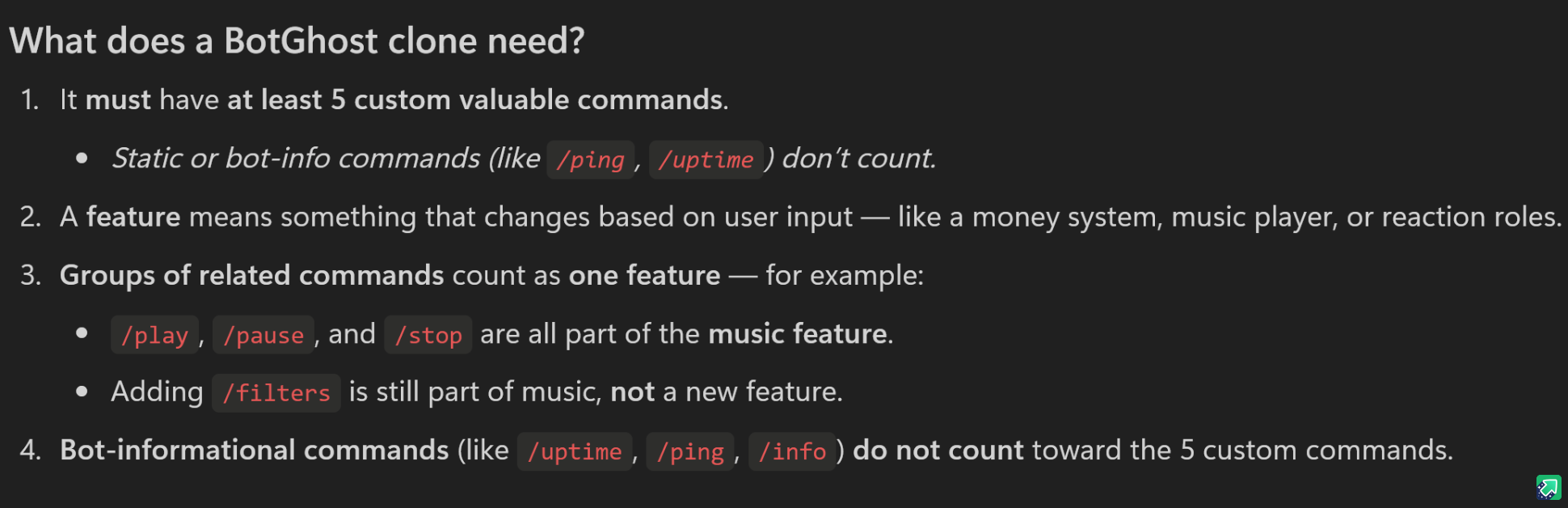
your bot needs to have 1 feature like moderate and stuff and 5 valuable commands like ping help and stuff
red sentinel
ionic wolf
Hello, i was wondering why one of my bot's do not show up on top.gg when searchi...
@ionic wolf
ionic wolf
red sentinel
<@826430920231616573>
@ionic wolf
red sentinel
look at this
this should help...
dont mind background
i was watching something
ionic wolf
well, thats an amazing search system, thanks 
red sentinel
ionic wolf
well, thats an amazing search system, thanks <:larry:1395877088879448165>
dw
lone ether
icy summit
What is 1 “feature”
Like what do you mean by that?
please open a #staff-tickets dispute
lone ether
ionic wolf
Hello, i was wondering why one of my bot's do not show up on top.gg when searchi...
please edit something in your bot's page and it will reindex automatically
icy summit
lone ether
please open a <#1285771377160491049> dispute
Contact a reviewer or a moderator? :)
ionic wolf
reviewer
icy summit
Wait, it was not my bit that got denied, I was just wondering what yall ment with that
ionic wolf
lone ether
please edit something in your bot's page and it will reindex automatically
thanks a lot, that worked 
red sentinel
ig mod comes on the save🤷
lone ether
icy summit
Wait, it was not my bit that got denied, I was just wondering what yall ment wit...
https://bit.ly/botghostclone - this doesn't apply to botghost but it has the information you need
Discover the magic of the internet at Imgur, a community powered entertainment destination. Lift your spirits with funny jokes, trending memes, entertaining gifs, inspiring stories, viral videos, and so much more from users.
lone ether
red sentinel
your bot needs to have 1 feature like moderate and stuff and 5 valuable commands...
please don't give incorrect information to users and wait for people who are staff or experienced users to answer 
red sentinel
lone ether
please don't give incorrect information to users and wait for people who are sta...
i was trying my best🤷😭🙏
 shadow ether
what exactly does it expect

 supple mica
shadow ether
what exactly does it expect
supple mica
shadow ether
what exactly does it expect
https://docs.top.gg/docs/API/v1/projects/#update-discord-bot-commands
https://discord.com/developers/docs/interactions/application-commands#application-command-object
API resource for a projects such as bots or servers submitted on Top.gg

Discord Developer Portal
Build games, experiences, and integrations for millions of users on Discord.
The Discord application command structure 😄
json format
shadow ether
thx
supple mica
icy summit
Is the reviewer note still bugged?
Also, does reviewers read all embeds? If yess I’ll add a little note for them
lone ether
reviewer notes are still not working
if you want to add anything you can dm me and i'll leave a manual note
 tall burrow
I had already sent my bot to analyze more was disapproved, sent again more does not appear in the channel #mod-logs this is normal?
icy summit
lone ether
if you want to add anything you can dm me and i'll leave a manual note
Someone also told me that.. but they never added it .. 
But I’ll dm you!
-# or atleast I think they didn’t
lone ether
tall burrow
I had already sent my bot to analyze more was disapproved, sent again more does ...
-notified
wild stoneBOT
@tall burrow
Bot Review Notifications
If your bot is approved:
- You'll receive an email at the email linked to your Discord account.
- You'll be pinged in #mod-logs and you'll be assigned the <@&265125253443878912> role.
If your bot is declined:
- You'll receive an email at the email linked to your Discord account.
- You'll be pinged in #mod-logs.
💡 Note: If you didn't receive the <@&265125253443878912> role, please ask a Moderator to assign it to you!
 fervent merlin
 sweet grove
fervent merlin
sweet grove
fervent merlin
Can you screenshot the whole page?
lone ether
they opened a ticket
lone ether
fervent merlin
please don't send your images/etc in multiple channels.
fervent merlin
lone ether
please don't send your images/etc in multiple channels.
Im so sorry
 heady wadi
Hello, I'm not sure if this is an issue or not. If I'm not logged in and I go to the top list and scroll down to load more bots, it will return 403 forbidden
and it will retry too many times
 tardy lance
https://top.gg/bot/1394421518062059581
any updates in my bots approval?
Been a little over a week
Top.gg
We received an error response on this page
 pliant mauve
tardy lance
https://top.gg/bot/1394421518062059581
any updates in my bots approval?
Been a l...
pliant mauve
tardy lance
https://top.gg/bot/1394421518062059581
any updates in my bots approval?
Been a l...
-upto
wild stoneBOT
@tardy lance
When will my bot be reviewed?
Our current average review time is <1 week.
Some bots may take longer to review than others depending on their features. Because of this, we can't guarantee your bot will be reviewed as quickly as someone else's, and there's no exact timeframe for approval. There's also no way to check your position in the queue — but remember, you're not first or last!
You're free to edit your bot's page anytime, both before and after review. This won't affect your place in the queue.
You can read more about our review process here: How the Reviewing Process Works.
In the meantime, please make sure your bot follows all of our Bot Guidelines for a quick and smooth approval!
pliant mauve
If you're talking about your bot Animecord. It was declined here: #mod-logs message
 jagged fable
Question, I have a bot but only the server owner can use its commands, is that allowed to do I have to allow administrators to use the commands as well?
tardy lance
pliant mauve
If you're talking about your bot `Animecord`. It was declined here: https://disc...
I ALREADY FIXED IT
strong wren
jagged fable
Question, I have a bot but only the server owner can use its commands, is that a...
You could always do manage server permission
pliant mauve
tardy lance
I ALREADY FIXED IT
If you want to dispute the decline, you may open a ticket in #staff-tickets
icy summit
what do i input here? im so confused
 icy summit
grand prism
https://discord.com/channels/264445053596991498/714045415707770900/1414280045719...
icy summit
grand prism
https://discord.com/channels/264445053596991498/714045415707770900/1414280045719...
yea, i did see that but i still dont uderstand anything
wait
nvm im so confused
tardy lance
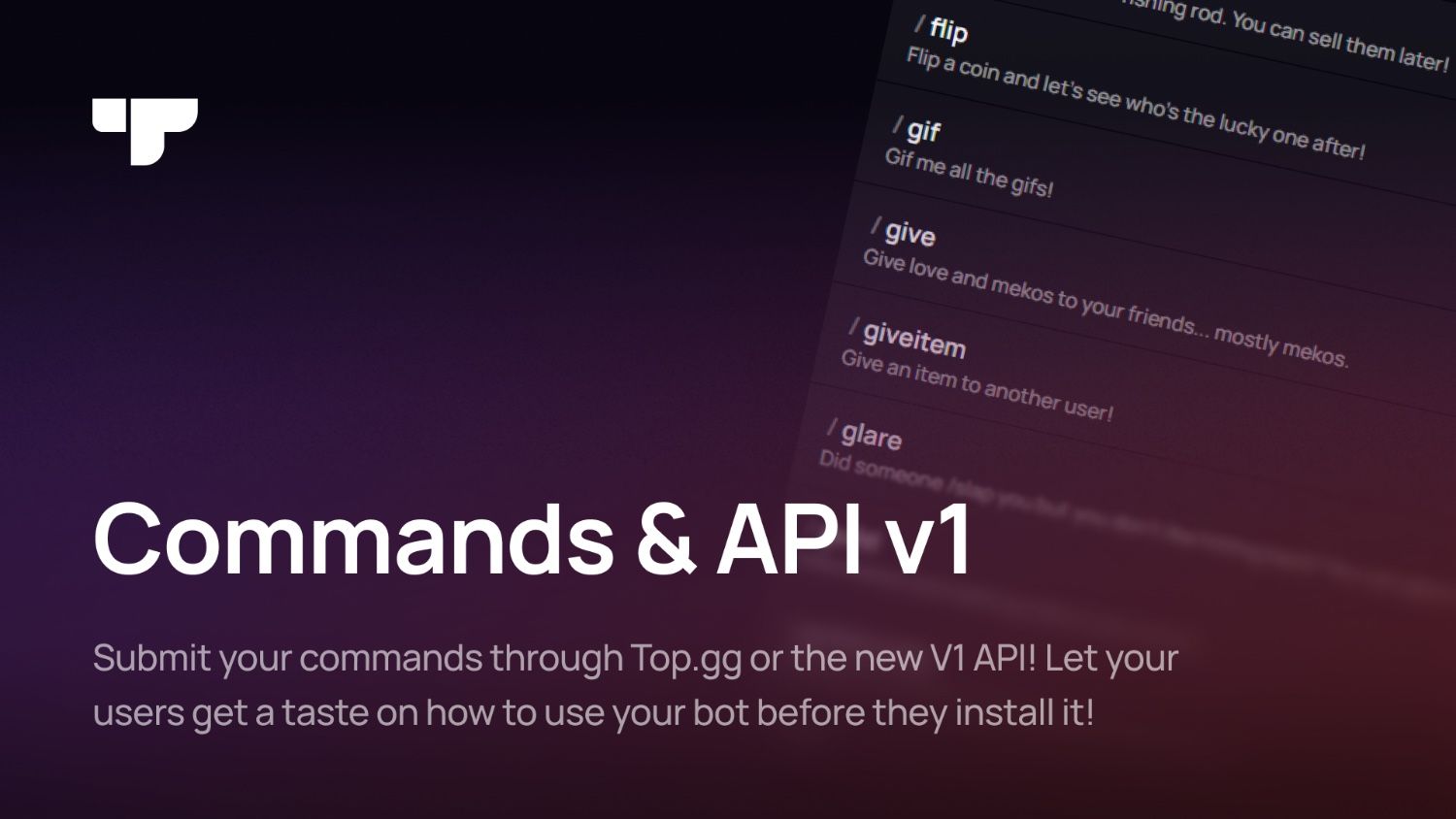
pliant mauve
If you want to dispute the decline, you may open a ticket in <#12857713771604910...
I did before and they said to wait a week
pliant mauve
tardy lance
I did before and they said to wait a week
Have you resubmitted your bot after it was declined?
tardy lance
pliant mauve
Have you resubmitted your bot after it was declined?
it wasnt mb now i did
lone ether
jagged fable
Question, I have a bot but only the server owner can use its commands, is that a...
that's fine
limpid shadow
heady wadi
and it will retry too many times
can you open the query for me, that doesnt look like the list page one
heady wadi
limpid shadow
can you open the query for me, that doesnt look like the list page one
There are two, I guess, and both of them return 403

 limpid shadow
heady wadi
There are two, I guess, and both of them return 403
limpid shadow
heady wadi
There are two, I guess, and both of them return 403
can you DM me an export of your network?
heady wadi
limpid shadow
can you DM me an export of your network?
Sorry, my VPN was on. Turning it off solved the issue
heady wadi
weird, want me to export the network?
red sentinel
Does anyone have how to import commands to top.gg video tutorial or give me yt link in my dms?
heady wadi
limpid shadow
would be good!
want me to export the request as fetch? or another type
limpid shadow
heady wadi
want me to export the request as fetch? or another type
this button

"export HAR (sanitized)"
then DM it to me
red sentinel
Does anyone have how to import commands to top.gg video tutorial or give me yt link in my dms? Asking again🤷
limpid shadow
no, it's a new feature 😔 it'll be added to the official SDK soon
heady wadi
limpid shadow
then DM it to me
alright
 gilded glacier
red sentinel
Does anyone have how to import commands to top.gg video tutorial or give me yt l...
gilded glacier
red sentinel
Does anyone have how to import commands to top.gg video tutorial or give me yt l...
I’m gonna make a GitHub README on how to easily do it
red sentinel
gilded glacier
I’m gonna make a GitHub README on how to easily do it
Okay
gilded glacier
red sentinel
Okay
https://github.com/TermuxHackz/Commands-to-Top.GG
not the best repo name but yeahh
check main.py file should be easy for you
GitHub
red sentinel
gilded glacier
https://github.com/TermuxHackz/Commands-to-Top.GG
not the best repo name but ye...
thanks
gilded glacier
red sentinel
thanks
at the moment it posts ur commands every 24hrs but u can scrape that and post when u need to ig
red sentinel
gilded glacier
at the moment it posts ur commands every 24hrs but u can scrape that and post wh...
okay
limpid shadow
gilded glacier
https://github.com/TermuxHackz/Commands-to-Top.GG
not the best repo name but ye...
👑
red sentinel
gilded glacier
https://github.com/TermuxHackz/Commands-to-Top.GG
not the best repo name but ye...
i use node.js
limpid shadow
red sentinel
i use node.js
you can adapt it to a fetch request
limpid shadow
gilded glacier
at the moment it posts ur commands every 24hrs but u can scrape that and post wh...
btw if you'd want to, it would be awesome to make a PR containing the functionality to our top.gg community maintained python SDK: https://github.com/Top-gg-Community/python-sdk
GitHub
A simple API wrapper for top.gg written in Python. Contribute to Top-gg-Community/python-sdk development by creating an account on GitHub.
gilded glacier
limpid shadow
btw if you'd want to, it would be awesome to make a PR containing the functional...
ahhh bet would do that didnt know
limpid shadow
awesome!
agile estuary
Question, for some reason my website when Iframed in top.gg specifically it takes it to a 404 inside my site instead of the actual home page 
Anyone else having this issue?
limpid shadow
agile estuary
Question, for some reason my website when Iframed in top.gg specifically it take...
I would recommend not using iframes, it heavily reduces your bot page's responsiveness
agile estuary
limpid shadow
I would recommend not using iframes, it heavily reduces your bot page's responsi...
Oh really? I thought it'd load the Iframe after the rest of the page was loaded 
I'll draft up a proper page then, thankyou :)
limpid shadow
I think it depends per browser what it'll do
gilded glacier
gilded glacier
ahhh bet would do that didnt know

 gilded glacier
agile estuary
Question, for some reason my website when Iframed in top.gg specifically it take...
gilded glacier
agile estuary
Question, for some reason my website when Iframed in top.gg specifically it take...
maybe csp headers blocking iframes?
agile estuary
Could be, it is a little weird considering I can then click home from the page it provides, but that probably is it
gilded glacier
agile estuary
Could be, it is a little weird considering I can then click home from the page i...
name of ur bot? or site ?
agile estuary
On my site that I have iframed, I can click to the main page from the 404 it provides then browse my site as normal through it
gilded glacier
agile estuary
On my site that I have iframed, I can click to the main page from the 404 it pro...
whats ur site built with ?
agile estuary
Good ol React
gilded glacier
agile estuary
Good ol React
ohhhh , might be your routin g then ?
agile estuary
 I'll just do a proper page for loading speeds, not offially releasing my bot just yet anyway
 leaden mirage
red sentinel
my bot says its in 0 servers but its actually in 5 servers
leaden mirage
red sentinel
my bot says its in 0 servers but its actually in 5 servers
You need to push the server count to the site using the API
ancient field
red sentinel
grand prism
<https://docs.top.gg/docs/API/v0/bot#post-stats>
how to use it?
@grand prism
how to use it??
leaden mirage
#topgg-api would be the better channel for help regarding the api
red sentinel
okay
proven bolt
@lone ether you declined reactionbot again. It’s stated in !help that the bot does not block emojis sent in the chat. It blocks emoji reactions to posts.
The screenshot you sent me shows panduh sending 👋 in chat. But if you blocked 👋 you can no longer use that emoji as a reaction to a post
lone ether
proven bolt
<@394594679221518336> you declined reactionbot again. It’s stated in !help that ...
ah i'm sorry i'll have another look
lone ether
proven bolt
<@394594679221518336> you declined reactionbot again. It’s stated in !help that ...
can you resubmit the bot to the site please
proven bolt
lone ether
can you resubmit the bot to the site please
Yes I just don’t want to risk getting banned from re submitting lol
lone ether
you won't, i'm going to approve it
lone ether
icy summit
proven bolt
Re submitted
Congratulations!
proven bolt
icy summit
Congratulations!
Thanks!!
 worthy dew
Me and one of my Friend made a music bot
And Subbmitted it
It got rejected due music Command not working as there was some problem with our lavalink
We fixed it
lone ether
you can just resubmit the bot
worthy dew
Resubbimted
worthy dew
lone ether
you can just resubmit the bot
You Reviwed it
 edgy cave
is it just me but the website is super bad rn? i can't even load up my own settings which out getting "500 Something went wrong..."
limpid shadow
edgy cave
is it just me but the website is super bad rn? i can't even load up my own setti...
what are you seeing there?
which URL?
edgy cave

 edgy cave
You can see the countdown in the top to see how long it took for the request
limpid shadow
let me see why
sweet grove
Same
limpid shadow
sweet grove
Same
does it work or break?
sweet grove
Work
edgy cave
limpid shadow
<@648679147085889536> could you try signing out and back in?
Sure, have already done that a few times now, also tried on my PC with the same result
Even locking out took like 5 seconds lol
limpid shadow
that's weird
it's super responsive for me
the top 99% slowest users see a response time of 1.3 seconds
edgy cave
I tried to submit one of my bots and then it just stopped working 😭
 rugged lagoon
@gray tartan
 gray tartan
hello
rugged lagoon
gray tartan
hello
You rejected my application, the same one that had already been approved previously and stated the reason that the bot required a function that does not correspond, to lock the channel obviously the function is to manage channels, are you aware that you made a mistake?
gray tartan
to lock a channel, the function is not manage channels
rugged lagoon
gray tartan
to lock a channel, the function is not manage channels
To block a channel, the function is to manage channels. You are making a huge mistake. I already sent the same bot here and it was approved. You come and disapprove it for something you think is not right?
gray tartan
if you are not happy with my decision, feel free to open a reviewer ticket and we can talk more about it in the ticket
rugged lagoon
gray tartan
if you are not happy with my decision, feel free to open a reviewer ticket and w...
I'll open it anyway, the error was completely filtered by you
rugged lagoon
gray tartan
if you are not happy with my decision, feel free to open a reviewer ticket and w...
qual é pra abrir?
gray tartan
rugged lagoon
which one is to open??
gray tartan
contact a reviewer
rugged lagoon
gray tartan
contact a reviewer
Okay, and which option appears there? First or which one?
gray tartan
you can choose "why was my bot declined"
lone ether
rugged lagoon
To block a channel, the function is to manage channels. You are making a huge mi...
just because it was approved once does not mean it will be approved again
gray tartan
^^^
lone ether
to lock a channel, bots require manage role permission, not manage channels.
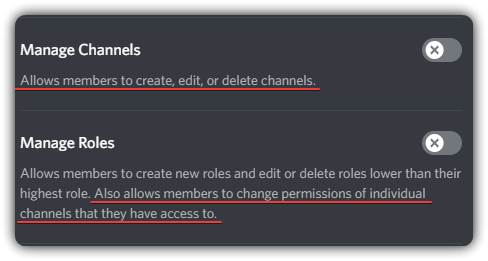
the discord permission for manage roles says it allows you to change individual channel permissions that they have access to
which means it needs that permission to change the permission for the @.everyone role so that they can't send messages
edgy cave
limpid shadow
let me see what that could be
Hey did you figure out what the issue could be? it works when i'm not logged in, but when i am is when it breaks
limpid shadow
not yet
it only seems to happen on your page for just you
does your bot page work fine?
edgy cave
limpid shadow
does your bot page work fine?
not totally sure what that page would be tbh 😭
can't even go to my settings
lone ether
what's your bot id?
edgy cave
honestly i don't remember which one i applied with, wanted to add my 3 bots but then this happened, it's one of these 3
1290353946308775987
1390752371998457947
1356612233878179921
lone ether
limpid shadow
it only seems to happen on your page for just you
i can access their settings page and the delete account button isn't greyed out unlike every other user's
edgy cave

limpid shadow
lone ether
i can access their settings page and the delete account button isn't greyed out ...
thats not uncommon
we dont grey it out for everyone
just people who own projects or teams
but u cant see the projects cuz they're in queue
lone ether
oh ic
 sturdy swan
Okay so I want to rejoin a server I left two years ago that I discovered via top gg
Unfortunately all links I have or reference that server have all been rendered invalid
Is there any way to access this server or request them to update their invite link via the top gg network?
 normal narwhal
no, unfortunately if the invite is invalid then you cannot. if it’s still listed you can send the link here and we can have it taken down from listing for an invalid invite
sweet grove
or report it
sturdy swan
normal narwhal
no, unfortunately if the invite is invalid then you cannot. if it’s still listed...

Top.gg
A support server dedicated to those with ASD(Autism Spectrum Disorder).
If you could somehow make an automated system that checks and notifies servers when they have a dead link that would prevent this sort of thing idk
grand prism
I think Veld needs to fix the embed title for servers
 cursive pebble
Hello i paid for an auction and i see nothing can someone help please ?
grand prism
#auctions-support
sweet grove
grand prism
I think Veld needs to fix the embed title for servers
will note down for him
lone ether
sturdy swan
https://top.gg/discord/servers/543749836785262593
deleted
 brazen merlin
I know this sounds stupid, but how would I pay the ad? With my balance I'm having issues with this because every time I try and pay it. It just brings up my card?
 cursive pebble
brazen merlin
I know this sounds stupid, but how would I pay the ad? With my balance I'm havin...
cursive pebble
brazen merlin
I know this sounds stupid, but how would I pay the ad? With my balance I'm havin...
grey button 🙂
brazen merlin
cursive pebble
grey button 🙂
Thank you. Now that I see that, I feel extremely dumb. 😭
cursive pebble
brazen merlin
Thank you. Now that I see that, I feel extremely dumb. 😭
i made the same 1 hour ago x)))
sturdy swan
lone ether
deleted
Okay so is there a way I can access that server any other way that you would suggest if every link is gone?
lone ether
nope sorry, you'll have to try elsewhere on other server lists or google
 drifting token
What determines if my bot is searchable or not? I cannot find it at all with the search function, but it is definitely added to the site, as I can view it on my profile


 lone ether
drifting token
What determines if my bot is searchable or not? I cannot find it at all with the...
lone ether
drifting token
What determines if my bot is searchable or not? I cannot find it at all with the...
pretty sure those are paid slots so they'd only show up there if you won in auctions
when you actually press search, the bot should show up then
drifting token
Thats not it, it literally just got updated now after i complained lol 🤔
 lone ether
ah weird
limpid shadow
grand prism
I think Veld needs to fix the embed title for servers
fixed
thanks
will push in next update
limpid shadow
lone ether
pretty sure those are paid slots so they'd only show up there if you won in auct...
those are not paid slots, there's no AD tag with them
limpid shadow
drifting token
Thats not it, it literally just got updated now after i complained lol 🤔
your bot ranks highly, but votes are still pretty important for the algorithm, we generally don't boost projects that have no votes. Just a handful of votes should propel you much higher in wider search queries
How long ago was your bot approved @drifting token
drifting token
limpid shadow
How long ago was your bot approved <@215277233638604800>
no idea. between 6 and 12 months i think
limpid shadow
noted, generally there's a little bit of randomness on our search results due to the database we use for it
you should definitely appear higher than "Wings" though
I can take a look at that
drifting token
it was weird that I wasnt appearing at all for an extended time despite searching for it specifically
limpid shadow
that is weird indeed
drifting token
@limpid shadow Thank you for the info. Ill work on getting some votes 👍
limpid shadow
drifting token
<@121919449996460033> Thank you for the info. Ill work on getting some votes 👍
I'm deploying a slight tweak to the algorithm that should boost closer matches even if you have 0 votes, so you at least outrank bots that have the same votes as you on 0 votes
sweet grove
I mean, it sends a webhook after you vote so you could use that as a feed. There is also a public number of votes on the site.
 open hinge
hi! i made a payment of $250 and received official confirmation from FastSpring, but I do not see any confirmation that my payments have been processed under "Pay"
open hinge
open hinge
hi! i made a payment of $250 and received official confirmation from FastSpring,...
sorry, just went to read the auctions channel and have submitted the appropriate ticket
lone ether
 limber light
How can I tell whether my bot has been approved or not?
 edgy cave
limpid shadow
thats not uncommon
edgy cave
limpid shadow
thats not uncommon
just looked a bit more into this, it seems like i can't fetch https://kumo.network-n.com/configs/sites/topgg.json (ERR_BLOCKED_BY_CLIENT) when i'm logged in
Also seems to get the same error on different browsers and IPs (both VPNs and at home/work) too
limpid shadow
edgy cave
just looked a bit more into this, it seems like i can't fetch https://kumo.netwo...
That’s not necessary to load the website
You just have an adblocker
edgy cave
limpid shadow
You just have an adblocker
i don't have one on the other browser i used
i don't use Microsoft Edge for anything


i also get forbidden on https://api.anonymised.io/v3/tag/configs and nothing on https://aegis.anonymised.io/health


https://aegis.anonymised.io/health is a cors error

 lyric orbit
So one of my bots was taken down off the site and no one told me why?
 stoic socket
edgy cave
i don't use Microsoft Edge for anything
stoic socket
edgy cave
i don't use Microsoft Edge for anything
this is a server side error, so you wont see a request in logs with an error
same with console
the cors error is unrelated 👍
normal narwhal
lyric orbit
So one of my bots was taken down off the site and no one told me why?
if this is the case, i recommend opening a staff ticket, specifically moderator;
#staff-tickets message
but looking at #mod-logs , i don't see one with your id as owner removed
vagrant wigeon
lyric orbit
So one of my bots was taken down off the site and no one told me why?
we do not have logs for this at the moment, if we removed it, it likely didnt abide by our guidelines
edgy cave
stoic socket
this is a server side error, so you wont see a request in logs with an error
just trying to get all the infomation i can get to you guys, i'm still facing the issue ¯_(ツ)_/¯
 drowsy wedge
could I get the bot developer role please?
icy summit
drowsy wedge
could I get the bot developer role please?
You need to have a accepted bot on top gg :)
To get that role
drowsy wedge
icy summit
You need to have a accepted bot on top gg :)
I have it
search up Tino Bot
icy summit
drowsy wedge
I have it
Under this user?
drowsy wedge
ye
vagrant wigeon
magic
drowsy wedge
crazy
icy summit
drowsy wedge
ye
Huh there is no logs 😭 well anyways congrats on the role :)
drowsy wedge
icy summit
Huh there is no logs 😭 well anyways congrats on the role :)
thanky
edgy cave
Does a bot need to have guild install enabled before we can add it to the website? i'm trying to add my bot which is a user install bot only
and it's saying that it can't find the bot
The bot: @jagged sage
 normal narwhal
edgy cave
Does a bot need to have guild install enabled before we can add it to the websit...
normal narwhal
edgy cave
Does a bot need to have guild install enabled before we can add it to the websit...
we currently don’t support user install apps on the site
edgy cave
normal narwhal
we currently don’t support user install apps on the site
rippp
but good to know i guess
cedar isle
If my analytics tab says my bot was invited 45 times, howcome my page still says it's in 0 servers?
gloomy shell
Do you mean your servercount on top.gg still shows as 0? You have to send your servercount to our api
-servercount
wild stoneBOT
To have your bot's server count displayed on Top.gg, please read the documentation on server/shard posting.
cedar isle
gloomy shell
Do you mean your servercount on top.gg still shows as 0? You have to send your s...
Awkward moment... I didn't know about that. I'll do this now haha
agile estuary
Which ticket would I open up to reset reviews on my bot? All 5* it's just because they're for the old version of the bot
gloomy shell
Mod tickets > other
 wraith rose
Sorry to bother. I’ve updated my bots user icon photo a day ago in the dev portal and the photo is not updating on discord or on the Top.gg page even when “refreshing data”. I’ve checked my dev portal and it’s saved my edit.
Any suggestions?
grand prism
Make sure you updated it in the Bot tab. Changing the icon in the general info will change the icon of your app, not the bot itself
wraith rose
grand prism
Make sure you updated it in the `Bot` tab. Changing the icon in the general info...
A simple mistake on my part. I apologize and thank you for your time 
sturdy swan
I need help, I’m trying to upload my discord server to the website, but nothing is happening, my server isn’t on the site yet, why? How long does it take?
@grand prism
 modern dirge
Hi I need help, trying to understand. The server vote reset from 300+ to 9 vote.
grand prism
modern dirge
Hi I need help, trying to understand. The server vote reset from 300+ to 9 vote.
Yes, votes reset every month
grand prism
sturdy swan
I need help, I’m trying to upload my discord server to the website, but nothing ...
If the server description meets the guidelines, it should be automatically approved. If not, it's sent for manual review. How long might this take? I have no idea
modern dirge
grand prism
Yes, votes reset every month
Seriously but didn't read that anywhere, can you direct me to the link

 brave lodge
 grand prism
#auctions-support / #auctions-tickets
brave lodge
ok
sturdy swan
grand prism
If the server description meets the guidelines, it should be automatically appro...
Yeah, the description meets the guidelines.
lone ether
you'll have to wait till someone manually reviews it then
sturdy swan
lone ether
you'll have to wait till someone manually reviews it then
It still says it’s under the review.
lone ether
yes it will say it until it's reviewed
sturdy swan
Ok


 limpid shadow
 inland wyvern
The bot is only on 91 servers. Why does it appear like this?
inland wyvern
The bot is only on 91 servers. Why does it appear like this?
we still need to update our analytics panel. it's running on quite an old stack now
heady wadi
What should we put here? an array of https://discord.com/developers/docs/interactions/application-commands#application-command-object ?

Discord Developer Portal
Build games, experiences, and integrations for millions of users on Discord.
 cursive ledge
heady wadi
What should we put here? an array of https://discord.com/developers/docs/interac...
cursive ledge
heady wadi
What should we put here? an array of https://discord.com/developers/docs/interac...
your slash commands
from your bot
heady wadi
yeah an array of application-command-object works
But they should ignore the user and message context menu, because it's loaded with slash commands
 cursive ledge
i think its only like
/reportuser
/music
maybe something like that but ask an moderador
heady wadi
cursive ledge
i think its only like
/reportuser
/music
yeah and you can put the payloads of application-command-object
cursive ledge
heady wadi
yeah and you can put the payloads of application-command-object
when u have already your bot aproved.
Im waiting for mine.
heady wadi
Good luck!
heady wadi
heady wadi
But they should ignore the user and message context menu, because it's loaded wi...
and please support sub commands
grand prism
heady wadi
and please support sub commands
#1413863562924785736 is probably a better place to post your feedback about "commands api"
 ocean sequoia
Hi is it possible when someone upvotes your server on the top.gg website. They get a role for it for upvoting like temporary? so like they get the role for 12 hours and if they want the role again they have to upvote again. Sorry if this sounds like a load a babble haha.
lone ether
there's no support for servers iirc atm
limpid shadow
ocean sequoia
Hi is it possible when someone upvotes your server on the top.gg website. They g...
You can use the new V1 api to do this. Check the user id like this:
https://top.gg/api/v1/projects/@me/votes/<discord_user_id>?source=discord
this gives you a response like this:
{
  "created_at": "2023-10-01T12:34:56.789Z",
  "expires_at": "2023-10-01T18:34:56.789Z",
  "weight": 1
}
Add the role, then set a reminder for your bot to check if a new vote was made a little after the expiration date (e.g. 5 hours to an hour) before removing the role
ocean sequoia
limpid shadow
You can use the new V1 api to do this. Check the user id like this:
```
https:/...
hiya where do I add that command? I sthat through top.gg bot through slash commmand?
limpid shadow
ocean sequoia
hiya where do I add that command? I sthat through top.gg bot through slash commm...
no, this is a bot you would have to make yourself using our API
 twilit breach
hi can i sell discord bots here
icy summit
twilit breach
hi can i sell discord bots here
You can’t :)
lone ether
twilit breach
hi can i sell discord bots here
please refrain from asking the same question in multiple channels
 eager dew
Hi. I have few very general questions about a bot I’m planning to make and possibly list here. However i have some concerns before doing so…
The bot I have in mind is gonna be an AI image and video generator that uses materials from our site but just in discord bot form. What restrictions do NSFW bots have on bot listings? Is it even worth attempting to add it to top.gg given its tendency for generating NSFW content. The content itself while not illegal is still adult in nature so I’m trying to determine the best path forward.
lone ether
eager dew
Hi. I have few very general questions about a bot I’m planning to make and possi...
keep them locked to nsfw channels
make sure nothing illegal is on
and you're good
eager dew
lone ether
and you're good
Excellent thank you 🙏
lone ether
np
 slender obsidian
Hi, im unable to add my server 873192973762986044 to the servers thingy
 slender obsidian
lone ether
https://top.gg/servers/873192973762986044
slender obsidian
lone ether
https://top.gg/servers/873192973762986044
403
lone ether
slender obsidian
403
can you dm me the server link?
slender obsidian
lone ether
can you dm me the server link?
sure
lone ether
-apps @whole zealot
wild stoneBOT
@whole zealot
Volunteer Applications
Hey! It seems like you're interested in volunteering for Top.gg. We're glad for any help we can get regarding our server events, support articles, bot reviewing, moderation, and more!
 Reviewers
Reviewers are Top.gg staff and must be 18 or older. Reviewers review the discord bots and servers submitted to the site before they are listed to make sure they follow our rules.
 Moderators
Reviewer is a stepping stone to Moderator - if you wish to be a Moderator you must first apply and be accepted as a Reviewer.
Applications are currently: CLOSED
 whole zealot
@lone ether sorry for bothering you then I dint know what the command was 😅
And it seems I don't even qualify to apply, also it's closed
I hope you have a good day
lone ether
all good, only staff can use commands
 loud holly
Hello, I was wondering where I should go to discuss a service not being accepted?
lone ether
loud holly
Hello, I was wondering where I should go to discuss a service not being accepted...
which service would that be?
loud holly
Little Cove, it said no dating/NSFW adults only when I got the email, but it is a completely sfw server, just for adults only.
So I tried to resubmit, but removed the 18+ in it.
lone ether
can you send the topgg server link please?
loud holly
Ohhh server
Yes! One moment
Check out Little Cove 𓆉 Discord Server on Top.gg, the #1 Discord Server List! https://top.gg/discord/servers/753381597603897344?s=00697c074d894
lone ether
you have to remove "18+" from the tags as well
loud holly
Done! 
Is there a way to say that it is 18+ only without triggering the not being accepted?
I removed them and I suppose people can see when they join, but I do like to try to make it clear
lone ether
loud holly
Is there a way to say that it is 18+ only without triggering the not being accep...
sorry you'll have to implement that in the server. we are trying to get away from adult/nsfw servers completely and mentioning 18+ would attract people who are interested in those
loud holly
lone ether
sorry you'll have to implement that in the server. we are trying to get away fro...
Super valid, thanks for letting me know
lone ether
np!
lone ether
.ban @obsidian pewter 7 joined to advertise
 cerulean fulcrumBOT
Banned ahmad021283

 young plinth
Hi I was wondering if it's possible to submit a "bot" that functions purely as an activity, without any commands or additional features. The activity in question is DOOM 1993 Shareware
 exotic wagon
sturdy swan
I tried importing the commands
exotic wagon
sturdy swan
I tried importing the commands
Same here. I am not sure how to do it
gilded glacier
exotic wagon
Same here. I am not sure how to do it
Discord js ?
exotic wagon
gilded glacier
Discord js ?
Ye
gilded glacier
exotic wagon
Ye
https://github.com/TermuxHackz/Commands-to-Top.GG
- added discord-js example
GitHub
 exotic wagon
gilded glacier
https://github.com/TermuxHackz/Commands-to-Top.GG
- added discord-js example
exotic wagon
gilded glacier
https://github.com/TermuxHackz/Commands-to-Top.GG
- added discord-js example
2025-09-11T03:36:08.793Z [INFO] 🚀 Starting bot...
2025-09-11T03:36:10.958Z [INFO] 🚀 Bot logged in as Everything Bot#7487 (ID: 865690661188927549)
2025-09-11T03:36:10.959Z [INFO] 📊 Connected to 299 guilds
(node:3619406) DeprecationWarning: The ready event has been renamed to clientReady to distinguish it from the gateway READY event and will only emit under that name in v15. Please use clientReady instead.
(Use `node --trace-deprecation ...` to show where the warning was created)
2025-09-11T03:36:11.144Z [ERROR] ❌ Failed to sync commands: You cannot remove this app's Entry Point command in a bulk update operation. Please include the Entry Point command in your update request or delete it separately.
2025-09-11T03:36:11.144Z [INFO] ✅ Command sync completed: 0 commands
2025-09-11T03:36:11.145Z [INFO] ✅ Started periodic Top.gg command updates (every 24 hours)
2025-09-11T03:36:11.145Z [INFO] ✅ Top.gg integration started
2025-09-11T03:36:12.804Z [ERROR] ❌ Error posting commands to Top.gg: Request failed with status code 401
2025-09-11T03:36:12.805Z [INFO] ✅ Initial Top.gg commands posted
I got it. I was using my topgg token instead of the commands token
grand prism
FYI you can use token from API v1 in v0 but you can't do it the other way
gilded glacier
exotic wagon
```js
2025-09-11T03:36:08.793Z [INFO] 🚀 Starting bot...
2025-09-11T03:36:10.958...
fixed deprecation warnings tho and syncing issue
limpid shadow
gilded glacier
<:poggythumbsup:819012393031696395>
thanks for helping out people here, goated!
gilded glacier
limpid shadow
thanks for helping out people here, goated!
 limpid shadow
 exotic wagon
gilded glacier
https://github.com/TermuxHackz/Commands-to-Top.GG
- added discord-js example
exotic wagon
gilded glacier
https://github.com/TermuxHackz/Commands-to-Top.GG
- added discord-js example
I added that index file to my current index file, started the bot, then removed it and restarted the bot, and I get this
[SLASH_COMMANDS] Registration failed {
  status: 400,
  code: 50240,
  discordCode: 50240,
  message: "You cannot remove this app's Entry Point command in a bulk update operation. Please include the Entry Point command in your update request or delete it separately.",
  method: 'PUT',
  url: 'https://discord.com/api/v10/applications/865690661188927549/commands'
}
I ran this script to remove any entrypoint commands but it could not find any
const { Client, GatewayIntentBits } = require("discord.js");
require("dotenv").config();

const client = new Client({ intents: [GatewayIntentBits.Guilds] });

client.once("ready", async () => {
    console.log(`Logged in as ${client.user.tag}`);

    try {
        // Fetch all global commands
        const commands = await client.application.commands.fetch();

        // Find the Entry Point command (adjust name if different)
        const entryPoint = commands.find(cmd => cmd.name.toLowerCase() === "entrypoint");

        if (!entryPoint) {
            console.log("No Entry Point command found.");
        } else {
            // Delete the Entry Point command
            await client.application.commands.delete(entryPoint.id);
            console.log(`Deleted Entry Point command: ${entryPoint.name}`);
        }

    } catch (err) {
        console.error("Error deleting Entry Point command:", err);
    } finally {
        process.exit(0); // Exit the script after finishing
    }
});
PS you can remove syncing commands, you dont always need to sync commands to discord all the time anyways
ive seen the issue though, just a sec
gilded glacier
exotic wagon
I added that index file to my current index file, started the bot, then removed ...
just to be sure there is an original ping commandandinfo command, did you remove those ?
 exotic wagon
no?
gilded glacier
exotic wagon
no?
LMAO ,
ive pushed fix
gilded glacier
exotic wagon
no?
- doesnt add those commands to your existing, only syncs ur existing (but stillchecks if theres any entry point command
exotic wagon
I still get the registration error
lone ether
please move to #development guys
exotic wagon
sorry
lone ether
young plinth
Hi I was wondering if it's possible to submit a "bot" that functions purely as a...
a discord activity? playable? yes
 limpid galleon
how can I escalate a dispute?
lone ether
limpid galleon
how can I escalate a dispute?
work it out with the reviewer first. be patient please
limpid galleon
lone ether
work it out with the reviewer first. be patient please
I'll try be patient...if the reviewer doesn't respond within a reasonable timeframe though can someone else please take over the ticket? it should be a slam dunk application ngl...the bots already had several weeks uptime on my VPS and servicing several guilds with zero hiccups ..
lone ether
you have only waited a couple of hours. wait up to 24 hours and then ping them again.
as you can see the reviewer is offline, they will reply when they are available
lone ether
 digital drift
Subcommands are not rendered on the top.gg page right?
digital drift
Subcommands are not rendered on the top.gg page right?
not supported yet but there's plans to
 glacial scarab
guys
how to upload pictures
on my bot bio
?
anyone here
<@&817055174613794826>
lone ether
glacial scarab
on my bot bio
html image tag
glacial scarab
lone ether
html image tag
hmm can you explain :/ idk this
lone ether
glacial scarab
hmm can you explain :/ idk this
-htmldesc
wild stoneBOT
@glacial scarab
You can achieve this using Markdown or HTML in your bot's description. You can ask in #development for help or use this HTML and Markdown cheatsheet for more resources.
lone ether
click on the link, it'll be helpful
 daring hedge
 ocean compass
Are there moderators here who check other sites on top.gg and can approve them?
ocean compass
Are there moderators here who check other sites on top.gg and can approve them?
Other sites? Reviewers currently only review Discord servers and discord bots
ocean compass
my discord server is what I'm talking about
grand prism
Most servers are accepted by automod if they don't break the guidelines. If automod can't accept them, they're sent for manual verification
If you know why your server might not have been automatically accepted, you can fix it and resubmit your server. If not, you have to wait until it is manually checked
ocean compass
don't know why it was not accepted
wild stoneBOT
When will my bot be reviewed?
Our current average review time is <1 week.
Some bots may take longer to review than others depending on their features. Because of this, we can't guarantee your bot will be reviewed as quickly as someone else's, and there's no exact timeframe for approval. There's also no way to check your position in the queue — but remember, you're not first or last!
You're free to edit your bot's page anytime, both before and after review. This won't affect your place in the queue.
You can read more about our review process here: How the Reviewing Process Works.
In the meantime, please make sure your bot follows all of our Bot Guidelines for a quick and smooth approval!
agile estuary
Issue,
Whenever I try adding a support server & then click save it prevents me from doing so, anyone have an idea?
 grand prism
They must both belong to the same team afaik
limpid shadow
That is correct, either the same team or same owner
if it shows up it should be fine tho
what error do you see @agile estuary
agile estuary
limpid shadow
what error do you see <@624983983624552448>
No errors, but I will verify to make sure they're both in the same team.
agile estuary
like I'd click save & it wouldn't actually save it
Yeah not having them in a team or the same team was the issue :)
lone ether
@worldly reef ask for help here. not a reviewer ticket.
 worldly reef
lone ether
<@853094854683000894> ask for help here. not a reviewer ticket.
worldly reef
lone ether
<@853094854683000894> ask for help here. not a reviewer ticket.
what is it


@fluid birch hey whats the problem with this
 fluid birch
worldly reef
<@286224826170081290> hey whats the problem with this
fluid birch
worldly reef
<@286224826170081290> hey whats the problem with this
your project is currently a draft and is not visible to anyone else hence the 404
 outer shuttle
How I become a reviewer?
lone ether
outer shuttle
How I become a reviewer?
-apps
wild stoneBOT
@outer shuttle
Volunteer Applications
Hey! It seems like you're interested in volunteering for Top.gg. We're glad for any help we can get regarding our server events, support articles, bot reviewing, moderation, and more!
Reviewers
Reviewers are Top.gg staff and must be 18 or older. Reviewers review the discord bots and servers submitted to the site before they are listed to make sure they follow our rules.
Moderators
Reviewer is a stepping stone to Moderator - if you wish to be a Moderator you must first apply and be accepted as a Reviewer.
Applications are currently: CLOSED
outer shuttle
lone ether
-apps
How do I know if the application is open? Will announce in #announcements?
normal narwhal
yes 
spare patio
limpid shadow
what do you mean with that
hey, what is this for?
 limpid shadow
you can import your slash commands for a commands tab on your bot page
spare patio
I thought the "Import from discord" button will automatically do that, but it didnt worked
spare patio
ohk, so we have 2 options to upload the commands, one is through the API and the other way is by JSON?
limpid shadow
yes
if you dont want to integrate your bot with top.gg, you can export the json from your bot and paste it in here
spare patio
I'll try with the JSON
icy summit
analytics tab doesnt work on my bot
lone ether
it takes a while to load
icy summit
what does this mean?...

 spring lava
Why Is my bot pfp broken
spare patio
limpid shadow
no you need to import the JSON
done ty 
 sweet grove
spring lava
Why Is my bot pfp broken
sweet grove
spring lava
Why Is my bot pfp broken
-refreshdata
wild stoneBOT
@spring lava
- Go to your bot's main page (https://top.gg/bot/YOURBOTID).
- Click Refresh Data under Creator Controls. (Click Info tab if you're on phone).
- Refresh the page.
💡 Note: Ensure you changed the bot's avatar/name in the Discord Developer Portal, and not the app's icon/name.
 sweet grove
icy summit
what does this mean?...
sweet grove
icy summit
what does this mean?...
Where do you see this?
icy summit
sweet grove
Where do you see this?
analytics
maybe it was with a issue that pushed server stats? (its fixed!!)
icy summit
spring lava
Why Is my bot pfp broken
same issue sometimes, its just text
spring lava
icy summit
same issue sometimes, its just text
Yes, it's fixed now 😊
strong wren
heya, what is the easiest way to get a commands json to upload to top.gg? I don't really want to have to manually make each bit since it would take ages, wanted to know if theres a like tool to do it or some code for it. If its needed, Discord.py is being used for the bot :)
grand prism
You can send it via API
How to get JSON of your bot's commands? You can probably just fetch them from the discord api but this question is better for #development. Idk python too much
strong wren
alr
I knew about the api since i do vote and server count stuff so was basically just asking about getting the json
 barren plaza
Hello there I got a dm from this person asking if I would buy some art and request a commission for art


Can one of you guys handle her
lone ether
will look into it thank you!
barren plaza
Here is her user id too
1413180419037331578
lone ether
cheers
barren plaza
Ok
gilded glacier
lone ether
thanks!
 rare lily
Hi, I wanted to mention a situation on the topgg website. It won't let me vote for the bots. It tells me there's a problem and won't let me use the site anymore. Do you know what I can do?
strong wren
rare lily
Hi, I wanted to mention a situation on the topgg website. It won't let me vote f...
can you share the error
rare lily
strong wren
can you share the error
 wild stoneBOT
@rare lily
Troubleshooting steps
Make sure you're logged in the correct Discord account on Discord web: https://discord.com/login. Then log in again at Top.gg.
Try these steps in order:
- Turn off ad blockers/VPNs and try again.
- Log out and log back in.
- Use a different browser (not Opera/Brave, they cause issues sometimes).
- Use incognito mode on any browser.
- Use a different device.
- Wait a few hours. If the issue persists, come back for more help!
lone ether
please try these steps, it should resolve it
rare lily
lone ether
please try these steps, it should resolve it
I already tried it and it gives me the same thing
lone ether
rare lily
I already tried it and it gives me the same thing
have you tried all of those steps?
rare lily
lone ether
have you tried all of those steps?
yes 
lone ether
@rare lily have you tried clearing cache and browser data
heady wadi
rare lily
Some of our users experienced this issue, changing the language to English solved it
rare lily
heady wadi
Some of our users experienced this issue, changing the language to English solve...
I'll try
rare lily
heady wadi
Some of our users experienced this issue, changing the language to English solve...
You were right, thank you very much!!
lone ether
heady wadi
Some of our users experienced this issue, changing the language to English solve...
that's so weird ill forward to dev team thank you
 radiant bay
why is it that I have to be the ower of the server to add the bot? I have full admin perms otherwise
ive not had this issue with any other bot
gloomy shell
radiant bay
why is it that I have to be the ower of the server to add the bot? I have full ...
what bot?
that would be a discord limitation if you can't add a bot to a server, not from us
gloomy shell
i believe admins should be able to do it  are you getting an error message?
radiant bay
will screenshot it one sec
radiant bay
gloomy shell
i believe admins should be able to do it <:HMM:1126310195199488040> are you gett...
this is the error from top.gg and the other image is the role group im in on the server im trying to add it to


made sure im selecting the right server on the list as im admin in 3 different servers
gloomy shell
hm yeah it looks like we're saying you have to be the owner to list it, so that is the problem. if youre wanting management capabilities, you can have the owner of the server add it to the site, then add the server to a Top.gg team and invite you to the team so that you can manage the server page moving forward.
I think admins used to be able to add servers, but since we've brought it back it was changed.
radiant bay
is there any feedback to change that? Also, i'll probably need the owner to temporarily hand me the server (dont think he'll have an issue) as i'll have to walk him through it otherwise - its doable but a pain.
If i was made owner, added the bot, then handed the server back to him, would I as admin still be able to manage it ?
gloomy shell
you would still have to set up the Top.gg team i mentioned. we're open to feedback and I can make sure it gets to our team.
-team
wild stoneBOT
To create a team:
Go to https://top.gg/teams/new
Fill out the name, description, and icon (optional)
Submit to be redirected to your team's edit page
From there, you can add members, edit details, or delete the team!
Read more about teams in our support article!
radiant bay
will set up the team and talk to the owner - thanks
radiant bay
gloomy shell
you would still have to set up the Top.gg team i mentioned. we're open to feedba...
i assume once I get the server listed i'll see the option to add it to the team page ? i dont see anything yet after i made the team
gloomy shell
correct
you'll edit the servers page adn there is an option to transfer to a user or team
they could also just transfer to you directly as a user
sorry that is a new feature and i forgot about it
radiant bay
np. its not so much adding the bot will be difficult to walk the owner through, its the bit about the teams. im moreso the technical one on staff lol
thanks
gloomy shell
youre welcome!
ocean compass
I have a question for support:
There are many dating and adult servers on your site (top.gg), why can't mine be accepted?
gloomy shell
we do not allow dating or adult servers. if you see one on our site, please report it so that we can remove it
ocean compass
ok, these are the adult servers you approved: (btw just type in your search engine: "adult" or "dating")
https://top.gg/discord/servers/744573720861679616
(the description says it's for adults only)
https://top.gg/discord/servers/744355525034844160
(hashtag with "AdultOnly"):
https://top.gg/discord/servers/746373195024412672
https://top.gg/discord/servers/543739273048956929
(description):
https://top.gg/discord/servers/704060823342678016
https://top.gg/discord/servers/543749837166944257
dating:
https://top.gg/discord/servers/747612961467441152
https://top.gg/discord/servers/542882460900679681
and many more
sweet grove
ocean compass
ok, these are the adult servers you approved: (btw just type in your search engi...
You can report these using the on-site report button
ocean compass
sweet grove
You can report these using the on-site report button
there are hashtags "AdultOnly" and "dating" on your site, used by various servers repeatedly, I do not understand it, and in addition, there are official dating and adult servers, and mine can not exist, I also do not understand it.
gloomy shell
We are working on improving the moderation of our tags system. Its something we know is an issue and we're working to address  thank you for bringing it to our attention. we will continue to work towards better systems and work on going through the current tags in the meantime
@ocean compass - i do want to clarify that just because a server says "adults only" in its description doesnt mean that we disallow it. we disallow 18+ or "adult themed" servers.
similarly with dating, just because a server has "dating" or "Date" in it description and shows up in those search results doesnt mean its actually about dating other humans on discord or engaging in those activities. youve only linked one server that actually breaks our rules
ocean compass
and that's exactly my point, the only thing my server is associated with for adults is the name and the fact that only adults are allowed to enter because the purpose of the server is to connect these people, there is no adult content there, so my server will be accepted?
gloomy shell
as long as thats clear in your description it should be fine then, yes
ocean compass
In order not to litter this l channel, I sent suggestions on a private message @gloomy shell
 lofty flax
i dont enter command from discord change many different browsers but still not working
 main blaze
Vote button isn’t loading

 undone gate
i also had some trouble voting, no rush though 
sturdy swan
hi my vote button isn’t working too

 vocal vapor
Same problem
 thorn bear
 frosty skiff
Same with mine ^
frosty skiff
Same with mine ^
Same here
 uncut patio
Same problem cannot vote
 young swan
Hi first post, still seeing voting issues.
lone ether
cc @limpid shadow
 weak latch
same here, my friend checked on her computer, and it works there, so i was able to vote using desktop view on mobile
 lone ether
which bots are you guys trying to vote for please? @weak latch @young swan @winter sail @uncut patio @thorn bear @vocal vapor @frosty skiff @sturdy swan @undone gate @main blaze
send the link!
main blaze
lone ether
which bots are you guys trying to vote for please? <@271226105933856768> <@28017...
Karuta but I also tried dank memer
weak latch
tofu/anigame, same issue
young swan
Interesting I tried that. No go for desktop view
main blaze
lone ether
send the link!
Top.gg
Spice up your Discord experience with our diverse range of Discord Bots and Apps.
undone gate
lone ether
which bots are you guys trying to vote for please? <@271226105933856768> <@28017...
dank memer  let me grab the link
young swan
lone ether
which bots are you guys trying to vote for please? <@271226105933856768> <@28017...
Dank Memer, Poketwo
undone gate
Top.gg
Spice up your Discord experience with our diverse range of Discord Bots and Apps.
undone gate
i would also like to mention, some users in another server seem to be having trouble voting for mimu 
main blaze
Top.gg
Spice up your Discord experience with our diverse range of Discord Bots and Apps.
weak latch
Top.gg
Spice up your Discord experience with our diverse range of Discord Bots and Apps.
young swan
Top.gg
Spice up your Discord experience with our diverse range of Discord Bots and Apps.
lone ether
i am seeing it thanks 👍🏼 could everyone try what the user said above? put your phone browser in desktop mode and try voting!
weak latch
seems to be a view issue tho, as the desktop view on mobile is also wonky
young swan
lone ether
i am seeing it thanks 👍🏼 could everyone try what the user said above? put your...
I tried no go
lone ether
it should show up, it has worked for me
young swan
I’ll go try on my regular desktop
thorn bear
lone ether
which bots are you guys trying to vote for please? <@271226105933856768> <@28017...
Virtual farmer, Virtual fisher, taco shack, owo, pixie bot. All on the top gg
 arctic cape
I cant vote for 7w7, anigame, sofi, and camelot
lone ether
please try desktop mode if you're a phone user
arctic cape
Cant in phone?
lone ether
you have to click desktop view from the menu!

it should say "desktop site" or something similar on most browsers
frosty skiff
I’ll try to find desktop mode. Hopefully 🤞🏻
young swan
Although I cannot use desktop mode on mobile to vote successfully, on my actual desktop the vote works.
weak latch
@lone ether as u can see, the view is also wonky
 lone ether
it says you voted already, when's the last time you voted?
weak latch
im not zoomed in btw
lone ether
yes the ui is a bit wonky
weak latch
lone ether
it says you voted already, when's the last time you voted?
i was the one who suggested to vote using desktop view
undone gate
still isn’t working for me ! i could grab my pc to see if it works instead
lone ether
yes please!
weak latch
just letting u know that the issues on mobile might be also related to this
lone ether
which issues would that be?
lone ether
frosty skiff
I can’t see any option for desktop mode on my phone
what browser are you using?
weak latch
uh, maybe responsiveness of the page im guessing
frosty skiff
lone ether
what browser are you using?
Safari
lone ether
frosty skiff
Safari
tap the "A a" icon on the left of the address bar and select "Request Desktop Website"
young swan
Thank you at least pc works ✌️
 winter sail
lone ether
which bots are you guys trying to vote for please? <@271226105933856768> <@28017...
winter sail
lone ether
which bots are you guys trying to vote for please? <@271226105933856768> <@28017...
Cricket guru
lone ether
winter sail
Cricket guru
thanks! please try a pc if you have one or the desktop view of any mobile browser
winter sail
lone ether
thanks! please try a pc if you have one or the desktop view of any mobile browse...
This isnt a solution
lone ether
this is a solution for now since mobile version isn't working.
 pulsar glacier
winter sail
This isnt a solution
pulsar glacier
winter sail
This isnt a solution
Are you using chrome or any other browser
undone gate
it seems voting on pc works for me
 remote gale
Hello im trying to vote for mimu on top gg and when I go on the page the button doesnt load
 pulsar glacier
Yes mobile ui is broken
pulsar glacier
remote gale
I have to go on desktop?
You can set Website to desktop mode in browser settings
lone ether
i have reported this internally, the dev will look as soon as he is available, sorry for the inconvenience everyone!
frosty skiff
lone ether
tap the "A a" icon on the left of the address bar and select "Request Desktop We...
I’ve gone to it and unfortunately this is what shows when I went to Poketwo and then voting. No button
 remote gale
Let me try that but i wonder why tbis is happening
undone gate
lone ether
i have reported this internally, the dev will look as soon as he is available, s...
appreciate you for checking in the meantime 
frosty skiff
 remote gale
frosty skiff
I’ve gone to it and unfortunately this is what shows when I went to Poketwo and ...
remote gale
frosty skiff
I’ve gone to it and unfortunately this is what shows when I went to Poketwo and ...
Same for mimu
remote gale
frosty skiff
Same exact thing
lone ether
frosty skiff
I’ve gone to it and unfortunately this is what shows when I went to Poketwo and ...
do you have a pc?
frosty skiff
Unfortunately no
pulsar glacier
lone ether
i have reported this internally, the dev will look as soon as he is available, s...
However I voted on mobile using desktop mode
frosty skiff
I heard it works on pc
 flint copper
Desktop mode on mobile isn’t working for me
frosty skiff
Me either
lone ether
pulsar glacier
However I voted on mobile using desktop mode
that seems to be helping for some people yes
lone ether
flint copper
Desktop mode on mobile isn’t working for me
do you have a pc? it is affecting mobile users only
frosty skiff
Are people with iPhones trying this with desktop mode on mobile and having it not work?
I’m on an iPhone and It isnt. Maybe that could be an issue
uncut patio
lone ether
which bots are you guys trying to vote for please? <@271226105933856768> <@28017...
Top.gg
Spice up your Discord experience with our diverse range of Discord Bots and Apps.
remote gale
flint copper
Desktop mode on mobile isn’t working for me
Same
lone ether
seems to work on android
remote gale
frosty skiff
Are people with iPhones trying this with desktop mode on mobile and having it no...
I have an iphone and it doesnt work
Same exact situation
lone ether
will make a note it doesn't work on iphone
frosty skiff
Any other iPhone users?
uncut patio
I tried both google and samsung internet.both blank
frosty skiff
On your samsung phone, Im guessing, yes?
flint copper
I’m on an iPhone neither safari nor chrome work
uncut patio
uncut patio
I tried both google and samsung internet.both blank
Yes.samsung phone
remote gale
lone ether
which bots are you guys trying to vote for please? <@271226105933856768> <@28017...
Trying to vote for mimu https://discordbots.org/bot/493716749342998541/vote
Top.gg
Spice up your Discord experience with our diverse range of Discord Bots and Apps.
frosty skiff
lone ether
will make a note it doesn't work on iphone
Ok so iPhone and Samsung
 dry sapphire
frosty skiff
Any other iPhone users?
dry sapphire
frosty skiff
Any other iPhone users?
Yes, not working for me either
uncut patio
Any yahoo or mozilla users here working?
frosty skiff
Alrighty. Most likely just Samsung and iPhone users not working for some reason 🤔
frosty skiff
uncut patio
Any yahoo or mozilla users here working?
I wish I knew
uncut patio
Ok yahoo is a no
uncut patio
frosty skiff
If you have a PC, it’s been posted here that voting will work on it
The pc im using is at work🙂im not gonna try to do that to get scolded by my boss🤣
Im just dropping by vote
frosty skiff
Oh gosh 😂 Yeah, dont get in trouble 🙏
flint copper
iPad might work according to a friend but I’m too lazy to check rn
 hollow sapphire
flint copper
I’m on an iPhone neither safari nor chrome work
hollow sapphire
flint copper
I’m on an iPhone neither safari nor chrome work
same
even requested the desktop site version and no bueno
frosty skiff
Lol, understandable. I have 2 and a half more days before my votes reset. Im that lazy lol. But again I have no computer, nor an iPad 🥲
vocal vapor
lone ether
which bots are you guys trying to vote for please? <@271226105933856768> <@28017...
Dank memer and ghosty
vocal vapor
hollow sapphire
even requested the desktop site version and no bueno
This
uncut patio
Welp back to work skip vote.bye bye
lone ether
Mobile Top.gg Voting Issue
Hey everyone! We're aware of a current issue affecting mobile users when trying to vote. PC (desktop/laptop) users are not affected.
Temporary Workaround
- Use "Desktop Site/Desktop View" on your phone's browser.
- Use a PC!
Notes
- This problem impacts all mobile users right now.
- Votes should go through normally on desktop/PC.
Still having trouble?
Please be patient and wait for further steps!
We're tracking the situation and will update this post when mobile voting is back to normal. Thanks for your patience! 🙏
thanks everyone! please refrain from texting here so other users can see this message
if you need help with an unrelated issue, please contact us through #staff-tickets for now
sturdy swan
lone ether
which bots are you guys trying to vote for please? <@271226105933856768> <@28017...
Top.gg
Spice up your Discord experience with our diverse range of Discord Bots and Apps.
 severe yoke
lone ether
which bots are you guys trying to vote for please? <@271226105933856768> <@28017...
severe yoke
lone ether
which bots are you guys trying to vote for please? <@271226105933856768> <@28017...
owo
lone ether
please see the post i made above!
 proven zinc
Hello, I want to vote for the anigame bot but the vote button doesn't appear.
lone ether
lone ether
please see the post i made above!
^^@proven zinc
imma just lock this channel for now
 upper helm
lone ether
## Mobile Top.gg Voting Issue
Hey everyone! We're aware of a current issue affe...
upper helm
lone ether
## Mobile Top.gg Voting Issue
Hey everyone! We're aware of a current issue affe...
i just joined to ask that lol, thank you
 barren lichen
lone ether
^^<@1117038093422309497>
barren lichen
lone ether
^^<@1117038093422309497>
Hope you fix the vote 🙂
proven zinc
Thank you, it worked 
lone ether
Mobile Top.gg Voting Issue
Hey everyone! We're aware of a current issue affecting mobile users when trying to vote. PC (desktop/laptop) users are not affected.
Temporary Workaround
- Use "Desktop Site/Desktop View" on your phone's browser.
- Use a desktop/PC!
Still having trouble?
Please be patient and wait for further steps!
We're tracking the situation and will update here when resolved. Thanks for your patience! 🙏
lone ether
lone ether
## Mobile Top.gg Voting Issue
Hey everyone! We're aware of a current issue affe...
barren lichen
lone ether
## Mobile Top.gg Voting Issue
Hey everyone! We're aware of a current issue affe...
ok oh i ask your mod they say p2 assassiant bot not illegal for poketwo bot i think still is though
lone ether
please wait for a reply in the ticket you made
barren lichen
lone ether
please wait for a reply in the ticket you made
yeah 🙂 right now they checking about illegal sysbot for pokemon game
Nintendo don't like them though
I did report in discord they won't banned them some reason
barren lichen
lone ether
please wait for a reply in the ticket you made
If you play pokemon game you know what i meant lot of nickname discord as pokemon name in trading online
you can get like free pokemon
lone ether
please keep this channel clear for now
you already texted in the ticket, no need to repeat it here
 upbeat pebble
Hi, I tried using desktop view but it still didn’t work. Do I have to export the website to Safari?
 obtuse ore
upbeat pebble
Hi, I tried using desktop view but it still didn’t work. Do I have to export the...
obtuse ore
upbeat pebble
Hi, I tried using desktop view but it still didn’t work. Do I have to export the...
Doesn’t work in Safari either, I tried
sturdy swan
Cant vote, main page also doesnt work, only things that work are the ads

Disabled any ad blockers, removed any cookies
Still not anything
 vale dirge
Nothing is there like ad blocker or other thing still unable to vote as nothing is loading

 median wharf
I'm getting this when I go to see my bot's submission to resubmit after denial on pc https://prnt.sc/sXFVe28yObEN
 grand prism
sturdy swan
Happens to me too
grand prism
sturdy swan
Happens to me too
Check pinned messages
sturdy swan
Oh ok
 ocean vine
landscape also works as a workaroind for me
 daring turret
vale dirge
Nothing is there like ad blocker or other thing still unable to vote as nothing ...
daring turret
vale dirge
Nothing is there like ad blocker or other thing still unable to vote as nothing ...
Same thing here
ocean vine
daring turret
Same thing here
pins
daring turret
Alright 👍
 copper pumice
Hi not able to vote is site down?
Nm see pins I’ll try that
Didn’t work oh well
ETA on fix?
 valid dune
desktop site is working for me
lone ether
rare lily
hello, could you please send me the link of the page you were trying to access here?
 oak laurel
Hey, I have same issue but from both brave and google chrome with no ad block. I can only barely vote if I enable desktop mode
ocean vine
oak laurel
Hey, I have same issue but from both brave and google chrome with no ad block. I...
pins
oak laurel
Yeah, btw. It happens on bot pages too, not just vote
ocean vine
yeah the css is messed up
oak laurel
It seems so, I'll just drop more screenshots if it does help


Desktop view lets me barely click vote button but it's impossible to view bot lists or bot overview page or it's comments
 obsidian valley
Broken ?

 rare raft
obsidian valley
Broken ?
rare raft
obsidian valley
Broken ?
Yes me too
 tough whale
obsidian valley
Broken ?
tough whale
obsidian valley
Broken ?
Same
obsidian valley
tough whale
Same
Damn this was a long time ago when it was broken 🫣🫣
oak laurel
obsidian valley
Broken ?
Check pinned message. Right now there's CSS bug for mobile causing vote button to render somewhere outside phone view area.
You can temporary, barely vote when using desktop mode from your browser settings
tough whale
oak laurel
You can temporary, barely vote when using desktop mode from your browser setting...
Worked for me, thanks!
 brave creek
Hey I have trouble in voting can you help?
grand prism
Read pinned message
 lofty dove
Can't seem to get the site to load. I've cleared my cookies and history for the site as well
 ocean vine
lofty dove
Can't seem to get the site to load. I've cleared my cookies and history for the ...
ocean vine
lofty dove
Can't seem to get the site to load. I've cleared my cookies and history for the ...
pins
 trim hollow
lofty dove
Can't seem to get the site to load. I've cleared my cookies and history for the ...
trim hollow
lofty dove
Can't seem to get the site to load. I've cleared my cookies and history for the ...
I’m having the same issue
median wharf
Is anyone having any issues with the desktop version and submitting bots? I can even see my bots page to change and resubmit it for review
trim hollow
I tried the pins thing but it isn’t working either
Are you guys fixing the Mobil issue or is this permanent
 edgy jolt
trim hollow
Are you guys fixing the Mobil issue or is this permanent
edgy jolt
trim hollow
Are you guys fixing the Mobil issue or is this permanent
Hi there, sorry to hear you are having issues! Our dev team have been notified and are working on it! 🙂 There isn't an ETA at the moment, therefore thank you for your patience and apologies for the inconvenience! #site-status message
 unborn dawn
is there an issue with the voting on the website using the mobile phones
trim hollow
unborn dawn
is there an issue with the voting on the website using the mobile phones
Yea
 odd dirge
When I go to vote it shows the ad and that's it, I can't vote and only see the ad
grand prism
Check pinned messages or #site-status
spare patio
edgy jolt
Hi there, sorry to hear you are having issues! Our dev team have been notified a...
Even on the desktop version its not working
gilded glacier
spare patio
Even on the desktop version its not working
works for me
 leaden mirage
spare patio
Even on the desktop version its not working
leaden mirage
spare patio
Even on the desktop version its not working
Do you have another device that you can try?
spare patio
leaden mirage
Do you have another device that you can try?
Actually my friend was doing it
gilded glacier
spare patio
Actually my friend was doing it
what browser?
 fluid inlet
spare patio
Even on the desktop version its not working
fluid inlet
spare patio
Even on the desktop version its not working
Same for me
oak laurel
It appears website is now working properly - tested from mobile brave browser
lone ether
it is fixed yes
median wharf
edgy jolt
Hi there, sorry to hear you are having issues! Our dev team have been notified a...
What about pc users?
median wharf
lone ether
it is fixed yes
It’s not loading my bots submission page. Any idea why? I get the 404 error page
lone ether
median wharf
What about pc users?
it's fixed
lone ether
median wharf
It’s not loading my bots submission page. Any idea why? I get the 404 error page
can you send your bot id
lone ether
here is fine
median wharf
Actually I guess it doesn’t matter lol 1412109415083147438
median wharf
Yes I’m logged in and still get the page
median wharf
Still nothing on mobile but that’s probably because of the ongoing mobile issue. I’ll check on pc again when I get home after work
lone ether
there's no mobile issue anymore, it was fixed an hour ago
are you having any other issues on mobile other than this?
median wharf
That seems to be the only thing
If I’m able to get all the info I typed in (descriptions) I wouldn’t mind it being deleted and me redo it
lone ether
median wharf
If I’m able to get all the info I typed in (descriptions) I wouldn’t mind it bei...
i will send that to you in dms and delete the bot
ocean compass
gloomy shell
as long as thats clear in your description it should be fine then, yes
there is a person here who will be able to privately approve my description and discord page? because this moderator is not responding
lone ether
ocean compass
there is a person here who will be able to privately approve my description and ...
you have to be patient and wait for a reply
ocean compass
but it's about that person's answer?
lone ether
if there's no adult content your server will be approved
if not, you will see an email telling you why the server was declined
ocean compass
I know, my server has already been rejected twice because they think that since it's "for adults" it contains adult content, and that's not true, the only thing associated with adults is the name and the fact that it connects adults
That's why I need someone who will approve this server for me and understands this, because random people who approve servers don't understand this.
 maiden heart
I added my bot to Top GG but it was rejected because there was a problem with my internet connection. Now it has been fixed and I am back online. Can I add reapply for my bot?
sweet grove
maiden heart
I added my bot to Top GG but it was rejected because there was a problem with my...
yes just resubmit it
maiden heart
sweet grove
yes just resubmit it
how ?
maiden heart
grand prism
Same way you submitted it first time
Yes, I tried the same way as the first one, but when I put my hand on the bot, it shows me This has already been submitted to Top.gg.
lone ether
maiden heart
Yes, I tried the same way as the first one, but when I put my hand on the bot, i...
what's your bot id?
maiden heart
lone ether
what's your bot id?
1378660982984806430
lone ether
another user submitted this bot
maiden heart
lone ether
another user submitted this bot
Yeah me
lone ether
@sonic vault with this acccount