#support
1 messages · Page 45 of 1

 deep karma
Got question, does your bot need to have prefix for top.gg application? I mean mine got only / is that ok? And if yes what should I type into prefix section in bot application?
 cerulean ember
Just type “/“ or “slash command”
 wind quest
 calm silo
bots aren't getting verified these days?
calm silo
bots aren't getting verified these days?
What do you mean by that?
calm silo
we had sent verification request but it has been 2 weeks and still it didn't got verified
 grand prism
Note that the last checked bot on #mod-logs was submited on April 27th
Yours was submitted on April 29
wind quest
calm silo
we had sent verification request but it has been 2 weeks and still it didn't got...
If you have sent your bot to approval and there is no response, then it's probably still In the queue.
Make sure to check #mod-logs to see your submissions.
calm silo
okay
wind quest
@calm silo did you delete your bot request?
wind quest
Yeah ur bot was submitted on April 29th. I recommend you wait a bit.
 torpid furnace
How to make it when some one votes for your server you get a role?
 long ferry
Check https://support.top.gg for articles around the site, there should also be one for rewarding users for voting
Top.gg
torpid furnace
k thnx
 buoyant crown
site was down
 dreamy abyss
buoyant crown
site was down
dreamy abyss
buoyant crown
site was down
Thanks for letting us know, we are monitoring the situation :)

 dreamy abyss
 prime ether
We are looking into it :)
prime ether
👍
 elfin latch
Will it be announced when back up?
dreamy abyss
elfin latch
Will it be announced when back up?
Yep :)
You can follow the announcement channel #site-status
You can also assign yourself the site status role to be pinged here: id:customize
elfin latch
Thanks guys
I know what the likely answer to this will be but if you dont ask you dont get. Compensation for the time its down? 👀
dreamy abyss
elfin latch
I know what the likely answer to this will be but if you dont ask you dont get. ...
What would you need to be compensated for?
The site is offline for everyone, so there is no unfair vote or auctions advantage
elfin latch
Just time really, if your vote is say in 6 hours to revote and the site is back up, you're not really affected. But like for some whos vote is now, we've lost the time inbetween our vote opening and the site being fixed. 🙂
Also, i never knew there was auctions😅 all new to this in the past week.
For example my vote was say 11am, and it comes back up say 3pm, theres 4 hours of waiting added onto the next vote.
dreamy abyss
That would be up to the bot/server to decide. An example is what Mac does in his bot. He pauses voting reminders when site is offline
Reach out to the bot/server owners you vote for and they may be able to figure something out
We would't be able to compensate for any of the bots as we don't have access to their reward system
 tulip basalt
how long do you think the site could be down for?
dreamy abyss
tulip basalt
how long do you think the site could be down for?
Anywhere from 1 second to unknown time. The engineers are working on finding a solution :)
We will keep you updated in the #site-status channel
tulip basalt
alr
 lone swift
the website is DOWN
 misty whale
ye
misty whale
lone swift
the website is DOWN
lone swift
misty whale
https://discord.com/channels/264445053596991498/769566680807899156/1106516292053...
ok
 wild stoneBOT
 We are presently encountering a service disruption.
For additional details, kindly refer to the #site-status channel.
To receive notifications regarding future incidents or updates, you may assign the "Site Status" role to yourself by going here: id:customize.
 young echo
misty whale
yay website is back up
young echo
misty whale
yay website is back up
Not yet. We will update #site-status when everything is resolved
misty whale
ye
 turbid meteor
oh okay
young echo
 elfin iron
how to jpin top.gg team
elfin iron
how to jpin top.gg team
-apply
grand prism
It's not -apps?
young echo
-apps
wild stoneBOT
Volunteer Applications
Hey! It seems like you're interested on volunteering for Top.gg. We're glad for any help we can get regarding our server events, support articles, bot reviewing, moderation, and more!
 Bot Reviewers
Bot Reviewers are Top.gg staff and must be 18 or older. Bot Reviewers review the discord bots submitted to the site before they are listed to make sure they follow our rules
 Moderators
Bot Reviewer is a stepping stone to Moderator - if you wish to be a Moderator you must first apply and be accepted as a Bot Reviewer.
 Please read [this post](#announcements message) for more information to apply!
young echo
Ou, thank you. forgot the command changed
elfin iron
-apply
 toxic zephyr
elfin iron
-apply
toxic zephyr
elfin iron
-apply
-apps
wild stoneBOT
@elfin iron
Volunteer Applications
Hey! It seems like you're interested on volunteering for Top.gg. We're glad for any help we can get regarding our server events, support articles, bot reviewing, moderation, and more!
Bot Reviewers
Bot Reviewers are Top.gg staff and must be 18 or older. Bot Reviewers review the discord bots submitted to the site before they are listed to make sure they follow our rules
Moderators
Bot Reviewer is a stepping stone to Moderator - if you wish to be a Moderator you must first apply and be accepted as a Bot Reviewer.
Please read [this post](#announcements message) for more information to apply!
elfin iron
i applied
toxic zephyr
Amazing
 rain pilot
It says on the website that my bot is in 1 server… wth
 stoic socket
are you posting the correct server count
stoic socket
rain pilot
Yeah
stoic socket
Top.gg can't validate correct server counts, Discord does not provide a way to validate it
rain pilot
It’s been working fine for months
young echo
stoic socket
Top.gg can't validate correct server counts, Discord does not provide a way to v...
Apparently there is a way to validate it but it's a back door method from what I've heard
stoic socket
yeah there is not an official way of validating it without breaking TOS
young echo
But it's not official so using it is not the best option although I believe discord uses that endpoint to get a bots guild count when you try to invite a bot
 upbeat grove
good

 rare plaza
Voting doesn't work (Pixxie)
 gilded hazel


 hoary urchin
Yo wtf is that




 sturdy junco
site is up, but I'm unable to actually vote?
cerulean ember
Seems fine to me, make sure you are logged in
 buoyant crown
sturdy junco
site is up, but I'm unable to actually vote?
buoyant crown
sturdy junco
site is up, but I'm unable to actually vote?
me too
sturdy junco
cerulean ember
Seems fine to me, make sure you are logged in
its loading, ad loads, but, the vote never goes through
buoyant crown
cerulean ember
Seems fine to me, make sure you are logged in
can you cheack the vote
you will see
buoyant crown
i tell you he is slow and give me eror 500 you say fine :)
cerulean ember
Probably cache
cerulean ember
buoyant crown
i tell you he is slow and give me eror 500 you say fine :)
It was loading page for me but voting seems issue
buoyant crown
The page only loads slowly, and then comes Error 500
sturdy junco
i got the vote to go through after resetting the cache, but before that it was really slow and unresponsive
rare plaza
I tried again (seventh time and didn't change anything)
It worked perfectly good now.
Thank you 💜
cerulean ember
Seems to he working now ig?
 buoyant crown
cerulean ember
Seems to he working now ig?
buoyant crown
cerulean ember
Seems to he working now ig?
 buoyant crown
Can you tell the Dev to reconsider the problem
cerulean ember
Site is only slow rn, if it doesn’t get fixed itself or becomes completely dead within few mins i will let them know
buoyant crown
cerulean ember
Site is only slow rn, if it doesn’t get fixed itself or becomes completely dead ...
okay
buoyant crown
cerulean ember
Site is only slow rn, if it doesn’t get fixed itself or becomes completely dead ...
the site is still slow rn can you tell dev now?
 blissful laurel
Just tried and it's still down. Just gets stuck in a loading screen
 nimble jackal
fff
 pulsar gate
 buoyant crown
cerulean ember
It works fine for me tho
buoyant crown
cerulean ember
It works fine for me tho
the is still down and slow for me
 supple mica
The site is being worked on by engineers. Please be patient 
nimble jackal
pulsar gate
same here
supple mica
You might notice intermittent loading in the meantime, make sure you try incognito etc
pulsar gate
I get stuck on the site like this forever
 supple mica
You might notice intermittent loading in the meantime, make sure you try incogni...
supple mica
supple mica
You might notice intermittent loading in the meantime, make sure you try incogni...
^

 marsh cove
omg i literally joined bc of this
 sturdy swan
@supple mica can you do -cacheclear cuz that worked for me to fix it
 gentle patrol
Its giving me the same thing
supple mica
-cacheclear
wild stoneBOT
How to clear browser cache
In order to clear your cache for the site, press CTRL+F5.
If this does not work, try one of these resources below:
Instructions on Microsoft Edge
Instructions on Google Chrome
Instructions on Mozilla Firefox
Instructions on Safari on iOS or Safari on MacOS
Instructions on Opera
Instructions on Brave
 If you are unable to find instructions for your specific browser above, please refer to your browser's manual or help documentation to find out how to clear your browsers cache.
sturdy swan
(that and restarting browser like pim said)
gentle patrol
I'm on my phone
gentle patrol
Thanks 
 rotund flume
incognito, restarting the browser, and clearing the cache haven't worked for me. will keep fiddling with it
supple mica
The site is back up now so you must be cached
gentle patrol
Cleared cache, let's see if it works
Nope not yet - I'll try on my laptop once I get out of bed
Thanks for the help tho 
sturdy swan
clearing cache and restarting browser didn't work 
 gentle patrol
@true geode voting for yours isn't working rn - I'll get to yours in a bit once the issue is worked out 
 lethal bolt
Let’s give the site some time

 supple mica

cerulean ember
lethal bolt
Let’s give the site some time
^^
buoyant crown
upbeat grove
Me too ^^
upbeat grove
cerulean ember
^^
k
 lean notch
1 trillion years later.
 wild stoneBOT
This channel is for support/help with top.gg. It is not for general conversation (move to #general) or development support (move to #development). Please keep this channel on topic!
 smoky reef

 floral pagoda
What do you try to access?
smoky reef
floral pagoda
What do you try to access?
main site
 sullen edge
 smoky reef

 molten bone
it's still down?
smoky reef
molten bone
it's still down?
they said its up
floral pagoda
Flagged it, thanks!
supple mica
We're still aware of the issues as we said a couple messages up, please give the devs time 
smoky reef
supple mica
We're still aware of the issues as we said a couple messages up, please give the...
ok, didn't know, now somehow works
no images and buttons but the main thing loaded
supple mica
yes we're aware
smoky reef
 gentle patrol
So it won't let me log in now.
It'll say "you can't vote until you log in" and I'll hit log in and it won't let me vote after I've completed the required steps.
"No server is available to handle the request"
It worked after I closed the tab and restarted
 humble plover
why i can't vote for the bot?
 zinc oracle
-status
wild stoneBOT
We are presently encountering a service disruption.
For additional details, kindly refer to the #site-status channel.
To receive notifications regarding future incidents or updates, you may assign the "Site Status" role to yourself by going here: id:customize.
 golden laurel
 soft copper
I know site has a issue

I just wanted to inform
as i see other members are getting 403 error
 slender zealot
gentle patrol
It'll say "you can't vote until you log in" and I'll hit log in and it won't let...
slender zealot
gentle patrol
It'll say "you can't vote until you log in" and I'll hit log in and it won't let...
saameee
gentle patrol
I think it's fixed?
 cobalt sleet
Yep the site seems to be loading now but we're still having 403 issues on the bot API
 sturdy swan
How to add a bot in team?? I created team but idk how to add bot in team
cobalt sleet
sturdy swan
How to add a bot in team?? I created team but idk how to add bot in team
Click "edit" on your bot page and scroll down until you see this
 sturdy swan
@cobalt sleet shall I transfer ownershio??
Or no??
If I keep no means what will happen?
sturdy swan
Ok thanks for the info!
 frank dome
Site still down?
 pliant mauve
frank dome
Site still down?
pliant mauve
frank dome
Site still down?
should be working fine
frank dome
pliant mauve
should be working fine
Its checking connection and site not opening after that
pliant mauve
frank dome
Its checking connection and site not opening after that
try clearing your cache
buoyant crown
After CloudFlare Eror 500!!
0plis fix that
When I try to login to topgg it didn't connect to it cause of the Cloudflare , what is the solution please ? , I cleared all cookies and reloaded the page but it didn't work also.
long ferry
Use a different browser entirely, one without extensions or anything, disable vpns etc
This is definitely something on your end, especially when cloudflare gets triggered on that
buoyant crown
long ferry
This is definitely something on your end, especially when cloudflare gets trigge...
All on genral #general talk about that not me only !
i try google and micrsoft Edge and brave and opera !!
long ferry
#general message that's literally the same video
buoyant crown
long ferry
https://discord.com/channels/264445053596991498/264445053596991498/1106624691994...
Beacause i have the same proplem
long ferry
No, its literally one to one the same video
Getting other people share the same video or sharing the same video with you alt account just to get it bumped wont resolve the issue at all
buoyant crown


I don't know them and I don't talk to anyone. I took the video to show you in channel
buoyant crown
buoyant crown
And this happen to me
long ferry
buoyant crown
Dont use brave as I've mentioned before, screenshot the same issue happening on a different browser
 floral pelican
 fringe igloo
Hey, guys! Something's wrong with top.gg. I can't seem to login to vote for Muda...
fringe igloo
Hey, guys! Something's wrong with top.gg. I can't seem to login to vote for Muda...
Mine too
I cant login
When i click Authorize it , it just comes back to say to login again
 abstract fiber
What is this channel for
long ferry
-upto
wild stoneBOT
When will my bot be reviewed?
Currently our average bot reviewal time is around one week or more.
Because of this — and because some bots take longer to review than others due to their features — we can't guarantee your bot will be reviewed as quickly as someone else's in the past and we also can't guarantee your bot will be reviewed within that timeframe. There is no exact time for how long bot approval can take. There is no way to check your bot's position in our reviewal queue, but remember you're not first and you're not last!
You may edit your bot's page as much as you like both before and after it's reviewed and this will have no impact on its place in queue.
You can read more about our bot reviewal process in this support article: How the Bot Reviewal Process Works.
In the meantime, please make sure your bot follows all of our Bot Guidelines for a quick and smooth approval!
abstract fiber
Ok Thanks
deep karma
long ferry
-upto
Hey is there a form to apply as bot rewiever
pliant mauve
-apps
wild stoneBOT
Volunteer Applications
Hey! It seems like you're interested on volunteering for Top.gg. We're glad for any help we can get regarding our server events, support articles, bot reviewing, moderation, and more!
Bot Reviewers
Bot Reviewers are Top.gg staff and must be 18 or older. Bot Reviewers review the discord bots submitted to the site before they are listed to make sure they follow our rules
Moderators
Bot Reviewer is a stepping stone to Moderator - if you wish to be a Moderator you must first apply and be accepted as a Bot Reviewer.
Please read [this post](#announcements message) for more information to apply!
fringe igloo
wild stone
Darn! Seems that it will take long for the bot working properly.
abstract fiber
I am interested In being a bot revewier
cerulean ember
wild stone
^^
grand prism
Just read this embed
 rose ibex
Does the estimated wait time automatically update ? For example, is it going to show "6 days" soon ?
sturdy swan
Will the new cloudflare captcha always be supported in topgg? ?
 candid glen
hello
i have a problem
my bot icon wont update
even after a few days after i updated it in discord developer page
wild stoneBOT
Fetching Your New Bot Data
To fetch your bot's new name or avatar, please follow these steps:
Click the Refresh Data button in the sidebar on the right.
Click Edit on your bot page and then Save.
💡 Please note: If it still doesn't seem to change, make sure you actually changed the bot's avatar / name on your Discord Developer Portal and not the application's icon / name.
 candid glen
oh ok
its still not changed
and i deleted cache
no changes
how long should i wait?
If you're enjoying DjPatak 🦆, please consider leaving a review on Top.gg!
https://top.gg/bot/1065771997247840266#reviews
Top.gg
24/7 Free Music Discord bot with great performances
 paper idol
how long it take until u check submitted bots, does it take more than 7 days ?
or like if I edited the bot it make the 7 days reset?
candid glen
for me it took like 10 days
sturdy swan
sturdy swan
Will the new cloudflare captcha always be supported in topgg? ?
Same question anyone can help?
wind quest
-upto
wild stoneBOT
When will my bot be reviewed?
Currently our average bot reviewal time is around one week or more.
Because of this — and because some bots take longer to review than others due to their features — we can't guarantee your bot will be reviewed as quickly as someone else's in the past and we also can't guarantee your bot will be reviewed within that timeframe. There is no exact time for how long bot approval can take. There is no way to check your bot's position in our reviewal queue, but remember you're not first and you're not last!
You may edit your bot's page as much as you like both before and after it's reviewed and this will have no impact on its place in queue.
You can read more about our bot reviewal process in this support article: How the Bot Reviewal Process Works.
In the meantime, please make sure your bot follows all of our Bot Guidelines for a quick and smooth approval!
wind quest
paper idol
how long it take until u check submitted bots, does it take more than 7 days ?
Here ^^
wind quest
candid glen
its still not changed
Did your problem got fixed?
wind quest
Yeah, what's up @latent crown
 latent crown
Do you know how to install the Vote Traceker bot?
wind quest
You mean how to invite it & set up?
 upbeat lance
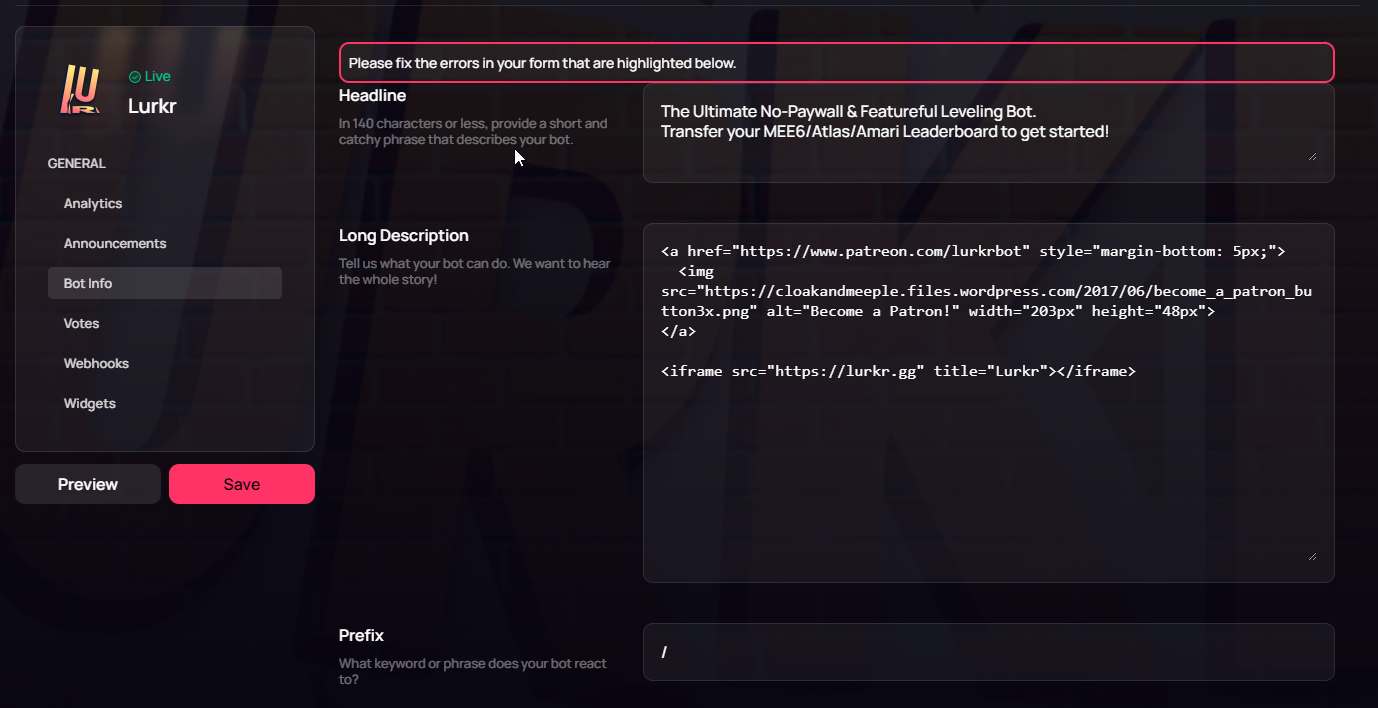
Can someone help me find the error? Is this a bug, there is not error text for me.... https://i.imgur.com/J2KDma1.png
 lethal bolt
upbeat lance
Can someone help me find the error? Is this a bug, there is not error text for m...
lethal bolt
upbeat lance
Can someone help me find the error? Is this a bug, there is not error text for m...
Are you sure that nothing highlighted below?
upbeat lance
lethal bolt
Are you sure that nothing highlighted below?
yes, if I deliberately remove the text and try to save there is red text below
 lethal bolt
upbeat lance
yes, if I deliberately remove the text and try to save there is red text below
lethal bolt
upbeat lance
yes, if I deliberately remove the text and try to save there is red text below
Try something shorter
upbeat lance
Nope
 lethal bolt
Can you copy the long description then try putting something else there
For not losing your long description
floral pagoda
What are you trying to achieve? This is shown to me:
 upbeat lance
floral pagoda
What are you trying to achieve? This is shown to me:
upbeat lance
floral pagoda
What are you trying to achieve? This is shown to me:
yeah that's what it is right now, I literally only wanted to add /amari to the short description 
upbeat lance
lethal bolt
Can you copy the long description then try putting something else there
Still nothing
 floral pagoda
upbeat lance
yeah that's what it is right now, I literally only wanted to add `/amari` to the...
floral pagoda
upbeat lance
yeah that's what it is right now, I literally only wanted to add `/amari` to the...
That would exceed the limit of 140 characters though
upbeat lance
floral pagoda
That would exceed the limit of 140 characters though
Fair enough but it doesn't say that then :P
floral pagoda
As you currently use 136 characters! 😄
 upbeat lance
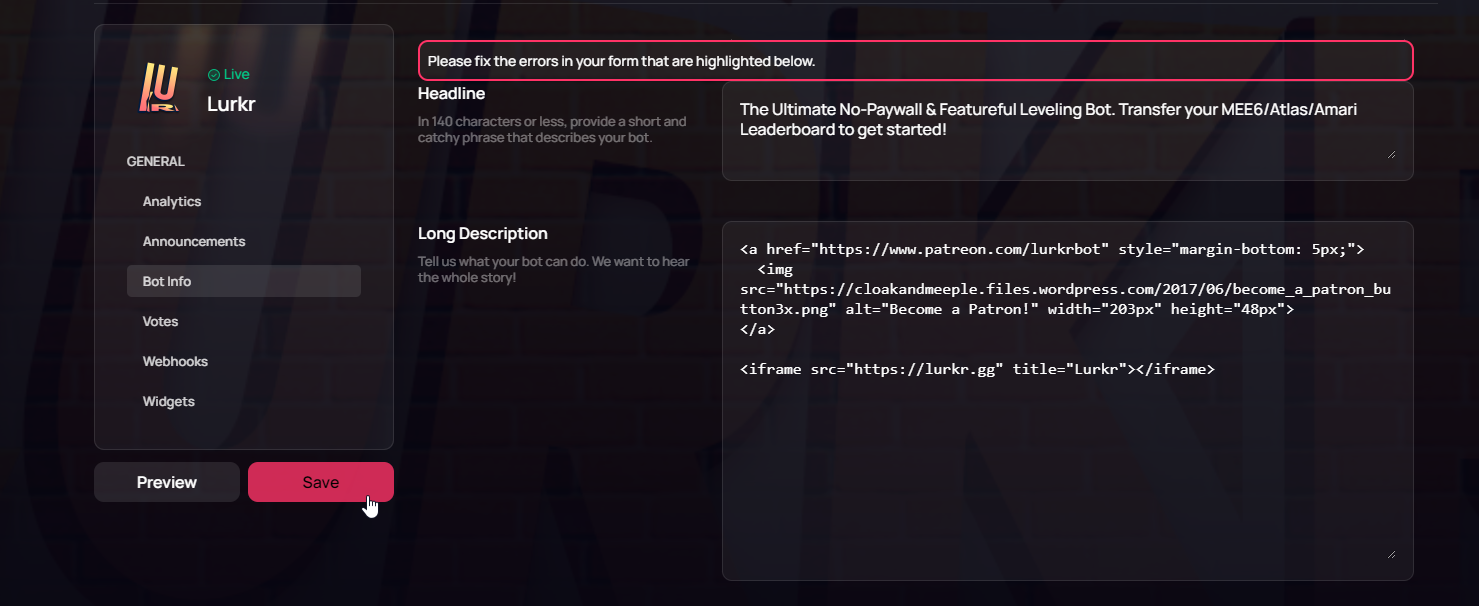
Well no, I'm trying to set it to The Ultimate No-Paywall & Featureful Leveling Bot. Transfer your MEE6/Atlas/Amari Leaderboard to get started! which is 110
lethal bolt
If you add amari in there it's going thru
upbeat lance
And even if it was over the char limit, that's still a bug because it doesn't highlight the specified error
upbeat lance
Same error, it's 110 char this time, as it was before.
https://i.imgur.com/X5PmlGJ.png
 upbeat lance
Please do
lethal bolt
upbeat lance
Please do
this is the thing 

Try changing that
Then try with new title
upbeat lance
Huh? It's a png though?
 upbeat lance
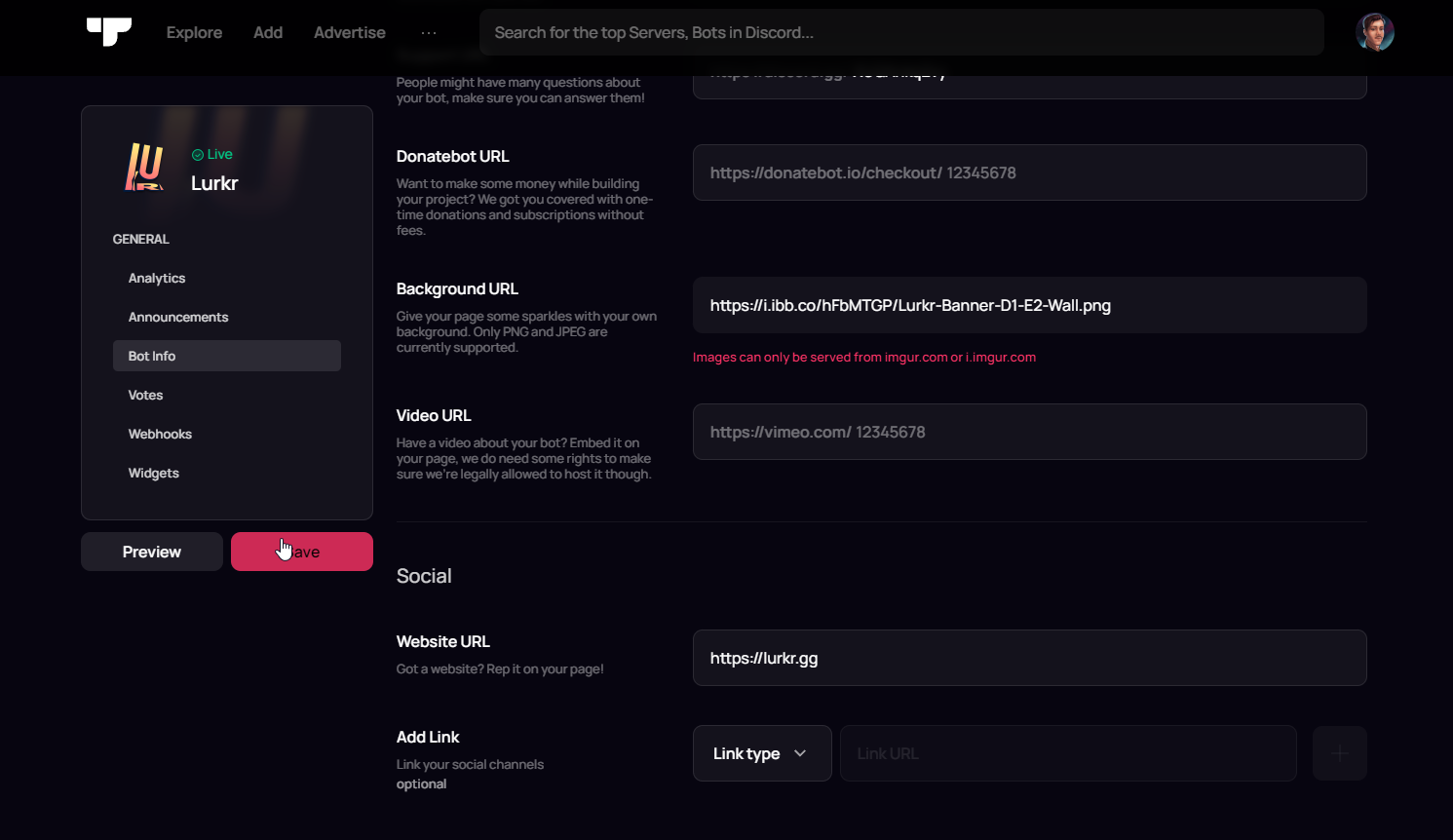
I tried a different image link it's still the same issue https://i.imgur.com/ZIgLGtR.png
floral pagoda
Yeah, I can save the changes without your background
Must have to do with Imgur or the image
lethal bolt
It's about the imgur imo

 lethal bolt
upbeat lance
mfw <:weirdbruh:623340836884578304>
https://i.imgur.com/t8IPyFj.png
lethal bolt
upbeat lance
mfw <:weirdbruh:623340836884578304>
https://i.imgur.com/t8IPyFj.png
I tried with the same site just a minute ago and still got the error
upbeat lance
I've saved it without background for now, it would be appreciated if this got fixed though 👍
lethal bolt
upbeat lance
I've saved it without background for now, it would be appreciated if this got fi...
Don't worry, we'll work on this 
 cunning sorrel
is it possible to edit ur bot submission before it's accepted
floral pagoda
Yes, you can always edit it
floral pagoda
Which bot are you talking about?
cunning sorrel
@undone forum
floral pagoda
cunning sorrel
says forbidden
floral pagoda
Logged in?
floral pagoda
https://top.gg/bot/923243165090197582/edit - Does this work?
cunning sorrel
nope same thing
floral pagoda
You didn’t submit the bot
cunning sorrel

when i use my bots client id
to submit in the add bots page
it says i already submitted it
floral pagoda
cunning sorrel
i can show you
floral pagoda
Looks like you didn’t submit it
cunning sorrel
 floral pagoda
https://discord.com/channels/264445053596991498/264889891039608874/1101338861835...
floral pagoda
floral pagoda
https://discord.com/channels/264445053596991498/264889891039608874/1101338861835...
See this
Someone already submitted the bot
cunning sorrel
oh must of done it on my alt 💀 ooops
thanks
ive since changed the pfp and username of the bot
so i thought that was the problem
but will that update at some point


 fiery violet
sturdy swan
fiery violet
sturdy swan
Nope Online
sturdy swan
fiery violet
Nope Online
؟؟
fiery violet
sturdy swan
؟؟
Site Up Only


 lethal bolt
sturdy swan
Site down ?
lethal bolt
sturdy swan
Site down ?
Hey, is the issue still ongoing?
lethal bolt
 charred plinth
For some reason, I can't earn my prizes when I vote for Top.gg
charred plinth
For some reason, I can't earn my prizes when I vote for Top.gg
Hey can you check it again?
charred plinth
lethal bolt
Hey can you check it again?
It works now
Quick question, is the Discord Bot List connected to Top.gg in a way?
long ferry
Top.gg is not affiliated to discord or any other botlist, top.gg was called dbl or discordbots.org before and isn't affiliated with the now named discord bot list
charred plinth
Oh I see
 steep void
lethal bolt
steep void
lethal bolt
 inner dune
Hello Im acciedentaly kicked Top.gg bot from my server how ca i reinvite it
inner dune
Hello Im acciedentaly kicked Top.gg bot from my server how ca i reinvite it
@small lantern here you go
inner dune
oh
 pliant mauve
sturdy swan
pliant mauve
sturdy swan
If you have a support server that is listed at top.gg for your bot, you can put the server link in there
sturdy swan
oh thx
Hey 👋
I found a bug on the website,
i can't edit a server where i have admin perms
I clicked on refresh servers and nothing happends, i tried to remove top.gg from my account and the issue is still here
server id : 652595443095699457
cerulean ember
clear cache, login again and try again
long ferry
Ensure the bot itself is still on the server, it otherwise cannot confirm if you're an administrator or not
sturdy swan
cerulean ember
clear cache, login again and try again
i did it and i still have the issue (cache clear, logout and top.gg removed from my account, and login again)
sturdy swan
long ferry
Ensure the bot itself is still on the server, it otherwise cannot confirm if you...
yes the bot is here with admin permissions
 thick zodiac
💀 gj logic, someone care to point out the non existent .pngthat i clearly dont have 
 pliant mauve
thick zodiac
💀 gj logic, someone care to point out the non existent *.png*that i *clearly* d...
pliant mauve
thick zodiac
💀 gj logic, someone care to point out the non existent *.png*that i *clearly* d...
could you try removing the i. just before the imgur.com
sturdy swan
cerulean ember
clear cache, login again and try again
any ideas for my issue?
bot admin on the server, i have admin permission, i tried to logout, login, clear cache, remove top.gg access from my account
cerulean ember
sturdy swan
any ideas for my issue?
bot admin on the server, i have admin permission, i t...
give it a try from diff browser?
thick zodiac
pliant mauve
could you try removing the `i.` just before the `imgur.com`
still same error
 sturdy swan
cerulean ember
give it a try from diff browser?
sturdy swan
cerulean ember
give it a try from diff browser?
i tried and nothing change,
should i try to kick and add back the bot ?
 flint tartan
Where do you go from here when trying to add your server?
 thick zodiac
still same error
thick zodiac
thick zodiac
still same error
right this moment ig i can live without the background image
sturdy swan
cerulean ember
what error it's showing you?
grand prism
flint tartan
Where do you go from here when trying to add your server?
Click "refresh servers", logout and login
Works most of the times
flint tartan
Ah as soon as I added the bot it showed up, ty
sturdy swan
cerulean ember
sure
ok so i removed the bot and i added it back and i still have the issue. I can't access to the panel admin to edit the server, i can just add it to top.gg and when i try it stuck at the last step
cerulean ember
are you owner or just admin?
sturdy swan
just admin
sturdy swan
cerulean ember
are you owner or just admin?
🆙 , should i contact a specific person for this issue? it looks like there's no basic solution
how to delete a discord bot from top.gg cuz i see no delete option
cerulean ember
sturdy swan
🆙 , should i contact a specific person for this issue? it looks like there's no...
i would recommend asking owner to create team and adding you to team as admin
-teams
-team
wild stoneBOT
How do I create a team?
This article describes the process of creating a team, customizing your team and adding members to it: Teams Overview
cerulean ember
sturdy swan
how to delete a discord bot from top.gg cuz i see no delete option
do you own it?
sturdy swan
cerulean ember
do you own it?
yes
cerulean ember
bot id?
sturdy swan
cerulean ember
bot id?
773230336771227668
sturdy swan
cerulean ember
rn
no on pc
cerulean ember
https://i.imgur.com/6FhFTUc.png you should be able to see this
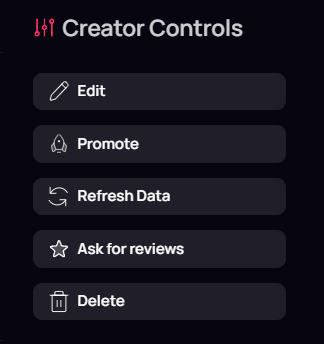
did you logged in?
sturdy swan
cerulean ember
https://i.imgur.com/6FhFTUc.png you should be able to see this
what shouldi click to access these
cerulean ember
did you logged in site?
 cerulean ember
sturdy swan
cerulean ember
sturdy swan
tap view
 gentle plume
 acoustic marlin
How do i add a top.gg server URL for upload of my bot?
acoustic marlin
How do i add a top.gg server URL for upload of my bot?
you set it under support servrer
acoustic marlin
?
gentle plume
there should be a input box labelled as support server
acoustic marlin
gentle plume
there should be a input box labelled as support server
Done that
Is it just the same thing?
gentle plume
i think so yes
sturdy swan
cerulean ember
i would recommend asking owner to create team and adding you to team as admin
If he gives me the ownership it'll fix the issue u think?
cerulean ember
If you have ownership you definitely gonna have all access to server 
 uncut patrol
why my vote doesn't work on pc but on mobile is working very well
sturdy swan
cerulean ember
If you have ownership you definitely gonna have all access to server <:poggythum...
💀 i have admin so i should also have access to the server on the website

sturdy swan
floral pagoda
Only owners have access
Only owner can edit servers on the website ?
Na, admin can too
 lean yew
why the f my bot have been in verf queue for a week and few days
floral pagoda
-upto
wild stoneBOT
When will my bot be reviewed?
Currently our average bot reviewal time is around one week or more.
Because of this — and because some bots take longer to review than others due to their features — we can't guarantee your bot will be reviewed as quickly as someone else's in the past and we also can't guarantee your bot will be reviewed within that timeframe. There is no exact time for how long bot approval can take. There is no way to check your bot's position in our reviewal queue, but remember you're not first and you're not last!
You may edit your bot's page as much as you like both before and after it's reviewed and this will have no impact on its place in queue.
You can read more about our bot reviewal process in this support article: How the Bot Reviewal Process Works.
In the meantime, please make sure your bot follows all of our Bot Guidelines for a quick and smooth approval!
sturdy swan
floral pagoda
No, only owners can edit and publish servers
but, why as an admin i can add servers where im not owner
 thorn oriole
why i still cant vote?
 lethal bolt
thorn oriole
why i still cant vote?
lethal bolt
thorn oriole
why i still cant vote?
-cacheclear
wild stoneBOT
@thorn oriole
How to clear browser cache
In order to clear your cache for the site, press CTRL+F5.
If this does not work, try one of these resources below:
Instructions on Microsoft Edge
Instructions on Google Chrome
Instructions on Mozilla Firefox
Instructions on Safari on iOS or Safari on MacOS
Instructions on Opera
Instructions on Brave
If you are unable to find instructions for your specific browser above, please refer to your browser's manual or help documentation to find out how to clear your browsers cache.
lethal bolt
Can you try this
thorn oriole
lethal bolt
Can you try this
done, but still cant vote
lethal bolt
thorn oriole
done, but still cant vote
Hmm, can you try with another browser then
thorn oriole
lethal bolt
Hmm, can you try with another browser then
okay
thorn oriole
lethal bolt
Hmm, can you try with another browser then
i tried in opera, but still can't
lethal bolt
thorn oriole
i tried in opera, but still can't
Alright, i see. Let's try voting again after 30 mins-1 hour
thorn oriole
lethal bolt
Alright, i see. Let's try voting again after 30 mins-1 hour
alright
sturdy swan
whoa new server icon
Aren't externalemojis & embedlinks permissions already granted to bots on bot test server?
 unborn hinge
Idts
pliant mauve
sturdy swan
Aren't `externalemojis & embedlinks` permissions already granted to bots on bot ...
yes
 keen geyser
Whenever I try to write a review for a bot called Maki top.gg doesn't let me do so. It also logs errors in the console . Hoping someone can help me

 true gate
My bot has been waiting to be reviewed for about 2 or some weeks now just wondering about a status?
grand prism
12 days are not two weeks
sturdy swan
Hello top.gg Team,
I hope this message finds you well. My name is YrYpTiC, and I am the developer of the bot called YrYpTiC Bot. I am reaching out to kindly request a review for my bot to be listed on top.gg.
I have already submitted my bot for review through the top.gg website, but I wanted to take this opportunity to express my enthusiasm about having YrYpTiC Bot featured on your platform. I have put a lot of effort into developing and refining its features to provide users with a unique and enjoyable experience.
YrYpTiC Bot is designed to provide a brief description of your bot's main functions and features. It has been meticulously developed with attention to detail and user feedback, and I believe it will be a valuable addition to the top.gg community.
I understand that the review process may take some time due to the high number of submissions you receive. However, I would greatly appreciate it if you could expedite the review for YrYpTiC Bot. If there are any additional steps or information needed from my end to facilitate the review, please let me know, and I will promptly provide them.
Thank you for your time and consideration. I eagerly look forward to the opportunity of having YrYpTiC Bot listed on top.gg and contributing to the platform's vibrant bot ecosystem.
If you require any further information or have any questions, please don't hesitate to reach out to me. I'm available at dababyd122@gmail.com.
Warm regards,
YrYpTiC.
 proven cargo
Yo who's online
 fringe relic
sturdy swan
Hello top.gg Team,
I hope this message finds you well. My name is YrYpTiC, and ...
lethal bolt
proven cargo
Yo who's online
fringe relic
sturdy swan
Hello top.gg Team,
I hope this message finds you well. My name is YrYpTiC, and ...
lethal bolt
proven cargo
Yo who's online
Hey, what's the issue
long ferry
sturdy swan
Hello top.gg Team,
I hope this message finds you well. My name is YrYpTiC, and ...
That message was sponsored by ChatGPT, we appreciate your effort in bringing your opinions and questions through an automated matter.
proven cargo
My bad I don't have a problem idk why I texted in the support


 finite cairn
hi ive been rying to vote for owo bot but its not working

 humble eagle
click "Refresh Data"
humble eagle
go to your bot's page
 cunning hornet
yes?
wild stoneBOT
Fetching Your New Bot Data
To fetch your bot's new name or avatar, please follow these steps:
Click the Refresh Data button in the sidebar on the right.
Click Edit on your bot page and then Save.
💡 Please note: If it still doesn't seem to change, make sure you actually changed the bot's avatar / name on your Discord Developer Portal and not the application's icon / name.
 rustic tide
are all the bots on the website verified to make sure that they are not scams or how does that work?
humble eagle
rustic tide
are all the bots on the website verified to make sure that they are not scams or...
bots are reviewed by Bot Reviewers
supple mica
Feel free to reach out to me in dms and send me your server link.
 shell inlet
keen geyser
Whenever I try to write a review for a bot called Maki top.gg doesn't let me do ...
shell inlet
keen geyser
Whenever I try to write a review for a bot called Maki top.gg doesn't let me do ...
hey i reproduced this, didn't catch that error and my review went through, if you meant this maki https://top.gg/bot/563434444321587202 , i didn't have any issue

Top.gg
The only bot you'll ever need! - (Voice) Levels - Music - Moderation - Logs - Invite Tracking - Reaction Roles - 20+ Languages - Dashboard
keen geyser
shell inlet
hey i reproduced this, didn't catch that error and my review went through, if yo...
Maybe I reviewed the bot before Im just not sure and really dont wanna check 27pages of reviews
stoic socket
keen geyser
Whenever I try to write a review for a bot called Maki top.gg doesn't let me do ...
try visiting https://ampltd.top.gg in your browser, there might be a Cloudflare captcha preventing you from that due to captcha's being enabled after a downtime
 tight canyon
I haven't had this issue yesterday, until today. I try to access top.gg but I'm stuck in an infinite cloudflare verify loop. I click verify you are human, it doesnt provide me with any captcha and just refreshes the page, going back to this. Changing browsers doesnt help


 young echo
tight canyon
I haven't had this issue yesterday, until today. I try to access top.gg but I'm ...
young echo
tight canyon
I haven't had this issue yesterday, until today. I try to access top.gg but I'm ...
Try opening this page in incognito and see if the issue still persists
young echo
lean notch
You need to login to vote, are you having any issues logging in?
tight canyon
young echo
Try opening this page in incognito and see if the issue still persists
Still persists
Going to inspect element shows a 401 with a new random ray id
But on firefox it shows failure sometimes
 long ferry
Yeah that's related to cloudflare blocking your connection, entirely unrelated to top.gg
Top.gg doesn't have control over captcha results, you'll need to reach out to cloudflare about it
young echo
tight canyon
Going to inspect element shows a 401 with a new random ray id
Any other errors in console?
tight canyon
young echo
Any other errors in console?
 long ferry
Yeah the errors wont help much, as these are again cloudflare related
The issue of you not getting past the antibot detection by cloudflare is again related to them
tight canyon
long ferry
Yeah the errors wont help much, as these are again cloudflare related
Do I contact their support or forum?
long ferry
Support directly or something
tight canyon
Ok thank you
young echo
Here's the link if you need it: https://dash.cloudflare.com/redirect?account=support
tight canyon
young echo
Here's the link if you need it: https://dash.cloudflare.com/redirect?account=sup...
I think that's for domains but I'll try anyways
 torn saffron
torn saffron
torn saffron
and for me please ?
young echo
tight canyon
I think that's for domains but I'll try anyways
Not entirely sure, took it from https://developers.cloudflare.com/support/troubleshooting/general-troubleshooting/contacting-cloudflare-support/

Cloudflare Support cannot perform the following actions:
tight canyon
young echo
Not entirely sure, took it from https://developers.cloudflare.com/support/troubl...
It brought me to the login page, and when I logged in I see my domains, so thats why I said
young echo
ah gotcha, check the link above
young echo
torn saffron
Looks like a bug as mentioned by LA earlier, I'll let an engineer know about this.
torn saffron
ok
long ferry
torn saffron
I'm confused, you currently have it set on your bot
torn saffron
Yes
long ferry
No clue where the issue is when it saved, it would normally not allow you to save it
 long ferry
kk
If you wanna make changes to your description, just remove the background image and it should work again

 keen geyser
stoic socket
try visiting https://ampltd.top.gg in your browser, there might be a Cloudflare ...
keen geyser
stoic socket
try visiting https://ampltd.top.gg in your browser, there might be a Cloudflare ...
Well it works for every bot other than maki that site also works
thorn oriole
i still can't vote...
 fervent fractal
I don't like the new update
long ferry
What update
 long ferry
That's not related to cloudflare, what browser are you using
fervent fractal
Brava
long ferry
Use something else than brave, such as chrome
fervent fractal
No I love brava
long ferry
Then we cannot help you
long ferry
Brave itself is causing issues within top.gg, both on mobile and desktop, there's no fix for either brave and opera, as some issues are specially bound to these browsers
Top.gg does not have the issue you're facing when using google chrome or firefox
 dreamy solstice
long ferry
Use something else than brave, such as chrome
dreamy solstice
long ferry
Use something else than brave, such as chrome
Bro , I used Google and the same thing happens to me ..
long ferry
If you're also getting that 500 error, ensure you're not using adblockers or vpns etc
Also, google is not a browser
fervent fractal
The site is getting worse
long ferry
Once again, the issue you're facing is "mostly" associated with the browser you're using
If you're not ready to change your browser in order to use top.gg, then we cant help either, as again that issue is not happening with common browsers such as chrome or firefox
fervent fractal
Ok my friend
thorn oriole
V
 long ferry
thorn oriole
V
long ferry
thorn oriole
V
Clear your cache, this is due to your browser caching the cloudflare page
-cacheclear
wild stoneBOT
How to clear browser cache
In order to clear your cache for the site, press CTRL+F5.
If this does not work, try one of these resources below:
Instructions on Microsoft Edge
Instructions on Google Chrome
Instructions on Mozilla Firefox
Instructions on Safari on iOS or Safari on MacOS
Instructions on Opera
Instructions on Brave
If you are unable to find instructions for your specific browser above, please refer to your browser's manual or help documentation to find out how to clear your browsers cache.
fervent fractal
Devs must find solutions for brava
thorn oriole
long ferry
Clear your cache, this is due to your browser caching the cloudflare page
i do that, but cant
long ferry
There is none, as it is again an issue mostly exclusively on brave/opera
long ferry
thorn oriole
i do that, but cant
Press ctrl+f5 on that page
 hallow wedge
I need a Custom Discord bot that is something like the official Minecraft pvp Tierlist. Where you can join a waitlist and it shows how many testers are online
I will pay
thorn oriole
long ferry
Press ctrl+f5 on that page
done, but still cant
long ferry
hallow wedge
I need a Custom Discord bot that is something like the official Minecraft pvp Ti...
-needdev
wild stoneBOT
@hallow wedge
You seem to be asking for something you don't have experience for or something that hasn't been done yet, but really need for your bot/server.
You can hire developers from Fiverr or Freelancer to code the things you need for your bot/server.
hallow wedge
Can someone make it?
fervent fractal
long ferry
There is none, as it is again an issue mostly exclusively on brave/opera
Ok my friend thanks for your help 😊😊😊🙏☺️
long ferry
thorn oriole
done, but still cant
Then its an issue related to your browser not clearing cache, have you tried a different browser
Keep in mind, pressing ctrl+f5 at once, not separately, it should refresh the page
thorn oriole
long ferry
Then its an issue related to your browser not clearing cache, have you tried a d...
i tried in opera
long ferry
Try it in firefox
thorn oriole
ok
thorn oriole
long ferry
Try it in firefox
i dont have
long ferry
Cant really help then, your browser is caching a previous page that was used to verify your browser on cloudflares anti-bot
long ferry
wild stone
Ctrl+f5 should've cleared your cache, check the other options here
thorn oriole
long ferry
Cant really help then, your browser is caching a previous page that was used to ...
I'll explain briefly, I can vote on my cellphone after filling in the Cloudflare capthas, but on the laptop there are no capthas to fill in.
long ferry
Because your laptop has a cached page on it
That is what i mean, that is what the error page says
The error tells you that you cached that captcha page, that does not work, you need to clear your cache on your laptop on the browser you're using
thorn oriole
long ferry
The error tells you that you cached that captcha page, that does not work, you n...
i already do that, in chrome and opera but still cant
 sand siren
Is there any way to expedite the verification process for my bot?
 patent needle
wild stone
patent needle
wild stone
@sand siren No, check  info
info
 tranquil wigeon
:>
sand siren
patent needle
<@832732761047302155> No, check <:this:894279341108772914> info
Thanks 🥲
patent needle
"Discord birthday celebration"
long ferry
thorn oriole
i already do that, in chrome and opera but still cant
Then i guess try again later, the issue isn't really related to top.gg anymore, more about your browser caching
thick zodiac
thick zodiac
still same error
Any eta for this to be fixed? My bots banner section is feeling lonely
long ferry
No eta
long ferry
What problem? If you're disputing a decline on your bot, feel free to reach out to the corresponding reviewer
 hexed wraith
long ferry
What problem? If you're disputing a decline on your bot, feel free to reach out ...
hexed wraith
long ferry
What problem? If you're disputing a decline on your bot, feel free to reach out ...
In short, most of my bot's commands use database and if the command is used without sending a normal message to the bot first, the bot gives an error because the user's columns are not created in the database. I am using local JSON database.
How can I reach Frosty
long ferry
Sounds like a correct decline, make sure to mention that on your description/bot reviewer notes, as the bot reviewers will not be able to tell
If if you still wish to reach out to frosty, feel free to dm them here @wind quest
hexed wraith
Okey Cus he said bot stopped sometime after using command and probably thats about this issue
long ferry
Yup sounds like a correct decline
 real tangle
I changed the name of my bot, but the name has not changed on top.gg, it appears with its old name
grand prism
Click "refresh data", then "edit" and "save"
real tangle
thanks
lean notch
young echo
You need to login to vote, are you having any issues logging in?
Yes i have login
 next kestrel
no
you can click on the report button on the bot page and a moderator will look into it
 long ferry
next kestrel
no
long ferry
next kestrel
no
Messages on bots itself is fine, it mentioning other bot listing sites on the bot page is not
 broken sail
How does top gg work?
How does it boost the server?
Do you just vote or does that do something else or nothing?
 plain blaze
more votes = more impressions on too.gg
higher voted servers show up higher on browse and search
broken sail
oh
 fiery oriole
is there a problem?
https://prnt.sc/0VocGHanOfyM
 pliant mauve
fiery oriole
is there a problem?
https://prnt.sc/0VocGHanOfyM
pliant mauve
fiery oriole
is there a problem?
https://prnt.sc/0VocGHanOfyM
currently a bug rn
 stoic socket
@zinc oracle gday woo
 left yew
supple mica
Feel free to reach out to me in dms and send me your server link.
left yew
supple mica
Feel free to reach out to me in dms and send me your server link.
Hey, did you have a chance to look at your DMs / review the issue?
 wheat fable
@pliant mauve
pliant mauve
@robust token no ads please
wheat fable
pliant mauve
<@759426368051609600> no ads please
pro how to solve this
 pliant mauve
wheat fable
pro how to solve this
pliant mauve
wheat fable
pro how to solve this
could you try clearing your cache
wheat fable
pliant mauve
could you try clearing your cache
i did it but not working
pliant mauve
other browsers
pliant mauve
what browser have you tried using?
wheat fable
pliant mauve
could u try another browser see if that works
you tell me which browser to use
@pliant mauve
pliant mauve
wheat fable
you tell me which browser to use
u can try firefix
firefox
that works for me
 pliant mauve
wheat fable
<@778399294125899836> fire fox
pliant mauve
wheat fable
<@778399294125899836> fire fox
last, try the solution here #site-status message
or ingocnito
 hearty ivy
I think you have a bug here
 grand prism
They know about it
lethal bolt
hearty ivy
I think you have a bug here
Yeah, known issue no eta for now
long ferry
wheat fable
<@778399294125899836> fire fox
If that doesn't say processing, its likely related to cloudflare
Try again later
buoyant crown
what is this ?
 hexed wraith
Hi I write a bot reviewers due to I think my bots decline is wrong. How long does it take for feedback?
grand prism
24-48h
hexed wraith
Okey thanks
long ferry
buoyant crown
what is this ?
Cloudflare antibot
floral pagoda
hexed wraith
Hi I write a bot reviewers due to I think my bots decline is wrong. How long doe...
You asked the same question earlier today and already got an answer by a moderator: #support message
lethal bolt
 final urchin
do top.gg accept characters like : •
final urchin
do top.gg accept characters like : •
It does if I'm not mistaken, you can try it tho
cerulean ember
-htmldesc
wild stoneBOT
You can achieve this using Markdown or HTML in your bot's description. You can ask in #development for help or use this HTML and Markdown cheatsheet for more resources.
cerulean ember
we allow markdown and html yes
final urchin
ty!
sturdy swan
Can anyone tell me tht how I can grow my bot without spending a penny?
 fluid birch
sturdy swan
Can anyone tell me tht how I can grow my bot without spending a penny?
fluid birch
sturdy swan
Can anyone tell me tht how I can grow my bot without spending a penny?
What you can do is incentivising users for voting on your bot. That would boost its listing allowing more users to see it. Apart from that it's important to ensure your bot is unique, stable, and that you provide good support for users
sturdy swan
It's a good bot and provide everything problem is tht big servers don't add I as they dont trust
Even though it doesn't has bad intentions
Even did announcement in my server
floral pagoda
Please keep this #support related, thanks! 😄
You may want to ask for tips in #general
 cyan halo
if i change my bot name , will it automatically update in the site?
long ferry
-refreshdata
wild stoneBOT
Fetching Your New Bot Data
To fetch your bot's new name or avatar, please follow these steps:
Click the Refresh Data button in the sidebar on the right.
Click Edit on your bot page and then Save.
💡 Please note: If it still doesn't seem to change, make sure you actually changed the bot's avatar / name on your Discord Developer Portal and not the application's icon / name.
 long ferry
then you did not change the correct avatar
it fetches your bots icon
not the application icon
and it did update correctly for me
sturdy swan
no longer?
 long ferry
-cacheclear
wild stoneBOT
How to clear browser cache
In order to clear your cache for the site, press CTRL+F5.
If this does not work, try one of these resources below:
Instructions on Microsoft Edge
Instructions on Google Chrome
Instructions on Mozilla Firefox
Instructions on Safari on iOS or Safari on MacOS
Instructions on Opera
Instructions on Brave
If you are unable to find instructions for your specific browser above, please refer to your browser's manual or help documentation to find out how to clear your browsers cache.
long ferry
this is due to the antibot page being cached,
sturdy swan
is it because of proxy?
 obtuse whale
hi, for some reason i havent been able to view my bot's repo for a while now
 sturdy swan
long ferry
this is due to the antibot page being cached,
sturdy swan
long ferry
this is due to the antibot page being cached,
didnt worked
on google chrome
long ferry
try a different browser then
that error isnt related to top.gg as that page seems to have been cached by your browser
sturdy swan
long ferry
that error isnt related to top.gg as that page seems to have been cached by your...
💀 edge
 long ferry
cant really help then
sturdy swan
💀
long ferry
like i said, its due to a cached page within cloudflare and your browser
try again later maybe
obtuse whale
obtuse whale
hi, for some reason i havent been able to view my bot's repo for a while now
bump
another issue i've noticed is that Top.gg is unable to fetch my Bots Avatar, even when refreshing the data
long ferry
-refreshdata
wild stoneBOT
Fetching Your New Bot Data
To fetch your bot's new name or avatar, please follow these steps:
Click the Refresh Data button in the sidebar on the right.
Click Edit on your bot page and then Save.
💡 Please note: If it still doesn't seem to change, make sure you actually changed the bot's avatar / name on your Discord Developer Portal and not the application's icon / name.
 crystal wharf
Please Help!! | I made my bot Public, But How do I my My Application Public???
 crystal wharf
Please Help!! | I made my bot Public, But How do I my My Application Public???
crystal wharf
crystal wharf
Please Help!! | I made my bot Public, But How do I my My Application Public???
@long ferry
long ferry
id?
crystal wharf
long ferry
id?
yes ID
crystal wharf
crystal wharf
yes ID
Application ID
long ferry
yes i need that id
crystal wharf
long ferry
yes i need that id
1107015323686801489
long ferry
try again later
crystal wharf
long ferry
try again later
It Works now
I tried again about 1 hour 30 minutes later
 jolly elm
why?
 grand prism
Known bug
long ferry
needs an approved bot
crystal wharf
. . .
crystal wharf
@long ferry So when will my Bot be Verified?
grand prism
You can read this embed - #support message
wind quest
-upto
wild stoneBOT
When will my bot be reviewed?
Currently our average bot reviewal time is around one week or more.
Because of this — and because some bots take longer to review than others due to their features — we can't guarantee your bot will be reviewed as quickly as someone else's in the past and we also can't guarantee your bot will be reviewed within that timeframe. There is no exact time for how long bot approval can take. There is no way to check your bot's position in our reviewal queue, but remember you're not first and you're not last!
You may edit your bot's page as much as you like both before and after it's reviewed and this will have no impact on its place in queue.
You can read more about our bot reviewal process in this support article: How the Bot Reviewal Process Works.
In the meantime, please make sure your bot follows all of our Bot Guidelines for a quick and smooth approval!
wind quest
Oh they left 😮
 lament sun
How to change my bot name
long ferry
-refreshdata
wild stoneBOT
Fetching Your New Bot Data
To fetch your bot's new name or avatar, please follow these steps:
Click the Refresh Data button in the sidebar on the right.
Click Edit on your bot page and then Save.
💡 Please note: If it still doesn't seem to change, make sure you actually changed the bot's avatar / name on your Discord Developer Portal and not the application's icon / name.
lament sun
Okay thanks
sturdy swan
why?
 sturdy swan
Hey i wanna know that can i apply for TOP.GG staff (work from home) paid or unpaid any of them but can i be a staff here for anything like (bot reviewer) server manager etc.
 lone ether
-apps
wild stoneBOT
Volunteer Applications
Hey! It seems like you're interested on volunteering for Top.gg. We're glad for any help we can get regarding our server events, support articles, bot reviewing, moderation, and more!
Bot Reviewers
Bot Reviewers are Top.gg staff and must be 18 or older. Bot Reviewers review the discord bots submitted to the site before they are listed to make sure they follow our rules
Moderators
Bot Reviewer is a stepping stone to Moderator - if you wish to be a Moderator you must first apply and be accepted as a Bot Reviewer.
Please read [this post](#announcements message) for more information to apply!
pliant mauve

lone ether

 frank lark
why is that

 indigo estuary
What am I doing wrong here?


 timid vine
Had my NSFW server locked on Top.gg, I would assume due to the emojis, because everything else is professional and clean until you are behind the age verified wall in the server. Is there a way to get my server unlocked? I have auction bids that I have been submitting and some that were live. I do have the server marked as NSFW in an attempt to be transparent
Any workaround would be much appreciated, would rather not have to do away with my NSFW emojis in the server if I don't have to.
 light quiver
@lone ether hello sir I want to ask what happened to my bot?
V 45 (1102196678204862546)
cerulean ember
timid vine
Any workaround would be much appreciated, would rather not have to do away with ...
There is only one way to get it unlock and that is removing those nsfw emotes. Once you do contact the mod who locked your server in dms they will unlock it.
cerulean ember
light quiver
<@394594679221518336> hello sir I want to ask what happened to my bot?
V 45 (1...
timid vine
That's a bummer. Doesn't appear there is a suggestions channel or I would submit it. Top.gg should adapt a method similar to discords.com where you can mark your server NSFW and  if emojis have NSFW content. This way if anyone visiting the page looks at the emojis it warns them and makes them verify they are 18+ within the iframe. In all likely hood this will just be pushing a paying customer to Top.gg's competition.
cerulean ember
We already have “mature server” a thing for servers still we do not allow any kind of nsfw “content” posted on our site.
cerulean ember
timid vine
That's a bummer. Doesn't appear there is a suggestions channel or I would submit...
Also FYI we do have feedback page, feel free to leave any suggestion you like https://feedback.top.gg/

Let us know how we can improve. Vote on existing ideas or suggest new ones. If you require support or would like to report a bug, please go to our Support Page · Make a suggestion · Top.gg
timid vine
cerulean ember
We already have “mature server” a thing for servers still we do not allow any ki...
cerulean ember
@small lantern bot post your server’s member count, emotes to site!
timid vine
can I limit the bot from viewing my emotes?
would that potentially resolve the issue?
timid vine
cerulean ember
Also FYI we do have feedback page, feel free to leave any suggestion you like h...
The discord login feature isn't working properly, after authorize just sends back to login page without the oauth connection being made. Attempted on two browsers, Chrome and Edge
unborn hinge
You could try removing the perms of the bot but idk if it would work properly if you do so
lone ether
light quiver
<@394594679221518336> hello sir I want to ask what happened to my bot?
V 45 (1...
Please DM me if you have any questions or concerns about your bot
lone ether
frank lark
why is that
Open the image link directly and copy it from there
lone ether
indigo estuary
What am I doing wrong here?
Open the image link directly and copy it from there
You need it to open the image not the imgur album
indigo estuary
lone ether
Open the image link directly and copy it from there
I did
I used the format suggested on the site and it did not work
The only link that I’ve found that actually kinda works is Discord image links
those sometimes break after awhile
lone ether
Does the link open to the image itself?
 long ferry
whats your servers id
 proven mural
Are no code websites like botghost or scratch for discord allowed to be submitted to top.gg?
next kestrel
proven mural
Are no code websites like botghost or scratch for discord allowed to be submitte...
In case of bot ghost or any other bot makers, your bot must have at least 5 custom commands developed by you which isn’t part of the pre made commands
proven mural
So as long as a bot has 5 or more custom commands and it follows all the top.gg and discord tos stuff it should get accepted?
long ferry
yes
long ferry
what issue are you facing when trying to add it
 indigo herald
long ferry
what issue are you facing when trying to add it
indigo herald
long ferry
what issue are you facing when trying to add it
this is loading from 2hr
 long ferry
are you adding the server as the user with the ownership on the server?
doing that with administrator and not being the owner will not work
floral pagoda
Then it won’t work - as Aurel pointed out 😅
indigo herald
long ferry
doing that with administrator and not being the owner will not work
i have added servers before
but
as administrator
only
and it didn't took long
@long ferry
indigo herald
floral pagoda
Then it won’t work - as Aurel pointed out 😅
Yeh
long ferry
as I've mentioned, adding a server does not work with administrator
ask the owner to submit the server
rose ibex
I've successfully added a server owned by my main account... 🤔
But I wanted to ask : does most of the bots get declined or is the bot testing incomplete ? I was reading #mod-logs yesterday and there were so many new messages, created with not much time between them...
long ferry
if the bots majority of features do not work, yes
if its offline, yes
we do allow submitting the bots when they're not done, as long as the majority is working, though best to only submit it when its done
rose ibex
Are all of the commands (and subcommands) tested or just the majority?
long ferry
lets not ask such questions
 stiff marsh
K I was just joking
 glacial summit
Hello, I had made a bot submission and I saw it joined a verification server, then left, but then I cannot find the status on the website, was it rejected perhaps? Anything I can do to resolve it?
long ferry
glacial summit
I see, thanks!
Couldn't find any way to get the bot functions working. It suggested me to buy subscription to get started.
Either make it so we don't have to pay for testing or if there is a way to use the bot for free, make a better guide please.
Ok, I'll improve the guide :)
Is there a way to revive the application after it has been rejected, or do I submit again from scratch?
long ferry
submit from scratch
glacial summit
👍 alright, cheers
 placid escarp
my bot does not have a pfp ☠️ (its id: 483499229407477762)
tried to refresh the data tho
long ferry
-refreshdata
wild stoneBOT
Fetching Your New Bot Data
To fetch your bot's new name or avatar, please follow these steps:
Click the Refresh Data button in the sidebar on the right.
Click Edit on your bot page and then Save.
💡 Please note: If it still doesn't seem to change, make sure you actually changed the bot's avatar / name on your Discord Developer Portal and not the application's icon / name.
placid escarp
ok nvm, ty
 chilly mesa
Is there a bug or am I stupid, I cannot add new server to top.gg
I cannot find option to do that, when I click add server on top screen
there is no option to add it
chilly mesa
 chilly mesa
long ferry
screenshot please
chilly mesa
long ferry
screenshot please
Where is button to add server?
long ferry
press refresh servers, then logout and back in
chilly mesa
long ferry
press refresh servers, then logout and back in
Ty, It's working
I also sent bot for verify, when will it be finished?
long ferry
-upto
wild stoneBOT
When will my bot be reviewed?
Currently our average bot reviewal time is around one week or more.
Because of this — and because some bots take longer to review than others due to their features — we can't guarantee your bot will be reviewed as quickly as someone else's in the past and we also can't guarantee your bot will be reviewed within that timeframe. There is no exact time for how long bot approval can take. There is no way to check your bot's position in our reviewal queue, but remember you're not first and you're not last!
You may edit your bot's page as much as you like both before and after it's reviewed and this will have no impact on its place in queue.
You can read more about our bot reviewal process in this support article: How the Bot Reviewal Process Works.
In the meantime, please make sure your bot follows all of our Bot Guidelines for a quick and smooth approval!
chilly mesa
long ferry
-upto
ty
deep karma
So recently my bot was approved do I need to configure or add some bot into server?
humble eagle
deep karma
So recently my bot was approved do I need to configure or add some bot into serv...
what server?
deep karma
humble eagle
what server?
I mean my support server
humble eagle
why do you ask here
it is not related with top.gg of your bot's approval 
if you need another bots then add it
 weary hedge
 cinder nexus
Someone is there?
cinder nexus
Someone is there?
Just say what you need help with related to TopGG and someone will respond.
cinder nexus
Merhaba
Ben discord sunucuma reaction roles botunu ekledim ancak komutlarını bilmiyorum
Yardımcı olursanız çok mutlu olurum
weary hedge
cinder nexus
Ben discord sunucuma reaction roles botunu ekledim ancak komutlarını bilmiyorum
If this is related to development of your bot then you need #development.
 pseudo goblet
Is that token from the webhook the API key?
deep karma
humble eagle
why do you ask here
humble eagle
deep karma
oh you dont uderstand, my bot got approved here on top.gg but after this approva...
no you don't need to do that
@small lantern is for https://top.gg/servers
Top.gg
Spice up your Discord experience with our diverse range of Discord Bots and Servers as well as other spaces to discover DAOs.
to update server's page (like its icon, name, member count)
deep karma
ok tnx
 charred nebula
i need help plz
sturdy swan
 charred nebula
When i try to go to the site it keeps on saying checking if site connection is secure how do I fix it
long ferry
Try a different browser, disable extensions such as adblockers and clear cache
charred nebula
long ferry
Try a different browser, disable extensions such as adblockers and clear cache
I am on Xbox
long ferry
Yeah dont think we can help on that one
Could you try on your mobile device? I feel like the built in browser on xbox is likely causing that
charred nebula
long ferry
Could you try on your mobile device? I feel like the built in browser on xbox is...
my phone
sturdy swan
@small lantern
 copper light
there is a bump system with the bot ? What is the point of having the bot on your server?
long ferry
charred nebula
my phone
Yes
long ferry
copper light
there is a bump system with the bot ? What is the point of having the bot on you...
The Topgg bot itself does not
The bot is on the server to fetch your servers statistics and emojis, name and icon
copper light
thank
 weary flume
!
charred nebula
my phone is broke
long ferry
Yeah then we cant really help
 bold sinew
None of my servers show up in Top.gg when I am trying to add one, are there some requirements for a server to be listed on Top.gg?

Never mind, I just had to log out and log back in a few times
 wide helm
Hello
long ferry
hello, need any help?
sturdy swan
this appears when i authorise my account to vote, any help about this?
 long ferry
are you using brave/operagx?
wheat fable
@long ferry i need to solve the issue
long ferry
what issue
 wild stoneBOT
How to clear browser cache
In order to clear your cache for the site, press CTRL+F5.
If this does not work, try one of these resources below:
Instructions on Microsoft Edge
Instructions on Google Chrome
Instructions on Mozilla Firefox
Instructions on Safari on iOS or Safari on MacOS
Instructions on Opera
Instructions on Brave
If you are unable to find instructions for your specific browser above, please refer to your browser's manual or help documentation to find out how to clear your browsers cache.
wheat fable
not working
long ferry
try again later then, that issue is mostly related between your browser and cloudflare, so we cant really help about it
perhaps try a different browser too
wheat fable
long ferry
perhaps try a different browser too
you tell me which browser not have this problem
long ferry
I'm not having issues with it on chrome for example
wheat fable
long ferry
I'm not having issues with it on chrome for example
i use chrome and i have issues
long ferry
like I've said, its likely something related between cloudflare and your browser, otherwise cant really help
rose ibex
Replying to #support message ...
My bot has a little feature (by the way, I didn't find a definition of feature in the help pages) to assist Clyde (the experimental AI on Discord) by giving it more data. The test server doesn't have the Clyde experiment, how is that feature going to be tested ? 👀
 long ferry
add it in your reviewer notes, since we can just invite it to another server who does have it
 jaunty edge
wheat fable
i use chrome and i have issues
jaunty edge
wheat fable
i use chrome and i have issues
Try updating your chrome version
wheat fable
jaunty edge
Try updating your chrome version
i have the last version
 wheat fable
jaunty edge
Rest clear your cache
wheat fable
jaunty edge
Rest clear your cache
i did it to not working
 strong sage
Hey, it seems someone isn't bidding the minimum increments in top page slot 1
 gloomy shell
The minimum increments only apply to the lowest winning bid. The website will not allow someone to not bid increments properly
sturdy swan
why this appears when i authorise my account to vote?
 fluid birch
sturdy swan
why this appears when i authorise my account to vote?
fluid birch
sturdy swan
why this appears when i authorise my account to vote?
try using another browser or clearing your browser cache for top.gg
sturdy swan
long ferry
are you using brave/operagx?
Brave, chrome and any browsers
tell me what browser that not hove this problem!
sturdy swan
fluid birch
try using another browser or clearing your browser cache for top.gg
Tried all of this and same problem
 slow jacinth
maybe invite expired
 grand ravine
they can't help with that
grand ravine
because the invite the owners added is invalid
either because it expired or was deleted
you need to contact the server staff, if able
slow jacinth
 gaunt knoll
I want to become a mod…
supple mica
gaunt knoll
I want to become a mod…
supple mica
-apps
wild stoneBOT
Volunteer Applications
Hey! It seems like you're interested on volunteering for Top.gg. We're glad for any help we can get regarding our server events, support articles, bot reviewing, moderation, and more!
Bot Reviewers
Bot Reviewers are Top.gg staff and must be 18 or older. Bot Reviewers review the discord bots submitted to the site before they are listed to make sure they follow our rules
Moderators
Bot Reviewer is a stepping stone to Moderator - if you wish to be a Moderator you must first apply and be accepted as a Bot Reviewer.
Please read [this post](#announcements message) for more information to apply!
 fluid birch
 outer kindle
Scammer Alert -> https://i.imgur.com/eoZzcWj.png
outer kindle
Scammer Alert -> https://i.imgur.com/eoZzcWj.png
could you send me some proof of them attempting to scam?
pseudo goblet
how do you get the API key??
outer kindle
@fluid birch I run a bot literally for this reason to ban them before they attempt to scam See ScamSync on Top.gg
They join crypto/nft discords and attempt to pretend to be staff/support.
By all means let them stay here 🙂 I'm just doing my good deed for the day. 👍
fluid birch
outer kindle
<@286224826170081290> I run a bot literally for this reason to ban them *before ...
That sounds cool  Unfortunately I cannot ban anyone without having evidence to back it up with
pseudo goblet
pseudo goblet
**how do you get the API key??**
^?
pseudo goblet
fluid birch
<https://top.gg/bot/BOT_ID/webhooks>
The "token" thing?
fluid birch
yes
pseudo goblet
kk ty
 midnight crow
@fluid birch can i ask you a question?
fluid birch
midnight crow
<@286224826170081290> can i ask you a question?
go ahead
midnight crow
fluid birch
go ahead
I dm you
outer kindle
https://i.imgur.com/DG6atzd.png
Just for reference they aren't apart of any support team on that channel
 fluid birch
Thank you!
outer kindle
deleted the photo with the link as I'm sure somebody will try to visit the site
jaunty edge
Someone did a fake rating , what’s the procedure to remove it :/
 dry fulcrum
Hey
stoic socket
jaunty edge
Someone did a fake rating , what’s the procedure to remove it :/
DM a moderator
strong sage
Are adding funds to wallets instant?
I attempted to add funds to wallet and was going to pay for ad spot with wallet, but wallet still shows 0
 valid wave
i tried contacting my bot reviewer but its been 2 days i haven't heard any response from them 
cobalt sleet
strong sage
I attempted to add funds to wallet and was going to pay for ad spot with wallet,...
Open #auctions-tickets and send us your Fastspring invoice ID. 
-invoice
wild stoneBOT
Please provide us with the FastSpring order ID starting with DBOTSBV••••. You can find the invoice ID in the payment confirmation email you received from FastSpring.
cobalt sleet
valid wave
i tried contacting my bot reviewer but its been 2 days i haven't heard any respo...
Feel free to send them a reminder DM if it has been over 48h
 twilit mortar
Can I have bot dev role please?
grand prism
You do not have an approved bot on top.gg
This role is only for those who have an approved bot on top.gg
 urban bloom
long ferry
whats your servers id
urban bloom
long ferry
whats your servers id
ID: 1100989503524573286
please do ping me once you reply to this, thanks!
cobalt sleet
 subtle pike
Is bdfd coding are allowed on top.gg?
subtle pike
Is bdfd coding are allowed on top.gg?
As long as your bot follows our guidelines and isn't a clone then you can use anything you want.
-guidelines
wild stoneBOT





 subtle pike
cobalt sleet
As long as your bot follows our guidelines and isn't a clone then you can use an...
subtle pike
cobalt sleet
As long as your bot follows our guidelines and isn't a clone then you can use an...
Ok
subtle pike
cobalt sleet
As long as your bot follows our guidelines and isn't a clone then you can use an...
Can i add premium bots also?
How to get role @signal echo reviewer of the month??
cerulean ember
subtle pike
Can i add premium bots also?
Yes, though do make sure to whitelist our testing server so we can test it without any issue. Server id- 333949691962195969
cerulean ember
subtle pike
How to get role <@283740954328825858> reviewer of the month??
Bot reviewer of the month is only given to bot reviewer who review most number of bot in previous month
subtle pike
Oh
cerulean ember
cerulean ember
Bot reviewer of the month is only given to bot reviewer who review most number o...
And by review i meant testing bot not comment one^^
subtle pike
Ok
 light vale
I want to know that why my slash commands not working
When I create a new link from portal
subtle pike
Why my bot not showing on Google?

 thorn sage
Hola perdón queria saber porque no puedo votar por nekotina por lo que vi les pasa a varios usuarios. Desde ya muchas gracias
shell inlet
subtle pike
Why my bot not showing on Google?
google indexing is not handled by us
shell inlet
thorn sage
Hola perdón queria saber porque no puedo votar por nekotina por lo que vi les pa...
¿Puedes mostrar más detalles al respecto? si es posible, ¿puedes hacer una captura de pantalla del problema al que te enfrentas?
thorn sage
@shell inlet asi me aparece cambié de navegador de celular y hasta en computadora y me aparece ese mensaje
 shell inlet
thorn sage
<@786150805773746197> asi me aparece cambié de navegador de celular y hasta en c...
shell inlet
thorn sage
<@786150805773746197> asi me aparece cambié de navegador de celular y hasta en c...
Gracias, ¿podría darme la identificación del bot?
thorn sage
@shell inlet nekotina, id: 659090161237229579
shell inlet
thorn sage
<@786150805773746197> nekotina, id: 659090161237229579
Lo acabo de probar y funcionó bien, sigamos esto primero: https://top.gg/logout y luego, https://top.gg/login. Si esto funciona, hágamelo saber y, si no, podemos continuar con diferentes métodos.
Top.gg
Spice up your Discord experience with our diverse range of Discord Bots and Servers as well as other spaces to discover DAOs.
long ferry
urban bloom
ID: 1100989503524573286
ensure you're using an account that is either an administrator or the server owner, since that error tells me that you do not have permissions to edit it
urban bloom
long ferry
ensure you're using an account that is either an administrator or the server own...
I'm an admin in the server
Yet I'm unable to vote
long ferry
and you are visiting which url? https://top.gg/servers/1100989503524573286/vote?
Top.gg
Spice up your Discord experience with our diverse range of Discord Bots and Servers as well as other spaces to discover DAOs.
because that one works fine for me
thorn sage
shell inlet
Lo acabo de probar y funcionó bien, sigamos esto primero: https://top.gg/logout ...
No funciono probe varias veces y nada me aparece el mismo mensaje
shell inlet
thorn sage
No funciono probe varias veces y nada me aparece el mismo mensaje
intente borrar el caché de su sitio web, si eso no funciona, use un navegador diferente, como valiente
-cacheclear
wild stoneBOT
How to clear browser cache
In order to clear your cache for the site, press CTRL+F5.
If this does not work, try one of these resources below:
Instructions on Microsoft Edge
Instructions on Google Chrome
Instructions on Mozilla Firefox
Instructions on Safari on iOS or Safari on MacOS
Instructions on Opera
Instructions on Brave
If you are unable to find instructions for your specific browser above, please refer to your browser's manual or help documentation to find out how to clear your browsers cache.
thorn sage
shell inlet
intente borrar el caché de su sitio web, si eso no funciona, use un navegador di...
No se hacer esas cosas perdón no podre votar más entonces mil disculpas por su tiempo
shell inlet
thorn sage
No se hacer esas cosas perdón no podre votar más entonces mil disculpas por su t...
Está bien, puede usar las pautas anteriores para seguirlo, si no puede aún así, está bien. Puedes intentar votar el bot nuevamente en unas pocas horas.
 tranquil ibex
Hello, could someone help me with adding Top.gg bot to my server. How can i get password?
 long ferry
We cant help with that, thats something related to discord. That is your two factor code
long ferry
use a different browser than brave
urban bloom
Alright
long ferry
also, that is related to cloudflare, you can check the following site for help:
https://community.cloudflare.com/t/stuck-on-the-checking-if-the-site-connection-is-secure/478778

Cloudflare Community
I’ve already seen this topic here but I tried everything. I cleared the cookies and the cashe, I clicked on the ctrl+f5 but nothing seems to work, I restarted browser but still site’s have been stuck for hours. At this point I don’t know what I’m supposed to do
tranquil ibex
long ferry
We cant help with that, thats something related to discord. That is your two fac...
Thanks a lot for a fast answer and help❤️
 robust basin
How would I fix this?
 long ferry
unrelated to top.gg, thats due to your application having inorganic growth
-notdiscord
wild stoneBOT
We do not represent Discord, nor are we affiliated with them. We merely use their service.
If you have any questions and/or suggestions regarding Discord itself, or wish to report any violations to the Terms of Service, you can use any of these links:
How to leave feedback/suggestions to Discord
How to report bugs/issues to Discord
How to report a violation of the Terms of Service to Discord
How to contact Discord for general inquiries
humble eagle
 prime kayak
Is it normal that when i click Submit Bot it goes back to Bot Details section with no error shown?
I have filled everything apart Top.gg Server URL since my bot's support server is not yet on top.gg.
The Next Step button is now unclickable by the way. I just don't know if I should do it again or not, as I don't know if it sent the application or not.
EDIT: I typed something and deleted it and now i can press next step again.
I am now presented with this (where the Submit Bot button should be)

My bot's name is also not loaded anymore on that page.

Should I just try to redo it on a different browser or has my application been sent?
long ferry
I'd suggest trying a different browser
prime kayak
Alright, thank you I'll try that
 runic ocean
I need some help I received a strange message and don't know what to do
long ferry
Sure, what do you need help with
runic ocean
I got a strange message
unborn hinge
robust basin
How would I fix this?
By waiting a month or so 
runic ocean
it was a odd dm there not in the sever tho
just want some advice on what I should do
unborn hinge
What message did you get?
runic ocean
this
 grand prism
Just report and block it
runic ocean
ok thanks
long ferry
-notdiscord
wild stoneBOT
We do not represent Discord, nor are we affiliated with them. We merely use their service.
If you have any questions and/or suggestions regarding Discord itself, or wish to report any violations to the Terms of Service, you can use any of these links:
How to leave feedback/suggestions to Discord
How to report bugs/issues to Discord
How to report a violation of the Terms of Service to Discord
How to contact Discord for general inquiries
runic ocean
ok
lean yew
how to make a team
long ferry
-team
wild stoneBOT
How do I create a team?
This article describes the process of creating a team, customizing your team and adding members to it: Teams Overview