#topgg-api
1 messages · Page 182 of 1
 sullen nymph
 rain heart
take a note of when the user voted
store that in a database
make a timer for when they can revote again
once timers up, tell user they can vote again
 drowsy spruce
rain heart
take a note of when the user voted
store that in a database
make a timer for whe...
drowsy spruce
rain heart
take a note of when the user voted
store that in a database
make a timer for whe...
but don't votes reset in a certain time?
rain heart
so basically
voted: --> Timestamp into database
-> Start timer from Timestamp to Timestamp+12h
when timer up:
-> Tell user they can vote again
-> optionally remove entry in database for it
they do, but that is not provided in the api as a parameter
drowsy spruce
rain heart
they do, but that is not provided in the api as a parameter
if so
drowsy spruce
rain heart
so basically
voted: --> Timestamp into database
-> Start timer from Timestamp t...
then i can't do this
rain heart
why not
rain heart
You can keep track of time yourself, get the time from when they voted (such as getting the system time from receiving the webhook), and start a timer for 12 hours from that point
Users can vote again after 12 hours, thats internally handled within Top.gg and not provided through an API endpoint
with webhooks, you can track that yourself after handling it on your end
drowsy spruce
rain heart
Users can vote again after 12 hours, thats internally handled within Top.gg and ...
oh so then there's no specific time when u can vote again
and its every 12 hours
yes?
drowsy spruce
i see
cuz some site has like
certain time when u can vote again
anyways thanks
rain heart
Yup not a thing on Top.gg. If you would want something like that, https://feedback.top.gg

Let us know how we can improve. Vote on existing ideas or suggest new ones. If you require support or would like to report a bug, please go to our Support Page · Make a suggestion · Top.gg
though its easier and more reliable to track that on your end
drowsy spruce
aight
 austere portal
How can I see how many votes the bot has through the api?
 lapis maple
what should i put in the Webhook URL in https://top.gg/bot/BOT_ID/webhooks?
 tidal idol
@floral shoal what coding language is your bot?
 floral shoal
tidal idol
<@757508305256972338> what coding language is your bot?
floral shoal
tidal idol
<@757508305256972338> what coding language is your bot?
python
 floral shoal
tidal idol
then scroll down and find "Webhook"
floral shoal
tidal idol
then scroll down and find "Webhook"
ok
still doesnt have any idea @tidal idol
tidal idol
Then I'd recommend https://webhook-topgg.com
Simplifying top.gg webhooks for all users, allowing non-developers and developers to use webhooks for their bot and server without confusing configuration.
which doesn't require coding at all
floral shoal
okok thanks
 smoky marten
austere portal
How can I see how many votes the bot has through the api?
smoky marten
austere portal
How can I see how many votes the bot has through the api?
fetch your bot's info using the endpoint https://top.gg/api/bots/:bot_id and ise the points or monthlyPoints
 austere portal
Ty
 long grotto
so I post my bot (Ami)'s server count, it shows 4k but its 20k, would I just do the same thing I do to fetch all guilds throughout clusters to post that way, or is there one made for that already? (add ping if you reply, notis are off)
 floral shoal
indian guy on youtube solves my problem
tidal idol
 vestal current
I want a ksoftapi
vestal current
I want a ksoftapi
Ksoft is dead
 restive otter
floral shoal
indian guy on youtube solves my problem
restive otter
floral shoal
indian guy on youtube solves my problem
bro finna scam you
floral shoal
restive otter
bro finna scam you
?
tidal idol
floral shoal
indian guy on youtube solves my problem
Alrighty - if you still need any help, let me know
tidal idol
restive otter
bro finna scam you
Try keep this chat on topic 
floral shoal
tidal idol
Alrighty - if you still need any help, let me know
np
long grotto
long grotto
so I post my bot (Ami)'s server count, it shows 4k but its 20k, would I just do ...
^
 upper ridge
You have to use the API to post your bots server count #topgg-api
how?
#support message
Really waste of time, top.gg can do this automatically instead of us 🤔
smoky marten
upper ridge
Really waste of time, top.gg can do this automatically instead of us 🤔
Yea just provide your bot token and all discord credentials and update them every time you regenerate your token
seems easy
restive otter
its not waste of time, since you are an also autocode user, imagine other people using the competitor of top.gg and they need to link their bot to autocode just for bot stats
upper ridge
restive otter
its not waste of time, since you are an also autocode user, imagine other people...
I don't want to create a new js file for the api of top.gg , I think you know what I mean
rain heart
upper ridge
Really waste of time, top.gg can do this automatically instead of us 🤔
Because
- ratelimits
- not officially supported by the API
- only way is scraping, which would be against tos
So the better solution is for users to post the stats themselves and have us moderate users who falsely post their server stats.
To note, you're not required to post your servercount if you do not wish to go that length
upper ridge
rain heart
Because
- ratelimits
- not officially supported by the API
- only way is scrapin...
what is scraping?
rain heart
Reading content off a website instead of using an API

Myra
How can companies protect themselves from screen scraping? How to prevent price grabbing, phishing etc. Find out more now!
upper ridge
rain heart
Because
- ratelimits
- not officially supported by the API
- only way is scrapin...
OK, I give up doing superfluous things.
 true dagger
Hi, I'm confused do we need the Authorization header for the 'Individual User Vote' endpoint ?
rain heart
Yes. Interacting with the API at all requires the Authorization header to contain your bots Top.gg API token.
Should also be reflected within the docs that it applies to the API entirely iirc
 rain heart
You're logged in through your Top.gg account. It uses your user token to test out certain endpoints
true dagger
oooooooh ok I get it lmao thanks
After having voted, when the voted value of the endpoint will return 0 ? I mean like 24h after having voted ?
rain heart
A user can re-vote every 12 hours, so it should return back to 0 once it has been 12 hours from the point of voting
true dagger
Hum okay, sounds good. Thanks again
 vestal hazel
am i right
vestal hazel
rain heart
reset your api token
wait i think i hid it
my bad
i didnt
const Discord = require("discord.js");
const client = new Discord.Client();

const { AutoPoster } = require('topgg-autoposter')

const poster = AutoPoster('topgg token', client) // your discord.js or eris client

// optional
poster.on('posted', (stats) => { // ran when succesfully posted
  console.log(`Posted stats to Top.gg | ${stats.serverCount} servers`)
})
is this right?
 jaunty plank
looks right to me
vestal hazel
jaunty plank
looks right to me
ah okay, for me this cjs/loader issue is annoying me
rain heart
sure, you'll need to use the token provided on your main bot
 dire imp
rain heart
sure, you'll need to use the token provided on your main bot
dire imp
rain heart
sure, you'll need to use the token provided on your main bot
ok thanks!
floral shoal
its not working again
class TopGG(commands.Cog):
  def __init__(self, bot):
        self.bot = bot
        self.token = 'dbl_token'  # set this to your DBL token
        self.dblpy = dbl.DBLClient(self.bot, self.token, webhook_path='/dblwebhook', webhook_auth='password', webhook_port=5000)

  @commands.Cog.listener()
  async def on_dbl_vote(self, data):
    if message.channel.type == discord.ChannelType.private:
      return
    if message.channel.id == 970895283250675813:
      data = message.content.split(" ")
      user = re.sub("\D", "", data[4])
      hehehe = bot.get_user(user) or await bot.fetch_user(user)
      hehehe = hehehe.id
      db[f'{hehehe}cooked_pogchop'] += 42
      db[f'{hehehe}voteCount'] += 1

      voteCount = db[f'{hehehe}voteCount']
      if voteCount < 10:
        role = message.guild.get_role(971310924478705695)
      elif voteCount < 18:
        role = message.guild.get_role(971310601668288512)
      elif voteCount < 69:
        role = message.guild.get_role(971311031555072020)
      elif voteCount < 100:
        role = message.guild.get_role(971311323658977281)
      elif voteCount < 420:
        role = message.guild.get_role(971311024051486742)
      elif voteCount >= 420:
        role = message.guild.get_role(971311028694577162)
      else:
        role = message.guild.get_role(905626727005454457)
      await message.author.add_roles(role)
    await bot.process_commands(message)
can i define message in here
 sullen nymph
What message are you trying to get?
floral shoal
sullen nymph
What message are you trying to get?
im trying to make a vote detector
when someone vote i will get a msg from webhook in channel with id 970895283250675813
floral shoal
floral shoal
```py
class TopGG(commands.Cog):
def __init__(self, bot):
self.bot = b...
then this thing should get the user's id and give them reward
this is an rpg bot
and i save progresses with userid+itemname for example 0123456789helmet
sullen nymph
floral shoal
when someone vote i will get a msg from webhook in channel with id 9708952832506...
Then just
Get the channel? With bot.get_channel
restive otter
@sullen nymph can u help me in #development
i just came back
to torcher you guys
With questions
sullen nymph
You just send a message, not work with an existing one. Create a webhook object or get one from wherever and make it send a message.
Off-topic advice: just set the role ID in your if-statements and then use that as the argument for add_roles.
Don't process commands in that event because that's absolutely fucking irrelevant if you use common sense
Also, you're overwriting the data variable, which literally contains the vote data. You'll find the user's ID there
 boreal totem
Does top.gg still work with botblocks.org?
rain heart
You'll need to try out
floral shoal
sullen nymph
Also, you're overwriting the data variable, which literally contains the vote da...
?
i dont quite understand
sullen nymph
you have data
floral shoal
what data
sullen nymph
And then you create variable with the same name
As in the parameter data in the function arguments
sullen nymph
floral shoal
which variable
data
 cunning nimbus
! verify
rain heart
-api
 abstract mothBOT
This channel is ONLY for the Top.gg API!
This channel is only for: suggestions/help/bugs to do with official API libraries and API docs found at: https://docs.top.gg
Any Off-Topic conversation may get deleted and muted.
If you need help with development about your bot or development in general, feel free to use #development.
 sullen fox
Not sure what should go here

 jaunty plank
 heavy crater
looks like a dns request failed, which can happen for a variety of reasons.
looking up the error, it could be related to network issues(on your end probably), docker, firebase, or anything that could block dns queries.
heavy crater
jaunty plank
looks like a dns request failed, which can happen for a variety of reasons.
look...
Thanks!
restive otter
const user = await client.users.fetch(vote.user) then get user.tag or whatever
jaunty plank
Async goes before the function declaration.
async vote => {
restive otter
As woo said async (vote) => {
sullen fox
const Topgg = require("@top-gg/sdk")
const express = require("express")

const app = express()

const webhook = new Topgg.Webhook("my auth")

app.post("/dblwebhook", webhook.listener(vote => {

  console.log(vote.user)

}))

app.listen(8080)
``` code was broken when listener was on 80 (im hosting on heroku) so i changed it to 8080. whenever i send a test vote through the console.log doesnt runi dont have env files set up
ok. put that in the listener?
will the 3000 be what runs if im on local?
still nothing being logged. but no error now tho
like the webhook works and everything, even sends to the channel in discord
but i cant log the user to give them something
jaunty plank
sullen fox
like the webhook works and everything, even sends to the channel in discord
are you by chance using a third party to send that message?
like vote tracker
sullen fox
Simplifying top.gg webhooks for all users, allowing non-developers and developers to use webhooks for their bot and server without confusing configuration.
@jaunty plank
jaunty plank
sullen fox
```js
const Topgg = require("@top-gg/sdk")
const express = require("express")
c...
you cannot use both that and this at the same time
topgg only sends one webhook at a time
sullen fox
so is there any way to log the user then?
im not sure how to set up my own webhook
@jaunty plank any good sources?
jaunty plank
what are you using to host your webhook?
sullen fox
Heroku is for my bot... the webhook idk i just used that website originally
i rlly dont know much about webhooks and how to host/set oneup
jaunty plank
when using heroku, not really any good guides.
youll probably want to take some time to learn how web dynos work within heroku.
https://devcenter.heroku.com/articles/dynos#dyno-configurations
then youll also want to read and understand
https://devcenter.heroku.com/articles/dynos#local-environment-variables

Creating, configuring, deploying and scaling Node.js applications on Heroku.
A dyno is a lightweight Linux container that runs a single user-specified command. The dyno manager manages many different applications and keeps dynos running automatically.
 distant oak
By pressing the test button
Go to https://top.gg/bot/botid/webhooks and press the "Send Test" button
 raw pike
Where can i get botid?
rain heart
Botid is as the name suggests, your bots user id
raw pike
Oh , thank you
long grotto
So I am attempting to semi rewrite the topgg api so it will grab all my guilds for my bot (since its being clustered) -- where is this located on the GH for python? await self.dblpy.post_guild_count()
Attempting to semi rewrite it like I said, I have a little code that returns all guilds from clusters but I am not sure if I could just use some other code to fill that in?
(If you reply, use a ping as I won't see it most likely :/)
I do have this
        async with aiohttp.ClientSession(headers=auth) as session:
myobj = {'server_count': f'{len(self.bot.guilds)}'}``` from another bot but I am not sure if I could just specify something in there replacing the len and do that?actually imma just tias
sullen nymph
long grotto
So I am attempting to semi rewrite the topgg api so it will grab all my guilds f...
dblpy there refers to the class DBLClient in client.py
long grotto
sullen nymph
dblpy there refers to the class DBLClient in client.py
hm, seems like ill have to rewrite this then completely post wise for it to get all of the guilds from our cluster ipc..
sullen nymph
Sure thing, have fun 
long grotto
i wont, its a pain
sullen nymph
Good luck in any case, try to stay sane
 spare apex
Hi, I'm using the top.gg autoposter but when it wants to post I get this error, does anyone know how to fix this? My code is also in the attachments


Oh wait
Nvm
I see it xd
I didn't change the "Your Top.gg Token"
Where can I get my top.gg token?
Found it ig
long grotto
spare apex
Where can I get my top.gg token?
your bots webhook page
 snow herald
topgg stopped sending vote events, nothing changed on our end
wondering if similar case happened before
snow herald
I see in the latest @top-gg/sdk middleware() has been deprecated - could it have caused the issue?
snow herald
nvm fixed it :/
 young acorn
in top gg api, bot lookup, what is certifiedBot for?
sullen nymph
Non-existent certification system
rain heart
and there for legacy reasons and due to some bots still having certification on them
 slow copper
I'm getting intermittent timeouts on the stats endpoint, is this a known thing?
restive otter
docs just went down for me

and it's.. back? but really slow
and gone again
Im trying to post my bot's server count, but I'm getting a 404:
Client error '404 Not Found' for url 'https://top.gg/api/bot/823533449717481492/stats'
restive otter
oops, thanks
rain heart
and docs seem to be up for me
restive otter
yea it seems to be back, no idea what just happened
rain heart
Probably just a hiccup of the site
restive otter
thanks, it's working now
 cobalt robin
api down?
 willow sphinx
restive otter
docs just went down for me
willow sphinx
restive otter
docs just went down for me
seems like it was an issue with netlify
 barren forge
 rain heart
Check the docs about "retrial"
 old kernel
rain heart
Check the docs about "retrial"
old kernel
rain heart
Check the docs about "retrial"
Can you tell me
rain heart
old kernel
how can i know all properties come on from topggapi
By reading the docs under https://docs.top.gg
 tidal idol
 tidal idol
Just get the unix timestamp of when they voted and add 43200 (12 hours), that’s the timestamp they can vote again
 kind basalt
rain heart
By reading the docs under https://docs.top.gg
kind basalt
rain heart
By reading the docs under https://docs.top.gg
This api is used to create welcomes for discord bots
 plucky lance
kind basalt
This api is used to create welcomes for discord bots
plucky lance
kind basalt
This api is used to create welcomes for discord bots
No the API can be used to track user votes (on top.gg)
kind basalt
plucky lance
No the API can be used to track user votes (on top.gg)
oh too bad i need a welcome api urgently if you know of one please let me know in dm
smoky marten
kind basalt
oh too bad i need a welcome api urgently if you know of one please let me know i...
just use the webhook
plucky lance
smoky marten
just use the webhook
i need a welcome api
plucky lance
The topgg API isn't a "welcome API"
He wants to send welcome messages not tracking votes if I understood him right
smoky marten
old kernel
Can we know the time when user is voted
Now I think about it
I was actually gonna reply to this
plucky lance
lmao
old kernel
smoky marten
Now I think about it
I was actually gonna reply to this
They dont give this propertie
idk why?
but it can be a good
thing for top gg api
smoky marten
old kernel
They dont give this propertie
When you receive the vote is pretty much considered the time
(On webhook)
jaunty plank
^
 nimble burrow
Getting this error on python: AttributeError: type object 'topgg' has no attribute 'DBLClient'
Just copied the example from https://docs.top.gg/libraries/python/
sullen nymph
Don't name your files or folders topgg
nimble burrow
ok
nimble burrow
sullen nymph
Don't name your files or folders topgg
I still get the same error
nimble burrow
my fault.. I didnt realise that my cog class was called topgg too
 hidden nymph
rain heart
hidden nymph
rain heart
-api
abstract mothBOT
This channel is ONLY for the Top.gg API!
This channel is only for: suggestions/help/bugs to do with official API libraries and API docs found at: https://docs.top.gg
Any Off-Topic conversation may get deleted and muted.
If you need help with development about your bot or development in general, feel free to use #development.
 raven gorge
how to use topggpy lib i need notification when someone vote but can't do that
 novel knot
Hi
smoky marten
raven gorge
how to use topggpy lib i need notification when someone vote but can't do that
you can either set up a vote webhook yourself (https://docs.top.gg/resources/webhooks)
or you can use the https://webhook-topgg.com if you don't know how to code
Simplifying top.gg webhooks for all users, allowing non-developers and developers to use webhooks for their bot and server without confusing configuration.
raven gorge
how can test my webhook i am a python programmer
rain heart
Using postman or any other request client
 covert wraith
hi how can i get the vote data for servers without my bot being on topgg?
private bots for the designated server
rain heart
You need an approved bot on the site to use the API
There's no other reason to use the API apart from using search
 merry vapor
How can I use javascript to get info from top.gg?
For example the name of a bot from it's ID?
 silver bolt
how can I get how much monthly votes a server gets?
Is there even an endpoint for servers?
jaunty plank
we do not have an endpoint for servers no
The best method that exists is tracking it using webhooks
silver bolt
Thats a shame.. thanks anyways 🙂
 balmy hedge
How can I fix it?
 rain heart
Have you provided authorization through the header?
restive otter
rain heart
Have you provided authorization through the header?

no update in #site-status
restive otter
alr
balmy hedge
rain heart
Have you provided authorization through the header?
Oh, nevermind, I fixed it
merry vapor
Do I have to use a verified bot's ID as a token? Because I get "you need a token for this endpoint" errors
Although I provided the token
const API = new topgg.Api(`${Id}`);
Please ignore weird capitalisation I'm on mobile currently
merry vapor
rain heart
You need the API token from an approved bot on topgg
Tnx
 rotund fable
Hi
am adding the vote rewards for my bot
and am referring the docs
but
# This example uses topggpy's webhook system.
bot.topgg_webhook = topgg.WebhookManager(bot).dbl_webhook("/dblwebhook", "password")

# The port must be a number between 1024 and 49151.
bot.topgg_webhook.run(5000)  # this method can be awaited as well
I can't understand this particular code
can someone help me out?
oh wait wrong part
if data["type"] == "test":
        # this is roughly equivalent to
        # `return await on_dbl_test(data)` in this case
        return bot.dispatch("dbl_test", data)

    print(f"Received a vote:\n{data}")
This
what does it mean by return bot.dispatch(...)?
rotund fable
am doing the voting system
and am getting an error
future: <Task finished name='Task-4' coro=<WebhookManager._run() done, defined at /home/container/.local/lib/python3.10/site-packages/topgg/webhook.py:144> exception=ValueError('path should be started with / or be empty')>
Traceback (most recent call last):
  File "/home/container/.local/lib/python3.10/site-packages/topgg/webhook.py", line 146, in _run
    self.__app.router.add_post(webhook["route"], webhook["func"])
  File "/home/container/.local/lib/python3.10/site-packages/aiohttp/web_urldispatcher.py", line 1167, in add_post
    return self.add_route(hdrs.METH_POST, path, handler, **kwargs)
  File "/home/container/.local/lib/python3.10/site-packages/aiohttp/web_urldispatcher.py", line 1094, in add_route
    resource = self.add_resource(path, name=name)
  File "/home/container/.local/lib/python3.10/site-packages/aiohttp/web_urldispatcher.py", line 1071, in add_resource
    raise ValueError("path should be started with / or be empty")
ValueError: path should be started with / or be empty```
can someone help?
pls?read the error under ValueError
restive otter
Hello, i get this error:
OSError: [Errno 98] error while attempting to bind on address ('0.0.0.0', 1210): address already in use
My code:
@client.event
async def on_ready():
client.topgg_webhook = topgg.WebhookManager(client).dbl_webhook("/dblwebhook", "auth_password")
await client.topgg_webhook.run(1210)
@client.event
async def on_dbl_vote(data):
"""An event that is called whenever someone votes for the bot on Top.gg."""
if data["type"] == "test":
# this is roughly equivalent to
# return await on_dbl_test(data) in this case
return client.dispatch('dbl_test', data)
votedata = await client.topggpy.get_bot_info()
votes = int(votedata["monthly_points"])
user = client.get_user(int(data["user"]))
guild = client.get_guild(811730903482761246)
channel = guild.get_channel(840666055777058836)
astra = client.get_user(int(data['bot']))
embed = discord.Embed(title="Thank you for voting for Astra", description=f" ``{user}({user.id})`` voted up for {astra}\n\nYou can vote **[here](https://top.gg/bot/811733599509544962/vote)** every 12 hours.", colour=discord.Colour.blue(), timestamp=datetime.utcnow())
embed.set_thumbnail(url="https://media.discordapp.net/attachments/813029623277158420/901963417223573524/Idee_2_blau.jpg")
embed.set_footer(text="Thank you for your Support", icon_url="https://media.discordapp.net/attachments/813029623277158420/901963417223573524/Idee_2_blau.jpg")
await votechannel.edit(name=f"👍| Upvotes: {votes}")
await channel.send(embed=embed)
@client.event
async def on_dbl_test(data):
"""An event that is called whenever someone tests the webhook system for your bot on Top.gg."""
user = client.get_user(int(data["user"]))
guild = client.get_guild(811730903482761246)
channel = guild.get_channel(840666055777058836)
astra = client.get_user(int(data['bot']))
embed = discord.Embed(title="Test Vote successfull ", description=f" ``{user}({user.id})`` voted up for {astra}\n\nYou can vote **[here](https://top.gg/bot/811733599509544962/vote)** every 12 hours.", colour=discord.Colour.red(), timestamp=datetime.utcnow())
embed.set_thumbnail(url="https://media.discordapp.net/attachments/813029623277158420/901963417223573524/Idee_2_blau.jpg")
embed.set_footer(text="Thank you for your Support", icon_url="https://media.discordapp.net/attachments/813029623277158420/901963417223573524/Idee_2_blau.jpg")
await channel.send(embed=embed)
any ideas which could be wrong?
also the webhook test on topgg website, my bot dont respond
tidal idol
restive otter
Hello, i get this error:
OSError: [Errno 98] error while attempting to bind on a...
port 1210 is already in use
by something
maybe you already have a code instance running?
restive otter
no i dont i checked it
tidal idol
Try changing the port then
restive otter
must it be the port of my server?
tidal idol
Where are you hosting this
restive otter
at a pterodactyl panel
tidal idol
Ah
restive otter
but before it worked
tidal idol
Does the Pterodactyl IP show an IP and port like https://capy-cdn.xyz/ZGTgmM16a3PH.png
 restive otter
yes
tidal idol
And 1210 is that port?
restive otter
yes
tidal idol
Then in this case please contact your hosting provider, as they will need to look into what is being used on that port.
restive otter
ok thanks
 solid linden
Can anyone help me two grow my bot??
restive otter
tidal idol
Then in this case please contact your hosting provider, as they will need to loo...
ok thanks but the code is fine or?
tidal idol
Yeah
tidal idol
solid linden
Can anyone help me two grow my bot??
Not the place to ask
restive otter
ok thanks a lot man
sullen fox
How do I set my own webhook up so I can log the IDs of voters?
Currently I'm using an api website that just sends a message embed with a webhook inside of it. but i dont want that, i'd rather gather the information in my b ot so i can setup certain perks and stuff. then I can send a message to thank them if i want through that
rotund fable
rotund fable
But which path does it mean?
Can someone help me here?
rotund fable
am getting error
my code:
bot.topgg_webhook = topgg.WebhookManager(bot).dbl_webhook("/my_webhook_token_here", "my_webhook_password_here")
bot.topgg_webhook.run(27064)

@bot.event
async def on_dbl_vote(data):
    """An event that is called whenever someone votes for the bot on Top.gg."""
    if data["type"] == "test":
        # this is roughly equivalent to
        # `return await on_dbl_test(data)` in this case
        return bot.dispatch("/dbl_test", data)

    print(f"Received a vote:\n{data}")
    log_channel = await client.get_channel(976175142537429052)
    loge = disnake.Embed(title="Vote recieved on `Top.gg`", description=f"User -- {data}")
    await log_channel.send(embed=loge)

@bot.event
async def on_dbl_test(data):
    """An event that is called whenever someone tests the webhook system for your bot on Top.gg."""
    print(f"Received a test vote:\n{data}")
my error:
Task exception was never retrieved
future: <Task finished name='Task-4' coro=<WebhookManager._run() done, defined at /home/container/.local/lib/python3.10/site-packages/topgg/webhook.py:144> exception=ValueError('path should be started with / or be empty')>
Traceback (most recent call last):
  File "/home/container/.local/lib/python3.10/site-packages/topgg/webhook.py", line 146, in _run
    self.__app.router.add_post(webhook["route"], webhook["func"])
  File "/home/container/.local/lib/python3.10/site-packages/aiohttp/web_urldispatcher.py", line 1167, in add_post
    return self.add_route(hdrs.METH_POST, path, handler, **kwargs)
  File "/home/container/.local/lib/python3.10/site-packages/aiohttp/web_urldispatcher.py", line 1094, in add_route
    resource = self.add_resource(path, name=name)
  File "/home/container/.local/lib/python3.10/site-packages/aiohttp/web_urldispatcher.py", line 1071, in add_resource
    raise ValueError("path should be started with / or be empty")
ValueError: path should be started with / or be empty
Please ping me while helping :D
smoky marten
sullen fox
How do I set my own webhook up so I can log the IDs of voters?
Currently I'm usi...
Installation and Project Setup:
- You should have NodeJS installed (I guess version 14 or newer should work)
- Create a new folder and open your terminal (On vscode click Ctrl + `)
- Initialize an empty project with
npm init -y - Install the required libraries with ```bash
npm i express @top-gg/sdk
Optional
npm i dotenv
**Write the code:**
Create a new file called `index.js`  and put this code there
```js
const Topgg = require("@top-gg/sdk")
const express = require("express")

const app = express()

// Put your top.gg webhook auth here
// NOT YOUR BOT TOKEN or TOPGG TOKEN
const webhook = new Topgg.Webhook("A_RANDOM_PASSWORD")

app.post("/topgg", webhook.listener(vote => {
    console.log(vote.user)
    // Vote.user is the id of the user who voted.
    // Use this to fetch the user or do whatever you want not my problem
    // See it here https://docs.top.gg/resources/webhooks/#data-format
}))

// Specify your port (Must be an unused port)
app.listen(6969)
Auth Setup
- Head over to your bot's / server's dashboard
- Move to the webhooks page https://top.gg/bot/(YOUR_BOT_ID_HERE)/webhooks
- In the Authentication field put
A_RANDOM_PASSWORDor whatever you put instead of it in your code - In the Webhook URL field put something like
http://YOUR_IP_HERE:YOUR_PORT/your_routeExamplehttp://8.8.8.8:6969/topgg/ - Click on
Test Webhook
If everything is okay you should see something log into your console that looks more like a discord user id
How To Get Your IP
Run ipconfig on Windows or ifconfig on Linux There are some other tools but the easiest way is to google What is my public IP address
Firewalls
Make sure your firewalls don't block requests from this IP address 159.203.105.187
Docs
Original Docs: https://docs.top.gg/resources/webhooks/
NodeJS: https://topgg.js.org/classes/webhook
Python: https://topggpy.readthedocs.io/en/stable/webhooks.html
sullen nymph
rotund fable
```py
bot.topgg_webhook = topgg.WebhookManager(bot).dbl_webhook("/my_webhook_tok...
Pain
I really don't get how you understood a path as a webhook token
rotund fable
sullen nymph
Pain
then I where should I put the token?
rotund fable
sullen nymph
What token?
also should it look like this? py bot.topgg_webhook = topgg.WebhookManager(bot).dbl_webhook("/dblwebhook", "my_webhook_password_here")
sullen nymph
Yes that makes more sense
sullen nymph
That it set it to / if you wanna refer to your VPS as http://x.x.x.x:xxxx/
rotund fable
sullen nymph
That it set it to / if you wanna refer to your VPS as `http://x.x.x.x:xxxx/`
I do use a server, but it has a common IP, so should I do that?
common IP in the sense, other people also have their server on that ip
sullen nymph
It's fine as long as you have your own dedicated port ig
rotund fable
sullen nymph
It's fine as long as you have your own dedicated port ig
hmm,
I use ptero
sullen nymph
So long as you have your port available
sullen fox
smoky marten
**Installation and Project Setup:**
- You should have NodeJS installed (I guess ...
Do I create a new folder and everything even if my bot already exists? Probably an obvious question but wondering
smoky marten
sullen fox
Do I create a new folder and everything even if my bot already exists? Probably ...
no
just put the code iin any file and initialize the server from the main file
sullen fox
smoky marten
no
just put the code iin any file and initialize the server from the main file
What is my route?
I know how to get my IP… and my port (im pretty sure) but confused on route
smoky marten
whatever you put in your code
If you put
app.post("/topgg", ......
it's /topgg
if you put
app.post("/boooooooooooooooo", ........
it's/boooooooooooooooo
rotund fable
sullen nymph
That it set it to / if you wanna refer to your VPS as `http://x.x.x.x:xxxx/`
I did this
it doesn't give the error
but it doesn't notify me on vote as well
vestal hazel
const { AutoPoster } = require('topgg-autoposter')

const ap = AutoPoster('topgg token', client)

ap.on('posted', () => {
  console.log('Posted stats to Top.gg!')
})
Is this right?
it is giving me an error
sullen nymph
rotund fable
but it doesn't notify me on vote as well
DM me what you entered on the website and your code related to the webhook
rotund fable
sullen nymph
DM me what you entered on the website and your code related to the webhook
Okay
rotund fable
sullen nymph
DM me what you entered on the website and your code related to the webhook
I gotta add u as friend first
jaunty plank
vestal hazel
it is giving me an error
What error?
 junior sage
For the user check request, does 0 mean not voted and 1 means that the user did vote?
jaunty plank
yeah
sullen fox
smoky marten
no
just put the code iin any file and initialize the server from the main file
Sorry for pinging you again but: when i use heroku my process.env.PORT changes every time i restart the bot, so i don't know what to do with the link on top.gg
oh theyre offline
jaunty plank
sullen fox
Sorry for pinging you again but: when i use heroku my `process.env.PORT` changes...
using heroku or replit?
heroku's port changes every time the process starts, the url you use can be static however
sullen fox
jaunty plank
using heroku or replit?
heroku's port changes every time the process starts, the...
heroku
i know the port changes every time which is why i didnt know what to do with the URL
if the port is in the URL but the port is wrong every time, how do i get around that
jaunty plank
Make your apps accessible via custom domain names.
the url you want to use is explained in the first paragraph, heroku urls dont need to include a port
they just use the standard 443 port externally every time, while internally they use process.env.PORT
sullen fox
By default, a Heroku app is available at its Heroku domain, which has the form [name of app].herokuapp.com. For example, an app named serene-example-4269 is hosted at serene-example-4269.herokuapp.com.
``` in here?yep
sullen fox
alr
but what do i do with that link exactly
does it replace the port in my webhook url?
jaunty plank
nope
its the external link topgg can use to reach your heroku process
thats its only purpose, to be an external way for users or services to reach it.
sullen fox
how do i tell topgg to look for that
also even when im running locally sending test webhooks doesnt work
jaunty plank
it wont work until you give topgg the url to your local testing environment or heroku.
https://docs.top.gg/resources/webhooks/#getting-started
sullen fox
https://<my ip>:<port i use to listen>/topgg
```heres my webhook url... and here's the code


```js
const Topgg = require("@top-gg/sdk")
const express = require("express")

const app = express()

const webhook = new Topgg.Webhook("my auth right here")


app.post("/topgg", webhook.listener(vote => {

    console.log(`${vote.user} just voted`)

}))
https wont work on a local server
http://<my ip>:<port i use to listen>/topgg
http is used instead
youll also need to port forward on your router
sullen fox
no idea how to do that lol
assuming if i just let this all happen on herokus side i dont have to do that
jaunty plank
yeah, I generally recommend avoid testing from home and using a server or heroku instead.
heroku provides the open port
sullen fox
jaunty plank
`http://<my ip>:<port i use to listen>/topgg`
ok so i cant use the link like that with heroku though. you showed me how to get the link to my heroku project, but i read the links to the docs u sent and still dont know where to put it
if i show that link here no one can use it for anything weird, right. its just the name of my project then herokuapp.com
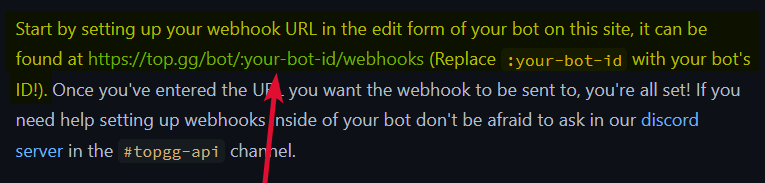
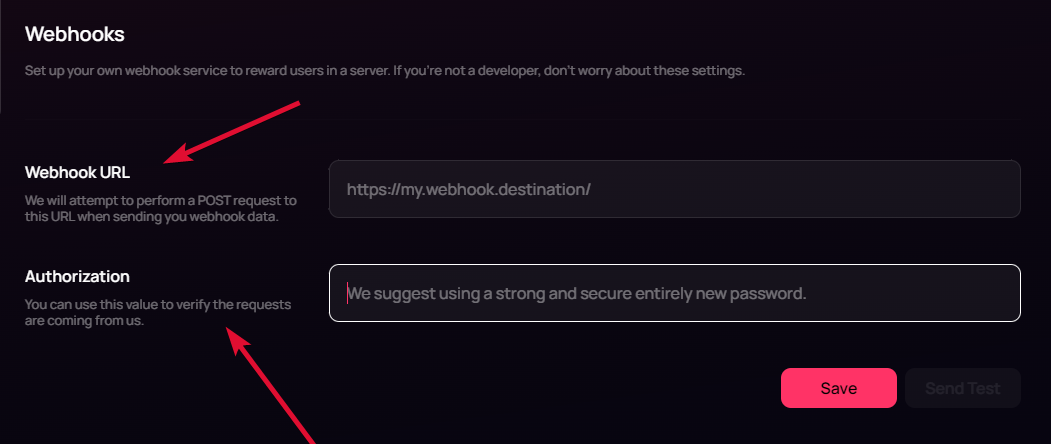 sullen fox
2022-05-18T20:54:16.603528+00:00 heroku[router]: at=error code=H14 desc="No web processes running" method=POST path="/" host=overseer-djs.herokuapp.com request_id=179f7f19-a2dd-4971-a981-bd67c48e51b9 fwd="159.203.105.187" dyno= connect= service= status=503 bytes= protocol=https
i put my heroku link in Webhook URL and htis is logging
it sends this error very 10 seconds or so
jaunty plank
looks like you're not using web dyno's
sullen fox
im not no
jaunty plank
I cant really help much with that. Heroku web dynos are specific to Heroku and I don't use Heroku.
heres the docs for process types.
https://www.heroku.com/dynos/configure
&
https://devcenter.heroku.com/articles/dynos#dyno-configurations
sullen fox
jaunty plank
I cant really help much with that. Heroku web dynos are specific to Heroku and I...
I have the web dyno set up, but it's default is npm start. any idea what it would need to be do listen to webhooks?
not sure if that would be consistent with what you're using
jaunty plank
sullen fox
I have the web dyno set up, but it's default is `npm start`. any idea what it wo...
if the web dyno starts it should start listening right away.
jaunty plank
restive otter
can you setup the api for server votes?
servers dont have an api, but they do have webhooks.
restive otter
jaunty plank
servers dont have an api, but they do have webhooks.
ok but my webhook not working
jaunty plank
are you using a discord webhook? topgg webhooks do not work with discord webhooks
sullen fox
jaunty plank
if the web dyno starts it should start listening right away.
“Start” doesn’t exist. It’s just the default process for the web dyno
I tried just setting it to node bot.js, then I get no error until topgg sends something then the web dyno crashes
restive otter
jaunty plank
are you using a discord webhook? topgg webhooks do not work with discord webhook...
ohh
ok
how do i set that up
jaunty plank
sullen fox
I tried just setting it to node bot.js, then I get no error until topgg sends so...
crashes with what error?
sullen fox
Just went downstairs to eat but pretty sure it just said “App crashed”
Give me a min I’ll look
sullen fox
jaunty plank
crashes with what error?
2022-05-18T21:24:19.013704+00:00 heroku[router]: at=error code=H14 desc="No web processes running" method=POST path="/" host=overseer-djs.herokuapp.com request_id=f1606536-52e1-4ff0-b35c-3eaa0dc8c234 fwd="159.203.105.187" dyno= connect= service= status=503 bytes= protocol=https
``` makes sense cuz its just running my bot2022-05-18T21:27:16.177695+00:00 heroku[router]: at=info method=POST path="/" host=overseer-djs.herokuapp.com request_id=b107d651-1c16-40ce-8c41-14464cecbcfb fwd="159.203.105.187" dyno=web.1 connect=0ms service=1ms status=404 bytes=384 protocol=https
i had the web thing turned off like an idiot
the only problem is that since im running node bot.js in my worker and in my web, now it's running twice
ill disable the worker for now
jaunty plank
sullen fox
```
https://<my ip>:<port i use to listen>/topgg
```heres my webhook url... and ...
404 error?
does your url have the path set on top.gg
https://YourHerokuUrl/topgg
restive otter
what do i put in Authorization?
sullen fox
jaunty plank
404 error?
does your url have the path set on top.gg
`https://YourHerokuUrl/top...
Just fixed forgot to add the topgg
works now finally
holy
i hate webhooks
jaunty plank
heroku is a pain
jaunty plank
iirc heroku will stop with web dyno after awhile of not getting requests.
sullen fox
i have my code run something every 10 minutes to make sure it doesnt
jaunty plank
restive otter
what do i put in Authorization?
whatever you check for in the authorization header
sullen fox
is there a way to check if a user has voted within the last 12 hours (im not sure how long the cooldown is for voting) when they run a command?
jaunty plank
generally speaking we recommend storing that information in a database, but we do have that just be careful with ratelimits(cache the information).
https://topgg.js.org/classes/api#hasVoted
Documentation for @top-gg/sdk
vestal hazel
jaunty plank
What error?
cjs loader
 hoary iron
Hi,Can someone send me the stats update api
hoary iron
Ooo
hoary iron
vestal hazel
read the documentation
Thanks.
 tribal crag
the webhook doesnt work, idk

no stats will be posted and no votes will be registered
the settings in the top.gg interface are correct
tidal idol
make sure port 60 is open
 chrome plaza
Is this normal? webhook listener firing multiple data? that's make some users gain multiple rewards as well though.
 tidal idol
chrome plaza
Is this normal? webhook listener firing multiple data? that's make some users ga...
tidal idol
chrome plaza
Is this normal? webhook listener firing multiple data? that's make some users ga...
Do you send a response to the post request
chrome plaza
Unfortunately no, currently i just listen them and directly add with redis stuff
tidal idol
you should reply
otherwise it repeats the request
even just sending the word "ok" is fine
chrome plaza
Yeah, i just realized recently, so it is working as expected
 winter raft

 acoustic bough
Hi, I want to fetch discord servers data with specified tag via api. How can I do this?
rain heart
Top.gg/servers does not have an API to use for that
 cerulean heath
When will there be a server data API endpoints
tidal idol
out of curiousity, what sort of data are you expecting to be returned from a server endpoint?
restive otter
hello api
tidal idol
restive otter
hello api
?
 earnest burrow
bot.topgg_webhook = topgg.WebhookManager(bot).dbl_webhook('/dblwebhook', os.environ['api'])
bot.topgg_webhook.run(5000)

@bot.event
async def on_dbl_vote(data):
    print(f'Received a vote:\n{data}')

@bot.event
async def on_dbl_test(data):
    print(f'Recieved a test vote:\n{data}')
I have this, but it isn't printing something when I vote
and of course i defined my bot and did bot.run
jaunty plank
earnest burrow
```python
bot.topgg_webhook = topgg.WebhookManager(bot).dbl_webhook('/dblwebhook...
did you fill in your url and auth on top.gg?
earnest burrow
jaunty plank
did you fill in your url and auth on top.gg?
wdym
jaunty plank
you're using a webhook, webhook messages are sent via http/https
earnest burrow
Thanks I'll head there
@jaunty plank I put in the auth but what URL should i put?
jaunty plank
It depends on your host
If your host provides an ip, and you do not have a domain.
http://YourServerIp:5000/dblwebhook
If your host provides a subdomain
YourProjectURL/dblwebhook
earnest burrow
jaunty plank
It depends on your host
If your host provides an ip, and you do not have a domai...
How do I get the Server IP
jaunty plank
It will depend on your host, If you cant find it on your own I'd suggest contacting their support.
tidal idol
earnest burrow
How do I get the Server IP
How do you host your bot?
earnest burrow
tidal idol
How do you host your bot?
On my PC
jaunty plank
Just google "what's my ip" with all vpns and proxies off.
It will tell you your ip, you'll also need to port forward at home
earnest burrow
so I put http://ip:5000/dblwebhook in the settings of the bot and /dblwebhook in the code?
jaunty plank
Your code doesnt need to change at all from what you gave earlier.
You already set /dblwebhook
https://i.imgur.com/2WMvIa5.png
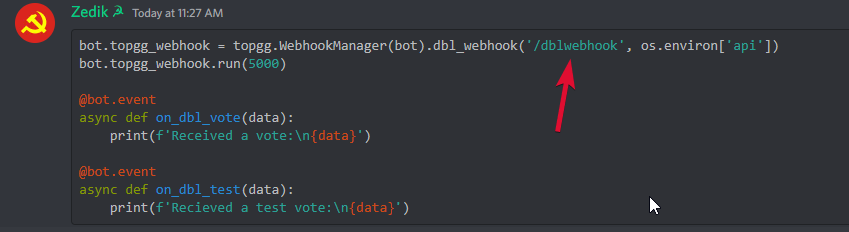
 jaunty plank
yeah, then your authorization would be whatever is in the api env variable
https://i.imgur.com/taD0Pq3.png
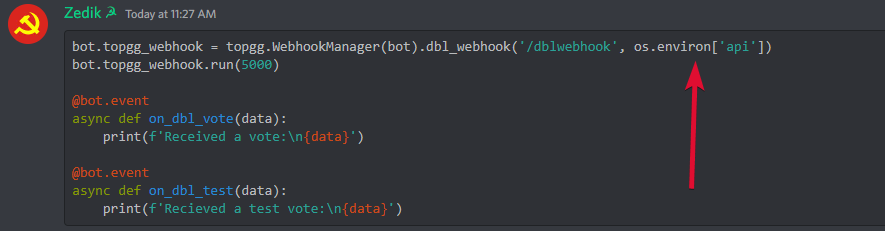
then you just need to port forward.
Heres a really good video explaining what port forwarding is.
https://www.youtube.com/watch?v=WOZQppVNGvA
and here is a list of guides for portforwarding various routers
https://portforward.com/router.htm

Purchase a Seasonic FOCUS Power Supply at https://geni.us/F7w6w4g
If you're having problems using certain devices on your home network, give port forwarding a try...but what exactly IS port forwarding, anyway?
Lists of ports:
https://en.wikipedia.org/wiki/List_of_TCP_and_UDP_port_numbers
https://www.iana.org/assignments/service-names-port-numb...
sullen nymph
lmao that thumbnail
jaunty plank
ltt at it again.
its a really good video explaining what it is in a quick format.
Maybe I can convince ltt to make one on what a webhook is 👀
Would solve a lot of confusion
earnest burrow
what if i cant do that??
jaunty plank
Then you cannot use webhooks at home.
You'll need to use a hosting provider
earnest burrow
jaunty plank
Then you cannot use webhooks at home.
You'll need to use a hosting provider
im also using replit
jaunty plank

Deploying HTTP servers
For deploying HTTP servers, any framework can be used so long as the package can be imported or the port can be opened. However, we also
earnest burrow
bro i did this and i sent a test but it STILL is not printing the votes
 jaunty plank
earnest burrow
bro i did this and i sent a test but it STILL is not printing the votes
jaunty plank
earnest burrow
bro i did this and i sent a test but it STILL is not printing the votes
you filled in the authorization correct?
also, saved before testing
young acorn
https://top.gg/api/bots/[BOTID]/votes API is showing less votes that shown on bot page https://top.gg/bot/[BOTID]
vestal hazel
PS C:\Users\****\OneDrive\Desktop\top.gg> node index.js
C:\Users\****\OneDrive\Desktop\top.gg\index.js:1
const client = new Client({ intents: [Discord.Intents.FLAGS.GUILDS] });
               ^

ReferenceError: Client is not defined
    at Object.<anonymous> (C:\Users\gkris\OneDrive\Desktop\top.gg\index.js:1:16)
    at Module._compile (node:internal/modules/cjs/loader:1097:14)
    at Object.Module._extensions..js (node:internal/modules/cjs/loader:1149:10)
    at Module.load (node:internal/modules/cjs/loader:975:32)
    at Function.Module._load (node:internal/modules/cjs/loader:822:12)
    at Function.executeUserEntryPoint [as runMain] (node:internal/modules/run_main:77:12)
at node:internal/main/run_main_module:17:47```i am getting this error
restive otter
read the error
vestal hazel
restive otter
read the error
client isnt defined
restive otter
exactly
vestal hazel
restive otter
exactly
const { AutoPoster } = require('topgg-autoposter')

const ap = AutoPoster('Your Top.gg Token', client)

ap.on('posted', () => {
  console.log('Posted stats to Top.gg!')
})```welp
i dont find any mistake here
jaunty plank
I dont see Client defined anywhere
restive otter

 fallow tartan
anyone know how I can fetch vote count? I wanna add it to my bot's stats when a cmd is ran
I'm experienced with axios & fetching, I'm just curious
or do I have to just https://top.gg/api/bots/[id]/votes and just count how many listing there are
rain heart
the bot endpoint has it, just make a get request to your own bot
fallow tartan
Yeah I just saw
 gloomy remnant
Hi! I'm trying to receive webhooks from top.gg but idk if the api sends any information about the user who has voted.
I tried to console log params, query and body, and all said undefined
gloomy remnant
Ok I did it 
 delicate estuary
how can i get the topgg api key?
abstract mothBOT
Your question is likely answered by one of pinned messages.
Please take time to read the pinned messages by clicking on this icon.
 delicate estuary
how can i listen when someone votes for my bot?
jaunty plank
Using topgg webhooks.
https://docs.top.gg/resources/webhooks/
 scarlet cobalt
One message removed from a suspended account.
 wise onyx
scarlet cobalt
One message removed from a suspended account.
wise onyx
scarlet cobalt
One message removed from a suspended account.
what version?
scarlet cobalt
One message removed from a suspended account.
One message removed from a suspended account.
One message removed from a suspended account.
wise onyx
hmm
scarlet cobalt
One message removed from a suspended account.
One message removed from a suspended account.
wise onyx
2.1.1 seems to exist as it's not complaining about it when I put it in
but it seems to have the same issue as 2.1.0
it could be an issue with my setup
sorry I meant 2.1.0 lol
as in the classes won't show for me
but since my version of eclipse is completely broken it might be best to wait on alan to see if it works for him
scarlet cobalt
One message removed from a suspended account.
wise onyx
I honestly just switched to a direct HTTP request a while back
it's a pretty simple request
scarlet cobalt
One message removed from a suspended account.
wise onyx
public static String postDBLStats(long bot_id, String token, List<Integer> server_count) {
  HttpURLConnection connection = null;

  String targetURL = "https://top.gg/api/bots/" + bot_id + "/stats";

  StringBuilder sb = new StringBuilder();
  for (int i = 0; i < server_count.size(); i++)
    sb.append(server_count.get(i) + (i < (server_count.size() - 1) ? "," : ""));

  String params = "{\"server_count\":[" + sb.toString() + "]}";

  try {
    URL url = new URL(targetURL);
    connection = (HttpURLConnection) url.openConnection();
    connection.addRequestProperty("Authorization", token);

    connection.setRequestMethod("POST");
    connection.addRequestProperty("User-Agent", "JavaDiscordBot/1.0");
    connection.setRequestProperty("Content-Type", "application/json");

    connection.setDoOutput(true);

    DataOutputStream wr = new DataOutputStream (connection.getOutputStream());
    wr.write(params.getBytes("UTF-8"));
    wr.close();
    InputStream is = connection.getInputStream();
    BufferedReader rd = new BufferedReader(new InputStreamReader(is));
    StringBuilder response = new StringBuilder();
    String line;
    while ((line = rd.readLine()) != null) {
      response.append(line);
      response.append('\r');
    }
    rd.close();
    return response.toString();
  } catch (Exception e) {
    e.printStackTrace();
    return null;
  } finally {
    if (connection != null)
      connection.disconnect();
  }
}
One message removed from a suspended account.
wise onyx
not the most efficient just a simple adaption of a post request I found on stack overflow to work for posting Top.GG bot statistics
xD understandable
rain heart
it doesn't, it is provided by the devs
delicate estuary
why is my bot's stat not updating when i sent requests like once every hour
 dim kettle
delicate estuary
why is my bot's stat not updating when i sent requests like once every hour
dim kettle
delicate estuary
why is my bot's stat not updating when i sent requests like once every hour
It does take some time for cache to clear. How far behind are the numbers lagging?
rain heart
there are no instances of you posting your servercount to our site
please note that it is not done automatically, if you wish to display your bots servercount on top.gg, you'll need to post it yourself
 rough bough
i need chat bot api
dim kettle
rough bough
i need chat bot api
This channel is to get help with the top.gg api. If you need help with developing your bot, you can ask in #development
rough bough
ok sir
vestal hazel
finally got bot stats working
 dim kettle
vestal hazel
finally got bot stats working
dim kettle
vestal hazel
finally got bot stats working
That’s great news! Let us know if you need help with anything else 😊
vestal hazel
dim kettle
That’s great news! Let us know if you need help with anything else 😊
alrighty 
and actually I made a github repo for this...I have defined intents and client directly and made it, is this okay? I mean I will put a disclaimer that I am no way affiliated with top.gg nor the api

i have also linked the top.gg documentation page
dim kettle
vestal hazel
and actually I made a github repo for this...I have defined intents and client d...
Yeah that’s completely fine 👌
tidal idol
is that different to @top-gg/sdk?
vestal hazel
dim kettle
Yeah that’s completely fine 👌
tysm
nimble burrow
How would I be able to get an event on my bot when someone votes using webhooks?
jaunty plank
nimble burrow
How would I be able to get an event on my bot when someone votes using webhooks?
 thick bobcat
Hi! Im trying to post the server count but Im getting the following error:
object Lock can't be used in 'await' expression
My code:
        try:
            await self.client.dblpy.post_guild_count()
            print(f'Posted server count ({self.client.dblpy.guild_count()})')
        except Exception as e:
            print('Failed to post server count\n{}: {}'.format(type(e).__name__, e))
Are you using dblpy or topggpy
thick bobcat
lol
sullen nymph
Yes. topggpy is the newer package
sullen nymph
It's improved dblpy basically
thick bobcat
nice
sullen nymph
Indeed it is. dblpy was deprecated at 0.4 and topggpy at 2.0a
thick bobcat
oh
so... this should do it?
        try:
            await self.client.topgg.post_guild_count()
            print(f'Posted server count ({self.client.topgg.guild_count})')
        except Exception as e:
            print('Failed to post server count\n{}: {}'.format(type(e).__name__, e))
Should
sullen nymph
Did the console show anything?
restive otter
wait™
thick bobcat
what?
abstract mothBOT
The issue you're experiencing is due to server-side caching. Please wait for up to 1 hour for site cache to clear before trying again. You may also need to clear your browser cache.
restive otter
ty wee woo
thick bobcat
So if another person enters the website it should be updated?
restive otter
ballsack
sullen nymph
thick bobcat
yes
Then give it up to around 30 minutes or an hour
restive otter
ballsak
thick bobcat
ok, thanks!
sullen nymph
👍
thick bobcat
It updated, thanks again

 spice coral
Can someone help me setup the vote tracker bot. I need to put in a link into the webhooks but all the videos are back when the old top.gg was a thing.
jaunty plank
spice coral
Can someone help me setup the vote tracker bot. I need to put in a link into the...
hey. itll be on your bot or server page, click "edit"
then on the left side bar click "Webhooks"
https://i.imgur.com/h1PVkHF.png
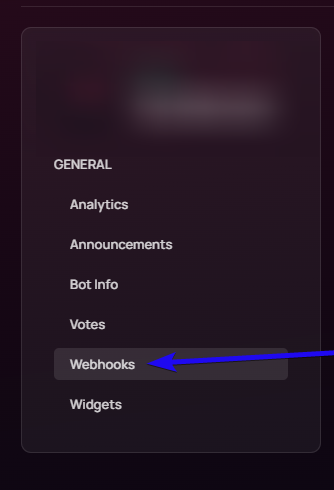 spice coral
Ok, thank you!
spice coral
jaunty plank
hey. itll be on your bot or server page, click "edit"
then on the left side bar ...
One more question, why i go to add a role reward, it won't let me add any role other than @ everyone or none.
idk what to do
jaunty plank
on topgg? or vote tracker
jaunty plank
does the topgg bot have permission to give those roles?
spice coral
wait nvm it worked for some reason lmao
jaunty plank
ok
spice coral
jaunty plank
ok
So I went on my alt to test if i could vote and it keeps sending me to a page that is not responsive.
nvm got it to work
earnest burrow
I just updated to discord 2.0 and when i am initializing the webhook i get this error: AttributeError: loop attribute cannot be accessed in non-async contexts. Consider using either an asynchronous main function and passing it to asyncio.run or using asynchronous initialisation hooks such as Client.setup_hook
merry vapor
earnest burrow
I just updated to discord 2.0 and when i am initializing the webhook i get this ...
Add async to everything
sullen nymph
Ah yes the good ol' fuck you from Python async
If anyone feels like PRing a fix for it you're more than welcome to I reckon
earnest burrow
merry vapor
Add `async` to everything
its an error from discord.py not topgg
merry vapor
earnest burrow
its an error from discord.py not topgg
Yes I saw it


 merry vapor
earnest burrow
This?
merry vapor
earnest burrow
This?
No, I meant I saw it in the error log
earnest burrow
merry vapor
No, I meant I saw it in the error log
so what should i add to the code?
merry vapor
earnest burrow
so what should i add to the code?
I'm not very very sure because python isn't my thing
earnest burrow
Ok
 misty dove
I'll try to make a vote reward in discord.py but nothing happends
what i must fill into this?
client.topgg_webhook = topgg.WebhookManager(client).dbl_webhook("/dblwebhook", "password")
 stoic storm
your bot client is "client" and change "password" to the password you set in your settings.
misty dove
Full code:
client.topgg_webhook.run(5000)

@client.event
async def on_dbl_vote(data):
    """An event that is called whenever someone votes for the bot on Top.gg."""
    if data["type"] == "test":
        # this is roughly equivalent to
        # `return await on_dbl_test(data)` in this case
        return client.dispatch("dbl_test", data)

    print(f"Received a vote:\n{data}")

@client.event
async def on_dbl_test(data):
    """An event that is called whenever someone tests the webhook system for your bot on Top.gg."""
print(f"Received a test vote:\n{data}")```Also if you're testing this on a local computer, you will probably have to do some port forwarding.
misty dove
oh okay
misty dove
stoic storm
your bot client is "client" and change "password" to the password you set in you...
wich settings?
stoic storm
If you've never done it before, research it a bit. It's pretty easy. You'll just use top.gg's IP address on port 5000 on your router.
misty dove
I do this on my hosting server but still doesn't work
 ashen moss
Can someone help me, when I visit the API url for bot info on my browser, I get json data, but when I try using code I made using node-fetch, I get 401
rain heart
You're not providing authorization
ashen moss
rain heart
You're not providing authorization
where do I get an authorization token?
because when I type it directly into my browser
it works
and atleast not that I know of, browsers dont let you set the headers and stuff
so how is my browser authorized?
ah nvm I figured out why I kept getting 401, but im still kinda confused how my browser can send API requests without any tokens
rain heart
Because you're authorized as a user
Which allows you to test endpoints without providing an API token
 glossy jetty
how do i make it so that i can send the updates that i written into a server channel?
rain heart
 primal prawn
With the bot
primal prawn
With the bot
Read the docs linked above, same for @glossy jetty
glossy jetty
rain heart
Read the docs linked above, same for <@853047261722312745>
i did tho
didn't make any sense
and it didn't work
primal prawn
rain heart
https://docs.top.gg
This one?
primal prawn
rain heart
Read the docs linked above, same for <@853047261722312745>
What snowflake means?
 glossy jetty
primal prawn
What snowflake means?
glossy jetty
primal prawn
What snowflake means?
https://www.youtube.com/watch?v=RU-urn3bK84 i found this

In this video, we make a Top.gg server webhook that sends a message to a channel whenever someone votes for your server! To do this, we use an unofficial Top.gg tool, webhook-topgg, that helps integrate Top.gg webhooks with Discord webhooks.
Sorry for all the weird white noise! I'm not completely sure why they appeared, as they weren't there ...
idk if its gonna help or not
but ima see and ill tell you
primal prawn
glossy jetty
but ima see and ill tell you
Ok thanks
glossy jetty
primal prawn
Ok thanks
it kinda works
primal prawn
glossy jetty
it kinda works
this create webhooks for servers
but what if I want to know if someone voted my bot?
primal prawn
jaunty plank
Like receiving the vote in your bots code?
yes
jaunty plank
The above link is for webhooks, the webhook can be sent to your bot.
primal prawn
jaunty plank
The above link is for webhooks, the webhook can be sent to your bot.
but what must I put on code?
also what is the token user for?
jaunty plank
It depends on your programming language.
The authorization for a webhook is how you verify webhook requests come from topgg.
primal prawn
jaunty plank
It depends on your programming language.
The authorization for a webhook is how...
I found the exhample code here: https://topgg.js.org/#webhook-server but I don't understand this part: const app = express()
Documentation for @top-gg/sdk
jaunty plank
Express is the webserver for the webhook
primal prawn
jaunty plank
Express is the webserver for the webhook
so what must I put inside the ()?
jaunty plank
Nothing, its just a constructor.
primal prawn
jaunty plank
Nothing, its just a constructor.
why I get this error than:
node:internal/modules/cjs/loader:936
throw err;
^
Error: Cannot find module 'express'
jaunty plank
Express needs to be installed.

npm
Fast, unopinionated, minimalist web framework. Latest version: 4.18.1, last published: a month ago. Start using express in your project by running npm i express. There are 61987 other projects in the npm registry using express.
primal prawn
jaunty plank
https://www.npmjs.com/package/express
oh yeah now it works
primal prawn
jaunty plank
https://www.npmjs.com/package/express
now I have done this:
app.post("/dblwebhook", webhook.listener(vote => {
// vote will be your vote object, e.g
votes.push(vote.user);
console.log(vote.user); // 395526710101278721 < user who voted
console.log(votes);
// You can also throw an error to the listener callback in order to resend the webhook after a few seconds
}))
but I see nothing in the terminal
I did send test to test
jaunty plank
jaunty plank
https://docs.top.gg/resources/webhooks/
Did you read the above link?
And follow it
Ie the webhook url and auth need to be filled in with the url to your bots server + the path to your webhook, and auth you set in code?
primal prawn
jaunty plank
Ie the webhook url and auth need to be filled in with the url to your bots serve...
you mean this? const webhook = new Topgg.Webhook('topggauth123') // add your Top.gg webhook authorization (not bot token)
I put the auth link that your site gives
jaunty plank
Topgg doesn't provide you a webhook auth
You provide topgg your webhooks auth.
You fill it in on your bot or servers edit page
primal prawn
i did that
jaunty plank
In the webhook section
Did you fill in the url?
It will not be a discord webhook url
primal prawn
I put the one I found on webhook-topgg.com
jaunty plank
Webhook-topgg cannot be used at the same time as your own webhook.
primal prawn
jaunty plank
Webhook-topgg cannot be used at the same time as your own webhook.
wdym?
jaunty plank
Topgg can only send webhooks to one place at a time.
Right now you're sending it to webhook-topgg.com not your bot.
primal prawn
jaunty plank
Right now you're sending it to webhook-topgg.com not your bot.
but how do I get the bot auth link then
primal prawn
jaunty plank
Right now you're sending it to webhook-topgg.com not your bot.
They say to put an auth but idk where can I find it, is it the bot auth?
plucky lance
The authentication is a password you can choose (or not)
On topgg when editing the webhook's target
primal prawn
plucky lance
The authentication is a password you _can_ choose (or not)
ok, and the webhook url?
plucky lance
that's your endpoint
where do you host the webhook listener?
a server, at home, ...?
primal prawn
plucky lance
where do you host the webhook listener?
heroku
I don't think I can have the IP of my app
plucky lance
topgg sends a webhook request to you, like how you would get mail
iirc your project does have a hostname
you don't need an IP
primal prawn
plucky lance
iirc your project does have a hostname
it has
plucky lance
that's part of the URL you enter on topgg then
- the path (and optionally the port)
the path is the one you defined in your code
by default you're listening to yourdomain.com/dblwebhook if I'm not wrong
primal prawn
plucky lance
by default you're listening to yourdomain.com/**dblwebhook** if I'm not wrong
yes
plucky lance
well then you already got anything you need
I'm not sure how your platform deals with ports but you can test it out
build the URL, http://your-project-name.com/dblwebhook or if the webhook listener (webserver) is running on a specific port then it's http://your-project-name.com:port/dblwebhook
primal prawn
plucky lance
build the URL, `http://your-project-name.com/dblwebhook` or if the webhook liste...
you know... maybe heroku have a feature for webhooks actually
plucky lance
Idk
primal prawn
plucky lance
Idk
node:events:505
2022-05-28T18:16:17.529483+00:00 app[worker.1]: throw er; // Unhandled 'error' event
2022-05-28T18:16:17.529484+00:00 app[worker.1]: ^
2022-05-28T18:16:17.529484+00:00 app[worker.1]:
2022-05-28T18:16:17.529485+00:00 app[worker.1]: Error: listen EACCES: permission denied 0.0.0.0:80
rain heart
different port, 80 is privileged
plucky lance
Yeah port 80 is the webserver of your platform
plucky lance
You choose a port
rain heart
use something above 1024
plucky lance
Actually you should use something over 3000 or 5000 as the number of reserved ports for apps and services has massively increased the last years
primal prawn
I'll do some tests
plucky lance
It doesn’t really matter tho
primal prawn
no error this time
plucky lance
Just pick 5000 for example
Or 3005
Whatever you like
Add the port the url when entering it on topgg
Not sure how and if heroku resolves it
You will see
Make sure to always hit the save button on topgg before hitting the test button
Then check your webserver logs on heroku if a request has been made if such a thing exists
primal prawn
at=error code=H14 desc="No web processes running" method=POST path="/"
primal prawn
plucky lance
Then check your webserver logs on heroku if a request has been made if such a th...
I get a path error
primal prawn
plucky lance
Did you start the app?
in heroku yes
dyno= connect= service= status=503 bytes= protocol=https
plucky lance
Errr also the path doesn’t seem to be right
primal prawn
app.post("/dblwebhook", webhook.listener(vote => {
plucky lance
What’s the url you entered on topgg (without your project name)?
primal prawn
plucky lance
https://discord.com/channels/264445053596991498/412006692125933568/9801710993776...
I must add the /dblwebhook?
plucky lance
Yes if you’re listening to that path you need to tell topgg to send a request to that path, too
Plus add the port you selected on horuko
Like in my example
primal prawn
plucky lance
Plus add the port you selected on horuko
I selected a port?
plucky lance
The one you entered in the code
you told the express server to listen to port XX
app.listen(port);
primal prawn
plucky lance
app.listen(port);
app.post("/dblwebhook", webhook.listener(vote => {
let value = JSON.stringify({
})
console.log(vote.user)
fetch("CODE"), {
method: 'POST',
headers: {
'Content-type': 'application/json',
},
body: value
}
}))
plucky lance
Errr wut
Take a look at the example in the docs please
You can straight copy that JS example to get started in the beginning
primal prawn
plucky lance
You can straight copy that JS example to get started in the beginning
app.post("/dblwebhook", webhook.listener(vote => {
console.log(vote.user);
}))
?
plucky lance
Yeah there’s more code around
Especially the line starting the server
app.listen(port);
primal prawn
So it was :5000
primal prawn
plucky lance
> app.listen(port);
?
plucky lance
Which port did you choose?
primal prawn
5000
plucky lance
Ok this is the one you add to the url then
Then start the app on heroku
Then hit the save button on topgg, then hit test
primal prawn
plucky lance
Then hit the save button on topgg, then hit test
if I use fthis nothing happens
plucky lance
Also without using the secure protocol
primal prawn
plucky lance
> Also without using the secure protocol
oooh
plucky lance
Please if somebody is trying to help you, read the answers carefully
And like I said make sure the JS app is started on heroku
primal prawn
plucky lance
Please if somebody is trying to help you, read the answers carefully
sorry, it's that it's difficult for me because i don't know english very well
plucky lance
Then ask if you didn’t understand something
Or ask a second time
That’s no problem
Does it work now with HTTP (not HTTPS)?
primal prawn
plucky lance
Does it work now with HTTP (not HTTPS)?
no
plucky lance
Ok then show the entire code on heroku please, and the url you entered on topgg
Or at least without your project name
And without topgg token
primal prawn
plucky lance
And without topgg token
const Topgg = require("@top-gg/sdk");
const express = require("express");
const app = express();
const webhook = new Topgg.Webhook("AUTH")

app.post("/dblwebhook", webhook.listener(vote => {
    console.log(vote.user);
}))


app.listen(5000)
wait
primal prawn
plucky lance
I’m on mobile
edited
primal prawn
plucky lance
Ok did you actually enter a password on topgg which is the AUTH?
yes
without the ""
primal prawn
plucky lance
Okay did heroku log anything?
I'm restarting the app to make sure
plucky lance
Ok
primal prawn
plucky lance
Ok
2022-05-28T19:05:12.385989+00:00 app[worker.1]: bot online
2022-05-28T19:05:12.386021+00:00 app[worker.1]: Currently in 6 servers
2022-05-28T19:05:14.000000+00:00 app[api]: Build succeeded
I pressed the send test button, nothing showed up
plucky lance
primal prawn
ok
ok im back
primal prawn
plucky lance
ok im back
hi
plucky lance
i dont know how heroku handles port forwarding
try to remove the port of the URL from topgg
http://name-app.herokuapp.com/dblwebhook
make sure the app is running before
and never forget
hit SAVE before using the TEST button
always
primal prawn
plucky lance
`http://name-app.herokuapp.com/dblwebhook`
at=error code=H14 desc="No web processes running" method=POST path="/dblwebhook"
primal prawn
plucky lance
hit SAVE before using the TEST button
i found this on the internet $ heroku ps:scale web=1
plucky lance
hmm that's a specific heroku error
can't really help you with it, sorry
"No web processes running"
somehow sounds like the app isn't running
primal prawn
plucky lance
somehow sounds like the app isn't running
I was using the worker option
not the web option
btw i got another error at=error code=H20 desc="App boot timeout" method=POST path="/dblwebhook"
plucky lance
yikes
primal prawn
plucky lance
yikes
Error R10 (Boot timeout) -> Web process failed to bind to $PORT within 60 seconds of launch
I think i will give up
primal prawn
plucky lance
try 3000
I still get the error Error R10 (Boot timeout) -> Web process failed to bind to $PORT within 60 seconds of launch
primal prawn
plucky lance
try 3000
I found this
plucky lance
hmm
I'm not sure then tbh, couldn't find something else helpful regarding that issue, too
primal prawn
restive otter
<@870270710277341195> try binding the port to process.env.PORT
ok
end set a key?
restive otter
you dont need to on heroku
primal prawn
restive otter
you dont need to on heroku
why not?
restive otter
heroku automatically sets the PORT/port enviroment table so you can listen to that port only
primal prawn
restive otter
heroku automatically sets the PORT/port enviroment table so you can listen to th...
ok now It gives that I asked after this at=info method=POST path="/dblwebhook" host=aless-sus.herokuapp.com
but it works
I don't think it is an error
restive otter
its not
plucky lance
did you receive the vote log?
primal prawn
plucky lance
did you receive the vote log?
yes
plucky lance
alright
restive otter
also just a reminder, if you are also hosting your bot on the webhook, you should ping the heroku app
because after 30mins of inactivity itll shut down
primal prawn
plucky lance
alright
sorry if i wasted so much time
primal prawn
restive otter
also just a reminder, if you are also hosting your bot on the webhook, you shoul...
I'm hosting it at http://app-name.herokuapp.com/dblwebhook
jaunty plank
Heroku has ssl by default
 waxen burrow
Is there an example of how to keep the bot's server count constant for topgg?
jaunty plank
Constant like non changing?
waxen burrow
jaunty plank
Constant like non changing?
Constant as in, keeps the server count up to date
Probably a better way to word it
I know there is a way through a cog (I am also using py) but I was wondering if there was a simple example that works
jaunty plank
Yeah a constant in programming means non changing.
waxen burrow
Yea apologies for the miswording
Thank you though
Follow up question, what is the topgg library called?
Nvm, I am blind
sullen nymph
Blind would be you not seeing it after being shown. You're fine
 shut hill
Hello
When someone votes for my bot on top.gg, I want a message to be sent to a channel I want, how can I do it?
@jaunty plank please Help Me?🙂
jaunty plank
Hey, youll want to use webhooks.
https://docs.top.gg/resources/webhooks/
They do not use discord webhooks though
If you just want to send a message on vote third party tools exist for doing that too.
shut hill
jaunty plank
Hey, youll want to use webhooks.
https://docs.top.gg/resources/webhooks/
where do i put this link
 vestal hazel
shut hill
where do i put this link
vestal hazel
shut hill
where do i put this link
please read the full documentation
 elfin pine
Hi.
I'm using the topggpy library, I have the webhook set when someone votes but how can I get the user is of who voted?
The test data just says: "Top.gg Webhook/1.0.0"
jaunty plank
That looks like a header, not the body correct?
Looks like the useragent header(what platform the request came from)
elfin pine
yes, but I'm just printing the data to see what it gives and actually nothing
jaunty plank
Do you have any accented characters in your url or auth?
elfin pine
no
jaunty plank
Is it empty, or is it an empty object?
elfin pine
wait it seems like the logging shows the webhook but the event doesn't get triggered
elfin pine
yes
jaunty plank
Are you sure the url goes to the right spot?
elfin pine
you mean on my code?
jaunty plank
Most commonly the url looks something like this.
http://YourServerIP:port/path
Yeah
elfin pine
client.topgg_webhook = topgg.WebhookManager(client).dbl_webhook("/webhook", "password")
client.topgg_webhook.run(5000)
jaunty plank
And what are you using to host this?
elfin pine
my vps
jaunty plank
So your url will look like
http://YourVpsIp:5000/webhook`
elfin pine
yes
I mean I have logging active and it shows that a webhook has been sent but only shows the useragent and doesn't trigger the event
jaunty plank
Logging as in logging all requests that come in?
elfin pine
no, the prebuilt python package, with info basic config
jaunty plank
Are you sure your auth is the exact same between topgg and your code?
jaunty plank
elfin pine
client.topgg_webhook = topgg.WebhookManager(client).dbl_webhook("/webhook", "__p...
"password" is the authorization
jaunty plank
And you're 100% sure the event doesn't fire, but it is received?
elfin pine
it logs the webhook so i guess
jaunty plank
So if its received, but the event isn't fired that's a path, or authorization issue.
https://topggpy.readthedocs.io/en/stable/_modules/topgg/webhook.html#WebhookManager
The only time it doesn't fire the event is in those two cases.
elfin pine
elfin pine
still not working tho 😦
nvm fixed it
jaunty plank
elfin pine
nvm fixed it
What was it?
elfin pine
jaunty plank
What was it?
it was me being dumb, didn't read the full example
 stray shadow
Hey, any way to detect votes for a server? I dont want to use custom webhooks as im not into those that much. I'm using nodejs so any npm package to like make an event or something/
jaunty plank
Webhooks are the only thing topgg offers currently, they can be an event in nodejs.
https://docs.top.gg/libraries/javascript/#webhooks

 stone nest
can anyone help me in vote command? using api
 fluid venture
how can we check if a user has voted in last 12 hour for our bot?
https://top.gg/api/bots/:bot_id/check
i found this endpoint but ig this only gives the total number of votes of a user
dim kettle
fluid venture
how can we check if a user has voted in last 12 hour for our bot?
```
https://t...
Hey,
The most scalable and reliable way would be to use incoming Webhooks and then store it in your database https://docs.top.gg/resources/webhooks/
fluid venture
dim kettle
Hey,
The most scalable and reliable way would be to use incoming Webhooks and th...
but there was also an endpoint for that ig i saw it somewhere
dim kettle
You do have this endpoint too https://docs.top.gg/api/bot/#last-1000-votes, but it does not work if your bot ever starts getting over 1k votes
fluid venture
oh
rain heart
fluid venture
how can we check if a user has voted in last 12 hour for our bot?
```
https://t...
it doesnt, it returns 1 for if the user voted in the last 12 hours, 0 if has not
fluid venture
oh
rain heart
refer to the example, aswell as reading the description on that endpoint along with it, it tells you that
 dawn mason
does somebody know why this doesnt set any stats on top.gg

ik the token is correct
and the bot id
rain heart
can you send the bot id in here
dawn mason
ok
i changed it to this btw

but it still doesnt work
bot id: 919061572649910292
rain heart
any errors?
dawn mason
nop
rain heart
do a try catch around it and catch any exception
dawn mason
rain heart
do a try catch around it and catch any exception
nothing..
by nothing i mean, it never went in the catch
it just ran over
rain heart
Can you add a simple print statement after the method call, right after the setStats call that just returns your servercount that you've just posted
 calm agate
@willow sphinx Sorry for the ping but I was wondering if the node-sdk of top.gg can migrate to undici from node-fetch.
Also the fetch from undici is only supported in node versions 16.5+
willow sphinx
I don't really see the point. node-fetch works just fine for now
tidal idol
move it to axios 
willow sphinx
I could consider it for bundle size purposes but the sdk is exclusively for node where the bundle size doesn't really matter
calm agate
willow sphinx
I don't really see the point. node-fetch works just fine for now
well the speed of undici is way better than any other. Also it became a native node module in latest node releases.
The main point of migrating is the tr46 package used by node-fetch. This module creates mappingTable.json which is a really huge array and consumes MB's of ram
I can write some test for the speed if you want
willow sphinx
I really don't think it's a huge deal. Node 18 with global fetch isn't even LTS yet and there are so many other libraries that will inevitably pull node-fetch into your dependency tree at some point. I just don't see the point of making a tedious change like that
calm agate
willow sphinx
I really don't think it's a huge deal. Node 18 with global fetch isn't even LTS ...
oh
jaunty plank
The most common library used on js for discord bots is discordjs, which uses node fetch anyway
calm agate
jaunty plank
The most common library used on js for discord bots is discordjs, which uses nod...
v14 we shifted to undici
willow sphinx
I don't think a couple ms of performance difference is going to matter for something insignificant like top.gg api
calm agate
willow sphinx
I don't think a couple ms of performance difference is going to matter for somet...
Many devs are shifting to undici even djs, it has more speed with less ram consumption due to tr46 being removed from the dependency tree.
willow sphinx
you can talk to @hearty lintel about it and work on a PR if you believe it can be moved to undici without any breaking changes, but I don't really have time for a change like that
calm agate
willow sphinx
you can talk to <@142408079177285632> about it and work on a PR if you believe i...
I already created one https://github.com/top-gg/node-sdk/pull/74 Has no breaking changes
 viral egret
dim kettle
What you on? We need sub ms latency for all top.gg api calls /j
viral egret
dim kettle
What you on? We need sub ms latency for all top.gg api calls /j
Wdym?
 hearty lintel
calm agate
I already created one https://github.com/top-gg/node-sdk/pull/74 *Has no breakin...
hearty lintel
calm agate
I already created one https://github.com/top-gg/node-sdk/pull/74 *Has no breakin...
Just commented!
calm agate
hearty lintel
Just commented!
👍, Also changed to undici request()
 devout pewter

Why doesn't the server show the number of members? My server is located on the site.
rain heart
-servercount
abstract mothBOT
To have your bot's server count displayed on Top.gg, please read the documentation on server/shard posting.
rain heart
Members is not a parameter on a bot, only servers is a thing on the bot
 flint spire
Where can I ask questions about topggpy
rain heart
Here, as it is an official library
sullen nymph
DBLClient.get_user_vote() for vote in last 12 hours
Webhook if you want to receive votes in real-time and store them locally
flint spire
I don't want to store (for now) just check if the user has voted or not
smoky marten
 sullen nymph
Voted at all or for the past 12 hours
flint spire
sullen nymph
Voted at all or for the past 12 hours
Past 12 hours
sullen nymph
sullen nymph
DBLClient.get_user_vote() for vote in last 12 hours
This
flint spire
Oki
sullen nymph
(I'm rather curious why I had to point it out here after sending both options with a few seconds apart for you to see them)
flint spire
Where Do I Get The API Token?
smoky marten
flint spire
Where Do I Get The API Token?
flint spire
smoky marten
https://media.discordapp.net/attachments/412006692125933568/906910253579403294/t...
oki thanks
does it matter if i use commands.Bot or discord.Client?
flint spire
btw why am i getting a forbidden errror
rain heart
missing authorization
fluid venture
💀
smoky marten
Request type: POST
Request URL: https://top.gg/api/bots/:bot_id/stats
Example (min) Body: ```json
{
"server_count": 69
}
Headers: ```json
{
    "Authorization": "your-topgg-token-here"
}
Where to find api token ?
See this: https://media.discordapp.net/attachments/412006692125933568/906910253579403294/topggtokentut.mp4
Docs: https://docs.top.gg/api/
Authentication Docs: https://docs.top.gg/api/@reference/#authentication
Everything is in the docs. You just need to know how to find it
 hollow steppe
Api not responding
smoky marten
hollow steppe
Api not responding
Server is working
So, problem on your side
 restive otter
I need an express app to receive who voted for my bot?
rain heart
You need a webserver to handle such requests, yes