#topgg-api
1 messages · Page 178 of 1
 plucky lance
 blazing spoke
plucky lance
But it does indeed require you how to work with webhooks
blazing spoke
plucky lance
But it does indeed require you how to work with webhooks
hmm ok thenks
plucky lance
It’s not very difficult tbh
Once you got that set up you will receive the webhooks from topgg including the vote data
At the moment you receive them you gonna create a timestamp and there you go, 12h from that an user can vote again
You can create a counter/timer like in the image you showed
 vast umbra
Is the official java sdk maintained anymore?
 rain heart
It should still be functional, but not maintained right now no
 dire imp
IT WORKED, MY VOTE WEBHOOK IS WORKING!!
I just have one more question, once the webhook starts to run itll listen to that port forever?
rain heart
as long as the webserver is online yes
dire imp
rain heart
as long as the webserver is online yes
I have an issue
I run the topgg module in a cog, So everytime i reload the cog next time it would throw me an error saying that "The port is already in use", So after i reload, it stopped listening to the votes
rain heart
Because you're likely not stopping the service, causing the port to still be used
dire imp
I thought killing the port process might help but it shutdown my bot 😭
dire imp
rain heart
Because you're likely not stopping the service, causing the port to still be use...
how do i stop it?
wait do you mean webhook_manager.stop()??
because i already do it
 primal crest
for what is the topgg api?
dire imp
ERROR:aiohttp.server:Error handling request
Traceback (most recent call last):
  File "/home/ubuntu/.local/lib/python3.8/site-packages/aiohttp/web_protocol.py", line 422, in _handle_request
    resp = await self._request_handler(request)
  File "/home/ubuntu/.local/lib/python3.8/site-packages/aiohttp/web_app.py", line 499, in _handle
    resp = await handler(request)
  File "/home/ubuntu/.local/lib/python3.8/site-packages/topgg/webhook.py", line 161, in _handler
    await self._invoke_callback(
  File "/home/ubuntu/.local/lib/python3.8/site-packages/topgg/data.py", line 136, in _invoke_callback
    signatures[k] = self._resolve_data(v.type)
  File "/home/ubuntu/.local/lib/python3.8/site-packages/topgg/data.py", line 145, in _resolve_data
    return self._data[type_]
KeyError: <class 'discord.client.Client'>
The code
@topgg.endpoint("/dblwebhook", topgg.WebhookType.BOT, auth = "HandCricket2022")
async def endpoint(vote_data: topgg.BotVoteData, client: Client = topgg.data(Client)): ##
    print("Received a vote", vote_data)
    await client.dispatch("dbl_vote", vote_data)
Something wrong here??
dire imp
If i dont hint the client parameter I get this error:
ERROR:aiohttp.server:Error handling request
Traceback (most recent call last):
  File "/home/ubuntu/.local/lib/python3.8/site-packages/aiohttp/web_protocol.py", line 422, in _handle_request
    resp = await self._request_handler(request)
  File "/home/ubuntu/.local/lib/python3.8/site-packages/aiohttp/web_app.py", line 499, in _handle
    resp = await handler(request)
  File "/home/ubuntu/.local/lib/python3.8/site-packages/topgg/webhook.py", line 161, in _handler
    await self._invoke_callback(
  File "/home/ubuntu/.local/lib/python3.8/site-packages/topgg/data.py", line 138, in _invoke_callback
    res = callback(*args, **{**signatures, **kwargs})
TypeError: endpoint() missing 1 required positional argument: 'client'
Please help? (Using 2.0.0a)
dire imp
Looks like LIB issue, i've reverted back to 1.3.0
 sullen nymph
What's Client in your code
dire imp
sullen nymph
What's Client in your code
sorry?
its discord.Client i guess
dire imp
sullen nymph
Oh nice
it could be a lib issue (the lib hasnt been in development in github for months) so ill just stick with the 1.3.0
I just hope, the 1.x is compatible for a longer time. 🙏
sullen nymph
Yeah there's no maintainer still it seems

 rain heart
json data is called data, the variable used is d
 fluid rock
???

Making HTTP requests with Node.js
How to perform HTTP requests with Node.js using GET, POST, PUT and DELETE
rain heart
the variable you actually have your json stuff in is called data, the one you're using in your res.on is d
oh wait nvm
fluid rock
rain heart
the variable you actually have your json stuff in is called data, the one you're...
yes but ....
rain heart
print out data
 rain heart
yeah cant help then
fluid rock
arg
fluid rock
hello help me please
plucky lance
Wrap the data you’re posting into a valid object with the key body before stringifying it
As in my example I did post earlier
Also it makes sense to tell the server the content type you’re going to post
 rocky bough
they're using https module not fetch
you don't provide body like that, you have to write it
plucky lance
I’m aware
 bold wave
 surreal sparrow
do anyone know hack?
surreal sparrow
do anyone know hack?
Sure. What game
If ur talking about account i would need ur ip location and device
sullen nymph
Don't keep it going
plucky lance
rocky bough
you don't provide body like that, you have to write it
Yes indeed, after debugging write() it does indeed add the data to the body
Even if I wasn't aware of that, the hint I gave regarding the missing content type is the solution.
Without specifying it the API doesn't know, you're providing some JSON data.
plucky lance
fluid rock
hello help me please
Your simple solution is to add the content type to your header as I mentioned above
#topgg-api message
headers:
{
    "Authorization": "...",
    "Content-Type": "application/json"
}
he fixed it already 
fluid rock
plucky lance
Your simple solution is to add the content type to your header as I mentioned ab...
yes work
plucky lance
alright
 meager meteor
how would i get if a user voted on the weekend?
rain heart
The vote webhook contains a parameter called "isWeekend"
meager meteor
oooh its isWeekend not is_weekend
rain heart
Or you could check the "isWeekend" endpoint when checking if a user has voted already
Depends on the library, refer to the docs
meager meteor
is there a thing for voting streak (saw it for some other bots dont know if thats a custom thing they did)?
rain heart
Not a thing on the API, has to be tracked by yourself using webhooks
meager meteor
thanks again!
vast umbra
rain heart
It should still be functional, but not maintained right now no
So the python lib has the webhook manager for votes, does the java sdk also have it?
rain heart
It doesn't, no
There's several projects on GitHub providing that, but remember you won't get support for it here
 robust halo
What are you trying to install?
For top.gg API use https://www.npmjs.com/package/@top-gg/sdk
 coral cove
robust halo
What are you trying to install?
coral cove
robust halo
What are you trying to install?
npm install discord-bot-list (It's version 1.0.1) it's no longer available.

I want to uninstall that node module
robust halo
coral cove
I want to uninstall that node module
npm uninstall or just delete it from the node_modules folder
coral cove
Oh sorry this to do with official libraries
vast umbra
rain heart
There's several projects on GitHub providing that, but remember you won't get su...
Could you link some? My quick google search didn't give me any results other than the official java-sdk
rain heart
There's one made by me https://github.com/Hopeful-Developers/topggwebhooks4j
And one made by another developer
https://github.com/JoshiCodes/TopGGWebhook

GitHub
Java Webhook Library for Top.gg. Contribute to Hopeful-Developers/topggwebhooks4j development by creating an account on GitHub.

GitHub
There's another one made by someone else that supports different botlists, can't find it rn though
vast umbra
Ah ty
 restive pewter
is it not possible to search for bots on the api?
i can only search on https://top.gg/api/search?q=carl, but that's global
can't find anything related to just bots, like this for an example
https://top.gg/api/bots?search?q=carls
 stiff quiver
if any python discord bot developers needs help setting up the basics of topgg in their bot using webhooks using the topgg python library ping me and i'll help.
I havent yet implemented voting streaks yet though
stiff quiver
how do i check if someone is on a voter streak python
rain heart
Webhooks, Tracking it yourself
stiff quiver
rain heart
Webhooks, Tracking it yourself
ooh, make sense so there's not a way to track voting streaks through topgg webhooks itself?
rain heart
There is, webhooks are basically making requests to your Webserver, being able to track these and process them to do streaks stuff
stiff quiver
can you give me a run down on how i'm supposed to keep track of voting streaks in python
rain heart
I can't help no
 smoky marten
stiff quiver
can you give me a run down on how i'm supposed to keep track of voting streaks i...
smoky marten
stiff quiver
can you give me a run down on how i'm supposed to keep track of voting streaks i...
Implement voting streak for your bot
First receive the vote data from top.gg:
- Make a webhook server
topggpypython library has a built in webhook feature(https://dblpy.readthedocs.io/en/latest/api.html#topgg.WebhookManager.dbl_webhook)- You can also build it yourself (https://docs.top.gg/resources/webhooks/)
When someone votes:
- Check if user has voted before (from database)
If user has never voted / last vote was more than 24 hours ago (time might vary):
- Save userID and Time of vote at a database
- Reset streak to zero (If user already exists)
If user has voted within last 24 hours:
- Save the new time
- Increase Streak by 1 (streak = streak +1)
Done
Note:
The database table should look something like this
--------------------------------------------
|     id     |   lastVote   |    streak    |
--------------------------------------------
|   User ID  |   Time(ms)   |    number    |
--------------------------------------------
 lost thorn
is there a ratelimit to checking vote status
dire imp
smoky marten
__**Implement voting streak for your bot**__
__**First receive the vote data f...
Very useful for python bots. thank you. 👌 👍
stiff quiver
thank you btw going to be implementing it in a day or 2
 silent plover
how can I make my bot send a message to a user if some voted my bot on top.gg??
I read the docs but quite didnt understand
 restive otter
silent plover
how can I make my bot send a message to a user if some voted my bot on top.gg??
restive otter
silent plover
how can I make my bot send a message to a user if some voted my bot on top.gg??
fetch the user and send them a dm
restive otter
silent plover
ok but using the top.gg package how do I get to know if someone voted for my bot...
top.gg isnt the official package, @top-gg/sdk is
 ancient steppe
@chrome pier I accidentally reported a user review what will happen to him 😧😧😧
 chrome pier
If the review violates our guidelines then it'll be removed, but if it doesn't then it'll be inflaged by moderators.
 vale stump
chrome pier
If the review violates our guidelines then it'll be removed, but if it doesn't t...
vale stump
chrome pier
If the review violates our guidelines then it'll be removed, but if it doesn't t...
How to add vote Premium system in my bot
dire imp
vale stump
How to add vote Premium system in my bot
Wdym vote premium system?
ancient steppe
@chrome pier in case my bot got offline the modrator will check my website for it like or I have to mention it on bot website or not page?
chrome pier
If your bot is on maintenance you can mention that in bot page/long description with time duration
 lapis merlin
token = "my topgg token"
url = f"https://top.gg/api/bots/{bot_id}/votes"
headers = {
    "Content-Type": "application/json",
    "Authorization": token,
}
session = aiohttp.ClientSession()
async with session.request("GET", url, headers=headers) as response:
    data = await response.json()
await session.close()
print(data)

# Output:
{'error': 'Forbidden'}
What am I doing wrong?
rain heart
Either the token you're providing is not authorized or the bot id you're using isn't related to the bot token
 young acorn
https://top.gg/api/bots?search=stuff_here not working? 
 past fox
how can i call the callback on_dbl_vote by python? i read the documents but i dont understand much
 shadow siren
Uh hi @signal hawk
I need help for vote
Like I wanna make my own server
With top.gg to vote
How do I do
 jaunty plank
like receive vote events?
shadow siren
No
Like
You know how they say vote for us
I wanna make that in my server
But how
jaunty plank
so send a message when someone votes?
 jaunty plank


 idle orbit
is it possible to check if a user's current vote is active
rain heart
https://docs.top.gg/api/bot/#individual-user-vote will return 1 if a user has voted in the past 12 hours

 clever dust
 what will happen with the python lib, dpy 1.7.x will soon be Decommissioned in april and you still have the dpy dep
 loud stump
Which role do you need to setup a webhook in top.gg ?
Im moderator in a team but it does not allow me to interact with that page
 tidal idol
loud stump
Which role do you need to setup a webhook in top.gg ?
Im moderator in a team but...
tidal idol
loud stump
Which role do you need to setup a webhook in top.gg ?
Im moderator in a team but...
Owner i beleve
rain heart
Being the server owner yeah
clever dust
very helpful mods
restive otter
What is my /dblwebhook and password ?

I don't get what I put there
Ohh, is it in my top.gg bot's settings?
jaunty plank
restive otter
What is my `/dblwebhook` and `password` ?
dblwebhook is the path in the url, such as http://yourvpsip:3000/dblwebhook
password is the authentication header
restive otter
Oh okay
jaunty plank
yeah the auth and url is in your bots edit page, in the webhook section
restive otter
Okay, thanks
restive otter
jaunty plank
`dblwebhook` is the path in the url, such as `http://yourvpsip:3000/dblwebhook`
...
I'm still confused.
-
When doing this webhook poster, do I copy the webhook link and paste it onto the code (and replace)
/dblwebhookand add a password? -
When doing this webhook poster, do I do the same steps as #1 but also add this webhook url and password on my top.gg bot's settings?
-
do I copy my IP and copy the format you gave me and replace it for
/dblwebhook+ put the password and stuff on top.gg
I'm doing all this code on a test bot but the bot I'm using on top.gg is my verified discord bot
restive otter
hi, will the API work with heroku (where I host my bot 24/7 ) since it has a dynamic IP ? I'm thinking of getting a raspberry pi and host it there but it will save money if you guys have a way to make it work on heroku, thanks for any help!
plucky lance
(where I host my bot 24/7 ) since it has a dynamic IP ?
iirc you should have a project domain (hostname) you can use
It does always has your current IP as target
restive otter
Hmm I'll look into it, thanks
jaunty plank
restive otter
I'm still confused.
1. When doing this webhook poster, do I copy the webhook li...
Kind of a combination.
So the webhook gets sent to your server, your server authenticates it's from topgg using the password you set in code.
Step 1: figure out the url to your server, http://serverip:portyouset/dblwebhook is generally what this url will look like, unless you host on a provider which uses urls(heroku or replit).
Step 2: fill in the url and password on topgg.
Then you can save and test.
jaunty plank
vale stump
How To Add This Top.gg Vote Premium In My Bot
You'll need an approved bot first.
Generally speaking it's best to use webhooks, but you can also use the check endpoint.
https://docs.top.gg/api/bot/#individual-user-vote
If it returns 1 they voted in the last 12 hours.
past fox
can anyone tell me what is wrong?


it doesnt log anyrhting, or give any error
and i opened the right port
 idle orbit
how do I authorize
restive otter
jaunty plank
Kind of a combination.
So the webhook gets sent to your server, your server aut...
k
plucky lance
past fox
it doesnt log anyrhting, or give any error
and i opened the right port
Is that a Windows server with a static IP or just your own local PC?
past fox
plucky lance
Is that a Windows server with a static IP or just your own local PC?
its a vps
plucky lance
Try to ping your server IP to make sure the provider has no extra firewall in place.
If that's successful try to connect to your endpoint via CURL
Open your Windows command prompt (on your local PC) and execute: curl -v http://your-ip:port/dblwebhook
And report the results (without your server IP of course)
past fox
this is the result
 plucky lance
What about the ping?
past fox
here

 plucky lance
Well very hard to see as it has transparency lol
past fox
lol
plucky lance
Well that means your server can't be reached
That means your provider has another firewall in place
You need to adjust
past fox
yh ill try to figure out whats wrong
plucky lance
Somewhere in your server control panel
plucky lance
np
plucky lance
Ok you need to create another inbound rule in the firewall
Source IP 159.203.105.187
TCP inbound rule on your specified remote and local remote
plucky lance
Try the manual curl request, please
There's no guarantee atm the test button on site works, but actual votes do
If you can reach your endpoint in cURL it means it does work
 plucky lance
If there's a rule which DENYs any incoming connection
Then you have to ALLOW the source IP and port from TOPGG BEFORE
 plucky lance
Well I can't help you with py at all
past fox
no the problem is my firewall now
plucky lance
When running your py script CAN you cURL the endpoint locally on your server?
plucky lance
You NEED to replace the IP with localhost:1234
When doing the cURL request locally on your server
past fox
aaahh
plucky lance
That's required to figure out if the py script even works and creates a webserver (endpoint)
As locally requested no firewall can block this
rain heart
Kinda why I prefer linux over windows as a server, by default ports aren't locked on a linux machine, you can install a package that does that though but isnt required
plucky lance
by default ports aren't locked on a linux machine
Try but this makes it a target for any volnurably endpoint bot and crawlers are trying to find 24/7
The default windows firewall already has a better handling than unconfigured linux firewalls
rain heart
Well, locked until a service runs on them iirc
True true, more pain to configure nonetheless
plucky lance
But you're actually missing the context here tbh
The issue is not his OS firewall
But the firewall his provider has in place for VPS
unfortunately I can't see what he's doing and I'm waiting on a reply
When he can not reach his endpoint locally then it means the py script doesn't acutally create a webserver
 plucky lance
If he can then yes it's still a firewall issue with his providers firewall, not the OS firewall as this rule was set properly
idle orbit
how do I authorize
plucky lance
idle orbit
plucky lance
<https://docs.top.gg/api/@reference/#authentication>
earlier I read but didn't understand
what do I do with the token
smoky marten
idle orbit
earlier I read but didn't understand
what do I do with the token
you put it in Authorization header in your request
idle orbit
an example pls
jaunty plank
it depends on your programming language
idle orbit
jaunty plank
it depends on your programming language
js
jaunty plank
using the js topgg library?
idle orbit
yes
jaunty plank
using webhooks, or an api request?
idle orbit
api req
jaunty plank
the auth is included in the topgg.api constructor.
const api = new Topgg.Api('Your top.gg token')
Documentation for @top-gg/sdk
idle orbit
how to request vote count
rain heart
Under the bot endpoint, https://docs.top.gg/api/bot/#find-one-bot
 agile isle
jaunty plank
the auth is included in the topgg.api constructor.
`const api = new Topgg.Api('Y...
agile isle
jaunty plank
the auth is included in the topgg.api constructor.
`const api = new Topgg.Api('Y...
is this need to work?
jaunty plank
That was for the api not webhooks.
The webhooks code looks like this.
https://docs.top.gg/libraries/javascript/#webhooks
 agile isle
kk ty
const Topgg = require("@top-gg/sdk")
const express = require("express")

const app = express()

const webhook = new Topgg.Webhook('TryHardd')

app.post("/dblwebhook", webhook.listener(vote => {
  // vote will be your vote object, e.g
  console.log(vote.user) // 395526710101278721 < user who voted\

  // You can also throw an error to the listener callback in order to resend the webhook after a few seconds
}))

app.listen(60)``` it isnt workingand in the webhook url is https://TRYHARD.zeinfarran7.repl.co:60/dblwebhook
@jaunty plank anyhelp
jaunty plank
Try using
https://TRYHARD.zeinfarran7.repl.co/dblwebhook
If that still doesn't work try changing the port in code to 3000
agile isle
i cant use the first one bc as my normal port aka 80 is my dashbaord
jaunty plank
🤔 I'm not sure if replit allows hosting multiple webservers at once.
Is your dashboard using express?
agile isle
hmm
agile isle
jaunty plank
Is your dashboard using express?
yes
i am using a package tho but it is using express
jaunty plank
Do the same exact thing but using your dashboards express webserver.
plucky lance
Make sure to choose a port of a non-reserved range
Also make sure incoming connections on this port are allowed (ref. firewall rules)
agile isle
plucky lance
Make sure to choose a port of a non-reserved range
aslo wdym
agile isle
jaunty plank
Do the same exact thing but using your dashboards express webserver.
i did not understand
jaunty plank
rather than making a new express webserver, use the existing one
agile isle
like use the same port?
jaunty plank
yep, and same express instance
jaunty plank
what package?
agile isle
discord-dashbaord
jaunty plank
as far as i know replit doesnt let you host two things
agile isle
ff
agile isle
ik the package have custome page does it work?
it have html which i can use java for
🧠
@jaunty plank will it work?
@jaunty plank
jaunty plank
I'm not quite sure what you mean by that
agile isle
the package have a custome page future
i can use html and other stuff
and bc i can use html i can also use script
jaunty plank
If you think so, you probably know replit better than me. I dont use it.
agile isle
jaunty plank
If you think so, you probably know replit better than me. I dont use it.
aight ama try
clever dust
 how can i update the server count without using the lib, but with requests for some reason my bot is locked at a certain number for months
agile isle
aight thanks
i did js const user = client.users.cache.get(vote.user) user.send({ embeds: [embedE]}) but didnt work
restive otter
agile isle
i did ```js
const user = client.users.cache.get(vote.user)
user.send({ embeds: [...
Fetch the user
restive otter
thats not fetching
plucky lance
Getting the user from the cache is not fetching
restive otter
you are getting the user from cache
 earnest roost
What can i do with this api? Like if someone votes they'll get rewards or something?
rain heart
with the API, you can for example check if a user has recently voted or post your server-count to our site. Webhooks are also a thing that you can use to get realtime vote events
more on that on https://docs.top.gg
 earnest roost
Oh i remember trying to check if a user voted or not, but i just couldn't figure it out
rain heart
best to take a look at https://docs.top.gg/api/bot/#individual-user-vote
earnest roost
Is there a YouTube tutorial for this?
rain heart
There's not, no
earnest roost
Oh, I'm a little slow so i probably can't do this alone lmao
Thanks for trying to help me, I'll look more into it
 velvet lake
So I setup my bot to post its servercount to the Top.GG api because I saw that in the edit tab it said this

Now where does this info go?
I don't see it on the bot's page
rain heart
that's the API token, which is used to access our API and post your servercount
velvet lake
Yes so my bot is now posting the servercount to the API every 5 hours
but where do I see it on my bot's page?
rain heart
It should be on the right side below your creator controls under your prefix
may take a bit to update regarding cache
velvet lake
Alright, I shall check it later
I am getting the 200 status code, so it is updating
Thanks!
plucky lance
velvet lake
Yes so my bot is now posting the servercount to the API every 5 hours
The interval is up to you.
The official SDKs as well as lots of people are posting their server count every 30 minutes.
That’s the common frequency.
Just to say.
velvet lake
Those 'lots of people' probably have their bots growing faster than mine
I could probably get away with keeping it at 24hours as well
plucky lance
Yeah it’s nothing to worry about
The site just always caches your value a while which means after updating it you will still see the “wrong” count
velvet lake
Yeah
plucky lance

clever dust
how can i update the server count without using the lib, but with requests for some reason my bot is locked at a certain number for months
jaunty plank
clever dust
<:MR_canny_meh_stage:944635096059760640> how can i update the server count with...
you can send an http request
clever dust
I tried, I just get the count from website, which is outdated
plucky lance
The count on the website is cached for while
Maybe for hours but not months as you said
Check if actually get a 200 response code when doing the request
agile isle
plucky lance
Getting the user from the cache is not fetching
so i add user.fetch()
 wild jewel
@jaunty plank can u do the auctions page thing here
-auctions
like how to claim credits
jaunty plank
why in the api channel 👀
 abstract mothBOT
Auction Credits
What are they?
- If enough people vote for your bot or server per month, you have the ability to get credits that you can then use for auctions.
- Don’t know what auctions is? See here to learn more and here to participate.
- These auction credits can be used to pay for any winning bids you may make
- You CANNOT “withdraw” them for real money
How does the System Work?
- Each month, bot monthly votes reset
- If you get 100 votes on your bot in the month, you can redeem $15 worth of voting credits (can’t redeem till you actually get 101 votes)
- Any vote after 100 will be worth $1 per 1000 votes (or $.001 per 1 vote)
How Can I Redeem Them?
- At the end of the month, you will be eligible to redeem your credits (you redeem them on your bot or server's Votes page on your bot’s dashboard). You will have 30 days to redeem them before they expire.
- After you redeem them, you have 31 days to use them before they expire (so you can technically stack 2 months worth)
**How can I Use them to Pay? **
- When you pay for your winning bid, you have the option to use your credits
- If your winning bid cost is more than the amount of credits you have, make sure to apply the credits **first **and then pay the rest with the supported payment providers
If you wish to read more about auctions, check out our support articles about auctions.
wild jewel
jaunty plank
why in the api channel 👀
oh sorry didnt notice that
plucky lance
agile isle
so i add user.fetch()
client.users.fetch(id)
Returns a promise of the user object
rain heart
clever dust
I tried, I just get the count from website, which is outdated
Not a get request, a post request
The get request returns your current server count, the post updates it
Mentioned in the docs
velvet lake
clever dust
I tried, I just get the count from website, which is outdated
What language are you using?
clever dust
rain heart
Not a get request, a post request
{'error': 'Required parameter server_count or shards missing'} i get what this means but i don't get where should i add these params 
clever dust
velvet lake
What language are you using?
python
rain heart
clever dust
``{'error': 'Required parameter server_count or shards missing'}`` i get what th...
within the request body
clever dust
rain heart
within the request body
i tried it, but what key should they take in 🗿
headers = {
    "Content-Type": "application/json",
    "Authorization": token,
    "server_count": '',
    "shards": '',
    "shard_count":''
}
thats the headers you're passing
lemme get you the docs one sec
You need the servercount, shards etc within the body, no the header
the content type and Authorization is correct yeah, token being your top.gg api key
velvet lake
data={"server_count":guilds}
r=requests.post("https://top.gg/api/bots/<your-bot-
id>/stats",headers=headersTOPGG,json=data)```@clever dust You don't need to put the other data unless you have it.
server_count is the necessary one, rest are optional
clever dust
if i pass just guilds probably i will get an unresolved reference
so i assume i need to get the server count "by myself" len the server count ?
velvet lake
clever dust
if i pass just guilds probably i will get an unresolved reference
so i assume i...
Yeah something like that
Are you using nextcord, pycord?
 velvet lake
clever dust
also i use aiohttp for this
velvet lake
clever dust
also i use aiohttp for this
for the api?
clever dust
 session = aiohttp.ClientSession()
        async with session.request("POST", url, headers=headers) as response:
            data = await response.json()
        await session.close()
bruh
Why are you not using requests?
This what I used and is straightforward once you understand it https://www.dataquest.io/blog/python-api-tutorial/
sullen nymph
Where's the request body
rain heart
In the header, which I said is wrong
velvet lake
clever dust
don't you think it's blocking
It is working for me
velvet lake
velvet lake
```headersTOPGG={"Authorization":"<your-api-token>"}
data={"server_count":guild...
I sent the correct one
clever dust
ok i managed to make it work adding the shard count also, thanks
agile isle
plucky lance
`client.users.fetch(id)`
ah ok tysm
 woven belfry
A
 fallen mantle
i want to know how i can get upvote informations
is the async def on_dbl_vote(data) function enough for getting all the informations in python
i want if someone vote the bot the bot should dm the user
i am working in discord.py
 spare viper
fallen mantle
i want if someone vote the bot the bot should dm the user
spare viper
fallen mantle
i want if someone vote the bot the bot should dm the user
-
Get user's id from data by using
data['user']and fetch them -
Send dms to them
async def on_dbl_vote(data):
  user = await self.bot.fetch_user(data['user'])

  await user.send('Test')
ok i got it
spare viper
fallen mantle
ok i got it
For item in data you can find it in https://docs.top.gg/resources/webhooks/#bot-webhooks
smoky marten
 dapper wasp
how to get top.gg token and client?
dapper wasp
how to get top.gg token and client?
https://top.gg/bots/<YOUR_BOT_ID_HERE>/webhook
 teal nymph
hi is there any guide that how can i create a log for my bot votes ?
rain heart
dire imp
Can i know what kinda data i get when i vote for a Server?
Like when i vote for bot i get
{'user': 'userid', 'type': 'upvote', 'query': '', 'isWeekend': False, 'bot': 'botid'}
What's it in case of a server?
^ python language btw
velvet lake
dire imp
Can i know what kinda data i get when i vote for a Server?
Like when i vote for ...
it would prolly be a json
or a dictionary
oh
I read the question wrong
teal nymph
hi
i try to create a vote logger for my bot but im a little confused -.- can someone help
first of all do i need anything else ? (i want when someone vote my own bot send a message)

is there any way to do it or i need to create the logger with a webhook ?
spare viper
teal nymph
first of all do i need anything else ? (i want when someone vote my own bot send...
Maybe there's test vote
I've seen on_dbl_test in python library
teal nymph
spare viper
Maybe there's test vote
yes there is a test vote but there is many problem with my code rn for example first of all i dont know that which port should i listen ! 80 ? why ?
or what should i enter for auth
etc...
spare viper
teal nymph
yes there is a test vote but there is many problem with my code rn for example ...
Idk about that I didn't make any when people vote you bot thing so I can't help yet
teal nymph
tnx
 warm plaza
https://sourceb.in/X0w31SYbhK this code isnt working, it used to work, can someone help
 tidal idol
warm plaza
https://sourceb.in/X0w31SYbhK this code isnt working, it used to work, can someo...
tidal idol
warm plaza
https://sourceb.in/X0w31SYbhK this code isnt working, it used to work, can someo...
does it check for vote on command
warm plaza
yes
spare viper
teal nymph
tnx
https://youtu.be/KmFlldd98o8 maybe this help it's not JavaScript but the webhook tutorial is pretty helpful
A huge thankyou to comhad for providing us with this method.
Important links mentioned in the video
- Integromato :- https://www.integromat.com/en
Comhad github tutorial with code snippet:-
https://gist.github.com/comhad/bd42b56a0399dbfa645aa83fe3cf4c8a
Support me by upvoting my bot here :- https://top.gg/bot/819838809318621184/vote
Joi...
tidal idol
warm plaza
yes
might be getting ratelimited
teal nymph
spare viper
https://youtu.be/KmFlldd98o8 maybe this help it's not JavaScript but the webhook...
tnx
warm plaza
cause I dont get any error in console
teal nymph
i didnt understand what do you want to do ?
you want to check that user voted or not ?
warm plaza
yes
teal nymph
well why you are do it like this ?
warm plaza
then how shld I do it
teal nymph
wait
rain heart
warm plaza
https://sourceb.in/X0w31SYbhK this code isnt working, it used to work, can someo...
elaborate your goal, what are you trying to do
warm plaza
I want to make a vote cmd to check whether user has voted or not
This one used to work
but I dont why its not working
teal nymph
warm plaza
then how shld I do it
const Topgg = require('@top-gg/sdk')
const topgg = new Topgg.Api(top gg token here)
let voted = await topgg.hasVoted(user id here)
then voted return a boolean
warm plaza
ok thanks I'll try this
teal nymph
yw
teal nymph
rain heart
elaborate your goal, what are you trying to do
hope do u know js ? 👀
rain heart
I do not and will never do
rain heart
warm plaza
I want to make a vote cmd to check whether user has voted or not
getting any errors?
teal nymph
rain heart
getting any errors?
i already help they
rain heart
k
teal nymph
teal nymph
```js
const Topgg = require('@top-gg/sdk')
const topgg = new Topgg.Api(top gg to...
this should works fine
teal nymph
rain heart
I do not and will never do
why ?
teal nymph
@warm plaza ask it here
warm plaza
const db = require("old-wio.db");
const Discord = require("discord.js");
const { MessageEmbed } = require("discord.js");
const MessageButton = require("discord-buttons");
const disbut = require("discord-buttons");
const Topgg = require('@top-gg/sdk')

module.exports = {
  name: "bleh",
  aliases: ["bee"],
  category: "fun",
  description: "Shows How Member Gay Is!",
  usage: "howgay <Mention Member>",
  run: async (client, message, args) => {
    //Start
    const uId = message.author.id;
    const topgg = new Topgg.Api(process.env.TOPGG)
let voted = await topgg.hasVoted(uId)


    if (voted === 0) {
      return message.channel.send("you haven't voted yet");
    } else if(voted === 1){
      message.channel.send("thank you for voting");
    }


  }
};
voted will return a boolean not a number
teal nymph
are u sure u know js ?
warm plaza
It didnt work
teal nymph
if (voted) {
// u are voted
} else {
// you are not voted
}
or
if (voted) {
// u are voted
}
if (!voted) {
// you are not voted
}
😬
smoky marten
teal nymph
are u sure u know js ?
You should've seen this
 teal nymph
smoky marten
You should've seen this
teal nymph
smoky marten
You should've seen this
😅
 unique ruin
after how many hour can we repost stats on topgg?
rain heart
you should only post your stats every hour or so
the endpoint is ratelimited to 30 minutes
 old kernel
rain heart
old kernel
rain heart

Top.gg
Punishing Users for Not Voting Products listed on our site should not punish users who have not voted for their bot, they can do this by restricting a large majority of their features or completely blocking them off from using the bot. We want t...
dire imp
rain heart
is right below that
Found it. 👍
One more question, is the "query" field always empty??
rain heart
Is mentioned on the docs aswell

 rain heart
Shrug, never used autoposter
 quiet pendant
 quiet pendant
Why it isn't posting ?
quiet pendant
quiet pendant
Why it isn't posting ?
guys
woven belfry
does anyone have the vote script with channel message
woven belfry
Br?
Br man
Tu é Br??
Ata
Fui mal
Pode me ajudar
Quero fazer uma mensagem de voto
Mais não sei o script que usa
Vc tem aí?
restive otter
CF🥷🥷🥷
teal nymph
console.log(vote) will return this how can i check bot total votes ?
 teal nymph
rain heart
It returns everything about the bot
teal nymph
rain heart
It returns everything about the bot
Tnx
teal nymph
rain heart
It returns everything about the bot
https://top.gg/api/bots/:bot_id
And is there any official package to use this api or we need to use node fetch / axios ?
jaunty plank
teal nymph
https://top.gg/api/bots/:bot_id
And is there any official package to use this a...
It's in the library
https://topgg.js.org/classes/api#getBot
Documentation for @top-gg/sdk
teal nymph
jaunty plank
It's in the library
https://topgg.js.org/classes/api#getBot
Oh
Tnx alot
Its 5AM
Creating vote log was really anoying
So good night for now i will do the rest tomorrow
 timid vortex
How can i set my api?
i think
i know now
lmao
{
  "Authorization": "your-topgg-token-here"
}```where should i put this
rain heart
In your header

The HTTP Authorization request header can be used to provide credentials that authenticate a user agent with a server, allowing access to a protected resource.
ew the new social image cringe
teal nymph
what is the difference ?

 humble ermine
whats the ratelimit for posting in topgg?
plucky lance
plucky lance
humble ermine
whats the ratelimit for posting in topgg?
It’s recommended to post the bot server count every 30 min or more
humble ermine
plucky lance
It’s recommended to post the bot server count every 30 min or more
thanks
teal nymph
the only difference is line method name so what is the problem why hasVoted works but getUser dont ?
        const voted = await topgg.hasVoted(mMember.id)
        const votedUser = await topgg.getUser(mMember.id)
 jaunty plank
teal nymph
the only difference is line method name so what is the problem why hasVoted work...
jaunty plank
teal nymph
the only difference is line method name so what is the problem why hasVoted work...
has the user previously used topgg?
teal nymph
the user is me
jaunty plank
🤔 thats really weird
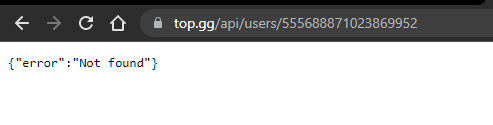 teal nymph
so ?
jaunty plank
but mine does
https://i.imgur.com/HE8q832.png
 teal nymph
well i belive i had a user in top gg 🤔
jaunty plank
how long has it been giving this error?
teal nymph
i dont know i want to try something i just write the code 5 mins ago
jaunty plank
try again in a few hours.
teal nymph
ok tnx
jaunty plank
if it still doesnt work, send in a support ticket.
https://support.top.gg/support/tickets/new
Top.gg
teal nymph
jaunty plank
youll need to be logged in for it to work in a browser.
teal nymph
well ig this isnt what i want i want to add something in my code to show for example Woo voted to @abstract moth 5 times is there anything in api or i need to create a data base for taht ?
jaunty plank
teal nymph
well ig this isnt what i want i want to add something in my code to show for exa...
youll need to create a database for that.
teal nymph
ok tnx
 split tusk

humble ermine
    at Api._request (DREAMER-BETA\node_modules\@top-gg\sdk\dist\structs\Api.js:76:19)
    at processTicksAndRejections (node:internal/process/task_queues:96:5)
    at async Object.run (DREAMER-BETA\slashCommands\Music\247.js:21:22)
    at async module.exports DREAMER-BETA\events\Client\interactionCreate.js:37:13) {
  response: Response {
    size: 0,
    timeout: 0,
    [Symbol(Body internals)]: { body: [PassThrough], disturbed: true, error: null },
    [Symbol(Response internals)]: {
      url: 'https://top.gg/api/bots/check?userId=922120118958436372',
      status: 524,
      statusText: undefined,
      headers: [Headers],
      counter: 0
    }
  }
}```interesting
tidal idol
humble ermine
```TopGGAPIError: 524 undefined
at Api._request (DREAMER-BETA\node_modules\@...
Sites down
humble ermine
tidal idol
Sites down
yea ben , thanks
 sharp moat
Boiz, how can i make so like when user vote for server bot will dm him with like "thanks for voting"? (Nodejs, idk how to get these vote notifications for servers)
Use webhooks?
sharp moat
Ya i found it
Is this auth msg sent with webhook or diffrently?
like does it send smth like {auth: 'auth code', id: 'voter id'} and etc?
Or it use header
rain heart
?? auth msg?
no clue what you're referring to
they're essentially the same as the bot ones, except changed data values
restive otter
is that how i am supposed to use local testing? (replacing myIP with mine and listening on port 3000)
 rain heart
http instead of https, but yes
restive otter
doesn't seem to work though ```js
const express = require('express');
const app = express();
app.post('/topggVote', webhook.advanced(), (req) => {
console.log(req.vote);
});
app.listen('3000', () => {
console.log('App listening on port 3000');
});```
jaunty plank
Did you port forward? You are also missing the path in the url
restive otter
wait i think i know
nvm
doesn't seem to work though ```js
const webhook = new Webhook('pass') // https://sourceb.in/8mUTjrxTEP
const express = require('express');
const app = express();
app.post('/topggVote', webhook.advanced(), (req) => {
console.log(req.vote);
});
app.listen('3000', () => {
console.log('App listening on port 3000');
});```also changed the url in the top.gg settings to http://ip:3000/topggVote
jaunty plank
🤔 what library are you using for Webhook()
That doesn't appear to be our library.
https://docs.top.gg/libraries/javascript/#webhooks
restive otter
jaunty plank
🤔 what library are you using for Webhook()
That doesn't appear to be our libra...
hand made
check the comment
jaunty plank
Ah, I won't be able to provide support on that then.
I'm on mobile right now, and don't have the time to look through that.
If you still need help on Monday I'll be at my desk again then, or someone else probably will be able to help sooner than that.
The next step is to check your portforwarding
restive otter
i tried with the official library though ```js
const Topgg = require('@top-gg/sdk');
const express = require('express');
const app = express();
const webhook = new Topgg.Webhook('');
app.post('/dblwebhook', webhook.listener(vote => {
console.log(vote);
}));
app.listen(80);```and http://ip:80/dblwebhook and still doesnt work
restive otter
jaunty plank
The next step is to check your portforwarding
wdym
jaunty plank
Well your hosting this locally right?
restive otter
ye
jaunty plank
Your router needs to know what to do with the incoming request, what computer on your network it goes to, etc.
Port forwarding tells your router where the request goes on a specific port.
Port Forward
A port forward is a way of making a computer on your home or business network accessible to computers on the internet even though they are behind a router. It is commonly used in gaming security camera setup voice over ip and downloading files.
 obtuse thistle


My bot's server stats have been broken for a few days now 🤔

It was working until a few days ago, the topgg-autoposter is for that afterall
obtuse thistle
obtuse thistle
This log shows that it posted the expected stat but idk, site doesn't seem to reflect it
rain heart
obtuse thistle
This log shows that it posted the expected stat but idk, site doesn't seem to re...
The site may show stats that are a bit older, though seems like you are indeed not posting the correct amount as seen from dblstats.com

Rightmost column being your server count
obtuse thistle
strange, bc the log shows that it posted 73
I haven't modified the topgg-autoposter in any way, so not sure what's going on but I'll regen the token and use the new one
obtuse thistle
using new token, log shows it posted with 73 servers but site still showing 4, used the refresh data button too but no change seen
obtuse thistle
obtuse thistle
using new token, log shows it posted with 73 servers but site still showing 4, u...
update: site reflects correct stats now, it was probably cached
 signal cove
https://docs.top.gg/api/bot/#individual-user-vote
When does this value get reset? Does this happen every day? Is it reset at the start of the month?
rain heart
every 12 hours, aka when the user can revote
signal cove
Alright, thank you
signal cove
Is there any lib that implements webhooks in c#?
I'm reading through the docs, planning to use an asp.net middleware to handle each incoming POST, but there is nothing covering the offset of the actual token inside the authorization header, neither if there is a specific body to be responded with. I assume nothing, but I'd rather have confirmation if anyone has a clue.
 glad prairie
how long does it take for the server count to be updated after I did the code
plucky lance
Depends on the site cache
Give it some time on your end
I would guess not more than an hour
 north osprey
Hello,
I`m using topggpy to handle a vote webhook but this error always raises:
TypeError: __init__() takes 1 positional argument but 2 were given```
There is no wrong argument as I understand, I copied that from the example
Code:
```py
client.topgg_webhook = topgg.WebhookManager(client).dbl_webhook("/dblwebhook", "myPassword")
client.topgg_webhook.run(5000)```

Using version 2.0.0a0Maybe this will help
A huge thankyou to comhad for providing us with this method.
Important links mentioned in the video
- Integromato :- https://www.integromat.com/en
Comhad github tutorial with code snippet:-
https://gist.github.com/comhad/bd42b56a0399dbfa645aa83fe3cf4c8a
Support me by upvoting my bot here :- https://top.gg/bot/819838809318621184/vote
Joi...
sullen nymph
north osprey
Hello,
I`m using topggpy to handle a vote webhook but this error always raises:
...
Which example? Are you looking at topggpy.rtfd.io/latest?
 steady steeple
Hey, recently started getting this error occuring whenever users vote for my bot. Any clue whats happening? It used to work fine with no issues, nothing has been changed.
The error doesn't happen all of the time, and I cannot seem to recreate it.
2022-03-09T01:08:14.082354079Z   File "/usr/local/lib/python3.9/site-packages/aiohttp/web_protocol.py", line 422, in _handle_request
2022-03-09T01:08:14.082357776Z     resp = await self._request_handler(request)
2022-03-09T01:08:14.082361062Z   File "/usr/local/lib/python3.9/site-packages/aiohttp/web_app.py", line 499, in _handle
2022-03-09T01:08:14.082364319Z     resp = await handler(request)
2022-03-09T01:08:14.082367374Z   File "/usr/local/lib/python3.9/site-packages/topgg/webhook.py", line 132, in _bot_vote_handler
2022-03-09T01:08:14.082370610Z     self.bot.dispatch("dbl_vote", BotVoteData(**data))
2022-03-09T01:08:14.082373996Z   File "/usr/local/lib/python3.9/site-packages/topgg/types.py", line 279, in __init__
2022-03-09T01:08:14.082395005Z     super().__init__(**parse_vote_dict(kwargs))
2022-03-09T01:08:14.082398171Z   File "/usr/local/lib/python3.9/site-packages/topgg/types.py", line 19, in parse_vote_dict
2022-03-09T01:08:14.082400916Z     query_dict = {k: v for k, v in [pair.split("=") for pair in query.split("&")]}
2022-03-09T01:08:14.082404273Z   File "/usr/local/lib/python3.9/site-packages/topgg/types.py", line 19, in <dictcomp>
2022-03-09T01:08:14.082407419Z     query_dict = {k: v for k, v in [pair.split("=") for pair in query.split("&")]}
2022-03-09T01:08:14.082410585Z ValueError: not enough values to unpack (expected 2, got 1)
@client.event
async def on_dbl_vote(data):
    channel = client.get_channel(client.voting_channel)
    embed = embed_helper.vote_embed(client, "Thank you for voting!")
    embed.description = f"<@{data.user}> just voted for **{client.user.name}** on [Top.gg]({client.bot_vote_link})"
    await channel.send(embed=embed)
I didn't actually knows what's the console thing telling.
But I think you use the data object when user voted your bot wrong.
I think it should be like
@client.event
async def on_dbl_vote(data):
    channel = client.get_channel(client.voting_channel)
    embed = embed_helper.vote_embed(client, "Thank you for voting!")
    embed.description = f"<@{data['user']}> just voted for **{client.user.name}** on [Top.gg]({client.bot_vote_link})"
    await channel.send(embed=embed)
I don't believe so, it's been working fine on my other bot with the exact same method.
spare viper
Since the data object is list
spare viper
steady steeple
I don't believe so, it's been working fine on my other bot with the exact same m...
Dang, I don't know how to help
steady steeple
okay thanks anyway 🙂
north osprey
spare viper
https://youtu.be/KmFlldd98o8
Hmm that's a complete different way. It doesn't even use the official topggpy package at all.
First I wanna try the official method :)
sullen nymph
Ignores my question, nice
tidal idol
 thorny lantern
 rain heart
-servercount
thorny lantern
how can i add my bot server count
abstract mothBOT
To have your bot's server count displayed on Top.gg, please read the documentation on server/shard posting.
rain heart
Read the docs
restive otter
The Java library doesn't seem to work, everything looks fine to me but the bot's stats aren't updating. (This is written in Kotlin btw. It shouldn't have any problems because of that, but maybe it does, idk)
suspend fun main() {
    // . . .

    val kord = Kord(System.getenv("BOT_TOKEN"))
    val botListApi = DiscordBotListAPI.Builder()
        .token(System.getenv("BOT_LIST_TOKEN"))
        .botId("948383829738000424")
        .build()

    kord.on<GuildCreateEvent> { botListApi.setStats(kord.guilds.count()) }
    kord.on<GuildDeleteEvent> { botListApi.setStats(kord.guilds.count()) }

    // . . .
}

(Also, I'm not getting any errors, which would be helpful lol)
I would prefer to use the library, but if someone knows for certain it doesn't work with Kotlin, I guess I could just make a request straight to the api
rain heart
Make a test request to get your bots data through your code
If that returns nothing or errors, then invalid token
Also, does guilds.count actually return a proper value, not error out or something
restive otter
Okay the problem here is that uh, I just don't know how to wait for it to finish before I println() .-.

(Oh I took a picture of GuildDeleteEvent, whoops lol. I changed both event handlers)
rain heart
restive otter
Okay the problem *here* is that uh, I just don't know how to wait for it to fini...
Refer to the docs for that, there's an example
restive otter
Oh I see it, sorry lol
Alright just a minute,
Okay so it says unauthorized, I'm gonna try to regenerate the token
(If that works then sorry I bothered you lmao-)
Not unauthorized anymore
Still no stats though... probably have to wait a little

Success! Not showing on the website yet, but I know it takes a little bit, so

Thanks for helping me @rain heart, and excuse my dum lol
stiff quiver
north osprey
Hello,
I`m using topggpy to handle a vote webhook but this error always raises:
...
if you're still needing him feel free to dm me


 jaunty plank
 alpine stratus
hi, ok so
alpine stratus
hi, ok so
Visiting the webpage won't work.
It's a webhook, it only takes post requests.
alpine stratus
jaunty plank
Visiting the webpage won't work.
It's a webhook, it only takes post requests.
i tried sending test requests
aint working lmao
jaunty plank
Did you fill in your url and auth on topgg?
jaunty plank
The auth is required, its just whatever you put in "password" in your code
jaunty plank
Just to clarify, the url you are using should look like.
http://yourserverip:5000/dblwebhook
On most hosts.
alpine stratus
oh lmfao
sorry my fault
works fine now ty, lmao
didn';t knew i had to use /dblwebhook
restive otter
I voted once but it sent webhook thrice
 rain heart
Then you're not properly responding to the webhook request
Refer to the docs about retrial
 cerulean widget
Hi could anyone assist/point me in the right direction to make a API to see who has voted etc?
rain heart
north osprey
Hi,
the "is_weekend" key of the json is only in the webhook data if its weekend? Because I wonder why its not in my json when test voting.
Should it be in there with "is_weekend": false ?
{'user': '618805150756110336', 'type': 'test', 'query': {}, 'bot': mybotid}```It's not on the test one, but it would be always present yes
 rugged rose
anyone using autocode here?
 heady furnace
can some one give an example of a replit webhook?
jaunty plank
The code should be the same using replit as any other host, the port should be 3000 or 8080 for replit iirc.
this page covers the url format.
https://docs.replit.com/hosting/hosting-web-pages
then just add the path to the end.

Hosting web pages
Web pages written in HTML, CSS, and JavaScript can be hosted on Replit. HTML/CSS/JS repls are given a unique URL that can be shared with your frien
thats your project url for viewing/editing code
heady furnace
jaunty plank
yep
heady furnace
it does not send anything when i click send test
jaunty plank
did you fill in the auth?
heady furnace
and i have ```app.post("/dblwebhook", webhook.listener(vote => {
// vote will be your vote object, e.g
console.log('a vote')
console.log(vote.user) // 395526710101278721 < user who voted\
// You can also throw an error to the listener callback in order to resend the webhook after a few seconds
}))```
yes
const webhook = new Topgg.Webhook(process.env.WEB)
 heady furnace
it was only these numbers(i changed them) 2874981798478957287358972985
jaunty plank
🤔 hmm
jaunty plank
heady furnace
it does not send anything when i click send test
oh did you save before hitting send test?
heady furnace
yes
jaunty plank
try reloading the page and trying again
jaunty plank
Op, i think i know whats going on.
you have two express servers, replit only allows one at a time.
heady furnace
like two diffrent bots running?
jaunty plank
no, your server.js file also is running an express server.
heady furnace
oh right i see
jaunty plank
If you want, you can return your server variable in the keepAlive function.
then set const app = keepAlive()
that way they use the same express server.
jaunty plank
const server = express();
heady furnace
were would i put server in const keepAlive = require("./server.js")
jaunty plank
if you want you can just return it from the function
return server; at the end of the function
that way you only have to change one line, and delete the other one(refering to index.js, which you define app previously)
function keepAlive(){
    server.listen(3000, ()=>{console.log("Website and on forever!")});
    return server;
}
oh so dont need secound file
jaunty plank
you really just need to change two lines of code.
return server;
and in index.js const app = keepAlive()
then app = server
so you only have one express server.
heady furnace
so in server.js add return server; at the end and in index change app to const app = keepAlive()? also you cant have app = two things
jaunty plank
jaunty plank
```js
function keepAlive(){
server.listen(3000, ()=>{console.log("Website an...
yeah, that why you need to delete the old app in index.js, as its not being used.
heady furnace
u say and in index.js const app = keepAlive()
then app = server
jaunty plank
yes, dont write app = server in your code
heady furnace
ok
i get Error: listen EADDRINUSE: address already in use :::3000
do i need to delete keepAlive()
jaunty plank
yeah, if you are running the function twice.
heady furnace
oh it works thank you so much
sry i sound very stupid im so tired and wasn't understanding what you were meaning
jaunty plank
all it does is app.listen
and now return the app
 warm matrix
why i got 524 error code while posting my server_count to top.gg api
what's the meaning of this error code?
 forest mica
What's the guild api?
I could find info on you to get info of a user voting for a bot
How do I do the same for a guild?
rain heart
There's no servers API
warm matrix
warm matrix
why i got 524 error code while posting my server_count to top.gg api
@rain heart pls tell
rain heart
Timeout
warm matrix
rain heart
Timeout
ohh
 red void
how do i make my own vote system, is there any setup guide ?
rain heart
red void
so what webhook url do i have to use ?
is it the normal one, channel settings and create webhook that's it ?
rain heart
It's not a discord one
It's a Webserver that is listening to requests
If you just want logs, consider using the one @jaunty plank made but I can't remember
jaunty plank
https://webhook-topgg.com/ if you just want a log in discord yeah.
Simplifying top.gg webhooks for all users, allowing non-developers and developers to use webhooks for their bot and server without confusing configuration.
 rain heart
Should be mentioned on the docs aswell
 molten void
lol
rain heart
Go to the get started section
molten void
ok noice
thanks
I can just use topgg nodejs wrapper, But I want to do more advance things
lmao
 harsh badger
What ID is this referring to? The client ID?
 harsh badger
Ah so it has to be listed?
Pardon the likely stupid questions, first time messing with top gg stuff
 rain heart
Yup, a bot/server has to be listed in order to actually use webhooks
rain heart
 deep nimbus
Basically your support server/community server, which is listed on top.gg
Though iirc is not functional right now
deep nimbus
rain heart
Basically your support server/community server, which is listed on top.gg
what if i don't have one ?
wasn't it this here?
 harsh badger
rain heart
Yup, a bot/server has to be listed in order to actually use webhooks
harsh badger
rain heart
Yup, a bot/server has to be listed in order to actually use webhooks
I'm trying to make a private vote tracking bot for one of my servers. The server is listed, however the bot isn't. Does the bot have to be listed or just the server
rain heart
The bot that actually sends these notifications isn't required to be listed of course
The docs is just referring to where you'd be able to find the webhook settings page
rain heart
deep nimbus
what if i don't have one ?
wasn't it this here?
That's your discord invite for your support server, which will be linked on the links below the creators
deep nimbus
rain heart
That's your discord invite for your support server, which will be linked on the ...
okay i see thanks
harsh badger
Ahhh okay gotcha. I think I'm just stuck on how to go about making a webhook for this part then. Do you have any recommendations on where to start/look for information? (thank you for the responses so far, others I've asked were not quite as patient)
 rain heart
 woeful orbit
@jaunty plank I'm looking at https://webhook-topgg.com/, trying to get the webhook to set up a vote listener. I don't really understand step 1, it says "edit the channel you want to webhook to go to". But I want the webhook to go to my bot in whatever server it's in, not a specific channel. What am I misunderstanding?
jaunty plank
woeful orbit
<@!136583532972605440> I'm looking at https://webhook-topgg.com/, trying to get ...
that site is for discord webhooks, not to send a webhook to your bot.
If you want a webhook to go to your bot use top.gg webhooks directly.
woeful orbit
Is there a guide for setting up a webhook to listen for votes? Not really well versed on POST or like what URL I should put / what i need to do on the webserver side of things
jaunty plank
not really, I can help some in 30 minutes or so.
the docs has a few libs and examples for webserver side.
https://docs.top.gg/
the url typically looks something like http://yourvpsip:port/path
the port and path you define in code.
woeful orbit
I see thank you that's helpful
plucky lance
 azure hedge
does the autoposter only post one shard guild count?

do I have to do anything else besides making the basic autoposter?
forest mica
rain heart
There's no servers API
So I can't get when a user voted forthe server or smthn like that?
rain heart
You can fetch that user from the API using an approved bot, that could work
Though you should normally be able to just fetch the user itself through discord since that id you're getting id Discorf based
Discord
forest mica
rain heart
You can fetch that user from the API using an approved bot, that could work
?
No I meant
Is the procedure same for getting an event triggered when user voted
rain heart
Yes it is basically
I thought you were referring to getting the users stuff like the avatar etc, which can be obtained by either through the top.gg API or discord
 winged sun
who can help me with a votechecker?
Im sending test votes but i dont get them
im using express and top-gg/sdk
rain heart
post your code etc
winged sun
3s
winged sun
rain heart
post your code etc
the ip my console is saying is working cus when i brows i get app reached
https://sourceb.in/0D2SZDWmkw
@rain heart
rain heart
wdym get reached
winged sun
look at the code
rain heart
what ip are you accessing it on? a local one or an external one
plucky lance
Where do you run the code?
At home or on a server?
winged sun
rain heart
what ip are you accessing it on? a local one or an external one
is this a local?
192.168.1**.23:3000
plucky lance
Yes
rain heart
thats a local ip
winged sun
plucky lance
You need the public of your server
i have that
winged sun
a oke
plucky lance
That’s what you need to enter on topgg
winged sun
and then?
rain heart
A Local IP address is the identifier (IPv4 or IPv6) that is assigned to your laptop, PC, mobile and any other device within your local network. It is not visible to the outer world, but it is required in order to use the internet.
plucky lance
Hit the test button
winged sun
my app needs to listen to that ip?
rain heart
You need to possibly portforward if you want to host it from your home
plucky lance
Make sure your firewalls accepts incoming requests on port 3000 (TCP)
rain heart

Public vs. Private IP Addresses: What’s the Difference?
Is your IP address public or private – and why should you care? Learn about IP address ranges and key differences here.
plucky lance
The public one?
plucky lance
http://ip:port/path
plucky lance
winged sun
that also the ip where im connecting to with rdp
Oh Windows
winged sun
and what do i need to do with that?
plucky lance
You need to add a fire rule then
winged sun
does that work with azure host?
plucky lance
To allow incoming connections on that port
winged sun
if im right i need to allow ports in the azure dashboard
plucky lance
Idk but if you’re on a Windows server that’s a must
plucky lance
Make sure to replace the port with yours
Can also be done in the firewall GUI but command line is faster
winged sun
plucky lance
Can also be done in the firewall GUI but command line is faster
idk why the frick it works now
but oke xd
i opened the post on the azure dashboard
plucky lance
You mean the port? 
I wonder about the local server firewall…
But that may be managed in your azure dashboard
winged sun
plucky lance
I wonder about the local server firewall…
But that may be managed in your azure ...
i looked in the server firewall
no port 3000 to find

 plucky lance
Is the firewall even active?
plucky lance
Probably not, no
winged sun
prob azure is managing it.
plucky lance
Or you would need to add a rule for that port
plucky lance
winged sun
prob azure is managing it.
Yeah
winged sun
plucky lance
Or you would need to add a rule for that port
it works so im not gonna do something about it 
plucky lance
Well then if it works now… it’s ok
winged sun
programmers belike
it doesnt work and we dont know why.
Try some random things
it works but we dont know why XD
plucky lance
Nah if Azure is the management base it makes sense it controls the firewall
I’m just not aware of it
Not being an user of azure services at all
 plucky lance
 solar thistle
With discord.py is it possible to see the nicknames of the last 5 votes?
or write them in a .txt for each new vote?
rain heart
can be done with webhooks likely: https://docs.top.gg
then getting the id from user and fetching the discord user from that, giving you the username of that user
solar thistle
thank you!
tidal idol
yes
with webhooks
https://webhook-topgg.com is good
Simplifying top.gg webhooks for all users, allowing non-developers and developers to use webhooks for their bot and server without confusing configuration.
unless you want to code your own solution, then https://docs.top.gg
 chilly nova
tidal idol
with webhooks
chilly nova
tidal idol
with webhooks
Possible to fetch a users id from vote?
chilly nova
I tried this lemme show u
const express = require('express')
const Topgg = require('@top-gg/sdk')

const app = express() // Your express app

const webhook = new Topgg.Webhook('i hid this becuase its nunya') // add your Top.gg webhook authorization (not bot token)

app.post('/api/dbl', webhook.listener(vote => {
  // vote is your vote object

  console.log(`${vote.user} has voted`) // 221221226561929217

  setTimeout(() => {
    vote.user.send("Don't forget to vote to save your streak! [VOTE LINK](https://top.gg/servers/900948334045442088/vote)");
  }, 43200000);

  db.add(`wallet_${vote.user.id}`, 5000);
  db.add(`xp_${vote.user.id}`, 300);

}))

const listener = app.listen(process.env.PORT, function() {
    console.log("Your app is listening on port " + listener.address().port);
});
but it didnt work
tidal idol
what aspect of it didn't work
chilly nova
Glitch.com Premium
it acts like there is no server-sided api
anyways ping me if you find a solution please
@tidal idol you figure it out yet?
plucky lance
You gotta make sure incoming requests on your selected port are possible
chilly nova
What ports are possible btw?
plucky lance
(add firewall rules for incoming requests for your selected port)
chilly nova
how?
plucky lance
chilly nova
What ports are possible btw?
Using not reserved ones
You’re most likely good to choose a port from 10000 - 65000
 crystal sandal
how would i make a function to calculate how long a bot has been online?
smoky marten
crystal sandal
how would i make a function to calculate how long a bot has been online?
console.log(process.uptime());
//In seconds
reference: https://nodejs.org/api/process.html#process_process_uptime
btw wrong channel move to #development
 snow thistle
reposted from #support :
context: I am a python user who had switched to py-cord since discord.py had ceased development. Id like to stay with py-cord for a while even though dpy has resumed development. and topggpy's dpy dependency requirement becomes a problem when im using a fork.
I just noticed that installing the topggpy package from pip installs discord.py along with it. This ends up being a huge problem for people like me who transitioned to a dpy fork, like py-cord, for example. Is there any way to not install dpy while installing topggpy? Or are there plans to drop that requirement in favour of users who use forks?
could someone give any info regarding this? thanks in advance.
(oh, and please ping me if any of you have an answer, that way i can respond sooner)
tidal idol
snow thistle
reposted from <#714045415707770900> :
context: I am a python user who had switc...
You can install without the required packages
snow thistle
How do I do that? im not very experienced with pip, so if you could point me somewhere, itll be really helpful
tidal idol
Add --no-dependencies at the end of the pip install command
snow thistle
what if im installing from a requirements file?
do I just add the arg at the end of the line?
like this, perhaps?
 tidal idol
--install-option="--no-deps" after the requirement in requirements.txt
snow thistle
its still installing discord.py, though

 tidal idol
Then the only way is to install each individually
snow thistle
oof, then i guess ill just mention it in the readme to install topggpy separately then, thank you
 stone cobalt
Good day everyone, my bot got accepted today (yay) but i have yet to create a simple voting and reward function (using c#) is there perhaps a simple template or document which i can use? cause i am not a big expert on this stuff.
stone cobalt
oh so not template to use on the go, gotcha. ill try then 🙂 first time using Dsharp plus...so ill see what i can do thx.
forest mica
rain heart
I thought you were referring to getting the users stuff like the avatar etc, whi...
yea ik how to fetch user form discord api, just wanted to know about top.gg api. Thanks
 dapper pivot
How I can make my vote tracker, for example:
 dapper pivot
jaunty plank
https://docs.top.gg/
dapper pivot
jaunty plank
https://docs.top.gg/
I went there but if I understood I would not have come here and asked this question.
jaunty plank
dapper pivot
I went there but if I understood I would not have come here and asked this quest...
well, what part are you confused about?
you use webhooks, receive the webhook and send a message.
 jaunty plank
webhook auth you decide, it can be whatever you want.
"asonSADAoidnFDAFDASFdoaDdasg0add90"
would be a valid auth.
it just needs to be the same in topgg and in your code
dapper pivot
how to setup this on special channel
jaunty plank
that depends on your bots library
dapper pivot
discord.js
jaunty plank

Discord.js is a powerful node.js module that allows you to interact with the Discord API very easily. It takes a much more object-oriented approach than most other JS Discord libraries, making your bot's code significantly tidier and easier to comprehend.
 jaunty plank
yep
jaunty plank
vote webhooks do not provide a bots monthly votes
youll need to use https://docs.top.gg/api/bot/#find-one-bot
to get the monthly votes of a bot.
dapper pivot
Where I can find the variables for tracker (variable like vote.user)
rain heart
vote.user has the id of the user
dapper pivot
if I put vote.user.tag bot will response in format: unreal#1400 (example)?
dapper pivot
How I can put on that format?
jaunty plank
if you want a user object youll want to use djs to fetch it
dapper pivot
something like this?
 jaunty plank
the user may not be cached, probably better to fetch.
https://discord.js.org/#/docs/main/stable/class/UserManager?scrollTo=fetch
Discord.js is a powerful node.js module that allows you to interact with the Discord API very easily. It takes a much more object-oriented approach than most other JS Discord libraries, making your bot's code significantly tidier and easier to comprehend.
dapper pivot
instead get i need to put fetch, right?
jaunty plank
bot.users.fetch(...)
youll also need to deal with the promise using await.
dapper pivot
good?
 jaunty plank
looks right to me
dapper pivot
How i can put in embed how much votes has user
jaunty plank
youll need to track that in a database
jaunty plank
any database you want
dapper pivot
That can't been pulled up from site?
jaunty plank
topgg doesnt track that for you.


 plucky lance
It's the public IP (and port) and path of the server you're running on the webhook listener
dapper pivot
What i need to put here 😂 i'm stupid and new at that
plucky lance
Exactly what I wrote above
dapper pivot
What IP, my ip or ?
plucky lance
The public IP of the server you're running on the [...] code
And optional the port you specified in your code
dapper pivot
ahh this?
 dapper pivot
okey
plucky lance
Something above 5000 is good to go
tidal idol
your ip
restive otter
your ip address
dapper pivot
okey