#development
1 messages · Page 78 of 1
 ancient wedge
 north cairn
show what?
ancient wedge
folder where your commands are
north cairn
 north cairn
yes i do
same i did in normal commands and no issue theee
AHHHHHHHHHHHHHHHHHHHHHHHHHHHHHHHHHHHH!!!!!!!!!!!
north cairn
not wrking
SO FRUSTRATED RIGHT NOW!
i think something is wrong with
interactionCreate
or handler
north cairn
whihc one u want see
ancient wedge
just send the entire handler man
north cairn
const { readdirSync } = require("fs");

const Discord = require("discord.js")

const { REST } = require('@discordjs/rest');
const { Routes } = require('discord-api-types/v9');
const { token } = process.env.token;
const clientId =  "992806051806191626";//dont loook here

const ascii = require("ascii-table");
const { Client } = require("discord.js");
let table = new ascii("SlashCommands");
table.setHeading("SlashCommand Name", "Loaded Status");
 const slashCommands = [];

module.exports = (client, interaction) => {

  readdirSync("./SlashCommands/").forEach(dir => {

  console.log(slashCommands)


    const commands = readdirSync(`./SlashCommands/${dir}`).filter((file) =>
      file.endsWith(".js")
    );
    for (const file of commands) {
      const pull = require(`../SlashCommands/${dir}/${file}`);
      slashCommands.push(pull.data.toJSON());
      if (pull.data.name) {
        client.slashCommands.set(pull.name, pull);
        table.addRow(pull.data.name, "✅");
      } else {
        table.addRow(
          pull.data.name,
          `❌`
        );

      }
    }
  });
  console.log(table.toString());

  const rest = new REST({ version: '9' }).setToken(process.env.token);

(async () => {
    try {
        console.log('Started refreshing application (/) commands.');

        await rest.put(
            Routes.applicationCommands(clientId),
            { body: slashCommands },
    );
    console.log('Successfully reloaded application (/) commands.');
  } catch(error) {
    console.log(error)
}
 })();

  client.on('ready', async () => {
    await client.application.commands.set(slashCommands)
  })
};```@ancient wedge @ancient wedge
ancient wedge
where tf do you call .execute
ancient wedge
because bot crashes, and it crashes becase .execute can't be called
ancient wedge
find where .execute is called
north cairn
want seee interactionCreate?
const {MessageEmbed, Collection } =  require("discord.js");
const Discord = require("discord.js")
const client = require("../../index")
client.slashCommands = new Discord.Collection()

const { prefix } = require("../../config.json")
const { QuickDB } = require("quick.db")
const db = new QuickDB();

client.on("interactionCreate", async interaction => {

  if(!interaction.isCommand()) return ;
    const command = client.slashCommands.get(interaction.commandName);
    if(!command) return;
        try {
 await command.execute(interaction);
} catch(err) {
          if(err)
            console.log(err)
          await interaction.reply({content: "A Error Occured!", ephemeral: true})
        }})
cmmand.execute
ancient wedge
then its definitely command handler
ancient wedge

north cairn
well i have a doubt
ancient wedge
i have a feeling you didnt write that code
north cairn
ancient wedge
i have a feeling you didnt write that code
what code
north cairn
north cairn
```js
const {MessageEmbed, Collection } = require("discord.js");
const Discord ...
in line 10
should it be commands.get or slashCommands.get
north cairn
north cairn
```js
const { readdirSync } = require("fs");
const Discord = require("discord.j...
acc. to this
ancient wedge
just try slashCommands.get
north cairn
ye that's what is there rightnow
north cairn
ancient wedge
because bot crashes, and it crashes becase .execute can't be called
this is exact error
north cairn
log what
ancient wedge
yis
ancient wedge
well now you know its command handler issue
north cairn
ancient wedge
well now you know its command handler issue
bro
in command handler
do i need to add
const command = [];```which i didn't for now
north cairn
ancient wedge
you need to add command data to slashCommands
y
coz i have diff folders nd hndlers for slashCommands
ancient wedge
well i can show u how i got it to work
one file handles text and slash commands
then you just convert it to your code
north cairn
not satisfied
ancient wedge
bruh if u dont know what you are doing how am i gonna help u :d
north cairn
ancient wedge
fix the issue without fixing the issue
bru lol no
ancient wedge
next time you copy code try to understand what its doing
 sharp geyser
okay so neither of you know what you are doing
@north cairn log the result of your client.commands.get or whatever and send the response
I can guarantee it wont be what you think it is
north cairn
sharp geyser
<@868867303507378216> log the result of your client.commands.get or whatever and...
wdym bruh
the result of..
ancient wedge
sharp geyser
I can guarantee it wont be what you think it is
command handler 🥺
sharp geyser
But earlier you said that execute wasn't a function
So theres no way it can be executing ping.js execute function
and if it doesn't execute it, then you aren't replying which is why it's saying it didn't respond
north cairn
sharp geyser
But earlier you said that execute wasn't a function
now its just sayin that application-
no erros in console.
const { MessageEmbed, Client } = require("discord.js");
const { SlashCommandBuilder} = require("@discordjs/builders")

  module.exports = {
    data: new SlashCommandBuilder()
  .setName("ping")
      .setDescription("Shows Bot's Latency") ,
   async execute  (client, interaction)  {
     console.log(slashCommands)
  let pingem =new MessageEmbed()
  .setThumbnail(message.author.displayAvatarURL({dynamic: true}))
  .setDescription(`🏓 | Pong:
  🔴 Current Ping Of Bot- **__${Math.round(client.ws.ping)} ms__**`)
  .setFooter("Thank You For Using Sheru")
  .setColor("#FF0000")
  await interaction.reply({embeds: [pingem]})
 }
}```Okay do me a favor just put a console log that logs Hello World or smth at the beginning of your ping.js execute function
if it executes we know your cmd handler is working
north cairn
ancient wedge
because bot crashes, and it crashes becase .execute can't be called
this is perfect error i think
 sharp geyser
Ima tackle that after I confirm if it actually is or not
north cairn
sharp geyser
Okay do me a favor just put a console log that logs Hello World or smth at the b...
in line 7?
under descrip?
sharp geyser
No
wait
I see you are logging slashCommands does that even exist in the ping.js file?
sharp geyser
Yes
try and execute the cmd after doing so
if it logs Hello World then we know the cmd handler is working and something else is stopping you from replying to the interaction
sharp geyser
And now we know its the cmd handler
ancient wedge
hmm i wonder if its cmd handler
north cairn
sharp geyser
And now we know its the cmd handler
slash handler or cmnd handler
ancient wedge
did you even show both handlers?
north cairn
no.
coz no realtion bwteen slash and normal commands
const { readdirSync } = require("fs");

const Discord = require("discord.js")

const { REST } = require('@discordjs/rest');
const { Routes } = require('discord-api-types/v9');
const { token } = process.env.token;
const clientId =  "992806051806191626";

const ascii = require("ascii-table");
const { Client } = require("discord.js");
let table = new ascii("SlashCommands");
table.setHeading("SlashCommand Name", "Loaded Status");
 const slashCommands = [];

module.exports = (client, interaction) => {

  readdirSync("./SlashCommands/").forEach(dir => {

  console.log(slashCommands)


    const commands = readdirSync(`./SlashCommands/${dir}`).filter((file) =>
      file.endsWith(".js")
    );
    for (const file of commands) {
      const pull = require(`../SlashCommands/${dir}/${file}`);
      slashCommands.push(pull.data.toJSON());
      if (pull.data.name) {
        client.slashCommands.set(pull.name, pull);
        table.addRow(pull.data.name, "✅");
      } else {
        table.addRow(
          pull.data.name,
          `❌`
        );

      }
    }
  });
  console.log(table.toString());

  const rest = new REST({ version: '9' }).setToken(process.env.token);

(async () => {
    try {
        console.log('Started refreshing application (/) commands.');

        await rest.put(
            Routes.applicationCommands(clientId),
            { body: slashCommands },
    );
    console.log('Successfully reloaded application (/) commands.');
  } catch(error) {
    console.log(error)
}
 })();

  client.on('ready', async () => {
    await client.application.commands.set(slashCommands)
  })
};```here slash command handler
anything wrong here? @sharp geyser
sharp geyser
You dont have to ping me btw
Also, all that is doing is just posting them to discord, since you can try and execute the commands on discord then it definitely works
I need to see your interactionCreate event again
ancient wedge
sharp geyser
Also, all that is doing is just posting them to discord, since you can try and e...
false
north cairn
const {MessageEmbed, Collection } =  require("discord.js");
const Discord = require("discord.js")
const client = require("../../index")
client.slashCommands = new Discord.Collection()

const { prefix } = require("../../config.json")
const { QuickDB } = require("quick.db")
const db = new QuickDB();

client.on("interactionCreate", async interaction => {

  if(!interaction.isCommand()) return ;
    const command = client.slashCommands.get(interaction.commandName);
    if(!command) return;
        try {
          console.log(command)
 await command.execute(interaction);
} catch(err) {
          if(err)
            console.log(err)
          await interaction.reply({content: "A Error Occured!", ephemeral: true})
}})```💀 what?
ancient wedge
he is trying to export slashCommands
its clearly content of the command being wrong
or not being read
sharp geyser
What are you on about
north cairn
tell me what to do
sharp geyser
north cairn
```js
const {MessageEmbed, Collection } = require("discord.js");
const Discord ...
Okay, so I notice you are making a new collection...but not setting any commands in it?
Your collection is literally empty so what are you going to get
they dont just magically appear
Unless you are setting them somewhere else?
ancient wedge

sharp geyser
Then again I don't see anywhere you are doing that
so I have no way of knowing, its a guessing game
north cairn
what do i do
sharp geyser
Anyway if the collection is empty command will be undefined and then your if(!command) return will stop the code there
north cairn
how do i put the commands into the collection
 ancient wedge
see, told u its copied
sharp geyser
when you loop over the commands folder you should set them there
north cairn
north cairn
```js
const { readdirSync } = require("fs");
const Discord = require("discord....
didnt i alr did it here
sharp geyser
Where? Your code is so messy I can't see it
ancient wedge
can you log pull
 sharp geyser
Man at this point im too tired to continue on, chances are the command isn't being set so then you have no command to call execute on, you can verify this by logging the contents of your slash command collection, if it is there, make sure the interaction.commandName is the same as what is in your collection.
Now its nearly 1am so ima go to bed
 earnest phoenix
this is why you learn js basics before doing anything
north cairn
earnest phoenix
this is why you learn js basics before doing anything
i know themmmmmmmmmmmm
earnest phoenix
doesnt seem like it
ancient wedge
dude just log pull variable
im pretty sure problem is around there
 civic scroll
better yet, just debug
sharp geyser
civic scroll
better yet, just debug
people who dont know the programming language they are using dont have this skill yet
north cairn
ancient wedge
dude just log `pull` variable
im pretty sure problem is around there
ye what now
north cairn
sharp geyser
people who dont know the programming language they are using dont have this ski...
u went to sleep?
ancient wedge
north cairn
ye what now
do you get undefined or nothing?
 plain coral
please check!
ancient wedge
be careful its python
civic scroll
from the screenshot
plain coral
only sayuri.
civic scroll
iirc it takes 10 mins ~ 1 hour
plain coral
exactly my same no solution.
civic scroll
for guild-based command it will be shorter
plain coral
civic scroll
for guild-based command it will be shorter
Hmmm
civic scroll
that's what i remember from the last time i worked with slash commands
 next storm
    readdirSync("./events/Client/").forEach(file => {
        const event = require(`../events/Client/${file}`);
        let eventName = file.split(".")[0];
        client.on(eventName, event.bind(null, client));
});```this is my event listener, but this is showing an error that `event.bind` is not a functionhow can this be fixed?
plain coral
That's right, but I haven't received a command for 4 hours.
civic scroll
next storm
```js
readdirSync("./events/Client/").forEach(file => {
const event ...
make sure the exported object from required file is a function
north cairn
ancient wedge
do you get undefined or nothing?
 next storm
oh wait, i got an unknown file there 💀
plain coral
next storm
```js
readdirSync("./events/Client/").forEach(file => {
const event ...
is event hadling?
plain coral
next storm
oh wait, i got an unknown file there 💀
ah yes maybe you file.
civic scroll
north cairn
there's no toJSON function in that pull object
civic scroll
next storm
oh wait, i got an unknown file there 💀
 pov: you don't have file validation
plain coral
xd
next storm
plain coral
ah yes maybe you file.
yes, idk what my clone of config.js is there
plain coral
yep.
next storm
😂
plain coral
plain coral
That's right, but I haven't received a command for 4 hours.
.
never recevied commands
 sharp geyser
Why are so many people struggling with slash commands they are so easy
north cairn
civic scroll
there's no `toJSON` function in that `pull` object
see line 30
civic scroll
 next storm
sharp geyser
A.J actual bot
next storm
sharp geyser
A.J actual bot
I've worked around 13 hours last night, and now I'm fully stressed 
civic scroll
north cairn
see line 30
look at the log output
plain coral
plain coral
Where does /staff appear?
civic scroll
because you write it, doesn't mean it's there
sharp geyser
next storm
I've worked around 13 hours last night, and now I'm fully stressed <a:mave_yawn...
you work 13 hours to find out you have a config file there?

civic scroll
i only saw data and execute fields
civic scroll
next storm
I've worked around 13 hours last night, and now I'm fully stressed <a:mave_yawn...
just add file validation
north cairn
civic scroll
i only saw `data` and `execute` fields
what do i do now
sharp geyser
Sayrui at this point just point him to a better slash command fork and send him on his way
:^)
north cairn
sharp geyser
Why are so many people struggling with slash commands they are so easy
make ours
sharp geyser
pay me
next storm
sharp geyser
you work 13 hours to find out you have a config file there?
no bro, I was updating the whole bot, and made some cool new features
civic scroll
next storm
no bro, I was updating the whole bot, and made some cool new features
but you didn't focus on core
sharp geyser
I see, I was fixing to cry for you
civic scroll

plain coral
..
civic scroll
north cairn
what do i do now
add one?
sharp geyser
I haven't really messed with the commands on my bot yet
north cairn
civic scroll
add one?
add what
sharp geyser
I have been focusing on the important stuff
only commands I have are for testing the important stuff
civic scroll
i usually have a custom command loader where it will eliminate all unrelated fields for json
 civic scroll
north cairn
add what
civic scroll
north cairn
add what
the missing function?
north cairn
civic scroll
the missing function?
where,how
civic scroll
WHAT
wait
you don't know what and where to add?
did you really write that code
north cairn
i didnt uderstand what u said to do @civic scroll
 civic scroll
north cairn
i didnt uderstand what u said to do <@520964894279860224>
civic scroll
north cairn
i didnt uderstand what u said to do <@520964894279860224>
Property 'toJSON' does not exist on type '{ data: object, execute: Function }'.
toJSON may not be invocable because it's possibly 'undefined'.
but think no recevied commands slash
ancient wedge
see its python
civic scroll
oh
plain coral
sigh.
ancient wedge
😾
plain coral
@civic scroll yeah no problem but explain
there look
no solution slash commands.
sigh.
civic scroll
🗿 idk python
plain coral
civic scroll
🗿 idk python
yep but differents json little same
north cairn
civic scroll
```
Property 'toJSON' does not exist on type '{ data: object, execute: Function ...
ok..
Now what to do.!!
plain coral
there is "on ready"
@civic scroll Look
example:
reddit
2 votes and 2 comments so far on Reddit
civic scroll
ancient wedge
😾
i'm honestly stunned
plain coral
plain coral
https://www.reddit.com/r/Discord_Bots/comments/sx5jrh/slash_commands_dont_update...
look sayuri?
ancient wedge
north cairn
ok..
Now what to do.!!
bro trust me just start over, with basics
civic scroll
plain coral
what's the expected / actual behaviour?
sharp geyser
plain coral
I can tell you know
north cairn
ancient wedge
bro trust me just start over, with basics
pls say how do i fix
ancient wedge
north cairn
pls say how do i fix
im pretty sure theres command handlers you can use
sharp geyser
with discord.py its not recommended to sync in on_ready or setup_hook
civic scroll
north cairn
pls say how do i fix
read the errors, carefully
read what i sent
and "think" about it
plain coral
civic scroll
what's the expected / actual behaviour?
yeah but add /staff already script
next storm
my lavalink isn't starting now smh
plain coral
and no see /staff nothing.
civic scroll
if you can't fix it, i suggest you retake javascript basics instead of tutorial hell
https://javascript.info
 north cairn
what do i do so that it executes it
ancient wedge
ask it nicely
next storm
yess
civic scroll
plain coral
yeah but add /staff already script
compare synced to actual command count
sharp geyser
@plain coral you could take a look at my repo
civic scroll
or that
plain coral
civic scroll
compare `synced` to actual command count
yes there "synced = await client.tree.sync()"
but already
sharp geyser
It can give you inspiration on how to handle this
next storm
 civic scroll
plain coral
yes there "synced = await client.tree.sync()"
civic scroll
plain coral
yes there "synced = await client.tree.sync()"
it may not sync fully
so i suggest you to do the manual check
north cairn
someone help me out ahhh
civic scroll
north cairn
*someone help me out ahhh*
you need to understand the basics
sharp geyser
No one wants to touch "your" code bro
north cairn
civic scroll
you need to understand the basics
i know them
civic scroll
without that we are unable to help
plain coral
sharp geyser
It can give you inspiration on how to handle this
there is "@client.tree.command(name="staff", description='check information staff')"
ancient wedge
north cairn
i know them
you barely know how to console.log
north cairn
ancient wedge
you barely know how to console.log
f
i knwo it
what u talkin abt
bruh
sharp geyser
I've already tried helping you, but you don't even understand simple stuff
north cairn
sharp geyser
I've already tried helping you, but you don't even understand simple stuff
like?
civic scroll
@sharp geyser ts is becoming java
 north cairn
sharp geyser
How to log hello world
north cairn
sharp geyser
How to log hello world
conole.log("hello world")
sharp geyser
civic scroll
<@957347862314905610> ts is becoming java
civic scroll
what
north cairn
@civic scroll now say how do i fix
it can;t reach the command to execute
i think thi is the issue
civic scroll
if the command is registered properly
sharp geyser
Are you 100% positive that the cmd actually exists in the collection
civic scroll
then event handler
next storm
any way of fixing this?
sharp geyser
next storm
any way of fixing this?
ask in the lavalink server
all the java users are offline
next storm
💀 okay
civic scroll
next storm
💀 okay
java.net.SocketException: Permission denied
sharp geyser
tbh i've only seen one java user
civic scroll
check permissions
sharp geyser
haku is quite literally the only person i've seen use java here
north cairn
sharp geyser
Are you 100% positive that the cmd actually exists in the collection
ig so
next storm
civic scroll
check permissions
which one
sharp geyser
Seeing "ig" in that sentence is not so reassuring
civic scroll
the Undertow
i simply followed the stack trace
Failed to start bean 'webServerStartStop'
Caused by: org.springframework.boot.web.server.WebServerException: Unable to start embedded Undertow
Caused by: java.lang.RuntimeException: java.net.SocketException: Permission denied
Caused by: java.net.SocketException: Permission denied
here see
i dont think i mentioned wrong collection and the command is in right folder ig

@civic scroll
@sharp geyser
civic scroll
north cairn
<@520964894279860224> now say how do i fix
it's discordjs v14 right
north cairn
k ig
civic scroll
did you register commands
north cairn
civic scroll
did you register commands
yes
my botv literally hve the badge
says supports slash commands

 earnest phoenix
💀
 civic scroll

north cairn
civic scroll
i mean as in does it actually load
didnt get u
 boreal iron
The text of the petition is funny as fuck
north cairn
civic scroll
i mean as in does it actually load
yes
boreal iron
Actually proving that the author of the petition is stupid as fuck
north cairn
but not run
civic scroll
north cairn
yes
theoretically it should have registered
did you add the command globally
north cairn
yes*2
next storm
civic scroll
```
Failed to start bean 'webServerStartStop'
Caused by: org.springframework.boo...
but how can this be fixed?
civic scroll
boreal iron
Actually proving that the author of the petition is stupid as fuck
send the screenshot of the text
in dms
north cairn
  const rest = new REST({ version: '9' }).setToken(process.env.token);

(async () => {
    try {
        console.log('Started refreshing application (/) commands.');

        await rest.put(
            Routes.applicationCommands(clientId),
            { body: slashCommands },
    );
    console.log('Successfully reloaded application (/) commands.');
  } catch(error) {
    console.log(error)
}
 })();

  client.on('ready', async () => {
    await client.application.commands.set(slashCommands)
  })
};```i done sudo java -jar Lavalink.jar, then it worked
but when I'm doing pm2 start java -- -jar Lavalink.jar, it's not working
boreal iron
Changes are instant
civic scroll
next storm
i done `sudo java -jar Lavalink.jar`, then it worked
but when I'm doing `pm2 sta...
it doesn't have the permission to open socket as stated in the stack trace
boreal iron
north cairn
```js
const rest = new REST({ version: '9' }).setToken(process.env.token);
(a...
Why do you register your commands 2 times?
boreal iron
client.application.commands.set(...) will update/replace them a second time
next storm
civic scroll
it doesn't have the permission to open socket as stated in the stack trace
any fix for that?? so that it works with pm2
north cairn
rmove it?
boreal iron
U either import the rest handler or (better) use the internal functions
civic scroll
next storm
any fix for that?? so that it works with pm2
not sure but any way to provide the permission it needs
don't sudo
boreal iron
Not both
next storm
civic scroll
not sure but any way to provide the permission it needs
): but how
north cairn
boreal iron
U either import the rest handler or (better) use the internal functions
rest handler?
wdym
civic scroll
next storm
): but how
you gotta research it yourself
i don't use pm2
boreal iron
north cairn
rest handler?
wdym
You just keep your stuff inside the ready event listener
The rest can be removed entirely
No need to do things 2 times
north cairn
oh.
so u mean
client.on('ready', async () => {
readdirSync("./SlashCommands/").forEach(dir => {

  console.log(slashCommands)


    const commands = readdirSync(`./SlashCommands/${dir}/`).filter((file) =>
      file.endsWith(".js")
    );
    for (const file of commands) {
      const pull = require(`../SlashCommands/${dir}/${file}`);
      slashCommands.push(pull.data.toJSON());
       console.log(pull)
      if (pull.data.name) {
        client.slashCommands.set(pull.name, pull);
        table.addRow(pull.data.name, ":white_check_mark:");
      } else {
        table.addRow(
          pull.data.name,
          `❌`
        );

      }
    }
  });
  console.log(table.toString());

  const rest = new REST({ version: '9' }).setToken(process.env.token);

(async () => {
    try {
        console.log('Started refreshing application (/) commands.');

        await rest.put(
            Routes.applicationCommands(clientId),
            { body: slashCommands },
    );
    console.log('Successfully reloaded application (/) commands.');
  } catch(error) {
    console.log(error)
}
 })();
}
};```umm i guess i got it. i put the port on the application.yml file as 433 and now I changed it to 2333 and it started
north cairn
north cairn
```js
client.on('ready', async () => {
readdirSync("./SlashCommands/").forEach(d...
@boreal iron
boreal iron
north cairn
```js
client.on('ready', async () => {
readdirSync("./SlashCommands/").forEach(d...
First I didn't say just copy stuff over, secondly you didn't declare the var slashCommands anywhere before using it
Same goes for client.slashCommands
You didn't specify it being a map/collection but straight trying set its properties
Also like I said you don't need the rest part anymore
civic scroll
next storm
umm i guess i got it. i put the port on the application.yml file as `433` and no...

next storm
civic scroll
<a:ThunderClap:632527009930805258>
and now a new problem arises 💀
3|serum  | [18.12.2022 03:12PM]: ERROR Error: connect ETIMEDOUT ip:2333
3|serum  | [18.12.2022 03:12PM]: WARN Lavalink Node: main1 closed with code 1006,
I mean u can keep it, it's okay but then remove client.application.commands.set(...)
next storm
my bot doesn't connects with the lavalink
plain coral
sharp geyser
with discord.py its not recommended to sync in on_ready or setup_hook
Ok thx solution
Is setup_hook
civic scroll
next storm
```js
3|serum | [18.12.2022 03:12PM]: ERROR Error: connect ETIMEDOUT ip:2333
3|...
check the error code 1006
north cairn
i asked do i ahve to code all my handler under js client.on('ready' async () => {?? @boreal iron
boreal iron
That's ok
Commands can be accessed only when the client is ready
Now fix the stuff I wrote above at first
north cairn
yea wait imma send a sample code first
then put there
const { readdirSync } = require("fs");

const Discord = require("discord.js")

const { REST } = require('@discordjs/rest');
const { Routes } = require('discord-api-types/v9');
const { token } = process.env.token;
const clientId =  "992806051806191626";

const ascii = require("ascii-table");
const { Client } = require("discord.js");
let table = new ascii("SlashCommands");
table.setHeading("SlashCommand Name", "Loaded Status");
 const slashCommands = [];
client.on('ready', async () => {


module.exports = (client, interaction) => {

  readdirSync("./SlashCommands/").forEach(dir => {

  console.log(slashCommands)


    const commands = readdirSync(`./SlashCommands/${dir}/`).filter((file) =>
      file.endsWith(".js")
    );
    for (const file of commands) {
      const pull = require(`../SlashCommands/${dir}/${file}`);
      slashCommands.push(pull.data.toJSON());
       console.log(pull)
      if (pull.data.name) {
        client.slashCommands.set(pull.name, pull);
        table.addRow(pull.data.name, "✅");
      } else {
        table.addRow(
          pull.data.name,
          `❌`
        );

      }
    }
  });
  console.log(table.toString());

  const rest = new REST({ version: '9' }).setToken(process.env.token);

(async () => {
    try {
        console.log('Started refreshing application (/) commands.');

        await rest.put(
            Routes.applicationCommands(clientId),
            { body: slashCommands },
    );
    console.log('Successfully reloaded application (/) commands.');
  } catch(error) {
    console.log(error)
}
})();```@boreal iron ok???
@boreal iron there?
earnest phoenix
Did you figure it out or do you still need help?
 radiant kraken
earnest phoenix
Did you figure it out or do you still need help?
radiant kraken
earnest phoenix
Did you figure it out or do you still need help?
i figured it out
but it would be good if you tell me what's wrong anyway
civic scroll
did you include
/** @type {import(path/to.def).Export} */
what's that
radiant kraken
i don't think i can document that in js
the functions are a part of a Node.js addon in Rust
only way would be through TypeScript typings
civic scroll
that's ts typing in js
suppose i have
export.d.ts
export interface Amogus {
    sus: Sus;
}
amogus.js
/** @type {import('./export.d.ts').Amogus} */
const amogus = {
    sus: new Sus()
};
module.export = amogus;
what about modified functions through Object.assign
earnest phoenix
civic scroll
suppose i have
export.d.ts
```ts
export interface Amogus {
sus: Sus;
}
```
...
@earnest phoenix you know what im gonna do with builder
civic scroll
define the source object like i did, and call Object.assign normally
radiant kraken
like ```js
const amogus = Object.assign(() => {}, {
something: 69
});
amogus();
amogus.something; // 69
the inferred type would be
{ something: 69 } & (): void
uh what does the & operator do
civic scroll
 radiant kraken
doesn't TypeScript have an extends operator? like
interface A extends B {
  ...
}
yes
radiant kraken
what's the difference
civic scroll
extends for interface
and & for normal type coersion
at least from what i understand
radiant kraken
ah alright
btw do you have to export types in the main.ts file whenever you're writing a TypeScript library?
e.g: ```ts
import type { A } from "./node/src/typings";
export type { A };
import init from "./something.js";
export default init;
normally the ts compiler will do that for you
 civic scroll
radiant kraken
oh alright, thanks sayuri!!!
civic scroll
radiant kraken
oh alright, thanks sayuri!!!
 radiant kraken
whats that
civic scroll
that's one of ts compiler flag
but normally i would just recommend emit the declaration file only for the main export of the lib (the file that exports everything)
radiant kraken
the one on tsconfig.json?
civic scroll
yes
radiant kraken
civic scroll
but normally i would just recommend emit the declaration file only for the main ...
wym?
civic scroll
by default it will emit d.ts files for every file in the project
so only run it on the export file
 civic scroll
moment
 neon leaf
whats the best way to make self expiring entries in postgres & nodejs? the length can vary from 30sec to 24hours or more
radiant kraken
@earnest phoenix are you experienced with github workflows?
earnest phoenix
radiant kraken
<@456226577798135808> are you experienced with github workflows?
Yeah
radiant kraken
earnest phoenix
Yeah
suppose i have a directory like this: ```
README.md
dir/README.md
changes in `README.md` should also affect `dir/README.md` and vice-versa. **I cannot use symlinks.**

how would a github workflow like that would work?should i create two workflows? each watching for the file's changes, copy, and commit them?
or should i use a single workflow that uses a script?
if so, is there a way for the workflow's script (e.g in Node.js) to retrieve the latest commit's changed files?

you know what i think i'm overcomplicating this, i should solve this myself
earnest phoenix
radiant kraken
if so, is there a way for the workflow's script (e.g in Node.js) to retrieve the...
You can watch for multiple files on the push event using the paths specifier:
on:
  push:
    paths:
      - README.md
      - dir/README.md
And you gotta use an script to check the changes and apply them, the event itself returns the commit SHA of the commit and the files that were changed, and also the URL to those files
You can fetch the changed files, compare, and edit them accordingly
earnest phoenix
Anyone know? #development message
 bright thorn
https://media.discordapp.net/attachments/1047165856901242911/1054007162516541500/image.png
https://media.discordapp.net/attachments/1047165856901242911/1054007241365258400/image.png


how can its possible
broadcast is runing for 3 time
 digital swan
because the function you pass into broadcasteval is ran on every cluster
 surreal sage
Is Httponly enabled?
surreal sage
No on the site you're executing it on
earnest phoenix
Nope
surreal sage
Are the functions being called?
earnest phoenix
Yes
surreal sage
Does it display something as result?
earnest phoenix
Well, it either gives me a huge amount of cookies on cookie clicker or it just doesn’t work
 limber siren
Anyone know why I am getting this error


 boreal iron
null nub
radiant kraken
shut up fake
boreal iron

 quartz kindle
limber siren
Anyone know why I am getting this error
quartz kindle
limber siren
Anyone know why I am getting this error
how did you define commands?
limber siren
 quartz kindle
show the register function
limber siren
const Discord = require('discord.js');

module.exports = async (client, commands, options = {
    debug: false,
    guildId: []
}) => {

    const log = (message) => options.debug && console.log(message);

    const ready = client.readyAt ? Promise.resolve() : new Promise(resolve => client.once('ready', resolve));
    await ready;
    const currentCommands = await client.application.commands.fetch(options.guildId && { guildId: options.guildId });

    log(`Synchronizing commands...`);
    log(`Currently ${currentCommands.size} commands are registered to the bot.`);

    const newCommands = commands.filter((command) => !currentCommands.some((c) => c.name === command.name));
    for (let newCommand of newCommands) {
        await client.application.commands.create(newCommand, options.guildId);
    }

    log(`Created ${newCommands.length} commands!`);

    const deletedCommands = currentCommands.filter((command) => !commands.some((c) => c.name === command.name)).toJSON();
    for (let deletedCommand of deletedCommands) {
        await deletedCommand.delete();
    }

    log(`Deleted ${deletedCommands.length} commands!`);

    const updatedCommands = commands.filter((command) => currentCommands.some((c) => c.name === command.name));
    let updatedCommandCount = 0;
    for (let updatedCommand of updatedCommands) {
        const newCommand = updatedCommand;
        const previousCommand = currentCommands.find((c) => c.name === updatedCommand.name);
        let modified = false;
        if (previousCommand.description !== newCommand.description) modified = true;
        if (!Discord.ApplicationCommand.optionsEqual(previousCommand.options ?? [], newCommand.options ?? [])) modified = true;
        if (modified) {
            await previousCommand.edit(newCommand);
            updatedCommandCount++;
        }
    }

    log(`Updated ${updatedCommandCount} commands!`);

    log(`Commands synchronized!`);

    return {
        currentCommandCount: currentCommands.size,
        newCommandCount: newCommands.length,
        deletedCommandCount: deletedCommands.length,
        updatedCommandCount
    };

};```oh shit yh I am
limber siren
quartz kindle
you are passing `chalk` as the second argument
now its saying this

 quartz kindle
show events/ready.js
limber siren
 quartz kindle
show where you run this exported function
boreal iron
why are u passing chalk as argument but importing it in any module anyways?
limber siren
I fixed it thank you
quartz kindle
👍
also, FakE is right, you probably dont need to pass chalk to your functions, you can just require it in all files
radiant kraken
no way
boreal iron
tiM
radiant kraken
its impossible that fake is right for once
radiant kraken

radiant kraken
radiant kraken
<@456226577798135808> wtf is happening
waiting for the answer to this question
i hate github workflows
boreal iron
they hate you, too
 earnest phoenix
radiant kraken
`scripts` is clearly in the root directory
earnest phoenix
radiant kraken
`scripts` is clearly in the root directory
ls -l in your case clearly logs total 0, so there's nothing there
Unless that's the output for something else
radiant kraken
earnest phoenix
`ls -l` in your case clearly logs `total 0`, so there's nothing there
so what should i do
it should be the repo's root directory's contents right???
earnest phoenix
radiant kraken
it should be the repo's root directory's contents right???
Can you show your workflow file?
radiant kraken
name: synchronize readme
on:
  push:
    branches:
      - main
    tags-ignore:
      - '**'
    paths:
      - 'README.md'
      - 'node/README.md'
jobs:
  sync:
    name: Synchronize
    runs-on: ubuntu-latest
    steps:
      - uses: actions/setup-node@v3
        with:
          node-version: 18
      - name: Run Synchronize script
        run: |
          ls -l
          ls -l ..
          ls -l scripts
You can't just access the current repository files right away, you have to check out the repository using something like actions/checkout
radiant kraken
OH
i forgot about those
asjdishdfusdfhsdfushfusdhfushfhsdufafjsf
why cant github do it by default
earnest phoenix
Because not all workflows need to work with the files of the current repository
Infact most of them don't work with the current repository files
radiant kraken
also
@earnest phoenix git diff --name-only HEAD -- HEAD~1?

or git diff --name-only -- HEAD HEAD~1?
earnest phoenix
There's no need for the --
earnest phoenix
Remove it and it'll be correct
Oh I misread that, I see
@radiant kraken what does git log -n 2 log for you?
radiant kraken
nah git diff --name-only -- HEAD HEAD~1 worked for me
radiant kraken
wait
didnt work
@earnest phoenix how do you get the files changed in the latest commit
earnest phoenix
radiant kraken
<@456226577798135808> how do you get the files changed in the latest commit
git log -n 1 --name-only --pretty=format:
But git diff --name-only HEAD..HEAD~1 should already work, unless HEAD~1 doesn't exist
radiant kraken
earnest phoenix
But `git diff --name-only HEAD..HEAD~1` should already work, unless `HEAD~1` doe...
Didnt work for me

 earnest phoenix
CTRL + C
 rare shore
earnest phoenix
CTRL + C
rare shore
earnest phoenix
CTRL + C
?
rare shore
knk turkum bende
earnest phoenix
rare shore
sorry
rare shore
earnest phoenix
<#280067058417401856>
dm
plain coral
rare shore
try you command "ctrl + C"
CTRL + C = stop only terminal: vs studio and linux
earnest phoenix
Or whatever you specify
 slender wagon
tabindex="-1"

 wheat mesa
Read error
slender wagon
solved
slender wagon
yeah had the string issue too
wheat mesa
Figured
wheat mesa
If the compiler says it’s okay then it’s probably fine
It’s just a question of whether or not it does what you want it to do
earnest phoenix
yes
plain coral
Look example easy:


example ⬆️
but is python sorry, you search google
discoord js
easy tips.
think idea tips, you search google discord js how to command error received messages
and no need error announce game lol.
 earnest phoenix
what
 earnest phoenix
plain coral
Look example easy:
earnest phoenix
plain coral
Look example easy:
but what does this
have to do with that
that's an error handler
plain coral
That's right, for example the users and admin (I don't see anything when I see an ad) why are messages better when an error appears.
plain coral
earnest phoenix
that's an error handler
exactly.
earnest phoenix
I already have an error handler
plain coral
earnest phoenix
I already have an error handler
message error no?
plain coral
plain coral
there
earnest phoenix
plain coral
the grammar
earnest phoenix
"Create role [rolename] has been can permissions commands"
plain coral
earnest phoenix
"Create role [rolename] has been can permissions commands"
okay thx noted.
plain coral
@earnest phoenix yes yes but tips.
earnest phoenix
I see
plain coral
earnest phoenix
Wait no that's a command error
yeah
earnest phoenix
I have a global error handler
plain coral
earnest phoenix
I have a global error handler
yeah correct, but no is status game "error"
only better message error
 earnest phoenix
plain coral
yeah correct, but no is status game "error"
earnest phoenix
plain coral
yeah correct, but no is status game "error"
No the status thing is just to tell users that it was fixed
plain coral
Ah
earnest phoenix
it's not an error handler
plain coral
i see.
neon leaf
How can I make the node ms package display more accurate timestamps? for example I want "1h 30m" instead of just "1h"
earnest phoenix
neon leaf
How can I make the node ms package display more accurate timestamps? for example...
try pretty-ms
neon leaf
looks good, thanks
 cursive musk
Very very dumb question. I can't think for some reason.
<@ + id + > pings the user right?
How can I show Username#0000 with their ID?
I know for a user it is message.author.tag
 solemn latch
so, did you just answer your own question? 👀
cursive musk
solemn latch
so, did you just answer your own question? 👀
Not really. I thought mentioning would be a good idea but it isn't.

So not sure how I can find the tag with just the ID.
I've been doing it like this so far.
 solemn latch
you fetch the user, and do .tag on it.
https://discord.js.org/#/docs/discord.js/main/class/Client?scrollTo=users
 warm surge
cursive musk
So not sure how I can find the `tag` with just the ID.
warm surge
cursive musk
So not sure how I can find the `tag` with just the ID.
message.member.id should do
cursive musk
warm surge
message.member.id should do
That would just show their ID though.
solemn latch
warm surge
message.member.id should do
thats the opposite answer
cursive musk
solemn latch
you fetch the user, and do .tag on it.
<https://discord.js.org/#/docs/discord.j...
Thanks, I'll look into it.
warm surge
solemn latch
thats the opposite answer
Ah
cursive musk
solemn latch
is `a` a user?
Yeah
solemn latch
just do a.tag

Discord.js is a powerful node.js module that allows you to interact with the Discord API very easily. It takes a much more object-oriented approach than most other JS Discord libraries, making your bot's code significantly tidier and easier to comprehend.
 eternal osprey
hey
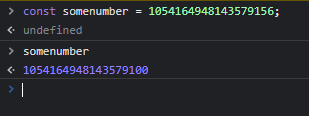
i tried saving a role id like: 1054164948143579156
into sql, but it keeps changing the value to like: 1054164879747068000
the type the variable is set to in sql is a BIGINT. Is the id maybe too big for the BIGINT?
solemn latch
ID's are numbers, but they are strings not ints.
eternal osprey
hu
quartz kindle
eternal osprey
the type the variable is set to in sql is a BIGINT. Is the id maybe too big for ...
if your sql lib supports bigints then you can save bigints
eternal osprey
sqlite does support bigints
quartz kindle
but be careful not to convert them to number at any point
eternal osprey
only thing is that it's saving the id wrong for some reason
quartz kindle
BigInt(id) and id.toString()
eternal osprey
1054164879747068000 instead of 1054164948143579156
quartz kindle
never do Number(id)
eternal osprey
yup was already aware of that, thanks ❤️
eternal osprey
i've got no clue what the fuck a n suffix is
but that wouldn't matter for my issue would it?
quartz kindle
like
if youre typing the id yourself, hardcoded in your code
either type it as a string or as a bigint literal, not as a number
for example
"747848584949934" // ok
7477575858858585n // ok
7584858885884848 // not ok
notice the n at the end
eternal osprey
huh really?
My school taught me that it was okay to just handle BIGINTS as normal numbers in the sql query
quartz kindle
not in js
solemn latch


 quartz kindle
sql does support 64 bit ints, but js does not
eternal osprey
owh dayum i didn;t know that
quartz kindle
if at any point the number becomes a js number, it will lose precision
eternal osprey
that's likely what's happening to me
quartz kindle
so you have to avoid any conversion to number in js
and use bigint or string witu sql
eternal osprey
what should i do then? part the ids and add them together eventually?
I am not using bigint in js
just sql itself
quartz kindle
show code
eternal osprey
if(interaction.values[0] == 'unverified_update'){
    const filter1 = m => m.member.id == interaction.member.id


  const collector1 = interaction.channel.createMessageCollector(filter1, { max: 1 });
  interaction.reply({ephemeral: true, content: `Please type the new **Unverified Role ID** down below:\n`})
  collector1.on('collect', m => {

    if(m.member.id !== interaction.user.id) return
    db.query(sql`UPDATE serverdatabase SET unverified = ${m.content} WHERE id = ${interaction.guild.id};`)
    collector1.stop()
   return interaction.channel.send({ephemeral:true, content: `:white_check_mark: **Successfully updated the database.**`})


})

}```It might be that when it gets collected it gets converted.
quartz kindle
djs always uses strings for ids
never numbers
i dont see anything wrong with that code
whats the problem? the WHERE id doesnt work when it should?
eternal osprey
Well i am saving this id 1054164948143579156
but it's returning me a complete other id
quartz kindle
show how you save it then
eternal osprey
eternal osprey
```js
if(interaction.values[0] == 'unverified_update'){
const filter1 = m =>...
this is the update code
or ..?
quartz kindle
how you save the id
eternal osprey
uno second
quartz kindle
youre not saving the id there, youre using the id to change unverified
also
your filter is wrong
eternal osprey
huh what's wrong with the filter
quartz kindle
wait what djs version is that
eternal osprey
v13
quartz kindle
its createMessageCollector(options)
not createMessageCollector(filter, options)
filter goes inside the options
eternal osprey
but i am definining the filter and adding it inside of the collector?
     let pending_role;


      collector.on('collect', m => {
        console.log(m.member.id)
        console.log(interaction.member.id)
        if(m.member.id !== interaction.user.id) return
  pending_role = m.content
```this is how i save it btw
It's because let, changes it to a normal int
quartz kindle
eternal osprey
but i am definining the filter and adding it inside of the collector?
youre doing (filter, options), its not the same thing
eternal osprey
and therefore changing the precision i think
eternal osprey
quartz kindle
youre doing (filter, options), its not the same thing
owh really?
quartz kindle
eternal osprey
It's because let, changes it to a normal int
no it doesnt
eternal osprey
Thanks for letting me know!
quartz kindle
theres nothing there about saving
eternal osprey
then i really have no clue wtf is wrong
quartz kindle
first things first
the filter should be
({ filter: filter1, max: 1 })
not (filter1, { max:1 })
get it?
quartz kindle
eternal osprey
```js
let pending_role;
collector.on('collect', m => {
...
theres technically nothing wrong with that code, but youre asigning a variable from inside an event outside, so unless you know what youre doing, that might be wrong
pending_role would only be accessible from inside an "end" event for example
idk what the rest of the code looks like
eternal osprey
I will try to fix those global variables and see whether the same issue occurs
quartz kindle
you still didnt show where you actually save the id lol
eternal osprey
like the table i created?
quartz kindle
where you do insert query
eternal osprey
ah one sec
 // await db.query(sql`ALTER TABLE serverdatabase DROP CONSTRAINT id;`)
       await db.query(sql`UPDATE serverdatabase
                          SET status = 'enabled', admin = ${interaction.member.id}
                          , date = ${ cDay + "/" + cMonth + "/" + cYear},
                          level = ${level}, unverified = ${unverified_role},
                          verified = ${verified_role}, pending = ${pending_role},
                          timezone = ${timezone};`)
                    //    await db.query(sql`ALTER TABLE serverdatabase ADD CONSTRAINT id;`)
```uh.......
thats literally
overwriting your entire database
and changing all entries to that
eternal osprey
yup
quartz kindle
do you only have one entry or what?
eternal osprey
  await db.query(sql`
        INSERT INTO serverdatabase (id, status)
        VALUES (${interaction.options.getString('id')}, 'new')
;`)```this is the real starterwhen a new server gets added
but as you can see, i only alter the status and id.
the rest gets set to null till the owner activates the bot
quartz kindle
ok but
eternal osprey
and that activation is fucking everything
quartz kindle
eternal osprey
```js
// await db.query(sql`ALTER TABLE serverdatabase DROP CONSTRAINT id;`)
...
this changes all servers
eternal osprey
huuuh
eternal osprey
huh how
quartz kindle
because you didnt put a WHERE id = serverid
so it sets all of that to all server ids
quartz kindle
eternal osprey
```js
// await db.query(sql`ALTER TABLE serverdatabase DROP CONSTRAINT id;`)
...
this is not inserting, its an update query
eternal osprey
totally forgot that where yeah
eternal osprey
eternal osprey
```js
await db.query(sql`
INSERT INTO serverdatabase (id, status)
...
i was talking about this one
sorru
quartz kindle
that one is correct
eternal osprey
yup!
but yeha this is so fuck strange
my collector is collecting the number wrong
because inside my collector i am logging the m.content
and it indeed shows 1054164879747068000 instead of 1054164879747068004
like what the actual fuck
quartz kindle
m.content is what you type in the message, did you type the id right?
eternal osprey
yeah pretty sure
quartz kindle
if m.content is different from what you write in the message then theres something very wrong going on
i have never seen that happen
show how you are logging it
eternal osprey
aight one sec
collector.on('end', async collected =>{
      console.log(unverified_role)
        let currentDate = new Date();
        let cDay = currentDate.getDate();
        let cMonth = currentDate.getMonth() + 1;
        let cYear = currentDate.getFullYear();
      // await db.query(sql`ALTER TABLE serverdatabase DROP CONSTRAINT id;`)
       await db.query(sql`UPDATE serverdatabase
                          SET status = 'enabled', admin = ${interaction.member.id}
                          , date = ${ cDay + "/" + cMonth + "/" + cYear},
                          level = ${level}, unverified = ${unverified_role},
                          verified = ${verified_role}, pending = ${pending_role},
                          timezone = ${timezone}
                          WHERE id = ${interaction.guild.id};`)
                    //    await db.query(sql`ALTER TABLE serverdatabase ADD CONSTRAINT id;`)


```look

the 335 is the log in the collector.end
the other one is after the unverified_role is being saved
is my bigint not big enough or something
wtf
quartz kindle
how did you define unverified_role?
also, how did you define the table serverdatabase
show the create table query you used
eternal osprey
 await db.query(sql`CREATE TABLE IF NOT EXISTS serverdatabase (
    id BIGINT,
    status STRING,
    admin BIGINT,
    date STRING,
    level INT,
    unverified INT,
    pending INT,
    verified INT,
    timezone STRING,
    PRIMARY KEY(id)
);`)```i now even switched over and directly save the m.content into my db
but that conversion from m.content to db seems to fuck me
quartz kindle
you're using SQLite right?
eternal osprey
yeah
hmmm wait
wiatttt
using the addserver i already insert a new guild
with the other values being null
wait no, i am using update and set
quartz kindle
also, BIGINT doesnt really matter in sqlite, because sqlite uses variable INT
eternal osprey
Owh so i can convert it to int?
quartz kindle
all of these are the same as INTEGER

the actual size of the number is autodetected by sqlite
it doesnt need to be defined manually
eternal osprey
Owh but what the fuck is wrong with my code then?
quartz kindle
which sql library are you using?
quartz kindle
sure
quartz kindle
eternal osprey
sqlite
the code you sent me uses @databases/sqlite
not sqlite
@databases/sqlite uses sqlite3
quartz kindle
eternal osprey
might that be the issue?

GitHub
Inserting a record with BIGINT and selecting it will return data with lost precision INSERT INTO Users (id,username,age,level,bigLevel,isUser,isAdmin) VALUES (NULL,'Adam&...
quartz kindle
id suggest you use better-sqlite3 instead, which is what i use
or just store the ids as strings
which is what most people do
eternal osprey
Yeah might just do that lmao
Tim you’ve been an incredible help
Thank you so much
 hidden gorge
import pydactyl
from datetime import datetime, date, time, timezone

import discord
import pymongo
from discord.ext import commands
from pydactyl import PterodactylClient```
?
like it works on my other bots
fixed
 crystal wigeon
Is there a way for me to fulfil a promise without using await?
Even if I use .then it’s still a promise if I assign to a variable
earnest phoenix
crystal wigeon
Is there a way for me to fulfil a promise without using await?
You can't, because this is how promises work
If you only want to resolve it without using async/await then yeah you've got %Promise.prototype.then()% but that's not what you want
quartz kindle
crystal wigeon
Even if I use .then it’s still a promise if I assign to a variable
await and .then are the only ways to get the value out of a promise
await gives you the value back to the current context, .then gives you the value in a new context like a callback
crystal wigeon
Yeah gotcha, well was trying to reduce the bundle size for firebase auth ill try and post the issue later maybe
Thanks a bunch
eternal osprey
hey guys
i have a question about security:

So this is about a side channel attack
The question is about how you can use this code to eventually get the password using guesses
 late willow
Is there a package through which I can know if someone has made a vote or not?
eternal osprey
My answer was that, we can put the guess into the function. If the general runtime of the code is really low, it means that the length is not even correct (first if statement, return). If one certain or a bunch of runtimes are somewhat equal but bigger than the ones stuck at the first if statement, it means that they passed the first if and are now into the for loop. If one runtime is the biggest of all, the attacker now knows either a part of the actual password (it came the furthest in the for loop) or the whole actual password.
Is this correct?
boreal iron
late willow
Is there a package through which I can know if someone has made a vote or not?
You can either frequently send a request to the topgg api or create a webhook listener and let topgg send you post requests when a vote happens
More details in #topgg-api
And the channel description and pins
quartz kindle
eternal osprey
My answer was that, we can put the guess into the function. If the general runti...
pretty much yes
side channel attacks involve observing things around the code, like performance/timing, cpu usage, temperature, power usage, sound, etc...
earnest phoenix
I have this role remove command, but it says that - `TypeError: Cannot read properties of undefi ned (reading 'roles') at Object.execute (/home/runner/Test-bo
t/Commands/Test/r.js:74:35) at processTicksAndRejections (node: inte
rnal/process/task_queues:96:5)`
quartz kindle
earnest phoenix
I have this role remove command, but it says that - `TypeError: Cannot read prop...
are you using v14?
guild.me was removed in v14
its now guild.members.me
limber siren
quartz kindle
are you using v14?
yo can you call me and help me with something
quartz kindle
what is the problem?
earnest phoenix
quartz kindle
are you using v14?
Nvm fixed it
 feral aspen
Oh, wow: https://cdn.hamoodihajjiri.com/ge6btTxOTT .
Content Delivery Network
Oh my god, this is just insane. 😂
https://cdn.hamoodihajjiri.com/leupTjtxIS
radiant kraken
@earnest phoenix apparently git log -n 1 --name-only --pretty=format: logged every file in the repo
not the ones changed in the most recent commit

instead of this, how about i just make two separate workflows instead?
earnest phoenix
radiant kraken
<@456226577798135808> apparently `git log -n 1 --name-only --pretty=format:` log...
Nope, not the case for me at all
radiant kraken
earnest phoenix
Nope, not the case for me at all
try it in a github workflow
earnest phoenix
I'm starting to think the Git version you've got installed is bugged
It shouldn't matter whether it's in a GitHub workflow or wherever
radiant kraken
radiant kraken
instead of this, how about i just make two separate workflows instead?
^
earnest phoenix
That's impractical, there's no need
What does git rev-list --count origin log for you?
radiant kraken
36
earnest phoenix
Can you tell me what Git version are you using?
Because if git diff --name-only HEAD..HEAD~1 doesn't work then there's definitely a problem here
I tried it on multiple different repositories (even extremely large ones) and it works as expected
radiant kraken
 earnest phoenix
radiant kraken
earnest phoenix
radiant kraken
And what's your Git version?
radiant kraken
earnest phoenix
And what's your Git version?
 earnest phoenix
radiant kraken
earnest phoenix
radiant kraken
The latest stable is 2.39.0 but I'm not sure if that's gonna make a difference, I have no idea why that method doesn't work for you
@radiant kraken try git diff --name-only HEAD~1..HEAD
If even that doesn't work, your only luck is git diff --name-only HEAD^ HEAD
 craggy pine
I'm toying around with slash commands for the first time and I had a quick question on why a certain function I'm creating wouldn't work as it work in v13.
I have a file functions.js which I extend in my index.js to make it globally called using client.<whatEver> so for this case my embeds that I would normally use for errors or success'
  const { EmbedBuilder } = require("discord.js");
  client.successEmbed = async (str, channel, time) => {
    const sucEmbed = new EmbedBuilder()
      .setColor("#00FF00")
      .setTitle("✅ SUCCESS")
      .setDescription(str)
      .setTimestamp()

    if(channel && !time) {
      return channel.send({embeds: [sucEmbed]})
    }

    if(channel && time) {
      const timeOut = await channel.send({embeds: [sucEmbed]})
      return setTimeout(() => {if(channel.messages.cache.find(m => m.id === timeOut.id)) timeOut.delete()}, time)
    }

    //errors here since I'm not passing in channel & time
    if(!channel && !time) {
      return sucEmbed
    }
  }
So for this function I'd normally do
        return interaction.reply({
            embeds: [
                client.successEmbed(client.ws.ping + "ms!")
            ],
            ephemeral: true
        })
but with slash commands I receive the following error. data.embeds[0][LIST_ITEM_VALUE_REQUIRED]: List item values of ModelType are required
I have a similar function that works as intended but w/ less code
  client.quickEmbed = (title, str) => {
    return new EmbedBuilder()
      .setColor('LuminousVividPink')
      .setTitle(title)
      .setDescription(str)
  }
So why would success embed throw this error but quickEmbed doesn't?
sorry for a page worth of text. 😅 also ik some of the code is coded in v13 however I'm focusing on the commented part
earnest phoenix
craggy pine
I'm toying around with slash commands for the first time and I had a quick quest...
Your successEmbed() method returns a promise, and since you're not resolving it when passing it to the embeds field, it errors out
craggy pine
oh because I'm not awaiting it errors.
Welp ty. Trying out v14 stuff is a little overwhelming so I didn't even think about this. it works.
 lament rock
make your own Discord lib (don't)
craggy pine
Ya I'd rather not.
Hell I don't even want to make my own v14 slash command handler at the moment. Literally using a template from github just to toy around with how things work.
craggy pine
Another question in regards to slash commands. Do all commands have to follow up with a interaction.reply or is there a way to get rid of the whole sending command... or <bot> is thinking...
earnest phoenix
craggy pine
Another question in regards to slash commands. Do all commands have to follow up...
Failing to respond will cause Discord to show that the command failed, even if your bot is performing other actions as a result.
craggy pine
earnest phoenix
> Failing to respond will cause Discord to show that the command failed, even if...
Ya I found a stackoverflow talking about it finally. Thanks for the response but also kinda lame I need it. 😛
earnest phoenix
You can respond and quickly delete it 
craggy pine
Also noticed that. May be what I end up doing 
earnest phoenix
One thing I don't get is why Discord removed the ACK (Acknowledge) response type to interactions
Many things were already using it, but they removed it for no reason
The response type 1 (PONG) still seems to exist but the API doesn't accept it 
lament rock
earnest phoenix
The response type 1 (PONG) still seems to exist but the API doesn't accept it <:...
PONG is only for verification that the server supports application commands
which is when you insert the http endpoint
earnest phoenix
Ah, so what I'm talking about is something else, the one that was removed
slender wagon
Uncaught TypeError: document.querySelectorAll(...).click is not a function
the code:
document.querySelectorAll("#vidLinks a").click(function(){
HALP
earnest phoenix
slender wagon
```
Uncaught TypeError: document.querySelectorAll(...).click is not a function
`...
The querySelectorAll() method does not return a single element that you can click on, it returns a node list
https://developer.mozilla.org/en-US/docs/Web/API/NodeList

NodeList objects are collections of nodes, usually returned by properties such as Node.childNodes and methods such as document.querySelectorAll().
slender wagon
earnest phoenix
The `querySelectorAll()` method does not return a single element that you can cl...
well it's basically a div box i wanna click on
but how do i add a eventlistener on click on querySelector
earnest phoenix
slender wagon
but how do i add a eventlistener on click on querySelector
The document.querySelector() method returns an element, which you can use the addEventListener() method on
Element is the most general base class from which all element objects (i.e. objects that represent elements) in a Document inherit. It only has methods and properties common to all kinds of elements. More specific classes inherit from Element.
 mighty patrol
my help command makes use of the map feature, how can I exclude a category from my help command?
this is how I get the directories of the commands
 mighty patrol
idk I watched a tutorial on it
mighty patrol
its probably due to the ways its mapping it again but for categories
 lyric mountain
not really
that's usually done to remove duplicates, but it really has no meaning if ur gonna iterate over it anyway
it's just wasted processing
mighty patrol
So I don't need a set?
anyways
back to my question
how do I exclude a category from showing up?
mighty patrol
I'm not pasting anything
lyric mountain
mighty patrol
idk I watched a tutorial on it
well
lyric mountain
not in video format
mighty patrol
would this work?
 lyric mountain
try it and see
mighty patrol
lyric mountain
not in video format
You can't tell if I'm learning anything from it
lyric mountain
well, the thing is, even if ur learning ur probably learning outdated stuff
videos are timeless, they don't stay updated to new features
you need to do courses or follow written guides, which are usually kept updated on a regular basis
mighty patrol
lyric mountain
well, the thing is, even if ur learning ur probably learning outdated stuff
Even if, I know how to stay up to date
lyric mountain
there are a ton of js crashcourses out there