#bug-discussion
1 messages · Page 160 of 1
 mellow ridge
 radiant oxide
Can someone help me. The game won't launch despite the fact that i played it today earlier with my friend.
It opens the coffee stain intro and then it closes without a crash report or nothing
Steam reports 100% file validity
 austere coral
pinned messages for FAQ or scroll up a little
radiant oxide
TY
 quick geode
anyone of you maybe has an answer, i have this weird issue where swarm music is normal volume but between swarm music is like super loud, and i also hear it at the summary screen
austere coral
known issue for clients
austere coral
you can turn down music until it's resolved in a hotfix
 steady shale
Is Deep Pockets no longer stacking with Bigger Mineral Bag an intended change or a bug?
austere coral
likely a bug
 velvet hamlet
I have found a bug, whenever I press shift to sprint my character will snap to face the direction that it was facing 3-5 seconds ago
austere coral
client or host, are you using a controller, what keyboard layout are you using?
 urban wing
enjoy this still from a bug report video i just sent in
 velvet hamlet
austere coral
client or host, are you using a controller, what keyboard layout are you using?
velvet hamlet
austere coral
client or host, are you using a controller, what keyboard layout are you using?
client, keyboard, k95 corsair model
it is not specific to any one weapon as it happens with any thing equipped. I have not tried with other classes other than gunner as of know
it also happens when I am solo in missions or in the mining rig
 paper stratus
2-3 additional monsters weaves spawning during events with 2-3 combat soundtracks at the same time can be played
this is insane my head about to explode LOL
also same 2-3 ending sountracks on end screen
 tidal fossil
same
paper stratus
can we get a patch rollback? no? okay 😦
velvet hamlet
the camera shift glitch happens on any class
 prime folio
Ambient music is much MUCH louder now
 toxic oriole
Actually, when I alt+tab DRG wants to keep being my priority window, so whenever I'm moving the mouse alt tabbed while in lets say... google, DRG will popup for a split nanosecond every second and it doesnt let you do anything at all.
To fix it, I have to minimize my google chrome, alt tab back to the game, then alt tab again to chrome. Now when I do that DRG goes over my taskbar which is weird and my chrome on top of that. Works for a few minutes and then boom back again with the bug.
prime folio
Currently doing an escort mission in the salt flats and the ambient when there's not a fight going on is about x3 as loud as the fight music
 red egret
this happened to me too. I'm pretty sure it's a bug with the way the cracks generate.
 urban wraith
velvet hamlet
urban wraith
velvet hamlet
I found out why my bug was happening
I left bettervjoy open
and shift is my recenter button
 ocean minnow
unfortunately I havent got the seed or anything
just that it was haz 4
anyway this bug was weird and ive never seen it before (im assuming its new)
never saw them again
 hidden dagger
Has anyone else had a graphical glitch with the Hiveguard where the fireballs it lobs at you look like they're going to fall short but actually hit you dead on?
austere coral
client or host?
hidden dagger
Client.
 charred dust
Weird mission bug where my friend has completely different missions from my missions
We can't see each other's assignments/missions.
austere coral
resync system clock
charred dust
Thank you!
austere coral
your issue is resolved with a hotfix, something definitely broke with the network changes made in U34
hidden dagger
Ok, thanks.
My friend who's on Linux was getting a lot of disappearing texture glitches.
Also, I noticed a LOT of ebonuts spawning inside walls, but that might just have been bad luck.
And the "bubble hoxquake" thing, but that's well known by now
austere coral
dx12 is the default now, he'll want to disable it in settings
proton works with dx12, but not great
 shadow aspen
Typo in the patch notes "Reduced the direct and area damage penalties slightly, extended the effect radius and increased the chance to apply the toxin effect for the** Newutoroxin** Payload OC"
hidden dagger
Nuwutoroxin
 north kiln
actual flavor descriptions of some overclocks are now outdated
namely EM discharge is the one i noticed, it's listed as having a lower electrocution chance when that isn't one of its downsides anymore
inferno also says it has an ammo penalty in the flavor text but that was removed
austere coral
those would probably be best reported in #420195388675588096 so they don't get drowned out
 ancient orbit
Anyone else's armor paint jobs and armor pieces returning to default or changing when joining other people's games?
 surreal mica
So, I've had two assignment missions in a row come up with double-warning missions. The patch notes said that wouldn't happen...
austere coral
Was your assignment selected before or after updating?
 obsidian falcon
N-No... You shouldn't handle it like that...

 heavy delta
Bug where if the Ommoran Beamer is attached to a platform and dead beamer pillar, it will still keep shooting the laser
 north kiln
austere coral
Was your assignment selected before or after updating?
north kiln
austere coral
Was your assignment selected before or after updating?
in my experience the assignment was given after the update, unless the weekly core hunts were technically before
 visual furnace
Confirming assignment on double warning bug; assignment was accepted/taken AFTER U34 release.
 austere coral
which assignment, what's your system date, and the exact local time the screenshot was taken
 peak swan

02:15am GMT - Update installed - Assignment Taken less than an hour ago - AFTER update was installed , System date 23/04/2021
 clear flume
My cosmetics aren't actually on. Like if I have marine helmet and scale brigade armor with normal paint, it'll be goggle-hat, big mustache, beard, scale brigade armor but in default engineer paint: red and beige.
Re-equipping the cosmetics fixes the issue but I've noticed it on armor mods too. I went into a mission with Carry capacity on 45 but I could only hold stuff to 40. Re-equipping the mod fixed it
basically it seems that wardrobe and maybe even the weapon mod computer do not show what is actually equipped or not
 tight nacelle
Just here to report a couple of things
Only scrolled up a little bit, but strange audio glitches where certain tracks are playing when they shouldnt be
such as the victory screen, and I also had swarm music just play neverending even after the swarm
Ebonuts also seem to be bugged out, not the only person who was having trouble opening them
clear flume
Also fall damage seems to have been bugged too. I've been taking maybe 2x fall damage than normal.
 cloud warren
dear lord, the overlapping music bug is so bad in U34. makes me realize how much I appreciate DRG music when it's working well
 umbral nacelle
anyone had a bug where y'alls mouse does not go where it should? noticed while trying to exit the game
 mossy breach
Anyone unable to start up the game on steam?
austere coral
pinned messages for FAQ
 slim thistle
so i just booted up the game, went to a mission, and then it just crashed on start up
wack
has this happened to anyone too?
austere coral
pinned messages for FAQ
slim thistle
wait, where the pinned messages be at?>
austere coral
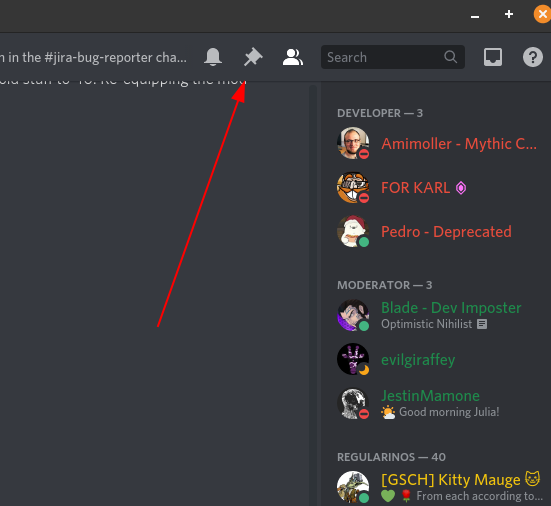 slim thistle
oh right. i thought it would be added to the pin lmao
mossy breach
@mossy breach @slim thistle That happened to me too.
After the update, my game started crashing as soon as I launched it.
So I did this: #bug-discussion message
It's a directX problem.
mossy breach
mossy breach
<@456226577798135808> <@!141740626529091584> That happened to me too.
After the...
Simple fix, thanks much!
 fading rover
mossy breach
<@456226577798135808> <@!141740626529091584> That happened to me too.
After the...
fading rover
mossy breach
<@456226577798135808> <@!141740626529091584> That happened to me too.
After the...
Thank you dearly I started having this issue as well
 dawn onyx
mossy breach
<@456226577798135808> <@!141740626529091584> That happened to me too.
After the...
dawn onyx
mossy breach
<@456226577798135808> <@!141740626529091584> That happened to me too.
After the...
For me it seems to be JUST the Discord overlay, nvidia + steam overlays work fine... to confirm disable discord overlay, launch game, turn it on, game should close instantly.
And yeah, disabling dx12 fixes it
 stray walrus
Has anyone encountered a bug where the game crashes immediately after launching it? If so, how do you fix it? I tried re-installing the game but it still is crashing.
dawn onyx
stray walrus
Has anyone encountered a bug where the game crashes immediately after launching ...
#bug-discussion message its dx12, disable it or your overlay software (discord, nvidia)
stray walrus
Thanks, that worked! Not sure why it didn't cause problems until now lol.
 pseudo raft
spitballer on ommoran heartstone

also teammates both crashed randomly and one had strange problems with the music's sound which spiked randomly
 faint folio
all my pick axes are stuck as default skins, changing them doesnt fix it. any ideas?
prime folio
alright I made an accounmt on Jira
Now how the hell do I report a bug
"7: Click: "Join on ghostshipgames"."
Where?
 obtuse pollen
so found a few bug's today. 1. let me grab my axe out of a pretorian after it was dead, 2. went glitchy after i had a blackhole mixed with a blackrach blonde
 glass sail
hey, my friends and I just tried to do the achievement for a 120 pipe grind. We timed a 135 second one and it did not go through? Is there a weird specific requirment we are missing?
obtuse pollen
i overkilled that 1 with a 3 minute pipe ride
glass sail
fair enough. do you have any idea how long it took to trigger the acheivement?
obtuse pollen
it triggered when me and my buddy got off the pipe after the grind
glass sail
ok thanks. Maybe its longer than listed or we just bugged it out somehow
obtuse pollen
well new update added new bugs and new bugs lol
glass sail
fvair enough yeah
prime folio
<@&296918282403840000> I'm sorry to bother you guys, but I have no idea what else to do.
The Jira page says to message someone tagged with QA but that's not an actual tag in this discord, I can't find "Join on ghostshipgames" to report a bug, or where to even report a bug.
I made a Jira account and everything, I feel like I'm losing my mind looking for this magical button where I can report the bug I need to report.
 coarse parcel
is it known that theres an issue with the music
prime folio
Yes but as far as I can tell no one who knows how to actually report a bug has reported it yet.
 candid trench
i've glitched myself out of the map so hard i've been falling for the last hour and I feel like i've layered the skybox so much i'm inside a looney tunes title card gradient

HELP

 echo coral
 now I see
 wind gale
it's all green? always has been
candid trench
 wind gale
his dwarf's just screaming bloody murder as he falls too
candid trench
HEEEEEELLLPPP MOMMY AAAAAAA I FELL AH NOOOOOOO
still falling btw
i'll post updates into my descent of the green abyss in a minute
 rotund fable
This is Super Elite Deep Dive, where you dive infinitely out of the universe.
wind gale
btw we're still up on the regular deep dive, we got room for 1 to come and see it
candid trench
i'm literally inside a looney tunes title card but instead of bugs bunny's face flying at you imagine mission control's

i'm slowly losing my sense of up and down help


h e l p
pov you're getting kissed by mike wazowski

OH GOD ITS TAKING ME OVER HELP
 candid trench
some dev please tell me if there's terminal velocity to tell me how far i've gone
 wind gale
we gotta know if he's still accelerating
also is he gonna underflow or is his floating point value gonna go berserk
candid trench
oh my god i suddenly fell so far it teleported me back and it jumpscared me holy CRAP
 wind gale
well that answers my question

 prime folio
Well
since I can't report a bug on the jira page because it's complete nonsense
I'll do it here and hope someone sees it
I was in an elimination mission and I got this achievement for killing just a dreadnought hiveguard

I couldn't find anything like it on the jira page, so I assume it hasn't been reported yet.
 tardy garnet
visual glitch with spinning death. Hitbox seems to still be in normal place
 ruby saffron
candid trench
some dev please tell me if there's terminal velocity to tell me how far i've gon...
ruby saffron
candid trench
some dev please tell me if there's terminal velocity to tell me how far i've gon...
"lord of the deep" indeed
 azure vigil
prime folio
<@&296918282403840000> I'm sorry to bother you guys, but I have no idea what els...
azure vigil
prime folio
<@&296918282403840000> I'm sorry to bother you guys, but I have no idea what els...
Hey - I am QA - tutorial for creating a bugrepport on jira ig you already have a jira acoount that is associated with ghostshipgames : https://ghostshipgames.atlassian.net/secure/Dashboard.jspa?selectPageId=10000
 fallen orbit
The dreadnoughts are teleporting since last update 😄
azure vigil
prime folio
<@&296918282403840000> I'm sorry to bother you guys, but I have no idea what els...
Also all QA's are devs that have QA in their name. Sorry that the coms might have been a bit unclear and that jira is a bit of a hassle.
azure vigil
fallen orbit
The dreadnoughts are teleporting since last update 😄
where are they teleporting too and from?
fallen orbit
So the double ones they disappeared and teleported to another place (the animation for going down intro the groudn wasnt there)
Randomly within the room basically. But I have a feeling it is somkething to do with the animation not being played..
azure vigil
Have you seen this multiple times and were you client or host in the game?
fallen orbit
Multiple times, and client.
 buoyant kestrel
is the soundtrack overlapping for you guys?
fallen orbit
It might be worth mentioning that my ping didnt cause any problems. This was the only weird thing happening. Aside from the music problem that we all have
buoyant kestrel
I notice during swarms and the completion screen that the music overlaps
and after a swarm, the music abruptly cuts off, while it used to fade out.
azure vigil
Yes the music is overlapping in endscreen - we hope to have it fixed with next hotfix.
azure vigil
azure vigil
Yes the music is overlapping in endscreen - we hope to have it fixed with next h...
buoyant kestrel
Okay!
 dreamy quail
📌
 spice trail
Reported issue on local server: game crashes on launch, no error messages, happens at intro cutscene (GSG) and sometimes even earlier. I suggested checking file integrity, update drivers and look into DX12, but the result was negative. What else should I suggest?
azure vigil
spice trail
Reported issue on local server: game crashes on launch, no error messages, happe...
Have they tried launching the game without dx12 ?-
add "-dx11" to the launch options by right-clicking the game in your Steam Library > Properties > Set Launch Options
spice trail
azure vigil
Have they tried launching the game without dx12 ?-
add "-dx11" to the launch op...
Fixed
 potent nymph
We are trying to find out if the game works for the most people with either dx11 or dx12, so we changed to dx12 default now and will compare stats and feedback
 past lagoon
https://youtu.be/AFwWnzOqijs
Reposting a funny bug momento (mild Russian warning)

 rigid tiger
So DX12 has always been a bit weird for me on DRG
I was using a way outdated driver so that resulted in a lot of blue screens (now updated it, didn't have issues with it so far)
But now the game does not seem to be using my GPU (it's a GTX mobile 1060, supports DX12) and despite all this I have a 3-4% lower CPU usage while standing in the same place in the space rig.
Task manager says it's using the integrated graphics with DX12, but with DX11 it explicitly used the actual GPU, with around 40-50% usage (note : all of these usages were with an fps cap of 65)
Is DX12 this effective or I'm missing something here?
rigid tiger
 compact mortar
https://youtu.be/lBVteAtyDzM
There is a second video. Ping 40ms
compact mortar
https://youtu.be/lBVteAtyDzM
There is a second video. Ping 40ms
To add to this, it was a consistent issue with my game yesterday as well
Prior this update it only happened in a worse manner if you lowered view distance to low, that way menaces shooting from very far away wouldn't have their projectiles visible
 slim flare
I assume the 2xhaz and assignment issue is already known?
 pulsar steeple
how did i get stuck here
why am i under the barrel hoop game
why cant i upload recording to discord
why does my Australian hoxxes internet want to not work lol
 hybrid flume
because its not australian hoxxes internet
 junior ravine
Bit more info on the missing pickaxe cosmetics conundrum from my side.
Started a game, spawned in as a scout. Oddly I had my pick cosmetics on. Thought it was fixed in a hotfix. Moved on.
Played few matches as a scout (client, for clarity), cosmetics were there.
Switched to driller to fully check the situation. His pick cosmetics were not showing, even though I have all of them in the interface. Neither were Gunners or Engineers. Only my Scout had his cosmetics on the pick and I could change them around with no trouble.
pulsar steeple
Management wants you to be a scout main
junior ravine
Also just had the swarm music overlap bug happen during an escort mission.
Thought I almost got tinnitus from all that cacophony.
pulsar steeple
minor visual glitch but this happend with the lil green swarmers (im too tired to remember names) https://youtu.be/BiqiZnH73TI
dreamy quail
Thats probably dx12 for ya
 misty valve
the light in the top of the drop pod has been misplaced. it now clips out of the side of the engine

 elder arch
I've just discovered a game breaking issue:
My neurotoxin payload doesn't have green explosions anymore 
pulsar steeple
my hyper propellant grenade launcher actually has an explosion instead of its cool ass red sparky flare explosion
also doesnt have the tracer of the grenade launching out as well
 wise marsh
i have the same problem but i also have the firing sound playing twice when i fire
 uneven juniper
So when I want to stream DRG, it always crashes when I have OBS open. Is there a solution to this? It also crashes if I alt+tab out of DRG.
 lapis dust
pulsar steeple
my hyper propellant grenade launcher actually has an explosion instead of its co...
lapis dust
pulsar steeple
my hyper propellant grenade launcher actually has an explosion instead of its co...
This will be fixed in Hotfix 2. Just missed H1
lapis dust
junior ravine
Bit more info on the missing pickaxe cosmetics conundrum from my side.
Started a...
Im looking at this, I changed some things on how its applied.
 frosty tiger
Oh good it's being looked at, I have that same pickaxe bug, but it only applies to engineer for me
 steel ravine
I also had the resource capacity issue with the armor upgrade, fixed by resigning it
mossy breach
Slot B gunner always has default pickaxe. Cosmetics don't update until changing class and back again. Can get slot A pickaxe on slot B.
 brazen pilot
mossy breach
Slot B gunner always has default pickaxe. Cosmetics don't update until changing ...
brazen pilot
mossy breach
Slot B gunner always has default pickaxe. Cosmetics don't update until changing ...
good timing on this one, last night i had an issue where my pickaxe skins were not showing up. Had the default pickaxe every time despite my skins being all intact on the terminal.
ah i see this was already adressed a few msgs up
 chilly tulip
Played this awesome game this morning, but a couple of hours after the morning session, the game was running at less than 1 frame per second.
The driver for the video card is the latest version, there are no FPS drawdowns with other applications.
DRG launched with discrete graphics, but works like integrated graphics from Intel
austere coral
I'd start by putting -dx11 into launch options. If that doesn't work then pinned messages for troubleshooting.
steel ravine
mossy breach
https://www.youtube.com/watch?v=YR0Ux1usuVU
good demonstration video
 drowsy kettle
uh so this happened today
sorry about the quality
it was actually a multiplayer game but my friend left before i recorded it
austere coral
I know it's for the mule issue, but is your audio issue actually like that in game or is it a recording issue?
drowsy kettle
recording issue
my game audio was fine
anyway do you know anything about the mule issue?
austere coral
you can try digging around her feet, but I don't think I've seen a video of the mule breaking as soon as it exits the drop pod.
drowsy kettle
I tried digging a bit but I don’t think that dig anything
But we cancelled the mission
I am sure it will be fine next time
Anyway I have to go sleep bye
cloud warren
I’ve seen that happen as well, but only once in U33. When it happens, the mule has a weird floating “O2” icon near her legs. Need to catch it on vid next time
slim flare
the way the graph displays, is this a known bug?

 carmine hawk
Molly kept getting stuck on tritiliyte event. Even before it was destroyed

 vital loom
So spinning death is fixed now or what
 glacial terrace
@slim flare I reported this
 clever plover
anyone reported not being able to recall turret ?
 fringe orbit
O
I'm getting "Multiplayer Session has ended" everytime I try to join my friend's game. I've restarted my comp, steam and changed host, nothing works
all PC, anyone have any ideas?
austere coral
clever plover
anyone reported not being able to recall turret ?
client or host?
clever plover
austere coral
client or host?
was client, restarted computer and it fixed it
also my mouse was showing up as regular mouse instead of in game mouse
 sturdy bridge
Well that's a first, game froze so hard even the reset button on my desktop wouldnt work. Had to hold down the power button and shut the whole thing down.
chilly tulip
austere coral
I'd start by putting `-dx11` into launch options. If that doesn't work then pinn...
Thank you, you helped me a lot
(-dx11 worked)
 radiant meadow
Unstoppable doesn't seem to make the user carry heavy objects faster. The environment slow resistance still works, but heavy objects still slow the player down just as much as without the perk.
 sick pawn
austere coral
I'd start by putting `-dx11` into launch options. If that doesn't work then pinn...
sick pawn
austere coral
I'd start by putting `-dx11` into launch options. If that doesn't work then pinn...
I just used -dx11 on a whim and it fixed my OBS interaction crash. Deep Rock stays up while I'm streaming
 tight hull
anyone getting the bug with the gunners grenade where it will fly off in a random direction?
only on multiplayer i think
sticky grenade^
cloud warren
yessssss
cloud warren
tight hull
anyone getting the bug with the gunners grenade where it will fly off in a rando...
just filed DRG-3226 for this
got on video
wasn't sure if it was just gunner and just sticky, first game I played on U34 hotfix 1
tight hull
maybe the gunner is overly drunk
cloud warren
what biome were you in?
tight hull
It happened in multiple biomes
cloud warren
ok
tight hull
only with the stickyt grenade
cloud warren
you might comment on that bug then
that you saw it in multiple biomes
I think you can make anonymous comments
 gilded rain
weird bug, my pickaxe is reverting to the default customization but only for Scout loadout 1
cloud warren
if you don't have an account
gilded rain
- only in-game, in the customisation menu it's fine and on the rig it uses my last-used pickaxe skin for saluting
 thick ridge
Anyone having loadout problems?
Played engi earlier today w/ T1 of armor rig seemingly not being what I set it to, just checked and it is set correctly.
Similar issue w/ driller pickaxe skin not being anything.
when it's clearly set.
 red canopy
Im gonna guess its already known this update broke the music in game
thick ridge
gilded rain
weird bug, my pickaxe is reverting to the default customization but only for Sco...
Same problem on Driller loadout 3. Armor mod issue on engi loadout 1.
 hidden yew
I have the same default pickaxe bug
austere coral
red canopy
Im gonna guess its already known this update broke the music in game
pinned messages
carmine hawk
thick ridge
Played engi earlier today w/ T1 of armor rig seemingly not being what I set it t...
deselecting and selecting it again fixed it for me
thick ridge
Oh, deep pockets is completely broken?
thick ridge
The armor rig, I mean
carmine hawk
oh
thick ridge
I thought i was getting 60 space on my driller alright?
carmine hawk
deep pockets is working fine for me
thick ridge
Try unselect and reselect?
Probably a similar bug to the armor rig.
Now I'm not sure what mods might be secretly unselected
hidden yew
I did it
it simply doesnt register
and on top of that I also have the def pickaxe bug, as I said aboev
but this hurts me the most
okay
one other guy has the same problem
and he found the source
the deep pocket perk
and the +5 inventory armor mod
cancels out each other
they work perfectly separately
but together they don't
red canopy
austere coral
pinned messages
The pin only talks about the endscreen music, the problem also happens in game where the music doubles onto itself and sounds like a mess
cloud warren
red canopy
The pin only talks about the endscreen music, the problem also happens in game w...
Though today’s hot fix does seem like it fixed the music issue for me, both end screen and in level
 smoky solstice
EM Discharge still mentions a decrease in electric proc chance in the description despite that not being a thing anymore

 celest plover
Is it just me or does the spinning death overclock go INTO the terrain now kinda making it useless?
 ivory sapphire
Snowball OC for the driller cryocannon is completely broken for me. I cannot see the projectile fire at all, and it always seems to explode about 5 feet infront of me and to the left. At first i thought it was hitting a team mate or terrain, but after some testing, this latest update has busted the OC.
 austere coral
as client or host?
mossy breach
uhm guys, i'm finding elite enemies to be almost unfreezable. it takes SOOOO much ammo and the temperature barely drops, they're harder to freeze than a dreadnought!
is it normal or?
 tight sapphire
@celest plover Just tested this, Spinning Death OC for Breach Cutter is currently bugged. It will move at the normal projectile speed, not slowed down like it's supposed to be. However, a "fix" is to be the party leader, since this bug only occurred when I joined other people's parties.
austere coral
mossy breach
uhm guys, i'm finding elite enemies to be almost unfreezable. it takes SOOOO muc...
Pretty sure that's intended
 stuck edge
my pickaxe on my gunner is bugged and default
idk why, If I go to pickaxe forge it looks like this:
 mossy breach
i mean but harder to freeze than a dreadnought? that's a bit overkill
hidden yew
stuck edge
my pickaxe on my gunner is bugged and default
it's an issue for multiple people, like me
pickaxe goes to default
it's multiple classes for me
mossy breach
they seriously need balance xd
 vital pivot
Oh hi, Have Snowball OC bug already been report?
stuck edge
hidden yew
it's multiple classes for me
yeah, shit sucks man
 sturdy valve
Has anyone else noticed issues with supposedly active weapon mods not actually being active after the patch?
Eg: My platform gun's plascrete mod was active, but not functional. [fall damage not mitigated, no visual effect]
Toggling the mod off and back on again fixes it, but it's worth a report if someone hasn't noticed it otherwise.
austere coral
were you client or host?
ancient orbit
hidden yew
it's multiple classes for me
It's not even the pickaxe for me. My paint jobs for classes and armors keep getting reset to default.
austere coral
esc > options > restore save
 tired spindle
Hello, I got something weird in my mission, a steam friend invited me to complete a mission while the drop pod was already there, and when we finished the mission, I was granted 0 creds or xp for primary objective, is that intended with the new update (if so, gonna delete this), or is it a bug ?
 austere coral
No, not that I'm aware of
 golden sedge
Greetings. My friend has a problem. after the newest patch, he can't start the game on steam anymore. He tried all the typical stuff: repair, reinstall, graficdriver and even deleting the movies, because that's the time it crashes.
austere coral
put -dx11 in launch options
golden sedge
Oh wait, he said, now it's working now. Haha. Sorry
He reinstalled it on another partition
Thank you, loan :)
 solar quail
Floating has nothing holding it broke the top

 dim oak
Something seems wrong here... especially given I picked scout and show as scout when not pressing escape

Went back to normal on re-selecting my character
 raw pine
austere coral
raw pine
austere coral
I don't know when it'll be fixed, but I do know it'll probably be fixed.
 weak raft
No longer can you toggle the beard state of your armor by changing whether or not you have a beard under a full-faced helmet
With helmets like the full face grim spectre this unfortunately hobbles your armor options
also neurotoxin payload shots are no longer green.
 shut rose
I wouldn't see the Drilldozer being damaged at all on the indicator at the top right while it was damaged (but it worked for my collegue who was the host of the game)

 winter dock
I'm having an issue where I start the game, It runs at 1 frame every 1-2 seconds and never gets past the first loading screen, this only started with Update 34 Hotfix 1
Ok, I fixed it, it was the -dx11 thing, which is strange since my game never actually crashed
ivory sapphire
austere coral
as client or host?
client
ivory sapphire
vital pivot
Oh hi, Have Snowball OC bug already been report?
i reported it a second ago
vital pivot
ivory sapphire
i reported it a second ago
s2
north kiln
hm, i can launch DRG just fine, but a few minutes after launch the game crashes
might be directx shenanigans
Ok, didn’t help, but at least it told me the game crashed
apparently low level fatal error?
Seemed to not be tied to playtime either, every time it’s happened when the equipment terminal is opened
hmm..
I’ll report this on Jira
 slate jetty
can't see the team deposit while pressing 'ctrl' (marker key)
 ivory sapphire
yeah its the same thing with the projectile from the snowball OC for cryocannon
 sly hamlet
doesnt happen to cluster grenade
ivory sapphire
the driller axe's still hit where they are aimed, but they do veer off at a random ray
sly hamlet
Name might irritate. But ofc both videos are hotfix 1. Didnt notice it with any other nades yet
 wet lark
ive found a bug regarding the spinning death overclock for the breach cutter: the "projectile" seems to be lasting as long as if it didnt have the overclock, ending ALOT earlier than expected
 quartz dune
Hello
Did anyone get the bug with the pickaxe ?
Whatever skin i pick i see this when i press V and when i mine in the missions 😭

but i suppose to see this

ALL my dwarves loadouts have same regular pickaxe 😭
did anyone else have this bug ?
austere coral
it's known
quartz dune
ok ty
 silk oak
just had a bug where any minerals that were mined still appeared to me as unmined. also i kept randomly falling through the map and dying.
R&S
 nimble galleon
if you kill lacerator as hes burrowing the resurface attack will still come through later after hes dead
 charred canopy
Grenades are acting wonky
austere coral
it's known
 west cave
I'm having issues loading in to the game, I get to the sound of beer pouring and my game just closes. I've restarted my computer, restarted steam, so I don't know what else I can do to fix this
 vital junco
Anyone else's game crashing when you try booting up?
nimble galleon
try switching to dx 11
Add "-dx11" to the launch options by right-clicking the game in your Steam Library > Properties > Set Launch Options
west cave
nimble galleon
try switching to dx 11
Hallelujah that worked
vital junco
Thank you
 knotty zodiac
yo
the axes go right now
in their animation
like they don't follow their thrown arc
and then they kill the target you aimed at.
austere coral
it's a known issue
knotty zodiac
good to hear
 cold laurel
hey guys im having an issue playing multiplayer with a cousin of mine. i got the game off game pass and he got it off the microsoft store, so it should be able to play together right? differences between mine and his games are that in mine, i have a friends only box in the corner of my pause menu, he doesnt. he also wasnt able to access servers yesterday. today he can, but it puts him in an endless loading time, same as when i invite him. any suggestions would be appreciated
mossy breach
cold laurel
hey guys im having an issue playing multiplayer with a cousin of mine. i got the...
You’re both on Microsoft store/Xbox right?
cold laurel
yes
mossy breach
hmm, I'll have a look at that then
cold laurel
thanks
 pulsar parrot
@cold laurel There's some troubleshooting in pinned messages of #xbox-and-windows-store channel if you haven't checked it out yet.
 wheat galleon
small visual inconsistency - Elite threat warning is referred to as 'Hero Enemies' in the stats page
 pulsar parrot
@wheat galleon Intentional apparently
wheat galleon
intentional? Why is it only like that in here, and nowhere else 
pulsar parrot
In the files, Elite enemies are actually named Hero_enemies or something like that
wheat galleon
yeah I figured it's a leftover from earlier builds or something of that sort
well I'm just reporting what I figured is a mistake. If it's not - good. Good
cold laurel
pulsar parrot
<@!450505220976541698> There's some troubleshooting in pinned messages of <#4029...
i will just link the message there
 idle plover
did anyone have this kind of problem?

when i open DRG
this is my device information

 pulsar parrot
@idle plover How much RAM do you have?
pulsar parrot
@foggy marten You can try Validate integrity game files in Steam DRG properties or go to launch options and enter -dx11 to disable DX12, which is the most cause of the crashes recently in Steam DRG properties.
 foggy marten
Thank You
 clear quarry
Has anyone else had the glitch where, even if you have pickaxe cosmetics equipped, your pickaxe shows up as default?
pulsar steeple
I should mention this as it may be slightly confusing to people who just play the game normally.
The Crystal Beamers sometimes dont have their glow dissipate when you blow the tops off of them.
both have been glowing for a while (left 30 secs, right 10 secs)

i used hyper propellant to break off the tops (not sure if it has something to do with it but hey, the more info the better)
and yes, i made my driller buddy redundant
 neon parrot
spinning death kinda funky
pulsar parrot
@clear quarry @neon parrot Yup. These are known. Hopefully gets fixed in the next hotfix(es)
neon parrot
is there a list somewhere of known bugs
pulsar parrot
#jira-bug-reporter Is the most place where the devs look and where most of the bugs are reported. The spinning death, the dev that worked on it certainly knows about it, back in experimental branch
pulsar parrot
@odd plinth You've also checked your savefiles folders in "restore save" button in game Menu/Options?
 odd plinth
yeah, i am trying to load them
but the game won't do it
they are showing on the savemenu
pulsar parrot
Like failed to load?
odd plinth
yeah, i keep the same save file instead of loading it
 craggy epoch
So I tested some stuff and found that stickies go off in weird directions client side, when not hosting. I added a couple clips to the existing thread for them as well as what I learned. I hope this helps. https://ghostshipgames.atlassian.net/browse/DRG-3226
pulsar parrot
Oh good.
idle plover
@pulsar parrot 4G
pulsar parrot
@idle plover The minimum you need is 6gb, sadly
pulsar parrot
One sec
idle plover
but could not open this morning
pulsar parrot
All drivers updated?
pulsar parrot
You also have intel graphics card? Or you just have it connected but not using it or something?
idle plover
i have Intel graphics card (laptop) but im using 1050TI
i could normally open other game
just DRG show this error
pulsar parrot
You've tried the -dx11 method already? In case
idle plover
what mean -dx11?
Add "-dx11" to the launch options by right-clicking the game in your Steam Library > Properties > Set Launch Options?
i saw it on hotfix1
pulsar parrot
yes
pulsar parrot
Awesome
 crimson matrix
Hi, since the last fix update I can't start the game anymore. Everytime i got a windows blue screen with video scheduler internal error code. I am on windows 10 with a Intel(R) Core(TM) i7-8750H CPU @ 2.20GHz and Nvidia Geforce 1060 with Max Q design on a dell portable computer. Has someone experienced the same issue ?
Thank you
pulsar parrot
@crimson matrix Have you tried this?
http://twitter.com/JoinDeepRock/status/1385539386905923586

We've switched to DX12 with update 34. If you are having issues getting DRG to run, right-click the game in Steam, select Properties -> General and add -d3d11 to the launch options (-dx11 also works) to force DX11 instead.
Likes
154

 Twitter
·
crimson matrix
Twitter
·
crimson matrix
Thank you it seems to work fine !
 supple island
I experienced the "progress loss" bug (Driller went back to 1★ from 3★) and restored local save backups, which worked (I could see everything was as I remembered). However, after starting the game again, I saw the same regression.
How many times should I restore the saves? When can I play with confidence that my saves aren't destroyed?
buoyant kestrel
The text is overlapping each other

 elfin glacier
Anyone else have this bug where you start the game, chose language etc, click continue and then it goes to loading screen and once it's done loading game just shuts down? I don't get any error message or anything
 north latch
pulsar parrot
<@!363718013129850881> Have you tried this?
http://twitter.com/JoinDeepRock/stat...
north latch
pulsar parrot
<@!363718013129850881> Have you tried this?
http://twitter.com/JoinDeepRock/stat...
Hey hey, I tried this and it still didn’t work for me. I do manage to get into the game for 5 minutes(just tried again it was instant crash after I first load), but it proceeds to blackout showing ‘no signal’. Sounds will still continue playing in the background for a minute before my whole computer crashes. I have no way of alt tabbing but to reboot the entire system. Have not experienced any crashing at all before update 34. Was able to squeeze in a couple of games yesterday with a significant number of crashes, but it's completely unplayable today.
It seems like starting a mission is the major trigger to this, be it hosting or joining. Either way, even if I don’t and just hang around the waiting area. It still crashes after awhile.
So far I have
- checked file integrity
- uninstalled reinstalled game
- uninstalled reinstalled graphics driver (clean)
- force start game with -dx11
- ensured that audio quality is no higher than 32bit 192000 Hz
Playing on steam. Specs AMD 5 5600x, geforce rtx 3070 32GB ram
pulsar steeple
elfin glacier
Anyone else have this bug where you start the game, chose language etc, click co...
do you have any mods installed?
elfin glacier
pulsar steeple
do you have any mods installed?
nothing
haven't played in like a week so i guess it's something with the new patch
pulsar steeple
check the file integrity
elfin glacier
already tried uninstalling and re-installing
pulsar steeple
still tho, worth a try
elfin glacier
pulsar steeple
still tho, worth a try
You do that from steam right?
think i did that too before i uninstalled
pulsar steeple
huh
maybe its something to do with the computer?
im not really good at this computer and game stuff
just throwin ideas that might work
elfin glacier
pulsar steeple
maybe its something to do with the computer?
i have 10 days played before this recent update so dunno
pulsar steeple
odd
have you tried this yet?
dammit
the dx 11 thing
by the launch options
elfin glacier
what's that supposed to do? skip first screen?
pulsar steeple

see what the launch options are
cuz it might have something to do with it
because i do beleive they switched somethings around with the launching in update 34
elfin glacier
pulsar steeple
see what the launch options are
Whatever that custom start option did it seems to work. Thanks man 
north latch
north latch
Hey hey, I tried this and it still didn’t work for me. I do manage to get into t...
Any help with this would be appreciated T_T
 young walrus
my pickaxe skins and mods dont work, i only see the default pickaxe whenever i mine or R&S
 burnt hill
when I host a game, my characters have their correct skin, that I chose in the wardrobe. When I join another's game, I have the default skin. When Others join my hosted game, they also have the default skin. Please help me fix this, the default driller looks horrific and is giving me nightmares! Anybody else have the same problem? is it a known bug? I run a single mod pak file for a brighter torch. I have tried removing that but skin problem still occurs.
austere coral
The fix is to wait for a hot fix.
burnt hill
it's a known bug? ok that's reassuring.
carmine hawk
Goo bomber's goo defies the laws of physics

 river torrent
Sickkkkk
burnt hill
the projectile for turret whip is shooting at the wrong angle!
 hollow latch
I have a similar skin related bug but for the pickaxe
Anytime you either join a lobby or your own lobby your pickaxe skin will not render during the rock and stone cheering animation ( First person view at least can't say for the third person view)
Any other dwarf than the one you logged in with will not have the problem
Switching back to the original dwarf does not solve the issue
Also on an unrelated note someone pointed out that the elephant round oc ammo amount is lower than previously whereas it is supposed to be higher according to the patch notes
Anyone noticed that for the ammo ?
Can't tell since i haven't touched the game in a while
 spiral sierra
@burnt hill make sure it's not a client thing, a lot of bugs right now seem to be only for clients, and it's mostly visual (eg spinning death of BC having normal forward velocity)
 chilly walrus
hollow latch
Also on an unrelated note someone pointed out that the elephant round oc ammo am...
chilly walrus
hollow latch
Also on an unrelated note someone pointed out that the elephant round oc ammo am...
Not a bug, the Bulldog lost 4 base ammo but Elephant Rounds gained 1 ammo from the penalty reduction.
 serene pier
Hi, for laggy issues on launching do I discuss here?
frosty tiger
I had the default pickaxe bug on my engineer for a long while now. I promoted my engineer from silver 3 to gold 1 and now his pickaxe shows correctly and not as default anymore
🤔
pulsar parrot
@north latch Sorry it took awhile. Have you also checked firewall-antivirus_
prime folio
Major bug with sticky grenades
They fly in one direction no matter where you throw them
They either go straight forward, directly backwards, or to either side.
It's all one direction.
austere coral
it's known
 wraith sparrow
guys, it's just me
or in the recent update, molly get stuck a LOT on escort missions?
north latch
pulsar parrot
<@!596723949954531329> Sorry it took awhile. Have you also checked firewall-anti...
No worries. Thanks for getting back to me. I don’t have any antivirus softwares besides the local windows security if that’s considered?
pulsar parrot
@north latch Yeah the loval windows security as well. Dont have to disable it just yet. Check if the DRG files are being allowed through it.
north latch
pulsar parrot
<@!596723949954531329> Yeah the loval windows security as well. Dont have to dis...
Ahh ok! But how should I check if it’s blocked? Currently my controlled folder access is off, so I assume all my files are authorised.
pulsar parrot
@north latch Windows Settings/Update & Security/ Windows Security/ Firewall & network protection/ Allow an app through firewall/ click change settings on top right/ check all boxes for the game "Deep Rock Galactic".
north latch
@pulsar parrot Hmm, it’s all checked
 elfin rover
is unstoppable perk fixed? it had an additional stat about less speed penalty from carrying stuff
odd plinth
Had a Mission with two warnings on haz 4 crash my game about 3/4 of the way through mission. Any word on stability regsrding double warning missions?
 ivory portal
is this a bug? "Hero Enemies" XD
 austere coral
it's more of an oversight as that's what they were originally called before a name change
dreamy quail
they're called hero enemies in the files, and it's not the first time this sort of thing happened 😛
ivory portal
ah that makes sence
 polar oar
Has anyone else noticed that the gunners shield only lasts like 4 seconds now? Or do I need to make a bug report for that?
 naive flare
I tried to play the game today after the update, always started a mission as a host, and UE crashed 5 times from a total of 7 games. Does anyone have the same situation?
naive flare
Thx, I'll try this
 undone sleet
My game just closes right after I pass the first door, or if I try to join other friend game, and even if I press "Esc" anyone know how to fix it??
austere coral
undone sleet
My game just closes right after I pass the first door, or if I try to join other...
dreamy quail
polar oar
Has anyone else noticed that the gunners shield only lasts like 4 seconds now? O...
apparently there's a bug where some loadouts may cause your skins or upgrades to not work, so maybe thats the case. They're on it though
🤞
polar oar
That's a shame. I'd like to try out new build options for gunner but without the shield duration upgrades in effect, the shield does basically nothing. Guess I'll wait till another hotfix or two come out then try again. It was very jarring to only be able to pick up a single dwarf or grab 1 resupply with the short shield duration.
 tidal panther
I'm gonna guess that's the reason why my grenade launcher is suddenly doing no damage with the direct damage overclock then
I was wondering why it was doing like slivers of damage to the dreadnoughts we fought
polar oar
Actually I'll say he's right on the equipment upgrades not working, because that same mission an exploder was lethal while I was at full health (haz 4). It shouldn't be for gunner, because he has 50% explosion resist as an armor upgrade.
 neon bay
Something I noticed; the worse your ping, the weirder the snowball O.C. behaves. At 100 ping, the snowball is either launched at your feet or behind you, but if playing solo, it’s perfectly fine. Any reason for this?
ivory sapphire
Ugh, the change to make the minerals have a velocity instead of plopping down together, has completely ruined the drillers utilty with the containment field or with the satchels
and i swear sometimes the game just deletes mineral chunks now when it sets velocity on them
austere coral
that's not a bug and minerals can't be destroyed
austere coral
neon bay
Something I noticed; the worse your ping, the weirder the snowball O.C. behaves....
most of the issues are present exclusively for clients
austere coral
out of curiosity, does the compass direction influence the direction your throwables curve?
 desert stratus
Since the new patch whenever I fire flares at the ommoran shell they just go right through it.
Also the armour upgrade for increased carrying capacity doesn't seem to work
With deep pockets and the armour upgrade my carry cap is still just 55
austere coral
armor upgrades are hit or miss right now on functionality, they're aware
hidden yew
austere coral
armor upgrades are hit or miss right now on functionality, they're aware
and deep pockets?
austere coral
I think someone made a jira report so they're aware
cloud warren
neon bay
Something I noticed; the worse your ping, the weirder the snowball O.C. behaves....
According to patch notes, U34 “optimized” the net code for projectiles, my guess is that optimization introduced new bugs
neon bay
Looks like it
 carmine lava
second time this has happened to me, last time was on u33, took the fuel canister out of the drilldozer and tried to throw it, it teleported to the starting coordinates 20 feet in the air but the escort hud still said i was holding it, the time it happened on u33 it couldn't be interacted with either
 cloud warren
Yeah we had to bail on an escort mission a few hours ago for same reason
(Didn’t see it firsthand, but host called out the glitch in chat and restarted)
burnt hill
Yea the projectile logic is kinda a big deal for me, forcing me to play solo for now.
I'm not just being a grumpy gamer here. I design software as a career so I know how it feels when people just whine with nothing constructive to say.
My point is, the projectile issue is really quite harmful to the general enjoyment of the game, and certainly less of an issue to me than the costume bug where I get to see the driller's awful chin :)
Although that is horrific. Awful chin.
 long osprey
Not really a bug, but need help and don't know where to post. So I'm max level on my Scout, promoted him once already. I cant promote him yet until I do the promotion assignment. When I go to the assignment board, I can't select his assignment mission but instead have an ongoing, weekly assignment instead. So yeah, seeing as I can't select an assignment, I assume I have to complete this weekly before doing the scout promotion one? Isn't that abit of a ballache?
 spiral sierra
This should be in suggestions if not a bug
 crimson prism
long osprey
Not really a bug, but need help and don't know where to post. So I'm max level o...
crimson prism
long osprey
Not really a bug, but need help and don't know where to post. So I'm max level o...
Click on the weekly assignment and you should be able to cancel it you’ll be able to start it back up later
long osprey
Will give it a try
thick ridge
This might just be that you can't abort breach the core.
 thick ridge
You can't abort "breach the core"
long osprey
wrong one

uhh
let me see
I don't see any "abort" option
I have to abort it at the assignment board?
 mint ore
 long osprey
Oh I can't. And I just realised that was my active assignment
Ah
Oka
okay
thanks
carmine lava
austere coral
This was supposed to be fixed with U34
sorry, missed the message until now, i didn't check for a number but the game was listed as close in the browser
 candid kestrel
so is anyone having issues with the game closing immediately after opening up after this last patch?
austere coral
put -dx11 into launch options
 blissful coyote
So, if your ping is too high, client side throwable physics just goes out the window?
candid kestrel
austere coral
put -dx11 into launch options
Thank you! that totally worked!
mossy breach
Unsure if it's been mentioned, but when Engineers deploy their turrets, they now deploy with barrel facing the dwarf instead of away.
 honest garden
drop pod machine broke

 flint skiff
I'm not sure if this has been reported or not, but I was just in a mission as Driller and while drilling to the escape pod, my drills stopped working. I could still hear them spinning and they still heat up, but there was no drilling animation and I wasn't drilling.
 pallid steeple
so i dont know if its a bug or not but im having issues with the game crashing every time after i click start
austere coral
put -dx11 into launch options
pallid steeple
how do i do that
austere coral
right click drg in steam > properties > general > paste -dx11 into launch options
 covert egret
Yes! On both DX12 and 11.
austere coral
pallid steeple
was it suposted to reset my save data?
esc > options > restore save
pallid steeple
thankyou!!!!
flint skiff
@austere coral I was the host

 austere coral
pinned messages for troubleshooting, I'd start with the amd / fx realtek audio fix. Although in this instance I don't have high hopes for it. I'd then go on to repairing directx. After that proceed with the rest of the steps.
 viral fjord
RJ compound upgrade has made Compounds Rounds obselite.
 austere coral
not a bug?
austere coral

 restive star
anyone else have the fuel canister on a dozer mission completely disappear from the map and show the indactor for its location mid-air?
austere coral
That was supposed to be fixed this update. What was your ping to the host?
 wintry willow
i just had my save rested to zero point ?! ?!
austere coral
Esc > options > restore save
wintry willow
TY
 analog matrix
this bug is getting so damn annoying, that at this point I've given up on bothering with the "event" rewards and whatnot

keeps wanting me to join a union chapter and join the DRG discord
I don't think i need to explain why this is a problem, no?
I've already missed some rewards from the chapter events because of this
I think the discord integration in the game needs some polishing, or something to that effect
glacial terrace
@analog matrix union bot is broken, you can try solution in the #interplanetary-miners-union channel pinned messages


 silent vine
Is there a reason all my dwarves look default now? even when I change them in the wardrobe
mossy breach
I got a problem that my pick axe for driller is for some reason the picker was back at default then customized


In first person view is default and therd person view also default but in the pick and equipment show’s it as custom

 north latch
Hey hey, I tried this and it still didn’t work for me. I do manage to get into t...
north latch
north latch
Hey hey, I tried this and it still didn’t work for me. I do manage to get into t...
Update: Have tried all troubleshoots mentioned on pinned message but to no avail. Even wiped my steam cloud data. Still got a black screen after loading screen
 dark lynx
Fuel canister still disappears when the player carrying it disconnects.

 dawn lotus
Minor visual Glitch on Bosco's shots. He seems to be shooting from his exhaust ports and not his SMGs
 stable sky
so we are missing a canister and huuuh

we can't grab it
even if it's not a cannister

dunno why it was at the start tho
it was there from the start but we just guessed wrong it was a graphical bug
 full canyon
My game is crashing when I choose a mission on the lobby, anyone having the same problem?
 odd robin
noticing sticky grenade for gunner (not sure if its other grenades too) would shoot off random directions other than forward. It would go slightly forward then make a hard right or left turn (90 degree angle) even when no mobs were nearby. it did it in two separate games yesterday. hasn't done that in the multiple others i played.
stable sky
odd robin
noticing sticky grenade for gunner (not sure if its other grenades too) would sh...
ooh i have the same problem, it only go straight when i'm the host
it's really awful to play x)
like you throw it on ally instead of the pretorian XD
and it does it regardless of PC or Laptop
 rocky peak
Man, I just had the weirdest thing happen in this last super crappy mission. The scout went from level 8 to level 25 at the end and then it went to the transition screen, the game locked up, and I had to force stop.
stable sky
wow
rocky peak
It was a lv 2 mission where we got about 8K XP.
rocky peak
I didn't change a level at all, it was just a partial fill of the lv bar for me.
chilly walrus
rocky peak
Man, I just had the weirdest thing happen in this last super crappy mission. The...
That Scout was cheating. Not a bug.
coarse parcel
odd robin
noticing sticky grenade for gunner (not sure if its other grenades too) would sh...
i think its just visual, look carefully and enemies should still die where the grenade is supposed to land
still annoying though
rocky peak
chilly walrus
That Scout was cheating. Not a bug.
I was initially thinking of cheating as well, but this is the first time I've ever had the game lock up full stop on me.
 low goblet
So wondering if this is an occasional bug, All classes are showing modded pickaxes except my driller. His pickaxe is modded to look different but it shows default when mining and saluting, attempting to change its appearance does nothing to update the look.
Also closing and restarting the game didn't fix anything
stable sky
low goblet
So wondering if this is an occasional bug, All classes are showing modded pickax...
yeah i have the vanilla pickaxe too at bay but once on mission it's back
low goblet
stable sky
yeah i have the vanilla pickaxe too at bay but once on mission it's back
Started a mission and its the same way
stable sky
mmh weird
low goblet
stable sky
mmh weird
Yeah, stranger still, after a mission i figured out that i can swap pickaxe parts and colors on all my other classes, but driller
steel ravine
@mossy breach I've seen that the bug happens when you use class slot B, do you use class slot B?
cloud warren
odd robin
noticing sticky grenade for gunner (not sure if its other grenades too) would sh...
Multiple bugs filed on it in Jira with lots of comments and evidence so it’ll hopefully get fixed in next hot fix. Host seems unaffected.
 boreal osprey
my computer froze and i had to shut it off just as we finished a mission and when i tried to rejoin all my characters were back at lvl 1
austere coral
esc > options > restore save
cloud warren
austere coral
esc > options > restore save
We need a bot that replies with this based on keywords 😆
boreal osprey
I don’t see anything in restore save
wait someone directed me im good omg i was crying christ
 tender bay
Came here to say throwable like drillers axe and gunner sticky grenade are visually bugged since the animation doesn’t play where it hits? Engineers laser cutter(spinning laser) too. Just reinforcing statements above.
low goblet
Told Bosco to mine out a Ommoran Beamer and all he wanted to do was light them up 😩
 potent cloak
When my friend was pickaxing me I noticed his left eyeball kept jerking out of place, like it was moving when the rest of his head wasn’t. It was creepy.
 keen pebble
Has anyone else noticed a large uptick in random damage with no discernible source when client since u34?
 livid kestrel
Does the number on the bottom left in the ESC menu include a seed for the mission level? I ran into the most frustrating world generation and I think devs would care to see it.
dreamy quail
Yes, check pins
livid kestrel
Ty
 scenic cloud
When I loaded up the game, my entire profile was reset and there was no other profile to go back to.
glacial terrace
@scenic cloud Did you check restore save in options?
scenic cloud
ok my problem is fixed
After reloading the game a few times it allowed me to view all my recent backups and it's all fine now

 pallid ocean
odd robin
noticing sticky grenade for gunner (not sure if its other grenades too) would sh...
pallid ocean
odd robin
noticing sticky grenade for gunner (not sure if its other grenades too) would sh...
maybe it was because grenades carry your momentum with them?
 wicked turtle
Since the new (34) update, the game has not worked for me. Can you help?
austere coral
put -dx11 into launch options
wicked turtle
i can do it true steam?
austere coral
 wicked turtle
tnx, it is working now
 marsh kelp
Yeah gonna have to back up that grenade bug, impossible to use on zips now due to throwing them backwards/sideways
mossy breach
Cosmetics Reverting Bug
I'm not sure when this started, but recently I've noticed that my armors are always MK1 armour and stock color. It seems there is a bug that causes my armour to change back as soon as I leave the cosmetics terminal, no matter what I choose, the armour always reverts back to mk1. I own and have crafted all levels of armor. I'm wondering if anyone else has come across this bug, or knows of a work around. I have searched around to no avail for others with the issue.
austere coral
marsh kelp
Yeah gonna have to back up that grenade bug, impossible to use on zips now due t...
it's a known bug for clients
 mint python
Not sure if it's been resolved yet, and I have had a few others with the same issue, after the update during all mining expeditions 2 soundtracks have been playing over top of each other
I don't have a ghostship account to report the bug but if anyone is having a similar problem would someone be able to report it
 storm tendon
mint python
I don't have a ghostship account to report the bug but if anyone is having a sim...
storm tendon
mint python
I don't have a ghostship account to report the bug but if anyone is having a sim...
don't worry, it's known
 bold quarry
So I've been using the Shaped Shells Overclock for Scout.
Recently I've noticed the crosshair not being the correct size.
Sometimes it's the correct size but others it displays as if it has the full spread.
I don't know if this is purely visual or not.
I've tried toggling the overlock on and off but I can't for the life of me figure out why it only does it sometimes.
 carmine hawk
weak raft
Even when I have drg set to fullscreen it's not actually fullscreen, as you can ...
carmine hawk
weak raft
Even when I have drg set to fullscreen it's not actually fullscreen, as you can ...
Try alt + enter for full screen
weak raft
I should clarify; I can use drg just fine but it seems to be running behind everything
alt+enter did nothing
austere coral
oh windows how you never fail to disappoint
are you alt tabbing at all when the game is launching?
Have you attempted to launch using dx11 instead of 12?
weak raft
I have not! I presume that would be unchecking dx12
weak raft
I have been alt tabbng as well I'll try not dong that
austere coral
if that doesn't work, cycling through screen mode should force a refresh of the window
weak raft
not alt tabbing didn't do anything, I'll try dx11
nothing, damn.
it's still in the background at all times
I also tried a restart, still nothing.
austere coral
give disabling vsync a try. You've also tried cycling through the screen mode ingame and applying after each one to try and force a refresh?
weak raft
yeah, I have. if it was true fullscreen it would minimize on alt-tab right
still nothing.
also now that I think of it, the version launcher thing isn't popping up
the thing that tells you the game version
still nothing. damn it!
I've tried disabling fullscreen optimizations, setting it to dx11, everything
austere coral
do you have updates KB5001330 or KB5001337 installed?
weak raft
I can't see the news screen on boot anymore
austere coral
and have you updated your gpu drivers recently?
weak raft
I did a couple weeks ago
austere coral
because I'm willing to bet you do have one of those updates installed and as usual microsoft broke something.
open up settings, windows updates, and view installed updates
weak raft
I actually didn't have them installed but just installed them now
and it's for sure not in fullscreen, right?
 stuck rune
heya, im having a strange bug with the save file causing my laptop to crash upon booting up the game. i can play from a fresh save just fine, but if i restart the game for any reason it'll cause my computer to freeze on a black screen, and i have to hold the power button. the only fix ive found is deleting the save file. Is this a common thing and i just didnt see it in the faq, or..
austere coral
holy shit someone actually read the faq without being prompted to? Anyways doing the steps for number 9 will probably resolve it. You can also try putting -dx11 into launch options.
stuck rune
austere coral
holy shit someone actually read the faq without being prompted to? Anyways doing...
I found a bunch of folders that were staying behind when i uninstalled it, so that may have been the issue. Thank you 😄
 edgy marten
austere coral
https://media.discordapp.net/attachments/835664387489529856/835665123770892328/D...
edgy marten
austere coral
https://media.discordapp.net/attachments/835664387489529856/835665123770892328/D...
I added -dx11 like in the .gif, but it still crashes as soon as I start the game.

 native coyote
sooo yesterdayt i was playing deep rock and ran into a computer problem and had to factor reset my computer, and now i got deep rocl again and it reseted my account back to lvl 1
how do u fix it?
mossy breach
i found a bug with the spinning death oc on the breach cutter. when i'm not the host the plasma line move at normal speed and spins but the line is actually doing the spinning death thing
native coyote
nvm i fixed my problem
covert egret
mossy breach
i found a bug with the spinning death oc on the breach cutter. when i'm not the ...
I believe this has been reported already.
 drifting schooner
been getting this tried everything

 coarse atlas
I’ve been at 9 out of 10 bittergems found for the achievement forever now and I’ve found multiple bittergems. But it won’t progress and let me get the achievement. Is there someway around this bug? 
silent vine
Something is causing my grenades to shoot behind me rather than the intended path, maybe the new bullet tracking handles lag poorly
I have no mods installed and it is a fresh install
mossy breach
silent vine
Something is causing my grenades to shoot behind me rather than the intended pat...
I’m fairly certain all throwables have been broken in latest patch, hopefully fixed soon
dreamy quail
Sure
If you're talking about a jira report, uploading the video itself is recommended, but obviously theres a size limit so links are ok too
potent nymph
links in jira is not so good, since we dont click them (better safe than sorry)
think the size is 75mb max
dreamy quail
Last time I tried I thought it was 100mb, noted though
potent nymph
it might be 100
dreamy quail
If you covert it to 720p 30fps even 1 minute video should fit @harsh shell
 harsh shell
alright
 ocean onyx
there is a chance that when using the fat-boy GL overclock the hive guard dreadnought won't spawn his minions
pulsar steeple
ocean onyx
so I've encountered a big bug
i know this is unrelated and is probably gonna get me booted off but thats pun worthy
storm tendon
pulsar steeple
i know this is unrelated and is probably gonna get me booted off but thats pun w...
A lot of people made that joke already.
pulsar steeple
id assume that
this is a game about bugs
honestly though, i think its fun to have a few silly little bug glitches here and there
Its pretty amusing that everyone can see a friendly glyphid menace but the host
steel ravine
@hasty dragon Do you use DirectX12 in the settings? If yes try turning it off
 blazing tartan
I have some trouble with sticky nade on numerous occasion when I throw it it goes straight out of my field of view and land somewhere totally random
storm tendon
blazing tartan
I have some trouble with sticky nade on numerous occasion when I throw it it goe...
It's known ^^
blazing tartan
Okay thx waiting for the fix then ^^
 fallen aurora
My friends game crashed on startup, used worked fine even after the recent u34 update.
Any idea on what’s going on or how to fix it?
Or perhaps the next set of steps to take to produce a more comprehensive report?
north kiln
might need to relaunch the game by setting the launch option to -dx11
 north kiln
Very likely a dx12 issue, try and switch off of it in settings
if it’s something graphical that’s only happening this update
 exotic stirrup
Yesterday i had these, this morning i could play with my friend, then we stop and now we start again and the crash happen
and what is dx12
fallen aurora
thanks lads, he said changing to dx11 worked
dawn lotus
exotic stirrup
and what is dx12
An app package used to handle 2D and 3D rendering, audio, video on Windows OS
dreamy quail
Nice trip
weak raft
 barren osprey
Anyone wanna try to explain this?
barren osprey
Anyone wanna try to explain this?
Your dwarf dropped acid.
Seriously tho... your graphics card might be dying.
barren osprey
stupid thing is i can fix it by going windowed but then that happens to my entire pc.
except drg
weak raft
it's probably your graphics card.
austere coral
barren osprey
Anyone wanna try to explain this?
I'm pretty sure that was that was an Advil I took today
Anyways that's been known to happen with dx12 enabled on some devices. Put -dx11 into launch options.
 cinder raven
Has the platforms mining/duping minerals bug been reported yet?
barren osprey
updated my launch back to dx11 i will update you on what happens after school
chilly walrus
cinder raven
Has the platforms mining/duping minerals bug been reported yet?
This has been an issue on Experimental if I recall correctly, but I'm sure devs will appreciate the report anyway.
barren osprey
austere coral
Anyways that's been known to happen with dx12 enabled on some devices. Put -dx11...
i started using dx11 and nothing changed
do i just wait for a update or is this my fault?
weak raft
barren osprey
stupid thing is i can fix it by going windowed but then that happens to my entir...
it's not your fault regardless, amigo
barren osprey
weak raft
it's not your fault regardless, amigo
thanks amigo
weak raft
but, it might be on your end. do you own any other demanding games? has your gpu been reporting below-optimal clock speeds recently?
barren osprey
i mean my cpu get used a lot and my disk says 100% sometimes because my pc is 5 years old and built like a pretzel.
weak raft
hm
 hidden stirrup
Anyone else having the bug with impact axes where the visual projectile doesn't go where you're throwing, but still hits what you were throwing it at?
barren osprey
i dont play driller sorry but based on my situation rn imma say that probably cause i dont think that could be caused by hardware.
weak raft
austere coral
Anyways that's been known to happen with dx12 enabled on some devices. Put -dx11...
I still haven't been able to fix it running in the background! have you thought of anything, friend?
austere coral
barren osprey
i started using dx11 and nothing changed
I'd recommend a clean reinstall of your GPU drivers then.
austere coral
weak raft
I still haven't been able to fix it running in the background! have you thought ...
Haven't looked into it since yesterday, but it also couldn't hurt to do a clean reinstall of your GPU drivers as well if you haven't done so.
austere coral
cinder raven
Has the platforms mining/duping minerals bug been reported yet?
I'm not sure, but you can send me the specifics so I can pass it on.
weak raft
Ok, thank you!
Could you explain what true fullscreen is? Like, when you have it set to true fullscreen, what happens
for me, nothing seems to change between it and windowed fullscreen
 wintry goblet
Umm has anyone encountered the bug where if you pause while mission control is giving you the starting speech and then unpause the text bubble gets stuck?
cloud warren
not really a bug, RNG can do fun things sometimes
cloud warren
barren osprey
Anyone wanna try to explain this?
no, but now I want that as a graphics option
or maybe, like...breathing in too much mushroom spores in fungus bogs does that
instead of hurting health
cloud warren
blazing tartan
I have some trouble with sticky nade on numerous occasion when I throw it it goe...
host all your games and it will be fixed 😉
 inner plume
bug of collision
with the ground and wall
you fall in the void like minecraft under the bedrock
exotic stirrup
We were in a game and all of my team mate go throught walls with no colision, i didn't took a screen shot unfortunately but it made them go throught the map falling and dying of fall dmg (helios is my friend)
 obsidian fractal
cloud warren
not really a bug, RNG can do fun things sometimes
obsidian fractal
cloud warren
not really a bug, RNG can do fun things sometimes
well it happened in 2 consecutive missions so i had to ask
exotic stirrup
yeah same we had a mission of drill with two giant bomb mob (don't know if it's a bug)
 olive zealot
hey, i'm getting this rare bug where alt-tabbing or shift-tabbing will cause my cursor to appear over the screen, no menus, but i can't do anything. can i fix this without leaving the game?
exotic stirrup
try to not do it while loading time
 flat copper
Second crash in 2 days, escort duty both times. Anyone else getting that? The first time apparently a teammate also crashed at the same time. Couldn’t reconnect to the second crash so idk about that one
storm tendon
flat copper
Second crash in 2 days, escort duty both times. Anyone else getting that? The fi...
besides escort, was there anything else that might cause the crash ? Like a biome, or a specific moment/interaction...?
Also, make sure to check the pinned message for troubleshooting (if you haven't already)
flat copper
storm tendon
besides escort, was there anything else that might cause the crash ? Like a biom...
Glacial strata both times. Different dwarves, engi yesterday and drill today. Yesterday was while dotty was moving, today was while we were refueling canisters. That’s about all I can think of
storm tendon
flat copper
Glacial strata both times. Different dwarves, engi yesterday and drill today. Ye...
That helps a bit though. Are you running DX12 or DX11 ?
storm tendon
flat copper
12
Try running DX11 if possible and see if it still crashes.
hopefully it won't
flat copper
Thanks, I will if it continues but so far it’s been pretty intermittent, just wanted to see if anyone else was experiencing the same thing
storm tendon
flat copper
Thanks, I will if it continues but so far it’s been pretty intermittent, just wa...
Keep me in the loop. Don't hesitate to ping me 🙂
Dunno about other people as we have many people crashing for many different reasons. 😄
All I can think of for your problem right now (as I'm not really tech savy) is a weird interaction between the escort mission and the lightning effect on the ice but that's about it. It's very possible that I might be also completely wrong !
 vapid elk
austere coral
Anyways that's been known to happen with dx12 enabled on some devices. Put -dx11...
vapid elk
austere coral
Anyways that's been known to happen with dx12 enabled on some devices. Put -dx11...
Jesus fucking christ the worst I've had with dx12 is my game crashing when I opened obs HOW TF DOES DX12 CAUSE LCD TRIPS!?!????
Like someone please explain this I'm so baffled by that
I mean I get that he said turning dx12 off didn't do anything, but theoretically how tf would it be that bad? Not in a rude way I'm just really confused and curious
 tawny plover
Hello everyone!
I feel quite ashamed to only come here to seek help for a bug, but hoepfully I'll be able to have nice talks about rocks n beers!
Anyway, here's the bug I'm having: https://ghostshipgames.atlassian.net/browse/DRG-3258
TL;DR: Crashes almost every game (EDIT:WITHOUT ANY CRASH LOADER). Tried disabling ansel, driver updates, DX11/DX12 and some other things.
So far, I've had 36 crashes in 7 hours and a half. I played mostly multiplayer, so I managed to level up a bit.
Please share your ides of fixes, I'm really desperate about all of this.
Most of all: have fun and kick barrels!
flat copper
You tried reinstalling already, right?
Dumb q but that’s the one thing you didn’t mention lol
tawny plover
flat copper
You tried reinstalling already, right?
Of course
flat copper
Are crashes immediate, or is there stuttering beforehand?
tawny plover
I tried to make quite a clear post, with an exhaustive list of things I've done
Immediate, and most importantly: no crash loader
storm tendon
I suppose you did verify the files of the game as well ?
storm tendon
@tawny plover Try checking on this list everything you might have not tried yet, just in case
tawny plover
storm tendon
<@!164385097531916289> Try checking on this list everything you might have not t...
Thanks, I did most of the regular things, but this list seems quite beefy, I'm checking it out
storm tendon
tawny plover
I tried to make quite a clear post, with an exhaustive list of things I've done
Also : it's pretty clear so great work. It will help finding the problem 👍
storm tendon
tawny plover
Thanks, I did most of the regular things, but this list seems quite beefy, I'm c...
Hopefully something will help you out
tawny plover
I really hope 😦
storm tendon
Devs are sleeping atm as it's pretty late so worst case scenario you'll have an answer tomorrow hopefully
tawny plover
That's pretty much what I figured, hence why I'm also asking here 🙂
Ok, so I've got a list of things to try, I'll test all of this tomorrow, but I'm really, really glad you showed me this list. ( )
I'll keep you up to date! Although testing takes a while, as it happens in the middle/end of a mission, making testing looong and quite stressing.
storm tendon
tawny plover
Ok, so I've got a list of things to try, I'll test all of this tomorrow, but I'm...
Good luck !
hidden dagger
Glyphid eggs in Hollow Bough don't appear to actually spawn swarmers. Anyone else encountered this?
misty valve
joining a friends game through a steam invite caused the game's default language to switch to danish
austere coral
vapid elk
I mean I get that he said turning dx12 off didn't do anything, but theoretically...
No idea I'm not a developer. All I know is that gaming on PC is basically held together with tears and masking tape. You sneeze too hard and something will break.
austere coral
tawny plover
Hello everyone!
I feel quite ashamed to only come here to seek help for a bug, ...
Pinned messages for troubleshooting, I'd start with the amd fx / realtek audio fix and verify that your windows audio settings are set no higher than 32 bit 192000hz.
austere coral
hidden dagger
Glyphid eggs in Hollow Bough don't appear to actually spawn swarmers. Anyone els...
can you get a video of this and #420195388675588096?
austere coral
misty valve
joining a friends game through a steam invite caused the game's default language...
 tawny saffron
I have the same bug when I look at the screen too.
 livid comet
friend of mine is crashing after the initial load, where do we post crash reports if at all? or see if there is an FAQ on a similar issue?
nimble galleon
livid comet
friend of mine is crashing after the initial load, where do we post crash report...
get him to try this
Add "-dx11" to the launch options by right-clicking the game in your Steam Library > Properties > Set Launch Options
livid comet
nimble galleon
get him to try this
nice, thanks a ton!
glacial terrace
Reported already
 slender flame
Driller experiencing a bug where my axes don't look like they are going in the direction I am shooting them... kinda weird
austere coral
it's a known issue
 exotic jackal
Am I missing something with the whole setting DX11 as a launch property in Steam?

Seems like that should work but Im seeing the same crash still
 safe karma
Is it just me or does the deep dive menu sounds persist after leaving it?
 icy fox
My game isnt letting me log on - i get to the main load screen, click continue and then it returns to desktop
austere coral
icy fox
My game isnt letting me log on - i get to the main load screen, click continue a...
austere coral
exotic jackal
Am I missing something with the whole setting DX11 as a launch property in Steam...
That isn't a guaranteed fix for crashing. Just crashing with the cause being dx12. You can absolutely confirm this is a dx12 issue or not by going to steam/steamapps/common/deep rock galactic/fsd/saved/config/windowsnoeditor and delete GameUserSettings.ini
If that doesn't work then see pinned messages for FAQ and troubleshooting
exotic jackal
austere coral
That isn't a guaranteed fix for crashing. Just crashing with the cause being dx1...
Yup Yup Sounds good. Thanks duder!
icy fox
austere coral
https://media.discordapp.net/attachments/835664387489529856/835665123770892328/D...
Worked - thanks!!
 eternal crest
I think we kinda missed an opportunity to name this channel bug dissection XD
Speaking of bugs.. a friend managed to glitch himself into the geometry of the spacerig standing on a barrel... any other experiences like that?
crimson prism
eternal crest
I think we kinda missed an opportunity to name this channel bug dissection XD
...
Well after kicking all the barrels into the launch bay area and jumping down i managed to glitch out of the rig entirely
eternal crest
Ooof
potent nymph
high risk, high reward baby
eternal crest
potent nymph
high risk, high reward baby
The Barrel Jockey life
 tiny burrow
austere coral
https://media.discordapp.net/attachments/835664387489529856/835665123770892328/D...
tiny burrow
austere coral
https://media.discordapp.net/attachments/835664387489529856/835665123770892328/D...
thanks for help.
carmine hawk
when late joining a game with ebonuts, any previously opened ebonuts look unopened and then look like that when opened
 mossy breach
So reverting cosmetic bug they are not fixing?

 dusty maple
Well, time to pay respects to funniest bug in space rig, or maybe even in this game
I don't know who asked to "fix" this, but I'm sad now :<
 mossy breach
dusty maple
Well, time to pay respects to funniest bug in space rig, or maybe even in this g...
mossy breach
dusty maple
Well, time to pay respects to funniest bug in space rig, or maybe even in this g...
That guy must be funny at parties,
tawny plover
tawny plover
Hello everyone!
I feel quite ashamed to only come here to seek help for a bug, ...
Hey!
I've done the troubleshooting methods here. There's only the windows installation media reparation remaining. I'm open for any suggestion.
EDIT: I'm in the process of doing it, does it mean I should use the Windows Media Creation tool?
crimson prism
 frigid gorge
Might have something to do with the latest hotfix since someone over in #drg-gallery has it too
 young lagoon
unsure if been reported on, but my voices at the end of mission completion are all extremely quiet
is this on my end or is this a well known thing
 nova sequoia
Can'T use the jira bug reporter for some reason, but I stumbled across this last night

A quartz pillar had a bunch of these 1 pixel wide lines jutting out of it. You could stand on them and break them with your pickaxe like regular quartz.
north kiln
I’ve seen this a lot in crystal caverns specifically, I think this is some issue with their gen that was too small to be worth fixing
storm tendon
hidden yew
<@355302423247585280> the emoji means yes? Cuz I hope so
I have no idea but I just like how you're committed to it
hidden yew
I mean
I miss it so much
Okay
What should I do, if my atlassian account marked inactive?
Cuz I wanna report bugs
potent nymph
pm me or qamanda your account
 cunning reef
Has anyone encountered the issue where when you try to upgrade bosco to 'overcharged rounds', the entire game crashes?

 green canyon
i'm having a hard time getting my mic to work in game: works everywhere else, but in deep rock it flickers on and off. have tried the usual suspects: disable/enable, set default recording device, default communication device, power cycled, set gain to max, turned on/off ptt. would appreciate pointers!
cloud warren
Reading patch notes, guessing the projectile fix didn’t make it into hot fix 2?
Saw mention of “server spawned but client owned projectiles” but that didn’t sound like it
storm tendon
cunning reef
Has anyone encountered the issue where when you try to upgrade bosco to 'overcha...
It's been fixed already 😄
cunning reef
Okay cool, thank you for telling me!
tawny plover
tawny plover
Hello everyone!
I feel quite ashamed to only come here to seek help for a bug, ...
That's it, tried every classic troubleshooting methods. Any suggestions?
glacial terrace
@slim flare Well, I guess animation is broken
storm tendon
tawny plover
That's it, tried every classic troubleshooting methods. Any suggestions?
shit, nothing worked ? :/
tawny plover
Not a single one.
storm tendon
Welp, I can't help you personally but maybe someone more tech savy will ? Either a dev or one of the testers that come through regularly
tawny plover
I hope so. I updated the Bug reporter, stating I did everything "classic".
cloud warren
tawny plover
That's it, tried every classic troubleshooting methods. Any suggestions?
I’ve had similar crashing problems when tuning undervolting/cooling on a gaming laptop, which leads me to suggest some hardware troubleshooting/tuning if you haven’t gone there already. I know the most common reply is “all other games work fine” but every game tickles the CPU/GPU differently. Might try ticking CPU/GPU voltage up a tick for example, or run some hardware stress tests to see if everything is rock solid. Also make sure your airflow is good. Pop the side off your PC case and aim a box fan at it while you play, see if that makes a difference.
tawny plover
cloud warren
I’ve had similar crashing problems when tuning undervolting/cooling on a gaming ...
Good suggestion. But wouldn't I also have temperature spike on either hardware?
Also, I've tested my GPU with some heavy benchmarks (3DMark Firestrike and Time Spy, and FurMark). Haven't tested the CPU, but it doesn't spike to 100%, unlike the GPU.
Plus, the crashes happen regardless of resolution/details, either ultra or super low, with the same spike.
And I'm running at 1440p (tried 1080p), so I really don't think the CPU is involved in the crashes.
cloud warren
tawny plover
Good suggestion. But wouldn't I also have temperature spike on either hardware?
...
I totally understand your logic and rebuttals - just saying once you've hit enough dead-ends, it may be time to try some differential diagnosis in other areas, like CPU voltage/cooling.
(As a personal anecdote, my own crashing problems were indeed CPU related, fixed by improving airflow and being less aggressive with CPU underclocking)
tawny plover
cloud warren
I totally understand your logic and rebuttals - just saying once you've hit enou...
Ok, I get your point.
But shouldn't I prioritize doing afresh windows install rather than this?
I have 2 CPU intakes, 1 outlet, for a stock CPU cooler (R5 3600), which isn't the best, but more than enough for stock voltage, and temps are fine. I can still record them if needed, but if I have no hints of bad thermals/performance spikes, why should I do this over a windows install?
GPU is an Aorus 1080Ti, running no hotter than 70°C, however the GPU has some spikes. I'll try bumping the wattage to +50% with Afterburner to test it quickly, but judging from the fact that it happened at very low settings hints be towards the software side blocking the GPU at some point. I may be wrong tho, but I don't think I'm reasoning backwards (I stil may)
Some spikes = a 100% spike from 55-60%, only when the crashes occur.
 tender abyss
I got a question as I'm not sure if it's a bug or not but is Electric Focus Shot for the M1000 supposed to not Electrocute lootbugs?
ivory portal
Since when does it rain in magma core? 😄

 crystal copper
 pulsar parrot
@ivory portal Since update 29, I believe. There can be rain found in any Biome I think, but it's a small patch where it rains.
@tawny plover Did you or do you have Master EQ Disabled?
tawny plover
pulsar parrot
<@164385097531916289> Did you or do you have Master EQ Disabled?
What is it?
pulsar parrot
Located in the Audio category in the Game Menu. It enhances audio queues in game, if I remember correctly. This option left enabled, does have side effects with AMD cpus.
tawny plover
I'm trying this out
pulsar parrot
Have to restart game after you disable it, too
pulsar parrot
No. Thats overkill
tawny plover
That's what I thought, but I'm quite desperate haha
pulsar parrot
I get you. Ill keep looking if this doesnt solve it
tawny plover
Well, so far so good, I'll some more extensive testing later on. Thanks a lot for your help!
pulsar parrot
@green canyon How about voice settings in Steam overlay settings?
Check this list if any can help, if haven't already:
#bug-discussion message
tawny plover
pulsar parrot
I get you. Ill keep looking if this doesnt solve it
Crashed, I'll try to do a BIOS update as suggested by @cloud warren
pulsar parrot
@tawny plover Are you even getting a crash report window after game crashes?
tawny plover
pulsar parrot
<@164385097531916289> Are you even getting a crash report window after game cras...
<Nope, as stated in the bug report

 inland lily
 glacial terrace
@inland lily it will be fixed next hotfix probably
inland lily
@glacial terrace I believe you.
 raven wave
i dont think this is right

oh nice
that was the one right above it
lol
im blind
 celest pasture
I've recently run into a problem starting the game. before work I had played for a while then I quit but when I came back it wouldn't start the game stops running when I hear the sound of the mug being poured and the logo shows up at the very beginning. a list of things I have tried are below
1.restarting my computer 2. reinstalling the game 3. verifying the files 4. launching the game from the exe in the files 5.run the game with administrator rights on. 6. run the game with windows anti virus disabled
if anyone knows how to fix the issue I would be extremely grateful
 iron gust
is anyone else experiencing this?

the game wont load past the update news flash page
it only started doing this as of today too
celest pasture
now can add tried joining into another players game to the list of things I've tried.
glacial terrace
@iron gust check pinned messages for troubleshooting
iron gust
Doesnt look to be any of the generic errors. Gonna see if restarting my pc works
 modest imp
ive just had a lovely crash that occured literally before a mission started
we had pots of gold and the mission was 400 morkite with gold rush
shame i forgot to grab the crash screen but i sent a report
mossy breach
I really wish the bulbous beard didn't clip with the Gunner's armor set
burnt hill
this is such a minor bug I know but it's bothering me. Is there any thing I can do to fix the fact that all my dwarves have the default skin? Are the devs aware? Thanks!
iron gust
glacial terrace
<@!227801597965500416> check pinned messages for troubleshooting
set it to dx11 and it worked. thank you!
mossy breach
I think we need a list of how many cosmetic combinations clip
I'd even fix most of them myself if I could
 wooden carbon
No room for all the the numbers 😔

 tidal vine
Me (on xbox) and my friend (on win 10) encountered a bug today while doing a escort in radioactive exclusion zone. I dont know the cause, but doretta was taking damage from nothing the entire mission after being hit for the 1st time. I dont remember any mission modifiers and my friend was hosting the game. As far as I'm aware we are up to date for the xbox and win 10 versions of the game.
Edit: we were doing the weekly core hunt
 finite lintel
molly getting absorbed by the C Y L I N D E R

 pale sandal
the cylinder strikes

 pliant skiff
Is the grenade throwing issue on the list already? I feel like I can't use them in groups unless I'm the host cus of the buggyness of where they are thrown.
 crystal aurora
anyone has issues with "join failed"? i tried to join different lobbies and always shows "join failed"
pale sandal
crystal aurora
anyone has issues with "join failed"? i tried to join different lobbies and alwa...
yuh been getting it for the last hour
 rancid siren
It might just be me but after the last patch when i through the axe as the driller at a surface it duplicates the sound several times.
crystal aurora
pale sandal
yuh been getting it for the last hour
glad im not the only one
mossy breach
pliant skiff
Is the grenade throwing issue on the list already? I feel like I can't use them ...
Yep, devs are working on it
austere coral
crystal aurora
anyone has issues with "join failed"? i tried to join different lobbies and alwa...
what day is today?
here's a hint ||https://steamstat.us/||
celest pasture
I've recently run into a problem starting the game. before work I had played for a while then I quit but when I came back it wouldn't start the game stops running when I hear the sound of the mug being poured and the logo shows up at the very beginning. a list of things I have tried are below
1.restarting my computer 2. reinstalling the game 3. verifying the files 4. launching the game from the exe in the files 5.run the game with administrator rights on. 6. run the game with windows anti virus disabled
if anyone knows how to fix the issue I would be extremely grateful
austere coral
celest pasture
I've recently run into a problem starting the game. before work I had played for...
celest pasture
Ok I’ll try that
celest pasture
austere coral
https://media.discordapp.net/attachments/835664387489529856/835665123770892328/D...
This worked thank you so much


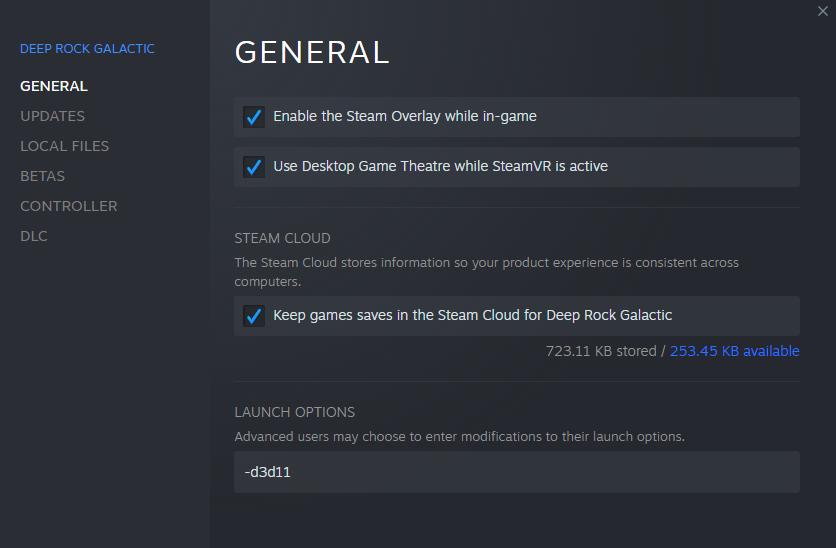

 green canyon
@pulsar parrot thanks, changing the setting in steam overlay seems to have fixed the problem
austere coral
 quiet field
is there a fix?
quiet field
is there a fix?
yes, you wait for a hotfix
austere coral
have you used any third party software to modify your save file?
 frail moat
Hi all, so I recently had to format my PC now I have no save, all the many hours of grinding levels and minerals etc have gone and I'm back at brand new starting from scratch at level 1 with all classes. I don't have a backup and apparantly theres no cloud save for XBOX gamepass for PC? can an admin or developer help me out?
also xbox live seems to be down atm
austere coral
You've got a couple options. You can revert your save using the restore save function and see if it was a fluke or if you played with some cheater. Or you can send me your save file and I can take a look at it.
 raw seal
Hey sorry if this is a duplicate, but I just finished an extermination mission on Sandblast Corridor with 2 friends where we found a bugged Ebonite Mutation event. We killed the first 13 mutated enemies without issues, but as soon as a sandstorm ocurred they stopped spawning for the remaining duration of the event, which obviously ended on a failure. No mods were being used.
covert egret
Is anyone else having significant performance issues since the latest patch? I am on a GTX1660 / Ryzen 3600. Not the best rig, but I used to be able to run on high no problem and now I am getting issues on medium/low presets. I have toggled between DX11 and DX12, but the only difference is DX12 had more stuttering.
 quasi tulip
I need some help I keep getting DCed and I don't know why, I have good internet so I have no clue what the problem is