#bug-discussion
1 messages · Page 135 of 1
 dreamy quail
 gloomy bolt
it's mostly for random groups where it would be useful so steam VOIP wouldn't be ideal
dreamy quail
The game uses steam's voip system. Other than checking that it works there and that you got all the correct settings and devices set, I have no idea what could be the problem. I've given up on the voice chat long ago and just use discord when necessary.
 formal juniper
Is it possible your push-to-talk key isn't registering the push properly? I'd try reassigning it to a different key and giving that a whirl, just to rule out any possible hardware issues there.
 midnight dagger
Im having trouble connecting w my xbox friends on the microsoft version it says joining foe a while and then times out and says "multiplayer session ended"
help pls
 austere coral
there's a fix coming, in the meantime see pinned messages in #xbox-and-windows-store
 patent otter
The Mule's stuck, and won't progress, and we're on a Salvage Operation.
We had no choice but to abort the mission. I don't know how to reproduce this, but this just seemed to happen randomly.
No matter how much we waited, the Mule would not move at all. :(
austere coral
there's a failsafe where it'll automatically teleport to the pod
dreamy quail
That will usually help, but as this is salvage there is no timer. Try mining around the mule to reset the pathfinding next time
 dusk flare
idk if this is grave enough to be a bug but i think it's funny
 tame bear
Stepped on a barrel, got trapped in the floor
Had to restart the lobby, couldn't get out
 austere coral
there's a respawn button in the ESC menu if you hover over your player icon
bottom left corner
tame bear
Oh fuck
 mental cave
The Mule's stuck, and won't progress, and we're on a Salvage Operation.
We had no choice but to abort the mission. I don't know how to reproduce this, but this just seemed to happen randomly.
No matter how much we waited, the Mule would not move at all. :(
@patent otter we had the same bug several times. You need to dig a little bit under the MULE - it will solve the problem
patent otter
I'll remember that next time.
Sadly, my partner had to sleep due to it being late over in UK
But yeah, I'll keep that piece of advice in mind, I had no idea how to deal with this, since this was my first time encountering the situation.
 broken brook
wish I read it now
patent otter
@void wharf Fair enough, don't worry about it
 void wharf
I did not take into account teh stock 100%
I thought stock was 75%
I realize I didn't DEslot the OC
merly changed it
 young bear
pots o gold doesn't affect what you manually mine if your gold storage is full
young bear
I'm currently in glacial strata on a dreadnought mission with pots and gold rush, the moment my gold storage fills up it'll start dropping normal amounts
austere coral
it drops chunks with a high value
so it can appear like it's only dropping normal amounts, but when you go to deposit then go back to pickup the gold, you'll fill your inventory almost immediately.
young bear
ah I must have been having some bad luck near the ends of the veins, you're right. just checked between two just to be sure
 hazy plaza
I just joined an extraction mission late, after the mine head was returned, and the mine platform wasn't unfolded. Getting near it glitched me about pretty aggressively for a few seconds. The turrets were apparently already down/out of ammo.
 summer grail
sadly it crashed on me once
e , and server issue. but has been fun
 modest scaffold
hey, for some reason whenever I keep trying to access the terminal for my union rewards it keeps asking me to join the discord even though I'm already a part of it?
 oblique delta
Anyone else unable to find lobbies for a specific mission but able to see lobbies when clicking full servers list?
 sudden stone
Having issues with "multiplayer session ended" error. I've tried restarting the game, uninstall/reinstall, reset router. On PC using microsoft store version of game (coming from xbox to pc), windows 10. I've tried to join friends as well as any random server and no luck. Any solutions or is the fix in the next update?
 grizzled nymph
My game keeps freezing. It doesn't crash/quit; it just freezes and Task Manager shows it as "Not Responding." This happens in clusters; like several times within half an hour, then I'll have 1-2 hours of freeze-free gaming. The game freezes regardless of where I am (in a menu, in a cave, in the main base). I haven't been able to find any support that resolved the issue.
I have 16 GB SS4 RAM, Windows 10, RTX 2060, 6 TB SSD, i9 CPU, etc. Memory utilization is at most 30%, CPU usage is in single digits. I verified game files and updated my graphics card drivers. I have restarted my computer multiple times (this problem has persisted since I bought the game). I've waited until now to resolve it.
Any ideas
 mossy breach
I encountered a bug today where molly had no idea where she was so she started placing markers everywhere ON THE DROP POD xDDD
She finally figured out where she was
austere coral
@modest scaffold pinned messages #interplanetary-miners-union
@sudden stone The xbox and win store networking has issues right now. There's a fix coming soon, in the meantime see pinned messages in #xbox-and-windows-store
@grizzled nymph That's a new one to me. I'd take a look at the pinned messages in this channel for troubleshooting.
 rigid gorge
so are we gonna figure out the mule on the side of the pod problem?
all 12 of my missions this morning have been nixxed because of it
austere coral
the mule automatically teleports to the pod with about 10-15 seconds remaining
 timid haven
apparently freezing a mactera grabber that is currently holding a player will make the grabber fall through the floor and never let go of the player since it'll never hit any surface
 polar berry
Hello does anyone know how to fix the sound bug where sound fx only comes out of the left side of my headphones or speakers. The voice overs in the game comes out stereo. I verified the game files through steam. My headphones are working properly and so is my sound device. Fixed I found the issue. My sample rate was at 88.2 instead of 44.1.
 pulsar hare
So, we just played a game Aquarq on Saltmines, but there was no aquarqs in the lvl ... we searched everywhere! and had to give up :/
 untold osprey
so im in the discord, chose my union already, and its saying i need to still join the discord, wont update
 little dawn
Just like to add an encountered bug with Molly getting stuck moving back and forth, we could eventually get it going but I'm sure this should have attention
 vocal field
will the miner's guilds be fixed for next patch? I'm tired of leaving the discord to rejoin
He joined at the same time we ended the mission. Was suck with no gear in an abyss, until we finished the reward screen and was shipped to medbay
(He's normally rank 11/9)
 leaden isle
My level 96 account data got deleted, I still have the account and all the DLC/Supporter upgrades for my account and its still the same name, but the data is gone and the account is now level 1, help?
OK found the issue
I use windows 10 edition of Deep rock because i came from console, but it loaded without syncing the data. so my data wasnt there
A simple reinstall fixed it
Good to know for the future i guess
Gave me a heart attack tho, lol
 shy fern
If need be you can make a backup of your save file on W10 which can also serve as a backup for Xbox.
Although I do believe the developers added that functionality by default to all versions now which can be accessed via "Restore Save" in the options menu, granted there needs to be data first.
 solemn spoke
So I'm part of a union and the game isn't registering that I am? Something I'm doing wrong here? Or is it just being derpy mcderpinstuff?
Oh. Wait. I think I see what I need to do.
 tidal lodge
Hi! Uh, I'm apparently banned after the game crashed? I'd just been playing in pod 1, and the game crashed in the lobby (it was actually pretty bad, I had to ctrl-alt-del and restart to turn off the application). When I restarted the game and tried to rejoin the pod, it said that I was banned.
tidal lodge
nvm looks like it's a result of being kicked, not being banned entirely
 dim forum
I used the cryo cannon and froze a macera grabber but it grabbed me at the same moment. I ended up inside ground and my friend dug his way out to me. My body he could revive was not where my screen was and I couldn't move until he killed me and revived me again. After all of that I was invisible the rest of the mission. I couldn't see my arms or the cryo cannon. Other weapons were visible and my friend could only see those weapons. I didn't have a cursor indicating my location in the map either. Enemies could see me though.
shy fern
No bans in this game, only a kick from a certain mission in a single lobby.
 pearl osprey
Play sound on chat message received doesnt seem to work. i dont get any sound when a chat message is received
also a bit confused that its under UI settings instead of Sound settings
 buoyant basalt
When playing as Driller with default armour, viewing the Square beard in the shop also changes the appearance of the armour as well as the beard. The different armour somewhat obstructs the view of the beard.
 shut fossil
So, I'm playing with some randoms and we get into a mission, another guy joins in while we load. I immediately fall through the map and I'm in a stuck state. Can't press any in game keys, but I can interact with menus and could type in text chat, almost like I was grabbed. We decided it would be worth it to try and leave the game and rejoin to see if that would fix it. Right as I got back in the mission, same thing. My view was fixed to the drop pod crater and no one could see me in game or on the map
I was not the host
Has anyone encountered something similar to this?
 rapid hatch
Hi all, any1 else having problems with the connection if you alt+tab to another screen?
Windows store
 mint lintel
austere coral
mint lintel
austere coral
@pulsar hare They're there, you just didn't find them. Use the terrain scanner to look for areas you haven't explored. Most likely the aquarqs were all in a room with a machine event.
@little dawn Mule teleports to the pod and the doors open with 10-15 seconds remaining.
@vocal field @solemn spoke pinned messages #interplanetary-miners-union
@buoyant basalt This is intended. If the beard is going to clip into the armor, chunks of the armor are automatically removed to minimize this.
@shut fossil @mint lintel do this https://i.imgur.com/EfU03sC.png
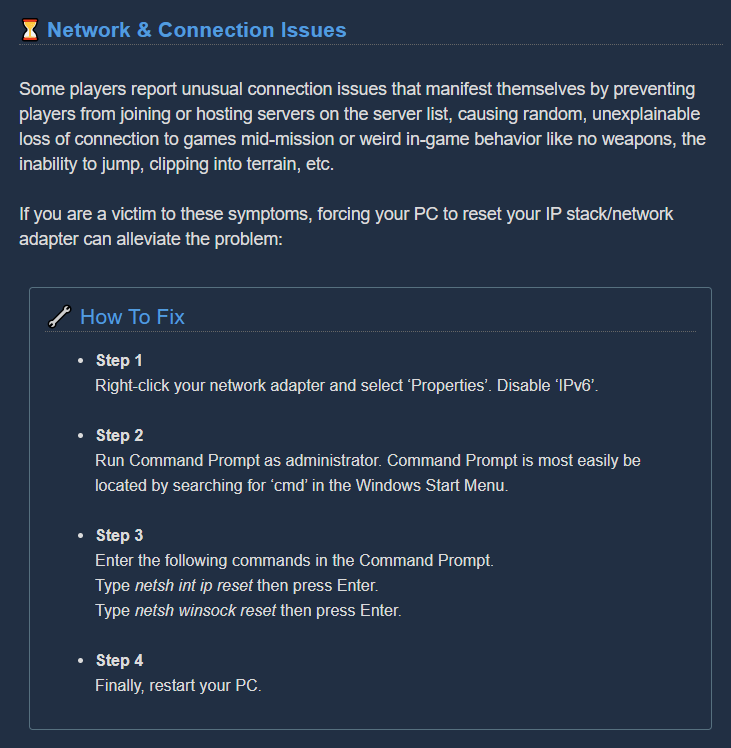 vocal field
@austere coral if you look at where you link me, it's talking to me
I'm absolutely sick of just having a conversation that I had shoved back in my face as an anwser to my problem
that's not fixing it! I've done it a half-dozen times at this point!
austere coral
then you have to wait for a thorough analysis of the bot and a fix to be pushed.
vocal field
which, if you'll look at the message you pinged me about, is what I'm asking after!
Sorry, I got a little snappy
It's just... really annoying to have my own discussion on the subject shoved in my face as an anwser to my question
shut fossil
Thank you! Much appreciated, I'll try this soon
 steady dagger
Hi, so i played the game yesterday for a while and leveled up a couple perks. When i came back today, my account level was reset and all progress wiped. Any clues what happened ?
no idea what might have caused it
broken brook
This... isn't right, right? I've unlocked all the weapons 🤔
@steady dagger Have you tried the restore save option?
steady dagger
nope, didnt know that was a thing
broken brook
It seems to help a lot of people so I thought I'd suggest it 🤷
steady dagger
huh, that seems to be it. My cloud save got overwritten with a brand new one for some reason
buoyant basalt
@austere coral Thank you for that response. This is a matter of opinion so no response is needed, but I think that the square beard, though it does not clip the armour, is still visually hidden by the full armour.
 strong elm
hi i got a bug: the first time i started up the game i connected my discord to here trough the board in the medbay so after i could see the faction board and such, but after restarting the game it wont show the faction board anymore and asks to join the discord again while im already there.
 high valley
Make sure your Discord status is set to Online and not Invisible. The game doesn't like it when you're Invisible, it seems.
 sterile venture
im not sure if this is a bung but you can ride the mine head just stay up there until the drop pod arrives and then jump down with hover boots
 tight egret
Is there a fix for audio issues with the use of bluetooth headphones. I am using cowin headset.
austere coral
pinned messages
tight egret
i dont see the solution in pins.
austere coral
tight egret
thank you. I am not very tech savvy but will this effect anything else if I do this?
austere coral
probably not
tight egret
ok. again thank you very much for the help
austere coral
if it does mess anything up, most of those suggestions for fixes are just a switch in settings. Seconds to undo.
 pliant portal
I found an invisible Omen
austere coral
It's an unintended side effect of an intended mechanic. Drop pods destroy machine events to prevent the event from blocking entry into the pod. The unintended bit is with the omen leaving behind some parts which are only visible to clients.
 round timber
dont think this is supposed to happen
it happened after i kicked ten barrels from around the main area then they got stuck
 marsh pewter
This happens a lot
 pale rain
Have been getting some consistent crashes
ntdll
ntdll
nvwgf2umx
nvwgf2umx
nvwgf2umx
nvwgf2umx
nvwgf2umx
nvwgf2umx
nvwgf2umx
nvwgf2umx
nvwgf2umx
nvwgf2umx
nvwgf2umx
nvwgf2umx
nvwgf2umx
nvwgf2umx
nvwgf2umx
nvwgf2umx
kernel32
ntdll```Not really sure how to fix it
austere coral
pinned messages for troubleshooting. Step 10-12 will likely resolve it.
pale rain
10/11 installs DirectX stuff??
austere coral
yes
pale rain
Does that mess with my drivers or anything
pale rain
For 11 it says I need an earlier version of windows to do it
Is this one just for people with earlier versions of windows?
austere coral
which version of windows are you on?
pale rain
Windows 10
austere coral
if it's not letting you run that then I'd recommend starting at step 1 and working up from there
 mellow phoenix
Two missions in a row where I get a loot crate and the item doesn't show up afterwards
 quaint fox
Hello, I am in dire need of assistance. My gaming experience so far has been as follows: I launch the game. I get a prompt to press any key to continue and I do, and the game tutorial cutscene where there's a satellite hanging out plays. Here's the caveat though, the video fully freezes but the audio keeps going. I can even tell the game has loaded in because I can hear myself firing my weapon and moving around or even opening menus, yet the image on my screen is that of the satellite from the cutscene. If I alt-tab on windowed mode and tab back in apparently it forces the screen to refresh and I see a new freeze-shot of whatever I'm supposed to be seeing (Which allowed me to painstakingly go into the settings menu to disable master EQ audio or whatever). Other than that I've tried reinstalling, verifying file integrity, reinstalling common redest, windows updates, and praying to the machine spirits to no avail. Please help.
 quasi pumice
Hey guys! So this is an audio issue. I have duel headphones and all background noise is coming from my left ear. Something you should take note of
austere coral
Receiving no items from a cargo crate or lost pack means you have everything.
See pinned messages for troubleshooting for that freezing issue. First though try reseating your monitor cable in both your gpu and monitor.
quaint fox
Already went through all the pinned messages and tried everything that looked relevant. Even the cables.
austere coral
I’ll look into it tomorrow
quaint fox
Thank's dad. Much appreciated.
austere coral
It’s 2300 and I’m running on 5 hours of sleep. It’s either tomorrow or poorly thought out solutions.
quaint fox
This is already more than I expected given the time of day. I sincerely appreciate it.
shy fern
@quaint fox I can send you a save file that is not in the tutorial and you can see if it is an issue with that.
quaint fox
@shy fern I'll try anything.
 pastel topaz
Hey guys, I've been having an issue with the in game panel that lets you join a guild. Already did it, been playing for a good while now. But recently, the panel keeps telling me to join the discord. I'm online, and I fixed it before by leaving and rejoining the discord. Just started up again and it's telling me to join Discord... sooo uhh, I dunno lol.
shy fern
Currently bugged due to the bot breaking.
pastel topaz
oh fun.
shy fern
Could try relinking your Steam account to Discord or toggling the game recognition or something.
 marsh isle
Hey miners!
When I try to join my friend game, server connection lost instantly.
I try to restart my steam, check game cash for errors and restart my internet connection.
Someone have that issue? Help please
shy fern
Did they just promote? They either need to restart their game (probably already have done this) or disband their team.
marsh isle
ye, friend just buy game and do promote missions
one of them we finish together (I help him)
mossy breach
It's probably intended that some projectiles can get destroyed when they hit another projectile and some don't.
But I'm 100% sure the gigantic ice spear of the cryo cannon should not be destroyed by the tiny projectiles of a menace.
And the TCF implosion doesn't always trigger when an enemy spits on a charged shot.
And huuli hoarders are still 100% immune to all projectile attacks.
 lean wasp
Not entirely a bug, but it sure bugs me:
- Type something in chat, but exit chat without sending because an enemy appears
- Play some more
- Type something else in chat but the old unfinished message is still there and you don't have time to delete it, or you don't even remember it's there and you send a half old message plus your new message, then you spend more precious time explaining your team the old message was stuck and have to type again what you intended to say
formal juniper
I haven't noticed any consistent trigger for it yet, but when loading into missions I have a habit of spawning... weird. Most of the time it's normal, but sometimes I spawn outside the drop pod, and (on two occasions now) I've spawned halfway into the ceiling. Those required a disconnect/reconnect, because I couldn't move at all.
Platform: Steam
austere coral
Try this https://i.imgur.com/tNiCqX6.png
Network back end changes are coming with U32
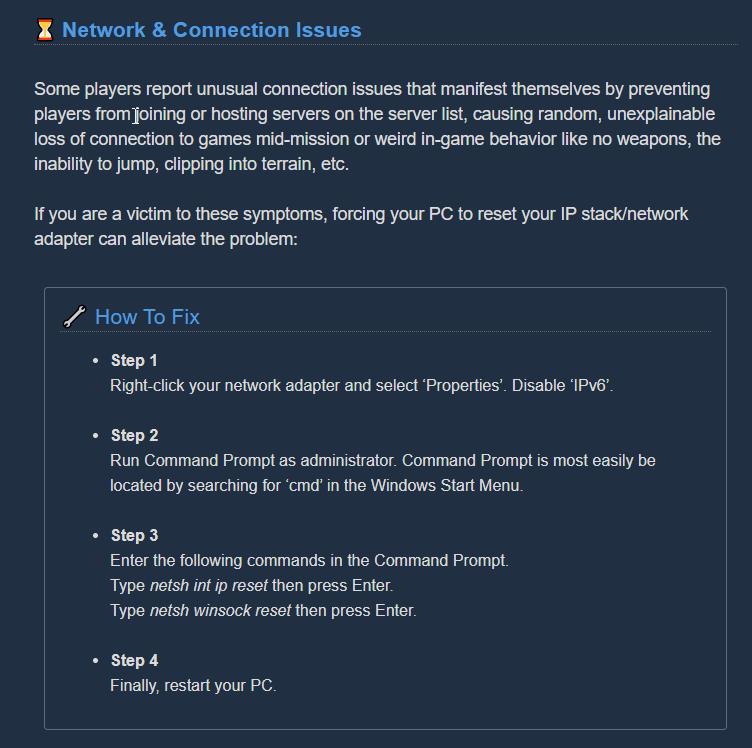 formal juniper
Would that also affect Solo? I've noticed it in that mode as well, which would (I think?) rule out any connection issues.
austere coral
I don't believe so
if you identify any consistent factor that allows you to repeatedly have issues spawning, do post it here.
mossy breach
Hello.. I don't know that it's good channel for it.
I came back to game after few months, i didn't played much the game (around 36hours) and i didn't met that problem before.
I just downloaded the game, launched and I got some kind of stuttering in-game each 15-20 seconds. It's kinda annoying because game freezes for 0.5 second. I have tried to lower my game setting from high/ultra to low, switched borderless fullscreen mode to full. And it didn't fix* the problem. I felt kinda frustrated after one run because of that. Is there any way to fix it?
pearl osprey
i think Promotion breaks multiplayer
each time i Promote and someone tries to join me it fails
 spice stump
anyone else having trouble connecting to mission?
austere coral
what platform do you own the game on; xbox, steam, or windows store?
spice stump
steam
 lost ferry
How do i gain access to the Interplanetary Miners Union? I was a part of the chat for a while but it wasn't syncing to the game so i left. Its syncing the goal progress now but i no longer have access to the chat.
The Chat that is
Nevermind it just showed up
strong elm
Hi everyone, i cant seem to join games trough quickjoin or trough the server list. anyone else have this problem too?
austere coral
Today is Tuesday. Steam has maintenance every Tuesday every week.
strong elm
ahh that might be it
 past moth
hey yo, I always crash after ~15 minutes with this error.
Unhandled exception
XAudio2_7
XAudio2_7
XAudio2_7
XAudio2_7
XAudio2_7
kernel32
ntdll
any and all help would be greatly appreciated
austere coral
pinned messages for troubleshooting, I'd start with the amd fx / realtek audio fix.
 celest prairie
After promoted my last non-promoted class (engineer), I was unable to join public games. Constantly stuck at "Joining..." with a cancel button.
I tried restarting the game but it didn't work.
austere coral
celest prairie
I then joined a solo mission and abandoned it, that seem to do the trick
 flat atlas
So uh this happened, found a cube in the wall and gave us this when deposited
austere coral
pinned messages, it's buried a bit.
flat atlas
oh neat, should i delete my message?
austere coral
only if you want to
 mighty cove
Anyone else having trouble today with the friends invites?
past moth
Back again with the same error
Unhandled exception
XAudio2_7
XAudio2_7
XAudio2_7
XAudio2_7
XAudio2_7
kernel32
ntdll
the previous pinned message did not help
well, i Think it helped a little, but I still crash every other game
austere coral
you've gone through everything listed here? https://discordapp.com/channels/257785731072786435/258990272967475200/720372688777904128
 random token
starting today, drg server feels really unresponsive. ex. each time I click to join a group, it has the "Join" popup like it always do but it immediately closes. So I had too repeatedly click to join until I'm able too. Even if I did, sometimes it takes such a long time to load or it resets into a new game.
reinstall the game and it's still the same
This has never happened to me before so it's either something happened to my pc or the game is bugged out
@vale elk
shy fern
Just depends on the host or your connection, sometimes things like promotions can bug it out unless the lobby gets reset. It'll probably be fine the following day unless the host or something consistently has bad connection. You can probably try hosting yourself if need be. Pedro also doesn't work on DRG anymore and one of the rules is to not ping the devs for most things but I can understand why you felt the need to.
random token
@shy fern thx for the response and about the rule . I didn't think much about it and pinged out of frustration. I'd just booted the game and there was an update so hopefully it fixes that. Thx again bud.
shy fern
Oh, that would definitely cause that issue then. Mismatched versions cannot matchmake.
random token
but earlier today before i played drg, I've checked for updates on steam and there was none
and now there is one when i botted the game just now
i'm giving it a test and see what happens. if fails i'll report again
booted**
 jovial nymph
Hello everyone Im having a problem with changing the resolution.
I cant seem to change the resoultion from 720p when in fullscreen
It always stays at 720p no matter what I change. If I use windowed fullscreen it just goes to my monitors resoultion 1920x1080 and I cant change the resolution then either
I want to play on 1366x768 but it isnt changing from 1280x720
 hexed oxide
Having a weird error with joins and leaves. It says "Name joined the session" when someone leaves, and "Name left the game" when people join (they are mixed up). Was working normally before but got switched up recently and is still mixed.
Same thing with me, console says I left the game when I start any.
 dense kettle
If you're holding a beer of any kind and then switch class via any terminal, the beer will disappear
Gone, reduced to foam
 crude flint
Game locked up upon clicking "Join Miner Community" in launch area 🙂
dense kettle
It's a known bug, it will be corrected don't worry
 ripe quail
Does anyone have anything that can help with sudden frame drops?
FYI it doesent only happen in drg, it happens in other games. And it’s not even that bad in drg but it still bugs me
 meager eagle
Anyone else ever encounter an issue where korlok healing pods would fall through the floor and wind up in a spot too far to reach in time to destroy before they heal the core back up to its full health threshold?
Had a salvage mission where they fell through the floor, and into the cave generated by a backpack
Spent 20 minutes trying to kill the thing before we exhausted the cave and mini-mule nitra supply
mossy breach
is it just me or is the game sometimes not registering mouse clicks?
 fickle herald
i got a bug where molly wasn't putting down markers on the way back to the drop pod
austere coral
@jovial nymph \steamapps\common\Deep Rock Galactic\FSD\Saved\Config\WindowsNoEditor
Modify GameUserSettings.ini and change the resolution options to fit your monitor resolution. Change fullscreen to "0" to force fullscreen. Save the file. Set to read only in properties.
@ripe quail If it isn't exclusive to DRG then it's likely an issue with your system. You can try the troubleshooting in pinned messages and see if that clears anything up.
@mossy breach Run the game in fullscreen (not windowed borderless) at your native resolution.
 plucky helm
I'm gonna assume it's a known bug but I had MULE literally noclip straight up to the drop pod once, just up and zooted out of there
mossy breach
Had the MULE stuck right before the drop ship on a lip that it could and should have gone through. Needless to say it didn't.
 dusky latch
Hello everyone. Mactera Grabber grabbed me whlie getting frozen and fell into the terrain, making me stuck inside it. My friend(who was new to the game) tried to save me but didn't know how.
- I was unable to do anything except calling the mule
- My friend was the host
Is this a common bug?
 austere coral
I wouldn't say that it's common so much as there's been enough reports that the devs are likely aware.
 tropic harness
That's impressive though 
mossy breach
My game crashes every time it start's, i've updated and restarted my computer, i've checked the integrity of game files using steam, i've deleted and redownloaded the game at least three times now. None of it is working, I am stumped on why it still wont work.
austere coral
Pinned messages for troubleshooting. Odds are good it’s a directx issue which is easily fixed.
 ornate gulch
so my friend keeps randomly freezing during gameplay
we can't find a cause or fix for it
and the freezing lasts for 10-20 seconds and is too frequent to play with
does anyone have a fix
marsh pewter
what's your friend's net like
ornate gulch
i know it's not the network since i don't have the same problem
and we're on the same network
marsh pewter
is this exclusively when he hosts, or always?
ornate gulch
doesn't matter who hosts
he randomly freezes
it justs affects everyone if he freezes while hosting
marsh pewter
I guess the next question I'd have is what is his computer specs?
ornate gulch
one second
Nvidia GTX 1060 6GB
AMD FX-8320 3.5 GHz
16GB Ram
ASUS M5A97 LE R2.0 Motherboard
Windows 10 OS
austere coral
pinned messages for troubleshooting, start with the amd fx / realtek audio fix.
mossy breach
@austere coral well that sucks
will using windowed and the borderless fullscreen app solve it? i kinda value my ability to alt-tab
(drg is the only game where i’m having mouse problems lmao)
austere coral
has to be fullscreen, you can still alt tab with fullscreen applications.
mossy breach
stuck in the void
mossy breach
yeah but some games alt-tab weirdly (a few crashes when even)
oh well, just gotta suck it up i guess
thanks
on a side note, are the devs aware of this? i hope they fix it
austere coral
You can alternatively use win+tab
I believe it's an issue with UE4 itself so I'm not sure it's something they could easily resolve, but they've been aware of it for a while.
ornate gulch
thanks, the pinned fix worked, we haven't been able to play for months because of the constant freezing
and now that's gone just in time for this new update

mossy breach
rlly? i played other ue4 games and drg is the first time i've had such problems
ok so i've tested the fullscreen alt-tab and it resizes my currently-fullscreen browser
an annoyance ofc, but at least a harmless one
thanks for the fix!
 bitter lynx
Not able to finish my mission because of this😂
young bear
fear not, it's an intentional error that gives you exp and is quite rarer than anything else in the caves. consider it a good omen @unkempt abyss you'll soon see the bad one
 unkempt abyss
hahah awesome
 rotund swift
How do I fix my constant crashing can someone help. all the error log says is a Unhandled exception a few lines of FSD_Win64_Shipping and then Kernal32. I already tried to verify and reinstall the game + whitelisting all game files from my antivirus.
rotund swift
sorry someone just directed me to this channel so didnt read the readme.
[Reproduction rate:] random
[Steps to reproduce:]
Play game
randomly just closes with no indication or freezing just poof and error screen
[Expected Results:]
Game runs?
[Actual results:]game closes?
[PC Specifications:] Windows 10, processor Ryzen 5 1600x, GPU RTX 2070 super, RAM 16gb DDR4 at 2600hz (dont remember exact value) motherboard dont remember. running from an SSD.
Closed the crash report rather quick since i was playing with friends. next time it crashes I can send screenshot of the report (not that theres anything more from what I said in my first message).
mossy breach
Reproduction Rate: Seemingly depends on terrain generation and Mini Mule spawn location
Steps to reproduce:
- Salvage mission
- Magma Core (in my instance)
- Terrain with a tight group of pillars must spawn
Expected Results:
Mule spawns with legs nearby as usual.
Actual results:
Mini Mule legs can be seen on top of the pillars, and the signature beeping can be heard, but no Mini Mule is visible. The beeping sound will move which you can detect with surround sound. No green bubble that normally surrounds the Mini Mule is visible either, even after mining out the whole area.
PC Specifications: Windows 10, Intel i7 9th Gen, GeForce GTX 1660Ti, 16GB RAM
 stray prism
[Reproduction rate:] always (but simply cosmetic bug)
[Steps to reproduce:]
Start Solo Mission with secondary objective to kill some fester fleas
Mark (Ctrl-Left click) a flea to order Bosco to kill it
Dwarf voice sample when marking the flea: "light it up"
[Expected Results:]
Dwarf should say something like "kill the flea", "attack" etc.
=> wrong voice sample for this action
[Actual results:] none, just wrong sample
[PC Specifications:] does not matter
 rich sand
Not sure if this is a bug, but you can drink a blackout stout before a mission
And you end up extremely drunk (but you don't pass out)
austere coral
that's intended
mossy breach
is quick join still broken just wondering if its a general bug or just me steam version btw
 crimson coyote
@mossy breach yes and not just you
 woeful ridge
how to fix the quick inv in discord for lfg ive followed how to do it and fix it but non of it is working does anyone have any advice
austere coral
I have no idea what you're referring to
woeful ridge
i dont get the little green thing next to the plus
austere coral
pinned messages #lfg-steam
woeful ridge
i tried that
 livid knot
Reproduction Rate:
Every time I check the medical bay.
Steps to reproduce:
- Be in a game with multiple people.
- Look at medical bay
- Look at medical bay later on. (not sure how much later. Might not be till the next day)
Expected Results:
"Times Downed" and "Times Passed Out Drunk" will increase accurately.
Actual results:
Every game it seems like it is different. One game it will say I have gone down 1453 times then the next it will say 379.
Note: I have only checked this when playing with higher level people (500+) because they mentioned this issue.
PC Specifications:
have noticed this with 3 different hosts all running windows 10 and steam.
- a late Bulldozer Series AMD CPU and spinning hard drive (don't remember the rest of his specs)
- 7th or 8th gen i5 and an ssd (didn't get the rest of her build)
- Ryzen 3900X, ROG Strix MB, TridentZ Neo Memory, NVME 3ed gen, EVGA 1070
 shrewd mountain
My game is definitely bugged, I haven’t gotten a Tyrant Weed in at least a year now and it’s becoming a problem. One is anyone else having this problem and two how do I fix it?
 white girder
"at least a year"
...it's been in the game for 3 months.
 tender bone
Tyrant weeds use the same spawn-mechanic as BetC and have a ... 1 in 16? chance in any normal non-deepdive mission
Wiki says
The chances of encountering a BET-C are 3% for Hazard 1 and 6% for Hazard 2 and up.
@shrewd mountain
 hidden sentinel
any new on if win10 is up to par to the steam version of this game yet?
 summer herald
Thanks, I realized it soon after I made the post haha
crimson coyote
:) it's fine
 gray tiger
Do you guys have any known issues with your achievements that will be fixed in update 32? My girlfriend for example are not getting the "complete an elite deep dive" achievement, even though she has completed 3 of them already. Same goes with some other achievements aswell.
 cunning iris
IDK if bug or like general feedback, but 3 separate places where my name is listed all have separate lists of recognized special characters
So this is my name atm
Chat:
End of mission screen, which I didn't screencap, writes it as KARMEƧ
No idea what server list would say 🤔
 fleet pilot
Just curious but, is anyone else having an issue where game controllers seem to lose functionality outside the menus?
cunning iris
End of mission screen ^
 jaunty pike
Reproduction Rate:
I don’t know other people who had this, so I noticed it only once with me
Steps to reproduce:
- play offline
- run an employee to raise a dwarf
- end employee
- don't look in the employee terminal
- raise a dwarf in the memorial hall
- off the game
- wait until new missions apears
- on game
Expected Results:
the dwarf promotion mission will disappear and I can only start it at the 25th rank of the dwarf
Actual results:
I have completed 2 missions out of 3, although I completed the third and was able to increase.
Then I completed the third mission for the second time, because of which I can again raise the dwarf
before reaching the 25th rank of the dwarf (I did not use this, but took a screenshot)
PC Specifications:
Win 7
Proccesor: Intel core 2 Quad CPU Q9505 2.83 GHz
videocard: AMD Radeon HD 7500 Series
shrewd mountain
@white girder edit: it feels like it has been at least a year.
 tacit mango
Want to play a whole match drunk in game? Drink a blackout right before you get on the droppod and passout. You'll wake up as you start, and be drunk the whole match. What a nightmare! haha. Revives don't help, so it seems to be a bug. A fun-ish bug, but a bug none the less.
 gentle hazel
@shrewd axle bugs goes here
jaunty pike
if you drink this "disco beer" and died your camera is ded
 elfin depot
is the Total Makeover achievement broken or is it just me?!
 mild fern
Something I've been noticing quite a bit more regularly lately is terrain "corners" where you can literally get stuck on while it looks like passable terrain. Seems to happen especially around added terrain like the drop pod, or machine events. Molly also has a habit of just getting completely confused on them in terms of pathing.
crimson coyote
@elfin depot some people have had issues with it. no one has put a fix in here yet though
elfin depot
i just got it, problem for me was that i chose skins that i didn't buy with credits
i think it was because i chose some of my DLC skins...
broken brook
yeah it has to be ones you get from the store terminal.
also it helps to make sure you got eyebrows because I never bothered buying any lmao
crimson coyote
eyebrows are the best part
 ashen salmon
@orchid monolith "If u have ASUS GPU TWEAK II installed then thats why this message pops up. Its a keyboard shortcut for turning on or off OSD or smthing like that. I had the same and i coudnt disable it, i closed the application and then it stopped popping up."
i googled ur error message on screen -- this is what i came up with
 orchid monolith
thx
formal juniper
Quick question - there any known "quick fix" for when the game decides it's not going to detect you joined the Discord any more? I'm not Invisible or Offline on either Discord or Steam, and relaunching the game doesn't seem to do the trick.
 radiant sentinel
try re-linking your steam account with your discord account
formal juniper
No dice
Maybe full killing Steam and Discord and relaunching both? Will make the attempt.
EDIT: Confirmed that as working.
 lime flax
this is a bug with discord so i don't think you'll be able to help but ill accept game invites an instead of joining the game it jut keeps loading and put me in a solo session
radiant sentinel
it's not a bug with discord exclusively, it also happens to me sometimes when i accept steam invites, maybe try restarting the game, if your friends reset their lobbies, it should work as well
atleast that worked for me
 meager wadi
anyone else have a gunner bug where the shield does not deploy?
marsh pewter
the only three things I can think of are
- The game sometimes eats mouse inputs
- Is your shield on cooldown?
- Are you out of shield uses?
radiant sentinel
shields and satchel charges can also clip out of the map, has happened to me before
mossy breach
has anyone figured out a solve to clipping into or above the ship as you load in?
meager wadi
it was first shield of the game so no cd or depletion, has happened to me multiple times. not a mouse input since i threw the shield
 silent mural
Thought i have a big party
marsh pewter
ahh yes, 8 player games
 sage solstice
Just had my game send constant swarms with no breaks in between till my game crashed lmao.
 heady drift
Must’ve been a bad day for mining
mossy breach
An electro crystal killed me in less than a second. I had full shield and over 80% health. Hazard 5.
mossy breach
I have no idea why this happens. When I join in a game online, sometimes I will clip through the ship either going inside so I have to rejoin to spawn outside and am able to move, or I will clip above it and fall through the map quite a ways. Does anyone know why this happens?
 elder glacier
it has something to do with being the client. A lot of bugs like what you are saying can only occur if you are the client and not the host. Bugs like scout being able to go out of the escape pod at the end of a mission or scout's glitched grappling hook can only be performed by being the client. Play host if you want to avoid it (as a temp. solution)@mossy breach
 cold halo
anyone know how to fix this? all my data just got deleted. I've seen people say that there's back up files but I have no clue now to access them does anyone know how to?
crimson coyote
esc > options > restore save
cold halo
oh shit thanks man ❤️
crimson coyote
no problem :)
crimson coyote
is this the first time this has happened?
 faint ember
based on experience it only happens on certian hosts
sometime randomly
sometime never at all
if it happens to all of them, something is wrong
crimson coyote
tell them to restart their pc
wait
*restart your pc
sorry i somehow got the impression we were talking about a friend of yours
crimson coyote
are you going to restart your pc
mossy breach
i did
crimson coyote
just now?
mossy breach
yes
aight
the fifth lobby i tried to join worked
maybe the server list showed me dead lobbys?
 robust juniper
having an issue where I can't connect to any games - they all just show "Joining" briefly then nothing happens (that normally happens for some games, but not all of them); any ideas?
tried restarting game and pc, internet is otherwise acting normally
joining was working normally maybe ~30 mins ago
crimson coyote
crimson coyote
@mossy breach just post it here
young bear
drinking blackrock lager, burning love, mactera brew, and then finally seasoned moonrider fast enough will automatically revive you and also make you sober when you pass out
getting intoxicated to the point of passing out, then drinking moonrider right before will immediately revive you, make you sober, and still give the normal effects without sending you to medbay
 eternal quest
does anyone else have a what i assume is a bug where outfits wont save and cant be changed?
eternal quest
ive had it ever sense the dlcs dropped
and every time i try to ask everyone tells me they have never heard of this issue
using enginer as an example
no matter which outfit i select it changes on the screen but if i tab over to anotehr class or close the minue it always goes back to this
austere coral
change the paintjob to one other than the default selected
eternal quest
just tried that and outfit siwtches right back to that and the paintjob resets to that
i can change everything except outfit and paint job i can do skin hair and helmet
jsut figured it out found it on a redit post thats been made sense the last time i tried to mess with this
eternal quest
When editing your appearance you’ll notice pictures of what you have equipped I noticed that in place of the skin color picture, it actually was showing a picture of the armor I did not want to wear, and once changing to a different color skin, the picture was then that of my characters skin color and I was free to change my armor from there on all characters.
copy paste from the redit thing and it worked for me
 dry ore
neat
eternal quest
cause if you look on my screen shot you can see it the skin tone spot is showing an armor instead
dry ore
oh wow you're right
eternal quest
i never noticed it till that post pointed it out
 tawdry arch
My shield didn't deploy three times the same game
what's going on?
apparently it went through the ground
 fathom burrow
just got back from a mission where the mule was stuck in the drop pod somehow and nothing could be done, thought i'd give the info here
austere coral
stuck in the drop pod or stuck walking along the side of it?
 ancient lark
Anyone had any issues joining a friend while they are on PC?
We can join one another on Xbox
I can join as PC while he is on Xbox and visa versa
If he tries to join or host on PC it just says Joining... forever.
Happened about a month back with no changes to our setups.
austere coral
the microsoft copy has networking issues. There's a patch currently awaiting microsoft approval which replaces the entire network back end.
ancient lark
Thank you.
 verbal cairn
Gah, that was painful.
So, to expand on the RX-Series 'card issue: If the EQ disable doesn't do anythin, see if you can get it into Fullscreen (Not Borderless).
For some reason AC7 had the same issue for me, and Mutant: Year Zero I need to go back and check for the same thing.
Dunno what it is 'bout Unreal Engine, AMD, & Windowed/Windowed Borderless, but damn.
Cheers for that .ini edit, will have to see if that's also an issue, or if I'll luck out there.
E: EQ doesn't seem to be an issue for me, so bonus there at least.
 lime torrent
 stoic ivy
I had a some stupid bug
Every time I open a game without runned desktop Discord, I left a Union
Every time it suggest me to join it.
 maiden palm
I'm having the same issue. Keep getting prompted to join a union even though when I last was in the game I successfully joined the Dirt Diggers and it all looked like it worked.
 wintry walrus
I repeatedly had a bug while playing scout, sometimes when i grapple, i get stuck in the animation and i keep bouncing between the initial position from where i grappled and the point i wanted to go, i always get stuck for 20 seconds at least
 ivory orbit
hi i need help i havent played since 2019 and i have lost my progress
i got 230hrs playtime
austere coral
Esc options restore save
tawdry arch
crashing more and more frequently, the game has become almost unplayable :/
austere coral
@wintry walrus If it's reproducible could you get a short video of it?
wintry walrus
i dont remember how i got stuck the times it happened, but in case it happens to me later, what should i use to record?
austere coral
if you've got an nvidia card you can use shadowplay or alternatively you could use obs.
mossy breach
Unsure as to how this happened, but i was downed but still able to use my weapon, i couldn't switch weapons though. teamates couldn't revive me either
some interesting things to note is that i still have full shields, and that i was downed by an exploder while using a zipline
mossy breach
Hey guys i have an issue that my game freezing but i can still hear the walking sounds and more i tryed lowering graphics and it didint work does anyone know how to fix that is that a bug or just my pc
austere coral
I'd start with pinned messages for troubleshooting
 visual briar
Bloody magic of leprecons
crashing more and more frequently, the game has become almost unplayable :/
@tawdry arch me too but only when i use plasma gun on driller
tawdry arch
@visual briar It's random for me
 final creek
I don't know if anybody knows about this but The trytalite key tower event is actually a safe zone if you don't activate it. For whatever reason Glyphids wont be able to attack you while you are on it
 clever laurel
so
i have been hitting my TCF EPC shot with my pickaxe
one mission it worked
one mission it didnt
lime flax
hey im having something go on in my discord where i click on an invite but it wont load me in to that persons lobby at all it just acts like the invites loading and keeps me in my own lobby if anyone could help me with this i would greatly appreciate it
austere coral
try to disband your lobby before accepting an invite
 proven lynx
i couldn't ALT-Tab to discord/anything when inside DRG game...please resolve
marsh pewter
Hmm, I alt-tab from DRG frequently, myself
proven lynx
my friend has the issue too...every other game does alt-tab except DRG...anything we left to tweak?
crimson coyote
@proven lynx make sure in display settings the game is in "full screen" and not windowed fullscreen. also is this just a one time thing?
 clear prairie
if a player buys a round then dosent drink it and crash when the player comes back the beer will not show for said player
 lament quest
Joined a union but the display in game prompts me to launch discord instead of displaying the goals
 crystal shadow
wtf
Bosco and sentry ignores them
been floating since beginning when I dropped in
 vivid root
Alt tabbing has been really weird for me lately, it's like it forces it into windowed mode when I alt tab, then I have to do it again to make the game fully go away. Then sometimes when I hit enter to type in the chat it windows it and sets it to a weird resolution that I have to then go back in and change.
 spiral thicket
I just had a salvage mission fail because the drop pod took off without me. I stepped on the edge to deposit some gold and it went up then went to the mission failure screen.
 wicked bay
I couldn't rejoin a deep dive (playing with friends) that I accidentally disconnected from when my laptop crashed. They say that I should've been able to, is this a bug?
 plucky hinge
I'm just looking for a place to report that I did not receive an achievement that I should have (Deep for Speed) -- My teammates all got it but I did not. It also took 3 tries for me to finally get A-Team while my companions got it. -- I assume the devs can look at the mission data and see that I should have the achievement?
proven lynx
@proven lynx make sure in display settings the game is in "full screen" and not windowed fullscreen. also is this just a one time thing?
@crimson coyote yes the game is in full screen and its not a one time thing.. It's happening always to us.. We run every other game fine to Alt+Tab...other than DRG
And DRG is getting frame drops when in Co-Op or at combat
 astral violet
I'm not sure if I would consider this a bug, per say, but I do think Bosco's AI when returning items to the player needs a rework. As it currently stands, he will randomly fly away from you or hover just outside of your grab distance with whatever he is carrying. On occasions he will also fly so close to the ground that the item will fall through the ground if you press "X" to make him drop it. It is also seemingly apparent that you cannot grab anything from Bosco in mid jump which would be beneficial to combat the previous issues.
 solid sequoia
I almost smashed my head through my tv after failing a solo deep dive in the last 30 seconds after spending an hour and a half on it SIMPLY BECAUSE THE DROP SHIP RAMP PIERCED MY BODY AND PINNED ME IN PLACE UNTIL IT TOOK OFF!!!!!!!!!!!!!!!!!!!!111111
I blew myself up and got revived twice after hacking away all the rock around me and it still had no effect!!!!!!!!
You need to fix this BS so that at least if you die while pinned by the ramp it nudges you away from it upon revive!
This was the absolute worst experience I've had on ANY videogame I've EVER played in my ENTIRE LIFE!!!!
 fiery dagger
lol x)
sounds like the workers union needs to have a talk with management about corporate induced safety hazards
 fickle jetty
))) flower, that can fly... flywer)))
tidal lodge
hi so im playing on steams offline mode rn (internet in the house is down) and im at the end of the breach the core objective
i just finished the final objective twice in a row
cant switch objectives, and it still says im on the last mission of this assignment
(id thought the first time was a one-time bug)
looks like every rime i complete this mission i get 2 matrix cores
weekly core hubt is unlocked but grayed out, stating 'server error' (which is understandable - i am offline)
also the second tkme the mule got stuck at the end. thankfully the door opwns when there are ten seconds left, but id been waiting for four minutes at the door
 spice trail
@worn nacelle
 atomic lance
Gunner shields falling through the floor is absolute bullshit and needs to be fixed immediately. I'm tired of going to rez someone just to have my shield go through the floor and then have to fly the whole way back to me before it can even start cooling down.
solid sequoia
That's what happens when your shield is made of smoke.
atomic lance
Wooow lmao
 stray urchin
idk if this is the right channel to ask but
i was tryna change my windowed settings and now my mouse wont make it to the end of the right side of my screen
like there's an invisible bar it wont go past, I have no access to upgrades and cosmetics that are too far right on my screen
austere coral
I'm 99% sure that's a resolution issue, let me grab a potential solution
austere coral
What's your monitor resolution?
austere coral
Go here and open GameUserSettings.ini with your favorite text editor \steamapps\common\Deep Rock Galactic\FSD\Saved\Config\WindowsNoEditor where you can manually edit your resolution.
See if the listed resolution in there is 1920x1080 or if it's something else
stray urchin
where is 'here'
austere coral
you may also try using the alt+enter to toggle fullscreen to see if that'll help
stray urchin
ok thank you
Im not sure how to do what you just suggested but Imma try to figure it out I appreciate the advice
austere coral
you're looking for the following lines in GamerUserSettings.ini
ResolutionSizeX=2560 ResolutionSizeY=1440 LastUserConfirmedResolutionSizeX=2560 LastUserConfirmedResolutionSizeY=1440
stray urchin
ok
austere coral
except 1080p instead of 1440p
tawdry arch
@austere coral Could my crashing be due to geforce game ready driver?
austere coral
when you install your driver update do you perform a clean install?
tawdry arch
uhh I think yeah
austere coral
it's an extra box you have to tick
it's optional and takes more time to perform the update
tawdry arch
ooh
because now there's a new update available for download
what should I do then?
austere coral
you can try updating and when the option appears, when you have to select exactly what you want to install, put a tick next to clean install at the bottom.
tawdry arch
box?
austere coral
after you download it
tawdry arch
Also thought I should mention this, Bjorn thinks it might be my graphics card failing but that's weird since I have a decent gtx 1080
Alright I'm downloading it
austere coral
do the custom install
tawdry arch
will do
austere coral
perform clean install at the bottom https://i.imgur.com/oADg4fv.png
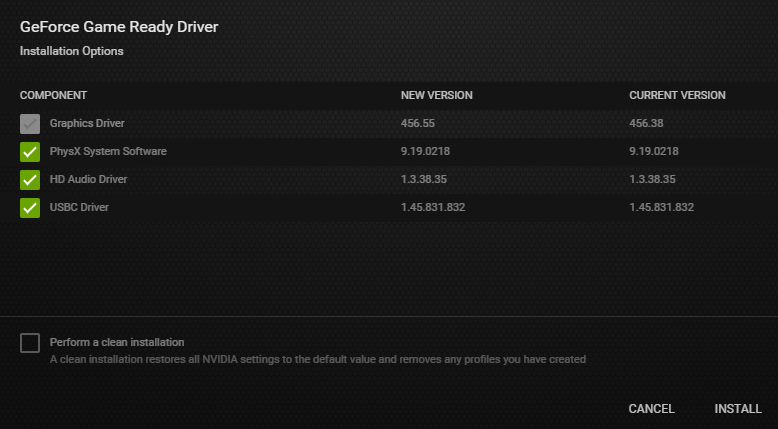 tawdry arch
ooh okay
3 minutes
alright I ticked the box, it's installing
let's hope for the best
 lean plaza
Hey so im back and i have this issue were if i press esc in the hub area the game will freeze and the only way to close it is by turning of the computer. This also occures sometimes when i turn on the game.
Note my windows i currently uninstalled. It worked before but it somehow broke and now i cant reinstall it. So it may be a consequence or a reason for the bug
any help please
 merry tendon
(Not experienced pc guy)
How the hell are you playing the game with no OS? do you have a spare or are you starting drg through a command window or something?
(My pc was prebuilt with preinstalled os because i don’t know enough about pc building to be trusted with those tiny pins)
(Tl,dr: I have no idea what I’m talking about ignore my comment)
lean plaza
Well i hade windows activated for years but one day it just broke. I can still use my computer normaly but with a big white text in the bortom right corner
And i cant reactivete it
 woeful shell
I hope this belongs here, if not, please excuse me.
I have had issues with my deep dives for the last 3 days now, where i keep getting the same things every stage;
1st Stage: Blank Matrix Core
2nd Stage: Splintering Shells
3rd Stage: Skips Entirely?
Now, i wouldnt even be that sad to begin with if I at least got a blank matrix core and nothing else at each deep dive, but the problem is that i simply do not get any blank matrix cores anymore. I have done 3 runs, 1 of them was solo, and completed each one of them.
Is there anything that I'm missing here? I would greatly appreciate any help given.
austere coral
You only get one set of rewards per deep dive per week
@lean plaza Pinned messages for troubleshooting
woeful shell
oooh okay thank you for the answer, thought there was something wrong with my game.
 mighty glade
If this doesn't belong here pls let me know.
Yesterday I was playing, we had just beaten a mission and are about to go to the scoreboard, but instead, I get separated from my party and end up at the beginning of the game. It seems to show me back at level 0 on all classes, all progress lost. It's as though I'm on my first boot-up. Was wondering whom I can speak with to hopefully resolve this
austere coral
esc options restore save
mighty glade
Awesome thnx
Note: that option appears after you skip the tutorial, for anyone else in the same boots
 spiral sierra
A recent bug happened, I pressed Enter or something opening chat while either before or during loading screen, lost complete control of my character in drop pod.... escape key didnt even work
crimson coyote
@spiral sierra that's happened to me before as well. total softlock. hopefully the devs know
 jovial breach
I have a minor issue, I had previously joined a miner faction and now I am not part of one any more. It also seems like I cannot join one due to already being in this discord server.
austere coral
pinned messages #interplanetary-miners-union
spiral sierra
I wanna try and recreate it later today once I'm outta work
crimson coyote
that would be a good idea
 keen vine
Are icons appearing when using no HUD a bug? Repair and DropPod icons appear even with UI set to none and hud toggled off.
spiral sierra
Unsure. I believe that can be toggled in settings tho
spiral sierra
Hm
keen vine
starting playing HUDless as a challenge and that (plus scroll wheel direction) are a bit jarring (every other game I play I have them scroll the opposite direction to swap weapons, but sadly no option here)
I would rather be wrong and there's an option I'm missing than it be not in the game
crimson coyote
i dont think you can disable that. might be bugged or might just have been missed i dunno
that's weird though
austere coral
molly teleports into the pod with about 15 seconds remaining and the doors automatically open
 fossil notch
yes,we have seen this first hand
i dont think that was a good shipment however
it cinda went..wierd
 hidden tide
hey @fossil notch had the same thing happen to me except it was on an extraction mission. It timed out after like 5 minutes so it wasnt to bad
 turbid wyvern
Is anyone aware of how to fix the "Total Makeover" achievement? For some reason it will not complete for me.
broken brook
are you using dlc cosmetics? they don't count.
also make sure you've bought eyebrows, I never bothered so it was the last thing for me
turbid wyvern
I wasn't aware that the DLC cosmetics don't count I'll give that a try.
turbid wyvern
@broken brook Thank you, that was the issue.
 slender pulsar
In the latest escort duty teaser, canister is spelled “cannister.” Should be one n. Pls fix.
 jagged rune
Should be considered a bug. Breeder flew way way way up where we drilled into the map and just kept dropping eggs, never came down. Was a pain to kill.
 silk spoke
this feels like a bug
austere coral
That does indeed look like a bug
Here’s something to try. Go into windows settings for date and time. Make sure everything is set to automatic then resync with the server. Restart your computer and try DRG again.
 polar fable
in a salvage operation in magma core and there's a completely invisible machine event next to the drop pod.
 cedar shard
machine events get deleted so they don't block the drop pod
polar fable
didn't know that, makes sense though
 merry osprey
There is a bug regarding Huuli Hoarders sometimes they stretch and disappear weird.
 brave quarry
look at his left eye
 swift solstice
this is probably a rare thing, but is it possible to prevent machine event terminal to spawn inside black ice?
had a machine event in the middle of a bunch of black ice and we couldn't find the terminal even after digging for like 10 mins
 still cedar
I don't know if these bugs are still a thing but when you free a BET-C from the suckers and it's friendly the voice lines when you ping it are still hostile (e.g. "attack this enemy!"). Wanted to see if this happenes every game but I haven't encountered one for a long time now so no idea.
This is maybe more of a feature? But after finishing an Omen tower you can stand on its base and be protected from all melee attacks because enemies can't reach you.
swift solstice
they probably need to create a subclass for the creatures that's tamed or even machine events
since it also get triggered for steeve and machine event parts
 topaz heart
I had a weird one last month, I actually got a capture of it. MULE wigged out and just ran in circles, not sure what triggered it. Still managed to exit on the droppod by waiting for the doors to open at 0:15
Ehhh looks like it was closed. nope that was the duplicate
austere coral
slap the experimental bugs in #experimental-bug-discussion so bugs are consolidated
 gloomy plume
okie, thank
merry tendon
There is a bug regarding Huuli Hoarders sometimes they stretch and disappear weird.
@merry osprey
Ooh yeah this happened once. Looked funny. Their jiggly-boned meat sack on the back can get hooked on a cave wall when they crawl around a corner, and it will get stretched way out when the hoarder walks further away
 lusty fern
Hey guys! I've got a personal case with a bug because I don't think anyone has had this version of it tbh.
Essentially I cannot join people through Steam or Discord in the LFG. I can't invite on Discord as well (no green plus button).
I've turned on overlay, run discord and steam as admin, restarted multiple times, verified integrity, and changing hosts.
It started on and off 2 days ago but I think I've tried all steps that are known to most players here.
Any suggestions?
 placid rune
i found a hacker
 graceful yarrow
Leave their game, that's all that can be done about hackers
crimson coyote
Please remember to keep any chatter about experimental branch content to the experimental channels, we have users who can't access it yet who don't deserve to have it spoiled for them.
 candid swan
austere coral
candid swan
austere coral
pinned messages #interplanetary-miners-union
 kind jewel
Is any one having issues with getting them free beers?
austere coral
it's only the corporate sponsored beers
the gag beers and daily special still cost crafting materials
kind jewel
nah like me and my friend couldn't even access loyd (the dude who gives beers)
crimson coyote
that happens occasionally. leaving the mission and rejoining seems to fix/restarting the game
 vernal pollen
question, when i use the breach cutter for engi it doesnt shoot anymore after shooting a couple times, is this a bug or a feature of the weapon that im not aware of?
 dull valve
Plz fix praetorian turning toward you during early part of spit and dreadnaught spinning toward you during roar especially during solo
marsh pewter
neither of those are bugs though
dull valve
If you say so
 elder viper
mossy breach
elder viper
mossy breach
normal part of the game
[Reproduction rate:] 2 out of n times (can't imagine how many times i've accessed equipment terminal)
[Steps to reproduce:]
- use equipment terminal
- if the background/dwarf loadout preview is missing, change some loadout feature
- disengage from equipment terminal
[Expected Results:]
background and loadout preview renders under equipment GUI as intended, and disappears when terminal is disengaged
[Actual results:]
only actual equipment GUI renders. terminal is still visible in background.
if loadout is changed while in this state, after disengaging terminal the background will begin rendering over the player view (so player is wandering space station totally blind). all other sound, movement etc cues indicate that game is working fine apart from this. escape menu will clear this, but apparently only after multiple tries.
[PC Specifications:] (Hardware, Software): win10 pro, intel xeon, nvidia pascal
mossy breach
gentle hazel
I found a typo

- What is ERR://23'y%/? Just a rare gem that has no function yet, hold onto them. - Can I play solo or with one friend? The games difficulty scales with the amount of players in the match so two players is just fine! For playing alone, host a Solo game and you will have the ai...
- Who are the Dwarves?
In the far future, the Dwarves are basically the SWAT team of the interplanetary mining conglomerate Deep Rock Galactic. When all other measures have failed - when a mineshaft has suddenly gone dark, or a particularly heavy alien infestation is uncovered - the Dwarves are the ones you send in. And things tend to fail alot when you're attempting to establish a profitabke mining operation on the most hostile planet in the galaxy.
 zenith umbra
Deep Dives Terminal. Is this bug or not?
 strong arch
Hi, I'm a big fan of Deep Rock Galactic and I've logged almost 200 hours of game time on Steam with it.
But a couple of days ago (roughly september 28th) - when starting up the game, I noticed a massive drop in the FPS rate while on the space rig and looking near the central terminal and drop-pod, I can move over to the windows and my FPS will rest comfortably around 60fps, but while looking at the mission terminal or drop pod, or being near that area or in the personal bays - I get between 8 and 10 fps. I havn't altered any of my settings as far as I can tell, and my graphics drivers are apparently up to date. I have tried joining a mission, which did not help the matter - the fps rates were so low that the game was basically unplayable. While looking at walls or a pack of glyphids etc, my fps would be adequate, but when looking at the minehead or drop pod - once again FPS would drop to essentially unplayably slow rates. I've rebooted my PC, uninstalled and reinstalled DRG, and both google and steam have presented possible causes but after trying all of them, nothing has worked. I've even disassembled my fan-assembly in my computer case - thinking that maybe it was very dusty and overheating. Please help ! I've got mining to do !
Sincerely,
John - Scout, explorer, and bug-shooter.
 glacial terrace
Deep Dives Terminal. Is this bug or not?
@zenith umbra Do you mean "ERR" mineral?
zenith umbra
Ahh, ok. Just read about "ERR" gem in FAQ.
 shy lintel
I cant help but notice a lack in my games performance as well and ive been trying to figure out if its me or a server related problem
 hybrid eagle
Specs: 980ti (Latest driver 452.06), Ryzen 5 3600, 16GB RAM, SSD, Windows 10 Pro 1903
Using a mix of medium and high settings, 1440p, 100% scale. Also happened when i played on ultra though.
Been playing the game for about 200 hours and have had random white whole screen flashing for a few seconds while playing since the start. It doesn't seem to have a trigger and feels very random. I'd say it happens most commonly while doing an OMEN though it can just happen while doing nothing intense. Biome or mission type doesn't seem to matter. I've googled and apparently there was a similar issue for my card in the past that was fixed (?)(https://steamcommunity.com/app/548430/discussions/2/1798529872655033677/) and nothing on the bug tracker seems consistent with what i experience.
shy lintel
You too huh? Hopefully its just a game hiccup at the time and will be fixed upon next patch
We can only hope!
 lone ridge
Mission: onsite refining (experimental)- buggy voice lines on pumpjack deployment for individual wells, and buggy end song in endgame screen. feel free to DM for additional info if needed!
 neon shuttle
post inga visual bug i found. when you eject your canister on flame thrower it changes coulor to something thats not your skin
here is my skin
as it gets loaded out and in it turns a different coulor until loaded back in and then turns red. does this for ever non default skin
 tight steeple
I got this bug where my Engi's, Driller's & Gunner's armour skins are stuck (Mk2, Mk3 & Mk3 respectively) and cannot be changed. I wonder if the bug game from me buying the Dark Future and Corporate DLC's while in game. But it's hecking annoying to be cucked out of dwarf fashion, especially after paying real money for it.
Does anyone know how to fix this?
@distant pewter
Addendum: I found out that the bug was caused by something setting the suit (the one that the armour was stuck on) as the dwarf's skin colour. Can be seen in the picture too, where my Engineer Dwarf has the Mk2 suit set as his their skin colour.
Addendum2: Bug possibly caused by purchasing DLC while game is running.
P.S. The bug allowed me to use paintjobs of other armors with the armor I was stuck with. Which was something nice in a buggy situation at least. Are the suit Paintjobs available as individually appliable paint jobs?
 wraith bronze
So liek if you use a grappling hook through a gap too small for your body, you get RKO’ed outta nowhere by the physics engine
merry tendon
^this has happened to me a few times. You’re fine until you release, and then you die. Probably has something to do with the way the grapple decides your velocity. Thinking it’s based on the target speed instead of actual speed.
So when you release, the game flings you at the velocity you would have moved at if you weren’t stuck on the wall, rather than just dropping you due to you not actually moving.
(no clue how it actually works, this is just my guess based on how the grapple feels in some situations)
crimson coyote
i think that's probably relatively accurate. it's most likely something the devs are aware of
they'll probably fix collision bugs such as getting launched at mach 2 out of a small hole lol
 cinder torrent
So I have few bugs after my play session.
- A game breaking bug where you cant build a pipe if two people tried to place a pipe at the same time (on the same pipe)
- When you place a turret on the Bulldozer the turret just floats in air (maybe you shouldnt be able to place a turret at all or make it stick to the Bulldozer)
broken brook
Not sure if this is recent, but had a thing several times today where when I threw down a gunner shield it'd be thrown but never open, it just disappears.
austere coral
@cinder torrent #experimental-bug-discussion
celest prairie
Am I doing something wrong? I didn't get the achievement 😦
crimson coyote
you might have to leave, join another game, leave that game, and come back
that's what has worked for me when that happened
patent otter
Molly, what are you doing
Molly pls
That's not good.
uhhhh
Molly's pathing is stuck
She won't go to the drop pod
She finally went after a while. It's weird how that happens...
crimson coyote
yep. that happens. it'll teleport back to the pod at 10 seconds. i dunno what the devs plan is for that bug ¯_(ツ)_/¯
patent otter
I hope it gets fixed, it's pretty weird.
 agile fulcrum
A sensible workaround.
 slow bobcat
me and my buds had this happen thankfully we had a driller and he cleared out space for molly
 sturdy seal
The door of the arrival drop pod closes after it begins to leave. This means that if someone exits but goes back in at just the wrong time, they'll get taken back up.
In which case they fall to their death when the pod despawns.
 static dust
molly just keeps walking in circles
 rustic zenith
Playing scout, Mactera Grabber grabbed me as I threw a freeze grenade at it. It grabbed me, then the grenade made contact. My screen is now dark, I can't do anything, and my character just keeps repeated lines about being grabbed. My friend dug to me and he can "I'm at your signal, I can hear your voice lines, it felt like I bounced off your head, but I couldn't see you"
Edit: Workaround, friend shot where I was for him until I died, body spawned somewhere else under the ground, used iron will to get back up and it popped me above ground. :: Now my character model is invisible to both him and myself, but we can see my guns/scanner
marsh pewter
iirc that will be fixed very soon
 subtle jacinth
What the 'ell is this.
Can't find the bloody box around the faulty machinery.
Someone said its a client side bug, gen'd for us but did't gen for the host. That ah thing?
 mental aurora
I was in the oil mission in experimental. The refinery landed on my head and killed me. But instead of dieing I teleported to the top of it probe with zero health. I could still move around but was still on the ground. I could fire weapons and throw flares but could not resupply revive or interact with any objects. I also could not mine. Quiting and coming back fixed it.
marsh pewter
@mental aurora please leave experimental bugs to #experimental-bug-discussion
crimson coyote
@subtle jacinth that happens when the droppod lands too close to a machine event. only the omen leaves that there though
 dreamy mountain
Hello! Recent player, and I've consistently had an issue with my left mouse click not being recognized. Tried restarting, different mouses, and changing the graphics based on an old forum I found, nothing seems to work. Anyone else have this issue?
marsh pewter
known issue, it does happen less frequently if you play on full screen, and not windowed or windowed full screen
marsh pewter
that doesn't seem to be the case for me, and I often hit my cap of 120fps anyway
mossy breach
typo: when missing a barrel hoop, "Okat, this is not happening"
 storm tendon
#babelfish-lounge would be the appropriate channel to report typo btw ^^
 flint yarrow
 fierce shard
I got this, I playing in Asia with a high ping sometimes. these bug keep my sentry ammo to 5 only, and infinite mine. One more thing, I found engi have an unlimited platform and spam it everywhere (idk if its same bug as me or cheating).
white girder
that sounds like your host is cheating, not a high ping issue
 young swallow
[Audio-Bug] When killing both charge-suckers on BET-C simultaneously, her soundeffect spasm out and also gets really loud for several seconds.
This can be consistenly reproduced and can be heard by all players in the lobby.
 unkempt ledge
Issue: I’ve been having an issue with DRG where it only uses 2gb of my gpu but says 100% but I have 4gb of gpu. Anyone else have this issue?
 rustic knot
does anyone know what this resource is?
found this cube shaped thing in a terrain shining red
it was a heavy object that i had to carry to deposit
 chilly walrus
@rustic knot It's not a bug, it's an Error Cube. You deposit it to gain a large XP boost at the end of the mission (2k XP). It doesn't do anything else. (You can worship it though)
white girder
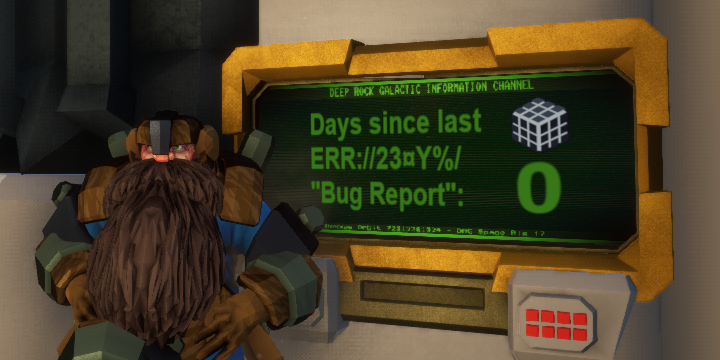
 gaunt coral
@charred knoll I have a big error to report about the game but I don't know if it would be good to make it public, also I cannot report it following normal processing, because I was marked in Atlassian as an inactive user and I cannot log in.
where should i report it?
austere coral
In this channel
gaunt coral
hen don't blame me
well, getting to the point.
The bug is about the CHEATS option in the normal game. what do i mean?
Simple, I suppose you know the cheats panel in the experimental branch,
well once you use this and save your experimental branch game it is possible to pass said saved game to the normal branch, like?
you go to SaveGames folder, and change the name of the saved game of the experimental branch to the one of the copy of the normal branch.
When you log in to the normal branch you find the account with the CHEATS of the experimental branch,
this means that you can transfer millions of minerals, experience,
money from the experimental branch to the normal branch.
a possible solution would be that in the saved game there is a data that refers to the experimental branch and the normal branch, such that
For the experimental brach:
BrachType = "ExperimentalBrach"
For the normal brach:
BrachType = "normalBrach"
and in code that if in the normal branch you try to open a saveGames of the experimental branch, the game rejects said copy.
I do not know if I explained well.
have a nice day.
PS: I do not use this bug to take advantage of it, I have decided to report it as soon as possible.
austere coral
It’s not a secret, but it isn’t advertised either. It’s been like that for a long time.
gaunt coral
But that's not bad?
austere coral
It’s up to the player if they want to ruin their own experience of the game.
gaunt coral
oh, that its true
rotund swift
Keep crashing with this error message. Tried to reinstall, verify game cache, update all drivers, whitelist antivirus from the game files and it still keeps crashing. no consistency to these crashes whatsoever and no tells the game just closes randomly and gives me this message. No idea what can be causing it and it happens every 2/3 missions and is insanely getting on my nerves and ruining the experience of an otherwise amazing game.
austere coral
Pinned messages for troubleshooting. I’d start with the amd fx / Realtek audio fix.
rotund swift
Ill try that and get back here if it keeps crashing after this and I will read through the other troubleshooting stuff I see pinned thanks
 rain girder
 gentle thicket
Has someone reported the EPC (when used for mining) sometimes causing dropped minerals to fall through the ground?
 reef dew
can you only promote 1 charecter?
austere coral
minerals going too fast just get teleported to another area, they aren't lost
You can only have one assignment active at a time, so only one promotion assignment at a time
gentle thicket
Hm, where to though? I've looked around but I dont see them, and I can see them falling through the ground
 raw basin
Just froze a mactera grabber as it grabbed me I am stuck in black fell through ground still alive very strange
austere coral
fixed in U32
rotund swift
I had that happen to me too before glad to hear its fixed xD
start shouting and your team will bee able to find your location but you will b invisible for the remainder of the game
just a floating gun for everyone else xD
@raw basin
austere coral
#experimental-bug-discussion @mossy breach
mossy breach
sry
 nova plover
Idk if this is strictly a "bug" but I was encountering a hiccup, mid gameplay every 12 seconds or so. I lowered my graphics settings but it didn't help. The fix for me was disabling NVidia Ansel. In case anyone has had the hiccup problem.
 livid agate
A friend and I have both been experiencing a bug where the LMB and RMB will not respond immediately while trying to fire a weapon, mine, etc. Normally just a minor inconvenience, but it has led to some rather unfortunate accidents with the digger's explosive charges. Initially I suspected my mouse, but this is not happening in any other games.
austere coral
run the game in fullscreen at your native resolution
 slate granite
Anyone have their mouse stop working mid game? It cant be my mouse because it only happens in DRG
 wary breach
@slate granite Do you get a mouse cursor when that happens and does clicking on the DRG window solve the problem?
 vivid depot
[Reproduction rate:] Only happened once, just now.
[Steps to reproduce:]
- Extraction mission
- Comms array didn't spawn
- Dug everywhere to no avail
[Expected Results:]
We would have got the comms array working and fought the horde. It didn't spawn in though, we searched EVERYWHERE and dug around.
[Actual results:]
The Comms array doesn't spawn in
[PC Specifications:] N/A
slate granite
@wary breach no there isnt any cursor, it just stops working during missions and its random, the only solution I have is unplugging and plugging the mouse again
wary breach
@slate granite It sounds incredibly stupid, but try a different USB port.
I'm regularly playing flight sims and when my PC is stressed heavily some ports would not provide enough power for all my peripherals. Swapping devices around solved the issue.
slate granite
@wary breach That doesn't seem to work, I tried it earlier.
 sharp needle
Sometimes in game I'll hold left click to shoot but then when I release the button my gun keeps shooting. To stop it shooting I have to left click again. Same thing sometimes happens when right clicking to use the pickaxe. I can't figure out why though. I have a multiple monitor setup so I'm thinking maybe that's part of the issue? The game is set to full screen.
I have tried multiple mice and the issue happens with all of them. However when using an Xbox One Controller the game works fine. But I would much rather use Mouse and Keyboard. So if anyone has any other solutions it would be appreciated
mossy breach
I'm sure this has already been found, but Molly will sometimes get stuck and go in circles.
mossy breach
I found an issue with the experimental release
How do I report it? If someone gets squished by a pump jack they can't be revived if they're too far into it
If anyone wants to know how I know this...I did it for science
 pulsar orbit
mossy breach
pulsar orbit
mossy breach
ty
 honest dew
 main pebble
I found an issue on the roughneck DLC pack, the cowardly devs refuse to let me throw money at them for their hard work. Make DLC buyable so I may give money without consent.
dense kettle
My steeve has stopped any movements, he is now a few centimeters away from a leech but he does not attack it
Steeve's behaviour rturned to normal after the death of the leech
 umbral nacelle
@main pebble workaround to the bug I found is to give random dwarves supporter packs
it's like throwing money at 2 people at the same time
main pebble
Outstanding work Diego! I Shall break open the coffers and grant the blessing of the ancestors to one of our finest!
tawdry arch
@austere coral Uninstalling malwarebytes seemed to have fixed my crashes but not 100% sure yet
I'll test more later
thought I should mention
 turbid heath
not sure if its a bug or intended but the marker for marking just anything is super sluggish now, breaks when moving or if you do get it to work while moving if your dash kicks in that also puts it back away. i remember being able to snap left or right mid air w/e and mark anything and super fast. Anyone else see this or notice?
austere coral
are you on the live build on the experimental build?
turbid heath
live
austere coral
how are you launching the game?
 marsh belfry
Just from steam
austere coral
additional things to try https://i.imgur.com/WgvOt0m.png
 rotund bluff


 graceful yarrow
the doors will open automatically at about 10-15 seconds left on the clock
 sacred ice
So my game keeps freezing my computer and freezing mid-game all the time and I have no clue why and it makes it slightly unplayable at this point. I dont know what the issue is but here are my PC specs in case theres a hardware issue with the game, but im pretty sure i should be able to play the game
AMD FX(tm)-4300 quad core processor
16 GB RAM
Ge-Force GTX 1080
does anyone have any sorta suggestion for this? This is the only game that my PC finds trouble with
 night tapir

Broadcasted live on Twitch -- Watch live at https://www.twitch.tv/cthulhuplus
austere coral
@sacred ice pinned messages for troubleshooting, since you've got an older FX cpu I'd recommend starting with the amd fx / realtek audio fix.
 granite sedge
So everytime i load the game i have to then restore from a cloud save, is there a way to force it to save to the current slot before i shut down
 weary jewel
Hello, I couldn´t find the bug on Jira but it just happened, the Mule is just going around in circles without a visible reason for it, diggin under it´s path seems to do nothing, was this reported before?
storm tendon
It was
weary jewel
Does this have any fix? Or what should I do, never had the timer run out
storm tendon
The drop pod will always open 10s before leaving
So you just gotta be there before it leaves and you're good to go
weary jewel
I see, thank you
 deep gust
Hello, may be someone knows about it.
For some reason my pc starts to suddenly shuts down only then i playing DRG. At first time I was like, wtf, and run performance tests, and there are no any problems. PSU is brand new. for 73,3 hours in game I don't have this kind of problem in past. Also, I played another games and all are fine. But today i ran DRG and PC shuts down after 15 mins. Maybe it's stupid to associate this problem with the game, but I can't find any other reasons at all. No BSOD, error or something. as if PC unplug from power.
tawdry arch
@deep gust https://discordapp.com/channels/257785731072786435/258990272967475200/720372688777904128 for troubleshooting
 high gale
My shields often clip through the terrain and fall under the map
this also happens with driller c4
tawdry arch
I can't even join a game without crashing now
austere coral
@granite sedge For some reason it sounds like your save isn't being read correctly.
Go here \steamapps\common\Deep Rock Galactic\FSD\Saved
Right click SaveGames
Properties
Make sure read only isn't selected
@deep gust A straight shutdown is very likely an overheat situation. Run your favorite cpu/gpu monitoring software and keep an eye on the temperatures. Make sure nothing exceeds 80C. Alternatively set a max framerate in settings.
@tawdry arch In the experimental branch try -dx12 in launch options. The graphical issues have been resolved, but note that when alt tabbing it may close the game.
tawdry arch
@austere coral I uninstalled geforce experience and haven't crashed since then
granite sedge
@austere coral That looks to be the the issue, thanks for the help!
 topaz shell
Kek it does
deep gust
@austere coral i set fps lock and vsync, seems ok now. but it is very strange, I run performance tests like aida64 and nothing happened. and only in drg :/
 flat plume
Can you guys join games? I got this usual one when you cant join any server at all, after a quick joining popup it disappears as if nothing happened.
 chilly imp
Yeah something weird seems to be going on at the moment.
Took a couple attempts before we managed to get everyone in the same session. The "Join" bit from steam friends seems to have vanished.
 soft thunder
First time i saw this... Half an event spawned in game
graceful yarrow
@charred plaza #experimental-bug-discussion
 charred plaza
sometimes I press my primary fire button, and nothing happens, I notis this most with scouts grapple, and trying to shoot engie's platform under me to break my fall
austere coral
Run the game in full screen at your native resolution
charred plaza
ok
 magic forge
Hi, I don't do discord or forum much so I don't know how to properly do this kind of thing, but I managed to reliably duplicate the tiny MULE legs by picking the ground under/around it and spaming the grab button, has this problem be posted yet ? How can I report it "officially" if not ?
Also, it seems easier to pull of in low grav
charred plaza
I think that bug happens if you pick up something the frame you can, I have had it happen to me a few times.
 woven mountain

 broken brook
it happens sometimes
molly will automatically teleport to the drop pod around 15s~ before it leaves
 midnight forge
drinking rockbearer and killing yourself (via barrel incenerator) gets you stuck in the med bay.
host states he's normal size but clipping in the cieling but all 3 non host see him as big.
charred plaza
for some reason my screen resolution says hazard level, I have been using borderless window so I didn't knowtis until I want fullscrean to stop a difrent bug, I looked online for an anser but saw nothing
crimson coyote
you've got some uh, weird stuff going on there with your resolution scale as well
charred plaza
not shure about that either
austere coral
I've seen that a couple times, I don't know what the resolution to it is.
The best I can offer is for you to go to \steamapps\common\Deep Rock Galactic\FSD\Saved\SaveGames and make a backup of all your saves
Right click DRG on steam, properties, updates, and uncheck "enable steam cloud synchronization"
Delete everything located in \steamapps\common\Deep Rock Galactic\FSD\Saved\Config\WindowsNoEditor
Relaunch the game and see if anything was resolved.
Also go through the troubleshooting in pinned messages
charred plaza
no, it didn't seem to work sadly
tawdry arch
@austere coral disabling/uninstalling (in my case uninstalling) geforce experience fixed my crash issues, maybe should add that to the troubleshooting list?
 torn sky
is it worth me reporting bugged droppod spawn?
it managed to spawn in a resuply hole and the team died because there was physically no way to get to it
 deft mason
Game crashed during that totem event. It already happened a couple of times, so i believe it happens when the tower has that laser attack. When it does not have the laser attack the event works just fine.
austere coral
Sounds like it may be an audio related issue. See pinned messages and do the amd fx / realtek audio fix.
deft mason
I'll try it, thanks
 frozen coyote
My DRG is insanely laggy. It was a little laggy when I first got it and it seems to get worse and worse every update. At the moment it runs at 3 frames per second and is virtually unplayable. I got an ehternet cable, I moved it to another hard drive and I turned the graphics down to the lowest quality. I can run games like Death Stranding just fine but this just seems to be impossible somehow. If you know how to fix this please for the love of god ping me and tell me how I would like to play this game.
austere coral
pinned messages for troubleshooting
 lunar nacelle
A friend and I just did a haz 1 salvage mission, the objective from the start was to uplink to mission control, we thoughth this was just a simplified version of the mission but when we got to the drop pod and tried to uplink, there wasnt a button on the mule to uplink. The uplink station was present but we couldnt interact with it. Is this a bug or did we do something wrong/miss something.
past moth
OK im back with missing audio files causing random crashes every now and then
just did a deep dive and lost progress
I did everything recommended to me in regards to the pinned messages and still it is a game killing issue
past moth
or at least fix reconnect so it doesnt show im still in the game, preventing me from reconnecting
sage solstice
As bosco is mid revive, a dude joins back in, and bosco disappears. Of course the guy joining clips through the map and gets downed. Game over.
Fix your game lmao
 keen plover
Anyone have any idea why my GPU %utilization ramdomly drops? this causes stuttering in game, but only happens with DRG. other games like Warframe, Destiny, FFXV doesnt have this issue. Temps are below 60C and gpu utilization at 80%. (cpu temps same, utilization for cpu and ram both under 50%)
austere coral
Do you have a framerate cap or vsync enabled?
keen plover
capped fps at 144. I tried vsync on and off (via nvidia control panel)
it runs at 144 great at ultra. but maybe like once every couple min just stutters for like a second
austere coral
Try vsync enabled via settings ingame and see if the issue persists.
Another alternative is you're not getting adequate cooling on your card and it's throttling. A lower framerate cap may resolve it.
The game can be a resource hog for both the gpu and cpu.
keen plover
just turned it on. Thermals are at 60C.
That dip the 3D graph is when the game stuttered
it shouldnt be throttling at 60C though
i tried disabling Ansel a while ago, it worked for like a day but then the stuttering returned
austere coral
I'd recommend trying the amd fx / realtek audio fix in pinned messages. If that doesn't work then I'd move on to the troubleshooting also in pinned messages.
keen plover
oh sweet man, looks like Disabling Master EQ in game fixed it. Immediately got 3000 pts under 100 barrels lol. Thank you!
still a little bit of stuttering, but no where near as bad as before
 wise whale
game froze on ultra settings 😦
 minor oak
Soooo, today I was doing some mission, and found a lost pack and claimed the item, but nothing popped up. At first I thought it was just some one time thing and just ignored it. Another pack was found in another mission and again.... same thing, no item, but this time i spawned late just as it was found, so maybe it just bugged because of that. Just now, I hosted another mission, and the same thing happened: found a pack, claimed the item, but no item appeared. I checked my cosmetics and nothing updated. Not sure what this is.
austere coral
You have everything
wise whale
i went to high quailty havent crashed yet
 twilit flame
Is there a reason I can use the kick button for a really rude player that I was on my team? It killed our fun big time and I saw the kick button but could not use it. They were yelling for use to move faster, in chat option and saying rude things and not wanting to work with us at all.
wise whale
kick button very buggy 😦
 torpid void
molly is hiding in the machine event
 cinder portal
sticky ice and flames (the ice/fire on the ground from drillers weapons) inflicts cold/heat temperature in steves. they are allied, and allies aren't supposed to be affected by sticky ice/flames, only by direct hits.
 glass knoll
In one of the Smart Stout lines, the one with "igneous" in it, the voice actor says "ingenious" instead. Just a discrepancy between the subtitles and the voice.
stoic ivy
If you stay near ramp of DP when it opens, you will deadly stucked.
austere coral
@twilit flame Can't kick players once the primary objective has been completed.
 lyric mural
just failed a deep dive with my friend because on the last stage a trawler carried me under the minehead and I got stuck there, unable to escapae at all -_-
 sterile plume
so i've had this issue where my audio completely stops working after a while, and it only seems to happen when i'm playing drg. one side of my headphones will become pure static with no sounds from any applications coming through, ever things outside of drg like discord, and sometimes it happens to the other side eventually, requiring me to unplug everything and close deep rock for the audio to work again. the issue persists for a few minutes after closing the game, but always stops around this point. at first i though it might be an issue with certain sound effects, but it happens in all biomes with all weapon loadouts. i have tried reinstalling the game, but this did not help. i suspect maybe it's a sound driver issue, but my sound drivers are up to date, so i'm outta ideas
austere coral
pinned messages for troubleshooting, I'd start with the amd fx / realtek audio fix.
gentle thicket
I waited forever for molly to return to me and then I went over to her and saw this lol
mossy breach
A trawler put me in the mine head and i could not get out
past moth
Friendly?: Unhandled exception
XAudio2_7
XAudio2_7
XAudio2_7
XAudio2_7
XAudio2_7
kernel32
ntdll
keep getting this error every 1-3 digs
crashes my game
i've googled it, I've been all over discord, reddit, youtube... cant get a reliable fix for it
third time posting here in hopes anyone has any glimpse of hope for me
 dry spade
Guys, wtf is going on with mactera grabber?! I froze it, but she grabbed me anyway. And teleported me thirty meters under the texture. This is not the first time this has been repeated. It makes me burn.
austere coral
pinned messages for troubleshooting, start with the amd fx / realtek audio fix.
mactera grabber issue is fixed in U32
 ashen relic
help?
austere coral
verify windows date and time are set to automatic, resync with the server, then restart windows and try again.
sterile plume
so i tried the amd fx/realtek audio thing, and it didn't help. two minutes into a mission after trying the fix it happened again, and as usual, i had to close my game to get it to stop making all the audio on my computer be static. i would like to add that i have tried using the windows mixer to completely disable sound from drg while in a discord call with friends as well as completely muting all sounds in-game, and all the audio on my computer still eventually becomes nothing but static despite this
 real dew
Dunno why this happened but I found it amusing.
broken brook
Probably shown before, but the message about resupply costing 80 nitra is in the top left. I'm assuming this is because I alt+tabbed. Not a major issue but thought I'd share it
austere coral
did you alt tab after selecting the resupply or before?
broken brook
I alt tab a lot, but I believe after
 tribal inlet
the inspect animation for the M1k just has some insane clipping issues it seems lol
formal juniper
To be fair, it's really easy to inspect your rifle when you can clip your head into it
 narrow meteor
he inspectan dat rifle hard
 latent goblet
Nah he just used sv_cheats 1 and turned on noclip
livid agate
In rich atmosphere missions, my character's voice sounds higher, despite the fact that a richer atmosphere lowers the speed of sound, thus lowering the pitch that a given set of vocal chords would produce.
cinder portal
@livid agate not actually a fact. different air compositions change the speed of sound at different rates. helium for example speeds it up because it is lighter, which is the joke of the modifyer.
livid agate
I assumed richer meant denser, but I suppose you're right that it could be richer in a less dense gas
 red totem
When I hit the shout key, it brings up the laser pointer ... I have my laser pointer bound to a mouse key, and my shout to 'x' ... rebinding shout to 'h' makes h bring up the laser pointer, I'm not sure what I'm doing wrong
red totem
Hm, renaming my SaveGames folder didn't do anything, nor did resetting my keybinds ingame fix it
graceful yarrow
@steady vigil check pinned messages, it's not a bug
 steady vigil
didn't check pinned messages sorry, thank you 😄
 sly warren
Is this where I report bugs?
cinder portal
whenever you mute someone's voice, they will be unmuted after every loadscreen (from space station -> mission and mission -> space station)
this is an age old bug
 regal peak
Had this bug again at the end of the 2nd deep dive mission.
Everyone got into the pod, gates closed started going down then the game froze, I got this failure screen. I could still hear the pod opening for the next mission, shooting, salutes etc.
Then the game blackscreened and I was in the launch bay with no ability to reconnect. I did get the 2nd mission reward thankfully.
I've seen this bug at least twice now, super frustrating.
dense kettle
When a deeptora nest is generataed inside terrain (it happens pretty rarely though) the deeptora swarm will not go back to the hive and will stay in the air infinitely
 simple gull
Found a Bug where a spitball infector spawns on top af the Ommerian Hearthstone, Challenge accepted. Looked wierd though. Appeared to be a floating spitballer
mossy breach
it appears that a host quitting the game while client is still in a loading screen (eg. client loading from a debrief into the station) causes a lockup
mossy breach
Just did a mission in sandblasted corridors with a haunted cave hazard, but the horror never spawned in. Anyone else have that happen before?
rustic zenith
Bug: Couldn't move after revive
Friend and I both playing driller on glacial, egg hunt mission, detonator downed him while he was in the air, after I revived him neither of us could move.
 rustic dawn
Bulldog with Explosive Rounds no shoot down gunk seeds. Collision yes, pop and drop no. Sad Bulldog. Reproduced 10000 out of 10000 times.
expected behavior. I shoot. It go boom. It pop and drop.
actual behavior. I shoot. It show boom but no pop and drop :(
Recommended fix: Make bulldog boom boom splodey rounds make hairy gunky boy swingalings fall down.
I should add I use volatile rounds and neurotoxic coating, though I think explosive rounds are the culprit.
 slow stirrup
I got grabbed by a Nayaka Trawler on a Point Extraction mission. It somehow released me halfway inside of the metal platform of the mining rig. I was completely stuck - grappling hook and Special Powder both had no effect whatsoever. Even dying and being revived did nothing. This happened literally as I was about to get on the drop pod at the end of the deep dive.
vocal field
is there a list of curretly known bugs somewhere?
I'm not really sure tht the 'atlassian' thing is up to date? Or maybe I'm just using it wrong
 hardy wasp

Deep Rock Galactic Wiki
crimson coyote
is there a list of curretly known bugs somewhere?
@vocal field not really. i dunno about the atlassian thing youre talking about
vocal field
in the pins, it's what's currently listed as the bug listing
neon shuttle
joining a game in progress sometimes i am not able to see the extraction timer or drop pod location
crimson coyote
gunk seed just kinda floats if droppod lands on it
high valley
In the area below the barrel game, on the left-hand side, there is a geometry error beneath the pillar.
Probably just a lone vertex out of place.
graceful yarrow
austere coral
ALL EXPERIMENTAL BUGS GO IN #experimental-bug-discussion
graceful yarrow
@left token
 left token
oh sorry thought this was it
austere coral
esc > options > restore save
 lone maple
I lost all the things levels ,weapons ,clothes my mk 3 what's the matter of your server
I don't have reastore save
!!!
what should I do?
I play game in internet cafes
I need a reasonable explain
austere coral
lone maple
what a fuck game?
if you could not finished save problem your game will be a piece of shit
storm tendon
I play game in internet cafes
@lone maple I think the whole problem is in that part.
 desert stratus
So uh, basically the issue is that DRG stores saves in the game folder
If you are logged into a steam account it will sync that with the steam cloud. But if you are at an internet cafe I think they use generic steam licenses instead of personal accounts. So that may not have worked
past moth
Idk if this is a bug, but how can i re-join the union? Since last ones ended I cannot join this months
 livid blade
For the experimental update 32, for some reason the refinery was not launched and the drop pod came to rescue us
lone maple
@storm tendon why other game never have this problem?I play ,red dead,halo,gta5,is good?
storm tendon
Other people answered that already.
So uh, basically the issue is that DRG stores saves in the game folder
If you are logged into a steam account it will sync that with the steam cloud. But if you are at an internet cafe I think they use generic steam licenses instead of personal accounts. So that may not have worked
Idk if this is a bug, but how can i re-join the union? Since last ones ended I cannot join this months
@past moth Check the pinned messages in #interplanetary-miners-union
lone maple
I play other game in internet cafe is ok why I never lose my levels in gtav?the question is on DRG is not of player
the save online sever is your buiness not for me I pay money to play game I need to check online sever? Are you kidding me ? why you didn't offer me money?
austere coral
Your English is broken and difficult to understand. Games save their progress in many different ways. DRG handles saving in a way that isn’t very conducive to regularly changing computers.
lone maple
why GTA red read never lost my levels ? are them not a game? ,or other different with you?
I understand what you say but check save is not of my business
I m player not worker ok…
check save online is not my business I said again
why other game never have this thing?because your game have questions
graceful yarrow
Saves are stored locally on the machine and in the steam cloud tied with the account the game is registered to. Unless you're manually going into the files of the computer you play on at the Cafe and uploading your personal file from a USB drive every single time and then removing the newly modified file from the machine to place back on the USB and overwriting the USB file, your saves will not be updated.
If you are the owner of the account holding the game, this should not be an issue since it's supposed to be synced with the steam cloud, but if that isn't the case, you're out of luck.
I would imagine gtav keeps their user data server side, which deep rock does not do as there are no dedicated servers, but idk how Rockstar handles saves.
lone maple
I pay money to enjoy game not design how to save game ok?why you didn't pay me money let me handle this ?
 marsh vapor
Can someone help me I've been trying to fix the audio in the game but nothing helps, right now i can only hear the game on the left side of my headset and i read everything and still nothing does someone know a way to fix this ?
lone maple
I don't care about any kind of way to save game,it is not my business ,did you hear a word the customer is always right ?
if I work for DRG ok is my problem but the fact is I m a player
austere coral
@marsh vapor pinned messages, I’d start with the AMD fx / Realtek audio fix
Never mind. Experimental bugs go in #experimental-bug-discussion
marsh vapor
ok thank you
past moth
@lone maple Dude you're being a real karen
Loan Ranger isnt even a dev im p sure, its not the end of the world and yelling at some dude who works (prolly for free) isn't gonna solve your problem; which btw, if you cared about SO passionately... why didn't you do any research before hand? /rant
 swift horizon
Saves are store locally on your machine and in the Steam cloud if enabled. If you go to a netcafe and use machines where you don’t have any control over local data and Steam cloud sync, then that is very likely not a problem on our end.
Also, the customer is not always right and definitely needs to adress other people in a civil manner, or the customer will be escorted off the premises.
 deep wharf
less of a bug more of a funny, just got stuck in the mission selector while kicking around some barrels. I guess theres a reason management tells us to leave them alone
 slim egret
I have a buddy that is experiencing frequent total freezes of DRG alone. Game totally locks up, screen freezes, sound borks out and the only way forward is to close the game in task manager. PC itself seems fine after closing DRG. Only happens in mission (anything from 5 to 40 minutes in), can spend an half an hour running around the hub, even drunk, without issue.
Have been through https://i.imgur.com/6tRVfDV.png,
https://steamcommunity.com/app/548430/discussions/2/1642039362993864094/
and https://cdn.discordapp.com/attachments/258990272967475200/604162168555831310/Potential_solutions_for_black_screens_or_game_crashes222.JPG
But have had no real success.


Windows 10 Pro, i7-2600, 8GB ram, GTX 550Ti
Thought it was temperature issues, but they are all reporting fine, ran stress tests on GFX, RAM and CPU. All reported good.
Any other suggestions on where we can get more information on possible causes?
 blazing hedge
@slim egret hey there fellow Miner, I have had similar issues these past few days. game would randomly freeze for up to 10 seconds, and only during missions. what has helped me is 1. disable master EQ in sound settings (seeing as sound was very glitchy during freezes, so maybe sound issue when everyone is blowing things up) , 2. enable vSync (i also capped FPS at 120 just to make sure) and 3. i have disabled Nvidia Ansel . find the application called NvCameraConfiguration , open it and at the bottom of the window 'disable' . [you can normally find that in C: /program files/nVidia /ansel , but i had to search for it as my Nvidia folder seemed empty for some reason )
Hope that helps, it definitely worked for me ! Rock and Stone !
 trail zenith
i found a bug whit the mactera graber
austere coral
it's fixed in U32
trail zenith
if some mactera graber take a any player and you freze that the player fall down to the map
 dense parrot
where I can find the resolution of the "bug" of the interplanetary union?
every time ask me to add do discord, but I'm here
austere coral
pinned messages #interplanetary-miners-union and/or make sure discord and steam are launched with the same permissions (admin).
slim egret
@blazing hedge Thanks. I'll forward the message. Thing is, you mentioned freezing up to 10 seconds. His game locks up and stops. We have left it for probably up to a minute (Basically until the session drops him as a disconnect) and it doesn't recover.
But lets try what you have suggested and we can see if it helps
 odd locust
I don't know if somebody here already reported this tiny bug, but the Glyphid Menace can hide while freezed. I tried to catch the bastard with a freezing grenade but he escapes 
 bleak cobalt
I dont know if anyone else experiences this but the ingame audio seems to cutout for a fraction of a second every 10 seconds or so
Could it be the sample rate is not perfect?
oh no wait, the game itself is micro stuttering
crimson coyote
is this new?
lean wasp
on some machine events (and once on a fellow engineer's sentry gun) I sometimes have a sound bug where the same portion of a sound will repeat over and over ad infinitum. Generally very loud (have to be at least 30m away for it to become unnoticeable). It's once in 20 games but still pretty annoying.
 calm pike
Um, so I keep getting this occasionally. What do I do?
crimson coyote
check the pins in #interplanetary-miners-union
 kind mountain
Hey there. I checked around the pinned and recent posts, so I'm sorry if this is a repeat thing, but my save files got all borked and my progress reset like... halfway?
I did the "restore saves" thing from the menu, and while my save files all have recent timestamps, the progress levels are like two months behind. So those backups are essentially useless, unfortunately.
I've only played DRG on my home computer, so I wager it's not a cloud save issue. But I don't know what to do. Suggestions? Solutions?
austere coral
Un momento
crimson coyote
corrupt save file D:
austere coral
Go here \steamapps\common\Deep Rock Galactic\FSD\Saved\SaveGames
Rename your ###_Player.sav to something else like ###_Player_OLD.sav or something like that
Slowly go through and rename, one at a time, your ###_Backup saves to ###_Player.sav until you find the one with your desired progress. It'll likely be Backup_0 or Backup_1
kind mountain
I actually already tried that. All my save files were outdated 😦 Thanks for the suggestion though!
 tough hazel
hello, Im getting a weird recurring crash from using the drillers plasma gun, is this the right forum to discuss that?
every other aspect of the game has run super smoothly but one click on the plasma gun and I get FSD_Win64_Shipping error and the game fully crashes
austere coral
likely an audio related issue, do the amd fx / realtek audio fix in pinned messages
tough hazel
thats wild I'll try it ty
Unhandled exception
FSD_Win64_Shipping
FSD_Win64_Shipping
FSD_Win64_Shipping
FSD_Win64_Shipping
FSD_Win64_Shipping
FSD_Win64_Shipping
FSD_Win64_Shipping
FSD_Win64_Shipping
FSD_Win64_Shipping
FSD_Win64_Shipping
FSD_Win64_Shipping
FSD_Win64_Shipping
FSD_Win64_Shipping
FSD_Win64_Shipping
FSD_Win64_Shipping
FSD_Win64_Shipping
FSD_Win64_Shipping
FSD_Win64_Shipping
FSD_Win64_Shipping
FSD_Win64_Shipping
FSD_Win64_Shipping
FSD_Win64_Shipping
FSD_Win64_Shipping
FSD_Win64_Shipping
FSD_Win64_Shipping
FSD_Win64_Shipping
FSD_Win64_Shipping
FSD_Win64_Shipping
FSD_Win64_Shipping
FSD_Win64_Shipping
FSD_Win64_Shipping
FSD_Win64_Shipping
FSD_Win64_Shipping
kernel32
ntdll
Audio fix did not help unfortunately, one click on the plasma gun and the whole game crashes. hasn't ever crashed before at ultra settings
austere coral
In which case see pinned messages for troubleshooting.
tough hazel
ty
tough hazel
I've gone through the troubleshooting proceedures and still havent found a fix. every forum where someone else has had this issue wound up with no answers as well. I'm at a loss.
 celest hawk
Man Loan Ranger really needs to change back to Check-Pinned-Messages (and a holiday in the Azores while their at it!)
 haughty pivot
Bug with molly not knowing where the drop pod is :P
If it means anything she's right next to an omen pillar
kind mountain
lol, I getcha @celest hawk. Unfortunately mine was related to a pre-existing bug, but wasn't actually the same thing. All my save files got rolled back. I tried the things in the pinned message and other stuff I found online, but to no avail 😫
And I second your vote for the Azores. I only recently joined the Discord, and I see Ranger posting up a storm
 toxic imp
"loosing"
celest hawk
@kind mountain I wasn't making a comment about your suggestion, the community should be here to help. I'm just celebrating how much folks like Loan care about their fellow miners.
crimson coyote
@toxic imp you probably just got back into the zone. it doesnt cancel the voiceline :)
austere coral
Loosing is the present participle of loose. You're looking for losing.
I've gone through the troubleshooting proceedures and still havent found a fix. every forum where someone else has had this issue wound up with no answers as well. I'm at a loss.
You've gone through this? https://discordapp.com/channels/257785731072786435/258990272967475200/720372688777904128
crimson coyote
Loosing is the present participle of loose. You're looking for losing.
hecking english |:(
torpid void
ME was close to pod in salvage.. only got the inactivated tower, no base, pads, or keyhole.
austere coral
Side effect of the omen event being destroyed by the drop pod. Leftovers are only visible to clients.
 brisk folio
got grabbed by a mactera grabber that just broke out of being frozen, then it got refroze and died and then just didn't let go of me as i fell into the abyss
currently softlocked
austere coral
Fixed in U32
brisk folio
Alright good to know.
 slow pawn
A couple friends and i keep disconnecting from one another on the windows 10 addition anyone have any news on that? it just started happening yesterday. before that everything was fine and we have never had disconnects.
 short nova
The grabber bug literally just happened to me as well
 pastel nexus
I just failed an extermination after completing everything but the tertiary objective and lost not because i died or because i ran out of anything or couldn't make it to the drop pod... No I lost because molly got stuck on the damned tertiary objective, Tritilyte Crystal
mossy breach
You were unable to press the escape button or?
 robust elm
I've run into this a couple times. The new customization notification at the bottom of the screen doesn't go away after mousing over the new option.
I can post my PC specs, but they don't really seem relevant to this bug.
Restarting the game resolved the issue.
pastel nexus
I was able to press the button, got to the pod and waited there murdering everything for like 4 minutes, the pod then took off without me or molly
cinder portal
@pastel nexus the drop pod door opens about 10 or so seconds before the end, regardless if molly reaches it or not. this is specificly to prevent mission loss when mollys pathfinding bugs out.
it appears as tho you just missed the pod opening
pastel nexus
That is annoying and quite possible as a detonator showed up at about 45 seconds to go and blew up a large amount of area near the pod.
 copper forge
the starting drop pod didnt go and the mission control text speech disapear
mossy breach
Hi people, anyone have
Hi people, anyone have this bug on materials?
And same with weapon, HUD broken
I'm like 90% sure it's your crazy aspect ratio
bugging out the icons
 wicked lintel
Yeah, holy hell, what is that monitor screen?
 snow lintel
@mossy breach what exactly is the issue tho? Might be just me not able to spot it tho.
Oh, the hud on the bottom. I see now
Wouldn't let me zoom in further because of the crazy aspect ratio
 finite mural
[Reproduction rate:] 2 out of 2 promotions or 7 out of 7 promotion missions
[Steps to reproduce:]
1)play with a team of 4 (same class same people )the entire time
2)start the promotion mission(assignment) at the same time
3)look at where you have to be to do those promotion missions
4)see result(in out case the driller each time had an other assigned misson while the other 3 have the same mission)
[Expected Results:]
All classes have the same promotion mission/All classes have a different promotion mission
[Actual results:]
Driller has an other promotion mission then the other 3 classes
[PC Specifications:]
4 fully capable gaming pc's
we all play vanilla
mossy breach
@wicked lintel thats the odyssey G9 bro ^^
@mossy breach Well tonight i will try to play 21:9 to test it, but it sucks that its like that on 32:9 hope they know it maybe should i do bug report?
 cinder sigil
in mineral trade if i long press any plus or minus , when i reach the max/min capacity the sound doesn't stop but it continue. Should not stop it, so player notice that they reach the min/manx available?
 rough mirage
My sound doesn't work.. game loads and the bubble sounds play with load up screen at the first.. absolutely nothing once I enter the game.
 half barn
[Steps to reproduce:] Start a Point Extraction mission with the O2 modifier. Call a supply drop next to the Mine Head. Go next to the supply drop, then walk from the supply to the Mine Head (or vice versa).
[Expected Results:] You continue to gain O2 from the Mine Head or Supply Drop that you are next to after moving.
[Actual results:] You stop gaining O2 when you move away from the Supply Drop, and don't start gaining O2 from the Mine Head, instead the game acts as if you weren't close to any O2 supply.
Seems like if you are simultaneously inside the area of two different O2 sources and then move outside the range of one of them, the "I'm inside 02" flag gets removed from the player even though they are still next to the other O2 source. You can remedy the situation by moving away from all O2 sources and re-entering the area, if you notice it's happening.
With this bug it's possible to die to low O2 even when you are in range of O2 sources, though one could say that it's already a missplay to place O2 sources next to eachother.