#bug-discussion
1 messages · Page 133 of 1
 boreal ravine
I have found a Bug recently with Molly, it has happened twice now, both around Machine Towers. Molly will get stuck/confused with her pathing around very small holes (either caused by bullet holes or debris from the tower), when trying to call her from a far location. Idk if this helps, but I'd rather point it out than leave it unnoticed.
 scarlet fulcrum
Is there any known/current issue regarding audio? I noticed that the "hammering" noise from repairing items was off.
All I hear is just a faint shuffling noise. I checked/verified game files and everything seems OK.
I also dialed all audio volumes to 100% and no change either. When I'm on the space rig and kick barrels, I also only seem to hear echo noises...no kick sound from the barrel directly.
 austere coral
you may want to try the amd fx / realtek audio fix. It's linked in pinned messages
scarlet fulcrum
ok thx
 ivory wyvern
Figured I'd repost this here since it's more appropriate than in DRG chat, earlier today in the egg hunt mission for the weekly assignment, we did a pickaxe overcharge sprinkler event vs ebonite mutations, and after we won the big energy blast went out killing all the remaining ebonite glyphids, but then a few seconds later a wave of ebonite mutants still spawned except we didn't have the overcharge sprinkler any more so we had to pickaxe them to death the slow way
so yeah ebonite mutants spawned after the event was over, not that big of a deal but that way you know
 crude steeple
MiningHead don't fall down when it has no support. We try hard)
 rain parrot
Looks like the Egg icon being yellow instead of purple in Discord Rich presence was last mentioned on September 13th, 2019 and the discussion surrounding it implies that yellow is the new color and that maybe the in-game purple was going to be changed? Regardless, it's 7 updates later and they're still different.
austere coral
Large structures like that aren't affected by gravity. Not so much a bug as a mechanic that hasn't been implemented.
 uneven oar
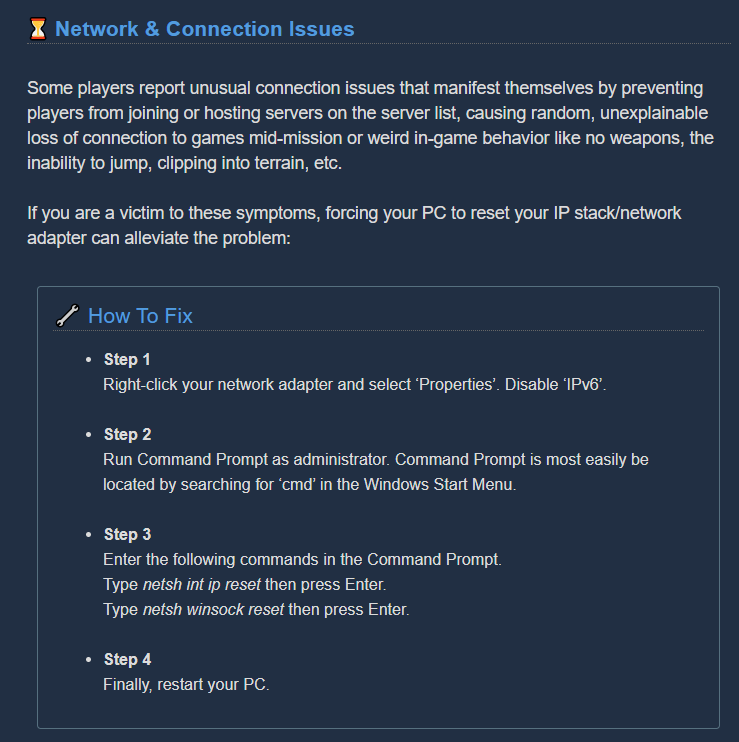
Has anyone ever had a problem with DRG not being able to join any games?
austere coral
try this https://i.imgur.com/XEJBXul.png
 viral mural
hey, ive recently made the switch from my pc to my laptop due to my pc suddenly breaking and when i go to recover my save i cannot find my most recent saved game with all my dwarves promoted and such, ive already checked the restore save in the menu and i cant find a recent save.
 slate bronze
Anyone able to help me with a ping problem here?
https://discordapp.com/channels/257785731072786435/258990272967475200/745295102410489906
austere coral
Do you still have the old hard drive? @viral mural
viral mural
@austere coral no i dont,
austere coral
You can check through and see which is which \steamapps\common\Deep Rock Galactic\FSD\Saved\SaveGames
Follow what I went through with this guy https://discordapp.com/channels/257785731072786435/258990272967475200/745009446689964093
Frankly though if steam cloud doesn't have them and you don't have your old hdd then it isn't looking good.
 vocal girder
Anybody care to enlighten me why my game goes to the loading screen with the dwarf walking to the right and then the screen goes black .. and task manager is just saying its perpetually not responding
vocal girder
also keep getting this error @vale elk
FSD_Win64_Shipping
FSD_Win64_Shipping
FSD_Win64_Shipping
FSD_Win64_Shipping
FSD_Win64_Shipping
FSD_Win64_Shipping
FSD_Win64_Shipping
kernel32
ntdll
I fixed the first issue was a corrupted save from all the crashes with that error their
viral mural
@austere coral thanks for tryna help me
 silent fog
my game keeps freezing and crashing randomly
 languid dragon
^ Having the same issue. Game freezes completely at random points (seems to happen when doing machine events) and I'm forced to hit the power button on my PC to overcome it.
Only very recently though, as in the last few days
languid dragon
Thanks, will do
 bright tusk
Is there a bug where the scout has no cooldown on the grappling hook? Just watched a player fly across a cave a 90m cave without touching the floor using 3 grapples. no hoverboots.
 severe ginkgo
@bright tusk there's no anticheat, he probably edited the files
same way some gunners like having no restrictions on angles and ranges for the zipline
they just remove the angle limit and give themselfs 2000 range
bright tusk
ahh right, i mean if the devvs want to look into it i have his username but i guess he's not hurting anyones experience doing that
 white girder
nothing they can do
 tame shuttle
So this might or might not be a bug as I've had a break from the game and don't really know what's new and what's not supposed to happen but there was a small area in the magma core where rain could be observed and heard.
It's hardly visible in the image but it's there
 crimson coyote
@tame shuttle that is new. doesn't really make sense in magma core but whatever
i guess acid rain or some something
crimson coyote
text on two line milestone descriptions dips into the little progress bar
"Through the power of friendship you both take..."
Should be:
"Through the power of friendship, you both take..."
Add comma between friendship and you
"1 times per mission..."
Should be:
"1 time per mission..."
Change "times" to "time"
This only applies to the first tier of heightened senses perk
Second Wind
"Get a 8% sprint speed boost."
Should be:
"Get an 8% sprint speed boost."
This applies for the first and second tiers. Third and fourth are correct
 glacial terrace
"1 times per mission..."
Should be:
"1 time per mission..."
Change "times" to "time"
This only applies to the first tier of heightened senses perk
@crimson coyote and "See you in hell" perk should be 3 time each mission?
crimson coyote
for the last tier
 balmy ocean
Wait, no, durr.
crimson coyote
heh
glacial terrace
1 times per mission-> 1 time per mission
3 times each mission-> 3 time each mission right?
crimson coyote
"..it will itself take (x) damage." doesn't make sense.
Should be something like:
"...it will take (x) damage itself" or remove itself all together
grammar mistake:
should be a comma between attack and it
"'..with a melee attack, it will itself take..."
1 times per mission-> 1 time per mission
3 times each mission-> 3 time each mission right?
@glacial terrace 3 times each mission is correct, not 3 time :)
i really hope a dev will see all these reports
crimson coyote
it's fine :) they are very very complicated. i don't understand a lot of it myself heh
np
"...enemy hits you with a melee attack you get a..."
should be:
"...enemy hits you with a melee attack, you get a..."
"...for 10 seconds during which you get..."
Should be:
"...for 10 seconds, during which you get..."
 echo ferry
One of the community server links is broken
crimson coyote
@echo ferry is it the south africa one?
 leaden sapphire
Tell me if you spot the issue
Pretty easy to do this one, simply hit escape while flicking your mouse over a Mission, been doing this a ton lately by accident.
 hardy jungle
game keeps freezing when i go to the community screen i am new to game
Miner Community
 winged belfry
so would this be the appropriate spot to mention an issue that has resulted in one of my weapon skins being removed from my inventory?
crimson coyote
@winged belfry is it the bulldog neon?
winged belfry
yes
i went to apply the dark future skin to it, it acted funky and swapped me to the default skin and when i tried to reapply the neon it was missing from my inventory
winged belfry
um im pretty sure i got it in a crate along with my other gunner weapon skin. oh well i suppose
white girder
yes, that was a bug
the dark future skin should never have been available outside of the dlc
 gentle hazel
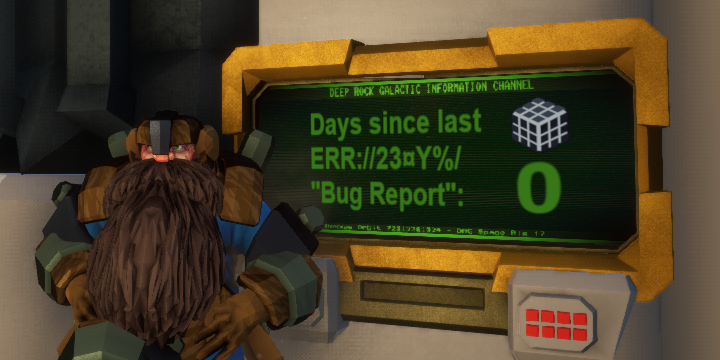
 worldly topaz
hey all - i recently upgraded and switched PCs. upon installing steam and DRG, i log into the game and all my save data is gone. how can i fix this?
austere coral
esc options restore save
worldly topaz
thank you so much!
austere coral
that's an intended mechanic
portions of armor are removed to prevent clipping with certain beards and facial hair
if you select the clean shaven beard and mustache then it'll add back in the missing armor parts
 subtle sequoia
ok so something happened, not sure if its a bug or just a whoops. i froze a grabber to death just as it grabbed me, my camera did the spinning and now im "grabbed" but im under the ground and i cant break free cause theres no enemy and more and i can see things from inside the map
crimson coyote
@subtle sequoia this is known. grabbers are very buggy atm. patch will probably be in the next update
subtle sequoia
alright cool thanks
austere coral
recurring issue or a one off?
 median plover
@subtle sequoia the same happened to me, i stayed invisible after my friends found and saved me by teamkilling them reviving me
 rotund pawn
only the gun appeared though, even after we killed @median plover
median plover
last one is from my perspective
the other two are from @rotund pawn @tiny cobalt
who were in the game with me
 stuck siren
is this a good place to ask about connectivity problems? Lately I'm getting kicked (multiplayer game ended) after every match, and immediately upon joining DDs
austere coral
do this then see pinned messages in #xbox-and-windows-store https://i.imgur.com/QUcRtT9.png
 stuck siren
Awesome, thanks
subtle sequoia
they never found me, a bulk spawned and killed me?
 steep crystal
I've been having a problem where the game will only register an initial mouseclick but then think I've released the button, which means I can't use the scout's zipcord or focus rifle. I fixed the other mouse bug shortly after I got the game - anyone have any idea how to deal with this one?
 mossy breach
small graphical issue, when you reload autocannon with mechanised skin, the colours of the drum that falls to the ground dont correspond with how it looks when attached to the gun
 night kelp
Playing as driller (and as host), I froze a mactera grabber, apparently at the same time it grabbed me. I saw it tumble and shatter, and so did my co-op partner, but then I got grabbed and pulled underground. I used the perk to break free, but to no effect. I was stuck looking at a black screen while my dwarf said "put me down" for the rest of the mission. My teammate tried to dig to down to the position it was showing to me, but apparently my distance to them didn't change. She had to extract without me.
So seems like probably an uncommon race condition, but it's definitely a showstopping bug
while I'm here, I'll report a separate grabber bug that is less severe but pretty annoying, and happens consistently... if I'm playing as engineer, trying to place a turret, and get grabbed, the turret placement preview stays covering up my view while the grabber carries me, with no way to make it go away until I get free
 misty moss
Just had a game where the ebonite enemies weren't showing up at all. Until half the timer was gone.
And after all that. We lose at the last second.
Are you fucking kidding me.
night kelp
I've had a similar problem with the one with the yellow things (I forgot the name), except in reverse. they were showing up at first and then stopped coming, and we failed waiting for them
slate bronze
So I am still having a ping problem, even after I try out the steps in here. https://discordapp.com/channels/257785731072786435/258990272967475200/746186456309039176
Anything I can do after that?
 marble cedar
we didnt do anything, he just kinda joined. How is this possible?
i should clarify
those inlcuding me are ALL actual players
there's just...five of us
 exotic yoke
Molly has dementia, I'll have to take the old girl out the back and put a bullet in her !
Here the map level area
So I hopped on this elevator plant
And created a ledge to jump on
The end result is that "Molly" can't path to where I am.
Finally when I created a "bridge" path over the inverted ledge it climbed up to where I am. Sorry in advance for "spamming" here but I'm not sure if anyone else has encountered this bug ?
 cunning crest
soo
salt mines(dreadnought elimination) as Gunner, found a cargo crate with the batteries nearby and put them in, repaired and it spat out the minerals and then a skin (not a paintjob) "Fourth Relic" I believe? and the icon of the stock "Lead Storm" Minigun in the right corner. When I finished the mission it seems not to have unlocked! checked all the classes and nothing, I haven't unlocked any other weapons though, but theres no way to tell if you unlocked a skin for a weapon you don't have, right? EDIT: nvm yeah it unlocked for the autocannon
 eager tulip
Fell through the map, cannot access any weapons or map, can't look around.
Can only type in chat and provide my group with moral support
 umbral raven
xpがものすごいことになりましたがバグですか?
それか一番右→の人がチーターです
 sturdy bridge
Yeah, so, the IW bug still exists. Went to resupply after going down, durign IW, still went down a few seconds later.
And that was the end of our EDD attempt.
austere coral
@umbral raven
It's extremely likely that he was the one cheating. Getting 300+ kills in 7 minutes is near impossible and so is getting 8.9 million xp. Your only options in the future are to either kick cheaters or leave their lobby. There's no banning system in place for those that cheat. If you want to undo the massive experience gain go into your options menu then restore save.
彼が不正行為をしていた可能性が非常に高いです。7分で300以上のキルをするのは不可能に近いですし、890万のXPを得るのも不可能です。今後のあなたの唯一の選択肢は、カンニングをした人を蹴るか、ロビーから出ていくかのどちらかになります。チートをした人を追放するシステムはありません。大規模な経験値獲得を元に戻したい場合は、オプションメニューからセーブを復元してください。
 brisk ridge
https://steamcommunity.com/sharedfiles/filedetails/?id=2204695638 They were downed, but it happened while they were falling I am guessing because they were stuck just floating there... We could not revive them and had to leave them behind.....

Steam Community: Deep Rock Galactic.
 brazen glade
i found a bug

 true lodge
Sometimes I can load past title screen other times I am not able. I have not made it past the ship heading down. Each time I make it further but that is as far as I have gotten.
Running on the Xbox Insider build on Windows 10
DxDiag Info:
Operating System: Windows 10 Pro 64-bit (10.0, Build 19041) (19041.vb_release.191206-1406
Processor: AMD Ryzen 7 1700X Eight-Core Processor (16 CPUs), ~3.4GHz
Memory: 32768MB RAM
DirectX Version: DirectX 12
NVIDIA GeForce GTX 1060 6GB
austere coral
The xbox insider build has some technical issues right now. See #xbox-and-windows-store
true lodge
post that over there then
 obsidian crow
So I finished a mission in a public lobby. The regular endscreen displayed normally, but it blacked out without a countdown and this screen appeared. Got stuck in it and had to reboot the game.
obsidian crow
I’m 2/2 on this issue. Did another mission, same result. I was hosting in both cases.
austere coral
It’s more likely a network issue. You can try verifying game files since that’ll take less than a minute.
I’m on my phone so I can’t post an image. Go here then scroll down to the network section and do what it says. https://steamcommunity.com/app/548430/discussions/2/1642039362993864094/

Attention, Miners! Games that crash, won’t launch or suffer from stability issues are undoubtedly the most frustrating part of PC gaming. Although we strive to deliver a flawless gaming experience in the depths of Hoxxes IV, we can’t guarantee you won’t encounter a crash or st...
glacial terrace
"Free beers for everyone!" string is not translated for all languages.
 velvet salmon
I hope it's ok to post a video capture here, but this just happened to me. Frozen grabber picked me up and took me into the wall. https://www.youtube.com/watch?v=vA97avQj4cg

GPU: GeForce RTX 2080 Ti
CPU: AMD Ryzen 9 3900X 12-Core Processor
Memory: 32 GB RAM (31.91 GB RAM usable)
Current resolution: 2560 x 1440, 240Hz
Operating system:
crimson coyote
@velvet salmon it's ok to post videos. this happens a lot with grabbers rn. they are pretty buggy. devs are hopefully going to patch it next update
 trim pecan
friend got clipped in between the assignment terminal and couldn't move, was from interacting with a barrel
 nimble galleon
press escape and respawn
im p sure barrels are buggy on purpose
the jank physics make it better
 wispy ether
hello!
Me and a friend of mine encountered a bug A little while ago,We did a haunted cave mission but no ghost showed up and we still got the bonus
 chilly plaza
So i claimed 2 helmets on 2 different games and i didnt got them
I didnt even got to see what i rolled
crimson coyote
@chilly plaza that's what happens when you have unlocked all of the cosmetics from helmets
mossy breach
Small thing I noticed, the Megacorp Deepcore GK2 seems to have a bugged texture map.
crimson coyote
@mossy breach can you point me to exactly where?
mossy breach
@crimson coyote wilco!
 mossy breach
Thanks!
chilly plaza
@crimson coyote but i havent tho. Still have plenty more to unlock
mossy breach
xbox
 dreamy quail
figures
well, I do not know if there's a fix for that rn, all I know is that they already released a beta with a new framework which is supposed to fix that
more detailes in #xbox-and-windows-store and the pins there
mossy breach
From what i understand,its always when im in a multiplayer lobby.Like while everyone is running the game alright,my game is running terrible.This is the first time that something this big exactly happened.
dreamy quail
the multiplayer framework is outdated and no longer supported
they are working on a fix
beta for that is out as far as i know
mossy breach
Thank you,i’ll check it out
 obsidian falcon
Hi, it's not a really big bug but it can be pretty annoying : When someone take a location of a lost package in a lost helmet he don't hear the beeping anymore (that is normal) but all the other players can still hear the helmet's beeping even if there is nothing more to pick up.
 slender pasture
Hey all, I'm not sure if this is the right place to ask for help for this, but the autoreply to the support email directed me here. I can't get the game to launch. When I click launch a little window pops up with preparing game, but then it goes away and nothing happens. I've tried uninstalling and reinstalling. I've updated my windows and graphics drivers. I've triple checked that the game isn't being blocked by my antivirus software. I've verified the steam game cache files and refreshed. I've tried launching directly from my file explorer. I've tried running the game in administrator mode. I'm out of ideas, and any help would be greatly appreciated.
austere coral
see pinned messages for troubleshooting. Odds are good you're missing dx files and will have to redownload them. Just work through the list and something in it will resolve your issue.
slender pasture
thanks!
 marsh wave
I hope this is the correct place to put this, encountered a pretty annoying bug rn:
If you are Driller and use the Cryo gun to freeze a Grabber, and it grabs you in the second it starts to fall it brings you under the map and you are infinitely trapped by the ghost of the Grabber
 radiant sentinel
so i was playing deep rock with a friend, and at one point in the mission i closed out of the game, after coming back in, i tried to join back but it said "Multiplayer Session Ended" even though my friend was still playing, any way to fix this?
 formal kernel
I just did a mission with 5 people. 3 of us started and then 2 joined at the same time and we all were in
 hazy plaza
I've encountered several lost miner packs where I picked it up but didn't get the loot. Is this a known bug.
austere coral
it means you have everything in its loot pool
you still get the considerable amount of crafting materials
hazy plaza
it means you have everything in its loot pool
@austere coral
Oh okay, I had misread the old patch notes and missed that.
I think in terms of UI I'd like it to have a popup message saying "you have all the possible loots" where normally you'd get the "you got XYZ loot!"
Is this the place to ask for that feature or should I put that in #suggestions ?
austere coral
Something like that would definitely result in less confusion. I'd search #suggestions first for that idea since duplicate suggestions get deleted.
I do know Mark and Bjorn read through here and I know that #suggestions is regularly looked at for ideas.
crimson coyote
@formal kernel management would like to know your location
 dry ore
Has anyone had a problem with standing directly under a downed dwarf and then digging up to them? I've repeatedly had them phase through my head and into the void beneath the world
sometimes they reappear, sometimes they're just gone and the run is bugged
I have to be directly under them for me to get this to happen, I've done it twice so far
and saw it happen once
 flint skiff
With Gunner's BRT7, if your bullet count (in the gun) isn't divisible by 3 (or by 6 if you're using Longer Burst) and you empty your magazine, when it empties it will make an ear rape sound.
austere coral
That's one I haven't heard of before. Do you think you could get a video of that? @dry ore
dry ore
I'll try but it usually happens in the heat of battle n' all that
 lament quest
Anyone noticing a grappling hook bug where its disconnecting even though mouse 1 is being held down
 acoustic canyon
so i got a question, is there something my friend has to toggle for me to select his assignment missions? Because last night was with two friends, Drake and Silent, I was able to select missions for Drakes assignments but didnt see Silents missions.
 lament oriole
Hey guys, I'm trying to do a license upgrade assignment for my gunner and did all the required tasks, got the new gun but could not get the assignment off of my board and progress to the next one.
 dense kettle
I'm really clueless ... I just did a misisons with my driller and I was hearing the flamethrower's burning noise even when it was not equipped. This bug was fixed many times and it's still happening to me. Am I doing something wrong ? I do not mess with the game's files and I haven't touched the sound options in weeks
 lean musk
I got caught by a grabber, my team froze it and instead of getting dropped when it was frozen or when it shattered on the floor I fell though the map and stayed as if it still had me grabbed. I ended up have to disconnect
 spice trail
A green light emitter can't be seen on its own but can be seen in terminal reflection
 dreamy dawn
Hello from Japan :)
I bought this game yesterday and am having a great time with my friends !!
We have a problem in game, but please skip this if you already got same report ;)
< PC version - Steam  >
>
I can't return to game right after access with this board "MINER COMMUNITY"
access this board, A message prompting me to join Discord will be displayed, and It will not be able to perform any control AFTER CLOSE IT.
(no CTD, At this time, we can only move the mouse cursor in a freezed screen)
I have to do only stop a game from Task-Manager.......
also my three friends confirmed and having same problem.
I did try to play game with other language (i tested with Japanese and English), but it was not be solved, stop game after access it.
Please fix it , and thank you for reading 😉
austere coral
@acoustic canyon People will have different assignment missions if they have different assignments selected. If all of the assignments were the same then I recommend that all of y'all check your windows date and time to make sure it's set to automatic.
@lament oriole There's some issues with assignments at the moment. If you're able to, abort the assignment.
@dreamy dawn The game may be trying to tab you into discord. Make sure steam and discord are running with the same permissions (admin for ease of use) then try again.
dreamy dawn
@austere coral Thanks for a reply 😃
It seems always happend when player are not yet join to DRG-channel on the Discord.
and when I don't running a discord if even already joined, I have same problem again when I access to this board, and I have to restart a game ....😖
And if I press the join button here and Discord will be launched in the background, I'm still stuck on this screen, never back to game right.
I confirmed that is no problem in game after join to DRG-Channnel and running a discord in same time.(it should start app "Discord" and keep running it before launch a game)
however, a much of players who does not join to discod (or not wanna do this), they will have this problem maybe, it should be fixed for them i think so😉
Thank you
 hidden depot
@dreamy dawn Do you have the discord app downloaded? The game and app integration acts a bit funny if you are running discord in a browser.
dreamy dawn
@hidden depot Yes, I installed and running a discord-app too 😃
 calm vapor
What the hell that was?
UPD: Did not see how the other guy played. A couple of guys disconected when things got messy. But we had activated, but unfinished tyrant weed event...maybe some bug there.
mossy breach
The heck?
hidden depot
The other dudes is hacking
hidden depot
999999 kills is a bit much too
 tidal lava
wow, they really need to do something about hackers
 graceful spire
? xD
austere coral
can't select missions when someone is in the middle of joining
white girder
wow, they really need to do something about hackers
@tidal lava it's a peer to peer game, there's not much they can do
it's pretty shitty people are doing stuff like that and creating public lobbies though, but then that's also just the way the Chinese audience also plays games (making an assumption about that other player there)
tidal lava
I just wish there was a way to report people who are hacking and ruining the fun for others.
 winged shoal
@graceful spire Any chance you were on Prochatting way back in the 90s?
graceful spire
@winged shoal Im afraid not, I wasn't born back then :P
winged shoal
Haha guess that answers that. I just knew somebody who went by your nick back then. Thanks for answering though. Rock and stone!
 tribal tide
Hey, is the xbox insider version working?
austere coral
It is for some. It’s got a bunch of back end changes so it isn’t particularly stable right now.
tribal tide
Huh okay, just seems like for majority getting past the title is a pain
 fallen hill
@tribal tide Please do give it a try!
We released a new update last Friday and we would love to know if you are able to progress past the start screen. Some are, some are not, so we are trying to find a pattern.
tribal tide
I downloaded it yesterday
fallen hill
Does it crash for you?
tribal tide
@fallen hill it seems to crash every single time i try to enter the game.
fallen hill
@tribal tide Xbox or Win10?
tribal tide
xbox
fallen hill
I know it's tiresome, but any chance I can get you to try 4-5 times and see if the crash happens 100% of the time? Some players on Xbox manage to get in after a couple of tries and we're desperately trying to investigate why and how often it occurs.
fallen hill
Alright. Thank you! 😄
tribal tide
Hope it works soon, was seeing if i liked the beta so i can get DRG
fallen hill
It happens at the "Press (A) to continue" screen, right?
fallen hill
So you crash as soon as you start the game?
tribal tide
Yes
fallen hill
Interesting. Do you see the black loading screen with a running dwarf?
tribal tide
This is as far as ive gotten
fallen hill
Alright. Thank you so much for the info! We'll continue the investigation in the #xbox-and-windows-store channel and see if more people chime in with the same experience.
tribal tide
👍
 hexed heath
mossy breach
hexed heath
mossy breach
Hi, I contacted Bjorn months ago about the horrific issue of losing a save file and having THAT saved in cloud. I waited a week or two for feedback but no word. Would be nice to have some of that full promotion back..
spice trail
@worn nacelle So, I was asked to ping you with this issue. For some reason in different languages damage of BC varies. In english 11213 returns 115 damage. If I choose 12213, I get 115+35=150 dmg. Everything is OK.
But then I change language to russian. In this lang 11213 has 100 dmg and by changing 2nd tied mod I get 100+0=150 dmg. And if I use ctrl+O, that value updates to english one.
It's not limited to russian language only
Azerty asked to send ctrl+o version as well. It captures english numbers if I update them by hovering over mods.
mossy breach
Is this not the place to get help?
 amber quiver
@mossy breach This is the place to report bugs so the devs may try to fix them, this is not a support channel. I would suggest checking the steam discussions, as there are already a lot of troubleshooting articles there.
mossy breach
I'm a developer and understand. However, Steam discussions are NO help for such a ridiculous bug, that is hardly recognized? The only word in the related thread was from community: contact Bjorn and hope, but hours here trying to do that were wasted...
I found no thread addressing the issue which is expected ,because it involves creating a new character from scratch...
I've wondered if it would be easier just to wait for a hack to come along.
amber quiver
The only messages I can find from your account are the three above. If the bug you reported was months ago, the game has already been through several updates, and the bug at that time is no more relevant. If you can reproduce it with the current version, do bring it back to the attention with a new bug report here.
Now, for the fix, if I understood you correctly, you lost the progress in your save. Although I am not aware of a way to bring back a save file from so long ago (be it cloud or other storage place), it is possible to edit your save using the experimental version of the game (BETA tab in steam) and using the cheat terminal in there to add the missing exp or ressources to your save file. You will have to rename the save file, as by default the exp version does not use the regular save file. All necessary infos for accessing the exp version or swapping save files from one version to the other are in the pinned message in the experimental section of this discord (just under the QA & FEEDBACK one).
mossy breach
I was PM'ing Bjorn back in May or so, but he seemed rather busy. BTW, System Recovery could be an option for some, because it can restore AppData. But I think you have dropped a solution on me -- thank you Azerty! 🙂
amber quiver
@mossy breach The savefile is not located in the appdata but in the gamefile itself. You would have to restore the directory inside the steamapps folder.
austere coral
If you're on steam, there was a report a few weeks ago where someone was unable to use the restore save function. However, their save was still available in the file directory and just had to be renamed appropriately. \steamapps\common\Deep Rock Galactic\FSD\Saved\SaveGames
 jovial coral
Do wanna ask for clarification, has the Galactic marine helm having no head/neck model has been reported as a bug?
balmy ocean
You mean like this?
mossy breach
ok, I've been having this bug since I've started really playing the game today and it got me killed on several occasions, sometimes I try shooting the grappling hook, flare cannon or any weapon, pickaxe included, and the game refuses to register that I've clicked the left or right mouse button, which causes me to spam the mouse button until it works then I get killed because I fell to my death since I was grappling
 austere depot
is it your internet?
mossy breach
nope, my internet isn't great but I'm sure that it isn't that bad
the game just doesn't register my mouse clicks
 prime sinew
dose it still happen in solo
austere depot
if it does, then its not the internet
mossy breach
yes, it happened a lot in solo
austere depot
do you have an old mouse?
prime sinew
is it possibly the mouse
mossy breach
my mouse is a couple of months old and it only happens during missions
I've tried it in several other games and even in the menu and it gets registered perfectly
prime sinew
i would do a clean reinstall
austere depot
ive never experienced something like it before, unless you count in the shit mouse i had that always disconnected no matter what
mossy breach
I'll try doing that later
dreamy quail
@mossy breach try setting your resolution to native of your monitor as well as setting game to fullscreen
prime sinew
i have a problem with there being no servers or quick games i have reinstalled the game reset my pc and disabled my fire wall also cheeked my internet
austere depot
well then no ones probally playing on that mission
mossy breach
maybe there isn't matches in the range you choose for that level?
prime sinew
i set it to world and set all setting to all
austere depot
well i do experience frame cuts sometimes, any fixes?
prime sinew
vsync can hurt fps
austere depot
dont have it enabled
prime sinew
also what are your setting as and specs
prime sinew
what are your specs
dreamy quail
@mossy breach that fixes unresponsive clicks
austere depot
and
dreamy quail
my bad
austere depot
austere depot
that should be my specs
dreamy quail
@mossy breach
austere depot
@prime sinew i sent screenshot of my drg settings and specs
prime sinew
open task manager and see what could be taking up resources
austere depot
like what?
steep crystal
Are you talking about how holding mouse1 doesn’t always work? Because I’ve experienced that too
prime sinew
in the bottom left windows search bar put in task manager and click the search option it gives you
 winter haven
Been having an issue where I am sometimes unable to manually check the team depository unless a team member is actively depositing items. I'm not sure what exactly is causing it, but I suspect it might be a result of some sort of hiccup that may occur when connecting to another player's game.
dreamy quail
so bringing up the laser pointer does not show the depository?
 mild drum
hey im sometimes getting a bug as scout were i randomly get flung back like my grapple pulled me halfway and then let go, last time it actually downed me
 dawn lotus
Probably a known fact but you can go through walls with Engi platforms
You can even reach later parts of the map with some practice
boreal ravine
I don’t mean to interrupt anything, but I’m trying to get into the Miners Union but I’m already apart of the discord channel. It’s also giving me an error screen, is there something else I need to do?
austere coral
Run discord and steam with the same permissions. Launch both as admin is the easiest.
boreal ravine
As Admin?
austere coral
yup
boreal ravine
How do you do that?
austere coral
right click the exe of discord then run as admin. Repeat for steam.
If they're shortcuts on your desktop then you should still be fine running those as admin.
 rose mango
I have a frequent issue where I click mouse buttons but the game doesn't respond and I have to click several times. It makes firing weapons and swinging the pick erratic. DRG is the only game I'm having the issue on, are there any ideas how to fix it at my end?
austere coral
The temporary solution to that is to run the game in fullscreen at your native resolution.
rose mango
That's what I'm doing... I'll double check it's not windowed-fullscreen though
austere coral
@light sinew The issue you're likely experiencing is windows placing the game on the primary monitor. If you go into your display settings and change the primary monitor then the game should launch on the primary monitor.
 stray cedar
Just experienced a nasty map desync (is that what you call it?) on magma core. Apparently there was a huge crack that opened up during an earthquake that my client knew nothing about. It looked like I fell through the map, but I could see the driller's tunnel when he came to save me. First time I've seen that happen in dozens of magma core games.
austere coral
Was your driller using the cryo cannon by any chance and did you hear a mactera grabber?
stray cedar
I don't remember a cryo cannon being used, but yeah, there was probably a mactera grabber at one point
austere coral
There's currently a bug where frozen grabbers can still latch onto a player and drag them through the map. It's possible that's what you experienced, but it's also possible you did have a weird desync.
 distant hatch
Is this a good channel to discuss UI issues; specifically for when using Nvidia Surround? When using three monitors in surround mode (7680 x 1440 @144z), parts of the UI are "cut off." Two examples would be
- weapon selection icons - when UI scale is 100%, the top half is cut off and reducing the UI scale cuts down the icons even more until they are not visible at all;
and 2) mineral amounts when depositing - when depositing, these only show as flickers on the screen.
I've set my .ini settings to use the same resolution - should one of these be different?
Otherwise, the game runs fine using Nvidia Surround (sometimes I can use Full Screen but usually have to use Windowed Full-screen) and the issues mentioned above do not occur when using a single monitor.
Update: issue appears to be with UI scale and windowed fullscreen. Related bugs have been entered here:
https://ghostshipgames.atlassian.net/browse/DRG-1242
https://ghostshipgames.atlassian.net/browse/DRG-1275
crimson coyote
it's gonna be buggy for that wide of a resolution. the devs probably havent optimized it for that kinda of widths
jovial coral
@balmy ocean no more like this:
seems like it's using the version from the previews w no neck and it's floating on his shoulders but well...outside the menu's
trim pecan
Glyphid Crassus Detonator crater showed up as compressed granite on my friends' ends
was still gold when mined though
radiant sentinel
Machine events tend to explode if they spawn near the droppod to avoid any issues, this is not a bug, this was made intentionally by the devs
It only happens frequently in Salvage Operations however
chilly plaza
"explode"? wdym
radiant sentinel
They break
The Core infuser ceases existing, and the base of the Machine Event too
And so only the leftovers remain
Which in this case, are the 3 segments of the Omen Tower
Nothing you should worry about as it doesn't always happen, and it mostly only occurs in Salvage Operations, but yeah that's not a bug
chilly plaza
aight thanks
calm vapor
not a bug
@radiant sentinel
"Feature"
 frail sphinx
anyone know how to turn off environmental reflections, specifically in the glacial strata? it gives me a massive headache, and turning down the graphics to all the way low doesnt help
 shut phoenix
maybe the thingie controlling SSAO and what not? The lightning ones. Ambient Occlusion and the such.
Or just the brightness itself, but that comes with its own share of issues
white girder
ambient occlusion / SSAO will have no impact on reflections
try adding the following to Scalability.ini (steamapps\common\Deep Rock Galactic\FSD\Saved\Config\WindowsNoEditor)
[EffectsQuality@0]
r.SSR.Quality=0
[EffectsQuality@1]
r.SSR.Quality=0
[EffectsQuality@2]
r.SSR.Quality=0
[EffectsQuality@3]
r.SSR.Quality=0
can't promise that will work, but at least in my local build that would disable screen space reflections at all quality levels
in fact, I can confirm it works :)
 dawn wigeon
dreamy quail
dawn wigeon
dreamy quail
the gunk seed wants to be free
 nimble pollen
My promotion keeps resetting on my Driller.
I complete all 4 missions and then advance, only to be resat the next day.
Its 2 days in a row now .....
austere coral
which version of the game are you on? Windows store, xbox, or steam?
nimble pollen
Steam
austere coral
Before doing anything else, navigate here \steamapps\common\Deep Rock Galactic\FSD\Saved
Right click SaveGames
Properties
Uncheck Read-only
Go promote again and see if the issue persists.
nimble pollen
Ill give it at try, but ill have to do all 4 missions before i can promote.
So ill take abit
nimble pollen
Before doing anything else, navigate here \steamapps\common\Deep Rock Galactic\FSD\Saved
Right click SaveGames
Properties
Uncheck Read-onlyGo promote again and see if the issue persists.
@austere coral Seems like that fixed it
Thanks man!
 white gazelle
if you activate the Cryo Cannon's "Ice Spear" overclock and switch weapons before the spear fires, the cryo cannon will gain a persistent sort of swirling ice particle when you switch back to it
 heavy arrow
austere coral
heavy arrow
austere coral
That's an unintended side effect of an intended mechanic
The ME spawned too close to the salvage drop pod so as a result it was automatically destroyed. Only clients are able to see the leftover bits on the inside.
The only happens with the omen ME.
 jagged knot
just wanted to report that i completed my first deep dive and under the 45 minute timer for both those achievements and got neither of them while my buddies did
 iron warren
Today I died from a bunch of glyphids while getting off a zipline, and it showed my health at zero but I could shoot my gun as long as it had ammo, I could not switch guns, I did not have iron will equipped, and I could not spectate other players, the redness was around my screen as I'd I were close to dying, I was also still in first person, and idk if anyone could revive me (they never tried) Idk if the game rendered me as dead or alive tbh. My comrades said that glyphids were disappearing but we were thinking they were despawning. One of them was suspecting me of cheating when I don't even know how to cheat the game, it was just crazy.
 woven veldt
Devs, I have managed to restore a file from 4 days ago, but I have lost about 10 hours worth of gameplay due to an error. I play daily and when I logged in, approximately 10 minutes ago, all of my data was reset to 0. All of my classes were reset to lvl 1. Please, if you can, help me to understand why this has happened, and recover some of the value of what was lost. I love this game, however, this is enough to make me want to stop playing and try to get my money back.
 tired spindle
I have a gamebreaking bug, and dunno how to resolve it: I can't Rock & Stone while dancing at the jukebox
 hexed tiger
My bluetooth headphones don't seem to work properly. When I connect them with mic the audio kinda cuts out and I either get just sound effects with no music, or just funny pop sounds
dense kettle
This core infuser is very good at hide and seek.
I was still able to activate it fortunately
 potent nymph
@woven veldt you should be able to find the saves by going to the ESC menu, Options, Restore Save, WAIT 2-3min and it should appear
mossy breach
Not sure if this a bug, but presumably.
Corona Younglings are able to enter gunner shields while rolling.
No other enemies can to my knowledge, so it doesn't seem right.
mossy breach
Yeah I had a feeling the regular coronas might be able to if the younglings can.
Still dunno if that's intentional though. They're annoying af when you try to rez people and get punted out five times. waste of a shield.
 modest cairn
stick in this position, can't move
austere coral
@hexed tiger Pinned messages
@modest cairn Open the esc menu then mouse over your character icon. Click the respawn button.
modest cairn
thx
 tall crow
So umm
Ive found a bug the when you spawn in a game you cant move at all
And the camera is always facing the roof
Enemies can agro to me but they do no damage
austere coral
Sounds like that may be a network connection issue. Are you the host or the client?
And which platform do you own the game on?
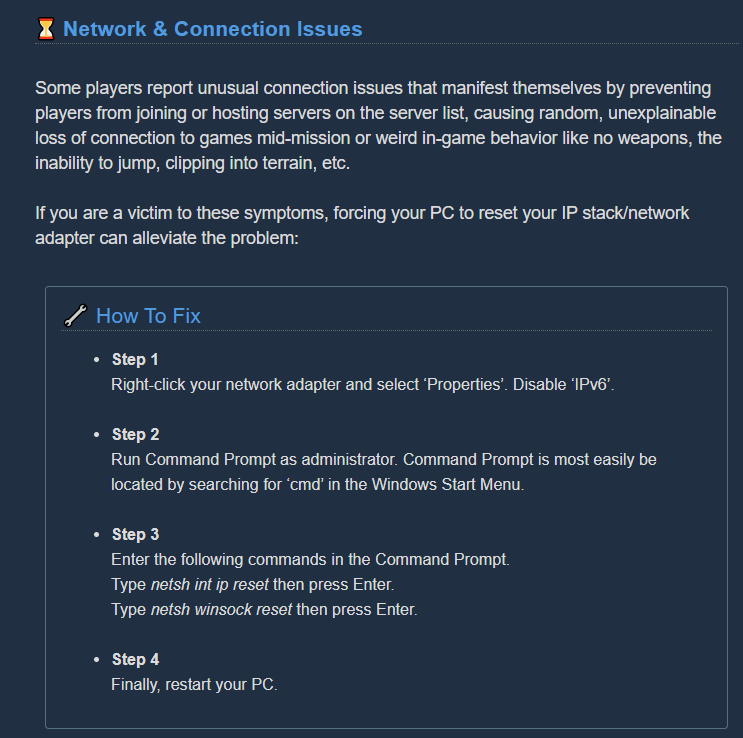
If you’re client I’d recommend going here then scrolling down to the network and connection issues section https://steamcommunity.com/app/548430/discussions/2/1642039362993864094/
Attention, Miners! Games that crash, won’t launch or suffer from stability issues are undoubtedly the most frustrating part of PC gaming. Although we strive to deliver a flawless gaming experience in the depths of Hoxxes IV, we can’t guarantee you won’t encounter a crash or st...
 glossy basin
Guys my neon skin for the revolver just disappeared,i tried to swict to the dlc skina nd puff gone.
 ripe quail
@glossy basin To be clear, you mean the megacorp skin right?
glossy basin
yes
ripe quail
Hmm, idk. Have you tried restarting the game?
glossy basin
yup
ripe quail
And it’s still not there?
glossy basin
i wanted to try out the megacorp color with theneon skin
ripe quail
Have you tried going into a game and seeing if it’s just a visual glitch in the equipment terminal?
Maybe just go in a private game and if it’s still glitched you can just exit
 knotty steppe
Found this glitch in a mission with the streamer Angelotrix, i was the only one who could see this glowy part as outside the tower itself and when pinged, to everyone else it looked like i was pinging it on the inside.
glossy basin
i just admit it it is gone for good
ripe quail
That’s the fuel rods
@glossy basin maybe try asking some people on the steam forums, you shouldn’t just give up yet
Also I have a glitch, I have almost every skin but I don’t have a single skin for the gk2 which is my most used gun (ik it’s not an actual glitch, it just makes me sad)
Is there any way to see how many cargo crates I have opened?
woven veldt
@potent nymph, yes, as I stated, I did find saves from several days ago. I lost about 12 hours worth of game play though including multiple overclocks. I feel as though you didn't actually read my first message. I would like to understand what caused this so that I might try to prevent it from happening again.
glossy basin
@ripe quail i found a reddit post abaut this but there is no fix just the guys said they missing several skins.
ripe quail
Oof
glossy basin
welp i found out why it is gone
ripe quail
Yeah?
glossy basin
Everyone with the supporter dlc got it removed even if you loot it since there was a bug which gave everyone the skin with the purchase.
glossy basin
its on the steam forums
off indeed
i dont mind dat much because i use the brt but somekind of hey we need to remove it because of a bug,or some kind of msg.
balmy ocean
Can't you just disable the DLC to make it re-appear?
glossy basin
Probably i will get it from a crate sooner or later and i dont use the revolver that much so i dont mind.
balmy ocean
I managed to neuter the stubby in a mission, possibly with Ansel.
Is this common?
I suppose Ansel is a common source of problems, so just don't use it.
 past lagoon
Clown leeches keep tackling through terrain. Why not fixed yet?
dreamy quail
@balmy ocean you mean it just stops firing projectiles? If so yes ansel can cause that
balmy ocean
Exactly that.
austere coral
The neon skin isn't from a DLC pack. It's regular ingame content found in cargo crates.
Purchasing the supporter pack used to unintentionally unlock it
That has been fixed
steep crystal
I've been having an issue where the game registers an initial click but does not register that I'm holding the click down. This breaks the scout grapple, as as soon as it launches the game things I've let it go. I've previously done the native resolution fix to deal with other mouse issues - is there anything I can do to deal with this?
What's especially annoying is that I don't know how to reliably reproduce it - it happens most of the time when I'm playing as scout, but not 100% so I don't know what could cause it. Happens as both the host and the client.
obsidian falcon
I'm currently in an extraction an we only found 2 aquarqs out of 7
It seems to be a generation bug
austere coral
there's always enough spawned, use your terrain scanner to look for rooms you haven't explored yet. There's likely a machine event present with a lot of nitra and gold.
@steep crystal Which platform do you own the game on?
 wary oar
My game isn't letting me join other games
It tries to and shows the 'cancel' button for a little bit, but no actual joining
austere coral
steam?
wary oar
Yes
steep crystal
I play on pc
austere coral
Likely an issue with valves connection managers, it'll probably sort itself out in a few hours.
windows store or steam?
steep crystal
Also steam
obsidian falcon
I already look up with the terrain scanner it seems and we found only 2 aquarqs...
Also aquarqs a generally pretty easy to find due to all the light it emits
austere coral
Check and make sure that sticky keys is disabled and no other buttons are unintentionally depressed on your keyboard or mouse. A stuck key could cause issues with windows. Go into mouse settings in windows settings then mouse properties. Make sure clicklock is not selected.
steep crystal
I'll check that now, thank you!
obsidian falcon
ok i found some behind a thick wall of ice
steep crystal
Aight messed with those settings, testing now
 dreamy oar
Anybody know why I cant join public matches?
austere coral
likely an issue with steam's connection managers
 past prism
Just wanted to let you know there's a typo in "electrocution" 🙂
dreamy oar
When I click on a group to join it does the whole. Joining screen. Then it pops up again. then the mission I joined vanishes, it stops letting me join. and then the mission pops back up
I'ma side with the dwarves on this one and say Deep Rock really needs to invest in some better equipment! xD
obsidian falcon
Mini mule was having a hard time finding how to enter the pod
 thorny warren
Had a floating Bug bug last session. we just left them be
steep crystal
Just played two full missions that didn't appear to have any of that clicking glitch - looks like simply disabling the ability to activate sticky keys and such via hotkeys solved it!
Thank you for the help @austere coral!
steep crystal
Ok so looks like it’s not fixed
I no longer have issues with the focus rifle, but it’s a 50/50 shot if the grapple works or not and I just can’t yeet mineral chunks
steep crystal
I might have found the issue - I previously set the game to be fullscreen, but not native resolution. Changed the resolution to match and am testing
austere coral
@weary wagon you may be looking for #lfg-steam
steep crystal
Yup, seems fixed!
hexed tiger
Regarding the bluetooth device issue - I was playing around with disabling different audio devices and things trying to get the audio to work via bluetooth where I'm able to listen to the game and talk to friends at the same time.
I followed the pinned tips regarding it, but I managed to pin it on the game exclusively refusing to output through hands-free audio. It will only work via stereo audio
It isn't able to redirect the sound and have input and output at the same time.
the problem with only stereo audio is that this won't allow for the mic to work.
the mic is only enabled via the hands-free sound option, so as soon as a different program allows the hands-free, all system audio will then reroute through hands-free, causing the game audio to stop working.
I'm glad I haven't sold my wired headset yet, so that's something to hang onto for now.
I know I'm sure it's all old news, but fingers crossed there's a resolution eventually. Keep up the great work devs!
 zinc ridge
i'm having some kind of issue or bug wherein I can't join any games, whatsoever. I click to join, it loads with the cancel button present, and then drops me back into the server listing. Tried about 10 servers and restarted both the game and steam before accepting that something weird was going on.
No steam maint going on so shrug
austere coral
restart steam, this has worked for some folks. It's almost a certainty some screwup with steam's connection managers.
zinc ridge
yeah already did that
I guess I can try again.
I swear Steam gets worse every year.
austere coral
this is the first time I've seen this happen outside of maintenance mode since I bought the game over two years ago.
It's a normal unpredictable network issue
zinc ridge
oh well. Second restart also didn't fix it. Guess I'll give DRG a break for a few days and wait for the internet gremlins to scurry away.
 river hinge
Yo! There's an incredibly specific bug where you'll go invisible and clip through terrain if you freeze and kill a mactera grabber just as it grabs you. Got multiple (hilarious) clips of it, if you need it.
mossy breach
The Bug Hide pickaxe pommel does not fit properly with the Reaper's Claw Handle. It floats separately below the rest of the pickaxe.
mossy breach
Greetings, I found pretty interesting bug. In one mission, I and another player meet this:
I don't know what happened, but first cave have a lot of gold bugs.
white girder
host is probably hacking
 fleet onyx
I'm unable to salute more than once while dancing at the jukebox, anyone else find the same?
crimson coyote
@fleet onyx yep. been like that a while. literally unplayable
 tawdry arch
My game crashes frequently with this same report
i've been having this since last update
glacial terrace
My game crashes frequently with this same report
@tawdry arch Check pinned message for troubleshooting
 onyx lance
does Deep Rock have a tendancy to crash if a graphics driver was not updated?
I had Deep Rock crash twice yesterday and I found out that just this morning, my GFX driver was not up to date
so that may be the culprit
 coarse spear
Any further updates on the issues on joining games? Restarting steam did nothing for me.
austere coral
@river hinge It's known, I believe the devs are aware.
@onyx lance Unless the existing driver is horribly out of date, no it's not likely to be the cause of crashing, but it could be. However, if it persists after updating then see pinned messages for troubleshooting.
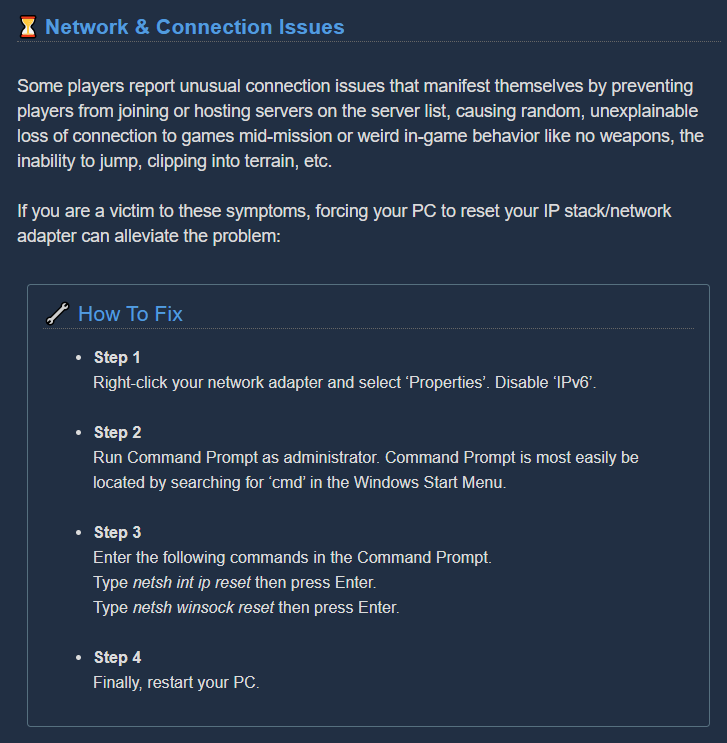
@coarse spear Restart steam through task manager so the entire process is killed. Then do this https://i.imgur.com/epqF0ks.png then restart steam.
 river hinge
Alright, thanks!
mossy breach
Hi, I've experienced a weird bug as an engineer. It all started when I shot platform and missed so I was in the platform as seen on first screenshot. I was able to see through textures for about 10 seconds before it launched me completely out of the map as seen on second screenshot. every second I was moving away as seen on third screenshot. meanwhile I was unable to do anything shoot, throw grenades, use pickaxe etc. I've experienced this bug only one time during my 100 hours of this game.
 merry tendon
Bug? or speedrunning tech? “platform boosting”
mossy breach
: D
 swift tundra
My friends are trying to re invite me to a mission after my game crashed and i cant join, i already tried re joining through the "attempt to reconnect" but it just said "multiplayer session ended" They are still in the game though and i don't know why i cant rejoin, they invited me through steam and DRG itself and i didn't receive any invites, i tried joining on them and nothing happens, I've checked steam publicity setting and online/offline settings as well as restarted multiple times.
pls help
dreamy quail
that happens every time to me whenever someone loses connection
there's no joining back until the host disbands the game
dreamy quail
and it's been like that for months and months
🤷♂️
for the looks at the moment
i mean it's a bug for sure
but at this point i have little hope it will ever be looked at
swift tundra
😐
sigh
i keep crashing for no reason too
like i turned the graphics settings down to med and i have a perfectly capable pc
i just keep crashing all the time, and its all usually when im hosting a session
 warped marsh
My shield keeps phasing through time and space. It's really frustrating because not only do I not have a shield when I really need it, I lose a charge on top of it. I think lag might have something to do with it because it almost never happens when I host as gunner.
 tardy scarab
this sucks
 obtuse oriole
feedback|| (wait, why is there no dedicated "feedback channel" and only bugs/suggestions?)||: the omen modular exterminator fight is currently quite uncomfortable to fight. due to having to shoot drones/the top of it, the plasma waves end up outside the field of vision, and the same applies to paying attention to the plasma waves, which will take your eyes off of the lazers, heavy bursters, and drone manufacturers.
spice trail
@worn nacelle Once again I'm pinging you about some unlocalized strings
Like born ready description
Or upgrade description in armor menu
And almost all titles of pickaxe menu
This one in armor menu as well
crimson coyote
@obtuse oriole it is supposed to be hard to fight
spice trail
These two textures I'm pointing at are overlaying each other
chilly plaza
So im the only one that doesnt get the helmet or crate reward? I get them 50% of the time since last week
obtuse oriole
@crimson coyote there is a diffrence between hard and "i litterally cannot pay attention to the thing that will kill me because i need to look at something else that will kill me" (which i would call unfair)
crimson coyote
it's supposed to be a triple task sort of event. if it wasn't it would be easy
obtuse oriole
there is still a difference between easy and unfair
white girder
So im the only one that doesnt get the helmet or crate reward? I get them 50% of the time since last week
If lost packs / crates stop giving you rewards it means you have them all already.
hidden depot
There are ways to counter the omen event without looking. One example is since the lasers are timed you can bunny hop them without looking.
white girder
You can dump stacks of pancakes to block them also
hidden depot
engi cornbread is tasty
austere depot
i dont have a picture and its minor but, i have subtitles on and when i said "okay this is not happening" the subtitle said "okat this is not happening"
 graceful yarrow
yep, it's a known typo
austere depot
hehe, and another bug in the discord, JACOBS AVATAR IS A STICK BUG GIF
steep crystal
Are you only supposed to get one half of the 'hole digger' pickaxe blade?
austere coral
if it goes on the front then you get 2. If it goes on the back then you get 1.
There could be a few that doesn't apply to, I'd have to check.
severe ginkgo
if you "reload" with a full mag on the autocannon, you can still hear the noises whilst you cannot see the animations
 celest carbon
 spiral bay
At the end of a mission, my dwarf fell thru the floor of the drop pod and I had a miniature heart attack --- but the mission still counted as success. There were some trawlers close on my tail, so maybe it's related?
 tender solar
Question, is it normal to be crashing whenever you try to join a game, or when someone else tries to join your game?
Because this means multiplayer is locked away from me now and I don't know why.
austere coral
pinned messages first do the amd fx / realtek audio fix then do this https://i.imgur.com/DX6GFu9.png
 strange forge
I noticed a bug with the grappling hook. If you jump, then fire the grapple just as you land, it will just fizzle out.. It has happened a ton of times, but yesterday i pinpointed why. Is this like, a known thing? Should i report it somewhere else?
Ok i read the readme. I will investigate a bit more today and document my findings so i can post a proper bug report
 nova plaza
Is this normal?
dense kettle
If Bosco picks up a volatile kursite chunk and the chunk expires, Bosco will remain in the same "carry this object" state indefinitely with nothing in his hands until you call him out. He looks like this meme https://live.staticflickr.com/7411/10482984273_a428e23b10_n.jpg
 balmy ocean
I wonder if anyone has ever mentioned that the Drop Pod hitbox is way too big for the model and can affect gunplay quite significantly.
 covert quest
Pinned in place by the ramp opening into my face on a solo mission. Digging the ground around/underneath did not free me, nor did Bosco's revives.
 shy spruce
I don't know what's going on, but every single time i complete a mission, the loading screen to get back to the station just makes my game crash. i'm just stuck in an endless loading screen and the only way to fix it is to either alt+f4 or restart the computer if it doesn't work
It just ruins the game for me and my friend
austere coral
see pinned messages for troubleshooting
shy spruce
yeah... but i would need a crash log thingy for that, but the game never really crashes, just an infinite loading screen, i left to get dinner and when i cam back i was still loading
 true mountain
There might be a way to delete an acquired overclock if you're disconnected while forging
haven't reproduced it, but it's happened to one player I know twice without repro steps.
austere coral
You sure the overclock hasn't been forged? Check forge history as well as the weapon that overclock applies to.
 cobalt steeple
Hi, I came to this channel before about a bug I've been haven but got redirected to the wrong channel. I'm having a weird bug where effects like clouds in the mission loading screen and the fog in the forge menu flicker and glitch out. This bug is also in the summary after a mission with some kind of white flickering effect on the screen. I've updated my drivers, reinstalled the game, verified the cache, but it's still there. I have no idea what the problem is
austere coral
which version of the game do you own? Steam, ms store, or xbox?
cobalt steeple
Steam
austere coral
do you have -dx12 in launch options?
cobalt steeple
Yes
austere coral
that's what's causing your texture issue
 oblique field
I have 2 recurrent bugs (Xbox insider PC)
- When using Gunner, after I deploy the first shield I can't deploy another one, when I press "4" Gunner only shows the hand and doesn't throw anything
- When trying to do anything that needs the letter "E" to be hold, it doesn´t work, it is intermittent. It is specially frustrating when trying to get ammo from the ammo deploy pod, I already lost a mission because I couldn't get more ammo
Sorry for my english, I'm a spanish speaker
graceful yarrow
@oblique field #xbox-insider-discussion would probably be a better place for this report
oblique field
Thank you
 cinder raven
has anyone had an issue where you finish your promotion assignment but there isn't an option to promote, yet the assignment is still greyed out?
glacial terrace
@cinder raven You need first complete promotion assignment then go to Memorial Hall for promote your character
amber quiver
@worn nacelle The "uses equipped paintjob" line is not available for translation.
 stuck fog
problem with mule...
obtuse oriole
@stuck fog that has been reported a lot of times, prolly the most commonly reported bug
 broken brook
hold ALT when you press printscreen to just do one monitor
hidden depot
or just F12 for a steam screenshot
 hushed coyote
flint skiff
hushed coyote
flint skiff
The group I was in and I completed a haz 5 mission with no resupplies and no one went down. They all got the achievement, but I didn't.
Is this a known bug?
austere coral
Yup, achievements have been fairly buggy the past couple of months.
Unlocking one is a lot more reliable when completing it as the host.
 calm garden
hey, does resurrect work? I hold E but the icon is flickering...
flint skiff
reviving works, have you tried moving closer to them?
hidden depot
I have noticed with high latency interactions don't work as well @calm garden
So bad internet or high distance connections will lead to issues reviving.
austere coral
It's rare, but it happens. It's one bug that I want to experience for myself.
 torn quest
A friend and i completed the breach the core assignment and even though it listed the reward as being 6 blank matrix cores we didnt recieve any
 mental lodge
@torn quest you should receive Overclocks and cosmetics , not blank cores for that assignment
torn quest
ok ill check but i dont think we received anything also the assignment still says 6 blank cores
mental lodge
check the forge, is there anything there ? screenshots would probably be nice too
torn quest
there is and im guessing the reward is not 6 forge items because i only have 3 i cant account for where they came from
mental lodge
which items did you get in the forge ? crafted / non crafted
torn quest
lightweight rounds for the smg (crafted), monumental goatee for the engineer (crafted), and exquisite handlebar moustache for the driller (not crafted)
 still pelican
Has anyone gotten stuck in the loading ramp when the drop pod opens? It dragged me into the floor of the drop pod, and mission control told me I did a good job, but then the mission displayed as failed.
 trail stream
There's this bug when I do a solo mission and I tell bisco to mine something up high the minerals fall through the floor
 wanton basin
Anyone else experience this?
During point extraction machine events on Haz 5, there seems to be 2 consecutive wave announcements occurring if you trigger a machine event.
Example: you start a machine event, and a wave gets announced maybe 20 seconds later. About a minute later, another wave gets announced.
Is this normal?
My friend @spring eagle and I had it occur two times in a row recently.
 dusty notch
Might be a bug? Or an angry gunk?
 chilly kayak
My group has failed several salvage mule missions over the weekend after falling through the floor of the drop pod during take off. We had completed all mission objectives and we all entered the pod right when it became powered. The mission success animations showed, but we were not awarded with mission completion xp.
 fluid bloom
Just opened a bug in Jira but joined a lobby with someone who was able to spawn in 25k+ gold and nitra in a matter of minutes. Really bummed that the 100k xp basically finished the remaining progress I needed to get my gunner leveled for promotion... also bummed that people seem to have found a way to exploit the game
austere coral
Not of bug or an exploit. Just some script kiddie using cheats.
Your best bet to avoiding them is to host. Most cheaters don’t join lobbies and only host their own.
 formal solar
Idk if this is a bug or not but occasionally on salvage missions, we would dig the fuel cells down and if we’re standing in it after 50% it doesn’t work unless we stand still, it hasn’t happened to me lately (in a month) but I remembered this existed when a friend complained of the same thing, the thing is it happens randomly, it may happen or it may not happen
If it happens again I can provide a screenshot
mossy breach
@tall crow This is an exploit. You can shoot and fall through walls if you stand in a small hole and fill it with platforms until your head is completely submerged.
tall crow
Hohooo
mossy breach
[moved]
dreamy quail
Good feedback, but I suggest reposting that to #xbox-insider-discussion where all insider feedback and bug reports are directed.
Just to keep it all in one place
mossy breach
Moved it, thanks, @dreamy quail
 knotty flax
Net code on pc is allowing random.people to join private and public games.
 hexed glade
Hi guys im having a UI bug.
I'm not sure what started this, but one day i updated the either windows or the graphics card of the game and ive been having trouble getting the UI to display correctly ever since. (i've re-installed all of the above)
- if i use windowed fullscreen, i struggle to get over 30 fps (this was never an issue before)
- if i use fullscreen, the UI is "squashed" and i cant move my mouse curser past the last 5% of the screen on the right. Additional to this, the graphics and the HUD are "squashed"
Has anyone had this issue? or know hoe to fix this?
crimson coyote
@hexed glade was is the native resolution of your current monitor and is the ingame resolution the same
hexed glade
Also worth nothing, i dont have an FPS issue with the fuillscreen mode, but its still "squashed"
@crimson coyote good question i think this may be an issue, its 5k.
hexed glade
so 5120 x 2880
crimson coyote
just make sure they match up
oh
that would explain it
deep rock doesnt do well with weird resolutions
hexed glade
but the interesting thing was, this worked for my first month or so with the game (same monited)
crimson coyote
hm
hexed glade
and i can recall, that iit used to default at 1440p
but now it defaults at the 2880 res
but even when i change it, the game remains squashed.
hexed glade
yeah it stays squashed in FS mode.
but only in FS.
very unusual.
Thanks for trying to help btw 🙂
crimson coyote
no problem :)
hmm
lemme give this a think
@austere coral when u can give this a look. resolution problems with a funky resolution
hexed glade
Thanks a bunch guys. Love this game a alot! was so upset when i couldn't get it working again.
ill just mention, im happy to play at a lower res, it just doesn't display normally when i change to lower.
austere coral
Make sure windows is actually using your full monitor resolution. Should be able to check by right clicking the desktop > display settings > then scrolling down to make sure the right resolution is selected.
Go here \steamapps\common\Deep Rock Galactic\FSD\Saved\Config\WindowsNoEditor
Open GameUserSettings.ini with your favorite text editor.
Change FullscreenMode to 0 so that forces fullscreen
Find the X and Y resolution settings and manually enter the X and Y resolution of your monitor.
Save
Launch the game.
hexed glade
okay. do you reccoment the monitors native 5120x2880 res? not a smaller one, correct?
austere coral
you can just replace the listed resolution in the config. Worst thing that happens if you have to delete the file and the game will recreate it on launch.
hexed glade
Cool thanks let me play with this, ill let you know how i go @austere coral
tawdry arch
My game keeps crashing everytime I load into a deep dive stage
second stage in and I clicked reconnect but didn't work this time
really starting to piss me off
austere coral
see pinned messages for troubleshooting
 placid torrent
Hello guys, can anyone tell me what may be the reason for the game crash with below message?
Happened during game rejoining due to internet disconnection
austere coral
is it a one off crash or does it happen frequently?
austere coral
see pinned messages for troubleshooting
placid torrent
thank you
 drowsy stone
I assume that this is the result of desync: https://streamable.com/ek7xuy
Will these desync "bounces" be addressed? They were not always present in the game.
 austere coral
That's you clipping into the terrain and the terrain shoving you out.
 quaint otter
I've had several occurences of my PC rebooting (litteraly shutting down) while loading in between deep dives. I've DCed on 5 different times this week. no other programs running or OS updates
austere coral
Monitor your system resources while playing. A straight shutdown indicates an overheat situation.
 sterile shuttle
 jade arch
I've been trying to get the total makeover achievement on the PC version of DRG. I select a character and change all the 10 cosmetic slots available to them. Unfortunately, after I complete this, I get no achievement.
 wicked smelt
um so i haven't played the game for a bit and i wanted to get back into it but every time i try run it this pops up and if i close it or click ok the game shuts off, im pretty sure its not a problem with the game itself but any suggestions on how i could fix it?
drowsy stone
@mossy breach that icon means new items, not just cosmetics. Its likely you have either overclocks, paintjobs, or weapon model variants that you have not yet hovered over.
 tulip escarp
just wondering, but there is another unreal engine cube in this screenshot. its EXTREMELY hard to see, which is why I put a red arrow pointing to it.
is that a bug?
dense kettle
I think it's just some molten rock
tulip escarp
molten rock doesn't have perfectly straight lines.
dense kettle
It's a rock in front of a rock in space
The planet has a big chunk that exploded lol
So yeah there are some debris
A leech grabbed me at the exact moment I was about to throw a nade and some funny glitch happened
tulip escarp
huh
drowsy stone
wtf. All my DRG progress has been reset.
Is this just me? or is something up with servers or something?
fallen hill
Try the "Restore Save" button in the ESC menu
drowsy stone
Ohhh, I didn't know that was a thing now. Thanks for pointing this out, but I ended up poking around and finding the save backups, and restoring them manually. Thanks for the advice, I'm all back to normal now!
obtuse oriole
throwing nades gives a helpful gui element that will show where it goes. however, since grenade angles are based on dwarf movements, it is incorrect 90% of the time, unless you're standing still
austere coral
@wicked smelt I believe the last time this was reported I had the guy completely reinstall discord. I'll see if I can find that report.
Here we go, it was from about two and a half months ago. https://discordapp.com/channels/257785731072786435/258990272967475200/722478559351931002
To summarize, completely kill all discord processes through task manager, make sure nothing residual remains, completely uninstall it, then reinstall it, give your computer a restart, and everything should be hunky dory.
 lilac cairn
Xposting from a reddit post I made - I've promoted the scout but never did the assignment to get the m1000. It's no longer on the assignment board. Is there anything that can be done to have it appear?
 frail bison
Man, long time player, rare visitor. A pair of issues showed up in my game this week:
1: I unlocked the purple Deep Descent color scheme for gunner's weapons, but when i scroll over the color swath the game bugs out and removes the neon band skin from my inventory...
- Gold-1star gunner just hit 25 and got another promotion, but the terminal doesnt have the promote button.
any suggestions?
austere coral
pinned messages
lilac cairn
i should also add that the same is happening to me for the hazard5 assignment. i do not see it on the assignment board
i just viewed ping messaged @austere coral and there is one post that is similar, but not the same. Were you directing me to read them or @frail bison . I'm on xbox so troubleshooting steps as described shouldn't work for me
frail bison
i didnt see what i was talking about either... so it was jsut a red herring either way
mossy breach
I'm not sure if it's a bug, but I had 3 swarms within 140 seconds in a point extraction. The first swarm was exactly at 15 minutes mission time.
Hazard 5, 4 players. Swarms are at 0:04, 1:14 and 2:24.
https://youtu.be/au-adhwb0gg
 austere coral
swarms behave strangely around machine events on PE. Every video may help identify the issue so it'll be fixed.
@frail bison pinned messages
@lilac cairn Assignments have been buggy for the past couple of months. Do you have any other assignment selected?
frail bison
ok, ill look through the pinned messages when you made that comment earlier and didnt see whatever you might be referring to... ill look again now. 🙄
frail bison
yeah @austere coral , im still struggling to understand what you are directing me towards.
i read through all the pinned messages, as well as both the pinned 3rd party big reporting sites and an answer doesnt appear to be any of those places.
im sure that you are sick of dealing with people and are trying to put the absolute minimal effort into a reply, but that strategy is wasting your time and effort as well as mine. If you see me struggling to solve a problem and know the answer, why be smug about it?
austere coral
lilac cairn
mine has been solved. once you promote your character you can just buy the weapon in the equipment menu 🤐
flint skiff
I just went into a mission with some friends and the first thing I noticed was that I spawned outside of the drop pod
 thin juniper
Razer mouse still sporadicly stop working while playing the game.
Please get a fix for this, this has been going on for over 6 months already
crimson coyote
@thin juniper update your firmware for the mouse
if you contact razer support they can get you the new firmware, although you might be able to get it online?
thin juniper
Its not on the latest razer synapse program
austere coral
before you do that change your resolution to full screen (not borderless) and set your resolution to your native
thin juniper
replugging the mouse always works untill it doesnt again. Only happens with DRG. And cant find the firmware. Its on Razer Synapse 2 Legacy.
According to some google results it should update with that. And if theres no update, its up-to-date
dreamy quail
So this still happens
 misty solar
Has anyone encountered the bug where placing a resupply too close to the minehead in a low O2 aquark extraction makes the minehead stop giving oxygen?
 flint coral
i have something to report.
if you drink an underhill, or malt rockbearer (Size changing drinks) and then swap class, you will stay small for the remainder of you time on the space rig
nothing will fix it
i tried dying, passing out
nothin fixed it unless i had to load into something somehow
 wanton umbra
constantly clipping through the drop pod for no reason, so we cant get into it and auto fail the mission after all our work to pass it.
very infuriating.
 graceful pewter
My friend has a different world map from the other 3 of us. We are unable to see his assignment missions. He will randomly get assignment missions progression when we play
austere coral
which version of the game do y'all own? steam, ms store, or xbox
graceful pewter
Steam
austere coral
your friend needs to set his windows date, time, timezone, and daylight savings to automatic then resync the time. That should rectify that issue.
graceful pewter
OHHHHHHHHHHHHHHHH that would do it. I think his clock is always off. I'll have to help him fix his CMOS batter. Thank you very much kind person
 ebon sentinel
has anyone had issues with their guns/pickaxe not activating via mouse clicks? I've tried a few mice and i get the same issues. Binding the actions to keybaord buttons works fine though :/
austere coral
Run the game in full screen (not borderless) at your native resolution.
ebon sentinel
maybe 30% of the time the clicks dont work, which is really annoying in a fight
uh oh.. not sure my graphics card can handle my native res.. is it s known issue?
austere coral
Yup. You can go into settings and play around with resolution scaling to reduce the performance load. But the game likes being at your native resolution.
ebon sentinel
ok thanks, will have a play
 jade sequoia
Is there a timeout for how ling the mactera grabber can hold you? i just got grabbed by a grabber i just froze, nobody could kill it beacuse it was dead, and it took me outside the map and just sat there for 4 minutes yelling "it took me" while the drop pod took off. I couldn't suicide to let the drop pod take off either. team mates said they couldn't see me on the map.
what would be the best way to reproduce a one off bug like this?
 vocal field
I think the bot just bugged? I logged into DRG and got this:
I'm already in a union, from a long time ago (The message above the clipped one)
Just got another one
wicked smelt
Here we go, it was from about two and a half months ago. https://discordapp.com/channels/257785731072786435/258990272967475200/722478559351931002
@austere coral I have completely uninstalled everything discord on my pc but the same error pops up
I will try reinstall drg to see if that works
Yes reinstalling it worked
WOOHOO
 west rampart
@vocal field same here
it was fine last night
i get the same message as Auraknight when i start the game so it knows im in the discord
vocal field
yeah, it sends it on every return to lobby
west rampart
okay
I left and returned and now "#interplanetary-miners-union" is gone
@vocal field so i shut down the game and left the discord
Then started the game up
Then (if the bot didnt msg me) i went to the ingame screen
Joined the Discord
Turn my discord status to "online"
closed the game and restarted
upon loading the game the discord bot pinged me with a link to #interplanetary-miners-union
and re-established my union
the link to the room is only clickable when the bot invites you
graceful yarrow
@mossy breach read the post above
 tender temple
Has anyone experienced the bug where the uplink or the fuel cell bugs and keeps saying that no one is in the triangulation zone? Its happened to me and my friend twice now and I'm wondering if its a salvage bug.
dreamy quail
In the Memorial Hall Molly's model has no collision which means you can clip inside one of the legs. Other models have collision and you can for example stand on top of the gunner's minigun. Literally unplayable I know.
austere coral
@jade sequoia Luckily it's a known one. Grabbers have been buggy for the past couple of months.
 wind smelt
anyone else having problems with the miners union? logged me out and the bot keeps sending me the congratulation you have joined message
austere coral
They're looking into it, for now rejoin the discord server. If that alone doesn't work then follow these steps. https://discordapp.com/channels/257785731072786435/258990272967475200/750611110738132992
acoustic canyon
so uh
this happened
 wind smelt
alright thanks^^
 austere yew
Hello, so i had to rejoin the discord and the bot send me the message to join my miners union but its not a link.... so i cant do anything.... any suggestion how to deal with it?
austere coral
austere yew
had to restart discord as well as the game, but it worked
 molten vine
Help please
molten vine
Nvm all i had to do was restart my pc
 tawdry arch
@gilded anchor Hey I know it's been a while but have you managed to fix the D3D error crash log thingy?
 gilded anchor
I haven't. I've been busy and haven't tried in a while. I'll check again this week and see if it is still doing it. Thanks for following up @tawdry arch I appreciate it
tawdry arch
@gilded anchor No problem and please keep me updated if you do!
 inner needle
I keep losing connection to server every few mins, my connection is great and i have tried reinstalling a couple times but i cant play with people. Any idea?
austere coral
do this https://i.imgur.com/lPv1s9W.png
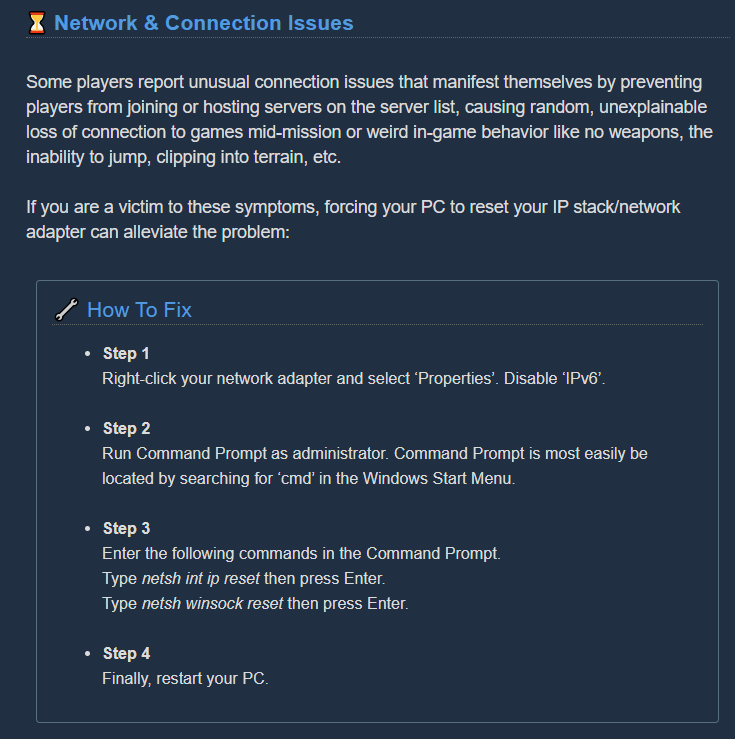
also are you playing on the ms store / xbox by any chance?
 uneven wind
I'm also being spammed by the bot
austere coral
that may not resolve your network issue, but you should still try it anyways
there's currently an insider branch available which replaces networking stuff that should fix it, however.
I'm also being spammed by the bot
@uneven wind https://discordapp.com/channels/257785731072786435/610403873697300480/750751495376338976
inner needle
now i cant connect to my friends game haha this game hates me
mossy breach
So idk if this bug has been encountered before but I just started getting this recently where the M.U.L.E gets stuck in an infinite loop
Bad picture sorry
Had to destroy terrain under her
I've dealt with it two times
It stacks the sounds on top of one another as well
crimson coyote
happens sometimes
 frozen wolf
not sure what this means but it prevents me from starting the game
I looked it up already, and followed a lot of steps to make sure everything was working such as verifying the game files, trying to run in compatibility mode, etc. but none of it worked,
So I looked up this specific error
And downloaded the missing dll file, putting it in the proper folder, yet it still won’t start
any help would be appreciated
graceful yarrow
Seems like it's missing a file needed to run, have you tried reinstalling the game from scratch?
Idk if it'd work, but if you try, just make sure to back up your save first on the off chance of your needing to replace it.
austere coral
Pinned messages for troubleshooting.
Although this is an usual situation. Usually you’ll only get that kind of error message when manually running FSD.exe as admin, not by launching through steam.
 atomic bolt
On some solo missions after leaving the drop pod bosco and molly don't respond for like half a minute (similarly to a connection issue) and the music track is also suspended it started happening like 1 week ago.
 modest warren
Everytime I enter the space rig, I get a message by the Interplanetary Mining bot that welcomes me. It's pretty annoying and only started to happen ~4 days ago.
 thorn apex
Just a minute ago I tried joining a game in progress and when I joined, it put me into a sort of free-cam mode where I could fly around and see what the other players were doing. I couldn’t leave the game and was forced to restart.
 shy fern
That happens with latency, sometimes joining a game as it fails. I've had it happen like 5 times.
 mental comet
Ok so I’m not sure if anyone has even noticed nor has posted about it here. But while customizing my characters I realized the dark future paint job can only be equipped while wearing any armor other than the dark future armor. I tried on all characters but when you choose the non dark future armor you’ll have the ability to choose the dark future paint. Idk if this is intentional or not, not a deal breaker just thought I’d point it out if it hasn’t already been so
 native rock
When the Dark Future armor framework is equipped, the default paint is the Dark Future paint job; it's just missing its normal icon, replaced with the "default" paint icon.
mental comet
So it’ll show no paint job but it’ll actually have the paint job of dark future?
It just doesn’t show up in the selection area either so I was confused
But I understand I believe. If you have no paint on that armor it’ll just be it’s default. Makes sense, wasn’t sure if bug or not.
native rock
It shows the "default paintjob", which is whatever paint comes with each armor framework; it was called "Company Standard" for ones bought in-game previously, but it was then changed to "default paintjob" for all armors.
At the moment, the Dark Future set is the only armor framework not acquired in-game, so it's a little confusing having the normal paint icon not show up.
 vale cliff
Please dwarven brothers, the bot won’t leave me be 
graceful yarrow
@vale cliff https://discordapp.com/channels/257785731072786435/258990272967475200/750611110738132992 read from here
vale cliff
Thank you!
crimson coyote
make that message a pin tater please
 simple iris
Is anyone else getting a notification from the bot every 45 minutes?
hidden depot
....
graceful yarrow
@simple iris click the link 3 posts above yours
simple iris
@graceful yarrow thank you
 dull bridge
anyone else have this barrel shadow load in when they walk past roughly that line?
doesn't show up at all from the other side, once you past that line
settings are high med med med med low
doesnt show up on all high so it might be a problem with medium shadows
 pulsar reef
I was already connected to discord and now everytime I sign in or come back from a mission I get a discord message that says I can join the union
vocal field
Yup. I still got it, been days now
dreamy quail
I got a couple messages like that but a few days back, nothing very recent. Just mute the bot until he's working fine again.
hidden depot
Anyone else got a bug where if you aren't hosting the drop pod just stays after you drop in?
been happening for me within the time frame of the last deep dive set and onward.
(this is happening in normal missions as well)
 mossy carbon
I have been getting pinged by the bot for joining the interplanetary mining union each time I go into the hub (after each mission or on initial load in) is anyone else having issues?
mossy carbon
just mute?
graceful yarrow
no
mossy carbon
got it, thanks for the help
crimson coyote
@mossy carbon https://discordapp.com/channels/257785731072786435/258990272967475200/750611110738132992 read from here
 hollow prism
Hi there everyone, after i finished this week's elite deep dive, I did not receive a blank and a cosmetic as well as exp and in-game currency. It seems like the stages are stuck at 0 (i got a video to prove). PS: I have received a weapon overclock after finishing the first mission.
It's my first time encountering this problem
austere coral
this happens usually when someone hasn't ticked over or restarted their game. You played last weeks deep dive, not this weeks.
austere coral
well as you likely haven't played through this weeks dive, yes. Be sure to check once you get in that the missions match up with what's in #deep-dive-discussion I'd also give your game a quick restart.
hollow prism
the thing is i have finish the last week deep dive
like i check yesturday and saw i finish all weekly core hunt and deep dives
 ivory zenith
tried to search whats up with having different sensivity on y-axis even though settings shows it should be the same
@misty cloak do you still have this problem? i have it too
its like having controller sensivity on mouse
since usually with controllers looking up and down is slower
i dont have controller plugged in
also dont remember having this issue couple months back
tawdry arch
Please, my game keeps randomly crashing with this error Assertion failed: [File:Unknown] [Line: 198] Unreal Engine is exiting due to D3D device being lost. (Error: 0x887A0006 - 'HUNG')
what do I do?
people keep saying look in pins but seriously I can't find anything
I've updated all my drivers recently, reinstalled the game idk what else to do
really starting to upset me
ivory zenith
the hell is going on with resolution settings 😅
screen mode does nothing and resolution is set [Hazard Level] only
austere coral
@tawdry arch the one that says "troubleshooting" and lists out that it's for crashes and poor performance.
https://discordapp.com/channels/257785731072786435/258990272967475200/720372688777904128
@ivory zenith I've seen that in the past, but I don't remember the solution to that. Are you playing on steam, ms store, or xbox?
ivory zenith
steam
austere coral
Start by going here and deleting all the files inside the WindowsNoEditor folder. They'll be regenerated on launch. \steamapps\common\Deep Rock Galactic\FSD\Saved\Config\WindowsNoEditor
Second verify game files for DRG.
that'll look for missing files from the install, but I don't believe it'll replace corrupted files.
ivory zenith
actually just did that and reinstalled the game but gonna do it again
does the game have other config files somewhere?
like in appdata
austere coral
not that I'm aware of
austere coral
If that doesn't resolve the resolution issue, try this. Open GameUserSettings.ini in your favorite text editor.
Change FullscreenMode to 0 for fullscreen, 1 for windowed borderless, and 2 for windowed.
Edit ResolutionSizeX & ResolutionSizeY to your native resolution. Do the same for LastUserConfirmedResolutionSize
Save the file
it's a temporary workaround, but it should get you your desired display settings
austere coral
change it to your desired resolution if you want. DesiredScreen is not in my config file so I can't reference it.
ivory zenith
huh
okay the game overrides the fullscreenmode in the .ini, resolution seems to be correct
ill try putting it in read only
hmm having it in read only still puts the game in windowed fullscreen
even though the .ini shows the value is 0
ivory zenith
in the GameUserSettings.ini?
austere coral
yup
austere coral
as long as it's in that first section I don't think the order matters
ivory zenith
still broken, even if i set it read only
if not read only it deletes the line
then again the fullscreen option was not my primary problem, its the mouse axis difference 😅
i could always play with fullscreen windowed but having different values in mouse axis is problematic
austere coral
there's a MouseXSensitivity and a MouseYSensitivity in there
ivory zenith
they are the same value; 400.0
austere coral
play around with them, see if you can get the sensitivity you want. As for the display issue, I'm not sure.
ivory zenith
hmm i guess theres no other way, its gonna be pain in the ass getting the values to 1:1 😄
tawdry arch
@austere coral The supposed fix for my specific crash consist of either activating Vsync which was already always active, to update my graphics drivers which I have done last week, perform a clean uninstall of the game which I have done also
but the crashes just persist
I've tried everything from googling to asking on steam forums but nothing works!
austere coral
so you've done everything listed here (from the pinned message) including the stuff in all of the linked threads from steam? https://i.imgur.com/69f7dI3.png
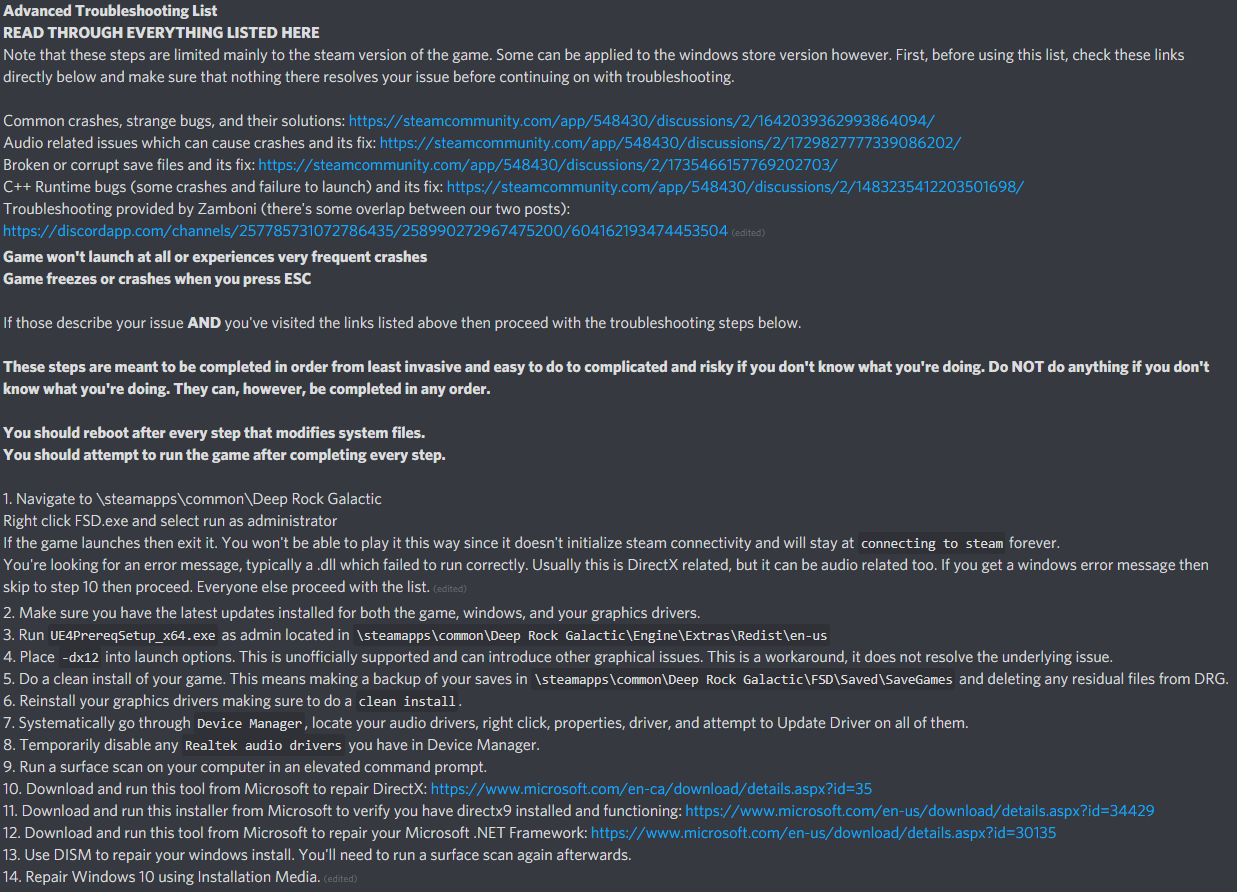


 sinful imp
Hello, I would like to report a possible bug where resources such as Nitra, Gold, Croppa & Morkite can phase through the ground.
The same occurs to tools like C4 or Shield Generator.
Frequently occurs when jumping or for both cases of resource and tools it happens at a certain height.
In unfortunate cases, the Morkite chunks that have phased through the ground cannot be replaced and therefore making the objective impossible to complete.
Here are some clip examples:
crimson coyote
this happens. terrain bugs out. it's on the devs radar :)
sinful imp
Thanks
crimson coyote
yep :)
 gritty axle
Has anyone else experienced a softlock while salvaging minimules? We've looked everywhere for legs for the last minimule but they are nowhere to be found
crimson coyote
@gritty axle what biome were you in
gritty axle
crystalline caverns
gritty axle
I guess they probably ended up clipping through the terrain or something
crimson coyote
if that ever happens, hop on back to the droppod room and grab the extra leg in there
 scarlet jewel
hello, are there still problems with discord & the union integration? for some reason my game is no longer linked (the terminal does the whole open-the-browser thing), but no matter how many times I do it, or how many things I restart - it won't link
thanks in advance!
scarlet jewel
I read that - I am getting the message from the bot (lots of them)
but I guess I'll try those steps and report back - playing the win store version this evening though, but thanks
crimson coyote
I read that - I am getting the message from the bot (lots of them)
@scarlet jewel if you want them to stop, just mute the dm :)
 hearty meteor
Im having the same issue, no longer linked in game as well
frozen wolf
So I got the game to start, but now it just goes through the two logos and then stops at a screen saying “waiting for steam to load” and I’ve done everything it’s telling me to do but it isn’t working
austere coral
are you launching the game through steam or do you have a shortcut on the desktop directly launching FSD.exe?
@frozen wolf
frozen wolf
Steam
austere coral
are you running any kind of server on your computer?
frozen wolf
No
 craggy epoch
Sometimes when using NVIDIA GeForce Experience photo mode some weapons and the laser pointer break, https://youtu.be/bH1rN0125fE
I just had this happen to me on a HAZ 4 mineral mania, very frustrating 🤷

I tried to use NVIDIA GeForce Experience photo mode to take a nice screenshot. This did something that prevented the use of the laser pointer and more importantly the use of my shotgun.
My game had Spotify going at the time so I edited out the audio and put a song from the g...
 foggy coral
Bug: Levitating evacuation capsule (Escape drop pod in air)
Steam v5218283
Game v1.31.41601.0
Update 31 Hotfix 5
https://steamcommunity.com/sharedfiles/filedetails/?id=2218660517

Steam Community: Deep Rock Galactic. Levitating evacuation capsule (Update 31 Hotfix 5)
 tropic ibex
Quick question are there bugged or modded servers in this game? I started playing a good month and a bit before my mate. My mate who has less playtime than me is now a higher company rank than I am. Only think I can think of is modded servers or the fact that he has levelled all four of his dwarves to rank 25 while I have exclusively done the driller
graceful yarrow
It would seem your friend has cheated
frozen wolf
Or just grinded but there’s a chance of both I guess
tropic ibex
Well that begs the question how does one cheat XD
graceful yarrow
And it's a question that is not to be answered here. We don't want people spreading cheating methods.
 opal sierra
uh i keep getting the same "Youve been accepted into a mining guild" message from the bot over and over
mossy breach
theres been bugs w/ the map / terrain one group i was playing with lost due to a tower of rocks being cut off but not going away (note we did check w/ C4 and also Driller drills there were no other connections at all) and also with the grabers on the last EDD when 4-5 spawned they would all pick some one up at the same time and crash the server alot sooo idk whats goin on there (note this was the EDD from last week)
tall crow
So umm we did the new deep dive mission and for the life of me can't find the last morkite, we searched everywhere...is this just bad rng or the map itself
 tulip oak
im having that problem right now
tulip oak
i dug all around the drop pod
because someone on the reddit said when the finished like 40 morkite was in there
because the drop pod landing on a vein or something
tall crow
Ooo
tulip oak
i think this deep dive is just unlucky
vocal field
how many times am i expected to leave discord to fix bot?
tall crow
Nope
Still nothin
Yep
Or
U just have to be lucky to have dark morkite at the start
tulip oak
that is the way
tall crow
Kinda sad 2 hours in just 1 morkite left
tulip oak
ill just drown my sorrows in the abyss bar
tall crow
Same
 sick dune
so, is the rocket jump overclock for the deepcore supposed to propel you upwards regardless of your orientation? because I feel like that's not intended
sinful imp
The stage 3 deep dive seems to have barely about 150-170 Morkite.
If in unfortunate cases, the same terrain bug that I posted above is eating up some of the Morkite chunks as it falls either from a certain height or as bosco is mining might mean that you will not have sufficient enough to complete the mission.
Which I also spent 2 hours searching around the entire map repeatedly until I had to abort and restart.
I managed to complete it by just manually mining the Morkite veins instead of having Bosco or letting it fall to gravity.
Dark Morkite would definitely make it easier but if you don't want to wait for the beer to show up, its still possible to complete the deep dive if meticulous enough.
 slender jay
The stage 3 deep dive seems to have barely about 150-170 Morkite.
If in unfortunate cases, the same terrain bug that I posted above is eating up some of the Morkite chunks as it falls either from a certain height or as bosco is mining might mean that you will not have sufficient enough to complete the mission.
Which I also spent 2 hours searching around the entire map repeatedly until I had to abort and restart.
I managed to complete it by just manually mining the Morkite veins instead of having Bosco or letting it fall to gravity.
Dark Morkite would definitely make it easier but if you don't want to wait for the beer to show up, its still possible to complete the deep dive if meticulous enough.
@sinful imp me and my buddy had the same problem...
sinful imp
Seems to be a common problem for this week's DD lol