#bug-discussion
1 messages · Page 132 of 1
 worn belfry
 pulsar falcon
@worn belfry this is exactly my problem too dude, read my conversation above w loan ranger and craftedlava
 dire tinsel
can someone let the devs know that the word "charging" in the Mission Control voiceline for an Ebonite machine event is mispelt as "charing"?
worn belfry
is there a way to manually save? cause I'll just start doing that between each mission if I can
literally just unlocked a gun that I unlocked 2 times before it's ridiculous
I've even run missions using said gun
 tiny thistle
why does typing enter suddenly cause my resolution to change
 lapis gull
 cedar cedar
time
pulsar falcon
@austere coral
 eager socket
Hi all, I'm having a problem where friends drop from my game a bit after joining, and I can't reinvite them. The Xbox game bar overlay invite has "invite to game" grayed out, and the in game friends invite buttons are un-responsive. Same thing happens when I join their hosted games, same issue. I'm on PC, they are on Xbox, the problem occurs regardless of who is hosting and who has joined. Help?
been going on for the last update at least. I can play with strangers but not my friends...
everyone drops at once from their game, or mine, leaving only the host.
 austere coral
@pulsar falcon Keep an eye on those and see if any changes occur. It's possible something is preventing the game from writing to the save files. Verify that steam cloud is enabled for DRG. \steamapps\common\Deep Rock Galactic\FSD\Saved and right click SaveGames then properties. Make sure read only isn't checked.
@eager socket Check out pinned messages in #xbox-and-windows-store
eager socket
I'm using Microsoft store version, let me see
not sure which directory the game is installed in for windows store, looking
austere coral
the first half is for the other guy. Your networking issue is going to be in pinned messages in #xbox-and-windows-store
eager socket
ok
pulsar falcon
@austere coral it was checked, so I just unchecked it. let's hope it's fixed!
Thanks again for the assistance
eager socket
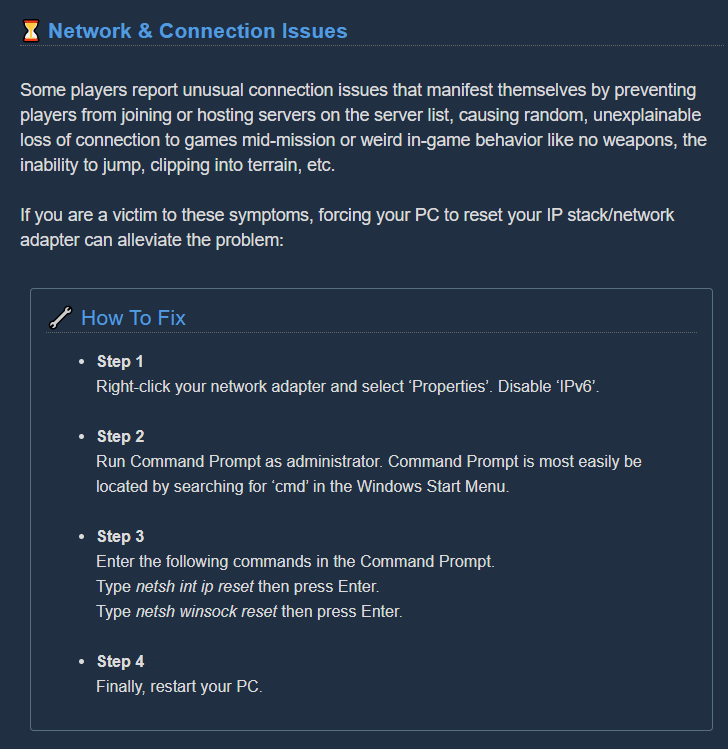
Ok, my Xbox Networking settings all say NAT=Open Server=Connected, I also just did the admin CMD network reset (netsh int ip reset + netsh winsock reset + restart) just before this
not sure what else to try, both me and my bro in law drop even when my other bro hosts via strong comcast cable connection on his Xbox
so it happens to my bros when they join me, and it happens when I join theirs, not able to re-invite, cant access the friends invite buttons or option from xbox game bar overlay to invite to game
OK, I just tried it again, everything is reporting good, invited my bro into spacerig and it dropped him and now I cannot re-invite him
makes me quit and relaunch the game to be able to invite
really want to play with my friends and not strangers 😦
 shy fern
Luckily the next update will be completely nuking the current awful matchmaking on the xbox and windows versions and replacing it with all brand new stuff with a lot less issues.
 spice hollow
anyone have sound issues for the past while now? it's kinda hard to describe, but i'm running 5.1 over spdif (optical) with dts connect to a home theatre setup, and it seems like the channels are flipped... so usually sounds that i'd expect to hear out the front, come out of the rear
 crimson coyote
@spice hollow could be any number of things. I'd start with hardware things first. Check what you've got plugged in and make sure it's plugged in all the way/in the right place
 surreal trail
Cannot fire while sprinting; bug or feature?
crimson coyote
Feature @surreal trail
And i thing it's the other way around really. Can't sprint while firing. Since i believe firing cancels sprinting
 mossy breach
Hey there! I have no ingame Sound. I tried everything from the internet..install, deinstall, reinstall, update drivers etc. Seems like that this is a common problem? Can anybody help me out?
 native mesa
Did you check your computer sound settings and/or your device (like headphones) sound volume settings or mute options?
spice hollow
@crimson coyote it's only DRG that i have this issue with though 😦 i think it started around when 1.0 was released, and sorry, it's "dts interactive" not "dts connect", via onboard realtek audio. most other games have a "surround" and "stereo" audio setting though, anything tucked away in an INI file or such i could edit?
austere coral
Check pinned messages. It seems some external audio software can cause issues.
 raw coyote
i think i just found a bug
with the jukebox
so when its playing
if you go over to the wardrobe (i think every terminal) and interact
when you exity
its not playing, but it acts like its playing, with the "stop" command on it and the speakers fluctuating in size
crimson coyote
Check pinned messages. It seems some external audio software can cause issues.
@spice hollow in case you didn't see this. Loan sent it. Since it's only drg it's software
 peak palm
So uh if terrain gets too wonky the mule will not be able to advance to where you want it to go
 cloud gazelle
Hi. Is it possible to only have voice chat over headset, while the rest of the audio goes through regular speakers?
spice hollow
i guess the thread that mentions setting "bDisableMasterEQ=True"? i had tried the ingame option of "disable master eq" which did nothing, but this INI file seems like maybe it helps... i'll do an actual play through later though
 edgy mountain
 meager estuary
@edgy mountain read the pins
 glacial terrace
err resurce
@edgy mountain It's rare item, not bug and it gives you a lot of xp 🙂
 misty cloak
have the devs responded abt the around 10% x y axis difference?
or am i the only one who gets worked up abt it
 waxen valley
Suffocating on a zipline, left me unable to be revived, but I could still attack.
austere coral
@cloud gazelle Ingame voice only through your headset. I don't think so, no. You could probably manage something by running discord audio through a different audio device, but I don't think there's a way to separate the game audio from voice chat.
@pulsar falcon Let me know if that resolves your issue. I've seen it happen a couple other times, but no one has reported back if its solved or not.
pulsar falcon
@austere coral will do! Have to run a couple games with my friend and I'll definitely report back
 fiery timber
It seems like once you select a multiplayer mission from the map, and you're taken to the character select screen, it's not possible to 'cancel' or exit back out. I may be missing something, but even hitting 'B' selects a character and sends me on the mission. It might be a match-making thing, but there's been multiple times when
I've accidentally selected a mission because the list order moved, and I've been unable to exit. Is this intended or a bug? Has anyone else experienced this? ty!
 hearty elm
Here to echo a couple people in the beginning of June who said the Bullets of Mercy OC's bonus isn't visible when equipped, making me wonder if my gun even receives the bonus at all
 scarlet jay
Caused by a Mactera Grabber
 faint shoal
I have tried everything and game still broke, I cant connect to play with my friends who are on xbox, pls send help
 nimble galleon
if you are on steam there is no crossplay
faint shoal
not on steam, bought it off of the microsoft store
 dreamy quail
Xbox and microsoft store have crossplay but the framework is super buggy at the moment
Check pins in #xbox-and-windows-store and ask around in there
 obtuse oriole
It’s possible to get stuck on the drop pod: if you die on it and the platform/bridge extends over you you get stuck and can’t leave even if revived.
 half mantle
anyone knows what that error resource is?
 hazy meadow
 mint flax
austere coral
mint flax
austere coral
both of those are known, the mule teleports inside the pod with about 10-15 seconds remaining.
crimson coyote
days since last stuck mule bug report
0
 native rock
At least that one is actually a bug...
crimson coyote
Heh
 honest ember
Hi does anyone know a solution for no sounds in game
when the game starts the intros have sounds but when i'm in lobby or in a mission there is no sound
austere coral
pinned messages
crimson coyote
?
 buoyant depot
Had a fried play gunner and couldnt get off a zipline, he died and was still in the first person and could still spin around. couldnt res them so we killed ourselves. he had to leave before the game considered it a failure

 copper cloak
(╯°□°)╯︵ ┻━┻
 golden stump
have a guy who apparently gets thousands of resources per node... should I do something bout that?
austere coral
It depends on the circumstance. The beer pots o gold increases the amount of gold mined, but not to the level of thousands of resources. If they're getting that on everything then your only real option is to leave their game or kick them if you're host.
austere coral
yup a crassus with pots o gold can give quite a bit.
golden stump
he mined 4-5 parts of morkite and deposited 2138
austere coral
yeah he's a script kiddie
golden stump
he also is player level 2108
austere coral
you can either leave or kick him if you don't want to deal with that. There's no reporting system.
austere coral
I wouldn't say no one cares, it's more that someone cheating is less significant in a coop pve game.
golden stump
fair point
copper cloak
(╯°□°)╯︵ ┻━┻
golden stump
another thing... I have that symbol in the equipment screen, that there's new stuff, but there is no new thing and that marker doesnt go away
that stuff
 umbral nacelle
need to restart
golden stump
k thanks
copper cloak
(╯°□°)╯︵ ┻━┻
austere coral
Do you need assistance with something? @copper cloak That's the third time you've posted that in #bug-discussion
 torpid void
We were a bit panicked, so I forgot to get a SS, but we just ended a mission where the drop pod came down NEXT to a chamber, not attached to it. had to platform up a wall and into the ceiling to get to it... we were confused when molly didn't take off when it hit.
got back to spawn, pod was 13m above chamber. knocked open a path, molly came after that, and we got out.
 lost arrow
hey has anyone encountered an issue where the assignment board says server error
austere coral
Your best bet is going to be to exit the game, close steam through task manager (after it finishes syncing files), verify your date time timezone and daylight savings are all set to automatic, restart steam, then restart the game.
austere coral
I'd give your computer a restart then
lost arrow
i've done that since the issue arose
 tired heath
im having a odd resolution issue where my ingame resolution is set to 1080p but its not 1080p and the game is also showing up on my second monitor but its frozen there
i tried manually setting the resolution in the launch options wtih -w 1920 -h 1080 and it did nothing
austere coral
I'm not sure if those specific launch options will work. You can manually edit the GameUserSettings.ini located \steamapps\common\Deep Rock Galactic\FSD\Saved\Config\WindowsNoEditor to try and force a specific resolution. You may try playing around with FullscreenMode to see if it's a specific display issue.
meager estuary
im having a odd resolution issue where my ingame resolution is set to 1080p but its not 1080p and the game is also showing up on my second monitor but its frozen there
@tired heath next time this happens
check your Resolution Scaling setting.
It can be adjusted to make your resolution appear as lower gor better framerate
You might have lowered it by acident
tired heath
i think it might of been the nividia drivers conflicting with the amd drivers @meager estuary since it started when i installed a nividia gpu as a second gpu
 burnt shale
I believe this was caused by the search failing and letting me exit the mission select, then open the quick join menu again
 acoustic plover
Hello guys, this is not completly a bug. My frame rate is always locked at 30. I don't know how to solve this... I redownloaded the game and I double checked the options but It didn't work. I, when I had a not-so-good grapic card, locked the framerates at 30 FPS with Radeon Settings. I checked Radeon Settings too, but the setting was disabled, so the problem isn't caused by that...
 fallen hill
@acoustic plover What about the in-game options? Have you set a Max FPS?
fallen hill
Does disabling the program temporarily fix it?
 fathom parcel
*Machine Thingie has been walking in circles after I called in drop-pod. 😄
the issue has resolved itself after me just standing afk here for about 12 mins. So I don't really know what triggers it.
dreamy quail
Molly just be like that sometimes
Try digging aroud her next time she gets stuck
It should reset her pathfinding
 ripe hemlock
I am having difficulty with getting the game to display on the correct monitor. Every time I launch the game it launches on my secondary monitor rather than my main display. This is greatly annoying, as I either have to unplug the display at my computer or put the game in windowed mode and drag it across, etc etc.
From some googling I’m inclined to think this is due to the game incorrectly recognising the monitor numbered #1 by windows as the main display rather than monitor #2 which is actually set as the main display.
However I’d be happy to be proved wrong!
 subtle escarp
After the update my game started to freeze after loading in
and i can do anyhting with that
before i was playin it alot, and this kinda makes me sad
Processor Intel(R) Pentium(R) CPU G3460 @ 3.50GHz
Video Card Radeon(TM) RX 460 Graphics
RAM 8.0 GB
Operating System Windows 10
 hollow moth


 tough dragon
i lsot abot 2 h of my game
dont know how to get it back it isent listed on save files
@here pleas help
meager estuary
@tough dragon uh try to go to the menu
like the esc menu
and look for the backup options
if its not there, well you have to play 2 hours
 dawn lotus
Bug happens 5 out of 10 times
[Steps to reproduce:]
- Lock your framerate to 30 FPS
- Use the EPC with Thin Containment Field to mine minerals
[Expected Results:]
Minerals fall in a nice pile, ready to be picked up
[Actual results:]
Minerals fall through the floor, only leaving sadness
Dunno if my PC is to blame but hey, that happens 🤷
tough dragon
ok ty
austere coral
@dawn lotus That has to do with the velocity of the minerals. If they go too fast they'll phase through the ground and wind up teleported to some other section of the cave. Fortunately they don't just vanish. It's not an issue with your PC.
@subtle escarp Check pinned messages for troubleshooting. A black screen could be anything from a corrupted save, missing/corrupted directx files, or even a bad video driver install.
@ripe hemlock Someone else had a related issue where it showed up on the secondary monitor. Their resolution was to reinstall. It's only a 3GB game so it shouldn't take too long. I'd also double check the nvidia control panel > set up multiple displays > verify that your main monitor is indeed set as your primary display (designated with a "*")
 hazy pecan
Blame the lootbugs if you can't find the minerals I guess, when it phased through and get teleported somewhere
 trail cipher
I've wiped my computer a few times for new hardware updates and what not in the past year or two. This has caused me to lose hundreds and hundreds of hours due to my cloud saves seemingly disappearing. The first time I lost all my progress, I worked back almost to where I was then they added the restore save option and I was able to restore my oldest saved progress which mysteriously appeared. This last time I wiped my pc knowing I had cloud saves on steam and would be able to recover my progress. I load it up this time and there is no save from anything. I love this game, completely worth the money but I don't want to work all the way up to promotion again
austere coral
@trail cipher Verify steam cloud is enabled. Right click DRG > properties > Updates > and make sure Enabled Steam Cloud Synchronization is checked.
As for your save data, I think @shy fern may be able to help you out. Send him a PM.
 urban tendon
Completing a solo mission in a friends only game doesn't count towards solo game statistics
ripe hemlock
@ripe hemlock Someone else had a related issue where it showed up on the secondary monitor. Their resolution was to reinstall. It's only a 3GB game so it shouldn't take too long. I'd also double check the nvidia control panel > set up multiple displays > verify that your main monitor is indeed set as your primary display (designated with a "*")
@austere coral This has not solved the issue. In addition to this I cannot get the game to display at the correct resolution on the correct monitor unless it is windowed.
 rotund haven
*Machine Thingie has been walking in circles after I called in drop-pod. 😄
@fathom parcel that is mollie
 stoic tundra
Hey everyone so I got a pretty strange bug, I've been playing offline solo a lot due to internet issues. I got my gunner to his second promotion, did the four mission assignment offline, and got the promotion. However, the mission didn't clear. It said I still had one more mission left in the assignment. I didn't know if it would give me an extra promotion or if I should just abort the mission. I played the aquarq extraction again, and it said that I was up for a promotion. I checked the terminal in the memorial hall, and sure enough, the third promotion for gunner is available. The mineral and credit cost is higher than it was for my second promotion, so I am assuming it is actually my third star promotion. I don't want to buy it cause I want to earn each promotion on all my characters, but I'm not sure what will happen when I actually get my gunner to level 25. Will it give me another assignment that will skip the third promotion? My gunner is level 2 after his second promotion atm and the third one is purchasable but I never did the assignment for it. Anyone know what I should do?
austere coral
Are both monitors plugged into your gpu?
Make sure the game is using your dedicated gpu when it's trying to run rather than integrated if you have a cpu with integrated.
Do a clean install of the latest graphics drivers.
@ripe hemlock
There seems to be a small bug related to playing offline. Yes, if you pay to promote again then you'll be given the 3rd promotion and the character reset to bronze 3 level 1. Leveling up to 25 and doing the assignment then will give you silver 1 level 1. You can either pay for the extra free promotion and jump to bronze 3 or you can try to revert your save. ESC, options, restore save. @stoic tundra
stoic tundra
What if I were to get to level 25 and buy the bronze 3 level 1 promotion without doing another assignment? That would reset my level, so would the next assignment be no longer available and I'd be back on the normal track?
austere coral
it should be back to normal
stoic tundra
awesome, thank you!
 wide brook
anyone else ever experience the mule breaking when you're heading back?
Molly just kinda paced back and forth dropping the way points
thank god the pod just opens up at 10 seconds left with or without the mule lol
dreamy quail
very common issue, digging around her is advised in order to reset her pathfinding.
 tardy scarab
not photoshop, infinity bomb and grenade, 1-shot ko, fall damage instant death, no cheat..
 graceful yarrow
You were playing with a cheater
fathom parcel
@rotund haven Thanks Cirrus, Guess we all learn something new everyday 😄
mossy breach
Hello, this bug or whatever i can call it is not happening to me, but im asking for my friend. Nearly every mission his pc goes of when we need to go back to the droppod. He has a decent pc that fits the recomandations and it never lags. Its only in deep rock too, his pc is also not overheating or anything. Games with higher graphics work perfectly fine for him and it dosent happens. We think its because of the game because as i sayd its only happening in deep rock.
fallen hill
Ask him to limit his FPS and see if that has any effect on the crashes.
mossy breach
he allready got an fps limit
its really wierd that his pc just goes off, its not like the game crashes, it his his pc that turnes off, never saw something like this before
austere coral
Like the whole thing shuts down?
mossy breach
yep
the pc turns off
completly and than he needs to turn it on again and its allways when we leavethe mission, and the problem is he dosent gets the rewards than because he cant come that quick back anymore
austere coral
What are his system specs and does he experience a drop in performance before the system shuts down?
ripe hemlock
Are both monitors plugged into your gpu?
Make sure the game is using your dedicated gpu when it's trying to run rather than integrated if you have a cpu with integrated.
Do a clean install of the latest graphics drivers.
@ripe hemlock
@austere coral The first part wasn't applicable to me. The second sort of worked, had to uninstall the graphics card and reinstall it.
mossy breach
@austere coral
AMD Radeon R9 200 Series, 16gb vram, Intel(R) Core(TM) i7-2600 CPU @ 3.40GHz
 frozen hemlock
[experimental] Something is wrong with the gunk seed sprite, right?
[experimental] BRT7 Burst Fire Gun, overclock Electro Minelets.
Isn't convert in to a typo? Perhaps should've been convert into?
As a proof, it's into in the same situation but with another weapon.
austere coral
Bugs for the experimental branch should go in #experimental-bug-discussion and the experimental branch is out of date at this moment in time. Current version of the game is 1.31.41601.0 where as the experimental branch is 1.31.40960.0 @frozen hemlock
There hasn't been a test pushed to the experimental branch for a couple months.
@mossy breach Have him monitor temperatures for both his gpu and cpu while playing drg. A complete shutdown is indicative of components overheating and shutting down to save the system.
frozen hemlock
austere coral
Didn't see that. Ignore what I said.
 desert breach
I found a bug with the gunner's throwable shield, where when you use it or throw it to use, it just passes through the floor and dissappears.
The Driller's C4 happens the same as the gunner's bug.
mossy breach
@austere coral
#8886 its devenetly not overheating he can play games like generation zero that take a lot of system and it dosent happens its just in deep rock and the game is not that heavy
austere coral
Games utilize resources differently. DRG is one of the few games I play where the fans occasionally run at 100% to keep my parts cool. One piece of software can be perfectly stable while another won't be with the same hardware. I recommend that he monitors his temperatures while playing. If that doesn't wind up being the issue then it's likely audio related. In which case do this https://steamcommunity.com/app/548430/discussions/2/1729827777339086202/ and if that doesn't solve it then he'll need to look at pinned messages and go through the troubleshooting steps listed.

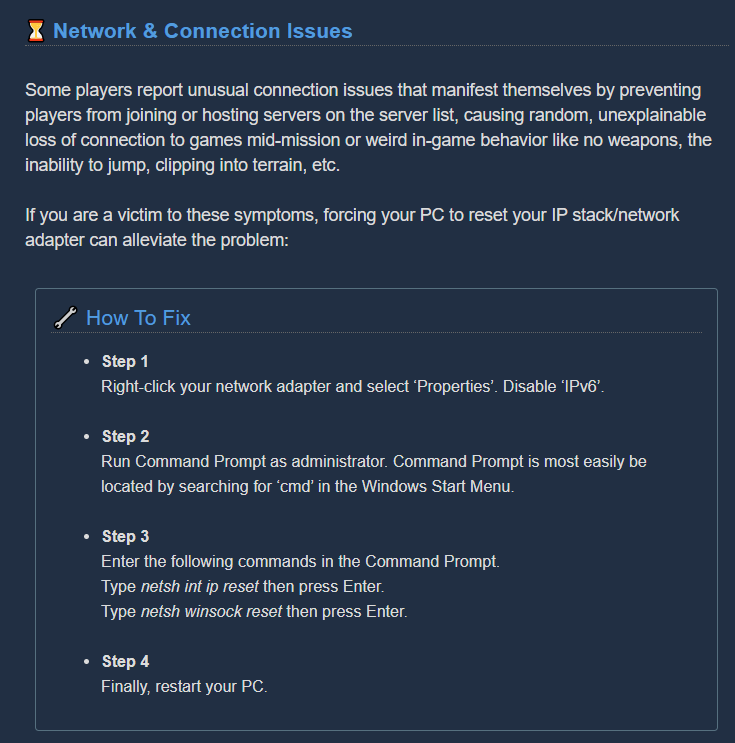
Hi all Some users are experiencing stuttering/low fps/freezes and Alt+Tab issues when using a combination of AMD FX Series CPU's and Realtek Audio sound, it has also been observed on other combinations, f.eks Intel and Realtek Audio. If you are having issues as described above...
mossy breach
Ok we will try it out thank you
obtuse oriole
bug/exploit: DRG has zero to no protection against abnormal player inputs. it is fully possible to use macros to perform abnormal actions. thus far i have found the following
- b-hopping (preserves momentum, works less in Multiplayer, but it allows you to greatly mitigate slowdown effects from goo/shooting minigun/similar)
- m1 spam that allows you to shoot your minigun faster than normal, without generating any heat whatsoever
- depositing MUCH faster than normal (depositing around 200 units worth of minerals in less than half a second)
and importantly:
- overloading the game with player inputs, leading to the game being unable to execute on current plaayer inputs. seen below with a pic where i am shooting the minigun (building heat, ejecting spet cases etc.), but not actually firing bullets
 karmic basin
do devs look at the steam forums?
I posted a few bugs but got no response or acknowledgment
just had another one and not sure if i should bother posting
We are active on the Steam forums and on our discord
hmm an acknowledgemnt would be nice at least, there's ~10 posts a day on steam forums its not that much to go through
 broken thistle
this isnt a very big bug, but whenever I go into the lobby the interplanetary miners union bot sends me a message, each time so it spams me
austere coral
Rejoining the discord server should resolve that.
 umbral rose
-Using the Double Barrel overclock onto the scout shotgun, i've encounter a situation where i had an odd ammo number left (maybe relative to holding down fire button to shot as soon as reloaded [haven't been able to reproduce unfortunately])
-Once the very last ammo is loaded in the shotgun, taking a last shot makes the game try and fire 2 rounds (due to the overclock) but can't find the second ammo, which ends up in an erratic loop of the out of ammo "click" sound (the shot is still taken, damages dealt, ammo to Zero, no lack in animations...) this sound bug cancels with a weapon switch
Nothing too broken it seems, just some fine tunning, hope it helped somehow
 soft basin
Just encountered this in a game, the MULE was just walking around in circles on the drop pod. After a bit it disappeared and we got to leave, so it wasn't game breaking, just annoying. But it could have been if we were really desperate.
 dire flame
Not sure if this is an already know bug.
A few times ive used a cryo cannon to freeze a grabber. If the grabber falls on you or touches you end up glitching thru the floor.
You see the map slowly disappearing as you fall and your dwarf acts like hes been grabbed.
 white field
I remember a bug where the korlok tyrant weed stays alive ans stuck
1/3 health
Not regrowing
not dying
white field
Known?
meager estuary
I remember a bug where the korlok tyrant weed stays alive ans stuck
@white field theres a bug of korlok being stuck and not opening ever since the experimental version
it seems like it got way rarer now
dire flame
In addiction to the bug where the grabber glitches you when you freeze it. Had a mission where the other team members managed to drill down and find me randomly after it happened. Once they revived me I became invisible except my guns. Was freaky.
meager estuary
@dire flame known issue
i had this issue today when i disconnected, rejoined, fell through the ground and rejoined
except my camera was teleported to the starting area
it moved to somewhere nearby after a while idk why, but it was p creepy
crimson coyote
@soft basin it's a know bug. devs are working on it. there are fail safes for all missions now though :)
 white gazelle
playing a Point Extraction with Low Oxygen (In the current Deep Dive) and going from either my close-by resupply pod to the mine head or from the mine head to the resupply pod causes the latter to not give oxygen
mossy breach
Had the same issue, mine head not giving oxygen at times
 tawdry arch
Game crashed three times with the same log on the same mission (when in the drop pod is drilling down at the start of a mission). I tried switching biome and turns out it only crashes on sandblasted corridors
austere coral
Do this https://steamcommunity.com/app/548430/discussions/2/1729827777339086202/
if that doesn't work then work through the troubleshooting guide in pinned messages @tawdry arch
Hi all Some users are experiencing stuttering/low fps/freezes and Alt+Tab issues when using a combination of AMD FX Series CPU's and Realtek Audio sound, it has also been observed on other combinations, f.eks Intel and Realtek Audio. If you are having issues as described above...
tawdry arch
So I waited for the missions to reset, tried another sandblasted corridor mission and worked fine
Alright
Oh game crashed again but now on salt pits
Looks like it only crashes on my assignment mission which is elimination
@austere coral Also I don't have AMD
austere coral
the naming scheme of the fix is misleading. It's a resolution to an audio issue. Your actual hardware is more or less irrelevant. I've seen it fix issues on systems with no amd parts or realtek drivers.
austere coral
If it keeps crashing I'd recommend making a manual backup of your saves then doing a complete reinstall of the game.
tawdry arch
I'll verify integrity of game files first to see if that works
I didn't crash
Gonna finish the mission and see from there
 wind hull
Just joined a game where the host was in for 2 hours. Loaded in and just drilled through the base of the map, then fell forever into darkness. Graphics eventually centered on the drill portion of my entry pod, then went back to floating in space beneath map. Class: Scout, joined an Engi single player.
 wanton basin
Just throwing a reminder out there that explosive goodbye for the breach cutter still isn’t working properly when detonated
 crimson ravine
Fix the iron cyclops with the black crag paint job on the menu screen the light is a dark red, but on the character it’s a bright yellow, fix please
 reef charm
the....shadows didn't load???
 broken brook
mat_fullbright 1
 neon forge
Does everyone else see the visual bug that the Gunner's goggles or goggle cap with the "Dark Future" skin color has no reflection in the lenses of the goggles? They're pitch black but other skins fix the issue.
Also, I have a glitch where my friend who joins maintains his custom color but adopts the appearance of the armor type I selected for my gunner, when he joins as a gunner
 vast ocean
 outer marlin
my friend has had a bug that has prevented him from getting rewards from missions, due to an in game crash. sometimes this would happen at random times, but now it has gotten to the point where he cannot play the game. we have tried deleting and redownloading the game, but that does not work plz help.
 whole arch
I'm having an issue with some of the achievements where I'm unable to unlock a select few while the others seem to work. I just completed an elite deep dive with some friends and while they got the achievement for it, I didn't. Same thing happened a couple weeks ago when I attempted "Like a well-oiled machine". I have since gotten "Full Team Ahead" as well as some achievements for other games, so I'm not sure if it's a problem with me or DRG or both.
white gazelle
found a weird omen modular system that's invisible on my end, visually bugged on my friend's end, completely unusable. Mysterious.
nimble galleon
its cause it spawned close to droppod
omen acts differently than others when destroyed so you can see part of it
white gazelle
well, I can't see part of it, but the Scout could, so I guess that's a different issue
 brittle mulch
Hi everyone, Ive got a problem and hope to find an answer here. Basically, recently my micro in game has stopped working (people dont hear me talking). Micro and my pc in general are totally fine, so it is something with the game. Do you know any solution? P.s. obvious solutions, like restart pc, game, steam do not help.
brittle mulch
Problem solved
fallen hill
What turned out to be the solution?
 rose palm
I am currently experiencing this bug: https://ghostshipgames.atlassian.net/browse/DRG-347
and was wondering if anyone had found a fix, as the one suggested does not work on my end
 cosmic turtle
@rose palm same problem here.
 blissful ravine
Hey guys, did you ever get you saved copies from other account? I have problem on my Xbox, my save is overwritten with save from anther profile. Do you know is there any chance to get my save back?
graceful yarrow
@placid vale that's not a bug, and duplicate suggestions get deleted for ease of the developers seeing new ones
austere coral
@blissful ravine You might have better luck with pinned messages in #xbox-and-windows-store
 placid vale
how do u know what is duplicated and what is not
graceful yarrow
Search function
placid vale
hm
blissful ravine
@austere coral thanks, going there.
placid vale
when i use the search bar it just searches the names of ppl
graceful yarrow
If you want to discuss this further, you can use #suggestion-discussion
 past lagoon
Dash and IW do not give immunity to slasher's slowdown. Is it a bug or the problem is slasher puts a "stun" effect on you, not a "slowdown" one? If so, I suggest changing descriptions for stun/slowdown/dash/IW to make it clear that slashers still affect your speed.
frozen hemlock
Problem solved
@brittle mulch What turned out to be the solution?
brittle mulch
Going to steam voice chat settings and changing "default" micro to a specific one.
 slow charm
Sick and tired of glitches where you get stuck in drill platforms, drop pod ramps etc.
Just ruined a deep dive for me
shy fern
Learn from your mistakes for those 2 issues, although that should be addressed.
 glass wedge
anyone having a issue with changing the suit cosmetic but it just displays the default? Only happening on my enginer
 formal viper
is this a known issue? Cant do weekly assignments or deep dives.
What i see at Deep Dive Console. Anyone seen this or know of a fix?
 muted bloom
Just had a random crash long into a mission with 3 others, I was not the host luckily; First my game froze for a few seconds before I got black screened and eventually the game closed. I could still hear sounds while it was black. Not sure what caused it to happen.
obtuse oriole
Dash and IW do not give immunity to slasher's slowdown. Is it a bug or the problem is slasher puts a "stun" effect on you, not a "slowdown" one? If so, I suggest changing descriptions for stun/slowdown/dash/IW to make it clear that slashers still affect your speed.
@past lagoon
What I think happens here is that you do get immunity from their slowdown, but the stun stops you from sprinting? Making you move slower?Anyhow, it’s weird
austere coral
@formal viper Close DRG and quit steam through task manager. Verify all of its processes are dead. Verify windows date, time, timezone, and daylight savings are all set to automatic. Make sure you aren't running any servers on your system. Restart windows. Launch steam. Launch DRG.
@muted bloom It's possible that was just a one off crash. Those happen. If it persists then I'd recommend going through the troubleshooting steps in pinned messages.
formal viper
@austere coral Thanks for the tip. Unfortunately did not help.
Steps:
Closed DRG. Stopped steam via task manager. Verified Steam or DRG processes no longer running. TimeZone was manual- Set to automatic. Rest was automatic already. Was running plex server - killed it. Restarted (without server starting on boot). Launched Steam, Launched DRG.
for more context on my issue:
When completing the last mission of any assignment, it is acknowledged that I completed the assignment and receive the associated unlocks (e.g. secondary weapons), however the assignment never completes. Instead it shows that the last mission in the assignment is still needing to be completed.
I worked through this, as it did unlock the content (e.g. secondary weapons), and figured it was a bug with the assignment board. Abandoning the mission worked a few times, with the assignment eventually disappearing from the list, while keeping the unlocks (due to finishing the assignment).
Now my character is promoted, however I cannot access the Deep Dive console. When I load the Deep Dive Mission screen, it is black with a counter in the top right corner til next Deep Dive
Weekly Assignments show "Server Error" + "Completed"
- See Screenshots
austere coral
My only other recommendation is to do this https://i.imgur.com/c6iTY4K.png
 formal viper
unfortunately no luck again. Thank you though..
crimson coyote
@formal viper are you using experimental build? just thought id ask lol
formal viper
nah just bought off steam like normal
austere coral
You'll have to wait and see if Bjorn or Mark have any ideas.
formal viper
okay look forward to their assistance. Thanks again
crimson coyote
nah just bought off steam like normal
alright you dunno what it is. i guess that answers my question
one thing you can do as another step is power cycle your router and/or modem
 rare rover
Possible bug: I'm level 61 and no long have access to this assignment. @ mention me with confirmation please.
crimson coyote
@rare rover do you have another assignment currently selected?
past lagoon
What I think happens here is that you do get immunity from their slowdown, but the stun stops you from sprinting? Making you move slower?Anyhow, it’s weird
@obtuse oriole it feels like you get almost stopped if you get 2 bites from slashers. But I'd like to test it if it is true or not before claiming that their slowdown effects stack.
obtuse oriole
@obtuse oriole it feels like you get almost stopped if you get 2 bites from slashers. But I'd like to test it if it is true or not before claiming that their slowdown effects stack.
@past lagoon the thing is, i think its a "stun" and not quite a "slow", it stops you from moving properly to begin with, not "slowing you down"
but it sure as fugg feels unintentional
past lagoon
Then descriptions are fucked up. Anyway we need some testing. I don't know how to test if you get greater slowdown after two bites in a proper way to tell if it is so.
 keen charm
Gonna put this here again. Pressing X in the drop pod as it's beginning a mission plays both voicelines for "get in here we're ready to go" and "cough/snort". works fine when finishing the mission
 slow tangle
I am literally shooting through the bloody bugs at this point, as in the bullets aren't doing anything, my game is lagging way to much, I am falling through the platform on the mining rig on extraction, I'm in the magma core and the tremors combined with the map deformation is killing my Xbox, the cracks that happen from tremors are incredibly close together, they happen within 2 minutes of each other at least, I have been playing this 1 mission for an hour and I might not actually be able to finish because I can't deposit, kill the bugs, stand on the platform or even see what's going on from my frame rate, I can't explain what is happening right now but it is killing my console
 median zenith
Oh, i had something weird happen to me on this week's DD. Mini M.U.L.E. leg was on a geyser (fungus bogs), i grab it and the geyser happens to activate as I am doing so. Died instantly. No enemies around
Full health
formal viper
@crimson coyote Rebooted my UDM router, and Surfboard modem, to no effect.
Not sure what possible effect that would've had, but willing to try anything to get Weekly Assignments and Deep Dives working..
 subtle scaffold
@median zenith Did you have to mine the leg out like most times? because if you destroy a geyser it blows up, big time!
crimson coyote
@formal viper hm. it was worth a try. you are on steam version correct?
median zenith
@subtle scaffold did not know that, will test
formal viper
@crimson coyote correct
crimson coyote
hm
formal viper
@crimson coyote Appreciate the assistance.
Is it not an issue seen before? did you see my further context on the issue in my previous post, about assignments not showing as completed - despite getting the rewards? (maybe that is helpful...)
For further context, Deep Dives and Weekly assignments have always showed those screenshots for me. Before unlocking them, and after completing the assignments to unlock the access.
formal viper
No
@crimson coyote i can be invited to a deep dive, but if i go to the terminal its only what is in the screenshot. So cannot start a deep dive, but can be invited to one. Weekly assignments and Core hunts cannot be clicked on at all - just the errors in screenshot is how they show in assignment board - thus no way to do them.
mossy breach
as i go with my friends in the drop-pod we fall down under the drop-pod idk whts going on at this point mission faild
we must find slime seed i found under the ice 2 of them this was not wrong then we found one more as we need it but yea this was a little dumb
burnt shale
so i jsut had a bug that failed the whole mission, I think my team clipped through the droppod and before that i couldnt shoot any bugs, my bullets went right through them.
I popped through the bottom fo the pod before this, and the engie was totally in it last i checked.
 clever wind
Anyone know how to restore a save?
My friend had a power outage and his account has been reset
He's been put back to the intro mission - the recovery feature in the options menu is greyed out
We managed to get a backup from the sav files an hour or so before the outage
 amber horizon
is this how tyrant weeds work?
clever wind
Found steam thread that suggested renaming it in the "####_Player.sav" format
which we tried - but that didn't work
@umbral hare - normally its only 1 health bar
did you encounter 4 of them at once???
amber horizon
no
that's the thing
why did it duplicate itself 3 times???
also what is this https://steamuserimages-a.akamaihd.net/ugc/1469814237100973355/EF859629483EEA0398B3E98392BF7DADD4A027AB/

this shouldn't exist
why does it exist
just no
clever wind
Your PC doing ok?
nimble galleon
pressing a or d
while in terminal switches to next character
you were moving while entering the terminal
amber horizon
explain this please
broken brook
barrel
amber horizon
WHY DOES IT DO THAT
ok this is actually kinda funny
but i don't think it should work like that
austere coral
@clever wind steam or win store?
 remote lava
My games just crashed as we were about to complete this week's DD, and then it wouldn't let me reconnect when I restarted the game.
Why does it only seem to offer the reconnect option immediately after someone has just closed their MP session?
@potent nymph
 acoustic canyon
So last night was playing some Deep Rock with two of my friends. We played for roughly 13 hours, grinding, doing assignments and leveling and just having a good time in general. We all play on the Windows 10 edition of Deep Rock, mostly because I got a friend or two also on Xbox and i Play with them. Anyways as we were playing my friend plays Engineer and got his SMG licence and was working on the Cutter. But we all got off last night and my friend Kyune logged back in and he lost all the progress, perks, levels, and the gun, and has to redo the license at mission 3
not sure what happened for that to happen
austere coral
Esc, options, restore save. If the option isn't present then he may want to reinstall the game on the store. That has resolved missing saves in the past. He should look through pinned messages in #xbox-and-windows-store
The saving mechanism needs some work to improve lost files.
acoustic canyon
Thank you @austere coral its fixed 😄 also he isnt in the discord atm lol, anyways thanks 😄
austere coral
@formal viper I did some looking around and it may be related to a specifically configured network.
Are you experiencing any connection issues with steam?
Are you using a specifically configured proxy on your network? If you are, temporarily disable them.
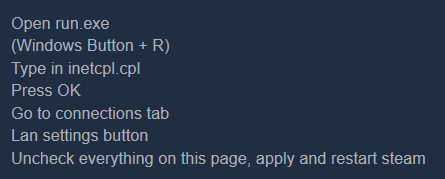
https://i.imgur.com/fpYM1nm.png This was listed on a steam forum as a possible solution to a steam connection issue that may be linked to the drg server error.
It's also possible a firewall or AV is preventing connection. I'd check to see if any DRG files have been quarantined or blocked (and unblock them).
 formal viper
@austere coral No connection issues with Steam, or other games on Steam. No Proxy configurations. No FW or AV events.
 solemn shell
machine event didn't spawn properly
austere coral
Omen on salvage. It spawned correctly, it wasn't destroyed correctly.
formal viper
Ive also tried with my AV, IPS, and Pihole disabled. No change in behavior.
solemn shell
oh, you can't have Omen's on salvage?
austere coral
it's not that you can't have machine events on salvage, it's that they tend to spawn too close to the drop pod and get automatically destroyed.
solemn shell
oh that makes sense! ty
austere coral
Last idea, are you using a vpn of any kind on your network? @formal viper
formal viper
I am not. Have Privado installed, but have been testing it with it not running, and processes stopped.
 wary spire
I can't move my mouse further right on the screen than showed here... so I can't actually enter the game either to troubleshoot it.
austere coral
what's your monitor resolution?
wary spire
I can't move my mouse further right on the screen than showed here... so I can't actually enter the game either to troubleshoot it.
@wary spire Nvm... if anyone else gets this issue, it can be resolved by using tab (doesn't highlight in-game, but it does cycle through menu options) and enter until you are able to hit continue. Then you can reset screen resolution in-game after.
austere coral
Go here and open GameUserSettings.ini with your favorite text editor \steamapps\common\Deep Rock Galactic\FSD\Saved\Config\WindowsNoEditor where you can manually edit your resolution.
 cobalt chasm
heya, came across my first machine event last night, one that I hadn't had before yet - I forget what it's called but it's the big triangle stone with 4 laser cutters that beam on it when you activate them. I saw the countdown happening but couldn't figure out what to do. Paused the game, looked on Youtube about the event and saw that there's something that spawn bomb looking items that you have to throw onto the rock.
I spent 150 seconds trying to find that piece but it was nowhere to be found, on a Dense Biozone map so maybe it was a few levels up, but I'd expect it to be somewhat close - which is wasn't
austere coral
That bomb dispenser drops down like a resupply pod and it takes a second or two to deploy. There have been issues in the past with it spawning very far away.
mossy breach
Can i ask why the grabbers continuously have problems like this
And when its gonna be fixed
austere coral
Probably the next patch, but don't quote me on that. I'm just making a guess given how often its been reported.
I can't tell you when the next patch will drop. Your guess is as good as mine on that. I'd probably expect it within the month, but it could be shorter or longer.
mossy breach
Hopefully sooner than later its really bugging me
 normal inlet
PC Depositing Hollowmite
1 occurrence only
1.Hollowmite Secondary Objective
2.Two people need to deposit hollowmite at the same time.
3.One person needs to complete the objective before the other person.
4.The person who still has hollowmite can still hold down the deposit button indefinitely but the remaining hollowmite will not deposit until you let go of the button and deposit again.
Expected: continue to deposit holomite
Actual result: Can hold down deposit button indefinitely with depositing animation, cannot move, but minerals do not deposit.
 lament quest
Really need to fix the physics of this game slingshotting you across the map for any number of reasons
 dusk marsh
Not really sure if this counts as a bug, but here goes:
Haunted Cave, Haz 3, Solo Driller
Tried to drill to the mine head while escaping from the ghost with an Aquarq. Kept trying to pick it up and I died because I couldn't stop petting Steeve.
 void wharf
Friend Chooses Driller and hops onto Drop pod for mission, Loading screen comes around the game autos him to a scout. And was confirmed in the Drop Pod. He was previously engineer on our last mision. I got nothing........ ( he did pick Driller there was no doubt on that one)
 gaunt temple
dont know if this is common or not, but we somehow ended up with a 5 player dwarf team
 simple obsidian
Can confirm, I was in the match
austere coral
It isn't common, but it does happen from time to time when two players join at the exact same time.
 drifting valley
I have a tendency to be able to move around and have access to my kit during the very start of missions for some reason. Before the drop pod has properly landed and before the hatch has opened.
I can't get out of the pod until it's open, and it never causes any actual problems, but it's quite the amusing experience since none of my friends ever end up in that situation.
 runic gull
In regards to explosive goodbye I've seen bug reports of it not working client side but has it been reported that it also often completely locks up the breach cutter from firing for several seconds host-side? (this isn't the windowed mode bug, this happens in fullscreen and only effects explosive goodbye)
austere coral
did you complete the promotion assignment?
 limpid carbon
Equipping fat man and both ammo boost upgrades says you get four ammo in the menu, but you actually get five
 stuck edge
For some reason I can't get past rank 74
like
I do missions and its stuck
it won't move
I've done 4 missions and i am not smiling anymore
native rock
Player rank goes up one section, or a third of a level, for every character level gained; if your player rank is not increasing, are you playing a character that's already at max rank of 25?
 desert stratus
drop pods are still landing on strange/unreachable locations. Could use some more optimization https://steamuserimages-a.akamaihd.net/ugc/1479948702988032633/E70DD5FD215CC34792CF87AB17C1253DE534C6C0/
 stuck edge
@native rock nah, I am level 22/23 on my gunner rn
Ik how player rank works, its just that it hasn't had a new third of the section filled in yet in now 6 missions
 mental lodge
I mean, you mentioned missions, not class level ups
 quiet perch
I don't know if this is quite the right place to put this but the Exploder trading card calls him Suicider (probably an overlook from the old versions)
 brave coral
hi, is there a way to report my problem with loosing all progress after 1 year of rest despite having steam saved all progress on cloud?
austere coral
esc menu, options, restore save
brave coral
thank you very much, you are my hero!
 high ginkgo
I get the commonly reported "my character glitched out with a gun in their hand" in the loadout screen, but c'mon now.
Literally shoved a shotgun in the overclock slot to make a shotgun overclock. Good stuff.
 modest lava
Hey, so I bought the game on the windows store and was playing today. I closed the game and relaunched it later to have it send me to the tutorial. So I lost all my progress and am not sure what to do now, probably 20-30 hours in. Any suggestions?
mental lodge
not sure if an option for windows, but did you check if the "restore save" option appears in the options menu ?
modest lava
Would that be if I am in the lobby area?
Found it. There are no other saves in there
mental lodge
oh... someone with more knowledge on that version will have to step in, not sure if a problem with permissions or accounts
modest lava
No problem, I appreciate the advice
 jovial breach
I cannot see other peoples assignment missions as host or party member. I also have a different set of missions available than everyone else in the party. This has been a consistent thing since I've started playing.
Also, this may or may not be related, I can't join other peoples games through discord. I can invite other people to my game, and they can join, but any invites I look at show as "game has ended"
 strange egret
Pheromone Canister has the radius listed as 0.
 merry cosmos
About a month ago I made a post about having issues changing the suit of the Engineer. Currently I can only wear the MK4 suit. When I switch to another suit and exit the wardrobe, it changes back to the MK4 even though the display says I have another one equipped.
Only affects the Engineer. Nothing game breaking but at this time I can't really customise the Engineer to my heart's content.
Changing paint job, beards, colours and equipment does not fix the issue.
Also validated the files just to be sure but everything is were it's supposed to be.
 wooden prism
Reproduction rate: 3 out of 3 times (100%)
Steps to reproduce:
- Unlock a new Primary or Secondary weapon through Weapon License assignment
- Purchase the new weapon in Equipment Terminal.
Expected Results:
The weapon customization screen will immediately show widgets for Frameworks and Paintjobs.
Actual results:
The weapon customization screen doesn't show widgets for Frameworks or Paintjobs (even when you already have several unlocked), until you leave and re-enter the screen (can be done by simply switching to the other Primary/Secondary weapon, and then switching back to the newly unlocked one).
 eager tulip
I got the loosing screen after completing a mission, it's not doing anything or letting me exit it jus kinda holds me hostage.
 last wolf
Magtera grab me, Driller managed to frezze it while Im still in the animation, fall 50 meters bellow the map unable to move, Driller comes to rescue me with c4, revive and Im able to move again but I cant jump. Disconect and rejoin, all ok again.
 royal vigil
The dash perk says it negates all slow down effects but it doesnt
 exotic yoke
Is there a bug when you drink the "Blackout Stout" as the mission pod launches. And then you are stumbling around for the mission. Never passing out ?
Or is it an "Easter Egg" ?
mental lodge
how long did you wait ? I know people know about it, but not sure if the effects lasts for 1 hour or something
 lone night
MISSING : GRAVITY
If anyone can find it, I'll be grateful
mossy breach
Long story short, Molly was stuck here
She wasn't moving at all. Only at the 12 second marker did she actually go into the pod like she was supposed to
I had to use iron will to actually escape because I was almost knocked away by an oppressor
mental lodge
Happened at least twice, but attacking a "Dread" Cocoon sometimes makes the dread spawn dozens of meters away from the Cocoon spot, most recent time I saw it happen was on the Deep Dive, stage 1 (of this week), after attacking the egg from far away.
austere coral
@jovial breach Close DRG, close steam through task manager and make sure no processes are running, verify that windows has all of its time and timezone settings set to automatic, restart steam, launch drg.
@last wolf This is known. I don't know when the fix will arrive. Plan for the next hotfix, but your guess is as good as mine.
@exotic yoke This is intended behavior. If you're drunk when the mission starts then you are drunk during the mission.
 steep fiber
the scouts smgs use two bulletes
austere coral
That's intended. Minigun is the same. Gives the impression of a higher fire rate than actual.
That's intended. Minigun is the same. Gives the impression of a higher fire rate than actual.
broken brook
(TF2's minigun does a similar thing iirc, so it's not super uncommon)
 heady pike
BRAND new to this app. The DRG site recommended I field my questions here so here I am. I had a friend come and play his account on my Xbox console. He logged in on his profile and completed a few missions and then logged off. When I logged onto my profile I found that his profile had overwritten onto mine. My name/gamertag is displayed in the upper right corner like usual, however the class ranks, player rank, cosmetics, credits and resources are identical to his profile. We have each signed in on each others Xbox and played missions before with no issues. I have contacted Ghost Ship via email on their "contact us" feature. Outside of this, does anyone have a solution to recover my profile? I've already done a hard reset on my Xbox and he did the same on his. Any help appreciated, thanks.
mental lodge
only thing I know is about the "restore save" feature on the pause / options menu, other than that , no idea @heady pike
heady pike
@mental lodge thanks. I'll take a look. Hopefully Ghost Ship has a solution.
@mental lodge By Karl's beard. . . You are the DWARF, sir! That worked like a leaf-lovers charm! A thousand ales to you! Many thanks.
 flint kiln
Before opening up a new bug-report at atlassian I searched for the bug in older reports and found a still open report with the same issue. I added my bug report as a comment, but the original post was from April 2020. Shall I just open a new bug report?
austere coral
What's the specific issue? It'll probably be best to just leave a comment. Keeps duplicate reports to a minimum. Usually if something is fixed the report will be closed.
flint kiln
Okay. I just didnt get my "Elite Diver" Achievement on steam for completing an Elite Dive
austere coral
Usually the solution to missing achievements is to just wait a bit, but I think something broke in one of the previous patches and there's been a lot more reports of missing achievements. They seem to work most of the time if you're host. If you're client then there's some issues.
 dreamy fern
I think the bug that shoots things is scary, that is all.
 subtle jacinth
not so much bug
but-
safest bet is just to select the highest player ranked one, yes???
I've never seen this before and has me spooked that if I choose anything else, imma lose alot of progress.
mental lodge
maybe check the date too?
subtle jacinth
I see the dates but I'm wanting a second opinion before clickin what I think is the most obvious option.
mental lodge
I mean, it is a restore save feature, not a delete all other backups option
 fallen flame
has anyone been crashing on starting the game like you just get the crash report thing? I get it but i hear the start up of the game and then nothing else
 plain verge
Anyone ever come across a S T R E T C H Y boi?
fallen flame
yeah I literally can't play deep rock galactic because even when uninstalling and reinstalling, it just crashes on start up
this is the first time having this issue
austere coral
Likely an issue with your install of directx. Pinned messages.
fallen flame
i'm gonna restart and see if that fixes it then first, see ya'll in a jiffy
fallen flame
how weird i had to add the -dx12 to my launch options which i've never had to do before until now
that seemed to have solved it, thanks for directing me to the pins, Ranger!
austere coral
That’s a bandaid. I’d continue through the list when you’ve got time. There’s probably a missing or corrupted dx file somewhere.
(And dx12 has some graphical issues mainly on the Xbox version of the game that are being worked on)
fallen flame
ok yeah you're right because i just joined a game and my flamethrower was a big green blocky blob
same as the pistol
i'm going to utterly obliterate the file in steam and do a totally fresh reinstall and see if that fixes it
 knotty ermine
been falling through the map quite a bit lately
fallen flame
i've had that happen around the drop pod initial landing zone
i think that's a somewhat common bug, stay away from those landing zone pits, they're treacherous
fallen flame
still not working i'm running out of options here
 umbral arrow
 granite willow
Naedocyte spawn still apply their slow to Dwarves under the effects of Last Stand.
austere coral
@umbral arrow your engineer is cheating.
@fallen flame you’ve gone through the entire troubleshooting list in pinned messages?
austere coral
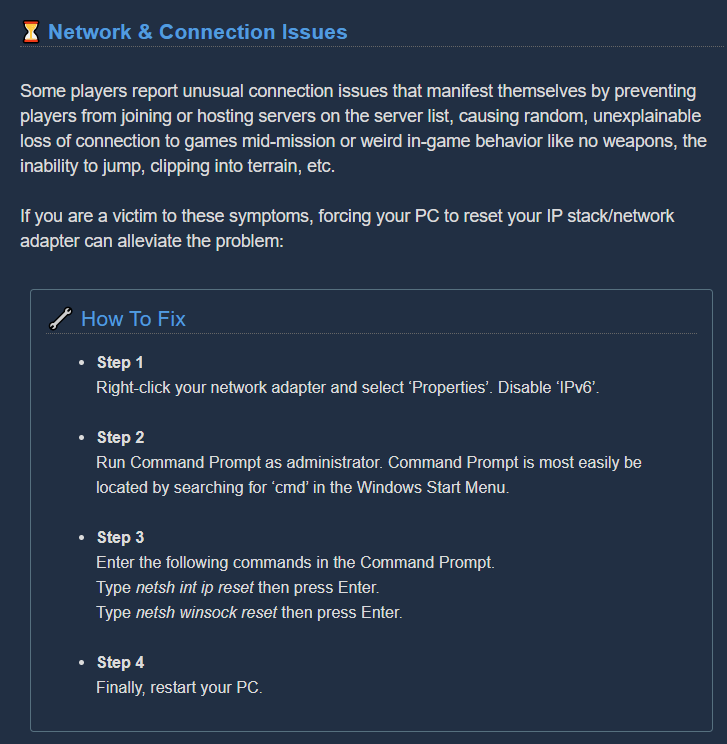
@knotty ermine Do this and it may minimize your network issues with drg. https://i.imgur.com/Je5lXPG.png
 digital hedge
https://www.twitch.tv/videos/706096660 FOR ROCK AND ..... !%^£!! - rather entertaining glitch ? (naughty language involved)

guessing this belongs here ?
 valid needle
anyone get cool glitches out of trying to stand on barrells in corner? i didn't realize until today how much you spazz out if you stand on a barrel
crimson coyote
@valid needle this has always been part of the game. It's just a fun thing the devs haven't fixed
They probably won't fix it tbh
 brave swift
so there is a bug with hoverclock overclock that if you are not the host and jump and fire the gun you fly away
 flint skiff
@valid needle I found out that if you stand in a specific corner, you can glitch your way out of the lobby and out into space. With some help from friends restarting the gravity, I managed to get on top of the glass in the Memorial Hall.
brave swift
hoverclock bug
flint skiff
@valid needle no, sorry, but I could show you in-game.
crimson coyote
@brave swift i think that they just got pulled up by the sandstorm there
flint skiff
@crimson coyote I'm the one in the video. I wasn't pulled into the sand geyser, I just jumped and shot a normal shot. I then started flying.
crimson coyote
odd
flint skiff
@crimson coyote You can test it out on your own, just make sure you aren't the host.
 brave swift
@crimson coyote lol i can see why but at the end of the gif you see him go the other way before it cuts off
 late bear
has this sort of graphical glitch with salt crystals been reported often?
 coral cedar
Hit level 25 silver 3 with my gunner. Got the prompt that promotion was available, went to promotion terminal, but no Promote option or button was there. Anyone else having trouble promoting?
mental lodge
did you finish the assignment ?
coral cedar
Oh my... I forgot there is an assignment at each tier.
Thank you. I absolutely was being an idiot.
crimson coyote
rip
 mellow nebula
is this a bug???
@umbral arrow Turret (Sentry Gun) placement is host sided which means that the host was cheating.
fallen hill
@coral cedar To be fair, we could also do a better job at communicating that
past lagoon
Goobomber visual model and crit hitboxes are inconsistent.
 gentle lotus
Jumping around the rig and this happened lol
Don't know how it happened but I'm stuck between the bar and the fridge
I think it has to do with the yellow toolboxes you can kick around
I think it forced me into the bar
fallen hill
Press ESC, hover over your portrait and press Respawn
gentle lotus
Oh yeah I did that already, just figured I'd post it here
 sharp ore
UI bug for the Shield Generator, displays Carried Amount as 1 when it should be 4
past lagoon
Probably it refers number of devices. When it was first introduced we had 4 separate generators and no cooldown between shields. But still it should be better changed to something more relevant.
flint skiff
@valid needle My friend just recorded me getting out of the map through the corner I told you about at 3:13 yesterday. I'll have him @ you
brave swift
@valid needle https://www.youtube.com/watch?v=VCdNtNgdAAg

GPU: GeForce GTX 1070
CPU: AMD Ryzen Threadripper 1920X 12-Core Processor
Memory: 16 GB RAM (15.88 GB RAM usable)
Current resolution: 1920 x 1080, 60Hz
Operating system:
 civic rock
I've got a bug with drg since last week
I got razer synapse running in the background
and basically every time I start DRG everything goes nuts
 sweet quail
Anyone know why the weekly assignments wouldn't be showing up for me? Finished the tutorial assignment chain thing and some other stuff but they havent appeared.
nimble galleon
weekly core hunt requires you to do breach the core
 ornate escarp
Have anyone reported this weird object?
broken brook
not a bug, effectively an easter egg
austere coral
@ornate escarp yes, it was reported in pinned messages
valid needle
@brave swift @flint skiff thank you! That’s pretty sweet, have you thought about making a longer video exploring the outside and showing what space/the ship look like? Update: nvm saw he had that vid on his channel it looks like, watching it now
Are there artwork screen shots or whatever of space? Looks like they put in quite a bit of work to designing it
 feral pivot
I can't join my friends, and they can't join me. I'm not getting any message, the overlay just closes (I've tried other ways to join than the steam overlay. Nothing happens everytime). Any suggestions?

 upper quail
Any specific reason for it?
 near remnant
Not sure if mentioned before, but I've ran into a bug twice, where if you happen to freeze a grabber, exactly it grabs you (or someone else), it will cause you to fall through the world, and camera will be stuck until the mission is over.
 floral dove
[Reproduction rate:] X out of X times not tryed
[Steps to reproduce:]
1)die while just getting off zipline
2)
3)
[Expected Results:]
get off and die.
[Actual results:]
can only shot the weapon equipped no need to reload. can't get revived. can't move.
 ruby pewter
So... we report bugs here... i once saw a big one on 8 legs! We blew it up and then it was gone. Is that what you mean? (Yes, this is a small joke post. Just have a giggle at it and go on) 😋
fallen hill
Badum tssh
 forest yew
Bug to report:
Grammatical error in the current elite deep dive description. Something along the lines of "will do understands" Nothing serious but noted. Thank you for listening
 jaunty grotto
I thought the same but then I read the sentence over again.
Its "Anyone whos seen what prolonged exposure to the salts will do understands why."
Anyone whos seen what prolonged exposure to the salts will do, understands why." Makes a tad more sense and allows you to understand it
 whole crest
There was a bug I noted as of yesterday: Was at a shield disruption salvage mission and no matter what damage done (except for pod drop), the health bar never goes down.
crimson coyote
@whole crest that sounds like one of the players on your team was cheating
there is a cheat that gives you "god mode"
whole crest
That’s the thing that bothers me. It wasn’t just them, but me well. Even a late miner had it.
@crimson coyote
crimson coyote
yep it gives it to everyone
brave swift
@valid needle https://www.youtube.com/watch?v=B9VoUHfVX88&t=4s some exploring done if you have more direction let us know @flint skiff is a pro at getting out now
GPU: GeForce GTX 1070
CPU: AMD Ryzen Threadripper 1920X 12-Core Processor
Memory: 16 GB RAM (15.88 GB RAM usable)
Current resolution: 1920 x 1080, 60Hz
Operating system:
 rustic plover
mysterious floating drop pod
crimson coyote
@rustic plover it can land in some weird spots sometimes. It's possible that it "landed" in a cave in the ceiling or it could have landed on a bit of land that got removed during the mission
crimson coyote
@mossy breach thank you for the report :) the devs know about this one and it's on their to-fix list
 queen dagger
Just had an issue where the mule moved back and forth on the side of the pod, unable to dock. I ended up having to climb up to the top of the drill and dig away at the air, and then an invisible chunk of rock broke and the mule docked. Is there a way to capture a log to supply?
crimson coyote
@queen dagger thanks for reporting! the devs know about this one. The mules AI will sometimes bug out and do that. At 10 seconds left the gates will open and the mule will tp and you'll be able to hop in
queen dagger
@toitle Okay thank you. Sorry to bother you.
crimson coyote
all good :)
 pulsar sigil
the number of error cubes i have doesn't show up when looking at my resources
i know for a fact ive gotten multiple error cubes
mental lodge
@pulsar sigil they only appear on the equipment shop terminal
pulsar sigil
thats the one where you can change your perks and swap weapons for characters right?
oh wait
i found it
thanks
crimson coyote
@sage blaze did you get crash report. otherwise, ur good if it doesnt happen again
 sage blaze
nopety nope
 amber sonnet
Yesterday on a Deep Dive we had one guy getting stuck in the ceiling of the Drop Pod upon arrival on Stage 1 and 2 as well.
Not a fun way to start, although we had a laugh we eventually fell trough the drop pod after getting downed 3-4 times and I got locked in running in to revive to get locked in while the pod was leaving. :)
Could we fix this please? Happened to me as well twice so far. Resetting player positions inside the drop pod to the seats once the game loads up would probably fix this.
 wind tusk
recently I have been trying to get the put all barrel in the drop pod achievement (again) so I could 100% the game but after 9 restarts and 8 hours wasted because the barrel kept clipping/falling out of the map I would nearly get all the barrels then one would clip through the floor or glass making me have to restart or I would get them all in only to realise that one was missing the look around for it only to guess it must have clipped. its really pissing me off I guess I'm just unlucky but getting an achievement shouldn't be based around luck or whether the barrel feels like fazing through the floor. This was fine with this back in beta when I first tried to get the achievement but now the game has reached full release and I hoped it would be better so please look for a way to fix this
suggestions- make it so when the barrels leave the space rig they respawn back in the space rig or make it so less barrels are required to get the achievement so there is more room for one going missing or perhaps just add more barrels that don't need to be used to get the achievement. just as spares to replace if one falls out
(Also if some one knows a way to get the achievement without having to deal with barrels please message me but for now i will try again tomorrow)
fallen hill
@wind tusk Can you please provide a video of the barrels clipping through the floor? I have never seen that happen. The physics are wonky and they can easily fly everywhere, but I have yet to see them clip through the floor and disappear entirely.
 potent nymph
also, the physics being wonky on barrels is something that we have promised the community that we would never fix. but perhaps its another issue your having
wind tusk
next time it happens i will try to record it
 white girder
Just spent some 20 odd minutes trying to find the last mini-mule in a Salvage mission
https://steamuserimages-a.akamaihd.net/ugc/1485578617122701553/E5D61D517FA1C661AC1AC2F0CD6D127A5D2A07A6/

it spawned in a tiny little room, right up in the ceiling, not actually connected to the rest of the map - it was barely audible from the normal playable area
 fickle escarp
That happened to me. Good thing I was scout
white girder
as you can see, I was not, and it was something of an adventure
crimson coyote
adventures are good sometimes
formal viper
Re-posting my issue, as its been a while, hopefully get some more eyes on it.. Have tried all the steps provided by @austere coral to no avail (many sincere thanks for the assistance).
Still unable to participate in Weekly Assignments.
Still unable to participate in Deep Dives
Other issue I experience that I suspect is directly related:
When completing the last mission of any assignment, it is acknowledged that I completed the assignment and receive the associated unlocks (e.g. secondary weapons), however the assignment never completes. Instead it shows that the last mission in the assignment is still needing to be completed (again).
I worked through this, as it did unlock the content (e.g. secondary weapons), and figured it was a bug with the assignment board. Abandoning the mission worked a few times, with the assignment eventually disappearing from the list, while keeping the unlocks (due to me finishing all missions in the assignments).
Now my character is promoted, however I cannot access the Deep Dive console or Weekly assignments.
I'm wondering if this behavior is related to the fact that it never registered my character as completing the promotion assignment, despite having successfully promoted via the terminal. But cannot think of how it would be related to the Server Error for weekly assignments.
Deep Dive Console Bug - Unable to start Deep Dives
crimson coyote
unfortunately there isn't a fix for it yet
dreamy quail
leave wonky barrels alone!
formal viper
@crimson coyote does that insinuate this is a known issue and/or an issue that is being worked on?
crimson coyote
i'm sure if they are working on it or not. you'd have to ask a dev. bjorn maybe? but they know about it
there are multiple other people who have reported it
@formal viper
formal viper
what is the proper way to pose this question to the devs/bjorn?
is @'ing a dev okay? or is there another method/channel/etc to use for that?
@crimson coyote thanks for the help
austere coral
I'd avoid pinging. You shouldn't have an issue pming either Bjorn or Mark
formal viper
Cool thanks for the etiquette check @austere coral , much appreciated. Ill send Bjorn a DM and see how it goes.
 dense siren
Just finished EDD with djnemonic#6679 Kali#8131 and UnknownNinja#2018. After finishing the second stage of the deep dive, the game incorrectly showed as if a non-existent stage 1 (2 MULEs, 2 eggs w/ regen bugs) had just been finished and no Matrix Core as a reward. Once stage 3 started the game incorrectly showed "stage 0" on the top right hand corner, pressing escape showed stage 0 with "Objective name goes here" worth "XXXX" credits for both the primary and secondary objective. The game showed a "Stage 0/3 completed" screen upon stage 3's completion, which directly led to the same fake stage 1 (2 MULEs, 2 eggs w/ regen bugs) completion screen rather than the final nitra/gold tally screen. The deep dive interface shows as if I didn't complete a single stage of the EDD.
After taking an entire hour to complete EDD I got 0 credits, 0 XP and 0 matrix cores
austere coral
You did last weeks dive.
There's an issue when dives are started, I suspect, when the host hasn't ticked over into the new week.
You wind up playing the previous weeks dive.
dense siren
I didn't even log into the game during the last week.
The missions were correct for the current week, and everyone else got their rewards
austere coral
this is the edd for this week. It's on radioactive, not salt. Last weeks was on salt. https://discordapp.com/channels/257785731072786435/626770676573011997/743484966842925066
dense siren
Check the second screenshot
It's 3rd stage of this week's EDD
REZ, 200 morkite, 1 dread, cave leech cluster & rich atmosphere
austere coral
There's at least one report of this every week and it's almost always on Thursday right after the reset.
The game thought you were playing last weeks dive.
To prevent that in the future, make sure your system clock and date are set to automatic, everyone participating in the dive has restarted their game after ticking over into the new week, and no one is showing a negative time remaining on the deep dive console.
dense siren
 Fuck me I guess, then
fickle escarp
Out of the blue my voice chat started acting weird. Whenever i click the push to talk button the game freezes for a few seconds and i cant hear anything in game when talking. Does anyone now how to fix this?

fickle escarp
i dont see an audio option in game tho
fickle escarp
still got the issue
crimson coyote
hm
Hi all Some users are experiencing stuttering/low fps/freezes and Alt+Tab issues when using a combination of AMD FX Series CPU's and Realtek Audio sound, it has also been observed on other combinations, f.eks Intel and Realtek Audio. If you are having issues as described above...
you try that too?
fickle escarp
I had to disable my headphones mic because it auto defaulted to that instead of my main mic. Thanks for the help 🙂

 brisk ridge
Playing on Sand blasted corridor yesterday. We defeated a gold detonator and instead of creating a crater of gold, it created a crater of compressed granite. However, when you mined it, it was still gold. Here is an image. It showed as compressed granite for everyone in the game. https://steamcommunity.com/sharedfiles/filedetails/?id=2195509119

Steam Community: Deep Rock Galactic.
 rapid scaffold
not sure if like a spawn failure bug but we were in the glacial map and found a cargo crate and the first battery alright and heard the second but it was nowhere to be found. we tore up the map above and below the ping sound epicenter, blew holes in it, everything and nothing.
usually the batteries are like right on the surface and just need a couple whacks to get them out, never heard of them being completely buried but no matter how far we dug from where it was loudest we couldn't find a thing.
eventually we just had to say screw it but it was super irritating, especially becasue the area we heard the pings were on top of a frozen pond so we spent half the time sliding around at first
crimson coyote
@rapid scaffold they can spawn in frozen ponds
it was probably there
which sucks
brisk ridge
yea, was the first time id ever seen that either... was weird
austere coral
Batteries spawn in a set radius on the horizontal, I don't believe there's a limit on the vertical.
rapid scaffold
we destroyed the entire section of frozen pond that we could even hear the beeping, all that was left was the rock underneath which we still decimated
 feral hemlock
Just had Bosco kill a bulk nearby the grinder during an in-progress kursite infection event. Since it isn't subject to gravity the kursite grinder was effectively out of reach.
Not sure if I'd call it a bug or a suggestion, but if this thing would've fallen into the bulk's lava crater I could've at least finished the event.
 clever wigeon
i have doing the same mission over and over... and now i have 44 forge stuff
austere coral
Are we talking some bug with assignments? How about the forge, an excess of blank cores, infused cores, regular crafting materials?
brisk ridge
Thats a weird bug, if you are able to do the exact same mission with the exact same map generation?
clever wigeon
eeh sometimes is switches maps, like i can be in magma core and when im done i'll go to salt pits
the mission name is: Breach the core
i still lose stuff when i craft forge stuff and i can still buy materials
mossy breach
To anyone getting the left click bug where changing to fullscreen isn't working, I've found the fix. Right click the game's .exe, to go compatibility and check the option "disable fullscreen optimizations". This will fix the fullscreen mode so that it actually works as intended and doesn't just treat it like borderless windowed mode.
Devs, you should probably pin this message or add it to your common bugs in your steam forum, because I noticed your developer posted in several threads about this issue saying that fullscreen was the fix, when it wasn't working for some people. This is very much likely the reason why.
<@&296918282403840000>
 hoary flume
Quick bug for any rgb users currenlty the games rgb goes crazy when launching the game so i had to disable the rgb controls
austere coral
the mission name is: Breach the core
The assignment is failing to complete after the final mission is finished. there's been other reports of similar issues with assignments.
 lofty coral
Satchel Charges keep disappearing into terrain, often disappearing entirely and leaving the detonator in the player's hand. This tends to happen when the charge has travelled a distance >5 metres or so.
mossy breach
@echo ferry if the master-eq fix doesn't improve your stuttering, then try setting your cpu priority to high in the task manager. It's the only thing that fixed it for me.
 ashen juniper
Hey all I was doing a Solo mission in the bogs (one of the missions w/uplink and fuel resup etc...) and Molly straight up got stuck on perfectly flat ground. I had to dig out the ground around it so it could move again after pressing the extract button
mossy breach
Its pathing can rarely bug out.
ashen juniper
I've seen patching bug out b4 - especially when the mule is loading into the drop pod. This is the first time I've ever seen it totally get stuck unable to move at all
*patching = pathing
anyway, I'm new to using discord and DRG is one of the first groups I've joined! I just saw there is a bug-discussion so I thought I would report!
I also notice that with the scout if I make a hole in a wall 2 spaces deep and then grapple into the hole it will sometimes start clipping after I release the grapple and then after a few seconds I get flung across the room almost like a gyser effect
 velvet bronze
Found a Typo while playing the Fire hoop game. When he says "Okat, this ain't gonna happen" the okay is misspelt.
 rotund fable
It's on purpose
 warm niche
anyone getting this? both me and my friend are getting it
 cobalt latch
wow i was just playing as scout and tried to grapple and as soon as i started moving it insta killed me
crimson coyote
@cobalt latch were you hosting or no?
cobalt latch
i was solo
crimson coyote
@warm niche the devs know about this one. there isn't really anything yyou can do except wait :(
huh
that's odd
 celest hawk
Maybe try restarting DRG, or your computer?
celest hawk
Really?
celest hawk
Have the devs mentioned anything about it?
celest hawk
Ok good, cause that bug can be friking annoying to deal with.
crimson coyote
yeah it is frustrating
 stuck sonnet
Bug 1 Beer drinking animation did not play when trying to drink beer. Character just held the mug, and the liquid diminished until the mug was empty. Can still throw mugs, so that's cool.
Bug 2 Oxygen tanks on the mine head do not fill depleted player oxygen levels after launching the rocket (completing primary objective).
forest yew
I don't know if this is a bug or not but I just did a point extraction mission where all but 3 of the aquarq spawned in a small room and corridor in the top of the map in the salt pits. Can it be changed to have the aquarq distribution more evenly spread? To be completely fair, this is the first time this has happened to such a major extreme in my many months of playing the game. Thank you
 mental rampart
literally unplayable
obtuse oriole
greetings. as i have moved to uni and have been unable to bring my PC with me, ive gotten a laptop.
i have tried to play DRG on it, but it won't launch, trying to run it as administrator from my local files gives me an error that "X3DAudio1_7.dll" and "XAPOFX1_5.dll" are missing, and that it as such cannot run DRG.
verifying the integrity of the gamefiles and trying to re-download DRG does not fix any of the issues.
white girder
not really a bug - you're missing the DirectX runtime stuff which should really be preinstalled on most systems, but you can download it;
http://www.microsoft.com/en-us/download/confirmation.aspx?id=8109
obtuse oriole
annoyed glare at computer
obtuse oriole
ok, different bug: ingame sensitivity is greatly affected by the resolution scale option for some reason. and higher resolutions corresponds with greater input delay.
the ESC screen, which is not affected by the resolution scale settings always has input delay for this reason.
formal viper
Update on the bug I had reported earlier. RE: @austere coral and @crimson coyote :
Got it sorted!
It was the Geo-IP Filtering option on my UDM (Unifi Dream Machine). I had already unblocked all Geo-regions, by clearing them out of the FW rules. However, simply toggling the GeoIP Filtering setting to ON - causes this problem (regardless of no Geo-IP filtering actually configured on the FW rules).
Definitely sounds like a bug on the Unifi end.
In Short: Enabling GeoIP Filtering on Unifi hardware causes the issues I had described.
Many thanks for the assistance.
 maiden kiln
Just had a bug with the triangulation zone on hazard 5. The whole team was in the bubble and the progression kept fucking up. Ended up failing the mission as a result. Anything on this yet?
lost arrow
@formal viper hey can you elaborate more on how you fixed the Server Error issue you were having
formal viper
@lost arrow My router and security gateway device (Unifi Dream Machine) has an option for GeoIP Filtering (under settings->security). It was enabled. Disabling it fixed my issue.
do you also have a UDM?
or any geo-location based filtering on your network?
if so - disable it
crimson coyote
hey @graceful yarrow can you pin glasscocked's solution?
i'll be able to use it for helping other ppl with that problem
graceful yarrow
 graceful yarrow
formal viper
Re-posting my issue, as its been a while, hopefully get some more eyes on it.. H...
graceful yarrow
formal viper
Update on the bug I had reported earlier. RE: <@!164467504893132800> and <@!4347...
crimson coyote
graceful yarrow
formal viper
Re-posting my issue, as its been a while, hopefully get some more eyes on it.. H...
graceful yarrow
formal viper
Update on the bug I had reported earlier. RE: <@!164467504893132800> and <@!4347...
crimson coyote
ty  ❤️
❤️
 sly plank
@formal viper i had the same issue, unfortunately i do not have a udm router and my router doesnt have any geoip filtering options so the jury is still out on other causes of the issue
austere coral
I suspect it's an issue communicating with a server somewhere and that IP mode was conflicting. I'd look for anything on your router or computer that masks or filters your IP and temporarily disable it.
sly plank
im going to perform a pc-wide network reset later tonight when im able to and update everyone with my results
crimson coyote
sounds like a plan
lost arrow
God's work @sly plank
sly plank
didnt work
mossy breach
oh boy
c4 bug
properly reported it, but my god was it frustrating.
it literally just disappears into thin air if you throw it a reasonable distance.
austere coral
I keep saying to do this and folks never come back to say if it worked or not. I can only assume that they either didn't do it or it solved the issue. Do this https://i.imgur.com/6gYAZhM.png

 viral spear
Im getting a bug where i try to change my outfit on Scout and it just always goes back to MK2 Suit. It happened when i purchased Dark future DLC
 silk depot
oh my god.. PLEASE HELP
i had a power out and when i loged back in all my progress was gone... the game DID let me restore to a back up.. but the GLORIOUS beard I unlocked on ym gunner along with a few other enhancements are just GONE
and i am furious!
is there ANYWAY to get that back?
it also completely reset quest progress for one of my quests DX
ahhh i found a way to recover it XD jeez i freaked out there as for some reason the most recent few saves were NOT the correct one Were ok! i got my beard back! BEARDS ARE VERY IMPORTENT OK!!!
cobalt latch
so i was just running solo mineral extraction haz 1 for an assignment and the MULE got stuck on a freaking event piece and couldnt walk anywhere so then i had to go get morkite and bring it back everytime, and then i had to find my way back to the drop pod which i almost missed going through a 3x cave complexity
oh wait nvm i paused my game before i ran into the drop pod
and the mule cant get back to the pod
 elfin kernel
Yesterday a friend and I comleted a Hazard 4 mission without anyone going down for the 'Like a well-oiled machine' achievement.
He got the achievement and I did not. Has anyone experienced this bug before?
 fast trench
Nice! First playing after update, what next?
glacial terrace
Nice! First playing after update, what next?
@fast trench Try troubleshoot in pinned message
white girder
to be fair, there's so much crap in the pinned messages now, it's getting pretty hard to scroll through it
 shadow tinsel
glacial terrace
shadow tinsel
glacial terrace
the picture says it all
@shadow tinsel drop pod door opens with 15 seconds left
austere coral
I'm going to take a wild guess and say you died on a zipline
 hexed heath
yes
fast trench
@fast trench Try troubleshoot in pinned message
@glacial terrace what? a lot of them
 broken anchor
So just when ever i shot down a platform i couldn't see it and i wasn't able to destroy and terrain. and if i hopped in the spot where the platform would be I'd just go right through it.
glacial terrace
@glacial terrace what? a lot of them
@fast trench https://steamcommunity.com/app/548430/discussions/2/1642039362993864094/ You can check this, find your issue and try solutions
Attention, Miners! Games that crash, won’t launch or suffer from stability issues are undoubtedly the most frustrating part of PC gaming. Although we strive to deliver a flawless gaming experience in the depths of Hoxxes IV, we can’t guarantee you won’t encounter a crash or st...
fast trench
thanks
mossy breach
Is this discord just for the steam version? I am playing on pc, but through the windows store so I can play with family who are on console. I have some very strange audio complications to ask about.
crimson coyote
@mossy breach this discord is for all versions. check the pins in #xbox-and-windows-store for xbox/windows specific bugs
hm. looks like there isn't anything about audio in there
feel free to ask away here :)
austere coral
pinned messages for audio issues
crimson coyote
are they the same for steam and windows 10?
austere coral
probably, most of the solutions are in windows settings
 echo ferry
Are the achievement bugs ever getting fixed? Still unable to get the total makeover achievement with over 100 hours in the game
crimson coyote
they are on the devs list yes. no idea what that list looks like so no idea what kind of priority it has
 misty tusk
broken brook
misty tusk
broken brook
not a bug, is intentional easter egg.
"in short, the ERR://23¤Y%/ (error or rubik's cube) is not a bug, can be considered an easter egg, no one really knows what it is or if it will have a purpose, not even the devs know... but it may play into the lore and is worth 2000 XP"
misty tusk
okay! thanks!
 gleaming gazelle
okay so had some weirdness occur just now and wanted to see if anyone else has had this or something, (this is on PC [steam]) so last night when I played I finished my promotion assignment for Gunner but didn't actually promote him. Next morning I open up the game I still have the Promotion from last night but it says the assignment isn't completed and there's still one more mission in it. So I try and see what happens if I complete that mission and sure enough even though my gunner is only at like level 4 there is a promotion available on the memorial hall terminal. When I clicked it got an extra promotion. Any reason why this might happen?
 solar ore
Don't know if this could be considered as a bug, but I found this on the wiki page and want to know if it's true, because, if so, this probably needs fixing.
austere coral
why? it's accurate
solar ore
What I'm talking about is how in the hell could you ever even HOPE to achieve -300°C if the theoretical lowest temperature is 0 K = -273.15°C
austere coral
dread has unbreakable armor everywhere except the butt
austere coral
temperatures are also arbitrary
solar ore
T°C
austere coral
probably pulled straight from the game files
solar ore
Yea, but it bugs me
that was unintended but it does bug me
broken brook
not really worth rewriting code for i imagine
solar ore
do with it what you wish, but I personally, definitely, want it to get some form of fix
not necessarily rewriting code, but maybe rewrite it as something else? idk
austere coral
for temperatures that are arbitrary and that you wouldn't even know about if the wiki guys didn't dig through the files?
solar ore
Well, then it shouldn't be explained as °C, I guess
but more as a score, a different system to base it on
crimson coyote
it's celcius
solar ore
Do with it what you wish, I personally want it to be scientifically correct but that's really just my opinion
Or at the very least, scientifically possible
crimson coyote
a lot of things in the game are not scientifically correct or possible
solar ore
I know none of it is scientifically correct, but y'know what I mean
 glass knoll
Easy fix: this in an alternate universe where the lowest energy state is at -600 C
 solar ore
fair enough
brave swift
so are minelettes supposed to hit a radiated zone of a fat boy?
 remote pike
sorry if this is the wrong channel for this, anyone know how to fix this? it happens every time i launch the game and i can't close it
austere coral
which gpu manufacturer do you use? amd or nvidia?
looks like it may be an artifact of nvidia ansel, you could try disabling it
austere coral
when updating drivers, try to do a clean install. It prevents the old driver from conflicting with the new one.
 gentle hazel
my partner has the problem that the sentry turret in his engineer doesn't display the information of remaining ammo, the hud element is just not there if the sentry is deployed
 patent relic
Does the drop pod usually land in the ceiling like this?
we were thankful I was a driller and drilled us there .. except I aimed a little too low and became a splat dwarf
500 hours into the game and it feels like drop pod is landing higher
 wise iris
so i uninstalled the game after some time of just not playing it. just reinstalled to play with the boys and all of my progress is gone. i put in the cash for the founder thing too and the only thing i kept was the gold paint and the skull head. everything else is gone. my stats, my gear, outfits, paints, everything. is it a bug..? or am i just pooched here?
austere coral
esc, options, restore save
wise iris
ty ❤️
 hidden depot
Reinstalled my OS and reinstalled DRG, this pops up when I try and boot. Should I be worried?
The game runs really funky too
huge frame jumps
hidden depot
That didn't work. The file path it is trying to use doesn't even exist
austere coral
so you ran UE4PrereqSetup_x64.exe as admin located in \steamapps\common\Deep Rock Galactic\Engine\Extras\Redist\en-us
austere coral
proceed with the rest of the list then or skip to 9-11
Thanks to System Era (Makers of Astroneer), for having found a way to solve this issue, this is a direct quote from their forums For those of you affected by the 2015 C++ Runtime Bug that is causing the game not to run for you, we may have a solution. Try out the below steps a...
hidden depot
That would be helpful if I were running windows 7 or 8.1. I am on windows 10 though.
The updates listed for this would be automatically done by regular windows 10 updates. The directx version on my PC is current and has no issues according to dxdiag
C:\ProgramData\Package Cache{C6CDA568-CD91-3CA0-9EDE-DAD98A13D6E1}v14.10.25008\packages\vcRuntimeMinimum_x86\ does not exist as a file path for me
so when it goes to run the file it errors out
hidden depot
yes
From what I can gather reading Microsoft posts and other posts on the web this is a problem that happens as a result of the program trying to install an older version
austere coral
My only other recommendation is to uninstall 2015-2019 redistributables, run UE4PrereqSetup, then rerun the installer from microsoft to replace any that weren't reinstalled.
hidden depot
what is the .ini file called within the game files?
austere coral
which one?
most config files are going to be located here \steamapps\common\Deep Rock Galactic\FSD\Saved\Config\WindowsNoEditor
hidden depot
the one that tells the game where vc_runtime is
steam cloud probably saved the file from my old OS and is telling it is in that location when the file is called something else now on the new OS install
So I was wondering what the .ini would be called for the vc_runtimeMinimum_x86.msi
austere coral
I'm not sure. Just scanned through the files in windowsnoeditor and didn't see anything relevant. You could try throwing -regenerateinis into launch options in the event it does reset some ini somewhere else.
hidden depot
I could try just taking my save and put that on my desktop and just wipe my steam cloud of data and then delete the game on my SSD as well I guess
just nuke the whole thing
in that case I would need to copy the \steamapps\common\Deep Rock Galactic\FSD\Saved\SaveGames portion and keep it on my desktop correct?
austere coral
yup
hidden depot
I don't need anything from the other 3 files there for it to run properly?
austere coral
I'd save everything located within that SaveGames folder
hidden depot
Apparently after a lot of digging it is just the latest windows update. you have to reinstall you OS to fix it 🙃
The update screws up some files and they go missing which requires the reinstall
hidden depot
I opted for a system restore from before the update and problem solved
Windows updates are stellar
 muted chasm
When are they gonna implement DX12 as in DX11 my usage tanks when i stand at the bar and look over to the ship and when in games and hordes attack the group. If i use the -dx12 command this fixes it but there is a ton of flickering and pop in
 drowsy pulsar
Question - is there a bug regarding instantly dying in the game atm?
We've faced several situations in the last few runs where someone just randomly goes 100-0
 inner token
@muted chasm Yes, it's kind of weird that the one place the developers have full control over (space rig) has weird performance issues, while normal missions run super well. I'm hoping they update Unreal Engine to a newer version to support the PS5 and Xbox Series X. If they do that we should get great DX12 support on PC too. DRG is on Unreal Engine 4.22.3 now I believe and the next version of Unreal Engine is 4.26, so it should be a nice bump. Hopefully this means better DX12 rendering and better performance in the space rig.
muted chasm
Its not just the space rig thats a minor annoyance. Playing matches and frames go from 99% 90-110fps in combat down to 50-60 aint fun.
inner token
Really? I get 120 FPS almost at all times during missions. Do you have an AMD video card?
 primal kettle
Guys, I can no longer launch the game
It says I'm missing the 2015 C++ Redis
I'm TRYING to install it but It's just a loop
I tried manually going to download said redis but I cannot install it
The installer says I already have it installed. But I seriously don't.
austere coral
Various aspects behind the scenes are being updated, but I don't think they're going to update to a newer version of unreal. Once you start on one version, you usually stick with it unless updating resolves a significant bug.
@primal kettle Do these steps in order.
Update windows
Do this https://steamcommunity.com/app/548430/discussions/2/1483235412203501698/
Make sure you completely uninstall all versions of 2015 before reinstalling them.
Thanks to System Era (Makers of Astroneer), for having found a way to solve this issue, this is a direct quote from their forums For those of you affected by the 2015 C++ Runtime Bug that is causing the game not to run for you, we may have a solution. Try out the below steps a...
primal kettle
I have none of the 2015 C++ on my computer anymore
Yet it won't let me re-install them. Saying they're already there.
I re-installed the 2015 ones now
It still won't let me launch the game.
It's this endless loop of installing and uninstalling that Unreal thing that keeps popping up
Please help.
UE4 Prerequisite (x64) is stuck in an install/uninstall loop
Gives me an error that the 2015 C++ is missing but I have it. I've reinstalled it many times now. What the fuck
austere coral
https://support.microsoft.com/en-us/help/2977003/the-latest-supported-visual-c-downloads run 2019 as admin and repair the damaged files
how did you uninstall them?
did you do it through apps & features in settings or did you go delete a file somewhere?
primal kettle
From the apps and features
Oookay that last link fixed it. Thank you Loan.
That's the one I was missing. Not the specific 2015. But the 2015-2019.
hidden depot
@inner token The new consoles will be running on the new unreal engine not an updated version of 4
at least that is the plan that was set out there

Unreal Engine
Get a glimpse of new and improved real-time rendering features currently in development.
It looks great
Supposed to be better performance wise as well
inner token
@hidden depot So the consoles run on an engine and not the other way around? Interesting ...
hidden depot
Well I guess I phrased that wrong xD
inner token
Hehe
austere coral
Probably a discussion best suited for #non-drg-chat
hidden depot
I mean it was related
 rich berry
Hey everyone, got an issue. My engineer is lvl 25 and up for promotion, got everything needed and am on a solo session but can't promote him for some obscure reasons. I already have my gunner and miner promoted to lvl 1 bronze. Did it happen to someone too?
austere coral
so the assignment is completed?
if so then you may have to disband your team. It can be finicky at times.
then the promotion terminal in memorial hall shouldn't present any additional issues.
rich berry
Yeah I finished the assignment for the miner, but I did the assignment with several classes due to party restrictions. Does it affect the assignment?
It does not give me the option to get the assignment for the Engineer :/
 fierce seal
anyone else has problem with "enter" putting game into windowed mode?
austere coral
you probably have sticky keys enabled or you're holding down alt. alt+enter switches display mode.
fierce seal
does that also explain why "backspace" only delets one letter than stops working?
austere coral
you should be able to complete the assignment with any character without issue.
probably
I don't have all shortcuts memorized
fierce seal
aight guess ill google how to turn it off, thanks
also, weird that its only a problem sometimes
austere coral
It does not give me the option to get the assignment for the Engineer :/
You can only have one assignment active at any given time. There have been some issues with assignments lately. Some not showing up, others not completing, etc.
fierce seal
lol while i was talking here it started working again
rich berry
I don't have any assignment active :/
austere coral
take a screenshot of your assignment terminal
 night tartan
began a solo mission clipped into the drop pod's ceiling and had to abort because I was stuck there - any button/option to reset position or fix this?
 small estuary
 jovial mica
Here's a clip of it
 molten kelp
Bro she's just standing there
dreamy quail
dig
 frigid reef
Dont know if anyone else experienced this but as the drop pod dropped into the mission there was an ebonut right on top of where I spawned forcing me into the ceiling making me stuck and unable to get out
 ocean peak
Sadly I don't have a pic or Video of it, but a Mactera Grabber grabbed me and then froze, causing him to tumble to the ground. This in turn caused me to clip out of the map into some kind of ground where I couldn't control anything and my mate and I lost the game because of it.
austere coral
That's been a recurring theme. I suspect it'll be addressed in one of the next hotfixes. Can't say when that'll be, but they'll get around to it.
ocean peak
Okay, thanks :)
 tired spindle
Dunno if it's a bug or something, but you can overheat your drills without fuel
 crystal ivy
Hello
I think I’m having a wierd bug on my driller where no matter what armor mk I equip, it always reverts back to mk1.
austere coral
There's a temporary workaround to that. Select the armor you want then switch the paintjob to something other than the one you had equipped.
mossy breach
Hi! when playing in team of 2, one get disconnected almost in every 2nd mission. we play from pc and xbox. is there any way to fix that?
basically team leader dont have any problems, but another one. also gets frozen very often
austere coral
Do this then check pinned messages in #xbox-and-windows-store https://i.imgur.com/9WrYwXX.png
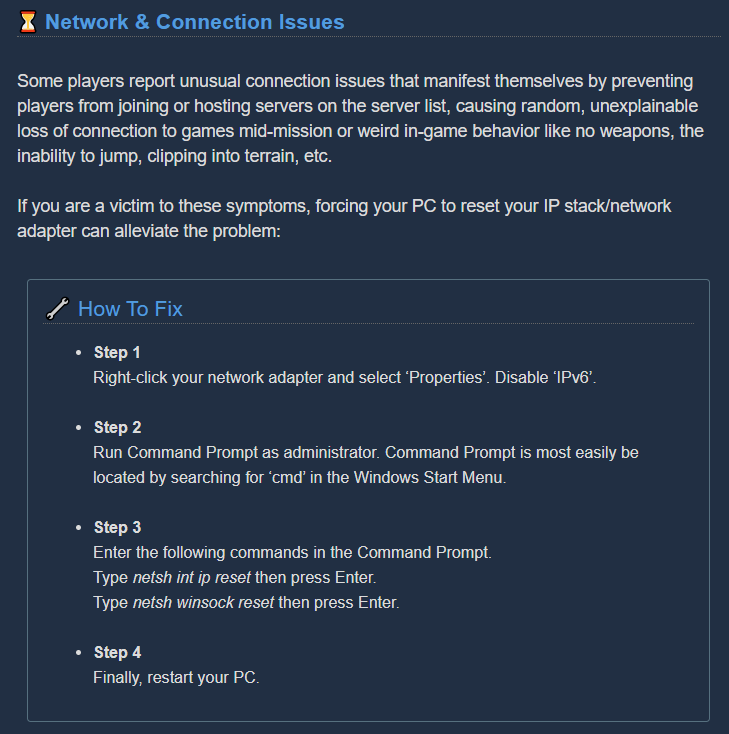


 mossy breach
thanks a lot, i will
 dusty notch
mossy breach
dusty notch
mossy breach
@dusty notch thanks for reporting that, I've noticed the same issue
 oak vine
negative weakpoint damage bonus is displaying in green, like it's a GOOD thing on this overclock.
 nova rapids
Have a feeling huuli hoarders are bugged but it's hard to get data on them since they are rare spawns.
I find most huuli hoarders on haz lvl 4 flee which is sad. But some die really quickly and walk slowly (haz 3); but other times they run really quickly and seem to tank too much damage.
They also get triggered through walls. And when the cue for their dissapearence chikes, if a player is near they can reappear through walls sometimes.
It's really strange.
 tropic ibex
anyone know how to fix this ?
past lagoon
I have found my BOSCO not carrying aquarqs. In the middle of EDD stage 1. BTW all was OK first, he brought me 2 eggs and 2 aquarqs. But then it just got stuck near the stone when ordered to pick it up. Reordering does not help.
 graceful lark
I ran into a really weird bug earlier, i was in a tight hallway when a Mactera Grabber flew at me, i froze it but for some reason it still picked me up and tried to fly away with me while being frozen, so i said fuck it and used my heightened senses perk to just kill it, well when i did that it exploded and clipped me under the map, i then got teleported back but my character model was completely invisible for the rest of the match, not really game breaking but still very weird
past lagoon
Yer luck you had the perk. Otherwise you had to rejoin xD.
 little veldt
past lagoon
little veldt
past lagoon
May be the host is hacked?
little veldt
Just wanted to share a funny bug from my adventures yesterday - tried to join a group, it was role locked (only driller available), I tried to join as driller and after a minute or two of that... Cycling...?...I was in game as a gunner. It was pretty weird!
broken brook
he's evolving
 glad sand
Yo Yo
Im assuming this has already been brought up somewhere however if not ill post it again
You can keep size altering effects from the beers by dying by jumping into the hoops
It doesnt last over to the missions as i assume it respawns the dwarves but it does cause you to glitch into the ground in the hanger occasionally
Just thought id bring this up incase it wasnt documented anywhere already
crimson coyote
thank you! never heard of that one before
 fleet onyx
I observed a visual bug during a couple of missions today in which my fellow miner who is very new to the game appeared to be wearing Mk5 gunner armour even though he was not even able to see it in the shop yet. It was fixed in the space rig after reselecting his Mk3 suit but would reoccur upon the start of a mission. Can anyone else say that they have seen the same thing?
 obtuse ember
5 in a mission
 rain galleon
does anyone else has the bug that they dont got rewarded after a deep dive? After two deep dives this week i havent got any matrix cores
obtuse ember
nice
crimson coyote
nice :)
austere coral
does anyone else has the bug that they dont got rewarded after a deep dive? After two deep dives this week i havent got any matrix cores
@rain galleon Does your game say you're on stage 0/0 regardless of stage?
 keen kettle
Hello :), today I’ve logged in to play with my friends and suddenly all my stats got reset !!!! What happened ??!!
austere coral
esc, options, restore save
austere coral
which version of the game do you own?
dreamy quail
Are you on another pc?
austere coral
we talking windows store or steam?
keen kettle
Steam
austere coral
is steam cloud enabled?
keen kettle
Yup
austere coral
are there any files located in that are not listed as last modified today? \steamapps\common\Deep Rock Galactic\FSD\Saved\SaveGames
keen kettle
When I checked this savegames there was a file got modified today and others not
Like some of them 2 or 3 days
The one gor modified is player.sav
austere coral
Rename player.sav to player_old.sav or to whatever you want.
keen kettle
But back up still some of them 2 days or 3 days
austere coral
Make a copy of whichever backup save you want and paste it in that SaveGames folder
rename that copy to #####_Player.sav (with ##### being that string of numbers representing your steam 64 ID)
keen kettle
On it I’ll let u know
Thank u so much !!!!!! It worked !!!
Almost had a heart attack xD
rain galleon
No it was not like this @austere coral everything was alright, except that I got no rewards when I spawned in the base after the succesfull deep dive
austere coral
You only get the rewards once per week per dive. You sure you didn't already get the rewards or accidentally do this weeks dive Thursday?
I've never heard of or seen the second one. Did this affect everyone?
 viscid lake
Sometimes I can't interact with the barrtender, probably due to the drunk movement making a joined player move to the dance floor. The bartender has a permanent green light on his eye and can't be interacted with until all joined players leave while I'm hosting the lobby
although kinda fun being forced to go on missions without sobering up, it took 2 whole minutes to mine a patch of morkite because the boys kept spinning
rain galleon
Ohh okay, now I get it. I didn‘t knew that you get the reward of a deep dive only once. I started to play DRG about 1,5 to 2 months ago. That‘s why I don‘t know everything, thank you sir 💪🏽 @austere coral
 whole kettle
Hello. Recently (after reinstalling Windows) game started to hang up from time to time. The freezes themselves last from 15 to 40-60 seconds, and they are repeated with an indefinite interval, sometimes 5 minutes, and sometimes every 40 seconds. This happens suddenly and regardless of the moment in the game. I play on medium settings, but also tried to put ultra and freezes were still saved. Maybe someone has encountered this?
austere coral
see troubleshooting in pinned messages
complete steps 1, 2, 9, and 10.
If you have an amd gpu, disable anti lag.
Complete the amd fx / realtek audio fix regardless of your hardware
viscid lake
Uhm how do I report a cheater?
There was this guy I played with who made everyone have infinite grenades
and he himself had infinite ammo so the entire place was filled with ziplines
hidden depot
@viscid lake Your answer can be found in #drg-chat pins
5th pin down
I just leave those lobbies.
austere coral
There's no anti cheat so as a result there's no bans for cheaters. Your only options are to either leave the lobby or kick them if you're host.
viscid lake
oh, huh I didn't know that was the policy, just worried that I'd get banned by the anti cheat since the cheats affected me too
but didn't know that there wAs no anti-cheat
Okay, will note for the future, thanks
flint skiff
@glad sand My friend found another way. Drink the grow/shrink beer and switch classes, it keeps the same size.
patent relic
Why does DRG run my CPU up to 40-75% & drop my framerate to 40 fps when I host? (I am running i7-6700k 32GB RAM + 980 Ti)
white girder
hosting is more resource intensive than joining, but you shouldn't really notice that much difference
 ivory moon
Hey everyone, I feel like I might still be being selfish by saying this, but I have to apologize for being a toxic loner. I don't think I deserve to die anymore, nor anyone else. All life is precious and it took me this long to circle back to that.
patent relic
hosting is more resource intensive than joining, but you shouldn't really notice that much difference
@white girder it's only when loads of things are happening that i get lag spikes like that
white girder
you're probably hitting the limits of your CPU
patent relic
sure, but it shouldn't be the cpu doing the heavy lifting
white girder
I mean, of course it will be doing the heavy lifting; there's a ton of AI entities and all the stuff players are doing to content with any any given point in time
 slate bronze
I sent a email because of gameplay problem I had, but it told me to go here do I need to ask here instead?
dreamy quail
This is the place
crimson coyote
go ahead and put it here :)
slate bronze
Thanks!
So I've been playing DRG about a year with a friend, and had not much problem with it except for few bugs, but recently I got a higher ping then usual (90 compared to 15) giving lag (friend is hosting, other players reported no problems) I think it is with me but I don't know what is the issue.
So far things that have been tried:
- Restarting game(Both sides)
- Restarting computer(Both sides)
- Restarting router(Both sides)
- Reinstalling game(My side only)
- Trying again at a different time
Region is East Asia
dreamy quail
Well, as the game is peer to peer it must indeed be on your end. Is your ping higher than usual in other games or just in DRG?