#bug-discussion
1 messages · Page 126 of 1
 potent nymph
doesnt mean its set up properly, update your drivers, you can just google it.
also, go into the game, Options - Graphics - Set Max FPS to 60 or 120
 odd sigil
max fps is set to 120
potent nymph
okay good
odd sigil
it always has been actually
potent nymph
and the checkbox is checked?
odd sigil
yes
aparrently i was missing 2 drivers?
i think?
a controller storage driver
and something else i cant see atm
 rich schooner
Have you played any other games on the new rig, or just DRG?
rich schooner
Ah but that's like, 15 years old, not as likely to tax any hardware. :)
odd sigil
none that i saw
fair
any newer games?
uhhh
star wars fallen order
i didnt find any issues with that game either
potent nymph
if you have fortnite(😶 ) you can try that, since it uses the same engine
odd sigil
i do not own fortnite
rich schooner
Did you overclock anything? I'm not sure if Alienware PCs come with easy overclock options.
rich schooner
Probably not then. :)
odd sigil
probably
rich schooner
Overclocking used to be a dark art but some manufacturers have made it more accessible with software like MSI Afterburner.
odd sigil
mm
im running a test game (or 3) to see if it crashes again after optimizing the drivers
rich schooner
Cool.
odd sigil
ill reply when i get a comfirmation or not
 visual pilot
Why bosco digs just straight?
 solemn linden
[Reproduction rate:] Every time
[Steps to reproduce:]
- Use drills until you have zero fuel
- Keep using drills, whether you're using them on terrain or not
[Expected Results:]
Drills will not overheat
[Actual results:]
Drills will overheat
odd sigil
i have returned and it seems i have a comfirmation
no more crashes so far
ty for all the help
potent nymph
yay
 thin fog
Yo
Check out this bug
Wait how do i add pics
Oh i guess i cant
We had a glitch of a 5 man lobby
And it worked in mission to
 humble crag
^ Wait that's illegal!
 dreamy quail
One of the cooler bugs in the game. If Bjorn fixes it im gonna be very sad
 round garden
i just had a game where all of us had infinite grenades and my sentries had infinte ammo
round garden
wait how what
thin fog
Id hate for this game to turn into payday with the hackers
round garden
so a hacker was able to hack the server/mission or something to make all of us have infinte grenades?
thin fog
From what i know yeh, but i could be wrong
Sometimes the host modded lobby
Will put modded*
round garden
huh
 ripe jewel
So recently I started getting loot claim issues with the cargo crates and lost equipment, where there are sometimes, not all the times, but sometimes where I don't get anything when I claim the loot, is this a known issue? I know that I have all the pickaxe parts by now, but I for sure do not have all the victory moves and weapons skins yet, and for some reason once I got all the pickaxe parts the lost eq and cargo crates started bugging out for me every now and then
 boreal pond
molly is stuck on the side of the droppod
my fps is dropping from the amount of beacons
 inland burrow
move away from the droppod
I saw some guy say that he ran off it and it fixed itself at that point
inland burrow
suck sry
dreamy quail
Supposedly there are extra failsafes for that in next update
inland burrow
Does anyone have suggestions if in game voice chat doesnt work? works in everything else
dreamy quail
For now you can only wait or try to disrupt her pathfinding
Or as you did, end the game
 white girder
So, this should probably not happen:
https://steamuserimages-a.akamaihd.net/ugc/1041967775049008830/D27C8055E272B6FA3F09C1DA3EBB9DF62572995A/
https://steamuserimages-a.akamaihd.net/ugc/1041967775049009010/2EAF80B40F8A31C090C6E81AF9863FEF4CC041B9/


still got out, but if that ceiling had been higher, eh
 dire imp
@inland burrow make sure you are online in steam friends, check that your mic works in those settings, and make sure that your mic is set to your default communication device in windows
 desert breach
Pheromones are not working well,i think is because the monsters IA.
 austere coral
They were nerfed a few patches ago.
there's a limit to how many bugs they'll attract
 fading dagger
What's that limit? 5?10?
 autumn orbit
All missions were blocked after completing EDD. Had to reload lobby.
everything looked like this^
 dull valve
So... the flamethrower infinite sound bug is still a thing
Igniter flame sound persists in the area where you were standing after you put away the flamethrower
 cerulean ridge
Having issues with sounds thourgh my headphones anyone have similar issues?, Razer kraken 7.1 headphones
 fallow heron
Any fix for these lack of sound issues? People gonna instantly refund the game because they have no sound if not. 😦
austere coral

Hi all Some users are experiencing stuttering/low fps/freezes and Alt+Tab issues when using a combination of AMD FX Series CPU's and Realtek Audio sound, it has also been observed on other combinations, f.eks Intel and Realtek Audio. If you are having issues as described above...
cerulean ridge
We have added a button in the ingame menu - This does the same as the previous solution, just easier.
Options -> Audio -> Disable Master EQ
 kind night
Anyone have a fix for the game freezing when you press Esc? I tried the https://steamcommunity.com/app/548430/discussions/2/1729827777339086202/ and it didn't work.
Hi all Some users are experiencing stuttering/low fps/freezes and Alt+Tab issues when using a combination of AMD FX Series CPU's and Realtek Audio sound, it has also been observed on other combinations, f.eks Intel and Realtek Audio. If you are having issues as described above...
 spring halo
I have a question about what feels like a bug? When firing the Powered minigun, when I toss a grenade without releasing the fire button, the minigun does not resume firing after the grenade animation is done, and instead I have to refire the minigun. is that intended behavior?
 sturdy silo
So I started on stage 0 of the elite deep dive and when our group failed I got negative money and exp
 worn kelp
 red roost
the cone of burning for the burning hell oc doesn't really feel consistent when it comes to naedocytes, which is weird considering that it is very consistent against swarmers
 gray valley
Bosco lighting up gas clouds still doesn't seem to be adressed anywhere
And it's been in the game for a while
It's very annoying when that happens
It goes for both praet/oppressor gas clouds and neurotoxin grenade gas clouds
The latter is especially annoying, since it lets bosco just randomly blow you up or waste a whole grenade
 frosty comet
-100% weakpoint damage is listed as a positive instead of being a negative.
austere coral
@sturdy silo This is a common issue on Thursdays. Someone on the group had some kind of time issue with their windows settings. This results in one or more people seeing one weeks dive while (the host most likely) seeing another weeks (typically the previous one). You'll have to redo the dive.
kind night
nice, thank you
 signal fox
Havnt seen anything, but making sure
I found a bug just now where I can gain the gold supporters edition paint, but I dont have the supporter edition (yet)
 marsh kiln
Anyone else have an issue where the game skips past letting you select your class when joining a dig?
 cedar beacon
I am not sure if this should go into the bug discussion or not... I have 2 frequent problems. I bought the game through the windows store and I have frequent lag/disconnects ONLY when I join a mission. (The steam version ran flawlessly for me) Sometimes when a disconnection occurs the only way I can get the public games to load is by restarting the game. All my other games seems to run okay, my internet is okay (im up in the mountains)
signal fox
It's likely an issue with you being in the mountains, I've had Drg on microsoft store for quite a while now, almost a year, and I've never had any major issues. Sure, sometimes itd spazz out but never consistent flaws while running
cedar beacon
It is the only game that isn't running well for me... 😦
 cloud laurel
I'm having issues with weird mouse input lag, i'll try to grapple and nothing for like 3 seconds and then it goes, it's only my mouse and not my keyboard, tried turning down graphics, adjusting mouse settings, unplugging and replugging in my mouse, any ideas?
 marsh cargo
umm my friend just died while making his way back to the drop pod and bosco just left him to die while still having a revive available
 vernal osprey
so... This happened to me, then molly teleported to a cavern I didn't have access to without more digging than I had time for
Before this mission closes, are there any things I should pull for a bug report?
molly was weird on the mission a couple times, got stuck with an o2 label under it. couldn't get her to move even when I tried digging her out. finally got her to move by hitting C on top of her
 gritty cipher
well, im not sure if this is a bug, but i've tried drinking the blackout beer just before entering the rocket to go to a mission. So what happened was that the wobbling efect remained during the mission. In fact im on the mission right now, so if you need a video or something, i can record that
gritty cipher
Yes, i get it, but getting absolutely hammered involves not being able to play?
i mean, when you get drunk in the game you just get a blurry vision, and maybe you walk even when not pressing wasd
but blackoup drink is special
 plain dove
Another screenshot and case of DRG-1522 (Framework gone).
Just reporting
http://puu.sh/FSOSu/1cd1f87fee.jpg
 gritty cipher
because a few seconds before you faint, the character starts moving by itself and you lose control of your camera
austere coral
@plain dove pinned messages
gritty cipher
well, i don't know if it's a bug after all, but if you want a video i can upload one
 calm stirrup
Hey, is there a way for me to submit video files as documentation for a bug? I've no idea how we could recreate this one thing but it glitched the drop pod out and we lost an easy mission because of it
maybe it was collision with the falling salt crystals on to the drop pod, but whenever we jumped into the drop pod leave area, it would glitch us under it
irritated right now, if I could get a DM for the video evidence or someone telling me where to drop it, I've got full footage of it
 slender bolt
OK so I was on a zip line and a bulk detonator blew up under me, didn't kill me, I'm alive right now
fading dagger
@calm stirrup bottom left next to the text bubble there is two icons, one for camera and one so you can insert your clips/photos
fading dagger
👀
slender bolt
it says press E to grab
but im still on thwe zip line
but i can't traverse it
and i can shoot enemies and kill them
my friends are trying to see if they can res me
i can even shoot my teammates
it showed me as standing midair on their screen.
 silver marsh
@plain dove I had the exact same thing happen, DRG-1522. Same issue as described (although I haven't purchased any add-ons other than supporter edition from months ago). I was fiddling around with weapons and the neon band framework on the revolver disappeared. It has not returned even after hotfix. In fact, I think mine vanished after the date the hotfix went out.
dreamy quail
You have to find it again in a crate
 static dust
terrain generation glitch? random air bubbles
silver marsh
@dreamy quail Thanks, I missed the pinned. I'll get to searching the caves then!
 bright wraith
hey @potent nymph . can you have a look at my problem please?
When ever I launch Deep rock galactic, process of DRG stops responding, i see a running man and then black screen. (this doesnt happen with any other game, including online games from steam).
I already reported my problem here and all the solutions failed so far, including trying to reinstall DirectX.
However now when I started windows in safe mode, I saw this message when launching DRG (screenshot below)
This makes me think that the problem is still in DirectX, but i just dont know how to fix it.
I was told to go to the Microsoft website and update DirectX, however when ever I download dxwebsetup.exe and run it, it says I already have the latest version of DirectX. I also tried updating my windows, didnt help.
Do you have any ideas about how can I fix it?
(i tried other solutions like reinstalling the game and steam, switching off AV and Firewall, scanning with sfc /scannow and chkdsk /f /r E: , starting with "-dx12")
specs:
intel i7 5820k
NVIDIA GeForce GTX 970
16 gb RAM
Windows 10 , x64
 zenith horizon
Hi. Anyone else losing assignment progress on Xbox? Had 2 of 3 for weekly core and now it's 0 of 3 again. 🥺
potent nymph
@bright wraith goggle the error, you will find plenty of solutions
 fallen hill
@bright wraith Do you still have -dx12 enabled in the Launch Options? Try without it.
bright wraith
I disabled -dx12, not working
 frosty quartz
Hey, I'm having issues with DRG lately. I updated the new graphics driver (446.14) but I had to rollback because of the fps drop and any game I play it crashes. Another one was that I had to decrease my GPU's memory clock and clock speed in order to not crash the game.
SPECS:
Windows 10 Home 64bit (1803 version)
intel i5 7600k
NVIDIA GeForce GTX 1070
8GBs of RAM (Dual Channel)
potent nymph
have you tried capping the your frames Temprary
frosty quartz
@potent nymph ah yes I did try to cap it but when I revert my GPU's clock speed and memory, it crashes within 5 minutes
but I did on NVIDIA Control Panel
not in game
potent nymph
do it ingame
iam still not 100% sure what your issue is to be honest, or at least the timeline
bright wraith
@potent nymph trying. found this video for example. installing drivers manually didnt help, using directx offline installer neither. For dxcpl.exe i put steam.exe, fsd.exe and FSD-Win64-Shipping.exe on the list. didnt help. maybe i should add something else to the list?
https://www.youtube.com/watch?v=FESQ3GeHils&fbclid=IwAR0rhQ3WmWr-wv00z1iAQTOI9airHOgu4VdcNoOCHAIVKXL2T4jE-ONIASc

In this video i will show you how to repair resolve or fix the missing or outdated graphic card driver that can cause this error on windows 7,8 or 10.
Failed to find a graphics adapter with the minimum required DX11 feature level.
How To Fix Directx 11 Error in Fortnite on Win...
frosty quartz
oh the issue was that I updated the graphics card driver
the latest one
when I played DRG, it crashes
potent nymph
It's hard to say destut, something your doing is not working, but it could be a thousand things. since the issue is with unreal engine
frosty quartz
@potent nymph other than that, thank you for your help :)
potent nymph
do you get a crash report temp
frosty quartz
I sent it last night. I forgot what time
It was something to do with d3d device lost
potent nymph
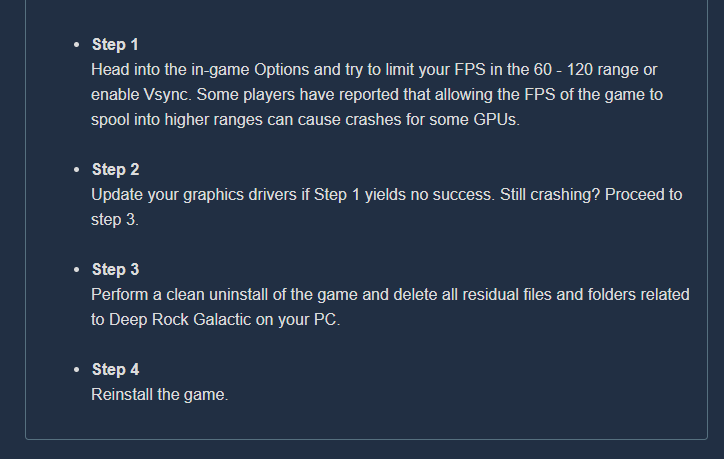
Step 1
Head into the in-game Options and try to limit your FPS in the 60 - 120 range or enable Vsync. Some players have reported that allowing the FPS of the game to spool into higher ranges can cause crashes for some GPUs.
Step 2
Update your graphics drivers if Step 1 yields no success. Still crashing? Proceed to step 3.
Step 3
Perform a clean uninstall of the game and delete all residual files and folders related to Deep Rock Galactic on your PC.
Step 4
Reinstall the game.
if this was your crash
LowLevelFatalError [File:Unknown] [Line: 200] Unreal Engine is exiting due to D3D device being lost. (Error: 0x887A0006 - 'HUNG')
FSD_Win64_Shipping!FDebug::AssertFailed() [c:\p4\unrealengine\main4-21\engine\source\runtime\core\private\misc\assertionmacros.cpp:417]
FSD_Win64_Shipping!TerminateOnDeviceRemoved() [c:\p4\unrealengine\main4-21\engine\source\runtime\windows\d3d11rhi\private\d3d11util.cpp:213]
FSD_Win64_Shipping!VerifyD3D11Result() [c:\p4\unrealengine\main4-21\engine\source\runtime\windows\d3d11rhi\private\d3d11util.cpp:249]
FSD_Win64_Shipping!FD3D11DynamicRHI::GetQueryData() [c:\p4\unrealengine\main4-21\engine\source\runtime\windows\d3d11rhi\private\d3d11query.cpp:141]
FSD_Win64_Shipping!FD3D11DynamicRHI::RHIGetRenderQueryResult() [c:\p4\unrealengine\main4-
your not on a laptop are you?
potent nymph
try the steps, see if it helps
frosty quartz
ill give it a go now :)
 sharp rain
dire imp
sharp rain
dire imp
make sure you are online in steam friends when you boot the game, make sure your mic works in the settings in steam friends, and make sure you mic is set to your default communication device in windows
 hollow latch
@spice trail Given that it's on the experimental build you are better off posting it in #experimental-bug-discussion
 spice trail
Oh, haven't noticed it
hollow latch
That way people can avoid the spoilers
spice trail
Let me move it
 mild yacht
https://cdn.discordapp.com/attachments/717751136190201886/718278301608706048/unknown.png I walked, kicked the barrels and fell into the floor texture on the second floor of the base

 stiff coral
been playing DRG a lot and luckily this is only the 2nd time this happened, still sucks: molly won't enter the drop pod but keeps walking around on one spot
austere coral
On everything that isn't salvage, the pod will open with 10-15 seconds remaining. ||The #changelist-only-for-experimental-branch has a fix for molly not entering the pod on salvage. ||
 grave lichen
My friend is on PC on the Windows 10 version of DRG. He's unable to connect to any multiplayer games - the only way it works is if he uninstalls and reinstalls DRG every time we want to play together. If he doesn't do this he gets the "Multiplayer Session Ended" error. Anyone have insight on a permanent fix for this?
 misty citrus
typo on promo congratulation subtitle - should be "appreciates"; mission control says it correctly, however!
austere coral
@grave lichen See pinned messages in #xbox-and-windows-store as well as https://i.imgur.com/nIOzOyp.png
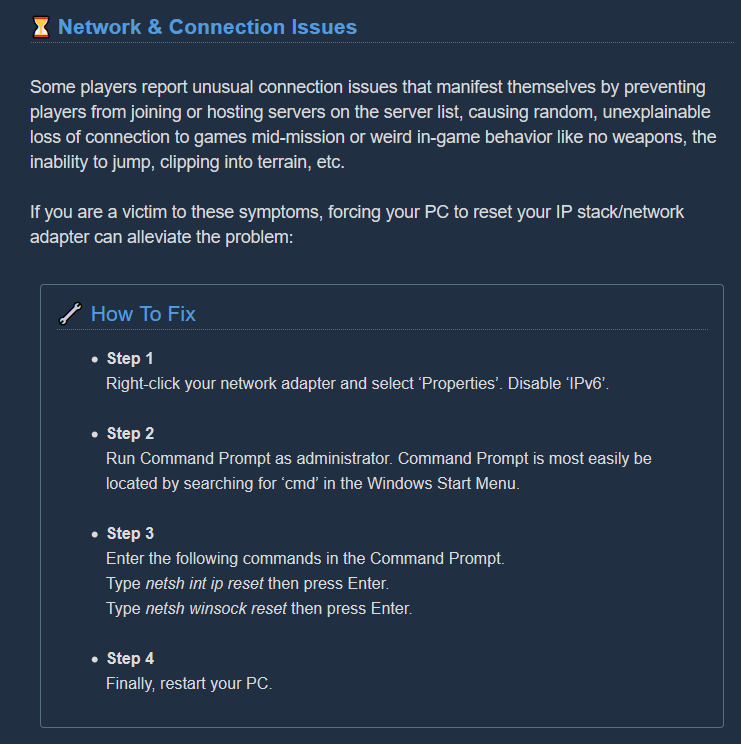
 lean plaza
Hi so a while now a have hade this bug where every time i press esc in the hub area or som time when i start the game. Everyting will suddenly just freeze and i am unable to close the game. can somebody help me?
 crimson coyote
So you can't press the exit to desktop button in the escape menu? @lean plaza
crimson coyote
Yep
hm
That could possibly be your issue?
I did a little searching and it seems that that is really the only answer it seems
That doesn't really have a solution actually
@lean plaza But do you have a realtek audio chipset or amd cpu?
lean plaza
no i have a intel cpu
austere coral
That esc issue is more likely something screwed up with directx. https://discordapp.com/channels/257785731072786435/258990272967475200/717121096037433355
Do a sfc scan and if that doesn't resolve it, attempt to repair directx.
 livid glen
 edgy marten
The Mule went through a barely visible hole in the wall and I lost track of it.
I failed to reach the drop pod and watched it take off in front of me.
lean plaza
@austere coral how do i do a sfc scan?
austere coral
launch an admin command promt then enter the following command into it
sfc /scannow
afterwards restart your pc
 solar night
Idk why the drinks are stacking
lean plaza
@austere coral hi again when i was sfc scaning the process stopped at 14%. Claiming that "windows resource protection could not perform the requested operation.
@austere coral what do i do?
austere coral
enter the following command into an admin command prompt chkdsk /r
restart your computer afterwards
also try this
win key + r
type in services.msc
click ok
find Windows Modules Installer
Double click it
In the startup type change it to manual.
Click apply then ok.
launch an admin command prompt
enter this command sc config trustedinstaller start= demand
hit enter
enter this command net start trustedinstaller
hit enter
restart your computer. Run the sfc scan again.
lean plaza
@austere coral i tried your new guide of instructiosn but it still didn't work. could i be someting with my windows not installing properly
 vestal remnant
something doesnt add up here...
austere coral
You can try doing a windows repair with their windows installation media, but aside from that I have no idea.
 sinful pelican
When can we see a patch for the Xbox one? When hosting an online session, other party characters have their pallet constantly glitch out. It's like the graphics are stretched all over the place. Makes the game unplayable for the host. It's been like this for a while now. Thought it would get fixed with the last update.
austere coral
 sturdy mountain
hey ho rock and stone! i've been having this issue the last few days with the lost gear where i go to its location, get all the minerals on the ground, but when i go to grab the cosmetic, i dont get one. i'd check back in the lobby to see if maybe the notification didn't pop up, but i wouldnt find anything new. is anyone else having this problem? i didn't see any past posts about it. thanks!
 mossy breach
You don't already have all the cosmetics I'm assuming?
sturdy mountain
noo i definitely don't:P i have a bunch of partial pick axe parts as well as armor things
mossy breach
That's all I've been getting from crates and lost packs, rarely do I get cosmetics, however I do still get them.
Just yesterday I got a 4th relic framework for my cryo cannon, so I can't say I've seen it. Sorry.
sturdy mountain
yeah its strange because my friends will all get loot from the same lost gear, what can ya do. i still get loot crates so hopefully this problem gets resolved, i'll still be hyped to find them
mossy breach
Not sure if it's just a matter of them being a low drop rate or something else. I do hope it's nothing major with your specific client, as that would be my only guess as to the cause given that your friends still get the gear and you don't.
 neon mantle
@sturdy mountain drops from lost gear and crate are the same across the board unless someone has it then it’s a reroll for that person
 gritty seal
anyone else having issues with servers loading? I have the windows store version and the list just loads forever
austere coral
@gritty seal https://i.imgur.com/U6Gs3md.png
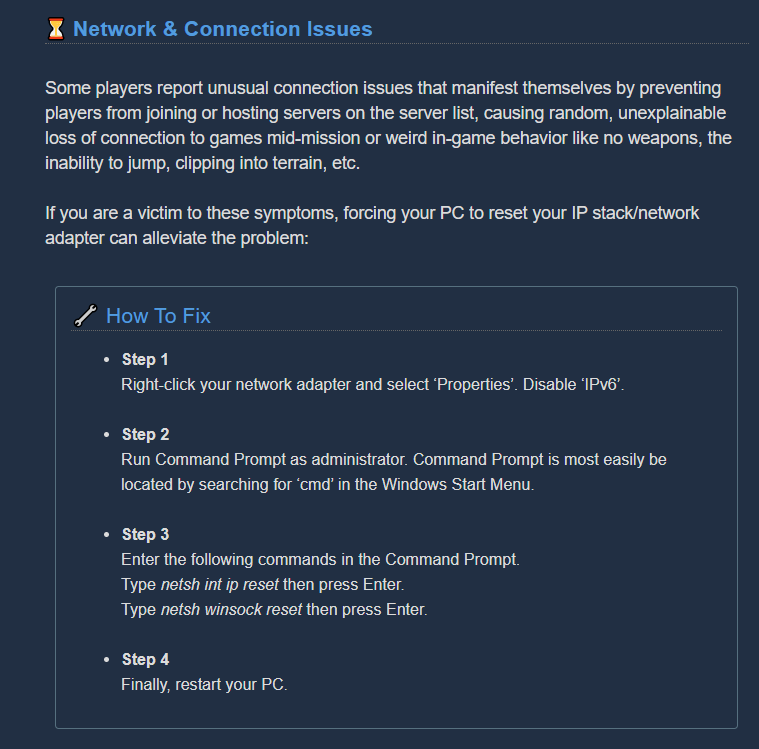 gritty seal
@austere coral can that have any negative side effects?
austere coral
if you've got some really complex network at home then probably. You're also disabling ipv6 so keep that in mind.
for 99.99% of people though you won't notice any negative effects
 twin tusk
Hi, I was directed here for potential support, hopefully you all can help. Here's a copy and paste of the email I sent to the support alias trying to file a ticket (which directed me here):
Hi,

I purchased Deep Rock Galactic earlier tonight, through Steam, but the game just won't launch for me. When I click play it says it's launching (the button in the steam UI changes to "stop"), and then after ~5 seconds the button switches back to "play". No error is shown, and no window ever launches. In Task Manager I very briefly get a subprocess running under the Steam process for Deep Rock Galactic, but it sticks around for less than a second. My machine well-exceeds the minimum requirements for the game.

Troubleshooting steps I've already taken to try to isolate the issue:
-Uninstalled and reinstalled the game
-Used the Steam file integrity verifier to confirm the install was good
-Restarted my computer
-Turned off my firewall
-Changed wireless networks back and forth between my 5ghz and 2.4ghz bands
-Ran windows update
-Ran DxDiag to confirm I have and am up to date with direct x 12
-Added -dx12 launch argument
-Turned off Steam Cloud synchronization for Deep Rock Galactic

I didn't find any crash logs in the game's directory structure, so I have nothing helpful there either. I checked the common crashes thread on the forums but it doesn't have much help for the case where the game just never launches.
So, I'm completely out of troubleshooting techniques at this point. Might be time to just request a refund and give up my space dwarf dreams?
austere coral
I have a few things to try, but I’m not at my computer.
twin tusk
No worries, I'll come back to this thread later and try out whatever folks recommend.
austere coral
@twin tusk navigate to \steamapps\common\Deep Rock Galactic
Right click FSD.exe
Run as admin
Let me know what error message you get.
twin tusk
The code execution cannot proceed because XAPOFX1_5.dll was not found.
oh, it's apparently also missing X3DAudio1_7.dll
austere coral
sounds like an audio issue
do you have realtek audio drivers by any chance?
Either way give this a try before we do more drastic changes. https://steamcommunity.com/app/548430/discussions/2/1729827777339086202/
Hi all Some users are experiencing stuttering/low fps/freezes and Alt+Tab issues when using a combination of AMD FX Series CPU's and Realtek Audio sound, it has also been observed on other combinations, f.eks Intel and Realtek Audio. If you are having issues as described above...
twin tusk
No Realtek drivers
austere coral
Try the workaround linked above. If that doesn't work I'm going to have you perform a surface scan on your machine.
twin tusk
I can't complete those steps because I don't have that folder structure - no Saved folder in FSD
presumably because I've never been able to launch the game before
austere coral
that'd probably do it
alright go ahead and do a surface scan, here's hoping it identifies the missing dll and can replace it. If not There's another thing that can be tried.
twin tusk
correct
austere coral
https://www.microsoft.com/en-ca/download/details.aspx?id=35 run this and see if it repairs any missing files

Microsoft Download Center
The Microsoft DirectX® End-User Runtime installs a number of runtime libraries from the legacy DirectX SDK for some games that use D3DX9, D3DX10, D3DX11, XAudio 2.7, XInput 1.3, XACT, and/or Managed DirectX 1.1. Note that this package does not modify the DirectX Runtime instal...
if that doesn't work I'll have you directly install directx 9.0c
austere coral
yeah it seems that every now and then windows 10 just fails to install directx 9
is your system a prebuilt, an upgrade from an older version of windows, or a direct install of win 10?
twin tusk
it's not prebuilt, can't recall whether I upgraded or installed from scratch though
austere coral
I need to look into which installs are causing this issue
twin tusk
Either way, thanks for the help!
Aaaand now I immediately have a different crash, during the Coffee Stain load screen 😆
austere coral
may be an audio issue. I've seen it happen on hardware not related to amd. Give it a try since you should have those files generated.
twin tusk
no change. error message seems to be about video drivers
"Video driver crashed and was reset. Make sure your video drivers are up to date"
[CrashReportClient]
bHideLogFilesOption=false
bIsAllowedToCloseWithoutSending=true
CrashConfigPurgeDays=2
CrashReportClientVersion=1.0
DataRouterUrl="https://sentry.io/api/2472973/unreal/d45ffe8f38124715a3aa316b8905c220/"
the last time you updated did you install it over top of the existing one or did you do a clean install?
twin tusk
The directx drivers or the game?
for the game I uninstalled first, then installed fresh
austere coral
your graphics drivers
twin tusk
the directx drivers specifically said on the microsoft site that they wouldn't conflict with the windows-installed drivers
austere coral
those aren't the issue right now, it sounds like your graphics drivers may be out of date and/or corrupted.
twin tusk
and I haven't actually tried reinstalling my nvidia drivers as a troubleshooting step yet
austere coral
do that and make sure it's a clean install
 pastel spear
Just failed a run because me and everyone else randomly noclipped through the bottom of the drop pod at the last minute
twin tusk
alright, I'll try the driver reinstall later. have to jump into a tabletop simulator game with friends right now, so can't afford to be messing with my display drivers. Thanks for the help up to this point, though!
 proven carbon
Has anyone had the problem where the game loads really slowly and it bugs out all the time when I’m trying to join a group but if I play solo it doesn’t do it ??
austere coral
@proven carbon https://i.imgur.com/U6Gs3md.png
 slow warren
im i the only one were my solo runs dont register in the consol ?
 upbeat jewel
so.. @swift horizon @vale elk i figured out a way for permanent low G in the space rig.. and how to exit the space rig.... but what if i dont consider these bugs, but features
 timber crypt
I often phase through the floor and the drop pod
 swift horizon
👀
upbeat jewel
but it wasnt the drop pod... and i spent like 2 hours outside the space rig
swift horizon
... what did you do for two hours outside the space rig? Suffocate?
upbeat jewel
float around, jump, take screenshots
get boosted by my buddy to get on top the huge cylinder thing that extends wayyyy above the actual drop pod
awful lotta space there that is above everything inside the rig Mr. Jacob
suspicious!

Steam Community: Deep Rock Galactic.
frosty quartz
Hey guys, Im still having the same issue from last night playing DRG. I tried the following steps; turned on VSYNC, updated graphics driver, reinstalled graphics driver with clean install. Its just first 5 minutes in, I get a crash error
and comes out with this sparkly thing too
whenefver i press the menu
upbeat jewel

Steam Community: Deep Rock Galactic.
 glad cove
mule walking but wanna be repaired https://media.discordapp.net/attachments/604229373695885313/718484480003670126/unknown.png

 crisp pewter
When joining a spacerig, if they ordered beer before you joined, the beer is invisible.
I could not interact with bartender, because of this. Someone went and took the invisible beer and drank it. Bartender was available after that. Happened twice now.
 turbid geyser
a couple of times when I've tried getting beer the menu will vanish and nobody can use the bar
 inland delta
My computer just hard crashed when playing this game, I think it's a hardware issue on my end. But I see other people are having it to. I'm running a stress test with 3d mark, and its good so far. Is anyone else having the issue of the computer suddenly shutting down when playing DRG?
inland delta
I found out what it was, it was Amd Link, I turned it off on my phone and it it stopped hard crashing.
I think AMD link causes the pc to chug.
I need to test it in valorant, I was having similar issues.
 drowsy stone
2 year old bug: Friendly AI is more of a hinderance than a benefit.
Expected behaviour: AI helps the team accomplish objectives and fight hoards.
Actual behaviour: AI's benefit is negligible, and in many scenario's is either frustrating, or game ending.
Examples: Steve sit ontop of a team mates corpse. Team mate can not be revived quickly enough to deal with the difficulty of H5 due to "pet steve" being prioritised over the downed dwarf.
Molly gets in the way / sits in the entrance of a dirtpatch when dwarfs are trying to move through.
BetC walks over the top of dwarves and pushes them around when randomly pathing, generally gets in the way of dwarf business, or will teamkill dwarves with grenades. (low damage is still damage)
Proposed solution: Delete all friendly AI entities or work on them sufficiently that they are less of a hinderance/frustration to gameplay. Currently they are not bringing anything to the team and I would prefer that betc would not be revived, however if you are forced to kill her she will cry for the entire game, which you can hear through the entire map. The only way to not be annoyed by BetC's cry or her friendly AI is to simply avoid her entirely. Please fix.
inland delta
nvm crashed again >.<
austere coral
Hi all Some users are experiencing stuttering/low fps/freezes and Alt+Tab issues when using a combination of AMD FX Series CPU's and Realtek Audio sound, it has also been observed on other combinations, f.eks Intel and Realtek Audio. If you are having issues as described above...
 golden sedge
Is it bug for 5 players in game?
 sour garden
How? 5 players?
upbeat jewel
@sour garden Neat!
 forest merlin
we've joined game few seconds after it started
 primal cove
Personally I'd like to see THIS bug squashed... Sooner than later preferably. 
gritty seal
(Windows PC) Server list shows when first coming into the game, after doing a mission, server list just sits and loads. Restarting the game seems to fix it.
 mental lodge
anyone know what could have caused me to get barrel kicker ? (it is the one for 10 barrels in the hoop without a miss), multiplayer section, that day I only kicked barrels around the spacerig, and one time another player was kicking barrels in the hoop while I was below the hoop, kicking the barrels that missed, I don't remember well when I got it, but I even think it was during regular barrel kicking, which makes sense, since I thought it was something for kicking barrels on the rig 100 times or something
 cyan oracle
My assignments keep resetting. I had done mission 2 for weekly priority and I logged off, came back today and it has been reset. I have to re accept it now. Help please
austere coral
Did you log off Wednesday? The weekly assignments reset on Thursday every week.
 silk spoke
I'm having a very hard time getting push to talk to work in DRG. When I turn it off, voice works fine but my damn Z button won't let me talk. I remapped to T and still nada. Any thoughts?
inland delta
@austere coral I'll try it, but my entire PC shuts down.
There is no locking, per say. It just turns off.
austere coral
That's probably an overheating issue then. Disable any overclocks you may have on your gpu or cpu and check that your fan curves are setup correctly and that they're providing adequate cooling at high temperature.
A straight shutdown while playing games or using any other high workload application is typically a sign that your part is unable to keep itself cool and exceeds thermal limits. So it shuts itself down to prevent damaging any parts on the circuit board.
mossy breach
Hello everyone, I have little problem with sounds. When I activate VC I'm losing all sounds and propably noone hear me. I'm using wireless headset + USB microphone
inland delta
@austere coral Yeah, I thought so too. I immediately ran a 3D Mark stress test, and it passed. I did the tweak suggested and I uninstalled Vanguard, the intensive anti-cheat by Riot for Valorant, I managed to play a mission okay, I'll try some more. I need to play other games if it does thesamething.
It'd be lame if it was caused by Vanguard. -_-;;
Seriously.
austere coral
Wouldn't surprise me. It's an anti cheat with kernel level access that is always running.
Actually some quick searching and it seems you're not alone. Their anti cheat is crashing some computers when the user is running normal software.
inland delta
Yeah, I don't know anything about kernels or anything like that, but I know it's trouble when I skimmed an article on what Vanguard was doing. But it may not be it, I need to play other intensive games, and check my fans. But usually there's a beeping that happens when things overheat.
such as the CPU
austere coral
Granting software kernel level access means that software has access to essentially everything on your computer. No restrictions.
inland delta
I thought it was my PSU. Yeah it sucks, I uninstalled it. I may install it again if DRG doesn't crash, and double check. Then find out how to send a bug report to Riot. I hope it isn't my motherboard or psu though. Thouh, I do need to upgrade my PC, especially the CPU I have an i5-6600k.
Thanks for all the help, but that anti-cheat is kind of nuts. A friend told me that Activision is just requiring two step verification via phone, and then if you're hacking the number is blocked. I suppose that isn't enough for Riot.
The latter I meant for CoD Warzone.
austere coral
@pallid monolith #experimental-bug-discussion
 silent mural
Just noticed someone mentioned 5 people in a game above, we had the same issue just a few minutes before. 5 people in a game but we are able to finish the elite deep dive (^▽^)
each stage of elite deep dive when drop pod land, 1 people will stay at bottom of drop pod, either die or undie
but in the screen that process to next stage, only 4 people show on screen
new "feature"?
 obsidian drift
Hello I found a bug can i notice a developper ?
 gentle hazel
also please check the pins in this channel
 toxic estuary
I need help, my voice chat has never worked for me in DRG. My mic works everywhere else, just not here
 jovial badger
Can we PLEASE restore the spawn rate for Kursite Glyphids/Mactera or buff their spawn frequency? They spawn NOWHERE near often enough and I have had multiple cases on squads of all sizes and difficulties where we run out of time due to them not spawning enough, if at all (Had 11/13 in a game there with 30 seconds on the clock, no more spawned, time ran out.)
 young solar
So, I was playing earlier today and my computer blue screened while playing the game. Now, I think said blue screen has corrupted my game. Three times in a row, my DRG has mysteriously crashed early into missions for no apparent reason. Would uninstalling and reinstalling the game be a good fix for what I think are corrupted files?
 hidden mirage
Wouldn't verifying the files accomplish the same thing?
young solar
I have no clue what that is
hidden mirage
Right click on Deep Rock, Properties, Local Files, Verify integrity.
Depending how steam does it I assume it compares (hashes) your local files to the ones that it should be. If they mismatch, steam downloads that file.
 harsh steeple
whatever i craft, be it overclocks, gun skins or whatever, with any class, it all goes for the gunner counter in statistics.... anyone else has seen this?
hidden mirage
Also, getting lots of polygonal/artefacting...maybe since release? I'll just leave this here. (PC)
young solar
Huh. Well, thanks for the advice Zoss. It says the files are alright, so if the crashes continue, I'll look more into it
austere coral
@hidden mirage known issue on the xbox version of the game. https://discordapp.com/channels/257785731072786435/402907500619497503/717824896079495284
austere coral
@young solar It's more likely that some files in system32 may have been damaged when your computer blue screened. Run a surface scan to verify those files aren't corrupted. A quick google will get you the steps necessary to do it. You may also want to reinstall your graphics drivers, do a clean install.
 tidal mauve
Our teammate spawned stuck in the drill pod.
hidden mirage
If you're doing system file scans you may as well run dism https://www.ghacks.net/2018/03/16/use-dism-to-fix-issues-sfc-cant/
austere coral
you'll have better luck in #lfg-steam @tidal mauve
tidal mauve
Oh jeebus my bad haha oops!
 kindred remnant
my sprint will occasionally stop and not start for a while, thought it was maybe just in my head, but someone else in my expedition mentioned it. anyone else have issues with sprinting?
mossy breach
I cant join my friends sessions it just says Multyplayer Sesion ended adn when they try join me it just gets stuck on the loading screen. This is on xbox crossplay to pc btw
 sage verge
Having issues with the weekly core hunt. We have completed the first mission for a blank core several times and it keeps resetting itself and not giving us the core.
 royal urchin
Hey, I bought the game earlier today and I seem to be getting a similar bug to DRG-1488 in jira search, the video freezes/becomes 1frame a minute while audio and input still works. I use a Radeon R9 like the fellow in the bug report so may be related? Is there a fix for this?
 grave maple
i once pressed escape 2 times instead of choosing a class when i joined someone else's lobby and i just spawned in space, i couldn't move, i could only look around. i have not tested to see if it does it every time since i forget.
 lilac path
Hi, just noticed that I don't have access to the Supporter DLC armor/weapon skins? The paint job is available though, and the other skins are there (megacorp etc)
 valid python
Does anyone else have bugs on achievements (steam)?
I just completed a deep dive, that count to the achievement Veteran Diver, but I didn't unlock the Going Deeper
 patent lynx
Something is not right here...
austere coral
Disable anti lag in Radeon control center. Also do this https://steamcommunity.com/app/548430/discussions/2/1729827777339086202/ @royal urchin
Hi all Some users are experiencing stuttering/low fps/freezes and Alt+Tab issues when using a combination of AMD FX Series CPU's and Realtek Audio sound, it has also been observed on other combinations, f.eks Intel and Realtek Audio. If you are having issues as described above...
austere coral
@mossy breach check pinned messages in #xbox-and-windows-store and do this https://i.imgur.com/Mn1V7kn.png
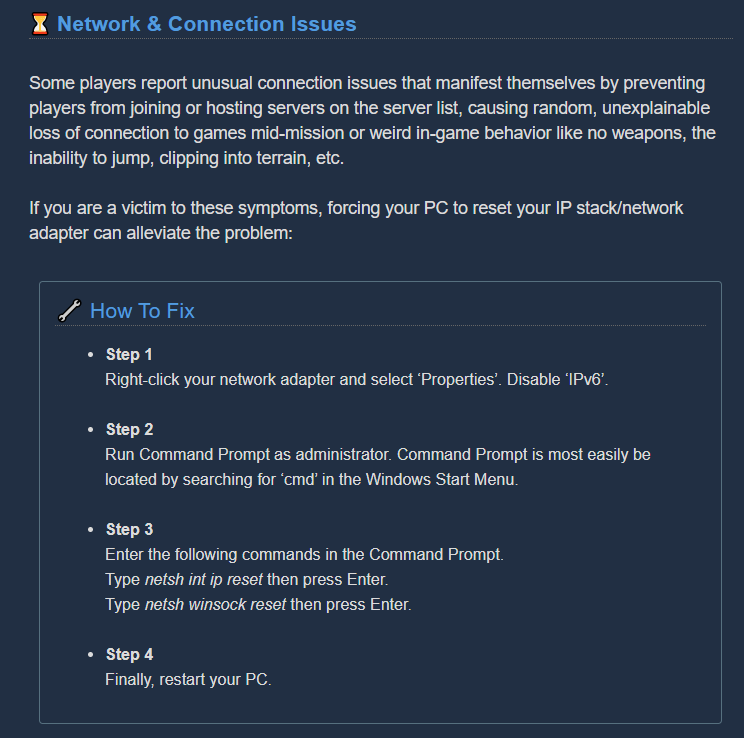
@sage verge If you're on pc, make sure your date and time is set correctly (automatic). If you abandon an assignment you lose all progress.
 dense kettle
Spitballers can still spawn on weird locations especially during salvage
 brave swift
does anyone else have mouse button unresponsiveness sometimes? (firing and pickaxe)
austere coral
Play in full screen at your native resolution.
 rare thorn
what's up with the mk5 armor not showing properly? Happened with my gunner also
austere coral
Switch paint jobs to something else temporarily
rare thorn
i did, still not fixing the issue. It worked with the gunner tho!
sage verge
@austere coral sorry, I should've been more specific. Im on xbox and so is my wife. Happened twice to both of us. Never happened before. Currently aborted the mission and will try again. Thanks for looking into it.
dreamy quail
@rare thorn what's wrong with the armor?
it says mk5 in the window and mk5 is equipped
yes
it looks the way it looks because they made shortcuts
austere coral
armor is setup to remove sections if the beard conflicts
dreamy quail
on the way armor works with beards
equip no beard or the goatee and it'll look as "advertised"
 native mesa
Or just get a beard big enough to hide it.
dreamy quail
or that
gunner's mk2 armor is still broken in that regard i think. It's got different armguards for both no-beard armor model and bearded one
maybe due to clipping, idk
but it's been annoying me for months
native mesa
Use a different armor till it's fixed then.
dreamy quail
I do, but I've reported it so many times I've lost hope 😂 using dark future for now, looks dope
austere coral
Attention, Miners! Games that crash, won’t launch or suffer from stability issues are undoubtedly the most frustrating part of PC gaming. Although we strive to deliver a flawless gaming experience in the depths of Hoxxes IV, we can’t guarantee you won’t encounter a crash or st...
When doing the reinstall, make a backup of your save folder located here \steamapps\common\Deep Rock Galactic\FSD\Saved\SaveGames
 undone folio
i have already gone through all this today, i will try and update unreal engine,
well i downloaded epic store and it says i don't have unreal engine installed, so I am installing it now 11.5 gb could take a while though, but if it fixes this annoying crashing great,
I dont think this is the issue though after playing 38 hours without a problem, having to install this now seems like it is a bit late to the party. played non stop for 4 days without a problem till I update nvidia drivers this morning
dreamy quail
Nvidia drivers updates have messed up the game several times before
I'd revert and see what happens
undone folio
if this unreal update doesnt fix the issue i will roll back
 vivid jackal
@mossy breach To avoid flooding drg chat, thought I'd troubleshoot your problem here
If on steam you can disable rumble in controller settings
@undone folio your problem might also come from the game trying to use integrated graphics instead of your graphics card, try changing the settings for the selected card
undone folio
the only setting I could find for that was in the general nvidia tab under opengl, I have set it to use the right card,
mossy breach
i did that it doesnt turn off rumble in game
vivid jackal
I'll try and find the page about nvidea control panel, I've had to do it before with a different game
hopefully I can make a screenshot for an example
undone folio
LoginId:fa4971c5484aeef7d612bbaccaf48cba
EpicAccountId:cfefeb329b3c4bbcb620c321633f36bc
Assertion failed: [File:Unknown] [Line: 198] Unreal Engine is exiting due to D3D device being lost. (Error: 0x887A0006 - 'HUNG')
vivid jackal
for whatever reason, my pc doesn't have this drop-down menu
but in nvidia control panel have you done this:
and the same to the right of it, you can select individual programs in Program settings, select deep rock and do the same
undone folio
I don't have that option
it doesn't exist spent ages this morning trying to find a way to change it,
 warm panther
Has this been reported yet? The bug hide pommel doesn't actually connect to anything.
dreamy quail
It has been reported many, many times
vivid jackal
Also the problem isn't the pommel, it's the handle
that one causes a lot of gaps with different parts
 fossil wolf
hi all not shore if this is a bug but 3 times now i have looted a lost gear (pack) only to not getting anything from it has any one else come across this ?
vivid jackal
Have you already gotten all the skins and pickaxe parts from it?
fossil wolf
i don't belive i have
vivid jackal
@undone folio
Updated Unreal ✅
Validate Steam ✅
Check NV Control Panel ✅
Did you update graphics drivers?
Check if an antivirus is active and disabling it?
Last idea is rare, but if you monitor is connected to the wrong display port on the pack of your pc it might be trying to use integrated graphics instead of your card and crashing
undone folio
I was playing the game fine until I updated my nvidia driver this morning, I just rolled it back and it crashed again. I have ticked all those boxes three times over, changed a whole bunch of settings now, removed all my overclocks etc, loose end now.
Went into bios and disabled intergrated grx there.
this one has stumped me.
undone folio
I tried forcing dx12 instead and i played halfway through a mission before it crashed,
ironically it tells me to update my drivers, which I will try now,
 sinful venture
Just experience a bug in an extraction mission with the oxygen debuff. While I was on the mine head I was not receiving oxygen. Would post a clip but i'm having issues trying to record the bug.

Here is the clip i'm starting to guess that because bugs were on the platform I wasn't receiving oxygen and sorry for my language.
 quaint plover
Does DRG automatically lower it's volume while in a discord voice chat for anyone else?
Attenuation is off on Discord and the Windows Sounds "lower other program volume" option is also off.
Just posting here incase this is a DRG issue and not some OS/Discord !!FUN!!
 unique viper
Every game I join has extreme rubber-banding even though my ping is sub 20. Only smooth games are the ones I host but everyone else has rubber banding issue. Prior to this week, Ive had zero issues.
 deft glade
i tried to get the time well spend achievement today, when all the barrels were in the droppod my 2 friends got the achievement, but i did not get it.
just as a few days ago i did not recieve the achievement for killing 2 dreadnaughts in 30 seconds even though my friends got it on the same mission
😦
 noble harbor
If you die while choking, needing O2 because of Last Will running out, the choking noise repeats while dead
 shadow cedar
Hey I played this for the first time yesterday, loving it. I put in about 5 hours on Xbox with 3 friends. Went back to play it today and they are all level 6 and my progress was wiped.
Any ideas?
The "restore save" menu option has nothing in it.
proven carbon
Is anybody have any idea why every time I join the group it freezes for 5 to 10 seconds constantly and if I make my own group where people can join me it does not freeze until somebody joins my game for 5 to 10 seconds any idea when I fix for this
sinful venture
That isn't my fault they cancel each other out. It is a bug that needs to be fixed.
Sorry to come off as an ass @nessie thanks for letting me know.
 sterile narwhal
Lately ive been getting that bug where the left and right click won't do anything for several seconds. Just looked it up and it seems last year was the last time anyone mentioned it in here?
austere coral
run the game in fullscreen at your native resolution
sterile narwhal
❤️
 fleet oasis
So I'm playing rn and I'm.. unable to take damage? Previous game was like that and enemies died in one hit, so did teammates. I was NOT host. the only thing able to down me were insta kills such as hitting geysers, driller C4, getting hit by supply pod etc
When I was revived a +99999999 hp appeared which kinda proved numbers shenanigans but still
That happened to someone before?
 silver loom
cheater - not you but the host
austere coral
host was cheating
fleet oasis
I mean yeah that's the most probable explanation but it's still so incoherent
 torpid goblet
hey, does armor breaking help with the yellow bar of dreadnoughts?
austere coral
You'll have better luck with that in #drg-chat
There's a piece of software for cheating that does exactly what you're describing @fleet oasis. It's a cheater. Just play with someone else
 daring mica
So I just started playing a couple days ago. I can join other people's Haz4 missions but can't create my own. I have an assignment to unlock Haz5 but joining other Haz4 doesn't count against it, and I can't create my own so I can't advance it at all. Is this a bug? Or is there something else I need to do to unlock Haz4 first?
royal urchin
Hi, disabling anti-lag in Radeon did fix my video issue, cheers.
austere coral
@daring mica
hit tab to open the mission select. Find the mission with the white diamond with a dot in the middle of it. Click it. Host public, private, or solo. Click the right arrow a couple of times until it's haz 4 (where my mouse cursor is). Confirm mission. https://i.imgur.com/eA1hOi5.jpg
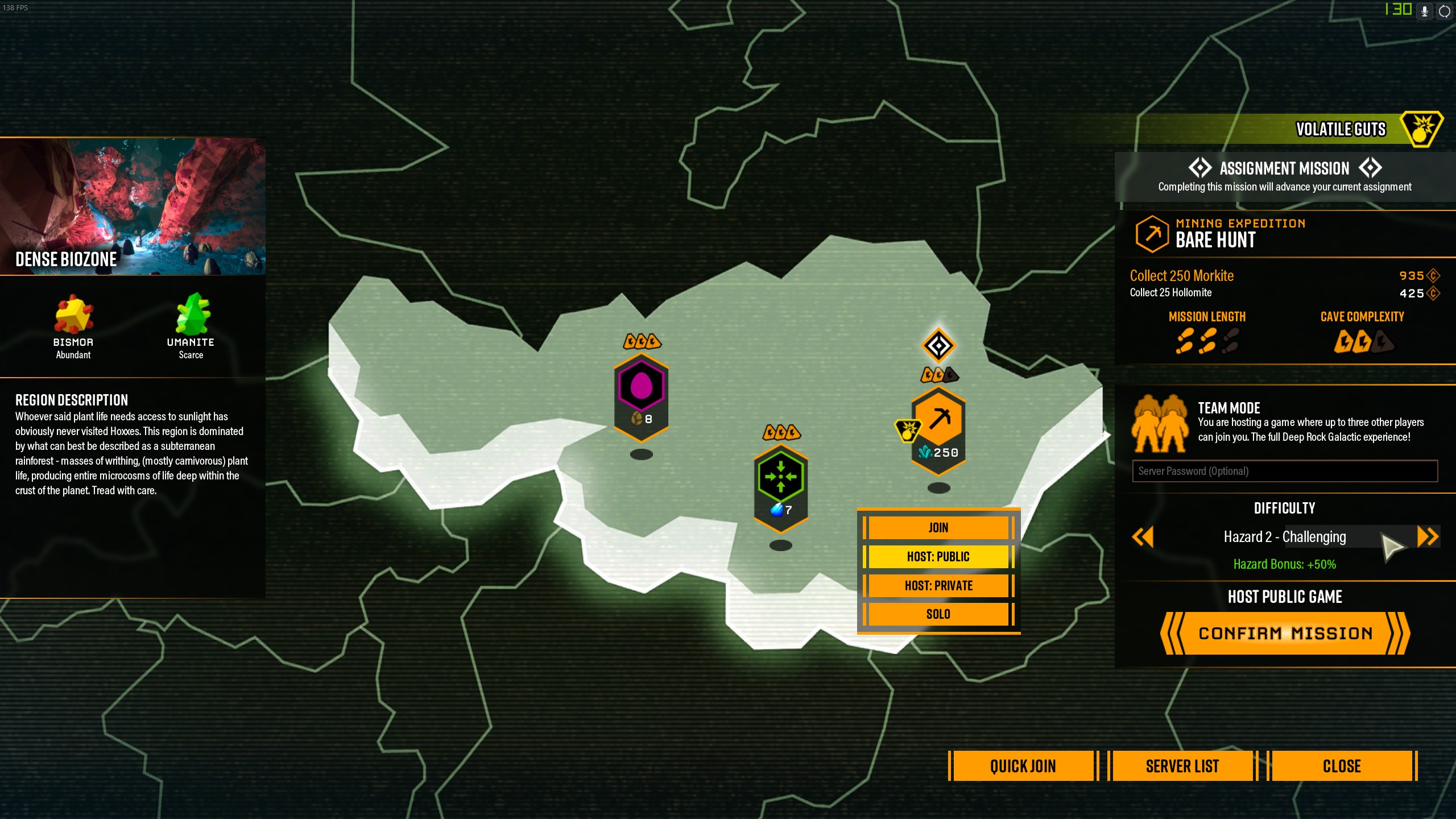 daring mica
ok thanks
young solar
I neglected to snip my crash log, but for anyone who was talking with me the other day, I'm still running into problems with DRG. It's a long story, but after some blue screens and reinstalling my audio/graphics drivers, DRG is still crashing mysteriously.
The most recent message listed some things such as audio and kernal32 I think. Since the file integrity check says everything's a-ok, I'm wondering if just uninstalling and reinstalling the game is a valid option, or if it's something else. Since scans don't say anything is corrupted, I'm not sure what to try first
 wet stratus
Nothing I do seems to fix fps dips below 18
I've tried just about everything to improve my FPS with no luck
i've got a ryzen 7 and a radeon vega 10
12 gigabyte memory
 vital junco
Is there a reason that I got nothing from the Lost Gear or did it just bug out on me?
austere coral
@wet stratus Disable anti lag in radeon control center. If that doesn't resolve your issue try this. https://steamcommunity.com/app/548430/discussions/2/1729827777339086202/
Hi all Some users are experiencing stuttering/low fps/freezes and Alt+Tab issues when using a combination of AMD FX Series CPU's and Realtek Audio sound, it has also been observed on other combinations, f.eks Intel and Realtek Audio. If you are having issues as described above...
@young solar You can try reinstalling the game. Make a backup of your save file here \steamapps\common\Deep Rock Galactic\FSD\Saved\SaveGames
If that doesn't work you may want to some software from microsoft to repair directx.
https://www.microsoft.com/en-ca/download/details.aspx?id=35 That should install any missing or corrupted directx files.
Microsoft Download Center
The Microsoft DirectX® End-User Runtime installs a number of runtime libraries from the legacy DirectX SDK for some games that use D3DX9, D3DX10, D3DX11, XAudio 2.7, XInput 1.3, XACT, and/or Managed DirectX 1.1. Note that this package does not modify the DirectX Runtime instal...
 pure stump
So a couple things i've got going on that i haven't been able to find any information on is I have unusually poor performance when running in 4k and i always get framerate dips when i'm around the drop pod.
I'm running and i7 9700, a 1070, 32 gb of ram... it's a high end machine, i shouldn't be having issues like this. Any ideas?
The framerate dips around the drop pod happen in lower resolutions too and 4k issues persist even if i take all the settings to their minimums but i can run max on everything at 1080p with no issues aside from the drop pod
 lofty scarab
@pure stump Not sure if its related but Im having problem with crashes on my new driver update. Also running 4k.
AMD though
austere coral
@pure stump I'm banking on your issue being a directx or audio issue. Try this solution I've seen it work on intel+nvidia software combinations that lack realtek drivers. https://steamcommunity.com/app/548430/discussions/2/1729827777339086202/
Hi all Some users are experiencing stuttering/low fps/freezes and Alt+Tab issues when using a combination of AMD FX Series CPU's and Realtek Audio sound, it has also been observed on other combinations, f.eks Intel and Realtek Audio. If you are having issues as described above...
pure stump
Not crashing, thankfully, just framerate issues / stuttering. definitely have realtek drivers too
but i'll take a look at it
austere coral
Because if it isn't then your issue is DRG-1494 and if it is there's nothing I can do to help you at the moment. Although I have a theory it's windows installs missing directx 9 or earlier.
 tender adder
I guess this is a bug...?
When I boot up DRG my screen goes completely black after the logos and initial load. I get to the welcome screen, and that's when it stops. It also gives me 'no signal detected' on my monitor. When I hit alt+tab, everything comes back and I see DRG running in the behind the window.
When launched in full screen it jacks up my resolution so my desktop doesn't fit.
When launched in windowed it changes nothing on my resolution.
Both have the game stretched out to a larger resolution as well.
Drivers are up to date, only thing I've changed is adding a microphone and I moved my computer to a different room. This is the only game that does it.
austere coral
But let me know if disabling master EQ changes anything
pure stump
@austere coral I looked at the engine.ini and that line is actually already in there
austere coral
@tender adder Has the game ever worked or has it only launched into a black screen?
@pure stump bDisableMasterEQ=True that's what's listed?
tender adder
Since moving rooms? It launches with the logos and cuts out on the black screen.
Before the room swap, it'd play without any issues whatso ever
pure stump
[/Script/Engine.AudioSettings]
bDisableMasterEQ=True
austere coral
it's probably a directx issue then. go here and run the program. Let it install dx9. @pure stump https://www.microsoft.com/en-ca/download/details.aspx?id=35
Microsoft Download Center
The Microsoft DirectX® End-User Runtime installs a number of runtime libraries from the legacy DirectX SDK for some games that use D3DX9, D3DX10, D3DX11, XAudio 2.7, XInput 1.3, XACT, and/or Managed DirectX 1.1. Note that this package does not modify the DirectX Runtime instal...
tender adder
My card is a GeForce GTX 1060 3MB. If that helps.
austere coral
Playing on a laptop or did you physically move your desktop? @tender adder
lofty scarab
3mb????? @tender adder
lofty scarab
lol
tender adder
LOL I'd have bigger issues if it were MB.
Only real change I've made is putting in a different mic, because the webcam/mic combo was garbage.
austere coral
Do these steps in order. @tender adder
Do a clean install of your latest graphics drivers.
Restart your computer.
Place -dx12 into launch options and see if that lets you get into the game. It's not officially supported and will introduce graphical bugs. If you can get in the game then go ahead and remove it from launch options.
Run a SFC scan in command prompt.
Restart your computer.
If that doesn't identify any issues then go to this link and run the downloadable program. https://www.microsoft.com/en-ca/download/details.aspx?id=35
Microsoft Download Center
The Microsoft DirectX® End-User Runtime installs a number of runtime libraries from the legacy DirectX SDK for some games that use D3DX9, D3DX10, D3DX11, XAudio 2.7, XInput 1.3, XACT, and/or Managed DirectX 1.1. Note that this package does not modify the DirectX Runtime instal...
lofty scarab
Has anyone said anything about problems with RX 5700 drivers and the game? because As soon as it gets past the loading screen into the characters dorm the screen doesn't even finish fading in before the game hangs. I verified game files and they are fine. It might be a driver issue but was wondering if others are having problems.
austere coral
go into radeon settings and disable anti lag if it's enabled
lofty scarab
its disabled
austere coral
Hi all Some users are experiencing stuttering/low fps/freezes and Alt+Tab issues when using a combination of AMD FX Series CPU's and Realtek Audio sound, it has also been observed on other combinations, f.eks Intel and Realtek Audio. If you are having issues as described above...
pure stump
@austere coral it said equivalent or later is installed so no installation necessary
tender adder
Well... that's progress. Though now the game is only on half of the screen.
austere coral
last things to try
Place -dx12 into launch options. It's not officially supported and will introduce other graphical issues.
is to go into device manager and disable your realtek audio drivers. @pure stump
tender adder
fixed! -- Thanks, Loan Ranger.
lofty scarab
@austere coral I followed the recommendation and i got a crash report
pure stump
haha the realtek drivers won't be disabled, i need them for audio work, but i'll try the dx 12 thing
austere coral
what's listed in the crash log? A screenshot will do.
lofty scarab
pure stump
@austere coral i think the -dx12 did the trick it's running smoother already
austere coral
There's probably something wrong with directx then.
pure stump
yep yep, we'll see, gonna do a quick mission
austere coral
You may want to look into using DISM to do a more thorough scan and repair of your system. Unfortunately I'm not too familiar with this method.
@lofty scarab Are you on a laptop or desktop?
pure stump
HAHA IT GLITCHED OUT https://i.imgur.com/owneVFY.jpg
 lofty scarab
@austere coral Desktop. My guess is this is going to be a driver issue

Appuals.com
Users experience the error message ‘Unreal Engine is exiting due to D3D device being lost’ when Unreal is unable to connect with the D3D device on your
austere coral
that's a side effect of using -dx12
The error you're getting is typically an overheating of your gpu or a failure in power delivery. Do this https://i.imgur.com/jzGQ5oS.png
make sure to backup your save file
Do a clean install of the gfx drivers.
lofty scarab
im on a new AMD card actually. i will try a driver reinstall
 stoic plover
coming back from a failed mission, the biomes show a locked icon, had to restart
vital junco
So I played 2 games where we found a Lost Pack & when I got to it and picked it up, I retrieved nothing from it. Does that mean I have all of the stuff from it or did it bug out twice on me?
 versed musk
so, all the buff beers are being applied twice rn. is this a bug? What's up with that?
 tranquil lantern
is there an issue with xbox and pc players getting in a game together because my friend and i are unable to connect and load into the game together
 inland hound
Just got done with a dreadnought hunt and the gunner on our team had an insane rate of fire which melted each dreadnought in seconds even though we were on haz 5, he said it was a auto-clicker that worked specifically with the minigun and I'm just wondering if that's true and some kind of bug or he was just flat out cheating.
 sturdy bridge
That might be possible, because on the Cryo gun I've noticed that you can actually click the mouse button over and over to make it fire much much faster than the regular rate of fire. Maybe that works on the minigun too?
crisp pewter
Failed a tower event, and a sound from the tower went on a loop and never ended. Was right next to the droppod in a salvage mission, so had to listen to that sound for the rest of the game.
 shy fern
Yeah, you can make the lead storm shoot faster with auto clicking, it also sounds awesome as the person shooting it. It just messes with your heat levels pretty quick iirc.
 knotty arch
 dry fox
I purchased the game about a week ago, and have noticed that sometimes, i am unable to fire my weapon or swing my pickaxe. When this occurs, i can both click the mouses several times, or hold it down, and nothing will happen. The only way to fix it is either to switch my weapons, which seems to fix it, or wait for 5-10 seconds and it will fix itself.
is this a bug anyone else has encountered, or could it possibly be client related? for further information, my mouse is perfectly functional
 slow jasper
Ok so I've just experienced a bug. I was playing engineer and trying out the "RJ250 Compound" overclock for the first time on the grenade launcher (in case it's relevant my mods are 3,3,2,2,2) and that's the overlock is the only difference in setup for me than usual. I put a sentry down and once it got to 0 ammo I reloaded it. It went to 10 ammo in the sentry and I had 0 ammo in reserve. At first I thought that was it but I realised in the middle of a wave I had put down all my proximity mines but had 9 left. I kept throwing them and found that I just had infinite grenades.
no
dry fox
I have played it in windowed fullscreen since i got it
slow jasper
:(
ty nessie for the info, I'd report but I don't remember username
fair does
already left lobby so
dry fox
I'll try fullscreen for a while, and see if it fixes it
bright wraith
@potent nymph hey. you told me to google how to fix my "DX11 feature level 10.0 is required to run the engine". I tried everything, still It didnt work. On one forum they provided a link to download DRG from outside of steam, I did it and it works just fine. (i cant connect to servers, but I can play solo). I deleted it already, since I don't want to be playing any unofficial games.
I think it proves the point that everything is fine with my DirectX, drivers etc. It's a connection issue or maybe my save files are corrupted
 naive knot
will the "kick" bug get fixed ?
ppl can just grief and jerk off to a mirror as long as press the button for the droppod first
potent nymph
@bright wraith perhaps you can look into some of the basic connection issue fixes, like making sure windows defender is on, your using ipv4, your antivirus isnt blocking any DRG /FSD files
bright wraith
I will try. But about save files, if they are for what ever reason corrupted, is there a way to at least start with a new safe file? Starting from zero is better than nothing ...
p.s. it tried starting backups already, the game doesnt launch with all 3 of the savefiles that are in SaveGames folder
primal cove
It seems crashes when joining multi player games have become much more frequent on Xbox. Four times in the last few hours of play.
potent nymph
maybe, overallcrashes on xbox are down 2/3 of before the hotfix
primal cove
It is specifically when joining multiplayer games.
potent nymph
overall
primal cove
Right, but that's not really the issue I'm reporting so I'm confused why you're bringing it up.
potent nymph
i am just wondering if it is crashes or something else going on, what happens when you join, and how do you join?
primal cove
I usually join via the server list. It's a standard Xbox crash loud burrrrrrr sound, it drops me on the dashboard and the game closes.
My friends have also mentioned crashing when directly joining each other as well however.
potent nymph
okay, we are trying to add extra debugging info next patch, so we can try and see what is wrong. We have a couple of ideas of what might be happening, but it is related to the online framework, we are working on replacing
primal cove
Looking forward to it 👍
I wonder if there's a way to get the event log off the Xbox....
potent nymph
we really hope to improve some significant issues on xbox over the next 2 updates
 slim helm
Hi, found that the engis shotgun is clipping inside his arm, quite painful i presume
 burnt vortex
So we just had really annoying bug. We had 3 swarms one stacked on top of another, 5 shellbacks and 10 grabbers
On Haz 4
dreamy quail
@slim helm It's been like that for ages for every weapon that actually has a stock ie Gk2, m1000 and the warthog. People have reported it many times, and yet it has not been adressed. What's funny is if you have the megacorp pack those frameworks for those 3 weapons make it 10 times worse
slim helm
yea i suppose it has been there for ages but i just noticed it
 covert egret
BUG REPORT/INQUIRY: The fear effect on the CSPR seems to completely not work, almost as if the upgrade is not actually applying any sort of fear effect. Can anyone recreate this issue; it should be as simple as playing a round or two with it applied to see it does nothing.
naive knot
isnt that already in #jira-bug-reporter
primal cove
I have been experiencing a seemingly harmless bug where when I am joining a game with only one other player, it duplicates our names at the top, as if there are four players, but there is only two.
crimson coyote
@burnt vortex that is unfortunately just a really unlucky rng
I presume it was an egghunt
burnt vortex
Nope
burnt vortex
Found another bug, I 'died' in the lobby, in a sense like you die durring a mission. You can jump between other dwarfs to watch them, you are appearing on red but you can't be revived.
To add, others went down while drunk and we all now all stuck xD
 safe raft
Hi everyone, I have a problem with multiplayer. When a friend joins my lobby, everything lags with him, but after a while time, everything is normal. One later after some time, or if it starts during the mission wave, then it disconnects. Also during a mission it is impossible to damage mobs, only bombs can do it. Does anyone know how to fix this?
Sorry for my bad english 😅 😅 😅
austere coral
are you playing on steam or the windows store/xbox?
safe raft
Steam
austere coral
do this https://i.imgur.com/4DYEjlz.png
 safe raft
Ok, I and my friend do it, but nothing
 proper remnant
i found a bug
if you drink the beer which you grow bigger
and then die in the barrelkick thing
you stay big and cant get out the hospital
 paper steeple
hey has anyone else been in a full team and after everyone else has gotten out of the drop pod, been locked in and taken up before the drop pod despawns and you fall?
austere coral
hopefully that should be rectified in U31
paper steeple
ah cool
 jaunty cape
When messing with the pickaxe parts I noticed that if you use the handle "Reaper's Claw" and the pommel "Incorruptible" there is a visible gap between the parts to where the pommel is not connected to the pickaxe.
 tepid slate
Hello!
I have an issue with the Miners Union:
I joined before the game release, and everything was fine, but since release, the lobby screen tells me to join the Discord server, and no matter how many times I left/joined, it did not register ...
After a game restart it did register for one mission, but bugged out again, now at the end of every mission I get DM'd by the bot welcoming me, but the message is wrong, and the screen still tells me to join.
(message is
Welcome to the Union, Miner.
As a part of , you've received...
Instead of
As a part of
Cave Crawlers
That I got the first time)
 vocal wyvern
found visual bug
as the driller, i started tunnelling with bosco following me while it carried an aquarq
midway through the aquarq disappeared but bosco still moved as if carrying it
once out of the tunnel bosco's carrying the aquarq from a few metres away
without touching it, as if by magic
 distant epoch
Anyone know how to fix an issue where my colors are off. My game glitched during a mission,and now my saturation is screwy as some things really bright and others super dark.
 hasty ermine
times when i focus on my desktop or a diffrent window (like with steam friend chat or other things) i seem to lose UI and i'm unable to do anything. It may be because i have a controller and keyboard plugged in so something between the interaction of the two causes issues.
certain things will also require me to click them with the mouse instead of using the controller hotkey to reset, like when i buy an upgrade (don't recall if its a wardrobe or weapon upgrade) but i'll no longer be able to use the controller back button have to navigate to the back button on screen and click it
 glossy cargo
hey i have a bug where i cant see my team mate assigments. how can i fix that ?
 lofty lion
Yo
yesterday happen bug to me
I was playing and then appear the big enemy who explode and made really big explosion when he dies, well, I kill him around some gold, and then this happen to me
All the explosion become gold to mine, i get like 500~~ aprox with everything.
Tbh it was fun but I feel like i need to post it here.
vocal wyvern
@lofty lion that's not a bug, it's a Crassus Detonator
 glossy isle
Good evening, I am not sure if it was mentioned before, but it seems like the bartender decides to not be interactable at random.
 radiant sentinel
Congrats, you're very lucky, you just found a Crassus Detonator which will turn everything around the Detonation area into gold
 nova rapids
This happens sometimes with objects. The mesh inverts so things get weird
 worldly agate
Are hot bullets intended to only work on the primary bullet? Since iwth things like Bullet Hell they do not seem to generate heat on the ricochet.
 formal saddle
Not exactly a bug, but I'm getting a crash at launch error any time I open the game. All drivers updated, tried verifying the game's integrity, reinstalling after deleting everything, restarting my pc, all the works. But keeps crashing right at launch.
This happened after a geforce update I'm pretty sure.
Found a workaround if anyone has the same issue, I forced the game to open with directx12 by typing "-dx12" in the game launch settings
 stiff rampart
silk spoke
stiff rampart
silk spoke
Scout stuck under platform, but we got him out, Leave No Dwarf Behind ... drop ship floor keeps dumping us out, Dwarf Left Behind (me 😦 ) https://www.youtube.com/watch?v=qmh77j4B7Ko

Dude gets caught under platform but we get him out. Then we all start falling through the floor of the drop ship. I don't make it out alive. :(
 woven wasp
Heyo, I'd report this as a bug but I don't have a lot of information surrounding the event. I play on the PC microsoft store version and I just got DC'ed from a friends game and when I rejoined I'd lost all my progress, now it seems like my save data is permanently lost. I don't have the option to restore save in the options menu either. Any ideas? @potent nymph
 plush star
what is that error I dug up?
austere coral
Pinned messages @plush star
plush star
thank you @austere coral
mossy breach
Nice way to die:
A scout was stuck outside the escape pod up the entrance. He could not move and stand in one place.
I got out of the pod, threw a shield and started to shot bugs. Scout managed to unstuck and escape to the pod.
Meanwhile I was overrun by bugs and got down.
Question:
WHY THE HELL does the escape pod left without me?
We had at least 20 seconds till 0.
fallen hill
@nova rapids Is that on Steam or Windows 10?
@mossy breach If you are downed and the Scout enters the Exit Zone in the Drop Pod, the Drop Pod will leave but you will complete the mission. That is intended so players can decide whether they want to risk reviving a downed player and potentially fail the mission, or sacrifice the modest survival bonus, enter the Exit Zone and complete it successfully.
@plush star Error Cube! 
@formal saddle Thank you for reporting back with a solution! If you haven't already, I would check to make sure you have the latest DirectX installed on your PC.
nova rapids
I was on xbox. Friends on windows 10. 😊
For one friend the meshes were fine, the other saw what i saw. Very strange.
It can happen to any mesh i find. Very common for a glyphid corpse to "star" like that and block the screen.
Will record others if they happen but it's a rare occurence.
fallen hill
@nova rapids I was suspecting as much. That is a known issue we're trying to resolve as we speak. It's regrettably a pretty complicated fix, but stay tuned.
mossy breach
@fallen hill
" Drop Pod will leave but you will complete the mission"
hold on. what is te point of mission when the pod is gone?
fallen hill
@mossy breach The Drop Pod left with the Scout inside of it, correct? Only one dwarf is required to survive to complete a mission.
 gusty abyss
Not sure if this is a guaranteed issue, a steeve walked past while I was refilling a sentry gun & it made me pet him & then I couldn't refill the sentry gun again until I moved it
mossy breach
@fallen hill
"Only one dwarf is required to survive to complete a mission"
That makes sense.
BUT why did the drop pod left?
Ignore the countdown timer. We have 20 seconds.
Does the pad supposed to leave as soon as 4 players are inside OR as soon as 4 players were seen inside?
Number 2 may be my case:
2 players were inside
I was initially inside but left to help
Scout was able to get inside
So as soon as scout got inside the system though " all 4 players were trying to get inside. Time to leave". That would explain why I was left behind.
radiant sentinel
Once all of the team members that are still alive, enter the drop pod and go to the Exit Line, the Drop Pod will leave
Meaning that if you're on duo, you go down, but your partner gets inside the pod, it'll leave without you
Same for trio and squad
fallen hill
@mossy breach The Drop Pod leaves as soon as four players are inside the Exit Zone in the Drop Pod. The Drop Pod is intentionally divided in a Exit Zone and a non-Exit Zone to account for players needing to extract early.
In your case the Scout must have been inside the Exit Zone when you were downed.
mossy breach
Ok. Lets move on. At least 3 players were in Exit zone and left. 😕
worldly agate
Hey Mark:
Bullet Hell + Hot Bullets doesn't interact very well. The bullets that bounce off enemies/walls do not keep their heat effect. Is this intended? I was hoping for burning bullet hell 😛
fallen hill
That is intended at least for now.
bright wraith
I cant log in into DRG neither on PC nor on my laptop
 patent relic
@fallen hill hey, how does sound prioritization work? Like, sometimes large mobs end up mute when face to face but many things are around - i dont think this is a bug though?
fallen hill
@patent relic IIRC the sound of the enemy you are attacking is prioritized.
patent relic
Interesting
We learned to pick up Praetorians and Oppressors but noticed they wind up mute if we're in the thick of mobs
worldly agate
ah thats a shame 😛
patent relic
I didn't think it was an issue as a bug - hard to explain why but it would be great if they were directional instead
fallen hill
They may be.
patent relic
I can't find the clip now, but something about it made me think it was intentional rather than bug
mossy breach
Minor bug.
Got promoted. The text in the left square (Tritilyte Key) is blinking - as in - font size is rapidly changes from small to big and vice versa:
 lunar mortar
The mohawk currently has a hole in it. 
patent relic
someone was really lucky, and someone else has technically and arguably bad aim
primal cove
I give you, the eight man team!
 obtuse oriole
Oh boy
mossy breach
4 extra barrels in pod become dwarfs? 🤔
bright wraith
@potent nymph all right I think I understood where the problem is with a 90% certainty.
I downloaded this outside game version again and tried running it with my save files from my actual game version. and I got exactly the same problem which I was getting before. Both on the outside version and on the steam version the process of DRG was just stopping to work and I saw a black screen after the running man animation.
This was not the case with other save files, that I found on a forum on the internet. I tried it and it worked just as fine as well.
So, the problem is probably with my save files (backups are corrupted as well). and those corrupted save files were synched with the cloud, so every time I download the game again, it gives me the same corrupted save files.
Would be awesome if there would be a way for you to find my working old save files (maybe there are additional backups in the cloud) or create new files with an account similarly developed as mine was. I could provide any information needed for this to happen. and if not, I really am just tired of trying to fix this on my own for the whole past week. I would need to let it go.
obtuse oriole
During the ebonite machine event, the pickaxe charge sprinkler will automatically put the berserker perk on cooldown upon pickup
 wheat marsh
The mule won't go in
covert egret
@wheat marsh Try platforming the ground beneath Molly. Really bad bug 😦
or dirlling, altering it in any way
drilling*
 split flower
@bright wraith deactivate steam cloud, delete your savegame in steam\steamapps\common\FSD\Saved\SaveGames\number_player.sav. Start the game again to get a new SaveGame.
 analog elbow
Molly please just get in the pod, I have no ammo on haz 4 and enemy are chewing on my a** please molly just get in the pod for my sake
 fresh wolf
Molly bugged at the side of the drop pod, couldn't finish the mission
 paper cairn
the same just happened to me & my brother
 mortal elk
If you are on the exit and not on a salvage mule you can finish, stay near the pod it will open when the timer is close to the end.
 proven musk
. . . i don't own that
formal saddle
Now I've got a new but to report haha. While I'm on any customization screen (like equipment, the shop, etc) the screen either flashes white or keeps clipping itself. It's just a bit annoying, not game breaking.
 steel dagger
The drop pod spawned in the air, and dropped me on the place where the miner spawns and i died of fall dmg. My friends revived me but i couldnt get out of there 😄
 topaz lake
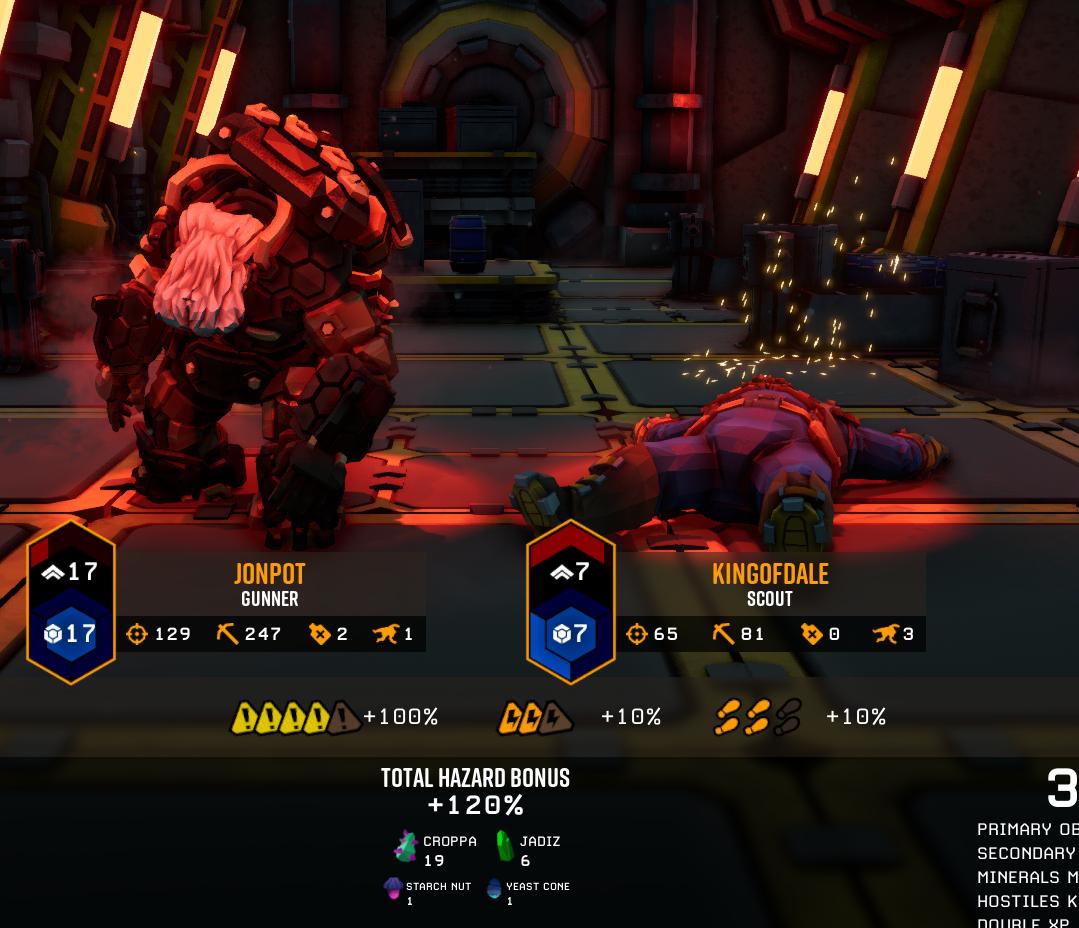
 potent bane
uhhh...all my character data is gone
back to lv1 on all guys
wtf
this suuuuuucks
dreamy quail
What platform are you on? There is a restore save button in options
dreamy quail
Stone and rock
potent bane
Stone and rock
misty citrus
bone the to
patent relic
Molly please just get in the pod, I have no ammo on haz 4 and enemy are chewing on my a** please molly just get in the pod for my sake
@analog elbow
Molly does not fits therefore Molly does not sits.
...ok sorry, I will stop now lmao
 vale cargo
We just fell through the ship at the end and died. Anybody else ?
austere coral
@vale cargo https://i.imgur.com/rwDMXhf.png
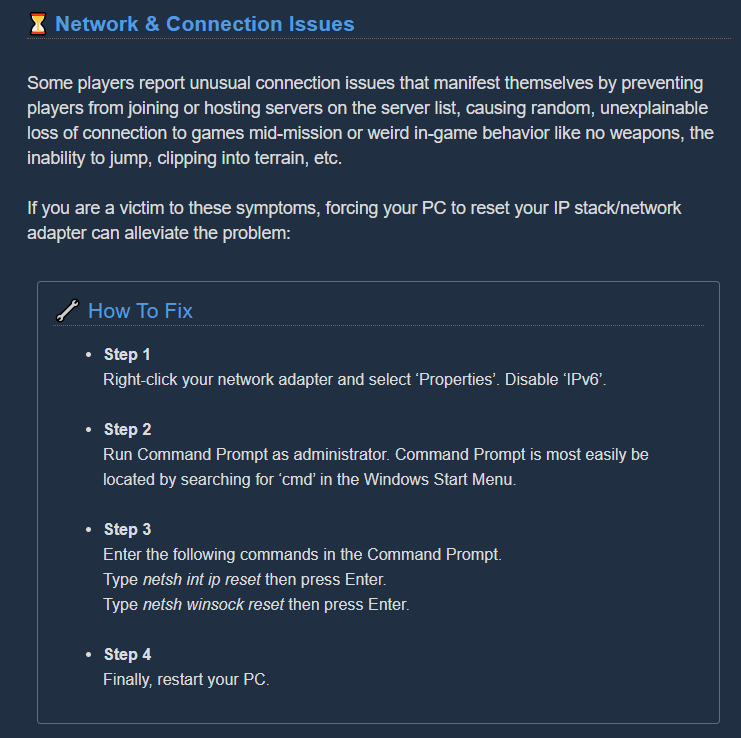
 drifting quartz
I've been getting D3D problem and I've tried methods posted online and from the steam forum thread "Common Crashes, Freezes & How To Fix Them" and nothing has worked. https://steamcommunity.com/app/548430/discussions/2/2299597907739645722/ could someone take a look at this please? I don't know what else to do.
This happens in the lobby and while in missions randomly. I have followed the How to fix crash thread https://steamcommunity.com/app/548430/discussions/2/1642039362993864094/ and done my own troubleshooting and cannot fix the problem. Computer spec if needed: MOBO: Gigabyte In...
 upper heart
Fun little bug where M.U.L.E. refused to go inside the drop pod lol
 calm hollow
I am unable to enter the Union, for some reason it seems that I am not logged into the discord, and there is no way I can log into the discord anymore, and the official discord no longer appears.
I need help to resolve this error ... can someone help me?
I followed the picture as my terminal looks
 nova rapids
Here's another clip of the 'black stars' ingame.
shadow cedar
Is the Restore Save button known to do nothing on Xbox? I lost all my save data on the weekend and it did nothing. Didn't seem like a valid menu option.
austere coral
@calm hollow Both discord and steam need to be launched with the same permissions (admin). I don't believe it works with the web version of discord.
calm hollow
@austere coral that was it ... my discord was like admin and my steam was not ... ty
austere coral
@nova rapids Are you on the xbox/windows store version? If so see pinned messages in #xbox-and-windows-store
 untold jolt
Is the Restore Save button known to do nothing on Xbox? I lost all my save data on the weekend and it did nothing. Didn't seem like a valid menu option.
@shadow cedar This happened to me tonight. Really bummed out about it.
 icy mesa
So I'm not sure what exactly caused it but I booted the game, checked the milestones and when I clicked on them for perk points, the claim button didn't go away, so I tried to click them multiple times
I went from like 5 points to 71 in maybe 5 seconds
It only fixed itself when I exited the terminal
nova rapids
@austere coral Xbox for me. I looked at the pinned messages but don't see anything relevant. Should i be posting there rather than here?
fallen hill
@icy mesa Did the perk points revert back to normal after exiting the terminal?
icy mesa
They didn't but I realized I was actually playing on the experimental. Ohhh wait okay I think I know what it was, don't think it was a bug
dense kettle
The machine events cans till generate themselves in very odd places

I can't find the activator
 crystal hearth
Cant join a Union. Steam and discord are both running as admin.
dreamy quail
And you've linked discord and steam?
crystal hearth
yep
dreamy quail
And you have the discord desktop app?
dreamy quail
Then it's a mystery to me. Double check each app's permissions and then restart steam
crystal hearth
it should be alright, idk why its not working. Am I missing much without union?
primal cove
Is there a window when we can reasonably expect the next patch on Xbox for bug fixes like the terrain glitch?
 gray junco
@crystal hearth You also need to be visible on both steam and discord and to start discord after steam (this should only be needed for the first time you join the union).
crystal hearth
Still not working for some reason. Thank you for your suggestions.
fallen hill
Try to disable your anti-virus
crystal hearth
Disabled anti virus and firewall, still not working.
I'm going to install the game on a different system and see if that solves it
 fierce sorrel
hi, has anybody here ever get a bug where u walk normally for a few steps then walk at a very slow rate?
walking bug(?)
crystal hearth
It was fixed on my laptop wierdly. I still dont know why it doesn't work on my pc.
Thank you all for trying to help me
drifting quartz
I cannot play the game...I've been getting D3D problem and I've tried methods posted online and from the steam forum thread "Common Crashes, Freezes & How To Fix Them" and nothing has worked. https://steamcommunity.com/app/548430/discussions/2/2299597907739645722/ could someone take a look at this please? I don't know what else to do.
This happens in the lobby and while in missions randomly. Sometimes within 5 minutes. I have followed the thread " Common Crashes, Freezes & How To Fix Them " and done my own troubleshooting and cannot fix the problem. Computer spec if needed: MOBO: Gigabyte Intel Z170X Gaming...
white girder
D3D Device Lost means that the GPU disappeared in hardware for some reason - if you google "d3d device lost unreal engine", you may be able to find a fairly large number of other solutions people have recommended, as this isn't likely a DRG specific issue
drifting quartz
I have tried them if you read the link i posted you will see the huge list of methods I've tried. I will post them here instead.```I have tried these methods so far:
Verified Cache
Re-installed
Restart and Shutdown computer
Removed all traces and installed
GPU Driver is up to date, 446.14
Removed GeForce
Tried legacy drivers, 388.71, 391.35, 442.19, 445.87
DDU removed drivers and re-installed drivers
Run the "UE4PrereqSetup_x64" in redist
Added -dx12 in launch parameter
Repaired/Updated DirectX
Disabled second 4k monitor and played only on 1080p
Disabled main 1080p monitor and played on 4k monitor
Tried all graphical settings, Low, Ultra, Windowed, Borderless, Fullscreen. Vsync, FPS, 60,75,120
Underclocked/Overclocked GPU
Task manager does not show anything abnormal about CPU or GPU. As well as Nvidia inspector.
yeah, I've seen the problem a lot, and it's just plain an issue with certain Nvidia GPUs and Unreal Engine 4 :/
it's been ongoing for years
 warm hinge
Just had Bosco delete an egg on an egg-hunt mission when someone joined while he was holding it
drifting quartz
@white girder Damn D:, Axel - God Coder has pointed me to a guy who can help me further so hopefully i can progress forward with him. Thanks for your time still.
mossy breach
@warm hinge
https://deeprockgalactic.gamepedia.com/APD-B317 (Bosco)
** immediately self destructing on the entry of another player into your game**
You were unlucky to give him an egg - he is gone with it upon another miner joining the game 😦

Deep Rock Galactic Wiki
When starting a multiplayer match by yourself, or playing in Solo Mode, players are accompanied by a hovering All Purpose drone nicknamed Bosco. Bosco can be directed using the Shout button and the Laser Pointer. He can mine for minerals, fight off enemies, revive you when you...
mossy breach
Yeah.
 glacial terrace
The power attack of the pickaxe destroys ebonuts. Maybe instead of disappearing, you can let it open in one shot.
 sullen pawn
not showing a single "mission in progress" since update
(the little rocket things)
can anyone confirm?
 glass trout
not showing a single "mission in progress" since update
(the little rocket things)
can anyone confirm?
@sullen pawn can confirm, BUT
only showed me no mission in progress on first try.
after that i went to "server list" got the newest games and voila now i can see all the missions in progress
after closing and opening the game again it again shows zero "missions in progress".
after clicking "server list" some "missions in progess" appear on the map, but to few (only 20 or so)
mossy breach
They're stuck :x
 graceful yarrow
that's coming out of your paycheck mister
 peak lynx
Hey there, I'm having an issue where I'm unable to equip my neon band skin/model for the revolver. It's no longer appearing in my inventory. I've got fresh screenshots to show that it's equipped on my second loadout, but I just tried restoring my save and there's been no change, and unequipping it on my first loadout slot made it vanish. I've got my auto cannon underneath just for reference showing that equipped models should be shown still. Restarting the game hasn't changed anything either
 pulsar parrot
@peak lynx Neon Band skin has been reset for everyone who had it or not, because of a mess up when purchasing the DLC skins. So you would have to get it again from cargo crates.
 wet magnet
im finding a ton of secondary mission items spawning inside the new terrain, where youll not find all of them without destroying half the map.
 gloomy schooner
power attacking an ebonut destroys the entirety of it
wet magnet
just did a dense biozone where 6 bulucaps where inside something
 high lotus
anyone else with incomplete dark future armor on scout? 🤔
dreamy quail
Whats wrong with it?
high lotus
the chest part is different that what it is supposed to be and is missing glowing spots
supposed to be like that
peak lynx
unequip your beard I think?
pulsar parrot
@high lotus The beard affects the armor look. Happens to all of the Armors.
 limber sphinx
Small question fellas, but anyone else getting stutters with patch 31?
(Everywhere, at random)
high lotus
thanks
pretty annoying even the prospector beard changes the looks tough, while most other beard will hide this part the prospector beard doesn't hide that much and it looks kinda weird to me.
dreamy quail
GSG made some shortcuts in that regard
Only clean shave and the simple goatee work
Other beards modify the armor to prevent clipping
high lotus
I just tried the square one too it works
dreamy quail
Perhaps, I just never used it as its ugly 
high lotus
(yeah looks ugly for me too xD but well I guess I should stop talking about dwarf beards here as this is not the good channel for that )
 tame sky
Gunk seed bugs:
#1 Gunk seeds are spawning in the floor:
https://steamuserimages-a.akamaihd.net/ugc/1170320844975318364/6E38AD0AB168B4567A03F8499D53CE9D9B3E7B54/
#2 if you use your marker tool on a gunk seed, the marker doesn't stick, it vanishes instantly
#3 If you approach a gunk seed that's still in it's case, you get a prompt to press E, which doesn't do anything:
https://steamuserimages-a.akamaihd.net/ugc/1170320844975327571/92612DB46673DFB2E25767ADA2A6C37306D606EB/


 wicked wasp
Does anYone get freezes from time to time. With the new update? Such as going into a menu. Like the wardrobe. Or changing a song on the jukebox?
spice trail
Huh? Sand is drilled with salt sounds and particles?
austere coral
@limber sphinx @wicked wasp https://steamcommunity.com/app/548430/discussions/2/1729827777339086202/ (most common on AMD FX processors, but can happen on any hardware combination)

Hi all Some users are experiencing stuttering/low fps/freezes and Alt+Tab issues when using a combination of AMD FX Series CPU's and Realtek Audio sound, it has also been observed on other combinations, f.eks Intel and Realtek Audio. If you are having issues as described above...
limber sphinx
Nvidia.
austere coral
do it anyways
limber sphinx
Very well.
crimson coyote
Menu animation doesn't display the same if you go in and out of the menu quickly
dense kettle
And here I am again ! lol
Another item that spawned INSIDE the black ice
Fortunately the lost gear makes a nice bipping sound so I was able to locate it rather quickly
pulsar parrot
@spice trail From a client point of view, the sounds and visuals would sometimes be incorrect, whether or not you're ping and region is good. It's the game's side. I or someone should make a full report on all the issues also
limber sphinx
@austere coral Yup that audio fix worked, thanks bud. Still gonna report it though as a client-side fix isn't great in a 1.0+ release.
wicked wasp
that fixed it! thank you @austere coral
 restive heron
soo molly kinda bugged out like this for me and a friend and we failed the mission cos of it, it was stuck like this untill the last 10sec of the return to orbit then it kinda teleported to the drop pod
 pine zealot
Found a typo in the new bestiary
 lofty current
Ebonuts can become immune and don't play sounds
glacial terrace
Found a typo in the new bestiary
@pine zealot Thanks for this, we already reported this to the devs
 harsh hedge
I just found a bug.
I got grabbed by a mactera grabber, it flew into the rocket stand thing, the one with sentries on aquarq extraction missions. I was stuck inside a wall on that platform and could not get free.
pine zealot
Gotcha
 vale portal
I found a bug last night where upon power attacking an ebonut shell, the whole object vanished (along with the reward)
split flower
@restive heron you can still go to the pod without molly and when the time runs out the pod will open anyways
restive heron
ok, just hadent seen anything like it happen before so thought it might be a bug or something of the like
split flower
yeah ofc it is a bug if molly is stuck, just wanted to tell you that this wont keep you from finishing the mission 🙂
 crisp summit
does anyone else experiences some mini freeze while interacting with anything in space rig?
add pressing escape and any loading
austere coral
Hi all Some users are experiencing stuttering/low fps/freezes and Alt+Tab issues when using a combination of AMD FX Series CPU's and Realtek Audio sound, it has also been observed on other combinations, f.eks Intel and Realtek Audio. If you are having issues as described above...
crisp summit
i have an Nvidia x)
austere coral
the title is misleading. It's primarily an issue with AMD chips, but it can happen to anyone.
 feral torrent
small visual bug. Most of pickaxe pommels are not connected
 rose pond
I have duel monitors and every time I tab out while I am in the game my mouse will constantly drag towards my main monitor if I am doing something on my second monitor. As long as I drag my windows to my main monitor, the problem is solved. It is just mildly annoying and I have never had this problem with any other game, so I thought I'd bring it up.
pulsar parrot
@rose pond From Microsoft Store or Steam Version? Might have to update drivers.
rose pond
From Steam, I'll run an update just in case
crisp summit
it worked thx ^^
 keen charm
mmm Molly still paths up shafts made by joining players
 split elbow
Molly also still floats in the air after the terrain was destroyed by a Driller or Detonator.
I mean I find it funny, but it is a bit immersion breaking.
pulsar parrot
@rose pond If playing with a controller, it tends to do that as well. Either controller joystick is sticky or broken or mainly the game is auto-moving it back to the game.
GSG loves to make sure your cursor is centered or in the game at least. It's something I've been telling them for months to change it and have yet to listen.
 main holly
Focused shots on the m1000 have been consuming double ammunition for me
Anyone else having this happen?
pulsar parrot
@main holly That's intended feature. It says so in the descriptions somewhere in the weapon mods M1000
main holly
Oh
I scanned the patch notes and didn't see anything so I assumed it was a bug
That's disheartening
glacial terrace
That is the feature of the weapon, focused shot means double damage and ammunition
pulsar parrot
Right now, M1000 has been getting more attention of its useness now. Hasnt been tweaked for months. Even forcused shots doesnt satisfy enough againts crowds of enemies coming quick.
main holly
Wait
Has this consistently been a feature
Like uh, has it been using double ammo for a while now?
pulsar parrot
The beginning, no. It was one bullet for focused shot in its early stage. Now two.
Don't remember their exact dates
main holly
That's crazy because my focus shots have always used only one shot
That's why I thought it was a bug that came out with the patch since it suddenly switched over
pulsar parrot
Focused shots have their own distinct sound. So you're sure about it?
main holly
Yeah
split elbow
I'm glad to hear that the M1000 is getting tweaked. I can't stand the M1 Garand in other games, I had hoped that DRG's version would be different.
It was not.
pulsar parrot
With this type of style game, it's not easy having a semi rifle or sniper rifle to deal with crowds. I have some thoughts on how they'd tweak it. We will see.
main holly
I'd normally second guess myself but I use both types of shots situationally so I'm pretty used to the sounds
It looks like the real bug was me all along
split elbow
Also, it turns out that you can get yourself stuck behind the new Abyss Bar with Underhill Deluxe.
pulsar parrot
Can test it out once I'm back home, client and host side.
split elbow
Already reported it, but still. Kinda funny until you have to reconnect to break free.
austere coral
there's a respawn button in the bottom left corner of the ESC menu
pulsar parrot
@split elbow There's a respawn button in the menu
split elbow
I was not aware of that
pulsar parrot
It's hidden until you hover below your name in the menu
Which is stupid to make it hidden.
 magic torrent

 heavy delta
still here
austere coral
Is it a recurring crash or a one time offense? @magic torrent
heavy delta
UI not showing engineer turret ammo, nor the flares
glacial terrace
Some minerals spawning inside the cave coral, for example: magnite, umanite
 cold oasis
For Some Reason Deep rock galactic is the only game is heating the entire Computer, reaching 79-80° even if i am using MSI Afterburn with fan on max, just to compare this weird situation, RDR2 is on 50° and MHW is on 40° and deep rock on 80°? sorry if i can't mention other games, also my friend got 79° on deep rock.
 sterile remnant
My internet died for about 30 seconds mid match, but the game became totally unresponsive even after the internet came back online
@cold oasis also have been experiencing super high temps to echo that
sterile remnant
Probably just optimization issue, are you on Linux? i figured that might be that cause of it for me
cold oasis
No, Windows.
sterile remnant
Ahhh, so general issue. I should ask other people because this game really nukes my computer, I can hear the fans through my headphones during a firefight
cold oasis
yup something is messing up the fans : /
icy mesa
In the miners manual it says "korlok korlok tyrant weed" when you open the entry
 past fog
Anyone else having game stutter issues after last update?
 lapis dust
For temps, is the the GPU that goes high? Our game is pretty light on CPU, so if you run with unlimited FPS then it can be quite taxing on the GPU, try setting a max FPS.
 fringe root
so, has anyone been losing their skins as well after the update?
 lone ivy
Anyone else who can't download update 31?
 elder glacier
it downloaded the update for me when i started the game. Have you tried to restart steam?
lone ivy
I'm not on steam. I'm on xbox
austere coral
U31 isn't out on xbox and windows store yet
lone ivy
then why doesn't it say that then?
IF THEY ARE GONNA MAKE A POST, THEN THEY SHOULD SPECIFY WHICH PLATFORMS ARE GETTING!
lone ivy
The update*
 haughty mauve
Anyone else having a bug that doeast promote your character but deletes the mission
haughty mauve
oh thx dude! (sorry fore bothering)
lone ivy
OK I see your point now but how cares to look at the generic text. all you need to know is the update # and when its live
who*
fringe root
yeah, neon band for bulldog
austere coral
always assume the xbox and windows version will lag behind. Updates have to be approved before they can be pushed to the console. Steam gets updates whenever.
Pinned messages @fringe root
fringe root
aight
lone ivy
I know that but its something I don't really care about
austere coral
I don't know what to tell you. Complain to Microsoft about their update approval process or something.
 empty olive
all voice lines were silent the last game i played
also we completet the mission but when the drop pod opened up, the mission instatnly ended and it said failure
 maiden tendon
i cant seem to start the game at all on my laptop, theres no error or anything it just doesnt start at all so idk if theres any bug report stuff or logs to reference
but does anyone have any idea of what the problem could be?
steam
austere coral
ooh I've been wanting to use this
A wild FAQ appeared. Follow the instructions.
#||#####||# ##||####||# ##||###||##
#||#||##### #||#||###||#||# #||#||###||#||#
#||#||##### #||#||###||#||# #||#||###||#||#
#||####||## #||#||###||#||# #||#||###||#||#
#||#||##### #||#####||# #||#||#||#||#||#||#
#||#||##### #||#||###||#||# #||#||##||##||#
#||#||##### #||#||###||#||# ##||####||#
Just to be clear, this is the FAQ
####### USE THIS LINK #######
Read & Follow ALL Instructions
https://steamcommunity.com/sharedfiles/filedetails/?id=2559182673
####### USE THIS LINK #######
See attached steam guide for time of latest update
maiden tendon
oo cool
austere coral
Basically run FSD.exe as admin and it'll probably give you an error. The rest of the short little guide should handle the rest on what to do.
maiden tendon
yep error found, im gonna go through the guide ill follow up the the problem remains, thanks
crimson coyote
Yep
Probably should replace that with loans one ;p
<@&296918282403840000> can one of you guys pin that?
swift horizon
austere coral
A wild FAQ appeared. Follow the instructions.
*#||#####||# ##||####||# ...
good fakemod
crimson coyote

 slate jetty
 cold hemlock
So I tried open 12 ebonuts with power attack and they all vanished. ^^
also you can make empty ebonuts shells disapear if you simply whack them with the pickaxe
 naive sigil
We ran across this about 10 minutes ago.
 glacial terrace
We ran across this about 10 minutes ago.
@naive sigil this is rare item and it's give you a lot of xp.
 viscid yacht
Has anoyone else noticed a the severe menu lag? happens with the terrain scanner too
 bitter reef
yup
when closing menus in the space rig and interacting with the jukebox most noticably
viscid yacht
Alright cool, just makin sure I wasnt the only one.
bitter reef
gonna go get in mission and see if the scanner slows it down too
doesn't happen with the terrain scanner for me
 mossy osprey
 sonic river
There's a lot of bugs I can live with but why hasn't the revive bug been fixed yet? The one where you join in and the downed dwarves are standing and unable to be revived by you. It's a huge issue that I've run across in more than 1/2 of my games and it's not a small bug that can be ignored like a cosmetic.
 cobalt steeple
Hello?
icy mesa
Lootbugs are having their minerals just drop in a clump after exploding rather than shooting out.
cobalt steeple
I've got a weird problem and I don't know what to make of it. Whenever i'm in the loading screen just as a mission starts, some of the textures, usually the clouds around the planet's surface, flicker. And the particles for the sparkles in the mission summary screen sometimes come out as a huge flash. Not sure why
 boreal gorge
I'm not getting any reward from cargo crates after this update, I have all weapon skins but not all victory moves
icy mesa
some victory moves are from cosmetic cores, maybe you are missing those ones?
boreal gorge
Maybe, the dual drink drop is from a cosmetic core?
mossy breach
hey, just had an issue where drop pod collision broke, where any player who stepped onto the drop pod was down-warped to the area between the drill bit and the dirt. anyone else seen this before?
boreal gorge
@icy mesa Yeah, you're correct
icy mesa
i love that one
austere coral
@sonic river @mossy breach do this https://i.imgur.com/hBOVjU7.png
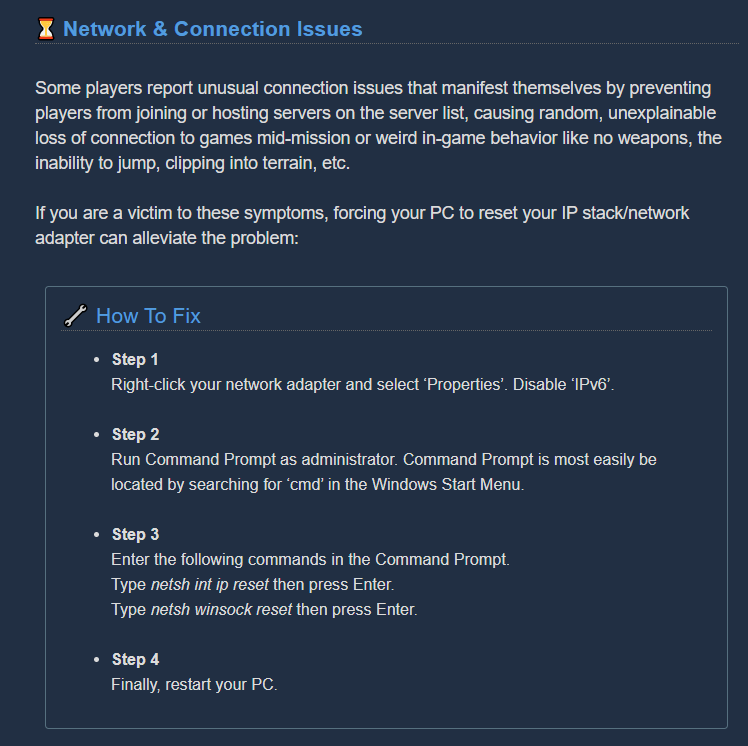 mossy breach
my bad chief, im playing on the steam version @austere coral
sonic river
No, I'm on steam and my internet is working properly. I've played since earlier versions in the BETA and the problem is still around.
mossy breach
oh wait wrong ping
austere coral
@cobalt steeple I'm guessing you're on the xbox/windows store version. https://discordapp.com/channels/257785731072786435/402907500619497503/717824896079495284
||fixed||
mossy breach
It's possible to destroy ebonuts. Just do
Hit -> Hit -> Power Attack
And the ebonut will break, making it possible to not be able to complete secondary objective
covert egret
Has anyone addressed the bug of the new plant boss shooting through all terrain? It can shoot into driller tunnels and the plant arms can spawn in walls.
 lone spruce
This paintjob makes the armor glow orange, but it makes the helmet grow green. Does this count as a bug?
 severe raft
Game seems to be crashing a lot more
austere coral
do this then do what's listed in pinned messages https://steamcommunity.com/app/548430/discussions/2/1729827777339086202/
Hi all Some users are experiencing stuttering/low fps/freezes and Alt+Tab issues when using a combination of AMD FX Series CPU's and Realtek Audio sound, it has also been observed on other combinations, f.eks Intel and Realtek Audio. If you are having issues as described above...
icy mesa
@lone spruce I went in and tested, the neon on the Dark Future set of armor will stay the same regardless of paintjob (color dependent on class), while that helmet glow will change with the paintjob
cobalt steeple
@austere coral Hey, sorry for the late reply. Had to go out for a while. I'm actually on the Steam version.
 idle briar
Hi! So I just joined the discord server through googling it. I can't join through my game(like my friends did) and the screen in game doesn't even give me an option for anything with discord. I've linked my Steam and my Discord account.
(sorry if this is the wrong channel)
 ocean sandal
Has anyone run into deep dives not giving cores?
lone spruce
this bug blows
Not sure what happened but im dead and my teammates can't revive me
Had to quit an in-progress deep dive because of this
austere coral
died on a zipline?
 shell parcel
so has anyone tried freezing and burning the tyrant weed at the same time, because it crashed me and my 3 friends games when we did
austere coral
I just tested it. No issues using temp shock. Try this and comment back if it crashes again. https://steamcommunity.com/app/548430/discussions/2/1729827777339086202/ @shell parcel
Hi all Some users are experiencing stuttering/low fps/freezes and Alt+Tab issues when using a combination of AMD FX Series CPU's and Realtek Audio sound, it has also been observed on other combinations, f.eks Intel and Realtek Audio. If you are having issues as described above...
 deft karma
quick join isn't working. Searched for a 2 minutes before stopping.
 agile cave
Molly isn't dropping maypoint markers in my 1-2 mining expedition, hazard 4 on fungus bogs
waypoint*
really weird
she went back to the drop pod, but no markers
glacial terrace
Mactera enemies are getting into the drop pod
severe raft
Just had a glitched mission that concurrently spawned a dreadnought and then a swarm right on top of that
I don't think that's supposed to happen
 heady reef


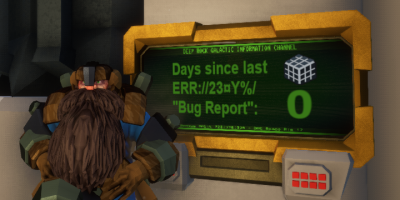

 flint reef
do this https://i.imgur.com/hBOVjU7.png
@austere coral It doesnt work for me 😦
 spice stump
suicide by impact axes
i can kill myself by throwing axes at lightning crystals, it breaks them which is good. but it kills me which is bad