#bug-discussion
1 messages · Page 3 of 1
 deep sluice
 arctic shard
I keep having issues with Deep Rock Galactic where no matter what im doing, once every so often, the game will randomly crash
it's always the DXGI_ERROR_DEVICE_HUNG error as well
i just can't play the game like this, because for no reason i could just drop out of a lobby or deep dive and get nothing
is this a common issue?
my drivers are up to date and all
I am running a few minor mods, though most are simple audio swaps, and all are verified
i also do not know if it is the mods affecting my game, considering that the randomness of the crash keeps me from actually testing if certain mods are the problem
 cinder lark
my game has been having a problem lately where the screen starts violently tearing, and from what i can tell, its whenever a lot of particles or actions is on screen, like sludge. i thought it had to do with advanced lighting or brighter objects, but removing those hasnt fixed the issue. it seriously hurts my eyes, and i could really use the help. thanks
 slender flame
Does this count as a generation bug?

 strange whale
UPDATE REGARDING MOD.IO NOT WORKING:
We have been investigating this issue and have identified that the
cause of this bug is because you are running an unpatched version of
Windows 7 that does not support the latest security protocols (TLS1.2)
which our servers may require for secure communication between your
game and our service.
We strongly recommend updating to a supported operating system such as
Windows 10 or Windows 11. However, if you wish to continue to use
Windows 7, you must update it to support TLS 1.2 by installing the
latest required Windows Updates from Microsoft.
You can find instructions on how to update your copy of Windows 7 to
support TLS 1.2 at this Microsoft Support article:
https://support.microsoft.com/en-us/topic/update-to-enable-tls-1-1-and-tls-1-2-as-default-secure-protocols-in-winhttp-in-windows-c4bd73d2-31d7-761e-0178-11268bb10392
Please note: that these update instructions are provided without
warranty from mod.io and we cannot guarantee they will work correctly,
or that the update process will not cause issues with your
installation of Windows 7.
 obsidian brook
I'm not sure if this is a bug or not, but I swear I can't find any more Morkite? 🤔
I swear I've checked all the paths...

 storm tendon
obsidian brook
I'm not sure if this is a bug or not, but I swear I can't find any more Morkite?...
storm tendon
obsidian brook
I'm not sure if this is a bug or not, but I swear I can't find any more Morkite?...
you missed it
obsidian brook
I'd hope so. Any tips for pathfinding to find the stuff?
Ah! Found it! The dirt patch connected two tunnels, lol

There we go, thanks for the encouragement
 storm tendon
obsidian brook
There we go, thanks for the encouragement
storm tendon
obsidian brook
There we go, thanks for the encouragement
congrats 
sorry, didn't saw your other message lol
obsidian brook
Once I found the secondary pathway it wasn't too bad... but ouch, lol

"In and out. Twenty minutes. No sweat." ohgodswhy 😆
obsidian brook
storm tendon
congrats <:rocknstone:406463574266085387>
sorry, didn't saw your other message ...
No problem at all, having someone sanity check that I must have missed something left me to go try the dirt patches again "Even though I already had a tunnel through them all", hahah
storm tendon
obsidian brook
No problem at all, having someone sanity check that I *must* have missed somethi...
Glad to hear it. People usually say that "no they didn't miss anything and it must be the game's fault".
When they did, in fact, miss something.
obsidian brook
Oh goodness no, I know enough about software to know that sometimes the problem is the game isn't being obvious about it, but 😉
strange whale
strange whale
UPDATE REGARDING MOD.IO NOT WORKING:
We have been investigating this issue and h...
installing the update from the windows catalogue, as well as the "easy fix" (just ctrl+f those words and install it) made mod.io functional again
 fallen harbor
The beards on my characters seem to jitter and bug about allot. It's been happening since the approved modding update a while back and it only goes away if I turn off my verified mods and then on again. I'm not really sure what to do. Can I post a short clip of it? The bugging appears in customisation booths, weapon upgrading and the forge. Plus the end of round view when you see your team and their stats from the mission.
I've even removed and redownloaded the game on steam and that doesn't fix it
Just worried I have to start over which I really don't want after this being my one profile with 700+ hours
 tidal anchor
I was in the drop pod in the lobby with the countdown going, I was typing something to the other players when the countdown ended and the chat box was still open. When it loaded the game, I couldn't move, couldn't scroll my mouse, and I couldn't press Esc to exit, I had to physically shut down DRG in windows.
 woven magnet
How do I contact GSG to get my Atlassian account reactivated?
Also, after testing custom mods I made, now in some games pressing [Lazerpointer] doesnt show up team ressources, so I cant tell how much nitra we have, so I have to ask in chat and wait like 1 min, counting on language, laziness and honesty of other players.
 real vapor
woven magnet
How do I contact GSG to get my Atlassian account reactivated?
real vapor
woven magnet
How do I contact GSG to get my Atlassian account reactivated?
I think you don't? They seem to say in that website, that you're supposed to just make a new one.
woven magnet
real vapor
I think you don't? They seem to say in that website, that you're supposed to jus...
On discord it says that you can also contact them to get it reactivated.
storm tendon
woven magnet
On discord it says that you can also contact them to get it reactivated.
yeah, you just need to contact a QA dev
woven magnet
storm tendon
yeah, you just need to contact a QA dev
How?
storm tendon
woven magnet
How?
you DM a dev with QA in their name
preferably not rn, it's 10pm for them
 mossy breach
arctic shard
i also do not know if it is the mods affecting my game, considering that the ran...
mossy breach
arctic shard
i also do not know if it is the mods affecting my game, considering that the ran...
As long as you use verified mods its not the mods causing the crashing because I've had the same issue with no mods and with mods DX11 or DX12. My drivers are up to date my chipset drivers are up to date and I'm on a fully updated install of Windows 11. There is an issue with Vram memory leaks imo, when it exceeds a certain amount the engine pretty much craps itself which is why I've stopped playing DRG the last 2 weeks. This is an issue with the engine so its not hardware specific. The game crashing on 3rd stage of the EDD is just super annoying and tbh I'm just tired of it.
storm tendon
arctic shard
it's always the DXGI_ERROR_DEVICE_HUNG error as well
That's a GPU problem. It might come from dx11/dx12 issues, or from your drivers. Or it could be because your GPU is under the minimal requirement for the game.
Or it could be due to a whole lot of other things.
storm tendon
mossy breach
As long as you use verified mods its not the mods causing the crashing because I...
Your issue in this case is probably Windows 11
DRG doesn't play nice with win11 for some reasons
mossy breach
storm tendon
That's a GPU problem. It might come from dx11/dx12 issues, or from your drivers....
I have an RTX3090 and it still crashes it also crashes on my 2080ti and 2070S
Also on Windows 10
Imo its memory leaks
mossy breach
Because I have an overlay on and just before it crashes I see the game slow down and dramatic decrease in FPS
Its a memory leak
Vram limitation of the engine
storm tendon
Why did I never get this crash in 4 years then ?
mossy breach
storm tendon
Why did I never get this crash in 4 years then ?
What's your system specs?
storm tendon
mossy breach
What's your system specs?
got a 2060 and a Ryzen 5 2600
nothing extremely fancy as you can see
mossy breach
So 6gb of Vram, what I've noticed is people with 6gb of Vram and under don't seem to have issues but GPU's with 8gb or higher are prone to crashes
Its like the engine just doesn't know what to do with more Vram
Because I tested it on an old GTX970 with 4gb and it was ok
storm tendon
could be the issue but I know people with the same amount of Vram that doesn't get those crashes
mossy breach
With 8gb and above?
storm tendon
yeah
mossy breach
Its so annoying because I love the game..
I been trying to find the issue for 2 weeks now
storm tendon
I can get that this is frustrating and annoying. If you find any important clue, don't hesitate to report back.
That could help a lot.
mossy breach
I figured it was CPU overclock sensitive so I returned my bios to standard and it still did it
mossy breach
storm tendon
I can get that this is frustrating and annoying. If you find any important clue,...
I've tried pretty much everything I've learned over the years
Funny enough it runs fine on my old 2600k 970 system
 polar dock
Hey, does anyone else have an issue where the game is telling me two different player levels?
context: when I finish a level, it tells me I have levelled up to X [in this case level 12], but when I then get back to headquarters, I am considerably lower level

 storm tendon
polar dock
Hey, does anyone else have an issue where the game is telling me two different p...
storm tendon
polar dock
Hey, does anyone else have an issue where the game is telling me two different p...
The first screenshot is your season pass level
the second screenshot is your player level
those are two different things
arctic shard
storm tendon
That's a GPU problem. It might come from dx11/dx12 issues, or from your drivers....
it's not a specs problem, considering my card is certainly powerful enough to run the game. im starting the game via the generic boot option in steam, rather than the dx11 or 12 options
i did just update my windows, and it hasn't crashed yet, but we'll see
storm tendon
arctic shard
it's not a specs problem, considering my card is certainly powerful enough to ru...
so dx12
try with dx11
can't hurt
arctic shard
im gonna be out for a while so ill just leave drg idling on the generic setting and see if it crashes
 severe fable
Anybody got a fix for the game crashing constantly?
A friend of mine's game keeps crashing
His names Buck
 cedar walrus
im the freind
cedar walrus
game crashes all the time, any fixes?
cedar walrus
@distant pewter
storm tendon
cedar walrus
<@359261944760369152>
first thing : don't ping the devs
especially not when it's midnight
severe fable
4:56
cedar walrus
its 5 o clock
storm tendon
it's midnight for them
severe fable
Sorry mb pimp
storm tendon
timezone and all
storm tendon

severe fable
His games broke
severe fable
Unhandled Exception: EXCEPTION_ACCESS_VIOLATION reading address 0xffffffffffffffff
cedar walrus
@storm tendon
 timber arch
I was in a game of Extraction  on PS5 (probably with someone on a PS4) with and I noticed there was no bugs spawned and the Ai seems completely dead and I just saw a Kursite just floating doing absolutely nothing, I have no idea if the host is completely sus or something happened with the game
storm tendon
timber arch
I was in a game of Extraction <:aquarq:587339845383225462> on PS5 (probably with...
either a weird bug or the host is cheating somehow
severe fable
Question
 graceful yarrow
answer
arctic shard
well i wasn't at all loaded into the space rig so that was not a very helpful hour
severe fable
Every 5 minutes
graceful yarrow
How to fix:
- Try troubleshooting steps from guides in pinned messages
- Make bug report if guide doesn't help
- Wait for devs to fix the issue
graceful yarrow
It's also midnight where the devs are on a sunday, so yeah. You're gonna have to wait a bit if the potential fixes listed here don't work.
storm tendon
timber arch
https://youtu.be/-c4eYholdNo
great
storm tendon
timber arch
https://youtu.be/-c4eYholdNo
so it's a bug exploit people are doing on purpose
so yeah, a cheat.
Great find, thank you
graceful yarrow
Welp, you two can wait together.
 crimson prism
graceful yarrow
answer
crimson prism
graceful yarrow
answer
Funny comment
timber arch
that explains the host shot me to death when I got resupplies.
easiest Haz 5 no resupply achievement
and yet he downed 🤣
storm tendon
timber arch
and yet he downed 🤣
nice
 austere coral
timber arch
https://youtu.be/-c4eYholdNo
austere coral
timber arch
https://youtu.be/-c4eYholdNo
interesting
I mean he's pinging them himself.
storm tendon
yeah just noticed
austere coral
Seems like another ban speedrun.
storm tendon
austere coral
Seems like another ban speedrun.
most likely alt account of one of the two others
 tame garnet
man, some of the shit that i see on here is more entertaining than drg itself
austere coral
All this because some small child didn't want to troubleshoot their crashing issue.
 solemn leaf
whoa
tame garnet
yeah
 distant pewter
he seems like a well adjusted individual. im gonna love not helping him and go to bed 🛏️
tame garnet
badass
crimson prism
 tame garnet
don't worry about it lol
austere coral
distant pewter
he seems like a well adjusted individual. im gonna love not helping him and go t...
I was thinking of exactly the same thing except a couple of hours later.
solemn leaf
do you need tucked in johan
crimson prism
now this is an avengers level threat
tame garnet
maybe a bedtime story
graceful yarrow
It's fine, all three accounts have been banned anyways.
distant pewter
no. but ill leave the night light on so no monsters attack
storm tendon
"smarter"
tame garnet
you know what i mean 
austere coral
it was entertaining while it lasted
tame garnet
i await my crazed dm with great anticipation
distant pewter
he tried to add me as a friend
austere coral

 rotund fable
he just enthusiastic 😉
 small hawk
mentioning here - game is crashing almost every mission, been submitting reports every time in the hopes it can be fixed, but game is a borderline unplayable in this state 😦
storm tendon
small hawk
mentioning here - game is crashing almost every mission, been submitting reports...
what kind of crashes do you have ?
got any error showing up ?
small hawk
yeah getting a crash report every time from DRG, nothing else on computer crashing and it's only been happening last few days
happening at seemingly random times - not any pattern I've been able to discern
storm tendon
do you know what's the error on the crash report ?
small hawk
it's all gibberish to me, can try get another one and paste it here if that would help?
storm tendon
small hawk
it's all gibberish to me, can try get another one and paste it here if that woul...
that could help, yes
 velvet gorge
Hello, I need help, I lost all my progress, how do I recover it? I only see the one I recently opened
austere coral
pinned messages for FAQ
small hawk
storm tendon
that could help, yes
of course, now it's working just fine -_-
 clear mural
can anyone help me hard reset? ive had a bug that kept the modded badge on me and i dont know if anything can be done. ive already tried dealing with it but nothing worked.
 bitter socket
is this unique? I cannot use the tab map when there is a lot of bugs being generated, like a swarm. it's so bad sometimes that I cannot use my engineer smart rifle even
edit: this was not a problem before, maybe since june going foreward.
 solid plaza
 fringe flint
So, possibly a new tech/bug for the Shard Difractor
Animation cancelling causes it to "rewind" its battery charge, allowing for you to bypass the cooldown entirely on short bursts
This also works in reverse, leading to it unloading some of its battery charge if you animation cancel while its in the middle of recharching from a lower value
This is particularly useful/exploitable with the Plascrete Catalyst, since it allows you to more or less bypass its negative entirely if you cancel right after the explostion
 merry terrace
Any fix for "Multiplayer Session Ended" after 4 months?
 scenic onyx
solid plaza
newly subscribed mods are no longer downloading and being enabled in-game throug...
scenic onyx
solid plaza
newly subscribed mods are no longer downloading and being enabled in-game throug...
Are you using Windows 7?
solid plaza
scenic onyx
Are you using Windows 7?
Yep
scenic onyx
solid plaza
Yep
https://discordapp.com/channels/257785731072786435/258990272967475200/1013394904686276708 Players have reported that this works 🙂
solid plaza
Thanks, sad to hear about the dropped support though
storm tendon
fringe flint
This is particularly useful/exploitable with the Plascrete Catalyst, since it al...
The SD cancel fire automatically after the explosion of the platform
fringe flint
storm tendon
The SD cancel fire automatically after the explosion of the platform
Yes, thats not the bug. The bug is that you get to skip the recharge after it automatically cancels
Effectively bypassing the overclock's downside
 grizzled jungle
just had a game crash while reloading a sentry gun
anyone had this before?
about 3/4 full then the game froze, after that CTD
storm tendon
grizzled jungle
anyone had this before?
nope, neither did I hear about this before.
Any additional info you can give us ?
grizzled jungle
Game is a verified modded save, I was jumping up to reload the gun. Then about 3/4 the way done, the game froze for a good 20 seconds. Wasn't even showing up in the task manager, computer was still usable.
then after I checked it in task manager the client closed itself
storm tendon
alright
could just be a random crash, it happens, but if it keeps happening, let me know
grizzled jungle
aight cheers
this is my first crash in a VERY long time too
last one was after I was testing the VRG mod
storm tendon
alright so it might just be something random, as it happens sometimes
I sometime crash too out of nowhere even though I have a very bug-free experience with DRG (thankfully)
grizzled jungle
Mining expedition in biozone if that helps at all
storm tendon
grizzled jungle
Mining expedition in biozone if that helps at all
it does
 lucid shadow
I AM INFURIATED. Just "finished" an solo on site refining mission. Had just sent for the drop pod, and was stepping off the platform to get there. I then got stuck between the pipeline and the ramp. All attempts to free myself, including deliberately letting bugs kill me, failed. All I could do was sit there while the mission ticked over; I failed. Since during the mission I had mined a crassius detonator and bittergem, you can understand while I am feeling a bit peeved right now
I presume this is the result of a bug, is there anything that can be done in this situation?
storm tendon
lucid shadow
I presume this is the result of a bug, is there anything that can be done in thi...
nope
the devs are aware of the bug but when it happens to you, there's nothing that can be done
at least in solo
if you're in a lobby you're not hosting, you can always leave and rejoin but that's about it
lucid shadow
Thankyou for your time, not the answer I was hoping for, but /shrug what can you do?
 stoic crown
Is micro-stuttering to be expected in DirectX 12?
storm tendon
stoic crown
Is micro-stuttering to be expected in DirectX 12?
at the start, when dx12 is building the cache, yes
it tends to go away with time, once the cache is fully built up
mossy breach
storm tendon
it tends to go away with time, once the cache is fully built up
is it better than 11 in the grand scheme
storm tendon
mossy breach
is it better than 11 in the grand scheme
it depends entirely on your system
some system have instabilities with dx12
if you're having lot of crashes or poor performance, it's worth it to try dx11 instead
in general, weaker/older GPU will have an easier time with dx11
storm tendon
sounds like dx12 should be fine but the best way is to test it by yourself
practical testing is always better than the theory
mossy breach
ok thanks
storm tendon
you might have poor performance due to your CPU though, so keep that in mind
DRG is more CPU demanding than GPU demanding
mossy breach
storm tendon
you might have poor performance due to your CPU though, so keep that in mind
at what point do i know it's not worth it though
like the caching process
what i mean is it goes away after some time so
if it didn't within the time then it meant my cpu can't keep up
storm tendon
mossy breach
like the caching process
The cache is fully built up once every effect has bee, played out
Which means every attack from every enemy, every effects from every mission type, and every weapon's effects and OCs
that can take a while but there's an easy way to test it
play the same mission twice, with the exact same weapons
if you keep having poor general performance over the same mission type past the first two, maybe switch to dx11 and see if it's better
TL,DR : stick to one build and replay the same mission type a few times and gauge performance from that
 civic shore
Well, looks like my problem isn't solved. I noticed that this problem happens ONLY on dx12, and on dx 11 is absolutely fine but has lower performance. Is this intentional?
storm tendon
civic shore
Well, looks like my problem isn't solved. I noticed that this problem happens ON...
no, not intentional. Do you have Vsync enabled/are you playing the game fullscreen ?
civic shore
storm tendon
no, not intentional. Do you have Vsync enabled/are you playing the game fullscre...
vsync and windowed
storm tendon
civic shore
vsync and windowed
try playing fullscreen and see if the issue persists.
Same thing with the Vsync
civic shore
storm tendon
try playing fullscreen and see if the issue persists.
Same thing with the Vsync
fullscreen mode don't change anything, but vsync do. But not that much as dx 11 and I hate seeing async screen
and I have another question: I have 120ghz monitor, but vsync locks fps on 60
 balmy ocean
That should not be the case. I have a 144Hz monitor and turning vsync on syncs it to my monitor native refresh rate.
Dumb question, but is your monitor set up to do 120Hz in windows?
civic shore
balmy ocean
Dumb question, but is your monitor set up to do 120Hz in windows?
hmmmm
maybe???
idk
)
OH MY GOD, 120 ghz is so smooth
holy moly
storm tendon
😄
civic shore
Im so dumb
civic shore
yea
civic shore
well, problem instantly fixed when I changed refresh rate to 120
balmy ocean
Bit late to the resolution, but I am glad you got it sorted. 😁
 halcyon aspen
anyone know how to enable mods because i disabled it a while ago when there was a glitch
everyone said that is what you had to do to stop the glitch
nvm figured it out
 tepid portal
is there a reason why i cant use my playstation controller with DRG?
 tulip jasper
Hey hope all is having a good day, while the game has been amazing to play so far, I have encountered something I assume is a bug or some kind of funky hardware thing. Whenever I open up the escape menu and go to change settings, the game freezes for several seconds. Then once I enter settings and then exit them, the game will begin to freeze for a split second every ~3 or so seconds. This will not go away until I go through some mystic combination of switching it back and forth from fullscreen to windowed. It always seems to be different each time. I apologize if this has been addressed/answered before but I can't really think of how to describe it/search for it.
crimson prism
Managed to get this twice now, first time was on the PE minehead and i also shot a flare and grabbled to it as it was taking off
 limpid ivy
just got a network error and got booted from a deep dive i was doing with a friend. completely out of nowhere, almost finished refining on the third level and there i went. my drivers are fine, my wifi is fine, my computer is fine. was fine the entire time, not a single problem, nothing indicating a crash. i was booted to the spaceship and my friend had to finish with bosco and i had to stop myself from literally uninstalling that very second. we were playing modded, all audio based besides the Unrestricted Zipline Angle mod, not a problem whatsoever at any point. i got both the blank and gun matrix cores but no money, exp or anything. i'm just feeling so goddamn defeated rn, like all that effort was for absolutely nothing, because uh well, it was for absolutely nothing. i was having a lot of fun too, i got downed a bunch and we nearly lost at multiple points but we were doing so good and were going to make it besides everything. sorry this is super ranty and badly written but i just, am so incredibly disappointed and worn down by this experience lol. (also my friend got to finish it and was completely fine, leveled twice and got around enough money to be able to forge two gun cores and one cosmetic) (lmk if i need to edit/add or put this in another channel)
 kind solar
Okay, I'm sick of Season 2 lately.
What is with the sheer amount of crashing? I don't believe it's my end, because whenever I host, I do not have this issue, period.
Either people need to get some stable internet, DRG needs to rewrite their netcode for host transfer, or look into what's causing people to crash so awful this season. This hasn't been an issue prior to seasons or during Season 1.
Hate spending 20-35m carrying teams and having fun, only for this (People walking in place) to happen at a DROP POD.


 proud arrow
get a dedicated public ipv4 address (static or dynamic doesn't matter) from your ISP (might be free, might cost a fee, might even be impossible) and forward UDP ports 27015 - 27030. Then you won't need to rely on the faulty SDR of Steam and can set Steam Networking to always use your public ip address.
 steep viper
Anyone run into this issue? I finished the season and don't have enough scrips for all the cosmetics.

 storm tendon
steep viper
Anyone run into this issue? I finished the season and don't have enough scrips f...
storm tendon
steep viper
Anyone run into this issue? I finished the season and don't have enough scrips f...
make sure you didn't miss any and that you're not missing rival presence/data rack daily challenges
steep viper
storm tendon
make sure you didn't miss any and that you're not missing rival presence/data ra...
I have claimed all my scrips so I guess I am stuck until I receive a challenge that awards one
 forest thicket
how do i get my game to stop randomly crashing ive updated everything ive verified game files and i deffenatly have the hardware to run it
storm tendon
forest thicket
how do i get my game to stop randomly crashing ive updated everything ive verifi...
what are you specs and what did you try so far to fix the issue ?
also what platform are you on ?
forest thicket
im on pc
i have a 3070ti 16 gb of ram amd ryzen 5 2600 ive uninstaled and reinstaled the game ive verifed integraty of game files ive updated windows as well as an other driver that needed updating
forest thicket
storm tendon
what are you specs and what did you try so far to fix the issue ?
Unhandled Exception: EXCEPTION_ACCESS_VIOLATION 0x0000000000000001
FSD_Win64_Shipping
FSD_Win64_Shipping
FSD_Win64_Shipping
FSD_Win64_Shipping
FSD_Win64_Shipping
FSD_Win64_Shipping
FSD_Win64_Shipping
FSD_Win64_Shipping
FSD_Win64_Shipping
FSD_Win64_Shipping
FSD_Win64_Shipping
kernel32
ntdll
i get this message everytime
storm tendon
forest thicket
im on pc
Steam, microsoft ?
Are you on windows 11 ?
storm tendon
alright
storm tendon
forest thicket
i have a 3070ti 16 gb of ram amd ryzen 5 2600 ive uninstaled and reinstaled the ...
Try launching the game in safe mode, see if it helps
forest thicket
ive done that before it dosent work
storm tendon
forest thicket
ive done that before it dosent work
alright, then it's time for you to check the FAQ in the pinned messages for additional troubleshooting
forest thicket
ok thanks for your help
mossy breach
forest thicket
Unhandled Exception: EXCEPTION_ACCESS_VIOLATION 0x0000000000000001
FSD_Win64_Sh...
I get the same exception but sometimes I get an exception that tells me it might be mods but I disable them it it still happens:(
forest thicket
i dont have any mods tho
also this only started yesterday ive but 43 hours in no broblems
mossy breach
forest thicket
also this only started yesterday ive but 43 hours in no broblems
I've got 800 hours in but the last 50 hours I've had that many crashes I've lost count.
forest thicket
huh so dose it just go away on its own
mossy breach
forest thicket
huh so dose it just go away on its own
Honestly it never went away for me and it got so annoying the game crashing on 3rd stage of an EDD I just stopped playing till next season update in the hopes the issues get fixed.
forest thicket
damn that fucking sucks
mossy breach
forest thicket
damn that fucking sucks
Yea its sad because I love the game but spending 30min into an EDD and it crashes is just so frustrating, it makes you not want to do it again.
forest thicket
oh for sure
oooh i just got a new crash log
You do not have any debugging symbols required to display the callstack for this crash.
mossy breach
forest thicket
You do not have any debugging symbols required to display the callstack for this...
Sometimes you get a crash report sometimes you don't but check the Windows crash log see what it says
mossy breach
forest thicket
its just the same error code over and over again
Do you have an MSI or Asus Motherboard by any chance?
mossy breach
I found something called "Nahimic service" a process within the audio driver on MSI and Asus boards. Apparently it can cause crashes.
forest thicket
nope i have a gigabyte motherboard
mossy breach
Hmm
I have an Asus board in my primary system so I'll give this a go. Check your processes and look for "Nahimic service" anyways.
forest thicket
ok will do
mossy breach
Have you got Gigabyte Fusion installed? Its the RGB software
It caused crashes for me on my other system
forest thicket
no but i do have ique installed
mossy breach
These RGB software's I've found to be quite buggy and cause conflictions with some games, might not be the issue but that was my experience in the past.
I haven't been able to pin point the exact issue with the crashes and I've done pretty much everything except a reinstall of Windows
Something to do with the engine which is beyond our control
forest thicket
darn well i hope a new update comes soon
mossy breach
forest thicket
darn well i hope a new update comes soon
Yea same
tulip jasper
Is there any permanent fix for the game starting on my secondary monitor?
mossy breach
tulip jasper
Is there any permanent fix for the game starting on my secondary monitor?
I have a second monitor and it never starts on the 2nd panel ever but depending on which GPU you have perhaps check Nvidia control panel display settings or Radeon display settings also windows display settings.
tulip jasper
Yeah I have selected my main monitor as my primary monitor in the control panel and windows settings
mossy breach
tulip jasper
Yeah I have selected my main monitor as my primary monitor in the control panel ...
Perhaps outdated driver, try using Win+P then select which screen you want the game on
 cerulean plaza
Hey all, question. I'm at the end of the levels for this season, and I am 6 scrip short to unlock everything in the tree. Is that like, a bug? Or is that just a thing now- not enough scrip to unlock everything?
austere coral
Not a bug, you just missed claiming it.
storm tendon
or missed some daily challenges
cerulean plaza
I went through and I had three waiting for me, but that’s it. Ah well- i got everything i wanted
 lean gull
cerulean plaza
I went through and I had three waiting for me, but that’s it. Ah well- i got eve...
lean gull
cerulean plaza
I went through and I had three waiting for me, but that’s it. Ah well- i got eve...
try to finish or reroll the season challenges.. another data rack one might pop up🤷♂️
 terse minnow
I’ve been having an issue that my mic is not coming through. It picks up my voice but the other players can’t hear me.
 obtuse shadow
When will the bug from discord to the union in the game work? I can't claim my reward
 carmine oxide
I encountered a bug by pressing enter either too much before the mission started or at the extremely right time before the mission started. did anyone else encounter this bug?
 scenic rapids
carmine oxide
I encountered a bug by pressing enter either too much before the mission started...
scenic rapids
carmine oxide
I encountered a bug by pressing enter either too much before the mission started...
Yes, it’s well known and happens 100% of the time
 snow summit
hey, idk whether this is bug-worthy but I just noticed that you can platform a little into the gate on the drop-pod going out and then you can call a wall of resups there - driller c4'd the platforms but the resups still were in place - luckily there was space to get in but maybe you can build a wall out of resups so that people wouldn't be able to get inside anymore - may want to prevent that sup calling/platform making
crimson prism
obtuse shadow
When will the bug from discord to the union in the game work? I can't claim my r...
The Union bot is old and the person who made it and maintained it no longer works for GSG so it’ll probably be a while till it’s fixed and will most likely be a significant overhaul of the system, cause i assume they’ll need to remake the systems
storm tendon
crimson prism
The Union bot is old and the person who made it and maintained it no longer work...
more like it probably won't be touched ever again
crimson prism
storm tendon
more like it probably won't be touched ever again
One day the Devs will have nothing else to do
 potent nymph
it is mentioned in the office once or twice a month, but its one of those things
 honest kettle
electric arcs not damaging boss armor bars still not fixed 
 quiet ibex
Not really a Bug but does anyone know how you get DRG to use more than 50% of your GPU because I often get framedrops while my GPU usage is at 50%, CPU under 20% and my GPU and CPU are both chilling at or under 60°C (already set priority to high in task manager and running in admin mode to avoid this actual bug: https://youtu.be/J3QmRwmdxKc)
storm tendon
quiet ibex
Not really a Bug but does anyone know how you get DRG to use more than 50% of yo...
likely dx12 building the cache
quiet ibex
storm tendon
likely dx12 building the cache
I have dx12 off so that shouldn`t be the problem
balmy ocean
What are your specs? Also, CPU priority adjustment can also cause issues, depending on the programs.
quiet ibex
balmy ocean
What are your specs? Also, CPU priority adjustment can also cause issues, depend...
RTX 3060Ti, AMD Ryzen 7 5700 G and 16 GB Ram.
quiet ibex
balmy ocean
What are your specs? Also, CPU priority adjustment can also cause issues, depend...
Also does priority only increase CPU priority, I would have expected for high priority to affect both CPU and GPU allocations to the program
balmy ocean
Well, you should try DX12 in your case, since your GPU will support it, and it just might fix the issue you are having.
But do note that it will have an initial stutter to build the cache, as mentioned by Ser Pounce. The 3000 series cards are more than capable of DX12.
 languid plover
anyone know if this is a bug? if it is, any way to resolve it? it's been like this for many missions
in the Wardrobe, when on Gunner it has (!) on the arrows indicating some other class has new items, but no other class has any new items. no slot has a (!) on it on any class. and no other class shows (!) on the arrows indicating some other class has new items.
this is extra annoying because the wardrobe now permanently saws "new items available" on the display, making that function useless.
am i overlooking something? google didnt bring definitive answer
im trying to attach screenshot but seems server wont allow
scenic rapids
languid plover
anyone know if this is a bug? if it is, any way to resolve it? it's been like th...
This usually remedies itself after getting another cosmetic and dismissing the notification. As for image uploads, grab a role from #welcome-and-rules and you’ll be able to do so
mossy breach
quiet ibex
RTX 3060Ti, AMD Ryzen 7 5700 G and 16 GB Ram.
The only time I see 99% GPU usage is on my HTPC at 4k, 2070 Super. At 1440p on a 3090 it mostly hovers around 70% in DX11 or DX12. My CPU usage is under 20% but I have a 16 core processor, the engine just doesn't use more than 2 cores generally but spread over 4 cores and GPU usage is quite low.

It also depends on biome generation, in some biomes I do see 85% GPU usage at 1440p but it does drop down to 60%/70%
mossy breach
Can you make this game more friendly towards people with low-end connections PLEASE??? I literally have 70-100 ping, but i still got fucking timed out off an assignment mission i gave my best to, i was about to finish but everything frozen and i got disconnected. This game needs better optimization
 tired oracle
Hi, so I encountered a problem while playing DRG. Normally I have 80-150fps depending on how many enemies there are. When my FPS counter gets below 90, my mouse gets all laggy and moving it across my mouse pad, my in-game crosshair moves only about a dozen of pixels until some enemies will die so my FPS goes a little bit higher.
Let me know if you know something about the issue, thanks.
mossy breach
tired oracle
Hi, so I encountered a problem while playing DRG. Normally I have 80-150fps depe...
I've seen the same issue, imo its related to a memory leak, what's your system specs?
mossy breach
mossy breach
Can you make this game more friendly towards people with low-end connections PLE...
Happens from time to time, did your team mates just freeze in place but you could still move?
tired oracle
System Specs:
Win 10 Pro 64bit
Intel Core i3-8100 3.60GHz
12GB Ram
mossy breach
12gb of ram so you have mismatched modules?
tired oracle
Happens every time I play (few months back I didn't have that issue, I started playing again like a week ago and it occurs every time), teammates aren't freezing, everything looks good and normal besides the mouse glitch
mossy breach
tired oracle
Happens every time I play (few months back I didn't have that issue, I started p...
I see the same issue, its a massive slow down
I've tried pretty much everything to fix it myself
tired oracle
mossy breach
12gb of ram so you have mismatched modules?
I have 4 and 8gb Ram kits, same specs, brand, everything
mossy breach
So you have 3x 4gb modules?
tired oracle
1x 8gb and 1x 4gb
tired oracle
And I didn't change anything in my computer since playing these few months ago (when the problem didn;t occur) besides my DVD player
tired oracle
mossy breach
Both the same brand?
yes
mossy breach
tired oracle
And I didn't change anything in my computer since playing these few months ago (...
Its the game engine, that's what I deduced after spending many hours trouble shooting
tired oracle
So you dind't find a fix for that yet? Are you just playing with it like I do, for now?
I mean it is pretty annoying but not unplayable
mossy breach
mossy breach
Happens from time to time, did your team mates just freeze in place but you coul...
yes. teammates, bugs, everything freezes
mossy breach
tired oracle
So you dind't find a fix for that yet? Are you just playing with it like I do, f...
Na I was a regular player up until I started getting crashes and freezing etc same thing you are getting
mossy breach
mossy breach
yes. teammates, bugs, everything freezes
Yea I had the same issue
mossy breach
tired oracle
I mean it is pretty annoying but not unplayable
Very annoying the game crashing 3rd stage EDD:(
tired oracle
Oh man, that's the worst 😦
mossy breach
tired oracle
Oh man, that's the worst 😦
Happens once its ok but when it keeps happening makes you feel like not even doing the EDD:(
Frustratingly annoying
Hoping its fixed next season
tired oracle
yeah, hopefully
 errant harbor
I don't sure if it's a bug or I'm just too stupid. I feel like Dark Future DLC missed Opportunity's weapon paint job for black and neon colors that march the dark future armor.
scenic rapids
in the main menu, try the restore save button
lean gull
tired oracle
1x 8gb and 1x 4gb
you will get much better performance with matching memory, might fix the mouse lag
mossy breach
can someone eligible reactivate my jira account
 white saddle
Is there any way to force dx11 in the pc game pass version of drg? As a launch option for example. I am unable to open the game normally to change it in game (if it's a setting there).
 clever viper
one of the updates kicked me out of my union and now i can't join back
i do the ingame thing to join, get a prompt to join the discord, then nothing
were individual union chapters removed?
austere coral
pinned messages for FAQ
scenic rapids
white saddle
Is there any way to force dx11 in the pc game pass version of drg? As a launch o...
Unfortunately there’s no way to use dx11 in drg on windows/Xbox version :(
mossy breach
Hey did they fix the plasma burster missiles
languid plover
a bug occured. one of the hiveguard spawn became perma frozen, took no damage despite red health bar (the spawn) and we got softlocked
it had so many statuses showing on it
and was just perma frozen, took no damage
wierdly it seems to have player buffs. but im not familiar enough with the game to tell
 lean aurora
languid plover
a bug occured. one of the hiveguard spawn became perma frozen, took no damage de...
lean aurora
languid plover
a bug occured. one of the hiveguard spawn became perma frozen, took no damage de...
it was pera frozen AND bubbling AND you can't mine a certain spot. I tried to break everything around it and your plat, but i found a spot that it doesn't respond on your plat and the rocks.
scenic rapids
The wonders of the re-atomizer overclock
languid plover
lean aurora
it was pera frozen AND bubbling AND you can't mine a certain spot. I tried to br...
sorry for the tough game with little pay :( at least we got a data cell
lean aurora
languid plover
sorry for the tough game with little pay :( at least we got a data cell
happens from time to time haha
mossy breach
mossy breach
can someone eligible reactivate my jira account
.
balmy ocean
Bug?
 spark sky
Discord issue
 cloud turret
Why can't I join the miners' clan in discord.
balmy ocean
Because the Discord integration is broken at best.
 weak arrow
i don't think this is normal right
 potent nymph
which screen is that
weak arrow
that's the character selection screen when i spawn in the space rig room
also the esc screen
 potent nymph
how? your alone
weak arrow
let me try disabling all my verified mods
potent nymph
that screen is normally when you join a mission and select a charater i think
weak arrow
huh, restarting and disable modding did fix it, could be just mods due to something in character models changing
potent nymph
ya or some weird one time issue
weak arrow
that is entirely possible too
 subtle nest
Anyone know how to get rid of these mods?
I've unsubbed from every mod I have in mod.io, wiped my mod folder, but these three just keep coming back

 muted path
Before I fill out a bug report, and I don't know what words to search for, I'm going to ask it here. I got a bug where I got zooped into the ground and downed. I was mining morkite in the wall, and a preatorian was right outside the hole and then I just got zoomed out and killed. I do have a clip if that will help
mossy breach
@azure vigil Can you unlock my jira account
 azure vigil
mossy breach
<@755331366975176775> Can you unlock my jira account
azure vigil
mossy breach
<@755331366975176775> Can you unlock my jira account
yes - DM me the email associated with the acc 🙂
 elder tusk
is this bug? i cant claim it
 crimson prism
elder tusk
is this bug? i cant claim it
crimson prism
elder tusk
is this bug? i cant claim it
Apparently it’s sometimes picky with what angle you can access it from
cloud turret
Why can't I join the discord community in the game. Although I joined this channel
 clear mural
ive had an issue with the modded badge sticking to me after ive reset my game. can anyone help me format my game? or get a dev to help me format it. deleting steam saves or disabling the cloud didnt work. (yes, i no longer have the mods)
austere coral
cloud turret
Why can't I join the discord community in the game. Although I joined this chann...
pinned messages for FAQ
austere coral
clear mural
ive had an issue with the modded badge sticking to me after ive reset my game. c...
pinned messages
clear mural
austere coral
pinned messages
"yes, i no longer have the mods"
i did use the disablemods in launch
i literally did everything that everyone could help with. the only help i havent gotten is from the devs
also "modded badge sticking to me after ive reset my game" ive uninstalled it, disabled the cloud, everything that trumps FAQ.
clear mural
yes
weak arrow
what if u try to install an approved mod, then uninstall it?
clear mural
no but, i have 4 phantom mods. nothing says im subscribed to them but when i do subscribe to them, its a different mod?


 elder bone
i can't launch the game
elder bone
 grim bronze
Fixed itself
grim bronze
Fixed itself
how?
weak arrow
clear mural
no but, i have 4 phantom mods. nothing says im subscribed to them but when i do ...
that's really weird -- those are old versions of those mods (some of the versions are pre U36 or something even)
grim bronze
elder bone
how?
Didn't do anything, just worked
 scenic frigate
Just died because the drop spawned in a wall... wonderful randomization as a solo scout

 jaunty harness
I think it is just missions with rival presence, unless I'm wrong
 mystic tapir
Yes, it is
mystic tapir
 fleet flame
XD?
fleet flame
XD?
I would guess you are doing the intro assignment for industrial sabotage?
mossy breach
So i go to launch the game and it gets through the logos and crashes. I had changed my upscaling setting in game and now i can't get back in to change it. I already tried uninstall and reinstall. I even tried safe mode and same issue. Anyone have a fix?
 ivory jetty
Hi, I've been having an issue where I can't join nor invite friends to my a lobby. I am always greeted with "multiplayer session ended" and people trying to join me are given tge same message. I've tried restarting the game, had them restart it, verify game files, uninstall and reinstall but nothing changes. I was hoping to find a solution to this. Also I'm on the steam version of drg
 cinder ginkgo
I started a solo mission and the first thing I saw was a Huuli Hoarder, little did I know that this Huuli Hoarder was depressed and wanted to die. I shot it and expected it to do the usual running and screaming, but instead it just sat there, as if it did not fear death. This has made me feel bad for every single Huuli Hoarder I've killed, as I realized they had a life before our unfortunate meeting. I will not kill any more Huuli Hoarders from now on.

 lyric mica
oh, that sucks
proceeds to kill
if they wanted to live their lives they wouldn't have run into me
 oblique verge
did my refinery just happen to land on my machine event?
 round fable
Hello, I've been playing on PC for a while and although the game is fun I keep getting crashes after 2 or 3 missions. Normally in the middle of them my entire PC just freezes up and I can't do anything but turn it off entirely. Is there anything I can do to try and make it better?
oblique verge
re upload since no preview
 austere coral
Screenshot esc menu
 uncut orchid
uh suddenly this is happening

yes i have mods, but no this didnt happen before today
disabled all mods and its still happening
 uncut orchid
figured it out this mod causes the issue
 mystic tapir
got into a dbl xp elim mission in haz 3. killed all the dreadnoughts, but one of the cocoons was not registered. we got softlocked and could not finish the mission, being forced to abort. heres the pause screen to see if it is reproducible

 queen token
when is the new season dropping?
austere coral
queen token
when is the new season dropping?
- Not a bug.
- When it's ready.
stoic crown
So.... I have a RTX 3070 and am plagued by micro-stuttering under DirectX 12... how do I fix that?
storm tendon
stoic crown
So.... I have a RTX 3070 and am plagued by micro-stuttering under DirectX 12... ...
when until dx12 finish building the cache
stoic crown
storm tendon
when until dx12 finish building the cache
How long does that take because I've been playing the game for a while....
storm tendon
stoic crown
How long does that take because I've been playing the game for a while....
well then it's probably not dx12
but dunno what it could be
there could be a multitude of reasons
stoic crown
storm tendon
well then it's probably not dx12
Every other games works well though
stoic crown
storm tendon
well then it's probably not dx12
Hell, even DRG works well... under DX11
 nimble tundra
uncut orchid
uh suddenly this is happening
nimble tundra
uncut orchid
uh suddenly this is happening
it aint a gun unless you can fire it like a gangsta
 stoic crown
hmm... this might be applicable.... https://www.youtube.com/watch?v=WzsHYeIpFP4 ... I just hate to mess with security settings....
 wanton ether
I try to join games and I keep getting this

 dull fog
had this b4, tried restart the game?
wanton ether
yep, it's kinda random
 cobalt thorn
not sure if specific to amd fsr2 but tried it out with a few games and noticed some visual bugs. oil shale has nitra animation when breaking apart
 azure vigil
cobalt thorn
not sure if specific to amd fsr2 but tried it out with a few games and noticed s...
azure vigil
cobalt thorn
not sure if specific to amd fsr2 but tried it out with a few games and noticed s...
Is this a thing that happens in all game or when you join games?
azure vigil
mystic tapir
got into a dbl xp elim mission in haz 3. killed all the dreadnoughts, but one of...
What kind of mods are you running?
cobalt thorn
azure vigil
Is this a thing that happens in all game or when you join games?
it happened when i joined a game. sorry i havent played any more to test but it's definitely something new, i didnt play the same mission type without fsr2 to test
balmy ocean
This was the most unfortunate perfect timing from me and my friend, because as I destroyed the charge cable while he managed to continue it at the exact time it disappeared, connecting it to the drop pod. We then tried connecting the actual cable from the fuel cells into the pod and the game soft locked. No further progress could have been made.

And another mission had a rather interesting drop pod placement.

 azure vigil
cobalt thorn
it happened when i joined a game. sorry i havent played any more to test but it'...
azure vigil
cobalt thorn
it happened when i joined a game. sorry i havent played any more to test but it'...
did you play with mods? the Oilshaile having wrong texture suggests de-sync of some sort.
real vapor
 viral dome
Another fix: those who unable to get the Exploring My Options achievement there's alternative fix must be kinda new if you're missed, It works if you buy the third secondary weapon first before the primary third gun is bought

 balmy ocean
This is the bug discussion channel. If you have issues with a user then get in touch with a mod directly.
mystic tapir
azure vigil
What kind of mods are you running?
sorry for the late reply. i got only these ones

 copper elk
what deep rock fucked up in patch that, the game freezes then close down? Internet is fine, even game is fine in task manager but it still freeze and ruins ur mission.
cobalt thorn
azure vigil
did you play with mods? the Oilshaile having wrong texture suggests de-sync of s...
only mod is the damage number display. ill see if i can replicate the issue in the future
 wraith raptor
@azure vigilhi. Is there a tiny possibility to seek and destroy annoying old creepy bug with unsupported symbols in fonts for Ukrainian?
Symbols are Іі Їі Єє Ґг … — «» should be present in whole font family, used in game
For example, here https://crowdin.com/translate/deep-rock-galactic/77/en-xx#376400
Also other Cyrillic and other fonts have some letters which unsupported by fonts used in game
https://ghostshipgames.atlassian.net/browse/DRG-6149
https://ghostshipgames.atlassian.net/browse/DRG-5694
https://ghostshipgames.atlassian.net/browse/DRG-3712
This time even Jira-issue were created, but seemed that nothing changed,
Personally, I've pushed this bug almost 3 years to several community managers of DRG.
Please look into this problem.

 bitter oracle
Hi all, i try fsr 2.0 in ultra Quality and look very blurry and if i change the aa to fxaa the fsr turns off
Any tip?
 stiff loom
i was mining my own business then the leech got me and bosco "killed" it, and after that i still looting and guess what? THE "DEAD" leech got me, bosco and me can't damage it
 torn river
bitter oracle
Hi all, i try fsr 2.0 in ultra Quality and look very blurry and if i change the ...
torn river
bitter oracle
Hi all, i try fsr 2.0 in ultra Quality and look very blurry and if i change the ...
set AA quality to low
or Ultra if it's on low
 void bluff
Just loaded up deep rock after swapping my hard drive out after a crash and now I have no progress. I had 425 hours in game. Does anyone know a fix?
Reverted my save back and fixed it.
mossy breach
The freeze timeout happened again. Please fix it. It's a massive waste of time to just get timed out when you've completed all objectives
i'm doing an assignment and this just happens
 cobalt mural
Miner community is bugged, can't access it
balmy ocean
cobalt mural
Miner community is bugged, can't access it
It's bugged and it'll stay bugged until Discord integration will be fixed. It's not a priority, so don't count on it getting fixed soon.
cobalt mural
great
balmy ocean
The game is functional without it, and the amount of resources you would get from the bonuses are piecemeal compared to how much you can get from just playing the game.
mossy breach
cobalt mural
great
you're able to access it sometimes
 umbral musk
just had another crash, its the same exact error every time. happens like once a month to me since S02 started and only when i host. there's a couple reddit posts with the same line number and everything. could it be a mod? how can I debug this further, it's getting to the point where I just want to stop playing :/
[2022.09.03-11.17.41:302][490]LogWindows: Error: === Critical error: ===
[2022.09.03-11.17.41:302][490]LogWindows: Error:
[2022.09.03-11.17.41:302][490]LogWindows: Error: Fatal error: [File:Unknown] [Line: 969]
[2022.09.03-11.17.41:302][490]LogWindows: Error: FMallocBinned2 Attempt to free an unrecognized block 3F00000000000000
[2022.09.03-11.17.41:302][490]LogWindows: Error:
[2022.09.03-11.17.41:302][490]LogWindows: Error:
[2022.09.03-11.17.41:302][490]LogWindows: Error:
edit: guess theres a bug for it: https://ghostshipgames.atlassian.net/browse/DRG-5923 looks like several other msgs on here too.
 wide idol
since yesterday it suddenly doesn't show me the list of servers (it doesn't load) and the deep dives say it has no connection (if it does) I already uninstalled and reinstalled the game and check if I can enter direct invitations
I'd appreciate your help
my English is not the best
sorry
 wheat orchid
forge mastery gave me two overclocks?
- either this cosmetic reward for engi gave me an extra overlock
- Compact Rounds was a reward after forging my cosmetics because i was out of overclocks to forge
- now i have 2 engi overclocks that i haven't forged previously


 storm tendon
wheat orchid
forge mastery gave me two overclocks?
1) either this cosmetic reward for engi ga...
storm tendon
wheat orchid
forge mastery gave me two overclocks?
1) either this cosmetic reward for engi ga...
if you look at the first screenshot, you'll see you weren't at the top of the list. So you probably just missed that you had that OC
wheat orchid
storm tendon
if you look at the first screenshot, you'll see you weren't at the top of the li...
my shadowplay cuts short of seeing if that's just the section header or if there's an OC there but I'll bet on me having missed it on account that i hadn't had my coffee yet
 buoyant stratus
just had a mission where we were 1 dystrum short, I found it and deposited it into the drop pod and it just vanished 😐 didn't complete the secondary because of it
storm tendon
buoyant stratus
just had a mission where we were 1 dystrum short, I found it and deposited it in...
are you sure you had one complete unit and not 0.4 or something like that ?
buoyant stratus
it said 1 dystrum at the bottom
mystic tapir
buoyant stratus
it said 1 dystrum at the bottom
But when you got that dystrum piece, what number appeared at the center of your screen?
Because 0.X (1 <= X <= 9) units of any mineral cause the counter to be 1
storm tendon
yeah, you have to pay attention at the moment you're mining, it will display the real number of what you got
what happened is : you probably mined like 0.X dystrum but the game rounds up at 1 visually and you deposited it and thought you finished the objective when in reality you were probably missing something like 0.3 dystrum
buoyant stratus
that's kinda dumb
and probably what happened
is there a mod that displays the actual values?
mystic tapir
The vanilla game shows them at mine time 
buoyant stratus
I mean on the bar
bitter oracle
@torn river hi, i try but no luck, thanks aniways
 dark hollow
Hello, my friend have an issue to play in multiplayer, on pc game pass, after he play the first time, when all was good. After when he launch the game he cant accept invitation, sendings invitations (He dont even see the other spot for the players, or the "Press C to invite people"). He cant join public servers too .. : /
He is on windows 11 if it can help.
We already try to clean firewall rules, uninstall the games multiples times, remove the offline play options on pc game pass, revoke authorisation from windows account to game. We dont know what to try next.
 solemn anchor
help me it crash everytime i launch the game with this message
 storm tendon
buoyant stratus
is there a mod that displays the actual values?
storm tendon
buoyant stratus
is there a mod that displays the actual values?
not that I know of
storm tendon
solemn anchor
help me it crash everytime i launch the game with this message
try launching in safemode if you're on Steam
mystic tapir
dark hollow
Hello, my friend have an issue to play in multiplayer, on pc game pass, after he...
Has your friend tried to downgrade to win10? Or is win11 an absolute must?
Because win11 can get finnicky with games
And drg is one of them
 outer birch
Anyone have an issue with their dwarf models folding up like this since the update? (no mods)
 storm tendon
outer birch
Anyone have an issue with their dwarf models folding up like this since the upda...
storm tendon
outer birch
Anyone have an issue with their dwarf models folding up like this since the upda...
yeah it's a recurring bug with the last update
outer birch
Nothing you can do to fix it, just wait on a patch?
storm tendon
outer birch
Nothing you can do to fix it, just wait on a patch?
yeah
 median zenith
so this doesn't seem right? (check humanite count)
 outer birch
You got a reverse bug, the umanite looks how they should all look, shame they dont make that a feature
easy to read numbers? no sir
dark hollow
mystic tapir
Has your friend tried to downgrade to win10? Or is win11 an absolute must?
He will not be ok with a downgrade.
outer birch
shoulda said upgrade, always wait a year or 2 for a new OS, so many bugs
median zenith
outer birch
You got a reverse bug, the umanite looks how they should all look, shame they do...
you could say this bug is a case of... uman error
storm tendon
median zenith
so this doesn't seem right? (check humanite count)
yeah, it's "normal"
sell/buy a bit of each minerals at the trade terminal and the comma will update for every mineral
outer birch
hm, I just assumed they had no commas, hadnt sold or bought minerals in like a year
storm tendon
median zenith
confirmed! weird bug x)
not really a bug, it's more that the game needs to "update" the change somehow 😄
outer birch
why does getting more of a mineral not constitute an update?
storm tendon
outer birch
why does getting more of a mineral not constitute an update?
don't ask me
that's just how it goes
outer birch
thats the bug, lol
mystic tapir
dark hollow
He will not be ok with a downgrade.
That's the only fix I can think of right now, so that's a bummer I guess
dark hollow
outer birch
shoulda said upgrade, always wait a year or 2 for a new OS, so many bugs
Personaly i'm agree, but i know him ...
dark hollow
mystic tapir
That's the only fix I can think of right now, so that's a bummer I guess
Thanks
mossy breach
Can anyone help? I am getting constant crashes. Most times it's when I'm in a menu but it still happens even just running around
I just see "fatal error!"
mystic tapir
Can you send more text from the crash logs pls? Theres nothing specific we can add to help you with it
Also, what build are you on?
 polar cypress
This might not be a bug.
But I noticed that shooting the Drilldozer with the Drak-25 plasma carbine it can damage the dozer.
My secondary weapons don't hurt it, and I don't recall it happening any previous times when I played with pre-update weapons.
 proud furnace
New Update: FSR1.0 performance vs 2. performnce
FSR 1.0 performance

FSR 2.0

Shouldn't 2.0 be better than 1.0?
pls zoom photo
austere coral
You either mislabeled them or misread them.
But no, you have a fundamental misunderstanding of how FSR works. It isn’t solely a performance increase. It’s a performance increase while retaining image fidelity. In that regard, 2.0 is vastly superior to the first generation.
storm tendon
polar cypress
This *might* not be a bug.
But I noticed that shooting the Drilldozer with the ...
some weapon hurt the dozer. Don't ask me why some do and others don't though, I have no idea
polar cypress
Alrighty. I figured if it was actually a bug it would've been reported and fixed long ago. But that does explain why I only first now noticed it, if only a few weapons does it.
Thank for letting me know!
 true monolith
aye i found out on gunner on leadstorm if you have more ammo then normal with overclocks or something it doesn't update your gun ammo count on the heads up display
storm tendon
true monolith
aye i found out on gunner on leadstorm if you have more ammo then normal with ov...
do you have screenshot of your build and the ammo display ?
true monolith
one sec
storm tendon
polar cypress
Alrighty. I figured if it was actually a bug it would've been reported and fixed...
out of curiosity : were you using the AoE mod ?
on T4
 polar cypress
storm tendon
out of curiosity : were you using the AoE mod ?
polar cypress
storm tendon
out of curiosity : were you using the AoE mod ?
Nope. I run the game completely vanilla.
storm tendon
polar cypress
Nope. I run the game completely vanilla.
I meant on the gun, the weapon mod for AoE on T4, on the drak
Plasma splash is the name
storm tendon
true monolith
so my max ammo is like 3100
can you take a screenshot of your build in the escape menu ?
Also you're missing 4% of your ammo, that might be the reason
 storm tendon
polar cypress
storm tendon
polar cypress
thanks, just wanted to check something 👍
true monolith
 balmy ocean
I assume that because it is the weekend, asking for a Jira reactivation would be hard.
storm tendon
probably yeah
balmy ocean
I will bother the good people on Monday then.
proud furnace
austere coral
You either mislabeled them or misread them.
Even the FSR 2.0 quality mode is worse than the FSR 1.0 performance mode. I think there is something wrong with me, but I am sure there is something wrong.
mossy breach
proud furnace
Even the FSR 2.0 quality mode is worse than the FSR 1.0 performance mode. I thin...
FSR renders the game from a lower resolution then upscales it same as DLSS but DLSS is hardware accelerated. I can always notice the difference between DLSS and non DLSS because the game becomes blurry and significantly worse graphically. Its good FSR exists I guess but I would never use any upscaling ever because as I said it makes the game look significantly worse and it looks to me the implementation of FSR has introduced even more crashing issues into DRG.
proud arrow
Right on mission end as host:
"A Network Error has occurred
Network Connection Established"
From the looks of it, no one lost connection and thus everyone received the rewards.
E.ON Highspeed 1000 (FTTH 1.0G/500M), with public dynamic IPv4 address and forwarded UDP 27015 ... 27030, Steam Networking set to "Always" use my IPv4 address. My IP address hasn't changed since January this year.
storm tendon
proud arrow
Right on mission end as host:
"A Network Error has occurred
Network Connection E...
it's a message that pops in sometimes in the chat, right ?
proud arrow
yes, but i had not lost internet access at all, thats why i wondered
storm tendon
as far as I know, it indicates nothing because I had it happen a few times without it doing anything either
proud arrow
I assume that's why some players lose connection right in the exit drop pod, especially if the host is behind CGNAT because reestablishing SDR connections takes too long.
which is why i wanted to report it
storm tendon
proud arrow
which is why i wanted to report it
#420195388675588096 if you wish
proud arrow
storm tendon
<#420195388675588096> if you wish
storm tendon
proud arrow
done. https://ghostshipgames.atlassian.net/browse/DRG-6168
nice work
proud arrow
side note: I also use Jira and Confluence at work lol
austere coral
A comprehensive bug report with lots of usable information. A rare treat.
wide idol
but if I have internet and my firewall is not blocking it

in fact I can enter by direct invitations
austere coral
pinned messages for FAQ
wide idol
A few days ago this started to happen I don't use mods I tried to enter games by direct invitation and if it lets me join and it's the only game with which it happens
I would say that my connection is good because it does not usually give me any problem
I am from mexico
I don't use vpn either
I already uninstalled and reinstalled several times
It seems to me that this happened when the game was updated with a mini update when the news of the oktoberfest came out
Thank you for your attention
and sorry if there is any misspelling
(Google translator)


 foggy prism
this might be beating a dead horse, but do people already know the cause of that one bug where if your walking into a wall that your mining a mineral in, it launches you in the opposite direction?
If not, I have a running theory
scenic rapids
It’s just unreal engine things
foggy prism
valid
was gonna go on a bit about how its a thing with slopes and how it seems to calculate the speed weird, but... unreal engine things sounds smarter than what i was going to say
 little charm
i have this bug where the characters look like this, i disabled all my mods, verified integrity, and restarted multiple times and it still looks like this??
looks like this inside all menus and ingame too, but it goes away in the actual game only after i finish a mission ?? anyone have this issue or know how to fix it?

oh and it dosent effect the character inside the character customizer, only the things you select??

fixed! re-enabled mods, then disabled them, exited game, verified integrity, then started agian and it was fixed. very odd
hope this helps anyone else that has this issue later
 opaque zenith
Hey all... I need some expert DRG assistance please. My DRG (no mods) keeps crashing every time I try to run it. I get the Unreal Ghost Ships Crash Reporter with the following reason: Fatal error: [File:Unknown] [Line: 198] Unreal Engine is exiting due to D3D device being lost. (Error: 0x887A0020 - 'INTERNAL_ERROR') I've tried working my Goog magic on it but can't figure it out. I tried verifying the files, deleting and reinstalling, making sure OS and GPU drivers were up to date. Any help would be much appreciated. TY!
 sand wave
Just me or does regenerative bugs also regen rival bots? Lol
 sage yacht
Looking for some crash help here... game crashes on startup screen and gives the error Unhandled Exception: EXCEPTION_ACCESS_VIOLATION reading address 0x000000000000004c. I have two machines that I switch between and this started on my second machine after I installed the VRG mod on my primary PC. Could this be the cause of my crashes? I tried -disablemodding in startup options with no success, as well as verifying the game files and doing a complete reinstall.
 compact surge
Maybe its on discord´s end but whenever i try to stream the game for my friends to watch it causes the game to crash 5 seconds after i start streaming, i have no idea what causes it.
 desert spire
Hi. I was playing an elimination mission in multi. Two players both playing soldiers. At the first dreadnought, a simple glyphid dreadnought, halfway through the red bar of damage, there was a bug and we couldn't damage it any longer. I took a screencap and noticed there was the friendly heart that the pet Steeve has, on the damage bar of the dreadnought. We tried a bit longer and noticed, even though we could damage his "shell" (the yellow bar), the red bar seemed glitched - you could see the damage hit as a white stick appeared on the red bar but it didn't process it.
crimson prism
it’s something to do with Reatomiser OC for the Coilgun
 spring relic
my game keep crashing? ive done the file check on steam but its still crashing? (line 198)
storm tendon
spring relic
my game keep crashing? ive done the file check on steam but its still crashing? ...
check the FAQ in the pinned message for troubleshooting
spring relic
okay thank you!
mossy breach
Can i go back to my old save if i reseted the progress?
austere coral
if you've backed up the file, yes.
mossy breach
austere coral
if you've backed up the file, yes.
I tried to use the prompt the game has been giving me about an "older save detected" but all it contained was my progress in this very moment and like what
 primal vapor
The last discord announcement about Rocktober didn't show up in my discord server, has someone else got the message forwarded to the channel followed chat?
 queen solstice
anyone still dealing with cosmetics losing their jigglebones when not running in safe mode on Steam? it's still an issue for me. i've done everything i could think of to fix it; verified game files, fresh install, no mods, etc.
nothing should be realistically be interfering with anything, but i still have to run the game in safe mode for it to be fixed. it's been like this since season 2 launched. it's a small annoyance at worst. i'm just surprised it hasn't been addressed
 proven ivy
Just had a really weird thing happen. I'm not sure if it's a bug or just something weird but I opened drg after not playing for a few months and was given all DLC for free? I haven't purchased any of them,
storm tendon
proven ivy
Just had a really weird thing happen. I'm not sure if it's a bug or just somethi...
did you purchase DRG through the Steam Store ?
or did you buy a key somewhere else ?
proven ivy
I was gifted it through steam a while ago
storm tendon
proven ivy
I was gifted it through steam a while ago
can you check if the gift included the dwarven legacy bundle ?
outer birch
storm tendon
yeah it's a recurring bug with the last update
I figured this one out, it's caused by the "Remove Jump Weapon Bobbing" mod, just disabling it didn't reset the bug, had to disable the mod and relaunc the game.
proven ivy
It did not. I had also logged 40ish hours before this happened
storm tendon
outer birch
I figured this one out, it's caused by the "Remove Jump Weapon Bobbing" mod, jus...
Good to know, thanks
storm tendon
proven ivy
It did not. I had also logged 40ish hours before this happened
Okay, so last question : when did you play it the last time, and do you have any idea if someone was using cheats at this moment ?
proven ivy
storm tendon
Okay, so last question : when did you play it the last time, and do you have any...
Around a month or two ago. I was with 2 friends. I'm very very doubtful either of them were using cheats
storm tendon
So not entirely off the table but still a very slim chance.
Probably a steam store bug. I guess you can report the issue to them.
proven ivy
Okay, thank you for the help!
storm tendon
No problem 👍
stoic crown
Any graphical differences between DX12 and DX11?
storm tendon
stoic crown
Any graphical differences between DX12 and DX11?
no, it only affects performances
 acoustic chasm
A friend of mine encountered a bug which reset his game completely
Any idea how i could help him out?
austere coral
pinned messages for FAQ
acoustic chasm
austere coral
pinned messages for FAQ
i cant find where the corresponding fix would be, sorry
balmy ocean
Restore the game save.
acoustic chasm
ingame doesnt work
 limpid pecan
Hello, I play on PS4 and a while back my PlayStation went out on me. When trying to play again my old data was corrupted so I have to restart, which is fine but I purchased some cosmetic dlc and while it shows as purchased on the ps store I have no access in game
storm tendon
acoustic chasm
ingame doesnt work
there's a post, with a big FAQ in # signs in the pinned message, all the possible fixes are in there
stoic crown
storm tendon
no, it only affects performances
Curious: how so? I have a RTX 3070 and it seems like the frame rate is nearly 50% higher in DX11. All DX12 does is lower the frame rate and introduce stuttering, so I'm wondering what is the point of it?
storm tendon
stoic crown
Curious: how so? I have a RTX 3070 and it seems like the frame rate is nearly 50...
depending on your system, it can gives you better performances
stoic crown
storm tendon
depending on your system, it can gives you better performances
i7 7700k, 16gb DDR4 3200, m.2, RTX 3070. It's the one game that behaves this way. 😕
proud arrow
try adding FSD-Win64-Shipping.exe to exceptions for exploit protection. Override Control Flow Guard and set it to off.
this should help with other DX12 games too
(note with regards to security: If you use mods and aren't sure whether the mods are actually safe, leave control flow guard on, otherwise they could be used as an attack vector)
 junior bloom
Does anyone know how to fix this
 proven ivy
Just had a really weird thing happen. I'm not sure if it's a bug or just somethi...
proven ivy
proven ivy
Just had a really weird thing happen. I'm not sure if it's a bug or just somethi...
Just updating this. It is the complete DLC, skins, frameworks and all. I was not charged, it was completely free.
 uneven river
I haven't played Deep rock in a few months, but I hoped back on the game recently to see that my entire account was wiped of everything except DLC, any reason why this happened?
austere coral
Pinned messages for FAQ
sage yacht
Looking for some help diagnosing a repeated crash... game crashes on startup screen and gives the error Unhandled Exception: EXCEPTION_ACCESS_VIOLATION reading address 0x000000000000004c. I have two machines that I switch between and this started on my second machine after I installed the VRG mod on my primary PC. Could this be the cause of my crashes? I tried -disablemodding in startup options with no success, as well as verifying the game files and doing a complete reinstall.
 unreal gale
So, I'm guessing this is a bug but EVERY time I open DRG, I cant access the union terminal. I can fix it for the session by leaving the Discord group and reapplying, but is there a better fix for this?
Please and thanks, diggin rock n stone straight to the banks!
 fresh breach
Im having a visual glitch where some of the bugs start to light up. Additionally there are also black streaks that will flash across the screen. Anyone know what this is about?
proud arrow
junior bloom
Does anyone know how to fix this
what GPU are you using?
junior bloom
proud arrow
what GPU are you using?
NVIDIA? I couldn’t answer a single thing other than that bro
proud arrow
junior bloom
NVIDIA? I couldn’t answer a single thing other than that bro
can you provide a dxdiag.txt?
junior bloom
proud arrow
can you provide a dxdiag.txt?
Bro
Dumb it down for me, please and thank you
🥲
proud arrow
can't help you without this info.
then attach this file here or DM it to me
scenic rapids
fresh breach
Im having a visual glitch where some of the bugs start to light up. Additionally...
Launch the game with dx11
storm tendon
unreal gale
So, I'm guessing this is a bug but EVERY time I open DRG, I cant access the unio...
storm tendon
junior bloom
Does anyone know how to fix this
what platform are you on ? Gamepass ?
unreal gale
storm tendon
https://discord.com/channels/257785731072786435/610403873697300480/9932807490861...
By the beard, that's mightily appreciated. Also nice to know that it's sometimes just gonna be buggy and that sticking with it should reward patience in time 😉 
 hexed juniper
Hello , i have capped 40 fps for some reason and every new options that i put in engline.ini doesn't work , is there anything i can do about it ?
storm tendon
hexed juniper
Hello , i have capped 40 fps for some reason and every new options that i put in...
do you have a Nvidia card ?
hexed juniper
Yes
storm tendon
hexed juniper
Yes
check if there isn't a program that's limiting your FPS
hexed juniper
storm tendon
check if there isn't a program that's limiting your FPS
For some reason global options were on 60 fps , but drg itself on 40. Now it's not capped ! Thanks !
storm tendon
hexed juniper
For some reason global options were on 60 fps , but drg itself on 40. Now it's n...
no problem, have fun
hexed juniper
Is there another way to off the bloom btw ?
because i'm trying to do it in options.ini just don't works for me
sry if i'm causing too many problems
storm tendon
hexed juniper
because i'm trying to do it in options.ini just don't works for me
you can try to do so through mods if you want
@hexed juniper https://drg.old.mod.io/advanced-darkness-reloaded should let you change the bloom settings directly if editing the .ini doesn't work
Alternatively, just make sure the files isn't on read only.
storm tendon
hexed juniper
and mod doesn't help sadly
it doesn't work either or there's no option for bloom ?
I might have linked the wrong one 😄
hexed juniper
x)
storm tendon
hexed juniper
x)
https://drg.old.mod.io/better-post-processing-reloaded
this is the right one this time xD
 wide maple
Uhh, so I dropped in, and now I can’t move, can’t die, and have no HUD, is there a fix or am I permanently doomed to a state of limbo?
hexed juniper
wide maple
Uhh, so I dropped in, and now I can’t move, can’t die, and have no HUD, is there...
The only way to fix it i think is just restart
hexed juniper
storm tendon
https://drg.old.mod.io/better-post-processing-reloaded
this is the right one th...
i installed this mods but options in the game still don't have bloom and etc
 arctic flint
Any time I try to invite my steam friend to a lobby, or they invite me, we get a 'multiplayer session ended' error and both booted back to the start. Whats going on?
storm tendon
hexed juniper
i installed this mods but options in the game still don't have bloom and etc
you'll need to DL https://drg.old.mod.io/mod-hub as well, once ingame, press N to open the mod configuration, you'll have the bloom option here
storm tendon
arctic flint
Any time I try to invite my steam friend to a lobby, or they invite me, we get a...
check the FAQ in the pinned message for troubleshooting
Alternatively, you can also read the first pinned message atm
arctic flint
storm tendon
check the FAQ in the pinned message for troubleshooting
Alternatively, you can a...
This is so weird, nothing even lets me join him
Yeah I just can't join my friend. If he tries to join me through steam, multiplayer session ended. I join him, multiplayer session ended. Trying through the server browser, same thing. Is this recent?
hexed juniper
storm tendon
you'll need to DL https://drg.old.mod.io/mod-hub as well, once ingame, press N t...
Thanks i found it , but to off bloom it must be -1 right ?
storm tendon
hexed juniper
Thanks i found it , but to off bloom it must be -1 right ?
just turn it to the minimum and bloom will disappear
hexed juniper
Thanks for the help !
 barren harness
sup anybody got the problem with bosco not mining/shooting the enemy when ordered?
he just stands there doing nothing although the icon of mining/shooting is active
storm tendon
barren harness
sup anybody got the problem with bosco not mining/shooting the enemy when ordere...
what kind of enemy is it ?
barren harness
any
doesnt matter the enemy
am I the only one who got this problem?
its been a few days and its still the same, i thought its some kind of a bug so I waited for the patch or sth
but nobody seems to speak about it
storm tendon
barren harness
but nobody seems to speak about it
are you using mods ?
storm tendon
barren harness
my mods?
it's possible, though unlikely if you only have cosmetic mods.
Still worth a try. Launch the game in safemode (it turns all mods off so you don't have to do it one by one) and see if there's any changes.
you could also verify the game's files, just in case something is missing
 thorny plaza

 elfin drum
stoic crown
Hell, even DRG works well... under DX11
elfin drum
stoic crown
Hell, even DRG works well... under DX11
DX11 is the only way I can even play DRG as DX12 is a stutter-fest.
Given the amount of times the gameplay just straight up freezes for seconds at a time due to normal game activities (map updated due to scanning a helmet, player joining a game), using DX12 doesn’t seem worth it atm.
storm tendon
elfin drum
DX11 is the only way I can even play DRG as DX12 is a stutter-fest.
dx12 need to build up the cache, which can cause freezes every time a new effect is played
freeze or stuttering, depending on your system
once the cache is built up though, it's usually a gain in performance (then again, it depends on your system)
 keen forge
Are we supposed to not be able to redeem all the items in the season rewards panel? I just hit 100 and still have 3 items I cannot buy because no scrips


 hexed eagle
Do you have all of the scrips from doing challenges? If memory serves, some of the scrips can be gotten from the 'collect a data rack' challenges.
lean gull
there are 8 data rack and 8 rival presence challenges you need to complete to unlock everything
keen forge
ya think Ive done them all - none pop up anymore and havent for at least a week
probably closer to 2 or 3 weeks
storm tendon
keen forge
make sure you haven't missed any in the whole pass
keen forge
It shows claimable rewards when I look at the interface

but none in there. I will verify my next challenge also will come across for 2500 or 3750 exp because I already completed all 8 of both specials
refreshes in 15 minutes
scenic rapids
keen forge
but none in there. I will verify my next challenge also will come across for 25...
check the one that looks different
 lean gull
keen forge
but none in there. I will verify my next challenge also will come across for 25...
lean gull
keen forge
but none in there. I will verify my next challenge also will come across for 25...
nothing keeps track so it’s hard to say, I was down one scrip until 120 and I got my last sabo challenge. the claimable message is weird though I would triple check lol
 noble moth
i'm in the discord but the union screen doesn't detect it
noble moth
storm tendon
https://discord.com/channels/257785731072786435/610403873697300480/9932807490861...
thanks
elfin drum
storm tendon
dx12 need to build up the cache, which can cause freezes every time a new effect...
It’s not the shader cache.
I can be standing in a spot, turn around 360° and the game will stutter. If I do it again, the game will again stutter when I look at the same angle as before.
keen forge
lean gull
nothing keeps track so it’s hard to say, I was down one scrip until 120 and I go...
thanks. good to know it may not be a bug
 prisma valve
Hey guys, i think my progress just got reset
austere coral
pinned messages for FAQ
prisma valve
my bad, thanks
crimson prism
Anyone encounter this before?
austere coral
interesting
outer birch
arctic flint
Yeah I just can't join my friend. If he tries to join me through steam, multipla...
And you can both join other people with no issue? Or perhaps he can't join anyone due to firewall settings?
 fallen osprey

alright so, the invite creation button refuses to exist
i have game activity allowed and linked
ive ctrl+R'd many times
why does this not work
sage yacht
Looking for some help diagnosing a repeated crash... game crashes on startup screen and gives the error Unhandled Exception: EXCEPTION_ACCESS_VIOLATION reading address 0x000000000000004c. I have two machines that I switch between and this started on my second machine after I installed the VRG mod on my primary PC. Could this be the cause of my crashes? I tried -disablemodding in startup options with no success, as well as verifying the game files and doing a complete reinstall. Any suggestions would be appreciated.
cinder lark
pls someone help me idk what to do about this annoying ass screen tearing. i’m the angle of the camera is weird, but you can see it will randomly start violently flashing and tearing, and idk what’s up. i can’t find anything on it, and i need help
 uncut plover
try vsync or changing direct x version
cinder lark
uncut plover
try vsync or changing direct x version
vsync didn’t work. i’ve tried it already, even through the geforce thing
uncut plover
ive read dx12 makes problems sometimes
 glass token
Do you only get that with the googun? Looks like the issue my friend had
cinder lark
uncut plover
ive read dx12 makes problems sometimes
yea dx12 was checked. i’ll check
cinder lark
glass token
Do you only get that with the googun? Looks like the issue my friend had
happened whenever a shit ton of effects are on screen i think
cause it happened with other stuff too
glass token
Try dx11, i believe that fixed it for him
cinder lark
i checked off dx12. is dx11 what it defaults to if so?
glass token
You can choose between what dx you want when launching through steam, then it'll stay that way when you normally launch
Unless you're on Windows then keeping it checked off should keep it in dx11
cinder lark
alright. imma test it out then rn
if it does work, and i forget to say it, @glass token and @uncut plover thank you so much 😘
glass token
Hope it works for you
uncut plover
no worries 😁
sage yacht
Is there anyone that can help me? I've posted 3 times and gotten no responses.
azure vigil
arctic flint
Yeah I just can't join my friend. If he tries to join me through steam, multipla...
Sent you a PM 🙂
 undone vine
Follow up on this, I finally got it sorted.
https://steamcommunity.com/app/548430/discussions/1/3439081454531899588/
So if you have weird mineral alignments and have an undervolted setup, try going to default values and adjusting until the game runs normal 👍
 pulsar aspen
Is there any bug that’s dropping games? I lost a few games most of the way through and was never kicked yesterday
potent nymph
nope, but since the game runs peer to peer, you might have found some hosts that quit the game or had internet issues
 past crypt
Lol

 hexed girder
cant select a union, just keeps taking me to the browser discord page
copper elk
guys what is this bug xd
elfin drum
I had a random floating lootbug on the victory screen

 sly laurel
why am i dropping games? this is fifth time tonight and been happening all week
I am only joinning medium to close games with 900 mb connection, how?
3 data cells 2 lost equipments, and battery lost, countless xp and minerals
austere coral
Because your hosts have poor internet.
sly laurel
but their game still goes on
sand wave
elfin drum
I had a random floating lootbug on the victory screen
Interesting
 half cedar
i have this bug where the animations in the customization stations and in the escape menu show my dwarf with one arm above their head and both their legs standing in each other, is this a known bug or is it just a problem i have?
austere coral
it's known
storm tendon
half cedar
i have this bug where the animations in the customization stations and in the es...
if you're using the "Remove Jump Weapon Bobbing" mod, turn it off and relaunch the game
elfin drum
My server browser always defaults to mods enabled. Is there a way to reset its behavior back to mods disabled by default?
 proud arrow
Do you have mods installed and active?
storm tendon
elfin drum
My server browser always defaults to mods enabled. Is there a way to reset its b...
you're on a sandbox save ?
elfin drum
How can I check? I’ve never installed any mods directly, but I have joined a modded game once.
storm tendon
elfin drum
How can I check? I’ve never installed any mods directly, but I have joined a mod...
option => save and see if there's a [sandbox] tag
on your save
 vivid tusk
Hello, I did an elite deep dive last night and did not receive the achievement. Almost been 24 hours now.
My gamertag is harbringernight.
mystic tapir
do you see a save tab in the pause menu?
have you pressed on "restore save"?
do you have online backups activated?
mystic tapir
are you playing on a ps4 rn?
 shy turtle
I have been trying to launch Deep Rock from PopOS and cannot get it to launch. It says playing and closes before a window pops up.
austere coral
switch proton versions
shy turtle
I've tried multiple versions and they all seem to do the same thing.
austere coral
do you meet the minimum system requirements?
shy turtle
Yes, the game played fine when I had windows installed
austere coral
Performing a complete reinstall of the game can help as can deleting the installed proton versions and redownloading them. I've experienced this in the past.
shy turtle
I've tried reinstalling the game, but not Proton. Let me give it a go.
Still doing the same thing
 waxen cloud
My game is Crashing and i don't know what else to do...
i Already Verified game files
Updated my RTX drivers
Resintalled the game
Tried DirectX 12
11 and Safe mode
(i don't have any mods)
 tender bone
waxen cloud
My game is Crashing and i don't know what else to do...
i Already Verified game...
tender bone
waxen cloud
My game is Crashing and i don't know what else to do...
i Already Verified game...
Do you get a crash report, and or Unreal Engine Error Report / log?
 bronze girder
I'm here to report a bug that hurts my soul
 tender bone
waxen cloud
Yes
tender bone
waxen cloud
Yes
Post it here 🙂
waxen cloud
can i? like a print URL?
tender bone
Copy and Paste, or Screenshot if everything is on it
tender bone
Oh yes, a role from #welcome-and-rules
and 10-15 minutes being discord member on drg
 tender bone
write something in the top that you wrote to discord #bug-discussion with your username here and send it. GSG can check the logs if someone from QA is free for that
waxen cloud
ok
elder bone
why
 mystic tapir
elder bone
why <:notnice:698005179374633021>
mystic tapir
elder bone
why <:notnice:698005179374633021>
Please translate
elder bone
mystic tapir
Please translate
 mystic tapir
elder bone
mystic tapir
elder bone
Does your pc meet the minimum requirements?
elder bone
i think yes, because before this update, the game worked quietly
waxen cloud
tender bone
write something in the top that you wrote to discord <#258990272967475200> with ...
So, by the crash that is giving me i thought it was my memory and turned XMP, it dindt work, i tried to run memtest86 to check it too and it was all fine
 proud arrow
elder bone
why <:notnice:698005179374633021>
proud arrow
elder bone
why <:notnice:698005179374633021>
Is your OS 32 bit? DRG requires a 64 bit operating system.
elder bone
proud arrow
Is your OS 32 bit? DRG requires a 64 bit operating system.
Is your OS 32 bit?
no
64
proud arrow
0xc0000142 is STATUS_DLL_INIT_FAILED, which means something is wrong with the dependencies.
Try reinstalling the game. If the issue still persists after reinstallation, try installing the provided dependencies by running <DRG_root>\Engine\Extras\Redist\en-us\UE4PrereqSetup_x64.exe
elder bone
proud arrow
0xc0000142 is STATUS_DLL_INIT_FAILED, which means something is wrong with the de...
nothing happened
storm tendon
waxen cloud
So, by the crash that is giving me i thought it was my memory and turned XMP, it...
the crash you got is a fairly generic error
one thing you could try is simply reinstalling the game on another driver
proud arrow
elder bone
nothing happened
that means issue still persists?
proud arrow
Could be anything at this point

 modest imp
hey uh, is it normal to have your 1k+ hours save go poof after reinstalling the game?
was surprised to find my main save got wiped while the one i specifically resetted progress on remained
waxen cloud
storm tendon
the crash you got is a fairly generic error
one thing you could try is simply re...
well, i installed in another potato PC and it opened, but what about my PC?
i build him 3 months ago
storm tendon
waxen cloud
well, i installed in another potato PC and it opened, but what about my PC?
don't you have another drive you could install it on ?
storm tendon
waxen cloud
you mean a graphics card driver?
sorry, meant drive*
storm tendon
waxen cloud
uhh... drive?... Another hard disc or SSD?
yep, that's what I mean
 frigid stump
so my game crashed upon launchng
heres the error minus user id
LoginId: (no stealin my acc for you)
EpicAccountId: (this was already blank for some reason)
Fatal error: [File:Unknown] [Line: 741] pDevice->GetTextureAllocator().AllocateTexture(TextureDesc, ClearValue, Format, *OutTexture2D, InitialState, Name) failed at C:/BuildAgent/work/DRG-release/UnrealEngine/Engine/Source/Runtime/D3D12RHI/Private/D3D12Texture.cpp:696 with error DXGI_ERROR_DEVICE_REMOVED, Size=32x32x1 Format=(0x00000046), NumMips=6, Flags=
FSD_Win64_Shipping
FSD_Win64_Shipping
FSD_Win64_Shipping
FSD_Win64_Shipping
FSD_Win64_Shipping
FSD_Win64_Shipping
FSD_Win64_Shipping
FSD_Win64_Shipping
FSD_Win64_Shipping
FSD_Win64_Shipping
FSD_Win64_Shipping
FSD_Win64_Shipping
FSD_Win64_Shipping
FSD_Win64_Shipping
kernel32
ntdll
i reinstalled the game too
scenic rapids
When a QA dev is online, pm them and they will help you
shy turtle
I still can't get my game to launch from PopOS. I've tried multiple drives, and reinstalling both Proton and the game.
 prisma citrus
Any way to make the game sync the progress with the Steam Deck? I notice that while playing on either device, it doesn't exactly carries over another (example: booting on the Deck shows I have more credits while on PC I have least)
shy turtle
In-case anyone is interested, I got the game to launch by installing the latest Proton-GE and disabling launch videos.
 vale marsh
I have to vent real quick... Two games in a row with different teams, I've gotten a 'Lost Connection' right at the end of the mission and haven't been able to reconnect.. I enjoy this game, but this is frustrating to the point of turning me off it
proud arrow
frigid stump
LoginId: (no stealin my acc for you)
EpicAccountId: (this was already blank for ...
DXGI ERROR DEVICE REMOVED means GPU driver crash. If your GPU is not DX12 capable, play in DX11 mode
 gritty python
So one of the sentinels on the elite deep dive despawned but the game still registered it being alive, and it soft locked everyone from continuing the deep dive and i had to abort it. The same thing happened to a BET-C yesterday too. BET-C health was still there, but it was like the BET-C clipped out of existence but was still "alive" in the game
 unreal flax
hey, anybody able to help me figure out why my game keeps crashing? I keep getting booted at the end of missions, especially towards the end of deep dives. I found a couple of my crash logs if anyone is able to help me decipher them?
i can drop the whole log or just the end bit with the critical errors and whatnot, whatever is most helpful
 rough apex
#drg-gallery message was this a bug or is this actually possible? We were a bit too nervous to investigate it
It didnt immediately go from 1>4 it went 1>2>3>4 slowly
 short crag
rough apex
https://discord.com/channels/257785731072786435/565850434376302613/1017408116536...
short crag
rough apex
https://discord.com/channels/257785731072786435/565850434376302613/1017408116536...
I've only seen this happening for dreadnaughts in which its hp bar duplicates after running away a certain distance and approaching it again
It's just a visual bug as the health decreases equally when hit
austere coral
unreal flax
hey, anybody able to help me figure out why my game keeps crashing? I keep getti...
pinned messages for FAQ
austere coral
vale marsh
I have to vent real quick... Two games in a row with different teams, I've gotte...
pinned messages
austere coral
prisma citrus
Any way to make the game sync the progress with the Steam Deck? I notice that wh...
This is not an issue with the game. This is a steam issue.
 storm tendon
 fallen aurora
why is he contorted
fallen aurora
why is he contorted
what mods are you using ?
unreal flax
austere coral
pinned messages for FAQ
Thanks!
 ancient kindle
frigid stump
so my game crashed upon launchng
ancient kindle
frigid stump
so my game crashed upon launchng
Same issue
 frosty fractal
Good morning everyone. I am having a gane breaking bug that seems to have started after the recent patch came out for Xbox Series X. About 2 or 3 minutes into the game my character slowly stops responding and will just sit still where I can't move him. I tested other games and don't seem to have this problem at all. Most likely a bad patch that came out yesterday but it's frustrating because I can't play at all. Strangely enough, this only happens in a game and not on the space rig.
 placid vigil
Hello everyone, I run trough a big problem, my in-game progression is not saved anymore. I mean yesterday I have played until I reached lvl 15 and today i'm back at lvl 13, maybe some one have a solution ?
storm tendon
placid vigil
Hello everyone, I run trough a big problem, my in-game progression is not saved ...
check the FAQ in the pinned messages
placid vigil
storm tendon
check the FAQ in the pinned messages
Found it thx
 thick summit
Hey everytime i click the join the union sign it won't change anything
I'll just be sent to the discord for the fourth time.
Anyone know why??
 lone willow
Yesterday we faced with dreadnought bug in elite deepdive.
Dreadnought who has 5 children (which you need to kill before damage him), didn't call his children again
after the first phase of damage him.
We had to wait 5-10 minutes before he called his children again.
Steps to reproduce:
- Run elite deepdive (started from 2022-09-08).
- Finish first mission.
- Start second mission (aquarqs).
- Trigger dreadnought.
- Kill his children.
- Break his 3 weakness parts.
- Damage dreadnought until he recharged his protection.
- You should see that there will be no dreadnought children for a long time.
Did somebody faced it?
Should I create a bug report?
mystic tapir
thick summit
Hey everytime i click the join the union sign it won't change anything
I'll just...
thick summit
ohp thank you
storm tendon
lone willow
Yesterday we faced with dreadnought bug in elite deepdive.
Dreadnought who has 5...
It's a known bug with the hiveguard. A common fix is to melee it with pickaxe until he decides to summon them again. Pushing him with the gunner's shield can work too
 arctic oriole
My game is CTD but no unrealengine bug reports 😦 I have verified and there are no missing or broken files.
It's happened twice now, same time I fire a sludge powered shot. Are there crash reports stored in the game folder or documents?
storm tendon
arctic oriole
It's happened twice now, same time I fire a sludge powered shot. Are there crash...
switch to dx11 and see if you're still crashing
alternatively, you could update your GPU driver if you haven't
arctic oriole
It's all up to date. I will try a different renderer.
 thorny herald
fallen aurora
okay what happened to my man
thorny herald
fallen aurora
okay what happened to my man
Did you figure out what the issue is? I'm having the same issue (no mods)
 austere coral
thorny herald
Did you figure out what the issue is? I'm having the same issue (no mods)
austere coral
thorny herald
Did you figure out what the issue is? I'm having the same issue (no mods)
I'm looking at one right there. https://i.imgur.com/VsOlEAm.png
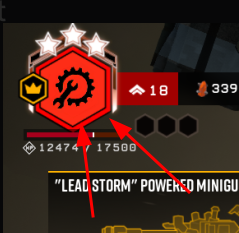 weak arrow
thorny herald
weak arrow
thorny herald
removed weapon bobbing mod currently breaks the player skeleton after the latest patch
thorny herald
oh weird I thought I swapped to a profile with no mods. thanks!
 honest garden
ginger has no description or icon in the menu

 pallid scarab
good day
am i get bad luck or i cant just open last things in cosmic tree because it`s a bug?

 lean gull
pallid scarab
good day
am i get bad luck or i cant just open last things in cosmic tree becaus...
lean gull
pallid scarab
good day
am i get bad luck or i cant just open last things in cosmic tree becaus...
check to make sure you’ve collected all your rewards
pallid scarab
lean gull
check to make sure you’ve collected all your rewards <:Sconk:767874469771214859>
Are you mean this?
 lean gull
pallid scarab
Are you mean this?
lean gull
pallid scarab
Are you mean this?
on the bottom check the white line
pallid scarab
oh
my bad
thanks

 echo saddle
Hi
does anyone know why my viewmodels are huge
I've tried to change them but nothing works

This is an example of how big the viewmodels are
storm tendon
echo saddle
I don't see anything weird here ?
storm tendon
don't know, it doesn't seem abnormal to me
check your FoV maybe
echo saddle
This is one that my friend took

The viewmodels look like they are further away/smaller
storm tendon
probably a FoV difference
echo saddle
my fov is on 120
storm tendon
do you also have the same resolution than your friend ?
 storm tendon
echo saddle
this is my resolution
storm tendon
echo saddle
this is my resolution
coud you also show me a weapon model ? you've said they're too big too
 storm tendon
don't know what to tell you or how this can be fixed, I'm not even sure it's really a bug
 broken bolt
what

tried to join friends lobby
"Mission is too deep for personal drop pod"
ohhh
does it mean they are at the end of the mission?
it phrased so weirdly
storm tendon
broken bolt
does it mean they are at the end of the mission?
are they in a deep dive ?
broken bolt
or its deep dive
i keep messing it up cause steam doesnt say it
yeah, its DD, nevermind
This screen also shows up for like split second and then just drops you back to rig
took a few tries to even read it
 idle shadow

going to have a heart attack if this isn't dealt with
powerfu, is that like kung fu?
storm tendon
idle shadow
going to have a heart attack if this isn't dealt with
it's here since April, not quite the biggest priority in terms of bug fixing 😛
 normal portal
power-fu
elfin drum
lol that's not even the only error in the description
 urban rock
strange bug, every time i go into a menu (weapon customization, round end screen, pickaxe customization) it just shows the forge


okay wait
i inspected the interplanetary miner's union sign, and now the effect is gone
strange
elfin drum
The union sign actually worked for you?
 storm tendon
urban rock
strange bug, every time i go into a menu (weapon customization, round end screen...
storm tendon
urban rock
strange bug, every time i go into a menu (weapon customization, round end screen...
happens when someone's trying to join your session
storm tendon
elfin drum
The union sign actually worked for you?
pinned message in #interplanetary-miners-union
 sturdy smelt
Anyone also having micro stutter at some times since the last update ?
lean gull
sturdy smelt
Anyone also having micro stutter at some times since the last update ?
yeah, started getting stuttering on series x after since the patch
sturdy smelt
A friend on series s even gets fps drops to 30fps
I have series x and during swarms or certain events like molly getting into the drop pod or shooting a zipline i always have these stutters now, not nice when you wanna play elite deep dives
Are the devs aware of this ?
lean gull
sturdy smelt
I have series x and during swarms or certain events like molly getting into the ...
pretty much my experience too
idle shadow
my POV after recovering from a blackreach blonde ale while under the effects of blackout stout
I can look around in a very limited cone but can't move
lean gull
I was gonna give it a few days to make sure I wasn’t reading into it, but it seems persistent at this point
mossy breach
Hey, Xbox problem, specifically Series S and possibly Series X
So I beleive the problem started around early Monday, and it's that the game is STRUGGLING. Anytime it has to do animations, particles, anything, the framerate halfs, and it appears to be stressing out my Xbox Series S because it heats way up after just a few minutes of play and then runs even worse...
I've talked to a few friends who play on Xbox One, and they don't appear to be having any issues, whereas I, and my friend who also plays on Xbox Series S, are both having major problems.
and I'm just now reading other people talking about it
 worthy smelt

 austere coral
mossy breach
Hey, Xbox problem, specifically Series S and possibly Series X
So I beleive the...
austere coral
mossy breach
Hey, Xbox problem, specifically Series S and possibly Series X
So I beleive the...
Known issue. Wait for a fix. #xbox-and-windows-store
mossy breach
will do, thank you