#support-en
1 messages · Page 421 of 1
 fathom meadow
 nocturne flax
Does not work
fathom meadow
nocturne flax
Does not work
send your server on my DM ..
 sonic token
what do i do with ¢credits
 pseudo basin
Hi there, i'm trying to make a role assigmentm but i doesnt works, just assigment the first role and mention don't work
 fathom meadow
sonic token
what do i do with ¢credits
fathom meadow
sonic token
what do i do with ¢credits
Buying profile backgrounds, id backgrounds, profile bdgs, and getting paid versions ..
sonic token
thanks
fathom meadow
pseudo basin
Hi there, i'm trying to make a role assigmentm but i doesnt works, just assigmen...
<@&role id here>
pseudo basin
 fathom meadow
`<@&role id here>`
fathom meadow
sonic token
thanks
fathom meadow
fathom meadow
`<@&role id here>`
fathom meadow
sonic token
thanks
you're welcome ..
pseudo basin
fathom meadow
-

 fathom meadow
you're welcome ..
fathom meadow
hey, send screenshot for welcomer image settings ..
 fathom meadow
send the image here ..
 livid rock
i did
fathom meadow
The welcomer image ..
livid rock
the background?
fathom meadow
Yes ..
livid rock
ok wait
fathom meadow
Валентинко(Дух)#8779 done ..
 native geyser
livid rock
native geyser
livid rock
- make sure the image is not bigger than 3mb
- check the bots perms
livid rock
native geyser
1) make sure the image is not bigger than 3mb
2) check the bots perms
worked all time
native geyser
also make sure the text part doesnt exceed discords limit
native geyser
you can also try reuploading the image which will refresh its link
fathom meadow
@native geyser general issue?
 livid rock
i try
native geyser
fathom meadow
<@324937717441888256> general issue?
how did you get it exactly
livid rock
i dont got it
native geyser
i was asking with which command
fathom meadow
#colors
native geyser
try reuploading the background it should fix it
fathom meadow
yup yup I did and still not working
livid rock
same
native geyser
weird let me contact to dramex
 sour verge
Hello why my probot don't send my welcome message in my serv pls
livid rock
same problem on me
native geyser
try reuploading the image
native geyser
then please wait i reported the situation to devs
sour verge
No same the message is no send
sour verge
native geyser
then please wait i reported the situation to devs
Thanks
native geyser
np
 lethal horizon
my bot wont play music it just keeps saying the application did not respond
 royal pike
I think is down or st
lethal horizon
st?
royal pike
something
lethal horizon
oh
native geyser
general issue please be patient
native geyser
dont know how long it'll take but any kind of 'not working' issue is related to the issue we're currently having
lethal horizon
ok cool thank you
 rancid minnow
I recently added probot to my server and done setting up the welcome msg feature but it wont send welcome msg to the channel
native geyser
native geyser
dont know how long it'll take but any kind of 'not working' issue is related to ...
^
rancid minnow
native geyser
dont know how long it'll take but any kind of 'not working' issue is related to ...
Well its kinda not working issue I suppose
 muted stratus
excuse me, why is probot offline in my server?
sour verge
I think probot it is down
muted stratus
<@&675070424748654593>
native geyser
general issue please read above
nocturne flax
muted stratus
excuse me, why is probot offline in my server?
Same
nocturne flax
Oh I just joined the server to ask that, thank you Ruru!
muted stratus
native geyser
please do not repeat the same issues
sorry
 somber remnant
native geyser
somber remnant
native geyser
#chat-int @nocturne flax @nocturne flax
general issue @somber remnant read above please
GENERAL ISSUE BEING SOLVED PLEASE DO NOT REPEAT SAME ISSUES
clearly you do not have any other bot related issue so move to #chat-en please no need to fill the channel with more messages since people are tend to ignore reading in general
/stop
yw
 tame cargo
I have a problem, which is that when a member enters the server, the welcome message and the picture do not appear, and I tried to fix it in every possible way. I hope for a solution
tame cargo
tame cargo
I have a problem, which is that when a member enters the server, the welcome mes...
@native geyser @nocturne flax
nocturne flax
I ran queue command and want to remove spesific song from current playlist, how to do ?
 frozen pilot
your welcomer image must be in png and jpg format and its size should not be large
 tribal wharf
I dont know how to use xp system
frozen pilot
nocturne flax
I ran `queue` command and want to remove spesific song from current playlist, ho...
Coming soon
 near tide
is there any way to add points (xp) to a #top user?
nocturne flax
ty
tame cargo
frozen pilot
your welcomer image must be in png and jpg format and its size should not be lar...
This is my welcome picture

suitable?
frozen pilot
tribal wharf
I dont know how to use xp system
you get random amount of xp every minute as you keep chatting (for voice every 2 minutes)
frozen pilot
near tide
is there any way to add points (xp) to a #top user?
Not possible for now
tribal wharf
Ok thx
tame cargo
tame cargo
This is my welcome picture
@frozen pilot
 tame cargo
Ok
native geyser
a general issue, being worked on
tame cargo
frozen pilot
it worked thanks
nocturne flax
@native geyser Hey can you tell me how can i setup leveling system?
 tight hull
pls help me in @stone cloud👺
 stiff iron
Bot offline, help pls
fathom meadow
<@&675070424748654593>
native geyser
nocturne flax
<@324937717441888256> Hey can you tell me how can i setup leveling system?
https://probot.io/dashboard -> select your server -> leveling system
ProBot
Welcome images, moderation, leveling, reaction roles, logs, high quality music and many many more!
native geyser
tight hull
pls help me in <@282859044593598464>👺
yes?
native geyser
stiff iron
Bot offline, help pls
general issue being worked on
stiff iron
native geyser
general issue being worked on
when will this issue be resolved?
native geyser
no eta unfortunately
stiff iron
~T_T~
tight hull
native geyser
yes?
im Set up the issuance of roles, but it doesn't work because the bot doesn't see SMS (Sorry for the mistakes, I don't very know English)
How to fix it?🥶
native geyser
we have russian support in #support-int i think you can get a better help there
nocturne flax
native geyser
https://probot.io/dashboard -> select your server -> leveling system
Not working its just showing 0xp
 vivid cobalt
hay I have a question why every time I want to write a command to the probot comes the message this application does not respond and why is when setting the bot in the dashboard language id what is that?
native geyser
nocturne flax
Not working its just showing 0xp
do you have utility module enabled?
native geyser
vivid cobalt
hay I have a question why every time I want to write a command to the probot com...
general issue being fixed, also what do you mean with language id
are you able to provide screenshots
 muted girder
so the welcome system has been down since premium went down earlier
any info on this?
nocturne flax
native geyser
do you have utility module enabled?
Don't remember
native geyser
then check it please
native geyser
muted girder
so the welcome system has been down since premium went down earlier
being worked on
vivid cobalt
native geyser
then check it please
oh hahah actually wanted to send a screenshot of what it says but does not work
native geyser
are you talking about /setlang command?
muted girder
native geyser
being worked on
can we get an updated #status then for us following that channel
nocturne flax
native geyser
then check it please
It's enabled
native geyser
muted girder
can we get an updated <#665036485132550154> then for us following that channel
sure i'll try to contact devs again
native geyser
nocturne flax
It's enabled
any no-xp roles or channels?
muted girder
ty
vivid cobalt
native geyser
sure i'll try to contact devs again
can I send you the screenshot of the bot what is there in the dashboard also privately that they see it?
vivid cobalt
native geyser
are you talking about /setlang command?
or is the whole bot currently down and therefore he does not go? if so when he goes again?
native geyser
vivid cobalt
can I send you the screenshot of the bot what is there in the dashboard also pri...
sure
native geyser
nocturne flax
Yes
do you know what no-xp roles and channels do
nocturne flax
native geyser
do you know what no-xp roles and channels do
They don't give any xp
native geyser
vivid cobalt
or is the whole bot currently down and therefore he does not go? if so when he g...
the thing is i dont really know which feature you're talking about so i cant say much thats why i asked for a screenshot
 brave canopy
Hello! I need help with the bot, every time someone new enters the server, I want that same role to be added automatically to the new user to the server, how can I do this?
native geyser
nocturne flax
They don't give any xp
exactly, you said you have no-xp roles and channels so that might be the reason why your xp is stuck on 0 check it out please
native geyser
brave canopy
Hello! I need help with the bot, every time someone new enters the server, I wan...
https://probot.io/dashboard -> select your server -> autorole
ProBot
Welcome images, moderation, leveling, reaction roles, logs, high quality music and many many more!
nocturne flax
native geyser
the thing is i dont really know which feature you're talking about so i cant say...
Ig he is trying to say about the active status is showing offline
brave canopy
Okay tysm
vivid cobalt
native geyser
any no-xp roles or channels?
you would have to accept my request here otherwise i can't write to you :c
nocturne flax
native geyser
exactly, you said you have no-xp roles and channels so that might be the reason ...
Yeah ik but the role and channel is not set as no xp role/channel
native geyser
vivid cobalt
you would have to accept my request here otherwise i can't write to you :c
you can just send it here too i do have my dms open as well so if you open it for this server you can dm me
native geyser
nocturne flax
Yeah ik but the role and channel is not set as no xp role/channel
do other commands and features work for you? if not then its related to the issue we're currently having
 mint sky
who is the owner of probot?
nocturne flax
native geyser
do other commands and features work for you? if not then its related to the issu...
Everything is working except level issue
native geyser
Dramex
native geyser
nocturne flax
Everything is working except level issue
invite me in dms please so i can check it out
mint sky
native geyser
Dramex
can i get his id?
nocturne flax
native geyser
invite me in dms please so i can check it out
Okk
native geyser
if you're gonna try to contact him he has his dms closed therefore you can not
mint sky
native geyser
if you're gonna try to contact him he has his dms closed therefore you can not
i need the id to check something
vivid cobalt
native geyser
if you're gonna try to contact him he has his dms closed therefore you can not
have sent it in here but the image was deleted directly the link from the screenshot
nocturne flax
@mint sky are you a nuker?
mint sky
nocturne flax
<@883174370753802251> are you a nuker?
no lol
native geyser
vivid cobalt
have sent it in here but the image was deleted directly the link from the screen...
upload it, do not send its link
nocturne flax
mint sky
no lol
Lol
vivid cobalt
native geyser
upload it, do not send its link
 native geyser
where is language id 
vivid cobalt
native geyser
where is language id <:retar:639303051118903296>
ah ok so it always says that and when i write /rank on my server and my name it says ''the application is not responding
 broken frigate
Саламм
native geyser
vivid cobalt
ah ok so it always says that and when i write /rank on my server and my name it ...
general issue being fixed atm
native geyser
broken frigate
Саламм
#support-int / #chat-int
vivid cobalt
native geyser
where is language id <:retar:639303051118903296>
here
 native geyser
oh aliases
 jolly socket
Why probot is offline in my server?
native geyser
vivid cobalt
here
it makes it so that you can use those commands with those alias names, for example instead of /rank you can use Spracheid as its set there
native geyser
jolly socket
Why probot is offline in my server?
general issue being fixed
vivid cobalt
native geyser
it makes it so that you can use those commands with those alias names, for examp...
yeah i renamed this to german so /rang but doesn't work
 native geyser
aliases changes the way the command is used, instead of /rang you can make it rang so when you type rang the command gets triggered, its also suggested to not use / in aliases since it might confuse users with slash commands
vivid cobalt
native geyser
aliases changes the way the command is used, instead of /rang you can make it `r...
ehm okay and what should i do now because even if i remove the alias command /rank there is still spracheid there
vivid cobalt
native geyser
i do believe its a translation issue let me check
have now deleted everything and saved still nothing goes no single command from the bot goes can it be that I have set in the dashboard at language what wrong?
 native geyser
as i mentioned the reason why commands do not work is from our side not from yours
vivid cobalt
native geyser
this is German right?
ehm yes because i am german and so is my server
 shadow summit
@native geyser im still getting the same problem when voting to probot
native geyser
might take a while to get checked devs have been busy with fixing main issues in general, apologies
shadow summit
ok GL ❤️
native geyser
ty
vivid cobalt
native geyser
might take a while to get checked devs have been busy with fixing main issues in...
okay yes all good no problem just hope that tomorrow everything works again with the bot
♥
native geyser
also @vivid cobalt can you check again if the commands work now
i have been told that everything has been fixed so i want to make sure
vivid cobalt
native geyser
also <@327081406582882325> can you check again if the commands work now
ahh now it works 😄 thanks what was it?
 past gull
The bot is not working what to do?
vivid cobalt
native geyser
no it wasn't
aha ok yes mega cool thank you ♥ are really super and mega that you immediately also react and help
native geyser
yw ^^
native geyser
past gull
The bot is not working what to do?
check again it should be working now
 native geyser
invite me in dms please
nocturne flax
Is probot going through something rn
native geyser
it was but it should be fixed by now what is the issue you're having
nocturne flax
Just welcome
And then auto mod stopped aswell.
I thought it might be probot side.
native geyser
do you have image enabled for welcomer
and please get a regular member to check your automod right now
 slate mural
 old basin
hello
native geyser
hi how can i help you?
 plucky yarrow
Hi, I'm struggling with my probot embed messages.... sometimes the @ roles I use don't show up once posted on the servers message? Am I doing something wrong 😅
native geyser
sometimes or all the time? cause if it works once its supposed to work all the time if no changes have been made
nocturne flax
I want to ask why the auto roles doesn't work?
Also, the dashboard webpage in the pc keeps loading compared when I use my phone it is working fine.
native geyser
nocturne flax
I want to ask why the auto roles doesn't work?
Also, the dashboard webpage in th...
regarding dashboard issue try a different browser
regarding autoroles drag the bots role above other roles and give it required permissions
 wanton glade
can i transfer the money from the banned account to this account
native geyser
wanton glade
my account got banned and i have 400k credit
profile transfer is currently not open therefore can't do anything about it sorry
nocturne flax
native geyser
regarding dashboard issue try a different browser
regarding autoroles drag the b...
Okay, thanks a lot
native geyser
yw
wanton glade
native geyser
profile transfer is currently not open therefore can't do anything about it sorr...
when its gonna open
native geyser
i dont have any information regarding that
native geyser
np
wanton glade
hey again
can i refund the money i transferd from this account?
or get it back to this account
native geyser
once its transferred it cant be taken back or refunded
wanton glade
:( okeyy thnx again
native geyser
np
 unreal hamlet
Hi I need help with embed messages, it seems that I can't edit sent message that have roles mention in the it, when I click on edit sent message there is no success indicator on the top right corner, every other embed message without roles mention works fine
 cinder thicket
How do I set a members level manually?
nocturne flax
cinder thicket
How do I set a members level manually?
<@&675070424748654593>
cinder thicket
nocturne flax
<@&675070424748654593>
Thanks!
 light elbow
cinder thicket
How do I set a members level manually?
light elbow
cinder thicket
How do I set a members level manually?
Simply, you can't.
 molten acorn
Hi
Why is it forbidden to sell credit? I hope you give me a clear reason
cinder thicket
light elbow
Simply, you can't.
Their role keeps saying 0/Max on the XP bar, but they are actively messaging.
molten acorn
molten acorn
Hi
Why is it forbidden to sell credit? I hope you give me a clear reason
!!
light elbow
cinder thicket
Their role keeps saying `0/Max` on the XP bar, but they are actively messaging.
Did you enable your utility module?
cinder thicket
light elbow
Did you enable your utility module?
Yes, it is working for all other members, just not one specific member.
 split needle
molten acorn
Hi
Why is it forbidden to sell credit? I hope you give me a clear reason
split needle
molten acorn
Hi
Why is it forbidden to sell credit? I hope you give me a clear reason
Against our term of use of credits, as well as against discord tos about trading within the app
light elbow
cinder thicket
Yes, it is working for all other members, just not one specific member.
Maybe he has a no xp role or hes talking in a no xp channel somehow?
molten acorn
split needle
Against our term of use of credits, as well as against discord tos about trading...
No obvious reason
cinder thicket
light elbow
Maybe he has a no xp role or hes talking in a no xp channel somehow?
He did, have a no XP role, but we removed it and he has talked since.
light elbow
molten acorn
No obvious reason
Trading is against of Discord TOS. Thats it.
molten acorn
light elbow
Trading is against of Discord TOS. Thats it.
Ok, why is there a credit in the pro bot?
split needle
To use only within the bot
They can only be used to:
- purchase profile/rank card backgrounds and profile badges for /profile and /rank command
- purchase paid subscriptions instead of real cash, a way to test out their features before let your money in
molten acorn
split needle
They can only be used to:
- purchase profile/rank card backgrounds and profile ...
♥
molten acorn
split needle
They can only be used to:
- purchase profile/rank card backgrounds and profile ...
You are better than Arab technical support
♥
light elbow
cinder thicket
He did, have a no XP role, but we removed it and he has talked since.
Can you guys try to reset his xp or convince him to message?
cinder thicket
light elbow
Can you guys try to reset his xp or convince him to message?
I have tried issuing points, but I guess that is different. How do we reset his XP?
light elbow
#help reset
 lean badgerBOT
light elbow
#help reset
lean badgerBOT
light elbow
#help reset
**Command: reset**
Reset text/voice/invites/limits xp points for all or specific member.
**Usage:**
#reset [text / voice / invites / limits] [all / user]
**Examples:**
#reset text all
#reset voice all
#reset invites all
#reset text @Dramex
#reset limits @Dramex
light elbow
@cinder thicket
cinder thicket
light elbow
<@650898413340327973>
Thanks!
 tawdry mango
 verbal walrus
Probot auto role is broken
 knotty quiver
One of my friends is not having access to his main account and thus he made a new account.
So, is there a way that he can reach the level he had in his main account without actually grinding and levelling up?
<@&675070424748654593>
 craggy quest
i cant acces todays best tips ?
 deft sand
#help
 untold flume
@knotty quiver account transfer is currently disabled therefore no he can't
@verbal walrus how so? Is it not assigning the roles? If so drag the bot's role above other roles
untold flume
craggy quest
i cant acces todays best tips ?
Wdym?
craggy quest
 frosty palm
i need help i have an account whom i lost to 2FA authenticator and i own 1milion credits on probot i have all proof needed the email adresse and everything
how do i get them back
@untold flume
@near canopy
@native geyser
 untold arch
<@&675070424748654593>
untold arch
craggy quest
https://discordapp.com/channels/945871431118487563/960352759096438804/9865098018...
Don't type anything not about probot please
untold arch
frosty palm
i need help i have an account whom i lost to 2FA authenticator and i own 1milio...
Your acc your responsibility
untold arch
frosty palm
<@294958823632928769>
Don't mention admin please, check out #573048353458356234
Yes?
knotty quiver
untold flume
<@796983026352390174> account transfer is currently disabled therefore no he can...
I mean can I just not increase his level?
Through commands or anything.
untold flume
No unfortunately not yet
untold flume
yes ask your question right away @glossy root
 glossy root
How can everyone use the robot to search their rank?
untold flume
Yes
/Rank
glossy root
Because it only can be searched by the discord administrator.
 vocal moss
I'm trying to set up probot's reaction roles, but there's no roles showing up to add to the emoji
 untold flume
@vocal moss drag the bot's role above other roles then refresh
glossy root
untold flume
When someone tries to type the command
It can be used by everyone?
untold flume
It has to
nocturne flax
untold flume
@nocturne flax how can i help you?
nocturne flax
What can this bot do?
glossy root
untold flume
It has to
Does not like ME66? through the instructions that !rank to search their rank?
untold flume
dashboard : https://probot.io/dashboard
Commands : https://probot.io/commands @nocturne flax
@glossy root it's , they have to type
/rank
To see their levels
glossy root
But it also need type their name to search
untold flume
Their what? If they wanna see their levels they just need to type
/rank
Simple as that
glossy root
let me try
untold flume
glossy root
But it also need type their name to search
They don't have to , unless they want to see someone's level
For ex :
/rank @glossy root
untold flume
You're welcome
nocturne flax
How can I make it so that when I write /roll food, one of the 5 dishes falls out? and together with the dish also a photo/gif to it?
glossy root
The robot has not any reaction. Why?
 split needle
nocturne flax
How can I make it so that when I write /roll food, one of the 5 dishes falls out...
split needle
nocturne flax
How can I make it so that when I write /roll food, one of the 5 dishes falls out...
not an existing command but you can set it up using auto responder
glossy root
@untold flume
split needle
glossy root
The robot has not any reaction. Why?
wait for the command to load out when using slash, and for prefixes, if you have not changed it, default prefix is #
glossy root
split needle
wait for the command to load out when using slash, and for prefixes, if you have...
wait i am going to try it
glossy root
split needle
wait for the command to load out when using slash, and for prefixes, if you have...
how can I change it?
split needle
#prefix <new prefix>
glossy root
In which channel is that I type it? or the website of the robot?
untold arch
<@&675070424748654593>
untold arch
glossy root
In which channel is that I type it? or the website of the robot?
You can edit it from the website or by typing in your server the command #prefix <new prefix>
glossy root
I had commanded in mine server
untold arch
Ok
glossy root
 glossy root
oh okay i go to try
untold arch
Ok
glossy root
like this?
 glossy root
correct?
 untold arch
Bro you can't change the slash command prefix
You can change the main prefix #
But if you want /rank to be your prefix it's ok
 untold arch
You want to change the prefix right?
split needle
as the command, you have changed the prefix to /rank
@untold arch you can stop for now and avoid getting into this channel if you don't know much english
glossy root
But the /rank can not be use also
split needle
because the prefix of the bot is now /rank, which mean for the rank command, you'll have to type /rankrank
to change it again, do /rankprefix
glossy root
o okay
split needle
and beware of slash command clashing
glossy root
thx
glossy root
split needle
and beware of slash command clashing
hello, can u reply to my private letter?
 neat wave
I don't use multiple devices i swear , please help
 glossy root
Hello, is it possible to clear a user's experience points?
 split needle
#help reset
lean badgerBOT
split needle
#help reset
**Command: reset**
Reset text/voice/invites/limits xp points for all or specific member.
**Usage:**
#reset [text / voice / invites / limits] [all / user]
**Examples:**
#reset text all
#reset voice all
#reset invites all
#reset text @Dramex
#reset limits @Dramex
 pseudo thorn
Hi
 limpid gyro
how to set the bot?
nocturne flax
<@&675070424748654593> can you please refund accidental purchase of profile background?
native geyser
pseudo thorn
Hi
how can i help you?
native geyser
limpid gyro
how to set the bot?
ProBot
Welcome images, moderation, leveling, reaction roles, logs, high quality music and many many more!
native geyser
nocturne flax
<@&675070424748654593> can you please refund accidental purchase of profile back...
those are not refundable
nocturne flax
native geyser
those are not refundable
Awe man
@native geyser is XP gained from PB while in AFK VC?
native geyser
yes
nocturne flax
TY
native geyser
you can still set that vc as a no-xp channel, which will stop the xp gain for that channel
nocturne flax
How to earn credits besides daily and voting?
native geyser
currently there are no other ways
native geyser
vote and daily only
limpid gyro
how do you set up the bot??
 limpid gyro
hellooooooooooooo??????
nocturne flax
limpid gyro
how do you set up the bot??
Go to ProBot website
Login through discord
Invite bot to server
Voila
@limpid gyro
limpid gyro
but i dont know where to do that on the website
nocturne flax
Where it says login
native geyser
nocturne flax
Yes but is top.gg the only voting site?
yes
nocturne flax
Then there will be a sidebar like on discord
native geyser
limpid gyro
how do you set up the bot??
i already answered you right?
nocturne flax
Ruru can you post your best /profile?
native geyser
wdym
nocturne flax
Do /profile on the server you have most XP on save the IMG DM me
limpid gyro
i dont understand that
nocturne flax
limpid gyro
i dont understand that
Then ProBot not for you
native geyser
limpid gyro
i dont understand that
you set the bot on https://probot.io/dashboard
ProBot
Welcome images, moderation, leveling, reaction roles, logs, high quality music and many many more!
native geyser
nocturne flax
Do /profile on the server you have most XP on save the IMG DM me
doesnt sound like a question regarding the bot itself so for the rest please use #chat-en instead
nocturne flax
Okay thanks Ruru
native geyser
np
nocturne flax
Where are "ID backgrounds" used?
native geyser
/rank
 floral viper
Hello can i contact support in dms please?
native geyser
we do not offer support in dms so please ask your question here
floral viper
native geyser
we do not offer support in dms so please ask your question here
okay its about profile background is there chance that if i submit it all it can end up in store for my server please?
native geyser
you can suggest it on our reddit page, to access it check #816442755466788874
floral viper
okay but can i still know do they accept profile backgrounds with logo and name of server in it or how does this work if its not private please?
native geyser
depending on how many people upvote the backgrounds they consider adding those backgrounds for everyone
floral viper
alright
 sullen prism
limpid gyro
i dont understand that
sullen prism
limpid gyro
i dont understand that
ProBot
Welcome images, moderation, leveling, reaction roles, logs, high quality music and many many more!
and setup your server
sullen prism
 carmine moon
i wana ask about somthin
carmine moon
i wana ask about somthin
yes ?
carmine moon
please dont ban me but is there any chance u know a probot credit shop
sullen prism
..
carmine moon
??
sullen prism
no
carmine moon
ok thx
sullen prism
read rules
native geyser
we're not affiliated with any shops and trading is against discord TOS so please follow the rules in general @carmine moon
 woven rune
hi is there a command that i can type to clear only the media stuff ?
native geyser
no but feel free to suggest it in #573053418017521664
 quaint sentinel
--
livid rock
is the problem with welcome message fixed?
 jolly geode
Hi gyes
native geyser
livid rock
is the problem with welcome message fixed?
it should be yes
native geyser
jolly geode
Hi gyes
how can i help you?
livid rock
native geyser
it should be yes
thank you it works
native geyser
yw
jolly geode
native geyser
how can i help you?
Nooo thanks
 digital folio
why i use …#credit
native geyser
and?
nocturne flax
How does this invite logs work? I invited someone but it is not logged in the channel
 native geyser
digital folio
how i have money in this
native geyser
digital folio
how i have money in this
daily: https://probot.io/daily
vote: https://top.gg/bot/probot/vote
ProBot
Welcome images, moderation, leveling, reaction roles, logs, high quality music and many many more!

Top.gg
Spice up your Discord experience with our diverse range of Discord Bots and Servers as well as other spaces to discover DAOs.
native geyser
nocturne flax
How does this invite logs work? I invited someone but it is not logged in the ch...
that log is currently not working will be fixed though
native geyser
yw
native geyser
can i see your dashboard settings
nocturne flax
How do I do that
native geyser
dashboard -> welcomer & goodbye -> show me a screenshot of your settings
nocturne flax
 native geyser
can you make sure your image is smaller than 3mb also check the bots perms
native geyser
then its permission issue
native geyser
can i see image details
nocturne flax
nocturne flax
It doesn't work with text either
.
It's not the image since I tried without
Text message only doesn't work aswell
native geyser
they're related so can i please see image details
 native geyser
can you reupload it and try again
nocturne flax
Yeh it's not working with or without image
It doesn't DM text or text/image either
Oh wait nvm
It worked for dm.
Hm
nocturne flax
It has all possible perms
Including advanced perm administrator
It can dm but can't send to channel
But commands still work in said channel
native geyser
invite me in dms please so i can check it out
nocturne flax
Hi all. Tell me please. Why aren't roles assigned by server members? Looks like you did everything right, thanks.

How do i put command cooldown to 0?
split needle
nocturne flax
your members have to reach both set levels to get the roles
split needle
nocturne flax
How do i put command cooldown to 0?
not possible as to avoid lagging or worse, offline
nocturne flax
split needle
your members have to reach both set levels to get the roles
Thank you.
nocturne flax
@split needle And the bot gives out a role for activity in the voice channel, how exactly? Is it necessary to talk?
split needle
no, only be in the voice channels is enough
nocturne flax
how tf u remove a song frm queue
 river widget
<@&675070424748654593> is there a difference between /mute and /timeout?
quaint sentinel
nocturne flax
how tf u remove a song frm queue
just skip that song. /skip
quaint sentinel
river widget
<@&675070424748654593> is there a difference between `/mute` and `/timeout`?
#help timeout
lean badgerBOT
quaint sentinel
#help timeout
**Command: timeout**
Timeout a user from sending messages, react or join voice channels.
**Usage:**
#timeout [user]
#timeout [user] (time)
#timeout [user] (reason)
**Examples:**
#timeout @quaint sentinel
#timeout @quaint sentinel 1h
#timeout @quaint sentinel Spamming
quaint sentinel
As it says above in the descriptions, timeout will not let a user send messages / react or join voice channels.
#help mute
lean badgerBOT
quaint sentinel
#help mute
**Command: mute**
Mute a member from text/voice channels so they cannot type.
**Usage:**
#mute [user] (time ends with m,h,d,mo,y) (reason)
**Examples:**
#mute @quaint sentinel 1m Spamming
#mute @quaint sentinel 1h
#mute @quaint sentinel 1d
#mute @quaint sentinel 1w
#mute @quaint sentinel 1mo
#mute @quaint sentinel 1y
quaint sentinel
there is actually a difference between both, mute will just mute that user from sending messages only. Timeout will do the things I said above and also + https://support.discord.com/hc/en-us/articles/4413305239191-Time-Out-FAQ
Discord
Is someone being a menace in your server? Introducing server Time Out!
This feature enables server moderators and admins to temporarily prevent a user from interacting in a server.
What does that ...
quaint sentinel
yw buddy.
 ripe tiger
Hi
 barren rapids
any idea why "edit sent message" for embeds isn't editing the message?
quaint sentinel
ripe tiger
Hi
hey, how can I help you?.
quaint sentinel
barren rapids
any idea why "edit sent message" for embeds isn't editing the message?
It works for me, weird. Does any error pop up while you trying to edit that message?.
barren rapids
quaint sentinel
It works for me, weird. Does any error pop up while you trying to edit that mess...
Nah it says sent successfully but just doesn't change the message
quaint sentinel
barren rapids
Nah it says sent successfully but just doesn't change the message
Invite me in dms please.
 flint sparrow
hiya, im trying to make an account on nevermet and it won’t let me follow them on tiktok so im kinda stuck
can anyone help?
i’ve followed them on my actual tiktok app too
nocturne flax
split needle
no, only be in the voice channels is enough
The bot in the chat says that I have reached the 1st level. But the role does not give me. What to do?
 austere vigil
Hello! Looking to switch from MEE6.
Do you guys have "button" roles instead of just emoji reactions?
split needle
flint sparrow
hiya, im trying to make an account on nevermet and it won’t let me follow them o...
not related to the bot in here
split needle
nocturne flax
The bot in the chat says that I have reached the 1st level. But the role does no...
you need to reach both text and voice level as set to get the roles
split needle
austere vigil
Do you guys have "button" roles instead of just emoji reactions?
no for now
Discord
Discord is the easiest way to communicate over voice, video, and text. Chat, hang out, and stay close with your friends and communities.
neat wave
Yeah my brother , but we live together so its normal to use it
 loud palm
hello, i didn't recieve credit on a transaction on the june 13th (see snapshots)

 native geyser
loud palm
hello, i didn't recieve credit on a transaction on the june 13th (see snapshots)
native geyser
loud palm
hello, i didn't recieve credit on a transaction on the june 13th (see snapshots)
apparently they used an auto-responder to make it seem like they transferred credits to you
but they didn't
 last shuttle
hey , how I can increase my lvl of this bot ?
native geyser
by being actiev
native geyser
in chat
nocturne flax
<@&675070424748654593> can I not add 🇦 emotes as reactrole??:((

no :regional_indicator emote comes up..
native geyser
will be added in the future
 fading briar
I need help with the welcome setting in the probot. It worked before but now all of a sudden after I adjusted the picture and location it doesn’t do it anymore


<@&675070424748654593>
native geyser
can you make sure the image format is either png or jpg and its not bigger than 3mb
fading briar
I guess it’s the image because when I do a transparent background instead it worked
Yeah it’s the image
 hard crystal
 native geyser
no worries
 turbid zealot
Hey, i have a problem. I mute user but he still can write messages. The muted role is under the probot role (probot tole is the highest). I changed permission for everyone role so they can't write messages but weryfied users can. Can someone help me? <@&675070424748654593>
native geyser
its about channel permissions one of the roles permission is overriding muted roles permission you need to set that roles send message permission to / instead of ✅
turbid zealot
native geyser
its about channel permissions one of the roles permission is overriding muted ro...
Like that? It is in polish, wiadomości mean send messages
 turbid zealot
native geyser
is there a role you give to everyone
turbid zealot
native geyser
is there a role you give to everyone
um yes for weryfied users
native geyser
i do assume that verified user role is the one that is overriding muted roles send message permission
turbid zealot
native geyser
i do assume that verified user role is the one that is overriding muted roles se...
I changed it to permission like on the screen shot. Should it work now?
native geyser
if there are no other roles that is overriding then yes
turbid zealot
Okay let me check.
turbid zealot
native geyser
if there are no other roles that is overriding then yes
Yey it work now, thanks for help!
native geyser
yw
 mental saffron
Hiiiiii! I was looking around for a documentation or explanation about how dose the ranking system work. Sadly, I couldn't find one. So where I can find one? Thank you!
native geyser
i can assist you with that what exactly do you want to know about our levelng system
 plain otter
frozen pilot
plain otter
frozen pilot
 crimson oasis
How to add experience to a server member?
crimson oasis
How to add experience to a server member?
so xp ?
crimson oasis
Yep
frozen pilot
not possible for now 
crimson oasis
frozen pilot
not possible for now <:panime:620307908042817536>
Eh, will it be possible in the future?

 modest silo
hello , how do I make a playlist loop ?
modest silo
modest silo
hello , how do I make a playlist loop ?
@frozen pilot
native geyser
currently its not possible will be added in the future though
modest silo
native geyser
currently its not possible will be added in the future though
Could I make a playlist perhaps?
native geyser
you can not save a playlist to the bot but if you have a youtube or soundcloud playlist you can play it by using #play pl link
modest silo
Oo so all I have to do is make a playlist in yt and put the link there ?
native geyser
yes
modest silo
Ok thank you
native geyser
#play pl
link
is the command
native geyser
yw
 wooden crater
Yo I don’t really understand the reaction roles can anyone help me out I’m just like trying to get a ping thing for now
 spring ether
wooden crater
Yo I don’t really understand the reaction roles can anyone help me out I’m just ...
spring ether
wooden crater
Yo I don’t really understand the reaction roles can anyone help me out I’m just ...
how can i help you explain more please
wooden crater
I don’t know I haven’t had the time to like really look at it just like lemme see real quick cause it might not be working for me
wooden crater
I don’t understand the embed messages
wooden crater
spring ether
how can i help you explain more please
Like the embed messages don’t make sense to attach to the reaction
 tidal cradle
I turned off the welcome and goodbye messages and even restricted probots access to speak in the channels that the message would be sent when someone left and joins but its still sending that message
wooden crater
Wtfridge is the embed message
native geyser
tidal cradle
I turned off the welcome and goodbye messages and even restricted probots access...
are you sure its not discords welcomer feature?
native geyser
wooden crater
Wtfridge is the embed message
its basically sending messages on behalf of the bot
wooden crater
So how does that interact with the reaction roles
native geyser
there is an editor and preview that shows you what kind of a message you created
reactions will be attached to those embed messages
currently no
flint sparrow
where can i get help making an account? 🙂
tidal cradle
native geyser
are you sure its not discords welcomer feature?
im sure because the message still has probot next to it whenever someone leaves or rejoins
wooden crater
native geyser
currently no
So how do I get it to give them a role when they give a certain reaction
native geyser
tidal cradle
im sure because the message still has probot next to it whenever someone leaves ...
then i believe you did not save your changes please check, if you're sure please invite me in dms
tidal cradle
okay
native geyser
wooden crater
So how do I get it to give them a role when they give a certain reaction
-
from embed messages section create an embed message and send it to your server (the message you'll have to select in step 2 basically)
-
from reaction roles section select the embed message you just sent
-
add reactions
-
add roles by clicking on the plus signs right next to the reactions you added
ProBot
Welcome images, moderation, leveling, reaction roles, logs, high quality music and many many more!
there will be a features yes
please use #chat-en since your question is not related to probot
flint sparrow
i did put it in both my bad sorry
 gentle thistle
Is there a channel I could possibly sue probot at?
@native geyser Where can I sue probot at?
native geyser
we dont know when exactly it'll happen
native geyser
gentle thistle
Is there a channel I could possibly sue probot at?
for what exactly?

 undone hill
I have enabled automod (link delete) but it is not deleting links why ?
native geyser
give the bot manage messages perms
undone hill
native geyser
give the bot manage messages perms
Already have administrator perm
native geyser
does the tester have admin perms?
native geyser
can i see your automod settings please

 native geyser
invite me in dms please
 deep estuary
How can I set the bot to not give exp in a determined voice channel?
untold flume
https://probot.io/dashboard > select your server > leveling system module > add no-xp channels @deep estuary
ProBot
Welcome images, moderation, leveling, reaction roles, logs, high quality music and many many more!
deep estuary
Tyvm <3
untold flume
yw
deep estuary
Is there any way to set it so only those who actually talk in voice chats get XP? so muted people don't?
untold flume
No unfortunately
 short zealot
Alslam alykm
untold flume
short zealot
Alslam alykm
walaikum assalam how may I help you?
 left remnant
The logs to keep track of bans/warnings etc. don't seem to be working
I turned them on and turned on a few of the different logging things and set them to a channel, I already checked perms and everything and that doesn't seem to be the issue
untold flume
@left remnant member kicked/banned log doesn't work?
left remnant
we actually haven't tested that one specifically, the "Moderation Command Used" doesn't seem to be working though
doesn't work with kicks either
just tested that
untold flume
Moderation command used doesn't work atm
Member kicked only works with "tier 2" version
left remnant
oic
 opal fox
hey how can i make a auto role
untold flume
hi , https://probot.io/dashboard > select your server > autoroles module > select a role @opal fox
ProBot
Welcome images, moderation, leveling, reaction roles, logs, high quality music and many many more!
opal fox
untold flume
hi , https://probot.io/dashboard > select your server > autoroles module > selec...
thanks for ur service !
untold flume
You're welcome
 pure monolith
Whats the tax percentage on the probot transfers
untold flume
5%
native geyser
what do you mean
native geyser
i assume you mean customizing the bot for your server so https://probot.io/dashboard
ProBot
Welcome images, moderation, leveling, reaction roles, logs, high quality music and many many more!
if you mean something else please let me know
 narrow scroll
the probot randomly bans people from the server when they join and some were already in
 light kayak
native geyser
if you mean something else please let me know
light kayak
native geyser
if you mean something else please let me know
I want bot for games
native geyser
probot doesn't have auto-ban features
native geyser
light kayak
I want bot for games
probot doesnt have any games currently
light kayak
native geyser
probot doesnt have any games currently
It doesn't work
narrow scroll
native geyser
probot doesn't have auto-ban features
ik
but idk what is happening it randomly bans people and banned up to 70
native geyser
light kayak
It doesn't work
what is?
light kayak
The bot
native geyser
narrow scroll
ik
but idk what is happening it randomly bans people and banned up to 70
i do believe you invited a fake bot, not real probot
narrow scroll
native geyser
i do believe you invited a fake bot, not real probot
verified ?
native geyser
light kayak
The bot
which feature of it please elaborate
narrow scroll
 native geyser
narrow scroll
verified ?
native geyser
narrow scroll
verified ?
the verified one is the real one yes can i see a screenshot from your audit log regarding the bans
what is the reason of the bans
light kayak
I want a gaming bot
native geyser
as i mentioned probot doesnt have games so please use google instead
narrow scroll
idk what is happening but
audit logs doesnt have a log
the probot logs sent some of the banned people
and we got another logs bot has some bans too
and we called the people banned they said when they joined they got banned
no audit logs??? weird
native geyser
the version you're using doesnt show who bans you can only see that people are getting banned so it doesnt mean probot is the one banning
another bot might be responsible with it however
 wispy horizon
Hi, because when I set the level system, although we have the check on "remove when assigning a later reward" the role is only added, but I do not remove the old one? thanks for the reply in advance
native geyser
wispy horizon
Hi, because when I set the level system, although we have the check on "remove w...
can i see your leveling system settings
wispy horizon
native geyser
can i see your leveling system settings
 native geyser
can you ask your members to send a message and see if the bot removes the old ones
wispy horizon
native geyser
can you ask your members to send a message and see if the bot removes the old on...
we tried but it doesn't, if I take it off manually, after a while it puts the old role back
native geyser
what if you remove all the level reward roles and ask them to send a message
wispy horizon
puts the previous role back together with the new role
 haughty rose
why is probot asking to access my email for using dashboard just used it earlier today and didn't have to do this?
 native geyser
wispy horizon
puts the previous role back together with the new role
native geyser
wispy horizon
puts the previous role back together with the new role
can you disable and re-enable remove with higher role option
also are all your roles set for 'text only'
native geyser
haughty rose
why is probot asking to access my email for using dashboard just used it earlier...
due to payment it does ask for email
for billing
wispy horizon
native geyser
can you disable and re-enable remove with higher role option
even this already tried, does not work 😩
native geyser
is all your roles set to text only?
wispy horizon
native geyser
is all your roles set to text only?
no, from the third role also voice chat
native geyser
thats the reason they belong to different groups so they do not remove each other
wispy horizon
so if i put everything both text and voice i shouldn't have problems?
native geyser
yes
wispy horizon
I'll try so, thank you very much for your availability!
native geyser
yw ^^
split needle
 lucid scaffold
yo can i have some help on VC
lucid scaffold
yo can i have some help on VC
Sorry but we don't offer support in vc for english side for now as none of us goos in spoken english
lucid scaffold
@split needle lmaoooo sure... help me here then
whyyy is it that when i try to change the profile pic of my premium bot, it doesnt change it? it says success when saving it but nothing happens
split needle
You changed it on the site or using command?
lucid scaffold
on the site
split needle
Then try with command in the server with your premium
Use #vip avatar with the image attached to the command message
lucid scaffold
error 503?
split needle
Using other images work?

 split needle
No
glossy root
Should mention the member?
split needle
Only include one of the options listed with the / in the help command
And there is no for in the command
The complete command to use is #reset text @cursive oaker
And yes, you should mention the user
glossy root
What? I was follow the command from this picture
 split needle
And as i just said above, only use 1 of the options listed with the / inside the []
The command examples are right under
glossy root
ok
I gonna to try
Can u give me the full instructions?
It had not any reaction.

🥲
split needle
Go to https://probot.io/dashboard, select your server on the left side, check and enable the "moderation" module then try the command again
And while using the command, do not include anymore thing to it
And limits only available for paid versions of the bot so you can not reset it
glossy root
okay thx
 mossy panther
How do you add a welcome message on mobile? Using ProBot
 tropic jewel
How do i enable autorole? I set the role i wanted it to use and turned it on but it didnt automatically apply roles to new people joining
split needle
mossy panther
How do you add a welcome message on mobile? Using ProBot
Go to https://probot.io/dashboard, select your server on the left side (tap on the 3 stripes button on top left), go to the welcome & goodbye module then set up them there
mossy panther
Ah ty
split needle
tropic jewel
How do i enable autorole? I set the role i wanted it to use and turned it on but...
Make sure the role is lower than the probot role and it has no managing permission
Also if your server has membership screen enabled, it'll wait until the users pass that screen first
tropic jewel
split needle
Make sure the role is lower than the probot role and it has no managing permissi...
No memberhip screen, and the role is lower and with no managing permission
 strong rune
updates on the embed content edit issue?
 meager falcon
 brittle robin
my roles arent working anymore when selected :/
 oblique halo
Hi I was wondering if there was any way to send an embed in a Thread channel. I've worked out you can force the bot to join the thread by doing a ping (without the space of course) but still no option to send the embed into this thread. Is this not a feature at the moment?
oblique halo
oblique halo
Hi I was wondering if there was any way to send an embed in a Thread channel. I'...
<@&675070424748654593>
 deep seal
I want to mute someone if he gets a 3 warn for bad word how to do that?
deep seal
deep seal
I want to mute someone if he gets a 3 warn for bad word how to do that?
<@&675070424748654593>
 rough kindle
hello
can i ask something
can you sell nitro for nitro or will it result in a ban or blacklist
 karmic charm
How to fix it?
 lucid scaffold
you is it possible to give access to someone so that they can access the dashboard on their side and do some announcements?
glossy root
Have anyone know the robot how to calculated empirical value?
One sentence can increase how much empirical value?
rough kindle
so i can sell credits for nitro
kk
i just wanted to know bcs i got blacklisted for doing that with dmc
glossy root
In the server, everyone has their level right? How do people know their level rate of grade improvement?
Like one sentence can increase how many XP values.
yep ik
 mighty scroll
Halloo, I just wanna ask before i use the bot. Is the bot free to use on any of its features?
glossy root
So if they sent any text in the channel they can increase their xp every 1 min?
mighty scroll
Oooo POGG, TYSM !!
glossy root
okay
deep seal
Ya i have done all the things there at bad words but i am unable to undestand the mute and warning part
rough kindle
and is there any other way of getting credits fast other tne the voting and daily
ok
u dont kave mod ?
have*
u dont have moderator role?
hmmm. k bye i gtg
 glossy root
Can the robot set up a lottery function


 icy hound
How to I connect my bot to my Spotify
untold arch
<@&675070424748654593>
untold arch
 kindred pike
does anyone know why i can't use probot music to play my spotify playlist?
kindred pike
does anyone know why i can't use probot music to play my spotify playlist?
the bot does not support spotify
untold arch
glossy root
Can the robot set up a lottery function
what you mean by lottery fucntion?
untold arch
 fringe mesa
try changing your website and if the problem still fix your net and try again
untold arch
 fathom timber
When will i can transfer creds?
fathom timber
When will i can transfer creds?
when your acc reach 1 month
untold arch
icy hound
How to I connect my bot to my Spotify
the bot does not support spotify
fathom timber
untold arch
when your acc reach 1 month
Thx ❤️
untold arch
yw
fringe mesa
untold arch
try changing your website and if the problem still fix your net and try again
There is no problem with the network and I made some changes to the web
glossy root
untold arch
what you mean by lottery fucntion?
The robot sets up the random lottery function in the channel, as well as the number of people and information
fringe mesa
fringe mesa
There is no problem with the network and I made some changes to the web
However, I did not get any results
untold arch
glossy root
The robot sets up the random lottery function in the channel, as well as the num...
you mean voice online?
untold arch
fringe mesa
However, I did not get any results
change your web and try
fringe mesa
untold arch
change your web and try
Okay, try again
 thorn basin
If you like click my profile and you will see my server link
frozen pilot
 pallid coral
I want to know how to ping members with embed message
pallid coral
I want to know how to ping members with embed message
<@member-id>
pallid coral
Ok thanks
oblique halo
Hi I was wondering if there was any way to send an embed in a Thread channel. I've worked out you can force the bot to join the thread by doing a # ping (without the space of course) but still no option to send the embed into this thread. Is this not a feature at the moment?
frozen pilot
#warn @thorn basin don't make this channel busy
lean badgerBOT
frozen pilot
#warn <@921429310613631066> don't make this channel busy
:white_check_mark: **@DARK_TECH_EFX warned! **
thorn basin
Kkk
frozen pilot
oblique halo
Hi I was wondering if there was any way to send an embed in a Thread channel. I'...
I guess thread channels are not mentioned as message.guild.channel in discord
 velvet temple
Hello 👋
frozen pilot
Hello how can i help you
glossy root
frozen pilot
Hello how can i help you
The robot sets up the random lottery function in the channel, as well as the number of people and information
oblique halo
frozen pilot
I guess thread channels are not mentioned as message.guild.channel in discord
is there any possibility of this being fixed though? It'd be great to be able to use in threads and I'm guessing not too hard to integrate (???). Would really appreciate it if that could be done!
 elfin latch
is there any way to change this?

 harsh bramble
Hi
frozen pilot
oblique halo
is there any possibility of this being fixed though? It'd be great to be able to...
Sure, I'll take your suggestion into consideration, thanks
frozen pilot
elfin latch
is there any way to change this?
Are you talking about removing the role?
frozen pilot
harsh bramble
Hi
Hi how can i help u
elfin latch
frozen pilot
Are you talking about removing the role?
I would like to add a role with administrative perms on join and another one at a specific level
harsh bramble
دارین
lean badgerBOT
frozen pilot
#mute <@963760523692892160>
:white_check_mark: @Mr.Mask muted from the text! :zipper_mouth:
elfin latch
frozen pilot
Unfortunately it is not possible <:panime:620307908042817536>
Thanks
frozen pilot
Yw
oblique halo
frozen pilot
Sure, I'll take your suggestion into consideration, thanks
thankyou very much!
frozen pilot

thorn basin
How to apply auto roles
quaint sentinel
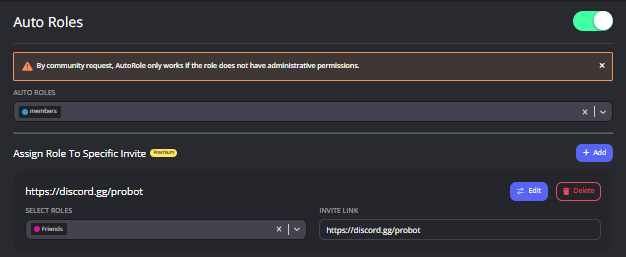
**  How to enable auto roles? **
1 - enter https://probot.io/dashboard
2 - make sure to be logged in, open your server's control panel from the left side, enter Auto Roles section
set the role, saves changes.
Note: make sure probot's role isn't below the auto role (from server settings) for not facing issues.

 odd skiff
hi
does anyone know how to set color
the /color command
what does it mean by number ofcolor

ive tried 1-10
doesnt make any sense to me
split needle
number of the color role that you have made
the command is for selecting a color role from a list of existing roles using command
odd skiff
oh so we set a color?
oh i get it
so i make roles number 1- however many
and diff color each
 hazy swift
Hello
When I vote for Probot, The bot sends me a message saying that It's a bad vote request.
What do I do to fix the problem ?
So, I can't vote ?
So, There are no other ways to fix the problem ?
Okay, Thanks for you time.
 fleet berry
hi
umm the bot is not giving the welcome message
can someone tell me why?
it is giving the goodbye msg
?
oke wait a min


 short hazel
for voice XP is there a way to give users XP as like a reward 🤔
fleet berry
let me check
short hazel
my next 🤔 do you get members get XP quicker for talking or charing screen than just AFK
short hazel
i. noticed that you can just sit AFK muted and you'll get XP
fleet berry
ohh oke thank you man
short hazel
so nothing extra if u talk
😦 i do wish i could stop it from giving people XP who sit AFK muted
which you can't attach VCs to that but its ok
native geyser
light kayak
<@&336913504051265537>
native geyser
Please don't mention the mod role for no reason
light kayak
I want bot for games @native geyser
native geyser
I already answered you yesterday about it please don't repeat your questions
 wooden rampart
Is there a way to play my spotify playlist on discord with ProBot?
native geyser
wooden rampart
Is there a way to play my spotify playlist on discord with ProBot?
we dont support spotify yet but you can play soundcloud or youtube playlists
#play pl link
wooden rampart
Thank you very much ^^
native geyser
yw ^^
 grim crater
Hi, tell me how to send a "non-basic" emoji from ProBot? (if possible)
native geyser
1)go to your discord servers chat
-
-if you're on mobile discord use the emoji you want to add use in between `` symbols https://imgur.com/F2ckAUV
-if you're on pc use your emoji and put \ before it and send it https://imgur.com/XjCo32W
-
copy the message you just sent and paste it on dashboard

 grim crater
Thank you
 tame pecan
@native geyserruru can you check out my segg if you want
we need this one embed responde
native geyser
i already checked it, besides im not the one to decide so 
tame pecan
native geyser
i already checked it, besides im not the one to decide so <:shrug:47418567715690...
aha ok thanks, is very important if they add this one, because like sometimes is good to using auto response for help moderators can fast answer faqs or something, you know, so auto respond as normal message only its like no modearation style
native geyser
you already suggested it there you dont need to explain or repeat it here
tame pecan
native geyser
you already suggested it there you dont need to explain or repeat it here
yeah, anyways have nice day dude
native geyser
likewise
native geyser
yes?
 fickle pumice
Alright so
It's about the levelling system
For some reason the levelling just stops working for some people in a server im in, and they just cant gain anymore xp
native geyser
do you have utility module enabled on dashboard?
fickle pumice
Utility module?
native geyser
yes utility module
native geyser
it allows text xp to be gained for everyone
native geyser
so is it only for you
fickle pumice
I know it happened to a few people in the past and they had their levels reset
native geyser
or is the issue for everyone in the server
fickle pumice
Not everyone
fickle pumice
fickle pumice
I know it happened to a few people in the past and they had their levels reset
But i dont really want to reset my level
Is there any way to fix the issue or is resetting the only solution?
native geyser
wait do you have access to dashboard in that server or are you just a regular member
fickle pumice
Im an admin so yeah i have access to dashboard
I've been stuck with the same level

For quite a while now
native geyser
alright so please check dashboard -> leveling system module to see if any of your roles have been added as a no-xp role in there
native geyser
you can try kicking and reinviting the bot (all dashboard settings and xp will be saved), if you still can't get xp then resetting the xp might be the only way
native geyser
yw
fickle pumice
native geyser
alright so please check dashboard -> leveling system module to see if any of you...
Omg thanks, the problem was that one of my roles was set as non-xp
It works now
native geyser
glad to hear that ^^
native geyser
currently using /skip command when the song starts playing is the only way to remove
native geyser
changes regarding music will be done in the future though there is no ETA yet
 noble spear
How do I reset probot Guide leaders Daily #top
native geyser
#help reset
lean badgerBOT
native geyser
#help reset
**Command: reset**
Reset text/voice/invites/limits xp points for all or specific member.
**Usage:**
#reset [text / voice / invites / limits] [all / user]
**Examples:**
#reset text all
#reset voice all
#reset invites all
#reset text @Dramex
#reset limits @Dramex
 dark mango
how do I setup Music?
Everytime I try to play something it goes like "❌ This command is not enabled on #🤖》bot-commands"
native geyser
https://probot.io/dashboard -> select your server -> music module -> edit play command -> remove the enabled/disabled channels
ProBot
Welcome images, moderation, leveling, reaction roles, logs, high quality music and many many more!
dark mango
can I do it without dashboard?
native geyser
no
dark mango
damn ok
 steep cedar
the probot server icon looks like picsart
 crisp ginkgo
Hey when i vote how can i get the credits?
native geyser
the bot gives it automatically
nocturne flax
<@&675070424748654593>
native geyser
you can ask your question right away
nocturne flax
@native geyser i have another Account with some credits but there are disabled how I can transfer credits to this acc
native geyser
if the account is disabled you can not transfer it
icy hound
It’s not letting me play music for some reason, it’s saying that it’s not supported there
nocturne flax
and do you know how to enabled it ?
spring ether
icy hound
It’s not letting me play music for some reason, it’s saying that it’s not suppor...
we dont support spotify
icy hound
I’m not doing it on Spotify
spring ether
youtube?
icy hound
I’m doing it how I’ve always been doing it but now it’s just not working?
I did the “/play song:” and I chose the song and it said “this command isn’t enabled on #general”
spring ether
oh , u need to enable this command in #general chat
https://probot.io/dashboard -> select your server -> music module -> edit play command -> remove the enabled/disabled channels
ProBot
Welcome images, moderation, leveling, reaction roles, logs, high quality music and many many more!
icy hound
But how do I?
nocturne flax
nocturne flax
and do you know how to enabled it ?
?
 icy hound
How do I
spring ether
https://probot.io/dashboard -> select your server -> music module -> edit play command -> remove the enabled/disabled channels
ProBot
Welcome images, moderation, leveling, reaction roles, logs, high quality music and many many more!
icy hound
It’s still not working.
 gloomy hound
I'll have two number 9s, a number 9 large, a number 6 with extra dip, a number 7, two number 45s, one with cheese, and a large soda.
nocturne flax
Hi
How can I see the top people in credits
Anyone?
<@&675070424748654593>
It's not a feature, right?
Damn
Ok
quaint sentinel
gloomy hound
I'll have two number 9s, a number 9 large, a number 6 with extra dip, a number 7...
use #chat-en instead please.
quaint sentinel
nocturne flax
How can I see the top people in credits
you can't actually unless you find them in discord.
quaint sentinel
icy hound
It’s still not working.
what's the problem?
nocturne flax
quaint sentinel
you can't actually unless you find them in discord.
Ok thanks
quaint sentinel
yw
 opaque copper
mh the probot lagged sometimes, it's a his problem or my connections works on hamsters?
 barren lichen
Having a problem with auto roles, I made sure to turn of administration permissions, and I also tried with the invite link auto role but it just doesn't add the role to anyone
 mystic arch
<@&675070424748654593> I want the bot to only give xp to users while chatting in some specific channels all I have to do is give read message history and view channels permissions to the bot on those channels right?
quaint sentinel
opaque copper
mh the probot lagged sometimes, it's a his problem or my connections works on ha...
Is it still lagging?
quaint sentinel
barren lichen
Having a problem with auto roles, I made sure to turn of administration permissi...
drag probot role above.
quaint sentinel
mystic arch
<@&675070424748654593> I want the bot to only give xp to users while chatting in...
nope, head to dashboard > leveling system > then add no-xp-channels ( basically all the channels you don't want them to gain xp in).
https://probot.io/dashboard
ProBot
Welcome images, moderation, leveling, reaction roles, logs, high quality music and many many more!
barren lichen
I'm an idiot, thank you
quaint sentinel
yw
mystic arch
quaint sentinel
nope, head to dashboard > leveling system > then add no-xp-channels ( basically ...
OK, thank you!
quaint sentinel
mystic arch
OK, thank you!
yw
opaque copper
quaint sentinel
Is it still lagging?
it only lasts a few seconds, then it works again. it happens with an interval of about 5 to 10 minutes. then maybe it's my connection that sucks ahahaha, but I just wanted to understand for a moment
quaint sentinel
opaque copper
it only lasts a few seconds, then it works again. it happens with an interval of...
which version is that?
the normal one?
 knotty echo
Hi?
quaint sentinel
knotty echo
Hola
#support-es
knotty echo
Bro
barren lichen
I'm trying to use commands but I keep being met with a "This interaction failed" error message, idk why
quaint sentinel
knotty echo
Bro
?
quaint sentinel
barren lichen
I'm trying to use commands but I keep being met with a "This interaction failed"...
Can you specify which commands?
barren lichen
So far /kick and /clear