#support-en
1 messages · Page 268 of 1
 viral sundial
 uncut torrent
viral sundial
uncut torrent
viral sundial
yes
viral sundial
you're welcome
 nocturne flax
Probot only deleting message from today?
it wont delete anymore on the channel
im trying to clear a whole channel out (music)
viral sundial
#clear you mean?
viral sundial
bots can't delete messages that have been sent before 14days
nocturne flax
ohh ok
 bright parrot
#help reset
 lean badgerBOT
bright parrot
#help reset
lean badgerBOT
bright parrot
#help reset
**Command: reset**
Reset text/voice/invites xp points for all or specific members.
**Usage:**
#reset [text / voice / invites) [all / user]
**Examples:**
#reset text all
#reset voice all
#reset invites all
#reset text @Dramex
bright parrot
#reset text all
viral sundial
?
 undone tree
Can anyone help? I've reloaded the page, logged in and out and my roles don't show up

 opaque sky
With the welcomer... I was able to send a message with a gif having the link to imgur in the text.
But what would be the simple way to post a small mp4 video with sound? Thanks
 split needle
opaque sky
With the **welcomer**... I was able to send a message with a gif having the link...
split needle
opaque sky
With the **welcomer**... I was able to send a message with a gif having the link...
Use a media link to that video
opaque sky
split needle
Use a media link to that video
What would be the best media to use for mp4 file?
split needle
Default discord media link as it will attach the video directly
opaque sky
Normally I simply upload mp4 files... occasionally i share youtube link... But sometimes people are sent to youtube to play the video instead of having it played within Discord.
I was trying to find something for mp4 like imgur is for gifs.
split needle
Yea so just take the direct link on discord
It'll be media.discordapp.net
But that link is currently broken so you'll need to change it to cdn.discordapp.com after copied the link
opaque sky
Ok so I could have the video file in a hidden channel and recall that video with the directlink?
I'll try that
split needle
Yea
opaque sky
Thanks! Greatly appreciated!
Its working.... but it's posting the link and the video. Is there a way to hide the link?
split needle
No
opaque sky
I did some testings... If I only use one link... Link doesn't show... But as soon as I add a second one... both links show up.
split needle
Seem weird
It should be shown even with 1 link
 deft lodge
How do I make sure my staff can use all the moderation commands
Like what do I need to do to the staff roles
<@&675070424748654593>
nocturne flax
is probot just for getting credits
split needle
deft lodge
How do I make sure my staff can use all the moderation commands
Go to https://probot.io/dashboard, select your server, go to moderation module and add moderator roles
Welcome images, moderation, leveling, reaction roles, logs, high quality music and many many more!
split needle
nocturne flax
is probot just for getting credits
If it was only that, it seem not much useful to be in more than 1 million servers
deft lodge
deft lodge
How do I make sure my staff can use all the moderation commands
Nvm I figured it out
 west shale
Helou
 west kelp
@west shale hello, how can I help you
 shrewd gust
~hello, just a few questions. ^-^ i have the leveling up role rewards on in my server, are the pings you get in the server for leveling up just for the text based levels, or both text and voice? if just text, is there a way to see your voice level or do you only know when you get the message for the reward? ❤️ tysm
 young hedge
Puffpal Text and sound together
 dark rock
Hey, i used the lock channel cmd but it doesn't work?
dark rock
dark rock
Hey, i used the lock channel cmd but it doesn't work?
<@&675070424748654593>
split needle
dark rock
Hey, i used the lock channel cmd but it doesn't work?
Permisions overriding from other roles in channel settings
Check and set their "send messages" permision to default as [/] for all possible roles your members can have in there
dark rock
split needle
Permisions overriding from other roles in channel settings
Check and set their "...
K thanks
dark rock
split needle
Permisions overriding from other roles in channel settings
Check and set their "...
And do i do the same if wanna prevent a bot from messaging during lockdown?
split needle
shrewd gust
~hello, just a few questions. ^-^ i have the leveling up role rewards on in my s...
Level up message only announce for text level
You can view your levels by using /rank command
split needle
dark rock
And do i do the same if wanna prevent a bot from messaging during lockdown?
Yes but be sure its administrative permision is disabled or it'll override
dark rock
split needle
Yes but be sure its administrative permision is disabled or it'll override
Ty
shrewd gust
split needle
Level up message only announce for text level
You can view your levels by using ...
thank you thank you :3
 maiden arrow
for some reason I can't log on to probot's website page to check my server stats
<@&675070424748654593>
is the page locked or something ?
split needle
Network problem
Try change to another network or use an vpn
maiden arrow
alright
nocturne flax
split needle
If it was only that, it seem not much useful to be in more than 1 million server...
what does that mean?
 drowsy marlin
hi I just want to ask about the auto responder feature
it responds to the exact trigger but when the trigger is in a phrase it doesnt respond
split needle
drowsy marlin
hi I just want to ask about the auto responder feature
it responds to the exact ...
Wildcard is not supported to for now, it'll only respond to the exact phrase/word
 slim thorn
anyone know how to set up probot
to send notif in certain channel and stuff?
<@&675070424748654593>
split needle
What notification?
slim thorn
so i want make it so like its sends message in only the channel its supose to
but how can i do it?
like commands and stuff
split needle
I don't really get what you mean from that
split needle
So like make it so the bot only respond to commands in a specific channel?
slim thorn
yes
split needle
Then it'll take some much time to do it currently
split needle
Go to https://probot.io/dashboard, select your server on the left side, go to each command settings (edit) and set enabled channel
Note that even administrators will not be able to use the commands out of that channel
Welcome images, moderation, leveling, reaction roles, logs, high quality music and many many more!
split needle
slim thorn
quick question do u know anyone who knows how to setup game service servers?
Not in this server tbh
slim thorn
split needle
Not in this server tbh
alr
slim thorn
split needle
Go to https://probot.io/dashboard, select your server on the left side, go to **...
thanks
 mossy urchin
How to grant permission to people in the room to play music?
slim thorn
@split needle how do i make it so probot says the levels up in a certain channel?
i cant seem to find it in dashboard
split needle
In leveling system, set the channel in "text level up message channel"
slim thorn
kk
split needle
mossy urchin
How to grant permission to people in the room to play music?
Does the bot respond to the music commands?
mossy urchin
split needle
Does the bot respond to the music commands?
if i, yes. if other member, no
split needle
mossy urchin
if i, yes. if other member, no
Check disabled/enabled roles in the command settings on the dashboard
mossy urchin
split needle
Check disabled/enabled roles in the command settings on the dashboard
i'll try!
 golden aurora
could someone kindly help me understanding why does automod not work, please? It looks like this

 split needle
golden aurora
could someone kindly help me understanding why does automod not work, please? It...
split needle
golden aurora
could someone kindly help me understanding why does automod not work, please? It...
You tested them yourself?
golden aurora
 split needle
Yea you tested them yourself
golden aurora
I have tested them as a non-role user
split needle
Will never work against users with administrator
golden aurora
without admin permissions
golden aurora
yes, I am the owner. But I have logged in as a different user for testing
 pseudo jacinth
Hey, guys!
I need some help with "role for reaction".
Can anybody answer me how to configure the issuance of a specific role when you click on the reaction button?
Or is this feature not available right now?
 quiet raven
I'm wondering how this is working too.
For me, I can only see roles that I have created myself but all other roles are missing on the list (I have admin perm)
 native geyser
pseudo jacinth
Hey, guys!
I need some help with "role for reaction".
Can anybody answer me how ...
native geyser
pseudo jacinth
Hey, guys!
I need some help with "role for reaction".
Can anybody answer me how ...
- from embed messages section create an embed message and send it to your server
- from reaction roles section select the embed message you just sent
- add a reaction
- add roles
Welcome images, moderation, leveling, reaction roles, logs, high quality music and many many more!
native geyser
quiet raven
I'm wondering how this is working too.
For me, I can only see roles that I have ...
drag the bots role above other roles
pseudo jacinth
native geyser
https://probot.io/dashboard
1) from embed messages section create an embed messa...
But I can't change or choose which role I need to give
native geyser
pseudo jacinth
But I can't change or choose which role I need to give
what exactly happens you cant see the role or you cant figure out where to click
quiet raven
oh I see, inside discord then. Thanks it works !
pseudo jacinth
native geyser
what exactly happens you cant see the role or you cant figure out where to click
I can't choose which role people can get when they click on the button
native geyser
pseudo jacinth
I can't choose which role people can get when they click on the button
click on the plus button next to the emoji you selected
pseudo jacinth
native geyser
click on the plus button next to the emoji you selected
Oh! Yup, now I see
pseudo jacinth
native geyser
click on the plus button next to the emoji you selected
Kk, what need I do, when there are no roles
native geyser
in your server settings drag the bots role above other roles
pseudo jacinth
Okay
 hoary iron
Hey. :)
under Reactionroles is there a way to use my own custom emojis to react to?
split needle
hoary iron
Hey. :)
under Reactionroles is there a way to use my own custom emojis to react...
Yes
As long as the emojis are in your server
hoary iron
split needle
Yes
Oh! I needed to refresh the page. Nevermind then haha :)
 old ridge
Ayo enyone know how to clear chat using the pro bot
lean badgerBOT
**Command: clear**
Cleans messages from a channel.
**Usage:**
#clear (number of messages)
#clear bots (number of messages)
#clear [user] (number of messages)
**Examples:**
#clear 1000
#clear bots 10
#clear @split needle 10
split needle
@old ridge
 delicate tangle
what command shows reason for someone's mute?
split needle
Doesn't exist
delicate tangle
okey
nocturne flax
Why when I write unmute then it's write check my permission and position rool?
native geyser
drag the bots role all the way up
nocturne flax
My xp in probot is not increasing where as my friends xp is increasing in a server i need help
Did my server owner block me from gaining xp ?
 toxic briar
hi i want report a scary thing about probot
native geyser
what is it 
 native geyser
that is /warn feature
native geyser
oh wait sorry its level up messages @toxic briar
toxic briar
did u read what the bot is say ?
native geyser
then there is no way of this being true
toxic briar
fix ur bot
native geyser
native geyser
then there is no way of this being true
^
toxic briar
ye
split needle
And second, the message content in the embed are actualy a warn (the first one) and the reward archiving notify (the second one)
So this seem more like an edited image
Or used developing knowledge to edit the message content
Plus it wasn't taken by you
So this is totaly a prank from your friend
toxic briar
i asked him 3 times seriously and he said no
split needle
And the bot will never have those behavior
Asking him on the chat will never make it clear
split needle
More like staffs work
 split needle
Was there a reason?
native geyser
warn feature can not be used without specifying a reason
split needle
Send me an invite to your server in dm
I'll need administrator to check it myself to make it clear
My timezone is the same with chinese's timezone so it'll be more easy for me
toxic briar
okay
 past oracle
Hey anyone knows why when I try to use command pause and music is playing bot says 🚫 There must be music playing to use that!
 ancient lily
Hi
 sonic turret
Hello. I noticed a problem. When someone gets a "muted" rank by typing #mute, they can still write because writing is enabled for the default rank. How could I solve this? I hope it was understandable 🙂
ancient lily
Me need github probot 😭
young hedge
past oracle
Hey anyone knows why when I try to use command pause and music is playing bot sa...
<@&675070424748654593>
 rough bronze
past oracle
Hey anyone knows why when I try to use command pause and music is playing bot sa...
rough bronze
past oracle
Hey anyone knows why when I try to use command pause and music is playing bot sa...
You have to play music first to stop or pause
past oracle
Well as I said music is literally bussin in my ears right now
rough bronze
past oracle
Well as I said music is literally bussin in my ears right now
Then disconnect the bot pls first
If you have perms to do that
past oracle
Yeah but that music is like 2 hours long and its about an hour in right now. thats why I never stopped it but tried to pause
rough bronze
sonic turret
Hello. I noticed a problem. When someone gets a "muted" rank by typing #mute, th...
Do you previously MEE6 or Carlbot or annother bot?
rough bronze
past oracle
Yeah but that music is like 2 hours long and its about an hour in right now. tha...
Than as I said disconnect the bot... maybe the bot hasn't "realized" that there is music playing, but your sure ProBot is playing and not another bot?
past oracle
Im pretty sure it is ProBot and it actually plays music. I will try disconnecting it later so I dont lose the track thank you
sonic turret
rough bronze
Do you previously MEE6 or Carlbot or annother bot?
Yes the mee6 is still on the server. Is it a problem?
rough bronze
past oracle
Im pretty sure it is ProBot and it actually plays music. I will try disconnectin...
Use /now_playing to see whats playing currently if its probot
rough bronze
sonic turret
Yes the mee6 is still on the server. Is it a problem?
Maybe there are sometimes problem that the probot don't uses the muted role from mee6 for example
But which bot do you use to primarily mute somebody?
past oracle
rough bronze
Use /now_playing to see whats playing currently if its probot
it says no music is playing. but bot is in the voice channel and I hear him playing music, most likely disconnecting will work but I dont want to lose music track now so Ill do it when it ends
thank you
rough bronze
past oracle
thank you
You're welcome
sonic turret
rough bronze
Maybe there are sometimes problem that the probot don't uses the muted role from...
The probot.
The rank named "muted" is higher than the rank I muted.
rough bronze
As said maybe ProBot don't realize the right role
ok then please try kicking the bot and deleting the muted role then reinvite the bot
Then please mute somebody (/mute [at]somebody) and then mute him again because at the first mute the bot is setting up the mute role and at the second mute the person must get muted hopefully
@sonic turret
sonic turret
UUHm. If I understand what you said, that's not a problem. You successfully insert the "muted" rank.
rough bronze
sonic turret
UUHm. If I understand what you said, that's not a problem. You successfully inse...
I mean the Muted role is maybe the muted role from MEE6 and not from ProBot that's wyh you have to try the steps above
sonic turret
Oh, I see. Sorry but the mee6 robot needs to be kicked out?
I'm trying to kick mee6
 lapis blaze
hi I know the response to this, but for a friend who doesn't believe me
does the #ping command parses user ping to discord, or the bot ping to discord?
native geyser
bot ping to discord
lapis blaze
thank you
native geyser
yw
sonic turret
thank you for help bye
 unique pine
Does anybody know when the error where the ProBot dashboard doesn't detect members going to be fixed?
unique pine
unique pine
Does anybody know when the error where the ProBot dashboard doesn't detect membe...
<@&675070424748654593>
nocturne flax
i report probot
west kelp
unique pine
Does anybody know when the error where the ProBot dashboard doesn't detect membe...
it's known, but we don't know when it will be fixed
unique pine
I need it fixed in atleast two weeks, as my server will be going public by then.
nocturne flax
probot suddenly left my server and I didn't kick it from my server. I'm very surprised, I'm reporting it, probot
west kelp
nocturne flax
probot suddenly left my server and I didn't kick it from my server. I'm very sur...
hm? show logs?
nocturne flax
I checked the log and there is no message that I have thrown
so there is no proof that i threw
and my friend got weird weird messages from private messages threatening by probot.
west kelp
can you show me
west kelp
sure
hello, how can i help you
put the probot role at the top of the roles list
refresh
you're welcome
 tropic cloud
Hey i got a question
I muted someone to test the commands and now i can't unmute him? Says check my command and stufd
native geyser
it should be discord role order bug, make changes in the bots role order and save then drag it all the way up and save again
 raw quiver
Hello world
 wind urchin
raw quiver
Hello world
raw quiver
wind urchin
raw quiver
Hello world
raw quiver
Yah ik
 tulip prism
I am in someone’s server and I want to customise my rank card, how do I do it?
split needle
tulip prism
I am in someone’s server and I want to customise my rank card, how do I do it?
Go to https://probot.io/id
Custom made is not supported
Welcome images, moderation, leveling, reaction roles, logs, high quality music and many many more!
 native spear
Hello! So I noticed that in logs, it only documents when someone recently deletes or edits a message. Is there a way to make it so it documents it even if the message is older?
split needle
native spear
Hello! So I noticed that in logs, it only documents when someone recently delete...
No as there's a limit for bots that they can't access to messages older than 2 weeks
native spear
Thanks!
west kelp
use #reset
lean badgerBOT
**Command: reset**
Reset text/voice/invites xp points for all or specific members.
**Usage:**
#reset [text / voice / invites) [all / user]
**Examples:**
#reset text all
#reset voice all
#reset invites all
#reset text @Dramex
 pseudo crystal
How do i check the ranks?
west kelp
#top
this will show you XP, not the actual rank
you can use #rank @mention to see a person's rank
pseudo crystal
can't i check everyone's rank at the same time?
west kelp
nope
pseudo crystal
what's the 41?
 west kelp
your ranking on the leaderboard
west kelp
you're welcome
 neat valve
hi
west kelp
hello, how can I help you
neat valve
when the top leaderboard reset?
west kelp
where?
west kelp
you have to reset it yourself, use the #reset command
lean badgerBOT
**Command: reset**
Reset text/voice/invites xp points for all or specific members.
**Usage:**
#reset [text / voice / invites) [all / user]
**Examples:**
#reset text all
#reset voice all
#reset invites all
#reset text @Dramex
west kelp
neat valve
the top week
ahhh, it resets on monday
neat valve
ok ty
 cosmic folio
Who can use the reset command
west kelp
people with admin perms
west kelp
neat valve
ok ty
you're welcome
 signal blade
can i ask how color command work ?
west kelp
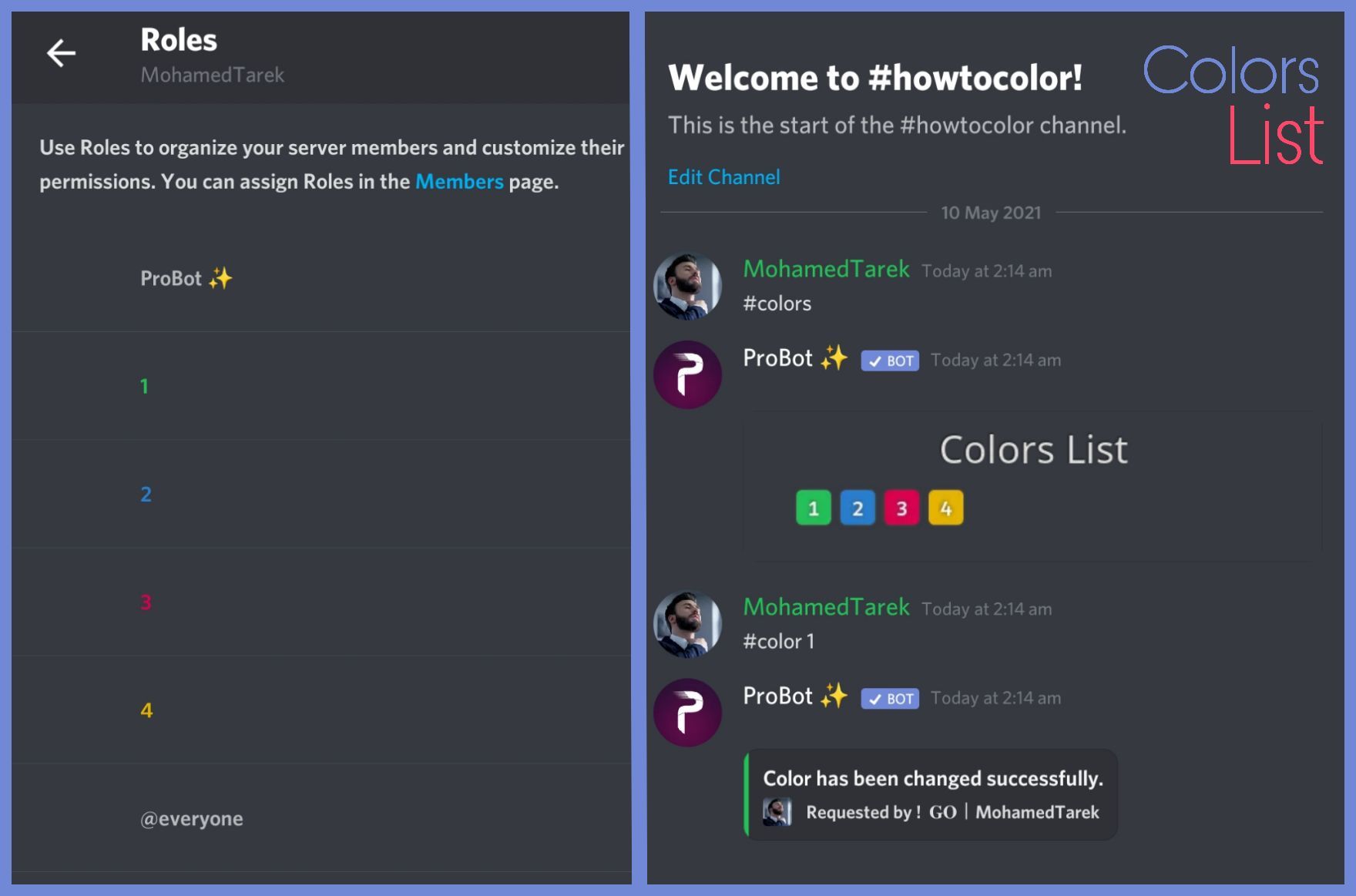
To do your "Colors List" you've to create numbered roles ascendengly, which means you've to create roles as the image below explains.
colors roles only works with exact numbers, they can't have mod permissions otherwise it won't work. dragging these roles above your moderators roles position is not recommended as they'll have the access through it to higher position roles.
the image below shows how to correctly use the commands as how does it effect your nickname.
:703162472063959061: https://imgur.com/WJN29y6
 west kelp
how so
what's not working exactly, people don't get XP?
give probot admin
make sure the probot role is at the top of the roles list
signal blade
west kelp
To do your "Colors List" you've to create numbered roles ascendengly, which mean...

i do the same
but they can only change one
for example my member change to 3 but cant change to 4 - 9
west kelp
put the probot role at the top of the roles list
make sure that the user reached the required level in both levels
make sure that the role reward doesnt have admin perms
You're welcome
 glad estuary
Hello, help!
west kelp
Hello, how can I help you
wind urchin
 proper belfry
طريقه كريديت
proper belfry
طريقه كريديت
#support-ar
nocturne flax
Hello! I'm trying to configure welcome message in my server with pro bot but this appears in the dashboard

It doesn't show the profile pic or text
west kelp
Try playing with the coordinates
 pulsar marsh

 glad shale
pulsar marsh
glad shale
pulsar marsh
#chat-en if you don't need help ^^
 amber sleet
I'm having an issue where when attempting to add a reaction role it will not allow me to select a role/
native geyser
drag the bots role above other roles
make sure the bots role is above reward roles
native geyser
do your reward roles have any of these following permissions?
administrator
ban members
kick members
manage server
manage channels
manage roles
can i see your leveling system settings please
do you have utility section enabled
one of the modules on the left side, it has a sun icon next to it
invite me in dms please so i can check it out
fixed ✅
 idle turtle
hi i have a problem with reaction roles, i tried to set up but in dashboard when I try to configure it can find the roles (already created in discord)
west kelp
@idle turtle hi, put the probot role at the top of the roles list then refresh
idle turtle
west kelp
<@440352065387233302> hi, put the probot role at the top of the roles list then ...
😮 TY !!!!!!!
west kelp
You're welcome
cosmic folio
west kelp
people with admin perms
Oh ok
 solar scarab
i want to be support
native geyser
We will be letting ppl apply soon
 pastel valley

 exotic robin
hello, how can i add rang to embed?
west kelp
scope?
west kelp
Hello, how can I help you
 west kelp
You need admin on that server
nocturne flax
Ok
exotic robin
hello, how can i add rang to embed?
And the second question, why did I have a background on the probot site that I have and I do not have it?
exotic robin
exotic robin
And the second question, why did I have a background on the probot site that I h...


I bought a background with minecraft but I do not have it in website , but when I enter #rank I have them set and when I buy other and set them it does not change
west kelp
exotic robin
hello, how can i add rang to embed?
Rang?
exotic robin
west kelp
Rang?
yes
west kelp
exotic robin
I bought a background with minecraft but I do not have it in website , but when ...
#rank and #profile backgrounds are different
west kelp
exotic robin
yes
What's rang
exotic robin
west kelp
#rank and #profile backgrounds are different
ok
exotic robin
west kelp
What's rang
rank*
west kelp
What do you exactly mean by adding rank to embed
exotic robin
sorry I use translator
exotic robin
west kelp
What do you exactly mean by adding rank to embed
no ping appears, for example @VIP but @VIP as if it were typing normally
west kelp
You need to do <@&role_id>
 winged solstice
Hey, i got a Question is there anyways to add maybe a function to the bot that he is checking the channels if everyone in a Specific channel is using a Webcam? and if someone is not using a Cam that the bot is kicking/moving the user out of the Channel?
 urban garnet
Reaction roles is not working for me, I click the reactions, and I don't get a role, I have set it up exactly the same as the messages that do give me roles
nocturne flax
How to reset the points
 smoky rain
when I disable a command (in this case I am disabling the /roll command) is there a way to remove the /roll from the command list? I am using a different bot with a better /roll command. People on phone are saying probot is eating the command and not letting them do it.
urban garnet
urban garnet
Reaction roles is not working for me, I click the reactions, and I don't get a r...
There are 64 roles in my server
<@&675070424748654593>
 sick aurora
Please fix that asap

 royal compass
Vote
lean badgerBOT
@royal compass https://top.gg/bot/probot/vote
 urban garnet
<@&675070424748654593>
 barren ore
How do you do reaction roles <@&675070424748654593>
 frigid orbit
I'm noticing my status message resets itself after about an hour or two, reverting to my previous save. Is this a known occurrence?
barren ore
My friend helped me
 fluid basin
barren ore
How do you do reaction roles <@&675070424748654593>
fluid basin
barren ore
How do you do reaction roles <@&675070424748654593>
Enter https://probot.io/dashboard, choose your server from the right, enter the auto reply section, press Add Auto Reply, design your message to your will and save.
fluid basin
frigid orbit
I'm noticing my status message resets itself after about an hour or two, reverti...
Try changing it from the bot's location
Because there's a lot of trouble in it.
fluid basin
sick aurora
Please fix that asap
A general problem in the bot and they know about it
frigid orbit
fluid basin
Because there's a lot of trouble in it.
From the bot dashboard?
fluid basin
Yes
frigid orbit
That's where I changed it. It works for a while and then just moves back to what it says now
frigid orbit
It cleared that status, that's a step. What else does vip do?
fluid basin
Yes,
If the bot gets back to normal, tell me to talk to the developers. @frigid orbit
frigid orbit
Alrighty, for now it is edited per the vip command. Not from dashboard. If it disappears, I'll inform you
Thank you
fluid basin
All right. You're welcome
fluid basin
nocturne flax
How to reset the points
#points reset
fluid basin
smoky rain
when I disable a command (in this case I am disabling the /roll command) is ther...
Do you mean to disable a specific order of your choice?
smoky rain
I feel like I was pretty precise: Probot has a /roll command I don't like. Another bot has a /roll command that I really like. People on mobile who use /roll are FORCED to use probot's disabled /roll. So they get "this command has been disabled" whisper instead of the /roll going to the good dice bot. I have disabled the command on the dashboard but the /roll is still in the command list and therefore preventing the /roll I want to use from being executed.
I wan't to stop a disabled command from showing up in the /{bot action} command list
fluid basin
smoky rain
I feel like I was pretty precise: Probot has a /roll command I don't like. Anoth...
He'll stay on the list even if it's broken. If you want to bring him back.
fluid basin
smoky rain
I wan't to stop a disabled command from showing up in the /{bot action} command ...
You can't do this.
Because a lot of people disable something, and then they repeat it.
This is a very useful thing and it is not removed
smoky rain
umm... well its obviously not useful in my case and I am sure other people have run into this problem before.
fluid basin
I don't know yet. But knowing it, I told you.
 south wyvern
Hi I want help with the #rank because I've been messaging a lot but it doesn't update the rank
fluid basin
south wyvern
Hi I want help with the #rank because I've been messaging a lot but it doesn't u...
Hello, Pro Pot rank is the highest?
south wyvern
It always shows the same results
south wyvern
fluid basin
Hello, Pro Pot rank is the highest?
Yes he's basically the manager
With high perms
fluid basin
Raise his rank above all ranks like the one in the current server.
south wyvern
I have
fluid basin
south wyvern
With high perms
Make sure that the grade specified is not administratively specific
south wyvern
Ok
fluid basin
I mean there is no administrative perms
south wyvern
I've req help few das ago with the mute and I think I've got that under control but the ranks isn't
Days
fluid basin
south wyvern
I've req help few das ago with the mute and I think I've got that under control ...
Currently try removing prerms from the ranks that have been identified
south wyvern
Sorry I don't quite understand
fluid basin
He didn't understand me very much. @split needle
south wyvern
Yes the words got me mixed up👀
fluid basin
split needle
<@678541649978327050> don't try to use english
Even me couldn't understand
ok sorry but i wanted to help him in your absence
👍
split needle
south wyvern
Hi I want help with the #rank because I've been messaging a lot but it doesn't u...
Check and enable the utility module if you have it as disabled
split needle
On the dashboard
south wyvern
Kk
split needle
Welcome images, moderation, leveling, reaction roles, logs, high quality music and many many more!
south wyvern
What do I have to check
split needle
Look in your server's dashboard, find the utility module and check if it's enabled or not
split needle
Then show me a screenshot of the leveling system
south wyvern
Ok
nocturne flax
Umm I forgot what cmd for join role?
split needle
There's no command to setup it. Do it on the dashboard in autoroles module
nocturne flax
Kk
 split needle
So where were you keep chatting in your server?
south wyvern
The chat
split needle
Yea here is the problem:
You set the chat as no xp channel which means you'll noy gain xp while chatting in that channel
So remove it from no xp channels
 split needle
Ok you're good now
urban garnet
<@&675070424748654593> I have reaction roles on my server, and I can't get them to work, I have 64 roles on the server, I set up the new message the same as I did with the ones that worked, and it still doesn't work
split needle
urban garnet
<@&675070424748654593> I have reaction roles on my server, and I can't get them ...
Did you really added roles to the reactions?
urban garnet
Yes
split needle
Show me a screenshot of the settings
urban garnet
I am adding channels where people can talk about games they like, and I want to add options to hide those channels for people who don't want it
I deleted most of the settings and started adding them again
 split needle
This should be working fine
split needle
Check the probot role and make sure it's higher than your members' roles so it could have permision on them
urban garnet
I have most of the roles on the server
urban garnet
split needle
Check the probot role and make sure it's higher than your members' roles so it c...
It is
split needle
Then send me an invite to your server in dm and I'll see
 split needle
I don't understand that either
split needle
I don't know what are you talking about for now
 split needle
I don't understand that so I don't know what to do
I know where it from, but don't understand the language
 dense lily
split needle
I know where it from, but don't understand the language
dense lily
split needle
I know where it from, but don't understand the language
tunisian
split needle
I'm not tunisian speaker
split needle
And you're showing me that which I don't understand so I can not do anything
Also isn't tunisia can use arabic?
dense lily
split needle
Also isn't tunisia can use arabic?
yy
split needle
Then you can ask in #support-ar
dense lily
👍
 wraith finch
hi
 mortal mulch
heyo im trying to add a reaction role, but when I goto add the role to the reaction no roles show up
<@&675070424748654593>
 fair compass
@everyone
 grim vortex
how do i reset the server rank? <@&675070424748654593>
lean badgerBOT
**Command: reset**
Reset text/voice/invites xp points for all or specific members.
**Usage:**
#reset [text / voice / invites) [all / user]
**Examples:**
#reset text all
#reset voice all
#reset invites all
#reset text @Dramex
split needle
mortal mulch
heyo im trying to add a reaction role, but when I goto add the role to the react...
In your server role list, move the probot role higher
split needle
grim vortex
how do i reset the server rank? <@&675070424748654593>
./reset
 wraith python
is there a way to link text channels to the welcome message?
split needle
wraith python
is there a way to link text channels to the welcome message?
Use channel id as <#id>
split needle
 zinc crystal
#rank
wraith python
split needle
Use channel id as <#id>
zinc crystal
#rank
wraith python
split needle
Use channel id as <#id>
so for example it would be <#welcome!> ?
split needle
wraith python
so for example it would be <#welcome!> ?
No
Do \#channel-mention to get the channel id and use it on bot's message
[#support-en](/guild/224308865427046402/channel/664941916722429986/)
 robust bear
i need nitro
 arctic frost
robust bear
i need nitro<:peppo:885666920597172254>
arctic frost
robust bear
i need nitro<:peppo:885666920597172254>
This place is only for getting support about ProBot.
 uneven wren
How can I contact an Admin or Mod about potential partnership etc?
split needle
uneven wren
How can I contact an Admin or Mod about potential partnership etc?
We don't do partnering ¯\_(ツ)_/¯
 pliant stirrup
Hello
 hot trellis
i need help
i want to make a way for the bot to give members to give roles but i dont understand how
 pseudo sequoia
Hello everyone,
I just put Probot on my discord server but I'm currently using it as a bot music but the audio bugs from time to time, is this normal?
arctic frost
uneven wren
How can I contact an Admin or Mod about potential partnership etc?
you can't.
arctic frost
pseudo sequoia
Hello everyone,
I just put Probot on my discord server but I'm currently using ...
normal. You can check your ping by typing #status or #ping.
arctic frost
hot trellis
i want to make a way for the bot to give members to give roles but i dont unders...
Welcome images, moderation, leveling, reaction roles, logs, high quality music and many many more!
pseudo sequoia
How do you see the good ping or not?
 arctic frost
pseudo sequoia
How do you see the good ping or not?
arctic frost
pseudo sequoia
How do you see the good ping or not?
Your ping is normal
pseudo sequoia
Normal but there is a bug at some point
 viscid night
Is it possible to delete an alias created for a command? It had 2 and I could delete the 2nd one, but it won't let me delete the 1st one

Tried doing backspace and clicking the x on the "Aliases" field but it won't delete
arctic frost
viscid night
Is it possible to delete an alias created for a command? It had 2 and I could de...
you can't delete
viscid night
Oh, well ok. Thank you for the answer
arctic frost
viscid night
Oh, well ok. Thank you for the answer
Thank you for choosing ProBot
hot trellis
arctic frost
https://probot.io/server/serverID/autorole
I don't understand how to do it
I know about that but i dont know how it works or what i need to do
west kelp
@hot trellis the autorole will give the members who join a role, is that what you want?
hot trellis
i want a message that when reacted to gives a role
 stark harbor
west kelp
stark harbor
west kelp
You have to create roles that are numbered ascendingly, like:
1
2
3
4
Then give each numbered role a color, show #colors to show them, use #color [number] to select a color
 glacial geyser
Hey! How do i do the embed stuff so i can get the reaction roles to work?
west kelp
Go to the Embed Messages module in the dashboard then click Compose Embed, create an embed that corrosponds to the reaction roles you want like:
"Emoji - role"
Send it, then select it in the reaction roles
glacial geyser
Tyty!
west kelp
You're welcome
 marsh condor
Where is the Russian support?
native geyser
#support-int
 mint bramble
How can i put discord channel link in auto responder?
<@&675070424748654593>
Also, can i add enabled section in auto responder?
split needle
mint bramble
How can i put discord channel link in auto responder?
<@&675070424748654593>
Als...
- do
\#channel-mentionon chat and send to get the id and use the result on bot's messages - no
mint bramble
ty
nocturne flax
If we add ProBot to our server, is there any command to make it say what we want
@split needle
west kelp
nocturne flax
If we add ProBot to our server, is there any command to make it say what we want
no, but you can do that by using auto responder
create a test trigger, and make the response whatever you want the bot to say
native geyser
#support-ar
 tender obsidian
#role @nocturne flaxonly
lean badgerBOT
tender obsidian
#role <@456226577798135808>only
:rolling_eyes: - ** Please specify one role name **
tender obsidian
#role @nocturne flax only
lean badgerBOT
tender obsidian
#role <@456226577798135808> only
:white_check_mark: Changed roles for ! yassen gamer, +Only Arabic
 flint ingot
hey ! I don't understand how to use the command "#role"
west kelp
it gives/removes roles from users
lean badgerBOT
**Command: role**
Add/remove a role(s) for a user.
**Usage:**
#role [user] (+/-)[roles names separated by comma]
#role all (+/-)[role name]
**Examples:**
#role @west kelp Admin
#role all members
#role bots System
#role humans members
 west kelp
Login?
 shell heron
west kelp
Login?
shell heron
west kelp
Login?
Yes, and i click on the button multiple times but always appear the messaje
Sorry english it's not my native language
west kelp
@shell heron does the login window appear?
 granite ivy
Hey,
What are the limits on the logging of messages that get deleted?
I've noticed that some messages were deleted but it wasn't tracked.
EDIT: Found earlier in this channel that it does not track uploads (this was probs the issue here)
native geyser
 dusky geyser
with reaction roles
dusky geyser
with reaction roles
- from embed messages section create an embed message and send it to your server
- from reaction roles section select the embed message you just sent
- add a reaction
- add roles
Welcome images, moderation, leveling, reaction roles, logs, high quality music and many many more!
native geyser
granite ivy
Hey,
What are the limits on the logging of messages that get deleted?
I've notic...
make sure the bot can see the channel
frigid orbit
fluid basin
All right. You're welcome
I think we are good now. I did the vip status once to clear it, & then vip status to set. It seems whatever I set from the dashboard though is persistent
shell heron
west kelp
<@728235578809909299> does the login window appear?
Yes
 tender wasp
how to change the bot's pfp
frigid orbit
that's premium I think coconut
split needle
 wise compass
wick deleted probot webhook how to i put it back ?
wise compass
wick deleted probot webhook how to i put it back ?
Make wick to ignore the bot and then go turn off and on the log which got the webhook removed
tender wasp
frigid orbit
that's premium I think coconut
i have premium
split needle
tender wasp
how to change the bot's pfp
Premium feature
You're currently have prime
wise compass
split needle
Make wick to ignore the bot and then go turn off and on the log which got the we...
ok thx
shell heron
shell heron
Can someone explain me why i continue login and this window continue appearing instead of te normal Dashboard
split needle
shell heron
Can someone explain me why i continue login and this window continue appearing i...
Try change to another network or use a vpn
shell heron
split needle
Try change to another network or use a vpn
I'll try so
Tank
Big respecc
nocturne flax
in text ranks how much exp does it take to get from lvl 0 to lvl 50 or how can i calculate it myself
rough bronze
nocturne flax
in text ranks how much exp does it take to get from lvl 0 to lvl 50 or how can i...
You can't calculate that because to avoid spamming you are getting a random amount XP every minute youre typing
nocturne flax
rough bronze
You can't calculate that because to avoid spamming you are getting a random amou...
what i meant is how much exp in total do i need to lvl up from 0 to 50 like 80k exp?
rough bronze
nocturne flax
what i meant is how much exp in total do i need to lvl up from 0 to 50 like 80k ...
Oh, I'm sorry I missunderstood you, I have to ask that.... please wait
nocturne flax
rough bronze
Oh, I'm sorry I missunderstood you, I have to ask that.... please wait
take your time
native geyser
 supple widget
and how does role reaction work
supple widget
and how does role reaction work
- from embed messages section create an embed message and send it to your server
- from reaction roles section select the embed message you just sent
- add a reaction
- add roles
Welcome images, moderation, leveling, reaction roles, logs, high quality music and many many more!
native geyser
supple widget
is there any statistics option on <@!282859044593598464>
yes on dashboard
supple widget
native geyser
https://probot.io/dashboard
1) from embed messages section create an embed messa...
Do u have any video
supple widget
native geyser
yes on dashboard
Thanks
native geyser
supple widget
Do u have any video
literally everything has a name on it give it a try if you still cant figure out let me know
nocturne flax
Hello, why Probot does not want to send embed to my channel ? It wrote to me "success" but nothing was sended. (He have right permissions) I tried restart the page but still nothing
is there any max embeds ?
west kelp
nocturne flax
Hello, why Probot does not want to send embed to my channel ? It wrote to me "su...
Make sure that all of the fields you selected are filled
nocturne flax
west kelp
Make sure that all of the fields you selected are filled
it works, thank you <3
 twin pebble
when i go to https://probot.io/dashboard it says login using discord but if i login then it still says the same how do i fix this?
um hello?
 whole marlin
hi
native geyser
twin pebble
when i go to https://probot.io/dashboard it says login using discord but if i lo...
clear your cookies and try again please
native geyser
whole marlin
hi
how can i help you
whole marlin
so bot always unban ppl how can i fix that
native geyser
make the ban timer longer probot doesn't have hard ban
native geyser
as i said probot doesn't have hard ban so make the ban timer something like 80 years for example
whole marlin
ok
twin pebble
native geyser
clear your cookies and try again please
dosen't work
native geyser
can you log into discords website without an issue?
native geyser
can you clear everything related to your search past and try again please
if it doesnt work try changing networks or use a vpn
native geyser
yw
 gloomy wagon
Hey how can I ping a channel category in an invite please?
west kelp
<#channel_id>
gloomy wagon
funny I did that. I mean a category its self (example SUPPORT here)
west kelp
no, I was checking if it worked, it didn't
west kelp
you're welcome
 hollow kelp
Is there any way to give admins access to the dashboard too?
west kelp
yes give them admin perms
hollow kelp
Cool
 pure prawn
filter function not in #points command, not working. he pulls everyone's stitches.
 ember juniper
Guys
I need ur help
There is someone.in this server came into my dms saying he got my pc ip or smth idk and he would do something bad about idk what is that and i have the chat if u want screenshots
I have his name lemme mention him
<@&336913504051265537>
Help

This his discord id

 spice geyser
how can i become a moderator
native geyser
ember juniper
There is someone.in this server came into my dms saying he got my pc ip or smth ...
you can report them to discord we can't really do much about it
native geyser
pure prawn
filter function not in #points command, not working. he pulls everyone's stitche...
sorry?
native geyser
spice geyser
how can i become a moderator
we're not directly applying for mods
spice geyser
ow i didn't know so how can i become a mod maybe i can help too
native geyser
we choose the mods from our support team members
viral sundial
already reported to the devs^^
 gleaming pumice
Thanks
nocturne flax
How to create a trigger inside a message in a Auto Responder?
native geyser
thats currently not possible but will be added in the future
nocturne flax
thanks
 jade pewter
hi so im having a problem with a server im in a friend has added the bot and we are trying to use it to play music but only he is able to use commands. Is there a way for everyone to be able to use it or do we each have to individually add it for ourselves.
west kelp
do you have a DJ role?
jade pewter
no there are no roles in the server
west kelp
show me a screenshot of the music module in the dashboard
 cold solstice
yo guys can someone tell me how to use the search function??
 old snow
Can someone show me how to edit pro bot
cold solstice
like i search a song then the bot pop up some suggestion
old snow
How do I edit him
cold solstice
after that how i select that
west kelp
old snow
Can someone show me how to edit pro bot
Welcome images, moderation, leveling, reaction roles, logs, high quality music and many many more!
nocturne flax

 crimson current
Guys how to play music
west kelp
use #play [song name]
crimson current
Thanks
 sage spindle
Hellow i need help
I am providing the bot with admin and also the level system is activated, but the bot does not calculate xp
@west kelp why
nocturne flax
<@&675070424748654593>
native geyser
sage spindle
I am providing the bot with admin and also the level system is activated, but th...
enable utility section
 meager drift
how do i change the prefix in my own server?
native geyser
#prefix
new prefix
meager drift
thx
native geyser
you can ask your question right away
 native geyser
can i see all of your setting please

 native geyser
fill this one too

 silver owl
dont work
native geyser
does the bot have permissions to send messages in that channel? also make sure the amount of letters isn't more than the discord limit
native geyser
i see, then please check if the amount of letters is above the discord limit
 native geyser
i see, then please check if the amount of letters is above the discord limit
native geyser
native geyser
i see, then please check if the amount of letters is above the discord limit
^
 native geyser
can you also fill url part and try once again please
silver owl
kk
Nothing
gonna try without auto
i found the problem
theres an option isnt working correctly
Message Content hace char whiout limit i think
using the description one work but have limit
there is anyway to this unlimited?

 native geyser
there might be a bug with content side, or maybe a character limit specific for that one i have to talk to devs
silver owl
thank you
 fluid bloom
native geyser
fluid bloom
fluid bloom
native geyser
fluid bloom
hey how can i help you?
 runic frigate
silver owl
runic frigate
silver owl
per Discord limits, embeds can only have a maximum of 6000 characters in total, and these 6k are distributed in each section, for example: title has a maximum of 256 char, description has a max of 4096 char and so on...
runic frigate
silver owl
i think the content dont have limit
message content does have a character limit as well, when you put something on that field, the bot sends it as a common message, like the ones we are writing now
native geyser
native geyser
there might be a bug with content side, or maybe a character limit specific for ...
^
silver owl
when i put the message in that
runic frigate
it's a 2000 character limit for both users and bots
silver owl
the bots dont send anything
runic frigate
It's because if you exceed that 2k char limit Discord automatically sends a .txt file, I guess bots are not allowed to do that
native geyser
as i said it should be a bug so no need to keep the discussion in this server if you really want to continue however please use #chat-en instead
runic frigate
yeah sorry for the spam xd
native geyser
you can ask your question right away
native geyser
#move ``@probot
channel name`
native geyser
the command to do that
 real scarab
thank you:))
native geyser
yw
 umbral tundra
hey guys! new to this bot thing. was looking to set up the leveling system and I saw we have profiles. is there a way to customize those?
native geyser
Welcome images, moderation, leveling, reaction roles, logs, high quality music and many many more!
Welcome images, moderation, leveling, reaction roles, logs, high quality music and many many more!
Welcome images, moderation, leveling, reaction roles, logs, high quality music and many many more!
umbral tundra
Thanks!
native geyser
yw
 vital epoch
ñ
native geyser
vital epoch
ñ
hmm?
 native geyser
it is not about you, it is about the person you're trying to move
native geyser
alrighty
real scarab
do you get paid for this?
 half basin
i’m blacklisted ages ago didn’t even open discord for long time came back and found myself black listed and when i do the #profile “blacklisted” doesn’t come up on my credit profile but when i go on probot. this comes up
 native geyser
the reason says manual blacklist for you or one of your servers try to talk to ROOKA#0009 in dms
half basin
alr thx
silver owl
guys
how it can be used

dont let me to select or add a message
i see now
idk how to add a role here
 native geyser
click on the plus button
silver owl
thank u
native geyser
yw
unique pine
When will the glitch (Below) be fixed?

 neon swift
The Roles Limit Per User isn't working or i maybe dont know how to use it can i get some help?
unique pine
unique pine
When will the glitch (Below) be fixed?
<@&675070424748654593> ^^
 hexed plinth
how do i give the bot administrator
cosmic folio
Server settings role the bot role
hexed plinth
it says i cant grand it
cosmic folio
Are you the server owner
hexed plinth
nah but im helping a friend set up his server, and he gave me all perms
hexed plinth
ok
 hybrid sundial
What are the credits when we write #credits in a channel? What are those credits?
neon swift
Auto roles doesn't work for me, can I get some help?
hexed plinth
my friend put the bot in his server and it still says it doesnt have administrator
umbral tundra
hey question. i am trying to set up reaction roles but for some reason, its not finding any roles to assign the reaction to. Is there something I'm missing?
native geyser
neon swift
Auto roles doesn't work for me, can I get some help?
drag the bots role above other roles
native geyser
hexed plinth
my friend put the bot in his server and it still says it doesnt have administrat...
you need to have admin to access dashboard not the bot
native geyser
umbral tundra
hey question. i am trying to set up reaction roles but for some reason, its not ...
drag the bots role above other roles
 whole kernel
What is the amount of xp users get per minute
whole kernel
whole kernel
What is the amount of xp users get per minute
@native geyser
native geyser
its randomized and only developers know the gap
nocturne flax
Does anyone know why I can't set a status for my bot?
I know that I should ask in #402242710137995264, but the speak arrabic all the time...
native geyser
did you try it on the website or did you do it with the #vip status command
nocturne flax
Website.
native geyser
try with the command please
 native geyser
good to hear that
 ancient ivy
what is the command to put probot in a channel and never leave that channel
viral sundial
#play
but a paid version is required so probot doesn't leave the channel
 cursive girder
can anyone help with this? when I go to redeem the daily, this message appears "you can't use multiple devices" since I'm not using
 viral sundial
you can't use more than one account as well
 coral sequoia
ProBot standard seems to fail in sending embeds in 2 separate servers, dashboard shows 'success', but no message is sent in any text channel that I've tried to send embed in. Any ideas what would be the issue?
viral sundial
could you give me a screenshot of the embed editor?
coral sequoia
Here or DMs?
viral sundial
here

 coral sequoia
There are spaces there
viral sundial
also change the color to something that is not white or black
viral sundial
coral sequoia
There are spaces there
that won't help
cursive girder
viral sundial
you can't use more than one account as well
I'm just using this account here
viral sundial
but you can add ** **
viral sundial
cursive girder
I'm just using this account here
restart your ip (router) and try again after 24h then
you're welcome
viral sundial
that isn't how it's supposed to work, might be a glitch
can you claim the daily reward as well?
cursive girder
I'm translating from Portuguese to English, and I may not have understood it correctly.
viral sundial
cursive girder
can anyone help with this? when I go to redeem the daily, this message appears "...
can you redeem the daily now?
cursive girder
yes
nocturne flax
I need help
viral sundial
how can i help you?
viral sundial
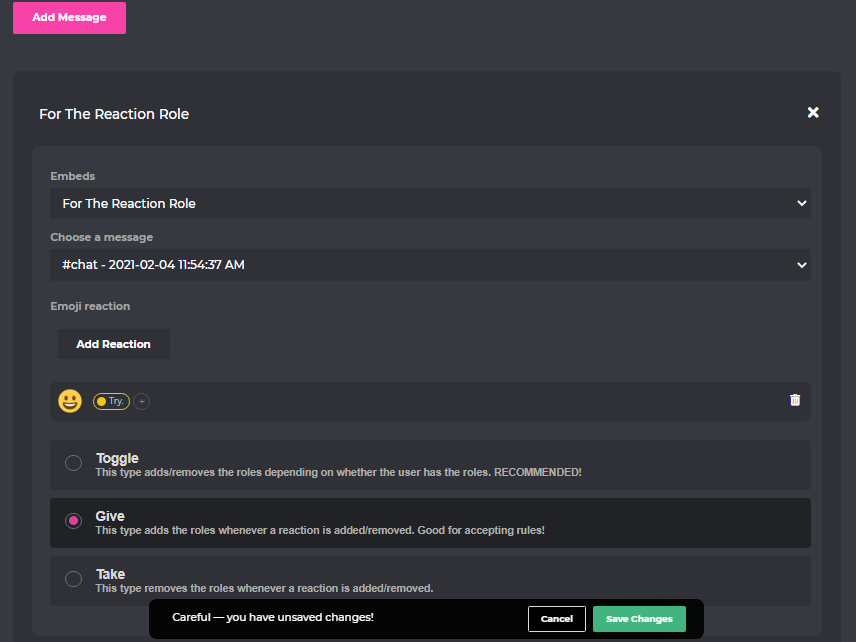
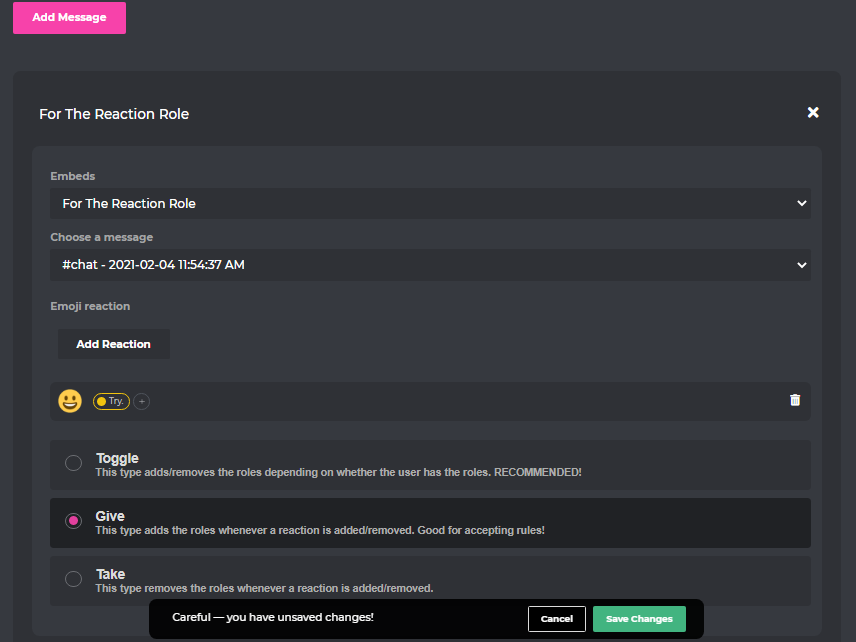
How to enable the reaction-roles
1 - https://probot.io/dashboard --> Login , select your server
2 - Reaction Roles , Add New Message
3 - edit the settings :
1- [Embeds : The Embed message that you created (already)]
2- [Choose a message : The Embed Message that you (already sent)]
3- [Add Reaction] = Select the emoji , The role
4 - Choose btw (Toggle or Give or Take)
Toggle : This type adds/removes the roles depending on whether the user has the roles.
Give : This type adds the roles whenever a reaction is added/removed.
Take : This type removes the roles whenever a reaction is added/removed.
Welcome images, moderation, leveling, reaction roles, logs, high quality music and many many more!
 nocturne flax
Um Hi I have an old account it's been more then a year so I was trying to collect my daily credits it doesn't want to it takes me to the authorize page.. I tried it from other phone still happening <@&675070424748654593>
viral sundial
could you give me a screenshot?
nocturne flax
K sec
can I pass my question here? I'm using a translator so it won't be 100% English
@viral sundial
Like I go back and it still glitchs
split needle
nocturne flax
Like I go back and it still glitchs
Could you try switch to another network or use a vpn and try to login again?
 errant vector
is there anyway to tempmute or is it !tempmute
split needle
Just mute and it will alway be temporary
Add duration to the command when using after user mention
lean badgerBOT
**Command: mute**
Mute a member from text channels so they cannot type.
**Usage:**
#mute [user] (time ends with m,h,d,mo,y) (reason)
**Examples:**
#mute @split needle 1m Spamming
#mute @split needle 1h
#mute @split needle 1d
#mute @split needle 1mo
#mute @split needle 1y
errant vector
i see thanks :).
nocturne flax
split needle
Could you try switch to another network or use a vpn and try to login again?
Okay
native geyser
what happens when you use the command
dark rock
native geyser
what happens when you use the command
It says it has muted the user
But he can still msg
native geyser
channel settings permissions -> for every role other than muted role set the send message permission to default (/), for the muted role permission let it stay on denied (❌)
 fervent steeple
.
nocturne flax
Um do u recommend a country I choose? @split needle
dark rock
K thanks
native geyser
fervent steeple
.
can i help you?
fervent steeple
native geyser
can i help you?
How can I get probot files?
native geyser
probot is not open source so you cant
fervent steeple
Ok
 lucid holly
Hello <@&675070424748654593>
native geyser
hello how can i help you?
 slender rampart
hahaahahaha
native geyser
slender rampart
hahaahahaha
hmm?
slender rampart
No
lucid holly
I was in multiable servers that u can add more than 1 probot when u got the premium version
i saw*
native geyser
lucid holly
I was in multiable servers that u can add more than 1 probot when u got the prem...
if you add prime the free version will be disabled, if you add premium as well prime will be disabled so technically there can be multiple bots in one server only the best version will be in use, also if you purchase prime or premium you can only invite that one to one single server (premium bots location can be changed)
native geyser
slender rampart
I am Thai
please if you don't have questions regarding probot use #chat-en instead
slender rampart
lucid holly
I was in multiable servers that u can add more than 1 probot when u got the prem...
I have
lucid holly
native geyser
if you add prime the free version will be disabled, if you add premium as well p...
That's not what i meant
native geyser
are you asking if your server can have multiple probots? because this is what i understood
lucid holly
I mean more than 1 bot in the same premium subscription
slender rampart
Sory
native geyser
lucid holly
I mean more than 1 bot in the same premium subscription
oh no only one
lucid holly
native geyser
are you asking if your server can have multiple probots? because this is what i ...
I'm asking if i can do that
native geyser
slender rampart
Sory
slender rampart
How do I access my main server?
native geyser
slender rampart
How do I access my main server?
#chat-en !
native geyser
lucid holly
I'm asking if i can do that
1 subscription = 1 bot basically
lucid holly
So the premium version just give me the advantage to change the name and the avatar of the bot only 🙂
native geyser
lucid holly
So the premium version just give me the advantage to change the name and the ava...
and all other prime features
native geyser
you're welcome
slender rampart
bye
dark rock
Can't add time limit to mute cmd
I typed 1m after the tag
But it just simply mute the user
Like #mute @jrjjdjd 1m
native geyser
it is supposed to mute for 1 minute not ban them
native geyser
you dont need to mention the support role you can just tell me what you wanted to type instead
dark rock
So just muted someone for 1m
He was muted but not for 1m
I just want to add the time limit so i won't have to unmute again
dark rock
Ok
 errant creek
I need help
native geyser
errant creek
I need help
you can ask your question right away
errant creek
How do I add credits to my balance
native geyser
Welcome images, moderation, leveling, reaction roles, logs, high quality music and many many more!

 dark rock
 native geyser
was this your first time using #mute command btw? cause i see the bot overriding some channel permissions to set the mute function
if yes please test again and check the logs again
native geyser
yw
 worn wagon
With the auto role, that should assign the specified role to all new members when they join a server I presume right?
As it doesn't seem to have been working on a server I manage. Maybe conflicting with another bot that we previously had doing the same thing? (I've just turned off the other bot doing that same thing)
split needle
worn wagon
With the auto role, that should assign the specified role to all new members whe...
Do your server have welcome screen enabled?
If yes, new members must pass that first before getting the roles
worn wagon
split needle
Do your server have welcome screen enabled?
If yes, new members must pass that f...
Yes we do, and thanks! Guessing it might have been the other bot causing issues, will see how it goes
 static pendant
Hey I am trying to reset the tops, but it doesn't work
split needle
static pendant
Hey I am trying to reset the tops, but it doesn't work
Check and enable the moderation module on the dashboard
 near shale
Hello, can I retrieve cleared messages?
west kelp
No
static pendant
split needle
Check and enable the moderation module on the dashboard
thankkkkssssssss
near shale
west kelp
No
aite ty
 ruby onyx
Is ProBot gonna be removing the music module in accordance to YouTube shutting down music bots?
 uncut birch
ruby onyx
Is ProBot gonna be removing the music module in accordance to YouTube shutting d...
uncut birch
ruby onyx
Is ProBot gonna be removing the music module in accordance to YouTube shutting d...
im also looking around several music community for announcement
rythm bot for music is closing in 15th sept
ruby onyx
Oh alright
 dawn topaz
<@&675070424748654593> ^
split needle
ruby onyx
Is ProBot gonna be removing the music module in accordance to YouTube shutting d...
For now, we will just stop using youtube api directly
 peak holly
فيه عرب؟
native geyser
#support-ar
peak holly
native geyser
<#743365286132056094>
؟
native geyser
#support-ar ?
peak holly
انا عربي
native geyser
 split needle
#role @peak holly only
lean badgerBOT
split needle
#role <@863852345925959710> only
:white_check_mark: Changed roles for MOP, +Only Arabic
native geyser
welp
split needle
👍
ruby onyx
split needle
For now, we will just stop using youtube api directly
Oh alright, thank you
 primal gazelle
How do the colors feature work?
 proud cedar
split needle
For now, we will just stop using youtube api directly
proud cedar
split needle
For now, we will just stop using youtube api directly
So the probot isn't gonna have the music of youtube? I was going to pay the premium of probot for the 24/7 music in october to do an event of puzzles of halloween in my server XD 😦
 honest latch
how to change the trigger # of probot?
native geyser
primal gazelle
How do the colors feature work?
#1 ~ 👉 Go to server settings, Roles.
#2 ~ 👉 Add Numbered Roles Like The picture down.
#3 ~ 👉 Save and go out.
https://i8.ae/7hM2w
Now you are ready to use this colors.
/colors
Shows the colors list
/color number
Choose/change your color in server.
to remove your current color: /color 0
 native geyser
honest latch
how to change the trigger # of probot?
native geyser
honest latch
how to change the trigger # of probot?
#prefix
new prefix
honest latch
swagg thankyou
primal gazelle
native geyser
#1 ~ 👉 Go to server settings, Roles.
#2 ~ 👉 Add Numbered Roles Like The pict...
Can't i change the role numbers to words?
native geyser
primal gazelle
Can't i change the role numbers to words?
nope
primal gazelle
native geyser
nope
I guess i prefer to do a reaction type role selector
 shell yacht
in my server probot has all perms and it's still not counting the exp for users
native geyser
enable utility section on dashboard
shell yacht
now it's working
 native turtle
Hello, the BOT Rythm will stop working soon because of a problem concerning (I think) all bots offering music, what about Probot?
split needle
We will switch to use soundcloud instead of youtube in the future and will find the way to use other music streaming platforms that are available
 split needle
 copper herald
How did i fix that?
copper herald
How did i fix that?
Allow bot to attach files and embed links
copper herald
how did I allow
split needle
Go to server settings - role, select the probot role and tick on those permision
Will be best if you enable its administrative permision

 golden jewel
how do i change mute role in my server
west kelp
not possible
golden jewel
alr
 runic ravine
Hey, our voice leveling and other sht isnt working... any idea why?
west kelp
users don't gain voice XP at all?
west kelp
can you show me a screenshot of the leveling system module
west kelp
@runic ravine can you check their rank with #rank ?
runic ravine
sometimes it works sometimes not, at me it worked, on a friend he get a empty png
west kelp
Because he needs to get more XP
runic ravine
no
thats not the problem
the next rang can get reached in 4 hours, some players playing like 2 day in a voice channel and dont get the xp or rank
west kelp
Check their rank? Did they reach the required level
runic ravine
Yes i checked, and no
their dont even leveling anymore
its like the bot is freezing but working lol
west kelp
Are they in a "No XP Channel"
 gray thistle
after i am done playing music how do i make the probot leave the vc 😅
is there a command?
native geyser
/stop
gray thistle
ah it has to be playing and then stop to leave i see thx
native geyser
yw
 upper bridge
How do you delete a music from queue?
native geyser
when the music starts playing use /skip
 upbeat nymph
.
native geyser
upbeat nymph
.
can i help you?
 summer patio
hello, i would like to know how much xp is needed to get each bot pro bot level @native geyser
upbeat nymph
native geyser
can i help you?
-_- no thx
split needle
summer patio
hello, i would like to know how much xp is needed to get each bot pro bot level ...
It increases by level
And edit your message to containing ping will not actualy ping them
split needle
upbeat nymph
-_- no thx
Then go to #chat-en to show your appearance instead
west kelp
runic ravine
bot isnt working...
Can you invite me to your server
 marble rock
idk if it is a valid help option but i need to learn how to make credits in probot
west kelp
Claim your dailies: #daily
Vote: https://top.gg/bot/probot/vote
nocturne flax
how do i make my welcomes and autoroles?
 cursive tangle
ProBot doesn't send my welcome messega
nocturne flax
cursive tangle
ProBot doesn't send my welcome messega
really?