#support-en
1 messages · Page 68 of 1
 grizzled sun
 nocturne flax
It’s been 2 days and i can’t use this command to see the top list

 astral spindle
<@&675070424748654593> aight im having more trouble with the reaction roles for the bot and still not sure what im doing. would someone mind walking me through it some more please ^^'?
nocturne flax
What is the use of credits??
astral spindle
please if anyone can help i dont wanna be annoying but ive been working on this bot for 5 days now and id like any help that I can get.
 grand marsh
astral spindle
please if anyone can help i dont wanna be annoying but ive been working on this ...
grand marsh
astral spindle
please if anyone can help i dont wanna be annoying but ive been working on this ...
looks around
ah not part of the team but part of community, whats up
 lean badgerBOT
grand marsh
*looks around*
ah not part of the team but part of community, whats up
lean badgerBOT
grand marsh
*looks around*
ah not part of the team but part of community, whats up
We noticed that you are a premium user, for faster response go to #premium-support
astral spindle
grand marsh
*looks around*
ah not part of the team but part of community, whats up
setting up the reaction roles is super confusing considering i have no idea how work these discord bots, especially not this one.
if i could get someone to slowly walk me through it it would help so much
grand marsh
The reaction roles are based upon embedded messages. Do you have one present?
astral spindle
yes but im having trouble to trying to understand it in a way so that their is a description of what each reaction role is marked with the emoji
grand marsh
What are you adding reaction roles too?
astral spindle
my gaming server
grand marsh
for roles or rules etc?
astral spindle
roles
grand marsh
when you go to self-assignable roles, click on the embedded message that you sent recently,
add emoji then press the + sign next to it, it will link that emoji to the role you want added.
 quaint sentinel
!rr
lean badgerBOT
Self-Assignable Roles Configuration
1 - Go to the dashboard (https://probot.io/dashboard) and log in.
2 - Next, go to the Self-Assignable Roles module and select Add Message, then choose the embed message you created and sent to a channel.
3 - Finally, you can choose between Buttons - Select Menus - Reaction to have them implemented.
Keep in mind: To make the Self-Assignable Roles work properly, you must create an embed message and send it to a channel.
ProBot
Welcome images, moderation, leveling, reaction roles, logs, high quality music and many many more!
quaint sentinel
!embed
lean badgerBOT
Embed Message Configuration
1 - Go to the dashboard (https://probot.io/dashboard) and log in.
2 - Next, go to the Embed Messages module and click on Create.
3 - Finally, configure it as desired by selecting the Add Fields button.
Keep in mind: If the embed message is not being sent, you must fill out every selected element without leaving a blank. If this is done and the message is still not being sent, you may have reached the embed character limits.
ProBot
Welcome images, moderation, leveling, reaction roles, logs, high quality music and many many more!
quaint sentinel
@astral spindle ^ check these both out
astral spindle
basically what i wanna do is kinda make it look like this

something i puled from my friends server
you got each of the emojis telling you what the reaction will give ya followed by reactions at the bottom
 dusty nova
How many triggers can be set in auto responder?
 split needle
nocturne flax
What is the use of credits??
split needle
nocturne flax
What is the use of credits??
to purchase cosmetics from the bot to use in /rank and /profile command, as well as to subscribe to paid subscriptions of the bot
split needle
dusty nova
How many triggers can be set in auto responder?
1 for each auto responder
split needle
astral spindle
basically what i wanna do is kinda make it look like this
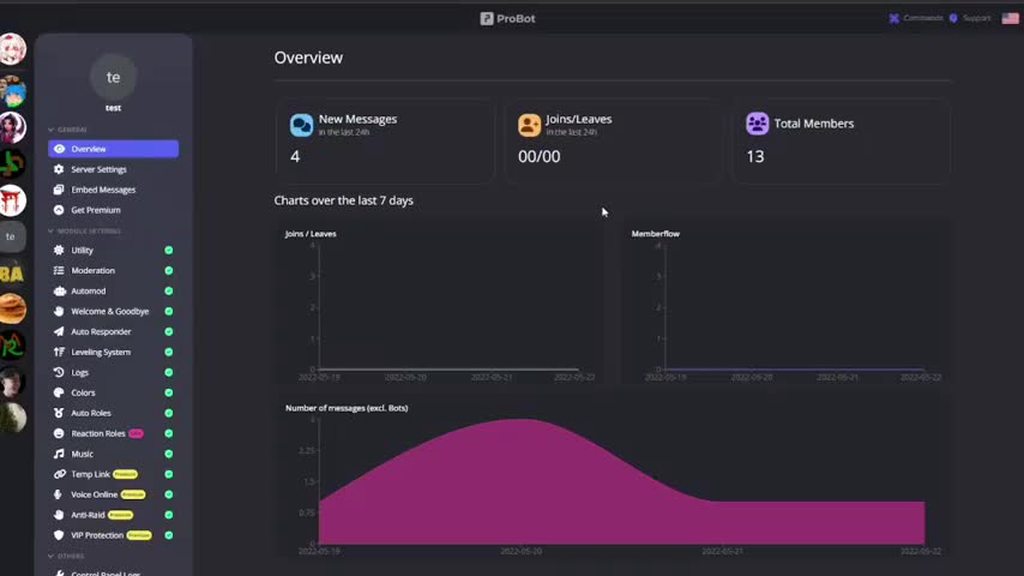
the 2 messages above you show how to do it
you can follow this short video. not the latest version of the site but still similar https://i.imgur.com/NK4xOTC.mp4
 dusty nova
split needle
1 for each auto responder
dusty nova
split needle
1 for each auto responder
i mean, it has limit? like 10 words only in the server?
Dyno has limit so i'm trying probot
split needle
dusty nova
i mean, it has limit? like 10 words only in the server?
limit is discord itself, means it can be near 2000 characters but I doubt anyone would make it that much
dusty nova
i think i found the answer
split needle
are you using more than 1 account for any reason?
 shut orchid
no
nocturne flax
split needle
to purchase cosmetics from the bot to use in /rank and /profile command, as well...
Thx
split needle
then I will send your id to check to unblacklist
dusty nova
split needle
limit is discord itself, means it can be near 2000 characters but I doubt anyone...
sorry for not being clear, what I meant is does it have limit for trigger words, like Trigger #1 - Hello, Trigger #2 - Hey and so on, you can have many as you want? another bot requires premium to have more than 10 triggers
astral spindle
ok let me rephrase. i understand how to do the embed messages, as well as adding the reaction roles. What im confused upon is the description of the different roles, as such that the different emojies show which roles they pertain to
split needle
dusty nova
sorry for not being clear, what I meant is does it have limit for trigger words,...
well then unlimited or too much to use up all of them, if you meant the amount of auto responder you can have
split needle
astral spindle
ok let me rephrase. i understand how to do the embed messages, as well as adding...
that's just what you need to do with the embed message
the bot will not auto set up the role list with emoji for you
astral spindle
is there a way where you can have the bot send a list, with the reaction roles added
 astral spindle
i tried the little commands for the emojies but thhat didnt work as when the message was sent it didn't translate to the emojies
split needle
for the custom emojis, you need to get their full id so that discord itself could read and render them, since the bot is in too much server that there's possibility they can have the same name, therefore they can not be rendered properly
to get the emojis ids, put a \ right before an emoji on the chat and send it to get the result
example: \ = !pro2
astral spindle
so you have to have a full emoji ID?
split needle
yea and that's the universal way to render an emoji within the whole app
astral spindle
ooooooooh
ok there you go
okkk
there its working now. mother of loki this shits hard sometimes XD
shut orchid
my account is blacklisted🥲 help me
 split needle
it can not be resolved within a second
be patient as those in responsible with that thing is not yet active
shut orchid
oh ok
split needle
and what are you needing credits for?
shut orchid
idk
split needle
then why are you wanting to be unblacklisted that much?
I need to verify your activity about this
failed to verify will make your unblacklist request voided
shut orchid
fine i need to collect credits
split needle
for what? stop running around
shut orchid
ok
split needle
it takes you too long to answer some simple questions, therefore your unblacklist request has been voided
astral spindle
split needle
it takes you too long to answer some simple questions, therefore your unblacklis...
how do you render an emoji that isnt a custom one
🖥️ like this
split needle
astral spindle
how do you render an emoji that isnt a custom one
just use their name like normal, or just paste the emoji directly into there
astral spindle
split needle
just use their name like normal, or just paste the emoji directly into there
alright one more thing
how does the music section work

 quick wren
 humble hedge
Scam
split needle
qr scan was never a verification method
humble hedge
And also, the bot's not verified, so is it premium only?
split needle
that bot is a fake bot
split needle
astral spindle
how does the music section work
when using the /play command with a term, the bot will search through supported music platforms for result then play it in a voice channel where you're in
nocturne flax
Why is this when the Probot frees the person it blocked??
astral spindle
split needle
when using the /play command with a term, the bot will search through supported ...
ah
so the bot itself is not set to just 1 music platform
 tepid goblet
Hey
 timber helm
@tepid goblet hi hi, how may i help you?
 grand quest
Guys can you help
 round bobcat
im black listed
 timber helm
round bobcat
im black listed
timber helm
round bobcat
im black listed
are you using multiple accounts?
 hexed musk
Can somebody tell me why i can t use the commands for voice channels if they are enabled


 trim folio
timber helm
are you using multiple accounts?
trim folio
timber helm
are you using multiple accounts?
hello @timber helm
timber helm
trim folio
hello <@485134005105197071>
be patient please 🙏🏼
timber helm
hexed musk
Can somebody tell me why i can t use the commands for voice channels if they are...
make sure you saved changes
hexed musk
timber helm
make sure you saved changes
I saved any change i do and still not working ....
timber helm
hexed musk
I saved any change i do and still not working ....
kick & re invite the bot
hexed musk
timber helm
kick & re invite the bot
still not working
timber helm
hexed musk
still not working
try disable the command & re-enable it
hexed musk
timber helm
try disable the command & re-enable it
still not working .......
timber helm
hexed musk
still not working .......
add me to your server please
 short sundial
Hola

 topaz tundra
hello, i have problem for payment
lean badgerBOT
topaz tundra
hello, i have problem for payment
We noticed that you are a premium user, for faster response go to #premium-support
 rough cloak
Hello. Please, how to change the prefix / to any other?
timber helm
rough cloak
Hello. Please, how to change the prefix / to any other?
hi hi, we no longer support prefix use aliases or slash command
rough cloak
sadly
 chilly wyvern

Top.gg tells me I'm not getting the voting reward for the bot because of the vote not going through because they can see the vote has been done and you get the vote 100% like you should and I get no credits rewards.
timber helm
chilly wyvern
Top.gg tells me I'm not getting the voting reward for the bot because of the vot...
known issue should be working properly as soon as possible
chilly wyvern
So its only temporarily?
timber helm
yea
 cold radish
How can I make the bot work only in one chat and play music?
 slender ridge
<@&675070424748654593> ^
split needle
cold radish
How can I make the bot work only in one chat and play music?
limit its permission to see and send messages to channels and only let it see and send messages, connect to the channels you want
 nocturne dock
Hey mates! Does the autoresponder feature support words between text strings?
For example: "test" is the trigger word. Would it work in the next sentence?
asdasd asd test asd
 vocal anvil
<@&675070424748654593> i have been puted in blacklist and idk why
split needle
nocturne dock
Hey mates! Does the autoresponder feature support words between text strings?
Fo...
tick the wildcard option and it will work like that
split needle
vocal anvil
<@&675070424748654593> i have been puted in blacklist and idk why
are you using more thán account for any purpose?
nocturne dock
split needle
tick the wildcard option and it will work like that
It was just that li'l mistake. Forgot to check that box lol, my bad. Tyvm! ❤️
 rich wind
some 1 is banned itds says at his invite but i cant find in logs or in bans oks geko
split needle
not our problem actually because it's more like discord's problem
try ban the user again with the bot then unban manually from the ban list
cold radish
split needle
limit its permission to see and send messages to channels and only let it see an...
I took all the accesses and gave it access to only one chat, but it still works in every channel I search for music
split needle
cold radish
I took all the accesses and gave it access to only one chat, but it still works ...
disable its administrative permission
cold radish
split needle
disable its administrative permission
I did this before
 wise anvil
<@&675070424748654593> I cant access the probot dashboard anymore for a server I'm admin in, Me and the bot both have administrator but it says this server requires setup? it legit let me use it yesterday. does member count have anything to do with it?

 west kelp
are other people able to access?
wise anvil
I'm not sure, let me test that
west kelp
make sure that the bot is in the server, try kicking it and re-inviting it
wise anvil
I gave someone a role and now me and now we both can access it, really weird sorry
I tried many things and apparently now it just work
thank you ^^
west kelp
you're welcome
humble hedge
I need a small help, can someone tell which permission do a bot need to lock channel? i saw that it does not require Manage_channels permission ?
 faint ridge
Is ProBot able to execute a slash command with Auto Responder? I'm wanting it to add members to a "Needs Review" role after they agree to the rules from a welcome message. Ex: /role give [user] Needs Review
humble hedge
faint ridge
Is ProBot able to execute a slash command with Auto Responder? I'm wanting it to...
i think u need to use reaction roles in that case
west kelp
humble hedge
I need a small help, can someone tell which permission do a bot need to lock cha...
I'm sure it does, because the bot changes permissions for the @everyone role in the channel
west kelp
faint ridge
Is ProBot able to execute a slash command with Auto Responder? I'm wanting it to...
nope it cannot, you can use self assignable roles to make a verification system though
humble hedge
west kelp
I'm sure it does, because the bot changes permissions for the @everyone role in ...
No, It was actually related to I am also applyng for a bot for verification, i went through top.gg's mod logs, and it says, that the lock command does not require manage_channels permission. Since probot is listed on top.gg, so the bot would have also gone through it however, when testing probot, it did ask for manage_channels permission.
So, I was confused with it.
west kelp
can you provide a screenshot?
west kelp
where it says it doesn't require manage_channels
 west kelp
i'm not sure about another way that bots can lock channels, but probot was added years ago to top.gg so im guessing they didnt have to abide with this "rule".
humble hedge
oh,alright. thanks for the help
west kelp
you're welcome
faint ridge
west kelp
nope it cannot, you can use self assignable roles to make a verification system ...
I'm stuck on setting this up because after setting up an embed and selecting it, it still requires me to also select a "message", and I'm not sure what it is referring to or what it needs.
humble hedge
faint ridge
I'm stuck on setting this up because after setting up an embed and selecting it,...
You need to send the embed you created to the channel, and then, use that message (i suppose)
west kelp
@humble hedge read channel rules..
humble hedge
sorry, i forgot.
no minimodding
west kelp
faint ridge
I'm stuck on setting this up because after setting up an embed and selecting it,...
go to the Embed Messages section and create one, save it and send it, then select it in the self assignable roles section
 west kelp
there are 2 bots in the server, the dark purple one (the free bot) and the light purple/blue one (premium)
premium takes priority so use its commands
 faint ridge
west kelp
go to the Embed Messages section and create one, save it and send it, then selec...
faint ridge
west kelp
go to the Embed Messages section and create one, save it and send it, then selec...
Thank you! I think it is set up now!
humble hedge
( i clearly am confused on why information commands require permissions)
split needle
humble hedge
that command is disabled for members in this server
humble hedge
oh
 sage flint
This feature is disabled
nocturne flax

 nocturne stirrup
Hey there, I'm looking for something for my server that lets me manually add exp for members, but not gain anything automatically. Is this something I could use for that?
sage flint
nocturne stirrup
Hey there, I'm looking for something for my server that lets me manually add exp...
hi, you can use </setxp:1027603376827015168> command
nocturne stirrup
Can I also disable automatic xp gains?
sage flint
Sure, go to the dashboard (https://probot.io/dashboard) choose your server and head to leveling module, then in "No xp roles" choose every role or just role that everyone has
nocturne stirrup
Awesome! Thank you so much.
sage flint
you're welcome 
nocturne flax
Hi there, may i get a little explanation on this:

I got some daily rewards and stuff, then after all, i couldn't really see the effect of buying any of the stuff
Is that a known bug or a premium feature, like?
sage flint
nocturne flax
I got some daily rewards and stuff, then after all, i couldn't really see the ef...
Hi, You have your purchased items
You can see it by using /profile and /rank commands
 nocturne flax
sage flint
Hi, You have your purchased items
You can see it by using `/profile` and `/rank`...
nocturne flax
sage flint
Hi, You have your purchased items
You can see it by using `/profile` and `/rank`...
ah, shoe, I got exposed as a weeb XDD.
Thank you so much, I didn't realize it was about the command in the server!
Well, that's a truly awesome feature!
If I could give a small suggestion, that would fix the situation, briefly:
The whole Dashboard is very nice and self-explaining, yet
the current state of the

 snow flint
hey, is there an option in the probot premium that users who leave the discord get back the roles they had before?
lean badgerBOT
snow flint
hey, is there an option in the probot premium that users who leave the discord g...
We noticed that you are a premium user, for faster response go to #premium-support
sage flint
snow flint
hey, is there an option in the probot premium that users who leave the discord g...
Nope
nocturne flax
isn't really clear, what it affects, and I got like many friends, who had no clue what it did.
I'm gonna tell them, surely. But, I may not be able to explain it to much more people,
who would love to have this and use it, but they may not understand what it does.
sage flint
nocturne flax
ah, shoe, I got exposed as a weeb XDD.
Thank you so much, I didn't realize it wa...
You're welcome and you can give any suggestions at #573053418017521664
nocturne flax
sage flint
You're welcome and you can give any suggestions at <#573053418017521664>
Alrighty! I'll do it there, then!
Thank you for asap answer!
sage flint
 vast robin
When writing a message that sends to a user when they join the server, is there a way of haiving the text centered?
nocturne flax
hello
timber helm
vast robin
When writing a message that sends to a user when they join the server, is there ...
elaborate please by providing some screenshots
timber helm
nocturne flax
hello
Hello sir, how may I help you?
vast robin
timber helm
elaborate please by providing some screenshots
This is currently how the welcome text portion is displayed with all text being justified to the left
 vast robin
timber helm
elaborate please by providing some screenshots
vast robin
timber helm
elaborate please by providing some screenshots
This would be how ideally I would love it to display

Also even though I have the welcome image set with a message below the username, it doesn't seem to display. Do you know why that may be?
 timber helm
vast robin
Also even though I have the welcome image set with a message below the username,...
timber helm
vast robin
Also even though I have the welcome image set with a message below the username,...
you tried adding spaces?
vast robin
timber helm
you tried adding spaces?
Adding spaces to the welcome image? I am not sure how that would help it to display correctly
timber helm
vast robin
Adding spaces to the welcome image? I am not sure how that would help it to disp...
i mean for the welcome message
vast robin
timber helm
i mean for the welcome message
I can try adding spaces but wouldn't that then display differently depending on the users resolution or device?
nocturne flax
Hi!
Someone is using a method to steal CREDITS using the premium bot.. any way to report this ?
vast robin
timber helm
i mean for the welcome message
Adding spaces didn't work as it made certain elements go onto another line
timber helm
vast robin
I can try adding spaces but wouldn't that then display differently depending on ...
so you can’t do that bro, for the image issue try resetting the coordination of your welcomer settings
timber helm
nocturne flax
Someone is using a method to steal *CREDITS* using the premium bot.. any way to ...
hi hi, can’t do nothing about that
nocturne flax
Misusing the bot 🐥
vast robin
timber helm
so you can’t do that bro, for the image issue try resetting the coordination of ...
Ok no worries thank you. How do I reset the coordination of the welcomer setting? I tried turning it on and off but when it came back on it had saved the setting
timber helm
vast robin
Ok no worries thank you. How do I reset the coordination of the welcomer setting...
my pleasure, This can happen at times, and the user image/name may disappear if it is outside the box.
Anyway, I'll give you coordinates that will place the user image/name exactly in the center. Simply write them over each other in the coordinates section and let me know if that solves your problem;
Avatar Width: 90.99999999999997
Avatar Height: 83
Coordinate Left: 145.59375
Coordinate TOP: 9
vast robin
timber helm
my pleasure, This can happen at times, and the user image/name may disappear if ...
would I put these same coordinates in for the username and message underneath for now, then adjust and see what happens on the server?
timber helm
exactly
vast robin
Ok perfect, thank you for you help with this
timber helm
vast robin
Ok perfect, thank you for you help with this
my pleasure, have any other questions let me know !
 faint tide
is someone know why it says "Role position"
 timber helm
faint tide
is someone know why it says "Role position"
timber helm
faint tide
is someone know why it says "Role position"
drag the probot role above all the other roles
lean badgerBOT
I can't see my server roles in the dashboard
1 - Go to your server settings.
2 - Next, drag the probot's role above all other roles.
3 - Finally, refresh the page and you're done!
timber helm
try changing the room country
from the vc settings channel, you can ask here #chat-en
yw yw
faint tide
i cant put him any higher, but it keeps tellin me "Role position"
 timber helm
faint tide
i cant put him any higher, but it keeps tellin me "Role position"
timber helm
faint tide
i cant put him any higher, but it keeps tellin me "Role position"
refresh the page
timber helm
lean badger
**I can't see my server roles in the dashboard**
**1** - Go to your server sett...
@faint tide
timber helm
cause you are not the owner ship
make sure probot above all the other roles now then check the https://probot.io/dashboard again
ProBot
Welcome images, moderation, leveling, reaction roles, logs, high quality music and many many more!
vast robin
timber helm
my pleasure, have any other questions let me know !
sorry to be a pain, I reset everything and for 1 or 2 times it displays correctly. I changed the value (left) and it disappeared. I changed it back to the setting that it previously displayed at but now it isn't showing again.
 timber helm
vast robin
timber helm
vast robin
try changing the coordination to the default one that’s the solution
vast robin
Ok I will leave them as default, Maybe the layout I wanted isn't possible. Thank you
faint tide
ill try it, thanks
timber helm
faint tide
ill try it, thanks
np
timber helm
vast robin
Ok I will leave them as default, Maybe the layout I wanted isn't possible. Thank...
faint tide
it telling me the same again
timber helm
faint tide
it telling me the same again
you refreshed the page ?
 timber helm
faint tide
here, above creator
timber helm
faint tide
here, above creator
you select two rewards for the same role 
 faint tide
i wanted to bot keep role after level up
timber helm
faint tide
i wanted to bot keep role after level up
excuse me? what is your main language?
timber helm
faint tide
Russian, but i tried to solve problem asap
should work properly with you don’t worry about that message
faint tide
wait a sec, ill try to explain what i want
after anyone level up, bot removes the role, right?
its with thingy
 timber helm
faint tide
wait a sec, ill try to explain what i want
timber helm
faint tide
wait a sec, ill try to explain what i want
i mean, the “role position” message don’t worry about that, should work properly with you
faint tide
oh i see
timber helm
faint tide
disable it
faint tide
for every role?
 sharp yew
greetings, uhm, how can i use custom emojis on embed messages?
timber helm
faint tide
for every role?
yessir
timber helm
sharp yew
greetings, uhm, how can i use custom emojis on embed messages?
hi hi,
-
go to your discord servers chat
-
-if you're on mobile discord use the emoji you want to add use in between `` symbols https://imgur.com/F2ckAUV
-if you're on pc use your emoji and put \ before it and send it https://imgur.com/a/QT1KMOx
-
copy the message you just sent and paste it on dashboard

 sharp yew
timber helm
hi hi,
1) go to your discord servers chat
2)
-if you're on mobile discord ...
sharp yew
timber helm
hi hi,
1) go to your discord servers chat
2)
-if you're on mobile discord ...
oh, so it changed
xd

well, thank you
timber helm
my pleasure
sage flint
tepid goblet
I got ban in 3server could someone help me to get unban?
Sorry this server is only for Probot related problems & questions
nocturne flax
hi i've set up the bot to send twitch notification. and in the message i added @everyone but it's not pinging. i've enabled Mention @ everyone in the bot role permissions and that didn't work either
 rigid whale
Hello ProBot can send a embed when write a command ?
 zealous raven
How do I make a poll with probot
timber helm
nocturne flax
hi i've set up the bot to send twitch notification. and in the message i added `...
hi hi, if you’re trying pinging everyone under the embed you can’t
nocturne flax
timber helm
hi hi, if you’re trying pinging everyone under the embed you can’t
no its a normal message
timber helm
show me your settings
 jolly oasis
hi, so when i try to add a role to an self assignable role button the roles won't show up, any help?
timber helm
rigid whale
Hello ProBot can send a embed when write a command ?
you can’t
rigid whale
timber helm
you can’t
😦 Ok thanks
nocturne flax
timber helm
show me your settings
me?
timber helm
nocturne flax
me?
yessir
nocturne flax
sure. but what do you want me to show exactly? the message?
timber helm
zealous raven
How do I make a poll with probot
Not possible
timber helm
nocturne flax
sure. but what do you want me to show exactly? the message?
all the twitch settings
zealous raven
timber helm
Not possible
It is because I another server I saw a poll and it gave me a role
timber helm
zealous raven
It is because I another server I saw a poll and it gave me a role
You mean reaction role?
zealous raven
timber helm
You mean reaction role?
Yeah
timber helm
zealous raven
Yeah
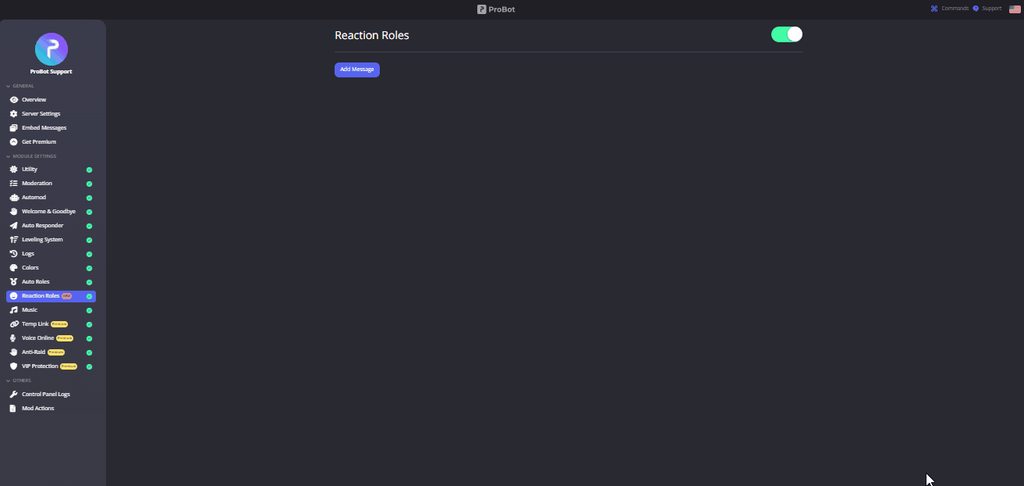
**  How do I set up reaction roles?**
1 - Go to the dashboard https://probot.io/dashboard then select your server.
2 - Select "Reaction Roles"
3 - Click on "Add Message", then select an embed. You can manage these embeds by clicking on the "Embed Messages" button.
4 - Click on "Choose a message", and then select a message where the selected embed was sent.
To add a reaction role, click on "Add Reaction".
There are 3 different types of a reaction role message:
- Switch - Upon reacting, you will get the role, and upon removing the reaction, the role will be removed as well.
- Give - Upon reacting, you will get the role, and upon removing the reaction, the role won't be removed.
- Take - Upon reacting, the role will be removed from you, and upon removing the reaction, you won't get it back.

 nocturne flax
timber helm
all the twitch settings
nocturne flax
timber helm
all the twitch settings
 timber helm
nocturne flax
timber helm
nocturne flax
it’s a known issue, should be solved as soon as possible
 safe basin
Hi, folks -- I have a Discord server on which Probot sits, but when I go to probot.io/server/$ID, it get a persistent loading screen. I've got four other servers that are working, and I have tried to kick/reinvite the bot to no avail. Can I send that server ID to some staff for investigation?
nocturne flax
timber helm
it’s a known issue, should be solved as soon as possible
it highlights the ping tho. so i think it's something with the settings of the server that i just don't know about?

nvm idk. i tried making the bot send other messages and the ping works. i don't get why in that message it doesn't work
sage flint
nocturne flax
nvm idk. i tried making the bot send other messages and the ping works. i don't ...
This is issue with notification message, its has been solved and fix will be implemented with next bot update
nocturne flax
sage flint
This is issue with notification message, its has been solved and fix will be imp...
aha! thank you
sage flint
You're welcome
jolly oasis
probot is offline in my server
 grim bear
<@&675070424748654593> why isnt my dj role working
@timber helm why isnt my dj role working\
lean badgerBOT
My members are unable to use music commands?
1 - Go to the dashboard (https://probot.io/dashboard) and log in.
2 - Next, go to the Music Module.
3 - Finally, either remove the added DJ-ROLES or add the members role to allow them to fully use the music commands.
ProBot
Welcome images, moderation, leveling, reaction roles, logs, high quality music and many many more!
safe basin
sage flint
should back online now
Thanks -- fixed me too.
 modest hound
hi why i take black list
sage flint
you using multiple accounts i guess
 ember gulch
hi i have a blacklist how can i remove it
my account had been hacked so i created a new one but i'm black listed
 viral sundial
<@&675070424748654593>
viral sundial
ember gulch
my account had been hacked so i created a new one but i'm black listed
feel free to DM RuRu and describe your problem in-short to her
 mighty lotus
 viral sundial
it went down for a few minutes and its up now ^^
 crisp echo
Where can I buy Premium with 24/7 support
 native geyser
ProBot
Welcome images, moderation, leveling, reaction roles, logs, high quality music and many many more!
 shrewd leaf
hi
lean badgerBOT
shrewd leaf
hi
We noticed that you are a premium user, for faster response go to #premium-support
sage flint
 velvet sleet
İ mean commands
velvet sleet
İ mean commands
There is no command for it. You need to create some roles with only numbers in name like 1, 2, 3, etc... and set colors for them
 nocturne stirrup
A couple things, is there a way to "add" exp instead of just "setting" their exp?
And is there a place I can see how much exp each level up takes?
sage flint
nocturne stirrup
A couple things, is there a way to "add" exp instead of just "setting" their exp...
Exp can be gained by being active on text/voice channels and can be given with </setxp:1027603376827015168> command
You can only check how many exp you or someone else need to next level in </rank:971443830870126634> command
Also you can check how may time its take to reach specific levels on the dashboard in leveling module
nocturne stirrup
I'm trying to only manually assign xp in my server. Is there a way to add xp manually, aside from setting it?
sage flint
Nope
nocturne stirrup
Ah damn
 tall plaza
Hi there! So I just got probot for its levelling system.
My users need to authorise and gain one role before joining the server, which has already all been set up, but the plan is to give them another role at level 5 for embeds/links/etc etc for extra safety. However when I went to set the rewarded role on the probot dashboard, only 6 or 7 of the roles even show up. all those roles are the ones I have set for video game pings (apex , league, etc etc) and the role I had planned to set for level 5, nor any of the other roles in my server are on the list. Is there any reason this may be?
sage flint
tall plaza
Hi there! So I just got probot for its levelling system.
My users need to autho...
Hello, drag Probot role above of rest of roles in your server settings
tall plaza
heres a screenshot to show what I mean
 tall plaza
sage flint
Hello, drag Probot role above of rest of roles in your server settings
tall plaza
sage flint
Hello, drag Probot role above of rest of roles in your server settings
Thank you! This worked ❤️
Im new to bots and stuff haha
sage flint
You're welcome
 unique wave
Yo, I bought premium
lean badgerBOT
unique wave
Yo, I bought premium
We noticed that you are a premium user, for faster response go to #premium-support
sage flint
nocturne flax
I want probot only to join the music vc and not the public vc how to
sage flint
Not possible
nocturne flax
I'm helping a not very technical friend setup a leveling system for the server and was given every permission except for the administrator one, would I need that permission for level roles?
 half crown
on the server im on i did the /play command and all it did was put it in queue and refuses to play
nvm maybe it was a delay because its playing now
sage flint
nocturne flax
I'm helping a not very technical friend setup a leveling system for the server a...
If bot has access to the channels and permission to manage roles, then its not needed
 magic roost
Since there’s a credit command, is there a work command to gain more credit?
 vivid vigil
How do I set reaction roles?
sage flint
magic roost
Since there’s a credit command, is there a work command to gain more credit?
Nope, you can get credits only from claiming daily reward and form voting for the bot
lean badgerBOT
Self-Assignable Roles Configuration
1 - Go to the dashboard (https://probot.io/dashboard) and log in.
2 - Next, go to the Self-Assignable Roles module and select Add Message, then choose the embed message you created and sent to a channel.
3 - Finally, you can choose between Buttons - Select Menus - Reaction to have them implemented.
Keep in mind: To make the Self-Assignable Roles work properly, you must create an embed message and send it to a channel.
Embed Message Configuration
1 - Go to the dashboard (https://probot.io/dashboard) and log in.
2 - Next, go to the Embed Messages module and click on Create.
3 - Finally, configure it as desired by selecting the Add Fields button.
Keep in mind: If the embed message is not being sent, you must fill out every selected element without leaving a blank. If this is done and the message is still not being sent, you may have reached the embed character limits.
sage flint
@vivid vigil ⬆️
 midnight fjord
Why does it say i have been blacklisted from credits
 oblique dawn
how do i use the change colour in my server
 frank drum
oblique dawn
how do i use the change colour in my server
frank drum
oblique dawn
how do i use the change colour in my server
it would need permission to manage roles for that to work
 knotty hornet
@nocturne flax
yo
im blacklisted
<@&675070424748654593>
<@&675070381861634048>
west kelp
@knotty hornet @midnight fjord do you guys use multiple accounts?
knotty hornet
no
 fast sparrow
Im blacklisted too
knotty hornet
@west kelp
west kelp
fast sparrow
Im blacklisted too
we know dude, stop repeating it
west kelp
oblique dawn
how do i use the change colour in my server
what color?
fast sparrow
west kelp
we know dude, stop repeating it
So?
west kelp
be patient
west kelp
oblique dawn
how do i use the change colour in my server
#1 ~ 👉 Go to server settings -> Roles.
#2 ~ 👉 Add numbered roles like the picture below.
#3 ~ 👉 Save and you're good to go.
https://i8.ae/7hM2w
Now you are ready to use these colors.
/colors
Shows the colors list
/color number
Choose/change your color in the server.
to remove your current color: /color 0
 chilly wyvern
Yay! The Voting is giving me the reward again.
 timid jewel
good for you
knotty hornet
<@&675070424748654593>
timber helm
knotty hornet
<@&675070424748654593>
ask your question right away please
knotty hornet
can u remove me from the blacklist?
timber helm
knotty hornet
can u remove me from the blacklist?
use one support channel please
knotty hornet
this is the support channel
timber helm
knotty hornet
this is the support channel
#support-ar message
you already got awnsred
please no need to repeat your question
knotty hornet
yup but the didn't help me
timber helm
knotty hornet
yup but the didn't help me
be patient please
knotty hornet
okey
 marble moat
Hi
timid jewel
hey there how can I help
marble moat
How can I get my blacklist removed?
timid jewel
ill report your problem to the staff
timid jewel
👋
 worldly sleet
hey there
timber helm
worldly sleet
hey there
Hello sir, how may I help you?
worldly sleet
i just created this account yesterday as an alt and it got blacklisted
timber helm
it’s illegal to use multiple accounts bro
timber helm
worldly sleet
didn't know that
no worries
 oak dock
hi
 sour pollen
Can't add probot
timber helm
oak dock
hi
Hello sir, how may I help you?
sour pollen
timber helm
screenshot the error message please
i'm not going from here
 sour pollen
timber helm
or try from https://discord.com/oauth2/authorize?client_id=282859044593598464&sc...
sour pollen
timber helm
or try from https://discord.com/oauth2/authorize?client_id=282859044593598464&sc...
It cannot be added when only the role has been added.
timber helm
sour pollen
It cannot be added when only the role has been added.
which role sir? elaborate please
add me to your server i’ll add it for you
sour pollen
 timber helm
 done
done
 leaden sierra
Help I can’t send credit to someone
 manic sable
Hey, looking for advice on how to change the levelling system in my server. Basically right now we give out a role every 6 levels, but the pace of levelling becomes too slow for our tastes after like level 50. So I want to change it to every 4 levels or something, is there a way to do this without having to edit everyone's roles manually to be in line with the new system?
timber helm
leaden sierra
Help I can’t send credit to someone
you’re able now to send credits
oak dock
timber helm
Hello sir, how may I help you?
when i use the commands that said im black listed
timber helm
manic sable
Hey, looking for advice on how to change the levelling system in my server. Basi...
!level
lean badgerBOT
Leveling System Configuration
1 - Go to the dashboard (https://probot.io/dashboard) and log in.
2 - Next, go to the Leveling System module and click on Add Role Reward
3 - Finally, configure it as desired by adding the required text and voice levels.
Keep in mind: You can add NO-XP-ROLES and NO-XP-CHANNELS to prevent that role and channel from gaining xp. Furthermore, if you have both text and voice set up, the user will need to reach both in order to receive the role reward role.
ProBot
Welcome images, moderation, leveling, reaction roles, logs, high quality music and many many more!
manic sable
timber helm
!level
this does not answer my question
I already have a role system set up
but I want to transfer to a new one with different levels
timber helm
manic sable
Hey, looking for advice on how to change the levelling system in my server. Basi...
hi hi,- For text, every 2-5 minutes(?) while sending messages will give you an amount of xp from 10 to 40 each time. Which mean after sending a message and gain xp, you will have a cooldown of about 2 minutes, regardless of how many message you sent, it will only count xp after that cooldown and continue
- For voice, about every 2-5 minutes with the xp amount of 10. This is a fixed amount but may be changed while working since I just calculated this pretty long ago. You can just sitting in a voice channel, regardless your voice states, xp will still count after cooldown. But to get reward roles bound to the voice levels, you will need to gain some text xp to trigger bot to update level roles
timber helm
oak dock
what i have to do
are you using multiple accounts?
oak dock
timber helm
are you using multiple accounts?
how
timber helm
manic sable
but I want to transfer to a new one with different levels
simply change it from the https://probot.io/dashboard
ProBot
Welcome images, moderation, leveling, reaction roles, logs, high quality music and many many more!
timber helm
oak dock
how
?
oak dock
i have three old account and i dont use it
timber helm
oak dock
i have three old account and i dont use it
it’s illegal to use multiple accounts
oak dock
i dont use them
timber helm
oak dock
what i have to do
nothing
manic sable
timber helm
simply change it from the https://probot.io/dashboard
if someone gets a role, will they get all the roles before that as well?
because that's what I need to happen
like the lower level roles
timber helm
manic sable
if someone gets a role, will they get all the roles before that as well?
yes just turn off this fonctions
 oak dock
timber helm
it’s illegal to use multiple accounts
oak dock
timber helm
it’s illegal to use multiple accounts
buy how probot can know i have others accounts ??????
timber helm
oak dock
buy how probot can know i have others accounts ??????
what is your main language?
timber helm
oak dock
french
use #support-int
manic sable
timber helm
yes just turn off this fonctions
that just means they keep the older roles right?
timber helm
manic sable
that just means they keep the older roles right?
yes
manic sable
I mean that if they skip over a role because I changed the levels, will they get the role for the previous milestone as well
because my users will skip over a bunch of them
when i change it
if normally theyd have 4 roles at level 24
now theyre supposed to have 6
bc it is intervals of 4 now and not 6
timber helm
manic sable
I mean that if they skip over a role because I changed the levels, will they get...
just change the levels, the bot will give your users the roles automatically
manic sable
alright thank you
timber helm
my pleasure
nocturne flax
It’s been three days i can’t see the top
 timber helm
nocturne flax
It’s been three days i can’t see the top
timber helm
nocturne flax
It’s been three days i can’t see the top
hi hi, you tried using aliases?
nocturne flax
timber helm
hi hi, you tried using aliases?
 timber helm
nocturne flax
timber helm
nocturne flax
which version are you using right now?
nocturne flax
timber helm
which version are you using right now?
You mean my discord?
It’s the last version
timber helm
nocturne flax
You mean my discord?
nope, ProBot
default version of the premium subscription?
timber helm
nocturne flax
add me to your server i’ll check that for you quickly
leaden sierra
timber helm
you’re able now to send credits
Thanks
timber helm
leaden sierra
Thanks
yw, have a good one
 dim sail
the bot says im black listed i dont know how ?
timber helm
dim sail
the bot says im black listed i dont know how ?
are you using multiple accounts ?
 heady gulch
how do i change probot prefix?
timber helm
heady gulch
how do i change probot prefix?
we no longer support prefix, use aliases or slash command
 brazen terrace
Hey, as of January 20th, the protocol stopped working. Do you have information about it?
nocturne flax
hello, my probot doesn't work on a server of 500+ people, only the /help command works
timber helm
nocturne flax
hello, my probot doesn't work on a server of 500+ people, only the /help command...
hi hi, show me how the bot respond to you when you type the command
 maiden summit
Hi. For many weeks now. I cannot lock a channel. Probot with says it’s locked but people can still type or it says this command does not work in this channel. Also says it did not respond. It worked previously
 timber helm
maiden summit
Hi. For many weeks now. I cannot lock a channel. Probot with says it’s locked bu...
timber helm
maiden summit
Hi. For many weeks now. I cannot lock a channel. Probot with says it’s locked bu...
Hello,
If your users still can chat when you use /lock command, that means you have send message channel overwrote in channel settings
- For all roles its should look like this

 timber helm
nocturne flax
timber helm
nocturne flax
enable it from the https://probot.io/dashboard
ProBot
Welcome images, moderation, leveling, reaction roles, logs, high quality music and many many more!
maiden summit
timber helm
Hello,
If your users still can chat when you use `/lock` command, that means you...
Perfect. Thank you I’ll try now
timber helm
maiden summit
Perfect. Thank you I’ll try now
my pleasure, 
maiden summit
timber helm
my pleasure, <:rawrPB:1043531160829050930>
 timber helm
maiden summit
timber helm
maiden summit
enable the command from https://probot.io/dashboard
ProBot
Welcome images, moderation, leveling, reaction roles, logs, high quality music and many many more!

 timber helm
make sure the roles members doesn’t have administrative permission
maiden summit
timber helm
make sure the roles members doesn’t have administrative permission
No. None of those do.
It’s been puzzling me for some time
timber helm
maiden summit
No. None of those do.
add me to your server i’ll check that for you
maiden summit
Sure thing
maiden summit
timber helm
add me to your server i’ll check that for you
Do I need to give you a role to check?
timber helm
maiden summit
Do I need to give you a role to check?
yes
maiden summit
timber helm
yes
What do you need admin role?
timber helm
yes
 tough lake
Hello I need some help with self assigning roles
timber helm
tough lake
Hello I need some help with self assigning roles
!rr
lean badgerBOT
Self-Assignable Roles Configuration
1 - Go to the dashboard (https://probot.io/dashboard) and log in.
2 - Next, go to the Self-Assignable Roles module and select Add Message, then choose the embed message you created and sent to a channel.
3 - Finally, you can choose between Buttons - Select Menus - Reaction to have them implemented.
Keep in mind: To make the Self-Assignable Roles work properly, you must create an embed message and send it to a channel.
ProBot
Welcome images, moderation, leveling, reaction roles, logs, high quality music and many many more!
maiden summit
timber helm
yes
Given
timber helm
maiden summit
Given

maiden summit
Tysm
tough lake
When I click the plus I don’t see my roles I have made
 sage flint
tough lake
When I click the plus I don’t see my roles I have made
sage flint
tough lake
When I click the plus I don’t see my roles I have made
Drag Probot role above rest of roles in your server settings

 sage flint
So if its still not displaying any roles, drag it a little bit lower then move it again on the top and refresh the site
sage flint
you're welcome
brazen terrace
west kelp
Did you mean ProBot?
Yes, ProBot.
No more messages appear in the stored channel. For example when a user has been given a role or a message has been changed
maiden summit
timber helm
<:Ra3d:1018920058161999952>
Turns out a couple of other roles still can academy and vip. How do I do what you did haha. Tysm you are AMAZING
timber helm
maiden summit
Turns out a couple of other roles still can academy and vip. How do I do what yo...
np np, just make sure to swipe it in the middle as :

that specific permission:
maiden summit
timber helm
np np, just make sure to swipe it in the middle as : <:graytick:104935017957845...
🫡
timber helm
tough lake
I have another issue now, I have set all the reactions up but only some are showing up and some not at all
 sage flint
Delete them and set up again
tough lake
Ok
 barren marlin
Hello, ive got a question. So ive been trying to use ProBota ability to clear messages from channels, but it
Wont
It says that the module of the command is not enabled
How
How can i enable it
 sage flint
barren marlin
sage flint
barren marlin
hi, go to dashboard (https://probot.io/dashboard), choose your server, head to moderation module and enable it
barren marlin
Thanks, it works now!
sage flint
brazen terrace
brazen terrace
Yes, ProBot.
No more messages appear in the stored channel. For example when a u...
@west kelp I mean the Logs 😅
 raw rivet
Hello, I can't use ProBot's music commands on my server, why?
native geyser
hi what is the error message you're getting?

 elder falcon
Same on my serveur
 rustic quartz
same here, my guess is an error on Discord's end
raw rivet
I thought it was because of only probot on my server
Sorry if this is a general problem.
Hnd
 warped nebula
Same here, joined to log, sorry to clutter
sage flint
raw rivet
Its looks like global Discord issue cause any commands from any bot on any server doesnt appear
 lethal oxide
Is ProBot fukced again? Roles are not automatically assigning when members click on the reactions
lean badgerBOT
lethal oxide
Is ProBot fukced again? Roles are not automatically assigning when members click...
We noticed that you are a premium user, for faster response go to #premium-support
nocturne flax
hello
 weary garnet
From Discord Status :
Jan 24, 2023 - 08:12 PST``` latent sleet
timber helm
kick & re invite the bot
latent sleet
timber helm
kick & re invite the bot
When you kick and reinvite the bot, does that clear your sever stats?
nocturne flax
Is there any problem with probot ?
sage flint
nocturne flax
Is there any problem with probot ?
No
nocturne flax
nocturne flax
Is there any problem with probot ?
 rustic quartz
nocturne flax
Is there any problem with probot ?
rustic quartz
nocturne flax
Is there any problem with probot ?
its a problem with discord
sage flint
@nocturne flax@woven wyvern Discord temporarily disabled all commands from all bots
nocturne flax
sage flint
<@456226577798135808><@417031022853750784> Discord temporarily disabled all comm...
Ok, thanks
 woven wyvern
sage flint
<@456226577798135808><@417031022853750784> Discord temporarily disabled all comm...
woven wyvern
sage flint
<@456226577798135808><@417031022853750784> Discord temporarily disabled all comm...
Ok thank you
sage flint
latent sleet
If I kick and reinvite the bot (to give it the admin role), will that clear my sever stats?
sage flint
No, what kind of stats you want to reset?
latent sleet
I don't want to reset any stats. I am doing and side by side comparison of MEE6 and Probot amd I realized that MEE6 has Admin and Probot doesn't.
So I want to give Probot Admin but I don't see an option in the Integrations tab
sage flint
O, that you mean. All your settings, stats etc will be saved
latent sleet
sage flint
O, that you mean. All your settings, stats etc will be saved
Thank you
sage flint
You're welcome
 terse remnant
cant they change the permissions from roles?
sage flint
terse remnant
cant they change the permissions from roles?
can do it
terse remnant
latent sleet
I don't want to reset any stats. I am doing and side by side comparison of MEE6 ...
Just tested it myself. You can change the permissions from roles, that way you dont have to kick and reinvite
 remote palm
how to change command prefix?
sage flint
We no longer support prefixes, Probot moved to slash (/). So you need to use slash commands or set aliases
 full anvil
hello
i am having a bit of problems with the probot when i put the slash no commands for probot appear after it
sage flint
hi, ask your question right way
latent sleet
terse remnant
Just tested it myself. You can change the permissions from roles, that way you d...
Ohhhh
sage flint
full anvil
i am having a bit of problems with the probot when i put the slash no commands f...
Hi, its Discord global issue, they disabled all commands from every bot, we cant do anything about that, need to wait for Discord fix
 cursive tide
p
full anvil
sage flint
Hi, its Discord global issue, they disabled all commands from every bot, we cant...
oh thanks
sage flint
cursive tide
i was lvl 100 on probot and now 0
you got blacklisted
cursive tide
sage flint
you got blacklisted
any reason ?
sage flint
are you using multiple accounts?
cursive tide
sage flint
are you using multiple accounts?
i have 3
sage flint
sage flint
Well, its against our rules
^
cursive tide
sage flint
^
explain more pls
sage flint
u probably use those accounts to farming credits or any other activity with probot credits
sage flint
cursive tide
<@778695412105740328> any solve ?
for what purpose you use other 2 accounts?
cursive tide
sage flint
for what purpose you use other 2 accounts?
i think the prb is selfboting cause i always let my pc open on a room
cursive tide
can that be a reason or smt
sage flint
 tall elk
i type /play and i dont have dialog to type song
tall elk
i type /play and i dont have dialog to type song
Its Discord global issue
with slash commands
we need to wait for Discord fix
sage flint
cursive tide
can that be a reason or smt
nope
 strange lotus
thank you. i’ve been like what’s going on. 4chan was hit a couple days ago to.
cursive tide
sage flint
nope
so how can i fix my prb pls
strange lotus
we need to wait.
sage flint
cursive tide
so how can i fix my prb pls
You didn't answered my question
 slim herald
Hello, I have a problem. For me it won't work to play something but other commands are working
 cursive tide
sage flint
You didn't answered my question
cursive tide
sage flint
You didn't answered my question
?
sage flint
sage flint
for what purpose you use other 2 accounts?
^
cursive tide
what question
strange lotus
thank you @sage flint
cursive tide
sage flint
^
nope
sage flint
slim herald
Hello, I have a problem. For me it won't work to play something but other comman...
Hello, its global Discord issue
native geyser
@cursive tide using multiple accounts and selfbotting is against our rules and blacklist can not be removed
cursive tide
my secound acc for the ai room
slim herald
sage flint
Hello, its global Discord issue
yeah hello
cursive tide
native geyser
<@543742598070665217> using multiple accounts and selfbotting is against our rul...
i don't use multiple accs on probot
native geyser
on discord.
slim herald
sage flint
Hello, its global Discord issue
I have a problem. For me it won't work to play something but other commands are working
 native geyser
every discord account is linked to another probot account so its the same thing
cursive tide
selfboting is staying afk all time in a room
native geyser
that is called going afk not self botting, using multiple accounts is still against our rules as mentioned above
sage flint
slim herald
I have a problem. For me it won't work to play something but other commands are ...
I already answered to you, this is Discord issue, we cannot do anything about that
we need to wait for Discord fix
slim herald
sage flint
I already answered to you, this is Discord issue, we cannot do anything about th...
Damn :C
cursive tide
native geyser
that is called going afk not self botting, using multiple accounts is still agai...
omg am not using that
native geyser
cursive tide
i have 3
in here you said you have 3 accounts
cursive tide
native geyser
in here you said you have 3 accounts
i have 3 discord account okey so is there any rule saying that i shoudn't have 3 or more than 1
and how can that afect me to get black listed
#profile 277847319695720448
lean badgerBOT
cursive tide
#profile 277847319695720448
This command moved to Slash Commands /profile.
cursive tide
.....
 torpid light
hey all, I added the SX bot to my server and now none of the bot commands show up. any ideas?
i have 3 bots on my server and i cant use commands for any of them. even after removing sx bot the probot commands dont work...
sage flint
this is Discord issue, we cannot do anything about that
timber helm
cursive tide
and how can that afect me to get black listed
as my teammates said you’re using multiple it’s illegal
so no need to loop you topic question please
cursive tide
timber helm
as my teammates said you’re using multiple it’s illegal
i think u didn't undersand me
timber helm
cursive tide
i think u didn't undersand me
what is your main language
 stoic abyss
how i can fix this problem ❌ You have been blacklisted, please contact our support for more inf
cursive tide
timber helm
what is your main language
ar
timber helm
stoic abyss
how i can fix this problem ❌ You have been blacklisted, please contact our ...
are you using multiple accounts by any chance?
stoic abyss
i open this acc in google and in discourd app
cursive tide
timber helm
use your main language support channel please
explain pls wdym with multiple accs
 full orchid
/ ????
timber helm
stoic abyss
i open this acc in google and in discourd app
i’ll mention you when you are able to transfer credits
 keen maple
Hello everyone, I'dl like to know if someone has the same problem as me, the command won't load (example I type /play and it's loading but never end) ? Thanks
cursive tide
to make me understand wts my fault
timber helm
full orchid
/ ????
know issue should be fixed soon
full orchid
timber helm
know issue should be fixed soon
Ok Ty 🙂
stoic abyss
timber helm
i’ll mention you when you are able to transfer credits
thank you
timber helm
cursive tide
to make me understand wts my fault
your fault is you’re suspected for farming credits by using multiple accounts
timber helm
full orchid
Ok Ty 🙂
my pleasure
timber helm
stoic abyss
thank you

keen maple
timber helm
know issue should be fixed soon
You answered to me ? ^^
timber helm
timber helm
know issue should be fixed soon
@keen maple
keen maple
ye
cursive tide
timber helm
your fault is you’re suspected for farming credits by using multiple accounts
i didn't farm credits
 tranquil void
hey im having trouble setting up my bot
cursive tide
timber helm
your fault is you’re suspected for farming credits by using multiple accounts
ur friend asked me if i have other ds accs not if i farm or not
keen maple
timber helm
<@255035614221565954>
Thanks !
timber helm
cursive tide
i didn't farm credits
Sir you can’t be unblack listed here , use your main language support & no need to loop your issue topic you’re using multiple accounts ~~> auto-blacklist from our bot
timber helm
keen maple
Thanks !
yw yw , have a good one
cursive tide
timber helm
Sir you can’t be unblack listed here , use your main language support & no need ...
bruuh
timber helm
tranquil void
none of my bot commands ae working
know issue from discord side, should be solved asap
tranquil void
ahh okay thanks
timber helm
yw
 round canopy
What happened to all the bots that suddenly have no commands?
cursive tide
i didn't recive any blacklist msg
i woke up i found lvl 0 on my acc that's it
sage flint
round canopy
What happened to all the bots that suddenly have no commands?
Discord issue
 cosmic vale
How can i add a role to Reaction role?
 woeful cedar
Hey, i'm trying to use your ProBot on one of my servers but I can't use any of the commands. They just won't shop up in textbox.
The Bot is installed, got all his rights and that stuff. Please help 🙂
sage flint
cursive tide
i didn't recive any blacklist msg
i woke up i found lvl 0 on my acc that's it
There is no any blacklist message. As me and my teammates said multiple times, we not gonna remove your blacklist due to breaking our rules. Please do not continue this topic anymore.
sage flint
cosmic vale
How can i add a role to Reaction role?
Click little + button next to the reaction
cursive tide
sage flint
There is no any blacklist message. As me and my teammates said multiple times, w...
what is the boke rule
cosmic vale
sage flint
Click little + button next to the reaction
thx!
sage flint
sage flint
woeful cedar
Hey, i'm trying to use your ProBot on one of my servers but I can't use any of t...
Hi, this is Discord issue, should be fixed asap
woeful cedar
So nothing other to do than wait. Allright, thanks!
sage flint
My pleasure
cursive tide
sage flint
There is no any blacklist message. As me and my teammates said multiple times, w...
bro u sad am using multiple accs to farm creds but i don't that's why am asking u what's my fault please
timber helm
cursive tide
bro u sad am using multiple accs to farm creds but i don't that's why am asking ...
you don’t understand english i think
 hidden fox
Any loading delays known? Bot is not displaying Commands (and Discord in general slow, might be not the bot)
EDIT: All Servers have delays atm 🙄 This is not Bot related.
lean badgerBOT
hidden fox
Any loading delays known? Bot is not displaying Commands (and Discord in general...
We noticed that you are a premium user, for faster response go to #premium-support
sage flint
hidden fox
Any loading delays known? Bot is not displaying Commands (and Discord in general...
Discord issue
 ionic hornet
i didn't recive any blacklist msg
i woke up i found lvl 0 on my acc that's it
sage flint

timber helm
ionic hornet
i didn't recive any blacklist msg
i woke up i found lvl 0 on my acc that's it
what is the thing you did before that
timber helm
 quasi tartan
My probot commands aren’t working
quasi tartan
My probot commands aren’t working
know Discord issue should be solved soon
timber helm

ionic hornet
timber helm
what is the thing you did before that
I did anything i just one day asked in commands" c " and (probot)didn't respond mee
timber helm
ionic hornet
I did anything i just one day asked in commands" c " and (probot)didn't respond ...
@cursive tide this is your alt account?
or are you using multiple accounts by any chance?
timber helm
timber helm
<@543742598070665217> this is your alt account?
@ionic hornet
ionic hornet
This is me @ionic hornet
And i swear i don't know @cursive tide
 final stirrup
He just copied the other guy 😭
timber helm
ionic hornet
This is me <@1063880702145351771>
And i swear i don't know <@543742598070665217...
i’ll check that for you
ionic hornet
I just copy the text it's my fault
final stirrup
Lol
ionic hornet
I apologize
timber helm
ionic hornet
I apologize
no worries
ionic hornet
timber helm
no worries
Thanks❤
timber helm
ionic hornet
Thanks❤
my pleasure 🧡
 cedar saddle
timber helm
<@543742598070665217> this is your alt account?
cedar saddle
timber helm
<@543742598070665217> this is your alt account?
i don't know him
i got muted
timber helm
know issue + no need to mention admin’s
 shell jackal
timber helm
know issue + no need to mention admin’s
shell jackal
timber helm
know issue + no need to mention admin’s
So when will it get fixed?
timber helm
shell jackal
So when will it get fixed?
not eta it’s from discord
timber helm
cedar saddle
so i went
using bank account make you blacklist tho
shell jackal
timber helm
not eta it’s from discord
Ok thanks for info
cedar saddle
timber helm
using bank account make you blacklist tho
?
timber helm
so you’re a credit farmer
 cold onyx
Can anybady help me?
cedar saddle
Hello am asking about contact email pls if u have send
timber helm
cedar saddle
Hello am asking about contact email pls if u have send
please 🙏🏼 yassisso use your main language support channel
timber helm
cold onyx
Can anybady help me?
how may I help you?
timber helm
@cedar saddle email only for premium subscription
cold onyx
timber helm
how may I help you?
I have a problem suddenly there is an update of Probot and I can't use the / anymore
timber helm
so you can’t
cedar saddle
timber helm
<@506886194529828864> email only for premium subscription
oh ok
timber helm
cedar saddle
oh ok
and you can’t be unblack listed tho
timber helm
cold onyx
I have a problem suddenly there is an update of Probot and I can't use the / any...
know issue should be solved by Discord soon
cold onyx
timber helm
know issue should be solved by Discord soon
So we can't do anything with that now? Is that coincidental with all bots?
??
timber helm
cold onyx
So we can't do anything with that now? Is that coincidental with all bots?
exactly
cold onyx
timber helm
exactly
Annoying.... Thank you in every case for your help who knows see you soon!
 nova comet
hi I wanted to know why probot doesn't work for me in fact doing the command / does not load them but with any type of bot in general can you help me please?
in what sense I just want to know what I wrote to you
I want to know if it's everyone's problem or just me
timber helm
read the channel topic please before helping members
we are not looking for more support at the moment
timber helm
timber helm
know issue should be solved by Discord soon
@nova comet
nova comet
sorry but i just wanted to know if this problem will be fixed and if it was just me
@timber helm
?
timber helm
nova comet
sorry but i just wanted to know if this problem will be fixed and if it was just...
no eta
#support-ar
nova comet
Excuse me but can you answer the question so I can go?
nocturne flax
hi
nova comet
hi I wanted to know why probot doesn't work for me in fact doing the command / does not load them but with any type of bot in general can you help me please?
nocturne flax
i have a problem
why i cant see my credits / give credit to someone / recive credit
?
 silk gale
Wat manchn
timber helm
nova comet
hi I wanted to know why probot doesn't work for me in fact doing the command / d...
we do not recommend any others bot’s name the issue is for all discord applications not from our side, should be solved soon, no need to repeat your question
nocturne flax
nocturne flax
why i cant see my credits / give credit to someone / recive credit
can some one help me ?
timber helm
nocturne flax
can some one help me ?
no #support-ar message
you already got awnsred here
use one support channel please
 ionic flint
Is the bot dead?
timid jewel
whats ur problem
ionic flint
No commands are working. And for over a week now auto leveling hasn't been assigning roles when earned. I figure o should just kick the bot and reinvite it and now it won't take the invite.
 midnight island
I have been having an issue with probot not letting me use / commands from it and when i try its all blurred and glitched
west kelp
midnight island
I have been having an issue with probot not letting me use / commands from it an...
what do you mean by that exactly?
ionic flint
I currently do not have the bot because it will appear to accept the invite but then doesn't show up in my server.
timid jewel
ionic flint
I currently do not have the bot because it will appear to accept the invite but ...
can I have your server link in dm
midnight island
west kelp
what do you mean by that exactly?
when i do the /warn player or /level or anything like that it does not work
west kelp
what does it say?
midnight island
so any of the built in / commands refuse to work or be available
it says nothing cause it goes blur and does not let me enter it into chat when i press enter
 ripe sleet
i have the same problem also but it only started a couple of hours ago
ionic flint
Actually it's back. That was my mistake but when I try to type a commend this shows.
 ripe sleet
yup , same here
midnight island
thats what mine is doing to
timid jewel
I think this problem from the discord itself
 thorn cliff
Is the bot down
ionic flint
It's not assigning level UPS and now my join leave channel is not recognizing any actions.
west kelp
please be patient it's a discord issue
 ionic flint
I see what you mean now.
west kelp
Welcome to Discord's home for real-time and historical data on system performance.
midnight island
thank you! i thought it was probot cause its the only bot i have on my server
ionic flint
This still doesn't explain why for the last few weeks my leveling system hasn't been assigning roles when people have earned them. I've had to check the bot notification channel and do it manually every time someone levels up.
west kelp
have you set it up correctly?
check that the probot role is at the top of the roles list + and make sure that they actually reached the required roles
ionic flint
Yes it's been working fine for 8 months. It just stopped assigning a couple weeks ago.
Everything has been working fine for months and now it just stoped working.
A couple weeks ago. I only noticed because someone earned a role that granted them image perms and dmd me about it
 small fable
Is your pro bot no working either??
I just stopped working don’t know what the problem it was perfect last night
west kelp
discord issue, be patient

 summer flicker
thank you .. i thought it was just me lmao
 sacred needle
timid jewel
sacred needle
timid jewel
 leaden notch
hello guys i want help pro bot is not working on the server does any one know why
timid jewel
west kelp
discord issue, be patient
@leaden notch
leaden notch
what
timid jewel
this problem from the discord
leaden notch
ok do u know why
timid jewel
no idea
timid jewel
Welcome to Discord's home for real-time and historical data on system performance.
 native slate
but i cant use /play /stop /resume...
native slate
ok
 torpid mason
hi my bot doesnt work anymore someone help
yesterday it worked but today it doesnt
nevermind i saw the message abow
stoic abyss
timber helm
i’ll mention you when you are able to transfer credits
what about now ???
stoic abyss
timber helm
be patient please
ok bro
timber helm
read the channel topic please before typing here
 mental finch
timber helm
read the channel topic please before typing here
mental finch
timber helm
read the channel topic please before typing here
? Trying to help ppl what I do wrong ?
timber helm
mental finch
? Trying to help ppl what I do wrong ?
no meed to help him follow the channel topic please
mental finch
timber helm
no meed to help him follow the channel topic please
I am everyone is trying to make there Probot work using /play and that’s down rn you half you use #p to make it work
 floral templeBOT
@Status Updates
~~ It seems discord has issues with slash commands, nothing we can do about it. for more info
https://discordstatus.com/~~
@Status Updates
 All Systems Operational.
timber helm
mental finch
I am everyone is trying to make there Probot work using /play and that’s down rn...
please do not interfere with others issues
mental finch
timber helm
please do not interfere with others issues
I i caption
 whole vault
Is there a limit to how many Self-Assignable Role buttons can be added to a single post?
timber helm
whole vault
Is there a limit to how many Self-Assignable Role buttons can be added to a sing...
hi hi, 25 buttons for each message
Hello sir, how may I help you?
timber helm
no worries
whole vault
Can additional buttons be added to the Self-Assignable Roles after creation or can it not be updated afterwards? I'm trying to add a new button but it's not showing up in the Discord embed message
timber helm
whole vault
Can additional buttons be added to the Self-Assignable Roles after creation or c...
there a api issue #status be patient until the problem goes
whole vault
Oh, I thought that was specific to the slash commands only. Thanks for the clarification.
timber helm
yw yw
 quasi sage
Is probot working ? i can't have commande right now
 tough stratus
quasi sage
Is probot working ? i can't have commande right now
tough stratus
quasi sage
Is probot working ? i can't have commande right now
apparently its not probot its a discord problem
warped nebula
Seems resolved now
 knotty flax
@native geyser
timid jewel
how can I help you?
west kelp
Awesome
marble moat
How to avoid getting blacklisted for a new account?
timid jewel
dont use multiple accounts to get credits, and avoid spamming to get levels etc.
whole vault
With the slash commands working now, does that mean the API should be fixed soon?
 compact sand
How can I had a command like this one /lineup and it show my team lineup
slender ridge
<@&675070424748654593> ^
sage flint
whole vault
With the slash commands working now, does that mean the API should be fixed soon...
Its fixed already
sage flint
compact sand
How can I had a command like this one /lineup and it show my team lineup
⬇️
lean badgerBOT
Auto Responder Configuration
1 - Go to the dashboard (https://probot.io/dashboard) and log in.
2 - Next, go to the Auto Responder module and click on Add Response
3 - Finally, fill out both the Trigger and the Response fields.
Keep in mind: You have three options for the response you added. Wildcard:which will cause the response you added in long sentences to be triggered and responded to. Send as reply: which will respond to your trigger with the discord reply. Ping the author: which will respond by pinging the user.
 lunar pilot
Hello I have a blacklist account and I want to deactivate it as soon as possible, and I do not know what is the reason for the blacklist
 wispy lark
Yall
Does anyone have any store that uses probot credits as currencies
?
If anyone does please dm me
 placid pendant
Any update ? <@&675070424748654593>
whole vault
sage flint
Its fixed already
Is it possible to force the bot to refresh or something? I'm not having any luck getting it to update the Self-Assignable Roles on my server.
 dawn fog
Mine aren’t working either.
whole vault
I deleted the post and recreated it and it's working now.
dawn fog
Hoped it wouldn’t come to that but I will try that
whole vault
Oh check the perms, I just noticed I recreated it in a different channel where the bot has different perms. I thought they were synced since they were in the same category but I was wrong.
sage flint
dawn fog
Mine aren’t working either.
Check permission, it's its good, try to add new reaction to already existing self roles and delete it
whole vault
My issue was permission related, not specific to the API issue earlier. Sorry for the confusion.
sage flint
placid pendant
Any update ? <@&675070424748654593>
Nope, I'll mention you when I got response
sage flint
whole vault
My issue was permission related, not specific to the API issue earlier. Sorry fo...
No problem
sage flint
wispy lark
Does anyone have any store that uses probot credits as currencies
You know its illegal, right?
 tired plume
Im trying to set up a twitch announcement for my stream, it worked once earlier but now its not working
lean badgerBOT
tired plume
Im trying to set up a twitch announcement for my stream, it worked once earlier...
We noticed that you are a premium user, for faster response go to #premium-support
tired plume
any tips?
sage flint
It's not difficult to set up. Just input your Twitch channel, set up a message and choose channel
That's all
sage flint
tired plume
i did that, but its not sending the message
Check bot permissions
Maybe it's not able to send a message
tired plume
yeah i made sure it had permissions and still nothing
nocturne flax
There are permissions for the role, and override permissions for the channel themselves. That got me at first.
tired plume
the channel isnt private though, anyone can message in it
tired plume
hopefully, again i used it once this morning and the notification worked fine, but now its not working
lean badgerBOT
tired plume
hopefully, again i used it once this morning and the notification worked fine, b...
We noticed that you are a premium user, for faster response go to #premium-support
lean badgerBOT
Is this some kind of joke?
 dire wasp
how do i allow like regular people use comands like /rank and roll in my server as no one has accses to it but my grand council does its confusing
tired plume
you need to make sure that you select all roles under that command category
lean badgerBOT
tired plume
you need to make sure that you select all roles under that command category
We noticed that you are a premium user, for faster response go to #premium-support
tired plume
so when you edit those commands you can edit what roles and channels have access, make sure that all the roles are selected
dire wasp
they are
but idk? there not
its weird

what im currently trying with my dev channel
but ya
i cant run the vote commend or any other commend i try to allow everyone to do
im stumped
also please ping me when u respond thank u very much bro
dire wasp
dire wasp
im doing it with one command to see if thats what it is
i feel like ive tried everything fr
nocturne flax
hello
 fading ore
How do the colors work?
When I use /colors, nothing but the words “Color list” shows up
timber helm
@tired plume follow the channel topic please
timber helm
fading ore
How do the colors work?
#1 ~ 👉 Go to server settings -> Roles.
#2 ~ 👉 Add numbered roles like the picture below.
#3 ~ 👉 Save and you're good to go.
https://i8.ae/7hM2w
Now you are ready to use these colors.
/colors
Shows the colors list
/color number
Choose/change your color in the server.
to remove your current color: /color 0
timber helm
dire wasp
i feel like ive tried everything fr
add his role to the enabled roles
 noble cedar
Is is possible to let the bot track how long an user spend in a voice channel
timber helm
noble cedar
Is is possible to let the bot track how long an user spend in a voice channel
not exactly
if he have for example level 10 in voice
to reached level 10 in voice, You need 1 day, 4 hours, 56 minutes
Total XP: (3472)
noble cedar
Ahh oke thanks
timber helm
yw yw
 arctic tundra
What commands can I give to listen to music
timber helm
arctic tundra
What commands can I give to listen to music
</play:1> song name
or use #p at the moment
round bobcat
im black listed
timid jewel
ill report this problem to the staff
round bobcat
ok ty
 gritty ocean
Hello just a question how do i set up a way for members to self assign roles?
timid jewel
!rr
lean badgerBOT
Self-Assignable Roles Configuration
1 - Go to the dashboard (https://probot.io/dashboard) and log in.
2 - Next, go to the Self-Assignable Roles module and select Add Message, then choose the embed message you created and sent to a channel.
3 - Finally, you can choose between Buttons - Select Menus - Reaction to have them implemented.
Keep in mind: To make the Self-Assignable Roles work properly, you must create an embed message and send it to a channel.
ProBot
Welcome images, moderation, leveling, reaction roles, logs, high quality music and many many more!
gritty ocean
how do i send to a channel?
timid jewel
first thing you have to create a new embed and send it to your channel, after that go to self assign module and select the embed and the message that you sent to that channel
 deft kindle
Why can't my ProBot play a music
timid jewel
!music
lean badgerBOT
My members are unable to use music commands?
1 - Go to the dashboard (https://probot.io/dashboard) and log in.
2 - Next, go to the Music Module.
3 - Finally, either remove the added DJ-ROLES or add the members role to allow them to fully use the music commands.
ProBot
Welcome images, moderation, leveling, reaction roles, logs, high quality music and many many more!
timid jewel
lean badger
**My members are unable to use music commands?**
**1** - Go to the dashboard (h...
@deft kindle
deft kindle
Still not working m8
The bot can join the vc and answer my music command but it won't sing anything
ember gulch
@native geyser can i talk to you pls
timid jewel
deft kindle
The bot can join the vc and answer my music command but it won't sing anything
can you try another music?
timid jewel
ember gulch
<@324937717441888256> can i talk to you pls
how can I help you
ember gulch
timid jewel
how can I help you
i'm black listed
ember gulch
ok thank you
deft kindle
timid jewel
can you try another music?
I did, it still won't make any sound
Nvm I fixed it
Anyway how do I change prefix?
timid jewel
you can add shortcuts to the commands with prefix if you want, but mainly will still /
you can change the prefix with paid versions only using #prefix NewOne
 dry sage
how do i tell the bot to play a playlist on youtube?
i tried to use /play and the playlist link and it didnt work
sage flint
dry sage
how do i tell the bot to play a playlist on youtube?
i tried to use /play and th...
We no longer supports YouTube to play music due to their policy. You can use SoundCloud playlist
dry sage
sage flint
We no longer supports YouTube to play music due to their policy. You can use Sou...
can i use a spotify playlist?
sage flint
dry sage
can i use a spotify playlist?
unfortunately not, maybe in future Spotify will be available. Now you can use only SoundCloud, Vimeo and BandCamp
dry sage
👍 👍 👍 👍
 terse mountain
hi how can i fix my server welcome image
My server's photos crashed a long time ago
 cosmic elk
<@&675070424748654593>
timid jewel
terse mountain
hi how can i fix my server welcome image
My server's photos crashed a long time ...
!welcome
lean badgerBOT
Welcome Configuration
1 - Go to the dashboard (https://probot.io/dashboard) and log in.
2 - Next, go to the Welcome & Goodbye module and enable the welcome you prefer, either text or image, or both!
3 - Finally, make sure to fill out the text box and choose a channel.
Keep in Mind:Welcome images should be less than 3MB in size so that the bot can send them.
ProBot
Welcome images, moderation, leveling, reaction roles, logs, high quality music and many many more!
split needle
terse mountain
hi how can i fix my server welcome image
My server's photos crashed a long time ...
try reuploading the image
make sure the image is in png, jpg or jpeg format, is lower than 3Mb (host limit) and also is not an apng file
 warm iris
Hello I just got blacklisted but I don't know why ? And how I can fix it
timber helm
hi hi, are you using multiple accounts?
warm iris
I have 3 accounts yes
timber helm
warm iris
I have 3 accounts yes
you can't, it's illegal
timber helm

warm iris
Every one has a friend
nocturne flax

warm iris
Every one has a server of my friends **
split needle
well not an answer that I'm waiting to consider making an unbklacklist request for you
warm iris
Every account has a different servers of my friends
warm iris
Nah I can't 😔😔
split needle
nocturne flax
So join all the servers with 1 account
check out the channel's topic
also don't try to interfere
warm iris
I can't tell you what I mean it's a private secret
split needle
warm iris
Every account has a different servers of my friends
not a valid reason so I can not help
warm iris
Ok thank you anyways
nocturne flax
Just commenting. 🧐
split needle
nocturne flax
Just commenting. 🧐
well thank you but we don't need
further activities like this can be resolved with moderation actions instead
nocturne flax
K
 timber helm
 glad comet
Voice Online not working
glad comet
Voice Online not working
every 5min the bot should update the number of the voice online
nocturne flax
hey
reaction roles for one of my messages on the server isn't working
you can react and it doesn't give the role
timber helm
nocturne flax
hey
hi hi, it’s a little bit bugged, when you add that many reactions, try to add one more reaction with any role and save changes then remove it .
nocturne flax
timber helm
hi hi, it’s a little bit bugged, when you add that many reactions, try to add on...
oh fr?
ok I'll try