#support-en
1 messages · Page 49 of 1
 jade ingot
 split needle
do the same with the rank command
the command is in both utility and leveling system
you only need to change 1 since they both are the same
 fervent forge
Alright, thanks
jade ingot
This should work then?
 split needle
well yes but avoid including the command name in the alias
try something like just id
#id was the default alias of rank command
jade ingot
Alright it works
But there's apparently a new issue
The image for the rank command is instantly deleted
 nocturne flax
Is the issue fixed?
split needle
jade ingot
The image for the rank command is instantly deleted
disable either Auto-Delete with message deletion or Auto-delete command invocation message
split needle
nocturne flax
Is the issue fixed?
you can check it by yourself
 vague seal
.
 lean badgerBOT
vague seal
.
lean badgerBOT
vague seal
.
We noticed that you are a premium user, for faster response go to #premium-support
 pale acorn
Can someone ban this Scammer?

 weary raft
Hello
How can I Tag The Channel In Welcome msg Like this ?
 native geyser
pale acorn
Can someone ban this Scammer?
native geyser
pale acorn
Can someone ban this Scammer?
id?
https://probot.io/dashboard -> select your server -> automod -> bad words -> words have to be added one by one though
ProBot
Welcome images, moderation, leveling, reaction roles, logs, high quality music and many many more!
native geyser
weary raft
Hello
How can I Tag The Channel In Welcome msg Like this ?
check the pinned message to see the variables
weary raft
native geyser
check the pinned message to see the variables
oh Tnx
native geyser
yw
fervent forge
Is it possible to make the bot write custom emojis ?
native geyser
-
go to your discord servers chat
-
-if you're on mobile discord use the emoji you want to add use in between `` symbols https://imgur.com/F2ckAUV
-if you're on pc use your emoji and put \ before it and send it https://imgur.com/XjCo32W
-
copy the message you just sent and paste it on dashboard > auto respond message

 fervent forge
native geyser
1) go to your discord servers chat
2)
-if you're on mobile discord use th...
fervent forge
native geyser
1) go to your discord servers chat
2)
-if you're on mobile discord use th...
thank you sir
 untold flax
Thank you for fixing my music!!!!!
native geyser
Yw yw
pale acorn
native geyser
id?
1015610209546289252
 indigo pine
So the self assign role function is down permanently, or is this just a temporary issue?
 sage flint
indigo pine
So the self assign role function is down permanently, or is this just a temporar...
sage flint
indigo pine
So the self assign role function is down permanently, or is this just a temporar...
temporary issue
indigo pine
Thanks!
 keen mountain
does anybody know why the bot sends no welcome message?
native geyser
can i see your welcomer settings please
 native geyser
- enable image
- select 'send to a channel' option
- select that '#wilkommen' channel
- save
- disable image
- save
keen mountain
thank you now it work
 quaint sentinel
Hello there, an option to turn that off has been added to the dashboard. https://probot.io/dashboard > Reaction Roles, Notification and select Silent
ProBot
Welcome images, moderation, leveling, reaction roles, logs, high quality music and many many more!
 torn siren
How do you send and customize messages in specific channels?
 rapid wind
i just added probot to my discord and it shows the bot playing music but i cant hear it. were both in the same voice cannel and i have the volume turned all the way up.
nocturne flax
How to make song loop?
native geyser
torn siren
How do you send and customize messages in specific channels?
embed messages?
native geyser
rapid wind
i just added probot to my discord and it shows the bot playing music but i cant ...
can others hear it?
native geyser
nocturne flax
How to make song loop?
/repeat
rapid wind
native geyser
can others hear it?
im the only one on
nocturne flax
Thanks
native geyser
yw
native geyser
rapid wind
im the only one on
try /stop then /play in that case
 hasty tapir
hello... with the new update to self-assignable roles, ive deleted the old embed and assigns and remade them and set it to silent. however, im still getting DMs from the bot when i react and unreact. was this meant to be fixed yet or still bugged?
 rapid wind
native geyser
try /stop then /play in that case
rapid wind
native geyser
try /stop then /play in that case
no change
native geyser
hasty tapir
hello... with the new update to self-assignable roles, ive deleted the old embed...
hi its still being worked on
native geyser
rapid wind
no change
then i believe the issue might be on your end are you able to ask someone in your server to check whether they're hearing it or not
hasty tapir
okay, np then.. thank you! will there be a notify here when its been fixed at all, or should i just try it once a day or smth ?
native geyser
not sure about that one so please do check from time to time
hasty tapir
kk np thank you vm!
native geyser
yw have a good one
torn siren
native geyser
embed messages?
Yep.
native geyser
https://probot.io/dashboard -> select your server -> embed messages module
ProBot
Welcome images, moderation, leveling, reaction roles, logs, high quality music and many many more!
 cosmic flicker
native geyser
yw have a good one
cosmic flicker
native geyser
yw have a good one
pls see your dm
native geyser
if you have any bot related questions please ask here
cosmic flicker
native geyser
if you have any bot related questions please ask here
i want to know why was i in black list
 quick ingot
Hello? <@&675070424748654593> I have a question about a setting I want to do but I don't know how
native geyser
cosmic flicker
i want to know why was i in black list
it was bots automatic blacklist, removed now
native geyser
quick ingot
Hello? <@&675070424748654593> I have a question about a setting I want to do but...
yes?
quick ingot
native geyser
yes?
So, I want to make like a welcome thingy but I don't know how
Can I post a photo of an example?
native geyser
yes
cosmic flicker
native geyser
it was bots automatic blacklist, removed now
can i trns credits now?!
native geyser
yes
cosmic flicker
native geyser
yes
ty v.much
quick ingot
 native geyser
https://probot.io/dashboard -> select your server -> welcomer
ProBot
Welcome images, moderation, leveling, reaction roles, logs, high quality music and many many more!
cosmic flicker
native geyser
https://probot.io/dashboard -> select your server -> welcomer
how i can be staff here i want to join from my real acc lvl 40
native geyser
we're currently not looking for more people
native geyser
yw
cosmic flicker
native geyser
yw
can u send to me this emoji (  )
)
native geyser
you can get it by right clicking and clicking on copy link, also for non-probot related questions please use #chat-en instead
 next raft
why is the bot not responding in my server? any tips?
native geyser
what is it replying to commands with
next raft
i try doing /play and it says it doesnt respond or cant find the song
native geyser
are you using youtube or spotify links by any chance?
next raft
yeah I tried both
cosmic flicker
when i write credit command the bot say
"Transferring credits from new accounts has been temporarily disabled."```when i can transfer credits
native geyser
next raft
yeah I tried both
neither are supported try soundcloud viemo or bandcamp
native geyser
cosmic flicker
when i can transfer credits
4 days 13 hours
cosmic flicker
native geyser
4 days 13 hours
after 4 day?!
native geyser
yes
cosmic flicker
ok
next raft
oh ok ty
native geyser
yw
 blazing berry
native geyser
blazing berry
native geyser
yes?
 sullen locust
 hard bridge
Hey I just tried adding probot to my server and can't get anything to load? The dashboard just doesn't load at all and I tried running one command in discord and got a "not responding" error
 steep ruin
same here
 nova sail
Is the dashboard down or something? Doesnt seem to work.
steep ruin
doesnt work for me either...
hard bridge
Seems like an outage for everyone I guess
nova sail
hard bridge
Seems like an outage for everyone I guess
Yea, you're probally right.
Got worried for a bit. Have been working for 4 days on the discord, and thought i lost all content. Nothing seemed to work suddenly
 drifting crown
does not make me change bot settings on site
 clear nymph
drifting crown
does not make me change bot settings on site
clear nymph
drifting crown
does not make me change bot settings on site
Same here
hard bridge
Looks like the dashboard is working for me now

 loud oak
I think the dashboard is down
drifting crown
probot where are you😪
 spring ether
loud oak
I think the dashboard is down
spring ether
loud oak
I think the dashboard is down
try now
steep ruin
work!
steep ruin
spring ether
try now
well done!
drifting crown
why not me
hard bridge
I got thr dashboard up, but I'm trying to add self assigned role prompts and it doesn't show any of my available roles as options
I assume they should show up here
 spring ether
drag probot role above all roles
spring ether
drifting crown
why not me
what is the problem
hard bridge
That worked thank you
spring ether
yw
 stone apex
i don’t know how to setup the leveling stuff
hard bridge
I have to pay to get use more than one reaction role >:((
stone apex
i get this message every time i try to use a command
 drifting crown
idem
loud oak
spring ether
try now
Still it is not saving changes
I am trying to change the logs settings but it is not saving the changes
 timber helm
stone apex
i get this message every time i try to use a command
timber helm
stone apex
i get this message every time i try to use a command
share with a server invite in dms please
timber helm
drifting crown
mena
try changing the browser / device
stone apex
there it’s sent
timber helm
timber helm
try changing the browser / device
@loud oak
loud oak
Ok
drifting crown
timber helm
try changing the browser / device
doesn't work
i try but doesn't work
 mild rose
I just got the monthly sub 10 dollars, but it didnt activate.. what should I do to make it work for premium ?
lean badgerBOT
mild rose
I just got the monthly sub 10 dollars, but it didnt activate.. what should I do ...
We noticed that you are a premium user, for faster response go to #premium-support
mild rose
#premium-support I just got the monthly sub 10 dollars, but it didnt activate.. what should I do to make it work for premium ?
#premium-support When i type ex. #volume 40 it says " This command is currently only available to premium subscribers due to performance reasons. "
native geyser
mild rose
I just got the monthly sub 10 dollars, but it didnt activate.. what should I do ...
invite your new bot from https://probot.io/premium/manage
ProBot
Welcome images, moderation, leveling, reaction roles, logs, high quality music and many many more!
mild rose
thx alot @native geyser
lean badgerBOT
mild rose
thx alot <@324937717441888256>
We noticed that you are a premium user, for faster response go to #premium-support
native geyser
you're welcome
native geyser
did you kick the public bot after inviting your new bot?
mild rose
@native geyser 🙏
nocturne flax
fix probot
 floral templeBOT
 We will stop the website for planned maintenance to our servers, it may take up to 2 hours but we will try finish it faster. we will let you know when the maintenance ends. Sorry for what this might cause!
 charred oxide
perfect - that explains the boot mid setup and what I came to ask 🤣
 celest cloak
Hey, the bot doesn't show the embed of the image when I type /rank, it has all the proper permissions, how do I fix it?

 simple kraken
celest cloak
Hey, the bot doesn't show the embed of the image when I type `/rank`, it has all...
simple kraken
celest cloak
Hey, the bot doesn't show the embed of the image when I type `/rank`, it has all...
maybe cause of the maintenance ? idk
 atomic gyro
yo why is it sayin pro bot not respoding all the time when i try to do something
 olive nimbus
celest cloak
Hey, the bot doesn't show the embed of the image when I type `/rank`, it has all...
olive nimbus
celest cloak
Hey, the bot doesn't show the embed of the image when I type `/rank`, it has all...
Same issue
simple kraken
atomic gyro
yo why is it sayin pro bot not respoding all the time when i try to do something
maintenance
probably
atomic gyro
so its a temporary thing
simple kraken
floral temple
<:idle:664754430067081246> We will stop the website for planned maintenance to o...
@atomic gyro
atomic gyro
yeah ty
 wet ocean
Hey guys when I go to
@vocal halotwo battle add pokemon
It doesn't work. Any help?
 balmy prawn
guys how do I lock probot to one channel only?
 mint dove
Can I use **prefix **instead of (slash commands) ?
native geyser
no because we no longer operate with a prefix
balmy prawn
@native geyser can u answer my question?
 cold dagger
How do I fix up my welcome text? I messed up badly
native geyser
balmy prawn
<@324937717441888256> can u answer my question?
dashboard -> edit commands -> add enabled/disabled channels
native geyser
cold dagger
How do I fix up my welcome text? I messed up badly
on dashboard -> welcomer
cold dagger
tysm
balmy prawn
native geyser
dashboard -> edit commands -> add enabled/disabled channels
ty ❤️
native geyser
yw yw
 fringe cloak
floral temple
<:idle:664754430067081246> We will stop the website for planned maintenance to o...
fringe cloak
floral temple
<:idle:664754430067081246> We will stop the website for planned maintenance to o...
a ok ty
nocturne flax
Is the bot downv
nocturne flax
@native geyser thanks
Im new here
Wanted to know cuz I’m trying to do stuff with my server
nocturne flax
why the bot don't accept youtube's links, what kind of link i could use
native geyser
soundcloud viemo or bandcamp
nocturne flax
ok and this is a website or i need to install something on my computer ?
native geyser
websites
nocturne flax
ok, thanks you, but on last question, how can i create a playlist with soundcloud for the bot
Why is website dashboard not working?
native geyser
nocturne flax
Why is website dashboard not working?
native geyser
nocturne flax
ok, thanks you, but on last question, how can i create a playlist with soundclou...
sorry i don't really use soundcloud so i'm not sure of it you can find the answer by googling though
nocturne flax
okay, thanks for help me
native geyser
you're welcome
nocturne flax
native geyser
you're welcome

 floral mica
how do i delete messages
native geyser
/clear
native geyser
yw
 stray lodge
Hello, probot is not working currently on my server, anything going on?
stray lodge
Thanks
nocturne flax
stray lodge
Thanks
np
floral templeBOT
 All Systems Operational.
nocturne flax
hi
native geyser
nocturne flax
hi
how can i help you?
 cold sinew
"All Systems operational"
Except they aren't. The bot isn't even online for me at this point.
Is the maintenance taking longer than planned, again?
 scarlet mural
It happens again 🥲
 native geyser
cold sinew
"All Systems operational"
Except they aren't. The bot isn't even online for me a...
native geyser
cold sinew
"All Systems operational"
Except they aren't. The bot isn't even online for me a...
kick and reinvite please its not supposed to be offline
native geyser
scarlet mural
It happens again 🥲
which link are you using?
cold sinew
That means I'll have to reset all the permissions, though, won't I?
native geyser
 sudden moat
My autoresponder not working 😭
sudden moat
My autoresponder not working 😭
can i see your autoresponder settings please
native geyser
cold sinew
That means I'll have to reset all the permissions, though, won't I?
only server role permissions, all dashboard stuff + xp will be saved
native geyser
sudden moat
Should kick the bot or yell at it some more?
just show me your settings please

 native geyser
bot has perms to send messages in that said channel right?
native geyser
attach role?
sudden moat
I have a bots role thats an admin role
and i added it to it in addition to its probot role
native geyser
oh sorry i got it wrong
is it only that specific reply or none of the replies are working
sudden moat
It worked 2 days ago just not today
None of them are working
Okay bye the bot 🤖 worked after i did a ping test
native geyser
i see there has been a dashboard maintenance i'll ask devs to see if it somehow stopped certain things from working
sudden moat
Sorry to waste your time
native geyser
glad to hear it started working ^^
sudden moat
Idk why that trigged it but it did
lean badgerBOT
 gray condor
Nvm now its working
gray condor
Nvm now its working
We noticed that you are a premium user, for faster response go to #premium-support
 icy zephyr
gray condor
is the bot down?
icy zephyr
gray condor
is the bot down?
ProBot Prime just restarted 🙂 , maybe wait a few minutes
 dull vortex
Is it possible to use animated gifs for reaction roles?
native geyser
yes you can
 native geyser
if the emoji is added to your server it appears there to add as a reaction

 winged sage
Hello, I had a premium bot in my server but for some private reasons i needed to temporarily get the free one back. But i have no way of changing witch bot gets used in my server. I kicked my premium but but even then it still tells me there is another bot working.
❌ There is another bot being used for this server
 copper swan
<@&675070424748654593> ^
Kick and reinvite the normal version to your server @winged sage
winged sage
I will lose all my custom stuff and settings tho so i'm not really keen on just kicking it
Thats why i hope a support member will be able to help me out.
copper swan
Kicking and reinviting won’t reset dashboard settings, also support members would ask you to do the same thing
winged sage
it wont?
copper swan
Yes
 tidal peak
is there any way to reduce false positives with wildcard on?
So if, for example my trigger is "tea" and I want it to trigger for "Can I please have a cup of tea" but not "this is a team building exercise" is there a way to indicate this?
winged sage
okay il try that then
copper swan
I’m not sure if wildcard works like that, what i know is it deletes the message if it contained the word in a sentence, if what im saying is untrue then no there is no way
tidal peak
at the moment it triggers for both phrases
copper swan
i dont think its possible then
tidal peak
thank you
copper swan
yw
winged sage
Sick, now the botr is kicked and then i try to invite it again it just goes to the dashboard and not joining the server
copper swan
are there any other bots kicking it?
winged sage
oh w8 nvm im dumb
i was looking at my lobby to see if it joined but the bot itself makes that work
copper swan
😅
 orchid hull
hey my bot plays music fine but the skip and stop command wont work does anyone know how to fix this?
copper swan
orchid hull
hey my bot plays music fine but the skip and stop command wont work does anyone ...
What does the bot respond with
orchid hull
copper swan
What does the bot respond with
nvm its just started working for some reason earlier it would say something like application not responding or something along those lines
but its working fine now
copper swan
glad to know that
orchid hull
copper swan
glad to know that
thanks for trying to help anyway
 surreal flower
hello i was wondering if the slash command is working again?
copper swan
Yes it is
 desert yacht
Why the bot is not responding to me?
copper swan
desert yacht
Why the bot is not responding to me?
What part of the bot is not working, also please use one support channel
 lost crescent
If you subscribe to premium, will you be able to change the name and the avatar on the bot so you can send embed fex with your server name and avatar? And if so, what Tier makes you able to?
split needle
lost crescent
If you subscribe to premium, will you be able to change the name and the avatar ...
tier 2
lost crescent
split needle
tier 2
Thanks!
nocturne flax
keeps saying application cant respnd whenever i tell it to play music
 reef prairie
the buttons are working well but are they supposed to edit the message directly like that?

 quick wren
<@&675070424748654593>
sage flint
Hello, this channel is ment only for Probot things
sage flint
nocturne flax
keeps saying application cant respnd whenever i tell it to play music
It should work right now
Try again please
sage flint
reef prairie
the buttons are working well but are they supposed to edit the message directly ...
I will report that to developers
 modern jolt
sage flint
Hello, this channel is ment only for Probot things
modern jolt
sage flint
Hello, this channel is ment only for Probot things
I texted u will you go and see if you got it 😅
sage flint
Ok
nocturne flax
Hola necesito ayuda
Como cambio el preterminado de probot ?
Como ejemplo el ! Etc
sage flint
nocturne flax
Como ejemplo el ! Etc
#support-es
 tough jolt
why /credits don't work any help?

 gloomy lion
reef prairie
the buttons are working well but are they supposed to edit the message directly ...
gloomy lion
reef prairie
the buttons are working well but are they supposed to edit the message directly ...
Oops sorry for what might this cause! it's been fixed and should be apply to the bot soon.
nocturne flax
I cant to know how much credits I have or Transfer it
 split needle
you are being blacklisted automatically for having bot-like behavior @tough jolt@nocturne flax
nocturne flax
i dont do any thing
split needle
/warnings but you need to have permission to use the command
nocturne flax
split needle
you are being blacklisted automatically for having bot-like behavior <@705192202...
ok can i fix it ?
nocturne flax
My credits is gone ?
split needle
no, just not usable
nocturne flax
ok its mean my credits gone
 split needle
 languid pebble
This subscription is for the Premium Bot ?
languid pebble
This subscription is for the Premium Bot ?
It's the captcha, not the bot
And use only 1 support channel
reef prairie
gloomy lion
Oops sorry for what might this cause! it's been fixed and should be apply to the...
tysm
dull vortex
How does the /vote function work? Can you have votes where users can select between a few set alternatives?
sage flint
dull vortex
How does the /vote function work? Can you have votes where users can select betw...
Nope, its shows when you can vote for the bot on top.gg site
sage flint
You're welcome
nocturne flax
what the problem ?????
 native geyser
 cold veldt
How do i add reaction roles ?
cold veldt
How do i add reaction roles ?
Get on https://probot.io/dashboard and select your server
-
from embed messages module create an embed message and send it to your server (the message you'll have to select in step 2 basically)
-
from self-assigned roles module select the embed message you just sent
-
add reactions / buttons / select menu
-
add roles by clicking on the plus signs
ProBot
Welcome images, moderation, leveling, reaction roles, logs, high quality music and many many more!
native geyser
nocturne flax
what the problem ?????
try again now
 amber lily
anyone can help ? 😄
native geyser
you can ask your question right away
amber lily
how to make emoji to see after you nick when you choose role from reaction ?

when I choose the axe

when axe are after my nickname
 warm sky
How do I switch my premium or remove the one in grey
 lean badgerBOT
warm sky
How do I switch my premium or remove the one in grey
lean badgerBOT
warm sky
How do I switch my premium or remove the one in grey
We noticed that you are a premium user, for faster response go to #premium-support
native geyser
amber lily
Get on https://probot.io/dashboard and select your server
-
from embed messages module create an embed message and send it to your server (the message you'll have to select in step 2 basically)
-
from self-assigned roles module select the embed message you just sent
-
add reactions / buttons / select menu
-
add roles by clicking on the plus signs
ProBot
Welcome images, moderation, leveling, reaction roles, logs, high quality music and many many more!
native geyser
warm sky
How do I switch my premium or remove the one in grey
ProBot
Welcome images, moderation, leveling, reaction roles, logs, high quality music and many many more!
amber lily
i need a premium for that ?
native geyser
no you dont
amber lily
i already do eveytings but still can see emoji after choose role
native geyser
can see?
amber lily
 native geyser
did you get the role
amber lily
 amber lily
but i want tot do that when you choose role
you get emoji on you nickename
like on this pic
native geyser
that doesnt have anything to do with probot
amber lily
 native geyser
its about discord role settings, your server needs boost and you should add those emojis to roles from discord -> role settings
^

 sage flint
amber lily
sage flint
amber lily
Ta emotka się nie wyświetla na kanałach głosowych, jedynie przy nicku na czacie
amber lily
a jak zrobic by wywietlala sie na czacie glosowym ?
sage flint
Nie da się
native geyser
#956055268066754580 for polish please
warm sky
Can you only name your bot once? I tried to rename and get 503 Service Unavailable
lean badgerBOT
warm sky
Can you only name your bot once? I tried to rename and get `503 Service Unavaila...
We noticed that you are a premium user, for faster response go to #premium-support
native geyser
warm sky
Can you only name your bot once? I tried to rename and get `503 Service Unavaila...
its discord rate limit you need to wait a bit to rename it again (just like renaming your own account)
warm sky
Ah ok ty 🙂
native geyser
yw
lean badgerBOT
We noticed that you are a premium user, for faster response go to #premium-support
warm sky
Roughly how long does the custom bot name and image take to propagate to the server? 🙂
native geyser
when its changed its instant
have you been trying with /vip commands or on dashboard?
warm sky
no I haven't 😅
native geyser
try with /vip commands in that case
 native geyser
/vip username
 modest meteor
I bought premium but wont let me access premium options?
sage flint
Did you invite your new bot to your server?
modest meteor
I did
lean badgerBOT
modest meteor
I did
We noticed that you are a premium user, for faster response go to #premium-support
warm sky
native geyser
> /vip username
Thanks for the help it's up and running now 🙂
 edgy cliff
So I am struggling with the self-assignable roles. It says "add message" or "select embed" and won't let me go through the process until I do one or the other. But it also will not allow me to create a new embed or create a new message. Where have I gone wrong?
native geyser
how doesnt it let you exactly?
edgy cliff
OK I go to self assignable roles. Add message. Edit.
I click the drop down which says "select an embed," or "create new embed"
I click "new embed"
then it says "select a message"
but there are none to select,
native geyser
on dashboard click on 'embed messages' module first thats where you create the message you have to select in reaction roles module
embed messages module should be all the way on top part of the list
its the message the bot will add reactions/buttons to
edgy cliff
Ah I see it. Thank you. Somehow that was counterintuitive for my brain XD.
native geyser
😅 don't hesitate to ask if you require further assistance
edgy cliff
I have encountered another problem XD
I have managed to successfully create some role selection areas. But it just says "pro bot has reacted this" and I am not sure how to label each reaction as a specific role.
 native geyser
you need to add those emojis on your embed message, have you used default discord emojis for reactions or do they contain any custom server emojis?
edgy cliff
Where do I add them?
native geyser
in your embed message
edgy cliff
ok
edgy cliff
So if I add them in the description they still aren't clickable next to the name of the role, unlike with other bots I have worked with. Is there a way to make them either 1) clickable in the "message" or 2)showing the role they correspond to next to the emote?
native geyser
edgy cliff
So if I add them in the description they still aren't clickable next to the name...
- not possible
- possible with 'select menu' option
 edgy cliff
Hmmm ok lemme give that a try. Thank you for the help
native geyser
you're welcome
 gray pivot
How can I set this so when someone press reaction button it will remove “unverified role” that is set as a default role to replace it with “verified role”?

I have to write something in the brackets?
I have added one reaction button to the message
Do i need to have premium for this?
please help
native geyser
gray pivot
How can I set this so when someone press reaction button it will remove “unverif...
hey currently switching roles with self assign roles is not possible
 tawdry finch
How can i get api for profile
sage flint
tawdry finch
How can i get api for profile
You can't. we dont have an api that you can use
sage flint
tawdry finch
Like : https://api.probot.io/profile/
As I said, we don't have an api that you can use
tawdry finch
sage flint
As I said, we don't have an api **that you can use**
Ok thx for support
sage flint
Show me your auto responder settings please
You try to use that on following channels right?
 gray pivot
native geyser
hey currently switching roles with self assign roles is not possible
gray pivot
native geyser
hey currently switching roles with self assign roles is not possible
So how the toggle option works?
sage flint
Send me invite to your server in DM please, i will check it out
gray pivot
Can I ping staff here?
sage flint
gray pivot
So how the toggle option works?
If user has role X bot will remove this role from his when he click button, but if he doesnt have this role bot will give him this role
sage flint
gray pivot
Can I ping staff here?
it depends what part of staff and for what purpose
gray pivot
sage flint
If user has role X bot will remove this role from his when he click button, but ...
Ah ok, Will switching roles in self-assign roles be available in the future?
sage flint
Send me friend request first
sage flint
gray pivot
Ah ok, Will switching roles in self-assign roles be available in the future?
I don't know. You can suggest this on #573053418017521664
gray pivot
ok thanks for help
native geyser
yw
 quiet glade

nocturne flax
<@&675070424748654593> how do i make the ProBot join the call?
sage flint
nocturne flax
<@&675070424748654593> how do i make the ProBot join the call?
Use </play:971443830974988394> command
nocturne flax
okay thanks
 hallow skiff
Where can i do the commans of probot
 calm hollow
<@&675070424748654593> .
native geyser
hallow skiff
Where can i do the commans of probot
in channels in general, by using / (it is recommended that you use the channel that is for bot commands in servers)
 rotund swan
How do I get an image when someone joins my server?
 near prairie
Hiya @native geyser, apologize for pinging ya', is there a chance I could message you privately?
native geyser
rotund swan
How do I get an image when someone joins my server?
https://probot.io/dashboard -> select your server -> welcomer module
ProBot
Welcome images, moderation, leveling, reaction roles, logs, high quality music and many many more!
native geyser
near prairie
Hiya <@324937717441888256>, apologize for pinging ya', is there a chance I could...
We do not offer support in dms so if you have any bot related questions please ask here
rotund swan
native geyser
https://probot.io/dashboard -> select your server -> welcomer module
Thanks mate
native geyser
You're welcome
near prairie
native geyser
We do not offer support in dms so if you have any bot related questions please a...
I just wanted to explain that, ProBot also should participate in the global events, so I've made this picture for the Mondial 2022...
 gray pivot
How to enable reputation commands? I have enabled it in utility but it still doesn’t work.
spring ether
gray pivot
How to enable reputation commands? I have enabled it in utility but it still doe...
the command is not working for now
 timber helm
#support-ar  ?
?
 zealous spade
help
timber helm
zealous spade
help
use just one support channel please!
 wintry roost
Hello! Can someone tell me how i can change the prefix please?
timber helm
wintry roost
Hello! Can someone tell me how i can change the prefix please?
hey, we no longer support prefix at the moment but you can use aliases & slash command’s.
 fossil dove
Hey @stone cloud does your bot put twitch livestream links and if so how do you do it
Hey does probot put twitch links and if so how do you do it
timber helm
fossil dove
Hey does probot put twitch links and if so how do you do it
hi hi, you meant auto send message when you live-streaming?
fossil dove
Yeah
timber helm
sadly, not yet supported, you can suggest it here #573053418017521664
fossil dove
Ok thank you
timber helm
my pleasure
fossil dove
Ok just did have a good day
tough jolt
anyone help me with this problem
 timber helm
tough jolt
anyone help me with this problem
timber helm
tough jolt
anyone help me with this problem
sadly, you got black listed.
tough jolt
ok
timber helm
tough jolt
ok
 removed, try now.
tough jolt
works now thanks
timber helm
my pleasure
 sly stag
Hello! I tried to use these commands in my server: "/server" and "/avatar" and they do not work. It keeps showing that "The application did not respond".
timber helm
sly stag
Hello! I tried to use these commands in my server: "/server" and "/avatar" and t...
hi hi, working properly with me, try kicking & re-invite the bot then try again.
sly stag
Ok
sly stag
timber helm
hi hi, working properly with me, try kicking & re-invite the bot then try again.
It doesn't work
timber helm
try later & send me your server ID in dms
timber helm
nocturne flax
Hello
hi, ask your question right away please
nocturne flax
Question for you . All right, l can you credit buy and sell? @timber helm
timber helm
nocturne flax
Question for you . All right, l can you credit buy and sell? <@48513400510519707...
if your main language is arabic feel free to use #support-ar & trad , selling credits not allowed
nocturne flax
timber helm
<:peppo:885666920597172254> if your main language is arabic feel free to use <#7...
So there are some people who buy and sold?
timber helm
nocturne flax
So there are some people who buy and sold?
🥱 ahead to #support-ar
nocturne flax
timber helm
🥱 ahead to <#743365286132056094>
l don’t speak Arabic
timber helm
nocturne flax
l don’t speak Arabic
what is your main language ?
nocturne flax
timber helm
what is your main language ?
Kurdistan 🥹
timber helm
nocturne flax
Kurdistan 🥹
Cool, 👍🏼 no worries, it’s illegal selling & buying credit bro.
 nocturne flax
Thanks for you , But my brother, I don't like it, because they're ugly, are you helping me to keep them away? I have all the evidence!
timber helm
 nimble veldt
😐
nimble veldt
😐
working properly with me, try kicking & re-invite the bot then try again, if it’s not working with you send me your server ID in dms.
nimble veldt
i already tried that
timber helm
nocturne flax
Thanks for you , But my brother, I don't like it, because they're ugly, are you ...
you’re welcome brother
nocturne flax
timber helm
you’re welcome brother
You're not helping me?
timber helm
nocturne flax
You're not helping me?
i’m here for helping everyone, yes have any other questions let me know.
nocturne flax
timber helm
i’m here for helping everyone, yes have any other questions let me know.
are you helping me to keep them away? I have all the evidence!
nimble veldt
timber helm
i’m here for helping everyone, yes have any other questions let me know.
i dmed server id
timber helm
nocturne flax
are you helping me to keep them away? I have all the evidence!
yes contact @spring ether and send all proof’s so we can take action with him
timber helm
nimble veldt
i dmed server id

@nocturne flax if you have trouble talking english ahead to #support-int and ask your question with kurdish language @thin wigeon can help you.
timber helm
nocturne flax
Thanks for you . , I hope he answers me?
my pleasure, yes, don’t worry ahead to #support-int 
 plush forge
Was the way ProBot's commands are entered changed this week? I always used keybinds for ProBot's /pause and /resume features but now it's not letting me do it as I usually do.

It just does that instead.
Normally the keybind would have caused it to pause the song.
I've been doing it this way for years.
How do I change ProBot's prefix to something other than /?
native geyser
we no longer operate on prefix only slash commands are available
in order to use commands you need to select them from the command list

 tribal granite
Hi
native geyser
tribal granite
Hi
how can i help you?
tribal granite
Nothing thank you was seething, thank you very much
 sleek oar
how to reset all peoples levels at the same time ?
lean badgerBOT
sleek oar
how to reset all peoples levels at the same time ?
We noticed that you are a premium user, for faster response go to #premium-support
sage flint
edgy cliff
I am back with another question! 1) What is the most effective way to make it so they have to check the rules to view the server, and 2) is there a way to require them to react to two different things in order to see the body of the server.
native geyser
welcome back
- setting the invite link to rules channel would help
- i do believe its not really possible, its all about discord permissions and i think at the end it'd be dependent on one singular role anyway
edgy cliff
okiedokie thanks!
native geyser
you're welcome ^^
 thorn oar
Fix your bot uptime
Holy shot
It's not working it states it's online
Premium version
Thanks
native geyser
which feature is not working?
native geyser
are you having 'application did not respond' response message or can you explain please so i can know what is happening
thorn oar
No response message is showing up at all
native geyser
when slash commands are used properly there will be a message no matter what
can i see how you're using the command
native geyser
could you use the command as /play and let me know the bots response please
native geyser
i assume the alias has been removed hence you weren't able to use it anymore
thorn oar
 native geyser
what is the bot number
 dusk quarry
hey , how i can change the Prefix ?
native geyser
we no longer operate with a prefix therefore you can not
dusk quarry
so i cant do !p or /p anymore?
native geyser
you still can
dashboard -> edit commands -> add aliases
 craggy dome
Hey uh... this guy just sent me some kinda message about me winning bitcoin. You might wanna ban them for scamming or something

 shut shale
i need help with the self-assignable roles: i think i overloaded an embedded message with too many roles. how do I reset/fix this?
 modest canyon
need to report a malware phishing bot to anyone who is willing to take the info ^ that one its now named Admin Traderxbit24, acc id number 1009134283237109861, tysm

 severe hawk
There is no feature like this (every minute)
 naive oasis
In the dashboard of leveling system,for example if the 1st level says you need to chat for 15 mins
Then next level says 30mins then does the level 1 user need to chat for another 30min or (30-15) 15mins?
split needle
@craggy dome @modest canyon I need you to provide the user ids (not name and tag) so I could take action against them
split needle
shut shale
i need help with the self-assignable roles: i think i overloaded an embedded mes...
You can just delete the self role and create a new one
No feature
split needle
naive oasis
In the dashboard of leveling system,for example if the 1st level says you need t...
The time is count from lvl 0 so the second one
split needle
 simple topaz
why cant i hear the music?
simple topaz
why cant i hear the music?
Check if the bot can speak in that channel, or you have muted the bot on yourside, as well as checking your audio out put settings
simple topaz
it was my audio settings lmfao sorry
craggy dome
split needle
<@844918255965175859> <@939697757235597312> I need you to provide the user ids (...
sure, just a sec
971758272417763388
copper swan
 rare warren
Bruh why no one helping
rare warren
Bruh why no one helping
It resets automatically after 1 week
copper swan
sunday specifically
rare warren
rare warren
It's stil showing ranks
@copper swan
copper swan
as i said it resets automatically after sunday in bot’s time zone (utc+0)
copper swan
you cant do that manually
copper swan
what do you mean by then i just gave you an answer. tho you can use /reset command to reset members whole xp in the server
split needle
randomized in a range
for text, around 10 to 40 xp per 1-2 minutes
for voice, fixed 10 xp per 1-2 minutes
 stoic viper


 lean badgerBOT
We noticed that you are a premium user, for faster response go to #premium-support
sage flint
@stoic viper its scam, please give me his ID
nocturne flax
any help?

 grim cairn
Why? (Btw this is in Hakura Railway server. They use this and customised as Beep’
 sage flint
nocturne flax
any help?
sage flint
nocturne flax
any help?
Maybe you are blacklisted, let me check that
sage flint
grim cairn
Why? (Btw this is in Hakura Railway server. They use this and customised as Beep...
Try again
 surreal agate
What good are the /points ? Is there a way to add functionality to them or are they just something that you can't do anything with?
Edit:
After playing with it a little bit more, I'm assuming it's so you can do a server based reputation system rather than using the /rep command which is displayed on your global /profile card?
 rancid kelp
@sage flint hey I need a help idk if it's probot fault or not when someone on my staff send a link in a channel it get deleted idk why all the role permissions are good too
timber helm
copper swan
<@&675070424748654593> ^
copper swan
timber helm
-
My bad.
timber helm
surreal agate
What good are the `/points` ? Is there a way to add functionality to them or are...
try to make a aliases for this specific command should work properly with you, this fonction make a point list or a leaderboard you can see it, you can give points by </points increase:1> user:@Tıger#0017 points:10
timber helm
rancid kelp
<@778695412105740328> hey I need a help idk if it's probot fault or not when som...
— go to https://probot.io/dashboard then select your server an go to automod section
ProBot
Welcome images, moderation, leveling, reaction roles, logs, high quality music and many many more!
surreal agate
timber helm
try to make a aliases for this specific command should work properly with you, t...
I appreciate the reply however that doesn't particularly answer either of my questions lol
timber helm
surreal agate
I appreciate the reply however that doesn't particularly answer either of my que...
</rep:1> command temporary removed
surreal agate
So my assumption was kind of right
I'm assuming it's so you can do a server based reputation system rather than using the /rep command which is displayed on your global /profile card?
except as you just stated,/repapparently does not work right now; so this would be the only way to track someone's reputation until the/repcommand is reimplemented/fixed
timber helm
you can’t do that
rancid kelp
@timber helm I did and I turned off discord invites and links
 dapper quest
Hello, I have a problem with probot, when I type / none of your bot commands or other bots are displayed.
can you help me ?
dapper quest
dapper quest
Hello, I have a problem with **probot**, when I type `/` none of your bot comman...
<@&675070424748654593> Like This:
 nocturne flax
Hey, can I add Self-Assignable Roles to already existing message? All it shows me, choose embed, but I dont want to create new one.
 cloud flower
I am making a reaction role message and included a image in the message but it isn't showing up. For example: "React with ":hoi:" to get the Hearts of Iron 4 role" doesn't show an icon in the place of ":hoi:"
copper swan
dapper quest
<@&675070424748654593> Like This:
Ask the admins to grant you “Application Commands” permission
copper swan
nocturne flax
Hey, can I add Self-Assignable Roles to already existing message? All it shows m...
After choosing an embed a new option called choose message will appear, from there you can pick the message that you have previously sent and reactions to it
It must be sent by the bot though
timber helm
rancid kelp
<@485134005105197071> I did and I turned off discord invites and links
show me your server settings on https://probot.io/dashboard
ProBot
Welcome images, moderation, leveling, reaction roles, logs, high quality music and many many more!
dapper quest
copper swan
Ask the admins to grant you “Application Commands” permission
From where ?
copper swan
Role/Channel settings -> Permissions -> Use Application commands turn it on
dapper quest
copper swan
Role/Channel settings -> Permissions -> Use Application commands turn it on
I enabled it but it still doesn't work
timber helm
dapper quest
I enabled it but it still doesn't work
It's most likely a permissions issue. Check that the user's role has Application Command permissions enabled, as well as the channel's settings.
nocturne flax
copper swan
After choosing an embed a new option called choose message will appear, from the...
i guess that you cant add reactions to already existing message
 timber helm
nocturne flax
i guess that you cant add reactions to already existing message
timber helm
nocturne flax
i guess that you cant add reactions to already existing message
make sure the bot have all the permission required
nocturne flax
admin perms and above all roles
timber helm
cloud flower
I am making a reaction role message and included a image in the message but it i...
show me your reaction roles settings
cloud flower
timber helm
show me your reaction roles settings
The problem is really how the message is outputed

I uploaded the necessary emojis to Discord
dapper quest
timber helm
It's most likely a permissions issue. Check that the user's role has `Applicatio...
I did everything but still the problem is not solved, I want to add the bot to another server, maybe the problem is with the server
timber helm
cloud flower
bro check the pinned message to see emoji ect… variables please
timber helm
dapper quest
I did everything but still the problem is not solved, I want to add the bot to a...
ok show me your server settings please & make sure you save your changes
timber helm
nocturne flax
admin perms and above all roles
resend the embed message then pute a reaction roles to them
cloud flower
timber helm
bro check the pinned message to see emoji ect… variables please
Could you explain the embed message variable notation: <@&role_id> and how it works?
nocturne flax
the only way to get reaction roles with probot is through its own embed? thanks thats all I wanted to know
timber helm
cloud flower
Could you explain the embed message variable notation: <@&role_id> and how it wo...
to add custom emojis on embeds
1)go to your discord servers chat
2)
if you're on mobile discord use the emoji you want to add use on embed in between `` symbols https://imgur.com/F2ckAUV
if you're on pc use your emoji and put \ before it and send it https://imgur.com/XjCo32W
3) copy the sent message and paste it on dashboard
dapper quest
timber helm
ok show me your server settings please & make sure you save your changes
Can I send here the link of the newly established server for testing so that you can enter it?
timber helm
nocturne flax
the only way to get reaction roles with probot is through its own embed? thanks ...
my pleasure 
timber helm
dapper quest
Can I send here the link of the newly established server for testing so that you...
may you send me what i just said above?
dapper quest
:(
 timber helm
dapper quest
:(
timber helm
dapper quest
:(
try kicking the bot & re-invite it from this link https://discord.com/oauth2/authorize?client_id=282859044593598464&scope=bot+applications.commands+identify+guilds+applications.commands.permissions.update&response_type=code&permissions=2080374975
timber helm
dapper quest
:(
show me your channel settings & make sure your bot have all permission required
dapper quest
timber helm
show me your channel settings & make sure your bot have all permission required
bot role
 timber helm
dapper quest
bot role
timber helm
dapper quest
bot role
give the bot administration permission
dapper quest
and channel setting
 timber helm
try kicking the bot & re-invite it from this link https://discord.com/oauth2/aut...
timber helm
timber helm
try kicking the bot & re-invite it from this link https://discord.com/oauth2/aut...

dapper quest
timber helm
try kicking the bot & re-invite it from this link https://discord.com/oauth2/aut...
I tried but the problem was not solved
dapper quest
timber helm
give the bot administration permission
The bot has administration permission by default
Let me remind you that I have this problem with all servers and bots, maybe the problem is with the account?
timber helm
dapper quest
Let me remind you that I have this problem with all servers and bots, maybe the ...
the bot offline on your server?
timber helm
dapper quest
Let me remind you that I have this problem with all servers and bots, maybe the ...
add me to your server to check that for you
dapper quest
nope
 timber helm
@AmirHossein#8540
dapper quest
Thank you again ❤️
timber helm
my pleasure
 gray sage
<@&675070424748654593> What variables can I use in the lvl up message? I only know [user], is there a count to the next rank or other variables?
timber helm
gray sage
<@&675070424748654593> What variables can I use in the lvl up message? I only kn...
check the pinned message to see variables :)
gray sage
timber helm
check the pinned message to see variables :)
these are not for the lvl up message
 peak sandal
hello i have a question
timber helm
gray sage
these are not for the lvl up message
you can use only [user]
timber helm
peak sandal
hello i have a question
Hello sir, how may I help you?
peak sandal
When doing a auto responder trigger for a certain word. Is it possible to add an image/gif to the custom message?
For example: How does a quaker parrot look like? they say quaker and a custom message with image of a quaker parrot comes out.
timber helm
peak sandal
When doing a auto responder trigger for a certain word. Is it possible to add an...
yes by copying the images URL, then add it to your auto responder
peak sandal
ok thanks i will try it
timber helm
my pleasure
peak sandal
if it works you will have a lifetime member.
Also is there a way to add custom server emojis to the message?
timber helm
peak sandal
Also is there a way to add custom server emojis to the message?
yes, to add custom emojis on embeds
1)go to your discord servers chat
2)
if you're on mobile discord use the emoji you want to add use on embed in between `` symbols https://imgur.com/F2ckAUV
if you're on pc use your emoji and put \ before it and send it https://imgur.com/XjCo32W
3) copy the sent message and paste it on dashboard
peak sandal
ok thank you
timber helm
yw
timber helm
 chrome solstice
how do i log out on the dashboard
chrome solstice
how do i log out on the dashboard

ProBot
Welcome images, moderation, leveling, reaction roles, logs, high quality music and many many more!
timber helm
chrome solstice
nvm the option appeared XD
 opal swan
the music bot doesn't work anymore with youtube links?
timber helm
opal swan
the music bot doesn't work anymore with youtube links?
We no longer support YouTube links, due to their policy.
opal swan
ty
timber helm
yw
peak sandal
I feel like im dumb but I can't figure out how to put my custom server emojis in a auto responder custom trigger. Also is it possible to add an image without having to paste the URL? so it looks more clean.
copper swan
<@&675070424748654593> ^
timber helm
timber helm
peak sandal
I feel like im dumb but I can't figure out how to put my custom server emojis in...
firstly add your emoji to the server then :) use the method above & copy that message you sent by the method to your auto-responder section
 novel wigeon
How do you clear all the messages in a discord channel without having to do it one by one like I'm trying to delete stuff that's in it
timber helm
novel wigeon
How do you clear all the messages in a discord channel without having to do it o...
</clear:1> number_of_messages:
novel wigeon
I did but it won't delete the rest of them 😭
timber helm
only 2 weeks old message
 flat scaffold
What dose this mean
 timber helm
novel wigeon
Welp imma go spend hours deleting messages
timber helm
novel wigeon
Welp imma go spend hours deleting messages
 gll
gll
timber helm
flat scaffold
What dose this mean
try from https://top.gg/bot/probot/vote
flat scaffold
Ty , this worked
timber helm
yw
flat scaffold
Why that doesn't work
 timber helm
you got black listed sir
timber helm
nw nw, i’ll check that for you
flat scaffold
Yes thank you
timber helm
flat scaffold
Yes thank you
yw, you should be able to send credit soon
flat scaffold
Thank you very much 
timber helm
my pleasure
split needle
 cold shadow
how do i play a playlist in probot
cold shadow
how do i play a playlist in probot
make a playlist on soundcloud and play it with the play command as a link
only playlists from soundcloud are recognizable for now, youtube is no longer supported and spotify is not supported to use their playlists
cold shadow
i dont have soundcloud
split needle
you can just create one, it's both web app and mobile app and is free
oh @sweet relic you were asking something I thought it was something else apologize
split needle
if you have added those as custom emojis in your server, you can get their full ids and use in bot's messages
cold shadow
ok
split needle
to get their full ids to use, put a back slash \ right before them on chat and send to get them
cold shadow
ty
 sweet relic
alright yeah, because :emojiname: doesn't work in the embed bot message haha
split needle
yea since bot can not recognize them other than default emojis
sweet relic
sure, understandable
how can I grab those IDs tho ? do I needa write a message only with the emoji and never delete it, in order to get the ID intact ?
but it will be the message ID, not emoji
split needle
decoding the emojis themselves like I just shown above is enough
and their ids are already bound to them since the time they got added so you don't need to keep the messages that have them
https://imgur.com/I32H7cn this is how to decode them in case you are still confusing
 sleek belfry
What can i do with my profile background if i buy it with my credits? does it go on my rank card?
lean badgerBOT
sleek belfry
What can i do with my profile background if i buy it with my credits? does it go...
We noticed that you are a premium user, for faster response go to #premium-support
 viscid gazelle
I'm trying to do reaction roles atm and I want my server custom emojis to show in the embed but it's not working. Example in screenshot


It doesn't show the emojis after I save it and send the message to the Discord channel. Only shows the emojis id
 native geyser
-
go to your discord servers chat
-
put \ before the emoji and send it https://imgur.com/XjCo32W
-
copy the message you just sent and paste it on dashboard > auto respond message
viscid gazelle
Oh yes that makes sense then. Thank you!
native geyser
you're welcome
 visual mirage
hi WHY MY LVL 0/max ?
 granite jacinth
كيف راحت مني فلوسي و انا ما حولت له

محول له من بوت غير البرو بوت شلون تروح الي بل برو بوت
nocturne flax
- <@&675070424748654593>
sage flint
granite jacinth
محول له من بوت غير البرو بوت شلون تروح الي بل برو بوت
#support-ar
quaint sentinel
nocturne flax
- <@&675070424748654593>
?
nocturne flax
hey, can i apply me as support [German], because I haven't seen a German support chat and want to help
 buoyant vine
whate can i do if i have black leste
 golden vigil
Oi
sage flint
 formal ridge
how do you make probot play a youtube playlist
formal ridge
how do you make probot play a youtube playlist
Not possible, we no longer support YouTube due to their policy
You can use SoundCloud playlist
sage flint
buoyant vine
whate can i do if i have black leste
Ask one of the Admins to delete you from list
buoyant vine
ok thinks@sage flint
sage flint
nocturne flax
hey, can i apply me as support [German], because I haven't seen a German support...
.
nocturne flax
sage flint
.
?
sage flint
nocturne flax
?
Write in DM to Ruru, he tell you about German support
nocturne flax
Ruru m6?
sage flint
Greate
nocturne flax
Hope he will do it
 novel pier
Good afternoon!
Question, is it possible for Probot to log with usernames?
For example one of my mods updates a channel their name get put in the embed?
native geyser
only possible with paid versions
novel pier
oh cool, and that will make it so that names are visible in the logs ?
native geyser
yes as responsible moderator
novel pier
awesome thanks!
native geyser
you're welcome
 hazy fog
native geyser
hazy fog
native geyser
you can ask your question right away
native geyser
elaborate please
 rich coral
the bot stopped working soon as i changed the server name
native geyser
who is the owner of the bot
rich coral
@shell anvil
he got us the bot and left the server and the bot kept working till we changed the name
native geyser
they do not own any subscription
rich coral
native geyser
they do not own any subscription
huh how
we paid money
and isnt it a onetime pay
native geyser
their last subscription ended 12 days ago and it was premium tier 2, not prime
rich coral
native geyser
their last subscription ended 12 days ago and it was premium tier 2, not prime
ohh so we have to pay again so it works?
native geyser
when did it stop working exactly
rich coral
just now
native geyser
the thing is that person you mentioned here never had prime subscription before
only had premium tier 2 and it ended 12 days ago

 snow nimbus
i forgot to pay for the premium bot now someone else use my old bot (no idea how this can be happend) so i buy another sub and invite my bot for same server but its show me there is other bot
 lean badgerBOT
snow nimbus
i forgot to pay for the premium bot now someone else use my old bot (no idea how...
lean badgerBOT
snow nimbus
i forgot to pay for the premium bot now someone else use my old bot (no idea how...
We noticed that you are a premium user, for faster response go to #premium-support
 shell anvil
rich coral
the bot stopped working soon as i changed the server name
shell anvil
rich coral
the bot stopped working soon as i changed the server name
The subscription ended
lean badgerBOT
shell anvil
The subscription ended
We noticed that you are a premium user, for faster response go to #premium-support
shell anvil
native geyser
the bots subscription does no longer exist
^
It’s monthly
Didn’t pay this month
 modern plank
Hi, I am on a mobile phone. On the Discord website everything works but not on the app. Why is that so?


 true moon
@native geyser
can you remove black llist ؟
modern plank
modern plank
Hi, I am on a mobile phone. On the Discord website everything works but not on t...
(If you have an answer then pls @ me, thanks in advance)
 tepid flower
<@&675070424748654593>
my account is 1mounth old but i can't send credits?
should i wait a lot?
nocturne flax
modern plank
(If you have an answer then pls @ me, thanks in advance)
I see you are german, if you go in #support-int can i gelp you
modern plank
Ok
nocturne flax
hi
can anyone help me?
i m using probot levelling system
and this is i used to send levels msg
:Tada:Congratulations||[user]||!
:happy_happy_happy:you have been promoted to ❤️||[level]||❤️!
is it ok
like level and user mention is ok
idk default one
nocturne flax
nocturne flax
:Tada:**Congratulations**||[user]||!
:happy_happy_happy:**you have been promoted...
like the user mention is right like this [user]
?
quick wren
<@&675070424748654593>
timber helm
nocturne flax
like the user mention is right like this [user]
hi hi, check pinned message to see all variables you want
tepid flower
my account is 1 mounth old but i can't send credits?
should i wait a lot?
timber helm
tepid flower
my account is 1mounth old but i can't send credits?
should i wait a lot?
👋 Hey no need to repeat your question please , Hicham You can send credits after: 1 day, 6 hours, 2 minutes, 27 seconds
nocturne flax
timber helm
hi hi, check pinned message to see all variables you want
thanks buddy
it worked for me
but i have one problem
my emojis are not working
it just gives :happy_happy_happy:
nocturne flax
nocturne flax
it just gives :happy_happy_happy:
while i have this emoji in server too
timber helm
yes, to add custom emojis on messages
1)go to your discord servers chat
2)
if you're on mobile discord use the emoji you want to add use on embed in between `` symbols https://imgur.com/F2ckAUV
if you're on pc use your emoji and put \ before it and send it https://imgur.com/XjCo32W
3) copy the sent message and paste it on dashboard
nocturne flax
or i need to use id
timber helm
flat scaffold
But why
removed, try now.

 shadow cairn
what does the anti raid feature do?
timber helm
timber helm
yes, to add custom emojis on messages
1)go to your discord servers chat
2)
if y...
use this method bro @nocturne flax
timber helm
shadow cairn
what does the anti raid feature do?
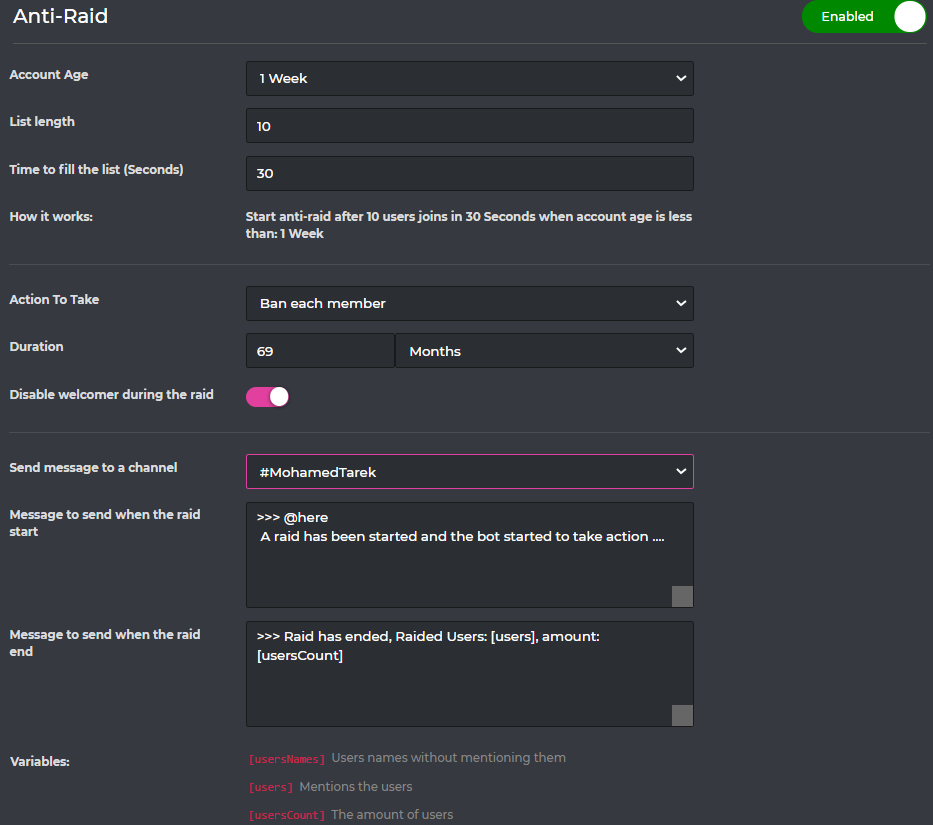
What is Anti-Raid:
DO NOTE: This feature is only available for VIP bots. (Prime & Premium)
This feature will automatically take an appropriate action with server raiders, and it is even customizable!
**How can I set it up:**
1- Select the minimum account age allowed for potential raiders. (Account age)
2- Select the minimum amount of potential raiders. (List length)
3- Select the time of cooldown (Time to fill the list) in seconds
according to the settings in the screenshot below; when 10 accounts with less than 1 week discord account age enters your server in the same 30 seconds they'll get banned (or whatever you set to "Action to take" and "duration" which refers to the "Action to take" punishment)
You can even make it send a customizable warning message with some useful variables to your server staffs into a specific channel whenever the raid starts & ends to keep them informed!

 timber helm
nocturne flax
\<:699262015251808276:736686100935868427>
timber helm
nocturne flax
\<:699262015251808276:736686100935868427>
yes exactly copy this one on the message section
 shadow cairn
timber helm
**What is Anti-Raid:**
**DO NOTE:** This feature is only available for VIP bots...
shadow cairn
timber helm
**What is Anti-Raid:**
**DO NOTE:** This feature is only available for VIP bots...
awesome, thank you
timber helm
shadow cairn
awesome, thank you
my pleasure
shadow cairn
@timber helm can pro bot do persistent roles? like if i made someone a troll, can they left the server and rejoined to remove the troll role, can probot automatically re-add the role to that specific person?
timber helm
shadow cairn
<@485134005105197071> can pro bot do persistent roles? like if i made someone a ...
sadly no, only for muted role will be add if the user leave & re-join the server.
shadow cairn
timber helm
sadly no, only for muted role will be add if the user leave & re-join the server...
dang, thanks again!
timber helm

timber helm
flat scaffold
Thank you
my pleasure
 still oak
Hello I need some help with my subscription. I paid the $35 annual price for premium, yet my account is still not set up as premium. Every premium page still shows I have to pay again. Is there anything I need to do, or am missing?
I also have the receipt to my payment, if necessary.
timber helm
still oak
Hello I need some help with my subscription. I paid the $35 annual price for pre...
hi hi, check https://probot.io/premium/manage
ProBot
Welcome images, moderation, leveling, reaction roles, logs, high quality music and many many more!
still oak
timber helm
hi hi, check https://probot.io/premium/manage
Thank you! will read this now
how do I invite the premium bot? just kick the old and reinvite the new?
timber helm
still oak
how do I invite the premium bot? just kick the old and reinvite the new?
use </vip move:1> bot number , then you will reserve a dm with bot invite link
How do i get the bot number?
Method “1”
if the bot is on your server:
Type the command </vip info:1> and you will see the bot information and the bot number
Method “2”
if the bot isn’t in your server:
1 ~ Go to the subscriptions section of the control panel :
https://probot.io/premium/manage
2 ~ Click on the invitation button of your bot
3- You will be taken to a new page and you will see the name of the bot and on its side a number such as [2739]
**  picture of method [1] :**
https://i8.ae/BNYYE
** picture of method [2] :**
https://i8.ae/NwgCO

 still oak
Thank you Sir! I'ma tinker with it for a second and see if I can get it to work! Thank you again for being so helpful
timber helm
my pleasure, any time
still oak
it unfortunately tells me "The application did not respond" even though the bot is invited into the channel. Does it need administrative perms for access to premium features? I didn't think so, but am not sure
timber helm
still oak
it unfortunately tells me "The application did not respond" even though the bot ...
yes, take a screenshot of your command error please
still oak
timber helm
yes, take a screenshot of your command error please
Apologies, completely fixed and figured out! thank you so much Tiger
lean badgerBOT
still oak
Apologies, completely fixed and figured out! thank you so much Tiger
We noticed that you are a premium user, for faster response go to #premium-support
timber helm
still oak
Apologies, completely fixed and figured out! thank you so much Tiger
my pleasure sir Bombay
still oak
timber helm
my pleasure sir Bombay <:a_heartpink:1018742552221978676>
❤️
@timber helm another slight issue.. Contact the owner to allow you 😦 (on website) IDK what I did wrong?
no access to control panel, might've accidentally locked myself out of VIP. Since I'm owner I thought I would have access, immediately locked me out
and then threw me off control panel
timber helm
still oak
<@485134005105197071> another slight issue.. Contact the owner to allow you 😦 (...
use:
</vip whitelist:1> user:@timber helm
by the way, do you have administration permission?
still oak
I do on the account, not on the bot
also can't whitelist you since you're not in the server currently
timber helm
still oak
also can't whitelist you since you're not in the server currently
good, i mean whitelist your self it’s just an example
still oak
oh apologies, I understand you now
timber helm
nah, no worries no worries
still oak
say's Owner only~
timber helm
you’re not the server owner right ?
make sure the server owner do that command & whitelist you
still oak
timber helm
you’re not the server owner right ?
I am
I am the server owner actually
and it's still telling me I can't
timber helm
add me to your server please
still oak
when I do /vip transfer botid and user, it says bot number incorrect, which I followed the guide on how to get the ID
timber helm
still oak
when I do /vip transfer botid and user, it says bot number incorrect, which I fo...
you can’t transfer tier 1 premium
still oak
ill have to add you to DM you the invite link
lean badgerBOT
still oak
ill have to add you to DM you the invite link
We noticed that you are a premium user, for faster response go to #premium-support
still oak
well, transfer as in "give me my own ownership of the bot" is what I was thinking
timber helm
still oak
ill have to add you to DM you the invite link
done
 loud pike
<@&675070424748654593>
still oak
Tiger was nothing but an amazing help, Truly helped me out and an outstanding person. Very respectful and helpful. Thank you again T!
lean badgerBOT
still oak
Tiger was nothing but an amazing help, Truly helped me out and an outstanding pe...
We noticed that you are a premium user, for faster response go to #premium-support
timber helm
hi hi, sadly you can’t at the moment, only use </top:1> type:Voice
 dusty willow
hey can i ask a quick question, everytime we try the shuffle command it says we dont have permission to use said command,any reason for this?
timber helm
dusty willow
hey can i ask a quick question, everytime we try the shuffle command it says we ...
hey, can you send me a screenshot of your issue please
on your server ^^
dusty willow
timber helm
hey, can you send me a screenshot of your issue please
welp
 timber helm
dusty willow
welp
timber helm
dusty willow
welp
make sure you have the DJ role to allow you use this command or tell the server admin to allow you by editing it from the https://probot.io/dashboard music section
ProBot
Welcome images, moderation, leveling, reaction roles, logs, high quality music and many many more!
dusty willow
i see thank you
timber helm
yw
i believe you can use a test command in your "test" server </setlevel:1> user:@Tıger#0017 type:Voice level:28, then use </top:1> type:Voice, then you can got the logic between the XP & Levels
any time
 lucid robin
How do i make a message embedder like #573048353458356234
spring ether
lucid robin
How do i make a message embedder like <#573048353458356234>
go to https://probot.io/dashboard, select your server, go to embed messages module to create and send embed messages
 river leaf
the rank showing module
lucid robin
spring ether
go to https://probot.io/dashboard, select your server, go to embed messages modu...
Ty
river leaf
river leaf
the rank showing module
i've set it for delete after 5 seconds. but its not deleting the response
 whole stream
Hey guys, I have a question. Is it possible to limit the bot commands to only be put in a certain channel, or at least to have the bot to work and reply to command in a certain channel instead of all?
Example: I want the music bot commands to work only in e specific channel set up for the music bot commands and I do not want people to be able to use the music bot commands in any other channel. If they use the commands there i want no response from the bot to prevent spam in all other channels. Thanks for any help with that 🙂
native geyser
https://probot.io/dashboard -> select your server -> find and edit commands -> add enabled channels
ProBot
Welcome images, moderation, leveling, reaction roles, logs, high quality music and many many more!
whole stream
cant find that second portion, maybe im blind sorry
native geyser
from the list to left click on the servers icon you want to edit
 native geyser
depends on the command i'd suggest checking all the modules one by one (most of them do not contain any commands anyway)
whole stream
its the basic ones that come with the bot
for the music bot to play
right now the command can be used in any channel with a response for the bot that spams any channel basically, i tried taking away permission for the bot to read and write in certain channels but that does not work
native geyser
well for music commands check out music module
whole stream
oh i think i figured it out
yeah music tab and edit every command and set enabled channel, it doesn't work anywhere else now
thank you ❤️
native geyser
you're welcome ^^
 fresh atlas
Heyo, is anyone about?
I'm having an issue with react roles on a server that I'm on
Very specifically, the react role function just seems to have stopped working. It was working previously, and I had set up again to see if it would work again, but sadly nothing
 subtle fog
can you adjust the speed at which someone levels up? i have just set up the leveling up roles and id like to slow down the speed of leveling up just a bit
<@&675070424748654593>
 topaz crest
<@&675070424748654593>
 calm hollow
<@&675070424748654593> ..
sage flint
calm hollow
<@&675070424748654593> ..
bro
sage flint
subtle fog
can you adjust the speed at which someone levels up? i have just set up the leve...
nope
sage flint
topaz crest
<@&675070424748654593>
ID please
 sullen prism
sage flint
ID please
sullen prism
sage flint
ID please
@paper storm
fresh atlas
fresh atlas
I'm having an issue with react roles on a server that I'm on
<@&675070424748654593>
subtle fog
sage flint
nope
i would suggest to add this as a feature to the bot.
people should be able to control that in their server.
sage flint
fresh atlas
<@&675070424748654593>
Kick bot and re invite it again
fresh atlas
sage flint
Kick bot and re invite it again
Did not work
sage flint
what bot reply when you click react?
fresh atlas
what do you mean?
nocturne flax
fresh atlas
what do you mean?
Whats your error code
fresh atlas
nocturne flax
Whats your error code
where would i see these?
nocturne flax
Click the button
fresh atlas
clicking the react emoji doesn't show an error message. the bot doesn't say anything. it just doesn't add the role. it did before, and then just stopped
nocturne flax
Let me see your confi
fresh atlas
here

 fresh atlas
yup
nocturne flax
Which role is higher, admin or bot
fresh atlas
Admin. Can't place bot higher than admin
nocturne flax
So the bot cant give you the role, because the bot role is under you
fresh atlas
The bot also isn't giving anyone else roles though
nocturne flax
Hmmm
fresh atlas
Gimme 2 secs. I'm gonna get another member to try again
No, just double checked. Still doesn't work for other members
sage flint
nocturne flax
So the bot cant give you the role, because the bot role is under you
Its not true, bot still can give you roles even is his role is under then your role
Bot only cannot give roles whats is above the bot role, but can give every role that is under his role
sage flint
fresh atlas
The bot also isn't giving anyone else roles though
Send me invite to your server in DM please
i will check it out
 final cairn
Does this still count? or has it changed?
Zino answered every 2 minutes but that was a long time ago so just making sure it's still the same?
sage flint
nothing changed about that
final cairn
So it's still 2 minutes?
sage flint
1 minut
final cairn
Alright
 wispy sparrow
how does the probot uses the clear command? it will only deletes my text messages. but my try was to use the command like a purge command in a text channel
native geyser
/clear number_of_messages:
due to discord bots can only delete messages that are not older than 2 weeks
 spring rivet
is the dashboard down?
 delicate kernel
can I change the prefix?
native geyser
spring rivet
is the dashboard down?
no
native geyser
delicate kernel
can I change the prefix?
we no longer operate on a prefix so no
 crisp bane
why is one of my server users unable to put in commands
he has permissions to do so but it says you are not able to use the command and when i tried to whitelist the application did not respond
delicate kernel
is the command set properly?
sage flint
delicate kernel
is the command set properly?
follow the channel rules please
sage flint
crisp bane
he has permissions to do so but it says you are not able to use the command and ...
Whats display when they trying to use commands?

 crisp bane
It says you are not allowed to use this command
 digital cipher
how can i make probot stop creating "muted" role
sage flint
crisp bane
It says you are not allowed to use this command
So you have messed up permissions on dashboard
sage flint
 river kayak
its scam
sage flint
digital cipher
how can i make probot stop creating "muted" role
Bot create this role only when you use moderation commands or automod
crisp bane
i dont understand since i haven't had issues before the whole debacle that was the / commands
being dead
sage flint
crisp bane
i dont understand since i haven't had issues before the whole debacle that was t...
You have to go to dashboard https://probot.io/dashboard
Select your server
Click edit on right of command, and delete everything from "Disabled Roles" section
 frank crown
Hola?
sage flint
sage flint
You have to go to dashboard https://probot.io/dashboard
Select your server
Click...
you have to do this in every command that users cannot use
sage flint
frank crown
Hola?
#support-es
sage flint
river kayak
sir, he is here sever join..
i know, someone raid our server with a tons of that fake accounts, we still banning they
sage flint
crisp bane
all blank
Can you send me screenshot?
spring rivet
native geyser
no
I have been trying to enter it since 1 hour ago
and it just loads
i could even on my phone
but not on pc
am i like ip banned?
spring rivet
used brave and still didnt let me. ima try again and if not i will try downloading opera gx
sage flint
what about google chrome?
subtle fog
<@&675070424748654593> Can you set a channel to pictures only? and if someone trying to post something that isnt a picture in a channel it auto deletes it
sage flint
subtle fog
<@&675070424748654593> Can you set a channel to pictures only? and if someone tr...
https://probot.io/dashboard > your server > automod module > only images channels